

Installing the Network
Structured Cabling
•   Comprises of cables and associated hardware parts
•   Provides an organized way of low voltage wiring
•   Transmits data that is built in structured form
•   Need of structured cabling:
    – Consistency – Standard cabling systems for Data, voice and
      video
    – Cost Reduction – Reduces the cost by reducing the number of
      cables
    – Troubleshooting – Isolates and fixes the problem
    – Mobility – Network resources are portable
    – Supports upgrading – Supports future applications
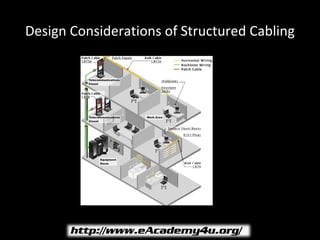
Design Considerations of Structured Cabling
Structured Cabling - II
• Design Considerations of structured cabling
   – Entrance Facilities – Connects the building with the
     outside world
   – Equipment Room – Serves the users within the room
   – Telecommunications Room – Accommodates the cabling
     system equipment
   – Backbone Cabling – Interconnects telecommunications
     room, equipments room and entrance facilities
Structured Cabling - III
• Design Considerations of structured cabling
   – Horizontal Cabling – Extends from the work area
     telecommunications outlet to telecommunications closet
   – Work Area – Components extend from the
     telecommunications outlet to the stations equipment
   – Cable Administration – Involves logical numbering scheme
     that can be applied to all the cables, outlets, patch cables
     and even control systems
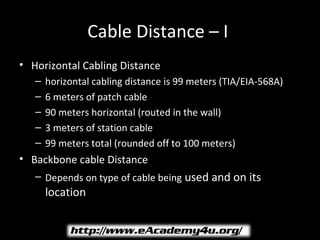
Cable Distance – I
• Horizontal Cabling Distance
   –   horizontal cabling distance is 99 meters (TIA/EIA-568A)
   –   6 meters of patch cable
   –   90 meters horizontal (routed in the wall)
   –   3 meters of station cable
   –   99 meters total (rounded off to 100 meters)
• Backbone cable Distance
   – Depends on type of cable being used and on its
       location
Pulling Cables - I
• While dealing with structured cabling you have to pull
  out the cables from some conduits and punch down the
  free end of the cable
• Conduits are PVC or flexible plastic pipes used to
  organize the cables
• Pull twine through the conduits
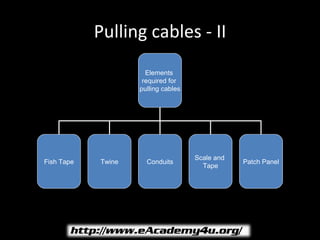
Pulling cables - II
                      Elements
                     required for
                    pulling cables


                                     Scale and
Fish Tape   Twine     Conduits                   Patch Panel
                                       Tape
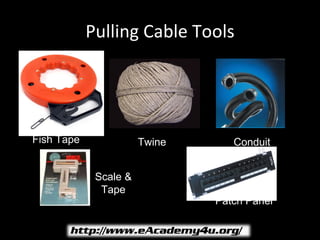
Pulling Cable Tools


Fish Tape              Twine      Conduit


             Scale &
              Tape
                               Patch Panel
Cables
• Two or more wires bound together, in protective jacket
  or sheath
• Different types of cables:
   –   Twisted pair cable
   –   Coaxial cable
   –   Optical fiber cable
   –   Shielded and Unshielded cable
Cable Connectors – I
• Part of cable which plugs into port or interface to
  connect one device to another
• Connectors: Male and Female
   – DB-15 connectors - Commonly used on electronic and
     computer equipment
   – RJ45 Connectors – Used in networking to connect
     computer to network card
   – BNC Coaxial Connectors – Used with coaxial cables or used
     with Ethernet system
Cable Connectors – II
   – 210 Patch Plug – Uses internal pair isolation, pair-to-pair
     compensation and layered contacts
   – Token-Ring Data Connector – Used on end of a shielded
     twisted pair cable
• Distinguishing Wires
   – Color coding makes identification each wire or pair of
     wires in the cable easier
   – Tip and ring – Identifies plus wire and minus wire
Cabling Tools
• Used in networking to work with wires or devices or to
  connect wires and devices to each other
• Different tools used are:
   –   Punchdown Tools
   –   RJ45 Crimping Tool
   –   Coaxial Cable Crimping Tool
   –   Pin Crimping Tool
   –   Cable stripper
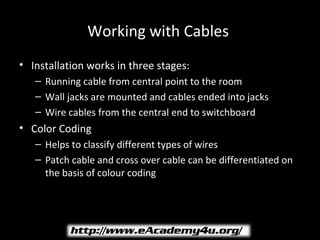
Working with Cables
• Installation works in three stages:
   – Running cable from central point to the room
   – Wall jacks are mounted and cables ended into jacks
   – Wire cables from the central end to switchboard
• Color Coding
   – Helps to classify different types of wires
   – Patch cable and cross over cable can be differentiated on
     the basis of colour coding
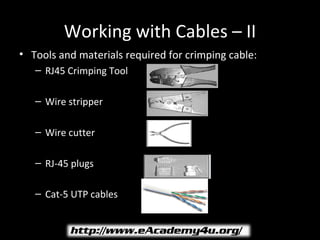
Working with Cables – II
• Tools and materials required for crimping cable:
   – RJ45 Crimping Tool

   – Wire stripper

   – Wire cutter

   – RJ-45 plugs

   – Cat-5 UTP cables
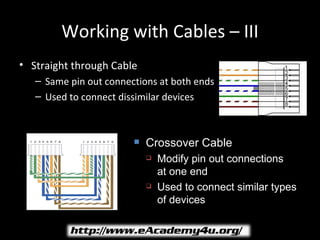
Working with Cables – III
• Straight through Cable
   – Same pin out connections at both ends
   – Used to connect dissimilar devices


                           Crossover Cable
                               Modify pin out connections
                                at one end
                               Used to connect similar types
                                of devices
Working with Cables – IV
• Weak Link
   – Mostly, weakest link is the station cable, which runs from
     wall to desktop
• Information Outlet
   – Protect horizontal wiring from physical handling that
     cables receive
   – Keep installation neat and eliminate unsightly snake pit of
     unused cables coiled on floor
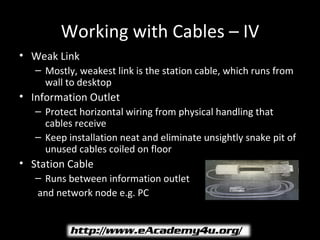
• Station Cable
   – Runs between information outlet
   and network node e.g. PC
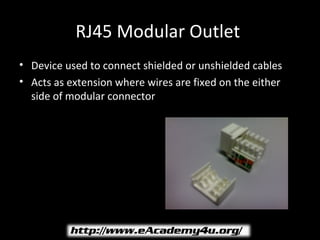
RJ45 Modular Outlet
• Device used to connect shielded or unshielded cables
• Acts as extension where wires are fixed on the either
  side of modular connector
Grounding
• Two wires that come from the transformer are called the
  hot wires usually RED in color and neutral wire in BLACK
• A large building requires more than one earth ground
  and the earth ground between two buildings is different
  in different situations
• Fiber optic cable is the best option to link buildings
• Power grounding problems are two types: open or high
  resistance ground or an abnormal pulse or condition
  between power conductors
Closet
•   Main point in an organization where major networking cabling come
    together
•   Equipment in a wiring closet includes:
     – Patch panels for vertical wiring
     – Patch panels for horizontal wiring
     – Wiring hubs
     – Uninterruptible Power Supplies
•   Types of wiring closets:
     – Intermediate Distribution Frames (IDF) – at least one IDF per floor for a
       multi storey building
     – Main Distribution Frame (MDF) – where the inside cable plant meets
       the outside world’s connectivity. All IDFs throughout building are
       connected to MDF in a star topology
Closet Details
• Typical equipment in a wiring closet are:
   – Backbone wiring cross-connect device
   – Horizontal wiring cross-connect device
   – Patch cables
   – Wiring hubs
   – Backup power for wiring hubs
   – Router and modems
   – Access server
   – Fire Sprinkler System
   The layout for the equipments in a wiring closet are put on
     the wall or in an equipment rack
Cross-Connect Devices - I
• Make easy to configure horizontal and backbone wiring
• Terminates cable or group of cables
• Adaptability is easy when the organization grows year
  after year
• In data networks – Small cross-connect device will
  terminate backbone cable and make it available for
  connection to wiring hub
• In wiring hub – Larger cross-connect device will
  terminate horizontal wiring before it enters hub
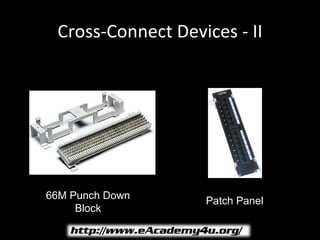
Cross-Connect Devices - II


66M Punch Down     Patch Panel
     Block
Cabinets and Racks
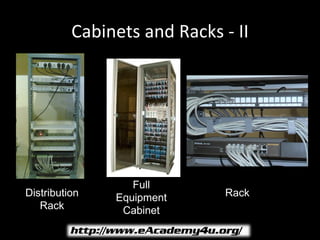
• Patch panels and wiring hubs can mount on wall in
  brackets, stand in racks or reside in full cabinets that
  are racks with doors
• If small installation – Mount patch panels and wiring
  hubs on wall
Cabinets and Racks - II


                  Full
Distribution   Equipment     Rack
   Rack         Cabinet
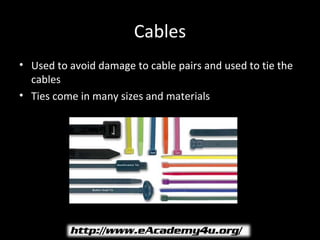
Cables
• Used to avoid damage to cable pairs and used to tie the
  cables
• Ties come in many sizes and materials
Uninterruptible Power Supplies (UPS)
• Equip network file servers
  with backup power
• Allow wiring hubs to go
  without power during power
  failure
• VA system is more accurate
  than wattage rating
• As a quick rule of thumb
  choose your UPS with VA
  rating at least two times the
  wattage rating consumption
Conduits
• Plastic pipes that run through wall plate between wiring closets
• If space left:
    –   Used to pull a new cable
    –   Used as replacement for a bad one
    –   For added capacity
    –   New conduit should have a piece of string used to pull the cable in
        future
• Fish tape
    – An equipment which is part of any installers toolbox
    – Consists of a reel of wire stiff enough to push its way through the
      conduit
    – When pulling through conduit ensure the power is turned off for
      those wires
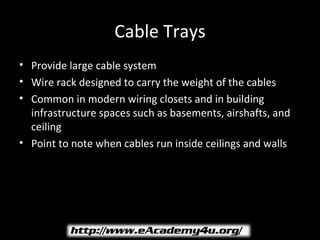
Cable Trays
• Provide large cable system
• Wire rack designed to carry the weight of the cables
• Common in modern wiring closets and in building
  infrastructure spaces such as basements, airshafts, and
  ceiling
• Point to note when cables run inside ceilings and walls
Configuring Backbone Cable
• Backbone wiring is also known as vertical wiring
• TIA/EIA standard suggests that the backbone system should be a star
  configuration
• Wiring closet that contain patch and cross-connect panels which
  connect to horizontal wiring
• Backbone wiring link each wiring closet to cross-connect point or
  (MDF)
• Locating the closet
   – Different parameters to keep in mind when going for closet
• Backbone Cable
   – Modern installations use UTP or fiber-optic cable for the
     backbone
Installation of Racks
• Explains how to place networking equipments and
  accumulate different small equipment on the plate of
  the rack
• Factors to be considered while installing the rack:
   – Location to install the rack
   – Installation holes marking
   – Installation of the rack nuts
   – Mount the different rails onto the rack
   – Mount the different devices onto the rack
   One U equals 1.75 inches
Managing Cables
• Cables:
   – Should not run over desk
   – Should not be entangled
• To manage cables:
   – Free space on the desk where the cables will run
   – Holes at top of desk
   – Mount to protect cables
Wire Manager
• Used to mange wires that are common to one place
• Tools used to manage wires:
   –   Cable ties
   –   Conduits
   –   Twines
   –   Cable manager
   –   Labels
   –   Spiral wraps
   –   Unitags
Labeling Cables
• Used to identify path of the cables
• Distinct color and pattern of code of cable label helps
  identify cables
• Labels can be written with a pen or a pencil
• Cables labeled using Label templates
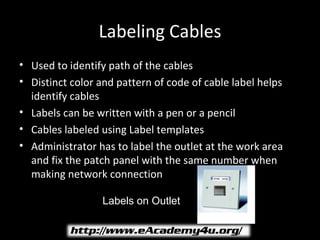
• Administrator has to label the outlet at the work area
  and fix the patch panel with the same number when
  making network connection

                  Labels on Outlet

Installingthenetwork 110505060419-phpapp02

  • 1.
  • 2.
    Structured Cabling • Comprises of cables and associated hardware parts • Provides an organized way of low voltage wiring • Transmits data that is built in structured form • Need of structured cabling: – Consistency – Standard cabling systems for Data, voice and video – Cost Reduction – Reduces the cost by reducing the number of cables – Troubleshooting – Isolates and fixes the problem – Mobility – Network resources are portable – Supports upgrading – Supports future applications
  • 3.
    Design Considerations ofStructured Cabling
  • 4.
    Structured Cabling -II • Design Considerations of structured cabling – Entrance Facilities – Connects the building with the outside world – Equipment Room – Serves the users within the room – Telecommunications Room – Accommodates the cabling system equipment – Backbone Cabling – Interconnects telecommunications room, equipments room and entrance facilities
  • 5.
    Structured Cabling -III • Design Considerations of structured cabling – Horizontal Cabling – Extends from the work area telecommunications outlet to telecommunications closet – Work Area – Components extend from the telecommunications outlet to the stations equipment – Cable Administration – Involves logical numbering scheme that can be applied to all the cables, outlets, patch cables and even control systems
  • 6.
    Cable Distance –I • Horizontal Cabling Distance – horizontal cabling distance is 99 meters (TIA/EIA-568A) – 6 meters of patch cable – 90 meters horizontal (routed in the wall) – 3 meters of station cable – 99 meters total (rounded off to 100 meters) • Backbone cable Distance – Depends on type of cable being used and on its location
  • 7.
    Pulling Cables -I • While dealing with structured cabling you have to pull out the cables from some conduits and punch down the free end of the cable • Conduits are PVC or flexible plastic pipes used to organize the cables • Pull twine through the conduits
  • 8.
    Pulling cables -II Elements required for pulling cables Scale and Fish Tape Twine Conduits Patch Panel Tape
  • 9.
    Pulling Cable Tools FishTape Twine Conduit Scale & Tape Patch Panel
  • 10.
    Cables • Two ormore wires bound together, in protective jacket or sheath • Different types of cables: – Twisted pair cable – Coaxial cable – Optical fiber cable – Shielded and Unshielded cable
  • 11.
    Cable Connectors –I • Part of cable which plugs into port or interface to connect one device to another • Connectors: Male and Female – DB-15 connectors - Commonly used on electronic and computer equipment – RJ45 Connectors – Used in networking to connect computer to network card – BNC Coaxial Connectors – Used with coaxial cables or used with Ethernet system
  • 12.
    Cable Connectors –II – 210 Patch Plug – Uses internal pair isolation, pair-to-pair compensation and layered contacts – Token-Ring Data Connector – Used on end of a shielded twisted pair cable • Distinguishing Wires – Color coding makes identification each wire or pair of wires in the cable easier – Tip and ring – Identifies plus wire and minus wire
  • 13.
    Cabling Tools • Usedin networking to work with wires or devices or to connect wires and devices to each other • Different tools used are: – Punchdown Tools – RJ45 Crimping Tool – Coaxial Cable Crimping Tool – Pin Crimping Tool – Cable stripper
  • 14.
    Working with Cables •Installation works in three stages: – Running cable from central point to the room – Wall jacks are mounted and cables ended into jacks – Wire cables from the central end to switchboard • Color Coding – Helps to classify different types of wires – Patch cable and cross over cable can be differentiated on the basis of colour coding
  • 15.
    Working with Cables– II • Tools and materials required for crimping cable: – RJ45 Crimping Tool – Wire stripper – Wire cutter – RJ-45 plugs – Cat-5 UTP cables
  • 16.
    Working with Cables– III • Straight through Cable – Same pin out connections at both ends – Used to connect dissimilar devices  Crossover Cable  Modify pin out connections at one end  Used to connect similar types of devices
  • 17.
    Working with Cables– IV • Weak Link – Mostly, weakest link is the station cable, which runs from wall to desktop • Information Outlet – Protect horizontal wiring from physical handling that cables receive – Keep installation neat and eliminate unsightly snake pit of unused cables coiled on floor • Station Cable – Runs between information outlet and network node e.g. PC
  • 18.
    RJ45 Modular Outlet •Device used to connect shielded or unshielded cables • Acts as extension where wires are fixed on the either side of modular connector
  • 19.
    Grounding • Two wiresthat come from the transformer are called the hot wires usually RED in color and neutral wire in BLACK • A large building requires more than one earth ground and the earth ground between two buildings is different in different situations • Fiber optic cable is the best option to link buildings • Power grounding problems are two types: open or high resistance ground or an abnormal pulse or condition between power conductors
  • 20.
    Closet • Main point in an organization where major networking cabling come together • Equipment in a wiring closet includes: – Patch panels for vertical wiring – Patch panels for horizontal wiring – Wiring hubs – Uninterruptible Power Supplies • Types of wiring closets: – Intermediate Distribution Frames (IDF) – at least one IDF per floor for a multi storey building – Main Distribution Frame (MDF) – where the inside cable plant meets the outside world’s connectivity. All IDFs throughout building are connected to MDF in a star topology
  • 21.
    Closet Details • Typicalequipment in a wiring closet are: – Backbone wiring cross-connect device – Horizontal wiring cross-connect device – Patch cables – Wiring hubs – Backup power for wiring hubs – Router and modems – Access server – Fire Sprinkler System The layout for the equipments in a wiring closet are put on the wall or in an equipment rack
  • 22.
    Cross-Connect Devices -I • Make easy to configure horizontal and backbone wiring • Terminates cable or group of cables • Adaptability is easy when the organization grows year after year • In data networks – Small cross-connect device will terminate backbone cable and make it available for connection to wiring hub • In wiring hub – Larger cross-connect device will terminate horizontal wiring before it enters hub
  • 23.
    Cross-Connect Devices -II 66M Punch Down Patch Panel Block
  • 24.
    Cabinets and Racks •Patch panels and wiring hubs can mount on wall in brackets, stand in racks or reside in full cabinets that are racks with doors • If small installation – Mount patch panels and wiring hubs on wall
  • 25.
    Cabinets and Racks- II Full Distribution Equipment Rack Rack Cabinet
  • 26.
    Cables • Used toavoid damage to cable pairs and used to tie the cables • Ties come in many sizes and materials
  • 27.
    Uninterruptible Power Supplies(UPS) • Equip network file servers with backup power • Allow wiring hubs to go without power during power failure • VA system is more accurate than wattage rating • As a quick rule of thumb choose your UPS with VA rating at least two times the wattage rating consumption
  • 28.
    Conduits • Plastic pipesthat run through wall plate between wiring closets • If space left: – Used to pull a new cable – Used as replacement for a bad one – For added capacity – New conduit should have a piece of string used to pull the cable in future • Fish tape – An equipment which is part of any installers toolbox – Consists of a reel of wire stiff enough to push its way through the conduit – When pulling through conduit ensure the power is turned off for those wires
  • 29.
    Cable Trays • Providelarge cable system • Wire rack designed to carry the weight of the cables • Common in modern wiring closets and in building infrastructure spaces such as basements, airshafts, and ceiling • Point to note when cables run inside ceilings and walls
  • 30.
    Configuring Backbone Cable •Backbone wiring is also known as vertical wiring • TIA/EIA standard suggests that the backbone system should be a star configuration • Wiring closet that contain patch and cross-connect panels which connect to horizontal wiring • Backbone wiring link each wiring closet to cross-connect point or (MDF) • Locating the closet – Different parameters to keep in mind when going for closet • Backbone Cable – Modern installations use UTP or fiber-optic cable for the backbone
  • 31.
    Installation of Racks •Explains how to place networking equipments and accumulate different small equipment on the plate of the rack • Factors to be considered while installing the rack: – Location to install the rack – Installation holes marking – Installation of the rack nuts – Mount the different rails onto the rack – Mount the different devices onto the rack One U equals 1.75 inches
  • 32.
    Managing Cables • Cables: – Should not run over desk – Should not be entangled • To manage cables: – Free space on the desk where the cables will run – Holes at top of desk – Mount to protect cables
  • 33.
    Wire Manager • Usedto mange wires that are common to one place • Tools used to manage wires: – Cable ties – Conduits – Twines – Cable manager – Labels – Spiral wraps – Unitags
  • 34.
    Labeling Cables • Usedto identify path of the cables • Distinct color and pattern of code of cable label helps identify cables • Labels can be written with a pen or a pencil • Cables labeled using Label templates • Administrator has to label the outlet at the work area and fix the patch panel with the same number when making network connection Labels on Outlet