Internet & Network Introduction
                                      UTP & Fiber Cabling


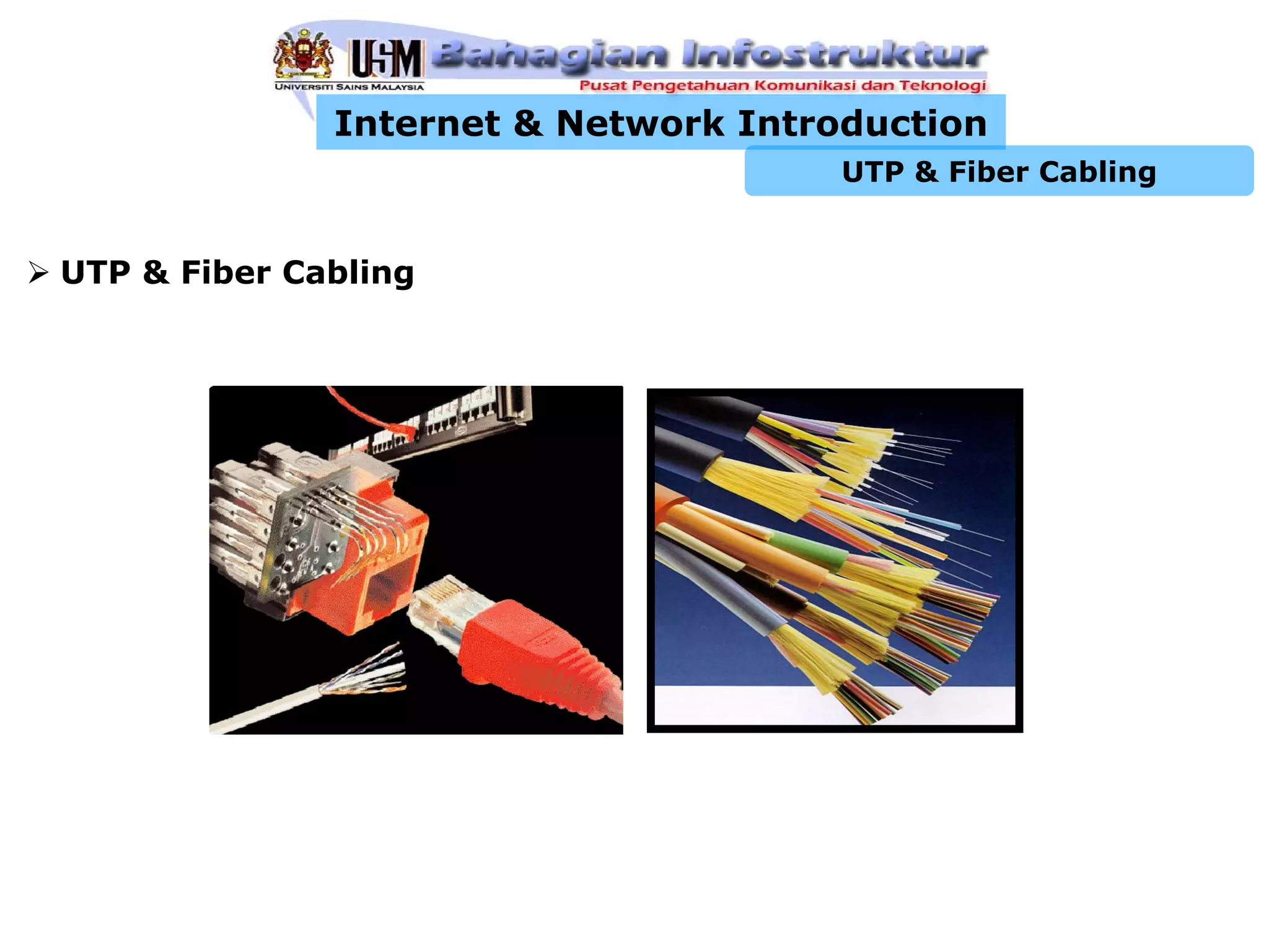
UTP & Fiber Cabling
Internet & Network Introduction
                                           UTP & Fiber Cabling


Structured Cabling Infrastructure
 • Mounted and permanent
 • Components:
      Information Outlet with Face Plate
      Patch Panel
      UTP Cable
      Patch Cord
Internet & Network Introduction
                                              UTP & Fiber Cabling


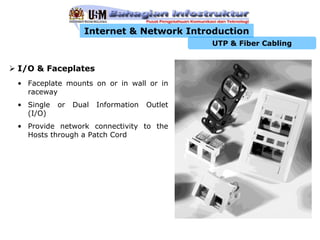
I/O & Faceplates
• Faceplate mounts on or in wall or in
  raceway
• Single   or   Dual   Information   Outlet
  (I/O)
• Provide network connectivity to the
  Hosts through a Patch Cord
Internet & Network Introduction
                                          UTP & Fiber Cabling


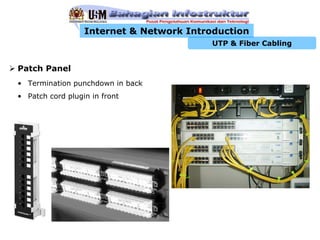
Patch Panel
• Termination punchdown in back
• Patch cord plugin in front
Internet & Network Introduction
                                   UTP & Fiber Cabling

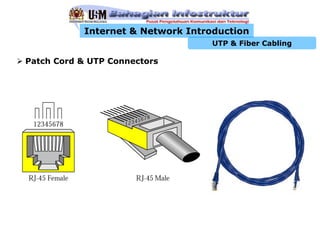
Patch Cord & UTP Connectors
Internet & Network Introduction
                                      UTP & Fiber Cabling

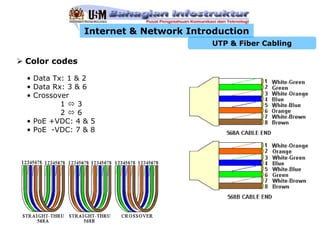
Color codes

• Data Tx: 1 & 2
• Data Rx: 3 & 6
• Crossover
         1    3
         2    6
• PoE +VDC: 4 & 5
• PoE -VDC: 7 & 8
Internet & Network Introduction
                                       UTP & Fiber Cabling

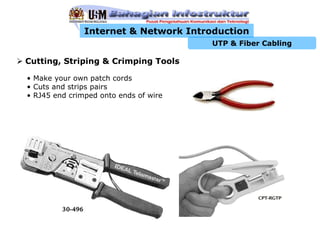
Cutting, Striping & Crimping Tools

• Make your own patch cords
• Cuts and strips pairs
• RJ45 end crimped onto ends of wire
Internet & Network Introduction
                                                 UTP & Fiber Cabling

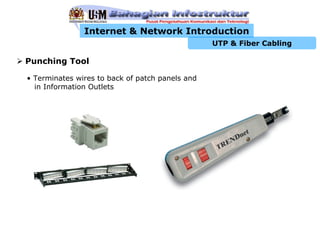
Punching Tool

• Terminates wires to back of patch panels and
  in Information Outlets
Internet & Network Introduction
                                   UTP & Fiber Cabling

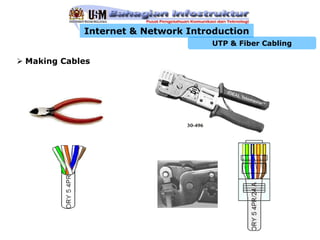
Making Cables
Internet & Network Introduction
                                                                          UTP & Fiber Cabling

Making Cables (cont.)
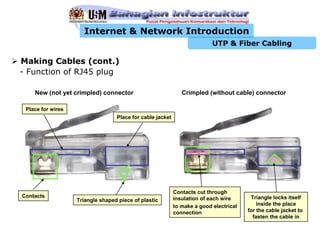
- Function of RJ45 plug

    New (not yet crimpled) connector                          Crimpled (without cable) connector

 Place for wires
                                  Place for cable jacket


   Function of RJ45 plug


                                                           Contacts cut through
Contacts                                                   insulation of each wire      Triangle locks itself
                   Triangle shaped piece of plastic
                                                           to make a good electrical       inside the place
                                                           connection                  for the cable jacket to
                                                                                         fasten the cable in
Internet & Network Introduction
                                                                    UTP & Fiber Cabling

Making Cables (cont.)
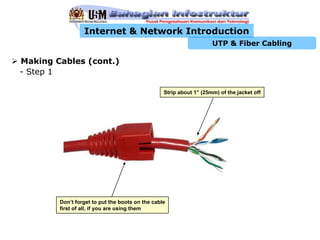
- Step 1

                                                 Strip about 1” (25mm) of the jacket off


        Don’t forget to put the boots on the cable
        first of all, if you are using them
Internet & Network Introduction
                                                                 UTP & Fiber Cabling

Making Cables (cont.)
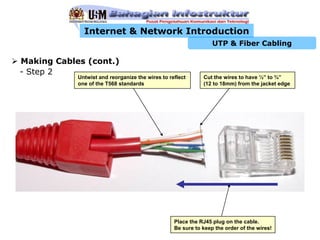
- Step 2
            Untwist and reorganize the wires to reflect      Cut the wires to have ½” to ¾”
            one of the T568 standards                        (12 to 18mm) from the jacket edge


                                                  Place the RJ45 plug on the cable.
                                                  Be sure to keep the order of the wires!
Internet & Network Introduction
                                                   UTP & Fiber Cabling

Making Cables (cont.)
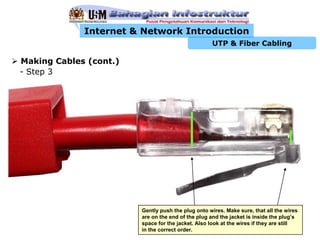
- Step 3


                        Gently push the plug onto wires. Make sure, that all the wires
                        are on the end of the plug and the jacket is inside the plug’s
                        space for the jacket. Also look at the wires if they are still
                        in the correct order.
Internet & Network Introduction
                                                                             UTP & Fiber Cabling
  Making Cables (cont.)
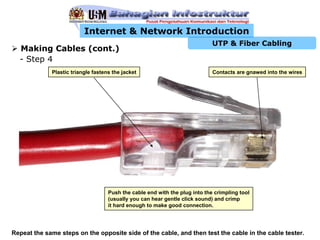
  - Step 4
             Plastic triangle fastens the jacket                             Contacts are gnawed into the wires


                                    Push the cable end with the plug into the crimpling tool
                                    (usually you can hear gentle click sound) and crimp
                                    it hard enough to make good connection.


Repeat the same steps on the opposite side of the cable, and then test the cable in the cable tester.
Internet & Network Introduction
                                                 UTP & Fiber Cabling


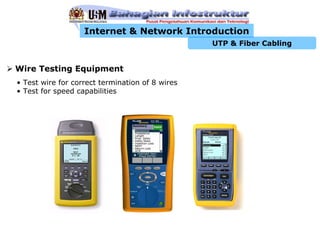
Wire Testing Equipment
• Test wire for correct termination of 8 wires
• Test for speed capabilities
Internet & Network Introduction
                                                  UTP & Fiber Cabling

Cabling Rules
• Try to avoid running cables parallel to power cables.
• Do not bend cables to less than four times the diameter of the cable.
• If you bundle a group of cables together with cable ties (zip ties), do not
  over-cinch them. You should be able to turn the tie with fingers.
• Keep cables away from devices which can introduce noise into them. Here's a
  short list: copy machines, electric heaters, speakers, printers, TV sets,
  fluorescent lights, copiers, welding machines, microwave ovens, telephones,
  fans, elevators, motors, electric ovens, dryers, washing machines, and shop
  equipment.
• Avoid stretching UTP cables (tension when pulling cables should not exceed
 25 LBS).
• Do not run UTP cable outside of a building. It presents a very dangerous
  lightning hazard!
• Do not use a stapler to secure UTP cables. Use telephone wire/RJ6 coaxial
  wire hangers which are available at most hardware stores.
Internet & Network Introduction
                                         UTP & Fiber Cabling


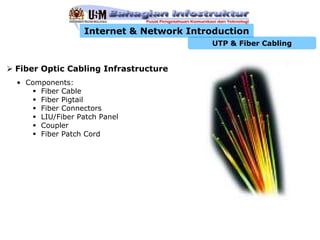
Fiber Optic Cabling Infrastructure
• Components:
     Fiber Cable
     Fiber Pigtail
     Fiber Connectors
     LIU/Fiber Patch Panel
     Coupler
     Fiber Patch Cord
Internet & Network Introduction
                                           UTP & Fiber Cabling


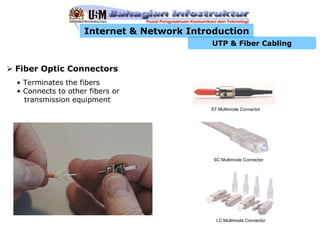
Fiber Optic Connectors
• Terminates the fibers
• Connects to other fibers or
  transmission equipment
                                          ST Multimode Connector


                                           SC Multimode Connector


                                            LC Multimode Connector
Internet & Network Introduction
                                                 UTP & Fiber Cabling

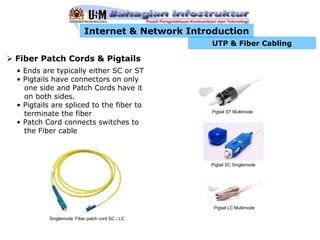
Fiber Patch Cords & Pigtails
• Ends are typically either SC or ST
• Pigtails have connectors on only
  one side and Patch Cords have it
  on both sides.
• Pigtails are spliced to the fiber to
  terminate the fiber                            Pigtail ST Multimode

• Patch Cord connects switches to
  the Fiber cable


                                                Pigtail SC Singlemode


                                                 Pigtail LC Multimode

         Singlemode Fiber patch cord SC - LC
Internet & Network Introduction
                                                                   UTP & Fiber Cabling

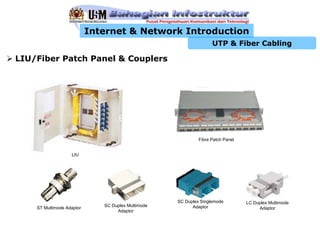
LIU/Fiber Patch Panel & Couplers


                                                             Fibre Patch Panel


                   LIU


                                                    SC Duplex Singlemode         LC Duplex Multimode
                              SC Duplex Multimode         Adaptor
    ST Multimode Adaptor                                                              Adaptor
                                   Adaptor

Utp & fiber 1

  • 1.
    Internet & NetworkIntroduction UTP & Fiber Cabling UTP & Fiber Cabling
  • 2.
    Internet & NetworkIntroduction UTP & Fiber Cabling Structured Cabling Infrastructure • Mounted and permanent • Components: Information Outlet with Face Plate Patch Panel UTP Cable Patch Cord
  • 3.
    Internet & NetworkIntroduction UTP & Fiber Cabling I/O & Faceplates • Faceplate mounts on or in wall or in raceway • Single or Dual Information Outlet (I/O) • Provide network connectivity to the Hosts through a Patch Cord
  • 4.
    Internet & NetworkIntroduction UTP & Fiber Cabling Patch Panel • Termination punchdown in back • Patch cord plugin in front
  • 5.
    Internet & NetworkIntroduction UTP & Fiber Cabling Patch Cord & UTP Connectors
  • 6.
    Internet & NetworkIntroduction UTP & Fiber Cabling Color codes • Data Tx: 1 & 2 • Data Rx: 3 & 6 • Crossover 1 3 2 6 • PoE +VDC: 4 & 5 • PoE -VDC: 7 & 8
  • 7.
    Internet & NetworkIntroduction UTP & Fiber Cabling Cutting, Striping & Crimping Tools • Make your own patch cords • Cuts and strips pairs • RJ45 end crimped onto ends of wire
  • 8.
    Internet & NetworkIntroduction UTP & Fiber Cabling Punching Tool • Terminates wires to back of patch panels and in Information Outlets
  • 9.
    Internet & NetworkIntroduction UTP & Fiber Cabling Making Cables
  • 10.
    Internet & NetworkIntroduction UTP & Fiber Cabling Making Cables (cont.) - Function of RJ45 plug New (not yet crimpled) connector Crimpled (without cable) connector Place for wires Place for cable jacket Function of RJ45 plug Contacts cut through Contacts insulation of each wire Triangle locks itself Triangle shaped piece of plastic to make a good electrical inside the place connection for the cable jacket to fasten the cable in
  • 11.
    Internet & NetworkIntroduction UTP & Fiber Cabling Making Cables (cont.) - Step 1 Strip about 1” (25mm) of the jacket off Don’t forget to put the boots on the cable first of all, if you are using them
  • 12.
    Internet & NetworkIntroduction UTP & Fiber Cabling Making Cables (cont.) - Step 2 Untwist and reorganize the wires to reflect Cut the wires to have ½” to ¾” one of the T568 standards (12 to 18mm) from the jacket edge Place the RJ45 plug on the cable. Be sure to keep the order of the wires!
  • 13.
    Internet & NetworkIntroduction UTP & Fiber Cabling Making Cables (cont.) - Step 3 Gently push the plug onto wires. Make sure, that all the wires are on the end of the plug and the jacket is inside the plug’s space for the jacket. Also look at the wires if they are still in the correct order.
  • 14.
    Internet & NetworkIntroduction UTP & Fiber Cabling Making Cables (cont.) - Step 4 Plastic triangle fastens the jacket Contacts are gnawed into the wires Push the cable end with the plug into the crimpling tool (usually you can hear gentle click sound) and crimp it hard enough to make good connection. Repeat the same steps on the opposite side of the cable, and then test the cable in the cable tester.
  • 15.
    Internet & NetworkIntroduction UTP & Fiber Cabling Wire Testing Equipment • Test wire for correct termination of 8 wires • Test for speed capabilities
  • 16.
    Internet & NetworkIntroduction UTP & Fiber Cabling Cabling Rules • Try to avoid running cables parallel to power cables. • Do not bend cables to less than four times the diameter of the cable. • If you bundle a group of cables together with cable ties (zip ties), do not over-cinch them. You should be able to turn the tie with fingers. • Keep cables away from devices which can introduce noise into them. Here's a short list: copy machines, electric heaters, speakers, printers, TV sets, fluorescent lights, copiers, welding machines, microwave ovens, telephones, fans, elevators, motors, electric ovens, dryers, washing machines, and shop equipment. • Avoid stretching UTP cables (tension when pulling cables should not exceed 25 LBS). • Do not run UTP cable outside of a building. It presents a very dangerous lightning hazard! • Do not use a stapler to secure UTP cables. Use telephone wire/RJ6 coaxial wire hangers which are available at most hardware stores.
  • 17.
    Internet & NetworkIntroduction UTP & Fiber Cabling Fiber Optic Cabling Infrastructure • Components: Fiber Cable Fiber Pigtail Fiber Connectors LIU/Fiber Patch Panel Coupler Fiber Patch Cord
  • 18.
    Internet & NetworkIntroduction UTP & Fiber Cabling Fiber Optic Connectors • Terminates the fibers • Connects to other fibers or transmission equipment ST Multimode Connector SC Multimode Connector LC Multimode Connector
  • 19.
    Internet & NetworkIntroduction UTP & Fiber Cabling Fiber Patch Cords & Pigtails • Ends are typically either SC or ST • Pigtails have connectors on only one side and Patch Cords have it on both sides. • Pigtails are spliced to the fiber to terminate the fiber Pigtail ST Multimode • Patch Cord connects switches to the Fiber cable Pigtail SC Singlemode Pigtail LC Multimode Singlemode Fiber patch cord SC - LC
  • 20.
    Internet & NetworkIntroduction UTP & Fiber Cabling LIU/Fiber Patch Panel & Couplers Fibre Patch Panel LIU SC Duplex Singlemode LC Duplex Multimode SC Duplex Multimode Adaptor ST Multimode Adaptor Adaptor Adaptor