INSTALLATION OF OS
By George Smith-Moore
WINDOWS 7
Windows 7 is the OS that I will be installing, I will be installing the OS via the USB.
STEP 1) PREP EQUIPMENT
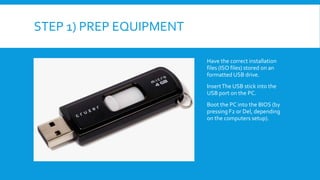
Have the correct installation
files (ISO files) stored on an
formatted USB drive.
InsertThe USB stick into the
USB port on the PC.
Boot the PC into the BIOS (by
pressing F2 or Del, depending
on the computers setup).
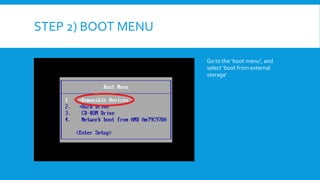
STEP 2) BOOT MENU
Go to the ‘boot menu’, and
select ‘boot from external
storage’
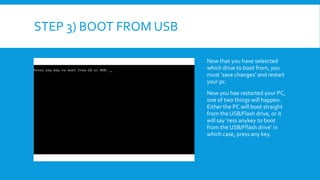
STEP 3) BOOT FROM USB
Now that you have selescted
which drive to boot from, you
must ‘save changes’ and restart
your pc.
Now you hae restarted your PC,
one of two things will happen.
Either the PC will boot straight
from the USB/Flash drive, or it
will say ‘ress anykey to boot
from the USB/Fflash drive’ in
which case, press any key.
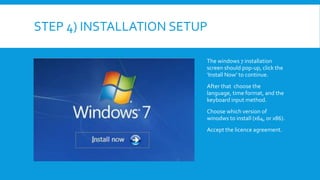
STEP 4) INSTALLATION SETUP
The windows 7 installation
screen should pop-up, click the
‘Install Now’ to continue.
After that choose the
language, time format, and the
keyboard input method.
Choose which version of
winodws to install (x64, or x86).
Accept the licence agreement.
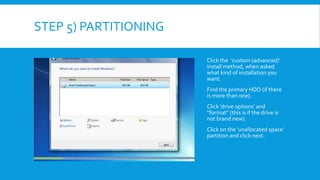
STEP 5) PARTITIONING
Click the ‘custom (advanced)’
install method, when asked
what kind of installation you
want.
Find the primary HDD (if there
is more than one).
Click ‘drive options’ and
“format” (this is if the drive is
not brand new).
Click on the ‘unallocated space’
partition and click next.
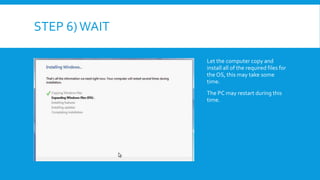
STEP 6)WAIT
Let the computer copy and
install all of the required files for
the OS, this may take some
time.
The PC may restart during this
time.
STEP 7) PERSONALISE
Now the hard part is over, all you
have to do is personalise the OS
to you!
Type in a name for the PC and a
User name for your account, hit
next.
Type in a password, hit next.
Type in the activation code/
product key for your OS, hit next.
Click ‘use recommended settings’
and set up the time.
Choose the network that you will
be using (Home Network, for
using the home internet).
STEP 8) FINALLY…
 Now that you have got this far, install drivers and windows updates.

Installation of OS

  • 1.
    INSTALLATION OF OS ByGeorge Smith-Moore
  • 2.
    WINDOWS 7 Windows 7is the OS that I will be installing, I will be installing the OS via the USB.
  • 3.
    STEP 1) PREPEQUIPMENT Have the correct installation files (ISO files) stored on an formatted USB drive. InsertThe USB stick into the USB port on the PC. Boot the PC into the BIOS (by pressing F2 or Del, depending on the computers setup).
  • 4.
    STEP 2) BOOTMENU Go to the ‘boot menu’, and select ‘boot from external storage’
  • 5.
    STEP 3) BOOTFROM USB Now that you have selescted which drive to boot from, you must ‘save changes’ and restart your pc. Now you hae restarted your PC, one of two things will happen. Either the PC will boot straight from the USB/Flash drive, or it will say ‘ress anykey to boot from the USB/Fflash drive’ in which case, press any key.
  • 6.
    STEP 4) INSTALLATIONSETUP The windows 7 installation screen should pop-up, click the ‘Install Now’ to continue. After that choose the language, time format, and the keyboard input method. Choose which version of winodws to install (x64, or x86). Accept the licence agreement.
  • 7.
    STEP 5) PARTITIONING Clickthe ‘custom (advanced)’ install method, when asked what kind of installation you want. Find the primary HDD (if there is more than one). Click ‘drive options’ and “format” (this is if the drive is not brand new). Click on the ‘unallocated space’ partition and click next.
  • 8.
    STEP 6)WAIT Let thecomputer copy and install all of the required files for the OS, this may take some time. The PC may restart during this time.
  • 9.
    STEP 7) PERSONALISE Nowthe hard part is over, all you have to do is personalise the OS to you! Type in a name for the PC and a User name for your account, hit next. Type in a password, hit next. Type in the activation code/ product key for your OS, hit next. Click ‘use recommended settings’ and set up the time. Choose the network that you will be using (Home Network, for using the home internet).
  • 10.
    STEP 8) FINALLY… Now that you have got this far, install drivers and windows updates.