Friend
s
Welcome!
How to hack
windows
administrator
password using
command
prompt
• Installing a new operating system.
• Logging in with other accounts.
• Using a USB-Flash method.
Common things that everyone:
• A Bootable Windows 8 DVD or
Bootable USB Flash Drive
• A PC or Laptop with Windows
8/8.1 Installed in it.
• A Little Brain
Things to be required
• This Method works only for winnows 8 and8.1.
• This is only for educational purpose.
Things to remember :
Alert
• Due to miss-type of commands.
• Skipping of any step’s in the process.
• Insert Bootable Windows 8 DVD or Bootable USB Flash Drive and
Restart your PC.
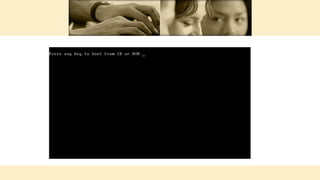
• If you Insert a DVD it will ask to press Any Key to Boot From DVD. So
press any Key.
Procedure:
• Wait until it loads and ask for Language settings. Keep Values as
Shown below
• A. United Kingdom
• B. United States
• C. US- International
• Then Click on Next
• In next Window Click on Repair Your Computer Instead Of Install
Now
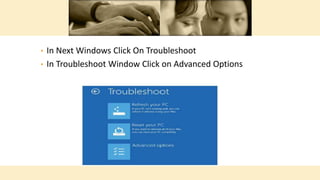
• In Next Windows Click On Troubleshoot
• In Troubleshoot Window Click on Advanced Options
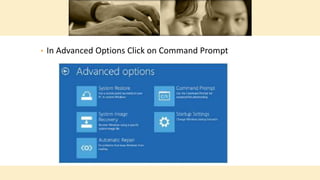
• In Advanced Options Click on Command Prompt
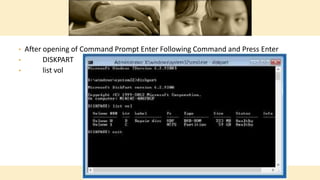
• After opening of Command Prompt Enter Following Command and Press Enter
• DISKPART
• list vol
• CMD shows you List of Partitions You have on Your PC. Then Enter Following Command
and Press Enter exit
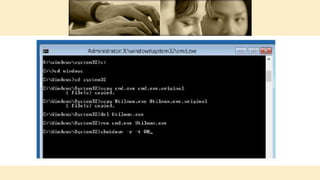
• Next enter the following Commands one by one and press enter after each command.
( Make Sure to Replace C in the First Command With Appropriate Drive Letter in
Which Your Windows 8/8.1 is Installed ).
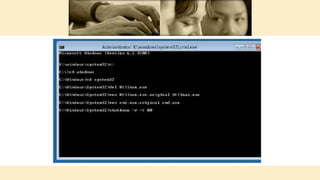
• C:
• cd windows
• cd system32
• copy cmd.exe cmd.exe.original
• copy Utilman.exe Utilman.exe.original
• ren cmd.exe Utilman.exe
• shutdown -r -t 00
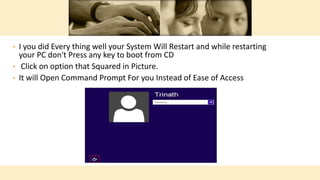
• I you did Every thing well your System Will Restart and while restarting
your PC don't Press any key to boot from CD
• Click on option that Squared in Picture.
• It will Open Command Prompt For you Instead of Ease of Access
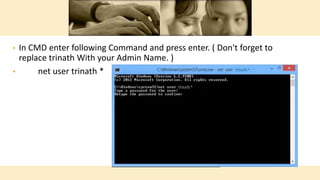
• In CMD enter following Command and press enter. ( Don't forget to
replace trinath With your Admin Name. )
• net user trinath *
• CMD will ask you to Enter new Password ( Press Enter after typing
Passsword ). Be caution Nothing is shown while you are typing
Password in CMD. So Remember while you are entering.
• Next CMD will Ask you to retype your Password for confirmation (
Press Enter after typing Password ). So Retype it.
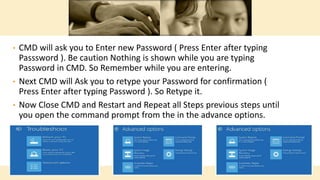
• Now Close CMD and Restart and Repeat all Steps previous steps until
you open the command prompt from the in the advance options.
• After CMD Opens Enter Following Commands and press enter after each
command
• C:
• cd windows
• cd system32
• del Utilman.exe
• ren Utilman.exe.original Utilman.exe
• ren cmd.exe.original cmd.exe
• shutdown -r -t 00
• After shutdown You Can Remove your DVD or USB drive and Start
your PC normally and log in With new Password Enjoy
• If you Like this Article Please Share with your friends Using Social
media Buttons ,subscribe to my channel and get accessed for more
videos ,if you have any quires send it comment section .
Finally:
• Discuss the topics covered.
• Reiterate your welcome.
• Remind the participants to submit paperwork.
• Wrap up the orientation session.
Summary

How to hack windows 8 or 8.1 password using command prompt

  • 1.
  • 2.
    • Installing anew operating system. • Logging in with other accounts. • Using a USB-Flash method. Common things that everyone:
  • 3.
    • A BootableWindows 8 DVD or Bootable USB Flash Drive • A PC or Laptop with Windows 8/8.1 Installed in it. • A Little Brain Things to be required
  • 4.
    • This Methodworks only for winnows 8 and8.1. • This is only for educational purpose. Things to remember : Alert • Due to miss-type of commands. • Skipping of any step’s in the process.
  • 5.
    • Insert BootableWindows 8 DVD or Bootable USB Flash Drive and Restart your PC. • If you Insert a DVD it will ask to press Any Key to Boot From DVD. So press any Key. Procedure:
  • 7.
    • Wait untilit loads and ask for Language settings. Keep Values as Shown below • A. United Kingdom • B. United States • C. US- International • Then Click on Next • In next Window Click on Repair Your Computer Instead Of Install Now
  • 8.
    • In NextWindows Click On Troubleshoot • In Troubleshoot Window Click on Advanced Options
  • 9.
    • In AdvancedOptions Click on Command Prompt
  • 10.
    • After openingof Command Prompt Enter Following Command and Press Enter • DISKPART • list vol
  • 11.
    • CMD showsyou List of Partitions You have on Your PC. Then Enter Following Command and Press Enter exit • Next enter the following Commands one by one and press enter after each command. ( Make Sure to Replace C in the First Command With Appropriate Drive Letter in Which Your Windows 8/8.1 is Installed ). • C: • cd windows • cd system32 • copy cmd.exe cmd.exe.original • copy Utilman.exe Utilman.exe.original • ren cmd.exe Utilman.exe • shutdown -r -t 00
  • 13.
    • I youdid Every thing well your System Will Restart and while restarting your PC don't Press any key to boot from CD • Click on option that Squared in Picture. • It will Open Command Prompt For you Instead of Ease of Access
  • 14.
    • In CMDenter following Command and press enter. ( Don't forget to replace trinath With your Admin Name. ) • net user trinath *
  • 15.
    • CMD willask you to Enter new Password ( Press Enter after typing Passsword ). Be caution Nothing is shown while you are typing Password in CMD. So Remember while you are entering. • Next CMD will Ask you to retype your Password for confirmation ( Press Enter after typing Password ). So Retype it. • Now Close CMD and Restart and Repeat all Steps previous steps until you open the command prompt from the in the advance options.
  • 16.
    • After CMDOpens Enter Following Commands and press enter after each command • C: • cd windows • cd system32 • del Utilman.exe • ren Utilman.exe.original Utilman.exe • ren cmd.exe.original cmd.exe • shutdown -r -t 00
  • 18.
    • After shutdownYou Can Remove your DVD or USB drive and Start your PC normally and log in With new Password Enjoy • If you Like this Article Please Share with your friends Using Social media Buttons ,subscribe to my channel and get accessed for more videos ,if you have any quires send it comment section . Finally:
  • 19.
    • Discuss thetopics covered. • Reiterate your welcome. • Remind the participants to submit paperwork. • Wrap up the orientation session. Summary