P7: Test a configuredcomputersystemforfunctionality
Lookingto the workI have completedforthe tasksP5 and P6, I had installedthe followingsoftware:
Norton,Microsoftoffice,andSkype. Ihadalsoinstalledthe softwareforthe TP-LinkwirelessNIC,
thisisshownin the P6 task,in thistask I hadtestedthe software rigorously,andthe picturescanbe
foundinthe document.
Testing software
Below is a summarised test plan for the TP-Link, Wireless NIC software.
Picturesof testingare showninP6.
When testing Norton, I have made sure it is able to detect and remove malware. As
well as being able to check registry errors. I also checked its abilities to create custom
schedules/scans.
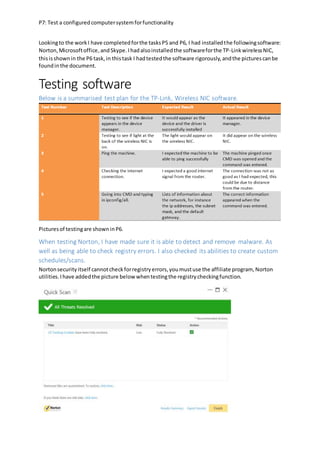
Nortonsecurityitself cannotcheckforregistryerrors,youmustuse the affiliate program, Norton
utilities.Ihave addedthe picture below whentestingthe registrycheckingfunction.
P7: Test a configuredcomputersystemforfunctionality
The quickscan was effectiveinremovingmalware,asshownbythe trackingcookiesthathave been
removed.The scanwas fastand itwas not resource demanding.The scanwasfinishedwithin5
minutes.
UsingNortonUtilities,Ihave beenable toscanthe registry,thisscan foundtwoerrors,and withthe
systembeingina‘messy’state (i.e.notdefragmented) the scanwascompletedinlessthana
minute,thisaddstothe functionalityof the PCas itis a low-resource,highlyeffectivetool for
scanningandmendingthe computerregistry.
P7: Test a configuredcomputersystemforfunctionality
Thispicture showsthe abilitytocreate customscans, yetto schedule scans,youmustgointo
settings.
It ishere that the scans are organised.The automatictasks tab(nothighlighted) customisesthe scan
and the schedulingtaborganiseswhenthe scanwill commence.The additionof anautomatic
feature improvesfunctionalityasthe scan isautomatic,itis notcommencedunlessthe computeris
almostinan idle state.Thisthereofore improvesfunctionality.
P7: Test a configuredcomputersystemforfunctionality
I had to test Microsoft office, for functionality, and so I made sure that all of the
applications were installed and opened (no picture shown). I then made some routine
tests in the test plan.
TEST 1: fontsize isalso available nexttothe dropdownlist.
TEST 2: Differentfile extensionsavailable,includingpdf,pictures.
P7: Test a configuredcomputersystemforfunctionality
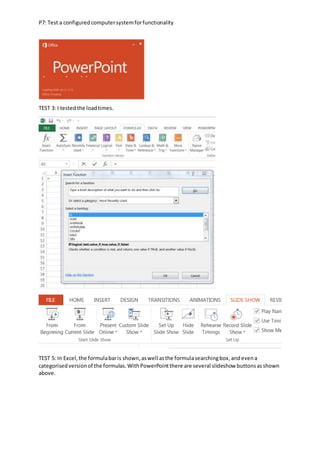
TEST 3: I testedthe loadtimes.
TEST 5: In Excel,the formulabaris shown,aswell asthe formulasearchingbox,andevena
categorisedversionof the formulas.WithPowerPointthere are several slideshow buttonsasshown
above.
P7: Test a configuredcomputersystemforfunctionality
TEST 6: there is a wordart section,yetitis verybasicand sois disappointing.
The test plan for skype is below. Below that is the evidence for each test
corresponding to the test order.
Figure 1/2 Taken from the skype website
UnfortunatelyIcannottake a picture of the qualityof a call,nor the loadtimes.ButI can assure you
that these were recordedandwrote downaccuratelyinthe testplan.
Desktop shortcuts/ Folder access
I have testedseveral shortcuts,toensure thattheygoto the rightplace I had to not onlycheck
applicationshortcuts,butalsocheckfoldershortcutsonthe desktoppage.AlthoughIcannotshow
youthe process,Ican showyou before andafterphotos.
P7: Test a configuredcomputersystemforfunctionality
As youcan see fromthe testingfolderscreen,I have alsowenttothe extenttocheckthe file
managementsystems.Ihave ensuredthatthe preview pane isopen.AlthoughIcannotshow it,I
P7: Test a configuredcomputersystemforfunctionality
have ensuredthatthe layoutincludesthe menupane,aswell asthe details,preview andnavigation
panes.I also made sure that the folderwasbeingsharedwithnoone.
The shortcuts thatare shownon the taskbarallow ergonomicaccess.Sousingthe magnifyingtool,I
have ensuredthatitis dockedmode tomake it accessible toboththe able andthe slightedin terms
of eyesight. The use of havingthe magnifierdockedatthe top of the screenmeansthat the entirety
of the screenisstill visible whencomparingittothe otheralternativesandsowouldimprove the
efficiencyof the employee.
Device Drivers
To testwhetherall of the device driverswere installedcorrectly,Ihadto lookat whetherthere were
any unwanted iconsthatwouldrepresentanyproblems(althoughIdidnotfindanyon the system,I
have placedan image foundongoogle toshowcase errors).
P7: Test a configuredcomputersystemforfunctionality
Aftercheckingtomake sure all software hasno errors,I lookedfurtherintothe installedhardware
and software.Sotodo thisI clickedthe propertiesbuttonafterright-clickingonthe corresponding
driver.Afteralreadyestablishingthattheywere all installedcorrectly,Icheckedtolookforany
updates.
BelowIhave showna single example astohow I have checkedthe device driverandmade sure itis
updated.Ididthisthoroughcheck to the monitor,speakers,mouse,keyboard,optical drive,NIC,
HDD, and RAM as well asthe printer.Ihave shownthe wayof checkingdriversthroughthe device
manage.
P7: Test a configuredcomputersystemforfunctionality
For some aspectsof the PC, youcannot checkthe driver.Anexampleof thisisthe RAM, sofor thisI
whenintothe systempropertiesandmade sure all of the RAM wasrecognisedbythe system.For
otherareas suchas the printer, yougointothe control panel,thencheck the versionnumberof the
P7: Test a configuredcomputersystemforfunctionality
specifiedobjectbyhighlightingitandpressingproperties.Of course inmanycases,a printer(for
example),maynotshowupwhenpluggedinoris on the network,soyouuse the ‘add a
device/printer’function.
Whenusinga wirelessdevice (USBdevicesare automaticallydetectedbywindows),youuse this
functionandthenwindowsscansforthe devicesinthe area.
Printer Paper Setup
Settingupthe printerpapersize needstobe done intwodifferentways.Firstof all itneedstobe
setupfromthe printeritself,thenitalsoneedstobe setupinthe applications(sothiswouldbe the
individualopenoffice applications).
So,after clickingoncontrol panel,click‘view devicesandprinters’
Thenfindthe printerthatyou want.
Thenfindthe preferencessettingspage (itwill differfromeachprinter)
Afterfindingthis,checkthe settingstomake sure that theyare setto A4.
P7: Test a configuredcomputersystemforfunctionality
 ADD IN A PART ABOUT CHANGINGTHE PRINTER PAPERSIZE IN OPEN OFFICE
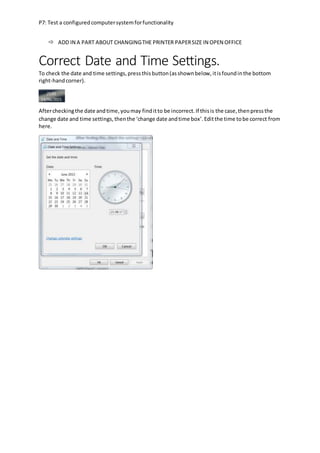
Correct Date and Time Settings.
To check the date and time settings,pressthisbutton(asshownbelow,itisfoundinthe bottom
right-handcorner).
Aftercheckingthe date andtime,youmay finditto be incorrect.If thisis the case,thenpressthe
change date and time settings,thenthe ‘change date andtime box’.Editthe time tobe correct from
here.

UNTI 2 P7

  • 1.
    P7: Test aconfiguredcomputersystemforfunctionality Lookingto the workI have completedforthe tasksP5 and P6, I had installedthe followingsoftware: Norton,Microsoftoffice,andSkype. Ihadalsoinstalledthe softwareforthe TP-LinkwirelessNIC, thisisshownin the P6 task,in thistask I hadtestedthe software rigorously,andthe picturescanbe foundinthe document. Testing software Below is a summarised test plan for the TP-Link, Wireless NIC software. Picturesof testingare showninP6. When testing Norton, I have made sure it is able to detect and remove malware. As well as being able to check registry errors. I also checked its abilities to create custom schedules/scans. Nortonsecurityitself cannotcheckforregistryerrors,youmustuse the affiliate program, Norton utilities.Ihave addedthe picture below whentestingthe registrycheckingfunction.
  • 2.
    P7: Test aconfiguredcomputersystemforfunctionality The quickscan was effectiveinremovingmalware,asshownbythe trackingcookiesthathave been removed.The scanwas fastand itwas not resource demanding.The scanwasfinishedwithin5 minutes. UsingNortonUtilities,Ihave beenable toscanthe registry,thisscan foundtwoerrors,and withthe systembeingina‘messy’state (i.e.notdefragmented) the scanwascompletedinlessthana minute,thisaddstothe functionalityof the PCas itis a low-resource,highlyeffectivetool for scanningandmendingthe computerregistry.
  • 3.
    P7: Test aconfiguredcomputersystemforfunctionality Thispicture showsthe abilitytocreate customscans, yetto schedule scans,youmustgointo settings. It ishere that the scans are organised.The automatictasks tab(nothighlighted) customisesthe scan and the schedulingtaborganiseswhenthe scanwill commence.The additionof anautomatic feature improvesfunctionalityasthe scan isautomatic,itis notcommencedunlessthe computeris almostinan idle state.Thisthereofore improvesfunctionality.
  • 4.
    P7: Test aconfiguredcomputersystemforfunctionality I had to test Microsoft office, for functionality, and so I made sure that all of the applications were installed and opened (no picture shown). I then made some routine tests in the test plan. TEST 1: fontsize isalso available nexttothe dropdownlist. TEST 2: Differentfile extensionsavailable,includingpdf,pictures.
  • 5.
    P7: Test aconfiguredcomputersystemforfunctionality TEST 3: I testedthe loadtimes. TEST 5: In Excel,the formulabaris shown,aswell asthe formulasearchingbox,andevena categorisedversionof the formulas.WithPowerPointthere are several slideshow buttonsasshown above.
  • 6.
    P7: Test aconfiguredcomputersystemforfunctionality TEST 6: there is a wordart section,yetitis verybasicand sois disappointing. The test plan for skype is below. Below that is the evidence for each test corresponding to the test order. Figure 1/2 Taken from the skype website UnfortunatelyIcannottake a picture of the qualityof a call,nor the loadtimes.ButI can assure you that these were recordedandwrote downaccuratelyinthe testplan. Desktop shortcuts/ Folder access I have testedseveral shortcuts,toensure thattheygoto the rightplace I had to not onlycheck applicationshortcuts,butalsocheckfoldershortcutsonthe desktoppage.AlthoughIcannotshow youthe process,Ican showyou before andafterphotos.
  • 7.
    P7: Test aconfiguredcomputersystemforfunctionality As youcan see fromthe testingfolderscreen,I have alsowenttothe extenttocheckthe file managementsystems.Ihave ensuredthatthe preview pane isopen.AlthoughIcannotshow it,I
  • 8.
    P7: Test aconfiguredcomputersystemforfunctionality have ensuredthatthe layoutincludesthe menupane,aswell asthe details,preview andnavigation panes.I also made sure that the folderwasbeingsharedwithnoone. The shortcuts thatare shownon the taskbarallow ergonomicaccess.Sousingthe magnifyingtool,I have ensuredthatitis dockedmode tomake it accessible toboththe able andthe slightedin terms of eyesight. The use of havingthe magnifierdockedatthe top of the screenmeansthat the entirety of the screenisstill visible whencomparingittothe otheralternativesandsowouldimprove the efficiencyof the employee. Device Drivers To testwhetherall of the device driverswere installedcorrectly,Ihadto lookat whetherthere were any unwanted iconsthatwouldrepresentanyproblems(althoughIdidnotfindanyon the system,I have placedan image foundongoogle toshowcase errors).
  • 9.
    P7: Test aconfiguredcomputersystemforfunctionality Aftercheckingtomake sure all software hasno errors,I lookedfurtherintothe installedhardware and software.Sotodo thisI clickedthe propertiesbuttonafterright-clickingonthe corresponding driver.Afteralreadyestablishingthattheywere all installedcorrectly,Icheckedtolookforany updates. BelowIhave showna single example astohow I have checkedthe device driverandmade sure itis updated.Ididthisthoroughcheck to the monitor,speakers,mouse,keyboard,optical drive,NIC, HDD, and RAM as well asthe printer.Ihave shownthe wayof checkingdriversthroughthe device manage.
  • 10.
    P7: Test aconfiguredcomputersystemforfunctionality For some aspectsof the PC, youcannot checkthe driver.Anexampleof thisisthe RAM, sofor thisI whenintothe systempropertiesandmade sure all of the RAM wasrecognisedbythe system.For otherareas suchas the printer, yougointothe control panel,thencheck the versionnumberof the
  • 11.
    P7: Test aconfiguredcomputersystemforfunctionality specifiedobjectbyhighlightingitandpressingproperties.Of course inmanycases,a printer(for example),maynotshowupwhenpluggedinoris on the network,soyouuse the ‘add a device/printer’function. Whenusinga wirelessdevice (USBdevicesare automaticallydetectedbywindows),youuse this functionandthenwindowsscansforthe devicesinthe area. Printer Paper Setup Settingupthe printerpapersize needstobe done intwodifferentways.Firstof all itneedstobe setupfromthe printeritself,thenitalsoneedstobe setupinthe applications(sothiswouldbe the individualopenoffice applications). So,after clickingoncontrol panel,click‘view devicesandprinters’ Thenfindthe printerthatyou want. Thenfindthe preferencessettingspage (itwill differfromeachprinter) Afterfindingthis,checkthe settingstomake sure that theyare setto A4.
  • 12.
    P7: Test aconfiguredcomputersystemforfunctionality  ADD IN A PART ABOUT CHANGINGTHE PRINTER PAPERSIZE IN OPEN OFFICE Correct Date and Time Settings. To check the date and time settings,pressthisbutton(asshownbelow,itisfoundinthe bottom right-handcorner). Aftercheckingthe date andtime,youmay finditto be incorrect.If thisis the case,thenpressthe change date and time settings,thenthe ‘change date andtime box’.Editthe time tobe correct from here.