


Instagram in Teaching
and Learning
(Teachers and Learners)
Dr.C.Thanavathi
Assistant Professor of History
V.O.C.College of Education,
Thoothukudi – 628008. Tamil Nadu. India.
9629256771
thanavathic@thanavathi-edu.in
http://thanavathi-edu.in/index.html
Content
What is Instagram
History
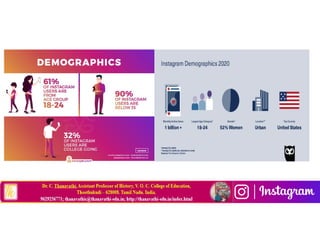
Demographics
Main functions
Tabs
Liking and commenting
Hashtags
Trends
Photo editing
What is Instagram
Instagram is an online mobile photo-sharing, video sharing and
social networking service that enables its users to take
pictures and videos and share them on a variety of social
media networking platforms, such as Facebook, Twitter,
Tumblr and Flickr.
Instagram photos confine to a square shape, similar to Kodak
Instamatic and Polaroid images.
The name “Instagram” is a combination of “instant camera”
and “telegram”.
History of Instagram
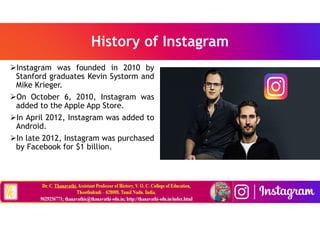
Instagram was founded in 2010 by
Stanford graduates Kevin Systorm and
Mike Krieger.
On October 6, 2010, Instagram was
added to the Apple App Store.
In April 2012, Instagram was added to
Android.
In late 2012, Instagram was purchased
by Facebook for $1 billion.
Instagram logos
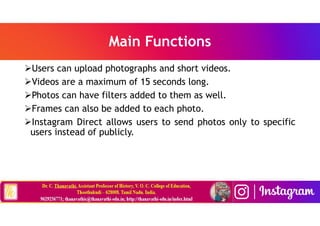
Main Functions
Users can upload photographs and short videos.
Videos are a maximum of 15 seconds long.
Photos can have filters added to them as well.
Frames can also be added to each photo.
Instagram Direct allows users to send photos only to specific
users instead of publicly.
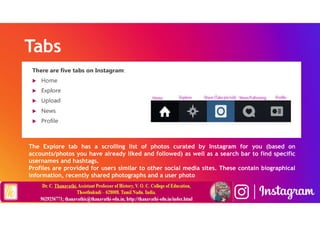
Tabs
The Explore tab has a scrolling list of photos curated by Instagram for you (based on
accounts/photos you have already liked and followed) as well as a search bar to find specific
usernames and hashtags.
Profiles are provided for users similar to other social media sites. These contain biographical
information, recently shared photographs and a user photo
Liking and commenting
Hashtags
Trends
• Throwback Thursday: This trend usually includes pictures of a
user’s early childhood, past special occasions or monumental
events. These photos are shared with the hashtag #TBT or
#ThrowbackThursday.
• Selfie: A self-portrait taken by the user (usually at arms-
length).
• Fun fact: selfie was appointed the “word of the year” in 2013
by the Oxford Dictionary because of the popularity of selfies
that were caused by Instagram
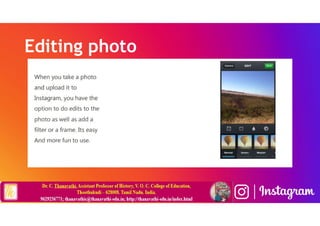
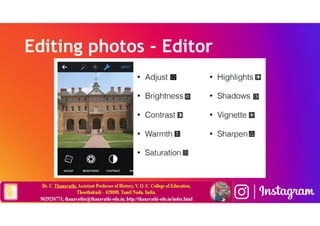
Editing photo
Editing photos - Editor
Putting Instagram on Facebook/Twitter
• A great way to cross-promote your content is to put images on
Facebook/Twitter that you originally posted on Instagram and
vice-versa.
• Always get permission first and always credit the user!
Hashtag Ideas
• Keep hashtags simple & short.
• If it carries over to Twitter, then the user only has 140
characters - don’t waste them!
• Make sure it’s unique. Search for it on Twitter and Instagram
to see if it has been used before.
• Build awareness of the hashtag by including it in every related
thing you post.
• Don’t be afraid to promote your hashtag during the event!
• PS: W&M has a list of hashtags for campus-wide events and
happenings.
Post Ideas
• Look back on history.
• Go “behind-the-scenes”
• Host photo contests!
• Find a different point of view.
• Show off students/alumni (don’t just showcase your office!)
• Have fun.
• Focus on the details.
• Show off the campus.
Instagram & the SAMR Model
• Dr. Ruben Puentedura’s SAMR model offers a lens for examining how technology is adopted in a
classroom. As you strive to incorporate online tools into your classroom, we encourage you to use this
model as an analytic tool.
• Here is an example of how Instagram might fit within the SAMR model:
• Substitution: Students take photos of their homework assignment (rather than write it down).
• Augmentation: Students can use hashtags to curate collections of photos.
• Modification: Students leave comments on photos or videos and tag classmates in their comments.
After making comments on posts or having discussions under posts, they can also analyze the archive
of the discussions.
• Redefinition: Students can create videos demonstrating their knowledge about a topic and share
these videos with a broad audience via Instagram to receive feedback.
NOTE: Far too often, technology is used as a direct substitute for other low-tech tools (e.g., pencil and
paper). While substitution has some benefits (e.g., students develop their technology skills and
knowledge), we encourage you to think about how you might use Instagram to modify or redefine
learning.
Learning Activities
• Literature: Your students can take a photo of the cover of a book they have read and share it
with book lovers on Instagram and make comments on the book. In this way you as a teacher
help them build a community
• Science: Students can capture photos or videos about phases of germination (or another
scientific process) and engage in a critical examination of the differences in the
photos/phases.
• Language: Students can create visual flash cards, using photos from Instagram, to improve
their vocabulary.
• Arts: Students can create a digital photo gallery of their art projects to share with parents,
teachers, and a broader community. Students can also use and critically examine the filters
on Instagram to improve their photography skills and knowledge.
• History: Students can take and explore photos of historic buildings in the city they live in to
more closely examine history.
• Music: Students who know how to play an instrument can teach others how to play it step by
step through short videos.
• Other: Instead of having a physical file of portfolio, you can encourage your students to
create a digital portfolio, or e-portfolio, on Instagram.
Ways to Use Instagram to Enrich Your
Classroom
• Extend Your Learning Through Educational Hashtags
• Share Student Work
• Connect with Other Educators
• Access Teacher Resources
• Teach Students About Themes, Books, and Poetry
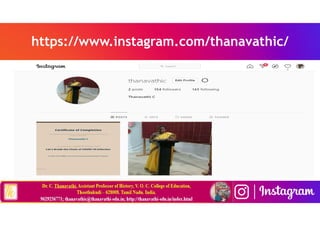
https://www.instagram.com/thanavathic/
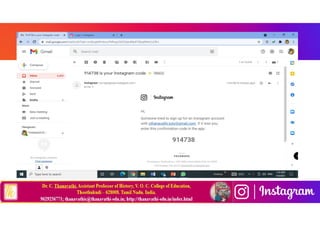
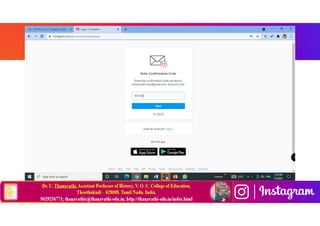
Getting start with Instagram
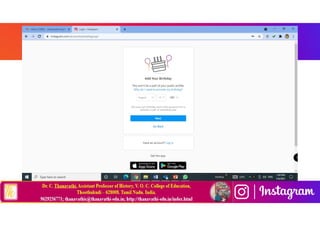
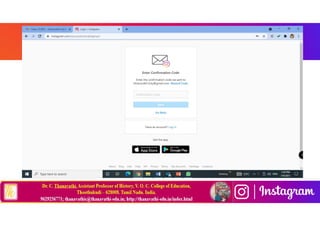
How to create Instagram Account
Instagram in Teaching
and Learning
(Teachers and Learners)
Dr.C.Thanavathi
Assistant Professor of History
V.O.C.College of Education,
Thoothukudi – 628008. Tamil Nadu. India.
9629256771
thanavathic@thanavathi-edu.in
http://thanavathi-edu.in/index.html

Instagram in teaching and learning Dr.C.Thanavathi

  • 1.
    Instagram in Teaching andLearning (Teachers and Learners) Dr.C.Thanavathi Assistant Professor of History V.O.C.College of Education, Thoothukudi – 628008. Tamil Nadu. India. 9629256771 thanavathic@thanavathi-edu.in http://thanavathi-edu.in/index.html
  • 2.
    Content What is Instagram History Demographics Mainfunctions Tabs Liking and commenting Hashtags Trends Photo editing
  • 3.
    What is Instagram Instagramis an online mobile photo-sharing, video sharing and social networking service that enables its users to take pictures and videos and share them on a variety of social media networking platforms, such as Facebook, Twitter, Tumblr and Flickr. Instagram photos confine to a square shape, similar to Kodak Instamatic and Polaroid images. The name “Instagram” is a combination of “instant camera” and “telegram”.
  • 4.
    History of Instagram Instagramwas founded in 2010 by Stanford graduates Kevin Systorm and Mike Krieger. On October 6, 2010, Instagram was added to the Apple App Store. In April 2012, Instagram was added to Android. In late 2012, Instagram was purchased by Facebook for $1 billion.
  • 5.
  • 7.
    Main Functions Users canupload photographs and short videos. Videos are a maximum of 15 seconds long. Photos can have filters added to them as well. Frames can also be added to each photo. Instagram Direct allows users to send photos only to specific users instead of publicly.
  • 8.
    Tabs The Explore tabhas a scrolling list of photos curated by Instagram for you (based on accounts/photos you have already liked and followed) as well as a search bar to find specific usernames and hashtags. Profiles are provided for users similar to other social media sites. These contain biographical information, recently shared photographs and a user photo
  • 9.
  • 10.
  • 11.
    Trends • Throwback Thursday:This trend usually includes pictures of a user’s early childhood, past special occasions or monumental events. These photos are shared with the hashtag #TBT or #ThrowbackThursday. • Selfie: A self-portrait taken by the user (usually at arms- length). • Fun fact: selfie was appointed the “word of the year” in 2013 by the Oxford Dictionary because of the popularity of selfies that were caused by Instagram
  • 12.
  • 13.
  • 15.
    Putting Instagram onFacebook/Twitter • A great way to cross-promote your content is to put images on Facebook/Twitter that you originally posted on Instagram and vice-versa. • Always get permission first and always credit the user!
  • 16.
    Hashtag Ideas • Keephashtags simple & short. • If it carries over to Twitter, then the user only has 140 characters - don’t waste them! • Make sure it’s unique. Search for it on Twitter and Instagram to see if it has been used before. • Build awareness of the hashtag by including it in every related thing you post. • Don’t be afraid to promote your hashtag during the event! • PS: W&M has a list of hashtags for campus-wide events and happenings.
  • 17.
    Post Ideas • Lookback on history. • Go “behind-the-scenes” • Host photo contests! • Find a different point of view. • Show off students/alumni (don’t just showcase your office!) • Have fun. • Focus on the details. • Show off the campus.
  • 18.
    Instagram & theSAMR Model • Dr. Ruben Puentedura’s SAMR model offers a lens for examining how technology is adopted in a classroom. As you strive to incorporate online tools into your classroom, we encourage you to use this model as an analytic tool. • Here is an example of how Instagram might fit within the SAMR model: • Substitution: Students take photos of their homework assignment (rather than write it down). • Augmentation: Students can use hashtags to curate collections of photos. • Modification: Students leave comments on photos or videos and tag classmates in their comments. After making comments on posts or having discussions under posts, they can also analyze the archive of the discussions. • Redefinition: Students can create videos demonstrating their knowledge about a topic and share these videos with a broad audience via Instagram to receive feedback. NOTE: Far too often, technology is used as a direct substitute for other low-tech tools (e.g., pencil and paper). While substitution has some benefits (e.g., students develop their technology skills and knowledge), we encourage you to think about how you might use Instagram to modify or redefine learning.
  • 19.
    Learning Activities • Literature:Your students can take a photo of the cover of a book they have read and share it with book lovers on Instagram and make comments on the book. In this way you as a teacher help them build a community • Science: Students can capture photos or videos about phases of germination (or another scientific process) and engage in a critical examination of the differences in the photos/phases. • Language: Students can create visual flash cards, using photos from Instagram, to improve their vocabulary. • Arts: Students can create a digital photo gallery of their art projects to share with parents, teachers, and a broader community. Students can also use and critically examine the filters on Instagram to improve their photography skills and knowledge. • History: Students can take and explore photos of historic buildings in the city they live in to more closely examine history. • Music: Students who know how to play an instrument can teach others how to play it step by step through short videos. • Other: Instead of having a physical file of portfolio, you can encourage your students to create a digital portfolio, or e-portfolio, on Instagram.
  • 20.
    Ways to UseInstagram to Enrich Your Classroom • Extend Your Learning Through Educational Hashtags • Share Student Work • Connect with Other Educators • Access Teacher Resources • Teach Students About Themes, Books, and Poetry
  • 21.
  • 22.
    Getting start withInstagram How to create Instagram Account
  • 30.
    Instagram in Teaching andLearning (Teachers and Learners) Dr.C.Thanavathi Assistant Professor of History V.O.C.College of Education, Thoothukudi – 628008. Tamil Nadu. India. 9629256771 thanavathic@thanavathi-edu.in http://thanavathi-edu.in/index.html