• Instagram is an online mobile photo-sharing, video-
sharing and social networking service that enables
its users to take pictures and videos and share them
on a variety of social media networking platforms,
such as Facebook and twitter
• The name “Instagram” is a portmanteau of “instant
camera” and “telegram”.
What is it?
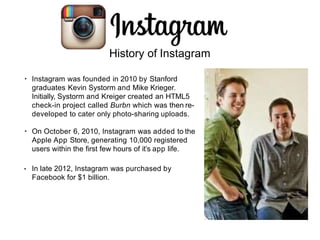
• Instagram was founded in 2010 by Stanford
graduates Kevin Systorm and Mike Krieger.
Initially, Systorm and Kreiger created an HTML5
check-in project called Burbn which was then re-
developed to cater only photo-sharing uploads.
• On October 6, 2010, Instagram was added to the
Apple App Store, generating 10,000 registered
users within the first few hours of it’s app life.
• In late 2012, Instagram was purchased by
Facebook for $1 billion.
History of Instagram
Demographics
• Instagram currently has about 150 million monthly active users, 75
million daily users and about 25% of global internet users use
Twitter.
• Users are divided equally with 50% iPhone users and 50% Android.
• 90% of users are under the age of 35.
• Education demographics: Users with some college education are
the most active on Instagram with 23% and college graduates have
the second highest activity at 18%. Users with a high school
diploma or less make up another 15%.
• 24% of all users use the app several (3+) times a day.
Main functions
• Users can upload photographs and short videos.
• Videos are a maximum of 15 seconds long.
• Photos can have filters added to them as well
as in-app editing.
• Frames can also be added to each photo.
Instagram Direct allows users to send photos only to
specific users instead of publicly.
•
Tabs
• There are five tabs on Instagram: Home, Explore,
Upload, Reels and Profile.
• The Explore tab has a scrolling list of photos curated
by Instagram for you (based on accounts/photos
you have already liked and followed) as well as a
search bar to find specific usernames and hashtags.
• Profiles are provided for users similar to other social
media sites. These contain biographical information,
recently shared photographs and a user photo.
Liking & Commenting
• Photos can be liked or commented on as you scroll through your home feed.
• You can also double tap photos to quickly like them.
Hashtags
• Hashtags are an unspaced phrase prefixed with the #
sign.
• Numbers are allowed in hashtags but special
characters such as $ or & won’t work.
• Hashtags are mostly used as discussion forums. Any
combination of characters can become a hashtag.
• Hashtags do not contain any moderation therefore a
single hashtag can be used for any purpose by anyuser.
Hashtags on Instagram
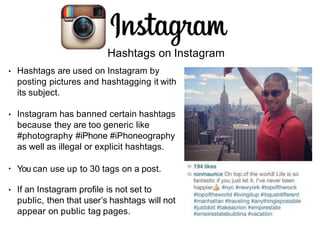
• Hashtags are used on Instagram by
posting pictures and hashtagging it with
its subject.
• Instagram has banned certain hashtags
because they are too generic like
#photography #iPhone #iPhoneography
as well as illegal or explicit hashtags.
• You can use up to 30 tags on a post.
• If an Instagram profile is not set to
public, then that user’s hashtags will not
appear on public tag pages.
Trends
• Throwback Thursday: This trend
usually includes pictures of a user’s
early childhood, past special
occasions or monumental events.
These photos are shared with the
hashtag #TBT or
#ThrowbackThursday.
• Selfie: A self-portrait taken by the
user (usually at arms-length).
• Fun fact: selfie was appointed the
“word of the year” in 2013 by the
Oxford Dictionary because of the
popularity of selfies that were
caused by Instagram.
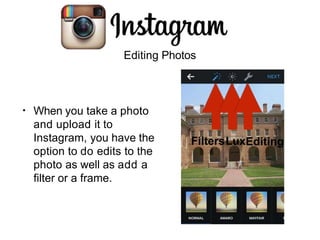
Editing Photos
• When you take a photo
and upload it to
Instagram, you have the
option to do edits to the
photo as well as add a
filter or a frame.
FiltersLuxEditing
Instagram as a Marketing Tool
• Instagram is a ‘photo vacation’ - people aren’t there to read statuses or
tweets, they are there to look at pictures!
• According to Forrester Research, Inc., Instagram has a per-follower
engagement that is 58 times higher than Facebook and 120 times
higher than Twitter.
Post Ideas
• Look back on history.
• Go “behind-the-scenes”
• Host photo contests!
• Find a different point of view.
• Show off students/alumni (don’t just showcase your office!)
• Have fun.
• Focus on the details.
• Show off the campus.
Manish Pandey_ppt on instagram.pptx

Manish Pandey_ppt on instagram.pptx

  • 2.
    • Instagram isan online mobile photo-sharing, video- sharing and social networking service that enables its users to take pictures and videos and share them on a variety of social media networking platforms, such as Facebook and twitter • The name “Instagram” is a portmanteau of “instant camera” and “telegram”. What is it?
  • 3.
    • Instagram wasfounded in 2010 by Stanford graduates Kevin Systorm and Mike Krieger. Initially, Systorm and Kreiger created an HTML5 check-in project called Burbn which was then re- developed to cater only photo-sharing uploads. • On October 6, 2010, Instagram was added to the Apple App Store, generating 10,000 registered users within the first few hours of it’s app life. • In late 2012, Instagram was purchased by Facebook for $1 billion. History of Instagram
  • 4.
    Demographics • Instagram currentlyhas about 150 million monthly active users, 75 million daily users and about 25% of global internet users use Twitter. • Users are divided equally with 50% iPhone users and 50% Android. • 90% of users are under the age of 35. • Education demographics: Users with some college education are the most active on Instagram with 23% and college graduates have the second highest activity at 18%. Users with a high school diploma or less make up another 15%. • 24% of all users use the app several (3+) times a day.
  • 5.
    Main functions • Userscan upload photographs and short videos. • Videos are a maximum of 15 seconds long. • Photos can have filters added to them as well as in-app editing. • Frames can also be added to each photo. Instagram Direct allows users to send photos only to specific users instead of publicly. •
  • 6.
    Tabs • There arefive tabs on Instagram: Home, Explore, Upload, Reels and Profile. • The Explore tab has a scrolling list of photos curated by Instagram for you (based on accounts/photos you have already liked and followed) as well as a search bar to find specific usernames and hashtags. • Profiles are provided for users similar to other social media sites. These contain biographical information, recently shared photographs and a user photo.
  • 7.
    Liking & Commenting •Photos can be liked or commented on as you scroll through your home feed. • You can also double tap photos to quickly like them.
  • 8.
    Hashtags • Hashtags arean unspaced phrase prefixed with the # sign. • Numbers are allowed in hashtags but special characters such as $ or & won’t work. • Hashtags are mostly used as discussion forums. Any combination of characters can become a hashtag. • Hashtags do not contain any moderation therefore a single hashtag can be used for any purpose by anyuser.
  • 9.
    Hashtags on Instagram •Hashtags are used on Instagram by posting pictures and hashtagging it with its subject. • Instagram has banned certain hashtags because they are too generic like #photography #iPhone #iPhoneography as well as illegal or explicit hashtags. • You can use up to 30 tags on a post. • If an Instagram profile is not set to public, then that user’s hashtags will not appear on public tag pages.
  • 10.
    Trends • Throwback Thursday:This trend usually includes pictures of a user’s early childhood, past special occasions or monumental events. These photos are shared with the hashtag #TBT or #ThrowbackThursday. • Selfie: A self-portrait taken by the user (usually at arms-length). • Fun fact: selfie was appointed the “word of the year” in 2013 by the Oxford Dictionary because of the popularity of selfies that were caused by Instagram.
  • 11.
    Editing Photos • Whenyou take a photo and upload it to Instagram, you have the option to do edits to the photo as well as add a filter or a frame. FiltersLuxEditing
  • 12.
    Instagram as aMarketing Tool • Instagram is a ‘photo vacation’ - people aren’t there to read statuses or tweets, they are there to look at pictures! • According to Forrester Research, Inc., Instagram has a per-follower engagement that is 58 times higher than Facebook and 120 times higher than Twitter.
  • 13.
    Post Ideas • Lookback on history. • Go “behind-the-scenes” • Host photo contests! • Find a different point of view. • Show off students/alumni (don’t just showcase your office!) • Have fun. • Focus on the details. • Show off the campus.