Inserting & editing text
In MS WORD
Created By: Shafaq Ahmreen
Whatever you do, do it well
LECTURE # 4
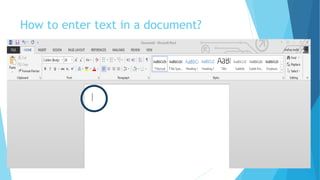
How to enter text in a document?
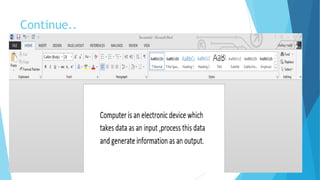
Continue..
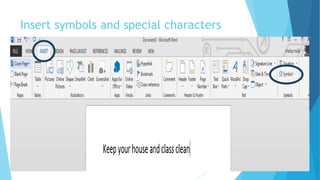
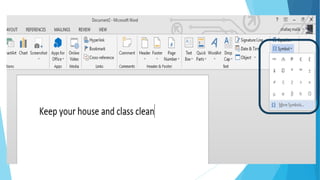
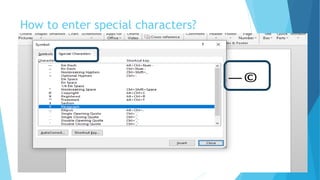
Insert symbols and special characters
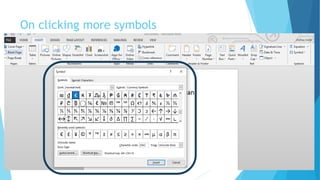
On clicking more symbols
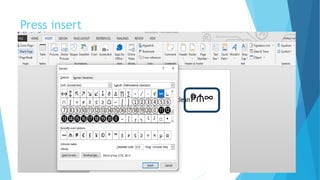
Press insert
How to enter special characters?
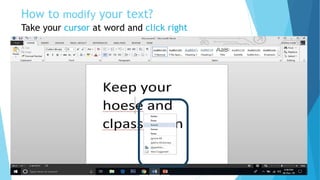
How to modify your text?
Take your cursor at word and click right
Here is the point…
When you people entered your name in a document if word consider it wrong then
 Apply same method right click
 Then select ignore all
 Or add to dictionary
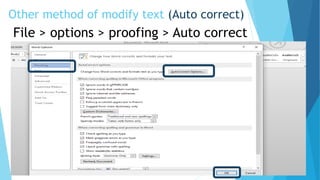
Other method of modify text (Auto correct)
File > options > proofing > Auto correct
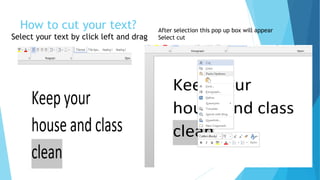
How to cut your text?
Select your text by click left and drag
After selection this pop up box will appear
Select cut
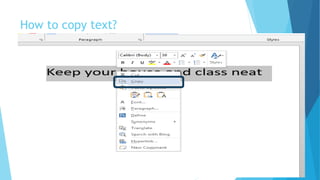
How to copy text?
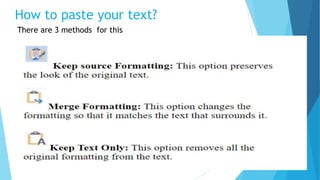
How to paste your text?
There are 3 methods for this
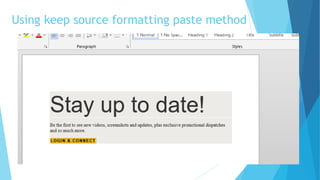
Using keep source formatting paste method
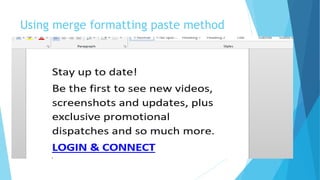
Using merge formatting paste method
Using keep text only paste method
Short cut keys
Ctrl+N: Create a new document
Ctrl+O: Open an existing document
Ctrl+S: Save a document
F12: Open the Save As dialog box
Ctrl+W: Close a document
Ctrl+Z: Undo an action
Ctrl+Y: Redo an action
Alt+Ctrl+S: Split a window or remove the split view
Ctrl+Alt+V: Print Layout View
Ctrl+Alt+O: Outline View
Ctrl+Alt+N: Draft View
Ctrl+F2: Print Preview View
Continue..
Shift+Left/Right Arrow: Extend your current selection by one character to the left or right
Ctrl+Shift+Left/Right Arrow: Extend your current selection by one word to the left or right
Shift+Up/Down Arrow: Extend selection up or down one line
Ctrl+Shift+Up/Down Arrow: Extend selection to the beginning or end of the paragraph
Shift+End: Extend selection to the end of the line
Ctrl+A: Select the entire document
Backspace: Delete one character to the left
Ctrl+Backspace: Delete one word to the left
Delete: Delete one character to the right
Ctrl+Delete: Delete one word to the right
Ctrl+C: Copy or graphics to the Clipboard text
Ctrl+X: Cut selected text or graphics to the
Clipboard
Ctrl+V: Paste the Clipboard contents

Inserting and editing text in MS Word

  • 1.
    Inserting & editingtext In MS WORD Created By: Shafaq Ahmreen Whatever you do, do it well LECTURE # 4
  • 2.
    How to entertext in a document?
  • 3.
  • 4.
    Insert symbols andspecial characters
  • 6.
  • 7.
  • 8.
    How to enterspecial characters?
  • 9.
    How to modifyyour text? Take your cursor at word and click right
  • 10.
    Here is thepoint… When you people entered your name in a document if word consider it wrong then  Apply same method right click  Then select ignore all  Or add to dictionary
  • 11.
    Other method ofmodify text (Auto correct) File > options > proofing > Auto correct
  • 12.
    How to cutyour text? Select your text by click left and drag After selection this pop up box will appear Select cut
  • 13.
  • 14.
    How to pasteyour text? There are 3 methods for this
  • 15.
    Using keep sourceformatting paste method
  • 16.
  • 17.
    Using keep textonly paste method
  • 18.
    Short cut keys Ctrl+N:Create a new document Ctrl+O: Open an existing document Ctrl+S: Save a document F12: Open the Save As dialog box Ctrl+W: Close a document Ctrl+Z: Undo an action Ctrl+Y: Redo an action Alt+Ctrl+S: Split a window or remove the split view Ctrl+Alt+V: Print Layout View Ctrl+Alt+O: Outline View Ctrl+Alt+N: Draft View Ctrl+F2: Print Preview View
  • 19.
    Continue.. Shift+Left/Right Arrow: Extendyour current selection by one character to the left or right Ctrl+Shift+Left/Right Arrow: Extend your current selection by one word to the left or right Shift+Up/Down Arrow: Extend selection up or down one line Ctrl+Shift+Up/Down Arrow: Extend selection to the beginning or end of the paragraph Shift+End: Extend selection to the end of the line Ctrl+A: Select the entire document Backspace: Delete one character to the left Ctrl+Backspace: Delete one word to the left Delete: Delete one character to the right Ctrl+Delete: Delete one word to the right
  • 20.
    Ctrl+C: Copy orgraphics to the Clipboard text Ctrl+X: Cut selected text or graphics to the Clipboard Ctrl+V: Paste the Clipboard contents