Computer Architecture


      Input/Output


          Prepared By   RAJESH JAIN
Input/Output Problems
• Wide variety of peripherals
  —Delivering different amounts of data
  —At different speeds
  —In different formats
• All slower than CPU and RAM
• Need I/O modules
Input/Output Module
• Interface to CPU and Memory
• Interface to one or more peripherals
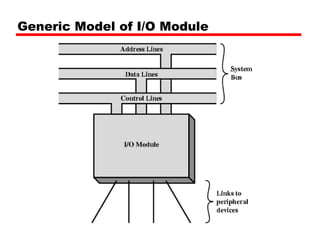
Generic Model of I/O Module
External Devices
• Human readable
  —Screen, printer, keyboard
• Machine readable
  —Monitoring and control
• Communication
  —Modem
  —Network Interface Card (NIC)
External Device Block Diagram
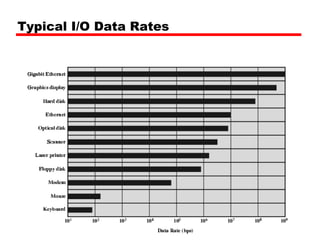
Typical I/O Data Rates
I/O Module Function
•   Control & Timing
•   CPU Communication
•   Device Communication
•   Data Buffering
•   Error Detection
I/O Steps
•   CPU checks I/O module device status
•   I/O module returns status
•   If ready, CPU requests data transfer
•   I/O module gets data from device
•   I/O module transfers data to CPU
•   Variations for output, DMA, etc.
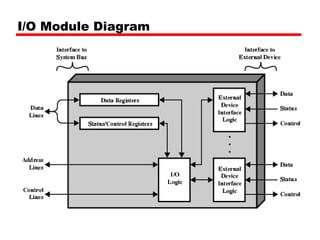
I/O Module Diagram
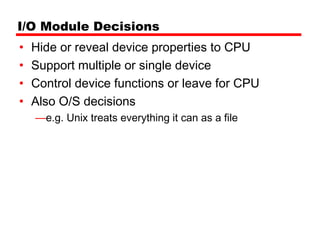
I/O Module Decisions
•   Hide or reveal device properties to CPU
•   Support multiple or single device
•   Control device functions or leave for CPU
•   Also O/S decisions
    —e.g. Unix treats everything it can as a file
Input Output Techniques
• Programmed
• Interrupt driven
• Direct Memory Access (DMA)
Programmed I/O
• CPU has direct control over I/O
  —Sensing status
  —Read/write commands
  —Transferring data
• CPU waits for I/O module to complete operation
• Wastes CPU time
Programmed I/O - detail
•   CPU requests I/O operation
•   I/O module performs operation
•   I/O module sets status bits
•   CPU checks status bits periodically
•   I/O module does not inform CPU directly
•   I/O module does not interrupt CPU
•   CPU may wait or come back later
I/O Commands
• CPU issues address
  —Identifies module (& device if >1 per module)
• CPU issues command
  —Control - telling module what to do
     – e.g. spin up disk
  —Test - check status
     – e.g. power? Error?
  —Read/Write
     – Module transfers data via buffer from/to device
Addressing I/O Devices


• Under programmed I/O data transfer is very like memory
  access (CPU viewpoint)
• Each device given unique identifier
• CPU commands contain identifier (address)
I/O Mapping
• Memory mapped I/O
   — Devices and memory share an address space
   — I/O looks just like memory read/write
   — No special commands for I/O
      – Large selection of memory access commands available
• Isolated I/O
   — Separate address spaces
   — Need I/O or memory select lines
   — Special commands for I/O
      – Limited set
Interrupt Driven I/O
• Overcomes CPU waiting
• No repeated CPU checking of device
• I/O module interrupts when ready
Interrupt Driven I/O
Basic Operation
• CPU issues read command
• I/O module gets data from peripheral whilst CPU
  does other work
• I/O module interrupts CPU
• CPU requests data
• I/O module transfers data
CPU Viewpoint
• Issue read command
• Do other work
• Check for interrupt at end of each instruction
  cycle
• If interrupted:-
  —Save context (registers)
  —Process interrupt
     – Fetch data & store
• See Operating Systems notes
Design Issues
• How do you identify the module issuing the
  interrupt?
• How do you deal with multiple interrupts?
  —i.e. an interrupt handler being interrupted
Identifying Interrupting Module (1)
• Different line for each module
  —PC
  —Limits number of devices
• Software poll
  —CPU asks each module in turn
  —Slow
Identifying Interrupting Module (2)
• Daisy Chain or Hardware poll
  —Interrupt Acknowledge sent down a chain
  —Module responsible places vector on bus
  —CPU uses vector to identify handler routine
• Bus Master
  —Module must claim the bus before it can raise
   interrupt
  —e.g. PCI & SCSI
Multiple Interrupts
• Each interrupt line has a priority
• Higher priority lines can interrupt lower priority
  lines
• If bus mastering only current master can
  interrupt
Example - PC Bus
• 80x86 has one interrupt line
• 8086 based systems use one 8259A interrupt
  controller
• 8259A has 8 interrupt lines
Direct Memory Access
• Interrupt driven and programmed I/O require
  active CPU intervention
   —Transfer rate is limited
   —CPU is tied up
• DMA is the answer
DMA Function
• Additional Module (hardware) on bus
• DMA controller takes over from CPU for I/O
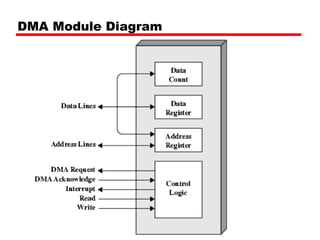
DMA Module Diagram
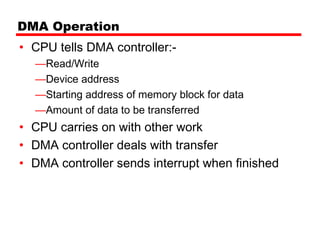
DMA Operation
• CPU tells DMA controller:-
  —Read/Write
  —Device address
  —Starting address of memory block for data
  —Amount of data to be transferred
• CPU carries on with other work
• DMA controller deals with transfer
• DMA controller sends interrupt when finished
DMA Transfer
Cycle Stealing
• DMA controller takes over bus for a cycle
• Transfer of one word of data
• Not an interrupt
  —CPU does not switch context
• CPU suspended just before it accesses bus
  —i.e. before an operand or data fetch or a data write
• Slows down CPU but not as much as CPU
  doing transfer
I/O Channels
•   I/O devices getting more sophisticated
•   e.g. 3D graphics cards
•   CPU instructs I/O controller to do transfer
•   I/O controller does entire transfer
•   Improves speed
    —Takes load off CPU
    —Dedicated processor is faster
I/O Channel Architecture

Input output

  • 1.
    Computer Architecture Input/Output Prepared By RAJESH JAIN
  • 2.
    Input/Output Problems • Widevariety of peripherals —Delivering different amounts of data —At different speeds —In different formats • All slower than CPU and RAM • Need I/O modules
  • 3.
    Input/Output Module • Interfaceto CPU and Memory • Interface to one or more peripherals
  • 4.
    Generic Model ofI/O Module
  • 5.
    External Devices • Humanreadable —Screen, printer, keyboard • Machine readable —Monitoring and control • Communication —Modem —Network Interface Card (NIC)
  • 6.
  • 7.
  • 8.
    I/O Module Function • Control & Timing • CPU Communication • Device Communication • Data Buffering • Error Detection
  • 9.
    I/O Steps • CPU checks I/O module device status • I/O module returns status • If ready, CPU requests data transfer • I/O module gets data from device • I/O module transfers data to CPU • Variations for output, DMA, etc.
  • 10.
  • 11.
    I/O Module Decisions • Hide or reveal device properties to CPU • Support multiple or single device • Control device functions or leave for CPU • Also O/S decisions —e.g. Unix treats everything it can as a file
  • 12.
    Input Output Techniques •Programmed • Interrupt driven • Direct Memory Access (DMA)
  • 13.
    Programmed I/O • CPUhas direct control over I/O —Sensing status —Read/write commands —Transferring data • CPU waits for I/O module to complete operation • Wastes CPU time
  • 14.
    Programmed I/O -detail • CPU requests I/O operation • I/O module performs operation • I/O module sets status bits • CPU checks status bits periodically • I/O module does not inform CPU directly • I/O module does not interrupt CPU • CPU may wait or come back later
  • 15.
    I/O Commands • CPUissues address —Identifies module (& device if >1 per module) • CPU issues command —Control - telling module what to do – e.g. spin up disk —Test - check status – e.g. power? Error? —Read/Write – Module transfers data via buffer from/to device
  • 16.
    Addressing I/O Devices •Under programmed I/O data transfer is very like memory access (CPU viewpoint) • Each device given unique identifier • CPU commands contain identifier (address)
  • 17.
    I/O Mapping • Memorymapped I/O — Devices and memory share an address space — I/O looks just like memory read/write — No special commands for I/O – Large selection of memory access commands available • Isolated I/O — Separate address spaces — Need I/O or memory select lines — Special commands for I/O – Limited set
  • 18.
    Interrupt Driven I/O •Overcomes CPU waiting • No repeated CPU checking of device • I/O module interrupts when ready
  • 19.
    Interrupt Driven I/O BasicOperation • CPU issues read command • I/O module gets data from peripheral whilst CPU does other work • I/O module interrupts CPU • CPU requests data • I/O module transfers data
  • 20.
    CPU Viewpoint • Issueread command • Do other work • Check for interrupt at end of each instruction cycle • If interrupted:- —Save context (registers) —Process interrupt – Fetch data & store • See Operating Systems notes
  • 21.
    Design Issues • Howdo you identify the module issuing the interrupt? • How do you deal with multiple interrupts? —i.e. an interrupt handler being interrupted
  • 22.
    Identifying Interrupting Module(1) • Different line for each module —PC —Limits number of devices • Software poll —CPU asks each module in turn —Slow
  • 23.
    Identifying Interrupting Module(2) • Daisy Chain or Hardware poll —Interrupt Acknowledge sent down a chain —Module responsible places vector on bus —CPU uses vector to identify handler routine • Bus Master —Module must claim the bus before it can raise interrupt —e.g. PCI & SCSI
  • 24.
    Multiple Interrupts • Eachinterrupt line has a priority • Higher priority lines can interrupt lower priority lines • If bus mastering only current master can interrupt
  • 25.
    Example - PCBus • 80x86 has one interrupt line • 8086 based systems use one 8259A interrupt controller • 8259A has 8 interrupt lines
  • 26.
    Direct Memory Access •Interrupt driven and programmed I/O require active CPU intervention —Transfer rate is limited —CPU is tied up • DMA is the answer
  • 27.
    DMA Function • AdditionalModule (hardware) on bus • DMA controller takes over from CPU for I/O
  • 28.
  • 29.
    DMA Operation • CPUtells DMA controller:- —Read/Write —Device address —Starting address of memory block for data —Amount of data to be transferred • CPU carries on with other work • DMA controller deals with transfer • DMA controller sends interrupt when finished
  • 30.
    DMA Transfer Cycle Stealing •DMA controller takes over bus for a cycle • Transfer of one word of data • Not an interrupt —CPU does not switch context • CPU suspended just before it accesses bus —i.e. before an operand or data fetch or a data write • Slows down CPU but not as much as CPU doing transfer
  • 31.
    I/O Channels • I/O devices getting more sophisticated • e.g. 3D graphics cards • CPU instructs I/O controller to do transfer • I/O controller does entire transfer • Improves speed —Takes load off CPU —Dedicated processor is faster
  • 32.