MEMBERS FOR THE PRESENTAION
• NEHAL NAIK
• DEVDATT NAIK
• VIKAS NAIK
I/O TECHNIQUES & ITS TYPES
INTRODUCTION
• Users interact with the computer system through
Input and Output (I/O) devices such as keyboard,
mouse, monitor and so on. I/O devices are also
called peripherals.
• I/O devices are used to exchange information
between user and CPU. An I/O organization
includes two major components namely I/O
devices, I/O module. In addition it uses different
techniques to exchange information namely
programmed I/O, Interrupt I/O and Direct
Memory Access (DMA).
I/O TECHNIQUES
• It is the technique of communication between
memory and I/O devices. I/O techniques are
categorized in three types based on how
information is transfers between memory and
I/O devices that whether it is using CPU
interaction or Interrupt interaction.
TECHNIQUES OF I/O
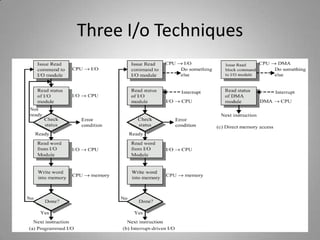
• Programmed I/O : The CPU issues a command then waits for I/O
operations to be complete. The CPU is faster than the I/O module
then method is wasteful.
• Interrupt Driven I/O : The CPU issues commands then proceeds
with its normal work until interrupted by I/O device on completion
of its work.
• DMA : In this CPU and I/O Module exchange data without
involvement of CPU.
• Memory mapped I/O : Memory and I/O are treated as memory
only. It means no signal like IO/M.
• Isolated I/O : Address space of memory and I/O is isolated.
It uses IO/M signal.
Three I/o Techniques
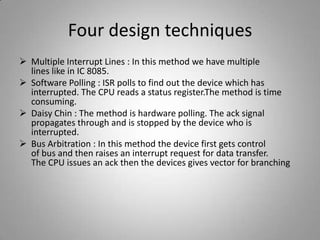
Four design techniques
 Multiple Interrupt Lines : In this method we have multiple
lines like in IC 8085.
 Software Polling : ISR polls to find out the device which has
interrupted. The CPU reads a status register.The method is time
consuming.
 Daisy Chin : The method is hardware polling. The ack signal
propagates through and is stopped by the device who is
interrupted.
 Bus Arbitration : In this method the device first gets control
of bus and then raises an interrupt request for data transfer.
The CPU issues an ack then the devices gives vector for branching
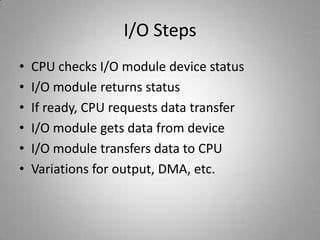
I/O Steps
• CPU checks I/O module device status
• I/O module returns status
• If ready, CPU requests data transfer
• I/O module gets data from device
• I/O module transfers data to CPU
• Variations for output, DMA, etc.
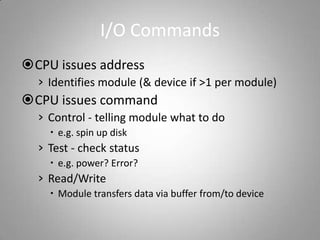
I/O Commands
CPU issues address
› Identifies module (& device if >1 per module)
CPU issues command
› Control - telling module what to do
 e.g. spin up disk
› Test - check status
 e.g. power? Error?
› Read/Write
 Module transfers data via buffer from/to device
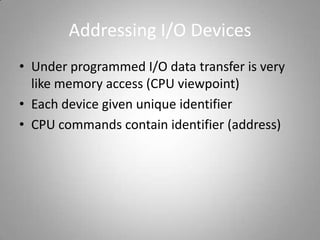
Addressing I/O Devices
• Under programmed I/O data transfer is very
like memory access (CPU viewpoint)
• Each device given unique identifier
• CPU commands contain identifier (address)
I/O Mapping
• Memory mapped I/O
– Devices and memory share an address space
– I/O looks just like memory read/write
– No special commands for I/O
• Large selection of memory access commands available
• Isolated I/O
– Separate address spaces
– Need I/O or memory select lines
– Special commands for I/O
• Limited set
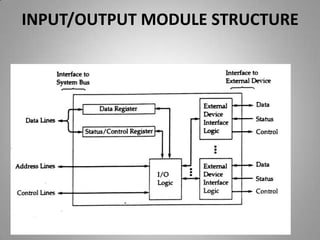
I/O Module
I/O module is intermediate between I/O devices
and CPU. System buses are connected to the one
end of I/O module and other end is connected to
the number of I/O devices. It used to exchange
information between I/O devices and CPU. I/O
devices cannot be directly connected to the system
buses; they are connected to the system buses
through module.
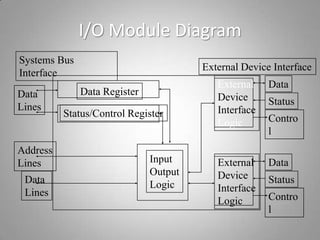
I/O Module Diagram
Data Register
Status/Control Register
External
Device
Interface
Logic
External
Device
Interface
Logic
Input
Output
Logic
Data
Lines
Address
Lines
Data
Lines
Data
Status
Contro
l
Data
Status
Contro
l
Systems Bus
Interface
External Device Interface
Functions of I/O Module
The major functions of modules are categorized as
follows
1.Control and Timing - In some of the I/O
operation few resources shared such as CPU and
memory because CPU communicates with more
than one device at a time.
2.Processor Communication - I/O module
communicates with the CPU and I/O devices
Features of I/O Module
• Data Buffering - As I/O devices are much
slower than CPU and memory. In order to
maintain speed of data flow between I/O
devices and internal resources, I/O module
buffers data.
• Error Detection - It is built- in feature of I/O
module that detects electrical and mechanical
errors.
INPUT/OUTPUT MODULE STRUCTURE
Control and Timing
• CPU asks I/O module to check the status of
attached device.
• I/O module tells the status.
• CPU requests for data transfer to I/O module if
device is ready.
• I/O module gathers the data and transfers to
the CPU.
Interrupts
• CPU interrupt request line triggered by I/O devices
• Interrupt handler receives interrupt
• Maskable to ignore or delay some interrupts
• Interrupt vector to dispatch interrupt to correct
handler
• Based on priorty
• Some unmaskable
• Interrupt mechanism also used for exceptions
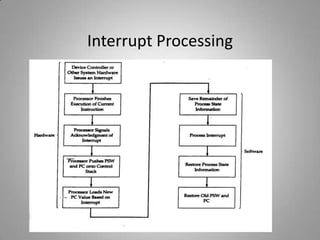
Interrupt Processing
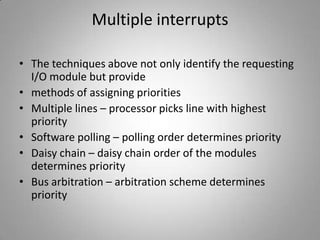
Multiple interrupts
• The techniques above not only identify the requesting
I/O module but provide
• methods of assigning priorities
• Multiple lines – processor picks line with highest
priority
• Software polling – polling order determines priority
• Daisy chain – daisy chain order of the modules
determines priority
• Bus arbitration – arbitration scheme determines
priority
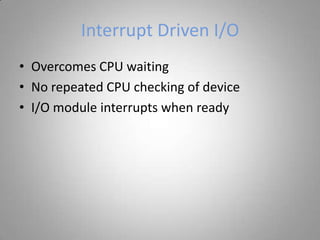
Interrupt Driven I/O
• Overcomes CPU waiting
• No repeated CPU checking of device
• I/O module interrupts when ready
Conclusions
• Designing dependable I/O systems has two aspects: individual I/O and redundancy.
The design of dependable individual I/O has a variety of aspects including EMC,
shock/vibration, environment, A/D and D/A conversion, diagnostics, testing and
calibration. Each can present special challenges for the embedded designer in
terms of cost or accessibility concerns. All of the redundancy methods, including
diversity, interlocks, and human interaction, should be considered to address the
safety concerns of an embedded system.
• Two new trends in I/O design are important: Fieldbus and Intelligent I/O. These
promise increased functionality and lower cost. The primary challenge to
acceptance of these techniques is standardization to achieve interoperability.
• The embedded I/O designer must be well versed in a variety of techniques to
produce dependable cost effective designs.
THANK YOU EVERYBODY

Io techniques & its types

  • 2.
    MEMBERS FOR THEPRESENTAION • NEHAL NAIK • DEVDATT NAIK • VIKAS NAIK
  • 3.
  • 4.
    INTRODUCTION • Users interactwith the computer system through Input and Output (I/O) devices such as keyboard, mouse, monitor and so on. I/O devices are also called peripherals. • I/O devices are used to exchange information between user and CPU. An I/O organization includes two major components namely I/O devices, I/O module. In addition it uses different techniques to exchange information namely programmed I/O, Interrupt I/O and Direct Memory Access (DMA).
  • 5.
    I/O TECHNIQUES • Itis the technique of communication between memory and I/O devices. I/O techniques are categorized in three types based on how information is transfers between memory and I/O devices that whether it is using CPU interaction or Interrupt interaction.
  • 6.
    TECHNIQUES OF I/O •Programmed I/O : The CPU issues a command then waits for I/O operations to be complete. The CPU is faster than the I/O module then method is wasteful. • Interrupt Driven I/O : The CPU issues commands then proceeds with its normal work until interrupted by I/O device on completion of its work. • DMA : In this CPU and I/O Module exchange data without involvement of CPU. • Memory mapped I/O : Memory and I/O are treated as memory only. It means no signal like IO/M. • Isolated I/O : Address space of memory and I/O is isolated. It uses IO/M signal.
  • 7.
  • 8.
    Four design techniques Multiple Interrupt Lines : In this method we have multiple lines like in IC 8085.  Software Polling : ISR polls to find out the device which has interrupted. The CPU reads a status register.The method is time consuming.  Daisy Chin : The method is hardware polling. The ack signal propagates through and is stopped by the device who is interrupted.  Bus Arbitration : In this method the device first gets control of bus and then raises an interrupt request for data transfer. The CPU issues an ack then the devices gives vector for branching
  • 9.
    I/O Steps • CPUchecks I/O module device status • I/O module returns status • If ready, CPU requests data transfer • I/O module gets data from device • I/O module transfers data to CPU • Variations for output, DMA, etc.
  • 10.
    I/O Commands CPU issuesaddress › Identifies module (& device if >1 per module) CPU issues command › Control - telling module what to do  e.g. spin up disk › Test - check status  e.g. power? Error? › Read/Write  Module transfers data via buffer from/to device
  • 11.
    Addressing I/O Devices •Under programmed I/O data transfer is very like memory access (CPU viewpoint) • Each device given unique identifier • CPU commands contain identifier (address)
  • 12.
    I/O Mapping • Memorymapped I/O – Devices and memory share an address space – I/O looks just like memory read/write – No special commands for I/O • Large selection of memory access commands available • Isolated I/O – Separate address spaces – Need I/O or memory select lines – Special commands for I/O • Limited set
  • 13.
    I/O Module I/O moduleis intermediate between I/O devices and CPU. System buses are connected to the one end of I/O module and other end is connected to the number of I/O devices. It used to exchange information between I/O devices and CPU. I/O devices cannot be directly connected to the system buses; they are connected to the system buses through module.
  • 14.
    I/O Module Diagram DataRegister Status/Control Register External Device Interface Logic External Device Interface Logic Input Output Logic Data Lines Address Lines Data Lines Data Status Contro l Data Status Contro l Systems Bus Interface External Device Interface
  • 15.
    Functions of I/OModule The major functions of modules are categorized as follows 1.Control and Timing - In some of the I/O operation few resources shared such as CPU and memory because CPU communicates with more than one device at a time. 2.Processor Communication - I/O module communicates with the CPU and I/O devices
  • 16.
    Features of I/OModule • Data Buffering - As I/O devices are much slower than CPU and memory. In order to maintain speed of data flow between I/O devices and internal resources, I/O module buffers data. • Error Detection - It is built- in feature of I/O module that detects electrical and mechanical errors.
  • 17.
  • 18.
    Control and Timing •CPU asks I/O module to check the status of attached device. • I/O module tells the status. • CPU requests for data transfer to I/O module if device is ready. • I/O module gathers the data and transfers to the CPU.
  • 19.
    Interrupts • CPU interruptrequest line triggered by I/O devices • Interrupt handler receives interrupt • Maskable to ignore or delay some interrupts • Interrupt vector to dispatch interrupt to correct handler • Based on priorty • Some unmaskable • Interrupt mechanism also used for exceptions
  • 20.
  • 21.
    Multiple interrupts • Thetechniques above not only identify the requesting I/O module but provide • methods of assigning priorities • Multiple lines – processor picks line with highest priority • Software polling – polling order determines priority • Daisy chain – daisy chain order of the modules determines priority • Bus arbitration – arbitration scheme determines priority
  • 22.
    Interrupt Driven I/O •Overcomes CPU waiting • No repeated CPU checking of device • I/O module interrupts when ready
  • 23.
    Conclusions • Designing dependableI/O systems has two aspects: individual I/O and redundancy. The design of dependable individual I/O has a variety of aspects including EMC, shock/vibration, environment, A/D and D/A conversion, diagnostics, testing and calibration. Each can present special challenges for the embedded designer in terms of cost or accessibility concerns. All of the redundancy methods, including diversity, interlocks, and human interaction, should be considered to address the safety concerns of an embedded system. • Two new trends in I/O design are important: Fieldbus and Intelligent I/O. These promise increased functionality and lower cost. The primary challenge to acceptance of these techniques is standardization to achieve interoperability. • The embedded I/O designer must be well versed in a variety of techniques to produce dependable cost effective designs.
  • 24.