OPERATING SYSTEM
Chapter 12: I/O Systems
Chapter 13: I/O Systems
•
•
•
•
•
•

I/O Hardware
Application I/O Interface
Kernel I/O Subsystem
Transforming I/O Requests to Hardware Operations
STREAMS
Performance
Objectives
• Explore the structure of an operating system’s I/O
subsystem
• Discuss the principles of I/O hardware and its complexity
• Provide details of the performance aspects of I/O
hardware and software
Overview
• I/O management is a major component of operating system design and
operation
–
–
–
–
–

Important aspect of computer operation
I/O devices vary greatly
Various methods to control them
Performance management
New types of devices frequent

• Ports, busses, device controllers connect to various devices
• Device drivers encapsulate device details
– Present uniform device-access interface to I/O subsystem
I/O Hardware
• Incredible variety of I/O devices
– Storage
– Transmission
– Human-interface

• Common concepts – signals from I/O devices interface with computer
– Port – connection point for device
– Bus - daisy chain or shared direct access
– Controller (host adapter) – electronics that operate port, bus, device
• Sometimes integrated
• Sometimes separate circuit board (host adapter)
• Contains processor, microcode, private memory, bus controller, etc
– Some talk to per-device controller with bus controller, microcode, memory, etc
A Typical PC Bus Structure
I/O Hardware (Cont.)
• I/O instructions control devices
• Devices usually have registers where device driver places
commands, addresses, and data to write, or read data from
registers after command execution
– Data-in register, data-out register, status register, control register
– Typically 1-4 bytes, or FIFO buffer

• Devices have addresses, used by
– Direct I/O instructions
– Memory-mapped I/O
• Device data and command registers mapped to processor address space
• Especially for large address spaces (graphics)
Device I/O Port Locations on PCs (partial)
Polling
• For each byte of I/O
1.
2.
3.
4.
5.

Read busy bit from status register until 0
Host sets read or write bit and if write copies data into data-out register
Host sets command-ready bit
Controller sets busy bit, executes transfer
Controller clears busy bit, error bit, command-ready bit when transfer done

• Step 1 is busy-wait cycle to wait for I/O from device
– Reasonable if device is fast
– But inefficient if device slow
– CPU switches to other tasks?
• But if miss a cycle data overwritten / lost
Interrupts
• Polling can happen in 3 instruction cycles
– Read status, logical-and to extract status bit, branch if not zero
– How to be more efficient if non-zero infrequently?

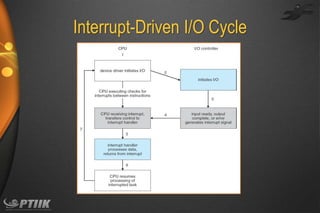
• CPU Interrupt-request line triggered by I/O device
– Checked by processor after each instruction

• Interrupt handler receives interrupts
– Maskable to ignore or delay some interrupts

• Interrupt vector to dispatch interrupt to correct handler
–
–
–
–

Context switch at start and end
Based on priority
Some nonmaskable
Interrupt chaining if more than one device at same interrupt number
Interrupt-Driven I/O Cycle
Intel Pentium Processor Event-Vector Table
Interrupts (Cont.)
• Interrupt mechanism also used for exceptions
– Terminate process, crash system due to hardware error

• Page fault executes when memory access error
• System call executes via trap to trigger kernel to execute request
• Multi-CPU systems can process interrupts concurrently
– If operating system designed to handle it

• Used for time-sensitive processing, frequent, must be fast
Direct Memory Access
• Used to avoid programmed I/O (one byte at a time) for large data
movement
• Requires DMA controller
• Bypasses CPU to transfer data directly between I/O device and memory
• OS writes DMA command block into memory
–
–
–
–
–
–

Source and destination addresses
Read or write mode
Count of bytes
Writes location of command block to DMA controller
Bus mastering of DMA controller – grabs bus from CPU
When done, interrupts to signal completion
Six Step Process to Perform DMA Transfer
Application I/O Interface
I/O system calls encapsulate device behaviors in generic classes
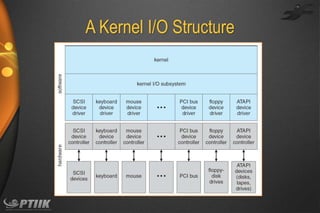
Device-driver layer hides differences among I/O controllers from kernel
New devices talking already-implemented protocols need no extra work
Each OS has its own I/O subsystem structures and device driver
frameworks
• Devices vary in many dimensions
•
•
•
•

–
–
–
–
–
–

Character-stream or block
Sequential or random-access
Synchronous or asynchronous (or both)
Sharable or dedicated
Speed of operation
read-write, read only, or write only
A Kernel I/O Structure
Characteristics of I/O Devices
Characteristics of I/O Devices (Cont.)
• Subtleties of devices handled by device drivers
• Broadly I/O devices can be grouped by the OS into
–
–
–
–

Block I/O
Character I/O (Stream)
Memory-mapped file access
Network sockets

• For direct manipulation of I/O device specific characteristics,
usually an escape / back door
– Unix ioctl() call to send arbitrary bits to a device control register
and data to device data register
Block and Character Devices
• Block devices include disk drives
– Commands include read, write, seek
– Raw I/O, direct I/O, or file-system access
– Memory-mapped file access possible
• File mapped to virtual memory and clusters brought via demand paging

– DMA

• Character devices include keyboards, mice, serial ports
– Commands include get(), put()

– Libraries layered on top allow line editing
Network Devices
• Varying enough from block and character to have own interface
• Unix and Windows NT/9x/2000 include socket interface
– Separates network protocol from network operation
– Includes select() functionality

• Approaches vary widely (pipes, FIFOs, streams, queues,
mailboxes)
Clocks and Timers
• Provide current time, elapsed time, timer
• Normal resolution about 1/60 second
• Some systems provide higher-resolution timers

• Programmable interval timer used for timings, periodic interrupts
• ioctl() (on UNIX) covers odd aspects of I/O such as clocks and
timers
Blocking and Nonblocking I/O
• Blocking - process suspended until I/O completed
– Easy to use and understand
– Insufficient for some needs

• Nonblocking - I/O call returns as much as available
–
–
–
–

User interface, data copy (buffered I/O)
Implemented via multi-threading
Returns quickly with count of bytes read or written
select() to find if data ready then read() or write() to transfer

• Asynchronous - process runs while I/O executes
– Difficult to use
– I/O subsystem signals process when I/O completed
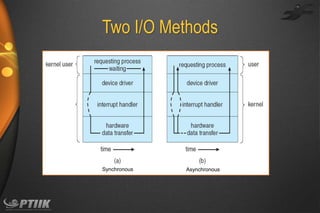
Two I/O Methods

Synchronous

Asynchronous
Kernel I/O Subsystem
• Scheduling
– Some I/O request ordering via per-device queue
– Some OSs try fairness
– Some implement Quality Of Service (i.e. IPQOS)

• Buffering - store data in memory while transferring between devices
–
–
–
–

To cope with device speed mismatch
To cope with device transfer size mismatch
To maintain “copy semantics”
Double buffering – two copies of the data
• Kernel and user
• Varying sizes
• Full / being processed and not-full / being used
• Copy-on-write can be used for efficiency in some cases
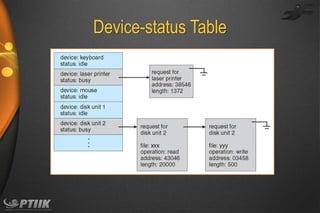
Device-status Table
Sun Enterprise 6000 Device-Transfer Rates
Kernel I/O Subsystem
• Caching - faster device holding copy of data
– Always just a copy
– Key to performance
– Sometimes combined with buffering

• Spooling - hold output for a device
– If device can serve only one request at a time
– i.e., Printing

• Device reservation - provides exclusive access to a device
– System calls for allocation and de-allocation
– Watch out for deadlock
Error Handling
• OS can recover from disk read, device unavailable, transient
write failures
– Retry a read or write, for example
– Some systems more advanced – Solaris FMA, AIX
• Track error frequencies, stop using device with increasing frequency of
retry-able errors

• Most return an error number or code when I/O request fails
• System error logs hold problem reports
I/O Protection
• User process may accidentally or purposefully attempt to
disrupt normal operation via illegal I/O instructions
– All I/O instructions defined to be privileged
– I/O must be performed via system calls
• Memory-mapped and I/O port memory locations must be protected too
Use of a System Call to Perform I/O
Kernel Data Structures
• Kernel keeps state info for I/O components, including open
file tables, network connections, character device state
• Many, many complex data structures to track buffers,
memory allocation, “dirty” blocks
• Some use object-oriented methods and message passing to
implement I/O
– Windows uses message passing
• Message with I/O information passed from user mode into kernel
• Message modified as it flows through to device driver and back to process
• Pros / cons?
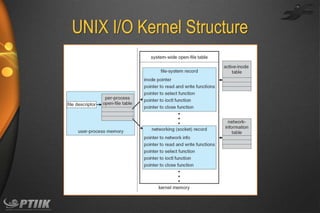
UNIX I/O Kernel Structure
I/O Requests to Hardware Operations
• Consider reading a file from disk for a process:
–
–
–
–
–

Determine device holding file
Translate name to device representation
Physically read data from disk into buffer
Make data available to requesting process
Return control to process
Life Cycle of An
I/O Request
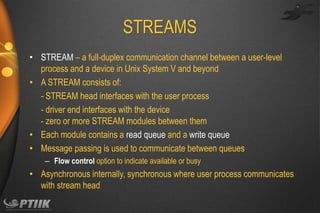
STREAMS
• STREAM – a full-duplex communication channel between a user-level
process and a device in Unix System V and beyond
• A STREAM consists of:
- STREAM head interfaces with the user process
- driver end interfaces with the device
- zero or more STREAM modules between them
• Each module contains a read queue and a write queue
• Message passing is used to communicate between queues
– Flow control option to indicate available or busy

• Asynchronous internally, synchronous where user process communicates
with stream head
The STREAMS Structure
Performance
• I/O a major factor in system performance:
–
–
–
–

Demands CPU to execute device driver, kernel I/O code
Context switches due to interrupts
Data copying
Network traffic especially stressful
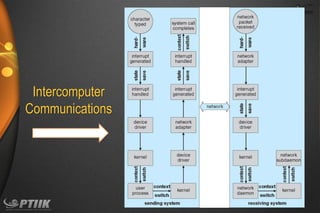
Intercomputer
Communications
Improving Performance
• Reduce number of context switches
• Reduce data copying
• Reduce interrupts by using large transfers, smart controllers,
polling
• Use DMA
• Use smarter hardware devices
• Balance CPU, memory, bus, and I/O performance for highest
throughput
• Move user-mode processes / daemons to kernel threads
Device-Functionality Progression
End of Chapter 12

Ch12 io systems

  • 1.
  • 2.
    Chapter 13: I/OSystems • • • • • • I/O Hardware Application I/O Interface Kernel I/O Subsystem Transforming I/O Requests to Hardware Operations STREAMS Performance
  • 3.
    Objectives • Explore thestructure of an operating system’s I/O subsystem • Discuss the principles of I/O hardware and its complexity • Provide details of the performance aspects of I/O hardware and software
  • 4.
    Overview • I/O managementis a major component of operating system design and operation – – – – – Important aspect of computer operation I/O devices vary greatly Various methods to control them Performance management New types of devices frequent • Ports, busses, device controllers connect to various devices • Device drivers encapsulate device details – Present uniform device-access interface to I/O subsystem
  • 5.
    I/O Hardware • Incrediblevariety of I/O devices – Storage – Transmission – Human-interface • Common concepts – signals from I/O devices interface with computer – Port – connection point for device – Bus - daisy chain or shared direct access – Controller (host adapter) – electronics that operate port, bus, device • Sometimes integrated • Sometimes separate circuit board (host adapter) • Contains processor, microcode, private memory, bus controller, etc – Some talk to per-device controller with bus controller, microcode, memory, etc
  • 6.
    A Typical PCBus Structure
  • 7.
    I/O Hardware (Cont.) •I/O instructions control devices • Devices usually have registers where device driver places commands, addresses, and data to write, or read data from registers after command execution – Data-in register, data-out register, status register, control register – Typically 1-4 bytes, or FIFO buffer • Devices have addresses, used by – Direct I/O instructions – Memory-mapped I/O • Device data and command registers mapped to processor address space • Especially for large address spaces (graphics)
  • 8.
    Device I/O PortLocations on PCs (partial)
  • 9.
    Polling • For eachbyte of I/O 1. 2. 3. 4. 5. Read busy bit from status register until 0 Host sets read or write bit and if write copies data into data-out register Host sets command-ready bit Controller sets busy bit, executes transfer Controller clears busy bit, error bit, command-ready bit when transfer done • Step 1 is busy-wait cycle to wait for I/O from device – Reasonable if device is fast – But inefficient if device slow – CPU switches to other tasks? • But if miss a cycle data overwritten / lost
  • 10.
    Interrupts • Polling canhappen in 3 instruction cycles – Read status, logical-and to extract status bit, branch if not zero – How to be more efficient if non-zero infrequently? • CPU Interrupt-request line triggered by I/O device – Checked by processor after each instruction • Interrupt handler receives interrupts – Maskable to ignore or delay some interrupts • Interrupt vector to dispatch interrupt to correct handler – – – – Context switch at start and end Based on priority Some nonmaskable Interrupt chaining if more than one device at same interrupt number
  • 11.
  • 12.
    Intel Pentium ProcessorEvent-Vector Table
  • 13.
    Interrupts (Cont.) • Interruptmechanism also used for exceptions – Terminate process, crash system due to hardware error • Page fault executes when memory access error • System call executes via trap to trigger kernel to execute request • Multi-CPU systems can process interrupts concurrently – If operating system designed to handle it • Used for time-sensitive processing, frequent, must be fast
  • 14.
    Direct Memory Access •Used to avoid programmed I/O (one byte at a time) for large data movement • Requires DMA controller • Bypasses CPU to transfer data directly between I/O device and memory • OS writes DMA command block into memory – – – – – – Source and destination addresses Read or write mode Count of bytes Writes location of command block to DMA controller Bus mastering of DMA controller – grabs bus from CPU When done, interrupts to signal completion
  • 15.
    Six Step Processto Perform DMA Transfer
  • 16.
    Application I/O Interface I/Osystem calls encapsulate device behaviors in generic classes Device-driver layer hides differences among I/O controllers from kernel New devices talking already-implemented protocols need no extra work Each OS has its own I/O subsystem structures and device driver frameworks • Devices vary in many dimensions • • • • – – – – – – Character-stream or block Sequential or random-access Synchronous or asynchronous (or both) Sharable or dedicated Speed of operation read-write, read only, or write only
  • 17.
    A Kernel I/OStructure
  • 18.
  • 19.
    Characteristics of I/ODevices (Cont.) • Subtleties of devices handled by device drivers • Broadly I/O devices can be grouped by the OS into – – – – Block I/O Character I/O (Stream) Memory-mapped file access Network sockets • For direct manipulation of I/O device specific characteristics, usually an escape / back door – Unix ioctl() call to send arbitrary bits to a device control register and data to device data register
  • 20.
    Block and CharacterDevices • Block devices include disk drives – Commands include read, write, seek – Raw I/O, direct I/O, or file-system access – Memory-mapped file access possible • File mapped to virtual memory and clusters brought via demand paging – DMA • Character devices include keyboards, mice, serial ports – Commands include get(), put() – Libraries layered on top allow line editing
  • 21.
    Network Devices • Varyingenough from block and character to have own interface • Unix and Windows NT/9x/2000 include socket interface – Separates network protocol from network operation – Includes select() functionality • Approaches vary widely (pipes, FIFOs, streams, queues, mailboxes)
  • 22.
    Clocks and Timers •Provide current time, elapsed time, timer • Normal resolution about 1/60 second • Some systems provide higher-resolution timers • Programmable interval timer used for timings, periodic interrupts • ioctl() (on UNIX) covers odd aspects of I/O such as clocks and timers
  • 23.
    Blocking and NonblockingI/O • Blocking - process suspended until I/O completed – Easy to use and understand – Insufficient for some needs • Nonblocking - I/O call returns as much as available – – – – User interface, data copy (buffered I/O) Implemented via multi-threading Returns quickly with count of bytes read or written select() to find if data ready then read() or write() to transfer • Asynchronous - process runs while I/O executes – Difficult to use – I/O subsystem signals process when I/O completed
  • 24.
  • 25.
    Kernel I/O Subsystem •Scheduling – Some I/O request ordering via per-device queue – Some OSs try fairness – Some implement Quality Of Service (i.e. IPQOS) • Buffering - store data in memory while transferring between devices – – – – To cope with device speed mismatch To cope with device transfer size mismatch To maintain “copy semantics” Double buffering – two copies of the data • Kernel and user • Varying sizes • Full / being processed and not-full / being used • Copy-on-write can be used for efficiency in some cases
  • 26.
  • 27.
    Sun Enterprise 6000Device-Transfer Rates
  • 28.
    Kernel I/O Subsystem •Caching - faster device holding copy of data – Always just a copy – Key to performance – Sometimes combined with buffering • Spooling - hold output for a device – If device can serve only one request at a time – i.e., Printing • Device reservation - provides exclusive access to a device – System calls for allocation and de-allocation – Watch out for deadlock
  • 29.
    Error Handling • OScan recover from disk read, device unavailable, transient write failures – Retry a read or write, for example – Some systems more advanced – Solaris FMA, AIX • Track error frequencies, stop using device with increasing frequency of retry-able errors • Most return an error number or code when I/O request fails • System error logs hold problem reports
  • 30.
    I/O Protection • Userprocess may accidentally or purposefully attempt to disrupt normal operation via illegal I/O instructions – All I/O instructions defined to be privileged – I/O must be performed via system calls • Memory-mapped and I/O port memory locations must be protected too
  • 31.
    Use of aSystem Call to Perform I/O
  • 32.
    Kernel Data Structures •Kernel keeps state info for I/O components, including open file tables, network connections, character device state • Many, many complex data structures to track buffers, memory allocation, “dirty” blocks • Some use object-oriented methods and message passing to implement I/O – Windows uses message passing • Message with I/O information passed from user mode into kernel • Message modified as it flows through to device driver and back to process • Pros / cons?
  • 33.
    UNIX I/O KernelStructure
  • 34.
    I/O Requests toHardware Operations • Consider reading a file from disk for a process: – – – – – Determine device holding file Translate name to device representation Physically read data from disk into buffer Make data available to requesting process Return control to process
  • 35.
    Life Cycle ofAn I/O Request
  • 36.
    STREAMS • STREAM –a full-duplex communication channel between a user-level process and a device in Unix System V and beyond • A STREAM consists of: - STREAM head interfaces with the user process - driver end interfaces with the device - zero or more STREAM modules between them • Each module contains a read queue and a write queue • Message passing is used to communicate between queues – Flow control option to indicate available or busy • Asynchronous internally, synchronous where user process communicates with stream head
  • 37.
  • 38.
    Performance • I/O amajor factor in system performance: – – – – Demands CPU to execute device driver, kernel I/O code Context switches due to interrupts Data copying Network traffic especially stressful
  • 39.
  • 40.
    Improving Performance • Reducenumber of context switches • Reduce data copying • Reduce interrupts by using large transfers, smart controllers, polling • Use DMA • Use smarter hardware devices • Balance CPU, memory, bus, and I/O performance for highest throughput • Move user-mode processes / daemons to kernel threads
  • 41.
  • 42.