Computer
programming
• What is computer?
• Block diagram of
computer.
• Generation of computers
1
What is computer ?
 Computer is an electronic machine that
takes input (data) analyze it process it
and give the desired output (information
). Also provide the capability of storing
data for future use.
2
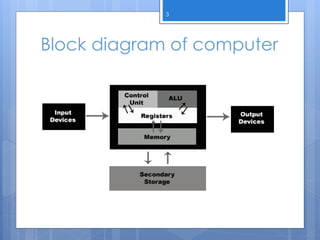
Block diagram of computer
3
CPU
 Central Processing Unit
 Responsible of all kind of processing.
 Process the data according to the set of
instruction given by the user.
 Three major parts of CPU
- Control Unit
- Registers
- ALU ( Arithmetic and Logical Unit ).
4
Control Unit
 Read instruction from the memory ,
decode it and send signal to various parts
of computer to perform the work
accordingly.
 Control the sequence of instruction to be
executed.
5
Registers
 Store intermediate results during program
execution.
 Made up of flip- flop.
 Categorize in two types
- General Purpose Register
- Dedicated Register
6
ALU
 Arithmetic Operations ( +,-,/,%,*….etc)
 Logical Operation( Comparission ).
7
Memory Unit
 RAM
 Secondary Storage
8
Input and Output Devices
 Mouse, keyboard…etc
 Monitor, printer…etc
9
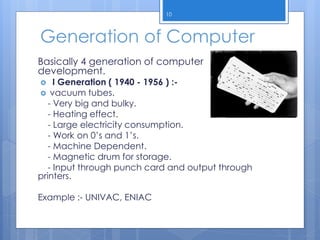
Generation of Computer
Basically 4 generation of computer
development.
 I Generation ( 1940 - 1956 ) :-
 vacuum tubes.
- Very big and bulky.
- Heating effect.
- Large electricity consumption.
- Work on 0’s and 1’s.
- Machine Dependent.
- Magnetic drum for storage.
- Input through punch card and output through
printers.
Example :- UNIVAC, ENIAC
10
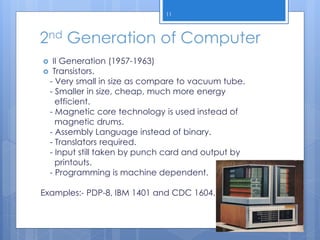
2nd Generation of Computer
 II Generation (1957-1963)
 Transistors.
- Very small in size as compare to vacuum tube.
- Smaller in size, cheap, much more energy
efficient.
- Magnetic core technology is used instead of
magnetic drums.
- Assembly Language instead of binary.
- Translators required.
- Input still taken by punch card and output by
printouts.
- Programming is machine dependent.
Examples:- PDP-8, IBM 1401 and CDC 1604.
11
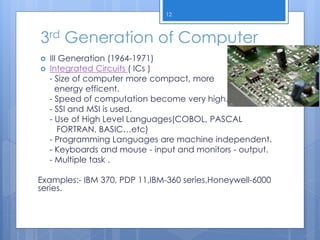
3rd Generation of Computer
 III Generation (1964-1971)
 Integrated Circuits ( ICs )
- Size of computer more compact, more
energy efficent.
- Speed of computation become very high.
- SSI and MSI is used.
- Use of High Level Languages(COBOL, PASCAL
FORTRAN, BASIC…etc)
- Programming Languages are machine independent.
- Keyboards and mouse - input and monitors - output.
- Multiple task .
Examples:- IBM 370, PDP 11,IBM-360 series,Honeywell-6000
series.
12
4th Generation of Computer
 IV Generation (after 1971)
 Microprocessor
- VLSI
- Compact and light in weight, consume
less energy.
- Very fast processing speed.
- Multitasking is possible.
- High level language is used such as
C/C++, java…etc.
- Time-sharing , real time, and distributed
operating system.
Example :- IBM system 3090, HP 9000
13
5th Generation Computer
 Artificial Intelligence, Parallel
programming
 ULSI ( Ultra Large Scale Integration )
14

Computer programming1

  • 1.
    Computer programming • What iscomputer? • Block diagram of computer. • Generation of computers 1
  • 2.
    What is computer?  Computer is an electronic machine that takes input (data) analyze it process it and give the desired output (information ). Also provide the capability of storing data for future use. 2
  • 3.
    Block diagram ofcomputer 3
  • 4.
    CPU  Central ProcessingUnit  Responsible of all kind of processing.  Process the data according to the set of instruction given by the user.  Three major parts of CPU - Control Unit - Registers - ALU ( Arithmetic and Logical Unit ). 4
  • 5.
    Control Unit  Readinstruction from the memory , decode it and send signal to various parts of computer to perform the work accordingly.  Control the sequence of instruction to be executed. 5
  • 6.
    Registers  Store intermediateresults during program execution.  Made up of flip- flop.  Categorize in two types - General Purpose Register - Dedicated Register 6
  • 7.
    ALU  Arithmetic Operations( +,-,/,%,*….etc)  Logical Operation( Comparission ). 7
  • 8.
    Memory Unit  RAM Secondary Storage 8
  • 9.
    Input and OutputDevices  Mouse, keyboard…etc  Monitor, printer…etc 9
  • 10.
    Generation of Computer Basically4 generation of computer development.  I Generation ( 1940 - 1956 ) :-  vacuum tubes. - Very big and bulky. - Heating effect. - Large electricity consumption. - Work on 0’s and 1’s. - Machine Dependent. - Magnetic drum for storage. - Input through punch card and output through printers. Example :- UNIVAC, ENIAC 10
  • 11.
    2nd Generation ofComputer  II Generation (1957-1963)  Transistors. - Very small in size as compare to vacuum tube. - Smaller in size, cheap, much more energy efficient. - Magnetic core technology is used instead of magnetic drums. - Assembly Language instead of binary. - Translators required. - Input still taken by punch card and output by printouts. - Programming is machine dependent. Examples:- PDP-8, IBM 1401 and CDC 1604. 11
  • 12.
    3rd Generation ofComputer  III Generation (1964-1971)  Integrated Circuits ( ICs ) - Size of computer more compact, more energy efficent. - Speed of computation become very high. - SSI and MSI is used. - Use of High Level Languages(COBOL, PASCAL FORTRAN, BASIC…etc) - Programming Languages are machine independent. - Keyboards and mouse - input and monitors - output. - Multiple task . Examples:- IBM 370, PDP 11,IBM-360 series,Honeywell-6000 series. 12
  • 13.
    4th Generation ofComputer  IV Generation (after 1971)  Microprocessor - VLSI - Compact and light in weight, consume less energy. - Very fast processing speed. - Multitasking is possible. - High level language is used such as C/C++, java…etc. - Time-sharing , real time, and distributed operating system. Example :- IBM system 3090, HP 9000 13
  • 14.
    5th Generation Computer Artificial Intelligence, Parallel programming  ULSI ( Ultra Large Scale Integration ) 14

Editor's Notes

  • #11 http://www.notes99.com/2014/03/generation-of-computers.html
  • #12 http://www.notes99.com/2014/03/generation-of-computers.html