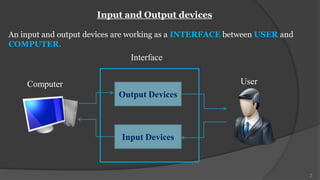
Input and Output devices

An input and output devices are working as a INTERFACE between USER and
COMPUTER.
                              Interface

    Computer                                             User
                           Output Devices


                            Input Devices


                                                                          2
3
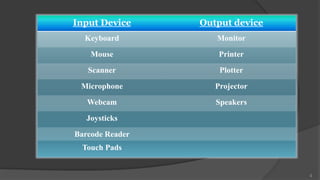
Input Device     Output device
  Keyboard          Monitor
    Mouse            Printer
   Scanner           Plotter

 Microphone         Projector

   Webcam           Speakers

   Joysticks

Barcode Reader
 Touch Pads


                                 4
5
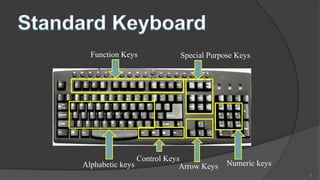
It allows data entry into a computer system by pressing a set of keys . It is
an also called 101 QWERTY keyboard

Standard Keyboard has 101 Keys.
It contains :-

1. Function keys : f1-f12.
2. Alphanumeric keys : a-z,0-9.
3. Special character : ‘ , ’’ , ( , ) , { , } , [ , ] , @ , $ , ^ , & , * , _ , + , - , _ , = , !
   ,~,`,<,>,?,.,|,/,,
4. Control keys : shift, ctrl, alt
5. Special purpose keys : space, backspace, home, page up, page down, end,
   print screen, num lock, caps lock.
                                                                                                    6
Function Keys              Special Purpose Keys


                  Control Keys
Alphabetic keys               Arrow Keys   Numeric keys
                                                          7
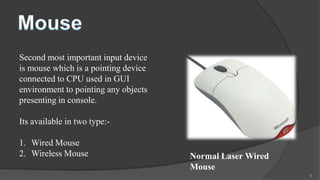
Second most important input device
is mouse which is a pointing device
connected to CPU used in GUI
environment to pointing any objects
presenting in console.

Its available in two type:-

1. Wired Mouse
2. Wireless Mouse                     Normal Laser Wired
                                      Mouse
                                                           8
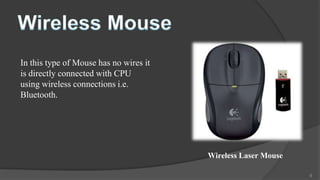
In this type of Mouse has no wires it
is directly connected with CPU
using wireless connections i.e.
Bluetooth.


                                        Wireless Laser Mouse

                                                               9
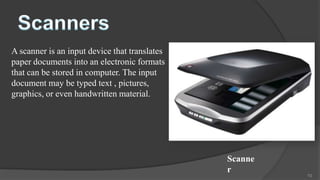
A scanner is an input device that translates
paper documents into an electronic formats
that can be stored in computer. The input
document may be typed text , pictures,
graphics, or even handwritten material.


                                               Scanne
                                               r
                                                        10
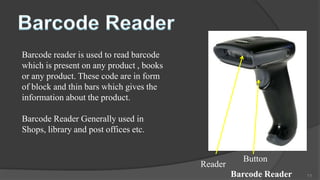
Barcode reader is used to read barcode
which is present on any product , books
or any product. These code are in form
of block and thin bars which gives the
information about the product.

Barcode Reader Generally used in
Shops, library and post offices etc.


                                                     Button
                                          Reader
                                                   Barcode Reader   11
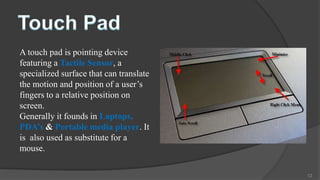
A touch pad is pointing device
featuring a Tactile Sensor, a
specialized surface that can translate
the motion and position of a user’s
fingers to a relative position on
screen.
Generally it founds in Laptops,
PDA’s & Portable media player. It
is also used as substitute for a
mouse.

                                         12
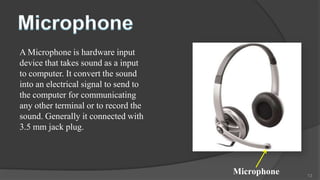
A Microphone is hardware input
device that takes sound as a input
to computer. It convert the sound
into an electrical signal to send to
the computer for communicating
any other terminal or to record the
sound. Generally it connected with
3.5 mm jack plug.


                                       Microphone   13
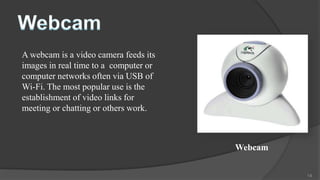
A webcam is a video camera feeds its
images in real time to a computer or
computer networks often via USB of
Wi-Fi. The most popular use is the
establishment of video links for
meeting or chatting or others work.


                                       Webcam


                                                14
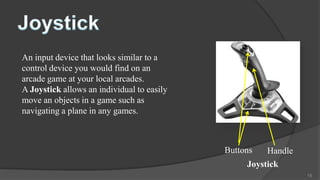
An input device that looks similar to a
control device you would find on an
arcade game at your local arcades.
A Joystick allows an individual to easily
move an objects in a game such as
navigating a plane in any games.


                                            Buttons   Handle
                                                 Joystick
                                                               15
16
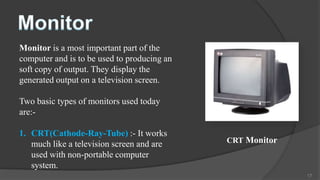
Monitor is a most important part of the
computer and is to be used to producing an
soft copy of output. They display the
generated output on a television screen.

Two basic types of monitors used today
are:-

1. CRT(Cathode-Ray-Tube) :- It works
   much like a television screen and are     CRT Monitor
   used with non-portable computer
   system.
                                                           17
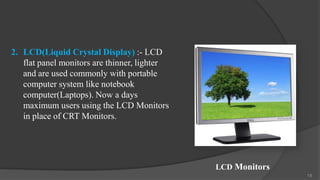
2. LCD(Liquid Crystal Display) :- LCD
   flat panel monitors are thinner, lighter
   and are used commonly with portable
   computer system like notebook
   computer(Laptops). Now a days
   maximum users using the LCD Monitors
   in place of CRT Monitors.


                                              LCD Monitors
                                                             18
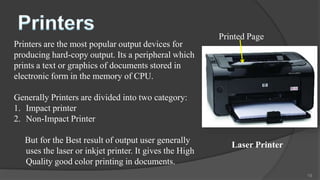
Printed Page
Printers are the most popular output devices for
producing hard-copy output. Its a peripheral which
prints a text or graphics of documents stored in
electronic form in the memory of CPU.

Generally Printers are divided into two category:
1. Impact printer
2. Non-Impact Printer

   But for the Best result of output user generally
                                                            Laser Printer
   uses the laser or inkjet printer. It gives the High
   Quality good color printing in documents.
                                                                            19
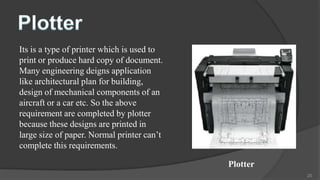
Its is a type of printer which is used to
print or produce hard copy of document.
Many engineering deigns application
like architectural plan for building,
design of mechanical components of an
aircraft or a car etc. So the above
requirement are completed by plotter
because these designs are printed in
large size of paper. Normal printer can’t
complete this requirements.

                                            Plotter
                                                      20
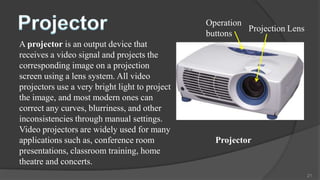
Operation
                                                          Projection Lens
                                                buttons
A projector is an output device that
receives a video signal and projects the
corresponding image on a projection
screen using a lens system. All video
projectors use a very bright light to project
the image, and most modern ones can
correct any curves, blurriness, and other
inconsistencies through manual settings.
Video projectors are widely used for many
applications such as, conference room             Projector
presentations, classroom training, home
theatre and concerts.
                                                                            21
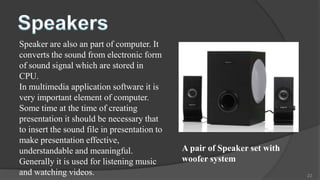
Speaker are also an part of computer. It
converts the sound from electronic form
of sound signal which are stored in
CPU.
In multimedia application software it is
very important element of computer.
Some time at the time of creating
presentation it should be necessary that
to insert the sound file in presentation to
make presentation effective,
understandable and meaningful.                A pair of Speaker set with
Generally it is used for listening music      woofer system
and watching videos.                                                       22
23

P.jeet ppt

  • 2.
    Input and Outputdevices An input and output devices are working as a INTERFACE between USER and COMPUTER. Interface Computer User Output Devices Input Devices 2
  • 3.
  • 4.
    Input Device Output device Keyboard Monitor Mouse Printer Scanner Plotter Microphone Projector Webcam Speakers Joysticks Barcode Reader Touch Pads 4
  • 5.
  • 6.
    It allows dataentry into a computer system by pressing a set of keys . It is an also called 101 QWERTY keyboard Standard Keyboard has 101 Keys. It contains :- 1. Function keys : f1-f12. 2. Alphanumeric keys : a-z,0-9. 3. Special character : ‘ , ’’ , ( , ) , { , } , [ , ] , @ , $ , ^ , & , * , _ , + , - , _ , = , ! ,~,`,<,>,?,.,|,/,, 4. Control keys : shift, ctrl, alt 5. Special purpose keys : space, backspace, home, page up, page down, end, print screen, num lock, caps lock. 6
  • 7.
    Function Keys Special Purpose Keys Control Keys Alphabetic keys Arrow Keys Numeric keys 7
  • 8.
    Second most importantinput device is mouse which is a pointing device connected to CPU used in GUI environment to pointing any objects presenting in console. Its available in two type:- 1. Wired Mouse 2. Wireless Mouse Normal Laser Wired Mouse 8
  • 9.
    In this typeof Mouse has no wires it is directly connected with CPU using wireless connections i.e. Bluetooth. Wireless Laser Mouse 9
  • 10.
    A scanner isan input device that translates paper documents into an electronic formats that can be stored in computer. The input document may be typed text , pictures, graphics, or even handwritten material. Scanne r 10
  • 11.
    Barcode reader isused to read barcode which is present on any product , books or any product. These code are in form of block and thin bars which gives the information about the product. Barcode Reader Generally used in Shops, library and post offices etc. Button Reader Barcode Reader 11
  • 12.
    A touch padis pointing device featuring a Tactile Sensor, a specialized surface that can translate the motion and position of a user’s fingers to a relative position on screen. Generally it founds in Laptops, PDA’s & Portable media player. It is also used as substitute for a mouse. 12
  • 13.
    A Microphone ishardware input device that takes sound as a input to computer. It convert the sound into an electrical signal to send to the computer for communicating any other terminal or to record the sound. Generally it connected with 3.5 mm jack plug. Microphone 13
  • 14.
    A webcam isa video camera feeds its images in real time to a computer or computer networks often via USB of Wi-Fi. The most popular use is the establishment of video links for meeting or chatting or others work. Webcam 14
  • 15.
    An input devicethat looks similar to a control device you would find on an arcade game at your local arcades. A Joystick allows an individual to easily move an objects in a game such as navigating a plane in any games. Buttons Handle Joystick 15
  • 16.
  • 17.
    Monitor is amost important part of the computer and is to be used to producing an soft copy of output. They display the generated output on a television screen. Two basic types of monitors used today are:- 1. CRT(Cathode-Ray-Tube) :- It works much like a television screen and are CRT Monitor used with non-portable computer system. 17
  • 18.
    2. LCD(Liquid CrystalDisplay) :- LCD flat panel monitors are thinner, lighter and are used commonly with portable computer system like notebook computer(Laptops). Now a days maximum users using the LCD Monitors in place of CRT Monitors. LCD Monitors 18
  • 19.
    Printed Page Printers arethe most popular output devices for producing hard-copy output. Its a peripheral which prints a text or graphics of documents stored in electronic form in the memory of CPU. Generally Printers are divided into two category: 1. Impact printer 2. Non-Impact Printer But for the Best result of output user generally Laser Printer uses the laser or inkjet printer. It gives the High Quality good color printing in documents. 19
  • 20.
    Its is atype of printer which is used to print or produce hard copy of document. Many engineering deigns application like architectural plan for building, design of mechanical components of an aircraft or a car etc. So the above requirement are completed by plotter because these designs are printed in large size of paper. Normal printer can’t complete this requirements. Plotter 20
  • 21.
    Operation Projection Lens buttons A projector is an output device that receives a video signal and projects the corresponding image on a projection screen using a lens system. All video projectors use a very bright light to project the image, and most modern ones can correct any curves, blurriness, and other inconsistencies through manual settings. Video projectors are widely used for many applications such as, conference room Projector presentations, classroom training, home theatre and concerts. 21
  • 22.
    Speaker are alsoan part of computer. It converts the sound from electronic form of sound signal which are stored in CPU. In multimedia application software it is very important element of computer. Some time at the time of creating presentation it should be necessary that to insert the sound file in presentation to make presentation effective, understandable and meaningful. A pair of Speaker set with Generally it is used for listening music woofer system and watching videos. 22
  • 23.