INTRODUCTION

TO INFORMATION SECURITY

By
Mrs. Sridevi Tharanidharan, M.Sc., M.Phil.,
King Khalid University, KSA
Introduction
 Information Security is a serious topic that needs to be

included in the curriculum of every classroom that uses a
computer. It is important for teachers, administrators, and
technology coordinators to be fluent on this topic in order to
protect the integrity of school records, student
information, and institution credibility.

 But, it is EQUALLY important that the students understand

the basics of information security in order to protect
themselves, their work, and school environment.

 So, now that we all want to include information security

as a topic in our classroom...How do we implement these
ideas?
What is information security ?
The protection of information and its critical
elements, including systems and hardware that
use, store, and transmit that information
Necessary tools: policy, awareness, training, education,
technology
Information security ...
 Information security is the application of

measures to ensure the safety and privacy of
data by managing its storage and
distribution. Information security has both
technical and social implications.
 Information security system is the process of

protecting the data from unauthorized
access, disclosure, destruction or disruption.
What are the threats ?

receiver

sender
Confidentiality:

unauthorized disclosure of information

Integrity:
Authenticity:

unauthorized modification of information
unauthorized use of service
Security Threats:
 Destruction
 Disclosure

 Modification of data
 Denial of service
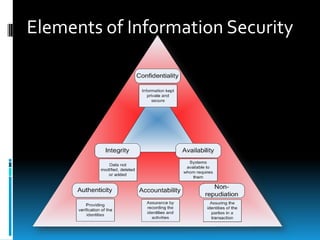
Elements of Information Security
Confidentiality
Confidentiality is the term used to prevent the disclosure of
information to unauthorized individuals or systems.
 Data should be keep secret. The owner of data has

to decide who can only access the data and who
can't. Example: Password hacking in online money transaction
systems .

Prevention: by encrypting the data and by limiting the places where it
might appear.
Integrity
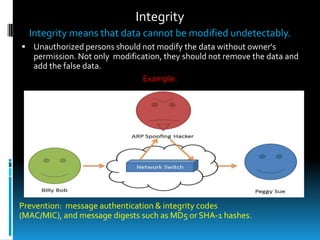
Integrity means that data cannot be modified undetectably.
 Unauthorized persons should not modify the data without owner's

permission. Not only modification, they should not remove the data and
add the false data.
Example:

Prevention: message authentication & integrity codes
(MAC/MIC), and message digests such as MD5 or SHA-1 hashes.
Availability
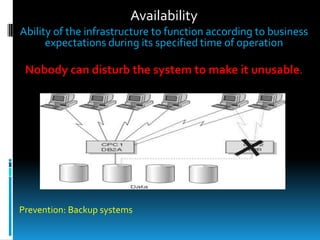
Ability of the infrastructure to function according to business
expectations during its specified time of operation

Nobody can disturb the system to make it unusable.

Prevention: Backup systems
Authenticity
 Computer system to be able to verify the

identity of user.
Goals with corresponding
threats to them.






Goals
Data Confidentiality
Data Integrity
System Availability
Authenticity

–
–

Threats
Exposure of data.
Tampering with data.
Denial of Service.
No Authentication.
Types of IT Threats
1.
2.
3.
4.
5.
6.
7.
8.

Computer virus
Trojan Horses
DNS poisoning
Password grabbers
Network worms
Logic Bombs
Hijacked home page
Password cracker
Types of Attacks
1. SQL Injection
2. Dictionary attack

3. Phishing
4. Cross site scripting (XSS)
5. UI redressing
Security in different
aspects:
 Data Security

 Computer Security
 Network Security
Data Security
 Data security helps to ensure the privacy of

the individuals and the organizations.
 Data security is a method of protecting the
data from unauthorized use.
 It has become an important part of the
computer related business around the world.
 Data security is very important for the
smooth operations in any organization.
Data Security...
 One way to avoid the loss of data due to hard

disk crash, accidental removal or due to virus
attack is to take regular backup of your data
on the CD-ROM, hard drives, USB drive or any
other medium.
 If you have lost your critical data then there
are many ways to recover it you just need to
find a data recovery specialist in your area.
Computer Security
 Every computer is susceptible to different attacks.
 It’s the responsibility of the computer user who

manages the security of the computer to protect it
from these attacks.
 Every computer system must have a predefined
security measures to protect it from the viruses,
spyware, adware, Trojan horses, web worms,
internet security threats and hackers’ attacks.
 Firewall software provides a security mechanism
that protects your computer from the unauthorized
access and hackers’ attacks.
Network Security
 Network security means the protecting your

network from unauthorized
use, viruses, spyware and internet threats.
Protecting a computer network is the most
important responsibility of the persons
 who manages the security of the network.
Security mechanisms... to protect the Network
 Install up-to –dated antivirus program,
 make regular backup of critical data,
 use strong firewall program,
 keep your system patched,
 use strong passwords,
 install and configure file encryption program,
 place your network server at very secure place
and only authorized users should be allowed

to enter in the server room.
Basic security measures for Computer
1. Install up-to-dated antivirus program.
2. Use strong passwords.
3. Don’t leave your computer unattended,
4. Enable default firewall settings in Windows XP
5. Keep your operating system up-to-dated.
6. Encrypt your critical files.
7. Take regular backup of your data.
...Basic security measures for Computer
8. Limit the access of users.
9. Increase the security settings in the browsers.
10. Disable annoying startup programs.
11. Install the latest service packs.
12.Regularly scan your computer for vulnerabilities
and security holes.
13. Adjust event viewer settings.
Internet Security Threats
 There are many known internet threats that can invade any

computer that is connected to the internet.

 If you have not installed and configured any internet

security suite then your computer can host many viruses,
spyware and adware.

The best safeguard against the internet security threats
* To install a internet security software, Install firewall
software or hardware, Monitor incoming emails,
* Disable scripting features in the email programs,
* Disable Java and ActiveX and monitor the activities of
the users’ on the internet.
Thank You


Introduction to Information Security

  • 1.
    INTRODUCTION TO INFORMATION SECURITY By Mrs.Sridevi Tharanidharan, M.Sc., M.Phil., King Khalid University, KSA
  • 2.
    Introduction  Information Securityis a serious topic that needs to be included in the curriculum of every classroom that uses a computer. It is important for teachers, administrators, and technology coordinators to be fluent on this topic in order to protect the integrity of school records, student information, and institution credibility.  But, it is EQUALLY important that the students understand the basics of information security in order to protect themselves, their work, and school environment.  So, now that we all want to include information security as a topic in our classroom...How do we implement these ideas?
  • 3.
    What is informationsecurity ? The protection of information and its critical elements, including systems and hardware that use, store, and transmit that information Necessary tools: policy, awareness, training, education, technology
  • 4.
    Information security ... Information security is the application of measures to ensure the safety and privacy of data by managing its storage and distribution. Information security has both technical and social implications.  Information security system is the process of protecting the data from unauthorized access, disclosure, destruction or disruption.
  • 5.
    What are thethreats ? receiver sender Confidentiality: unauthorized disclosure of information Integrity: Authenticity: unauthorized modification of information unauthorized use of service
  • 6.
    Security Threats:  Destruction Disclosure  Modification of data  Denial of service
  • 7.
  • 8.
    Confidentiality Confidentiality is theterm used to prevent the disclosure of information to unauthorized individuals or systems.  Data should be keep secret. The owner of data has to decide who can only access the data and who can't. Example: Password hacking in online money transaction systems . Prevention: by encrypting the data and by limiting the places where it might appear.
  • 9.
    Integrity Integrity means thatdata cannot be modified undetectably.  Unauthorized persons should not modify the data without owner's permission. Not only modification, they should not remove the data and add the false data. Example: Prevention: message authentication & integrity codes (MAC/MIC), and message digests such as MD5 or SHA-1 hashes.
  • 10.
    Availability Ability of theinfrastructure to function according to business expectations during its specified time of operation Nobody can disturb the system to make it unusable. Prevention: Backup systems
  • 11.
    Authenticity  Computer systemto be able to verify the identity of user.
  • 12.
    Goals with corresponding threatsto them.     Goals Data Confidentiality Data Integrity System Availability Authenticity – – Threats Exposure of data. Tampering with data. Denial of Service. No Authentication.
  • 13.
    Types of ITThreats 1. 2. 3. 4. 5. 6. 7. 8. Computer virus Trojan Horses DNS poisoning Password grabbers Network worms Logic Bombs Hijacked home page Password cracker
  • 14.
    Types of Attacks 1.SQL Injection 2. Dictionary attack 3. Phishing 4. Cross site scripting (XSS) 5. UI redressing
  • 15.
    Security in different aspects: Data Security  Computer Security  Network Security
  • 16.
    Data Security  Datasecurity helps to ensure the privacy of the individuals and the organizations.  Data security is a method of protecting the data from unauthorized use.  It has become an important part of the computer related business around the world.  Data security is very important for the smooth operations in any organization.
  • 17.
    Data Security...  Oneway to avoid the loss of data due to hard disk crash, accidental removal or due to virus attack is to take regular backup of your data on the CD-ROM, hard drives, USB drive or any other medium.  If you have lost your critical data then there are many ways to recover it you just need to find a data recovery specialist in your area.
  • 18.
    Computer Security  Everycomputer is susceptible to different attacks.  It’s the responsibility of the computer user who manages the security of the computer to protect it from these attacks.  Every computer system must have a predefined security measures to protect it from the viruses, spyware, adware, Trojan horses, web worms, internet security threats and hackers’ attacks.  Firewall software provides a security mechanism that protects your computer from the unauthorized access and hackers’ attacks.
  • 19.
    Network Security  Networksecurity means the protecting your network from unauthorized use, viruses, spyware and internet threats. Protecting a computer network is the most important responsibility of the persons  who manages the security of the network.
  • 20.
    Security mechanisms... toprotect the Network  Install up-to –dated antivirus program,  make regular backup of critical data,  use strong firewall program,  keep your system patched,  use strong passwords,  install and configure file encryption program,  place your network server at very secure place and only authorized users should be allowed to enter in the server room.
  • 21.
    Basic security measuresfor Computer 1. Install up-to-dated antivirus program. 2. Use strong passwords. 3. Don’t leave your computer unattended, 4. Enable default firewall settings in Windows XP 5. Keep your operating system up-to-dated. 6. Encrypt your critical files. 7. Take regular backup of your data.
  • 22.
    ...Basic security measuresfor Computer 8. Limit the access of users. 9. Increase the security settings in the browsers. 10. Disable annoying startup programs. 11. Install the latest service packs. 12.Regularly scan your computer for vulnerabilities and security holes. 13. Adjust event viewer settings.
  • 23.
    Internet Security Threats There are many known internet threats that can invade any computer that is connected to the internet.  If you have not installed and configured any internet security suite then your computer can host many viruses, spyware and adware. The best safeguard against the internet security threats * To install a internet security software, Install firewall software or hardware, Monitor incoming emails, * Disable scripting features in the email programs, * Disable Java and ActiveX and monitor the activities of the users’ on the internet.
  • 24.