External guide:External guide:
Mr. Lokesha HMr. Lokesha H
Senior ScientistSenior Scientist
DSPS group, ALD div.DSPS group, ALD div.
NAL.NAL.
Internal guide:Internal guide:
Prof. T SridharProf. T Sridhar
HOD, ECE dept.HOD, ECE dept.
NIT&MS.NIT&MS.
Submitted by:
Aishwarya R Kambi (1AU10EC001)
Samatha H S (1AU10EC034)
Sanjana G J (1AU10ECO35)
Surabhi K S (1AU10EC044)
INSIGHT:
1. Introduction
2. Why Image Enhancement?
3. What is Image Enhancement?
4. Image Enhancement techniques
5. Examples of Image Enhancement techniques
6. Spatial Domain Enhancement
7. Enhancement methods
8. Conversion methods
9. Resources required
10. Experimental results
11. Applications of image enhancement techniques.
12. Conclusion
INTRODUCTION:
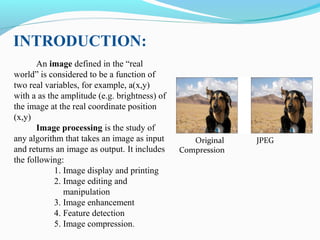
An image defined in the “real
world” is considered to be a function of
two real variables, for example, a(x,y)
with a as the amplitude (e.g. brightness) of
the image at the real coordinate position
(x,y)
Image processing is the study of
any algorithm that takes an image as input
and returns an image as output. It includes
the following:
1. Image display and printing
2. Image editing and
manipulation
3. Image enhancement
4. Feature detection
5. Image compression.
Original JPEG
Compression
WHY IMAGE ENHANCEMENT?
The aim of image enhancement is to improve the visual appearance of an
image, or to provide a “better transform representation for future automated
image processing.
Many images like medical images, satellite images, aerial images and even
real life photographs suffer from poor contrast and noise.
It is necessary to enhance the contrast and remove the noise to increase image
quality.
Enhancement techniques which improves the quality (clarity) of images for
human viewing, removing blurring and noise, increasing contrast, and
revealing details are examples of enhancement operations.
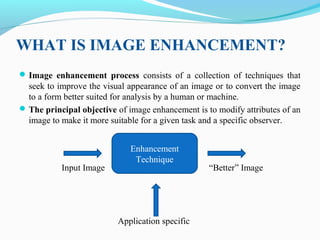
WHAT IS IMAGE ENHANCEMENT?
Image enhancement process consists of a collection of techniques that
seek to improve the visual appearance of an image or to convert the image
to a form better suited for analysis by a human or machine.
The principal objective of image enhancement is to modify attributes of an
image to make it more suitable for a given task and a specific observer.
Enhancement
Technique
Input Image “Better” Image
Application specific
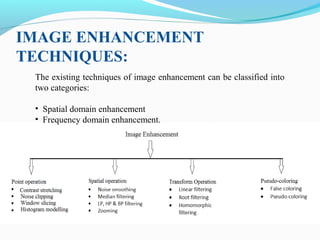
IMAGE ENHANCEMENT
TECHNIQUES:
The existing techniques of image enhancement can be classified into
two categories:
• Spatial domain enhancement
• Frequency domain enhancement.
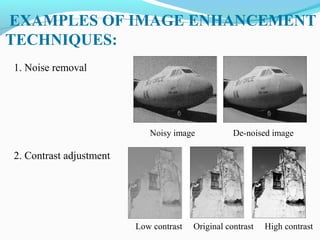
EXAMPLES OF IMAGE ENHANCEMENT
TECHNIQUES:
1. Noise removal
Noisy image De-noised image
2. Contrast adjustment
Low contrast Original contrast High contrast
SPATIAL DOMAIN ENHANCEMENT:
x
• Spatial domain techniques are performed to
the image plane itself and they are based on
direct manipulation of pixels in an image.
• The operation can be formulated as
g(x,y)=T[f(x,y)], where g is the output, f is the
input image and T is an operation on f defined
over some neighbourhood of (x,y).
• According to the operations on the image
pixels, it can be further divided into 2
categories:
oPoint operations and
oSpatial operations (including linear and non-
linear operations).
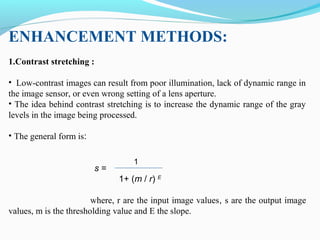
ENHANCEMENT METHODS:
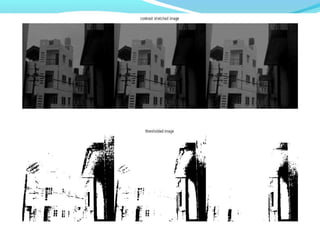
1.Contrast stretching :
• Low-contrast images can result from poor illumination, lack of dynamic range in
the image sensor, or even wrong setting of a lens aperture.
• The idea behind contrast stretching is to increase the dynamic range of the gray
levels in the image being processed.
• The general form is:
s =
1+ (m / r) E
where, r are the input image values, s are the output image
values, m is the thresholding value and E the slope.
1
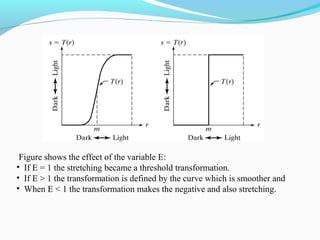
Figure shows the effect of the variable E:
• If E = 1 the stretching became a threshold transformation.
• If E > 1 the transformation is defined by the curve which is smoother and
• When E < 1 the transformation makes the negative and also stretching.
2. Noise reduction :
This is accomplished by averaging and median filtering. These
are as follows:
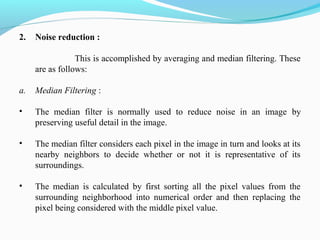
a. Median Filtering :
• The median filter is normally used to reduce noise in an image by
preserving useful detail in the image.
• The median filter considers each pixel in the image in turn and looks at its
nearby neighbors to decide whether or not it is representative of its
surroundings.
• The median is calculated by first sorting all the pixel values from the
surrounding neighborhood into numerical order and then replacing the
pixel being considered with the middle pixel value.
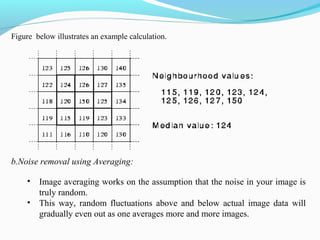
Figure below illustrates an example calculation.
b.Noise removal using Averaging:
• Image averaging works on the assumption that the noise in your image is
truly random.
• This way, random fluctuations above and below actual image data will
gradually even out as one averages more and more images.
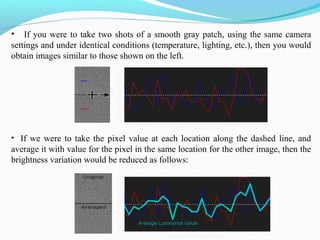
• If you were to take two shots of a smooth gray patch, using the same camera
settings and under identical conditions (temperature, lighting, etc.), then you would
obtain images similar to those shown on the left.
• If we were to take the pixel value at each location along the dashed line, and
average it with value for the pixel in the same location for the other image, then the
brightness variation would be reduced as follows:
3. Intensity Adjustment :
• Intensity adjustment is a technique for mapping an image's intensity values to
a new range.
• For example, rice.tif. is a low contrast image. The histogram of rice.tif, shown
in Figure below, indicates that there are no values below 40 or above 225. If
you remap the data values to fill the entire intensity range [0, 255], you can
increase the contrast of the image.
• You can do this kind of adjustment with the imadjust function. The general
syntax of imadjust is
J = imadjust(I,[low_in high_in],[low_out high_out])
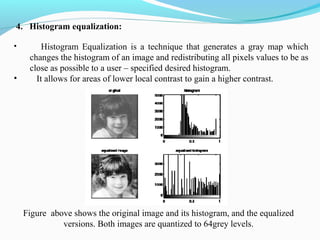
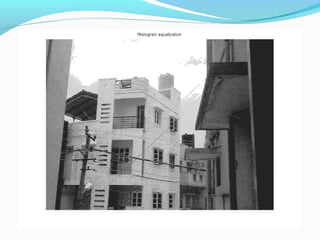
4. Histogram equalization:
• Histogram Equalization is a technique that generates a gray map which
changes the histogram of an image and redistributing all pixels values to be as
close as possible to a user – specified desired histogram.
• It allows for areas of lower local contrast to gain a higher contrast.
Figure above shows the original image and its histogram, and the equalized
versions. Both images are quantized to 64grey levels.
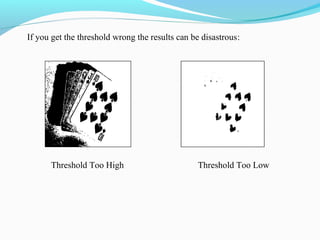
5. Image thresholding:
• Thresholding is the simplest segmentation method.
• The pixels are partitioned depending on their intensity value T.
• Global thresholding, using an appropriate threshold T:
g(x, y) = 1, if f (x, y) > T
0, if f (x, y) <= T
• Imagine a poker playing robot that needs to visually interpret the cards in its
hand:
Original Image Thresholded Image
If you get the threshold wrong the results can be disastrous:
Threshold Too High Threshold Too Low
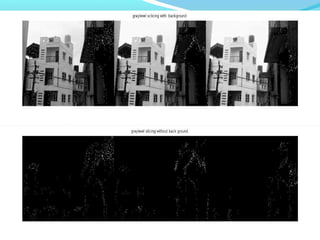
6. Grey level slicing
• Grey level slicing is the spatial domain equivalent to band-pass
filtering.
• A grey level slicing function can either emphasize a group of intensities
and diminish all others or it can emphasize a group of grey levels and
leave the rest alone.
The figure above shows An example of gray level slicing with and without
background
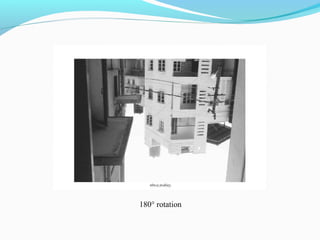
7. Image rotation:
• Image rotation in the digital domain is a form of re-sampling but is
performed on non-integer points.
•The equation below gives the coordinate transformation in terms of rotation
of the coordinate axis.
Sx = Dx cos(θ) + Dy sin(θ)
Sy = -Dx sin(θ) + Dy cos (θ)
Where, S and D represent source and destination coordinates.
0° rotation 90° rotation 180° rotation
CONVERSION METHODS:
1.Greyscale conversion:
• Conversion of a colour image into a greyscale image inclusive of salient features
is a complicated process.
• The converted greyscale image may lose contrasts, sharpness, shadow, and
structure of the colour image.
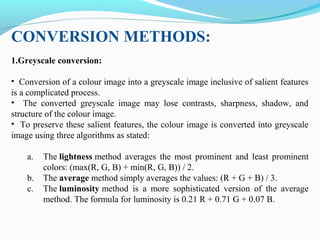
• To preserve these salient features, the colour image is converted into greyscale
image using three algorithms as stated:
a. The lightness method averages the most prominent and least prominent
colors: (max(R, G, B) + min(R, G, B)) / 2.
b. The average method simply averages the values: (R + G + B) / 3.
c. The luminosity method is a more sophisticated version of the average
method. The formula for luminosity is 0.21 R + 0.71 G + 0.07 B.
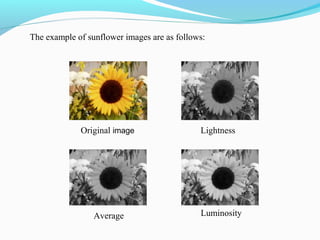
The example of sunflower images are as follows:
Original image Lightness
Average Luminosity
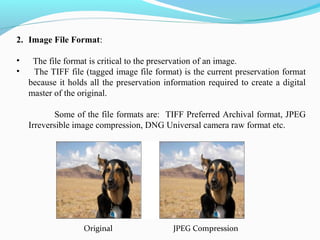
2. Image File Format:
• The file format is critical to the preservation of an image.
• The TIFF file (tagged image file format) is the current preservation format
because it holds all the preservation information required to create a digital
master of the original.
Some of the file formats are: TIFF Preferred Archival format, JPEG
Irreversible image compression, DNG Universal camera raw format etc.
                        Original                              JPEG Compression
RESOURCES REQUIRED:
Software requirements:
1. Windows Operating System XP and above.
2. MATLAB 7.10.0(R2010a)
Hardware requirements:
1. Hard disk: 16GB and above.
2. RAM: 1GB and above.
3. Processor: Dual-core and above.
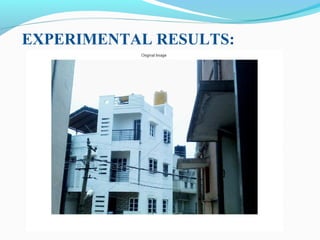
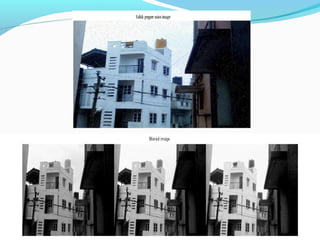
EXPERIMENTAL RESULTS:
180° rotation
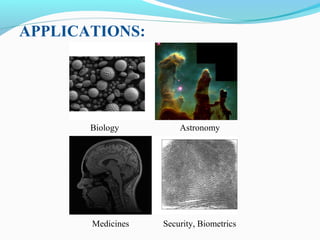
APPLICATIONS:
Biology Astronomy
Medicines Security, Biometrics
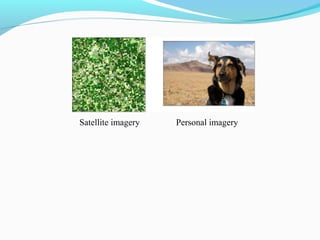
Satellite imagery Personal imagery
• The material presented is representative of spatial domain
technique commonly used in practice for image enhancement.
• This area of image processing is a dynamic field, and new
technique and applications are reported routinely in professional
literature and in new product announcement.
• In addition to enhancement, this serves the purpose of introducing a
number of concepts such as intensity adjustment, contrast stretching,
noise filtering, etc. that will be useful in various fields.
CONCLUSION:
Image enhancement ppt nal2

Image enhancement ppt nal2

  • 1.
    External guide:External guide: Mr.Lokesha HMr. Lokesha H Senior ScientistSenior Scientist DSPS group, ALD div.DSPS group, ALD div. NAL.NAL. Internal guide:Internal guide: Prof. T SridharProf. T Sridhar HOD, ECE dept.HOD, ECE dept. NIT&MS.NIT&MS. Submitted by: Aishwarya R Kambi (1AU10EC001) Samatha H S (1AU10EC034) Sanjana G J (1AU10ECO35) Surabhi K S (1AU10EC044)
  • 2.
    INSIGHT: 1. Introduction 2. WhyImage Enhancement? 3. What is Image Enhancement? 4. Image Enhancement techniques 5. Examples of Image Enhancement techniques 6. Spatial Domain Enhancement 7. Enhancement methods 8. Conversion methods 9. Resources required 10. Experimental results 11. Applications of image enhancement techniques. 12. Conclusion
  • 3.
    INTRODUCTION: An image definedin the “real world” is considered to be a function of two real variables, for example, a(x,y) with a as the amplitude (e.g. brightness) of the image at the real coordinate position (x,y) Image processing is the study of any algorithm that takes an image as input and returns an image as output. It includes the following: 1. Image display and printing 2. Image editing and manipulation 3. Image enhancement 4. Feature detection 5. Image compression. Original JPEG Compression
  • 4.
    WHY IMAGE ENHANCEMENT? Theaim of image enhancement is to improve the visual appearance of an image, or to provide a “better transform representation for future automated image processing. Many images like medical images, satellite images, aerial images and even real life photographs suffer from poor contrast and noise. It is necessary to enhance the contrast and remove the noise to increase image quality. Enhancement techniques which improves the quality (clarity) of images for human viewing, removing blurring and noise, increasing contrast, and revealing details are examples of enhancement operations.
  • 5.
    WHAT IS IMAGEENHANCEMENT? Image enhancement process consists of a collection of techniques that seek to improve the visual appearance of an image or to convert the image to a form better suited for analysis by a human or machine. The principal objective of image enhancement is to modify attributes of an image to make it more suitable for a given task and a specific observer. Enhancement Technique Input Image “Better” Image Application specific
  • 6.
    IMAGE ENHANCEMENT TECHNIQUES: The existingtechniques of image enhancement can be classified into two categories: • Spatial domain enhancement • Frequency domain enhancement.
  • 7.
    EXAMPLES OF IMAGEENHANCEMENT TECHNIQUES: 1. Noise removal Noisy image De-noised image 2. Contrast adjustment Low contrast Original contrast High contrast
  • 8.
    SPATIAL DOMAIN ENHANCEMENT: x •Spatial domain techniques are performed to the image plane itself and they are based on direct manipulation of pixels in an image. • The operation can be formulated as g(x,y)=T[f(x,y)], where g is the output, f is the input image and T is an operation on f defined over some neighbourhood of (x,y). • According to the operations on the image pixels, it can be further divided into 2 categories: oPoint operations and oSpatial operations (including linear and non- linear operations).
  • 9.
    ENHANCEMENT METHODS: 1.Contrast stretching: • Low-contrast images can result from poor illumination, lack of dynamic range in the image sensor, or even wrong setting of a lens aperture. • The idea behind contrast stretching is to increase the dynamic range of the gray levels in the image being processed. • The general form is: s = 1+ (m / r) E where, r are the input image values, s are the output image values, m is the thresholding value and E the slope. 1
  • 10.
    Figure shows theeffect of the variable E: • If E = 1 the stretching became a threshold transformation. • If E > 1 the transformation is defined by the curve which is smoother and • When E < 1 the transformation makes the negative and also stretching.
  • 11.
    2. Noise reduction: This is accomplished by averaging and median filtering. These are as follows: a. Median Filtering : • The median filter is normally used to reduce noise in an image by preserving useful detail in the image. • The median filter considers each pixel in the image in turn and looks at its nearby neighbors to decide whether or not it is representative of its surroundings. • The median is calculated by first sorting all the pixel values from the surrounding neighborhood into numerical order and then replacing the pixel being considered with the middle pixel value.
  • 12.
    Figure below illustratesan example calculation. b.Noise removal using Averaging: • Image averaging works on the assumption that the noise in your image is truly random. • This way, random fluctuations above and below actual image data will gradually even out as one averages more and more images.
  • 13.
    • If youwere to take two shots of a smooth gray patch, using the same camera settings and under identical conditions (temperature, lighting, etc.), then you would obtain images similar to those shown on the left. • If we were to take the pixel value at each location along the dashed line, and average it with value for the pixel in the same location for the other image, then the brightness variation would be reduced as follows:
  • 14.
    3. Intensity Adjustment: • Intensity adjustment is a technique for mapping an image's intensity values to a new range. • For example, rice.tif. is a low contrast image. The histogram of rice.tif, shown in Figure below, indicates that there are no values below 40 or above 225. If you remap the data values to fill the entire intensity range [0, 255], you can increase the contrast of the image. • You can do this kind of adjustment with the imadjust function. The general syntax of imadjust is J = imadjust(I,[low_in high_in],[low_out high_out])
  • 15.
    4. Histogram equalization: •Histogram Equalization is a technique that generates a gray map which changes the histogram of an image and redistributing all pixels values to be as close as possible to a user – specified desired histogram. • It allows for areas of lower local contrast to gain a higher contrast. Figure above shows the original image and its histogram, and the equalized versions. Both images are quantized to 64grey levels.
  • 16.
    5. Image thresholding: •Thresholding is the simplest segmentation method. • The pixels are partitioned depending on their intensity value T. • Global thresholding, using an appropriate threshold T: g(x, y) = 1, if f (x, y) > T 0, if f (x, y) <= T • Imagine a poker playing robot that needs to visually interpret the cards in its hand: Original Image Thresholded Image
  • 17.
    If you getthe threshold wrong the results can be disastrous: Threshold Too High Threshold Too Low
  • 18.
    6. Grey levelslicing • Grey level slicing is the spatial domain equivalent to band-pass filtering. • A grey level slicing function can either emphasize a group of intensities and diminish all others or it can emphasize a group of grey levels and leave the rest alone. The figure above shows An example of gray level slicing with and without background
  • 19.
    7. Image rotation: •Image rotation in the digital domain is a form of re-sampling but is performed on non-integer points. •The equation below gives the coordinate transformation in terms of rotation of the coordinate axis. Sx = Dx cos(θ) + Dy sin(θ) Sy = -Dx sin(θ) + Dy cos (θ) Where, S and D represent source and destination coordinates. 0° rotation 90° rotation 180° rotation
  • 20.
    CONVERSION METHODS: 1.Greyscale conversion: •Conversion of a colour image into a greyscale image inclusive of salient features is a complicated process. • The converted greyscale image may lose contrasts, sharpness, shadow, and structure of the colour image. • To preserve these salient features, the colour image is converted into greyscale image using three algorithms as stated: a. The lightness method averages the most prominent and least prominent colors: (max(R, G, B) + min(R, G, B)) / 2. b. The average method simply averages the values: (R + G + B) / 3. c. The luminosity method is a more sophisticated version of the average method. The formula for luminosity is 0.21 R + 0.71 G + 0.07 B.
  • 21.
    The example ofsunflower images are as follows: Original image Lightness Average Luminosity
  • 22.
    2. Image FileFormat: • The file format is critical to the preservation of an image. • The TIFF file (tagged image file format) is the current preservation format because it holds all the preservation information required to create a digital master of the original. Some of the file formats are: TIFF Preferred Archival format, JPEG Irreversible image compression, DNG Universal camera raw format etc.                         Original                              JPEG Compression
  • 23.
    RESOURCES REQUIRED: Software requirements: 1.Windows Operating System XP and above. 2. MATLAB 7.10.0(R2010a) Hardware requirements: 1. Hard disk: 16GB and above. 2. RAM: 1GB and above. 3. Processor: Dual-core and above.
  • 24.
  • 29.
  • 30.
  • 31.
  • 32.
    • The materialpresented is representative of spatial domain technique commonly used in practice for image enhancement. • This area of image processing is a dynamic field, and new technique and applications are reported routinely in professional literature and in new product announcement. • In addition to enhancement, this serves the purpose of introducing a number of concepts such as intensity adjustment, contrast stretching, noise filtering, etc. that will be useful in various fields. CONCLUSION: