DIGITAL IMAGE
PROCESSING
CONTENTS

What is an image?

Digital image processing-Introduction

History

Types of computerised process

Fundamental steps in image processing

Sources for images

Uses

Applications
What is an image?

An image may be defined as a two-
dimensional function, f(x, y), where x and y are
spatial (plane) coordinates, and the amplitude
of at any pair of coordinates (x, y) is called the
Intensity or gray level of the image at that
point.

When x, y, and the amplitude values of f are
all finite,discrete quantities, we call the image a
digital image.
Digital Image Processing

The field of digital image processing refers to
processing digital images by means of a digital
computer.
Note :-

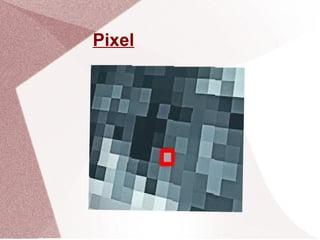
Digital image is composed of a finite number of
elements, each of which has a particular
location and value.These elements are
referred to as picture elements, image
elements, pels and pixels.

Pixel is the term most widely used to denote
the elements of a digital image.
Pixel
History

Many of the techniques of digital image
processing, or digital picture processing as it
often was called, were developed in the 1960s
at the Jet Propulsion Laboratory,
Massachusetts Institute of Technology, Bell
Laboratories, University of Maryland, and a few
other research facilities.
History

With the fast computers and signal processors
available in the 2000s, digital image
processing has become the most common
form of image processing and generally, is
used because it is not only the most versatile
method, but also the cheapest.

Digital image processing technology for
medical applications was inducted into the
Space Foundation Space Technology Hall of
Fame in 1994.
History

In 2002 Raanan Fattal introduced Gradient
domain image processing, a new way to
process images in which the differences
between pixels are manipulated rather than the
pixel values themselves.
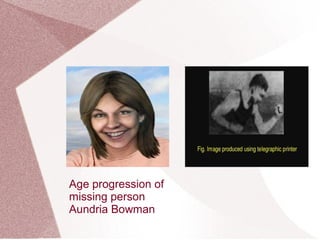
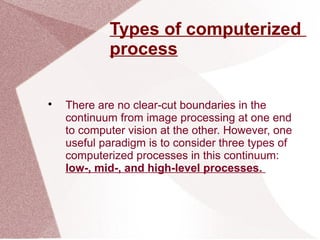
Age progression of
missing person
Aundria Bowman
Types of computerized
process

There are no clear-cut boundaries in the
continuum from image processing at one end
to computer vision at the other. However, one
useful paradigm is to consider three types of
computerized processes in this continuum:
low-, mid-, and high-level processes.
Types of computerized
process

Low level processes involve primitive
operations such as image preprocessing to
reduce noise,contrast enhancement, and
image sharpening.

A low-level process is characterized by the
factthat both its inputs and outputs are
images.
Types of computerized
process

Mid-level processing on images involves
tasks such as segmentation (partitioning an
image into regions or objects), description of
those objects to reduce them to a form suitable
for computer processing, and classification
(recognition) of individual objects.

A mid-level process is characterized by the fact
that its inputs generally are images, but its
outputs are attributes extracted from those
images (e.g., edges, contours, and the identity
of individual objects).
Types of computerized
process

Higher-level processing involves “making
sense” of anensemble of recognized
objects, as in image analysis, and, at
the far end of the continuum,performing the
cognitive functions normally associated with
vision and, in addition,encompasses
processes that extract attributes from images,
up to and including the recognition
ofindividual objects.
Types of computerized
process

As a simple illustration to clarify these
concepts, consider the area of automated
analysis of text.

The processes of acquiring an image of the
area containing the text,preprocessing that
image, extracting (segmenting) the individual
characters, describing the characters in a
form suitable for computer processing and
recognizing those individual characters are in
the scope of what we call digital image
processing.
Fundamental steps in image
processing
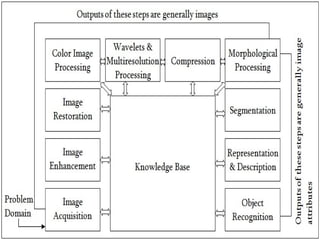
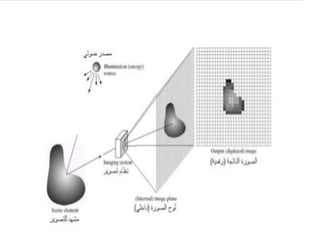
Image Acquisition

This is the first step or process of the
fundamental steps of digital image processing.

Image acquisition could be as simple as being
given an image that is already in digital form.
Generally, the image acquisition stage involves
preprocessing, such as scaling etc.
Topics:-
• Basic digital image concepts
• Preprocessing stages
• Visual perception
• Sampling
• Quantization
• Pixel operations
Image Enhancement

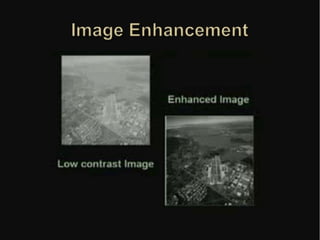
Image enhancement is among the simplest and
most appealing areas of digital image
processing. Basically, the idea behind
enhancement techniques is to bring out detail
that is obscured, or simply to highlight certain
features of interest in an image. Such as,
changing brightness & contrast etc.

Enhancement in the spatial domain

Point processing
 Log transformation
 Power law transformation

Spatial filtering process

Smoothing filters

Frequency Domain Filtering
The Fourier transform
Filtering in the frequency domain
Low pass filters - High pass
filters
->Ideal low pass filter
->Butterworth low pass
filter
->Gaussian low pass filter
One of the most common
uses of DIP techniques:

improve quality,

remove noise.. etc
Image Restoration

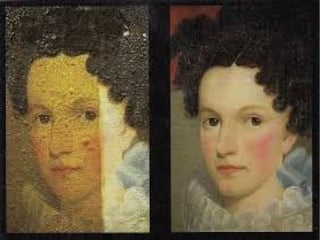
Image restoration is an area that also deals
with improving the appearance of an image.
However, unlike enhancement, which is
subjective, image restoration is objective, in the
sense that restoration techniques tend to be
based on mathematical or probabilistic models
of image degradation.
Color Image Processing

Color image processing is an area that has
been gaining its importance because of the
significant increase in the use of digital images
over the Internet. This may include color
modeling and processing in a digital domain
etc.
Topics:
• Color fundamentals
• Color models
• Color transformations
• Smoothing and sharpening
• Color segmentation
• Noise in color images
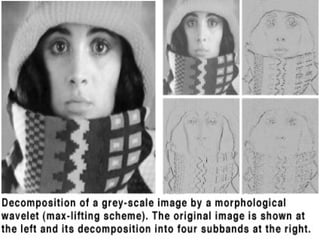
Wavelets &Multiresolution
Processing

Wavelets are the foundation for representing
images in various degrees of resolution.
Images subdivision successively into smaller
regions for data compression and for pyramidal
representation.
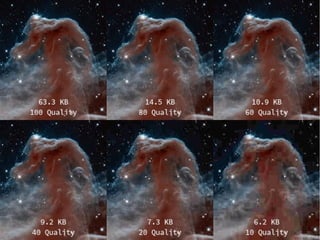
Compression

Compression deals with techniques for
reducing the storage required to save an image
or the bandwidth to transmit it. Particularly in
the uses of internet it is very much necessary to
compress data.
Topics:
• Coding redundancy
• Image compression models
• Error-free compression
• Lossy compression
• Image compression standards
Morphological Processing

Morphological processing deals with tools for
extracting image components that are useful in
the representation and description of shape.

Basic morphological concepts and operations
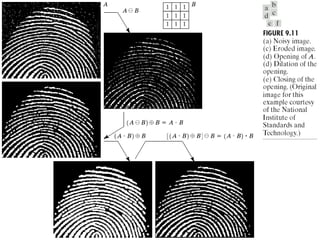
 Hitting, fitting and missing
 Erosion and dilation
 Opening and closing

Morphological algorithms
 Boundary extraction
 Region filling
Segmentation

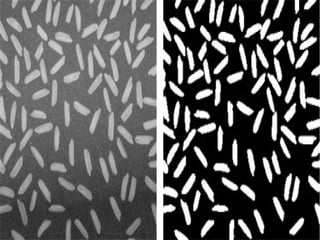
Segmentation procedures partition an image
into its constituent parts or objects. In general,
autonomous segmentation is one of the most
difficult tasks in digital image processing.

A rugged segmentation procedure brings the
process a long way toward successful solution
of imaging problems that require objects to be
identified individually.
Main topics:

The segmentation problem

Importance of good thresholding

Problems that can arise with
thresholding

The basic global thresholding
algorithm

Point- edge detection

Region-based segmentation
Representation & Description

Representation and description almost always
follow the output of a segmentation stage,
which usually is raw pixel data, constituting
either the boundary of a region or all the points
in the region itself.

Choosing a representation is only part of the
solution for transforming raw data into a form
suitable for subsequent computer processing.

Description deals with extracting attributes
that result in some quantitative information of
interest or are basic for differentiating one class
of objects from another.
Topics:
• Chain codes
• Skeletons
• Boundary descriptors
• Regional descriptors
• Texture
Object recognition

Recognition is the process that assigns a label,
such as, “vehicle” to an object based on its
descriptors.
Topics:
• Pattern classes
• Structural methods
Knowledge Base

Knowledge may be as simple as detailing
regions of an image where the information of
interest is known to be located, thus limiting the
search that has to be conducted in seeking that
information.

The knowledge base also can be quite
complex, such as an interrelated list of all major
possible defects in a materials inspection
problem or an image database containing high-
resolution satellite images of a region in
connection with change-detection applications.
Sources for Images
One of the simplest ways to develop a basic
understanding of the extent of image
processing applications is categorization
according to sources.

Electromagnetic (EM) energy spectrum

Synthetic images produced by computer

Acoustic

Ultrasonic

Electronic
Electromagnetic (EM)
energy spectrum

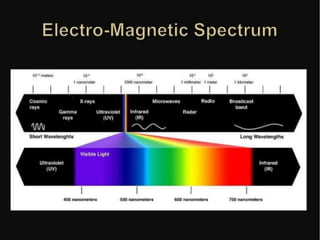
Images based on radiation from the EM
spectrum are the most familiar to us.

If bands are grouped according to energy
per photon, we obtain the spectrum

Em spectrum are not distinct but rather
transition smoothly one to other.
Uses

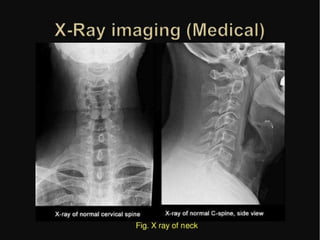
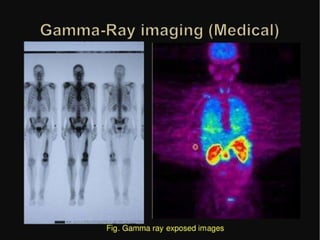
Gamma-ray imaging (highest energy):
nuclear medicine and astronomical
observations

X-rays: medical diagnostics, industry, and
astronomy, etc.

Ultraviolet: industrial inspection,
microscopy, lasers, biological imaging, and
astronomical observations

Visible and infrared bands: light
microscopy, astronomy, remote sensing,
industry, and law enforcement

Microwave band: radar Radio band
(lowest energy) : medicine (such as MRI) and
astronomy
APPLICATIONS
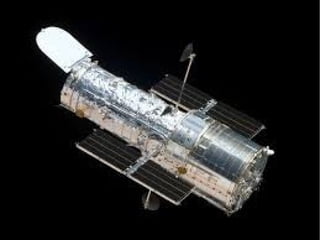
The Hubble Telescope

Launched in 1990 the Hubble
telescope can take images of very
distant objects.
However, an incorrect mirror made
many of Hubble’s images useless.

Image processing techniques were
used to fix this
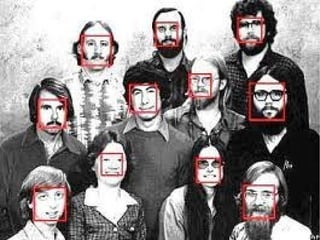
HCI
Try to make human computer interfaces more
natural.
 Face recognition
 Gesture recognition
Artistic Effects

Artistic effects are used to make
images more visually appealing, to add
special effects and to make composite
images.
Image Processing
Examples

Pseudocolor enhancement for security
screening.

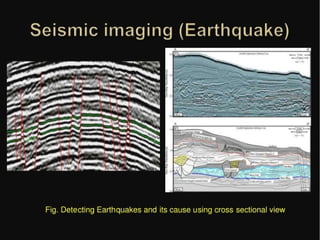
Earthquake Analysis

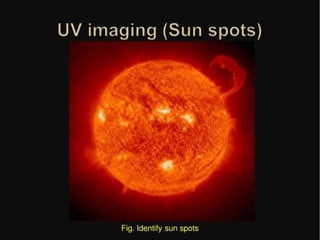
UV Imaging

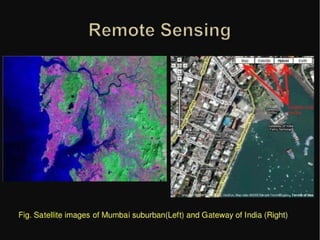
Extraction of settlement area from an aerial
image

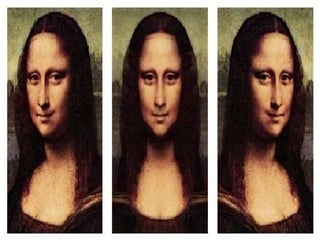
Face Morphing

Fingerprint Recognition

Iris Recognition

Hand Writing Recogition

Face Detection
Digital Image Processing

Digital Image Processing

  • 1.
  • 2.
    CONTENTS  What is animage?  Digital image processing-Introduction  History  Types of computerised process  Fundamental steps in image processing  Sources for images  Uses  Applications
  • 3.
    What is animage?  An image may be defined as a two- dimensional function, f(x, y), where x and y are spatial (plane) coordinates, and the amplitude of at any pair of coordinates (x, y) is called the Intensity or gray level of the image at that point.  When x, y, and the amplitude values of f are all finite,discrete quantities, we call the image a digital image.
  • 4.
    Digital Image Processing  Thefield of digital image processing refers to processing digital images by means of a digital computer. Note :-  Digital image is composed of a finite number of elements, each of which has a particular location and value.These elements are referred to as picture elements, image elements, pels and pixels.  Pixel is the term most widely used to denote the elements of a digital image.
  • 5.
  • 6.
    History  Many of thetechniques of digital image processing, or digital picture processing as it often was called, were developed in the 1960s at the Jet Propulsion Laboratory, Massachusetts Institute of Technology, Bell Laboratories, University of Maryland, and a few other research facilities.
  • 7.
    History  With the fastcomputers and signal processors available in the 2000s, digital image processing has become the most common form of image processing and generally, is used because it is not only the most versatile method, but also the cheapest.  Digital image processing technology for medical applications was inducted into the Space Foundation Space Technology Hall of Fame in 1994.
  • 8.
    History  In 2002 RaananFattal introduced Gradient domain image processing, a new way to process images in which the differences between pixels are manipulated rather than the pixel values themselves.
  • 9.
    Age progression of missingperson Aundria Bowman
  • 10.
    Types of computerized process  Thereare no clear-cut boundaries in the continuum from image processing at one end to computer vision at the other. However, one useful paradigm is to consider three types of computerized processes in this continuum: low-, mid-, and high-level processes.
  • 11.
    Types of computerized process  Lowlevel processes involve primitive operations such as image preprocessing to reduce noise,contrast enhancement, and image sharpening.  A low-level process is characterized by the factthat both its inputs and outputs are images.
  • 12.
    Types of computerized process  Mid-levelprocessing on images involves tasks such as segmentation (partitioning an image into regions or objects), description of those objects to reduce them to a form suitable for computer processing, and classification (recognition) of individual objects.  A mid-level process is characterized by the fact that its inputs generally are images, but its outputs are attributes extracted from those images (e.g., edges, contours, and the identity of individual objects).
  • 13.
    Types of computerized process  Higher-levelprocessing involves “making sense” of anensemble of recognized objects, as in image analysis, and, at the far end of the continuum,performing the cognitive functions normally associated with vision and, in addition,encompasses processes that extract attributes from images, up to and including the recognition ofindividual objects.
  • 14.
    Types of computerized process  Asa simple illustration to clarify these concepts, consider the area of automated analysis of text.  The processes of acquiring an image of the area containing the text,preprocessing that image, extracting (segmenting) the individual characters, describing the characters in a form suitable for computer processing and recognizing those individual characters are in the scope of what we call digital image processing.
  • 15.
    Fundamental steps inimage processing
  • 17.
    Image Acquisition  This isthe first step or process of the fundamental steps of digital image processing.  Image acquisition could be as simple as being given an image that is already in digital form. Generally, the image acquisition stage involves preprocessing, such as scaling etc.
  • 19.
    Topics:- • Basic digitalimage concepts • Preprocessing stages • Visual perception • Sampling • Quantization • Pixel operations
  • 20.
    Image Enhancement  Image enhancementis among the simplest and most appealing areas of digital image processing. Basically, the idea behind enhancement techniques is to bring out detail that is obscured, or simply to highlight certain features of interest in an image. Such as, changing brightness & contrast etc.
  • 21.
     Enhancement in thespatial domain  Point processing  Log transformation  Power law transformation  Spatial filtering process  Smoothing filters  Frequency Domain Filtering The Fourier transform Filtering in the frequency domain Low pass filters - High pass filters ->Ideal low pass filter ->Butterworth low pass filter ->Gaussian low pass filter
  • 23.
    One of themost common uses of DIP techniques:  improve quality,  remove noise.. etc
  • 24.
    Image Restoration  Image restorationis an area that also deals with improving the appearance of an image. However, unlike enhancement, which is subjective, image restoration is objective, in the sense that restoration techniques tend to be based on mathematical or probabilistic models of image degradation.
  • 26.
    Color Image Processing  Colorimage processing is an area that has been gaining its importance because of the significant increase in the use of digital images over the Internet. This may include color modeling and processing in a digital domain etc.
  • 27.
    Topics: • Color fundamentals •Color models • Color transformations • Smoothing and sharpening • Color segmentation • Noise in color images
  • 29.
    Wavelets &Multiresolution Processing  Wavelets arethe foundation for representing images in various degrees of resolution. Images subdivision successively into smaller regions for data compression and for pyramidal representation.
  • 31.
    Compression  Compression deals withtechniques for reducing the storage required to save an image or the bandwidth to transmit it. Particularly in the uses of internet it is very much necessary to compress data.
  • 32.
    Topics: • Coding redundancy •Image compression models • Error-free compression • Lossy compression • Image compression standards
  • 34.
    Morphological Processing  Morphological processingdeals with tools for extracting image components that are useful in the representation and description of shape.  Basic morphological concepts and operations  Hitting, fitting and missing  Erosion and dilation  Opening and closing  Morphological algorithms  Boundary extraction  Region filling
  • 36.
    Segmentation  Segmentation procedures partitionan image into its constituent parts or objects. In general, autonomous segmentation is one of the most difficult tasks in digital image processing.  A rugged segmentation procedure brings the process a long way toward successful solution of imaging problems that require objects to be identified individually.
  • 37.
    Main topics:  The segmentationproblem  Importance of good thresholding  Problems that can arise with thresholding  The basic global thresholding algorithm  Point- edge detection  Region-based segmentation
  • 39.
    Representation & Description  Representationand description almost always follow the output of a segmentation stage, which usually is raw pixel data, constituting either the boundary of a region or all the points in the region itself.  Choosing a representation is only part of the solution for transforming raw data into a form suitable for subsequent computer processing.  Description deals with extracting attributes that result in some quantitative information of interest or are basic for differentiating one class of objects from another.
  • 40.
    Topics: • Chain codes •Skeletons • Boundary descriptors • Regional descriptors • Texture
  • 42.
    Object recognition  Recognition isthe process that assigns a label, such as, “vehicle” to an object based on its descriptors. Topics: • Pattern classes • Structural methods
  • 43.
    Knowledge Base  Knowledge maybe as simple as detailing regions of an image where the information of interest is known to be located, thus limiting the search that has to be conducted in seeking that information.  The knowledge base also can be quite complex, such as an interrelated list of all major possible defects in a materials inspection problem or an image database containing high- resolution satellite images of a region in connection with change-detection applications.
  • 44.
    Sources for Images Oneof the simplest ways to develop a basic understanding of the extent of image processing applications is categorization according to sources.  Electromagnetic (EM) energy spectrum  Synthetic images produced by computer  Acoustic  Ultrasonic  Electronic
  • 45.
    Electromagnetic (EM) energy spectrum  Imagesbased on radiation from the EM spectrum are the most familiar to us.  If bands are grouped according to energy per photon, we obtain the spectrum  Em spectrum are not distinct but rather transition smoothly one to other.
  • 47.
    Uses  Gamma-ray imaging (highestenergy): nuclear medicine and astronomical observations  X-rays: medical diagnostics, industry, and astronomy, etc.  Ultraviolet: industrial inspection, microscopy, lasers, biological imaging, and astronomical observations  Visible and infrared bands: light microscopy, astronomy, remote sensing, industry, and law enforcement  Microwave band: radar Radio band (lowest energy) : medicine (such as MRI) and astronomy
  • 50.
    APPLICATIONS The Hubble Telescope  Launchedin 1990 the Hubble telescope can take images of very distant objects. However, an incorrect mirror made many of Hubble’s images useless.  Image processing techniques were used to fix this
  • 52.
    HCI Try to makehuman computer interfaces more natural.  Face recognition  Gesture recognition
  • 54.
    Artistic Effects  Artistic effectsare used to make images more visually appealing, to add special effects and to make composite images.
  • 56.
    Image Processing Examples  Pseudocolor enhancementfor security screening.  Earthquake Analysis  UV Imaging  Extraction of settlement area from an aerial image  Face Morphing  Fingerprint Recognition  Iris Recognition  Hand Writing Recogition  Face Detection