HTML Tables
HTML Tables
(SAMPLE ONLY)

Apple           44%


Bananas         23%


Oranges         13%


Others          10%
HTML Tables
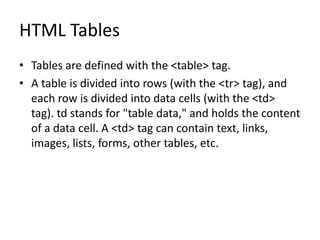
• Tables are defined with the <table> tag.
• A table is divided into rows (with the <tr> tag), and
  each row is divided into data cells (with the <td>
  tag). td stands for "table data," and holds the content
  of a data cell. A <td> tag can contain text, links,
  images, lists, forms, other tables, etc.
Table Example
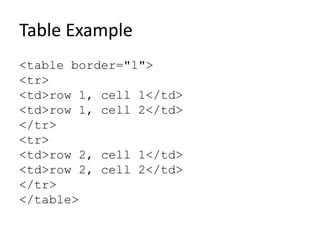
<table border="1">
<tr>
<td>row 1, cell 1</td>
<td>row 1, cell 2</td>
</tr>
<tr>
<td>row 2, cell 1</td>
<td>row 2, cell 2</td>
</tr>
</table>
Continuing the Table Example
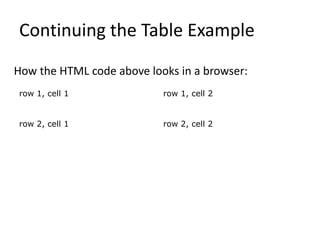
How the HTML code above looks in a browser:
row 1, cell 1              row 1, cell 2


row 2, cell 1              row 2, cell 2
HTML Tables and the Border Attribute
• If you do not specify a border attribute, the table will
  be displayed without borders. Sometimes this can be
  useful, but most of the time, we want the borders to
  show.
• To display a table with borders, specify the border
  attribute:
<table border="1">
<tr>
<td>Row 1, cell 1</td>
<td>Row 1, cell 2</td>
</tr>
</table>
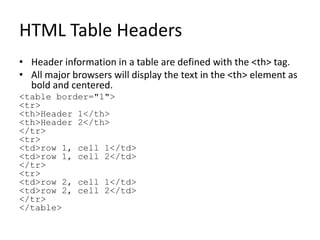
HTML Table Headers
• Header information in a table are defined with the <th> tag.
• All major browsers will display the text in the <th> element as
  bold and centered.
<table border="1">
<tr>
<th>Header 1</th>
<th>Header 2</th>
</tr>
<tr>
<td>row 1, cell 1</td>
<td>row 1, cell 2</td>
</tr>
<tr>
<td>row 2, cell 1</td>
<td>row 2, cell 2</td>
</tr>
</table>
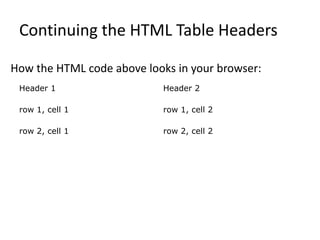
Continuing the HTML Table Headers

How the HTML code above looks in your browser:
 Header 1                   Header 2

 row 1, cell 1              row 1, cell 2

 row 2, cell 1              row 2, cell 2
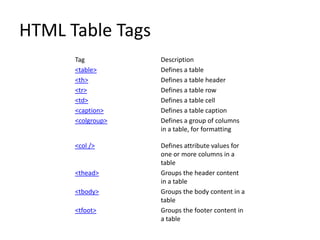
HTML Table Tags
      Tag          Description
      <table>      Defines a table
      <th>         Defines a table header
      <tr>         Defines a table row
      <td>         Defines a table cell
      <caption>    Defines a table caption
      <colgroup>   Defines a group of columns
                   in a table, for formatting

      <col />      Defines attribute values for
                   one or more columns in a
                   table
      <thead>      Groups the header content
                   in a table
      <tbody>      Groups the body content in a
                   table
      <tfoot>      Groups the footer content in
                   a table

HTML Tables

  • 1.
  • 2.
    HTML Tables (SAMPLE ONLY) Apple 44% Bananas 23% Oranges 13% Others 10%
  • 3.
    HTML Tables • Tablesare defined with the <table> tag. • A table is divided into rows (with the <tr> tag), and each row is divided into data cells (with the <td> tag). td stands for "table data," and holds the content of a data cell. A <td> tag can contain text, links, images, lists, forms, other tables, etc.
  • 4.
    Table Example <table border="1"> <tr> <td>row1, cell 1</td> <td>row 1, cell 2</td> </tr> <tr> <td>row 2, cell 1</td> <td>row 2, cell 2</td> </tr> </table>
  • 5.
    Continuing the TableExample How the HTML code above looks in a browser: row 1, cell 1 row 1, cell 2 row 2, cell 1 row 2, cell 2
  • 6.
    HTML Tables andthe Border Attribute • If you do not specify a border attribute, the table will be displayed without borders. Sometimes this can be useful, but most of the time, we want the borders to show. • To display a table with borders, specify the border attribute: <table border="1"> <tr> <td>Row 1, cell 1</td> <td>Row 1, cell 2</td> </tr> </table>
  • 7.
    HTML Table Headers •Header information in a table are defined with the <th> tag. • All major browsers will display the text in the <th> element as bold and centered. <table border="1"> <tr> <th>Header 1</th> <th>Header 2</th> </tr> <tr> <td>row 1, cell 1</td> <td>row 1, cell 2</td> </tr> <tr> <td>row 2, cell 1</td> <td>row 2, cell 2</td> </tr> </table>
  • 8.
    Continuing the HTMLTable Headers How the HTML code above looks in your browser: Header 1 Header 2 row 1, cell 1 row 1, cell 2 row 2, cell 1 row 2, cell 2
  • 9.
    HTML Table Tags Tag Description <table> Defines a table <th> Defines a table header <tr> Defines a table row <td> Defines a table cell <caption> Defines a table caption <colgroup> Defines a group of columns in a table, for formatting <col /> Defines attribute values for one or more columns in a table <thead> Groups the header content in a table <tbody> Groups the body content in a table <tfoot> Groups the footer content in a table