Technology for HR Shared Services 
A Discussion of Key Concepts in Shared Services Technology 
August 2011
Copyright © 2011 by ScottMadden. All rights reserved. 
Agenda 
About ScottMadden 
Overview of HR Technology 
Design, Evaluation, and Selection of Technology 
Lessons Learned 
1
About ScottMadden
Copyright © 2011 by ScottMadden. All rights reserved. 
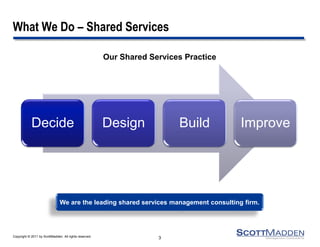
What We Do – Shared Services 
Decide 
Design 
Build 
Improve 
3 
Our Shared Services Practice 
We are the leading shared services management consulting firm.
Overview of HR Technology
Copyright © 2011 by ScottMadden. All rights reserved. 
Overview of HR Technology 
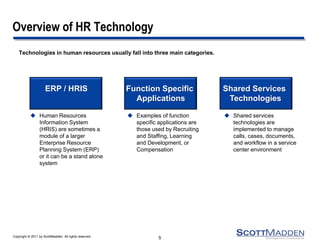
Technologies in human resources usually fall into three main categories. 
5 
Human Resources Information System (HRIS) are sometimes a module of a larger Enterprise Resource Planning System (ERP) or it can be a stand alone system 
ERP / HRIS 
Function Specific 
Applications 
Shared Services 
Technologies 
Examples of function specific applications are those used by Recruiting and Staffing, Learning and Development, or Compensation 
Shared services technologies are implemented to manage calls, cases, documents, and workflow in a service center environment
Copyright © 2011 by ScottMadden. All rights reserved. 
Overview of HR Technology (Cont’d) 
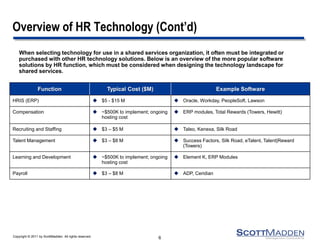
When selecting technology for use in a shared services organization, it often must be integrated or purchased with other HR technology solutions. Below is an overview of the more popular software solutions by HR function, which must be considered when designing the technology landscape for shared services. 
6 
Function 
Typical Cost ($M) 
Example Software 
HRIS (ERP) 
$5 - $15 M 
Oracle, Workday, PeopleSoft. Lawson 
Compensation 
~$500K to implement; ongoing hosting cost 
ERP modules, Total Rewards (Towers, Hewitt) 
Recruiting and Staffing 
$3 – $5 M 
Taleo, Kenexa, Silk Road 
Talent Management 
$3 – $8 M 
Success Factors, Silk Road, eTalent, Talent|Reward (Towers) 
Learning and Development 
~$500K to implement; ongoing hosting cost 
Element K, ERP Modules 
Payroll 
$3 – $8 M 
ADP, Ceridian
Copyright © 2011 by ScottMadden. All rights reserved. 
Overview of HR Technology (Cont’d) 
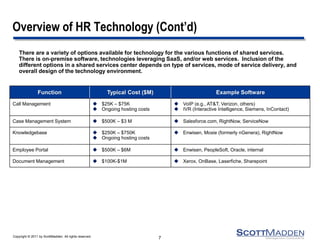
There are a variety of options available for technology for the various functions of shared services. There is on-premise software, technologies leveraging SaaS, and/or web services. Inclusion of the different options in a shared services center depends on type of services, mode of service delivery, and overall design of the technology environment. 
7 
Function 
Typical Cost ($M) 
Example Software 
Call Management 
$25K – $75K 
Ongoing hosting costs 
VoIP (e.g., AT&T, Verizon, others) 
IVR (Interactive Intelligence, Siemens, InContact) 
Case Management System 
$500K – $3 M 
Salesforce.com, RightNow, ServiceNow 
Knowledgebase 
$250K – $750K 
Ongoing hosting costs 
Enwisen, Moxie (formerly nGenera), RightNow 
Employee Portal 
$500K – $6M 
Enwisen, PeopleSoft, Oracle, internal 
Document Management 
$100K-$1M 
Xerox, OnBase, Laserfiche, Sharepoint
Copyright © 2011 by ScottMadden. All rights reserved. 
Service Center Technologies 
Automatic Call Distributor (ACD) – handles queue management 
800#/Interactive Voice Response System (IVR) – provides customers with access to information via the telephone; provides menu options 
Computer Telephony Integration – “screen pops;” recognizes callers’ phone number and pulls up relevant information for call reps while they are answering the phone 
Case Management – provides caller history/information 
Knowledge Base – provides searchable information for call reps 
Document Management – manages electronic receipt/filing/retrieval of documents 
Employee/Manager Self-Service Application and Workflow Technology – provides web front-end and back-end processing to enable customers to view/interact with back-end data via a PC, kiosk, etc. 
Web Content Management Software (portals) – serves to pull distributed data from a variety of sources into a standard web presentation 
Web Chat – allows customers to interact real time with a customer service rep over the web 
Voice Over IP – enables call reps and customers to speak directly over the internet (bypassing telecomm costs) while customers navigate the website 
Wireless PDA – ports back office and web-based information to wireless personal digital assistants 
Core HRIS/Payroll Systems – database-based systems used for core HR reporting and payroll functions 
8 
Note: Other emerging technologies should be exploited as appropriate in the future.
Copyright © 2011 by ScottMadden. All rights reserved. 
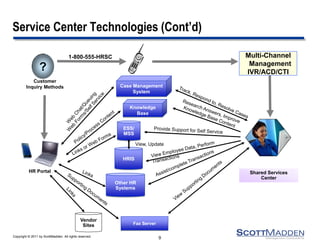
HR Portal 
? 
HRIS 
Customer 
Inquiry Methods 
1-800-555-HRSC 
Knowledge 
Base 
Case Management 
System 
ESS/ 
MSS 
Fax Server 
Shared Services 
Center 
Multi-Channel 
Management 
IVR/ACD/CTI 
View, Update 
Other HR 
Systems 
Vendor 
Sites 
Service Center Technologies (Cont’d) 
9
Copyright © 2011 by ScottMadden. All rights reserved. 
Service Center Technologies (Cont’d) 
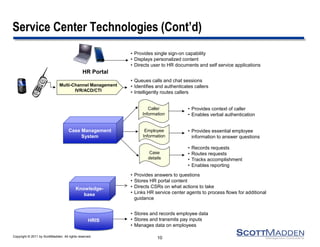
HRIS 
• Queues calls and chat sessions 
• Identifies and authenticates callers 
• Intelligently routes callers 
• Provides context of caller 
• Enables verbal authentication 
• Provides essential employee 
information to answer questions 
• Provides answers to questions 
• Stores HR portal content 
• Directs CSRs on what actions to take 
• Links HR service center agents to process flows for additional 
guidance 
• Stores and records employee data 
• Stores and transmits pay inputs 
• Manages data on employees 
Caller 
Information 
Employee 
Information 
Case 
details 
Multi-Channel Management 
IVR/ACD/CTI 
• Records requests 
• Routes requests 
• Tracks accomplishment 
• Enables reporting 
Knowledge-base 
Case Management 
System 
• Provides single sign-on capability 
• Displays personalized content 
• Directs user to HR documents and self service applications 
HR Portal 
10 
10
Copyright © 2011 by ScottMadden. All rights reserved. 
Trends in HR Technology 
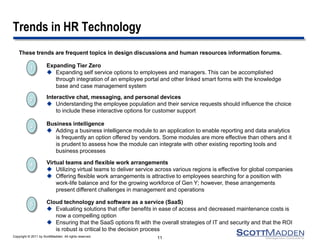
These trends are frequent topics in design discussions and human resources information forums. 
11 
2 
Interactive chat, messaging, and personal devices 
Understanding the employee population and their service requests should influence the choice to include these interactive options for customer support 
5 
Cloud technology and software as a service (SaaS) 
Evaluating solutions that offer benefits in ease of access and decreased maintenance costs is now a compelling option 
Ensuring that the SaaS options fit with the overall strategies of IT and security and that the ROI is robust is critical to the decision process 
4 
Virtual teams and flexible work arrangements 
Utilizing virtual teams to deliver service across various regions is effective for global companies 
Offering flexible work arrangements is attractive to employees searching for a position with work-life balance and for the growing workforce of Gen Y; however, these arrangements present different challenges in management and operations 
3 
Business intelligence 
Adding a business intelligence module to an application to enable reporting and data analytics is frequently an option offered by vendors. Some modules are more effective than others and it is prudent to assess how the module can integrate with other existing reporting tools and business processes 
1 
Expanding Tier Zero 
Expanding self service options to employees and managers. This can be accomplished through integration of an employee portal and other linked smart forms with the knowledge base and case management system
Design, Evaluation, and Selection of Technology
Copyright © 2011 by ScottMadden. All rights reserved. 
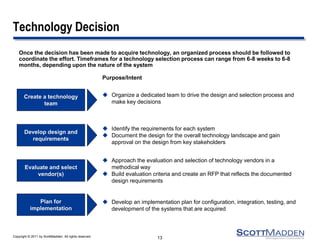
Technology Decision 
Once the decision has been made to acquire technology, an organized process should be followed to coordinate the effort. Timeframes for a technology selection process can range from 6-8 weeks to 6-8 months, depending upon the nature of the system 
13 
Purpose/Intent 
Create a technology team 
Organize a dedicated team to drive the design and selection process and make key decisions 
Develop design and requirements 
Identify the requirements for each system 
Document the design for the overall technology landscape and gain approval on the design from key stakeholders 
Evaluate and select vendor(s) 
Approach the evaluation and selection of technology vendors in a methodical way 
Build evaluation criteria and create an RFP that reflects the documented design requirements 
Develop an implementation plan for configuration, integration, testing, and development of the systems that are acquired 
Plan for implementation
Copyright © 2011 by ScottMadden. All rights reserved. 
Technology Decision – Technology Team 
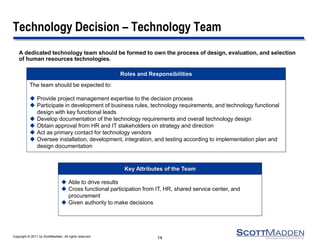
A dedicated technology team should be formed to own the process of design, evaluation, and selection of human resources technologies. 
14 
The team should be expected to: 
Provide project management expertise to the decision process 
Participate in development of business rules, technology requirements, and technology functional design with key functional leads 
Develop documentation of the technology requirements and overall technology design 
Obtain approval from HR and IT stakeholders on strategy and direction 
Act as primary contact for technology vendors 
Oversee installation, development, integration, and testing according to implementation plan and design documentation 
Roles and Responsibilities 
Able to drive results 
Cross functional participation from IT, HR, shared service center, and procurement 
Given authority to make decisions 
Key Attributes of the Team
Copyright © 2011 by ScottMadden. All rights reserved. 
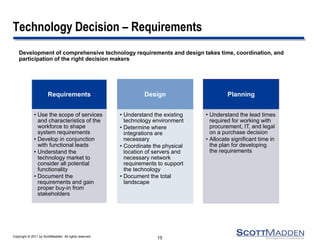
Technology Decision – Requirements 
Development of comprehensive technology requirements and design takes time, coordination, and participation of the right decision makers 
15 
Requirements 
•Use the scope of services and characteristics of the workforce to shape system requirements 
•Develop in conjunction with functional leads 
•Understand the technology market to consider all potential functionality 
•Document the requirements and gain proper buy-in from stakeholders 
Design 
•Understand the existing technology environment 
•Determine where integrations are necessary 
•Coordinate the physical location of servers and necessary network requirements to support the technology 
•Document the total landscape 
Planning 
•Understand the lead times required for working with procurement, IT, and legal on a purchase decision 
•Allocate significant time in the plan for developing the requirements
Copyright © 2011 by ScottMadden. All rights reserved. 
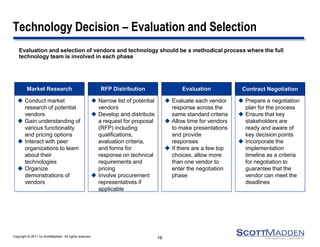
Technology Decision – Evaluation and Selection 
Evaluation and selection of vendors and technology should be a methodical process where the full technology team is involved in each phase 
16 
Prepare a negotiation plan for the process 
Ensure that key stakeholders are ready and aware of key decision points 
Incorporate the implementation timeline as a criteria for negotiation to guarantee that the vendor can meet the deadlines 
Contract Negotiation 
Conduct market research of potential vendors 
Gain understanding of various functionality and pricing options 
Interact with peer organizations to learn about their technologies 
Organize demonstrations of vendors 
Market Research 
Narrow list of potential vendors 
Develop and distribute a request for proposal (RFP) including qualifications, evaluation criteria, and forms for response on technical requirements and pricing 
Involve procurement representatives if applicable 
RFP Distribution 
Evaluate each vendor response across the same standard criteria 
Allow time for vendors to make presentations and provide responses 
If there are a few top choices, allow more than one vendor to enter the negotiation phase 
Evaluation
Copyright © 2011 by ScottMadden. All rights reserved. 
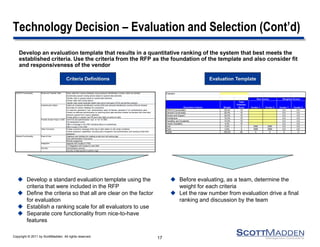
Technology Decision – Evaluation and Selection (Cont’d) 
Develop an evaluation template that results in a quantitative ranking of the system that best meets the 
established criteria. Use the criteria from the RFP as the foundation of the template and also consider fit 
and responsiveness of the vendor 
17 
Criteria Definitions Evaluation Template 
 Develop a standard evaluation template using the 
criteria that were included in the RFP 
 Define the criteria so that all are clear on the factor 
for evaluation 
 Establish a ranking scale for all evaluators to use 
 Separate core functionality from nice-to-have 
features 
 Before evaluating, as a team, determine the 
weight for each criteria 
 Let the raw number from evaluation drive a final 
ranking and discussion by the team 
Evaluator: 
Evaluation Criteria Weight 
Total 
Potential 
Score Vendor 1 Vendor 2 Vendor 1 Vendor 2 
IVR/CTI Functionality 30.0% 10 0.0 0.0 
General Functionality 20.0% 10 0.0 0.0 
Service and Support 20.0% 10 0.0 0.0 
Architecture 15.0% 10 0.0 0.0 
Flexibility and Scalability 10.0% 10 0.0 0.0 
Vendor Suitability 5.0% 10 0.0 0.0 
Cost 0.0% 0 DNR DNR 0.0 0.0 
Trust 0.0% 0 DNR DNR 0.0 0.0 
Totals 100.0% 60 0 0 0 0 
Raw Scores Weighted Scores 
Query data from Lawson database using employee identification number collect via handset 
Dynamically present routing options based on queried data elements 
Transfer calls to queues based on queried data elements 
Prompt caller with routing options 
Transfer calls inside Advocate health Care and to third party POTS and toll-free numbers 
Collect an employee identification number (EID) and personal identification number (PIN) via handset 
Send data to Lawson database for comparison 
For matches, generate a "yes" authentication value; for failures, generate a "no" authentication value 
Present an alternate authentication by matching three data elements entered via handset with three data 
elements queried from Lawson database 
Provide ability to request new PIN and enter digits at option of caller 
Send EID and authentication "yes" or "no" to CMS 
Pop designated screen 
Effect a message in the CMS indicating failure to authenticate 
Effect a query in the CMS 
Provide a dynamic message of the day to alert callers to call center conditions 
Provide expansion capabilities, including voice recognition and authentication and voiceing of data from 
databases 
Graphical user interface for creating scripts and call routing logic 
Easy administration of accounts 
Remote programing 
Integrate with Alcatel 8.0 PBX 
CTI integration with Alcatel 8.0 and CMS 
Administration security 
Security of data queried to perform logic 
IVR/CTI Functionality 
Other Functions 
Ease of Use 
Integration 
Security 
General Functionality 
Route and Transfer Calls 
Authenticate Callers 
Provide Screen Pops in CMS
Copyright © 2011 by ScottMadden. All rights reserved. 
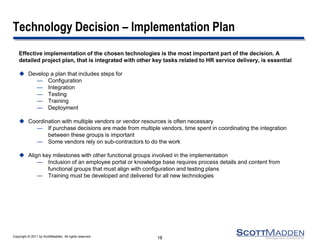
Technology Decision – Implementation Plan 
Effective implementation of the chosen technologies is the most important part of the decision. A detailed project plan, that is integrated with other key tasks related to HR service delivery, is essential 
Develop a plan that includes steps for 
—Configuration 
—Integration 
—Testing 
—Training 
—Deployment 
Coordination with multiple vendors or vendor resources is often necessary 
—If purchase decisions are made from multiple vendors, time spent in coordinating the integration between these groups is important 
—Some vendors rely on sub-contractors to do the work 
Align key milestones with other functional groups involved in the implementation 
—Inclusion of an employee portal or knowledge base requires process details and content from functional groups that must align with configuration and testing plans 
—Training must be developed and delivered for all new technologies 
18
Lessons Learned
Copyright © 2011 by ScottMadden. All rights reserved. 
Lessons Learned 
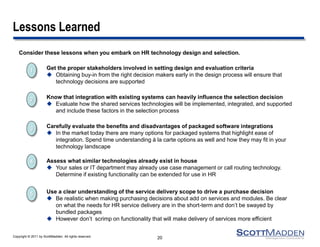
Consider these lessons when you embark on HR technology design and selection. 
20 
2 
Know that integration with existing systems can heavily influence the selection decision 
Evaluate how the shared services technologies will be implemented, integrated, and supported and include these factors in the selection process 
5 
Use a clear understanding of the service delivery scope to drive a purchase decision 
Be realistic when making purchasing decisions about add on services and modules. Be clear on what the needs for HR service delivery are in the short-term and don’t be swayed by bundled packages 
However don’t scrimp on functionality that will make delivery of services more efficient 
4 
Assess what similar technologies already exist in house 
Your sales or IT department may already use case management or call routing technology. Determine if existing functionality can be extended for use in HR 
3 
Carefully evaluate the benefits and disadvantages of packaged software integrations 
In the market today there are many options for packaged systems that highlight ease of integration. Spend time understanding á la carte options as well and how they may fit in your technology landscape 
1 
Get the proper stakeholders involved in setting design and evaluation criteria 
Obtaining buy-in from the right decision makers early in the design process will ensure that technology decisions are supported

HR Shared Services Technologies

  • 1.
    Technology for HRShared Services A Discussion of Key Concepts in Shared Services Technology August 2011
  • 2.
    Copyright © 2011by ScottMadden. All rights reserved. Agenda About ScottMadden Overview of HR Technology Design, Evaluation, and Selection of Technology Lessons Learned 1
  • 3.
  • 4.
    Copyright © 2011by ScottMadden. All rights reserved. What We Do – Shared Services Decide Design Build Improve 3 Our Shared Services Practice We are the leading shared services management consulting firm.
  • 5.
    Overview of HRTechnology
  • 6.
    Copyright © 2011by ScottMadden. All rights reserved. Overview of HR Technology Technologies in human resources usually fall into three main categories. 5 Human Resources Information System (HRIS) are sometimes a module of a larger Enterprise Resource Planning System (ERP) or it can be a stand alone system ERP / HRIS Function Specific Applications Shared Services Technologies Examples of function specific applications are those used by Recruiting and Staffing, Learning and Development, or Compensation Shared services technologies are implemented to manage calls, cases, documents, and workflow in a service center environment
  • 7.
    Copyright © 2011by ScottMadden. All rights reserved. Overview of HR Technology (Cont’d) When selecting technology for use in a shared services organization, it often must be integrated or purchased with other HR technology solutions. Below is an overview of the more popular software solutions by HR function, which must be considered when designing the technology landscape for shared services. 6 Function Typical Cost ($M) Example Software HRIS (ERP) $5 - $15 M Oracle, Workday, PeopleSoft. Lawson Compensation ~$500K to implement; ongoing hosting cost ERP modules, Total Rewards (Towers, Hewitt) Recruiting and Staffing $3 – $5 M Taleo, Kenexa, Silk Road Talent Management $3 – $8 M Success Factors, Silk Road, eTalent, Talent|Reward (Towers) Learning and Development ~$500K to implement; ongoing hosting cost Element K, ERP Modules Payroll $3 – $8 M ADP, Ceridian
  • 8.
    Copyright © 2011by ScottMadden. All rights reserved. Overview of HR Technology (Cont’d) There are a variety of options available for technology for the various functions of shared services. There is on-premise software, technologies leveraging SaaS, and/or web services. Inclusion of the different options in a shared services center depends on type of services, mode of service delivery, and overall design of the technology environment. 7 Function Typical Cost ($M) Example Software Call Management $25K – $75K Ongoing hosting costs VoIP (e.g., AT&T, Verizon, others) IVR (Interactive Intelligence, Siemens, InContact) Case Management System $500K – $3 M Salesforce.com, RightNow, ServiceNow Knowledgebase $250K – $750K Ongoing hosting costs Enwisen, Moxie (formerly nGenera), RightNow Employee Portal $500K – $6M Enwisen, PeopleSoft, Oracle, internal Document Management $100K-$1M Xerox, OnBase, Laserfiche, Sharepoint
  • 9.
    Copyright © 2011by ScottMadden. All rights reserved. Service Center Technologies Automatic Call Distributor (ACD) – handles queue management 800#/Interactive Voice Response System (IVR) – provides customers with access to information via the telephone; provides menu options Computer Telephony Integration – “screen pops;” recognizes callers’ phone number and pulls up relevant information for call reps while they are answering the phone Case Management – provides caller history/information Knowledge Base – provides searchable information for call reps Document Management – manages electronic receipt/filing/retrieval of documents Employee/Manager Self-Service Application and Workflow Technology – provides web front-end and back-end processing to enable customers to view/interact with back-end data via a PC, kiosk, etc. Web Content Management Software (portals) – serves to pull distributed data from a variety of sources into a standard web presentation Web Chat – allows customers to interact real time with a customer service rep over the web Voice Over IP – enables call reps and customers to speak directly over the internet (bypassing telecomm costs) while customers navigate the website Wireless PDA – ports back office and web-based information to wireless personal digital assistants Core HRIS/Payroll Systems – database-based systems used for core HR reporting and payroll functions 8 Note: Other emerging technologies should be exploited as appropriate in the future.
  • 10.
    Copyright © 2011by ScottMadden. All rights reserved. HR Portal ? HRIS Customer Inquiry Methods 1-800-555-HRSC Knowledge Base Case Management System ESS/ MSS Fax Server Shared Services Center Multi-Channel Management IVR/ACD/CTI View, Update Other HR Systems Vendor Sites Service Center Technologies (Cont’d) 9
  • 11.
    Copyright © 2011by ScottMadden. All rights reserved. Service Center Technologies (Cont’d) HRIS • Queues calls and chat sessions • Identifies and authenticates callers • Intelligently routes callers • Provides context of caller • Enables verbal authentication • Provides essential employee information to answer questions • Provides answers to questions • Stores HR portal content • Directs CSRs on what actions to take • Links HR service center agents to process flows for additional guidance • Stores and records employee data • Stores and transmits pay inputs • Manages data on employees Caller Information Employee Information Case details Multi-Channel Management IVR/ACD/CTI • Records requests • Routes requests • Tracks accomplishment • Enables reporting Knowledge-base Case Management System • Provides single sign-on capability • Displays personalized content • Directs user to HR documents and self service applications HR Portal 10 10
  • 12.
    Copyright © 2011by ScottMadden. All rights reserved. Trends in HR Technology These trends are frequent topics in design discussions and human resources information forums. 11 2 Interactive chat, messaging, and personal devices Understanding the employee population and their service requests should influence the choice to include these interactive options for customer support 5 Cloud technology and software as a service (SaaS) Evaluating solutions that offer benefits in ease of access and decreased maintenance costs is now a compelling option Ensuring that the SaaS options fit with the overall strategies of IT and security and that the ROI is robust is critical to the decision process 4 Virtual teams and flexible work arrangements Utilizing virtual teams to deliver service across various regions is effective for global companies Offering flexible work arrangements is attractive to employees searching for a position with work-life balance and for the growing workforce of Gen Y; however, these arrangements present different challenges in management and operations 3 Business intelligence Adding a business intelligence module to an application to enable reporting and data analytics is frequently an option offered by vendors. Some modules are more effective than others and it is prudent to assess how the module can integrate with other existing reporting tools and business processes 1 Expanding Tier Zero Expanding self service options to employees and managers. This can be accomplished through integration of an employee portal and other linked smart forms with the knowledge base and case management system
  • 13.
    Design, Evaluation, andSelection of Technology
  • 14.
    Copyright © 2011by ScottMadden. All rights reserved. Technology Decision Once the decision has been made to acquire technology, an organized process should be followed to coordinate the effort. Timeframes for a technology selection process can range from 6-8 weeks to 6-8 months, depending upon the nature of the system 13 Purpose/Intent Create a technology team Organize a dedicated team to drive the design and selection process and make key decisions Develop design and requirements Identify the requirements for each system Document the design for the overall technology landscape and gain approval on the design from key stakeholders Evaluate and select vendor(s) Approach the evaluation and selection of technology vendors in a methodical way Build evaluation criteria and create an RFP that reflects the documented design requirements Develop an implementation plan for configuration, integration, testing, and development of the systems that are acquired Plan for implementation
  • 15.
    Copyright © 2011by ScottMadden. All rights reserved. Technology Decision – Technology Team A dedicated technology team should be formed to own the process of design, evaluation, and selection of human resources technologies. 14 The team should be expected to: Provide project management expertise to the decision process Participate in development of business rules, technology requirements, and technology functional design with key functional leads Develop documentation of the technology requirements and overall technology design Obtain approval from HR and IT stakeholders on strategy and direction Act as primary contact for technology vendors Oversee installation, development, integration, and testing according to implementation plan and design documentation Roles and Responsibilities Able to drive results Cross functional participation from IT, HR, shared service center, and procurement Given authority to make decisions Key Attributes of the Team
  • 16.
    Copyright © 2011by ScottMadden. All rights reserved. Technology Decision – Requirements Development of comprehensive technology requirements and design takes time, coordination, and participation of the right decision makers 15 Requirements •Use the scope of services and characteristics of the workforce to shape system requirements •Develop in conjunction with functional leads •Understand the technology market to consider all potential functionality •Document the requirements and gain proper buy-in from stakeholders Design •Understand the existing technology environment •Determine where integrations are necessary •Coordinate the physical location of servers and necessary network requirements to support the technology •Document the total landscape Planning •Understand the lead times required for working with procurement, IT, and legal on a purchase decision •Allocate significant time in the plan for developing the requirements
  • 17.
    Copyright © 2011by ScottMadden. All rights reserved. Technology Decision – Evaluation and Selection Evaluation and selection of vendors and technology should be a methodical process where the full technology team is involved in each phase 16 Prepare a negotiation plan for the process Ensure that key stakeholders are ready and aware of key decision points Incorporate the implementation timeline as a criteria for negotiation to guarantee that the vendor can meet the deadlines Contract Negotiation Conduct market research of potential vendors Gain understanding of various functionality and pricing options Interact with peer organizations to learn about their technologies Organize demonstrations of vendors Market Research Narrow list of potential vendors Develop and distribute a request for proposal (RFP) including qualifications, evaluation criteria, and forms for response on technical requirements and pricing Involve procurement representatives if applicable RFP Distribution Evaluate each vendor response across the same standard criteria Allow time for vendors to make presentations and provide responses If there are a few top choices, allow more than one vendor to enter the negotiation phase Evaluation
  • 18.
    Copyright © 2011by ScottMadden. All rights reserved. Technology Decision – Evaluation and Selection (Cont’d) Develop an evaluation template that results in a quantitative ranking of the system that best meets the established criteria. Use the criteria from the RFP as the foundation of the template and also consider fit and responsiveness of the vendor 17 Criteria Definitions Evaluation Template  Develop a standard evaluation template using the criteria that were included in the RFP  Define the criteria so that all are clear on the factor for evaluation  Establish a ranking scale for all evaluators to use  Separate core functionality from nice-to-have features  Before evaluating, as a team, determine the weight for each criteria  Let the raw number from evaluation drive a final ranking and discussion by the team Evaluator: Evaluation Criteria Weight Total Potential Score Vendor 1 Vendor 2 Vendor 1 Vendor 2 IVR/CTI Functionality 30.0% 10 0.0 0.0 General Functionality 20.0% 10 0.0 0.0 Service and Support 20.0% 10 0.0 0.0 Architecture 15.0% 10 0.0 0.0 Flexibility and Scalability 10.0% 10 0.0 0.0 Vendor Suitability 5.0% 10 0.0 0.0 Cost 0.0% 0 DNR DNR 0.0 0.0 Trust 0.0% 0 DNR DNR 0.0 0.0 Totals 100.0% 60 0 0 0 0 Raw Scores Weighted Scores Query data from Lawson database using employee identification number collect via handset Dynamically present routing options based on queried data elements Transfer calls to queues based on queried data elements Prompt caller with routing options Transfer calls inside Advocate health Care and to third party POTS and toll-free numbers Collect an employee identification number (EID) and personal identification number (PIN) via handset Send data to Lawson database for comparison For matches, generate a "yes" authentication value; for failures, generate a "no" authentication value Present an alternate authentication by matching three data elements entered via handset with three data elements queried from Lawson database Provide ability to request new PIN and enter digits at option of caller Send EID and authentication "yes" or "no" to CMS Pop designated screen Effect a message in the CMS indicating failure to authenticate Effect a query in the CMS Provide a dynamic message of the day to alert callers to call center conditions Provide expansion capabilities, including voice recognition and authentication and voiceing of data from databases Graphical user interface for creating scripts and call routing logic Easy administration of accounts Remote programing Integrate with Alcatel 8.0 PBX CTI integration with Alcatel 8.0 and CMS Administration security Security of data queried to perform logic IVR/CTI Functionality Other Functions Ease of Use Integration Security General Functionality Route and Transfer Calls Authenticate Callers Provide Screen Pops in CMS
  • 19.
    Copyright © 2011by ScottMadden. All rights reserved. Technology Decision – Implementation Plan Effective implementation of the chosen technologies is the most important part of the decision. A detailed project plan, that is integrated with other key tasks related to HR service delivery, is essential Develop a plan that includes steps for —Configuration —Integration —Testing —Training —Deployment Coordination with multiple vendors or vendor resources is often necessary —If purchase decisions are made from multiple vendors, time spent in coordinating the integration between these groups is important —Some vendors rely on sub-contractors to do the work Align key milestones with other functional groups involved in the implementation —Inclusion of an employee portal or knowledge base requires process details and content from functional groups that must align with configuration and testing plans —Training must be developed and delivered for all new technologies 18
  • 20.
  • 21.
    Copyright © 2011by ScottMadden. All rights reserved. Lessons Learned Consider these lessons when you embark on HR technology design and selection. 20 2 Know that integration with existing systems can heavily influence the selection decision Evaluate how the shared services technologies will be implemented, integrated, and supported and include these factors in the selection process 5 Use a clear understanding of the service delivery scope to drive a purchase decision Be realistic when making purchasing decisions about add on services and modules. Be clear on what the needs for HR service delivery are in the short-term and don’t be swayed by bundled packages However don’t scrimp on functionality that will make delivery of services more efficient 4 Assess what similar technologies already exist in house Your sales or IT department may already use case management or call routing technology. Determine if existing functionality can be extended for use in HR 3 Carefully evaluate the benefits and disadvantages of packaged software integrations In the market today there are many options for packaged systems that highlight ease of integration. Spend time understanding á la carte options as well and how they may fit in your technology landscape 1 Get the proper stakeholders involved in setting design and evaluation criteria Obtaining buy-in from the right decision makers early in the design process will ensure that technology decisions are supported