
Virtulization
And Its Role To Enable the Cloud Computing System Model
By,
Radhika Kalavadiya
(130040116019)
What is Virtualization
Virtualization :
the abstraction of computer resources.
Defenition :
Virtualization is a Technology that
transforms hardware into software.
Virtualization allows to run multiple
operating systems as virtual machines.
Each copy of an operating system is
installed in to a virtual machine.
How Virtulization Works?
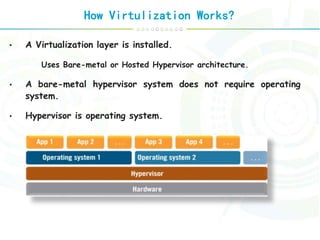
• A Virtualization layer is installed.
Uses Bare-metal or Hosted Hypervisor architecture.
• A bare-metal hypervisor system does not require operating
system.
• Hypervisor is operating system.
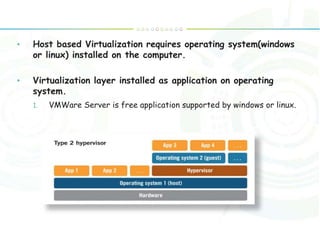
• Host based Virtualization requires operating system(windows
or linux) installed on the computer.
• Virtualization layer installed as application on operating
system.
1. VMWare Server is free application supported by windows or linux.
Why Virtulization?
Consolidate the workloads of several under-utilized servers
to fewer machines, perhaps a single machine.
Provides secure, isolated sandboxes for running untrusted
applications.
Provides emulation of hardware, or hardware configuration
that you do not have (such as multiple processors).
Virtualization can also be used to simulate networks of
independent computers.
Virtual machines can be used to run multiple operating
systems simultaneously. Some such systems may be hard or
impossible to run on newer real hardware.
Allow for powerful debugging and performance monitoring.
Operating systems can be debugged without losing
productivity.
Virtual machines can isolate what they run, so they provide
fault and error containment.
Virtual machines are great tools for research and academic
experiments. They encapsulate the entire state of a running
system. The state also provides an abstraction of the
workload being run.
Virtualization can enable existing operating systems to run
on shared memory multiprocessors.
Virtual machines can be used to create arbitrary test
scenarios, and can lead to effective quality assurance.
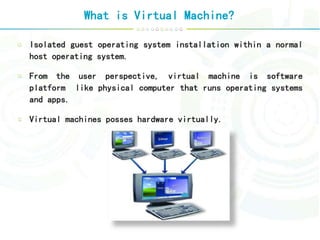
What is Virtual Machine?
Isolated guest operating system installation within a normal
host operating system.
From the user perspective, virtual machine is software
platform like physical computer that runs operating systems
and apps.
Virtual machines posses hardware virtually.
Types Of Virtulization
There are mainly 5 types of virtulization.
Platform Virtualization (Close to Cloud Computing)
• Full Virtualization
• Paravirtualization
• Hardware-assisted Virtualization
• Partial Virtualization
• OS-level Virtualization
Memory Virtualization
Desktop Virtualization
Application Virtualization
Network (Device and I/O) Virtualization
Full Virtulization
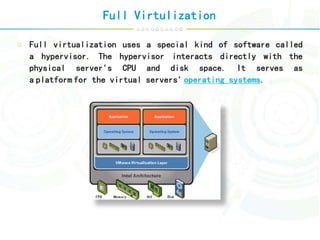
Full virtualization uses a special kind of software called
a hypervisor. The hypervisor interacts directly with the
physical server's CPU and disk space. It serves as
a platform for the virtual servers' operating systems.
Para Virtulization
The para-virtualization approach is a little different than
the full virtualization technique, the guest servers in a
para-virtualization system are aware of one another.
OS Level Virtulization
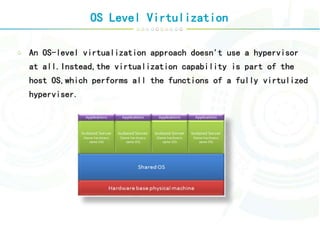
An OS-level virtualization approach doesn't use a hypervisor
at all.Instead,the virtualization capability is part of the
host OS,which performs all the functions of a fully virtulized
hyperviser.
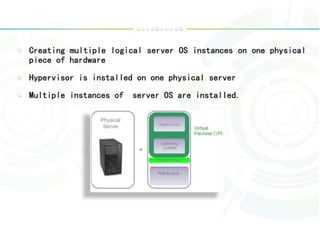
Creating multiple logical server OS instances on one physical
piece of hardware
Hypervisor is installed on one physical server
Multiple instances of server OS are installed.
Desktop Virtulization
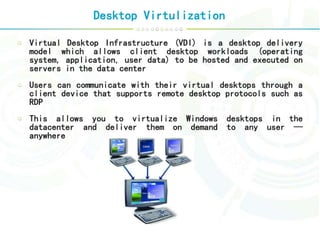
Virtual Desktop Infrastructure (VDI) is a desktop delivery
model which allows client desktop workloads (operating
system, application, user data) to be hosted and executed on
servers in the data center
Users can communicate with their virtual desktops through a
client device that supports remote desktop protocols such as
RDP
This allows you to virtualize Windows desktops in the
datacenter and deliver them on demand to any user —
anywhere
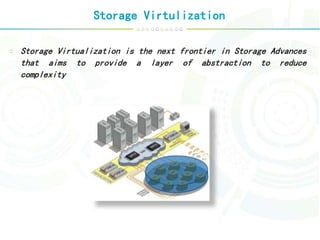
Storage Virtulization
Storage Virtualization is the next frontier in Storage Advances
that aims to provide a layer of abstraction to reduce
complexity
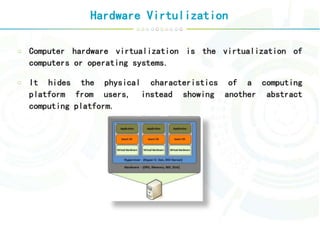
Hardware Virtulization
Computer hardware virtualization is the virtualization of
computers or operating systems.
It hides the physical characteristics of a computing
platform from users, instead showing another abstract
computing platform.
Role Of Virtulization
 Virtualization and Cloud Computing
 The underpinning for the majority of high-performing clouds is a virtualized
infrastructure.
 Virtualization has been in data centers for
 several years as a successful IT strategy for consolidating servers.
 Used more broadly to pool infrastructure resources, virtualization can
 also provide the basic building blocks for your cloud environment to enhance
agility and flexibility.
 Cloud Computing, In the following slides we are going to to speak about
Cloud Properties Enabled by Virtulization.
To Enable Cloud Computing
Service
 Scalability
Virtual machine system automatic scale up.
 Availability
Fault tolerant of hardware and software.
 Manageability
Automatic physical to virtual system transformation
 Performance
Dynamically virtulization
Virtulization submission

Virtulization submission

  • 1.
    Virtulization And Its RoleTo Enable the Cloud Computing System Model By, Radhika Kalavadiya (130040116019)
  • 2.
    What is Virtualization Virtualization: the abstraction of computer resources. Defenition : Virtualization is a Technology that transforms hardware into software. Virtualization allows to run multiple operating systems as virtual machines. Each copy of an operating system is installed in to a virtual machine.
  • 3.
    How Virtulization Works? •A Virtualization layer is installed. Uses Bare-metal or Hosted Hypervisor architecture. • A bare-metal hypervisor system does not require operating system. • Hypervisor is operating system.
  • 4.
    • Host basedVirtualization requires operating system(windows or linux) installed on the computer. • Virtualization layer installed as application on operating system. 1. VMWare Server is free application supported by windows or linux.
  • 5.
    Why Virtulization? Consolidate theworkloads of several under-utilized servers to fewer machines, perhaps a single machine. Provides secure, isolated sandboxes for running untrusted applications. Provides emulation of hardware, or hardware configuration that you do not have (such as multiple processors). Virtualization can also be used to simulate networks of independent computers. Virtual machines can be used to run multiple operating systems simultaneously. Some such systems may be hard or impossible to run on newer real hardware.
  • 6.
    Allow for powerfuldebugging and performance monitoring. Operating systems can be debugged without losing productivity. Virtual machines can isolate what they run, so they provide fault and error containment. Virtual machines are great tools for research and academic experiments. They encapsulate the entire state of a running system. The state also provides an abstraction of the workload being run. Virtualization can enable existing operating systems to run on shared memory multiprocessors. Virtual machines can be used to create arbitrary test scenarios, and can lead to effective quality assurance.
  • 7.
    What is VirtualMachine? Isolated guest operating system installation within a normal host operating system. From the user perspective, virtual machine is software platform like physical computer that runs operating systems and apps. Virtual machines posses hardware virtually.
  • 8.
    Types Of Virtulization Thereare mainly 5 types of virtulization. Platform Virtualization (Close to Cloud Computing) • Full Virtualization • Paravirtualization • Hardware-assisted Virtualization • Partial Virtualization • OS-level Virtualization Memory Virtualization Desktop Virtualization Application Virtualization Network (Device and I/O) Virtualization
  • 9.
    Full Virtulization Full virtualizationuses a special kind of software called a hypervisor. The hypervisor interacts directly with the physical server's CPU and disk space. It serves as a platform for the virtual servers' operating systems.
  • 10.
    Para Virtulization The para-virtualizationapproach is a little different than the full virtualization technique, the guest servers in a para-virtualization system are aware of one another.
  • 11.
    OS Level Virtulization AnOS-level virtualization approach doesn't use a hypervisor at all.Instead,the virtualization capability is part of the host OS,which performs all the functions of a fully virtulized hyperviser.
  • 12.
    Creating multiple logicalserver OS instances on one physical piece of hardware Hypervisor is installed on one physical server Multiple instances of server OS are installed.
  • 13.
    Desktop Virtulization Virtual DesktopInfrastructure (VDI) is a desktop delivery model which allows client desktop workloads (operating system, application, user data) to be hosted and executed on servers in the data center Users can communicate with their virtual desktops through a client device that supports remote desktop protocols such as RDP This allows you to virtualize Windows desktops in the datacenter and deliver them on demand to any user — anywhere
  • 14.
    Storage Virtulization Storage Virtualizationis the next frontier in Storage Advances that aims to provide a layer of abstraction to reduce complexity
  • 15.
    Hardware Virtulization Computer hardwarevirtualization is the virtualization of computers or operating systems. It hides the physical characteristics of a computing platform from users, instead showing another abstract computing platform.
  • 16.
    Role Of Virtulization Virtualization and Cloud Computing  The underpinning for the majority of high-performing clouds is a virtualized infrastructure.  Virtualization has been in data centers for  several years as a successful IT strategy for consolidating servers.  Used more broadly to pool infrastructure resources, virtualization can  also provide the basic building blocks for your cloud environment to enhance agility and flexibility.  Cloud Computing, In the following slides we are going to to speak about Cloud Properties Enabled by Virtulization. To Enable Cloud Computing Service
  • 17.
     Scalability Virtual machinesystem automatic scale up.  Availability Fault tolerant of hardware and software.
  • 18.
     Manageability Automatic physicalto virtual system transformation  Performance Dynamically virtulization