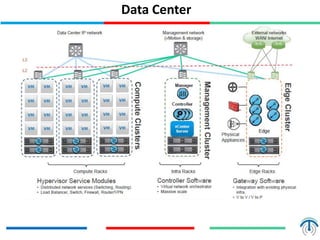
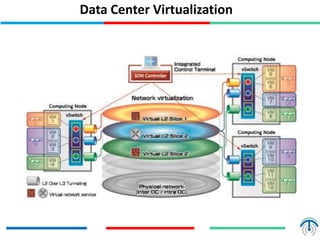
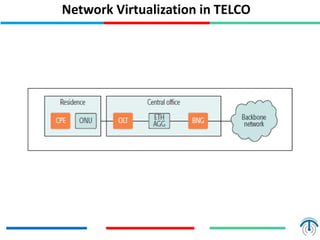
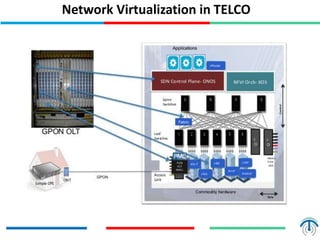
Network virtualization logically separates network resources and allows multiple virtual networks to operate over a shared physical infrastructure. It provides benefits like efficient usage of network resources, logical isolation of traffic between users, and accommodating dynamic server virtualization. Key enablers of network virtualization are cloud computing, server virtualization, software-defined networking (SDN), and network functions virtualization (NFV). A virtual tenant network (VTN) uses an underlay physical network and an overlay virtual network to logically isolate traffic for different users or groups. Common uses of network virtualization are in data centers and telecommunication networks.
Agenda
Need for NetworkVirtualization
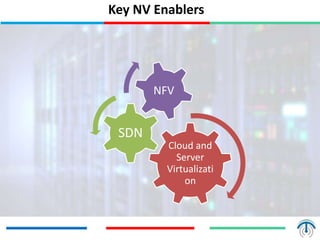
Enablers of Network Virtualization
Overlay & Underlay Network
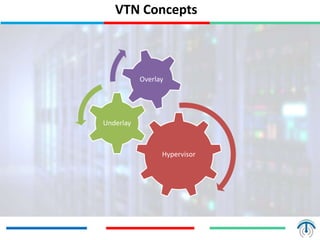
Virtual Tenant Network
Underlay Network
Overlay Network
Use Cases
3.
Introduction
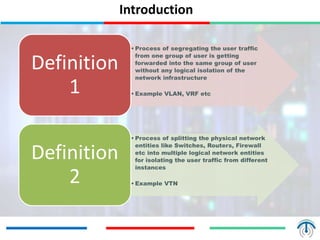
• Process ofsegregating the user traffic
from one group of user is getting
forwarded into the same group of user
without any logical isolation of the
network infrastructure
• Example VLAN, VRF etc
Definition
1
• Process of splitting the physical network
entities like Switches, Routers, Firewall
etc into multiple logical network entities
for isolating the user traffic from different
instances
• Example VTN
Definition
2
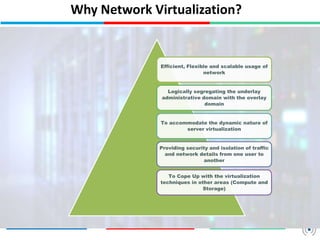
Why Network Virtualization?
Efficient,Flexible and scalable usage of
network
Logically segregating the underlay
administrative domain with the overlay
domain
To accommodate the dynamic nature of
server virtualization
Providing security and isolation of traffic
and network details from one user to
another
To Cope Up with the virtualization
techniques in other areas (Compute and
Storage)
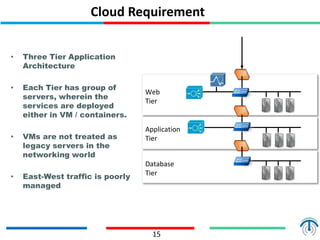
Cloud Requirement
• ThreeTier Application
Architecture
• Each Tier has group of
servers, wherein the
services are deployed
either in VM / containers.
• VMs are not treated as
legacy servers in the
networking world
• East-West traffic is poorly
managed
15
Web
Tier
Application
Tier
Database
Tier
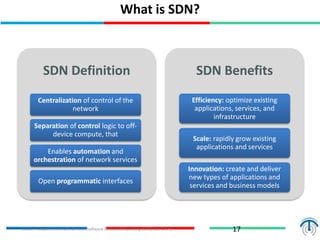
SDN Definition
Centralization ofcontrol of the
network
Separation of control logic to off-
device compute, that
Enables automation and
orchestration of network services
Open programmatic interfaces
SDN Benefits
Efficiency: optimize existing
applications, services, and
infrastructure
Scale: rapidly grow existing
applications and services
Innovation: create and deliver
new types of applications and
services and business models
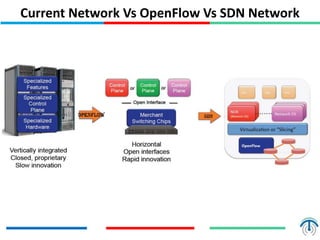
What is SDN?
17Source: Adopted from SDN Central (Software-Defined Networking (SDN) Use Cases)
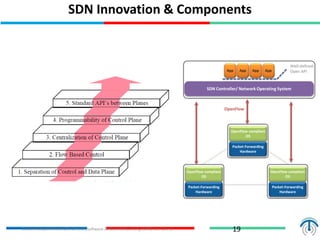
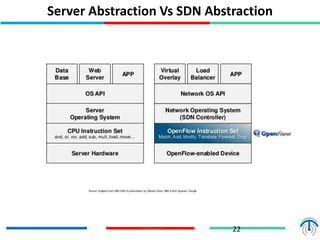
SDN Innovation &Components
19
SDN Controller/ Network Operating System
App App App App
OpenFlow
Packet-Forwarding
Hardware
OpenFlow compliant
OS
Packet-Forwarding
Hardware
OpenFlow compliant
OS
Packet-Forwarding
Hardware
OpenFlow compliant
OS
Well-defined
Open API
Source: Adopted from SDN Central (Software-Defined Networking (SDN) Use Cases)
SDN – Gamechanger?
23
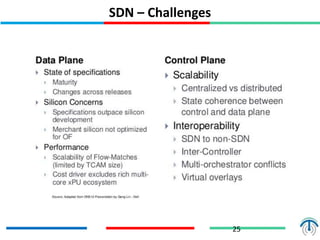
• Complete removal of control plane may be
harmful. Exact division of control plane
between centralized controller and
distributed forwarders is yet to be worked
out.
• SDN is easy if control plane is centralized
but not necessary. Distributed solutions may
be required for legacy equipment and for
fail-safe operation.
Source: Adopted from Introduction to Software Defined Software Defined Networking (SDN) Networking (SDN) by Prof. Raj Jain
24.
Key Attributes forSDN Success
Architecture for a Network Operating System
with a service/application oriented
namespace
Resource virtualization, elasticity and
aggregation (pooling to achieve scaling)
Appropriate abstractions to foster
simplification
Decouple topology, traffic and inter-layer
dependencies
Dynamic multi-layer networking
What is NFV?
27
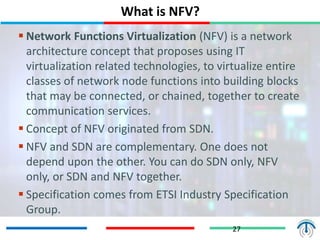
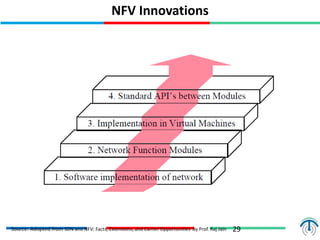
Network Functions Virtualization (NFV) is a network
architecture concept that proposes using IT
virtualization related technologies, to virtualize entire
classes of network node functions into building blocks
that may be connected, or chained, together to create
communication services.
Concept of NFV originated from SDN.
NFV and SDN are complementary. One does not
depend upon the other. You can do SDN only, NFV
only, or SDN and NFV together.
Specification comes from ETSI Industry Specification
Group.
28.
Part III -Open Flow Applications
28
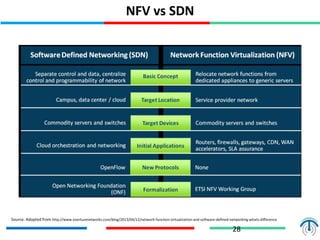
NFV vs SDN
Source: Adopted from http://www.overturenetworks.com/blog/2013/04/12/network-function-virtualization-and-software-defined-networking-whats-difference
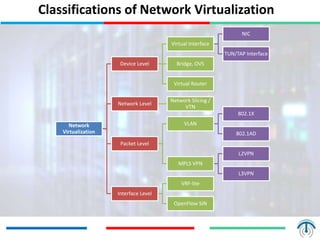
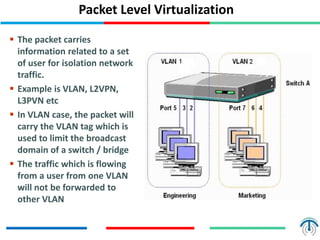
Packet Level Virtualization
The packet carries
information related to a set
of user for isolation network
traffic.
Example is VLAN, L2VPN,
L3PVN etc
In VLAN case, the packet will
carry the VLAN tag which is
used to limit the broadcast
domain of a switch / bridge
The traffic which is flowing
from a user from one VLAN
will not be forwarded to
other VLAN
34.
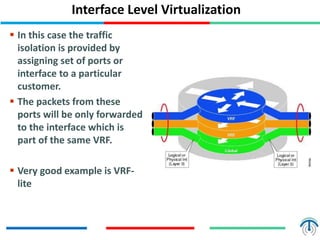
Interface Level Virtualization
In this case the traffic
isolation is provided by
assigning set of ports or
interface to a particular
customer.
The packets from these
ports will be only forwarded
to the interface which is
part of the same VRF.
Very good example is VRF-
lite
35.
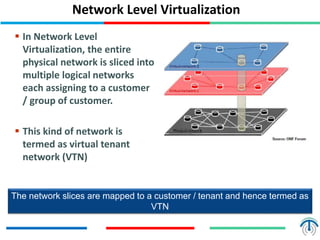
Network Level Virtualization
In Network Level
Virtualization, the entire
physical network is sliced into
multiple logical networks
each assigning to a customer
/ group of customer.
This kind of network is
termed as virtual tenant
network (VTN)
The network slices are mapped to a customer / tenant and hence termed as
VTN
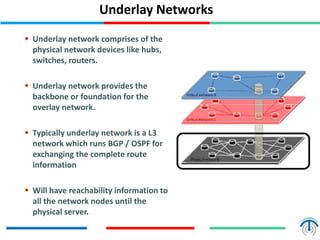
Underlay Networks
Underlaynetwork comprises of the
physical network devices like hubs,
switches, routers.
Underlay network provides the
backbone or foundation for the
overlay network.
Typically underlay network is a L3
network which runs BGP / OSPF for
exchanging the complete route
information
Will have reachability information to
all the network nodes until the
physical server.
38.
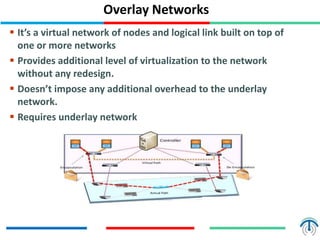
Overlay Networks
It’sa virtual network of nodes and logical link built on top of
one or more networks
Provides additional level of virtualization to the network
without any redesign.
Doesn’t impose any additional overhead to the underlay
network.
Requires underlay network
39.
39
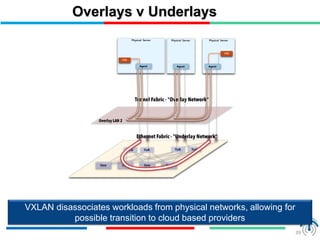
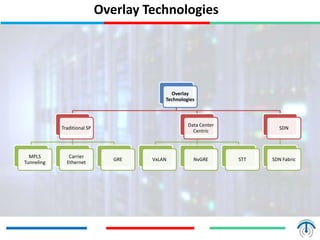
Overlays v Underlays
VXLANdisassociates workloads from physical networks, allowing for
possible transition to cloud based providers
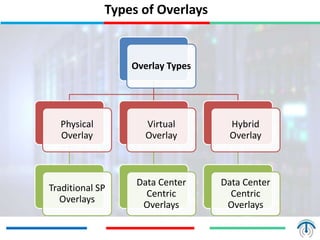
Types of Overlays
OverlayTypes
Physical
Overlay
Traditional SP
Overlays
Virtual
Overlay
Data Center
Centric
Overlays
Hybrid
Overlay
Data Center
Centric
Overlays
42.
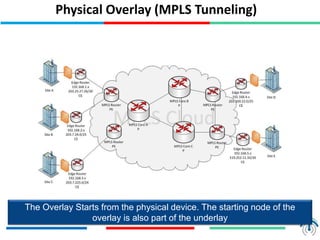
Physical Overlay (MPLSTunneling)
The Overlay Starts from the physical device. The starting node of the
overlay is also part of the underlay
43.
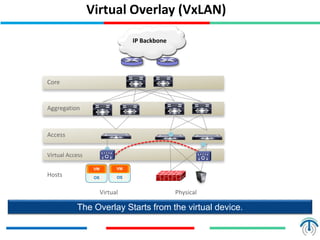
Virtual Overlay (VxLAN)
TheOverlay Starts from the virtual device.
Virtual Access
Core
IP Backbone
Aggregation
Access
Hosts
VM
OS
VM
OS
Virtual Physical
44.
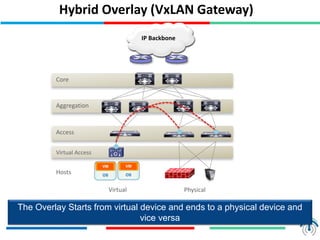
Hybrid Overlay (VxLANGateway)
The Overlay Starts from virtual device and ends to a physical device and
vice versa
Virtual Access
Core
IP Backbone
Aggregation
Access
Hosts
VM
OS
VM
OS
Virtual Physical
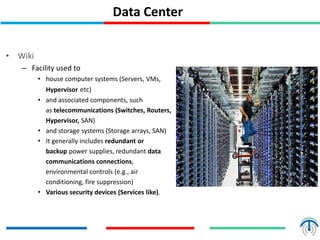
Data Center
• Wiki
–Facility used to
• house computer systems (Servers, VMs,
Hypervisor etc)
• and associated components, such
as telecommunications (Switches, Routers,
Hypervisor, SAN)
• and storage systems (Storage arrays, SAN)
• It generally includes redundant or
backup power supplies, redundant data
communications connections,
environmental controls (e.g., air
conditioning, fire suppression)
• Various security devices (Services like).
47.
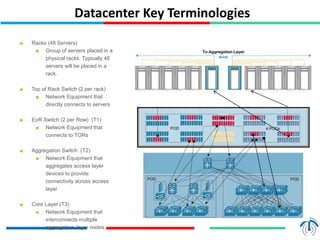
Datacenter Key Terminologies
47
■Racks (48 Servers)
■ Group of servers placed in a
physical racks. Typically 48
servers will be placed in a
rack.
■ Top of Rack Switch (2 per rack)
■ Network Equipment that
directly connects to servers
■ EoR Switch (2 per Row) (T1)
■ Network Equipment that
connects to TORs
■ Aggregation Switch (T2)
■ Network Equipment that
aggregates access layer
devices to provide
connectivity across access
layer
■ Core Layer (T3)
■ Network Equipment that
interconnects multiple
aggregation layer nodes