


5/30/2015 1
Presented By:
Md: Delwar Hossain
Daffodil International University
Dept. of CSE
Android Apps Developer
5/30/2015 2
Today's Discussion: (1st Session)
 Activity Lifecycle Overview.
Activity Lifecycle testing (Implementation of
activity lifecycle methods).
Why need to know about Activity Lifecycle.
ListView basics (ListView widget, Array
adapter)
Simple project: Contact List (Implementation
of ListView, ArrayAdapter)
5/30/2015 3
Today's Discussion: ( 2nd Session)
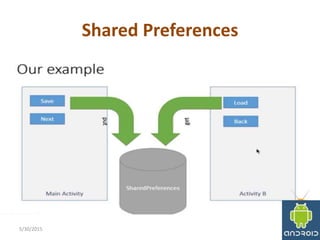
About Shared Preferences
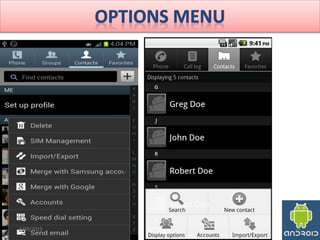
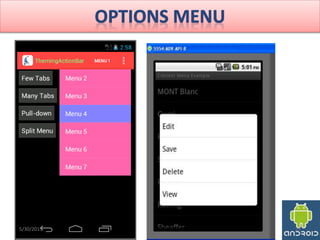
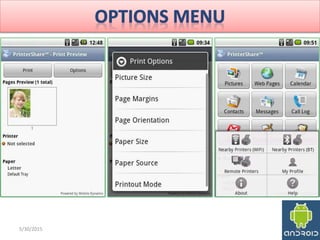
About Options Menu
Final project: Student Informat
System(Implementation of Shared
Preferences, Insert, Edit, Update, Delete)
5/30/2015 4
Activity Lifecycle Overview
An application consists of one or more
components that are defined in the
application's manifest file. A component can
be one of the following:
1. An Activity
2. A Service
3. A broadcast receiver
4. A content provider
5/30/2015 5
Activity Lifecycle Overview
• An activity usually presents a single visual user
interface from which a number of actions could be
performed.
• Although activities work together to form a cohesive
user interface, each activity is independent of the
others.
• Typically, one of the activities is marked as the first one
that should be presented to the user when the
application is launched.
• Moving from one activity to another is accomplished
by having the current activity start the next one
through so called intents.
5/30/2015 6
Activity Lifecycle Overview(Service)
• A service doesn't have a visual user interface,
but rather runs in the background for an
indefinite period of time.
5/30/2015 7
Activity Lifecycle Overview(Broadcast receiver)
A broadcast receiver is a component that does
nothing but receive and react to broadcast
announcements.
Broadcast receivers do not display a user
interface. However, they may start an activity
in response to the information they receive, or
‐ as services do ‐ they may use the notification
manager to alert the user.
5/30/2015 8
Android Applications
• Every Android application runs in its own
process(with its own instance of the Dalvik virtual
machine)
Whenever there's a request that should be
handled by a particular component
 Android makes sure that the application process
of the component is running,
 starting it if necessary, and
that an appropriate instance of the component is
available, creating the instance if necessary.
5/30/2015 9
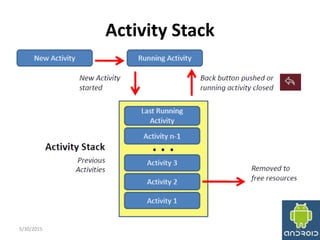
Activity Stack
• Activities in the system are managed as an activity
stack.
• When a new activity is started, it is placed on the
top of the stack and becomes the running activity
‐‐ the previous activity always remains below it in
the stack, and will not come to the foreground
again until the new activity exits.
• If the user presses the Back Button the next
activity on the stack moves up and becomes
active.
5/30/2015 10
Activity Stack
5/30/2015 11
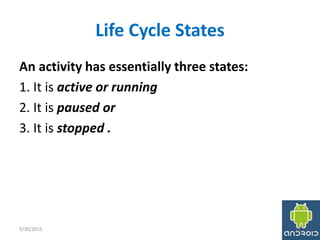
Life Cycle States
An activity has essentially three states:
1. It is active or running
2. It is paused or
3. It is stopped .
5/30/2015 12
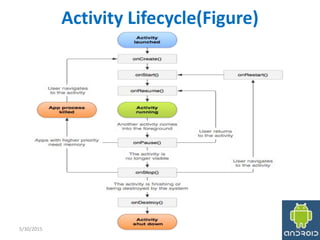
Activity Lifecycle(Figure)
5/30/2015 13
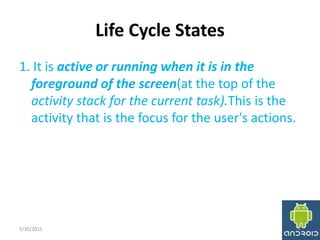
Life Cycle States
1. It is active or running when it is in the
foreground of the screen(at the top of the
activity stack for the current task).This is the
activity that is the focus for the user's actions.
5/30/2015 14
Life Cycle States
2. It is paused if it has lost focus but is still
visible to the user. That is, another activity lies
on top of it and that new activity either is
transparent or doesn't cover the full screen.
But can be killed by the system in extreme low
memory situations.
5/30/2015 15
Life Cycle States
3. It is stopped if it is completely obscured by
another activity. It still retains all state and
member information. However, it is no longer
visible to the user so its window is hidden and
it will often be killed by the system when
memory is needed elsewhere.
5/30/2015 16
Life Cycle Methods
Method: onCreate()
• Called when the activity is first created.
• This is where you should do all of your normal
static set up —create views, bind data to lists, and
so on.
• This method is passed a Bundle object containing
the activity's previous state, if that state was
captured.
• Always followed by onStart()
5/30/2015 17
Life Cycle Methods
Method: onStart()
 Called just before the activity becomes visible
to the user.
 Followed by onResume() if the activity comes
to the foreground,or onStop() if it becomes
hidden.
5/30/2015 18
Life Cycle Methods
Method: onRestart()
• Called after the activity has been stopped, just
prior to it being started again.
• Always followed by onStart()
5/30/2015 19
Life Cycle Methods
Method: onResume()
1. Called just before the activity starts
interacting with the user.
2. At this point the activity is at the top of the
activity stack, with user input going to it.
3. Always followed by onPause().
5/30/2015 20
Life Cycle Methods
Method: onStop()
1. Called when the activity is no longer visible to the
user.
2. This may happen because it is being destroyed,
or because another activity (either an existing
one or a new one) has been resumed and is
covering it.
3. Followed either by onRestart() if the activity is
coming back to interact with the user, or by
onDestroy() if this activity is going away.
4. The activity in this state is killable by the system.
5/30/2015 21
Life Cycle Methods
Method: onDestroy()
1. Called before the activity is destroyed.
2. This is the final call that the activity will receive.
3. It could be called either because the activity is
finishing (someone called finish() on it), or
because the system is temporarily destroying this
instance of the activity to save space.
4. You can distinguish between these two scenarios
with the isFinishing() method.
5. The activity in this state is killable by the system.
5/30/2015 22
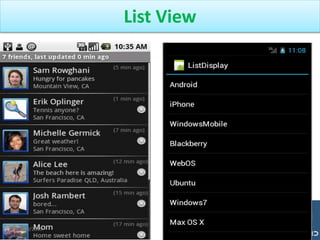
List View
5/30/2015 23
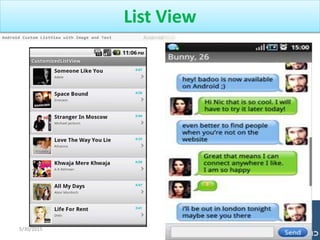
List View
5/30/2015 24
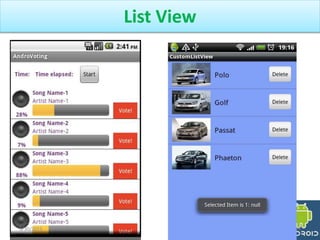
List View
5/30/2015 25
5/30/2015 26
5/30/2015 27
5/30/2015 28
Shared Preferences
5/30/2015 29
Questions ?
5/30/2015 30

Google android Activity lifecycle

  • 1.
  • 2.
    Presented By: Md: DelwarHossain Daffodil International University Dept. of CSE Android Apps Developer 5/30/2015 2
  • 3.
    Today's Discussion: (1stSession)  Activity Lifecycle Overview. Activity Lifecycle testing (Implementation of activity lifecycle methods). Why need to know about Activity Lifecycle. ListView basics (ListView widget, Array adapter) Simple project: Contact List (Implementation of ListView, ArrayAdapter) 5/30/2015 3
  • 4.
    Today's Discussion: (2nd Session) About Shared Preferences About Options Menu Final project: Student Informat System(Implementation of Shared Preferences, Insert, Edit, Update, Delete) 5/30/2015 4
  • 5.
    Activity Lifecycle Overview Anapplication consists of one or more components that are defined in the application's manifest file. A component can be one of the following: 1. An Activity 2. A Service 3. A broadcast receiver 4. A content provider 5/30/2015 5
  • 6.
    Activity Lifecycle Overview •An activity usually presents a single visual user interface from which a number of actions could be performed. • Although activities work together to form a cohesive user interface, each activity is independent of the others. • Typically, one of the activities is marked as the first one that should be presented to the user when the application is launched. • Moving from one activity to another is accomplished by having the current activity start the next one through so called intents. 5/30/2015 6
  • 7.
    Activity Lifecycle Overview(Service) •A service doesn't have a visual user interface, but rather runs in the background for an indefinite period of time. 5/30/2015 7
  • 8.
    Activity Lifecycle Overview(Broadcastreceiver) A broadcast receiver is a component that does nothing but receive and react to broadcast announcements. Broadcast receivers do not display a user interface. However, they may start an activity in response to the information they receive, or ‐ as services do ‐ they may use the notification manager to alert the user. 5/30/2015 8
  • 9.
    Android Applications • EveryAndroid application runs in its own process(with its own instance of the Dalvik virtual machine) Whenever there's a request that should be handled by a particular component  Android makes sure that the application process of the component is running,  starting it if necessary, and that an appropriate instance of the component is available, creating the instance if necessary. 5/30/2015 9
  • 10.
    Activity Stack • Activitiesin the system are managed as an activity stack. • When a new activity is started, it is placed on the top of the stack and becomes the running activity ‐‐ the previous activity always remains below it in the stack, and will not come to the foreground again until the new activity exits. • If the user presses the Back Button the next activity on the stack moves up and becomes active. 5/30/2015 10
  • 11.
  • 12.
    Life Cycle States Anactivity has essentially three states: 1. It is active or running 2. It is paused or 3. It is stopped . 5/30/2015 12
  • 13.
  • 14.
    Life Cycle States 1.It is active or running when it is in the foreground of the screen(at the top of the activity stack for the current task).This is the activity that is the focus for the user's actions. 5/30/2015 14
  • 15.
    Life Cycle States 2.It is paused if it has lost focus but is still visible to the user. That is, another activity lies on top of it and that new activity either is transparent or doesn't cover the full screen. But can be killed by the system in extreme low memory situations. 5/30/2015 15
  • 16.
    Life Cycle States 3.It is stopped if it is completely obscured by another activity. It still retains all state and member information. However, it is no longer visible to the user so its window is hidden and it will often be killed by the system when memory is needed elsewhere. 5/30/2015 16
  • 17.
    Life Cycle Methods Method:onCreate() • Called when the activity is first created. • This is where you should do all of your normal static set up —create views, bind data to lists, and so on. • This method is passed a Bundle object containing the activity's previous state, if that state was captured. • Always followed by onStart() 5/30/2015 17
  • 18.
    Life Cycle Methods Method:onStart()  Called just before the activity becomes visible to the user.  Followed by onResume() if the activity comes to the foreground,or onStop() if it becomes hidden. 5/30/2015 18
  • 19.
    Life Cycle Methods Method:onRestart() • Called after the activity has been stopped, just prior to it being started again. • Always followed by onStart() 5/30/2015 19
  • 20.
    Life Cycle Methods Method:onResume() 1. Called just before the activity starts interacting with the user. 2. At this point the activity is at the top of the activity stack, with user input going to it. 3. Always followed by onPause(). 5/30/2015 20
  • 21.
    Life Cycle Methods Method:onStop() 1. Called when the activity is no longer visible to the user. 2. This may happen because it is being destroyed, or because another activity (either an existing one or a new one) has been resumed and is covering it. 3. Followed either by onRestart() if the activity is coming back to interact with the user, or by onDestroy() if this activity is going away. 4. The activity in this state is killable by the system. 5/30/2015 21
  • 22.
    Life Cycle Methods Method:onDestroy() 1. Called before the activity is destroyed. 2. This is the final call that the activity will receive. 3. It could be called either because the activity is finishing (someone called finish() on it), or because the system is temporarily destroying this instance of the activity to save space. 4. You can distinguish between these two scenarios with the isFinishing() method. 5. The activity in this state is killable by the system. 5/30/2015 22
  • 23.
  • 24.
  • 25.
  • 26.
  • 27.
  • 28.
  • 29.
  • 30.