Android Fragments An introduction
Twitters & Hashtags @sergiandreplace @catdroid @puntmultimedia #DissabtesMultimedia (too long?)
About Fragments New in Android 3.0 (Honeycomb, API 11) Usable in previous versions with compatibility library Intended to reuse layouts between tablets and phones But usable for many more... Definition: A Fragment represents a behavior or a portion of user interface in an Activity. 
Interaction with Activities A fragment is a modular section of an activity, which has its own lifecycle... But,  a fragment's lifecycle is directly affected by the host activity's lifecycle Activity paused: fragments paused Activity destroyed: fragments destroyed Activity running: fragments can have different states 
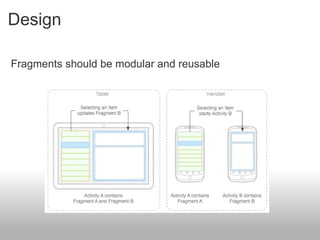
Design   Fragments should be modular and reusable
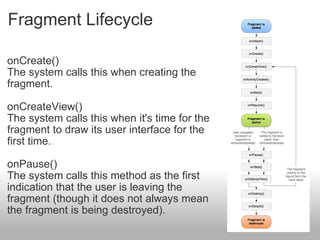
Fragment Lifecycle     onCreate() The system calls this when creating the fragment. onCreateView() The system calls this when it's time for the fragment to draw its user interface for the first time.  onPause() The system calls this method as the first indication that the user is leaving the fragment (though it does not always mean the fragment is being destroyed). 
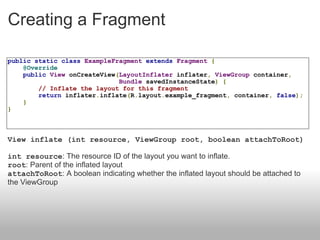
Creating a Fragment public   static   class   ExampleFragment   extends   Fragment   {      @Override      public   View  onCreateView ( LayoutInflater  inflater ,   ViewGroup  container ,                               Bundle  savedInstanceState )   {          // Inflate the layout for this fragment          return  inflater . inflate ( R . layout . example_fragment ,  container ,   false );      } } View inflate (int resource, ViewGroup root, boolean attachToRoot) int resource : The resource ID of the layout you want to inflate. root : Parent of the inflated layout attachToRoot : A boolean indicating whether the inflated layout should be attached to the ViewGroup 
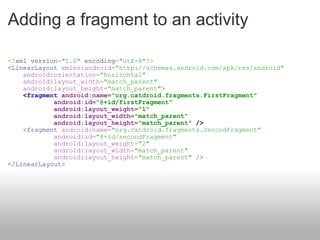
Adding a fragment to an activity <? xml version = &quot;1.0&quot;  encoding = &quot;utf-8&quot; ?>  <LinearLayout   xmlns:android = &quot;http://schemas.android.com/apk/res/android&quot;           android:orientation = &quot;horizontal&quot;      android:layout_width = &quot;match_parent&quot;      android:layout_height = &quot;match_parent&quot; >       <fragment   android:name = &quot;org.catdroid.fragments.FirstFragment&quot;              android:id = &quot;@+id/firstFragment&quot;              android:layout_weight = &quot;1&quot;              android:layout_width = &quot;match_parent&quot;              android:layout_height = &quot;match_parent&quot;   />      <fragment   android:name = &quot;org.catdroid.fragments.SecondFragment&quot;              android:id = &quot;@+id/secondFragment&quot;              android:layout_weight = &quot;2&quot;              android:layout_width = &quot;match_parent&quot;              android:layout_height = &quot;match_parent&quot;   /> </LinearLayout>
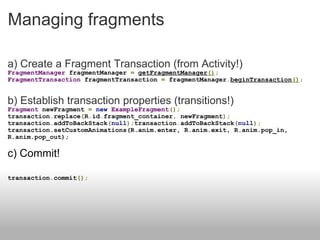
Managing fragments a) Create a Fragment Transaction (from Activity!) FragmentManager  fragmentManager  =   getFragmentManager () ; FragmentTransaction  fragmentTransaction  =  fragmentManager . beginTransaction () ; b) Establish transaction properties (transitions!) Fragment  newFragment  =   new   ExampleFragment ();  transaction . replace ( R . id . fragment_container ,  newFragment ); transaction . addToBackStack ( null ); transaction . addToBackStack ( null ); transaction.setCustomAnimations(R.anim.enter, R.anim.exit, R.anim.pop_in, R.anim.pop_out); c) Commit! transaction . commit ();
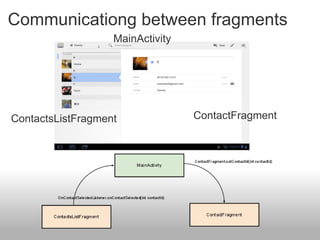
Communicationg between fragments MainActivity ContactsListFragment ContactFragment
Questions What are the differences when using Compatibility library? What happens with maps? What are the differences between a Fragment and a View? etc. Q&A @sergiandreplace // @catdroid // @puntmultimedia  #DissabtesMultimedia 

Introduction to Android Fragments

  • 1.
  • 2.
    Twitters & Hashtags@sergiandreplace @catdroid @puntmultimedia #DissabtesMultimedia (too long?)
  • 3.
    About Fragments Newin Android 3.0 (Honeycomb, API 11) Usable in previous versions with compatibility library Intended to reuse layouts between tablets and phones But usable for many more... Definition: A Fragment represents a behavior or a portion of user interface in an Activity. 
  • 4.
    Interaction with ActivitiesA fragment is a modular section of an activity, which has its own lifecycle... But,  a fragment's lifecycle is directly affected by the host activity's lifecycle Activity paused: fragments paused Activity destroyed: fragments destroyed Activity running: fragments can have different states 
  • 5.
    Design   Fragmentsshould be modular and reusable
  • 6.
    Fragment Lifecycle    onCreate() The system calls this when creating the fragment. onCreateView() The system calls this when it's time for the fragment to draw its user interface for the first time.  onPause() The system calls this method as the first indication that the user is leaving the fragment (though it does not always mean the fragment is being destroyed). 
  • 7.
    Creating a Fragmentpublic static class ExampleFragment extends Fragment {     @Override     public View onCreateView ( LayoutInflater inflater , ViewGroup container ,                               Bundle savedInstanceState ) {         // Inflate the layout for this fragment         return inflater . inflate ( R . layout . example_fragment , container , false );     } } View inflate (int resource, ViewGroup root, boolean attachToRoot) int resource : The resource ID of the layout you want to inflate. root : Parent of the inflated layout attachToRoot : A boolean indicating whether the inflated layout should be attached to the ViewGroup 
  • 8.
    Adding a fragmentto an activity <? xml version = &quot;1.0&quot; encoding = &quot;utf-8&quot; ?>  <LinearLayout xmlns:android = &quot;http://schemas.android.com/apk/res/android&quot;          android:orientation = &quot;horizontal&quot;     android:layout_width = &quot;match_parent&quot;     android:layout_height = &quot;match_parent&quot; >     <fragment android:name = &quot;org.catdroid.fragments.FirstFragment&quot;             android:id = &quot;@+id/firstFragment&quot;             android:layout_weight = &quot;1&quot;             android:layout_width = &quot;match_parent&quot;             android:layout_height = &quot;match_parent&quot; />     <fragment android:name = &quot;org.catdroid.fragments.SecondFragment&quot;             android:id = &quot;@+id/secondFragment&quot;             android:layout_weight = &quot;2&quot;             android:layout_width = &quot;match_parent&quot;             android:layout_height = &quot;match_parent&quot; /> </LinearLayout>
  • 9.
    Managing fragments a)Create a Fragment Transaction (from Activity!) FragmentManager fragmentManager = getFragmentManager () ; FragmentTransaction fragmentTransaction = fragmentManager . beginTransaction () ; b) Establish transaction properties (transitions!) Fragment newFragment = new ExampleFragment (); transaction . replace ( R . id . fragment_container , newFragment ); transaction . addToBackStack ( null ); transaction . addToBackStack ( null ); transaction.setCustomAnimations(R.anim.enter, R.anim.exit, R.anim.pop_in, R.anim.pop_out); c) Commit! transaction . commit ();
  • 10.
    Communicationg between fragmentsMainActivity ContactsListFragment ContactFragment
  • 11.
    Questions What arethe differences when using Compatibility library? What happens with maps? What are the differences between a Fragment and a View? etc. Q&A @sergiandreplace // @catdroid // @puntmultimedia  #DissabtesMultimedia