Advanced Database
Management System:-
BS-(IT):-
6th Semester:-
 Members:- Roll #
• Murassa Gillani (02)A
• Farwa Wahid (12)A
• Maryam Arif (46)R
• Faiza Jamil (48)R
• Hamas Ijaz (53)R
Topic:-
Types of
Database Models
Database Models:-
1) Network model
2) Hierarchical model
3) Relational model
4) Entity-Relationship data model
(mainly for database design)
5) Object-based data models (Object
oriented and Object-relational)
6) Semi-structured data model (XML)
The Hierarchical Model—Evolution:-
• GUAM (Generalized Update Access Method)
–Based on the recognition that the many smaller
parts would come together as components of
still larger components.
• Information Management System (IMS)
–World’s leading mainframe hierarchical
database system in the 1970s and early 1980s.
The Hierarchical Model:-
Hierarchical database models is useful for a
certain type of data storage, but it is not
extremely versatile.
Its limitations mean that it is confined to some
very specific uses.
Cont…
Hierarchical databases were popular in early database
design, in the era of mainframe computers.
While some IBM and Microsoft models are still in use,
many other types of business databases use more
flexible models to accommodate more sophisticated
types of data management.
Hierarchical Structure—Characteristics
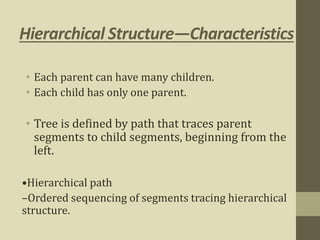
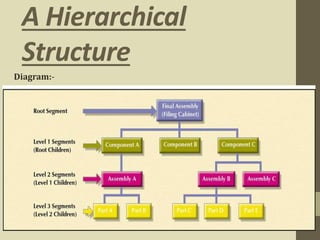
• Each parent can have many children.
• Each child has only one parent.
• Tree is defined by path that traces parent
segments to child segments, beginning from the
left.
•Hierarchical path
–Ordered sequencing of segments tracing hierarchical
structure.
A Hierarchical
Structure
Diagram:-
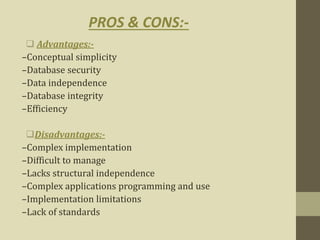
 Advantages:-
–Conceptual simplicity
–Database security
–Data independence
–Database integrity
–Efficiency
Disadvantages:-
–Complex implementation
–Difficult to manage
–Lacks structural independence
–Complex applications programming and use
–Implementation limitations
–Lack of standards
PROS & CONS:-
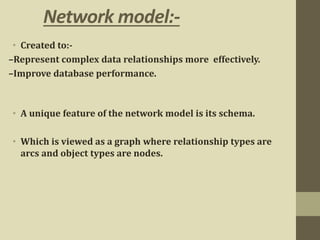
Network model:-
• Created to:-
–Represent complex data relationships more effectively.
–Improve database performance.
• A unique feature of the network model is its schema.
• Which is viewed as a graph where relationship types are
arcs and object types are nodes.
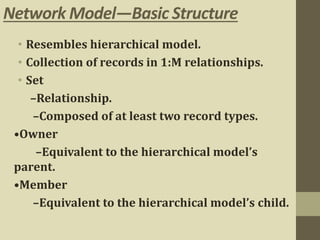
Network Model—Basic Structure
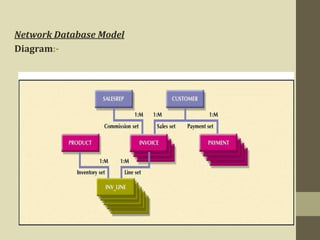
• Resembles hierarchical model.
• Collection of records in 1:M relationships.
• Set
–Relationship.
–Composed of at least two record types.
•Owner
–Equivalent to the hierarchical model’s
parent.
•Member
–Equivalent to the hierarchical model’s child.
Network Database Model
Diagram:-
PROS & CONS
• Advantages
–Conceptual simplicity
–Handles more relationship types
–Data access flexibility
–Promotes database integrity
–Data independence
• Disadvantage
–Difficult for first time users
–System complexity
–Lack of structural independence
–Difficulties with alterations of the database because when I information
entered can alter the entire database
Relational Database Model:-
•Developed by Codd (IBM) in 1970.
•Considered ingenious but impractical in 1970.
•Conceptually simple.
•Computers lacked power to implement the
relational model.
•Today, microcomputers can run sophisticated
relational database software
A relational database Model:-
• A relational database (RDB) is a collective set of multiple
data sets organized by tables, records and columns.
• RDBs establish a well-defined relationship between
database tables.
• Tables communicate and share information, which
facilitates data search ability, organization and reporting.
• RDBs use Structured Query Language (SQL).
The Relational Model—Basic
Structure
•Relational Database Management System (RDBMS).
•Performs same basic functions provided by hierarchical and
network DBMS systems, plus other functions.
•Most important advantage of the RDBMS is its ability to let
the user/designer operate in a human logical environment.
The Relational Model—Basic Structure
(continued)
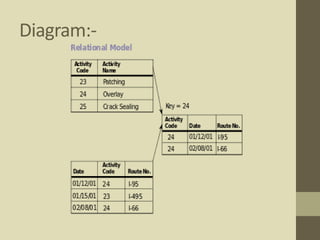
 Table (relations)
–Matrix consisting of a series of row/column Intersections.
–Related to each other by sharing a common entity
characteristic.
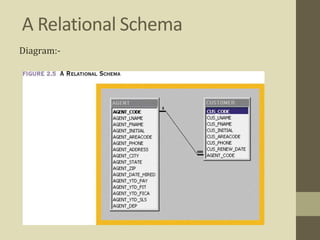
 Relational schema
–Visual representation of relational database’s entities,
attributes within those entities, and relationships between
those entities.
A Relational Schema
Diagram:-
PROS & CONS
• Advantages
–Structural independence.
–Improved conceptual simplicity.
–Easier database design, implementation, management, and use.
–New technology performance power and flexibility with multiple data
requirement capabilities.
– Data security (strong privacy)
–Powerful database management system.
• Disadvantages
–Substantial hardware and system software
overhead.
–Can facilitate poor design and implementation.
–May promote “islands of information” problems.
Entity-Relationship data model (mainly
for database design)
• Widely accepted and adapted graphical tool for data modeling.
• Introduced by Chen in 1976.
• Graphical representation of entities and their
relationships in a database structure.
The Entity Relationship Model—Basic
Structure
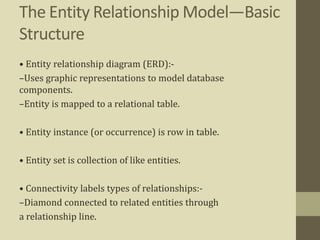
• Entity relationship diagram (ERD):-
–Uses graphic representations to model database
components.
–Entity is mapped to a relational table.
• Entity instance (or occurrence) is row in table.
• Entity set is collection of like entities.
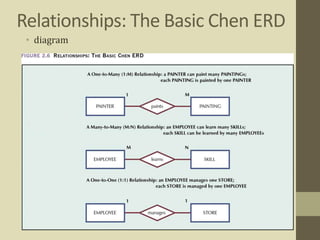
• Connectivity labels types of relationships:-
–Diamond connected to related entities through
a relationship line.
Relationships: The Basic Chen ERD
• diagram
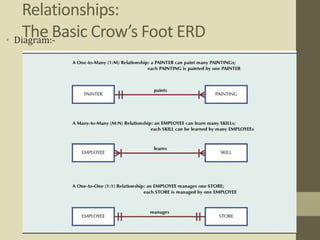
Relationships:
The Basic Crow’s Foot ERD• Diagram:-
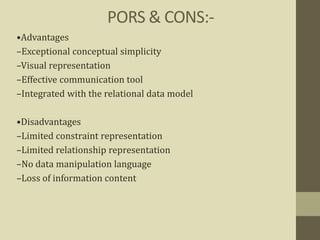
PORS & CONS:-
•Advantages
–Exceptional conceptual simplicity
–Visual representation
–Effective communication tool
–Integrated with the relational data model
•Disadvantages
–Limited constraint representation
–Limited relationship representation
–No data manipulation language
–Loss of information content
Object-based data models
Object-oriented
&
Object-relational
The Object Oriented Model
• Semantic data model (SDM) developed by Hammer and
McLeod in 1981
• Modeled both data and their relationships in a single
structure known as an object
• Basis of object oriented data model (OODM)
• OODM becomes the basis for the object oriented database
management system (OODBMS)
The Object Oriented Model
(continued)
• Object is described by its factual content
–Like relational model’s entity
• Includes information about relationships between facts
within object and relationships with other objects
–Unlike relational model’s entity
• Subsequent OODM development allowed an object to also
contain operations
• Object becomes basic building block for autonomous
structures
Developments that Boosted OODM’s
Popularity
• Growing costs put a premium on code re-usability.
• Complex data types and system requirements
became difficult to manage with a traditional
RDBMS.
• Became possible to support increasingly
sophisticated transaction & information
requirements.
• Ever-increasing computing power made it
possible to support the large computing.
Object Oriented Data Model—Basic
Structure
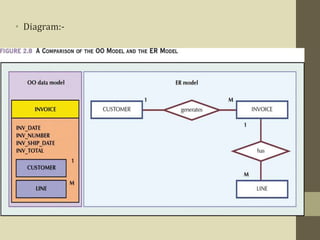
• Object: abstraction of a real-world entity.
• Attributes describe the properties of an object.
• Objects that share similar characteristics are
grouped in classes.
• Classes are organized in a class hierarchy.
• Inheritance is the ability of an object within the class
hierarchy to inherit the attributes and methods of classes
above it.
• Diagram:-
Pros & Cons
•Advantages
–Adds semantic content
–Visual presentation includes semantic content
–Database integrity
–Both structural and data independence
•Disadvantages
–Slow pace of OODM standards development
–Complex navigational data access
–Steep learning curve
–High system overhead slows transactions
–Lack of market penetration
Object-Relational Data Model
• The new, extended version of relational database technology
called object-relational database management systems also
known as ORDBMS.
• An ORDBMS supports an extended form of SQL called SQL3 that
is still in the development stages. The extensions are needed
because ORDBMSs have to support ADT's.
• The ORDBMS has the relational model in it because the data is
stored in the form of tables having rows and columns and SQL is
used as the query language and the result of a query is also table
or tuples (rows).
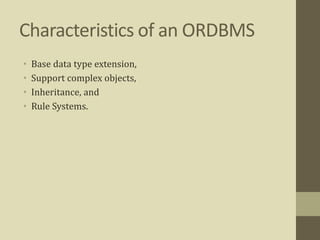
Characteristics of an ORDBMS
• Base data type extension,
• Support complex objects,
• Inheritance, and
• Rule Systems.
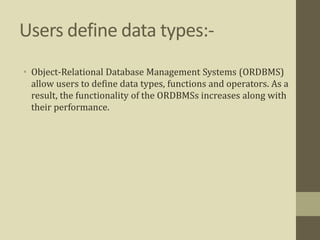
Users define data types:-
• Object-Relational Database Management Systems (ORDBMS)
allow users to define data types, functions and operators. As a
result, the functionality of the ORDBMSs increases along with
their performance.
Diagram:-
PROS & CONS
Advantages
• large storage capacity,
• access speed
• manipulation power of object databases.
• Disadvantages
• The architecture of ORDBMS is not appropriate for high-speed
web applications.
• ORDBMS are set to conquer the database market.
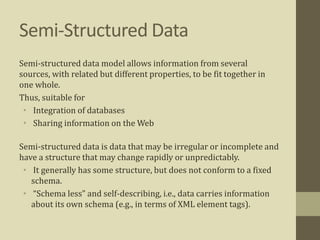
Semi-Structured Data
Semi-structured data model allows information from several
sources, with related but different properties, to be fit together in
one whole.
Thus, suitable for
• Integration of databases
• Sharing information on the Web
Semi-structured data is data that may be irregular or incomplete and
have a structure that may change rapidly or unpredictably.
• It generally has some structure, but does not conform to a fixed
schema.
• “Schema less” and self-describing, i.e., data carries information
about its own schema (e.g., in terms of XML element tags).
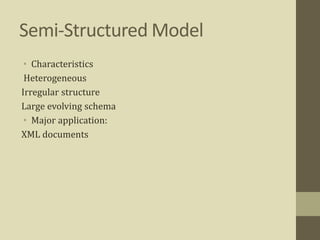
Semi-Structured Model
• Characteristics
Heterogeneous
Irregular structure
Large evolving schema
• Major application:
XML documents
Extensible Markup Language
(XML)
• Semi-structured Data Models (XML) (~1998)
• Standard of the World Wide Web Consortium (W3C) in
1998.
• An XML document is only a file of characters
 Similar to HTML, but
 HTML uses tags for formatting (e.g., “italic”).
 XML uses tags for structure (e.g., “this is an address”).
XML:-
• Two modes:
 Well-formed XML allows you to invent your own tags, much
like labels in semi-structured data.
 Valid XML involves a Document Type Definition (DTD) that
tells the labels and gives a grammar for how they may be
nested.
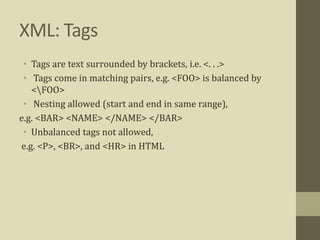
XML: Tags
• Tags are text surrounded by brackets, i.e. <. . .>
• Tags come in matching pairs, e.g. <FOO> is balanced by
<FOO>
• Nesting allowed (start and end in same range),
e.g. <BAR> <NAME> </NAME> </BAR>
• Unbalanced tags not allowed,
e.g. <P>, <BR>, and <HR> in HTML
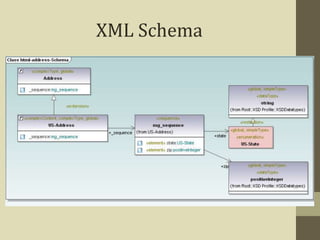
XML Schema
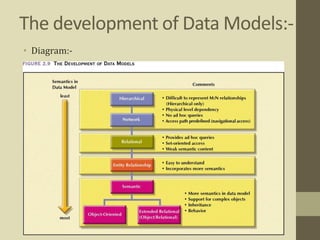
The development of Data Models:-
• Diagram:-
Thanks 
Any Comments

Types of Database Models

  • 3.
    Advanced Database Management System:- BS-(IT):- 6thSemester:-  Members:- Roll # • Murassa Gillani (02)A • Farwa Wahid (12)A • Maryam Arif (46)R • Faiza Jamil (48)R • Hamas Ijaz (53)R
  • 4.
  • 5.
    Database Models:- 1) Networkmodel 2) Hierarchical model 3) Relational model 4) Entity-Relationship data model (mainly for database design) 5) Object-based data models (Object oriented and Object-relational) 6) Semi-structured data model (XML)
  • 6.
    The Hierarchical Model—Evolution:- •GUAM (Generalized Update Access Method) –Based on the recognition that the many smaller parts would come together as components of still larger components. • Information Management System (IMS) –World’s leading mainframe hierarchical database system in the 1970s and early 1980s.
  • 7.
    The Hierarchical Model:- Hierarchicaldatabase models is useful for a certain type of data storage, but it is not extremely versatile. Its limitations mean that it is confined to some very specific uses.
  • 8.
    Cont… Hierarchical databases werepopular in early database design, in the era of mainframe computers. While some IBM and Microsoft models are still in use, many other types of business databases use more flexible models to accommodate more sophisticated types of data management.
  • 9.
    Hierarchical Structure—Characteristics • Eachparent can have many children. • Each child has only one parent. • Tree is defined by path that traces parent segments to child segments, beginning from the left. •Hierarchical path –Ordered sequencing of segments tracing hierarchical structure.
  • 10.
  • 11.
     Advantages:- –Conceptual simplicity –Databasesecurity –Data independence –Database integrity –Efficiency Disadvantages:- –Complex implementation –Difficult to manage –Lacks structural independence –Complex applications programming and use –Implementation limitations –Lack of standards PROS & CONS:-
  • 12.
    Network model:- • Createdto:- –Represent complex data relationships more effectively. –Improve database performance. • A unique feature of the network model is its schema. • Which is viewed as a graph where relationship types are arcs and object types are nodes.
  • 13.
    Network Model—Basic Structure •Resembles hierarchical model. • Collection of records in 1:M relationships. • Set –Relationship. –Composed of at least two record types. •Owner –Equivalent to the hierarchical model’s parent. •Member –Equivalent to the hierarchical model’s child.
  • 14.
  • 15.
    PROS & CONS •Advantages –Conceptual simplicity –Handles more relationship types –Data access flexibility –Promotes database integrity –Data independence • Disadvantage –Difficult for first time users –System complexity –Lack of structural independence –Difficulties with alterations of the database because when I information entered can alter the entire database
  • 16.
    Relational Database Model:- •Developedby Codd (IBM) in 1970. •Considered ingenious but impractical in 1970. •Conceptually simple. •Computers lacked power to implement the relational model. •Today, microcomputers can run sophisticated relational database software
  • 17.
    A relational databaseModel:- • A relational database (RDB) is a collective set of multiple data sets organized by tables, records and columns. • RDBs establish a well-defined relationship between database tables. • Tables communicate and share information, which facilitates data search ability, organization and reporting. • RDBs use Structured Query Language (SQL).
  • 18.
    The Relational Model—Basic Structure •RelationalDatabase Management System (RDBMS). •Performs same basic functions provided by hierarchical and network DBMS systems, plus other functions. •Most important advantage of the RDBMS is its ability to let the user/designer operate in a human logical environment.
  • 19.
    The Relational Model—BasicStructure (continued)  Table (relations) –Matrix consisting of a series of row/column Intersections. –Related to each other by sharing a common entity characteristic.  Relational schema –Visual representation of relational database’s entities, attributes within those entities, and relationships between those entities.
  • 20.
  • 21.
    PROS & CONS •Advantages –Structural independence. –Improved conceptual simplicity. –Easier database design, implementation, management, and use. –New technology performance power and flexibility with multiple data requirement capabilities. – Data security (strong privacy) –Powerful database management system. • Disadvantages –Substantial hardware and system software overhead. –Can facilitate poor design and implementation. –May promote “islands of information” problems.
  • 22.
    Entity-Relationship data model(mainly for database design) • Widely accepted and adapted graphical tool for data modeling. • Introduced by Chen in 1976. • Graphical representation of entities and their relationships in a database structure.
  • 23.
    The Entity RelationshipModel—Basic Structure • Entity relationship diagram (ERD):- –Uses graphic representations to model database components. –Entity is mapped to a relational table. • Entity instance (or occurrence) is row in table. • Entity set is collection of like entities. • Connectivity labels types of relationships:- –Diamond connected to related entities through a relationship line.
  • 24.
    Relationships: The BasicChen ERD • diagram
  • 25.
    Relationships: The Basic Crow’sFoot ERD• Diagram:-
  • 26.
    PORS & CONS:- •Advantages –Exceptionalconceptual simplicity –Visual representation –Effective communication tool –Integrated with the relational data model •Disadvantages –Limited constraint representation –Limited relationship representation –No data manipulation language –Loss of information content
  • 27.
  • 28.
    The Object OrientedModel • Semantic data model (SDM) developed by Hammer and McLeod in 1981 • Modeled both data and their relationships in a single structure known as an object • Basis of object oriented data model (OODM) • OODM becomes the basis for the object oriented database management system (OODBMS)
  • 29.
    The Object OrientedModel (continued) • Object is described by its factual content –Like relational model’s entity • Includes information about relationships between facts within object and relationships with other objects –Unlike relational model’s entity • Subsequent OODM development allowed an object to also contain operations • Object becomes basic building block for autonomous structures
  • 30.
    Developments that BoostedOODM’s Popularity • Growing costs put a premium on code re-usability. • Complex data types and system requirements became difficult to manage with a traditional RDBMS. • Became possible to support increasingly sophisticated transaction & information requirements. • Ever-increasing computing power made it possible to support the large computing.
  • 31.
    Object Oriented DataModel—Basic Structure • Object: abstraction of a real-world entity. • Attributes describe the properties of an object. • Objects that share similar characteristics are grouped in classes. • Classes are organized in a class hierarchy. • Inheritance is the ability of an object within the class hierarchy to inherit the attributes and methods of classes above it.
  • 32.
  • 33.
    Pros & Cons •Advantages –Addssemantic content –Visual presentation includes semantic content –Database integrity –Both structural and data independence •Disadvantages –Slow pace of OODM standards development –Complex navigational data access –Steep learning curve –High system overhead slows transactions –Lack of market penetration
  • 34.
    Object-Relational Data Model •The new, extended version of relational database technology called object-relational database management systems also known as ORDBMS. • An ORDBMS supports an extended form of SQL called SQL3 that is still in the development stages. The extensions are needed because ORDBMSs have to support ADT's. • The ORDBMS has the relational model in it because the data is stored in the form of tables having rows and columns and SQL is used as the query language and the result of a query is also table or tuples (rows).
  • 35.
    Characteristics of anORDBMS • Base data type extension, • Support complex objects, • Inheritance, and • Rule Systems.
  • 36.
    Users define datatypes:- • Object-Relational Database Management Systems (ORDBMS) allow users to define data types, functions and operators. As a result, the functionality of the ORDBMSs increases along with their performance.
  • 37.
  • 38.
    PROS & CONS Advantages •large storage capacity, • access speed • manipulation power of object databases. • Disadvantages • The architecture of ORDBMS is not appropriate for high-speed web applications. • ORDBMS are set to conquer the database market.
  • 39.
    Semi-Structured Data Semi-structured datamodel allows information from several sources, with related but different properties, to be fit together in one whole. Thus, suitable for • Integration of databases • Sharing information on the Web Semi-structured data is data that may be irregular or incomplete and have a structure that may change rapidly or unpredictably. • It generally has some structure, but does not conform to a fixed schema. • “Schema less” and self-describing, i.e., data carries information about its own schema (e.g., in terms of XML element tags).
  • 40.
    Semi-Structured Model • Characteristics Heterogeneous Irregularstructure Large evolving schema • Major application: XML documents
  • 41.
    Extensible Markup Language (XML) •Semi-structured Data Models (XML) (~1998) • Standard of the World Wide Web Consortium (W3C) in 1998. • An XML document is only a file of characters  Similar to HTML, but  HTML uses tags for formatting (e.g., “italic”).  XML uses tags for structure (e.g., “this is an address”).
  • 42.
    XML:- • Two modes: Well-formed XML allows you to invent your own tags, much like labels in semi-structured data.  Valid XML involves a Document Type Definition (DTD) that tells the labels and gives a grammar for how they may be nested.
  • 43.
    XML: Tags • Tagsare text surrounded by brackets, i.e. <. . .> • Tags come in matching pairs, e.g. <FOO> is balanced by <FOO> • Nesting allowed (start and end in same range), e.g. <BAR> <NAME> </NAME> </BAR> • Unbalanced tags not allowed, e.g. <P>, <BR>, and <HR> in HTML
  • 44.
  • 45.
    The development ofData Models:- • Diagram:-
  • 46.