19/05/2012


Geo-Platform Framework by geoSDI
The first pure java Open Source framework to develop Rich Web
GIS Application.


                                        Dimitri Dello Buono
                              GI 2012 – Open Data Policies
                                       Dresden, 19.05.2012
                                                                       1
19/05/2012


      The geoSDI Programme

geoSDI is a Programme coordinated by the Italian Civil Protection
Department of the Prime Minister Office


                           • For implemeting the Civil Protection
                           National Spatial Data Infrastructure

                           • According to the provisions of the INSPIRE
                           Directive

 http://www.geosdi.org     • Using Open Source software applications.


                              It is developed by the Institute for the Methodologies
                              of Environmental Analysis (IMAA) of the Italian
                              National Research Council (CNR) with the
                              collaboration of most of the national civil and military
                              institutions concerned.

                                                                                           2
19/05/2012


     The geoSDI PROJECT

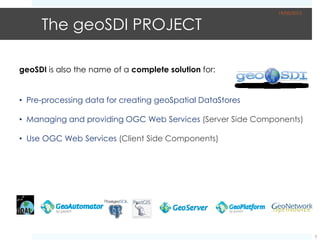
geoSDI is also the name of a complete solution for:


• Pre-processing data for creating geoSpatial DataStores

• Managing and providing OGC Web Services (Server Side Components)

• Use OGC Web Services (Client Side Components)


                                                                         3
19/05/2012


      The Problem
The problem that geoSDI was called to deal with:

When an emergency occurs (earthquake, landslide, flood ...) the Civil
Protection needs to manage and coordinate the emergency intervention,
with the help of maps using:

•Spatial Data
•Infrastructures Data
•Resource Data
•…

            These data are often produced in different formats
                        and are managed locally


   So the way to work with heterogeneous data is to use OGC standards
                            WMS – WFS - WCS

                                                                              4
19/05/2012


 The Problem

So …

       … is this another boring
       presentation on OGC
              Standards
                   ?


                                               5
19/05/2012


     The Problem
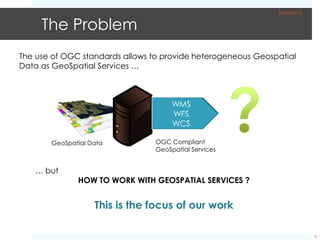
The use of OGC standards allows to provide heterogeneous Geospatial
Data as GeoSpatial Services …


       GeoSpatial Data           OGC Compliant
                                 GeoSpatial Services


   … but
              HOW TO WORK WITH GEOSPATIAL SERVICES ?


                   This is the focus of our work

                                                                           6
19/05/2012


      The Needs
 Many open source projects for display maps are based on JavaScript, with
 problems like Mainteinance: Maintain JavaScript code is sometimes very
 complex because of its structure


      So we need a more powerful and flexible solution to use Java
    technology to build webGIS portals, which include the javascript
                       libraries for handling maps


For this reason, the choice we made was to use GWT (Google Web Toolkit),
a powerful framework that can:

• transform / compile Java code

• and generate Javascript code for any browser.


                                                                               7
19/05/2012


      The Solution


geoSDI has designed and launched the open source project
Geo-Platform Framework, the first pure java open source framework to
develop Rich Web GIS Application.

                 http://code.google.com/p/geo-platform/

Geo-Platform allows to extend webGIS applications adding Widgets,
software plugins that perform specific functions: in this way every geo-
portal is different from the others and it realizes an exact reflection of the
functional needs of the end user.
   With the development of Geo-Platform Framework is now possible to
      produce fast and powerful geoportals dedicated to end users.

                                                                                  8
19/05/2012


      An extensible Solution


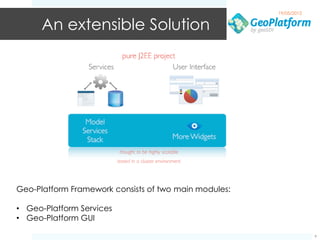
Geo-Platform Framework consists of two main modules:

• Geo-Platform Services
• Geo-Platform GUI

                                                                    9
19/05/2012


      An extensible Solution


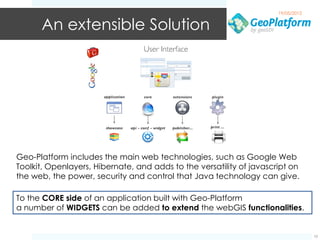
Geo-Platform includes the main web technologies, such as Google Web
Toolkit, Openlayers, Hibernate, and adds to the versatility of javascript on
the web, the power, security and control that Java technology can give.

To the CORE side of an application built with Geo-Platform
a number of WIDGETS can be added to extend the webGIS functionalities.


                                                                                   10
19/05/2012


Widgets Examples

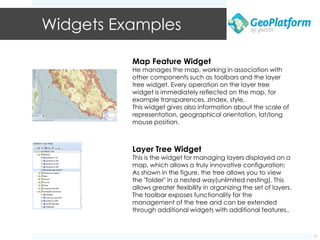
          Map Feature Widget
          He manages the map, working in association with
          other components such as toolbars and the layer
          tree widget. Every operation on the layer tree
          widget is immediately reflected on the map, for
          example transparences, zIndex, style.
          This widget gives also information about the scale of
          representation, geographical orientation, lat/long
          mouse position.


          Layer Tree Widget
          This is the widget for managing layers displayed on a
          map, which allows a truly innovative configuration:
          As shown in the figure, the tree allows you to view
          the "folder" in a nested way(unlimited nesting). This
          allows greater flexibility in organizing the set of layers.
          The toolbar exposes functionality for the
          management of the tree and can be extended
          through additional widgets with additional features..


                                                                             11
19/05/2012


Widgets Examples
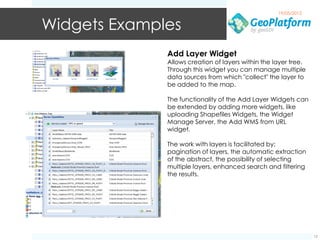
              Add Layer Widget
              Allows creation of layers within the layer tree.
              Through this widget you can manage multiple
              data sources from which "collect" the layer to
              be added to the map.

              The functionality of the Add Layer Widgets can
              be extended by adding more widgets, like
              uploading Shapefiles Widgets, the Widget
              Manage Server, the Add WMS from URL
              widget.

              The work with layers is facilitated by:
              pagination of layers, the automatic extraction
              of the abstract, the possibility of selecting
              multiple layers, enhanced search and filtering
              the results.


                                                                 12
19/05/2012


Widgets Examples
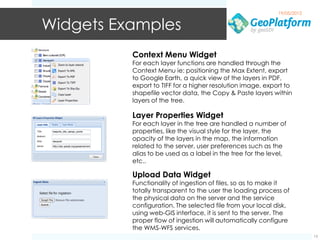
          Context Menu Widget
          For each layer functions are handled through the
          Context Menu ie: positioning the Max Extent, export
          to Google Earth, a quick view of the layers in PDF,
          export to TIFF for a higher resolution image, export to
          shapefile vector data, the Copy & Paste layers within
          layers of the tree.

          Layer Properties Widget
          For each layer in the tree are handled a number of
          properties, like the visual style for the layer, the
          opacity of the layers in the map, the information
          related to the server, user preferences such as the
          alias to be used as a label in the tree for the level,
          etc..

          Upload Data Widget
          Functionality of ingestion of files, so as to make it
          totally transparent to the user the loading process of
          the physical data on the server and the service
          configuration. The selected file from your local disk,
          using web-GIS interface, it is sent to the server. The
          proper flow of ingestion will automatically configure
          the WMS-WFS services.
                                                                          13
19/05/2012


Widgets Examples
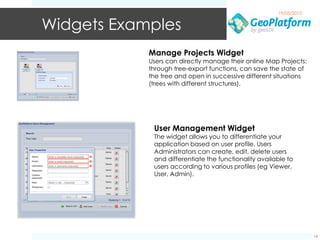
            Manage Projects Widget
            Users can directly manage their online Map Projects:
            through tree-export functions, can save the state of
            the tree and open in successive different situations
            (trees with different structures).


             User Management Widget
             The widget allows you to differentiate your
             application based on user profile. Users
             Administrators can create, edit, delete users
             and differentiate the functionality available to
             users according to various profiles (eg Viewer,
             User, Admin).


                                                                    14
19/05/2012


Widgets Examples
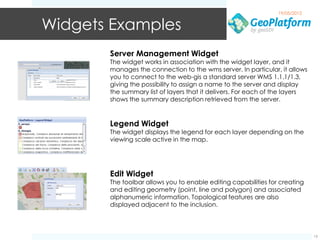
       Server Management Widget
       The widget works in association with the widget layer, and it
       manages the connection to the wms server. In particular, it allows
       you to connect to the web-gis a standard server WMS 1.1.1/1.3,
       giving the possibility to assign a name to the server and display
       the summary list of layers that it delivers. For each of the layers
       shows the summary description retrieved from the server.


       Legend Widget
       The widget displays the legend for each layer depending on the
       viewing scale active in the map.


       Edit Widget
       The toolbar allows you to enable editing capabilities for creating
       and editing geometry (point, line and polygon) and associated
       alphanumeric information. Topological features are also
       displayed adjacent to the inclusion.


                                                                             15
19/05/2012


Widgets Examples

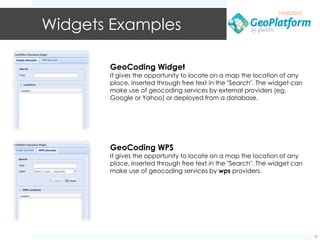
       GeoCoding Widget
       It gives the opportunity to locate on a map the location of any
       place, inserted through free text in the "Search". The widget can
       make use of geocoding services by external providers (eg,
       Google or Yahoo) or deployed from a database.


       GeoCoding WPS
       It gives the opportunity to locate on a map the location of any
       place, inserted through free text in the "Search". The widget can
       make use of geocoding services by wps providers.


                                                                            16
19/05/2012


Widgets Examples


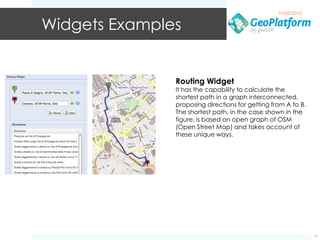
               Routing Widget
               It has the capability to calculate the
               shortest path in a graph interconnected,
               proposing directions for getting from A to B.
               The shortest path, in the case shown in the
               figure, is based on open graph of OSM
               (Open Street Map) and takes account of
               these unique ways.


                                                               17
19/05/2012


      Some Video Examples

• Work with layers and GeoCoding

• Add folder and WMS Data

• Create a Scenario and Print a Map

• Create and Edit Area of Interest


• Other videos at

    • Dimitri Dello Buono YouTube Channel
        (http://www.youtube.com/user/MrDimitriDB)
    • geoSDI Video YouTube Channel
        (http://www.youtube.com/user/geoSDIVideo)

    • http://youtu.be/0Qif_4dDuso

                                                                 18
19/05/2012


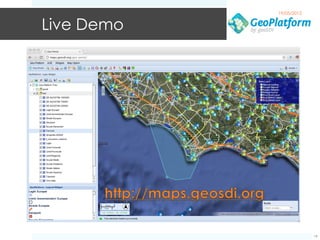
Live Demo


                         19
19/05/2012


 Thank you


geoSDI Team

Web
www.geosdi.org
Mail
sviluppo@geosdi.org
Address
IMAA CNR, C.da S.Loja, Tito Scalo (PZ)
Italy


                                                      20

GI2012 buono-cnr-geo-platform

  • 1.
    19/05/2012 Geo-Platform Framework bygeoSDI The first pure java Open Source framework to develop Rich Web GIS Application. Dimitri Dello Buono GI 2012 – Open Data Policies Dresden, 19.05.2012 1
  • 2.
    19/05/2012 The geoSDI Programme geoSDI is a Programme coordinated by the Italian Civil Protection Department of the Prime Minister Office • For implemeting the Civil Protection National Spatial Data Infrastructure • According to the provisions of the INSPIRE Directive http://www.geosdi.org • Using Open Source software applications. It is developed by the Institute for the Methodologies of Environmental Analysis (IMAA) of the Italian National Research Council (CNR) with the collaboration of most of the national civil and military institutions concerned. 2
  • 3.
    19/05/2012 The geoSDI PROJECT geoSDI is also the name of a complete solution for: • Pre-processing data for creating geoSpatial DataStores • Managing and providing OGC Web Services (Server Side Components) • Use OGC Web Services (Client Side Components) 3
  • 4.
    19/05/2012 The Problem The problem that geoSDI was called to deal with: When an emergency occurs (earthquake, landslide, flood ...) the Civil Protection needs to manage and coordinate the emergency intervention, with the help of maps using: •Spatial Data •Infrastructures Data •Resource Data •… These data are often produced in different formats and are managed locally So the way to work with heterogeneous data is to use OGC standards WMS – WFS - WCS 4
  • 5.
    19/05/2012 The Problem So… … is this another boring presentation on OGC Standards ? 5
  • 6.
    19/05/2012 The Problem The use of OGC standards allows to provide heterogeneous Geospatial Data as GeoSpatial Services … GeoSpatial Data OGC Compliant GeoSpatial Services … but HOW TO WORK WITH GEOSPATIAL SERVICES ? This is the focus of our work 6
  • 7.
    19/05/2012 The Needs Many open source projects for display maps are based on JavaScript, with problems like Mainteinance: Maintain JavaScript code is sometimes very complex because of its structure So we need a more powerful and flexible solution to use Java technology to build webGIS portals, which include the javascript libraries for handling maps For this reason, the choice we made was to use GWT (Google Web Toolkit), a powerful framework that can: • transform / compile Java code • and generate Javascript code for any browser. 7
  • 8.
    19/05/2012 The Solution geoSDI has designed and launched the open source project Geo-Platform Framework, the first pure java open source framework to develop Rich Web GIS Application. http://code.google.com/p/geo-platform/ Geo-Platform allows to extend webGIS applications adding Widgets, software plugins that perform specific functions: in this way every geo- portal is different from the others and it realizes an exact reflection of the functional needs of the end user. With the development of Geo-Platform Framework is now possible to produce fast and powerful geoportals dedicated to end users. 8
  • 9.
    19/05/2012 An extensible Solution Geo-Platform Framework consists of two main modules: • Geo-Platform Services • Geo-Platform GUI 9
  • 10.
    19/05/2012 An extensible Solution Geo-Platform includes the main web technologies, such as Google Web Toolkit, Openlayers, Hibernate, and adds to the versatility of javascript on the web, the power, security and control that Java technology can give. To the CORE side of an application built with Geo-Platform a number of WIDGETS can be added to extend the webGIS functionalities. 10
  • 11.
    19/05/2012 Widgets Examples Map Feature Widget He manages the map, working in association with other components such as toolbars and the layer tree widget. Every operation on the layer tree widget is immediately reflected on the map, for example transparences, zIndex, style. This widget gives also information about the scale of representation, geographical orientation, lat/long mouse position. Layer Tree Widget This is the widget for managing layers displayed on a map, which allows a truly innovative configuration: As shown in the figure, the tree allows you to view the "folder" in a nested way(unlimited nesting). This allows greater flexibility in organizing the set of layers. The toolbar exposes functionality for the management of the tree and can be extended through additional widgets with additional features.. 11
  • 12.
    19/05/2012 Widgets Examples Add Layer Widget Allows creation of layers within the layer tree. Through this widget you can manage multiple data sources from which "collect" the layer to be added to the map. The functionality of the Add Layer Widgets can be extended by adding more widgets, like uploading Shapefiles Widgets, the Widget Manage Server, the Add WMS from URL widget. The work with layers is facilitated by: pagination of layers, the automatic extraction of the abstract, the possibility of selecting multiple layers, enhanced search and filtering the results. 12
  • 13.
    19/05/2012 Widgets Examples Context Menu Widget For each layer functions are handled through the Context Menu ie: positioning the Max Extent, export to Google Earth, a quick view of the layers in PDF, export to TIFF for a higher resolution image, export to shapefile vector data, the Copy & Paste layers within layers of the tree. Layer Properties Widget For each layer in the tree are handled a number of properties, like the visual style for the layer, the opacity of the layers in the map, the information related to the server, user preferences such as the alias to be used as a label in the tree for the level, etc.. Upload Data Widget Functionality of ingestion of files, so as to make it totally transparent to the user the loading process of the physical data on the server and the service configuration. The selected file from your local disk, using web-GIS interface, it is sent to the server. The proper flow of ingestion will automatically configure the WMS-WFS services. 13
  • 14.
    19/05/2012 Widgets Examples Manage Projects Widget Users can directly manage their online Map Projects: through tree-export functions, can save the state of the tree and open in successive different situations (trees with different structures). User Management Widget The widget allows you to differentiate your application based on user profile. Users Administrators can create, edit, delete users and differentiate the functionality available to users according to various profiles (eg Viewer, User, Admin). 14
  • 15.
    19/05/2012 Widgets Examples Server Management Widget The widget works in association with the widget layer, and it manages the connection to the wms server. In particular, it allows you to connect to the web-gis a standard server WMS 1.1.1/1.3, giving the possibility to assign a name to the server and display the summary list of layers that it delivers. For each of the layers shows the summary description retrieved from the server. Legend Widget The widget displays the legend for each layer depending on the viewing scale active in the map. Edit Widget The toolbar allows you to enable editing capabilities for creating and editing geometry (point, line and polygon) and associated alphanumeric information. Topological features are also displayed adjacent to the inclusion. 15
  • 16.
    19/05/2012 Widgets Examples GeoCoding Widget It gives the opportunity to locate on a map the location of any place, inserted through free text in the "Search". The widget can make use of geocoding services by external providers (eg, Google or Yahoo) or deployed from a database. GeoCoding WPS It gives the opportunity to locate on a map the location of any place, inserted through free text in the "Search". The widget can make use of geocoding services by wps providers. 16
  • 17.
    19/05/2012 Widgets Examples Routing Widget It has the capability to calculate the shortest path in a graph interconnected, proposing directions for getting from A to B. The shortest path, in the case shown in the figure, is based on open graph of OSM (Open Street Map) and takes account of these unique ways. 17
  • 18.
    19/05/2012 Some Video Examples • Work with layers and GeoCoding • Add folder and WMS Data • Create a Scenario and Print a Map • Create and Edit Area of Interest • Other videos at • Dimitri Dello Buono YouTube Channel (http://www.youtube.com/user/MrDimitriDB) • geoSDI Video YouTube Channel (http://www.youtube.com/user/geoSDIVideo) • http://youtu.be/0Qif_4dDuso 18
  • 19.
  • 20.
    19/05/2012 Thank you geoSDITeam Web www.geosdi.org Mail sviluppo@geosdi.org Address IMAA CNR, C.da S.Loja, Tito Scalo (PZ) Italy 20