Paul Shapley
MSc CGeog (GIS) FRGS
http://www.paulshapley.com
email: p.shapley@gmail.com
QGIS User Group (Wales)
6th
October 2015
Processing Landsat 8 Multi-Spectral
Images with GRASS Tools
& the potential of the
'QGIS-GRASS-PLUGIN'
So...who am I?
● Originally a Chartered Designer working in Design and Advertising
until 1993. I now work as a GIS Supervisor and LLPG Custodian for
Neath Port Talbot Borough Planning Department using QGIS and
GRASS daily for the LLPG and LDP Team.
● Have been a QGIS user since about 2007 (I was looking for an
ArcMap alternative on MacOS) then Windows and more recently
Ubuntu.
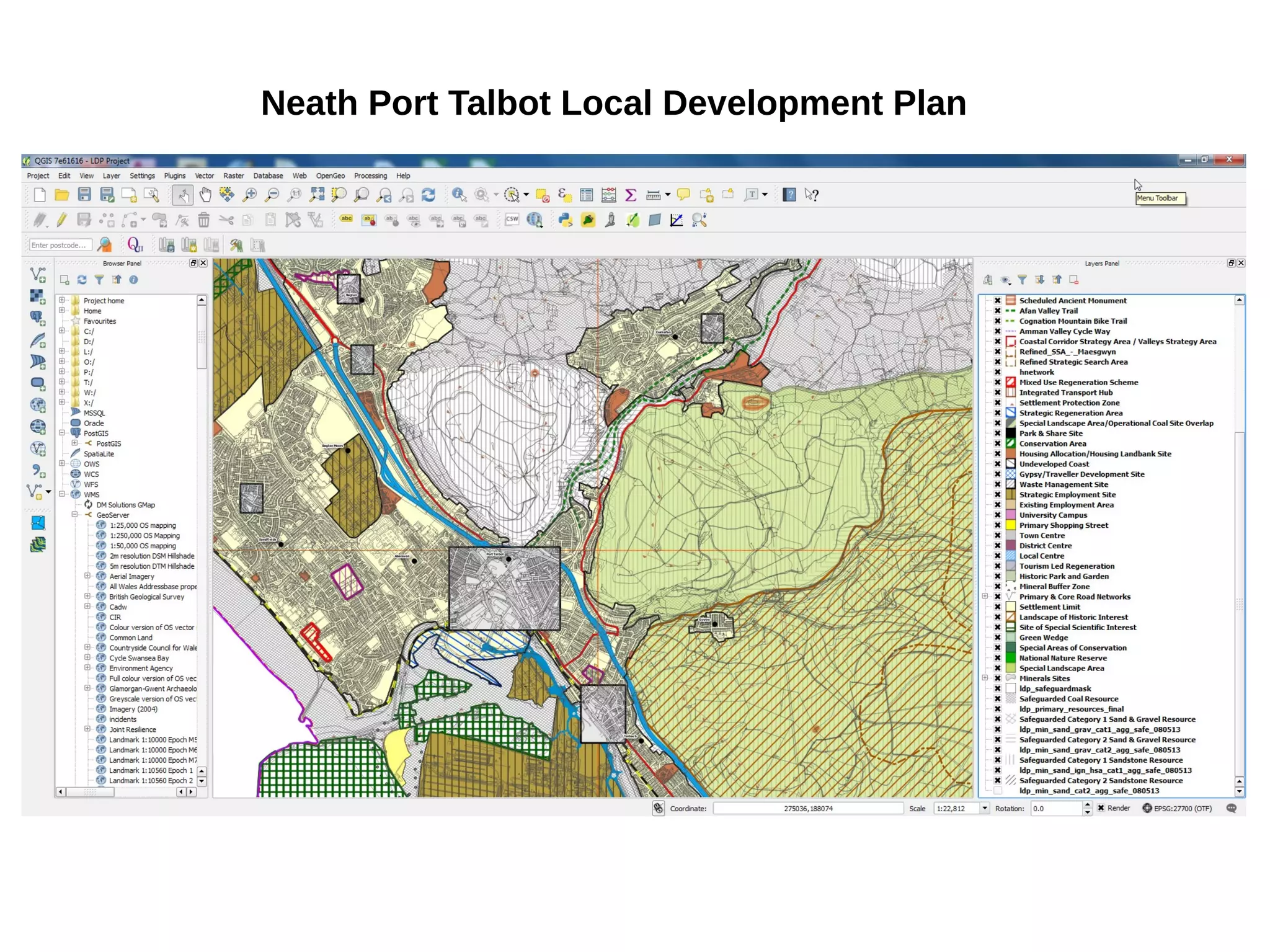
● We are just completed our LDP mapping requirements almost
entirely with QGIS for both print production and the web.
● I'm investigating the potential of Landsat 8 medium resolution
imagery as a way of monitoring urban change, also want to
investigate the use of 3D building access for the LLPG.
● Try to help and promote the Ubuntu GIS community by publishing a
blog in my spare time.
Neath Port Talbot Local Development Plan
Landsat 8 – The Basics
● Launched February 11th 2013 – Circles the earth 14 times a day
● 8th Satellite in the Landsat Program which started in 1972
● The Mission: -
1) Collect and Archive Medium Resolution Images.
2) Ensure consistency with data from previous missions.
3) Distribute data products to the public.
● 15M, 30m and 100m Panchromatic, Multi-spectral and Thermal.
● 16 day cycle image taken at 11.15am (South Wales)
Possible Uses of Landsat 8 Data
● Landscape Assessment
● Environmental and Health Condition Monitoring
● Urban Change Detection
● Vegetation Greenness
● Landslide Detection and Susceptability
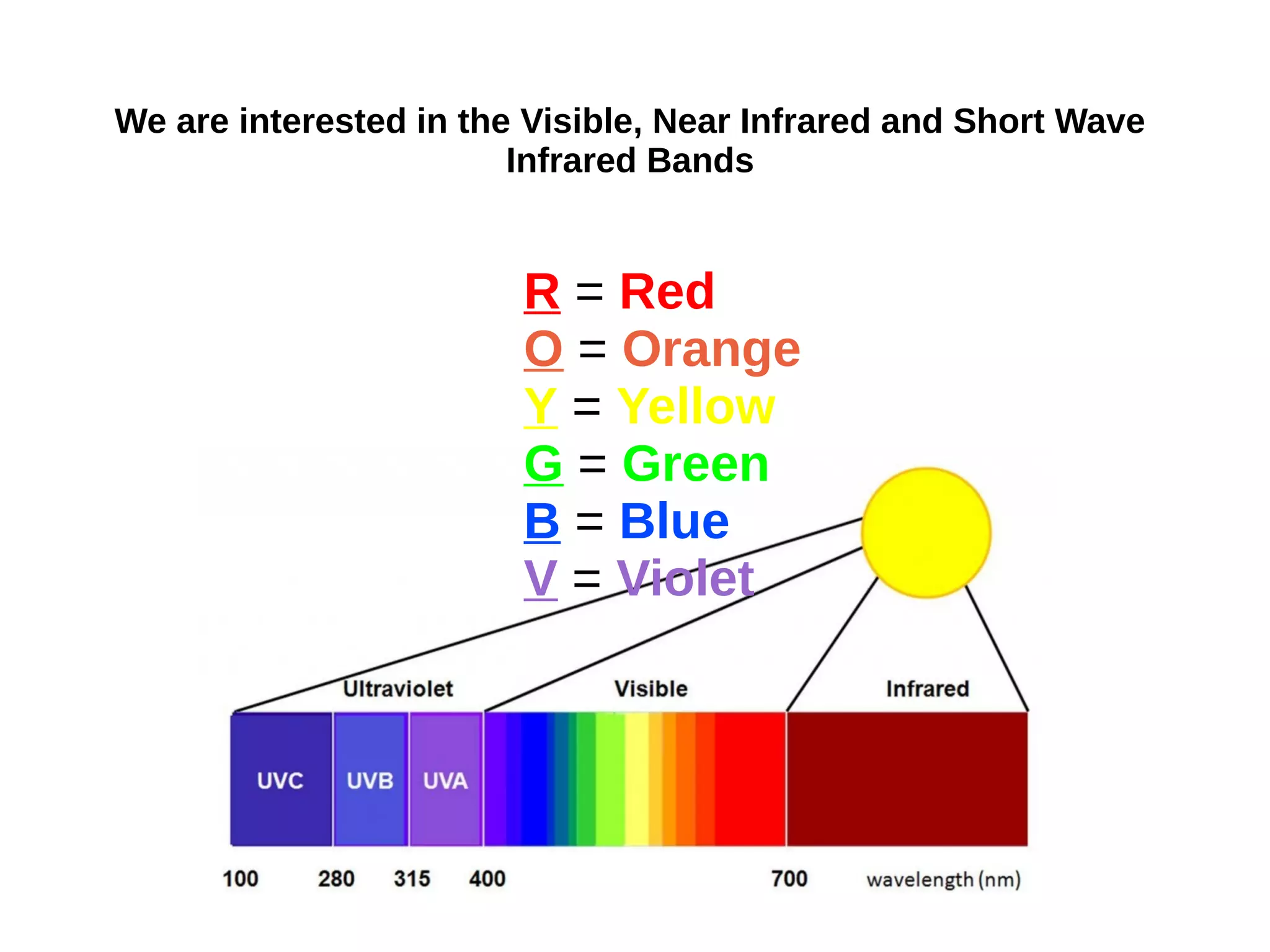
We are interested in the Visible, Near Infrared and Short Wave
Infrared Bands
R = Red
O = Orange
Y = Yellow
G = Green
B = Blue
V = Violet
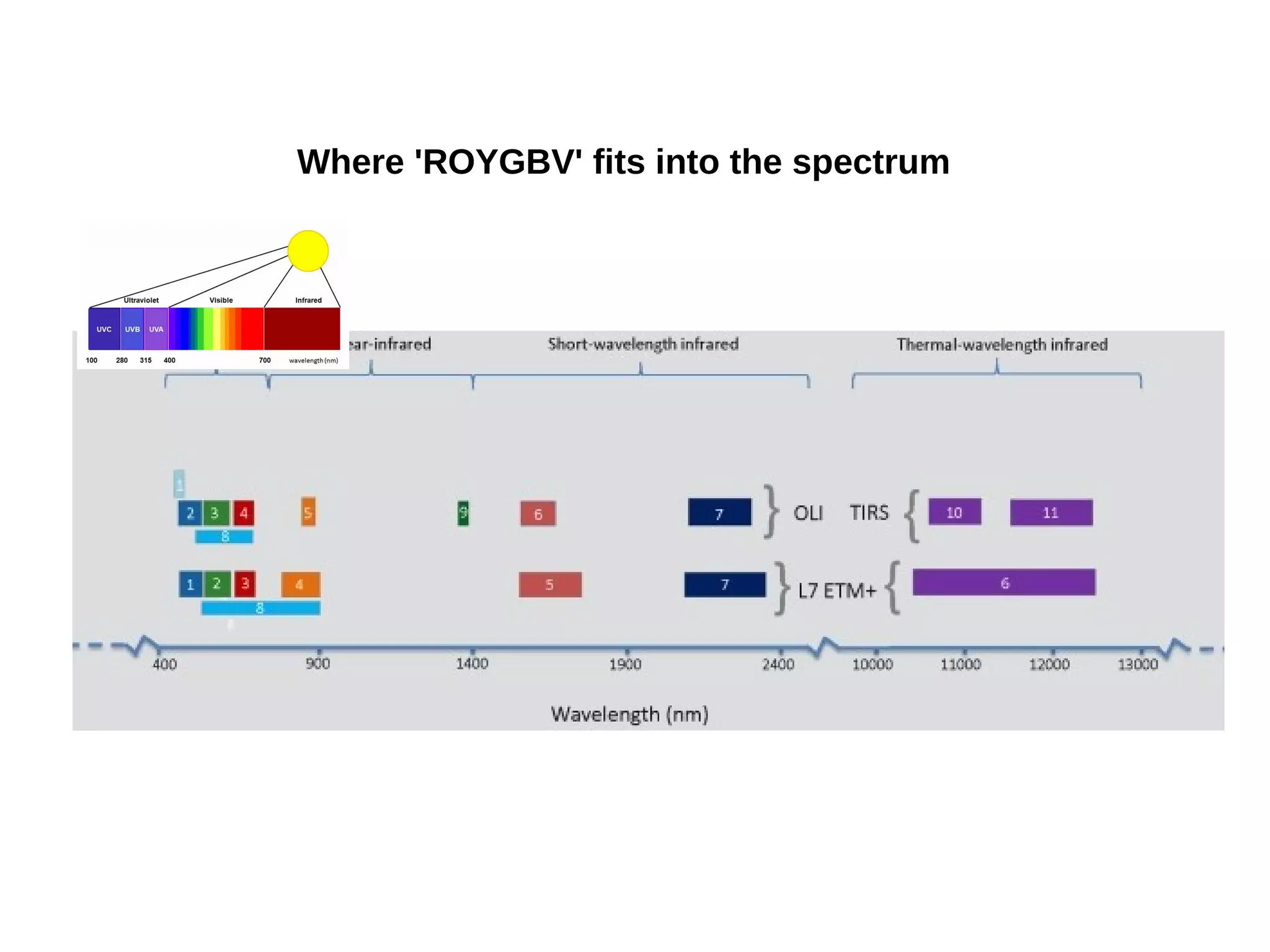
Where 'ROYGBV' fits into the spectrum
What are the 11 bands of Landsat 8?
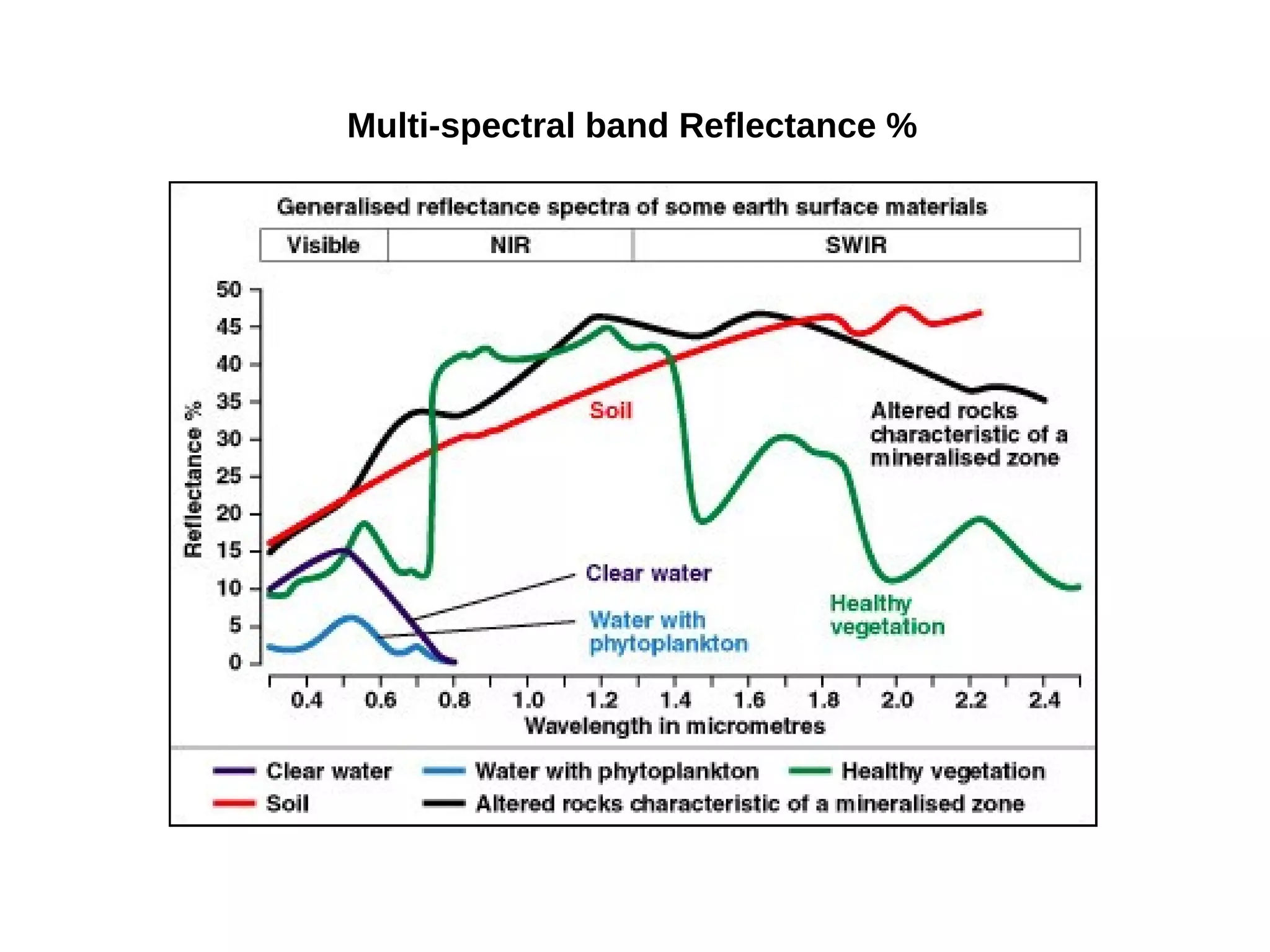
Multi-spectral band Reflectance %
Raw GeoTIFF
Band 3 (Red)
(v.in.ogr)
Panchromatic Band 8 after
'Histogram Equalise' (r.colors)
How do we get the raw data?
earthexplorer.usgs.gov PATH: 204 ROW: 24
Require: Level 1 GeoTIFF Data Product
Next we need to
access the
'Landsat Archive'
listing and tick 'L8
OLI/TIRS' then
click on 'Results'.
For getting Bands into
Grass 6. here is the
link:
http://www.paulshapley
.com/2014/04/processi
ng-landsat-8-bands-in-
grass-gis.html
Getting the Landsat 8 Bands into GRASS
Urban/Industrial
Urban/Res
Green Vegetation
Shadow
Sea Water/Coastal
Soil
Image Classification: 'v.gensigset' to capture a signature file which
will be used to sample the underlying pixels into six groups.
'i.smap' will then create the necessary 'passes' to produce the
suggested 6 areas (requires trial and error) to get precise groups
When the images are generated for each year of interest
we can then animate the results similar to this '.gif'.
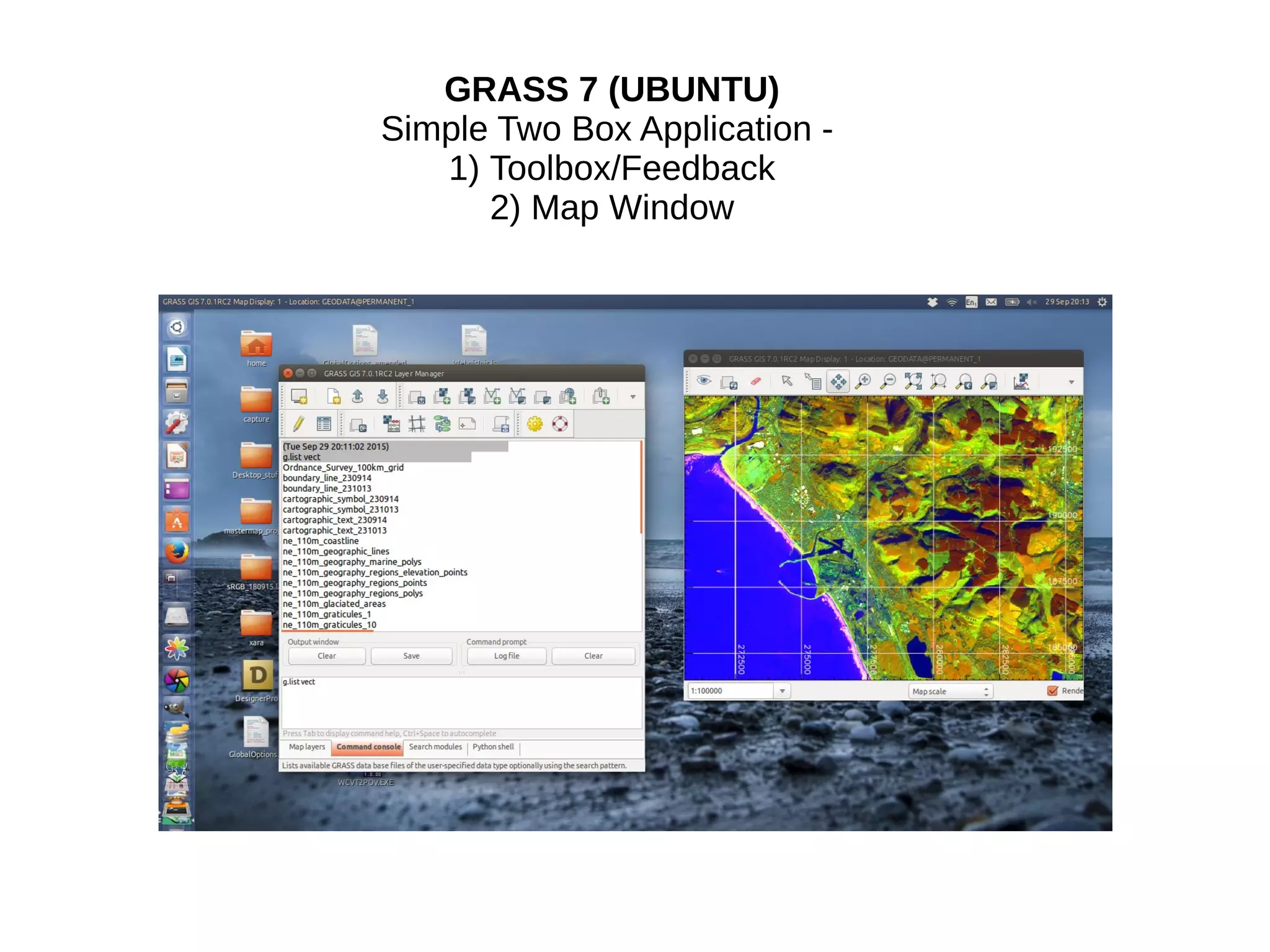
GRASS 7 (UBUNTU)
Simple Two Box Application -
1) Toolbox/Feedback
2) Map Window
Advantages of GRASS 7
1. One of the main advantages of GRASS over QGIS is the 'LOCATION' -
A single data directory that is easily portable and ensures one or two
years down the line you will not lose a layer connected with a project.
For example you have to actively use the 'g.remove' command to ensure
the layer is completely deleted and all it's constituant parts.
2. It has a simple, elegant, un-cluttered interface of just two windows - one
for 'map', one for 'tools'
3. It is modular Based. All 400 or so modules can be accessed directly
through the 'terminal' (not like microsoft word)
4. Run multiple modules simultaneously - only limited by processing and
RAM of the hardware.
5. Good Vector Topology Checking/Reporting (Topology created on Input
by default)
6. To repeat a Single Portable Directory Store (the 'LOCATION') for -
Point, Centroid, Line, Boundary, Area, Face (3D Surface), 3D
Centroid, Volume, 2D Raster, 3D Voxel (three dimensional cells),
'Multi-dimensional' Points
7. Good support for use with other Open Source Projects such as
Paraview,Blender,Vis5D
8. Good DEM and Image Processing Tools and handling of large lidar
datasets.
9. All Modules available through a WFS (Web Feature Service)
Disadvantages of GRASS 7
1. Steep Learning Curve
2. Vector Digitising not as 'slick' as QGIS
3. Poor 'Layout' Editing Options (although improved in GRASS 7
4. 3D 'NVIZ' Module a little bit dated.
5. No direct Web/HTML5 output options.
QGIS-GRASS-PLUGIN advantages
1. Direct access to the 'single data directory' (the 'LOCATION')
2. The QGIS API is more familiar than GRASS (just like microsoft word)
3. Drag 'n' Drop QGIS layers into the Grass 'PERMANENT' Mapset from within
the QGIS Browser (no more lost shapefiles or forgotten usernames and
passwords a year down the line.
4. 'Mapset' create/open/close directly in the Plugin
5. Attribute editing, digitizing and snapping will be using the more familiar QGIS
toolbox.
6. If you just need the Grass Modules you can use the 'Processing'
Toolbox if you dont need access to the Grass 'Location' and
'PERMANENT' mapset you need the Plugin.
7. 3D Visualisation using Google Earth
8. Direct migration of QGIS/GRASS data to QGIS-Server and others such as
Geoserver/Mapserver etc.
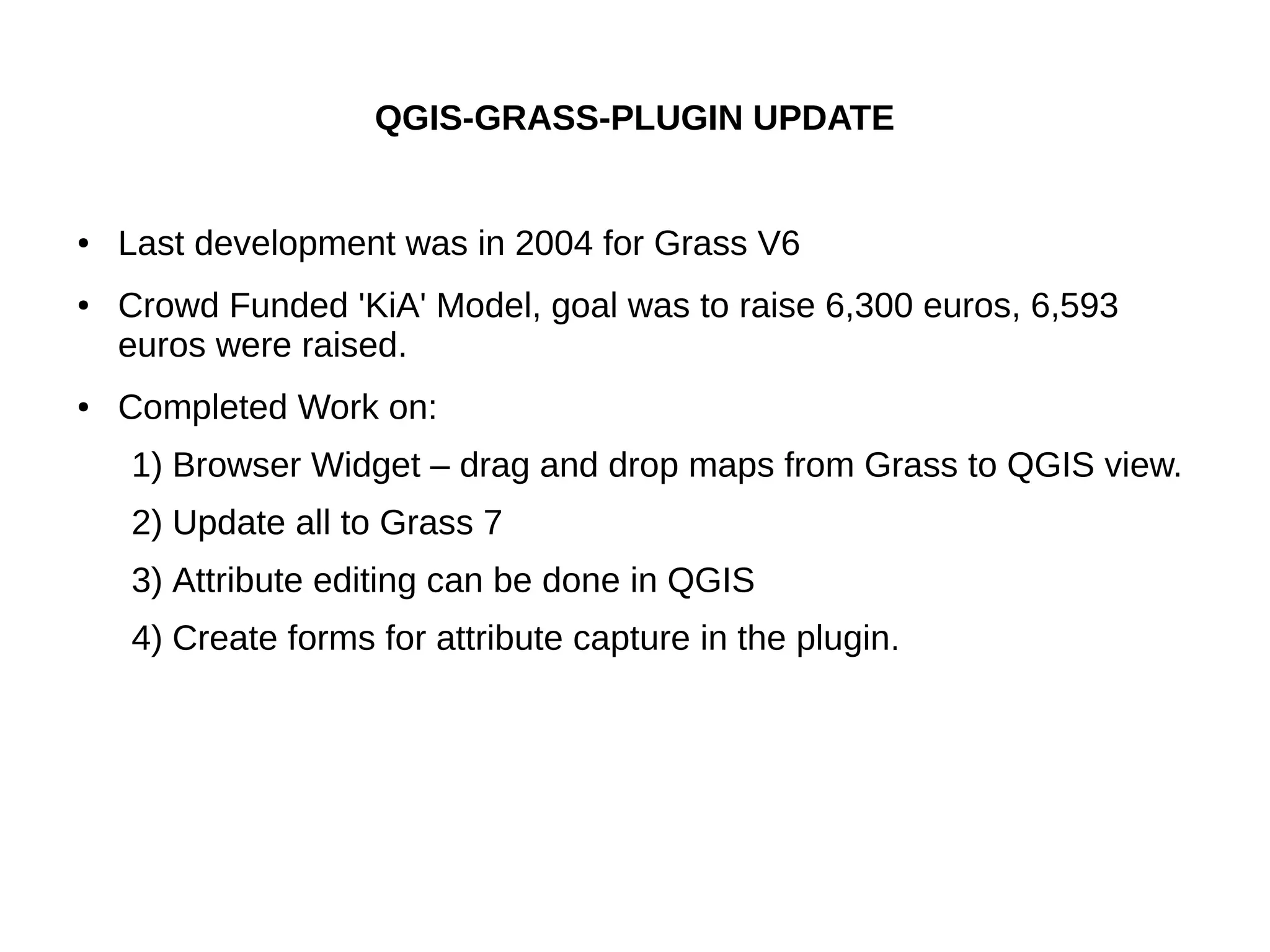
QGIS-GRASS-PLUGIN UPDATE
● Last development was in 2004 for Grass V6
● Crowd Funded 'KiA' Model, goal was to raise 6,300 euros, 6,593
euros were raised.
● Completed Work on:
1) Browser Widget – drag and drop maps from Grass to QGIS view.
2) Update all to Grass 7
3) Attribute editing can be done in QGIS
4) Create forms for attribute capture in the plugin.
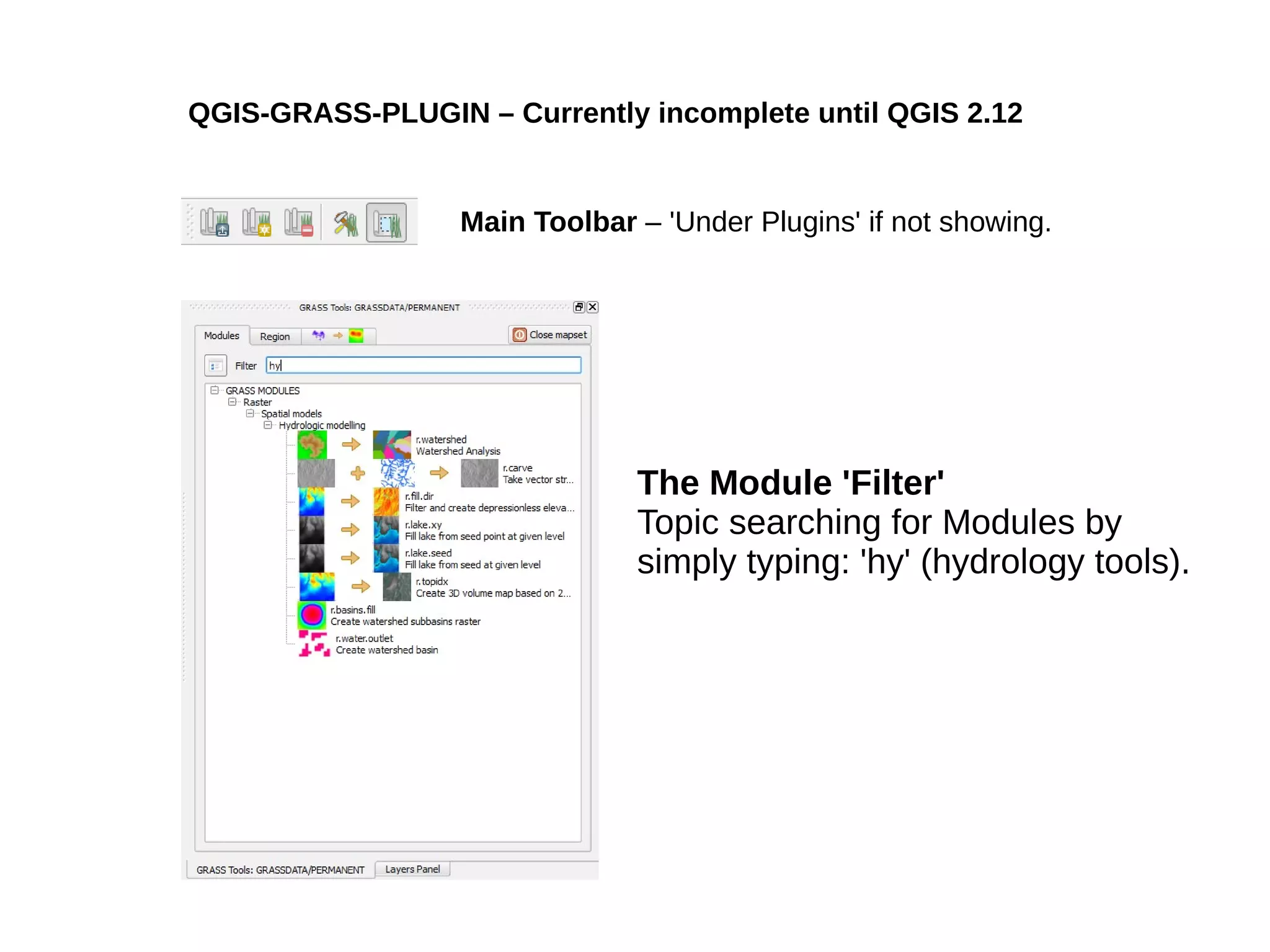
QGIS-GRASS-PLUGIN – Currently incomplete until QGIS 2.12
The Module 'Filter'
Topic searching for Modules by
simply typing: 'hy' (hydrology tools).
Main Toolbar – 'Under Plugins' if not showing.
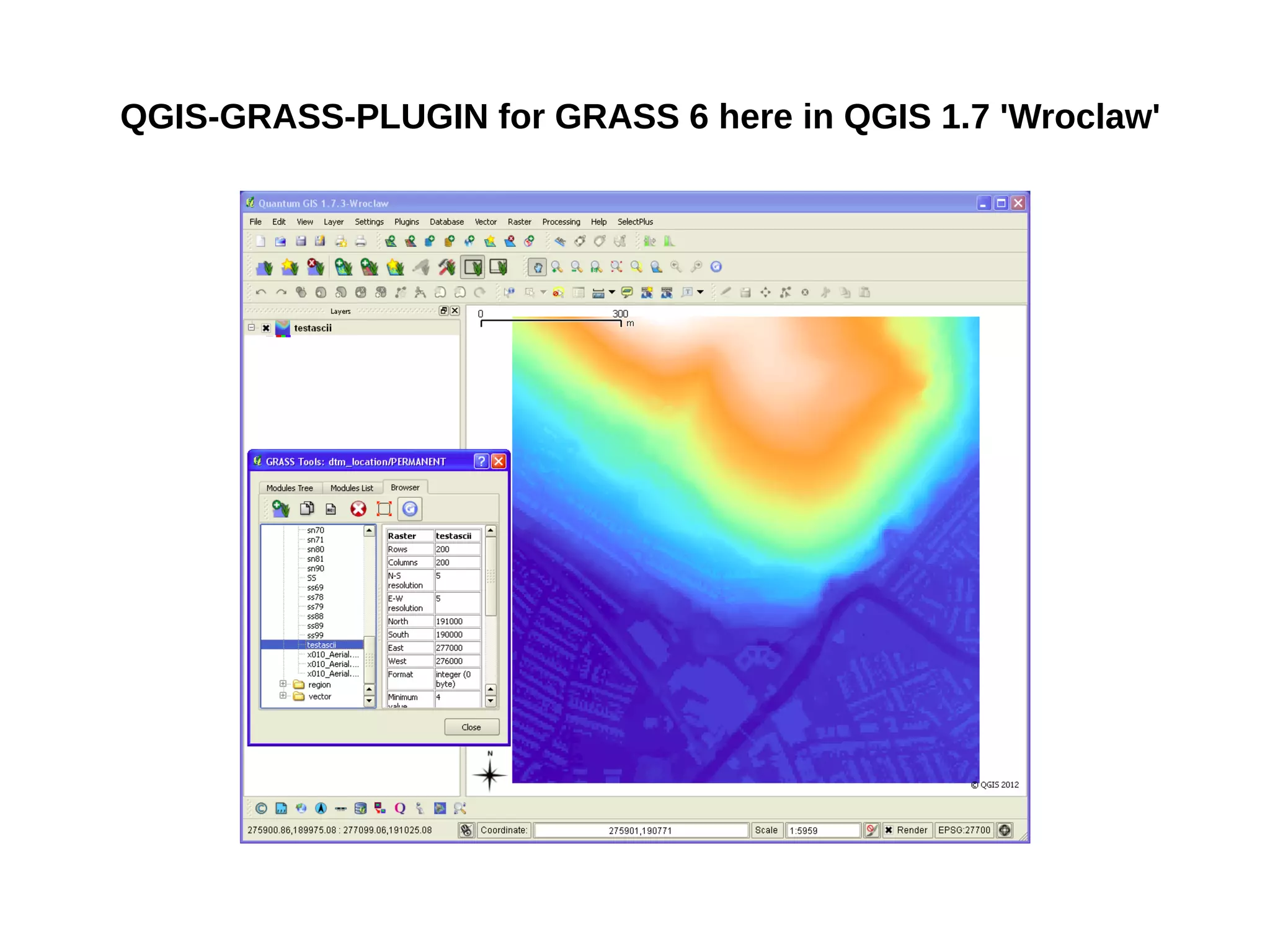
QGIS-GRASS-PLUGIN for GRASS 6 here in QGIS 1.7 'Wroclaw'
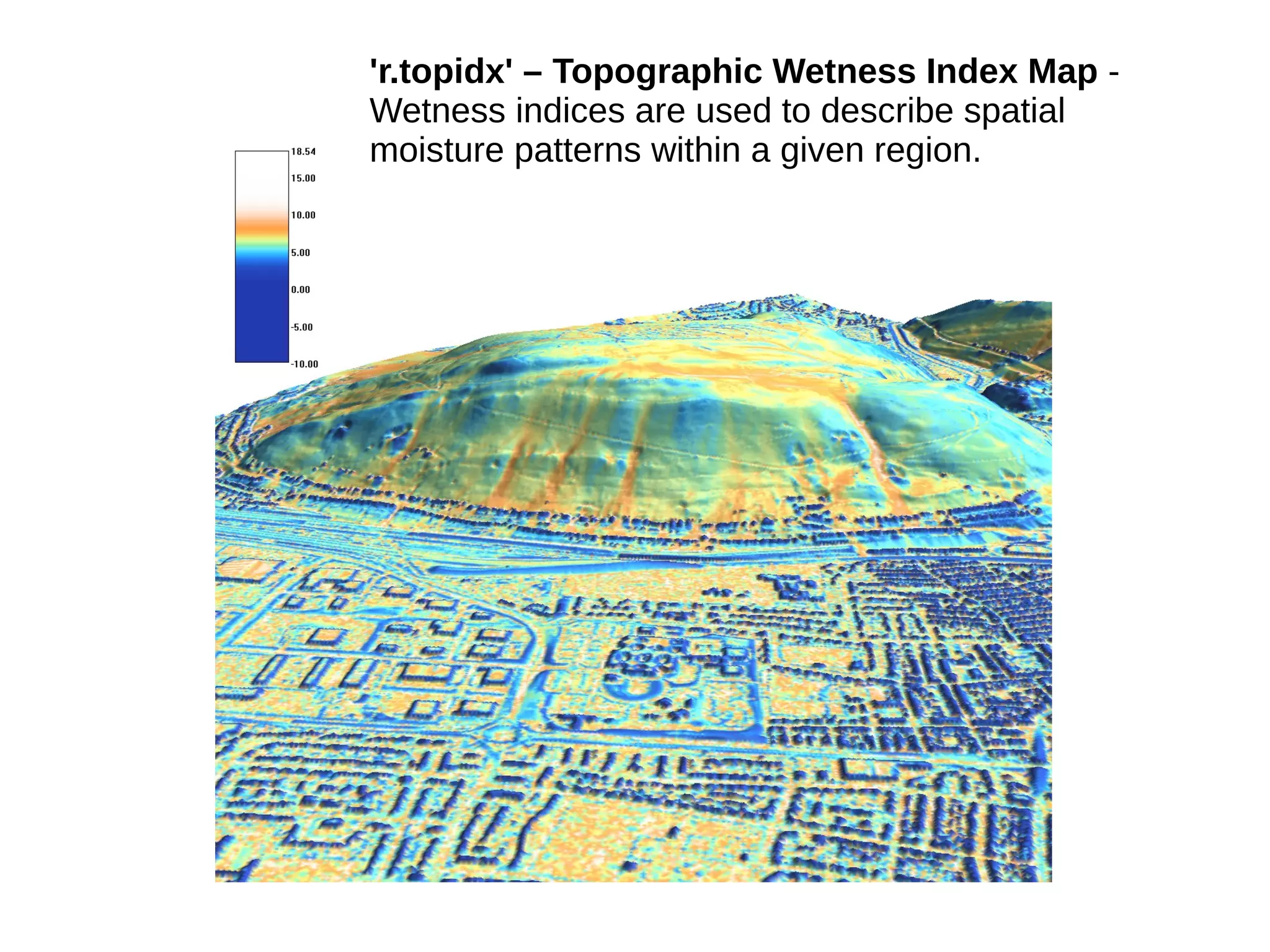
'r.topidx' – Topographic Wetness Index Map -
Wetness indices are used to describe spatial
moisture patterns within a given region.
'r.hazard.flood' – Flood Prone Areas
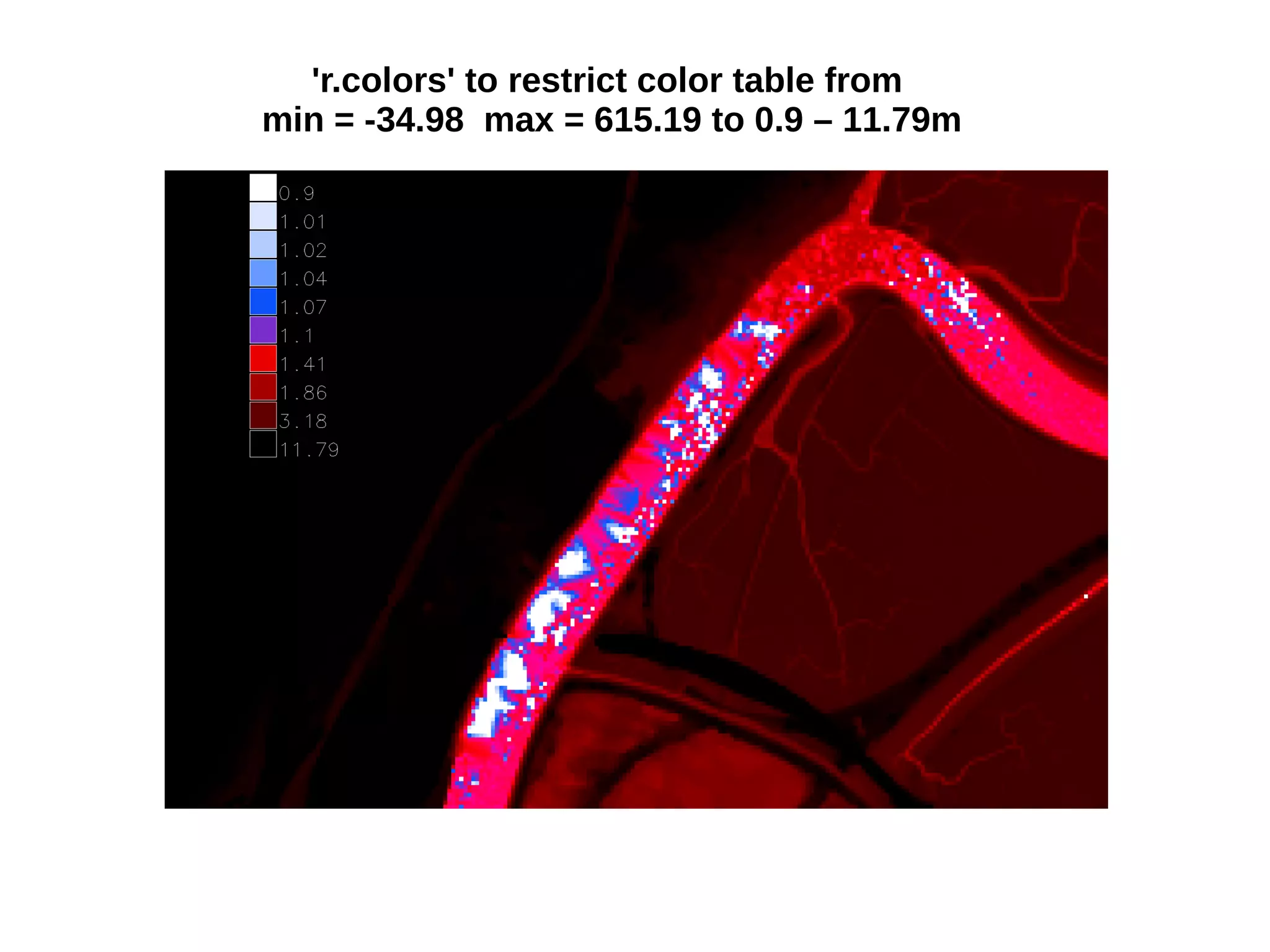
'r.colors' to restrict color table from
min = -34.98 max = 615.19 to 0.9 – 11.79m
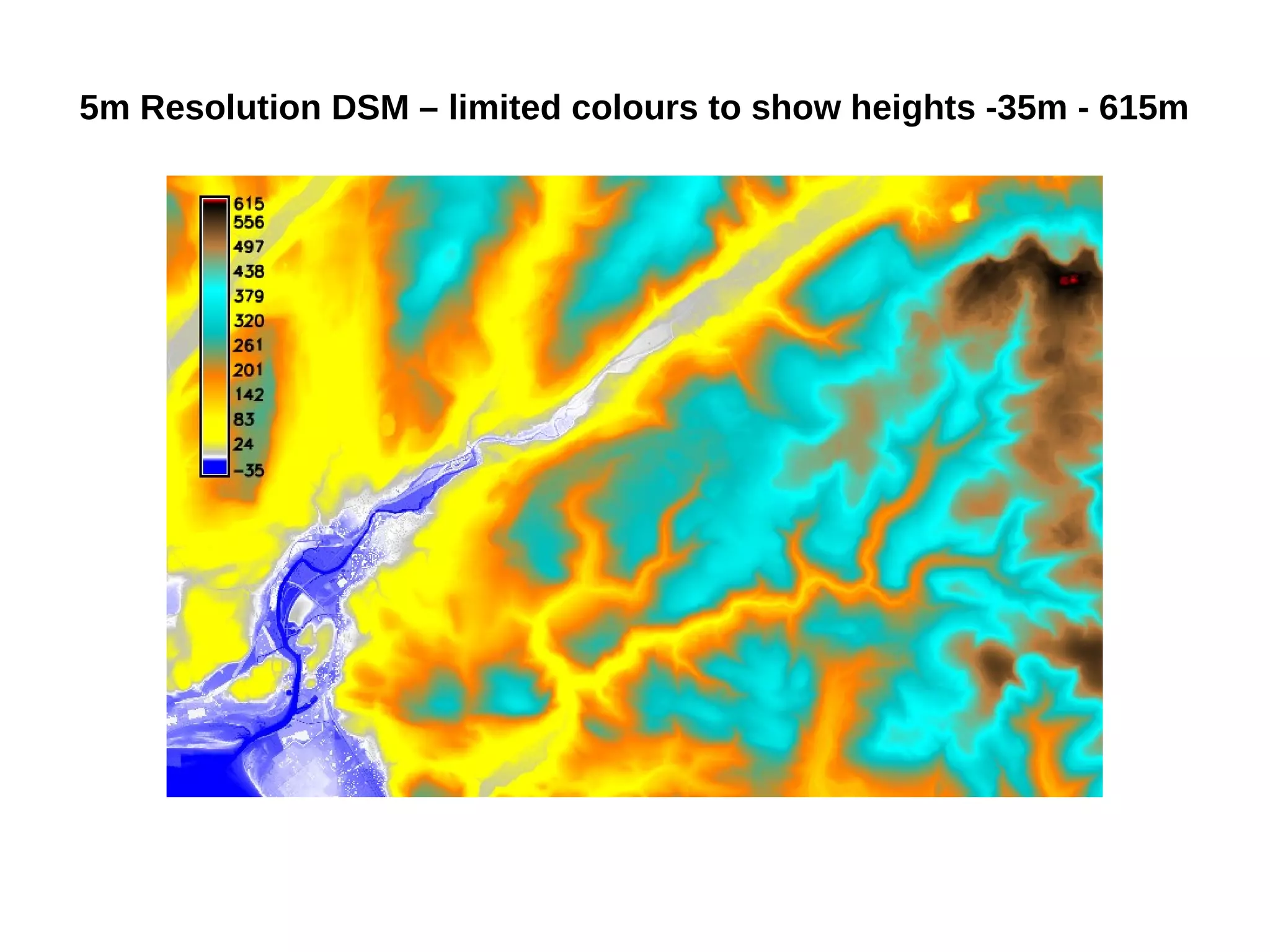
5m Resolution DSM – limited colours to show heights -35m - 615m
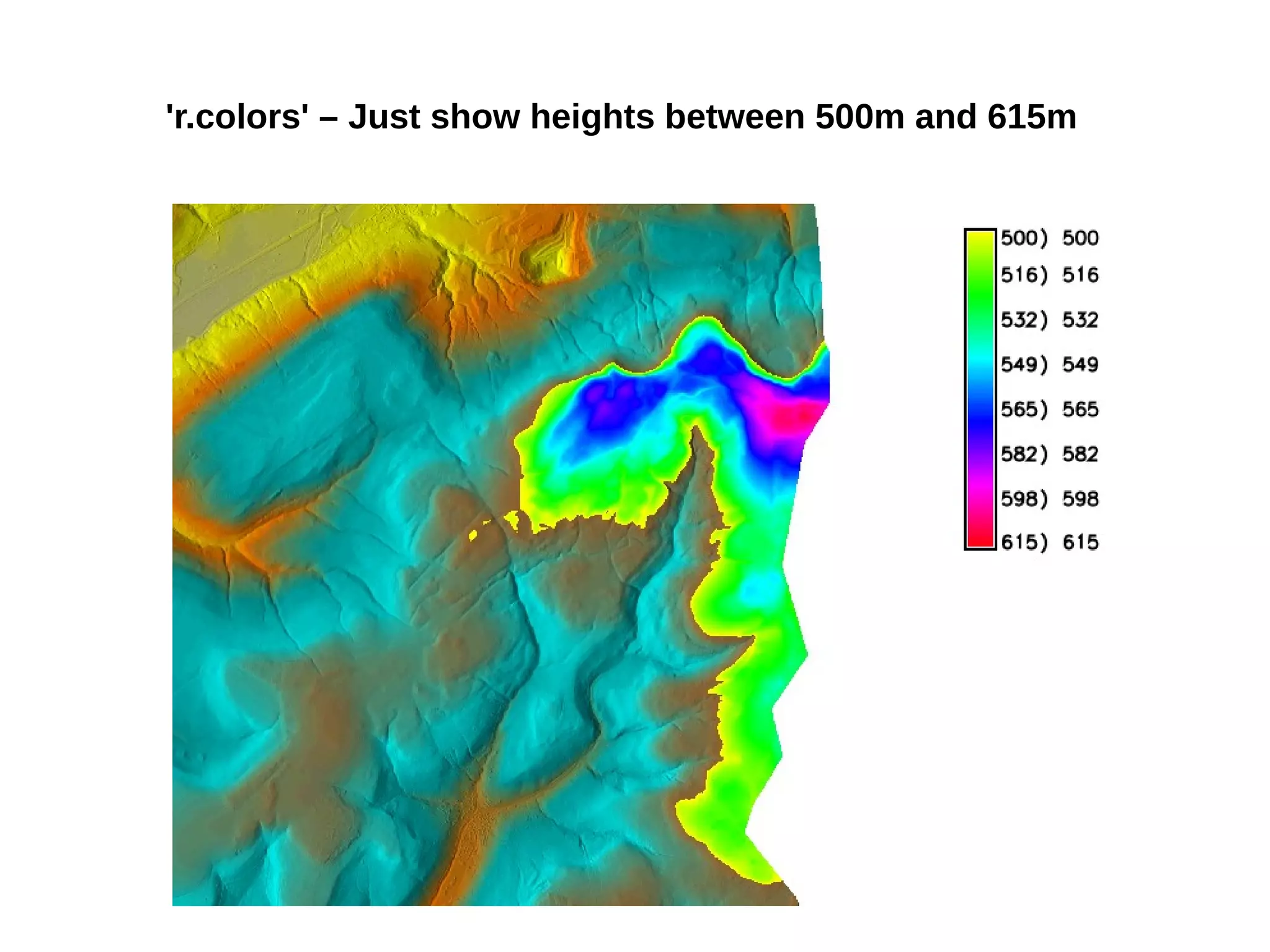
'r.colors' – Just show heights between 500m and 615m
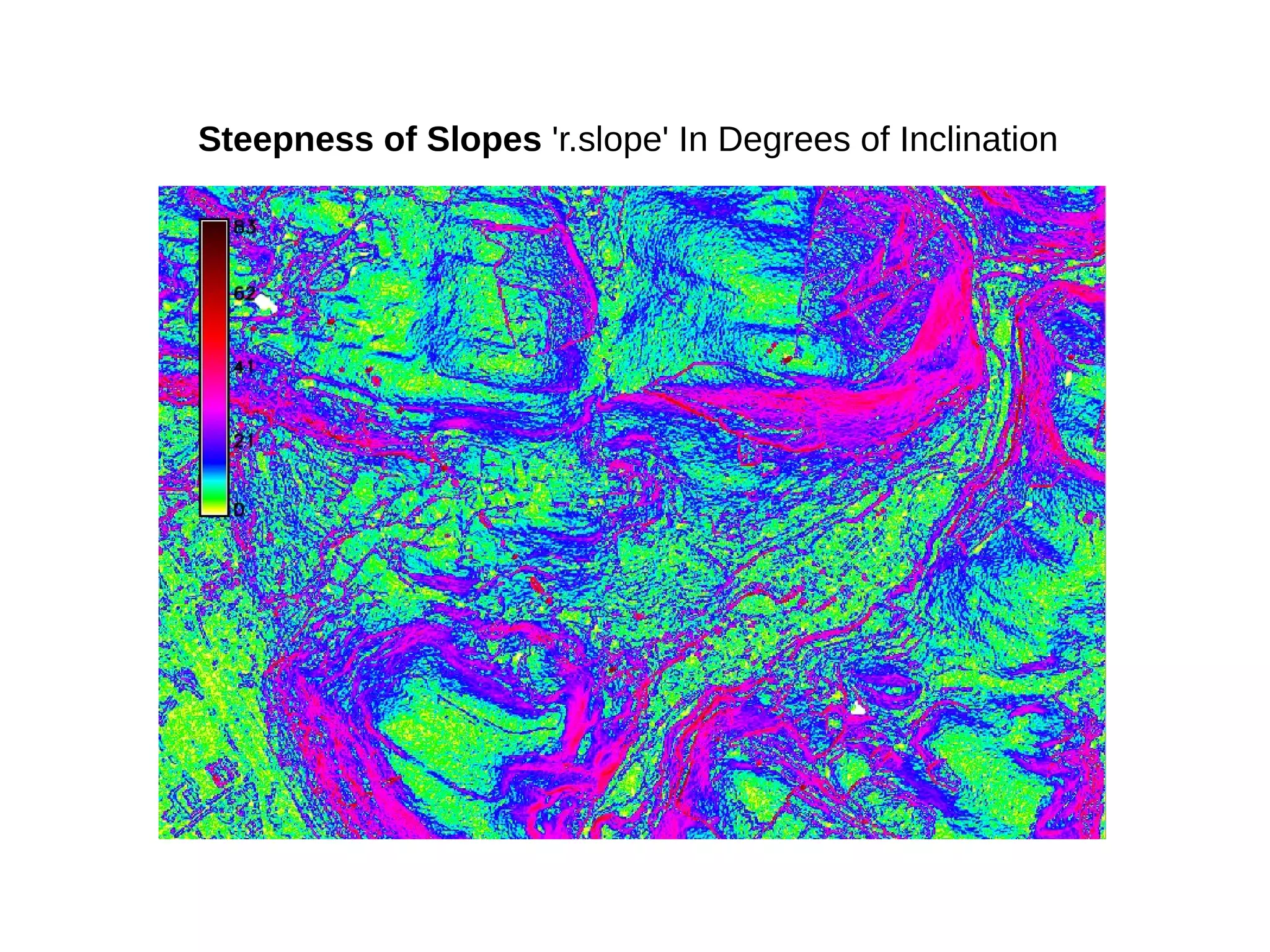
Steepness of Slopes 'r.slope' In Degrees of Inclination
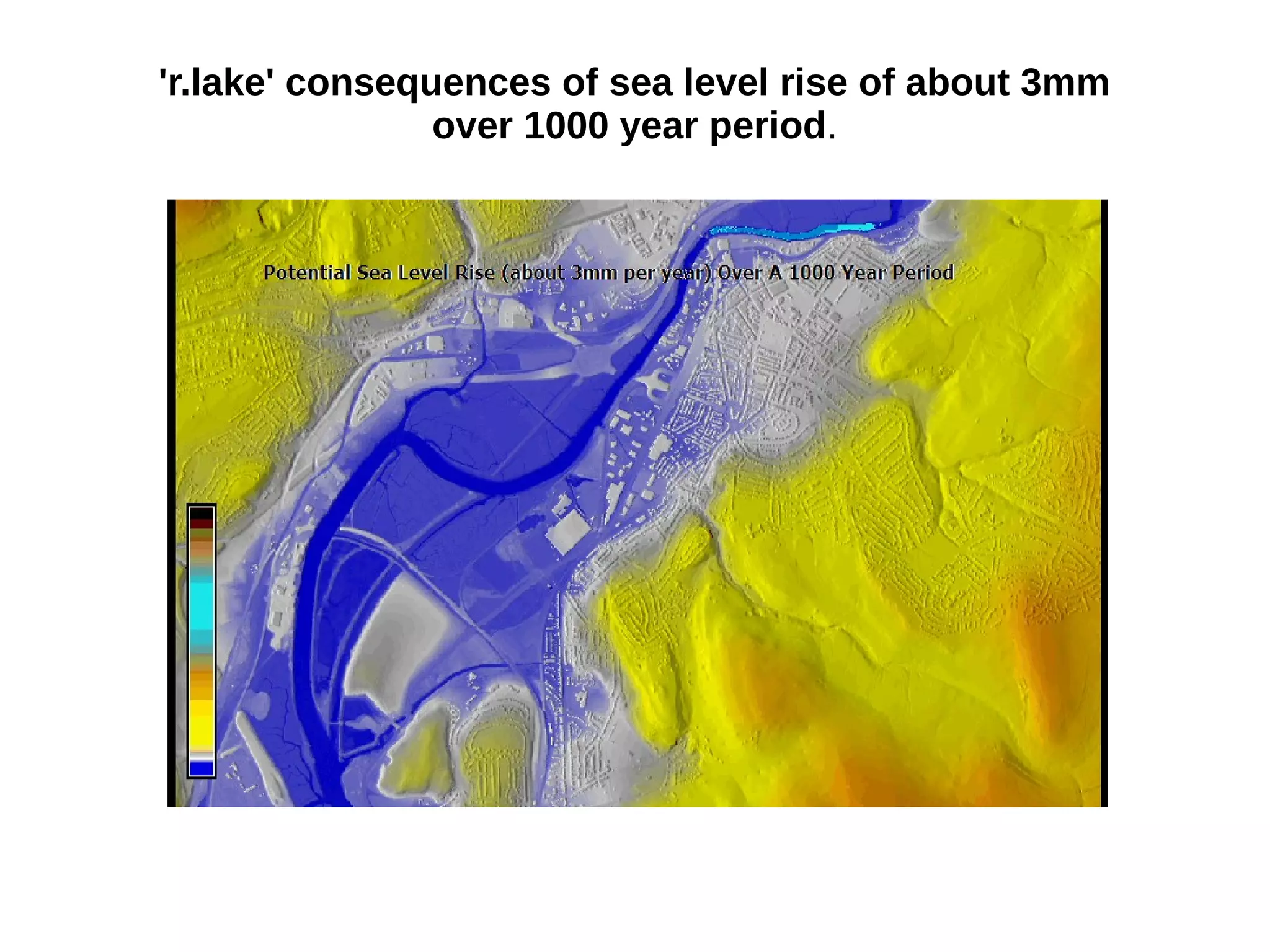
'r.lake' consequences of sea level rise of about 3mm
over 1000 year period.
Future Projects using Grass and the QGIS-GRASS-PLUGIN
● Integrate 3D data (e.g. building heights) as part of the LLPG
Work flow to solve access points to multiple flats within a property
shell. Property Shell Intelligence.
● Continue to Model Urban Change as part of the LDP Monitoring
Process using Landsat8/Sentinel-2 images.
Any
Questions?
Thank You all for NOT falling asleep…
Please contact me if you are thinking of using GRASS or
QGIS-GRASS-PLUGIN and you would like some more
information:
p.shapley@gmail.com

Processing Landsat 8 Multi-Spectral Images with GRASS Tools & the potential of the 'QGIS-GRASS-PLUGIN' by Paul Shapley

  • 1.
    Paul Shapley MSc CGeog(GIS) FRGS http://www.paulshapley.com email: p.shapley@gmail.com QGIS User Group (Wales) 6th October 2015 Processing Landsat 8 Multi-Spectral Images with GRASS Tools & the potential of the 'QGIS-GRASS-PLUGIN'
  • 2.
    So...who am I? ●Originally a Chartered Designer working in Design and Advertising until 1993. I now work as a GIS Supervisor and LLPG Custodian for Neath Port Talbot Borough Planning Department using QGIS and GRASS daily for the LLPG and LDP Team. ● Have been a QGIS user since about 2007 (I was looking for an ArcMap alternative on MacOS) then Windows and more recently Ubuntu. ● We are just completed our LDP mapping requirements almost entirely with QGIS for both print production and the web. ● I'm investigating the potential of Landsat 8 medium resolution imagery as a way of monitoring urban change, also want to investigate the use of 3D building access for the LLPG. ● Try to help and promote the Ubuntu GIS community by publishing a blog in my spare time.
  • 3.
    Neath Port TalbotLocal Development Plan
  • 4.
    Landsat 8 –The Basics ● Launched February 11th 2013 – Circles the earth 14 times a day ● 8th Satellite in the Landsat Program which started in 1972 ● The Mission: - 1) Collect and Archive Medium Resolution Images. 2) Ensure consistency with data from previous missions. 3) Distribute data products to the public. ● 15M, 30m and 100m Panchromatic, Multi-spectral and Thermal. ● 16 day cycle image taken at 11.15am (South Wales)
  • 5.
    Possible Uses ofLandsat 8 Data ● Landscape Assessment ● Environmental and Health Condition Monitoring ● Urban Change Detection ● Vegetation Greenness ● Landslide Detection and Susceptability
  • 7.
    We are interestedin the Visible, Near Infrared and Short Wave Infrared Bands R = Red O = Orange Y = Yellow G = Green B = Blue V = Violet
  • 8.
    Where 'ROYGBV' fitsinto the spectrum
  • 9.
    What are the11 bands of Landsat 8?
  • 10.
  • 11.
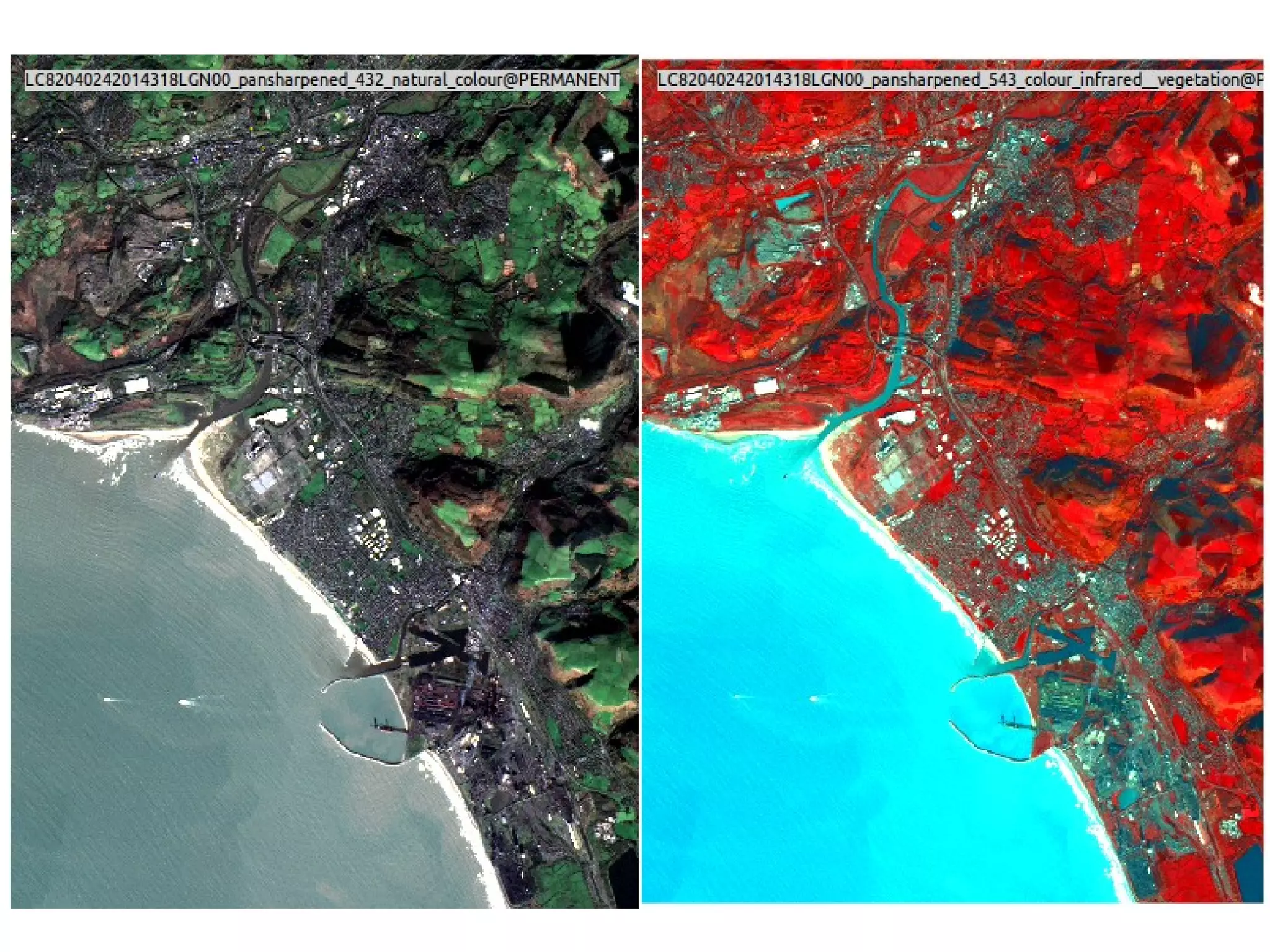
    Raw GeoTIFF Band 3(Red) (v.in.ogr) Panchromatic Band 8 after 'Histogram Equalise' (r.colors)
  • 12.
    How do weget the raw data? earthexplorer.usgs.gov PATH: 204 ROW: 24 Require: Level 1 GeoTIFF Data Product Next we need to access the 'Landsat Archive' listing and tick 'L8 OLI/TIRS' then click on 'Results'.
  • 13.
    For getting Bandsinto Grass 6. here is the link: http://www.paulshapley .com/2014/04/processi ng-landsat-8-bands-in- grass-gis.html Getting the Landsat 8 Bands into GRASS
  • 20.
    Urban/Industrial Urban/Res Green Vegetation Shadow Sea Water/Coastal Soil ImageClassification: 'v.gensigset' to capture a signature file which will be used to sample the underlying pixels into six groups.
  • 21.
    'i.smap' will thencreate the necessary 'passes' to produce the suggested 6 areas (requires trial and error) to get precise groups
  • 22.
    When the imagesare generated for each year of interest we can then animate the results similar to this '.gif'.
  • 23.
    GRASS 7 (UBUNTU) SimpleTwo Box Application - 1) Toolbox/Feedback 2) Map Window
  • 24.
    Advantages of GRASS7 1. One of the main advantages of GRASS over QGIS is the 'LOCATION' - A single data directory that is easily portable and ensures one or two years down the line you will not lose a layer connected with a project. For example you have to actively use the 'g.remove' command to ensure the layer is completely deleted and all it's constituant parts. 2. It has a simple, elegant, un-cluttered interface of just two windows - one for 'map', one for 'tools' 3. It is modular Based. All 400 or so modules can be accessed directly through the 'terminal' (not like microsoft word) 4. Run multiple modules simultaneously - only limited by processing and RAM of the hardware. 5. Good Vector Topology Checking/Reporting (Topology created on Input by default)
  • 25.
    6. To repeata Single Portable Directory Store (the 'LOCATION') for - Point, Centroid, Line, Boundary, Area, Face (3D Surface), 3D Centroid, Volume, 2D Raster, 3D Voxel (three dimensional cells), 'Multi-dimensional' Points 7. Good support for use with other Open Source Projects such as Paraview,Blender,Vis5D 8. Good DEM and Image Processing Tools and handling of large lidar datasets. 9. All Modules available through a WFS (Web Feature Service)
  • 26.
    Disadvantages of GRASS7 1. Steep Learning Curve 2. Vector Digitising not as 'slick' as QGIS 3. Poor 'Layout' Editing Options (although improved in GRASS 7 4. 3D 'NVIZ' Module a little bit dated. 5. No direct Web/HTML5 output options.
  • 27.
    QGIS-GRASS-PLUGIN advantages 1. Directaccess to the 'single data directory' (the 'LOCATION') 2. The QGIS API is more familiar than GRASS (just like microsoft word) 3. Drag 'n' Drop QGIS layers into the Grass 'PERMANENT' Mapset from within the QGIS Browser (no more lost shapefiles or forgotten usernames and passwords a year down the line. 4. 'Mapset' create/open/close directly in the Plugin 5. Attribute editing, digitizing and snapping will be using the more familiar QGIS toolbox. 6. If you just need the Grass Modules you can use the 'Processing' Toolbox if you dont need access to the Grass 'Location' and 'PERMANENT' mapset you need the Plugin. 7. 3D Visualisation using Google Earth 8. Direct migration of QGIS/GRASS data to QGIS-Server and others such as Geoserver/Mapserver etc.
  • 28.
    QGIS-GRASS-PLUGIN UPDATE ● Lastdevelopment was in 2004 for Grass V6 ● Crowd Funded 'KiA' Model, goal was to raise 6,300 euros, 6,593 euros were raised. ● Completed Work on: 1) Browser Widget – drag and drop maps from Grass to QGIS view. 2) Update all to Grass 7 3) Attribute editing can be done in QGIS 4) Create forms for attribute capture in the plugin.
  • 29.
    QGIS-GRASS-PLUGIN – Currentlyincomplete until QGIS 2.12 The Module 'Filter' Topic searching for Modules by simply typing: 'hy' (hydrology tools). Main Toolbar – 'Under Plugins' if not showing.
  • 30.
    QGIS-GRASS-PLUGIN for GRASS6 here in QGIS 1.7 'Wroclaw'
  • 31.
    'r.topidx' – TopographicWetness Index Map - Wetness indices are used to describe spatial moisture patterns within a given region.
  • 32.
  • 33.
    'r.colors' to restrictcolor table from min = -34.98 max = 615.19 to 0.9 – 11.79m
  • 34.
    5m Resolution DSM– limited colours to show heights -35m - 615m
  • 35.
    'r.colors' – Justshow heights between 500m and 615m
  • 36.
    Steepness of Slopes'r.slope' In Degrees of Inclination
  • 37.
    'r.lake' consequences ofsea level rise of about 3mm over 1000 year period.
  • 38.
    Future Projects usingGrass and the QGIS-GRASS-PLUGIN ● Integrate 3D data (e.g. building heights) as part of the LLPG Work flow to solve access points to multiple flats within a property shell. Property Shell Intelligence. ● Continue to Model Urban Change as part of the LDP Monitoring Process using Landsat8/Sentinel-2 images.
  • 39.
    Any Questions? Thank You allfor NOT falling asleep… Please contact me if you are thinking of using GRASS or QGIS-GRASS-PLUGIN and you would like some more information: p.shapley@gmail.com