@


   Addy Pope
   Geo-services
   Email: addy.pope@ed.ac.uk
   Twitter: @go_geo
   http://www.gogeo.ac.uk

   EDINA website: http://edina.ac.uk
Slide 1 of ##                              <<Enter presentation title here>>
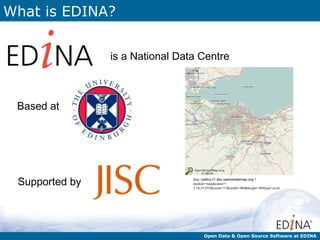
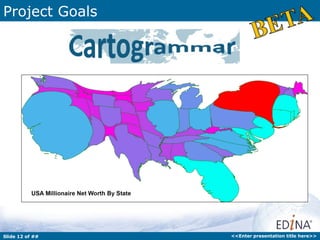
What is EDINA?


                is a National Data Centre


 Based at


 Supported by                    http://pafciu17.dev.openstreetmap.org/?
                                 module=map&center=-
                                 3.18,55.935&zoom=17&width=400&height=400type=cycle


                                       Open Data & Open Source Software at EDINA
What do we do?


                     http://www.flickr.com/photos/steverhode/3183290111/sizes/l/in/photostream/


      Ensure continuous access to resources
      Preservation initiatives to ensure long term
      access to scholarly content
      Repository services for open access and
      other licensed material
                                                                      Open Data & Open Source Software at EDINA
What do we do?


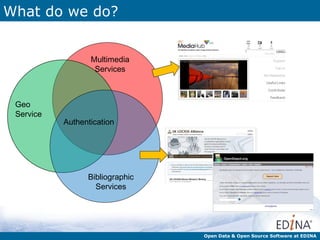
                  Multimedia
                   Services


 Geo
 Service
           Authentication


                 Bibliographic
                   Services


                                 Open Data & Open Source Software at EDINA
What?

        EDINA runs services primarily for the UK education
        sector. However, it is increasingly trying to make
           its services open and available to everyone.


          In this Presentation we will look at some of the
         services that EDINA run that you can access and
           what you might do with them and some other
                         “Open” geo-tools.
GeoTagger

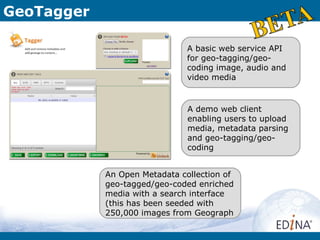
                               A basic web service API
                               for geo-tagging/geo-
                               coding image, audio and
                               video media


                               A demo web client
                               enabling users to upload
                               media, metadata parsing
                               and geo-tagging/geo-
                               coding


            An Open Metadata collection of
            geo-tagged/geo-coded enriched
            media with a search interface
            (this has been seeded with
            250,000 images from Geograph
GeoTagger

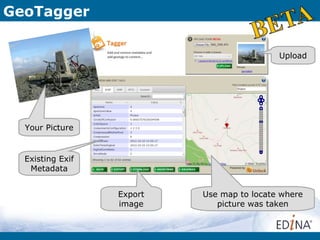
                                            Upload


  Your Picture


  Existing Exif
   Metadata


                  Export   Use map to locate where
                  image       picture was taken
Cartogrammar

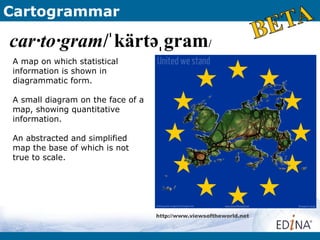
car·to·gram/ˈ kärtəˌ gram/
A map on which statistical
information is shown in
diagrammatic form.

A small diagram on the face of a
map, showing quantitative
information.

An abstracted and simplified
map the base of which is not
true to scale.


                                   http://www.viewsoftheworld.net
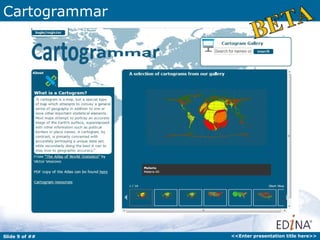
Cartogrammar


Slide 9 of ##   <<Enter presentation title here>>
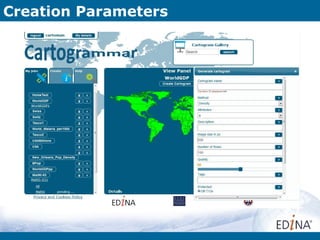
Creation Parameters
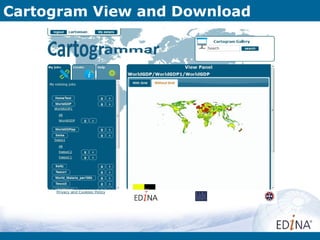
Cartogram View and Download
Project Goals


Slide 12 of ##   <<Enter presentation title here>>
Project Goals


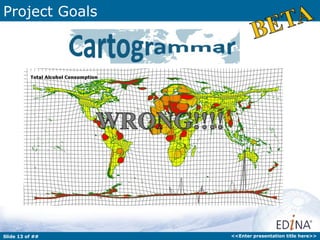
         • Example of one being made here:


Slide 13 of ##                               <<Enter presentation title here>>
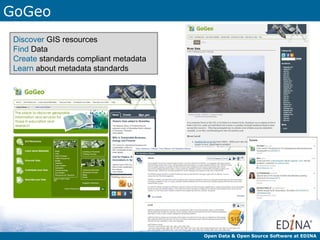
GoGeo
 Discover GIS resources
 Find Data
 Create standards compliant metadata
 Learn about metadata standards


                                       Open Data & Open Source Software at EDINA
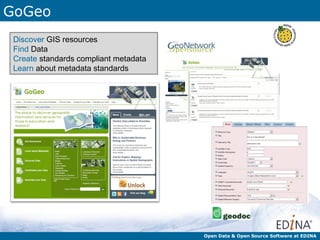
GoGeo
 Discover GIS resources
 Find Data
 Create standards compliant metadata
 Learn about metadata standards


                                       Open Data & Open Source Software at EDINA
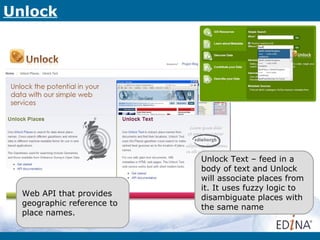
Unlock


                            Unlock Text – feed in a
                            body of text and Unlock
                            will associate places from
                            it. It uses fuzzy logic to
  Web API that provides     disambiguate places with
  geographic reference to   the same name
  place names.
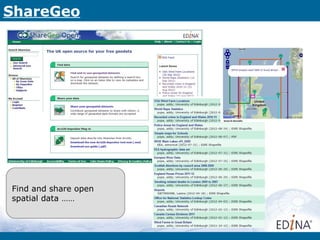
ShareGeo


Find and share open
spatial data ……
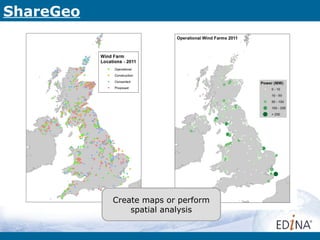
ShareGeo


           Create maps or perform
               spatial analysis
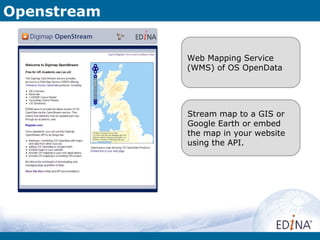
Openstream


             Web Mapping Service
             (WMS) of OS OpenData


             Stream map to a GIS or
             Google Earth or embed
             the map in your website
             using the API.
Openstream


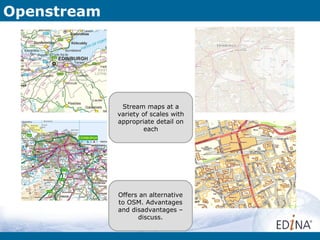
              Stream maps at a
             variety of scales with
             appropriate detail on
                      each


             Offers an alternative
             to OSM. Advantages
             and disadvantages –
                   discuss.
Openstream


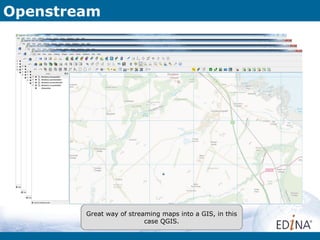
        Great way of streaming maps into a GIS, in this
                          case QGIS.
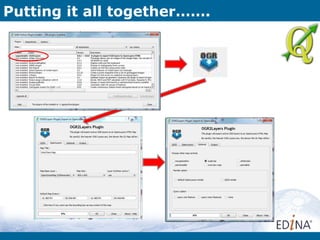
Putting it all together…….

 What if we want to take some Open data and make it available for
 others to view it over the internet?


 There are plenty of tools to help you do this and you don’t need to be
 programmer or GIS expert to achieve it either.


                                                    Lets find out how……
Putting it all together…….


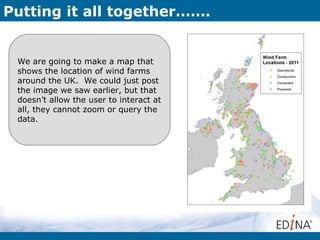
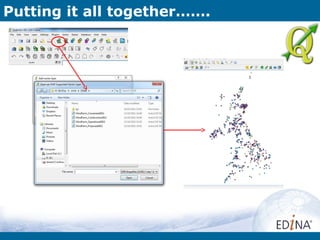
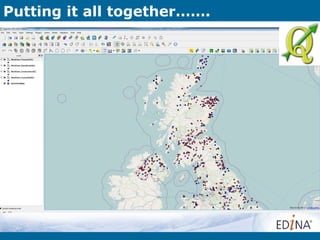
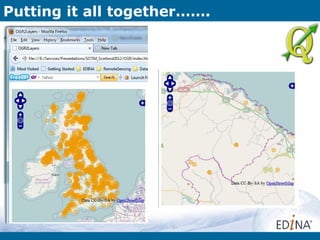
 We are going to make a map that
 shows the location of wind farms
 around the UK. We could just post
 the image we saw earlier, but that
 doesn’t allow the user to interact at
 all, they cannot zoom or query the
 data.
Putting it all together…….


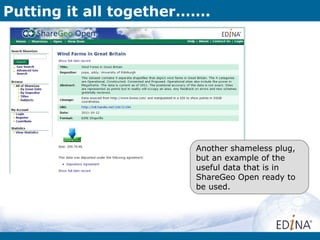
                        Another shameless plug,
                        but an example of the
                        useful data that is in
                        ShareGeo Open ready to
                        be used.
Putting it all together…….
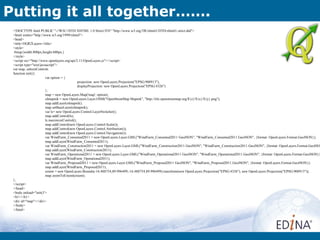
 <!DOCTYPE html PUBLIC "-//W3C//DTD XHTML 1.0 Strict//EN" "http://www.w3.org/TR/xhtml1/DTD/xhtml1-strict.dtd">
 <html xmlns="http://www.w3.org/1999/xhtml">
 <head>
 <title>OGR2Layers</title>
 <style>
  #map{width:800px;height:600px;}
 </style>
 <script src="http://www.openlayers.org/api/2.11/OpenLayers.js"></script>
 <script type="text/javascript">
 var map, selectsControls
 function init(){
                        var option = {
                                              projection: new OpenLayers.Projection("EPSG:900913"),
                                              displayProjection: new OpenLayers.Projection("EPSG:4326")
                        };
                        map = new OpenLayers.Map('map', option);
                        olmapnik = new OpenLayers.Layer.OSM("OpenStreetMap Mapnik", "http://tile.openstreetmap.org/${z}/${x}/${y}.png");
                        map.addLayer(olmapnik);
                        map.setBaseLayer(olmapnik);
                        var ls= new OpenLayers.Control.LayerSwitcher();
                        map.addControl(ls);
                        ls.maximizeControl();
                        map.addControl(new OpenLayers.Control.Scale());
                        map.addControl(new OpenLayers.Control.Attribution());
                        map.addControl(new OpenLayers.Control.Navigation());
                        var WindFarm_Consented2011 = new OpenLayers.Layer.GML("WindFarm_Consented2011 GeoJSON", "WindFarm_Consented2011.GeoJSON", {format: OpenLayers.Format.GeoJSON});
                        map.addLayer(WindFarm_Consented2011);
                        var WindFarm_Construction2011 = new OpenLayers.Layer.GML("WindFarm_Construction2011 GeoJSON", "WindFarm_Construction2011.GeoJSON", {format: OpenLayers.Format.GeoJSO
                        map.addLayer(WindFarm_Construction2011);
                        var WindFarm_Operational2011 = new OpenLayers.Layer.GML("WindFarm_Operational2011 GeoJSON", "WindFarm_Operational2011.GeoJSON", {format: OpenLayers.Format.GeoJSON})
                        map.addLayer(WindFarm_Operational2011);
                        var WindFarm_Proposed2011 = new OpenLayers.Layer.GML("WindFarm_Proposed2011 GeoJSON", "WindFarm_Proposed2011.GeoJSON", {format: OpenLayers.Format.GeoJSON});
                        map.addLayer(WindFarm_Proposed2011);
                        extent = new OpenLayers.Bounds(-16.488754,89.996499,-16.488754,89.996499).transform(new OpenLayers.Projection("EPSG:4326"), new OpenLayers.Projection("EPSG:900913"));
                        map.zoomToExtent(extent);
 };
 </script>
 </head>
 <body onload="init()">
 <h1></h1>
 <div id="map"></div>
 </body>
 </html>
Other great resources
Geo-Events/Groups

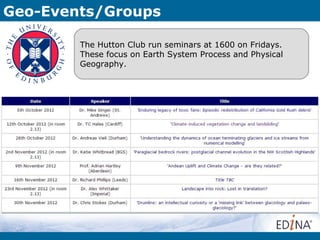
        The Hutton Club run seminars at 1600 on Fridays.
        These focus on Earth System Process and Physical
        Geography.
Geo-Events/Groups

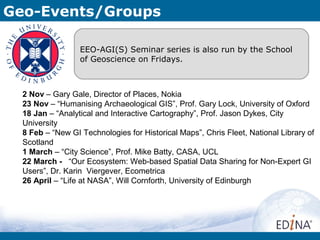
                  EEO-AGI(S) Seminar series is also run by the School
                  of Geoscience on Fridays.


  2 Nov – Gary Gale, Director of Places, Nokia
  23 Nov – “Humanising Archaeological GIS”, Prof. Gary Lock, University of Oxford
  18 Jan – “Analytical and Interactive Cartography”, Prof. Jason Dykes, City
  University
  8 Feb – “New GI Technologies for Historical Maps”, Chris Fleet, National Library of
  Scotland
  1 March – “City Science”, Prof. Mike Batty, CASA, UCL
  22 March - “Our Ecosystem: Web-based Spatial Data Sharing for Non-Expert GI
  Users”, Dr. Karin Viergever, Ecometrica
  26 April – “Life at NASA”, Will Cornforth, University of Edinburgh
Geo-Events/Groups

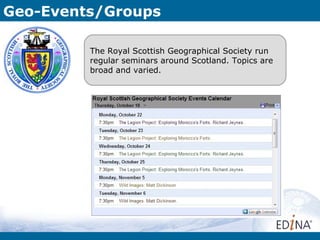
         The Royal Scottish Geographical Society run
         regular seminars around Scotland. Topics are
         broad and varied.
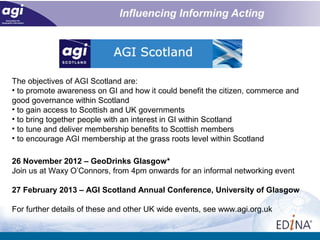
The objectives of AGI Scotland are:
• to promote awareness on GI and how it could benefit the citizen, commerce and
good governance within Scotland
• to gain access to Scottish and UK governments
• to bring together people with an interest in GI within Scotland
• to tune and deliver membership benefits to Scottish members
• to encourage AGI membership at the grass roots level within Scotland

26 November 2012 – GeoDrinks Glasgow*
Join us at Waxy O’Connors, from 4pm onwards for an informal networking event

27 February 2013 – AGI Scotland Annual Conference, University of Glasgow

For further details of these and other UK wide events, see www.agi.org.uk
Addy Pope
Email: addy.pope@ed.ac.uk
Twitter: @go_geo
http://www.gogeo.ac.uk

EDINA website: http://edina.ac.uk
Edinburgh Geo-Events/Groups

Open@EDINA

  • 1.
    @ Addy Pope Geo-services Email: addy.pope@ed.ac.uk Twitter: @go_geo http://www.gogeo.ac.uk EDINA website: http://edina.ac.uk Slide 1 of ## <<Enter presentation title here>>
  • 2.
    What is EDINA? is a National Data Centre Based at Supported by http://pafciu17.dev.openstreetmap.org/? module=map&center=- 3.18,55.935&zoom=17&width=400&height=400type=cycle Open Data & Open Source Software at EDINA
  • 3.
    What do wedo? http://www.flickr.com/photos/steverhode/3183290111/sizes/l/in/photostream/ Ensure continuous access to resources Preservation initiatives to ensure long term access to scholarly content Repository services for open access and other licensed material Open Data & Open Source Software at EDINA
  • 4.
    What do wedo? Multimedia Services Geo Service Authentication Bibliographic Services Open Data & Open Source Software at EDINA
  • 5.
    What? EDINA runs services primarily for the UK education sector. However, it is increasingly trying to make its services open and available to everyone. In this Presentation we will look at some of the services that EDINA run that you can access and what you might do with them and some other “Open” geo-tools.
  • 6.
    GeoTagger A basic web service API for geo-tagging/geo- coding image, audio and video media A demo web client enabling users to upload media, metadata parsing and geo-tagging/geo- coding An Open Metadata collection of geo-tagged/geo-coded enriched media with a search interface (this has been seeded with 250,000 images from Geograph
  • 7.
    GeoTagger Upload Your Picture Existing Exif Metadata Export Use map to locate where image picture was taken
  • 8.
    Cartogrammar car·to·gram/ˈ kärtəˌ gram/ Amap on which statistical information is shown in diagrammatic form. A small diagram on the face of a map, showing quantitative information. An abstracted and simplified map the base of which is not true to scale. http://www.viewsoftheworld.net
  • 9.
    Cartogrammar Slide 9 of## <<Enter presentation title here>>
  • 10.
  • 11.
  • 12.
    Project Goals Slide 12of ## <<Enter presentation title here>>
  • 13.
    Project Goals • Example of one being made here: Slide 13 of ## <<Enter presentation title here>>
  • 14.
    GoGeo Discover GISresources Find Data Create standards compliant metadata Learn about metadata standards Open Data & Open Source Software at EDINA
  • 15.
    GoGeo Discover GISresources Find Data Create standards compliant metadata Learn about metadata standards Open Data & Open Source Software at EDINA
  • 16.
    Unlock Unlock Text – feed in a body of text and Unlock will associate places from it. It uses fuzzy logic to Web API that provides disambiguate places with geographic reference to the same name place names.
  • 17.
    ShareGeo Find and shareopen spatial data ……
  • 18.
    ShareGeo Create maps or perform spatial analysis
  • 19.
    Openstream Web Mapping Service (WMS) of OS OpenData Stream map to a GIS or Google Earth or embed the map in your website using the API.
  • 20.
    Openstream Stream maps at a variety of scales with appropriate detail on each Offers an alternative to OSM. Advantages and disadvantages – discuss.
  • 21.
    Openstream Great way of streaming maps into a GIS, in this case QGIS.
  • 22.
    Putting it alltogether……. What if we want to take some Open data and make it available for others to view it over the internet? There are plenty of tools to help you do this and you don’t need to be programmer or GIS expert to achieve it either. Lets find out how……
  • 23.
    Putting it alltogether……. We are going to make a map that shows the location of wind farms around the UK. We could just post the image we saw earlier, but that doesn’t allow the user to interact at all, they cannot zoom or query the data.
  • 24.
    Putting it alltogether……. Another shameless plug, but an example of the useful data that is in ShareGeo Open ready to be used.
  • 25.
    Putting it alltogether…….
  • 26.
    Putting it alltogether…….
  • 27.
    Putting it alltogether…….
  • 28.
    Putting it alltogether…….
  • 29.
    Putting it alltogether…….
  • 30.
    Putting it alltogether……. <!DOCTYPE html PUBLIC "-//W3C//DTD XHTML 1.0 Strict//EN" "http://www.w3.org/TR/xhtml1/DTD/xhtml1-strict.dtd"> <html xmlns="http://www.w3.org/1999/xhtml"> <head> <title>OGR2Layers</title> <style> #map{width:800px;height:600px;} </style> <script src="http://www.openlayers.org/api/2.11/OpenLayers.js"></script> <script type="text/javascript"> var map, selectsControls function init(){ var option = { projection: new OpenLayers.Projection("EPSG:900913"), displayProjection: new OpenLayers.Projection("EPSG:4326") }; map = new OpenLayers.Map('map', option); olmapnik = new OpenLayers.Layer.OSM("OpenStreetMap Mapnik", "http://tile.openstreetmap.org/${z}/${x}/${y}.png"); map.addLayer(olmapnik); map.setBaseLayer(olmapnik); var ls= new OpenLayers.Control.LayerSwitcher(); map.addControl(ls); ls.maximizeControl(); map.addControl(new OpenLayers.Control.Scale()); map.addControl(new OpenLayers.Control.Attribution()); map.addControl(new OpenLayers.Control.Navigation()); var WindFarm_Consented2011 = new OpenLayers.Layer.GML("WindFarm_Consented2011 GeoJSON", "WindFarm_Consented2011.GeoJSON", {format: OpenLayers.Format.GeoJSON}); map.addLayer(WindFarm_Consented2011); var WindFarm_Construction2011 = new OpenLayers.Layer.GML("WindFarm_Construction2011 GeoJSON", "WindFarm_Construction2011.GeoJSON", {format: OpenLayers.Format.GeoJSO map.addLayer(WindFarm_Construction2011); var WindFarm_Operational2011 = new OpenLayers.Layer.GML("WindFarm_Operational2011 GeoJSON", "WindFarm_Operational2011.GeoJSON", {format: OpenLayers.Format.GeoJSON}) map.addLayer(WindFarm_Operational2011); var WindFarm_Proposed2011 = new OpenLayers.Layer.GML("WindFarm_Proposed2011 GeoJSON", "WindFarm_Proposed2011.GeoJSON", {format: OpenLayers.Format.GeoJSON}); map.addLayer(WindFarm_Proposed2011); extent = new OpenLayers.Bounds(-16.488754,89.996499,-16.488754,89.996499).transform(new OpenLayers.Projection("EPSG:4326"), new OpenLayers.Projection("EPSG:900913")); map.zoomToExtent(extent); }; </script> </head> <body onload="init()"> <h1></h1> <div id="map"></div> </body> </html>
  • 31.
  • 32.
    Geo-Events/Groups The Hutton Club run seminars at 1600 on Fridays. These focus on Earth System Process and Physical Geography.
  • 33.
    Geo-Events/Groups EEO-AGI(S) Seminar series is also run by the School of Geoscience on Fridays. 2 Nov – Gary Gale, Director of Places, Nokia 23 Nov – “Humanising Archaeological GIS”, Prof. Gary Lock, University of Oxford 18 Jan – “Analytical and Interactive Cartography”, Prof. Jason Dykes, City University 8 Feb – “New GI Technologies for Historical Maps”, Chris Fleet, National Library of Scotland 1 March – “City Science”, Prof. Mike Batty, CASA, UCL 22 March - “Our Ecosystem: Web-based Spatial Data Sharing for Non-Expert GI Users”, Dr. Karin Viergever, Ecometrica 26 April – “Life at NASA”, Will Cornforth, University of Edinburgh
  • 34.
    Geo-Events/Groups The Royal Scottish Geographical Society run regular seminars around Scotland. Topics are broad and varied.
  • 35.
    The objectives ofAGI Scotland are: • to promote awareness on GI and how it could benefit the citizen, commerce and good governance within Scotland • to gain access to Scottish and UK governments • to bring together people with an interest in GI within Scotland • to tune and deliver membership benefits to Scottish members • to encourage AGI membership at the grass roots level within Scotland 26 November 2012 – GeoDrinks Glasgow* Join us at Waxy O’Connors, from 4pm onwards for an informal networking event 27 February 2013 – AGI Scotland Annual Conference, University of Glasgow For further details of these and other UK wide events, see www.agi.org.uk
  • 36.
    Addy Pope Email: addy.pope@ed.ac.uk Twitter:@go_geo http://www.gogeo.ac.uk EDINA website: http://edina.ac.uk
  • 37.

Editor's Notes

  • #9 A map which shows statistical information in diagrammatic form Statistics first , geographical accuracy second
  • #10 Create, Share and reuse Production strength service and toolset Break the barriers to current creation by non specialists
  • #13 Create, Share and reuse Production strength service and toolset Break the barriers to current creation by non specialists
  • #14 Create, Share and reuse Production strength service and toolset Break the barriers to current creation by non specialists
  • #23 API is the main guts of it – interfaces with the guts of Scape Toad Allows upload and download of input and output files Website uses a wizard to guide user through creation process
  • #24 API is the main guts of it – interfaces with the guts of Scape Toad Allows upload and download of input and output files Website uses a wizard to guide user through creation process
  • #25 API is the main guts of it – interfaces with the guts of Scape Toad Allows upload and download of input and output files Website uses a wizard to guide user through creation process
  • #26 API is the main guts of it – interfaces with the guts of Scape Toad Allows upload and download of input and output files Website uses a wizard to guide user through creation process
  • #27 API is the main guts of it – interfaces with the guts of Scape Toad Allows upload and download of input and output files Website uses a wizard to guide user through creation process
  • #29 API is the main guts of it – interfaces with the guts of Scape Toad Allows upload and download of input and output files Website uses a wizard to guide user through creation process
  • #32 API is the main guts of it – interfaces with the guts of Scape Toad Allows upload and download of input and output files Website uses a wizard to guide user through creation process
  • #33 API is the main guts of it – interfaces with the guts of Scape Toad Allows upload and download of input and output files Website uses a wizard to guide user through creation process
  • #34 API is the main guts of it – interfaces with the guts of Scape Toad Allows upload and download of input and output files Website uses a wizard to guide user through creation process
  • #35 API is the main guts of it – interfaces with the guts of Scape Toad Allows upload and download of input and output files Website uses a wizard to guide user through creation process
  • #38 API is the main guts of it – interfaces with the guts of Scape Toad Allows upload and download of input and output files Website uses a wizard to guide user through creation process