The OGC Standards
and Geo-Platform based web application
for seismic events monitoring
Sustainability & Security Applications for GEO-Risk-Prevention & ENVIRO-Disaster-Protection
Grenzüberschreitendes Sächsisches GI/GIS/GDI-Forum am 29./30. April 2013 in Dresden
Dimitri Dello Buono
29 April 2013
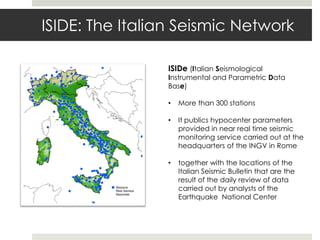
ISIDE: The Italian Seismic Network
ISIDe (Italian Seismological
Instrumental and Parametric Data
Base)
• More than 300 stations
• It publics hypocenter parameters
provided in near real time seismic
monitoring service carried out at the
headquarters of the INGV in Rome
• together with the locations of the
Italian Seismic Bulletin that are the
result of the daily review of data
carried out by analysts of the
Earthquake National Center
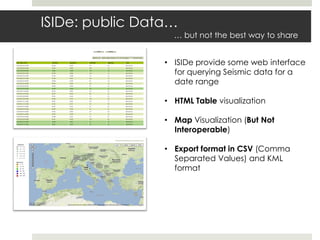
ISIDe: public Data…
… but not the best way to share
• ISIDe provide some web interface
for querying Seismic data for a
date range
• HTML Table visualization
• Map Visualization (But Not
Interoperable)
• Export format in CSV (Comma
Separated Values) and KML
format
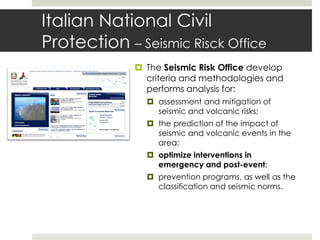
Italian National Civil
Protection – Seismic Risck Office
 The Seismic Risk Office develop
criteria and methodologies and
performs analysis for:
 assessment and mitigation of
seismic and volcanic risks;
 the prediction of the impact of
seismic and volcanic events in the
area;
 optimize interventions in
emergency and post-event;
 prevention programs, as well as the
classification and seismic norms.
The geoSDI Programme
geoSDI is a Programme coordinated by the Italian Civil Protection
Department of the Prime Minister Office
• For implemeting the Civil Protection
National Spatial Data Infrastructure
• According to the provisions of the INSPIRE
Directive
• Using Open Source software applications.
It is developed by the Institute for the Methodologies
of Environmental Analysis (IMAA) of the Italian
National Research Council (CNR) with the
collaboration of most of the national civil and military
institutions concerned.
http://www.geosdi.org
The Framework
geoSDI has designed and launched the open source project
Geo-Platform Framework, the first pure java open source framework to
develop Rich Web GIS Application.
Geo-Platform allows to extend webGIS applications adding Widgets,
software plugins that perform specific functions: in this way every geo-
portal is different from the others and it realizes an exact reflection of the
functional needs of the end user.
With the development of Geo-Platform Framework is now possible to
produce fast and powerful geoportals dedicated to end users.
An extensible Solution: widgets!
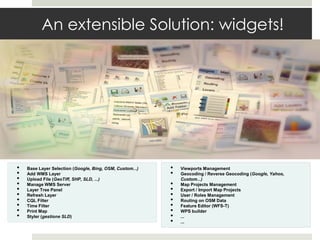
• Viewports Management
• Geocoding / Reverse Geocoding (Google, Yahoo,
Custom...)
• Map Projects Management
• Export / Import Map Projects
• User / Roles Management
• Routing on OSM Data
• Feature Editor (WFS-T)
• WPS builder
• ...
• ...
• Base Layer Selection (Google, Bing, OSM, Custom...)
• Add WMS Layer
• Upload File (GeoTiff, SHP, SLD, ...)
• Manage WMS Server
• Layer Tree Panel
• Refresh Layer
• CQL Filter
• Time Filter
• Print Map
• Styler (gestione SLD)
Widgets Examples
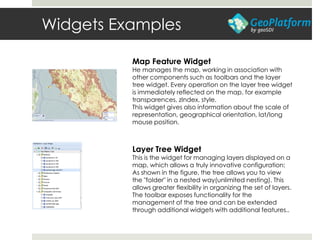
Map Feature Widget
He manages the map, working in association with
other components such as toolbars and the layer
tree widget. Every operation on the layer tree widget
is immediately reflected on the map, for example
transparences, zIndex, style.
This widget gives also information about the scale of
representation, geographical orientation, lat/long
mouse position.
Layer Tree Widget
This is the widget for managing layers displayed on a
map, which allows a truly innovative configuration:
As shown in the figure, the tree allows you to view
the "folder" in a nested way(unlimited nesting). This
allows greater flexibility in organizing the set of layers.
The toolbar exposes functionality for the
management of the tree and can be extended
through additional widgets with additional features..
Widgets Examples
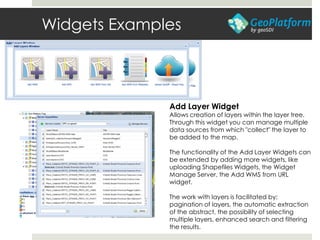
Add Layer Widget
Allows creation of layers within the layer tree.
Through this widget you can manage multiple
data sources from which "collect" the layer to
be added to the map.
The functionality of the Add Layer Widgets can
be extended by adding more widgets, like
uploading Shapefiles Widgets, the Widget
Manage Server, the Add WMS from URL
widget.
The work with layers is facilitated by:
pagination of layers, the automatic extraction
of the abstract, the possibility of selecting
multiple layers, enhanced search and filtering
the results.
Widgets Examples
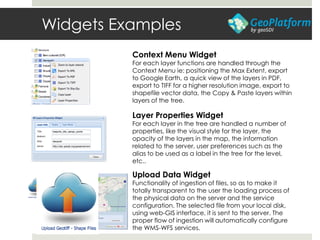
Context Menu Widget
For each layer functions are handled through the
Context Menu ie: positioning the Max Extent, export
to Google Earth, a quick view of the layers in PDF,
export to TIFF for a higher resolution image, export to
shapefile vector data, the Copy & Paste layers within
layers of the tree.
Upload Data Widget
Functionality of ingestion of files, so as to make it
totally transparent to the user the loading process of
the physical data on the server and the service
configuration. The selected file from your local disk,
using web-GIS interface, it is sent to the server. The
proper flow of ingestion will automatically configure
the WMS-WFS services.
Layer Properties Widget
For each layer in the tree are handled a number of
properties, like the visual style for the layer, the
opacity of the layers in the map, the information
related to the server, user preferences such as the
alias to be used as a label in the tree for the level,
etc..
Widgets Examples
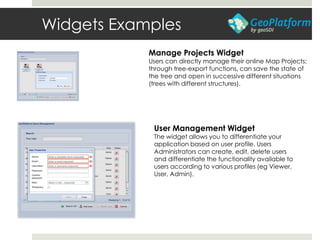
Manage Projects Widget
Users can directly manage their online Map Projects:
through tree-export functions, can save the state of
the tree and open in successive different situations
(trees with different structures).
User Management Widget
The widget allows you to differentiate your
application based on user profile. Users
Administrators can create, edit, delete users
and differentiate the functionality available to
users according to various profiles (eg Viewer,
User, Admin).
Widgets Examples
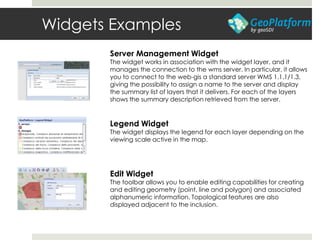
Server Management Widget
The widget works in association with the widget layer, and it
manages the connection to the wms server. In particular, it allows
you to connect to the web-gis a standard server WMS 1.1.1/1.3,
giving the possibility to assign a name to the server and display
the summary list of layers that it delivers. For each of the layers
shows the summary description retrieved from the server.
Legend Widget
The widget displays the legend for each layer depending on the
viewing scale active in the map.
Edit Widget
The toolbar allows you to enable editing capabilities for creating
and editing geometry (point, line and polygon) and associated
alphanumeric information. Topological features are also
displayed adjacent to the inclusion.
Widgets Examples
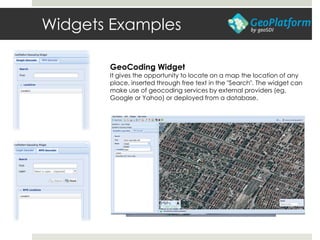
GeoCoding Widget
It gives the opportunity to locate on a map the location of any
place, inserted through free text in the "Search". The widget can
make use of geocoding services by external providers (eg,
Google or Yahoo) or deployed from a database.
Widgets Examples
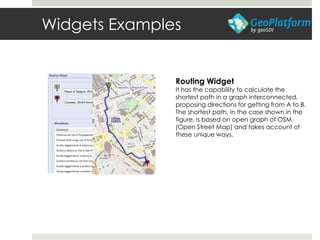
Routing Widget
It has the capability to calculate the
shortest path in a graph interconnected,
proposing directions for getting from A to B.
The shortest path, in the case shown in the
figure, is based on open graph of OSM
(Open Street Map) and takes account of
these unique ways.
Widgets Examples
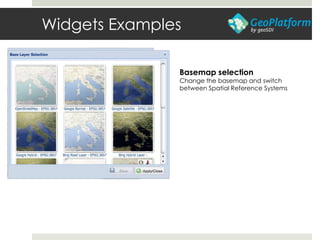
Basemap selection
Change the basemap and switch
between Spatial Reference Systems
Widgets Examples
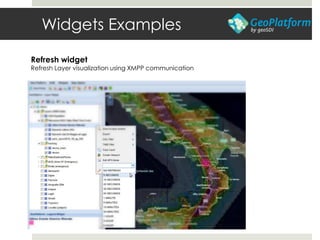
Refresh widget
Refresh Layer visualization using XMPP communication
Widgets Examples
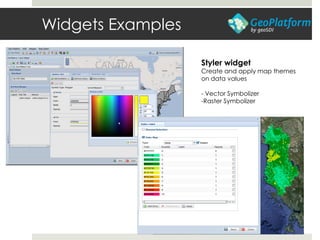
Styler widget
Create and apply map themes
on data values
- Vector Symbolizer
-Raster Symbolizer
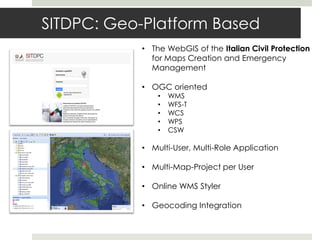
SITDPC: Geo-Platform Based
• The WebGIS of the Italian Civil Protection
for Maps Creation and Emergency
Management
• OGC oriented
• WMS
• WFS-T
• WCS
• WPS
• CSW
• Multi-User, Multi-Role Application
• Multi-Map-Project per User
• Online WMS Styler
• Geocoding Integration
ISIDe to OGC to
INTEROPERABILITY
 So .. How to integrate ISDIDe Earthquake CSV data into
the Civil Protection SITDPC Application?
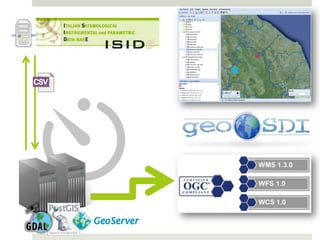
 A server cyclically get updates on earthquakes detected
by the ISIDe network
 Through a OGR process data is imported into a PostGIS
geodatabase
 A GeoServer deliver OGC services on the collected Data
 The Geo-Platform Based Web Application integrates Data
with other interoperable layers
Geo-Platform Widget Form Seismic
Monitoring
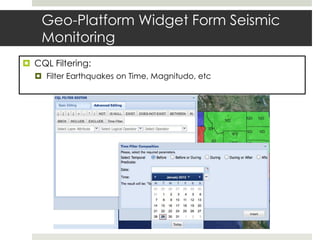
 CQL Filtering:
 Filter Earthquakes on Time, Magnitudo, etc
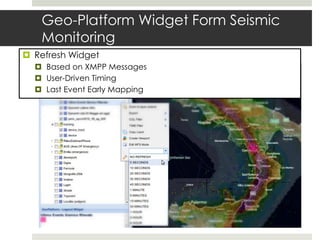
 Refresh Widget
 Based on XMPP Messages
 User-Driven Timing
 Last Event Early Mapping
Geo-Platform Widget Form Seismic
Monitoring
Mobile Survey
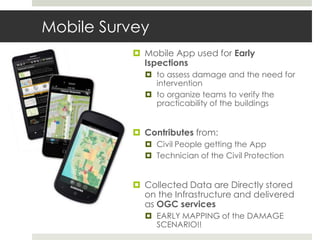
 Mobile App used for Early
Ispections
 to assess damage and the need for
intervention
 to organize teams to verify the
practicability of the buildings
 Contributes from:
 Civil People getting the App
 Technician of the Civil Protection
 Collected Data are Directly stored
on the Infrastructure and delivered
as OGC services
 EARLY MAPPING of the DAMAGE
SCENARIO!!
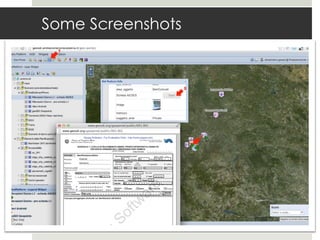
Some Screenshots
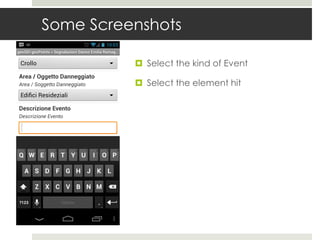
 Select the kind of Event
 Select the element hit
Some Screenshots
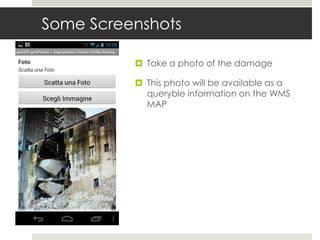
 Take a photo of the damage
 This photo will be available as a
queryble information on the WMS
MAP
Some Screenshots
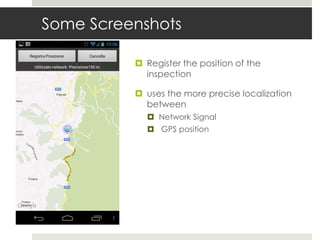
 Register the position of the
inspection
 uses the more precise localization
between
 Network Signal
 GPS position
Some Screenshots
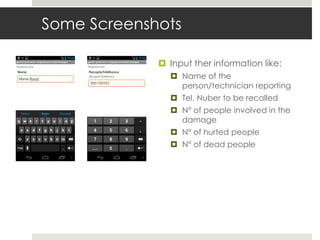
 Input ther information like:
 Name of the
person/technician reporting
 Tel. Nuber to be recalled
 N° of people involved in the
damage
 N° of hurted people
 N° of dead people
Some Screenshots
Some Screenshots
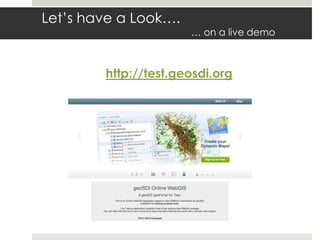
Let’s have a Look….
… on a live demo
http://test.geosdi.org
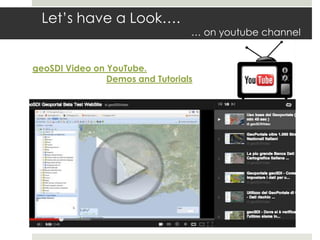
Let’s have a Look….
… on youtube channel
geoSDI Video on YouTube.
Demos and Tutorials
Thank you
geoSDI Team
Web
www.geosdi.org
Mail
sviluppo@geosdi.org
Address
IMAA CNR, C.da S.Loja, Tito Scalo (PZ) Italy

GI2013 ppt buono_seismic_geo_sdi

  • 1.
    The OGC Standards andGeo-Platform based web application for seismic events monitoring Sustainability & Security Applications for GEO-Risk-Prevention & ENVIRO-Disaster-Protection Grenzüberschreitendes Sächsisches GI/GIS/GDI-Forum am 29./30. April 2013 in Dresden Dimitri Dello Buono 29 April 2013
  • 2.
    ISIDE: The ItalianSeismic Network ISIDe (Italian Seismological Instrumental and Parametric Data Base) • More than 300 stations • It publics hypocenter parameters provided in near real time seismic monitoring service carried out at the headquarters of the INGV in Rome • together with the locations of the Italian Seismic Bulletin that are the result of the daily review of data carried out by analysts of the Earthquake National Center
  • 3.
    ISIDe: public Data… …but not the best way to share • ISIDe provide some web interface for querying Seismic data for a date range • HTML Table visualization • Map Visualization (But Not Interoperable) • Export format in CSV (Comma Separated Values) and KML format
  • 4.
    Italian National Civil Protection– Seismic Risck Office  The Seismic Risk Office develop criteria and methodologies and performs analysis for:  assessment and mitigation of seismic and volcanic risks;  the prediction of the impact of seismic and volcanic events in the area;  optimize interventions in emergency and post-event;  prevention programs, as well as the classification and seismic norms.
  • 5.
    The geoSDI Programme geoSDIis a Programme coordinated by the Italian Civil Protection Department of the Prime Minister Office • For implemeting the Civil Protection National Spatial Data Infrastructure • According to the provisions of the INSPIRE Directive • Using Open Source software applications. It is developed by the Institute for the Methodologies of Environmental Analysis (IMAA) of the Italian National Research Council (CNR) with the collaboration of most of the national civil and military institutions concerned. http://www.geosdi.org
  • 6.
    The Framework geoSDI hasdesigned and launched the open source project Geo-Platform Framework, the first pure java open source framework to develop Rich Web GIS Application. Geo-Platform allows to extend webGIS applications adding Widgets, software plugins that perform specific functions: in this way every geo- portal is different from the others and it realizes an exact reflection of the functional needs of the end user. With the development of Geo-Platform Framework is now possible to produce fast and powerful geoportals dedicated to end users.
  • 7.
    An extensible Solution:widgets! • Viewports Management • Geocoding / Reverse Geocoding (Google, Yahoo, Custom...) • Map Projects Management • Export / Import Map Projects • User / Roles Management • Routing on OSM Data • Feature Editor (WFS-T) • WPS builder • ... • ... • Base Layer Selection (Google, Bing, OSM, Custom...) • Add WMS Layer • Upload File (GeoTiff, SHP, SLD, ...) • Manage WMS Server • Layer Tree Panel • Refresh Layer • CQL Filter • Time Filter • Print Map • Styler (gestione SLD)
  • 8.
    Widgets Examples Map FeatureWidget He manages the map, working in association with other components such as toolbars and the layer tree widget. Every operation on the layer tree widget is immediately reflected on the map, for example transparences, zIndex, style. This widget gives also information about the scale of representation, geographical orientation, lat/long mouse position. Layer Tree Widget This is the widget for managing layers displayed on a map, which allows a truly innovative configuration: As shown in the figure, the tree allows you to view the "folder" in a nested way(unlimited nesting). This allows greater flexibility in organizing the set of layers. The toolbar exposes functionality for the management of the tree and can be extended through additional widgets with additional features..
  • 9.
    Widgets Examples Add LayerWidget Allows creation of layers within the layer tree. Through this widget you can manage multiple data sources from which "collect" the layer to be added to the map. The functionality of the Add Layer Widgets can be extended by adding more widgets, like uploading Shapefiles Widgets, the Widget Manage Server, the Add WMS from URL widget. The work with layers is facilitated by: pagination of layers, the automatic extraction of the abstract, the possibility of selecting multiple layers, enhanced search and filtering the results.
  • 10.
    Widgets Examples Context MenuWidget For each layer functions are handled through the Context Menu ie: positioning the Max Extent, export to Google Earth, a quick view of the layers in PDF, export to TIFF for a higher resolution image, export to shapefile vector data, the Copy & Paste layers within layers of the tree. Upload Data Widget Functionality of ingestion of files, so as to make it totally transparent to the user the loading process of the physical data on the server and the service configuration. The selected file from your local disk, using web-GIS interface, it is sent to the server. The proper flow of ingestion will automatically configure the WMS-WFS services. Layer Properties Widget For each layer in the tree are handled a number of properties, like the visual style for the layer, the opacity of the layers in the map, the information related to the server, user preferences such as the alias to be used as a label in the tree for the level, etc..
  • 11.
    Widgets Examples Manage ProjectsWidget Users can directly manage their online Map Projects: through tree-export functions, can save the state of the tree and open in successive different situations (trees with different structures). User Management Widget The widget allows you to differentiate your application based on user profile. Users Administrators can create, edit, delete users and differentiate the functionality available to users according to various profiles (eg Viewer, User, Admin).
  • 12.
    Widgets Examples Server ManagementWidget The widget works in association with the widget layer, and it manages the connection to the wms server. In particular, it allows you to connect to the web-gis a standard server WMS 1.1.1/1.3, giving the possibility to assign a name to the server and display the summary list of layers that it delivers. For each of the layers shows the summary description retrieved from the server. Legend Widget The widget displays the legend for each layer depending on the viewing scale active in the map. Edit Widget The toolbar allows you to enable editing capabilities for creating and editing geometry (point, line and polygon) and associated alphanumeric information. Topological features are also displayed adjacent to the inclusion.
  • 13.
    Widgets Examples GeoCoding Widget Itgives the opportunity to locate on a map the location of any place, inserted through free text in the "Search". The widget can make use of geocoding services by external providers (eg, Google or Yahoo) or deployed from a database.
  • 14.
    Widgets Examples Routing Widget Ithas the capability to calculate the shortest path in a graph interconnected, proposing directions for getting from A to B. The shortest path, in the case shown in the figure, is based on open graph of OSM (Open Street Map) and takes account of these unique ways.
  • 15.
    Widgets Examples Basemap selection Changethe basemap and switch between Spatial Reference Systems
  • 16.
    Widgets Examples Refresh widget RefreshLayer visualization using XMPP communication
  • 17.
    Widgets Examples Styler widget Createand apply map themes on data values - Vector Symbolizer -Raster Symbolizer
  • 18.
    SITDPC: Geo-Platform Based •The WebGIS of the Italian Civil Protection for Maps Creation and Emergency Management • OGC oriented • WMS • WFS-T • WCS • WPS • CSW • Multi-User, Multi-Role Application • Multi-Map-Project per User • Online WMS Styler • Geocoding Integration
  • 19.
    ISIDe to OGCto INTEROPERABILITY  So .. How to integrate ISDIDe Earthquake CSV data into the Civil Protection SITDPC Application?  A server cyclically get updates on earthquakes detected by the ISIDe network  Through a OGR process data is imported into a PostGIS geodatabase  A GeoServer deliver OGC services on the collected Data  The Geo-Platform Based Web Application integrates Data with other interoperable layers
  • 21.
    Geo-Platform Widget FormSeismic Monitoring  CQL Filtering:  Filter Earthquakes on Time, Magnitudo, etc
  • 22.
     Refresh Widget Based on XMPP Messages  User-Driven Timing  Last Event Early Mapping Geo-Platform Widget Form Seismic Monitoring
  • 23.
    Mobile Survey  MobileApp used for Early Ispections  to assess damage and the need for intervention  to organize teams to verify the practicability of the buildings  Contributes from:  Civil People getting the App  Technician of the Civil Protection  Collected Data are Directly stored on the Infrastructure and delivered as OGC services  EARLY MAPPING of the DAMAGE SCENARIO!!
  • 24.
    Some Screenshots  Selectthe kind of Event  Select the element hit
  • 25.
    Some Screenshots  Takea photo of the damage  This photo will be available as a queryble information on the WMS MAP
  • 26.
    Some Screenshots  Registerthe position of the inspection  uses the more precise localization between  Network Signal  GPS position
  • 27.
    Some Screenshots  Inputther information like:  Name of the person/technician reporting  Tel. Nuber to be recalled  N° of people involved in the damage  N° of hurted people  N° of dead people
  • 28.
  • 29.
  • 30.
    Let’s have aLook…. … on a live demo http://test.geosdi.org
  • 31.
    Let’s have aLook…. … on youtube channel geoSDI Video on YouTube. Demos and Tutorials
  • 32.