GEO-REFERENCING
Introduction:
Geo-referencing provides a correct, real-world spatial reference
to raster or CAD data, which either missing a real-world spatial
reference or is in an unknown spatial reference that you can’t
identify and define.
Geo-referencing is the process of aligning geographic data to a
reference dataset in a known coordinate system, so it can be
viewed, queried, and analyzed with other geographic data.
2
GEO-REFERENCING – CONT.
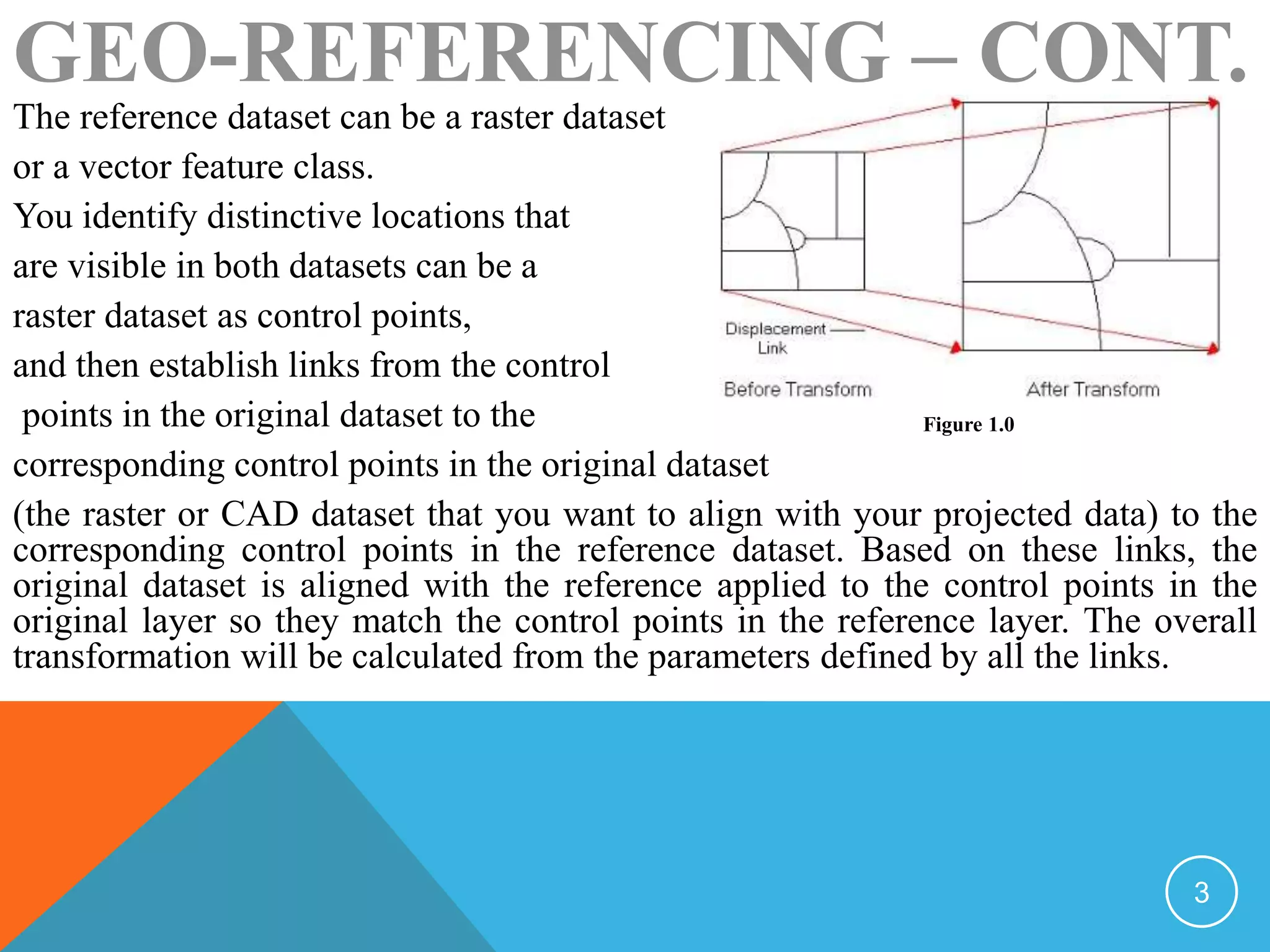
The reference dataset can be a raster dataset
or a vector feature class.
You identify distinctive locations that
are visible in both datasets can be a
raster dataset as control points,
and then establish links from the control
points in the original dataset to the
corresponding control points in the original dataset
(the raster or CAD dataset that you want to align with your projected data) to the
corresponding control points in the reference dataset. Based on these links, the
original dataset is aligned with the reference applied to the control points in the
original layer so they match the control points in the reference layer. The overall
transformation will be calculated from the parameters defined by all the links.
Figure 1.0
3
GEO-REFERENCING – CONT.
You use geo-referencing with any raster or CAD dataset that doesn’t align properly
with other GIS data. The misalignment could be either a small shift or a more
drastic displacement, where the data displays in a completely different location
than the other GIS data that it supposed to align with.
To geo-reference a raster dataset, you can use either the update geo-referencing or
the rectify method. The update geo-referencing method will save the
transformation information to an external auxiliary(.aux) or world file that will be
associated with the raster dataset. The rectify method will create a new raster
dataset that is geo-referenced using the spatial reference of the data frame. You
should use the rectify method if you plan to perform analysis with the geo-
referenced raster dataset or want to use it with another software package that
doesn’t recognize the external geo-referencing and rectify methods,
4
GEO-REFERENCING – CONT.
When geo-referencing a CAD dataset, the update geo-referencing method is
your only option: you save the transformation information and retain the
data in the original CAD format. This will create a world file that defines its
transformation.
• Spatial adjustment:
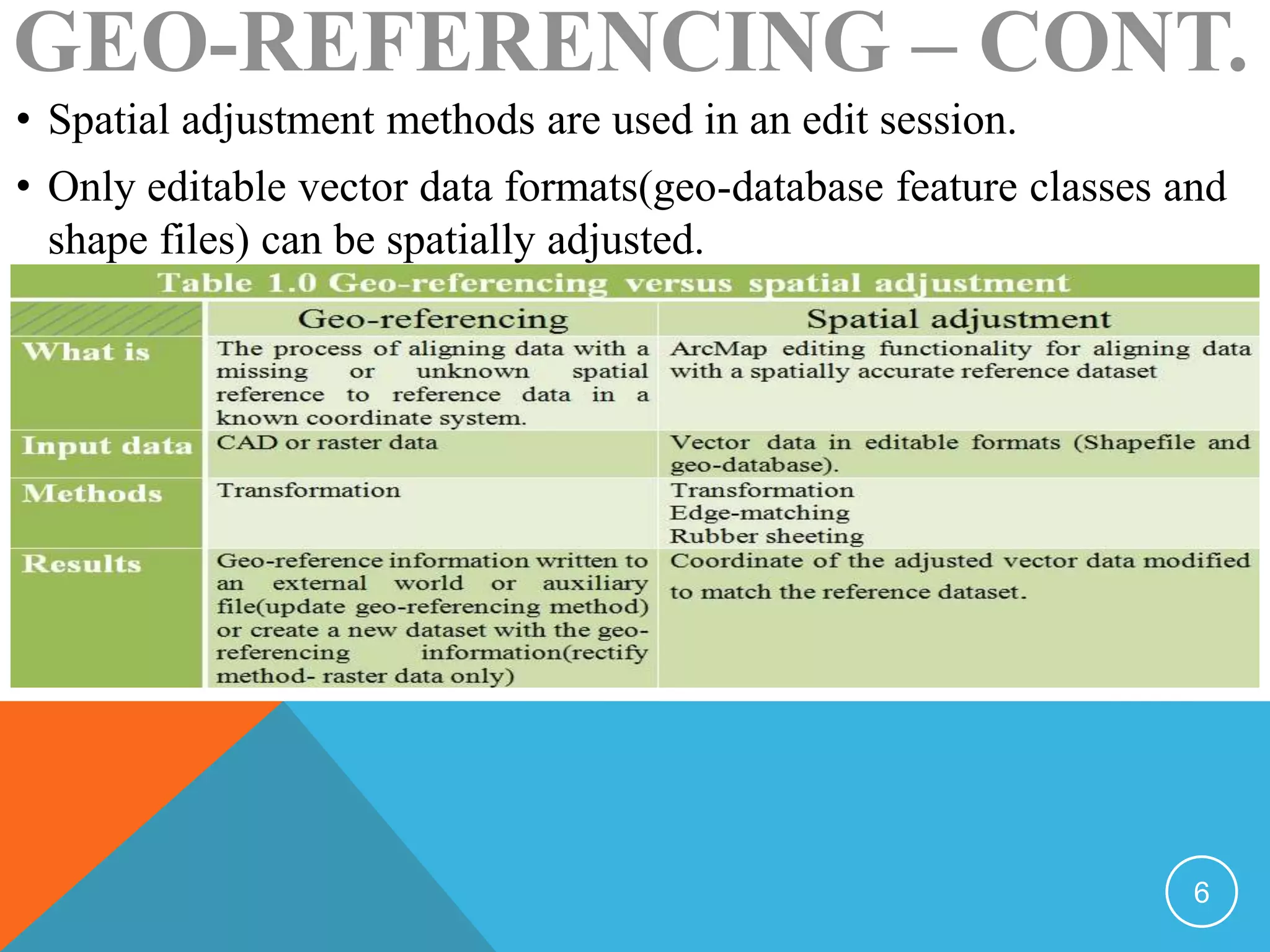
Similar to geo-referencing, spatial adjustment aligns an input dataset to a
reference dataset, based on links between common control points. The
major differences between geo-referencing and spatial adjustment are in the
usage and valid input data: while geo-referencing is used to re-create a
missing or unknown spatial reference for raster and CAD data, spatial
adjustment is used to correct the alignment of editable vector data.
5
GEO-REFERENCING – CONT.
• Spatial adjustment methods are used in an edit session.
• Only editable vector data formats(geo-database feature classes and
shape files) can be spatially adjusted.
6
• Spatial adjustment methods:
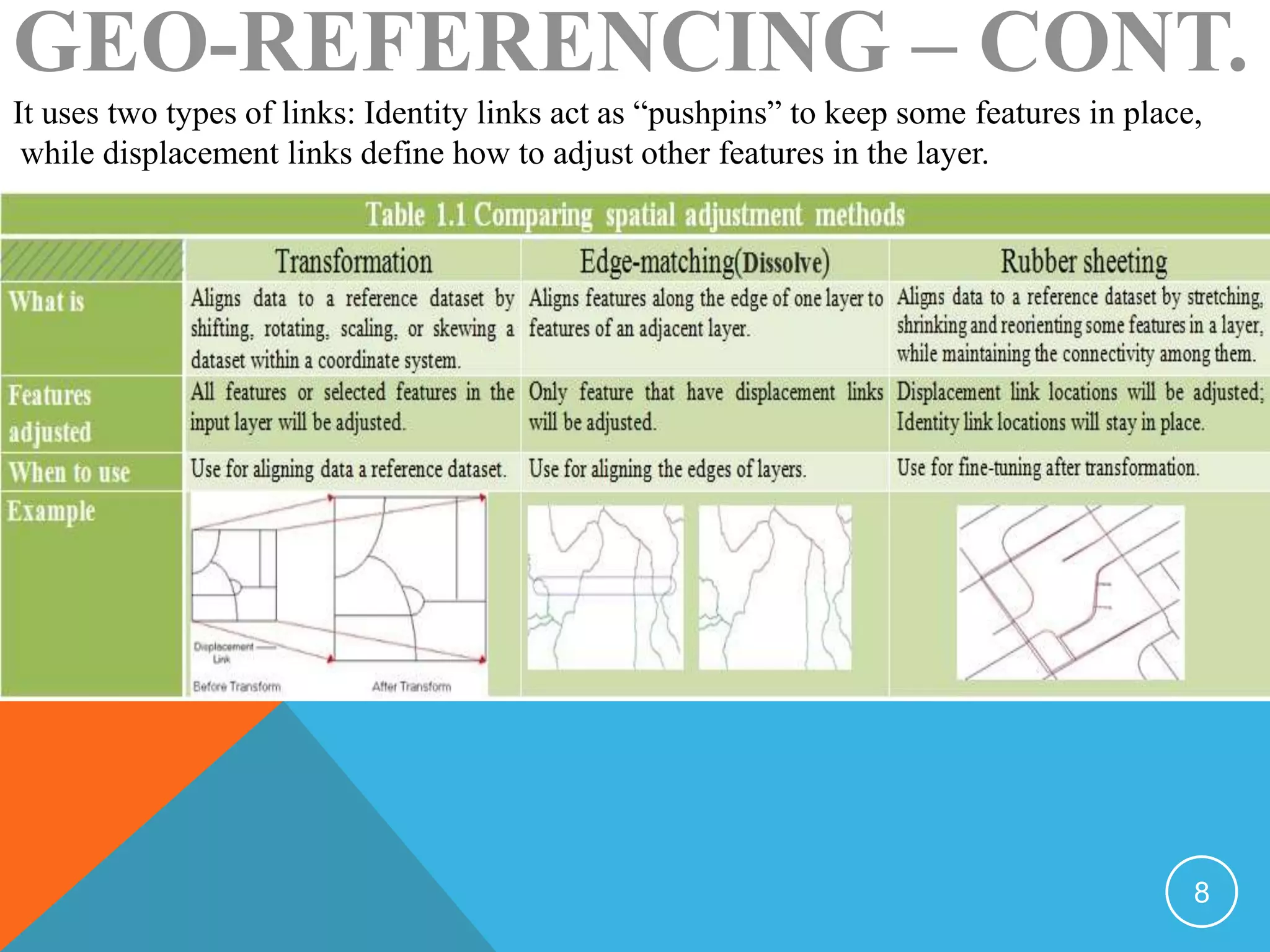
There are three methods for performing spatial adjustment: transformation, edgematching,
and rubber sheeting.
Similar to the transformation used in geo-referencing, spatial adjustment transformation will
also shift, scale, rotate, and if necessary, skew a dataset to convert the coordinates from one
location to another.
Edgematching is a spatial adjustment method that is typically used for connecting the
endpoints of features with each other. For example, for roads layer that have been digitized
from adjacent map sheet, you set displacement links to connect the roads along the edge of
the map sheet.
In some cases, you may have some features in a layer that align perfectly with the
corresponding features in the reference layer, while others need minor geometric
adjustments. In these cases, you can apply rubber sheeting, which stretches, shrinks, and
reorients features to match the reference layer while maintaining the connectivity between
them.
GEO-REFERENCING – CONT.
7
It uses two types of links: Identity links act as “pushpins” to keep some features in place,
while displacement links define how to adjust other features in the layer.
GEO-REFERENCING – CONT.
8

Georeferencing

  • 2.
    GEO-REFERENCING Introduction: Geo-referencing provides acorrect, real-world spatial reference to raster or CAD data, which either missing a real-world spatial reference or is in an unknown spatial reference that you can’t identify and define. Geo-referencing is the process of aligning geographic data to a reference dataset in a known coordinate system, so it can be viewed, queried, and analyzed with other geographic data. 2
  • 3.
    GEO-REFERENCING – CONT. Thereference dataset can be a raster dataset or a vector feature class. You identify distinctive locations that are visible in both datasets can be a raster dataset as control points, and then establish links from the control points in the original dataset to the corresponding control points in the original dataset (the raster or CAD dataset that you want to align with your projected data) to the corresponding control points in the reference dataset. Based on these links, the original dataset is aligned with the reference applied to the control points in the original layer so they match the control points in the reference layer. The overall transformation will be calculated from the parameters defined by all the links. Figure 1.0 3
  • 4.
    GEO-REFERENCING – CONT. Youuse geo-referencing with any raster or CAD dataset that doesn’t align properly with other GIS data. The misalignment could be either a small shift or a more drastic displacement, where the data displays in a completely different location than the other GIS data that it supposed to align with. To geo-reference a raster dataset, you can use either the update geo-referencing or the rectify method. The update geo-referencing method will save the transformation information to an external auxiliary(.aux) or world file that will be associated with the raster dataset. The rectify method will create a new raster dataset that is geo-referenced using the spatial reference of the data frame. You should use the rectify method if you plan to perform analysis with the geo- referenced raster dataset or want to use it with another software package that doesn’t recognize the external geo-referencing and rectify methods, 4
  • 5.
    GEO-REFERENCING – CONT. Whengeo-referencing a CAD dataset, the update geo-referencing method is your only option: you save the transformation information and retain the data in the original CAD format. This will create a world file that defines its transformation. • Spatial adjustment: Similar to geo-referencing, spatial adjustment aligns an input dataset to a reference dataset, based on links between common control points. The major differences between geo-referencing and spatial adjustment are in the usage and valid input data: while geo-referencing is used to re-create a missing or unknown spatial reference for raster and CAD data, spatial adjustment is used to correct the alignment of editable vector data. 5
  • 6.
    GEO-REFERENCING – CONT. •Spatial adjustment methods are used in an edit session. • Only editable vector data formats(geo-database feature classes and shape files) can be spatially adjusted. 6
  • 7.
    • Spatial adjustmentmethods: There are three methods for performing spatial adjustment: transformation, edgematching, and rubber sheeting. Similar to the transformation used in geo-referencing, spatial adjustment transformation will also shift, scale, rotate, and if necessary, skew a dataset to convert the coordinates from one location to another. Edgematching is a spatial adjustment method that is typically used for connecting the endpoints of features with each other. For example, for roads layer that have been digitized from adjacent map sheet, you set displacement links to connect the roads along the edge of the map sheet. In some cases, you may have some features in a layer that align perfectly with the corresponding features in the reference layer, while others need minor geometric adjustments. In these cases, you can apply rubber sheeting, which stretches, shrinks, and reorients features to match the reference layer while maintaining the connectivity between them. GEO-REFERENCING – CONT. 7
  • 8.
    It uses twotypes of links: Identity links act as “pushpins” to keep some features in place, while displacement links define how to adjust other features in the layer. GEO-REFERENCING – CONT. 8