Functions of ms excel 2003
What is a function
A function is nothing but a combination of a formula
containing different mathematical operators(+,-,/,*).
in general manner a function is a combination of
separate instructions which may or may not be of similar
types.
for example:-the simple interest function in excel:-
=(cell no 1*cell no 2*cell no 3/100)
=normal formula is (principle*rate*time)/100
i.e. (b1*b2*b3/100).
the above function is prepared to calculate the simple
interest.
Functions of ms excel 2003
There are following types of functions:-
Mathematical functions they are just like the normal
functions that we have learned in our primary school:-
They are + , - , / , * .
Statistical functions
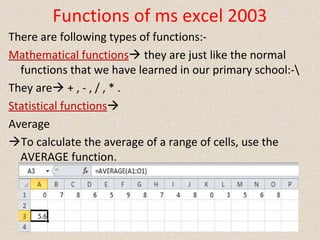
Average
To calculate the average of a range of cells, use the
AVERAGE function.
Functions of ms excel 2003
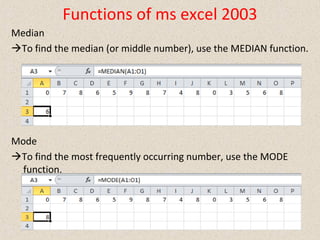
Median
To find the median (or middle number), use the MEDIAN function.
Mode
To find the most frequently occurring number, use the MODE
function.
Functions of ms excel 2003
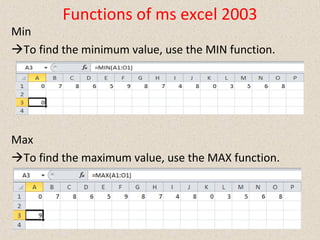
Min
To find the minimum value, use the MIN function.
Max
To find the maximum value, use the MAX function.
Functions of ms excel 2003
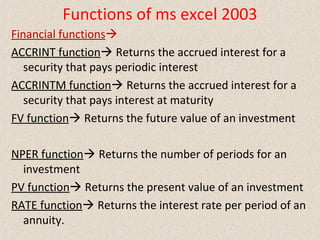
Financial functions
ACCRINT function Returns the accrued interest for a
security that pays periodic interest
ACCRINTM function Returns the accrued interest for a
security that pays interest at maturity
FV function Returns the future value of an investment
NPER function Returns the number of periods for an
investment
PV function Returns the present value of an investment
RATE function Returns the interest rate per period of an
annuity.
Functions of ms excel 2003
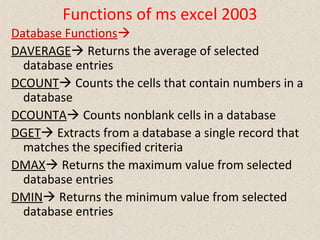
Database Functions
DAVERAGE Returns the average of selected
database entries
DCOUNT Counts the cells that contain numbers in a
database
DCOUNTA Counts nonblank cells in a database
DGET Extracts from a database a single record that
matches the specified criteria
DMAX Returns the maximum value from selected
database entries
DMIN Returns the minimum value from selected
database entries
Functions of ms excel 2003
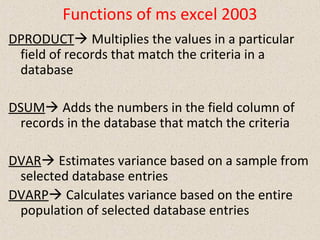
DPRODUCT Multiplies the values in a particular
field of records that match the criteria in a
database
DSUM Adds the numbers in the field column of
records in the database that match the criteria
DVAR Estimates variance based on a sample from
selected database entries
DVARP Calculates variance based on the entire
population of selected database entries

Functions of ms excel 2003

  • 1.
    Functions of msexcel 2003 What is a function A function is nothing but a combination of a formula containing different mathematical operators(+,-,/,*). in general manner a function is a combination of separate instructions which may or may not be of similar types. for example:-the simple interest function in excel:- =(cell no 1*cell no 2*cell no 3/100) =normal formula is (principle*rate*time)/100 i.e. (b1*b2*b3/100). the above function is prepared to calculate the simple interest.
  • 2.
    Functions of msexcel 2003 There are following types of functions:- Mathematical functions they are just like the normal functions that we have learned in our primary school:- They are + , - , / , * . Statistical functions Average To calculate the average of a range of cells, use the AVERAGE function.
  • 3.
    Functions of msexcel 2003 Median To find the median (or middle number), use the MEDIAN function. Mode To find the most frequently occurring number, use the MODE function.
  • 4.
    Functions of msexcel 2003 Min To find the minimum value, use the MIN function. Max To find the maximum value, use the MAX function.
  • 5.
    Functions of msexcel 2003 Financial functions ACCRINT function Returns the accrued interest for a security that pays periodic interest ACCRINTM function Returns the accrued interest for a security that pays interest at maturity FV function Returns the future value of an investment NPER function Returns the number of periods for an investment PV function Returns the present value of an investment RATE function Returns the interest rate per period of an annuity.
  • 6.
    Functions of msexcel 2003 Database Functions DAVERAGE Returns the average of selected database entries DCOUNT Counts the cells that contain numbers in a database DCOUNTA Counts nonblank cells in a database DGET Extracts from a database a single record that matches the specified criteria DMAX Returns the maximum value from selected database entries DMIN Returns the minimum value from selected database entries
  • 7.
    Functions of msexcel 2003 DPRODUCT Multiplies the values in a particular field of records that match the criteria in a database DSUM Adds the numbers in the field column of records in the database that match the criteria DVAR Estimates variance based on a sample from selected database entries DVARP Calculates variance based on the entire population of selected database entries