Logical Functions In Excel
 IF Function
 AND Function
 OR Function
 NOT Function
If You want to watch the video tutorial click here!
IF Function
IF Function checks the
condition, and returns the
result corresponding to it.
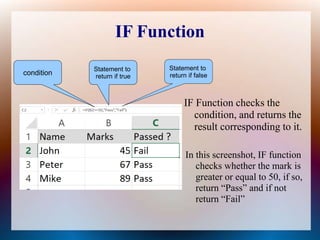
In this screenshot, IF function
checks whether the mark is
greater or equal to 50, if so,
return “Pass” and if not
return “Fail”
condition
Statement to
return if true
Statement to
return if false
AND Function
AND Function will return
TRUE only if both satisfies
and return FALSE if any of
them don't satisfy.
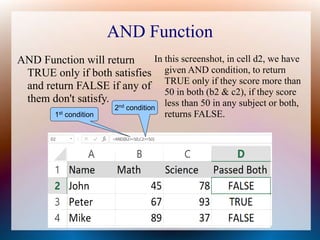
In this screenshot, in cell d2, we have
given AND condition, to return
TRUE only if they score more than
50 in both (b2 & c2), if they score
less than 50 in any subject or both,
returns FALSE.1st condition
2nd
condition
OR Function
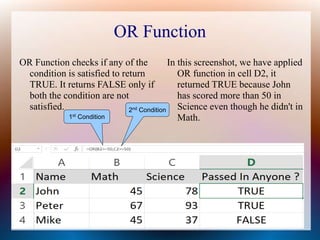
OR Function checks if any of the
condition is satisfied to return
TRUE. It returns FALSE only if
both the condition are not
satisfied.
In this screenshot, we have applied
OR function in cell D2, it
returned TRUE because John
has scored more than 50 in
Science even though he didn't in
Math.1st Condition
2nd Condition
NOT Function
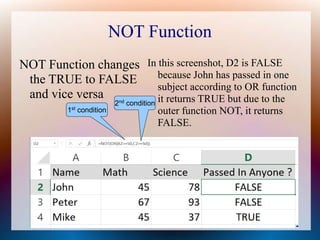
NOT Function changes
the TRUE to FALSE
and vice versa
In this screenshot, D2 is FALSE
because John has passed in one
subject according to OR function
it returns TRUE but due to the
outer function NOT, it returns
FALSE.
1st
condition
2nd
condition
Thank You!!!
For more Excel Video Tutorials, click here !!!

Logical functions in excel

  • 1.
    Logical Functions InExcel  IF Function  AND Function  OR Function  NOT Function If You want to watch the video tutorial click here!
  • 2.
    IF Function IF Functionchecks the condition, and returns the result corresponding to it. In this screenshot, IF function checks whether the mark is greater or equal to 50, if so, return “Pass” and if not return “Fail” condition Statement to return if true Statement to return if false
  • 3.
    AND Function AND Functionwill return TRUE only if both satisfies and return FALSE if any of them don't satisfy. In this screenshot, in cell d2, we have given AND condition, to return TRUE only if they score more than 50 in both (b2 & c2), if they score less than 50 in any subject or both, returns FALSE.1st condition 2nd condition
  • 4.
    OR Function OR Functionchecks if any of the condition is satisfied to return TRUE. It returns FALSE only if both the condition are not satisfied. In this screenshot, we have applied OR function in cell D2, it returned TRUE because John has scored more than 50 in Science even though he didn't in Math.1st Condition 2nd Condition
  • 5.
    NOT Function NOT Functionchanges the TRUE to FALSE and vice versa In this screenshot, D2 is FALSE because John has passed in one subject according to OR function it returns TRUE but due to the outer function NOT, it returns FALSE. 1st condition 2nd condition
  • 6.
    Thank You!!! For moreExcel Video Tutorials, click here !!!