How to use Vlookup &
simple (Excel) formula
for inventory
Transactions
By Pavithra Ravindar
http://freelearningfrompc.blogspot.in/
Purpose Of using Vlookup in inventory
formula’s
Sections:
1. Lesson into
2. Comparing Values
3. Matching Values
4. Extreme fast result
Why we need to use VLOOKUP
Formula
1. Easy to find error’s from 1 sheet to 2 sheet
2. Time Management( we can reduce 80% of
our time from using Vlookup function
3. Extremely fast & easy to check value results
4. Simple logic that works for whole inventory’s
values
Example Inventory Formula &
explanation
1. Updating Previous month closing Values in
current month Opening values
2. Calculating closing values with simple
formula
3. Calculating weighted average values
4. Find product cost with total value
Updating Previous closing & current
opening values
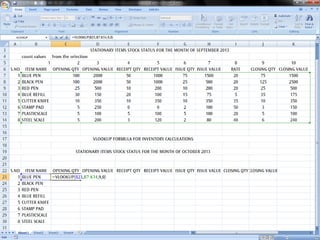
Step By Step Formulas :1. =vlookup(lookup_value,table_array,col_index
_num,[range_lookup])
QTY

VALUE
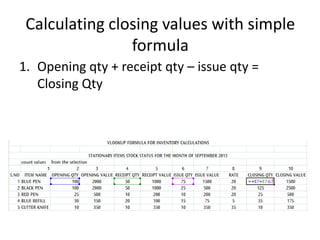
Calculating closing values with simple
formula
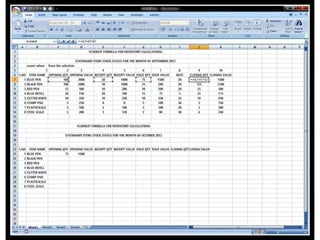
1. Opening qty + receipt qty – issue qty =
Closing Qty
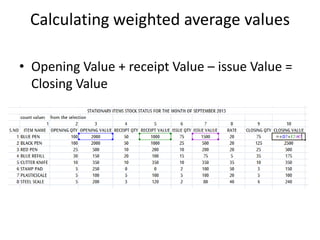
Calculating weighted average values
• Opening Value + receipt Value – issue Value =
Closing Value
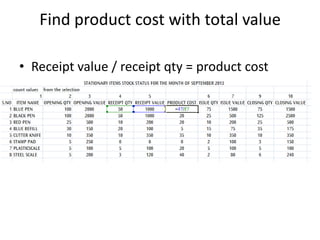
Find product cost with total value
• Receipt value / receipt qty = product cost
How to use vlookup & simple  formula's for inventory

How to use vlookup & simple formula's for inventory

  • 1.
    How to useVlookup & simple (Excel) formula for inventory Transactions By Pavithra Ravindar http://freelearningfrompc.blogspot.in/
  • 2.
    Purpose Of usingVlookup in inventory formula’s Sections: 1. Lesson into 2. Comparing Values 3. Matching Values 4. Extreme fast result
  • 3.
    Why we needto use VLOOKUP Formula 1. Easy to find error’s from 1 sheet to 2 sheet 2. Time Management( we can reduce 80% of our time from using Vlookup function 3. Extremely fast & easy to check value results 4. Simple logic that works for whole inventory’s values
  • 4.
    Example Inventory Formula& explanation 1. Updating Previous month closing Values in current month Opening values 2. Calculating closing values with simple formula 3. Calculating weighted average values 4. Find product cost with total value
  • 5.
    Updating Previous closing& current opening values Step By Step Formulas :1. =vlookup(lookup_value,table_array,col_index _num,[range_lookup]) QTY VALUE
  • 7.
    Calculating closing valueswith simple formula 1. Opening qty + receipt qty – issue qty = Closing Qty
  • 9.
    Calculating weighted averagevalues • Opening Value + receipt Value – issue Value = Closing Value
  • 10.
    Find product costwith total value • Receipt value / receipt qty = product cost