Full and Para Virtualization
Dr. Sanjay P. Ahuja, Ph.D.
Fidelity National Financial Distinguished Professor of
CIS
School of Computing, UNF
x86 Hardware Virtualization
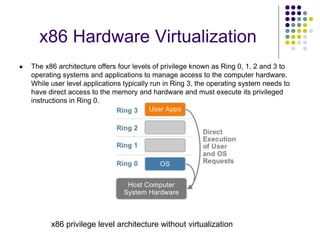
 The x86 architecture offers four levels of privilege known as Ring 0, 1, 2 and 3 to
operating systems and applications to manage access to the computer hardware.
While user level applications typically run in Ring 3, the operating system needs to
have direct access to the memory and hardware and must execute its privileged
instructions in Ring 0.
x86 privilege level architecture without virtualization
Technique 1: Full Virtualization using Binary
Translation
 This approach relies on binary translation to trap (into the VMM) and to virtualize
certain sensitive and non-virtualizable instructions with new sequences of instructions
that have the intended effect on the virtual hardware. Meanwhile, user level code is
directly executed on the processor for high performance virtualization.
Binary translation approach to x86 virtualization
Full Virtualization using Binary Translation
 This combination of binary translation and direct execution provides Full
Virtualization as the guest OS is completely decoupled from the underlying
hardware by the virtualization layer.
 The guest OS is not aware it is being virtualized and requires no
modification.
 The hypervisor translates all operating system instructions at run-time on
the fly and caches the results for future use, while user level instructions run
unmodified at native speed.
 VMware’s virtualization products such as VMWare ESXi and Microsoft
Virtual Server are examples of full virtualization.
Full Virtualization using Binary Translation
 The performance of full virtualization may not be ideal because it involves
binary translation at run-time which is time consuming and can incur a large
performance overhead.
 The full virtualization of I/O – intensive applications can be a challenge.
 Binary translation employs a code cache to store translated hot instructions
to improve performance, but it increases the cost of memory usage.
 The performance of full virtualization on the x86 architecture is typically 80%
to 97% that of the host machine.
Technique 2: OS Assisted Virtualization
or Paravirtualization (PV)
 Paravirtualization refers to communication between the guest OS and the
hypervisor to improve performance and efficiency.
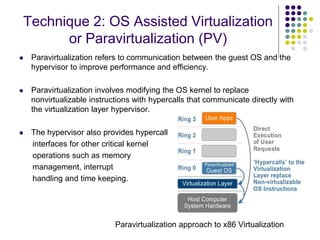
 Paravirtualization involves modifying the OS kernel to replace
nonvirtualizable instructions with hypercalls that communicate directly with
the virtualization layer hypervisor.
 The hypervisor also provides hypercall
interfaces for other critical kernel
operations such as memory
management, interrupt
handling and time keeping.
Paravirtualization approach to x86 Virtualization
Technique 3: Hardware Assisted Virtualization
(HVM)
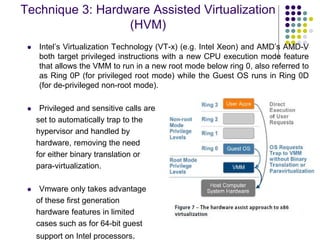
 Intel’s Virtualization Technology (VT-x) (e.g. Intel Xeon) and AMD’s AMD-V
both target privileged instructions with a new CPU execution mode feature
that allows the VMM to run in a new root mode below ring 0, also referred to
as Ring 0P (for privileged root mode) while the Guest OS runs in Ring 0D
(for de-privileged non-root mode).
 Privileged and sensitive calls are
set to automatically trap to the
hypervisor and handled by
hardware, removing the need
for either binary translation or
para-virtualization.
 Vmware only takes advantage
of these first generation
hardware features in limited
cases such as for 64-bit guest
support on Intel processors.
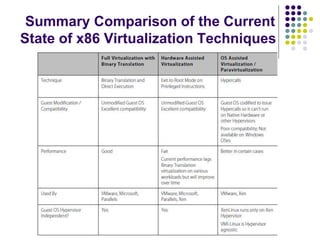
Summary Comparison of the Current
State of x86 Virtualization Techniques
Full Virtualization vs. Paravirtualization
 Paravirtualization is different from full virtualization, where the unmodified
OS does not know it is virtualized and sensitive OS calls are trapped using
binary translation at run time. In paravirtualization, these instructions are
handled at compile time when the non-virtualizable OS instructions are
replaced with hypercalls.
 The advantage of paravirtualization is lower virtualization overhead, but the
performance advantage of paravirtualization over full virtualization can vary
greatly depending on the workload. Most user space workloads gain very
little, and near native performance is not achieved for all workloads.
 As paravirtualization cannot support unmodified operating systems (e.g.
Windows 2000/XP), its compatibility and portability is poor.
Full Virtualization vs. Paravirtualization
 Paravirtualization can also introduce significant support and maintainability
issues in production environments as it requires deep OS kernel
modifications. The invasive kernel modifications tightly couple the guest OS
to the hypervisor with data structure dependencies, preventing the modified
guest OS from running on other hypervisors or native hardware.
 The open source Xen project is an example of paravirtualization that
virtualizes the processor and memory using a modified Linux kernel and
virtualizes the I/O using custom guest OS device drivers.
Memory Virtualization
 This involves sharing the physical system memory and dynamically
allocating it to virtual machines. VM memory virtualization is very similar to
the virtual memory support provided by modern operating systems.
 The operating system keeps mappings of virtual page numbers to physical
page numbers stored in page tables. All modern x86 CPUs include a
memory management unit (MMU) and a translation lookaside buffer (TLB)
to optimize virtual memory performance.
 To run multiple virtual machines on a single system, another level of
memory virtualization is required. In other words, one has to virtualize the
MMU to support the guest OS.
Memory Virtualization
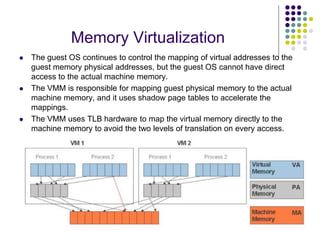
 The guest OS continues to control the mapping of virtual addresses to the
guest memory physical addresses, but the guest OS cannot have direct
access to the actual machine memory.
 The VMM is responsible for mapping guest physical memory to the actual
machine memory, and it uses shadow page tables to accelerate the
mappings.
 The VMM uses TLB hardware to map the virtual memory directly to the
machine memory to avoid the two levels of translation on every access.
I/O Virtualization
 I/O Virtualization involves managing the routing of I/O requests between
virtual devices and the shared physical hardware.
 The hypervisor virtualizes the physical hardware and presents each virtual
machine with a standardized set of virtual devices.
 These virtual devices effectively emulate well-known hardware (with device
drivers) and translate the virtual machine requests to the system hardware.
 This standardization on consistent device drivers also helps with virtual
machine standardization and portability across platforms as all virtual
machines are configured to run on the same virtual hardware regardless of
the actual physical hardware in the system.
I/O Virtualization in Xen: Indirect
driver model
 Xen uses an indirect driver design that routes virtual machine I/O through
device drivers in the Windows or Linux management operating systems.
 Xen uses an indirect split driver model consisting of a front-end driver
running in Domain U (user VMs) and the backend driver running in Domain
0. These two drivers interact with each other via a block of shared memory.
 The front-end driver manages the I/O requests of the guest OS and the
backend driver is responsible for managing the real I/O devices and
multiplexing the I/O data of different VMs. These generic (standard)
backend drivers installed in Linux or Windows OS can be overtaxed by the
activity of multiple virtual machines and
are not optimized for multiple VM workloads.
 There is also CPU overhead associated
with this approach because I/O is proxied
via Domain 0.
I/O Virtualization in VMWare ESXi:
Direct driver model
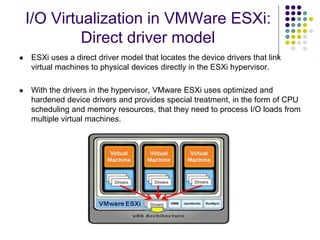
 ESXi uses a direct driver model that locates the device drivers that link
virtual machines to physical devices directly in the ESXi hypervisor.
 With the drivers in the hypervisor, VMware ESXi uses optimized and
hardened device drivers and provides special treatment, in the form of CPU
scheduling and memory resources, that they need to process I/O loads from
multiple virtual machines.
Scalability of VMWare and Xen
driver models
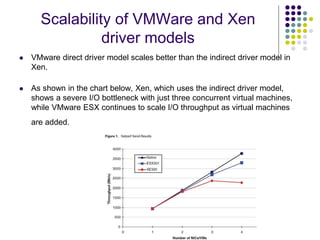
 VMware direct driver model scales better than the indirect driver model in
Xen.
 As shown in the chart below, Xen, which uses the indirect driver model,
shows a severe I/O bottleneck with just three concurrent virtual machines,
while VMware ESX continues to scale I/O throughput as virtual machines
are added.
Reference
 Overview of x86 Server Virtualization Technology
 http://www.cubrid.org/blog/dev-platform/x86-server-virtualization-
technology/

Fullandparavirtualization.ppt

  • 1.
    Full and ParaVirtualization Dr. Sanjay P. Ahuja, Ph.D. Fidelity National Financial Distinguished Professor of CIS School of Computing, UNF
  • 2.
    x86 Hardware Virtualization The x86 architecture offers four levels of privilege known as Ring 0, 1, 2 and 3 to operating systems and applications to manage access to the computer hardware. While user level applications typically run in Ring 3, the operating system needs to have direct access to the memory and hardware and must execute its privileged instructions in Ring 0. x86 privilege level architecture without virtualization
  • 3.
    Technique 1: FullVirtualization using Binary Translation  This approach relies on binary translation to trap (into the VMM) and to virtualize certain sensitive and non-virtualizable instructions with new sequences of instructions that have the intended effect on the virtual hardware. Meanwhile, user level code is directly executed on the processor for high performance virtualization. Binary translation approach to x86 virtualization
  • 4.
    Full Virtualization usingBinary Translation  This combination of binary translation and direct execution provides Full Virtualization as the guest OS is completely decoupled from the underlying hardware by the virtualization layer.  The guest OS is not aware it is being virtualized and requires no modification.  The hypervisor translates all operating system instructions at run-time on the fly and caches the results for future use, while user level instructions run unmodified at native speed.  VMware’s virtualization products such as VMWare ESXi and Microsoft Virtual Server are examples of full virtualization.
  • 5.
    Full Virtualization usingBinary Translation  The performance of full virtualization may not be ideal because it involves binary translation at run-time which is time consuming and can incur a large performance overhead.  The full virtualization of I/O – intensive applications can be a challenge.  Binary translation employs a code cache to store translated hot instructions to improve performance, but it increases the cost of memory usage.  The performance of full virtualization on the x86 architecture is typically 80% to 97% that of the host machine.
  • 6.
    Technique 2: OSAssisted Virtualization or Paravirtualization (PV)  Paravirtualization refers to communication between the guest OS and the hypervisor to improve performance and efficiency.  Paravirtualization involves modifying the OS kernel to replace nonvirtualizable instructions with hypercalls that communicate directly with the virtualization layer hypervisor.  The hypervisor also provides hypercall interfaces for other critical kernel operations such as memory management, interrupt handling and time keeping. Paravirtualization approach to x86 Virtualization
  • 7.
    Technique 3: HardwareAssisted Virtualization (HVM)  Intel’s Virtualization Technology (VT-x) (e.g. Intel Xeon) and AMD’s AMD-V both target privileged instructions with a new CPU execution mode feature that allows the VMM to run in a new root mode below ring 0, also referred to as Ring 0P (for privileged root mode) while the Guest OS runs in Ring 0D (for de-privileged non-root mode).  Privileged and sensitive calls are set to automatically trap to the hypervisor and handled by hardware, removing the need for either binary translation or para-virtualization.  Vmware only takes advantage of these first generation hardware features in limited cases such as for 64-bit guest support on Intel processors.
  • 8.
    Summary Comparison ofthe Current State of x86 Virtualization Techniques
  • 9.
    Full Virtualization vs.Paravirtualization  Paravirtualization is different from full virtualization, where the unmodified OS does not know it is virtualized and sensitive OS calls are trapped using binary translation at run time. In paravirtualization, these instructions are handled at compile time when the non-virtualizable OS instructions are replaced with hypercalls.  The advantage of paravirtualization is lower virtualization overhead, but the performance advantage of paravirtualization over full virtualization can vary greatly depending on the workload. Most user space workloads gain very little, and near native performance is not achieved for all workloads.  As paravirtualization cannot support unmodified operating systems (e.g. Windows 2000/XP), its compatibility and portability is poor.
  • 10.
    Full Virtualization vs.Paravirtualization  Paravirtualization can also introduce significant support and maintainability issues in production environments as it requires deep OS kernel modifications. The invasive kernel modifications tightly couple the guest OS to the hypervisor with data structure dependencies, preventing the modified guest OS from running on other hypervisors or native hardware.  The open source Xen project is an example of paravirtualization that virtualizes the processor and memory using a modified Linux kernel and virtualizes the I/O using custom guest OS device drivers.
  • 11.
    Memory Virtualization  Thisinvolves sharing the physical system memory and dynamically allocating it to virtual machines. VM memory virtualization is very similar to the virtual memory support provided by modern operating systems.  The operating system keeps mappings of virtual page numbers to physical page numbers stored in page tables. All modern x86 CPUs include a memory management unit (MMU) and a translation lookaside buffer (TLB) to optimize virtual memory performance.  To run multiple virtual machines on a single system, another level of memory virtualization is required. In other words, one has to virtualize the MMU to support the guest OS.
  • 12.
    Memory Virtualization  Theguest OS continues to control the mapping of virtual addresses to the guest memory physical addresses, but the guest OS cannot have direct access to the actual machine memory.  The VMM is responsible for mapping guest physical memory to the actual machine memory, and it uses shadow page tables to accelerate the mappings.  The VMM uses TLB hardware to map the virtual memory directly to the machine memory to avoid the two levels of translation on every access.
  • 13.
    I/O Virtualization  I/OVirtualization involves managing the routing of I/O requests between virtual devices and the shared physical hardware.  The hypervisor virtualizes the physical hardware and presents each virtual machine with a standardized set of virtual devices.  These virtual devices effectively emulate well-known hardware (with device drivers) and translate the virtual machine requests to the system hardware.  This standardization on consistent device drivers also helps with virtual machine standardization and portability across platforms as all virtual machines are configured to run on the same virtual hardware regardless of the actual physical hardware in the system.
  • 14.
    I/O Virtualization inXen: Indirect driver model  Xen uses an indirect driver design that routes virtual machine I/O through device drivers in the Windows or Linux management operating systems.  Xen uses an indirect split driver model consisting of a front-end driver running in Domain U (user VMs) and the backend driver running in Domain 0. These two drivers interact with each other via a block of shared memory.  The front-end driver manages the I/O requests of the guest OS and the backend driver is responsible for managing the real I/O devices and multiplexing the I/O data of different VMs. These generic (standard) backend drivers installed in Linux or Windows OS can be overtaxed by the activity of multiple virtual machines and are not optimized for multiple VM workloads.  There is also CPU overhead associated with this approach because I/O is proxied via Domain 0.
  • 15.
    I/O Virtualization inVMWare ESXi: Direct driver model  ESXi uses a direct driver model that locates the device drivers that link virtual machines to physical devices directly in the ESXi hypervisor.  With the drivers in the hypervisor, VMware ESXi uses optimized and hardened device drivers and provides special treatment, in the form of CPU scheduling and memory resources, that they need to process I/O loads from multiple virtual machines.
  • 16.
    Scalability of VMWareand Xen driver models  VMware direct driver model scales better than the indirect driver model in Xen.  As shown in the chart below, Xen, which uses the indirect driver model, shows a severe I/O bottleneck with just three concurrent virtual machines, while VMware ESX continues to scale I/O throughput as virtual machines are added.
  • 17.
    Reference  Overview ofx86 Server Virtualization Technology  http://www.cubrid.org/blog/dev-platform/x86-server-virtualization- technology/