Introduction to Virtualization
Agenda
• Virtualization – Definition
• History of Virtualization
• Challenges in x86 architecture
• Introduction to VMs
• CPU virtualization
• Memory Virtualization
• I/O Virtualization
• Types of Hypervisors
• Xen
• VMware Workstation
What is Virtualization?
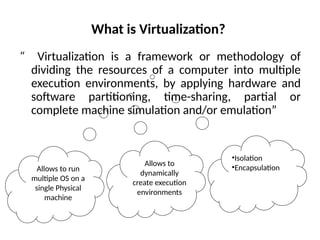
“ Virtualization is a framework or methodology of
dividing the resources of a computer into multiple
execution environments, by applying hardware and
software partitioning, time-sharing, partial or
complete machine simulation and/or emulation”
Allows to run
multiple OS on a
single Physical
machine
Allows to
dynamically
create execution
environments
•Isolation
•Encapsulation
History of Virtualization
• In 1960, mainframe computers are used to run
a single application at a time and waste a lot of
resources.
• Split the resources of a mainframe computer
and to execute multiple applications.
• In 1980, x86 becomes a dominant architecture,
introduces master-slave paradigm and
virtualization no longer needed.
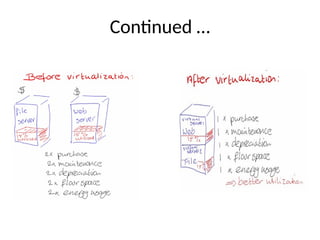
Continued …
• 1990, massive growth in computer technology
and introduces a lot of challenges.
– Low hardware infrastructure utilization;
– Rising physical infrastructure costs;
– Rising IT management costs;
– Insufficient disaster protection; and
– High maintenance and costly end-user desktops.
Challenges in virtualizing x86 architecture
• Ring Aliasing
• Address space compression
• Non faulting access to privileged state
( sensitive instructions)
• Interrupt virtualization
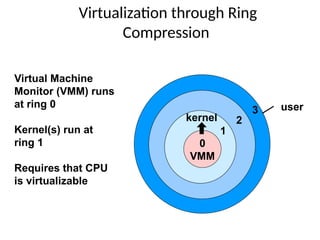
Virtualization through Ring
Compression
Virtual Machine
Monitor (VMM) runs
at ring 0
Kernel(s) run at
ring 1
Requires that CPU
is virtualizable
0
VMM
1
2
3 user
kernel
Benefits of Virtualization
• Easy manageability
• Elimination of Compatibility issues
• Fault isolation
• Improved security
• Improved utilization
• Portability
• Testing
• Rapid deployment
• Reduced Costs
Continued …
Research Activities @
CARE
11
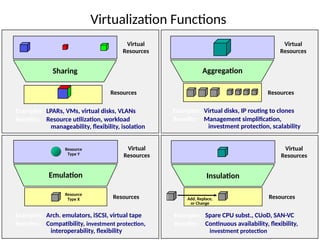
Virtualization Functions
Sharing
Virtual
Resources
Resources
Examples: LPARs, VMs, virtual disks, VLANs
Benefits: Resource utilization, workload
manageability, flexibility, isolation
Aggregation
Virtual
Resources
Resources
Examples: Virtual disks, IP routing to clones
Benefits: Management simplification,
investment protection, scalability
Emulation
Virtual
Resources
Resources
Examples: Arch. emulators, iSCSI, virtual tape
Benefits: Compatibility, investment protection,
interoperability, flexibility
Insulation
Add, Replace,
or Change
Virtual
Resources
Resources
Examples: Spare CPU subst., CUoD, SAN-VC
Benefits: Continuous availability, flexibility,
investment protection
Resource
Type Y
Resource
Type X
Introduction to Virtual machines
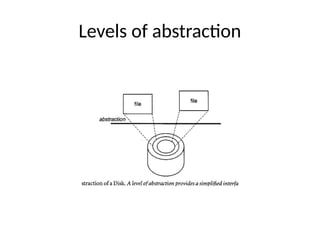
• The key to managing complexity in computer
systems is their division into levels of abstraction
separated by well-defined interfaces.
• Levels of abstraction allow implementation
details at lower levels of a design to be ignored
or simplified, thereby simplifying the design
of components at higher levels.
Levels of abstraction
Interfaces
• Well-defined interfaces allow computer
design tasks to be decoupled so that teams
of hardware and software designers can work
more or less independently.
• EX: Hardware engineers focused to implement
the IA32 instruction set on hardware, whereas
the software engineers developed a compiler
that convert HLL to the IA32 instruction set.
Drawbacks of Interfaces
• Subsystems and components designed to
specifications for one interface will not work
with those designed for another.
– e.g., Intel IA-32 and IBM PowerPC
• Application programs, when distributed as
program binaries, are tied to a specific
instruction set and operating system.
• An operating system is tied to a computer
that implements specific memory system
and I/O system interfaces.
Continued …
• The implicit assumption is that the hardware
resources of a system are managed by a
single operating system. This binds all
hardware resources into a single entity under
a single management regime.
• In turn, limits the flexibility of the system, not
only in terms of available application
software, but also in terms of security and
failure isolation, especially when the system
is shared by multiple users or groups of users.
How to Solve?
Virtualization
• Virtualization provides a way of relaxing
the foregoing constraints and increasing
flexibility. When a system (or subsystem), e.g.,
a processor, memory, or I/O device, is
virtualized, its interface and all resources
visible through the interface are mapped
onto the interface and resources of a real
system actually implementing it.
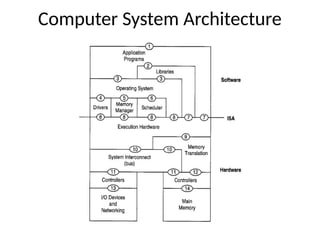
Computer System Architecture
Common terminologies
• User ISA
– ISA exposed for user applications
• System ISA
– ISA exposed for supervisory system
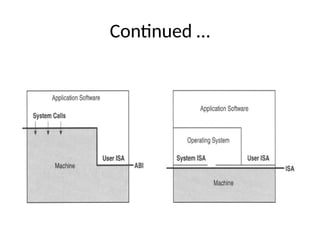
• Application Binary Interface
– User ISA and System Call
• Instruction Set Architecture separates hardware
from rest
• Application Binary Interface separates processes
from rest
Continued …
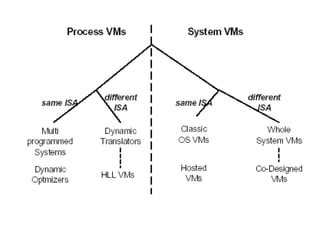
Types of Virtual machines
• Process Virtual Machine
• System Virtual Machine
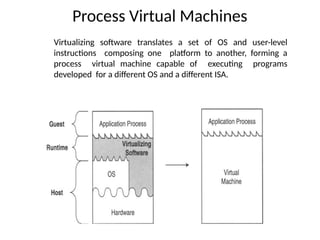
Process Virtual Machines
Virtualizing software translates a set of OS and user-level
instructions composing one platform to another, forming a
process virtual machine capable of executing programs
developed for a different OS and a different ISA.
Continued …
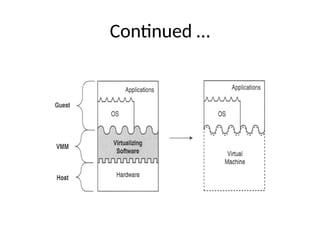
• Supporting individual processes
• Virtualization software is placed over the ABI
• Host – underlying platform
• Guest – software in VM
• Native – platform in the VM
• Virtualizing software – runtime that supports the guess
process and runs on top of operating system.
System VM
• Provides a complete system environment.
• Supports an operating system along with its
potentially many user processes.
• Provides a guest operating system with
access to underlying hardware resources,
including networking, I/O, a display and
graphical user interface.
Continued …
CPU virtualization –
Software Techniques
29
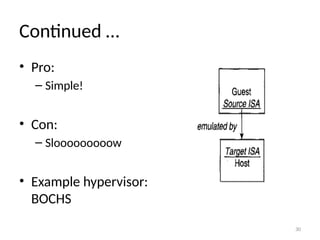
1.Emulation
• Do whatever the CPU does but in software
• Fetch the next instruction
• Decode – is it an ADD, a XOR, a MOV?
• Execute – using the emulated registers and memory
Example:
addl %ebx, %eax
is emulated as:
enum {EAX=0, EBX=1, ECX=2, EDX=3, …};
unsigned long regs[8];
regs[EAX] += regs[EBX];
30
Continued …
• Pro:
– Simple!
• Con:
– Slooooooooow
• Example hypervisor:
BOCHS
31
2. Trap and emulation
• Run the VM directly on the CPU – no emulation!
• Most of the code can execute just fine
– E.g., addl %ebx, %eax
• Some code needs hypervisor intervention
– int $0x80
– movl something, %cr3
– I/O
• Trap and emulate it!
– E.g., if guest runs int $0x80, trap it and execute guest’s
interrupt 0x80 handler
32
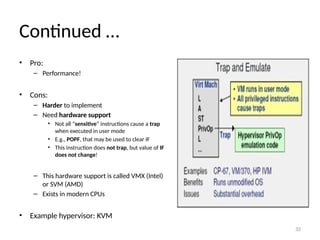
Continued …
• Pro:
– Performance!
• Cons:
– Harder to implement
– Need hardware support
• Not all “sensitive” instructions cause a trap
when executed in user mode
• E.g., POPF, that may be used to clear IF
• This instruction does not trap, but value of IF
does not change!
– This hardware support is called VMX (Intel)
or SVM (AMD)
– Exists in modern CPUs
• Example hypervisor: KVM
33
3. Dynamic (binary) translation
• Take a block of binary VM code that is about to be executed
• Translate it on the fly to “safe” code (like JIT – just in time
compilation)
• Execute the new “safe” code directly on the CPU
• Translation rules?
– Most code translates identically (e.g., movl %eax, %ebx translates to
itself)
– “Sensitive” operations are translated into hypercalls
• Hypercall – call into the hypervisor to ask for service
• Implemented as trapping instructions (unlike POPF)
• Similar to syscall – call into the OS to request service
34
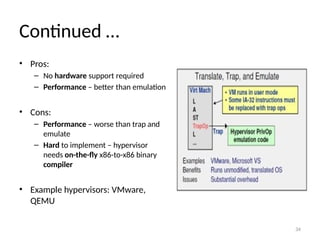
Continued …
• Pros:
– No hardware support required
– Performance – better than emulation
• Cons:
– Performance – worse than trap and
emulate
– Hard to implement – hypervisor
needs on-the-fly x86-to-x86 binary
compiler
• Example hypervisors: VMware,
QEMU
35
4.Paravirtualization!
• Does not run unmodified guest OSes
• Requires guest OS to “know” it is running on
top of a hypervisor
• E.g., instead of doing cli to turn off interrupts,
guest OS should do
hypercall(DISABLE_INTERRUPTS)
36
Continued …
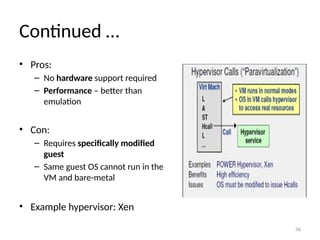
• Pros:
– No hardware support required
– Performance – better than
emulation
• Con:
– Requires specifically modified
guest
– Same guest OS cannot run in the
VM and bare-metal
• Example hypervisor: Xen
Hardware Technique - VTx
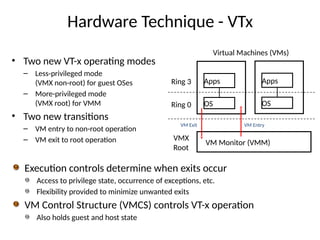
• Two new VT-x operating modes
– Less-privileged mode
(VMX non-root) for guest OSes
– More-privileged mode
(VMX root) for VMM
• Two new transitions
– VM entry to non-root operation
– VM exit to root operation
Ring 3
Ring 0
VMX
Root
Virtual Machines (VMs)
Apps
OS
VM Monitor (VMM)
Apps
OS
VM Exit VM Entry
Execution controls determine when exits occur
Access to privilege state, occurrence of exceptions, etc.
Flexibility provided to minimize unwanted exits
VM Control Structure (VMCS) controls VT-x operation
Also holds guest and host state
Memory Virtualization
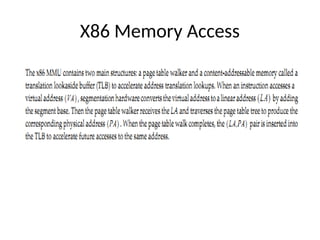
X86 Memory Access
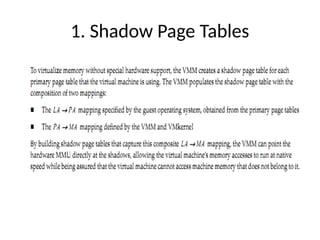
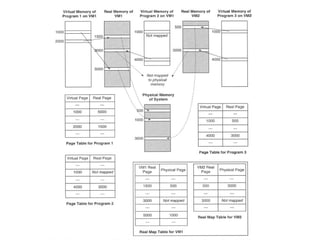
1. Shadow Page Tables
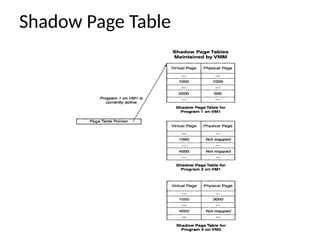
Shadow Page Table
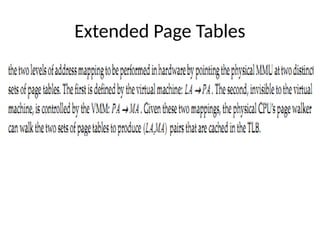
Extended Page Tables
Continued …
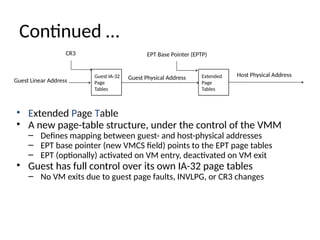
• Extended Page Table
• A new page-table structure, under the control of the VMM
– Defines mapping between guest- and host-physical addresses
– EPT base pointer (new VMCS field) points to the EPT page tables
– EPT (optionally) activated on VM entry, deactivated on VM exit
• Guest has full control over its own IA-32 page tables
– No VM exits due to guest page faults, INVLPG, or CR3 changes
Guest IA-32
Page
Tables
Guest Linear Address Guest Physical Address Extended
Page
Tables
Host Physical Address
EPT Base Pointer (EPTP)
CR3
Guest Linear Address
EPT
Tables
CR3
EPT
Tables
+
EPT Tables
+
Page Table
Page
Directory
Host Physical Address
Guest
Physical
Page Base
Address
+
Guest Physical
Address
Continued …
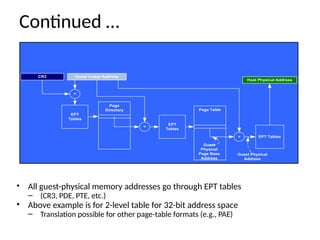
• All guest-physical memory addresses go through EPT tables
– (CR3, PDE, PTE, etc.)
• Above example is for 2-level table for 32-bit address space
– Translation possible for other page-table formats (e.g., PAE)
I/O Virtualization
Continued …
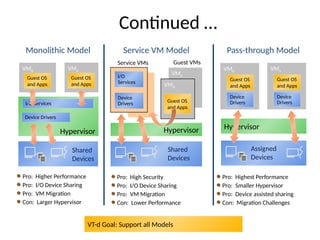
Pro: Higher Performance
Pro: I/O Device Sharing
Pro: VM Migration
Con: Larger Hypervisor
Hypervisor
Shared
Devices
I/O Services
Device Drivers
VM0
Guest OS
and Apps
VMn
Guest OS
and Apps
Monolithic Model
Pro: Highest Performance
Pro: Smaller Hypervisor
Pro: Device assisted sharing
Con: Migration Challenges
Assigned
Devices
Hypervisor
VM0
Guest OS
and Apps
Device
Drivers
VMn
Guest OS
and Apps
Device
Drivers
Pass-through Model
VT-d Goal: Support all Models
Pro: High Security
Pro: I/O Device Sharing
Pro: VM Migration
Con: Lower Performance
Shared
Devices
I/O
Services
Hypervisor
Device
Drivers
Service VMs
VMn
VM0
Guest OS
and Apps
Guest VMs
Service VM Model
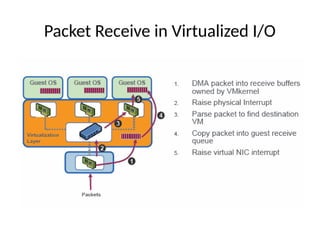
Packet Receive in Virtualized I/O
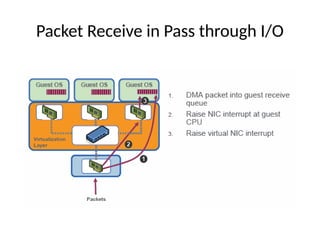
Packet Receive in Pass through I/O
High level view of Virtualization
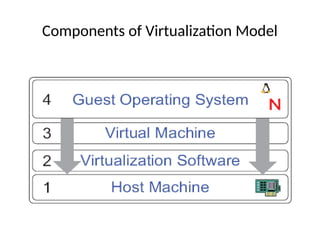
Components of Virtualization Model
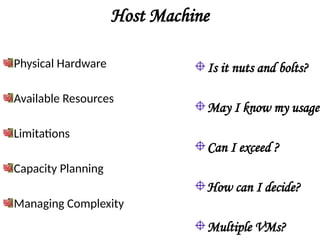
Host Machine
Physical Hardware
Available Resources
Limitations
Capacity Planning
Managing Complexity
Is it nuts and bolts?
May I know my usage?
Can I exceed ?
How can I decide?
Multiple VMs?
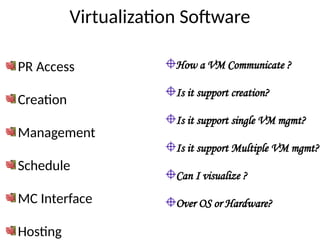
Virtualization Software
PR Access
Creation
Management
Schedule
MC Interface
Hosting
How a VM Communicate ?
Is it support creation?
Is it support single VM mgmt?
Is it support Multiple VM mgmt?
Can I visualize ?
Over OS or Hardware?
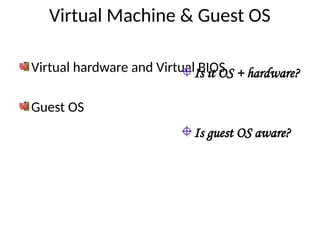
Virtual Machine & Guest OS
Virtual hardware and Virtual BIOS
Guest OS
Is it OS + hardware?
Is guest OS aware?
60
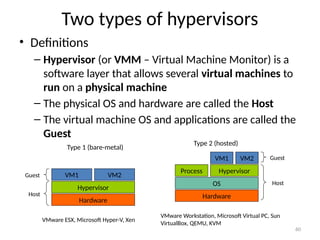
Two types of hypervisors
• Definitions
– Hypervisor (or VMM – Virtual Machine Monitor) is a
software layer that allows several virtual machines to
run on a physical machine
– The physical OS and hardware are called the Host
– The virtual machine OS and applications are called the
Guest
VMware ESX, Microsoft Hyper-V, Xen
Hardware
Hypervisor
VM1 VM2
Type 1 (bare-metal)
Host
Guest
Hardware
OS
Process Hypervisor
VM1 VM2
Type 2 (hosted)
VMware Workstation, Microsoft Virtual PC, Sun
VirtualBox, QEMU, KVM
Host
Guest
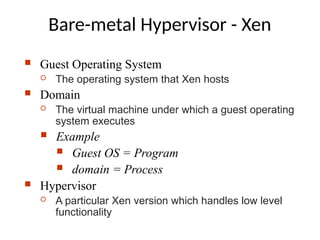
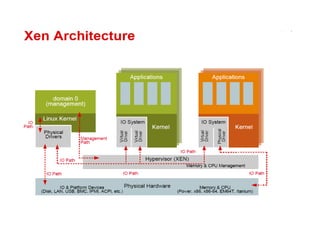
 Guest Operating System
 The operating system that Xen hosts
 Domain
 The virtual machine under which a guest operating
system executes
 Example
 Guest OS = Program
 domain = Process
 Hypervisor
 A particular Xen version which handles low level
functionality
Bare-metal Hypervisor - Xen
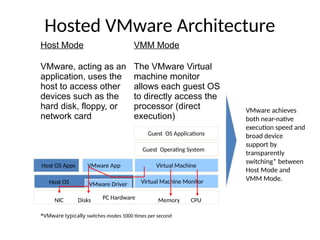
Hosted VMware Architecture
VMware achieves
both near-native
execution speed and
broad device
support by
transparently
switching* between
Host Mode and
VMM Mode.
Guest OS Applications
Guest Operating System
Host OS Apps
Host OS
PC Hardware
Disks Memory CPU
NIC
VMware App Virtual Machine
VMware Driver Virtual Machine Monitor
Host Mode VMM Mode
VMware, acting as an
application, uses the
host to access other
devices such as the
hard disk, floppy, or
network card
The VMware Virtual
machine monitor
allows each guest OS
to directly access the
processor (direct
execution)
*VMware typically switches modes 1000 times per second
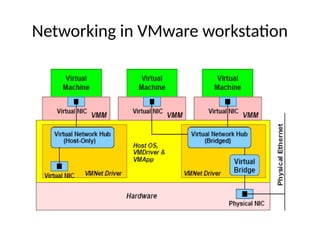
Networking in VMware workstation
VMware vs. Xen
• VMware can run any x86 OS unmodified
• Xen provides better performance (usually 2% on
benchmark tests vs. 20%)
• Xen doesn’t support Windows yet since it is illegal to
modify Windows
• Xen takes more work to get it up and running
• Xen is free and is being supported by the Linux
community including Red Hat (Fedora)
Questions?

Operating system Virtualization_NEW.pptx

  • 1.
  • 2.
    Agenda • Virtualization –Definition • History of Virtualization • Challenges in x86 architecture • Introduction to VMs • CPU virtualization • Memory Virtualization • I/O Virtualization • Types of Hypervisors • Xen • VMware Workstation
  • 3.
    What is Virtualization? “Virtualization is a framework or methodology of dividing the resources of a computer into multiple execution environments, by applying hardware and software partitioning, time-sharing, partial or complete machine simulation and/or emulation” Allows to run multiple OS on a single Physical machine Allows to dynamically create execution environments •Isolation •Encapsulation
  • 4.
    History of Virtualization •In 1960, mainframe computers are used to run a single application at a time and waste a lot of resources. • Split the resources of a mainframe computer and to execute multiple applications. • In 1980, x86 becomes a dominant architecture, introduces master-slave paradigm and virtualization no longer needed.
  • 5.
    Continued … • 1990,massive growth in computer technology and introduces a lot of challenges. – Low hardware infrastructure utilization; – Rising physical infrastructure costs; – Rising IT management costs; – Insufficient disaster protection; and – High maintenance and costly end-user desktops.
  • 6.
    Challenges in virtualizingx86 architecture • Ring Aliasing • Address space compression • Non faulting access to privileged state ( sensitive instructions) • Interrupt virtualization
  • 7.
    Virtualization through Ring Compression VirtualMachine Monitor (VMM) runs at ring 0 Kernel(s) run at ring 1 Requires that CPU is virtualizable 0 VMM 1 2 3 user kernel
  • 8.
    Benefits of Virtualization •Easy manageability • Elimination of Compatibility issues • Fault isolation • Improved security • Improved utilization • Portability • Testing • Rapid deployment • Reduced Costs
  • 9.
  • 10.
    Research Activities @ CARE 11 VirtualizationFunctions Sharing Virtual Resources Resources Examples: LPARs, VMs, virtual disks, VLANs Benefits: Resource utilization, workload manageability, flexibility, isolation Aggregation Virtual Resources Resources Examples: Virtual disks, IP routing to clones Benefits: Management simplification, investment protection, scalability Emulation Virtual Resources Resources Examples: Arch. emulators, iSCSI, virtual tape Benefits: Compatibility, investment protection, interoperability, flexibility Insulation Add, Replace, or Change Virtual Resources Resources Examples: Spare CPU subst., CUoD, SAN-VC Benefits: Continuous availability, flexibility, investment protection Resource Type Y Resource Type X
  • 11.
    Introduction to Virtualmachines • The key to managing complexity in computer systems is their division into levels of abstraction separated by well-defined interfaces. • Levels of abstraction allow implementation details at lower levels of a design to be ignored or simplified, thereby simplifying the design of components at higher levels.
  • 12.
  • 13.
    Interfaces • Well-defined interfacesallow computer design tasks to be decoupled so that teams of hardware and software designers can work more or less independently. • EX: Hardware engineers focused to implement the IA32 instruction set on hardware, whereas the software engineers developed a compiler that convert HLL to the IA32 instruction set.
  • 14.
    Drawbacks of Interfaces •Subsystems and components designed to specifications for one interface will not work with those designed for another. – e.g., Intel IA-32 and IBM PowerPC • Application programs, when distributed as program binaries, are tied to a specific instruction set and operating system. • An operating system is tied to a computer that implements specific memory system and I/O system interfaces.
  • 15.
    Continued … • Theimplicit assumption is that the hardware resources of a system are managed by a single operating system. This binds all hardware resources into a single entity under a single management regime. • In turn, limits the flexibility of the system, not only in terms of available application software, but also in terms of security and failure isolation, especially when the system is shared by multiple users or groups of users.
  • 16.
  • 17.
    Virtualization • Virtualization providesa way of relaxing the foregoing constraints and increasing flexibility. When a system (or subsystem), e.g., a processor, memory, or I/O device, is virtualized, its interface and all resources visible through the interface are mapped onto the interface and resources of a real system actually implementing it.
  • 18.
  • 19.
    Common terminologies • UserISA – ISA exposed for user applications • System ISA – ISA exposed for supervisory system • Application Binary Interface – User ISA and System Call • Instruction Set Architecture separates hardware from rest • Application Binary Interface separates processes from rest
  • 20.
  • 21.
    Types of Virtualmachines • Process Virtual Machine • System Virtual Machine
  • 22.
    Process Virtual Machines Virtualizingsoftware translates a set of OS and user-level instructions composing one platform to another, forming a process virtual machine capable of executing programs developed for a different OS and a different ISA.
  • 23.
    Continued … • Supportingindividual processes • Virtualization software is placed over the ABI • Host – underlying platform • Guest – software in VM • Native – platform in the VM • Virtualizing software – runtime that supports the guess process and runs on top of operating system.
  • 24.
    System VM • Providesa complete system environment. • Supports an operating system along with its potentially many user processes. • Provides a guest operating system with access to underlying hardware resources, including networking, I/O, a display and graphical user interface.
  • 25.
  • 27.
  • 28.
    29 1.Emulation • Do whateverthe CPU does but in software • Fetch the next instruction • Decode – is it an ADD, a XOR, a MOV? • Execute – using the emulated registers and memory Example: addl %ebx, %eax is emulated as: enum {EAX=0, EBX=1, ECX=2, EDX=3, …}; unsigned long regs[8]; regs[EAX] += regs[EBX];
  • 29.
    30 Continued … • Pro: –Simple! • Con: – Slooooooooow • Example hypervisor: BOCHS
  • 30.
    31 2. Trap andemulation • Run the VM directly on the CPU – no emulation! • Most of the code can execute just fine – E.g., addl %ebx, %eax • Some code needs hypervisor intervention – int $0x80 – movl something, %cr3 – I/O • Trap and emulate it! – E.g., if guest runs int $0x80, trap it and execute guest’s interrupt 0x80 handler
  • 31.
    32 Continued … • Pro: –Performance! • Cons: – Harder to implement – Need hardware support • Not all “sensitive” instructions cause a trap when executed in user mode • E.g., POPF, that may be used to clear IF • This instruction does not trap, but value of IF does not change! – This hardware support is called VMX (Intel) or SVM (AMD) – Exists in modern CPUs • Example hypervisor: KVM
  • 32.
    33 3. Dynamic (binary)translation • Take a block of binary VM code that is about to be executed • Translate it on the fly to “safe” code (like JIT – just in time compilation) • Execute the new “safe” code directly on the CPU • Translation rules? – Most code translates identically (e.g., movl %eax, %ebx translates to itself) – “Sensitive” operations are translated into hypercalls • Hypercall – call into the hypervisor to ask for service • Implemented as trapping instructions (unlike POPF) • Similar to syscall – call into the OS to request service
  • 33.
    34 Continued … • Pros: –No hardware support required – Performance – better than emulation • Cons: – Performance – worse than trap and emulate – Hard to implement – hypervisor needs on-the-fly x86-to-x86 binary compiler • Example hypervisors: VMware, QEMU
  • 34.
    35 4.Paravirtualization! • Does notrun unmodified guest OSes • Requires guest OS to “know” it is running on top of a hypervisor • E.g., instead of doing cli to turn off interrupts, guest OS should do hypercall(DISABLE_INTERRUPTS)
  • 35.
    36 Continued … • Pros: –No hardware support required – Performance – better than emulation • Con: – Requires specifically modified guest – Same guest OS cannot run in the VM and bare-metal • Example hypervisor: Xen
  • 36.
    Hardware Technique -VTx • Two new VT-x operating modes – Less-privileged mode (VMX non-root) for guest OSes – More-privileged mode (VMX root) for VMM • Two new transitions – VM entry to non-root operation – VM exit to root operation Ring 3 Ring 0 VMX Root Virtual Machines (VMs) Apps OS VM Monitor (VMM) Apps OS VM Exit VM Entry Execution controls determine when exits occur Access to privilege state, occurrence of exceptions, etc. Flexibility provided to minimize unwanted exits VM Control Structure (VMCS) controls VT-x operation Also holds guest and host state
  • 38.
  • 39.
  • 40.
  • 42.
  • 43.
  • 44.
    Continued … • ExtendedPage Table • A new page-table structure, under the control of the VMM – Defines mapping between guest- and host-physical addresses – EPT base pointer (new VMCS field) points to the EPT page tables – EPT (optionally) activated on VM entry, deactivated on VM exit • Guest has full control over its own IA-32 page tables – No VM exits due to guest page faults, INVLPG, or CR3 changes Guest IA-32 Page Tables Guest Linear Address Guest Physical Address Extended Page Tables Host Physical Address EPT Base Pointer (EPTP) CR3
  • 45.
    Guest Linear Address EPT Tables CR3 EPT Tables + EPTTables + Page Table Page Directory Host Physical Address Guest Physical Page Base Address + Guest Physical Address Continued … • All guest-physical memory addresses go through EPT tables – (CR3, PDE, PTE, etc.) • Above example is for 2-level table for 32-bit address space – Translation possible for other page-table formats (e.g., PAE)
  • 46.
  • 47.
    Continued … Pro: HigherPerformance Pro: I/O Device Sharing Pro: VM Migration Con: Larger Hypervisor Hypervisor Shared Devices I/O Services Device Drivers VM0 Guest OS and Apps VMn Guest OS and Apps Monolithic Model Pro: Highest Performance Pro: Smaller Hypervisor Pro: Device assisted sharing Con: Migration Challenges Assigned Devices Hypervisor VM0 Guest OS and Apps Device Drivers VMn Guest OS and Apps Device Drivers Pass-through Model VT-d Goal: Support all Models Pro: High Security Pro: I/O Device Sharing Pro: VM Migration Con: Lower Performance Shared Devices I/O Services Hypervisor Device Drivers Service VMs VMn VM0 Guest OS and Apps Guest VMs Service VM Model
  • 52.
    Packet Receive inVirtualized I/O
  • 53.
    Packet Receive inPass through I/O
  • 54.
    High level viewof Virtualization
  • 55.
  • 56.
    Host Machine Physical Hardware AvailableResources Limitations Capacity Planning Managing Complexity Is it nuts and bolts? May I know my usage? Can I exceed ? How can I decide? Multiple VMs?
  • 57.
    Virtualization Software PR Access Creation Management Schedule MCInterface Hosting How a VM Communicate ? Is it support creation? Is it support single VM mgmt? Is it support Multiple VM mgmt? Can I visualize ? Over OS or Hardware?
  • 58.
    Virtual Machine &Guest OS Virtual hardware and Virtual BIOS Guest OS Is it OS + hardware? Is guest OS aware?
  • 59.
    60 Two types ofhypervisors • Definitions – Hypervisor (or VMM – Virtual Machine Monitor) is a software layer that allows several virtual machines to run on a physical machine – The physical OS and hardware are called the Host – The virtual machine OS and applications are called the Guest VMware ESX, Microsoft Hyper-V, Xen Hardware Hypervisor VM1 VM2 Type 1 (bare-metal) Host Guest Hardware OS Process Hypervisor VM1 VM2 Type 2 (hosted) VMware Workstation, Microsoft Virtual PC, Sun VirtualBox, QEMU, KVM Host Guest
  • 60.
     Guest OperatingSystem  The operating system that Xen hosts  Domain  The virtual machine under which a guest operating system executes  Example  Guest OS = Program  domain = Process  Hypervisor  A particular Xen version which handles low level functionality Bare-metal Hypervisor - Xen
  • 62.
    Hosted VMware Architecture VMwareachieves both near-native execution speed and broad device support by transparently switching* between Host Mode and VMM Mode. Guest OS Applications Guest Operating System Host OS Apps Host OS PC Hardware Disks Memory CPU NIC VMware App Virtual Machine VMware Driver Virtual Machine Monitor Host Mode VMM Mode VMware, acting as an application, uses the host to access other devices such as the hard disk, floppy, or network card The VMware Virtual machine monitor allows each guest OS to directly access the processor (direct execution) *VMware typically switches modes 1000 times per second
  • 63.
  • 64.
    VMware vs. Xen •VMware can run any x86 OS unmodified • Xen provides better performance (usually 2% on benchmark tests vs. 20%) • Xen doesn’t support Windows yet since it is illegal to modify Windows • Xen takes more work to get it up and running • Xen is free and is being supported by the Linux community including Red Hat (Fedora)
  • 65.