Cloud Computing
(PCS5H001)
The Cloud Computing Stack
This architectural diagram illustrates the bottommost layer of the
cloud computing stack that is designated as the Virtual Server
The Cloud Computing Stack
The middle layer is called a Virtual Appliance which is a software
that installs as middleware onto a Virtual Server
The Cloud Computing Stack
The topmost layer of the cloud computing stack includes
the user interface and the APIs for the Application Layer
The Cloud Reference Model
Cloud Service Models (IaaS, PaaS, SaaS) w.r.t the Could Computing Stack
Cloud Computing is centered around
two important concepts
Load Balancing Virtualization
Load Balancing
• Technology to distribute user requests (network traffic) to individual
servers  Load Balancing
• Load balancing ensures even distribution of workload between the
servers
• Useful for optimal use of resources in back-end
• Two Types
• Hardware Load-balancing Devices (HLD)
• Eg. F5 BigIP Server
• Software-based Load Balancing (SLB)
• Eg. Apache mod_proxy_balancer, Ngnix, Varnish, HAProxy
Virtualization
• Virtualization is one of the most important concepts in Cloud
Computing
• It is the ability to run multiple operating systems on a single physical
system and share the underlying hardware resources optimally.
• It is the process by which one computer hosts the appearance of
many computers.
• Virtualization is used to improve IT throughput and costs by using
physical resources as a pool from which virtual resources can be
allocated.
Virtualization
Virtualization
Hardware
Operating
System
Applications
Hardware
CPU, Memory, Disk, NIC
Virtualization Layer (Hypervisor)
Operating
System
Applications
Operating
System
Applications
Operating
System
Applications
Hypervisor is a software program that manages multiple operating systems
(or multiple instances of the same operating system) on a single computer
system. The hypervisor manages the system's processor, memory, and other
resources to allocate what each operating system requires. Hypervisors are
designed for a particular processor architecture and are also called as Virtual
Machine Managers (VMM).
Server without Virtualization
• Only one OS can run at a
time within a server.
• Under-utilization of the
resources.
• Inflexible and costly
infrastructure.
• Hardware changes require
manual effort and access to
the physical server.
Hardware
CPU Memory NIC DISK
Operating System
Multiple Software
Applications
With Virtualization
• Can run multiple OS
simultaneously.
• Each OS can have
different hardware
configuration.
• Efficient utilization of
hardware resources.
• Each virtual machine is
independent.
• Easy to manage and
monitor VMs centrally.
• Save electricity, cost to
buy servers, space etc.
Hardware
CPU Memory NIC DISK
Hypervisor
Virtual Server 1
Operating System 1
Multiple Software
Applications
Virtual Server 2
Operating System 2
Multiple Software
Applications
Types of Hypervisors
Levels of Virtualization
What can be
virtualized?
1.Memory
2.CPU
3.Storage
4.Application
5.Desktop
6.Network
7.Hardware
8.Platform
9.… … …
Requirements of a VMM
• Defined by Popek & Goldberg (1974)
1. Equivalence / Fidelity
• A program running under the VMM should exhibit a behavior essentially identical to
that demonstrated when running on an equivalent machine directly.
2. Resource Control / Safety
• The VMM must be in complete control of the virtualized resources.
3. Efficiency / Performance
• A statistically dominant fraction of machine instructions must be executed without
VMM intervention.
Hypervisor & Xen Architecture
• Depending on Functionality two types:
1. Micro-kernel architecture (ex. Microsoft Hyper-V)
• Includes only basic functions like Memory Management and Processor Scheduling.
Device drivers are outside the hypervisor
• Code-base is smaller
2. Monolithic Architecture (ex. VMWare ESX)
• Includes all functions of micro-kernel architecture and also the functions of the device
drivers
• Code-base is larger
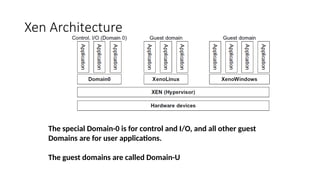
Xen Architecture
The special Domain-0 is for control and I/O, and all other guest
Domains are for user applications.
The guest domains are called Domain-U
Hypervisor & Xen Architecture
• Depending on Functionality two types:
1. Micro-kernel architecture (ex. Microsoft Hyper-V)
• Includes only basic functions like Memory Management and Processor Scheduling.
Device drivers are outside the hypervisor
• Code-base is smaller
2. Monolithic Architecture (ex. VMWare ESX)
• Includes all functions of micro-kernel architecture and also the functions of the device
drivers
• Code-base is larger
Xen Architecture
The special Domain-0 is for control and I/O, and all other guest
Domains are for user applications.
The guest domains are called Domain-U
Types of Virtualization
Different authors have classified virtualization into various different
categories. We’ll study the following techniques of virtualization:
• Full Virtualization
• Binary Translation
• Para-Virtualization (or OS-Assisted Virtualization)
• Hardware Assisted Virtualization
• OS-Level Virtualization
• Hosted Environment
Full Virtualization
• A virtual machine environment that provides a complete simulation of the
underlying hardware.
• All software (including all OS’s) capable of execution on the raw hardware can
be run in the virtual machine.
• Comprehensively simulate all computing elements as instruction set, main
memory, interrupts, exceptions, and device access.
• Full virtualization is only possible given the right combination of hardware and
software elements.
• Main Challenge:
• Effects of every operation of a VM must be kept within the VM
• Some machine instructions cannot be virtualized
Protection Levels of OS
Level-3
Lowest
privilege
Level-2
Level-1
Level -0
Highest
privilege
OS kernel
OS services
(device driver, etc.)
Applications
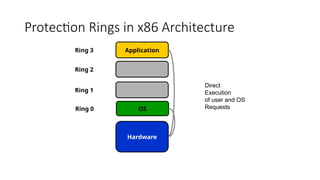
Protection Rings in x86 Architecture
Hardware
OS
Application
Ring 2
Ring 1
Ring 0
Ring 3
Direct
Execution
of user and OS
Requests
Full Virtualization with Binary Translation
• Non-virtualizable instructions are translated with new
instructions to produce the same effect
• Combination of binary translation and direct execution
makes Full Virtualization possible
• The guest OS is fully abstracted (or decoupled) from the
underlying hardware by the VMM layer
• The guest OS is NOT aware it is being virtualized and
therefore require no modification.
• The hypervisor translates all sensitive instructions on-the-fly
and caches the results for future use
• User level non-sensitive instructions run directly without any
modification/translation at native speed.
Binary Translation
Hardware
Guest OS
VMM
Application
Ring 2
Ring 1
Ring 0
Ring 3
Direct Execution
of virtualizable user
and OS requests
Binary translation
of non-
virtualizable OS
requests
The VMM puts itself at Ring 0 which is the highest privilege level
Examples: VMWare, Microsoft Virtual Server
Binary Translation
Binary translation from x86 to x86 virtualized in action. (Source: VMware)
Binary Translation- Disadvantages
• Performance may not be ideal because binary translation can be time-
consuming
• Full virtualization of I/O intensive applications could be a big challenge
• Caching of results of binary translation increases memory usage 
Less memory is available for sharing between guest OS’es
• Performance is about 80-97% of host machine
Para-Virtualization (OS-Assisted)
• Binary translation is not easy as it seems!
• It is difficult to build more sophisticated/complex Binary Translation
support for full virtualization
• Solution: - Modify the Guest OS  Para-Virtualization
• OS Kernel is modified to replace non-virtualizable instructions with
hypercalls that communicate directly with the VMM (hypervisor).
• The hypervisor also provides hypercall interfaces (APIs) for other critical
kernel operations such as memory management, interrupt handling and
time keeping
• The guest OS is aware that they are being virtualized
Para-Virtualization (OS-Assisted)
Hardware
Paravirtualized
Guest OS
Application
Ring 2
Ring 1
Ring 0
Ring 3
Direct
Execution
of user and OS
Requests
Hypercalls to the
Virtualization Layer
replace
non-virtualiable
OS instructions
Virtualization layer
Advantage: Reduces the overhead of Binary Translation & Caching
Examples: Kernel-based VM (Linux), Xen, VMWare ESX
Para-Virtualization (OS-Assisted)
Para-Virtualized OS
Hypercalls
Para-Virtualization: Disadvantages
• Para-Virtualization does NOT support unmodified OS
• Guest OS’s Kernel is modified for virtualization
• it can no longer run on hardware directly
• Compatibility & portability is an issue
• Cost of maintaining para-virtualized OS is high
• because they require deep kernel modifications
• Performance advantage may vary greatly depending on workload
variations
Hardware-Assisted Virtualization
• This is also known as Accelerated Virtualization, Hardware
Virtual Machine (e.g. Xen), or Native Virtualization (e.g.
Virtual Iron)
• Hardware design of the CPU for privileged instructions with
a new CPU execution mode -- allows the VMM to run in a
root mode below Ring 0 – called “VMX root” mode.
• Examples: Intel VT-x & VT-I Processors, AMD ‘s AMD-v
Processors
• Privileged and sensitive calls are set to automatically trap to
the hypervisor, removing the need for either Binary
Translation or Para-Virtualization.
• The guest state is stored in Virtual Machine Control
Structures (VT-x) or Virtual Machine Control Blocks (AMD-
V).
Hardware-Assisted Virtualization
Hardware
Guest OS
Application
Ring 2
Ring 1
Ring 0
Ring 3
Direct
Execution
of user and OS
Requests
OS requests traps
to VMM without
binary translation
or paravirtualization
VMM
Non-root
Mode
Privilege
Levels
VMX Root Mode
Privilege Level
Hardware-Assisted Virtualization
• Advantages:
• Reduces /eliminates the maintenance overhead of para-virtualization as it
does not need changes in the guest operating system
• It is considerably easier to obtain better performance
• Disadvantages:
• Requires explicit support in the host CPU
• Involves many VM traps  high CPU overheads
• Limited scalability & efficiency
• Rigid programming model
OS-Level Virtualization
• Kernel of a host OS allows for multiple isolated user-space instances
or Containers. Each guest OS instance is placed inside a container and
looks & feels like a real server.
• Works at the operating system (kernel) layer
• The isolated containers on a single physical server contains an OS
instance to utilize hardware, software with maximum efficiency.
• OS-level virtualization implementations are capable of live migration
can be used for dynamic load balancing of containers between nodes
in a cluster.
OS-Level Virtualization
Hardware
OS
Container 1
OS-Level Virtualization
Standard
Host OS
OS Virtualization Layer
OS
Container 2
OS
Container 3
Hosted Environment (User-mode Linux)
• UMLenables multiple virtual Linux kernel-based OS’es (known as
guests) to run as applications within a normal Linux system (known as
the host).
• Each guest OS is just like a normal application running as a process
in user space
• This approach provides the user with a way of running multiple virtual
Linux machines on a single piece of hardware
• It offers some isolation, generally without affecting the host
environment's configuration or stability.
Comparison
Full Virtualization Para-Virtualization H/w Assisted
Ring 3
Ring 2
Ring 1
Ring 0
User Apps User Apps User Apps
Guest OS
(unmodified)
VMM
Host H/w Host H/w
Host H/w
(modified CPU)
Guest OS
(modified)
VMM
Guest OS
(unmodified)
VMM
OS
Requests
Trap
to
VMM
by
CPU
Hypercalls
Binary
Translation
Memory Virtualization
Physical Memory Machine Memory
Traditional Execution Environment
Mapping by OS using
Page Tables
Virtual Memory Physical Memory Machine Memory
Mapping by OS using
Page Tables
Mapping by VMM using
Shadow Page Tables
Virtual Execution Environment
Memory Virtualization
Machine memory
Physical memory
Virtual memory
Process 1 Process 2
VM1
Process 1 Process 2
VM2
• To run multiple virtual machines on a single system,
another level of memory virtualization is required (two-
stage mapping)
• The VMM is responsible for mapping guest physical
memory to the actual machine memory, and it uses
shadow page tables to accelerate the mappings
Cloud Scaling
• A Cloud-computing model’s Scalability is defined as the ability to seamlessly
and instantly increase or decrease an IT solution’s size or capacity.
• There are two types of scalabilities in the Cloud architecture,
• Vertical Scaling
• and Horizontal Scaling.
• A server’s ability to enhance its capacity to handle the increasing workload is
termed Vertical Scaling.
• A system’s ability to add new instances to manage the distributed workload is
Horizontal Scaling.
• The Cloud service providers like ESDS – The Digital Transformation catalyst offer
auto Scaling Cloud architecture to optimize resources’ performance.
Benefits of Cloud Scaling
• Fast and Easy
• Cloud Scaling architecture enables instructing additional VMs to manage the increasing
workloads with just a few clicks. It eliminates the delay caused due to rising workloads.
• Cost efficiency
• Scaling horizontally or vertically is highly cost-efficient compared to an infrastructure where
resources are idle most of the time.
• Optimized Performance
• A scalable Cloud architecture efficiently manages a drastic rise and fall in traffic, thus
optimizing the performance. It ensures the effective utilization of resources, thus eliminating
idle resources or insufficient resource circumstances.
• Capacity
• The scalable architecture of the Cloud expands its capacity to manage the growing business
requirements.
Horizontal Scaling
• It is also called ‘scaling out’.
• Horizontal cloud scaling improves the cloud throughput by adding
new computing infrastructure.
• At a basic level, scaling out can mean adding new computing nodes or
machines to enhance the data processing and storage capabilities.
• Horizontal scaling is primarily useful for organizations that need high
availability and near-zero downtime for their online services.
• Compared to vertical scaling, horizontal scaling is quicker and easier
to accomplish.
• Generally, it takes place with minimal downtime or other disruptions.
Benefits of Horizontal Scaling
• Flexible Scaling tools
• Easy fault-tolerance
• Enhanced resilience due to discrete, multiple systems
• Easy to upgrade
• Limitless Scaling with endless additions of server instances
• Cost-effective implementation
Vertical Scaling
• Vertical cloud scaling enhances the technical specifications of existing
infrastructure by adding or replacing CPU, HDD, or other components.
• Decommissioning existing systems and replacing them with higher
capability infrastructure would also qualify as vertical scaling or
‘scaling up’.
• The old infrastructure is either discarded for scrap, resold, or
repurposed for less intensive business processes.
• Compared to horizontal scaling, vertical scaling can take longer and
may entail a period of downtime. However, scaling up is usually
cheaper than scaling out.
• Using the services of a third-party cloud vendor simplifies vertical
scaling for businesses.
• This is because ensuring sufficient cloud computing resources for
fulfilling scalability needs becomes the service provider’s duty.
• For the end user, scaling up can then be as simple as modifying the
instance size on a web interface.
Benefits of Vertical Scaling
• Flexible Scaling of resources
• Consumes less power
• Lower cooling cost
• Software cost-effective
• Reduced administrative efforts to manage a single system

KIIT_Cloud_scaling and Virtualization.pptx

  • 1.
  • 2.
    The Cloud ComputingStack This architectural diagram illustrates the bottommost layer of the cloud computing stack that is designated as the Virtual Server
  • 3.
    The Cloud ComputingStack The middle layer is called a Virtual Appliance which is a software that installs as middleware onto a Virtual Server
  • 4.
    The Cloud ComputingStack The topmost layer of the cloud computing stack includes the user interface and the APIs for the Application Layer
  • 5.
    The Cloud ReferenceModel Cloud Service Models (IaaS, PaaS, SaaS) w.r.t the Could Computing Stack
  • 6.
    Cloud Computing iscentered around two important concepts Load Balancing Virtualization
  • 7.
    Load Balancing • Technologyto distribute user requests (network traffic) to individual servers  Load Balancing • Load balancing ensures even distribution of workload between the servers • Useful for optimal use of resources in back-end • Two Types • Hardware Load-balancing Devices (HLD) • Eg. F5 BigIP Server • Software-based Load Balancing (SLB) • Eg. Apache mod_proxy_balancer, Ngnix, Varnish, HAProxy
  • 8.
    Virtualization • Virtualization isone of the most important concepts in Cloud Computing • It is the ability to run multiple operating systems on a single physical system and share the underlying hardware resources optimally. • It is the process by which one computer hosts the appearance of many computers. • Virtualization is used to improve IT throughput and costs by using physical resources as a pool from which virtual resources can be allocated.
  • 9.
  • 10.
    Virtualization Hardware Operating System Applications Hardware CPU, Memory, Disk,NIC Virtualization Layer (Hypervisor) Operating System Applications Operating System Applications Operating System Applications Hypervisor is a software program that manages multiple operating systems (or multiple instances of the same operating system) on a single computer system. The hypervisor manages the system's processor, memory, and other resources to allocate what each operating system requires. Hypervisors are designed for a particular processor architecture and are also called as Virtual Machine Managers (VMM).
  • 11.
    Server without Virtualization •Only one OS can run at a time within a server. • Under-utilization of the resources. • Inflexible and costly infrastructure. • Hardware changes require manual effort and access to the physical server. Hardware CPU Memory NIC DISK Operating System Multiple Software Applications
  • 12.
    With Virtualization • Canrun multiple OS simultaneously. • Each OS can have different hardware configuration. • Efficient utilization of hardware resources. • Each virtual machine is independent. • Easy to manage and monitor VMs centrally. • Save electricity, cost to buy servers, space etc. Hardware CPU Memory NIC DISK Hypervisor Virtual Server 1 Operating System 1 Multiple Software Applications Virtual Server 2 Operating System 2 Multiple Software Applications
  • 13.
  • 14.
    Levels of Virtualization Whatcan be virtualized? 1.Memory 2.CPU 3.Storage 4.Application 5.Desktop 6.Network 7.Hardware 8.Platform 9.… … …
  • 15.
    Requirements of aVMM • Defined by Popek & Goldberg (1974) 1. Equivalence / Fidelity • A program running under the VMM should exhibit a behavior essentially identical to that demonstrated when running on an equivalent machine directly. 2. Resource Control / Safety • The VMM must be in complete control of the virtualized resources. 3. Efficiency / Performance • A statistically dominant fraction of machine instructions must be executed without VMM intervention.
  • 16.
    Hypervisor & XenArchitecture • Depending on Functionality two types: 1. Micro-kernel architecture (ex. Microsoft Hyper-V) • Includes only basic functions like Memory Management and Processor Scheduling. Device drivers are outside the hypervisor • Code-base is smaller 2. Monolithic Architecture (ex. VMWare ESX) • Includes all functions of micro-kernel architecture and also the functions of the device drivers • Code-base is larger
  • 17.
    Xen Architecture The specialDomain-0 is for control and I/O, and all other guest Domains are for user applications. The guest domains are called Domain-U
  • 18.
    Hypervisor & XenArchitecture • Depending on Functionality two types: 1. Micro-kernel architecture (ex. Microsoft Hyper-V) • Includes only basic functions like Memory Management and Processor Scheduling. Device drivers are outside the hypervisor • Code-base is smaller 2. Monolithic Architecture (ex. VMWare ESX) • Includes all functions of micro-kernel architecture and also the functions of the device drivers • Code-base is larger
  • 19.
    Xen Architecture The specialDomain-0 is for control and I/O, and all other guest Domains are for user applications. The guest domains are called Domain-U
  • 20.
    Types of Virtualization Differentauthors have classified virtualization into various different categories. We’ll study the following techniques of virtualization: • Full Virtualization • Binary Translation • Para-Virtualization (or OS-Assisted Virtualization) • Hardware Assisted Virtualization • OS-Level Virtualization • Hosted Environment
  • 21.
    Full Virtualization • Avirtual machine environment that provides a complete simulation of the underlying hardware. • All software (including all OS’s) capable of execution on the raw hardware can be run in the virtual machine. • Comprehensively simulate all computing elements as instruction set, main memory, interrupts, exceptions, and device access. • Full virtualization is only possible given the right combination of hardware and software elements. • Main Challenge: • Effects of every operation of a VM must be kept within the VM • Some machine instructions cannot be virtualized
  • 22.
    Protection Levels ofOS Level-3 Lowest privilege Level-2 Level-1 Level -0 Highest privilege OS kernel OS services (device driver, etc.) Applications
  • 23.
    Protection Rings inx86 Architecture Hardware OS Application Ring 2 Ring 1 Ring 0 Ring 3 Direct Execution of user and OS Requests
  • 24.
    Full Virtualization withBinary Translation • Non-virtualizable instructions are translated with new instructions to produce the same effect • Combination of binary translation and direct execution makes Full Virtualization possible • The guest OS is fully abstracted (or decoupled) from the underlying hardware by the VMM layer • The guest OS is NOT aware it is being virtualized and therefore require no modification. • The hypervisor translates all sensitive instructions on-the-fly and caches the results for future use • User level non-sensitive instructions run directly without any modification/translation at native speed.
  • 25.
    Binary Translation Hardware Guest OS VMM Application Ring2 Ring 1 Ring 0 Ring 3 Direct Execution of virtualizable user and OS requests Binary translation of non- virtualizable OS requests The VMM puts itself at Ring 0 which is the highest privilege level Examples: VMWare, Microsoft Virtual Server
  • 26.
    Binary Translation Binary translationfrom x86 to x86 virtualized in action. (Source: VMware)
  • 27.
    Binary Translation- Disadvantages •Performance may not be ideal because binary translation can be time- consuming • Full virtualization of I/O intensive applications could be a big challenge • Caching of results of binary translation increases memory usage  Less memory is available for sharing between guest OS’es • Performance is about 80-97% of host machine
  • 28.
    Para-Virtualization (OS-Assisted) • Binarytranslation is not easy as it seems! • It is difficult to build more sophisticated/complex Binary Translation support for full virtualization • Solution: - Modify the Guest OS  Para-Virtualization • OS Kernel is modified to replace non-virtualizable instructions with hypercalls that communicate directly with the VMM (hypervisor). • The hypervisor also provides hypercall interfaces (APIs) for other critical kernel operations such as memory management, interrupt handling and time keeping • The guest OS is aware that they are being virtualized
  • 29.
    Para-Virtualization (OS-Assisted) Hardware Paravirtualized Guest OS Application Ring2 Ring 1 Ring 0 Ring 3 Direct Execution of user and OS Requests Hypercalls to the Virtualization Layer replace non-virtualiable OS instructions Virtualization layer Advantage: Reduces the overhead of Binary Translation & Caching Examples: Kernel-based VM (Linux), Xen, VMWare ESX
  • 30.
  • 31.
    Para-Virtualization: Disadvantages • Para-Virtualizationdoes NOT support unmodified OS • Guest OS’s Kernel is modified for virtualization • it can no longer run on hardware directly • Compatibility & portability is an issue • Cost of maintaining para-virtualized OS is high • because they require deep kernel modifications • Performance advantage may vary greatly depending on workload variations
  • 32.
    Hardware-Assisted Virtualization • Thisis also known as Accelerated Virtualization, Hardware Virtual Machine (e.g. Xen), or Native Virtualization (e.g. Virtual Iron) • Hardware design of the CPU for privileged instructions with a new CPU execution mode -- allows the VMM to run in a root mode below Ring 0 – called “VMX root” mode. • Examples: Intel VT-x & VT-I Processors, AMD ‘s AMD-v Processors • Privileged and sensitive calls are set to automatically trap to the hypervisor, removing the need for either Binary Translation or Para-Virtualization. • The guest state is stored in Virtual Machine Control Structures (VT-x) or Virtual Machine Control Blocks (AMD- V).
  • 33.
    Hardware-Assisted Virtualization Hardware Guest OS Application Ring2 Ring 1 Ring 0 Ring 3 Direct Execution of user and OS Requests OS requests traps to VMM without binary translation or paravirtualization VMM Non-root Mode Privilege Levels VMX Root Mode Privilege Level
  • 34.
    Hardware-Assisted Virtualization • Advantages: •Reduces /eliminates the maintenance overhead of para-virtualization as it does not need changes in the guest operating system • It is considerably easier to obtain better performance • Disadvantages: • Requires explicit support in the host CPU • Involves many VM traps  high CPU overheads • Limited scalability & efficiency • Rigid programming model
  • 35.
    OS-Level Virtualization • Kernelof a host OS allows for multiple isolated user-space instances or Containers. Each guest OS instance is placed inside a container and looks & feels like a real server. • Works at the operating system (kernel) layer • The isolated containers on a single physical server contains an OS instance to utilize hardware, software with maximum efficiency. • OS-level virtualization implementations are capable of live migration can be used for dynamic load balancing of containers between nodes in a cluster.
  • 36.
    OS-Level Virtualization Hardware OS Container 1 OS-LevelVirtualization Standard Host OS OS Virtualization Layer OS Container 2 OS Container 3
  • 37.
    Hosted Environment (User-modeLinux) • UMLenables multiple virtual Linux kernel-based OS’es (known as guests) to run as applications within a normal Linux system (known as the host). • Each guest OS is just like a normal application running as a process in user space • This approach provides the user with a way of running multiple virtual Linux machines on a single piece of hardware • It offers some isolation, generally without affecting the host environment's configuration or stability.
  • 38.
    Comparison Full Virtualization Para-VirtualizationH/w Assisted Ring 3 Ring 2 Ring 1 Ring 0 User Apps User Apps User Apps Guest OS (unmodified) VMM Host H/w Host H/w Host H/w (modified CPU) Guest OS (modified) VMM Guest OS (unmodified) VMM OS Requests Trap to VMM by CPU Hypercalls Binary Translation
  • 39.
    Memory Virtualization Physical MemoryMachine Memory Traditional Execution Environment Mapping by OS using Page Tables Virtual Memory Physical Memory Machine Memory Mapping by OS using Page Tables Mapping by VMM using Shadow Page Tables Virtual Execution Environment
  • 40.
    Memory Virtualization Machine memory Physicalmemory Virtual memory Process 1 Process 2 VM1 Process 1 Process 2 VM2 • To run multiple virtual machines on a single system, another level of memory virtualization is required (two- stage mapping) • The VMM is responsible for mapping guest physical memory to the actual machine memory, and it uses shadow page tables to accelerate the mappings
  • 41.
    Cloud Scaling • ACloud-computing model’s Scalability is defined as the ability to seamlessly and instantly increase or decrease an IT solution’s size or capacity. • There are two types of scalabilities in the Cloud architecture, • Vertical Scaling • and Horizontal Scaling. • A server’s ability to enhance its capacity to handle the increasing workload is termed Vertical Scaling. • A system’s ability to add new instances to manage the distributed workload is Horizontal Scaling. • The Cloud service providers like ESDS – The Digital Transformation catalyst offer auto Scaling Cloud architecture to optimize resources’ performance.
  • 42.
    Benefits of CloudScaling • Fast and Easy • Cloud Scaling architecture enables instructing additional VMs to manage the increasing workloads with just a few clicks. It eliminates the delay caused due to rising workloads. • Cost efficiency • Scaling horizontally or vertically is highly cost-efficient compared to an infrastructure where resources are idle most of the time. • Optimized Performance • A scalable Cloud architecture efficiently manages a drastic rise and fall in traffic, thus optimizing the performance. It ensures the effective utilization of resources, thus eliminating idle resources or insufficient resource circumstances. • Capacity • The scalable architecture of the Cloud expands its capacity to manage the growing business requirements.
  • 43.
    Horizontal Scaling • Itis also called ‘scaling out’. • Horizontal cloud scaling improves the cloud throughput by adding new computing infrastructure. • At a basic level, scaling out can mean adding new computing nodes or machines to enhance the data processing and storage capabilities.
  • 44.
    • Horizontal scalingis primarily useful for organizations that need high availability and near-zero downtime for their online services. • Compared to vertical scaling, horizontal scaling is quicker and easier to accomplish. • Generally, it takes place with minimal downtime or other disruptions.
  • 45.
    Benefits of HorizontalScaling • Flexible Scaling tools • Easy fault-tolerance • Enhanced resilience due to discrete, multiple systems • Easy to upgrade • Limitless Scaling with endless additions of server instances • Cost-effective implementation
  • 46.
    Vertical Scaling • Verticalcloud scaling enhances the technical specifications of existing infrastructure by adding or replacing CPU, HDD, or other components. • Decommissioning existing systems and replacing them with higher capability infrastructure would also qualify as vertical scaling or ‘scaling up’. • The old infrastructure is either discarded for scrap, resold, or repurposed for less intensive business processes. • Compared to horizontal scaling, vertical scaling can take longer and may entail a period of downtime. However, scaling up is usually cheaper than scaling out.
  • 47.
    • Using theservices of a third-party cloud vendor simplifies vertical scaling for businesses. • This is because ensuring sufficient cloud computing resources for fulfilling scalability needs becomes the service provider’s duty. • For the end user, scaling up can then be as simple as modifying the instance size on a web interface.
  • 48.
    Benefits of VerticalScaling • Flexible Scaling of resources • Consumes less power • Lower cooling cost • Software cost-effective • Reduced administrative efforts to manage a single system