I/O Virtualization
Hwanju Kim
1
I/O Virtualization
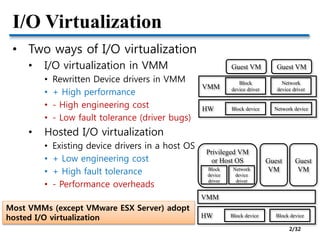
• Two ways of I/O virtualization
• I/O virtualization in VMM
• Rewritten Device drivers in VMM
• + High performance
• - High engineering cost
• - Low fault tolerance (driver bugs)
• Hosted I/O virtualization
• Existing device drivers in a host OS
• + Low engineering cost
• + High fault tolerance
• - Performance overheads
VMM
Guest VM
Block
device driver
Network
device driver
HW Block device Network device
Guest VM
VMM
Privileged VM
or Host OS
Block
device
driver
HW Block device Block device
Guest
VMNetwork
device
driver
Guest
VM
Most VMMs (except VMware ESX Server) adopt
hosted I/O virtualization
2/32
I/O Virtualization
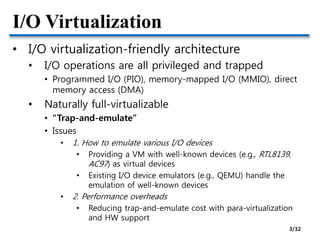
• I/O virtualization-friendly architecture
• I/O operations are all privileged and trapped
• Programmed I/O (PIO), memory-mapped I/O (MMIO), direct
memory access (DMA)
• Naturally full-virtualizable
• “Trap-and-emulate”
• Issues
• 1. How to emulate various I/O devices
• Providing a VM with well-known devices (e.g., RTL8139,
AC97) as virtual devices
• Existing I/O device emulators (e.g., QEMU) handle the
emulation of well-known devices
• 2. Performance overheads
• Reducing trap-and-emulate cost with para-virtualization
and HW support
3/32
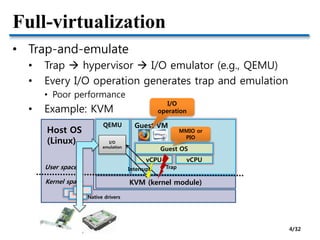
Full-virtualization
• Trap-and-emulate
• Trap  hypervisor  I/O emulator (e.g., QEMU)
• Every I/O operation generates trap and emulation
• Poor performance
• Example: KVM
Guest VM
Guest OS
Host OS
(Linux)
KVM (kernel module)
QEMU
vCPU vCPU
User space
Kernel space
I/O
emulation
I/O
operation
MMIO or
PIO
Trap
Native drivers
Interrupt
4/32
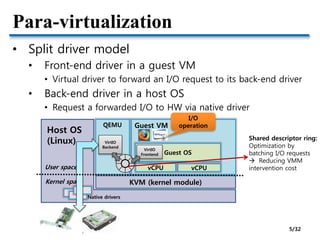
Para-virtualization
• Split driver model
• Front-end driver in a guest VM
• Virtual driver to forward an I/O request to its back-end driver
• Back-end driver in a host OS
• Request a forwarded I/O to HW via native driver
Guest VM
Guest OS
Host OS
(Linux)
KVM (kernel module)
QEMU
vCPU vCPUUser space
Kernel space
VirtIO
Backend
I/O
operation
Native drivers
VirtIO
Frontend
Shared descriptor ring:
Optimization by
batching I/O requests
 Reducing VMM
intervention cost
5/32
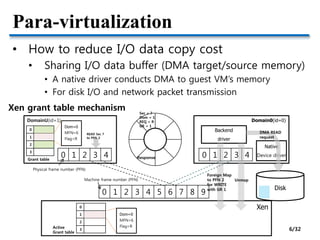
Para-virtualization
• How to reduce I/O data copy cost
• Sharing I/O data buffer (DMA target/source memory)
• A native driver conducts DMA to guest VM’s memory
• For disk I/O and network packet transmission
DomainU(id=1) Domain0(id=0)
Xen
0 1 2 3 4 5 6 7 8 9
0 1 2 3 4 0 1 2 3 4
0
1
2
3
Native
Device driver
READ Sec 7
to PFN 3
0
1
2
3
Dom=0
MFN=6
Flag=R
Sec = 7
Dom = 1
REQ = R
GR = 1
Backend
driver
Foreign Map
to PFN 2
for WRITE
with GR 1
Dom=0
MFN=6
Flag=R
Disk
DMA READ
request
Unmap
ResponseGrant table
Active
Grant table
Physical frame number (PFN)
Machine frame number (PFN)
Xen grant table mechanism
6/32
Para-virtualization
• How about network packet reception?
• Before DMA, VMM cannot know which VM is the
destination of a received packet
• Unavoidable overhead with SW methods
• Two approches in Xen
Domain0 DomainU
Buffer
Packet
Page flipping (remapping)
- Zero-copy
Domain0 DomainU
Buffer
Packet
Page copying
- Single-copy
Packet
+ No copy cost
- Map/unmap cost
+ No map/unmap cost
(some costs before optimization)
- Copy cost
Network optimizations for PV guests [Xen Summit’06]
7/32
Para-virtualization
• Does copy cost outweigh map/unmap cost?
• Map/unmap involves several hypervisor interventions
• Copy cost is slightly higher than map/unmap (i.e., flip) cost
• “Pre-mapped” optimization makes page copying better than
page flipping
• Pre-mapping socket buffer reduces map/unmap overheads
Network optimizations for PV guests [Xen Summit’06]
Page copying is the default in Xen
8/32
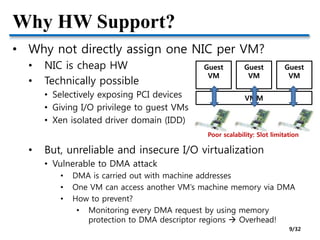
Why HW Support?
• Why not directly assign one NIC per VM?
• NIC is cheap HW
• Technically possible
• Selectively exposing PCI devices
• Giving I/O privilege to guest VMs
• Xen isolated driver domain (IDD)
• But, unreliable and insecure I/O virtualization
• Vulnerable to DMA attack
• DMA is carried out with machine addresses
• One VM can access another VM’s machine memory via DMA
• How to prevent?
• Monitoring every DMA request by using memory
protection to DMA descriptor regions  Overhead!
Guest
VM
Guest
VM
Guest
VM
VMM
Poor scalability: Slot limitation
9/32
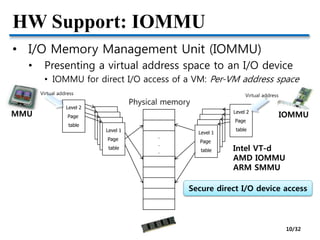
HW Support: IOMMU
• I/O Memory Management Unit (IOMMU)
• Presenting a virtual address space to an I/O device
• IOMMU for direct I/O access of a VM: Per-VM address space
Level 2
Page
table
Page
table
Page
table
Page
table
Level 1
Page
table
.
.
.
Physical memory
Virtual address
MMU Level 2
Page
table
Page
table
Page
table
Page
table
Level 1
Page
table
Virtual address
IOMMU
Intel VT-d
AMD IOMMU
ARM SMMU
Secure direct I/O device access
10/32
How to Deal with HW Scalability
• How to directly assign NICs to tens of hundreds
of VMs consolidated in a physical machine?
• PCI slots are limited
• Can a single NIC support multiple VMs separately?
• A specialized device for virtualized environments
• Multi-queue NIC
• CDNA
• SR-IOV
11/32
HW Support: Multi-queue NIC
• Multi-queue NIC
• A NIC has multiple queues
• Each queue is mapped to a VM
• L2 classifier in HW
• Reducing receive-side overheads
• Drawback
• L2 SW switch is still need
• e.g., Intel VT-c VMDq
Enhance KVM for Intel® Virtualization
Technology for Connectivity [KVMForum’08]
12/32
HW Support: CDNA
• CDNA: Concurrent Direct Network Access
• Rice Univ.’s project
• Research prototype: FPGA-based NIC
• SW-based DMA protection without IOMMU
Concurrent Direct Network Access in Virtual Machine Monitors [HPCA’07] 13/32
HW Support: SR-IOV
• SR-IOV (Single Rooted I/O Virtualization)
• PCI-SIG standard
• HW NIC virtualization
• Virtual function is accessed as
an independent NIC by a VM
• No VMM intervention in I/O path
Source: http://www.maximumpc.com/article/maximum_it/intel_launches_industrys_first_10gbaset_server_adapter
Intel 82599 10Gb NIC
Enhance KVM for Intel® Virtualization
Technology for Connectivity [KVMForum’08]
14/32
Network Optimization Research
• Architectural optimization
• Diagnosing Performance Overheads in the Xen
Virtual Machine Environment [VEE’05]
• Optimizing Network Virtualization in Xen [USENIX’06]
• I/O virtualization optimization
• Bridging the Gap between Software and Hardware
Techniques for I/O Virtualization [USENIX’08]
• Achieving 10 Gb/s using Safe and Transparent
Network Interface Virtualization [VEE’09]
15/32
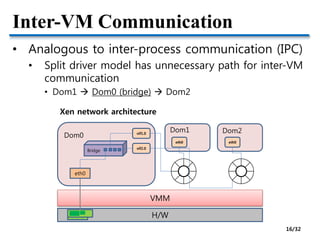
Inter-VM Communication
• Analogous to inter-process communication (IPC)
• Split driver model has unnecessary path for inter-VM
communication
• Dom1  Dom0 (bridge)  Dom2
H/W
Dom1 Dom2
Dom0
VMM
eth0
eth0 eth0
vif1.0
vif2.0
Bridge
Xen network architecture
16/32
Inter-VM Communication
• High-performance inter-VM communication
based on shared memory
• Research projects
• Depending on which layer is interposed for inter-VM
communication
• XenSocket [Middleware’07]
• XWAY [VEE’08]
• XenLoop [HPDC’08]
• Fido [USENIX’09]
17/32
Inter-VM Communication: XWAY
• XWAY
• Socket-level inter-VM communication
• Inter-domain socket communications supporting high
performance and full binary compatibility on Xen [VEE’08]
Interface based on
shared memory
18/32
Inter-VM Communication: XenLoop
• XenLoop
• Driver-level inter-VM communication
• XenLoop: a transparent high performance inter-vm network
loopback [HPDC’08]
Module-based
implementation
 Practical
19/32
Summary
• I/O virtualization
• Focused on reducing performance overheads
• Network virtualization overhead matters in 10Gbps network
• Prevalent paravirtualized I/O
• Module-based split driver model has been adopted in
mainline
• HW support for I/O virtualization
• SR-IOV NIC & IOMMU mostly eliminates I/O virtualization
overheads
20/32
GPU VIRTUALIZATION
21
GPU is I/O device or Computing unit?
• Traditional graphics devices
• GPU as an I/O device (output device)
• Framebuffer abstraction
• Exposing screen area as a memory region
• 2D/3D graphics acceleration
• Offloading complex rendering operations from CPU to GPU
• Library: OpenGL, Direct3D
• Why offloading?
• Graphics operations are massively parallel in a SIMD manner
• GPU is a massively parallel device with hundreds of cores
• Why not a computing device?
• General-purpose GPU (GPGPU)
• Not only handling graphics operations, but also processing
general parallel programs
• Library: OpenCL, CUDA
22/32
GPU Virtualization
• SW-level approach
• GPU multiplexing
• A GPU is shared by multiple VMs
• Two approaches
• Low-level abstraction: Virtual GPU (device emulation)
• High-level abstraction: API remoting
• HW-level approach
• Direct assignment
• GPU pass-through
• Supported by high-end GPUs
GPU Virtualization on VMware’s Hosted I/O Architecture [OSR’09]
23/32
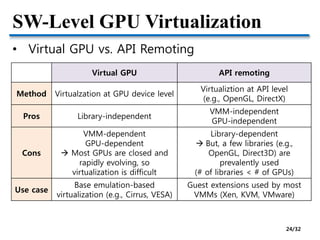
SW-Level GPU Virtualization
• Virtual GPU vs. API Remoting
Virtual GPU API remoting
Method Virtualzation at GPU device level
Virtualiztion at API level
(e.g., OpenGL, DirectX)
Pros Library-independent
VMM-independent
GPU-independent
Cons
VMM-dependent
GPU-dependent
 Most GPUs are closed and
rapidly evolving, so
virtualization is difficult
Library-dependent
 But, a few libraries (e.g.,
OpenGL, Direct3D) are
prevalently used
(# of libraries < # of GPUs)
Use case
Base emulation-based
virtualization (e.g., Cirrus, VESA)
Guest extensions used by most
VMMs (Xen, KVM, VMware)
24/32
API Remoting: VMGL
• OpenGL apps in X11 systems
VMGL: VMM-Independent Graphics Acceleration [XenSummit’07, VEE07] 25/32
API Remoting: VMGL
• VMGL apps in an X11 guest VM
VMGL: VMM-Independent Graphics Acceleration [XenSummit’07, VEE07] 26/32
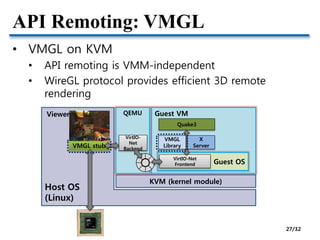
API Remoting: VMGL
• VMGL on KVM
• API remoting is VMM-independent
• WireGL protocol provides efficient 3D remote
rendering
Guest VM
Guest OS
Host OS
(Linux)
KVM (kernel module)
QEMU
VirtIO-
Net
Backend
VirtIO-Net
Frontend
Quake3
VMGL
Library
X
ServerVMGL stub
Viewer
27/32
HW-Level GPU Virtualization
• GPU pass-through
• Direct assignment of GPU to a VM
• Supported by high-end GPUs
• Two types (defined by VMware)
• Fixed pass-through 1:1
• High-performance, but low scalability
• Mediated pass-through 1:N
GPU Virtualization on VMware’s Hosted I/O Architecture [OSR’09]
GPU provides multiple context,
so a set of contexts can be directly assigned to
each VM
28/32
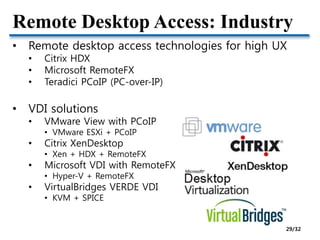
Remote Desktop Access: Industry
• Remote desktop access technologies for high UX
• Citrix HDX
• Microsoft RemoteFX
• Teradici PCoIP (PC-over-IP)
• VDI solutions
• VMware View with PCoIP
• VMware ESXi + PCoIP
• Citrix XenDesktop
• Xen + HDX + RemoteFX
• Microsoft VDI with RemoteFX
• Hyper-V + RemoteFX
• VirtualBridges VERDE VDI
• KVM + SPICE
29/32
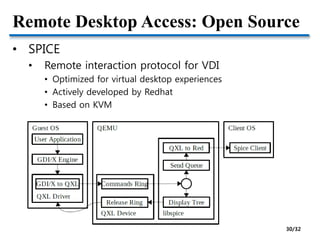
Remote Desktop Access: Open Source
• SPICE
• Remote interaction protocol for VDI
• Optimized for virtual desktop experiences
• Actively developed by Redhat
• Based on KVM
30/32
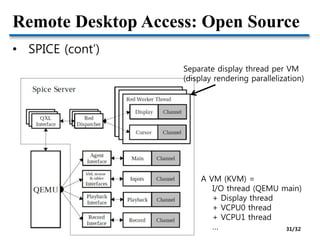
Remote Desktop Access: Open Source
• SPICE (cont’)
Separate display thread per VM
(display rendering parallelization)
A VM (KVM) =
I/O thread (QEMU main)
+ Display thread
+ VCPU0 thread
+ VCPU1 thread
… 31/32
Summary
• GPU virtualization
• GPU is mostly closed
• Low-level GPU virtualization is technically complicated
• Instead, high-level abstraction well hides underlying complexity
• API remoting is an appropriate solution
• GPU is not only for client devices, but also for servers
• Virtual desktop infrastructure (VDI)
• GPU instance provided by public clouds
• Cluster GPU Instances for Amazon EC2
32/32

5. IO virtualization

  • 1.
  • 2.
    I/O Virtualization • Twoways of I/O virtualization • I/O virtualization in VMM • Rewritten Device drivers in VMM • + High performance • - High engineering cost • - Low fault tolerance (driver bugs) • Hosted I/O virtualization • Existing device drivers in a host OS • + Low engineering cost • + High fault tolerance • - Performance overheads VMM Guest VM Block device driver Network device driver HW Block device Network device Guest VM VMM Privileged VM or Host OS Block device driver HW Block device Block device Guest VMNetwork device driver Guest VM Most VMMs (except VMware ESX Server) adopt hosted I/O virtualization 2/32
  • 3.
    I/O Virtualization • I/Ovirtualization-friendly architecture • I/O operations are all privileged and trapped • Programmed I/O (PIO), memory-mapped I/O (MMIO), direct memory access (DMA) • Naturally full-virtualizable • “Trap-and-emulate” • Issues • 1. How to emulate various I/O devices • Providing a VM with well-known devices (e.g., RTL8139, AC97) as virtual devices • Existing I/O device emulators (e.g., QEMU) handle the emulation of well-known devices • 2. Performance overheads • Reducing trap-and-emulate cost with para-virtualization and HW support 3/32
  • 4.
    Full-virtualization • Trap-and-emulate • Trap hypervisor  I/O emulator (e.g., QEMU) • Every I/O operation generates trap and emulation • Poor performance • Example: KVM Guest VM Guest OS Host OS (Linux) KVM (kernel module) QEMU vCPU vCPU User space Kernel space I/O emulation I/O operation MMIO or PIO Trap Native drivers Interrupt 4/32
  • 5.
    Para-virtualization • Split drivermodel • Front-end driver in a guest VM • Virtual driver to forward an I/O request to its back-end driver • Back-end driver in a host OS • Request a forwarded I/O to HW via native driver Guest VM Guest OS Host OS (Linux) KVM (kernel module) QEMU vCPU vCPUUser space Kernel space VirtIO Backend I/O operation Native drivers VirtIO Frontend Shared descriptor ring: Optimization by batching I/O requests  Reducing VMM intervention cost 5/32
  • 6.
    Para-virtualization • How toreduce I/O data copy cost • Sharing I/O data buffer (DMA target/source memory) • A native driver conducts DMA to guest VM’s memory • For disk I/O and network packet transmission DomainU(id=1) Domain0(id=0) Xen 0 1 2 3 4 5 6 7 8 9 0 1 2 3 4 0 1 2 3 4 0 1 2 3 Native Device driver READ Sec 7 to PFN 3 0 1 2 3 Dom=0 MFN=6 Flag=R Sec = 7 Dom = 1 REQ = R GR = 1 Backend driver Foreign Map to PFN 2 for WRITE with GR 1 Dom=0 MFN=6 Flag=R Disk DMA READ request Unmap ResponseGrant table Active Grant table Physical frame number (PFN) Machine frame number (PFN) Xen grant table mechanism 6/32
  • 7.
    Para-virtualization • How aboutnetwork packet reception? • Before DMA, VMM cannot know which VM is the destination of a received packet • Unavoidable overhead with SW methods • Two approches in Xen Domain0 DomainU Buffer Packet Page flipping (remapping) - Zero-copy Domain0 DomainU Buffer Packet Page copying - Single-copy Packet + No copy cost - Map/unmap cost + No map/unmap cost (some costs before optimization) - Copy cost Network optimizations for PV guests [Xen Summit’06] 7/32
  • 8.
    Para-virtualization • Does copycost outweigh map/unmap cost? • Map/unmap involves several hypervisor interventions • Copy cost is slightly higher than map/unmap (i.e., flip) cost • “Pre-mapped” optimization makes page copying better than page flipping • Pre-mapping socket buffer reduces map/unmap overheads Network optimizations for PV guests [Xen Summit’06] Page copying is the default in Xen 8/32
  • 9.
    Why HW Support? •Why not directly assign one NIC per VM? • NIC is cheap HW • Technically possible • Selectively exposing PCI devices • Giving I/O privilege to guest VMs • Xen isolated driver domain (IDD) • But, unreliable and insecure I/O virtualization • Vulnerable to DMA attack • DMA is carried out with machine addresses • One VM can access another VM’s machine memory via DMA • How to prevent? • Monitoring every DMA request by using memory protection to DMA descriptor regions  Overhead! Guest VM Guest VM Guest VM VMM Poor scalability: Slot limitation 9/32
  • 10.
    HW Support: IOMMU •I/O Memory Management Unit (IOMMU) • Presenting a virtual address space to an I/O device • IOMMU for direct I/O access of a VM: Per-VM address space Level 2 Page table Page table Page table Page table Level 1 Page table . . . Physical memory Virtual address MMU Level 2 Page table Page table Page table Page table Level 1 Page table Virtual address IOMMU Intel VT-d AMD IOMMU ARM SMMU Secure direct I/O device access 10/32
  • 11.
    How to Dealwith HW Scalability • How to directly assign NICs to tens of hundreds of VMs consolidated in a physical machine? • PCI slots are limited • Can a single NIC support multiple VMs separately? • A specialized device for virtualized environments • Multi-queue NIC • CDNA • SR-IOV 11/32
  • 12.
    HW Support: Multi-queueNIC • Multi-queue NIC • A NIC has multiple queues • Each queue is mapped to a VM • L2 classifier in HW • Reducing receive-side overheads • Drawback • L2 SW switch is still need • e.g., Intel VT-c VMDq Enhance KVM for Intel® Virtualization Technology for Connectivity [KVMForum’08] 12/32
  • 13.
    HW Support: CDNA •CDNA: Concurrent Direct Network Access • Rice Univ.’s project • Research prototype: FPGA-based NIC • SW-based DMA protection without IOMMU Concurrent Direct Network Access in Virtual Machine Monitors [HPCA’07] 13/32
  • 14.
    HW Support: SR-IOV •SR-IOV (Single Rooted I/O Virtualization) • PCI-SIG standard • HW NIC virtualization • Virtual function is accessed as an independent NIC by a VM • No VMM intervention in I/O path Source: http://www.maximumpc.com/article/maximum_it/intel_launches_industrys_first_10gbaset_server_adapter Intel 82599 10Gb NIC Enhance KVM for Intel® Virtualization Technology for Connectivity [KVMForum’08] 14/32
  • 15.
    Network Optimization Research •Architectural optimization • Diagnosing Performance Overheads in the Xen Virtual Machine Environment [VEE’05] • Optimizing Network Virtualization in Xen [USENIX’06] • I/O virtualization optimization • Bridging the Gap between Software and Hardware Techniques for I/O Virtualization [USENIX’08] • Achieving 10 Gb/s using Safe and Transparent Network Interface Virtualization [VEE’09] 15/32
  • 16.
    Inter-VM Communication • Analogousto inter-process communication (IPC) • Split driver model has unnecessary path for inter-VM communication • Dom1  Dom0 (bridge)  Dom2 H/W Dom1 Dom2 Dom0 VMM eth0 eth0 eth0 vif1.0 vif2.0 Bridge Xen network architecture 16/32
  • 17.
    Inter-VM Communication • High-performanceinter-VM communication based on shared memory • Research projects • Depending on which layer is interposed for inter-VM communication • XenSocket [Middleware’07] • XWAY [VEE’08] • XenLoop [HPDC’08] • Fido [USENIX’09] 17/32
  • 18.
    Inter-VM Communication: XWAY •XWAY • Socket-level inter-VM communication • Inter-domain socket communications supporting high performance and full binary compatibility on Xen [VEE’08] Interface based on shared memory 18/32
  • 19.
    Inter-VM Communication: XenLoop •XenLoop • Driver-level inter-VM communication • XenLoop: a transparent high performance inter-vm network loopback [HPDC’08] Module-based implementation  Practical 19/32
  • 20.
    Summary • I/O virtualization •Focused on reducing performance overheads • Network virtualization overhead matters in 10Gbps network • Prevalent paravirtualized I/O • Module-based split driver model has been adopted in mainline • HW support for I/O virtualization • SR-IOV NIC & IOMMU mostly eliminates I/O virtualization overheads 20/32
  • 21.
  • 22.
    GPU is I/Odevice or Computing unit? • Traditional graphics devices • GPU as an I/O device (output device) • Framebuffer abstraction • Exposing screen area as a memory region • 2D/3D graphics acceleration • Offloading complex rendering operations from CPU to GPU • Library: OpenGL, Direct3D • Why offloading? • Graphics operations are massively parallel in a SIMD manner • GPU is a massively parallel device with hundreds of cores • Why not a computing device? • General-purpose GPU (GPGPU) • Not only handling graphics operations, but also processing general parallel programs • Library: OpenCL, CUDA 22/32
  • 23.
    GPU Virtualization • SW-levelapproach • GPU multiplexing • A GPU is shared by multiple VMs • Two approaches • Low-level abstraction: Virtual GPU (device emulation) • High-level abstraction: API remoting • HW-level approach • Direct assignment • GPU pass-through • Supported by high-end GPUs GPU Virtualization on VMware’s Hosted I/O Architecture [OSR’09] 23/32
  • 24.
    SW-Level GPU Virtualization •Virtual GPU vs. API Remoting Virtual GPU API remoting Method Virtualzation at GPU device level Virtualiztion at API level (e.g., OpenGL, DirectX) Pros Library-independent VMM-independent GPU-independent Cons VMM-dependent GPU-dependent  Most GPUs are closed and rapidly evolving, so virtualization is difficult Library-dependent  But, a few libraries (e.g., OpenGL, Direct3D) are prevalently used (# of libraries < # of GPUs) Use case Base emulation-based virtualization (e.g., Cirrus, VESA) Guest extensions used by most VMMs (Xen, KVM, VMware) 24/32
  • 25.
    API Remoting: VMGL •OpenGL apps in X11 systems VMGL: VMM-Independent Graphics Acceleration [XenSummit’07, VEE07] 25/32
  • 26.
    API Remoting: VMGL •VMGL apps in an X11 guest VM VMGL: VMM-Independent Graphics Acceleration [XenSummit’07, VEE07] 26/32
  • 27.
    API Remoting: VMGL •VMGL on KVM • API remoting is VMM-independent • WireGL protocol provides efficient 3D remote rendering Guest VM Guest OS Host OS (Linux) KVM (kernel module) QEMU VirtIO- Net Backend VirtIO-Net Frontend Quake3 VMGL Library X ServerVMGL stub Viewer 27/32
  • 28.
    HW-Level GPU Virtualization •GPU pass-through • Direct assignment of GPU to a VM • Supported by high-end GPUs • Two types (defined by VMware) • Fixed pass-through 1:1 • High-performance, but low scalability • Mediated pass-through 1:N GPU Virtualization on VMware’s Hosted I/O Architecture [OSR’09] GPU provides multiple context, so a set of contexts can be directly assigned to each VM 28/32
  • 29.
    Remote Desktop Access:Industry • Remote desktop access technologies for high UX • Citrix HDX • Microsoft RemoteFX • Teradici PCoIP (PC-over-IP) • VDI solutions • VMware View with PCoIP • VMware ESXi + PCoIP • Citrix XenDesktop • Xen + HDX + RemoteFX • Microsoft VDI with RemoteFX • Hyper-V + RemoteFX • VirtualBridges VERDE VDI • KVM + SPICE 29/32
  • 30.
    Remote Desktop Access:Open Source • SPICE • Remote interaction protocol for VDI • Optimized for virtual desktop experiences • Actively developed by Redhat • Based on KVM 30/32
  • 31.
    Remote Desktop Access:Open Source • SPICE (cont’) Separate display thread per VM (display rendering parallelization) A VM (KVM) = I/O thread (QEMU main) + Display thread + VCPU0 thread + VCPU1 thread … 31/32
  • 32.
    Summary • GPU virtualization •GPU is mostly closed • Low-level GPU virtualization is technically complicated • Instead, high-level abstraction well hides underlying complexity • API remoting is an appropriate solution • GPU is not only for client devices, but also for servers • Virtual desktop infrastructure (VDI) • GPU instance provided by public clouds • Cluster GPU Instances for Amazon EC2 32/32