Virtualization
Based on materials from:
Introduction to Virtual Machines by Carl Waldspurger
Understanding Intel® Virtualization Technology (VT) by N. B. Sahgal and D. Rodgers
Intel Virtualization Technology Roadmap and VT-d Support in Xen by Jun Nakajima
A Performance Comparison of Container-based Virtualization Systems for MapReduce
Clusters by M. G. Xavier, M. V. Neves, and C.A.F. De Rose
© 2010 VMware Inc. All rights reserved
Starting Point: A Physical Machine
■ Physical Hardware
• Processors, memory, chipset, I/O
devices, etc.
• Resources often grossly
underutilized
■ Software
• Tightly coupled to physical
hardware
• Single active OS instance
• OS controls hardware
What is a Virtual Machine?
■ Software Abstraction
• Behaves like hardware
• Encapsulates all OS and
application state
■ Virtualization Layer
• Extra level of indirection
• Decouples hardware, OS
• Enforces isolation
• Multiplexes physical hardware
across VMs
Virtualization Properties
■ Isolation
• Fault isolation
• Performance isolation
■ Encapsulation
• Cleanly capture all VM state
• Enables VM snapshots, clones
■ Portability
• Independent of physical hardware
• Enables migration of live, running VMs
■ Interposition
• Transformations on instructions, memory, I/O
• Enables transparent resource overcommitment,
encryption, compression, replication …
1
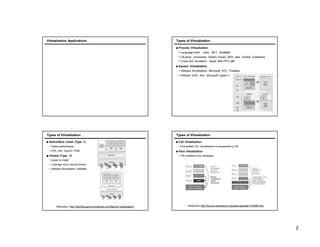
Virtualization Applications Types of Virtualization
■ Process Virtualization
• Language-level Java, .NET, Smalltalk
• OS-level processes, Solaris Zones, BSD Jails, Docker Containers
• Cross-ISA emulation Apple 68K-PPC-x86
■ System Virtualization
• VMware Workstation, Microsoft VPC, Parallels
• VMware ESX, Xen, Microsoft Hyper-V
Types of Virtualization
■ Native/Bare metal (Type 1)
• Higher performance
• ESX, Xen, HyperV, KVM
■ Hosted (Type 2)
• Easier to install
• Leverage host’s device drivers
• VMware Workstation, Parallels
Attribution: http://itechthoughts.wordpress.com/tag/full-virtualization/
Types of Virtualization
■ Full virtualization
• Unmodified OS, virtualization is transparent to OS
■ Para virtualization
• OS modified to be virtualized
Attribution http://forums.techarena.in/guides-tutorials/1104460.htm
2
What is a Virtual Machine Monitor?
■ Classic Definition (Popek and Goldberg ’74)
■ VMM Properties
• Equivalent execution: Programs running in the virtualized environment run
identically to running natively.
• Performance: A statistically dominant subset of the instructions must be
executed directly on the CPU.
• Safety and isolation: A VMM most completely control system resources.
What Needs to Virtualized Virtualized?
Guest OS + Applications
Virtual Machine Monitor
Page
Fault
Undef
Instr
vIRQ
MMU
Emulation
CPU
Emulation
I/O
Emulation
Unprivileged
Privileged
■ Processor
■ Memory
■ IO
Processor Virtualization
An architecture is classically/strictly virtualizable if all its sensitive
instructions (those that violate safety and encapsulation) are a
subset of the privileged instructions.
■ all instructions either trap or execute identically
■ instructions that access privileged state trap
Attribution: http://itechthoughts.wordpress.com/tag/full-virtualization/
Trap and Emulate
■ Run guest operating system deprivileged
■ All privileged instructions trap into VMM
■ VMM emulates instructions against virtual state
e.g. disable virtual interrupts, not physical interrupts
■ Resume direct execution from next guest instruction
3
x86 Virtualization Challenges
■ Not Classically Virtualizable
• x86 ISA includes instructions that read or modify privileged state
• But which don’t trap in unprivileged mode
■ Example: POPF instruction
• Pop top-of-stack into EFLAGS register
• EFLAGS.IF bit privileged (interrupt enable flag)
• POPF silently ignores attempts to alter EFLAGS.IF in unprivileged mode!
• So no trap to return control to VMM
■ Deprivileging not possible with x86!
x86 Virtualization Approaches
■ Binary translation
■ Para virtualization
■ HW support
Processor Paravirtualization
■ Make OS aware of virtualization
■ Present to OS software interface that is similar, but not identical to
underlying hardware
■ Replace dangerous system calls with calls to VMM
• Page table updates
■ Advantages: High performance
■ Disadvantages: Requires porting OS
■ Examples: Xen
HW Support
■ Intel VT-x
• Codenamed "Vanderpool"
• Available since Itanium 2 (2005), Xeon and Centrino (2006)
■ AMD-V
• Codename “Pacifica”
• Available since Athlon 64 (2006)
4
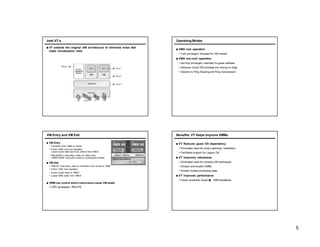
Intel VT-x
■ VT extends the original x86 architecture to eliminate holes that
make virtualization hard.
Operating Modes
■ VMX root operation:
• Fully privileged, intended for VM monitor
■ VMX non-root operation:
• Not fully privileged, intended for guest software
• Reduces Guest SW privilege w/o relying on rings
• Solution to Ring Aliasing and Ring Compression
VM Entry and VM Exit
■ VM Entry
• Transition from VMM to Guest
• Enters VMX non-root operation
Loads Guest state and Exit criteria from VMCS
• VMLAUNCH instruction used on initial entry
VMRESUME instruction used on subsequent entries
■ VM Exit
• VMEXIT instruction used on transition from Guest to VMM
• Enters VMX root operation
• Saves Guest state in VMCS
• Loads VMM state from VMCS
■ VMM can control which instructions cause VM exists
• CR3 accesses, INVLPG
Benefits: VT Helps Improve VMMs
■ VT Reduces guest OS dependency
• Eliminates need for binary patching / translation
• Facilitates support for Legacy OS
■ VT improves robustness
• Eliminates need for complex SW techniques
• Simpler and smaller VMMs
• Smaller trusted-computing base
■ VT improves performance
• Fewer unwanted Guest � VMM transitions
5
x86 Memory Management Primer
■ The processor operates with virtual addresses
■ Physical memory operates with physical addresses
■ x86 includes a hardware translation lookaside buffer (TLB)
• Maps virtual to physical page addresses
■ x86 handles TLB misses in HW
• CR3 points to page table root
• HW walks the page tables
• Inserts virtual to physical mapping
Memory Virtualization
■ Native
■ Virtualized
Memory Virtualization Techniques
■ Shadow page tables
■ Paravirtualization
■ HW supported nested page tables
Shadow Page Tables
■ Keep a second set of page tables hidden from guest
■ Map between guest virtual and machine pages
■ Detect when guest changes page tables
• TLB invalidation requests, page table creation, write to existing page tables
■ Update shadow page accordingly
■ On context switch, install shadow page instead of guest page
■ Advantages: Can support unmodified guest
■ Disadvantages: Significant overhead to maintain consistency
■ Examples: VMware and Xen HVM
6
Memory Paravirtualization
■ Page table maps between virtual and machine addresses
■ OS and VMM share page tables
■ OS can only read
■ Changes to page table require hyper call
• VMM validates that guest owns machine address
■ Advantages: Higher performance can be achieved by batching
updates
■ Disadvantages: Requires changes to the OS
■ Examples: Xen
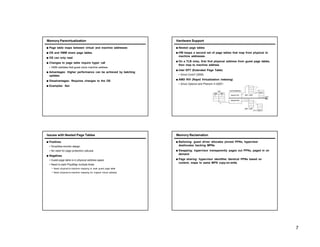
Hardware Support
■ Nested page tables
■ HW keeps a second set of page tables that map from physical to
machine addresses.
■ On a TLB miss, first find physical address from guest page tables,
then map to machine address
■ Intel EPT (Extended Page Table)
• Since Corei7 (2008)
■ AMD RVI (Rapid Virtualization Indexing)
• Since Opteron and Phenom II (2007)
Issues with Nested Page Tables
■ Positives
• Simplifies monitor design
• No need for page protection calculus
■ Negatives
• Guest page table is in physical address space
• Need to walk PhysMap multiple times
• Need physical-to-machine mapping to walk guest page table
• Need physical-to-machine mapping for original virtual address
Memory Reclamation
■ Balloning: guest driver allocates pinned PPNs, hypervisor
deallocates backing MPNs
■ Swapping: hypervisor transparently pages out PPNs, paged in on
demand
■ Page sharing: hypervisor identifies identical PPNs based on
content, maps to same MPN copy-on-write
7
Ballooning Page Sharing
Page Sharing I/O Virtualization
■ Emulation
■ Paravirtualization (split driver)
■ Direct mapped/PCI passthrough
■ Hardware support
8
Emulation
■ Guest runs original driver
■ VMM emulates HW in SW
■ Advantages: Can run unmodified guest
■ Disadvantages: Slow
IO Paravirtualization
■ Slip driver approach
■ Privileged domain interact with IO devices, exports high level
interface as back-end drive
■ Guest domain implements front end driver
■ Front and back end drivers
Direct Mapped/PCI Passthrough
■ Allocate a physical device to a specific domain
■ Driver runs of guest domain
■ Cannot use DMA
■ DMA uses physical addresses.
■ Breaks isolation
Hardware Support
■ IOMMU (IO Memory Management Unit)
■ Translates memory addresses from “IO space” to “physical space”
■ Provides isolation. Limits device’s ability to access machine
memory.
■ Intel VT-d
■ Core 2 (2008)
■ AMD-Vi
■ Six Core Opteron (2010)
9
Intel VT-d
■ Provides infrastructure for I/O virtualization
■ DMA and interrupt remapping
VT-d Applied to Pass-through Model
■ Direct Device Assignment to Guest OS
■ Guest OS directly programs physical
device
■ VMM sets up guest- to host-physical
DMA mapping
■ PCI-SIG I/O Virtualization Working Group
■ Activity towards standardizing
natively sharable I/O devices
■ IOV devices provide virtual
interfaces, each independently
assignable to VMs
■ Advantages: High performance and
simple VMM
■ Disadvantages: Limits VM migration
Operating System Level Virtualization
• aka Container-based Virtualization
• Shared operating system
• A group of OS processes in an insolated environment
• Lightweight virtualization layer
Operating System-Level Virtualization
• Each container has:
• Own virtual network interface (and IP Address)
• Own filesystem
• Isolation
• Processes in different containers can not see each other
• Allocation of RAM, CPU, I/O
• Examples
• Linux Vserver, OpenVZ, LXC
10
Hypervisor vs. System-Level Virtualization
Hypervisor OS-Level/Container
Different Kernel OS Single Kernel
Device Emulation Syscall
Limits per machine Limits per process
Higher overhead Lower overhead
More secure Less secure
11

Virtualization of computing and servers

  • 1.
    Virtualization Based on materialsfrom: Introduction to Virtual Machines by Carl Waldspurger Understanding Intel® Virtualization Technology (VT) by N. B. Sahgal and D. Rodgers Intel Virtualization Technology Roadmap and VT-d Support in Xen by Jun Nakajima A Performance Comparison of Container-based Virtualization Systems for MapReduce Clusters by M. G. Xavier, M. V. Neves, and C.A.F. De Rose © 2010 VMware Inc. All rights reserved Starting Point: A Physical Machine ■ Physical Hardware • Processors, memory, chipset, I/O devices, etc. • Resources often grossly underutilized ■ Software • Tightly coupled to physical hardware • Single active OS instance • OS controls hardware What is a Virtual Machine? ■ Software Abstraction • Behaves like hardware • Encapsulates all OS and application state ■ Virtualization Layer • Extra level of indirection • Decouples hardware, OS • Enforces isolation • Multiplexes physical hardware across VMs Virtualization Properties ■ Isolation • Fault isolation • Performance isolation ■ Encapsulation • Cleanly capture all VM state • Enables VM snapshots, clones ■ Portability • Independent of physical hardware • Enables migration of live, running VMs ■ Interposition • Transformations on instructions, memory, I/O • Enables transparent resource overcommitment, encryption, compression, replication … 1
  • 2.
    Virtualization Applications Typesof Virtualization ■ Process Virtualization • Language-level Java, .NET, Smalltalk • OS-level processes, Solaris Zones, BSD Jails, Docker Containers • Cross-ISA emulation Apple 68K-PPC-x86 ■ System Virtualization • VMware Workstation, Microsoft VPC, Parallels • VMware ESX, Xen, Microsoft Hyper-V Types of Virtualization ■ Native/Bare metal (Type 1) • Higher performance • ESX, Xen, HyperV, KVM ■ Hosted (Type 2) • Easier to install • Leverage host’s device drivers • VMware Workstation, Parallels Attribution: http://itechthoughts.wordpress.com/tag/full-virtualization/ Types of Virtualization ■ Full virtualization • Unmodified OS, virtualization is transparent to OS ■ Para virtualization • OS modified to be virtualized Attribution http://forums.techarena.in/guides-tutorials/1104460.htm 2
  • 3.
    What is aVirtual Machine Monitor? ■ Classic Definition (Popek and Goldberg ’74) ■ VMM Properties • Equivalent execution: Programs running in the virtualized environment run identically to running natively. • Performance: A statistically dominant subset of the instructions must be executed directly on the CPU. • Safety and isolation: A VMM most completely control system resources. What Needs to Virtualized Virtualized? Guest OS + Applications Virtual Machine Monitor Page Fault Undef Instr vIRQ MMU Emulation CPU Emulation I/O Emulation Unprivileged Privileged ■ Processor ■ Memory ■ IO Processor Virtualization An architecture is classically/strictly virtualizable if all its sensitive instructions (those that violate safety and encapsulation) are a subset of the privileged instructions. ■ all instructions either trap or execute identically ■ instructions that access privileged state trap Attribution: http://itechthoughts.wordpress.com/tag/full-virtualization/ Trap and Emulate ■ Run guest operating system deprivileged ■ All privileged instructions trap into VMM ■ VMM emulates instructions against virtual state e.g. disable virtual interrupts, not physical interrupts ■ Resume direct execution from next guest instruction 3
  • 4.
    x86 Virtualization Challenges ■Not Classically Virtualizable • x86 ISA includes instructions that read or modify privileged state • But which don’t trap in unprivileged mode ■ Example: POPF instruction • Pop top-of-stack into EFLAGS register • EFLAGS.IF bit privileged (interrupt enable flag) • POPF silently ignores attempts to alter EFLAGS.IF in unprivileged mode! • So no trap to return control to VMM ■ Deprivileging not possible with x86! x86 Virtualization Approaches ■ Binary translation ■ Para virtualization ■ HW support Processor Paravirtualization ■ Make OS aware of virtualization ■ Present to OS software interface that is similar, but not identical to underlying hardware ■ Replace dangerous system calls with calls to VMM • Page table updates ■ Advantages: High performance ■ Disadvantages: Requires porting OS ■ Examples: Xen HW Support ■ Intel VT-x • Codenamed "Vanderpool" • Available since Itanium 2 (2005), Xeon and Centrino (2006) ■ AMD-V • Codename “Pacifica” • Available since Athlon 64 (2006) 4
  • 5.
    Intel VT-x ■ VTextends the original x86 architecture to eliminate holes that make virtualization hard. Operating Modes ■ VMX root operation: • Fully privileged, intended for VM monitor ■ VMX non-root operation: • Not fully privileged, intended for guest software • Reduces Guest SW privilege w/o relying on rings • Solution to Ring Aliasing and Ring Compression VM Entry and VM Exit ■ VM Entry • Transition from VMM to Guest • Enters VMX non-root operation Loads Guest state and Exit criteria from VMCS • VMLAUNCH instruction used on initial entry VMRESUME instruction used on subsequent entries ■ VM Exit • VMEXIT instruction used on transition from Guest to VMM • Enters VMX root operation • Saves Guest state in VMCS • Loads VMM state from VMCS ■ VMM can control which instructions cause VM exists • CR3 accesses, INVLPG Benefits: VT Helps Improve VMMs ■ VT Reduces guest OS dependency • Eliminates need for binary patching / translation • Facilitates support for Legacy OS ■ VT improves robustness • Eliminates need for complex SW techniques • Simpler and smaller VMMs • Smaller trusted-computing base ■ VT improves performance • Fewer unwanted Guest � VMM transitions 5
  • 6.
    x86 Memory ManagementPrimer ■ The processor operates with virtual addresses ■ Physical memory operates with physical addresses ■ x86 includes a hardware translation lookaside buffer (TLB) • Maps virtual to physical page addresses ■ x86 handles TLB misses in HW • CR3 points to page table root • HW walks the page tables • Inserts virtual to physical mapping Memory Virtualization ■ Native ■ Virtualized Memory Virtualization Techniques ■ Shadow page tables ■ Paravirtualization ■ HW supported nested page tables Shadow Page Tables ■ Keep a second set of page tables hidden from guest ■ Map between guest virtual and machine pages ■ Detect when guest changes page tables • TLB invalidation requests, page table creation, write to existing page tables ■ Update shadow page accordingly ■ On context switch, install shadow page instead of guest page ■ Advantages: Can support unmodified guest ■ Disadvantages: Significant overhead to maintain consistency ■ Examples: VMware and Xen HVM 6
  • 7.
    Memory Paravirtualization ■ Pagetable maps between virtual and machine addresses ■ OS and VMM share page tables ■ OS can only read ■ Changes to page table require hyper call • VMM validates that guest owns machine address ■ Advantages: Higher performance can be achieved by batching updates ■ Disadvantages: Requires changes to the OS ■ Examples: Xen Hardware Support ■ Nested page tables ■ HW keeps a second set of page tables that map from physical to machine addresses. ■ On a TLB miss, first find physical address from guest page tables, then map to machine address ■ Intel EPT (Extended Page Table) • Since Corei7 (2008) ■ AMD RVI (Rapid Virtualization Indexing) • Since Opteron and Phenom II (2007) Issues with Nested Page Tables ■ Positives • Simplifies monitor design • No need for page protection calculus ■ Negatives • Guest page table is in physical address space • Need to walk PhysMap multiple times • Need physical-to-machine mapping to walk guest page table • Need physical-to-machine mapping for original virtual address Memory Reclamation ■ Balloning: guest driver allocates pinned PPNs, hypervisor deallocates backing MPNs ■ Swapping: hypervisor transparently pages out PPNs, paged in on demand ■ Page sharing: hypervisor identifies identical PPNs based on content, maps to same MPN copy-on-write 7
  • 8.
    Ballooning Page Sharing PageSharing I/O Virtualization ■ Emulation ■ Paravirtualization (split driver) ■ Direct mapped/PCI passthrough ■ Hardware support 8
  • 9.
    Emulation ■ Guest runsoriginal driver ■ VMM emulates HW in SW ■ Advantages: Can run unmodified guest ■ Disadvantages: Slow IO Paravirtualization ■ Slip driver approach ■ Privileged domain interact with IO devices, exports high level interface as back-end drive ■ Guest domain implements front end driver ■ Front and back end drivers Direct Mapped/PCI Passthrough ■ Allocate a physical device to a specific domain ■ Driver runs of guest domain ■ Cannot use DMA ■ DMA uses physical addresses. ■ Breaks isolation Hardware Support ■ IOMMU (IO Memory Management Unit) ■ Translates memory addresses from “IO space” to “physical space” ■ Provides isolation. Limits device’s ability to access machine memory. ■ Intel VT-d ■ Core 2 (2008) ■ AMD-Vi ■ Six Core Opteron (2010) 9
  • 10.
    Intel VT-d ■ Providesinfrastructure for I/O virtualization ■ DMA and interrupt remapping VT-d Applied to Pass-through Model ■ Direct Device Assignment to Guest OS ■ Guest OS directly programs physical device ■ VMM sets up guest- to host-physical DMA mapping ■ PCI-SIG I/O Virtualization Working Group ■ Activity towards standardizing natively sharable I/O devices ■ IOV devices provide virtual interfaces, each independently assignable to VMs ■ Advantages: High performance and simple VMM ■ Disadvantages: Limits VM migration Operating System Level Virtualization • aka Container-based Virtualization • Shared operating system • A group of OS processes in an insolated environment • Lightweight virtualization layer Operating System-Level Virtualization • Each container has: • Own virtual network interface (and IP Address) • Own filesystem • Isolation • Processes in different containers can not see each other • Allocation of RAM, CPU, I/O • Examples • Linux Vserver, OpenVZ, LXC 10
  • 11.
    Hypervisor vs. System-LevelVirtualization Hypervisor OS-Level/Container Different Kernel OS Single Kernel Device Emulation Syscall Limits per machine Limits per process Higher overhead Lower overhead More secure Less secure 11