Cloud Computing
M.TECH. COMPUTER SCIENCE and ENGINEERING
II semester 2013/2014
Ravindra Dastikop
http://dastikop.blogspot.in
http://dastikop-internet-of-things.blogspot.in
7. Cloud Virtualization
Technology
7. Cloud Virtualization Technology
Chapter Topics
7.1 Introduction
7.2 Virtualization defined,
7.3 virtualization benefits,
7.4 Server virtualization,
7.5 Virtualization for x86 architecture,
7.6 Hypervisor management software,
7.7 Logical partitioning,
7.8 VIO server
7.9 Virtual infrastructure requirements.
7.10 Summary
7. Cloud Virtualization Technology
7.1 Introduction
● Virtualization represents the logical view of data
representation- the power to compute in virtualized
environments.
● It is a technique that has been used in large mainframe
computer for 30+ years. It is used to manage a group
of computers together- instead of managing resources
separately.
7. Cloud Virtualization Technology
7.2 Virtualization Defined
Virtualization is an abstraction layer (hypervisor) that
decouples the physical hardware from the operating
system to deliver greater IT resources utilization and
flexibility
Virtualization can bring the following benefits
● save money
● increased control
● simplify disaster recovery
● business readiness assessment
7. Cloud Virtualization Technology
7.2.1 Why Virtualization?
Here are some reasons for going for virtualization
● lower cost of infrastructure
● Reducing the cost of adding to that infrastructure
● Gathering information across IT set up for increased
utilization and collaboration
● Deliver on SLA response time during spikes in
production
● Building heterogeneous infrastructure that are
responsive
7. Cloud Virtualization Vechnology
7.2.2 Infrastructure Virtualization Evolution
● The objective of virtualization is to reduce complexity in
building and managing IT infrastructure.
● Virtualization has been in operation in mainframe
computers
● different machines can run different operating systems and
multiple applications on the same physical computer.
● Each virtual machine encapsulated and segregated, and
contains a complete system including CPU, Memory and
network devices to prevent conflict and allow single physical
machine to safely run several different OS and applications
on the same hardware
7. Cloud Virtualization Technology
7.3 Virtualization Benefits,
1. Traditional benefits
a. server consolidation
b. “Green IT” - reduced power and cooling- carbon print
c. Reduced hardware costs
2. Additional Benefits
a. increased availability/business continuity and disaster recovery
b. maximized hardware resources
c. reduced administration and labour costs
d. efficient application and desktop software deployment and
maintenance
e. reduced time for server provisioning
f. increased security on the desktop client level
g. dynamic and extensible infrastructure to rapidly address new
business requirements
7. Cloud Virtualization Technology
7.3.1 Current Virtualization Initiatives
Here is a list of different virtualization initiative actively pursued in industry
today
● Virtual CPU and Memory
● Virtual Networking
● Virtual Disk
● Consolidated management
● Vmotion
● Svmotion
● Dynamic load balancing
● Logical partitions( LPARs)
● Logical Domains (LDOM)
● Zones
7. Cloud Virtualization Technology
7.3.2 Workplace (Virtual Terminal Service)
● Virtual terminal services such as Citrix Workplace allows office user
access to the desktop, including the full outlook clients, network shares,
etc as if they were in the office.
● Traditional VPN solutions only allow access to the resources themselves,
not the “ look and feel”
● Through Citrix XenApp, a single instance of an application can be
published and presented to multiple, concurrent end-users from a single
shared source. Published applications can be distributed across
presentation servers in the Citrix farm to allow for redundancy and high
availability in the event of server hardware failire
7. Cloud Virtualization Technology
7.4 Server virtualization
Server virtualization covers different types of virtualization such as client,
storage and network .
Cloud Computing for the Day
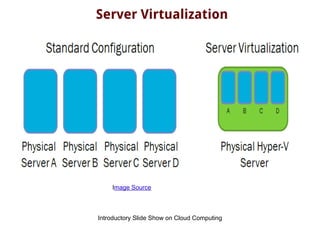
Server Virtualization
Server virtualization is the masking of server resources, including the
number and identity of individual physical servers, processors, and operating
systems, from server users. The server administrator uses a software
application to divide one physical server into multiple isolated virtual
environments. The virtual environments are sometimes called virtual private
servers, but they are also known as guests, instances, containers or
emulations.
There are three popular approaches to server virtualization:
● the virtual machine model,
● the paravirtual machine model, and
● virtualization at the operating system (OS) layer.
Source
Introductory Slide Show on Cloud Computing
Server Virtualization
Image Source
7. Cloud Virtualization Technology
7.4.1 Virtual Machine
Often called Virtual environment or container. A Virtual machine ( VM) is a
server environment that does not physically exist but is created within
another server .
For user interacting with a VM is seen or presented as a physical machine
providing access to an operating system and machine resources like CPU
memory, hard disk and network
7. Cloud Virtualization Technology
7.4.2 Virtualization Technologies
Two major types of virtualization technologies widely used
are
● Hardware Virtualization
○ virtualizes the server hardware
● OS virtualization
○ virtualizes application environment
7. Cloud Virtualization Technology
7.4.3 Hardware Virtualization
● Hardware virtualization is also known as Hypervisor based virtualization,
bare-metal Hypervisor, TYPE 1 virtualization or simply hypervisors
● It has a virtualization layer running immediately on the hardware, which
divides the server machine into several virtual machines or partitions.
with guest operating systems running in each of the machines
● This approach provides binary transparency because the virtualization
environment products themselves provide transparency to the operating
system, and applications and middleware that operate above it
● Examples
○ IBM LPARs
○ Open Source KVM
○ Sun LDoms
○ HP IVM
○ Citrix Xen Server
7. Cloud Virtualization Technology
7.4.4 OS Virtualization
● OS level virtualization or Type-2 creates virtual
environments within a single instance of an operating
system.
● These virtual environments created within an OS are
called containers
7. Cloud Virtualization Technology
7.5 Virtualization for x86 ARCHITECTURE ,
● Virtualization on INTEL and AMD processors poses
certain challenges. This is because of different
vendors and their different operating ways
● Virtualization on x86 architecture requires placing a
virtualization layer under the OS to create and manage
the virtual machines
● Hardware-based Virtual machines or paravirtualization
is a way to overcome this
7. Cloud Virtualization Technology
7.5.1 Hardware based Virtual Machine
(HVM)
● Hardware based Virtual Machine or Hardware assisted
Virtualization ( HAV) is done possible by using new
features developed by Intel and AMD
● These new features include Intel Virtualization
Technology ( VT-x) and AMD’s AMD-V
7. Cloud Virtualization Technology
7.5.2 Paravirtualization
● Also known as OS-assisted Virtualization is used to
overcome challenges posed by earlier versions of Intel
and AMD
● It involves modifying the OS kernel to replace non-
virtualizable instructions with hypercalls that
communicate directly with the hypervisor
7. Cloud Virtualization Technology
7.6 Hypervisor Management Software
For each hypervisor, there is a companion layer of
hypervisor management software that provides range of
function such as
● Create VM
● Delete VM
● Move VM
7. Cloud Virtualization Technology
7.6.1 Hypervisor
● Hypervisor is the foundation for
virtualization on server , enabling hardware
to be divided into multiple logical partitions
and ensure isolation among them
● It also support ethernet transport
mechanism. It also supports Virtual SCSI to
provide support virtual storage
7. Cloud Virtualization Technology
7.7.Logical Partitioning (LPAR).
One single system can be logically divided in multiple
partitions. Each such partition can host a standalone
AIX/Linux server. Each such partition is called a LPAR
7. Cloud Virtualization Technology
7.7.1 Categories of LPAR
● Dedicated
● Shared
● Capped
● Uncapped
● Dynamic LPAR
7. Cloud Virtualization Technology
7.7.3.LPAR Type
● VIO
● AIX/Linux
7. Cloud Virtualization Technology
7.7.3. Workload Partitions
Workload Partition is a new software based virtualization
approach. They enable the creation of multiple virtual
environments inside of a single instance.
They can be used to save administrative overhead when
consolidating system
7. Cloud Virtualization Technology
7.7.4 Live Application Mobility.
Workload partitions can be moved from one system to
another without restarting the application or causing
significant disruption to the application end user. This
process is called Live Application Mobility
7. Cloud Virtualization Technology
7.7.5 Live Migration
The movement of virtual machine from one physical host
to another while continuously powered up is called Virtual
Machine Mobility.
This provides protective maintenance.
7. Cloud Virtualization Technology
7.8 VIO Server
The means to share physical IO resources
among partition is known as Virtual IO. This is
needed to overcome insufficient physical IO
resources in case of smaller systems
7. Cloud Virtualization Technology
7.9 Virtual Infrastructure Requirements
● Virtualization products have strict requirements on
backend infrastructure components including storage,
backup, system management, security and Time Sync.
● Ensuring that these components are of required
configuration is critical for successful implementation
7. Cloud Virtualization Technology
7.9.1 Server Virtualization Suitability assessment
One of the key advantages of virtualization is greater
utilization of physical server resources. To ensure that
existing servers will operate in a shared environment,
detailed hardware inventory and performance utilization
information must be obtained and analyzed for assesment
purposes.
7. Cloud Virtualization Technology
7.9.2 Detailed Design
virtualization introduces many changes into the
environment, and ensures that the platform can co-exist
and interact with existing infrastructure.
The purpose of detailed design to set naming and security
standards, define the disk and network structure. It
includes the following
● Security and Administrative Model
● Back up methodology
● VMware service console configuration
● implement tables and configuration setting
7. Cloud Virtualization Technology
7.10 Summary
This chapter focuses on server virtualization and also
covers other flavours of virtualization. It also covers
software components used for managing virtualization
process entirely
Contact Information
Ravindra Dastikop
http://dastikop.blogspot.in
http://dastikop-internet-of-things.blogspot.in
email: ravindra.dastikop@gmail.com

cloud virtualization technology

  • 1.
    Cloud Computing M.TECH. COMPUTERSCIENCE and ENGINEERING II semester 2013/2014 Ravindra Dastikop http://dastikop.blogspot.in http://dastikop-internet-of-things.blogspot.in
  • 2.
  • 3.
    7. Cloud VirtualizationTechnology Chapter Topics 7.1 Introduction 7.2 Virtualization defined, 7.3 virtualization benefits, 7.4 Server virtualization, 7.5 Virtualization for x86 architecture, 7.6 Hypervisor management software, 7.7 Logical partitioning, 7.8 VIO server 7.9 Virtual infrastructure requirements. 7.10 Summary
  • 4.
    7. Cloud VirtualizationTechnology 7.1 Introduction ● Virtualization represents the logical view of data representation- the power to compute in virtualized environments. ● It is a technique that has been used in large mainframe computer for 30+ years. It is used to manage a group of computers together- instead of managing resources separately.
  • 5.
    7. Cloud VirtualizationTechnology 7.2 Virtualization Defined Virtualization is an abstraction layer (hypervisor) that decouples the physical hardware from the operating system to deliver greater IT resources utilization and flexibility Virtualization can bring the following benefits ● save money ● increased control ● simplify disaster recovery ● business readiness assessment
  • 6.
    7. Cloud VirtualizationTechnology 7.2.1 Why Virtualization? Here are some reasons for going for virtualization ● lower cost of infrastructure ● Reducing the cost of adding to that infrastructure ● Gathering information across IT set up for increased utilization and collaboration ● Deliver on SLA response time during spikes in production ● Building heterogeneous infrastructure that are responsive
  • 7.
    7. Cloud VirtualizationVechnology 7.2.2 Infrastructure Virtualization Evolution ● The objective of virtualization is to reduce complexity in building and managing IT infrastructure. ● Virtualization has been in operation in mainframe computers ● different machines can run different operating systems and multiple applications on the same physical computer. ● Each virtual machine encapsulated and segregated, and contains a complete system including CPU, Memory and network devices to prevent conflict and allow single physical machine to safely run several different OS and applications on the same hardware
  • 8.
    7. Cloud VirtualizationTechnology 7.3 Virtualization Benefits, 1. Traditional benefits a. server consolidation b. “Green IT” - reduced power and cooling- carbon print c. Reduced hardware costs 2. Additional Benefits a. increased availability/business continuity and disaster recovery b. maximized hardware resources c. reduced administration and labour costs d. efficient application and desktop software deployment and maintenance e. reduced time for server provisioning f. increased security on the desktop client level g. dynamic and extensible infrastructure to rapidly address new business requirements
  • 9.
    7. Cloud VirtualizationTechnology 7.3.1 Current Virtualization Initiatives Here is a list of different virtualization initiative actively pursued in industry today ● Virtual CPU and Memory ● Virtual Networking ● Virtual Disk ● Consolidated management ● Vmotion ● Svmotion ● Dynamic load balancing ● Logical partitions( LPARs) ● Logical Domains (LDOM) ● Zones
  • 10.
    7. Cloud VirtualizationTechnology 7.3.2 Workplace (Virtual Terminal Service) ● Virtual terminal services such as Citrix Workplace allows office user access to the desktop, including the full outlook clients, network shares, etc as if they were in the office. ● Traditional VPN solutions only allow access to the resources themselves, not the “ look and feel” ● Through Citrix XenApp, a single instance of an application can be published and presented to multiple, concurrent end-users from a single shared source. Published applications can be distributed across presentation servers in the Citrix farm to allow for redundancy and high availability in the event of server hardware failire
  • 11.
    7. Cloud VirtualizationTechnology 7.4 Server virtualization Server virtualization covers different types of virtualization such as client, storage and network .
  • 12.
    Cloud Computing forthe Day Server Virtualization Server virtualization is the masking of server resources, including the number and identity of individual physical servers, processors, and operating systems, from server users. The server administrator uses a software application to divide one physical server into multiple isolated virtual environments. The virtual environments are sometimes called virtual private servers, but they are also known as guests, instances, containers or emulations. There are three popular approaches to server virtualization: ● the virtual machine model, ● the paravirtual machine model, and ● virtualization at the operating system (OS) layer. Source
  • 13.
    Introductory Slide Showon Cloud Computing Server Virtualization Image Source
  • 14.
    7. Cloud VirtualizationTechnology 7.4.1 Virtual Machine Often called Virtual environment or container. A Virtual machine ( VM) is a server environment that does not physically exist but is created within another server . For user interacting with a VM is seen or presented as a physical machine providing access to an operating system and machine resources like CPU memory, hard disk and network
  • 15.
    7. Cloud VirtualizationTechnology 7.4.2 Virtualization Technologies Two major types of virtualization technologies widely used are ● Hardware Virtualization ○ virtualizes the server hardware ● OS virtualization ○ virtualizes application environment
  • 16.
    7. Cloud VirtualizationTechnology 7.4.3 Hardware Virtualization ● Hardware virtualization is also known as Hypervisor based virtualization, bare-metal Hypervisor, TYPE 1 virtualization or simply hypervisors ● It has a virtualization layer running immediately on the hardware, which divides the server machine into several virtual machines or partitions. with guest operating systems running in each of the machines ● This approach provides binary transparency because the virtualization environment products themselves provide transparency to the operating system, and applications and middleware that operate above it ● Examples ○ IBM LPARs ○ Open Source KVM ○ Sun LDoms ○ HP IVM ○ Citrix Xen Server
  • 17.
    7. Cloud VirtualizationTechnology 7.4.4 OS Virtualization ● OS level virtualization or Type-2 creates virtual environments within a single instance of an operating system. ● These virtual environments created within an OS are called containers
  • 18.
    7. Cloud VirtualizationTechnology 7.5 Virtualization for x86 ARCHITECTURE , ● Virtualization on INTEL and AMD processors poses certain challenges. This is because of different vendors and their different operating ways ● Virtualization on x86 architecture requires placing a virtualization layer under the OS to create and manage the virtual machines ● Hardware-based Virtual machines or paravirtualization is a way to overcome this
  • 19.
    7. Cloud VirtualizationTechnology 7.5.1 Hardware based Virtual Machine (HVM) ● Hardware based Virtual Machine or Hardware assisted Virtualization ( HAV) is done possible by using new features developed by Intel and AMD ● These new features include Intel Virtualization Technology ( VT-x) and AMD’s AMD-V
  • 20.
    7. Cloud VirtualizationTechnology 7.5.2 Paravirtualization ● Also known as OS-assisted Virtualization is used to overcome challenges posed by earlier versions of Intel and AMD ● It involves modifying the OS kernel to replace non- virtualizable instructions with hypercalls that communicate directly with the hypervisor
  • 21.
    7. Cloud VirtualizationTechnology 7.6 Hypervisor Management Software For each hypervisor, there is a companion layer of hypervisor management software that provides range of function such as ● Create VM ● Delete VM ● Move VM
  • 22.
    7. Cloud VirtualizationTechnology 7.6.1 Hypervisor ● Hypervisor is the foundation for virtualization on server , enabling hardware to be divided into multiple logical partitions and ensure isolation among them ● It also support ethernet transport mechanism. It also supports Virtual SCSI to provide support virtual storage
  • 23.
    7. Cloud VirtualizationTechnology 7.7.Logical Partitioning (LPAR). One single system can be logically divided in multiple partitions. Each such partition can host a standalone AIX/Linux server. Each such partition is called a LPAR
  • 24.
    7. Cloud VirtualizationTechnology 7.7.1 Categories of LPAR ● Dedicated ● Shared ● Capped ● Uncapped ● Dynamic LPAR
  • 25.
    7. Cloud VirtualizationTechnology 7.7.3.LPAR Type ● VIO ● AIX/Linux
  • 26.
    7. Cloud VirtualizationTechnology 7.7.3. Workload Partitions Workload Partition is a new software based virtualization approach. They enable the creation of multiple virtual environments inside of a single instance. They can be used to save administrative overhead when consolidating system
  • 27.
    7. Cloud VirtualizationTechnology 7.7.4 Live Application Mobility. Workload partitions can be moved from one system to another without restarting the application or causing significant disruption to the application end user. This process is called Live Application Mobility
  • 28.
    7. Cloud VirtualizationTechnology 7.7.5 Live Migration The movement of virtual machine from one physical host to another while continuously powered up is called Virtual Machine Mobility. This provides protective maintenance.
  • 29.
    7. Cloud VirtualizationTechnology 7.8 VIO Server The means to share physical IO resources among partition is known as Virtual IO. This is needed to overcome insufficient physical IO resources in case of smaller systems
  • 30.
    7. Cloud VirtualizationTechnology 7.9 Virtual Infrastructure Requirements ● Virtualization products have strict requirements on backend infrastructure components including storage, backup, system management, security and Time Sync. ● Ensuring that these components are of required configuration is critical for successful implementation
  • 31.
    7. Cloud VirtualizationTechnology 7.9.1 Server Virtualization Suitability assessment One of the key advantages of virtualization is greater utilization of physical server resources. To ensure that existing servers will operate in a shared environment, detailed hardware inventory and performance utilization information must be obtained and analyzed for assesment purposes.
  • 32.
    7. Cloud VirtualizationTechnology 7.9.2 Detailed Design virtualization introduces many changes into the environment, and ensures that the platform can co-exist and interact with existing infrastructure. The purpose of detailed design to set naming and security standards, define the disk and network structure. It includes the following ● Security and Administrative Model ● Back up methodology ● VMware service console configuration ● implement tables and configuration setting
  • 33.
    7. Cloud VirtualizationTechnology 7.10 Summary This chapter focuses on server virtualization and also covers other flavours of virtualization. It also covers software components used for managing virtualization process entirely
  • 34.