CONTENTS
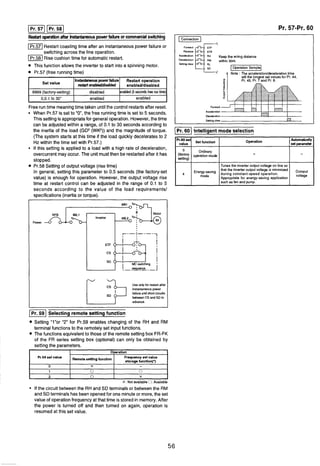
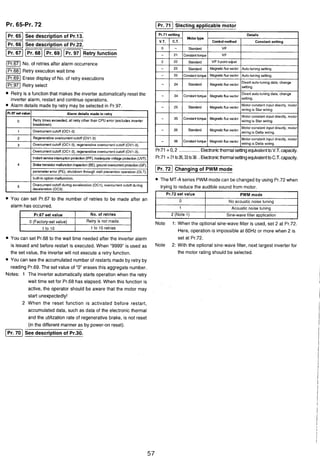
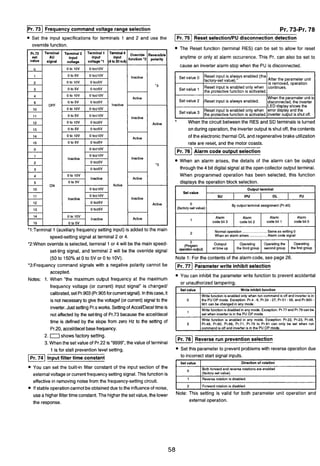
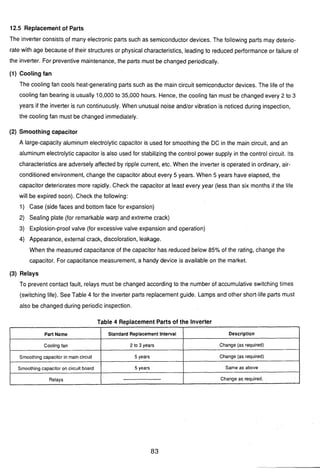
1. PRECAUTIONS .................................................................. 1
2. ACCEPTANCE INSPECTION.............................................3
3. STORAGE ..........................................................................- 4
4. TRANSPORTATION ...........................................................4
5. INSTALLATION...................................................................5
6. PERIPHERAL EQUIPMENT ...............................................6
............................................................................6.1 Selection guide 6
6.2 Peripherals list...........................................................................7
7. STRUCTURE ...................................................................... 8
...............................................7.1 Removal/installationof front cover 8
7.2 PARAMETER UNIT .....................................................................9
8. WIRING ............................................................................. I 0
8.1 Wiring Instructions .....................................................................10
8.2 Main Circuit ................................................................................11
............................................................................8.3 Control Circuit 12
.....................................................................9. OPERATION 14
9.1 Operation Mode .........................................................................14
9.2 Pre-Operation Checks ...............................................................14
..............................................................9.3 Pre-Operation Settings 15
9.4 Check Points during Test Run ...................................................17
...........................................................I0 PARAMETER UNIT 19
.................................................10.1 Structure of the Parameter Unit 19
................................................10.2 Functions of the Parameter Unit 20
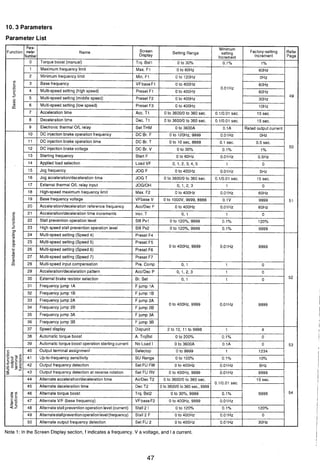
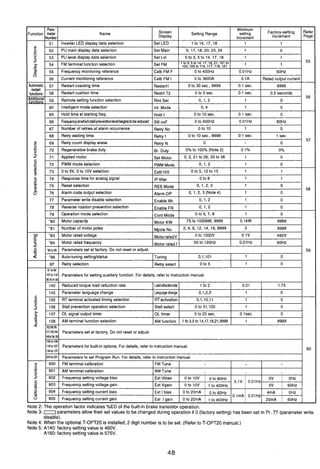
................................................................................10.3 Parameters 47
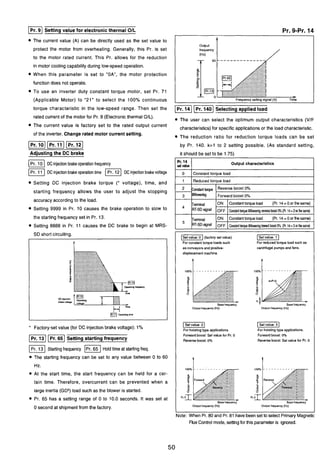
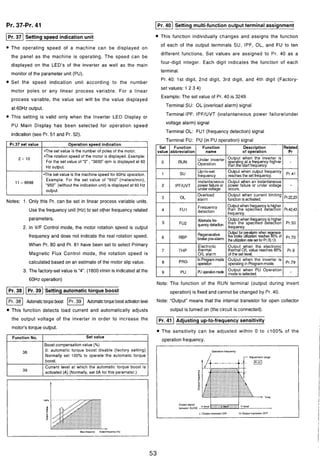
11. EXPLANATIONOF THE PARAMETERS.........................49
11.1 Functionsof the Parameters ..................................................... 49
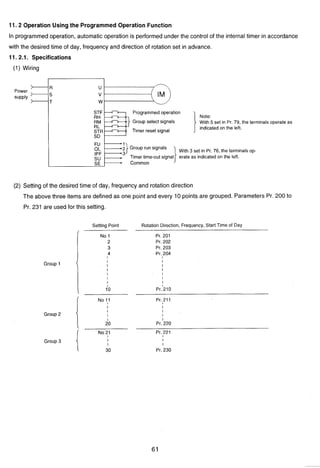
11.2 Operation usingthe ProgrammedOperation Function..............61
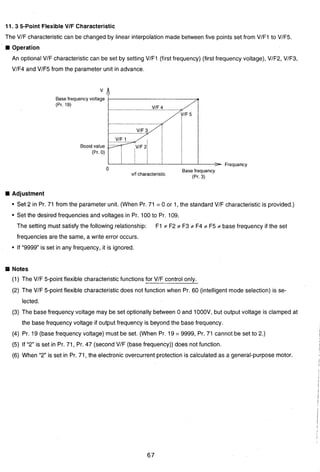
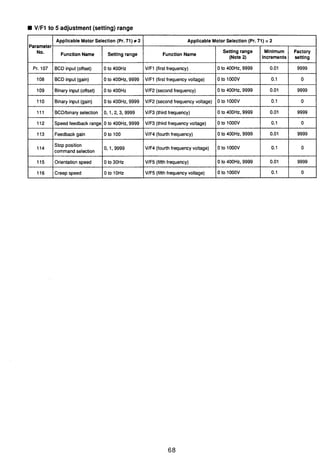
11.3 Five point flexible V/F Chavacteristic.........................................67
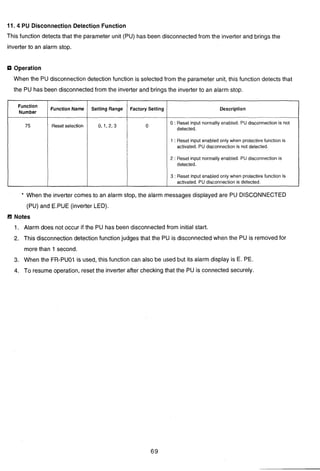
11.4 PU DisconnectionDetection Function .......................................69
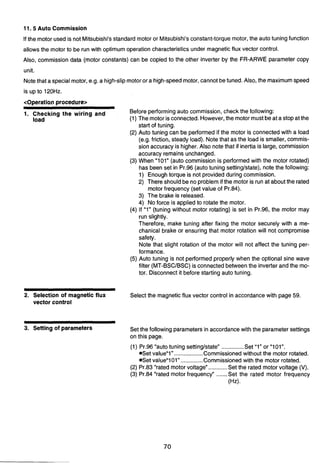
11.5 Auto Commission ...................................................................... 70
11.6 Selection of the Stall Prevention Function.................................76
12. MAINTENANCE AND INSPECTION ................................77
12.1 Precautionsfor Maintenanceand Inspection ............................ 77
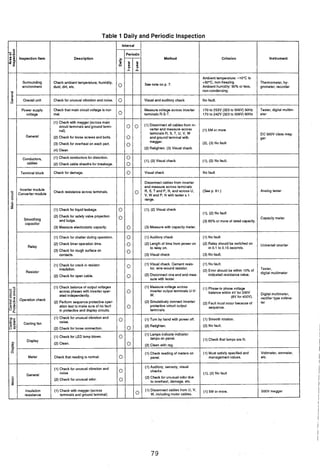
...............................................................................12.2 Check Items 77
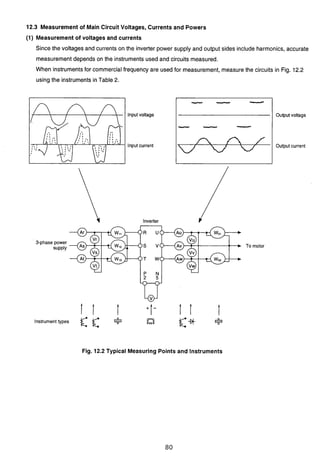
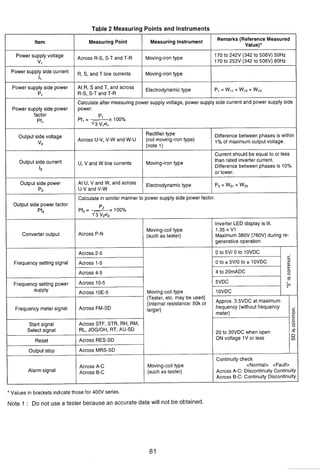
12.3 Measurement of Main Circuit Voltages.
.................................................................Currents and Powers 80
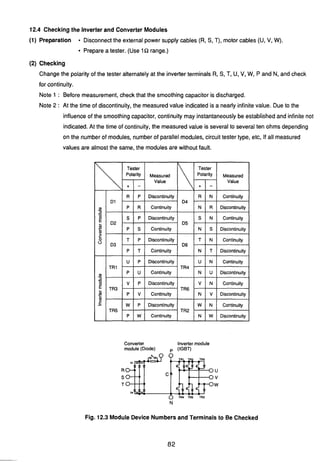
12.4 Checkingthe Inverter and Converter Modules ..........................82
................................................................12.5 Replacement of Parts 83
.....................................................13. TROUBLE SHOOTING 84
13.1 Clearing Upthe Cause of Fault Checkingthe
...............................................................Parameter unit display 84
13.2 Faultsand Check Points............................................................ 85
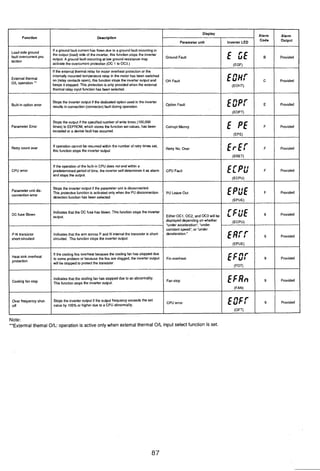
13.3 ProtectiveFunctions .................................................................. 86
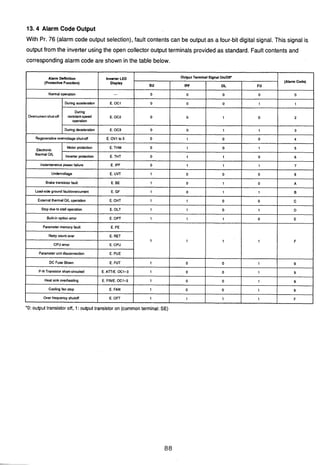
13.4 Alarm Code Unit ........................................................................88
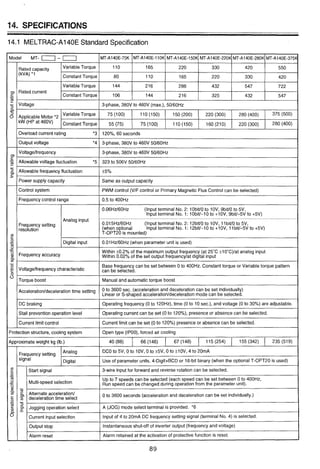
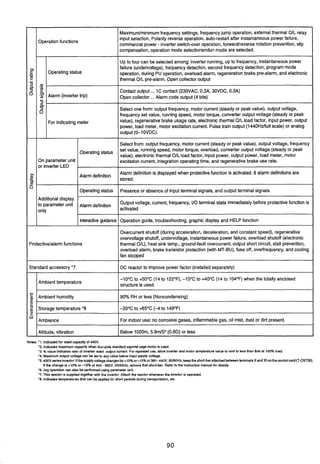
............................................................14. SPECIFICATIONS 89
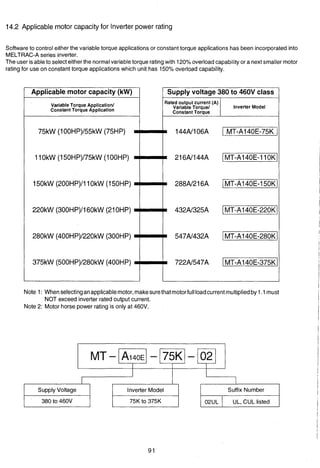
14.2 Applicable motor capacity for Inverterpower rating ..................91
15. STANDARD CONNECTION DIAGRAM
AND TERMINAL SPECIFICATIONS ................................92
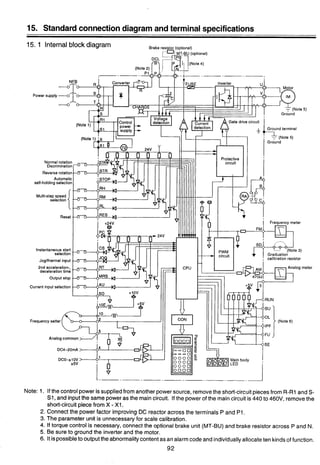
15.1 Internal Block Diagram .............................................................. 92
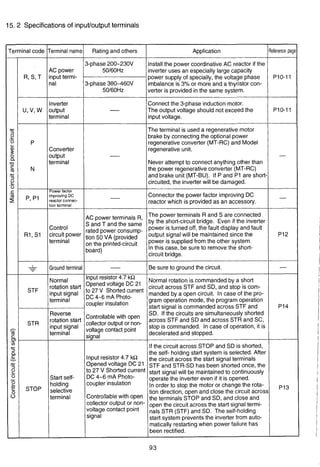
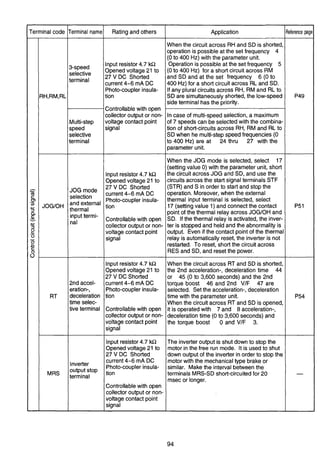
15.2 Specificationsof Input/OutputTerminals...................................93
16. OUTLINE DRAWINGSOF INVERTERCHASSIS UNIT
AND DC REACTOR ..........................................................98
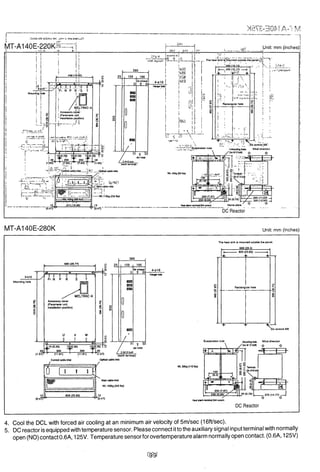
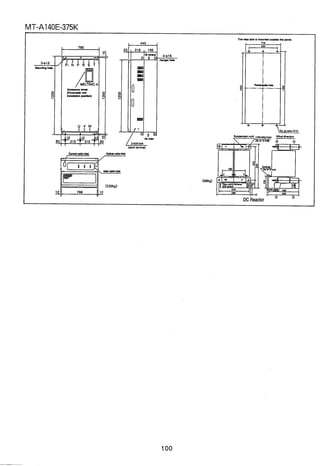
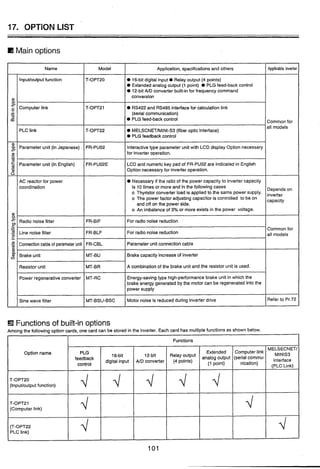
17. OPTION LIST ..................................................................101
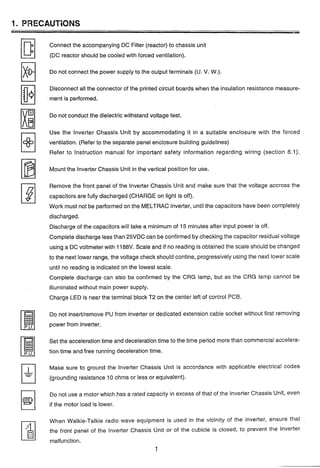
1. PRECAUTIONS
Connect the accompanying DC Filter (reactor) to chassis unit
(DC; reactor should be cooled with forced ventilation).
Do not connect the power supply to the output terminals (U. V. W.).
Disconnect all the connector of the printed circuit boards when the insulation resistance measure-
ment is performed.
Do not conduct the dielectric withstand voltage test.
Use the lnverter Chassis Unit by accommodating it in a suitable enclosure with the forced
ventilation. (Refer to the separate panel enclosure building guidelines)
Refer to Instruction manual for important safety information regarding wiring (section 8.1).
Mount the lnverter Chassis Unit in the vertical position for use.
Remove the front panel of the lnverter Chassis Unit and make sure that the voltage accross the
capacitors are fully discharged (CHARGE on light is off).
Work must not be performed on the MELTRAC inverter, until the capacitors have been completely
discharged.
Discharge of the capacitors will take a minimum of 15 minutes after input power is off.
Complete discharge less than 25VDC can be confirmed by checking the capacitor residual voltage
using a DC voltmeter with 1188V. Scale and if no reading is obtained the scale should be changed
to the next lower range, the voltage check should contine, progressively using the next lower scale
until no reading is indicated on the lowest scale.
Cornplete discharge can also be confirmed by the CRG lamp, but as the CRG lamp cannot be
illuminated without main power supply.
Charge LED is near the terminal block T2 on the center left of control PCB.
Do not inserVremove PU from inverter or dedicated extension cable socket without first removing
power from inverter.
Set the acceleration time and deceleration time to the time period more than commercial accelera-
tion time and free running deceleration time.
Make sure to ground the lnverter Chassis Unit is accordance with applicable electrical codes
(grounding resistance 10 ohms or less or equivalent).
Do not use a motor which,has a rated capacity in excess of that of the lnverter Chassis Unit, even
if the motor load is lower.
When Walkie-Talkie radio wave equipment is used in the vicinity of the inverter, ensure that
the front panel of the lnverter Chassis Unit or of the cubicle is closed, to prevent the inverter
malfunction.
CAUTIONARY POlNTS FOR INSTALLATION AND OPERATION OF THE INVERTER
Installationarea
(1) Make the length of a cable between the inverter and motor shortest possible (in order to reduce the
impedance between the inverterand motor).
(2) Avoid the area of high temperatureand high humidity.
(3) Don't use the inverter at any area which is exposed to much-dust, corrosive gas, oil splash or vibra-
tion.
(4) If moisture or salinity exists near, take care to prevent it from enteringthe inverter unit.
* Since the force air cooling is used, specially keep in mindthat the inverteris easily influencedbythe
atmosphere.
2. External wiring
(1) Keepthe main-circuitwiring and control-circuitwiring 30cm or more away from each other. If they are
parallelto each other, minimizetheir lengths.
(2) Groundthe shields of the shield cables of the frequency commands at one point on the inverterside.
(If they are grounded at two points on both sending and receiving sides, the circulating current will
flow and it will sometimes become a noise source.)
Routethe shield cablethrough another duct or steel conduit, separating it from other control cable or
power cable.
3. Inverter PanelCubicle (Enclosure) grounding
Groundthe inverter box directlyto the ground pole or the ground bus line (special Class 3 10Qor less) but
not through other box or equipment.
The ground cable size is 38mm2or more.
4. Noise countermeasure
Gain the operational power supply of the inverter box from the exclusive operation transformer. Provide
the noise killeron the relay which is connected to the operationalpower supply in order to reduce noise.
(As an example of the noise killer (for the circuit of 220V or lower), Okaya Denki brand CR50500BL is
given.)
If the thyristor control unit is connected to the same bus line, additionally provide ACL on the thyristor
control equipment side (in order to reduce the power voltage distortion).
5. Powervoltage check for operation
Verify that the power voltage is within the tolerable variation range of the inverter.
(Even incase of the transientvoltagedrop soon afterstart of other load or the voltage drop due to the start
current, it does not drop beyond the rated setting voltage of 300V or less.)
Moreover, in case of the 400V system, verify that the line ground is not the one-line type but the neutral
point type or the isolated neutraltype.
(The one-lineground of the line is not allowed in Electrical Facility Standard either.)
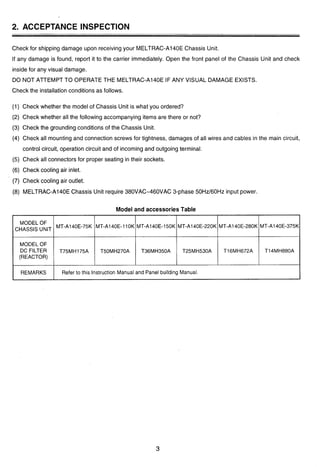
2. ACCEPTANCE INSPECTION
Check for shipping damage upon receiving your MELTRAC-A140E Chassis Unit.
If any damage is found, report it to the carrier immediately. Open the front panel of the Chassis Unit and check
inside for any visual damage.
DO NOT ATTEMPT TO OPERATE THE MELTRAC-A140E IF ANY VISUAL DAMAGE EXISTS.
Check the installation conditions as follows.
(1) Check whether the model of Chassis Unit is what you ordered?
(2) Check whether all the following accompanying items are there or not?
(3) Check the grounding conditions of the Chassis Unit.
(4) Check all mounting and connection screws for tightness, damages of all wires and cables in the main circuit,
control circuit, operation circuit and of incoming and outgoing terminal.
(5) Check all connectors for proper seating in their sockets.
(6) Check cooling air inlet.
(7) Check cooling air outlet.
(8) MELTRAC-A140EChassis Unit require 380VAC-460VAC 3-phase 50Hz160Hz input power.
Model and accessoriesTable
I REMARKS I Refer to this Instruction Manual and Panel building Manual.
CHASSIS UNIT
MODEL OF
(REACTOR)
MT-A140E-11OK
T50MH270A
MT-A140E-150K
T36MH350A
MT-A140E-220K
T25MH530A
MT-A140E-280K
T16MH672A
MT-A140E-375K
T14MH880A
.
3. STORAGE
When temporarilystoring the lnverterChassis Unit which has been unpackedand inspected,take care the follow-
ings:
(1) To preventthe lnverter Chassis Unitfrom getting invasion of water and dust, placea desiccantingagent in the
lnverter Chassis Unit and seal it with vinyl sheet.
(2) Store the lnverter Chassis Unit in a place free from direct sun shine and vibration.
(3) Store the lnverter Chassis Unit in the rage of -10°C (14°F) to +60°C (140°F) of ambient temperature without
condensationdue to abrupt temperature change.
(4) When storingthe lnverter Chassis Unitfor longtime exceedingsix months, check the storage condition of the
lnverter Chassis Unit every six months.
(5) When the lnverter Chassis Unit stored for 2 years or more is used, gradually increase both the control power
supply and main circuit powervoltage in the rate of approximately40 Volts/minuteto energize the capacitors.
(When the ratingvoltage is directlyapplied to the lnverter Module Unit, it does not get damaged. However, its
reliability may be degraded.)
When storing the lnverter Chassis Unit in a panel board, follow the conditionsdescribed above.
If it is difficult to seal the panel board with a vinyl sheet, seal the opening of the board and place a space heater
inside the board to prevent occurrenceof condensation.
4. TRANSPORTATION
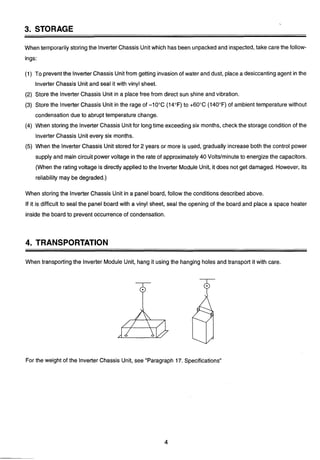
When transportingthe lnverter Module Unit, hang it using the hanging holes and transport it with care.
For the weight of the lnverter Chassis Unit, see "Paragraph 17. Specifications"
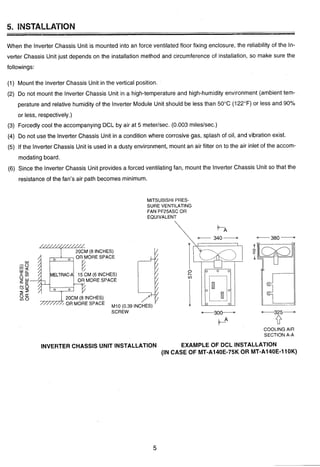
When the lnverter Chassis Unit is mounted into an force ventilated floor fixing enclosure, the reliability of the In-
verter Chassis Unit just depends on the installation method and circumference of installation, so make sure the
followings:
(1) Mount the lnverter Chassis Unit in the vertical position.
(2) Do not mount the lnverter Chassis Unit in a high-temperatureand high-humidity environment (ambient tem-
perature and relative humidity of the lnverter Module Unit should be less than 50°C (122°F) or less and 90%
or less, respectively.)
(3) Forcedly cool the accompanying DCL by air at 5 meterlsec. (0.003 mileslsec.)
(4) Do not use the lnverter Chassis Unit in a condition where corrosive gas, splash of oil, and vibration exist.
(5) If the lnverter Chassis Unit is used in a dusty environment, mount an air filter on to the air inlet of the accom-
modating board.
(6) Since the lnverter Chassis Unit provides a forced ventilating fan, mount the lnverter Chassis Unit so that the
resistanceof the fan's air path becomes minimum.
MITSUBISHI PRES-
SURE VENTILATING
FAN PF25ASC OR
EQUIVALENT
-M (8 INCHES) I/
OR MORE SPACE
20CM (8 INCHES)
OR MORE SPACE
SCREW
INCHES)
COOLING AIR
SECTION A-A
INVERTER CHASSIS UNIT INSTALLATION EXAMPLE OF DCL INSTALLATION
(IN CASE OF MT-A140E-75KOR MT-A140E-11OK)
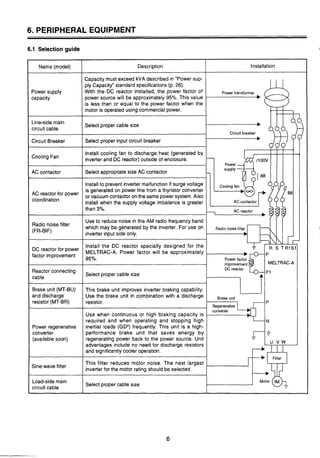
6. PERIPHERAL EQUIPMENT
6.1 Selection guide
3
InstallationName (model) Description
Power supply
capacity
Line-sidemain
circuit cable
Circuit Breaker
Cooling Fan
AC contactor
reactorfor
coordination
Radio "Oise filter
(FR-BIF)
DC reactor for power
factor improvement
Reactor connecting
cable
Brake unit (MT-BU)
and discharge
resistor (MT-BR)
Power regenerative
converter
(availablesoon)
Sine-wavefilter
Load-sidemain
circuit cable
Capacity must exceed kVA described in "Power sup-
ply Capacity" standard specifications (p. 26).
With the DC reactor installed, the power factor of Power transformer
power source will be approximately 95%. This value
is less than or equal to the power factor when the
motor is operated usingcommercialpower.
Select proper cable size
Circuit breaker
Select proper input circuit breaker
Install cooling fan to discharge heat (generated by
inverter and DC reactor)outside of enclosure.
Select appropriate size AC contactor
Installto prevent inverter malfunction if surge voltage
is generatedon power line from a thyristor converter
or vacuum contactor on the same power system. Also
install when the supply voltage imbalance is greater
than 3%.
Use to reduce noise in the AM radio frequency band
which may be generated by the inverter. For use on
inverter input side only.
Install the DC reactor specially designed for the
MELTRAC-A. Power factor will be approximately
95%.
MELTRAC-A
Select proper cable size
This brake unit improves inverter braking capability.
Use the brake unit in combination with a discharge
resistor.
---
Use when continuous or high braking capacity is
required and when operating and stopping high
inertial loads (GD2)frequently. This unit is a high-
performance brake unit that saves energy by
regenerating power back to the power source. Unit
advantages include no need for discharge resistors
and significantly cooler operation.
This filter reduces motor noise. The next largest
inverter for the motor rating should be selected
Select proper cable size
Brake unit
P
Regenerative
converter
N
I&-
Filter
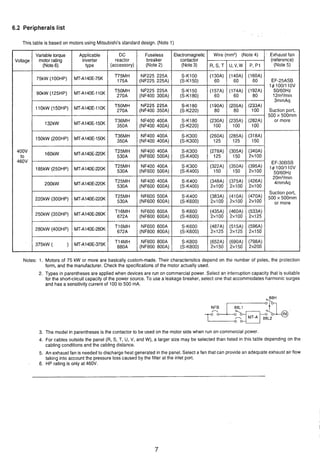
6.2 Peripherals list
@
Notes: 1. Motors of 75 kW or more are basically custom-made. Their characteristics depend on the number of poles, the protection
form, and the manufacturer. Check the specifications of the motor actually used.
Th~stable IS based on motors uslng M~tsub~shl'sstandard deslgn. (Note 1)
2. Types in parentheses are applied when devices are run on commercial power. Select an interruption capacity that is suitable
for the short-circuit capacity of the power source. To use a leakage breaker, select one that accommodates harmonic surges
and has a sensitivity current of 100 to 500 mA.
. Exhaust fan
(reference)
(Note 5)
EF-25ASB
14 lOO/llOV
50160Hz
12m3/min
3mmAq
Suction port,
500 x 500mm
or more
EF-30BSB
14 100/11ov
50/60Hz
20m3/min
4mmAq
Suction port,
500 500mm
or more
3. The model in parentheses is the contactor to be used on the motor side when run on commercial power.
4. For cables outside the panel (R. S, T, U, V, and W), a larger size may be selected than listed in this table depending on the
cabling conditions and the cabling distance.
5. An exhaust fan is neededto discharge heat generated in the panel. Select a fan that can provide an adequate exhaust air flow
taking into account the pressure loss caused by the filter at the inlet port.
6. HP rating is only at 460V.
Voltage
400V
to
460V
Applicable
inverter
type
MT-A140E-75K
MT-A140E-1'OK
MT-A140E-1'OK
MT-A140E-150K
MT-A140E-150K
MT-A140E-220K
MT-A140E-220K
MT-A140E-22M(
MT-A140E220K
MT-A140E-280K
MT-A1aE-280K
MT-A140E-375K
Fuseless
breaker
(Note 2)
NF225 225A
(NF225 225A)
NF225 225A
(NF400 JOOA)
NF225 225A
(NF400 35011)
NF400 400A
(NF400400A)
NF400 400A
(NF400400A)
NF400 400A
(NF600 50OA)
NF400 400A
(NF600 500A)
NF400 400A
(NF6OO 600A)
NF600 500A
(NF6OO 600A)
NF600 600A
(NF600600A)
NF600 600A
(NF800 800A)
NF800 800A
(NF800 800A)
Variable torque
motor rating
(Note6)
75kW
90kw
lokW50HP)
132kW
150kW(200HP)
160kW
.
(250HP)
200kW
220kw (300HP)
250kW(350HP)
280kW (400HP)
375kW ( )
DC
reactor
(accessory)
T75MH
175A
Tt;r;
T$fF
T36MH
350A
T36MH
350A
T::?
T25MH
530A
Tg:?F
T$%E
T16MH
672A
Ti:?
Tl4MH
880A
Electromagnetic
contactor
(Note3)
S-K100
(S-K150)
S-K150
(S-KI80)
S-K180
(S-K220)
SKI80
(S-K220)
S-K300
(S-K300)
S-K300
(S-K400)
S-K300
(S-K400)
S-K400
(S-K400)
S-K400
(S-K600)
S-K600
(S-K600)
S-K600
(S-K600)
S-K800
(S-K800)
Wire
R, S, T
(130A)
60
(157A)
60
(190A)
80
(230A)
100
(260A)
125
(278A)
125
(322A)
150
(348A)
2x100
(383A)
2x100
(435A)
2x100
(487A)
2x125
(652A)
2x150
(mm2)
U, V, w
(140A)
60
(174A)
60
(205A)
80
(235A)
100
(285A)
125
(305A)
150
(350A)
150
(375A)
2x100
(410A)
2x100
(460A)
2x100
(515A)
2x125
(690A)
2x150
(Note 4)
P, PI
(160A)
60
(192A)
80
(233A)
100
(282A)
100
(318A)
150
(340A)
2x100
(395A)
2x100
(426A)
2x100
(470A)
2x100
(533A)
2x125
(596A)
2x150
(798A)
2x200
7. STRUCTURE
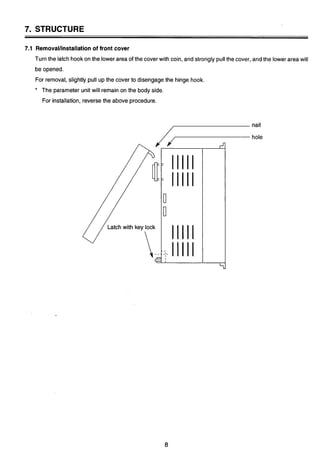
7.1 RemovaVinstallation of front cover
Turn the latch hookon the lower area of the cover with coin, and strongly pullthe cover, and the lower area will 3
be opened.
For removal, slightly pull up the cover to disengagethe hinge hook. I
* The parameter unit will remain on the body side.
For installation, reverse the above procedure.
Latch with key lock
nail
hole
7.2 PARAMETER UNIT
Installation of the Parameter Unit
The PU may either be installeddirectlyto the inverteror connectedto the inverter bythe optional cable so that
it may be hand-heldor installedto a panel. The PU may be installed and remove when the inverter is powered
up or running.
(1) Direct Installationto the Inverter
The PU is used on the front cover of the inverter(electricallycoupled by the connector). Forthe model not
equipped with the PU, removethe accessory cover from the inverter front cover and install the PU to that
position.
(1) Installation
1) Fit the fixing hole at the PU bottom into the catch of
the inverterfront cover.
2) Gently push the PU into the installationspace in
the inverter. The PU is fixed into the inverter by the
spring action of the top button of the PU.
- (2) Removal
1) Gently finger-pushthe top button of the PU.
(Arrow @)
2) Pull the PU toward you using the catch as a
support.
Fixinghole Catch
[CAUTION] The PU should only be installedon the inverter when the invertercover is installed.
(2) Connection Using the Cable
The PU may be installednot only to the inverterbut also on the surface of a panelor may be hand-heldfor
adjustment, maintenance, inspection, etc. In this case, the dedicated cable (option) is required for con-
nection of the PU and inverter.
(1) Connection
Securely insert one end of the cable into the inverter
connector and the other end into the PU as shown on
the left. Insertthe cable plugs along the connector
guides (as shown on the left).
(The inverter may be damaged if the plug is inserted in
the wrong direction.)
(2) Fixture
Secure the inverter-sidecable plug with installation
screws as shown on the left.
Fix the PU-sidecable plug so that the cable may not be
@.:@ Insertalong the guides.
disconnectedby its own weight.
/-
[CAUTION] The dedicated PU cable (option) may only be used to connect betweenthe PU and inverter.
8. WIRING
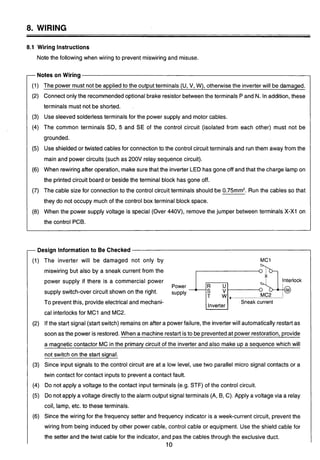
8.1 Wiring Instructions
Note the following when wiring to prevent miswiringand misuse.
rNotes on Wiring
I (1) The power must not be applied to the output terminals (U, V. W), otherwisethe inverterwill be damaged.
1 (2) Connect only the recommendedoptional brake resistor betweenthe terminals P and N. In addition,these
I terminals must not be shorted.
(3) Use sleeved solderlessterminals for the power supply and motor cables.
(4) The common terminals SD, 5 and SE of the control circuit (isolated from each other) must not be
I grounded.
1 (5) Use shielded or twisted cables for connectionto the control circuit terminals and run them away from the
main and power circuits (such as 200V relay sequence circuit).
(6) When rewiringafter operation, make sure that the inverter LED has gone off and that the charge lamp on
the printed circuit board or beside the terminal block has gone off.
(7) The cable size for connectionto the control circuit terminals should be 0.75mm2.Run the cables so that
they do not occupy much of the control box terminal block space.
(8) When the power supply voltage is special (Over 440V), remove the jumper between terminals X-XI on
the control PCB.
-Design Informationto Be Checked
(1) The inverter will be damaged not only by
miswiring but also by a sneak current from the
7;"Ipower supply if there is a commercial power
Power
supply switch-over circuit shown on the right. supply
To preventthis, provide electrical and mechani- I Sneak current
cal interlocksfor MC1 and MC2.
(2) If the start signal (start switch) remainson after a powerfailure, the inverterwill automatically restartas
soon as the power is restored. When a machine restart isto be preventedat power restoration, provide
a maanetic contactor MC in the ~rimarvcircuit of the inverter and also make UD a seauence which will
not switch on the start signal.
(3) Since input signals to the control circuit are at a low level, use two parallel micro signal contacts or a
twin contact for contact inputsto prevent a contact fault.
(4) Do not apply a voltage to the contact input terminals (e.g. STF) of the control circuit.
(5) Do not apply a voltage directly to the alarm output signal terminals (A, B, C). Apply a voltage via a relay
coil, lamp, etc. to these terminals.
(6) Since the wiring for the frequency setter and frequency indicator is a week-current circuit, prevent the
wiring from being induced by other power cable, control cable or equipment. Use the shield cable for
the setter and the twist cable for the indicator, and pas the cables through the exclusive duct.
10
8.2 Main Circuit
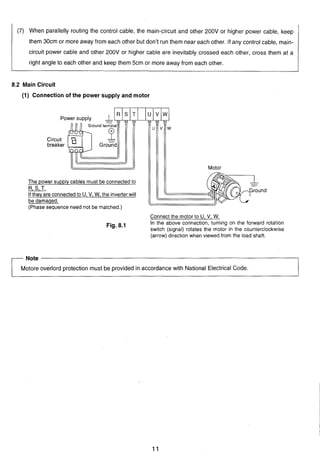
(1) Connecticon of the power supply and motor
@
Po
Circuit
breaker
Motor
The power supply cables must be connected to
R, S, T.
If they are connectedto U, V, W, the inverterwill
be damaged,
(Phase sequence need not be matched.)
(7) When parallelly routing the control cable, the main-circuit and other 200V or higher power cable, keep
them 30cm or more away from each other but don't run them near each other. If any control cable, main-
circuit power cable and other 200V or higher cable are inevitably crossed each other, cross them at a
right angle to each other and keep them 5cm or more away from each other.
Connect the motor to U, V, W.
Fig. 8.1 In the above connection, turning on the forward rotation
switch (signal) rotates the motor in the counterclockwise
(arrow) direction when viewed from the load shaft.
-Note - I
Motore overlord protection must be provided in accordancewith National Electrical Code.
I
8.3 Control Circuit
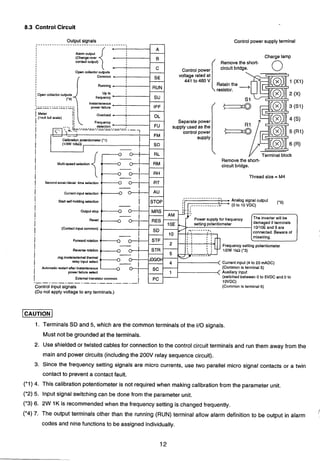
Output signals
........................................
I Alarm output
(Change-over
contactoutput)
Open collector outputs
Common
Running
RUN
IOpen collectoroutputs
('4)
frequency
Instantaneous
power failure IPF
Controlpower
voltage rated at
441 to 460 V
I
i
Control power supplyterminal
Calibrationpotentiometer('1)
(lawiokn)
I
-+SD
Charge lamp
Removethe short-
circuit bridge. 0
I RL
i
I
Multi-speed selection RM
i
Separatepower
supply used as the
controlpower
supply
-Y Terminalblock
Removethe short-
circuit bridge.
Thread size = M4
I Secondaccel./decel. time selection
1 Currentinput selection
I Start self-holdingselection s o :I * ', • Analog signal output (.5)
,----___------__,
I I - I 1 ------------L! *(OtoIOVDC)I ,
I
I
Output stop
i Reset
damaged if terminals
I (Contact inputcommon) 10I10Eand 5 are
onnected. Beware of
i Forwardrotation
I
i
Reverse rotation
Jcg modelexternal thermal
I relay input select Currentinput (4 to 20 mADC)
i Automatic restalt after inetantaneous (Commonis terminal5)
power failure select
I External transistor common
(switchedbetween 0 to 5VDC and 0 to
Control input signals (Common is terminal 5)
(Do not apply voltage to any terminals.)
-1
1. Terminals SD and 5, which are the common terminals of the I10 signals.
Must not be grounded at the terminals.
2. Use shielded or twisted cables for connectionto the control circuit terminals and run them away from the
main and power circuits (includingthe 200V relay sequence circuit).
3. Since the frequency setting signals are micro currents, use two parallel micro signal contacts or a twin
contact to prevent a contact fault.
('1) 4. This calibration potentiometeris not required when makingcalibration from the parameter unit.
(*2) 5. Input signal switching can be done from the parameter unit.
('3) 6. 2W 1K is recommendedwhen the frequencysetting is changed frequently.
(*4) 7. The output terminals other than the running (RUN) terminal allow alarm definition to be output in alarm
codes and nine functions to be assigned individually.
#
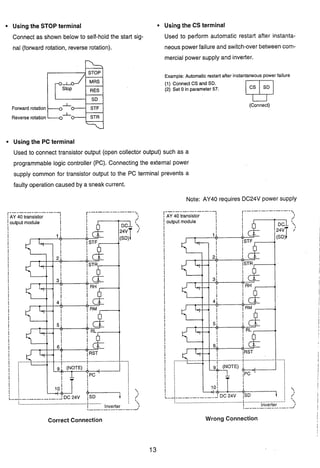
Using the STOP terminal Using the CS terminal
Connect as shown below to self-hold the start sig- Used to perform automatic restart after instanta-
nal (forward rotation, reverse rotation). neouspowerfailure and switch-over between com-
mercial power supply and inverter.
STOP
Forward rotation ~ - ~ s T F I
Reverse rotation '.'-
Example:Automatic restart after instantaneouspower failure
(1) Connect CS and SD.
(2) Set 0 in parameter 57.
(Connect)
Using the PC terminal
Used to connect transistor output (open collector output) such as a
programmable logic controller (PC). Connecting the external power
supply common for transistor output to the PC terminal prevents a
faulty operation caused by a sneak current.
Note: AY40 requires DC24V power supply
Correct Connection
r-------------
1I AY 40 transistor
: .-.------.--.--.--.--.--:
Inverter ?.- - - 2
Wrong Connection
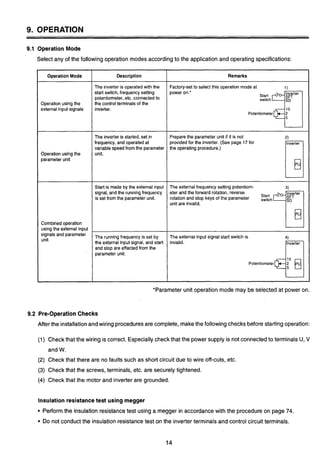
9. OPERATION
9.1 Operation Mode
Select any of the following operation modes accordingto the application and operating specifications:
3
*Parameter unit operation mode may be selected at power on.
9.2 Pre-OperationChecks
After the installationand wiring proceduresare complete, makethe following checks before starting operation:
Remarks
Factory-setto selectthis operation mode at 1)
power on.' Inverter
2 Z h771Potentiometer
Prepare the parameter unit if it is not 2)
providedfor the inverter.(See page 17 for Inverter
the operating procedure.)
The external frequency setting potentiom- 3)
eter and the forward rotation, reverse Inverter
rotationand stop keys of the parameter 2;Ch 751unit are invalid.
The externalinput signal start switch is 4)
invalid. Inverter
Potentiometer
Operation Mode
Operation using the
external input signals
Operation usingthe
parameter unit
Combinedoperation
using the external input
signalsand parameter
unit
(1) Checkthat the wiring is correct. Especially check that the power supply is not connectedto terminals U, V
and W.
(2) Check that there are no faults such as short circuit due to wire off-cuts, etc.
(3) Check that the screws, terminals, etc. are securely tightened.
(4) Check that the motor and inverter are grounded.
Description
The inverter is operated with the
start switch, frequency setting
potentiometer, etc. connectedto
the controlterminals of the
inverter.
The inverter is started, set~n
frequency, and operatedat
variable speed from the parameter
unit.
Start is made by the externalinput
signal, and the runningfrequency
is set from the parameter unit.
The running frequency is set by
the externalinputsignal, and start
and stop are effectedfrom the
parameter unit.
Insulationresistancetest using megger
Performthe insulation resistancetest using a megger in accordancewith the procedure on page 74.
Do not conduct the insulation resistancetest on the inverterterminals and control circuit terminals.
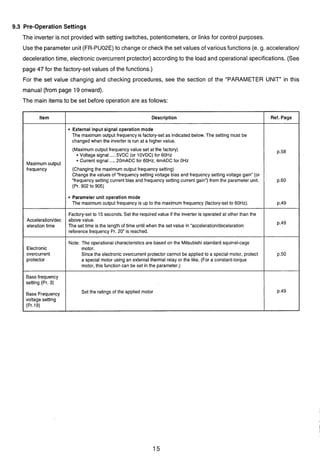
9.3 Pre-Operation Settings
The inverter is not provided with setting switches, potentiometers, or links for control purposes.
Use the parameter unit (FR-PU02E)to change or check the set values of various functions (e. g. acceleration1
deceleration time, electronic overcurrent protector) according to the load and operational specifications. (See
page 47 for the factory-set values of the functions.)
For the set value changing and checking procedures, see the section of the "PARAMETER UNIT" in this
manual (from page 19 onward).
The main items to be set before operation are as follows:
Ref. Page
p.58
p.60
p.49
p.49
p.50
p.49
Item
Maximum output
frequency
Acceleratioddec
eleration time
Electronic
overcurrent
protector
Base frequency
setting (Pr. 3)
Base Frequency
voltage setting
(Pr.19)
Description
External input signal operation mode
The maximum output frequency is factory-set as indicated below. The setting must be
changed when the inverter is run at a higher value.
(Maximum output frequency value set at the factory)
* Voltage signal .....5VDC (or 10VDC) for 60Hz
* Current signal .....20mADC for 60Hz, 4mADC for OHz
(Changing the maximum output frequency setting)
Change the values of "frequency setting voltage bias and frequency setting voltage gain" (or
"frequency setting current bias and frequency setting current gain") from the parameter unit.
(Pr. 902 to 905)
Parameter unit operation mode
The maximum output frequency is up to the maximum frequency (factory-set to 60Hz).
Factory-set to 15 seconds. Set the required value if the inverter is operated at other than the
above value.
The set time is the length of time until when the set value in "acceleration/deceleration
reference frequency Pr. 20" is reached.
Note: The operationalcharacteristics are based on the Mitsubishi standard squirrel-cage
motor.
Since the electronic overcurrent protector cannot be applied to a special motor, protect
a special motor using an external thermal relay or the like. (For a constant-torque
motor, this function can be set in the parameter.)
Set the ratings of the applied motor
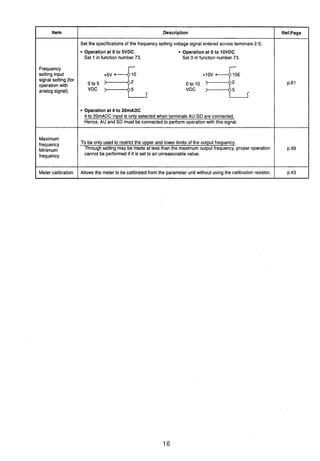
Item
Frequency
setting input
signal setting (for
operationwith
analogsignal)
Maximum
frequency
Minimum
frequency
Meter calibration
Description
Set the specifications of the frequency settingvoltage signal entered across terminals 2-5.
Operation at 0 to SVDC Operation at 0 to 10VDC
Set 1 in function number 73. Set 0 in function number 73.
+5v70 to 5 Oto10
VDC VDC
Operation at 4 to 20mADC
4 to 20mADC input is only selectedwhen terminals AU-SD are connected.
Hence, AU and SD must be connectedto performoperation with this signal.
To be only usedto restrict the upper and lower limitsof the output frequency.
Through setting may be made at less than the maximum output frequency, proper operation
cannot be performed if it is set to an unreasonablevalue.
Allows the meter to be calibrated from the parameter unit without using the calibration resistor.
Ref.Page
p.61
p.49
p.43
9.4 Check Points during Test Run
After checking.thatthe inverterstart signal is off (inthe external signaloperation mode), switch on the no-fuse
breaker (NFB) and magnetic contactor (MC) in the inverter input circuit.
Perform a test run and check the operating status in the following procedure:
Power on ........................................The inverter LED (4 digits) is lit
+For operation using
externalsignals
I
4
For operation using For full information on
the parameter unit -operation, see the section of
I the "PARAMETER UNIT"
1 1 (from page 19 on ).
When the power is switched on, the
Operation
inverter equipped with the parameter unit
I mode 1is automaticallyset to the external signal
o~erationmode and also to the
Tum on the forward or reverse rotation
start signal (switch).,,
I 2.setting
press the (PU key to select the
parameter unit operation mode.
Start
Press the [FWD]or [REV] key.
(At this time, the monitoring mode is
selectedautomatically.)
donitoring mode.
Acceleration
Slowly turn the frequency setting
counterclockwiseto the
fully counterclockwise(zero) position. Press the [STOP] key.
Turn off the forward or reverse rotation
start signal (switch).
'Note: If the parameter unit is not in the monitoringmode, a frequency increase or decrease is not
displayed
Direct setting
Enter the requiredfrequency with
numeral keys and press the [WRITE]
....The motor speed increases in
proportionto the rise in
frequency meter reading"
(frequencyvalue indicated on
the parameter unit).
U
Slowly turn the frequency setting
potentiometerclockwisefrom zero to the
fully clockwise position.
....The motor speed decreases
in proportion to the fall in
frequency meter reading
(frequencyvalue indicated on
the parameter unit). When
the output frequency reaches
the DC dynamic brake
operation frequency, the DC
dynamic brake is applied to
bring the motor to a sudden
stop.
press the [i]key until the required
frequency is reached and press the
key.
Il
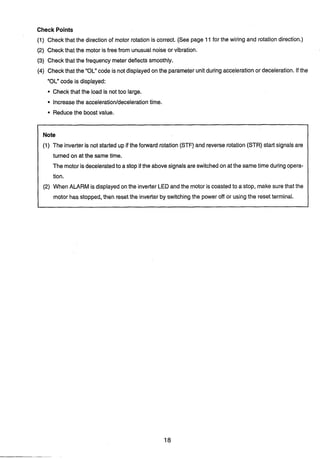
Check Points
(1) Check that the directionof motor rotation is correct. (See page 11for the wiring and rotation direction.)
(2) Check that the motor is free from unusualnoise or vibration.
(3) Check that the frequency meter deflects smoothly.
3
(4) Check that the "OL" code is not displayedon the parameter unit duringaccelerationor deceleration. If the
"OC' code is displayed:
Check that the load is not too large.
Increasethe acceleration/decelerationtime.
Reducethe boost value.
Note
(1) The inverter is not started up if the forward rotation (STF) and reverse rotation (STR) start signals are
turned on at the same time.
The motor isdeceleratedto a stop if the above signalsare switchedon at the sametime duringopera-
tion.
(2) When ALARM is displayed on the inverter LED and the motor is coastedto a stop, make surethat the
motor has stopped, then reset the inverter by switchingthe power off or usingthe reset terminal.
10. PARAMETER UNIT
10.1 Structure of the Parameter Unit (Option)
The FR-PU02Eparameter unit is installed to the MT-A series inverter or connected to it by a cable (option)
and allows operation to be performed, functions to be selected (set values to be readlwritten), the operating
status to be monitored, and alarm definitionto be displayed. In addition, the FR-PU02Ehas a troubleshooting
function, help function and parameter graphic display function.
The FR-PU02Eparameter unit is hereinafter referredto as the PU.
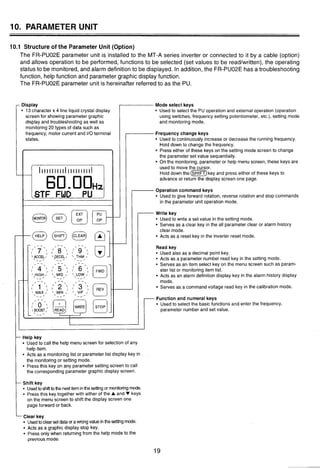
,Display
13 character x 4 line liquid crystal display
screen for showing parameter graphic
display and troubleshooting as well as
monitoring 20 types of data such as
frequency, motor current and I10terminal
states.
I Y
I l l l ~ l ~ l l l I l l l l l l l l l I
1
60.OOH~.STF FWD PU ,
Mode select keys
Used to select the PU operation and external operation (operation
using switches, frequency setting potentiometer, etc.), setting mode
and monitoring mode.
Frequency change keys
Used to continuously increase or decrease the running frequency.
Hold down to change the frequency.
Press either of these keys on the setting mode screen to change
the parameter set value sequentially.
On the monitoring, parameter or help menu screen, these keys are
used to move the cursor.
Hold down the key and press either of these keys to
advance or return the display screen one page.
Operation command keys
Used to give forward rotation, reverse rotation and stop commands
in the parameter unit operation mode.
@@mq-- WriteUsedkeyto write a set value in the setting mode.
Serves as a clear key in the all parameter clear or alarm history
clear mode.
Acts as a reset key in the inverter reset mode.
Read key
Used also as a decimal point key.
Acts as a parameter number read key in the setting mode.
Serves as an item select key on the menu screen such as param-
eter list or monitoring item list.
Acts as an alarm definition display key in the alarm history display
mode.
Serves as a command voltage read key in the calib;ation mode.
-Function and numeral keys
Used to select the basic functions and enter the frequency,
parameter number and set value.
- Help key
Used to call the help menu screen for selection of any
help item.
Acts as a monitoring list or parameter list display key in
the monitoring or setting mode.
Press this key on any parametersetting screen to call
the corresponding parameter graphic display screen.
- Shift key
Usedto shifttothe nextiteminthe settingor monitoringmode.
Press this key together with either of the A and V keys
on the menu screen to shift the display screen one
page forward or back.
-Clear key
Usedtoclearset dataor awrongvalue inthe settingmode.
Acts as a graphic display stop key.
Press only when returning from the help mode to the
previous mode.
10.2 Functionsof the Parameter Unit
The PUmay be used ina wide variety of applicationsrangingfrom motoroperationto monitoringas described
below:
Note: A parameterwill be referredto as Pr.
Selectingthe operation mode
External operation andlor PU operation mode can be selected.
Externaloperation ......The inverteris operated using the start switch and
frequency setting potentiometer connectedto the inverter
terminal block.
PU operation ..............The inverter is started/stopped and runningfrequency is
set from the PU keys.
PU/externalcombinedoperation
..............The inverter is operated usingthe PU and externalswitch
and potentiometer.
The combined operation may be performed in either of the following methods:
1) The PU keys are usedfor start and stop, and the external potentiometer is
usedfor frequency setting.
2) The externalswitches are usedfor start and stop, and the PU keys used
for frequency setting.
......The requiredfunction can be readdirectly or rewritten p.30
Convenientfunctions
Operatingthe motor
......
I All set value clear (initialization) p.36
Changing the function set Rewritedisable ...............................p.62
The frequency may either be entered directly from the ten-key pad or by holding
down the [A] (or [V])key.
Frequencymeter calibration ...........p.43
Reset selection ............................... p.61
Monitoring
The operating status (e. g. output frequency, motor current, input power) can be
checked, and I10terminal states and up to eight past alarm definitionscan be
monitored. The inverteris monitored by either the inverter LED display, PU main
display or PU level display.
10.2.1 Operation Mode
The inverterhasfour operationmodes;operationby external input signals, operation by PU, Putexternal input
signal combined operation and programmed operation. The operation mode can be selected (switched) be-
tween the external input signal operation mode and PU operation mode by the mode select keys of the PU.
The other modes are selected by setting in Pr. 79. Pr. 79 also allows the operation mode to be limited (fixed).
The PU operation mode may be output as a signal (see Pr. 40).
Factory-SetOperation Mode
When the input power is switched on (or reset is made), the operation mode is set to the external input signal
operation mode. Hence, poweringthe inverter up makes it ready to operate with external input signals. In this
state, turn on the start signal (across STFJSTR-SD)to start operation.
Limiting(Fixing) the Operation Mode
The operation mode at power on may be limited, e.g. operation from the PU is enabled at power on without
switching the operation mode with the PU's mode select key. For full information on setting the operation
mode, see page 69.
Selectingthe Operation Mode in the Factory-SetState (Pr. 79 setting is 0)
Press the [PU OP] key.
NFB
34input -+aFornard
rotation
Start Reverse
switch rotallon
* Frequency
setting
potentiometer
Inverter Motor
The invertor is inoperative if the frequency setting
potentiometer (setting signal) is not connected (input).
NFB Inverter Motor
34 input -9 MT-A
[CAUTION]
Switching between the PU operation and external signal operation must be performed after the forward (or
reverse) rotation signal of the PU or external input signal has been turned off.
This switching cannot be performed if this signal is on.
10.2.2 Operation
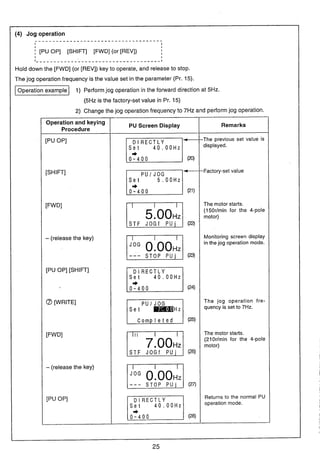
The motor can be started and stoppedfrom the PUwithout using the external frequency setting potentiometeror
start switch.
The PU also allowsjog operation.
3
Operating Procedure
(1) Directly entering (setting) the required frequency (Direct setting)
. . . . . . . . . . . . . . . . . . . . . . . . . . . . . . . . . . . . . . . . . . .
I I '
j [PU OP] [Requiredfrequency value] WRITE] [FWD] (or [REV]) [STOP:
I
I
I
I
I
I _ _ _ _ _ _ _ _ _ _ _ _ _ _ _ _ _ _ _ _ _ _ _ _ _ _ _ _ _ _ _ _ _ _ _ _ _ _ _ _ _ _ _ _ _ _ _ _ _ _ _ _ _ _ _ _ _ _ _ _ _ _ _ _ I
Setting the runningfrequency ...........Repeatingthis procedureduring operation
allows the speed to be varied.
Setting example To run the motor in the forward direction at 30Hz.
Note: The parameters, etc. are as factory-set.
Operation and keying
Procedure
Power on
[PU OP]
@a
[WRITE]
[FWD]
[STOP]
PU Screen Display
STOP E X T (1)
D l RECTLY
0 . OOHz
0 - 4 0 0
0 . OOHz
(3)
IIIIIIIII
S T F FWD PU (5)
S T O P PU (6)
Remarks
Displays the latest (previ-
ous) set value.
(OHzinthefactorysetstate)
The motor starts.
(900rlmin for t'.: 4-pole
motor)
The motor stops.
(2) Directlyentering (setting)the required frequency (Direct setting)
IL _ _ _ _ _ _ _ _ _ _ _ _ _ _ _ _ _ _ _ _ _ - - _ - - _ _ - - _ _ _ _ - _ _ _ - - _ _ _ _ - _ _ _ - _ _ - _ _ _ - _ _ - _ _ _ - ~
I
I
I
I [PU OP] [Requiredfrequency value] [WRITE] [FWD] (or [REV]) ;STOP:
I
I
I
I
I
l _ _ _ _ _ _ _ _ _ _ _ _ _ _ _ _ _ _ _ _ _ _ _ _ _ _ _ _ _ _ _ - _ _ _ _ _ _ _ _ _ _ _ _ _ _ _ _ _ _ _ _ _ _ _ _ _ _ _ _ _ _ _ - I
SeRing the running frequency ...........Repeating this procedure during operation
allows the speed to be varied.
-1 After running the motor at 30Hz again as set on the preceding page,
change the set value to 60Hz
Operiation and keying
I PU Screen Display I Remarks
I Procedure I
I I---
S T O P PU 1 (7) 1
I I I I I I I I I
S T F FWD PU
The motor runs at the pre-
ceding set value.
D l R E C T L Y
0 - 4 0 0
PIS T O P PU
(3) Setting the requiredfrequency by continuous speed change using the [A]or [V]key
(Step setting)
. . . . . . . . . . . . . . . . . . . . . . . . . . . . . . . . . . . . . . . . . . . . . . . . . . . . . . .1 I
I I
; [PUOP] [A](or[V]) WRITE] [FWD](or[REV]) CSTOPI II
I I
I - - - - - - - - - - , - - - - - - - - - - - - - - - - - - - - - - - - - - - - - - - - - - - - - - - - - - - l
-1 Change the preceding setting (60Hz) to 40Hz and run the motor inthe
forward direction.
Note 1: Holdingdownthe [A]or [V]keygraduallyincreasesthe rateof changeof the set frequency.
Set to the target value by pressingand releasingthe key as required.
Note 2: When the frequency has been set to the requiredvalue, the WRITE] key mustbe pressed
to store the set frequency.
(Whenthe powerisswitchedoff or when the PUoperation modeisswitchedto the external
operationmodeandthenswitchedback,thefrequency returnstothesetvalueasithadbeen
before the change (60Hz in this example).)
Remarks
The previous set value is
displayed
This value changes (re-
duces) continuously while
('"he mkey is pressed.
The motor starts.
(1200rlmin for the 4-pole
motor)
The motor stops.
The set value isstoredinto
the invertermemory.
(Validanytimeafterthe[A]
or [V]key is pressed.)
Operationand keying
Procedure
[PU OP]
[
INote':
[FWD1
[STOP]
[WRITEINQe2:
PU Screen Display
D l R E C T L Y
Set 60.OOHz,
+
0 - 4 0 0 (14)
D l R E C T L Y
Set 60.OOHz,
+ 5 9 . 9 9 H z
0-400
D l R E C T L Y
40.00Hz
0-400
STOP P U (18)
(19)
E51006,S T F J O G f P U '
WyyS T O P P U '
S T F J O G f P U '
WOo,:.lS T O P P U '
10.2.3 Changing the Monitor Screen
The invertercan be monitoredby either the LED (red light emitting diode) display on the inverter,the 5-digit liquid
crystal display on the PU (PU main monitor) or the PU level meter. These displays are selected by the following
method: 3
1. Inverter LED display
Setting Pr. 51 on the PU allows selection from 16types of data.
For full informationon the setting method, see the explanation of Pr. 51.
Pr. 51 is factory-setto the output frequency display (Pr. 51 =I).
2, PU level meter
Setting Pr. 53 on the PU allows selection from 15types of data.
For full informationon the setting method, see the explanation of Pr. 53.
Pr. 53 is factory-set to the output frequency display (Pr. 53 =I).
3. PU main monitor
5 types of data can be selected in sequence by the SHIFT key as shown below.

Among the five monitor screens, the fifth monitorscreen (selective monitoring)allows selectionfrom 12types
of data such as the frequency set value and runningspeed.
f
Additionally, Pr.52allowsselectionfromfour typesof datasuchasthe loadmeterandcumulativeoperationtime.
For full informationon the select items, see the explanation of Pr. 52.
1 (1) Monitor selection in the factory-set state
Example
I _ - _ _ - _ _ _ _ - - - - _ _ _ _ - - - - - - - - - - - - - - - - - - - - -
I
I
I
(~irstpriot!ity screen) (Firstpriontyt screen)
S T O P E X T (30)
(Outputvoltage monitor)
4
I
I
I
I (SHIFT) I O T H E R S I @&@ ALARM HISTORY]
2 U V T 6
By pressingthe [m]key,five types of data can becalled in sequence. Pressthe [WRITE] key
on any monitor screento always start from that screen (first priorityscreen). Example: By pressing
the [WRITE] key on the output voltage monitor screen, pressingthe C f i 0 m ) keyfirst callsthe
outputvoltage monitorscreen, which isthe first priorityscreen. (The sequenceof screens switched
by the cm) key remains unchangedfrom the above diagram.)
1 (2) Selecting a new monitor item in the selective monitoring mode
pT6i-qSTOP PU
3 Voltage
4 Alarm H i s B
El7 Shaft Trg
1 0 Therm OIL
1 1 Peak I
O S T R ORM O S T O
O A U O R H O R E S
. . . . . . . . . . . . . . . . . . . . . . . . . . . . . . . . . . . . . . . . . . . . . . .I
I
* For the items selectable,
C w ) [ v ] [READ] [WRITE] 1 see page 56.
I
I (35)
I
I
I
I
I
I
I Monitor select screen (for the
I
I
I way of calling this screen,
I
I
I refer to the preceding page)
I
I
I I
. - - - - - - - - - - - - - - - - - - - - - - - - - - - - - - - - - - - - - - - - - - - - - - J
-1 Select the input terminal state screen in the selective monitoringmode.
that monitor screen.
Note 2: When the selective monitor screen is not the first priority screen as inthe above operation, the selected data is
erasedfromthe memoryassoonasthe power isshutoff orthe otheroperation mode (suchasexternal operation)
is selected.
In this case, the selective monitoring mode must be selected again by the above procedure.
When the selective monitor screen remains as the first priority screen, the selected data remains intact in the
Remarks
The following operation can also be
carried out in the external operation
mode.
Holddown ( m ) a n d press ['dl or
[A]to advance or return the screen
one page.
By pressing the (m)key, the
other monitor screens can be called.
prioritywhen the other operation mode
Operation and keying Procedure
[PuOP]
(MONITOR)
(SHIFT)(SRiF-7)(SHIFT)(m)
(HELP)
Hold down G ~ T )
[ V l [ V l [s'l
Without pressing ( S ~ T ]Key
[TI181
[READ] [WRI'TE]
Note 1: Inthis state, the 110terminal
I memory.
is switched to the monitoring mode. (Refer to the preceding page.) When first priority has been given to other
data, press the [WRITE] key with that monitor screen being displayed.The first priority screen then switches to
PU Screen Display
(36)
(37)
(38)
(39)
(40)
(41
(42)
states selected here are first displayed with
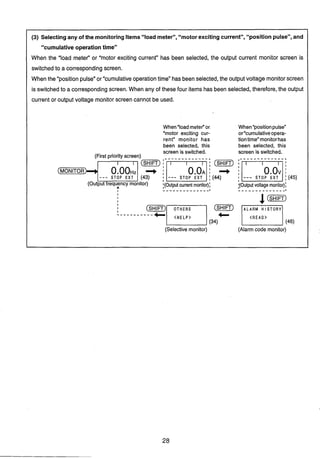
(3) Selectingany of the monitoringItems"load meter", "motor excitingcurrent", "positionpulse",and
"cumulative operationtime"
When the "load meter" or "motor exciting current" has been selected, the output current monitor screen is
switched to a correspondingscreen.
When the "positionpulse"or "cumulativeoperationtime" hasbeenselected, the outputvoltage monitorscreen
is switched to a corresponding screen. When any of these four items has been selected, therefore,the output
current or output voltage monitor screen cannot be used.
When"loadmeter"or. When"positionpulse"
"motor exciting cur- or"cumulativeopera-
rent" monitor has tiontime" monitorhas
been selected, this been selected, this
screen is switched. screen is switched.
(First priority screen) -_---___-----.
(SHIFT)
--- ---
I - _ - - _ _ - _ - - - _ _ _ I - _ - _ _ _ _ _ _ _ _ _ _ _ I
I
I
I
I
I
I
L _ _ _ _ - - - - - -
(Selective monitor) (Alarm code monitor)
Screen Display in the Frequency Monitoring Mode
EXT : Externaloperation
Indicates the operation PUj : PUjog operation
EXTj : Externaljog operation
STF : Forward rotation FWD : During forward rotation NET : Computer, PC link operation
STR : Reverse rotation REV : During reverse rotation PU+E : PUIexternalcombinedoperation
--- : No command or STOP : At a stop PRG : Programmedoperation
both ON JOGf : During forward jog operation
JOGr : During reversejog operation
-[~ain monitor1 : Allows 20 types of data (note) to be monitored, e. g. frequency, motor
current, output current.
-1~evel meter](display in %) : Likethe main monitor, allows 15types of data to be monitoredin %.
(Differentdata from those in the main monitoringcan be selected.)
Note: For more informationon the 20 monitor screens available, refer to page 59 (monitor/output signal selection).
*
e The following modes are displayed on the parameter unit:
t t fI PU : PU operation
mode.
IIIIIIIIIIIIIIIIIIIII
120.00STF FWD PU
(1) Direct in
Monitoring mode
[Setting ] ]I (3)(2) JogCombinedoperationPU/exter-
nal operation 1
(power on)
(4) Specialoperation
Indicatesthe stall prevention
function is activated.
z:rDisplayunitl
Externaloperation mode
Monitoringmode Setting mode
1 f monitor 9 DC bus voltage (1) Parameter read
2 l monitor 10 Output current peak (2) Parameterwrite
3 V monitor 11 DC bus voltage peak (3) Graphicdisplaymode
(48)
PU operation mode
4 Alarm history 12 Thermal load factor I
Indicatesthe operation
5 Speed 13 Input terminal monitor
6 Regenerativebrake duty 14 Output terminal monitor
7 Input power 15 Frequency command' 1 I. .
8 Output power 16 Output torque 1
I$- $- +Help mode (see page 34)
(1) Monitoring (4) Parameter clear (8) Troubleshooting
(2) PU operation 1) 0to 899 clear (exceptcalibrationfunctions) 1) Motor does not rotate.
(3) Parameter 2) All clear (including calibrationfunctions) 2) Speed does not increase.
1) Setting (5) Alarm history 3) Acceleration/deceleration time is long.
2) Parameter list (6) Alarm history clear 4) Output current is large.
3) Change list (7) Inverter reset
4) Initialvalue list
Set P r . N O .
FOR P R . L i s t
pqS T O P E X T
10.2.4 Changing or Checkingthe Function (Parameter) Set Values
By changingthe parametersof the inverter,the functionand performanceof the inverterand motorcan be matched
to the application.The factory-setvalues need not be changedwhen they are appropriate.The parameter numbers
are represented Pr.
Operating Procedures
(1) Directly entering the Pr. number, calling and setting the parameter
-----------------_-----------------------------
[PU OP] [SET] @ a[READ] a@ @[WRITE]
Pr.number
*The function names (abbreviation) of parameters Pr. 0 to Pr. 9, which are most often used, are given below
the numerals on the numeral keys (0 to 9).
Isetting exampleI Setting Pr. 7 (accelerationtime) to 3.5 seconds.
Operation and Keying Procedure
[PU OP] [SET]
a
[READl
*
@ [READ] [WRITE]
(m)
or (WT]
PU Screen Display
(49)
(50)
Remarks
Currentset To callthe parameterfunction graphi-
value
seltins tally
range
(HELP)
(ern)
4- (55)
(Returns to the previous screen)
(52)
(53)
(54)
Press the (-R] key to move
to the CM-R) screen.
After the setting is complete, press
the key to move to the next
parameter.
(2) Calling the parameter list and setting the parameter
C - - - _ - - - - - - - - - - - - - - - - - - - - - - - - - - - - - - - - - - - - - - - - - - - - - - - - - - - - -
[PU OP] [SET] (KP][ ] [READ] aa@[WRITE]
I
'--------------------------------- - - - - - - - J
Set valuew
Isetting example1 Setting Pr. 13 (startingfrequency) to 1Hz.
Operation and Keying Procedure
[PU OP] [SET] [READ]
(HELP)
Note
I - - - - - - - - - - - - - - - - -
(rn)[V] [V] [V];1- - - - - - - - - - - - - - - - - !
[READ]
@ [WRITE]
(-1
or (m)
Note: Hold down the (SHIFT) key and press the [V] key.
PU Screen Display
SETTING MODE
S e t Pr.NO.
FOR P R . L i s t
< H E L P >
Remarks
13 S t a r t F To callthe parameterfunction graphi-
0 . 5 0 H z cally
(CLEAR)
(63)
(Returns to the previous screen)
14 L o a d V F
(62)
After the setting is complete, press
the (SHIFT)key to move to the next
parameter.
10.2.5. Applying the Help Function
By pressing HELP in any PU operation mode, the inverter gives the operation guide.
.................................................................
I I
j (1) [~onitoringmodel (m)-t onitorin^ (item) list1
I
I
j (2) ((HELP) + Iparameter (item) list1
I
I
I
I I
I I
I (before Pr. number setting) I
j (3) lSeningmodel (w)+ [Graphic display]
I
I
I
1 I
I I
I (after Pr. number setting) I
j (4) PU operation model (HELP) + 1~ e yoperation explanationI
I
j (5)
Operatingand Keying Procedure
(WP](-R]
(HELP)
I
I
I .
General operation mode] (m)(-1 + I el^ (item) list] I
I I
I - - - - - - - - - - - - - - - - - - - - - - - - - - - - - - - - - - - - - - - - - - - - - - - - - - - - - - - - - - - - - - - - l
(1) Help function in the monitoring mode
* Move the cursor (indicated by +) using the [A] (or [V]) key, then press the [READ] Key to select the
corresponding monitor item.
* Furthermore,pressthe [WRITE]keytostorethe datasothat this screenisdisplayedfirst inthe monitoring
mode after the monitor screen has been switchedto another display screen.
PU Screen Display
ST 0 P PU (64)
Remarks
This operation may be performedon
any monitor screen.
Alsothisoperationmaybeperformed
during inverter operation.
(2) Help function in the setting mode (Part 1)
Move the cursor (+) and press the [READ] key to select any parameter.
(3) Helpfunction inthe setting mode (Part2) Operation example Pr. 0(torqueboost)
Operating and Keying Procedure
(PUOP)(SEZ)
(HELP)
-Sr On this screen, pressthe SHIFT key to graphically display the parameter of the next number.
(4) Help function in the PU operation mode (beforefrequency setting)
PU Screen Display
Set P r . N O .
FOR P r . L i s t
2 M i n . F I
Operating and Keying Procedure
( i m p )
0 -
(HELP)
Remarks
PU Screen Display
Set P r . N O .
FOR P r . L i s t
0 T r q . B s t 1
6 . 0 %
F + (70)
Remarks
The function of the corresponding
parameter is displayed graphically.
Remarks
b y operation exp~anationscreen
a To set the frequency (f), use the
0 to 9 numeral keys.
a Then press the pRITE] key.
a Furthermorepress the [FWD]or
[REV] key to start.
Operating and Keying Procedure
(P-)
PU Screen Display
Dl R E C T L Y
0 - 4 0 0I..--.1(71)
Fse t : 0 - 9
Then:WRITE
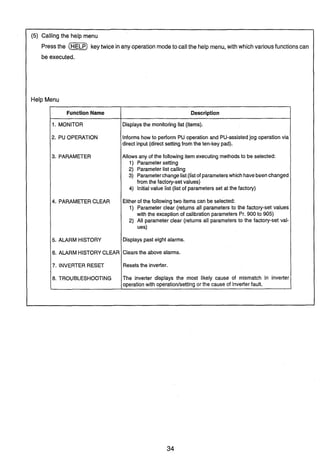
(5) Calling the help menu
Pressthe (HELP)keytwice inany operation modeto callthe help menu, with which variousfunctionscan
be executed.
Help Menu
Function Name
1. MONITOR
2. PU OPERATION
3. PARAMETER
4. PARAMETER CLEAR
5. ALARM HISTORY
6. ALARMHISTORYCLEAR
7. INVERTER RESET
8. TROUBLESHOOTING
1
Description
Displaysthe monitoringlist (items).
Informs how to perform PU operation and PU-assistedjog operation via
direct input (direct settingfrom the ten-key pad).
Allows any of the following item executingmethodsto be selected:
1) Parametersetting
2) Parameterlist calling
3) Parameterchangelist(listof parameterswhich havebeenchanged
from the factory-setvalues)
4) Initialvalue list (list of parameters set at the factory)
Either of the followingtwo items can be selected:
1) Parameter clear (returns all parameters to the factory-set values
with the exception of calibration parameters Pr. 900 to 905)
2) All parameter clear (returns all parameters to the factory-set val-
ues)
Displayspast eight alarms.
Clearsthe above alarms.
Resetsthe inverter.
The inverter displays the most likely cause of mismatch in inverter
operationwith operationlsettingor the cause of inverterfault.
Operating and Keying Procedure
- -- - - - - --
Operations in the help menu not previouslydescribedwill now be described.
(5) -1) Parameterchange list
Displays only the set values of the parameterswhich have been changed from the factory-set values.
PU Screen Display
1 SettingMODE
2 P r . L i s t
3 + S e t P r . L i s t
Remarks
Help menu screen
Help menu screen regarding the pa-
rameters
Onlytheparameterswhichhavebeen
changed in setting are displayed on
part of the screen.
(The screen shown on the left indi-
cates an example of Pr. 0 whose
value has been changedto 8%.)
(5) -2) Initialvalue list
Displaysalistofthefactory-set valuesof the parameters.Thisfunction isconvenientwhenatypical setvalue
is lost.
Operating and Keying Procedure
[READ]
PU Screen Display
3 S e t - P r . L i s t
Remarks
Entersthesettingmodeof theparam-
eter at the cursor position.
(5) -3) Parameterclear and all parameter clear
Parameterclear andall parameterclear differasfollows:The parameterclearoperationdoes notclearthe
calibration parametersof Pr. 900 to Pr. 905, but the all parameterclear operationclears all parameters.
Clear indicates that the parametersare set to the factory-setvalues.
Operating and Keying Procedure
( O F
PU Screen Display Remarks
Pressthe [PU OP], [CLEAR] or other
key to returnto another mode.
Pressthe [PU OP], [CLEAR] or other
key to returnto another mode.
3 C l e a r None
Exec<WRITE>
Cancel<CLEAR>
[WRITE]
[Vl [READ1
[WRITE]
*
C l e a r P r .
(83)
C L E A R ALL P r .
Exec<WRITE>
Cancel<CLEAR>
/(84)
C L E A R ALL P r .
(85)
(5) -4) Alarm history and alarm history clear
* The alarm history can also be displayed by pressing the SHIFT key in the monitoring mode.
(See page 26)
(5) -5) Inverter reset
If any protectivefunction of the inverter hastrippedthe inverter,the following operation allows the inverter
to be reset via the keypad.
The inverter can also be reset by switchingthe power off or connecting the terminals RES-SD.
Remarks
Alarm history screen
Pressthe [PU OP], or [SHIm key to
return to another mode.
Operating and Keying Procedure
(WP)
PU Screen Display
Operating and Keying Procedure
(OP)
Hold down [ S H l m and press [V]
furlher [V] [V][READ]
[WRITE]
Holddown (am)and press [V]
6 A l a r m c l e a r
7 I n v . R e s e t
(88;
1 U V T 5
2 U V T 6
FI[READ1
Exec<WRITE>
Cancel<CLEAR>
[WRITE]
PU Screen Display
I N V . R E S E T
Exec<WRITE>
Cancel<CLEAR>
Remarks
When anothermonitoritemhas been
selected onthe monitoringfirst-prior-
ity screen, that monitor screen is dis-
10.2.6 Troubleshooting
Selectthis modewhen the inverteroperationappearsfaulty. The most likelycause of the fault is displayed.
Thisoperation modecanbeselectedduringthe inverteroperation (PUoperation,externaloperation), alarm
trip (protection activated), etc.
The fault on each display screen are described below.
M. NOT RUNNING (Motor does not rotate)
M . N O T RUNNING
The inverter has alarm-tripped (protection activated), resulting in output
A L A R M shut-off. Pressthe [SHIFT] keyto displaythe cause of protectionactivated.
I n d i c a t e d
< S H I FT>
The maincircuit powerof the inverter is lost, or open phase has occurred in
NO I I P Power the power supply. Checkthe power supply.
o r Phase L o s s
M.NOT RUNNING Both start signals STF and STR are ON or OFF.
STF, S T R
b o t h a r e OFF
I I I (99)
M . N O T R U N N I N G The output shut-off input terminal MRS is ON.
MRS i s ON
1(100)
M . N O T R U N N I N G The inverterstarting frequency (Pr. 13) set value is higher than the current
S e t F < S t a r t F
P r . 1 3
1set frequency.
(101)
Operating and Keying Procedure
=(HELP)
Holddown (SHIFT)and press [V]
further [V][V][V]
(READ)
PU Screen Display
3 P r . L i s t
6 A l a r m c l e a r
7 I n v . R e s e t
2 M.Spd E r r o r
3 M . A I D e c E r r
Remarks
Symptom menu.
Movethecursortothe itemmatching
the fault andpressthe (READ) key.
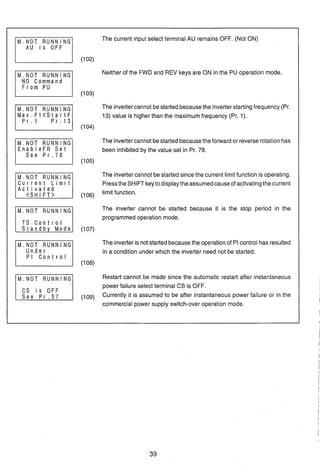
The current input select terminal AU remains OFF. (Not ON)
A U i s O F F
(102)
Neither of the FWD and REV keys are ON in the PU operation mode.
NO Command
F r o m PU
(103)
M . N O T RUNNING The invertercannot bestartedbecausethe inverterstartingfrequency (Pr.
M a x . F I < S t a r t F 13) value is higher than the maximumfrequency (Pr. 1).
(104)
The invertercannot bestartedbecausethe forwardor reverserotation has
EnableFR S e t been inhibited by the value set in Pr. 78.
S e e P r . 7 8
(105)
The invertercannot be startedsince the current limitfunction is operating.
C u r r e n t L i m i t PresstheSHIFTkeyto displaythe assumedcauseof activatingthe current
A c t i v a t e d
(106)
limit function.
M . N O T RUNNING The inverter cannot be started because it is the stop period in the
programmedoperation mode.
T S C o n t r o l
81111111(107)
M . N O T RUNNING The inverteris notstartedbecausethe operationof PIcontrol has resulted
Under in a condition under which the inverter need not be started.
PI C o n t r o l
I(108)
Restart cannot be made since the automatic restart after instantaneous
power failure select terminal CS is OFF.
C S i s O F F
Currently it is assumed to be after instantaneous power failure or in the
commercial power supply switch-over operation mode.
M.SPEED ERROR (Speed does not match the runningfrequency set value)
Since the running frequency set value is higher than the maximum
SetF>MaxFlIF2 frequency(Pr. 1)setvalue, the runningfrequencyremainsatthe maximum
6 0 . 0 0 Pr1118
(110) frequency.
Sincethe runningfrequencysetvalue islowerthanthe minimumfrequency
S e t F < M i n . F l
6 0 . 0 0 P r . 2
(Pr. 2) set value, the running frequency has been risen to the minimum
(111) frequency.
Sincethe runningfrequency set value iswithin the frequencyjump setting
Fjump W o r k i n g range, the runningfrequency has jumped.
S e e P r . 3 1 + 3 6
The current limit function has been activated and forced the running
C u r r e n t L i m i t
A c t i v a t e d
frequencyto reduce. Pressthe SHIFTkeytodisplaythecauseof activating
(113) the current limit function.
The operation of PI control has causedthe runningfrequency to be offset
Under from the set value.
PI C o n t r o l
(114)
M.A/Dec Err
(Acceleration/decelerationtime is longer than the value set in Pr.7lPr.8)
Accelerationtime set value (Pr.7) is displayed.
Frequencyreachedinthe above set time (acceleration/decelerationrefer-
ence frequency, Pr.20) is displayed.
S e t 5 . 0 s
0+ 60.00HZ
S e t 5 . 0 s
60.00HZ+O ,
Decelerationtime set value (Pr.8) is displayed.
Frequencyfrom which deceleration is made inthe above set time (accel-
(115) erationldeceleration reference frequency, Pr.20) is displayed.
A
[A] [v]
Assumedcauseof longeraccelerationldecelerationtimethanthe setvalue
is displayed.
'I Stall preventionfunction (current limit function) is implemented.
Set time is too short.
Set Too L o w ?
Motor load is heavy.
(116) Pr. 22(stall preventionoperation level) setting error.
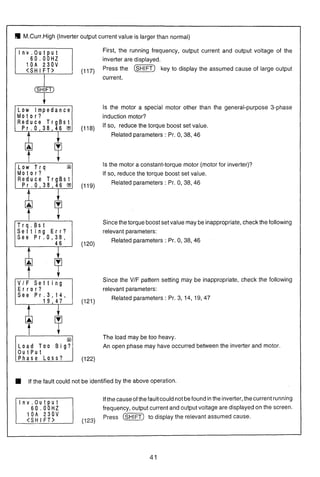
M.Curr.High (Inverter output current value is larger than normal)
SHIFT
5'Low Impedance
M o t o r ?
ILow T r q
M o t o r ?
T r q . B s t
S e t t i n g E r r ?
S e e P r . 0 , 3 8 ,
V I F S e t t i n g
E r r o r ?
S e e P r . 3 , 1 4 ,
Load Too B i g ?
o u t p u t
First, the running frequency, output current and output voltage of the
inverter are displayed.
(117) Press the [ M I key to display the assumed cause of large output
current.
Is the motor a special motor other than the general-purpose 3-phase
induction motor?
(118)
Ifso, reduce the torque boost set value.
Related parameters : Pr. 0, 38, 46
Is the motor a constant-torque motor (motor for inverter)?
If so, reduce the torque boost set value.
(119)
Related parameters : Pr. 0, 38, 46
Since the torqueboost set value maybe inappropriate,check the following
relevant parameters:
(120)
Related parameters : Pr. 0, 38, 46
Since the V/F pattern setting may be inappropriate, check the following
relevant parameters:
(121
Related parameters : Pr. 3, 14, 19, 47
The load may be too heavy.
An open phase may have occurred between the inverter and motor.
If the fault could not be identified by the above operation.
Ifthe causeof thefaultcould notbefound inthe inverter;thecurrentrunning
frequency, output current and output voltage are displayed on the screen.
(123)
Press @m)to display the relevant assumed cause.
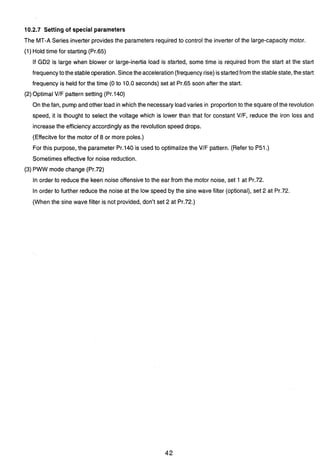
10.2.7 Setting of special parameters
The MT-A Series inverter provides the parametersrequired to control the inverter of the large-capacity motor.
(1) Hold time for starting (Pr.65)
If GD2 is large when blower or large-inertia load is started, some time is required from the start at the start
3
frequencyto thestableoperation.Sincetheacceleration(frequencyrise)isstartedfromthe stablestate, thestart
frequency is held for the time (0 to 10.0 seconds) set at Pr.65 soon after the start.
(2)Optimal VIF pattern setting (Pr.140)
On the fan, pump and other load in which the necessary loadvaries in proportionto the square of the revolution
speed, it is thought to select the voltage which is lower than that for constant VIF, reduce the iron loss and
increase the efficiency accordingly as the revolutionspeed drops.
(Effecitve for the motor of 8 or more poles.)
For this purpose, the parameter Pr.140 is usedto optimalizethe V/F pattern. (Refer to P51.)
Sometimes effective for noise reduction.
(3) PWW mode change (Pr.72)
In order to reduce the keen noise offensive to the ear from the motor noise, set 1 at Pr.72.
In order to further reduce the noise at the low speed by the sine wave filter (optional),set 2 at Pr.72.
(When the sine wave filter is not provided, don't set 2 at Pr.72.)
10. 2.8 Calibratingthe Frequency Meter
The PU allowsthe calibration (adjustment)of a meterconnectedacross the meterconnectionterminal FM-SD
or AM-5 of the inverter.
When a digitalmeteris used, the PUallowsthe frequency of the pulsetrain output signalto be adjusted (across
terminals FM-SD).
(1) Calibration of the FM-SD output
Preparation ('I) Connect a meter across inverter terminals FM-SD. (Note polarity. FM is the positive
terminal.)
(2) When acalibrationresistorhasalreadybeenconnected,adjustthe resistancevaluetozero
or removethe resistor.
(3) When 1or2 hasbeenset in Pr.54to selectthe runningfrequency or inverteroutputcurrent
astheoutputsignal, presetinPr. 55or Pr.56 the runningfrequency orcurrentvalueatwhich
the output signal is 1440Hz.This 1440Hz normally makes the meter full-scale.
* The motor need not be connected.
Operating Procedure (The following example indicatesthat the meter is calibratedto the runningfrequency
of 60Hz.)
Operating and Keying Procedure
( i ~ )(SET)
o ( R E A D )
Set the running frequency.
@I (WE]
(FWD)
Adjustthefrequencymeterreadingto
a predetermined position using the
[A]or [V]key.
PU Screen Display
900 FM Tune -Lzzil
900 FM Tune
Run I n v e r t e r
M n t r F 60.00Hz
M n t r F 60.00Hz
Completed
<MON I T O R >
IIIIIIIII I I I I I I I I I
WI
Remarks
-- -
-The current PU set frequency is dis-
played.
Forward operation is performed at
60Hz.
Thefrequency meter reading moves.
Calibration is complete.
Note: This calibration (Pr. 900) is only valid when any of 1 to 3, 5 to 14, 17, 18 and 21 has been set in Pr. 54 to output
a signalto terminal FM. When any othervalue hasbeenset (signaloutput to terminalAM has beenselectedin Pr.
54),the absenceof Pr.900isdisplayedonthe screenas soonasthis parameterisselectedbythe aboveoperation.
Operating and Keying Procedure
-(SET)
S 0 0 Cm)
Set the running frequency.
@ 0 (m)
0
Adjustthefrequencymeterreadingto
a predetermined position using the
[A]or [V]key.
(m)
(MONITOR)
(2) Calibration of the AM-5 output
preparation (1) Connect a meter of 0-1OVDC acrossinverterterminalsAM-5. (Notethe polarity. AM is the
positive terminal.)
(2) When 101or 102has beenset in Pr. 54 to select the runningfrequency or inverteroutput
currentasthe outputsignal, presetinPr. 55or Pr.56the runningfrequencyorcurrentvalue
at which the output signal is 10V.
Operating Procedure (The following example indicatesthat the meter is calibratedto the runningfrequency
of 60Hz.)
Note: This calibration (Pr. 901) is only valid when any of 101to 103, 105 to 114,
PU Screen Display
R u n I n v e r t e r
S e t + 0.OOHz
(130)
9 0 1 AM Tune
R u n I n v e r t e r
(131)
M n t r F 60.00Hz
M n t r F 60.00Hz
Completed
<MON I TOR>
(134)
117, 118 and 121 has been set in Pr.
Remarks
The current PU set frequency is dis-
played.
Forward operation is performed at
60Hz.
Thefrequencymeter readingmoves.
Calibration is complete.
54 to output a signal to terminalAM. When any other value has beenset (signal output to terminal FM has been
selectedin Pr. 54), the absenceof Pr. 901 is displayedon thescreen as soon as this parameter isselectedbythe
above operation.
I 10. 2.9 Adjusting the Bias and Gain of the Frequency Setting Signal
The bias and gain functions are used to adjust the relationship betweenthe input signal entered from outside
the inverterto set the output frequency,e.g. 0 to 5VDC, 0to 10VDCor 4 to 20mADC, and the output frequency.
Parameters Py.902 to Pr. 905 are used for this adjustment.
Output frequency
Adjustment examples
Frequencysetting voltage bias setting ....
Set the output frequency to 10Hz at the set voltage of OV.
Frequency setting voltage gain setting ....
Set the output frequency to 60Hz at the set voltage of 5V.
5V(1OV)
Frequencysetvoltage
Preparation: ~ e t ' 1(factory-setvalue) in Pr. 73 to select input 0-5V for terminal 2.
(Continued)
Operating and Keying Procedure PU Screen Display Remarks
( P ~ P ) Avoltage does not needto beapplied
0 . O O H z across terminals 2-5.
S e t l ) < W R I T E >
(note)
0 0 (wm) 9 0 2 E X T V b i a s The bias setting is 10Hz.
B Hz
Corn l e t e d (137)
v
If a voltage is being applied, the bias
setting is as shown above.
If you want to set the bias against the
set voltage across terminals 2-5. should be made in the following
(READ)
(wm)
9 0 2 EXTVbias
Preceding set value is displayed.
1 0 . 0 0 H z
-Current set voltage across terminals
2-5 is displayed in %. The displayed
(138) value ischanged according asthe set
voltage.
9 0 2 EXTVbias
Value selected in Pr. 73 (5V in this
1 0 . 0 0 H z example) is 100%.
1V has been set, the bias setting is
as follows:
1v
v
Note: Pr. 904, Pr. 905 (bias and gain of frequency setting current signal) can also be set in a similar manner.
Pr. 903 and Pr. 905 (gains) remain unchanged if Pr. 20 (acc./dec. referencef) is changed.
-
Remarks
--0.0% may not be displayed,
The bias setting is as follows:
v
Operatingand Keying Procedure
(m)
PU Screen Display
9 0 2 E X T V b i a s
1 0 . 0 0 H z
(139)
A voltagedoes not needto beapplied
acrossterminals2-5, andgain setting
is made with 5V (or 10V) in the in-
9 0 3 EXTV a i n
v
set voltage across terminals 2-5. shouldbe madeinthe following pro-
(READ)
(rn]
(m)
9 0 3 E X T V g a i n -Factory set value
6 0 . 0 0 H z (Preceding set value is displayed.)
9 7 . 1OIo
19 9 . 0 % Current set voltage across terminals
(141) 2-5 is displayed in %. The displayed
valueischangedaccordingasthe set
9 0 3 E X T V g a i n
6 0 . 0 0 H z
voltage.
9 7 . 1 %
9 9 . 0 % Value selected in Pr. 73 (5V in this
example) is 100%
6 0 . 0 0 H z
9 9 . 6 %
(142)
Set voltage across terminals 2-5.
100.0% may not be displayed.
10.3 Parameters
Parameter List
Note 1: In the Screen D~splaysection, f indicates a frequency. V a voltage, and I a current.
Note 2: The operationfactor indicates %ED of the built-in brake transistor operation.
Note 3: 0parametersallow their set values to be changed during operation if 0 (factory setting) has been set in Pr. 77 (parameterwrite
disable). f7
Note 4: When the optional T-OPT20 is installed. 2 digit number is to be set. (Refer to T-OPT20 manual.)
Note 5: A140: factory setting value is 460V.
A160: factory setting value is 575V.
11. EXPLANATION OF THE PARAMETERS
11.1 Functions of the Parameters
Pr. 0-Pr. 8 Note: Parameter is abbreviated as Pr. Setting multi-speed settings
1st Multi-speedsetting (high) 1- 4th Multi-speedsetting
IPr2nd Multi-weedsetting (medium) 5th Multi-speedsetting
Setting torque boost (manual)
Voltage at 0 Hz can be adjusted (biased) as necessary to
provide additional starting torque at low frequencies.
- - .
3rd Multi-speedsetting (low) 6th Multi-speedsetting
7th Multi-speedsetting
Input terminals RH, RM, and RL alone or in combination are
used to select each speed.
Each preset speed can be set to any value between 0-400
Hz during operation of the inverter. The speed can also be
set by using the "[A] [V]"keys.
Up to 10 speeds can be set by combining these parameters
with JOG frequency (Pr. 15), upper limit frequency (Pr. I), or
lower limit frequency (Pr. 2).
A Speed 1Note 1: 1% of factory-setting (manual torque boost).
Note 2: When Pr. 80 and Pr. 81 have been set to select Primary
Magnetic Flux Control mode, there is no need to set this
parameter
I-
Setting Maximumand Minimum frequency limit
(Pr Maximum frequency limit Minimum frequency limit
Maximum and minimum frequency output limit can be clamped.
Betweer
Between
Belwee~
l and SC
i and SC
and SC
I.When Pr. 24-Pr. 27 are set to 9999 (factory-set value), Speeds
4-7 cannot be selected.
2. Multi-speed selections take priority over the main speed
(between terminals 215 or 415).
3. Multi-speeds can also be set during PU operation and external
operation.
Note: To set a frequency of 60Hz or more, use Pr. 18.
lPr.1p g
Settina accelerationldecelerationtime4Setting base frequency
Acceleration time Accelerationldecele~ationbase frequency
Decelerationtime -1 Accelerationldecelerationtime unit
Base frequency ImBase frequency voltage
Check motor nameplate for base frequency and voltage
data. Enter frequency in Pr.3, and voltage in Pr.19. This
will establish the correct volts1Hz ramp. Example: Pr.3 =
60 (Hz), Pr.19 = 460 (volts).
Pr.19 can be set to any motor nameplate voltage provided it
is not higher than the voltage supplied to the inverter.
Example: a typical high speed spindle motor nameplated
330V, at 300Hz; set Pr.3 = 300(Hz) and Pr.19 = 330(volts).
An incorrect setting of either Pr.3 or Pr.19 will apply the
wrong VIHz ramp to the motor resulting in motor heating,
and overvoltage trips on overhauling loads.
Setting 8888 in Pr. 19 results in voltage output equivalent
to 95 percent of power supply voltage.
I
Set Pr. 7 to the time needed to reach the set value for the Pr. 20.
Set Pr. 8 to the time needed to reach the set value for OHz.
For Pr. 21 accelerationldeceleration time unit, the setting
range and the minimum setting unit can be set as follows:
Set value 0: 0-3600 seconds (The minimumsetting unit is 0.1 seconds.)
Set value 1: 0-360 seconds (The minimumsetting unit is 0.01 seconds.)
p y b r a t i 0 4 Time
(Pr71 pJ II I
Note: For a S-shaped accelerat~on/decelerat~onpattern A (see Pr.
I
-
I
29) only, the value must be the time needed to reach the base
Ingeneral, it is importantto set Pr.3 and Pr.19 to rated motor values. frequency (Pr. 3).
When Pr.19 is set to 9999 (factory set value), the maximum output- -(-heoutput wavelength for the wavelength setting signal (analog) is
voltage is as the same as the inverter input supply voltage. set by the gain (Pr. 903 or Pr. 905).
49
)Settinq value for electronicthermal OIL
The current value (A) can be directly used as the set value to
protect the motor from overheating. Generally, this Pr. is set
to the motor rated current. This Pr. allows for the reduction
in motor cooling capability during low-speedoperation.
When this parameter is set to "OA", the motor protection
function does not operate.
To use an inverter duty constant torque motor, set Pr. 71
(Applicable Motor) to "21"to select the 100% continuous
torque characteristic in the low-speed range. Then set the
rated current of the motor for Pr. 9 (Electronicthermal OIL).
The current value is factory set to the rated output current
of the inverter.Change rated motor current setting.
Adjustingthe DC brake
(Pr. 10 ( DCinjeclionbrakeoperationfrequency
DCinjectionbrakeoperationtime 1- DC injectionbrakevoltage
Setting DC injection brake torque (' voltage), time, and
starting frequency allows the user to adjust the stopping
accuracy according to the load.
Setting 9999 in Pr. 10 causes the brake operation to slow to
the starting frequency set in Pr. 13.
Setting 8888 in Pr. 1 1 causes the DC brake to begin at MRS-
SD short circuiting.
* Factory-setvalue (for DC injection brake voltage): 1O/O
131Setting starting frequency
Startingfrequency m1Holdtime at startingfreq.
The starting frequency can be set to any value between 0 to 60
Hz.
At the start time, the start frequency can be held for a cer-
tain time. Therefore, overcurrent can be prevented when a
large inertia (GD2)load such as the blower is started.
Pr. 65 has a setting range of 0 to 10.0seconds. It was set at
0second at shipment from the factory.
Pr. 9-Pr. 14
1Pr. 14( ( Pr. 140( Selecting applied load
The user can select the optimum output characteristics (VIF
characteristics)for specific applications or the load characteristic.
The reduction ratio for reduction torque loads can be set
by Pr. 140.k=l to 2 setting possible. (As standard setting,
it should be set to be 1.75)
I ~ r . 1 4 Ise!value Output characteristics
pRT-SD%MI
0
IReverse boost 0% I
Constant torque load
Forward boost 0%
ON 1Constanttoraue load IPr. 14=0of the same)
1 IReduced torque load
I as conveyorsand positive-
displacementmachine.
-rermid
RT-SD
centrifugalpumpsand fans
t
Basefrequency
I Output frequency(Hz)
1
Outputfrequancy(Hz)
ON
OFF
1-1
For hoisting type applications.
Constanttorque load (Pr. 14=0 Mthesame)
mmtl w pl ~ n gtoward vh (~r.14=3w ttesame)
I-1 (I~CIOIYset value) [Selvalue:l
For constant toque loads such For reduced toque load such as
pzEKq
For hoisting type applications.
3
Forwardboost:Set value for Pr. 0 Forwardboost:0%
Reverseboost:0% Reverseboost:Set value for Pr. 0
I I I 
Note: When Pr. 80 and Pr. 81 havebeenset to select PrimaryMagnetic /
Basefrequency Base frequercy
Output frequency (Hz) Output frequency(Hz)
Flux Controlmode,settingfor this parameteris ignored.
f
m ,
Pr. 15-Pr. 66
lm15Setting JOG operation
1- JOG frequency JOG acceleration/decelerationtime
For JOG operation, select JOG mode (short between the ter-
minals JOG and SD). JOG operation is started and stopped
by a start signal (input at the STF and STR terminals).
JOG operation can also be performed by using the parame-
ter unit. (Refer to the Instruction Manual.)
I]Selectingexternalthermal OIL relay input
Q The set values 0 and 1 switch the functions of the input
terminal JOGIOH. The JOG function inputs the signal
contact of the JOG operation select signal. When a ther-
mal OIL relay is installed between the motor and the
inverter, or a motor containing a temperature sensor is
used, select the OH function which will allow an input from
the relay or sensor.
The set values 2 and 3 switch the function of the MRS terminal
to the b-contact input specification (normally closed input).
Belween Jo"sD
.w:.:.:.:i:i.:::: .>-. :.:+:.:.:.:.;:.:.:.>>~.:-:,:.:.):.;:.:::, . .........................
~;~~~~:::!:;:~!::~;~:~.:g~~:$:<:.:~;::::~~$,:z:zc,~:;;:.;c~<:<~;c-:.:.:-..;. .........._.................................,,,,,,,,.,..,,...... ...
output transistors I
*
Forward -Reverse >
-1 ((Factory-setvalue) -1
output transistors
(7
I Ishut oll SD b------' I
shut off SD
ml-3
SD
mw output stop
m k
output stop
-
0
IPr. 181 Setting high-speed maximumfrequency limit
Use this parameter for operation at 60Hz or more.
When this parameter is set, the maximum frequency parame-
ter, Pr. 1, is automatically changed to this set value.
Before setting this parameter, confirm that the motor and
machine can withstand high-speed operations.
[-I See description of Pr. 3
1- 201See description of Pr. 7, Pr. 8
[q2211Pr.I661
Setting stall preventionoperation level
(1 Stall preventionoperationlevel(currentlimitingoperationlevel)
IPr.1High speed stall prevention operation level (current
limiting level reduction rate at 400Hz)
IPr. 66 1 Frequency at which stall prevention level reduction begins
Set Pr. 22 for the stall prevention operation level (current
limiting level). Normally, set this parameter to 120% (equal
to the factory-set value).
Setting 9999 in Pr. 22 enables stall prevention operation
level to be set through the signal to the auxiliary input ter-
minal (Terminal 1).
Q To improve the acceleration characteristic of the motor for
high speed operation at 60Hz or more, the current limiting
level in the high frequency band can be reduced. Pr. 66
sets the frequency at which reduction begins, and Pr. 23
sets the reduction rate.
Q When Pr. 23 is set to 9999 (factory-set value), the current
limit of the set value for Pr. 22 remains constant at 400Hz.
1
........-..
IPr661 4 0 0 ~ ~output frequency
rPr.24 1Msee descriptionof Pr. 4. Pr. 24-Pr. 36
I-28 Selectinq multi-speedinput compensator- -
A compensator signal input at terminal "1" enables speed
(frequency)compensatorto be made to multi-speedsettings.
[=I Selecting accelerationldeceleration patterns
Set value
0
1
Differentacceleration/decelerationpatternsare provided.
Compensator by auxiliary input
N o t c o m p e n s a t e d (factory-set value)
Can be c o m p e n s a t e d
The selection will dependon the application.
0-1 (linear acceleration/deceleration) is effec-
tive for most applications.
0- (S-shaped acceleration/deceleration A) is
used to accelerate or decelerate to high-speeds. 60Hz or
more, in a short time. This set value selects an
acceleration/deceleration pattern with the turning point of
the S-shaped curve at fb (base frequency). his pattern is
suited for use with machine tools applications.
.[set v a l u e 7 (S-shaped acceleration/deceleration €3) is
used to set constant, S-shaped acceleration or deceleration
at a frequency between f2 (current frequency) and f l
(target frequency). This function can reduce shocks aris-
ing at accelerationor deceleration.
IpiiGq -1 1-1
(linear accalerallow IS-shaped acceleratiow IS-shapedacmleratlow
deceleration) decelerationA) deceleration8)
0 - I
Time
30 Setting regenerativebrake
Externalbrakeresistorselection Maximumregenerativebrakeduty ?
lTo use optional brake unit and brake resistor, set Pr. 30 to 1
/'
and Pr. 70 for %ED. For standard brake unit and brake resis-
tor, %ED is 5% (30 sec/lO min).
lPr. 70 setting must match the allowable brake usage factor of
the transistor in the brake unit.
lWhen Pr. 30 is set to be 0. Pr. 70 is not displayed.
l P r . p z q 3 2 p Z q ~ p z i q
Frequencyjump
lTo avoid resonance during operation due to natural vibration
of mechanical system, the resonant frequency can be
jumped. Three jump points can be set, and the jump fre-
quency can be set above or below each jump point.
lA frequency reference command within the frequency
jump range will result in operation at l A , 2A, or 3A
(below the jump frequency range).
Notes: 1. When the value "9999" is set (factory-set value),
@(Set-"3"ctivates the backlash-reduction function for frequency jump is not executed.
use when the motor is connected to a high backlash load. 2. When Pr. 29 is set to "3",Pr. 33-Pr. 36 are switchedto the
This function temporarily changes the output frequency backlash correction setting function. (Pr. 31 and
at acceleration/deceleration to reduce shocks (or back- Pr. 32 remainvalid as the frequencyjump function.)
lash). Use Pr. 33 to Pr. 36 to set the parameters for backlash 3. The operating frequency within the setting range is
reduction. applied to Jump during acceleration/deceleration.
Range of jump (Operationis avoidedin this range.)
IPr 33
- IPr35] 3A
i ~ 2 B .
" Using Pr. 31 and Pr. 32 ensures that the frequency jump function
will remainvalid.
IPr33) 2A
-
$ IPr321 10
'The operating frequency
commandwithin Jump will
be the operating frequewy
1A in me portionmarkedwith..
>
Frequencysemng signal
1Pr. 42 1 (1 Setting output frequency detection
Pr.42 Output frequency detection
Pr.43 Output frequency detectionfor reverse operations
The signal level is L when output frequency reaches or exceeds
any set detection frequency (the value set for Pr.42 output
frequency detection.) The signal is H when output frequency is
lower than this detection frequency. This function is useful for the
operation or the open signal of an electromagneticbrake.
cceleration time
ue boost (manual
Note: When "9999 (factory-setvalue) is set for Pr.45, the set value
of Pr.44 is used for both alternate acceleration and
decelerationtimes.
lPr.l49]'
Setting the alternate stall preventionoperation function
JPr Alternate stall prevention (current limiting) operating current
Alternate stall prevention (current limiting) operating
Setting Pr.43 enables activationof frequency detectionspecifically
freauency. .
for reverse operation. (In this case, the set value of Pr.42 is valid
This function can change the stall prevention (current limiting)
only for forward operation.)This function is effective, for example,
operation level within a range between 0 Hz to the frequency set
in changing the timing of electro-magnetic brake operation
for Pr.49. This function is effective when applying low torque and. -
between forward (lifting) and reverse (lowering) vertical
speed against a stationary object (holding a load in position).
movement. The factory-set value is "9999, which will be the set
This function does not operate at acceleration, and is valid only at
value for Pr.42 for both for ward and reverse.
jPI.mp3qm
Settina secondaw control functions
Alternate accelerationldecelerationtime
Alternate deceleration time
Alternate torque boost (manual)
Alternate VIF (base frequency)
The accelerationldecelerationtime and the boost setting can be
changed at the same time through the external contact signal
(input betweenthe terminals RT and SD).
This function is effectivein switchingtwo motorsthat have different
parameters,such as lifting and traverse.
decelerationor at a constant speed.
When Pr.49 is set to " 0 (the factory-set value), the Alternate stall
preventionfunction does not operate. /'
-1 Setting alternate output frequency detection
In addition to the output frequency detection set for Pr.42 and
Pr.43. output frequency detection can be set for Pr.50.
This function can be output at any of the SU, IPF, OL, and FU
terminals by setting "5" (FU2)for any of the four digits (fromthe 1st
to 4th digits) of Pr.40. The output signal is turned on at a
frequencies higher than or equal to the set frequency (See the
description of Pr.42 and Pr.43.).
A
-
s E.-
5 "e!rn
- S
3 0
m 8
[Pr
At acceleraCon
--
Note : The set value (%) indicatesthe ratio
for the rated output currentof the
inverter.
481eratidconslant speed
I -pzJ Operation frequency
Pr. 51-Pr. 56 Note: Relationship between Pr.54 (FM, AM terminal function
selection) and Pr.158 is as follows.
~ ~ ~ ]
Selecting monitor and output signal
mlnverter LED d~splaydata s e l e c t ~ o n m ~ uleveld~splaydata select~on
~ P Umalndisplay data select~on ~FMIFMIAMterm~naltunctlon selecllon
=AM terminal function selection
Set the monitor and output signal to the appropriate number
selecting from the 22 signal types listed below.
Evenwhen setting Pr.54 as 101-102,the same signal as when
There are two types of output signals: the FM terminal which is a setting at 22 will be output from the FM terminal.
pulse train output and the AM terminal which is an analog output.
Note: Pr.51 setting as 22 should be avoided, as this is a special
Differentsignalscan be outputat the sametime. Selectthe signals setting per formed exclusively by the manufacturer.
using Pr.54 and Pr.158.
actor^-set values Pr.51:l (The Alarm code is automatically
dis~lavedwhen a failure has occurred.), Pr.52:O. Pr.53:1, Pr.54:1,
55Setting monitor reference
seqfzfe
9999
1-21
pr.i58:9999.
Frequencymonitor reference I c u r r e n t monitor reference
Set the frequency or current value to be used as a refer ence to
indicate when frequency or current is selected to indicate the FM
terminal, AM terminal, and PU level meter.
~ r . 5 4set value
1-21
101-121
101-121
selection (set value of Pr.5
Methodof setting
by Pr.55and Pr.56
144OH1 (FM termmal) 1440Hz(FMtermnall
IOVDC (AM termlna0 lOVDC (AMterminal)
Full.scale (PU level mnlIo0 Full~scale(PU level mnnor)
. . . . - . - - - - - - -.--.......---
b!-a blFa
Output frequency Output current aFrequency renlng Output current peak value
Opsrat~onspeed Load meter
Motor excttstlon currentL
Note: A monitoringfunction marked "N" cannot be selected.
FM'
output status
Both FM and AM terminal
output signalset in Pr.54.
FM termlnal output signal
set in Pr.54.
AM terminaloutput signal
set in Pr.158.
Note: After setting "0" for Pr.52 (PU main monitor), the monitor
signals can be selected, TO display sequentially, use the Notes:l The maximumpulsetrain Output at the FMterminal is 2400 HZ.
SHIFT key. ("0" is the factory-setvalue.) 2 The maximumvoltage at the AM terminal is 10VDC.
Remarks
Cray coad soon Pi.900 may be
read and writ'en.
Cray coad soon Pr.901m y be
read and wrlllen.
CalibrationPr.900and
Pr.901may be read and
I
Note: The load meter value IS ~nd~catedIn %, w~ththe current value
set for Pr.56 representing 100%.
* Select s~gnalsfrom the frequency set value to the output
termlnal status of the PU maln mon~torby select~ng"other
monltor"of PU Operat~on.
** Motor torqued~splayIS val~donly when Inthe prlmarymagnetlc
flux control mode.
Full-scalevalue ~nd~catlonIS based on var~abletorque Inverter
rating.
Pr. 57-Pr. 60(pr.5711pr.581
Restartopsrationafter instanhwouspowerfailureorcommercial switching
Restartcoasting time after an instantaneouspower failure or
switching across the line operation.
IPr.581Rise cushion time for automatic restart.
This function allows the inverter to start into a spinning motor.
Pr.57 (free runningtime)
Fornard
Reverse
Accakrat~on Keep the wiling distance
hceleratlon within 30m.
Sentrpclear
IOperation Sample
4 Note : The acceleration/decelerationtime
will the longest set values for Pr. 44,
P Pr. 45. Pr. 7 and Pr. 8.
Forward 2 I I .............................. . . . . . . . . ....................4nelelaUa0 .... ........"..:.:.:.:.
............
D&slerauon
..................
Ssn~npdear R
Set value
9999 (factory-setting)
0,O.lto 30'
Freerun time meaningtime taken untilthe control restartsafter reset.
When Pr.57 is set to "On,the free runningtime is set to 5 seconds.
This setting is appropriatefor general operation. However, thetime
can be adjusted within a range, of 0.1 to 30 seconds according to
the inertia of the load (GD2(WK2))and the magnitude of torque. (1 Intelligent mode selection
(The system starts at this time if the load quickly decelerates to 2
Hz within the time set with Pr.57.)
If this setting is applied to a load with a high rate of deceleration,
overcurrentmay occur. The unit mustthen be restartedafter it has
stopped.
Pr.58 Setting of output voltage (rise time)
In general, setting this parameter to 0.5 seconds (the factory-set
value) is enough for operation. However, the output voltage rise
time at restart control can be adjusted in the range of 0.1 to 5
seconds according to the value of the load requirements1
specifications(inertia or torque).
Instantaneouspowerfailure
restartenabledldisabled
disabled
enabled
)I Selectingremotesetting function
Setting "Inor "2" for Pr.59 enables changing of the RH and RM
terminal functions to the remotelyset input functions.
The functions equivalentto those of the remote setting box FR-FK
of the FR series setting box (optional) can only be obtained by
setting the parameters.
Restartoperation
enabledldisebled
enabled (5 secondslree ~n lime)
enabled
STF
c s c ,
s D o
X : Not available ii:Available
If the circuit betweenthe RH and SD terminalsor betweenthe RM
and SD terminals has beenopenedfor one minute or more, the set
value of operationfrequencyat that time is stored in memory. After
the power is turned off and then turned on again, operation is
resumed at this set value.
Use only forrestart alter
instantaneous power
failureandshort circuils
betweenCS and SO in
advance.
r--{----
7
0 O-% 1
I Pr.59 set value
! ofrw i
Operation
P ~ ~ u ~ t
O
setting)
4
! iMCswitching '
!-_s=BnCe--J
setting function
Operation
-
Tunes the inverter output voltage on line so
that the inverteroutput voltage is minimized
during constant-speed operation.
Appropriate for energy-saving application
such as fan and pump.
set function
Ordinary
operationmode
Energy-saving
mode
Frequency set value
storage function(')
Automatically
eet parameter
-
-
Outoput
''Itage
(1 Slecting applicable motor
See descriptionof Pr.13.
See descriptionof Pr.22.
[m671 Retry function
No. of retries after alarm occurrence
Retry executionwait time
Erase display of No. of retry executions
Retry select
Retry is a function that makes the inverter automaticallyreset the
inverter alarm, restart and continue operations.
Alarm details made by retry may be selected in Pr.97.
Pr.97 sat value
0
1
2
3
4
Alarm details made in retry
Retry times exceeded, all retry other than CPU error (excludes inverter
breakdown).
Overcurrent cutoff (OC1-3)
Regenerative overcurrent cutoff (OV1-3)
Overcurrent cutoff (OC1-3), regenerative overcurrent cutoff (OV1-3).
Overcurrent cutoff (OC1-3), regenerative overcurrent cutoff (OVI-3).
instant intermpbnp m b h(IPF), i e t e vdtage protech,,(UVT).
Bmketmnu'stor rnalfuncboninspecbbn(BE),gnwnd ovemrrent p m W n(GF).
parameter error (PE), shutdown through stall prevention operation (OLT).
built-in option malfunction.
Overcurrent cutoff during acceleration (OCl), overcurrent cutoff during
deceleration (OC3).
Pr.71 =0,2 ................Electronicthermalsettingequivalentto V.T. capacity.
Pr.71= 21 to 26,33to 36 .ElecbonicthermalsettingequivalenttoC.T.capacity.
Changing of PWM mode
The MT-A series PWM mode can bechanged by using Pr.72 when
trying to reduce the audible sound from motor.
You can set Pr.67 to the number of retries to be made after an
alarm has occurred.
Pr.72 set value
0
1
2 (Note 1)Pr.67 set value
PWM mode
No acoustic noise tuning
Acoustic noise tuning
Sine-wave filter applicationNo. of retries
Note 1: When the optional sine-wave filter is used, set 2 at Pr.72.0 (Factory-set value)
1 to 10. Here, operation is impossibleat 60Hz or more when 2 is
You can set Pr.68 to the wait time needed after the inverter alarm set at Pr.72.
is issued and before restart is executed. When "9999" is used as Note 2: With the optional sine-wave filter, next largest inverter for
the set value, the inverterwill not execute a retry function. the motor rating should be selected.
You can see the accumulatednumber of restarts made by retry by
reading Pr.69. The set value of " 0 erases this aggregate number.
Notes: 1 The inverter automatically starts operation when the retry
wait time set for Pr.68 has elapsed. When this function is
active, the operator should be aware that the motor may
start unexpectedly!
2 When the reset function is activated before restart,
accumulateddata, such as data of the electronic thermal
and the utilization rate of regenerative brake, is not reset
(in the different manner as by power-on reset).
See descriptionof Pr.30.
Retry is not made.
1 to 10 retries
Frequency command voltage range selection
Set the input specifications for terminals 1 and 2 and use the
override function.
0 tof5v
0 te5v
0 to 10v
lnactive
0 to 5v
ON Active
10 0 t0flOV
Pr.73
set
value
0 t0klov
Inactive Inactive
0 t o s v Active
0 t o s v~ 1 ~ ~14 0 to 10V
Inactive Active
15 0 to 5V
'I:Terminal 1 (auxiliaryfrequency setting input)is added to the main
speed-settingsignal at terminal 2 or 4.
'2:When override is selected, terminal 1 or 4 will be the main speed-
set-ting signal, and terminal 2 will be the override signal
(50 to 150%at 0 to 5V or 0 to 1OV).
'3:Frequency command signals with a negative polarity cannot be
accepted.
Notes: 1. When "the maximum output frequency at the maximum
frequency voltage (or current) input signal" is changed1
calibrated, set Pr.903(Pr.905 for currentsignal).Inthiscase, it
is not necessary to give the voltagef (orcurrent)signal to the
inverter.Just setting Pr.sworks. Settingof AcceVDeceltime is
not affected by the set-ting of Pr.73 because the acceVdecel
time is defined by the slope from zero Hz to the setting of
Pr.20, accefdecelbasefrequency.
2. 1shows factory setting.
3. Whenthe set value of Pr.22 is"9999",the value of terminal
Terminal
AU
signal
1 is for stall preventionlevel setting.
Input filter time constant
Terminal 2
input
voltage
You can set the built-in filter constant of the input section of the
externalvoltage or current frequency setting signal. Thisfunction is
effective in removing noise from the frequency-settingcircuit.
If stable operationcannot beobtaineddue to the influenceof noise,
usea higherfilter time constant. The higherthe setvalue, the lower
the response.
Pr. 73-Pr. 78
1 x 1Reset selectionlPU disconnection detection
Te;p$l
voltage '1
The Reset function (terminal RES) can be set to allow for reset
Qanytime or only at alarm occurrence. This Pr. can also be set to 'T;;;: 4
(4to20mA)
cause an inverter alarm stop when the PU is disconnected.
,
Override
'* Reversible
polarity
setvalue0
Set value ,
Reset input is enabled only when error d~splayand the
Set lthe protective function IS acavated./mverteroutput is shut off.
Set value 2
When the circuit between the RES and SD terminals is turned
on during operation, the inverter output isshut off, the contents
of the electronic thermal OIL and regenerativebrake utilization
rate are reset, and the motor coasts.
Alarm code output selection
When an alarm arises, the details of the alarm can be output
throughthe 4 bit digital signal at the open collector output terminal.
Reset input is always enabled (the
factory-set value).'
Reset input is enabled only when
the ~rotectivefunction is activated.
When programmed operation has been selected, this function
displavs the operationblock selection.
After the parameter unit
is removed, operation
continues.
LED dis~lavshows the IReset input is always enabled.
-I-- - Outout terminal
When the parameter unit is
disconnected,the inverter
0
1(factory-set v*l@ 1
Set value
By outputterminal assignment (Pr.40)
Normal operation .........................Sameas setting0
When an alarm arises ..................Alarm code signal
- -
Note 1: For the contentsof the alarmcode, see page 26.
FUSU
Parameter write inhibit selection-You can inhibit the parameter write function to prevent accidental
or unauthorized tampering.
IPU OL .
1901can be changedin any mode.
Write functionis disabledin any mode. Exception: Pr.77and Pr.79can be
set when inverteris in the PU OP mode.
Set value
0
Write inhibit function
Write function is enabledonly when mn command is oli and inverteris in
the PUOP mode. Exception: Pr.4 - 6. Pr.24 - 27. Pr.51 - 56, and Pr.900 -
I Icommandis off and inverteris in the PU OP mode. I
I
Reverse run ~reventionselection
2
Set this parameterto prevent problems with reverseoperation due
Wnte funcbon IS enabled In any mode Except~onPr22, Pr23, Pr 48,
Pr49. Pr 60. Pr 66. Pr 71. Pr 79 to Pr 81 can onlv be set when run
to incorrectstart signal inputs.
setvalue I Direction of rotation I
1 ° 1 Both forward and reverserotationsare enabled
(factory-setvalue).
external operation.
1 I Reverse rotationis disabled.
2 Forward rotationis disabled.
Note: This setting is valid for both parameter unit operation and
Pr. 79-Pr. 145
Operation made selection
The inverter operation mode may be operated by external signal or
by the parameter unit. You may limit the operation mode to one of
these two modes, or you may use both modes.
Pr.71 must be set to either 20, 21, 22.
The following conditions are required for satisfactory operation
under magnetic flux control:
motor KW rating equal to or one size smaller than inverter
constant torque KW rating.
number of poles equal to 2, 4, or 6.
one motor per inverter (will not work with multiple motors)
wire length between inverter and motor not to exceed 100 Ft.
(30m).
Set value
I Set value 1 1Operation isenabledonly by the parameter unit. I
OperaGon is enabledby switchingbetween the parameter unit and the
externaloperation source(the factowsetvalue).
I Set value 2 1Operationisenabledonly by the externaloperationsource. 1 load characteristic requires high torque with some tolerance for
deviations from set frequency.
Motor Rated Voltage
Set the rated voltage for the motor in use.
Settings may be made between 0 and 1000V.
Note: Set these parameters when tuning upon selection of the auto-
tuning function.
Setvalue3r1)
Setvalue
IPr. 84 1 Motor Rated Frequency
Set the rated frequency for the motor in use.
Operationfrequency:Set by the parameterunit.
Start signal:Externalsignal is input.
Operationfrequency: Externalsignalisinput.
Start sianal:Inoutbv the Darameterunit.
Set value 5
Set value7
Set
Settings may be madebetween 50 and 1000Hz.
(Factory-set value is 60Hz)
Note: Set these parameters when tuning upon selection of the auto-
- . , .
Programoperation
Operationstart: STF; Timer reset:STR
Group selection:RH. RM, RL
Parameterunitoperationmode isprohibited.
Switchoverbetweenthe parameterunitand external operationmode is
possible.
With open-circuitingacross terminals RH and SD, the parametel
operationmode isselected.
With short-circuitingacross terminals RH and SD, the external
operationmode isselected.
Switchoveroperationis not availableduring the inverteroperating.
tuning function.
(Auto-Tunina SettinalStatus
dote : 1. In the parameter unitlexternal signal combined operatio1
mode, the followina sianals are made valid:
Set Value Operation Frequency Start Signal
.Directsettingand [A]/[r] key setting
Terminalsignal
Across 2-5 0 to 5VOC Forward rotationkey
Across 2-5 0 to lOVDC Reverse rotationkev
- - ..
In order to operate the motor at optimum characteristics under
magnetic flux vector control, the auto-tuning method may be used
to measure motor constancy.
During tuning, the Pr. 96 value will be displayed on the main
monitor and level meter sections ("3" or "103 will be displayed
.Across 4-5 4 to 20mADC
1 4 1.Across 1-5 0 to i5VDC
0 to ilOVDC
upon normal completion, and "9" upon faulty completion).
See oa. 17 for auto-tunina o~erationmethod.
Set value 1 Details
o INo auto-tunina (factowsettins).
I M U I ~ I - S ~ & ~selection
(Pr.4 to 6. 24 to 27)
The program operation function can set operation events
I
I - . . -.
1 IAuto-tuningwhen not operatingmotor. I
I 01 IAuto-tuningwhen operating motor. I
(Notes)
1. When motor is connected. However, turn off motor when
beginning to tune.
2. Auto-tuning is possible even when load (friction, normal load.
determining start time, rotation direction, and operation frequency
for each of the three selected groups. This function enables
automatic operation in accordance with the preset schedule and
pattern.
This function number can also be rewritten in the external
etc.) is coinected to the motor.
3. When selecting Pr.96 = "101" (auto-tuning when operating
motor), be careful because the motor is operating.
4. Tuning cannot be performed on high slip motors, high-speed
motors or other special type motors.
Refer to Pr.67.
Refer to Pr.14.
Parameter Unit Language Selection
0 Allows selection of the language displayed on the FR-PU02ERl
operation mode.
e With Pr. 79 set to 7, the parameter unit operation mode is
prohibited as described below, depending on terminal MRS signal.
I I forced. I
Setting Pr.11 to 8888 at external operation mode starts dc injection
FR-ARWER four-language parameter (copy) unit (option).
Parameter operation mode
Parameter unlt operationmode ispossible.
Settingparameterispossible.
Parameter unit operation mode and setting
parameterare impossible.
Switchover to external operation mode is
Across terminal
MRS and SD
ON
(close)
OFF
(open)
Set Value
brake operation
External
operation mode
Outputstop
External operation
mode ispassible.
LanguageDisplayed
0
1
2
Selecting Primary Magnetic Flux Control
IEnglish(factory setting)
German
French
Motor KW rating
3
No. of motor poles
Spanish 1
HP x ,746 = KW 120xF
Poles = ,p,
Note : This function is invalid when the FR-PU02, FR-PU02E or
I FR-ARW parameter (copy) unit used.
F = motor nameplatefrequency
rpm = motor nameplatebase speed
Select magnetic flux control mode operation by entering the motor
KW rating in parameter 80. Enter number of motor poles in
parameter 81. (factory settings of 9999 in Pr.80 and 81 selects V/
Hz mode).
IPr. 1551 RT Terminal Activation Timing Selection
The operation activated timing of the second control function
selection (terminal RT) may be selected.
Pr.155 set value 1 Second control function operation tirninq I
O IActivated immediately according to terminal RT ONIOFF
(factorysetting). I
Iduring acceleration/deceleration.) I
10
Note: "1" and "11" settings should be avoided, as they are special
settings performedexclusively by the manufacturer.
)I Stall PreventionOperationSelection
The oDerationdetails of the stall ~reventionfunction are selected.
Activatedontjwithterminal RT at'OWand atconstantspeed.
(Even with terminal RT at "ON, function not activated
IPr.156 set value I Stall prevention operation I
1 0 1Operates (factorysetting). I
Stall prevention does not operate during regenerative
operation.
Besides the above, various setting values may be selected. For
further details. refer to the o~erationinstructionmanual.
(1 Overload Alarm Signal Output Timer Setting
The overload alarm signal may be output when the time set in
Pr.157 is exceeded.
I]Refer to Pr.54.
Pr.157 set value
0 sec.
0.1-25 sec.
9999
I Pr. 900( Terminal FM output calibration
The parameter unit can be used to calibrate the meter connected
Output signal operation
0: OuQutaccordingto overload (OL)operation(factorysetting)
0.1-25: Output following set time.
9999: No overload alarm signal output.
to the FM terminal. This calibration function is common to all
monitorsselectedfor Pr.54.
Terminal FM has a pulse output as illustratedbelow. When Pr.900
is set, the parameter unit can be used to calibrate the scale of the
meterconnectedto the inverter,eliminatingthe use of a calibration
resistor. (For details of the calibration method, refer to the
instruction manual.)
Meter type: (1 mA full-scale analog meter).
I Meter W D ~ : 1
I (1mA full-scaleanalog meter)
TI r I
Pr.155 - Pr.905
Monitor by using the digital indicator
Pulsetrain output at the FMterminalcan be used for digital display
by the digital counter. The full-scale value described at Pr.54
provides 1440Hz output. When you select the operationfrequency
from monitoritems, the rate of output frequencyat this FMterminal
3
can be set for Pr.55.(Digitalindicator)
-,,!l,,,~- l",A
C
Pulse width TI: Adjusted by Pr. 900
Pulse width T2: Set by Pr. 55
(Dinelindicationmeter)
r
0 FM
SD
f'
L J
Note: The factory-setvalue providesthe full-scalevalue and 1440Hz
(Validonly for frequency monitor)
of FM output frequency at 60 Hz and ImA.
Terminal AM output calibration
This functionis usedfor calibrationwhen Pr.54has beenset to 101
- 118(or Pr.158 has beenset to 1-18) to selectanalog outputto AM
terminal. As described at Pr.54, the value has been factory-setso
that 10 VDC output is obtained with each monitor item in the full-
scale state. With this parameter,you can adjust the output voltage
rate (gain) to graduations of the meter. Note that the maximum
output voltage is 10 VDC. (For details on the calibration method,
refer to the instruction manual.)
1- pziqPr.903((Pr.9041]
Adjusting frequency setting signal gain and bias
IPr.902 I Bias for frequency referencevoltage signal
IPr.903 I Gain for frequency referencevoltage signal
Bias for frequency referencecurrent signal
Gain for frequency referencecurrent signal
You can set any value for the level of output frequency to the
frequency setting signal (0 to 5 VDC, or 0 to 10 VDC, or 4 to 20
mA).
A Factory-setvalue
(60Hz)
Output
frequency
Bias
I 0 Frequency setting signal 5V
0 1ov I
11. 2 Operation Ulsingthe Programmed Operation Function
In programmedoperation, automatic operation is performed under the control of the internal timer in accordance
with the desired tirne of day, frequency and direction of rotation set in advance.
11.2.1. Specifications
(1) Wiring
Power
supply
STF Programmedoperation
Note:
Group select signals With 5 set in Pr. 79, the terminals operate as
RL
Timer reset signal
indicated on the left.
STR
SD
IPF
1With 3 set in Pr. 76, the terminals op-
SI I Timer time-out signal erate as indicated on the left.--
SE 1 Common
I
(2) Setting of the desired time of day, frequency and rotation direction
The above three items are defined as one point and every 10 points are grouped. Parameters Pr. 200 to
Pr. 231 are used for this setting.
Setting Point Rotation Direction, Frequency,Start Time of Day
Group 2
Group 3 I
I
30
Pr. 201
Pr. 202
Pr. 203
Pr. 204
Pr. 211
I
I
I
I
I
Pr. 220
Pr. 221
I
I
Pr. 230
1) Setting the frequency and rotationdirection
PUscreen display
2 0 1 SetPRG 1
Direction
30.00Hz
Time
2) Setting the time of day
PU screen display
2 0 1 SetPRG 1
D i r e c t i o n
30.00Hz
Time 4: 3 0 s
Rotationdirection-1 :forward rotation,2: reverse rotation,3 and up: error
0: stop
Frequency- 0.1Hz increments
(0 to 400Hz)
To make a stop, write 0 in the rotationdirection and frequency.
When no setting is made, set 9999.
To select the time of day unit, use parameter Pr. 200 (programmedoperation
minutelsecondselection).
Hour Minute -in unitsof minutes Pr. 200 = 1,3
Minute S e c o n H n unitsof seconds Pr. 200 = 0,2
An error results if 1:80 is input (in excess of 59 minutesor 59 seconds).
When no setting is made, set 9999.
3) Settingexample
No. 1 Forward rotation 20Hz 1 o'clock 0 minutes + Pr. 201 1, 20, 1100
2 Stop 3 o'clock 0 minutes + Pr. 202 0, 0, 3:00
3 Reverse rotation 30Hz 4 o'clock 0 minutes 4 Pr. 203 2, 30,4:00
4 Forward rotation 10Hz 6 o'clock 0 minutes + Pr. 204 1, 10,6:00
5 Forward rotation 35Hz 7 o'clock 30 minutes + Pr. 205 1, 35, 7:30
6 Stop 9 o'clock 0 minutes -+ Pr. 206 0, 0, 9:00
The time of day is 0 when both the start signal and group select signal are entered.
No setting is made when either the setting or time of day is 9999.
Operationpattern 35Hz
Forward
rotation
t 0
4Reverse
rotation
20Hz
4 1OHz
1 3 6 7.30 9
Time of day t
30Hz
4) Reference time of day
Programmed operation is performed under the control of the internal timer (RAM).
i) The timer range is 0 to 99.59.
When Pr. 200 = 0, max. 99 minutes 59 seconds
When Pr. 200 = 1, max. 99 hours 59 minutes
ii) Resetting the referencetime of day
Cleared by the timer reset terminal, inverter reset terminal or power-off.
iii) The reference time of day can be set in PR. 231 if required.
Can be used for synchronising]to the time of day.
iv) When Pr. 200 = 2 or 3, the reference time of day is displayed instead of voltage monitor.
v) Timer accuracy
Instantaneous error +0.16s
Accurnulative error (50ppm according to the accuracy of the crystal oscillator)
MT-A independent Error of max. 4.5s per day (24Hr X 60 X 60 X 50ppm 4.32s)
(3) Input terminals
0 The following terminals are made valid and invalid when programmed operation is being performed with
Pr. 79 = 5 (programmedoperation):
(4) Mode switching
When the programmed operation start signal (STF) or timer reset signal (STR) is on, switching between
the PU operation mode and external operation mode cannot be made.
Terminals Used
STF
STR
RH
RM
RL
Valid Terminals
RES
MRS
RT
OH
Invalid Terminals
AU
STOP
No. 2
No. 4
No. 1
JOG
11.2.2. Detalled Descriptionof the Functions
1) Parameters used
When the setting of Pr. 200 has been changed independently,the units of Pr. 231 and Pr. 201 to 230
No.
Pr. 200
Pr. 201
to 230
Pr. 231
change.
The numerals do not change.
Name
Programmed operation
Minutelsecondselection
Programmedoperation
Programsetting
Timer setting
* When 2 or 3 is set in Pr. 200, the reference time-of-day monitor screen is displayed instead of the
voltage monitor screen.
Range
O
0 t 0 2
O to 400Hz
0 to 99:59
0 to 99:59
2) lnput signals
1
1
O.1Hz
Minute or
second
3) Output signals
Name
Group select signal
RH, RM, RL
Timer reset signal
STR
Programmedopera-
tion start signal
STF
Factory
Setting
O
9999
0
Remarks
0 - minutelseconduniholtage monitor
1- o'clock/minuteuniVvoltage monitor
2 - minutelseconduniffreferencetime of day monitor
3 - o'clock/minute uniffreferencetime of day monitor
Rotation direction0 - stop, 1- fqrward rotation,
2 -,reverserotation
Set frequency
Time of day 9999 :no setting
Currenttimer time-ofday setting (RAM)
Descrlptlon
Used to select the group for programmed
operation.
Inputto zero the reference time of day.
Input to start programmedoperation.
Name
Time-out signal
Inverter terminal
(SU)
Group selectsignal
Inverter terminal
(FU. OL, IPF)
Signal Level
Photocoupler isolated
Photocouplerisolated
Descrlptlon
Outputon completion of the operationof
the selected group and clearedon timer
reset.
Output during operationof corresponding
group's program and cleared on timer
reset.
Remarks
May also be driven by transistor. When ic
= lOmA, Vec c 0.5V shouldbe satisfied.
Slgnal Level
Open collector output
(isolated)
Open collectoroutput
(isolated)
Remarks
Permissible load
24VDC, 0.1A
Permissible load
24VDC, 0.1A
Only when
Pr. 76 = 3
II
I '
11. 2.3. Operation Procedure
(1) After completion of the settings in accordance with 1, turn on the desired group select signal (for example,
connect RH-SDfor group 1) and then turn on the start signal (STF). This causes the internal timer (refer-
ence time of day) to be reset automatically and the operation of that group to be performed in sequence in
accordance with the settings. When the operation of the group ends, a signal is output from the time-out
output terminal. (The open collector signal of SU is turned on.)
Start signal
STF
Group 1
RH
: I1
Inverter ouQut 0 ;
frequency i 11 12 13 14 IS 16
I
Sening ol group 1
Time-out
signal (SU)
Note that the operation is not started if the timer reset (STR) is on.
A
(2) Use the programmedoperation function with 5 set in Pr. 79. If any of the group select signals is turned on
during PU operation or data link operation, time scheduled operation is not carried out.
(3) If two groups are selected at the same time, the operations of the selected groups are executed in se-
quence of group 1, group 2 and group 3. For example, if group 1 and group 2 have been selected, the
operation of group 1 is first carried out, and after that operation ends, the reference time of day is reset,
the operation of group 2 is started, and the time-out signal (SU) is output after the operation of group 2
ends.
Start signal
STF
Group 1
RH
Group 2 RM
Inverter output
frequency

Y
Settingof group 1 i Settingof group2
Group 1 select
signal (FU) V/m//-B
Group 2 select
signal (OL) 0- . .
Time-out
signal (SU)
(4) To repeat the operationof the same group, reset the timer using the time-out signal as shown below.
1) To repeat the operation of only group 1 2) To repeat the operation of groups 1 and 2
Inverter Inverter
Note: If the inverter is powereddown, then up (including instantaneouspower failure) during the execution of
I
I
I
the programmed operation, the inverter is brought to a stop afler the power is restored. To resumethe
!
1 operation, turn the start signal off, then on again.
MT-A
ISTF
RH
RM
RL
-8
-
-
-
STR 6'
SD
su
SE2.
2
-
-
11. 3 5-Point Flexible VIF Characteristic
The VIF characteristic can be changed by linear interpolation made between five points set from VIF1 to VlF5.
Operation
An optional VlF characteristic can be set by setting VIF1 (first frequency) (first frequency voltage), VIF2, VIF3,
I
VlF4 and VlF5 from the parameter unit in advance.
Base frequency voltage
(Pr. 19)
Boost value
(Pr. 0)
vlf characteristic
Base frequency
(Pr. 3)
Frequency
Adjustment
Set 2 in Pr. 71 from the parameter unit. (When Pr. 71 = 0 or 1, the standard VIF characteristic is provided.)
Set the desired frequencies and voltages in Pr. 100 to Pr. 109.
3 The setting must satisfy the following relationship: F1 # F2 ;t F3 ;t F4 # F5 # base frequency if the set
frequencies are the same, a write error occurs.
If "9999 is set in any frequency, it is ignored.
:y Notes
(1) The VIF 5-point flexible characteristic functions for VIF control only.
(2) The VIF 5-point flexible characteristic does not function when Pr. 60 (intelligent mode selection) is se-
lected.
P'
(3) The base frequency voltage may be set optionally between 0 and 1000V, but output voltage is clamped at
the base frequency voltage if output frequency is beyond the base frequency.
(4) Pr. 19 (base frequency voltage) must be set. (When Pr. 19 = 9999, Pr. 71 cannot be set to 2.)
(5) If "2" is set in Pr. 71, Pr. 47 (second VIF (base frequency)) does not function.
(6) When " 2 is set in Pr. 71, the electronic overcurrent protection is calculated as a general-purpose motor.
V/F1 to 5 adjustment (setting) range
Parameter
No.
Pr. 107
108
109
110
111
112
113
115
116
Applicable Motor Selection (Pr. 71) # 2
Functlon Name
BCD input (offset)
BCD input (gain)
Binary input (offset)
Binary input (gain)
-
BCDhinary selection
Speedfeedback range
Feedback gain
Stop position
command selection
Orientationspeed
Creep speed
Applicable Motor Selection (Pr. 71) = 2
Settlng range
0 to 400Hz
0 to 400Hz, 9999
0 to 400Hz
0 to 400Hz, 9999
- - - -
0, 1,2,3, 9999
0 to 400Hz, 9999
0 to 100
0, 1, 9999
0 to 30Hz
0 to lOHz
Function Name
VIF1 (first frequency)
VIF1 (first frequency voltage)
VlF2 (secondfrequency)
VlF2 (second frequency voltage)
- --
VlF3 (thirdfrequency)
VlF3 (thirdfrequency voltage)
VlF4 (fourthfrequency)
VlF4 (fourthfrequency voltage)
VlF5 (fifthfrequency)
VlF5 (fifth frequency voltage)
Setting range
(Note 2)
0 to 400Hz, 9999
0 to 1000V
0 to 400Hz. 9999
0 to lOOOV
0 to 400Hz, 9999
0 to 1OOOV
0 to 400Hz, 9999
0 to 1000V
0 to 400Hz,9999
0 to 1000V
Mlnlrnurn
Increments
0.01
0.1
0.01
0.1
0.01
0.1
0.01
0.1
0.01
0.1
Factory
settlng
9999
0
9999
0
9999
0
9999
0
9999
0
11.4 PU DisconnectionDetection Function
This function detects that the parameter unit (PU) has been disconnected from the inverter and brings the
inverterto an alarm stop.
LP Operation
When the PU disconnectiondetection function is selected from the parameter unit, this function detects that
the PU has been disconnected from the inverter and brings the inverter to an alarm stop.
* When the inverter comes to an alarm stop, the alarm messages displayed are PU DISCONNECTED
(PU) and E.PUE (inverter LED).
&1 Notes
1. Alarm does riot occur if the PU has been disconnected from initial start.
2. This disconnectiondetectionfunction judges that the PU is disconnected when the PU is removed for
more than 1 second.
3. When the FR-PUOI is used, this function can also be used but its alarm display is E. PE.
4. To resume operation, reset the inverter after checking that the PU is connected securely.
Function
Number
75
Function Name
Reset selection
Setting Range
0, 1,2,3
Factory Setting
0
Description
detected.
0:Reset input normally enabled. PU disconnection is not
1 : Reset input enabled only when protective function is
activated. PU disconnection is not detected.
2 : Reset input normally enabled. PU disconnection is
detected.
3 : Reset input enabled only when protective function is
activated. PU disconnection is detected.
11.5 Auto Commission
If the motor used is not Mitsubishi'sstandard motor or Mitsubishi'sconstant-torque motor,the autotuningfunction
allows the motor to be run with optimum operation characteristicsunder magnetic flux vector control.
Also, commission data (motor constants) can be copied to the other inverter by the FR-ARWE parameter copy
, /'
unit.
Notethat a specialmotor,e.g. a high-slipmotoror a high-speedmotor,cannotbetuned. Also, the maximumspeed
coperation procedure>
1. Checking the wiring and Before performingauto commission, check the following:
load (1) The motor isconnected. However,the motor mustbeat a stop atthe
start of tuning.
(2) Auto tuning can be performed if the motor is connectedwith a load
(e.g. friction, steady load). Notethat as the load is smaller, commis-
sionaccuracy is higher. Also note that if inertia is large, commission
accuracy remains unchanged.
(3) When "101" (auto commission is performedwith the motor rotated)
has been set in Pr.96 (autotuning settinglstate), note the following:
1) Enoughtorque is not providedduring commission.
2) There shouldbe no problemif the motor is run at about the rated
motor frequency (set value of Pr.84).
3) The brake is released.
4) No force is appliedto rotate the motor.
(4) If "1" (tuning without motor rotating) is set in Pr.96, the motor may
run slightly.
Therefore, make tuning after fixing the motor securely with a me-
chanical brake or ensuring that motor rotation will not compromise
safety.
Note that slight rotation of the motor will not affect the tuning per-
3
formance.
(5) Auto tuning is not performedproperly when the optional sine wave
filter (MT-BSCIBSC)is connectedbetweenthe inverterand the mo-
tor. Disconnect it before starting auto tuning.
2. Selection of magnetic flux Select the magnetic flux vector control in accordance with page 59.
vector control
3. Setting of parameters Set the followingparametersin accordance with the parameter settings
on this page.
(1) Pr.96 "autotuning settinglstate" .............. Set "1" or "101".
*Set value"1"..................Commissioned without the motor rotated.
*Set valueUl01"..............Commissioned with the motor rotated.
(2) Pr.83 "rated motor voltage"............Set the rated motor voltage (V).
(3) Pr.84 "rated motor frequency" .......Set the rated motor frequency
(Hz).
(4) Pr.71 "applied motor" ...................Select the set value in accordance
with the followingtable:
Standard motor ..............Set "3.
Constant-torque motor ..Set "13 .
according to the rating plate of the motor. When there are two
or more ratedvalues for a standard motor, etc., set 200V160Hz
of 400V160Hz.
Parameter settings
Tuning data '2
'1: The electronic overcurrent protection characteristic is selected at
the same time.
'2: The values measured by auto tuning are set automatically.
*3: Select "101" to increase tuning accuracy.
4. Switching the auto commis-
sion command ON
In the PU operation mode, press the [FWD] or [REV] key.
In the external operation mode, turn on the start switch (connect
terminals across STF or STR-P24).
Note: 1. When "101" is set in Pr.96, be careful to avoid hazard
because the motor rotates.
2. During auto commission, the input terminals are made valid1
invalid as indicated below:
Valid Terminals Invalid Terminals
RWRMIRL
RT, JOG, CS 2. 1,4
STFISTR
*To force the motor to stop during tuning
Terminate commission using any of the MRS terminal, RES
terminal and [STOP] key.
5. Commission state monitoring During commissioning, the value of Pr.96 is displayed on the main
monitor and level meter of the PU as indicatedbelow. As on the PU, 1,
2,3,8,9,102 or 103 is shown on the inverter LED.
(When Pr.51 = "1" (factory setting))
*PU main monitor
*PU level meter
Indicatestuning progress with 0% (start) to full-scale 100% (end).
*Inverter LED
1. Setting
6. Auto commission end Check the value of Pr.96.
*Normal end ........" 3 or "10 3 is displayed.
*Forced end ........"8"is displayed.
*Error-activated end ........." 9is displayed.
3. Completion
2. Tuning in
Progress
When commissioncametoa normalendinthe PUoperationmode,pressthe I
[STOP] key. When in the external operation mode, turn off the start switch
(disconnect terminals STF or STR-P24). This operation resets auto
commission and returnsthe PUmonitorto anordinarydisplay.
r
/
Notethat if this operationis not performed,nextoperationcannot bestared.
Whentuningresultedinanerror-activatedend(Pr.96value=9)or aforcedend I
(Pr.96 value = 8), auto tuning did not come to a normal end and the motor ?
constant was not set. Inthis case, resetthe inverter(seepage 69) and restart f
from operationstep 1. 1
n,
vatedError-acti-End
Display
---Error-acti- 1vated End
- - - - - - - - - - - i
--- A
3. Completion
3--
-- 103
I.Setting
Displayed 0
value 101
I I I
1
--.<TOP PU
.
I I
101
--.STOP PU
2. Tuning in
Progress
-- 2
-- 102
-111111 1 I
TUNE 2
STF FIYD w
111111 I I
- , T U N E 1 0 2
S F FIVD PU
-
[Optional Setting of Motor Constants]
The motor constants (Pr.90to 94) may either be set as appropriate by reading and changing the data measured by
 gis.4~
auto commission, or without using the auto commission data:
3 H Setting the motor constants by reading and changing the auto commission data
<Operation procedure>
1. Change the set value of Pr.77 "parameterwrite disable selection" to "801".Only when the settings of Pr.80 and
Pr.81 are other than "9999, the parameters of the motor constants (Pr.90 to 94) can be displayed.
.& Though the parameters (Pr.82 to 99) other than the motor constants (Pr.90 to 94) may also be displayed, they
are to be set by the manufacturer and must therefore be set carefully without misoperation.
2. Set Pr.71 "applied motor" as indicated below:
Standard motor: Set "4". Constant-torque motor: Set "14".
3. In the parameter setting mode, read the following parameters and set the required values (Note 1):
4. Return the setting of Pr.77 to the original value.
Parameter Number
Pr.90
Pr.91
Pr.92
Pr.93
Pr.94
Note: 1. Only when the settings of Pr.80 and Pr.81 are other than "9999 (magnetic flux vector control is
selected), Pr.90 to 94 can be read.
2. Set "9999 in Pr.90 to 94 to use the standard motor constants (includingthe constant-torque motor).
3. Set "3" (standard motor) or "13 (constant-torque motor) in Pr.71 to use the motor constants
measured by auto tuning. If "4" or "14" has been set in Pr.71 and the motor constants changed, the
original data measured by auto commission remain changed.
4. The motor constants measured by auto tuning have been converted into internal data I****).
When setting the motor constants, see the following setting example:
Setting example: When the Pr.90 "motor constant R1" value displayed is 2516 and it is desired to
increase the Pr.90 value slightly (5%), set 2642 (i.e. 2516X 1.05 = 2641.8) in Pr.90. (The value
displayed has been converted into internaldata for internal use. Hence, there is no significance if an
optional value is simply added to the displayed value.)
Name
Motor constant R1
Motor constant R2
Motor constant L1
Motor constant L2
Motor constant 6
Setting Range (Note 4)
0 to "", 9999
0 to "**, 9999
0 to "", 9999
0 to "", 9999
0 to "", 9999
Minimum Setting
Increment
1
1
1
1
1
Factory Setting
9999
9999
9999
9999
9999
Setting the motor constantswithout using the auto commission data
The motor constantsof Pr.92 and 93 may either be entered in [R]or [mH]. Check the unit of the motor constants
before starting the setting operation.
0
Entering the motor constants of Pr.92 and 93 in [R] /)
<Operation procedure>
1. Changethe set value of Pr.77"parameter write disableselection"to "801". Only when the settingsof Pr.80 and
Pr.81 are other than "9999, the parametersof the motor constants(Pr.90 to 94) can be displayed. Though the
parameters(Pr.82 to 99) other than the motor constants(Pr.90to 94) may also be displayed,they are to beset
by the manufacturer and must therefore be set carefully without misoperation.
2. Set Pr.71 "applied motor" as indicated below:
1 I Star Connection I Delta Connection
Motor Motor I
3. In the parameter setting mode, read the following parametersand set the requiredvalues:
.
f Pr.90 I Motor constant rl I 0 to 1OR. 9999 0.001a 9999 I
5
15
Set value
- - .
6
16
Standard motor
Constant-torque
motor
Pr-No.
4. Set Pr.84 "rated motor frequency" with reference to the following table:
b
-
I Pr.No. Name Range Increment I Factory Setting I
Name
Pr.91
Pr.92
Pr.93
Pr.94
Rated motor
frequency
5. Return the setting of Pr.77 to the original value.
Setting Range
Motor constant r2
Motor constant xi
Motor constant x2
Motor constant xm
Note: 1. Only when the settings of Pr.80 and Pr.81 are other than "9999 (magnetic flux vector control is
selected), Pr.90 to 94 can be read.
2. Set "9999 in Pr.90 to 94 to use the standard motor constants (includingthe constant-torquemotor).
3. If the "star connection" or "delta connectionnselected in Pr.71 does not match the actual motor,
proper magnetic flux vector control will not be carried out.
MinimumSetting
Increment
0 to 1OR, 9999
0 to 1on, 9999
0 to 1OR, 9999
0 to 5 0 0 ~9999
Factory Setting
0.001R
0.001R
0.001R
O.01R
9999
9999
9999
9999
Entering the motor constants of Pr.92 and 93 in [mH]
<Operation procedure>
1. Change the set value of Pr.77 "parameter write disable selection" to "801". Only when the settings of Pr.80 and
Pr.81 are other than "9999", the parametersof the motor constants (Pr.90 to 94) can be displayed. Though the
parameters (Pr.82 to 99) other than the motor constants (Pr.90 to 94) may also be displayed, they are to be set
by the manufacturer and must therefore be set carefully without misoperation.
5- 2. Set Pr.71 "applied motor" as indicated below:
Standard motor: Set "0.
Constant-torque motor: Set "1".
3. In the parameter setting mode, read the following parameters and set the required values:- .
I ! I I
I Pr.90
4. Set Pr.84 "rated motor frequency" with reference to the following table:
Pr.No.
I Motor constant R1 I 0 to 1OR, 9999
Pr.91
Pr.92
Pr.93
Pr.94
I Pr.No. Name Range Increment ( Factory Setting I
Setting RangeName
0.001R
Motor constant R2
Motor constant L1
Motor constant L2
Motor constantx
5. Return the setting of Pr.77 to the original value.
Minimum Setting
lncrement
9999
Pr.84
Note: 1. Only when the settings of Pr.80 and Pr.81 are other than "9999 (magnetic flux vector control is
selected), Pr.90 to 94 can be read.
2. Set "9999 in Pr.90 to 94 to use the standard motor constants or constant-torque motor constants.
Factory Setting
0 to 1OR, 9999
0 to IOOOmH, 9999
0 to 1000mH. 9999
0 to loo%, 9999
Rated motor
frequency
0.00112
0.1mH
O.lmH
0.1%
9999
9999
9999
9999
50 to 120Hz,9999 0.01Hz 9999
11.6 Selection of the Stall Prevention Function
By setting Pr.156, stall prevention (overcurrentstall prevention)can be
disabled and the OL signal output delayed.
3
r
D: Driving R: Regenerative
Note: 1. When "Operation not continued at the time of OL signal
output" has been selected, the "E.OLT" alarm code (stop
by stall prevention) is displayed and operation stopped.
12. MAINTENANCE AND BNSPECTBOM
The transistorized inverter is a static unit consisting mainly of semiconductor devices. Daily inspection must be
performed to prevent any fault from occurring due to adverse influence by the installation environment, such as
temperature, humidity, dust, dirt and vibration, changes in the parts with time, service life, and other factors.
12.1 Precautionsfor Maintenanceand Inspection
(1) The operator must check power ontoff by himself to prevent any person not in charge from misoperating
the inverter.
(2) For some short time after the power is switched off, the capacitor remains charged at a high voltage.
Before performingany inspection, make sure that the charge lamp on the printed circuit is off and check
that the voltage across the main circuit terminals P and N of the inverter is 30VDC or less using a tester,
etc. (For the location of the charge lamp, see the terminal block arrangement on page 115.)
12.2 Check Items
Have a proper understandingof the definitions of power and alarm indications provided for the inverter. Also,
have a proper understandingof the settings of electronic overcurrent protection, etc.
(1) Daily inspection
Check for the following:
(a) Motor operation fault
(b) Improper installation environment
(c) Cooling system fault
(d) Unusual vibration and noise
(e) Unusual overheat and discoloration
During operation, check the inverter I10 voltages
using a tester.
(2) Periodic maintenance and inspection
Check the areas inaccessibleduring operation
and requiring periodic inspection.
(a) Cooling system: Clean the air filter, etc.
(b) Screws and bolts: Check that they are se-
curely tightened and retighten as necessary.
(c) Conductors and insulating materials: Check
for corrosion and damage.
(d) Insulation resistance: Measure.
(e) Cooling fan, smoothing capacitor, relay:
Check and change if necessary.
(3) Insulation resistancetest using megger
(a) Beforeperforming the insulation resistancetest using a megger on the external circuit, disconnect the
cables from all terminals of the inverter so that the test voltage is not applied to the inverter.
(b) For the inverter, conduct the insulation resistancetest on the main circuit only as shown in Fig. 12.1 and
3
do not performthe test on the control circuit. (Use a 500VDC megger.)
(c) For the continuity test of the control circuit, use a tester (high resistance range) and do not use the megger
or buzzer.
- -
Ground terminal
Fig. 12.1 Insulation ResistanceTest Using Megger
12.3 Measurement of Main Circuit Voltages, Currents and Powers
(1) Measurement of voltages and currents
Since the voltages and currents on the inverter power supply and output sides include harmonics, accurate
measurementdepends on the instruments used and circuits measured.
3
When instrumentsfor commercialfrequency are used for measurement, measurethe circuits in Fig. 12.2
using the instruments in Table 2.
lnput voltage
lnput current
Outputvoltage
Output current
3-phase power
supply
To motor
Instrumenttypes
K C
Fig. 12.2 Typical Measuring Points and Instruments
Table 2 Measuring Points and Instruments
I Measuring Point Measuring Instrument
Remarks (Reference Measured
Value)*
supply "Itage Across R-S, S-T and T-R
Power supply side current
II
Power supply side power
P,
Moving-iron type
Power supply side power
factor
Pf1
Output side voltage
v2
Output side current
12
Output side power
p2
Output side power factor
Pf2
Converter output
Frequency setting si(jnal
Frequency setting power
SUPP~Y
Frequency meter signal
Start signal
Select signal
Reset
Output stop
Alarm signal
'Values in brackets indtcate
170 to 242V (342 to 506V) 50Hz
170 to 253V (342 to 506V) 60Hz
R, S, and T line currents
At R, S and T, and across
R-S. S-T and T-R
Note 1 : Do not use a tester because an accurate data will not be obtained.
Calculate after measuring power supply voltage, power supply side current and power supply side
power.
P1 x 100%Pfl = ---
6 v 1 * 1 1
Moving-iron type
Electrodynamictype p1 = w11 + W12 + W13
Difference between phases is within
1% of maximum output voltage.
Current should be equal to or less
than rated inverter current.
Difference between phases is 10%
or lower.
P2= WPl + W n
Across U-V, V-W and W-U
U, V and W line currents
At U, V and W, and across
U-V and V-W
Rectifier type
(not moving-iron type)
(note 1)
Moving-iron type
Electrodynamictype
Calculate in similar manner to power supply side power factor.
Pf2= ----P2 x 100%
6 v 2 * 1 2
Across P-N
Across 2-5
Across 1-5
Across 4-5
Across 10-5
Across 1OE-5
Across FM-SD
Across STF, STR, RH, RM,
RL, JOGIOH, RT, AU-SD
Across RES-SD
Across MRS-SD
Across A-C
Across 9-C
those for 400V series.
Moving-coil type
(such as tester)
Moving-coil type
(Tester, etc. may be used)
(Internal resistance: 50k or
larger)
Moving-coil type
(such as tester)
Inverter LED display is lit.
1.35 x V1
Maximum 380V (760V) during re-
generative operation
0 to 5VlO to 1OVDC
0 to i 5VlO to i IOVDC
4 to 20mADC
5VDC
1OVDC
-
2
E
E,0
0.-
rn
Approx. 3.5VDC at maximum
frequency (without frequency
meter)
20 to 30VDC when open
ON voltage 1V or less
?E
8
V).-
13
(I)
Continuity check
<Normal> <Fault>
Across A-C: Discontinuity Continuity
Across 9-C: Continuity Discontinuity
12.4 Checkingthe Inverterand Converter Modules
(1) Preparation Disconnect the external power supply cables (R, S, T), motor cables (U, V, W).
Prepare a tester. (Use 1Q range.)
(2) Checking
Change the polarity of the tester alternately at the inverter terminals R, S, T, U, V, W, P and N, and check
for continuity.
Note 1 : Before measurement,check that the smoothing capacitor is discharged.
Note 2 : At the time of discontinuity, the measuredvalue indicated is a nearly infinite value. Due to the
influence of the smoothingcapacitor, continuity may instantaneously be established and infinite not
indicated.At the time of continuity, the measured value is several to several ten ohms depending
on the number of modules, number of parallel modules, circuit tester type, etc, If all measured
values are almost the same, the modules are without fault.
Converter Inverter module
module(Diode) ,(IGBT)
N
Fig. 12.3 Module Device Numbersand Terminals to Be Checked
12.5 Rep1acemen.tof Parts
The inverter consists of many electronic parts such as semiconductor devices. The following parts may deterio-
/['&*
0E,a rate with age because of their structures or physicalcharacteristics, leading to reduced performance or failure of
the inverter. For preventivemaintenance,the parts must be changed periodically.
9) (1) Cooling fan
The cooling fan cools heat-generatingparts such as the main circuit semiconductor devices. The life of the
cooling fan bearing is usually 10,000 to 35,000 hours. Hence, the cooling fan must be changed every 2 to 3
years if the inverter is run continuously.When unusual noise and/or vibration is noticed during inspection,
the cooling fan must be changed immediately.
(2) Smoothing capacitor
A large-capacityaluminum electrolytic capacitor is used for smoothing the DC in the main circuit, and an
aluminum electrolytic capacitor is also used for stabilizingthe control power supply in the control circuit. Its
characteristics are adversely affected by ripple current, etc. When the inverter is operated in ordinary, air-
conditioned environment, change the capacitor about every 5 years. When 5 years have elapsed, the
capacitor deteriorates more rapidly. Check the capacitor at least every year (less than six months if the life
will be expired soon). Check the following:
1) Case (side faces and bottom face for expansion)
2) Sealing plate (for remarkable warp and extreme crack)
3) Explosion-proofvalve (for excessive valve expansion and operation)
J 4) Appearance, external crack, discoloration,leakage.
When the measuredcapacitance of the capacitor has reduced below 85% of the rating, change the
capacitor. For capacitance measurement, a handy device is available on the market.
(3) Relays
r
To prevent contact fault, relays must be changed according to the number of accumulative switching times
(switching life). See Table 4 for the inverter parts replacementguide. Lamps and other short-life parts must
.<! also be changed during periodic inspection.
Table 4 Replacement Parts of the Inverter
I I I 1
Standard Replacement Interval Description
Cooling fan
I I
Smoothing capacitor in main circuit
I I
2 to 3 years
5 years
Change (as required)
I I
5 years
Same as above
Relays
Change (as required)
I I
Change as required.
13. TROUBLESHOOTING
If any function of the inverter is lost due to occurrence of a fault, establish the cause and make correction in
accordancewith the following inspectionprocedure.Contact your sales representative if the correspondingfault
is not found below, the inverter has failed, the part has been damaged, or any other fault has occurred.
13.1 Clearing Up the Cause of Fault
Checking the parameter unit display
The display of the parameter unit is switched as follows to indicatethe cause of a faulty operation.
Note: This alarm does not occur due to the cooling fan stop, but it will occur to preventthe power aevices from
overheating by the fan failure.
Remedy
Increaseacceleration time. Change fan.
Removeobstacleto cooling fan. (Note)
Keep load stable.
Change fan.
Remolve obstacleto cooling fan. (Note)
Increasedecelerationtime. Change fan.
Removeobstacleto cooling fan. (Note)
Increaseacceleration time.
Keepload stable.
lncrease decelerationtime.
(Set decelerationtime which matchesload
GD~.)
Reduceload.
lncrease motorand invertercapacities.
Check power system equipmentsuch as
power supply capacity.
Reduce load GD?
Reducebrakingduty.
Remedygroundfault area.
Reduceload and frequency of operation.
Reduceload.
Increasemotorand invertercapacities.
Securelyconnect.
Change inverter.
Change inverter.
Securely installthe PU.
Turn the reset signal off
Securelyconnect
Change inverter
Check Point
Accelerationtoo fast?
Check for output short circuit or ground fault,
Check for coolingfan stop.
Sudden load change?
Check for output short circuit or groundfault.
Check for cooling fan stop.
Decelerationtoo fast?
Check for output short circuit or ground fault.
Check for coolingfan stop.
Accelerationtoo fast?
Sudden load change?
Decelerationtoo fast?
Motor used under overload?
Check the causeof instantaneouspowerfail-
ure occurrence.
Large-capacitymotor started?
Brakingduty correct?
Check motor and cablesfor groundfault.
Check motorfor overheat.
Motor used under overload?
Check for loose connector.
Number of parameterwrite times too many?
Check cause of alarm occurrence.
Check that the PU is connectedsecurely.
Check for miswiringto reset terminal
Check for loose connector
Parameter Unit
OC DuringAcc
Stedy Spd Oc
OC During Dec
Ov DuringAcc
Stedy Spd Ov
Ov During Dec
Motor Overload
Inv. Overload
Inst. Pwr. Loss
Under Voltage
Br. Cct. Fault
GroundFault
OH Fault
Still Prev STP
Option Fault
Corrupt
Retry No, Over
CPU Fault
PU Leave Out
PU to Inverter
comms. Error
Inv. Reset ON
Causeof Faun
Maincircuit device overheat
Ovewokage on DC bus
(terminals P-N)
Thermal relayfor motor
Thermal relayfor inverter
Instantaneouspower failure
Dropof power supply voltage
Braketransistorfauk
Groundfault occurred in output circuit.
Externalthermal relayoperated.
Stall preventionor current limitfunction acti-
vated too long.
Optionand inverterconnectedimproperly.
Storage device (EEPROM)capacity exce-
eded, faulty
Operationcould not be resumed within the
number of retrytimes set.
CPU malfunction
The PU has been disconnectedfrom the con-
nector.
Reset signalON
Loose connection beween PUand inverter
Communicationcircuit fault
13. 2 Faultsand Check Points
Note: Pr. indicates a function number (parameter).
Fault
Motor does not rotate.
The motor rotates in oppositedirec-
tion.
Speed greatly differs from the pre-
determined value.
Accelerationldeceleration is not
smooth.
Speed varies during operation.
Motor current is large.
Speed does not increase.
"PU to inverter comms. error" is dis-
Iplayed on the PU screen.
-
Typical Check Point
(1) Checking the main circuit
Check that the power is applied (inverter LEDdisplay is lit).
Check that the motor is connected properly.
(2) Checking the input signals
Check that the start signal is present.
Check that both the forward and reverse start signals are not present simultaneously.
Check that the frequency setting signal is not at zero.
Check that the signal across terminals AU and SD is on when the frequency setting signal
is 4 to 20mA.
Check that the output stop signal (across terminals MRS-SD)or reset signal (across RES-
SD) is not on.
(3) Checkingthe function (parameter) set values
Check that the reverse rotation prevention (Pr. 78) is not set.
Check that the operation mode (Pr. 79) setting is correct.
Check that the bias and gain (Pr. 902 to Pr. 905) settings are correct.
Check that the starting frequency (Pr. 13) set value is not greater than the running
frequency.
Check that various operational functions (such as three-speedoperation),especially the
maximumfrequency, are not zero.
(4) Checking the load
Check that the load is not too heavy and the shaft is not locked.
(5) Others
Check that the inverter LED display (ALARM) is not lit.
Check that the phase sequence of the output terminals U, V and W is correct.
Check that the start signals (forward, reverse) are connected properly.
Check that the frequency setting signal is proper. (Measurethe input signal level.)
Check that the following function (parameter) set values are proper:
Maximumfrequency (Pr. I), accelerationldecelerationreferencefrequency (Pr. 20),
accelerationldeceleration time increment (Pr. 21), bias. gain (Pr. 902 to Pr. 905), base
frequency voltage (Pr. 19)
Check that the input signal lines are not affected by external noise. (Use of shielded cables)
Check that the accelerationldecelerationtime set value is not too short.
Check that the load is not too heavy.
Check that the torque boost set value is not too large to activate the current limit function.
Check that the load is not varying.
Check that the frequency setting signal is not varying.
Check that the settings of the applied motor capacity (Pr. 80) and number of applied motor
poles (Pr. 81) are correct for the inverter capacity and motor capacity in magnetic flux vector
control.
Check that the wiring length is within 30m in magnetic flux vector control.
Check that the wiring length is proper in VIF control.
Remedy:Change the setting of special parameter 97 (Td compensation)to 0. This parameter is
displayedonly when 801 is set in Pr. 77.
Note: ParametersPr. 82 to 99, which are also displayed simultaneouslywhen 801 is
set in Pr. 77, must not be set to protect the inverter from damage.
Check that the load is not too heavy.
Check that the torque boost (manual) set value is not too large.
Check that the maximum frequency set value is proper, i.e. it is not too small.
Check that the load is not too heavy.
Check that the torque boost set value is not too large to activate the current limit function.
.Check that the reset signal (terminals RES-SD) is not ON.
Check that the PU is connected securely. -
13.3 Protective Functions
When any of the protectivefunctions has been activated, switch the power off, then on, or reset the inverter with
the reset terminal (RES). (Inverter reset can also be executed in the PU help menu.)
Funcbon
I--Acceleration/con-
stant-speedstall pre-
vention Current limit
Decelerationstall pre-
Ivention
resultinginovercurrenttrip. If a current not'lessthan 120%of the
ratedcurrent flows during steady (constant-speed)operation, this
function also lowers the frequencyuntil the loadcurrent reducesto
preventthe inverter from resultingin overcurrenttrip.
When the loadcurrent has reducedbelow 120%, this function
increases the frequency again and accelerates up to the set speedor
continuesoperation.
Description
If a current not lessthen 120% of the ratedinverter current flows in
the motor during acceleration,this function stops the increasein
frequency until the loadcurrent reducesto preventthe inverter from
If the brake operatingamount has exceededthe specifiedvalue due
to excessive regenerativeenergyduringmotor deceleration,this
function stopsthe decreasein frequencyto preventthe inverter from
resultinginovervoltagetrip. As soon as the regenerativeenergy has
reduced, this function reducesthe frequencyagain and continues
deceleration.
I
Stll Prew STP
(at a motor stop)
Display
function for a
longtime during
constant-speed
operation.
Alan
'Ode
Parameterunit
OL is shown
(during motor rotation).
(EOLT)
Indicatesa stop
due to the acti-
vation of the
During
acceleration
oc During ~ c c nrU C
1
I
Alan
Output
Inverter LED
Not prov~ded.
Providedby
EDLT
display.
When the inverter outputcurrent has reachedor
exceeded 135%of the ratedcurrent, the
protective circuit is activatedto stop the inverter.
During
constant-speed StedY SpdOc Provided
operation
I
During
deceleration
During
acceleration
Regenerativeover-
voltage shut-off
OCDuringDee
Ov During
During
deceleration
E2C3
€8" 1
When a. d. c. busovervoltageis causedby
regenerativeenergy fromthe motor or power line
singe voltage, the protectivecircuitis activated to
stop the transistor output and keep it stopped.
OV
power
failure protection
Undervoltage protec-
tion
Brake transistor
fault detection
shut-off
(electronic
I
Note:
'Indicates factory-setvalue when current level for stall preventionoperation is set at 120%. When changed, stall prevention function
operates at the new set value.
If instantaneouspowerfailure has occurred in excessof 15 msec
(thisappliesalso to inverter input powershut-oft),this function is
activatedto stop the inverteroutput end keepit stopped.At this time.
the alarm output contactsare open (across 0-C). (If the power failure
is within 15msec. the control circuit operates withoutfault. If the
powerfailure continuesfor more than about lwmsec, the protective
circuitis reset.)
If the inverter power supply voltage has reduced,the control circuit
cannotoperate propely, resultingin the decreasein motor torque
andlor the increase in heat generation.To preventthis, if the power
supply voltage reducesbelow about 3WV, this function stopsthe
inverter output.
If the brake transistor fault hasoccurred due to extremely large
regsnerativebrakeduty, etc., this function detects that fault and
stops the inverter output.
The electronic overcurrentprotectionin the inverterdetects motor
overloadduring ratedoperation or motoroverheatduring low-
speed operation, activatesthe protectivecircuit, and stops the in-
verter outputand keeps it stopped.When, for example,a
multi-pole motoror more than one motor is driven, the motor(s)
cannot be protectedby the electronic overcurrentprotection. Pro-
vide a thermal relay in the inverter outputcircuit. In this case, set-
ting the electronic overcurrentprotectionvalue to OA activates the
inverter pmtection only. (Activatedat a current 120%or more of
the ratedcurrent.)
During
constant-speed
operation Eu"ut?Stedy SpdOv
Inst. Pwr. Loss
UnderVoltage
Br. Cct. Fault
MotorOverload
.
Inv.Overload
Provided
€IP f
(EIPF)
Et'uT
(EUVT)
E UT
W E )
Motorprotection
E M 7
(ETHM)
Inverterprotection
E ~ H T
(ETHT)
7
8
A
5
6
Provided
Provided
Provided
Provided
Provided
I Dlaplay
Descrlptlon Alarm
Parameterunh Inverter LED
If a groundfault current has flown due to a groundfaultoccurringin
the output (load)side of the inverter, this functionstops the inverter
output. A groundfault occurringat low groundresisfancemay
aclivate the overcurrentproteaton(OC 1 to OC3.)
Ground Fault
~
If the externalthermalrelay for motor overheatprotectionor the
int~~rnallymountedtemperaturerelay in the motor has been switched
on (relay contack open), this function stops the inverteroutputand
keeps it stopped. This protectionisonly providedwhen the external
thermalrelay input function has been selected.
-
Provided
Provided
External thermal
OIL operation "
Bu~lt-inoption error
OH Fault
Stops the inverteroutput if the dedicated optionusedin the inverter
resulk in connection(connector)fault dunng operation. Option Fault
F Provided
Stops the output if the specifiednumber of write times (100.000
Parameter Error times) to EEPROM,which stores the functionset values,has been
or a device fault has murred.
Corrupt Memry
W E )
CPU error
count over
If the operationof the built-inCPU does not end within a
predeterminedperiodof time, the inverter self-determinesit as alarm
and stops the output.
If operationcannot be resumedwithin the number of retry times set.
this function stops the inverteroutput.
Provided
Provided
Provided
Provided
Provided
Provided
Provided
a
Retry No. Over
ECPL"
(ECPU)
Ef'lrE
(EPUE)
CFCE
(ECPU)
ERrr
IEPUE)
CPU Fault F
F
9
9
PU LeaveOut
unit dis-
connection error
IDC fuse
I;~I;clesthat the DC fuse has blown This functionstops the inverter
IEither OCl. OCL andCC3 will be
Stops the inverteroutput if the parameterunit is disconnected.
This protecke functionis achatedonly when the PUdisconnection
detectionfunctionhas been selected.
displayeddependingon whether
'under acceleration'. 'under
constant speed: or 'under
P-N kansistor
short-sircuited circuited. This functionstops the inverter output.
FinoverheatHeat sink
protection
If the coolingfins overheatbecausethe m l i n gfan has stopped due
to some problem or because the fins are dogged, the inverter output
will be stoppedto protect the transistor.
Fan stopCoolingfan
Indicatesthat the coolingfan has stoppeddue to an abnormality.
This functionstops the inverteroutput.
CPU errorOver frequencyshut-
IOff
I I I
Note:
"Exterrnal thernal OIL: operation is active only when external thermal OIL input select function is set.
Stops the inverteroutput if the output frequency exceeds the set
value by 105%or higherdue to a CPU abnormality.
13.4 Alarm Code Output
With Pr. 76 (alarm code output selection), fault contents can be output as a four-bit digital signal. This signal is
output from the inverter using the open collector output terminals providedas standard. Fault contents and
correspondingalarm code are shown in the table below. 3
'0: output transistor off, 1:output transistor on (common terminal: SE)
Alarm Deflnltion
(Protective Function)
Normaloperation
inverter LED
Display
-
E. OCl
E. OC2
E. OC3
Overcunent shut-off
During acceleration
During
mnslnt-speed
operation
During decaleration
(Alarm Code)
0
1
2
3
OutputTerminalSignal OrJOff"
SU
0
0
0
0
IPF
0
0
0
0
OL
0
0
1
1
FU
0
1
0
1
14.1 MELTRAGA140E Standard Specification
I Ivariable ~orque1 144 1 216 1 288 1 432 1 547 1 722 1
Model MT- 0- 0
(kVA) "1
ConstantTorque
Ratedcurrent
.-- I
MT-A140E-75K
110
80
I I I I I I
Applicable Motor *2
kW (HP at 460V)
MT-A140E-11OK
165
110
ConstantTorque I 106-
E
5a
MT-A140E-150K
220
165
144
I I I I I I I
VariableTorque
ConstantTorque
Voltage
Overloadcurrent rating *3
Output voltage '4
Voltagelfrequency
MT-A140E-220K
330
220
216
3-phase, 380V to 460V (max.), 50160Hz
75 (100)
55 (75)
120%, 60 seconds
3-phase, 380V to 460V 50160Hz
Allowable voltage fluctuation '5
Allowable frequency fluctuation
Frequency control range 1 0.5 to 400Hz
323 to 506V 5 0 1 6 0 ~ ~
+5%
Power supply capacity
Control system
I0.06HU60Hz (Input terminal No. 2: lobiff0 to 10V, 9biVO to 5V,
lnput terminal No. 1: 1Obit/-1 0 to +10V, 9biV-5V to +5V)
MT-A140E-280K
420
330
325
110 (150)
75 (100)
Same as output capacity
PWM control (V/Fcontrol or Primary Magnetic Flux Control can be selected)
"""."" ............................................................................................................................................................................
Frequency setting 0.015Hz/60Hz (Input terminal No. 2: 12bit/Oto 10V, 11biVO to 5V,
resolution (when optional Input terminal No. 1: 12biV-10 to +10V, 11bit/-5V to +5V)
T-OPT20 is mounted) I
MT-A140E-375K
550
420
IDigital input I 0.01HU6OHz (when parameter unit is used) I
432
150 (200)
110 (150)
Frequency accuracy
547
Within +0.2% of the maximum output frequency (at 25'C +1O0C)/atanalog input
Within 0.02% of the set output frequencylat digital input
220 (300)
160 (210)
Base frequency can be set between 0 to 400Hz. Constant torque or Variabletorque pattern
Voltagelfrequencycharacteristic
0
can be selected.
..
( " ITorque boost I Manualand automatic torque boost I
280 (400)
220 (300)
I /ACCeler~ionideCelerationtirne setting 0 to 3600 sec (accelerationand decelerationcan be set individually)
ILinear or S-shapedaccelerationldecelerationmode can be selected.
375 (500)
280 (400)
DC braking
Stall preventionoperation level
Current limitcontrol
Frequency setting
signal
Operating frequency (0 to 120Hz),time (0to 10 sec.), and voltage (0 to 30%) are adjustable.
Operating current can be set (0 to 120%),presenceor absence can be selected.
Current limit can be set (0to 120%) presence or absencecan be selected.
Protectionstructure, cooling system
Approximate weight kg (Ib.)
Open type (IPOO), forced air cooling
Analog
Diclital
$, IAlternate acceleration1
zj decelerationtime select
DCO to 5V, 0 to 10V, 0 to +5V, 0 to +10V, 4 to 20mA
Use of parameter units. 4-Digit+BCDor 16-bit binary (whenthe optional T-OPT20 is used)
Multi-speedselection
-
1 0 to 3600 seconds (accelerationand decelerationcan be set individually.)
I
40 (88)
3-wire input for forward and reverse rotationcan be selected.
Up to 7 speeds can be selected (each speed can be set between 0 to 400Hz,
Run speed can be changed during operationfrom the parameter unit).
67 (148)66 (146)
-
Jogging operationselect A (JOG) mode select terminal is provided. '6
235 (519)115 (254)
Current input selection Input of 4 to 20mA DC frequency setting signal (terminal No. 4) is selected.
Output stop Instantaneousshut-off of inverter output (frequencyand voltage)
Alarm reset Alarm retained at the activation of protectivefunction is reset.
155 (342)
Notes: '1. Indicatedfor ratedcapacity of 440V.
'2. Indicatesmaximum capacity when four-pole standard squirrel cage motor is used.
'3. % value indicates ratio of inverter rated output current. For repeateduse, allow inverter and motor temperaturevalue to cod lo lessthan that at 10W. load.
'4. Maximumoutput voltagecan be set to any value below input supply voltage.
'5.400V seriesinvertor:If the supplyvoltagechangesby+lo%or-15% or 380-440V, 50/60Hz, keepthe short-barattachedbetweenterminalsXandXIonthe controlcard(T-CNTX)).
If the change is +lo% or -15% of 440 - 460V, 50/60Hz, removethat short-bar. Refer to the instruction manual for details.
'6. Jog operation can also be performedusingparameter unit.
'7. This reactor is suppliedtogether with the invertor. Attach the reactorwheneverthe invertor is operated.
'6. Indicatestemperatures that can be applied for short periods during transportation, eh.
Maximumlminimumfrequency settings, frequencyjump operation, external thermal OIL relay
inputselection, Polarity reverse operation, auto-restart after instantaneouspower failure,
commercial power - inverter switch-over operation, forward/reverse rotation prevention,slip
compensation,operation mode selectionandun mode are selected.
Up to four can be selectedamong: inverter running, up to frequency, instantaneouspower
failure (undervoltage),frequency detection, second frequency detection, programmode
operation, during PU operation, overload alarm, regeneration brake prealarm, and electronic
thermal OIL pre-alarm.Open collector output
Contact output ...1Ccontact (230VAC,0.3A, BOVDC, 0.3A)
Open collector ...Alarm code output (4 bits)
Select one from: output frequency, motor current (steady or peak value), outputvoltage,
frequency set value, runningspeed, motor torque, converter output voltage (steady or peak
value), regenerativebrake usage rate, electronic thermal OIL loadfactor, input power, output
power, load meter, motor excitation current. Pulsetrain output (1440HzJfullscale) or analog
output (0-1OVDC).
Select from: output frequency, motor current (steadyor peak value), outputvoltage, frequency
set value, runningspeed, motor torque, overload, converter output voltage (steady or peak
value), electronicthermal OIL loadfactor, input power, output power, load meter, motor
excitationcurrent, integrationoperating time, and regenerative brake use rate.
Alarm definition is displayed when protective function is activated. 8 alarm definitionsare
stored.
Presenceor absenceof inputterminal signals, and output terminal signals
Outputvoltage, current, frequency, I10terminal state immediatelybefore protectivefunction is
activated
Operation guide, troubleshooting, graphic display and HELP function
Overcurrent shutoff (during acceleration, deceleration, and constant speed), regenerative
overvoltage shutoff, undervoltage, instantaneous power failure, overloadshutoff (electronic
thermalOIL), heat sink temp., ground-fault overcurrent, output short circuit, stall prevention,
overload alarm, brake transistor protection(withMT-BU),fuse off, overfrequency, and cooling
fan stopped
DC reactor to improvepower factor (installedseparately)
-10°C to +50°C (14to 122"F), -1 0% to +40°C (14 to 104'F) when the totally enclosed
structure is used.
90% RH or less (Noncondensing)
-20°C to +65'C (-4 to 14g°F)
For indoor use; no corrosive gases, inflammablegas, oil mist, dust or dirt present.
Below 1000m, 5.9rn/S2(0.6G) or less
CI)
C.-.d
2
-3
a.-
%
m-P
(0
5
Operationfunctions
2
0
c
"g -3
P-a
Protectivelalarmfunctions
Standardaccessory '7
Operatingstatus
Alarm (invertertrip)
For indicatingmeter
-
:.g
>C
W
Ambient temperature
Ambient humidity
Storagetemperature '8
Ambience
Altitude, vibration
On parameter unit
or inverter LED
Additional display
to parameter unit
only
Operating status
Alarm definition
Operating Status
Alarm definition
Interactiveguidance
14.2 Applicable motor capacity for Inverter power rating
LLTQ, Softwareto control either the variable torque applications or constant torque applications has been incorporatedinto
MELTRAC-Aseries inverter.
The user isableto selecteitherthe normalvariabletorque ratingw~th120%overloadcapabil~tyor a nextsmaller motor
rating for use on constant torque applications which unit has 150%overload capability.
I Applicable motor capacity (kW) I
Variable Torque Application1
Constant Torque Application
I Supply voltage 380 to 460V class I
Rated output current (A)
Variable Torque1 Inverter Model
11OkW (150HP)/75kW (1OOHP) 216N144A IMT-A140E-11OK[
Note 1: Whenselectinganapplicablemotor,makesurethatmotorfullloadcurrentmultipliedby 1.1must
NOT exceed inverter rated output current.
Note 2: Motor horse power rating is only at 460V.
Supply Voltage Suffix Number
-1 -1 02UL UL, CUL listed
15. Standard connectiondiagram and terminal specifications
15. 1 Internalblock diagram Rrnka . P ~ ~ ~ ~ ~ ~Inn+in.-
. - -- -,
NFB Inverter
L I I I"Y" UQJ
detection
(Note 1) ' x
24
Normal rotation -
Discrimination
Reverse rotation
RES
I Ground
Ground terminal
I
Automatic
self-holding selection
Multi-step speed
selection
Jogfihermal input
2nd acceleration-, log meter
deceleration time
Current input selection
Note: 1. Ifthe controlpower is suppliedfrom another power source, removethe short-circuitpiecesfrom R-R1 and S-
S1,and inputthe same poweras the maincircuit. If the power of the maincircuit is440 to 460V, removethe
short-circuit piecefrom X - XI.
2. Connect the power factor improving DC reactor across the terminals P and PI.
3. The parameter unit is unnecessaryfor scale calibration.
4. If torque control is necessary,connect the optional brake unit (MT-BU)and brake resistor across P and N.
5. Be sure to ground the inverterand the motor.
6. Itispossibleto outputthe abnormalitycontentasanalarmcodeand individuallyallocate ten kindsof function.
92
15. 2 Specifications of inputloutputterminals
Reference page
P10-11
P10-11
-
-
P12
-
P14
P13
C.-
3
2.-
0
L
a,
2n
u
C
m
C.-
3
2.-
0
c.-
cu
2
=cu
C
0-l.-
V)
CI
3
n
C.--C
.-
3
$2.-
0
-
2
S
Terrninal name
AC power
input termi-
nal
Inverter
output
terminal
Converter
output
terminal
Power factor
~rnprovingDC
reactor connec-
t~ontermlnal
Control
circuit power
terminal
Ground terminal
Normal
'Otationinput signalstart
terminal
Reverse
'Otation
input "gnal
terminal
Start self-
holding
selective
terminal
Terminal code
R, S, T
U, V, W
P
N
Pf'1
R1, S1
&-
STF
STR
STOP
Rating and others
3-phase200-230V
50160Hz
3-phase380-460V
50160Hz
-
-
-
AC power terminals R,
S and T and the same
rated power consump-
tion 50 VA (provided
on the printed-circuit
board)
-
Input 4'7 kR
Opened"Itage DC 21
27 current
DC 4-6 mA Photo-
coupler insulation
Controllablewith Open
collectorOutput Or
voltage contact point
signal
Input 4.7
Opened DC 21
to 27 Shorted current
DC 4-6 mA
coupler insulation
with Open
OutputOr non-
'Ontact point
signal
Application
Installthe power coordinative AC reactor if the
inverter uses an especially large capacity
power supply of specially, the voltage phase
imbalance is 3% or more and a thyristor con-
verter is providedin the same system.
Connect the 3-phase induction motor.
The output voltage should not exceed the
input voltage.
The terminal is used a regenerative motor
brake by connecting the optional power
regenerative converter (MT-RC) and Model
regenerative unit.
Never attempt to connect anything other than
the power regenerative converter (MT-RC)
and brake unit (MT-BU). If P and P1 are short-
circuited, the inverter will be damaged.
Connector the power factor improvingDC
reactor which is provided as an accessory.
The power terminals R and S are connected
by the short-circuit bridge. Even if the inverter
power is turned off, the fault display and fault
output signal will be maintainedsince the
power is supplied from the other system.
In this case, be sure to remove the short-
circuit bridge.
Be sure to ground the circuit.
Normal rotation is commandedby a short
circuit across STF and SD, and stop is com-
manded by a open circuit. In case of the pro-
gram operation mode, the programoperation
start signal is commanded across STF and
SD. If the circuits are simultaneously shorted
across STF and SD and across STR and SC,
stop is commanded. In case of operation, it is
decelerated and stopped.
If the circuit across STOP and SD is shorted,
the self- holding start system is selected. After
the circuit across the start signal terminals
STF and STR-SD has been shortedonce, the
start signal will be maintainedto continuously
operate the inverter even if it is opened.
In order to stop the motor or change the rota-
tion direction, open and close the circuit across
the terminals STOP and SD, and close and
open the circuit across the start signal termi-
nals STR (STF)and SD. The self-holding
start system prevents the inverter from auto-
matically restartingwhen power failure has
been rectified.
h
2m.-
v,
+-
3
0
c.-V
w.-3
B.-
0
-
24d
5
o
0
Terminal name
Selective
terminal
Multi-step
speed
selective
terminal
Selection
and external
thermal
input termi-
nal
2nd accel-
eration-,
deceleration
time selec-
tive terminal
Inverter
outputstop
terminal
Terminal code
RH,RM,RL
JOG,OH
RT
MRS
Ratingand others
lnput resistor 4.7 W2
Openedvoltage 21 to
27 V DC Shorted
current 4-6 mA DC
Photo-couplerinsula-
tion
Controllable with open
collector output or non-
voltage contact point
signal
lnput resistor 4.7 W2
Openedvoltage 21 to
27 V DC Shorted
current 4-6 mA DC
Photo-couplerinsula-
tion
Controllable with open
collector output or non-
voltage contact point
signal
lnput resistor 4.7 WZ
Openedvoltage 21 to
27 V DC Shorted
current 4-6 mA DC
Photo-couplerinsula-
tion
Controllable with open
collector output or non-
voltage contact point
signal
lnput resistor 4.7 W2
Openedvoltage 21 to
27 V DC Shorted
current 4-6 mA DC
Photo-couplerinsula-
tion
Controllable with open
collector output or non-
voltage contact point
signal
Application
When the circuit across RH and SD is shorted,
operation is possibleat the set frequency 4
(0to 400 Hz) with the parameter unit.
Operation is possibleat the set frequency 5
(0 to 400 Hz) for a short circuit across RM
and SD and at the set frequency 6 (0 to
400 Hz) for a short circuit across RL and SD.
If any plural circuitsacross RH, RM and RL to
SD are simultaneously shorted, the low-speed
side terminal hasthe priority.
In case of multi-speed selection, a maximum
of 7 speeds can be selectedwith the combina-
tion of short-circuits across RH, RM and RL to
SD when he multi-stepspeedfrequencies (0
to 400 Hz) are at 24 thru 27 with the
parameter unit.
When the JOG mode is selected, select 17
(settingvalue 0) with the parameter unit, short
the circuit across JOG and SD, and use the
circuitsacross the start signal terminals STF
(STR) and S in order to start and stop the
operation. Moreover, when the external
thermal input terminal is selected, select
17 (settingvalue 1) and connect the contact
point of the thermal relay acrossJOGIOH and
SD. If the thermal relay is activated, the inver-
ter is stopped and held and the abnormality is
output. Even if the contact point of the thermal
relay is automatically reset, the inverter is not
restarted. To reset, short the circuit across
RES and SD, and reset the power.
When the circuit across RT and SD is shorted,
the 2nd acceleration-, deceleration time 44
or 45 (0 to 3,600 seconds) and the 2nd
torque boost 46 and 2nd VIF 47 are
selected. Set the acceleration-,deceleration
time with the parameter unit.
When the circuit across RT and SD is opened,
it is operated with 7 and 8 acceleration-,
deceleration time (0 to 3,600 seconds) and
the torque boost 0 and VIF 3.
The inverter output is shut down to stop the
motor in the free run mode. It is used to shut
down output of the inverter in order to stop the
motor with the mechanicaltype brake or
similar. Make the intervalbetween the
terminals MRS-SDshort-circuitedfor 20
msec or longer.
Reference page
P49
P51
P54
-
Terminal code Terminal name Rating and others Application
This is provided to reset and cancel a stop
condition of the inverter resultingfrom activa-
Input resistor4.7 kR tion of the protective circuit in case of an
Opened voltage 21 to abnormality. Each section of the control
27 V DC Shorted circuit is immediatelybrought into the initial
fqeset current 4-6 mA DC state, and the output of the inverter is simulta-
RES terminal Photo-coupler insula- neously shut down. Open the reset input after
tion Controllable with the circuit across the terminals REC and SD is
open collector output shorted for 0.1 second or more. Though the
or non-voltage contact initial reset is automatically executed in the
point signal inverter when power is supplied, 0.1 to 0.2
seconds are required after power is supplied.
During resetting,the inverter does not output.
Input resistor 4.7 kROpened When the circuit across AU and SD only is
voltage 21 to 27 V DC shorted, operation is possible with the 4-20
Currentinput Shortedcurrent 4-6 mA DC mA DC frequency setting signal which is input
AU selective Photo-couplerinsulation across terminals 4 and 5. When the circuit
terminal across AU and SD is open, the input signal
Controllablewith open across terminals 4 and 5 is invalid. If the multi-
collector output or non-voltage step speed terminal is input the multi-step
contact point signal speed has the ptiority.
-tu
c External
The common terminal on the positiveside of
13,.- transistor the external power is connected to prevent a
cn Power"Itage range malfunction resultingfrom the back-flowcur-C
3
L1
c
PC 22 to 26 DC Current rent
when the output (opencollector) of the
.- positive
V
.,- terminal
consumption O0 mA
sequencer (PC) or the transistor which has the
.-
3 externai power supply is input to the inverter.
2.-0
- Inputresistor 4.7 kR Opened When the circuit across CS and SD is shorted,
2.+d voltage21to 27 V DC the automatic restart control is possiblewith
C
Instantane- Shortedcurrent 4-6 mA DC the instantaneous power failure and recovery
6 CS ous restart Photo-couplerinsulation (recoverytime is not limited). If it is undesirable
!;elective that operation is automatically restarted after
terminal Controllablewith open the instantaneouspower failure and recovery,
collector output or non-voltage open the circuit across the terminals CS and
contact point signal SD.
Contact point Common terminal for contact point input signal
SD input common - and frequency meter. Insulated from the com-
terminal mon terminal of the controlcircuit.
10 f)ower terminal 5 Vk0.2 V DC Tolerable load Used as the power supply when the frequency
current 10mA
for frequency I0 V k0.4 V DC Tolerable load
setting (speed setting) volume is externally
10E setting current 10mA connected. (Terminal 5 is common.)
When the input voltage of the terminal 2 is se-
lected to be 5 V DC with 73, the maximum
output frequency is gained at 5 V by inputting
Irrequency 0 - 5 V DC to terminal 2. Here, input is propor-
setting Input resistance 10+1 tional to output. (An input voltage of 5 V or
2 (voltage k!2 Max. tolerable higher is regarded as 5 V.)
signal) voltage 20 V DC
1.erminal When the input voltage of terminal 2 is sele-
cted to be 10 V DC with 73, the maximum
output frequency is gained at 10 V by inputting
0 - 10V DC to terminal 2. Here, input is pro-
portional to output.
Reference page
-
-
-
P56
-
P58
The function can be changed by setting the output terminal allocation function 40. (Page 11)
Referencepage
-
-
P61
PI6
p88
P88
P55
P55
p/
Ratingand others
-
Input resistance lo''
Voltagek20 DC
Input resistance250R
k2% Maximumtoler-
able current 30 mA
Contact point output
Contactpointcapacity
Open collector output
Tolerable load24 V DC
0.1 A
Open collectorOutput
Tolerableload24 Dc
0.1 A
Open
load24 DC
0.1 A
Terminal name
Frequency setting
input common
terminal
Frequency
settingsub-
inputtermi-
nal
Frequency
setting (current
signal) terminal
Abnormal
output
terminal
Inverter
operation
terminal
Frequency
arrival
terminal
Instantane-
ous power
failure
terminal
h
aC
0.-rn
C
3
a
c.-V
C.-
2
2.-0
-
2C
C
o
0
=ac
.gC
3
aC
3
0V
C )
.-3
2.-
o-
2.d
c
0
O
Application
The commonterminal and control circuit of the
frequency setting signal are 0 V. Groundthe
terminal.
When 0 to +I0 V (+5 V) DC is input, the max-
imum outputfrequency is gained at + 10V
(+5 V) and -1 0 V (-5 V) in case of 73
(settingvalue 10-15). Here, input is propor-
tional to output. In case of 73 (setting
value 0-5), the maximum output frequency is
gained at +10 V (+5 V), and the inverter is not
output at 0 to -10 V (-5 V). It is added to the
signal at the terminal 2. +I0 V or +5 V is also
switchedwith 73.
4-20 mA DC is input. The maximum output
frequency is gainedat 20 mA DC. 0 Hz com-
mand is gained at 4 mA DC.
This contactpointoutput indicates that the
output of the inverter is shut down since the
protective function of the inverter operates.
Normallythe circuit across B and C is closed,
and the circuit across A and C is opened. In
an abnormal situation the internalrelay is acti-
vated to open the circuit across terminals 6
and C and close the circuitacross terminals A
and C. When this signal is output, the motor
is broughtinto the free run state.
This open collector output is at the L levelfor
the start frequency or more and at the H level
for halt or DC brake. When the protective
function is activated, it is at the H level. Use a
power loading of 24 V DC with a ripple of
+_lo%or less (equivalentto &phase full wave
rectification).
This open collector output is at the L level
when the output frequency is within f 10%of
the set frequency (factory-setat delivery.
Variable with 40), and at the H levelfor
acceleration-, deceleration and halt. Use a
power loading of 24 V DC with a ripple of
+lo% or less (equivalentto 3-phasefull wave
rectification).
This open collector output is at the L level
when the protective circuit is activated due to
the instantaneouspower failure or insufficient
voltage. Use a power loading of 24 V DC with
a rippleof +lo% or less (equivalentto 3-phase
full wave rectification).
Terminalcode
5
4
S-C
A 4
RUN
SU-X
1PF.X
h
m
c
0,.-
cn
C
3
aC
3
3
C.-
3
2.-
0
-
2C
C
0
0
Terminal name
Overload
alarm
terminal
Frequency
detection
terminal
Open collector
output common
terminal
Terminal for
(frequency
meter)
signalOutput
terminal
Terminal code
OLX
FU%
SE
FM
AM'
Rating and others
Open Output
Tolerableload24 Dc
0.1 A
Open collector output
Tolerable load24 V
DC 0.1 A
-
Photo-coupler insula-
tion Tolerable load
current 1 mA
Non-insulation0 to 10
V DC Tolerable load
current 1 mA (Load
impedance 10 Mor
more) Resolution
power 8 bits
Application
This open collector output is at the L level
when the current limit function or stall preven-
tor is activatedand at the H levelwhen it is
reset. The function of each terminal can be
changed by settingthe output terminal alloca-
tion setting function 40. Use a power load-
ing of 24 V DC with a ripple of +I0% or less
(equivalent to 3-phase full wave rectification).
This open collector output is at the L level
when the output frequency is more than the
detection frequency which is set with 42
(setting value: 0 to 400 Hz) and 43 (setting
value: 0 to 400 Hz) and at the H levelwhen it
is less than the detection frequency. Use a
power loading of 24 V DC with a ripple of
f10% or less (equivalent to 3-phasefull wave
rectification).
Common terminals of open collector outputs
RUN, SU, OL, IPF and FU Insulatedfrom the
common terminal of the controlcircuit.
Factory-setto become approx. 3.5 V DC
(when circuit across FM and SD is opened)
at 60 Hz, and is proportional to the output
frequency. Connect to a 1 mA movable coil
type DC ammeter.
The output pulse frequency becomes 1,440
pulses/sect for the frequency set by 55
(setting value 0to 400 Hz) or the current set
by 56 (setting value 0-3600 A).
Factory-setto 10V DC for the full scale value
of each monitor, and is proportionalto each
monitor value.
The output voltage is set to be 10 V DC for the
frequency set by 55 (settingvalue: 0 to
400 Hz) or the current set by 56 (setting
value: 0 to 3600 A).
Reference page
P55
P55
-
P63
P63
16. OUTLINE DRAWINGSOF INVERTER CHASSIS UNIT AND DC REACTOR
MT-A140E-75K Unit: mm (inches)
The h a t rhk b mounledoulsidslhe panel.
wl. 4% (88I b )
DC Reactor wunrv)
MT-A140E-11OK MT-A140E-150K Unit: mm (inches)
mum?
DC Reactorfor MT-A140-110K
Ru
DC Reactorfor MT-A140-150K
1. The R. S. and T on the source input and the DC reactorare connectedon the top; and U, V, and W on the source
output are connected on the bottom.
2. When the inverter heat sink is mountedoutside the panel, less heat is generated internally.Thus, the overall unit
size can be effectively reduced.
3. All units include a DC reactor to improve system power factor (DCL).
MT-A140E-280K Unit: mm (inches)
The heal rink i.rnounwdoulslda Ae panel.
568 126.31
t---- WO (23.6'2)+
P
DC Reactor
4. Cool the DCL with forced air cooling at an minimum air velocity of 5dsec (16Wsec).
5. DCreactorisequippedwithtemperaturesensor. Pleaseconnectittotheauxiliary signalinputterminalwith normally
open(NO)contact0.6A. 125V Temperaturesensorfor overtemperaturealarmnormallyopencontact. (0.6A, 125V)
MT-A140E-375K
R*1U.l&kbmrvnlsdoutlld.D*p.n!.
+--,-
n
5
Six rowMID
L 778
I i
+ +
i
i
iR . c M p l q k k
-----7------El
i
i
I -
17. OPTION LIST
l!!Main options
Functions of built-in options
Among the following option cards, one card can be stored in the inverter. Each card has multiple functions as shown below.
7 1 Functions
m
.-
--.-
m'
m
gm
6
m.K
2-m
0
m
a
C.---
C.-
m-2
mCL
g
Name
InpuWoutputfunction
Computer link
PLC link
Parameter unit (in Japanese)
Parameter unit (in English)
AC reactor for power
coordination
Radio noise filter
Line noise filter
Connectioncable of parameterunit
Brake unit
Resistor unit
Power regenerative converter
Sine wave filter
Option name
T-OPT20
(InpuWoutputfunction)
T-OPT21
(Computer link)
Applicable inverter
Common for
all models
Dependson
inverter
capacity
Common for
all models
Refer to Pr.72
Model
T-OPT20
T-OPT21
T-OPT22
FR-PU02
FR-PU02E
FR-BIF
FR-BLF
FR-CBL
MT-BU
MT-BR
MT-RC
MT-BSU-BSC
Application, specificationsand others
0 16-bitdigital input Relay output (4 points)
Extendedanalog output (1 point) PLG feed-back control
@ 12-bitN D converter built-in for frequency command
conversion
0 RS422and RS485 interfacefor calculation link
(serialcommunication)
PLG feed-back control
MELSCNETIMINI-S3(fiber optic interface)
O PLG feedback control
Interactivetype parameterunit with LCD display Option necessary
for inverter operation.
LCD and numerickey pad of FA-PU02 are indicated in English
Option necessaryfor inverter operation.
Necessaryif the ratio of the power capacity to inverter capacity
is 10 times or more and in the following cases
o Thyristor converter load is applied to the same power supply.
o The power factor adjusting capacitor is controlled to be on
and off on the power side.
o An imbalanceof 3% or more exists in the power voltage.
For radio noise reduction
Parameterunit connectioncable
Brake capacity increaseof inverter
A combinationof the brake unit and the resistor unit is used.
Energy-savingtype high-performancebrake unit in which the
brake energy generated by the motor can be regeneratedinto the
power supply
Motor noise is reducedduring inverter drive
(T-OPT22
PLC link)
MELSECNETt
interface
(PLC Link)
Computer link
(serial commu-
nication)
Extended
analog output
(, point)
PLG
control
12-bit
N D converter
16-bit
digital input
RelayOutput
(4 points)
.",*,* - . 8 . 1* "1 /' .< -.* -.,, L . m _*.UWj.., ,i l,, i s W , l l l l b " , , m "' '
Unlt: mm (inchss)
" '^"rnYlmeEY'URiF R - r nf T T - ~ ~ n i ~ : " m " ' & ~ n i : ~ ' e i ; ~ " ~ ~
Built-in options
T-OPT20, T-OPT21, T-OPT22
, ,*
P w d cut-outdmenslona
Panel cut mctb
Those opbonscanbe
Mount~ngdimensionsa@men
i , hom PU surtace
<,.. 1 ,.. . . . . . . . . 1 . . .. . . . . ......... ..... . . . . .:. . . . . . . . .: , , ;.:. i ;,.<. ,:..:' ? ,) ., ,' t;;. .,IT .<.,.b .,, ,.;'7.,,,, ,,!.,$!.!<". :;$ ,;, t'. t ,$,.,' .;,,:a( ,'.
......... - , - ................... -. ..... . . . .............................. ..- ... .... "."..... ...................... ,.-., .....
. .,

,:,. ,j:., 5 : ' I
. . . . . . . . . . . . . . . . . - . . . . . . . . . . . . . ,' , ' I ' ' -
, f .I1,#; . : . I , I : ;,', , , . ,
,/,, I . I ; . ; , . i.. -
1 , . ; , , 2 i ! ,,%,.'?
... ?,. '., .,,:.' , I , .< , ( , ? *
. j .
, ; : - , . , , I
, -. ;.;, , , I ' > ! , , > ', ,. ..,, s,,;,;7y.,t," '! i a,,c,*tq,pr 0,;:) ,
. . ; , 2 , : '
/ , .3.:.., '.( ; I
. . . . . . . . . . . . . . . . . . . . . . . . . . . . . . . . . . . . . . . . . . . . . . .. - . . . . A , . . . . . . - , " A
!
I,
...i , 1 
, . ( 1 ('. 'I
.',!*'; <-, ;, ';
! ,: I
I ;.' .. .i ; r" :,: i .,....' ' a $1,fo;x;1
I
t i
. . . . . . . . . . . . . .. . . . . . . . . . !. ..<. . . . . . . . . . . . ,, . . . . . . . . _ . . . . . . _ . . . . . . - . 1
i i I
........! !,. I 1 ,,..I 7 2
3 . _ ._ * 'i* ,
4 i' st! i %'.t::i' ;..a::,~.;,::;~,:j) !
1
!
. . . . . . . . . . . . . . . . . . - ...... . . ' ...... -............. . . . . . . . . -; . . . . . . . . . . . -. ............... i ..... .-.. . . . . . .:I
I
I j i .
: i  , . .;,:;.; ..,;;;, .L-; 1
i I 1 If !
1 I I
I j
>' ti ' I.:'-'
1 i i. ................... ...... .. ........ ................ ......... ...................L 2. .-.. " " : L 1......--....... .L - ,- ""?!
Unit: mm (inches)
Radio noise filter
FR-BIF.-200V series
FR-BIF-H...400V
series
Name (model name)
( Leakage current:
NFB
Specifications, structure and others
lnverter
n
Remarks
2 -
FR-BIF
Note:
1. It can not be connectedto the output side of the inverter.
2. Cuttheleadwirestoheshortest possiblelength,andconnectthem
to the terminal blockof the inverter.
IStraight type 1
2-$3.5 lnverter side
2 0 . 0 8 1
Parameter unit side
Inverter side Parameter unit side
62A I
AMITSUBISHI ELECTRICCORPORATION
HEAD OFFICE : MlTSUBlSHlDENKl BLDG..MARUNOUCHI.TOKYO 100. TELEX :J24532 CABLE : MELCOTOKYO
NAGASAKIWORKS : 6-14 MARUO-MACHI.NAGASAKI.JAPAN TEL (095) 864-2580 TELEX :7523-97 MELCOJ

Fr a140 e

  • 3.
    CONTENTS 1. PRECAUTIONS ..................................................................1 2. ACCEPTANCE INSPECTION.............................................3 3. STORAGE ..........................................................................- 4 4. TRANSPORTATION ...........................................................4 5. INSTALLATION...................................................................5 6. PERIPHERAL EQUIPMENT ...............................................6 ............................................................................6.1 Selection guide 6 6.2 Peripherals list...........................................................................7 7. STRUCTURE ...................................................................... 8 ...............................................7.1 Removal/installationof front cover 8 7.2 PARAMETER UNIT .....................................................................9 8. WIRING ............................................................................. I 0 8.1 Wiring Instructions .....................................................................10 8.2 Main Circuit ................................................................................11 ............................................................................8.3 Control Circuit 12 .....................................................................9. OPERATION 14 9.1 Operation Mode .........................................................................14 9.2 Pre-Operation Checks ...............................................................14 ..............................................................9.3 Pre-Operation Settings 15 9.4 Check Points during Test Run ...................................................17 ...........................................................I0 PARAMETER UNIT 19 .................................................10.1 Structure of the Parameter Unit 19 ................................................10.2 Functions of the Parameter Unit 20 ................................................................................10.3 Parameters 47
  • 4.
    11. EXPLANATIONOF THEPARAMETERS.........................49 11.1 Functionsof the Parameters ..................................................... 49 11.2 Operation usingthe ProgrammedOperation Function..............61 11.3 Five point flexible V/F Chavacteristic.........................................67 11.4 PU DisconnectionDetection Function .......................................69 11.5 Auto Commission ...................................................................... 70 11.6 Selection of the Stall Prevention Function.................................76 12. MAINTENANCE AND INSPECTION ................................77 12.1 Precautionsfor Maintenanceand Inspection ............................ 77 ...............................................................................12.2 Check Items 77 12.3 Measurement of Main Circuit Voltages. .................................................................Currents and Powers 80 12.4 Checkingthe Inverter and Converter Modules ..........................82 ................................................................12.5 Replacement of Parts 83 .....................................................13. TROUBLE SHOOTING 84 13.1 Clearing Upthe Cause of Fault Checkingthe ...............................................................Parameter unit display 84 13.2 Faultsand Check Points............................................................ 85 13.3 ProtectiveFunctions .................................................................. 86 13.4 Alarm Code Unit ........................................................................88 ............................................................14. SPECIFICATIONS 89 14.2 Applicable motor capacity for Inverterpower rating ..................91 15. STANDARD CONNECTION DIAGRAM AND TERMINAL SPECIFICATIONS ................................92 15.1 Internal Block Diagram .............................................................. 92 15.2 Specificationsof Input/OutputTerminals...................................93 16. OUTLINE DRAWINGSOF INVERTERCHASSIS UNIT AND DC REACTOR ..........................................................98 17. OPTION LIST ..................................................................101
  • 5.
    1. PRECAUTIONS Connect theaccompanying DC Filter (reactor) to chassis unit (DC; reactor should be cooled with forced ventilation). Do not connect the power supply to the output terminals (U. V. W.). Disconnect all the connector of the printed circuit boards when the insulation resistance measure- ment is performed. Do not conduct the dielectric withstand voltage test. Use the lnverter Chassis Unit by accommodating it in a suitable enclosure with the forced ventilation. (Refer to the separate panel enclosure building guidelines) Refer to Instruction manual for important safety information regarding wiring (section 8.1). Mount the lnverter Chassis Unit in the vertical position for use. Remove the front panel of the lnverter Chassis Unit and make sure that the voltage accross the capacitors are fully discharged (CHARGE on light is off). Work must not be performed on the MELTRAC inverter, until the capacitors have been completely discharged. Discharge of the capacitors will take a minimum of 15 minutes after input power is off. Complete discharge less than 25VDC can be confirmed by checking the capacitor residual voltage using a DC voltmeter with 1188V. Scale and if no reading is obtained the scale should be changed to the next lower range, the voltage check should contine, progressively using the next lower scale until no reading is indicated on the lowest scale. Cornplete discharge can also be confirmed by the CRG lamp, but as the CRG lamp cannot be illuminated without main power supply. Charge LED is near the terminal block T2 on the center left of control PCB. Do not inserVremove PU from inverter or dedicated extension cable socket without first removing power from inverter. Set the acceleration time and deceleration time to the time period more than commercial accelera- tion time and free running deceleration time. Make sure to ground the lnverter Chassis Unit is accordance with applicable electrical codes (grounding resistance 10 ohms or less or equivalent). Do not use a motor which,has a rated capacity in excess of that of the lnverter Chassis Unit, even if the motor load is lower. When Walkie-Talkie radio wave equipment is used in the vicinity of the inverter, ensure that the front panel of the lnverter Chassis Unit or of the cubicle is closed, to prevent the inverter malfunction.
  • 6.
    CAUTIONARY POlNTS FORINSTALLATION AND OPERATION OF THE INVERTER Installationarea (1) Make the length of a cable between the inverter and motor shortest possible (in order to reduce the impedance between the inverterand motor). (2) Avoid the area of high temperatureand high humidity. (3) Don't use the inverter at any area which is exposed to much-dust, corrosive gas, oil splash or vibra- tion. (4) If moisture or salinity exists near, take care to prevent it from enteringthe inverter unit. * Since the force air cooling is used, specially keep in mindthat the inverteris easily influencedbythe atmosphere. 2. External wiring (1) Keepthe main-circuitwiring and control-circuitwiring 30cm or more away from each other. If they are parallelto each other, minimizetheir lengths. (2) Groundthe shields of the shield cables of the frequency commands at one point on the inverterside. (If they are grounded at two points on both sending and receiving sides, the circulating current will flow and it will sometimes become a noise source.) Routethe shield cablethrough another duct or steel conduit, separating it from other control cable or power cable. 3. Inverter PanelCubicle (Enclosure) grounding Groundthe inverter box directlyto the ground pole or the ground bus line (special Class 3 10Qor less) but not through other box or equipment. The ground cable size is 38mm2or more. 4. Noise countermeasure Gain the operational power supply of the inverter box from the exclusive operation transformer. Provide the noise killeron the relay which is connected to the operationalpower supply in order to reduce noise. (As an example of the noise killer (for the circuit of 220V or lower), Okaya Denki brand CR50500BL is given.) If the thyristor control unit is connected to the same bus line, additionally provide ACL on the thyristor control equipment side (in order to reduce the power voltage distortion). 5. Powervoltage check for operation Verify that the power voltage is within the tolerable variation range of the inverter. (Even incase of the transientvoltagedrop soon afterstart of other load or the voltage drop due to the start current, it does not drop beyond the rated setting voltage of 300V or less.) Moreover, in case of the 400V system, verify that the line ground is not the one-line type but the neutral point type or the isolated neutraltype. (The one-lineground of the line is not allowed in Electrical Facility Standard either.)
  • 7.
    2. ACCEPTANCE INSPECTION Checkfor shipping damage upon receiving your MELTRAC-A140E Chassis Unit. If any damage is found, report it to the carrier immediately. Open the front panel of the Chassis Unit and check inside for any visual damage. DO NOT ATTEMPT TO OPERATE THE MELTRAC-A140E IF ANY VISUAL DAMAGE EXISTS. Check the installation conditions as follows. (1) Check whether the model of Chassis Unit is what you ordered? (2) Check whether all the following accompanying items are there or not? (3) Check the grounding conditions of the Chassis Unit. (4) Check all mounting and connection screws for tightness, damages of all wires and cables in the main circuit, control circuit, operation circuit and of incoming and outgoing terminal. (5) Check all connectors for proper seating in their sockets. (6) Check cooling air inlet. (7) Check cooling air outlet. (8) MELTRAC-A140EChassis Unit require 380VAC-460VAC 3-phase 50Hz160Hz input power. Model and accessoriesTable I REMARKS I Refer to this Instruction Manual and Panel building Manual. CHASSIS UNIT MODEL OF (REACTOR) MT-A140E-11OK T50MH270A MT-A140E-150K T36MH350A MT-A140E-220K T25MH530A MT-A140E-280K T16MH672A MT-A140E-375K T14MH880A
  • 8.
    . 3. STORAGE When temporarilystoringthe lnverterChassis Unit which has been unpackedand inspected,take care the follow- ings: (1) To preventthe lnverter Chassis Unitfrom getting invasion of water and dust, placea desiccantingagent in the lnverter Chassis Unit and seal it with vinyl sheet. (2) Store the lnverter Chassis Unit in a place free from direct sun shine and vibration. (3) Store the lnverter Chassis Unit in the rage of -10°C (14°F) to +60°C (140°F) of ambient temperature without condensationdue to abrupt temperature change. (4) When storingthe lnverter Chassis Unitfor longtime exceedingsix months, check the storage condition of the lnverter Chassis Unit every six months. (5) When the lnverter Chassis Unit stored for 2 years or more is used, gradually increase both the control power supply and main circuit powervoltage in the rate of approximately40 Volts/minuteto energize the capacitors. (When the ratingvoltage is directlyapplied to the lnverter Module Unit, it does not get damaged. However, its reliability may be degraded.) When storing the lnverter Chassis Unit in a panel board, follow the conditionsdescribed above. If it is difficult to seal the panel board with a vinyl sheet, seal the opening of the board and place a space heater inside the board to prevent occurrenceof condensation. 4. TRANSPORTATION When transportingthe lnverter Module Unit, hang it using the hanging holes and transport it with care. For the weight of the lnverter Chassis Unit, see "Paragraph 17. Specifications"
  • 9.
    When the lnverterChassis Unit is mounted into an force ventilated floor fixing enclosure, the reliability of the In- verter Chassis Unit just depends on the installation method and circumference of installation, so make sure the followings: (1) Mount the lnverter Chassis Unit in the vertical position. (2) Do not mount the lnverter Chassis Unit in a high-temperatureand high-humidity environment (ambient tem- perature and relative humidity of the lnverter Module Unit should be less than 50°C (122°F) or less and 90% or less, respectively.) (3) Forcedly cool the accompanying DCL by air at 5 meterlsec. (0.003 mileslsec.) (4) Do not use the lnverter Chassis Unit in a condition where corrosive gas, splash of oil, and vibration exist. (5) If the lnverter Chassis Unit is used in a dusty environment, mount an air filter on to the air inlet of the accom- modating board. (6) Since the lnverter Chassis Unit provides a forced ventilating fan, mount the lnverter Chassis Unit so that the resistanceof the fan's air path becomes minimum. MITSUBISHI PRES- SURE VENTILATING FAN PF25ASC OR EQUIVALENT -M (8 INCHES) I/ OR MORE SPACE 20CM (8 INCHES) OR MORE SPACE SCREW INCHES) COOLING AIR SECTION A-A INVERTER CHASSIS UNIT INSTALLATION EXAMPLE OF DCL INSTALLATION (IN CASE OF MT-A140E-75KOR MT-A140E-11OK)
  • 10.
    6. PERIPHERAL EQUIPMENT 6.1Selection guide 3 InstallationName (model) Description Power supply capacity Line-sidemain circuit cable Circuit Breaker Cooling Fan AC contactor reactorfor coordination Radio "Oise filter (FR-BIF) DC reactor for power factor improvement Reactor connecting cable Brake unit (MT-BU) and discharge resistor (MT-BR) Power regenerative converter (availablesoon) Sine-wavefilter Load-sidemain circuit cable Capacity must exceed kVA described in "Power sup- ply Capacity" standard specifications (p. 26). With the DC reactor installed, the power factor of Power transformer power source will be approximately 95%. This value is less than or equal to the power factor when the motor is operated usingcommercialpower. Select proper cable size Circuit breaker Select proper input circuit breaker Install cooling fan to discharge heat (generated by inverter and DC reactor)outside of enclosure. Select appropriate size AC contactor Installto prevent inverter malfunction if surge voltage is generatedon power line from a thyristor converter or vacuum contactor on the same power system. Also install when the supply voltage imbalance is greater than 3%. Use to reduce noise in the AM radio frequency band which may be generated by the inverter. For use on inverter input side only. Install the DC reactor specially designed for the MELTRAC-A. Power factor will be approximately 95%. MELTRAC-A Select proper cable size This brake unit improves inverter braking capability. Use the brake unit in combination with a discharge resistor. --- Use when continuous or high braking capacity is required and when operating and stopping high inertial loads (GD2)frequently. This unit is a high- performance brake unit that saves energy by regenerating power back to the power source. Unit advantages include no need for discharge resistors and significantly cooler operation. This filter reduces motor noise. The next largest inverter for the motor rating should be selected Select proper cable size Brake unit P Regenerative converter N I&- Filter
  • 11.
    6.2 Peripherals list @ Notes:1. Motors of 75 kW or more are basically custom-made. Their characteristics depend on the number of poles, the protection form, and the manufacturer. Check the specifications of the motor actually used. Th~stable IS based on motors uslng M~tsub~shl'sstandard deslgn. (Note 1) 2. Types in parentheses are applied when devices are run on commercial power. Select an interruption capacity that is suitable for the short-circuit capacity of the power source. To use a leakage breaker, select one that accommodates harmonic surges and has a sensitivity current of 100 to 500 mA. . Exhaust fan (reference) (Note 5) EF-25ASB 14 lOO/llOV 50160Hz 12m3/min 3mmAq Suction port, 500 x 500mm or more EF-30BSB 14 100/11ov 50/60Hz 20m3/min 4mmAq Suction port, 500 500mm or more 3. The model in parentheses is the contactor to be used on the motor side when run on commercial power. 4. For cables outside the panel (R. S, T, U, V, and W), a larger size may be selected than listed in this table depending on the cabling conditions and the cabling distance. 5. An exhaust fan is neededto discharge heat generated in the panel. Select a fan that can provide an adequate exhaust air flow taking into account the pressure loss caused by the filter at the inlet port. 6. HP rating is only at 460V. Voltage 400V to 460V Applicable inverter type MT-A140E-75K MT-A140E-1'OK MT-A140E-1'OK MT-A140E-150K MT-A140E-150K MT-A140E-220K MT-A140E-220K MT-A140E-22M( MT-A140E220K MT-A140E-280K MT-A1aE-280K MT-A140E-375K Fuseless breaker (Note 2) NF225 225A (NF225 225A) NF225 225A (NF400 JOOA) NF225 225A (NF400 35011) NF400 400A (NF400400A) NF400 400A (NF400400A) NF400 400A (NF600 50OA) NF400 400A (NF600 500A) NF400 400A (NF6OO 600A) NF600 500A (NF6OO 600A) NF600 600A (NF600600A) NF600 600A (NF800 800A) NF800 800A (NF800 800A) Variable torque motor rating (Note6) 75kW 90kw lokW50HP) 132kW 150kW(200HP) 160kW . (250HP) 200kW 220kw (300HP) 250kW(350HP) 280kW (400HP) 375kW ( ) DC reactor (accessory) T75MH 175A Tt;r; T$fF T36MH 350A T36MH 350A T::? T25MH 530A Tg:?F T$%E T16MH 672A Ti:? Tl4MH 880A Electromagnetic contactor (Note3) S-K100 (S-K150) S-K150 (S-KI80) S-K180 (S-K220) SKI80 (S-K220) S-K300 (S-K300) S-K300 (S-K400) S-K300 (S-K400) S-K400 (S-K400) S-K400 (S-K600) S-K600 (S-K600) S-K600 (S-K600) S-K800 (S-K800) Wire R, S, T (130A) 60 (157A) 60 (190A) 80 (230A) 100 (260A) 125 (278A) 125 (322A) 150 (348A) 2x100 (383A) 2x100 (435A) 2x100 (487A) 2x125 (652A) 2x150 (mm2) U, V, w (140A) 60 (174A) 60 (205A) 80 (235A) 100 (285A) 125 (305A) 150 (350A) 150 (375A) 2x100 (410A) 2x100 (460A) 2x100 (515A) 2x125 (690A) 2x150 (Note 4) P, PI (160A) 60 (192A) 80 (233A) 100 (282A) 100 (318A) 150 (340A) 2x100 (395A) 2x100 (426A) 2x100 (470A) 2x100 (533A) 2x125 (596A) 2x150 (798A) 2x200
  • 12.
    7. STRUCTURE 7.1 RemovaVinstallationof front cover Turn the latch hookon the lower area of the cover with coin, and strongly pullthe cover, and the lower area will 3 be opened. For removal, slightly pull up the cover to disengagethe hinge hook. I * The parameter unit will remain on the body side. For installation, reverse the above procedure. Latch with key lock nail hole
  • 13.
    7.2 PARAMETER UNIT Installationof the Parameter Unit The PU may either be installeddirectlyto the inverteror connectedto the inverter bythe optional cable so that it may be hand-heldor installedto a panel. The PU may be installed and remove when the inverter is powered up or running. (1) Direct Installationto the Inverter The PU is used on the front cover of the inverter(electricallycoupled by the connector). Forthe model not equipped with the PU, removethe accessory cover from the inverter front cover and install the PU to that position. (1) Installation 1) Fit the fixing hole at the PU bottom into the catch of the inverterfront cover. 2) Gently push the PU into the installationspace in the inverter. The PU is fixed into the inverter by the spring action of the top button of the PU. - (2) Removal 1) Gently finger-pushthe top button of the PU. (Arrow @) 2) Pull the PU toward you using the catch as a support. Fixinghole Catch [CAUTION] The PU should only be installedon the inverter when the invertercover is installed. (2) Connection Using the Cable The PU may be installednot only to the inverterbut also on the surface of a panelor may be hand-heldfor adjustment, maintenance, inspection, etc. In this case, the dedicated cable (option) is required for con- nection of the PU and inverter. (1) Connection Securely insert one end of the cable into the inverter connector and the other end into the PU as shown on the left. Insertthe cable plugs along the connector guides (as shown on the left). (The inverter may be damaged if the plug is inserted in the wrong direction.) (2) Fixture Secure the inverter-sidecable plug with installation screws as shown on the left. Fix the PU-sidecable plug so that the cable may not be @.:@ Insertalong the guides. disconnectedby its own weight. /- [CAUTION] The dedicated PU cable (option) may only be used to connect betweenthe PU and inverter.
  • 14.
    8. WIRING 8.1 WiringInstructions Note the following when wiring to prevent miswiringand misuse. rNotes on Wiring I (1) The power must not be applied to the output terminals (U, V. W), otherwisethe inverterwill be damaged. 1 (2) Connect only the recommendedoptional brake resistor betweenthe terminals P and N. In addition,these I terminals must not be shorted. (3) Use sleeved solderlessterminals for the power supply and motor cables. (4) The common terminals SD, 5 and SE of the control circuit (isolated from each other) must not be I grounded. 1 (5) Use shielded or twisted cables for connectionto the control circuit terminals and run them away from the main and power circuits (such as 200V relay sequence circuit). (6) When rewiringafter operation, make sure that the inverter LED has gone off and that the charge lamp on the printed circuit board or beside the terminal block has gone off. (7) The cable size for connectionto the control circuit terminals should be 0.75mm2.Run the cables so that they do not occupy much of the control box terminal block space. (8) When the power supply voltage is special (Over 440V), remove the jumper between terminals X-XI on the control PCB. -Design Informationto Be Checked (1) The inverter will be damaged not only by miswiring but also by a sneak current from the 7;"Ipower supply if there is a commercial power Power supply switch-over circuit shown on the right. supply To preventthis, provide electrical and mechani- I Sneak current cal interlocksfor MC1 and MC2. (2) If the start signal (start switch) remainson after a powerfailure, the inverterwill automatically restartas soon as the power is restored. When a machine restart isto be preventedat power restoration, provide a maanetic contactor MC in the ~rimarvcircuit of the inverter and also make UD a seauence which will not switch on the start signal. (3) Since input signals to the control circuit are at a low level, use two parallel micro signal contacts or a twin contact for contact inputsto prevent a contact fault. (4) Do not apply a voltage to the contact input terminals (e.g. STF) of the control circuit. (5) Do not apply a voltage directly to the alarm output signal terminals (A, B, C). Apply a voltage via a relay coil, lamp, etc. to these terminals. (6) Since the wiring for the frequency setter and frequency indicator is a week-current circuit, prevent the wiring from being induced by other power cable, control cable or equipment. Use the shield cable for the setter and the twist cable for the indicator, and pas the cables through the exclusive duct. 10
  • 15.
    8.2 Main Circuit (1)Connecticon of the power supply and motor @ Po Circuit breaker Motor The power supply cables must be connected to R, S, T. If they are connectedto U, V, W, the inverterwill be damaged, (Phase sequence need not be matched.) (7) When parallelly routing the control cable, the main-circuit and other 200V or higher power cable, keep them 30cm or more away from each other but don't run them near each other. If any control cable, main- circuit power cable and other 200V or higher cable are inevitably crossed each other, cross them at a right angle to each other and keep them 5cm or more away from each other. Connect the motor to U, V, W. Fig. 8.1 In the above connection, turning on the forward rotation switch (signal) rotates the motor in the counterclockwise (arrow) direction when viewed from the load shaft. -Note - I Motore overlord protection must be provided in accordancewith National Electrical Code. I
  • 16.
    8.3 Control Circuit Outputsignals ........................................ I Alarm output (Change-over contactoutput) Open collector outputs Common Running RUN IOpen collectoroutputs ('4) frequency Instantaneous power failure IPF Controlpower voltage rated at 441 to 460 V I i Control power supplyterminal Calibrationpotentiometer('1) (lawiokn) I -+SD Charge lamp Removethe short- circuit bridge. 0 I RL i I Multi-speed selection RM i Separatepower supply used as the controlpower supply -Y Terminalblock Removethe short- circuit bridge. Thread size = M4 I Secondaccel./decel. time selection 1 Currentinput selection I Start self-holdingselection s o :I * ', • Analog signal output (.5) ,----___------__, I I - I 1 ------------L! *(OtoIOVDC)I , I I Output stop i Reset damaged if terminals I (Contact inputcommon) 10I10Eand 5 are onnected. Beware of i Forwardrotation I i Reverse rotation Jcg modelexternal thermal I relay input select Currentinput (4 to 20 mADC) i Automatic restalt after inetantaneous (Commonis terminal5) power failure select I External transistor common (switchedbetween 0 to 5VDC and 0 to Control input signals (Common is terminal 5) (Do not apply voltage to any terminals.) -1 1. Terminals SD and 5, which are the common terminals of the I10 signals. Must not be grounded at the terminals. 2. Use shielded or twisted cables for connectionto the control circuit terminals and run them away from the main and power circuits (includingthe 200V relay sequence circuit). 3. Since the frequency setting signals are micro currents, use two parallel micro signal contacts or a twin contact to prevent a contact fault. ('1) 4. This calibration potentiometeris not required when makingcalibration from the parameter unit. (*2) 5. Input signal switching can be done from the parameter unit. ('3) 6. 2W 1K is recommendedwhen the frequencysetting is changed frequently. (*4) 7. The output terminals other than the running (RUN) terminal allow alarm definition to be output in alarm codes and nine functions to be assigned individually.
  • 17.
    # Using the STOPterminal Using the CS terminal Connect as shown below to self-hold the start sig- Used to perform automatic restart after instanta- nal (forward rotation, reverse rotation). neouspowerfailure and switch-over between com- mercial power supply and inverter. STOP Forward rotation ~ - ~ s T F I Reverse rotation '.'- Example:Automatic restart after instantaneouspower failure (1) Connect CS and SD. (2) Set 0 in parameter 57. (Connect) Using the PC terminal Used to connect transistor output (open collector output) such as a programmable logic controller (PC). Connecting the external power supply common for transistor output to the PC terminal prevents a faulty operation caused by a sneak current. Note: AY40 requires DC24V power supply Correct Connection r------------- 1I AY 40 transistor : .-.------.--.--.--.--.--: Inverter ?.- - - 2 Wrong Connection
  • 18.
    9. OPERATION 9.1 OperationMode Select any of the following operation modes accordingto the application and operating specifications: 3 *Parameter unit operation mode may be selected at power on. 9.2 Pre-OperationChecks After the installationand wiring proceduresare complete, makethe following checks before starting operation: Remarks Factory-setto selectthis operation mode at 1) power on.' Inverter 2 Z h771Potentiometer Prepare the parameter unit if it is not 2) providedfor the inverter.(See page 17 for Inverter the operating procedure.) The external frequency setting potentiom- 3) eter and the forward rotation, reverse Inverter rotationand stop keys of the parameter 2;Ch 751unit are invalid. The externalinput signal start switch is 4) invalid. Inverter Potentiometer Operation Mode Operation using the external input signals Operation usingthe parameter unit Combinedoperation using the external input signalsand parameter unit (1) Checkthat the wiring is correct. Especially check that the power supply is not connectedto terminals U, V and W. (2) Check that there are no faults such as short circuit due to wire off-cuts, etc. (3) Check that the screws, terminals, etc. are securely tightened. (4) Check that the motor and inverter are grounded. Description The inverter is operated with the start switch, frequency setting potentiometer, etc. connectedto the controlterminals of the inverter. The inverter is started, set~n frequency, and operatedat variable speed from the parameter unit. Start is made by the externalinput signal, and the runningfrequency is set from the parameter unit. The running frequency is set by the externalinputsignal, and start and stop are effectedfrom the parameter unit. Insulationresistancetest using megger Performthe insulation resistancetest using a megger in accordancewith the procedure on page 74. Do not conduct the insulation resistancetest on the inverterterminals and control circuit terminals.
  • 19.
    9.3 Pre-Operation Settings Theinverter is not provided with setting switches, potentiometers, or links for control purposes. Use the parameter unit (FR-PU02E)to change or check the set values of various functions (e. g. acceleration1 deceleration time, electronic overcurrent protector) according to the load and operational specifications. (See page 47 for the factory-set values of the functions.) For the set value changing and checking procedures, see the section of the "PARAMETER UNIT" in this manual (from page 19 onward). The main items to be set before operation are as follows: Ref. Page p.58 p.60 p.49 p.49 p.50 p.49 Item Maximum output frequency Acceleratioddec eleration time Electronic overcurrent protector Base frequency setting (Pr. 3) Base Frequency voltage setting (Pr.19) Description External input signal operation mode The maximum output frequency is factory-set as indicated below. The setting must be changed when the inverter is run at a higher value. (Maximum output frequency value set at the factory) * Voltage signal .....5VDC (or 10VDC) for 60Hz * Current signal .....20mADC for 60Hz, 4mADC for OHz (Changing the maximum output frequency setting) Change the values of "frequency setting voltage bias and frequency setting voltage gain" (or "frequency setting current bias and frequency setting current gain") from the parameter unit. (Pr. 902 to 905) Parameter unit operation mode The maximum output frequency is up to the maximum frequency (factory-set to 60Hz). Factory-set to 15 seconds. Set the required value if the inverter is operated at other than the above value. The set time is the length of time until when the set value in "acceleration/deceleration reference frequency Pr. 20" is reached. Note: The operationalcharacteristics are based on the Mitsubishi standard squirrel-cage motor. Since the electronic overcurrent protector cannot be applied to a special motor, protect a special motor using an external thermal relay or the like. (For a constant-torque motor, this function can be set in the parameter.) Set the ratings of the applied motor
  • 20.
    Item Frequency setting input signal setting(for operationwith analogsignal) Maximum frequency Minimum frequency Meter calibration Description Set the specifications of the frequency settingvoltage signal entered across terminals 2-5. Operation at 0 to SVDC Operation at 0 to 10VDC Set 1 in function number 73. Set 0 in function number 73. +5v70 to 5 Oto10 VDC VDC Operation at 4 to 20mADC 4 to 20mADC input is only selectedwhen terminals AU-SD are connected. Hence, AU and SD must be connectedto performoperation with this signal. To be only usedto restrict the upper and lower limitsof the output frequency. Through setting may be made at less than the maximum output frequency, proper operation cannot be performed if it is set to an unreasonablevalue. Allows the meter to be calibrated from the parameter unit without using the calibration resistor. Ref.Page p.61 p.49 p.43
  • 21.
    9.4 Check Pointsduring Test Run After checking.thatthe inverterstart signal is off (inthe external signaloperation mode), switch on the no-fuse breaker (NFB) and magnetic contactor (MC) in the inverter input circuit. Perform a test run and check the operating status in the following procedure: Power on ........................................The inverter LED (4 digits) is lit +For operation using externalsignals I 4 For operation using For full information on the parameter unit -operation, see the section of I the "PARAMETER UNIT" 1 1 (from page 19 on ). When the power is switched on, the Operation inverter equipped with the parameter unit I mode 1is automaticallyset to the external signal o~erationmode and also to the Tum on the forward or reverse rotation start signal (switch).,, I 2.setting press the (PU key to select the parameter unit operation mode. Start Press the [FWD]or [REV] key. (At this time, the monitoring mode is selectedautomatically.) donitoring mode. Acceleration Slowly turn the frequency setting counterclockwiseto the fully counterclockwise(zero) position. Press the [STOP] key. Turn off the forward or reverse rotation start signal (switch). 'Note: If the parameter unit is not in the monitoringmode, a frequency increase or decrease is not displayed Direct setting Enter the requiredfrequency with numeral keys and press the [WRITE] ....The motor speed increases in proportionto the rise in frequency meter reading" (frequencyvalue indicated on the parameter unit). U Slowly turn the frequency setting potentiometerclockwisefrom zero to the fully clockwise position. ....The motor speed decreases in proportion to the fall in frequency meter reading (frequencyvalue indicated on the parameter unit). When the output frequency reaches the DC dynamic brake operation frequency, the DC dynamic brake is applied to bring the motor to a sudden stop. press the [i]key until the required frequency is reached and press the key. Il
  • 22.
    Check Points (1) Checkthat the directionof motor rotation is correct. (See page 11for the wiring and rotation direction.) (2) Check that the motor is free from unusualnoise or vibration. (3) Check that the frequency meter deflects smoothly. 3 (4) Check that the "OL" code is not displayedon the parameter unit duringaccelerationor deceleration. If the "OC' code is displayed: Check that the load is not too large. Increasethe acceleration/decelerationtime. Reducethe boost value. Note (1) The inverter is not started up if the forward rotation (STF) and reverse rotation (STR) start signals are turned on at the same time. The motor isdeceleratedto a stop if the above signalsare switchedon at the sametime duringopera- tion. (2) When ALARM is displayed on the inverter LED and the motor is coastedto a stop, make surethat the motor has stopped, then reset the inverter by switchingthe power off or usingthe reset terminal.
  • 23.
    10. PARAMETER UNIT 10.1Structure of the Parameter Unit (Option) The FR-PU02Eparameter unit is installed to the MT-A series inverter or connected to it by a cable (option) and allows operation to be performed, functions to be selected (set values to be readlwritten), the operating status to be monitored, and alarm definitionto be displayed. In addition, the FR-PU02Ehas a troubleshooting function, help function and parameter graphic display function. The FR-PU02Eparameter unit is hereinafter referredto as the PU. ,Display 13 character x 4 line liquid crystal display screen for showing parameter graphic display and troubleshooting as well as monitoring 20 types of data such as frequency, motor current and I10terminal states. I Y I l l l ~ l ~ l l l I l l l l l l l l l I 1 60.OOH~.STF FWD PU , Mode select keys Used to select the PU operation and external operation (operation using switches, frequency setting potentiometer, etc.), setting mode and monitoring mode. Frequency change keys Used to continuously increase or decrease the running frequency. Hold down to change the frequency. Press either of these keys on the setting mode screen to change the parameter set value sequentially. On the monitoring, parameter or help menu screen, these keys are used to move the cursor. Hold down the key and press either of these keys to advance or return the display screen one page. Operation command keys Used to give forward rotation, reverse rotation and stop commands in the parameter unit operation mode. @@mq-- WriteUsedkeyto write a set value in the setting mode. Serves as a clear key in the all parameter clear or alarm history clear mode. Acts as a reset key in the inverter reset mode. Read key Used also as a decimal point key. Acts as a parameter number read key in the setting mode. Serves as an item select key on the menu screen such as param- eter list or monitoring item list. Acts as an alarm definition display key in the alarm history display mode. Serves as a command voltage read key in the calib;ation mode. -Function and numeral keys Used to select the basic functions and enter the frequency, parameter number and set value. - Help key Used to call the help menu screen for selection of any help item. Acts as a monitoring list or parameter list display key in the monitoring or setting mode. Press this key on any parametersetting screen to call the corresponding parameter graphic display screen. - Shift key Usedto shifttothe nextiteminthe settingor monitoringmode. Press this key together with either of the A and V keys on the menu screen to shift the display screen one page forward or back. -Clear key Usedtoclearset dataor awrongvalue inthe settingmode. Acts as a graphic display stop key. Press only when returning from the help mode to the previous mode.
  • 24.
    10.2 Functionsof theParameter Unit The PUmay be used ina wide variety of applicationsrangingfrom motoroperationto monitoringas described below: Note: A parameterwill be referredto as Pr. Selectingthe operation mode External operation andlor PU operation mode can be selected. Externaloperation ......The inverteris operated using the start switch and frequency setting potentiometer connectedto the inverter terminal block. PU operation ..............The inverter is started/stopped and runningfrequency is set from the PU keys. PU/externalcombinedoperation ..............The inverter is operated usingthe PU and externalswitch and potentiometer. The combined operation may be performed in either of the following methods: 1) The PU keys are usedfor start and stop, and the external potentiometer is usedfor frequency setting. 2) The externalswitches are usedfor start and stop, and the PU keys used for frequency setting. ......The requiredfunction can be readdirectly or rewritten p.30 Convenientfunctions Operatingthe motor ...... I All set value clear (initialization) p.36 Changing the function set Rewritedisable ...............................p.62 The frequency may either be entered directly from the ten-key pad or by holding down the [A] (or [V])key. Frequencymeter calibration ...........p.43 Reset selection ............................... p.61 Monitoring The operating status (e. g. output frequency, motor current, input power) can be checked, and I10terminal states and up to eight past alarm definitionscan be monitored. The inverteris monitored by either the inverter LED display, PU main display or PU level display.
  • 25.
    10.2.1 Operation Mode Theinverterhasfour operationmodes;operationby external input signals, operation by PU, Putexternal input signal combined operation and programmed operation. The operation mode can be selected (switched) be- tween the external input signal operation mode and PU operation mode by the mode select keys of the PU. The other modes are selected by setting in Pr. 79. Pr. 79 also allows the operation mode to be limited (fixed). The PU operation mode may be output as a signal (see Pr. 40). Factory-SetOperation Mode When the input power is switched on (or reset is made), the operation mode is set to the external input signal operation mode. Hence, poweringthe inverter up makes it ready to operate with external input signals. In this state, turn on the start signal (across STFJSTR-SD)to start operation. Limiting(Fixing) the Operation Mode The operation mode at power on may be limited, e.g. operation from the PU is enabled at power on without switching the operation mode with the PU's mode select key. For full information on setting the operation mode, see page 69. Selectingthe Operation Mode in the Factory-SetState (Pr. 79 setting is 0) Press the [PU OP] key. NFB 34input -+aFornard rotation Start Reverse switch rotallon * Frequency setting potentiometer Inverter Motor The invertor is inoperative if the frequency setting potentiometer (setting signal) is not connected (input). NFB Inverter Motor 34 input -9 MT-A [CAUTION] Switching between the PU operation and external signal operation must be performed after the forward (or reverse) rotation signal of the PU or external input signal has been turned off. This switching cannot be performed if this signal is on.
  • 26.
    10.2.2 Operation The motorcan be started and stoppedfrom the PUwithout using the external frequency setting potentiometeror start switch. The PU also allowsjog operation. 3 Operating Procedure (1) Directly entering (setting) the required frequency (Direct setting) . . . . . . . . . . . . . . . . . . . . . . . . . . . . . . . . . . . . . . . . . . . I I ' j [PU OP] [Requiredfrequency value] WRITE] [FWD] (or [REV]) [STOP: I I I I I I _ _ _ _ _ _ _ _ _ _ _ _ _ _ _ _ _ _ _ _ _ _ _ _ _ _ _ _ _ _ _ _ _ _ _ _ _ _ _ _ _ _ _ _ _ _ _ _ _ _ _ _ _ _ _ _ _ _ _ _ _ _ _ _ I Setting the runningfrequency ...........Repeatingthis procedureduring operation allows the speed to be varied. Setting example To run the motor in the forward direction at 30Hz. Note: The parameters, etc. are as factory-set. Operation and keying Procedure Power on [PU OP] @a [WRITE] [FWD] [STOP] PU Screen Display STOP E X T (1) D l RECTLY 0 . OOHz 0 - 4 0 0 0 . OOHz (3) IIIIIIIII S T F FWD PU (5) S T O P PU (6) Remarks Displays the latest (previ- ous) set value. (OHzinthefactorysetstate) The motor starts. (900rlmin for t'.: 4-pole motor) The motor stops.
  • 27.
    (2) Directlyentering (setting)therequired frequency (Direct setting) IL _ _ _ _ _ _ _ _ _ _ _ _ _ _ _ _ _ _ _ _ _ - - _ - - _ _ - - _ _ _ _ - _ _ _ - - _ _ _ _ - _ _ _ - _ _ - _ _ _ - _ _ - _ _ _ - ~ I I I I [PU OP] [Requiredfrequency value] [WRITE] [FWD] (or [REV]) ;STOP: I I I I I l _ _ _ _ _ _ _ _ _ _ _ _ _ _ _ _ _ _ _ _ _ _ _ _ _ _ _ _ _ _ _ - _ _ _ _ _ _ _ _ _ _ _ _ _ _ _ _ _ _ _ _ _ _ _ _ _ _ _ _ _ _ _ - I SeRing the running frequency ...........Repeating this procedure during operation allows the speed to be varied. -1 After running the motor at 30Hz again as set on the preceding page, change the set value to 60Hz Operiation and keying I PU Screen Display I Remarks I Procedure I I I--- S T O P PU 1 (7) 1 I I I I I I I I I S T F FWD PU The motor runs at the pre- ceding set value. D l R E C T L Y 0 - 4 0 0 PIS T O P PU
  • 28.
    (3) Setting therequiredfrequency by continuous speed change using the [A]or [V]key (Step setting) . . . . . . . . . . . . . . . . . . . . . . . . . . . . . . . . . . . . . . . . . . . . . . . . . . . . . . .1 I I I ; [PUOP] [A](or[V]) WRITE] [FWD](or[REV]) CSTOPI II I I I - - - - - - - - - - , - - - - - - - - - - - - - - - - - - - - - - - - - - - - - - - - - - - - - - - - - - - l -1 Change the preceding setting (60Hz) to 40Hz and run the motor inthe forward direction. Note 1: Holdingdownthe [A]or [V]keygraduallyincreasesthe rateof changeof the set frequency. Set to the target value by pressingand releasingthe key as required. Note 2: When the frequency has been set to the requiredvalue, the WRITE] key mustbe pressed to store the set frequency. (Whenthe powerisswitchedoff or when the PUoperation modeisswitchedto the external operationmodeandthenswitchedback,thefrequency returnstothesetvalueasithadbeen before the change (60Hz in this example).) Remarks The previous set value is displayed This value changes (re- duces) continuously while ('"he mkey is pressed. The motor starts. (1200rlmin for the 4-pole motor) The motor stops. The set value isstoredinto the invertermemory. (Validanytimeafterthe[A] or [V]key is pressed.) Operationand keying Procedure [PU OP] [ INote': [FWD1 [STOP] [WRITEINQe2: PU Screen Display D l R E C T L Y Set 60.OOHz, + 0 - 4 0 0 (14) D l R E C T L Y Set 60.OOHz, + 5 9 . 9 9 H z 0-400 D l R E C T L Y 40.00Hz 0-400 STOP P U (18) (19)
  • 29.
    E51006,S T FJ O G f P U ' WyyS T O P P U ' S T F J O G f P U ' WOo,:.lS T O P P U '
  • 30.
    10.2.3 Changing theMonitor Screen The invertercan be monitoredby either the LED (red light emitting diode) display on the inverter,the 5-digit liquid crystal display on the PU (PU main monitor) or the PU level meter. These displays are selected by the following method: 3 1. Inverter LED display Setting Pr. 51 on the PU allows selection from 16types of data. For full informationon the setting method, see the explanation of Pr. 51. Pr. 51 is factory-setto the output frequency display (Pr. 51 =I). 2, PU level meter Setting Pr. 53 on the PU allows selection from 15types of data. For full informationon the setting method, see the explanation of Pr. 53. Pr. 53 is factory-set to the output frequency display (Pr. 53 =I). 3. PU main monitor 5 types of data can be selected in sequence by the SHIFT key as shown below. Among the five monitor screens, the fifth monitorscreen (selective monitoring)allows selectionfrom 12types of data such as the frequency set value and runningspeed. f Additionally, Pr.52allowsselectionfromfour typesof datasuchasthe loadmeterandcumulativeoperationtime. For full informationon the select items, see the explanation of Pr. 52. 1 (1) Monitor selection in the factory-set state Example I _ - _ _ - _ _ _ _ - - - - _ _ _ _ - - - - - - - - - - - - - - - - - - - - - I I I (~irstpriot!ity screen) (Firstpriontyt screen) S T O P E X T (30) (Outputvoltage monitor) 4 I I I I (SHIFT) I O T H E R S I @&@ ALARM HISTORY] 2 U V T 6 By pressingthe [m]key,five types of data can becalled in sequence. Pressthe [WRITE] key on any monitor screento always start from that screen (first priorityscreen). Example: By pressing the [WRITE] key on the output voltage monitor screen, pressingthe C f i 0 m ) keyfirst callsthe outputvoltage monitorscreen, which isthe first priorityscreen. (The sequenceof screens switched by the cm) key remains unchangedfrom the above diagram.)
  • 31.
    1 (2) Selectinga new monitor item in the selective monitoring mode pT6i-qSTOP PU 3 Voltage 4 Alarm H i s B El7 Shaft Trg 1 0 Therm OIL 1 1 Peak I O S T R ORM O S T O O A U O R H O R E S . . . . . . . . . . . . . . . . . . . . . . . . . . . . . . . . . . . . . . . . . . . . . . .I I * For the items selectable, C w ) [ v ] [READ] [WRITE] 1 see page 56. I I (35) I I I I I I I Monitor select screen (for the I I I way of calling this screen, I I I refer to the preceding page) I I I I . - - - - - - - - - - - - - - - - - - - - - - - - - - - - - - - - - - - - - - - - - - - - - - J -1 Select the input terminal state screen in the selective monitoringmode. that monitor screen. Note 2: When the selective monitor screen is not the first priority screen as inthe above operation, the selected data is erasedfromthe memoryassoonasthe power isshutoff orthe otheroperation mode (suchasexternal operation) is selected. In this case, the selective monitoring mode must be selected again by the above procedure. When the selective monitor screen remains as the first priority screen, the selected data remains intact in the Remarks The following operation can also be carried out in the external operation mode. Holddown ( m ) a n d press ['dl or [A]to advance or return the screen one page. By pressing the (m)key, the other monitor screens can be called. prioritywhen the other operation mode Operation and keying Procedure [PuOP] (MONITOR) (SHIFT)(SRiF-7)(SHIFT)(m) (HELP) Hold down G ~ T ) [ V l [ V l [s'l Without pressing ( S ~ T ]Key [TI181 [READ] [WRI'TE] Note 1: Inthis state, the 110terminal I memory. is switched to the monitoring mode. (Refer to the preceding page.) When first priority has been given to other data, press the [WRITE] key with that monitor screen being displayed.The first priority screen then switches to PU Screen Display (36) (37) (38) (39) (40) (41 (42) states selected here are first displayed with
  • 32.
    (3) Selectingany ofthe monitoringItems"load meter", "motor excitingcurrent", "positionpulse",and "cumulative operationtime" When the "load meter" or "motor exciting current" has been selected, the output current monitor screen is switched to a correspondingscreen. When the "positionpulse"or "cumulativeoperationtime" hasbeenselected, the outputvoltage monitorscreen is switched to a corresponding screen. When any of these four items has been selected, therefore,the output current or output voltage monitor screen cannot be used. When"loadmeter"or. When"positionpulse" "motor exciting cur- or"cumulativeopera- rent" monitor has tiontime" monitorhas been selected, this been selected, this screen is switched. screen is switched. (First priority screen) -_---___-----. (SHIFT) --- --- I - _ - - _ _ - _ - - - _ _ _ I - _ - _ _ _ _ _ _ _ _ _ _ _ I I I I I I I L _ _ _ _ - - - - - - (Selective monitor) (Alarm code monitor)
  • 33.
    Screen Display inthe Frequency Monitoring Mode EXT : Externaloperation Indicates the operation PUj : PUjog operation EXTj : Externaljog operation STF : Forward rotation FWD : During forward rotation NET : Computer, PC link operation STR : Reverse rotation REV : During reverse rotation PU+E : PUIexternalcombinedoperation --- : No command or STOP : At a stop PRG : Programmedoperation both ON JOGf : During forward jog operation JOGr : During reversejog operation -[~ain monitor1 : Allows 20 types of data (note) to be monitored, e. g. frequency, motor current, output current. -1~evel meter](display in %) : Likethe main monitor, allows 15types of data to be monitoredin %. (Differentdata from those in the main monitoringcan be selected.) Note: For more informationon the 20 monitor screens available, refer to page 59 (monitor/output signal selection). * e The following modes are displayed on the parameter unit: t t fI PU : PU operation mode. IIIIIIIIIIIIIIIIIIIII 120.00STF FWD PU (1) Direct in Monitoring mode [Setting ] ]I (3)(2) JogCombinedoperationPU/exter- nal operation 1 (power on) (4) Specialoperation Indicatesthe stall prevention function is activated. z:rDisplayunitl Externaloperation mode Monitoringmode Setting mode 1 f monitor 9 DC bus voltage (1) Parameter read 2 l monitor 10 Output current peak (2) Parameterwrite 3 V monitor 11 DC bus voltage peak (3) Graphicdisplaymode (48) PU operation mode 4 Alarm history 12 Thermal load factor I Indicatesthe operation 5 Speed 13 Input terminal monitor 6 Regenerativebrake duty 14 Output terminal monitor 7 Input power 15 Frequency command' 1 I. . 8 Output power 16 Output torque 1 I$- $- +Help mode (see page 34) (1) Monitoring (4) Parameter clear (8) Troubleshooting (2) PU operation 1) 0to 899 clear (exceptcalibrationfunctions) 1) Motor does not rotate. (3) Parameter 2) All clear (including calibrationfunctions) 2) Speed does not increase. 1) Setting (5) Alarm history 3) Acceleration/deceleration time is long. 2) Parameter list (6) Alarm history clear 4) Output current is large. 3) Change list (7) Inverter reset 4) Initialvalue list
  • 34.
    Set P r. N O . FOR P R . L i s t pqS T O P E X T 10.2.4 Changing or Checkingthe Function (Parameter) Set Values By changingthe parametersof the inverter,the functionand performanceof the inverterand motorcan be matched to the application.The factory-setvalues need not be changedwhen they are appropriate.The parameter numbers are represented Pr. Operating Procedures (1) Directly entering the Pr. number, calling and setting the parameter -----------------_----------------------------- [PU OP] [SET] @ a[READ] a@ @[WRITE] Pr.number *The function names (abbreviation) of parameters Pr. 0 to Pr. 9, which are most often used, are given below the numerals on the numeral keys (0 to 9). Isetting exampleI Setting Pr. 7 (accelerationtime) to 3.5 seconds. Operation and Keying Procedure [PU OP] [SET] a [READl * @ [READ] [WRITE] (m) or (WT] PU Screen Display (49) (50) Remarks Currentset To callthe parameterfunction graphi- value seltins tally range (HELP) (ern) 4- (55) (Returns to the previous screen) (52) (53) (54) Press the (-R] key to move to the CM-R) screen. After the setting is complete, press the key to move to the next parameter.
  • 35.
    (2) Calling theparameter list and setting the parameter C - - - _ - - - - - - - - - - - - - - - - - - - - - - - - - - - - - - - - - - - - - - - - - - - - - - - - - - - - - [PU OP] [SET] (KP][ ] [READ] aa@[WRITE] I '--------------------------------- - - - - - - - J Set valuew Isetting example1 Setting Pr. 13 (startingfrequency) to 1Hz. Operation and Keying Procedure [PU OP] [SET] [READ] (HELP) Note I - - - - - - - - - - - - - - - - - (rn)[V] [V] [V];1- - - - - - - - - - - - - - - - - ! [READ] @ [WRITE] (-1 or (m) Note: Hold down the (SHIFT) key and press the [V] key. PU Screen Display SETTING MODE S e t Pr.NO. FOR P R . L i s t < H E L P > Remarks 13 S t a r t F To callthe parameterfunction graphi- 0 . 5 0 H z cally (CLEAR) (63) (Returns to the previous screen) 14 L o a d V F (62) After the setting is complete, press the (SHIFT)key to move to the next parameter.
  • 36.
    10.2.5. Applying theHelp Function By pressing HELP in any PU operation mode, the inverter gives the operation guide. ................................................................. I I j (1) [~onitoringmodel (m)-t onitorin^ (item) list1 I I j (2) ((HELP) + Iparameter (item) list1 I I I I I I I I (before Pr. number setting) I j (3) lSeningmodel (w)+ [Graphic display] I I I 1 I I I I (after Pr. number setting) I j (4) PU operation model (HELP) + 1~ e yoperation explanationI I j (5) Operatingand Keying Procedure (WP](-R] (HELP) I I I . General operation mode] (m)(-1 + I el^ (item) list] I I I I - - - - - - - - - - - - - - - - - - - - - - - - - - - - - - - - - - - - - - - - - - - - - - - - - - - - - - - - - - - - - - - - l (1) Help function in the monitoring mode * Move the cursor (indicated by +) using the [A] (or [V]) key, then press the [READ] Key to select the corresponding monitor item. * Furthermore,pressthe [WRITE]keytostorethe datasothat this screenisdisplayedfirst inthe monitoring mode after the monitor screen has been switchedto another display screen. PU Screen Display ST 0 P PU (64) Remarks This operation may be performedon any monitor screen. Alsothisoperationmaybeperformed during inverter operation.
  • 37.
    (2) Help functionin the setting mode (Part 1) Move the cursor (+) and press the [READ] key to select any parameter. (3) Helpfunction inthe setting mode (Part2) Operation example Pr. 0(torqueboost) Operating and Keying Procedure (PUOP)(SEZ) (HELP) -Sr On this screen, pressthe SHIFT key to graphically display the parameter of the next number. (4) Help function in the PU operation mode (beforefrequency setting) PU Screen Display Set P r . N O . FOR P r . L i s t 2 M i n . F I Operating and Keying Procedure ( i m p ) 0 - (HELP) Remarks PU Screen Display Set P r . N O . FOR P r . L i s t 0 T r q . B s t 1 6 . 0 % F + (70) Remarks The function of the corresponding parameter is displayed graphically. Remarks b y operation exp~anationscreen a To set the frequency (f), use the 0 to 9 numeral keys. a Then press the pRITE] key. a Furthermorepress the [FWD]or [REV] key to start. Operating and Keying Procedure (P-) PU Screen Display Dl R E C T L Y 0 - 4 0 0I..--.1(71) Fse t : 0 - 9 Then:WRITE
  • 38.
    (5) Calling thehelp menu Pressthe (HELP)keytwice inany operation modeto callthe help menu, with which variousfunctionscan be executed. Help Menu Function Name 1. MONITOR 2. PU OPERATION 3. PARAMETER 4. PARAMETER CLEAR 5. ALARM HISTORY 6. ALARMHISTORYCLEAR 7. INVERTER RESET 8. TROUBLESHOOTING 1 Description Displaysthe monitoringlist (items). Informs how to perform PU operation and PU-assistedjog operation via direct input (direct settingfrom the ten-key pad). Allows any of the following item executingmethodsto be selected: 1) Parametersetting 2) Parameterlist calling 3) Parameterchangelist(listof parameterswhich havebeenchanged from the factory-setvalues) 4) Initialvalue list (list of parameters set at the factory) Either of the followingtwo items can be selected: 1) Parameter clear (returns all parameters to the factory-set values with the exception of calibration parameters Pr. 900 to 905) 2) All parameter clear (returns all parameters to the factory-set val- ues) Displayspast eight alarms. Clearsthe above alarms. Resetsthe inverter. The inverter displays the most likely cause of mismatch in inverter operationwith operationlsettingor the cause of inverterfault.
  • 39.
    Operating and KeyingProcedure - -- - - - - -- Operations in the help menu not previouslydescribedwill now be described. (5) -1) Parameterchange list Displays only the set values of the parameterswhich have been changed from the factory-set values. PU Screen Display 1 SettingMODE 2 P r . L i s t 3 + S e t P r . L i s t Remarks Help menu screen Help menu screen regarding the pa- rameters Onlytheparameterswhichhavebeen changed in setting are displayed on part of the screen. (The screen shown on the left indi- cates an example of Pr. 0 whose value has been changedto 8%.) (5) -2) Initialvalue list Displaysalistofthefactory-set valuesof the parameters.Thisfunction isconvenientwhenatypical setvalue is lost. Operating and Keying Procedure [READ] PU Screen Display 3 S e t - P r . L i s t Remarks Entersthesettingmodeof theparam- eter at the cursor position.
  • 40.
    (5) -3) Parameterclearand all parameter clear Parameterclear andall parameterclear differasfollows:The parameterclearoperationdoes notclearthe calibration parametersof Pr. 900 to Pr. 905, but the all parameterclear operationclears all parameters. Clear indicates that the parametersare set to the factory-setvalues. Operating and Keying Procedure ( O F PU Screen Display Remarks Pressthe [PU OP], [CLEAR] or other key to returnto another mode. Pressthe [PU OP], [CLEAR] or other key to returnto another mode. 3 C l e a r None Exec<WRITE> Cancel<CLEAR> [WRITE] [Vl [READ1 [WRITE] * C l e a r P r . (83) C L E A R ALL P r . Exec<WRITE> Cancel<CLEAR> /(84) C L E A R ALL P r . (85)
  • 41.
    (5) -4) Alarmhistory and alarm history clear * The alarm history can also be displayed by pressing the SHIFT key in the monitoring mode. (See page 26) (5) -5) Inverter reset If any protectivefunction of the inverter hastrippedthe inverter,the following operation allows the inverter to be reset via the keypad. The inverter can also be reset by switchingthe power off or connecting the terminals RES-SD. Remarks Alarm history screen Pressthe [PU OP], or [SHIm key to return to another mode. Operating and Keying Procedure (WP) PU Screen Display Operating and Keying Procedure (OP) Hold down [ S H l m and press [V] furlher [V] [V][READ] [WRITE] Holddown (am)and press [V] 6 A l a r m c l e a r 7 I n v . R e s e t (88; 1 U V T 5 2 U V T 6 FI[READ1 Exec<WRITE> Cancel<CLEAR> [WRITE] PU Screen Display I N V . R E S E T Exec<WRITE> Cancel<CLEAR> Remarks When anothermonitoritemhas been selected onthe monitoringfirst-prior- ity screen, that monitor screen is dis-
  • 42.
    10.2.6 Troubleshooting Selectthis modewhenthe inverteroperationappearsfaulty. The most likelycause of the fault is displayed. Thisoperation modecanbeselectedduringthe inverteroperation (PUoperation,externaloperation), alarm trip (protection activated), etc. The fault on each display screen are described below. M. NOT RUNNING (Motor does not rotate) M . N O T RUNNING The inverter has alarm-tripped (protection activated), resulting in output A L A R M shut-off. Pressthe [SHIFT] keyto displaythe cause of protectionactivated. I n d i c a t e d < S H I FT> The maincircuit powerof the inverter is lost, or open phase has occurred in NO I I P Power the power supply. Checkthe power supply. o r Phase L o s s M.NOT RUNNING Both start signals STF and STR are ON or OFF. STF, S T R b o t h a r e OFF I I I (99) M . N O T R U N N I N G The output shut-off input terminal MRS is ON. MRS i s ON 1(100) M . N O T R U N N I N G The inverterstarting frequency (Pr. 13) set value is higher than the current S e t F < S t a r t F P r . 1 3 1set frequency. (101) Operating and Keying Procedure =(HELP) Holddown (SHIFT)and press [V] further [V][V][V] (READ) PU Screen Display 3 P r . L i s t 6 A l a r m c l e a r 7 I n v . R e s e t 2 M.Spd E r r o r 3 M . A I D e c E r r Remarks Symptom menu. Movethecursortothe itemmatching the fault andpressthe (READ) key.
  • 43.
    The current inputselect terminal AU remains OFF. (Not ON) A U i s O F F (102) Neither of the FWD and REV keys are ON in the PU operation mode. NO Command F r o m PU (103) M . N O T RUNNING The invertercannot bestartedbecausethe inverterstartingfrequency (Pr. M a x . F I < S t a r t F 13) value is higher than the maximumfrequency (Pr. 1). (104) The invertercannot bestartedbecausethe forwardor reverserotation has EnableFR S e t been inhibited by the value set in Pr. 78. S e e P r . 7 8 (105) The invertercannot be startedsince the current limitfunction is operating. C u r r e n t L i m i t PresstheSHIFTkeyto displaythe assumedcauseof activatingthe current A c t i v a t e d (106) limit function. M . N O T RUNNING The inverter cannot be started because it is the stop period in the programmedoperation mode. T S C o n t r o l 81111111(107) M . N O T RUNNING The inverteris notstartedbecausethe operationof PIcontrol has resulted Under in a condition under which the inverter need not be started. PI C o n t r o l I(108) Restart cannot be made since the automatic restart after instantaneous power failure select terminal CS is OFF. C S i s O F F Currently it is assumed to be after instantaneous power failure or in the commercial power supply switch-over operation mode.
  • 44.
    M.SPEED ERROR (Speeddoes not match the runningfrequency set value) Since the running frequency set value is higher than the maximum SetF>MaxFlIF2 frequency(Pr. 1)setvalue, the runningfrequencyremainsatthe maximum 6 0 . 0 0 Pr1118 (110) frequency. Sincethe runningfrequencysetvalue islowerthanthe minimumfrequency S e t F < M i n . F l 6 0 . 0 0 P r . 2 (Pr. 2) set value, the running frequency has been risen to the minimum (111) frequency. Sincethe runningfrequency set value iswithin the frequencyjump setting Fjump W o r k i n g range, the runningfrequency has jumped. S e e P r . 3 1 + 3 6 The current limit function has been activated and forced the running C u r r e n t L i m i t A c t i v a t e d frequencyto reduce. Pressthe SHIFTkeytodisplaythecauseof activating (113) the current limit function. The operation of PI control has causedthe runningfrequency to be offset Under from the set value. PI C o n t r o l (114) M.A/Dec Err (Acceleration/decelerationtime is longer than the value set in Pr.7lPr.8) Accelerationtime set value (Pr.7) is displayed. Frequencyreachedinthe above set time (acceleration/decelerationrefer- ence frequency, Pr.20) is displayed. S e t 5 . 0 s 0+ 60.00HZ S e t 5 . 0 s 60.00HZ+O , Decelerationtime set value (Pr.8) is displayed. Frequencyfrom which deceleration is made inthe above set time (accel- (115) erationldeceleration reference frequency, Pr.20) is displayed. A [A] [v] Assumedcauseof longeraccelerationldecelerationtimethanthe setvalue is displayed. 'I Stall preventionfunction (current limit function) is implemented. Set time is too short. Set Too L o w ? Motor load is heavy. (116) Pr. 22(stall preventionoperation level) setting error.
  • 45.
    M.Curr.High (Inverter outputcurrent value is larger than normal) SHIFT 5'Low Impedance M o t o r ? ILow T r q M o t o r ? T r q . B s t S e t t i n g E r r ? S e e P r . 0 , 3 8 , V I F S e t t i n g E r r o r ? S e e P r . 3 , 1 4 , Load Too B i g ? o u t p u t First, the running frequency, output current and output voltage of the inverter are displayed. (117) Press the [ M I key to display the assumed cause of large output current. Is the motor a special motor other than the general-purpose 3-phase induction motor? (118) Ifso, reduce the torque boost set value. Related parameters : Pr. 0, 38, 46 Is the motor a constant-torque motor (motor for inverter)? If so, reduce the torque boost set value. (119) Related parameters : Pr. 0, 38, 46 Since the torqueboost set value maybe inappropriate,check the following relevant parameters: (120) Related parameters : Pr. 0, 38, 46 Since the V/F pattern setting may be inappropriate, check the following relevant parameters: (121 Related parameters : Pr. 3, 14, 19, 47 The load may be too heavy. An open phase may have occurred between the inverter and motor. If the fault could not be identified by the above operation. Ifthe causeof thefaultcould notbefound inthe inverter;thecurrentrunning frequency, output current and output voltage are displayed on the screen. (123) Press @m)to display the relevant assumed cause.
  • 46.
    10.2.7 Setting ofspecial parameters The MT-A Series inverter provides the parametersrequired to control the inverter of the large-capacity motor. (1) Hold time for starting (Pr.65) If GD2 is large when blower or large-inertia load is started, some time is required from the start at the start 3 frequencyto thestableoperation.Sincetheacceleration(frequencyrise)isstartedfromthe stablestate, thestart frequency is held for the time (0 to 10.0 seconds) set at Pr.65 soon after the start. (2)Optimal VIF pattern setting (Pr.140) On the fan, pump and other load in which the necessary loadvaries in proportionto the square of the revolution speed, it is thought to select the voltage which is lower than that for constant VIF, reduce the iron loss and increase the efficiency accordingly as the revolutionspeed drops. (Effecitve for the motor of 8 or more poles.) For this purpose, the parameter Pr.140 is usedto optimalizethe V/F pattern. (Refer to P51.) Sometimes effective for noise reduction. (3) PWW mode change (Pr.72) In order to reduce the keen noise offensive to the ear from the motor noise, set 1 at Pr.72. In order to further reduce the noise at the low speed by the sine wave filter (optional),set 2 at Pr.72. (When the sine wave filter is not provided, don't set 2 at Pr.72.)
  • 47.
    10. 2.8 CalibratingtheFrequency Meter The PU allowsthe calibration (adjustment)of a meterconnectedacross the meterconnectionterminal FM-SD or AM-5 of the inverter. When a digitalmeteris used, the PUallowsthe frequency of the pulsetrain output signalto be adjusted (across terminals FM-SD). (1) Calibration of the FM-SD output Preparation ('I) Connect a meter across inverter terminals FM-SD. (Note polarity. FM is the positive terminal.) (2) When acalibrationresistorhasalreadybeenconnected,adjustthe resistancevaluetozero or removethe resistor. (3) When 1or2 hasbeenset in Pr.54to selectthe runningfrequency or inverteroutputcurrent astheoutputsignal, presetinPr. 55or Pr.56 the runningfrequency orcurrentvalueatwhich the output signal is 1440Hz.This 1440Hz normally makes the meter full-scale. * The motor need not be connected. Operating Procedure (The following example indicatesthat the meter is calibratedto the runningfrequency of 60Hz.) Operating and Keying Procedure ( i ~ )(SET) o ( R E A D ) Set the running frequency. @I (WE] (FWD) Adjustthefrequencymeterreadingto a predetermined position using the [A]or [V]key. PU Screen Display 900 FM Tune -Lzzil 900 FM Tune Run I n v e r t e r M n t r F 60.00Hz M n t r F 60.00Hz Completed <MON I T O R > IIIIIIIII I I I I I I I I I WI Remarks -- - -The current PU set frequency is dis- played. Forward operation is performed at 60Hz. Thefrequency meter reading moves. Calibration is complete. Note: This calibration (Pr. 900) is only valid when any of 1 to 3, 5 to 14, 17, 18 and 21 has been set in Pr. 54 to output a signalto terminal FM. When any othervalue hasbeenset (signaloutput to terminalAM has beenselectedin Pr. 54),the absenceof Pr.900isdisplayedonthe screenas soonasthis parameterisselectedbythe aboveoperation.
  • 48.
    Operating and KeyingProcedure -(SET) S 0 0 Cm) Set the running frequency. @ 0 (m) 0 Adjustthefrequencymeterreadingto a predetermined position using the [A]or [V]key. (m) (MONITOR) (2) Calibration of the AM-5 output preparation (1) Connect a meter of 0-1OVDC acrossinverterterminalsAM-5. (Notethe polarity. AM is the positive terminal.) (2) When 101or 102has beenset in Pr. 54 to select the runningfrequency or inverteroutput currentasthe outputsignal, presetinPr. 55or Pr.56the runningfrequencyorcurrentvalue at which the output signal is 10V. Operating Procedure (The following example indicatesthat the meter is calibratedto the runningfrequency of 60Hz.) Note: This calibration (Pr. 901) is only valid when any of 101to 103, 105 to 114, PU Screen Display R u n I n v e r t e r S e t + 0.OOHz (130) 9 0 1 AM Tune R u n I n v e r t e r (131) M n t r F 60.00Hz M n t r F 60.00Hz Completed <MON I TOR> (134) 117, 118 and 121 has been set in Pr. Remarks The current PU set frequency is dis- played. Forward operation is performed at 60Hz. Thefrequencymeter readingmoves. Calibration is complete. 54 to output a signal to terminalAM. When any other value has beenset (signal output to terminal FM has been selectedin Pr. 54), the absenceof Pr. 901 is displayedon thescreen as soon as this parameter isselectedbythe above operation.
  • 49.
    I 10. 2.9Adjusting the Bias and Gain of the Frequency Setting Signal The bias and gain functions are used to adjust the relationship betweenthe input signal entered from outside the inverterto set the output frequency,e.g. 0 to 5VDC, 0to 10VDCor 4 to 20mADC, and the output frequency. Parameters Py.902 to Pr. 905 are used for this adjustment. Output frequency Adjustment examples Frequencysetting voltage bias setting .... Set the output frequency to 10Hz at the set voltage of OV. Frequency setting voltage gain setting .... Set the output frequency to 60Hz at the set voltage of 5V. 5V(1OV) Frequencysetvoltage Preparation: ~ e t ' 1(factory-setvalue) in Pr. 73 to select input 0-5V for terminal 2. (Continued) Operating and Keying Procedure PU Screen Display Remarks ( P ~ P ) Avoltage does not needto beapplied 0 . O O H z across terminals 2-5. S e t l ) < W R I T E > (note) 0 0 (wm) 9 0 2 E X T V b i a s The bias setting is 10Hz. B Hz Corn l e t e d (137) v If a voltage is being applied, the bias setting is as shown above. If you want to set the bias against the set voltage across terminals 2-5. should be made in the following (READ) (wm) 9 0 2 EXTVbias Preceding set value is displayed. 1 0 . 0 0 H z -Current set voltage across terminals 2-5 is displayed in %. The displayed (138) value ischanged according asthe set voltage. 9 0 2 EXTVbias Value selected in Pr. 73 (5V in this 1 0 . 0 0 H z example) is 100%. 1V has been set, the bias setting is as follows: 1v v
  • 50.
    Note: Pr. 904,Pr. 905 (bias and gain of frequency setting current signal) can also be set in a similar manner. Pr. 903 and Pr. 905 (gains) remain unchanged if Pr. 20 (acc./dec. referencef) is changed. - Remarks --0.0% may not be displayed, The bias setting is as follows: v Operatingand Keying Procedure (m) PU Screen Display 9 0 2 E X T V b i a s 1 0 . 0 0 H z (139) A voltagedoes not needto beapplied acrossterminals2-5, andgain setting is made with 5V (or 10V) in the in- 9 0 3 EXTV a i n v set voltage across terminals 2-5. shouldbe madeinthe following pro- (READ) (rn] (m) 9 0 3 E X T V g a i n -Factory set value 6 0 . 0 0 H z (Preceding set value is displayed.) 9 7 . 1OIo 19 9 . 0 % Current set voltage across terminals (141) 2-5 is displayed in %. The displayed valueischangedaccordingasthe set 9 0 3 E X T V g a i n 6 0 . 0 0 H z voltage. 9 7 . 1 % 9 9 . 0 % Value selected in Pr. 73 (5V in this example) is 100% 6 0 . 0 0 H z 9 9 . 6 % (142) Set voltage across terminals 2-5. 100.0% may not be displayed.
  • 51.
    10.3 Parameters Parameter List Note1: In the Screen D~splaysection, f indicates a frequency. V a voltage, and I a current.
  • 52.
    Note 2: Theoperationfactor indicates %ED of the built-in brake transistor operation. Note 3: 0parametersallow their set values to be changed during operation if 0 (factory setting) has been set in Pr. 77 (parameterwrite disable). f7 Note 4: When the optional T-OPT20 is installed. 2 digit number is to be set. (Refer to T-OPT20 manual.) Note 5: A140: factory setting value is 460V. A160: factory setting value is 575V.
  • 53.
    11. EXPLANATION OFTHE PARAMETERS 11.1 Functions of the Parameters Pr. 0-Pr. 8 Note: Parameter is abbreviated as Pr. Setting multi-speed settings 1st Multi-speedsetting (high) 1- 4th Multi-speedsetting IPr2nd Multi-weedsetting (medium) 5th Multi-speedsetting Setting torque boost (manual) Voltage at 0 Hz can be adjusted (biased) as necessary to provide additional starting torque at low frequencies. - - . 3rd Multi-speedsetting (low) 6th Multi-speedsetting 7th Multi-speedsetting Input terminals RH, RM, and RL alone or in combination are used to select each speed. Each preset speed can be set to any value between 0-400 Hz during operation of the inverter. The speed can also be set by using the "[A] [V]"keys. Up to 10 speeds can be set by combining these parameters with JOG frequency (Pr. 15), upper limit frequency (Pr. I), or lower limit frequency (Pr. 2). A Speed 1Note 1: 1% of factory-setting (manual torque boost). Note 2: When Pr. 80 and Pr. 81 have been set to select Primary Magnetic Flux Control mode, there is no need to set this parameter I- Setting Maximumand Minimum frequency limit (Pr Maximum frequency limit Minimum frequency limit Maximum and minimum frequency output limit can be clamped. Betweer Between Belwee~ l and SC i and SC and SC I.When Pr. 24-Pr. 27 are set to 9999 (factory-set value), Speeds 4-7 cannot be selected. 2. Multi-speed selections take priority over the main speed (between terminals 215 or 415). 3. Multi-speeds can also be set during PU operation and external operation. Note: To set a frequency of 60Hz or more, use Pr. 18. lPr.1p g Settina accelerationldecelerationtime4Setting base frequency Acceleration time Accelerationldecele~ationbase frequency Decelerationtime -1 Accelerationldecelerationtime unit Base frequency ImBase frequency voltage Check motor nameplate for base frequency and voltage data. Enter frequency in Pr.3, and voltage in Pr.19. This will establish the correct volts1Hz ramp. Example: Pr.3 = 60 (Hz), Pr.19 = 460 (volts). Pr.19 can be set to any motor nameplate voltage provided it is not higher than the voltage supplied to the inverter. Example: a typical high speed spindle motor nameplated 330V, at 300Hz; set Pr.3 = 300(Hz) and Pr.19 = 330(volts). An incorrect setting of either Pr.3 or Pr.19 will apply the wrong VIHz ramp to the motor resulting in motor heating, and overvoltage trips on overhauling loads. Setting 8888 in Pr. 19 results in voltage output equivalent to 95 percent of power supply voltage. I Set Pr. 7 to the time needed to reach the set value for the Pr. 20. Set Pr. 8 to the time needed to reach the set value for OHz. For Pr. 21 accelerationldeceleration time unit, the setting range and the minimum setting unit can be set as follows: Set value 0: 0-3600 seconds (The minimumsetting unit is 0.1 seconds.) Set value 1: 0-360 seconds (The minimumsetting unit is 0.01 seconds.) p y b r a t i 0 4 Time (Pr71 pJ II I Note: For a S-shaped accelerat~on/decelerat~onpattern A (see Pr. I - I 29) only, the value must be the time needed to reach the base Ingeneral, it is importantto set Pr.3 and Pr.19 to rated motor values. frequency (Pr. 3). When Pr.19 is set to 9999 (factory set value), the maximum output- -(-heoutput wavelength for the wavelength setting signal (analog) is voltage is as the same as the inverter input supply voltage. set by the gain (Pr. 903 or Pr. 905). 49
  • 54.
    )Settinq value forelectronicthermal OIL The current value (A) can be directly used as the set value to protect the motor from overheating. Generally, this Pr. is set to the motor rated current. This Pr. allows for the reduction in motor cooling capability during low-speedoperation. When this parameter is set to "OA", the motor protection function does not operate. To use an inverter duty constant torque motor, set Pr. 71 (Applicable Motor) to "21"to select the 100% continuous torque characteristic in the low-speed range. Then set the rated current of the motor for Pr. 9 (Electronicthermal OIL). The current value is factory set to the rated output current of the inverter.Change rated motor current setting. Adjustingthe DC brake (Pr. 10 ( DCinjeclionbrakeoperationfrequency DCinjectionbrakeoperationtime 1- DC injectionbrakevoltage Setting DC injection brake torque (' voltage), time, and starting frequency allows the user to adjust the stopping accuracy according to the load. Setting 9999 in Pr. 10 causes the brake operation to slow to the starting frequency set in Pr. 13. Setting 8888 in Pr. 1 1 causes the DC brake to begin at MRS- SD short circuiting. * Factory-setvalue (for DC injection brake voltage): 1O/O 131Setting starting frequency Startingfrequency m1Holdtime at startingfreq. The starting frequency can be set to any value between 0 to 60 Hz. At the start time, the start frequency can be held for a cer- tain time. Therefore, overcurrent can be prevented when a large inertia (GD2)load such as the blower is started. Pr. 65 has a setting range of 0 to 10.0seconds. It was set at 0second at shipment from the factory. Pr. 9-Pr. 14 1Pr. 14( ( Pr. 140( Selecting applied load The user can select the optimum output characteristics (VIF characteristics)for specific applications or the load characteristic. The reduction ratio for reduction torque loads can be set by Pr. 140.k=l to 2 setting possible. (As standard setting, it should be set to be 1.75) I ~ r . 1 4 Ise!value Output characteristics pRT-SD%MI 0 IReverse boost 0% I Constant torque load Forward boost 0% ON 1Constanttoraue load IPr. 14=0of the same) 1 IReduced torque load I as conveyorsand positive- displacementmachine. -rermid RT-SD centrifugalpumpsand fans t Basefrequency I Output frequency(Hz) 1 Outputfrequancy(Hz) ON OFF 1-1 For hoisting type applications. Constanttorque load (Pr. 14=0 Mthesame) mmtl w pl ~ n gtoward vh (~r.14=3w ttesame) I-1 (I~CIOIYset value) [Selvalue:l For constant toque loads such For reduced toque load such as pzEKq For hoisting type applications. 3 Forwardboost:Set value for Pr. 0 Forwardboost:0% Reverseboost:0% Reverseboost:Set value for Pr. 0 I I I Note: When Pr. 80 and Pr. 81 havebeenset to select PrimaryMagnetic / Basefrequency Base frequercy Output frequency (Hz) Output frequency(Hz) Flux Controlmode,settingfor this parameteris ignored. f m ,
  • 55.
    Pr. 15-Pr. 66 lm15SettingJOG operation 1- JOG frequency JOG acceleration/decelerationtime For JOG operation, select JOG mode (short between the ter- minals JOG and SD). JOG operation is started and stopped by a start signal (input at the STF and STR terminals). JOG operation can also be performed by using the parame- ter unit. (Refer to the Instruction Manual.) I]Selectingexternalthermal OIL relay input Q The set values 0 and 1 switch the functions of the input terminal JOGIOH. The JOG function inputs the signal contact of the JOG operation select signal. When a ther- mal OIL relay is installed between the motor and the inverter, or a motor containing a temperature sensor is used, select the OH function which will allow an input from the relay or sensor. The set values 2 and 3 switch the function of the MRS terminal to the b-contact input specification (normally closed input). Belween Jo"sD .w:.:.:.:i:i.:::: .>-. :.:+:.:.:.:.;:.:.:.>>~.:-:,:.:.):.;:.:::, . ......................... ~;~~~~:::!:;:~!::~;~:~.:g~~:$:<:.:~;::::~~$,:z:zc,~:;;:.;c~<:<~;c-:.:.:-..;. .........._.................................,,,,,,,,.,..,,...... ... output transistors I * Forward -Reverse > -1 ((Factory-setvalue) -1 output transistors (7 I Ishut oll SD b------' I shut off SD ml-3 SD mw output stop m k output stop - 0 IPr. 181 Setting high-speed maximumfrequency limit Use this parameter for operation at 60Hz or more. When this parameter is set, the maximum frequency parame- ter, Pr. 1, is automatically changed to this set value. Before setting this parameter, confirm that the motor and machine can withstand high-speed operations. [-I See description of Pr. 3 1- 201See description of Pr. 7, Pr. 8 [q2211Pr.I661 Setting stall preventionoperation level (1 Stall preventionoperationlevel(currentlimitingoperationlevel) IPr.1High speed stall prevention operation level (current limiting level reduction rate at 400Hz) IPr. 66 1 Frequency at which stall prevention level reduction begins Set Pr. 22 for the stall prevention operation level (current limiting level). Normally, set this parameter to 120% (equal to the factory-set value). Setting 9999 in Pr. 22 enables stall prevention operation level to be set through the signal to the auxiliary input ter- minal (Terminal 1). Q To improve the acceleration characteristic of the motor for high speed operation at 60Hz or more, the current limiting level in the high frequency band can be reduced. Pr. 66 sets the frequency at which reduction begins, and Pr. 23 sets the reduction rate. Q When Pr. 23 is set to 9999 (factory-set value), the current limit of the set value for Pr. 22 remains constant at 400Hz. 1 ........-.. IPr661 4 0 0 ~ ~output frequency
  • 56.
    rPr.24 1Msee descriptionofPr. 4. Pr. 24-Pr. 36 I-28 Selectinq multi-speedinput compensator- - A compensator signal input at terminal "1" enables speed (frequency)compensatorto be made to multi-speedsettings. [=I Selecting accelerationldeceleration patterns Set value 0 1 Differentacceleration/decelerationpatternsare provided. Compensator by auxiliary input N o t c o m p e n s a t e d (factory-set value) Can be c o m p e n s a t e d The selection will dependon the application. 0-1 (linear acceleration/deceleration) is effec- tive for most applications. 0- (S-shaped acceleration/deceleration A) is used to accelerate or decelerate to high-speeds. 60Hz or more, in a short time. This set value selects an acceleration/deceleration pattern with the turning point of the S-shaped curve at fb (base frequency). his pattern is suited for use with machine tools applications. .[set v a l u e 7 (S-shaped acceleration/deceleration €3) is used to set constant, S-shaped acceleration or deceleration at a frequency between f2 (current frequency) and f l (target frequency). This function can reduce shocks aris- ing at accelerationor deceleration. IpiiGq -1 1-1 (linear accalerallow IS-shaped acceleratiow IS-shapedacmleratlow deceleration) decelerationA) deceleration8) 0 - I Time 30 Setting regenerativebrake Externalbrakeresistorselection Maximumregenerativebrakeduty ? lTo use optional brake unit and brake resistor, set Pr. 30 to 1 /' and Pr. 70 for %ED. For standard brake unit and brake resis- tor, %ED is 5% (30 sec/lO min). lPr. 70 setting must match the allowable brake usage factor of the transistor in the brake unit. lWhen Pr. 30 is set to be 0. Pr. 70 is not displayed. l P r . p z q 3 2 p Z q ~ p z i q Frequencyjump lTo avoid resonance during operation due to natural vibration of mechanical system, the resonant frequency can be jumped. Three jump points can be set, and the jump fre- quency can be set above or below each jump point. lA frequency reference command within the frequency jump range will result in operation at l A , 2A, or 3A (below the jump frequency range). Notes: 1. When the value "9999" is set (factory-set value), @(Set-"3"ctivates the backlash-reduction function for frequency jump is not executed. use when the motor is connected to a high backlash load. 2. When Pr. 29 is set to "3",Pr. 33-Pr. 36 are switchedto the This function temporarily changes the output frequency backlash correction setting function. (Pr. 31 and at acceleration/deceleration to reduce shocks (or back- Pr. 32 remainvalid as the frequencyjump function.) lash). Use Pr. 33 to Pr. 36 to set the parameters for backlash 3. The operating frequency within the setting range is reduction. applied to Jump during acceleration/deceleration. Range of jump (Operationis avoidedin this range.) IPr 33 - IPr35] 3A i ~ 2 B . " Using Pr. 31 and Pr. 32 ensures that the frequency jump function will remainvalid. IPr33) 2A - $ IPr321 10 'The operating frequency commandwithin Jump will be the operating frequewy 1A in me portionmarkedwith.. > Frequencysemng signal
  • 58.
    1Pr. 42 1(1 Setting output frequency detection Pr.42 Output frequency detection Pr.43 Output frequency detectionfor reverse operations The signal level is L when output frequency reaches or exceeds any set detection frequency (the value set for Pr.42 output frequency detection.) The signal is H when output frequency is lower than this detection frequency. This function is useful for the operation or the open signal of an electromagneticbrake. cceleration time ue boost (manual Note: When "9999 (factory-setvalue) is set for Pr.45, the set value of Pr.44 is used for both alternate acceleration and decelerationtimes. lPr.l49]' Setting the alternate stall preventionoperation function JPr Alternate stall prevention (current limiting) operating current Alternate stall prevention (current limiting) operating Setting Pr.43 enables activationof frequency detectionspecifically freauency. . for reverse operation. (In this case, the set value of Pr.42 is valid This function can change the stall prevention (current limiting) only for forward operation.)This function is effective, for example, operation level within a range between 0 Hz to the frequency set in changing the timing of electro-magnetic brake operation for Pr.49. This function is effective when applying low torque and. - between forward (lifting) and reverse (lowering) vertical speed against a stationary object (holding a load in position). movement. The factory-set value is "9999, which will be the set This function does not operate at acceleration, and is valid only at value for Pr.42 for both for ward and reverse. jPI.mp3qm Settina secondaw control functions Alternate accelerationldecelerationtime Alternate deceleration time Alternate torque boost (manual) Alternate VIF (base frequency) The accelerationldecelerationtime and the boost setting can be changed at the same time through the external contact signal (input betweenthe terminals RT and SD). This function is effectivein switchingtwo motorsthat have different parameters,such as lifting and traverse. decelerationor at a constant speed. When Pr.49 is set to " 0 (the factory-set value), the Alternate stall preventionfunction does not operate. /' -1 Setting alternate output frequency detection In addition to the output frequency detection set for Pr.42 and Pr.43. output frequency detection can be set for Pr.50. This function can be output at any of the SU, IPF, OL, and FU terminals by setting "5" (FU2)for any of the four digits (fromthe 1st to 4th digits) of Pr.40. The output signal is turned on at a frequencies higher than or equal to the set frequency (See the description of Pr.42 and Pr.43.). A - s E.- 5 "e!rn - S 3 0 m 8 [Pr At acceleraCon -- Note : The set value (%) indicatesthe ratio for the rated output currentof the inverter. 481eratidconslant speed I -pzJ Operation frequency
  • 59.
    Pr. 51-Pr. 56Note: Relationship between Pr.54 (FM, AM terminal function selection) and Pr.158 is as follows. ~ ~ ~ ] Selecting monitor and output signal mlnverter LED d~splaydata s e l e c t ~ o n m ~ uleveld~splaydata select~on ~ P Umalndisplay data select~on ~FMIFMIAMterm~naltunctlon selecllon =AM terminal function selection Set the monitor and output signal to the appropriate number selecting from the 22 signal types listed below. Evenwhen setting Pr.54 as 101-102,the same signal as when There are two types of output signals: the FM terminal which is a setting at 22 will be output from the FM terminal. pulse train output and the AM terminal which is an analog output. Note: Pr.51 setting as 22 should be avoided, as this is a special Differentsignalscan be outputat the sametime. Selectthe signals setting per formed exclusively by the manufacturer. using Pr.54 and Pr.158. actor^-set values Pr.51:l (The Alarm code is automatically dis~lavedwhen a failure has occurred.), Pr.52:O. Pr.53:1, Pr.54:1, 55Setting monitor reference seqfzfe 9999 1-21 pr.i58:9999. Frequencymonitor reference I c u r r e n t monitor reference Set the frequency or current value to be used as a refer ence to indicate when frequency or current is selected to indicate the FM terminal, AM terminal, and PU level meter. ~ r . 5 4set value 1-21 101-121 101-121 selection (set value of Pr.5 Methodof setting by Pr.55and Pr.56 144OH1 (FM termmal) 1440Hz(FMtermnall IOVDC (AM termlna0 lOVDC (AMterminal) Full.scale (PU level mnlIo0 Full~scale(PU level mnnor) . . . . - . - - - - - - -.--.......--- b!-a blFa Output frequency Output current aFrequency renlng Output current peak value Opsrat~onspeed Load meter Motor excttstlon currentL Note: A monitoringfunction marked "N" cannot be selected. FM' output status Both FM and AM terminal output signalset in Pr.54. FM termlnal output signal set in Pr.54. AM terminaloutput signal set in Pr.158. Note: After setting "0" for Pr.52 (PU main monitor), the monitor signals can be selected, TO display sequentially, use the Notes:l The maximumpulsetrain Output at the FMterminal is 2400 HZ. SHIFT key. ("0" is the factory-setvalue.) 2 The maximumvoltage at the AM terminal is 10VDC. Remarks Cray coad soon Pi.900 may be read and writ'en. Cray coad soon Pr.901m y be read and wrlllen. CalibrationPr.900and Pr.901may be read and I Note: The load meter value IS ~nd~catedIn %, w~ththe current value set for Pr.56 representing 100%. * Select s~gnalsfrom the frequency set value to the output termlnal status of the PU maln mon~torby select~ng"other monltor"of PU Operat~on. ** Motor torqued~splayIS val~donly when Inthe prlmarymagnetlc flux control mode. Full-scalevalue ~nd~catlonIS based on var~abletorque Inverter rating.
  • 60.
    Pr. 57-Pr. 60(pr.5711pr.581 Restartopsrationafterinstanhwouspowerfailureorcommercial switching Restartcoasting time after an instantaneouspower failure or switching across the line operation. IPr.581Rise cushion time for automatic restart. This function allows the inverter to start into a spinning motor. Pr.57 (free runningtime) Fornard Reverse Accakrat~on Keep the wiling distance hceleratlon within 30m. Sentrpclear IOperation Sample 4 Note : The acceleration/decelerationtime will the longest set values for Pr. 44, P Pr. 45. Pr. 7 and Pr. 8. Forward 2 I I .............................. . . . . . . . . ....................4nelelaUa0 .... ........"..:.:.:.:. ............ D&slerauon .................. Ssn~npdear R Set value 9999 (factory-setting) 0,O.lto 30' Freerun time meaningtime taken untilthe control restartsafter reset. When Pr.57 is set to "On,the free runningtime is set to 5 seconds. This setting is appropriatefor general operation. However, thetime can be adjusted within a range, of 0.1 to 30 seconds according to the inertia of the load (GD2(WK2))and the magnitude of torque. (1 Intelligent mode selection (The system starts at this time if the load quickly decelerates to 2 Hz within the time set with Pr.57.) If this setting is applied to a load with a high rate of deceleration, overcurrentmay occur. The unit mustthen be restartedafter it has stopped. Pr.58 Setting of output voltage (rise time) In general, setting this parameter to 0.5 seconds (the factory-set value) is enough for operation. However, the output voltage rise time at restart control can be adjusted in the range of 0.1 to 5 seconds according to the value of the load requirements1 specifications(inertia or torque). Instantaneouspowerfailure restartenabledldisabled disabled enabled )I Selectingremotesetting function Setting "Inor "2" for Pr.59 enables changing of the RH and RM terminal functions to the remotelyset input functions. The functions equivalentto those of the remote setting box FR-FK of the FR series setting box (optional) can only be obtained by setting the parameters. Restartoperation enabledldisebled enabled (5 secondslree ~n lime) enabled STF c s c , s D o X : Not available ii:Available If the circuit betweenthe RH and SD terminalsor betweenthe RM and SD terminals has beenopenedfor one minute or more, the set value of operationfrequencyat that time is stored in memory. After the power is turned off and then turned on again, operation is resumed at this set value. Use only forrestart alter instantaneous power failureandshort circuils betweenCS and SO in advance. r--{---- 7 0 O-% 1 I Pr.59 set value ! ofrw i Operation P ~ ~ u ~ t O setting) 4 ! iMCswitching ' !-_s=BnCe--J setting function Operation - Tunes the inverter output voltage on line so that the inverteroutput voltage is minimized during constant-speed operation. Appropriate for energy-saving application such as fan and pump. set function Ordinary operationmode Energy-saving mode Frequency set value storage function(') Automatically eet parameter - - Outoput ''Itage
  • 61.
    (1 Slecting applicablemotor See descriptionof Pr.13. See descriptionof Pr.22. [m671 Retry function No. of retries after alarm occurrence Retry executionwait time Erase display of No. of retry executions Retry select Retry is a function that makes the inverter automaticallyreset the inverter alarm, restart and continue operations. Alarm details made by retry may be selected in Pr.97. Pr.97 sat value 0 1 2 3 4 Alarm details made in retry Retry times exceeded, all retry other than CPU error (excludes inverter breakdown). Overcurrent cutoff (OC1-3) Regenerative overcurrent cutoff (OV1-3) Overcurrent cutoff (OC1-3), regenerative overcurrent cutoff (OV1-3). Overcurrent cutoff (OC1-3), regenerative overcurrent cutoff (OVI-3). instant intermpbnp m b h(IPF), i e t e vdtage protech,,(UVT). Bmketmnu'stor rnalfuncboninspecbbn(BE),gnwnd ovemrrent p m W n(GF). parameter error (PE), shutdown through stall prevention operation (OLT). built-in option malfunction. Overcurrent cutoff during acceleration (OCl), overcurrent cutoff during deceleration (OC3). Pr.71 =0,2 ................Electronicthermalsettingequivalentto V.T. capacity. Pr.71= 21 to 26,33to 36 .ElecbonicthermalsettingequivalenttoC.T.capacity. Changing of PWM mode The MT-A series PWM mode can bechanged by using Pr.72 when trying to reduce the audible sound from motor. You can set Pr.67 to the number of retries to be made after an alarm has occurred. Pr.72 set value 0 1 2 (Note 1)Pr.67 set value PWM mode No acoustic noise tuning Acoustic noise tuning Sine-wave filter applicationNo. of retries Note 1: When the optional sine-wave filter is used, set 2 at Pr.72.0 (Factory-set value) 1 to 10. Here, operation is impossibleat 60Hz or more when 2 is You can set Pr.68 to the wait time needed after the inverter alarm set at Pr.72. is issued and before restart is executed. When "9999" is used as Note 2: With the optional sine-wave filter, next largest inverter for the set value, the inverterwill not execute a retry function. the motor rating should be selected. You can see the accumulatednumber of restarts made by retry by reading Pr.69. The set value of " 0 erases this aggregate number. Notes: 1 The inverter automatically starts operation when the retry wait time set for Pr.68 has elapsed. When this function is active, the operator should be aware that the motor may start unexpectedly! 2 When the reset function is activated before restart, accumulateddata, such as data of the electronic thermal and the utilization rate of regenerative brake, is not reset (in the different manner as by power-on reset). See descriptionof Pr.30. Retry is not made. 1 to 10 retries
  • 62.
    Frequency command voltagerange selection Set the input specifications for terminals 1 and 2 and use the override function. 0 tof5v 0 te5v 0 to 10v lnactive 0 to 5v ON Active 10 0 t0flOV Pr.73 set value 0 t0klov Inactive Inactive 0 t o s v Active 0 t o s v~ 1 ~ ~14 0 to 10V Inactive Active 15 0 to 5V 'I:Terminal 1 (auxiliaryfrequency setting input)is added to the main speed-settingsignal at terminal 2 or 4. '2:When override is selected, terminal 1 or 4 will be the main speed- set-ting signal, and terminal 2 will be the override signal (50 to 150%at 0 to 5V or 0 to 1OV). '3:Frequency command signals with a negative polarity cannot be accepted. Notes: 1. When "the maximum output frequency at the maximum frequency voltage (or current) input signal" is changed1 calibrated, set Pr.903(Pr.905 for currentsignal).Inthiscase, it is not necessary to give the voltagef (orcurrent)signal to the inverter.Just setting Pr.sworks. Settingof AcceVDeceltime is not affected by the set-ting of Pr.73 because the acceVdecel time is defined by the slope from zero Hz to the setting of Pr.20, accefdecelbasefrequency. 2. 1shows factory setting. 3. Whenthe set value of Pr.22 is"9999",the value of terminal Terminal AU signal 1 is for stall preventionlevel setting. Input filter time constant Terminal 2 input voltage You can set the built-in filter constant of the input section of the externalvoltage or current frequency setting signal. Thisfunction is effective in removing noise from the frequency-settingcircuit. If stable operationcannot beobtaineddue to the influenceof noise, usea higherfilter time constant. The higherthe setvalue, the lower the response. Pr. 73-Pr. 78 1 x 1Reset selectionlPU disconnection detection Te;p$l voltage '1 The Reset function (terminal RES) can be set to allow for reset Qanytime or only at alarm occurrence. This Pr. can also be set to 'T;;;: 4 (4to20mA) cause an inverter alarm stop when the PU is disconnected. , Override '* Reversible polarity setvalue0 Set value , Reset input is enabled only when error d~splayand the Set lthe protective function IS acavated./mverteroutput is shut off. Set value 2 When the circuit between the RES and SD terminals is turned on during operation, the inverter output isshut off, the contents of the electronic thermal OIL and regenerativebrake utilization rate are reset, and the motor coasts. Alarm code output selection When an alarm arises, the details of the alarm can be output throughthe 4 bit digital signal at the open collector output terminal. Reset input is always enabled (the factory-set value).' Reset input is enabled only when the ~rotectivefunction is activated. When programmed operation has been selected, this function displavs the operationblock selection. After the parameter unit is removed, operation continues. LED dis~lavshows the IReset input is always enabled. -I-- - Outout terminal When the parameter unit is disconnected,the inverter 0 1(factory-set v*l@ 1 Set value By outputterminal assignment (Pr.40) Normal operation .........................Sameas setting0 When an alarm arises ..................Alarm code signal - - Note 1: For the contentsof the alarmcode, see page 26. FUSU Parameter write inhibit selection-You can inhibit the parameter write function to prevent accidental or unauthorized tampering. IPU OL . 1901can be changedin any mode. Write functionis disabledin any mode. Exception: Pr.77and Pr.79can be set when inverteris in the PU OP mode. Set value 0 Write inhibit function Write function is enabledonly when mn command is oli and inverteris in the PUOP mode. Exception: Pr.4 - 6. Pr.24 - 27. Pr.51 - 56, and Pr.900 - I Icommandis off and inverteris in the PU OP mode. I I Reverse run ~reventionselection 2 Set this parameterto prevent problems with reverseoperation due Wnte funcbon IS enabled In any mode Except~onPr22, Pr23, Pr 48, Pr49. Pr 60. Pr 66. Pr 71. Pr 79 to Pr 81 can onlv be set when run to incorrectstart signal inputs. setvalue I Direction of rotation I 1 ° 1 Both forward and reverserotationsare enabled (factory-setvalue). external operation. 1 I Reverse rotationis disabled. 2 Forward rotationis disabled. Note: This setting is valid for both parameter unit operation and
  • 63.
    Pr. 79-Pr. 145 Operationmade selection The inverter operation mode may be operated by external signal or by the parameter unit. You may limit the operation mode to one of these two modes, or you may use both modes. Pr.71 must be set to either 20, 21, 22. The following conditions are required for satisfactory operation under magnetic flux control: motor KW rating equal to or one size smaller than inverter constant torque KW rating. number of poles equal to 2, 4, or 6. one motor per inverter (will not work with multiple motors) wire length between inverter and motor not to exceed 100 Ft. (30m). Set value I Set value 1 1Operation isenabledonly by the parameter unit. I OperaGon is enabledby switchingbetween the parameter unit and the externaloperation source(the factowsetvalue). I Set value 2 1Operationisenabledonly by the externaloperationsource. 1 load characteristic requires high torque with some tolerance for deviations from set frequency. Motor Rated Voltage Set the rated voltage for the motor in use. Settings may be made between 0 and 1000V. Note: Set these parameters when tuning upon selection of the auto- tuning function. Setvalue3r1) Setvalue IPr. 84 1 Motor Rated Frequency Set the rated frequency for the motor in use. Operationfrequency:Set by the parameterunit. Start signal:Externalsignal is input. Operationfrequency: Externalsignalisinput. Start sianal:Inoutbv the Darameterunit. Set value 5 Set value7 Set Settings may be madebetween 50 and 1000Hz. (Factory-set value is 60Hz) Note: Set these parameters when tuning upon selection of the auto- - . , . Programoperation Operationstart: STF; Timer reset:STR Group selection:RH. RM, RL Parameterunitoperationmode isprohibited. Switchoverbetweenthe parameterunitand external operationmode is possible. With open-circuitingacross terminals RH and SD, the parametel operationmode isselected. With short-circuitingacross terminals RH and SD, the external operationmode isselected. Switchoveroperationis not availableduring the inverteroperating. tuning function. (Auto-Tunina SettinalStatus dote : 1. In the parameter unitlexternal signal combined operatio1 mode, the followina sianals are made valid: Set Value Operation Frequency Start Signal .Directsettingand [A]/[r] key setting Terminalsignal Across 2-5 0 to 5VOC Forward rotationkey Across 2-5 0 to lOVDC Reverse rotationkev - - .. In order to operate the motor at optimum characteristics under magnetic flux vector control, the auto-tuning method may be used to measure motor constancy. During tuning, the Pr. 96 value will be displayed on the main monitor and level meter sections ("3" or "103 will be displayed .Across 4-5 4 to 20mADC 1 4 1.Across 1-5 0 to i5VDC 0 to ilOVDC upon normal completion, and "9" upon faulty completion). See oa. 17 for auto-tunina o~erationmethod. Set value 1 Details o INo auto-tunina (factowsettins). I M U I ~ I - S ~ & ~selection (Pr.4 to 6. 24 to 27) The program operation function can set operation events I I - . . -. 1 IAuto-tuningwhen not operatingmotor. I I 01 IAuto-tuningwhen operating motor. I (Notes) 1. When motor is connected. However, turn off motor when beginning to tune. 2. Auto-tuning is possible even when load (friction, normal load. determining start time, rotation direction, and operation frequency for each of the three selected groups. This function enables automatic operation in accordance with the preset schedule and pattern. This function number can also be rewritten in the external etc.) is coinected to the motor. 3. When selecting Pr.96 = "101" (auto-tuning when operating motor), be careful because the motor is operating. 4. Tuning cannot be performed on high slip motors, high-speed motors or other special type motors. Refer to Pr.67. Refer to Pr.14. Parameter Unit Language Selection 0 Allows selection of the language displayed on the FR-PU02ERl operation mode. e With Pr. 79 set to 7, the parameter unit operation mode is prohibited as described below, depending on terminal MRS signal. I I forced. I Setting Pr.11 to 8888 at external operation mode starts dc injection FR-ARWER four-language parameter (copy) unit (option). Parameter operation mode Parameter unlt operationmode ispossible. Settingparameterispossible. Parameter unit operation mode and setting parameterare impossible. Switchover to external operation mode is Across terminal MRS and SD ON (close) OFF (open) Set Value brake operation External operation mode Outputstop External operation mode ispassible. LanguageDisplayed 0 1 2 Selecting Primary Magnetic Flux Control IEnglish(factory setting) German French Motor KW rating 3 No. of motor poles Spanish 1 HP x ,746 = KW 120xF Poles = ,p, Note : This function is invalid when the FR-PU02, FR-PU02E or I FR-ARW parameter (copy) unit used. F = motor nameplatefrequency rpm = motor nameplatebase speed Select magnetic flux control mode operation by entering the motor KW rating in parameter 80. Enter number of motor poles in parameter 81. (factory settings of 9999 in Pr.80 and 81 selects V/ Hz mode).
  • 64.
    IPr. 1551 RTTerminal Activation Timing Selection The operation activated timing of the second control function selection (terminal RT) may be selected. Pr.155 set value 1 Second control function operation tirninq I O IActivated immediately according to terminal RT ONIOFF (factorysetting). I Iduring acceleration/deceleration.) I 10 Note: "1" and "11" settings should be avoided, as they are special settings performedexclusively by the manufacturer. )I Stall PreventionOperationSelection The oDerationdetails of the stall ~reventionfunction are selected. Activatedontjwithterminal RT at'OWand atconstantspeed. (Even with terminal RT at "ON, function not activated IPr.156 set value I Stall prevention operation I 1 0 1Operates (factorysetting). I Stall prevention does not operate during regenerative operation. Besides the above, various setting values may be selected. For further details. refer to the o~erationinstructionmanual. (1 Overload Alarm Signal Output Timer Setting The overload alarm signal may be output when the time set in Pr.157 is exceeded. I]Refer to Pr.54. Pr.157 set value 0 sec. 0.1-25 sec. 9999 I Pr. 900( Terminal FM output calibration The parameter unit can be used to calibrate the meter connected Output signal operation 0: OuQutaccordingto overload (OL)operation(factorysetting) 0.1-25: Output following set time. 9999: No overload alarm signal output. to the FM terminal. This calibration function is common to all monitorsselectedfor Pr.54. Terminal FM has a pulse output as illustratedbelow. When Pr.900 is set, the parameter unit can be used to calibrate the scale of the meterconnectedto the inverter,eliminatingthe use of a calibration resistor. (For details of the calibration method, refer to the instruction manual.) Meter type: (1 mA full-scale analog meter). I Meter W D ~ : 1 I (1mA full-scaleanalog meter) TI r I Pr.155 - Pr.905 Monitor by using the digital indicator Pulsetrain output at the FMterminalcan be used for digital display by the digital counter. The full-scale value described at Pr.54 provides 1440Hz output. When you select the operationfrequency from monitoritems, the rate of output frequencyat this FMterminal 3 can be set for Pr.55.(Digitalindicator) -,,!l,,,~- l",A C Pulse width TI: Adjusted by Pr. 900 Pulse width T2: Set by Pr. 55 (Dinelindicationmeter) r 0 FM SD f' L J Note: The factory-setvalue providesthe full-scalevalue and 1440Hz (Validonly for frequency monitor) of FM output frequency at 60 Hz and ImA. Terminal AM output calibration This functionis usedfor calibrationwhen Pr.54has beenset to 101 - 118(or Pr.158 has beenset to 1-18) to selectanalog outputto AM terminal. As described at Pr.54, the value has been factory-setso that 10 VDC output is obtained with each monitor item in the full- scale state. With this parameter,you can adjust the output voltage rate (gain) to graduations of the meter. Note that the maximum output voltage is 10 VDC. (For details on the calibration method, refer to the instruction manual.) 1- pziqPr.903((Pr.9041] Adjusting frequency setting signal gain and bias IPr.902 I Bias for frequency referencevoltage signal IPr.903 I Gain for frequency referencevoltage signal Bias for frequency referencecurrent signal Gain for frequency referencecurrent signal You can set any value for the level of output frequency to the frequency setting signal (0 to 5 VDC, or 0 to 10 VDC, or 4 to 20 mA). A Factory-setvalue (60Hz) Output frequency Bias I 0 Frequency setting signal 5V 0 1ov I
  • 65.
    11. 2 OperationUlsingthe Programmed Operation Function In programmedoperation, automatic operation is performed under the control of the internal timer in accordance with the desired tirne of day, frequency and direction of rotation set in advance. 11.2.1. Specifications (1) Wiring Power supply STF Programmedoperation Note: Group select signals With 5 set in Pr. 79, the terminals operate as RL Timer reset signal indicated on the left. STR SD IPF 1With 3 set in Pr. 76, the terminals op- SI I Timer time-out signal erate as indicated on the left.-- SE 1 Common I (2) Setting of the desired time of day, frequency and rotation direction The above three items are defined as one point and every 10 points are grouped. Parameters Pr. 200 to Pr. 231 are used for this setting. Setting Point Rotation Direction, Frequency,Start Time of Day Group 2 Group 3 I I 30 Pr. 201 Pr. 202 Pr. 203 Pr. 204 Pr. 211 I I I I I Pr. 220 Pr. 221 I I Pr. 230
  • 66.
    1) Setting thefrequency and rotationdirection PUscreen display 2 0 1 SetPRG 1 Direction 30.00Hz Time 2) Setting the time of day PU screen display 2 0 1 SetPRG 1 D i r e c t i o n 30.00Hz Time 4: 3 0 s Rotationdirection-1 :forward rotation,2: reverse rotation,3 and up: error 0: stop Frequency- 0.1Hz increments (0 to 400Hz) To make a stop, write 0 in the rotationdirection and frequency. When no setting is made, set 9999. To select the time of day unit, use parameter Pr. 200 (programmedoperation minutelsecondselection). Hour Minute -in unitsof minutes Pr. 200 = 1,3 Minute S e c o n H n unitsof seconds Pr. 200 = 0,2 An error results if 1:80 is input (in excess of 59 minutesor 59 seconds). When no setting is made, set 9999. 3) Settingexample No. 1 Forward rotation 20Hz 1 o'clock 0 minutes + Pr. 201 1, 20, 1100 2 Stop 3 o'clock 0 minutes + Pr. 202 0, 0, 3:00 3 Reverse rotation 30Hz 4 o'clock 0 minutes 4 Pr. 203 2, 30,4:00 4 Forward rotation 10Hz 6 o'clock 0 minutes + Pr. 204 1, 10,6:00 5 Forward rotation 35Hz 7 o'clock 30 minutes + Pr. 205 1, 35, 7:30 6 Stop 9 o'clock 0 minutes -+ Pr. 206 0, 0, 9:00 The time of day is 0 when both the start signal and group select signal are entered. No setting is made when either the setting or time of day is 9999. Operationpattern 35Hz Forward rotation t 0 4Reverse rotation 20Hz 4 1OHz 1 3 6 7.30 9 Time of day t 30Hz
  • 67.
    4) Reference timeof day Programmed operation is performed under the control of the internal timer (RAM). i) The timer range is 0 to 99.59. When Pr. 200 = 0, max. 99 minutes 59 seconds When Pr. 200 = 1, max. 99 hours 59 minutes ii) Resetting the referencetime of day Cleared by the timer reset terminal, inverter reset terminal or power-off. iii) The reference time of day can be set in PR. 231 if required. Can be used for synchronising]to the time of day. iv) When Pr. 200 = 2 or 3, the reference time of day is displayed instead of voltage monitor. v) Timer accuracy Instantaneous error +0.16s Accurnulative error (50ppm according to the accuracy of the crystal oscillator) MT-A independent Error of max. 4.5s per day (24Hr X 60 X 60 X 50ppm 4.32s) (3) Input terminals 0 The following terminals are made valid and invalid when programmed operation is being performed with Pr. 79 = 5 (programmedoperation): (4) Mode switching When the programmed operation start signal (STF) or timer reset signal (STR) is on, switching between the PU operation mode and external operation mode cannot be made. Terminals Used STF STR RH RM RL Valid Terminals RES MRS RT OH Invalid Terminals AU STOP No. 2 No. 4 No. 1 JOG
  • 68.
    11.2.2. Detalled Descriptionofthe Functions 1) Parameters used When the setting of Pr. 200 has been changed independently,the units of Pr. 231 and Pr. 201 to 230 No. Pr. 200 Pr. 201 to 230 Pr. 231 change. The numerals do not change. Name Programmed operation Minutelsecondselection Programmedoperation Programsetting Timer setting * When 2 or 3 is set in Pr. 200, the reference time-of-day monitor screen is displayed instead of the voltage monitor screen. Range O 0 t 0 2 O to 400Hz 0 to 99:59 0 to 99:59 2) lnput signals 1 1 O.1Hz Minute or second 3) Output signals Name Group select signal RH, RM, RL Timer reset signal STR Programmedopera- tion start signal STF Factory Setting O 9999 0 Remarks 0 - minutelseconduniholtage monitor 1- o'clock/minuteuniVvoltage monitor 2 - minutelseconduniffreferencetime of day monitor 3 - o'clock/minute uniffreferencetime of day monitor Rotation direction0 - stop, 1- fqrward rotation, 2 -,reverserotation Set frequency Time of day 9999 :no setting Currenttimer time-ofday setting (RAM) Descrlptlon Used to select the group for programmed operation. Inputto zero the reference time of day. Input to start programmedoperation. Name Time-out signal Inverter terminal (SU) Group selectsignal Inverter terminal (FU. OL, IPF) Signal Level Photocoupler isolated Photocoupler isolated Photocouplerisolated Descrlptlon Outputon completion of the operationof the selected group and clearedon timer reset. Output during operationof corresponding group's program and cleared on timer reset. Remarks May also be driven by transistor. When ic = lOmA, Vec c 0.5V shouldbe satisfied. Slgnal Level Open collector output (isolated) Open collectoroutput (isolated) Remarks Permissible load 24VDC, 0.1A Permissible load 24VDC, 0.1A Only when Pr. 76 = 3
  • 69.
    II I ' 11. 2.3.Operation Procedure (1) After completion of the settings in accordance with 1, turn on the desired group select signal (for example, connect RH-SDfor group 1) and then turn on the start signal (STF). This causes the internal timer (refer- ence time of day) to be reset automatically and the operation of that group to be performed in sequence in accordance with the settings. When the operation of the group ends, a signal is output from the time-out output terminal. (The open collector signal of SU is turned on.) Start signal STF Group 1 RH : I1 Inverter ouQut 0 ; frequency i 11 12 13 14 IS 16 I Sening ol group 1 Time-out signal (SU) Note that the operation is not started if the timer reset (STR) is on. A (2) Use the programmedoperation function with 5 set in Pr. 79. If any of the group select signals is turned on during PU operation or data link operation, time scheduled operation is not carried out. (3) If two groups are selected at the same time, the operations of the selected groups are executed in se- quence of group 1, group 2 and group 3. For example, if group 1 and group 2 have been selected, the operation of group 1 is first carried out, and after that operation ends, the reference time of day is reset, the operation of group 2 is started, and the time-out signal (SU) is output after the operation of group 2 ends. Start signal STF Group 1 RH Group 2 RM Inverter output frequency Y Settingof group 1 i Settingof group2 Group 1 select signal (FU) V/m//-B Group 2 select signal (OL) 0- . . Time-out signal (SU)
  • 70.
    (4) To repeatthe operationof the same group, reset the timer using the time-out signal as shown below. 1) To repeat the operation of only group 1 2) To repeat the operation of groups 1 and 2 Inverter Inverter Note: If the inverter is powereddown, then up (including instantaneouspower failure) during the execution of I I I the programmed operation, the inverter is brought to a stop afler the power is restored. To resumethe ! 1 operation, turn the start signal off, then on again. MT-A ISTF RH RM RL -8 - - - STR 6' SD su SE2. 2 - -
  • 71.
    11. 3 5-PointFlexible VIF Characteristic The VIF characteristic can be changed by linear interpolation made between five points set from VIF1 to VlF5. Operation An optional VlF characteristic can be set by setting VIF1 (first frequency) (first frequency voltage), VIF2, VIF3, I VlF4 and VlF5 from the parameter unit in advance. Base frequency voltage (Pr. 19) Boost value (Pr. 0) vlf characteristic Base frequency (Pr. 3) Frequency Adjustment Set 2 in Pr. 71 from the parameter unit. (When Pr. 71 = 0 or 1, the standard VIF characteristic is provided.) Set the desired frequencies and voltages in Pr. 100 to Pr. 109. 3 The setting must satisfy the following relationship: F1 # F2 ;t F3 ;t F4 # F5 # base frequency if the set frequencies are the same, a write error occurs. If "9999 is set in any frequency, it is ignored. :y Notes (1) The VIF 5-point flexible characteristic functions for VIF control only. (2) The VIF 5-point flexible characteristic does not function when Pr. 60 (intelligent mode selection) is se- lected. P' (3) The base frequency voltage may be set optionally between 0 and 1000V, but output voltage is clamped at the base frequency voltage if output frequency is beyond the base frequency. (4) Pr. 19 (base frequency voltage) must be set. (When Pr. 19 = 9999, Pr. 71 cannot be set to 2.) (5) If "2" is set in Pr. 71, Pr. 47 (second VIF (base frequency)) does not function. (6) When " 2 is set in Pr. 71, the electronic overcurrent protection is calculated as a general-purpose motor.
  • 72.
    V/F1 to 5adjustment (setting) range Parameter No. Pr. 107 108 109 110 111 112 113 115 116 Applicable Motor Selection (Pr. 71) # 2 Functlon Name BCD input (offset) BCD input (gain) Binary input (offset) Binary input (gain) - BCDhinary selection Speedfeedback range Feedback gain Stop position command selection Orientationspeed Creep speed Applicable Motor Selection (Pr. 71) = 2 Settlng range 0 to 400Hz 0 to 400Hz, 9999 0 to 400Hz 0 to 400Hz, 9999 - - - - 0, 1,2,3, 9999 0 to 400Hz, 9999 0 to 100 0, 1, 9999 0 to 30Hz 0 to lOHz Function Name VIF1 (first frequency) VIF1 (first frequency voltage) VlF2 (secondfrequency) VlF2 (second frequency voltage) - -- VlF3 (thirdfrequency) VlF3 (thirdfrequency voltage) VlF4 (fourthfrequency) VlF4 (fourthfrequency voltage) VlF5 (fifthfrequency) VlF5 (fifth frequency voltage) Setting range (Note 2) 0 to 400Hz, 9999 0 to 1000V 0 to 400Hz. 9999 0 to lOOOV 0 to 400Hz, 9999 0 to 1OOOV 0 to 400Hz, 9999 0 to 1000V 0 to 400Hz,9999 0 to 1000V Mlnlrnurn Increments 0.01 0.1 0.01 0.1 0.01 0.1 0.01 0.1 0.01 0.1 Factory settlng 9999 0 9999 0 9999 0 9999 0 9999 0
  • 73.
    11.4 PU DisconnectionDetectionFunction This function detects that the parameter unit (PU) has been disconnected from the inverter and brings the inverterto an alarm stop. LP Operation When the PU disconnectiondetection function is selected from the parameter unit, this function detects that the PU has been disconnected from the inverter and brings the inverter to an alarm stop. * When the inverter comes to an alarm stop, the alarm messages displayed are PU DISCONNECTED (PU) and E.PUE (inverter LED). &1 Notes 1. Alarm does riot occur if the PU has been disconnected from initial start. 2. This disconnectiondetectionfunction judges that the PU is disconnected when the PU is removed for more than 1 second. 3. When the FR-PUOI is used, this function can also be used but its alarm display is E. PE. 4. To resume operation, reset the inverter after checking that the PU is connected securely. Function Number 75 Function Name Reset selection Setting Range 0, 1,2,3 Factory Setting 0 Description detected. 0:Reset input normally enabled. PU disconnection is not 1 : Reset input enabled only when protective function is activated. PU disconnection is not detected. 2 : Reset input normally enabled. PU disconnection is detected. 3 : Reset input enabled only when protective function is activated. PU disconnection is detected.
  • 74.
    11.5 Auto Commission Ifthe motor used is not Mitsubishi'sstandard motor or Mitsubishi'sconstant-torque motor,the autotuningfunction allows the motor to be run with optimum operation characteristicsunder magnetic flux vector control. Also, commission data (motor constants) can be copied to the other inverter by the FR-ARWE parameter copy , /' unit. Notethat a specialmotor,e.g. a high-slipmotoror a high-speedmotor,cannotbetuned. Also, the maximumspeed coperation procedure> 1. Checking the wiring and Before performingauto commission, check the following: load (1) The motor isconnected. However,the motor mustbeat a stop atthe start of tuning. (2) Auto tuning can be performed if the motor is connectedwith a load (e.g. friction, steady load). Notethat as the load is smaller, commis- sionaccuracy is higher. Also note that if inertia is large, commission accuracy remains unchanged. (3) When "101" (auto commission is performedwith the motor rotated) has been set in Pr.96 (autotuning settinglstate), note the following: 1) Enoughtorque is not providedduring commission. 2) There shouldbe no problemif the motor is run at about the rated motor frequency (set value of Pr.84). 3) The brake is released. 4) No force is appliedto rotate the motor. (4) If "1" (tuning without motor rotating) is set in Pr.96, the motor may run slightly. Therefore, make tuning after fixing the motor securely with a me- chanical brake or ensuring that motor rotation will not compromise safety. Note that slight rotation of the motor will not affect the tuning per- 3 formance. (5) Auto tuning is not performedproperly when the optional sine wave filter (MT-BSCIBSC)is connectedbetweenthe inverterand the mo- tor. Disconnect it before starting auto tuning. 2. Selection of magnetic flux Select the magnetic flux vector control in accordance with page 59. vector control 3. Setting of parameters Set the followingparametersin accordance with the parameter settings on this page. (1) Pr.96 "autotuning settinglstate" .............. Set "1" or "101". *Set value"1"..................Commissioned without the motor rotated. *Set valueUl01"..............Commissioned with the motor rotated. (2) Pr.83 "rated motor voltage"............Set the rated motor voltage (V). (3) Pr.84 "rated motor frequency" .......Set the rated motor frequency (Hz).
  • 75.
    (4) Pr.71 "appliedmotor" ...................Select the set value in accordance with the followingtable: Standard motor ..............Set "3. Constant-torque motor ..Set "13 . according to the rating plate of the motor. When there are two or more ratedvalues for a standard motor, etc., set 200V160Hz of 400V160Hz. Parameter settings Tuning data '2 '1: The electronic overcurrent protection characteristic is selected at the same time. '2: The values measured by auto tuning are set automatically. *3: Select "101" to increase tuning accuracy.
  • 76.
    4. Switching theauto commis- sion command ON In the PU operation mode, press the [FWD] or [REV] key. In the external operation mode, turn on the start switch (connect terminals across STF or STR-P24). Note: 1. When "101" is set in Pr.96, be careful to avoid hazard because the motor rotates. 2. During auto commission, the input terminals are made valid1 invalid as indicated below: Valid Terminals Invalid Terminals RWRMIRL RT, JOG, CS 2. 1,4 STFISTR *To force the motor to stop during tuning Terminate commission using any of the MRS terminal, RES terminal and [STOP] key. 5. Commission state monitoring During commissioning, the value of Pr.96 is displayed on the main monitor and level meter of the PU as indicatedbelow. As on the PU, 1, 2,3,8,9,102 or 103 is shown on the inverter LED. (When Pr.51 = "1" (factory setting)) *PU main monitor *PU level meter Indicatestuning progress with 0% (start) to full-scale 100% (end). *Inverter LED 1. Setting 6. Auto commission end Check the value of Pr.96. *Normal end ........" 3 or "10 3 is displayed. *Forced end ........"8"is displayed. *Error-activated end ........." 9is displayed. 3. Completion 2. Tuning in Progress When commissioncametoa normalendinthe PUoperationmode,pressthe I [STOP] key. When in the external operation mode, turn off the start switch (disconnect terminals STF or STR-P24). This operation resets auto commission and returnsthe PUmonitorto anordinarydisplay. r / Notethat if this operationis not performed,nextoperationcannot bestared. Whentuningresultedinanerror-activatedend(Pr.96value=9)or aforcedend I (Pr.96 value = 8), auto tuning did not come to a normal end and the motor ? constant was not set. Inthis case, resetthe inverter(seepage 69) and restart f from operationstep 1. 1 n, vatedError-acti-End Display ---Error-acti- 1vated End - - - - - - - - - - - i --- A 3. Completion 3-- -- 103 I.Setting Displayed 0 value 101 I I I 1 --.<TOP PU . I I 101 --.STOP PU 2. Tuning in Progress -- 2 -- 102 -111111 1 I TUNE 2 STF FIYD w 111111 I I - , T U N E 1 0 2 S F FIVD PU -
  • 77.
    [Optional Setting ofMotor Constants] The motor constants (Pr.90to 94) may either be set as appropriate by reading and changing the data measured by gis.4~ auto commission, or without using the auto commission data: 3 H Setting the motor constants by reading and changing the auto commission data <Operation procedure> 1. Change the set value of Pr.77 "parameterwrite disable selection" to "801".Only when the settings of Pr.80 and Pr.81 are other than "9999, the parameters of the motor constants (Pr.90 to 94) can be displayed. .& Though the parameters (Pr.82 to 99) other than the motor constants (Pr.90 to 94) may also be displayed, they are to be set by the manufacturer and must therefore be set carefully without misoperation. 2. Set Pr.71 "applied motor" as indicated below: Standard motor: Set "4". Constant-torque motor: Set "14". 3. In the parameter setting mode, read the following parameters and set the required values (Note 1): 4. Return the setting of Pr.77 to the original value. Parameter Number Pr.90 Pr.91 Pr.92 Pr.93 Pr.94 Note: 1. Only when the settings of Pr.80 and Pr.81 are other than "9999 (magnetic flux vector control is selected), Pr.90 to 94 can be read. 2. Set "9999 in Pr.90 to 94 to use the standard motor constants (includingthe constant-torque motor). 3. Set "3" (standard motor) or "13 (constant-torque motor) in Pr.71 to use the motor constants measured by auto tuning. If "4" or "14" has been set in Pr.71 and the motor constants changed, the original data measured by auto commission remain changed. 4. The motor constants measured by auto tuning have been converted into internal data I****). When setting the motor constants, see the following setting example: Setting example: When the Pr.90 "motor constant R1" value displayed is 2516 and it is desired to increase the Pr.90 value slightly (5%), set 2642 (i.e. 2516X 1.05 = 2641.8) in Pr.90. (The value displayed has been converted into internaldata for internal use. Hence, there is no significance if an optional value is simply added to the displayed value.) Name Motor constant R1 Motor constant R2 Motor constant L1 Motor constant L2 Motor constant 6 Setting Range (Note 4) 0 to "", 9999 0 to "**, 9999 0 to "", 9999 0 to "", 9999 0 to "", 9999 Minimum Setting Increment 1 1 1 1 1 Factory Setting 9999 9999 9999 9999 9999
  • 78.
    Setting the motorconstantswithout using the auto commission data The motor constantsof Pr.92 and 93 may either be entered in [R]or [mH]. Check the unit of the motor constants before starting the setting operation. 0 Entering the motor constants of Pr.92 and 93 in [R] /) <Operation procedure> 1. Changethe set value of Pr.77"parameter write disableselection"to "801". Only when the settingsof Pr.80 and Pr.81 are other than "9999, the parametersof the motor constants(Pr.90 to 94) can be displayed. Though the parameters(Pr.82 to 99) other than the motor constants(Pr.90to 94) may also be displayed,they are to beset by the manufacturer and must therefore be set carefully without misoperation. 2. Set Pr.71 "applied motor" as indicated below: 1 I Star Connection I Delta Connection Motor Motor I 3. In the parameter setting mode, read the following parametersand set the requiredvalues: . f Pr.90 I Motor constant rl I 0 to 1OR. 9999 0.001a 9999 I 5 15 Set value - - . 6 16 Standard motor Constant-torque motor Pr-No. 4. Set Pr.84 "rated motor frequency" with reference to the following table: b - I Pr.No. Name Range Increment I Factory Setting I Name Pr.91 Pr.92 Pr.93 Pr.94 Rated motor frequency 5. Return the setting of Pr.77 to the original value. Setting Range Motor constant r2 Motor constant xi Motor constant x2 Motor constant xm Note: 1. Only when the settings of Pr.80 and Pr.81 are other than "9999 (magnetic flux vector control is selected), Pr.90 to 94 can be read. 2. Set "9999 in Pr.90 to 94 to use the standard motor constants (includingthe constant-torquemotor). 3. If the "star connection" or "delta connectionnselected in Pr.71 does not match the actual motor, proper magnetic flux vector control will not be carried out. MinimumSetting Increment 0 to 1OR, 9999 0 to 1on, 9999 0 to 1OR, 9999 0 to 5 0 0 ~9999 Factory Setting 0.001R 0.001R 0.001R O.01R 9999 9999 9999 9999
  • 79.
    Entering the motorconstants of Pr.92 and 93 in [mH] <Operation procedure> 1. Change the set value of Pr.77 "parameter write disable selection" to "801". Only when the settings of Pr.80 and Pr.81 are other than "9999", the parametersof the motor constants (Pr.90 to 94) can be displayed. Though the parameters (Pr.82 to 99) other than the motor constants (Pr.90 to 94) may also be displayed, they are to be set by the manufacturer and must therefore be set carefully without misoperation. 5- 2. Set Pr.71 "applied motor" as indicated below: Standard motor: Set "0. Constant-torque motor: Set "1". 3. In the parameter setting mode, read the following parameters and set the required values:- . I ! I I I Pr.90 4. Set Pr.84 "rated motor frequency" with reference to the following table: Pr.No. I Motor constant R1 I 0 to 1OR, 9999 Pr.91 Pr.92 Pr.93 Pr.94 I Pr.No. Name Range Increment ( Factory Setting I Setting RangeName 0.001R Motor constant R2 Motor constant L1 Motor constant L2 Motor constantx 5. Return the setting of Pr.77 to the original value. Minimum Setting lncrement 9999 Pr.84 Note: 1. Only when the settings of Pr.80 and Pr.81 are other than "9999 (magnetic flux vector control is selected), Pr.90 to 94 can be read. 2. Set "9999 in Pr.90 to 94 to use the standard motor constants or constant-torque motor constants. Factory Setting 0 to 1OR, 9999 0 to IOOOmH, 9999 0 to 1000mH. 9999 0 to loo%, 9999 Rated motor frequency 0.00112 0.1mH O.lmH 0.1% 9999 9999 9999 9999 50 to 120Hz,9999 0.01Hz 9999
  • 80.
    11.6 Selection ofthe Stall Prevention Function By setting Pr.156, stall prevention (overcurrentstall prevention)can be disabled and the OL signal output delayed. 3 r D: Driving R: Regenerative Note: 1. When "Operation not continued at the time of OL signal output" has been selected, the "E.OLT" alarm code (stop by stall prevention) is displayed and operation stopped.
  • 81.
    12. MAINTENANCE ANDBNSPECTBOM The transistorized inverter is a static unit consisting mainly of semiconductor devices. Daily inspection must be performed to prevent any fault from occurring due to adverse influence by the installation environment, such as temperature, humidity, dust, dirt and vibration, changes in the parts with time, service life, and other factors. 12.1 Precautionsfor Maintenanceand Inspection (1) The operator must check power ontoff by himself to prevent any person not in charge from misoperating the inverter. (2) For some short time after the power is switched off, the capacitor remains charged at a high voltage. Before performingany inspection, make sure that the charge lamp on the printed circuit is off and check that the voltage across the main circuit terminals P and N of the inverter is 30VDC or less using a tester, etc. (For the location of the charge lamp, see the terminal block arrangement on page 115.) 12.2 Check Items Have a proper understandingof the definitions of power and alarm indications provided for the inverter. Also, have a proper understandingof the settings of electronic overcurrent protection, etc. (1) Daily inspection Check for the following: (a) Motor operation fault (b) Improper installation environment (c) Cooling system fault (d) Unusual vibration and noise (e) Unusual overheat and discoloration During operation, check the inverter I10 voltages using a tester. (2) Periodic maintenance and inspection Check the areas inaccessibleduring operation and requiring periodic inspection. (a) Cooling system: Clean the air filter, etc. (b) Screws and bolts: Check that they are se- curely tightened and retighten as necessary. (c) Conductors and insulating materials: Check for corrosion and damage. (d) Insulation resistance: Measure. (e) Cooling fan, smoothing capacitor, relay: Check and change if necessary.
  • 82.
    (3) Insulation resistancetestusing megger (a) Beforeperforming the insulation resistancetest using a megger on the external circuit, disconnect the cables from all terminals of the inverter so that the test voltage is not applied to the inverter. (b) For the inverter, conduct the insulation resistancetest on the main circuit only as shown in Fig. 12.1 and 3 do not performthe test on the control circuit. (Use a 500VDC megger.) (c) For the continuity test of the control circuit, use a tester (high resistance range) and do not use the megger or buzzer. - - Ground terminal Fig. 12.1 Insulation ResistanceTest Using Megger
  • 84.
    12.3 Measurement ofMain Circuit Voltages, Currents and Powers (1) Measurement of voltages and currents Since the voltages and currents on the inverter power supply and output sides include harmonics, accurate measurementdepends on the instruments used and circuits measured. 3 When instrumentsfor commercialfrequency are used for measurement, measurethe circuits in Fig. 12.2 using the instruments in Table 2. lnput voltage lnput current Outputvoltage Output current 3-phase power supply To motor Instrumenttypes K C Fig. 12.2 Typical Measuring Points and Instruments
  • 85.
    Table 2 MeasuringPoints and Instruments I Measuring Point Measuring Instrument Remarks (Reference Measured Value)* supply "Itage Across R-S, S-T and T-R Power supply side current II Power supply side power P, Moving-iron type Power supply side power factor Pf1 Output side voltage v2 Output side current 12 Output side power p2 Output side power factor Pf2 Converter output Frequency setting si(jnal Frequency setting power SUPP~Y Frequency meter signal Start signal Select signal Reset Output stop Alarm signal 'Values in brackets indtcate 170 to 242V (342 to 506V) 50Hz 170 to 253V (342 to 506V) 60Hz R, S, and T line currents At R, S and T, and across R-S. S-T and T-R Note 1 : Do not use a tester because an accurate data will not be obtained. Calculate after measuring power supply voltage, power supply side current and power supply side power. P1 x 100%Pfl = --- 6 v 1 * 1 1 Moving-iron type Electrodynamictype p1 = w11 + W12 + W13 Difference between phases is within 1% of maximum output voltage. Current should be equal to or less than rated inverter current. Difference between phases is 10% or lower. P2= WPl + W n Across U-V, V-W and W-U U, V and W line currents At U, V and W, and across U-V and V-W Rectifier type (not moving-iron type) (note 1) Moving-iron type Electrodynamictype Calculate in similar manner to power supply side power factor. Pf2= ----P2 x 100% 6 v 2 * 1 2 Across P-N Across 2-5 Across 1-5 Across 4-5 Across 10-5 Across 1OE-5 Across FM-SD Across STF, STR, RH, RM, RL, JOGIOH, RT, AU-SD Across RES-SD Across MRS-SD Across A-C Across 9-C those for 400V series. Moving-coil type (such as tester) Moving-coil type (Tester, etc. may be used) (Internal resistance: 50k or larger) Moving-coil type (such as tester) Inverter LED display is lit. 1.35 x V1 Maximum 380V (760V) during re- generative operation 0 to 5VlO to 1OVDC 0 to i 5VlO to i IOVDC 4 to 20mADC 5VDC 1OVDC - 2 E E,0 0.- rn Approx. 3.5VDC at maximum frequency (without frequency meter) 20 to 30VDC when open ON voltage 1V or less ?E 8 V).- 13 (I) Continuity check <Normal> <Fault> Across A-C: Discontinuity Continuity Across 9-C: Continuity Discontinuity
  • 86.
    12.4 Checkingthe InverterandConverter Modules (1) Preparation Disconnect the external power supply cables (R, S, T), motor cables (U, V, W). Prepare a tester. (Use 1Q range.) (2) Checking Change the polarity of the tester alternately at the inverter terminals R, S, T, U, V, W, P and N, and check for continuity. Note 1 : Before measurement,check that the smoothing capacitor is discharged. Note 2 : At the time of discontinuity, the measuredvalue indicated is a nearly infinite value. Due to the influence of the smoothingcapacitor, continuity may instantaneously be established and infinite not indicated.At the time of continuity, the measured value is several to several ten ohms depending on the number of modules, number of parallel modules, circuit tester type, etc, If all measured values are almost the same, the modules are without fault. Converter Inverter module module(Diode) ,(IGBT) N Fig. 12.3 Module Device Numbersand Terminals to Be Checked
  • 87.
    12.5 Rep1acemen.tof Parts Theinverter consists of many electronic parts such as semiconductor devices. The following parts may deterio- /['&* 0E,a rate with age because of their structures or physicalcharacteristics, leading to reduced performance or failure of the inverter. For preventivemaintenance,the parts must be changed periodically. 9) (1) Cooling fan The cooling fan cools heat-generatingparts such as the main circuit semiconductor devices. The life of the cooling fan bearing is usually 10,000 to 35,000 hours. Hence, the cooling fan must be changed every 2 to 3 years if the inverter is run continuously.When unusual noise and/or vibration is noticed during inspection, the cooling fan must be changed immediately. (2) Smoothing capacitor A large-capacityaluminum electrolytic capacitor is used for smoothing the DC in the main circuit, and an aluminum electrolytic capacitor is also used for stabilizingthe control power supply in the control circuit. Its characteristics are adversely affected by ripple current, etc. When the inverter is operated in ordinary, air- conditioned environment, change the capacitor about every 5 years. When 5 years have elapsed, the capacitor deteriorates more rapidly. Check the capacitor at least every year (less than six months if the life will be expired soon). Check the following: 1) Case (side faces and bottom face for expansion) 2) Sealing plate (for remarkable warp and extreme crack) 3) Explosion-proofvalve (for excessive valve expansion and operation) J 4) Appearance, external crack, discoloration,leakage. When the measuredcapacitance of the capacitor has reduced below 85% of the rating, change the capacitor. For capacitance measurement, a handy device is available on the market. (3) Relays r To prevent contact fault, relays must be changed according to the number of accumulative switching times (switching life). See Table 4 for the inverter parts replacementguide. Lamps and other short-life parts must .<! also be changed during periodic inspection. Table 4 Replacement Parts of the Inverter I I I 1 Standard Replacement Interval Description Cooling fan I I Smoothing capacitor in main circuit I I 2 to 3 years 5 years Change (as required) I I 5 years Same as above Relays Change (as required) I I Change as required.
  • 88.
    13. TROUBLESHOOTING If anyfunction of the inverter is lost due to occurrence of a fault, establish the cause and make correction in accordancewith the following inspectionprocedure.Contact your sales representative if the correspondingfault is not found below, the inverter has failed, the part has been damaged, or any other fault has occurred. 13.1 Clearing Up the Cause of Fault Checking the parameter unit display The display of the parameter unit is switched as follows to indicatethe cause of a faulty operation. Note: This alarm does not occur due to the cooling fan stop, but it will occur to preventthe power aevices from overheating by the fan failure. Remedy Increaseacceleration time. Change fan. Removeobstacleto cooling fan. (Note) Keep load stable. Change fan. Remolve obstacleto cooling fan. (Note) Increasedecelerationtime. Change fan. Removeobstacleto cooling fan. (Note) Increaseacceleration time. Keepload stable. lncrease decelerationtime. (Set decelerationtime which matchesload GD~.) Reduceload. lncrease motorand invertercapacities. Check power system equipmentsuch as power supply capacity. Reduce load GD? Reducebrakingduty. Remedygroundfault area. Reduceload and frequency of operation. Reduceload. Increasemotorand invertercapacities. Securelyconnect. Change inverter. Change inverter. Securely installthe PU. Turn the reset signal off Securelyconnect Change inverter Check Point Accelerationtoo fast? Check for output short circuit or ground fault, Check for coolingfan stop. Sudden load change? Check for output short circuit or groundfault. Check for cooling fan stop. Decelerationtoo fast? Check for output short circuit or ground fault. Check for coolingfan stop. Accelerationtoo fast? Sudden load change? Decelerationtoo fast? Motor used under overload? Check the causeof instantaneouspowerfail- ure occurrence. Large-capacitymotor started? Brakingduty correct? Check motor and cablesfor groundfault. Check motorfor overheat. Motor used under overload? Check for loose connector. Number of parameterwrite times too many? Check cause of alarm occurrence. Check that the PU is connectedsecurely. Check for miswiringto reset terminal Check for loose connector Parameter Unit OC DuringAcc Stedy Spd Oc OC During Dec Ov DuringAcc Stedy Spd Ov Ov During Dec Motor Overload Inv. Overload Inst. Pwr. Loss Under Voltage Br. Cct. Fault GroundFault OH Fault Still Prev STP Option Fault Corrupt Retry No, Over CPU Fault PU Leave Out PU to Inverter comms. Error Inv. Reset ON Causeof Faun Maincircuit device overheat Ovewokage on DC bus (terminals P-N) Thermal relayfor motor Thermal relayfor inverter Instantaneouspower failure Dropof power supply voltage Braketransistorfauk Groundfault occurred in output circuit. Externalthermal relayoperated. Stall preventionor current limitfunction acti- vated too long. Optionand inverterconnectedimproperly. Storage device (EEPROM)capacity exce- eded, faulty Operationcould not be resumed within the number of retrytimes set. CPU malfunction The PU has been disconnectedfrom the con- nector. Reset signalON Loose connection beween PUand inverter Communicationcircuit fault
  • 89.
    13. 2 FaultsandCheck Points Note: Pr. indicates a function number (parameter). Fault Motor does not rotate. The motor rotates in oppositedirec- tion. Speed greatly differs from the pre- determined value. Accelerationldeceleration is not smooth. Speed varies during operation. Motor current is large. Speed does not increase. "PU to inverter comms. error" is dis- Iplayed on the PU screen. - Typical Check Point (1) Checking the main circuit Check that the power is applied (inverter LEDdisplay is lit). Check that the motor is connected properly. (2) Checking the input signals Check that the start signal is present. Check that both the forward and reverse start signals are not present simultaneously. Check that the frequency setting signal is not at zero. Check that the signal across terminals AU and SD is on when the frequency setting signal is 4 to 20mA. Check that the output stop signal (across terminals MRS-SD)or reset signal (across RES- SD) is not on. (3) Checkingthe function (parameter) set values Check that the reverse rotation prevention (Pr. 78) is not set. Check that the operation mode (Pr. 79) setting is correct. Check that the bias and gain (Pr. 902 to Pr. 905) settings are correct. Check that the starting frequency (Pr. 13) set value is not greater than the running frequency. Check that various operational functions (such as three-speedoperation),especially the maximumfrequency, are not zero. (4) Checking the load Check that the load is not too heavy and the shaft is not locked. (5) Others Check that the inverter LED display (ALARM) is not lit. Check that the phase sequence of the output terminals U, V and W is correct. Check that the start signals (forward, reverse) are connected properly. Check that the frequency setting signal is proper. (Measurethe input signal level.) Check that the following function (parameter) set values are proper: Maximumfrequency (Pr. I), accelerationldecelerationreferencefrequency (Pr. 20), accelerationldeceleration time increment (Pr. 21), bias. gain (Pr. 902 to Pr. 905), base frequency voltage (Pr. 19) Check that the input signal lines are not affected by external noise. (Use of shielded cables) Check that the accelerationldecelerationtime set value is not too short. Check that the load is not too heavy. Check that the torque boost set value is not too large to activate the current limit function. Check that the load is not varying. Check that the frequency setting signal is not varying. Check that the settings of the applied motor capacity (Pr. 80) and number of applied motor poles (Pr. 81) are correct for the inverter capacity and motor capacity in magnetic flux vector control. Check that the wiring length is within 30m in magnetic flux vector control. Check that the wiring length is proper in VIF control. Remedy:Change the setting of special parameter 97 (Td compensation)to 0. This parameter is displayedonly when 801 is set in Pr. 77. Note: ParametersPr. 82 to 99, which are also displayed simultaneouslywhen 801 is set in Pr. 77, must not be set to protect the inverter from damage. Check that the load is not too heavy. Check that the torque boost (manual) set value is not too large. Check that the maximum frequency set value is proper, i.e. it is not too small. Check that the load is not too heavy. Check that the torque boost set value is not too large to activate the current limit function. .Check that the reset signal (terminals RES-SD) is not ON. Check that the PU is connected securely. -
  • 90.
    13.3 Protective Functions Whenany of the protectivefunctions has been activated, switch the power off, then on, or reset the inverter with the reset terminal (RES). (Inverter reset can also be executed in the PU help menu.) Funcbon I--Acceleration/con- stant-speedstall pre- vention Current limit Decelerationstall pre- Ivention resultinginovercurrenttrip. If a current not'lessthan 120%of the ratedcurrent flows during steady (constant-speed)operation, this function also lowers the frequencyuntil the loadcurrent reducesto preventthe inverter from resultingin overcurrenttrip. When the loadcurrent has reducedbelow 120%, this function increases the frequency again and accelerates up to the set speedor continuesoperation. Description If a current not lessthen 120% of the ratedinverter current flows in the motor during acceleration,this function stops the increasein frequency until the loadcurrent reducesto preventthe inverter from If the brake operatingamount has exceededthe specifiedvalue due to excessive regenerativeenergyduringmotor deceleration,this function stopsthe decreasein frequencyto preventthe inverter from resultinginovervoltagetrip. As soon as the regenerativeenergy has reduced, this function reducesthe frequencyagain and continues deceleration. I Stll Prew STP (at a motor stop) Display function for a longtime during constant-speed operation. Alan 'Ode Parameterunit OL is shown (during motor rotation). (EOLT) Indicatesa stop due to the acti- vation of the During acceleration oc During ~ c c nrU C 1 I Alan Output Inverter LED Not prov~ded. Providedby EDLT display. When the inverter outputcurrent has reachedor exceeded 135%of the ratedcurrent, the protective circuit is activatedto stop the inverter. During constant-speed StedY SpdOc Provided operation I During deceleration During acceleration Regenerativeover- voltage shut-off OCDuringDee Ov During During deceleration E2C3 €8" 1 When a. d. c. busovervoltageis causedby regenerativeenergy fromthe motor or power line singe voltage, the protectivecircuitis activated to stop the transistor output and keep it stopped. OV power failure protection Undervoltage protec- tion Brake transistor fault detection shut-off (electronic I Note: 'Indicates factory-setvalue when current level for stall preventionoperation is set at 120%. When changed, stall prevention function operates at the new set value. If instantaneouspowerfailure has occurred in excessof 15 msec (thisappliesalso to inverter input powershut-oft),this function is activatedto stop the inverteroutput end keepit stopped.At this time. the alarm output contactsare open (across 0-C). (If the power failure is within 15msec. the control circuit operates withoutfault. If the powerfailure continuesfor more than about lwmsec, the protective circuitis reset.) If the inverter power supply voltage has reduced,the control circuit cannotoperate propely, resultingin the decreasein motor torque andlor the increase in heat generation.To preventthis, if the power supply voltage reducesbelow about 3WV, this function stopsthe inverter output. If the brake transistor fault hasoccurred due to extremely large regsnerativebrakeduty, etc., this function detects that fault and stops the inverter output. The electronic overcurrentprotectionin the inverterdetects motor overloadduring ratedoperation or motoroverheatduring low- speed operation, activatesthe protectivecircuit, and stops the in- verter outputand keeps it stopped.When, for example,a multi-pole motoror more than one motor is driven, the motor(s) cannot be protectedby the electronic overcurrentprotection. Pro- vide a thermal relay in the inverter outputcircuit. In this case, set- ting the electronic overcurrentprotectionvalue to OA activates the inverter pmtection only. (Activatedat a current 120%or more of the ratedcurrent.) During constant-speed operation Eu"ut?Stedy SpdOv Inst. Pwr. Loss UnderVoltage Br. Cct. Fault MotorOverload . Inv.Overload Provided €IP f (EIPF) Et'uT (EUVT) E UT W E ) Motorprotection E M 7 (ETHM) Inverterprotection E ~ H T (ETHT) 7 8 A 5 6 Provided Provided Provided Provided Provided
  • 91.
    I Dlaplay Descrlptlon Alarm ParameterunhInverter LED If a groundfault current has flown due to a groundfaultoccurringin the output (load)side of the inverter, this functionstops the inverter output. A groundfault occurringat low groundresisfancemay aclivate the overcurrentproteaton(OC 1 to OC3.) Ground Fault ~ If the externalthermalrelay for motor overheatprotectionor the int~~rnallymountedtemperaturerelay in the motor has been switched on (relay contack open), this function stops the inverteroutputand keeps it stopped. This protectionisonly providedwhen the external thermalrelay input function has been selected. - Provided Provided External thermal OIL operation " Bu~lt-inoption error OH Fault Stops the inverteroutput if the dedicated optionusedin the inverter resulk in connection(connector)fault dunng operation. Option Fault F Provided Stops the output if the specifiednumber of write times (100.000 Parameter Error times) to EEPROM,which stores the functionset values,has been or a device fault has murred. Corrupt Memry W E ) CPU error count over If the operationof the built-inCPU does not end within a predeterminedperiodof time, the inverter self-determinesit as alarm and stops the output. If operationcannot be resumedwithin the number of retry times set. this function stops the inverteroutput. Provided Provided Provided Provided Provided Provided Provided a Retry No. Over ECPL" (ECPU) Ef'lrE (EPUE) CFCE (ECPU) ERrr IEPUE) CPU Fault F F 9 9 PU LeaveOut unit dis- connection error IDC fuse I;~I;clesthat the DC fuse has blown This functionstops the inverter IEither OCl. OCL andCC3 will be Stops the inverteroutput if the parameterunit is disconnected. This protecke functionis achatedonly when the PUdisconnection detectionfunctionhas been selected. displayeddependingon whether 'under acceleration'. 'under constant speed: or 'under P-N kansistor short-sircuited circuited. This functionstops the inverter output. FinoverheatHeat sink protection If the coolingfins overheatbecausethe m l i n gfan has stopped due to some problem or because the fins are dogged, the inverter output will be stoppedto protect the transistor. Fan stopCoolingfan Indicatesthat the coolingfan has stoppeddue to an abnormality. This functionstops the inverteroutput. CPU errorOver frequencyshut- IOff I I I Note: "Exterrnal thernal OIL: operation is active only when external thermal OIL input select function is set. Stops the inverteroutput if the output frequency exceeds the set value by 105%or higherdue to a CPU abnormality.
  • 92.
    13.4 Alarm CodeOutput With Pr. 76 (alarm code output selection), fault contents can be output as a four-bit digital signal. This signal is output from the inverter using the open collector output terminals providedas standard. Fault contents and correspondingalarm code are shown in the table below. 3 '0: output transistor off, 1:output transistor on (common terminal: SE) Alarm Deflnltion (Protective Function) Normaloperation inverter LED Display - E. OCl E. OC2 E. OC3 Overcunent shut-off During acceleration During mnslnt-speed operation During decaleration (Alarm Code) 0 1 2 3 OutputTerminalSignal OrJOff" SU 0 0 0 0 IPF 0 0 0 0 OL 0 0 1 1 FU 0 1 0 1
  • 93.
    14.1 MELTRAGA140E StandardSpecification I Ivariable ~orque1 144 1 216 1 288 1 432 1 547 1 722 1 Model MT- 0- 0 (kVA) "1 ConstantTorque Ratedcurrent .-- I MT-A140E-75K 110 80 I I I I I I Applicable Motor *2 kW (HP at 460V) MT-A140E-11OK 165 110 ConstantTorque I 106- E 5a MT-A140E-150K 220 165 144 I I I I I I I VariableTorque ConstantTorque Voltage Overloadcurrent rating *3 Output voltage '4 Voltagelfrequency MT-A140E-220K 330 220 216 3-phase, 380V to 460V (max.), 50160Hz 75 (100) 55 (75) 120%, 60 seconds 3-phase, 380V to 460V 50160Hz 3-phase, 380V to 460V 50160Hz Allowable voltage fluctuation '5 Allowable frequency fluctuation Frequency control range 1 0.5 to 400Hz 323 to 506V 5 0 1 6 0 ~ ~ +5% Power supply capacity Control system I0.06HU60Hz (Input terminal No. 2: lobiff0 to 10V, 9biVO to 5V, lnput terminal No. 1: 1Obit/-1 0 to +10V, 9biV-5V to +5V) MT-A140E-280K 420 330 325 110 (150) 75 (100) Same as output capacity PWM control (V/Fcontrol or Primary Magnetic Flux Control can be selected) """."" ............................................................................................................................................................................ Frequency setting 0.015Hz/60Hz (Input terminal No. 2: 12bit/Oto 10V, 11biVO to 5V, resolution (when optional Input terminal No. 1: 12biV-10 to +10V, 11bit/-5V to +5V) T-OPT20 is mounted) I MT-A140E-375K 550 420 IDigital input I 0.01HU6OHz (when parameter unit is used) I 432 150 (200) 110 (150) Frequency accuracy 547 Within +0.2% of the maximum output frequency (at 25'C +1O0C)/atanalog input Within 0.02% of the set output frequencylat digital input 220 (300) 160 (210) Base frequency can be set between 0 to 400Hz. Constant torque or Variabletorque pattern Voltagelfrequencycharacteristic 0 can be selected. .. ( " ITorque boost I Manualand automatic torque boost I 280 (400) 220 (300) I /ACCeler~ionideCelerationtirne setting 0 to 3600 sec (accelerationand decelerationcan be set individually) ILinear or S-shapedaccelerationldecelerationmode can be selected. 375 (500) 280 (400) DC braking Stall preventionoperation level Current limitcontrol Frequency setting signal Operating frequency (0 to 120Hz),time (0to 10 sec.), and voltage (0 to 30%) are adjustable. Operating current can be set (0 to 120%),presenceor absence can be selected. Current limit can be set (0to 120%) presence or absencecan be selected. Protectionstructure, cooling system Approximate weight kg (Ib.) Open type (IPOO), forced air cooling Analog Diclital $, IAlternate acceleration1 zj decelerationtime select DCO to 5V, 0 to 10V, 0 to +5V, 0 to +10V, 4 to 20mA Use of parameter units. 4-Digit+BCDor 16-bit binary (whenthe optional T-OPT20 is used) Multi-speedselection - 1 0 to 3600 seconds (accelerationand decelerationcan be set individually.) I 40 (88) 3-wire input for forward and reverse rotationcan be selected. Up to 7 speeds can be selected (each speed can be set between 0 to 400Hz, Run speed can be changed during operationfrom the parameter unit). 67 (148)66 (146) - Jogging operationselect A (JOG) mode select terminal is provided. '6 235 (519)115 (254) Current input selection Input of 4 to 20mA DC frequency setting signal (terminal No. 4) is selected. Output stop Instantaneousshut-off of inverter output (frequencyand voltage) Alarm reset Alarm retained at the activation of protectivefunction is reset. 155 (342)
  • 94.
    Notes: '1. Indicatedforratedcapacity of 440V. '2. Indicatesmaximum capacity when four-pole standard squirrel cage motor is used. '3. % value indicates ratio of inverter rated output current. For repeateduse, allow inverter and motor temperaturevalue to cod lo lessthan that at 10W. load. '4. Maximumoutput voltagecan be set to any value below input supply voltage. '5.400V seriesinvertor:If the supplyvoltagechangesby+lo%or-15% or 380-440V, 50/60Hz, keepthe short-barattachedbetweenterminalsXandXIonthe controlcard(T-CNTX)). If the change is +lo% or -15% of 440 - 460V, 50/60Hz, removethat short-bar. Refer to the instruction manual for details. '6. Jog operation can also be performedusingparameter unit. '7. This reactor is suppliedtogether with the invertor. Attach the reactorwheneverthe invertor is operated. '6. Indicatestemperatures that can be applied for short periods during transportation, eh. Maximumlminimumfrequency settings, frequencyjump operation, external thermal OIL relay inputselection, Polarity reverse operation, auto-restart after instantaneouspower failure, commercial power - inverter switch-over operation, forward/reverse rotation prevention,slip compensation,operation mode selectionandun mode are selected. Up to four can be selectedamong: inverter running, up to frequency, instantaneouspower failure (undervoltage),frequency detection, second frequency detection, programmode operation, during PU operation, overload alarm, regeneration brake prealarm, and electronic thermal OIL pre-alarm.Open collector output Contact output ...1Ccontact (230VAC,0.3A, BOVDC, 0.3A) Open collector ...Alarm code output (4 bits) Select one from: output frequency, motor current (steady or peak value), outputvoltage, frequency set value, runningspeed, motor torque, converter output voltage (steady or peak value), regenerativebrake usage rate, electronic thermal OIL loadfactor, input power, output power, load meter, motor excitation current. Pulsetrain output (1440HzJfullscale) or analog output (0-1OVDC). Select from: output frequency, motor current (steadyor peak value), outputvoltage, frequency set value, runningspeed, motor torque, overload, converter output voltage (steady or peak value), electronicthermal OIL loadfactor, input power, output power, load meter, motor excitationcurrent, integrationoperating time, and regenerative brake use rate. Alarm definition is displayed when protective function is activated. 8 alarm definitionsare stored. Presenceor absenceof inputterminal signals, and output terminal signals Outputvoltage, current, frequency, I10terminal state immediatelybefore protectivefunction is activated Operation guide, troubleshooting, graphic display and HELP function Overcurrent shutoff (during acceleration, deceleration, and constant speed), regenerative overvoltage shutoff, undervoltage, instantaneous power failure, overloadshutoff (electronic thermalOIL), heat sink temp., ground-fault overcurrent, output short circuit, stall prevention, overload alarm, brake transistor protection(withMT-BU),fuse off, overfrequency, and cooling fan stopped DC reactor to improvepower factor (installedseparately) -10°C to +50°C (14to 122"F), -1 0% to +40°C (14 to 104'F) when the totally enclosed structure is used. 90% RH or less (Noncondensing) -20°C to +65'C (-4 to 14g°F) For indoor use; no corrosive gases, inflammablegas, oil mist, dust or dirt present. Below 1000m, 5.9rn/S2(0.6G) or less CI) C.-.d 2 -3 a.- % m-P (0 5 Operationfunctions 2 0 c "g -3 P-a Protectivelalarmfunctions Standardaccessory '7 Operatingstatus Alarm (invertertrip) For indicatingmeter - :.g >C W Ambient temperature Ambient humidity Storagetemperature '8 Ambience Altitude, vibration On parameter unit or inverter LED Additional display to parameter unit only Operating status Alarm definition Operating Status Alarm definition Interactiveguidance
  • 95.
    14.2 Applicable motorcapacity for Inverter power rating LLTQ, Softwareto control either the variable torque applications or constant torque applications has been incorporatedinto MELTRAC-Aseries inverter. The user isableto selecteitherthe normalvariabletorque ratingw~th120%overloadcapabil~tyor a nextsmaller motor rating for use on constant torque applications which unit has 150%overload capability. I Applicable motor capacity (kW) I Variable Torque Application1 Constant Torque Application I Supply voltage 380 to 460V class I Rated output current (A) Variable Torque1 Inverter Model 11OkW (150HP)/75kW (1OOHP) 216N144A IMT-A140E-11OK[ Note 1: Whenselectinganapplicablemotor,makesurethatmotorfullloadcurrentmultipliedby 1.1must NOT exceed inverter rated output current. Note 2: Motor horse power rating is only at 460V. Supply Voltage Suffix Number -1 -1 02UL UL, CUL listed
  • 96.
    15. Standard connectiondiagramand terminal specifications 15. 1 Internalblock diagram Rrnka . P ~ ~ ~ ~ ~ ~Inn+in.- . - -- -, NFB Inverter L I I I"Y" UQJ detection (Note 1) ' x 24 Normal rotation - Discrimination Reverse rotation RES I Ground Ground terminal I Automatic self-holding selection Multi-step speed selection Jogfihermal input 2nd acceleration-, log meter deceleration time Current input selection Note: 1. Ifthe controlpower is suppliedfrom another power source, removethe short-circuitpiecesfrom R-R1 and S- S1,and inputthe same poweras the maincircuit. If the power of the maincircuit is440 to 460V, removethe short-circuit piecefrom X - XI. 2. Connect the power factor improving DC reactor across the terminals P and PI. 3. The parameter unit is unnecessaryfor scale calibration. 4. If torque control is necessary,connect the optional brake unit (MT-BU)and brake resistor across P and N. 5. Be sure to ground the inverterand the motor. 6. Itispossibleto outputthe abnormalitycontentasanalarmcodeand individuallyallocate ten kindsof function. 92
  • 97.
    15. 2 Specificationsof inputloutputterminals Reference page P10-11 P10-11 - - P12 - P14 P13 C.- 3 2.- 0 L a, 2n u C m C.- 3 2.- 0 c.- cu 2 =cu C 0-l.- V) CI 3 n C.--C .- 3 $2.- 0 - 2 S Terrninal name AC power input termi- nal Inverter output terminal Converter output terminal Power factor ~rnprovingDC reactor connec- t~ontermlnal Control circuit power terminal Ground terminal Normal 'Otationinput signalstart terminal Reverse 'Otation input "gnal terminal Start self- holding selective terminal Terminal code R, S, T U, V, W P N Pf'1 R1, S1 &- STF STR STOP Rating and others 3-phase200-230V 50160Hz 3-phase380-460V 50160Hz - - - AC power terminals R, S and T and the same rated power consump- tion 50 VA (provided on the printed-circuit board) - Input 4'7 kR Opened"Itage DC 21 27 current DC 4-6 mA Photo- coupler insulation Controllablewith Open collectorOutput Or voltage contact point signal Input 4.7 Opened DC 21 to 27 Shorted current DC 4-6 mA coupler insulation with Open OutputOr non- 'Ontact point signal Application Installthe power coordinative AC reactor if the inverter uses an especially large capacity power supply of specially, the voltage phase imbalance is 3% or more and a thyristor con- verter is providedin the same system. Connect the 3-phase induction motor. The output voltage should not exceed the input voltage. The terminal is used a regenerative motor brake by connecting the optional power regenerative converter (MT-RC) and Model regenerative unit. Never attempt to connect anything other than the power regenerative converter (MT-RC) and brake unit (MT-BU). If P and P1 are short- circuited, the inverter will be damaged. Connector the power factor improvingDC reactor which is provided as an accessory. The power terminals R and S are connected by the short-circuit bridge. Even if the inverter power is turned off, the fault display and fault output signal will be maintainedsince the power is supplied from the other system. In this case, be sure to remove the short- circuit bridge. Be sure to ground the circuit. Normal rotation is commandedby a short circuit across STF and SD, and stop is com- manded by a open circuit. In case of the pro- gram operation mode, the programoperation start signal is commanded across STF and SD. If the circuits are simultaneously shorted across STF and SD and across STR and SC, stop is commanded. In case of operation, it is decelerated and stopped. If the circuit across STOP and SD is shorted, the self- holding start system is selected. After the circuit across the start signal terminals STF and STR-SD has been shortedonce, the start signal will be maintainedto continuously operate the inverter even if it is opened. In order to stop the motor or change the rota- tion direction, open and close the circuit across the terminals STOP and SD, and close and open the circuit across the start signal termi- nals STR (STF)and SD. The self-holding start system prevents the inverter from auto- matically restartingwhen power failure has been rectified.
  • 98.
    h 2m.- v, +- 3 0 c.-V w.-3 B.- 0 - 24d 5 o 0 Terminal name Selective terminal Multi-step speed selective terminal Selection and external thermal inputtermi- nal 2nd accel- eration-, deceleration time selec- tive terminal Inverter outputstop terminal Terminal code RH,RM,RL JOG,OH RT MRS Ratingand others lnput resistor 4.7 W2 Openedvoltage 21 to 27 V DC Shorted current 4-6 mA DC Photo-couplerinsula- tion Controllable with open collector output or non- voltage contact point signal lnput resistor 4.7 W2 Openedvoltage 21 to 27 V DC Shorted current 4-6 mA DC Photo-couplerinsula- tion Controllable with open collector output or non- voltage contact point signal lnput resistor 4.7 WZ Openedvoltage 21 to 27 V DC Shorted current 4-6 mA DC Photo-couplerinsula- tion Controllable with open collector output or non- voltage contact point signal lnput resistor 4.7 W2 Openedvoltage 21 to 27 V DC Shorted current 4-6 mA DC Photo-couplerinsula- tion Controllable with open collector output or non- voltage contact point signal Application When the circuit across RH and SD is shorted, operation is possibleat the set frequency 4 (0to 400 Hz) with the parameter unit. Operation is possibleat the set frequency 5 (0 to 400 Hz) for a short circuit across RM and SD and at the set frequency 6 (0 to 400 Hz) for a short circuit across RL and SD. If any plural circuitsacross RH, RM and RL to SD are simultaneously shorted, the low-speed side terminal hasthe priority. In case of multi-speed selection, a maximum of 7 speeds can be selectedwith the combina- tion of short-circuits across RH, RM and RL to SD when he multi-stepspeedfrequencies (0 to 400 Hz) are at 24 thru 27 with the parameter unit. When the JOG mode is selected, select 17 (settingvalue 0) with the parameter unit, short the circuit across JOG and SD, and use the circuitsacross the start signal terminals STF (STR) and S in order to start and stop the operation. Moreover, when the external thermal input terminal is selected, select 17 (settingvalue 1) and connect the contact point of the thermal relay acrossJOGIOH and SD. If the thermal relay is activated, the inver- ter is stopped and held and the abnormality is output. Even if the contact point of the thermal relay is automatically reset, the inverter is not restarted. To reset, short the circuit across RES and SD, and reset the power. When the circuit across RT and SD is shorted, the 2nd acceleration-, deceleration time 44 or 45 (0 to 3,600 seconds) and the 2nd torque boost 46 and 2nd VIF 47 are selected. Set the acceleration-,deceleration time with the parameter unit. When the circuit across RT and SD is opened, it is operated with 7 and 8 acceleration-, deceleration time (0 to 3,600 seconds) and the torque boost 0 and VIF 3. The inverter output is shut down to stop the motor in the free run mode. It is used to shut down output of the inverter in order to stop the motor with the mechanicaltype brake or similar. Make the intervalbetween the terminals MRS-SDshort-circuitedfor 20 msec or longer. Reference page P49 P51 P54 -
  • 99.
    Terminal code Terminalname Rating and others Application This is provided to reset and cancel a stop condition of the inverter resultingfrom activa- Input resistor4.7 kR tion of the protective circuit in case of an Opened voltage 21 to abnormality. Each section of the control 27 V DC Shorted circuit is immediatelybrought into the initial fqeset current 4-6 mA DC state, and the output of the inverter is simulta- RES terminal Photo-coupler insula- neously shut down. Open the reset input after tion Controllable with the circuit across the terminals REC and SD is open collector output shorted for 0.1 second or more. Though the or non-voltage contact initial reset is automatically executed in the point signal inverter when power is supplied, 0.1 to 0.2 seconds are required after power is supplied. During resetting,the inverter does not output. Input resistor 4.7 kROpened When the circuit across AU and SD only is voltage 21 to 27 V DC shorted, operation is possible with the 4-20 Currentinput Shortedcurrent 4-6 mA DC mA DC frequency setting signal which is input AU selective Photo-couplerinsulation across terminals 4 and 5. When the circuit terminal across AU and SD is open, the input signal Controllablewith open across terminals 4 and 5 is invalid. If the multi- collector output or non-voltage step speed terminal is input the multi-step contact point signal speed has the ptiority. -tu c External The common terminal on the positiveside of 13,.- transistor the external power is connected to prevent a cn Power"Itage range malfunction resultingfrom the back-flowcur-C 3 L1 c PC 22 to 26 DC Current rent when the output (opencollector) of the .- positive V .,- terminal consumption O0 mA sequencer (PC) or the transistor which has the .- 3 externai power supply is input to the inverter. 2.-0 - Inputresistor 4.7 kR Opened When the circuit across CS and SD is shorted, 2.+d voltage21to 27 V DC the automatic restart control is possiblewith C Instantane- Shortedcurrent 4-6 mA DC the instantaneous power failure and recovery 6 CS ous restart Photo-couplerinsulation (recoverytime is not limited). If it is undesirable !;elective that operation is automatically restarted after terminal Controllablewith open the instantaneouspower failure and recovery, collector output or non-voltage open the circuit across the terminals CS and contact point signal SD. Contact point Common terminal for contact point input signal SD input common - and frequency meter. Insulated from the com- terminal mon terminal of the controlcircuit. 10 f)ower terminal 5 Vk0.2 V DC Tolerable load Used as the power supply when the frequency current 10mA for frequency I0 V k0.4 V DC Tolerable load setting (speed setting) volume is externally 10E setting current 10mA connected. (Terminal 5 is common.) When the input voltage of the terminal 2 is se- lected to be 5 V DC with 73, the maximum output frequency is gained at 5 V by inputting Irrequency 0 - 5 V DC to terminal 2. Here, input is propor- setting Input resistance 10+1 tional to output. (An input voltage of 5 V or 2 (voltage k!2 Max. tolerable higher is regarded as 5 V.) signal) voltage 20 V DC 1.erminal When the input voltage of terminal 2 is sele- cted to be 10 V DC with 73, the maximum output frequency is gained at 10 V by inputting 0 - 10V DC to terminal 2. Here, input is pro- portional to output. Reference page - - - P56 - P58
  • 100.
    The function canbe changed by setting the output terminal allocation function 40. (Page 11) Referencepage - - P61 PI6 p88 P88 P55 P55 p/ Ratingand others - Input resistance lo'' Voltagek20 DC Input resistance250R k2% Maximumtoler- able current 30 mA Contact point output Contactpointcapacity Open collector output Tolerable load24 V DC 0.1 A Open collectorOutput Tolerableload24 Dc 0.1 A Open load24 DC 0.1 A Terminal name Frequency setting input common terminal Frequency settingsub- inputtermi- nal Frequency setting (current signal) terminal Abnormal output terminal Inverter operation terminal Frequency arrival terminal Instantane- ous power failure terminal h aC 0.-rn C 3 a c.-V C.- 2 2.-0 - 2C C o 0 =ac .gC 3 aC 3 0V C ) .-3 2.- o- 2.d c 0 O Application The commonterminal and control circuit of the frequency setting signal are 0 V. Groundthe terminal. When 0 to +I0 V (+5 V) DC is input, the max- imum outputfrequency is gained at + 10V (+5 V) and -1 0 V (-5 V) in case of 73 (settingvalue 10-15). Here, input is propor- tional to output. In case of 73 (setting value 0-5), the maximum output frequency is gained at +10 V (+5 V), and the inverter is not output at 0 to -10 V (-5 V). It is added to the signal at the terminal 2. +I0 V or +5 V is also switchedwith 73. 4-20 mA DC is input. The maximum output frequency is gainedat 20 mA DC. 0 Hz com- mand is gained at 4 mA DC. This contactpointoutput indicates that the output of the inverter is shut down since the protective function of the inverter operates. Normallythe circuit across B and C is closed, and the circuit across A and C is opened. In an abnormal situation the internalrelay is acti- vated to open the circuit across terminals 6 and C and close the circuitacross terminals A and C. When this signal is output, the motor is broughtinto the free run state. This open collector output is at the L levelfor the start frequency or more and at the H level for halt or DC brake. When the protective function is activated, it is at the H level. Use a power loading of 24 V DC with a ripple of +_lo%or less (equivalentto &phase full wave rectification). This open collector output is at the L level when the output frequency is within f 10%of the set frequency (factory-setat delivery. Variable with 40), and at the H levelfor acceleration-, deceleration and halt. Use a power loading of 24 V DC with a ripple of +lo% or less (equivalentto 3-phasefull wave rectification). This open collector output is at the L level when the protective circuit is activated due to the instantaneouspower failure or insufficient voltage. Use a power loading of 24 V DC with a rippleof +lo% or less (equivalentto 3-phase full wave rectification). Terminalcode 5 4 S-C A 4 RUN SU-X 1PF.X
  • 101.
    h m c 0,.- cn C 3 aC 3 3 C.- 3 2.- 0 - 2C C 0 0 Terminal name Overload alarm terminal Frequency detection terminal Open collector outputcommon terminal Terminal for (frequency meter) signalOutput terminal Terminal code OLX FU% SE FM AM' Rating and others Open Output Tolerableload24 Dc 0.1 A Open collector output Tolerable load24 V DC 0.1 A - Photo-coupler insula- tion Tolerable load current 1 mA Non-insulation0 to 10 V DC Tolerable load current 1 mA (Load impedance 10 Mor more) Resolution power 8 bits Application This open collector output is at the L level when the current limit function or stall preven- tor is activatedand at the H levelwhen it is reset. The function of each terminal can be changed by settingthe output terminal alloca- tion setting function 40. Use a power load- ing of 24 V DC with a ripple of +I0% or less (equivalent to 3-phase full wave rectification). This open collector output is at the L level when the output frequency is more than the detection frequency which is set with 42 (setting value: 0 to 400 Hz) and 43 (setting value: 0 to 400 Hz) and at the H levelwhen it is less than the detection frequency. Use a power loading of 24 V DC with a ripple of f10% or less (equivalent to 3-phasefull wave rectification). Common terminals of open collector outputs RUN, SU, OL, IPF and FU Insulatedfrom the common terminal of the controlcircuit. Factory-setto become approx. 3.5 V DC (when circuit across FM and SD is opened) at 60 Hz, and is proportional to the output frequency. Connect to a 1 mA movable coil type DC ammeter. The output pulse frequency becomes 1,440 pulses/sect for the frequency set by 55 (setting value 0to 400 Hz) or the current set by 56 (setting value 0-3600 A). Factory-setto 10V DC for the full scale value of each monitor, and is proportionalto each monitor value. The output voltage is set to be 10 V DC for the frequency set by 55 (settingvalue: 0 to 400 Hz) or the current set by 56 (setting value: 0 to 3600 A). Reference page P55 P55 - P63 P63
  • 102.
    16. OUTLINE DRAWINGSOFINVERTER CHASSIS UNIT AND DC REACTOR MT-A140E-75K Unit: mm (inches) The h a t rhk b mounledoulsidslhe panel. wl. 4% (88I b ) DC Reactor wunrv) MT-A140E-11OK MT-A140E-150K Unit: mm (inches) mum? DC Reactorfor MT-A140-110K Ru DC Reactorfor MT-A140-150K 1. The R. S. and T on the source input and the DC reactorare connectedon the top; and U, V, and W on the source output are connected on the bottom. 2. When the inverter heat sink is mountedoutside the panel, less heat is generated internally.Thus, the overall unit size can be effectively reduced. 3. All units include a DC reactor to improve system power factor (DCL).
  • 103.
    MT-A140E-280K Unit: mm(inches) The heal rink i.rnounwdoulslda Ae panel. 568 126.31 t---- WO (23.6'2)+ P DC Reactor 4. Cool the DCL with forced air cooling at an minimum air velocity of 5dsec (16Wsec). 5. DCreactorisequippedwithtemperaturesensor. Pleaseconnectittotheauxiliary signalinputterminalwith normally open(NO)contact0.6A. 125V Temperaturesensorfor overtemperaturealarmnormallyopencontact. (0.6A, 125V)
  • 104.
    MT-A140E-375K R*1U.l&kbmrvnlsdoutlld.D*p.n!. +--,- n 5 Six rowMID L 778 Ii + + i i iR . c M p l q k k -----7------El i i I -
  • 105.
    17. OPTION LIST l!!Mainoptions Functions of built-in options Among the following option cards, one card can be stored in the inverter. Each card has multiple functions as shown below. 7 1 Functions m .- --.- m' m gm 6 m.K 2-m 0 m a C.--- C.- m-2 mCL g Name InpuWoutputfunction Computer link PLC link Parameter unit (in Japanese) Parameter unit (in English) AC reactor for power coordination Radio noise filter Line noise filter Connectioncable of parameterunit Brake unit Resistor unit Power regenerative converter Sine wave filter Option name T-OPT20 (InpuWoutputfunction) T-OPT21 (Computer link) Applicable inverter Common for all models Dependson inverter capacity Common for all models Refer to Pr.72 Model T-OPT20 T-OPT21 T-OPT22 FR-PU02 FR-PU02E FR-BIF FR-BLF FR-CBL MT-BU MT-BR MT-RC MT-BSU-BSC Application, specificationsand others 0 16-bitdigital input Relay output (4 points) Extendedanalog output (1 point) PLG feed-back control @ 12-bitN D converter built-in for frequency command conversion 0 RS422and RS485 interfacefor calculation link (serialcommunication) PLG feed-back control MELSCNETIMINI-S3(fiber optic interface) O PLG feedback control Interactivetype parameterunit with LCD display Option necessary for inverter operation. LCD and numerickey pad of FA-PU02 are indicated in English Option necessaryfor inverter operation. Necessaryif the ratio of the power capacity to inverter capacity is 10 times or more and in the following cases o Thyristor converter load is applied to the same power supply. o The power factor adjusting capacitor is controlled to be on and off on the power side. o An imbalanceof 3% or more exists in the power voltage. For radio noise reduction For radio noise reduction Parameterunit connectioncable Brake capacity increaseof inverter A combinationof the brake unit and the resistor unit is used. Energy-savingtype high-performancebrake unit in which the brake energy generated by the motor can be regeneratedinto the power supply Motor noise is reducedduring inverter drive (T-OPT22 PLC link) MELSECNETt interface (PLC Link) Computer link (serial commu- nication) Extended analog output (, point) PLG control 12-bit N D converter 16-bit digital input RelayOutput (4 points)
  • 106.
    .",*,* - .8 . 1* "1 /' .< -.* -.,, L . m _*.UWj.., ,i l,, i s W , l l l l b " , , m "' ' Unlt: mm (inchss) " '^"rnYlmeEY'URiF R - r nf T T - ~ ~ n i ~ : " m " ' & ~ n i : ~ ' e i ; ~ " ~ ~ Built-in options T-OPT20, T-OPT21, T-OPT22 , ,* P w d cut-outdmenslona Panel cut mctb Those opbonscanbe Mount~ngdimensionsa@men i , hom PU surtace <,.. 1 ,.. . . . . . . . . 1 . . .. . . . . ......... ..... . . . . .:. . . . . . . . .: , , ;.:. i ;,.<. ,:..:' ? ,) ., ,' t;;. .,IT .<.,.b .,, ,.;'7.,,,, ,,!.,$!.!<". :;$ ,;, t'. t ,$,.,' .;,,:a( ,'. ......... - , - ................... -. ..... . . . .............................. ..- ... .... "."..... ...................... ,.-., ..... . ., ,:,. ,j:., 5 : ' I . . . . . . . . . . . . . . . . . - . . . . . . . . . . . . . ,' , ' I ' ' - , f .I1,#; . : . I , I : ;,', , , . , ,/,, I . I ; . ; , . i.. - 1 , . ; , , 2 i ! ,,%,.'? ... ?,. '., .,,:.' , I , .< , ( , ? * . j . , ; : - , . , , I , -. ;.;, , , I ' > ! , , > ', ,. ..,, s,,;,;7y.,t," '! i a,,c,*tq,pr 0,;:) , . . ; , 2 , : ' / , .3.:.., '.( ; I . . . . . . . . . . . . . . . . . . . . . . . . . . . . . . . . . . . . . . . . . . . . . . .. - . . . . A , . . . . . . - , " A ! I, ...i , 1 , . ( 1 ('. 'I .',!*'; <-, ;, '; ! ,: I I ;.' .. .i ; r" :,: i .,....' ' a $1,fo;x;1 I t i . . . . . . . . . . . . . .. . . . . . . . . . !. ..<. . . . . . . . . . . . ,, . . . . . . . . _ . . . . . . _ . . . . . . - . 1 i i I ........! !,. I 1 ,,..I 7 2 3 . _ ._ * 'i* , 4 i' st! i %'.t::i' ;..a::,~.;,::;~,:j) ! 1 ! . . . . . . . . . . . . . . . . . . - ...... . . ' ...... -............. . . . . . . . . -; . . . . . . . . . . . -. ............... i ..... .-.. . . . . . .:I I I j i . : i , . .;,:;.; ..,;;;, .L-; 1 i I 1 If ! 1 I I I j >' ti ' I.:'-' 1 i i. ................... ...... .. ........ ................ ......... ...................L 2. .-.. " " : L 1......--....... .L - ,- ""?!
  • 107.
    Unit: mm (inches) Radionoise filter FR-BIF.-200V series FR-BIF-H...400V series Name (model name) ( Leakage current: NFB Specifications, structure and others lnverter n Remarks 2 - FR-BIF Note: 1. It can not be connectedto the output side of the inverter. 2. Cuttheleadwirestoheshortest possiblelength,andconnectthem to the terminal blockof the inverter. IStraight type 1 2-$3.5 lnverter side 2 0 . 0 8 1 Parameter unit side Inverter side Parameter unit side 62A I
  • 108.
    AMITSUBISHI ELECTRICCORPORATION HEAD OFFICE: MlTSUBlSHlDENKl BLDG..MARUNOUCHI.TOKYO 100. TELEX :J24532 CABLE : MELCOTOKYO NAGASAKIWORKS : 6-14 MARUO-MACHI.NAGASAKI.JAPAN TEL (095) 864-2580 TELEX :7523-97 MELCOJ