HEAD OFFICE:TOKYO BLDG MARUNOUCHI TOKYO 100-8310
3
4
5
6
7
1
2
FR-A700
INSTRUCTION MANUAL (Applied)
INVERTER
PRECAUTIONS FOR USE
OF THE INVERTER
PARAMETERS
PROTECTIVE FUNCTIONS
PRECAUTIONS FOR
MAINTENANCE AND INSPECTION
SPECIFICATIONS
OUTLINE
WIRING
FR-A720-0.4K to 90K
FR-A740-0.4K to 500K
IB-0600226ENG-C (0702)MEE Printed in Japan Specifications subject to change without notice.
FR-A700INVERTERINSTRUCTIONMANUAL(Applied)
C
Tư vấn chọn sản phẩm
Giao hàng tận nơi
Hỗ trợ kỹ thuật
Chính sách hậu mãi đa dạng
DỊCH VỤ CHĂM SÓC KHÁCH HÀNG TOÀN DIỆN
Nhà cung cấp thiết bị điện chuyên nghiệp
Hotline: 0904.676.925
CÔNG TY TNHH THƯƠNG MẠI KỸ THUẬT ASTER
Số 7 Đại lộ Độc Lập, KCN Sóng Thần,
P. Dĩ An, Tx. Dĩ An, Bình Dương, VN.
Tel: (0650) 3617 012
Fax: (0650) 3617 011
www.beeteco.com
A-1
Thank you for choosing this Mitsubishi Inverter.
4. Additional Instructions
Also note the following points to prevent an accidental failure, injury, electric
shock, etc.
This Instruction Manual provides instructions for advanced use of the FR-A700 series inverters.
Incorrect handling might cause an unexpected fault. Before using the inverter, always read this instruction manual and the instruction manual
(basic) [IB-0600225ENG] packed with the product carefully to use the equipment to its optimum.
This section is specifically about safety matters
Do not attempt to install, operate, maintain or inspect the inverter until you
have read through instruction manual (basic) and appended documents
carefully and can use the equipment correctly. Do not use the inverter until
you have a full knowledge of the equipment, safety information and
instructions. In this instruction manual, the safety instruction levels are
classified into "WARNING" and "CAUTION".
Assumes that incorrect handling may cause hazardous
conditions, resulting in death or severe injury.
Assumes that incorrect handling may cause
hazardous conditions, resulting in medium or slight
injury, or may cause physical damage only.
Note that even the level may lead to a serious consequence
according to conditions. Please follow strictly the instructions of both levels
because they are important to personnel safety.
1. Electric Shock Prevention
• While power is on or when the inverter is running, do not open the front cover.
Otherwise you may get an electric shock.
• Do not run the inverter with the front cover or wiring cover removed.
Otherwise, you may access the exposed high-voltage terminals or the charging
part of the circuitry and get an electric shock.
• Even if power is off, do not remove the front cover except for wiring or periodic
inspection.You may access the charged inverter circuits and get an electric shock.
• Before starting wiring or inspection, check to make sure that the operation panel
indicator is off, wait for at least 10 minutes after the power supply has been
switched off, and check that there are no residual voltage using a tester or the
like. The capacitor is charged with high voltage for some time after power off and
it is dangerous.
• This inverter must be earthed (grounded). Earthing (Grounding) must conform to
the requirements of national and local safety regulations and electrical codes.
(NEC section 250, IEC 536 class 1 and other applicable standards)
• Any person who is involved in the wiring or inspection of this equipment should
be fully competent to do the work.
• Always install the inverter before wiring. Otherwise, you may get an electric shock
or be injured.
• Perform setting dial and key operations with dry hands to prevent an electric
shock. Otherwise you may get an electric shock.
• Do not subject the cables to scratches, excessive stress, heavy loads or
pinching. Otherwise you may get an electric shock.
• Do not replace the cooling fan while power is on. It is dangerous to replace the
cooling fan while power is on.
• Do not touch the printed circuit board with wet hands. You may get an electric shock.
• When measuring the main circuit capacitor capacity, the DC voltage is applied to
the motor for 1s at powering off. Never touch the motor terminal, etc. right after
powering off to prevent an electric shock.
2. Fire Prevention
• Install the inverter on an incombustible wall without holes, etc.
Mounting it to or near combustible material can cause a fire.
• If the inverter has become faulty, switch off the inverter power.
A continuous flow of large current could cause a fire.
• When using a brake resistor, make up a sequence that will turn off power when
an alarm signal is output.
Otherwise, the brake resistor may excessively overheat due to damage of the
brake transistor and such, causing a fire.
• Do not connect the resistor directly to the DC terminals P/+ and N/-. This could cause
a fire.
3. Injury Prevention
• Apply only the voltage specified in the instruction manual to each terminal.
Otherwise, burst, damage, etc. may occur.
• Ensure that the cables are connected to the correct terminals. Otherwise, burst,
damage, etc. may occur.
• Always make sure that polarity is correct to prevent damage, etc. Otherwise,
burst, damage, etc. may occur.
• While power is on or for some time after power-off, do not touch the inverter as it
is hot and you may get burnt.
(1) Transportation and installation
• When carrying products, use correct lifting gear to prevent injury.
• Do not stack the inverter boxes higher than the number recommended.
• Ensure that installation position and material can withstand the weight of the
inverter. Install according to the information in the instruction manual.
• Do not install or operate the inverter if it is damaged or has parts missing. This can
result in breakdowns.
• When carrying the inverter, do not hold it by the front cover or setting dial; it may
fall off or fail.
• Do not stand or rest heavy objects on the product.
• Check the inverter mounting orientation is correct.
• Prevent other conductive bodies such as screws and metal fragments or other
flammable substance such as oil from entering the inverter.
• As the inverter is a precision instrument, do not drop or subject it to impact.
• Use the inverter under the following environmental conditions. Otherwise, the
inverter may be damaged.
WARNING
CAUTION
CAUTION
WARNING
CAUTION
CAUTION
CAUTION
Environment
Ambient temperature -10°C to +50°C (non-freezing)
Ambient humidity 90% RH or less (non-condensing)
Storage temperature -20°C to +65°C *1
Atmosphere
Indoors (free from corrosive gas, flammable
gas, oil mist, dust and dirt)
Altitude, vibration
Maximum 1000m above sea level for standard
operation. 5.9m/s2
or less *2
*1 Temperature applicable for a short time, e.g. in transit.
*2 2.9m/s2
or less for the 160K or more.
(2) Wiring
• Do not install a power factor correction capacitor or surge suppressor/radio
noise filter (capacitor type filter) on the inverter output side.
• The connection orientation of the output cables U, V, W to the motor will affect
the direction of rotation of the motor.
(3) Test operation and adjustment
• Before starting operation, confirm and adjust the parameters. A failure to do so
may cause some machines to make unexpected motions.
(4) Operation
• When you have chosen the retry function, stay away from the equipment as it
will restart suddenly after an alarm stop.
• Since the key is valid only when functions are set (refer to page 293),
provide a circuit and switch separately to make an emergency stop (power off,
mechanical brake operation for emergency stop, etc).
• Make sure that the start signal is off before resetting the inverter alarm. A failure
to do so may restart the motor suddenly.
• The load used should be a three-phase induction motor only. Connection of any
other electrical equipment to the inverter output may damage the inverter as well as
equipment.
• Performing pre-excitation (LX signal and X13 signal) under torque control (real
sensorless vector control) may start the motor running at a low speed even
when the start command (STF or STR) is not input. The motor may run also at a
low speed when the speed limit value = 0 with a start command input. Perform
pre-excitation after making sure that there will be no problem in safety if the
motor runs.
• Do not modify the equipment.
• Do not perform parts removal which is not instructed in this manual. Doing so
may lead to fault or damage of the inverter.
• The electronic thermal relay function does not guarantee protection of the motor
from overheating.
• Do not use a magnetic contactor on the inverter input for frequent starting/
stopping of the inverter.
• Use a noise filter to reduce the effect of electromagnetic interference. Otherwise
nearby electronic equipment may be affected.
• Take measures to suppress harmonics. Otherwise power supply harmonics from
the inverter may heat/damage the power factor correction capacitor and
generator.
• When a 400V class motor is inverter-driven, please use an insulation-enhanced
motor or measures taken to suppress surge voltages. Surge voltages
attributable to the wiring constants may occur at the motor terminals,
deteriorating the insulation of the motor.
• When parameter clear or all clear is performed, reset the required parameters
before starting operations. Each parameter returns to the initial value.
• The inverter can be easily set for high-speed operation. Before changing its
setting, fully examine the performances of the motor and machine.
• In addition to the inverter's holding function, install a holding device to ensure
safety.
• Before running an inverter which had been stored for a long period, always
perform inspection and test operation.
• For prevention of damage due to static electricity, touch nearby metal before
touching this product to eliminate static electricity from your body.
(5) Emergency stop
• Provide a safety backup such as an emergency brake which will prevent the
machine and equipment from hazardous conditions if the inverter fails.
• When the breaker on the inverter input side trips, check for the wiring fault (short
circuit), damage to internal parts of the inverter, etc. Identify the cause of the trip,
then remove the cause and power on the breaker.
• When the protective function is activated, take the corresponding corrective
action, then reset the inverter, and resume operation.
(6) Maintenance, inspection and parts replacement
• Do not carry out a megger (insulation resistance) test on the control circuit of the
inverter.
(7) Disposing of the inverter
• Treat as industrial waste.
General instructions
Many of the diagrams and drawings in this instruction manual show the inverter
without a cover, or partially open. Never run the inverter in this status. Always
replace the cover and follow this instruction manual when operating the
inverter.
CAUTION
CAUTION
WARNING
CAUTION
CAUTION
CAUTION
CAUTION
I
1 OUTLINE 1
1.1 Product checking and parts identification ........................................................ 2
1.2 Inverter and peripheral devices.......................................................................... 3
1.2.1 Peripheral devices ..................................................................................................................... 4
1.3 Method of removal and reinstallation of the front cover.................................. 6
1.4 Installation of the inverter and enclosure design .............................................8
1.4.1 Inverter installation environment................................................................................................ 8
1.4.2 Cooling system types for inverter enclosure............................................................................ 10
1.4.3 Inverter placement................................................................................................................... 10
2 WIRING 13
2.1 Wiring.................................................................................................................. 14
2.1.1 Terminal connection diagram .................................................................................................. 14
2.1.2 EMC filter................................................................................................................................. 15
2.2 Main circuit terminal specifications ................................................................. 16
2.2.1 Specification of main circuit terminal ....................................................................................... 16
2.2.2 Terminal arrangement of the main circuit terminal, power supply and the motor wiring. ........ 16
2.2.3 Cables and wiring length ......................................................................................................... 21
2.2.4 When connecting the control circuit and the main circuit separately
to the power supply (separate power) ..................................................................................... 25
2.3 Control circuit specifications ...........................................................................27
2.3.1 Control circuit terminals ........................................................................................................... 27
2.3.2 Changing the control logic ....................................................................................................... 30
2.3.3 Control circuit terminal layout .................................................................................................. 32
2.3.4 Wiring instructions ................................................................................................................... 33
2.3.5 When connecting the operation panel using a connection cable ............................................ 34
2.3.6 RS-485 terminal block ............................................................................................................. 34
2.3.7 Communication operation........................................................................................................ 34
2.4 Connection of motor with encoder (vector control) .......................................35
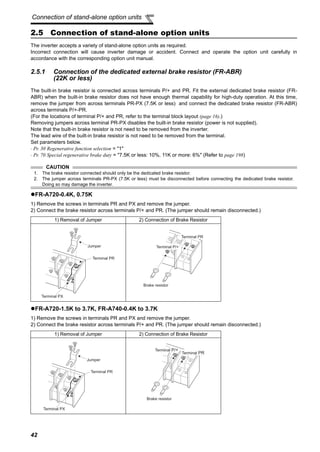
2.5 Connection of stand-alone option units .......................................................... 42
2.5.1 Connection of the dedicated external brake resistor (FR-ABR)
(22K or less) ............................................................................................................................ 42
2.5.2 Connection of the brake unit (FR-BU2) ................................................................................... 45
2.5.3 Connection of the brake unit (FR-BU/MT-BU5)....................................................................... 47
2.5.4 Connection of the brake unit (BU type) ................................................................................... 49
2.5.5 Connection of the high power factor converter (FR-HC/MT-HC)............................................. 49
2.5.6 Connection of the power regeneration common converter (FR-CV)
(55K or less) ............................................................................................................................ 51
CONTENTS
II
Content
2.5.7 Connection of power regeneration converter (MT-RC)
(75K or more) .......................................................................................................................... 52
2.5.8 Connection of the power factor improving DC reactor (FR-HEL) ............................................ 52
3 PRECAUTIONS FOR USE OF THE INVERTER 53
3.1 Noise and leakage currents .............................................................................. 54
3.1.1 Leakage currents and countermeasures ................................................................................. 54
3.1.2 Inverter-generated noises and their reduction techniques ...................................................... 56
3.1.3 Power supply harmonics ......................................................................................................... 58
3.1.4 Harmonic suppression guideline ............................................................................................. 59
3.2 Installation of a reactor .....................................................................................62
3.3 Power-off and magnetic contactor (MC).......................................................... 63
3.4 Inverter-driven 400V class motor ..................................................................... 64
3.5 Precautions for use of the inverter ..................................................................65
4 PARAMETERS 67
4.1 Operation panel (FR-DU07) ............................................................................... 68
4.1.1 Parts of the operation panel (FR-DU07).................................................................................. 68
4.1.2 Basic operation (factory setting) .............................................................................................. 69
4.1.3 Change the parameter setting value ....................................................................................... 70
4.1.4 Setting dial push ...................................................................................................................... 70
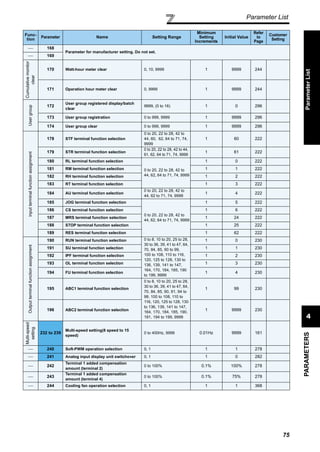
4.2 Parameter List .................................................................................................... 71
4.2.1 Parameter list .......................................................................................................................... 71
4.3 Control mode..................................................................................................... 87
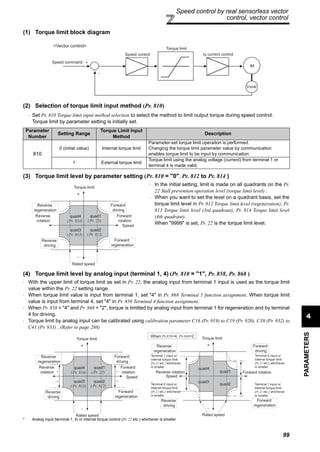
4.3.1 What is vector control? ........................................................................................................... 88
4.3.2 Change the control method (Pr. 80, Pr. 81, Pr. 451, Pr. 800) ................................................ 91
4.4 Speed control by real sensorless vector control, vector control................. 95
4.4.1 Setting procedure of real sensorless vector control (speed control) ..................................... 96
4.4.2 Setting procedure of vector control (speed control) ............................................................... 97
4.4.3 Torque limit level setting for speed control
(Pr. 22, Pr. 803, Pr. 810 to Pr. 817, Pr. 858, Pr. 868, Pr. 874) ............................................. 98
4.4.4 To perform high accuracy/fast response operation (gain adjustment of real
sensorless vector control and vector control) (Pr. 818 to Pr. 821, Pr. 830,
Pr. 831, Pr. 880) ................................................................................................................ 103
4.4.5 Speed feed forward control, model adaptive speed control (Pr. 828, Pr. 877 to Pr. 881) ... 110
4.4.6 Torque biases (Pr. 840 to Pr. 848) ...................................................................................... 112
4.4.7 Prevent the motor from overrunning (Pr. 285, Pr. 853, Pr. 873) .......................................... 115
4.4.8 Notch filter (Pr. 862, Pr. 863) ............................................................................................... 116
III
4.5 Torque control by real sensorless vector control, vector control ............. 117
4.5.1 Torque control ...................................................................................................................... 117
4.5.2 Setting procedure of real sensorless vector control (torque control) ................................... 119
4.5.3 Setting procedure of vector control (torque control) ............................................................ 120
4.5.4 Torque command (Pr. 803 to Pr. 806).................................................................................. 121
4.5.5 Speed limit (Pr. 807 to Pr. 809) ........................................................................................... 123
4.5.6 Gain adjustment of torque control (Pr. 824, Pr. 825, Pr. 834, Pr. 835) ................................ 126
4.6 Position control by vector control ................................................................ 128
4.6.1 Position control .................................................................................................................... 128
4.6.2 Conditional position feed function by contact input (Pr. 419, Pr. 464 to Pr. 494) ................ 130
4.6.3 Position control (Pr. 419, Pr. 428 to Pr. 430) by inverter pulse train input ........................... 133
4.6.4 Setting of the electronic gear (Pr. 420, Pr. 421, Pr. 424) .................................................... 135
4.6.5 Setting of positioning adjustment parameter (Pr. 426, Pr. 427) ........................................... 136
4.6.6 Gain adjustment of position control (Pr. 422, Pr. 423, Pr. 425) ........................................... 137
4.6.7 Trouble shooting for when position control is not exercised normally ................................. 139
4.7 Adjustment of real sensorless vector control, vector control.................... 140
4.7.1 Speed detection filter and torque detection filter (Pr. 823, Pr. 827, Pr. 833, Pr. 837) ........ 140
4.7.2 Excitation ratio (Pr. 854) ..................................................................................................... 141
4.8 Adjust the output torque of the motor (current) .......................................... 142
4.8.1 Manual torque boost (Pr. 0, Pr. 46, Pr. 112)......................................................................... 142
4.8.2 Advanced magnetic flux vector control (Pr. 71, Pr. 80, Pr. 81, Pr. 89, Pr. 450,
Pr. 451, Pr. 453, Pr. 454, Pr. 569, Pr. 800) ......................................................................... 144
4.8.3 Slip compensation (Pr. 245 to Pr. 247)................................................................................. 147
4.8.4 Stall prevention operation (Pr. 22, Pr. 23, Pr. 48, Pr. 49, Pr. 66, Pr. 114, Pr. 115,
Pr. 148, Pr. 149, Pr. 154, Pr. 156, Pr. 157, Pr. 858, Pr. 868) ............................................... 148
4.9 Limit the output frequency............................................................................. 153
4.9.1 Maximum/minimum frequency (Pr. 1, Pr. 2, Pr. 18) ............................................................. 153
4.9.2 Avoid mechanical resonance points (Frequency jump) (Pr. 31 to Pr. 36) ............................ 154
4.10 Set V/F pattern................................................................................................. 155
4.10.1 Base frequency, voltage (Pr. 3, Pr. 19, Pr. 47, Pr. 113) ....................................................... 155
4.10.2 Load pattern selection (Pr. 14) ............................................................................................ 157
4.10.3 Elevator mode (automatic acceleration/deceleration) (Pr. 61, Pr. 64, Pr. 292) ................... 159
4.10.4 Adjustable 5 points V/F (Pr. 71, Pr. 100 to Pr. 109) ............................................................. 160
4.11 Frequency setting by external terminals ...................................................... 161
4.11.1 Multi-speed setting operation (Pr. 4 to Pr. 6, Pr. 24 to Pr. 27, Pr. 232 to Pr. 239) ............... 161
4.11.2 Jog operation (Pr. 15, Pr. 16) ............................................................................................... 163
4.11.3 Input compensation of multi-speed and remote setting (Pr. 28)........................................... 165
IV
Content
4.11.4 Remote setting function (Pr. 59)........................................................................................... 165
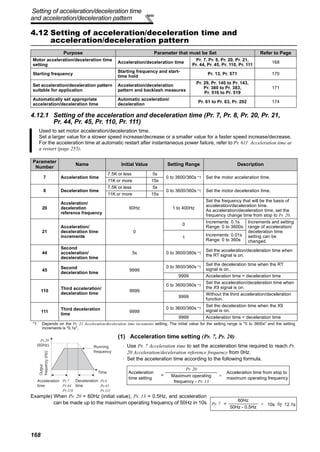
4.12 Setting of acceleration/deceleration time and
acceleration/deceleration pattern.................................................................. 168
4.12.1 Setting of the acceleration and deceleration time (Pr. 7, Pr. 8, Pr. 20, Pr. 21,
Pr. 44, Pr. 45, Pr. 110, Pr. 111) ............................................................................................ 168
4.12.2 Starting frequency and start-time hold function (Pr. 13, Pr. 571) ......................................... 170
4.12.3 Acceleration/deceleration pattern (Pr. 29, Pr. 140 to Pr. 143, Pr. 380 to Pr. 383,
Pr. 516 to Pr. 519) ................................................................................................................ 171
4.12.4 Shortest acceleraiton/deceleration and optimum acceleration/deceleration
(automatic acceleration/deceleration) (Pr. 61 to Pr. 63, Pr. 292, Pr. 293)............................ 174
4.13 Selection and protection of a motor ............................................................. 176
4.13.1 Motor protection from overheat (Electronic thermal relay function) (Pr. 9, Pr. 51) ............... 176
4.13.2 Applied motor (Pr. 71, Pr. 450)............................................................................................. 180
4.13.3 Offline auto tuning (Pr. 71, Pr. 80 to Pr. 84, Pr. 90 to Pr. 94, Pr. 96, Pr. 450,
Pr. 453 to Pr. 463, Pr. 684, Pr. 859, Pr. 860) ................................................................... 182
4.13.4 Online auto tuning (Pr. 95, Pr. 574) .................................................................................. 192
4.14 Motor brake and stop operation .................................................................... 195
4.14.1 DC injection brake and zero speed control, servo lock (LX signal, X13 signal,
Pr. 10 to Pr. 12, Pr. 802, Pr. 850) ......................................................................................... 195
4.14.2 Selection of regenerative brake and DC feeding (Pr. 30, Pr. 70) ......................................... 198
4.14.3 Stop selection (Pr. 250) ........................................................................................................ 204
4.14.4 Stop-on contact control function (Pr. 6, Pr. 48, Pr. 270, Pr. 275, Pr. 276) ........................... 205
4.14.5 Brake sequence function (Pr. 278 to Pr. 285, Pr. 292)......................................................... 208
4.14.6 Orientation control (Pr. 350 to Pr. 366, Pr. 369, Pr. 393, Pr. 396 to Pr. 399) .................... 211
4.15 Function assignment of external terminal and control ............................... 222
4.15.1 Input terminal function selection (Pr. 178 to Pr. 189) ........................................................... 222
4.15.2 Inverter output shutoff signal (MRS signal, Pr. 17)............................................................... 225
4.15.3 Condition selection of function validity by the second function selection signal (RT) and
third function selection signal (X9) (RT signal, X9 signal, Pr. 155)....................................... 226
4.15.4 Start signal operation selection (STF, STR, STOP signal, Pr. 250) ..................................... 227
4.15.5 Magnetic flux decay output shutoff signal (X74 signal) ........................................................ 229
4.15.6 Output terminal function selection (Pr. 190 to Pr. 196)......................................................... 230
4.15.7 Detection of output frequency (SU, FU, FU2 , FU3, FB, FB2, FB3, LS signal,
Pr. 41 to Pr. 43, Pr. 50, Pr. 116, Pr. 865) ............................................................................. 237
4.15.8 Output current detection function
(Y12 signal, Y13 signal, Pr. 150 to Pr. 153, Pr. 166, Pr. 167) .............................................. 239
4.15.9 Detection of output torque (TU signal, Pr. 864) .................................................................... 240
4.15.10 Remote output function (REM signal, Pr. 495 to Pr. 497) .................................................... 241
4.16 Monitor display and monitor output signal .................................................. 242
4.16.1 Speed display and speed setting (Pr. 37, Pr. 144, Pr. 505, Pr. 811).................................... 242
V
4.16.2 DU/PU, FM, AM terminal monitor display selection (Pr. 52, Pr. 54, Pr. 158, Pr. 170,
Pr. 171, Pr. 268, Pr. 563, Pr. 564, Pr. 891) .......................................................................... 244
4.16.3 Reference of the terminal FM (pulse train output) and AM (analog voltage
output) (Pr. 55, Pr. 56, Pr. 291, Pr. 866, Pr. 867) ................................................................. 249
4.16.4 Terminal FM, AM calibration (Calibration parameter C0 (Pr. 900), C1 (Pr. 901))................. 252
4.17 Operation selection at power failure and instantaneous power failure..... 255
4.17.1 Automatic restart after instantaneous power failure/flying start
(Pr. 57, Pr. 58, Pr. 162 to Pr. 165, Pr. 299, Pr. 611)............................................................. 255
4.17.2 Power failure-time deceleration-to-stop function (Pr. 261 to Pr. 266, Pr. 294 ) .................... 259
4.18 Operation setting at alarm occurrence ......................................................... 262
4.18.1 Retry function (Pr. 65, Pr. 67 to Pr. 69) ................................................................................ 262
4.18.2 Alarm code output selection (Pr. 76) .................................................................................... 264
4.18.3 Input/output phase failure protection selection (Pr. 251, Pr. 872) ........................................ 265
4.18.4 Overspeed detection (Pr. 374) ............................................................................................. 265
4.18.5 Encoder signal loss detection (Pr. 376) ............................................................................... 265
4.18.6 Fault definition (Pr. 875) ....................................................................................................... 266
4.19 Energy saving operation and energy saving monitor ................................. 267
4.19.1 Energy saving control (Pr. 60) ............................................................................................. 267
4.19.2 Energy saving monitor (Pr. 891 to Pr. 899) .......................................................................... 268
4.20 Motor noise, noise reduction......................................................................... 273
4.20.1 PWM carrier frequency and Soft-PWM control (Pr. 72, Pr. 240) .......................................... 273
4.21 Frequency/torque setting by analog input (terminal 1, 2, 4)....................... 274
4.21.1 Function assignment of analog input terminal (Pr. 858, Pr. 868) ......................................... 274
4.21.2 Analog input selection (Pr. 73, Pr. 267)................................................................................ 275
4.21.3 Analog input compensation (Pr. 73, Pr. 242, Pr. 243, Pr. 252, Pr. 253)............................... 278
4.21.4 Response level of analog input and noise elimination
(Pr. 74, Pr. 822, Pr. 826, Pr. 832, Pr. 836, Pr. 849).............................................................. 280
4.21.5 Bias and gain of frequency setting voltage (current)
(Pr. 125, Pr. 126, Pr. 241, C2(Pr. 902) to C7(Pr. 905), C12(Pr. 917) to C15(Pr. 918)) ........ 282
4.21.6 Bias and gain of torque (magnetic flux) setting voltage (current)
(Pr. 241, C16(Pr. 919) to C19(Pr. 920), C38 (Pr. 932) to C41 (Pr. 933)) ........................... 288
4.22 Misoperation prevention and parameter setting restriction ....................... 293
4.22.1 Reset selection/disconnected PU detection/PU stop selection (Pr. 75) ............................... 293
4.22.2 Parameter write selection (Pr. 77) ........................................................................................ 295
4.22.3 Reverse rotation prevention selection (Pr. 78) ..................................................................... 296
4.22.4 Display of applied parameters and user group function (Pr. 160, Pr. 172 to Pr. 174) .......... 296
4.23 Selection of operation mode and operation location .................................. 298
4.23.1 Operation mode selection (Pr. 79)........................................................................................ 298
VI
Content
4.23.2 Operation mode at power on (Pr. 79, Pr. 340) ..................................................................... 306
4.23.3 Operation command source and speed command source during
communication operation (Pr. 338, Pr. 339, Pr. 550, Pr. 551).............................................. 307
4.24 Communication operation and setting ......................................................... 312
4.24.1 Wiring and configuration of PU connector ............................................................................ 312
4.24.2 Wiring and arrangement of RS-485 terminals ...................................................................... 314
4.24.3 Initial settings and specifications of RS-485 communication
(Pr. 117 to Pr. 124, Pr. 331 to Pr. 337, Pr. 341, Pr. 549)...................................................... 317
4.24.4 Communication EEPROM write selection (Pr. 342) ............................................................. 318
4.24.5 Mitsubishi inverter protocol (computer link communication)................................................. 319
4.24.6 Modbus-RTU communication specifications (Pr. 331, Pr. 332, Pr. 334, Pr. 343,
Pr. 539, Pr. 549) ................................................................................................................... 330
4.24.7 USB communication (Pr. 547, Pr. 548) ................................................................................ 343
4.25 Special operation and frequency control ..................................................... 344
4.25.1 PID control (Pr. 127 to Pr. 134, Pr. 575 to Pr. 577).............................................................. 344
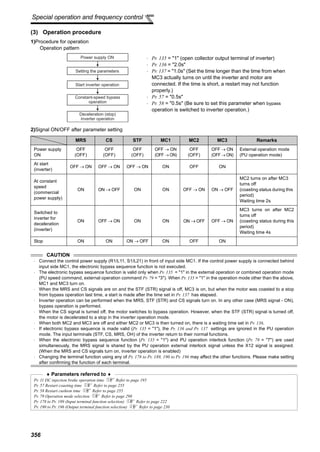
4.25.2 Bypass-inverter switchover function (Pr. 57, Pr. 58, Pr. 135 to Pr. 139, Pr. 159)................. 352
4.25.3 Load torque high speed frequency control (Pr. 4, Pr. 5, Pr. 270 to Pr. 274) ........................ 357
4.25.4 Droop control (Pr. 286 to Pr. 288) ..................................................................................... 359
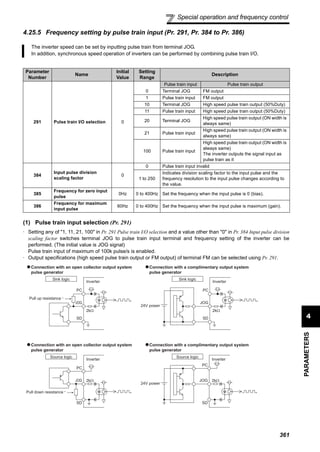
4.25.5 Frequency setting by pulse train input (Pr. 291, Pr. 384 to Pr. 386)..................................... 361
4.25.6 Encoder feedback control (Pr. 144, Pr. 285, Pr. 359, Pr. 367 to Pr. 369) ........................... 364
4.25.7 Regeneration avoidance function (Pr. 665, Pr. 882 to Pr. 886)............................................ 366
4.26 Useful functions.............................................................................................. 368
4.26.1 Cooling fan operation selection (Pr. 244) ............................................................................. 368
4.26.2 Display of the life of the inverter parts (Pr. 255 to Pr. 259)................................................... 369
4.26.3 Maintenance timer alarm (Pr. 503, Pr. 504) ......................................................................... 372
4.26.4 Current average value monitor signal (Pr. 555 to Pr. 557) ................................................... 373
4.26.5 Free parameter (Pr. 888, Pr. 889) ........................................................................................ 375
4.27 Setting of the parameter unit and operation panel...................................... 376
4.27.1 PU display language selection (Pr. 145) .............................................................................. 376
4.27.2 Operation panel frequency setting/key lock operation selection (Pr. 161) ........................... 376
4.27.3 Buzzer control (Pr. 990)........................................................................................................ 378
4.27.4 PU contrast adjustment (Pr. 991) ......................................................................................... 378
4.28 Parameter clear ............................................................................................... 379
4.29 All parameter clear.......................................................................................... 380
4.30 Parameter copy and parameter verification ................................................. 381
4.30.1 Parameter copy .................................................................................................................... 381
4.30.2 Parameter verification........................................................................................................... 382
VII
4.31 Check and clear of the alarm history ............................................................ 383
5 PROTECTIVE FUNCTIONS 385
5.1 Reset method of protective function ............................................................. 386
5.2 List of alarm display ........................................................................................387
5.3 Causes and corrective actions ....................................................................... 388
5.4 Correspondences between digital and actual characters ...........................401
5.5 Check first when you have troubles .............................................................. 402
5.5.1 Motor will not start ................................................................................................................. 402
5.5.2 Motor generates abnormal noise........................................................................................... 402
5.5.3 Motor generates heat abnormally.......................................................................................... 403
5.5.4 Motor rotates in opposite direction ........................................................................................ 403
5.5.5 Speed greatly differs from the setting.................................................................................... 403
5.5.6 Acceleration/deceleration is not smooth................................................................................ 403
5.5.7 Motor current is large............................................................................................................. 403
5.5.8 Speed does not increase....................................................................................................... 403
5.5.9 Speed varies during operation............................................................................................... 404
5.5.10 Operation mode is not changed properly .............................................................................. 404
5.5.11 Operation panel (FR-DU07) display is not operating............................................................. 404
5.5.12 POWER lamp is not lit ........................................................................................................... 404
5.5.13 Parameter write cannot be performed ................................................................................... 404
6 PRECAUTIONS FOR MAINTENANCE AND INSPECTION 405
6.1 Inspection item.................................................................................................406
6.1.1 Daily inspection ..................................................................................................................... 406
6.1.2 Periodic inspection ................................................................................................................ 406
6.1.3 Daily and periodic inspection................................................................................................. 407
6.1.4 Display of the life of the inverter parts ................................................................................... 408
6.1.5 Checking the inverter and converter modules ....................................................................... 408
6.1.6 Cleaning ................................................................................................................................ 409
6.1.7 Replacement of parts ............................................................................................................ 409
6.1.8 Inverter replacement.............................................................................................................. 413
6.2 Measurement of main circuit voltages, currents and powers ..................... 414
6.2.1 Measurement of powers ........................................................................................................ 416
6.2.2 Measurement of voltages and use of PT............................................................................... 416
6.2.3 Measurement of currents....................................................................................................... 417
6.2.4 Use of CT and transducer ..................................................................................................... 417
6.2.5 Measurement of inverter input power factor .......................................................................... 417
VIII
Content
6.2.6 Measurement of converter output voltage (across terminals P/+ - N/-)................................. 418
6.2.7 Measurement of inverter output frequency............................................................................ 418
6.2.8 Insulation resistance test using megger ................................................................................ 418
6.2.9 Pressure test ......................................................................................................................... 418
7 SPECIFICATIONS 419
7.1 Rating................................................................................................................ 420
7.1.1 Inverter rating ........................................................................................................................ 420
7.1.2 Motor rating ........................................................................................................................... 422
7.2 Common specifications .................................................................................. 424
7.3 Outline dimension drawings........................................................................... 425
7.3.1 Inverter outline dimension drawings ...................................................................................... 425
7.3.2 Dedicated motor outline dimension drawings........................................................................ 433
7.4 Installation of the heatsink portion outside the enclosure for use .............438
7.4.1 When using a heatsink protrusion attachment (FR-A7CN) ................................................... 438
7.4.2 Protrusion of heatsink of the FR-A740-160K or more ........................................................... 438
APPENDICES 441
Appendix 1 For customers who have replaced the older model with this
inverter ................................................................................................ 442
Appendix 1-1 Replacement of the FR-A500 series ......................................................................... 442
Appendix 1-2 Replacement of the FR-A200 <EXCELENT> series ................................................. 443
Appendix 2 Control mode-based parameter (function) correspondence
table and instruction code list .......................................................... 444
Appendix 3 SERIAL number check....................................................................... 460
1
3
4
5
6
7
1
2
1 OUTLINE
This chapter describes the basic "OUTLINE" for use of this
product.
Always read the instructions before using the equipment
1.1 Product checking and parts identification................2
1.2 Inverter and peripheral devices...............................3
1.3 Method of removal and reinstallation of the front
cover .......................................................................6
1.4 Installation of the inverter and enclosure design.....8
<Abbreviations>
DU ..........................................Operation panel (FR-DU07)
PU................................................Operation panel (FR-DU07) and parameter unit (FR-PU04/
FR-PU07)
Inverter ...................................Mitsubishi inverter FR-A700 series
FR-A700 .................................Mitsubishi inverter FR-A700 series
Pr. ...........................................Parameter Number
PU operation...........................Operation using the PU (FR-DU07/FR-PU04/FR-PU07).
External operation ..................Operation using the control circuit signals
Combined operation ...............Combined operation using the PU (FR-DU07/FR-PU04/
FR-PU07) and external operation.
Mitsubishi standard motor ......SF-JR
Mitsubishi constant-torque motor.SF-HRCA
Vector dedicated motor...........SF-V5RU
<Trademarks>
• LONWORKS
®
is a registered trademark of Echelon Corporation in the U.S.A and other
countries.
• DeviceNet ®
is a registered trademark of ODVA (Open DeviceNet Vender Association,
Inc.).
• Other company and product names herein are the trademarks and registered
trademarks of their respective owners.
2
Product checking and parts identification
1.1 Product checking and parts identification
Unpack the inverter and check the capacity plate on the front cover and the rating plate on the inverter side face to
ensure that the product agrees with your order and the inverter is intact.
REMARKS
For removal and reinstallation of covers, refer to page 6.
Harmonic suppression guideline
All models of general-purpose inverters used by specific consumers are covered by "Harmonic suppression guideline for consumers who
receive high voltage or special high voltage". (For further details, refer to page 59.)
Operation panel (FR-DU07)
Front cover
EMC filter ON/OFF connector
Control circuit
terminal block
AU/PTC switchover switch
Main circuit
terminal block
Power lamp
Lit when the control circuit
(R1/L11, S1/L21) is supplied
with power.
Cooling fan
PU connectorRS-485 terminals
Connector for plug-in option connection
(Refer to the instruction manual of options.)
Alarm lamp
Lit when the inverter is
in the alarm status
(major fault).
Capacity plate
Inverter type Serial number
Capacity plate
Rating plate
USB connector
Voltage/current input switch
Charge lamp
Lit when power is supplied
to the main circuit
K3.7
Indicate inverter
capacity (kW)
FR-A720-3.7K
FR - -A720
Symbol Voltage Class
A720 Three-phase 200V class
• Inverter Type
Rating plate
Inverter type
Input rating
Output rating
Serial number
FR-A720-3.7K
Applied motor
capacity
A740 Three-phase 400V class
Combed shaped
wiring cover
(Refer to page 29)
(Refer to page 68)
(Refer to page 15)
(Refer to page 16)
(Refer to page 410)
(Refer to page 314)
(Refer to page 27)
(Refer to the Instruction Manual (applied).)
• Accessory
· Fan cover fixing screws (22K or less)
(Refer to Instruction Manual (basic) )
These screws are necessary for compliance with the
European Directive.
Capacity Screw Size (mm) Number
2
0
0
V
1.5K to 3.7K M3 × 35 1
5.5K to 11K M4 × 40 2
15K to 22K M4 × 50 1
4
0
0
V
2.2K, 3.7K M3 × 35 1
5.5K to 15K M4 × 40 2
18.5K, 22K M4 × 50 1
(Refer to page 20)
(Refer to page 16)
(Refer to page 6)
(Refer to page 343)
(Refer to page 14)
· DC reactor supplied (75K or more)
· Eyebolt for hanging the inverter (30K to
280K)
M8 × two pieces
3
Inverter and peripheral devices
1
OUTLINE
1.2 Inverter and peripheral devices
CAUTION
· Do not install a power factor correction capacitor, surge suppressor or radio noise filter on the inverter output side. This will cause the
inverter to trip or the capacitor, and surge suppressor to be damaged. If any of the above devices are connected, immediately remove them.
· Electromagnetic wave interference
The input/output (main circuit) of the inverter includes high frequency components, which may interfere with the communication
devices (such as AM radios) used near the inverter. In this case, set the EMC filter valid to minimize interference.
(Refer to page 15.)
· Refer to the instruction manual of each option and peripheral devices for details of peripheral devices.
Noise filter
(FR-BSF01, FR-BLF)
Motor
Devices connected to the output
P/+
P/+
PR
PR
AC reactor
(FR-HAL)
DC reactor (FR-HEL)
Install a noise filter to reduce
the electromagnetic noise
generated from the inverter.
Effective in the range from
about 1MHz to 10MHz. A wire
should be wound four turns at
a maximum.
Power supply harmonics can
be greatly suppressed.
Install this as required.
Great braking capability is obtained.
Install this as required.
The regenerative braking
capability of the inverter can
be exhibited fully.
Install this as required.
Three-phase AC power supply
Use within the permissible power supply
specifications of the inverter.
USB connector
A personal computer and an inverter can
be connected with a USB (Ver1. 1) cable.
Moulded case circuit breaker (MCCB) or
earth leakage current breaker (ELB),
fuse
The breaker must be selected carefully
since an in-rush current flows in the inverter
at power on.
Magnetic contactor (MC)
Install the magnetic contactor to ensure
safety. Do not use this magnetic contactor
to start and stop the inverter. Doing so will
cause the inverter life to be shorten.
Do not install a power factor correction capacitor,
surge suppressor or radio noise filter on the output
side of the inverter. When installing a moulded case
circuit breaker on the output side of the inverter,
contact each manufacturer for selection of the
moulded case circuit breaker.
R/L1 S/L2 T/L3
P1P/+ N/-P/+ U W
P/+
PR
V
High power factor converter
(FR-HC*1, MT-HC*2)
Power regeneration
common converter (FR-CV*1)
Power regeneration
converter (MT-RC*2)
Resistor unit
(FR-BR*1, MT-BR5*2)
Brake unit
(FR-BU2, FR-BU*1, MT-BU5*2)
Noise filter
(FR-BLF)
Earth (Ground)
Earth (Ground)
To prevent an electric shock, always earth (ground) the
motor and inverter.
Earth
(Ground)
The 55K or less has
a built-in common
mode core.
For the 75K or more, a
DC reactor is supplied.
Always install the reactor.
*1 Compatible with the 55K or less.
*2 Compatible with the 75K or more.
High-duty brake resistor
(FR-ABR*3)
Braking capability of the inverter built-
in brake can be improved. Remove
the jumper across terminal PR-PX
when connecting the high-duty brake
resistor. (7.5K or less)
Always install a thermal relay when
using a brake resistor whose capacity
is 11K or more.
*3 Compatible with the 22K or less.
Reactor (FR-HAL, FR-HEL option)
Reactors (option) must be used when power
harmonics measures are taken, the power factor is
to be improved or the inverter is installed near a
large power supply system (1000kVA or more).
The inverter may be damaged if you do not use
reactors. Select the reactor according to the model.
Remove the jumpers across terminals P/+ - P1 to
connect the DC reactor to the 55K or less.
(Refer to page 420)
(Refer to page 5)
(Refer to page 343)
(Refer to page 63)
(Refer to page 62 )
Inverter (FR-A700)
The life of the inverter is influenced by
ambient temperature. The ambient
temperature should be as low as possible
within the permissible range. This must be
noted especially when the inverter is
installed in an enclosure. (Refer to page 8)
Wrong wiring might lead to damage of the
inverter. The control signal lines must be
kept fully away from the main circuit to
protect them from noise.(Refer to page 14)
Refer to page 15 for the built-in EMC filter.
(Refer to page 42)
4
Inverter and peripheral devices
1.2.1 Peripheral devices
Check the motor capacity of the inverter you purchased. Appropriate peripheral devices must be selected according to
the capacity. Refer to the following list and prepare appropriate peripheral devices:
200V class
Motor Output
(kW)*1
Applicable Inverter Type
Breaker Selection*2,4 Input Side Magnetic Contactor*3
Reactor connection Reactor connection
without with without with
0.4 FR-A720-0.4K 30AF 5A 30AF 5A S-N10 S-N10
0.75 FR-A720-0.75K 30AF 10A 30AF 10A S-N10 S-N10
1.5 FR-A720-1.5K 30AF 15A 30AF 15A S-N10 S-N10
2.2 FR-A720-2.2K 30AF 20A 30AF 15A S-N10 S-N10
3.7 FR-A720-3.7K 30AF 30A 30AF 30A S-N20, N21 S-N10
5.5 FR-A720-5.5K 50AF 50A 50AF 40A S-N25 S-N20, N21
7.5 FR-A720-7.5K 100AF 60A 50AF 50A S-N25 S-N25
11 FR-A720-11K 100AF 75A 100AF 75A S-N35 S-N35
15 FR-A720-15K 225AF 125A 100AF 100A S-N50 S-N50
18.5 FR-A720-18.5K 225AF 150A 225AF 125A S-N65 S-N50
22 FR-A720-22K 225AF 175A 225AF 150A S-N80 S-N65
30 FR-A720-30K 225AF 225A 225AF 175A S-N95 S-N80
37 FR-A720-37K 400AF 250A 225AF 225A S-N150 S-N125
45 FR-A720-45K 400AF 300A 400AF 300A S-N180 S-N150
55 FR-A720-55K 400AF 400A 400AF 350A S-N220 S-N180
75 FR-A720-75K ⎯ 400AF 400A ⎯ S-N300
90 FR-A720-90K ⎯ 400AF 400A ⎯ S-N300
*1 Selections for use of the Mitsubishi 4-pole standard motor with power supply voltage of 200VAC 50Hz.
*2 Select the MCCB according to the inverter power supply capacity.
Install one MCCB per inverter.
For installations in the United States or Canada, use the fuse certified by the UL and cUL.
(Refer to Instruction Manual (basics).)
*3 Magnetic contactor is selected based on the AC-1 class. The electrical durability of magnetic contactor is 500,000 times. When the magnetic
contactor is used for emergency stop during motor driving, the electrical durability is 25 times.
When using the MC for emergency stop during motor driving or using on the motor side during commercial-power supply operation, select the MC
with class AC-3 rated current for the motor rated current.
*4 When the breaker on the inverter primary side trips, check for the wiring fault (short circuit), damage to internal parts of the inverter, etc. Identify
the cause of the trip, then remove the cause and power on the breaker.
MCCB INV
MCCB INV
IM
IM
5
Inverter and peripheral devices
1
OUTLINE
400V class
Motor Output
(kW)*1
Applicable Inverter Type
Breaker Selection*2,4 Input Side Magnetic Contactor*3
Reactor connection Reactor connection
without with without with
0.4 FR-A740-0.4K 30AF 5A 30AF 5A S-N10 S-N10
0.75 FR-A740-0.75K 30AF 5A 30AF 5A S-N10 S-N10
1.5 FR-A740-1.5K 30AF 10A 30AF 10A S-N10 S-N10
2.2 FR-A740-2.2K 30AF 10A 30AF 10A S-N10 S-N10
3.7 FR-A740-3.7K 30AF 20A 30AF 15A S-N10 S-N10
5.5 FR-A740-5.5K 30AF 30A 30AF 20A S-N20 S-N11, N12
7.5 FR-A740-7.5K 30AF 30A 30AF 30A S-N20 S-N20
11 FR-A740-11K 50AF 50A 50AF 40A S-N20 S-N20
15 FR-A740-15K 100AF 60A 50AF 50A S-N25 S-N20
18.5 FR-A740-18.5K 100AF 75A 100AF 60A S-N25 S-N25
22 FR-A740-22K 100AF 100A 100AF 75A S-N35 S-N25
30 FR-A740-30K 225AF 125A 100AF 100A S-N50 S-N50
37 FR-A740-37K 225AF 150A 225AF 125A S-N65 S-N50
45 FR-A740-45K 225AF 175A 225AF 150A S-N80 S-N65
55 FR-A740-55K 225AF 200A 225AF 175A S-N80 S-N80
75 FR-A740-75K ⎯ 225AF 225A ⎯ S-N95
90 FR-A740-90K ⎯ 225AF 225A ⎯ S-N150
110 FR-A740-110K ⎯ 225AF 225A ⎯ S-N180
132 FR-A740-132K ⎯ 400AF 400A ⎯ S-N220
160 FR-A740-160K ⎯ 400AF 400A ⎯ S-N300
185 FR-A740-185K ⎯ 400AF 400A ⎯ S-N300
220 FR-A740-220K ⎯ 600AF 500A ⎯ S-N400
250 FR-A740-250K ⎯ 600AF 600A ⎯ S-N600
280 FR-A740-280K ⎯ 600AF 600A ⎯ S-N600
315 FR-A740-315K ⎯ 800AF 700A ⎯ S-N600
355 FR-A740-355K ⎯ 800AF 800A ⎯ S-N600
400 FR-A740-400K ⎯ 1000AF 900A ⎯ S-N800
450 FR-A740-450K ⎯ 1000AF 1000A ⎯
1000A
Rated product
500 FR-A740-500K ⎯ 1200AF 1200A ⎯
1000A
Rated product
*1 Selections for use of the Mitsubishi 4-pole standard motor with power supply voltage of 400VAC 50Hz.
*2 Select the MCCB according to the inverter power supply capacity.
Install one MCCB per inverter.
For installations in the United States or Canada, use the fuse certified by the UL and cUL.
(Refer to Instruction Manual (basics).)
*3 Magnetic contactor is selected based on the AC-1 class. The electrical durability of magnetic contactor is 500,000 times. When the magnetic
contactor is used for emergency stop during motor driving, the electrical durability is 25 times.
When using the MC for emergency stop during motor driving or using on the motor side during commercial-power supply operation, select the MC
with class AC-3 rated current for the motor rated current.
*4 When the breaker on the inverter primary side trips, check for the wiring fault (short circuit), damage to internal parts of the inverter, etc. Identify
the cause of the trip, then remove the cause and power on the breaker.
MCCB INV
MCCB INV
IM
IM
6
Method of removal and reinstallation of the
front cover
1.3 Method of removal and reinstallation of the front cover
•Removal of the operation panel
1) Loosen the two screws on the operation panel.
(These screws cannot be removed.)
2) Push the left and right hooks of the operation panel
and pull the operation panel toward you to remove.
When reinstalling the operation panel, insert it straight to reinstall securely and tighten the fixed screws of the
operation panel.
FR-A720-0.4K to 22K, FR-A740-0.4K to 22K
•Removal
•Reinstallation
Installation hook
Front cover Front cover
1) Loosen the installation screws of the
front cover.
2) Pull the front cover toward you to remove by pushing an
installation hook using left fixed hooks as supports.
Front cover Front cover
Front cover
1) Insert the two fixed hooks on the left side of
the front cover into the sockets of the
inverter.
2) Using the fixed hooks as supports,
securely press the front cover
against the inverter.
(Although installation can be done
with the operation panel mounted,
make sure that a connector is
securely fixed.)
3) Tighten the installation
screws and fix the front
cover.
7
Method of removal and reinstallation of the
front cover
1
OUTLINE
FR-A720-30K or more, FR-A740-30K or more
•Removal
•Reinstallation
CAUTION
1. Fully make sure that the front cover has been reinstalled securely. Always tighten the installation screws of the front cover.
2. The same serial number is printed on the capacity plate of the front cover and the rating plate of the inverter. Before
reinstalling the front cover, check the serial numbers to ensure that the cover removed is reinstalled to the inverter from where
it was removed.
Front cover 2
Front cover 1
Installation hook
1) Remove installation screws on
the front cover 1 to remove the
front cover 1.
2) Loosen the installation
screws of the front cover 2.
3) Pull the front cover 2 toward you to remove
by pushing an installation hook on the right
side using left fixed hooks as supports.
Front cover 2 Front cover 2
Front cover 2
Front cover 1
1) Insert the two fixed hooks on the left side of the
front cover 2 into the sockets of the inverter.
2) Using the fixed hooks as supports, securely press the
front cover 2 against the inverter.
(Although installation can be done with the operation
panel mounted, make sure that a connector is
securely fixed.)
3) Fix the front cover 2 with the installation screws. 4) Fix the front cover 1 with the installation
screws.
REMARKS
⋅ For the FR-A720-55K and the FR-A740-160K or more, the front cover 1 is separated into two parts.
8
Installation of the inverter and enclosure
design
1.4 Installation of the inverter and enclosure design
When an inverter enclosure is to be designed and manufactured, heat generated by contained equipment, etc., the
environment of an operating place, and others must be fully considered to determine the enclosure structure, size and
equipment layout. The inverter unit uses many semiconductor devices. To ensure higher reliability and long period of
operation, operate the inverter in the ambient environment that completely satisfies the equipment specifications.
1.4.1 Inverter installation environment
As the inverter installation enviromnet should satisfiy the standard specifications indicated in the following table,
operation in any place that does not meet these conditions not only deteriorates the performance and life of the
inverter, but also causes a failure. Refer to the following points and take adequate measures.
*1 2.9m/s2
or less for the 160K or more.
(1) Temperature
The permissible ambient temperature of the inverter is between -10°C and +50°C. Always operate the inverter within
this temperature range. Operation outside this range will considerably shorten the service lives of the semiconductors,
parts, capacitors and others. Take the following measures so that the ambient temperature of the inverter falls within
the specified range.
1)Measures against high temperature
• Use a forced ventilation system or similar cooling system. (Refer to page 10.)
• Install the enclosure in an air-conditioned electrical chamber.
• Block direct sunlight.
• Provide a shield or similar plate to avoid direct exposure to the radiated heat and wind of a heat source.
• Ventilate the area around the enclosure well.
2)Measures against low temperature
• Provide a space heater in the enclosure.
• Do not power off the inverter. (Keep the start signal of the inverter off.)
3)Sudden temperature changes
• Select an installation place where temperature does not change suddenly.
• Avoid installing the inverter near the air outlet of an air conditioner.
• If temperature changes are caused by opening/closing of a door, install the inverter away from the door.
(2) Humidity
Normally operate the inverter within the 45 to 90% range of the ambient humidity. Too high humidity will pose problems
of reduced insulation and metal corrosion. On the other hand, too low humidity may produce a spatial electrical
breakdown. The insulation distance specified in JEM1103 "Control Equipment Insulator" is defined as humidity 45 to
85%.
1)Measures against high humidity
• Make the enclosure enclosed, and provide it with a hygroscopic agent.
• Take dry air into the enclosure from outside.
• Provide a space heater in the enclosure.
2)Measures against low humidity
What is important in fitting or inspection of the unit in this status is to discharge your body (static electricity)
beforehand and keep your body from contact with the parts and patterns, besides blowing air of proper humidity into
the enclosure from outside.
3)Measures against condensation
Condensation may occur if frequent operation stops change the in-enclosure temperature suddenly or if the outside-
air temperature changes suddenly.
Condensation causes such faults as reduced insulation and corrosion.
• Take the measures against high humidity in 1).
• Do not power off the inverter. (Keep the start signal of the inverter off.)
Environmental standard specifications of inverter
Item Description
Ambient temperature -10 to +50°C (non-freezing)
Ambient humidity 90% RH maximum (non-condensing)
Atmosphere Free from corrosive and explosive gases, dust and dirt
Maximum Altitude 1,000m or less
Vibration 5.9m/s2
or less *1
9
Installation of the inverter and enclosure
design
1
OUTLINE
(3) Dust, dirt, oil mist
Dust and dirt will cause such faults as poor contact of contact points, reduced insulation or reduced cooling effect due
to moisture absorption of accumulated dust and dirt, and in-enclosure temperature rise due to clogged filter.
In the atmosphere where conductive powder floats, dust and dirt will cause such faults as malfunction, deteriorated
insulation and short circuit in a short time.
Since oil mist will cause similar conditions, it is necessary to take adequate measures.
Countermeasures
• Place in a totally enclosed enclosure.
Take measures if the in-enclosure temperature rises. (Refer to page 10.)
• Purge air.
Pump clean air from outside to make the in-enclosure pressure higher than the outside-air pressure.
(4) Corrosive gas, salt damage
If the inverter is exposed to corrosive gas or to salt near a beach, the printed board patterns and parts will corrode or
the relays and switches will result in poor contact.
In such places, take the measures given in Section (3).
(5) Explosive, flammable gases
As the inverter is non-explosion proof, it must be contained in an explosion proof enclosure.
In places where explosion may be caused by explosive gas, dust or dirt, an enclosure cannot be used unless it
structurally complies with the guidelines and has passed the specified tests. This makes the enclosure itself expensive
(including the test charges).
The best way is to avoid installation in such places and install the inverter in a non-hazardous place.
(6) Highland
Use the inverter at the altitude of within 1000m.
If it is used at a higher place, it is likely that thin air will reduce the cooling effect and low air pressure will deteriorate
dielectric strength.
(7) Vibration, impact
The vibration resistance of the inverter is up to 5.9m/s2
(2.9m/s2
for the 160K or more) at 10 to 55Hz frequency and
1mm amplitude.
Vibration or impact, if less than the specified value, applied for a long time may make the mechanism loose or cause
poor contact to the connectors.
Especially when impact is imposed repeatedly, caution must be taken as the part pins are likely to break.
Countermeasures
• Provide the enclosure with rubber vibration isolators.
• Strengthen the structure to prevent the enclosure from resonance.
• Install the enclosure away from sources of vibration.
10
Installation of the inverter and enclosure
design
1.4.2 Cooling system types for inverter enclosure
From the enclosure that contains the inverter, the heat of the inverter and other equipment (transformers, lamps,
resistors, etc.) and the incoming heat such as direct sunlight must be dissipated to keep the in-enclosure temperature
lower than the permissible temperatures of the in-enclosure equipment including the inverter.
The cooling systems are classified as follows in terms of the cooling calculation method.
1) Cooling by natural heat dissipation from the enclosure surface (Totally enclosed type)
2) Cooling by heat sink (Aluminum fin, etc.)
3) Cooling by ventilation (Forced ventilation type, pipe ventilation type)
4) Cooling by heat exchanger or cooler (Heat pipe, cooler, etc.)
1.4.3 Inverter placement
(1) Installation of the Inverter
Cooling System Enclosure Structure Comment
Natural
cooling
Natural ventilation
(Enclosed, open type)
Low in cost and generally used, but the enclosure size
increases as the inverter capacity increases. For
relatively small capacities.
Natural ventilation (Totally
enclosed type)
Being a totally enclosed type, the most appropriate for
hostile environment having dust, dirt, oil mist, etc. The
enclosure size increases depending on the inverter
capacity.
Forced
cooling
Heatsink cooling
Having restrictions on the heatsink mounting position
and area, and designed for relative small capacities.
Forced ventilation
For general indoor installation. Appropriate for enclosure
downsizing and cost reduction, and often used.
Heat pipe Totally enclosed type for enclosure downsizing.
Installation on the enclosure
0.4K to 22K 30K or more
INV
INV
INV
Heatsink
INV
INV
Heat
pipe
CAUTION
When encasing multiple inverters, install them in parallel
as a cooling measure. Install the inverter vertically.
* Refer to the clearances on the next page.
Vertical
*
Fix six positions for the FR-A740-160K to 355K
and fix eight positions for the FR-A740-400K to
500K.
11
Installation of the inverter and enclosure
design
1
OUTLINE
(2) Clearances around the inverter
To ensure ease of heat dissipation and maintenance, leave at least the shown clearances around the inverter. At least the
following clearances are required under the inverter as a wiring space, and above the inverter as a heat dissipation space.
(3) Inverter mounting orientation
Mount the inverter on a wall as specified. Do not mount it horizontally or any other way.
(4) Above the inverter
Heat is blown up from inside the inverter by the small fan built in the unit. Any equipment placed above the inverter
should be heat resistant.
(5) Arrangement of multiple inverters
(6) Placement of ventilation fan and inverter
REMARKS
For replacing the cooling fan of the 160K or more, 30cm of space is necessary in front of the inverter. Refer to page 410 for fan
replacement.
When multiple inverters are placed in the same
enclosure, generally arrange them horizontally as
shown in the right figure (a). When it is inevitable to
arrange them vertically to minimize space, take such
measures as to provide guides since heat from the
bottom inverters can increase the temperatures in the
top inverters, causing inverter failures.
When mounting multiple inverters, fully take caution
not to make the ambient temperature of the inverter
higher than the permissible value by providing
ventilation and increasing the enclosure size.
Arrangement of multiple inverters
Heat generated in the inverter is blown up from the bottom of
the unit as warm air by the cooling fan. When intalling a
ventilation fan for that heat, determine the place of ventilation
fan installation after fully considering an air flow. (Air passes
through areas of low resistance. Make an airway and airflow
plates to expose the inverter to cool air.)
Placement of ventilation fan and inverter
ClearancesAmbient temperature and humidity
Measurement
position
Measurement
position
Inverter
Leave enough clearances and take
cooling measures.
55K or less 75K or more
5cm 5cm
5cm
10cm or more 20cm or more
20cm or more10cm or more
5cm
or more *
5cm
or more *
10cm
or more
10cm
or more
Temperature:
-10°C to 50°C
Ambient humidity:
90% RH maximum
(front)
*1cm or more for 3.7K or less
Clearances (side)
Inverter5cm
or more
Guide Guide
Enclosure Enclosure
Guide
(a) Horizontal arrangement (b) Vertical arrangement
Inverter
InverterInverterInverter Inverter
Inverter
Inverter Inverter
<Good example> <Bad example>
12
MEMO
13
3
4
5
6
7
1
2
2 WIRING
This chapter describes the basic "WIRING" for use of this
product.
Always read the instructions before using the equipment
2.1 Wiring ......................................................................14
2.2 Main circuit terminal specifications..........................16
2.3 Control circuit specifications....................................27
2.4 Connection of motor with encoder (vector control) .35
2.5 Connection of stand-alone option units...................42
14
Wiring
2.1 Wiring
2.1.1 Terminal connection diagram
CAUTION
· To prevent a malfunction due to noise, keep the signal cables more than 10cm away from the power cables.
· After wiring, wire offcuts must not be left in the inverter.
Wire offcuts can cause an alarm, failure or malfunction. Always keep the inverter clean.
When drilling mounting holes in an enclosure etc., take care not to allow chips and other foreign matter to enter the inverter.
· Set the voltage/current input switch correctly. Different setting may cause a fault, failure or malfunction.
R/L1
S/L2
T/L3
R1/L11
S1/L21
PC
10E(+10V)
10(+5V)
2
(Analog common)
2
3
1
1
4
Jumper
C1
B1
A1
U
V
W
P1
0 to ±10VDC
*1
0 to 5VDC
0 to 10VDC
MC
Main circuit
Control circuit
C2
B2
A2
IM
0 to 20mADC
AU
PTC
TXD+
TXD-
RXD+
RXD-
SG
GND
SINK
SOURCE
*4
*3
*5
STF
STR
STOP
RH
RM
RL
JOG
RT
MRS
RES
AU
CS
SD
RUN
SU
IPF
OL
FU
SE
(+)
(-)
5
ON
OFF
VCC
(+)
(-)
5V
*2 Earth (Ground)
PX PR N/-P/+
*8
*3. JOG terminal can be used
as pulse train input terminal.
Use Pr.291 to select
JOG/pulse.
Main circuit terminal
Control circuit terminal
Three-phase AC
power supply
MCCB
Jumper
Earth
(Ground)
EMC filter
ON/OFF
connecter
Earth
(Ground)
selected
selected0 to ±5VDC *5
4 to 20mADC
0 to 5VDC
0 to 10VDC
selected *5
Option connector 1
Option connector 2
Option connector 3
Connector
for plug-in option
connection
Frequency setting signal (Analog)
Frequency setting
potentiometer
1/2W1kΩ
*6
Control input signals (No voltage input allowed)
Forward
rotation
start
Reverse
rotation
start
Start self-
holding selection
Terminal functions vary with
the input terminal
assignment (Pr. 178 to Pr. 189)
Middle
speed
High speed
Low speed
Multi-speed
selection
Jog mode
Second function selection
Output stop
Reset
Terminal 4 input selection
(Current input selection)
Selection of automatic restart
after instantaneous
power failure
USB
connector
PU
connector
Terminating
resistor
Data reception
Data transmission
RS-485 terminals
Open collector output common
Sink/source common
Frequency detection
Running
Up to frequency
Instantaneous
power failure
Overload
Terminal functions
vary with the output
terminal assignment
(Pr. 190 to Pr. 194)
Open collector output
(Permissible load
current 100mA)
Relay output 2
Relay output 1
(Alarm output)
Terminal functions
vary with the output
terminal assignment
(Pr. 195, Pr. 196)
Relay output
Motor
*4. AU terminal can be
used as PTC input
terminal.
*2. To supply power to the
control circuit separately,
remove the jumper across
R1/L11 and S1/L21.
*10.It is not necessary
when calibrating the
indicator from the
operation panel.
*6. It is recommended to use 2W1kΩ
when the frequency setting signal
is changed frequently.
Jumper
(Initial value)
(Initial value)
(Initial value)
ON
4 2
OFF
Voltage/current
input switch
*5
Auxiliary
input
Terminal
4 input
(Current
input)
Brake unit
(Option)
CN8
*7
Jumper
*5. Terminal input specifications
can be changed by analog
input specifications
switchover (Pr. 73, Pr. 267).
Set the voltage/current input
switch in the OFF position to
select voltage input (0 to 5V/0
to10V) and ON to select
current input (4 to 20mA).
R
R
*1. DC reactor (FR-HEL)
Be sure to connect the DC reactor
supplied with the 75K or more.
When a DC reactor is connected to
the 55K or less, remove the jumper
across P1-P/+.
*7. A CN8 connector is provided with the 75K
or more.
Sink logic
*8. Brake resistor (FR-ABR)
Remove the jumper across terminal PR-PX
when connecting a brake resistor.
(0.4K to 7.5K)
Terminal PR is provided for the 0.4K to 22K.
Install a thermal relay to prevent an overheat
and burnout of the brake resistor.
*9
*9.The FR-A720-0.4K and 0.75K
are not provided with the EMC
filter ON/OFF connector. (Always on)
FM
SD
+ -
AM
5
*11
*11. FM terminal can
be used for pulse
train output of open
collector output
using Pr.291.
(+)
(-)
(0 to 10VDC)
Analog signal output
Moving-coil type
1mA full-scale
(Frequency meter, etc.)
Indicator
Calibration
resistor *10
24VDC power supply
(Common for external power supply transistor)
Contact input common 24V
Inrush current
limit circuit
(Refer to page 44)
(Refer to page 275)
(Refer to page 222)
(Refer to page 230)
(Refer to page 230)
(Refer to page 48)
2
WIRING
15
Wiring
2.1.2 EMC filter
This inverter is equipped with a built-in EMC filter (capacitive filter) and zero-phase reactor.
Effective for reduction of air-propagated noise on the input side of the inverter.
The EMC filter is factory-set to disable (OFF).
To enable it, fit the EMC filter ON/OFF connector to the ON position.
The input side zero-phase reactor, built-in the 55K or less inverter, is always valid regardless of on/off of the EMC filter
on/off connector.
The FR-A720-0.4K and 0.75K are not provided with the EMC filter ON/OFF connector. (The EMC filter is always valid.)
<How to disconnect the connector>
(1) Before removing a front cover, check to make sure that the indication of the inverter operation panel is off, wait for
at least 10 minutes after the power supply has been switched off, and check that there are no residual voltage
using a tester or the like. (Refer to page 6.)
(2) When disconnecting the connector, push the fixing tab and pull the connector straight without pulling the cable or
forcibly pulling the connector with the tab fixed. When installing the connector, also engage the fixing tab securely.
(If it is difficult to disconnect the connector, use a pair of long-nose pliers, etc.)
CAUTION
⋅ Fit the connector to either ON or OFF.
⋅ Enabling (turning on) the EMC filter increases leakage current. (Refer to page 55)
WARNING
While power is on or when the inverter is running, do not open the front cover. Otherwise you may get an electric shock.
EMC filter OFF EMC filter OFF EMC filter OFFEMC filter ON EMC filter ON EMC filter ON
(initial setting) (initial setting) (initial setting)
EMC filter
ON/OFF
connector
VU W
3.7K or less 5.5K, 7.5K 11K or more
FR-A720-1.5K to 3.7K
FR-A740-0.4K to 3.7K
FR-A720-5.5K, 7.5K
FR-A740-5.5K to 7.5K
FR-A720-11K
FR-A740-11K, 15K
FR-A720-15K to 22K
FR-A740-18.5K to 22K
FR-A720-30K or more
FR-A740-30K or more
EMC filter
ON/OFF connector
(Side view)
Disengage connector fixing tab With tab disengaged,
pull up the connector straight.
16
Main circuit terminal specifications
2.2 Main circuit terminal specifications
2.2.1 Specification of main circuit terminal
2.2.2 Terminal arrangement of the main circuit terminal, power supply and the motor
wiring.
200V class
Terminal
Symbol
Terminal Name Description
R/L1,
S/L2,
T/L3
AC power input
Connect to the commercial power supply.
Keep these terminals open when using the high power factor converter
(FR-HC and MT-HC) or power regeneration common converter (FR-CV).
U, V, W Inverter output Connect a three-phase squirrel-cage motor.
R1/L11,
S1/L21
Power supply for
control circuit
Connected to the AC power supply terminals R/L1 and S/L2. To retain the
alarm display and alarm output or when using the high power factor
converter (FR-HC and MT-HC) or power regeneration common converter
(FR-CV), remove the jumpers from terminals R/L1-R1/L11 and S/L2-S1/
L21 and apply external power to these terminals.
Do not turn off the power supply for control circuit (R1/L11, S1/L21) with the
main circuit power (R/L1, S/L2, T/L3) on. Doing so may damage the
inverter. The circuit should be configured so that the main circuit power (R/
L1, S/L2, T/L3) is also turned off when the power supply for control circuit
(R1/L11, S1/L21) is off.
15K or less : 60VA, 18.5K or more : 80VA
P/+, PR
Brake resistor
connection
(22K or less)
Remove the jumper from terminals PR-PX (7.5K or less) and connect an
optional brake resistor (FR-ABR) across terminals P/+-PR.
For the 22K or less, connecting the resistor further provides regenerative
braking power.
P/+, N/-
Brake unit
connection
Connect the brake unit (FR-BU2, FR-BU, BU and MT-BU5), power
regeneration common converter (FR-CV), high power factor converter
(FR-HC and MT-HC) or power regeneration converter (MT-RC).
P/+, P1
DC reactor
connection
For the 55K or less, remove the jumper across terminals P/+ - P1 and
connect the DC reactor. (As a DC reactor is supplied with the 75K or
more as standard, be sure to connect the DC reactor.)
PR, PX
Built-in brake circuit
connection
When the jumper is connected across terminals PX-PR (initial status),
the built-in brake circuit is valid. (Provided for the 7.5K or less.)
Earth (Ground)
For earthing (grounding) the inverter chassis. Must be earthed
(grounded).
CAUTION
· When connecting a dedicated brake resistor (FR-ABR) and brake unit (FR-BU2, FR-BU, BU) remove jumpers across terminals
PR-PX (7.5K or less). For details, refer to page 42 to 47.
FR-A720-0.4K, 0.75K FR-A720-1.5K, 2.2K, 3.7K
R/L1 S/L2 T/L3
N/- P/+
PR
PXR1/L11 S1/L21
Charge lamp
As this is an inside cover fixing screw,
do not remove it.
Jumper
Screw size (M4)
Screw size
(M4)
Jumper
MotorPower supply
IM
R/L1 S/L2 T/L3 N/- P/+ PR
PXR1/L11 S1/L21
IM
Charge lamp
Jumper
Screw size (M4)
Screw size
(M4)
Jumper
MotorPower
supply
2
WIRING
17
Main circuit terminal specifications
FR-A720-5.5K, 7.5K
* Screw size of terminal R1/L11, S1/L21, PR, and PX is M4.
FR-A720-11K
FR-A720-15K, 18.5K, 22K FR-A720-30K, 37K, 45K
FR-A720-55K FR-A720-75K, 90K
R/L1 S/L2 T/L3
N/- P/+ PR
PX
R1/L11 S1/L21
IM
Screw size
(M5)
Screw size (M5)
Jumper
Jumper
Charge lamp
MotorPower supply
* *
*
*
R1/L11 S1/L21
R/L1 S/L2 T/L3 N/-
P/+
PR
Charge lamp
Jumper
Jumper
Screw size
(M4)
Screw size (M5)
Screw size (M5)
Power supply
IM
Motor
R/L1 S/L2 T/L3 N/- P/+
PR
R1/L11 S1/L21
IM
Screw size (M4)
Screw size (M6)
Jumper
Jumper
Charge lamp
MotorPower supply
Screw size
(15K:M6, 18.5K, 22K:M8)
R/L1 S/L2 T/L3 N/- P/+
R1/L11 S1/L21
IM
Screw size
(M4)
Jumper
Jumper
Charge lamp
MotorPower
supply
Screw size
(30K:M6, 37K/45K:M8)
Screw size
(30K:M8, 37K/45K:M10)
Power supply
IM
Motor
Screw size (M8)
R/L1 S/L2 T/L3 N/-
Screw size (M12)
Jumper
Jumper
Charge lamp
Screw size (M4)R1/L11 S1/L21
P/+ R/L1 S/L2 T/L3 N/-
P/+
R1/L11 S1/L21
P/+
P/+
IM
Screw size (M4)
Screw size (M12)
Screw size
(M10)
Jumper
Charge lamp
MotorPower supply
Screw size (M12)
(for option)
DC reactor
18
Main circuit terminal specifications
400V class
FR-A740-0.4K to 3.7K FR-A740-5.5K, 7.5K
FR-A740-11K, 15K FR-A740-18.5K, 22K
FR-A740-30K, 37K, 45K FR-A740-55K
R/L1 S/L2 T/L3 N/- P/+ PR
PXR1/L11 S1/L21
IM
Charge lamp
Jumper
Screw size (M4)
Screw size
(M4)
Jumper
MotorPower
supply
R/L1 S/L2 T/L3
N/- P/+ PR
PX
R1/L11 S1/L21
IM
Screw size
(M4)
Screw size
(M4)
Jumper Jumper
Charge lamp
MotorPower supply
R1/L11 S1/L21
R/L1 S/L2 T/L3 N/-
P/+
PR
Charge lamp
Jumper
Jumper
Screw size
(M4)
Screw size (M5)
Screw size (M5)
Power supply
IM
Motor
R/L1 S/L2 T/L3 N/- P/+
PR
R1/L11 S1/L21
IM
Screw size (M4)
Screw size (M6)
Screw size (M6)
Jumper
Jumper
Charge lamp
Power supply Motor
IM
Jumper
Jumper
Charge lamp
Screw size(M4)
Power
supply
Motor
R/L1 S/L2 T/L3 N/- P/+
R1/L11 S1/L21
Screw size
(30K: M6, 37K/45K: M8)
Screw size (30K: M6, 37K/45K: M8)
IM
Jumper
Jumper
Charge lamp
Screw size (M4)
Power
supply
Motor
R/L1 S/L2 T/L3 N/- P/+
R1/L11 S1/L21
Screw size (M8) Screw size (M10) Screw size (M8)
Screw size (M8)
2
WIRING
19
Main circuit terminal specifications
FR-A740-75K, 90K FR-A740-110K, 132K
FR-A740-160K, 185K FR-A740-220K to 500K
IM
R/L1 S/L2 T/L3 N/- P/+
R1/L11 S1/L21
DC reactor
Screw size (M4)
Power
supply
Motor
Jumper
Charge lamp
P/+
Screw size
(M10)
Screw size(M10)
IM
R/L1 S/L2 T/L3 N/-
P/+
R1/L11 S1/L21
P/+
P/+
Screw size (M4)
Jumper
Charge lamp
Screw size
(M10)
Motor
Screw size (M12)
(for option)
Power supply
DC reactor
Screw size (M10)
IM
R/L1 S/L2 T/L3 N/-
P/+
R1/L11 S1/L21
P/+
P/+
Screw size (M4)
Jumper
Charge lamp
Screw size (M12)
Screw size
(M10)
Motor
Screw size (M12)
(for option)
Power supply
DC reactor
IM
R/L1 S/L2 T/L3 N/-
R1/L11 S1/L21
P/+
P/+
Screw size (M4)
Jumper
Charge lamp
MotorPower supply
DC reactor
Screw size (M12)
Screw size (M10)
20
Main circuit terminal specifications
CAUTION
· The power supply cables must be connected to R/L1, S/L2, T/L3. Never connect the power cable
to the U, V, W of the inverter. Doing so will damage the inverter. (Phase sequence needs not to be
matched.)
· Connect the motor to U, V, W. At this time, turning on the forward rotation switch (signal) rotates
the motor in the counterclockwise direction when viewed from the motor shaft.
· When wiring the inverter main circuit conductor of the 220K or more, tighten a nut from the right
side of the conductor. When wiring two wires, place wires on both sides of the conductor. (Refer to
the drawing on the right.) For wiring, use bolts (nuts) provided with the inverter.
• Handling of the wiring cover
(FR-A720-15K, 18.5K, 22K, FR-A740-18.5K, 22K)
For the hook of the wiring cover, cut off the necessary
parts using a pair of long-nose pliers etc.
CAUTION
Cut off the same number of lugs as wires. If parts where
no wire is put through has been cut off (10mm or more),
protective structure (JEM1030) becomes an open type
(IP00).
21
Main circuit terminal specifications
2
WIRING
2.2.3 Cables and wiring length
(1) Applied cable size
Select the recommended cable size to ensure that a voltage drop will be 2% max.
If the wiring distance is long between the inverter and motor, a main circuit cable voltage drop will cause the motor
torque to decrease especially at the output of a low frequency.
The following table indicates a selection example for the wiring length of 20m.
200V class (when input power supply is 220V)
Applicable Inverter
Type
Terminal
Screw
Size *4
Tightening
Torque
N·m
Crimping
Terminal
Cable Sizes
HIV, etc. (mm2) *1 AWG/MCM *2 PVC, etc. (mm2) *3
R/L1,
S/L2,
T/L3
U, V, W
R/L1,
S/L2,
T/L3
U, V, W P/+, P1
Earth
(Ground)
cable
R/L1,
S/L2,
T/L3
U, V, W
R/L1,
S/L2,
T/L3
U, V, W
Earth
(Ground)
cable
FR-A720-0.4K to
2.2K
M4 1.5 2-4 2-4 2 2 2 2 14 14 2.5 2.5 2.5
FR-A720-3.7K M4 1.5 5.5-4 5.5-4 3.5 3.5 3.5 3.5 12 12 4 4 4
FR-A720-5.5K M4-M5 2.5 5.5-5 5.5-5 5.5 5.5 5.5 5.5 10 10 6 6 6
FR-A720-7.5K M4-M5 2.5 14-5 8-5 14 8 14 14 6 8 16 10 16
FR-A720-11K M5 2.5 14-5 14-5 14 14 14 14 6 6 16 16 16
FR-A720-15K M6 4.4 22-6 22-6 22 22 22 14 4 4 25 25 16
FR-A720-18.5K M8-M6 7.8 38-8 38-8 38 38 38 22 2 2 35 35 25
FR-A720-22K M8-M6 7.8 38-8 38-8 38 38 38 22 2 2 35 35 25
FR-A720-30K M8-M6 7.8 60-8 60-8 60 60 60 38 1/0 1/0 50 50 25
FR-A720-37K M10-M8 14.7 80-10 80-10 80 80 80 38 3/0 3/0 70 70 35
FR-A720-45K M10-M8 14.7 100-10 100-10 100 100 100 60 4/0 4/0 95 95 50
FR-A720-55K M12-M8 24.5 100-12 100-12 100 100 100 60 4/0 4/0 95 95 50
FR-A720-75K M12-M10 24.5 150-12 150-12 125 125 125 38 250 250 ⎯ ⎯ ⎯
FR-A720-90K M12-M10 24.5 150-12 150-12 150 150 150 60 300 300 ⎯ ⎯ ⎯
*1 For the 55K or less, the cable size is that of the cable (HIV cable (600V class 2 vinyl-insulated cable) etc.) with continuous maximum permissible
temperature of 75°C. Assumes that the ambient temperature is 50°C or less and the wiring distance is 20m or less.
For the 75K or more, the recommended cable size is that of the cable (LMFC (heat resistant flexible cross-linked polyethylene insulated cable)
etc.) with continuous maximum permissible temperature of 90°C. Assumes that the ambient temperature is 50°C or less and wiring is performed
in an enclosure.
*2 The recommended cable size is that of the cable (THHW cable) with continuous maximum permissible temperature of 75°C. Assumes that the
ambient temperature is 40°C or less and the wiring distance is 20m or less.
(Selection example for use mainly in the United States.)
*3 For the 15K or less, the recommended cable size is that of the cable (PVC cable) with continuous maximum permissible temperature of 70°C.
Assumes that the ambient temperature is 40°C or less and the wiring distance is 20m or less.
For the 18.5K or more, the recommended cable size is that of the cable (XLPE cable) with continuous maximum permissible temperature of 90°C.
Assumes that the ambient temperature is 40°C or less and wiring is performed in an enclosure.
(Selection example for use mainly in Europe.)
*4 The terminal screw size indicates the terminal size for R/L1, S/L2, T/L3, U, V, W, and a screw for earthing (grounding). For the 5.5K and 7.5K,
screw sizes are different (<R1/L11, S1/L21, PR, PX> - <R/L1, S/L2, T/L3, U, V, W, a screw for earthing (grounding)>). For the 18.5K or more,
screw sizes are different. (<R/L1, S/L2, T/L3, U, V, W> - < a screw for earthing (grounding)>)
22
Main circuit terminal specifications
400V class (when input power supply is 440V)
The line voltage drop can be calculated by the following formula:
line voltage drop [V]=
Use a larger diameter cable when the wiring distance is long or when it is desired to decrease the voltage drop (torque
reduction) in the low speed range.
Applicable Inverter
Type
Terminal
Screw
Size *4
Tightening
Torque
N·m
Crimping
Terminal
Cable Sizes
HIV, etc. (mm2
) *1 AWG/MCM *2 PVC, etc. (mm2
) *3
R/L1,
S/L2,
T/L3
U, V, W
R/L1,
S/L2,
T/L3
U, V, W P/+, P1
Earth
(Ground)
Cable
R/L1,
S/L2,
T/L3
U, V, W
R/L1,
S/L2,
T/L3
U, V, W
Earth
(Ground)
Cable
FR-A740-0.4K to
3.7K
M4 1.5 2-4 2-4 2 2 2 2 14 14 2.5 2.5 2.5
FR-A740-5.5K M4 1.5 2-4 2-4 2 2 3.5 3.5 12 14 2.5 2.5 4
FR-A740-7.5K M4 1.5 5.5-4 5.5-4 3.5 3.5 3.5 3.5 12 12 4 4 4
FR-A740-11K M5 2.5 5.5-5 5.5-5 5.5 5.5 5.5 8 10 10 6 6 10
FR-A740-15K M5 2.5 8-5 8-5 8 8 8 8 8 8 10 10 10
FR-A740-18.5K M6 4.4 14-6 8-6 14 8 14 14 6 8 16 10 16
FR-A740-22K M6 4.4 14-6 14-6 14 14 22 14 6 6 16 16 16
FR-A740-30K M6 4.4 22-6 22-6 22 22 22 14 4 4 25 25 16
FR-A740-37K M8 7.8 22-8 22-8 22 22 22 14 4 4 25 25 16
FR-A740-45K M8 7.8 38-8 38-8 38 38 38 22 1 2 50 50 25
FR-A740-55K M8 7.8 60-8 60-8 60 60 60 22 1/0 1/0 50 50 25
FR-A740-75K M10 14.7 60-10 60-10 60 60 60 38 1/0 1/0 50 50 25
FR-A740-90K M10 14.7 60-10 60-10 60 60 80 38 3/0 3/0 50 50 25
FR-A740-110K M10-M12 14.7 80-10 80-10 80 80 80 38 3/0 3/0 70 70 35
FR-A740-132K M10-M12 14.7 100-10 100-10 100 100 100 38 4/0 4/0 95 95 50
FR-A740-160K M12-M10 24.5 150-12 150-12 125 150 150 38 250 250 120 120 70
FR-A740-185K M12-M10 24.5 150-12 150-12 150 150 150 38 300 300 150 150 95
FR-A740-220K M12-M10 24.5 100-12 100-12 2×100 2×100 2×100 60 2×4/0 2×4/0 2×95 2×95 95
FR-A740-250K M12-M10 24.5 100-12 100-12 2×100 2×100 2×125 60 2×4/0 2×4/0 2×95 2×95 95
FR-A740-280K M12-M10 24.5 150-12 150-12 2×125 2×125 2×125 60 2×250 2×250 2×120 2×120 120
FR-A740-315K M12-M10 24.5 150-12 150-12 2×150 2×150 2×150 100 2×300 2×300 2×150 2×150 150
FR-A740-355K M12-M10 24.5 C2-200 C2-200 2×200 2×200 2×200 100 2×350 2×350 2×185 2×185 2×95
FR-A740-400K M12-M10 24.5 C2-200 C2-200 2×200 2×200 2×200 100 2×400 2×400 2×185 2×185 2×95
FR-A740-450K M12-M10 24.5 C2-250 C2-250 2×250 2×250 2×250 100 2×500 2×500 2×240 2×240 2×120
FR-A740-500K M12-M10 24.5 C2-200 C2-250 3×200 2×250 3×200 2×100 2×500 2×500 2×240 2×240 2×120
*1 For the 55K or less, the cable size is that of the cable (HIV cable (600V class 2 vinyl-insulated cable) etc.) with continuous maximum permissible
temperature of 75°C. Assumes that the ambient temperature is 50°C or less and the wiring distance is 20m or less.
For the 75K or more, the recommended cable size is that of the cable (LMFC (heat resistant flexible cross-linked polyethylene insulated cable) etc.) with
continuous maximum permissible temperature of 90°C. Assumes that the ambient temperature is 50°C or less and wiring is performed in an enclosure.
*2 For the 45K or less, the recommended cable size is that of the cable (THHW cable) with continuous maximum permissible temperature of 75°C.
Assumes that the ambient temperature is 40°C or less and the wiring distance is 20m or less.
For the 55K or more, the recommended cable size is that of the cable (THHN cable) with continuous maximum permissible temperature of 90°C.
Assumes that the ambient temperature is 40°C or less and wiring is performed in an enclosure.
(Selection example for use mainly in the United States.)
*3 For the 45K or less, the recommended cable size is that of the cable (PVC cable) with continuous maximum permissible temperature of 70°C. Assumes
that the ambient temperature is 40°C or less and the wiring distance is 20m or less.
For the 55K or more, the recommended cable size is that of the cable (XLPE cable) with continuous maximum permissible temperature of 90°C.
Assumes that the ambient temperature is 40°C or less and wiring is performed in an enclosure.
(Selection example for use mainly in Europe.)
*4 The terminal screw size indicates the terminal size for R/L1, S/L2, T/L3, U, V, W, and a screw for earthing (grounding).
For the 110K and 132K, screw sizes are different (<R/L1, S/L2, T/L3, U, V, W, a screw for earthing (grounding)> - <P/+ for option connection>)
For the 160K or more, screw sizes are different. (<R/L1, S/L2, T/L3, U, V, W> - <a screw for earthing (grounding)>)
CAUTION
· Tighten the terminal screw to the specified torque.
A screw that has been tighten too loosely can cause a short circuit or malfunction.
A screw that has been tighten too tightly can cause a short circuit or malfunction due to the unit breakage.
· Use crimping terminals with insulation sleeve to wire the power supply and motor.
3 × wire resistance[mΩ/m] × wiring distance[m] × current[A]
1000
23
Main circuit terminal specifications
2
WIRING
(2) Notes on earthing (grounding)
Always earth (ground) the motor and inverter.
1)Purpose of earthing (grounding)
Generally, an electrical apparatus has an earth (ground) terminal, which must be connected to the ground before
use.
An electrical circuit is usually insulated by an insulating material and encased. However, it is impossible to
manufacture an insulating material that can shut off a leakage current completely, and actually, a slight current flow
into the case. The purpose of earthing (grounding) the case of an electrical apparatus is to prevent operator from
getting an electric shock from this leakage current when touching it.
To avoid the influence of external noises, this earthing (grounding) is important to audio equipment, sensors,
computers and other apparatuses that handle low-level signals or operate very fast.
2)Earthing (grounding) methods and earthing (grounding) work
As described previously, earthing (grounding) is roughly classified into an electrical shock prevention type and a
noise-affected malfunction prevention type. Therefore, these two types should be discriminated clearly, and the
following work must be done to prevent the leakage current having the inverter's high frequency components from
entering the malfunction prevention type earthing (grounding):
(a) Where possible, use independent earthing (grounding) for the inverter. If independent earthing (grounding) (I)
is impossible, use joint earthing (grounding) (II) where the inverter is connected with the other equipment at an
earthing (grounding) point. Joint earthing (grounding) as in (III) must be avoided as the inverter is connected
with the other equipment by a common earth (ground) cable.
Also a leakage current including many high frequency components flows in the earth (ground) cables of the
inverter and inverter-driven motor. Therefore, they must use the independent earthing (grounding) method and
be separated from the earthing (grounding) of equipment sensitive to the aforementioned noises.
In a tall building, it will be a good policy to use the noise malfunction prevention type earthing (grounding) with
steel frames and carry out electric shock prevention type earthing (grounding) in the independent earthing
(grounding) method.
(b) This inverter must be earthed (grounded). Earthing (Grounding) must conform to the requirements of national
and local safety regulations and electrical codes. (NEC section 250, IEC 536 class 1 and other applicable
standards).
(c) Use the thickest possible earth (ground) cable. The earth (ground) cable should be of not less than the size
indicated in the table on the previous page.
(d) The grounding point should be as near as possible to the inverter, and the ground wire length should be as
short as possible.
(e) Run the earth (ground) cable as far away as possible from the I/O wiring of equipment sensitive to noises and
run them in parallel in the minimum distance.
To be compliant with the European Directive (Low Voltage Directive), refer to the Instruction manual (basic).
Inverter
Other
equipment
(I) Independent earthing (grounding).......Good
Inverter
Other
equipment
(II) Common earthing (grounding).......Good
Inverter
Other
equipment
(III) Common earthing (grounding).......Not allowed
24
Main circuit terminal specifications
(3) Total wiring length
The overall wiring length for connection of a single motor or multiple motors should be within the value in the table below.
(The wiring length should be 100m maximum for vector control.)
When driving a 400V class motor by the inverter, surge voltages attributable to the wiring constants may occur at the
motor terminals, deteriorating the insulation of the motor.
Refer to page 64 for measures against deteriorated insulation.
(4) Cable size of the control circuit power supply (terminal R1/L11, S1/L21)
· Terminal screw size: M4
· Cable size: 0.75mm2
to 2mm2
· Tightening torque: 1.5N·m
Pr. 72 PWM frequency selection setting
(carrier frequency)
0.4K 0.75K 1.5K or more
2 (2kHz) or less 300m 500m 500m
3 to 15 (3kHz to 14.5kHz) 200m 300m 500m
Total wiring length (1.5K or more)
CAUTION
· Especially for long-distance wiring, the inverter may be affected by a charging current caused by the stray capacitances of the
wiring, leading to a malfunction of the overcurrent protective function or fast response current limit function or a malfunction or fault
of the equipment connected on the inverter output side. If fast response current limit function malfunctions, disable this function.
(For Pr. 156 Stall prevention operation selection, refer to page 148 .)
· For details of Pr. 72 PWM frequency selection , refer to page 273.
500m or less
300m
300m
300m + 300m = 600m
25
Main circuit terminal specifications
2
WIRING
2.2.4 When connecting the control circuit and the main circuit separately
to the power supply (separate power)
• FR-A720-0.4K to 3.7K, FR-A740-0.4K to 3.7K
• FR-A720-5.5K, 7.5K, FR-A740-5.5K, 7.5K
<Connection diagram> When the protected circuit is activated, opening of the electromagnetic
contactor (MC) on the inverter power supply side results in power loss in the
control circuit, disabling the alarm output signal retention. Terminals R1/L11
and S1/L21 are provided to hold an alarm signal. In this case, connect the
power supply terminals R1/L11 and S1/L21 of the control circuit to the
primary side of the MC.
1)Loosen the upper screws.
2)Remove the lower screws.
3)Remove the jumper
4)Connect the separate power
supply cable for the control
circuit to the lower terminals
(R1/L11, S1/L21).
1)Remove the upper screws.
2)Remove the lower screws.
3)Remove the jumper.
4)Connect the separate power
supply cable for the control
circuit to the upper terminals
(R1/L11, S1/L21).
Inverter
MC
R/L1
S/L2
T/L3
R1/L11
S1/L21
Remove the jumper
Main circuit terminal block
R1/L11
S1/L21
3)
1)
2)
4)
S/L2
T/L3
R1/L11
S1/L21
R/L1
3)
4)
1)
2)
Main circuit
terminal block
S1/L21
R1/L11
S/
L2 T/
L3
R/
L1
R1/L11
S1/L21
26
Main circuit terminal specifications
• FR-A720-11K or more, FR-A740-11K or more
1)Remove the upper screws.
2)Remove the lower screws.
3)Pull the jumper toward you to
remove.
4)Connect the separate power supply
cable for the control circuit to the
upper terminals (R1/L11, S1/L21).
Never connect the power cable to
the terminals in the lower stand.
Doing so will damage the inverter.
CAUTION
· Do not turn off the control power (terminals R1/L11 and S1/L21) with the main circuit power (R/L1, S/L2, T/L3) on. Doing so may
damage the inverter.
· Be sure to use the inverter with the jumpers across terminals R/L1-R1/L11 and S/L2-S1/L21 removed when supplying power from
other sources. The inverter may be damaged if you do not remove the jumper.
· The voltage should be the same as that of the main control circuit when the control circuit power is supplied from other than the
primary side of the MC.
· The power capacity necessary when separate power is supplied from R1/L11 and S1/L21 differs according to the inverter capacity.
· When the power supply used with the control circuit is different from the one used with the main circuit, make up a circuit which will
switch off the main circuit power supply terminals R/L1, S/L2, T/L3 when the control circuit power supply terminals R1/L11, S1/L21
are switched off.
· If the main circuit power is switched off (for 0.1s or more) then on again, the inverter resets and an alarm output will not be held.
S1/L21
R1/L11
3)
4)
1)
2)
Power supply
terminal block for
the control circuit
Power supply terminal block
for the control circuit
R/L1S/L2 T/L3
R1/
L11
S1/
L21 Power supply
terminal block
for the control circuit
Main power supply
MC
VU W
FR-A720-11K,
FR-A740-11K, 15K
FR-A720-15K, 18.5K, 22K,
FR-A740-18.5K, 22K
FR-A720-30K or more,
FR-A740-30K or more
11K or less 15K or less 18.5K or more
200V class 60VA 80VA 80VA
400V class 60VA 60VA 80VA
27
Control circuit specifications
2
WIRING
2.3 Control circuit specifications
2.3.1 Control circuit terminals
indicates that terminal functions can be selected using Pr. 178 to Pr. 196 (I/O terminal function selection) (Refer to page 222.)
(1) Input signals
Type
Terminal
Symbol
Terminal
Name
Description
Rated
Specifications
Refer to
page
Contactinput
STF
Forward
rotation start
Turn on the STF signal to start forward
rotation and turn it off to stop.
When the STF and STR
signals are turned on
simultaneously,thestop
command is given.
Input resistance
4.7kΩ
Voltage at
opening: 21 to
27VDC
Contacts at
short-circuited: 4
to 6mADC
222
STR
Reverse
rotation start
Turn on the STR signal to start reverse
rotation and turn it off to stop.
STOP
Start self-
holding
selection
Turn on the STOP signal to self-hold the start signal. 222
RH,
RM, RL
Multi-speed
selection
Multi-speed can be selected according to the combination of RH,
RM and RL signals.
222
JOG
Jog mode
selection
Turn on the JOG signal to select Jog operation (initial setting) and
turn on the start signal (STF or STR) to start Jog operation.
222
Pulse train
input
JOG terminal can be used as pulse train input terminal. To use as
pulse train input terminal, the Pr. 291 setting needs to be changed.
(maximum input pulse: 100kpulses/s)
Input resistance
2kΩ
Contacts at
short-circuited: 8
to 13mADC
222
RT
Second
function
selection
Turn on the RT signal to select second function.
When the second function such as "second torque boost" and
"second V/F (base frequency)" are set, turning on the RT signal
selects these functions.
Input resistance
4.7kΩ
Voltage at
opening: 21 to
27VDC
Contacts at
short-circuited: 4
to 6mADC
222
MRS Output stop
Turn on the MRS signal (20ms or more) to stop the inverter
output.
Use to shut off the inverter output when stopping the motor by
electromagnetic brake.
222
RES Reset
Used to reset alarm output provided when protective circuit is
activated.
Turn on the RES signal for more than 0.1s, then turn it off.
Initial setting is for reset always. By setting Pr. 75, reset can be set
to enabled only at an inverter alarm occurrence. Recover about
1s after reset is cancelled.
222
AU
Terminal 4 input
selection
Terminal 4 is made valid only when the AU signal is turned on. (The
frequency setting signal can be set between 4 and 20mADC.)
Turning the AU signal on makes terminal 2 (voltage input) invalid.
275
PTC input
AU terminal is used as PTC input terminal (thermal protection of
the motor). When using it as PTC input terminal, set the AU/PTC
switch to PTC.
179
CS
Selection of
automatic
restart after
instantaneous
power failure
When the CS signal is left on, the inverter restarts automatically at
power restoration. Note that restart setting is necessary for this
operation. In the initial setting, a restart is disabled.
(Refer to Pr. 57 Restart coasting time in page 255)
222
SD
Contact input
common (sink)
Common terminal for contact input terminal (sink logic) and
terminal FM.
Common output terminal for 24VDC 0.1A power supply (PC
terminal).
Isolated from terminals 5 and SE.
-------------------- —
PC
External
transistor
common,
24VDC power
supply, contact
input common
(source)
When connecting the transistor output (open collector output),
such as a programmable controller (PLC), when sink logic is
selected, connect the external power supply common for
transistor output to this terminal to prevent a malfunction caused
by undesirable currents.
Can be used as 24VDC 0.1A power supply.
When source logic has been selected, this terminal serves as a
contact input common.
Power supply
voltage range
19.2 to 28.8VDC
Current
consumption
100mA
31
28
Control circuit specifications
*1 Set Pr. 73, Pr. 267, and a voltage/current input switch correctly, then input an analog signal in accordance with the setting.
Applying a voltage signal with voltage/current input switch on (current input is selected) or a current signal with switch off (voltage input is
selected) could cause component damage of the inverter or analog circuit of signal output devices. (For details, refer to page 275.)
(2) Output signals
Frequencysetting
10E
Frequency
setting power
supply
When connecting the frequency setting potentiometer at an initial
status, connect it to terminal 10.
Change the input specifications of terminal 2 when connecting it
to terminal 10E. (Refer to Pr. 73 Analog input selection page 278.)
10VDC±0.4V
Permissible load
current 10mA
275
10
5.2VDC±0.2V
Permissible load
current 10mA
275
2
Frequency
setting
(voltage)
Inputting 0 to 5VDC (or 0 to 10V, 0 to 20mA) provides the
maximum output frequency at 5V (10V, 20mA) and makes input
and output proportional. Use Pr. 73 to switch from among input 0
to 5VDC (initial setting), 0 to 10VDC, and 0 to 20mA.
Set the voltage/current input switch in the ON position to select
current input (0 to 20mA). *1
Voltage input:
Input resistance
10kΩ ± 1kΩ
Maximum
permissible
voltage 20VDC
Current input:
Input resistance
245Ω ± 5Ω
Maximum
permissible
current 30mA
275
4
Frequency
setting
(current)
Inputting 4 to 20mADC (or 0 to 5V, 0 to 10V) provides the
maximum output frequency at 20mA makes input and output
proportional. This input signal is valid only when the AU signal is
on (terminal 2 input is invalid). Use Pr. 267 to switch from among
input 4 to 20mA (initial setting), 0 to 5VDC, and 0 to 10VDC. Set
the voltage/current input switch in the OFF position to select
voltage input (0 to 5V/0 to 10V). *1 Use Pr. 858 to switch terminal
functions.
275
1
Frequency
setting
auxiliary
Inputting 0 to ±5 VDC or 0 to ±10VDC adds this signal to terminal
2 or 4 frequency setting signal. Use Pr. 73 to switch between the
input 0 to ±5VDC and 0 to ±10VDC (initial setting).
Input resistance
10kΩ ± 1kΩ
Maximum
permissible
voltage ± 20VDC
275
5
Frequency
setting
common
Common terminal for frequency setting signal (terminal 2, 1 or 4)
and analog output terminal AM. Do not earth (ground).
-------------------- 275
Type
Terminal
Symbol
Terminal
Name
Description
Rated
Specifications
Refer to
page
Relay
A1,
B1,
C1
Relay output 1
(alarm output)
1 changeover contact output indicates that the inverter
protective function has activated and the output stopped.
Abnormal: No conduction across B-C (Across A-C Continuity),
Normal: Across B-C Continuity (No conduction across A-C)
Contact capacity:
230VAC 0.3A
(Power
factor=0.4)
30VDC 0.3A
230
A2,
B2,
C2
Relay output 2 1 changeover contact output 230
Type
Terminal
Symbol
Terminal
Name
Description
Rated
Specifications
Refer to
page
Voltage/current
input switch
24
switch1
switch2
29
Control circuit specifications
2
WIRING
*1 Low indicates that the open collector output transistor is on (conducts).
High indicates that the transistor is off (does not conduct).
*2 Not output during inverter reset.
(3) Communication
Opencollector
RUN
Inverter
running
Switched low when the inverter output frequency is equal to or
higher than the starting frequency (initial value 0.5Hz). Switched
high during stop or DC injection brake operation.*1
Permissible load
24VDC (27VDC
maximum) 0.1A
(A voltage drop is
2.8V maximum
when the signal is
on.)
230
SU
Up to
frequency
Switched low when the output
frequency reaches within the range of
±10% (initial value) of the set frequency.
Switched high during acceleration/
deceleration and at a stop. *1
Alarm code (4bit)
output (Refer to page
264)
230
OL
Overload
warning
Switched low when stall prevention is
activated by the stall prevention
function. Switched high when stall
prevention is cancelled. *1
230
IPF
Instantaneous
power failure
Switched low when an instantaneous
power failure and under voltage
protections are activated. *1
230
FU
Frequency
detection
Switched low when the inverter output
frequency is equal to or higher than the
preset detected frequency and high when
less than the preset detected frequency. *1
230
SE
Open collector
output common
Common terminal for terminals RUN, SU, OL, IPF, FU -------------------- -----
Pulse
FM
For meter
Select one e.g. output frequency from
monitor items. *2
The output signal is proportional to the
magnitude of the corresponding
monitoring item.
Output item:
Output frequency
(initial setting)
Permissible load
current 2mA
1440pulses/s at
60Hz
244
NPN open
collector output
Signals can be output
from the open
collector terminals by
setting Pr. 291.
Maximum output
pulse: 50kpulses/s
Permissible load
current : 80mA
361
Analog
AM
Analog signal
output
Output item:
Output frequency
(initial setting)
Output signal 0 to
10VDC
Permissible load
current 1mA
(load impedance
10kΩ or more)
Resolution 8 bit
244
Type
Terminal
Symbol
Terminal
Name
Description
Referto
page
RS-485
--------------------
PU
connector
With the PU connector, communication can be made through RS-485.
(for connection on a 1:1 basis only)
. Conforming standard : EIA-485 (RS-485)
. Transmission format : Multidrop
. Communication speed : 4800 to 38400bps
. Overall length : 500m
312
RS-485terminals
TXD+ Inverter
transmission
terminal
With the RS-485 terminals, communication can be made through RS-485.
Conforming standard : EIA-485 (RS-485)
Transmission format : Multidrop link
Communication speed : 300 to 38400bps
Overall length : 500m
314
TXD-
RXD+ Inverter
reception
terminalRXD-
SG Earth (Ground)
USB
--------------------
USB
connector
The FR-Configurator can be performed by connecting the inverter to the personnel
computer through USB.
Interfase:Conforms to USB1.1
Transmission speed:12Mbps
Connector:USB B connector (B receptacle)
343
Type
Terminal
Symbol
Terminal
Name
Description
Rated
Specifications
Refer to
page
30
Control circuit specifications
2.3.2 Changing the control logic
The input signals are set to sink logic (SINK) when shipped from the factory.
To change the control logic, the jumper connector on the back of the control circuit terminal block must be moved to the
other position.
(The output signals may be used in either the sink or source logic independently of the jumper connector position.)
1)Loosen the two installation screws in both ends of the control circuit terminal block. (These screws cannot be
removed.)
Pull down the terminal block from behind the control circuit terminals.
2)Change the jumper connector set to the sink logic (SINK) on the rear panel of the control circuit terminal block to
source logic (SOURCE).
3)Using care not to bend the pins of the inverter's control circuit connector, reinstall the control circuit terminal block
and fix it with the mounting screws.
CAUTION
1. Make sure that the control circuit connector is fitted correctly.
2. While power is on, never disconnect the control circuit terminal block.
Jumper connector
31
Control circuit specifications
2
WIRING
4)Sink logic and source logic
⋅ In sink logic, a signal switches on when a current flows from the corresponding signal input terminal.
Terminal SD is common to the contact input signals. Terminal SE is common to the open collector output signals.
⋅ In source logic, a signal switches on when a current flows into the corresponding signal input terminal.
Terminal PC is common to the contact input signals. Terminal SE is common to the open collector output signals.
• When using an external power supply for transistor output
⋅ Sink logic type
Use terminal PC as a common terminal to prevent a
malfunction caused by undesirable current. (Do not
connect terminal SD of the inverter with terminal 0V of
the external power supply. When using terminals PC-
SD as a 24VDC power supply, do not install a power
supply in parallel in the outside of the inverter. Doing so
may cause a malfunction due to undesirable current.)
⋅ Source logic type
When using an external power supply for transistor
output, use terminal SD as a common to prevent
misoperation caused by undesirable current.
Current
PC
STF
R
STR
R
Source logic
Source
connector
Current
SD
STF
R
STR
R
Sink
connector
Sink logic
Current flow concerning the input/output signal
when sink logic is selected
Current flow concerning the input/output signal
when source logic is selected
DC input (source type)
<Example: AX80>
24VDC
RUN
SE
1
9
R
Inverter
R
Current flow
+ -+-
DC input (sink type)
<Example: AX40>
Inverter
24VDC
RUN
SE
1
9
R
R
Current flow
AY40 type
transistor
output unit 1
2
910
24VDC SD
PC
STR
STF
Inverter
24VDC
(SD)
9
Current flow
AY80 type
transistor
output unit
9
1
2
10
PC
STF
STR
SD
Inverter
24VDC
(SD)
24VDC
Current flow
32
Control circuit specifications
2.3.3 Control circuit terminal layout
(1) Common terminals of the control circuit (SD, 5, SE)
Terminals SD, 5, and SE are all common terminals (0V) for I/O signals and are isolated from each other. Do not earth
(ground) these terminals.
Avoid connecting the terminal SD and 5 and the terminal SE and 5.
Terminal SD is a common terminal for the contact input terminals (STF, STR, STOP, RH, RM, RL, JOG, RT, MRS, RES,
AU, CS) and frequency output signal (FM).
The open collector circuit is isolated from the internal control circuit by photocoupler.
Terminal 5 is a common terminal for frequency setting signal (terminal 2, 1 or 4) and analog output terminal AM.
It should be protected from external noise using a shielded or twisted cable.
Terminal SE is a common terminal for the open collector output terminal (RUN, SU, OL, IPF, FU).
The contact input circuit is isolated from the internal control circuit by photocoupler.
(2) Signal inputs by contactless switches
Terminal screw size: M3.5
Tightening torque: 1.2N·m
The contacted input terminals of the inverter (STF, STR, STOP, RH,
RM, RL, JOG, RT, MRS, RES, AU, CS) can be controlled using a
transistor instead of a contacted switch as shown on the right.
External signal input using transistor
A1 B1 C1 A2 B2 C2 10E 10 2 5 4
1AMSDRESMRSSTOPAURTRHRMRL
PCCSJOGSTRSTFSDSDFUOLIPFSURUNSE
FM
+24V
STF, etc
Inverter
SD
33
Control circuit specifications
2
WIRING
2.3.4 Wiring instructions
1) Terminals 5, SD and SE are common to the I/O signals and isolated from each other. Do not earth (ground). Avoid
connecting the terminal SD and 5 and the terminal SE and 5.
2) Use shielded or twisted cables for connection to the control circuit terminals and run them away from the main and
power circuits (including the 200V relay sequence circuit).
3) Use two or more parallel micro-signal contacts or twin contacts to
prevent a contact faults when using contact inputs since the
control circuit input signals are micro-currents.
4) Do not apply a voltage to the contact input terminals (e.g. STF) of the control circuit.
5) Always apply a voltage to the alarm output terminals (A, B, C) via a relay coil, lamp, etc.
6) It is recommended to use the cables of 0.75mm2 gauge for connection to the control circuit terminals.
If the cable gauge used is 1.25mm2
or more, the front cover may be lifted when there are many cables running or
the cables are run improperly, resulting in an operation panel contact fault.
7) The wiring length should be 30m (200m for terminal FM) maximum.
Wiring of the control circuit of the 75K or more
For wiring of the control circuit of the 75K or more, separate away from wiring of the main circuit.
Make cuts in rubber bush of the inverter side and lead wires.
Micro signal contacts Twin contacts
<Wiring>
Rubber bush
(view from the inside)
Make cuts along the lines inside with
a cutter knife and such.
34
Control circuit specifications
2.3.5 When connecting the operation panel using a connection cable
When connecting the operation panel (FR-DU07) to the inverter using a cable, the operation panel can be mounted
on the enclosure surface and operationality improves.
2.3.6 RS-485 terminal block
2.3.7 Communication operation
REMARKS
· Overall wiring length when the operation panel is connected: 20m
· Refer to the following when fabricating the cable on the user side.
Commercially available product examples (as of Sep., 2006)
⋅ Conforming standard: EIA-485(RS-485)
⋅ Transmission format: Multidrop link
⋅ Communication speed: MAX 38400bps
⋅ Overall length: 500m
⋅ Connection cable:Twisted pair cable
(4 paires)
Using the PU connector or RS-485 terminal, you can perform communication operation from a personal computer
etc. When the PU connector is connected with a personal, FA or other computer by a communication cable, a user
program can run and monitor the inverter or read and write to parameters.
For the Mitsubishi inverter protocol (computer link operation), communication can be performed with the PU
connector and RS-485 terminal.
For the Modbus RTU protocol, communication can be performed with the RS-485 terminal.
For further details, refer to 312.
Parameter unit connection cable
(FR-CB2 )(option)
Operation panel(FR-DU07)
Operation panel connection connector
(FR-ADP)(option)
Product Type Maker
1) 10BASE-T cable SGLPEV-T 0.5mm × 4P Mitsubishi Cable Industries, Ltd.
2) RJ-45 connector 5-554720-3 Tyco Electronics Corporation
RXDRDA1
(RXD1+)
RDB1
(RXD1-)
RDA2
(RXD2+)
RDB2
(RXD2-)
SDA1
(TXD1+)
SDB1
(TXD1-)
SDA2
(TXD2+)
SDB2
(TXD2-)
P5S
(VCC)
SG
(GND)
P5S
(VCC)
SG
(GND) VCC
TXD
OPEN
100Ω
Terminating resistor switch
Factory-set to "OPEN".
Set only the terminating resistor switch of
the remotest inverter to the "100Ω" position.
35
Connection of motor with encoder (vector control)
2
WIRING
2.4 Connection of motor with encoder (vector control)
Orientation control and encoder feedback control, and speed control, torque control and position control by full-scale
vector control operation can be performed using a motor with encoder and a plug-in option FR-A7AP.
(1) Structure of the FR-A7AP
(2) Terminals of the FR-A7AP
Terminal Terminal Name Description
PA1 Encoder A-phase signal input terminal
A-, B- and Z-phase signals are input from the encoder.
PA2 Encoder A-phase inverse signal input terminal
PB1 Encoder B-phase signal input terminal
PB2 Encoder B-phase inverse signal input terminal
PZ1 Encoder Z-phase signal input terminal
PZ2 Encoder Z-phase inversion signal input terminal
PG Encoder power supply (positive side) input terminal Input terminal for the encoder power supply.
Connect the external power supply (5V, 12V, 15V, 24V) and the
encoder power cable.SD Encoder power supply ground terminal
PIN
Not used.
PO
Front view Rear view
Mounting
hole
Mounting
hole
Mounting
hole
Encoder specification selection switch (SW1)
Used to change the specification of encoder
(differential line driver/complementary).
Switch for manufacturer
setting (SW3)
Do not change from initially-
set status (1, 2:OFF ).
Terminating resistor selection
switch (SW2)
Switch ON/OFF of the internal
terminating resistor.
CON2 connector
Not used.
Terminal
block
Connector
Connect to the inverter
option connector.
Terminal layout
PA2
PB2
PZ2
SD
SD
PO
PA1
PB1
PZ1
PG
PG
PIN
1
2
3
4
O
N
1
2
O
N
1
2
O
N
SW2
SW1
LED1
LED2
LED3
SW3
FR-A7AP
PIN and PO are
not used.
(Refer to page 36.)
(Refer to page 36.)
36
Connection of motor with encoder (vector control)
(3) Switches of the FR-A7AP
• Encoder specification selection switch (SW1)
Select either differential line driver or complementary
It is initially set to the differential line driver. Switch its position according
to output circuit.
• Terminating resistor selection switch (SW2)
Select ON/OFF of the internal terminating resistor. Set the switch to ON
(initial status) when an encoder output type is differential line driver and
set to OFF when complimentary.
ON : with internal terminating resistor (initial status)
OFF: without internal terminating resistor
• Motor used and switch setting
• Encoder specification
REMARKS
· Set all swithces to the same setting (ON/OFF).
· If the encoder output type is differential line driver, set the terminating resistor
switch to the "OFF" position when sharing the same encoder with other unit (NC
(numerical controller), etc) or a terminating resistor is connected to other unit.
Motor
Encoder Specification
Selection Switch (SW1)
Terminating Resistor
Selection Switch (SW2)
Power
Specifications *2
Mitsubishi standard motor with encoder
Mitsubishi high efficiency motor with
encoder
SF-JR Differential ON 5V
SF-HR Differential ON 5V
Others *1 *1 *1
Mitsubishi constant-torque motor with
encoder
SF-JRCA Differential ON 5V
SF-HRCA Differential ON 5V
Others *1 *1 *1
Vector control dedicated motor SF-V5RU Complimentary OFF 12V
Other manufacturer motor with encoder – *1 *1 *1
*1 Set according to the motor (encoder) used.
*2 Choose a power supply (5V/12V/15V/24V) for encoder according to the encoder used.
CAUTION
SW3 switch is for manufacturer setting. Do not change the setting.
Item Encoder for SF-JR Encoder for SF-V5RU
Resolution 1024 Pulse/Rev 2048 Pulse/Rev
Power supply
voltage
5VDC±10% 12VDC±10%
Current
consumption
150mA 150mA
Output signal form
A, B phases (90° phase shift)
Z phase: 1 pulse/rev
A, B phases (90° phase shift)
Z phase: 1 pulse/rev
Output circuit Differential line driver 74LS113 equivalent Complimentary
Output voltage
H level: 2.4V or more
L level: 0.5V or less
H level: "Power supply for encoder-3V" or more
L level: 3V or less
CAUTION
Encoder with resolution of 1000 to 4096 pulse/rev is recommended.
Complementary
Differential line
driver (initial status)
1
2
3
4
O
N
1
2
O
NSW2
SW1
SW3
FR-A7AP
Internal terminating
resistor-ON
(initial status)
Internal terminating resistor-OFF
1
2
3
4
O
N
1
2
O
NSW2
SW1
SW3
FR-A7AP
37
Connection of motor with encoder (vector control)
2
WIRING
(4) Encoder Cable
• When using the dedicated encoder cable (FR-JCBL, FR-V5CBL, etc.) for the conventional motor, cut the crimpling
terminal of the encoder cable and strip its sheath to make its cables loose.
Also, protect the shielded cable of the twisted pair shielded cable to ensure that it will not make contact with the
conductive area.
Wire the stripped cable after twisting it to prevent it from becoming loose. In addition, do not
solder it.
Use a bar terminal as necessary.
Connection terminal compatibility table
SF-JR Motor with Encoder SF-V5RU, SF-THY
* As the terminal block of the FR-A7AP is an insertion type, earth cables need to be modified. (See below)
REMARKS
Information on bar terminals
Introduced products (as of September, 2006): Phoenix Contact Co.,Ltd.
Motor SF-V5RU, SF-THY SF-JR/HR/JRCA/HRCA (with Encoder)
Encoder cable FR-V7CBL FR-JCBL
FR-A7AP terminal
PA1 PA PA
PA2 Keep this open. PAR
PB1 PB PB
PB2 Keep this open. PBR
PZ1 PZ PZ
PZ2 Keep this open. PZR
PG PG 5E
SD SD AG2
L
F-DPEVSB 12P 0.2mm2 MS3057-12A
Earth cable
MS3106B20-29S
60mm
Approx. 140mm
Type Length L (m)
FR-JCBL5 5
FR-JCBL15 15
FR-JCBL30 30
*
PZ2
PZ1
PB2
PB1
PA2
PA1
PG
SD
P
B
N
A
R
C
H
K
Encoder
2mm2
A B
C
D
EK
F
GH
J
L
M
S
N
R
PT
MS3106B20-29S
(As viewed from wiring side)
Positioning keyway
FR-A700
(FR-A7AP)
L MS3106B20-29S
Earth cable
F-DPEVSB 12P 0.2mm2
MS3057-12A
Encoder side
connector
Inverter side
60mm
11mm
Type Length L (m)
FR-V7CBL5 5
FR-V7CBL15 15
FR-V7CBL30 30
⋅ A P clip for earthing (grounding) a
shielded cable is provided.
PZ2
PZ1
PB2
PB1
PA2
PA1
SD
PG
G
F
D
C
B
A
R
S
Encoder
2mm2
FR-A700
(FR-A7AP)
A
B
C
D
EK
F
GH
J
L
M
S
N
R
PT
MS3106B20-29S
(As viewed from wiring side)
Positioning keyway
Cable stripping size
5mm
⋅ Bar terminal crimping tool: CRIMPFOX ZA3 (Phoenix Contact Co., Ltd.)
Terminal Screw
Size
Bar Terminal Model
(with insulation sleeve)
Bar Terminal Model
(without insulation sleeve) Wire Size (mm2)
M2 Al 0.5-6WH A 0.5-6 0.3 to 0.5
When using the bar terminal (without insulation sleeve),
use care so that the twisted wires do not come out.
38
Connection of motor with encoder (vector control)
(5) Wiring
• Speed control
• Torque control
Standard motor with encoder (SF-JR), 5V differential line driver
Vector control dedicated motor
(SF-V5RU, SF-THY),
12V complimentary
Standard motor with encoder (SF-JR), 5V differential line driver
Vector control dedicated motor
(SF-V5RU, SF-THY),
12V complimentary
*1 The pin number differs according to the encoder used.
Speed control and torque control are properly performed even without connecting Z phase.
*2 Connect the encoder so that there is no looseness between the motor and motor shaft. Speed ratio should be 1:1.
*3 Earth (Ground) the shielded cable of the encoder cable to the enclosure with a P clip, etc. (Refer to page 40.)
*4 For the complementary, set the terminating resistor selection switch to off position. (Refer to page 36.)
*5 A separate power supply of 5V/12V/15V/24V is necessary according to the encoder power specification.
*6 For terminal compatibility of the FR-JCBL, FR-V7CBL and FR-A7AP, refer to page 37.
*7 For the fan of the 7.5kW or less dedicated motor, the power supply is single phase. (200V/50Hz, 200 to 230V/60Hz)
*8 Assign OH (external thermal input) signal to the terminal CS. (Set "7" in Pr. 186 )
Connect a 2W1kΩ resistor between the terminal PC and CS (OH). Install the resistor pushing against the
bottom part of the terminal block so as to avoid a contact with other cables.
Refer to page 222 for details of Pr. 186 CS terminal function selection.
Three-phase
AC power supply
MCCB
R/L1
S/L2
T/L3
SF-JR motor
with encoder
U
V
W
U
V
W
E
C
*3
*1
*2
*4
*6
R
PA1
FR-A7AP
PA2
PB1
PB2
PZ1
PZ2
PG
PG
SD
SD
Differential
Terminating
resistor ON
OFF
Complimentary
A
N
B
P
H
K
IM
Forward rotation start
Reverse rotation start
Contact input common
STF
STR
SD
Encoder
Earth
(Ground)
Inverter
10
2
2
3
1
1
Frequency command
Frequency setting
potentiometer
1/2W1kΩ 5
(+)
(-) 5VDC power supply *5
(+) (-)
Torque limit
command
( 10V)
SF-V5RU, SF-THY
A
B
C
G1
G2
MCCB
FAN
*7
CS(OH)
SD
PC
2W1kΩ
Three-phase
AC power supply
External
thermal
relay input *8
Thermal relay
protector
U
V
W
U
V
W
E
IM
Inverter
Earth
(Ground)
*4
*3
PA1
FR-A7AP
PA2
PB1
PB2
PZ1
PZ2
*1A
*2
B
C
D
F
G
S
R
(+) (-)
Differential
Terminating
resistor
ON
OFF
Complimentary
Encoder
12VDC power supply *5
PG
PG
SD
SD
*6
Three-phase
AC power supply
MCCB
R/L1
S/L2
T/L3
SF-JR motor
with encoder
U
V
W
U
V
W
E
C
*3
*1
*2
*4
*6
R
PA1
FR-A7AP
PA2
PB1
PB2
PZ1
PZ2
PG
PG
SD
SD
Differential
Terminating
resistor ON
OFF
Complimentary
A
N
B
P
H
K
IM
Forward rotation start
Reverse rotation start
Contact input common
STF
STR
SD
Encoder
Earth
(Ground)
Inverter
10
2
2
3
1
1
Speed limit command
Frequency setting
potentiometer
1/2W1kΩ 5
(+)
(-) 5VDC
power supply *5(+) (-)
Torque command
( 10V)
SF-V5RU, SF-THY
A
B
C
G1
G2
MCCB
FAN
*7
CS(OH)
SD
PC
2W1kΩ
Three-phase
AC power supply
External
thermal
relay input *8
Thermal relay
protector
U
V
W
U
V
W
E
IM
Inverter
Earth
(Ground)
*4
*3
PA1
FR-A7AP
PA2
PB1
PB2
PZ1
PZ2
*1A
*2
B
C
D
F
G
S
R
(+) (-)
Differential
Terminating
resistor
ON
OFF
Complimentary
Encoder
12VDC power supply *5
PG
PG
SD
SD
*6
CS(OH)
Resistor (2W1kΩ)
PC
Control circuit
terminal block
39
Connection of motor with encoder (vector control)
2
WIRING
• Position control
Vector control dedicated motor (SF-V5RU, SF-THY), 12V complimentary
*1 The pin number differs according to the encoder used.
Position control by pulse train input is properly performed even without connecting Z phase.
*2 Connect the encoder so that there is no looseness between the motor and motor shaft. Speed ratio should be 1:1.
*3 Earth (Ground) the shielded cable of the encoder cable to the enclosure with a P clip, etc. (Refer to page 40.)
*4 For the complementary, set the terminating resistor selection switch to off position. (Refer to page 36.)
*5 A separate power supply of 5V/12V/15V/24V is necessary according to the encoder power specification.
*6 For terminal compatibility of the FR-JCBL, FR-V7CBL and FR-A7AP, refer to page 37.
*7 Assign the function using Pr. 178 to Pr. 184, Pr. 187 to Pr. 189 (input terminal function selection).
*8 When position control is selected, terminal JOG function is made invalid and conditional position pulse train input
terminal becomes valid.
*9 Assign the function using Pr. 190 to Pr. 194 (output terminal function selection).
*10 For the fan of the 7.5kW or less dedicated motor, the power supply is single phase. (200V/50Hz, 200 to 230V/60Hz)
*11 Assign OH (external thermal input) signal to the terminal CS. (Set "7" in Pr. 186 )
Connect a 2W1kΩ resistor between the terminal PC and CS (OH). Install the
resistor pushing against the bottom part of the terminal block so as to avoid a
contact with other cables.
Refer to page 222 for details of Pr. 186 CS terminal function selection.
SF-V5RU, SF-THY
A
B
C
G1
G2
MCCB
FAN
*10
CS(OH)
SD
PC
2W1kΩ
Three-phase AC
power supply
Earth
(ground) Thermal
protectorExternal thermal
relay input *11
1
5
(+)
(-)
R/L1
S/L2
T/L3
*4 *6
*3
PA1
FR-A7AP
PA2
PB1
PB2
PZ1
PZ2
Forward stroke end
Reverse stroke end
Pre-excitation/servo on
Clear signal
Pulse train
Sign signal
Preparation ready signal
STR
LX *7
CLR *7CLEAR
JOG *8
NP *7
*1
OFF
U
V
W
U
V
W
E
A
*2
B
PA1
PA2
PB1
PB2
PZ1
PZ2
C
D
F
G
S
R
IM
Encoder
Inverter
Positioning unit
MELSEQ-Q QD75P1
12VDC
power supply(+) (-) *5
PULSE F
PULSE R
PULSE COM
CLEAR COM
RDY COM
READY
PC
RDY *9
SE
FLS
RLS
DOG
STOP
COM
24VDC power supply
Three-phase AC
power supply
Torque limit command
(±10V)
ON
Differential
line driver
Complimentary
Terminating
resistor
PG
PG
SD
SD
MCCB
CS(OH)
Resistor (2W1kΩ)
PC
Control circuit
terminal block
40
Connection of motor with encoder (vector control)
(6) Instructions for encoder cable wiring
• Use twisted pair shield cables (0.2mm2
or larger) to connect the FR-A7AP and position detector. Cables to terminals
PG and SD should be connected in paralell or be larger in size according to the cable length.
To protect the cables from noise, run them away from any source of noise (e.g. the main circuit and power supply
voltage).
* When differential line driver is set and a wiring length is 30m or more
The wiring length can be extended to 100m by slightly increasing the power by 5V (approx. 5.5V) using six or more cables with gauge size of 0.2mm2
in parallel or a cable with gauge size of 1.25mm2
or more. Note that the voltage applied should be within power supply specifications of encoder.
• To reduce noise of the encoder cable, earth (ground) the encoder
shielded cable to the enclosure (as near as the inverter) with a P clip or
U clip made of metal.
(7) Parameter for encoder (Pr. 359, Pr. 369)
(8) Motor for vector control and parameter setting
Wiring Length Paralell Connection Larger-Size Cable
Within 10m At least 2 cables
Cable gauge
0.2mm2
0.4mm2
or larger
Within 20m At least 4 cables 0.75mm2 or larger
Within 100m * At least 6 cables 1.25mm2 or larger
REMARKS
· For details of the optional encoder dedicated cable (FR-JCBL/FR-V7CBL), refer
to page 37.
· The FR-V7CBL is provided with a P clip for earthing (grounding) shielded cable.
Parameter
Number
Name
Initial
Value
Setting
Range
Description
359
Encoder rotation
direction
1
0
1
369
Number of encoder
pulses
1024 0 to 4096
Set the number of encoder pulses output.
Set the number of pulses before it is multiplied by 4.
The above parameters can be set when the FR-A7AP (option) is mounted.
Motor Name
Pr. 9
Electronic thermal
O/L relay
Pr. 71
Applied motor
Pr. 80
Motor capacity
Pr. 81
Number of motor
poles
Pr. 359
Encoderrotation
direction
Pr. 369
Number of
encoder pulses
Mitsubishi standard
motor
SF-JR Motor rated current 0 Motor capacity Number of motor poles 1 1024
SF-JR 4P 1.5kW
or less
Motor rated current 20 Motor capacity Number of motor poles 1 1024
SF-HR Motor rated current 40 Motor capacity Number of motor poles 1 1024
Others Motor rated current 3 *1 Motor capacity Number of motor poles *2 *2
Mitsubishi constant-
torque motor
SF-JRCA 4P Motor rated current 1 Motor capacity 4 1 1024
SF-HRCA 4P Motor rated current 50 Motor capacity 4 1 1024
Others Motor rated current 13 *1 Motor capacity Number of motor poles *2 *2
Mitsubishi vector
control dedicated
motor
SF-V5RU
(1500r/min series)
0 *3 30 Motor capacity 4 1 2048
SF-THY 0 *3 33 *1 Motor capacity 4 1 2048
Other manufacturer's
standard motor
— Motor rated current 3 *1 Motor capacity Number of motor poles *2 *2
Other manufacturer's
constant torque motor
— Motor rated current 13 *1 Motor capacity Number of motor poles *2 *2
Values in the bolded frame are initial values.
*1 Offline auto tuning is necessary. (Refer to page 182)
*2 Set this parameter according to the motor (encoder) used.
*3 Use thermal protector input provided with the motor.
♦Parameters referred to♦
Vector control (speed control) Refer to page 96.
Vector control (torque control) Refer to page 120.
Vector control (position control) Refer to page 128.
Orientation control Refer to page 211.
Encoder feedback control Refer to page 364.
Encoder cable
Shield
P clip
Earthing (grounding) example using a P clip
Forward rotation is clockwise
rotation when viewed from A.
A
Encoder
CW
A
Encoder
CCW
Forward rotation is counterclockwise
rotation when viewed from A.
41
Connection of motor with encoder (vector control)
2
WIRING
(9) Combination with a vector control dedicated motor
Refer to the table below when using with a vector control dedicated motor.
• Combination with the SF-V5RU and SF-THY
• Combination with the SF-V5RU1, 3, 4 and SF-THY
Models surrounded by black borders and 400V class are developed upon receipt of order.
*1 The maximum speed is 2400r/min.
*2 80% output in the high-speed range. (The output is reduced when the speed is 2400r/min or more.)
*3 90% output in the high-speed range. (The output is reduced when the speed is 1000r/min or more.)
Voltage 200V class 400V class
Rated speed 1500r/min
Base frequency 50Hz
Maximum speed 3000r/min
Motor capacity
Motor frame
number
Motor type Inverter type
Motor frame
number
Motor type Inverter type
1.5kW 90L SF-V5RU1K FR-A720-2.2K 90L SF-V5RUH1K FR-A740-2.2K
2.2kW 100L SF-V5RU2K FR-A720-3.7K 100L SF-V5RUH2K FR-A740-2.2K
3.7kW 112M SF-V5RU3K FR-A720-5.5K 112M SF-V5RUH3K FR-A740-3.7K
5.5kW 132S SF-V5RU5K FR-A720-7.5K 132S SF-V5RUH5K FR-A740-7.5K
7.5kW 132M SF-V5RU7K FR-A720-11K 132M SF-V5RUH7K FR-A740-11K
11kW 160M SF-V5RU11K FR-A720-15K 160M SF-V5RUH11K FR-A740-15K
15kW 160L SF-V5RU15K FR-A720-18.5K 160L SF-V5RUH15K FR-A740-18.5K
18.5kW 180M SF-V5RU18K FR-A720-22K 180M SF-V5RUH18K FR-A740-22K
22kW 180M SF-V5RU22K FR-A720-30K 180M SF-V5RUH22K FR-A740-30K
30kW 200L *2 SF-V5RU30K FR-A720-37K 200L *2 SF-V5RUH30K FR-A740-37K
37kW 200L *2 SF-V5RU37K FR-A720-45K 200L *2 SF-V5RUH37K FR-A740-45K
45kW 200L *2 SF-V5RU45K FR-A720-55K 200L *2 SF-V5RUH45K FR-A740-55K
55kW 225S *1 SF-V5RU55K FR-A720-75K 225S *1 SF-V5RUH55K FR-A740-75K
75kW 250MD SF-THY FR-A720-90K 250MD SF-THY FR-A740-90K
90kW — — — 250MD SF-THY FR-A740-110K
110kW — — — 280MD SF-THY FR-A740-132K
132kW — — — 280MD SF-THY FR-A740-160K
160kW — — — 280MD SF-THY FR-A740-185K
200kW — — — 280L SF-THY FR-A740-220K
250kW — — — 315H SF-THY FR-A740-280K
SF-V5RU 1 (1:2) SF-V5RU 3 (1:3) SF-V5RU 4 (1:4)
Voltage 200V class
Rated speed 1000r/min 1000r/min 500r/min
Base
frequency
33.33Hz 33.33Hz 16.6Hz
Maximum
speed
2000r/min 3000r/min 2000r/min
Motor
capacity
Motor
frame
number
Motor type Inverter type
Motor
frame
number
Motor type Inverter type
Motor
frame
number
Motor type Inverter type
1.5kW 100L SF-V5RU1K1 FR-A720-2.2K 112M SF-V5RU1K3 FR-A720-2.2K 132M SF-V5RU1K4 FR-A720-2.2K
2.2kW 112M SF-V5RU2K1 FR-A720-3.7K 132S SF-V5RU2K3 FR-A720-3.7K 160M SF-V5RU2K4 FR-A720-3.7K
3.7kW 132S SF-V5RU3K1 FR-A720-5.5K 132M SF-V5RU3K3 FR-A720-5.5K 160L SF-V5RU3K4 FR-A720-7.5K
5.5kW 132M SF-V5RU5K1 FR-A720-7.5K 160M SF-V5RU5K3 FR-A720-7.5K 180L SF-V5RU5K4 FR-A720-7.5K
7.5kW 160M SF-V5RU7K1 FR-A720-11K 160L SF-V5RU7K3 FR-A720-11K 200L SF-V5RU7K4 FR-A720-11K
11kW 160L SF-V5RU11K1 FR-A720-15K 180M SF-V5RU11K3 FR-A720-15K 225S SF-V5RU11K4 FR-A720-15K
15kW 180M SF-V5RU15K1 FR-A720-18.5K 180L SF-V5RU15K3 FR-A720-18.5K 225S SF-V5RU15K4 FR-A720-22K
18.5kW 180L SF-V5RU18K1 FR-A720-22K 200L SF-V5RU18K3 FR-A720-22K 250MD SF-THY FR-A720-22K
22kW 200L SF-V5RU22K1 FR-A720-30K 200L SF-V5RU22K3 FR-A720-30K 280MD SF-THY FR-A720-30K
30kW 200L*3 SF-V5RU30K1 FR-A720-37K 225S*1 SF-V5RU30K3 FR-A720-37K 280MD SF-THY FR-A720-37K
37kW 225S SF-V5RU37K1 FR-A720-45K 250MD*1 SF-THY FR-A720-45K 280MD SF-THY FR-A720-45K
45kW 250MD SF-THY FR-A720-55K 250MD*1 SF-THY FR-A720-55K 280MD SF-THY FR-A720-55K
55kW 250MD SF-THY FR-A720-75K 280MD*1 SF-THY FR-A720-75K 280L SF-THY FR-A720-75K
42
Connection of stand-alone option units
2.5 Connection of stand-alone option units
The inverter accepts a variety of stand-alone option units as required.
Incorrect connection will cause inverter damage or accident. Connect and operate the option unit carefully in
accordance with the corresponding option unit manual.
2.5.1 Connection of the dedicated external brake resistor (FR-ABR)
(22K or less)
The built-in brake resistor is connected across terminals P/+ and PR. Fit the external dedicated brake resistor (FR-
ABR) when the built-in brake resistor does not have enough thermal capability for high-duty operation. At this time,
remove the jumper from across terminals PR-PX (7.5K or less) and connect the dedicated brake resistor (FR-ABR)
across terminals P/+-PR.
(For the locations of terminal P/+ and PR, refer to the terminal block layout (page 16).)
Removing jumpers across terminal PR-PX disables the built-in brake resistor (power is not supplied).
Note that the built-in brake resistor is not need to be removed from the inverter.
The lead wire of the built-in brake resistor is not need to be removed from the terminal.
Set parameters below.
⋅ Pr. 30 Regenerative function selection = "1"
⋅ Pr. 70 Special regenerative brake duty = "7.5K or less: 10%, 11K or more: 6%" (Refer to page 198)
FR-A720-0.4K, 0.75K
1) Remove the screws in terminals PR and PX and remove the jumper.
2) Connect the brake resistor across terminals P/+ and PR. (The jumper should remain disconnected.)
FR-A720-1.5K to 3.7K, FR-A740-0.4K to 3.7K
1) Remove the screws in terminals PR and PX and remove the jumper.
2) Connect the brake resistor across terminals P/+ and PR. (The jumper should remain disconnected.)
CAUTION
1. The brake resistor connected should only be the dedicated brake resistor.
2. The jumper across terminals PR-PX (7.5K or less) must be disconnected before connecting the dedicated brake resistor.
Doing so may damage the inverter.
1) Removal of Jumper 2) Connection of Brake Resistor
Jumper
Terminal PX
Terminal PR
Terminal PR
Terminal P/+
Brake resistor
Jumper
Terminal PX
Terminal PR
Terminal PR
Terminal P/+
Brake resistor
43
Connection of stand-alone option units
2
WIRING
FR-A720-5.5K, 7.5K, FR-A740-5.5K, 7.5K
1) Remove the screws in terminals PR and PX and remove the jumper.
2) Connect the brake resistor across terminals P/+ and PR. (The jumper should remain disconnected.)
FR-A720-11K to 22K, FR-A740-11K to 22K
Connect the brake resistor across terminals P/+ and PR.
⋅ Do not remove a jumper across terminal P/+ and P1 except when connecting a DC reactor.
1) Removal of Jumper 2) Connection of Brake Resistor
FR-A720-11K
FR-A740-11K, 15K
FR-A720-15K to 22K
FR-A740-18.5K, 22K
Terminal PR
Terminal PX
Terminal PR
Terminal P/+
Terminal PXBrake resistor
Jumper *
Terminal P/+
Terminal PR
Brake resistor
Terminal P/+
Terminal PR
Brake resistor
Jumper
*
44
Connection of stand-alone option units
When the regenerative brake transistor is damaged, the following sequence is recommended to prevent overheat
and burnout of the brake resistor.
*1 Since the 11K or more inverter is not provided with the PX terminal, a jumper is not need to be removed.
*2 Refer to the table below for the type number of each capacity of thermal relay and the diagram below for the connection. (Always install a thermal
relay when using the 11K or more)
Power Supply
Voltage
High-Duty Brake
Resistor
Thermal Relay Type
(Mitsubishi product) Contact Rating
200V
FR-ABR-0.4K TH-N20CXHZ-0.7A
110V 5AAC,
220V 2AAC(AC-11 class)
110V 0.5ADC,
220V 0.25ADC(DC-11 class)
FR-ABR-0.75K TH-N20CXHZ-1.3A
FR-ABR-2.2K TH-N20CXHZ-2.1A
FR-ABR-3.7K TH-N20CXHZ-3.6A
FR-ABR-5.5K TH-N20CXHZ-5A
FR-ABR-7.5K TH-N20CXHZ-6.6A
FR-ABR-11K TH-N20CXHZ-11A
FR-ABR-15K TH-N20CXHZ-11A
FR-ABR-22K TH-N60-22A
400V
FR-ABR-H0.4K TH-N20CXHZ-0.24A
FR-ABR-H0.75K TH-N20CXHZ-0.35A
FR-ABR-H1.5K TH-N20CXHZ-0.9A
FR-ABR-H2.2K TH-N20CXHZ-1.3A
FR-ABR-H3.7K TH-N20CXHZ-2.1A
FR-ABR-H5.5K TH-N20CXHZ-2.5A
FR-ABR-H7.5K TH-N20CXHZ-3.6A
FR-ABR-H11K TH-N20CXHZ-6.6A
FR-ABR-H15K TH-N20CXHZ-6.6A
FR-ABR-H22K TH-N20-9A
R
MC
Power
Supply
High-duty
brake resistor
(FR-ABR)
Thermal
relay
(OCR)(*2)Inverter
PX
PR
P/+
S/L2
T/L3
R/L1
Disconnect jumper. (*1)
MC
Power
Supply
T
F
ON OFF
MC
MC
OCR
Contact
<Example 1> <Example 2>
PX
PR
P/+
S/L2
T/L3
R/L1
Inverter (OCR)(*2)
Thermal
relay
(FR-ABR)
High-duty
brake resistor
R
Disconnect jumper. (*1)
B
C
T
F
ON OFF
OCR
Contact
MC
MC
To the inverter
P/+ terminal
To the ABR
TH-N20
1/L1 5/L3
2/T1 6/T3
45
Connection of stand-alone option units
2
WIRING
2.5.2 Connection of the brake unit (FR-BU2)
Connect the brake unit (FR-BU2) as shown below to improve the braking capability at deceleration.
(1) Connection example with the GRZG type brake resitor
<Recommended external thermal relay>
*1 Connect the inverter terminals (P/+, N/-) and brake unit (FR-BU2) terminals so that their terminal names match with each other.
(Incorrect connection will damage the inverter and brake unit.)
*2 When the power supply is 400V class, install a step-down transformer.
*3 Be sure to remove a jumper across terminal PR-PX when using the FR-BU2 with the inverter of 7.5K or less.
*4 Keep a wiring distance of within 5m between the inverter, brake unit (FR-BU2) and brake resistor. Even when the wiring is
twisted, the cable length must not exceed 10m.
*5 It is recommended to install an external thermal relay to prevent overheat of brake resistors.
Brake Unit Brake Resistor Recommended External Thermal Relay
FR-BU2-1.5K GZG 300W-50Ω TH-N20CXHZ 1.3A
FR-BU2-3.7K GRZG 200-10Ω TH-N20CXHZ 3.6A
FR-BU2-7.5K GRZG 300-5Ω TH-N20CXHZ 6.6A
FR-BU2-15K GRZG 400-2Ω TH-N20CXHZ 11A
FR-BU2-H7.5K GRZG 200-10Ω TH-N20CXHZ 3.6A
FR-BU2-H15K GRZG 300-5Ω TH-N20CXHZ 6.6A
FR-BU2-H30K GRZG 400-2Ω TH-N20CXHZ 11A
CAUTION
⋅ To replace the existing BU type brake unit, set "1" in Pr. 0 Brake mode selection of the FR-BU2.
⋅ Do not remove a jumper across terminal P/+ and P1 except when connecting a DC reactor.
U
V
W
P/+
N/-
R/L1
S/L2
T/L3
Motor
IM
Inverter
PR
N/-
BUE
SD
P/+
A
B
C
FR-BU2
GRZG type
brake resistor
RR
Three-phase AC
power supply
MCCB MC
OFFON
MC
T
PR
PX *1
5m (16.4feet) or less
*4
*4
*3
*2
MC
46
Connection of stand-alone option units
(2) FR-BR-(H) connection example with resistor unit
(3) Connection example with MT-BR5 type resistor unit
*1 Connect the inverter terminals (P/+, N/-) and brake unit (FR-BU2) terminals so that their terminal names match with each other.
(Incorrect connection will damage the inverter and brake unit.)
*2 When the power supply is 400V class, install a step-down transformer.
*3 Be sure to remove a jumper across terminal PR-PX when using the FR-BU with the inverter of 7.5K or less.
*4 The wiring distance between the inverter, brake unit (FR-BU) and resistor unit (FR-BR) should be within 5m. Even when the
wiring is twisted, the cable length must not exceed 10m.
*5 Normal: across TH1-TH2...close, Alarm: across TH1-TH2...open
CAUTION
⋅ Do not remove a jumper across terminal P/+ and P1 except when connecting a DC reactor.
*1 Connect the inverter terminals (P/+, N/-) and brake unit (FR-BU2) terminals so that their terminal names match with each other.
(Incorrect connection will damage the inverter and brake unit.)
*2 When the power supply is 400V class, install a step-down transformer.
*3 The wiring distance between the inverter, brake unit (FR-BU2) and resistor unit (MT-BR5) should be within 5m. If twisted wires
are used, the distance should be within 10m.
*4 Normal: across TH1-TH2...open, Alarm: across TH1-TH2...close
*5 CN8 connector used with the MT-BU5 type brake unit is not used.
CAUTION
⋅ When replacing the existing MT-BU5 type brake unit, set "2" in Pr. 0 Brake mode selection of the FR-BU2, "1" in Pr. 30 Regenerative
function selection and "10%" in Pr. 70 Special regenerative brake duty (refer to page 198) of the inverter.
U
V
W
P/+
N/-
R/L1
S/L2
T/L3
Motor
IM
Inverter
PR
N/-
BUE
SD
P/+
P
A
B
C
FR-BU2
FR-BR
TH2
TH1
PR
Three phase AC
power supply
MCCB MC
MC
OFFON
MC
T
PR
PX *1
*5
5m or less
*4
*4
*3
*2
MC
R/L1
Motor
IM
Inverter
S/L2
T/L3
U
V
P/+
N/- P
PR
5m
or less
W
Three phase AC
power supply
MCCB
TH1
TH2
MC
CR1
OFFON
MC
CR1
T
*3
*1
*3
*5
*4P
N
BUE
SD
P
PR
Brake unit
FR-BU2
Resistor unit
MT-BR5
*2
47
Connection of stand-alone option units
2
WIRING
2.5.3 Connection of the brake unit (FR-BU/MT-BU5)
When connecting the brake unit (FR-BU(H)/MT-BU5) to improve the brake capability at deceleration, make connection
as shown below.
(1) Connection with the FR-BU (55K or less)
*1 Connect the inverter terminals (P/+, N/-) and brake unit (FR-BU (H)) terminals so that their terminal signals match with each other.
(Incorrect connection will damage the inverter.)
*2 When the power supply is 400V class, install a step-down transformer.
*3 Be sure to remove a jumper across terminal PR-PX when using the FR-BU with the inverter of 7.5K or less.
*4 The wiring distance between the inverter, brake unit (FR-BU) and resistor unit (FR-BR) should be within 5m. If twisted wires are
used, the distance should be within 10m.
CAUTION
⋅ If the transistors in the brake unit should become faulty, the resistor can be unusually hot, causing a fire. Therefore, install a
magnetic contactor on the inverter's input side to configure a circuit so that a current is shut off in case of fault.
⋅ Do not remove a jumper across terminal P/+ and P1 except when connecting a DC reactor.
U
V
W
P/+
N/−
R/L1
S/L2
T/L3
Motor
IM
Inverter
PR
N/−
P/+
P
HA
HB
HC
FR-BU
FR-BR
TH2
TH1
PR
*1
Three-phase AC
power supply
MCCB MC
OFFON
MC
T *2
MC
*3
PR
PX
*4
5m or less
48
Connection of stand-alone option units
(2) Connection with the MT-BU5 (75K or more)
After making sure that the MT-BU5 is properly connected, set the following parameters.
Pr. 30 Regenerative function selection = "1"
Pr. 70 Special regenerative brake duty = "10%" (Refer to page 198)
<Inserting the CN8 connector>
Make cuts in rubber bush of the upper portion of the inverter and lead a cable.
1) Make cuts in the rubber bush for leading the CN8 connector cable with a nipper or cutter knife.
2) Insert a connector on the MT-BU5 side through a rubber bush to connect to a connector on the inverter side.
*1 When the power supply is 400V class, install a step-down transformer.
*2 The wiring length between the resistor unit and brake resistor should be 10m maximum when wires are twisted and 5m
maximum when wires are not twisted.
CAUTION
⋅ Install the brake unit in a place where a cooling air reaches the brake unit heatsink and within a distance of the cable supplied
with the brake unit reaches the inverter.
⋅ For wiring of the brake unit and inverter, use an accessory cable supplied with the brake unit. Connect the main circuit cable to
the inverter terminals P/+ and N/- and connect the control circuit cable to the CN8 connector inside by making cuts in the rubber
bush at the top of the inverter for leading the cable.
⋅ The brake unit which uses multiple resistor units has terminals equal to the number of resistor units. Connect one resistor unit
to one pair of terminal (P, PR).
CAUTION
Clamp the CN8 connector cable on the inverter side with a wire clamp securely.
Do not connect the MT-BU5 to a CN8 connector of the FR-A740-55K.
MC
R/L1
Motor
IM
Inverter
Brake unit
MT-BU5
Resistor unit
MT-BR5
S/L2
T/L3
U
V
P/+
N/
P
PR
P
PR
P
PR
P TH1
TH2
PR
CN8
W
Three-phase
AC power
supply
MCCB
TH1
TH2
MC
OFFON
MC
CR1 CR2
CR1
CR2
T *1
5m or
less
*2
Rubber bushes
Make cuts in
rubber bush
Insert the connector until
you hear a click sound.
CN8 connector
Wire clamp
49
Connection of stand-alone option units
2
WIRING
2.5.4 Connection of the brake unit (BU type)
Connect the brake unit (BU type) correctly as shown below. Incorrect connection will damage the inverter. Remove the
jumper across terminals HB-PC and terminals TB-HC of the brake unit and fit it to across terminals PC-TB.
2.5.5 Connection of the high power factor converter (FR-HC/MT-HC)
When connecting the high power factor converter (FR-HC/MT-HC) to suppress power harmonics, perform wiring
securely as shown below.
Incorrect connection will damage the high power factor converter and inverter.
After making sure that the wiring is correct, set "2" in Pr. 30 Regenerative function selection. (Refer to page 198.)
(1) Connection with the FR-HC (55K or less)
*1 When the power supply is 400V class, install a step-down transformer.
*2 For capacity 7.5K or less, remove the jumper across terminals PR-PX.
CAUTION
⋅ The wiring distance between the inverter, brake unit and resistor unit should be within 2m. If twisted wires are used, the
distance should be within 5m.
⋅ If the transistors in the brake unit should become faulty, the resistor can be unusually hot, causing a fire. Therefore, install a
magnetic contactor on the inverter's power supply side to configure a circuit so that a current is shut off in case of fault.
⋅ Do not remove a jumper across terminal P/+ and P1 except when connecting a DC reactor.
*1 Remove the jumpers across the inverter terminals R/L1-R1/L11, S/L2-S1/L21, and connect the control circuit power supply to the R1/L11
and S1/L21 terminals. Always keep the power input terminals R/L1, S/L2, T/L3 open. Incorrect connection will damage the inverter.
(E.OPT (option alarm) will occur. (Refer to page 396.))
*2 Do not insert the MCCB between terminals P/+ − N/- (P/+ − P/+, N/- − N/-). Opposite polarity of terminals N/-, P/+ will damage the inverter.
*3 Use Pr. 178 to Pr. 189 (input terminal function selection) to assign the terminals used for the X10 (X11) signal. (Refer to page 222.)
For communication where the start command is sent only once, e.g. RS-485 communication operation, use the X11 signal when making
setting to hold the mode at occurrence of an instantaneous power failure. (Refer to page 199.)
CAUTION
⋅ The voltage phases of terminals R/L1, S/L2, T/L3 and terminals R4, S4, T4 must be matched.
⋅ Use sink logic (factory setting) when the FR-HC is connected. The FR-HC cannot be connected when source logic is selected.
⋅ Do not remove a jumper across terminal P/+ and P1 except when connecting a DC reactor.
U
V
W
IM
HCHBHA TB P
OCR
PRPC
OCR
N
R/L1
S/L2
T/L3
N/−P/+
MC
MC
OFF
ONMC
Fit a jumper
Remove the
jumper
Electrical-discharge
resistor
Brake unit (BU type)
Motor
Inverter
Three-phase AC
power supply
MCCB
T *1
PR
PX
*2
Inverter
External box
Power
supply
MCCB
High power factor converter
(FR-HC)(FR-HCB)
Reactor2
(FR-HCL02)
R/L1
Reactor1
(FR-HCL01)
phase
detection
S/L2
T/L3
P/+
N/-
X11 *3
X10 *3
RES
U
V
W
P
N
Y1orY2
RDY
RSO
MC1
MC2
R4
S4
T4
R
S
T
R4
S4
T4
R3
S3
T3
R3
S3
T3
R2
S2
T2
R2
S2
T2
R
S
T
MC1
MC2
SDSE
R1/L11
S1/L21
MC
*1
*1
*2
Motor
I M
50
Connection of stand-alone option units
(2) Connection with the MT-HC (75K or more)
*1 Remove the jumper across terminals R/L1 - R1/L11, S/L2 - S1/L21 of the inverter, and connect the control circuit power
supply to the R1/L11 and S1/L21 terminals. The power input terminals R/L1, S/L2, T/L3 must be open. Incorrect connection
will damage the inverter. (E.OPT (option alarm) will occur. (Refer to page 396.)
*2 Do not insert the MCCB between terminals P/+ − N/- (P − P/+, N − N/-). Opposite polarity of terminals N, P will damage the
inverter.
*3 Use Pr. 178 to Pr. 189 (input terminal function selection) to assign the terminals used for the X10 (X11) signal. (Refer to page
222.) For communication where the start command is sent only once, e.g. RS-485 communication operation, use the X11
signal when making setting to hold the mode at occurrence of an instantaneous power failure. (Refer to page 199.)
*4 Connect the power supply to terminals R1 and S1 of the MT-HC via an insulated transformer.
CAUTION
⋅ The voltage phases of terminals R/L1, S/L2, T/L3 and terminals R4, S4, T4 must be matched.
⋅ Use sink logic (factory setting) when the MT-HC is connected. The MT-HC cannot be connected when source logic is selected.
⋅ When connecting the inverter to the MT-HC, do not connect the DC reactor provided to the inverter.
Three-phase
AC power
supply
MCCB
MT-HCL01 MT-HCB
R1 S1
R1 S1
R1/
L11
S1/
L21
MT-HCL02 MT-HC Inverter
MT-HCTR
Insulated transformer
R
S
T
R/L1
S/L2
T/L3
U
V
W
R2
S2
T2
R2
S2
T2
R3
S3
T3
R3
S3
T3
R4
S4
T4
R4
S4
T4
R
S
T
88R
88S
88R
88S
*2
RDY
RSO
SE
X10
RES
SD
*3
*1
*1
*4
Motor
IM
P
N
P/+
N/
51
Connection of stand-alone option units
2
WIRING
2.5.6 Connection of the power regeneration common converter (FR-CV)
(55K or less)
When connecting the power regeneration common converter (FR-CV), make connection so that the inverter terminals
(P/+, N/-) and the terminal symbols of the power regeneration common converter (FR-CV) are the same.
After making sure that the wiring is correct, set "2" in Pr. 30 Regenerative function selection. (Refer to page 198.)
*1 Remove the jumpers across terminals R/L1-R1/L11 and S/L2-S1/L21 of the inverter, and connect the control circuit power
supply across terminals R1/L11-S1/L21. Always keep the power input terminals R/L1, S/L2, T/L3 open. Incorrect
connection will damage the inverter. (E.OPT (option alarm) will occur. (Refer to page 396))
*2 Do not insert an MCCB between the terminals P/+ − N/- (between P/L+ − P/+, between N/L- − N/-). Opposite polarity of
terminals N/-, P/+ will damage the inverter.
*3 Assign the terminal for X10 signal using any of Pr. 178 to Pr. 189 (input terminal function selection).
(Refer to page 222)
*4 Be sure to connect the power supply and terminals R/L11, S/L21, T/MC1.
Operating the inverter without connecting them will damage the power regeneration common converter.
CAUTION
⋅ The voltage phases of terminals R/L11, S/L21, T/MC1 and terminals R2/L1, S2/L2, T2/L3 must be matched.
⋅ Use sink logic (factory setting) when the FR-CV is connected. The FR-CV cannot be connected when source logic is selected.
⋅ Do not remove a jumper across terminal P/+ and P1 except when connecting a DC reactor.
R/L11
Dedicated stand-alone
reactor (FR-CVL)
S/L21
T/L31
R2/L12
S2/L22
T2/L32
R2/L1
S2/L2
T2/L3
R/L11
S/L21
T/MC1
P/L+
U
V
W
IM
FR-CV type
Power regeneration
common converter
Inverter
PC
SD
X10 *3
RES
P24
SD
RDYB
RSO
SE
RDYA
N/L−
*2
*4
R/L1
S/L2
T/L3
R1/L11
S1/L21
P/+
N/−
*1
Three-phase
AC power
supply
MCCB MC1
52
Connection of stand-alone option units
2.5.7 Connection of power regeneration converter (MT-RC)
(75K or more)
When connecting a power regeneration converter (MT-RC), perform wiring securely as shown below. Incorrect
connection will damage the regeneration converter and inverter. After connecting securely, set "1" in
Pr. 30 Regenerative function selection and "0" in Pr. 70 Special regenerative brake duty.
2.5.8 Connection of the power factor improving DC reactor (FR-HEL)
When using the DC reactor (FR-HEL), connect it between terminals P1-P/+.
For the 55K or less, the jumper connected across terminals P1-P/+ must be removed. Otherwise, the reactor will not
exhibit its performance.
For the 75K or more, a DC reactor is supplied. Always install the reactor.
CAUTION
⋅ Refer to the MT-RC manual for precautions for connecting the power coordination reactor and others.
CAUTION
⋅ The wiring distance should be within 5m.
⋅ The size of the cables used should be equal to or larger than that of the power supply cables (R/L1, S/L2, T/L3). (Refer to page
21)
DCL
P1
P1
R/L1
S/L2
T/L3
R1/L11
S1/L21
R
S
T
R
S
T
R1
S1
R2
S2
T2
R2
S2
T2
RES
STF
SD
C
B
A
U
V
W
Inverter
MT-RCL
P
P/+ N/
P N
RDY
SE
MT-RC
Reset signal
Alarm signal
Ready signal
Three-phase
AC power
supply
MCCB MC
I M
P1
FR-HEL
Remove
the jumper.
P/+
53
3
4
5
6
7
1
2
3 PRECAUTIONSFORUSE
OF THE INVERTER
This chapter explains the "PRECAUTIONS FOR USE OF THE
INVERTER" for use of this product.
Always read the instructions before using the equipment
3.1 Noise and leakage currents.....................................54
3.2 Installation of a reactor............................................62
3.3 Power-off and magnetic contactor (MC)..................63
3.4 Inverter-driven 400V class motor ............................64
3.5 Precautions for use of the inverter ..........................65
54
Noise and leakage currents
3.1 Noise and leakage currents
3.1.1 Leakage currents and countermeasures
Capacitances exist between the inverter I/O cables, other cables and earth and in the motor, through which a leakage
current flows. Since its value depends on the capacitances, carrier frequency, etc., low acoustic noise operation at the
increased carrier frequency of the inverter will increase the leakage current. Therefore, take the following measures.
Select the earth leakage breaker according to its rated sensitivity current, independently of the carrier frequency
setting.
(1) To-earth (ground) leakage currents
Leakage currents may flow not only into the inverter's own line but also into the other lines through the earth (ground)
cable, etc. These leakage currents may operate earth (ground) leakage circuit breakers and earth leakage relays
unnecessarily.
Countermeasures
⋅ If the carrier frequency setting is high, decrease the Pr. 72 PWM frequency selection setting. Note that motor noise
increases.Selecting Pr. 240 Soft-PWM operation selection makes the sound inoffensive.
⋅ By using earth leakage circuit breakers designed for harmonic and surge suppression in the inverter's own line and
other line, operation can be performed with the carrier frequency kept high (with low noise).
To-earth (ground) leakage currents
⋅ Take caution as long wiring will increase the leakage current. Decreasing the carrier frequency of the inverter
reduces the leakage current.
⋅ Increasing the motor capacity increases the leakage current. The leakage current of the 400V class is larger than
that of the 200V class.
(2) Line-to-line leakage currents
Harmonics of leakage currents flowing in static capacities between the inverter output cables may operate the external
thermal relay unnecessarily. When the wiring length is long (50m or more) for the 400V class small-capacity model (7.5K
or less), the external thermal relay is likely to operate unnecessarily because the ratio of the leakage current to the rated
motor current increases.
Line-to-line leakage current data example (200V class)
*The leakage currents of the 400V class are about twice as large.
Countermeasures
⋅ Use Pr. 9 Electronic thermal O/L relay.
⋅ If the carrier frequency setting is high, decrease the Pr. 72 PWM frequency selection setting. Note that motor noise
increases. Selecting Pr. 240 Soft-PWM operation selection makes the sound inoffensive. To ensure that the motor is
protected against line-to-line leakage currents, it is recommended to use a temperature sensor to directly detect
motor temperature.
Installation and selection of moulded case circuit breaker
Install a moulded case circuit breaker (MCCB) on the power receiving side to protect the wiring of the inverter input
side. Select the MCCB according to the inverter input side power factor (which depends on the power supply voltage,
output frequency and load). Especially for a completely electromagnetic MCCB, one of a slightly large capacity must
be selected since its operation characteristic varies with harmonic currents. (Check it in the data of the corresponding
breaker.) As an earth (ground) leakage breaker, use the Mitsubishi earth (ground) leakage breaker designed for
harmonics and surge suppression.
Motor
Capacity
(kW)
Rated Motor
Current(A)
Leakage Currents(mA)
Wiring length 50m Wiring length 100m
0.4 1.8 310 500
0.75 3.2 340 530
1.5 5.8 370 560
2.2 8.1 400 590
3.7 12.8 440 630
5.5 19.4 490 680
7.5 25.6 535 725
⋅Dedicated motor SF-JR 4P
⋅Carrier frequency: 14.5kHz
⋅Used wire: 2mm2, 4cores
Cabtyre cable
Power
supply
Thermal relay
Line-to-line static
capacitances
MCCB MC
Line-to-line leakage currents path
Motor
Inverter IM
55
Noise and leakage currents
3PRECAUTIONSFORUSEOFTHEINVERTER
(3) Selection of rated sensitivity current of earth (ground) leakage breaker
When using the earth (ground) leakage circuit breaker with the inverter circuit, select its rated sensitivity current as
follows, independently of the PWM carrier frequency:
<Example>
Inverter leakage current (with and without EMC filter)
Input power conditions
(200V class: 220V/60Hz, 400V class: 440V/60Hz, power supply unbalance within 3%)
⋅ Breaker designed for harmonic and surge suppression
Rated sensitivity current:
IΔn ≥ 10 × (Ig1 + Ign + Igi + Ig2 + Igm)
⋅ Standard breaker
Rated sensitivity current:
IΔn ≥ 10 × {Ig1 + Ign + Igi + 3 × (Ig2 + Igm)}
Ig1, Ig2: Leakage currents in wire path during commercial
power supply operation
Ign: Leakage current of inverter input side noise filter
Igm: Leakage current of motor during commercial power
supply operation
Igi: Leakage current of inverter unit
Breaker Designed for
Harmonic and Surge
Suppression
Standard Breaker
Leakage current Ig1 (mA) × 66 ×
5m
= 0.11
1000m
Leakage current Ign (mA) 0 (without noise filter)
Leakage current Igi (mA)
1 (without EMC filter)
Refer to the following table for the leakage
current of the inverter*
Leakage current Ig2 (mA) × 66 ×
60m
= 1.32
1000m
Motor leakage current Igm (mA) 0.36
Total leakage current (mA) 2.79 6.66
Rated sensitivity current (mA) (≥ Ig × 10) 30 100
* Refer to page 15 for the EMC filter.
Voltage
(V)
EMC Filter
ON (mA) OFF (mA)
200 22(1)* 1
400 30 1
400 1 1
*For the FR-A720-0.4K and 0.75K, the EMC filter is always valid.
The leakage current is 1mA.
CAUTION
⋅ Install the earth leakage breaker (ELB) on the input side of the inverter.
⋅ In the connection earthed-neutral system, the sensitivity current is blunt against an earth (ground) fault in the inverter output
side. Earthing (Grounding) must conform to the requirements of national and local safety regulations and electrical codes. (NEC
section 250, IEC 536 class 1 and other applicable standards)
⋅ When the breaker is installed on the output side of the inverter, it may be unnecessarily operated by harmonics even if the
effective value is less than the rating. In this case, do not install the breaker since the eddy current and hysteresis loss will
increase, leading to temperature rise.
⋅ The following models are standard breakers....BV-C1, BC-V, NVB, NV-L, NV-G2N, NV-G3NA and NV-2F earth leakage relay
(except NV-ZHA), NV with AA neutral wire open-phase protection
The other models are designed for harmonic and surge suppression....NV-C/NV-S/MN series, NV30-FA, NV50-FA, BV-C2,
earth leakage alarm breaker (NF-Z), NV-ZHA, NV-H
(200V 60Hz)
(200V 60Hz)
1. 5 3. 7
2. 2
7. 5 1522
11
37
30
55
455.5 18. 5
0. 1
0. 2
0. 3
0. 5
0. 7
1. 0
2. 0
0
20
40
60
80
100
120
2 3.5
5.5
8 1422
30
38
60
80
100
150
Motor capacity (kW)
Example of leakage current of
cable path per 1km during the
commercial power supply operation
when the CV cable is routed in
metal conduit
Leakage current example of
three-phase induction motor
during the commercial
power supply operation
Leakagecurrents(mA)
Leakagecurrents(mA)
Cable size (mm2
)
Motor capacity (kW)
For " " connection, the amount of leakage current is appox.1/3 of the above value.
(Three-phase three-wire delta
connection 400V60Hz)
Example of leakage current per 1km during
the commercial power supply operation
when the CV cable is routed in metal conduit
Leakage current example of three-
phase induction motorduring the
commercial power supply operation
(Totally-enclosed fan-cooled
type motor 400V60Hz)
0
20
40
60
80
100
120
leakagecurrents(mA)
leakagecurrents(mA)
2 3.5
5.5
8 1422
30
38
60
80
100
150
Cable size (mm2
)
0. 1
0. 2
0. 3
0. 5
0. 7
1. 0
2. 0
1. 5 3. 7
2. 2
7. 5 1522
11
37
30
55
455.5 18. 5
Noise
filter
Inverter
ELB
Ig1 Ign
Igi
Ig2 Igm
IM
5.5mm2
× 5m 5.5mm2
× 60m
400V
2.2kW
3φ
1
3
1
3
Phase
grounding
Earthed-neutral
system
56
Noise and leakage currents
3.1.2 Inverter-generated noises and their reduction techniques
Some noises enter the inverter to malfunction it and others are radiated by the inverter to malfunction peripheral
devices. Though the inverter is designed to be insusceptible to noises, it handles low-level signals, so it requires the
following basic techniques. Also, since the inverter chops outputs at high carrier frequency, that could generate noises.
If these noises cause peripheral devices to malfunction, measures should be taken to suppress noises. These
techniques differ slightly depending on noise propagation paths.
1)Basic techniques
⋅ Do not run the power cables (I/O cables) and signal cables of the inverter in parallel with each other and do not
bundle them.
⋅ Use twisted pair shielded cables for the detector connection and control signal cables, and connect the sheathes
of the shield cables to terminal SD.
⋅ Earth (Ground) the inverter, motor, etc. at one point.
2)Techniques to reduce noises that enter and malfunction the inverter
When devices that generate many noises (which use magnetic contactors, magnetic brakes, many relays, for
example) are installed near the inverter and the inverter may be malfunctioned by noises, the following measures
must be taken:
⋅ Provide surge suppressors for devices that generate many noises to suppress noises.
⋅ Fit data line filters (page 57 ) to signal cables.
⋅ Earth (Ground) the shields of the detector connection and control signal cables with cable clamp metal.
3)Techniques to reduce noises that are radiated by the inverter to malfunction peripheral devices
Inverter-generated noises are largely classified into those radiated by the cables connected to the inverter and
inverter main circuits (I/O), those electromagnetically and electrostatically induced to the signal cables of the
peripheral devices close to the main circuit power supply, and those transmitted through the power supply cables.
Noise propagated through
power supply cable
Path 3)
Path 2)
Path 1)
Noise directly
radiated from inverter
Path 4), 5)
Air propagated
noise
Path 6)
Electrical path
propagated noise
Path 8)
Path 7)
Inverter
generated noise
Electromagnetic
induction noise
Electrostatic
induction noise
Noise radiated from
power supply cable
Noise radiated from
motor connection cable
Noise from earth (ground)
cable due to leakage
current
Instrument Receiver
IMMotor
Telephone
Sensor
1)
2)
3)
3)
8)
7)
5)
7)
4)
6)
Inverter
1)
Sensor
power supply
57
Noise and leakage currents
3PRECAUTIONSFORUSEOFTHEINVERTER
Data line filter
Noise entry can be prevented by providing a data line filter for the detector cable etc.
Noise reduction examples
Noise Propagation
Path
Measures
1) 2) 3)
When devices that handle low-level signals and are liable to malfunction due to noises, e.g. instruments,
receivers and sensors, are contained in the enclosure that contains the inverter or when their signal
cables are run near the inverter, the devices may be malfunctioned by air-propagated noises. The
following measures must be taken:
(1) Install easily affected devices as far away as possible from the inverter.
(2) Run easily affected signal cables as far away as possible from the inverter and its I/O cables.
(3) Do not run the signal cables and power cables (inverter I/O cables) in parallel with each other and do
not bundle them.
(4) Set the EMC filter ON/OFF connector of the inverter to the ON position. (Refer to page 15)
(5) Inserting a line noise filter into the output suppresses the radiation noise from the cables.
(6) Use shield cables as signal cables and power cables and run them in individual metal conduits to
produce further effects.
4) 5) 6)
When the signal cables are run in parallel with or bundled with the power cables, magnetic and static
induction noises may be propagated to the signal cables to malfunction the devices and the following
measures must be taken:
(1) Install easily affected devices as far away as possible from the inverter.
(2) Run easily affected signal cables as far away as possible from the I/O cables of the inverter.
(3) Do not run the signal cables and power cables (inverter I/O cables) in parallel with each other and do
not bundle them.
(4) Use shield cables as signal cables and power cables and run them in individual metal conduits to
produce further effects.
7)
When the power supplies of the peripheral devices are connected to the power supply of the inverter in
the same line, inverter-generated noises may flow back through the power supply cables to malfunction
the devices and the following measures must be taken:
(1) Set the EMC filter ON/OFF connector of the inverter to the ON position. (Refer to page 15)
(2) Install the line noise filter (FR-BLF, FR-BSF01) to the power cables (I/O cables) of the inverter.
8)
When a closed loop circuit is formed by connecting the peripheral device wiring to the inverter, leakage
currents may flow through the earth (ground) cable of the inverter to malfunction the device. In such a
case, disconnection of the earth (ground) cable of the device may cause the device to operate properly.
Sensor
Use a twisted pair shielded cable
Inverter
power
supply
Control
power
supply
Enclosure
Decrease carrier
frequency
MotorIM
FR-
BLF
Install the filter (FR-BLF, FR-BSF01)
on the inverter output side
Power
supply
for sensor
EMC filter Inverter
Do not earth (ground) shield
but connect it to signal common cable.
Do not earth (ground)
enclosure directly
Do not earth (ground)
control cable
Use 4-core cable for motor power cable
and use one cable as earth (ground) cable.
Separate the inverter and
power line by more than
30cm (at least 10cm) from
sensor circuit.
58
Noise and leakage currents
3.1.3 Power supply harmonics
The inverter may generate power supply harmonics from its converter circuit to affect the power generator, power
capacitor etc. Power supply harmonics are different from noise and leakage currents in source, frequency band and
transmission path. Take the following countermeasure suppression techniques.
The differences between harmonics and noises are indicated below:
Measures
Item Harmonics Noise
Frequency
Normally number 40 to 50 max. (3kHz
or less)
High frequency (several 10kHz to 1GHz order)
Environment To-electric channel, power impedance To-space, distance, wiring path
Quantitative understanding Theoretical calculation possible Random occurrence, quantitative grasping difficult
Generated amount Nearly proportional to load capacity
Depending on the current fluctuation ratio (larger as
switching is faster)
Affected equipment immunity Specified in standard per equipment
Different depending on maker's equipment
specifications
Suppression example Provide reactor. Increase distance.
The harmonic current generated from the inverter
to the input side differs according to various
conditions such as the wiring impedance, whether
a reactor is used or not, and output frequency and
output current on the load side.
For the output frequency and output current, we
understand that they should be calculated in the
conditions under the rated load at the maximum
operating frequency.
CAUTION
The power factor improving capacitor and surge suppressor on the inverter output side may be overheated or damaged by the
high frequency components of the inverter output. Also, since an excessive current flows in the inverter to activate overcurrent
protection, do not provide a capacitor and surge suppressor on the inverter output side when the motor is driven by the inverter.
For power factor improvement, install a reactor on the inverter input side or in the DC circuit.
AC reactor
(FR-HAL)
DC reactor
(FR-HEL)
Do not insert power
factor improving capacitor.
MCCB MC
Inverter
Powersupply
R
S
T Z
Y
X
U
V
W
P1
R/L1
S/L2
T/L3
P/+
IM
59
Noise and leakage currents
3PRECAUTIONSFORUSEOFTHEINVERTER
3.1.4 Harmonic suppression guideline
Harmonic currents flow from the inverter to a power receiving point via a power transformer. The harmonic suppression
guideline was established to protect other consumers from these outgoing harmonic currents.
The three-phase 200V input specifications 3.7kW or less are previously covered by "Harmonic suppression guideline
for household appliances and general-purpose products" and other models are covered by "Harmonic suppression
guideline for consumers who receive high voltage or special high voltage". However, the general-purpose inverter has
been excluded from the target products covered by "Harmonic suppression guideline for household appliances and
general-purpose products" in January 2004. Later, this guideline was repealed on September 6, 2004. All capacities of
all models are now target products of "Harmonic suppression guideline for consumers who receive high voltage or
special high voltage" (hereinafter referred to as "Guideline for specific consumers").
"Guideline for specific consumers"
This guideline sets forth the maximum values of harmonic currents outgoing from a high-voltage or especially high-
voltage consumer who will install, add or renew harmonic generating equipment. If any of the maximum values is
exceeded, this guideline requires that consumer to take certain suppression measures.
(1) Application of the harmonic suppression guideline for specific consumers
Table 1 Maximum Values of Outgoing Harmonic Currents per 1kW Contract Power
Received Power
Voltage
5th 7th 11th 13th 17th 19th 23rd Over 23rd
6.6kV 3.5 2.5 1.6 1.3 1.0 0.9 0.76 0.70
22kV 1.8 1.3 0.82 0.69 0.53 0.47 0.39 0.36
33kV 1.2 0.86 0.55 0.46 0.35 0.32 0.26 0.24
Table 2 Conversion factors for FR-A700 series
Class Circuit Type Conversion Factor (Ki)
3
Three-phase bridge
(Capacitor smoothing)
Without reactor K31 = 3.4
With reactor (AC side) K32 = 1.8
With reactor (DC side) K33 = 1.8
With reactor (AC, DC sides) K34 = 1.4
5 Self-excitation three-phase bridge When high power factor converter is used K5 = 0
Table 3 Equivalent Capacity Limits
Received Power Voltage Reference Capacity
6.6kV 50kVA
22/33kV 300kVA
66kV or more 2000kVA
Table 4 Harmonic content (Values of the fundamental current is 100%)
Reactor 5th 7th 11th 13th 17th 19th 23rd 25th
Not used 65 41 8.5 7.7 4.3 3.1 2.6 1.8
Used (AC side) 38 14.5 7.4 3.4 3.2 1.9 1.7 1.3
Used (DC side) 30 13 8.4 5.0 4.7 3.2 3.0 2.2
Used (AC, DC sides) 28 9.1 7.2 4.1 3.2 2.4 1.6 1.4
Install, add or renew
equipment
Calculation of equivalent
capacity total
Equivalent
capacity total
Calculation of outgoing
harmonic current
Not more than
harmonic current upper
limit?
Harmonic suppression
measures unnecessary
Harmonic suppression
measures necessary
Equal to or less
than upper limit
More than upper limit
Above reference
capacity
Equal to or less
than reference
capacity
60
Noise and leakage currents
1)Calculation of equivalent capacity P0 of harmonic generating equipment
The "equivalent capacity" is the capacity of a 6-pulse converter converted from the capacity of consumer's harmonic
generating equipment and is calculated with the following equation. If the sum of equivalent capacities is higher than
the limit in Table 3, harmonics must be calculated with the following procedure:
2)Calculation of outgoing harmonic current
Outgoing harmonic current = fundamental wave current (value converted from received power voltage) × operation
ratio × harmonic content
⋅Operation ratio: Operation ratio = actual load factor × operation time ratio during 30 minutes
⋅Harmonic content: Found in Table 4.
P0 = Σ (Ki × Pi) [kVA]
* Rated capacity: Determined by the capacity of the applied motor and
found in Table 5. It should be noted that the rated capacity used here
is used to calculate generated harmonic amount and is different from
the power supply capacity required for actual inverter drive.
Ki: Conversion factor(According to Table 2)
Pi: Rated capacity of harmonic generating equipment* [kVA]
i : Number indicating the conversion circuit type
Table 5 Rated capacities and outgoing harmonic currents of inverter-driven motors
Applied
Motor
(kW)
Rated Current
(A)
Fundamental
WaveCurrent
Converted
from 6.6kV
(mA)
Rated
Capacity
(kVA)
Outgoing Harmonic Current Converted from 6.6kV (mA)
(No reactor, 100% operation ratio)
200V 400V 5th 7th 11th 13th 17th 19th 23rd 25th
0.4 1.61 0.81 49 0.57 31.85 20.09 4.165 3.773 2.107 1.519 1.274 0.882
0.75 2.74 1.37 83 0.97 53.95 34.03 7.055 6.391 3.569 2.573 2.158 1.494
1.5 5.5 2.75 167 1.95 108.6 68.47 14.20 12.86 7.181 5.177 4.342 3.006
2.2 7.93 3.96 240 2.81 156.0 98.40 20.40 18.48 10.32 7.440 6.240 4.320
3.7 13.0 6.50 394 4.61 257.1 161.5 33.49 30.34 16.94 12.21 10.24 7.092
5.5 19.1 9.55 579 6.77 376.1 237.4 49.22 44.58 24.90 17.95 15.05 10.42
7.5 25.6 12.8 776 9.07 504.4 318.2 65.96 59.75 33.37 24.06 20.18 13.97
11 36.9 18.5 1121 13.1 728.7 459.6 95.29 86.32 48.20 34.75 29.15 20.18
15 49.8 24.9 1509 17.6 980.9 618.7 128.3 116.2 64.89 46.78 39.24 27.16
18.5 61.4 30.7 1860 21.8 1209 762.6 158.1 143.2 79.98 57.66 48.36 33.48
22 73.1 36.6 2220 25.9 1443 910.2 188.7 170.9 95.46 68.82 57.72 39.96
30 98.0 49.0 2970 34.7 1931 1218 252.5 228.7 127.7 92.07 77.22 53.46
37 121 60.4 3660 42.8 2379 1501 311.1 281.8 157.4 113.5 95.16 65.88
45 147 73.5 4450 52.1 2893 1825 378.3 342.7 191.4 138.0 115.7 80.10
55 180 89.9 5450 63.7 3543 2235 463.3 419.7 234.4 169.0 141.7 98.10
Applied
Motor
(kW)
Rated Current
(A)
Fundamental
WaveCurrent
Converted
from 6.6kV
(mA)
Rated
Capacity
(kVA)
Outgoing Harmonic Current Converted from 6.6kV (mA)
(With DC reactor, 100% operation ratio)
200V 400V 5th 7th 11th 13th 17th 19th 23rd 25th
75 245 123 7455 87.2 2237 969 626 373 350 239 224 164
90 293 147 8909 104 2673 1158 748 445 419 285 267 196
110 357 179 10848 127 3254 1410 911 542 510 347 325 239
132 — 216 13091 153 3927 1702 1100 655 615 419 393 288
160 — 258 15636 183 4691 2033 1313 782 735 500 469 344
220 — 355 21515 252 6455 2797 1807 1076 1011 688 645 473
250 — 403 24424 286 7327 3175 2052 1221 1148 782 733 537
280 — 450 27273 319 8182 3545 2291 1364 1282 873 818 600
315 — 506 30667 359 9200 3987 2576 1533 1441 981 920 675
355 — 571 34606 405 10382 4499 2907 1730 1627 1107 1038 761
400 — 643 38970 456 11691 5066 3274 1949 1832 1247 1169 857
450 — 723 43818 512 13146 5696 3681 2191 2060 1402 1315 964
500 — 804 48727 570 14618 6335 4093 2436 2290 1559 1462 1072
61
Noise and leakage currents
3PRECAUTIONSFORUSEOFTHEINVERTER
3)Harmonic suppression technique requirement
If the outgoing harmonic current is higher than the maximum value per 1kW (contract power) × contract power, a
harmonic suppression technique is required.
4)Harmonic suppression techniques
No. Item Description
1
Reactor installation
(FR-HAL, FR-HEL)
Install an AC reactor (FR-HAL) on the AC side of the inverter or a DC reactor (FR-HEL) on
its DC side or both to suppress outgoing harmonic currents.
2
High power factor converter
(FR-HC, MT-HC)
The converter circuit is switched on-off to convert an input current waveform into a sine
wave, suppressing harmonic currents substantially. The high power factor converter (FR-
HC, MT-HC) is used with the standard accessory.
3
Installation of power factor
improving capacitor
When used with a series reactor, the power factor improving capacitor has an effect of
absorbing harmonic currents.
4
Transformer multi-phase
operation
Use two transformers with a phase angle difference of 30° as in - , - combination
to provide an effect corresponding to 12 pulses, reducing low-degree harmonic currents.
5
Passive filter
(AC filter)
A capacitor and a reactor are used together to reduce impedances at specific frequencies,
producing a great effect of absorbing harmonic currents.
6 Active filter
This filter detects the current of a circuit generating a harmonic current and generates a
harmonic current equivalent to a difference between that current and a fundamental wave
current to suppress a harmonic current at a detection point, providing a great effect of
absorbing harmonic currents.
62
Installation of a reactor
3.2 Installation of a reactor
When the inverter is connected near a large-capacity power transformer (1000kVA or more) or when a power capacitor
is to be switched over, an excessive peak current may flow in the power input circuit, damaging the converter circuit. To
prevent this, always install the optional AC reactor (FR-HAL)
REMARKS
The wiring length between the FR-HEL and inverter should be 5m maximum and minimized. Use the same wire size as that of the
power supply wire (R/L1, S/L2, T/L3). (Refer to page 21)
MCCB MC
Inverter
AC reactor
(FR-HAL)
Power
supply
R
S
T Z
Y
X
U
V
W
P1
DC reactor (FR-HEL) *
R/L1
S/L2
T/L3
P/+
IM
5000
5300
4000
3000
2000
1000
110165 247 330 420 550 kVA
Capacities requiring
installation of
AC reactor
Inverter capacity
Powersupplysystem
capacity
(kVA)
* When connecting the FR-HEL to the 55K or less, remove the jumper across terminals P/+ - P1. For the 75K or more, a DC reactor
is supplied. Always install the reactor.
63
Power-off and magnetic contactor (MC)
3PRECAUTIONSFORUSEOFTHEINVERTER
3.3 Power-off and magnetic contactor (MC)
(1) Inverter input side magnetic contactor (MC)
On the inverter input side, it is recommended to provide an MC for the following purposes.
( Refer to page 4 for selection.)
1)To release the inverter from the power supply when the inverter's protective function is activated or when the drive is
not functioning (e.g. emergency stop operation). When cycle operation or heavy-duty operation is performed with an
optional brake resistor connected, overheat and burnout of the electrical-discharge resistor can be prevented if a
regenerative brake transistor is damaged due to insufficient heat capacity of the electrical-discharge resistor and
excess regenerative brake duty.
2)To prevent any accident due to an automatic restart at restoration of power after an inverter stop made by a power failure
3)To reset the inverter for an extended period of time
The control power supply for inverter is always running and consumes a little power. When stopping the inverter for an
extended period of time, powering off the inverter will save power slightly.
4)To separate the inverter from the power supply to ensure safe maintenance and inspection work
The inverter's input side MC is used for the above purpose, select class JEM1038-AC3MC for the inverter input side
current when making an emergency stop during normal operation.
(2) Handling of the inverter output side magnetic contactor
Switch the magnetic contactor between the inverter and motor only when both the inverter and motor are at a stop.
When the magnetic contactor is turned on while the inverter is operating, overcurrent protection of the inverter and
such will activate. When an MC is provided to switch to a commercial power supply, for example, it is recommended to
use bypass-inverter switchover operation Pr. 135 to Pr. 139 ( Refer to page 352).
REMARKS
Since repeated inrush currents at power on will shorten the life of the converter circuit (switching life is about 1,000,000 times. (For
the 200V class 37K or more, switching life is about 500,000)), frequent starts and stops of the MC must be avoided. Turn on/off the
inverter start controlling terminals (STF, STR) to run/stop the inverter.
• Inverter start/stop circuit example
As shown on the left, always use the start signal (ON or
OFF across terminals STF or STR-SD) to make a start
or stop. (Refer to page 227)
*1 When the power supply is 400V class, install a step-down
transformer.
*2 Connect the power supply terminals R1/L11, S1/L21 of the
control circuit to the primary side of the MC to hold an
alarm signal when the inverter's protective circuit is
activated. At this time, remove jumpers across terminals R/
L1-R1/L11 and S/L2-S1/L21. (Refer to page 25 for removal
of the jumper.)
Power
supply
MCCB
RA
U
V
A1
B1
C1
W
To the
motor
Inverter
MC
STF(STR)
R/L1
S/L2
T/L3
R1/L11
S1/L21
OFF ON
MC
Stop
Operation
RA
MC
Operation preparation
Start/Stop
RA
MC
T *1
*2
SD
64
Inverter-driven 400V class motor
3.4 Inverter-driven 400V class motor
In the PWM type inverter, a surge voltage attributable to wiring constants is generated at the motor terminals.
Especially for a 400V class motor, the surge voltage may deteriorate the insulation. When the 400V class motor is
driven by the inverter, consider the following measures:
Measures
It is recommended to take either of the following measures:
(1) Rectifying the motor insulation and limiting the PWM carrier frequency according to the wiring length
For the 400V class motor, use an insulation-enhanced motor.
Specifically,
1)Specify the "400V class inverter-driven insulation-enhanced motor".
2)For the dedicated motor such as the constant-torque motor and low-vibration motor, use the "inverter-driven,
dedicated motor".
3)Set Pr. 72 PWM frequency selection as indicated below according to the wiring length
(2) Suppressing the surge voltage on the inverter side
Connect the surge voltage suppression filter (FR-ASF-H) to the 55K or less and the sine wave filter (MT-BSL/BSC)
to the 75K or more on the inverter output side.
Wiring Length
50m or less 50m to 100m exceeding 100m
Pr. 72 PWM frequency selection 15 (14.5kHz) or less 9 (9kHz) or less 4 (4kHz) or less
CAUTION
· For details of Pr. 72 PWM frequency selection , refer to page 273. (When using an option sine wave filter (MT-BSL/BSC) for the 75K
or more, set "25" (2.5kHz) in Pr. 72. )
· For explanation of surge voltage suppression filter (FR-ASF-H) and sine wave filter (MT-BSL/BSC), refer to the manual of each
option.
· Do not perform vector control with a surge voltage suppression filter (FR-ASF-H) or sine wave filer (MT-BSL/BSC) connected.
3PRECAUTIONSFORUSEOFTHEINVERTER
65
Precautions for use of the inverter
3.5 Precautions for use of the inverter
The FR-A700 series is a highly reliable product, but incorrect peripheral circuit making or operation/handling method
may shorten the product life or damage the product.
Before starting operation, always recheck the following items.
(1) Use crimping terminals with insulation sleeve to wire the power supply and motor.
(2) Application of power to the output terminals (U, V, W) of the inverter will damage the inverter. Never perform such wiring.
(3) After wiring, wire offcuts must not be left in the inverter.
Wire offcuts can cause an alarm, failure or malfunction. Always keep the inverter clean. When drilling mounting holes in
an enclosure etc., take care not to allow chips and other foreign matter to enter the inverter.
(4) Use cables of the size to make a voltage drop 2% maximum.
If the wiring distance is long between the inverter and motor, a main circuit cable voltage drop will cause the motor torque
to decrease especially at the output of a low frequency.
Refer to page 21 for the recommended cable sizes.
(5) The overall wiring length should be 500m maximum.
(The wiring length should be 100m maximum for vector control.)
Especially for long distance wiring, the fast response current limit function may be reduced or the equipment connected to
the inverter output side may malfunction or become faulty under the influence of a charging current due to the stray capacity
of the wiring. Therefore, note the overall wiring length. (Refer to page 24.)
(6) Electromagnetic wave interference
The input/output (main circuit) of the inverter includes high frequency components, which may interfere with the
communication devices (such as AM radios) used near the inverter. In this case, set the EMC filter valid to minimize
interference.
(7) Do not install a power factor correction capacitor, surge suppressor or radio noise filter on the inverter output side.
This will cause the inverter to trip or the capacitor, and surge suppressor to be damaged. If any of the above devices is
installed, immediately remove it.
(8) Before starting wiring or other work after the inverter is operated, wait for at least 10 minutes after the power supply has
been switched off, and check that there are no residual voltage using a tester or the like. The capacitor is charged with high
voltage for some time after power off and it is dangerous.
(9) A short circuit or earth (ground) fault on the inverter output side may damage the inverter modules.
· Fully check the insulation resistance of the circuit prior to inverter operation since repeated short circuits caused by
peripheral circuit inadequacy or an earth (ground) fault caused by wiring inadequacy or reduced motor insulation
resistance may damage the inverter modules.
· Fully check the to-earth (ground) insulation and inter-phase insulation of the inverter output side before power-on.
Especially for an old motor or use in hostile atmosphere, securely check the motor insulation resistance etc.
(10) Do not use the inverter input side magnetic contactor to start/stop the inverter.
Always use the start signal (ON/OFF of STF and STR signals) to start/stop the inverter.
(11) Across P/+ and PR terminals, connect only an external regenerative brake discharge resistor.
Do not connect a mechanical brake.
(12) Do not apply a voltage higher than the permissible voltage to the inverter I/O signal circuits.
Application of permissible voltage to the inverter I/O signal circuit and incorrect polarity may damage the I/O terminal.
Especially check the wiring to prevent the speed setting potentiometer from being connected incorrectly to short
terminals 10E-5.
(13) Provide electrical and mechanical interlocks for MC1 and
MC2 which are used for electronic bypass.
When the wiring is incorrect or if there is an electronic
bypass circuit as shown on the right, the inverter will be
damaged by leakage current from the power supply due to
arcs generated at the time of switch-over or chattering
caused by a sequence error.
(Commercial operation can not be performed with the vector
dedicated motor (SF-V5RU, SF-THY).)
(Refer to page 15)
(Refer to page 63)
Power
supply
Inverter
Undesirable current
MC2
MC1
Interlock
U
V
W
R/L1
S/L2
T/L3
IM
66
Precautions for use of the inverter
(14) If the machine must not be restarted when power is restored after a power failure, provide a magnetic contactor in the
inverter's input side and also make up a sequence which will not switch on the start signal.
If the start signal (start switch) remains on after a power failure, the inverter will automatically restart as soon as the
power is restored.
(15) Instructions for overload operation
When performing an operation of frequent start/stop with the inverter, rise/fall in the temperature of the transistor element
of the inverter will repeat due to a continuous flow of large current, shortening the life from thermal fatigue. Since thermal
fatigue is related to the amount of current, the life can be increased by reducing current at locked condition, starting
current, etc. Decreasing current may increase the life. However, decreasing current will result in insufficient torque and
the inverter may not start. Therefore, choose the inverter which has enough allowance for current (up to 2 rank larger in
capacity).
(16) Make sure that the specifications and rating match the system requirements.
(17) A motor with encoder is necessary for vector control. In addition, connect the encoder directly to the backlash-free motor
shaft. (An encoder is not necessary for real sensorless vector control.)
67
3
4
5
6
7
1
2
4 PARAMETERS
The abbreviations in the explanations below are as
follows:
...V/F control,
...Advanced magnetic flux vector control,
...Real sensorless vector control
...Vector control
This chapter explains the "PARAMETERS" for use of this
product.
Always read this instructions before use.
V/FV/FV/F
Magnetic fluxMagnetic fluxMagnetic flux
SensorlessSensorlessSensorless
VectorVectorVector
68
Operation panel (FR-DU07)
4.1 Operation panel (FR-DU07)
4.1.1 Parts of the operation panel (FR-DU07)
Setting dial
(Setting dial: Mitsubishi inverter
dial)
Used to change the
frequency setting and
parameter values.
Operation mode switchover
Used to switch between the PU and external operation mode.
When using the external operation mode (operation using a separately
connected frequency setting potentiometer and start signal), press this key to
light up the EXT indication. (Change the Pr.79 value to use the combined mode.)
PU: PU operation mode
EXT: External operation mode
Monitor(4-digit LED)
Shows the frequency, parameter
number, etc.
Monitor indication
Lit to indicate monitoring mode.
PU: Lit to indicate PU operation mode.
EXT: Lit to indicate external operation mode.
NET: Lit to indicate network operation mode.
Rotation direction indication
REV: Lit during reverse rotation
FWD: Lit during forward rotation
Start command
forward rotation
Start command
reverse rotation
Stop operation
Alarms can be reset
Mode
switchover
Used to change
each setting mode.
Unit indication
· Hz: Lit to indicate frequency.
· A: Lit to indicate current.
· V: Lit to indicate voltage.
(Flicker when the set frequency monitor is
displayed.)
* Energy saving monitor is displayed when the
energy saving monitor of Pr. 52 is set.
Used to set each setting.
If pressed during operation, monitor
changes as below;
Running
frequency
Output
current
Output
voltage
Operation mode indication
On: Forward/reverse operation
Flickering: When the frequency command is
not given even if the
forward/reverse command is given.
*
No function
69
Operation panel (FR-DU07)
4
PARAMETERS
4.1.2 Basic operation (factory setting)
At powering on (external operation mode)
PU operation mode
(output frequency monitor)
Parameter setting mode
PU Jog operation mode
Output current monitor Output voltage monitor
Display the current
setting
Value change
Value change
Parameter write is completed!!
Parameter and a setting value
flicker alternately.
Parameter clear All parameter
clear
Alarm clear
Parameter copy
(Example)
(Example)
Frequency setting has been
written and completed!!
and frequency flicker.
[Operation for displaying alarm history]
Past eight alarms can be displayed.
(The latest alarm is ended by ".".)
When no alarm history exists, is displayed.
Operation mode switchover
ParametersettingAlarmhistoryMonitor/frequencysetting
(Refer to page 383)
(Refer to page 70)
70
Operation panel (FR-DU07)
4.1.3 Change the parameter setting value
4.1.4 Setting dial push
Push the setting dial ( ) to display the set frequency currently set.
Changing example Change the Pr. 1 Maximum frequency .
are displayed ... Why?
appears. ...... Write disable error
appears. ...... Write error during operation
appears. ...... Calibration error
appears. ..... Mode designation error
For details refer to page 388.
REMARKS
The number of digits displayed on the operation panel (FR-DU07) is four.
If the values to be displayed have five digits or more including decimal places, the fifth or later numerals can not be displayed nor
set.
(Example) When Pr. 1
When 60Hz is set, 60.00 is displayed.
When 120Hz is set, 120.0 is displayed and second decimal place is not displayed nor set.
1.Screen at powering on
The monitor display appears.
DisplayOperation
3.Press to choose the parameter
setting mode.
4. Pr. 1) appears.
Flicker ··· Parameter setting complete!!
7.Press to set.
5.Press to read the currently set value.
" "(initial value) appears.
6.Turn to change it to the set
value " ".
PU indication is lit.2.Press to choose the PU operation
mode.
· Press to show the setting again.
· Press twice to show the next parameter.
· By turning , you can read another parameter.
The parameter
number read
previously appears.
· Press twice to return the monitor to frequency monitor.
to
71
ParameterList
Parameter List
4
PARAMETERS
4.2 Parameter List
4.2.1 Parameter list
For simple variable-speed operation of the inverter, the initial setting of the parameters may be used as they are. Set the
necessary parameters to meet the load and operational specifications. Parameter setting, change and check can be made
from the operation panel (FR-DU07).
REMARKS
⋅ indicates simple mode parameters. (initially set to extended mode)
⋅ The shaded parameters in the table allow its setting to be changed during operation even if "0" (initial value) is set in Pr. 77 Parameter write
selection.
⋅ Refer to the appendix 4 (page 444) for instruction codes for communication and availability of parameter clear, all clear, and parameter
copy of each parameter.
Func-
tion
Parameter Name Setting Range
Minimum
Setting
Increments
Initial Value
Refer
to
Page
Customer
Setting
Basicfunctions
0 Torque boost 0 to 30% 0.1% 6/4/3/2/1% *1 142
1 Maximum frequency 0 to 120Hz 0.01Hz 120/60Hz *2 153
2 Minimum frequency 0 to 120Hz 0.01Hz 0Hz 153
3 Base frequency 0 to 400Hz 0.01Hz 60Hz 155
4 Multi-speed setting (high speed) 0 to 400Hz 0.01Hz 60Hz 161
5 Multi-speed setting (middle speed) 0 to 400Hz 0.01Hz 30Hz 161
6 Multi-speed setting (low speed) 0 to 400Hz 0.01Hz 10Hz 161
7 Acceleration time 0 to 3600/360s 0.1/0.01s 5/15s *3 168
8 Deceleration time 0 to 3600/360s 0.1/0.01s 5/15s *3 168
9 Electronic thermal O/L relay 0 to 500/0 to 3600A *2 0.01/0.1A *2
Rated inverter
current
176
DCinjection
brake
10 DC injection brake operation frequency 0 to 120Hz, 9999 0.01Hz 3Hz 195
11 DC injection brake operation time 0 to 10s, 8888 0.1s 0.5s 195
12 DC injection brake operation voltage 0 to 30% 0.1% 4/2/1%*4 195
⎯ 13 Starting frequency 0 to 60Hz 0.01Hz 0.5Hz 170
⎯ 14 Load pattern selection 0 to 5 1 0 157
Jog
operation
15 Jog frequency 0 to 400Hz 0.01Hz 5Hz 163
16 Jog acceleration/deceleration time 0 to 3600/360s 0.1/0.01s 0.5s 163
⎯ 17 MRS input selection 0, 2, 4 1 0 225
⎯ 18 High speed maximum frequency 120 to 400Hz 0.01Hz 120/60Hz *2 153
⎯ 19 Base frequency voltage 0 to 1000V, 8888, 9999 0.1V 9999 155
Acceleration/
deceleration
times
20
Acceleration/deceleration reference
frequency
1 to 400Hz 0.01Hz 60Hz 168
21
Acceleration/deceleration time
increments
0, 1 1 0 168
Stall
prevention
22 Stall prevention operation level
(torque limit level ) 0 to 400% 0.1% 150% 148
23 Stall prevention operation level
compensation factor at double speed
0 to 200%, 9999 0.1% 9999 148
Multi-speed
setting
24 to 27 Multi-speed setting(4 speed to 7 speed) 0 to 400Hz, 9999 0.01Hz 9999 161
⎯ 28 Multi-speed input compensation selection 0, 1 1 0 165
⎯ 29 Acceleration/deceleration pattern
selection 0 to 5 1 0 171
⎯ 30 Regenerative function selection 0, 1, 2, 10, 11, 20, 21 1 0 198
Frequency
jump
31 Frequency jump 1A 0 to 400Hz, 9999 0.01Hz 9999 154
32 Frequency jump 1B 0 to 400Hz, 9999 0.01Hz 9999 154
33 Frequency jump 2A 0 to 400Hz, 9999 0.01Hz 9999 154
34 Frequency jump 2B 0 to 400Hz, 9999 0.01Hz 9999 154
35 Frequency jump 3A 0 to 400Hz, 9999 0.01Hz 9999 154
36 Frequency jump 3B 0 to 400Hz, 9999 0.01Hz 9999 154
⎯ 37 Speed display 0, 1 to 9998 1 0 242
72
ParameterList
Parameter List
Frequency
detection
41 Up-to-frequency sensitivity 0 to 100% 0.1% 10% 237
42 Output frequency detection 0 to 400Hz 0.01Hz 6Hz 237
43
Output frequency detection for reverse
rotation
0 to 400Hz, 9999 0.01Hz 9999 237
Secondfunctions
44 Second acceleration/deceleration time 0 to 3600/360s 0.1/0.01s 5s 168
45 Second deceleration time 0 to 3600/360s, 9999 0.1/0.01s 9999 168
46 Second torque boost 0 to 30%, 9999 0.1% 9999 142
47 Second V/F (base frequency) 0 to 400Hz, 9999 0.01Hz 9999 155
48
Second stall prevention operation
current
0 to 220% 0.1% 150% 148
49
Second stall prevention operation
frequency
0 to 400Hz, 9999 0.01Hz 0Hz 148
50 Second output frequency detection 0 to 400Hz 0.01Hz 30Hz 237
51 Second electronic thermal O/L relay
0 to 500A, 9999/
0 to 3600A, 9999 *2
0.01/0.1A *2 9999 176
Monitorfunctions
52 DU/PU main display data selection
0, 5 to 14, 17 to 20,
22 to 25, 32 to 35,
50 to 57, 100
1 0 244
54 FM terminal function selection
1 to 3, 5 to 14, 17, 18,
21, 24, 32 to 34, 50, 52,
53
1 1 244
55 Frequency monitoring reference 0 to 400Hz 0.01Hz 60Hz 249
56 Current monitoring reference 0 to 500/0 to 3600A *2 0.01/0.1A *2
Rated inverter
current 249
Automaticrestart
57 Restart coasting time
0, 0.1 to 5s, 9999/
0, 0.1 to 30s, 9999 *2
0.1s 9999 255
58 Restart cushion time 0 to 60s 0.1s 1s 255
⎯ 59 Remote function selection 0, 1, 2, 3 1 0 165
⎯ 60 Energy saving control selection 0, 4 1 0 267
Automaticacceleration/
deceleration
61 Reference current
0 to 500A, 9999/
0 to 3600A, 9999 *2
0.01A/0.1A *2 9999
159,
174
62 Reference value at acceleration 0 to 220%, 9999 0.1% 9999 174
63 Reference value at dcceleration 0 to 220%, 9999 0.1% 9999 174
64 Starting frequency for elevator mode 0 to 10Hz, 9999 0.01Hz 9999 159
⎯ 65 Retry selection 0 to 5 1 0 262
⎯ 66
Stall prevention operation reduction
starting frequency
0 to 400Hz 0.01Hz 60Hz 148
Retry
67 Number of retries at alarm occurrence 0 to 10, 101 to 110 1 0 262
68 Retry waiting time 0 to 10s 0.1s 1s 262
69 Retry count display erase 0 1 0 262
⎯ 70 Special regenerative brake duty 0 to 30%/0 to 10% *2 0.1% 0% 198
⎯ 71 Applied motor
0 to 8, 13 to 18, 20, 23,
24, 30, 33, 34, 40, 43, 44,
50, 53, 54
1 0
144,
180
⎯ 72 PWM frequency selection 0 to 15/0 to 6, 25 *2 1 2 273
⎯ 73 Analog input selection 0 to 7, 10 to 17 1 1 278
⎯ 74 Input filter time constant 0 to 8 1 1 280
⎯ 75
Reset selection/disconnected PU
detection/PU stop selection
0 to 3, 14 to 17 1 14 293
⎯ 76 Alarm code output selection 0, 1, 2 1 0 264
⎯ 77 Parameter write selection 0, 1, 2 1 0 295
⎯ 78 Reverse rotation prevention selection 0, 1, 2 1 0 296
⎯ 79 Operation mode selection 0, 1, 2, 3, 4, 6, 7 1 0 298
Func-
tion Parameter Name Setting Range
Minimum
Setting
Increments
Initial Value
Refer
to
Page
Customer
Setting
73
ParameterList
Parameter List
4
PARAMETERS
Motorconstants
80 Motor capacity
0.4 to 55kW, 9999/
0 to 3600kW, 9999 *2
0.01/0.1kW *2 9999
144,
182
81 Number of motor poles
2, 4, 6, 8, 10, 12, 14, 16,
18, 20, 9999
1 9999
144,
182
82 Motor excitation current
0 to 500A, 9999/
0 to 3600A, 9999 *2
0.01/0.1A
*2
9999 182
83 Motor rated voltage 0 to 1000V 0.1V 200/400V *5 182
84 Rated motor frequency 10 to 120Hz 0.01Hz 60Hz 182
89 Speed control gain (magnetic flux vector) 0 to 200%, 9999 0.1% 9999 144
90 Motor constant (R1)
0 to 50Ω, 9999/
0 to 400mΩ, 9999 *2
0.001Ω/
0.01mΩ *2
9999 182
91 Motor constant (R2)
0 to 50Ω, 9999/
0 to 400mΩ, 9999 *2
0.001Ω/
0.01mΩ *2
9999 182
92 Motor constant (L1)
0 to 50Ω (0 to 1000mH), 9999/
0 to 3600mΩ (0 to 400mH), 9999 *2
0.001Ω (0.1mH)/
0.01mΩ(0.01mH)
*2
9999 182
93 Motor constant (L2)
0 to 50Ω (0 to 1000mH), 9999/
0 to 3600mΩ (0 to 400mH), 9999 *2
0.001Ω (0.1mH)/
0.01mΩ(0.01mH)
*2
9999 182
94 Motor constant (X)
0 to 500Ω (0 to 100%), 9999/
0 to 100Ω (0 to 100%), 9999 *2
0.01Ω (0.1%)/
0.01Ω (0.01%)
*2
9999 182
95 Online auto tuning selection 0 to 2 1 0 192
96 Auto tuning setting/status 0, 1, 101 1 0 182
Adjustable5pointsV/F
100 V/F1(first frequency) 0 to 400Hz, 9999 0.01Hz 9999 160
101 V/F1(first frequency voltage) 0 to 1,000V 0.1V 0V 160
102 V/F2(second frequency) 0 to 400Hz, 9999 0.01Hz 9999 160
103 V/F2(second frequency voltage) 0 to 1,000V 0.1V 0V 160
104 V/F3(third frequency) 0 to 400Hz, 9999 0.01Hz 9999 160
105 V/F3(third frequency voltage) 0 to 1,000V 0.1V 0V 160
106 V/F4(fourth frequency) 0 to 400Hz, 9999 0.01Hz 9999 160
107 V/F4(fourth frequency voltage) 0 to 1,000V 0.1V 0V 160
108 V/F5(fifth frequency) 0 to 400Hz, 9999 0.01Hz 9999 160
109 V/F5(fifth frequency voltage) 0 to 1,000V 0.1V 0V 160
Thirdfunctions
110 Third acceleration/deceleration time 0 to 3600/360s, 9999 0.1/0.01s 9999 168
111 Third deceleration time 0 to 3600/360s, 9999 0.1/0.01s 9999 168
112 Third torque boost 0 to 30%, 9999 0.1% 9999 142
113 Third V/F (base frequency) 0 to 400Hz, 9999 0.01Hz 9999 155
114 Third stall prevention operation current 0 to 220% 0.1% 150% 148
115
Thrid stall prevention operation
frequency
0 to 400Hz 0.01Hz 0 148
116 Third output frequency detection 0 to 400Hz 0.01Hz 60Hz 237
PUconnector
communication
117 PU communication station number 0 to 31 1 0 317
118 PU communication speed 48, 96, 192, 384 1 192 317
119 PU communication stop bit length 0, 1, 10, 11 1 1 317
120 PU communication parity check 0, 1, 2 1 2 317
121 Number of PU communication retries 0 to10, 9999 1 1 317
122 PU communication check time interval 0, 0.1 to 999.8s, 9999 0.1s 9999 317
123 PU communication waiting time setting 0 to 150ms, 9999 1 9999 317
124 PU communication CR/LF selection 0, 1, 2 1 1 317
⎯ 125
Terminal 2 frequency setting gain
frequency
0 to 400Hz 0.01Hz 60Hz 282
⎯ 126
Terminal 4 frequency setting gain
frequency
0 to 400Hz 0.01Hz 60Hz 282
Func-
tion Parameter Name Setting Range
Minimum
Setting
Increments
Initial Value
Refer
to
Page
Customer
Setting
74
ParameterList
Parameter List
PIDoperation
127
PID control automatic switchover
frequency
0 to 400Hz, 9999 0.01Hz 9999 344
128 PID action selection
10, 11, 20, 21, 50, 51, 60,
61
1 10 344
129 PID proportional band 0.1 to 1000%, 9999 0.1% 100% 344
130 PID integral time 0.1 to 3600s, 9999 0.1s 1s 344
131 PID upper limit 0 to 100%, 9999 0.1% 9999 344
132 PID lower limit 0 to 100%, 9999 0.1% 9999 344
133 PID action set point 0 to 100%, 9999 0.01% 9999 344
134 PID differential time 0.01 to 10.00s, 9999 0.01s 9999 344
Electronicbypass
135 Electronic bypass sequence selection 0, 1 1 0 352
136 MC switchover interlock time 0 to 100s 0.1s 1s 352
137 Start waiting time 0 to 100s 0.1s 0.5s 352
138 Bypass selection at an alarm 0, 1 1 0 352
139
Automatic switchover frequency from
inverter to bypass operation
0 to 60Hz, 9999 0.01Hz 9999 352
Backlash
measures
140
Backlash acceleration stopping
frequency
0 to 400Hz 0.01Hz 1Hz 171
141 Backlash acceleration stopping time 0 to 360s 0.1s 0.5s 171
142
Backlash deceleration stopping
frequency
0 to 400Hz 0.01Hz 1Hz 171
143 Backlash deceleration stopping time 0 to 360s 0.1s 0.5s 171
⎯ 144 Speed setting switchover
0, 2, 4, 6, 8, 10, 102,
104, 106, 108, 110
1 4 242
PU
145 PU display language selection 0 to 7 1 0 376
Currentdetection
148 Stall prevention level at 0V input 0 to 220% 0.1% 150% 148
149 Stall prevention level at 10V input 0 to 220% 0.1% 200% 148
150 Output current detection level 0 to 220% 0.1% 150% 239
151
Output current detection signal delay
time
0 to 10s 0.1s 0s 239
152 Zero current detection level 0 to 220% 0.1% 5% 239
153 Zero current detection time 0 to 1s 0.01s 0.5s 239
⎯ 154
Voltage reduction selection during stall
prevention operation
0, 1 1 1 148
⎯ 155
RT signal function validity condition
selection
0, 10 1 0 226
⎯ 156 Stall prevention operation selection 0 to 31, 100, 101 1 0 148
⎯ 157 OL signal output timer 0 to 25s, 9999 0.1s 0s 148
⎯ 158 AM terminal function selection
1 to 3, 5 to 14, 17, 18,
21, 24, 32 to 34, 50,
52, 53
1 1 244
⎯ 159
Automatic switchover frequency range
from bypass to inverter operation
0 to 10Hz, 9999 0.01Hz 9999 352
⎯ 160 User group read selection 0, 1, 9999 1 0 296
⎯ 161
Frequency setting/key lock operation
selection
0, 1, 10, 11 1 0 376
Automaticrestart
functions
162
Automatic restart after instantaneous
power failure selection
0, 1, 2, 10, 11, 12 1 0 255
163 First cushion time for restart 0 to 20s 0.1s 0s 255
164 First cushion voltage for restart 0 to 100% 0.1% 0% 255
165
Stall prevention operation level for
restart
0 to 220% 0.1% 150% 255
Currentdetection
166
Output current detection signal
retention time
0 to 10s, 9999 0.1s 0.1s 239
167
Output current detection operation
selection
0, 1 1 0 239
Func-
tion Parameter Name Setting Range
Minimum
Setting
Increments
Initial Value
Refer
to
Page
Customer
Setting
75
ParameterList
Parameter List
4
PARAMETERS
⎯ 168
Parameter for manufacturer setting. Do not set.
⎯ 169
Cumulativemonitor
clear
170 Watt-hour meter clear 0, 10, 9999 1 9999 244
171 Operation hour meter clear 0, 9999 1 9999 244
Usergroup
172
User group registered display/batch
clear
9999, (0 to 16) 1 0 296
173 User group registration 0 to 999, 9999 1 9999 296
174 User group clear 0 to 999, 9999 1 9999 296
inputterminalfunctionassignment
178 STF terminal function selection
0 to 20, 22 to 28, 42 to
44, 60, 62, 64 to 71, 74,
9999
1 60 222
179 STR terminal function selection
0 to 20, 22 to 28, 42 to 44,
61, 62, 64 to 71, 74, 9999
1 61 222
180 RL terminal function selection
0 to 20, 22 to 28, 42 to
44, 62, 64 to 71, 74, 9999
1 0 222
181 RM terminal function selection 1 1 222
182 RH terminal function selection 1 2 222
183 RT terminal function selection 1 3 222
184 AU terminal function selection
0 to 20, 22 to 28, 42 to
44, 62 to 71, 74, 9999
1 4 222
185 JOG terminal function selection
0 to 20, 22 to 28, 42 to
44, 62, 64 to 71, 74, 9999
1 5 222
186 CS terminal function selection 1 6 222
187 MRS terminal function selection 1 24 222
188 STOP terminal function selection 1 25 222
189 RES terminal function selection 1 62 222
Outputterminalfunctionassignment
190 RUN terminal function selection 0 to 8, 10 to 20, 25 to 28,
30 to 36, 39, 41 to 47, 64,
70, 84, 85, 90 to 99,
100 to 108, 110 to 116,
120, 125 to 128, 130 to
136, 139, 141 to 147,
164, 170, 184, 185, 190
to 199, 9999
1 0 230
191 SU terminal function selection 1 1 230
192 IPF terminal function selection 1 2 230
193 OL terminal function selection 1 3 230
194 FU terminal function selection 1 4 230
195 ABC1 terminal function selection
0 to 8, 10 to 20, 25 to 28,
30 to 36, 39, 41 to 47, 64,
70, 84, 85, 90, 91, 94 to
99, 100 to 108, 110 to
116, 120, 125 to 128, 130
to 136, 139, 141 to 147,
164, 170, 184, 185, 190,
191, 194 to 199, 9999
1 99 230
196 ABC2 terminal function selection 1 9999 230
Multi-speed
setting
232 to 239
Multi-speed setting(8 speed to 15
speed)
0 to 400Hz, 9999 0.01Hz 9999 161
⎯ 240 Soft-PWM operation selection 0, 1 1 1 278
⎯ 241 Analog input display unit switchover 0, 1 1 0 282
⎯ 242
Terminal 1 added compensation
amount (terminal 2)
0 to 100% 0.1% 100% 278
⎯ 243
Terminal 1 added compensation
amount (terminal 4)
0 to 100% 0.1% 75% 278
⎯ 244 Cooling fan operation selection 0, 1 1 1 368
Func-
tion Parameter Name Setting Range
Minimum
Setting
Increments
Initial Value
Refer
to
Page
Customer
Setting
76
ParameterList
Parameter List
Slipcompensation
245 Rated slip 0 to 50%, 9999 0.01% 9999 147
246 Slip compensation time constant 0.01 to 10s 0.01s 0.5s 147
247
Constant-power range slip
compensation selection
0, 9999 1 9999 147
⎯ 250 Stop selection
0 to 100s,1000 to 1100s
8888, 9999
0.1s 9999 204
⎯ 251
Output phase failure protection
selection
0, 1 1 1 265
Frequencycompensation
function
252 Override bias 0 to 200% 0.1% 50% 278
253 Override gain 0 to 200% 0.1% 150% 278
Lifecheck
255 Life alarm status display (0 to 15) 1 0 369
256 Inrush current limit circuit life display (0 to 100%) 1% 100% 369
257 Control circuit capacitor life display (0 to 100%) 1% 100% 369
258 Main circuit capacitor life display (0 to 100%) 1% 100% 369
259 Main circuit capacitor life measuring 0, 1 1 0 369
Powerfailurestop
261 Power failure stop selection 0, 1, 2, 11, 12 1 0 259
262
Subtracted frequency at deceleration
start
0 to 20Hz 0.01Hz 3Hz 259
263 Subtraction starting frequency 0 to 120Hz, 9999 0.01Hz 60Hz 259
264 Power-failure deceleration time 1 0 to 3600/360s 0.1/0.01s 5s 259
265 Power-failure deceleration time 2
0 to 3600s/360s,
9999
0.1/0.01s 9999 259
266
Power failure deceleration time
switchover frequency
0 to 400Hz 0.01Hz 60Hz 259
⎯ 267 Terminal 4 input selection 0, 1, 2 1 0 275
⎯ 268 Monitor decimal digits selection 0,1, 9999 1 9999 244
⎯ 269 Parameter for manufacturer setting. Do not set.
⎯ 270
Stop-on contact/load torque high-
speed frequency control selection
0, 1, 2, 3 1 0
205,
357
Loadtorque
highspeedfrequencycontrol
271 High-speed setting maximum current 0 to 220% 0.1% 50% 357
272 Middle-speed setting minimum current 0 to 220% 0.1% 100% 357
273 Current averaging range 0 to 400Hz, 9999 0.01Hz 9999 357
274 Current averaging filter time constant 1 to 4000 1 16 357
Stop-oncontact
control
275
Stop-on contact excitation current low-
speed multiplying factor
0 to 1000%, 9999 0.1% 9999 205
276
PWM carrier frequency at stop-on
contact
0 to 9, 9999/
0 to 4, 9999 *2
1 9999 205
Func-
tion Parameter Name Setting Range
Minimum
Setting
Increments
Initial Value
Refer
to
Page
Customer
Setting
77
ParameterList
Parameter List
4
PARAMETERS
Brakesequencefunction
278 Brake opening frequency 0 to 30Hz 0.01Hz 3Hz 208
279 Brake opening current 0 to 220% 0.1% 130% 208
280 Brake opening current detection time 0 to 2s 0.1s 0.3s 208
281 Brake operation time at start 0 to 5s 0.1s 0.3s 208
282 Brake operation frequency 0 to 30Hz 0.01Hz 6Hz 208
283 Brake operation time at stop 0 to 5s 0.1s 0.3s 208
284
Deceleration detection function
selection
0, 1 1 0 208
285
Overspeed detection frequency
(Excessive speed deviation detection frequency)
0 to 30Hz, 9999 0.01Hz 9999
115,
208
Droopcontrol
286 Droop gain 0 to 100% 0.1% 0% 359
287 Droop filter time constant 0 to 1s 0.01s 0.3s 359
288 Droop function activation selection 0, 1, 2, 10, 11 1 0 359
⎯ 291 Pulse train I/O selection 0, 1, 10, 11, 20, 21, 100 1 0
249,
361
⎯ 292 Automatic acceleration/deceleration 0, 1, 3, 5 to 8, 11 1 0
159,
174,
208
⎯ 293
Acceleration/deceleration separate
selection
0 to 2 1 0 174
⎯ 294 UV avoidance voltage gain 0 to 200% 0.1% 100% 259
⎯ 299
Rotation direction detection selection
at restarting
0, 1, 9999 1 0 255
RS-485communication
331 RS-485 communication station number 0 to 31(0 to 247) 1 0 317
332 RS-485 communication speed
3, 6, 12, 24,
48, 96, 192, 384
1 96 317
333 RS-485 communication stop bit length 0, 1, 10, 11 1 1 317
334
RS-485 communication parity check
selection
0, 1, 2 1 2 317
335 RS-485 communication retry count 0 to 10, 9999 1 1 317
336
RS-485 communication check time
interval
0 to 999.8s, 9999 0.1s 0s 317
337
RS-485 communication waiting time
setting
0 to 150ms, 9999 1 9999 317
338
Communication operation command
source
0, 1 1 0 307
339
Communication speed command
source
0, 1, 2 1 0 307
340
Communication startup mode
selection
0, 1, 2, 10, 12 1 0 306
341
RS-485 communication CR/LF
selection
0, 1, 2 1 1 317
342
Communication EEPROM write
selection
0, 1 1 0 318
343 Communication error count ⎯ 1 0 330
Func-
tion Parameter Name Setting Range
Minimum
Setting
Increments
Initial Value
Refer
to
Page
Customer
Setting
78
ParameterList
Parameter List
Orientationcontrol
350 *6 Stop position command selection 0, 1, 9999 1 9999 211
351 *6 Orientation speed 0 to 30Hz 0.01Hz 2Hz 211
352 *6 Creep speed 0 to 10Hz 0.01Hz 0.5Hz 211
353 *6 Creep switchover position 0 to 16383 1 511 211
354 *6 Position loop switchover position 0 to 8191 1 96 211
355 *6 DC injection brake start position 0 to 255 1 5 211
356 *6 Internal stop position command 0 to 16383 1 0 211
357 *6 Orientation in-position zone 0 to 255 1 5 211
358 *6 Servo torque selection 0 to 13 1 1 211
359 *6 Encoder rotation direction 0, 1 1 1 211
360 *6 16 bit data selection 0 to 127 1 0 211
361 *6 Position shift 0 to 16383 1 0 211
362 *6 Orientation position loop gain 0.1 to 100 0.1 1 211
363 *6 Completion signal output delay time 0 to 5s 0.1s 0.5s 211
364 *6 Encoder stop check time 0 to 5s 0.1s 0.5s 211
365 *6 Orientation limit 0 to 60s, 9999 1s 9999 211
366 *6 Recheck time 0 to 5s, 9999 0.1s 9999 211
Encoder
feedback
367 *6 Speed feedback range 0 to 400Hz, 9999 0.01Hz 9999 364
368 *6 Feedback gain 0 to 100 0.1 1 364
369 *6 Number of encoder pulses 0 to 4096 1 1024 211,
364
374 Overspeed detection level 0 to 400Hz 0.01Hz 140Hz 265
376 *6
Encoder signal loss detection enable/
disable selection
0, 1 1 0 265
S-patternacceleration/
decelerationC
380 Acceleration S-pattern 1 0 to 50% 1% 0 171
381 Deceleration S-pattern 1 0 to 50% 1% 0 171
382 Acceleration S-pattern 2 0 to 50% 1% 0 171
383 Deceleration S-pattern 2 0 to 50% 1% 0 171
Pulsetraininput
384 Input pulse division scaling factor 0 to 250 1 0 361
385 Frequency for 0 input pulse 0 to 400Hz 0.01Hz 0 361
386 Frequency for maximum input pulse 0 to 400Hz 0.01Hz 60Hz 361
Orientationcontrol
393 *6 Orientation selection 0, 1, 2 1 0 211
396 *6 Orientation speed gain (P term) 0 to 1000 1 60 211
397 *6 Orientation speed integral time 0 to 20s 0.001s 0.333s 211
398 *6 Orientation speed gain (D term) 0 to 100 0.1 1 211
399 *6 Orientation deceleration ratio 0 to 1000 1 20 211
Positioncontrol
419 *6 Position command source selection 0, 2 1 0
130,
133
420 *6
Command pulse scaling factor
numerator
0 to 32767 1 1 135
421 *6
Command pulse scaling factor
denominator
0 to 32767 1 1 135
422 *6 Position loop gain 0 to 150s-1
1s-1 25s-1 137
423 *6 Position feed forward gain 0 to 100% 1% 0 137
424 *6
Position command acceleration/
deceleration time constant
0 to 50s 0.001s 0s 135
425 *6 Position feed forward command filter 0 to 5s 0.001s 0s 137
426 *6 In-position width 0 to 32767pulse 1 100 136
427 *6 Excessive level error 0 to 400K, 9999 1K 40K 136
428 *6 Command pulse selection 0 to 5 1 0 133
429 *6 Clear signal selection 0, 1 1 1 133
430 *6 Pulse monitor selection 0 to 5, 9999 1 9999 133
Func-
tion Parameter Name Setting Range
Minimum
Setting
Increments
Initial Value
Refer
to
Page
Customer
Setting
79
ParameterList
Parameter List
4
PARAMETERS
Secondmotorconstants
450 Second applied motor
0 to 8, 13 to 18, 20, 23,
24, 30, 33, 34, 40, 43, 44,
50, 53, 54, 9999
1 9999
144,
180
451
Second motor control method
selection
10, 11, 12, 20, 9999 1 9999 144
453 Second motor capacity
0.4 to 55kW, 9999/
0 to 3600kW, 9999 *2
0.01kW/0.1kW
*2
9999 144
454 Number of second motor poles 2, 4, 6, 8, 10, 9999 1 9999 144
455 Second motor excitation current
0 to 500A,9999/
0 to 3600A, 9999 *2
0.01/0.1A *2 9999 182
456 Rated second motor voltage 0 to 1000V 0.1V 200/400V *5 182
457 Rated second motor frequency 10 to 120Hz 0.01Hz 60Hz 182
458 Second motor constant (R1)
0 to 50Ω, 9999/
0 to 400mΩ, 9999 *2
0.001Ω/
0.01mΩ *2
9999 182
459 Second motor constant (R2)
0 to 50Ω, 9999/
0 to 400mΩ, 9999 *2
0.001Ω/
0.01mΩ *2
9999 182
460 Second motor constant (L1)
0 to 50Ω (0 to 1000mH), 9999/
0 to 3600mΩ (0 to 400mH), 9999 *2
0.001Ω (0.1mH)/
0.01mΩ(0.01mH)
*2
9999 182
461 Second motor constant (L2)
0 to 50Ω (0 to 1000mH), 9999/
0 to 3600mΩ (0 to 400mH), 9999 *2
0.001Ω (0.1mH)/
0.01mΩ(0.01mH)
*2
9999 182
462 Second motor constant (X)
0 to 500Ω (0 to 100%), 9999/
0 to 100Ω (0 to 100%), 9999 *2
0.01Ω (0.1%)/
0.01Ω (0.01%)
*2
9999 182
463
Second motor auto tuning setting/
status
0, 1, 101 1 0 182
Conditionalpositionfeedfunction
464 *6
Digital position control sudden stop
deceleration time
0 to 360.0s 0.1s 0 130
465 *6 First position feed amount lower 4 digits 0 to 9999 1 0 130
466 *6 First position feed amount upper 4 digits 0 to 9999 1 0 130
467 *6 Second position feed amount lower 4 digits 0 to 9999 1 0 130
468 *6 Second position feed amount upper 4 digits 0 to 9999 1 0 130
469 *6 Third position feed amount lower 4 digits 0 to 9999 1 0 130
470 *6 Third position feed amount upper 4 digits 0 to 9999 1 0 130
471 *6 Fourth position feed amount lower 4 digits 0 to 9999 1 0 130
472 *6 Fourth position feed amount upper 4 digits 0 to 9999 1 0 130
473 *6 Fifth position feed amount lower 4 digits 0 to 9999 1 0 130
474 *6 Fifth position feed amount upper 4 digits 0 to 9999 1 0 130
475 *6 Sixth position feed amount lower 4 digits 0 to 9999 1 0 130
476 *6 Sixth position feed amount upper 4 digits 0 to 9999 1 0 130
477 *6 Seventh position feed amount lower 4 digits 0 to 9999 1 0 130
478 *6 Seventh position feed amount upper 4 digits 0 to 9999 1 0 130
479 *6 Eighth position feed amount lower 4 digits 0 to 9999 1 0 130
480 *6 Eighth position feed amount upper 4 digits 0 to 9999 1 0 130
481 *6 Ninth position feed amount lower 4 digits 0 to 9999 1 0 130
482 *6 Ninth position feed amount upper 4 digits 0 to 9999 1 0 130
483 *6 Tenth position feed amount lower 4 digits 0 to 9999 1 0 130
484 *6 Tenth position feed amount upper 4 digits 0 to 9999 1 0 130
485 *6 Eleventh position feed amount lower 4 digits 0 to 9999 1 0 130
486 *6 Eleventh position feed amount upper 4 digits 0 to 9999 1 0 130
487 *6 Twelfth position feed amount lower 4 digits 0 to 9999 1 0 130
488 *6 Twelfth position feed amount upper 4 digits 0 to 9999 1 0 130
489 *6 Thirteenth position feed amount lower 4 digits 0 to 9999 1 0 130
490 *6 Thirteenth position feed amount upper 4 digits 0 to 9999 1 0 130
491 *6 Fourteenth position feed amount lower 4 digits 0 to 9999 1 0 130
492 *6 Fourteenth position feed amount upper 4 digits 0 to 9999 1 0 130
493 *6 Fifteenth position feed amount lower 4 digits 0 to 9999 1 0 130
494 *6 Fifteenth position feed amount upper 4 digits 0 to 9999 1 0 130
Remoteoutput
495 Remote output selection 0, 1, 10, 11 1 0 241
496 Remote output data 1 0 to 4095 1 0 241
497 Remote output data 2 0 to 4095 1 0 241
Func-
tion Parameter Name Setting Range
Minimum
Setting
Increments
Initial Value
Refer
to
Page
Customer
Setting
80
ParameterList
Parameter List
Maintenance
503 Maintenance timer 0 (1 to 9998) 1 0 372
504
Maintenance timer alarm output set
time
0 to 9998, 9999 1 9999 372
⎯ 505 Speed setting reference 1 to 120Hz 0.01Hz 60Hz 242
S-patternacceleration/
decelerationD
516 S-pattern time at a start of acceleration 0.1 to 2.5s 0.1s 0.1s 171
517
S-pattern time at a completion of
acceleration
0.1 to 2.5s 0.1s 0.1s 171
518 S-pattern time at a start of deceleraiton 0.1 to 2.5s 0.1s 0.1s 171
519
S-pattern time at a completion of
deceleraiton
0.1 to 2.5s 0.1s 0.1s 171
⎯ 539
Modbus-RTU communication check
time interval
0 to 999.8s, 9999 0.1s 9999 330
USB
547 USB communication station number 0 to 31 1 0 343
548
USB communication check time
interval
0 to 999.8s, 9999 0.1s 9999 343
Communication
549 Protocol selection 0, 1 1 0 330
550
NET mode operation command source
selection
0, 1, 9999 1 9999 307
551
PU mode operation command source
selection
1, 2, 3 1 2 307
Currentaverage
valuemonitor
555 Current average time 0.1 to 1.0s 0.1s 1s 373
556 Data output mask time 0.0 to 20.0s 0.1s 0s 373
557
Current average value monitor signal
output reference current
0 to 500/0 to 3600A *2 0.01/0.1A *2
Rated
inverter
current
373
⎯ 563 Energization time carrying-over times (0 to 65535) 1 0 244
⎯ 564 Operating time carrying-over times (0 to 65535) 1 0 244
Secondmotor
constants
569 Second motor speed control gain 0 to 200%, 9999 0.1% 9999 144
⎯ 571 Holding time at a start 0.0 to 10.0s, 9999 0.1s 9999 170
⎯ 574 Second motor online auto tuning 0, 1 1 0 192
PIDcontrol
575 Output interruption detection time 0 to 3600s, 9999 0.1s 1s 344
576 Output interruption detection level 0 to 400Hz 0.01Hz 0Hz 344
577 Output interruption cancel level 900 to 1100% 0.1% 1000% 344
⎯ 611 Acceleration time at a restart 0 to 3600s, 9999 0.1s 5/15s *2 255
⎯ 665
Regeneration avoidance frequency
gain
0 to 200% 0.1% 100% 366
⎯ 684 Tuning data unit switchover 0, 1 1 0 182
⎯ 800 Control method selection 0 to 5, 9 to 12, 20 1 20
91,
144
⎯ 802 *6 Pre-excitation selection 0, 1 1 0 195
Torquecommand
803
Constant power range torque
characteristic selection
0, 1 1 0
98,
121
804 Torque command source selection 0, 1, 3 to 6 1 0 121
805 Torque command value (RAM) 600 to 1400% 1% 1000% 121
806
Torque command value
(RAM,EEPROM)
600 to 1400% 1% 1000% 121
Func-
tion Parameter Name Setting Range
Minimum
Setting
Increments
Initial Value
Refer
to
Page
Customer
Setting
81
ParameterList
Parameter List
4
PARAMETERS
Speedlimit
807 Speed limit selection 0, 1, 2 1 0 123
808 Forward rotation speed limit 0 to 120Hz 0.01Hz 60Hz 123
809 Reverse rotation speed limit 0 to 120Hz, 9999 0.01Hz 9999 123
Torquelimit
810 Torque limit input method selection 0, 1 1 0 98
811 Set resolution switchover 0, 1, 10, 11 1 0
98,
242
812 Torque limit level (regeneration) 0 to 400%, 9999 0.1% 9999 98
813 Torque limit level (3rd quadrant) 0 to 400%, 9999 0.1% 9999 98
814 Torque limit level (4th quadrant) 0 to 400%, 9999 0.1% 9999 98
815 Torque limit level 2 0 to 400%, 9999 0.1% 9999 98
816 Torque limit level during acceleration 0 to 400%, 9999 0.1% 9999 98
817 Torque limit level during deceleration 0 to 400%, 9999 0.1% 9999 98
Easygain
tuning
818
Easy gain tuning response level
setting
1 to 15 1 2 103
819 Easy gain tuning selection 0 to 2 1 0 103
Adjustmentfunction
820 Speed control P gain 1 0 to 1000% 1% 60% 103
821 Speed control integral time 1 0 to 20s 0.001s 0.333s 103
822 Speed setting filter 1 0 to 5s, 9999 0.001s 9999 280
823 *6 Speed detection filter 1 0 to 0.1s 0.001s 0.001s 140
824 Torque control P gain 1 0 to 200% 1% 100% 126
825 Torque control integral time 1 0 to 500ms 0.1ms 5ms 126
826 Torque setting filter 1 0 to 5s, 9999 0.001s 9999 280
827 Torque detection filter 1 0 to 0.1s 0.001s 0s 140
828 Model speed control gain 0 to 1000% 1% 60% 110
830 Speed control P gain 2 0 to 1000%, 9999 1% 9999 103
831 Speed control integral time 2 0 to 20s, 9999 0.001s 9999 103
832 Speed setting filter2 0 to 5s, 9999 0.001s 9999 280
833 *6 Speed detection filter 2 0 to 0.1s, 9999 0.001s 9999 140
834 Torque control P gain 2 0 to 200%, 9999 1% 9999 126
835 Torque control integral time 2 0 to 500ms, 9999 0.1ms 9999 126
836 Torque setting filter2 0 to 5s, 9999 0.001s 9999 280
837 Torque detection filter 2 0 to 0.1s, 9999 0.001s 9999 140
Torquebias
840 *6 Torque bias selection 0 to 3, 9999 1 9999 112
841 *6 Torque bias 1 600 to 1400%, 9999 1% 9999 112
842 *6 Torque bias 2 600 to 1400%, 9999 1% 9999 112
843 *6 Torque bias 3 600 to 1400%, 9999 1% 9999 112
844 *6 Torque bias filter 0 to 5s, 9999 0.001s 9999 112
845 *6 Torque bias operation time 0 to 5s, 9999 0.01s 9999 112
846 *6 Torque bias balance compensation 0 to 10V, 9999 0.1V 9999 112
847 *6 Fall-time torque bias terminal 1 bias 0 to 400%, 9999 1% 9999 112
848 *6 Fall-time torque bias terminal 1 gain 0 to 400%, 9999 1% 9999 112
Additionalfunction
849 Analog input off set adjustment 0 to 200% 0.1% 100% 280
850 Control operation selection 0, 1 1 0 195
853 *6 Speed deviation time 0 to 100s 0.1s 1s 115
854 Excitation ratio 0 to 100% 1% 100% 141
858 Terminal 4 function assignment 0, 1, 4, 9999 1 0 274
859 Torque current
0 to 500A, 9999/
0 to 3600A, 9999 *2
0.01A/0.1A *2 9999 182
860 Second motor torque current
0 to 500A, 9999/
0 to 3600A, 9999 *2
0.01A/0.1A *2 9999 182
862 Notch filter time constant 0 to 60 1 0 116
863 Notch filter depth 0, 1, 2, 3 1 0 116
864 Torque detection 0 to 400% 0.1% 150% 240
865 Low speed detection 0 to 400Hz 0.01Hz 1.5Hz 237
Func-
tion Parameter Name Setting Range
Minimum
Setting
Increments
Initial Value
Refer
to
Page
Customer
Setting
82
ParameterList
Parameter List
Indication
function
866 Torque monitoring reference 0 to 400% 0.1% 150% 249
⎯ 867 AM output filter 0 to 5s 0.01s 0.01s 249
⎯ 868 Terminal 1 function assignment 0 to 6, 9999 1 0 274
Protective
Functions
872 Input phase failure protection selection 0, 1 1 0 265
873 *6 Speed limit 0 to 120Hz 0.01Hz 20Hz 115
874 OLT level setting 0 to 200% 0.1% 150% 98
875 Fault definition 0, 1 1 0 266
Controlsystemfunctions
877
Speed feed forward control/model
adaptive speed control selection
0, 1, 2 1 0 110
878 Speed feed forward filter 0 to 1s 0.01s 0s 110
879 Speed feed forward torque limit 0 to 400% 0.1% 150% 110
880 Load inertia ratio 0 to 200 times 0.1 7
103,
110
881 Speed feed forward gain 0 to 1000% 1% 0% 110
Regenerationavoidancefunction
882
Regeneration avoidance operation
selection
0, 1, 2 1 0 366
883
Regeneration avoidance operation
level
300 to 800V 0.1V 380/760VDC
*5
366
884
Regeneration avoidance at
deceleration detection sensitivity
0 to 5 1 0 366
885
Regeneration avoidance compensation
frequency limit value
0 to 10Hz, 9999 0.01Hz 6Hz 366
886 Regeneration avoidance voltage gain 0 to 200% 0.1% 100% 366
Free
parameters
888 Free parameter 1 0 to 9999 1 9999 375
889 Free parameter 2 0 to 9999 1 9999 375
Energysavingmonitor
891
Cumulative power monitor digit shifted
times
0 to 4, 9999 1 9999 268
892 Load factor 30 to 150% 0.1% 100% 268
893
Energy saving monitor reference
(motor capacity)
0.1 to 55/0 to 3600kW *2
0.01/
0.1kW *2
Inverter
rated
capacity
268
894
Control selection during commercial
power-supply operation
0, 1, 2, 3 1 0 268
895 Power saving rate reference value 0, 1, 9999 1 9999 268
896 Power unit cost 0 to 500, 9999 0.01 9999 268
897 Power saving monitor average time 0, 1 to 1000h, 9999 1 9999 268
898 Power saving cumulative monitor clear 0, 1, 10, 9999 1 9999 268
899 Operation time rate (estimated value) 0 to 100%, 9999 0.1% 9999 268
Func-
tion Parameter Name Setting Range
Minimum
Setting
Increments
Initial Value
Refer
to
Page
Customer
Setting
83
ParameterList
Parameter List
4
PARAMETERS
Calibrationparameters
C0
(900)
FM terminal calibration ⎯ ⎯ ⎯ 252
C1
(901)
AM terminal calibration ⎯ ⎯ ⎯ 252
C2
(902)
Terminal 2 frequency setting bias
frequency
0 to 400Hz 0.01Hz 0Hz 282
C3
(902)
Terminal 2 frequency setting bias 0 to 300% 0.1% 0% 282
125
(903)
Terminal 2 frequency setting gain
frequency
0 to 400Hz 0.01Hz 60Hz 282
C4
(903)
Terminal 2 frequency setting gain 0 to 300% 0.1% 100% 282
C5
(904)
Terminal 4 frequency setting bias
frequency
0 to 400Hz 0.01Hz 0Hz 282
C6
(904)
Terminal 4 frequency setting bias 0 to 300% 0.1% 20% 282
126
(905)
Terminal 4 frequency setting gain
frequency
0 to 400Hz 0.01Hz 60Hz 282
C7
(905)
Terminal 4 frequency setting gain 0 to 300% 0.1% 100% 282
Calibrationparameters
C12
(917) Terminal 1 bias frequency (speed) 0 to 400Hz 0.01Hz 0Hz 282
C13
(917) Terminal 1 bias (speed) 0 to 300% 0.1% 0% 282
C14
(918) Terminal 1 gain frequency (speed) 0 to 400Hz 0.01Hz 60Hz 282
C15
(918) Terminal 1 gain (speed) 0 to 300% 0.1% 100% 282
C16
(919)
Terminal 1 bias command (torque/
magnetic flux) 0 to 400% 0.1% 0% 288
C17
(919) Terminal 1 bias (torque/magnetic flux) 0 to 300% 0.1% 0% 288
C18
(920)
Terminal 1 gain command (torque/
magnetic flux)
0 to 400% 0.1% 150% 288
C19
(920) Terminal 1 gain (torque/magnetic flux) 0 to 300% 0.1% 100% 288
C38
(932)
Terminal 4 bias command (torque/
magnetic flux)
0 to 400% 0.1% 0% 288
C39
(932) Terminal 4 bias (torque/magnetic flux) 0 to 300% 0.1% 20% 288
C40
(933)
Terminal 4 gain command (torque/
magnetic flux) 0 to 400% 0.1% 150% 288
C41
(933) Terminal 4 gain (torque/magnetic flux) 0 to 300% 0.1% 100% 288
⎯ 989 Parameter copy alarm release 10, 100 1 10/100 *2 381
PU
990 PU buzzer control 0, 1 1 1 378
991 PU contrast adjustment 0 to 63 1 58 378
Clear
parameters
Pr. CL Parameter clear 0, 1 1 0 379
ALLC All parameter clear 0, 1 1 0 380
Er.CL Alarm history clear 0, 1 1 0 383
PCPY Parameter copy 0, 1, 2, 3 1 0 381
*1 Differ according to capacities. (0.4K, 0.75K/1.5K to 3.7K/5.5K, 7.5K/11K to 55K/75K or more)
*2 Differ according to capacities. (55K or less/75K or more)
*3 Differ according to capacities. (7.5K or less/11K or more)
*4 Differ according to capacities. (7.5K or less/11K to 55K/75K or more)
*5 Differs according to the voltage class. (200V class/400V class)
*6 Setting can be made only when the FR-A7AP is mounted.
Func-
tion Parameter Name Setting Range
Minimum
Setting
Increments
Initial Value
Refer
to
Page
Customer
Setting
84
Parameters according to purposes
4.3 Control mode 87
4.3.1 What is vector control?................................................................................................................................ 88
4.3.2 Change the control method (Pr. 80, Pr. 81, Pr. 451, Pr. 800)..................................................................... 91
4.4 Speed control by real sensorless vector control, vector control 95
4.4.1 Setting procedure of real sensorless vector control (speed control) .......................................................... 96
4.4.2 Setting procedure of vector control (speed control) ................................................................................... 97
4.4.3 Torque limit level setting for speed control
(Pr. 22, Pr. 803, Pr. 810 to Pr. 817, Pr. 858, Pr. 868, Pr. 874) .................................................................. 98
4.4.4 To perform high accuracy/fast response operation (gain adjustment of real
sensorless vector control and vector control) (Pr. 818 to Pr. 821, Pr. 830,
Pr. 831, Pr. 880) ..................................................................................................................................... 103
4.4.5 Speed feed forward control, model adaptive speed control (Pr. 828, Pr. 877 to Pr. 881) ........................ 110
4.4.6 Torque biases (Pr. 840 to Pr. 848) ........................................................................................................... 112
4.4.7 Prevent the motor from overrunning (Pr. 285, Pr. 853, Pr. 873) .............................................................. 115
4.4.8 Notch filter (Pr. 862, Pr. 863) ................................................................................................................... 116
4.5 Torque control by real sensorless vector control, vector control 117
4.5.1 Torque control........................................................................................................................................... 117
4.5.2 Setting procedure of real sensorless vector control (torque control) ........................................................ 119
4.5.3 Setting procedure of vector control (torque control) ................................................................................. 120
4.5.4 Torque command (Pr. 803 to Pr. 806) ...................................................................................................... 121
4.5.5 Speed limit (Pr. 807 to Pr. 809) ................................................................................................................ 123
4.5.6 Gain adjustment of torque control (Pr. 824, Pr. 825, Pr. 834, Pr. 835) .................................................... 126
4.6 Position control by vector control 128
4.6.1 Position control ......................................................................................................................................... 128
4.6.2 Conditional position feed function by contact input (Pr. 419, Pr. 464 to Pr. 494) ..................................... 130
4.6.3 Position control (Pr. 419, Pr. 428 to Pr. 430) by inverter pulse train input ............................................... 133
4.6.4 Setting of the electronic gear (Pr. 420, Pr. 421, Pr. 424) ........................................................................ 135
4.6.5 Setting of positioning adjustment parameter (Pr. 426, Pr. 427) ............................................................... 136
4.6.6 Gain adjustment of position control (Pr. 422, Pr. 423, Pr. 425) ................................................................ 137
4.6.7 Trouble shooting for when position control is not exercised normally ...................................................... 139
4.7 Adjustment of real sensorless vector control, vector control 140
4.7.1 Speed detection filter and torque detection filter (Pr. 823, Pr. 827, Pr. 833, Pr. 837) ............................. 140
4.7.2 Excitation ratio (Pr. 854) .......................................................................................................................... 141
4.8 Adjust the output torque of the motor (current) 142
4.8.1 Manual torque boost (Pr. 0, Pr. 46, Pr. 112) ............................................................................................. 142
4.8.2 Advanced magnetic flux vector control (Pr. 71, Pr. 80, Pr. 81, Pr. 89, Pr. 450,
Pr. 451, Pr. 453, Pr. 454, Pr. 569, Pr. 800) .............................................................................................. 144
4.8.3 Slip compensation (Pr. 245 to Pr. 247) ..................................................................................................... 147
4.8.4 Stall prevention operation (Pr. 22, Pr. 23, Pr. 48, Pr. 49, Pr. 66, Pr. 114, Pr. 115,
Pr. 148, Pr. 149, Pr. 154, Pr. 156, Pr. 157, Pr. 858, Pr. 868).................................................................... 148
4.9 Limit the output frequency 153
4.9.1 Maximum/minimum frequency (Pr. 1, Pr. 2, Pr. 18).................................................................................. 153
4.9.2 Avoid mechanical resonance points (Frequency jump) (Pr. 31 to Pr. 36)................................................. 154
4.10 Set V/F pattern 155
4.10.1 Base frequency, voltage (Pr. 3, Pr. 19, Pr. 47, Pr. 113)............................................................................ 155
4.10.2 Load pattern selection (Pr. 14) ................................................................................................................. 157
4.10.3 Elevator mode (automatic acceleration/deceleration) (Pr. 61, Pr. 64, Pr. 292) ........................................ 159
4.10.4 Adjustable 5 points V/F (Pr. 71, Pr. 100 to Pr. 109).................................................................................. 160
4.11 Frequency setting by external terminals 161
4.11.1 Multi-speed setting operation (Pr. 4 to Pr. 6, Pr. 24 to Pr. 27, Pr. 232 to Pr. 239).................................... 161
4.11.2 Jog operation (Pr. 15, Pr. 16).................................................................................................................... 163
4.11.3 Input compensation of multi-speed and remote setting (Pr. 28) ............................................................... 165
4.11.4 Remote setting function (Pr. 59) ............................................................................................................... 165
4.12 Setting of acceleration/deceleration time and
acceleration/deceleration pattern 168
4.12.1 Setting of the acceleration and deceleration time (Pr. 7, Pr. 8, Pr. 20, Pr. 21,
Pr. 44, Pr. 45, Pr. 110, Pr. 111)................................................................................................................. 168
4.12.2 Starting frequency and start-time hold function (Pr. 13, Pr. 571).............................................................. 170
4.12.3 Acceleration/deceleration pattern (Pr. 29, Pr. 140 to Pr. 143, Pr. 380 to Pr. 383,
85
Parametersaccordingtopurposes
4
PARAMETERS
Pr. 516 to Pr. 519)..................................................................................................................................... 171
4.12.4 Shortest acceleraiton/deceleration and optimum acceleration/deceleration
(automatic acceleration/deceleration) (Pr. 61 to Pr. 63, Pr. 292, Pr. 293) ................................................ 174
4.13 Selection and protection of a motor 176
4.13.1 Motor protection from overheat (Electronic thermal relay function) (Pr. 9, Pr. 51).................................... 176
4.13.2 Applied motor (Pr. 71, Pr. 450) ................................................................................................................. 180
4.13.3 Offline auto tuning (Pr. 71, Pr. 80 to Pr. 84, Pr. 90 to Pr. 94, Pr. 96, Pr. 450,
Pr. 453 to Pr. 463, Pr. 684, Pr. 859, Pr. 860) ........................................................................................ 182
4.13.4 Online auto tuning (Pr. 95, Pr. 574) ...................................................................................................... 192
4.14 Motor brake and stop operation 195
4.14.1 DC injection brake and zero speed control, servo lock (LX signal, X13 signal,
Pr. 10 to Pr. 12, Pr. 802, Pr. 850).............................................................................................................. 195
4.14.2 Selection of regenerative brake and DC feeding (Pr. 30, Pr. 70).............................................................. 198
4.14.3 Stop selection (Pr. 250)............................................................................................................................. 204
4.14.4 Stop-on contact control function (Pr. 6, Pr. 48, Pr. 270, Pr. 275, Pr. 276) ............................................... 205
4.14.5 Brake sequence function (Pr. 278 to Pr. 285, Pr. 292) ............................................................................. 208
4.14.6 Orientation control (Pr. 350 to Pr. 366, Pr. 369, Pr. 393, Pr. 396 to Pr. 399) ......................................... 211
4.15 Function assignment of external terminal and control 222
4.15.1 Input terminal function selection (Pr. 178 to Pr. 189)................................................................................ 222
4.15.2 Inverter output shutoff signal (MRS signal, Pr. 17) ................................................................................... 225
4.15.3 Condition selection of function validity by the second function selection signal (RT) and
third function selection signal (X9) (RT signal, X9 signal, Pr. 155) ........................................................... 226
4.15.4 Start signal operation selection (STF, STR, STOP signal, Pr. 250).......................................................... 227
4.15.5 Magnetic flux decay output shutoff signal (X74 signal)............................................................................. 229
4.15.6 Output terminal function selection (Pr. 190 to Pr. 196) ............................................................................. 230
4.15.7 Detection of output frequency (SU, FU, FU2 , FU3, FB, FB2, FB3, LS signal,
Pr. 41 to Pr. 43, Pr. 50, Pr. 116, Pr. 865).................................................................................................. 237
4.15.8 Output current detection function
(Y12 signal, Y13 signal, Pr. 150 to Pr. 153, Pr. 166, Pr. 167)................................................................... 239
4.15.9 Detection of output torque (TU signal, Pr. 864)......................................................................................... 240
4.15.10 Remote output function (REM signal, Pr. 495 to Pr. 497)......................................................................... 241
4.16 Monitor display and monitor output signal 242
4.16.1 Speed display and speed setting (Pr. 37, Pr. 144, Pr. 505, Pr. 811) ........................................................ 242
4.16.2 DU/PU, FM, AM terminal monitor display selection (Pr. 52, Pr. 54, Pr. 158, Pr. 170,
Pr. 171, Pr. 268, Pr. 563, Pr. 564, Pr. 891)............................................................................................... 244
4.16.3 Reference of the terminal FM (pulse train output) and AM (analog voltage
output) (Pr. 55, Pr. 56, Pr. 291, Pr. 866, Pr. 867)...................................................................................... 249
4.16.4 Terminal FM, AM calibration (Calibration parameter C0 (Pr. 900), C1 (Pr. 901))..................................... 252
4.17 Operation selection at power failure and instantaneous power failure 255
4.17.1 Automatic restart after instantaneous power failure/flying start
(Pr. 57, Pr. 58, Pr. 162 to Pr. 165, Pr. 299, Pr. 611) ................................................................................. 255
4.17.2 Power failure-time deceleration-to-stop function (Pr. 261 to Pr. 266, Pr. 294 )......................................... 259
4.18 Operation setting at alarm occurrence 262
4.18.1 Retry function (Pr. 65, Pr. 67 to Pr. 69)..................................................................................................... 262
4.18.2 Alarm code output selection (Pr. 76)......................................................................................................... 264
4.18.3 Input/output phase failure protection selection (Pr. 251, Pr. 872)............................................................. 265
4.18.4 Overspeed detection (Pr. 374).................................................................................................................. 265
4.18.5 Encoder signal loss detection (Pr. 376) ................................................................................................... 265
4.18.6 Fault definition (Pr. 875)............................................................................................................................ 266
4.19 Energy saving operation and energy saving monitor 267
4.19.1 Energy saving control (Pr. 60) .................................................................................................................. 267
4.19.2 Energy saving monitor (Pr. 891 to Pr. 899)............................................................................................... 268
4.20 Motor noise, noise reduction 273
4.20.1 PWM carrier frequency and Soft-PWM control (Pr. 72, Pr. 240)............................................................... 273
4.21 Frequency/torque setting by analog input (terminal 1, 2, 4) 274
4.21.1 Function assignment of analog input terminal (Pr. 858, Pr. 868).............................................................. 274
4.21.2 Analog input selection (Pr. 73, Pr. 267) .................................................................................................... 275
4.21.3 Analog input compensation (Pr. 73, Pr. 242, Pr. 243, Pr. 252, Pr. 253) ................................................... 278
4.21.4 Response level of analog input and noise elimination
86
(Pr. 74, Pr. 822, Pr. 826, Pr. 832, Pr. 836, Pr. 849) .................................................................................. 280
4.21.5 Bias and gain of frequency setting voltage (current)
(Pr. 125, Pr. 126, Pr. 241, C2(Pr. 902) to C7(Pr. 905), C12(Pr. 917) to C15(Pr. 918))............................. 282
4.21.6 Bias and gain of torque (magnetic flux) setting voltage (current)
(Pr. 241, C16(Pr. 919) to C19(Pr. 920), C38 (Pr. 932) to C41 (Pr. 933)) ................................................ 288
4.22 Misoperation prevention and parameter setting restriction 293
4.22.1 Reset selection/disconnected PU detection/PU stop selection (Pr. 75).................................................... 293
4.22.2 Parameter write selection (Pr. 77)............................................................................................................. 295
4.22.3 Reverse rotation prevention selection (Pr. 78).......................................................................................... 296
4.22.4 Display of applied parameters and user group function (Pr. 160, Pr. 172 to Pr. 174)............................... 296
4.23 Selection of operation mode and operation location 298
4.23.1 Operation mode selection (Pr. 79) ............................................................................................................ 298
4.23.2 Operation mode at power on (Pr. 79, Pr. 340).......................................................................................... 306
4.23.3 Operation command source and speed command source during
communication operation (Pr. 338, Pr. 339, Pr. 550, Pr. 551) .................................................................. 307
4.24 Communication operation and setting 312
4.24.1 Wiring and configuration of PU connector................................................................................................. 312
4.24.2 Wiring and arrangement of RS-485 terminals........................................................................................... 314
4.24.3 Initial settings and specifications of RS-485 communication
(Pr. 117 to Pr. 124, Pr. 331 to Pr. 337, Pr. 341, Pr. 549) .......................................................................... 317
4.24.4 Communication EEPROM write selection (Pr. 342).................................................................................. 318
4.24.5 Mitsubishi inverter protocol (computer link communication) ..................................................................... 319
4.24.6 Modbus-RTU communication specifications (Pr. 331, Pr. 332, Pr. 334, Pr. 343,
Pr. 539, Pr. 549)........................................................................................................................................ 330
4.24.7 USB communication (Pr. 547, Pr. 548)..................................................................................................... 343
4.25 Special operation and frequency control 344
4.25.1 PID control (Pr. 127 to Pr. 134, Pr. 575 to Pr. 577)................................................................................... 344
4.25.2 Bypass-inverter switchover function (Pr. 57, Pr. 58, Pr. 135 to Pr. 139, Pr. 159) ..................................... 352
4.25.3 Load torque high speed frequency control (Pr. 4, Pr. 5, Pr. 270 to Pr. 274)............................................. 357
4.25.4 Droop control (Pr. 286 to Pr. 288) .......................................................................................................... 359
4.25.5 Frequency setting by pulse train input (Pr. 291, Pr. 384 to Pr. 386) ......................................................... 361
4.25.6 Encoder feedback control (Pr. 144, Pr. 285, Pr. 359, Pr. 367 to Pr. 369) ................................................ 364
4.25.7 Regeneration avoidance function (Pr. 665, Pr. 882 to Pr. 886) ................................................................ 366
4.26 Useful functions 368
4.26.1 Cooling fan operation selection (Pr. 244).................................................................................................. 368
4.26.2 Display of the life of the inverter parts (Pr. 255 to Pr. 259) ....................................................................... 369
4.26.3 Maintenance timer alarm (Pr. 503, Pr. 504).............................................................................................. 372
4.26.4 Current average value monitor signal (Pr. 555 to Pr. 557)........................................................................ 373
4.26.5 Free parameter (Pr. 888, Pr. 889)............................................................................................................. 375
4.27 Setting of the parameter unit and operation panel 376
4.27.1 PU display language selection (Pr. 145)................................................................................................... 376
4.27.2 Operation panel frequency setting/key lock operation selection (Pr. 161)................................................ 376
4.27.3 Buzzer control (Pr. 990) ............................................................................................................................ 378
4.27.4 PU contrast adjustment (Pr. 991).............................................................................................................. 378
4.28 Parameter clear 379
4.29 All parameter clear 380
4.30 Parameter copy and parameter verification 381
4.30.1 Parameter copy......................................................................................................................................... 381
4.30.2 Parameter verification ............................................................................................................................... 382
4.31 Check and clear of the alarm history 383
4
PARAMETERS
87
Control mode
4.3 Control mode
V/F control (initial setting), advanced magnetic flux vector control, real sensorless vector control and vector control are
available with this inverter.
(1) V/F Control
⋅ It controls frequency and voltage so that the ratio of frequency (F) to voltage (V) is constant when changing frequency.
(2) Advanced magnetic flux vector control
⋅ This control devides the inverter output current into an excitation current and a torque current by vector calculation
and makes voltage compensation to flow a motor current which meets the load torque.
(3) Real sensorless vector control
⋅ By estimating the motor speed, speed control and torque control with more advanced current control function are
enabled. When high accuracy and fast response is necessary, select the real sensorless vector control and
perform offline auto tuning and online auto tuning.
⋅ This control can be applied to the following applications.
⋅ To minimize the speed fluctuation even at at a severe load fluctuation
⋅ To generate low speed torque
⋅ To prevent machine from damage due to too large torque (torque limit)
⋅ To perform torque control
(4) Vector control
⋅ When the FR-A7AP is mounted, full-scale vector control operation can be performed using a motor with encoder.
Fast response/high accuracy speed control (zero speed control, servo lock), torque control, and position control
can be performed.
⋅ What is vector control?
Excellent control characteristics when compared to V/F control and other control techniques, achieving the control
characteristics equal to those of DC machines.
It is suitable for applications below.
⋅ To minimize the speed fluctuation even at a severe load fluctuation
⋅ To generate low speed torque
⋅ To prevent machine from damage due to too large torque (torque limit)
⋅ To perform torque control or position control
⋅ Servo-lock torque control which generates torque at zero speed (i.e. status of motor shaft = stopped)
POINT
If the following conditions are not satisfied, select V/F control since malfunction such as insufficient torque and uneven
rotation may occur.
· The motor capacity should be equal to or one rank lower than the inverter capacity. (note that the capacity should be
0.4kW or more)
· Motor to be used is any of Mitsubishi standard motor, high efficiency motor (SF-JR, SF-HR two-pole, four-pole, six-pole
0.4kW or more) or Mitsubishi constant torque motor (SF-JRCA, SF-HRCA 200V class four-pole 0.4kW to 55kW). When
using a motor other than the above (other manufacturer's motor, SF-TH, etc.), perform offline auto tuning without fail.
· Single-motor operation (one motor run by one inverter) should be performed.
· Wiring length from inverter to motor should be within 30m. (Perform offline auto tuning in the state where wiring work is
performed when the wiring length exceeds 30m.)
POINT
If the following conditions are not satisfied, select V/F control since malfunction such as insufficient torque and uneven
rotation may occur.
· The motor capacity should be equal to or one rank lower than the inverter capacity. (note that the capacity should be
0.4kW or more)
· Perform offline auto tuning without fail. Offline auto tuning is necessary under real sensorless vector control even when
the Mitsubishi motor is used.
· Single-motor operation (one motor run by one inverter) should be performed.
POINT
If the conditions below are not satisfied, malfunction such as insufficient torque and uneven rotation may occur.
· The motor capacity should be equal to or one rank lower than the inverter capacity. (note that the capacity should be
0.4kW or more)
· Motor to be used is any of Mitsubishi standard motor with encoder, high efficiency motor with encoder (SF-JR, SF-HR
two-pole, four-pole, six-pole 0.4kW or more) or Mitsubishi constant torque motor with encoder (SF-JRCA, SF-HRCA
200V class four-pole 0.4kW to 55kW) or vector control dedicated motor (SF-V5RU). When using a motor other than the
above (other manufacturer's motor), perform offline auto tuning without fail.
· Single-motor operation (one motor run by one inverter) should be performed.
· Wiring length from inverter to motor should be within 30m. (Perform offline auto tuning in the state where wiring work is
performed when the wiring length exceeds 30m.)
88
Control mode
4.3.1 What is vector control?
Vector control is one of the control techniques for driving an induction motor. To help explain vector control, the
fundamental equivalent circuit of an induction motor is shown below:
In the above diagram, currents flowing in the induction motor can be classified into a current id (excitation current) for
making a magnetic flux in the motor and a current iq (torque current) for causing the motor to develop a torque.
Motor-generated torque (TM), slip angular velocity (ωs) and the motor's secondary magnetic flux (φ2) can be found by
the following calculation:
r1 : Primary resistance
r2 : Secondary resistance
1 : Primary leakage inductance
2 : Secondary leakage inductance
M : Mutual inductance
S : Slip
id : Excitation current
iq : Torque current
im : Motor current
In vector control, the voltage and output frequency are
calculated to control the motor so that the excitation current
and torque current (as shown in the left figure) flow to the
optimum as described below:
(1) The excitation current is controlled to place the internal
magnetic flux of the motor in the optimum status.
(2) Derive the torque command value so that the
difference between the motor speed command and the
actual speed (speed estimated value for real
sensorless vector control) obtained from the encoder
connected to the motor shaft is zero. Torque current is
controlled so that torque as set in the torque command
is developed.
TM ∝ φ2 ⋅ iq
φ2 = M ⋅ id
ωs =
where, L2 = secondary inductance
L2 = 2 + M
Vector control provides the following advantages:
(1) Excellent control characteristics when compared to V/
F control and other control techniques, achieving the
control characteristics equal to those of DC machines.
(2) Applicable to fast response applications with which
induction motors were previously regarded as difficult
to use. Applications requiring a wide variable-speed
range from extremely low speed to high speed,
frequent acceleration/deceleration operations,
continuous four-quadrant operations etc.
(3) Allows torque control.
(4) Allows servo-lock torque control which generates a
torque at zero speed (i.e. status of motor shaft =
stopped). (Cannot be performed under real sensorless
vector control.)
1
im
r1
r2
S
Mid iq
2
torquecurrent
iq motor current im
excitation current
id
L2
r2
id
iq
4
PARAMETERS
89
Control mode
Block diagram of real sensorless vector control
Block diagram of vector control
PWM
modulation
output
voltage
conversion
torque
current
control
speed
control
slip
calculation
current
conversion
pre-excitation
current
control
magnetic
flux
control
ω*
ωFB
-
+
+
-
iq*
id
Vq
Vd
ω0
ωs
iq
φ2
id
φ2 id*
IM
ωFB
+
-
iq
ω0
+
+
iq
id
speed estimation calculation
flux
magnetic id
Vd
Vq
PWM
modulation
output
voltage
conversion
torque
current
control
speed
control
slip
calculation
current
conversion
pre-excitation
current
control
magnetic
flux
control
magnetic
flux
calculation
ω*
ωFB
-
+
+
-
iq*
id
Vq
Vd
ω0
ωs
iq
φ2
id
φ2 id*
IM
Encoder
ωFB
+
-
iq
ω0
+
+
iq
id
90
Control mode
(1) Speed control
Speed control operation is performed to zero the difference between the speed command (ω*) and actual rotation
detection value (ωFB). At this time, the motor load is found and its result is transferred to the torque current
controller as a torque current command (iq*).
(2) Torque current control
A voltage (Vq) is calculated to start a current (iq*) which is identical to the torque current command (iq) found by
the speed controller.
(3) Magnetic flux control
The magnetic flux (φ2) of the motor is derived from the excitation current (id). The excitation current command (id*)
is calculated to use that motor magnetic flux (φ2) as a predetermined magnetic flux.
(4) Excitation current control
A voltage (Vd) is calculated to start a current (id) which is identical to the excitation current command (id*) found by
magnetic flux control.
(5) Output frequency calculation
Motor slip (ωs) is calculated on the basis of the torque current value (iq) and magnetic flux (φ2). The output
frequency (w0) is found by adding that slip (ωs) to the feedback (ωFB) found by a feedback from the encoder.
The above results are used to make PWM modulation and run the motor.
4
PARAMETERS
91
Control mode
4.3.2 Change the control method (Pr. 80, Pr. 81, Pr. 451, Pr. 800)
(1) Setting of the motor capacity and the number of motor poles (Pr. 80, Pr. 81 )
⋅ Motor specifications(the motor capacity and the number of motor poles) must be set to select advanced magnetic
flux vector control, real sensorless vector control or vector control.
⋅ Set the motor capacity (kW) in Pr. 80 Motor capacity and set the number of motor poles in Pr. 81 Number of motor
poles.
(2) Selection of control method and control mode
⋅ Select the inverter control method for V/F control, advanced magnetic flux vector control (speed control), real
sensorless vector control (speed control, torque control) and vector control (speed control, torque control, and
position control).
* Control method is V/F control regardless of the setting value of Pr. 800 when "9999" is set in Pr. 80 Motor capacity or Pr. 81 Number of motor poles.
Set when selecting the advanced magnetic flux vector control, real sensorless vector control or vector control.
Select a control mode from speed control mode, torque control mode and position control mode under real
sensorless vector control or vector control. The initial value is V/F control.
Select a control method using Pr. 800 (Pr. 451) Control method selection .
Each control method can be switched using a method switching signal (MC).
Parameter
Number
Name
Initial
Value
Setting Range Description
80 Motor capacity 9999
55K or less 0.4 to 55kW
Set the applied motor capacity.
75K or more 0 to 3600kW
9999 V/F control
81 Number of motor poles 9999
2, 4, 6, 8, 10 Set the number of motor poles.
12, 14, 16, 18, 20 X18 signal-ON:V/F control
Set 10 + number
of motor poles
9999 V/F control
800
Control method
selection
20
0 to 5 Vector control
9 Vector control test operation
10, 11, 12 Real sensorless vector control
20 V/F control (advanced magnetic flux vector control)
451
Second motor control
method selection
9999
10, 11, 12 Real sensorless vector control
20, 9999 V/F control (advanced magnetic flux vector control)
REMARKS
⋅ Setting number of motor poles in Pr. 81 changes the Pr. 144 Speed setting switchover setting automatically. (Refer to page 242.)
Pr. 80,
Pr. 81
Setting
Pr. 800
Setting
Pr. 451
Setting
Control Method Control Mode Remarks
Other
than
9999
0 ⎯
Vector control
Speed control ⎯
1 ⎯ Torque control ⎯
2 ⎯
Speed control-torque control
switchover
MC ON: Torque control
MC OFF: Speed control
3 ⎯ Position control ⎯
4 ⎯ Speed control-position
control switchover
MC ON: Position control
MC OFF: Speed control
5 ⎯
Position control-torque
control switchover
MC ON: Torque control
MC OFF: Position control
9 ⎯ Vector control test operation
10
Real sensorless vector
control
Speed control ⎯
11 Torque control ⎯
12 Speed control-torque control
switchover
MC ON: Torque control
MC OFF: Speed control
20
(Pr. 800 initial value)
Advanced magnetic flux
vector control Speed control ⎯
⎯
9999
(Pr. 451
initial
value)
V/F control, advanced magnetic flux vector control
9999 ⎯ * V/F control
92
Control mode
(3) Vector control test operation (Pr. 800 = "9")
⋅ Speed control test operation can be performed even when the motor is not connected.
The speed calculation value changes to track the speed command and the transition can be checked with the
operation panel and analog signal output at FM and AM.
(4) Control method switching by external terminals (RT signal, X18 signal)
⋅ The switching of the control method (V/F control, advanced magnetic flux vector control, real sensorless vector
control and vector control) by the external terminal may be made in either of the following two ways: switching by
the second function selection signal (RT), or V/F switching signal (X18).
⋅ Two types of control method can be switched with the RT signal by setting the type of motor to be used as second
motor in Pr. 450 Second applied motor and control method of the motor in Pr. 451 Second motor control method selection.
Turn on the RT signal to select the second function.
⋅ For switching by the X18 signal, setting "12, 14, 16, 18, 20" in Pr. 81 Number of motor poles and turning the X18
signal on switches the currently selected control method (advanced magnetic flux vector control, real sensorless
vector control and vector control) to V/F control. In this case, use this signal only for changing the control method of
one motor since second function as electronic thermal relay characteristic, etc. can not be changed. (Use the RT
signal to change the second function.)
For the terminal used for X18 signal input, set "18" in any of Pr. 178 to Pr. 189 (input terminal function selection) to
assign the function.
*1 V/F control is selected when "12, 14, 16, 18, 20" is set in Pr. 81 and the X18 signal is on. When the X18 signal is not assigned, turning the RT
signal on selects V/F control as the RT signal shares this function.
CAUTION
⋅ Since current is not detected and voltage is not output, monitors related to current and voltage such as output current and output
voltage, etc. and output signals do not function.
⋅ For speed calcuration, speed is calculated in consideration of Pr. 880 Load inertia ratio.
First Motor Control Method
Second Motor Control Method
(RT signal is on)
Pr. 450
Setting
Pr. 453, Pr. 454
Setting
Pr. 451
Setting
V/F control
V/F control
9999 ⎯ ⎯
Other than
9999
9999 ⎯
Advanced magnetic flux vector control Other than
9999
20, 9999
Real sensorless vector control 10 to 12
Advanced magnetic flux vector
control
Real sensorless vector control
Same control as the first motor *1 9999 ⎯ ⎯
V/F control
Other than
9999
9999 ⎯
Advanced magnetic flux vector control Other than
9999
20, 9999
Real sensorless vector control 10 to 12
REMARKS
⋅ The RT signal is assigned to the terminal RT in the initial setting. By setting "3" in any of Pr. 178 to Pr. 189 (input terminal function
selection), you can assign the RT signal to the other terminal.
⋅ The RT signal acts as the second function selection signal and makes the other second functions valid. (Refer to page 226.)
4
PARAMETERS
93
Control mode
(5) Switching the control method from the external terminal (MC signal)
⋅ When "12 (2)" is set in Pr. 800 (Pr. 451 ), speed control is selected when the control mode switching signal (MC) is
off, and torque control is selected when the signal is off under real sensorless vector control and vector control.
Switching between speed control and torque control is always enabled.
Under vector control, speed control/position control switchover and torque control/position control switchover can be
made by setting "4, 5" in Pr. 800. For the terminal used for MC signal input, set "26" in any of Pr. 178 to Pr. 189 (input
terminal function selection) to assign the function.
⋅ When an analog input terminal (terminal 1,4) is used for torque limit, torque command, etc., terminal functions also
switch as below if control mode is switched.
Terminal 1 function according to control
Pr. 868 Setting
Real Sensorless Vector Control (Pr. 800 = 12), Vector Control (Pr. 800 = 2)
Speed control (MC signal-OFF) Torque control (MC signal-ON)
0 (initial value) Speed setting auxiliary Speed limit auxiliary
1 Magnetic flux command Magnetic flux command
2 Regenerative torque limit (Pr. 810 = 1) ⎯
3 ⎯ Torque command (Pr. 804 = 0)
4 Torque limit (Pr. 810 = 1) Torque command (Pr. 804 = 0)
5 ⎯ Forward reverse speed limit (Pr. 807 = 2)
6 ⎯ ⎯
9999 ⎯ ⎯
Pr. 868 Setting
Vector Control (Pr. 800 = 4)
Speed control (MC signal-OFF) Position control (MC signal-ON)
0 (initial value) Speed setting auxiliary ⎯
1 Magnetic flux command Magnetic flux command
2 Regenerative torque limit (Pr. 810 = 1) Regenerative torque limit (Pr. 810 = 1)
3 ⎯ ⎯
4 Torque limit (Pr. 810 = 1) Torque limit (Pr. 810 = 1)
5 ⎯ ⎯
6 Torque bias ⎯
9999 ⎯ ⎯
Pr. 868 Setting
Vector Control (Pr. 800 = 5)
Position control (MC signal-OFF) Torque control (MC signal-ON)
0 (initial value) ⎯ Speed setting auxiliary
1 Magnetic flux command Magnetic flux command
2 Regenerative torque limit (Pr. 810 = 1) ⎯
3 ⎯ Torque command (Pr. 804 = 0)
4 Torque limit (Pr. 810 = 1) Torque command (Pr. 804 = 0)
5 ⎯ Forward reverse speed limit (Pr. 807 = 2)
6 ⎯ ⎯
9999 ⎯ ⎯
94
Control mode
Terminal 4 function according to control
⎯ :No function
Pr. 858 Setting
Real Sensorless Vector Control (Pr. 800 = 12), Vector Control (Pr. 800 = 2)
Speed control (MC signal-OFF) Torque control (MC signal-ON)
0 (initial value) Speed command (AU signal-ON) Speed limit (AU signal-ON)
1 Magnetic flux command Magnetic flux command
4 Torque limit (Pr. 810 = 1) ⎯
9999 ⎯ ⎯
Pr. 858 Setting
Vector Control (Pr. 800 = 4)
Speed control (MC signal-OFF) Position control (MC signal-ON)
0 (initial value) Speed command (AU signal-ON) ⎯
1 Magnetic flux command Magnetic flux command
4 Torque limit (Pr. 810 = 1) Torque limit (Pr. 810 = 1)
9999 ⎯ ⎯
Pr. 858 Setting
Vector Control (Pr. 800 = 5)
Position control (MC signal-OFF) Torque control (MC signal-ON)
0 (initial value) ⎯ Speed limit (AU signal-ON)
1 Magnetic flux command Magnetic flux command
4 Torque limit (Pr. 810 = 1) ⎯
9999 ⎯ ⎯
REMARKS
⋅ Switching between speed control and torque control is always enabled independently of whether the motor is at a stop or
running or the DC injection brake operation (pre-excitation).
⋅ Speed control/position control switchover and torque control/position control switchover is made when frequency drops to the
Pr. 865 Low speed detection, and not switched during motor operation.
CAUTION
⋅ Changing the terminal assignment using Pr. 178 to Pr. 189 (input terminal function selection) may affect the other functions. Please
make setting after confirming the function of each terminal.
♦ Parameters referred to ♦
Advanced magnetic flux vector control Refer to page 144
Real sensorless vector control, vector control (speed control) Refer to page 95
Real sensorless vector control, vector control (torque control) Refer to page 117
Vector control (position control) Refer to page 128
Pr. 178 to Pr. 189 (input terminal function selection) Refer to page 222
Pr. 450 Second applied motor Refer to page 180
Pr. 804 Torque command source selection Refer to page 121
Pr. 807 Speed limit selection Refer to page 123
Pr. 810 Torque limit input method selection Refer to page 98
Pr. 858 Terminal 4 function assignment, Pr. 868 Terminal 1 function assignment Refer to page 274
95
Speed control by real sensorless vector
control, vector control
4
PARAMETERS
4.4 Speed control by real sensorless vector control, vector
control
Purpose Parameter that should be Set Refer to Page
To perform torque limit during speed control Torque limit
Pr. 22, Pr. 803, Pr. 810,
Pr. 812 to Pr. 817,
Pr. 858, Pr. 868, Pr. 874
98
Gain adjustment of speed control Easy gain tuning
Gain adjustment
Pr. 818 to Pr. 821, Pr. 830,
Pr. 831, Pr. 880
103
To enhance the trackability of the motor in
response to a speed command change
Speed feed forward control,
model adaptive speed control Pr. 828, Pr. 877 to Pr. 881 110
Stabilize the speed detection signal Speed detection filter Pr. 823, Pr. 833 140
Accelerates the rise of the torque at a start Torque bias Pr. 840 to Pr. 848 112
Avoid mechanical resonance Notch filter Pr. 862, Pr. 863 116
Speed control is exercised to match the speed command and actual motor speed.
96
Speed control by real sensorless
vector control, vector control
4.4.1 Setting procedure of real sensorless vector control (speed control)
CAUTION
⋅ Make sure to perform offline auto tuning before performing real sensorless vector control.
⋅ Speed command setting range is 0 to 120Hz for real sensorless vector control.
⋅ The carrier frequencies are selectable from among 2k, 6k, 10k, 14kHz for real sensorless vector control.
⋅ Torque control can not be performed in the low speed (approx. 10Hz or less) regeneration range and with light load at low speed
(approx. 20% or less of rated torque at approx. 5Hz or less). Choose vector control.
⋅ Performing pre-excitation (LX signal and X13 signal) under torque control may start the motor running at a low speed even when
the start command (STF or STR) is not input. The motor may run also at a low speed when the speed limit value = 0 with a start
command input. Perform pre-excitation after making sure that there will be no problem in safety if the motor runs.
⋅ Do not switch between the STF (forward rotation command) and STR (reverse rotation command) during operation under torque
control. Overcurrent shut-off error (E.OC ) or opposite rotation deceleration error (E.11) occurs.
⋅ For the 0.4K to 3.7K, the speed deviation may become large at 20Hz or less and torque may become insufficient in the low speed
range under 1Hz during continuous operation under real sensorless vector control. In this case, stop the inverter once, then start
(online auto tuning) again to improve.
⋅ When the inverter is likely to start during motor coasting under real sensorless vector control, set to make frequency search of
automatic restart after instantaneous power failure valid (Pr. 57 ≠ "9999", Pr. 162 = "10").
⋅ Enough torque may not be generated in the ultra-low speed range less than approx. 2Hz when performing real sensorless vector
control.
The guideline of speed control range is as shown below.
Driving: 1:200 (2, 4, 6 poles) Can be used at 0.3Hz or more at rated 60Hz
1:30 (8, 10 poles) Can be used at 2Hz or more at rated 60Hz
Regeneration:1:12 (2 to 10 poles) Can be used at 5Hz or more at rated 60Hz
SensorlessSensorlessSensorless
Test run
Perform secure wiring. (Refer to page 14.)
Set the motor. (Pr. 71) (Refer to page 180.)
Perform offline auto tuning. (Pr. 96) (Refer to page 182.)
Select a control method. (Refer to page 91)
As required
⋅ Easy gain tuning (Refer to page 103)
⋅ Select online auto tuning. (Pr. 95) (Refer to page 192)
⋅ Manual input speed control gain adjustment (Refer to page 106)
Set "10" (speed control) or "12" (speed-torque switchover) in Pr. 800 and make
speed control valid.
Select the start command and speed command.
(1) Start command
1) Operation panel: Setting by pressing / of the operation panel
2) External command: Setting by forward rotation and reverse rotation
command (terminal STF or STR)
(2) Speed command
1) Operation panel: Setting by turning of the operation panel
2) External analog command (terminal 2 or 4) :
Give a speed command using the analog signal input to terminal 2 (or
terminal 4).
3) Multi-speed command:
The external signals (RH, RM, RL) may also be used to give speed
command.
Set the motor capacity and the number of motor poles. (Pr. 80, Pr. 81)
(Refer to page 91.)
Set the operation command. (Refer to page 298)
Set the torque limit. (Pr. 810) (Refer to page 98.)
Set the motor capacity (kW) in Pr. 80 Motor capacity and set the number of
motor poles (number of poles) in Pr. 81 Number of motor poles.
(V/F control is performed when the setting is "9999" (initial value).)
Set "3" (standard motor) or "13" (constant torque motor) in Pr. 71
Applied motor.
4
PARAMETERS
97
Speed control by real sensorless vector
control, vector control
4.4.2 Setting procedure of vector control (speed control)
CAUTION
⋅ Speed command setting range is 0 to 120Hz for vector control.
⋅ The carrier frequencies are selectable from among 2k, 6k, 10k, 14kHz for vector control.
(2k and 6kHz for the 75K or more)
VectorVectorVector
Test run
Perform secure wiring. (Refer to page 38.)
Set the motor and encoder. (Pr. 71, Pr. 359, Pr. 369)
Set the run command. (Refer to page 298.)
As required
· Perform offline auto tuning. (Pr. 96) (refer to page 182).
· Select online auto tuning. (Pr. 95) (refer to page 192).
· Easy gain tuning (refer to page 103)
· Manual input speed control gain adjustment (refer to page 106)
Select the start command and speed command.
(1) Start command
1)Operation panel: Setting by pressing / of the
operation panel
2)External command: Setting by forward rotation or reverse
rotation command (terminal STF or STR)
(2)Speed command
1)Operation panel: Setting by pressing of the operation panel
2)External analog command (terminal 2 or 4) :
Give a speed command using the analog signal input to
terminal 2 (or terminal 4).
3)Multi-speed command:
The external signals (RH, RM, RL) may also be used to give
speed command.
Set the motor capacity and the number of motor poles
(Pr. 80, Pr. 81) (Refer to page 91.)
Set the motor capacity (kW) in Pr. 80 Motor capacity and set the number
of motor poles (number of poles) in Pr. 81 Number of motor poles. (V/F
control is performed when the setting is "9999" (initial value).)
Mount the FR-A7AP.
Set Pr. 71 Applied motor, Pr. 359 Encoder rotation direction and Pr. 369
Number of encoder pulses according to the motor and encoder used.
(Refer to page 40.)
Select a control method. (Refer to page 91.)
Make speed control valid by selecting "0" (speed control), "2" (speed-
torque switchover), or "4" (speed-position switchover) for Pr. 800.
Set the torque limit. (Pr. 810)
(Refer to page 98.)
98
Speed control by real sensorless vector
control, vector control
4.4.3 Torque limit level setting for speed control
(Pr. 22, Pr. 803, Pr. 810 to Pr. 817, Pr. 858, Pr. 868, Pr. 874)
This function limits the output torque to the predetermined value during speed control under real sensorless
vector control or vector control.
Set the torque limit level within the range 0 to 400% in Pr. 22.
When the TL signal is turned on, torque limit level 2 functions.
You can select whether the torque limit level is set using parameters or analog input teminals (terminal 1, 4).
In addition, you can set torque limit level for forward (power driving/regeneration) and reverse (power driving/
regeneration) operation individually.
Parameter
Number
Name Initial Value Setting Range Description
22
Stall prevention operation
level
(torque limit level)
150/200%* 0 to 400%
Set the torque limit level in % on the
assumption that the rated torque is 100%
* For the 3.7K or less, the value changes from 150%
to 200% when V/F control or advanced magnetic flux
vector control is changed to real sensorless vector
control or vector control.
803
Constant power range
torque characteristic
selection
0
0
Constant motor
output limit
Select the torque limit
in the constant output
region by torque limit
setting.
1
Constant torque
limit
810
Torque limit input method
selection
0
0
Internal torque limit (torque limit by parameter
settings)
1
External torque limit (torque limit by terminal
1, 4)
811 Set resolution switchover 0
Speed setting and
running speed
monitor increments
from the PU, RS-
485 communication
or communication
option.
Torque limit setting
increments
Pr. 22, Pr. 812 to Pr. 817
0 1r/min
0.1%
1 0.1r/min
10 1r/min
0.01%
11 0.1r/min
812
Torque limit level
(regeneration)
9999
0 to 400%
Set the torque limit level for forward rotation
regeneration.
9999 Limit at the value of Pr. 22 or analog terminal
813
Torque limit level (3rd
quadrant)
9999
0 to 400%
Set the torque limit level for reverse rotation
driving.
9999 Limit at the value of Pr. 22 or analog terminal
814
Torque limit level (4th
quadrant)
9999
0 to 400%
Set the torque limit level for reverse rotation
regeneration.
9999 Limit at the value of Pr. 22 or analog terminal
815 Torque limit level 2 9999
0 to 400%
When the torque limit selection (TL) signal is
on, the Pr. 815 value is a torque limit value
regardless of Pr. 810 .
9999 Limit at the value of Pr. 22 or analog terminal
816
Torque limit level during
acceleration
9999
0 to 400% Set the torque limit value during acceleration.
9999 Same torque limit as at constant speed
817
Torque limit level during
deceleration
9999
0 to 400% Set the torque limit value during deceleration.
9999 Same torque limit as at constant speed
858
Terminal 4 function
assignment
0 0, 4, 9999
When "4" is set in, the torque limit can be
changed with a signal to terminal 4.
868
Terminal 1 function
assignment
0 0, 2 to 5, 9999
When "4" is set in, the torque limit can be
changed with a signal to terminal 1.
874 OLT level setting 150% 0 to 200%
This function can make an alarm stop if the
torque limit is activated to stall the motor. Set
the output at which an alarm stop is made.
CAUTION
⋅ Under real sensorless vector control, the lower limit of torque limit level is set 30% if the value less than 30% is input.
SensorlessSensorlessSensorless VectorVectorVector
99
Speed control by real sensorless vector
control, vector control
4
PARAMETERS
(1) Torque limit block diagram
(2) Selection of torque limit input method (Pr. 810)
⋅ Set Pr. 810 Torque limit input method selection to select the method to limit output torque during speed control.
Torque limit by parameter setting is initially set.
(3) Torque limit level by parameter setting (Pr. 810 = "0", Pr. 812 to Pr. 814 )
(4) Torque limit level by analog input (terminal 1, 4) (Pr. 810 = "1", Pr. 858, Pr. 868 )
Parameter
Number
Setting Range
Torque Limit Input
Method
Description
810
0 (initial value) Internal torque limit
Parameter-set torque limit operation is performed.
Changing the torque limit parameter value by communication
enables torque limit to be input by communication.
1 External torque limit
Torque limit using the analog voltage (current) from terminal 1 or
terminal 4 is made valid.
⋅ In the initial setting, limit is made on all quadrants on the Pr.
22 Stall prevention operation level (torque limit level) .
⋅ When you want to set the level on a quadrant basis, set the
torque limit level in Pr. 812 Torque limit level (regeneration), Pr.
813 Torque limit level (3rd quadrant), Pr. 814 Torque limit level
(4th quadrant).
When "9999" is set, Pr. 22 is the torque limit level.
⋅ With the upper limit of torque limit as set in Pr. 22, the analog input from terminal 1 input is used as the torque limit
value within the Pr. 22 setting range.
⋅ When torque limit value is input from terminal 1, set "4" in Pr. 868 Terminal 1 function assignment. When torque limit
value is input from terminal 4, set "4" in Pr. 858 Terminal 4 function assignment.
⋅ When Pr. 858 = "4" and Pr. 868 = "2", torque is limitted by analog input from terminal 1 for regeneration and by terminal
4 for driving.
⋅ Torque limit by analog input can be calibrated using calibration parameter C16 (Pr. 919) to C19 (Pr. 920), C38 (Pr. 932) to
C41 (Pr. 933) . (Refer to page 288)
* Analog input (terminal 1, 4) or internal torque control (Pr. 22 etc.) whichever is smaller
Torque limit
<Vector control>
Speed control
Speed command +
-
Iq current control
IM
Encoder
quad1
(Pr. 22)
quad4
(Pr. 814)
(Pr. 813)
quad2
( Pr. 812)
Reverse
rotation
Forward
rotation
Torque limit
Speed
Reverse
driving
Reverse
regeneration
Rated speed
quad3
+
-
Forward
regeneration
Forward
driving
*
*
*
*
quad1
(Pr. 22)
quad4
(Pr. 814)
(Pr. 813)
quad2
( Pr. 812)
Reverse
rotation
Forward
rotation
Torque limit
Speed
Reverse
driving
Reverse
regeneration
Rated speed
quad3
+
-
Forward
regeneration
Forward
driving
When Pr.858=4, Pr.868=2
quad1
quad4
quad2
Reverse rotation Forward rotation
Torque limit
Rated speed
+
-
Terminal 1 input or
internal torque limit
(Pr.22 etc.) whichever
is smaller
Speed
quad3
Reverse
regeneration
Reverse
driving
Forward
driving
Forward
regeneration
Terminal 4 input or
internal torque limit
(Pr.22 etc.) whichever
is smaller
Terminal 4 input or
internal torque limit
(Pr.22 etc.) whichever
is smaller
Terminal 1 input or
internal torque limit
(Pr.22 etc.) whichever
is smaller
100
Speed control by real sensorless vector
control, vector control
Terminal 1, 4 function according to control (⎯ : without function)
*1 When the Pr. 868 setting is other than "0", other functions of terminal 1 (auxiliary input, override function, PID control) do not function.
*2 When the Pr. 858 setting is other than "0", PID control and speed command from terminal 4 do not function even if the AU signal turns on.
*3 When "1" (magnetic flux command) or "4" (torque limit) is set in both Pr. 858 and Pr. 868, function of terminal 1 has higher priority and terminal 4
has no function.
*4 Setting is valid only when exercising vector control with the FR-A7AP.
(5) Second torque limit level (TL signal, Pr. 815)
Pr. 858 Setting *1 Pr. 868 Setting *2
Real Sensorless Vector Control (Speed Control)
Terminal 4 function Terminal 1 function
0
(initial value)
0
(initial value)
Speed command
(AU signal-ON)
Speed setting auxiliary
1 *4 Magnetic flux command
2 ⎯
3 ⎯
4 Torque limit (Pr. 810 = 1)
5 ⎯
6 *4 Torque bias (Pr. 840 = 1 to 3)
9999 ⎯
1 *4
0
(initial value)
Magnetic flux command Speed setting auxiliary
1 *4 ⎯ *3 Magnetic flux command
2
Magnetic flux command
⎯
3 ⎯
4 Torque limit (Pr. 810 = 1)
5 ⎯
6 *4 Torque bias (Pr. 840 = 1 to 3)
9999 ⎯
4 *2
0
(initial value) Torque limit (Pr. 810 = 1)
Speed setting auxiliary
1 *4 Magnetic flux command
2 Driving torque limit (Pr. 810 = 1) Regenerative torque limit (Pr. 810 = 1)
3 Torque limit (Pr. 810 = 1) ⎯
4 ⎯ *3 Torque limit (Pr. 810 = 1)
5
Torque limit (Pr. 810 = 1)
⎯
6 *4 Torque bias (Pr. 840 = 1 to 3)
9999 ⎯
9999 ⎯ ⎯ ⎯
⋅ For Pr. 815 Torque limit level 2 , the Pr. 815 value is a torque
limit value regardless of Pr. 810 Torque limit input method
selection when the torque limit selection signal (TL) is on.
⋅ Set "27" in Pr. 178 to Pr. 189 (input terminal function selection)
to assign a function to the TL signal.
CAUTION
⋅ Changing the terminal assignment using Pr. 178 to Pr. 189 (input terminal function selection) may affect the other functions. Please
make setting after confirming the function of each terminal.
Pr.815 Pr.815
Pr.815Pr.815
quad4
quad2
Reverse
rotation
Forward
rotation
Torque limit
Speed
Reverse
driving
Reverse
regeneration
Rated speed
quad3
+-
Forward
regeneration
Forward
driving
quad1
101
Speed control by real sensorless vector
control, vector control
4
PARAMETERS
(6) Set a torque limit value during acceleration and deceleration individually (Pr. 816, Pr. 817 )
⋅ You can set torque limit during acceleration and deceleration individually.
The following chart shows torque limit according to the settings of Pr. 816 Torque limit level during acceleration and Pr.
817 Torque limit level during deceleration.
(7) Setting increments switchover of the torque limit level (Pr. 811 )
⋅ By setting "10, 11" in Pr. 811 Set resolution switchover, the setting increments of Pr. 22 Torque limit level and Pr. 812 to
Pr. 817 (torque limit level) can be switched to 0.01%.
(8) Change the torque characteristics in the constant power range (Pr. 803)
REMARKS
⋅ The internal resolution of the torque limit is 0.024% (100/212) and the fraction less than the resolution is rounded off.
⋅ When the torque limit setting increments have been changed (0.1%⇔0.01%), reset is necessary because the settings of Pr. 22
and Pr. 812 to Pr. 817 are multiplied by 1/10 (ten times).
For example, when 10 (0.01%) set in Pr. 811 is changed to 1 (0.1%) with Pr. 22 = 150.00%,
Pr. 22 = 1500.0% and the maximum torque is 400%.
⋅ The fraction less than the resolution equivalent to 0.1% is rounded off even if "10 or 11" is set in Pr. 811 when real sensorless
vector control is selected.
⋅ Refer to page 242 for switchover of speed setting increments.
⋅ You can select whether the torque imit in the constant power
range be constant torque limit (setting is "1") or constant
power limit (initial setting is "0"), using Pr. 803 Constant power
range torque characteristic selection under torque limit
operation.
Acceleration Constant speed Deceleration
Set
frequency
Output
frequency
(Hz)
Time
Torque limit level
1s
Pr. 816
Torque limit level during acceleration
Pr. 22
Torque limit level
Pr. 817
Torque limit level during deceleration
After the state where
difference between the
set speed and running
speed is within ±2Hz has
persisted for 1s, torque
limit level during
acceleration / deceleration
(Pr. 816 or Pr. 817) shifts to
torque limit level during
constant speed (Pr. 22).
Speed
Base speed
Torque
Pr. 803 = 1:
constant torque limit
Pr. 803 = 0:
constant power limit
(torque reduction)
Constant power range
Constant torque range
102
Speed control by real sensorless vector
control, vector control
(9) Alarm stop when torque limit is activated (Pr. 874 )
⋅ This function can make an alarm stop if the torque limit is
activated to stall the motor.
⋅ The motor stalls if the torque limit is activated under a high
load applied during speed control or position control. At this
time, if the motor speed is lower than the speed set in Pr.
865 Low speed detection and also the output torque exceeds
the level set in Pr. 874 OLT level setting for 3s, it is regarded
as a stop effected by stall prevention and E. OLT is output,
resulting in an alarm stop.
REMARKS
⋅ If the frequency has fallen to 0.5Hz by stall prevention operation and remains for 3s under V/F control and advanced magnetic
flux vector control, an alarm (E.OLT) appears to shutoff the inverter output. In this case, this function is activated regardless of
Pr. 874 .
This alarm is not provided under torque control.
♦Parameters referred to♦
⋅ Pr. 22 Stall prevention operation level Refer to page 148
⋅ Pr. 178 to Pr. 189 (input terminal function selection) Refer to page 222
⋅ Pr. 840 Torque bias selection Refer to page 112
⋅ Pr. 865 Low speed detection Refer to page 237
Output torque
Output
frequency
Start
signal
(STF)
Alarm
contact
Pr. 874 Torque limit
Pr. 865
3s
Torque
Time
Time
E.OLT occurrence
103
Speed control by real sensorless vector
control, vector control
4
PARAMETERS
4.4.4 To perform high accuracy/fast response operation (gain adjustment of real
sensorless vector control and vector control) (Pr. 818 to Pr. 821, Pr. 830,
Pr. 831, Pr. 880)
(1) Block diagram of easy gain tuning function
The ratio of the load inertia to the motor inertia (load inertia moment) is estimated in real time from the torque
command and speed during motor operation by vector control. As optimum gain of speed control and position
control are automatically set from the load inertia ratio and response level, time and effort of making gain
adjustment are reduced. (Easy gain tuning)
When the load inertia ratio can not be estimated due to load fluctuation or real sensorless vector control is
exercised, control gain is automatically set by manually inputting the load inertia ratio.
Make a manual input adjustment when vibration, noise or any other unfavorable phenomenon occurs due to
large load inertia or gear backlash, for example, or when you want to exhibit the best performance that matches
the machine.
Parameter
Number
Name Initial Value Setting Range Description
818
Easy gain tuning
response level setting
2 1 to 15
Set the response level.
1: Slow response to 15: Fast response
819
Easy gain tuning
selection
0
0 Without easy gain tuning
1
With load estimation, with gain calculation
(valid only during vector control)
2 With load (Pr. 880) manual input, gain calculation
820 Speed control P gain 1 60% 0 to 1000%
Set the proportional gain for speed control.
(Increasing the value improves trackability in
response to a speed command change and
reduces speed variation with disturbance.)
821
Speed control integral
time 1
0.333s 0 to 20s
Set the integral time during speed control.
(Decrease the value to shorten the time taken for
returning to the original speed if speed variation
with disturbance occurs.)
830 Speed control P gain 2 9999
0 to 1000%
Second function of Pr. 820 (valid when RT signal is
on)
9999 No function
831
Speed control integral
time 2
9999
0 to 20s
Second function of Pr. 821 (valid when RT signal is
on)
9999 No function
880 Load inertia ratio 7 times 0 to 200 times Set the load intertia ratio to the motor.
SensorlessSensorlessSensorless VectorVectorVector
Load inertia ratio
Pr. 880
Gain table
MotorCurrent
control
Load inertia
ratio estimation
section
+
-
+
-
Detector
Command
Automatic setting
<Vector control>
Easy gain tuning
response level
setting (Pr. 818 )
Easy gain tuning
selection (Pr. 819 )
Encoder
Speed control/position loop gain
Model speed control gain
Pr. 820, Pr. 821,
Pr. 828, Pr. 422
On when
Pr. 819 = "1"
On when Pr. 819 = "1, 2"
Speed/position feedback
Actual motor speed
Load
inertia
moment
Torque command
104
Speed control by real sensorless vector
control, vector control
(2) Easy gain tuning execution procedure (Pr. 819 = "1" load inertia ratio automatic estimation)
Easy gain tuning (load inertia ratio automatic
estimation) is valid only in the speed control or
position control mode under vector control.
It is invalid under torque control, V/F control,
advanced magnetic flux vector control and real
sensorless vector control.
1) Set the response level using Pr. 818 Easy gain
tuning response level setting.
Refer to the diagram on the right and set the
response level.
Increasing the value will improve trackability
to the command, but too high value will
generate vibration. The relationship between
the setting and response level are shown on
the right.
2) Each control gain is automatically set from the
load inertia ratio estimated during
acceleration/deceleration operation and the Pr. 818 Easy gain tuning response level setting value.
Pr. 880 Load inertia ratio is used as the initial value of the load inertia ratio for tuning. Estimated value is set in Pr.
880 during tuning.
The load inertia ratio may not be estimated well, e.g. it takes a long time for estimation, if the following
conditions are not satisfied.
· Time taken for acceleration/deceleration to reach 1500r/min is 5s or less.
· Speed is 150r/min or more.
· Acceleration/deceleration torque is 10% or more of the rated torque.
· Abrupt disturbance is not applied during acceleration/deceleration.
· Load inertia ratio is approx. 30 times or less.
· No gear backlash nor belt looseness is found.
3) Press or to estimate the load inertia ratio or calculate gain any time. (The operation command for
external operation is the STF or STR signal.)
(3) Easy gain tuning execution procedure (Pr.819 = "2" load inertia manual input)
Easy gain tuning (load inertia ratio manual input) is valid only in the speed control mode under real sensorless vector
control or in the speed control or position control mode under vector control.
1) Set the load inertia ratio to the motor in Pr. 880 Load inertia ratio.
2) Set "2" (with easy gain tuning) in Pr. 819 Easy gain tuning selection. Then, Pr. 820 Speed control P gain 1 and Pr. 821
Speed control integral time 1 are automaticaly set by gain calculation.
Operation is performed in a gain adjusted status from the next operation.
3) Perform a test run and set the response level in Pr. 818 Easy gain tuning response level setting. Increasing the value will
improve trackability to the command, but too high value will generate vibration. (When "2" (parameter write enabled
during operation) is set in Pr. 77 Parameter write selection , response level adjustment can be made during operation.)
REMARKS
· When "1 or 2" is set in Pr. 819 and then returned the Pr. 819 setting to "0" after tuning is executed, tuning results which are set in
each parameter remain unchanged.
· When good tuning accuracy is not obtained after executing easy gain tuning due to disturbance and such, perform fine
adjustment by manual input. Set "0" (without easy gain tuning) in Pr. 819.
Pr. 818 setting
Guideline of
mechanical resonance
frequency (Hz)
Response level
8 10 12 15 18 22 28 34 42 52 64 79 98 122 150
1 2 3 4 5 6 7 8 9 10 11 12 13 14 15
Slow
response
Fast
response
Middle
response
Large conveyor
Arm robot Precision
machine tool
General machine tool,
conveyor
105
Speed control by real sensorless vector
control, vector control
4
PARAMETERS
(4) Parameters automatically set by easy gain tuning
The following table indicates the relationship between easy gain tuning function and gain adjustment parameter.
Easy Gain Tuning Selection (Pr. 819 ) Setting
0 1 2
Load inertia ratio
(Pr. 880)
Manual input
a) Inertia estimation result (RAM) by
easy gain tuning is dispayed.
b) Set the value in the following cases:
• Every hour after power-on
• When a value other than "1" is
set in Pr. 819
• When vector control is changed
to other control (V/F control etc.)
using Pr. 800
c) Write is enabled only during a stop
(manual input)
Manual input
Speed control P gain 1
(Pr. 820)
Speed control integral time 1
(Pr. 821)
Model speed control gain
(Pr. 828)
Position loop gain
(Pr. 422)
Manual input
a) Tuning result (RAM) is displayed. a) Gain is calculated when "2" is
set in Pr. 819 and the result is
set in the parameter.
b) Set the value in the following cases:
• Every hour after power-on
• When a value other than "1" is
set in Pr. 819
• When vector control is changed
to other control (V/F control etc.)
using Pr. 800
b) When the value is read, the
tuning result (parameter
setting value) is displayed.
c) Write (manual input) disabled c) Write (manual input) disabled
CAUTION
· Performing easy gain tuning with larger inertia than the specified value during vector control may cause malfunction such as
hunting. In addition, when the motor shaft is fixed with servo lock or position control, bearing may be damaged. To prevent these,
make gain adjustment by manual input without performing easy gain tuning.
106
Speed control by real sensorless vector
control, vector control
(5) Manual input speed control gain adjustment
· Make adjustment when any of such phenomena as unusual machine vibration/noise, low response level and
overshoot has occurred.
· When there is load inertia, the actual speed gain is as given below.
· Adjustment procedures are as below:
1)Check the conditions and simultaneously change the Pr. 820 value.
2)If you cannot make proper adjustment, change the Pr. 821 value and repeat step 1).
· Pr. 820 Speed control P gain 1 = "60%" (initial value) is equivalent to
120rad/s (speed responce of the motor alone). Increasing the
setting value improves the response level, but a too large gain will
produce vibration and/or unusual noise.
· Decreasing the Pr. 821 Speed control integral time 1 shortens the
return time taken at a speed change. However, a too short time will
generate an overshoot.
Actual speed gain = speed gain of motor without load ×
JM JM: Inertia of the motor
JL: Motor shaft-equivalent load inertiaJM+JL
No.
Phenomenon/
Condition
Adjustment Method
1
Load inertia
is large
Set the Pr. 820 and Pr. 821 values a little higher.
Pr. 820
When a speed rise is slow, increase the value 10% by 10% until just before
vibration/noise is produced, and set about 0.8 to 0.9 of that value.
Pr. 821
If an overshoot occurs, double the value until an overshoot does not occur, and
set about 0.8 to 0.9 of that value.
2
Vibration/noise
generated from
mechanical system
Set the Pr. 820 value a little lower and the Pr. 821 value a little higher.
Pr. 820
Decrease the value 10% by 10% until just before vibration/noise is not produced,
and set about 0.8 to 0.9 of that value.
Pr. 821
If an overshoot occurs, double the value until an overshoot does not occur, and
set about 0.8 to 0.9 of that value.
3 Slow response
Set the Pr. 820 value a little higher.
Pr. 820
When a speed rise is slow, increase the value 5% by 5% until just before
vibration/noise is produced, and set about 0.8 to 0.9 of that value.
4
Long return time
(response time)
Set the Pr. 821 value a little lower.
Decrease the Pr. 821 value by half until just before an overshoot or the unstable phenomenon
does not occur, and set about 0.8 to 0.9 of that value.
5
Overshoot
or unstable
phenomenon occurs.
Set the Pr. 821 value a little higher.
Increase the Pr. 821 value double by double until just before an overshoot or the unstable
phenomenon does not occur, and set about 0.8 to 0.9 of that value.
REMARKS
· When making manual input gain adjustment, set "0" (without easy gain tuning) (initial value) in Pr. 819 Easy gain tuning
selection.
· Pr. 830 Speed control P gain 2 and Pr. 831 Speed control integral time 2 are made valid when the RT terminal is switched on. Make
adjustments in the same way as Pr. 820 and Pr. 821.
Pr.820
Setting100%60%
(initial value)
Proportional gain
200rad/s
120rad/s
Since increasing the proportional gain enhances the
response level and decreases the speed fluctuation.
Load
fluctuation
Speed
Decreasing the integral time shortens the return time taken.
107
Speed control by real sensorless vector
control, vector control
4
PARAMETERS
(6) When using a multi-pole motor (8 poles or more)
Specially when using a multi-pole motor with more than 8 poles under real sensorless vector control or vector control,
adjust Pr. 820 Speed control P gain 1 and Pr. 824 Torque control P gain 1 according to the motor referring to the following
methods.
· For Pr. 820 Speed control P gain 1, increasing the setting value improves the response level, but a too large gain will
produce vibration and/or unusual noise.
· For Pr. 824 Torque control P gain 1, note that a too low value will produce current ripples, causing the motor to generate
sound synchronizing the cycle of current ripples.
Adjustment method
(7) P/PI switchover (X44 signal)
· By turning the P/PI control switching signal (X44) on/off during seed control operation under real sensorless vector
control or vector control, you can select whether to add the integral time (I) or not when performing gain adjustment
with P gain and integral time.
When the X44 signal is off ............. PI control
When the X44 signal is on............. P control
· For the terminal used for X44 signal input, set "44" in any of Pr. 178 to Pr. 189 (input terminal function selection) to
assign the function.
[Function block diagram]
No. Phenomenon/Condition Adjustment Method
1
The motor rotation is unstable in the low
speed range.
Set a higher value in Pr. 820 Speed control P gain 1 according to the motor
inertia.
Since the self inertia of a multi-pole motor tends to become large, make
adjustment to improve the unstable phenomenon, then make fine adjustment
in consideration of the response level using that setting as reference.
In addition, when performing vector control with encoder, gain adjustment
according to the inertia can be easily done using easy gain tuning (Pr. 819 = 1).
2 Speed trackability is poor Set a higher value in Pr. 820 Speed control P gain 1.
Increase the value 10% by 10% until just before vibration or unusual noise is
produced, and set about 0.8 to 0.9 of that value.
If you cannot make proper adjustment, increase the value of Pr. 821 Speed
control integral time 1 double by double and make adjustment of Pr. 820 again.
3
Speed variation at the load fluctuation is
large
4
Torque becomes insufficient or torque
ripple occurs at starting or in the low
speed range under real sensorless vector
control.
Set the speed control gain a little higher. (same as No. 1)
If the problem still persists after gain adjustment, increase Pr. 13 Starting
frequency or set the acceleration time shorter if the inverter is starting to avoid
continuous operation in the ultra low speed range.
5
Unusual motor and machine vibration,
noise or overcurrent occurs. Set a lower value in Pr. 824 Torque control P gain 1.
Decrease the value 10% by 10% until just before the phenomenon is
improved, and set about 0.8 to 0.9 of that value.6
Overcurrent or overspeed (E.OS) occurs
at a start under real sensorless vector
control.
CAUTION
⋅ Changing the terminal assignment using Pr. 178 to Pr. 189 (input terminal function selection) may affect the other functions. Make
setting after confirming the function of each terminal.
+
-
Speed
command
Motor
X44 ON
X44 OFF
Integration
cleared to 0
+
+
0
Speed
command
Speed
proportional
operation
Speed
integral
operation
Torque
control
Speed estimator
108
Speed control by real sensorless vector
control, vector control
(8) Troubleshooting (speed)
Phenomenon Cause Countermeasures
1
Motor does not rotate.
(Vector control)
(1) The motor wiring is wrong (1) Wiring check
Select V/F control (set "9999" in Pr. 80 or Pr. 81 ) and
check the rotation direction of the motor.
For the SF-V5RU, set "170V(340V)" for 3.7kW or less
and "160V(320V)" for more in Pr. 19 Base frequency
voltage, and set "50Hz" in Pr. 3 Base frequency.
When the forward rotation signal is input,
the motor running in the counterclockwise
direction as viewed from the motor shaft is
normal. (If it runs in the clockwise direction,
the phase sequence of the inverter
secondary side wiring is incorrect.)
(2) Encoder specifications (encoder
specification selection switch
FR-A7AP) are wrong
(2) Check the encoder specifications.
Check the encoder specifications selection switch
(FR-A7AP) of differential/complimentary
(3) The encoder wiring is wrong. (3) Check that FWD is displayed when running the motor
in the counter-clockwise direction from outside during
a stop of the inverter with vector control setting.
If REV is displayed, the encoder phase sequence is
wrong.
Perform the correct wiring or match the Pr. 359 Encoder
rotation direction.
(4) The Pr. 369 Number of encoder
pulses setting and the number of
encoder used are different.
(4) The motor will not run if the parameter setting is
smaller than the number of encoder pulses used. Set
the Pr. 369 Number of encoder pulses correctly.
(5) Encoder power specifications
are wrong. Or, power is not input.
(5) Check the power specifications (5V/12V/15V/24V) of
encoder and input the external power supply.
2
Motor does not run at
correct speed. (Speed
command does not match
actual speed)
(1) The speed command from the
command device is incorrect.
The speed command is
compounded with noise.
(1) Check that a correct speed command comes from the
command device.
Decrease Pr. 72 PWM frequency selection.
(2) The speed command value
does not match the inverter-
recognized value.
(2) Readjust speed command bias/gain Pr. 125, Pr. 126, C2
to C7 and C12 to C15.
(3) The number of encoder pulses
setting is incorrect.
(3) Check the setting of Pr. 369 Number of encoder pulses.
(vector control)
3
Speed does not rise to the
speed command.
(1) Insufficient torque.
Torque limit is actuated.
(1) -1 Increase the torque limit value.
(Refer to torque limit of speed control on page 98 )
(1) -2 Insufficient capacity
(2) Only P (proportional) control is
selected.
(2) When the load is heavy, speed deviation will occur
under P (proportional) control. Select PI control.
Pr. 359
Setting
Relationship between the Motor
and Encoder
0
1
(Initial value)
A
Encoder
CW
Clockwise direction as viewed
from A is forward rotation
CCW
A
Encoder
Counter clockwise direction as
viewed from A is forward rotation
109
Speed control by real sensorless vector
control, vector control
4
PARAMETERS
4 Motor speed is unstable.
(1) The speed command varies. (1) -1 Check that a correct speed command comes from
the command device. (Take measures against
noises.)
(1) -2 Decrease Pr. 72 PWM frequency selection.
(1) -3 Increase Pr. 822 Speed setting filter 1. (Refer to page
280 )
(2) Insufficient torque. (2) Increase the torque limit value.
(Refer to torque limit of speed control on page 98 )
(3) The speed control gains do not
match the machine. (mechanical
resonance)
(3) -1 Perform easy gain tuning. (Refer to page 104 )
(3) -2 Adjust Pr. 820, Pr. 821. (Refer to page 106)
(3) -3 Perform speed feed forward/model adaptive speed
control.
5
Motor or machine hunts
(vibration/noise is
produced).
(1) The speed control gain is high. (1) -1 Perform easy gain tuning. (Refer to page 104)
(1) -2 Decrease Pr. 820 and increase Pr. 821.
(1) -3 Perform speed feed foward control and model
adaptive speed control.
(2) The torque control gain is high. (2) Decrease the Pr. 824 value. (Refer to page 126 )
(3) The motor wiring is wrong. (3) Check the wiring
6
Acceleration/deceleration
time does not match the
setting.
(1) Insufficient torque. (1) -1 Increase the torque limit value.
(Refer to torque limit of speed control on page 98 )
(1) -2 Perform speed feed foward control.
(2) Large load inertia. (2) Set the acceleration/deceleration time that meets the
load.
7
Machine operation is
unstable
(1) The speed control gains do not
match the machine.
(1) -1 Perform easy gain tuning. (Refer to page 104)
(1) -2 Adjust Pr. 820, Pr. 821. (Refer to page 106)
(1) -3 Perform speed feed foward control and model
adaptive speed control.
(2) Slow response because of
improper acceleration/
deceleration time of the inverter.
(2) Change the acceleration/deceleration time to an
optimum value.
8
Speed fluctuates at low
speed.
(1) Adverse effect of high carrier
frequency.
(1) Decrease Pr. 72 PWM frequency selection.
(2) Low speed control gain. (2) Increase Pr. 820 Speed control P gain 1.
Phenomenon Cause Countermeasures
110
Speed control by real sensorless vector
control, vector control
4.4.5 Speed feed forward control, model adaptive speed control (Pr. 828, Pr. 877 to Pr.
881)
(1) Block diagram
By making parameter setting, select the speed feed forward control or model adaptive speed control.
The speed feed forward control enhances the trackability of the motor in response to a speed command
change.
The model adaptive speed control enables individual adjustment of speed trackability and motor disturbance
torque response.
Parameter
Number
Name Initial Value Setting Range Description
828
Model speed control
gain
60% 0 to 1000% Set the gain for model speed controller.
877
Speed feed forward
control/model
adaptive speed
control selection
0
0 Normal speed control is exercised.
1 Speed feed forward control is exercised.
2 Model adaptive speed control is enabled.
878
Speed feed forward
filter
0s 0 to 1s
Set the primary delay filter for the speed feed
forward result calculated using the speed
command and load inertia ratio.
879
Speed feed forward
torque limit
150% 0 to 400%
Limits the maximum value of the speed feed
forward torque.
880 Load inertia ratio 7 times 0 to 200 times Set the load intertia ratio to the motor.
881
Speed feed forward
gain
0% 0 to 1000% Set the feed forward calculation result as a gain.
POINT
When model adaptive speed control is selected, the data obtained from easy gain tuning is used for Pr. 828 Model
speed control gain. Perform easy gain tuning also (simultaneously). (Refer to page 103)
SensorlessSensorlessSensorless VectorVectorVector
Load inertia ratio
iq current
control
Speed estimator
Speed control
P gain 1
Pr.820
Speed control
integral time 1
Pr.821
IM
Speed
command
1
2
2
0
Pr.878
Speed feed
forward filter
Pr.879
Speed feed
forward torque
limit
Pr.877
Actual speed
controller
Speed feed
forward gain
Pr.881
+
- +
+
+
1
Model adaptive speed control
Model speed
control gain
Pr.828
J
Torque factor
(J : Pr.880)
1 2
Pr.877
Model speed
operation
1+
-
J s
Pr.880
J s
111
Speed control by real sensorless vector
control, vector control
4
PARAMETERS
(2) Speed feed forward control (Pr. 877 = "1")
⋅ Calculate required torque in responce to the acceleration/deceleration command for the inertia ratio set in Pr. 880 and
generate torque immediately.
⋅ When the speed feed forward gain is 100%, the calculation result of the speed feed forward is reflected as-is.
⋅ If the speed command changes suddenly, large torque is generated due to the speed feed forward calculation. The
maximum value of the speed feed forward is limited using Pr. 879 .
⋅ Using Pr.878, the speed feed forward result can be dulled by the primary delay filter.
(3) Model adaptive speed control (Pr. 877 = "2")
⋅ The motor's model speed is calculated to feed back the model side speed controller. This model speed is also used
as the actual speed controller command.
⋅ The inertia ratio in Pr. 880 is used for calculation of the torque current command value given by the model side speed
controller.
⋅ The torque current command value of the model side speed controller is added to the output of the actual speed
controller, and the result is used as the iq current control input.
Pr. 828 is used for model side speed control (P control), and the first gain in Pr. 820 is used for the actual speed
controller. The model adaptive speed control is valid for the first motor only.
⋅ When Pr. 877 = 2, switching to the second motor handles the second motor as Pr. 877 = 0.
(4) Combination of easy gain tuning
The following table indicates the relationships between the speed feed forward/model adaptive speed control and easy
gain tuning function.
CAUTION
The adequate gain value for the model and actual loop parts are set according to the responce setting of easy gain tuning under
model adaptive speed control. To increase the responce level, the Pr. 818 Easy gain tuning response level setting needs to be
changed (increased).
Easy Gain Tuning Selection (Pr. 819) Setting
0 1 2
Load inertia ratio
(Pr. 880)
Manual input
Inertia ratio estimation value
found by easy gain tuning is
displayed.
Manual input enabled only
during a stop.
Manual input
Speed control P gain 1
(Pr. 820)
Manual input
Tuning results are displayed.
Write disabled
Tuning results are displayed.
Write disabled
Speed control integral time 1
(Pr. 821)
Manual input
Tuning results are displayed.
Write disabled
Tuning results are displayed.
Write disabled
Model speed control gain
(Pr. 828)
Manual input
Tuning results are displayed.
Write disabled
Tuning results are displayed.
Write disabled
Speed feed forward gain
(Pr. 881)
Manual input Manual input Manual input
♦Parameters referred to♦
Pr. 820 Speed control P gain 1, Pr. 830 Speed control P gain 2 Refer to page 103
Pr. 821 Speed control integral time 1, Pr. 831 Speed control integral time 2 Refer to page 103
112
Speed control by real sensorless vector
control, vector control
4.4.6 Torque biases (Pr. 840 to Pr. 848)
(1) Block diagram
This function accelerates the rise of the torque at a start. Adjust the torque at a motor start using the contact
signals or analog signals .
Parameter
Number
Name Initial Value Setting Range Description
840 Torque bias selection 9999
0
Set the torque bias amount with the contact signal
(X42, X43) using Pr. 841 to Pr. 843.
1
Set the terminal 1-based torque bias amount as
desired in C16 to C19 . (in the case a cage goes up
when a motor runs reversely)
2
Set the terminal 1-based torque bias amount as
desired in C16 to C19 . (in the case a cage goes up
when a motor runs forward)
3
The terminal 1-based torque bias amount can be
set automatically in C16 to C19, Pr. 846 according
to the load.
9999 Without torque bias, rated torque 100%
841 Torque bias 1
9999
600 to 999% Negative torque bias amount (-400% to -1%)
842 Torque bias 2 1000 to 1400% Positive torque bias amount (0% to 400%)
843 Torque bias 3 9999 Without torque bias setting
844 Torque bias filter 9999
0 to 5s Time until torque rises.
9999 Same operation as when 0s is set.
845
Torque bias operation
time
9999
0 to 5s
Time for maintaining torque equivalent to the
torque bias amount.
9999 Same operation as when 0s is set.
846
Torque bias balance
compensation
9999
0 to 10V Set the voltage under balanced load.
9999 Same operation as when 0V is set.
847
Fall-time torque bias
terminal 1 bias
9999
0 to 400% Set the bias value of the torque command.
9999 Same as at a rise time (C16, C17 (Pr. 919)).
848
Fall-time torque bias
terminal 1 gain
9999
0 to 400% Set the gain value of the torque command.
9999 Same as at a rise time (C18, C19 (Pr. 920)).
The above parameters can be set when the FR-A7AP (option) is mounted.
VectorVectorVector
Speed command
Torque bias selection 1
Torque bias selection 2
Pr. 846
C16, C17
(Pr. 919)
C18, C19
(Pr. 920)
Internal parameters
Pr. 841
Pr. 842
Pr. 843
HOLD
Speed command
CW < = Cage
CW > = Cage
Pr. 840
Speed
control
Torque
control
IM
Encoder CW
Cage
Load
detector
Terminal 1
-
+
X42
0 1, 2, 3
X43
SD
Pr. 826
Torque setting filter 1
-
+
113
4
PARAMETERS
Speed control by real sensorless vector
control, vector control
(2) Setting torque bias amount with the contact input (Pr. 840 = "0")
⋅ Select the torque bias amount in the table below according to the combination of contact signals.
⋅ Set "42" in Pr. 178 to Pr. 189 (input terminal function selection) for the terminal used for X42 signal input and set "43" for
the terminal used for X43 signal input to assign functions.
Example) when Pr. 841 = 1025, 25% when Pr. 842 = 975, -25% when Pr. 843 = 925, -75%
(3) Setting torque bias amount with terminal 1 (Pr. 840 = "1, 2")
⋅ Calculate torque bias from the load input from terminal 1 as shown in the diagram below and provide torque bias.
⋅ When torque bias amount is set from terminal 1, set "6" in Pr. 868 Terminal 1 function assignment .
Torque Bias
Selection 1
(X42)
Torque Bias
Selection 2
(X43)
Torque Bias Amount
OFF OFF 0%
ON OFF Pr. 841 -400% to +400% (setting value : 600 to 1400%)
OFF ON Pr. 842 -400% to +400% (setting value : 600 to 1400%)
ON ON Pr. 843 -400% to +400% (setting value : 600 to 1400%)
CAUTION
Changing the terminal assignment using Pr. 178 to Pr. 189 (input terminal function selection) may affect the other functions. Make
setting after confirming the function of each terminal.
Pr. 840
Setting
Rise (Motor Forward Rotation) Fall (Motor Reverse Rotation)
1
2
Torque command
terminal 1 gain
C18(Pr. 920)
Torque command
terminal 1 bias
C16(Pr. 919)
Voltage for
max. load
C19(Pr. 920)Voltage for
balanced load
Pr. 846
Terminal 1
input
Bias amount
C17(Pr. 919)
Voltage for
max. load
C19(Pr. 920)Voltage for
balanced load
Pr. 846
Bias amount
Terminal 1
input
Fall-time
torque bias
terminal 1
gain
Pr. 847
Fall-time
torque bias
terminal 1
bias
Pr. 848
C17(Pr. 919)
Torque command
terminal 1 gain
C18(Pr. 920)
Voltage for
max. load
C19(Pr. 920)
Voltage for
balanced load
Pr. 846
Bias amount
Terminal 1
input
Torque command
terminal 1 bias
C16(Pr. 919)
C17(Pr. 919)
Voltage for
max. load
C19(Pr. 920)
Voltage for
balanced load
Pr. 846
Bias amount
Terminal 1
input
Fall-time
torque bias
terminal 1
bias
Pr. 847
Fall-time
torque bias
terminal 1
gain
Pr. 848
C17(Pr. 919)
114
Speed control by real sensorless vector
control, vector control
(4) Setting torque bias amount with terminal 1 (Pr. 840 = "3")
⋅ C16 Terminal 1 bias command (torque/magnetic flux), C17 Terminal 1 bias (torque/magnetic flux), C18 Terminal 1 gain
command (torque/magnetic flux), C19 Terminal 1 gain (torque/magnetic flux), and Pr. 846 Torque bias balance compensation
can be set automatically according to the load.
⋅ When torque command is set from terminal 1, set "6" in Pr. 868 Terminal 1 function assignment.
⋅ Setting C16, C17 (Pr. 919) , C18, C19 (Pr. 920)
⋅ Setting Pr. 846
(5) Torque bias operation
⋅ When a value other than 9999 is set in Pr. 844 Torque bias filter, you can slow the rise of torque. At this time, the
torque rises according to the time constant of the primary delay filter.
⋅ Set the time for output torque be maintained with the torque bias command value alone in Pr. 845 Torque bias operation time.
* When pre-excitation is not made, the torque bias functions simultaneously with the start signal.
Operation without a
load
Read C16, C17
(Pr. 919) when
speed is stable
Press .
(setting C16, C17
(Pr. 919) is completed)
Press .
(setting C18, C19
(Pr. 920) is completed)
Read C18, C19
(Pr. 920) when
speed is stable
Operation with a
maximum load
Operation with a
balanced load
Read Pr. 846
Press .
Torque balance
compensation under
power driving is
completed.
CAUTION
When starting torque bias operation after completion of automatic setting, set "1 or 2" in Pr. 840.
CAUTION
⋅ When torque bias is made valid and "6" is set in Pr. 868 , terminal 1 serves as torque command not as frequency setting auxiliary.
When override compensation is set by Pr. 73 and terminal 1 acts as main speed, no main speed (main speed = 0Hz) is slected.
⋅ Changing the terminal assignment using Pr. 178 to Pr. 189 (input terminal function selection) may affect the other functions. Make
setting after confirming the function of each terminal.
Reference parameters
⋅ Pr. 73 Analog input selection Refer to page 275.
⋅ Pr. 178 to Pr. 189 (input terminal function selection) Refer to page 222.
⋅ C16 to C19 (torque setting voltage (current) bias and gain) Refer to page 288.
Speed
Torque bias
Torque bias filter
primary delay time
constant
Time when torque is
generated by
torque bias setting
Pre-excitation LX *
Start signal
Pr. 844
Pr. 845
Output torque
115
4
PARAMETERS
Speed control by real sensorless vector
control, vector control
4.4.7 Prevent the motor from overrunning (Pr. 285, Pr. 853, Pr. 873)
(1) Speed deviation excessive (Pr. 285, Pr. 853)
When the deviation between the set frequency and actual speed is large, e.g. too large load torque, this function can
cause the inverter to provide a speed deviation excessive alarm (E.OSD) and come to an alarm stop.
(2) Speed limit (Pr. 873)
This function prevents the motor from overrunning when the setting of number of encoder pulses and the actual
number differ.
When the setting of number of encoder pulses is smaller than the actual number, the motor may increase its speed.
To prevent this, restrict the output frequency with frequency (obtained by adding the set frequency and Pr. 873 ).
This function prevents the motor from overrunning when the load torque is too large and incorrect number of
encoder is set.
Parameter
Number
Name Initial Value Setting Range Description
285
Excessive speed
deviation detection
frequency *1
9999
9999 Without speed deviation excessive
0 to 30Hz
If the difference (absolute value) between the
speed command value and actual speed during
speed control under vector control exceeds the
Pr. 285 Excessive speed deviation detection
frequency for more than the time set in Pr. 853
Speed deviation time, speed deviation excessive
occurs and inverter error (E. OSD) appears,
resulting in a stop.
853 *2 Speed deviation time 1.0s 0 to 100s
873 *2 Speed limit 20Hz 0 to 120Hz Frequency is limited at the set frequency + Pr. 873.
*1 Acts as Overspeed detection frequency under encoder feed back operation. (Refer to page 208)
*2 This parameter can be set when the FR-A7AP (option) is mounted.
CAUTION
⋅ If automatic restart after instantaneous power failure (Pr. 57 ≠ 9999) is selected when the setting of number of encoder pulses is
smaller than the actual number, the output speed is limited with the synchronous speed obtained by adding the maximum
setting (Pr. 1) and Pr. 873 setting.
⋅ When speed limit function is activated due to regenerative torque limit, output torque may suddenly decrease. In addition,
output phase error (E.LF) may occur when speed limit function is activated during pre-excitation.
When the setting of number of encoder pulses are correct, it is recommended to set a mamimum value (120Hz) in Pr. 873.
Reference parameters
Pr. 285 Overspeed detection frequency Refer to page 208.
VectorVectorVector
Set frequency
Actual speed
Time
Speed deviation
excessive error activated
(E. OSD)
ONOFFAlarm output
(across A-C)
Pr. 853
Pr. 285
Frequency
(Hz)
Actual speed
at error occurrence
Set speed + Pr. 873 value
Value of Pr. 873
Set speed
Speed during
normal operation.
116
Speed control by real sensorless
vector control, vector control
4.4.8 Notch filter (Pr. 862, Pr. 863)
(1) Pr. 862 Notch filter time constant
⋅ If you do not know the mechanical resonance frequency, decrease notch frequency gradually from the highest value.
The point at which the smallest vibration is generated is the notch frequency setting.
⋅ Machine characteristic can be obtained beforehand with machine analyzer by FR-Configurator. Necessary notch
frequency can be determined from this.
(2) Pr. 863 Notch filter depth
⋅ The notch filter with deeper depth has an effect on minimizing mechanical resonance. However, large vibration may
be generated adversely due to substantial phase delay. Make adjustment of notch depth in order of the shallower
depth.
You can reduce the response level of speed control in the resonance frequency band of the mechanical system
to avoid mechanical resonance.
Parameter
Number
Name Initial Value Setting Range Description
862 Notch filter time constant 0 0 to 60 Refer to the following table
863 Notch filter depth 0 0 to 3 0 (deep) → 3 (shallow)
Setting 0 1 2 3 4 5 6 7 8 9
Frequency Invalid 1000 500 333.3 250 200 166.7 142.9 125 111.1
Setting 10 11 12 13 14 15 16 17 18 19
Frequency 100 90.9 83.3 76.9 71.4 66.7 62.5 58.8 55.6 52.6
Setting 20 21 22 23 24 25 26 27 28 29
Frequency 50 47.6 45.5 43.5 41.7 40 38.5 37 35.7 34.5
Setting 30 31 32 33 34 35 36 37 38 39
Frequency 33.3 32.3 31.3 30.3 29.4 28.6 27.8 27.0 26.3 25.6
Setting 40 41 42 43 44 45 46 47 48 49
Frequency 25.0 24.4 23.8 23.3 22.7 22.2 21.7 21.3 20.8 20.4
Setting 50 51 52 53 54 55 56 57 58 59
Frequency 20.0 19.6 19.2 18.9 18.5 18.2 17.9 17.5 17.2 16.9
Setting 60
Frequency 16.7
Setting 3 2 1 0
Depth Shallow → ← Deep
Gain -4dB -8dB -14dB -40dB
SensorlessSensorlessSensorless VectorVectorVector
117
Torque control by real sensorless vector
control, vector control
4
PARAMETERS
4.5 Torque control by real sensorless vector control, vector
control
4.5.1 Torque control
(1) Operation transition
⋅ When "0" is set in Pr. 7 or Pr. 8 , speed control is exercised upon powering off a start signal and the output torque is
limited at the torque limit value.
Purpose Parameter that must be Set Refer to Page
Selection of torque command
source and setting of torque
command value
Torque command Pr. 803 to Pr. 806 121
Prevent the motor overspeed Speed limit Pr. 807 to Pr. 809 123
Improve torque control accuracy
Gain adjustment for
torque control
Pr. 824, Pr. 825, Pr. 834, Pr. 835 126
Stabilize the torque detection signal Torque detection filter Pr. 827, Pr. 837 140
Torque control is exercised to develop torque as set in the torque command.
The motor speed becomes constant when the motor output torque and load torque are balanced.
For torque control, therefore, the speed is determined by the load.
For torque control, the motor gains speed as the motor output torque becomes greater than the motor load.
To prevent overspeed, set the speed limit value so that the motor speed does not increase too high.
(Torque control is disabled under speed limit since speed control is exercised.)
When speed limit is not set, the speed limit value setting is regarded as 0Hz to disable torque control.
Item Description
Start signal
External operation STF, STR signal
PU operation and of FR-DU07, FR-PU07 or FR-PU04
Torque command Select the input method of torque command and input the torque command.
Speed limit Select the input method of speed limit and input the speed limit value.
Torque control
Speed limit
Speed limit value is
increased up to preset value
according to the Pr.7
Acceleration time setting. Speed limit value Speed limit value is decreased
down to zero according to the Pr.8
Deceleration time setting.
Speed
Start signal
Output torque
Speed limit
Output torque is provided
according to the terminal 1
setting.Speed control is peformed during speed
limit. (Thus, torque according to the
commanded is not developed.)
Speed limit value
Start signal
Output torque
Speed
Limit at the torque limit value
Torque control
Speed control
(speed limit)
Output torque is provided
according to the terminal 1
setting.
118
Torque control by real sensorless vector
control, vector control
(2) Operation example (when Pr. 804 = "0")
Torque control is enabled if the actual speed is less than the speed limit value.
When the actual speed reaches or exceeds the speed limit value, speed limit operation starts, torque control is
stopped, and speed control (proportional control) starts.
The following shows the operations in response to the analog input command from terminal 1.
1) When STF signal is turned on, the speed limit value is increased according to the time set in Pr. 7 .
2) Speed control operation is performed if the actual speed rises to or above the speed limit value.
3) When the STF signal is turned off, the speed limit value is decreased according to the time set in Pr. 8 .
4) For torque control, the actual speed becomes constant when the torque command and load torque are
balanced.
5) The motor torque developing direction is determined by the combination of the torque command input polarity
and start signal as indicated in the following table.
Torque Command
Polarity
Torque Developing Direction
STF signal ON STR signal ON
Positive torque
command
Forward rotation direction (forward rotation
driving/reverse rotation regeneration)
Reverse rotation direction (forward rotation
regeneration/reverse rotation driving)
Negative torque
command
Reverse rotation direction (forward rotation
regeneration/reverse rotation driving)
Forward rotation direction (forward rotation
driving/reverse rotation regeneration)
REMARKS
⋅ When speed limit operation starts, speed control is exercised to enable internal torque limit (Pr. 22 torque limit level) (initial
value). Speed control may not be returned to torque control in this case.
Torque limit be set to external torque limit (terminal 1, 4). (Refer to page 98.)
⋅ Undervoltage avoidance function (Pr. 261 = "11, 12") of power-failure deceleration stop function is made invalid under torque
control. When Pr. 261 = "11 (12)", the inverter operates in the same manner as when "1 (2)" is set in Pr. 261.
⋅ Set linear acceleration/deceleration (Pr. 29 = "0 (initial value)") when torque control is exercised. When acceleration/
deceleration patterns other than the linear acceleration/deceleration are selected, the protective function of the inverter may
function. (Refer to page 171)
CAUTION
⋅ Performing pre-excitation (LX signal and X13 signal) under torque control (real sensorless vector control) may start the motor
running at a low speed even when the start command (STF or STR) is not input. The motor may run also at a low speed when
the speed limit value = 0 with a start command input. Perform pre-excitation after making sure that there will be no problem in
safety if the motor runs.
*
STF
(Forward rotation
command)
Pr. 7 Speed limit value
Torque control operation Torque
control
operation
Pr. 8
Speed limit
operation
(Speed control)
Speed limit
operation
(Speed control)
Speed limit
operation
Speed
(Speed control)
Time
*When the speed limit activates, torque according to the commanded is not developed.
Speed
**
OL ON ON ON
119
Torque control by real sensorless vector
control, vector control
4
PARAMETERS
4.5.2 Setting procedure of real sensorless vector control (torque control)
CAUTION
⋅ Make sure to perform offline auto tuning before performing real sensorless vector control.
⋅ The carrier frequencies are selectable from among 2k, 6k, 10k, 14kHz for real sensorless vector control.
⋅ Torque control can not be performed in the low speed (approx. 10Hz or less) regeneration range and with light load at low speed
(approx. 20% or less of rated torque at approx. 5Hz or less). Choose vector control.
⋅ Performing pre-excitation (LX signal and X13 signal) under torque control may start the motor running at a low speed even when
the start command (STF or STR) is not input. The motor may run also at a low speed when the speed limit value = 0 with a start
command input. Perform pre-excitation after making sure that there will be no problem in safety if the motor runs.
⋅ Do not switch between the STF (forward rotation command) and STR (reverse rotation command) during operation under torque
control. Overcurrent shut-off error (E.OC ) or opposite rotation deceleration error (E.11) occurs.
⋅ For the 0.4K to 3.7K, the speed deviation may become large at 20Hz or less and torque may become insufficient in the low speed
region under 1Hz during continuous operation under real sensorless vector control. In this case, stop the inverter once, then start
(online auto tuning) again to improve.
⋅ When the inverter is likely to start during motor coasting under real sensorless vector control, set to make frequency search of
automatic restart after instantaneous power failure valid (Pr. 57 ≠ "9999", Pr. 162 = "10").
⋅ Enough torque may not be generated in the ultra-low speed range less than approx. 2Hz when performing real sensorless vector
control.
The guideline of speed control range is as shown below.
Driving: 1:200 (2, 4, 6 poles) Can be used at 0.3Hz or more at rated 60Hz
1:30 (8, 10 poles) Can be used at 2Hz or more at rated 60Hz
Regeneration:1:12 (2 to 10 poles) Can be used at 5Hz or more at rated 60Hz
SensorlessSensorlessSensorless
Test run
Perform secure wiring.
(Refer to page 14.)
Set the motor. (Pr. 71)
(Refer to page 180.)
Set the torque command. (Pr. 804)
(Refer to page 121.)
Set the speed limit. (Pr. 807)
(Refer to page 123.)
Perform offline auto tuning. (Pr. 96)
(Refer to page 182.)
Select a control method. (Refer to page 91)
As required
⋅ Select online auto tuning. (Pr. 95) (Refer to page 192.)
⋅ Manual input torque control gain adjustment (Refer to page 126)
Set either "11" (torque control) or "12" (speed-torque switchover) in
Pr. 800 and make torque control valid.
Set the motor capacity and the number of motor poles. (Pr. 80, Pr. 81)
(Refer to page 91.)
Set "3" (standard motor) or "13" (constant torque motor) in Pr. 71
Applied motor.
Set the motor capacity (kW) in Pr. 80 Motor capacity and set the
number of motor poles in Pr. 81 Number of motor poles.
(V/F control is performed when the setting is "9999" (initial value).)
120
Torque control by real sensorless vector
control, vector control
4.5.3 Setting procedure of vector control (torque control)
CAUTION
⋅ The carrier frequencies are selectable from among 2k, 6k, 10k, 14kHz for vector control.
(2k and 6kHz for the 75K or more)
VectorVectorVector
Test run
Perform secure wiring. (Refer to page 38.)
Set the motor and encoder. (Pr. 71, Pr. 359, Pr. 369)
As required
· Perform offline auto tuning. (Pr. 96) (refer to page 182).
· Select online auto tuning. (Pr. 95) (refer to page 192).
· Manual input torque control gain adjustment (refer to page 126)
Set the motor capacity and the number of motor poles. (Pr. 80, Pr. 81)
(Refer to page 91.)
Set the motor capacity (kW) in Pr. 80 Motor capacity and set the number
of motor poles in Pr. 81 Number of motor poles.
(V/F control is performed when the setting is "9999" (initial value).)
Mount the FR-A7AP.
Set Pr. 71 Applied motor, Pr. 359 Encoder rotation direction and Pr. 369
Number of encoder pulses according to the motor and encoder used.
(Refer to page 40.)
Select a control method. (Refer to page 91.)
Set either "1" (torque control), "2" (speed-torque switchover) or "5"
(position-torque switchover) in Pr. 800 and make torque control valid.
Set the torque command. (Pr. 804)
(Refer to page 121.)
Set the speed limit. (Pr. 807)
(Refer to page 123.)
121
Torque control by real sensorless vector
control, vector control
4
PARAMETERS
4.5.4 Torque command (Pr. 803 to Pr. 806)
(1) Control block diagram
(2) Torque command (Pr. 804 = "0" (initial value)) by analog input (terminal 1)
Torque command source for torque control can be selected.
Parameter
Number
Name Initial
Value
Setting
Range
Description
803
Constant powerrange
torque characteristic
selection
0
0
Constant motor output
command
Select the torque command in the
constant power region by torque
command setting.1 Constant torque command
804 Torque command
source selection 0
0
Torque command by terminal1 analog input
(Refer to page 288)
1
Torque command by parameter setting (Pr. 805 or Pr. 806)
(-400% to 400%)
3
Torque command by
parameter setting
(Pr. 805 or Pr. 806)
(-400% to 400%)
Torque command with using CC-Link
communication (FR-A7NC)
Setting from the remote resister can be
made. (-400% to 400%)
4 12 bit/16 bit digital input (FR-A7AX)
5
Torque command by
parameter setting
(Pr. 805 or Pr. 806) with
using communication
other than CC-Link
communication
(-400% to 400%)
Torque command with using CC-Link
communication (FR-A7NC)
Setting from the remote resister can be
made. (-327.68% to 327.67%)
6
Torque command with using CC-Link
communication (FR-A7NC)
(-327.68% to 327.67%)
805 Torque command
value (RAM) 1000%
600 to
1400%
Writes the torque command value to the RAM.
On the assumption that 1000% is 0%, the torque command is set by
an offset from 1000%.
806
Torque command
value
(RAM,EEPROM)
1000%
600 to
1400%
Writes the torque command value to the RAM and EEPROM.
On the assumption that 1000% is 0%, the torque command is set by
an offset from 1000%.
⋅ Torque command is given by voltage (current) input to
terminal 1.
⋅ When torque command is input from terminal 1, set "4 or
3" in Pr. 868 Terminal 1 function assignment.
⋅ Torque command by analog input can be calibrated using
calibration parameter C16 (Pr. 919) to C19 (Pr. 920) . (Refer
to page 288 )
SensorlessSensorlessSensorless VectorVectorVector
+
-
-
Parameter
(Pr. 805, Pr. 806)
16 bit digital input
(FR-A7AX)
Speed limit input
Analog input 0
1,3,5,6
4
Pr. 804 Torque command
source selection
Torque control
+
Motor
Real sensorless vector control
Vector control
Speed estimator
Encoder
Speed control
(proportional control)
Speed limit value
Speed estimated
value
Speed limit value
Speed estimated
value
Torque command
150%
-100%
(-10V)
0 100%
(+10V)
-150%
Terminal 1
analog input
  
122
Torque control by real sensorless vector
control, vector control
(3) Torque command using parameters (Pr. 804 = "1")
(4) Torque command by CC-Link communication (Pr. 804 = "3, 5, 6")
⋅ Writing a value to Pr. 805 or Pr. 806 using the FR-A7NC (communication option) sets the torque command value.
⋅ When "3 or 5" is set in Pr.804, torque command can be set in remote resister RWw1 or RWwC using the FR-A7NC
(communication option).
⋅ By setting "5, 6" in Pr.804, the range of torque command setting from FR-A7NC (communication option) is set from
-327.68% to 327.67% (0.01% increments).
(5) Torque command by 16 bit digital input (Pr. 804 = 4)
⋅ Give a torque command by 16 bit or 12 bit digital input using the FR-A7AX (plug-in option).
(6) Change the torque characteristics in the constant power (Pr. 803)
⋅ Torque command value can be set by setting Pr. 805
Torque command value (RAM) or Pr. 806 Torque command
value (RAM,EEPROM) .
⋅ For Pr. 805 or Pr. 806, the torque command is set by an
offset from 1000% on the assumption that 1000% is 0%.
The relationship between the Pr. 805 or Pr. 806 setting
and actual torque command value at this time is shown
on the left.
⋅ When changing the torque command frequently, write to
Pr. 805. Performing frequent parameter write to Pr. 806 will
shorten the life of the EEPROM.
REMARKS
⋅ When torque command is set in Pr. 805 (RAM), powering off the inverter will erase the changed parameter values. Therefore,
the parameter value available when power is switched on again is the value set in Pr. 806 (EEPROM).
CAUTION
⋅ When giving a torque command by parameter setting, set the speed limit value to an appropriate value to prevent overspeed.
(Refer to page 123.)
Pr. 804 Setting Torque Command Source Setting Range Increments
1 Torque command by parameter setting (Pr. 805 or Pr. 806) 600 to 1400 (-400% to 400%) 1%
3
Torque command by parameter setting (Pr. 805 or Pr. 806)
600 to 1400 (-400% to 400%) 1%Torque command from remote resister (RWw1 or RWwC)
with using CC-Link communication (FR-A7NC)
5
Torque command by parameter setting (Pr. 805 or Pr. 806)
without using CC-Link communication (FR-A7NC)
600 to 1400 (-400% to 400%) 1%
Torque command by parameter setting (Pr. 805 or Pr. 806)
with using CC-Link communication (FR-A7NC)
-32768 to 32767 (two's complement)
(-327.68% to 327.67%)
0.01%
Torque command from remote resister (RWw1 or RWwC)
with using CC-Link communication (FR-A7NC)
-32768 to 32767 (two's complement)
(-327.68% to 327.67%)
0.01%
6
Torque command by parameter setting (Pr. 805 or Pr. 806)
without using CC-Link communication (FR-A7NC)
600 to 1400 (-400% to 400%) 1%
Torque command by parameter setting (Pr. 805 or Pr. 806)
with using CC-Link communication (FR-A7NC)
-32768 to 32767 (two's complement)
(-327.68% to 327.67%)
0.01%
REMARKS
For details of the setting with the FR-A7NC, refer to the FR-A7NC instruction manual.
REMARKS
For details of the setting with the FR-A7AX, refer to the FR-A7AX instruction manual.
⋅ Due to the motor characteristics, torque is reduced at or
above the base frequency. Set "1" in Pr. 803 Constant
power range torque characteristic selection when you want
to keep the torque to be constant even at or above the
base frequency.
♦Parameters referred to♦
Pr. 868 Terminal 1 function assignment Refer to page 98.
Calibration parameter C16 (Pr. 919) to C19 (Pr. 920) (terminal 1 bias, gain torque) Refer to page 288
Torque command value
400%
600%
1000% 1400%
-400%
Pr.805,Pr.806
settings
Torque command value
  =Pr.805(or Pr.806)-1000%
Speed
Base speed
Torque
Pr. 803 = 1:
constant torque command
Pr. 803 = 0:
constant power command
(torque reduction)
Constant power range
Constant torque range
123
Torque control by real sensorless vector
control, vector control
4
PARAMETERS
4.5.5 Speed limit (Pr. 807 to Pr. 809)
(1) Control block diagram
Set the speed limit value to prevent overspeed of the motor in case the load torque becomes less than the torque
command value, etc. during torque control operation.
Parameter
Number
Name Initial Value
Setting
Range
Description
807 Speed limit selection 0
0
Use the speed command value during speed
control as speed limit.
1
According to Pr. 808 and Pr. 809 , set the speed limit
in forward and reverse rotation directions
individually.
2
Forward/reverse rotation speed limit
The analog voltage of the terminal 1 input is used to
make speed limit.
The speed limit of the forward rotation and reverse
rotation is switched according to the polarity.
808
Forward rotation speed
limit
60Hz 0 to120Hz Set the speed limit for the forward rotation direction.
809
Reverse rotation speed
limit
9999
0 to120Hz Set the speed limit of the reverse rotation side.
9999 As set in Pr. 808 .
SensorlessSensorlessSensorless VectorVectorVector
+
-
-
0
1
2
Parameter(Pr. 808, Pr. 809)
Forward/reverse rotation speed limit
Torque command
Same method
as speed command input
Torque control
+
Motor
Pr. 807 Speed limit selection
Speed estimated value < speed limit value 
Speed estimated value speed limit value
Speed estimator
Speedcontrol
(proportionalcontrol)
Encoder
Real sensorless vector control
Vector control
124
Torque control by real sensorless vector
control, vector control
(3) Set the forward rotation and reverse rotation individually (Pr. 807 = "1")
Set the speed limit during foward rotation using Pr. 808 Forward rotation speed limit and the speed limit during reverse
rotation using Pr. 809 Reverse rotation speed limit.
The speed during forward and reverse rotation is limited at the setting value of Pr. 808 when "9999" (initial value) is set
in Pr. 809 .
(2) Use the speed command for speed control
(Pr. 807 = "0" initial value)
⋅ Set the speed limit in the same method as speed setting
for speed control (speed setting by the PU (FR-DU07/
FR-PU07/FR-PU04), multi-speed setting, options, etc.)
⋅ According to the acceleration time set in Pr. 7 Acceleration
time, the limit level is increased from 0Hz upon turning on
of the start signal, and when the start signal turns off, the
speed limit level is decreased from the then speed limit
level to the DC injection brake operation speed in Pr. 10
to a stop in accordance with the deceleration time set in
Pr. 8 Deceleration time.
REMARKS
⋅ When the above speed limit command is greater than the Pr. 1 Maximum frequency value, the speed limit value is the Pr. 1
Maximum frequency value, and when the speed limit command is less than the Pr. 2 Minimum frequency value, the speed limit
value is the Pr. 2 Minimum frequency value. Similarly when the speed limit command is smaller than Pr. 13 Starting frequency , the
speed limit value is 0Hz.
⋅ When speed limit is to be made using analog input, perform calibration of the analog input terminal 1, 2 and 4. (Refer to page
288.)
CAUTION
When speed limit is to be made using the analog command (terminal 1,2,4), turn off the external signals (RH, RM, RL). If any of
external signals (RH, RM, RL) is on, multi-speed limits are made valid.
STF(STR) ON OFF
Speed
Forward rotation
Speed setting
value during
speed control
Pr.7
Time
Torque controllable
range
The speed setting
value is a speed
limit value.
Pr.8
Reverse rotation
Pr.809
Speed
Reverse rotation
Pr.808
Torque controllable range
150 150
Output torque
(%)
0
Pr.7 Pr.8
STF(STR) ON OFF
Speed limit
Speed limit
Speed limit
Speed limit
Forward rotation
Pr.808
Pr.809Pr.809Pr.809
Torque controllable rangeTorque controllable rangeTorque controllable range
TimeTimeTime
Forward rotation
Reverse rotation
125
Torque control by real sensorless vector
control, vector control
4
PARAMETERS
(4) Forward rotation/reverse rotation speed limit (Pr. 807 = "2")
⋅ When making a speed limit using analog input from terminal 1, the speed limit of the forward and reverse rotation
can be switched according to the polarity of voltage.
⋅ Forward/reverse rotation speed limit is made valid when Pr. 868 Terminal 1 function assignment = "5".
⋅ For 0 to 10V input, set the forward rotation speed limit. The reverse rotation speed limit at this time is the value of
Pr.1 Maximum frequency.
⋅ For -10 to 0V input, set the reverse rotation speed limit. The forward rotation speed limit at this time is the value of
Pr. 1 Maximum frequency .
⋅ The maximum speed of both the forward and reverse rotations is Pr. 1 Maximum frequency .
REMARKS
⋅ When making speed limit from terminal 1, make calibration of terminal 1. (Refer to page 288.)
CAUTION
When the actual speed reaches or exceeds the speed limit value, torque control is switched to speed control to prevent
overspeed.
(SL) appears on the operation panel during speed limit operation and the OL signal is output.
♦Parameters referred to♦
Pr. 1 Maximum frequency, Pr. 2 Minimum frequency Refer to page 153
Pr. 7 Acceleration time, Pr. 8 Deceleration time Refer to page 168
Pr. 13 Starting frequency Refer to page 170
Pr. 4 to Pr. 6, Pr. 24 to Pr. 27, Pr. 232 to Pr. 239 (Multi-speed operation) Refer to page 161
Pr. 868 Terminal 1 function assignment Refer to page 274
Pr. 125, Pr. 126, C2 to C7, C12 to C15 (frequency setting voltage (current) bias/gain) Refer to page 282
Pr.7
ONOFFStart signal
Speed
Time
Speed
Forward rotation
Reverse rotation
Output
torque (%)
0
Speed
Reverse rotation
Forward rotation
Output torque (%)
Terminal 1 input
Pr.1
0
Torque controllable range
Terminal 1
input
Terminal 1 input
(-10 to 0V)
The reverse
rotation speed
limit
150 150 150 150
Pr.1
Pr.8
Pr.1
Pr.7
ONOFFStart signal
Speed
Time
Terminal 1 input (0 to 10V)
The forward rotation speed
limit
Pr.8
Pr.1
Torque controllable range
When terminal 1 input is "-10 to 0V" When terminal 1 input is "0 to 10V"
The reverse rotation
speed limit
The forward rotation
speed limit
126
Torque control by real sensorless vector
control, vector control
4.5.6 Gain adjustment of torque control (Pr. 824, Pr. 825, Pr. 834, Pr. 835)
(1) Adjustment of current loop proportional (P) gain
⋅ For general adjustment, make setting within the range 50 to 200% as a guideline.
⋅ Set the proportional gain for torque control.
⋅ Increasing the value improves trackability in response to a current command change and reduces current variation
with disturbance. However, a too large gain will cause instability, generating harmonic torque pulsation.
(2) Adjustment of current control integral time
⋅ Set the integral time of current control during torque control.
⋅ A small value enhances the torque response level, but a too small value will cause current fluctuation.
⋅ Decreasing the value shortens the time taken to return to the original torque if current variation with disturbance
occurs.
(3) Use multiple gains
⋅ When you want to change the gain according to applications, switch multiple motors with one inverter, etc., use
Torque control P gain 2 and Torque control integral time 2 .
⋅ Pr. 834 Torque control P gain 2 and Pr. 835 Torque control integral time 2 are valid when the RT signal is on.
Although stable operation is possible with the initial value, make adjustment when any of such phenomena as
unusual motor and machine vibration/noise and overcurrent has occurred.
Parameter
Number
Name Initial Value
Setting
Range
Description
824 Torque control P gain 1 100% 0 to 200%
Set the current loop proportional gain.
100% is equivalent to 2000rad/s.
825
Torque control integral
time 1
5ms 0 to 500ms Set the current loop integral compensation time.
834 Torque control P gain 2 9999
0 to 200%
Set the current loop proportional gain when the RT
signal is on.
9999 Without torque control P gain 2 function
835
Torque control integral
time 2
9999
0 to500ms
Set the current loop integral compensation time when
the RT signal is on.
9999 Without torque control integral time 2 function
REMARKS
⋅ The RT signal acts as the second function selection signal and makes the other second functions valid. (Refer to page 226.)
⋅ The RT signal is assigned to the terminal RT in the initial setting. By setting "3" in any of Pr. 178 to Pr. 189 (input terminal function
selection) , you can assign the RT signal to the other terminal.
SensorlessSensorlessSensorless VectorVectorVector
127
Torque control by real sensorless vector
control, vector control
4
PARAMETERS
(4) Adjustment procedure
Make adjustment when any of such phenomena as unusual motor and machine vibration/noise/current and
overcurrent has occurred.
1)Check the conditions and simultaneously change the Pr. 824 value.
2)If you cannot make proper adjustment, change the Pr. 825 value and repeat step 1).
(5) Troubleshooting (Torque)
Adjustment Method
Set Pr. 824 a little lower and Pr. 825 a little higher. First lower Pr. 824 and check the motor for unusual vibration/noise and
overcurrent. If the problem still persists, increase Pr. 825 .
Pr. 824
Decrease the value 10% by 10% until just before unusual noise and current are improved, and set about 0.8 to 0.9
of that value.
Note that a too low value will produce current ripples, causing the motor to generate sound synchronizing the cycle
of current ripples.
Pr. 825
Increase the current value double by double until just before an unusual noise and current does not occur, and set
about 0.8 to 0.9 of that value.
Note that taking a too long time will produce current ripples, causing the motor to generate sound synchronizing
the cycle of current ripples.
Phenomenon Cause Countermeasures
1
Torque control is not
exercised normally.
(1) The phase sequence of the
motor or encoder wiring is
wrong.
(1) Check the wiring. (Refer to page 14)
(2) The Pr. 800 Control method
selection setting is improper.
(2) Check the Pr. 800 setting. (Refer to page 91)
(3) The speed limit value is not
input.
(3) Set the speed limit value. (If the speed limit value is not
input, the motor will not rotate since the speed limit
value is regarded as 0Hz.)
(4) The torque command varies. (4)-1 Check that the command device gives a correct
torque command.
(4)-2 Decrease Pr. 72 PWM frequency selection .
(4)-3 Increase Pr. 826 Torque setting filter 1
(5) The torque command does not
match the inverter-recognized
value.
(5) Recalibrate C16 Terminal 1 bias command (torque/
magnetic flux), C17 Terminal 1 bias (torque/magnetic flux),
C18 Terminal 1 gain command (torque/magnetic flux), C19
Terminal 1 gain (torque/magnetic flux). (Refer to page 288)
(6) Torque variation due to the
change in the motor
temperature.
(6) Select magnetic flux observer by setting Pr. 95 Online
auto tuning selection. (Refer to page 192)
2
When the torque
command is small, the
motor rotates in the
direction opposite to the
start signal.
The offset calibration of the torque
command does not match.
Recalibrate C16 Terminal 1 bias command (torque/magnetic
flux) and C17 Terminal 1 bias (torque/magnetic flux). (Refer to
page 288)
3
Normal torque control
cannot be exercised
during acceleration/
deceleration.
The motor vibrates.
The speed limit is activated.
(When Pr. 807 = "0, 2", the speed
limit may be activated since the
speed limit value changes with the
setting of the acceleration/
deceleration time in Pr. 7 and Pr. 8. )
Reduce the acceleration/deceleration time.
Or, set the acceleration/deceleration time to "0". (The
speed limit during acceleration/deceleration depends on
the speed limit during the constant speed.)
4
Output torque is not linear
in response to the torque
command.
Insufficient torque. Return the excitation ratio in Pr. 854 to the initial value.
♦Parameters referred to♦
Pr. 72 PWM frequency selection Refer to page 273
Pr. 178 to Pr. 189 (input terminal function selection) Refer to page 222
Pr. 800 Control method selection Refer to page 91
Pr. 807 Speed limit selection Refer to page 123
C16 to C19 (torque setting voltage (current) bias and gain) Refer to page 288
128
Position control by vector control
4.6 Position control by vector control
4.6.1 Position control
(1) Setting procedure
Purpose Parameter that must be Set Refer to Page
Conditional position control by
parameter setting
Position command by
parameter
Pr. 419, Pr. 464 to Pr. 494 130
Position control by pulse train input
of the inverter
Position command by
conditional pulse train
Pr. 419, Pr. 428 to Pr. 430 133
Adjust the gear ratio of motor and
machine
Setting the electronic
gear
Pr. 420, Pr. 421, Pr. 424 135
Setting of positioning adjustment
parameter
In-position width
Excessive level error
Pr. 426, Pr. 427 136
Improve position control accuracy
Gain adjustment of
position control
Pr. 422, Pr. 423, Pr. 425 137
In the position control, the speed command is calculated so that the difference between command pulse (or
parameter setting) and the number of feedback pulses from the encoder is zero to run the motor.
This inverter can perform conditional position feed by contact input and position control by inverter conditional
pulse input.
CAUTION
⋅ The carrier frequencies are selectable from among 2k, 6k, 10k, 14kHz for vector control.
(2k and 6kHz for the 75K or more)
VectorVectorVector
Test run
Perform secure wiring. (Refer to page 39.)
Set the motor and encoder. (Pr. 71, Pr. 359, Pr. 369)
As required
· Set the electronic gear. (refer to page 135)
· Setting of positioning adjustment parameter (refer to page 136)
· Gain adjustment of position control (refer to page 137)
Set the motor capacity and the number of motor poles.
(Pr. 80, Pr. 81) (Refer to page 91.)
Set the motor capacity (kW) in Pr. 80 Motor capacity and set the number
of motor poles (number of poles) in Pr. 81 Number of motor poles. (V/F
control is performed when the setting is "9999" (initial value).)
Mount the FR-A7AP.
Set Pr. 71 Applied motor, Pr. 359 Encoder rotation direction and Pr. 369
Number of encoder pulses according to the motor and encoder used.
(Refer to page 40.)
Select a control method. (Refer to page 91.)
Make speed control valid by selecting "3" (position control) "4" (speed-
position switchover) or "5" (position-torque switchover) for Pr. 800.
Selection of position command source. (Pr. 419)
Setting of parameter for position feed
(Pr. 465 to Pr. 494).
(Refer to page 130.)
Selection of command pulse form.
(Pr. 428)
(Refer to page 133.)
Position command by contact input
Set "0" (initial value) in Pr. 419.
Position command by inverter pulse train input
Set "2" in Pr. 419.
4
PARAMETERS
129
Position control by vector control
(2) Control block diagram
(3) Example of operation
The speed command given to rotate the motor is calculated to zero the difference between the number of internal
command pulse train pulses (when Pr. 419 = 0, the number of pulses set by parameter (Pr. 465 to Pr. 494) is changed to
the command pulses in the inverter) and the number of pulses fed back from the motor end encoder.
1)When a pulse train is input, pulses are accumulated in the deviation counter and these droop pulses act as position
control pulses to give the speed command.
2)As soon as the motor starts running under the speed command of the inverter, the encoder generates feed back
pulses and the droop of the deviation counter is counted down. The deviation counter maintains a given droop pulse
value to keep the motor running.
3)When the command pulse input stops, the droop pulses of the deviation counter decrease, reducing the speed. The
motor stops when there are no droop pulses.
4)When the number of droop pulses has fallen below the value set in Pr. 426 In-position width , it is regarded as
completion of positioning and the in-position signal (Y36) turns on.
⋅ For conditional position control function by contact input, the STF and STR terminals provide the forward (reverse)
command signal. The motor can run only in the direction where the forward (reverse) signal is on. Turning the STF
signal off does not run the motor forward and turning the STR signal off does not run the motor reverse.
⋅ The pulse train is rough during acceleration and coarse at the maximum speed. During deceleration the pulse train is
rough and at last there are no pulses. The motor stops shortly after the command pulses stop.
This time lag is necessary for maintaining the stop accuracy and called stop settling time.
REMARKS
⋅ For the servo on signal (LX), set "23" in Pr. 178 to Pr. 189 (input terminal function selection) to assign the function.
⋅ For the in-position signal (Y36), set "36" in Pr. 190 to Pr. 196 (output terminal function selection) to assign the function.
RH
RM
RL
REX
STF
STR
JOG
NP
Pr. 4 to 6
Pr. 24 to 27
Pr. 232 to 239
Pr.7
Pr. 465 to Pr. 494
travel Multi-speed,
communication 0
Pr. 419
Position command
source selection
2 Pr. 420
Pr. 421
Position command
acceleration/deceleration
time constant
Pr. 424
Position feed
forward
command filter
Pr. 425
Command pulse selection
Pr. 428
Electronic
gearCommand
pulse
Position feed
forward gain
Pr. 423
+
-
Deviation
counter
Position
loop gain
Pr. 422 +
+
Encoder
IM
Speed control
-
Clear signal
selection
Pr. 429 Differentiation
(Pr. 44, Pr. 110)(Pr. 45, Pr. 111)
Pr.8
Acceleration TimeDeceleration
Stop settling time
Motor speed
Pulse distribution
Droop pulse value
Pulse train Rough Fine Rough
LX signal
Servo on
STF (STR)
Forward (reverse)
Y36 signal
In-position signal
Commandpulsefrequency
[PPS]
Motorspeed[r/min]
130
Position control by vector control
4.6.2 Conditional position feed function by contact input (Pr. 419, Pr. 464 to Pr. 494)
CAUTION
Changing the terminal function using any of Pr. 178 to Pr. 189, 190 to Pr. 196 may affect the other functions. Make setting after
confirming the function of each terminal.
♦Parameters referred to♦
Pr. 178 to Pr. 189 (input terminal function selection) Refer to page 222
Pr. 190 to Pr. 196 (output terminal function selection) Refer to page 230
Inputting the number of pulses (positions) in the parameters and setting multi-speed and forward (reverse)
commands enable position control. The motor does not return to the home position with this conditional position
feed function .
Parameter
Number
Name Initial Value
Setting
Range
Description
419
Position command source
selection
0
0
Conditional position control function by contact
input. (position command by parameter settings)
2
Conditional pulse train position command by
inverter pulse train input
464
Digital position control
sudden stop deceleration
time
0s 0 to 360.0s
Set the time until the inverter stops when the
forward rotation (reverse rotation) command is
turned off with the position feed forward function.
Parameter
Number
Name Initial Value
Setting
Range
Selection Method
(OFF: ×, ON: )
Position feed
frequency
REX RH RM RL
465
First position feed amount
lower 4 digits
0 0 to 9999
× × × High speed (Pr. 4)
466
First position feed amount
upper 4 digits
0 0 to 9999
467
Second position feed
amount lower 4 digits
0 0 to 9999
× × × Middle speed (Pr. 5)
468
Second position feed
amount upper 4 digits
0 0 to 9999
469
Third position feed
amount lower 4 digits
0 0 to 9999
× × × Low speed (Pr. 6)
470
Third position feed
amount upper 4 digits
0 0 to 9999
471
Fourth position feed
amount lower 4 digits
0 0 to 9999
× × 4 speed (Pr. 24)
472
Fourth position feed
amount upper 4 digits
0 0 to 9999
473
Fifth position feed amount
lower 4 digits
0 0 to 9999
× × 5 speed (Pr. 25)
474
Fifth position feed amount
upper 4 digits
0 0 to 9999
475
Sixth position feed
amount lower 4 digits
0 0 to 9999
× × 6 speed (Pr. 26)
476
Sixth position feed
amount upper 4 digits
0 0 to 9999
477
Seventh position feed
amount lower 4 digits
0 0 to 9999
× 7 speed (Pr. 27)
478
Seventh position feed
amount upper 4 digits
0 0 to 9999
479
Eighth position feed
amount lower 4 digits
0 0 to 9999
× × × 8 speed (Pr. 232)
480
Eighth position feed
amount upper 4 digits
0 0 to 9999
VectorVectorVector
4
PARAMETERS
131
Position control by vector control
481
Ninth position feed
amount lower 4 digits
0 0 to 9999
× × 9 Speed (Pr. 233)
482
Ninth position feed
amount upper 4 digits
0 0 to 9999
483
Tenth position feed
amount lower 4 digits
0 0 to 9999
× × 10 speed (Pr. 234)
484
Tenth position feed
amount upper 4 digits
0 0 to 9999
485
Eleventh position feed
amount lower 4 digits
0 0 to 9999
× 11 speed (Pr. 235)
486
Eleventh position feed
amount upper 4 digits
0 0 to 9999
487
Twelfth position feed
amount lower 4 digits
0 0 to 9999
× × 12 speed (Pr. 236)
488
Twelfth position feed
amount upper 4 digits
0 0 to 9999
489
Thirteenth position feed
amount lower 4 digits
0 0 to 9999
× 13 speed (Pr. 237)
490
Thirteenth position feed
amount upper 4 digits
0 0 to 9999
491
Fourteenth position feed
amount lower 4 digits
0 0 to 9999
× 14 speed (Pr. 238)
492
Fourteenth position feed
amount upper 4 digits
0 0 to 9999
493
Fifteenth position feed
amount lower 4 digits
0 0 to 9999
15 speed (Pr. 239)
494
Fifteenth position feed
amount upper 4 digits
0 0 to 9999
The above parameters can be set when the FR-A7AP (option) is mounted.
Parameter
Number
Name Initial Value
Setting
Range
Selection Method
(OFF: ×, ON: )
Position feed
frequency
REX RH RM RL
132
Position control by vector control
(1) Setting of position feed amount by parameter
⋅Set position feed amount in Pr. 465 to Pr. 494 .
⋅The feed amount set in each parameter is selected by mult-speed terminal (RH, RM, RL, REX).
⋅Set (encoder resolution × speed × 4 times) for position feed amount.
⋅For example, the formula for stopping the motor after 100 rotations using the FR-V5RU is as follows:
2048 (pulse/rev) × 100 (speed) × 4 = 819200 (feed amount)
To set 819200 for the first position feed amount, divide the value into upper four digits and lower four digits and set
81 (decimal) in Pr. 466 (upper) and 9200 (decimal) in Pr. 465 (lower).
(2) Position command operation by parameter
⋅ For deceleration by turning the STF(STR) off, use Pr. 464 Digital position control sudden stop deceleration time to set
deceleration time.
REMARKS
⋅ Acceleration/deceleration time is 0.1s minimum and 360s maximum.
⋅ Pr. 20 Acceleration/deceleration reference frequency is clamped at a minimum of 16.66Hz (500r/min).
⋅ The acceleration/deceleration patterns for position control are all linear acceleration and the setting of Pr. 29 Acceleration/
deceleration pattern selection is invalid.
CAUTION
Information on multi-speed command (position command by RL, RM, RH, and REX signals) is determined at rising of the forward
(reverse) command to perform position control. Therefore, set forward (reverse) command after multi-speed command (position
command). Position feed is invalid if the multi-speed command is given after forward (reverse) command.
♦Parameters referred to♦
Pr. 20 Acceleration/deceleration reference frequency Refer to page 168
Pr. 29 Acceleration/deceleration pattern selection Refer to page 171
Servo on (LX)
RH
STF
STR
RM
Feed speed
Pr. 4
First position feed amount
Pr. 5
Y36
In-position
Pr. 464
Stops when the STF is
turned off
Shaded part is the travel
Pr. 7
(Pr. 44, Pr. 110)
Pr. 8
(Pr. 45, Pr. 111)
Frequency(Hz)
Second position
feed amount
Time
Position feed is
performed by sending
run command by
contact input or
communication.
Pr. 466 10000 + Pr. 465
4
PARAMETERS
133
Position control by vector control
4.6.3 Position control (Pr. 419, Pr. 428 to Pr. 430) by inverter pulse train input
(1) Operation
Turning on the servo on signal (LX) cancels the output shut-off and the operation ready signal (RDY) turns on after
0.1s. Turning on the STF (forward stroke end signal) or STR (forward stroke end signal) runs the motor according to
the commanded pulse. When the forward (reverse) stroke end signal turns off, the motor does not run in that
direction.
(2) Pulse train form type selection (Pr. 428, NP signal)
1)Set "2"(conditional pulse train position command) in Pr. 419.
2)Set "68" in Pr. 178 to Pr. 189 (input terminal function selection) to assign conditional position pulse train sign (NP).
3)Select command pulse train using Pr. 428
4)Select vector control, then select position control.
Conditional position pulse train command can be input by pulse train input and sign signal (NP) from the JOG
terminal.
Parameter
Number
Name Initial Value
Setting
Range
Description
419
Position command source
selection
0
0
Conditional position control function by contact
input. (position command by parameter settings)
2
Conditional pulse train position command by
inverter pulse train input
428 Command pulse selection 0
0 to 2
Pulse train + sign
Negative logic
3 to 5 Positive logic
429 Clear signal selection 1
0
Deviation counter is cleared at edge of turning on
of the clear signal (CLR) from off.
1
Deviation counter while the clear signal (CLR) is
on
430 Pulse monitor selection 9999
0 to 5
The status of various pulses during runnning is
displayed.
9999 Frequency monitor is displayed.
The above parameters can be set when the FR-A7AP (option) is mounted.
Pr. 428 Setting Command Pulse Train Type At Forward Rotation At Reverse Rotation
0 to 2
Negative
logic
Pulse train + sign
3 to 5
Positive
logic
Pulse train + sign
REMARKS
⋅ When Pr. 419 Position command source selection = "2" (conditional pulse train position command), JOG terminal serves as
conditional position pulse train input terminal regardless of the Pr. 291 Pulse train I/O selection setting.
VectorVectorVector
Actual rotation
Forward rotation
Reverse rotation
Base signal
Operation ready completion (RDY)
Forward stroke end (STF)
Reverse stroke end (STR)
Inverter pulse train command
Sign signal (NP)
In-position (Y36)
Servo on (LX)
0.1s
JOG
NP HL
JOG
NP H L
134
Position control by vector control
(3) Selection of clear signal (Pr. 429, CLR signal)
⋅ Use this function to zero the droop pulse for home position operation, etc.
⋅ When "0" is set in Pr. 429 , the deviation counter is cleared at the edge of truning on of the clear signal (CLR). In
addition, the CLR signal turns on in synchronization with zero pulse signal of the encoder at home position
operation, etc., deviation counter is cleared.
⋅ For the terminal used for CLR signal, set "69" in any of Pr. 178 to Pr. 189 (input terminal function selection) to assign
the function.
(4) Pulse monitor selection (Pr. 430 )
The status of various pulses during running is displayed.
Set "6" in Pr. 52 DU/PU main display data selection to display output frequency monitor.
Pr. 430
Setting
Description
Display Range
(FR-DU07)
Display Range
(FR-PU04/FR-PU07)
0
The cumulative command pulse value is displayed.
Lower 4 digits Lower 5 digits
1 Upper 4 digits Upper 5 digits
2
The cumulative feedback pulse value is displayed.
Lower 4 digits Lower 5 digits
3 Upper 4 digits Upper 5 digits
4
The droop pulses are monitored.
Lower 4 digits Lower 5 digits
5 Upper 4 digits Upper 5 digits
9999 Frequency monitor is displayed. (initial value)
REMARKS
⋅ Count the number of pulses when the servo is on.
⋅ The cumulative pulse value is cleared when the base is shut off or the clear signal (CLR) is turned on.
CAUTION
⋅ Changing the terminal assignment using Pr. 178 to Pr. 189 (input terminal function selection) may affect the other functions. Make
setting after confirming the function of each terminal.
♦Parameters referred to♦
Pr. 52 DU/PU main display data selection Refer to page 244
Pr. 178 to Pr. 189 (input terminal function selection) Refer to page 222
Deviation counter
image
CLR ON
When Pr. 429 = "0" When Pr. 429 = "1 (initial value)"
Deviation counter
image
CLR ON
Counter clear while ONCounter clear at the edge of
turning on of the signal
4
PARAMETERS
135
Position control by vector control
4.6.4 Setting of the electronic gear (Pr. 420, Pr. 421, Pr. 424)
(1) Calculation of the gear ratio (Pr. 420, Pr. 421)
⋅ The position resolution (travel per pulse Δ [mm]) is determined by the travel per motor revolution Δs [mm] and the
feedback pulses Pf [pulse/rev] of the detector, and is represented by the following expression.
Using the parameters, the travel per command pulse can be set separately to set the travel per command pulse
without a fraction.
In addition, the relationship between the motor speed and internal command pulse frequency is as follows:
Set the ratio of the machine side gear and the motor side gear.
Parameter
Number
Name Initial Value
Setting
Range
Description
420
Command pulse scaling
factor numerator
1 0 to 32767 *
Set the electric gear.
Pr. 420 is a numerator and Pr. 421 is a denominator.
421
Command pulse scaling
factor denominator
1 0 to 32767 *
424
Position command
acceleration/deceleration
time constant
0s 0 to 50s
Used when rotation has become unsmooth at a
large electronic gear ratio (about 10 times or more)
and low speed.
The above parameters can be set when the FR-A7AP (option) is mounted.
* When the operation panel (FR-DU07) is used, the maximum setting is 9999. When a parameter unit is used, up to the maximum value within
the setting range can be set.
Δ :travel per pulse [mm]
Δs: travel per motor rotation [mm]
Pf: number of feedback pulses [pulse/rev] (number of pulses after multiplying the number of
encoder pulses by four)
Δ =
Δs
Pf
Δ =
Δs
×
Pr. 420
Pf Pr. 421
fo ×
Pr. 420
= Pf ×
No fo : Internal command pulse frequency [pps]
Motor speed [r/min]Pr. 421 60 No :
CAUTION
Set the electronic gear in the range of 1/50 to 20.
Note that too small a value will decrease the speed command and too large a value will increase the speed ripples.
[Setting example 1]
The electronic gear ratio is Δs = 10 (mm) when the travel per pulse Δ = 0.01 (mm) and the number of feedback
pulses Pf = 4000 (pulse/rev) in a drive system where the ballscrew pitch PB = 10 (mm) and the reduction ratio 1/n = 1.
According to the following expression,
Therefore, set "4" in Pr. 420 and "1" in Pr. 421 .
[Setting example 2]
Find the internal command pulse frequency of the dedicated motor rated speed.
Note that the command pulse scaling factor Pr. 420/Pr. 421 = 1.
Assuming that the number of encoder pulses is 2048 (pulses/rev) (feedback pulse Pf = 2048 × 4),
Therefore, the internal command pulse frequency is 204800 (pps).
VectorVectorVector
Δ =
Δs
×
Pr. 420
Pf Pr. 421
Pr. 420
= Δ ×
Pf
Pr. 421 Δs
= 0.01 ×
4000
=
4
10 1
fo = 2048 ×
4
(multiplication)
×
No
×
Pr. 421
60 Pr. 420
= 204800
136
Position control by vector control
Relationship between position resolution Δ and overall accuracy
Since overall accuracy (positioning accuracy of machine) is the sum of electrical error and mechanical error, normally
take measures to prevent the electrical system error from affecting the overall error. As a guideline, refer to the
following relationship.
<Stopping characteristic of motor>
When parameters are used to run the motor, the internal command pulse frequency and motor speed have the
relationship as shown in the chart on page 129, and as the motor speed decreases, pulses are accumulated in the
deviation counter of the inverter. These pulses are called droop pulses (ε) and the relationship between command
frequency (fo) and position loop gain (Kp: Pr. 422) is as represented by the following expression.
When the initial value of Kp is 25s-1
, the droop pulses (ε) are 8192 pulses.
Since the inverter has droop pulses during running, a stop settling time (ts) is needed from when the command has
zeroed until the motor stops. Set the operation pattern in consideration of the stop settling time.
When the initial value of Kp is 25s-1, the stop settling time (ts) is 0.12s.
The positioning accuracy Δε is (5 to 10) × Δ = Δε [mm]
(2) Position command acceleration/deceleration time constant (Pr. 424 )
⋅ When the electronic gear ratio is large (about 10 or more times) and the speed is low, rotation will not be smooth,
resulting in pulse-wise rotation. At such a time, set this parameter to smooth the rotation.
⋅ When acceleration/deceleration time cannot be provided for the command pulses, a sudden change in command
pulse frequency may cause an overshoot or error excess alarm. At such a time, set this parameter to provide
acceleration/deceleration time.
Normally set 0.
4.6.5 Setting of positioning adjustment parameter (Pr. 426, Pr. 427)
(1) In-position width (Pr. 426 )
The Y36 signal acts as an in-position signal.
When the number of droop pulses has fallen below the setting value, the in-position signal (Y36) turns on.
For the Y36 signal, assign the function by setting "36" (positive logic) or "136" (negative logic) in any of Pr. 190 to Pr.
196 (output terminal function selection) .
(2) Excessive level error (Pr. 427 )
When droop pulses exceed the value set in Pr. 427 , position error large occurs and displays an error (E.OD) to stop
the inverter. When you decreased the Pr. 422 Position loop gain setting, increase the error excessive level setting.
Also decrease the setting when you want to detect an error slightly earlier under large load.
When "9999" is set in Pr. 427 , position error large (E.OD) does not occur regardless of droop pulses.
Δ < ( 1
to
1
) × Δε Δε:positioning accuracy
5 10
ε =
fo
[pulse] ε =
204800
[pulse] (rated motor speed)
Kp 25
ts = 3 ×
1
[s]
Kp
♦Parameters referred to♦
Pr. 422 Position loop gain Refer to page 137
Parameter
Number
Name Initial Value Setting Range Description
426 In-position width 100 pulses 0 to 32767 pulses *
When the number of droop pulses has fallen below
the setting value, the in-position signal (Y36) turns on.
427 Excessive level error 40K
0 to 400K
A position error excessive (E.OD) occurs when the
number of droop pulses exceeds the setting.
9999 Function invalid
The above parameters can be set when the FR-A7AP (option) is mounted.
* When the operation panel (FR-DU07) is used, the maximum setting is 9999. When a parameter unit is used, up to the maximum value within
the setting range can be set.
VectorVectorVector
4
PARAMETERS
137
Position control by vector control
4.6.6 Gain adjustment of position control (Pr. 422, Pr. 423, Pr. 425)
(1) Position loop gain (Pr. 422 )
⋅ Make adjustment when any of such phenomena as unusual vibration, noise and overcurrent of the motor/machine
occurs.
⋅ Increasing the setting improves trackability for the position command and also improves servo rigidity at a stop, but
oppositely makes an overshoot and vibration more liable to occur.
⋅ Normally set this parameter within the range about 5 to 50.
(2) Position feed forward gain (Pr. 423 )
⋅ This function is designed to cancel a delay caused by the droop pulses of the deviation counter.
⋅ When a tracking delay for command pulses poses a problem, increase the setting gradually and use this parameter
within the range where an overshoot or vibration will not occur.
⋅ This function has no effects on servo rigidity at a stop.
⋅ Normally set this parameter to 0.
Easy gain tuning is available as an easy tuning method. Refer to page 103 for easy gain tuning.
If it does not produce any effect, make fine adjustment by using the following parameters.
Set "0" in Pr. 819 Easy gain tuning selection before setting the parameters below.
Parameter
Number
Name Initial Value
Setting
Range
Description
422 Position loop gain 25s-1
0 to 150s-1 Set the gain of the position loop.
423 Position feed forward gain 0% 0 to 100%
Function to cancel a delay caused by the droop
pulses of the deviation counter.
425
Position feed forward
command filter
0s 0 to 5s
Enters the primary delay filter in response to the
feed forward command.
The above parameters can be set when the FR-A7AP (option) is mounted.
Phenomenon/Condition Adjustment Method
Slow response
Increase the Pr. 422 value.
Pr. 422 Increase the value 3s-1
by 3s-1
until just before an overshoot, stop-time vibration or
other instable phenomenon occurs, and set about 0.8 to 0.9 of that value.
Overshoot, stop-time
vibration or other instable
phenomenon occurs.
Decrease the Pr. 422 value.
Pr. 422 Decrease the value 3s-1
by 3s-1
until just before an overshoot, stop-time vibration or
other instable phenomenon does not occur, and set about 0.8 to 0.9 of that value.
VectorVectorVector
138
Position control by vector control
(3) Troubleshooting
Phenomenon Cause Countermeasures
1 Motor does not rotate.
(1) The phase sequence of the
motor or encoder wiring is
wrong.
(1) Check the wiring. (Refer to page 38 )
(2) The control mode selection Pr.
800 setting is improper.
(2) Check the Pr. 800 setting. (Refer to page 91 )
(3) The servo on signal or stroke
end signal (STF, STR) is not
input.
(3) Check that the signals are input normally.
(4) Command pulse, position pulse
sign (NP) are not correctly
input.
(4)-1 Check that the command pulses are input normally.
(Check the cumulative command pulse value in Pr.
430)
(4)-2 Check the command pulse form and command
pulse selection, Pr. 428, setting.
(4)-3 Check that the position pulse sign (NP) is assigned
to the input terminal. (inverter pulse input)
(5) Pr. 419 Position command source
selection setting is not correct.
(5) Check the position command source selection in Pr.
419.
(6) When "0" is set in Pr. 419
Position command source
selection, the settings of position
feed amount in Pr. 465 to Pr. 494
are not correct.
(6) Check the position feed amount in Pr. 465 to Pr. 494 .
2 Position shift occurs.
(1) The command pulses are not
input correctly.
(1)-1 Check the command pulse form and command
pulse selection, Pr. 428 setting.
(1)-2 Check that the command pulses are input normally.
(Check the cumulative command pulse value in Pr.
430 )
(1)-3 Check that the position pulse sign (NP) is assigned
to the input terminal. (inverter pulse input)
(2) The command is affected by
noise. Or the encoder feedback
signal is compounded with
noise.
(2)-1 Decrease the Pr. 72 PWM frequency selection value.
(2)-2 Change the earthing (grounding) point of shielded
wire. Or leave the cable suspended.
3 Motor or machine hunts.
(1) The position loop gain is high. (1) Decrease the Pr. 422 value.
(2) The speed gain is high. (2)-1 Perform easy gain tuning.
(2)-2 Decrease Pr. 820 and increase Pr. 821 .
4
Machine operation is
unstable.
(1) The acceleration/deceleration
time setting has adverse effect.
(1) Decrease Pr. 7 and Pr. 8 .
♦Parameters referred to♦
Pr. 7 Acceleration time Refer to page 168
Pr. 8 Deceleration time Refer to page 168
Pr. 72 PWM frequency selection Refer to page 273
Pr. 800 Control method selection Refer to page 91
Pr. 802 Pre-excitation selection Refer to page 195
Pr. 819 Easy gain tuning selection Refer to page 103
Pr. 820 Speed control P gain 1 Refer to page 103
Pr. 821 Speed control integral time 1 Refer to page 103
4
PARAMETERS
139
Position control by vector control
4.6.7 Trouble shooting for when position control is not exercised normally
REMARKS
The speed command of position control relates to speed control. (Refer to page 96 )
VectorVectorVector
Motor or machine is
hunting.
Y
N
The position loop gain
(Pr. 422) is high.
Decrease
the position loop gain
(Pr. 422).
Set the electronic gear.
(Pr. 420, Pr. 421)
NHave you made
the electronic gear
setting?
Y
Y
N
Perform easy gain tuning.
The speed control gain is high.
Decrease the speed control
proportional gain (Pr. 820).
Increase the speed control
integral time (Pr. 821).
Machine operation is
unstable.
Y
N
Do not turn off the forward
(reverse) rotation stroke end
signal before completion of
positioning.
Y
The forward (reverse)
rotation stroke end signal has
turned off before completion
of positioning.
N
YPosition shift occurs.
N
Insufficient torque.
Increase the excitation
ratio (Pr. 854).
Check the speed
control measures.
N
Y
Position control is not
exercised normally
Have you checked
the speed control items?
Please contact your sales
representative.
140
Adjustment of real sensorless vector
control, vector control
4.7 Adjustment of real sensorless vector control, vector control
4.7.1 Speed detection filter and torque detection filter (Pr. 823, Pr. 827, Pr. 833, Pr.
837)
(1) Stabilize speed detection (Pr. 823, Pr. 833 )
⋅ Since the current loop response reduces, use it with the initial value.
Increase the setting value gradually and adjust the value to stabilize the speed when speed ripples occur due to
harmonic disturbance, etc. A too large value will run the motor unstably.
⋅ Pr. 823 and Pr. 833 are valid only during vector control
(2) Stabilize speed detection (Pr. 827, Pr. 837 )
⋅ Since the current loop response reduces, use it with the initial value.
Increase the setting value gradually and adjust the value to stabilize the speed when torque ripples occur due to
harmonic disturbance, etc. A too large value will run the motor unstably.
(3) Use multiple primary delay filters.
⋅ Use Pr. 833 and Pr. 837 to change the filter accroding to applications. Pr. 833 and Pr. 837 are valid when the RT
signal is on.
Purpose Parameter that should be Set Refer to Page
Stabilize speed and feedback signal
Speed detection filter
Torque detection filter
Pr. 823, Pr. 827, Pr. 833, Pr. 837 140
Change the excitation ratio Excitation ratio Pr. 854 141
Set the time constant of the primary delay filter relative to the speed feedback signal and torque feedback signal.
Since this function reduces the speed loop response, use it with the initial value.
Parameter
Number
Name Initial Value Setting Range Description
823 *1 Speed detection filter 1 0.001s
0 Without filter
0.001 to 0.1s
Set the time constant of the primary delay filter
relative to the speed feedback signal.
827 Torque detection filter 1 0s
0 Without filter
0.001 to 0.1s
Set the time constant of the primary delay filter
relative to the torque feedback signal.
833 *1 Speed detection filter 2 9999
0 to 0.1s
Second function of Pr. 823 (valid when RT signal is
on)
9999 Same as the Pr. 823 setting
837 Torque detection filter 2 9999
0 to 0.1s
Second function of Pr. 827 (valid when RT signal is
on)
9999 Same as the Pr. 827 setting
*1 This parameter can be set when the FR-A7AP (option) is mounted.
REMARKS
⋅ The RT signal acts as the second function selection signal and makes the other second functions valid. (Refer to page 226.)
⋅ The RT signal is assigned to the RT terminal in the initial setting. By setting "3" in any of Pr. 178 to Pr. 189 (input terminal function
selection) , you can assign the RT signal to the other terminal.
SensorlessSensorlessSensorlessSensorlessSensorlessSensorlessSensorlessSensorlessSensorless VectorVectorVector
141
Adjustment of real sensorless vector
control, vector control
4
PARAMETERS
4.7.2 Excitation ratio (Pr. 854)
Decrease the excitation ratio when you want to improve efficiency under light load. (Motor magnetic noise
decreases.)
Parameter
Number
Name Initial Value Setting Range Description
854 Excitation ratio 100% 0 to 100% Set the excitation ratio under no load.
⋅ Note that the rise of output torque becomes slow if
excitation ratio is decreased.
This function is appropriate for applications as machine
tools which repeat rapid acceleration/deceleration up to
high speed.
REMARKS
⋅ When "1" (magnetic flux with terminal) is set in Pr. 858 Terminal 4 function assignment or Pr. 868 Terminal 1 function assignment, the
Pr. 854 setting is made invalid.
SensorlessSensorlessSensorlessSensorlessSensorlessSensorlessSensorlessSensorlessSensorless VectorVectorVector
Excitation
ratio [%]
100
(initial value)
Pr. 854
set value
0 100 Load [%]
142
Adjust the output torque of the motor (current)
4.8 Adjust the output torque of the motor (current)
4.8.1 Manual torque boost (Pr. 0, Pr. 46, Pr. 112)
(1) Starting torque adjustment
⋅ On the assumption that Pr. 19 Base frequency voltage is 100%, set the output voltage at 0Hz in % in Pr. 0 (Pr. 46, Pr. 112).
⋅ Adjust the parameter little by little (about 0.5%), and check the motor status each time. If the setting is too large, the
motor will overheat. The guideline is about 10% at the greatest.
Purpose Parameter that must be Set Refer to Page
Set starting torque manually Manual torque boost Pr. 0, Pr. 46, Pr. 112 142
Automatically control output current
according to load
Advanced magnetic flux
vector control
Pr. 71, Pr. 80, Pr. 81, Pr. 89, Pr. 450,
Pr. 451, Pr. 453, Pr. 454,
Pr. 569, Pr. 800
144
Compensate for motor slip to secure
low-speed torque
Slip compensation Pr. 245 to Pr. 247 147
Limit output current to prevent inverter
trip
Stall prevention operation
Pr. 22, Pr. 23, Pr. 66,
Pr. 154, Pr. 156, Pr. 157
148
You can compensate for a voltage drop in the low-frequency region to improve motor torque reduction in the low-
speed range.
Motor torque in the low-frequency range can be adjusted to the load to increase the starting motor torque.
Three types of starting torque boost can be changed by switching terminals.
Parameter
Number
Name Initial Value
Setting
Range
Description
0 Torque boost
0.4, 0.75K 6%
0 to 30% Set the output voltage at 0Hz as %.
1.5K to 3.7K 4%
5.5K, 7.5K 3%
11K to 55K 2%
75K or more 1%
46
Second torque
boost
9999
0 to 30%
Set the torque boost value when the
RT signal is on.
9999 Without second torque boost
112
Third torque
boost
9999
0 to 30%
Set the torque boost value when the
X9 signal is on.
9999 Without third torque boost
V/FV/FV/F
Output
voltage
Pr.0
Pr.46
Setting
range
Base
frequency
0
100%
Output
frequency
(Hz)
Pr.112
143
Adjust the output torque of the motor (current)
4
PARAMETERS
(2) Set multiple torque boost (RT signal, X9 signal, Pr. 46, Pr. 112)
⋅ Use the second (third) torque boost when changing the torque boost according to application or when using
multiple motors by switching between them by one inverter.
⋅ Pr. 46 Second torque boost is made valid when the RT signal turns on.
⋅ Pr. 112 Third torque boost is valid when the X9 signal is on. For the terminal used for X9 signal input, set "9" in any of
Pr. 178 to Pr. 189 (input terminal function selection) to assign the X9 signal function.
REMARKS
⋅ The RT(X9) signal acts as the second (third) function selection signal and makes the other second (third) functions valid.
(Refer to page 226)
⋅ The RT signal is assigned to the RT terminal in the default setting. By setting "3" in any of Pr. 178 to Pr. 189 (input terminal function
selection), you can assign the RT signal to the other terminal.
CAUTION
⋅ Increase the setting when the distance between the inverter and motor is long or when motor torque is insufficient in the low-
speed range. If the setting is too large, an overcurrent trip may occur.
⋅ The Pr. 0, Pr. 46, Pr. 112 settings are valid only when V/F control is selected.
⋅ When using the inverter dedicated motor (constant torque motor) with the 5.5K or 7.5K, set the torque boost value to 2%. If the
initial set Pr. 71 value is changed to the setting for use with a constant-torque motor, the Pr. 0 setting changes to the
corresponding value in above.
⋅ Changing the terminal assignment using Pr. 178 to Pr. 189 (input terminal function selection) may affect the other functions. Please
make setting after confirming the function of each terminal.
♦ Parameters referred to ♦
Pr. 3 Base frequency, Pr. 19 Base frequency voltage Refer to page 155
Pr. 71 Applied motor Refer to page 180
Pr. 178 to Pr. 189 (Input terminal function selection) Refer to page 222
144
Adjust the output torque of the motor (current)
4.8.2 Advanced magnetic flux vector control (Pr. 71, Pr. 80, Pr. 81, Pr. 89, Pr. 450,
Pr. 451, Pr. 453, Pr. 454, Pr. 569, Pr. 800)
* Use Pr. 178 to Pr. 189 to assign the terminals used for the X18 and MC signal. (Refer to page 222 )
Advanced magnetic flux vector control can be selected by setting the capacity, number and type of motor to be
used in Pr. 80 and Pr. 81.
What is advanced magnetic flux vector control?
The low speed torque can be improved by providing voltage compensation so that the motor current which
meets the load torque to flow. Output frequency compensation (slip compensation) is made so that the motor
actual speed approximates a speed command value. Effective when load fluctuates drastically, etc.
Parameter
Number
Name
Initial
Value
Setting Range Description
71 Applied motor 0
0 to 8, 13 to 18,
20, 23, 24, 30, 33, 34, 40,
43, 44, 50, 53, 54
By selecting a standard motor or constant
torque motor, thermal characteristic and motor
constants of each motor are set.
80 Motor capacity 9999
55K or less 0.4 to 55kW
Set the applied motor capacity.
75K or more 0 to 3600kW
9999 V/F control
81 Number of motor poles 9999
2, 4, 6, 8, 10 Set the number of motor poles.
12, 14, 16, 18, 20 X18 signal-ON:V/F control *
Set 10 + number
of motor poles.
9999 V/F control
89 Speed control gain
(magnetic flux vector)
9999
0 to 200%
Motor speed fluctuation due to load fluctuation
is adjusted during advanced magnetic flux
vector control.
100% is a referenced value.
9999 Gain matching with the motor set in Pr. 71.
450 Second applied motor 9999
0 to 8, 13 to 18,
20, 23, 24, 30, 33, 34, 40,
43, 44, 50, 53, 54
Set when using the second motor.
(same specifications as Pr. 71 )
9999 Function invalid (Pr. 71 is valid)
451
Second motor control
method selection
9999
10, 11, 12 Real sensorless vector control
20, 9999
V/F control (advanced magnetic flux vector
control)
453 Second motor capacity 9999
55K or less 0.4 to 55kW
Set the capacity of the second motor.
75K or more 0 to 3600kW
9999 V/F control
454 Number of second motor
poles
9999
2, 4, 6, 8, 10 Set the number of poles of the second motor.
9999 V/F control
569 Second motor speed
control gain
9999
0 to 200%
Second motor speed fluctuation due to load
fluctuation is adjusted during advanced
magnetic flux vector control.
100% is a referenced value.
9999 Gain matching with the motor set in Pr. 450.
800 Control method selection 20
0 to 5 Vector control
9 Vector control test operation
10, 11, 12 Real sensorless vector control
20
V/F control (advanced magnetic flux vector
control)
POINT
If the following conditions are not satisfied, select V/F control since malfunction such as insufficient torque and
uneven rotation may occur.
• The motor capacity should be equal to or one rank lower than the inverter capacity. (note that the capacity should
be 0.4kW or more)
• Motor to be used is either Mitsubishi standard motor (SF-JR, SF-HR two-pole, four-pole, six-pole 0.4kW or more)
or Mitsubishi constant torque motor (SF-JRCA, SF-HRCA four-pole 0.4kW to 55kW). When using a motor other
than the above (SF-TH, other manufacturer's motors, etc.), perform offline auto tuning without fail.
• Single-motor operation (one motor run by one inverter) should be performed.
• The wiring length from inverter to motor should be within 30m. (Perform offline auto tuning in the state where
wiring work is performed when the wiring length exceeds 30m.)
• For 75K or more, do not use an option sine wave filter (MT-BSL/BSC) between the inverter and motor.
Magnetic fluxMagnetic fluxMagnetic flux
145
Adjust the output torque of the motor (current)
4
PARAMETERS
(1) Selection method of advanced magnetic flux vector control
REMARKS
· When higher accuracy operation is necessary, set online auto tuning after performing offline auto tuning and select real
sensorless vector control.
Perform secure wiring.
(Refer to page 14)
Set the motor capacity and the number of motor poles.
(Pr. 80, Pr. 81) (Refer to page 91)
Test run
Set the motor. (Pr. 71)
Set the operation command. (Refer to page 298)
As required
· Perform offline auto tuning. (Pr. 96) (refer to page 182)
· Select online auto tuning. (Pr. 95) (refer to page 192)
Select the start command and speed command.
(1) Start command
1. Operation panel :
Setting by pressing / of the operation panel
2. External command : Setting by forward rotation or reverse
rotation command (terminal STF or STR)
(2) Speed command
1. Operation panel :
Setting by of the operation panel
2. External analog command (terminal 2 or 4) :
Give a speed command using the analog signal input to
terminal 2 (or terminal 4).
3. Multi-speed command :
The external signals (RH, RM, RL) may also be used to give
speed command.
Set motor capacity (kW) in Pr. 80 Motor capacity and the number
of motor poles (number of poles) in Pr. 81 Number of motor poles.
(V/F control is performed when the setting is "9999" (initial value).)
Motor Pr. 71 Setting *1 REMARKS
Mitsubishi standard
motor
Mitsubishi high
efficiency motor
SF-JR 0 (initial value)
SF-JR 4P 1.5kW or less 20
SF-HR 40
Others 3 Offline auto tuning is necessary. *2
Mitsubishi constant-
torque motor
SF-JRCA 4P 1
SF-HRCA 4P 50
Others (SF-JRC, etc.) 13 Offline auto tuning is necessary. *2
Other
manufacturer's
standard motor
⎯ 3 Offline auto tuning is necessary. *2
Other
manufacturer's
constant torque
motor
⎯ 13 Offline auto tuning is necessary. *2
*1 For other settings of Pr. 71 , refer to page 180.
*2 Refer to page 182 for offline auto tuning.
146
Adjust the output torque of the motor (current)
(2) Adjust the motor speed fluctuation at load fluctuation (speed control gain)
(3) Advanced magnetic flux vector control is performed with two motors
• Turning the RT signal on allows the second motor to be controled.
• Set the second motor in Pr. 450 Second applied motor. (Initial setting is "9999" (without second applied motor). Refer
to page 180.)
CAUTION
· Uneven rotation slightly increases as compared to the V/F control. (It is not suitable for machines such as grinding machine and
wrapping machine which requires less uneven rotation at low speed.)
· When a surge voltage suppression filter (FR-ASF-H) is connected between the inverter and motor, output torque may decrease.
(55K or less)
· When terminal assignment is changed using Pr. 178 to Pr. 189 (input terminal function selection), the other functions may be
affected. Make setting after confirming the function of each terminal.
The motor speed fluctuation at load fluctuation can be adjusted using Pr. 89.
(It is useful when the speed command does not match the motor speed after
the FR-A500(L) series inverter is replaced with the FR-A700 series inverter,
etc.)
Function RT signal ON (second motor) RT signal OFF (first motor)
Applied motor Pr. 450 Pr. 71
Motor capacity Pr. 453 Pr. 80
Number of motor
poles
Pr. 454 Pr. 81
Speed control gain Pr. 569 Pr. 89
Control method
selection
Pr. 451 Pr. 800
REMARKS
• The RT signal acts as the second function selection signal and makes the other second functions valid. (Refer to page 226)
The RT signal is assigned to the terminal RT in the initial setting. By setting "3" in any of Pr. 178 to Pr. 189 (input terminal function
selection), the RT signal can be assigned to the other terminal.
CAUTION
• Changing the terminal assignment using Pr. 178 to Pr. 189 (input terminal function selection) may affect the other functions. Please
make setting after confirming the function of each terminal.
♦Parameters referred to♦
Pr. 71, Pr. 450 Applied motor Refer to page 180
Pr. 800, Pr. 451 Control method selection Refer to page 91
Loadtorque
Speed
147
Adjust the output torque of the motor (current)
4
PARAMETERS
4.8.3 Slip compensation (Pr. 245 to Pr. 247)
⋅ Slip compensation is validated when the motor rated slip calculated by the following formula is set in Pr. 245. Slip
compensation is not made when Pr. 245 = "0" or "9999".
The inverter output current may be used to assume motor slip to keep the motor speed constant.
Parameter
Number
Name Initial Value Setting Range Description
245 Rated slip 9999
0.01 to 50% Used to set the rated motor slip.
0, 9999 No slip compensation
246
Slip compensation time
constant
0.5s 0.01 to 10s
Used to set the slip compensation response
time. When the value is made smaller,
response will be faster. However, as load
inertia is greater, a regenerative overvoltage
(E.OV ) error is more liable to occur.
247
Constant-power range slip
compensation selection
9999
0
Slip compensation is not made in the
constant power range (frequency range
above the frequency set in Pr. 3)
9999
Slip compensation is made in the constant
power range.
Rated slip =
Synchronous speed at base frequency - rated speed
× 100[%]
Synchronous speed at base frequency
REMARKS
When performing slip compensation, the output frequency may become greater than the set frequency. Set the Pr. 1 Maximum
frequency value a little higher than the set frequency.
♦ Parameters referred to ♦
Pr. 1 Maximum frequency Refer to page 153
Pr. 3 Base frequency Refer to page 155
V/FV/FV/F
148
Adjust the output torque of the motor (current)
4.8.4 Stall prevention operation (Pr. 22, Pr. 23, Pr. 48, Pr. 49, Pr. 66, Pr. 114, Pr. 115,
Pr. 148, Pr. 149, Pr. 154, Pr. 156, Pr. 157, Pr. 858, Pr. 868)
This function monitors the output current and automatically changes the output frequency to prevent the inverter
from coming to an alarm stop due to overcurrent, overvoltage, etc. It can also limit stall prevention and fast
response current limit operation during acceleration/deceleration, driving or regeneration. Invalid under real
sensorless vector control or vector control.
Stall prevention
If the output current exceeds the stall prevention operation level, the output frequency of the inverter is
automatically varied to reduce the output current.
Also the second stall prevention function can restrict the output frequency range in which the stall prevention
function is valid. (Pr. 49)
Fast response current limit
If the current exceeds the limit value, the output of the inverter is shut off to prevent an overcurrent.
Parameter
Number
Name Initial Value
Setting
Range
Description
22
Stall prevention operation
level
150%
0 Stall prevention operation selection becomes invalid.
0.1 to 400%
Set the current value at which stall prevention
operation will be started.
23
Stall prevention operation
level compensation factor
at double speed
9999
0 to 200%
The stall operation level can be reduced when
operating at a high speed above the rated frequency.
9999 Constant according to Pr. 22
48
Second stall prevention
operation current
150%
0 Second stall prevention operation invalid
0.1 to 220% The second stall prevention operation level can be set.
49
Second stall prevention
operation frequency
0Hz
0 Second stall prevention operation invalid
0.01 to 400Hz
Set the frequency at which stall prevention operation
of Pr. 48 is started.
9999 Pr. 48 is valid when the RT signal is on.
66
Stall prevention operation
reduction starting frequency
60Hz 0 to 400Hz
Set the frequency at which the stall operation level is
started to reduce.
114
Third stall prevention
operation current
150%
0 Third stall prevention operation invalid
0.1 to 220%
Stall prevention operation level can be changed with
the X9 signal.
115
Thrid stall prevention
operation frequency
0Hz
0 Third stall prevention operation invalid
0.01 to 400Hz
Set the frequency at which stall prevention operation
when the X9 signal is on starts.
148
Stall prevention level at 0V
input
150% 0 to 220%
Stall prevention operation level can be changed by
the analog signal input to terminal 1 (terminal 4).
149
Stall prevention level at
10V input
200% 0 to 220%
154
Voltage reduction
selection during stall
prevention operation
1
0 With voltage reduction You can select whether to use
output voltage reduction during
stall prevention operation or not.1 Without voltage reduction
156
Stall prevention operation
selection
0
0 to 31,
100, 101
You can select whether stall prevention operation and fast
response current limit operation will be performed or not.
157 OL signal output timer 0s
0 to 25s
Set the output start time of the OL signal output when
stall prevention is activated.
9999 Without the OL signal output
858
Terminal 4 function
assignment
0 0, 1, 4, 9999
By setting "4", the stall prevention operation level can
be changed with a signal to terminal 4.
868
Terminal 1 function
assignment
0 0 to 6, 9999
By setting "4", the stall prevention operation level can
be changed with a signal to terminal 1.
(1) Setting of stall prevention operation level (Pr. 22)
⋅ Set in Pr. 22 the ratio of the output current to the rated inverter current at
which stall prevention operation will be performed. Normally set 150%
(initial value).
⋅ Stall prevention operation stops acceleration (makes deceleration) during
acceleration, makes deceleration during constant speed, and stops
deceleration during deceleration.
⋅ When stall prevention operation is performed, the OL signal is output.
CAUTION
⋅ If an overload status lasts long, an inverter trip (e.g. electronic thermal relay function (E.THM)) may occur.
⋅ When Pr. 156 has been set to activate the fast response current limit (initial setting), the Pr. 22 setting should not be higher than
170%. The torque will not be developed by doing so.
⋅ When real sensorless vector control or vector control is selected using Pr. 800 Control method selection, Pr.22 serves as torque limit level.
For the 3.7K or less, the Pr. 22 setting changes from 150% (initial value) to 200%.
V/FV/FV/F Magnetic fluxMagnetic fluxMagnetic flux
Stall prevention operation example
Pr. 22
OL
Output current
Output frequency
Acceleration
Constant
speed
Deceleration
Time
149
Adjust the output torque of the motor (current)
4
PARAMETERS
(2) Stall prevention operation signal output and output timing adjustment (OL signal, Pr. 157)
⋅ When the output power exceeds the stall prevention operation level and stall prevention is activated, the stall
prevention operation signal (OL signal) turns on for longer than 100ms. When the output power falls to or below the
stall prevention operation level, the output signal turns off.
⋅ Use Pr. 157 OL signal output timer to set whether the OL signal is output immediately or after a preset period of time.
⋅ This operation is also performed when the regeneration avoidance function (overvoltage stall) is executed.
(3) Setting of stall prevention operation in high frequency range (Pr. 22, Pr. 23, Pr. 66)
⋅ During high-speed operation above the rated motor frequency, acceleration may not be made because the motor
current does not increase. If operation is performed in a high frequency range, the current at motor lockup
becomes smaller than the rated output current of the inverter, and the protective function (OL) is not executed if the
motor is at a stop.
To improve the operating characteristics of the motor in this case, the stall prevention level can be reduced in the
high frequency range. This function is effective for performing operation up to the high-speed range on a centrifugal
separator etc. Normally, set 60Hz in Pr. 66 and 100% in Pr. 23.
⋅ Formula for stall prevention operation level
⋅ When Pr. 23 Stall prevention operation level compensation factor at double speed = "9999" (initial value), the stall
prevention operation level is kept constant at the Pr. 22 setting up to 400Hz.
Pr. 157 Setting Description
0
(initial value)
Output immediately
0.1 to 25 Output after the set time (s) has elapsed
9999 Not output
REMARKS
⋅ The OL signal is assigned to the terminal OL in the initial setting. The OL signal can also be assigned to the other terminal by
setting "3 (positive logic) or 103 (negative logic)" to any of Pr. 190 to Pr. 196 (output terminal function selection).
CAUTION
· If the frequency has fallen to 0.5Hz by stall prevention operation and remains for 3s, an alarm (E.OLT) appears to shutoff the
inverter output.
· When terminal assignment is changed using Pr. 190 to Pr. 196 (output terminal function selection), the other functions may be
affected. Please make setting after confirming the function of each terminal.
Stall prevention operation level in
high frequency range (%)
= A + B × [
Pr. 22 - A
] × [
Pr. 23 - 100
]
Pr. 22 - B 100
However, A =
Pr. 66(Hz) × Pr. 22(%)
, B =
Pr. 66(Hz) × Pr. 22(%)
Output frequency (H) 400Hz
Overload state
(OL operation)
OL output signal
Pr.157 Set time(s)
Output frequency (Hz)
Pr. 22
When Pr. 23 = 9999
Pr. 66 400Hz
Stallpreventionoperation
level(%)
Stall prevention operation level
as set in Pr. 23
When Pr. 23 = "9999", the stall prevention
operation level is as set in Pr. 22 to 400Hz.
150
90
60
45
30
22.5
600 100 200 300 400
Output frequency (Hz)
Setting example (Pr.22=150%, Pr.23=100%, Pr.66=60Hz)
Stallpreventionoperationlevel(%)
150
Adjust the output torque of the motor (current)
(4) Set multiple stall prevention operation levels (Pr. 48, Pr. 49, Pr. 114, Pr. 115)
⋅ Setting "9999" in Pr. 49 Second stall prevention operation frequency and
turning the RT signal on make Pr. 48 Second stall prevention operation
current valid.
⋅ In Pr. 48 (Pr. 114), you can set the stall prevention operation level at the
output frequency from 0Hz to that set in Pr. 49 (Pr. 115).
During acceleration, however, the operation level is as set in Pr. 22.
⋅ This function can also be used for stop-on-contact or similar operation by
decreasing the Pr. 48 (Pr. 114) setting to weaken the deceleration torque
(stopping torque).
⋅ Pr. 114 and Pr. 115 are made valid when the X9 signal is on. For the
terminal used for X9 signal input, set "9" in any of Pr. 178 to Pr. 189 input
terminal function selection to assign the X9 signal function.
REMARKS
⋅ When Pr. 49 ≠ "9999" (level changed according to frequency) and Pr. 48 = "0%", the stall prevention operation level is 0% at or
higher than the frequency set in Pr. 49.
⋅ In the initial setting, the RT signal is assigned to the RT terminal. By setting "3" to any of Pr. 178 to Pr. 189 (input terminal function
selection), you can assign the RT signal to the other terminal.
CAUTION
⋅ Changing the terminal assignment using Pr. 178 to Pr. 189 (input terminal function selection) may affect the other functions. Please
make setting after confirming the function of each terminal.
⋅ The RT(X9) signal acts as the second (third) function selection signal and makes the other second (third) functions valid. (Refer
to page 226)
Stallprevention
operationcurrent
During acceleration
Running frequency
Pr.48
Pr.49
During deceleration/constant speedDuring deceleration/constant speedDuring deceleration/constant speed
Pr.114
Pr.115
Pr. 22
used
Output
frequency (Hz) Output
frequency
Stall
prevention
level
Set
frequency
Time
Pr.49
(Pr.115)
Set frequency exceeds Pr. 49(Pr.115)
Pr. 48
(Pr.114)
used
Pr. 22
used
Output
frequency (Hz)
Output
frequency
Set
frequency
Time
Pr.49
(Pr.115)
Pr. 48
(Pr.114)
used
Set frequency is Pr. 49 (Pr.115)or less
Pr. 49
Setting
Pr. 115
Setting
Operation
0
(initial value)
The second (third) stall prevention operation is not
performed.
0.01Hz to 400Hz
The second (third) stall prevention operation is
performed according to the frequency.*1
9999 *2
Setting
can not
be
made.
The second (third) stall prevention function is
performed according to the RT signal.
RT signal ON ... Stall level Pr. 48
RT signal OFF ... Stall level Pr. 22
*1 The smaller setting of the stall prevention operation levels set in Pr. 22 and Pr. 48
has a higher priority.
*2 When Pr. 868 = "4" (Stall prevention operation level analog input), the stall
prevention operation level also switches from the analog input (terminal 1 input)
to the stall prevention operation level of Pr. 48 when the RT signal turns on.
(The second stall prevention operation level cannot be input in an analog form.)
151
Adjust the output torque of the motor (current)
4
PARAMETERS
(5) Stall prevention operation level setting by terminal 1 (terminal 4) (analog variable) (Pr. 148,
Pr. 149, Pr. 858, Pr. 868)
*1 When Pr. 868 = "4" (analog stall prevention), other functions of terminal 1 (auxiliary input, override function, PID control) do not function.
*2 When Pr. 858 = "4" (analog stall prevention), PID control and speed command from terminal 4 do not function even if the AU signal turns on.
*3 When "4" (stall prevention) is set in both Pr. 858 and Pr. 868, function of terminal 1 has higher priority and terminal 4 has no function.
(6) To further prevent an alarm stop (Pr. 154)
⋅ When Pr. 154 is set to "0", the output voltage reduces during stall prevention operation. By making setting to reduce
the output voltage, an overcurrent trip can further become difficult to occur.
⋅ Use this function where a torque decrease will not pose a problem.
⋅ To set the stall prevention operation level using
terminal 1 (analog input), set Pr. 868 Terminal 1
function assignment to "4".
⋅ Input 0 to 5V (or 0 to 10V) to terminal 1. Select 5V or
10V using Pr. 73 Analog input selection. When Pr. 73 =
"1" (initial value), 0 to ±10V is input.
⋅ To set stall prevention operation level using terminal
4 (analog current input), set "4" in Pr. 858 Terminal 4
function assignment.
Input 0 to 20mA to terminal 4. The AU signal need
not be turned on.
⋅ Set the current limit level at the input voltage of 0V
(0mA) in Pr. 148 Stall prevention level at 0V input
⋅ Set the current limit level at the input voltage of 10V/
5V (20mA) in Pr. 149 Stall prevention level at 10V input.
Pr. 858 Setting Pr. 868 Setting
V/F, Advanced Magnetic Flux Vector Control
Terminal 4 function Terminal 1 function
0
(initial value)
0
(initial value)
Frequency command
(AU signal-ON)
Frequency auxiliary
1 Magnetic flux command
2 ⎯
3 ⎯
4 *1 Stall prevention
5 ⎯
6 Torque bias
9999 ⎯
1
0
(initial value)
Magnetic flux command ⎯
1 ⎯ Magnetic flux command
2
Magnetic flux command
⎯
3 ⎯
4 *1 Stall prevention
5 ⎯
6 Torque bias
9999 ⎯
4 *2
0
(initial value)
Stall prevention
Frequency auxiliary
1 Magnetic flux command
2 ⎯
3 ⎯ ⎯
4 *1 ⎯ *3 Stall prevention
5
Stall prevention
⎯
6 Torque bias
9999 ⎯
9999 ⎯ ⎯ ⎯
REMARKS
⋅ The fast response current limit level cannot be set.
Pr. 154 Setting Description
0 Output voltage reduced
1
(initial value)
Output voltage not reduced
100%
50%
Current limit level (%)
(5V/10VDC)
(20mA)
(-5V/10VDC)
Input voltage (V)
Set the current limit level at 10V/5V input
power (input current 20mA) using Pr. 149.
Set the current limit level at 0V input
voltage (input current 0mA) using Pr. 148.
0V
0mA
Input current (mA)
200%
150%
Initial setting
152
Adjust the output torque of the motor (current)
(7) Limit the stall prevention operation and fast response current limit operation according to
the operating status (Pr. 156)
⋅ Refer to the following table and select whether fast response current limit operation will be performed or not and
the operation to be performed at OL signal output.
*1 When "Operation not continued for OL signal output" is selected, the " " alarm code (stopped by stall prevention) is displayed and
operation stopped.
*2 Since both fast response current limit and stall prevention are not activated, OL signal and E.OLT are not output.
*3 The settings "100" and "101" allow operations to be performed in the driving and regeneration modes, respectively. The setting "101" disables the
fast response current limit in the driving mode.
Pr. 156
Setting
Fast response
Current Limit
: Activated
: Not activated
Stall Prevention
Operation Selection
:Activated
:Not activated
OL Signal
Output
:Operation
continued
:Operation
not continued
*1
Pr. 156
Setting
Fast response
Current Limit
:Activated
: Not activated
Stall Prevention
Operation Selection
:Activated
:Not activated
OL Signal
Output
:Operation
continued
:Operation
not continued
*1
Acceleration
Constant
speed
Deceleration
Acceleration
Constant
speed
Deceleration
0
(initial
value)
16
1 17
2 18
3 19
4 20
5 21
6 22
7 23
8 24
9 25
10 26
11 27
12 28
13 29
14 30
15 ⎯ *2 31 ⎯ *2
100
*3
Driving
101
*3
Driving
Regeneration
⎯ *2
Regeneration
⎯ *2
CAUTION
⋅ When the load is heavy, when the lift is predetermined, or when the acceleration/deceleration time is short, stall prevention is
activated and acceleration/deceleration may not be made according to the preset acceleration/deceleration time. Set Pr. 156 and
stall prevention operation level to the optimum values.
⋅ In vertical lift applications, make setting so that the fast response current limit is not activated. Torque may not be produced,
causing a drop due to gravity.
CAUTION
Do not set a small value as the stall prevention operation current.
Otherwise, torque generated will reduce.
Always perform test operation.
Stall prevention operation during acceleration may increase the acceleration time.
Stall prevention operation performed during constant speed may cause sudden speed changes.
Stall prevention operation during deceleration may increase the deceleration time, increasing the deceleration
distance.
♦ Parameters referred to ♦
⋅ Pr. 22 Torque limit level Refer to page 98
⋅ Pr. 73 Analog input selection Refer to page 275
⋅ Pr. 178 to Pr. 189 (Input terminal function selection) Refer to page 222
⋅ Pr. 190 to Pr. 196 (output terminal function selection) Refer to page 230
⋅ Pr. 858 Terminal 4 function assignment, Pr. 868 Terminal 1 function assignment Refer to page 274
153
Limit the output frequency
4
PARAMETERS
4.9 Limit the output frequency
4.9.1 Maximum/minimum frequency (Pr. 1, Pr. 2, Pr. 18)
(2) Set minimum frequency
⋅ Use Pr. 2 Minimum frequency to set the lower limit of the output frequency.
⋅ The output frequency is clamped by the Pr. 2 setting even if the set frequency is equal to or less than the Pr. 2 setting
(The frequency will not decrease to the Pr. 2 setting.)
Purpose Parameter that must be Set Refer to Page
Set upper limit and lower limit of
output frequency
Maximum/minimum
frequency
Pr. 1, Pr. 2, Pr. 18 153
Perform operation by avoiding
mechanical resonance points
Frequency jump Pr. 31 to Pr. 36 154
You can limit the motor speed. Clamp the upper and lower limits of the output frequency.
Parameter
Number
Name Initial Value Setting Range Description
1 Maximum frequency
55K or less 120Hz
0 to 120Hz
Set the upper limit of the output
frequency.75K or more 60Hz
2 Minimum frequency 0Hz 0 to 120Hz
Set the lower limit of the output
frequency.
18
High speed maximum
frequency
55K or less 120Hz
120 to 400Hz
Set when performing the
operation at 120Hz or more.75K or more 60Hz
(1) Set maximum frequency
⋅ Set the upper limit of the output frequency in Pr. 1 Maximum
frequency. If the frequency of the frequency command entered is
higher than the setting, the output frequency is clamped at the
maximum frequency.
⋅ When you want to perform operation above 120Hz, set the upper
limit of the output frequency to Pr. 18 High speed maximum
frequency. (When Pr. 18 is set, Pr. 1 automatically switches to the
frequency of Pr. 18. When Pr. 18 is set, Pr. 18 automatically
switches to the frequency of Pr. 1.)
REMARKS
⋅ When performing operation above 60Hz using the frequency setting analog signal, change Pr. 125 (Pr. 126) (frequency setting
gain). If only Pr. 1 or Pr. 18 is changed, operation above 60Hz cannot be performed.
REMARKS
⋅ When Pr. 15 Jog frequency is equal to or less than Pr. 2, the Pr. 15 setting has precedence over the Pr. 2 setting.
⋅ When stall prevention is activated to decrease the output frequency, the output frequency may drop to Pr. 2 or below.
CAUTION
Note that when Pr. 2 is set to any value equal to or more than Pr. 13 Starting frequency, simply turning on the start
signal will run the motor at the preset frequency according to the set acceleration time even if the command
frequency is not input.
♦ Parameters referred to ♦
Pr. 13 Starting frequency Refer to page 170
Pr. 15 Jog frequency Refer to page 163
Pr. 125 Terminal 2 frequency setting gain frequency, Pr. 126 Terminal 4 frequency setting gain frequency Refer to page 282
Output frequency
(Hz)
Pr.1
Pr.18
Pr.2 Frequency setting
Clamped at the
maximum frequency
Clamped at the
minimum frequency
5, 10V
(20mA)
0
(4mA)
154
Limit the output frequency
4.9.2 Avoid mechanical resonance points (Frequency jump) (Pr. 31 to Pr. 36)
When it is desired to avoid resonance attributable to the natural frequency of a mechanical system, these
parameters allow resonant frequencies to be jumped.
Parameter
Number
Name Initial Value Setting Range Description
31 Frequency jump 1A 9999 0 to 400Hz, 9999
1A to 1B, 2A to 2B, 3A to 3B is
frequency jumps
9999: Function invalid
32 Frequency jump 1B 9999 0 to 400Hz, 9999
33 Frequency jump 2A 9999 0 to 400Hz, 9999
34 Frequency jump 2B 9999 0 to 400Hz, 9999
35 Frequency jump 3A 9999 0 to 400Hz, 9999
36 Frequency jump 3B 9999 0 to 400Hz, 9999
⋅ Up to three areas may be set, with the jump frequencies set
to either the top or bottom point of each area.
⋅ The settings of frequency jumps 1A, 2A, 3A are jump points,
and operation is performed at these frequencies in the jump
areas.
Example 1 To fix the frequency to 30Hz in the range 30Hz to 35Hz, set 35Hz in Pr. 34
and 30Hz in Pr. 33.
Example 2 To jump the frequency to 35Hz in the range 30Hz to 35Hz, set 35Hz in Pr.
33 and 30Hz in Pr. 34.
CAUTION
⋅ During acceleration/deceleration, the running frequency within the set area is valid.
Pr.31
Frequency jump
Pr.32
Pr.33
Pr.34
Pr.35
Pr.36
Setfrequency(Hz)
Pr.34:35Hz
Pr.33:30Hz
Pr.33:35Hz
Pr.34:30Hz
155
Set V/F pattern
4
PARAMETERS
4.10 Set V/F pattern
4.10.1 Base frequency, voltage (Pr. 3, Pr. 19, Pr. 47, Pr. 113)
(2) Set multiple base frequencies (Pr. 47, Pr. 113)
⋅ When you want to change the base frequency when switching two motors with one inverter, use the Pr. 47 Second V/F
(base frequency).
⋅ Pr. 47 Second V/F (base frequency) is made valid when the RT signal in ON and Pr. 113 Third V/F (base frequency) is
made valid when the X9 signal is on. Assign the terminal for X9 signal input using any of Pr. 178 to Pr. 189 (input
terminal function selection).
Purpose Parameter that must be Set Refer to Page
Set motor ratings
Base frequency, base
frequency voltage
Pr. 3, Pr. 19, Pr. 47, Pr. 113 155
Select a V/F pattern according to
applications
Load pattern selection Pr. 14 157
Automatically set a V/F pattern for
elevators
Elevator mode (automatic
acceleration/deceleration)
Pr. 61, Pr. 64, Pr. 292 159
Use special motor Adjustable 5 points V/F Pr. 71, Pr. 100 to Pr. 109 160
Used to adjust the inverter outputs (voltage, frequency) to the motor rating.
Parameter
Number
Name Initial Value Setting Range Description
3 Base frequency 60Hz 0 to 400Hz
Set the frequency when the motor
rated torque is generated. (50Hz/60Hz)
19 Base frequency voltage 9999
0 to 1000V Set the base voltage.
8888 95% of power supply voltage
9999 Same as power supply voltage
47 Second V/F (base frequency) 9999
0 to 400Hz
Set the base frequency when the RT
signal is on.
9999 Second V/F invalid
113 Third V/F (base frequency) 9999
0 to 400Hz
Set the base frequency when the X9
signal is ON.
9999 Third V/F is invalid
(1) Setting of base frequency (Pr. 3)
⋅ When operating a standard motor, generally set the rated
frequency of the motor to Pr. 3 Base frequency. When running
the motor using bypass operation, set Pr. 3 to the same value
as the power supply frequency.
⋅ If the frequency given on the motor rating plate is "50Hz" only,
always set to "50Hz". Leaving the base frequency unchanged
from "60Hz" may make the voltage too low and the torque
insufficient. It may result in an inverter trip due to overload.
Special care must be taken when “1“ (reduced torque load) is
set in Pr. 14 Load pattern selection.
⋅ When using the Mitsubishi constant-torque motor, set Pr. 3 to
60Hz.
REMARKS
⋅ The RT(X9) signal acts as the second (third) function selection signal and makes the other second (third) functions valid. (Refer
to page 226)
⋅ In the initial setting, the RT signal is assigned to the RT terminal. By setting "3" in any of Pr. 178 to Pr. 189 (input terminal function
selection), you can assign the RT signal to the other terminal.
V/FV/FV/F
Pr.19
Outputvoltage(V)
Output frequency
(Hz)
Pr.3
Pr.47
Pr.113
156
Set V/F pattern
(3) Base frequency voltage setting (Pr. 19)
⋅ Use Pr. 19 Base frequency voltage to set the base voltage (e.g. rated motor voltage).
⋅ If the setting is less than the power supply voltage, the maximum output voltage of the inverter is as set in Pr. 19.
⋅ Pr. 19 can be utilized in the following cases.
(a) When regeneration frequency is high (e.g. continuous regeneration)
During regeneration, the output voltage becomes higher than the reference and may cause an overcurrent trip
(E.OC ) due to an increased motor current.
(b) When power supply voltage variation is large
When the power supply voltage exceeds the rated voltage of the motor, speed variation or motor overheat may
be caused by excessive torque or increased motor current.
(c) When you want to expand constant-power characteristic range
To expand the constant-power range at the base frequency or less, set a value greater than the power supply
voltage to Pr. 19.
⋅ Set parameters as below when running the vector control dedicated motor (SF-V5RU, SF-VR) under V/F control.
Motor Type Pr. 19 Setting Pr. 3 Setting
SF-V5RU-3.7kW or less 170V
50Hz
SF-V5RU-5.5kW or more 160V
SF-V5RUH-3.7kW or less 340V
SF-V5RUH-5.5kW or more 320V
SF-VR 160V
SF-VRH 320V
REMARKS
When operation is discontinued under vector control due to failure of an encoder, etc., setting "9999" in Pr. 80 Motor capacity or Pr. 81
Number of motor poles enables V/F control operation.
CAUTION
⋅ When advanced magnetic flux vector control mode, real sensorless vector control or vector control is selected, Pr. 3, Pr. 47, Pr.
113 and Pr. 19 are made invalid and Pr. 83 and Pr. 84 are made valid.
Note that Pr. 3 or Pr. 47 and Pr. 113 values are made valid as inflection points of S-pattern when Pr. 29 Acceleration/deceleration
pattern selection = "1" (S-pattern acceleration/deceleration A).
⋅ When Pr. 71 Applied motor is set to "2" (adjustable 5 points V/F characteristic), the Pr. 47 and Pr. 113 setting becomes invalid. In
addition, you cannot set "8888" or "9999" in Pr. 19.
⋅ Changing the terminal assignment using Pr. 178 to Pr. 189 (input terminal function selection) may affect the other functions. Make
setting after confirming the function of each terminal.
♦ Parameters referred to ♦
Pr. 14 Load pattern selection Refer to page 157
Pr. 29 Acceleration/deceleration pattern selection Refer to page 171
Pr. 71 Applied motor Refer to page 180
Pr. 80 Motor capacity Refer to page 91.
Pr. 83 Motor rated voltage, Pr. 84 Rated motor frequency Refer to page 182.
Pr. 178 to Pr. 189 (input terminal function selection) Refer to page 222.
Advanced magnetic flux vector control Refer to page 144.
Real sensorless vector control Refer to page 91.
157
Set V/F pattern
4
PARAMETERS
4.10.2 Load pattern selection (Pr. 14)
You can select the optimum output characteristic (V/F characteristic) for the application and load characteristics.
Parameter
Number
Name Initial Value Setting Range Description
14 Load pattern selection 0
0 For constant torque load
1 For reduced-torque load
2
For constant torque elevators
(at reverse rotation boost of 0%)
3
For constant torque elevators
(at forward rotation boost of 0%)
4
RT signal on ...for constant torque load
RT signal off ...for constant torque
elevators at reverse rotation boost of 0%
5
RT signal on ...for constant torque load
RT signal off ...for constant torque
elevators at forward rotation boost of 0%
(1) For constant-torque load (setting "0", initial value)
⋅ At or less than the base frequency, the output voltage varies linearly with the output
frequency.
⋅ Set this value when driving the load whose load torque is constant even if the speed
varies, e.g. conveyor, cart or roll drive.
(2) For variable-torque load (setting "1")
⋅ At or less than the base frequency, the output voltage varies with the output frequency
in a square curve.
⋅ Set this value when driving the load whose load torque varies in proportion to the
square of the speed, e.g. fan or pump.
(3) Vertical lift load applications (setting
values "2, 3")
⋅ Set "2" when a vertical lift load is fixed as power driving
load at forward rotation and regenerative load at
reverse rotation.
⋅ Pr. 0 Torque boost is valid during forward rotation and
torque boost is automatically changed to "0%" during
reverse rotation.
⋅ Set "3" for an elevated load that is in the driving mode
during reverse rotation and in the regenerative load
mode during forward rotation according to the load
weight, e.g. counterweight system.
REMARKS
⋅ When torque is continuously regenerated as vertical lift load, it
is effective to set the rated voltage in Pr. 19 Base frequency
voltage to prevent trip due to current at regeneration.
V/FV/FV/F
100%
Outputvoltage
Pr.3 Base frequency
Output frequency (Hz)
Pr.14=0
POINT
If the load is a fan or pump, select "for rated torque load (setting "0")" in any of the
following cases.
⋅ When a blower of large moment of inertia (J) is accelerated in a short time
⋅ For constant-torque load such as rotary pump or gear pump
⋅ When load torque increases at low speed, e.g. screw pump
100%
Outputvoltage
Pr.3 Base frequency
Output frequency (Hz)
Pr.14=1
Pr.14=2
100%
Forward
rotation
Pr.0
Output
voltage
Base frequency
Output frequency (Hz)
For vertical lift loads
At forward rotation boost...Pr.0 setting
At reverse rotation boost...0%
Reverse
rotation
Pr.14=3
100%
Reverse
rotation
Pr.0
Output
voltage
Base frequency
Output frequency (Hz)
For vertical lift loads
At forward rotation boost...0%
At reverse rotation boost...Pr.0 setting
Forward
rotation
158
Set V/F pattern
Pr. 14
Setting
RT(X17) Signal Output Characteristics (4) Change load pattern selection using
terminal (setting values are "4, 5")
⋅ Output characteristic can be switched between for
constant torque load and for elevator using the RT
signal or X17 signal.
⋅ For the terminal used for X17 signal input, set "17"
in any of Pr. 178 to Pr. 189 (input terminal function
selection) to assign the function.
When X17 is assigned, switchover by the RT signal
is made invalid.
4
ON
For constant torque load
(same as when the setting
is "0")
OFF
For elevators at reverse
rotation boost of 0% (same
as when the setting is "2")
5
ON
For constant torque load
(same as when the setting
is "0")
OFF
For elevators at forward
rotation boost of 0% (same
as when the setting is "3")
REMARKS
⋅ The RT signal is assigned to the terminal RT in the initial setting. By setting "3" in any of Pr. 178 to Pr. 189 (input terminal function
selection), the RT signal can be assigned to the other terminal.
CAUTION
⋅ When advanced magnetic flux vector control, real sensorless vector control or vector control is selected, this parameter setting is
ignored.
⋅ Changing the terminal assignment using Pr. 178 to Pr. 189 (input terminal function selection) may affect the other functions. Make
setting after confirming the function of each terminal. When the RT signal is on, the other second functions are also valid.
♦ Parameters referred to ♦
Pr. 0 Torque boost Refer to page 142
Pr. 3 Base frequency Refer to page 155
Pr. 178 to Pr. 189 (input terminal function selection) Refer to page 222
Advanced magnetic flux vector control Refer to page 144.
Real sensorless vector control Refer to page 91.
159
Set V/F pattern
4
PARAMETERS
4.10.3 Elevator mode (automatic acceleration/deceleration) (Pr. 61, Pr. 64, Pr. 292)
(1) Elevator mode
⋅ When "5" or "6" is set in Pr. 292 Automatic acceleration/deceleration , elevator mode is selected and each setting is
changed as in the table below.
⋅ Enough torque is generated during power driving and the torque boost value is automatically changed during
regeneration and operation without load so that overcurrent protection function does not activate due to over excitation.
⋅ When operating the elevator with load more than the rated inverter current, the maximum torque may become insufficient.
For the elevator without counterweight, setting "2 or 3" (for elevator load) in Pr. 14 Load pattern selection and an appropriate
value in Pr. 19 Base frequency voltage will generate larger maximum torque than when elevator mode is selected.
(2) Adjustment of elevator mode (Pr. 61, Pr. 64)
⋅ By setting the adjustment parameters Pr. 61 and Pr. 64, the application range can be made wider.
Operation matching a load characteristic of elevator with counterweight can be performed.
Parameter
Number
Name Initial
Value
Setting Range Description
61 Reference current 9999
55K or less 0 to 500A
Set the reference current for elevator mode.
75K or more 0 to 3600A
9999 Rated inverter current value reference
64
Starting frequency for
elevator mode
9999
0 to 10% Set the starting frequency for the elevator mode.
9999 Starting frequency 2Hz
292
Automatic acceleration/
deceleration
0
0 Normal mode
1
Minimum acceleration/
deceleration (without brake)
(Refer to page
174.)
11
Minimum acceleration/
deceleration (with brake)
3
Optimum acceleration/
deceleration
5
Elevator mode 1
(stall prevention operation level 150%)
6
Elevator mode 2
(stall prevention operation level 180%)
7, 8 Brake sequence mode 1, 2 (Refer to page 208.)
Normal Mode
Elevator Mode
Pr. 292 = 5 Pr. 292 = 6
Torque boost Pr. 0
(6/4/3/2/1%)
Changes according to the output
current (right chart)
Starting
frequency Pr. 13 (0.5Hz) Pr. 64 (2Hz)
Accelerate after maintaining 100ms
Base frequency
voltage Pr. 19 (9999) 220V (440V)
Stall prevention
operation level Pr. 22 (150%) etc. 150% 180%
REMARKS
⋅ Stall prevention operation level automatically decreases according to the electronic thermal relay function cumulative value, to
prevent inverter overload shut-off (E.THT, E.THM).
Parameter
Number Name Setting Range Description
61 Reference
current
55K or less 0 to 500A For example, when the motor and inverter are different in
capacity, set the rated motor current value. Set reference
current (A) of the stall prevention operation level
75K or
more
0 to 3600A
9999 (initial value) The rated inverter output current is defined as reference.
64
Starting
frequency for
elevator mode
0 to 10Hz Set the starting frequency for the elevator mode.
9999 (initial value) Starting frequency 2Hz
REMARKS
⋅ Even if elevator mode has been selected, inputting the jog signal (jog operation), RT signal (second function selection) or X9
signal (third function selection) during an inverter stop will switch to the normal operation and give priority to jog operation or
second and third function selection. Note that JOG and RT signal input is invalid even if JOG signal and RT signal are input
during operation with acceleration/deceleration selected.
⋅ Elevator mode is invalid when advanced magnetic flux vector, real sensorless vector control or vector control is selected.
⋅ Since the Pr. 61 and Pr. 64 settings automatically return to the initial value (9999) if the Pr. 292 setting is changed, set Pr. 292 first
when you need to set Pr. 61 and Pr. 64.
V/FV/FV/F
6%
Pr.292= "5"
Driving
current
(%)
When Pr.0=6%
Torque boost (%)
Regenerative
current
0
Pr.0
3%
100
115
Pr.292= "6"
120 140
Torque boost 0%
160
Set V/F pattern
4.10.4 Adjustable 5 points V/F (Pr. 71, Pr. 100 to Pr. 109)
A dedicated V/F pattern can be made by freely setting the V/F characteristic between a startup and the base
frequency and base voltage under V/F control (frequency voltage/frequency).
The torque pattern that is optimum for the machine's characteristic can be set.
Parameter
Number
Name Initial Value Setting Range Description
71 Applied motor 0
0 to 8, 13 to 18,
20, 23, 24, 30, 33,
34, 40, 43, 44, 50,
53, 54
Set "2" for adjustable 5 points V/F
control.
100 V/F1(first frequency) 9999 0 to 400Hz, 9999
Set each points (frequency,
voltage) of V/F pattern.
9999: No V/F setting
101 V/F1(first frequency voltage) 0V 0 to 1000V
102 V/F2(second frequency) 9999 0 to 400Hz, 9999
103 V/F2(second frequency voltage) 0V 0 to 1000V
104 V/F3(third frequency) 9999 0 to 400Hz, 9999
105 V/F3(third frequency voltage) 0V 0 to 1000V
106 V/F4(fourth frequency) 9999 0 to 400Hz, 9999
107 V/F4(fourth frequency voltage) 0V 0 to 1000V
108 V/F5(fifth frequency) 9999 0 to 400Hz, 9999
109 V/F5(fifth frequency voltage) 0V 0 to 1000V
⋅ Any V/F characteristic can be provided by presetting the parameters of
V/F1 (first frequency voltage/first frequency) to V/F5.
⋅ For a machine of large static friction coefficient and small dynamic
static friction coefficient, for example, set a V/F pattern that will
increase the voltage only in a low-speed range since such a machine
requires large torque at a start.
(Setting procedure)
1)Set the rated motor voltage in Pr. 19 Base frequency voltage. (No
function at the setting of "9999" (initial value) or "8888".)
2)Set Pr. 71 Applied motor to "2" (Adjustable 5 points V/F characteristic).
3)Set the frequency and voltage you want to set in Pr. 100 to Pr. 109.
CAUTION
⋅ Adjustable 5 points V/F characteristics function only under V/F control. They do not function under advanced magnetic flux
vector control, real sensorless vector control or vector control.
⋅ When Pr. 19 Base frequency voltage = "8888" or "9999", Pr. 71 cannot be set to "2". To set Pr. 71 to "2", set the rated voltage value in Pr. 19.
⋅ When the frequency values at each point are the same, a write disable error ( ) appears.
⋅ Set the points (frequencies, voltages) of Pr. 100 to Pr. 109 within the ranges of Pr. 3 Base frequency and Pr. 19 Base frequency voltage.
⋅ When "2" is set in Pr. 71, Pr. 47 Second V/F (base frequency) and Pr. 113 Third V/F (base frequency) will not function.
⋅ When Pr. 71 is set to "2", the electronic thermal relay function makes calculation as a standard motor.
REMARKS
⋅ A greater energy saving effect can be expected by combining Pr. 60 Energy saving control selection and adjustable 5 points V/F.
⋅ For the 5.5K, 7.5K, the Pr. 0 Torque boost and Pr. 12 DC injection brake operation voltage settings are automatically changed
according to the Pr. 71 setting as follows.
♦ Parameters referred to ♦
⋅ Pr. 3 Base frequency, Pr. 19 Base frequency voltage Refer to page 155
⋅ Pr. 12 DC injection brake operation voltage Refer to page 195
⋅ Pr. 47 Second V/F (base frequency), Pr. 113 Third V/F (base frequency) Refer to page 155
⋅ Pr. 60 Energy saving control selection Refer to page 267
⋅ Pr. 71 Applied motor, Pr. 450 Second applied motor Refer to page 180
⋅ Advanced magnetic flux vector control Refer to page 144
⋅ Real sensorless vector control Refer to page 91
⋅ Vector control Refer to page 91
V/FV/FV/F
Base frequency
voltage
Pr.19
Base frequency
Pr.3
Torque boost
Pr.0
V/F Characteristic
0
V/F5
V/F4
V/F3
V/F2
V/F1
Frequency
Voltage
CAUTION
Set this parameter correctly according to the motor used.
Incorrect setting may cause the motor to overheat and burn.
Pr. 71
Standard Motor Setting
0, 2, 3 to 8, 20, 23, 24, 40, 43, 44
Constant Torque Motor Setting
1, 13 to 18, 50, 53, 54
Pr. 0 3% 2%
Pr. 12 4% 2%
161
Frequency setting by external terminals
4
PARAMETERS
4.11 Frequency setting by external terminals
4.11.1 Multi-speed setting operation (Pr. 4 to Pr. 6, Pr. 24 to Pr. 27, Pr. 232 to Pr. 239)
The above parameters allow its setting to be changed during operation in any operation mode even if "0" (initial value) is set in Pr. 77 Parameter write
selection.
Purpose Parameter that must be Set Refer to Page
Make frequency setting by
combination of terminals
Multi-speed operation
Pr. 4 to Pr. 6, Pr. 24 to Pr. 27,
Pr. 232 to Pr. 239
161
Perform jog operation Jog operation Pr. 15, Pr. 16 163
Added compensation for multi-speed
setting and remote setting
Multi-speed input
compensation selection
Pr. 28 165
Infinitely variable speed setting by
terminals
Remote setting function Pr. 59 165
Can be used to change the preset speed in the parameter with the contact terminals.
Any speed can be selected by merely turning on-off the contact signals (RH, RM, RL, REX signals).
Parameter
Number
Name Initial Value Setting Range Description
4
Multi-speed setting (high
speed)
60Hz 0 to 400Hz Set the frequency when RH turns on.
5
Multi-speed setting (middle
speed)
30Hz 0 to 400Hz Set the frequency when RM turns on.
6
Multi-speed setting (low
speed)
10Hz 0 to 400Hz Set the frequency when RL turns on.
24 Multi-speed setting (speed 4) 9999 0 to 400Hz, 9999
Frequency from speed 4 to speed 15
can be set according to the
combination of the RH, RM, RL and
REX signals.
9999: not selected
25 Multi-speed setting (speed 5) 9999 0 to 400Hz, 9999
26 Multi-speed setting (speed 6) 9999 0 to 400Hz, 9999
27 Multi-speed setting (speed 7) 9999 0 to 400Hz, 9999
232 Multi-speed setting (speed 8) 9999 0 to 400Hz, 9999
233 Multi-speed setting (speed 9) 9999 0 to 400Hz, 9999
234 Multi-speed setting (speed 10) 9999 0 to 400Hz, 9999
235 Multi-speed setting (speed 11) 9999 0 to 400Hz, 9999
236 Multi-speed setting (speed 12) 9999 0 to 400Hz, 9999
237 Multi-speed setting (speed 13) 9999 0 to 400Hz, 9999
238 Multi-speed setting (speed 14) 9999 0 to 400Hz, 9999
239 Multi-speed setting (speed 15) 9999 0 to 400Hz, 9999
(1) Multi-speed setting (Pr. 4 to Pr. 6)
⋅ Operation is performed at the frequency set in Pr. 4 when the RH
signal turns on, Pr. 5 when the RM signal turns on, and Pr. 6 when the
RL signal turns on.
(2) Multi-speed setting higher than speed 4 (Pr. 24 to Pr. 27,
Pr. 232 to Pr. 239)
⋅ Frequency from speed 4 to speed 15 can be set according to the
combination of the RH, RM, RL and REX signals. Set the running
frequencies in Pr. 24 to Pr. 27, Pr. 232 to Pr. 239. (In the initial value
setting, speed 4 to speed 15 are unavailable.).
⋅ For the terminal used for REX signal input, set "8" in any of Pr. 178 to
Pr. 189 (input terminal function selection) to assign the function.
* When "9999" is set in Pr. 232 Multi-speed setting (speed 8), operation is performed at
frequency set in Pr. 6 when RH, RM and RL are turned off and REX is turned on.
ON
ON ON ON ON
ON ON
ONONON
ON
Outputfrequency(Hz)
Speed 1
(High speed)
Speed 2
(Middle speed)
Speed 3
(Low speed)
Speed 4
Speed 5
Speed 6
Speed 7
Time
RH
RM
RL
REMARKS
⋅ In the initial setting, if two or three speeds are simultaneously
selected, priority is given to the set frequency of the lower signal. For
example, when the RH and RM signals turn on, the RM signal (Pr. 5)
has a higher priority.
⋅ The RH, RM, RL signals are assigned to the terminal RH, RM, RL in
the initial setting.
By setting "0 (RL)", "1 (RM)", "2 (RH)" in any of Pr.178 to Pr.189 (input
terminal function assignment), the signals can be assigned to other
terminals.
Time
Speed 8
ONON ON ON ON ON ON ON
ON ON ON ON
ON ON ON ON
ON ON ON ON
RH
RM
RL
REX
Outputfrequency
(Hz)
*
Speed 9
Speed 10
Speed 11
Speed 12
Speed 13
Speed 14
Speed 15
162
Frequency setting by external terminals
CAUTION
⋅ Changing the terminal assignment using Pr. 178 to Pr. 189 (input terminal function selection) may affect the other functions. Make
setting after confirming the function of each terminal.
♦ Parameters referred to ♦
Pr. 15 Jog frequency Refer to page 163
Pr. 28 Multi-speed input compensation selection Refer to page 165
Pr. 59 Remote function selection Refer to page 165
Pr. 79 Operation mode selection Refer to page 298
Pr. 178 to Pr. 189 (input terminal function selection) Refer to page 222
Multi-Speed Operation
Connection Example
10
2
5
Inverter
STF
REX
RH
RM
RL
Multi-speedselection
Frequencysetting
potentiometer
Forward
rotation
SD
REMARKS
⋅ The priorities of the frequency commands by the external signals are
"jog operation > multi-speed operation > terminal 4 analog input >
terminal 2 analog input". (Refer to page 282 for the frequency
command by analog input)
⋅ Valid in external operation mode or PU/external combined operation
mode (Pr. 79 = "3" or "4").
⋅ Multi-speed parameters can also be set in the PU or external
operation mode.
⋅ Pr. 24 to Pr. 27 and Pr. 232 to Pr. 239 settings have no priority between them.
⋅ When a value other than “0” is set in Pr. 59 Remote function selection,
the RH, RM and RL signals are used as the remote setting signals
and the multi-speed setting becomes invalid.
⋅ When making analog input compensation, set "1" in Pr. 28 Multi-speed
input compensation selection.
163
Frequency setting by external terminals
4
PARAMETERS
4.11.2 Jog operation (Pr. 15, Pr. 16)
The above parameters are displayed as simple mode parameters only when the parameter unit (FR-PU04/FR-PU07) is connected. When the
operation panel (FR-DU07) is connected, the above parameters can be set only when Pr. 160 User group read selection = "0". (Refer to page 296)
* When the setting of Pr. 21 Acceleration/deceleration time increments is "0" (initial value), the setting range is "0 to 3600s" and the setting increments are
"0.1s", and when the setting is "1", the setting range is "0 to 360s" and the setting increments are "0.01s"
(1) Jog operation from outside
⋅ When the jog signal is on, a start and stop can be made by the start signal (STF, STR). (The jog signal is assigned
to the terminal JOG in the initial setting)
You can set the frequency and acceleration/deceleration time for jog operation. Jog operation can be performed
from either the outside or PU.
Can be used for conveyor positioning, test operation, etc.
Parameter
Number
Name
Initial
Value
Setting Range Description
15 Jog frequency 5Hz 0 to 400Hz Set the frequency for jog operation.
16
Jog
acceleration/
deceleration
time
0.5s 0 to 3600/360s*
Set the acceleration/deceleration time for jog operation. Set the
time taken to reach the frequency (Initial value is 60Hz) set in Pr. 20
Acceleration/deceleration reference frequency for acceleration/
deceleration time.
The acceleration and deceleration time cannot be set separately.
REMARKS
⋅ When you want to change the running frequency, change Pr. 15 Jog frequency . (initial value "5Hz")
⋅ When you want to change the acceleration/deceleration time change Pr. 16 Jog acceleration/deceleration time . (initial value
"0.5s")
Output
frequency(Hz)
Pr.20
Pr.15
Jog frequency
setting range
Pr.16
Forward
rotation
Reverse
rotation
Time
ON
ON
ON
JOG signal
Forward
rotation STF
Reverse
rotation STR
STF
10
2
5
JOG
Motor
Inverter
R/L1
S/L2
T/L3
U
V
W
Connection diagram for external jog operation
STR
Three-phase AC
power supply
Forward rotation start
Reverse rotation start
JOG signal
SD
1.Screen at powering on
Confirm that the external operation mode is selected.
([EXT] lit)
If not displayed, press to change to the
external [EXT] operation mode.
If the operation mode still does not change,
set Pr. 79 to change to the external operation mode.
IndicationOperation
2.Turn the JOG switch on.
ON
Forward
rotation
Forward
rotation
Reverse
rotation
Reverse
rotation
Rotates while ON
Stop
3.Turn the start switch (STF or STR) on.
The motor rotates while start switch
(STF or STR) is ON.
Rotates at 5Hz. (Initial value of Pr. 15)
4.Turn the start switch (STF or STR) off.
ON
OFF
164
Frequency setting by external terminals
(2) Jog operation from PU
⋅ Set the PU (FR-DU07/FR-PU07/FR-PU04) to the
jog operation mode. Operation is performed only
while the start button is pressed.
CAUTION
⋅ When Pr. 29 Acceleration/deceleration pattern selection= "1" (S-pattern acceleration/deceleration A), the acceleration/deceleration
time is the period of time required to reach Pr. 3 Base frequency.
⋅ The Pr. 15 setting should be equal to or higher than the Pr. 13 Starting frequency setting.
⋅ The JOG signal can be assigned to the input terminal using any of Pr. 178 to Pr. 189 (input terminal function selection). When terminal
assignment is changed, the other functions may be affected. Please make setting after confirming the function of each terminal.
⋅ During jog operation, the second acceleration/deceleration via the RT signal cannot be selected. (The other second functions
are valid. (Refer to page 226))
⋅ When Pr. 79 Operation mode selection = "4", push / of the PU (FR-DU07/FR-PU04/FR-PU07) to make a start or push
to make a stop.
⋅ This function is invalid when Pr. 79 = "3" or "6".
⋅ Jog operation is invalid under position control.
♦ Parameters referred to ♦
⋅ Pr. 13 Starting frequency Refer to page 170
⋅ Pr. 29 Acceleration/deceleration pattern selection Refer to page 171
⋅ Pr. 20 Acceleration/deceleration reference frequency, Pr. 21 Acceleration/deceleration time increments Refer to page 168
⋅ Pr. 79 Operation mode selection Refer to page 298
⋅ Pr. 178 to Pr. 189 (input terminal function selection) Refer to page 222
Motor
Inverter
R/L1
S/L2
T/L3
U
V
W
FR-DU07
Three-phase AC
power supply
1.
2.
6.
7.
8.
5.
9.
10.
IndicationOperation
Stop
The parameter
number read
previously
appears.
Press to choose the
PU JOG operation mode.
3.Press (or ).
4.Release (or ).
The monitor mode should have been selected.
The inverter should be at a stop.
While (or ) is pressed, the
motor rotates.
Rotates at 5Hz. (initial value of Pr. 15)
Hold down.
Press to set.
Flicker Parameter setting complete!!
Release
Press to choose the parameter
setting mode.
Perform the operations in steps 1 to 4.
The motor rotates at 10Hz.
Turn until Pr. 15 JOG frequency
appears.
Turn to set the value to
" ". (10Hz)
Press to show the currently set
value. (5Hz)
Confirmation of the RUN indication and
operation mode indication
[When changing the frequency of PU JOG
operation]
165
Frequency setting by external terminals
4
PARAMETERS
4.11.3 Input compensation of multi-speed and remote setting (Pr. 28)
4.11.4 Remote setting function (Pr. 59)
* External operation frequency (other than multi-speed) or PU running frequency
(1) Remote setting function
⋅ Use Pr. 59 to select whether the remote setting function is used or not and whether the frequency setting storage
function in the remote setting mode is used or not.
When Pr. 59 is set to any of "1 to 3" (remote setting function valid), the functions of the RH, RM and RL signals are
changed to acceleration (RH), deceleration (RM) and clear (RL).
⋅ When the remote function is used, the output frequency of the inverter can be compensated for as follows:
External operation ...Frequency set with RH and RM operation + external operation frequency other than multi-speed
(PU operation frequency when Pr. 79 = "3" (external, PU combined)) and terminal 4 input.
(When making analog input compensation, set "1" in Pr. 28 Multi-speed input compensation
selection.
When Pr. 28 is set to "0" and acceleration/deceleration is made to reach the set frequency of
the analog voltage input (terminal 2 or terminal 4) by RH/RM, the auxiliary input by terminal 1
becomes invalid.)
PU operation .......... Frequency set by RH/RM operation + PU running frequency
By inputting the frequency setting compensation signal (terminal 1, 2), the speed (frequency) can be
compensated for relative to the multi-speed setting or the speed setting by remote setting function.
Parameter
Number
Name Initial Value Setting Range Description
28
Multi-speed input
compensation selection
0
0 Without compensation
1 With compensation
REMARKS
⋅ Select the terminal (terminal 1, 2) used for compensation input voltage (0 to ±5V, 0 to ±10) using Pr. 73 Analog input selection.
⋅ When using terminal 1 for compensation input, set "0" (initial value) in Pr. 868 Terminal 1 function assignment.
♦ Parameters referred to ♦
Pr. 4 to Pr. 6, Pr. 24 to Pr. 27, Pr. 232 to Pr. 239 (multi-speed operation) Refer to page 161
Pr. 73 Analog input selection Refer to page 275
Pr. 59 Remote function selection Refer to page 165
Pr. 868 Terminal 1 function assignment Refer to page 274
Even if the operation panel is located away from the enclosure, you can use contact signals to perform
continuous variable-speed operation, without using analog signals.
By merely setting this parameter, you can use the acceleration, deceleration and setting clear functions of the
motorized speed setter (FR-FK).
Parameter
Number
Name Initial
Value
Setting
Range
Description
RH, RM, RL signal
function
Frequency setting
storage function
59 Remote function selection 0
0 Multi-speed setting ⎯
1 Remote setting Yes
2 Remote setting No
3 Remote setting
No
(Turning STF/STR off clears
remotely- set frequency.)
Acceleration
Deceleration
Clear
Inverter
STF
RH
RM 10
2
5
RL
Connection
diagram for remote setting
Forward
rotation
SD
Deceleration
(RM)
Clear (RL)
Acceleration
(RH)
Forward
rotation (STF)
ON ON
Power supply ON
0Hz
*
ON
ON
ON
ON
ON
ON
When Pr. 59 = 1
When Pr. 59 = 2, 3
ON
ON
Outputfrequency
(Hz)
When Pr. 59 = 1, 2
When Pr. 59 = 3
Time
166
Frequency setting by external terminals
(2) Frequency setting storage
⋅ The frequency setting storage function stores the remotely-set frequency (frequency set by RH/RM operation) into
the memory (EEPROM). When power is switched off once, then on, operation is resumed with that output
frequency value. (Pr. 59 = 1)
<Frequency setting storage conditions>
⋅ Frequency at the point when the start signal (STF or STR) turns off
⋅ The remotely-set frequency is stored every one minute after one minute has elapsed since turn off (on) of both
the RH (acceleration) and RM (deceleration) signals. (The frequency is written if the present frequency setting
compared with the past frequency setting every one minute is different. The state of the RL signal does not
affect writing.)
CAUTION
⋅ The range of frequency changeable by RH
(acceleration) and RM (deceleration) is 0 to
maximum frequency (Pr. 1 or Pr. 18 setting). Note that
the maximum value of set frequency is (main speed
+ maximum frequency).
⋅ When the acceleration or deceleration signal switches on, acceleration/deceleration time is as set in Pr. 44 Second acceleration/
deceleration time and Pr. 45 Second deceleration time. Note that when long time has been set in Pr. 7 or Pr. 8, the acceleration/
deceleration time is as set in Pr. 7 or Pr. 8. (when RT signal is off)
When the RT signal is on, acceleration/deceleration is made in the time set to Pr. 44 and Pr. 45, regardless of the Pr. 7 or Pr. 8
setting.
⋅ Even if the start signal (STF or STR) is off, turning on the acceleration (RH) or deceleration (RM) signal varies the preset
frequency.
⋅ When switching the start signal from ON to OFF, or changing frequency by the RH or RM signal frequently, set the frequency
setting value storage function (write to EEPROM) invalid (Pr. 59 = "2, 3"). If set valid (Pr. 59 = "1"), frequency is written to
EEPROM frequently, this will shorten the life of the EEPROM.
⋅ The RH, RM, RL signals can be assigned to the input terminal using any Pr. 178 to Pr. 189 (input terminal function selection). When
terminal assignment is changed, the other functions may be affected. Please make setting after confirming the function of each
terminal.
⋅ Also available for the network operation mode.
Deceleration(RM)
Acceleration(RH)
Forward rotation(STF)
0Hz
ON
Time
(Hz)
Main speed setting
Pr.1
The set frequency is clamped at (main speed + Pr.1 )
Output frequency is
clamped at Pr.1
Set frequency
Output frequency
ON
ON
167
Frequency setting by external terminals
4
PARAMETERS
REMARKS
During jog operation or PID control operation, the remote setting function is invalid.
⋅ Even when the remotely-set
frequency is cleared by turning
on the RL (clear) signal after
turn off (on) of both the RH and
RM signals, the inverter
operates at the remotely-set
frequency stored in the last
operation if power is reapplied
before one minute has elapsed
since turn off (on) of both the
RH and RM signals
⋅ When the remotely-set
frequency is cleared by turning
on the RL (clear) signal after
turn off (on) of both the RH and
RM signals, the inverter
operates at the frequency in the
remotely-set frequency cleared
state if power is reapplied after
one minute has elapsed since
turn off (on) of both the RH and
RM signals.
CAUTION
When selecting this function, re-set the maximum frequency according to the machine.
♦ Parameters referred to ♦
Pr. 1 Maximum frequency, Pr. 18 High speed maximum frequency Refer to page 153
Pr. 7 Acceleration time, Pr. 8 Deceleration time, Pr. 44 Second acceleration/deceleration time, Pr. 45 Second deceleration time Refer to page 168
Pr. 28 Multi-speed input compensation selection Refer to page 165
Pr. 178 to Pr. 189 (input terminal function selection) Refer to page 222
Setting frequency is "0"
Clear (RL)
Acceleration (RH)
ON
Power supply ON
ON
ON
ON
ON
Within 1 minute
Remotely-set frequency stored last time
Time
Remotely-set frequency stored last time
Deceleration (RM) OFF
Outputfrequency
(Hz)
Forward rotation
(STF)
Clear (RL)
Acceleration (RH)
Forward rotation (STF) ON
Power supply ON
ON
ON
ON
ON
Time
Remotely-set frequency stored last time
One minute
Deceleration (RM) OFF
Outputfrequency
(Hz)
More than
one minute
Operation is performed at the set
frequency 0Hz.
168
Setting of acceleration/deceleration time
and acceleration/deceleration pattern
4.12 Setting of acceleration/deceleration time and
acceleration/deceleration pattern
4.12.1 Setting of the acceleration and deceleration time (Pr. 7, Pr. 8, Pr. 20, Pr. 21,
Pr. 44, Pr. 45, Pr. 110, Pr. 111)
Purpose Parameter that must be Set Refer to Page
Motor acceleration/deceleration time
setting
Acceleration/deceleration time
Pr. 7, Pr. 8, Pr. 20, Pr. 21,
Pr. 44, Pr. 45, Pr. 110, Pr. 111
168
Starting frequency
Starting frequency and start-
time hold
Pr. 13, Pr. 571 170
Set acceleration/deceleration pattern
suitable for application
Acceleration/deceleration
pattern and backlash measures
Pr. 29, Pr. 140 to Pr. 143,
Pr. 380 to Pr. 383,
Pr. 516 to Pr. 519
171
Automatically set appropriate
acceleration/deceleration time
Automatic acceleration/
deceleration
Pr. 61 to Pr. 63, Pr. 292 174
Used to set motor acceleration/deceleration time.
Set a larger value for a slower speed increase/decrease or a smaller value for a faster speed increase/decrease.
For the acceleration time at automatic restart after instantaneous power failure, refer to Pr. 611 Acceleration time at
a restart (page 255).
Parameter
Number
Name Initial Value Setting Range Description
7 Acceleration time
7.5K or less 5s
0 to 3600/360s *1 Set the motor acceleration time.
11K or more 15s
8 Deceleration time
7.5K or less 5s
0 to 3600/360s *1 Set the motor deceleration time.
11K or more 15s
20
Acceleration/
deceleration
reference frequency
60Hz 1 to 400Hz
Set the frequency that will be the basis of
acceleration/deceleration time.
As acceleration/deceleration time, set the
frequency change time from stop to Pr. 20.
21
Acceleration/
deceleration time
increments
0
0
Increments: 0.1s
Range: 0 to 3600s
Increments and setting
range of acceleration/
deceleration time
setting can be
changed.
1
Increments: 0.01s
Range: 0 to 360s
44
Second
acceleration/
deceleration time
5s 0 to 3600/360s *1
Set the acceleration/deceleration time when
the RT signal is on.
45
Second
deceleration time
9999
0 to 3600/360s *1
Set the deceleration time when the RT
signal is on.
9999 Acceleration time = deceleration time
110
Third acceleration/
deceleration time
9999
0 to 3600/360s *1
Set the acceleration/deceleration time when
the X9 signal is on.
9999
Without the third acceleration/deceleration
function.
111
Third deceleration
time
9999
0 to 3600/360s *1
Set the deceleration time when the X9
signal is on.
9999 Acceleration time = deceleration time
*1 Depends on the Pr. 21 Acceleration/deceleration time increments setting. The initial value for the setting range is "0 to 3600s" and the setting
increments is "0.1s".
(1) Acceleration time setting (Pr. 7, Pr. 20)
⋅ Use Pr. 7 Acceleration time to set the acceleration time required to reach Pr.
20 Acceleration/deceleration reference frequency from 0Hz.
⋅ Set the acceleration time according to the following formula.
Example) When Pr. 20 = 60Hz (initial value), Pr. 13 = 0.5Hz, and acceleration
can be made up to the maximum operating frequency of 50Hz in 10s
Running
frequency
Acceleration
time
Deceleration
time
Time
Pr.20
Pr.7 Pr.8
Output
frequency(Hz)
Pr.110 Pr.111
Pr.44 Pr.45
(60Hz)
Acceleration
time setting
=
Pr. 20
×
Acceleration time from stop to
maximum operating frequency
Maximum operating
frequency - Pr. 13
Pr. 7 =
60Hz
× 10s 12.1s
50Hz - 0.5Hz
169
Setting of acceleration/deceleration time
and acceleration/deceleration pattern
4
PARAMETERS
(2) Deceleration time setting (Pr. 8, Pr. 20)
⋅ Use Pr. 8 Deceleration time to set the deceleration time required to reach 0Hz from Pr. 20 Acceleration/deceleration
reference frequency.
⋅ Set the deceleration time according to the following formula.
(3) Change the setting range and increments of the acceleration/deceleration time (Pr. 21)
⋅ Use Pr. 21 to set the acceleration/deceleration time and minimum setting range.
Setting "0" (initial value) ..................... 0 to 3600s (minimum setting increments 0.1s)
Setting "1" .......................................... 0 to 360s (minimum setting increments 0.01s)
(4) Set multiple acceleration/deceleration time (RT signal, Pr. 44, Pr. 45, Pr. 110, Pr. 111)
⋅ Pr. 44 and Pr. 45 are valid when the RT signal is on, and Pr. 110 and Pr. 111 are valid when the X9 signal is on. When
both the RT and X9 are on, Pr. 110 and Pr. 111 are valid.
⋅ For the terminal used for X9 signal input, set "9" in any of Pr. 178 to Pr. 189 (input terminal function selection) to assign
the function.
⋅ When "9999" is set in Pr. 45 or Pr. 111, the deceleration time becomes equal to the acceleration time (Pr. 44, Pr. 110).
⋅ When Pr. 110 = "9999", third acceleration/deceleration time is invalid.
Example)When the frequency can be decelerated down to the maximum
operating frequency of 50Hz in 10s with 120Hz set in Pr. 20 and
3Hz set in Pr. 10
CAUTION
⋅ Changing the Pr. 21 setting changes the acceleration/deceleration time setting (Pr. 7, Pr. 8, Pr. 16, Pr. 44, Pr. 45, Pr. 110, Pr. 111, Pr.
264, Pr. 265).
(The Pr. 611 Acceleration time at a restart setting is not affected.)
<Example>
When Pr. 21 = "0", setting "5.0" s in Pr. 7 and "1" in Pr. 21 automatically changes the Pr. 7 setting to "0.5" s.
CAUTION
⋅ In S-shaped acceleration/deceleration pattern A (refer to page 171), the set time is the period required to reach the base
frequency set in Pr. 3 Base frequency.
⋅ Acceleration/deceleration time formula when the set frequency is the base frequency or higher
⋅ The RT, X9 signal can be assigned to the input terminal using any of Pr. 178 to Pr. 189 (input terminal function selection). When
terminal assignment is changed, the other functions may be affected. Please make setting after confirming the function of each
terminal.
REMARKS
⋅ The RT (X9) signal acts as the second (third) function selection signal and makes the other second (third) function valid. (Refer
to page 226)
⋅ The RT signal is assigned to the RT terminal in the default setting. By setting "3" in any of Pr. 178 to Pr. 189 (input terminal
function selection), you can assign the RT signal to the other terminal.
⋅ If the Pr. 20 setting is changed, the Pr. 125 and Pr. 126 (frequency setting signal gain frequency) settings do not change. Set Pr. 125
and Pr. 126 to adjust the gains.
⋅ When the Pr. 7, Pr. 8, Pr. 44, Pr. 45, Pr. 110 and Pr. 111 settings are 0.03s or less, the acceleration/deceleration time is 0.04s
(under V/F control, advanced magnetic flux vector control). At that time, set Pr. 20 to "120Hz" or less.
⋅ If the acceleration/deceleration time is set, the actual motor acceleration/deceleration time cannot be made shorter than the
shortest acceleration/deceleration time determined by the mechanical system J (moment of inertia) and motor torque.
♦ Parameters referred to ♦
Pr. 3 Base frequency Refer to page 155
Pr. 10 DC injection brake operation frequency Refer to page 195
Pr. 29 Acceleration/deceleration pattern selection Refer to page 171
Pr. 125, Pr. 126 (frequency setting gain frequency) Refer to page 282
Pr. 178 to Pr. 189 (input terminal function selection) Refer to page 222
Deceleration
time setting
=
Pr. 20
×
Deceleration time from maximum
operating frequency to stop.Maximum operating
frequency - Pr. 10
Pr. 8 =
120Hz
× 10s 25.5s
50Hz - 3Hz
⋅ Guideline for acceleration/deceleration time when Pr. 3 Base frequency = 60Hz (0Hz to set frequency)
t =
4
×
T
× f2 +
5
T
T: Acceleration/deceleration time setting value(s)
f : Set frequency(Hz)9 (Pr. 3)2 9
Frequency setting (Hz)
60 120 200 400Acceleration/
deceleration time (s)
5 5 12 27 102
15 15 35 82 305
170
Setting of acceleration/deceleration time
and acceleration/deceleration pattern
4.12.2 Starting frequency and start-time hold function (Pr. 13, Pr. 571)
You can set the starting frequency and hold the set starting frequency for a certain period of time.
Set these functions when you need the starting torque or want to smooth motor drive at a start.
Parameter
Number
Name Initial Value Setting Range Description
13 Starting frequency 0.5Hz 0 to 60Hz
Frequency at start can be set in the
range 0 to 60Hz.
You can set the starting frequency at
which the start signal is turned on.
571 Holding time at a start 9999
0.0 to 10.0s
Set the holding time of Pr. 13 Starting
frequency.
9999 Holding function at a start is invalid
(1) Starting frequency setting (Pr. 13)
⋅ Frequency at start can be set in the range 0 to 60Hz.
⋅ You can set the starting frequency at which the start signal is
turned on.
CAUTION
The inverter will not start if the frequency setting signal is less than the value set in Pr. 13.
For example, when 5Hz is set in Pr. 13, the motor will not start running until the frequency setting signal reaches 5Hz.
(2) Start-time hold function (Pr. 571)
⋅ This function holds the time set in Pr. 571 and the output
frequency set in Pr. 13 Starting frequency.
⋅ This function performs initial excitation to smooth the motor drive
at a start.
CAUTION
⋅ When the start signal was turned off during start-time hold, deceleration is started at that point.
⋅ At switching between forward rotation and reverse rotation, the starting frequency is valid but the start-time hold function is
invalid.
CAUTION
Note that when Pr. 13 is set to any value equal to or less than Pr. 2 Minimum frequency, simply turning on the start
signal will run the motor at the preset frequency even if the command frequency is not input.
♦ Parameters referred to ♦
Pr. 2 Minimum frequency Refer to page 153
Output
frequency
(Hz)
Time
60
Pr.13
Settingrange
STF
ON
0
Output
frequency
(Hz)
Time
Pr. 13
Pr. 571 setting time
STF
ON
0
60
Settingrange
REMARKS
When Pr. 13 = "0Hz", the starting frequency is held at 0.01Hz.
171
Setting of acceleration/deceleration time
and acceleration/deceleration pattern
4
PARAMETERS
4.12.3 Acceleration/deceleration pattern (Pr. 29, Pr. 140 to Pr. 143, Pr. 380 to Pr. 383,
Pr. 516 to Pr. 519)
You can set the acceleration/deceleration pattern suitable for application.
You can also set the backlash measures that stop acceleration/deceleration once at the parameter-set frequency
and time during acceleration/deceleration.
Parameter
Number
Name
Initial
Value
Setting
Range
Description
29
Acceleration/deceleration pattern
selection
0
0 Linear acceleration/ deceleration
1 S-pattern acceleration/deceleration A
2 S-pattern acceleration/deceleration B
3 Backlash measures
4 S-pattern acceleration/deceleration C
5 S-pattern acceleration/deceleration D
140 Backlash acceleration stopping frequency 1Hz 0 to 400Hz
Set the stopping frequency and time for
backlash measures.
Valid when Pr. 29 = 3
141 Backlash acceleration stopping time 0.5s 0 to 360s
142 Backlash deceleration stopping frequency 1Hz 0 to 400Hz
143 Backlash deceleration stopping time 0.5s 0 to 360s
380 Acceleration S-pattern 1 0 0 to 50% Valid when S-pattern acceleration/
deceleration C (Pr. 29 = 4) is set.
Set the time taken for S-pattern from
starting of acceleration/deceleration to
linear acceleration as % to the
acceleration/deceleration time (Pr. 7, Pr. 8
etc.).
An acceleration/deceleration pattern can
be changed with the X20 signal.
381 Deceleration S-pattern 1 0 0 to 50%
382 Acceleration S-pattern 2 0 0 to 50%
383 Deceleration S-pattern 2 0 0 to 50%
516 S-pattern time at a start of acceleration 0.1s 0.1 to 2.5s
Valid when S-pattern acceleration/
deceleration D (Pr. 29 = 5) is set.
Set the time taken for S-pattern
acceleration/deceleration (S-pattern
operation).
517
S-pattern time at a completion of
acceleration
0.1s 0.1 to 2.5s
518 S-pattern time at a start of deceleraiton 0.1s 0.1 to 2.5s
519
S-pattern time at a completion of
deceleraiton
0.1s 0.1 to 2.5s
(1) Linear acceleration/ deceleration (Pr. 29 = "0", initial value)
⋅ When the frequency is changed for acceleration, deceleration, etc. in inverter
operation, the output frequency is changed linearly (linear acceleration/
deceleration) to reach the set frequency without straining the motor and inverter.
Linear acceleration/deceleration has a uniform frequency/time slope.
(2) S-pattern acceleration/deceleration A (Pr. 29 = "1")
⋅ For machine tool spindle applications, etc.
Used when acceleration/deceleration must be made in a short time to a high-
speed range of not lower than the base frequency. In this acceleration/
deceleration pattern, Pr. 3 Base frequency (fb) is the inflection point of the S
pattern and you can set the acceleration/deceleration time appropriate for motor
torque reduction in a constant-power operation region of Pr. 3 Base frequency
(initial value = 60Hz) or higher.
CAUTION
⋅ As the acceleration/deceleration time of S-pattern acceleration/deceleration A, set the time taken until Pr. 3 Base frequency is
reached, not Pr. 20 Acceleration/deceleration reference frequency.
Setting value "0"
[Linear acceleration
/ deceleration]
Outputfrequency
(Hz)
Time
fb
Outputfrequency
(Hz)
Setting value "1"
Time
[S-pattern acceleration
/deceleration A]
172
Setting of acceleration/deceleration time
and acceleration/deceleration pattern
(3) S-pattern acceleration/deceleration B (Pr. 29 = "2")
⋅ For prevention of load shifting in conveyor and other applications
Since acceleration/deceleration is always made in an S shape from current
frequency (f2) to target frequency (f1), this function eases shock produced at
acceleration/deceleration and is effective for load collapse prevention, etc.
(4) Backlash measures (Pr. 29 = "3", Pr. 140 to Pr. 143)
⋅ What is backlash?
Reduction gears have an engagement gap and have a dead zone between forward
rotation and reverse rotation. This dead zone is called backlash, and this gap disables
a mechanical system from following motor rotation.
More specifically, a motor shaft develops excessive torque when the direction of
rotation changes or when constant-speed operation shifts to deceleration, resulting in
a sudden motor current increase or regenerative status.
⋅ To avoid backlash, acceleration/deceleration is temporarily stopped.
Set the acceleration/deceleration stopping frequency and time in Pr. 140 to Pr. 143.
CAUTION
Setting the backlash measures increases the acceleration/deceleration time by the stopping time.
(5) S-pattern acceleration/deceleration C (Pr. 29 =
"4", Pr. 380 to Pr. 383)
⋅ With the S-pattern acceleration/deceleration C switch
signal (X20), an acceleration/deceleration curve S-pattern 1
or S-pattern 2 can be selected.
⋅ For the terminal used for X20 signal input, set "20" in any of
Pr. 178 to Pr. 189 (input terminal function selection) to assign
the function.
Parameter setting (%) Ts / T × 100% ⋅ Set % of time taken for forming an S-pattern in Pr. 380 to Pr.
383 as acceleration time is 100%.
CAUTION
⋅ Change the S pattern acceleration/deceleration C switch (X20 signal) after the speed becomes constant.
⋅ S pattern operation before switching continues even if the X20 signal is changed during acceleration or deceleration.
⋅ The X20 signal can be assigned to the input terminal using any of Pr. 178 to Pr. 189 (input terminal function selection). Changing
the terminal assignment may affect the other functions. Make setting after confirming the function of each terminal.
f1
Setting value "2"
[S-pattern acceleration
/deceleration B]
f2
Time
Setfrequency
(Hz)
Outputfrequency
(Hz)
Pr. 142
Pr. 143Pr. 141
Pr. 140
Pr. 13
Outputfrequency(Hz)
[Anti-backlash measure
function]
Setting value "3"
Time
Pr.382
Pr.383
Pr.381
S-pattern
acceleration/
deceleration
C switchover
(X20)
OFF OFFON
Output frequencyOutput frequencyOutput frequency
Set frequencySet frequencySet frequency
Pr.380
Frequency
Time
Operation
X20 signal
During
Acceleration
During
Deceleration
OFF
Pr. 380 Acceleration S-
pattern 1
Pr. 381 Deceleration
S-pattern 1
ON
Pr. 382 Acceleration S-
pattern 2
Pr. 383 Deceleration
S-pattern 2
S-pattern
acceleration
Linear
acceleration
Ts
T
Ts
REMARKS
⋅ At a start, the motor starts at Pr. 13 Starting frequency when the
start signal turns on.
⋅ If there is a difference between the speed command and speed
at a start of deceleration due to torque limit operation etc., the
speed command is matched with the speed to make
deceleration.
173
Setting of acceleration/deceleration time
and acceleration/deceleration pattern
4
PARAMETERS
(6) S-pattern acceleration/deceleration D (Pr. 29 =
"5", Pr. 516 to Pr. 519)
⋅ Set the time taken for S-pattern operation of S-pattern
acceleration/deceleration using Pr. 516 to Pr. 519.
Set each S-pattern operation time for acceleration start (Pr.
516), acceleration completion (Pr. 517), deceleration start
(Pr. 518) and deceleration completion (Pr. 519).
⋅ When S-pattern acceleration/deceleration D is set,
acceleration/deceleration time will become longer as
follows:
Set acceleration/deceleration time T1 indicates the actual
time taken for linear acceleration/deceleration calculated
based on the Pr. 7, Pr. 8, Pr. 44, Pr. 45, Pr. 110 and Pr. 111
setting.
⋅ For example, the actual acceleration time when starting the
inverter with an S-pattern acceleration/deceleration pattern
D selected for a stop to 60Hz in the parameter initial setting
is as shown left:
Therefore,
CAUTION
⋅ When the acceleration/deceleration time (Pr. 7, Pr. 8, etc.) setting under real sensorless vector control or vector control is 0s, the
S-pattern acceleration/deceleration A to D (Pr. 29 = "1, 2, 4, 5") is linear acceleration/deceleration.
⋅ Set linear acceleration/deceleration (Pr. 29 = "0 (initial value)") when torque control is exercised under real sensorless vector
control or vector control. When acceleration/deceleration patterns other than the linear acceleration/deceleration are selected,
the protective function of the inverter may function.
♦ Parameters referred to ♦
Pr. 3 Base frequency Refer to page 155
Pr. 7 Acceleration time, Pr. 8 Deceleration time, Pr. 20 Acceleration/deceleration reference frequency Refer to page 168
Pr. 178 to Pr. 189 ( Input terminal function selection ) Refer to page 222
Pr. 516
ONONONStart signalStart signalStart signal
Pr. 517 Pr. 518 Pr. 519
Outputfrequency
Time
T2
Acceleration/deceleration
reference frequency (Pr. 20)
T1
Starting frequency
(Pr. 13)
Pr. 517/2
Pr. 517
Pr. 516
Pr. 516/2 Linear acceleration
Slope of Pr. 7, Pr. 44, Pr. 110
Actual acceleration time T2 = set acceleration time T1 +
(S-pattern time at a start of acceleration+S-pattern
time at a completion of acceleration) /2
Actual deceleration time T2 = set deceleration time T1 +
(S-pattern time at a start of deceleration+S-pattern
time at a completion of deceleration) /2
CAUTION
⋅ Even if the start signal is turned off during acceleration, the
inverter will not decelerate immediately to avoid sudden
frequency change. (Likewise, the inverter will not
immediately accelerate when deceleration is changed to
reacceleration by turning the start signal on during
deceleration, etc.)
Set acceleration time T1 = (Set frequency - Pr. 13) × Pr. 7/Pr. 20
Actual acceleration time T2 = set acceleration time T1 + (Pr. 516
+ Pr. 517) /2
Set acceleration time T1 = (60Hz - 0.5Hz) × 5s/60Hz
4.96s (actual acceleration time
at linear acceleration)
Actual acceleration time T2 = 4.96s + (0.1s + 0.1s)/2
= 5.06s (acceleration time at
S-pattern acceleration)
174
Setting of acceleration/deceleration time
and acceleration/deceleration pattern
4.12.4 Shortest acceleraiton/deceleration and optimum acceleration/deceleration
(automatic acceleration/deceleration) (Pr. 61 to Pr. 63, Pr. 292, Pr. 293)
(1) Shortest acceleration/deceleration mode (Pr. 292 = "1, 11", Pr. 293)
⋅ Set when you want to accelerate/decelerate the motor for the shortest time. It is desired to make acceleration/
deceleration in a shorter time for a machine tool etc. but the design values of machine constants are unknown.
⋅ Acceleration/deceleration speed is automatically adjusted at a start of acceleration/deceleration so that
acceleration/deceleration is made with the maximum torque the inverter can output according to the setting value
of Pr. 7 Acceleration time and Pr. 8 Deceleration time. (The setting values of Pr. 7 and Pr. 8 are not changed)
⋅ Either acceleration or deceleration can be made in the shortest time using Pr. 293 Acceleration/deceleration separate
selection.
When the setting value is "0" (initial value), both acceleration and deceleration can be made in the shortest time.
⋅ Since the 7.5K or less inverter has a built-in brake resistor, set Pr. 292 to "11". Set "11" also when a high-duty brake
resistor or brake unit is connected. Deceleration time can be further shortened.
⋅ When the shortest acceleration/deceleration mode is selected under V/F control and advanced magnetic flux
vector control, the stall prevention operation level during acceleration/deceleration becomes 150% (adjustable
using Pr. 61 to Pr. 63 ). The setting of Pr. 22 Stall prevention operation level and stall level by analog input are used
only during a constant speed operation.
Adjustment using Pr. 61 to Pr. 63 can not be made under real sensorless vector control or vector control since
torque limit level (Pr. 22 etc.) is used during acceleration/deceleration.
⋅ It is inappropriate to use for the following applications.
a)Machine with a large inertia such as a fan (more than 10 times). Since stall prevention operation will be
activated for a long time, this type of machine may be brought to an alarm stop due to motor overloading, etc. .
b)It is desired to always perform operation with a constant acceleration/deceleration time.
c)It is desired to perform operation making sure the inverter and motor have enough capability.
The inverter operates in the same conditions as when appropriate values are set in each parameter even if
acceleration/deceleration time and V/F pattern are not set. This function is useful when you just want to operate,
etc. without fine parameter setting.
Parameter
Number Name
Initial
Value Setting Range Description
61 Reference current 9999
55K or less 0 to 500A
Set the reference current during shortest/ optimum
acceleration/deceleration.75K or
more
0 to 3600A
9999 Rated inverter output current value is reference
62 Reference value
at acceleration 9999
0 to 220% Set the limit value/optimum value during shortest/
optimum acceleration.
9999
Shortest acceleration/deceleration: 150% is a limit value
Optimum acceleration/deceleration: 100% is an
optimum value
63 Reference value
at deceleration 9999
0 to 220% Set the limit value/optimum value during shortest/
optimum deceleration.
9999
Shortest acceleration/deceleration: 150% is a limit value
Optimum acceleration/deceleration: 100% is an
optimum value
292
Automatic
acceleration/
deceleration
0
0 Normal mode
1 Shortest acceleration/deceleration (without brake)
11 Shortest acceleration/deceleration (with brake)
3 Optimum acceleration/deceleration
5, 6 Elevator mode1, 2 (refer to page 159)
7, 8 Brake sequence mode 1, 2 (Refer to page 208.)
293
Acceleration/
deceleration
separate
selection
0
0 Both acceleration and deceleration are made in the
shortest/optimum acceleration/deceleration mode
1 Only acceleration is made in the shortest/optimum
acceleration/deceleration mode
2 Only deceleration is made in the shortest/optimum
acceleration/deceleration mode
REMARKS
⋅ Even if automatic acceleration/deceleration mode has been selected, inputting the jog signal (jog operation), RT signal (second
function selection) or X9 signal (third function selection) during an inverter stop will switch to the normal operation and give
priority to jog operation, second function selection or third function selection. Note that JOG and RT signal input is invalid even
if JOG signal and RT signal are input during operation in automatic acceleration/deceleration mode.
⋅ Since acceleration/deceleration is made with the stall prevention operation being activated, the acceleration/deceleration speed
always varies according to the load conditions.
⋅ Note that when proper values are set in Pr. 7 and Pr. 8 , acceleration/deceleration time may be shorter than selecting shortest
acceleration/deceleration mode.
175
Setting of acceleration/deceleration time
and acceleration/deceleration pattern
4
PARAMETERS
(2) Optimum acceleration/deceleration mode (Pr. 292 = "3")
⋅ The optimum operation within the rating range where the inverter can be continuously used regardless of the
inverter capability is performed.
Automatically set torque boost and acceleration/deceleration time so that the average current during acceleration/
deceleration is the rated current by the self-learning of the inverter.
It is appropriate for applications such as automatic transfer machine, etc. which is small in load change and is
operated in a predetermined pattern.
⋅ At the initial time when the optimum acceleration/deceleration mode has been selected, operation is performed at the values
set in Pr. 0 Torque boost, Pr. 7 Acceleration time and Pr. 8 Deceleration time. After operation, the average current and peak current
are calculated from the motor current during acceleration/deceleration.These values are compared with the reference current
(initial value is rated inverter current) and calculated, then more appropriate values are set in Pr. 0, Pr. 7 and Pr. 8 .
After that, operation is performed under the conditions of Pr. 0, Pr. 7 and Pr. 8 set, and more appropriate values are calculated.
Note that the Pr. 0 value will not change under advanced magnetic flux vector control, real sensorless vector control or vector
control.
⋅ Either acceleration or deceleration can be made in the optimum acceleration/deceleration mode using Pr. 293
Acceleration/deceleration separate selection.
When the setting value is "0" (initial value), both acceleration and deceleration are made in the optimum
acceleration/deceleration mode.
⋅ It is inappropriate for machines which change in load and operation conditions.
Since the stored optimum values are used for the next operation, faults, e.g. acceleration/deceleration is not made
if conditons change, alarm stop is made due to overcurrent protective function, may occur.
(3) Adjustment of shortest and optimum acceleration/deceleration mode (Pr. 61 to Pr. 63)
⋅ By setting the adjustment parameters Pr. 61 to Pr. 63, the application range can be made wider.
⋅ Storage of parameters
The optimum values of Pr. 0, Pr. 7 and Pr. 8 are written to both the
parameter RAM and EEPROM only three times of acceleration/
deceleration after the optimum acceleration/deceleration mode
has been selected or after the power is switched on or the
inverter is reset. At of after the fourth attempt, they are not
stored into EEPROM. Hence, after power-on or inverter reset,
the values changed at the third time are valid. Note that the
values changed at the fourth or later time are calculated to
optimum and the values of Pr. 0, Pr. 7 and Pr. 8 are set to RAM,
the values can be stored into EEPROM by reading and writting
the values with the operation panel and paramter unit.
REMARKS
⋅ If shortest acceleration/deceleration mode has been selected, inputting the jog signal (jog operation), RT signal (second
function selection) or X9 signal (third function selection) during an inverter stop will switch to the normal operation and give
priority to jog operation, second function selection or third function selection. Note that JOG and RT signal input is invalid even
if JOG signal and RT signal are input during operation in shortest/optimum acceleration/deceleration mode.
⋅ Because of the learning system, this mode is not valid at the first operation after the optimum acceleration/deceleration mode is set.
⋅ The optimum value are operated on only when acceleration is made from a stop to 30Hz or more or when deceleration is made
from 30Hz or more to stop.
⋅ When the motor is not connected or output current is less than 5% of the rated inverter current, optimum acceleration/
deceleration mode will not function.
Parameter
Number
Name Setting Range Description
61 Reference
current
55K or less 0 to 500A For example, when the motor and inverter are different in capacity, set
the rated motor current value.
Shortest acceleration/deceleration: Set reference current (A) of the stall
prevention operation level during acceleration/deceleration
Optimum acceleration/deceleration: Set reference current (A) of the
optimum current during acceleration/deceleration
75K or
more
0 to 3600A
9999 (initial value) The rated inverter current is defined as reference.
62
63
Referencevalue
at acceleration
Referencevalue
at deceleration
0 to 220%
Set when it is desired to change the reference level of acceleration and
deceleration.
Shortest acceleration/deceleration: Set the stall prevention operation level
(ratio to the current value of Pr. 61 ) during acceleration/deceleration.
Optimum acceleration/deceleration: Set the optimum current level (ratio to
the current value of Pr. 61 ) during acceleration/deceleration.
9999
(initial value)
Shortest acceleration/deceleration: The 150% value during shortest
acceleration/deceleration is judged as the stall prevention operation level.
Optimum acceleration/deceleration: 100% is the optimum value
REMARKS
⋅ Pr. 61 to Pr. 63 are invalid when real sensorless vector control or vector control is selected in the shortest acceleration/
deceleration mode.
⋅ Since the Pr. 61 to Pr. 63 settings automatically return to the initial value (9999) if the Pr. 292 setting is changed, set Pr. 292 first
when you need to set Pr. 61 to Pr. 63.
♦ Parameters referred to ♦
Pr. 0 Torque boost Refer to page 142
Pr. 7 Acceleration time, Pr. 8 Deceleration time Refer to page 168
Pr. 22 Stall prevention operation level Refer to page 148
Pr. 22 Torque limit level Refer to page 98
Number of
Optimum
Value
Changes
Pr. 0, Pr. 7, Pr. 8
Optimum
Conditions
EEPROM
value
RAM
value
1 to 3 times Updated Updated Updated
4 or more
times
Unchanged
from third
value
Updated Updated
176
Selection and protection of a motor
4.13 Selection and protection of a motor
4.13.1 Motor protection from overheat (Electronic thermal relay function) (Pr. 9, Pr. 51)
*1 The initial value of the 0.4K and 0.75K is set to 85% of the rated inverter current.
*2 When parameter is read using the FR-PU04, a parameter name different from an actual parameter is displayed.
(1) Electronic thermal relay function operation characteristic (THM)
Purpose Parameter that must be Set Refer to Page
Motor protection from overheat Electronic thermal O/L relay Pr. 9, Pr. 51 176
Use the constant torque motor Applied motor Pr. 71 180
The motor performance can be
maximized for operation in magnetic
flux vector control system
Offline auto tuning
Pr. 82 to Pr. 84,
Pr. 90 to Pr. 94, Pr. 96
182
High accuracy operation unaffected
by the motor temperature and stable
operation with high torque down to
ultra low speed are performed
Online auto tuning Pr. 95, Pr. 574 192
Set the current of the electronic thermal O/L relay to protect the motor from overheat. This feature provides the
optimum protective characteristics, including reduced motor cooling capability, at low speed.
Parameter
Number
Name Initial Value Setting Range Description
9
Electronic thermal
O/L relay
Ratedinverter
current *1
55K or less 0 to 500A
Set the rated motor current.
75K or more 0 to 3600A
51
Second electronic
thermal O/L relay *2
9999
55K or less 0 to 500A Made valid when the RT signal is on.
Set the rated motor current.75K or more 0 to 3600A
9999
Second electronic thermal O/L relay
invalid
[Electronic thermal relay function operation characteristic (E.THM)] This function detects the overload (overheat) of the
motor, stops the operation of the inverter's output
transistor, and stops the output. (The operation
characteristic is shown on the left)
⋅ Set the rated current [A] of the motor in Pr. 9. (When
the power supply specification is 200V/220V(400V/
440V) 60Hz, set the 1.1 times the rated motor current.)
⋅ Set "0" in Pr. 9 when you do not want to activate the
electronic thermal relay function, e.g. when using an
external thermal relay with the motor. (Note that the
output transistor protection of the inverter functions
(E.THT).)
⋅ When using the Mitsubishi constant-torque motor
1) Set "1" or any of "13" to "18", "50", "53", "54" in Pr. 71.
(This provides a 100% continuous torque characteristic
in the low-speed range.)
2) Set the rated current of the motor in Pr. 9.
*1 When a value 50% of the rated inverter current (current value) is
set in Pr. 9
*2 The % value denotes the percentage to the rated inverter current. It
is not the percentage to the motor rated current.
*3 When you set the electronic thermal relay function dedicated to the
Mitsubishi constant-torque motor, this characteristic curve applies
to operation at 6Hz or higher.
CAUTION
⋅ Protective function by electronic thermal relay function is reset by inverter power reset and reset signal input. Avoid
unnecessary reset and power-off.
⋅ When multiple motors are operated by a single inverter, protection cannot be provided by the electronic thermal relay function.
Install an external thermal relay to each motor.
⋅ When the difference between the inverter and motor capacities is large and the setting is small, the protective characteristics of
the electronic thermal relay function will be deteriorated. In this case, use an external thermal relay.
⋅ A special motor cannot be protected by the electronic thermal relay function. Use the external thermal relay.
Electronic thermal relay
function for transistor
protection
52.5% 105%
50 100 150
60
120
180
240
50
60
70
6Hz
20Hz
10Hz
6Hz
0.5Hz
30Hz or more*3
20Hz
10Hz
0.5Hz
Pr. 9 = 50% setting of
inverter rating*1.2
Pr. 9 = 100% setting
of inverter rating*2
(s)unitdisplayinthisregion
(min)unitdisplayin
thisregion
Operationtime(min)Operationtime(s)
Characteristic when
electronic thermal relay
function for motor
protection is turned off
(When Pr. 9 setting is 0(A))
30Hz
or more*3
Ration of the motor current to
Pr. 9 Electronic thermal relay function (%)
Operation region
Region on the right of
characteristic curve
Non-operation region
Region on the left of
characteristic curve
177
Selection and protection of a motor
4
PARAMETERS
(2) Electronic thermal relay function operation characteristic (THT)
Electronic thermal relay function (transistor protection thermal) operation characteristics of the inverter when the ratio
of the motor current to the inverter rated current is presented as transverse is shown. Transverse is calculated as
follows: (motor current [A]/inverter rated current [A]) × 100 [%].
Optimum Conditions
Inverter Capacity
55K or less 75K or more
Running frequency : 1Hz or more
Carrier frequency: 2kHz
Running frequency : 1Hz or less
Carrier frequency: 2kHz
CAUTION
⋅ Protective function by electronic thermal relay function is reset by inverter power reset and reset signal input. Avoid
unnecessary reset and power-off.
⋅ The operation time of the transistor protection thermal relay shortens when the Pr. 72 PWM frequency selection setting increases.
⋅ Since a thermal protector is built in a motor dedicated for vector control (SF-V5RU), set "0" in Pr. 9 to use the motor.
0
30
60
90
120
150
0 25 50 75 100 125 150 175 200
Ratio of the motor current
to the inverter rated current (%)
Operationtime(S)
0
30
60
90
120
150
0 25 50 75 100 125 150 175 200
Ratio of the motor current
to the inverter rated current (%)Operationtime(S)
0
3
6
9
12
15
0 25 50 75 100 125 150 175 200
Ratio of the motor current
to the inverter rated current (%)
Operationtime(S)
0
3
6
9
12
15
0 25 50 75 100 125 150 175 200
Ratio of the motor current
to the inverter rated current (%)
Operationtime(S)
178
Selection and protection of a motor
(3) Set multiple electronic thermal relay functions (Pr. 51)
(4) Electronic thermal relay function alarm output and alarm signal (THP signal)
(5) External thermal relay input (OH signal)
Use this function when rotating two motors of different rated currents individually by a
single inverter. (When rotating two motors together, use external thermal relays.)
⋅ Set the rated current of the second motor in Pr. 51.
⋅ When the RT signal is on, thermal protection is provided based on the Pr. 51 setting.
100%: Electronic thermal relay function alarm operation value ⋅ The alarm signal (THP) is output when the electronic thermal
relay function cumulative value reaches 85% of the level set in
Pr. 9 or Pr. 51. If it reaches 100% of the Pr. 9 Electronic thermal O/
L relay setting, electronic thermal relay function protection (E.
THM/E.THT) occurs.
⋅ The inverter does not shut off the output if the alarm signal is
output.
⋅ For the terminal used for the THP signal output, assign the
function by setting "8" (positive logic) or "108" (negative logic) in
any of Pr. 190 to Pr. 196 (output terminal function selection).
CAUTION
⋅ Changing the terminal assignment using Pr. 190 to Pr. 196 (output terminal function selection) may affect the other functions. Make
setting after confirming the function of each terminal.
External thermal relay input
connection example
⋅ To protect the motor against overheat, use the OH signal when using an external
thermal relay or the built-in thermal protector of the motor.
⋅ When the thermal relay operates, the inverter shuts off the output and outputs the
alarm signal (E.OHT).
⋅ For the terminal used for OH signal input, assign the function by setting "7" in any
of Pr. 178 to Pr. 189 (input terminal function selection)
REMARKS
⋅ The RT signal acts as the second function selection signal and makes the other second
functions valid. (Refer to page 226)
⋅ The RT signal is assigned to the RT terminal in the initial setting. By setting "3" in any of Pr. 178
to Pr. 189 (input terminal function selection), you can assign the RT signal to the other terminal.
.... Output current value is used to perform integration processing.
.... Output current is assumed as 0A to perform integration processing. (cooling processing)
× ..... Electronic thermal relay function is not activated.
Pr. 450
Secondapplied
motor
Pr. 9
Electronicthermal
O/L relay
Pr. 51
Second electronic thermal O/L
relay
RT = OFF RT = ON
First
motor
Second
motor
First
motor
Second
motor
9999 0
9999 × × × ×
0 × × × ×
0.01 to 500 (0.1 to 3600) × ×
9999
Other than
0
9999 × ×
0 × ×
0.01 to 500 (0.1 to 3600)
Other than
9999
0
9999 × × × ×
0 × × × ×
0.01 to 500 (0.1 to 3600) × ×
Other than
9999
Other than
0
9999
0 × ×
0.01 to 500 (0.1 to 3600)
RT
MC
MC
W
V
U
IM
IM
SD
OFF ON
100%
85%
Time
ON
Electronic thermal
relay function
operation level
Electronic thermal O/L
relay alarm (THP)
Inverter
U
V
W
OH
Thermal relay protector
Motor
IM
SD
179
Selection and protection of a motor
4
PARAMETERS
(6) PTC thermistor input (PTC signal)
Built-in PTC thermistor of the motor can be input to the PTC signal (AU terminal).
⋅ For the terminal used for PTC signal input, assign the function by setting "63" in Pr. 184 AU terminal function selection
and also set the AU/PTC switchover switch to the PTC terminal function. (The initial setting is the AU terminal
function.)
⋅ If a motor overheat state is detected for more than 10s according to the input from the PTC thermistor, the inverter
shuts off the output and outputs the PTC thermal alarm signal (E.PTC).
⋅ A thermal protector is provided for a vector control dedicated motor (SF-V5RU).
* Assign OH (external thermal input) signal to the
CS terminal.
(Pr. 186 = "7")
Connect a 2W1kΩ resistor between the terminal
PC and CS(OH).
Install the resistor pushing it against the bottom
part of the terminal block so as to avoid a contact
with other cables.
Refer to page 222 for details of Pr. 186 CS terminal
function selection.
CAUTION
⋅ Changing the terminal assignment using Pr. 178 to Pr. 189 (input terminal function selection) may affect the other functions. Make
setting after confirming the function of each terminal.
PTC thermistor input connection example
⋅ The input specifications of the PTC thermistor
are shown on the right.
Motor Temperature PTC Thermistor Resistance Value (Ω)
Normal 0 to 500
Boundary 500 to 4k
Overheat 4k or higher
CAUTION
⋅ When the PTC signal was not assigned to Pr. 184 and the AU/PTC switchover switch was set to the PTC terminal function, the
function assigned to the AU terminal is always off. Reversely, when the PTC signal was assigned to Pr. 184 and the AU/PTC
switchover switch was set to the AU terminal function, a PTC thermal error (E.PTC) occurs since the function is always in a
motor overheat state.
⋅ When you want to input a current, assign the AU signal to the other signal.
⋅ When terminal assignment is changed, the other functions may be affected. Please make setting after confirming the function
of the AU terminal.
♦ Parameters referred to ♦
Pr. 71 Applied motor Refer to page 180
Pr. 72 PWM frequency selection Refer to page 273
Pr. 178 to Pr. 189 (input terminal function selection) Refer to page 222
Pr. 190 to Pr. 196 (output terminal function selection) Refer to page 230
Specifications of the AU terminal Refer to page 27
G1
G2
CS(OH)
SD
PC
2W1kΩ
Inverter SF-V5RU
*
Connection of the thermal
protector of the SF-V5RU
CS(OH)
Resistor (2W1kΩ)
PC
Control circuit
terminal block
Inverter
U
AU
PTC
V
W
AU(PTC)
Motor
SD
Inverter
AU/PTC switchover switch
AU
PTC
Factory-set to "AU".
Set to the "PTC" position to
validate the PTC signal input.
180
Selection and protection of a motor
4.13.2 Applied motor (Pr. 71, Pr. 450)
(1) Set the motor to be used
Refer to the following list and set this parameter according to the motor used.
Setting of the used motor selects the thermal characteristic appropriate for the motor.
Setting is necessary when using a constant-torque motor. Thermal characteristic of the electronic thermal relay
function suitable for the motor is set.
When advanced magnetic flux vector, real sensorless vector control or vector control is selected, the motor
constants (SF-JR, SF-HR, SF-JRCA, SF-HRCA, SF-V5RU) necessary for control are selected as well.
Parameter
Number
Name Initial Value Setting Range Description
71 Applied motor 0
0 to 8, 13 to 18, 20,
23, 24, 30, 33, 34,
40, 43, 44, 50, 53, 54
Selecting the standard motor or constant-
torque motor sets the corresponding motor
thermal characteristic.
450 Second applied motor 9999
0 to 8, 13 to 18, 20,
23, 24, 30, 33, 34,
40, 43, 44, 50, 53, 54
Set when using the second motor.
(same specifications as Pr. 71)
9999 Not function
Pr. 71 (Pr. 450) Setting
Thermal Characteristic of the Electronic Thermal Relay
Function
Motor ( : used motor)
Pr. 71 Pr. 450
Standard
(SF-JR etc.)
Constant torque
(SF-JRCA etc.)
Vector
(SF-V5RU)
0
(Pr. 71 initial value)
Thermal characteristics of a standard motor
1 Thermal characteristics of the Mitsubishi constant-torque motor
2
Thermal characteristics of a standard motor
Adjustable 5 points V/F (Refer to page 160)
20
Mitsubishi standard motor (SF-JR 4P 1.5kW or less) thermal
characteristic for the constant-torque motor
30 Vector control dedicated motor (SF-V5RU)
40 Thermal characteristic of Mitsubishi high efficiency motor SF-HR *1
50 Thermal characteristic of Mitsubishi constant-torque motor SF-HRCA *2
3 Standard motor
Select "offline auto tuning
setting"
13 Constant-torque motor
23
Mitsubishi standard motor
(SF-JR 4P 1.5kW or less)
33
Vector control dedicated motor
(SF-V5RU, SF-THY)
43
Mitsubishi High efficiency motor
(SF-HR)
*1
53
Mitsubishi constant-torque motor
(SF-HRCA)
*2
4 Standard motor
Auto tuning data can be read,
changed, and set
14 Constant-torque motor
24
Mitsubishi standard motor
(SF-JR 4P 1.5kW or less)
34
Vector control dedicated motor
(SF-V5RU, SF-THY)
44
Mitsubishi High efficiency motor
(SF-HR)
*1
54
Mitsubishi constant-torque motor
(SF-HRCA)
*2
5 Standard motor Star
connection
Direct input of
motor
constants is
enabled
15 Constant-torque motor
6 Standard motor Delta
connection16 Constant-torque motor
7 Standard motor Star
connection
Motor
constants
direct input
+
offline auto
tuning
17 Constant-torque motor
8 Standard motor
Delta
connection18 Constant-torque motor
—
9999
(initial
value)
Without second applied motor
*1 Motor constants of Mitsubishi high efficiency motor SF-HR.
*2 Motor constants of Mitsubishi constant-torque motor SF-HRCA.
181
Selection and protection of a motor
4
PARAMETERS
(2) Use two types motors (Pr. 450)
⋅ Set Pr. 450 Second applied motor to use two types motors with one inverter.
⋅ When "9999" (initial value) is set, no function is selected.
⋅ When Pr. 450 ≠ 9999, turning the RT signal on makes the following parameter valid.
REMARKS
⋅ When performing offline auto tuning, set "3, 7, 8, 13, 17, 18, 23, 33, 43, 53" in Pr. 71.
(Refer to page 182 for offline auto tuning)
⋅ For the 5.5K and 7.5K, the Pr. 0 Torque boost and Pr. 12 DC injection brake operation voltage settings are automatically changed
according to the Pr. 71 setting as follows.
REMARKS
⋅ The RT signal acts as the second function selection signal and makes the other second functions valid. (Refer to page 226)
⋅ The RT signal is assigned to the terminal RT in the initial setting. By setting "3" in any of Pr. 178 to Pr. 189 (input terminal function
selection), you can assign the RT signal to the other terminal.
CAUTION
⋅ Changing the terminal assignment using Pr. 178 to Pr. 189 (input terminal function selection) may affect the other functions. Make
setting after confirming the function of each terminal.
CAUTION
Set this parameter correctly according to the motor used.
Incorrect setting may cause the motor to overheat and burn.
♦ Parameters referred to ♦
Pr. 0 Torque boost Refer to page 142
Pr. 12 DC injection brake operation voltage Refer to page 195
Pr. 80 Motor capacity, Pr. 81 Number of motor poles, Pr. 453 Second motor capacity, Pr. 454 Number of second motor poles Refer to page 144
Pr. 82 to Pr. 84, Pr. 90 to Pr. 94, Pr. 96, Pr. 455 to Pr. 463, Pr. 859, Pr. 860 (Motor constant) Refer to page 182
Pr. 95 Online auto tuning selection, Pr. 574 Second motor online auto tuning Refer to page 192
Pr. 451 Second motor control method selection, Pr. 800 Control method selection Refer to page 91
Pr. 100 to Pr. 109 (Adjustable 5 points V/F) Refer to page 160
Pr. 71
Standard Motor Setting
0, 2, 3 to 8, 20, 23, 24, 40, 43, 44
Constant Torque Motor Setting
1, 13 to 18, 50, 53, 54
Pr. 0 3% 2%
Pr. 12 4% 2%
Function
RT Signal
ON (second
motor)
RT Signal
OFF (first
motor)
Applied motor Pr. 450 Pr. 71
Control method selection Pr. 451 Pr. 800
Motor capacity Pr. 453 Pr. 80
Number of motor poles Pr. 454 Pr. 81
Motor excitation current Pr. 455 Pr. 82
Motor rated voltage Pr. 456 Pr. 83
Rated motor frequency Pr. 457 Pr. 84
Motor constant (R1) Pr. 458 Pr. 90
Motor constant (R2) Pr. 459 Pr. 91
Motor constant (L1) Pr. 460 Pr. 92
Motor constant (L2) Pr. 461 Pr. 93
Motor constant (X) Pr. 462 Pr. 94
Auto tuning setting/status Pr. 463 Pr. 96
Online auto tuning selection Pr. 574 Pr. 95
Torque current Pr. 860 Pr. 859
Function
RT Signal
ON (second
motor)
RT Signal
OFF (first
motor)
182
Selection and protection of a motor
4.13.3 Offline auto tuning (Pr. 71, Pr. 80 to Pr. 84, Pr. 90 to Pr. 94, Pr. 96, Pr. 450,
Pr. 453 to Pr. 463, Pr. 684, Pr. 859, Pr. 860)
The motor performance can be maximized with offline auto tuning.
• What is offline auto tuning?
When performing advanced magnetic flux vector control, real sensorless vector control or vector control, the
motor can be run with the optimum operating characteristics by automaticaly measuring the motor constants
(offline auto tuning) even when each motor constants differs, other manufacturer's motor is used, or the wiring
length is long.
Parameter
Number
Name
Initial
Value
Setting Range Description
71 Applied motor 0
0 to 8, 13 to 18, 20,
23, 24, 30, 33, 34, 40, 43,
44, 50, 53, 54
By selecting a standard motor or
constant torque motor, thermal
characteristic and motor constants of
each motor are set.
80 Motor capacity 9999
55K or less 0.4 to 55kW
Set the applied motor capacity.
75K or more 0 to 3600kW
9999 V/F control
81 Number of motor poles 9999
2, 4, 6, 8, 10 Set the number of motor poles.
12, 14, 16, 18, 20
X18 signal-ON:V/F control
Set 10 + number of
motor poles.
9999 V/F control
82 Motor excitation current 9999
55K or less 0 to 500A Tuning data
(The value measured by offline auto
tuning is automatically set.)75K or more 0 to 3600A
9999
Use the Mitsubishi motor (SF-JR, SF-
HR, SF-JRCA, SF-HRCA, SF-V5RU)
constants
83 Motor rated voltage 200/400V * 0 to 1000V
Set the rated motor voltage(V).
* The initial value differs according to
the voltage level. (200V/400V)
84 Rated motor frequency 60Hz 10 to 120Hz Set the rated motor frequency (Hz).
90 Motor constant (R1) 9999
55K or less
0 to 50Ω,
9999
Tuning data
(The value measured by offline auto
tuning is automatically set.)
9999: Use the Mitsubishi motor (SF-JR,
SF-HR, SF-JRCA, SF-HRCA, SF-
V5RU) constants
75K or more
0 to 400mΩ,
9999
91 Motor constant (R1) 9999
55K or less
0 to 50Ω,
9999
75K or more
0 to 400mΩ,
9999
92 Motor constant (L1) 9999
55K or less
0 to 50Ω,
(0to 1000mH),
9999
75K or more
0 to 3600mΩ
(0 to 400mH),
9999
93 Motor constant (L2) 9999
55K or less
0 to 50Ω
(0to 1000mH),
9999
75K or more
0 to 3600mΩ
(0 to 400mH),
9999
94 Motor constant (X) 9999
55K or less
0 to 500Ω
(0 to 100%),
9999
75K or more
0 to 100Ω
(0 to 100%),
9999
96
Auto tuning setting/
status
0
0 Offline auto tuning is not performed
1
Offline auto tuning is performed without
motor running
101
Offline auto tuning is performed with
motor running
Magnetic fluxMagnetic fluxMagnetic flux SensorlessSensorlessSensorless VectorVectorVector
183
Selection and protection of a motor
4
PARAMETERS
450 Second applied motor 9999
0 to 8, 13 to 18, 20,
23, 24, 30, 33, 34, 40, 43,
44, 50, 53, 54
Set when using the second motor.
(same specifications as Pr. 71)
9999 Not function
453 Second motor capacity 9999
55K or less 0.4 to 55kW
Set the capacity of the second motor.
75K or more 0 to 3600kW
9999 V/F control
454
Number of second motor
poles
9999
2, 4, 6, 8, 10 Set the number of poles of the second motor.
9999 V/F control
455
Second motor excitation
current
9999
55K or less 0 to 500A Tuning data of the second motor
(The value measured by offline auto
tuning is automatically set.)75K or more 0 to 3600A
9999
Use the Mitsubishi motor (SF-JR, SF-
HR, SF-JRCA, SF-HRCA, SF-V5RU)
constants
456
Rated second motor
voltage
200/400V * 0 to 1000V
Set the rated voltage (V) of the second
motor.
* The initial value differs according to
the voltage level. (200V/400V)
457
Rated second motor
frequency
60Hz 10 to 120Hz
Set the rated motor frequency (Hz) of
the second motor.
458
Second motor constant
(R1)
9999
55K or less
0 to 50Ω,
9999
Tuning data of the second motor
(The value measured by offline auto
tuning is automatically set.)
9999: Use the Mitsubishi motor (SF-JR,
SF-HR, SF-JRCA, SF-HRCA, SF-
V5RU) constants
75K or more
0 to 400mΩ,
9999
459
Second motor constant
(R2)
9999
55K or less
0 to 50Ω,
9999
75K or more
0 to 400mΩ,
9999
460
Second motor constant
(L1)
9999
55K or less
0 to 50Ω
(0to1000mH),
9999
75K or more
0 to 3600mΩ
(0 to 400mH),
9999
461
Second motor constant
(L2)
9999
55K or less
0 to 50Ω
(0to1000mH),
9999
75K or more
0 to 3600mΩ
(0 to 400mH),
9999
462
Second motor constant
(X)
9999
55K or less
0 to 500Ω
(0 to 100%),
9999
75K or more
0 to 100Ω
(0 to 100%),
9999
463
Second motor auto
tuning setting/status
0
0 Second motor auto tuning is not performed
1
Offline auto tuning is performed without
second motor running
101
Offline auto tuning is performed with
second motor running
684
Tuning data unit
switchover
0
0 Internal data converted value
1 Displayed in "A, Ω, mH, %"
859 Torque current 9999
55K or less 0 to 500A Tuning data
(The value measured by offline auto
tuning is automatically set.)75K or more 0 to 3600A
9999
Use the Mitsubishi motor (SF-JR, SF-
HR, SF-JRCA, SF-HRCA, SF-V5RU)
constants
Parameter
Number
Name
Initial
Value
Setting Range Description
184
Selection and protection of a motor
860
Second motor torque
current
9999
55K or less 0 to 500A Tuning data of the second motor
(The value measured by offline auto
tuning is automatically set.)75K or more 0 to 3600A
9999
Use the Mitsubishi motor (SF-JR, SF-
HR, SF-JRCA, SF-HRCA, SF-V5RU)
constants
POINT
· This function is made valid only when a value other than "9999" is set in Pr. 80 and Pr. 81 and advanced magnetic
flux vector control, real sensorless vector control or vector control is selected.
· You can copy the offline auto tuning data (motor constants) to another inverter with the PU (FR-DU07/FR-PU07).
· Even when motors (other manufacturer's motor, SF-JRC, SF-TH, etc.) other than Mitsubishi standard motor, high
efficiency motor (SF-JR SF-HR 0.4kW or more), Mitsubishi constant-torque motor (SF-JRCA SF-HRCA four-pole
0.4kW to 55kW) and vector control dedicated motor (SF-V5RU) are used or the wiring length is long, using the
offline auto tuning function runs the motor with the optimum operating characteristics.
· Tuning is enabled even when a load is connected to the motor. (As the load is lighter, tuning accuracy is higher.
Tuning accuracy does not change even if the inertia is large.)
· For the offline auto tuning, you can select either the motor non-rotation mode (Pr. 96 = "1") or rotation mode (Pr. 96
= "101").
· The rotation mode has higher tuning accuracy than the non-rotation mode.
· Reading/writing/copy of motor constants tuned by offline auto tuning are enabled.
· The offline auto tuning status can be monitored with the PU (FR-DU07/FR-PU07/FR-PU04).
· Do not connect a surge voltage suppression filter (FR-ASF-H) to the 55K or less and sine wave filter (MT-BSL/BSC) to
the 75K or more between the inverter and motor.
Parameter
Number
Name
Initial
Value
Setting Range Description
185
Selection and protection of a motor
4
PARAMETERS
(1) Before performing offline auto tuning
Check the following before performing offline auto tuning.
· Make sure advanced magnetic flux vector control (Pr. 80, Pr. 81), real sensorless vector control or vector control (Pr.
800) is selected.
· A motor should be connected. Note that the motor should be at a stop at a tuning start.
· The motor capacity should be equal to or one rank lower than the inverter capacity. (note that the capacity is 0.4kW
or more)
· The maximum frequency is 120Hz.
· Motors such as high-slip motor, high-speed motor and special motor cannot be tuned.
· Even if tuning is performed without motor running (Pr. 96 Auto tuning setting/status = "1"), the motor may run slightly.
Therefore, fix the motor securely with a mechanical brake, or before tuning, make sure that there will be no
problem in safety if the motor runs. (Caution is required especially in vertical lift applications). Note that if the motor
runs slightly, tuning performance is unaffected.
· Note the following when selecting offline auto tuning performed with motor running (Pr. 96 Auto tuning setting/status =
"101").
Torque is not enough during tuning.
The motor may be run at nearly its rated speed.
The brake is open.
No external force is applied to rotate the motor.
· Offline auto tuning will not be performed properly if it is performed with a surge voltage suppression filter (FR-ASF-
H) connected to the 55K or less and sine wave filter (MT-BSL/BSC) connected to the 75K or more between the
inverter and motor. Remove it before starting tuning.
· When exercising vector control, use the encoder that is coupled directly to the motor shaft without looseness.
Speed ratio should be 1:1.
(2) Setting
1) Select the advanced magnetic flux vector control, real sensorless vector control or vector control (refer to page 91 ).
2) Set "1" or "101" in Pr. 96 Auto tuning setting/status .
· When the setting is "1" . . . . . . . . Tuning is performed without motor running.
It takes approximately 25 to 120s * until tuning is completed.
(Excitation noise is produced during tuning.)
*Tuning time differs according to the inverter capacity and motor type.
· When the setting is "101" . . . . . . Tuning is performed with motor running.
It takes approximately 40s until tuning is completed.
The motor runs at nearly its rated frequency.
3) Set the rated motor current (initial value is rated inverter current) in Pr. 9 Electronic thermal O/L relay (refer to page 176 ).
4) Set the rated voltage of motor (initial value is 200V/400V) in Pr. 83 Motor rated voltage and rated frequency of motor
(initial value is 60Hz) in Pr. 84 Rated motor frequency .
(For a Japanese standard motor, etc. which has both 50Hz and 60Hz rated values, set 200V/60Hz or 400V/60Hz).)
5) Set Pr. 71 Applied motor according to the motor used.
* For other settings of Pr. 71 , refer to page 180.
REMARKS
When using the vector control dedicated motor SF-V5RU and SF-THY, setting 33 and 34 in Pr. 71 selects internal constants
appropriate for dedicated motors. Therefore, Pr. 83 and Pr. 84 settings are unnecessary.
Motor Pr. 71 Setting *
Mitsubishi standard
motor
Mitsubishi high efficiency
motor
SF-JR, SF-TH 3
SF-JR 4P-1.5kW or less 23
SF-HR 43
Others 3
Mitsubishi constant-
torque motor
SF-JRCA 4P,
SF-TH (constant torque)
13
SF-HRCA 4P 53
Others (SF-JRC, etc.) 13
Vector control dediated
motor
SF-V5RU
SF-THY
33
Other manufacturer's
standard motor
− 3
Other manufacturer's
constant torque motor
− 13
186
Selection and protection of a motor
(3) Execution of tuning
1)When performing PU operation, press / of the operation panel.
For external operation, turn on the start command (STF signal or STR signal). Tuning starts.
2)Monitor is displayed on the operation panel (FR-DU07) and parameter unit (FR-PU07/FR-PU04) during tuning as
below.
· Reference: Offline auto tuning time (when the initial value is set)
CAUTION
· Before performing tuning, check the monitor display of the operation panel (FR-DU07) or parameter unit (FR-PU04/FR-
PU07) if the inverter is in the state ready for tuning. (Refer to 2) below) When the start command is turned on under V/F
control, the motor starts.
CAUTION
· When selecting offline auto tuning performed with motor running (Pr. 96 Auto tuning setting/status = "101"), caution must be
taken since the motor runs.
· To force tuning to end, use the MRS or RES signal or press of the operation panel.
(Turning the start signal (STF signal or STR signal) off also ends tuning.)
· During offline auto tuning, only the following I/O signals are valid: (initial value)
· Input signals <valid signal> STOP, OH, MRS, RT, CS, RES, STF, STR
· Output terminal RUN, OL, IPF, FM, AM, A1B1C1
Note that the progress status of offline auto tuning is output from AM and FM when speed and output frequency are selected.
· Since the RUN signal turns on when tuning is started, caution is required especially when a sequerence which releases a
mechanical brake by the RUN signal has been designed.
· When executing offline auto tuning, input the run command after switching on the main circuit power (R/L1, S/L2, T/L3) of the
inverter.
· Do not perform ON/OFF switching of the second function selection signal (RT) during execution of offline auto tuning. Auto
tuning is not excecuted properly.
· Setting offline auto tuning (Pr. 96 Auto tuning setting/status = "1 or 101") will make pre-excitation invalid.
Parameter Unit
(FR-PU07/FR-PU04) Display
Operation Panel (FR-DU07) Display
Pr. 96 setting 1 101 1 101
(1) Setting
(2) Tuning in
progress
(3) Normal end
(4) Error end (when
the inverter
protective function
is activated)
Offline Auto Tuning Setting Time
Non-rotation mode (Pr. 96 = "1")
Approximately 25 to 120s
(Tuning time differs according to the inverter capacity and motor type.)
Rotation mode (Pr. 96 = "101")
Approximately 40s
(Offline auto tuning time varies with the acceleration and deceleration time
settings as indicated below. Offline auto tuning time = acceleration time +
deceleration time + approx. 30s)
1
STOP PU
101
STOP PU
FWD PU
2
STF
TUNE
FWD PU
102
STF
TUNE
STOP PU
3
STF
TUNE
COMPLETION
STOP PU
103
STF
TUNE
COMPLETION
Flickering Flickering
STOP PU
9
STF
TUNE
ERROR
187
Selection and protection of a motor
4
PARAMETERS
3)When offline auto tuning ends, press of the operation panel during PU operation. For external operation, turn
off the start signal (STF signal or STR signal).
This operation resets the offline auto tuning and the PU's monitor display returns to the normal indication.
(Without this operation, next operation cannot be started.)
4)If offline auto tuning ended in error (see the table below), motor constants are not set.
Perform an inverter reset and restart tuning.
5)When tuning is ended forcibly by pressing or turning off the start signal (STF or STR) during tuning, offline
auto tuning does not end normally. (The motor constants have not been set.)
Perform an inverter reset and restart tuning.
REMARKS
· Do not change the Pr. 96 setting after completion of tuning (3 or 103).
If the Pr. 96 setting is changed, tuning data is made invalid.
If the Pr. 96 setting is changed, tuning must be performed again.
Error Display Error Cause Remedy
8 Forced end
Set "1" or "101" in Pr. 96 and perform tuning
again.
9 Inverter protective function operation Make setting again.
91
Current limit (stall prevention) function was
activated.
Increase acceleration/deceleration time.
Set "1" in Pr. 156 .
92
Converter output voltage reached 75% of
rated value.
Check for fluctuation of power supply voltage.
93
Calculation error
A motor is not connected.
Check the motor wiring and make setting
again.
CAUTION
· The motor constants measured once in the offline auto tuning are stored as parameters and their data are held until the
offline auto tuning is performed again.
· An instantaneous power failure occurring during tuning will result in a tuning error.
After power is restored, the inverter goes into the normal operation mode. Therefore, when STF (STR) signal is on, the motor
runs in the forward (reverse) rotation.
· Any alarm occurring during tuning is handled as in the ordinary mode. Note that if an error retry has been set, retry is ignored.
· The set frequency monitor displayed during the offline auto tuning is 0Hz.
CAUTION
Note that the motor may start running suddenly.
When the offline auto tuning is used in vertical lift application, e.g. a lifter, it may drop due to insufficient torque.
188
Selection and protection of a motor
(4) Utilizing or changing offline auto tuning data for use
The data measured in the offline auto tuning can be read and utilized or changed.
<Operating procedure>
1)Set Pr. 71 according to the motor used.
*1 For other settings of Pr. 71, refer to the page 180.
2)In the parameter setting mode, read the following parameters and set desired values.
Motor Pr. 71 Setting*
Mitsubishi standard motor
Mitsubishi high efficiency
motor
SF-JR, SF-TH 4
SF-JR 4P 1.5kW or less 24
SF-HR 44
Others 4
Mitsubishi constant-torque
motor
SF-JRCA 4P
SF-TH (constant torque)
14
SF-HRCA 4P 54
Others (SF-JRC, etc.) 14
Vector control dedicated
motor
SF-V5RU
SF-THY
34
Other manufacturer's
standard motor
− 4
Other manufacturer's
constant torque motor
− 14
Parameter
Number
Name Setting Range
Setting
Increments
Initial
Value
82 Motor excitation current 0 to ***, 9999 1 9999
90 Motor constant (R1) 0 to ***, 9999 1 9999
91 Motor constant (R2) 0 to ***, 9999 1 9999
92 Motor constant (L1) 0 to ***, 9999 1 9999
93 Motor constant (L2) 0 to ***, 9999 1 9999
94 Motor constant (X) 0 to ***, 9999 1 9999
859 Torque current 0 to ***, 9999 1 9999
REMARKS
· The display units of the motor constants read using Pr. 684 Tuning data unit switchover can be changed. Note that parameter
values can not be changed.
· When "9999" is set in Pr. 82, Pr. 90 to Pr. 94, Pr. 455, Pr. 458 to Pr. 462, Pr. 859, Pr. 860, Mitsubishi motor (SF-JR, SF-HR,SF-
JRCA, SF-HRCA, SF-V5RU) constants are used.
· As the motor constants measured in the offline auto tuning have been converted into internal data (****), refer to the following
setting example when making setting:
Setting example To slightly increase Pr. 90 value (5%)
When Pr. 90 is displayed "2516",
set 2642, i.e. 2516 × 1.05 = 2641.8, in Pr. 90 .
(The value displayed has been converted into a value for internal use. Hence, simple addition of a given
value to the displayed value has no significance.)
Pr. 684 Setting
Pr. 82,
Pr. 455
Pr. 90,
Pr. 458
Pr. 91,
Pr. 459
Pr. 92,
Pr. 460
Pr. 93,
Pr. 461
Pr. 94,
Pr. 462
Pr. 859,
Pr. 860
0 Internal data converted value
1
55K or less 0.01A 0.001Ω 0.001Ω 0.1mH 0.1mH 0.1% 0.01A
75K or more 0.1A 0.01mΩ 0.01mΩ 0.01mH 0.01mH 0.01% 0.1A
189
Selection and protection of a motor
4
PARAMETERS
(5) Method to set the motor constants without using the offline auto tuning data
The Pr. 92 and Pr. 93 motor constants may either be entered in [Ω] or in [mH]. Before starting operation, confirm which
motor constant unit is used.
• To enter the Pr. 92 and Pr. 93 motor constants in [Ω]
<Operating procedure>
1) Set Pr. 71 according to the motor used.
2) In the parameter setting mode, read the following parameters and set desired values.
3)Refer to the following table and set Pr. 83 and Pr. 84 .
* The initial value differs according to the voltage level. (200V/400V)
Star Connection
Motor
Delta Connection
Motor
Setting
Standard motor 5 6
Constant-torque motor 15 16
Parameters
Number
Name Setting Range
Setting
Increments
Initial
Value
82
Motor excitation current
(no load current)
55K or less 0 to 500A, 9999 0.01A
9999
75K or more 0 to 3600A, 9999 0.1A
90 Motor constant (r1)
55K or less 0 to 50Ω, 9999 0.001Ω
9999
75K or more 0 to 400mΩ, 9999 0.01mΩ
91 Motor constant (r2)
55K or less 0 to 50Ω, 9999 0.001Ω
9999
75K or more 0 to 400mΩ, 9999 0.01mΩ
92 Motor constant (x1)
55K or less 0 to 50Ω, 9999 0.001Ω
9999
75K or more 0 to 3600mΩ, 9999 0.01mΩ
93 Motor constant (x2)
55K or less 0 to 50Ω, 9999 0.001Ω
9999
75K or more 0 to 3600mΩ, 9999 0.01mΩ
94 Motor constant (xm)
55K or less 0 to 500Ω, 9999
0.01Ω 9999
75K or more 0 to 100Ω, 9999
859 Torque current
55K or less 0 to 500A, 9999 0.01A
9999
75K or more 0 to 3600A, 9999 0.1A
Parameter
Number
Name Setting Range
Setting
Increments
Initial
Value
83 Motor rated voltage 0 to 1000V 0.1V 200V/400V
84 Rated motor frequency 10 to 120Hz 0.01Hz 60Hz
REMARKS
· When "9999" is set in Pr. 82, Pr. 90 to Pr. 94, Pr. 859, Mitsubishi motor (SF-JR, SF-HR,SF-JRCA, SF-HRCA, SF-V5RU) constants
are used.
CAUTION
· If "star connection" is mistaken for "delta connection" or vice versa during setting of Pr. 71, advanced magnetic flux vector
control, real sensorless vector control and vector control cannot be exercised properly.
Iq = I1002 - I02
Iq = torque current, I100 = rated current, I0 = no load current
190
Selection and protection of a motor
• To enter the Pr. 92 and Pr. 93 motor constants in [mH]
<Operating procedure>
1) Set Pr. 71 according to the motor used.
*1 For other settings of Pr. 71, refer to the page 180.
2) In the parameter setting mode, read the following parameters and set desired values.
Calculate the Pr. 94 value from the following formula.
3)Refer to the following table and set Pr. 83 and Pr. 84 .
* The initial value differs according to the voltage level. (200V/400V)
Motor Pr.71 Setting*
Mitsubishi standard
motor
Mitsubishi high
efficiency motor
SF-JR 0
SF-JR 4P 1.5kW or less 20
SF-HR 40
Mitsubishi constant-
torque motor
SF-JRCA 4P
SF-TH (constant torque)
1
SF-HRCA 4P 50
Vector control
dedicated motor
SF-V5RU 30
Pr. 94 setting = (1 -
M2
) × 100 (%)
L1 × L2
Motor equivalent circuit diagram
Parameter
Number
Name Setting Range
Setting
Increments
Initial
Value
82
Motor excitation current
(no load current)
55K or less 0 to 500A, 9999 0.01A
9999
75K or more 0 to 3600A, 9999 0.1A
90 Motor constant (R1)
55K or less 0 to 50Ω, 9999 0.001Ω
9999
75K or more 0 to 400mΩ, 9999 0.01mΩ
91 Motor constant (R2)
55K or less 0 to 50Ω, 9999 0.001Ω
9999
75K or more 0 to 400mΩ, 9999 0.01mΩ
92 Motor constant (L1)
55K or less 0 to 1000mH, 9999 0.1mH
9999
75K or more 0 to 400mH, 9999 0.01mH
93 Motor constant (L2)
55K or less 0 to 1000mH, 9999 0.1mH
9999
75K or more 0 to 400mH, 9999 0.01mH
94 Motor constant (X)
55K or less 0 to 100%, 9999 0.1%
9999
75K or more 0 to 100%, 9999 0.01%
859 Torque current
55K or less 0 to 500A, 9999 0.01A
9999
75K or more 0 to 3600A, 9999 0.1A
Parameter
Number
Name Setting Range
Setting
Increments
Initial
Value
83 Motor rated voltage 0 to 1000V 0.1V 200V/400V
84 Rated motor frequency 10 to 120Hz 0.01Hz 60Hz
REMARKS
· When "9999" is set in Pr. 82, Pr. 90 to Pr. 94, Pr. 859, Mitsubishi motor (SF-JR, SF-HR,SF-JRCA, SF-HRCA, SF-V5RU)
constants are used.
L1= I1+ M: Primary inductance
L2= I2+ M: Secondary inductance
MV R2/S
R1 I1 I2
R1: Primary resistance
I1: Primary leakage inductance
I2: Secondary leakage inductance
M: Excitation inductance
S: Slip
R2: Secondary resistance
191
Selection and protection of a motor
4
PARAMETERS
(6) Tune second applied motor
· When you want to switch two motors with one inverter, set the second motor in Pr. 450 Second applied motor (refer to
page 180). Initial setting is without second applied motor.
· Turning the RT signal on makes the following parameters for the second parameters valid.
Functions
RT Signal ON
(second motor)
RT Signal OFF
(first motor)
Motor capacity Pr. 453 Pr. 80
Number of motor poles Pr. 454 Pr. 81
Motor excitation current Pr. 455 Pr. 82
Motor rated voltage Pr. 456 Pr. 83
Rated motor frequency Pr. 457 Pr. 84
Motor constant (R1) Pr. 458 Pr. 90
Motor constant (R2) Pr. 459 Pr. 91
Motor constant (L1) Pr. 460 Pr. 92
Motor constant (L2) Pr. 461 Pr. 93
Motor constant (X) Pr. 462 Pr. 94
Auto tuning setting/status Pr. 463 Pr. 96
REMARKS
· The RT signal is assigned to the terminal RT in the initial setting. By setting "3" in any of Pr. 178 to Pr. 189 (input terminal function
selection), you can assign the RT signal to the other terminal.
CAUTION
· Changing the terminal assignment using Pr. 178 to Pr. 189 (input terminal function selection) may affect the other functions. Please
make setting after confirming the function of each terminal.
♦ Parameters referred to ♦
Pr. 7 Acceleration time, Pr. 8 Deceleration time Refer to page 168
Pr. 9 Electronic thermal O/L relay Refer to page 176
Pr. 71 Applied motor Refer to page 180
Pr. 80 Motor capacity, Pr. 81 Number of motor poles Refer to page 91
Pr. 95 Online auto tuning selection Refer to page 192
Pr. 156 Stall prevention operation selection Refer to page 148
Pr. 178 to Pr. 189 (input terminal function selection) Refer to page 222
Pr. 190 to Pr. 196 (output terminal function selection) Refer to page 230
Pr. 800 Control method selection Refer to page 91
192
Selection and protection of a motor
4.13.4 Online auto tuning (Pr. 95, Pr. 574)
(1) Start-time online auto tuning (setting is "1")
· By quickly tuning the motor constants at a start, high accuracy operation unaffacted by the motor temperature and
stable operation with high torque down to ultra low speed can be performed.
· Make sure advanced magnetic flux vector control (Pr. 80, Pr. 81 ), real sensorless vector control or vector control (Pr.
800 ) is selected.
· Before performing online auto tuning, perform offline auto tuning without fail.
<Operation method>
1) Refer to page 182 to perform offline auto tuning.
2) Check that "3" or "103" (offline auto tuning completion) is set in Pr. 96 Auto tuning setting/status.
3) Set "1" (start-time online auto tuning) in Pr. 95 Online auto tuning selection.
Online auto tuning is performed from the next starting.
4) Before starting operation, check that the following parameters have been set.
5) When performing PU operation, press / of the operation panel.
For external operation, turn on the run command (STF signal or STR signal).
When online auto tuning is selected under advanced magnetic flux vector control, real sensorless vector control
or vector control, excellent torque accuracy is provided by temperature compensation even if the secondary
resistance value of the motor varies with the rise of the motor temperature.
Parameter
Number
Name
Initial
Value
Setting Range Description
95
Online auto tuning
selection
0
0 Online auto tuning is not performed
1 Start-time online auto tuning
2 Magnetic flux observer (normal tuning)
574
Second motor online auto
tuning
0 0, 1
Select the second motor online auto tuning.
(same as Pr. 95)
Parameter
Number
Description
9 Used as rated motor current and electronic thermal relay parameters.
71 Applied motor
80
Motor capacity (down to one rank lower than the inverter capacity, note
that the capacity should be 0.4kW or more)
81 Number of motor poles
CAUTION
· For using start-time online auto tuning in elevator, examine the utilization of a brake sequence for the brake opening timing at a
start. Though the tuning ends in about a maximum of 500ms after a start, torque is not provided fully during that period.
Therefore, note that there may be a possibility of drop due to gravity. (Refer to page 193.)
It is recommended to perform tuning using a start time tuning signal (X28). (Refer to page 193.)
Magnetic fluxMagnetic fluxMagnetic flux SensorlessSensorlessSensorless VectorVectorVector
4
PARAMETERS
193
Selection and protection of a motor
(2) Magnetic flux observer (normal tuning) (setting value is "2")
· When exercising vector control using a motor with encoder, it is effective for torque accuracy improvement.
The current flowing in the motor and the inverter output voltage are used to estimate/observe the magnetic flux in
the motor.
The magnetic flux of the motor is always detected with high accuracy so that an excellent characteristic is provided
regardless of the change in the temperature of the secondary resistance.
· Vector control (Pr. 80, Pr. 81, Pr. 800) should be selected. (Refer to page 91.)
(3) Start-time online auto tuning from external terminal (X28 signal, Y39 signal)
CAUTION
· For the SF-V5RU, SF-JR (with encoder), SF-HR (with encoder), SF-JRCA (with encoder) or SF-HRCA (with encoder), it is not
necessary to perform offline auto tuning to select adaptive magnetic flux observer. (Note that it is necessary to perform offline
auto tuning (non-rotation mode) for the wiring length resistance to be reflected on the control when the wiring length is long
(30m or longer as reference).
REMARKS
· Online auto tuning does not operate if the MRS signal is input, if the preset speed is less than the Pr. 13 Starting frequency (V/F
control or advanced magnetic flux vector control), or if the starting conditions of the inverter are not satisfied, e.g. inverter error.
· Online auto tuning does not operate during deceleration or at a restart during DC brake operation.
· Invalid for jog operation.
· Automatic restart after instantaneous power failure overrides when automatic restart after instantaneous power failure is selected.
(Start-time online auto tuning is not performed at frequency search.)
Perform online auto tuning at a stop with the X28 signal when using automatic restart after instantaneous power failure together.
(Refer to the following for details.)
· Zero current detection and output current detection are valid during online auto tuning.
· The RUN signal is not output during online auto tuning. The RUN signal turns on at a start.
· If the period from an inverter stop to a restart is within 4s, start-time tuning is performed but the tuning results are not reflected.
· By turning on the start-time tuning signal (X28) before the
start signal (STF or STR) turns on (at a stop), online tuning
is performed and a starting delay after start signal turns on
due to tuning can be avoided.
· Perform offline auto tuning and set "1" (start-time tuning) in
Pr. 95.
· When the start-time tuning completion signal (Y39) is off,
start-time tuning with the X28 signal is performed.
· Start-time tuning ends within 500ms maximum.
· When using the X28 signal, set "28" in Pr. 178 to Pr. 189
(input terminal function selection) and assign functions to the
input terminal.
· When using the Y39 signal, set "39 (positive logic) or 139
(negative logic)" in Pr. 190 to Pr. 196 (output terminal function
selection) and assign functions to the output terminal.
REMARKS
· Start-time tuning is performed when the start signal is turned on during zero speed control also.
· The Y39 signal is in on status while secondary magnetic flux exists after the motor stop.
· While the Y39 signal is on, the X28 signal is not valid.
· The STF, STR signals are valid after completion of the start-time tuning.
· Only the output signals below are valid during tuning.
IPF, THP, PU, Y12, RY, ER, LF, MT, , AM, A1, B1, C1, A2, B2, C2
· Tuning is invalid during V/F control.
CAUTION
· Changing the terminal assignment using Pr. 178 to Pr. 189 (input terminal function selection) or Pr. 190 to Pr. 196 (output terminal
function selection) may affect the other functions. Make setting after confirming the function of each terminal.
Time
X28signal
Tuning status
at starting
Y39signal
Start signal
Tune
Completion
ON
(Hz)
Outputfrequency
194
Selection and protection of a motor
(4) Tune second applied motor
· When you want to switch two motors with one inverter, set the second motor in Pr. 450 Second applied motor.(Initial
setting is without second applied motor. (Refer to page 180))
Perform tuning using Pr. 574 Second motor online auto tuning.
Pr. 574 Second motor online auto tuning is made valid when the RT signal turns on.
Parameter
Number
Description
51
Used as rated motor current and electronic thermal relay
parameters.
450 Applied motor
453
Motor capacity (down to one rank lower than the inverter
capacity, note that the capacity should be 0.4kW or more)
454 Number of motor poles
REMARKS
· The RT signal acts as the second function selection signal and makes the other second functions valid. (Refer to page 226.)
The RT signal is assigned to the terminal RT in the initial setting. By setting "3" in any of Pr. 178 to Pr. 189 (input terminal function
selection), you can assign the RT signal to the other terminal.
CAUTION
· Changing the terminal assignment using Pr. 178 to Pr. 189 (input terminal function selection) may affect the other functions. Make
setting after confirming the function of each terminal.
♦ Parameters referred to ♦
Pr. 9 Electronic thermal O/L relay Refer to page 176
Pr. 71 Applied motor Refer to page 180
Pr. 80 Motor capacity Refer to page 91
Pr. 81 Number of motor poles Refer to page 91
Pr. 96 Auto tuning setting/status Refer to page 182
Pr. 178 to Pr. 189 (input terminal function selection) Refer to page 222
Pr. 190 to Pr .196 (output terminal function selection) Refer to page 230
195
Motor brake and stop operation
4
PARAMETERS
4.14 Motor brake and stop operation
4.14.1 DC injection brake and zero speed control, servo lock (LX signal, X13 signal,
Pr. 10 to Pr. 12, Pr. 802, Pr. 850)
* This parameter can be set when the FR-A7AP (option) is mounted.
Purpose Parameter that must be Set Refer to Page
Motor braking torque adjustment DC injection brake and zero speed
control, servo lock
Pr. 10 to Pr. 12,
Pr. 802, Pr. 850 195
Improve the motor braking torque
with an option Selection of a regenerative brake Pr. 30, Pr. 70 198
Performing operation by DC current
input DC current feeding mode Pr. 30 198
Coast the motor to a stop Selection of motor stopping method Pr. 250 204
Used to stop the motor with a
mechanical brake (vibration restraint
at stop-on-contact)
Stop-on-contact control Pr. 270, Pr. 275,
Pr. 276 205
Used to stop the motor with a
mechanical brake (operation timing
of a mechanical brake)
Brake sequence function Pr. 278 to Pr. 285,
Pr. 292 208
Perform position stop (orientation)
control of the rotation shaft Orientation control
Pr. 350 to Pr. 366,
Pr. 369, Pr. 393,
Pr. 396 to Pr. 399
211
The DC injection brake can be operated at a motor stop to adjust the stop timing and braking torque.
Zero speed control can be selected during real sensorless vector control and either zero speed control or servo
lock can be selected under vector control.
In DC injection brake operation, DC voltage is directly applied to the motor to prevent the motor shaft from
rotating when a motor decelerates to stop. While, in zero speed control, vector control is performed to maintain
0r/min. In either control, the motor will not return to the original position if the motor shaft rotates due to external
force.
The motor shaft position is maintained with servo lock. The motor will return to the original position if the motor
shaft rotates due to external force.
Parameter
Number Name Initial Value Setting Range Description
10 DC injection brake
operation frequency 3Hz
0 to 120Hz
Set the operation frequency of the DC
injection brake (zero speed control, servo
lock).
9999 Operated at Pr. 13 or less.
11 DC injection brake
operation time 0.5s
0 DC injection brake (zero speed control)
disabled
0.1 to 10s Set the operation time of the DC injection
brake (zero speed control, servo lock).
12 DC injection brake
operation voltage
7.5K or less 4%
0 to 30% Set the DC injection brake voltage (torque).
When "0" is set, DC injection brake is disabled.11K to 55K 2%
75K or more 1%
802 *
Pre-excitation
selection
0
0 Zero speed control
1 Servo lock
850 Brake operation
selection 0
0 DC injection brake operation
1 Zero speed control
196
Motor brake and stop operation
(3) Operation voltage (torque) setting (Pr. 12)
⋅ Use Pr. 12 to set the percentage to the power supply voltage. (This parameter is not used during zero speed control
or servo lock.)
⋅ When Pr. 12 = "0%", the DC injection brake is not operated. (At a stop, the motor coasts.)
⋅ When using the constant-torque motor (SF-JRCA) and energy saving motor (SF-HR, SF-HRCA), change the Pr. 12
setting as follows.
SF-JRCA: 3.7K or less ...4%, 5.5K to 55K...2%
SF-HR, SF-HRCA: 3.7K or less...4%, 5.5K and 7.5K...3%, 11K to 55K...2%
(30K...1.5%)
(4) Brake operation selection during real sensorless vector control (Pr. 850)
⋅ You can select DC injection brake (initial value) or zero speed control for brake operation during real sensorless
vector control.
When Pr. 850 = "1", zero speed control is exercised when the frequency reaches or decreases below the frequency
set in Pr. 10.
When Pr. 11 = "0.1 to 10s"
When Pr. 11 = "8888"
(1) Operation frequency setting (Pr. 10)
⋅ When the frequency at which the DC injection brake (zero speed control,
servo lock) operates is set in Pr. 10, the DC injection brake (zero speed
control, servo lock) is operated when this frequency is reached during
deceleration.
⋅ At the Pr. 10 setting of "9999", the DC injection brake (zero speed control,
servo lock) is operated when deceleration is made to the frequency set in
Pr. 13 Starting frequency.
(2) Operation time setting (X13 signal, Pr. 11)
⋅ Use Pr. 11 to set the duration period the DC injection brake (zero speed
control, servo lock) is applied.
⋅ When the motor does not stop due to large load moment (J), increasing the
setting produces an effect.
⋅ When Pr. 11 = "0s", the DC injection brake (zero speed control, servo lock)
is not operated. (At a stop, the motor coasts.)
⋅ When Pr. 11 = "8888", the DC injection brake (zero speed control, servo
lock) is applied when X13 signal is turned on.
⋅ For the terminal used for X13 signal input, set "13" in any of Pr. 178 to Pr.
189 to assign the function. (Refer to page 222)
REMARKS
⋅ For the 5.5K and 7.5K, when the Pr. 12 setting is as below, changing the Pr. 71 Applied motor setting changes the Pr. 12 setting
automatically, it is not necessary to change the Pr. 12 setting.
(a)When Pr. 12 is 4% (initial value)
The Pr. 12 setting is automatically changed to 2% if the Pr. 71 value is changed from the value selecting the standard motor
(0, 2 to 8, 20, 23, 24, 40, 43, 44) to the value selecting the constant torque motor (1, 13 to 18, 50, 53, 54).
(b)When Pr. 12 is 2%
The Pr. 12 setting is automatically changed to 4% (initial value) if the Pr. 71 value is changed from the value selecting the
constant torque motor (1, 13 to 18, 50, 53, 54) to the value selecting the standard motor (0, 2 to 8, 20, 23, 24, 40, 43, 44).
REMARKS
⋅ When the X13 signal is on with Pr. 11 = "8888", zero speed control is activated regardless of setting of Pr. 850 Brake operation
selection.
⋅ When restarting from brake operation during real sensorless vector control, set "1" (zero speed control) in Pr. 850. When the
setting value is "0" (DC injection brake), it may take approx. 2s until frequency is actually output from when the start command
is input.
Time
Pr.10Operation
frequency
Time
Pr.12
Operation
voltagevoltage
Pr. 11 Operation time
Outputfrequency(Hz)
DC injection
brake
Pr. 12
OFFON
STF ON
X13 signal
Outputfrequency
(Hz)
DC injection
brake
voltage
ON
Time
Time
REMARKS
⋅ Performing pre-excitation (zero speed control) under real sensorless vector
may cause motor vibration, etc. at deceleration to stop. To prevent this, set
Pr.10 DC injection brake operation frequency to 0.5Hz or less.
⋅ The initial value of Pr. 10 automatically changes to 0.5Hz during vector control.
REMARKS
⋅ When the X13 signal is turned on with Pr. 11 = "8888", zero speed control is
activated regardless of setting of Pr. 850 Brake operation selection.
⋅ Under vector control, zero speed control or servo lock is activated depending
on the Pr. 802 setting.
197
Motor brake and stop operation
4
PARAMETERS
(5) Brake operation selection under vector control (Pr. 802)
⋅ When pre-excitation is performed, select zero speed control or servo lock using Pr. 802.
⋅ The relationship between the DC injection brake operation and pre-excitation operation under each control
(6) Pre-excitation signal (LX signal)
⋅ When the LX signal is turned on under real sensorless vector control or vector control, pre-excitation (zero speed
control or servo lock) is exercised during a stop.
⋅ For the terminal used for LX signal input, set "23" in any of Pr. 178 to Pr. 186 to assign the function.
Pr. 802 Setting Pre-excitation Description
0 (initial value) Zero speed control
Even under load, an attempt is made to maintain 0r/min to keep the motor shaft stopped. Note that
if the shaft is overcome and turned by external force, it does not return to the original position.
Position control is not exercised and only speed control is carried out to perform operation.
1 Servo lock
Even under load, an attempt is made to maintain the motor shaft position. Note that if the shaft is
turned by external force, it returns to the original position after the external force has gone away.
Since position control is exercised, you can adjust this position loop gain using Pr. 422 Position loop gain.
Control Method Control Mode Pr. 802 Pr. 850 Decelerates to Stop LX-ON X13-ON
(Pr. 11 = "8888")
V/F control ⎯ ⎯ ⎯ DC Injection brake ⎯ DC Injection brake
Advanced magnetic flux
vector control
⎯ ⎯ ⎯ DC Injection brake ⎯ DC Injection brake
Real sensorless vector
control
Speed
⎯ 0 DC Injection brake
Zero speed Zero speed
⎯ 1 Zero speed
Torque
⎯ 0 DC Injection brake
Zero speed Zero speed
⎯ 1 Zero speed
Vector control
Speed
0 ⎯ Zero speed Zero speed Zero speed
1 ⎯ Servo lock Servo lock Servo lock
Torque ⎯ ⎯ Zero speed Zero speed Zero speed
Position ⎯ ⎯ ⎯ Servo lock ⎯
CAUTION
⋅ Changing the terminal assignment using Pr. 178 to Pr. 189 (input terminal function selection) may affect the other functions. Make
setting after confirming the function of each terminal.
⋅ Performing pre-excitation (LX signal and X13 signal) under torque control (real sensorless vector control) may start the motor
running at a low speed even when the start command (STF or STR) is not input.The motor may run also at a low speed when
the speed limit value=0 with a start command input. Perform pre-excitation after making sure that there will be no problem in
safety if the motor runs.
⋅ Although FWD/REV of the operation panel is not lit during pre-excitation, note that voltage is applied to the motor.
⋅ Note that when offline auto tuning (Pr. 96 Auto tuning setting/status = "1 or 101") is performed during pre-excitation, offline auto
tuning is not executed but the motor starts.
CAUTION
Do not set Pr. 11 to "0, 8888" and Pr. 12 to "0" under orientation operation. Otherwise, the motor will not stop properly.
As stop holding torque is not produced, install a mechanical brake.
After the machine stops fully and the mechanical brake is applied, switch the LX signal (pre-excitation) off.
♦ Parameters referred to ♦
Pr. 13 Starting frequency Refer to page 170
Pr. 71 Applied motor Refer to page 180
Pr. 178 to Pr. 189 (Input terminal function selection) Refer to page 222
Pr. 422 Position loop gain Refer to page 137
Operation
frequency
Time
Pr. 10
Zero speed control
Servo lock
When Pr. 850 = 1
Operation time
ON
Normal operationNormal operation Pr. 11
(Hz)
Outputfrequency
LX signal
198
Motor brake and stop operation
4.14.2 Selection of regenerative brake and DC feeding (Pr. 30, Pr. 70)
<55K or less>
When making frequent starts/stops, use the optional high-duty brake resistor (FR-ABR), brake unit (FR-BU2,
BU, FR-BU, MT-BU) to increase the regenerative brake duty.
Use a power regeneration common converter (FR-CV) or power regeneration converter (MT-RC) for continuous
operation in regenerative status.
Use a high power factor converter (FR-HC, MT-HC) to reduce harmonics, improve the power factor, or
continuously use the regenerative mode.
You can select either DC feeding mode 1 in which operation is performed with DC power (terminal P/+, N/-) or
DC feeding mode 2 in which operation is performed normally with the AC power (terminal R/L1, S/L2, T/L3) and
performed with DC power such as battery at occurrence of power failure.
Parameter
Number
Name
Initial
Value
Setting Range Description
30
Regenerative function
selection
0
Regeneration unit
Terminal for power
supply to the inverter
0
Built-in brake resistor, without
regenerative function, brake
unit (FR-BU2 [other than MT-
BU5 mode], FR-BU, BU type)
R/L1, S/L2, T/L3
10
P/+, N/-
(DC feeding mode 1)
20
R/L1, S/L2, T/L3 - P/+, N/-
(DC feeding mode 2)
1
High-duty brake resistor, brake
unit (FR-BU2 [MT-BU5 mode],
MT-BU5), power regeneration
converter (MT-RC)
R/L1, S/L2, T/L3
11
P/+, N/-
(DC feeding mode 1)
21
R/L1, S/L2, T/L3 - P/+, N/-
(DC feeding mode 2)
2
High power factor converter
(FR-HC, MT-HC), power
regeneration common
converter (FR-CV)
P/+, N/-
70
Special regenerative
brake duty
0%
55K or less 0 to 30%
Set the %ED of the built-in brake transistor operation.
75K or more 0 to 10%
Regeneration Unit
Power Supply to
the Inverter
Pr. 30
Setting
Pr. 70
Setting
Remarks
Built-in brake (7.5K or less),
brake unit (FR-BU2, FR-BU, BU)
R/L1, S/L2, T/L3
0
(initial value)
⎯
The regenerative brake duty is as follows.
⋅ FR-A720-0.4K to 3.7K . . . . . 3%
⋅ FR-A720-5.5K, 7.5K . . . . . . . 2%
⋅ FR-A740-0.4K to 7.5K . . . . . 2%
⋅ Other than the above . . . . . . 0%
(without built-in brake resistor)
P/+, N/- 10
R/L1, S/L2, T/L3 -
P/+, N/-
20
High-duty brake resistor (FR-ABR)
(22K or less)
R/L1, S/L2, T/L3 1
10/6%
Change the setting according to the
capacity.
(7.5K or less / 11K or more)
P/+, N/- 11
R/L1, S/L2, T/L3 -
P/+, N/-
21
High power factor converter (FR-HC),
power regeneration common
converter (FR-CV)
P/+, N/- 2
0
(initial value)
199
Motor brake and stop operation
4
PARAMETERS
<75K or more>
(1) When the built-in brake resistor, the brake unit (FR-BU2 [other than MT-BU5 mode], BU, FR-
BU) is used
⋅ Set "0 (initial value), 10 or 20" in Pr. 30. The Pr. 70 setting is made invalid.
At this time, the regenerative brake duty is as follows. (The built-in brake resistor is provided for the 7.5K or less.)
⋅ FR-A720-0.4K to 3.7K .......3%
⋅ FR-A720-5.5K, 7.5K ......... 2%
⋅ FR-A740-0.4K to 7.5K ...... 2%
⋅ Other than the above........ 0% (without built-in brake resistor)
(2) When using the high-duty brake resistor (FR-ABR) (22K or less)
⋅ Set "1, 11 or 21" in Pr. 30.
⋅ Set Pr. 70 as follows.
7.5K or less............................ 10%
11K or more ............................. 6%
(4) When using the high power factor converter (FR-HC, MT-HC) or power regeneration
common converter (FR-CV)
⋅ Set "2" in Pr. 30. The Pr. 70 setting is made invalid.
⋅ Use any of Pr. 178 to Pr. 189 (input terminal function assignment) to assign the following signals to the contact input
terminals.
(a)X10 signal: FR-HC, MT-HC connection, FR-CV connection (inverter operation enable signal)
To make protective coordination with the FR-HC, MT-HC or FR-CV, use the inverter operation enable signal
to shut off the inverter output. Input the RDY signal of the FR-HC, MT-HC (RDYB signal of the FR-CV).
(b)X11 signal: FR-HC, MT-HC connection (instantaneous power failure detection signal)
When the setting has been made to hold the mode at occurrence of an instantaneous power failure for RS-
485 communication operation, use this signal to hold the mode. Input the Y1 or Y2 signal (instantaneous
power failure detection signal) of the FR-HC, MT-HC.
⋅ For the terminal used for X10 or X11 signal input, assign its function by setting "10" (X10) or "11" (X11) in any of Pr.
178 to Pr. 189.
Regeneration Unit
Power Supply to the
Inverter
Pr. 30
Setting
Pr. 70
Setting
Brake unit
(FR-BU2 [other than MT-BU5 mode])
R/L1, S/L2, T/L3
0
(initial value)
⎯
P/+, N/- 10
R/L1, S/L2, T/L3 - P/+, N/- 20
Power regeneration converter (MT-RC) R/L1, S/L2, T/L3 1
0%
(initial value)
Brake unit
(FR-BU2 [MT-BU5 mode], MT-BU5)
R/L1, S/L2, T/L3 1
10%P/+, N/- 11
R/L1, S/L2, T/L3 - P/+, N/- 21
High power factor converter (FR-HC) P/+, N/- 2 ⎯
CAUTION
⋅ When replacing the existing MT-BU5 type brake unit with the FR-BU2 type brake unit, set "2" in Pr. 0 Brake mode selection of the
FR-BU2, "1" in Pr. 30 Regenerative function selection and "10%" in Pr. 70 Special regenerative brake duty of the inverter.
⋅ Do not operate the MT-BU5 type brake unit and FR-BU2 in parallel. Doing so could cause an alarm or brake unit failure. Use
the FR-BU2 only when performing parallel operation.
(3) When using a brake unit (FR-BU2 [MT-BU5 mode], MT-BU5) and power regeneration
converter (MT-RC)
⋅ Set "1, 11 or 21" in Pr. 30.
⋅ Set "10%" in Pr. 70 when using a brake unit (FR-BU2 [MT-BU5 mode], MT-BU5).
⋅ Set "0%" in Pr. 70 when using a power regeneration converter (MT-RC).
200
Motor brake and stop operation
(5) DC feeding mode 1 (Pr. 30 = "10, 11")
⋅ Setting "10, 11" in Pr. 30 enables DC power supply operation.
⋅ Leave the AC power supply connection terminal R/L1, S/L2, and T/L3 open and connect the DC power supply to
terminal P/+ and N/-. Also, remove jumpers across terminal R/L1-R1/L11 and S/L2-S1/L21, and connect terminals
R1/L11 and S1/L21 to terminal P/+ and N/-.
⋅ The diagram below is a connection example.
R/L1
S/L2
T/L3
U
V
W
P/+
N/-
IM
STF
STR
R1/L11
S1/L21
10
2
2
3
1 5
(+)
(-)
MC
Inrush
current
limit circuit
DC power
Forward rotation start
Reverse rotation start
Contact input common
Frequency command
Frequency setting
potentiometer
1/2W1kΩ
Earth
(Ground)
Inverter
SD
201
Motor brake and stop operation
4
PARAMETERS
(6) DC feeding mode 2 (Pr. 30 = "20, 21")
⋅ When "20 or 21" is set in Pr. 30, operation is performed with AC power normally and with DC power such as battery
at power failure.
⋅ Connect the AC power supply to terminal R/L1, S/L2, and T/L3 and connect the DC power supply to terminal P/+
and N/-. Also, remove jumpers across terminal R/L1-R1/L11 and S/L2-S1/L21, and connect terminals R1/L11 and
S1/L21 to terminal P/+ and N/-.
⋅ Turning on the DC feeding operation permission signal (X70) enables DC power supply operation. Refer to the
table below for I/O signals.
⋅ The following shows the connection diagram when switching to a DC power using inverter power failure detection.
*1 Assign the function using Pr. 178 to Pr. 189 (input terminal function selection).
*2 Assign the function using Pr. 190 to Pr. 196 (output terminal function selection).
Signal Name Description Parameter Setting
Input
X70
DC feeding operation
permission signal
When performing operation with DC feeding, turn
on the X70 signal.
When the inverter output is shut off because of
power failure, the inverter can be started in about
150ms after switching off the X70 signal then on
again. (When automatic restart operation is valid,
the inverter starts after additional Pr. 57 set time
has elapsed.)
When the X70 signal turns off during inverter
operation, output is shutoff (Pr .261 = 0) or the
inverter is decelerated to a stop (Pr. 261 ≠ 0).
Set 70 in any of Pr. 178 to Pr. 189.
X71 DC feeding cancel signal
Turn this signal on to stop DC feeding.
When the X71 signal is turned on during inverter
operation with turning on the X70 signal, output is
shutoff (Pr. 261 = 0) or the inverter is decelerated
to a stop (Pr. 261 ≠ 0), then the X85 signal turns
off after the inverter stop.
After turning on of the X71 signal, operation can
not be performed even if the X70 signal is turned
on.
Set 71 in any of Pr. 178 to Pr. 189.
Output Y85 DC feeding signal
This signal turns on during power failure or under
voltage of AC power.
The signal turns off when the X71 signal turns on
or power is restored.
The Y85 signal does not turn off during inverter
operation even if the power is restored and turns
off after an inverter stop.
When the Y85 signal turns on because of
undervoltage, the Y85 signal does not turn off
even if undervoltage is eliminated.
ON/OFF status is retained at an inverter reset.
Set "85 (positive logic) or 185
(negative logic)" in any of Pr. 190
to Pr. 196
DC power
MCCB
R/L1
S/L2
T/L3
U
V
W
P/+
N/-
SE
Y85
IM
STF
STR
X70
X71
SD
R1/L11
S1/L21 Earth
(Ground)
10
2
2
3
1 5
(+)
(-)
*1
MC
MC
Three-phase AC
power supply
DC feeding permission signal
DC feeding cancel signal
Contact input common
Reverse rotation start
Forward rotation start
*1
*2
Inverter
Inrush
current
limit circuit
Frequency command
Frequency setting
potentiometer
1/2W1kΩ
24VDC
DC feeding signal
202
Motor brake and stop operation
⋅ Operation example 1 at power failure
⋅ Operation example 2 at power failure (when DC power is restored)
⋅ Operation example 3 at power failure (when continuous operation is performed)
Time
ON ON
Back up operation
Motor
coasting
Approx. 150ms
STF(STR)
DC power supplyAC power supply
ONAC power supply
ONY85(MC)
ONX70
ONX71
Control power
supply
Output
frequency
(Hz)
Time
ON ON
Back up operation
Motor
coasting
Approx. 150ms
Output
frequency
(Hz)
STF(STR)
DCAC ACControl power
supply
ON Power restorationAC power supply
ONY85(MC)
ON
OFF
X70
X71
Turns off after
stop while running
Time
ON
Back up operation
Output
frequency
(Hz)
STF(STR)
DCAC ACControl power
supply
ON Power restoration
AC power supply
ONY85(MC)
ON
OFF
X70
X71
Remains on while running
203
Motor brake and stop operation
4
PARAMETERS
(7) Power supply specification at DC feeding
(8) Regenerative brake duty alarm output and alarm signal (RBP signal)
200V class
Rated input DC voltage 283VDC to 339VDC
Permissible fluctuation 240VDC to 373VDC
400V class
Rated input DC voltage 537VDC to 679VDC
Permissible fluctuation 457VDC to 740VDC
CAUTION
⋅ As voltage between P/+, N/- becomes 415V (830V) or more temporarily at regeneration, make selection of DC power supply
carefully.
100%: regenerative overvoltage protection operation value ⋅ [RB] appears on the operation panel and an alarm signal (RBP) is
output when 85% of the regenerative brake duty set in Pr. 70 is
reached. If the regenerative brake duty reaches 100% of the Pr.
70 setting, a regenerative overvoltage (E.OV1 to E.OV3) occurs.
⋅ The inverter does not shut off the output when the alarm signal is
output.
⋅ For the terminal used for the RBP signal output, assign the
function by setting "7" (positive logic) or "107" (negative logic) in
any of Pr. 190 to Pr. 196 (output terminal function selection).
REMARKS
⋅ The MRS signal can also be used instead of the X10 signal. (Refer to page 225.)
⋅ Refer to pages 42 to 51 for the connection of high-duty brake resistor (FR-ABR), brake unit, high power factor converter (FR-HC,
MT-HC) and power regeneration common converter (FR-CV).
⋅ When AC power is connected to terminal R/L1, S/L2, T/L3 during DC feeding with "2, 10 or 11" (DC feeding) set in Pr. 30, an
option alarm (E.OPT) occurs.
⋅ When DC feeding operation is performed with "2, 10, 11, 20, or 21" (DC deeding) set in Pr. 30, undervoltage protection (E.UVT)
and instantaneous power failure (E.IPF) are not detected.
CAUTION
⋅ The brake resister is not connectable to the 30K or more inverter, the Pr. 70 setting is invalid.
⋅ Changing the terminal assignment using Pr. 178 to Pr. 189 (input terminal function selection) or Pr. 190 to Pr. 196 (output terminal
function selection) may affect the other functions. Please make setting after confirming the function of each terminal. (Refer to page
222)
WARNING
The value set in Pr. 70 must not exceed the setting of the brake resistor used.
Otherwise, the resistor can overheat.
♦ Parameters referred to ♦
Pr. 57 Restart coasting time Refer to page 255
Pr. 178 to Pr.189 (input terminal function selection) Refer to page 222
Pr. 190 to Pr.196 (output terminal function selection) Refer to page 230
Pr. 261 Power failure stop selection Refer to page 259
Ratio of brake duty
to the Pr. 70 setting
Regenerative
brake prealarm
(RBP) OFF ON
100%
85%
Time
ON
204
Motor brake and stop operation
4.14.3 Stop selection (Pr. 250)
Used to select the stopping method (deceleration to a stop or coasting) when the start signal turns off. Used to
stop the motor with a mechanical brake, etc. together with switching off of the start signal.
You can also select the operations of the start signals (STF/STR). (Refer to page 227 for start signal selection)
Parameter
Number
Name Initial Value Setting Range
Description
Start signal (STF/STR)
(Refer to page 227)
Stop operation
250 Stop selection 9999
0 to 100s
STF signal: Forward
rotation start
STR signal: Reverse
rotation start
The motor is coasted to a
stop when the preset time
elapses after the start
signal is turned off.The
motor is coasted to a stop
(Pr. 250 - 1000)s after the
start signal is turned off.
1000s to 1100s
STF signal: Start signal
STR signal: Forward/
reverse signal
9999
STF signal: Forward
rotation start
STR signal: Reverse
rotation start
When the start signal is
turned off, the motor
decelerates to stop.
8888
STF signal: Start signal
STR signal: Forward/
reverse signal
(1) Decelerate the motor to a stop
⋅ Set Pr. 250 to "9999" (initial value) or "8888".
⋅ The motor decelerates to a stop when the start
signal (STF/STR) turns off.
(2) Coast the motor to a stop
⋅ Use Pr. 250 to set the time from when the start signal
turns off until the output is shut off. When any of
"1000" to "1100" is set, the output is shut off after
(Pr. 250 − 1000)s.
⋅ The output is shut off when the time set in Pr. 250
has elapsed after the start signal had turned off. The
motor coasts to a stop.
⋅ The RUN signal turns off when the output stops.
REMARKS
Stop selection is invalid when the following functions are activated.
⋅ Position control (Pr. 419 = 0)
⋅ Power failure stop function (Pr. 261)
⋅ PU stop (Pr. 75)
⋅ Deceleration stop because of fault definition (Pr. 875)
⋅ Deceleration stop because of communication error (Pr. 502)
⋅ Offline auto tuning (with motor running)
⋅ Emergency stop by LONWORKS communication
CAUTION
⋅ When the start signal is turned on again during motor coasting, the motor starts at Pr. 13 Starting frequency.
♦ Parameters referred to ♦
Pr. 7 Acceleration time , Pr. 8 Deceleration time Refer to page 168
Pr. 13 Starting frequency Refer to page 170
Time
ON OFFStart
signal
Deceleration starts
when start signal turns off
Deceleration time
(Time set in Pr. 8, etc.)
DC brake
Outputfrequency
(Hz)
ON OFF
RUN
signal
OFFONStart signal
Output is shut off when set
time elapses after start signal
turns off
Pr.250
Motor coasts to stop
Time
OFFRUN signal
Outputfrequency
(Hz)
ON
205
Motor brake and stop operation
4
PARAMETERS
4.14.4 Stop-on contact control function (Pr. 6, Pr. 48, Pr. 270, Pr. 275, Pr. 276)
<Connection and operation example>
To ensure accurate positioning at the upper limit etc. of a
lift, stop-on-contact control causes a mechanical brake
to be closed while the motor is developing a holding
torque to keep the load in contact with a mechanical
stopper etc.
This function suppresses vibration which is liable to
occur when the load is stopped upon contact in vertical
motion applications, ensuring steady precise positioning.
Parameter
Number Name
Initial
Value Setting Range Description
6
Multi-speed setting
(low speed)
10Hz 0 to 400Hz Set the output frequency for stop-on-contact control.
22
Stall prevention
operation level
150% 0 to 400%
Set the stall prevention operation level for stop-on-contact
control.
The smaller value set in either Pr. 22 or Pr. 48 has a priority.48
Second stall
prevention
operation current
150% 0 to 220%
270
Stop-on contact/
load torque high-
speed frequency
control selection
0
0 Normal operation
1 Stop-on-contact control
2
Load torque high speed frequency control (Refer to page
357)
3
Stop-on-contact+load torque high speed frequency control
(Refer to page 357)
275
Stop-on contact
excitation current
low-speed
multiplying factor
9999
0 to 1000%
Set the force (holding torque) for stop-on-contact control.
Normally set 130% to 180%.
Valid only during advanced magnetic flux vector control
9999 No compensation.
276
PWM carrier
frequency at stop-
on contact
9999
55K or less 0 to 9 Set a PWM carrier frequency for stop-on-contact control.
For real sensorless vector control, carrier frequency is
always 2Hz when a setting value is 0 to 5 and always 6Hz
when a setting value is 6 to 9. (Valid at the frequency of
3Hz or less.)
75K or more 0 to 4
9999 As set in Pr. 72 PWM frequency selection .
Magnetic fluxMagnetic fluxMagnetic flux SensorlessSensorlessSensorless
<Without stop-on-contact control>
Vibration Complete stop
Lift Lift
<With stop-on-contact control>
Power
supply
Forward rotation command
High-speed operation command
Middle-speed operation command
Stop-on contact selection 0
Stop-on contact selection 1
MCCB
R/L1
S/L2
T/L3
STF
RH *
RM *
RL *
RT *
U
V
W
MC
Mechanical
brake
Motor
* The input terminal used differs according to the Pr. 180 to Pr. 189 settings.
Sink logic
SD
(a) (b) (c)
Time
Pr. 4
RH
RM
RL
RT
Pr. 5
Pr. 6
Outputfrequency
0
Normal mode Stop-on contact
control mode
(a):Acceleration time (Pr. 7 )
(b):Deceleration time (Pr. 8 )
(c):Second deceleration time (Pr. 44/Pr. 45 )
*
ONOFF
ONOFF
ONOFF
ON
Goes into stop-on-contact control mode when
both RL and RT switch on.
*RL and RT may be switched on in any order
with any time difference
206
Motor brake and stop operation
(1) Set stop-on-contact control
⋅ Make sure that the inverter is in external operation mode. (Refer to page 298 )
⋅ Select either real sensorless vector control or advanced magnetic flux vector control.
⋅ Set"1 or 3" in Pr. 270 Stop-on contact/load torque high-speed frequency control selection .
⋅ Set output frequency during stop-on-contact control in Pr. 6 Multi-speed setting (low speed).
The frequency should be as low as possible (about 2Hz). If it is set to more than 30Hz, the operating frequency will
be 30Hz.
⋅ When both the RT and RL signals are switched on, the inverter enters the stop-on-contact mode, in which operation
is performed at the frequency set in Pr. 6 independently of the preceding speed.
(2) Function switching of stop-on-contact control selection
* When RL and RT are on, Pr. 49 Second stall prevention operation frequency is invalid.
CAUTION
⋅ By increasing the Pr. 275 setting, the low-speed (stop-on-contact) torque increases, but overcurrent alarm (E.OCT) may occur or
the machine may oscillate in a stop-on-contact state.
⋅ The stop-on-contact function is diferent from servo-lock function, and if used to stop or hold a load for an extended period, this
function can cause the motor to overheat.
After a stop, immediately reset this function and use a mechanical brake to hold the load.
⋅ Under the following operating conditions, the stop-on-contact function is made invalid:
PU operation (Pr. 79) · JOG operation (JOG signal) · PU+external operation (Pr. 79) · PID control function operation (Pr. 128)
· Remote setting function operation (Pr. 59) · Start time tuning · Orientation control function operation
⋅ When performing stop-on-contact control during encoder feedback control, encoder feedback control is made invalid due to a
mode shift to the stop-on-contact control mode.
Useful Functions
Normal Operation
(either RL or RT is off or both are off)
With Stop-on-Contact Control
(both RL and RT are on)
Real sensorless
vector control
Advanced
magnetic flux vector
control
Real sensorless
vector control
Advanced
magnetic flux vector
control
Output frequency
Multi-speed
0 to 5V, 0 to 10V
4 to 20mA etc.
Pr. 6 setting
Stall prevention operation level ⎯ Pr. 22 setting ⎯
The smaller value set
in either Pr. 22 or Pr. 48.
*
Torque limit level Pr. 22 setting ⎯ Pr. 22 setting ⎯
Excitation current low speed
scaling factor
⎯ ⎯
The current is
compensated for by Pr.
275 (0 to 1000%)
settings before RL and
RT are switched on.
Carrier frequency Pr. 72 setting
Pr. 276 setting when output frequency is 3Hz or
less (Pr. 72 when Pr. 276 = "9999")
Fast response current limit ⎯ Valid ⎯ Invalid
207
Motor brake and stop operation
4
PARAMETERS
(3) Set frequency when stop-on-contact control (Pr. 270 = 1, 3) is selected
⋅ The following table lists the frequencies set when the input terminals (RH, RM, RL, RT, JOG) are selected together.
Bold frame indicates stop-on-contact control is valid.
⋅ Stop-on-contact control is disabled when remote setting function is selected (Pr. 59 = 1 to 3).
CAUTION
⋅ Changing the terminal function using any of Pr. 178 to Pr. 189 may affect the other functions. Please make setting after confirming
the function of each terminal.
♦ Parameters referred to ♦
Pr. 4 to Pr. 6, Pr. 24 to Pr. 27 (multi-speed setting) Refer to page 161
Pr. 15 Jog frequency Refer to page 163
Pr. 22 Stall prevention operation level, Pr. 48 Second stall prevention operation current Refer to page 148
Pr. 22 Torque limit level Refer to page 98
Pr. 59 Remote function selection Refer to page 165
Pr. 72 PWM frequency selection Refer to page 273
Pr. 79 Operation mode selection Refer to page 298
Pr. 95 Online auto tuning selection Refer to page 192
Pr. 128 PID action selection Refer to page 344
Pr. 178 to Pr. 189 (input terminal function selection) Refer to page 222
Pr. 270 = 2, 3 (load torque high speed frequency control) Refer to page 357
Input Signal ( = on)
Set Frequency
RH RM RL RT JOG
Pr. 4 Multi-speed setting (high speed)
Pr. 5 Multi-speed setting (middle speed)
Pr. 6 Multi-speed setting (low speed)
By 0 to 5V(0 to 10V), 4 to 20mA
input
Pr. 15 Jog frequency
Pr. 26 Multi-speed setting (speed 6)
Pr. 25 Multi-speed setting (speed 5)
Pr. 4 Multi-speed setting (high speed)
Pr. 15 Jog frequency
Pr. 24 Multi-speed setting (speed 4)
Pr. 5 Multi-speed setting (middle speed)
Pr. 15 Jog frequency
Pr. 6 Multi-speed setting (low speed)
Pr. 15 Jog frequency
Pr. 6 Multi-speed setting (low speed)
Pr. 15 Jog frequency
Pr. 6 Multi-speed setting (low speed)
Pr. 15 Jog frequency
Pr. 26 Multi-speed setting (speed 6)
Pr. 27 Multi-speed setting (speed 7)
Pr. 15 Jog frequency
Pr. 6 Multi-speed setting (low speed)
Pr. 15 Jog frequency
By 0 to 5V(0 to 10V), 4 to 20mA
input
Input Signal ( = on)
Set Frequency
RH RM RL RT JOG
208
Motor brake and stop operation
4.14.5 Brake sequence function (Pr. 278 to Pr. 285, Pr. 292)
*1 When exercising vector control with the FR-A7AP, this parameter changes to excessive speed deviation detection frequency (For details, refer to
page 115)
<Connection diagram>
This function is used to output from the inverter the mechanical brake operation timing signal in vertical lift and
other applications.
This function prevents the load from dropping with gravity at a start due to the operation timing error of the
mechanical brake or an overcurrent alarm from occurring at a stop, ensuring secure operation.
Parameter
Number
Name
Initial
Value
Setting
Range
Description
278 Brake opening frequency 3Hz 0 to 30Hz
Set to the rated slip frequency of the motor + about 1.0Hz.
This parameter may be only set if Pr. 278 ≤ Pr. 282.
279 Brake opening current 130% 0 to 220%
Generally, set this parameter to about 50 to 90%. If the setting
is too low, the load is liable to drop due to gravity at start.
Suppose that the rated inverter current is 100%.
280
Brake opening current
detection time
0.3s 0 to 2s Generally, set this parameter to about 0.1 to 0.3s.
281 Brake operation time at start 0.3s 0 to 5s
Set the mechanical delay time until the brake is loosened.
Set the mechanical delay time until the brake is loosened +
about 0.1 to 0.2s when Pr. 292 = "8".
282 Brake operation frequency 6Hz 0 to 30Hz
Set the frequency to activate the mechanical brake by turning
off the brake opening request signal (BOF). Generally, set this
parameter to the Pr. 278 setting + 3 to 4Hz.
Setting is enabled only when Pr. 282 ≥ Pr. 278.
283 Brake operation time at stop 0.3s 0 to 5s
Set the mechanical delay time until the brake is closed + 0.1s
when Pr. 292=7.
Set the mechanical delay time until the brake is closed + 0.2
to 0.3s when Pr. 292 = 8.
284
Deceleration detection
function selection
0
0 Deceleration is not detected.
1
If deceleration is not normal during deceleration operation,
the inverter alarm is provided.
285
Overspeed detection
frequency *1
9999
0 to 30Hz
If (detected frequency) - (output frequency) ≥ Pr. 285 during
encoder feedback control, the inverter alarm (E.MB1) is
provided.
9999 Overspeed is not detected.
292
Automatic acceleration/
deceleration
0
0 Normal operation mode
1, 11 Shortest acceleration/deceleration mode (Refer to page 174)
3 Optimum acceleration/deceleration mode (Refer to page 175)
5, 6 Elevator mode (Refer to page 159)
7 Brake sequence mode 1
8 Brake sequence mode 2
CAUTION
⋅ When brake sequence mode is selected, automatic restart after instantaneous power failure is invalid.
⋅ When using this function, set the acceleration time to 1s or longer.
⋅ Changing the terminal function using any of Pr. 178 to Pr. 189, Pr. 190 to Pr. 196 may affect the other functions.
Please make setting after confirming the function of each terminal.
Magnetic fluxMagnetic fluxMagnetic flux SensorlessSensorlessSensorless VectorVectorVector
Mechanical
brake
R/L1
S/L2
T/L3
Motor
MC
STF
RH
AU(BRI) *1
SD
MC
24VDC
Brake opening request
signal (BOF)
Start signal
Multi-speed signal
Brake opening completion signal
(BRI)
Sink logic
Pr.184 = 15
Pr.190 = 20
Power
supply
U
V
W
RUN(BOF)
SE
*2
*3
MCCB
*1 The input signal terminal used differs
according to the Pr. 178 to Pr. 189
settings.
*2 The output signal terminal used differs
according to the Pr. 190 to Pr. 196
settings.
*3 The current should be within the
permissible current of transistor in the
inverter. (24V 0.1ADC)
209
Motor brake and stop operation
4
PARAMETERS
(1) Set the brake sequence mode
⋅ Select either real sensorless vector control, vector control (speed control) or advanced magnetic flux vector control.
The brake sequence function is valid only when the external operation mode, external/PU combined operation mode
1 or network operation mode is selected.
⋅ Set "7 or 8" (brake sequence mode) in Pr. 292 .
To ensure more complete sequence control, it is recommended to set "7" (brake opening completion signal input) in
Pr. 292 .
⋅ Set "15" in any of Pr. 178 to Pr. 189 (input terminal function selection) and assign the brake opening completion signal
(BRI) to the input terminal.
⋅ Set "20 (positive logic)" or "120 (negative logic)" in any of Pr. 190 to Pr. 196 (output terminal function selection) and
assign the brake opening request signal (BOF) to the output terminal.
(2) With brake opening completion signal
input (Pr. 292 = "7")
⋅ When the start signal is input to the inverter,
the inverter starts running. When the internal
speed command reaches the value set in Pr.
278 and the output current is not less than the
value set in Pr. 279 , the inverter outputs the
brake opening request signal (BOF) after the
time set in Pr. 280 has elapsed.
When the time set in Pr. 281 elapses after the
brake opening completion signal (BRI) was
activated, the inverter increases the output
frequency to the set speed.
⋅ When the speed has decreased to the
frequency set in Pr. 282 during deceleration, the
BOF signal is turned off. When the time set in
Pr. 283 elapses after the electromagnetic brake
operation was completed and the BRI signal
was turned off, the inverter output is switched
off.
(3) Without brake opening completion
signal input (Pr. 292 = "8")
⋅ When the start signal is input to the inverter,
the inverter starts running. When the internal
speed command reaches the value set in Pr.
278 and the output current is not less than the
value set in Pr. 279 , the inverter outputs the
brake opening request signal (BOF) after the
time set in Pr. 280 has elapsed.
When the time set in Pr. 281 elapses after the
BOF signal is output, the inverter increases
the output frequency to the set speed.
⋅ When the speed has decreased to the
frequency set in Pr. 282 during deceleration,
the brake opening request signal (BOF) is
turned off. When the time set in Pr. 283 has
elapsed after the BOF signal is turned off, the
inverter output is switched off.
REMARKS
⋅ Even if brake sequence mode has been selected, inputting the jog signal (jog operation), RT signal (second function selection)
or X9 signal (third function selection) during an inverter stop will switch to the normal operation and give priority to jog operation
or second and third function selection. Note that JOG and RT signal input is invalid even if JOG signal and RT signal are input
during automatic acceleration/deceleration operation.
STF
ON
Output I
Brake opening request
(BOF signal)
ON
Electromagnetic brake
operation
OpenedClosed Closed
Time
Brake opening completion
(BRI signal)
ON
Pr.278
Pr.282
Target frequency
Pr.13
Pr.280
Pr.281
Output frequency(Hz)
Pr.283
Pr.279
STF
ON
I
ON
Pr.278
Pr.282
Target frequency
(Hz)
Pr.281
Pr.283
Pr.280
Pr.279
Pr.13
Output frequency
Output
Brake opening request
(BOF signal)
Electromagnetic brake
operation
Closed Opened Closed
Time
210
Motor brake and stop operation
(4) Protective functions
If any of the following errors occurs in the brake sequence mode, the inverter results in an alarm, shuts off the output,
and turns off the brake opening request signal (BOF).
Error Display Description
E.MB1
(Detection frequency) - (output frequency) > Pr. 285 during encoder feedback control
When Pr. 285 Overspeed detection frequency = 9999, overspeed is not detected.
E.MB2
Deceleration is not normal during deceleration operation from the set frequency to the frequency set in
Pr. 282. (when Pr. 284 =1) (except stall prevention operation)
E.MB3 Brake opening request signal (BOF) turned on though the motor is at a stop. (gravity drop prevention function)
E.MB4
Although more than 2s have elapsed after the start command (forward or reverse rotation) is input, the brake
opening request signal (BOF) does not turn on.
E.MB5
Although more than 2s have elapsed after the brake opening request signal (BOF) turned on, the brake opening
completion signal (BRI) does not turn on.
E.MB6
Though the inverter had turned on the brake opening request signal (BOF), the brake opening completion signal
(BRI) turned off midway.
E.MB7
Although more than 2s have elapsed after the brake opening request signal (BOF) turned off at a stop, the brake
opening completion signal (BRI) does not turn off.
CAUTION
⋅ Overspeed detection (Pr. 285) is valid under encoder feedback control (used with the FR-A7AP option) even if a value other than
"7 or 8" is set in Pr. 292.
⋅ A too large setting of Pr. 278 Brake opening frequency activates stall prevention operation and may cause E.MB4.
♦ Parameters referred to ♦
Pr. 80 Motor capacity, Pr. 81 Number of motor poles Refer to page 91
Pr. 180 to Pr. 186 (input terminal function selection) Refer to page 222
Pr. 190 to Pr. 195 (output terminal function selection) Refer to page 230
Pr. 800 Control method selection Refer to page 91
Encoder feedback control Refer to page 364
211
Motor brake and stop operation
4
PARAMETERS
4.14.6 Orientation control (Pr. 350 to Pr. 366, Pr. 369, Pr. 393, Pr. 396 to Pr. 399)
This function is used with a position detector (encoder) installed to the spindle of a machine tool, etc. to allow a
rotation shaft to be stopped at the specified position (oriented).
Option FR-A7AP is necessary.
Pr. 350 Stop position command selection is initially set to "9999", orientation control function is invalid.
Parameter
Number
Name
Initial
Value
Setting
Range
Description
350
Stop position command
selection
9999
0 Internal stop position command (Pr. 356)
1 External stop position command (FR-A7AX 16-bit data)
9999 Orientation control invalid
351 Orientation speed 2Hz 0 to 30Hz
Decrease the motor speed to the set value when the
orientation command (X22) is given.
352 Creep speed 0.5Hz 0 to 10Hz After the speed reaches the orientation speed, the speed
decreases to the creep speed set in Pr. 352 as soon as the
current position pulse reaches the creep switchover
position set in Pr. 353.
353
Creep switchover
position
511 0 to 16383*
354
Position loop switchover
position
96 0 to 8191
As soon as the current position pulse reaches the set
position loop switchover position, control is changed to
position loop.
355
DC injection brake start
position
5 0 to 255
After changed to position loop, DC injection brake is
applied and the motor stops as soon as the current
position pulse reaches the set DC injection brake start
position.
356
Internal stop position
command
0 0 to 16383*
When "0" is set in Pr. 350, the internal position command is
activated and the setting value of Pr. 356 becomes a stop
position.
357
Orientation in-position
zone
5 0 to 255 Set the in-position zone at a stop of the orientation.
358 Servo torque selection 1 0 to 13 Functions at orientation completion can be selected.
359
Encoder rotation
direction
1
0
1
360 16 bit data selection 0
0 Speed command
When 1 is set in Pr. 350 and
the FR-A7AX is mounted,
set a stop position using 16-
bit data.
Stop position command is
input as binary regardless
of the Pr. 304 setting.
1
16 bit data is used as
external position command
as is.
2 to 127
Set the stop position
dividing up to 128 stop
positions at regular
intervals.
361 Position shift 0 0 to 16383*
Shift the origin using a compensation value without
changing the origin of the encoder. The stop position is a
position obtained by adding the setting value of Pr. 361 to
the position command.
362
Orientation position loop
gain
1 0.1 to 100
When servo torque function is selected using Pr. 358,
output frequency for generating servo torque increases to
the creep speed of Pr. 352 gradually according to the slope
set in Pr. 362. Although the operation becomes faster
when the value is increased, a machine may hunt, etc.
363
Completion signal output
delay time
0.5s 0 to 5.0s
The orientation complete signal is output delaying the set
time after in-position zone is entered. Also, the signal
turns off delaying the set time after in-position zone is out.
V/FV/FV/F Magnetic fluxMagnetic fluxMagnetic flux VectorVectorVector
A
Encoder
CW
Clockwise direction as viewed
from A is forward rotation
CCW
A
Encoder
Counter clockwise direction as
viewed from A is forward rotation
212
Motor brake and stop operation
364 Encoder stop check time 0.5s 0 to 5.0s
Orientation fault signal (ORM) is output when the encoder
remains stopped for the set time without orientation
completion in the state where no orientation complete
signal (ORA) is output. ORM signal is output when
orientation is not completed again in the set time in the
state where ORA signal is output.
365 Orientation limit 9999
0 to 60.0s
Measure the time taken after passing the creep
switchover position and output the orientation fault signal
(ORM) if orientation is not completed within the set time.
9999 Set to 120s.
366 Recheck time 9999
0 to 5.0s
Turning off the start signal with orientation command
(X22) on after stopping the motor by orientation control,
the present position is checked again after the set time
elapses and the orientation complete signal (ORA) or
orientation fault signal (ORM) is output.
9999 Not checked.
369
Number of encoder
pulses
1024 0 to 4096
Set the number of pulses of the encoder.
Set the number of pulses before multiplied by four.
393 Orientation selection 0
0 Orientation is executed from the current rotation direction.
1 Orientation is executed from the forward rotation direction.
2 Orientation is executed from the reverse rotation direction.
396
Orientation speed gain (P
term)
60 0 to 1000
Response level during position control loop (servo rigidity)
at orientation stop can be adjusted.
397
Orientation speed
integral time
0.333 0 to 20.0s
398
Orientation speed gain (D
term)
1 0 to 100.0 Lag/advance compensation gain can be adjusted.
399
Orientation deceleration
ratio
20 0 to 1000
Make adjustment when the motor runs back at orientation
stop or the orientation time is long.
The above parameters can be set when the FR-A7AP (option) is mounted.
* When the operation panel (FR-DU07) is used, the maximum setting is 9999. When a parameter unit is used, up to the maximum value within
the setting range can be set.
Parameter
Number
Name
Initial
Value
Setting
Range
Description
213
Motor brake and stop operation
4
PARAMETERS
(1) Connection example
*1 The pin number differs according to the encoder used.
*2 Use Pr. 178 to Pr. 189 (input terminal function selection) to assign the function to any of terminal. (Refer to page 222.)
*3 Use Pr. 190 to Pr. 196 (output terminal function selection) to assign the function to any of terminal. (Refer to page 230.)
*4 Connect the encoder so that there is no looseness between the motor and motor shaft. Speed ratio should be 1:1.
*5 Earth (Ground) the shielded cable of the encoder cable to the enclosure with a P clip, etc. (Refer to page 40.)
*6 For the differential line driver, set the terminating resistor selection switch to on position (initial status) to use. (Refer to page 36.)
Note that the terminating resistor switch should be set to off position when sharing the same encoder with other unit (NC, etc) or a terminating
resistor is connected to other unit.
For the complementary, set the switch to off position.
*7 For terminal compatibility of the FR-JCBL, FR-V7CBL and FR-A7AP, refer to page 37.
*8 A separate power supply of 5V/12V/15V/24V is necessary according to the encoder power specification.
When performing encoder feedback control and vector control together, an encoder and power supply can be shared.
*9 When a stop position command is input from outside, a plug-in option FR-A7AX is necessary. Refer to page 214 for external stop position
command.)
*10 For the fan of the 7.5kW or less dedicated motor, the power supply is single phase. (200V/50Hz, 200 to 230V/60Hz)
*11 Assign OH (external thermal input) signal to the terminal CS. (Set "7" in Pr. 186 )
Connect a 2W1kΩ resistor between the terminal PC and CS(OH).
Install the resistor pushing it against the bottom part of the terminal block so as to avoid a contact with
other cables.
<Setting>
If the orientation command signal (X22) is turned on during operation after the various
parameters have been set, the speed will decelerate to the "orientation switchover speed". After the "orientation stop
distance" is calculated, the speed will further decelerate, and the "orientation state" (servo lock) will be entered. The
"orientation complete signal" (ORA) will be output when the "orientation complete width" is entered.
(2) Setting I/O singals
Termi
nal
Terminal Name Application Explanation
X22*1 Orientation command input
Used to enter an orientation signal for orientation.
For the terminal used for X22 signal input, set "22" in any of Pr. 178 to Pr. 189 to assign
the function.
SD Contact input common Common terminal for the orientation signal.
ORA*2
Orientaiton complete signal
output
Switched low if the orientation has stopped within the in-position zone while the start
and orientation signals are input.
For the terminal used for the ORA signal output, assign the function by setting "27
(positive logic) or 127 (negative logic)" in any of Pr. 190 to Pr. 196.
ORM*2 Orientation fault signal output
Switched low if the orientation has not stopped within the in-position zone while the
start and orientation signals are input.
For the terminal used for the ORM signal output, assign the function by setting "28
(positive logic) or 128 (negative logic)" in any of Pr. 190 to Pr. 196.
SE Open collector output common Common terminal for the ORA and ORM open collector output terminals.
*1 For X22 signals, assign functions to any of terminal using Pr. 178 to Pr. 189 (ouput terminal function selection). (Refer to page 222)
*2 For ORA and ORM signals, assign functions to any of terminal using Pr. 190 to Pr. 196 (ouput terminal function selection). (Refer to page 230)
SF-V5RU
U
V
W
U
A
B
C
V
W
E
G1
G2
Earth (Ground)
2W1kΩ
Three-phase
AC power
supply
MCCB
IM
FAN
External
thermal relay
input *11
Thermal
relay
protector
*10
CS(OH)
SD
PC
Inverter
For complementary type (SF-V5RU)
Three-phase
AC power
supply
MCCB
R/L1
S/L2
T/L3
DY
SF-JR motor with encoder
U
V
W
U
V
W
E
C
*5
*1
*4
*9
*6
*7
*1
*4
*6
*7X0
X1
X14
X15
R
PA1
FR-A7AP
PA2
PB1
PB2
PZ1
PZ2
PG
PG
SD
SD
Differential
Terminating
resistor ON
OFF
Complimentary
A
N
B
P
H
K
IM
Differential
Terminating
resistor ON
OFF
Complimentary
Forward rotation start
Reverse rotation start
Orientation command
Contact input common
STF
STR
SD
SD
X22*2
Encoder
Earth (Ground)
Inverter
ORM
ORA*3
SE
*3
FR-A7AX
A
*5
B
PA1FR-A7AP
PA2
PB1
PB2
PZ1
PZ2
PG
PG
SD
SD
C
D
F
G
S
R
Encoder
5VDC power
supply*8
(+) (-)
12VDC power
supply *8
(+) (-)
CS(OH)
Resistor (2W1kΩ)
PC
Control circuit
terminal block
214
Motor brake and stop operation
(3) Selecting stop position command (Pr. 350 Stop position command selection )
⋅ Select either the internal stop position command (Pr. 356) or the external stop position command (16-bit data using
the FR-A7AX).
2)External stop position command (Pr. 350 = "1")
Mount the option FR-A7AX and set a stop position using 16-bit data (binary input).
⋅ The value set in Pr. 360 16 bit data selection should be the number of stop positions less 1.
Pr. 350 Setting Stop Position Command Source
0 Internal stop position command (Pr. 356: 0 to 16383)
1 External stop position command (FR-A7AX) 16-bit data
9999
(Initial value)
Orientation control invalid
1)Internal stop position command (Pr. 350 = "0")
The value set in Pr. 356 is the stop position.
When the number of encoder pulses is 1024p/r, one
revolution of the encoder is divided into 4096 positions,
i.e. 360°/4096 pulses = 0.0879°/pulses per address, as
shown on the right. The stop positions (addresses) are
indicated in parentheses.
Pr. 360 Setting Description
0 External position command is made invalid (speed command or torque command with the FR-A7AX)
1
Position command direct input
The 16-bit digital signal from the FR-A7AX is directly serves as stop position command.
<Example>
When the Pr. 369 Number of encoder pulses setting is 1024, stop position command from 0 to 4095 can be
directly input using the FR-A7AX and input digital signal of 2048 (H800) to stop the motor at 180° position. The
command more than 4096 is considered as 4095.
2 to 127
Set the stop position command dividing up to 128 stop positions at regular intervals.
If the external stop command entered is greater than the setting, the stop positions are the same as those in
the maximum external stop command value.
<Example>
When the number of stop positions is 90 (divided at intervals of 4°), 90 - 1 = 89. Hence, set "89".
[Example] When Pr. 369 = "1024" [Example 2] 8 stop positions [Example 3] 120 stop positions
Pr. 360 = "1" Pr. 360 = "7" Pr. 360 = "119"
CAUTION
⋅ Values in parentheses indicate binary data entered from the terminals. Even if the position pulse monitor (Pr. 52 DU/PU main
display data selection = 19) is selected, the data monitored is not the number of stop positions but is 0 to 65535 pulses.
⋅ FR-A7AX parameters (Pr. 300 to Pr. 305) are invalid. (Valid when Pr. 360 = "0")
⋅ Terminal DY (data read timing input signal) is made invalid during vector control. (The position data is downloaded at the start of
orientation.)
⋅ Internal stop position command is given even if "1" (external stop position command) is set in Pr. 350 when an option card (FR-
A7AX) is not mounted or Pr. 360 = "0".
Origin (0) Origin (0)
CW CCW
270
(3072)
90
(1024)
Pr. 359 = 1
270
(3072)
180 (2048)
Pr. 359 = 1
180 (2048)
90
(1024)
270
(3072(HC00))
180
(2048(H800))
90
(1024(H400))
CW
Origin (0) Origin(0)(7 or more)
315
(6)270
(5)225
(1)
45
135
(3)180
(4)
90
(2)
CW
Origin (0)
CW
At intervals
of 3
270
(90)
180
(60)
90
(30)
215
Motor brake and stop operation
4
PARAMETERS
• Relationship between stop position command and 16-bit data
3)Pr. 361 Position shift (initial value "0")
The stop position is a position obtained by adding the setting value of Pr. 361 to the position command.
<Position shift function>
Shift the origin using a compensation value without changing the origin of the poisition detector (encoder).
(4) Monitor display change
(5) Pr. 357 Orientation in-position zone (initial value "5")
Pr. 350
Stop position
command selection
Pr. 360
16 bit data selection
Operation
Stop position command
16 bit data
(FR-A7AX)
Speed command
0:internal
0: speed command Internal (Pr. 356) Speed command 16 bit data
1, 2 to 127: position
command
Internal (Pr. 356) Invalid
External command
(or PU)
1: external
0: speed command Internal (Pr. 356) Speed command 16 bit data
1, 2 to 127: position
command
External
(Internal when the FR-A7AX is not
mounted (Pr. 356))
Position command
External command
(or PU)
REMARKS
• When orientation control is made valid using Pr. 350 Stop position command selection with the FR-A7AP mounted, the rotation
direction of encoder is displayed on the rotation direction display of the PU (FR-DU07/FR-PU04/FR-PU07).
Set the parameter so that turning on the STF signal displays FWD or turning on the STR signal displays REV.
Monitor REMARKS
Position pulse monitor
When "19" is set in Pr. 52 , position pulse monitor is displayed instead of output voltage monitor
of the PU. (Displayed only when the FR-A7AP is mounted.)
Orientation status*
When "22" is set in Pr. 52 , orientation status is displayed instead of output voltage monitor of
the PU. (Displayed only when the FR-A7AP is mounted.)
0-Other than orientation operation or orientation speed is not reached
1-Orientation speed is reached
2-Creep speed is reached
3-Position loop is reached
4-Orientation complete
5-Orientatino fault (pulse stop)
6-Orientatino fault (orientation limit)
7-Orientation fault (recheck)
8-Continuous multi-point orientation
* Invalid during vector control. ("0" is always displayed )
• The positioning width for orientation stop can be set.
The initial setting of Pr. 357 is "5". To change the Δθ
value, finely adjust with ±10 increments, and make
fine adjustment.
• If the position detection value from the encoder
enters ±Δθ during orientation stop, the orientation
complete signal (ORA) will be output.
Example of operation
Set
Pr.369
Number of encoder pulses
360
Pr. 357
four times
216
Motor brake and stop operation
(6) Orientation operation (under V/F control, advanced magnetic flux vector control)
Orientation during running
1) When the orientation command (X22) is input, the motor speed decreases to the orientation speed set in Pr. 351
Orientation speed . (Pr. 351 initial value: 2Hz)
2) After the speed reaches the orientation speed, the speed decreases to the creep speed set in Pr. 352 Creep speed
as soon as the current position pulse reaches the creep switchover position set in Pr. 353 Creep switchover position
(Pr. 352 initial value:0.5Hz, Pr. 353 initial value: 511)
3) Moreover, as soon as the current position pulse reaches the set position loop switchover position in Pr. 354 Position
loop switchover position , control is changed to position loop. (Pr. 354 initial value: 96)
4) After switching to position loop, the inverter decelerates and stops with DC injection brake as soon as the current
position pulse has rached the DC injection brake start position set in Pr. 355 DC injection brake start position. (Pr. 355
initial value: 5)
5) When the position pulse has stopped within the in-position zone set in Pr. 357 Orientation in-position zone , the
orientation completion signal (ORA) is output after the comletion signal output delay time set in Pr. 363 Completion
signal output delay time has elapsed. If the motor does not stop within the in-position zone due to external force, etc.,
the orientation completion signal is turned off after the time set in Pr. 363 Completion signal output delay time has
elapsed. (Pr. 357 initial value: 5)
6) If the orientation is not completed continusouly for the time set in Pr. 365 Orientation limit after passing the creep
switchover position, the orientation fault signal (ORM) is output.
7) When the motor stops before the position pulse reaching the in-position zone due to external force after orientation
start and orientation completion signal (ORA) is not output, orientation fault signal (ORM) is output after the time set
in encoder stop check time set in Pr. 364 Encoder stop check time has elapsed. Moreover, the orientation complete
signal (ORA) is turned off after the time set in Pr. 363 Completion signal output delay time has elapsed if the position
pulse is outside the in-position zone due to external force, etc. after outputting the orientation complete signal
(ORA), and the orientation fault signal (ORM) is output if the orientation has not completed within the time set in Pr.
364 Encoder stop check time .
8) When the start signal (STF or STR) is turned off with the orientation command on after outputting the orientation
completion signal (ORA) and orientation fault signal (ORM), the orientation complete signal (ORM) or orientation
fault signal (ORM) is output again after recheck time set in Pr. 366 Recheck time has elapsed.
9) The orientation completion signal (ORA) and orientation fault signal (ORM) are not output when the orientation
command is off.
• Action time chart
REMARKS
• When the orientation command is off with the start signal on, the speed accelerates to the command speed.
• If the motor shaft hants, set a larger value in Pr. 354 Position loop switchover position or a smaller value in Pr. 352 Creep speed to
prevent it.
Orientation stop position command
DC injection brake
Position loop switchover positionCreep switchover position
Orientation
speed Origin
Creep
speed
Position loop
Main spindle speed (encoder)
Pr. 351
Pr. 352
Start signal (STF, STR)
Orientation command (X22)
Current position signal
Origin signal
Orientation speed (set with Pr. 351 )
Creep speed (set with Pr. 352 )
Creep switchover position
(set with Pr. 353)
Position loop switchover
(set with Pr. 354 )
DC injection
brake start
position
(set with Pr. 355 ) Stop position command
0
DC injection brake OFF OFFON
Orientation completion signal (ORA) OFF OFFON
OFF
OFF
Time
ON
OFF
ON
1)
2) 3) 4)
5)
217
Motor brake and stop operation
4
PARAMETERS
Orientation from stop
After turning on the orientation command (X22), turning on the start signal will increase the motor speed to the
orientation speed set in Pr. 351 Orientation speed, then orientation operation same as when "orientation during running"
is performed.
Note that, DC injection brake is operated if the position signal is within the DC injection brake start position.
• Action time chart
Continuous multi-point orientation
Orientation command and orientation with STF/STR on
(Orientation in servo in status)
• Read the position data at starting up of DY (refer to the FR-A7AX instruction manual ).
• When the position signal is within the creep switchover position, the speed starts up to the creep speed not to the
orientation speed.
• When the position signal is not within the creep switchover position, the speed starts up tp the orientation speed.
• The DC injection brake is operated if the position signal is within the DC injection brake start position.
• 16-bit data with the FR-A7AX is valid only when the DY signal is on.
CAUTION
• The encoder should be coupled with the motor shaft or main spindle oriented with a speed ratio of 1 to 1 without any mechanical
looseness.
• DC injection brake operates when orientation stop is made. Release the DC injection brake in a time as short as possible (within
several seconds) since continuous operation of the DC injection brake will cause the motor to overheat, leading to burnout.
• Since no servo lock function is available after orientation stop, provide a holding mechanism such as mechanical brake or knock
pin when secure holding of a main spindle is required.
• To ensure correct positioning, the encoder must be set in the proper rotation direction and the A and B phases connected correctly.
• When the pulse signal from the encoder stops due to the encoder signal loss, etc. during orientation, the orientation fault signal
(ORM) may be output.
• When the DC injection brake is set to disabled using parameter for DC injection brake adjustment (voltage, frequency, speed, time)
when performing orientation control, orientation operation can not be completed. Always set the DC injection brake enabled.
• To terminate orientation, the start signal (STF or STR) must be first switched off and the orientation signal (X22) must be switched
off. As soon as this orientation signal is switched off, orientation control ends.(Depending on the Pr. 358 Servo torque selection
setting, orientation status continues if the orientation signal remains on even if DC injection brake is released at turning off of the
start signal. Therefore, the orientation status of the monitor function is not 0.)
• When retry function of Pr. 358 Servo torque selection is selected, this retry function is performed three times including the first orientation.
• When performing orientation control, make proper setting of Pr. 350 Stop position command selection and Pr. 360 16 bit data selection
(external position command selection). If the values set are incorrect, proper orientation control will not be performed.
• When Pr. 11 DC injection brake operation time = "8888" (DC injection brake external selection), DC injection brake does not operate if the
X13 signal is not turned on. Note that the DC injection brake is applied under orientation control regardless of the X13 signal status.
• When orientation control is exercised, PID control is invalid.
Orientation speed (orientation switchover speed)
Creep speed (orientation deceleration ratio)
Time
OFF ON
ON
ON
ONOFF
OFF
OFF
OFF
OFF
OFF
OFF
Main spindle speed (encoder)
Pr. 351
Pr. 352
Start signal (STF, STR)
Orientation command (X22)
DC injection brake
Orientation completion signal (ORA)
DY
Position signal
Servo-in
ON
ON
Position command latch
50ms or more is necessary
Servo-in
ON ON
Position command latch
Main spindle speed (encoder)
Pr. 351
Pr. 352
Start signal
Orientation command
Orientation completion signal
Orientation speed (orientation switchover speed)
Creep speed (orientation deceleration ratio)
218
Motor brake and stop operation
Servo torque selection (Pr. 358 )
Valid only under V/F control and advanced magnetic flux vector control.
1)Servo torque function selection until output of the orientation completion signal
Whether servo torque is available or not is selected using Pr. 358 Servo torque selection. Servo torque is not generated
if the current position pulse is in between the orientation stop position and DC injection brake start position. Although,
the shaft is retained by the DC injection brake, servo torque is generated to return the shaft within the width if the
shaft moves out of the width by external force, etc. Once the orientation completion signal (ORA) is output, the motor
runs according to the setting made in 4).
2)Retry function selection
Select retry function using Pr. 358 Servo torque selection . Note that servo torque function can not be used together.
When the motor shaft is not stopped within the in-position zone when the motor stop is checked, orientation
operation is performed again by retry function.
With this retry function, three orientations including the first one are performed. More than three times retry
operations are not made. (The orientation fault signal (ORM) is not output during retry operation)
3)Frequency compensation function when the motor stops outside the orinetation in-position zone
When the motor stops before entering the in-position zone due to external force, etc., output frequency is increased
to move the shaft to the orientation stop position. The output frequency is gradually increased to the creep speed of
Pr. 352 Creep speed .
Note that retry function can not be used together.
4)DC injection brake and servo torque selection when the position pulse comes off the in-position zone after output of
the orientation completion signal (ORA)
If the position pulse comes off the orientation in-position width, you can select a setting either fixing a shaft with the
DC injection brake or returning the motor to the orientation stop position with servo torque.
5)Orientation operation end switch operation selection between DC injection brake or servo torque
When ending the orientation operation, turn off the start signal (STF or STR), then turn off the orientation command
(X22). At this time, you can select when to turn off the orientation completion signal (ORA) from between at turning
off of the start signal or turning off of the orientation command signal.
6)Selection of completion signal off or on when the motor stops outside of the in-position zone after output of the
orientation completion signal (ORA)
You can select the mode to turn off the completion signal or keep the completion signal on (orientation fault signal
(ORM) is not output) when the motor stops outside of the in-position zone.
Pr. 358 Setting
Function
Remarks
0 1 2 3 4 5 6 7 8 9 10 11 12 13
1) Servo torque function selection
until output of the orientation
completion signal (ORA)
× × × × × ×
: With servo torque function
×: Without servo torque function
2) Retry function selection × × × × × × × × × × × ×
: With retry function
×: Without retry function
3) Output frequency is compensated
when the motor stops outside the
in-position zone
× × × × × × × ×
: With frequency compensation
×: Without frequency compensation
4) DC injection brake and servo
torque selection when the position
pulse comes off the in-position
zone after output of the orientation
completion signal (ORA)
× × × ×
: With DC injection brake
×: With servo torque
5) End switch selection of the DC
injection brake and orientation
completion signal (ORA)
× × × × × × ×
: When the start signal (STF, STR) or
orientation command is turned off
×: When the orientation command is
turned off
6) Completion signal off selection
when the position pulse comes off
the in-position zone after output of
the orientation completion signal
(ORA)
× × × × × × × × ×
: Turnes off the completion signal when
the motor stops outside of the in-
position zone
×: Completion signal remains on even if
the position pulse comes off the
completion zone
(orientation fault singal (ORM) is not
output)
REMARKS
• When the orientation command is off with the start signal on, the speed accelerates to the command speed.
• When the motor shaft stops outside of the set setting range of stop position, the motor shaft is returned to the stop position by
servo torque function (if enough torque is generated).
219
Motor brake and stop operation
4
PARAMETERS
Position loop gain (Pr. 362 )
When servo torque function is selected using Pr. 358 Servo torque selection , output frequency for generating servo
torque increases to the creep speed of Pr. 352 Creep speed gradually according to the slope set in Pr. 362 Orientation
position loop gain .
Although the operation becomes faster when the value is increased, a machine may hunt, etc.
(7) Orientation operation explanation (during vector control)
Setting the rotation direction (Pr. 393 Orientation selection )
1)Orientation from the current rotation direction
2)Orientation from the forward rotation direction
Pr. 393 Setting
Rotation
Direction
Remarks
0
(initial value)
Pre-orientation Orientation is executed from the current rotation direction.
1
Forward rotation
orientation
Orientation is executed from the forward rotation direction.
(If the motor is running in reverse, orientation is executed from the
forward rotation direction after deceleration.)
2
Reverse rotation
orientation
Orientation is executed from the reverse rotation direction.
(If the motor is running in forward, orientation is executed from the
reverse rotation direction after deceleration.)
• When the orientation command (X22) is input, the motor speed will
decelerate from the runnig speed to Pr. 351 Orientation speed.
At the same time, the orientation stop position command will be read in.
(The stop position command is determined by the setting of Pr. 350 and Pr.
360. Refer to the right chart.)
• When the orientation switchover speed is reached, the encoder Z phase
pulse will be confirmed, and the mode will change from speed control to
position control (Pr. 362 Orientation position loop gain ).
• The distance to the orientation stop position is calculated at switching of
the control, and the motor decelerates and stops with a set deceleration
pattern (Pr. 399) and the orientation (servo lock) state will be entered.
• When entered in the Pr. 357 Orientation in-position zone, the orientation
completion signal (ORA) will be output.
• The zero point position (origin) can be moved using Pr. 361 Position shift .
WARNING
If the orientation command (X22) is turned off while the start signal is input, the motor will accelerate toward the
speed of the current speed command. Thus, to stop, turn the forward rotation (reverse rotation) signal off.
• This method is used to improve the stopping precision and maintain the
mechanical precision when the backlash is large.
• If the motor is running in the forward rotation direction, it will make an
orientation stop with the same method as "orientation from the current
rotation direction".
• If the motor is running in reverse, it will decelerate, the rotation direction
will be changed to forward run, and then orientation stop will be executed.
OFF ONX22
Speed
(forward rotation)
OFF ONORA
[t]
OFF ONX22
Speed
(reverse rotation)
OFF ONORA
[t]
Speed
(forward rotation)
X22
ORA
[t]
Speed
(reverse rotation)
X22
ORA
[t]
220
Motor brake and stop operation
3)Orientation from the reverse rotation direction
Servo rigidity adjustment (Pr. 362, Pr. 396 to Pr. 398)
•To increase the servo rigidity *1 during orientation stop using Pr. 396 or Pr. 397 , adjust with the following procedures.
1) Increase the Pr. 362 Orientation position loop gain value to the extent that rocking *2 does not occur during
orientation stop.
2) Increase Pr. 396 and Pr. 397 at the same rate.
Generally adjust Pr. 396 in the range from 10 to 100, and Pr. 397 from 0.1 to 1.0s.
(Note that these do not need to be set to the same rate.)
<Example>
When the Pr. 396 value is multiplied by 1.2, divide the Pr. 397 value by 1.2.
If vibration occurs during orientation stop, the scale cannot be raised any higher.
3) Pr. 398 is the lag/advance compensation gain.
The limit cycle *3 can be prevented by increasing the value, and the running can be stopped stably. However, the
torque in regard to the position deviation will drop, and the motor will stop with deviation.
*1 Servo rigidity: This is the response when a position control loop is configured.
When the servo rigidity is raised, the holding force will increase, the running will stabilize, but vibration will occur easily.
When the servo rigidity is lowered, the holding force will drop, and the setting time will increase.
*2 Rocking: Movement in which return occurs if the stopping position is exceeded.
*3 Limit cycle: This is a phenomenon that generates ± continuous vibration centering on the target position.
• If the motor is running in the reverse rotation direction, it will make an
orientation stop with the same method as "orientation from the current
rotation direction".
• If the motor is running in forward, it will decelerate, the rotation direction
will be changed to reverse run, and then orientation stop will be executed.
CAUTION
• The encoder should be coupled with the motor shaft oriented with a speed ratio of 1 to 1 without any mechanical looseness.
• To ensure correct positioning, the encoder must be set in the proper rotation direction and the A and B phases connected
correctly.
• Orientation may not be completed if the pulse signals are not received from the encoder during orientation due to a break in the
cable or the like.
• To terminate orientation, the start signal (STF or STR) must be first switched off and the orientation signal (X22) must be switched
off. As soon as this orientation signal is switched off, orientation control ends.
• When performing orientation control, make proper setting of Pr. 350 Stop position command selection and Pr. 360 16 bit data selection.
If the values set are incorrect, proper orientation control will not be performed.
• When orientation control is exercised, PID control is invalid.
REMARKS
If "E.ECT" (no encoder signal) is displayed causing the inverter to trip when the orient signal (X22) is ON, check for a break in the
cable of the Z phase of the encoder.
POINT
Application of lag/advance control and PI control
PI control can be applied by setting Pr. 398 to 0. Normally, the lag/advance control is selected. Note that PI control
shoud be used when using a machine with a high spindle stationary friction torque and requires a stopping position
precision.
Speed
(forward rotation)
X22
ORA
[t]
Speed
(reverse rotation)
X22
ORA
[t]
221
Motor brake and stop operation
4
PARAMETERS
Pr. 399 Orientation deceleration ratio (initial value is 20)
• Make adjustments as shown below according to the orientation status.
(Refer to the Pr. 396 and Pr. 397 details also.)
Generally adjust Pr. 362 in the range from 5 to 20, and Pr. 399 from 5 to 50.
Pr. 351 Orientation speed (initial value: 2Hz)
• Set the speed when switching beween the speed control mode and the position control mode is performed under
orientation operation.
Decreasing the set speed enables stable orientation stop. Note that the orientation time will increase.
Phenomenon
Adjustment Procedure
Pr. 396 Pr. 397 Pr. 362 Pr. 399
Rocking occurs during
stopping
3) 3) 2) 1)
The orientation time is long 2) 1)
Hunting occurs when
stopping
2) 2) 1)
The servo rigidity during
stopping is low
1) 1) 2)
CAUTION
Or, if the motor does forward/reverse reciprocation operation , the parameter setting value for the orientation detector
installation direction may be incorrect. Review Pr. 393 Orientation selection (refer to page 212) and Pr. 359 Encoder rotation direction
(refer to page 211).
REMARKS
When "19" is set in Pr. 52 DU/PU main display data selection , position pulse monitor is displayed instead of PU output voltage
monitor.
REMARKS
1. :Increase the parameter setting value.
:Do not change the parameter setting
value.
:Decrease the parameter setting value.
2. The numbers 1) , 2) and 3) in the table show
the order of priority for changing the
parameters setting value.
Frequency
[Hz]
OFF ONOrientation start
(X22)
Orientation completion
(ORA)
Encoder Z phase pulse
Pr.351 Orientation speed
Orientation command completion
Decelerate according to the deceleration ratio of Pr. 399
Time[t]
ON
222
Function assignment of external terminal and control
4.15 Function assignment of external terminal and control
4.15.1 Input terminal function selection (Pr. 178 to Pr. 189)
(1) Input terminal function assignment
⋅ Use Pr. 178 to Pr. 189 to set the functions of the input terminals.
⋅ Refer to the following table and set the parameters:
Purpose Parameter that must be Set Refer to Page
Assign function to input terminal
Input terminal function
selection
Pr. 178 to Pr. 189 222
Set MRS signal (output shutoff) to
normally closed contact specification
MRS input selection Pr. 17 225
Make the second (third) function
valid only during constant speed
operation
RT reflection time selection Pr. 155 226
Assign start signal and forward/
reverse command to other signals
Start signal (STF/STR)
operation selection
Pr. 250 227
Assign function to output terminal
Output terminal function
assignment
Pr. 190 to Pr. 196 230
Detect output frequency
Up-to-frequency sensitivity
Output frequency detection
Low speed detection
Pr. 41 to Pr. 43, Pr. 50, Pr. 116,
Pr. 865
237
Detect output current
Output current detection
Zero current detection
Pr. 150 to Pr. 153, Pr. 166,
Pr. 167
239
Remote output function Remote output Pr. 495 to Pr. 497 241
Detect output torque Output torque detection Pr. 864 240
Use these parameters to select/change the input terminal functions.
Parameter
Number
Name
Initial
Value
Initial Signal Setting Range
178 STF terminal function selection 60 STF (forward rotation command)
0 to 20, 22 to 28, 42 to 44,
60, 62, 64 to 71, 74, 9999
179 STR terminal function selection 61 STR (reverse rotation command)
0 to 20, 22 to 28, 42 to 44,
61, 62, 64 to 71, 74, 9999
180 RL terminal function selection 0 RL (low-speed operation command)
0 to 20, 22 to 28, 42 to 44,
62, 64 to 71, 74, 9999
181 RM terminal function selection 1 RM (middle-speed operation command)
182 RH terminal function selection 2 RH (high speed operation command)
183 RT terminal function selection 3 RT (second function selection)
184 AU terminal function selection 4 AU (terminal 4 input selection)
0 to 20, 22 to 28, 42 to 44, 62
to 71, 74, 9999
185 AM terminal function selection 5 JOG (Jog operation selection)
0 to 20, 22 to 28, 42 to 44,
62, 64 to 71, 74, 9999
186 CS terminal function selection 6
CS (selection of automatic restart
after instantaneous power failure)
187 MRS terminal function selection 24 MRS (output stop)
188 STOP terminal function selection 25 STOP (start self-holding selection)
189 RES terminal function selection 62 RES (inverter reset)
Setting
Signal
Name
Function Related Parameters
Refer to
Page
0 RL
Pr. 59 = 0 (initial value) Low-speed operation command
Pr. 4 to Pr. 6, Pr. 24 to Pr. 27,
Pr. 232 to Pr. 239
161
Pr. 59 = 1, 2 *1 Remote setting (setting clear) Pr. 59 165
Pr. 270 = 1, 3 *2 Stop-on-contact selection 0 Pr. 270, Pr. 275, Pr. 276 205
1 RM
Pr. 59 = 0 (initial value) Middle-speed operation command
Pr. 4 to Pr. 6, Pr. 24 to Pr. 27, Pr.
232 to Pr. 239
161
Pr. 59 = 1, 2 *1 Remote setting (deceleration) Pr. 59 165
2 RH
Pr. 59 = 0 (initial value) High-speed operation command
Pr. 4 to Pr. 6, Pr. 24 to Pr. 27,
Pr. 232 to Pr. 239
161
Pr. 59 = 1, 2 *1 Remote setting (acceleration) Pr. 59 165
223
Function assignment of external terminal and control
4
PARAMETERS
*1 When Pr. 59 Remote function selection = "1 or 2", the functions of the RL, RM and RH signals change as listed above.
*2 When Pr. 270 Stop-on contact/load torque high-speed frequency control selection = "1 or 3", the functions of the RL and RM signals change as listed above.
*3 The OH signal turns on when the relay contact "opens".
*4 The FR-A7AX (16-bit digital input) is needed to externally input a stop position under orientation control.
*5 Servo ON is made valid during position control under vector control operation.
*6 Available only when used with the FR-A7AP (option).
3 RT
Second function selection
Pr. 44 to Pr. 51, Pr. 450 to Pr. 463,
Pr. 569, Pr. 832, Pr. 836, etc.
226
Pr. 270 = 1, 3 *2 Stop-on-contact selection 1 Pr. 270, Pr. 275, Pr. 276 205
4 AU Terminal 4 input selection Pr. 267 275
5 JOG Jog operation selection Pr. 15, Pr. 16 163
6 CS
Selection of automatic restart after instantaneous power failure,
flying start
Pr. 57, Pr. 58, Pr.162 to Pr.165,
Pr. 299, Pr. 611
255
Commercial power supply-inverter switchover function
Pr. 57, Pr. 58, Pr.135 to Pr.139,
Pr. 159
352
7 OH External thermal relay input *3 Pr. 9 176
8 REX 15 speed selection (combination with three speeds RL, RM, RH)
Pr. 4 to Pr. 6, Pr. 24 to Pr. 27,
Pr.232 to Pr.239
161
9 X9 Third function selection Pr. 110 to Pr. 116 226
10 X10 Inverter operation enable signal (FR-HC, MT-HC, FR-CV connection) Pr. 30, Pr. 70 198
11 X11 FR-HC or MT-HC connection, instantaneous power failure detection Pr. 30, Pr. 70 198
12 X12 PU operation external interlock Pr. 79 298
13 X13 External DC injection brake operation start Pr. 10 to Pr. 12 195
14 X14 PID control valid terminal Pr. 127 to Pr. 134, Pr. 575 to Pr. 577 344
15 BRI Brake opening completion signal Pr. 278 to Pr. 285 208
16 X16
PU-external operation switchover (turning on X16 selects
external operation)
Pr. 79, Pr. 340 304
17 X17
Load pattern selection forward/reverse rotation boost (turning on
X17 changes the output characteristics to constant torque load)
Pr. 14 157
18 X18 turning on X18 selects V/F control Pr. 80, Pr. 81, Pr. 800 91, 144
19 X19 Load torque high-speed frequency Pr. 270 to Pr. 274 357
20 X20 S-shaped acceleration/deceleration C switching terminal Pr. 380 to Pr. 383 171
22 X22 Orientation command *4, *6 Pr. 350 to Pr. 369 211
23 LX Pre-excitation/servo on *5 Pr. 850 195
24 MRS
Output stop Pr. 17 225
Commercial power supply-inverter switchover function
Pr. 57, Pr. 58, Pr.135 to Pr.139,
Pr. 159
352
25 STOP Start self-holding selection ⎯ 227
26 MC Control mode changing Pr. 800 91
27 TL Torque limit selection Pr. 815 98
28 X28 Start-time tuning start external input Pr. 95 192
42 X42 Torque bias selection 1 *6 Pr. 840 to Pr. 845 112
43 X43 Torque bias selection 2 *6 Pr. 840 to Pr. 845 112
44 X44 P/PI control switchover (turning on X44 selects P control) Pr. 820, Pr. 821, Pr. 830, Pr. 831 103
60 STF
Forward rotation command
(assigned to STF terminal (Pr. 178) only)
⎯ 227
61 STR
Reverse rotation command
(assigned to STR terminal (Pr. 179) only)
⎯ 227
62 RES Inverter reset ⎯ ⎯
63 PTC PTC thermistor input (assigned to AU terminal (Pr. 184) only) Pr. 9 176
64 X64 PID forward/reverse action switchover Pr. 127 to Pr. 134, Pr. 5 344
65 X65 PU-NET operation switchover (turning on X65 selects PU operation) Pr. 79, Pr. 340 305
66 X66
External-NET operation switchover (turning on X66 selects
NET operation)
Pr. 79, Pr. 340 305
67 X67
Command source switchover (turning on X67 makes Pr. 338
and Pr. 339 commands valid)
Pr. 338, Pr. 339 307
68 NP Conditional position pulse train sign *6 Pr. 291, Pr. 419 to Pr. 430, Pr. 464 133
69 CLR Conditional position droop pulse clear *6 Pr. 291, Pr. 419 to Pr. 430, Pr. 464 133
70 X70 DC feeding operation permission Pr. 30, Pr. 70 198
71 X71 DC feeding cancel Pr. 30, Pr. 70 198
74 X74 Magnetic flux decay output shutoff signal ⎯ 229
9999 ⎯ No function ⎯ ⎯
Setting
Signal
Name
Function Related Parameters
Refer to
Page
224
Function assignment of external terminal and control
(2) Response time of each signal
⋅ The response time of the X10 signal is within 2ms. However, when the X10 signal is not assigned at the Pr. 30
Regenerative function selection setting of "2" (FR-HC, MT-HC/FR-CV connection), the response time of the MRS
signal is within 2ms.
Pr. 17 MRS input selection is made invalid.
CAUTION
⋅ Changing the terminal assignment using Pr. 178 to Pr. 189 (input terminal function selection) may affect the other functions. Please
make setting after confirming the function of each terminal.
⋅ One function can be assigned to two or more terminals. In this case, the terminal inputs are ORed.
⋅ The priorities of the speed commands are in order of jog, multi-speed setting (RH, RM, RL, REX) and PID (X14).
⋅ When the X10 signal (FR-HC, MT-HC, FR-CV connection - inverter operation enable signal) is not set or when the PU
operation external interlock (X12) signal is not assigned at the Pr. 79 Operation mode selection setting of "7", the MRS signal
shares this function.
⋅ Use common terminals to assign multi-speeds (speed 7) and remote setting. They cannot be set individually.
(Common terminals are used since these functions are designed for speed setting and need not be set at the same time.)
⋅ When V/F switching (X18) signal and load pattern selection forward rotation reverse rotation boost (X17) signal are not
assigned, the RT signal shares this function. (Pr. 81 Number of motor poles = "12, 14, 16, 18, 20")
In this case, V/F control is controlled by the second function.
Pr. 30
Setting
MRS
Assignment
X10
Assignment
Response Time
Pr. 17
MRS X10
2
× Within 2ms ⎯ Invalid
× ⎯ Within 2ms ⎯
Within 20ms Within 2ms Valid
Other than 2
× Within 20ms ⎯ Valid
× ⎯ ⎯ ⎯
Within 20ms ⎯ Valid
225
Function assignment of external terminal and control
4
PARAMETERS
4.15.2 Inverter output shutoff signal (MRS signal, Pr. 17)
The inverter output can be shut off from the MRS signal. The logic of the MRS signal can also be selected.
Parameter
Number
Name
Initial
Value
Setting
Range
Description
17 MRS input selection 0
0 Normally open input
2 Normally closed input (NC contact input specifications)
4
External terminal: Normally closed input
(NC contact input specifications)
Communication: Normally open input
(1) Output shutoff signal (MRS signal)
⋅ Turning on the output shutoff signal (MRS) during inverter running shuts
off the output immediately.
⋅ Terminal MRS may be used as described below.
(a)When mechanical brake (e.g. electromagnetic brake) is used to stop
motor
The inverter output is shut off when the mechanical brake operates.
(b)To provide interlock to disable operation by the inverter
With the MRS signal on, the inverter cannot be operated if the start
signal is entered into the inverter.
(c) Coast the motor to a stop
When the start signal is turned off, the inverter decelerates the motor
to a stop in the preset deceleration time, but when the MRS signal is
turned on, the motor coasts to a stop
(2) MRS signal logic inversion (Pr. 17 = "2")
⋅ When Pr. 17 is set to "2", the MRS signal (output stop) can be changed
to the normally closed (NC contact) input specification. When the MRS
signal turns on (opens), the inverter shuts off the output.
(3) Assign a different action for each MRS signal input from communication and external terminal
(Pr. 17 = "4")
⋅ When Pr. 17 is set to "4", the MRS signal from external terminal (output stop) can be changed to the normally
closed (NC contact) input, and the MRS signal from communication can be changed to the normally open (NO
contact) input.
This function is useful to perform operation by communication with MRS signal from external terminal remained on.
External MRS Communication MRS
Pr. 17 Setting
0 2 4
OFF OFF Operation enabled Output shutoff Output shutoff
OFF ON Output shutoff Output shutoff Output shutoff
ON OFF Output shutoff Output shutoff Operation enabled
ON ON Output shutoff Operation enabled Output shutoff
REMARKS
⋅ The MRS signal is assigned to the terminal MRS in the initial setting. By setting "24" in any of Pr. 178 to Pr. 189 (input terminal
function selection), the MRS signal can be assigned to the other terminal.
⋅ The MRS signal can shut off the output, independently of the PU, external or network operation mode.
CAUTION
⋅ Changing the terminal assignment using Pr. 178 to Pr. 189 (input terminal function selection) may affect the other functions. Please
make setting after confirming the function of each terminal.
♦ Parameters referred to ♦
Pr. 178 to Pr. 189 (Input terminal function selection) Refer to page 222
ON
ON
MRS signal
STF (STR)
signal
Motor coasts
to stop
Time
(Initial
value)
Output
stop
Output
stop
MRS
Inverter
MRS
Inverter
Setting value "0" Setting value "2"
SD SD
226
Function assignment of external terminal and control
4.15.3 Condition selection of function validity by the second function selection signal (RT) and
third function selection signal (X9) (RT signal, X9 signal, Pr. 155)
⋅ When the RT signal turns on, the second function becomes valid.
⋅ When the X9 signal turns on, the third function becomes valid.
For the X9 signal, set "9" in any of Pr. 178 to Pr. 189 (input terminal function selection) to assign the function.
⋅ The second (third) function has the following applications.
(a)Switching between normal use and emergency use
(b)Switching between heavy load and light load
(c)Changing of acceleration/deceleration time by broken line acceleration/deceleration
(d)Switching of characteristic between main motor and sub motor
⋅ Functions that can be set as second and third functions
You can select the second (third) function using the RT(X9) signal.
You can also set the condition (reflection conditon) where the second function and third function become valid.
Parameter
Number Name Initial Value Setting Range Description
155 RT signal function validity
condition selection 0
0 Second (third) function is immediately made valid with on
of the RT(X9) signal.
10
Second (third) function is valid only during the RT (X9)
signal is on and constant speed operation. (invalid during
acceleration/deceleration)
Second function
connection diagram
Second acceleration/deceleration time example
Function First Function
Parameter Number
Second Function
Parameter Number
Third Function
Parameter Number
Referto
Page
Torque boost Pr. 0 Pr. 46 Pr. 112 142
Base frequency Pr. 3 Pr. 47 Pr. 113 155
Acceleration time Pr. 7 Pr. 44 Pr. 110 168
Deceleration time Pr. 8 Pr. 44, Pr. 45 Pr. 110, Pr. 111 168
Electronic thermal relay
function Pr. 9 Pr. 51 ⎯ 176
Stall prevention Pr. 22 Pr. 48, Pr. 49 Pr. 114, Pr. 115 148
Applied motor Pr. 71 Pr. 450 ⎯ 180
Motor constant Pr. 80 to Pr. 84, Pr. 89,
Pr. 90 to Pr. 94, Pr. 96, Pr. 859
Pr. 453 to Pr. 457, Pr. 569,
Pr. 458 to Pr. 462, Pr. 463, Pr. 860 ⎯ 182
Online auto tuning
selection Pr. 95 Pr. 574 ⎯ 192
Motor control method Pr. 800 Pr. 451 ⎯ 91
Speed control gain Pr. 820, Pr. 821 Pr. 830, Pr. 831 ⎯ 103
Analog input filter Pr. 822, Pr. 826 Pr. 832, Pr. 836 ⎯ 280
Speed detection filter Pr. 823 Pr. 833 ⎯ 140
Torque control gain Pr. 824, Pr. 825 Pr. 834, Pr. 835 ⎯ 126
Torque detection filter Pr. 827 Pr. 837 ⎯ 140
REMARKS
⋅ The RT signal is assigned to the RT terminal in the initial setting. By setting "3" in any of Pr. 178 to Pr. 189 (input terminal function
selection), the RT signal can be assigned to the other terminal.
CAUTION
⋅ When the RT (X9) signal is on, the other functions such as the second (third) are also selected.
⋅ Changing the terminal assignment using Pr. 178 to Pr. 189 (input terminal function selection) may affect the other functions. Please
make setting after confirming the function of each terminal.
♦ Parameters referred to ♦
Pr. 178 to Pr.189 (input terminal function selection) Refer to page 222
STF(STR)
Inverter
Start
Second
function
selection
RT
High speed RH
Middle speed RM
SD
(initial value)
RT
Outputfrequency
Setting value "0"
RH
RM
Acceleration
time is reflected
Time
227
Function assignment of external terminal and control
4
PARAMETERS
4.15.4 Start signal operation selection (STF, STR, STOP signal, Pr. 250)
(1) 2-wire type (STF, STR signal)
⋅ A two-wire type connection is shown below.
⋅ In the initial setting, the forward/reverse rotation signals (STF/STR) are used as start and stop signals. Turn on
either of the forward and reverse rotation signals to start the motor in the corresponding direction. If both are turned
off (or on) during operation, the inverter decelerates to a stop.
⋅ The speed setting signal may either be given by entering 0 to 10VDC across the speed setting input terminal 2-5,
by setting the required values in Pr. 4 to Pr. 6 Multi-speed setting (high, middle, low speeds), etc. (For multi-speed
operation, refer to page 161)
⋅ When Pr. 250 is set to any of "1000 to 1100, 8888", the STF signal becomes a start command and the STR signal a
forward/reverse command.
You can select the operation of the start signal (STF/STR).
Used to select the stopping method (deceleration to a stop or coasting) when the start signal turns off.
Used to stop the motor with a mechanical brake, etc. together with switching off of the start signal.
(Refer to page 204 for stop selection)
Parameter
Number
Name
Initial
Value
Setting
Range
Description
Start signal (STF/STR)
Stop operation
(Refer to page 204)
250 Stop selection 9999
0 to 100s
STF signal: Forward rotation
start
STR signal: Reverse rotation
start
The motor is coasted to a stop
when the preset time elapses
after the start signal is turned
off. When the setting is any of
1000s to 1100s, the inverter
coasts to a stop in (Pr. 250 -
1000)s.
1000s to
1100s
STF signal: Start signal
STR signal: Forward/reverse
rotation signal
9999
STF signal: Forward rotation
start
STR signal: Reverse rotation
start
When the start signal is turned
off, the motor decelerates to
stop.
8888
STF signal: Start signal
STR signal: Forward/reverse
rotation signal
2-wire connection example (Pr. 250 = "9999") 2-wire connection example (Pr. 250 = "8888")
REMARKS
⋅ When Pr. 250 is set to any of "0 to 100, 1000 to 1100", the motor coasts to a stop if the start command is turned off. (Refer to page
204)
⋅ The STF and STR signals are assigned to the STF and STR terminals in the initial setting. The STF signal can be assigned to
Pr. 178 STF terminal function selection and the STR signal to Pr. 179 STR terminal function selection only.
Forward
rotation start
Reverse
rotation start
STF
ON
Time
STF
STR Inverter
Outputfrequency
ONSTR
10
2
5
Forward
rotation
Reverse
rotation
SD
Start signal
Forward/
reverse
signal
STF
Time
STF
STR Inverter
Outputfrequency
STR
10
2
5
Forward
rotation
Reverse
rotation
ON
ON
SD
228
Function assignment of external terminal and control
(2) 3-wire type (STF, STR, STOP signal)
⋅ A three-wire type connection is shown below.
⋅ The start self-holding selection becomes valid when the STOP signal is turned on. In this case, the forward/reverse
rotation signal functions only as a start signal.
⋅ If the start signal (STF or STR) is turned on and then off, the start signal is held and makes a start. When changing
the direction of rotation, turn STR (STF) on once and then off.
⋅ To stop the inverter, turning off the STOP signal once decelerates it to a stop.
(3) Start signal selection
Three-Wire Type Connection Example (Pr. 250 = "9999") Three-Wire Type Connection Example (Pr. 250 = "8888")
REMARKS
⋅ The STOP signal is assigned to the terminal STOP in the initial setting. By setting "25" in Pr. 178 to Pr. 189, the STOP signal can
also be assigned to the other terminal.
⋅ When the JOG signal is turned on to enable jog operation, the STOP signal becomes invalid.
⋅ If the MRS signal is turned on to stop the output, the self-holding function is not canceled.
STF STR
Pr. 250 Setting Inverter Status
0 to 100s, 9999 1000s to 1100s, 8888
OFF OFF Stop
Stop
OFF ON Reverse rotation
ON OFF Forward rotation Forward rotation
ON ON Stop Reverse rotation
♦ Parameters referred to ♦
Pr. 4 to Pr. 6 (Multi-speed setting) Refer to page 161
Pr. 178 to Pr. 189 (Input terminal function selection) Refer to page 222
Stop Forward
rotation start
Reverse
rotation start
STF
STR
STOP
Inverter
Time
STF
STR
ON
STOP
OFF
Outputfrequency
ON
Forward
rotation
Reverse
rotation
OFF
ONON
SD
Time
Stop
Forward rotation
/reverse rotation
Start
STF
STR
ON
STOP ON
STF
STR
STOP
Inverter
Outputfrequency
ON
ON
OFF OFF
Forward
rotation
Reverse
rotation
SD
229
Function assignment of external terminal and control
4
PARAMETERS
4.15.5 Magnetic flux decay output shutoff signal (X74 signal)
⋅ For the X74 signal, set "74" in any of Pr. 178 to Pr. 189 (input terminal function selection) to assign the function.
⋅ Operate a mechanical brake after turning X74 signal on.
⋅ When the MC is provided on the inverter output side, turn X74 signal on and open the MC after magnetic flux decay
operation time (refer to below) has elapsed.
* Maximum time of magnetic flux decay operation
Performing frequent start/stop (inching operation) with mechanical brake using output shutoff signal (MRS)
during real sensorless vector control may cause an inverter alarm (electronic thermal realy function alarm:
E.THT, etc) due to residual magnetic flux and an error in monitor output (running speed, motor torque, load
meter, torque command, torque current command, motor output).
In such a case, use magnetic flux decay output shutoff signal (X74) as output shutoff signal.
Turning X74 signal on shuts off output after decaying motor residual magnetic flux.
Motor Capacity
(Pr. 80 setting)
2.2kW or less 3.7kW to 11kW 15kW to 30kW 37kW to 55kW 75kW or more
Magnetic flux decay
processing time
250ms 500ms 800ms 900ms 1100ms
REMARKS
⋅ When performing operation other than real sensorless vector control, turning X74 signal on immediately shuts off inverter
output.
⋅ During an automatic restart after instantaneous power failure or start-time online auto tuning under real sensorless vector
control, turning X74 signal on immediately shuts off inverter output.
⋅ When some other factor affecting output shutoff (inverter alarm, MRS signal on, etc.) occurs during magnetic flux decay
operation, magnetic flux decay operation is stopped to immideately shut off output.
⋅ X74 signal can be used with the inverter assembled in and after July 2006. Check the serial number for date of manufacture.
(Refer to page 460 .)
CAUTION
⋅ Changing the terminal assignment using Pr. 178 to Pr. 189 (input terminal function selection) may affect the other functions. Make
setting after confirming the function of each terminal.
⋅ Different from MRS signal, voltage is output during magnetic flux decay processing even if X74 signal turns on.
X74
Output voltage
RUN
Magnetic flux decay
processing time*
Do not turn off MC
during this processing time
ON
ON
ON
ON
Mechanical brake
MC on the output side
Output voltage
RUN
Mechanical brake
MC on the output side
ON ON
Inverter output voltage shutoff timing
X74 signal
MRS ON
ON
ON
ON
MRS signal
230
Function assignment of external terminal and control
4.15.6 Output terminal function selection (Pr. 190 to Pr. 196)
(1) Output signal list
⋅ You can set the functions of the output terminals.
⋅ Refer to the following table and set the parameters: (0 to 99: Positive logic, 100 to 199: Negative logic)
You can change the functions of the open collector output terminal and relay output terminal.
Parameter
Number
Name
Initial
Value
Initial Signal Setting Range
190
RUN terminal
function selection
Open
collector
output
terminal
0 RUN (inverter running)
0 to 8, 10 to 20, 25 to 28, 30 to 36,
39, 41 to 47, 64, 70, 84, 85, 90 to
99, 100 to 108, 110 to 116, 120,
125 to 128, 130 to 136, 139, 141 to
147, 164, 170, 184, 185, 190 to
199, 9999
191
SU terminal function
selection
1 SU (up to frequency)
192
IPF terminal function
selection
2
IPF (instantaneous power
failure, undervoltage)
193
OL terminal function
selection
3 OL (overload alarm)
194
FU terminal function
selection
4
FU (output frequency
detection)
195
ABC1 terminal
function selection Relay
output
terminal
99 ALM (alarm output)
0 to 8, 10 to 20, 25 to 28, 30 to 36,
39, 41 to 47, 64, 70, 84, 85, 90, 91,
94 to 99, 100 to 108, 110 to 116,
120, 125 to 128, 130 to 136, 139,
141 to 147, 164, 170, 184, 185,
190, 191, 194 to 199, 9999
196
ABC2 terminal
function selection
9999 No function
Setting
Signal
Name
Function Operation
Related
Parameters
Refer to
Page
Positive
Logic
Negative
Logic
0 100 RUN Inverter running
Output during operation when the inverter
output frequency rises to or above Pr. 13
Starting frequency.
⎯ 233
1 101 SU Up to frequency *1
Output when the output frequency is reached
to the set frequency. *3
Pr. 41 237
2 102 IPF
Instantaneous power
failure/undervoltage
Output at occurrence of an instantaneous
power failure or when undervoltage protection
is activated.
Pr. 57 255
3 103 OL Overload alarm
Output while stall prevention function is
activated.
Pr. 22, Pr. 23,
Pr. 66, Pr. 148,
Pr. 149, Pr. 154
148
4 104 FU
Output frequency
detection
Output when the output frequency reaches
the frequency set in Pr. 42 (Pr. 43 for reverse
rotation). *3
Pr. 42, Pr. 43 237
5 105 FU2
Second output
frequency detection
Output when the output frequency reaches
the frequency set in Pr. 50. *3
Pr. 50 237
6 106 FU3
Third output frequency
detection
Output when the output frequency reaches
the frequency set in Pr. 116. *3
Pr. 116 237
7 107 RBP
Regenerative brake
prealarm
Output when 85% of the regenerative brake
duty set in Pr. 70 is reached.
Pr. 70 198
8 108 THP
Electronic thermal
relay function
prealarm
Output when the electronic thermal relay
function cumulative value reaches 85%.
(Electronic thermal relay function protection
(E.THT/E.THM) activates, when the value
reached 100%.)
Pr. 9 178
10 110 PU PU operation mode
Output when the PU operation mode is
selected.
Pr. 79 298
11 111 RY
Inverter operation
ready
Output when the inverter power is turned on,
then output after reset process is completed
(when the inverter can be started by switching
the start signal on or while it is running).
⎯ 233
12 112 Y12
Output current
detection
Output when the output current is higher than
the Pr. 150 setting for longer than the time set
in Pr. 151.
Pr. 150, Pr. 151 239
13 113 Y13 Zero current detection
Output when the output power is lower than
the Pr. 152 setting for longer than the time set
in Pr. 153.
Pr. 152, Pr. 153 239
231
Function assignment of external terminal and control
4
PARAMETERS
14 114 FDN PID lower limit
Output when the feedback value falls below
the lower limit of PID control.
Pr. 127 to Pr. 134,
Pr. 575 to Pr. 577
34415 115 FUP PID upper limit
Output when the feedback value rises above
the upper limit of PID control
16 116 RL
PID forward/reverse
rotation output
Output when forward rotation is performed in
PID control.
17 ⎯ MC1 Electronic bypass MC1
Used when the commercial power supply-
inverter switchover function is used.
Pr. 135 to Pr. 139,
Pr. 159
35218 ⎯ MC2 Electronic bypass MC2
19 ⎯ MC3 Electronic bypass MC3
20 120 BOF
Brake opening
request
Output to open the brake when the brake
sequence function is selected.
Pr. 278 to Pr. 285,
Pr. 292
208
25 125 FAN Fan fault output Output at the time of a fan fault. Pr. 244 368
26 126 FIN
Heatsink overheat
pre-alarm
Output when the heatsink temperature
reaches about 85% of the heatsink overheat
protection providing temperature.
⎯ 394
27 127 ORA Orientation in-position
When orientation is valid *4
Pr. 350 to Pr. 366,
Pr. 369, Pr. 393,
Pr. 396 to Pr. 399
211
28 128 ORM Orientation error
30 130 Y30 Forward rotation output
Output when the motor is running in forward
direction. *4
⎯
235
31 131 Y31 Reverse rotation output Output when the motor is running in reverse
direction. *4
235
32 132 Y32
Regenerative status
output
Output in the regenerative status under
vector control operation. *4
235
33 133 RY2 Operation ready 2
Output during pre-exitation or operation under
real sensorless vector control.
⎯ 233
34 134 LS Low speed output
Output when the output frequency reduces
below the Pr. 865 setting.
Pr. 865 237
35 135 TU Torque detection
Output when the motor torque rises above
the Pr. 864 value.
Pr. 864 240
36 136 Y36 In-position
Output when the number of droop pulses has
fallen below the setting value.
Pr. 426 136
39 139 Y39
Start time tuning
completion
Output on completion of start-time tuning. Pr. 95, Pr. 574 192
41 141 FB Speed detection
Output when the actual motor speed
(estimated actual speed value) reaches the
Pr. 42 (Pr. 50, Pr.116) setting.
Pr. 42, Pr. 50,
Pr. 116
23742 142 FB2
Second speed
detection
43 143 FB3 Third speed detection
44 144 RUN2 Inverter running 2
⋅ Output during forward rotation or the
reverse rotation signal is on.
⋅ Output at deceleration even during forward
rotation or the reverse rotation signal is off.
(Does not output during pre-excitation LX is
on.)
⋅ Output during the orientation command
signal (X22) is on.
⋅ Switched on when the servo is on (LX-ON)
under position control. (Switched off when
tne servo is off (LX-OFF))
⎯ 233
45 145 RUN3
Inverter running and
start command is on
Output when the inverter is running and start
command is on.
⎯ 233
46 146 Y46
During deceleration at
occurrence of power
failure (retained until
release)
Output when the power failure-time
deceleration function is executed.
Pr. 261 to Pr. 266 259
47 147 PID
During PID control
activated
Output during PID control.
Pr. 127 to Pr. 134,
Pr. 575 to Pr. 577
344
64 164 Y64 During retry Output during retry processing. Pr. 65 to Pr. 69 262
70 170 SLEEP PID output interruption
Output when the PID output interruption
function is executed.
Pr. 127 to Pr. 134,
Pr. 575 to Pr. 577
344
84 184 RDY
Position control
preparation ready
Output when the servo is on (LX-ON) and
ready to operate. *4
Pr. 419, Pr. 428 to
Pr. 430
133
85 185 Y85 DC feeding
Output during power failure or under voltage
of AC power.
Pr. 30, Pr. 70 198
Setting
Signal
Name
Function Operation
Related
Parameters
Refer to
Page
Positive
Logic
Negative
Logic
232
Function assignment of external terminal and control
90 190 Y90 Life alarm
Output when any of the control circuit
capacitor, main circuit capacitor and inrush
current limit circuit or the cooling fan
approaches the end of its service life.
Pr. 255 to Pr. 259 369
91 191 Y91
Alarm output 3
(power-off signal)
Output when an error occurs due to the circuit
failure or connection alarm of the inverter.
⎯ 236
92 192 Y92
Energy saving
average value
updated timing
Turned on and off alternately every time the
power saving average value is updated when
the power saving monitor is used.
Cannot be set to Pr. 195 and Pr. 196 (relay
output terminal).
Pr. 52, Pr. 54,
Pr. 158, Pr. 891 to
Pr. 899
268
93 193 Y93
Current average value
monitor signal
Average current value and maintenance timer
value are output as pulses.
Cannot be set to Pr. 195 and Pr. 196 (relay
output terminal).
Pr. 555 to Pr. 557 373
94 194 ALM2 Alarm output 2
Output when the inverter protective function
is activated to stop the output (major fault).
Continue outputting the signal during inverter
reset and stop outputting after reset is
cancelled. *2
⎯ 236
95 195 Y95
Maintenance timer
signal
Output when Pr. 503 rises to or above the Pr.
504 setting.
Pr. 503, Pr. 504 372
96 196 REM Remote output
Output to the terminal when a value is set to
the parameter.
Pr. 495 to Pr. 497 241
97 197 ER Minor fault output 2
When Pr. 875 = "0" (initial value), the signal is
output when the inverter protective function is
activated to stop the output (major fault).
When Pr. 875 = "1", the signal is output when
the inverter protective function is activated at
occurrence of OHT/THM/PTC error and
deceleration is started.
Output when other protective functions are
activated to stop output.
Pr. 875 266
98 198 LF Minor fault output
Output when a minor fault (fan failure or
communication error warning) occurs.
Pr. 121, Pr. 244 317, 368
99 199 ALM Alarm output
Output when the inverter protective function is
activated to stop the output (major fault). The
signal output is stopped when a reset turns on.
⎯ 236
9999 ⎯ No function ⎯ ⎯ ⎯
*1 Note that when the frequency setting is varied using an analog signal or of the operation panel (FR-DU07), the output of the SU (up to
frequency) signal may alternate on and off depending on that varying speed and the timing of the varying speed due to acceleration/deceleration
time setting. (The output will not alternate on and off when the acceleration/deceleration time setting is "0s".)
*2 When a power supply reset is performed, the alarm output 2 signal (ALM2) turns off as soon as the power supply switches off.
*3 Up to frequency SU, frequency detection FU, FU2, FU3 under encoder feed back control or vector control (option FR-A7AP is mounted) signals
are as below.
SU, FU: Output when the actual speed (frequency) by the encoder feedback signal exceeds detected specification frequency.
FU2, FU3: Output when the inverter output frequency exceeds detected specification frequency.
*4 This function is valid when the FR-A7AP (option) is mounted.
REMARKS
⋅ The same function may be set to more than one terminal.
⋅ When the function is executed, the terminal conducts at the setting of any of "0" to "99", and does not conduct at the setting of
any of "100" to "199".
⋅ The signal will not function if a value other than the above is set to any of Pr. 190 to Pr. 196.
⋅ When Pr. 76 Alarm code output selection = "1", the output signals of the terminals SU, IPF, OL and FU are switched as set in Pr.
76. (When an inverter alarm occurs, the signal output is switched to the alarm output.)
⋅ The output assignment of the terminal RUN and alarm output relay are as set above regardless of Pr. 76.
CAUTION
⋅ When terminal assignment is changed using Pr. 190 to Pr. 196 (output terminal function selection), the other functions may be
affected. Please make setting after confirming the function of each terminal.
⋅ Do not assign signals which repeat frequent ON/OFF to A1, B1, C1, A2, B2, C2. Otherwise, the life of the relay contact
decreases.
Setting
Signal
Name
Function Operation
Related
Parameters
Refer to
Page
Positive
Logic
Negative
Logic
233
Function assignment of external terminal and control
4
PARAMETERS
(2) Inverter operation ready signal (RY, RY2 signal) and inverter running signal (RUN, RUN2,
RUN3 signal)
*1 This signal turns off during power failure or undervoltage.
Under V/F control, advanced magnetic flux
vector control
⋅ When the inverter is ready to operate, the output of the
operation ready signal (RY) is on. (It is also on during inverter
running.)
⋅ When the output frequency of the inverter rises to or above
Pr. 13 Starting frequency, the output of the inverter running
signals (RUN, RUN2) is turned on. During an inverter stop or
DC injection brake operation, the output is off.
⋅ For the RUN3 signal, output is on while the inverter running
and the start signal is on.
(For the RUN3 signal, output is on if the starting command is
on even when the inverter protective function is activated or
the MRS signal is on.)
The output is on during DC injection brake operation and off
during an inverter stop.
Inverter
Status
Output
Signal
Start
Signal is
OFF
(during
stop)
Start
Signal is
ON
(during
stop)
Start
Signal is
ON
(during
running)
Under DC
Injection
Brake
At Alarm Occurrence
or MRS Signal is on
(output shutoff)
Automatic Restart after
Instantaneous Power Failure
Coasting
RestartingStart signal
is ON
Start signal
is OFF
Start signal
is ON
Startsignal
is OFF
RY ON ON ON ON OFF ON *1 ON
RY2 OFF OFF OFF OFF OFF OFF OFF
RUN OFF OFF ON OFF OFF OFF ON
RUN2 OFF OFF ON OFF OFF OFF ON
RUN3 OFF ON ON ON ON OFF ON OFF ON
Power
supply
Outputfrequency
STF
RH
RY
RUN3
Pr. 13
Starting
frequency
DC injection brake
operation point
DC injection
brake
operation
Reset
processing Time
ON
ON
ON
ON
ON
ON
OFF
OFF
OFF
OFF
OFF
RUN
(RUN2)
234
Function assignment of external terminal and control
*1 Pre-excitation is made when the start signal is ON and frequency command is 0Hz.
*2 This signal turns OFF during power failure or undervoltage.
*3 There is a delay of 100ms (500ms for the 75K or more) when the signal is ON.
*4 This signal turns ON during servo ON (LX signal is ON) under position control.
Under real sensor less vector control,
vector control
⋅ When the inverter is ready to operate, the output of the
operation ready signal (RY) is on.
(It is also on during inverter running.)
⋅ When the inverter output frequency rises to or above the Pr.
13 Starting frequency setting, the output of the inverter running
signal (RUN) is turned on. During an inverter stop, DC
injection brake operation, start time tuning or pre-excitation,
the output is off.
⋅ For the RUN2 signal, the output is on while the inverter is
running and the start signal is on. (For the RUN2 signal, the
output is off when the inverter protective function is activated
and the MRS signal is on.)
⋅ For the RUN3 signal, the output is on while the inverter is
running and the start signal is on.
⋅ The RUN2 and RUN3 signals are on when the start command
is on and even during pre-excitation with "0" set in speed
command. (Note that the RUN2 signal turns off during pre-
excitation by turning the LX signal on.)
⋅ The RY2 signal turns on at the start of pre-excitation.
The signal is on while pre-excitation is activated even during an
inverter stop. The signal turns off while the output is shut off
(MRS signal).
Inverter
Status
Output
Signal
Start
Signal
is OFF
(during
stop)
Start
Signal is
ON *1
(pre-
excitation)
Start
Signal is
ON
(during
running)
LX Signal
is ON
(pre-
excitation)
DC
Injection
Brake
Operation
(pre-
excitation)
At Alarm
Occurrence or
MRS Signal is on
(output shutoff)
Automatic Restart after
Instantaneous Power Failure
Coasting
RestartingStart
signal is
ON
Start
signal is
OFF
Start
signal is
ON
Start
signal is
OFF
RY ON ON ON ON ON OFF ON *2 ON
RY2 OFF ON ON ON *3 ON OFF OFF OFF
RUN OFF OFF ON OFF OFF OFF OFF ON
RUN2 OFF ON ON OFF *4 OFF OFF OFF ON
RUN3 OFF ON ON ON ON ON OFF ON OFF ON
⋅ When using the RY, RY2, RUN, RUN2 and RUN3 signals, assign
functions to Pr. 190 to Pr. 196 (output terminal selection function)
referring to the table on the left.
REMARKS
⋅ The RUN signal is assigned to the terminal RUN in the initial setting.
Time
Power
supply
STF
RH
RY
RY2
Reset
processing
ON OFF
OFF
OFF
OFF
MRS
Pr. 13
RUN
RUN2
OFF
OFF
RUN3
OFF
Outputfrequency
ON
ON
ON
ON
ON
ON
ON
ON
Pre-excitation
(0 speed control)
REMARKS
For pre-excitation by pre-excitation signal (LX), the RY2 signal
turns on when 100ms has elapsed after LX signal turn on
(500ms for the 75K or more).
100(500)ms
LX
RY2
ON
ON
Output
Signal
Pr. 190 to Pr. 196 Setting
Positive logic Negative logic
RY 11 111
RY2 33 133
RUN 0 100
RUN2 44 144
RUN3 45 145
235
Function assignment of external terminal and control
4
PARAMETERS
(3) Forward rotation and reverse rotation signal (Y30, Y31 signal)
(4) Regenerative mode output signal (Y32 signal)
⋅ The status during forward rotation (Y30) and reverse
rotation (Y31) are output from the actual motor speed
under vector control.
⋅ Y30 and Y31 signals turn off during pre-excitation (zero
speed, servo lock) under speed control or torque
control operation. Note that signals are output
according to the motor rotation during servo lock under
position control as same as inverter running.
⋅ When using the Y30 signal, set "30 (positive logic) or
130 (negative logic)" to any of Pr. 190 to Pr. 196 (output
terminal function selection) to assign the function to the
output terminal.
⋅ When using the Y31 signal, set "31 (positive logic) or
131 (negative logic)" to any of Pr. 190 to Pr. 196 (output
terminal function selection) to assign the function to the
output terminal.
REMARKS
⋅ This signal is always off during V/F control, advanced magnetic flux vector control or real sensorless vector control.
⋅ If the motor is made to run by external force, etc. during an inverter stop, Y30 and Y31 remain OFF.
⋅ The FR-A7AP (option) is necessary for vector control.
⋅ While the motor is in regenerative status (motor is in
power regenerative status), the regenerative status
output signal (Y32) is turned on.
If the signal is turned on once, it will be retained for at
least 100ms.
⋅ It turns off while the inverter is stopped and during pre-
excitation.
⋅ When using the Y32 signal, set "32 (positive logic) or
132 (negative logic)" to any of Pr. 190 to Pr. 196 (output
terminal function selection) to assign the function to the
output terminal.
REMARKS
⋅ This signal is always off during V/F control, advanced magnetic flux vector control or real sensorless vector control.
⋅ The FR-A7AP (option) is necessary for vector control.
Time
Pre-excitation
ON
Y31
Y30
ON
Actual
motor
speed
Forward
rotation
Reverse
rotation
Time
OFFON ON
Signal is retained for 100ms.
Y32
Regeneration
-
Driving
+
Less than 100ms
236
Function assignment of external terminal and control
(5) Alarm output signal (ALM, ALM2 signal)
(6) Input MC shutoff signal (Y91 signal)
⋅ The Y91 signal is output at occurrence of an alarm attributable to the failure of the inverter circuit or an alarm
caused by a wiring mistake.
⋅ When using the Y91 signal, set "91 (positive logic)" or "191 (negative logic)" to any of Pr. 190 to Pr. 196 (output
terminal function selection) to assign the function to the output terminal.
⋅ The following table indicates the alarms that will output the Y91 signal. (Refer to page 388 for the alarm description.)
s
⋅ If the inverter comes to an alarm stop, the ALM and ALM2
signals are output.
⋅ The ALM2 signal remains on during a reset period after
alarm occurrence.
⋅ When using the ALM2 signal, set "94 (positive logic)" or "194
(negative logic)" to any of Pr. 190 to Pr. 196 (output terminal
function selection) to assign the function to the output
terminal.
⋅ The ALM signal is assigned to the A1B1C1 contact in the
initial setting.
No. Alarm Description
1 Inrush current limit circuit alarm (E.IOH)
2 CPU error (E.CPU)
3 CPU error (E.6)
4 CPU error (E.7)
5 Parameter storage device alarm (E.PE)
6 Parameter storage device alarm (E.PE2)
7 24VDC power output short circuit (E.P24)
8
Operation panel power supply short circuit, RS-485 terminal
power supply short circuit(E.CTE)
9 Output side earth(ground) fault overcurrent protection(E.GF)
10 Output phase failure (E.LF)
11 Brake transistor alarm detection (E.BE)
♦ Parameters referred to ♦
Pr. 13 Starting frequency Refer to page 170 .
Pr. 76 Alarm code output selection Refer to page 264
ON OFF
ON
ON OFF
Reset ON
Outputfrequency
ALM
ALM2
RES
OFF
Inverter alarm occurrence
(output shutoff)
Reset processing
(about 1s)
Time
REMARKS
Refer to page 388 for the inverter alarm description.
237
Function assignment of external terminal and control
4
PARAMETERS
4.15.7 Detection of output frequency (SU, FU, FU2 , FU3, FB, FB2, FB3, LS signal,
Pr. 41 to Pr. 43, Pr. 50, Pr. 116, Pr. 865)
The inverter output frequency is detected and output to the output signal.
Parameter
Number
Name
Initial
Value
Setting
Range
Description
41 Up-to-frequency sensitivity 10% 0 to 100% Set the level where the SU signal turns on.
42 Output frequency detection 6Hz 0 to 400Hz Set the frequency where the FU (FB) signal turns on.
43
Output frequency detection
for reverse rotation
9999
0 to 400Hz
Set the frequency where the FU (FB) signal turns on
in reverse rotation.
9999 Same as Pr. 42 setting
50
Second output frequency
detection
30Hz 0 to 400Hz
Set the frequency where the FU2 (FB2) signal turns
on.
116
Third output frequency
detection
60Hz 0 to 400Hz
Set the frequency where the FU3 (FB3) signal turns
on.
865 Low speed detection 1.5Hz 0 to 400Hz Set the frequency where the LS signal turns on.
(1) Up-to-frequency sensitivity (SU signal, Pr. 41)
⋅ When the output frequency reaches the set frequency, the up-to-frequency
signal (SU) is output.
⋅ The Pr. 41 value can be adjusted within the range ±1% to ±100% on the
assumption that the set frequency is 100%.
⋅ This parameter can be used to ensure that the set frequency has been
reached to provide the operation start signal etc. for related equipment.
(2) Output frequency detection (FU (FB) signal, FU2 (FB2) signal, FU3 (FB3) signal, Pr. 42, Pr. 43,
Pr. 50, Pr. 116)
⋅ When the output frequency rises to or above the Pr. 42 setting, the output frequency detection signal (FU, FB) is
output.
⋅ This function can be used for electromagnetic brake operation, open signal, etc.
⋅ The FU (FU2, FU3) signal is output when the output frequency reaches the set frequency. While the FB (FB2, FB3)
signal is output when the actual rotation detection speed (during real sensorless vector control : speed estimated
value, during vector control : feedback value) of the motor reaches the set frequency. The FU signal and FB signal
are output simultaneously during V/F control and advanced magnetic flux vector control.
⋅ When the detection frequency is set in Pr. 43, frequency detection used exclusively for reverse rotation can also be
set. This function is effective for switching the timing of electromagnetic brake operation between forward rotation
(rise) and reverse rotation (fall) during elevator operation, etc.
⋅ When Pr. 43 ≠ "9999", the Pr. 42 setting applies to forward rotation and the Pr. 43 setting applies to reverse rotation.
⋅ When outputting a frequency detection signal besides the FU signal, set the detection frequency in Pr. 50 or Pr. 116.
The FU2 (FB2) signal (FU3(FB3) signal if Pr. 116 or more) is output when the output frequency reaches or exceeds
the Pr. 50 setting.
⋅ For each signal, assign functions to Pr. 190 to Pr. 196 (output terminal function selection) referring to the table below.
Outputfrequency
(Hz)
ON
Set frequency Adjustment
range Pr.41
SU
Time
OFFOFF
Forward
rotation
Pr.116
Pr.50
Pr.42
Pr.43
Pr.50
Pr.116
OFFONOFFONOFF
Time
(Hz)
FU/FB
FU2/FB2
FU3/FB3
Output
signal
OFF
OFF
ON
ON
OFF
OFF
ON
ON
OFF
OFF
Outputfrequecy
Reverse
rotation
Parameter
Number
Output
Signal
Pr. 190 to Pr. 196
Setting
Positive
logic
Negative
logic
42, 43
FU 4 104
FB 41 141
50
FU2 5 105
FB2 42 142
116
FU3 6 106
FB3 43 143
238
Function assignment of external terminal and control
(3) Low speed detection (LS signal, Pr. 865)
⋅ The low speed detection signal (LS) is output when the
output frequency reduces below the Pr. 865 Low speed
detection setting.
⋅ When speed control is performed by real sensorless
vector control or vector control, an alarm (E.OLT) is
displayed and the inverter output is stopped if frequency
drops to the Pr. 865 setting by torque limit operation and
the output torque exceeds Pr. 874 OLT level setting and
remains for more than 3s.
⋅ For the LS signal, set "34 (positive logic) or 134 (negative
logic)" in Pr. 190 to Pr. 196 (output terminal function
selection) and assign functions to the output terminal.
REMARKS
⋅ The FU signal is assigned to the terminal FU and the SU signal is assigned to the terminal SU in the initial setting.
⋅ All signals are OFF during DC injection brake, pre-excitation (zero speed control, servo lock), or start time tuning.
⋅ The output frequency to be compared with the set frequency at the SU signal and LS signal differs according to
the control method.
CAUTION
⋅ When terminal assignment is changed using Pr. 190 to Pr. 196 (output terminal function selection), the other functions may be
affected. Please make setting after confirming the function of each terminal.
♦ Parameters referred to ♦
Pr. 190 to Pr. 196 (output terminal function selection) Refer to page 230
Pr. 874 OLT level setting Refer to page 98
ONLS ONOFF
Pr.865
Outputfrequency
(Hz)
Time
Control Method Compared Output Frequency
V/F control Output frequency
Advanced magnetic
flux vector control
Output frequency before slip compensation
Real sensorless
vector control
Frequency (actual motor speed) estimated value
Encoder feedback
control, vector control
Value of actual motor rotation represented in terms
of frequency setting
239
Function assignment of external terminal and control
4
PARAMETERS
4.15.8 Output current detection function
(Y12 signal, Y13 signal, Pr. 150 to Pr. 153, Pr. 166, Pr. 167)
The output power during inverter running can be detected and output to the output terminal.
Parameter
Number
Name Initial Value Setting Range Description
150
Output current detection
level
150% 0 to 220%
Set the output current detection level. 100%
is the rated inverter current.
151
Output current detection
signal delay time
0s 0 to 10s
Set the output current detection period. Set
the time from when the output current has
risen above the setting until the output current
detection signal (Y12) is output.
152 Zero current detection level 5% 0 to 220%
Set the zero current detection level. The rated
inverter current is assumed to be 100%.
153 Zero current detection time 0.5s 0 to 1s
Set this parameter to define the period from
when the output current drops below the Pr.
152 value until the zero current detection
signal (Y13) is output.
166
Output current detection
signal retention time
0.1s
0 to 10s
Set the retention time when the Y12 signal is
on.
9999
The Y12 signal on status is retained. The
signal is turned off at the next start.
167
Output current detection
operation selection
0
0
Operation continues when the Y12 signal is
on
1
The inverter is brought to an alarm stop when
the Y12 signal is on. (E.CDO)
(1) Output current detection (Y12 signal, Pr. 150, Pr.
151, Pr. 166, Pr. 167 )
⋅ The output current detection function can be used for excessive
torque detection, etc.
⋅ If the output current remains higher than the Pr. 150 setting during
inverter operation for longer than the time set in Pr. 151, the
output current detection signal (Y12) is output from the inverter's
open collector or relay output terminal.
⋅ When the Y12 signal turns on, the ON state is held for the time
set in Pr. 166 .
⋅ When Pr. 166 = "9999", the ON state is held until a next start.
⋅ At the Pr. 167 setting of "1", the inverter output is stopped and the
output current detection alarm (E.CDO) is displayed when the
Y12 signal turns on. When an alarm stop occurs, the Y12 signal
is on for the time set in Pr. 166 at the Pr. 166 setting of other than
9999, and remains on until a reset is made at the Pr. 166 setting
of 9999. E.CDO does not occur even if "1" is set in Pr. 167 while
Y12 is ON. The Pr. 167 setting is made valid after Y12 turns OFF.
⋅ Set "12 (positive logic)" or "112 (negative logic)" to any of Pr. 190
to Pr. 196 (output terminal function selection) to assign the function
of the Y12 signal to the output terminal.
Time
Pr. 150
OFF ON OFF
Output current
detection signal
(Y12)
Pr. 166
Minimum 100ms
(initial value)
Output current
Pr. 166 9999, Pr. 167 = 0
Pr. 151
240
Function assignment of external terminal and control
4.15.9 Detection of output torque (TU signal, Pr. 864)
(2) Zero current detection (Y13 signal, Pr. 152, Pr. 153)
⋅ If the output current remains lower than the Pr. 152 setting
during inverter operation for longer than the time set in Pr.
153, the zero current detection (Y13) signal is output from
the inverter's open collector or relay output terminal.
⋅ When the inverter's output current falls to "0", torque will not
be generated. This may cause a drop due to gravity when
the inverter is used in vertical lift application. To prevent this,
the Y13 signal can be output from the inverter to close the
mechanical brake when the output current has fallen to
"zero".
⋅ Set "13 (positive logic)" or "113 (negative logic)" in any of Pr.
190 to Pr. 196 (output terminal function selection) to assign the
function of the Y13 signal to the output terminal.
CAUTION
⋅ This function is also valid during execution of the online or offline auto tuning.
⋅ The response time of Y12 and Y13 signals is approximately 350ms.
⋅ When terminal assignment is changed using Pr. 190 to Pr. 196 (output terminal function selection), the other functions may be
affected. Please make setting after confirming the function of each terminal.
CAUTION
The zero current detection level setting should not be too high, and the zero current detection time setting not too
long. Otherwise, the detection signal may not be output when torque is not generated at a low output current.
To prevent the machine and equipment from resulting in hazardous conditions by use of the zero current
detection signal, install a safety backup such as an emergency brake.
♦ Parameters referred to ♦
Online auto tuning Refer to page 192
Offline auto tuning Refer to page 182
Pr. 190 to Pr. 196 (output terminal function selection) Refer to page 230
Output the signal when the motor torque rises above the setting value.
This function can be used for electromagnetic brake operation, open signal, etc.
Parameter
Number
Name Initial Value Setting Range Description
864 Torque detection 150% 0 to 400%
Set the torque value where the TU
signal turns on.
⋅ When the output torque reaches or exceeds the
detected torque value set in Pr. 864 under real
sensorless vector control, advanced magnetic flux
vector control or vector control, the torque detection
signal (TU) turns on.
It turns off when the torque falls below the detection
torque value.
⋅ For the TU signal, set "35 (positive logic) or 135
(negative logic)" in Pr. 190 to Pr. 196 (output terminal
function selection) and assign functions to the output
terminal.
CAUTION
⋅ When terminal assignment is changed using Pr. 190 to Pr. 196 (output terminal function selection), the other functions maybe
affected. Please make setteing after confirming the function of each terminal.
♦ Parameters referred to ♦
Pr. 190 to Pr. 196 (output terminal function selection) Refer to page 230
OFF ON
Start signal
Time
Output
current
OFF ONZero current
detection time
(Y13) Pr. 153
Detection time
Pr. 153
Detection time
Pr.152
OFF ON
0[A]
100ms*
Pr.152
* Once turned on, the zero current detection time
signal (Y13) is held on for at least 100ms.
SensorlessSensorlessSensorless Magnetic fluxMagnetic fluxMagnetic flux VectorVectorVector
Outputtorque(%)
Time
ONTU OFF
Pr.864
241
Function assignment of external terminal and control
4
PARAMETERS
4.15.10 Remote output function (REM signal, Pr. 495 to Pr. 497)
You can utilize the on/off of the inverter's output signals instead of the remote output terminal of the
programmable logic controller.
Parameter
Number
Name
Initial
Value
Setting
Range
Description
495 Remote output selection 0
0 Remote output data clear at powering off Remote output data
clear at inverter
reset1
Remote output data retention even at
powering off
10 Remote output data clear at powering off Remote output data
retention even at
inverter reset
11
Remote output data retention even at
powering off
496 * Remote output data 1 0 0 to 4095
Refer to the following diagram.
497 * Remote output data 2 0 0 to 4095
* The above parameters allow its setting to be changed during operation in any operation mode even if "0" (initial value) is set in Pr.
77 Parameter write selection.
<Remote output data>
Pr. 496
Pr. 497
*1 As desired
*2 Y0 to Y6 are available only when the extension output option (FR-A7AY)
is fitted
*3 RA1 to RA3 are available only when the relay output option (FR-A7AR) is
fitted
⋅ The output terminal can be turned on/off depending on
the Pr. 496 or Pr. 497 setting. The remote output
selection can be controlled on/off by computer link
communication from the PU connector or RS-485 port
or by communication from the communication option.
⋅ Set "96" (positive logic) or "196" (negative logic) to any
of Pr. 190 to Pr. 196 (output terminal function selection),
and assign the remote output (REM) signal to the
terminal used for remote output,
⋅ When you refer to the diagram on the left and set 1 to
the terminal bit (terminal where the REM signal has
been assigned) of Pr. 496 or Pr. 497, the output terminal
turns on (off for negative logic). By setting 0, the output
terminal turns off (on for negative logic).
Example)When "96" (positive logic) is set in Pr. 190 RUN terminal function selection and "1" (H01) is set in Pr. 496,
the terminal RUN turns on.
ON/OFF example for positive logic ⋅ When Pr. 495 = "0 (initial value), 10", performing a power
supply reset (including a power failure) clears the REM signal
output. (The ON/OFF status of the terminals are as set in Pr.
190 to Pr. 196.) The Pr. 496 and Pr. 497 settings are also "0".
When Pr. 495 = "1, 11", the remote output data before power
supply-off is stored into the EEPROM, so the signal output at
power recovery is the same as before power supply-off.
However, it is not stored when the inverter is reset (terminal
reset, reset request through communication).
(See the chart on the left)
⋅ When Pr. 495 = "10, 11", the signal before reset is held even
an inverter reset is made.
REMARKS
⋅ The output terminal where the REM signal is not assigned using any of Pr. 190 to Pr. 196 does not turn on/off if 0/1 is set to the
terminal bit of Pr. 496 or Pr. 497 . (It turns on/off with the assigned function.)
⋅ When the inverter is reset (terminal reset, reset request through communication), Pr. 496 and Pr. 497 values turn to "0". When Pr.
495 = "1, 11", however, they are the settings at power supply-off. (The settings are stored at power supply-off.) When Pr. 495 =
"10, 11", they are the same as before an inverter reset is made.
CAUTION
⋅ When Pr. 495 = "1" (remote output data retention even at powering off), take such a step as to connect R1/L11, S1/L21 and P/+,
N/- to ensure that control power will be retained to some degree. If you do not take such a step, the output signals provided after
power-on are not guaranteed.
♦ Parameters referred to ♦
⋅ Pr. 190 to Pr. 196 (output terminal function selection) Refer to page 230
b11 b0
ABC1
ABC2
*1
*1
*1
*1
*1
FU
OL
IPF
SU
RUN
b11 b0
Y5*2
Y6*2
RA1*3
RA2*3
RA3*3
*1
*1
Y4*2
Y3*2
Y2*2
Y1*2
Y0*2
Power
supply
Power
supply
OFF OFF
ONOFF REMREM
REM signal clear REM signal held
Inverter
reset time
(about 1s)
Pr. 495 = 0, 10 Pr. 495 = 1, 11
242
Monitor display and monitor output signal
4.16 Monitor display and monitor output signal
4.16.1 Speed display and speed setting (Pr. 37, Pr. 144, Pr. 505, Pr. 811)
* The maximum value of the setting range differs according to the Pr. 1 Maximum frequency and Pr. 505 Speed setting reference settings
and it can be calculated from the following formula.
Maximum setting value of Pr. 37 <
Note that the maximum setting value of Pr. 37 is 9998 if the result of the above formula exceeds 9998.
Purpose Parameter that must be Set Refer to Page
Display motor speed
Set speed
Speed display and speed
setting
Pr. 37, Pr. 144, Pr. 505, Pr. 811 242
Change PU monitor display data
DU/PU main display data
selection
Cumulative monitor clear
Pr. 52, Pr. 170, Pr. 171, Pr. 268, Pr. 891 244
Change of the monitor output
from terminal FM and AM
Terminal FM, AM function
selection
Pr. 54, Pr. 158, Pr. 291, Pr. 866, Pr. 867 244
Set the reference of the monitor
output from terminal FM and AM
Setting of reference of
terminal FM and AM
Pr. 55, Pr. 56, Pr. 291, Pr. 866, Pr. 867 249
Adjust terminal FM, AM outputs
Terminal FM, AM
calibration
Pr. 900, Pr. 901 252
You can change the PU (FR-DU07/FR-PU04/FR-PU07) monitor display or frequency setting to motor speed or
machine speed.
Parameter
Number
Name
Initial
Value
Setting
Range
Description
37 Speed display 0
0 Frequency display, setting
1 to 9998* Set the machine speed at Pr. 505.
144 Speed setting switchover 4
0, 2, 4, 6, 8,
10, 102, 104,
106, 108, 110
Set the number of motor poles when displaying the motor speed.
505 Speed setting reference 60Hz 1 to 120Hz Set the reference speed for Pr. 37.
811 Set resolution switchover 0
Speed setting and running
speed monitor increments from
the PU, RS-485 communication
or communication option.
Torque limit setting increments
Pr. 22, Pr. 812 to Pr. 817
0 1r/min
0.1%
1 0.1r/min
10 1r/min
0.01%
11 0.1r/min
65535 × Pr. 505
Setting value of Pr. 1 (Hz)
243
Monitor display and monitor output signal
4
PARAMETERS
⋅ To display the machine speed, set in Pr. 37 the machine speed for operation with frequency set in Pr. 505.
For example, when Pr. 505 = "60Hz" and Pr. 37 = "1000", "1000" is displayed on the running speed monitor when the
running frequency is 60Hz. When running frequency is 30Hz, "500" is displayed.
⋅ When displaying the motor speed, set the number of motor poles (2, 4, 6, 8, 10) or number of motor poles + 100
(102, 104, 106, 108, 110) in Pr. 144.
⋅ The Pr. 144 setting is automatically changed if the number of motor poles is set in Pr. 81 Number of motor poles. The Pr.
81 setting is not automatically changed even if the setting of Pr. 144 is changed.
Example 1) When the initial setting of Pr. 81 is changed to "2" or "12", the Pr. 144 setting changes from "4" to "2".
Example 2) When Pr. 144 = "104", setting "2" in Pr. 81 changes the Pr. 144 setting from "104" to "102".
⋅ When "1, or 11" is set in Pr. 811, the setting increments of speed setting from the PU, speed setting from RS-485
communication or communication options (other than FR-A7ND, FR-A7NL) and running speed monitor is 0.1r/min.
⋅ When both Pr. 37 and Pr. 144 have been set, their priorities are as given below.
Pr. 144, 102 to 110 > Pr. 37, 1 to 9998 > Pr. 144, 2 to 10
⋅ When the running speed monitor is selected, each monitor and setting are determined by the combination of Pr. 37
and Pr. 144 as listed below. (The units within the thick frame are the initial values.)
Pr. 37
Setting
Pr. 144
Setting
Output Frequency
Monitor
Set Frequency
Monitor
Running Speed
Monitor
Frequency Setting
Parameter Setting
0
(initial
value)
0 Hz Hz r/min *1 Hz
2 to 10 Hz Hz r/min *1 Hz
102 to 110 r/min *1 r/min *1 r/min *1 r/min *1
1 to 9998
0 Hz Hz Machine speed *1 Hz
2 to 10 Machine speed *1 Machine speed *1 Machine speed *1 Machine speed *1
102 to 110 Hz Hz r/min *1 Hz
*1 Motor speed r/min conversion formula............ frequency × 120/number of motor poles (Pr. 144)
Machine speed conversion formula................... Pr. 37 × frequency/Pr. 505
For Pr. 144 in the above formula, the value is "Pr. 144 - 100" when "102 to 110" is set in Pr. 144 and the value is "4" when Pr. 37 = 0 and Pr. 144 = 0.
*2 Hz is in 0.01Hz increments, machine speed is in 1 increments, and r/min is in 1r/min increments (depending on Pr. 811 ).
*3 Pr. 505 is always set as frequency (Hz).
CAUTION
⋅ In the V/F control mode, the output frequency of the inverter is displayed in terms of synchronous speed, and therefore, it is
unequal to the actual speed by motor slip. This display changes to the actual speed (estimated value calculated based on the
motor slip) when the advanced magnetic flux vector control or real sensorless vector control is selected, and actual speed from
the encoder when encoder feed back control or vector control is performed.
⋅ When the running speed display is selected at the setting of Pr. 37 = "0" and Pr. 144 = "0", the monitor display is provided on the
assumption that the number of motor poles is 4. (1800r/min is displayed at 60Hz)
⋅ Refer to Pr. 52 when you want to change the PU main monitor (PU main display).
⋅ Since the panel display of the operation panel (FR-DU07) is 4 digits in length, the monitor value of more than "9999" is
displayed "----".
⋅ After setting the running speed in 0.1r/min increments (Pr. 811 = "1, 11"), changing the setting increments to 1r/min increments
(Pr. 811 = "0, 10") changes the speed resolution from 0.1r/min to 0.3r/min (four poles), which may round down 0.1r/min
increments.
⋅ When the machine speed is displayed on the FR-PU04/FR-PU07, do not change the speed by using an up/down key in the
state where the set speed exceeding 65535 is displayed. The set speed may become arbitrary value.
⋅ When an optional FR-A7ND or FR-A7NL card is mounted, frequency is displayed regardless of Pr. 37 and Pr. 144 setting.
CAUTION
Make sure that the settings of the running speed and number of motor poles are correct. Otherwise, the motor
might run at extremely high speed, damaging the machine.
♦ Parameters referred to ♦
Pr. 1 Maximum frequency Refer to page 153
Pr. 52 DU/PU main display data selection Refer to page 244
Pr. 80 Motor capacity, Pr. 81 Number of motor poles Refer to page 144
Pr. 800 Control system selection Refer to page 91
Pr. 811 Set resolution switchover Refer to page 98
244
Monitor display and monitor output signal
4.16.2 DU/PU, FM, AM terminal monitor display selection (Pr. 52, Pr. 54, Pr. 158, Pr. 170,
Pr. 171, Pr. 268, Pr. 563, Pr. 564, Pr. 891)
(1) Monitor description list (Pr. 52)
⋅ Set the monitor to be displayed on the operation panel (FR-DU07) and parameter unit (FR-PU04/FR-PU07) in Pr.
52 DU/PU main display data selection.
⋅ Set the monitor to be output to the terminal FM (pulse train output) in Pr. 54 FM terminal function selection.
⋅ Set the monitor to be output to the terminal AM (analog voltage output (0 to 10VDC voltage output)) in Pr. 158 AM
terminal function selection.
⋅ Refer to the following table and set the monitor to be displayed. (The signals marked × cannot be selected for
monitoring)
The monitor to be displayed on the main screen of the operation panel (FR-DU07)/parameter unit (FR-PU04/FR-
PU07) can be selected.
In addition, signals to be output from the terminal FM (pulse train output) and AM (analog voltage output) can be
selected.
Parameter
Number
Name Initial Value Setting Range Description
52*
DU/PU main display data
selection
0
(output
frequency)
0, 5 to 14, 17 to
20, 22 to 25,
32 to 35, 50 to
57, 100
Select the monitor to be displayed on the
operation panel and parameter unit.
Refer to the following table for monitor description.
54*
FM terminal function
selection
1
(output
frequency)
1 to 3, 5 to 14,
17, 18, 21, 24, 32
to 34, 50, 52, 53
Select the monitor output to terminal FM.
158*
AM terminal function
selection
Select the monitor output to terminal AM.
170 Watt-hour meter clear 9999
0 Set “0” to clear the watt-hour meter monitor.
10
Set the maximum value when monitoring from
communication to 0 to 9999kWh.
9999
Set the maximum value when monitoring from
communication to 0 to 65535kWh.
171 Operation hour meter clear 9999 0, 9999
Set “0” in the parameter to clear the watt-hour
monitor.
Setting “9999” has no effect.
268*
Monitor decimal digits
selection
9999
0 Display as integral value
1 Display in 0.1 increments
9999 No function
563
Energization time
carrying-over times
0
0 to 65535
(reading only)
The numbers of cumulative energization time
monitor exceeded 65535h is displayed. Reading
only
564
Operating time carrying-
over times
0
0 to 65535
(reading only)
The numbers of operation time monitor
exceeded 65535h is displayed. Reading only
891
Cumulative power monitor
digit shifted times
9999
0 to 4
Set the number of times to shift the cumulative
power monitor digit.
Clamp the monitoring value at maximum.
9999
No shift
Clear the monitor value when it exceeds the
maximum value.
* The above parameters allow its setting to be changed during operation in any operation mode even if "0" (initial value) is set in
Pr. 77 Parameter write selection.
Types of Monitor Increments
Pr. 52 Setting
Pr. 54 (FM)
Pr.158(AM)
Setting
Full-scale
Value of the
Terminal FM
and AM
Description
DU LED
PU main
monitor
Output frequency 0.01Hz 0/100 1 Pr. 55 Display the inverter output frequency.
Output current 0.01A/0.1A
*7
0/100 2 Pr. 56 Display the inverter output current effective
value.
Output voltage 0.1V 0/100 3
200V class:
400V
400V class:
800V
Display the inverter output voltage.
Alarm display ⎯ 0/100 × ⎯ Display 8 past alarms individually.
Frequency setting 0.01Hz 5 *1 5 Pr. 55 Display the set frequency.
245
Monitor display and monitor output signal
4
PARAMETERS
Running speed 1(r/min) 6 *1 6
The value
converted
with the Pr.
37 value
from Pr. 55
Display the motor speed
(The display differs depending on the Pr. 37
and Pr. 144 settings. The running speed is
the actual speed by the encoder signal
during encoder feedback control and vector
control. For details, refer to page 242.)
Motor torque 0.1% 7 *1 7 Pr. 866
Display the motor torque in percentage on the
assumption that the rated motor torque is 100%
(0% is displayed during V/F control)
Converter output
voltage
0.1V 8 *1 8
200V class:
400V
400V class:
800V
Display the DC bus voltage value.
Regenerative
brake duty
0.1% 9 *1 9 Pr. 70 Brake duty set in Pr. 30 and Pr. 70
Electronic thermal
relay function load
factor
0.1% 10 *1 10 100%
Display the motor thermal cumulative value
on the assumption that the thermal operation
level is 100%.
Output current
peak value
0.01A/0.1A
*7
11 *1 11 Pr. 56
Retain the peak value of the output current
monitor and display (clears at every start)
Converter output
voltage peak value
0.1V 12 *1 12
200V class:
400V
400V class:
800V
Retain the peak value of the DC bus voltage
value and display (clears at every start)
Input power
0.01kW/
0.1kW *7
13 *1 13
Rated
inverter
power × 2
Display power on the inverter input side
Output power
0.01kW/
0.1kW *7
14 *1 14
Rated
inverter
power × 2
Display power on the inverter output side
Load meter 0.1% 17 17 Pr. 866
Torque current is displayed in % on the
assumption that the Pr. 56 setting is 100%
(displayed on the assumption that rated
motor torque is 100% during sensorless
vector and vector control)
Motor excitation
current
0.01A/0.1A
*7
18 18 Pr. 56 Display the excitation current of the motor
Position pulse *2 ⎯ 19 × ⎯
Display the number of pulses per rotation of
the motor when orientation control is valid
Cumulative
energization time
*4, *8
1h 20 × ⎯
Cumulative energization time since the
inverter shipment is displayed.
You can check the numbers of the monitor
value exceeded 65535h with Pr. 563.
Reference voltage
output ⎯ ⎯ 21 ⎯
Terminal FM:
1440 pulse/s is output when Pr. 291 = 0, 1.
50k pulse/s is output when Pr. 291 ≠ 0, 1.
Terminal AM: 10V is output
Orientation status *2 1 22 × ⎯
Display only when orientation control is valid
(Refer to page 211)
Actual operation
time *4, *5, *8
1h 23 × ⎯
Cumulative inverter running time is
displayed.
You can check the numbers of the monitor
value exceeded 65535h with Pr. 564.
Use Pr. 171 to clear the value. (Refer to page
248)
Motor load factor 0.1% 24 24 200%
On the assumption that the rated inverter
current value is 100%, the output current
value is displayed in %.
Monitor value = output current monitor value/
rated inverter current × 100 [%]
Cumulative power *8
0.01kWh/
0.1kWh *6 *7
25 × ⎯
Cumulative power amount is displayed
according to the output power monitor.
Use Pr. 170 to clear the value. (Refer to page
248)
Torque command 0.1% 32 32 Pr. 866
Display torque command value obtained
from vector control
Torque current
command
0.1% 33 33 Pr. 866 Display torque current command value
Motor output
0.01kW/
0.1kW *7
34 34
Rated motor
capacity
Multiply the motor speed by the then output
torque and display the machine output of the
motor shaft end
Types of Monitor Increments
Pr. 52 Setting
Pr. 54 (FM)
Pr.158(AM)
Setting
Full-scale
Value of the
Terminal FM
and AM
Description
DU LED
PU main
monitor
246
Monitor display and monitor output signal
*1 Frequency setting to output terminal status on the PU main monitor are selected by "other monitor selection" of the parameter unit (FR-PU04, FR-PU07).
*2 Position pulse and orientation status function when used with an option (FR-A7AP). When orientation control is invalid, "0" remains displayed and these
functions are invalid.
*3 Feedback pulse functions when the option (FR-A7AP) is used and vector control is performed.
*4 The cumulative energization time and actual operation time are accumulated from 0 to 65535 hours, then cleared, and accumulated again from 0.
When the operation panel (FR-DU07) is used, the time is displayed up to 65.53 (65530h) on the assumption that 1h = 0.001, and thereafter, it is
added up from 0.
*5 The actual operation time is not added up if the cumulative operation time before power supply-off is less than 1h.
*6 When using the parameter unit (FR-PU04/FR-PU07), "kW" is displayed.
*7 The setting depends on the inverter capacity. (55K or less / 75K or more)
*8 Since the panel display of the operation panel (FR-DU07) is 4 digits in length, the monitor value of more than "9999" is displayed "----".
Feedback pulse
*3, *8
⎯ 35 × ⎯
Display the number of pulses fed back from
the encoder during one sampling (display
during a stop).
Power saving
effect
Variable
according
to
parameters
50 50
Inverter
capacity
Display energy saving effect monitor
You can change the monitor to power saving,
power saving average value, charge display
and % display using parameters.
(For details, refer to page 269)
Cumulative saving
power *8
51 × ⎯
PID set point 0.1% 52 52 100%
Display the set point, measured value and
deviation during PID control (For details,
refer to page 349)
PID measured
value
0.1% 53 53 100%
PID deviation 0.1% 54 × ⎯
Input terminal
status ⎯
55
*1 × ⎯ Display the input terminal ON/OFF status on
the PU (refer to page 247 for DU display)
Output terminal
status ⎯ *1 × ⎯ Display the output terminal ON/OFF status
on the PU (refer to page 247 for DU display)
Option input
terminal status ⎯ 56 × × ⎯
Display the input terminal ON/OFF status of
the digital input option (FR-A7AX) on the DU
(refer to page 247 for details)
Option output
terminal status ⎯ 57 × × ⎯
Display the output terminal ON/OFF states of
the digital output option (FR-A7AY) or relay
output option (FR-A7AR) on the DU (refer to
page 247 for details)
REMARKS
⋅ By setting "0" in Pr. 52, the monitoring of output frequency to alarm display can be selected in sequence by .
⋅ When the operation panel (FR-DU07) is used, the displayed units are Hz, V and A only and the others are not displayed.
⋅ The monitor set in Pr. 52 is displayed in the third monitor position (The output voltage monitor is changed).
Note that load meter, motor excitation current, and motor load factor are displayed in the second monitor (output current).
* The monitor displayed at powering on is the first monitor. Display the monitor you want to display on the first monitor and hold down
for 1s. (To return to the output frequency monitor, hold down for 1s after displaying the output frequency monitor.)
Example)When Pr. 52 is set to "20" (cumulative energization time), the monitor is displayed on the operation panel as described
below.
Types of Monitor Increments
Pr. 52 Setting
Pr. 54 (FM)
Pr.158(AM)
Setting
Full-scale
Value of the
Terminal FM
and AM
Description
DU LED
PU main
monitor
Initial value
• Power-on monitor (first monitor) • Second monitor • Third monitor • Alarm monitor
With alarm
Output current monitor Output voltage monitorOutput frequency monitor
• Power-on monitor (first monitor) • Second monitor • Third monitor • Alarm monitor
With alarm
Output current monitorOutput frequency monitor Cumulative energization time monitor
247
Monitor display and monitor output signal
4
PARAMETERS
(3) Operation panel (FR-DU07) I/O terminal monitor (Pr. 52)
⋅ When Pr. 52 is set to any of "55 to 57", the I/O terminal states can be monitored on the operation panel (FR-DU07).
⋅ The I/O terminal monitor is displayed on the third monitor.
⋅ The LED is on when the terminal is on, and the LED is off when the terminal is off. The center line of LED is always on.
⋅ On the unit I/O terminal monitor (Pr. 52 = "55"), the upper LEDs denote the input terminal status and the lower the
output terminal status.
⋅ On the input option terminal monitor (Pr. 52 = "56"), the decimal point LED of the first digit LED is on.
⋅ On the input option terminal monitor (Pr. 52 = "57"), the decimal point LED of the second digit LED is on.
(2) Display set frequency during stop (Pr. 52)
⋅ When Pr. 52 is set to "100", the set frequency monitor
is displayed during a stop and the output frequency
monitor is displayed during operation. (LED of Hz
flickers during stop and is lit during running.)
⋅ When Pr. 52 = "100", the set frequency displayed at a
stop indicates frequency to be output when the start
command is on.
Different from the frequency setting displayed when
Pr. 52 = "5", the value based on maximum/minimum
frequency and frequency jump is displayed.
Type of Monitor
Pr. 52
0 100
During
running/stop
During
stop
During
running
Output
frequency
Output
frequency
Set
frequency
Output
frequency
Output current Output current
Output voltage Output voltage
Alarm display Alarm display
REMARKS
⋅ During an error, the output frequency at error occurrence appears.
⋅ During MRS, the values displayed are the same as during a stop.
⋅ During offline auto tuning, the tuning status monitor has priority.
Pr. 52 Setting Monitor Description
55 Display the I/O and output terminal ON/OFF status of the inverter unit.
56 * Display the input terminal ON/OFF status of the digital input option (FR-A7AX).
57 * Display the output terminal ON/OFF status of the digital output option (FR-A7AY) or relay output option (FR-A7AR).
* You can set "56" or "57" even if the option is not fitted. When the option is not fitted, the monitor displays are all off.
RM
RL
RH
RT MRS STR
AU RES JOG
SU
IPF
OLRUN
FU
Free
Free
Free Free
Free
ABC1
ABC2
STOP STF CS
Center line is always on
Input terminal
- Display example -
When signals STF,
RH and RUN are on
Output terminal
MON P.RUN
EXT NETPU
FWDREV
Hz
A
V
X1
X0
X2
X3 X6 X9
X4 X7
X13
X14
X15X12
Free
Free
DY
Free
Free
FreeX10
X11
X5 X8
Center line is always on
Decimal point LED of first digit LED is always on
Y1
Y0
Y2
Y3 Y6
Y4
RA3
RA1
RA2
Y5
Center line is always on
Decimal point LED of second digit LED is always on
FR-A7AY
FR-A7AR
248
Monitor display and monitor output signal
(4) Cumulative power monitor and clear (Pr. 170, Pr. 891)
⋅ On the cumulative power monitor (Pr. 52 = "25"), the output power monitor value is added up and is updated in 1h
increments.
⋅ The operation panel (FR-DU07), parameter unit (FR-PU04, FR-PU07) and communication (RS-485 communication,
communication option) display increments and display ranges are as indicated below.
⋅ The monitor data digit can be shifted to the right by the number of Pr. 891 settings.
For example, if the cumulative power value is 1278.56kWh when Pr. 891 = "2", the PU/DU display is 12.78 (display
in 100kWh increments) and the communication data is 12.
⋅ If the maximum value is exceeded at Pr. 891 = "0 to 4", the power is clamped at the maximum value, indicating that
a digit shift is necessary. If the maximum value is exceeded at Pr. 891 = "9999", the power returns to 0 and is
recounted.
If the maximum value is exceeded at Pr. 891 = "9999", the power returns to 0 and is recounted.
⋅ Writing "0" in Pr. 170 clears the cumulative power monitor.
(5) Cumulative energization time and actual operation time monitor (Pr. 171, Pr. 563, Pr. 564)
⋅ On the cumulative energization time monitor (Pr. 52 = "20"), the inverter running time is added up every hour.
⋅ On the actual operation time monitor (Pr. 52 = "23"), the inverter running time is added up every hour. (Time is not
added up during a stop.)
⋅ If the numbers of monitor value exceeds 65535, it is added up from 0. You can check the numbers of cumulative
energization time monitor exceeded 65535h with Pr. 563 and the numbers of actual operation time monitor
exceeded 65535h with Pr. 564.
⋅ Writing "0" in Pr. 171 clears the actual operation time monitor. (Energization time monitor can not be cleared.)
(6) You can select the decimal digits of the monitor (Pr. 268)
⋅ As the operation panel (FR-DU07) display is 4 digits long, the decimal places may vary at analog input, etc. The
decimal places can be hidden by selecting the decimal digits.
In such a case, the decimal digits can be selected by Pr. 268.
Operation Panel *1 Parameter Unit *2 Communication
Range Increments Range Increments
Range
Increments
Pr. 170 = 10 Pr. 170 = 9999
0 to 99.99kWh 0.01kWh 0 to 999.99kWh 0.01kWh
0 to 9999kWh
0 to 65535kWh
(initial value)
1kWh100.0 to 999.9kWh 0.1kWh 1000.0 to 9999.9kWh 0.1kWh
1000 to 9999kWh 1kWh 10000 to 99999kWh 1kWh
*1 Power is measured in the range 0 to 9999.99kWh, and displayed in 4 digits.
When the monitor value exceeds "99.99", a carry occurs, e.g. "100.0", so the value is displayed in 0.1kWh increments.
*2 Power is measured in the range 0 to 99999.99.99kWh, and displayed in 5 digits.
When the monitor value exceeds "999.99", a carry occurs, e.g. "1000.0", so the value is displayed in 0.1kWh increments.
REMARKS
⋅ If "0" is written in Pr. 170 and Pr. 170 is read again, "9999" or "10" is displayed.
REMARKS
⋅ The actual operation time is not added up unless the inverter is operated one or more hours continuously.
⋅ If "0" is written in Pr. 171 and Pr. 171 is read again, "9999" is always displayed. Setting "9999" does not clear the actual operation
time meter.
Pr. 268 Setting Description
9999 (initial value) No function
0
When 1 or 2 decimal places (0.1 increments or 0.01 increments) are monitored, the decimal places are
dropped and the monitor displays an integer value (1 increments).
The monitor value of 0.99 or less is displayed as 0.
1
When 2 decimal places (0.01 increments) are monitored, the 0.01 decimal place is dropped and the
monitor displays the first decimal place (0.1 increments).
When the monitor display digit is originally in 1 increments, it is displayed unchanged in 1 increments.
REMARKS
⋅ The number of display digits on the cumulative energization time (Pr. 52 = "20"), actual operation time (Pr. 52 = "23"), cumulative
power (Pr. 52 = "25") or cumulative saving power monitor (Pr. 52 = "51") does not change.
♦ Parameters referred to ♦
Pr. 37 Speed display, Pr. 144 Speed setting switchover Refer to page 242
Pr. 55 Frequency monitoring reference, Pr. 56 Current monitoring reference, Pr. 866 Torque monitoring reference Refer to page 249
Pr. 291 Pulse train I/O selection Refer to page 249
249
Monitor display and monitor output signal
4
PARAMETERS
4.16.3 Reference of the terminal FM (pulse train output) and AM (analog voltage
output) (Pr. 55, Pr. 56, Pr. 291, Pr. 866, Pr. 867)
(1) Pulse train output of the terminal FM (Pr. 291)
• Two types of pulse train can be output to the terminal FM.
Two types of monitor output, pulse train output from the terminal FM and analog voltage output from the terminal
AM, are available. In addition, pulse train output by voltage output and by open collector output can be selected
for terminal FM.
Set the reference of the signal output from terminal FM and AM.
Parameter
Number
Name
Initial
Value
Setting Range Description
55 *
Frequency monitoring
reference
60Hz 0 to 400Hz
Set the full-scale value to output the output frequency
monitor value to terminal FM and AM.
56 *
Current monitoring
reference
Rated
inverter
current
55K or
less
0 to
500A Set the full-scale value to output the output current
monitor value to terminal FM and AM.75K or
more
0 to
3600A
291
Pulse train I/O
selection
0
Pulse train input Pulse train output
0 Terminal JOG FM output
1 Pulse train input FM output
10 Terminal JOG High speed pulse train output (50%Duty)
11 Pulse train input High speed pulse train output (50%Duty)
20 Terminal JOG
High speed pulse train output (ON
width is always same)
21 Pulse train input
High speed pulse train output (ON
width is always same)
100 Pulse train input
High speed pulse train output (ON
width is always same)
The inverter outputs the signal input
as pulse train as is
866 *
Torque monitoring
reference
150% 0 to 400%
Set the full-scale value to output the torque monitor value
to terminal FM and AM.
867 AM output filter 0.01s 0 to 5s Set the output filter of terminal AM.
* The above parameters allow its setting to be changed during operation in any operation mode even if "0" (initial value) is set in Pr.
77 Parameter write selection.
FM output circuit • When Pr. 291 Pulse train I/O selection = "0 (initial value) or 1",
FM output is selected and pulse train with maximum of
8VDC 2400pulses/s is output.
The pulse width can be adjusted by calibration parameter C0
(Pr. 900) FM terminal calibration using the operation panel
and parameter unit.
• Output frequency, etc. of the inverter can be indicated by
connecting a DC ammeter of full-scale 1mA, digital indicator,
etc.
*1 Not needed when the operation panel (FR-DU07) or parameter unit (FR-PU04/FR-PU07) is used for calibration.
This resistor is used when calibration must be made near the frequency meter for such a reason as a remote frequency meter.
Note that the needle of the frequency meter may not deflect to full-scale when the calibration resistor is connected. In this case, use this
resistor and operation panel or parameter unit together.
*2 The initial setting is 1mA full-scale and 1440 pulse/s teminal FM frequency at 60Hz.
Inverter
24V
2.2K
20K
3.3K
SD
FM
8VDC
T2
T1
Pulse width T1: Adjust using calibration parameter C0
Pulse cycle T2: Set with Pr. 55 (frequency monitor)
Set with Pr.56 (current monitor)
(Digital indicator)
(-)1440 pulses/s(+)
FM
SD
Indicator
1mA full-scale
analog meter
(+)
1mA
FM
SD
Calibration
resistor*1
(-)
250
Monitor display and monitor output signal
High speed pulse train output specifications
* The output pulse rate is 50kpps when a monitor output value is 100%.
High speed pulse train output circuit
(connection example with a pulse counter)
• When Pr. 291 Pulse train I/O selection = "10, 11, 20, 21, 100",
high speed pulse train is output by open collector output.
Pulse train of maximum of 55k pulses/s is output.
Two types of pulse width, 50% Duty and fixed ON width, are
available. Adjustment by calibration parameter C0 (Pr. 900)
FM terminal calibration can not be performed.
* When the output wiring length is long, a pulse shape is deformed due to the stray
capacitances of the wiring and output pulse can not be recognized. If the wiring
length is long, connect the open collector output signal and the power supply using
an external pull up resistance.
Check specifications of a pulse counter for a resistance value to pull up. Select an
appropriate resistance value so that the load current is 80mA or less.
Pulse when Pr. 291 = "10, 11" • When Pr. 291 = "10, 11", the pulse cycle is 50% Duty (ON
width and OFF width are the same).
• When Pr. 291 = "20, 21, 100", fixed ON width of pulse is out-
put (approx. 10µs).
• When the setting value is "100", the pulse train from the
pulse train input (terminal JOG) is output as is. Use this
value for synchronous speed operation of multiple inverters.
(Refer to page 361)
* Hi indicates that the open collector output transistor is on.
Pulse when Pr. 291 = "20, 21, 100"
Item Specifications
Output method NPN open collector output
Voltage between a collector and emitter 30V (max)
Maximum permissible load current 80mA
Output pulse rate 0 to 55kpps *
Output resolution 3pps (excluding a jitter)
CAUTION
⋅ Input specifications of terminal JOG (pulse train input or contact input) can be selected with Pr. 291.
Change the setting value using care not to change input specifications of terminal JOG. (Refer to page 361 for pulse train input.)
⋅ After changing a setting value of Pr. 291, connect a meter between terminal FM and SD. Take care that a voltage should not be
applied to terminal FM when FM output (voltage output) pulse train is selected.
⋅ The FM output of the inverter can not be connected to devices which have source logic type pulse input.
⋅ When high speed pulse train output (Pr. 291 = "10, 11, 20, 21, 100") is
selected, performing parameter all clear returns the Pr. 291 setting to the
initial value of "0", changing the terminal FM output from high speed pulse
train output to FM output (voltage output).
FM
SD
Inverter
Pull up resistance *
Pulse counter
Hi * Low
50%duty 50%duty
Hi * Low
Approx. 10μs Approx. 10μs
3.3kΩ
Terminal FM
0, 1
10, 11,
20, 21, 100
Pr.291
8.2V
FM output circuit
Open collector output circuit
251
Monitor display and monitor output signal
4
PARAMETERS
(2) Frequency monitoring reference (Pr. 55)
• Set the frequency to be based when the frequency is selected as the output of the terminal FM and terminal AM.
• Set the inverter output frequency (set frequency) at which the pulse speed of the terminal FM is 1440 pulses/s (50K
pulses/s). The pulse speed and inverter output frequency are proportional to each other. Note that the maximum
pulse train output is 2400 pulses/s (55K pulses/s).
• Set the reference value of the frequency at which the output voltage of the terminal AM is 10VDC.
• The output voltage and frequency are proportional to each other. (The maximum output voltage is 10VDC.)
(3) Current monitoring reference (Pr. 56)
• Set the current at which the pulse speed of the terminal FM is 1440 pulses/s (50K pulses/s).
• The pulse speed and current value are proportional to each other. (The maximum pulse train output is 2400 pulses/s
(55K pulses/s). )
• Set the reference value of the current at which the output voltage of the terminal AM is 10VDC.
• The output voltage and current value are proportional to each other. (The maximum output voltage is 10VDC.)
(4) Reference of torque monitor (Pr. 866)
• Set the torque at which the pulse speed of the terminal FM is 1440 pulses/s (50k pulses/s).
• Pulse speed and torque monitor value are proportional. (The maximum pulse train output is 2400 pulses/s (55k
pulses/s).
• Set the torque reference value at which the output voltage of the terminal AM is 10VDC.
• Output voltage and torque monitor value are proportional. (The maximum output voltage is 10VDC.)
(5) Terminal AM response adjustment (Pr. 867)
• Using Pr. 867, the output voltage response of the terminal AM can be adjusted within the range 0 to 5s.
• Increasing the setting stabilizes the terminal AM output more but reduces the response level. (Setting "0" sets the
response level to 4ms)
2400
(55K)
1440
(50K)
1Hz Output frequency 400Hz
Setting range of Pr. 55
Pulsespeed(pulses/s)
60Hz
(initial value)
Setting range of Pr. 55
1Hz 400Hz60Hz
(initial value)
Outputvoltage
10VDC
2400
(55K)
1440
(50K)
Rated current
(initial value)
500A
Setting range of Pr. 56
Pulsespeed(pulses/s)
Setting range of Pr. 56
Rated current
(initial value)
10VDC
500A
Outputvoltage
2400
(55k)
1440
(50k)
(Pulse/s)
150%
(initial value)
400%
Setting range of Pr. 866
Pulsespeed(pulses/s)
10VDC
150%
(initial value)
400%
Setting range of Pr. 866
Outputvoltage
252
Monitor display and monitor output signal
4.16.4 Terminal FM, AM calibration (Calibration parameter C0 (Pr. 900), C1 (Pr. 901))
(1) FM terminal calibration (C0(Pr. 900))
⋅ The terminal FM is preset to output pulses. By setting the Calibration parameter C0 (Pr. 900), the meter connected to
the inverter can be calibrated by parameter setting without use of a calibration resistor.
⋅ Using the pulse train output of the terminal FM, a digital display can be provided by a digital counter. The monitor
value is 1440 pulses/s output at the full-scale value of the table on the previous page (Pr. 54 FM terminal function
selection).
⋅ Calibrate the terminal FM in the following procedure.
1) Connect an indicator (frequency meter) across the terminals FM-SD of the inverter. (Note the polarity. The
terminal FM is positive.)
2) When a calibration resistor has already been connected, adjust the resistance to "0" or remove the resistor.
3) Refer to the output signal list (page 244) and set Pr. 54. When you selected the running frequency or inverter
output current as the output signal, preset the running frequency or current value, at which the output signal will
be 1440 pulses/s, to Pr. 55 Frequency monitoring reference or Pr. 56 Current monitoring reference. At 1440 pulses/s,
the meter generally deflects to full-scale.
By using the operation panel or parameter unit, you can calibrate terminal FM and terminal AM to full scale
deflection.
Parameter
Number
Name Initial Value Setting Range Description
C0(900) FM terminal calibration ⎯ ⎯
Calibrate the scale of the meter
connected to terminal FM.
C1(901) AM terminal calibration ⎯ ⎯
Calibrate the scale of the analog meter
connected to terminal AM.
*1 The parameter number in parentheses is the one for use with the parameter unit (FR-PU04/FR-PU07).
*2 The above parameters allow its setting to be changed during operation in any operation mode even if "0" (initial value) is set in Pr. 77 Parameter
write selection.
*1 Not needed when the operation panel (FR-DU07) or parameter unit (FR-PU04/FR-PU07) is used for calibration.
This resistor is used when calibration must be made near the frequency meter for such a reason as a remote frequency meter.
Note that the needle of the frequency meter may not deflect to full-scale when the calibration resistor is connected. In this case, use
this resistor and operation panel or parameter unit together.
*2 The initial settings are 1mA full-scale and 1440 pulses/s terminal FM frequency at 60Hz.
REMARKS
⋅ When outputting such an item as the output current, which cannot reach a 100% value easily by operation, set Pr. 54 to "21"
(reference voltage output) and make calibration. 1440 pulses/s are output from the terminal FM.
⋅ The wiring length of the terminal FM should be 200m maximum.
CAUTION
⋅ The initial value of the calibration parameter C0 (Pr. 900) is set to 1mA full-scale and 1440 pulses/s FM output frequency at
60Hz. The maximum pulse train output of terminal FM is 2400 pulses/s.
⋅ When a frequency meter is connected to across terminals FM-SD to monitor the running frequency, the FM terminal output is
filled to capacity at the initial setting if the maximum output frequency reaches or exceeds 100Hz. In this case, the Pr. 55 setting
must be changed to the maximum frequency.
⋅ When Pr. 291 Pulse train I/O selection = "10, 11, 20, 21, 100" (high speed pulse train output), calibration using calibration
parameter C0 (Pr. 900) can not be made.
8VDC
T2
T1
Pulse width T1: Adjust using calibration parameter C0
Pulse cycle T2: Set with Pr. 55 (frequency monitor)
Set with Pr.56 (current monitor)
(Digital indicator)
(-)1440 pulses/s(+)
FM
SD
Indicator
1mA full-scale
analog meter
(+)
1mA
FM
SD
Calibration
resistor*1
(-)
253
Monitor display and monitor output signal
4
PARAMETERS
(2) AM terminal calibration (C1 (Pr. 901))
⋅ Calibrate the AM terminal in the following procedure.
1) Connect a 0-10VDC meter (frequency meter) to across inverter terminals AM-5. (Note the polarity. The terminal
AM is positive.)
2) Refer to the monitor description list (page 244) and set Pr. 158.
When you selected the running frequency, inverter output current, etc. as monitor, preset in Pr. 55 or Pr. 56 the
running frequency or current value at which the output signal will be 10V.
3) When outputting the item that cannot achieve a 100% value easily by operation, e.g. output current, set "21"
(reference voltage output) in Pr. 158 and perform the following operation. After that, set "2" (output current, for
example) in Pr. 158.
⋅ Terminal AM is factory-set to provide a 10VDC output in the full-scale
status of the corresponding monitor item. Calibration parameter C1 (Pr.
901) allows the output voltage ratios (gains) to be adjusted according
to the meter scale. Note that the maximum output voltage is 10VDC.
REMARKS
⋅ When outputting such an item as the output current, which cannot reach a 100% value easily by operation, set Pr. 54 to "21"
(reference voltage output) and make calibration. 10VDC is output from the terminal AM.
AM
Inverter
10VDC
5
254
Monitor display and monitor output signal
(3) How to calibrate the terminal FM when using the operation panel (FR-DU07)
REMARKS
⋅ Calibration can also be made for external operation. Set the frequency in external operation mode, and make calibration in the
above procedure.
⋅ Calibration can be made even during operation.
⋅ For the operation procedure using the parameter unit (FR-PU04/FR-PU07), refer to the parameter unit instruction manual.
♦ Parameters referred to ♦
Pr. 54 FM terminal function selection Refer to page 244
Pr. 55 Frequency monitoring reference Refer to page 249
Pr. 56 Current monitoring reference Refer to page 249
Pr. 158 AM terminal function selection Refer to page 244
Pr. 291 Pulse train I/O selection Refer to page 361
Press to return to the indication (step 4).
9. Press . Setting is complete.
2. Press to choose the parameter
setting mode.
3. Turn until appears.
Flicker...Parameter setting complete!!
1.Confirmation of the RUN indication and
operation mode indication
4. Press to display .
6. Press to enable setting.
7. If the inverter is at a stop, (press
or ) to start the inverter.
(Motor needs not be connected.)
8. Turn to adjust the indicator needle
to the desired position.
By turning , you can read another parameter.
(When Pr. 54=1)
Press twice to show the next parameter ( ).
DisplayOperation
( )
+
-
The parameter
number read
previously appears.
C0 to C41
setting
is enabled.
Analog indicator
5. Turn until appears.
Set to C0 FM terminal calibration.
The monitor set to Pr. 54 FM terminal
function selection is displayed.
255
Operation selection at power failure
and instantaneous power failure
4
PARAMETERS
4.17 Operation selection at power failure and instantaneous
power failure
4.17.1 Automatic restart after instantaneous power failure/flying start
(Pr. 57, Pr. 58, Pr. 162 to Pr. 165, Pr. 299, Pr. 611)
Purpose Parameter that must be Set Refer to Page
At instantaneous power failure
occurrence, restart inverter without
stopping motor
Automatic restart operation
after instantaneous power
failure/flying start
Pr. 57, Pr. 58, Pr. 162 to Pr. 165,
Pr. 299, Pr. 611
255
When undervoltage or a power
failure occurs, the inverter can be
decelerated to a stop.
Power failure-time
deceleration-to-stop
function
Pr. 261 to Pr. 266, Pr. 294 259
You can restart the inverter without stopping the motor in the following cases.
⋅ when commercial power supply operation is switched to inverter operation
⋅ when power comes back on after an instantaneous power failure
⋅ when motor is coasting at start
Parameter
Number
Name Initial Value Setting Range Description
57
Restart coasting
time
9999
0
⋅ 1.5K or less....................................................... 0.5s,
⋅ 2.2K to 7.5K.................................................1s,
⋅ 11K to 55K...................................................3.0s,
⋅ 75K or more...................................................... 5.0s,
The above times are coasting time.
55K or
less
0.1 to
5s Set the waiting time for inverter-triggered restart after
an instantaneous power failure.75K or
more
0.1 to
30s
9999 No restart
58
Restart cushion
time
1s 0 to 60s Set a voltage starting time at restart.
162
Automatic restart
after
instantaneous
power failure
selection
0
0 With frequency search
1 Without frequency search (reduced voltage system)
2 Encoder detection frequency search
10 Frequency search at every start
11 Reduced voltage system at every start
12 Encoder detection frequency search at every start
163
First cushion time
for restart
0s 0 to 20s Set a voltage starting time at restart.
Consider using these parameters according to the load
(moment of inertia, torque) magnitude.164
First cushion
voltage for restart
0% 0 to 100%
165
Stall prevention
operation level for
restart
150% 0 to 220%
Consider the rated inverter current as 100% and set the
stall prevention operation level during restart operation.
299
Rotation direction
detection
selection at
restarting
0
0 Without rotation direction detection
1 With rotation direction detection
9999
When Pr. 78 = "0", the rotation direction is detected.
When Pr. 78 = "1","2", the rotation direction is not detected.
611
Acceleration time
at a restart
55K
or less
5s
0 to 3600s, 9999
Set the acceleration time to reach the set frequency at
a restart.
Acceleration time for restart is the normal acceleration
time (e.g. Pr. 7 ) when "9999" is set.
75K
or more
15s
256
Operation selection at power failure
and instantaneous power failure
(1) Automatic restart after instantaneous power failure operation
⋅ When instantaneous power failure protection (E.IPF) and undervotage
protection (E.UVT) are activated, the inverter output is shut off. (Refer to
page 394 for E.IPF and E.UVT.)
When automatic restart after instantaneous power failure operation is set,
the motor can be restarted if power is restored after an instantaneous
power failure or undervoltage is corrected. (E.IPF and E.UVT are not
activated.)
⋅ When E.IPF and E.UVT are activated, instantaneous power failure/under
voltage signal (IPF) is output.
⋅ The IPF signal is assigned to the terminal IPF in the initial setting. The IPF
signal can also be assigned to the other terminal by setting "2 (positive
logic) or 102 (negative logic)" to any of Pr. 190 to Pr. 196 (output terminal
function selection).
(2) Connection (CS signal)
⋅ When the automatic restart after instantaneous power failure
selection signal (CS) is turned on, automatic restart operation
is enabled.
⋅ When Pr. 57 is set to other than "9999" (automatic restart
operation enabled), the inverter will not operate if used with the
CS signal remained off.
(3) Automatic restart operation selection (Pr. 162, Pr.
299)
With frequency search
When "0 (initial value), 10" is set in Pr. 162, the inverter
smoothly starts after detecting the motor speed upon power
restoration.
⋅ During reverse rotation, the inverter can be restarted smoothly
as the direction of rotation is detected.
⋅ You can select whether to make rotation direction detection or
not with Pr. 299 Rotation direction detection selection at restarting.
When capacities of the motor and inverter differ, set "0"
(without rotation direction detection) in Pr. 299.
ONPower
supply OFF
15ms to 100ms
ONIPF OFF
STF
IM
MCCB
CS
CS
S1/L21
R1/L11
T/L3
S/L2
R/L1
MC1
MC2
MC3
W
V
U
MC
switchover
sequence
SD
SD
For use for only
automatic restart
after instantaneous
power failure or flying start,
short CS-SD in advance.
REMARKS
⋅ The CS signal is assigned to the terminal CS in the initial setting.
By setting "6" in any of Pr. 178 to Pr. 189 (input terminal function
selection), you can assign the CS signal to the other terminal.
When Pr. 162 = 0, 10 (with frequency search)
V/F control, advanced magnetic flux vector control
Instaneous (power failure) time
Power supply
(R/L1, S/L2,
T/L3)
Motor speed N
(r/min)
Inverter output
frequency f(Hz)
Inverter output
voltage E(V)
Coasting
time (Pr.57)
Speed
detection
time
+
Acceleration time
at a restart
(Pr.611 setting)
Restart cushion
time (Pr.58 setting)
*
* The output shut off timing differs
according to the load condition.
Real sensorless vector control
*
Power supply
(R/L1, S/L2,
T/L3)
Motor speed N
(r/min)
Inverter output
frequency f(Hz)
output voltage
E(V)
Instaneous (power failure) time
Coasting
time (Pr.57)
Speed
detection
time
+ Acceleration time
at a restart
(Pr.611 setting)* The output shut off timing differs
according to the load condition.
:with rotation direction detection
×:without rotation direction detection
Pr. 299 Setting
Pr. 78 Setting
0 1 2
9999 × ×
0 (initial value) × × ×
1
REMARKS
⋅ Speed detection time (frequency search) changes according to
the motor speed. (maximum 500ms)
⋅ When the inverter capacity is two rank or more larger than the
motor capacity, the inverter may not start due to overcurrent
(OCT) alarm.
⋅ If two or more motors are connected to one inverter, the inverter
functions abnormally. (The inverter does not start smoothly.)
⋅ Since the DC injection brake is operated instantaneously when
the speed is detected at a restart, the speed may reduce if the
inertia moment (J) of the load is small.
⋅ When reverse rotation is detected when Pr. 78 = "1" (reverse
rotation disabled), the rotation direction is changed to forward
rotation after decelerates in reverse rotation when the start
command is forward rotation. The inverter will not start when the
start command is reverse rotation.
257
Operation selection at power failure
and instantaneous power failure
4
PARAMETERS
Without frequency search
When Pr. 162 = "1" or "11", automatic restart operation is
performed in a reduced voltage system, where the voltage is
gradually risen with the output frequency unchanged from prior
to an instantaneous power failure independently of the
coasting speed of the motor.
For real sensorless vector control, output frequency and
voltage before instantaneous power failure are output. (Pr. 58 is
made invalid.)
Encoder detection frequency search
⋅ When "2 or 12" is set in Pr. 162 under encoder feedback
control, the motor starts at the motor speed and in the rotation
direction detected from the encoder at power restoration.
⋅ Encoder detection frequency search is performed regardless
of the Pr. 162 setting under vector control.
⋅ The Pr. 58 and Pr. 299 settings are invalid for encoder detection
frequency search.
Restart operation at every start
When Pr. 162 = "10, 11 or 12", automatic restart operation is
also performed every start, in addition to the automatic restart
after instantaneous power failure. When Pr. 162 = "0" or "2",
automatic restart operation is performed at the first start after
power supply-on, but the inverter starts at the starting
frequency at the second time or later.
When Pr. 162 = 1, 11 (without frequency serch)
V/F control, advanced magnetic flux vector control
Real sensorless vector control
Coasting time
Pr.57 setting
*
Instaneous (power failure) time
Power supply
(R/L1, S/L2,
T/L3)
Motor speed N
(r/min)
Inverter output
frequency f(Hz)
Inverter output
voltage E(V)
Restart cushion time
(Pr.58 setting)
* The output shut off timing differs
according to the load condition.
Coasting time
Pr.57 setting
*
Instaneous (power failure) time
Power supply
(R/L1, S/L2,
T/L3)
Motor speed N
(r/min)
Inverter output
frequency f(Hz)
output voltage
E(V)
* The output shut off timing differs
according to the load condition.
REMARKS
⋅ This system stores the output frequency prior to an
instantaneous power failure and increases the voltage.
Therefore, if the instantaneous power failure time exceeds 0.2s,
the inverter starts at Pr. 13 Starting frequency (initial value = 0.5Hz)
since the stored output frequency cannot be retained.
Instantaneous
(power failure) time
Power supply
(R/L1, S/L2, T/L3)
Motor speed N
(r/min)
Inverter output
frequency f(Hz)
Output voltage E(V)
Coasting time
(Pr.57)
* The output shut off timing differs according to the load condition.
*
Acceleration time
at a restart
(Pr.611 setting)
When Pr. 162 = 2, 12 (encoder detection
frequency search)
REMARKS
⋅ When encoder feedback control is invalid, setting "2 or 12" in Pr.
162 enables frequency search (Pr. 162 = "0, 10").
258
Operation selection at power failure
and instantaneous power failure
(4) Restart coasting time (Pr. 57)
⋅ Coasting time is the time from when the motor speed is detected until automatic restart control is started.
⋅ Set Pr. 57 to "0" to perform automatic restart operation. The coasting time is automatically set to the value below.
Generally this setting will pose no problems.
1.5K or less . . . . . . 0.5s, 2.2K to 7.5K. . . . . . 1s, 11K to 55K . . . . . . . . . 3.0s, 75K or more. . . . . . 5.0s
⋅ Operation may not be performed well depending on the magnitude of the moment (J) of inertia of the load or
running frequency. Adjust the coasting time between 0.1s and 5s according to the load specifications.
(5) Restart cushion time (Pr. 58)
⋅ Cushion time is the length of time taken to raise the voltage appropriate to the detected motor speed (output
frequency prior to instantaneous power failure when Pr. 162 = "1" or "11").
⋅ Normally the initial value need not be changed for operation, but adjust it according to the magnitude of the
moment (J) of inertia of the load or torque.
⋅ Pr. 58 is invalid during encoder feedback control (Pr. 162 = "2, 12"), real sensorless vector control or vector control.
(6) Automatic restart operation adjustment (Pr. 163 to
Pr. 165, Pr. 611)
⋅ Using Pr. 163 and Pr. 164, you can adjust the voltage rise time at a
restart as shown on the left.
⋅ Using Pr. 165, you can set the stall prevention operation level at a
restart.
⋅ Using Pr. 611, you can set the acceleration time until the set
frequency is reached after automatic restart operation is performed
besides the normal acceleration time.
CAUTION
⋅ Changing the terminal assignment using Pr. 178 to Pr. 189 (input terminal function selection) may affect the other functions. Please
make setting after confirming the function of each terminal.
⋅ When automatic restart operation is selected, undervotage protection (E.UVT) and instantaneous power failure protection
(E.IPF) among the alarm output signals will not be provided at occurrence of an instantaneous power failure.
⋅ The SU and FU signals are not output during a restart. They are output after the restart cushion time has elapsed.
⋅ Automatic restart operation will also be performed after a reset made by an inverter reset is canceled or when a retry is made
by the retry function.
⋅ Automatic restart after instantaneous power failure function is invalid when load torque high speed frequency control (Pr. 270 =
"2, 3") is set.
CAUTION
Provide mechanical interlocks for MC1 and MC2. The inverter will be damaged if the power supply is input to the
inverter output section.
When automatic restart after instantaneous power failure has been selected, the motor and machine will start
suddenly (after the reset time has elapsed) after occurrence of an instantaneous power failure. Stay away from
the motor and machine. When you have selected automatic restart after instantaneous power failure function,
apply in easily visible places the CAUTION stickers supplied to the instruction manual (basic).
♦ Parameters referred to ♦
Pr. 7 Acceleration time, Pr. 21 Acceleration/deceleration time increments Refer to page 168
Pr. 13 Starting frequency Refer to page 170
Pr. 65, Pr. 67 to Pr. 69 Retry function Refer to page 262
Pr. 78 Reverse rotation prevention selection Refer to page 296
Pr. 178 to Pr. 189 (input terminal function selection) Refer to page 222
Voltage
100%
Pr.164
(Pr.163) Pr.58 Time
REMARKS
⋅ If the setting of Pr. 21 Acceleration/deceleration time increments is
changed, the setting increments of Pr. 611 does not change.
259
Operation selection at power failure
and instantaneous power failure
4
PARAMETERS
4.17.2 Power failure-time deceleration-to-stop function (Pr. 261 to Pr. 266, Pr. 294 )
* When the setting of Pr. 21 Acceleration/deceleration time increments is "0" (initial value), the setting range is "0 to 3600s" and the setting increments are
"0.1s", and when the setting is "1", the setting range is "0 to 360s" and the setting increments are "0.01s"
When a power failure or undervoltage occurs, the inverter can be decelerated to a stop or can be decelerated
and re-accelerated to the set frequency.
Parameter
Number
Name
Initial
Value
Setting Range Description
261
Power failure stop
selection
0
0
Coasting to stop
When undervoltage or power failure occurs, the inverter output
is shut off.
1
Without under
voltage avoidance
When undervoltage or a power failure
occurs, the inverter can be decelerated
to a stop.11
With under
voltage avoidance
2
Without under
voltage avoidance
When undervoltage or a power failure
occurs, the inverter can be decelerated
to a stop.
If power is restored during a power
failure, the inverter accelerates again.
12
With under
voltage avoidance
262
Subtracted frequency at
deceleration start
3Hz 0 to 20Hz
Normally operation can be performed with the initial value
unchanged. But adjust the frequency according to the
magnitude of the load specifications (moment of inertia, torque).
263
Subtraction starting
frequency
60Hz
0 to 120Hz
When output frequency ≥ Pr. 263
Decelerate from the speed obtained from output frequency
minus Pr. 262.
When output frequency < Pr. 263
Decelerate from output frequency
9999
Decelerate from the speed obtained from output frequency
minus Pr. 262.
264
Power-failure deceleration
time 1
5s 0 to 3600/ 360s * Set a deceleration slope down to the frequency set in Pr. 266.
265
Power-failure deceleration
time 2
9999
0 to 3600/ 360s * Set a deceleration slope below the frequency set in Pr. 266.
9999 Same slope as in Pr. 264
266
Power failure deceleration
time switchover frequency
60Hz 0 to 400Hz
Set the frequency at which the deceleration slope is switched
from the Pr. 264 setting to the Pr. 265 setting.
294 UV avoidance voltage gain 100% 0 to 200%
Adjust the response level during undervoltage avoidance
operation. A larger setting will improve responsiveness to the
bus voltage change.
(1) Connection and parameter setting
⋅ Remove the jumpers across terminals R/L1-R1/L11 and
across terminals S/L2-S1/L21, and connect terminals R1/
L11 and P/+ and terminals S1/L21 and N/-.
⋅ When Pr. 261 is set to "1" or "2", the inverter decelerates to a
stop if an undervoltage or power failure occurs.
(2) Operation outline of deceleration to stop at
power failure
⋅ If an undervoltage or power failure occurs, the output
frequency is dropped by the frequency set in Pr. 262 .
⋅ Deceleration is made in the deceleration time set in Pr. 264.
(The deceleration time setting is the time required from Pr. 20
Acceleration/deceleration reference frequency to a stop.)
⋅ When the frequency is low and enough regeneration energy
is not provided, for example, the deceleration time (slope)
from Pr. 265 to a stop can be changed.
Power supply
Remove the jumper
Inverter
S/L2
T/L3
S1/L21
P/+
N/−
R1/L11
R/L1
Connect terminals
R1/L11 and P/+
and terminals
S1/L21 and N/-.
Pr.264
Power-failure
deceleration time 1
Pr.265
Power-failure
deceleration
time 2
Time
Power supply
Output
frequency
Subtracted
frequency at
deceleration start
Pr.262
Power-failure
deceleration
time switchover
frequency
Pr.266
260
Operation selection at power failure
and instantaneous power failure
(4) Original operation continuation at instantaneous power failure function (Pr. 261 = "2, 12")
⋅ When power is restored during deceleration after an instantaneous power failure, acceleration is made again up to
the set frequency.
⋅ When this function is used in combination with the automatic restart after instantaneous power failure operation,
deceleration can be made at a power failure and acceleration can be made again after power restoration. When
power is restored after a stop by deceleration at an instantaneous power failure, automatic restart operation is
performed if automatic restart after instantaneous power failure has been selected (Pr. 57 ≠ "9999")
(5) Undervoltage avoidance function (Pr. 261 = "11, 12", Pr. 294 )
⋅ When Pr. 261 = "11, 12", the deceleration time is automatically adjusted (shortened) to prevent undervoltage from
occuring during deceleration at an instantaneous power failure.
⋅ Adjust the slope of frequency decrease and response level with Pr. 294. A larger setting will improve
responsiveness to the bus voltage.
(3) Power failure stop mode (Pr. 261 = "1, 11")
⋅ If power is restored during power failure deceleration, deceleration to
a stop is continued and the inverter remains stopped. To restart, turn
off the start signal once, then turn it on again.
REMARKS
Undervoltage avoidance function is invalid during torque control by real sensorless vector control. When Pr. 261 = "11 (12)", the
inverter operates in the same manner as when "1 (2)" is set in Pr. 261.
During deceleration at
occurrence of power failure
During stop at
occurrence of
power failure
STF
Y46
Time
Turn off STF once to make acceleration again
Power
supply
Outputfrequency
Pr.261 = 1
REMARKS
⋅ When automatic restart after instantaneous power failure is selected (Pr.
57 ≠ "9999"), deceleration to stop function is invalid and the restart after
instantaneous power failure operation is performed.
⋅ After a power failure stop, the inverter will not start if the power supply is switched
on with the start signal (STF/STR) input. After switching on the power supply, turn
off the start signal once and then on again to make a start.
STF
Power supply
Y46
Not started as inverter
is stopped due to power
failure
ON
OFF ON
Output
frequency
Time
IPF
Power
supply
Time
Output
frequency
Y46
During deceleration
at occurrence of
power failure
Reacceleration*
When power is restored during
deceleration at occurrence of
power failure
Pr. 261 = 2
* Acceleration time depends on Pr. 7 (Pr. 44 ).
During power failure
Power
supply
Output
frequency
Y46
During deceleration
at occurrence of
power failure
Automatic restart
after instantaneous
power failure
Reset time + Pr.57
Pr.261 = 2, Pr.57 9999
When used with automatic restart
after instantaneous power failure
Time
261
Operation selection at power failure
and instantaneous power failure
4
PARAMETERS
(6) Power failure deceleration signal (Y46 signal)
⋅ After deceleration at an instantaneous power failure, inverter can not start even if the start command is given. In
this case, check the power failure deceleration signal (Y46 signal). (at occurrence of input phase failure protection
(E.ILF), etc.)
⋅ The Y46 signal is on during deceleration at an instantaneous power failure or during a stop after deceleration at an
instantaneous power failure.
⋅ For the Y46 signal, set "46 (positive logic)" or "146 (negative logic)" in any of Pr. 190 to Pr. 196 (output terminal
function selection) to assign the function.
REMARKS
When Pr. 872 = "1" (input phase failure protection provided) and Pr. 261 ≠ "0" (power failure stop function valid), input phase failure
protection (E.ILF) is not provided but power-failure deceleration is made.
CAUTION
⋅ When Pr. 30 Regenerative function selection = "2" (FR-HC, MT-HC, FR-CV is used), the power failure deceleration function is
invalid.
⋅ When the (output frequency - Pr. 262) at undervoltage or power failure occurrence is negative, the calculation result is regarded
as 0Hz. (DC injection brake operation is performed without deceleration).
⋅ During a stop or error, the power failure stop selection is not performed.
⋅ Changing the terminal assignment using Pr. 190 to Pr. 196 (output terminal function selection) may affect the other functions. Please
make setting after confirming the function of each terminal.
CAUTION
If power-failure deceleration operation is set, some loads may cause the inverter to trip and the motor to coast.
The motor will coast if enough regenerative energy is given from the motor.
♦ Parameters referred to ♦
Pr. 12 DC injection brake operation voltage Refer to page 195
Pr. 20 Acceleration/deceleration reference frequency, Pr. 21 Acceleration/deceleration time increments Refer to page 168
Pr. 30 Regenerative function selection Refer to page 198
Pr. 57 Restart coasting time Refer to page 255
Pr. 190 to Pr. 196 (output terminal function selection) Refer to page 230
Pr. 872 Input phase failure protection selection Refer to page 265
262
Operation setting at alarm occurrence
4.18 Operation setting at alarm occurrence
4.18.1 Retry function (Pr. 65, Pr. 67 to Pr. 69)
⋅ Retry operation automatically resets an alarm and
restarts the inverter at the starting frequency when the
time set in Pr. 68 elapses after the inverter stopped due
to the alarm.
⋅ Retry operation is performed by setting Pr. 67 to any
value other than "0". Set the number of retries at alarm
occurrence in Pr. 67.
⋅ When retries fail consecutively more than the number
of times set in Pr. 67 , a retry count excess alarm
(E.RET) occurs, stopping the inverter output.
(Refer to retry failure example)
⋅ Use Pr. 68 to set the waiting time from when an inverter
alarm occurs until a retry is made in the range 0 to 10s.
(When the setting value is "0s", the actual time is 0.1s.)
⋅ Reading the Pr. 69 value provides the cumulative
number of successful restart times made by retry. The
cumulative count in Pr. 69 is increased by 1 when a
retry is regarded as successful after normal operation
continues without alarms occurring for more than four
times longer than the time set in Pr. 68 after a retry start.
⋅ Writing "0" in Pr. 69 clears the cumulative count.
⋅ During a retry, the Y64 signal is on. For the Y64 signal,
assign the function by setting "64 (positive logic)" or
"164 (negative logic)" in any of Pr. 190 to Pr. 196 (output
terminal function selection) .
Purpose Parameter that must be Set
Refer to
Page
Recover by retry operation at alarm
occurrence
Retry operatoin Pr. 65, Pr. 67 to Pr. 69 262
Output alarm code from terminal Alarm code output function Pr. 76 264
Do not output input/output phase
failure alarm
Input/output phase failure
protection selection
Pr. 251, Pr. 872 265
The motor is decelerated to stop at
motor thermal activation
Fault definition Pr. 875 266
If an alarm occurs, the inverter resets itself automatically to restart. You can also select the alarm description for
a retry.
When automatic restart after instantaneous power failure is selected (Pr. 57 Restart coasting time ≠ "9999"), restart
operation is performed at retry operation as at an instantaneous power failure. (Refer to page 255 for the restart
function.)
Parameter
Number
Name
Initial
Value
Setting
Range
Description
65 Retry selection 0 0 to 5
An alarm for retry can be selected. (Refer to the next
page)
67
Number of retries at alarm
occurrence
0
0 No retry function
1 to 10
Set the number of retries at alarm occurrence.
An alarm output is not provided during retry operation.
101 to 110
Set the number of retries at alarm occurrence. (The
setting value of minus 100 is the number of retries.)
An alarm output is provided during retry operation.
68 Retry waiting time 1s 0 to 10s
Set the waiting time from when an inverter alarm occurs
until a retry is made.
69 Retry count display erase 0 0 Clear the number of restarts succeeded by retry.
CAUTION
When terminal assignment is changed using Pr. 190 to Pr.
196, the other functions may be affected. Please make
setting after confirming the function of each terminal.
Retry failure example
Inverter
output
frequency
Alarm
occurrence
First
retry Alarm
occurrence
Second
retry Alarm
occurrence
Third
retry Retry failure
(E.RET)
ON
0
Alarm signal
(ALM)
Pr.68 Pr.68 Pr.68
Time
Y64 ON ON ON
Inverter
output
frequency
0
Y64
Pr.68
Pr.68 5
Retry success
Retry success example
Success count + 1
Time
ON
Alarm occurrence
Retry success count
Retry start
263
Operation setting at alarm occurrence
4
PARAMETERS
⋅ Using Pr. 65 you can select the alarm that will cause a retry to be executed. No retry will be made for the alarm not
indicated. (Refer to page 388 for the alarm description.)
indicates the errors selected for retry.
Alarm
Display for
Retry
Pr. 65 Setting Alarm
Display for
Retry
Pr. 65 Setting
0 1 2 3 4 5 0 1 2 3 4 5
E.OC1 E. PE
E.OC2 E.MB1
E.OC3 E.MB2
E.OV1 E.MB3
E.OV2 E.MB4
E.OV3 E.MB5
E.THM E.MB6
E.THT E.MB7
E.IPF E.OS
E.UVT E.OSD
E. BE E.OD
E. GF E.PTC
E.OHT E.CDO
E.OLT E.SER
E.OPT E.ILF
E.OP3
CAUTION
⋅ For a retry error, only the description of the first alarm is stored.
⋅ When an inverter alarm is reset by the retry function at the retry time, the accumulated data of the electronic thermal relay
function, regeneration converter duty etc. are not cleared. (Different from the power-on reset.)
CAUTION
When you have selected the retry function, stay away from the motor and machine unless required. They will
start suddenly (after the reset time has elapsed) after occurrence of an alarm.
When you have selected the retry function, apply in easily visible places the CAUTION stickers supplied to the
instruction manual (basic).
♦ Parameters referred to ♦
Pr. 57 Restart coasting time Refer to page 255
264
Operation setting at alarm occurrence
4.18.2 Alarm code output selection (Pr. 76)
⋅ By setting Pr. 76 to "1" or "2", the alarm code can be output to the output terminals.
⋅ When the setting is "2", an alarm code is output at only alarm occurrence, and during normal operation, the terminals
output the signals assigned to Pr. 190 to Pr. 196 (output terminal function selection).
⋅ The following table indicates alarm codes to be output. (0: output transistor off, 1: output transistor on)
At alarm occurrence, its description can be output as a 4-bit digital signal from the open collector output
terminals.The alarm code can be read by a programmable controller, etc., and its corrective action can be shown
on a display, etc.
Parameter
Number
Name Initial Value Setting Range Description
76 Alarm code output selection 0
0 Without alarm code output
1
With alarm code output
(Refer to the following table)
2
Alarm code output at alarm occurrence
only (Refer to the following table)
Operation Panel
Indication
(FR-DU07)
Output of Output Terminals
Alarm Code
SU IPF OL FU
Normal * 0 0 0 0 0
E.OC1 0 0 0 1 1
E.OC2 0 0 1 0 2
E.OC3 0 0 1 1 3
E.OV1 to E.OV3 0 1 0 0 4
E.THM 0 1 0 1 5
E.THT 0 1 1 0 6
E.IPF 0 1 1 1 7
E.UVT 1 0 0 0 8
E.FIN 1 0 0 1 9
E. BE 1 0 1 0 A
E. GF 1 0 1 1 B
E.OHT 1 1 0 0 C
E.OLT 1 1 0 1 D
E.OPT 1 1 1 0 E
E.OP3 1 1 1 0 E
Other than the above 1 1 1 1 F
* When Pr. 76 = "2", the output terminals output the signals assigned to Pr. 190 to Pr. 196 .
CAUTION
⋅ When a value other than "0" is set in Pr. 76
When an alarm occurs, the output terminals SU, IPF, OL, FU output the signal in the above table, independently of the Pr. 190 to
Pr. 196 (output terminal function selection) settings. Please be careful when inverter control setting has been made with the output
signals of Pr. 190 to Pr. 196.
♦ Parameters referred to ♦
Pr. 190 to Pr. 196 (output terminal function selection) Refer to page 230
265
Operation setting at alarm occurrence
4
PARAMETERS
4.18.3 Input/output phase failure protection selection (Pr. 251, Pr. 872)
(1) Output phase failure protection selection (Pr. 251)
⋅ When Pr. 251 is set to "0", output phase failure protection (E.LF) becomes invalid.
(2) Input phase failure protection selection (Pr. 872)
⋅ When Pr. 872 is set to "1", input phase failure protection (E.ILF) is provided if a phase failure of one phase among
the three phases is detected for 1s continuously.
4.18.4 Overspeed detection (Pr. 374)
4.18.5 Encoder signal loss detection (Pr. 376)
* Setting can be made only when the FR-A7AP is mounted.
You can disable the output phase failure protection function that stops the inverter output if one of the inverter
output side (load side) three phases (U, V, W) opens.
The input phase failure protection function of the inverter input side (R/L1, S/L2, T/L3) can be made valid.
Parameter
Number Name Initial Value Setting Range Description
251
Output phase failure protection
selection
1
0 Without output phase failure protection
1 With output phase failure protection
872
Input phase failure protection
selection
0
0 Without input phase failure protection
1 With input phase failure protection
REMARKS
If an input phase failure has occurred when Pr. 872 = "1" (input phase failure protected) and a value other than "0" (power failure
stop function valid) is set in Pr. 261, input phase failure protection (E.ILF) is not provided but power-failure deceleration is made.
CAUTION
⋅ When an input phase failure occurs in the R/L1 and S/L2 phases, input phase failure protection is not provided but the
inverter output is shut off.
⋅ If an input phase failure continues for a long time, the converter section and capacitor lives of the inverter will be shorter.
♦ Parameters referred to ♦
Pr. 261 Power failure stop selection Refer to page 259
Parameter
Number
Name Initial Value Setting Range Description
374 Overspeed detection level 140Hz 0 to 400Hz
When the motor speed reaches or exceeds
the speed set in Pr. 374 during encoder
feedback control, real sensorless vector
control, or vector control, over speed (E.OS)
occurs and stops the inverter output.
When the encoder signal is lost during encoder feedback control, orientation control, or vector control, signal loss
detection (E.ECT) is activated to stop the inverter output.
Parameter
Number
Name Initial Value Setting Range Description
376
Encoder signal loss
detection enable/disable
selection
0
0 Signal loss detection is invalid
1 Signal loss detection is valid
ALM
Motor speed *
Time
E.OS
Coast to stop
ON
Pr. 374
* The output frequency and Pr. 374 are compared during
real sensorless vector control.
V/FV/FV/F Magnetic fluxMagnetic fluxMagnetic flux VectorVectorVector
266
Operation setting at alarm occurrence
4.18.6 Fault definition (Pr. 875)
When motor thermal protection is activated, an alarm can be output after the motor decelerates to a stop.
Parameter
Number Name
Initial
Value
Setting
Range Description
875 Fault definition 0
0 Normal operation
1 The motor decelerates to stop when motor thermal protection is activated.
(1) Output is immediately shutoff at occurrence of any
alarm (setting value is "0", initial value)
⋅ Output is immediately shutoff and an alarm output is provided at alarm
occurrence.
(2) The motor decelerates to stop when motor thermal
protection is activated (setting value is "1")
⋅ When external thermal relay (OHT), motor overload shutoff
(electronic thermal relay function) (THM) or PTC thermistor
(PTC) is activated, turning on the minor fault output 2 signal
(ER) starts the motor to decelerate and an alarm is provided after
deceleration to a stop.
⋅ When the ER signal turns on, decrease load, etc. to allow the inverter
to decelerate.
⋅ At occurrence of an alarm other than OHT, THM and PTC, output is
immediately shut off and an alarm is output.
⋅ Set "97 (positive logic) or 197 (negative logic)" in Pr. 190 to Pr. 196 (output
terminal function selection) and assign the ER signal to the output terminal.
⋅ This function is invalid during position control.
CAUTION
⋅ The value "0" is recommended for the system in which the motor continues running without deceleration due to a large torque
on the load side.
⋅ Changing the terminal assignment using Pr. 190 to Pr. 196 (output terminal function selection) may affect the other functions. Make
setting after confirming the function of each terminal.
♦ Parameters referred to ♦
Pr. 190 to Pr. 196 (output terminal function selection) Refer to page 230
Output
speed
Alarm output
(ALM, ALM2)
OHT
occurrence
Minor fault
output 2
(ER)
E.OHT
display
ON
ON
When Pr.875 = "1"
267
Energy saving operation and energy saving monitor
4
PARAMETERS
4.19 Energy saving operation and energy saving monitor
4.19.1 Energy saving control (Pr. 60)
Energy saving operation mode (setting "4")
⋅ When "4" is set in Pr. 60, the inverter operates in the energy saving operation mode.
⋅ In the energy saving operation mode, the inverter automatically controls the output voltage to minimize the inverter
output voltage during a constant operation.
Purpose Parameter that must be Set
Refer to
Page
Energy saving operation Energy saving operation Pr. 60 267
How much energy can be saved Energy saving monitor
Pr. 52, Pr. 54, Pr. 158,
Pr. 891 to Pr. 899
268
Without a fine parameter setting, the inverter automatically performs energy saving control.
This inverter is optimum for fan and pump applications.
Parameter
Number
Name Initial Value Setting Range Description
60 Energy saving control selection* 0
0 Normal operation mode
4 Energy saving operation mode
* When parameter is read using the FR-PU04, a parameter name different from an actual parameter is displayed.
REMARKS
⋅ For applications a large load torque is applied to or machines repeat frequent acceleration/deceleration, an energy saving effect
is not expected.
CAUTION
⋅ When the energy saving mode is selected, deceleration time may be longer than the setting value. Since overvoltage alarm
tends to occur as compared to the constant torque load characteristics, set a longer deceleration time.
⋅ The energy saving operation mode functions only under V/F control. When the advanced magnetic flux vector control, real
sensorless vector control and vector control are selected, the energy saving mode is invalid.
⋅ Since output voltage is controlled in energy saving operation mode, output current may slightly increase.
V/FV/FV/F
268
Energy saving operation and energy saving monitor
4.19.2 Energy saving monitor (Pr. 891 to Pr. 899)
From the power consumption estimated value during commercial power supply operation, the energy saving
effect by use of the inverter can be monitored/output.
Parameter
Number
Name
Initial
Value
Setting Range Description
52
DU/PU main display data
selection
0
(output
frequency)
0, 5 to 14, 17 to 20, 22 to 25,
32 to 35, 50 to 57, 100
50:Power saving monitor
51:Cumulative saving power monitor
54
FM terminal function
selection
1
(output
frequency)
1 to 3, 5 to 14, 17, 18, 21, 24,
32 to 34, 50, 52, 53
50:Power saving monitor
158
AM terminal function
selection
891
Cumulative power monitor
digit shifted times
9999
0 to 4
Set the number of times to shift the
cumulative power monitor digit
Clamp the monitoring value at
maximum.
9999
No shift
Clear the monitor value when it
exceeds the maximum value.
892 Load factor 100% 30 to 150%
Set the load factor for commercial
power-supply operation. Multiplied by
the power consumption rate (page 271)
during commercial power supply
operation.
893
Energy saving monitor
reference (motor capacity)
Inverter
rated
capacity
55K
or less
0.1 to 55kW
Set the motor capacity (pump
capacity). Set when calculating power
saving rate, power saving rate average
value, commercial operation power.
75K
or more
0 to 3600kW
894
Control selection during
commercial power-supply
operation
0
0 Discharge damper control (fan)
1 Inlet damper control (fan)
2 Valve control (pump)
3
Commercial power-supply drive (fixed
value)
895
Power saving rate
reference value
9999
0
Consider the value during commercial
power-supply operation as 100%
1 Consider the Pr. 893 setting as 100%.
9999 No function
896 Power unit cost 9999
0 to 500
Set the power unit cost. Display the
power saving amount charge on the
energy saving monitor.
9999 No function
897
Power saving monitor
average time
9999
0 Average for 30 minutes
1 to 1000h Average for the set time
9999 No function
898
Power saving cumulative
monitor clear
9999
0 Cumulative monitor value clear
1 Cumulative monitor value hold
10
Totalization continued
(communication data upper limit 9999)
9999
Totalization continued
(communication data upper limit
65535)
899
Operation time rate
(estimated value)
9999
0 to 100%
Use for calculation of annual power
saving amount. Set the annual
operation ratio (consider 365 days ×
24hr as 100%).
9999 No function
The above parameters allow its setting to be changed during operation in any operation mode even if "0" (initial value) is set in Pr. 77 Parameter write
selection.
269
Energy saving operation and energy saving monitor
4
PARAMETERS
(1) Energy saving monitor list
⋅ The following provides the items that can be monitored by the power saving monitor (Pr. 52, Pr. 54, Pr. 158 = "50").
(Only 1) power saving and 3) power saving average value can be output to Pr. 54 (terminal FM) and Pr. 158
(terminal AM))
⋅ The following shows the items which can be monitored by the cumulative saving power monitor (Pr. 52 = "51").
(The monitor value of the cumulative monitor can be shifted to the right with Pr. 891 Cumulative power monitor digit
shifted times.)
Energy Saving
Monitor Item
Description and Formula
Incre-
ments
Parameter Setting
Pr. 895 Pr. 896 Pr. 897 Pr. 899
1) Power saving
Difference between the estimated value of power
necessary for commercial power supply operation
and the input power calculated by the inverter
Power during commercial power supply
operation − input power monitor
0.01kW/
0.1kW *3
9999
⎯ 9999
⎯
2) Power saving rate
Ratio of power saving on the assumption that power
during commercial power supply operation is 100%
× 100
0.1%
0
Ratio of power saving on the assumption that Pr.
893 is 100%
× 100
1
3)
Power saving average
value
Average value of power saving amount per hour
during predetermined time (Pr. 897) 0.01kWh
/0.1kWh
*3
9999
9999
0 to
1000h4)
Power saving rate
average value
Ratio of power saving average value on the
assumption that the value during commercial
power supply operation is 100%
× 100
0.1%
0
Ratio of power saving average value on the
assumption that Pr. 893 is 100%
× 100
1
5)
Power saving amount
average value
Power saving average value represented in terms
of charge
3) Power saving average value × Pr. 896
0.01/0.1
*3
⎯
0 to
500
EnergySaving
Monitor Item
Description and Formula
Incre-
ments
Parameter Setting
Pr. 895 Pr. 896 Pr. 897 Pr. 899
6) Power saving
amount
Power saving is added up per hour.
Σ ( 1) Power saving × Δt)
0.01kWh
/0.1kWh
*1*2*3
⎯ 9999
⎯
9999
7) Power saving
amount charge
Power saving amount represented in terms of charge
6) Power saving amount × Pr. 896
0.01/0.1
*1*3
⎯
0 to
500
8) Annual power
saving amount
Estimated value of annual power saving amount
× 24 × 365 ×
0.01kWh
/0.1kWh
*1*2*3
⎯ 9999
0 to
100%
9)
Annual power
saving amount
charge
Annual power saving amount represented in terms of
charge
8) Annual power saving amount × Pr. 896
0.01/0.1
*1*3
⎯
0 to
500
*1 For communication (RS-485 communication, communication option), the display increments are 1. For example, the communication data is
"10" for "10.00kWh".
*2 When using the parameter unit (FR-PU04/FR-PU07), "kW" is displayed.
*3 The setting depends on capacities. (55K or less/75K or more)
REMARKS
⋅ As the operation panel (FR-DU07) is 4-digit display, it displays in 0.1 increments since a carry occurs, e.g. "100.0", when a
monitor value in 0.01 increments exceeds "99.99". The maximum display is "9999".
⋅ As the operation panel (FR-PU04/FR-PU07) is 5-digit display, it displays in 0.1 increments since a carry occurs, e.g. "1000.0",
when a monitor value in 0.01 increments exceeds "999.99". The maximum display is "99999".
⋅ The upper limit of communication (RS-485 communication, communication option) is "65535" when Pr. 898 Power saving cumulative
monitor clear = "9999". The upper limit of 0.01 increments monitor is "655.35" and that of 0.1 increments monitor is "6553.5".
Power during commercial
power supply operation
1) Power saving
1) Power saving
Pr. 893
Σ ( 1) Power saving × Δt)
Pr. 897
Σ ( 2) Power saving rate × Δt)
Pr. 897
3) Power saving average value
Pr. 893
6) Power saving amount
Operation time during accumulation
of power saving amount
Pr. 899
100
270
Energy saving operation and energy saving monitor
(2) Power saving instantaneous monitor ( 1) power savings, 2) power saving rate )
⋅ On the power saving monitor ( 1)), an energy saving effect as compared to the power consumption during
commercial power supply operation (estimated value) is calculated and displays on the main monitor.
⋅ In the following case, the power saving monitor ( 1)) is "0".
(a)Calculated values of the power saving monitor are negative values.
(b)During the DC injection brake operation
(c)Motor is not connected (output current monitor is 0A)
⋅ On the power saving rate monitor ( 2)), setting "0" in Pr. 895 Power saving rate reference value displays the power
saving rate on the assumption that power (estimated value) during commercial power supply operation is 100%.
When Pr. 895 = "1", the power saving rate on the assumption that the Pr. 893 Energy saving monitor reference (motor
capacity) value is 100% is displayed.
(3) Power saving average value monitor ( 3) power saving average value, 4) average power
saving rate average value, 5) power saving amount average value)
⋅ Power saving average value monitor can be displayed when a value other than "9999" is set in Pr. 897 Power saving
monitor average time.
⋅ The power saving average value monitor ( 3)) displays the average value per unit time of the power saving amount
at averaging.
⋅ The average value is updated every time an average time has elapsed after the Pr. 897 setting is changed, power is
turned on or the inverter is reset, assuming as a starting point.The power savings average value update timing
signal (Y92) is inverted every time the average value is updated.
⋅ The power saving average value monitor ( 4)) displays the average value per unit time of power saving rate ( 2)) at
every average time by setting "0" or "1" in Pr. 895 Power saving rate reference value.
⋅ By setting the charge (power unit) per 1kWh of power amount in Pr. 896 Power unit cost, the power saving amount
average value monitor ( 5)) displays the charge relative to the power saving average value (power saving average
value ( 3)) × Pr. 896).
(4) Cumulative saving power monitor ( 6) power saving amount, 7) power saving amount
charge, 8) annual power saving amount, 9) annual power saving amount charge)
⋅ On the cumulative saving power monitor, the monitor data digit can be shifted to the right by the number of Pr. 891
Cumulative power monitor digit shifted times settings. For example, if the cumulative power value is 1278.56kWh
when Pr. 891 = "2", the PU/DU display is 12.78 (display in 100kWh increments) and the communication data is 12.
If the maximum value is exceeded at Pr. 891 = "0 to 4", the power is clamped at the maximum value, indicating that
a digit shift is necessary. If the maximum value is exceeded at Pr. 891 = "9999", the power returns to 0 and is
recounted. The other monitors are clamped at the display maximum value.
⋅ The cumulative saving power monitor ( 6)) can measure the power amount during a predetermined period.
Measure according to the following steps
1) Write "9999" or "10" in Pr. 898 Power saving cumulative monitor clear.
2) Write "0" in Pr. 898 at measurement start timing to clear the cumulative saving power monitor value and start
totalization of power saving.
3) Write "1" in Pr. 898 at measurement end timing to hold the cumulative saving power monitor value.
REMARKS
⋅ The cumulative saving power monitor value is stored every hour. Hence, when the power supply is switched on again within one
hour after it was switched off, the previously stored monitor value is displayed and totalization starts. (The cumulative monitor
value may decrease)
0 4 8 12 16 20 T
When Pr.897=4 [Hr]
Power saving
instantaneous
value [kW]
Pr. 897 setting
Power saving
average value
[kW]
Y92: power saving
average value
update timing signal
Operation start
0 in the first
measurement
Average Average
During stop
Average
Average
Power
is off
Last value
Stores Hi/Low when the
power is off and starts.
40 8 12 16 0 4
271
Energy saving operation and energy saving monitor
4
PARAMETERS
(5) Power estimated value of commercial power supply operation (Pr. 892, Pr. 893, Pr. 894)
⋅ Select the commercial power supply operation pattern from among the four patterns of discharge damper control
(fan), inlet damper control (fan), valve control (pump) and commercial power supply drive, and set it to Pr. 894
Control selection during commercial power-supply operation.
⋅ Set the motor capacity (pump capacity) in Pr. 893 Energy saving monitor reference (motor capacity).
⋅ The power consumption rate (%) during commercial power supply operation is estimated from the operation
pattern and the ratio of speed to rating (current output frequency/Pr. 3 Base frequency) in the following chart.
⋅ From the motor capacity set in Pr. 893 and Pr. 892 Load factor, the power estimated value (kW) during commercial
power supply operation is found by the following formula.
Power estimated value (kW) during commercial power supply operation
= Pr. 893 (kW) × ×
REMARKS
⋅ Since the speed does not increase above the power supply frequency in commercial power supply operation, it becomes
constant when the output frequency rises to or above Pr. 3 Base frequency.
0
10
20
30
40
50
60
70
80
90
100
110
0 10 20 30 40 50 60 70 80 90100110
Ratio of speed to rating [%]
Discharge side
damper control
(fan)
Inlet damper control
(fan)
Valve control
(pump)
Commercial power-supply drive
Powerconsumption[%]
Power consumption (%)
100
Pr. 892 (%)
100
272
Energy saving operation and energy saving monitor
(6) Annual power saving amount, power charge (Pr. 899)
⋅ By setting the operation time rate [%] (ratio of time when the motor is actually driven by the inverter during a year)
in Pr. 899, the annual energy saving effect can be predicted.
⋅ When the operation pattern is predetermined to some degree, the estimated value of the annual power saving
amount can be found by measurement of the power saving amount during a given measurement period.
⋅ Refer to the following and set the operation time rate.
1) Predict the average time [h/day] of operation in a day.
2) Find the annual operation days [days/year]. (Monthly average operation days × 12 months)
3) Calculate the annual operation time [h/year] from 1) and 2).
4) Calculate the operation time rate and set it to Pr. 899.
⋅ Calculate the annual power saving amount from Pr. 899 Operation time rate (estimated value) and power saving
average value monitor
⋅ The annual power saving amount charge can be monitored by setting the power charge per hour in Pr. 896 Power
unit cost.
Calculate the annual power saving amount charge in the following method.
Annual operation time (h/year) = Average time (h/day) × Operation days (days/year)
Operation time rate (%) = × 100(%)
REMARKS
⋅ Operation time rate setting example: When operation is performed for about 21 hours per day and the monthly average
operation days are 16 days
Annual operation time = 21 (h/day) × 16 (days/month) × 12 months = 4032 (h/year)
Operation time rate (%) = × 100(%) = 46.03%
Set 46.03% to Pr. 899.
Annual power saving amount (kWh/year) = × 24h × 365 days ×
Annual power saving amount charge = Annual power saving amount (kWh/year) × Pr. 896
REMARKS
In the regeneration mode, make calculation on the assumption that "power saving = power during commercial power supply
operation (input power = 0)".
♦ Parameters referred to ♦
Pr. 3 Base frequency Refer to page 155
Pr. 52 DU/PU main display data selection Refer to page 244
Pr. 54 FM terminal function selection Refer to page 244
Pr. 158 AM terminal function selection Refer to page 244
Annual operation time (h/year)
24 (h/day) × 365 (days/year)
4032 (h/year)
24 (h/day) × 365 (days/year)
Power saving average value
(kW) during totalization
when Pr. 898 = 10 or 9999
Pr. 899
100
273
Motor noise, noise reduction
4
PARAMETERS
4.20 Motor noise, noise reduction
4.20.1 PWM carrier frequency and Soft-PWM control (Pr. 72, Pr. 240)
(1) PWM carrier frequency changing (Pr. 72)
⋅ You can change the PWM carrier frequency of the inverter.
⋅ Changing the PWM carrier frequency produces an effect on avoiding the resonance frequency of a mechanical
system or motor or on reducing noise or leakage current generated from the inverter.
⋅ Carrier frequencies under real sensorless vector control or vector control are as shown below.
(2) Soft-PWM control (Pr. 240)
⋅ Soft-PWM control is a control method that changes the motor noise from a metallic tone into an unoffending
complex tone.
You can change the motor sound.
Parameter
Number
Name
Initial
Value
Setting Range Description
72 *1 PWM frequency selection 2
55K or less 0 to 15 PWM carrier frequency can be changed.
The setting displayed is in [kHz]. Note
that 0 indicates 0.7kHz, 15 indicates
14.5kHz and 25 indicates 2.5kHz.
75K or more 0 to 6, 25
240 *1 Soft-PWM operation selection 1
0 Soft-PWM is invalid
1
When Pr. 72 = "0 to 5" ("0 to 4" for 75K or
more), soft-PWM is valid.
*1 The above parameters allow its setting to be changed during operation in any operation mode even if "0" (initial value) is set in
Pr. 77 Parameter write selection.
Pr. 72 Setting
Carrier Frequencies (kHz)
55K or less 75K or more
0 to 5 0 to 5 2
6 to 9 6 6
10 to 13 ⎯ 10
14, 15 ⎯ 14
⋅ When using an option sine wave filter (MT-BSL/BSC) for the 75K or more, set "25" in Pr. 72 (2.5kHz).
REMARKS
When "25" (available with the 75K or more) is set in Pr. 72, V/F control is forcibly selected.
CAUTION
⋅ For the 75K or more inverter, reduce the rated inverter output current to use when the carrier frequency is set to 3kHz or more
(Pr. 72 ≥ "3"). (Refer to page 420)
⋅ Decreasing the PWM carrier frequency reduces inverter-generated noise and leakage current, but increases motor noise.
⋅ When PWM carrier frequency is set to 1kHz or less (Pr. 72 ≤ 1), fast response current limit may function prior to stall prevention
operation due to increase in harmonic currents depending on the motor, resulting in insufficient torque. In such case, set fast
response current limit operation invalid using Pr. 156 Stall prevention operation selection.
♦ Parameters referred to ♦
Pr. 156 Stall prevention operation selection Refer to page 148
274
Frequency/torque setting by analog
input (terminal 1, 2, 4)
4.21 Frequency/torque setting by analog input (terminal 1, 2, 4)
4.21.1 Function assignment of analog input terminal (Pr. 858, Pr. 868)
⋅ For the terminal 1 and terminal 4 used for analog input, frequency (speed) command, magnetic flux command,
torque command, etc. can be selected.
Functions change according to the control mode as in the table below.
Terminal 1 function according to control
Terminal 4 function according to control
⎯ :No function
Purpose Parameter that must be Set Refer to Page
Function assignment of analog input
terminal
Terminal 1 and terminal 4 function
assignment
Pr. 858, Pr. 868 274
Selection of voltage/current input
(terminal 1, 2, 4) Perform forward/
reverse rotation by analog input
Analog input selection Pr. 73, Pr. 267 275
Adjust the main speed by analog
auxiliary input
Analog auxliary input and
compensation (added
compensation and override
function)
Pr. 73, Pr. 242, Pr. 243,
Pr. 252, Pr. 253
278
Noise elimination at the analog input Input filter
Pr. 74, Pr. 822, Pr. 826,
Pr. 832, Pr. 836, Pr. 849
280
Adjustment (calibration) of analog
input frequency and voltage (current)
Bias and gain of frequency setting
voltage (current)
Pr. 125, Pr. 126, Pr. 241,
C2 to C7 (Pr. 902 to Pr. 905)
C12 to C15 (Pr. 917 to Pr. 918)
282
Adjustment (calibration) of analog
input torque and voltage (current)
Bias and gain of torque setting
voltage (current)
Pr. 241, C16 to C19 (Pr. 919
to Pr. 920), C38 to C41 (Pr.
932 to Pr. 933)
288
Function assignment of terminal 1 and terminal 4 of analog input can be selected and changed by parameter.
Parameter
Number
Name Initial Value Setting Range Description
858 Terminal 4 function assignment 0 0, 1, 4, 9999
Select the terminal 4 function.
(Refer to the following list)
868 Terminal 1 function assignment 0 0 to 6, 9999
Select the terminal 1 function.
(Refer to the following list)
Pr. 868
Setting
V/F Control,
Advanced Magnetic
Flux Vector Control
Real Sensorless Vector Control, Vector Control Vector Control
Speed control Torque control Position control
0
(Initial value)
Frequency setting auxiliary Speed setting auxiliary Speed limit auxiliary ⎯
1 ⎯ Magnetic flux command Magnetic flux command Magnetic flux command
2 ⎯
Regenerative torque limit
(Pr. 810 = 1)
⎯
Regenerative torque
limit (Pr. 810 = 1)
3 ⎯ ⎯
Torque command
(Pr. 804 = 0)
⎯
4
Stall prevention operation
level input
(Pr. 810 = 1)
Torque limit (Pr. 810 = 1)
Torque command
(Pr. 804 = 0)
Torque limit (Pr. 810 = 1)
5 ⎯ ⎯
Forward/reverse rotation
speed limit (Pr. 807 = 2) ⎯
6 ⎯
Torque bias input
(Pr. 840 = 1, 2, 3) ⎯ ⎯
9999 ⎯ ⎯ ⎯ ⎯
Pr. 858
Setting
V/F Control,
Advanced Magnetic Flux
Vector Control
Real Sensorless Vector Control, Vector Control Vector Control
Speed control Torque control Position control
0
(Initial value)
Frequency command
(AU signal-ON)
Speed command
(AU signal-ON)
Speed limit
(AU signal-ON)
⎯
1 ⎯ Magnetic flux command Magnetic flux command Magnetic flux command
4
Stall prevention operation
level input
(Pr. 810 = 1)
Torque limit (Pr. 810 = 1) ⎯ Torque limit (Pr. 810 = 1)
9999 ⎯ ⎯ ⎯ ⎯
275
Frequency/torque setting by analog
input (terminal 1, 2, 4)
4
PARAMETERS
4.21.2 Analog input selection (Pr. 73, Pr. 267)
(1) Selection of analog input specifications
⋅ For the terminals 2, 4 used for analog input, voltage input (0 to 5V, 0 to 10V) or current input (0 to 20mA) can be
selected.
Change parameters (Pr. 73, Pr. 267 ) and a voltage/current input switch (switch 1, 2) to change input specifications.
Switch 1:Terminal 4 input
ON: Current input (initial status)
OFF: Voltage input
Switch 2: Terminal 2 input
ON: Current input
OFF: Voltage input (initial status)
⋅ Rated specifications of terminal 2 and 4 change according to the voltage/current input switch setting.
Voltage input: Input resistance 10kΩ ± 1kΩ, Maximum permissible voltage 20VDC
Current input: Input resistance 245Ω ± 5Ω, Maximum permissible current 30mA
REMARKS
⋅ When "1 or 4" is set in both Pr. 868 and Pr. 858, terminal 1 is made valid and terminal 4 has no function.
⋅ When "1" (magnetic flux), "4" (stall prevention/torque limit) is set in Pr. 868, functions of terminal 4 become valid independently
of whether the AU terminal is on or off.
♦ Parameters referred to ♦
Advanced magnetic flux vector control Refer to page 144
Real sensorless vector control Refer to page 91
Pr. 804 Torque command source selection Refer to page 121
Pr. 807 Speed limit selection Refer to page 123
Pr. 810 Torque limit input method selection Refer to page 98
You can select the function that switches between forward rotation and reverse rotation according to the analog
input terminal selection specifications, the override function and the input signal polarity.
Parameter
Number
Name
Initial
Value
Setting
Range
Description
Voltage/current
input switch
73 Analog input selection 1
0 to 5,
10 to 15
Switch 2 - OFF
(initial status)
You can select the input specifications
of terminal 2 (0 to 5V, 0 to 10V, 0 to
20mA) and input specifications of
terminal 1 (0 to ±5V, 0 to ±10V).
Override and reversible operation can
be selected.
6, 7,
16, 17
Switch 2 - ON
267 Terminal 4 input selection 0
0
Switch 1 - ON
(initial status)
Terminal 4 input 0 to 20mA
1
Switch 1 - OFF
Terminal 4 input 0 to 5V
2 Terminal 4 input 0 to 10V
CAUTION
⋅ Set Pr. 73, Pr. 267, and a voltage/current input switch correctly, then input an analog signal in accordance with the setting.
Incorrect setting as in the table below could cause component damage. Incorrect settings other than below can cause abnormal
operation.
Voltage/current
input switch
24
Switch 1
Switch 2
Setting Causing Component Damage
Operation
Switch setting Terminal input
ON (Current input) Voltage input
This could cause component damage to the analog signal output circuit of
signal output devices.
(electrical load in the analog signal output circuit of signal output devices increases)
OFF (Voltage input) Current input
This could cause component damage of the inverter signal input circuit .
(output power in the analog signal output circuit of signal output devices increases)
276
Frequency/torque setting by analog
input (terminal 1, 2, 4)
⋅ Refer to the following table and set Pr. 73 and Pr. 267. ( indicates the main speed setting)
⎯ : Invaild
⋅ Set the voltage/current input switch referring to the table below.
Pr. 73
Setting
Terminal 2
Input
Terminal 1
Input
Terminal 4 Input
Pr. 73
Setting
Compensation Input
Terminal and
Compensation
Method
Polarity
ReversibleAU
signal
0 0 to 10V 0 to ±10V
Off ⎯
0
Terminal 1
Added compensation
No
(Indicates that
a frequency
command
signal of
negative
polarity is not
accepted.)
1
(initial value)
0 to to 5V 0 to ±10V
1
(initial value)
2 0 to 10V 0 to ±5V 2
3 0 to 5V 0 to ±5V 3
4 0 to 10V 0 to ±10V 4 Terminal 2
Override5 0 to 5V 0 to ±5V 5
6 0 to 20mA 0 to ±10V 6
Terminal 1
Added compensation
7 0 to 20mA 0 to ±5V 7
10 0 to 10V 0 to ±10V 10
Yes
11 0 to 5V 0 to ±10V 11
12 0 to 10V 0 to ±5V 12
13 0 to 5V 0 to ±5V 13
14 0 to 10V 0 to ±10V 14 Terminal 2
Override15 0 to 5V 0 to ±5V 15
16 0 to 20mA 0 to ±10V 16 Terminal 1
Added compensation17 0 to 20mA 0 to ±5V 17
0
⎯
0 to ±10V
On
According to
Pr. 267 setting
0: 4 to 20mA
(initial value)
1: 0 to 5V
2: 0 to 10V
0
Terminal 1
Added compensation
No
(Indicates that
a frequency
command
signal of
negative
polarity is not
accepted.)
1 (initial
value)
0 to ±10V
1
(initial value)
2 0 to ±5V 2
3 0 to ±5V 3
4 0 to 10V
⎯
4 Terminal 2
Override5 0 to 5V 5
6
⎯
0 to ±10V 6
Terminal 1
Added compensation
7 0 to ±5V 7
10
⎯
0 to ±10V 10
Yes
11 0 to ±10V 11
12 0 to ±5V 12
13 0 to ±5V 13
14 0 to 10V
⎯
14 Terminal 2
Override15 0 to 5V 15
16
⎯
0 to ±10V 16 Terminal 1
Added compensation17 0 to ±5V 17
Terminal 2 Input
Specifications
Pr. 73 Setting Switch 2
Terminal 4 Input
Specifications
Pr. 267 Setting Switch 1
Voltage input (0 to 10V) 0, 2, 4, 10, 12, 14 OFF Voltage input (0 to 10V) 2 OFF
Voltage input (0 to 5V) 1 (initial value), 3, 5, 11, 13, 15 OFF Voltage input (0 to 5V) 1 OFF
Current input (0 to 20mA) 6, 7, 16, 17 ON Current input (4 to 20mA) 0 (initial value) ON
CAUTION
⋅ Turn the AU signal on to make terminal 4 valid.
⋅ Match the setting of parameter and switch. A different setting may cause a fault, failure or malfunction.
⋅ The terminal 1 (frequency setting auxiliary input) signal is added to the main speed setting signal of the terminal 2 or 4.
⋅ When an override is selected, the terminal 1 or 4 is used for the main speed setting and the terminal 2 for the override signal
(50% to 150% at 0 to 5V or 0 to 10V). (When the main speed of the terminal 1 or terminal 4 is not input, compensation by the
terminal 2 is made invalid.))
⋅ Use Pr. 125 (Pr. 126) (frequency setting gain) to change the maximum output frequency at input of the maximum output frequency
command voltage (current). At this time, the command voltage (current) need not be input.
Also, the acceleration/deceleration time, which is a slope up/down to the acceleration/deceleration reference frequency, is not
affected by the change in Pr. 73 setting.
⋅ When Pr. 858 Terminal 4 function assignment, Pr. 868 Terminal 1 function assignment = "4", the value of the terminal 1 or terminal 4 is as
set to the stall prevention operation level. When terminal 1 and terminal 4 are used for frequency setting, set "0" (initial value) in Pr.
858 and Pr. 868.
indicates an initial value.
277
Frequency/torque setting by analog
input (terminal 1, 2, 4)
4
PARAMETERS
(2) Perform operation by analog input voltage
⋅ The frequency setting signal inputs 0 to 5VDC (or 0 to 10VDC) to across
the terminals 2-5. The 5V (10V) input is the maximum output frequency.
The maximum output frequency is reached when 5V (10V) is input.
⋅ The power supply 5V (10V) can be input by either using the internal
power supply or preparing an external power supply. The internal power
supply outputs 5VDC across terminals 10-5, or 10V across terminals
10E-5.
⋅ When inputting 10VDC to the terminal 2, set any of "0, 2, 4, 10, 12, 14"
in Pr. 73. (The initial value is 0 to 5V)
⋅ Setting "1 (0 to 5VDC)" or "2 (0 to 10VDC)" in Pr. 267 and a voltage/
current input switch in the OFF position changes the terminal 4 to the
voltage input specification. When the AU signal turns on, the terminal 4
input becomes valid.
(3) Perform operation by analog input current
⋅ When the pressure or temperature is controlled constant by a fan, pump,
etc., automatic operation can be performed by inputting the output signal
0 to 20mADC of the adjuster to across the terminals 4-5.
⋅ The AU signal must be turned on to use the terminal 4.
⋅ Setting any of "6, 7, 16, 17" in Pr. 73 and a voltage/current input switch in
the ON position changes the terminal 2 to the current input specification.
At this time, the AU signal need not be turned on.
Compensation input characteristic
when STF is on
(4) Perform forward/reverse rotation by analog input
(polarity reversible operation)
⋅ Setting any of "10 to 17" in Pr. 73 enables polarity reversible operation.
⋅ Providing ± input (0 to ±5V or 0 to ±10V) to the terminal 1 enables
forward/reverse rotation operation according to the polarity.
♦ Parameters referred to ♦
Pr. 22 Stall prevention operation level Refer to page 148
Pr. 125 Terminal 2 frequency setting gain frequency, Pr. 126 Terminal 4 frequency setting gain frequency Refer to page 282
Pr. 252, Pr. 253 Override bias/gain Refer to page 278
Pr. 858 Terminal 4 function assignment, Pr. 868 Terminal 1 function assignment Refer to page 274
STF
InverterForward
rotation
Frequency
setting
0 to 5VDC
10
2
5
Connection diagram using
terminal 2 (0 to 5VDC)
SD
STF
Inverter
Forward
rotation
Frequency
setting
0 to 10VDC
10E
2
5
Connection diagram
using terminal 2 (0 to 10VDC)
SD
Terminal
Inverter Built-in Power
Supply Voltage
Frequency Setting
Resolution
Pr. 73 (terminal 2
input voltage)
10 5VDC 0.030Hz/60Hz 0 to 5VDC input
10E 10VDC 0.015Hz/60Hz 0 to 10VDC input
REMARKS
The wiring length of the terminal 10, 2, 5 should be 30m maximum.
STF
Inverter
Forward
rotation
Frequency
setting
4
5
AU
Connection diagram using
terminal 4 (4 to 20mADC)
4 to 20mADC
Current
input
equipment
SD
Forward
rotation
Reverse
rotation
Terminal 1 input (V)
+5
(+10)
-5
(-10)
0
60
Set frequency
(Hz)
Reversible
Not reversible
278
Frequency/torque setting by analog
input (terminal 1, 2, 4)
4.21.3 Analog input compensation (Pr. 73, Pr. 242, Pr. 243, Pr. 252, Pr. 253)
(1) Added compensation (Pr. 242, Pr. 243)
Auxiliary input characteristics
A fixed ratio of analog compensation (override) can be made by the added compensation or terminal 2 as an
auxiliary input for multi-speed operation or the speed setting signal (main speed) of the terminal 2 or terminal 4.
Parameter
Number
Name Initial Value
Setting
Range
Description
73 Analog input selection 1
0 to 3, 6, 7, 10
to 13, 16, 17
Added compensation
4, 5, 14, 15 Override compensation
242
Terminal 1 added compensation
amount (terminal 2)
100% 0 to 100%
Set the ratio of added compensation amount
when terminal 2 is the main speed.
243
Terminal 1 added compensation
amount (terminal 4)
75% 0 to 100%
Set the ratio of added compensation amount
when terminal 4 is the main speed.
252 Override bias 50% 0 to 200%
Set the bias side compensation value of
override function.
253 Override gain 150% 0 to 200%
Set the gain side compensation value of
override function.
Added compensation
connection example
⋅ The compensation signal can be input for the main speed setting for
synchronous/continuous speed control operation, etc.
⋅ Setting any of "0 to 3, 6, 7, 10 to 13, 16, 17" in Pr. 73 adds the voltage across
terminals 1-5 to the voltage signal across terminals 2-5.
⋅ If the result of addition is negative, it is regarded as 0 at the Pr. 73 setting of any
of "0 to 3, 6, 7", or reverse rotation operation (polarity reversible operation) is
performed when the STF signal turns on at the Pr. 73 setting of any of "10 to 13,
16, 17".
⋅ The compensation input of the terminal 1 can also be added to the multi-speed
setting or terminal 4 (initial value 4 to 20mA).
⋅ The added compensation for terminal 2 can be adjusted by Pr. 242, and the
compensation for terminal 4 by Pr. 243.
Analog command value using terminal 2
= Terminal 2 input + Terminal 1 input ×
Analog command value using terminal 4
= Terminal 4 input + Terminal 1 input ×
CAUTION
⋅ When the Pr. 73 setting was changed, check the voltage/current input switch setting. Different setting may cause a fault, failure
or malfunction. (Refer to page 275 for setting.)
10
2
5
Forward
rotation
Inverter
STF
1Auxiliary input
0 to 10V( 5V)
SD
Pr. 242
100(%)
Pr. 243
100(%)
Output frequency
When voltage across
terminals 2-5 is 2.5V
(5V)
When voltage
across terminals
2-5 is 0V
+5V
(+10V)
Terminal 10-2.5V
(-5V)
-5V
(-10V)
STF Signal
ON
STF Signal
ON
Forward rotation
Forward rotation
(a) When Pr. 73 setting is 0 to 5
Output frequency
When voltage across
terminals 2-5 is 2.5V
(5V)
When volta
across term
2-5 is 0V
+5V
(+10V)
Terminal 10-2.5V
(-5V)
-5V
(-10V)
Forward rotation
Forward rotation
(b) When Pr. 73 setting is 10 to 15
Reverse rotation
Reverse rotation
+2.5V
(+5V)
+2.5V
(+5V)
STF Signal
ON
STF Signal
ON
279
Frequency/torque setting by analog
input (terminal 1, 2, 4)
4
PARAMETERS
(2) Override function (Pr. 252, Pr. 253)
Override connection diagram
⋅ Use the override function to change the main speed at a fixed ratio.
⋅ Set any of "4, 5, 14, 15" in Pr. 73 to select an override.
⋅ When an override is selected, the terminal 1 or terminal 4 is used for the main speed
setting and the terminal 2 for the override signal. (When the main speed of the
terminal 1 or terminal 4 is not input, compensation made by the terminal 2 becomes
invalid.)
⋅ Using Pr. 252 and Pr. 253, set the override range.
⋅ How to find the set frequency for override
Set frequency (Hz) = Main speed set frequency (Hz) ×
Main speed set frequency (Hz): Terminal 1, 4 input, multi-speed setting
Compensation amount (%): Terminal 2 input
Example)When Pr. 73 = "5"
The set frequency changes as shown below according to the
terminal 1 (main speed) and terminal 2 (auxiliary) inputs.
CAUTION
⋅ When the Pr. 73 setting was changed, check the voltage/current input switch setting. Different setting may cause a fault, failure
or malfunction. (Refer to page 275 for setting.)
REMARKS
⋅ The AU signal must be turned on to use the terminal 4.
⋅ When inputting compensation to multi-speed operation or remote setting, set "1" (compensation made) in Pr. 28 Multi-speed input
compensation selection. (Initial value is "0")
♦ Parameters referred to ♦
Pr. 28 Multi-speed input compensation selection Refer to page 165
Pr. 73 Analog input selection Refer to page 275
10
2
5
Forward
rotation
Main
speed
Inverter
STF
1
(-)
(+)
Override
setting
SD
Compensation amount (%)
100(%)
Pr.252
0V 2.5V
(5V)
5V
(10V)
0
50
100
150
200
Initial value
(50% to 150%)
Voltage across terminals 2-5
Pr.253
Overridevalue(%)
0 2.5 5
0
Terminal 1 input voltage (V)
Setfrequency(Hz)
Terminal 2 5VDC
input(150%)
Terminal 2 0V
input(50%)
Terminal 2 2.5VDC
input(100%)
30
15
60
45
90
280
Frequency/torque setting by analog
input (terminal 1, 2, 4)
4.21.4 Response level of analog input and noise elimination
(Pr. 74, Pr. 822, Pr. 826, Pr. 832, Pr. 836, Pr. 849)
(1) Block diagram
Response level and stability of frequency reference command and torque reference command by analog input
(terminal 1, 2, 4) signal can be adjusted.
Parameter
Number
Name
Initial
Value
Setting
Range
Description
74 Input filter time constant 1 0 to 8
The primary delay filter time constant for the analog input
can be set. A larger setting results in slower response.
822 Speed setting filter 1 9999
0 to 5s
Set the time constant of the primary delay filter relative to
the external speed command (analog input command).
9999 Pr. 74 used
826 Torque setting filter 1 9999
0 to 5s
Set the time constant of the primary delay filter relative to
the external torque command (analog input command).
9999 Pr. 74 used
832 Speed setting filter 2 9999 0 to 5s, 9999 Second function of Pr. 822 (valid when RT terminal is on)
836 Torque setting filter 2 9999 0 to 5s, 9999 Second function of Pr. 826 (valid when RT terminal is on)
849
Analog input offset
adjustment
100% 0 to 200%
This function provides speed command by analog input
(terminal 2) with offset. Motor rotation due to noise, etc.
by analog input can be avoided at zero speed command.
Pr. 836
Speed command
Pr. 822 = 9999
Pr. 822 9999
Pr. 826 = 9999
Pr. 826
Pr. 74
Torque command
Pr. 822
Pr. 74
Pr. 826 9999
Pr. 832 9999
Pr. 836 = 9999
Terminal 1 (2, 4 ) input
RT-OFF
RT-ON
Pr. 832 = 9999
Pr. 836 9999
Pr. 832
281
Frequency/torque setting by analog
input (terminal 1, 2, 4)
4
PARAMETERS
(2) Time constant of analog input (Pr. 74)
⋅ Effective for eliminating noise in the frequency setting circuit.
⋅ Increase the filter time constant if steady operation cannnot be performed due to noise.
A larger setting results in slower response (The time constant can be set between approximately 10ms to 1s with
the setting of 0 to 8).
(3) Time constant of analog speed command input (Pr. 822, Pr. 832)
⋅ Set the time constant of the primary delay filter relative to the external torque command (analog input command)
using Pr. 822 Speed setting filter 1.
Set a large time constant when you want to delay the tracking of the speed command, when the analog input
voltage fluctuates, etc.
⋅ When you want to change time constant when switching two motors with one inverter, use the Pr. 832 Speed setting
filter 2.
⋅ Pr. 832 Speed setting filter 2 is made valid when the RT signal turns on.
(4) Time constant of analog torque command input (Pr. 826, Pr. 836)
⋅ Set the time constant of the primary delay filter relative to the external torque command (analog input command)
using Pr. 826 Torque setting filter 1.
Set a large time constant value when you want to delay the tracking of the torque command, when the analog input
voltage fluctuates, etc.
⋅ When you want to change time constant when switching two motors with one inverter, etc., use Pr. 836 Torque setting
filter 2.
⋅ Pr. 836 Torque setting filter 2 is made valid when the RT signal turns on.
(5) Offset adjustment of analog speed command
input (Pr. 849)
⋅ When speed command by analog input is set, create the
range where the motor remains stop to prevent malfunction
at very low speed.
⋅ On the assumption that the Pr. 849 setting 100% as 0, the
offset voltage is offset as follows:
100% < Pr. 849........ positive side
100% > Pr. 849........ negative side
The offset voltage is found by the following formula.
♦ Parameters referred to ♦
Pr. 73 Analog input selection Refer to page 275
Pr. 125, C2 to C4 (Bias and gain of the terminal 2 frequency setting) Refer to page 282
0% 100%
(10V or 5V)
Pr.849 setting
Frequency
command
Speed setting
signal
Slope determined
according to Pr.125
and C2 to C4
Slope does not
change.
0% 200%100%
* According to the Pr. 73 setting
Offset voltage =
Voltage at 100%
(5V or 10V *)
×
Pr. 849 − 100
[V]
100
282
Frequency/torque setting by analog
input (terminal 1, 2, 4)
4.21.5 Bias and gain of frequency setting voltage (current)
(Pr. 125, Pr. 126, Pr. 241, C2(Pr. 902) to C7(Pr. 905), C12(Pr. 917) to C15(Pr. 918))
Frequency setting bias/gain parameter
Speed limit bias/gain parameter
You can set the magnitude (slope) of the output frequency as desired in relation to the frequency setting signal (0
to 5V, 0 to 10V or 0 to 20mADC).
Set Pr. 73, Pr. 267 and voltage/current input switch to switch between 0 to 5VDC, 0 to 10VDC and 4 to 20mADC.
(Refer to page 275)
Parameter
Number
Name Initial Value
Setting
Range
Description
125
Terminal 2 frequency setting gain
frequency
60Hz 0 to 400Hz
Set the frequency of terminal 2 input gain
(maximum).
126
Terminal 4 frequency setting gain
frequency
60Hz 0 to 400Hz
Set the frequency of terminal 4 input gain
(maximum).
241 *2
Analog input display unit
switchover
0
0 Displayed in % Select the unit of
analog input display.1 Displayed in V/mA
C2(902) *1
Terminal 2 frequency setting bias
frequency
0Hz 0 to 400Hz
Set the frequency on the bias side of
terminal 2 input.
C3(902) *1 Terminal 2 frequency setting bias 0% 0 to 300%
Set the converted % of the bias side
voltage (current) of terminal 2 input.
C4(903) *1 Terminal 2 frequency setting gain 100% 0 to 300%
Set the converted % of the gain side
voltage (current) of terminal 2 input.
C5(904) *1
Terminal 4 frequency setting bias
frequency
0Hz 0 to 400Hz
Set the frequency on the bias side of
terminal 4 input.
C6(904) *1 Terminal 4 frequency setting bias 20% 0 to 300%
Set the converted % of the bias side
current (voltage) of terminal 4 input.
C7(905) *1 Terminal 4 frequency setting gain 100% 0 to 300%
Set the converted % of the gain side
current (voltage) of terminal 4 input.
Parameter
Number
Name Initial Value
Setting
Range
Description
C12(917) *1 Terminal 1 bias frequency (speed) 0Hz 0 to 400Hz
Set the frequency (speed) on the bias side
of terminal 1 input.
C13(917) *1 Terminal 1 bias (speed) 0% 0 to 300%
Set the converted % of the bias side
voltage of terminal 1 input.
C14(918) *1 Terminal 1 gain frequency (speed) 60Hz 0 to 400Hz
Set the frequency (speed) of terminal 1
input gain (maximum).
C15(918) *1 Terminal 1 gain (speed) 100% 0 to 300%
Set the converted % of the gain side
voltage of terminal 1 input.
*1 The parameter number in parentheses is the one for use with the parameter unit (FR-PU04/FR-PU07).
*2 The above parameters allow its setting to be changed during operation in any operation mode even if "0" (initial value) is set in Pr. 77 Parameter write selection.
283
Frequency/torque setting by analog
input (terminal 1, 2, 4)
4
PARAMETERS
(1) The relationship between analog input terminal and calibration parameter
Terminal 1 functional calibration parameter
Terminal 4 functional calibration parameter
⎯ : No function
* Use Pr. 148 Stall prevention level at 0V input and Pr. 149 Stall prevention level at 10V input to adjust bias/gain of stall prevention operation level
Pr. 868
Setting
Terminal Function
Calibration Parameters
Bias setting Gain setting
0
(initial
value)
Frequency (speed) setting
auxiliary
C2(Pr. 902) Terminal 2 frequency setting bias frequency
C3(Pr. 902) Terminal 2 frequency setting bias
C5(Pr. 904) Terminal 4 frequency setting bias frequency
C6(Pr. 904) Terminal 4 frequency setting bias
Pr. 125 Terminal 2 frequency setting gain frequency
C4(Pr. 903) Terminal 2 frequency setting gain
Pr. 126 Terminal 4 frequency setting gain frequency
C7(Pr. 905) Terminal 4 frequency setting gain
1 Magnetic flux command
C16(Pr.919) Terminal 1bias command (torque/magnetic flux)
C17(Pr.919) Terminal 1bias (torque/magnetic flux)
C18(Pr. 920) Terminal 1 gain command (torque/magnetic flux)
C19(Pr. 920) Terminal 1 gain (torque/magnetic flux)
2 Regenerative torque limit
C16(Pr. 919) Terminal 1 bias command (torque/magnetic flux)
C17(Pr. 919) Terminal 1 bias (torque/magnetic flux)
C18(Pr. 920) Terminal 1 gain command (torque/magnetic flux)
C19(Pr. 920) Terminal 1 gain (torque/magnetic flux)
3 Torque command
4
Stall prevention operation level */
torque limit/torque command
5
Forward/reverse rotation speed
limit
C12(Pr. 917) Terminal 1 bias frequency (speed)
C13(Pr. 917) Terminal 1 bias (speed)
C14(Pr. 918) Terminal 1 gain frequency (speed)
C15(Pr. 918) Terminal 1 gain (speed)
6 Torque bias input
C16(Pr. 919) Terminal 1 bias command (torque/magnetic flux)
C17(Pr. 919) Terminal 1 bias (torque/magnetic flux)
C18(Pr. 920) Terminal 1 gain command (torque/magnetic flux)
C19(Pr. 920) Terminal 1 gain (torque/magnetic flux)
9999 ⎯ ⎯ ⎯
Pr. 858
Setting
Terminal Function
Calibration Parameters
Bias setting Gain setting
0
(initial
value)
Frequency command/speed
command
C5(Pr. 904) Terminal 4 frequency setting bias frequency
C6(Pr. 904) Terminal 4 frequency setting bias
Pr. 126 Terminal 4 frequency setting gain frequency
C7(Pr. 905) Terminal 4 frequency setting gain
1 Magnetic flux command
C38(Pr.932) Terminal 4 bias command (torque/magnetic flux)
C39(Pr.932) Terminal 4 bias (torque/magnetic flux)
C40(Pr.933) Terminal 4 gain command (torque/magnetic flux)
C41(Pr.933) Terminal 4 gain (torque/magnetic flux)
4
Stall prevention operation level */
torque limit
C38(Pr. 932) Terminal 4 bias command (torque/magnetic flux)
C39(Pr. 932) Terminal 4 bias (torque/magnetic flux)
C40(Pr. 933) Terminal 4 gain command (torque/magnetic flux)
C41(Pr. 933) Terminal 4 gain (torque/magnetic flux)
9999 ⎯ ⎯ ⎯
284
Frequency/torque setting by analog
input (terminal 1, 2, 4)
.
(4) Analog input display unit changing (Pr. 241)
⋅ You can change the analog input display unit (%/V/mA) for analog input bias/gain calibration.
⋅ Depending on the terminal input specification set to Pr. 73, Pr. 267 and voltage/current input switch, the display units of
C3 (Pr. 902), C4 (Pr. 903), C6 (Pr. 904) C7 (Pr. 905) change as shown below.
(2) Change the frequency at maximum
analog input. (Pr. 125, Pr. 126)
⋅ Set a value in Pr. 125 (Pr. 126) when changing only
the frequency setting (gain) of the maximum analog
input power (current). (C2 (Pr. 902) to C7 (Pr. 905)
setting need not be changed)
(3) Analog input bias/gain calibration (C2(Pr.
902) to C7(Pr. 905), C12(Pr. 917) to C15(Pr.
918))
⋅ The "bias" and "gain" functions are used to adjust the
relationship between the input signal entered from
outside the inverter to set the output frequency, e.g. 0
to 5V, 0 to 10V or 4 to 20mADC, and the output
frequency.
⋅ Set the bias frequency of the terminal 2 input using
C2 (Pr. 902). (factory-set to the frequency at 0V)
⋅ Using Pr. 125, set the output frequency relative to the
frequency command voltage (current) set in Pr. 73
Analog input selection.
⋅ Set the bias frequency of the terminal 1 input using
C12 (Pr. 917). (factory-set to the frequency at 0V)
⋅ Set the gain frequency of the terminal 1 input using
C14 (Pr. 918). (factory-set to the frequency at 10V)
⋅ Set the bias frequency of the terminal 4 input using
C5 (Pr. 904). (factory-set to the frequency at 4mA)
⋅ Using Pr. 126, set the output frequency relative to
20mA of the frequency command current (4 to
20mA).
⋅ There are three methods to adjust the frequency
setting voltage (current) bias/gain.
(a) Method to adjust any point by application of
voltage (current) to across the terminals 2-5 (4-5).
page 285
(b) Method to adjust any point without application of a
voltage (current) to across terminals 2-5(4-5).
page 286
(c) Adjusting only the frequency without adjusting the
voltage (current). page 287
CAUTION
⋅ When the terminal 2 is calibrated to change the inclination of the set frequency, the setting of the terminal 1 is also changed.
⋅ When a voltage is input to the terminal 1 to make calibration, (terminal 2 (4) analog value + terminal 1 analog value) is the analog
calibration value.
⋅ When the voltage/current input specifications were changed using Pr. 73, Pr. 267 and voltage/current input switch, be sure to
make calibration.
Analog Command
(terminal 2, 4)
(according to Pr. 73, Pr. 267,
voltage/current input switch)
Pr. 241 = 0 (initial value) Pr. 241 = 1
0 to 5V input 0 to 5V → displayed in 0 to 100% (0.1%). 0 to 100% → displayed in 0 to 5V (0.01V).
0 to 10V input 0 to 10V → displayed in 0 to 100% (0.1%). 0 to 100% → displayed in 0 to 10V (0.01V).
0 to 20mA input 0 to 20mA → displayed in 0 to 100% (0.1%). 0 to 100% → displayed in 0 to 20mA (0.01mA).
REMARKS
⋅ Analog input display is not displayed correctly if voltage is applied to terminal 1 when terminal 1 input specifications (0 to ±5V, 0
to ±10V) and main speed (terminal 2, terminal 4 input) specifications (0 to 5V, 0 to 10V, 0 to 20mA) differ. (For example, 5V
(100%) is analog displayed when 0V and 10V are applied to terminal 2 and terminal 1 respectively in the initial status.
In this case, set "0" (initial value is 0% display) in Pr. 241 to use.
60Hz
Outputfrequency
(Hz)
Pr. 125
C14 (Pr. 918)
0
0
Frequency setting signal
100%
10V
Initial value
Bias
Gain
0 5V
C2 (Pr. 902)
C12 (Pr. 917)
C3 (Pr. 902)
C13 (Pr. 917)
C4 (Pr. 903)
C15 (Pr. 918)
Outputfrequency
(Hz)
Pr. 126
0
Frequency setting signal
100%
Initial value
Bias
Gain
0
20
4 20mA
C5
(Pr. 904)
C6 (Pr. 904) C7 (Pr. 905)
60Hz
285
Frequency/torque setting by analog
input (terminal 1, 2, 4)
4
PARAMETERS
(5) Frequency setting voltage (current) bias/gain adjustment method
(a)Method to adjust any point by application of voltage (current) to across the terminals 2-5 (4-5).
REMARKS
⋅ If the frequency meter (indicator) connected to across terminals FM-SD does not indicate just 60Hz, set calibration parameter C0
FM terminal calibration. (Refer to page 252)
DisplayOperation
Analog voltage (current)
value (%) across terminals 2-5
(across terminals 4-5)
Flicker...Parameter setting complete!!
*
*
* The value is nearly 100 (%) in the maximum
position of the potentiometer.
* The value is nearly 100 (%) in the maximum
position of the potentiometer.
CAUTION
After performing the operation in step 6, do not touch until
completion of calibration.
(Adjustment completed)
Press twice to show the next parameter ( ).
C0 to C41
setting
is enabled.
Terminal 2 input Terminal 4 input
By turning , you can read another parameter.
Press to return to the indication (step 4).
The parameter
number read
previously appears.
1. Confirmation of the RUN indication and operation
mode indication
The inverter must be at a stop.
The inverter must be in the PU operation mode.
(Using )
2.Press to choose the parameter setting mode.
3.
4. Press to display .
5. Turn until ( )
appears. Set to C4 Terminal 2 frequency
setting gain.
6.Press to display the analog voltage (current)
value (%).
7. Apply a 5V (20mA) voltage (current).
(Turn the external potentiometer connected
across terminals 2-5 (across terminals 4-5) to
maximum (any position).)
8.Press to set.
286
Frequency/torque setting by analog
input (terminal 1, 2, 4)
(b) Method to adjust any point without application of a voltage (current) to across terminals 2-5(4-5).
(To change from 4V (80%) to 5V (100%))
REMARKS
By pressing after step 6, you can confirm the current frequency setting bias/gain setting.
It cannot be confirmed after execution of step 7.
DisplayOperation
Analog voltage (current)
value (%) across terminals 2-5
(across terminals 4-5)
Flicker...Parameter setting complete!!
(Adjustment completed)
C0 to C41
setting
is enabled.
Terminal 2 input Terminal 4 input
The parameter
number read
previously appears.
1. Confirmation of the RUN indication and operation
mode indication
The inverter must be at a stop.
The inverter must be in the PU operation mode.
(Using )
2. Press to choose the parameter
setting mode.
3. Turn until appears.
4. Press to display .
5. Turn until ( )
appears. Set to C4 Terminal 2 frequency
setting gain.
6. Press to display the analog voltage
(current) value (%).
7. Turn to set the gain voltage (%).
"0V (0mA) equals to 0%, 5V (10V, 20mA) to 100%"
8. Press to set.
Remarks
The current setting at the instant of turning
is displayed.
By turning , you can read another parameter.
Press to return to the indication (step 4).
Press twice to show the next parameter ( ).
The gain frequency is reached
when the analog
voltage (current) value across
terminals 2-5 (across terminals
4-5) is 100%.
287
Frequency/torque setting by analog
input (terminal 1, 2, 4)
4
PARAMETERS
(c) Method to adjust only the frequency without adjustment of a gain voltage (current).
(When changing the gain frequency from 60Hz to 50Hz)
REMARKS
⋅ Changing C4 (Pr. 903) or C7 (Pr. 905) (gain adjustment) value will not change the Pr. 20 value. The input of terminal 1 (frequency
setting auxiliary input) is added to the frequency setting signal.
⋅ For the operation procedure using the parameter unit (FR-PU04/FR-PU07), refer to the FR-PU04/FR-PU07 instruction manual.
⋅ When setting the value to 120Hz or more, it is necessary to set Pr. 18 High speed maximum frequency to 120Hz or more. (Refer to
page 153)
⋅ Make the bias frequency setting using calibration parameter C2 (Pr. 902) or C5 (Pr. 904). (Refer to page 284)
CAUTION
Take care when setting any value other than "0" as the bias speed at 0V (0mA). Even if a frequency command is
not given, merely turning on the start signal will start the motor at the preset frequency.
♦ Parameters referred to ♦
Pr. 20 Acceleration/deceleration reference frequency Refer to page 168
Pr. 73 Analog input selection, Pr. 267 Terminal 4 input selection Refer to page 275
Pr. 79 Operation mode selection Refer to page 298
DisplayOperation
Flicker...Parameter setting complete!!
1. Pr. 125) or
(Pr. 126) appears.
4. Press to set.
5. Mode/monitor check
Press twice to choose the
monitor/frequency monitor.
or
Terminal 2 input Terminal 4 input
3. Turn to change the set value to
" ". (50.00Hz)
2. Press to show the currently set value.
(60.00Hz)
6. Apply a voltage across the inverter
terminals 2-5 (across 4-5) and turn on the
start command (STF, STR).
Operation starts at 50Hz.
288
Frequency/torque setting by analog
input (terminal 1, 2, 4)
4.21.6 Bias and gain of torque (magnetic flux) setting voltage (current)
(Pr. 241, C16(Pr. 919) to C19(Pr. 920), C38 (Pr. 932) to C41 (Pr. 933))
(1) Change functions of analog input terminal
In the initial setting status, terminal 1 and terminal 4 used for analog input are respectively set to speed setting
auxiliary (speed limit auxiliary) and speed command (speed limit). To use an analog input terminal as torque
command, torque limit input or magnetic flux command input, set Pr. 868 Terminal 1 function assignment and Pr. 858
Terminal 4 function assignment to change functions. (Refer to page 274)
(2) The relationship between analog input terminal and calibration parameter
Terminal 1 functional calibration parameter
* Use Pr. 148 Stall prevention level at 0V input and Pr. 149 Stall prevention level at 10V input to adjust bias/gain of stall prevention operation level.
You can set the magnitude (slope) of the torque as desired in relation to the torque setting signal (0 to 5VDC, 0 to
10V or 4 to 20mA).
Use Pr. 73 and Pr. 267 to switch from among 0 to 5V, 0 to 10V, 4 to 20mADC. (Refer to page 275)
Parameter
Number
Name
Initial
Value
Setting
Range
Description
241 *2
Analog input display unit
switchover
0
0 Displayed in % Select the unit of analog input
display.1 Displayed in V/mA
C16(919) *1
Terminal 1 bias command (torque/
magnetic flux)
0% 0 to 400%
Set the torque (magnetic flux) on the bias side of
terminal 1 input.
C17(919) *1
Terminal 1 bias (torque/magnetic
flux)
0% 0 to 300%
Set the converted % of the bias side voltage
(current) of terminal1 input.
C18(920) *1
Terminal 1 gain command (torque/
magnetic flux)
150% 0 to 400%
Set the torque (magnetic flux) of the terminal 1 input
gain (maximum).
C19(920) *1
Terminal 1 gain (torque/magnetic
flux)
100% 0 to 300%
Set the converted % of the gain side voltage of
terminal1 input.
C38(932) *1
Terminal 4 bias command (torque/
magnetic flux)
0% 0 to 400%
Set the torque (magnetic flux) on the bias side of
terminal 4 input.
C39(932) *1
Terminal 4 bias (torque/magnetic
flux)
20% 0 to 300%
Set the converted % of the bias side current
(voltage) of terminal 4 input.
C40(933) *1
Terminal 4 gain command (torque/
magnetic flux)
150% 0 to 400%
Set the torque (magnetic flux) of the terminal 4 input
gain (maximum).
C41(933) *1
Terminal 4 gain (torque/magnetic
flux)
100% 0 to 300%
Set the converted % of the gain side current
(voltage) of terminal 4 input.
*1 The parameter number in parentheses is the one for use with the parameter unit (FR-PU04/FR-PU07).
*2 The above parameters allow its setting to be changed during operation in any operation mode even if "0" (initial value) is set in Pr. 77 Parameter
write selection .
Pr. 868
Setting
Terminal
Function
Calibration Parameters
Bias setting Gain setting
0
(initial
value)
Frequency (speed)
setting auxiliary
C2(Pr. 902) Terminal 2 frequency setting bias frequency
C3(Pr. 902) Terminal 2 frequency setting bias
C5(Pr. 904) Terminal 4 frequency setting bias frequency
C6(Pr. 904) Terminal 4 frequency setting bias
Pr. 125 Terminal 2 frequency setting gain frequency
C4(Pr. 903) Terminal 2 frequency setting gain
Pr. 126 Terminal 4 frequency setting gain frequency
C7(Pr. 905) Terminal 4 frequency setting gain
1
Magnetic flux
command
C16(Pr. 919) Terminal 1bias command (torque/magnetic flux)
C17(Pr. 919) Terminal 1bias (torque/magnetic flux)
C18(Pr. 920) Terminal 1 gain command (torque/magnetic flux)
C19(Pr. 920) Terminal 1 gain (torque/magnetic flux)
2
Regenerative
torque limit
C16(Pr. 919) Terminal 1 bias command (torque/magnetic flux)
C17(Pr. 919) Terminal 1 bias (torque/magnetic flux)
C18(Pr. 920) Terminal 1 gain command (torque/magnetic flux)
C19(Pr. 920) Terminal 1 gain (torque/magnetic flux)
3 Torque command
4
Stall prevention
operation level */
torque limit/torque
command
5
Forward/reverse
rotation speed limit
C12(Pr. 917) Terminal 1 bias frequency (speed)
C13(Pr. 917) Terminal 1 bias (speed)
C14(Pr. 918) Terminal 1 gain frequency (speed)
C15(Pr. 918) Terminal 1 gain (speed)
6 Torque bias input
C16(Pr. 919) Terminal 1 bias command (torque/magnetic flux)
C17(Pr. 919) Terminal 1 bias (torque/magnetic flux)
C18(Pr. 920) Terminal 1 gain command (torque/magnetic flux)
C19(Pr. 920) Terminal 1 gain (torque/magnetic flux)
9999 ⎯ ⎯ ⎯
SensorlessSensorlessSensorless VectorVectorVector
289
Frequency/torque setting by analog
input (terminal 1, 2, 4)
4
PARAMETERS
Terminal 4 functional calibration parameter
⎯ : No function
* Use Pr. 148 Stall prevention level at 0V input and Pr. 149 Stall prevention level at 10V input to adjust bias/gain of stall prevention operation level.
(5) Analog input display unit changing (Pr. 241)
· You can change the analog input display unit (%/V/mA) for analog input bias/gain calibration.
· Display unit of C17 (Pr. 919), C19 (Pr. 920), C39 (Pr. 932), C41 (Pr. 933) changes as follows accrding to the terminal
input specifications set in Pr. 73 and Pr. 267 .
Pr. 858
Setting
Terminal
Function
Calibration Parameters
Bias setting Gain setting
0
(initial
value)
Frequency (speed)
command/speed
limit
C5(Pr. 904) Terminal 4 frequency setting bias frequency
C6(Pr. 904) Terminal 4 frequency setting bias
Pr. 126 Terminal 4 frequency setting gain frequency
C7(Pr. 905) Terminal 4 frequency setting gain
1
Magnetic flux
command
C38(Pr. 932) Terminal 4 bias command (torque/magnetic flux)
C39(Pr. 932) Terminal 4 bias (torque/magnetic flux)
C40(Pr. 933) Terminal 4 gain command (torque/magnetic flux)
C41(Pr. 933) Terminal 4 gain (torque/magnetic flux)
4
Stall prevention
operation level */
torque limit
C38(Pr. 932) Terminal 4 bias command (torque/magnetic flux)
C39(Pr. 932) Terminal 4 bias (torque/magnetic flux)
C40(Pr. 933) Terminal 4 gain command (torque/magnetic flux)
C41(Pr. 933) Terminal 4 gain (torque/magnetic flux)
9999 ⎯ ⎯ ⎯
(3) Change the torque at maximum analog
input. (C18(Pr. 920), C40(Pr. 933))
· Set C18(Pr. 920), C40(Pr. 933) when changing only
torque setting (gain) of the maximum analog input
voltage (current).
(4) Calibration of analog input bias and gain
(C16(Pr. 919) to C19(Pr. 920), C38 (Pr. 932) to
C41 (Pr. 933))
· The "bias" and "gain" functions are used to adjust the
relationship between the input signal entered from
outside the inverter to set the torque command and
torque limit, e.g. 0 to 5V, 0 to 10V or 4 to 20mADC, and
the torque.
· Set the bias torque of terminal 1 input in C16 (Pr. 919) .
(It is factory-set to the torque at 0V)
· Set the torque in C18 (Pr. 920) for the torque command
voltage set with Pr. 73 Analog input selection.
(initial value is 10V)
· Set the bias torque of terminal 4 input in C38 (Pr. 932) .
(It is factory-set to the torque at 4mA)
· Set the torque in C40 (Pr. 933) for 20mA of the torque
command current (4 to 20mA).
· There are the following three methods to adjust the
torque setting voltage (current) bias and gain.
a) Method to adjust any point without application of
voltage (current) to across terminals 1-5(4-5)
page 290
b) Method to adjust any point without application of
voltage (current) to across terminals 1-5(4-5)
page 291
c) Method to adjust torque only without adjustment of
voltage (current) page 292
CAUTION
· When voltage/current input specifications were switched using Pr. 73 and Pr. 267 , perform calibration without fail.
Analog Command (terminal 1,4)
(according to Pr. 73, Pr. 267 )
Pr. 241 = 0 (initial value) Pr. 241 = 1
0 to 5V input 0 to 5V → displayed in 0 to 100% (0.1%) 0 to 100% → displayed in 0 to 5V (0.01V)
0 to 10V input 0 to 10V → displayed in 0 to 100% (0.1%) 0 to 100% → displayed in 0 to 10V (0.01V)
0 to 20mA input 0 to 20mA → displayed in 0 to 100% (0.1%) 0 to 100% → displayed in 0 to 20mA (0.01mA)
Calibration example of terminal 1
400
150
-150
0
0
Torque setting signal
100%
10V
Bias
0 5V
(-5V)
-100%
(-10V)
C18(Pr.920)
Gain
C16(Pr.919)
C17(Pr.919) C19(Pr.920)
Torque(%)
Initial value
400
150
Torque(%)
0
Torque setting signal
100%
Bias
0
20
4 20mA
C40
(Pr.933)
Gain
C38
(Pr.932)
C39(Pr.932) C41(Pr.933)
Initial value
Calibration example of terminal 4
290
Frequency/torque setting by analog
input (terminal 1, 2, 4)
(6) Adjustment method of torque setting voltage (current) bias and gain
a) Method to adjust any point without application of a voltage (current) to across terminals 1-5(4-5)
REMARKS
· An error at writing ( ) may appear if torque setting value of gain and bias are too close.
DisplayOperation
Analog voltage (current)
value (%) across terminals 1-5
(across terminals 4-5)
Flicker...Parameter setting complete!!
The value is nearly 100 (%) in
the maximum position of the
potentiometer.
CAUTION
After performing the operation in step 6, do not touch until
completion of calibration.
(Adjustment completed)
C0 to C41
setting
is enabled.
Terminal 1 input Terminal 4 input
The parameter
number read
previously appears.
1. Confirmation of the RUN indication and
operation mode indication
The inverter must be at a stop.
The inverter must be in the PU operation
mode.(Using )
2. Press to choose the parameter setting
mode.
3. Turn until appears.
4. Press to display .
5. Turn until ( ) appears.
Set to C19 Terminal 1 gain (torque).
6. Press to display the analog voltage
(current) value (%).
7. Apply a 10V (20mA) voltage (current).
(Turn the external potentiomerter connected
across terminals 1-5 (across terminals 4-5)
to maximum (any position).)
8. Press to set.
By turning , you can read another parameter.
Press to return to the indication (step 4).
Press twice to show the next parameter ( ).
291
Frequency/torque setting by analog
input (terminal 1, 2, 4)
4
PARAMETERS
b) Method to adjust any point without application of a voltage (current) to across terminals 1-5(4-5)
(To change from 8V (80%) to 10V (100%))
REMARKS
You can check the current torque setting bias/gain setting by pressing after step 6.
You can not check after performing operation in step 7.
1. Confirmation of the RUN indication and
operation mode indication
The inverter must be at a stop.
The inverter must be in the PU operation
mode. (Using )
DisplayOperation
Analog voltage (current)
value (%) across terminals 1-5
(across terminals 4-5)
The gain torque is
reached when the analog
voltage (current) value across
terminals 1-5 (across terminals
4-5) is 100%.
Flicker...Parameter setting complete!!
(Adjustment completed)
C0 to C41
setting
is enabled.
Terminal 1 input Terminal 4 input
The parameter
number read
previously appears.
2. Press to choose the parameter
setting mode.
3. Turn until appears.
4. Press to display .
5. Turn until ( )
appears. Set to C19 Terminal 1 gain (torque).
6. Press to display the analog voltage
(current) value (%).
7. Turn to set the gain voltage (%).
"0V (0mA) equals to 0%, 10V (5V,
20mA) to 100%"
8. Press to set.
REMARKS
The current setting at the instant of turning
is displayed.
By turning , you can read another parameter.
Press to return to the indication (step 4).
Press twice to show the next parameter ( ).
292
Frequency/torque setting by analog
input (terminal 1, 2, 4)
c) Method to adjust torque only without adjustment of gain voltage (current)
(when changing gain torque from 150% to 130%)
REMARKS
· For operation from the parameter unit (FR-PU04/FR-PU07), refer to the instruction manual of the FR-PU04/FR-PU07.
· Set bias torque setting using calibration parameter C16 (Pr. 919) or C38 (Pr. 932). (Refer to page 289 )
CAUTION
Take care when setting any value other than "0" as the bias torque at 0V (0mA). Torque is applied to the motor by
merely tuning on the start signal without torque command.
♦ Parameters referred to ♦
Pr. 20 Acceleration/deceleration reference frequency Refer to page 168
Pr. 73 Analog input selection, Pr. 267 Terminal 4 input selection Refer to page 275
Pr. 79 Operation mode selection Refer to page 298
Pr. 858 Terminal 4 function assignment, Pr. 868 Terminal 1 function assignment Refer to page 274
Flicker...Parameter setting complete!!
DisplayOperation
1. Pr.920) or
(Pr.933) appears.
3. Turn o change the set value to
" " (130.0%)
4. Press to set.
5. Mode/monitor check
Press twice to choose the
monitor/frequency monitor.
6. Apply a voltage across the inverter
terminals 1-5 (across 4-5) and turn on the
start command (STF, STR).
Operation starts with 130% torque.
2. Press to show the currently set value.
(150%)
or
Terminal 1 input Terminal 4 input
293
Misoperation prevention and parameter
setting restriction
4
PARAMETERS
4.22 Misoperation prevention and parameter setting restriction
4.22.1 Reset selection/disconnected PU detection/PU stop selection (Pr. 75)
(1) Reset selection
• You can select the operation timing of reset function (RES signal, reset command through communication) input.
• When Pr. 75 is set to any of "1, 3, 15, 17", a reset can be input only when the protective function is activated.
Purpose Parameter that must be Set Refer to Page
Limit reset function
Make alarm stop when PU is disconnected
Stop from PU
Reset selection/disconnected
PU detection/PU stop selection
Pr. 75 293
Prevention of parameter rewrite
Parameter write disable
selection
Pr. 77 295
Prevention of reverse rotation of the
motor
Reverse rotation prevention
selection
Pr. 78 296
Display necessary parameters
Display of applied parameters
and user group function
Pr. 160, Pr. 172 to Pr. 174 296
Control of parameter write by
communication
EEPROM write selection Pr. 342 318
You can select the reset input acceptance, disconnected PU (FR-DU07/FR-PU04/FR-PU07) connector detection
function and PU stop function.
Parameter
Number
Name
Initial
Value
Setting Range Description
75
Reset selection/disconnected
PU detection/PU stop selection
14 0 to 3, 14 to 17
For the initial value, reset always enabled,
without disconnected PU detection, and
with PU stop function are set.
⋅The Pr. 75 value can be set any time. Also, if parameter (all) clear is executed, this setting will not return to the initial value.
Pr. 75
Setting
Reset Selection Disconnected PU Detection PU Stop Selection
0 Reset input normally enabled.
If the PU is disconnected, operation
will be continued.
Pressing decelerates the motor to
a stop only in the PU operation mode.
1
Enabled only when the protective
function is activated
2 Reset input normally enabled.
When the PU is disconnected, the
inverter output is shut off.3
Enabled only when the protective
function is activated
14
(initial
value)
Reset input normally enabled.
If the PU is disconnected, operation
will be continued. Pressing decelerates the motor to
a stop in any of the PU, external and
communication operation modes.
15
Enabled only when the protective
function is activated
16 Reset input normally enabled.
When the PU is disconnected, the
inverter output is shut off.17
Enabled only when the protective
function is activated
CAUTION
⋅ When the reset signal (RES) is input during operation, the motor coasts since the inverter being reset shuts off the output.
Also, the cumulative value of the electronic thermal relay function and regenerative brake duty is cleared.
⋅ The reset key of the PU is valid only when the protective function is activated, independently of the Pr. 75 setting.
294
Misoperation prevention and parameter
setting restriction
(2) Disconnected PU detection
• This function detects that the PU (FR-DU07/FR-PU04/FR-PU07) has been disconnected from the inverter for
longer than 1s and causes the inverter to provide an alarm output (E.PUE) and come to an alarm stop.
• When Pr. 75 is set to any of "0, 1, 14, 15", operation is continued if the PU is disconnected.
(3) PU stop selection
• In any of the PU operation, external operation and network operation modes, the motor can be stopped by pressing
of the PU.
• When the inverter is stopped by the PU stop function, " " is displayed but an alarm is not output. An alarm
output is not provided.
• When Pr. 75 is set to any of "0 to 3", deceleration to a stop by is valid only in the PU operation mode.
(4) Restarting method when stop was made by pressing from the PU during external
operation
• The motor can be restarted by making a reset using a power supply reset or RES signal.
CAUTION
⋅ When the PU has been disconnected since before power-on, it is not judged as an alarm.
⋅ To make a restart, confirm that the PU is connected and then reset the inverter.
⋅ The motor decelerates to a stop when the PU is disconnected during PU jog operation with Pr. 75 set to any of "0, 1, 14, 15"
(operation is continued if the PU is disconnected).
⋅ When RS-485 communication operation is performed through the PU connector, the reset selection/PU stop selection function
is valid but the disconnected PU detection function is invalid.
REMARKS
The motor will also decelerate to a stop (PU stop) when is input during operation in the PU mode through RS-485
communication with Pr. 551 PU mode operation command source selection set to "1" (PU mode RS-485 terminals).
(a) When operation panel (FR- DU07) is used
1)After the motor has decelerated to a stop, turn off the
STF or STR signal.
2)Press to display .••••••( canceled)
3)Press to return to .
4)Turn on the STF or STR signal.
(b) Connection of the parameter unit (FR-PU04/FR-PU07)
1)After the motor has decelerated to a stop, turn off the
STF or STR signal.
2)Press .••••••( canceled)
3)Turn on the STF or STR signal.
CAUTION
⋅ If Pr. 250 Stop selection is set to other than "9999" to select coasting to a stop, the motor will not be coasted to a stop but
decelerated to a stop by the PU stop function during external operation
CAUTION
Do not reset the inverter with the start signal on. Doing so will cause the inverter to start immediately after a
reset, leading to hazardous conditions.
♦ Parameters referred to ♦
Pr. 250 Stop selection Refer to page 204
Speed
Time
Key
Key
Stop/restart example for external operation
Operation
panel
STF ON
(STR) OFF
EXT
295
Misoperation prevention and parameter
setting restriction
4
PARAMETERS
4.22.2 Parameter write selection (Pr. 77)
(1) Write parameters only at a stop (setting "0", initial value)
⋅ Parameters can be written only during a stop in the PU operation mode.
⋅ The shaded parameters in the parameter list (page 71) can always be written, regardless of the operation mode and
operation status. However, Pr. 72 PWM frequency selection and Pr. 240 Soft-PWM operation selection can be written
during operation in the PU operation mode, but cannot be written in external operation mode.
(3) Write parameters during operation (setting "2")
⋅ Parameters can always be written.
⋅ The following parameters cannot be written during operation if Pr. 77 = "2". Stop operation when changing their
parameter settings.
You can select whether write to various parameters can be performed or not. Use this function to prevent
parameter values from being rewritten by misoperation.
Parameter
Number
Name Initial Value
Setting
Range
Description
77 Parameter write selection 0
0 Write is enabled only during a stop.
1 Parameter write is not enabled.
2
Parameter write is enabled in any operation
mode regardless of operation status.
Pr. 77 can be always set independently of the operation mode and operation status.
(2) Disable parameter write (setting "1")
⋅Parameter write is not enabled. (Reading is
enabled.)
⋅Parameter clear and all parameter clear cannot
be performed, either.
⋅The parameters given on the right can be written
even if Pr. 77 = "1".
Parameter
Number
Name
22 Stall prevention operation level
75 Reset selection/disconnected PU detection/PU stop selection
77 Parameter write selection
79 Operation mode selection
160 User group read selection
♦ Parameters referred to ♦
Pr. 79 Operation mode selection Refer to page 298
Parameter
Number
Name
19 Base frequency voltage
23
Stall prevention operation level compensation
factor at double speed
48 Second stall prevention operation current
49 Second stall prevention operation frequency
60 Energy saving control selection
61 Reference current
66
Stall prevention operation reduction starting
frequency
71 Applied motor
79 Operation mode selection
80 Motor capacity
81 Number of motor poles
82 Motor excitation current
83 Motor rated voltage
84 Rated motor frequency
90 to 94 (Motor constants)
95 Online auto tuning selection
96 Auto tuning setting/status
100 to 109 (Adjustable 5 points V/F parameter)
135 to 139 (Parameter for electronic bypass sequence)
178 to 196 (I/O terminal function selection)
255 Life alarm status display
256 Inrush current limit circuit life display
257 Control circuit capacitor life display
258 Main circuit capacitor life display
291 Pulse train I/O selection
292 Automatic acceleration/deceleration
293 Acceleration/deceleration separate selection
329
Digital input unit selection
(Parameter for the plug-in option FR-A7AX)
343 Communication error count
450 Second applied motor
451 Second motor control method selection
453 Second motor capacity
454 Number of second motor poles
455 Second motor excitation current
456 Rated second motor voltage
457 Rated second motor frequency
458 to 462 (Second motor constant)
463 Second motor auto tuning setting/status
541
Frequency command sign selection (CC-Link)
(Parameter for the plug-in option FR-A7NC)
563 Energization time carrying-over times
564 Operating time carrying-over times
574 Second motor online auto tuning
800 Control method selection
819 Easy gain tuning selection
858 Terminal 4 function assignment
859 Torque current
860 Second motor torque current
868 Terminal 1 function assignment
Parameter
Number
Name
296
Misoperation prevention and parameter
setting restriction
4.22.3 Reverse rotation prevention selection (Pr. 78)
⋅ Set this parameter when you want to limit the motor rotation to only one direction.
⋅ This parameter is valid for all of the reverse rotation and forward rotation keys of the operation panel (FR-DU07),
parameter unit (FR-PU04/FR-PU07), start signals (STF, STR signals) via external terminals, and the forward and
reverse rotation commands through communication.
4.22.4 Display of applied parameters and user group function (Pr. 160, Pr. 172 to Pr. 174)
(1) Display of simple mode parameters and extended parameters (Pr. 160)
⋅ When Pr. 160 = "9999", only the simple mode parameters can be displayed on the operation panel (FR-DU07) and
parameter unit (FR-PU04/FR-PU07). (Refer to the parameter list, pages 71 to 83, for the simple mode parameters.)
⋅ In the initial setting (Pr. 160 = "0") status, simple mode parameters and extended parameters can be displayed.
This function can prevent reverse rotation fault resulting from the incorrect input of the start signal.
Parameter
Number
Name Initial Value Setting Range Description
78
Reverse rotation prevention
selection
0
0
Both forward and reverse rotations
allowed
1 Reverse rotation disabled
2 Forward rotation disallowed
Parameter which can be read from the operation panel and parameter unit can be restricted.
Parameter
Number
Name Initial Value Setting Range Description
160 User group read selection 0
9999
Only the simple mode parameters can
be displayed.
0
The simple mode and extended
parameters can be displayed
1
Only parameters registered in the user
group can be displayed.
172
User group registered display/
batch clear
0
(0 to 16)
Displays the number of cases registered
as a user group. (Reading only)
9999 Batch clear the user group registration
173 *1 User group registration 9999 0 to 999, 9999
Set the parameter numbers to be
registered to the user group.
174 *1 User group clear 9999 0 to 999, 9999
Set the parameter numbers to be cleared
from the user group.
*1 The values read from Pr. 173 and Pr. 174 are always "9999".
REMARKS
⋅ When a plug-in option is fitted to the inverter, the option parameters can also be read.
⋅ When reading the parameters using the communication option, all parameters (simple mode, extended mode, parameters for
options) can be read regardless of the Pr. 160 setting.
⋅ Pr. 15 Jog frequency, Pr. 16 Jog acceleration/deceleration time Pr. 991 PU contrast adjustment are displayed as simple mode
parameters when the parameter unit (FR-PU04/FR-PU07) is mounted.
⋅ When reading the parameters using the RS-485
terminals, all parameters can be read reagrdless of the
Pr. 160 setting by setting Pr.550 NET mode operation
command source selection and Pr. 551 PU mode operation
command source selection.
* OP indicates a communication option
Pr. 551 Pr. 550 Pr. 160 Valid/Invalid
1 (RS-485) ⎯ Valid
2 (PU)
(initial value)
3 (USB)
0 (OP) Valid
1 (RS-485) Invalid (all readable)
9999
(auto-detect)
(initial value)
With OP: valid
Without OP: invalid
(all readable)
297
Misoperation prevention and parameter
setting restriction
4
PARAMETERS
(2) User group function (Pr. 160, Pr. 172 to Pr. 174)
⋅ The user group function is designed to display only the parameters necessary for setting.
⋅ From among all parameters, a maximum of 16 parameters can be registered to a user group. When Pr. 160 is set to
"1", only the parameters registered to the user group can be accessed. (Reading of parameters other than the user
group registration is disabled.)
⋅ To register a parameter to the user group, set its parameter number to Pr. 173.
⋅ To delete a parameter from the user group, set its parameter number to Pr. 174. To batch-delete the registered
parameters, set Pr. 172 to "9999".
(3) Registration of parameter to user group (Pr. 173)
(4) Deletion of parameter from user group (Pr. 174)
When registering Pr. 3 to user group
When deleting Pr. 3 from user group
REMARKS
⋅ Pr. 77, Pr. 160 and Pr. 991 can always be read, independently of the user group setting.
⋅ Pr. 77, Pr. 160 and Pr. 172 to Pr. 174 cannot be registered to the user group.
⋅ When Pr. 174 or Pr. 175 is read, "9999" is always displayed. Although "9999" can be written, no function is available.
⋅ When any value other than "9999" is set to Pr. 172, no function is available.
♦ Parameters referred to ♦
Pr. 550 NET mode operation command source selection Refer to page 307
Pr. 551 PU mode operation command source selection Refer to page 307
IndicationOperation
Parameter setting mode
Pr. 173 User group
registration is displayed.
When Pr. 173 is read,
"9999" is displayed.
Select the parameter
number to be registered.
Flicker ··· Registration of Pr. 3 to user group
completed!!
1.Confirm the operation display and operation
mode display.
The inverter must be at a stop.
The inverter must be in the PU operation mode.
(Press in the external operation mode.)
2.Press to choose the parameter setting
mode.
3.Turn until appears.
5.Turn until Pr. 3 appears.
6.Press to set.
" " and " " are displayed alternately.
To continue parameter registration, repeat
steps 3 to 6.
4.Press to display. " "
Operation
1.Confirm the operation display and operation
mode display.
The inverter must be at a stop.
The inverter must be in the PU operation mode.
(Press in the external operation mode.)
2.Press to choose the parameter setting
mode.
3.Turn until appears.
5.Turn until Pr. 3 appears.
6.Press to clear.
" " and " " are displayed alternately.
To continue parameter registration, repeat
steps 3 to 6.
4.Press to display. " "
Indication
Parameter setting mode
Pr. 174 User group
clear is displayed.
When Pr. 174 is read,
"9999" is displayed.
Select the parameter
number to be deleted.
Flicker ··· Deletion of Pr. 3 from user group
completed!!
298
Selection of operation mode and operation location
4.23 Selection of operation mode and operation location
4.23.1 Operation mode selection (Pr. 79)
The above parameters can be changed during a stop in any operation mode.
Purpose Parameter that must be Set
Refer to
Page
Operation mode selection Operation mode selection Pr. 79 298
Started in network operation mode Operation mode at power on Pr. 79, Pr. 340 306
Selection of control location
Sslection of control source, speed
command source and control location
during communication operation
Pr. 338, Pr. 339,
Pr. 550, Pr. 551
307
Used to select the operation mode of the inverter.
Mode can be changed as desired between operation using external signals (external operation), operation from
the PU (FR-DU07/FR-PU07/FR-PU04), combined operation of PU operation and external operation (external/PU
combined operation, and network operation (when RS-485 terminals or a communication option is used).
Parameter
Number
Name
Initial
Value
Setting
Range
Description
LED Indication
: Off
: On
79
Operation
mode
selection
0
0
Use external/PU switchover mode ( ) to switch
between the PU and external operation mode.
At power on, the inverter is placed in the external
operation mode.
External operation mode
PU operation mode
1 Fixed to PU operation mode
2
Fixed to external operation mode
Operation can be performed by switching between the
external and Net operation mode.
External operation mode
NET operation mode
3
External/PU combined operation mode 1
Running frequency Start signal
PU (FR-DU07/FR-PU04/FR-
PU07) setting or external signal
input (multi-speed setting,
across terminals 4-5 (valid
when AU signal turns on)).
External signal input
(terminal STF, STR)
4
External/PU combined operation mode 2
Running frequency Start signal
External signal input
(Terminal 2, 4, 1, JOG, multi-
speed selection, etc.)
Input from the PU (FR-
DU07/FR-PU04/FR-
PU07)
( , )
6
Switch-over mode
Switch among PU operation, external operation, and NET
operation while keeping the same operation status.
PU operation mode
External operation mode
NET operation mode
7
External operation mode (PU operation interlock)
X12 signal ON
Operation mode can be switched to the PU operation
mode.
(output stop during external operation)
X12 signal OFF
Operation mode can not be switched to the PU
operation mode.
PU operation mode
External operation mode
REV FWD
REV FWD
REV FWD
REV FWD
REV FWD
REV FWD
REV FWD
REV FWD
REV FWD
REV FWD
REV FWD
299
Selection of operation mode and operation location
4
PARAMETERS
(1) Operation mode basics
(2) Operation mode switching method
⋅ The operation mode is to specify the source of
inputting the start command and set frequency of
the inverter.
⋅ Select the "external operation mode" when
performing operation by basically using the control
circuit terminals and providing potentiometers,
switches, etc. externally, select the "PU operation
mode" when inputting the start command and
frequency setting through communication from the
operation panel (FR-DU07), parameter unit (FR-
PU04/FR-PU07), PU connector, or select the
"network operation mode (NET operation mode)"
when using the RS-485 terminals or communication
option.
⋅ The operation mode can be selected from the
operation panel or with the communication
instruction code.
REMARKS
⋅ Either "3" or "4" may be set to select the PU/external combined operation, and these settings differ in starting method.
⋅ In the initial setting, the stop function by of the PU (FR-DU07/FR-PU07) (PU stop selection) is valid also in other than the
PU operation mode. (Pr. 75 Reset selection/disconnected PU detection/PU stop selection. Refer to page 293.)
REMARKS
⋅ For switching of operation by external terminals, refer to the following:
PU operation external interlock signal (X12 signal) page 303
PU-external operation switch-over signal (X16) page 304
PU-NET operation switchover signal (X65), External-NET operation switchover signal (X66) page 305
Pr. 340 Communication startup mode selection page 306
1
2
3
4
5 6
7
8
9
10
Network operation mode
Network operation
mode
External
operation
mode
PU operation
mode
Personal
computer
Personal
computer
Operation
panel
PLC
Volume Switch
RS-485
terminals
Inverter
Communication
option
External terminal
Personal
computer
USB
connector PU connector
Switching from the network
Switch to the network operation
mode from the network.
Switch to the external
operation mode from
the network.
External operation
Switching from the PU
Press of
the PU to light
Network operation PU operation
When "0, 1, or 2" is set in Pr. 340
When "10 or 12" is set in Pr. 340
Press of the PU to light
Press of
the PU to light
Press of the PU to light
300
Selection of operation mode and operation location
(3) Operation mode selection flow
In the following flowchart, select the basic parameter setting and terminal connection related to the operation mode.
START Connection Parameter setting Operation
Where is the start command
source?
From external (STF/STR terminal)
Where is the frequency set?
From external (Terminal 2, 4,
JOG, multi-speed, etc.)
STF (forward rotation)/STR
(reverse rotation) -SD
(Refer to page 222.)
Terminal 2, 4-5 (analog), RL, RM,
RH, JOG-SD, etc.
Frequency setting terminal ON
STF(STR) ON
From PU (Digital setting) STF (forward rotation)/STR
(reverse rotation) -SD
(Refer to page 222.)
Pr. 79 = "3"
(External/PU combined
operation 1)
DU digital setting
STF(STR) ON
From communication (RS-485 terminals/communication option)
RS-485 terminals or
communication option?
RS-485 terminals STF (forward rotation)/STR
(reverse rotation) -SD
(Refer to page 222.)
Connection of RS-485 terminals
(Refer to page 314.)
Pr. 338 = "1"
Pr. 340 = "1, 2"
Communication frequency setting
command sending
STF(STR) ON
Communication option Connection of communication
option
(Refer to the corresponding communication
option instruction manual)
Pr. 338 = "1"
Pr. 340 = "1"
Communication frequency setting
command sending
STF(STR) ONFrom PU (FWD/REV key)
Where is the frequency set?
From external (Terminal 2, 4, JOG,
multi-speed, etc.) Terminal 2, 4-5 (analog), RL, RM,
RH, JOG-SD, etc.
Pr. 79 = "4"
(External/PU combined
operation 2)
Frequency setting terminal ON
FWD/REV key ON
From PU (Digital setting) Pr. 79 = "1"
(Fixed to PU operation)
Digital setting
FWD/REV key ON
From communication
(RS-485 terminals/communication option)
From communication (RS-485 terminals/communication option)
RS-485 terminals or
communication option?
RS-485 terminals
Where is the frequency set?
From external (Terminal 2, 4, JOG, multi-speed, etc.)
Connection of RS-485 terminals
(Refer to page 314.)
Terminal 2, 4-5 (analog), RL, RM,
RH, JOG-SD, etc.
Pr. 339 = "1"
Pr. 340 = "1, 2"
Frequency setting terminal ON
Communication start command
sending
From PU (Digital setting)
From communication
RS-485 terminals
Connection of RS-485 terminals
(Refer to page 314.)
Pr. 340 = "1, 2"
Communication frequency setting
command sending
Communication start command
sendingCommunication option
Where is the frequency set?
From external (Terminal 2, 4, JOG, multi-speed, etc.)
Connection of communication option
(Refer to the corresponding communication
option instruction manual)
Terminal 2, 4-5 (analog), RL, RM,
RH, JOG-SD, etc.
Pr. 339 = "1"
Pr. 340 = "1"
Frequency setting terminal ON
Communication start command
sending
From PU (Digital setting)
From communication (communication option)
Connection of communication option
(Refer to the corresponding communication
option instruction manual)
Pr. 340 = "1"
Communication frequency setting
command sending
Communication start command
sending
Disabled
Disabled
Disabled
301
Selection of operation mode and operation location
4
PARAMETERS
(4) External operation mode (setting "0" (initial value), "2")
(5) PU operation mode (setting "1")
⋅ Select the external operation mode when performing
operation by providing a frequency setting
potentiometer, start switch, etc. externally and
connecting them to the control circuit terminals of the
inverter.
⋅ Basically, parameter changing is disabled in external
operation mode. (Some parameters can be changed.
Refer to page 71 for the parameter list.)
⋅ When "0" or "2" is selected for Pr. 79, the inverter enters
the external operation mode at power on. (When using
the network operation mode, refer to page 306)
⋅ When parameter changing is seldom necessary, setting
"2" fixes the operation mode to external operation
mode. When frequent parameter changing is
necessary, setting "0" (initial value) allows the operation
mode to be changed easily to PU operation mode by
pressing of the operation panel. When you
switched to PU operation mode, always return to
external operation mode.
⋅ The STF and STR signal are used as a start command,
and the terminal 2, 4, multi-speed setting, JOG signal,
etc. are used as frequency setting.
⋅ Select the PU operation mode when performing
operation by only the key operation of the operation
panel (FR-DU07) or parameter unit (FR-PU04/FR-
PU07). Also select the PU operation mode when
making communication using the PU connector.
⋅ When "1" is selected for Pr. 79, the inverter enters the
PU operation mode at power on. You cannot change to
the other operation mode.
⋅ The setting dial of the operation panel can be used for
setting like a potentiometer. (Pr. 161 Frequency setting/key
lock operation selection, refer to page 376.)
⋅ When PU operation mode is selected, the PU operation
mode signal (PU) can be output.
For the terminal used for the PU signal output, assign
the function by setting "10 (positive logic) or 110
(negative logic)" in any of Pr. 190 to Pr. 196 (output
terminal function selection).
3
4
5 6
7
8
9
10
Hz
Three-phase
AC power supply Motor
Frequency setting
potentiometer
Inverter
R/L1
S/L2
T/L3
U
V
W
5
10
2
Forward rotation
start
Reverse rotation
start
STF
STR
SD
Three-phase
AC power supply Motor
Inverter
R/L1
S/L2
T/L3
U
V
W
FR-DU07
,
,
302
Selection of operation mode and operation location
(6) PU/external combined operation mode 1 (setting "3")
(7) PU/external combined operation mode 2 (setting "4")
⋅ Select the PU/external combined operation mode 1
when making frequency setting from the operation
panel (FR-DU07) or parameter unit (FR-PU04/FR-
PU07) and inputting the start command with the
external start switch.
⋅ Select "3" for Pr. 79. You cannot change to the other
operation mode.
⋅ When a frequency is input from the external signal by
multi-speed setting, it has a higher priority than the
frequency setting of the PU. When AU is on, the
terminal 4 is used.
⋅ Select the PU/external combined operation mode 2
when making frequency setting from the external
potentiometer, multi-speed or JOG signal and inputting
the start command by key operation of the operation
panel (FR-DU07) or parameter unit (FR-PU04/FR-
PU07).
⋅ Select "4" for Pr. 79. You cannot change to the other
operation mode.
Three-phase
AC power supply Motor
Inverter
R/L1
S/L2
T/L3
U
V
W
FR-DU07
STR
Forward rotation
start
Reverse rotation
start
STF
SD
3
4
5 6
7
8
9
10
Hz
Three-phase
AC power supply Motor
Frequency setting
potentiometer
Inverter
R/L1
S/L2
T/L3
U
V
W
5
10
2
FR-DU07
,
303
Selection of operation mode and operation location
4
PARAMETERS
(8) Switch-over mode (setting "6")
⋅ While continuing operation, you can switch between the PU operation, external operation and network operation
(when RS-485 terminals or communication option is used).
(9) PU operation interlock (setting "7")
⋅ The PU operation interlock function is designed to forcibly change the operation mode to external operation mode when the
PU operation interlock signal (X12) input turns off. This function prevents the inverter from being inoperative by the
external command if the mode is accidentally left unswitched from PU operation mode.
⋅ Set "7" (PU operation interlock) in Pr. 79.
⋅ For the terminal used for X12 signal (PU operation interlock signal) input, set "12" in any of Pr. 178 to Pr. 189 (input
terminal function selection) to assign the function. (Refer to page 222 for Pr. 178 to Pr. 189.)
⋅ When the X12 signal has not been assigned, the function of the MRS signal switches from MRS (output stop) to the
PU operation interlock signal.
<Function/operation changed by switching on-off the X12 (MRS) signal>
Operation Mode Switching Switching Operation/Operating Status
External operation → PU
operation
Select the PU operation mode with the operation panel or parameter unit.
⋅ Rotation direction is the same as that of external operation.
⋅ The frequency set with the volume (frequency setting potentiometer), etc. is used unchanged. (Note
that the setting will disappear when power is switched off or the inverter is reset.)
External operation → NET
operation
Send the mode change command to network operation mode through communication.
⋅ Rotation direction is the same as that of external operation.
⋅ The value set with the setting volume (frequency setting potentiometer) or like is used unchanged.
(Note that the setting will disappear when power is switched off or the inverter is reset.)
PU operation → external
operation
Press the external operation key of the operation panel, parameter unit.
⋅ The rotation direction is determined by the input signal of the external operation.
⋅ The set frequency is determined by the external frequency setting signal.
PU operation → NET
operation
Send the mode change command to network operation mode through communication.
⋅ Rotation direction and set frequency are the same as those of PU operation.
NET operation → external
operation
Command to change to external mode is transmitted by communication.
⋅ Rotation direction is determined by the external operation input signal.
⋅ The set frequency is determined by the external frequency setting signal.
NET operation → PU
operation
Select the PU operation mode with the operation panel or parameter unit.
⋅ The rotation direction and set frequency signal in network operation mode are used unchanged.
X12 (MRS)
Signal
Function/Operation
Operation mode Parameter write
ON
Operation mode (external, PU, NET) switching
enabled
Output stop during external operation
Parameter write enabled (Pr. 77 Parameter write
selection, depending on the corresponding parameter
write condition (Refer to page 71 for the parameter list))
OFF
Forcibly switched to external operation mode
External operation allowed
Switching to PU or NET operation mode disabled
Parameter write disabled with exception of Pr. 79
Operating Condition
X12 (MRS)
Signal
Operation
Mode
Operating Status
Switching to
PU, NET
Operation Mode
Operation
mode
Status
PU/NET
During stop ON→OFF *1
External *2
If external operation frequency setting and start signal
are entered, operation is performed in that status.
Disallowed
Running ON→OFF *1 Disallowed
External
During stop
OFF→ON
External *2
During stop
Allowed
ON→OFF Disallowed
Running
OFF→ON During operation → output stop Disallowed
ON→OFF Output stop → operation Disallowed
*1 The operation mode switches to external operation mode independently of whether the start signal (STF, STR) is on or off. Therefore, the
motor is run in external operation mode when the X12 (MRS) signal is turned off with either of STF and STR on.
*2 At alarm occurrence, pressing of the operation panel resets the inverter.
CAUTION
⋅ If the X12 (MRS) signal is on, the operation mode cannot be switched to PU operation mode when the start signal (STF, STR) is on.
⋅ When the MRS signal is used as the PU interlock signal, the MRS signal serves as the normal MRS function (output stop) by
turning on the MRS signal and then changing the Pr. 79 value to other than "7" in the PU operation mode. Also as soon as "7"
is set in Pr. 79, the signal acts as the PU interlock signal.
⋅ When the MRS signal is used as the PU operation interlock signal, the logic of the signal is as set in Pr. 17. When Pr. 17 = "2",
read ON as OFF and OFF as ON in the above explanation.
⋅ Changing the terminal assignment using Pr. 178 to Pr. 189 (input terminal function selection) may affect the other functions. Please
make setting after confirming the function of each terminal.
304
Selection of operation mode and operation location
(10) Switching of operation mode by external terminal (X16 signal)
⋅ When external operation and operation from the operation panel are used together, use of the PU-external
operation switching signal (X16) allows switching between the PU operation mode and external operation mode
during a stop (during a motor stop, start command off).
⋅ When Pr. 79 = any of "0, 6, 7", the operation mode can be switched between the PU operation mode and external
operation mode. (Pr. 79 = "6" switch-over mode can be changed during operation)
⋅ For the terminal used for X16 signal input, set "16" in any of Pr. 178 to Pr. 189 (input terminal function selection) to
assign the function.
Pr. 79
Setting
X16 Signal State Operation Mode
Remarks
ON (external) OFF (PU)
0 (initial value)
External operation
mode
PU operation mode Can be switched to external, PU or NET operation mode
1 PU operation mode Fixed to PU operation mode
2 External operation mode
Fixed to external operation mode (Can be switched to NET
operation mode)
3, 4 External/PU combined operation mode External/PU combined mode fixed
6
External operation
mode
PU operation mode
Can be switched to external, PU or NET operation mode with
operation continued
7
X12 (MRS)
ON
External operation
mode
PU operation mode
Can be switched to external, PU or NET operation mode (Output
stop in external operation mode)
X12 (MRS)
OFF
External operation mode
Fixed to external operation mode (Forcibly switched to external
operation mode)
REMARKS
⋅ The operation mode status changes depending on the setting of Pr. 340 Communication startup mode selection and the ON/OFF
status of the X65 and X66 signals. (For details, refer to page 305.)
⋅ The priorities of Pr. 79, Pr. 340 and signals are Pr. 79 > X12 > X66 > X65 > X16 > Pr. 340.
CAUTION
⋅ Changing the terminal assignment using Pr. 178 to Pr. 189 (input terminal function selection) may affect the other functions. Please
make setting after confirming the function of each terminal.
305
Selection of operation mode and operation location
4
PARAMETERS
(11) Switching of operation mode by external terminal (X65, X66 signal)
⋅ When Pr. 79 = any of "0, 2, 6, 7", the operation mode switching signals (X65, X66) can be used to change the PU or
external operation mode to network operation mode during a stop (during a motor stop or start command off). (Pr.
79 = "6" switch-over mode can be changed during operation)
⋅ When switching between the network operation mode and PU operation mode
1) Set Pr. 79 to "0" (initial value), "6" or "7". (At the Pr. 79 setting of "7", the operation mode can be switched when the X12
(MRS) signal turns on.)
2) Set "10 or 12" in Pr. 340 Communication startup mode selection.
3) Set "65" in any of Pr. 178 to Pr. 189 to assign the NET-PU operation switchover signal (X65) to the external terminal.
4) The operation mode changes to PU operation mode when the X65 signal turns on, or to network operation mode
when the X65 signal turns off.
⋅ When switching between the network operation mode and external operation mode
1)Set Pr. 79 to "0" (initial value), "2", "6" or "7". (At the Pr. 79 setting of "7", the operation mode can be switched when the
X12 (MRS) signal turns on.)
2)Set "0 (initial value), 1 or 2" in Pr. 340 Communication startup mode selection.
3)Set "66" in any of Pr. 178 to Pr. 189 to assign the NET-external operation switchover signal (X66) to the external terminal.
4)The operation mode changes to network operation mode when the X66 signal turns on, or to external operation mode
when the X66 signal turns off.
Pr. 340
Setting
Pr. 79
Setting
X65 Signal State
Remarks
ON (PU) OFF (NET)
10, 12
0 (initial value) PU operation mode *1 NET operation mode *2 Cannot be switched to external operation mode
1 PU operation mode Fixed to PU operation mode
2 NET operation mode Fixed to NET operation mode
3, 4 External/PU combined operation mode External/PU combined mode fixed
6 PU operation mode *1 NET operation mode *2
Operation mode can be switched with operation continued
Cannot be switched to external operation mode
7
X12(MRS)
ON
PU operation mode *1 NET operation mode *2, 3 Output stop in external operation mode
X12(MRS)
OFF
External operation mode Forcibly switched to external operation mode
*1 NET operation mode when the X66 signal is on.
*2 PU operation mode when the X16 signal is off. PU operation mode also when Pr. 550 NET mode operation command source selection = "1"
(communication option control source) and the communication option is not fitted.
*3 External operation mode when the X16 signal is on.
Pr. 340
Setting
Pr. 79
Setting
X66 Signal State
Remarks
ON (NET) OFF(external)
0
(initial
value),
1, 2
0 (initial value) NET operation mode *1 External operation mode *2
1 PU operation mode Fixed to PU operation mode
2 NET operation mode *1 External operation mode Cannot be switched to PU operation mode
3, 4 External/PU combined operation mode External/PU combined mode fixed
6 NET operation mode *1 External operation mode *2 Operation mode can be switched with operation continued
7
X12(MRS)
ON
NET operation mode *1 External operation mode *2 Output stop in external operation mode
X12(MRS)
OFF
External operation mode Forcibly switched to external operation mode
*1 PU operation mode is selected when Pr. 550 NET mode operation command source selection = "1" (communication option control source) and the
communication option is not fitted.
*2 PU operation is selected when the X16 signal is off. When the X65 signal has been assigned, the operation mode changes with the ON/OFF
state of the X65 signal.
REMARKS
⋅ The priorities of Pr. 79, Pr. 340 and signals are Pr. 79 > X12 > X66 > X65 > X16 > Pr. 340.
CAUTION
⋅ Changing the terminal assignment using Pr. 178 to Pr. 189 (input terminal function selection) may affect the other functions. Please
make setting after confirming the function of each terminal.
♦ Parameters referred to ♦
Pr. 15 Jog frequency Refer to page 163
Pr. 4 to 6, Pr. 24 to 27, Pr. 232 to Pr. 239 Multi-speed operation Refer to page 161
Pr. 75 Reset selection/disconnected PU detection/PU stop selection Refer to page 293
Pr. 161 Frequency setting/key lock operation selection Refer to page 376
Pr. 178 to Pr. 189 (input terminal function selection) Refer to page 222
Pr. 190 to Pr. 196 (output terminal function selection) Refer to page 230
Pr. 340 Communication startup mode selection Refer to page 306
Pr. 550 NET mode operation command source selection Refer to page 307
306
Selection of operation mode and operation location
4.23.2 Operation mode at power on (Pr. 79, Pr. 340)
(1) Specify operation mode at power on (Pr. 340)
⋅ Depending on the Pr. 79 and Pr. 340 settings, the operation mode at power on (reset) changes as described below.
When power is switched on or when power comes back on after instantaneous power failure, the inverter can be
started up in network operation mode.
After the inverter has started up in the network operation mode, parameter write and operation can be performed
from a program.
Set this mode for communication operation using the RS-485 terminals or communication option.
Parameter
Number
Name
Initial
Value
Setting
Range
Description
79 Operation mode selection 0 0 to 4, 6, 7 Select the operation mode. (Refer to page 300.)
340 *
Communication startup
mode selection
0
0 As set in Pr. 79.
1, 2
Started in network operation mode.
When the setting is "2", it will resume the pre-instantaneous power
failure operation mode after an instantaneous power failure occurs.
10, 12
Started in network operation mode. Operation mode can be
changed between the PU operation mode and network operation
mode from the operation panel. When the setting is "12", it will
resume the pre-instantaneous power failure operation mode after
an instantaneous power failure occurs.
The above parameters can be changed during a stop in any operation mode.
* The parameters can be set whenever the communication option is connected. (Refer to page 296.).
Pr. 340
Setting
Pr. 79
Setting
Operation Mode at Power on, Power
Restoration, Reset
Operation Mode Switching
0
(initial
value)
0
(initial
value)
External operation mode
Switching among the external, PU, and NET operation
mode is enabled *2
1 PU operation mode Fixed to PU operation mode
2 External operation mode
Switching between the external and Net operation mode is
enabled
Switching to PU operation mode is disabled
3, 4 External/PU combined operation mode Operation mode switching is disabled
6 External operation mode
Switching among the external, PU, and NET operation
mode is enabled while running
7
X12 (MRS) signal ON ....External operation mode
Switching among the external, PU, and NET operation
mode is enabled *2
X12 (MRS) signal OFF ..External operation mode
Fixed to external operation mode (forcibly switched to
external operation mode.)
1, 2 *1
0 NET operation mode
Same as when Pr. 340 = "0"
1 PU operation mode
2 NET operation mode
3, 4 External/PU combined operation mode
6 NET operation mode
7
X12 (MRS) signal ON ....NET operation mode
X12 (MRS) signal OFF ..External operation mode
10, 12
*1
0 NET operation mode Switching between the PU and NET operation mode is enabled *3
1 PU operation mode Same as when Pr. 340 = "0"
2 NET operation mode Fixed to NET operation mode
3, 4 External/PU combined operation mode Same as when Pr. 340 = "0"
6 NET operation mode
Switching among the external, PU, and NET operation
mode is enabled while running *3
7 External operation mode Same as when Pr. 340 = "0"
*1 The Pr. 340 setting "2" or "12" is mainly used for communication operation using the inverter RS-485 terminals. When a value other than "9999"
(selection of automatic restart after instantaneous power failure) is set in Pr. 57 Restart coasting time, the inverter will resume the same operation
state which was in before after power has been restored from an instantaneous power failure.
When Pr. 340 = "1, 10", a start command turns off if power failure has occurred and then restored during a start command is on.
*2 The operation mode cannot be switched directly between the PU operation mode and network operation mode.
*3 Operation mode can be changed between the PU operation mode and network operation mode with key of the operation panel (FR-DU07) and
X65 signal.
♦ Parameters referred to ♦
Pr. 57 Restart coasting time Refer to page 255.
Pr. 79 Operation mode selection Refer to page 298.
307
Selection of operation mode and operation location
4
PARAMETERS
4.23.3 Operation command source and speed command source during
communication operation (Pr. 338, Pr. 339, Pr. 550, Pr. 551)
(1) Select the control source of the network operation mode (Pr. 550)
⋅ Either the RS-485 terminals or communication option can be specified as the source of control in network operation mode.
⋅ For example, set Pr. 550 to "1" when executing parameter write, start command or frequency setting from the
inverter RS-485 terminals in the network operation mode independently of whether the communication option is
connected or not.
(2) Select the control source of the PU operation mode (Pr. 551)
⋅ Any of the PU connector, RS-485 terminals, or USB connector can be specified as the source of control in the PU
operation mode.
⋅ In the PU operation mode, set Pr. 551 to "1" when executing parameter write, start command or frequency setting
through communication from the unit RS-485 terminals. Set Pr. 551 to "3" for communication from the USB connector.
*1 The Modbus-RTU protocol cannot be used in the PU operation mode. When using the Modbus-RTU protocol, set Pr. 551 to "2".
*2 When the communication option is not fitted, the operation mode cannot be switched to network operation mode.
When the RS-485 terminals or communication option is used, the external operation command and speed
command can be made valid. Also, the control command source in the PU operation mode can be selected.
Parameter
Number
Name
Initial
Value
Setting
Range
Description
338
Communicationoperation
command source
0
0 Operation command source communication
1 Operation command source external
339
Communication speed
command source
0
0 Speed command source communication
1 Speed command source external (Frequency setting from
communication is invalid, terminal 2 and 1 setting from external is valid)
2 Speed command source external (Frequency setting from
communication is valid, terminal 2 and 1 setting from external is invalid)
550 *
NET mode operation
command source
selection
9999
0 Communication option valid
1 RS-485 terminals valid
9999
Automatic recognition of the communication option
Normally, the RS-485 terminals are valid. When the communication
option is fitted, the communication option is valid.
551 *
PU mode operation
command source selection
2
1 Select the RS-485 terminals as the PU operation mode control source.
2 Select the PU connector as the PU operation mode control source.
3 Select the USB connector as the PU operation mode control source.
The above parameters can be set whenever the communication option is connected. (Refer to page 296.)
* Pr 550 and Pr. 551 are always write-enabled.
CAUTION
⋅ Since Pr. 550 = "9999" (automatic recognition of the communication option) in the initial setting, parameter write, start command
and frequency setting cannot be executed by communication using the inverter RS-485 terminals when the communication option
is fitted. (Monitor and parameter read can be performed.)
CAUTION
⋅ The PU operation mode has a higher priority when Pr. 550 = "1" (NET mode RS-485 terminals) and Pr. 551 = "1" (PU mode RS-485 terminals).
When the communication option is not fitted, therefore, the operation mode cannot be switched to network operation mode.
⋅ Changed setting value is made valid when powering on or resetting the inverter.
Pr. 550
Setting
Pr. 551
Setting
Operation Mode of Control Source
Remarks
PU connector USB connector RS-485 terminals Communication option
0
1 × × PU operation mode *1 NET operation mode *2
2 (initial
value)
PU operation mode × × NET operation mode *2
3 × PU operation mode × NET operation mode *2
1
1 × × PU operation mode *1 ×
Switching to NET
operation mode disabled
2 (initial
value)
PU operation mode × NET operation mode ×
3 × PU operation mode NET operation mode ×
9999
(initial
value)
1 × × PU operation mode *1 NET operation mode *2
2 (initial
value)
PU operation mode ×
× NET operation mode *2 Communication option fitted
NET operation mode ×
Communication option
not fitted
3 × PU operation mode
× NET operation mode *2 Communication option fitted
NET operation mode ×
Communication option
not fitted
308
Selection of operation mode and operation location
(3) Controllability through communcation
Operation
Location
Condition
(Pr. 551
Setting)
Operation
Mode
Item
PU
Operation
External
Operation
External/PU
Combined
OperationMode
1
(Pr. 79 = 3)
External/PU
Combined
Operation
Mode 2
(Pr. 79 = 4)
NET Operation
(when RS-485
terminals are
used) *6
NET Operation
(when
communication
option is used) *7
ControlbyRS-485communicationfromPUconnector
2
(PU
connector)
Run command
(start)
× × ×
Run command
(stop)
*3 *3 *3
Running frequency
setting
× × ×
Monitor
Parameter write *4 × *5 *4 *4 × *5
Parameter read
Inverter reset
Except for 2
Run command
(start)
× × × × ×
Run command
(stop)
*3 *3 *3 *3 *3
Running frequency
setting
× × × × ×
Monitor
Parameter write × *5 × *5 × *5 × *5 × *5
Parameter read
Inverter reset
Controlbycommunicationfrom
RS-485terminals
1
(RS-485
terminals)
Run command
(start, stop)
× × ×
Running frequency
setting
× × ×
Monitor
Parameter write *4 × *5 *4 *4 × *5
Parameter read
Inverter reset
Except for 1
Run command
(start, stop)
× × × × *1 ×
Running frequency
setting
× × × × *1 ×
Monitor
Parameter write × *5 × *5 × *5 × *5 *4 × *5
Parameter read
Inverter reset × × × × *2 ×
OperationfromtheUSBconnector
3
(USB
connector)
Run command
(start, stop)
× × ×
Running frequency
setting
× × ×
Monitor
Parameter write *4 × *5 × *5 × *5 × *5
Parameter read
Inverter reset
Except for 3
Run command
(start, stop)
× × × × ×
Running frequency
setting
× × × × ×
Monitor
Parameter write × *5 × *5 × *5 × *5 × *5
Parameter read
Inverter reset
Controlbycommunication
fromcommunicationoption
⎯
Run command
(start, stop)
× × × × × *1
Running frequency
setting
× × × × × *1
Monitor
Parameter write × *5 × *5 × *5 × *5 × *5 *4
Parameter read
Inverter reset × × × × × *2
: Enabled, ×: Disabled, : Some are enabled
309
Selection of operation mode and operation location
4
PARAMETERS
*1 As set in Pr. 338 Communication operation command source and Pr. 339 Communication speed command source. (Refer to page 307)
*2 At occurrence of RS-485 communication error, the inverter cannot be reset from the computer.
*3 Enabled only when stopped by the PU. At a PU stop, PS is displayed on the operation panel. As set in Pr. 75 Reset selection/disconnected PU
detection/PU stop selection. (Refer to page 293)
*4 Some parameters may be write-disabled according to the Pr. 77 Parameter write selection setting and operating status. (Refer to page 295)
*5 Some parameters are write-enabled independently of the operation mode and command source presence/absence. When Pr. 77 = 2, write is
enabled. (Refer to page 71 for the parameter list)Parameter clear is disabled.
*6 When Pr. 550 NET mode operation command source selection = 1 (RS-485 terminals valid) or Pr. 550 NET mode operation command source selection =
9999 and the communication option is not fitted.
*7 When Pr. 550 NET mode operation command source selection = 0 (communication option valid) or Pr. 550 NET mode operation command source selection
= 9999 and the communication option is fitted.
(4) Operation at alarm occurrence
*1 Can be selected using Pr. 75 Reset selection/disconnected PU detection/PU stop selection
*2 Can be selected using Pr. 122 PU communication check time interval, Pr. 336 RS-485 communication check time interval or Pr. 548 USB communication
check time interval.
*3 As controlled by the communication option.
*4 In the PU jog operation mode, operation is always stopped when the PU is disconnected. Whether error (E.PEU) occurrence is allowed or not is
as set in Pr. 75 Reset selection/disconnected PU detection/PU stop selection.
*5 When Pr. 550 NET mode operation command source selection = 1 (RS-485 terminals valid) or Pr. 550 NET mode operation command source selection =
9999 and the communication option is not fitted
*6 When Pr. 550 NET mode operation command source selection = 0 (communication option valid) or Pr. 550 NET mode operation command source selection
= 9999 and the communication option is fitted
Controlcircuit
externalterminals
⎯
Inverter reset
Run command
(start, stop)
× × × *1
Frequency setting × × × *1
Alarm
Definition
Operation
Mode
Condition
(Pr. 551 setting)
PU
Operation
External
Operation
External/PU
Combined
Operation
Mode 1
(Pr. 79 = 3)
External/PU
Combined
OperationMode
2
(Pr. 79 = 4)
NET Operation
(when RS-485
terminals are
used) *5
NET Operation
(when
communication
option is used)
*6
Inverter fault ⎯ Stop
PU
disconnection
of the PU
connector
2 (PU connector) Stop/continued *1, 4
Except for 2 Stop/continued *1
Communication
alarm of PU
connector
2 (PU connector)
Stop/
continued
*2
Continued Stop/continued
*2
Continued
Except for 2 Continued
Communication
alarm of RS-
485 terminals
1 (RS-485 terminals)
Stop/
continued
*2
Continued Stop/continued
*2
Continued
Except for 1 Continued Stop/continued
*2
Continued
Communication
alarm of USB
connector
3 (USB connector)
Stop/
continued
*2
Continued
Except for 3 Continued
Communication
alarm of
communication
option
⎯ Continued Stop/continued
*3
Continued
Operation
Location
Condition
(Pr. 551
Setting)
Operation
Mode
Item
PU
Operation
External
Operation
External/PU
Combined
OperationMode
1
(Pr. 79 = 3)
External/PU
Combined
Operation
Mode 2
(Pr. 79 = 4)
NET Operation
(when RS-485
terminals are
used) *6
NET Operation
(when
communication
option is used) *7
: Enabled, ×: Disabled, : Some are enabled
310
Selection of operation mode and operation location
(5) Selection of control source in network operation mode (Pr. 338, Pr. 339)
⋅ As control sources, there are the operation command sources that control the signals related to the inverter start
command and function selection and the speed command source that controls the signals related to frequency setting.
⋅ In network operation mode, the commands from the external terminals and communication (RS-485 terminals or
communication option) are as listed below.
Operation
Location
Selection
Pr. 338 Communication operation command
source
0: NET 1: External
Remarks
Pr. 339 Communication speed command
source
0: NET 1:External 2:External 0: NET 1:External 2:External
Fixed function
(Terminal-
equivalent
function)
Running frequency from
communication
NET ⎯ NET NET ⎯ NET
Terminal 2 ⎯ External ⎯ ⎯ External ⎯
Terminal 4 ⎯ External ⎯ External
Terminal 1 Compensation
Selectivefunction
Pr.178toPr.189setting
0 RL
Low speed operation com-
mand/remote setting clear
stop-on-contact selection 0
NET External NET External
Pr. 59 = "0" (multi-
speeds)
Pr. 59 = "1 , 2"
(remote)
Pr. 270 = "1 , 3"
(stop-on-contact)
1 RM
Middle-speed operation
command/remote setting
deceleration
NET External NET External
2 RH
High speed operation
command/remote setting
acceleration
NET External NET External
3 RT Second function selection/
Stop-on contact selection 1
NET External Pr. 270 = "1 , 3"
(stop-on-contact)
4 AU Current input selection ⎯ Combined ⎯ Combined
5 JOG Jog operation selection ⎯ External
6 CS
Selection of automatic restart
after instantaneous power
failure
External
7 OH External thermal relay input External
8 REX Fifteen speed selection NET External NET External Pr. 59 = "0"
(multi-speeds)
9 X9 Third function selection NET External
10 X10 Inverter operation enable
signal External
11 X11
FR-HC connection,
instantaneous power failure
detection
External
12 X12 PU operation external
interlock External
13 X13 External DC injection brake
operation start
NET External
14 X14 PID control valid terminal NET External NET External
15 BRI Brake opening completion
signal
NET External
16 X16 PU-external operation
switchover External
17 X17 Load pattern selection forward
rotation reverse rotation boost NET External
18 X18 V/F switching NET External
19 X19 Load torque high-speed fre-
quency
NET External
20 X20 S-pattern acceleration/decel-
eration C switchover NET External
22 X22 Orientation command NET External
23 LX Pre-excitation NET External
24 MRS
Output stop Combined External Pr. 79 ≠ "7"
PU operation interlock External
Pr. 79 = "7"
When X12 signal
is not assigned
25 STOP Start self-holding selection ⎯ External
26 MC Control mode swichover NET External
27 TL Torque limit selection NET External
28 X28 Start-time tuning start external
input NET External
311
Selection of operation mode and operation location
4
PARAMETERS
[Explanation of table]
External : Control is valid only from external terminal signal.
NET : Control only from communication is valid
Combined : Control is valid from either of external terminal and communication.
⎯ : Control is invalid from either of external terminal and communication.
Compensation : Control by signal from external terminal is only valid when Pr. 28 Multi-speed input compensation selection = "1"
(6) Switching of command source by external terminal (X67)
⋅ In network operation mode, the command source switching signal (X67) can be used to switch the operation
command source and speed command source. This signal can be utilized to control the signal input from both the
external terminal and communication.
⋅ Set "67" in any of Pr. 178 to Pr. 189 (input terminal function selection) to assign the X67 signal to the external
terminal.
⋅ When the X67 signal is off, the operation command source and speed command source are external.
Selectivefunction
Pr.178toPr.189setting
42 X42 Torque bias selection 1 NET External
43 X43 Torque bias selection 2 NET External
44 X44 P/PI control switchover NET External
60 STF Forward rotation command NET External
61 STR Reverse rotation command NET External
62 RES Reset External
63 PTC PID forward action switchover External
64 X64 PID forward action switchover NET External NET External
65 X65 PU-NET operation switchover External
66 X66 External-NET operation
switchover
External
67 X67 Command source switchover External
68 NP Conditional position pulse
train sign External
69 CLR Conditional position droop
pulse clear External
70 X70 DC feeding operation
permission
NET External
71 X71 DC feeding cancel NET External
74 X74 Magnetic flux decay output
shutoff NET External
REMARKS
⋅ The control source of communication is as set in Pr. 550 and Pr. 551.
X67 Signal State Operation Command Source Speed Command Source
No signal assignment
According to Pr. 338 According to Pr. 339
ON
OFF Operation is valid only from external terminal signal.
REMARKS
⋅ The ON/OFF state of the X67 signal is reflected only during a stop. It is reflected after a stop when the terminal is switched
during operation.
⋅ When the X67 signal is off, a reset via communication is disabled.
CAUTION
⋅ Changing the terminal assignment using Pr. 178 to Pr. 189 (input terminal function selection) may affect the other functions. Please
make setting after confirming the function of each terminal.
♦ Parameters referred to ♦
Pr. 28 Multi-speed input compensation selection Refer to page 165.
Pr. 59 Remote function selection Refer to page 165.
Pr. 79 Operation mode selection Refer to page 298.
Operation
Location
Selection
Pr. 338 Communication operation command
source
0: NET 1: External
Remarks
Pr. 339 Communication speed command
source
0: NET 1:External 2:External 0: NET 1:External 2:External
312
Communication operation and setting
4.24 Communication operation and setting
4.24.1 Wiring and configuration of PU connector
Using the PU connector, you can perform communication operation from a personal computer etc.
When the PU connector is connected with a personal, FA or other computer by a communication cable, a user program
can run and monitor the inverter or read and write to parameters.
(1) PU connector pin-outs
Purpose Parameter that must be Set
Refer to
Page
Communication operation from PU connector
Initial setting of computer link
communication (PU connector)
Pr. 117 to Pr. 124
317
Communication operation from RS-485
terminals
Initial setting of computer link
communication (RS-485 terminals)
Pr. 331 to Pr. 337,
Pr. 341
Modbus-RTU communication
specifications
Pr. 331, Pr. 332,
Pr. 334, Pr. 343,
Pr. 549
330
Restrictions on parameter write through
communication
Communication EEPROM write
selection
Pr. 342 318
Communication using USB (FR-Configurator) USB communication Pr. 547, Pr. 548 343
Pin Number Name Description
1) SG
Earth (Ground)
(connected to terminal 5)
2) ⎯ Operation panel power supply
3) RDA Inverter receive+
4) SDB Inverter send-
5) SDA Inverter send+
6) RDB Inverter receive-
7) SG
Earth (Ground)
(connected to terminal 5)
8) ⎯ Operation panel power supply
CAUTION
⋅ Pins No. 2 and 8 provide power to the operation panel or parameter unit. Do not use these pins for RS-485 communication.
⋅ Do not connect the PU connector to the computer's LAN board, FAX modem socket or telephone modular connector. The
product could be damaged due to differences in electrical specifications.
8)
to
1)
Inverter
(Receptacle side)
Front view
313
Communication operation and setting
4
PARAMETERS
(2) PU connector communication system configuration and wiring
System configuration
Connection with RS-485 computer
* Make connections in accordance with the manual of the computer used. Fully check the terminal numbers of the computer since
they change with the model.
REMARKS
⋅ Computer-inverter connection cable
Refer to the following for the cable (RS-232C ⇔ RS-485 converter) for connection of the computer having the RS-232C
interface with the inverter. Commercially available product examples (as of September, 2006)
* The converter cable cannot connect two or more inverters (the computer and inverter are connected on a 1:1 basis). Since
the product is packed with the RS-232C cable and RS-485 cable (10BASE-T + RJ-45 connector), the cable and connector
need not be prepared separately. Contact a maker for details of the product.
⋅ Refer to the following when fabricating the cable on the user side.
Commercially available product examples (as of September, 2006)
* Do not use pins No. 2, 8 of the 10- BASE-T cable.
CAUTION
When performing RS-485 communication with multiple inverters, use the RS-485 terminals. (Refer to page 315)
PU
connector
Inverter
Station 0
Computer
PU
connector
Inverter
FR-DU07
10BASE-T cable 1)
RJ-45 connector 2)
RJ-45 connector 2)
PU
connector
Inverter
Station 0Computer
10BASE-T cable 1)10BASE-T cable 1)
RS-232C-RS-485
converter
RS-232C
cable
Operation
panel
connector
FR-ADP
(option)
RS-485
interface/
terminals
RJ-45
connector 2)
RJ-45
connector
2)
Maximum
15m
RS-232C
connector
Computer Side Terminals
Send data
Send data
Receive data
Receive data
Description
Frame ground
Signal ground
Clear to send
Clear to send
Request to send
Request to send
SDB
SDA
RDB
RDA
Signal name
FG
SG
CSB
CSA
RSB
RSA
RDB
RDA
SDB
SDA
PU connector
SG
Inverter
*
0.2mm2 or more
Cable connection and signal direction
10BASE-T cable RS-485 terminal
Type Maker
FA-T-RS40 * Mitsubishi Electric Engineering Co., Ltd.
Product Type Maker
1) 10BASE-T cable SGLPEV-T 0.5mm × 4P * Mitsubishi Cable Industries, Ltd.
2) RJ-45 connector 5-554720-3 Tyco Electronics Corporation
314
Communication operation and setting
4.24.2 Wiring and arrangement of RS-485 terminals
(1) RS-485 terminal layout
(2) Connection of RS-485 terminals and wires
Loosen the terminal screw and insert the cable into the terminal.
Name Description
RDA1
(RXD1+)
Inverter receive+
RDB1
(RXD1-)
Inverter receive-
RDA2
(RXD2+)
Inverter receive+
(for branch)
RDB2
(RXD2-)
Inverter receive-
(for branch)
SDA1
(TXD1+)
Inverter send+
SDB1
(TXD1-)
Inverter send-
SDA2
(TXD2+)
Inverter send+
(for branch)
SDB2
(TXD2-)
Inverter send-
(for branch)
P5S
(VCC)
5V
Permissible load current 100mA
SG
(GND)
Earth (Ground)
(connected to terminal SD)
Screw size M2 Wire the stripped cable after twisting it to prevent it from
becoming loose. In addition, do not solder it.
Use a bar terminal as necessary.
Tightening
torque
0.22N•m to 0.25N•m
Cable size 0.3mm2
to 0.75mm2
Screwdriver Small flat-blade screwdriver
(Tip thickness: 0.4mm /tip width: 2.5mm)
CAUTION
Undertightening can cause signal loss or malfunction. Overtightening can cause a short circuit or malfunction due to damage to
the screw or unit.
REMARKS
Information on bar terminals
Introduced products (as of September, 2006): Phoenix Contact Co.,Ltd.
Bar terminal crimping tool: CRIMPFOX ZA3 (Phoenix Contact Co., (Ltd.))
Use shielded or twisted cables for connection to the control circuit terminals and run them away from the main and power circuits
(including the 200V relay sequence circuit).
When using the bar terminal (without insulation sleeve), use care so that the twisted wires do not come out.
RXDRDA1
(RXD1+)
RDB1
(RXD1-)
RDA2
(RXD2+)
RDB2
(RXD2-)
SDA1
(TXD1+)
SDB1
(TXD1-)
SDA2
(TXD2+)
SDB2
(TXD2-)
P5S
(VCC)
SG
(GND)
P5S
(VCC)
SG
(GND) VCC
TXD
OPEN
100Ω
Terminating resistor switch
Factory-set to "OPEN".
Set only the terminating resistor switch of
the remotest inverter to the "100Ω" position.
5mm
Cable stripping size
Terminal Screw
Size
Bar Terminal Model
(with insulation sleeve)
Bar Terminal Model
(without insulation sleeve) Wire Size (mm2
)
M2 Al 0.5-6WH A 0.5-6 0.3 to 0.5
315
Communication operation and setting
4
PARAMETERS
(3) RS-485 terminal system configuration
Connection of a computer to the inverter (1:1 connection)
Combination of computer and multiple inverters (1:n connection)
Computer
Twisted pair cable Twisted pair cable
*Set the terminating resistor switch to the "100Ω" position.
Inverter
RS-485
terminals
*
Computer
Converter
RS-232C
cable
Inverter
RS-485
terminals
*
RS-485
interface/
terminals
Maximum
15m
Computer
Twisted pair cable
Twisted pair cable
RS-485
interface terminals
Inverter
RS-485
terminals
*
Inverter
RS-485
terminals
*
Inverter
RS-485
terminals
*
Station 0 Station 1 Station n
*Set only the terminating resistor switch of the
remotest inverter to the "100Ω" position.
*Set only the terminating resistor switch of the
remotest inverter to the "100Ω" position.
Computer
RS-232C
converter
RS-232C
cable
Maximum
15m
Converter
InverterInverterInverter
Station 0 Station 1 Station n
RS-485
terminals
*
RS-485
terminals
*
RS-485
terminals
*
316
Communication operation and setting
(4) RS-485 terminal wiring method
Wiring of one RS-485 computer and one inverter
Wiring of one RS-485 computer and "n" inverters (several inverters)
*1 Make connections in accordance with the manual of the computer used.
Fully check the terminal numbers of the computer since they change with the model.
*2 For the inverter farthest from the computer, set the terminating resistor switch to ON (100Ω side).
(5) 2-wire type connection
If the computer is 2-wire type, pass wires across receiving terminals and transmission terminals of the RS-485
terminals to enable 2-wire type connection with the inverter.
REMARKS
For branching, connect the wires as shown below.
REMARKS
⋅ A program should be created so that transmission is disabled (receiving state) when the computer is not sending and reception
is disabled (sending state) during sending to prevent the computer from receiving its own data.
*1
Computer
RDA
RDB
SDA
SDB
RSA
SG
RSB
CSA
CSB
FG
SG
*2
-
+
-
+
SDB1
SDA1
RDB1
RDA1
*1
Computer
RDA
RDB
SDA
SDB
RSA
SG
RSB
CSA
CSB
FG Station 0
SG SG
-
+
-
+
-
+
-
+
Station 1
SG SG
-
+
+
-
-
+
+
-
Station n
SG
*2
-
+
SDB1
SDA1
RDB1
RDA1
RDA2
RDB2
SDA2
SDB2
SDB1
SDA1
RDB1
RDA1
SDB1
SDA1
RDB1
RDA1
RDA2
RDB2
SDA2
SDB2
-
+
To computer send
To computer receive
To computer ground
TXD
RXD
VCC
RXD
VCC
TXD
SGSG SGSG
+ - +
-
+ - + -
+ - ++++++ --- + -
+ - ++ - + -
To receiving terminal
of the next inverter
To receiving terminal
of the next inverter
To next inverter
To earth (ground)
terminal
To computer send
To computer receive
To computer ground
TXD
RXD
VCC
RXD
VCC
TXD
SGSG SGSG
+ - +
-
+ - + -
+ - ++++++ --- + -
+ - ++ - + -
To receiving terminal
of the next inverter
To receiving terminal
of the next inverter
To next inverter
To earth (ground)
terminal
TXD+
TXD-
RXD+
RXD-
SGSG
InverterComputer
Pass a wire
Transmission
enable
Reception
enable
317
Communication operation and setting
4
PARAMETERS
4.24.3 Initial settings and specifications of RS-485 communication
(Pr. 117 to Pr. 124, Pr. 331 to Pr. 337, Pr. 341, Pr. 549)
[PU connector communication related parameter]
Used to perform required settings for communication between the inverter and personal computer.
There are two different communications: communication using the PU connector of the inverter and
communication using the RS-485 terminals.
You can perform parameter setting, monitor, etc. from the PU connector or RS-485 terminals of the inverter
using the Mitsubishi inverter protocol (computer link communication).
To make communication between the personal computer and inverter, initialization of the communication
specifications must be made to the inverter.
Data communication cannot be made if the initial settings are not made or there is any setting error.
Parameter
Number
Name Initial Value Setting Range Description
117
PU communication station
number
0 0 to 31
Specify the inverter station number.
Set the inverter station numbers when two or
more inverters are connected to one
personal computer.
118 PU communication speed 192 48, 96, 192, 384
Set the communication speed.
The setting value × 100 equals the
communication speed.
For example, the communication speed is
19200bps when the setting value is "192".
119
PU communication stop bit
length
1
Stop bit length Data length
0 1bit
8bit
1 2bit
10 1bit
7bit
11 2bit
120
PU communication parity
check
2
0 Without parity check
1 With odd parity check
2 With even parity check
121
Number of PU
communication retries
1
0 to 10
Set the permissible number of retries at
occurrence of a data receive error. If the
number of consecutive errors exceeds the
permissible value, the inverter will come to
an alarm stop.
9999
If a communication error occurs, the inverter
will not come to an alarm stop.
122
PU communication check
time interval
9999
0 No PU connector communication
0.1 to 999.8s
Set the interval of communication check
(signal loss detection) time.
If a no-communication state persists for
longer than the permissible time, the inverter
will come to an alarm stop.
9999
No communication check (signal loss
detection)
123
PU communication waiting
time setting
9999
0 to 150ms
Set the waiting time between data
transmission to the inverter and response.
9999 Set with communication data.
124
PU communication CR/LF
selection
1
0 Without CR/LF
1 With CR
2 With CR/LF
318
Communication operation and setting
[RS-485 terminal communication related parameter]
4.24.4 Communication EEPROM write selection (Pr. 342)
⋅ When changing the parameter values frequently, set "1" in Pr. 342 to write them to the RAM. The life of the EEPROM will
be shorter if parameter write is performed frequently with the setting unchanged from "0 (initial value)" (EEPROM write).
Parameter
Number
Name
Initial
Value
Setting Range Description
331
RS-485 communication station
number
0 0 to 31 (0 to 247)
*1
Set the inverter station number. (same
specifications as Pr. 117)
332 RS-485 communication speed 96
3, 6, 12, 24, 48,
96, 192, 384
Used to select the communication speed.
(same specifications as Pr. 118)
333 *2
RS-485 communication stop bit
length
1 0, 1, 10, 11
Select stop bit length and data length. (same
specifications as Pr. 119)
334
RS-485 communication parity
check selection
2 0, 1, 2
Select the parity check specifications. (same
specifications as Pr. 120)
335 *3
RS-485 communication retry
count
1 0 to 10, 9999
Set the permissible number of retries at
occurrence of a data receive error.
(same specifications as Pr. 121)
336 *3
RS-485 communication check
time interval
0s
0
RS-485 communication can be made, but the
inverter will come to an alarm stop in the NET
operation mode.
0.1 to 999.8s
Set the interval of communication check
(signal loss detection) time. (same
specifications as Pr. 122)
9999
No communication check (signal loss
detection)
337 *3
RS-485 communication waiting
time setting
9999
0 to 150ms,
9999
Set the waiting time between data
transmission to the inverter and response.
(same specifications as Pr. 123)
341 *3
RS-485 communication CR/LF
selection
1 0, 1, 2
Select presence/absence of CR/LF.
(same specifications as Pr. 124)
549 Protocol selection 0
0 Mitsubishi inverter (computer link) protocol
1 Modbus-RTU protocol *4
*1 When "1" (Modbus-RTU protocol) is set in Pr. 549, the setting range within parenthesis is applied.
*2 For the Modbus-RTU protocol, the data length is fixed to 8 bits and the stop bit depends on the Pr. 334 setting. (Refer to page 330)
*3 The Modbus-RTU protocol becomes invalid.
*4 The Modbus-RTU protocol is valid for only communication from the RS-485 terminals.
CAUTION
⋅ If communication is made without Pr. 336 RS-485 communication check time interval being changed from "0" (initial value), monitor,
parameter read, etc. can be performed, but the inverter results in an alarm as soon as it is switched to the NET operation mode.
If the operation mode at power on is the network operation mode, a communication alarm (E.SER) occurs after first
communication.
When performing operation or parameter write through communication, set "9999" or a greater value to Pr. 336. (The setting
depends on the computer side program.) (Refer to page 323)
⋅ Always reset the inverter after making the initial settings of the parameters. After you have changed the communication-related
parameters, communication cannot be made until the inverter is reset.
Parameters written via the inverter's PU connector, RS-485 terminals, USB communication or from the
communication option can be written to the RAM. Set this parameter when frequent parameter changes are
required.
Parameter
Number
Name Initial Value
Setting
Range
Description
342
Communication EEPROM write
selection
0
0
Parameter values written by communication are
written to the EEPROM and RAM.
1
Parameter values written by communication
are written to the RAM.
The above parameters can be set any time when the communication option is connected. (Refer to page 296)
REMARKS
⋅ When Pr. 342 is set to "1" (only RAM write), the new values of the parameters will be cleared at power supply-off of the inverter.
Therefore, the parameter values available when power is switched on again are the values stored in EEPROM previously.
319
Communication operation and setting
4
PARAMETERS
4.24.5 Mitsubishi inverter protocol (computer link communication)
(1) Communication specifications
⋅ The communication specifications are given below.
(2) Communication procedure
*1 If a data error is detected and a retry must be made, execute retry operation with the user program. The inverter comes to an alarm stop if the
number of consecutive retries exceeds the parameter setting.
*2 On receipt of a data error occurrence, the inverter returns "reply data 3)" to the computer again. The inverter comes to an alarm stop if the number
of consecutive data errors reaches or exceeds the parameter setting.
You can perform parameter setting, monitor, etc. from the PU connector or RS-485 terminals of the inverter using
the Mitsubishi inverter protocol (computer link communication).
Item Description
Related
Parameters
Communication protocol Mitsubishi protocol (computer link) Pr. 551
Conforming standard EIA-485 (RS-485) ⎯
Number of inverters connected 1:N (maximum 32 units), setting is 0 to 31 stations
Pr. 117
Pr. 331
Communication
speed
PU connector Selected from among 4800/9600/19200 and 38400bps Pr. 118
RS-485 terminal
Can be selected from 300, 600, 1200, 2400, 4800, 9600, 19200 and
38400bps
Pr. 332
Control protocol Asynchronous system ⎯
Communication method Half-duplex system ⎯
Communication
specifications
Character system ASCII (7 bits or 8 bits can be selected)
Pr. 119
Pr. 333
Start bit 1bit ⎯
Stop bit length 1 bit or 2 bits can be selected
Pr. 119
Pr. 333
Parity check Check (even, odd) or no check can be selected
Pr. 120
Pr. 334
Error check Sum code check ⎯
Terminator CR/LF (presence or absence can be selected)
Pr. 124
Pr. 341
Waiting time setting Selectable between presence and absence
Pr. 123
Pr. 337
⋅ Data communication between the computer and
inverter is made in the following procedure.
1)Request data is sent from the computer to the
inverter. (The inverter will not send data unless
requested.)
2)After waiting for the waiting time
3)The inverter sends return data to the computer in
response to the computer request.
4)After having waited for the time taken for inverter
processing
5)Answer from computer in response to reply data
3) is sent. (Even if 5) is not sent, subsequent
communication is made properly.)
When data is read
When data is written
1) 5)4)
3)2)
*1
*2
Computer
(Data flow)
Inverter
Computer
(Data flow)
Inverter
Time
320
Communication operation and setting
(3) Communication operation presence/absence and data format types
⋅ Data communication between the computer and inverter is made in ASCII code (hexadecimal code).
⋅ Communication operation presence/absence and data format types are as follows:
1)Communication request data from the computer to the inverter
3)Reply data from the inverter to the computer
⋅ When data is written
⋅ When data is read
5)Send data from the computer to the inverter during data read
*1 Indicate a control code
*2 Specify the inverter station numbers between H00 and H1F (stations 0 to 31) in hexadecimal.
*3 When Pr. 123, Pr. 337 (waiting time setting) ≠ "9999", create the communication request data without "waiting time" in the data format. (The number
of characters decreases by 1.)
*4 CR, LF code
When data is transmitted from the computer to the inverter, CR (carriage return) and LF (line feed) codes are automatically set at the end of a data
group on some computers. In this case, setting must also be made on the inverter according to the computer. Whether the CR and LF codes will
be present or absent can be selected using Pr. 124 or Pr. 341 (CR, LF presence/absence selection).
Symbol Operation
Run
Command
Running
Frequency
Parameter
Write
Inverter
Reset
Monitor
Parameter
Read
1)
Communication request is sent to the
inverter in accordance with the user
program in the computer.
A
A’
A A A B B
2) Inverter data processing time Present Present Present Absent Present Present
3)
Reply data from the
inverter (Data 1) is
checked for error)
No error *1
(Request accepted)
C C C C *2
E
E’
E
With error.
(Request rejected)
D D D D *2 D D
4) Computer processing delay time Absent Absent Absent Absent Absent Absent
5)
Answer from computer in
response to reply data 3)
(Data 3) is checked for
error)
No error *1
(No inverter
processing)
Absent Absent Absent Absent
Absent
(C)
Absent
(C)
With error
(Inverter re-
outputs 3))
Absent Absent Absent Absent F F
*1 In the communication request data from the computer to the inverter, 10ms or more is also required after "no data error (ACK)". (Refer to page
321)
*2 The inverter response to the inverter reset request can be selected. (Refer to page 325)
Format
Number of Characters
1 2 3 4 5 6 7 8 9 10 11 12 13
A
(Data write)
ENQ
*1
Inverter station
number *2
Instruction code
Waiting
time *3
Data Sum check *4
A'
(Data write)
ENQ
*1
Inverter station
number *2
Instruction code
Waiting
time *3
Data Sum check *4
B
(Data read)
ENQ
*1
Inverter station
number *2
Instruction code
Waiting
time *3
Sum check *4
Format
Number of Characters
1 2 3 4 5
C
(No data error detected)
ACK
*1
Inverter station
number *2
*4
D
(Data error detected)
NAK
*1
Inverter station
number *2
Error
Code
*4
Format
Number of Characters
1 2 3 4 5 6 7 8 9 10 11
E
(No data error detected)
STX
*1
Inverter station
number *2
Read data
ETX
*1
Sum check *4
E'
(No data error detected)
STX
*1
Inverter station
number *2
Read data ETX
*1
Sum check *4
D
(Data error detected)
NAK
*1
Inverter station
number *2
Error
Code
*4
Format
Number of Characters
1 2 3 4
C
(No data error detected)
ACK
*1
Inverter station
number *2
*4
F
(Data error detected)
NAK
*1
Inverter station
number *2
*4
321
Communication operation and setting
4
PARAMETERS
(4) Data definitions
1) Control codes
2) Inverter station number
Specify the station number of the inverter which communicates with the computer.
3) Instruction code
Specify the processing request, e.g. operation or monitoring, given by the computer to the inverter. Hence, the
inverter can be run and monitored in various ways by specifying the instruction code as appropriate. (Refer to page
444)
4) Data
Indicates the data such as frequency and parameters transferred to and from the inverter. The definitions and
ranges of set data are determined in accordance with the instruction codes. (Refer to page 444)
5) Waiting time
Specify the waiting time between the receipt of data at the inverter from the computer and the transmission of
reply data. Set the waiting time in accordance with the response time of the computer between 0 and 150ms in
10ms increments (e.g. 1 = 10ms, 2 = 20ms).
6) Sum check code
The sum check code is 2-digit ASCII (hexadecimal) representing the lower 1 byte (8 bits) of the sum (binary)
derived from the checked ASCII data
Signal Name ASCII Code Description
STX H02 Start Of Text (start of data)
ETX H03 End Of Text (end of data)
ENQ H05 Enquiry (communication request)
ACK H06 Acknowledge (no data error detected)
LF H0A Line Feed
CR H0D Carriage Return
NAK H15 Negative Acknowledge (data error detected)
REMARKS
⋅ When Pr. 123, Pr. 337 (waiting time setting) ≠ "9999", create the communication request data without "waiting time" in the data
format. (The number of characters decreases by 1.)
⋅ The data check time changes depending on the instruction code. (Refer to page 322)
Computer
Inverter
Inverter
Computer
Inverter data processing time
= +Waiting time
(setting 10ms)
data check time
(About 10 to 30ms,
which depends on the
instruction code)
(Example 1)
Computer Inverter
ENQ
*Waiting
time
1
Instruction
codeStation
number
0 1
Data
E 1 0 7 A D F 4
H05 H30 H31 H31H45 H31 H30 H37 H41 H44 H46 H34
Binary code
HHHHHHHH
H
H
30 31 45 31 31 30 37 41 44
= 1F4
Sum
(Example 2)
STX
Data read
Station
number
0 1 1 7 0 3 0
H02 H30 H31 H37H31 H37 H30 H03 H33 H30
Sum
ETX
7
* When the Pr. 123 Waiting time setting "9999", create the communication request
data without "waiting time" in the data format. (The number of characters decreases by 1.)
Inverter
ASCII Code
ASCII Code
Binary code
+ + + + + + + +
HHHHHH
H
30 31 31 37 37 30
= 130
+ + + + +
Sum
check
code
Sum
check
code
Computer
322
Communication operation and setting
7) Error Code
If any error is found in the data received by the inverter, its definition is sent back to the computer together with the
NAK code.
(5) Response time
[Formula for data sending time]
Communication specifications Data check time
Error
Code
Error Item Error Description Inverter Operation
H0 Computer NAK error
The number of errors consecutively detected in communication
request data from the computer is greater than allowed number of
retries.
Brought to an alarm
stop if error occurs
continuously more than
the allowable number of
retries. (E.PUE/E.SER)
H1 Parity error The parity check result does not match the specified parity.
H2 Sum check error
The sum check code in the computer does not match that of the
data received by the inverter.
H3 Protocol error
The data received by the inverter has a grammatical mistake.
Alternatively, data receive is not completed within the
predetermined time. CR or LF is not as set in the parameter.
H4 Framing error The stop bit length differs from the initial setting.
H5 Overrun error
New data has been sent by the computer before the inverter
completes receiving the preceding data.
H6 ⎯ ⎯ ⎯
H7 Character error
The character received is invalid (other than 0 to 9, A to F, control
code).
Does not accept
received data but is not
brought to alarm stop.
H8 ⎯ ⎯ ⎯
H9 ⎯ ⎯ ⎯
HA Mode error
Parameter write was attempted in other than the computer link
operation mode, when operation command source is not selected
or during inverter operation. Does not accept
received data but is not
brought to alarm stop.
HB Instruction code error The specified command does not exist.
HC Data range error
Invalid data has been specified for parameter write, frequency
setting, etc.
HD ⎯ ⎯ ⎯
HE ⎯ ⎯ ⎯
HF ⎯ ⎯ ⎯
1
×
Number of data
characters
(Refer to page 320)
×
Communication specifications
(total number of bits) = Data send time (s)
(See below.)
Communication
speed (bps)
Name
Number of
Bits
Item Check Time
Stop bit length
1 bit
2 bits
Various monitors, run command,
frequency setting (RAM)
< 12ms
Data length
7 bits
8 bits
Parameter read/write, frequency setting
(EEPROM)
< 30ms
Parity check
Yes 1 bit Parameter clear/all clear < 5s
No 0 Reset command No answer
In addition to the above, 1 start bit is necessary.
Minimum number of total bits....... 9 bits
Maximum number of total bits...... 12 bits
10ms or more necessary
Computer
Inverter
Inverter
Computer
Data sending time (refer to the following formula)
Inverter data processing time
Data sending time (refer to the following formula)
Waiting time
(setting 10ms)
Data check time
(depends on the
instruction code (see the
following table))Time
323
Communication operation and setting
4
PARAMETERS
(6) Retry count setting (Pr. 121, Pr. 335)
⋅ Set the permissible number of retries at occurrence of a data receive error. (Refer to page 322 for data receive error
for retry)
⋅ When data receive errors occur consecutively and exceed the permissible number of retries set, an inverter alarm
(E.PUE) is provided and the output is shut off.
⋅ When "9999" is set, an inverter alarm is not provided even if data receive error occurs but a minor fault output signal
(LF) is output.
For the terminal used for the LF signal output, assign the function by setting "98 (positive logic) or 198 (negative
logic)" in any of Pr. 190 to Pr. 196 (output terminal function selection).
(7) Signal loss detection (Pr. 122, Pr. 336 RS-485 communication check time interval)
⋅ If a signal loss (communication stop) is detected between the inverter and computer as a result of a signal loss
detection, a communication error (PU connector communication: E.PUE, RS-485 terminal communication: E.SER)
occurs and the inverter output is shut off.
⋅ When the setting is "9999", communication check (signal loss detection) is not made.
⋅ When the setting is "0", communication from the PU connector cannot be performed. For communication via the RS-
485 terminals, monitor, parameter read, etc. can be peformed, but a communication error (E.SER) occurs as soon as
the inverter is switched to network operation mode.
⋅ A signal loss detection is made when the setting is any of "0.1s" to "999.8s". To make a signal loss detection, it is
necessary to send data (control code refer to page 321) from the computer within the communication check time
interval. (The send data has nothing to do with the station number)
⋅ Communication check is started at the first communication in the operation mode having the operation source (PU
operation mode for PU connector communication in the initial setting or network operation mode for RS-485 terminal
communication).
Computer
Operation mode
Example: PU connector communication, Pr. 121 = "1" (initial value)
Example: PU connector communication, Pr. 121 = "9999"
Reception error Reception error
Alarm (E.PUE)
Inverter
Inverter
Computer
ENQ
ACK
NAK
NAK
Computer
Operation mode
LF OFF OFF
Reception error Reception error
Inverter
Inverter
Computer
ENQ
ACK
NAK
NAK
ON
Wrong
Wrong
ENQ
ACK
Normal
ENQ
Wrong
ENQ
Wrong
Computer
Operation Mode
Example: PU connector communication, Pr. 122 = "0.1 to 999.8s"
External PU
Check start
Alarm(E.PUE)
Time
Inverter
Inverter
Computer
Pr. 122
ENQ
Communication
check counter
324
Communication operation and setting
(8) Instructions for the program
1)When data from the computer has any error, the inverter does not accept that error. Hence, in the user program,
always insert a retry program for data error.
2)All data communication, e.g. run command or monitoring, are started when the computer gives a communication
request. The inverter does not return any data without the computer's request. Hence, design the program so that
the computer gives a data read request for monitoring, etc. as required.
3)Program example
To change the operation mode to computer link operation
CAUTION
Always set the communication check time interval before starting operation to prevent hazardous conditions.
Data communication is not started automatically but is made only once when the computer provides a
communication request. If communication is disabled during operation due to signal loss etc., the inverter cannot
be stopped. When the communication check time interval has elapsed, the inverter will come to an alarm stop
(E.PUE, E.SER). The inverter can be coasted to a stop by switching on its RES signal or by switching power off.
If communication is broken due to signal loss, computer fault etc., the inverter does not detect such a fault. This
should be fully noted.
OPEN"COM1:9600,E,8,2,HD"AS #1
COMST1,1,1:COMST1,2,1
ON COM(1)GOSUB*REC
COM(1)ON
D$="01FB10002"
S=0
FOR I=1 TO LEN(D$)
A$=MID$(D$,I,1)
A=ASC(A$)
S=S+A
NEXTI
D$=CHR$(&H5)+D$+RIGHT$(HEX$(S),2)
PRINT#1,D$
GOTO 50
*REC
IF LOC(1)=0 THEN RETURN
PRINT"RECEIVE DATA"
PRINT INPUT$(LOC(1),#1)
RETURN
Initial setting of I/O file
Send data setting
Sum code calculation
: Addition of control code and sum code
Data transmission
Interrupt data receive
: Interrupt occurrence at data receive
General flow
10
20
30
40
50
60
70
80
90
100
110
120
130
140
1000
1010
1020
1030
1040
Line number
10
40
50
140
Interrupt
1000
1040
: Communication file open
: Circuit control signal (RS, ER) ON/OFF setting
: Interrupt definition at data receive
: Interrupt enable
Initial setting
of I/O file
Data setting
Sum code
calculation
Data send
Send data processing
Data import
Screen display
Receive data
processing
to
to to
325
Communication operation and setting
4
PARAMETERS
(9) Setting items and set data
After completion of parameter setting, set the instruction codes and data then start communication from the computer
to allow various types of operation control and monitoring.
No. Item
Read/
Write
Instruction
Code
Data Description
Number of
Data Digits
(format)
1 Operation mode
Read H7B H0000: Network operation
H0001: External operation
H0002: PU operation
(RS-485 communication operation via PU connector)
4 digits
(B.E/D)
Write HFB
4 digits
(A,C/D)
2
Monitor
Output
frequency/
speed
Read H6F
H0000 to HFFFF: Output frequency in 0.01Hz increments
Speed in 1r/min increments (when Pr. 37 = 1 to 9998 or Pr. 144 = 2 to
10, 102 to 110)
4 digits
(B.E/D)
Output
current
Read H70
H0000 to HFFFF: Output current (hexadecimal) in 0.01A increments
(55K or less) / 0.1A increments (75K or more)
4 digits
(B.E/D)
Output
voltage
Read H71 H0000 to HFFFF: Output voltage (hexadecimal) in 0.1V increments
4 digits
(B.E/D)
Special
monitor
Read H72 H0000 to HFFFF: Monitor data selected in instruction code HF3
4 digits
(B.E/D)
Special
monitor
selection No.
Read H73
H01 to H3C: Monitor selection data
Refer to the special monitor No. table (page 327)
2digits
(B.E'/D)
Write HF3
2digits
(A',C/D)
Alarm
definition
Read
H74 to
H77
H0000 to HFFFF: Two most recent alarm definitions
Refer to the alarm data table (page 328)
4 digits
(B.E/D)
3
Run command
(extended)
Write HF9 You can set the control input commands such as the forward
rotation signal (STF) and reverse rotation signal (STR). (Refer to
page 328 for details)
4 digits
(A,C/D)
Run command Write HFA
2digits
(A',C/D)
4
Inverter status
monitor
(extended)
Read H79 You can monitor the status of the output signals such as forward
rotation, reverse rotation and inverter running (RUN). (Refer to page
329 for details)
4 digits
(B.E/D)
Inverter status
monitor
Read H7A
2digits
(B.E'/D)
5
Set frequency
(RAM)
Read
H6D Read the set frequency/speed from the RAM or EEPROM.
H0000 to HFFFF: Set frequency in 0.01Hz increments
Speed in 1r/min increments (When Pr. 37 = 1 to 9998 or Pr. 144 = 2
to 10, 102 to 110)
4 digits
(B.E/D)Set frequency
(EEPROM)
H6E
Set frequency
(RAM)
Write
HED
Write the set frequency/speed into the RAM or EEPROM.
H0000 to H9C40 (0 to 400.00Hz) : frequency in 0.01Hz increments
H0000 to H270E (0 to 9998) : speed in r/min increments (when Pr.
37 = 1 to 9998 or Pr. 144 = 2 to 10, 102 to 110)
⋅ To change the running frequency consecutively, write data to the
inverter RAM. (Instruction code: HED)
4 digits
(A,C/D)Set frequency
(RAM, EEPROM)
HEE
6 Inverter reset Write HFD
H9696: Resets the inverter.
⋅ As the inverter is reset at start of communication by the computer,
the inverter cannot send reply data back to the computer.
4 digits
(A,C/D)
H9966: Resets the inverter.
⋅ When data is sent normally, ACK is returned to the computer and
then the inverter is reset.
4 digits
(A,D)
7
Alarm definition
all clear
Write HF4 H9696: Alarm history batch clear
4 digits
(A,C/D)
Refer to page 320 for data formats (A, A', B, B', C, D)
b15 b8 b7 b0
Latest alarmSecond alarm in past
Third alarm in pastFourth alarm in past
Fifth alarm in pastSixth alarm in past
Seventh alarm in pastEighth alarm in past
H74
H75
H76
H77
326
Communication operation and setting
Example) When reading the C3 (Pr. 902) and C6 (Pr. 904) settings from the inverter of station 0
To read/write C3 (Pr. 902) and C6 (Pr. 904) after inverter reset or parameter clear, execute from 1) again.
8
All parameter
clear
Write HFC
All parameters return to the initial values.
Any of four different all clear operations are performed according to
the data.
When all parameter clear is executed for H9696 or H9966,
communication-related parameter settings also return to the initial
values. When resuming operation, set the parameters again.
*1 Refer to page 317, 318.
*2 Refer to the list of calibration parameters on the next page for calibration
parameters.
*3 Pr. 75 is not cleared
4 digits
(A,C/D)
9
Parameters
Read
H00 to
H63
Refer to the instruction code (page 444) and write and/or read the
values as required.
When setting Pr. 100 and later, link parameter extended setting must
be set.
4 digits
(B.E/D)
10 Write
H80 to
HE3
4 digits
(A,C/D)
11
Link parameter
extended setting
Read H7F Parameter description is changed according to the H00 to H09
setting.
For details of the setting, refer to the instruction code (page 444).
2digits
(B.E'/D)
Write HFF
2digits
(A',C/D)
12
Second
parameter
changing
(instruction code
HFF=1, 9)
Read H6C
When setting the calibration parameters *1
H00:Frequency *2
H01: Parameter-set analog value
H02: Analog value input from terminal
*1 Refer to the list of calibration parameters on the next page for calibration
parameters.
*2 The gain frequency can also be written using Pr. 125 (instruction code
H99) or Pr. 126 (instruction code H9A).
2digits
(B.E'/D)
Write HEC
2digits
(A',C/D)
REMARKS
⋅ Set 65520 (HFFF0) as a parameter value "8888" and 65535 (HFFFF) as "9999".
⋅ For the instruction codes HFF, HEC and HF3, their values are held once written but cleared to zero when an inverter reset or all
clear is performed.
Computer Send Data Inverter Send Data Description
1) ENQ 00 FF 0 01 82 ACK 00 Set "H01" in the extended link parameter.
2) ENQ 00 EC 0 01 7E ACK 00 Set "H01" in second parameter changing.
3) ENQ 00 5E 0 0F STX 00 0000 ETX 25 C3 (Pr. 902) is read. 0% is read.
4) ENQ 00 60 0 FB STX 00 0000 ETX 25 C6 (Pr. 904) is read. 0% is read.
No. Item
Read/
Write
Instruction
Code
Data Description
Number of
Data Digits
(format)
Refer to page 320 for data formats (A, A', B, B', C, D)
Pr. Communi-
cation Pr.
*1
Calibration
Pr. *2
Other Pr.
*3
HEC
HF3
HFFData
H9696 ×
H9966
H5A5A × ×
H55AA ×
327
Communication operation and setting
4
PARAMETERS
List of calibration parameters
[Special monitor selection No.]
Refer to page 244 for details of the monitor description.
*1 The setting depends on capacities. (55K or less / 75K or more)
*2 Input terminal monitor details
*3 Output terminal monitor details
*4 Details of option input terminal monitor 1 (input terminal status of FR-A7AX)-all terminals are off when an option is not fitted
*5 Details of option input terminal monitor 2 (input terminal status of FR-A7AX)-all terminals are off when an option is not fitted
*6 Details of option output terminal monitor (output terminal status of FR-A7AY/A7AR)-all terminals are off when an option is not fitted
b15 b0
⎯ ⎯ ⎯ ⎯ CS RES STOP MRS JOG RH RM RL RT AU STR STF
b15 b0
⎯ ⎯ ⎯ ⎯ ⎯ ⎯ ⎯ ⎯ ⎯ ABC2 ABC1 FU OL IPF SU RUN
b15 b0
X15 X14 X13 X12 X11 X10 X9 X8 X7 X6 X5 X4 X3 X2 X1 X0
b15 b0
⎯ ⎯ ⎯ ⎯ ⎯ ⎯ ⎯ ⎯ ⎯ ⎯ ⎯ ⎯ ⎯ ⎯ ⎯ DY
b15 b0
⎯ ⎯ ⎯ ⎯ ⎯ ⎯ RA3 RA2 RA1 Y6 Y5 Y4 Y3 Y2 Y1 Y0
Para
meter
Name
Instruction
code
Read
Write
Extended
C2
(902)
Terminal 2 frequency
setting bias frequency
5E DE 1
C3
(902)
Terminal 2 frequency
setting bias
5E DE 1
125
(903)
Terminal 2 frequency
setting gain frquency
5F DF 1
C4
(903)
Terminal 2 frequency
setting gain
5F DF 1
C5
(904)
Terminal 4 frequency
setting bias frequency
60 E0 1
C6
(904)
Terminal 4 frequency
setting bias
60 E0 1
126
(905)
Terminal 4 frequency
setting gain frequency
61 E1 1
C7
(905)
Terminal 4 frequency
setting gain
61 E1 1
C12
(917)
Terminal 1 bias
frequency (speed)
11 91 9
C13
(917)
Terminal 1 bias
frequency (speed)
11 91 9
C14
(918)
Terminal 1 gain
frequency (speed)
12 92 9
C15
(918)
Terminal 1 gain
(speed)
12 92 9
C16
(919)
Terminal 1 bias
command (torque/
magnetic flux)
13 93 9
C17
(919)
Terminal 1 bias
(torque/magnetic flux)
13 93 9
C18
(920)
Terminal 1 gain
command (torque/
magnetic flux)
14 94 9
C19
(920)
Terminal 1 gain
(torque/magnetic flux)
14 94 9
C38
(932)
Terminal 4 bias
command (torque/
magnetic flux)
20 A0 9
Para
meter
Name
Instruction
code
Read
Write
Extended
C39
(932)
Terminal 4 bias
(torque/magnetic flux)
20 A0 9
C40
(933)
Terminal 4 gain
command (torque/
magnetic flux)
21 A1 9
C41
(933)
Terminal 4 gain
(torque/magnetic flux)
21 A1 9
Para
meter
Name
Instruction
code
Read
Write
Extended
Data Description Increments
H01 Output frequency 0.01Hz
H02 Output current
0.01A/
0.1A *1
H03 Output voltage 0.1V
H05 Frequency setting 0.01Hz
H06 Running speed 1r/min
H07 Motor torque 0.1%
H08 Converter output voltage 0.1V
H09 Regenerative brake duty 0.1%
H0A
Electronic thermal relay
function load factor
0.1%
H0B
Output current peak
value
0.01A/
0.1A *1
H0C
Converter output voltage
peak value
0.1V
H0D Input power
0.01kW/
0.1kW *1
H0E Output power
0.01kW/
0.1kW *1
H0F Input terminal status *2 ⎯
H10 Output terminal status *3 ⎯
H11 Load meter 0.1%
H12 Motor excitation current
0.01A/
0.1A *1
H13 Position pulse ⎯
H14
Cumulative energization
time
1h
H16 Orientation status ⎯
H17 Actual operation time 1h
H18 Motor load factor 0.1%
H19 Cumulative power 1kWh
Data Description Increments
H20 Torque command 0.1%
H21 Torque current command 0.1%
H22 Motor output
0.01kW/
0.1kW *1
H23 Feedback pulse ⎯
H32 Power saving effect Variable
H33 Cumulative saving power Variable
H34 PID set point 0.1%
H35 PID measured value 0.1%
H36 PID deviation value 0.1%
H3A
Option input terminal
status1 *4
⎯
H3B
Option input terminal
status2 *5
⎯
H3C
Option output terminal
status *6
⎯
Data Description Increments
328
Communication operation and setting
[Alarm data]
Refer to page 387 for details of alarm description.
[Run command]
*1 The signal within parentheses is the initial setting. The description changes depending on the setting of Pr. 180 to Pr. 184, Pr. 187 (input terminal
function selection) (page 222).
*2 The signal within parentheses is the initial setting. Since jog operation/selection of automatic restart after instantaneous power failure/start self-
holding/reset cannot be controlled by the network, bit 8 to bit 11 are invalid in the initial status. When using bit 8 to bit 11, change the signals with
Pr. 185, Pr. 186, Pr. 188, Pr. 189 (input terminal function selection) (page 222). (Reset can be executed with the instruction code HFD.)
Item
Instruction
Code
Bit
Length
Description Example
Run
command
HFA 8bit
b0: AU (current input selection) *1
b1: Forward rotation command
b2: Reverse rotation command
b3: RL (low speed operation
command) *1
b4: RM (middle speed operation
command) *1
b5: RH (high speed operation
command) *1
b6: RT (second function selection) *1
b7: MRS (output stop) *1
Run
command
(extended)
HF9 16bit
b0:AU (current input selection) *1
b1:Forward rotation command
b2:Reverse rotation command
b3:RL (low speed operation command) *1
b4:RM (middle speed operation
command) *1
b5: RH (high speed operation
command) *1
b6:RT (second function selection) *1
b7:MRS (output stop) *1
b8:JOG (Jog operation) *2
b9:CS (selection of automatic restart after
instantaneous power failure) *2
b10: STOP (start self-holding) *2
b11:RES (reset) *2
b12:⎯
b13:⎯
b14:⎯
b15:⎯
Alarm description display example (instruction code H74)
Data Description
H00 No alarm
H10 E.OC1
H11 E.OC2
H12 E.OC3
H20 E.OV1
H21 E.OV2
H22 E.OV3
H30 E.THT
H31 E.THM
H40 E.FIN
H50 E.IPF
H51 E.UVT
H52 E.ILF
H60 E.OLT
H70 E.BE
H80 E.GF
H81 E.LF
H90 E.OHT
H91 E.PTC
HA0 E.OPT
HA3 E.OP3
HB0 E.PE
HB1 E.PUE
HB2 E.RET
HB3 E.PE2
HC0 E.CPU
HC1 E.CTE
HC2 E.P24
HC4 E.CDO
HC5 E.IOH
HC6 E.SER
HC7 E.AIE
HC8 E.USB
HD0 E.OS
HD1 E.OSD
HD2 E.ECT
Data Description
HD3 E.OD
HD5 E.MB1
HD6 E.MB2
HD7 E.MB3
HD8 E.MB4
HD9 E.MB5
HDA E.MB6
HDB E.MB7
HDC E.EP
HF1 E.1
HF2 E.2
HF3 E.3
HF6 E.6
HF7 E.7
HFB E.11
HFD E.13
Data Description
For read data H30A0
(Previous alarm ...... THT)
(Latest alarm ...... OPT)
0 10 1 0 0 0 0 0 0 00001 1
b15 b8 b7 b0
Latest alarm
(HA0)
Previous alarm
(H30)
0 0 0 0 0 0 1 0
b7 b0
[Example 1] H02 Forward rotation
[Example 2] H00 Stop
0 0 0 0 0 0 0 0
b7 b0
0 0 0 0 0 0 1 0
b0
[Example 1] H0002 Forward rotation
0 0 0 0 0 0 0 0
b15
0 0 0 0 0 0 0 0
b0
[Example 2] H0800 low speed operation
(When Pr. 189 RES terminal function selection is set to "0")
0 0 0 0 1 0 0 0
b15
329
Communication operation and setting
4
PARAMETERS
[Inverter status monitor]
* The signal within parentheses is the initial setting. The description changes depending on the setting of Pr. 190 to Pr. 196 (output terminal function
selection).
Item
Instruction
Code
Bit
Length
Description Example
Inverter
status
monitor
H7A 8bit
b0:RUN (inverter running)*
b1:Forward rotation
b2:Reverse rotation
b3:SU (up to frequency) *
b4:OL (overload) *
b5:IPF (instantaneous power failure) *
b6:FU (frequency detection)*
b7:ABC1 (alarm) *
Inverter
status
monitor
(extended)
H79 16bit
b0:RUN (inverter running) *
b1:Forward rotation
b2:Reverse rotation
b3:SU (up to frequency) *
b4:OL (overload) *
b5:IPF (instantaneous power failure) *
b6:FU (frequency detection) *
b7:ABC1 (alarm) *
b8:ABC2 (⎯)*
b9:⎯
b10:⎯
b11:⎯
b12:⎯
b13:⎯
b14:⎯
b15: Alarm occurrence
0 0 0 0 0 0 1 0
b7 b0
0 0 0 0 0 0 1 0
b7 b0
[Example 2] H80
[Example 1] H02
Stop at alarm
occurrence
During forward
rotation
0 0 0 0 0 0 1 0
b0
0 0 0 0 0 0 0 0
b15
[Example 1] H0002 During forward rotation
1 0 0 0 0 0 0 0
b0
1 0 0 0 0 0 0 0
b15
[Example 2] H8080 Stop at alarm occurrence
330
Communication operation and setting
4.24.6 Modbus-RTU communication specifications (Pr. 331, Pr. 332, Pr. 334, Pr. 343,
Pr. 539, Pr. 549)
(1) Communication specifications
⋅ The communication specifications are given below.
Using the Modbus-RTU communication protocol, communication operation or parameter setting can be
performed from the RS-485 terminals of the inverter.
Parameter
Number
Name Initial Value Setting Range Description
331
RS-485 communication station
number
0
0 Broadcast communication is selected.
1 to 247
Specify the inverter station number.
Set the inverter station numbers when two
or more inverters are connected to one
personal computer.
332 RS-485 communication speed 96
3, 6, 12, 24, 48,
96, 192, 384
Set the communication speed.
The setting value × 100 equals the
communication speed.
For example, the communication speed is
9600bps when the setting value is "96".
334
RS-485 communication parity
check selection
2
0
Without parity check
Stop bit length 2bits
1
With odd parity check
Stop bit length 1bit
2
With even parity check
Stop bit length 1bit
343 Communication error count 0 ⎯
Display the number of communication
errors during Modbus-RTU
communication. Reading only
539
Modbus-RTU communication
check time interval
9999
0
Modbus-RTU communication can be
made, but the inverter will come to an
alarm stop in the NET operation mode.
0.1 to 999.8s
Set the interval of communication check time.
(same specifications as Pr. 122)
9999
No communication check (signal loss
detection)
549 Protocol selection 0
0
Mitsubishi inverter (computer link)
protocol
1 Modbus-RTU protocol
CAUTION
When Modbus-RTU communication is performed from the master with address 0 (station 0) set, broadcast communication is
selected and the inverter does not send a response message to the master.
When response from the inverter is necessary, set a value other than "0" in Pr. 331 (initial value 0).
Some functions are invalid for broadcast communication. (Refer to page 332)
REMARKS
⋅ When using the Modbus-RTU protocol, set Pr. 549 Protocol selection to "1".
⋅ When the communication option is fitted with Pr. 550 NET mode operation command source selection set to "9999" (initial value), the
command source (e.g. run command) from the RS-485 terminals is invalid. (Refer to page 307)
Item Description
Related
Parameters
Communication protocol Modbus-RTU protocol Pr. 549
Conforming standard EIA-485 (RS-485) ⎯
Number of inverters connected 1: N (maximum 32 units), setting is 0 to 247 stations Pr. 331
Communication speed Can be selected from 300, 600, 1200, 2400, 4800, 9600, 19200 and 38400bps Pr. 332
Control protocol Asynchronous system ⎯
Communication method Half-duplex system ⎯
Communication
specifications
Charactersystem Binary(fixed to 8 bits) ⎯
Start bit 1bit ⎯
Stop bit length Select from the following three types
⋅ No parity, stop bit length 2 bits
⋅ Odd parity, stop bit length 1 bit
⋅ Even parity, stop bit length 1 bit
Pr. 334
Parity check
Error check CRC code check ⎯
Terminator Not used ⎯
Waiting time setting Not used ⎯
331
Communication operation and setting
4
PARAMETERS
(2) Outline
The Modbus protocol is the communication protocol developed by Modicon for PLC.
The Modbus protocol performs serial communication between the master and slave using the dedicated message
frame. The dedicated message frame has the functions that can perform data read and write. Using the functions,
you can read and write the parameter values from the inverter, write the input command of the inverter, and check
the operating status. In this product, the inverter data are classified in the holding register area (register addresses
40001 to 49999). By accessing the assigned holding register address, the master can communicate with the inverter
which is a slave.
(3) Message format
Data check time
1)Query
The master sends a message to the slave (= inverter) at the specified address.
2)Normal Response
After receiving the query from the master, the slave executes the requested function and returns the corresponding
normal response to the master.
3)Error Response
If an invalid function code, address or data is received, the slave returns it to the master.
When a response description is returned, the error code indicating that the request from the master cannot be
executed is added.
No response is returned for the hardware-detected error, frame error and CRC check error.
4)Broadcast
By specifying address 0, the master can send a message to all slaves. All slaves that received the message from the
master execute the requested function. In this communication, the slaves do not return a response to the master.
REMARKS
There are two different serial transmission modes: ASCII (American Standard Code for Information Interchange) mode and RTU
(Remote Terminal Unit) mode. This product supports only the RTU mode in which 1-byte (8-bit) data is transmitted as-is.
Only the communication protocol is defined by the Modbus protocol, and the physical layer is not stipulated.
Item Check Time
Various monitors, operation command,
frequency setting (RAM)
< 12ms
Parameter read/write, frequency
setting (EEPROM)
< 30ms
Parameter clear/all clear < 5s
Reset command No answer
REMARKS
The slave executes the function independently of the inverter station number setting (Pr. 331) during broadcast communication.
Query communication
Broadcast communication
Query Message
Query Message
Response Message
Inverter (slave)
Inverter (slave)
PLC (Master)
PLC (Master)
No Response
Inverter response time
(Refer to the following table for the
data check time)
Data absence time
(3.5 bytes or more)
332
Communication operation and setting
(4) Message frame (protocol)
Communication method
Basically, the master sends a query message (question) and the slave returns a response message
(response). When communication is normal, Device Address and Function Code are copied as they are, and
when communication is abnormal (function code or data code is illegal), bit 7 (= 80h) of Function Code is
turned on and the error code is set to Data Bytes.
The message frame consists of the four message fields as shown above.
By adding the no-data time (T1: Start, End) of 3.5 characters to the beginning and end of the message data,
the slave recognizes it as one message.
Protocol details
The four message fields will be explained below.
Query message from Master
Device Address Device Address
Function Code Function Code
Eight-Bit
Data Bytes
Eight-Bit
Data Bytes
Error Check Error Check
Response message from slave
Start 1) ADDRESS 2) FUNCTION 3) DATA 4) CRC CHECK End
T1 8bit 8bit n × 8bit
L
8bit
H
8bit
T1
Message Field Description
1) ADDRESS field
The address is 1 byte long (8 bits) and any of 0 to 247 can be set. Set 0 to send a broadcast
message (all-address instruction) or any of 1 to 247 to send a message to each slave.
When the slave responds, it returns the address set from the master.
The value set to Pr. 331 RS-485 communication station number is the slave address.
2) FUNCTION field
The function code is 1 byte long (8 bits) and any of 1 to 255 can be set. The master sets the
function that it wants to request from the slave, and the slave performs the requested
operation. The following table gives the supported function codes. An error response is
returned if the set function code is other than those in the following table.
When the slave returns a normal response, it returns the function code set by the master.
When the slave returns an error response, it returns H80 + function code.
3) DATA field
The format changes depending on the function code (refer to page 333). Data includes the byte
count, number of bytes, description of access to the holding register, etc.
4) CRC CHECK field
The received message frame is checked for error. CRC check is performed, and 2 byte long
data is added to the end of the message. When CRC is added to the message, the low-order
byte is added first and is followed by the high-order byte.
The CRC value is calculated by the sending side that adds CRC to the message. The receiving
side recalculates CRC during message receiving, and compares the result of that calculation
and the actual value received in the CRC CHECK field. If these two values do not match, the
result is defined as error.
Code Function Name Outline
Broadcast
Communication
H03 Read Holding Register Reads the holding register data. Disallowed
H06 Preset Single Register Writes data to the holding register. Allowed
H08 Diagnostics
Makes a function diagnosis.
(communication check only)
Disallowed
H10 Preset Multiple Registers
Writes data to multiple consecutive
holding registers.
Allowed
H46
Read Holding Register
Access Log
Reads the number of registers that
succeeded in communication last
time.
Disallowed
Table 1: Function code list
333
Communication operation and setting
4
PARAMETERS
(5) Message format types
The message formats corresponding to the function codes in Table 1 on page 332 will be explained.
Read holding register data (H03 or 03)
Can read the description of 1) system environment variables, 2) real-time monitor, 3) alarm history, and 4)
inverter parameters assigned to the holding register area (refer to the register list (page 338)).
Query Message
Normal response (Response message)
⋅ Query message setting
⋅ Description of normal response
1) Slave Address 2) Function 3) Starting Address 4) No. of Points CRC Check
(8bit)
H03
(8bit)
H
(8bit)
L
(8bit)
H
(8bit)
L
(8bit)
L
(8bit)
H
(8bit)
1) Slave Address 2) Function 5) Byte Count 6) Data CRC Check
(8bit)
H03
(8bit)
(8bit)
H
(8bit)
L
(8bit)
...
(n × 16bit)
L
(8bit)
H
(8bit)
Message Setting Description
1)Slave Address
Set the address to which the message will be sent. Broadcast
communication cannot be made (0 is invalid).
2)Function Set H03.
3)Starting Address
Set the address at which holding register data read will be started.
Starting address = starting register address (decimal) − 40001
For example, setting of the starting address 0001 reads the data of the
holding register 40002.
4)No. of Points
Set the number of holding registers from which data will be read. The
number of registers from which data can be read is a maximum of 125.
Message Setting Description
5)Byte Count
The setting range is H02 to H14 (2 to 20).
Twice greater than the No. of Points specified at 4) is set.
6)Data
The number of data specified at 4) is set. Data are read in order of Hi byte
and Lo byte, and set in order of starting address data, starting address + 1
data, starting address + 2 data, ...
Example) To read the register values of 41004 (Pr. 4) to 41006 (Pr. 6) from the slave address 17 (H11)
Query message
Normal response (Response message)
Read value
Register 41004 (Pr. 4): H1770 (60.00Hz)
Register 41005 (Pr. 5): H0BB8 (30.00Hz)
Register 41006 (Pr. 6): H03E8 (10.00Hz)
Slave Address Function Starting Address No. of Points CRC Check
H11
(8bit)
H03
(8bit)
H03
(8bit)
HEB
(8bit)
H00
(8bit)
H03
(8bit)
H77
(8bit)
H2B
(8bit)
Slave Address Function Byte Count Data CRC Check
H11
(8bit)
H03
(8bit)
H06
(8bit)
H17
(8bit)
H70
(8bit)
H0B
(8bit)
HB8
(8bit)
H03
(8bit)
HE8
(8bit)
H2C
(8bit)
HE6
(8bit)
334
Communication operation and setting
Write multiple holding register data (H06 or 06)
You can write the description of 1) system environment variables and 4) inverter parameters assigned to the
holding register area (refer to the register list (page 338)).
Query message
Normal response (Response message)
⋅ Query message setting
⋅ Description of normal response
1) to 4) (including CRC check) of the normal response are the same as those of the query message.
No response is made for broadcast communication.
1) Slave Address 2) Function 3) Register Address 4) Preset Data CRC Check
(8bit)
H06
(8bit)
H (8bit) L (8bit) H (8bit) L (8bit) L (8bit) H (8bit)
1) Slave Address 2) Function 3) Register Address 4) Preset Data CRC Check
(8bit)
H06
(8bit)
H (8bit) L (8bit) H (8bit) L (8bit) L (8bit) H (8bit)
Message Setting Description
1)Slave Address
Set the address to which the message will be sent. Setting of address 0
enables broadcast communication
2)Function Set H06.
3)RegisterAddress
Set the address of the holding register to which data will be written.
Register address = holding register address (decimal) − 40001
For example, setting of register address 0001 writes data to the holding
register address 40002.
4)Prese Data
Set the data that will be written to the holding register. The written data is
fixed to 2 bytes.
Example) To write 60Hz (H1770) to 40014 (running frequency RAM) at slave address 5 (H05).
CAUTION
For broadcast communication, no response is returned in reply to a query. Therefore, the next query must be made
when the inverter processing time has elapsed after the previous query.
Query message
Normal Response (Response message)
Same data as the query message
Slave Address Function Register Address Preset Data CRC Check
H05
(8bit)
H06
(8bit)
H00
(8bit)
H0D
(8bit)
H17
(8bit)
H70
(8bit)
H17
(8bit)
H99
(8bit)
335
Communication operation and setting
4
PARAMETERS
Function diagnosis (H08 or 08)
A communication check can be made since the query message sent is returned unchanged as a response
message (function of subfunction code H00).
Subfunction code H00 (Return Query Data)
Query Message
Normal Response (Response message)
⋅ Query message setting
⋅ Description of normal response
1) to 4) (including CRC check) of the normal response are the same as those of the query message.
Write multiple holding register data (H10 or 16)
You can write data to multiple holding registers.
Query message
Normal Response (Response message)
⋅ Query message setting
1) Slave Address 2) Function 3) Subfunction 4) Date CRC Check
(8bit)
H08
(8bit)
H00
(8bit)
H00
(8bit)
H
(8bit)
L
(8bit)
L
(8bit)
H
(8bit)
1) Slave Address 2) Function 3) Subfunction 4) Date CRC Check
(8bit)
H08
(8bit)
H00
(8bit)
H00
(8bit)
H
(8bit)
L
(8bit)
L
(8bit)
H
(8bit)
Message Setting Description
1)Slave Address
Set the address to which the message will be sent. Broadcast
communication cannot be made (0 is invalid).
2)Function Set H08.
3)Subfunction Set H0000.
4)Data
Any data can be set if it is 2 bytes long. The setting range is H0000
to HFFFF.
CAUTION
For broadcast communication, no response is returned in reply to a query. Therefore, the next query must be made when
the inverter processing time has elapsed after the previous query.
1) Slave
Address
2)
Function
3)
Starting Address
4) No. of
Registers
5)
ByteCount
6) Data CRC Check
(8bit)
H10
(8bit)
H
(8bit)
L
(8bit)
H
(8bit)
L
(8bit)
(8bit)
H
(8bit)
L
(8bit)
...
(n × 2 × 8bit)
L
(8bit)
H
(8bit)
1) Slave Address 2) Function 3) Starting Address 4) No. of Registers CRC Check
(8bit)
H10
(8bit)
H
(8bit)
L
(8bit)
H
(8bit)
L
(8bit)
L
(8bit)
H
(8bit)
Message Setting Description
1)Slave Address
Set the address to which the message will be sent. Setting of address 0
enables broadcast communication.
2)Function Set H10.
3)Starting Address
Set the address where holding register data write will be started.
Starting address = starting register address (decimal) − 40001
For example, setting of the starting address 0001 reads the data of the
holding register 40002.
4)No. of Points
Set the number of holding registers where data will be written. The number of
registers where data can be written is a maximum of 125.
5)Byte Count
The setting range is H02 to HFA (0 to 250).
Set a value twice greater than the value specified at 4).
6)Data
Set the data specified by the number specified at 4). The written data are set
in order of Hi byte and Lo byte, and arranged in order of the starting address
data, starting address + 1 data, starting address + 2 data ...
336
Communication operation and setting
⋅ Description of normal response
1) to 4) (including CRC check) of the normal response are the same as those of the query message.
Read holding register access log (H46 or 70)
A response can be made to a query made by the function code H03 or H10.
The starting address of the holding registers that succeeded in access during previous communication and the
number of successful registers are returned.
In response to the query for other than the above function code, 0 is returned for the address and number of
registers.
Query Message
Normal Response (Response message)
⋅ Query message setting
⋅ Description of normal response
Example) To write 0.5s (H05) to 41007 (Pr. 7) at the slave address 25 (H19) and 1s (H0A) to 41008 (Pr. 8).
1) Slave Address 2) Function CRC Check
(8bit)
H46
(8bit)
L
(8bit)
H
(8bit)
1) Slave Address 2) Function 3) Starting Address 4) No. of Points CRC Check
(8bit)
H46
(8bit)
H
(8bit)
L
(8bit)
H
(8bit)
L
(8bit)
L
(8bit)
H
(8bit)
Message Setting Description
1)Slave Address
Set the address to which the message will be sent. Broadcast
communication cannot be made (0 is invalid)
2)Function Set H46.
Message Setting Description
3)Starting Address
The starting address of the holding registers that succeeded in access is
returned.
Starting address = starting register address (decimal) − 40001
For example, when the starting address 0001 is returned, the address of the
holding register that succeeded in access is 40002.
4)No. of Points The number of holding registers that succeeded in access is returned.
Example) To read the successful register starting address and successful count from the slave address 25 (H19).
Query Message
Response message (Response message)
Slave
Address
Function
Starting
Address
No. of Points
Byte
Count
Data CRC Check
H19
(8bit)
H10
(8bit)
H03
(8bit)
HEE
(8bit)
H00
8bit)
H02
(8bit)
H04
(8bit)
H00
(8bit)
H05
(8bit)
H00
(8bit)
H0A
(8bit)
H86
(8bit)
H3D
(8bit)
Slave
Address
Function
Starting
Address
No. of Points CRC Check
H19
(8bit)
H10
(8bit)
H03
(8bit)
HEE
(8bit)
H00
(8bit)
H02
(8bit)
H22
(8bit)
H61
(8bit)
Query Message
Normal Response (Response message)
Success of two registers at starting address 41007 (Pr. 7) is returned.
Slave Address Function CRC Check
H19
(8bit)
H46
(8bit)
H8B
(8bit)
HD2
(8bit)
Slave Address Function Starting Address No. of Points CRC Check
H19
(8bit)
H10
(8bit)
H03
(8bit)
HEE
(8bit)
H00
(8bit)
H02
(8bit)
H22
(8bit)
H61
(8bit)
337
Communication operation and setting
4
PARAMETERS
Error response
An error response is returned if the query message received from the master has an illegal function, address or
data. No response is returned for a parity, CRC, overrun, framing or busy error.
Error response (Response message)
Error code list
*1 An error will not occur in the following cases.
1) Function code H03 (Read Holding Register Data )
When the No. of Points is 1 or more and there is one or more holding registers from which data can be read
2) Function code H10 (Write Multiple Holding Register Data)
When the No. of Points is 1 or more and there is 1 or more holding registers to which data can be written
Namely, when the function code H03 or H10 is used to access multiple holding registers, an error will not occur if a non-existing holding
register or read disabled or write disabled holding register is accessed.
⋅ Message data mistake detection
To detect the mistakes of message data from the master, they are checked for the following errors. If an error
is detected, an alarm stop will not occur.
Error check item
CAUTION
No response message is sent in the case of broadcast communication also.
1) Slave Address 2) Function 3) Exception Code CRC Check
(8bit)
H80 + Function
(8bit)
(8bit)
L
(8bit)
H
(8bit)
Message Setting Description
1)Slave address Set the address received from the master.
2)Function The master-requested function code + H80 is set.
3)Exception code The code in the following table is set.
Code Error Item Error Definition
01
ILLEGAL FUNCTION
(Function code illegal)
The set function code in the query message from the master cannot be
handled by the slave.
02
ILLEGAL DATA ADDRESS *1
(Address illegal)
The set register address in the query message from the master cannot be
handled by the inverter.
(No parameter, parameter read disabled, parameter write disabled)
03
ILLEGAL DATA VALUE
(Data illegal)
The set data in the query message from the master cannot be handled by
the inverter.
(Out of parameter write range, mode specified, other error)
REMARKS
An error will occur if all accessed holding registers do not exist.
Data read from a non-existing holding register is 0, and data written there is invalid.
Error Item Error Definition Inverter Side Operation
Parity error
The data received by the inverter differs from the
specified parity (Pr. 334 setting).
1)Pr. 343 is increased by 1 at error
occurrence.
2)The terminal LF is output at error
occurrence.
Framing error
The data received by the inverter differs from the
specified stop bit length (Pr. 333).
Overrun error
The following data was sent from the master before
the inverter completes data receiving.
Message frame
error
The message frame data length is checked, and the
received data length of less than 4 bytes is regarded
as an error.
CRC check error
A mismatch found by CRC check between the
message frame data and calculation result is
regarded as an error.
338
Communication operation and setting
(6) Modbus registers
System environment variable
*1 The communication parameter values are not cleared.
*2 For write, set the data as a control input instruction. For read, data is read as an inverter operating status.
*3 For write, set data as the operation mode setting. For read, data is read as the operation mode status.
Register Definition Read/Write Remarks
40002 Inverter reset Write Any value can be written
40003 Parameter clear Write Set H965A as a written value.
40004 All parameter clear Write Set H99AA as a written value.
40006 Parameter clear *1 Write Set H5A96 as a written value.
40007 All parameter clear *1 Write Set HAA99 as a written value.
40009 Inverter status/control input instruction *2 Read/write See below.
40010 Operation mode/inverter setting *3 Read/write See below.
40014 Running frequency (RAM value) Read/write According to the Pr. 37 and Pr. 144 settings, the
frequency and selectable speed are in 1r/min
increments.40015 Running frequency (EEPROM value) Write
<Inverter status/control input instruction>
*1 The signal within parentheses is the initial setting. The description changes depending on the setting of Pr. 180 to Pr. 189 (input
terminal function selection) (page 222).
Each assigned signal is valid or invalid depending on NET. (Refer to page 307)
*2 The signal within parentheses is the initial setting. The description changes depending on the setting of Pr. 190 to Pr. 196 (output
terminal function selection) (page 230).
Bit
Definition
Control input instruction Inverter status
0 Stop command RUN (inverter running) *2
1 Forward rotation command Forward rotation
2 Reverse rotation command Reverse rotation
3 RH (high speed operation command) *1 SU (up to frequency) *2
4 RM (middle speed operation command) *1 OL (overload) *2
5 RL (low speed operation command) *1 IPF (instantaneous power failure) *2
6 JOG (Jog operation) *1 FU (frequency detection) *2
7 RT (second function selection) *1 ABC1 (alarm) *2
8 AU (current input selection) *1 ABC2 (⎯) *2
9
CS
(selection of automatic restart after
instantaneous power failure) *1
0
10 MRS (output stop) *1 0
11 STOP (start self-holding) *1 0
12 RES (reset) *1 0
13 0 0
14 0 0
15 0 Alarm occurrence
<Operation mode/inverter setting>
The restrictions depending on the
operation mode changes according
to the computer link specifications.
Mode
Read
Value
Written
Value
EXT H0000 H0010
PU H0001 ⎯
EXT
JOG
H0002 ⎯
PU
JOG
H0003 ⎯
NET H0004 H0014
PU+
EXT
H0005 ⎯
339
Communication operation and setting
4
PARAMETERS
Real-time monitor
Refer to page 244 for details of the monitor description.
*1 Input terminal monitor details
*2 Output terminal monitor details
*3 Details of option input terminal monitor 1 (input terminal status of FR-A7AX)-all terminals are off when an option is not fitted
*4 Details of option input terminal monitor 2 (input terminal status of FR-A7AX)-all terminals are off when an option is not fitted
*5 Details of option input terminal monitor (output terminal status of FR-A7AY/A7AR)-all terminals are off when an option is not fitted
b15 b0
⎯ ⎯ ⎯ ⎯ CS RES STOP MRS JOG RH RM RL RT AU STR STF
b15 b0
⎯ ⎯ ⎯ ⎯ ⎯ ⎯ ⎯ ⎯ ⎯ ABC2 ABC1 FU OL IPF SU RUN
b15 b0
X15 X14 X13 X12 X11 X10 X9 X8 X7 X6 X5 X4 X3 X2 X1 X0
b15 b0
⎯ ⎯ ⎯ ⎯ ⎯ ⎯ ⎯ ⎯ ⎯ ⎯ ⎯ ⎯ ⎯ ⎯ ⎯ DY
b15 b0
⎯ ⎯ ⎯ ⎯ ⎯ ⎯ RA3 RA2 RA1 Y6 Y5 Y4 Y3 Y2 Y1 Y0
*6 The setting depends on capacities. (55K or less / 75K or more)
Register Definition Increments
40201 Output frequency 0.01Hz
40202 Output current
0.01A/
0.1A *6
40203 Output voltage 0.1V
40205 Frequency setting 0.01Hz
40206 Running speed 1r/min
40207 Motor torque 0.1%
40208
Converter output
voltage
0.1V
40209
Regenerative brake
duty
0.1%
40210
Electronic thermal
relay function load
factor
0.1%
40211
Output current peak
value
0.01A/
0.1A *6
40212
Converter output
voltage peak value
0.1V
40213 Input power
0.01kW/
0.1kW *6
40214 Output power
0.01kW/
0.1kW *6
40215
Input terminal
status *1
⎯
40216
Output terminal
status *2
⎯
40217 Load meter 0.1%
40218
Motor excitation
current
0.01A/
0.1A *6
40219 Position pulse ⎯
40220
Cumulative
energization time
1h
40222 Orientation status ⎯
40223
Actual operation
time
1h
40224 Motor load factor 0.1%
40225 Cumulative power 1kWh
Register Definition Increments
40226 Torque command 0.1%
40227
Torque current
command
0.1%
40228 Motor output
0.01/
0.1kW *6
40229 Feedback pulse ⎯
40250 Power saving effect Variable
40251
Cumulative saving
power
Variable
40252 PID set point 0.1%
40253
PID measured
value
0.1%
40254 PID deviation value 0.1%
40258
Option input
terminal status1 *3
⎯
40259
Option input
terminal status2 *4
⎯
40260
Option output
terminal status *5
⎯
Register Definition Increments
340
Communication operation and setting
Parameter
Parameters Register Parameter Name Read/Write Remarks
0 to 999
41000 to
41999
Refer to the parameter list (page 71) for
the parameter names.
Read/write
The parameter number + 41000 is the
register number.
C2(902) 41902
Terminal 2 frequency setting bias
(frequency)
Read/write
C3(902)
42092
Terminal 2 frequency setting bias
(analog value)
Read/write
The analog value (%) set to C3 (902) is
read.
43902
Terminal 2 frequency setting bias
(terminal analog value)
Read
The analog value (%) of the voltage (current)
applied to the terminal 2 is read.
125(903) 41903
Terminal 2 frequency setting gain
(frequency)
Read/write
C4(903)
42093
Terminal 2 frequency setting gain
(analog value)
Read/write
The analog value (%) set to C4 (903) is
read.
43903
Terminal 2 frequency setting gain
(terminal analog value)
Read
The analog value (%) of the voltage
(current) applied to the terminal 2 is read.
C5(904) 41904
Terminal 4 frequency setting bias
(frequency)
Read/write
C6(904)
42094
Terminal 4 frequency setting bias
(analog value)
Read/write
The analog value (%) set to C6 (904) is
read.
43904
Terminal 4 frequency setting bias
(terminal analog value)
Read
The analog value (%) of the current (voltage)
applied to the terminal 4 is read.
126(905) 41905
Terminal 4 frequency setting gain
(frequency)
Read/write
C7(905)
42095
Terminal 4 frequency setting gain
(analog value)
Read/write
The analog value (%) set to C7 (905) is
read.
43905
Terminal 4 frequency setting gain
(terminal analog value)
Read
The analog value (%) of the current (voltage)
applied to the terminal 4 is read.
C12(917) 41917 Terminal 1 bias frequency (speed) Read/write
C13(917)
42107 Terminal 1 bias (speed) Read/write Analog value (%) set in C13 (917) is read.
43917
Terminal 1 bias (speed)
(terminal analog value)
Read
Analog value (%) of the voltage applied to
terminal 1 is read.
C14(918) 41918 Terminal 1 gain frequency (speed) Read/write
C15(918)
42108 Terminal 1 gain (speed) Read/write Analog value (%) set in C15 (918) is read.
43918
Terminal 1 gain (speed)
(terminal analog value)
Read
Analog value (%) of the voltage applied to
terminal 1 is read.
C16(919) 41919
Terminal 1 bias command (torque/
magnetic flux)
Read/write
C17(919)
42109 Terminal 1 bias (torque/magnetic flux) Read/write Analog value (%) set in C17 (919) is read.
43919
Terminal 1 bias (torque/magnetic flux)
(terminal analog value)
Read
Analog value (%) of the voltage applied to
terminal 1 is read.
C18(920) 41920
Terminal 1 gain command (torque/
magnetic flux)
Read/write
C19(920)
42110 Terminal 1 gain (torque/magnetic flux) Read/write Analog value (%) set in C19 (920) is read.
43920
Terminal 1 gain (torque/magnetic flux)
(terminal analog value)
Read
Analog value (%) of the voltage applied to
terminal 1 is read.
C38(932) 41932
Terminal 4 bias command (torque/
magnetic flux)
Read/write
C39(932)
42122 Terminal 4 bias (torque/magnetic flux) Read/write Analog value (%) set in C39 (932) is read.
43932
Terminal 4 bias (torque/magnetic flux)
(terminal analog value)
Read
Analog value (%) of the current (voltage)
applied to terminal 4 is read.
C40(933) 41933
Terminal 4 gain command (torque/
magnetic flux)
Read/write
C41(933)
42123 Terminal 4 gain (torque/magnetic flux) Read/write Analog value (%) set in C41 (933) is read.
43933
Terminal 4 gain (torque/magnetic flux)
(terminal analog value)
Read
Analog value (%) of the current (voltage)
applied to terminal 4 is read.
341
Communication operation and setting
4
PARAMETERS
Alarm history
Alarm code list
(7) Pr. 343 Communication error count
You can check the cumulative number of communication errors.
(8) Output signal LF "minor failure output (communication error warnings)"
During a communication error, the minor failure output (LF signal) is output by open collector output. Assign the
used terminal using any of Pr. 190 to Pr. 196 (output terminal function selection).
Register Definition Read/Write Remarks
40501 Alarm history 1 Read/write
Being 2 bytes in length, the data is stored as
"H00 ". The error code can be referrred to in
the low-order 1 byte.
Performing write using the register 40501 batch-
clears the alarm history. Set any value as data.
40502 Alarm history 2 Read
40503 Alarm history 3 Read
40504 Alarm history 4 Read
40505 Alarm history 5 Read
40506 Alarm history 6 Read
40507 Alarm history 7 Read
40508 Alarm history 8 Read
Parameters Setting Range Minimum Setting Range Initial Value
343 (Read only) 1 0
CAUTION
The number of communication errors is temporarily stored into the RAM. As it is not stored into the EEPROM, performing
a power supply reset or inverter reset clears the value to 0.
CAUTION
The LF signal can be assigned to the output terminal using any of Pr. 190 to Pr. 196. When terminal assignment is changed, the
other functions may be affected. Please make setting after confirming the function of each terminal.
* Refer to page 387 for details of alarm definition.
Data Description
H00 No alarm
H10 E.OC1
H11 E.OC2
H12 E.OC3
H20 E.OV1
H21 E.OV2
H22 E.OV3
H30 E.THT
H31 E.THM
H40 E.FIN
H50 E.IPF
H51 E.UVT
H52 E.ILF
H60 E.OLT
H70 E.BE
H80 E.GF
H81 E.LF
H90 E.OHT
H91 E.PTC
HA0 E.OPT
HA3 E.OP3
HB0 E.PE
HB1 E.PUE
HB2 E.RET
HB3 E.PE2
HC0 E.CPU
HC1 E.CTE
HC2 E.P24
Data Description
HC4 E.CDO
HC5 E.IOH
HC6 E.SER
HC7 E.AIE
HC8 E.USB
HD0 E.OS
HD1 E.OSD
HD2 E.ECT
HD3 E.OD
HD5 E.MB1
HD6 E.MB2
HD7 E.MB3
HD8 E.MB4
HD9 E.MB5
Data Description
HDA E.MB6
HDB E.MB7
HDC E.EP
HF1 E.1
HF2 E.2
HF3 E.3
HF6 E.6
HF7 E.7
HFB E.11
HFD E.13
Data Description
Alarm data
Reply data
Master
Slave
0
Signal LF
Normal dataAlarm data Alarm data
1 2
OFF ON OFF OFFON
Not increased
Turns off when normal data is received
Alarm data :
Normal data
Reply data
Communication error count is increased in
synchronization with leading edge of LF signal
Data resulting in
communication error.
Communication
Error count
(Pr. 343)
342
Communication operation and setting
(9) Signal loss detection (Pr. 539 Modbus-RTU communication check time interval)
If a signal loss (communication stop) is detected between the inverter and master as a result of a signal loss
detection, a communication error (E.SER) occurs and the inverter output is shut off.
· When the setting is "9999", communication check (signal loss detection) is not made.
· When the setting value is "0", monitor, parameter read, etc. can be performed. However, a communication error
(E.SER) occurs as soon as the inverter is switched to the network operation mode.
· A signal loss detection is made when the setting is any of "0.1s to 999.8s". To make a signal loss detection, it is
necessary to send data from the master within the communication check time interval. (The inverter makes
communication check (clearing of communication check counter) regardless of the station number setting of the data
sent from the master.)
· Communication check is started from the first communication after switching to the network operation mode (use Pr.
551 PU mode operation command source selection to change).
· Communication check time of query communication includes data absence time (3.5 byte).
Since this data absence time differs according to the communication speed, make setting considering this absence
time.
Operation mode
Example: RS-485 terminal communication, Pr. 539 = "0.1 to 999.8s"
External NET
Check start Time
Inverter (slave)
Inverter (slave)
Communication
check counter
Pr.539
PLC (master)
PLC (master)
Query Message1 Query Message2
Data absence time
(3.5 bytes or more)
Response Message1 Response Message2
Alarm
(E.SER)
Operation mode External NET
Check start Time
Inverter (slave)
Inverter (slave)
Communication
check counter
Pr.539
PLC (master)
PLC (master)
Query Message2
Alarm
(E.SER)
Data absence time
(3.5 bytes or more)
Query Message1
Query communication
Broadcast communication
343
Communication operation and setting
4
PARAMETERS
4.24.7 USB communication (Pr. 547, Pr. 548)
USB communication specifications
· When using USB communication, set "3" in Pr. 551 PU mode operation command source selection.
· You can perform parameter setting and monitoring with the FR Configurator. Refer to the instruction manual of the
FR-Configurator for details.
Inverter setup can be easily performed using the FR-Configurator by connecting the inverter and personal
computer with a USB cable.
A personal computer and inverter can be easily connected with one USB cable.
Parameter
Number
Name Initial Value Setting Range Description
547
USB communication station
number
0 0 to 31 Specify the inverter station number.
548
USB communication check
time interval
9999
0
USB communication is enabled. However, the
inverter will come to an alarm stop (E. USB) if
operation is changed to PU operation mode.
0.1 to 999.8s
Set the interval of communication check time.
If a no-communication state persists for longer
than the permissible time, the inverter will come
to an alarm stop (E.USB).
9999 No communication check
Interfase Conforms to USB1.1
Transmission
speed:
12Mbps
Connector USB B connector (B receptacle)
Cable Twisted pair shield cable 5m maximum
Power supply Self-power supply
♦ Parameters referred to ♦
Pr. 551 PU mode operation command source selection Refer to page 307
USB cable USB connector
Place a flat-blade screwdriver,
etc. in a slot and push up the
cover to open.
Removal of cover
344
Special operation and frequency control
4.25 Special operation and frequency control
4.25.1 PID control (Pr. 127 to Pr. 134, Pr. 575 to Pr. 577)
Purpose Parameter that must be Set
Refer
to Page
Perform process control such as pump and air
volume.
PID control
Pr. 127 to Pr. 134,
Pr. 575 to Pr. 577
344
Switch between the inverter operation and
commercial power-supply operation to operate.
Commercial power supply-
inverter switchover function
Pr. 135 to Pr. 139, Pr. 159 352
Increase speed when the load is light.
Load torque high speed
frequency control
Pr. 4, Pr. 5, Pr. 270 to Pr. 274 357
Frequency control appropriate for the load torque Droop control Pr. 286 to Pr. 288 359
Frequency setting by pulse train input Pulse train input Pr. 291, Pr. 384 to Pr. 386 361
Make the motor speed constant by encoder Encoder feedback control
Pr. 144, Pr. 285, Pr. 359,
Pr. 367 to Pr. 369
364
Avoid overvoltage alarm due to regeneration by
automatic adjustment of output frequency
Regeneration avoidance
function
Pr. 882 to Pr. 886 366
The inverter can be used to exercise process control, e.g. flow rate, air volume or pressure.
The terminal 2 input signal or parameter setting is used as a set point and the terminal 4 input signal used as a
feedback value to constitute a feedback system for PID control.
Parameter
Number
Name
Initial
Value
Setting
Range
Description
127
PID control automatic
switchover frequency
9999
0 to 400Hz
Set the frequency at which the control is automatically
changed to PID control.
9999 Without PID automatic switchover function
128 PID action selection 10
10 PID reverse action Deviation value signal input
(terminal 1 )11 PID forward action
20 PID reverse action Measured value (terminal 4 )
Set point (terminal 2 or Pr. 133)21 PID forward action
50 PID reverse action Deviation value signal input
(LONWORKS , CC-Link communication)51 PID forward action
60 PID reverse action Measured value, set point input
(LONWORKS , CC-Link communication)61 PID forward action
129 *1 PID proportional band 100%
0.1 to 1000%
If the proportional band is narrow (parameter setting is small),
the manipulated variable varies greatly with a slight change of
the measured value. Hence, as the proportional band narrows,
the response sensitivity (gain) improves but the stability
deteriorates, e.g. hunting occurs.
Gain Kp = 1/proportional band
9999 No proportional control
130 *1 PID integral time 1s
0.1 to 3600s
For deviation step input, time (Ti) required for only the integral
(I) action to provide the same manipulated variable as that for
the proportional (P) action. As the integral time decreases, the
set point is reached earlier but hunting occurs more easily.
9999 No integral control
131 PID upper limit 9999
0 to 100%
Set the maximum value. If the feedback value exceeds the
setting, the FUP signal is output. The maximum input (20mA/
5V/10V) of the measured value (terminal 4) is equivalent to
100%.
9999 No function
132 PID lower limit 9999
0 to 100%
Set the minimum value. If the measured value falls below the
setting range, the FDN signal is output. The maximum input
(20mA/5V/10V) of the measured value (terminal 4) is
equivalent to 100%.
9999 No function
133 *1 PID action set point 9999
0 to 100% Used to set the set point for PID control.
9999 Terminal 2 input is the set point.
345
Special operation and frequency control
4
PARAMETERS
(1) PID control basic configuration
⋅Pr. 128 = "10, 11" (Deviation value signal input)
⋅Pr. 128 = "20, 21" (Measured value input)
134 *1 PID differential time 9999
0.01 to
10.00s
For deviation lamp input, time (Td) required for providing only
the manipulated variable for the proportional (P) action. As the
differential time increases, greater response is made to a
deviation change.
9999 No differential control
575
Output interruption
detection time
1s
0 to 3600s
The inverter stops operation if the output frequency after PID
operation remains at less than the Pr. 576 setting for longer
than the time set in Pr. 575.
9999 Without output interruption function
576
Output interruption
detection level
0Hz 0 to 400Hz
Set the frequency at which the output interruption processing
is performed.
577
Output interruption
cancel level
1000% 900 to 1100%
Set the level (Pr. 577 minus 1000%) at which the PID output
interruption function is canceled.
*1 Pr. 129, Pr. 130, Pr. 133 and Pr. 134 can be set during operation. They can also be set independently of the operation mode.
Parameter
Number
Name
Initial
Value
Setting
Range
Description
+- IM
Deviation signal
Feedback signal (measured value)
Ti S
1
1+ +Td SKp
PID operation
To outside
Set point
Inverter circuit
Motor
Terminal 1
0 to 10VDC
(0 to 5V)
Kp: Proportionality constant Ti: Integral time S: Operator Td: Differential time
Manipulated
variable
+- IM
Ti SKp 1+ +Td S
1
PID operation
Pr. 133 or
terminal 2
Set point
Inverter circuit
Motor
Feedback signal (measured value)
Terminal 4
Kp: Proportionality constant Ti: Integral time S: Operator Td: Differential time
Manipulated
variable
0 to 5VDC
(0 to 10V, 4 to 20mA)
4 to 20mADC (0 to 5V, 0 to 10V)
346
Special operation and frequency control
(2) PID action overview
1)PI action
2)PD action
3)PID action
A combination of P action (P) and I action (I) for providing a
manipulated variable in response to deviation and changes with time.
[Operation example for stepped changes of measured value]
(Note) PI action is the sum of P and I actions.
A combination of P action (P) and differential control action (D) for
providing a manipulated variable in response to deviation speed to
improve the transient characteristic.
[Operation example for proportional changes of measured value]
(Note) PD action is the sum of P and D actions.
The PI action and PD action are combined to utilize the advantages of both
actions for control.
(Note) PID action is the sum of P, I and D actions.
Deviation Set point
Measured value
Time
Time
Time
PI action
I action
P action
Deviation
Set point
Measured value
Time
Time
Time
PD
action
D action
P action
Deviation
Set point
Measured value
Time
Time
Time
PID action
D action
P action
I action
Time
347
Special operation and frequency control
4
PARAMETERS
4)Reverse action
Increases the manipulated variable (output frequency) if deviation X = (set point - measured value) is positive, and
decreases the manipulated variable if deviation is negative.
5)Forward action
Increases the manipulated variable (output frequency) if deviation X = (set point - measured value) is negative, and
decreases the manipulated variable if deviation is positive.
Relationships between deviation and manipulated variable (output frequency)
(3) Connection diagram
Deviation
Positive Negative
Reverse action
Forward action
⋅ Sink logic
⋅ Pr. 128 = 20
⋅ Pr. 183 = 14
⋅ Pr. 191 = 47
⋅ Pr. 192 = 16
⋅ Pr. 193 = 14
⋅ Pr. 194 = 15
*1 The power supply must be selected in accordance with the power specifications of the detector used.
*2 The used output signal terminal changes depending on the Pr. 190 to Pr. 196 (output terminal selection) setting.
*3 The used input signal terminal changes depending on the Pr. 178 to Pr. 189 (input terminal selection) setting.
Set
point
X>0
X<0
Feedback signal
(measured value)
+
-
[Heating]
Deviation Set point
Measured value
Cold
Hot
Increase
Decrease
Set
point
X>0
X<0
Feedback signal
(measured value)
+
-
[Cooling]
Deviation
Set point
Measured value
Too cold
Hot
Decrease
Increase
Power supply
MCCB
Inverter
Forward
rotation
Reverse
rotation
PID control
selection
Setting
Potentiometer
(Set point setting)
0 24V
Power
supply *1
AC1φ
200/220V 50/60Hz
R/L1
S/L2
T/L3
STF
STR
RT(X14)*3
10
2
5
4
U
V
W
*2(FUP)FU
*2(FDN)OL
SE
(Measured value) 4 to 20mA
Motor
IM
Pump
P
Upper limit
*2(PID)SU During PID action
Lower limit
Output signal common
2-wire type
Detector
3-wire
type
-+ + +-
(OUT) (24V)
Forward rotation
output
Reverse rotation
output
*2(RL)IPF
1 (COM)
SD
348
Special operation and frequency control
(4) I/O signals and parameter setting
⋅ Turn on the X14 signal to perform PID control. When this signal is off, PID action is not performed and normal
inverter operation is performed. (Note that it is not necessary to turn on X14 signal when performing PID control
with using LONWORKS or CC-Link communication. )
⋅ Enter the set point across inverter terminals 2-5 or into Pr. 133 and enter the measured value signal across inverter
terminals 4-5. At this time, set "20" or "21" in Pr. 128.
⋅ When entering the externally calculated deviation signal, enter it across terminals 1-5. At this time, set "10" or "11"
in Pr. 128.
Signal
Terminal
Used
Function Description Parameter Setting
Input
X14
Depending on
Pr. 178 to Pr.
189
PID control selection Turn on X14 to perform PID control. Set 14 in any of Pr. 178 to Pr. 189.
X64
PID forward/
reverse action
switchover
By turning on X64, forward action can be
selected for PID reverse action (Pr. 128 =
10, 20), and reverse action for forward
action (Pr. 128 = 11, 21).
Set 64 in any of Pr. 178 to Pr. 189.
2 2 Set point input
Enter the set point for PID control. Pr. 128 = 20, 21, Pr. 133 = 9999
0 to 5V................0 to 100% Pr. 73 = 1 *1, 3, 5, 11, 13, 15
0 to 10V..............0 to 100% Pr. 73 = 0, 2, 4, 10, 12, 14
0 to 20mA...........0 to 100% Pr. 73 = 6, 7, 16, 17
PU ⎯ Set point input
Set the set value (Pr. 133) from the
operation panel or parameter unit.
Pr. 128 = 20, 21, Pr. 133 = 0 to 100%
1 1
Deviation signal
input
Input the deviation signal calculated
externally.
Pr. 128 = 10 *1, 11
-5V to +5V..........-100% to +100% Pr. 73 = 2, 3, 5, 7, 12, 13, 15, 17
-10V to +10V......-100% to +100% Pr. 73 = 0, 1 *1, 4, 6, 10, 11, 14, 16
4 4
Measured value
input
Input the signal from the detector
(measured value signal).
Pr. 128 = 20, 21
4 to 20mA.0 to 100% Pr. 267 = 0 *1
0 to 5V......0 to 100% Pr. 267 = 1
0 to 10V....0 to 100% Pr. 267 = 2
Communi-
cation
*2
⎯
Deviation value
input
Input the deviation value from
LONWORKS, CC-Link communication.
Pr. 128 = 50, 51
Set value, measured
value input
Input the set value and measured value
from LONWORKS , CC-Link communication.
Pr. 128 = 60, 61
Output
FUP
Depending on
Pr. 190 to Pr.
196
Upper limit output
Output to indicate that the measured
value signal exceeded the maximum
value (Pr. 131).
Pr. 128 = 20, 21, 60, 61
Pr. 131 ≠ 9999
Set 15 or 115 in any of Pr. 190 to Pr. 196. *3
FDN Lower limit output
Output when the measured value signal
falls below the minimum value (Pr. 132).
Pr. 128 = 20, 21, 60, 61
Pr. 132 ≠ 9999
Set 14 or 114 in any of Pr. 190 to Pr. 196. *3
RL
Forward (reverse)
rotation direction
output
"Hi" is output to indicate that the output
indication of the parameter unit is forward
rotation (FWD) or "Low" to indicate that it
is reverse rotation (REV) or stop (STOP).
Set 16 or 116 in any of Pr. 190 to Pr.
196. *3
PID
During PID
control activated
Turns on during PID control.
Set 47 or 147 in any of Pr. 190 to Pr.
196. *3
SLEEP
PID output
interruption
Turns on when the PID output
interruption function is performed.
Pr. 575 ≠ 9999
Set 70 or 170 in any of Pr. 190 to Pr.
196. *3
SE SE
Output terminal
common
Common terminal for terminals FUP,
FDN, RL, PID and SLEEP
*1 The shaded area indicates the parameter initial value.
*2 For the setting method via LONWORKS communication, refer to the LONWORKS communication option (FR-A7NL) instruction manual.
For the setting method via CC-Link communication, refer to the CC-Link communication option (FR-A7NC) instruction manual.
*3 When 100 or larger value is set in any of Pr. 190 to Pr. 196 (output terminal function selection), the terminal output has negative logic. (Refer to
page 230 for details)
CAUTION
⋅ Changing the terminal function using any of Pr. 178 to Pr. 189, 190 to Pr. 196 may affect the other functions. Please make setting
after confirming the function of each terminal.
⋅ When the Pr. 73 and Pr. 267 settings were changed, check the voltage/current input switch setting. Different setting may cause a
fault, failure or malfunction. (Refer to page 275 for setting.)
349
Special operation and frequency control
4
PARAMETERS
(5) PID control automatic switchover control (Pr. 127)
⋅ For a fast system startup at an operation start, the system can be started up in normal operation mode only at a start.
⋅ When the frequency is set to Pr. 127 PID control automatic switchover frequency within the range 0 to 400Hz, the
system starts up in normal operation mode from a start until Pr. 127 is reached, and then it shifts to PID control
operation mode. Once the system has entered PID control operation, it continues PID control if the output
frequency falls to or below Pr. 127.
(6) PID output suspension function (SLEEP function) (SLEEP signal, Pr. 575 to Pr. 577 )
⋅ The inverter stops operation if the output frequency after PID operation remains at less than the Pr. 576 Output
interruption detection level setting for longer than the time set in Pr. 575 Output interruption detection time. This function
can reduce energy consumption in the low-efficiency, low-speed range.
⋅ When the deviation (= set value - measured value) reaches the PID output shutoff cancel level (Pr. 577 setting -
1000%) while the PID output interruption function is on, the PID output interruption function is canceled and PID
control operation is resumed automatically.
⋅ While the PID output interruption function is on, the PID output interruption signal (SLEEP) is output. At this time,
the inverter running signal (RUN) is off and the PID control operating signal (PID) is on.
(7) PID monitor function
⋅ The PID control set value, measured value and deviation value can be output to the operation panel monitor
display and terminal FM, AM.
⋅ The deviation monitor can display a negative value on the assumption that 1000 is 0%. (The deviation monitor
cannot be output from the terminal FM, AM.)
⋅ For the monitors, set the following values in Pr. 52 DU/PU main display data selection, Pr. 54 FM terminal function
selection, and Pr. 158 AM terminal function selection.
Setting Monitor Description
Minimum
Increments
Terminal FM,
AM Full Scale
Remarks
52 PID set point 0.1% 100% For deviation input (Pr. 128 = 10, 11), the monitor
value is always displayed as 0.53 PID measurement value 0.1% 100%
54 PID deviation value 0.1% ⎯
Value cannot be set to Pr. 54 or Pr. 158.
The PID deviation value of 0% is displayed as 1000.
Output frequency
Pr.127
STF
Time
PID
PID control
Normal
operation
Output frequency
Deviation
Reverse action (Pr.128 10)
Pr.576
Pr.577 - 1000%
RUN
Time
ON
OFF
SLEEP
Less than Pr. 575
Pr. 575 or more SLEEP period
PID
Cancel
level
350
Special operation and frequency control
(8) Adjustment procedure
(9) Calibration example
(A detector of 4mA at 0°C and 20mA at 50°C is used to adjust the room temperature to 25°C under PID control.
The set point is given to across inverter terminals 2-5 (0 to 5V).)
Parameter setting
Adjust the PID control parameters, Pr. 127 to Pr. 134 and Pr. 575 to Pr. 577.
Terminal setting
Set the I/O terminals for PID control. (Pr. 178 to Pr. 189 (input terminal
function selection), Pr. 190 to Pr. 196 (output terminal function selection))
Turn on the X14 signal
Operation
Start
Determination of set point
Conversion of set point into %
Make calibration.
Setting of set point
Operation
Is the set point stable?
Parameter adjustment Parameter optimization
Adjustment end
Yes
No
When the parameter unit is used for operation, input the set point (0 to
100%) in Pr. 133.
When performing operation, first set the proportional band (Pr. 129 ) to a
slightly larger value, the integral time (Pr. 130 ) to a slightly longer time,
and the differential time (Pr. 134 ) to "9999" (no function), and while looking
at the system operation, decrease the proportional band (Pr. 129 ) and
increase the integral time (Pr. 130 ).
Determine the set point of
what is desired to be adjusted.
Calculate the ratio of the set
point to the detector output.
Input a voltage across terminals
2-5 according to the set value %.
To stabilize the measured value,
change the proportional band (Pr.
129 ) to a larger value, the integral
time (Pr. 130 ) to a slightly longer
time, and the differential time (Pr.
134 ) to a slightly shorter time.
While the measured value is stable
throughout the operation status, the
proportional band (Pr. 129 ) may be
decreased, the integral time (Pr. 130 )
decreased, and the differential time
(Pr. 134 ) increased.
Set the proportional band (Pr.
129 ) to a slightly larger value,
the integral time (Pr. 130 ) to a
slightly longer time, and the
differential time (Pr. 134 ) to
"9999" (no function), and turn
on the start signal.
Set the room temperature to 25 .
Set Pr. 128 and turn on the X14 signal to enable PID control.
Detector specifications
When 0 4mA and 50 20mA are used, the set point 25 is 50% on
the assumption that 4mA is 0% and 20mA is 100%.
Make the following calibration* when the target setting input (0 to 5V) and
detector output (4 to 20mA) must be calibrated.
When the set point is 50%
As the terminal 2 specifications are 0% 0V and 100% 5V, input 2.5V
to the terminal 2 for the set point of 50%.
When calibration
is required
Using calibration Pr. 902 and Pr. 903 (terminal 2) or Pr. 904 and Pr. 905 (terminal
4), calibrate the detector output and target setting input.
Make calibration in the PU mode during an inverter stop.
*
351
Special operation and frequency control
4
PARAMETERS
<Set point input calibration>
1. Apply the input voltage of 0% set point setting (e.g. 0V) across terminals 2-5.
2. Enter in C2 (Pr. 902) the frequency which should be output by the inverter at the deviation of 0% (e.g. 0Hz).
3. In C3 (Pr. 902), set the voltage value at 0%.
4. Apply the voltage of 100% set point (e.g. 5V) to across terminals 2-5.
5. Enter in Pr. 125 the frequency which should be output by the inverter at the deviation of 100% (e.g. 60Hz).
6. In C4 (Pr. 903), set the voltage value at 100%.
<Detector output calibration>
1. Apply the output current of 0% detector setting (e.g. 4mA) across terminals 4-5.
2. Make calibration using C6 (Pr. 904).
3. Apply the output current of 100% detector setting (e.g. 20mA) across terminals 4-5.
4. Make calibration using C7 (Pr. 905).
The results of the above calibration are as shown below:
REMARKS
⋅ The frequency set in C5 (Pr. 904) and Pr. 126 should be the same as set in C2 (Pr. 902) and Pr. 125.
CAUTION
⋅ If the multi-speed (RH, RM, RL signal) or jog operation (jog signal) is entered with the X14 signal on, PID control is stopped and
multi-speed or jog operation is started.
⋅ If the setting is as follows, PID control becomes invalid.
Pr. 79 Operation mode selection = "6" (switchover mode)
Pr. 858 Terminal 4 function assignment, Pr. 868 Terminal 1 function assignment = "4" (torque command)
⋅ When the Pr. 128 setting is "20" or "21", note that the input across inverter terminals 1-5 is added to the set value across terminals 2-5.
⋅ When using terminal 4 (measured value input) and terminal 1 (deviation input) under PID control, set "0" (initial value) in Pr. 858
Terminal 4 function assignment and "0" (initial value) in Pr. 868 Terminal 1 function assignment.
⋅ Changing the terminal function using any of Pr. 178 to Pr. 189, Pr. 190 to Pr. 196 may affect the other functions. Please make
setting after confirming the function of each terminal.
⋅ When PID control is selected, the minimum frequency is the frequency set in Pr. 902 and the maximum frequency is the
frequency set in Pr. 903. (Pr. 1 Maximum frequency and Pr. 2 Minimum frequency settings are also valid.)
⋅ The remote operation function is invalid during PID operation.
⋅ When the control is switched to PID control during
normal operation, the frequency command value
calculated by PID operation using 0Hz as standard is
used without the frequency during the operation.
♦ Parameters referred to ♦
Pr. 59 Remote function selection Refer to page 165
Pr. 73 Analog input selection Refer to page 275
Pr. 79 Operation mode selection Refer to page 298
Pr. 178 to Pr. 189 (input terminal function selection) Refer to page 222
Pr. 190 to Pr. 196 (output terminal function selection) Refer to page 230
C2 (Pr. 902) to C7 (Pr. 905) Frequency setting voltage (current) bias/gain Refer to page 282
100
0
0 5 (V)
(%)
[Set point setting]
100
0
0 20 (mA)
(%)
[Detection value]
4
0
0 100 Deviation (%)
[Manipulated variable]
Manipulated variable (Hz)
60
PID action
Frequency
command
PID set point
Frequency command
during normal operation
ON
Operation when control is switched to PID control during normal operation
Normal operation PID operation Normal operation
352
Special operation and frequency control
4.25.2 Bypass-inverter switchover function (Pr. 57, Pr. 58, Pr. 135 to Pr. 139, Pr. 159)
⋅ When the motor is operated at 60Hz (or 50Hz), more efficient operation can be performed by the commercial power
supply than by the inverter. When the motor cannot be stopped for a long time for the maintenance/inspection of the
inverter, it is recommended to provide the commercial power supply circuit.
⋅ To switch between inverter operation and bypass operation, an interlock must be provided to stop the motor once
and then start it by the inverter in order to prevent the inverter from resulting in an overcurrent alarm. Using the
electronic bypass sequence function that outputs the timing signal for operation of the magnetic contactor, a
complicated commercial power supply switchover interlock can be provided by the inverter.
The complicated sequence circuit for bypass operation is built in the inverter. Hence, merely inputting the start,
stop or automatic switchover selection signal facilitates the interlock operation of the switchover magnetic
contactor.
Parameter
Number
Name
Initial
Value
Setting Range Description
57 Restart coasting time 9999
0
⋅ 1.5K or less....................................................... 0.5s,
⋅ 2.2K to 7.5K.................................................1s,
⋅ 11K to 55K...................................................3.0s,
⋅ 75K or more ...................................................... 5.0s,
The above times are coasting time.
55K or
less
0.1 to
5s Set the waiting time for inverter-triggered restart after an
instantaneous power failure.75K or
more
0.1 to
30s
9999 No restart
58 Restart cushion time 1s 0 to 60s Set a voltage starting time at restart.
135
Electronic bypass
sequence selection
0
0 Without electronic bypass sequence
1 With electronic bypass sequence
136
MC switchover interlock
time
1s 0 to 100s Set the operation interlock time of MC2 and MC3.
137 Start waiting time 0.5s 0 to 100s
Set the time slightly longer (0.3 to 0.5s or so) than the time from
when the ON signal enters MC3 until it actually turns on.
138
Bypass selection at an
alarm
0
0 Inverter output is stopped (motor coast) at inverter fault.
1
Operation is automatically switched to bypass operation at
inverter fault (Not switched when an external thermal error
occurs)
139
Automatic switchover
frequency from inverter
to bypass operation
9999
0 to 60Hz
Set the frequency to switch inverter operation to bypass
operation.
Inverter operation is performed from a start until Pr. 139 is
reached, and when the output frequency is at or above Pr.
139, inverter operation is automatically switched to bypass
operation.
9999 Without automatic switchover
159
Automatic switchover
frequency range from
bypass to inverter
operation
9999
0 to 10Hz
Valid during automatic switchover operation (Pr. 139 ≠ 9999)
When the frequency command decreases below (Pr. 139
minus Pr. 159) after operation is switched from inverter
operation to bypass operation, the inverter automatically
switches operation to inverter operation and operates at the
frequency of frequency command. When the inverter start
command (STF/STR) is turned off, operation is switched to
inverter operation also.
9999
Valid during automatic switchover operation (Pr. 139 ≠ 9999)
When the inverter start command (STF/STR) is turned off
after operation is switched from inverter operation to bypass
operation, operation is switched to inverter operation and
the motor decelerates to stop.
CAUTION
Commercial operation can not be performed with the Mitsubishi vector motor (SF-V5RU).
353
Special operation and frequency control
4
PARAMETERS
(1) Connection diagram
⋅ The following shows the connection diagram of a typical electronic bypass sequence. Sink logic, Pr. 185 = "7", Pr.
192 = "17", Pr. 193 = "18", Pr. 194 = "19"
⋅ Operations of magnetic contactors (MC1, MC2, MC3)
Electronic bypass sequence connection diagram
*1 Take caution for the capacity of the sequence output terminal.
The used terminal changes depending on the setting of Pr. 190 to
Pr. 196 (output terminal function selection).
*2 When connecting a DC power supply, insert a protective diode.
When connecting an AC power supply, connect a relay output
option (FR-A7AR) and use a contact output.
*3 The used terminal changes depending on the setting of Pr. 180 to
Pr. 189 (input terminal function selection).
CAUTION
⋅ Use the bypass operation function in external operation mode. Be sure to connect the other power supply since the function is
not performed normally unless the connection terminals R1/L11, S1/L21 are not connected to the other power supply (power
supply that does not pass MC1).
⋅ Be sure to provide mechanical interlocks for MC2 and MC3.
Magnetic
Contactor
Installation Place
Operation ( : Shorted, ×: Open)
Bypass operation
During inverter
operation
At an inverter alarm
occurrence
MC1
Between power supply and
inverter input
×
(Shorted by reset)
MC2 Between power supply and motor ×
×
(Can be selected using
Pr. 138, always open
when external thermal
relay is on)
MC3
Between inverter output and
motor
× ×
Inverter start
(forward rotation)
MC1
R/L1
S/L2
T/L3
STF
R1/L11
S1/L21
CS
MRS
RES
10
2
5
U
V
W
External
thermal relay
IM
(MC1)IPF
(MC2)OL
SE
MC3
MC2
24VDC
MC
1
External
thermal reset
Frequency
setting signal
(MC3)FU
Inverter/bypass
operation
interlock
MC
2
MC
3
*3
*1
*2
*1
*1
JOG(OH)
MCCB
MC2
MC3
SD
Output Terminal Capacity
Output Terminal
Permissble Load
Inverter open collector output
(RUN, SU, IPF, OL, FU)
24VDC 0.1A
Inverter relay output (A1-C1, B1-
C1, A2-B2, B2-C2)
Relay output option (FR-A7AR)
230VAC 0.3A
30VDC 0.3A
354
Special operation and frequency control
⋅ The input signals are as indicated below.
⋅ The output signals are as indicated below.
Signal Terminal Used Function Operation
MC Operation *6
MC1 *5 MC2 MC3
MRS MRS
Operation enable/disable
selection *1
ON .....Bypass-inverter operation
enabled
⎯ ⎯
OFF ...Bypass-inverter operation
disabled
×
No
change
CS CS Inverter/bypass *2
ON......Inverter operation ×
OFF ...Bypass operation ×
STF
(STR)
STF(STR)
Inverter operation command
(Invalid for bypass) *3
ON......Forward rotation (reverse
rotation)
×
OFF....Stop ×
OH
Set "7" in any of
Pr. 180 to Pr. 189.
External thermal relay input
ON .....Motor normal ⎯ ⎯
OFF....Motor abnormal × × ×
RES RES Operating status initialization
*4
ON......Initialization
No
change
×
No
change
OFF....Normal operation ⎯ ⎯
*1 Unless the MRS signal is turned on, neither bypass operation nor inverter operation can be performed.
*2 The CS signal functions only when the MRS signal is on.
*3 STF (STR) functions only when both the MRS signal and CS signal are on.
*4 The RES signal enables reset input acceptance selection using Pr. 75 Reset selection/disconnected PU detection/PU stop selection.
*5 MC1 turns off when an inverter alarm occurs.
*6 MC operation
: MC-ON
× : MC-OFF
⎯ : Inverter operation................ MC2 is off and MC3 is on
Bypass operation ................ MC2 is on and MC3 is off
No change : The status before the signal turns on or off is held.
Signal
Terminal Used
(Pr. 190 to Pr. 196 setting)
Description
MC1 17
Control signal output of inverter input side magnetic
contactor MC1
MC2 18
Control signal output of bypass operation magnetic
contactor MC2
MC3 19
Control signal output of inverter output side
magnetic contactor MC3
355
Special operation and frequency control
4
PARAMETERS
(2) Electronic bypass operation sequence
⋅ Operation sequence example when there is no automatic switchover sequence (Pr. 139 = "9999")
⋅ Operation sequence example when there is automatic switchover sequence (Pr. 139 ≠ "9999", Pr. 159 = "9999")
⋅ Operation sequence example when there is automatic switchover sequence (Pr. 139 ≠ "9999", Pr. 159 ≠ "9999")
ON
OFF
Power supply
ON
OFF
Operation interlock
ON
OFF
Inverter run command
ON
OFF
(MRS)
(STF)
ON
OFF
Inverter input side MC
(MC1)
ON
OFF
ON
OFF
Each timer
Coasting StopCoasting
ON : Operation enabled
OFF: Operation disabled
ON : Forward rotation
OFF: Stop
ON : Inverter operation
OFF: Bypass operation
Pr. 136 MC switchover interlock time
Pr. 137 MC3 start (waiting time)
Pr. 57 Reset time
Pr. 58 Switchover cushion time
Off only at inverter alarm
Inverter output side MC
(MC3)
Pr. 136Pr. 57 Pr. 136 Pr. 57
Pr. 58Pr. 137
Inverter/bypass (CS)
MC for bypass
operation (MC2)
Operating status
(motor speed)
INV
operation
Bypass
operation
INV
operation
Indicates the delay time until
the MC turns on (off).
STF
Frequency command
Output frequency Pr. 139
Time
Time
Actual motor speed
A : Pr. 136 MC switchover interlock time B : Pr. 137 Start waiting time
C : Pr. 57 Restart coasting time D : Pr. 58 Restart cushion time
MC3
ON
OFF
ON
OFF
MC2
ON
OFF
C A A B C D
INV
operation
Bypass
operation
STF
Frequency command
Output frequency Pr. 139 Pr. 159
Time
Time
Actual motor speed
A : Pr. 136 MC switchover interlock time B : Pr. 137 Start waiting time
C : Pr. 57 Restart coasting time D : Pr. 58 Restart cushion time
MC3
ON
OFF
ON
OFF
MC2
ON
OFF
C A A B C D A A B C D
INV
operation
Bypass
operation
356
Special operation and frequency control
(3) Operation procedure
1)Procedure for operation
Operation pattern
2)Signal ON/OFF after parameter setting
MRS CS STF MC1 MC2 MC3 Remarks
Power supply
ON
OFF
(OFF)
OFF
(OFF)
OFF
(OFF)
OFF → ON
(OFF → ON)
OFF
(OFF)
OFF → ON
(OFF → ON)
External operation mode
(PU operation mode)
At start
(inverter)
OFF → ON OFF → ON OFF → ON ON OFF ON
At constant
speed
(commercial
power supply)
ON ON → OFF ON ON OFF → ON ON → OFF
MC2 turns on after MC3
turns off
(coasting status during this
period)
Waiting time 2s
Switched to
inverter for
deceleration
(inverter)
ON OFF → ON ON ON ON → OFF OFF → ON
MC3 turns on after MC2
turns off
(coasting status during this
period)
Waiting time 4s
Stop ON ON ON → OFF ON OFF ON
CAUTION
⋅ Connect the control power supply (R1/L11, S1/L21) in front of input side MC1. If the control power supply is connected behind
input side MC1, the electronic bypass sequence function is not executed.
⋅ The electronic bypass sequence function is valid only when Pr. 135 = "1" in the external operation or combined operation mode
(PU speed command, external operation command Pr. 79 = "3"). When Pr. 135 = "1" in the operation mode other than the above,
MC1 and MC3 turn on.
⋅ When the MRS and CS signals are on and the STF (STR) signal is off, MC3 is on, but when the motor was coasted to a stop
from bypass operation last time, a start is made after the time set in Pr. 137 has elapsed.
⋅ Inverter operation can be performed when the MRS, STF (STR) and CS signals turn on. In any other case (MRS signal - ON),
bypass operation is performed.
⋅ When the CS signal is turned off, the motor switches to bypass operation. However, when the STF (STR) signal is turned off,
the motor is decelerated to a stop in the inverter operation mode.
⋅ When both MC2 and MC3 are off and either MC2 or MC3 is then turned on, there is a waiting time set in Pr. 136.
⋅ If electronic bypass sequence is made valid (Pr. 135 = "1"), the Pr. 136 and Pr. 137 settings are ignored in the PU operation
mode. The input terminals (STF, CS, MRS, OH) of the inverter return to their normal functions.
⋅ When the electronic bypass sequence function (Pr. 135 = "1") and PU operation interlock function (Pr. 79 = "7") are used
simultaneously, the MRS signal is shared by the PU operation external interlock signal unless the X12 signal is assigned.
(When the MRS and CS signals turn on, inverter operation is enabled)
⋅ Changing the terminal function using any of Pr. 178 to Pr. 189, 190 to Pr. 196 may affect the other functions. Please make setting
after confirming the function of each terminal.
♦ Parameters referred to ♦
Pr. 11 DC injection brake operation time Refer to page 195
Pr. 57 Restart coasting time Refer to page 255
Pr. 58 Restart cushion time Refer to page 255
Pr. 79 Operation mode selection Refer to page 298
Pr. 178 to Pr. 189 (Input terminal function selection) Refer to page 222
Pr. 190 to Pr. 196 (Output terminal function selection) Refer to page 230
Power supply ON
Setting the parameters
Start inverter operation
Constant-speed bypass
operation
Deceleration (stop)
inverter operation
⋅ Pr. 135 = "1" (open collector output terminal of inverter)
⋅ Pr. 136 = "2.0s"
⋅ Pr. 137 = "1.0s" (Set the time longer than the time from when
MC3 actually turns on until the inverter and motor are
connected. If the time is short, a restart may not function
properly.)
⋅ Pr. 57 = "0.5s"
⋅ Pr. 58 = "0.5s" (Be sure to set this parameter when bypass
operation is switched to inverter operation.)
357
Special operation and frequency control
4
PARAMETERS
4.25.3 Load torque high speed frequency control (Pr. 4, Pr. 5, Pr. 270 to Pr. 274)
<Connection diagram>
Load torque high speed frequency control is a function
which automatically sets the operational maximum
frequency according to the load.
More specifically, the magnitude of the load is judged
according to the average current at a certain time after
starting to perform operation at higher than the preset
frequency under light load.
This function is designed to increase speed
automatically under light load, for example to minimize
the incoming/outgoing time in a multi-story parking lot.
Parameter
Number
Name
Initial
Value
Setting
Range
Description
4
Multi-speed setting (high
speed)
60Hz 0 to 400Hz Set the higher-speed frequency.
5
Multi-speed setting (middle
speed)
30Hz 0 to 400Hz Set the lower-speed frequency.
270
Stop-on contact/load
torque high-speed
frequency control
selection
0
0 Normal operation
1 Stop-on-control (refer to page 205)
2 Load torque high speed frequency control
3
Stop-on-contact (refer to page 205) + load torque high
speed frequency control
271
High-speed setting
maximum current
50% 0 to 220%
Set the upper and lower limits of the current at high and
middle speeds.
272
Middle-speed setting
minimum current
100% 0 to 220%
273 Current averaging range 9999
0 to 400Hz
Average current during acceleration from (Pr. 273 × 1/2)
Hz to (Pr. 273) Hz can be achieved.
9999
Average current during acceleration from (Pr. 5 × 1/2) Hz
to (Pr. 5) Hz is achieved.
274
Current averaging filter
time constant
16 1 to 4000
Set the time constant of the primary delay filter relative to
the output current.
The time constant [ms] is 0.75 × Pr. 274 and the initial
value is 12ms.
A larger setting provides higher stability but poorer response.
<Without high-speed
frequency control>
<With high-speed
frequency control>
Light
Faster
Whether there is a load or
not, the lift is moved
vertically at the same speed.
The lift with a light load or without
a load is moved faster than the lift
with a load.
(The output frequency is increased.)
Mechanical
brake
R/L1
S/L2
T/L3
Motor
MC
STF
CS(X19)*
Start signal
Load torque high-speed frequency
MCCB
Power supply
U
V
W
Pr. 186 = 19
Sink logic
SD
* The used terminal changes according to the Pr. 180 to Pr. 189 (input terminal function selection) settings.
358
Special operation and frequency control
(1) Load torque high speed frequency control setting
· Set "2 or 3" in Pr. 270 Stop-on contact/load torque high-speed frequency control selection.
· When operating with the load torque high speed frequency function selection signal (X19) on, the inverter
automatically changes the maximum frequency within the setting range of Pr. 4 Multi-speed setting (high speed) and
Pr. 5 according to the magnitude of the average current during the time to accelerate from 1/2 of the frequency set
in Pr. 5 Multi-speed setting (middle speed) to the frequency set in Pr. 5 .
· Set "19" in Pr. 178 to Pr. 189 (input terminal function selection) and assign the X19 signal function to the input terminal.
· Made valid only in the external operation mode.
· This control can be activated at every start.
(2) Operation of load torque high speed frequency control setting
· When the average current of the current averaging range (above chart A) during operation with the X19 signal on is
less than the "rated inverter current × Pr. 271 setting (%)", the maximum frequency automatically becomes the Pr. 4
Multi-speed setting (high speed) setting value.
· When the average current of the current averaging range (above chart B) during operation with the X19 signal on is
more than the "rated inverter current × Pr. 272 setting (%)", the maximum frequency automatically becomes the Pr.
5 Multi-speed setting (middle speed) setting value.
· The current averaging range can be set between 1/2 frequency of the Pr. 273 setting value and Pr. 273 set frequency.
CAUTION
· When the current averaging range includes the constant power range, the output current may become large in the constant
power range.
· When the average current value in the current averaging range is small, deceleration time becomes longer as the running
frequency increases.
· The maximum output frequency is 120Hz. The output frequency is 120Hz even when the setting is above 120Hz.
· The fast response current limit function is made invalid.
· Changing the terminal function using any of Pr. 178 to Pr. 189 may affect the other functions. Please make setting after
confirming the function of each terminal.
· The load torque high speed frequency function is made invalid in the following operation conditions.
PU operation (Pr. 79) , PU+external operation (Pr. 79) , JOG operation (JOG signal) , PID control function operation (X14 signal),
remote setting function operation (Pr. 59), orientation control function operation, multi-speed setting (RH, RM, RL signal ), 16 bit
digital input option (FR-A7AX)
· When the average current during acceleration is too small, it may be judged as regeneration and the maximum frequency
becomes the setting of Pr. 5.
CAUTION
When the load is light, the motor may suddenly accelerate to 120Hz maximum, causing hazard.
Securely provide mechanical interlock on the machine side to perform.
♦ Parameters referred to ♦
Pr. 4 to Pr. 6, Pr. 24 to Pr. 27 (multi-speed setting) Refer to page 161
Pr. 59 Remote function selection Refer to page 165
Pr. 79 Operation mode selection Refer to page 298
Pr. 128 PID action selection Refer to page 344
Pr. 178 to Pr. 189 (input terminal function selection) Refer to page 222
(STR)
X19
STF
ON ON
ON ON
OFF
OFF
OFF
OFF
Pr. 5
Pr. 4
Pr. 5
1
2
Power running Regenerating
A B
Current averaging rangeCurrent averaging rangeCurrent averaging range Current averaging rangeCurrent averaging rangeCurrent averaging range
Outputfrequency
Time
Less than
Pr. 271 setting rated current
Less than
Pr. 271 setting rated current
Less than
Pr. 271 setting rated current
Pr. 272 setting rated current
or more
Pr. 272 setting rated current
or more
Pr. 272 setting rated current
or more
Pr. 5
(30Hz)
Pr. 271
(50%)
Average current
Frequency
Pr. 272
(100%)
Value in parenthesis is initial value.
Pr. 4
(60Hz)
359
Special operation and frequency control
4
PARAMETERS
4.25.4 Droop control (Pr. 286 to Pr. 288)
This function is designed to balance the load in proportion to the load torque to provide the speed drooping
characteristic under advanced magnetic flux vector control, real sensorless vector control and vector control.
This function is effective for balancing the load when using multiple inverters
Parameter
Number
Name
Initial
Value
Setting
Range
Description
286 Droop gain 0%
0 Normal operation
0.1% to
100%
Droop control is valid
Set the drooping amount at the rated torque as a
percentage with respect to the rated motor frequency.
287 Droop filter time constant 0.3s 0 to 1s
Set the time constant of the filter applied on the torque
amount current.
288
Droop function activation
selection
0
0
Droop control is not exercised during acceleration/
deceleration.
1
Droop control is always exercised during operation. (with
0 limit)
2
Droop control is always exercised during operation.
(without 0 limit)
10
Droop control is not exercised during acceleration/
deceleration. (Motor speed is referenced)
11
Droop control is always exercised during operation.
(Motor speed is referenced)
(1) Droop control
· The output frequency is changed according to
the magnitude of torque amount current under
advanced magnetic flux vector control, real
sensorless vector control and vector control.
The drooping amount at the rated torque is set
by the droop gain as a percentage using the
rated frequency (Motor speed when Pr. 288 =
"10, 11") as a reference.
· The maximum droop compensation frequency
is 120Hz.
When Pr. 288 = "0 to 2", or under advanced magnetic flux vector control
Droop compensation frequency =
Amount of torque current after filtering
×
Rated motor frequency × Droop gain
Rated value of torque current 100
When Pr. 288 = "10, 11"
Droop compensation frequency =
Amount of torque current after filtering
×
Motor speed × Droop gain
Rated value of torque current 100
REMARKS
Set the droop gain to about the rated slip of the motor.
Magnetic fluxMagnetic fluxMagnetic flux SensorlessSensorlessSensorless VectorVectorVector
Droop compensation
frequency
Ratedfrequency
Torque100%
Droop
gain
-100%
Frequency
0
Rated slip =
Synchronous speed at base frequency - Rated speed
× 100[%]
Synchronous speed at base frequency
360
Special operation and frequency control
(2) Limit the frequency after droop compensation (0 limit)
· Setting Pr. 288 under real sensorless vector control or vector control can limit the frequency command when the
frequency after droop compensation is negative.
Pr. 288
Setting
Description
Under advanced magnetic flux vector control
Under real sensorless vector control
or vector control
0
(initial value),
10
Droop control is not exercised during acceleration/
deceleration.
Note that the frequency command after droop control is
limited at 0.5Hz when the frequency command after
droop control is negative.
Droop compensation amount is determined using the
rated motor frequency as reference.
Droop control is not exercised during acceleration/
deceleration.
Note that the frequency command is limited at 0Hz when
the frequency command after droop control is negative.
When Pr. 288 = "10", droop compensation amount is
determined using the motor speed as reference.
1, 11
Droop control is always exercised during operation.
Note that the frequency command is limited at 0Hz when
the frequency command after droop control is negative.
When Pr. 288 = "11", droop compensation amount is
determined using the motor speed as reference.
2
Droop control is always exercised during operation.
Note that under vector control, the frequency command
is not limited at 0Hz even when the frequency command
after droop control is negative.
(The frequency command is limited at 0Hz under real
sesorless vector control.)
REMARKS
The maximum value of frequency after droop compensation is either 120Hz or Pr. 1 Maximum frequency , whichever is smaller.
♦ Parameters referred to ♦
Pr. 1 Maximum frequency Refer to page 153
361
Special operation and frequency control
4
PARAMETERS
4.25.5 Frequency setting by pulse train input (Pr. 291, Pr. 384 to Pr. 386)
(1) Pulse train input selection (Pr. 291)
· Setting any of "1, 11, 21, 100" in Pr. 291 Pulse train I/O selection and a value other than "0" in Pr. 384 Input pulse division
scaling factor switches terminal JOG to pulse train input terminal and frequency setting of the inverter can be
performed. (The initial value is JOG signal)
Pulse train input of maximum of 100k pulse/s is enabled.
· Output specifications (high speed pulse train output or FM output) of terminal FM can be selected using Pr. 291.
The inverter speed can be set by inputting pulse train from terminal JOG.
In addition, synchronous speed operation of inverters can be performed by combining pulse train I/O.
Parameter
Number
Name
Initial
Value
Setting
Range
Description
291 Pulse train I/O selection 0
Pulse train input Pulse train output
0 Terminal JOG FM output
1 Pulse train input FM output
10 Terminal JOG High speed pulse train output (50%Duty)
11 Pulse train input High speed pulse train output (50%Duty)
20 Terminal JOG
High speed pulse train output (ON width is
always same)
21 Pulse train input
High speed pulse train output (ON width is
always same)
100 Pulse train input
High speed pulse train output (ON width is
always same)
The inverter outputs the signal input as
pulse train as it
384
Input pulse division
scaling factor
0
0 Pulse train input invalid
1 to 250
Indicates division scaling factor to the input pulse and the
frequency resolution to the input pulse changes according to
the value.
385
Frequency for zero input
pulse
0Hz 0 to 400Hz Set the frequency when the input pulse is 0 (bias).
386
Frequency for maximum
input pulse
60Hz 0 to 400Hz Set the frequency when the input pulse is maximum (gain).
JOG
PC
SD
Sink logic
Inverter
Pull up resistance *
2kΩ
Connection with an open collector output system
pulse generator
JOG
PC
SD
Sink logic
Inverter
2kΩ
Connection with a complimentary output system
pulse generator
24V power
JOG
PC
SD
Source logic
Inverter
Pull down resistance *
2kΩ
Connection with an open collector output system
pulse generator
Source logic
Connection with a complimentary output system
pulse generator
24V power
JOG
PC
SD
Inverter
2kΩ
362
Special operation and frequency control
* When the wiring length of the open collector output connection is long, input pulse can not be recognized because of a pulse shape deformation due to the
stray capacitances of the wiring.
When wiring length is long (10m or more of 0.75mm2 twisted cable is recommended), connect an open collector output signal and power supply using a pull
up resistance. The reference of resistance value to the wiring length is as in the table below,
Stray capacitances of the wiring greately differ according to the cable type and cable laying, the above cable length is not a guaranteed value.
When using a pull up/down resistance, check the permissible power of the resistor and permissible load current of output transistor and use them within a
permissible range.
Pulse train input specifications
(3) Calculation method of division scaling factor of input pulse (Pr. 384 )
· Maximum input pulse can be calcualted from the following formula using Pr. 384 Input pulse division scaling factor.
Maximum of input pulse (pulse/s) = Pr. 384 × 400 (maximum of 100kpulse/s)
Detectable pulse = 11.45 pulse/s
· For example, when you want to operate at 0Hz when pulse train input is zero and operate at 30Hz when pulse train
is 4000 pulse/s, set parameters as below.
Pr. 384 = 10 (maximum input pulse 4000 pulse/s)
Pr. 385 = 0Hz, Pr. 386 = 30Hz (pulse train limit value is 33Hz)
Wiring Length Less than 10m 10 to 50m 50 to 100m
Pull up/down resistance Not necessary 1kΩ 470Ω
Load current (for reference) 10mA 35mA 65mA
REMARKS
· When pulse train input is selected, a function assigned to terminal JOG using Pr. 185 JOG terminal function selection is made invalid.
· When Pr. 419 Position command source selection = "2" (conditional position pulse train command by inverter pulse train input),
JOG terminal serves as conditional position pulse train terminal regardless of the Pr. 291.
CAUTION
· Since Pr. 291 is a selection parameter for pulse train output/FM output, check the specifications of a device connected to
terminal FM when changing the setting value. (Refer to page 249 for pulse train output.)
· Output specifications (high speed pulse train output or FM output) of terminal FM can be selected using Pr. 291. Change the
setting value using care not to change output specifications of terminal FM. (Refer to page 249 for pulse train output.)
Item Specifications
Available pulse method
Open collector output
Complimentary output
(power supply voltage 24V)
* The wiring length of complementary
output depends on the output wiring
specifications of complementary
output device.
Stray capacitances of the wiring
greatly differ according to the cable
type and cable laying, the
maximum cable length is not a
guaranteed value.
H input level 20V or more (voltage between JOG-SD)
L input level 5V or less (voltage between JOG-SD)
Maximum input pulse rate 100kpps
Minimum input pulse width 2.5us
Input resistance/load current 2kΩ (typ) / 10mA (typ)
Maximum wiring
length
(reference value)
Open collector output system 10m (0.75mm2
/ twisted pair)
Complemenraty output system 100m (output resistance 50Ω) *
Detection resolution 1/3750
(2) Adjustment of pulse train input and frequency
(Pr. 385, Pr. 386 )
· Frequency for zero input pulse can be set using Pr. 385
Frequency for zero input pulse and frequency at maximum input
pulse can be set using Pr. 386 Frequency for maximum input
pulse.
* Limit value can be calculated from the following formula.
(Pr. 386 - Pr. 385 ) × 1.1 + Pr. 385
REMARKS
The priorities of the frequency commands by the external signals are "jog operation > multi-speed operation > teminal 4 analog
input > pulse train input".
When pulse train input is made valid (when Pr. 291 = "1, 11, 21, or 100" and Pr. 384 ≠ "0"), terminal 2 analog input is made invalid.
60Hz
Pr. 386
0Hz
Maximum input pulse
Limit value *
Input pulse
(pulse/s)
(Hz)
Output
frequency
0
Pr. 385
363
Special operation and frequency control
4
PARAMETERS
(4) Synchronous speed operation by pulse I/O
* When the wiring length between FM and JOG is long, a pulse shape is deformed due to the stray capacitances of the wiring and input pulse can not be
recognized.
When wiring length is long (10m or more of 0.75mm2
twisted cable is recommended), connect terminal JOG and terminal PC using an external pull up
resistance. The reference of resistance value to the wiring length is as in the table below.
Stray capacitances of the wiring greately differ according to the cable type and cable laying, the above cable length is not a guaranteed value.
When using a pull up resistance, check the permissible power and permissible load current (terminal PC : 100mA, high speed pulse train output : 85mA) of the
resistor and use them within a permissible range.
· By setting "100" in Pr. 291, pulse train input can be output at pulse train output (terminal FM) as it is.
Synchronous speed operation of multiple inverters can be enabled by daisy chain connection.
· Since maximum pulse train output is maximum of 50k pulse/s, set "125" in Pr. 384 of the inverter receiving pulse train.
· When operating two or more inverters synchronously, perform wiring according to the following steps. (so that 24V
contact input will not be applied to terminal FM)
1) Set pulse train output (a value other than "0, 1") in Pr. 291 of the master side inverter.
2) Turn off the inverter power
3) Perform wiring of the master side terminal FM-SD and slave side terminal JOG-SD
4) Turn on the inverter power
Specifications of synchronous speed operation
* When a pulse transmission delay in a slave is approximately 1 to 2μs and wiring length is long, the delay further increases.
Wiring Length Less than 10m 10 to 50m 50 to 100m
Pull up resistance Not necessary 1kΩ 470Ω
Load current (for
reference)
10mA 35mA 65mA
CAUTION
· After changing a setting value of Pr. 291 , connect JOG terminal between termial FM and SD. Take note that a voltage should
not be applied to terminal FM specially when FM output (voltage output) pulse train is selected.
· For the slave side inverter, use sink logic (factory setting). The inverter will not function properly if source logic is selected.
Item Specifications
Output pulse type Pulse width is fixed (10μs)
Pulse rate 0 to 50kpps
Pulse transmission delay 1 to 2μs per inverter *
♦ Parameters referred to ♦
Pr. 291 (pulse train output ) Refer to page 249
Pulse train
input
Inverter (master) To next inverter (slave)
To next inverter (slave)
FM
SD
FM
SD
JOG
PC
JOG
SD
Speed
command
Pulse train
output
Pull up
resistance*
Pulse train
output
Speed
command
364
Special operation and frequency control
4.25.6 Encoder feedback control (Pr. 144, Pr. 285, Pr. 359, Pr. 367 to Pr. 369)
(1) Setting before the operation (Pr. 144, Pr. 359, Pr. 369 )
⋅ When performing encoder feedback control under V/F control, set the number of motor poles in Pr. 144 Speed setting
switchover according to the motor used. Because the number of motor poles is set in Pr. 81 Number of motor poles
under advanced magnetic flux vector control, it is unnecessary to change Pr. 144.
⋅ Set the rotation direction and the number of encoder pulses of the encoder using Pr. 359 Encoder rotation direction and
Pr. 369 Number of encoder pulses.
This controls the inverter output frequency so that the motor speed is constant to the load variation by detecting the
motor speed with the speed detector (encoder) to feed it back to the inverter.
Option FR-A7AP is necessary.
Parameter
Numbers
Name
Initial
Value
Setting Range Description
144 Speed setting switchover 4
0, 2, 4, 6, 8, 10,
102, 104, 106,
108, 110
Set the number of motor poles when performing
encoder feedback control under V/F control.
285
Overspeed detection
frequency
(Speed deviation excess
detection frequency) *1
9999
0 to 30Hz
If (detected frequency) - (output frequency) > Pr. 285
during encoder feedback control, the inverter alarm
(E.MB1) is provided.
9999 Overspeed is not detected.
359 *2 Encoder rotation direction 1
0
1
367 *2 Speed feedback range 9999
0 to 400Hz Set the region of speed feedback control.
9999 Encoder feedback control is invalid
368 *2 Feedback gain 1 0 to 100 Set when the rotation is unstable or response is slow.
369 *2 Number of encoder pulses 1024 0 to 4096
Set the number of pulses of the encoder.
Set the number of pulses before multiplied by four.
*1 When exercising vector control with the FR-A7AP, this parameter changes to excessive speed deviation detection frequency. (For details, refer
to page 115)
*2 The above parameters can be set when the FR-A7AP (option) is mounted.
REMARKS
⋅ When "0, 10, 110" is set in Pr. 144 and run the inverter, error E.1 to E.3 occurs.
⋅ When "102, 104, 106, 108" is set in Pr. 144, the value subtracting 100 is set as the number of motor poles.
⋅ Setting Pr. 81 Number of motor poles changes the Pr. 144 setting automatically. However, changing the Pr. 144 setting will not
change the Pr. 81 setting automatically.
CAUTION
⋅ If the number of motor poles is wrong, control at correct speed can not be performed. Always check before operation.
⋅ Encoder feedback control can not be performed when the setting of encoder rotation direction is wrong. (Inverter operation is
enabled.)
Encoder rotation direction can be checked with the rotation direction display of the parameter unit.
V/FV/FV/F Magnetic fluxMagnetic fluxMagnetic flux
A
Encoder
CW
Clockwise direction as viewed
from A is forward rotation
CCW
A
Encoder
Counter clockwise direction as
viewed from A is forward rotation
365
Special operation and frequency control
4
PARAMETERS
(2) Selection of encoder feedback control (Pr. 367 )
(3) Feedback gain (Pr. 368 )
⋅ Set Pr. 368 Feedback gain when the rotation is unstable or response is slow.
⋅ If the acceleration/deceleration time is long, feedback response becomes slower. In this case, increase the Pr. 368
setting.
⋅
(4) Overspeed detection (Pr. 285 )
⋅ If (detection frequency) - (output frequency) > Pr. 285 under encoder feedback control, E.MB1 occurs and the inverter
output is stopped to prevent malfunction when the accurate pulse signal from the encoder can not be detected.
Overspeed is not detected when Pr. 285 = "9999".
⋅ When a value other than "9999" is set in Pr. 367 Speed
feedback range, encoder feedback control is valid.
Using the set point (frequency at which stable speed
operation is performed) as reference, set the higher and
lower setting range. Normally, set the frequency
converted from the slip amount (r/min) of the rated motor
speed (rated load). If the setting is too large, response
becomes slow.
Example: Rated speed of a 4-pole motor is 1740r/min (60Hz)
Slip Nsp = Synchronous speed - Rated speed Frequency equivalent to slip (fsp)
= 1800 - 1740 = 60(r/min)
fsp =
Nsp × Number of poles
=
60 × 4
= 2 (Hz)
120 120
Pr. 368 Setting Description
Pr. 368 > 1 Although the response becomes faster, overcurrent or unstable rotation is liable to occur.
1 < Pr. 368 Although the response becomes slower, the motor rotation becomes stable.
CAUTION
⋅ The encoder should be coupled on the same axis with the motor shaft with a speed ratio of 1 to 1 without any mechanical
looseness.
⋅ During acceleration/deceleration, encoder feedback control is not performed to prevent unstable phenomenon such as hunting.
⋅ Encoder feedback control is performed once output frequency has reached within [set speed] ± [speed feedback range].
⋅ If the following conditions occur during encoder feedback control, the inverter operates at the frequency within [set speed] ±
[speed feedback range] without coming to an alarm stop nor tracking the motor speed.
⋅ The pulse signals are not received from the encoder due to a signal loss, etc.
⋅ The accurate pulse signal from the encoder can not be detected due to induction noise, etc.
⋅ The motor has been forcibly accelerated (regeneration) or decelerated (motor lock or the like) by large external force.
⋅ For the motor with brake, use the RUN signal (inverter running) to open the brake. (The brake may not be opened if the FU
(output frequency detection) signal is used.)
⋅ Do not turn off the external power supply of the encoder during encoder feedback control. Encoder feedback control functions
abnormally.
♦ Parameters referred to ♦
Pr. 81 Number of motor poles   Refer to page 144
Speed feedback range
Set value
(Set command)
Driven load Regeneration load
366
Special operation and frequency control
4.25.7 Regeneration avoidance function (Pr. 665, Pr. 882 to Pr. 886)
(1) What is regeneration avoidance function? (Pr. 882, Pr. 883)
⋅ When the regenerative status is serious, the DC bus voltage rises and an overvoltage alarm (E. OV ) may occur.
When this bus voltage rise is detected and the bus voltage level reaches or exceeds Pr. 883, increasing the
frequency avoids the regenerative status.
⋅ For regeneration avoidance operation, you can select whether it is always activated or activated only at a constant
speed.
⋅ Setting Pr. 882 to "1, 2" validates the regeneration avoidance function.
This function detects a regenerative status and increases the frequency to avoid the regenerative status.
Possible to avoid regeneration by automatically increasing the frequency and continue operation if the fan
happens to rotate faster than the set speed due to the effect of another fan in the same duct.
Parameter
Number
Name
Initial
Value
Setting
Range
Description
882
Regeneration
avoidance operation
selection
0
0 Regeneration avoidance function invalid
1 Regeneration avoidance function is always valid
2
Regeneration avoidance function is valid only during a constant
speed operation
883
Regeneration
avoidance operation
level
380VDC/
760VDC *
300 to 800V
Set the bus voltage level at which regeneration avoidance operates.
When the bus voltage level is set to low, overvoltage error will be
less apt to occur. However, the actual deceleration time increases.
The set value must be higher than the power supply voltage × .
* The initial value differs according to the voltage level. (200V / 400V)
884
Regeneration
avoidance at
deceleration
detection sensitivity
0
0 Regeneration avoidance by bus voltage change ratio is invalid
1 to 5
Set sensitivity to detect the bus voltage change ratio
Setting 1 5
Detection sensitivity low high
885
Regeneration
avoidance
compensation
frequency limit value
6Hz
0 to 10Hz
Set the limit value of frequency which rises at activation of
regeneration avoidance function.
9999 Frequency limit invalid
886
Regeneration
avoidance voltage
gain
100% 0 to 200% Adjust responsiveness at activation of regeneration avoidance. A
larger setting will improve responsiveness to the bus voltage
change. However, the output frequency could become unstable.
When vibration is not suppressed by decreasing the Pr. 886
setting, set a smaller value in Pr. 665.665
Regeneration
avoidancefrequency
gain
100% 0 to 200%
REMARKS
⋅ The inclination of the frequency increased or decreased by the regeneration avoidance function changes depending on the
regenerative status.
⋅ The DC bus voltage of the inverter is normally about times greater than the input voltage.
When the input voltage is 220VAC (440VAC), the bus voltage is about 311VDC (622VDC).
However, it varies with the input power supply waveform.
⋅ The Pr. 883 setting should be kept higher than the DC bus voltage level. Otherwise, the regeneration avoidance function is
always on.
⋅ While overvoltage stall ( ) is activated only during deceleration and stops the decrease in output frequency, the regeneration
avoidance function is always on (Pr. 882 = 1) or activated only during a constant speed (Pr. 882 = 2) and increases the frequency
according to the regeneration amount.
2
Pr. 883
Time
Time
Regeneration avoidance operation
example for acceleration
Busvoltage
(VDC)
Output
frequency(Hz)
During regeneration
avoidance function operation
Pr. 883
Time
Time
Regeneration avoidance operation
example for constant speed
Busvoltage
(VDC)
Output
frequency(Hz)
During regeneration
avoidance function operation
Pr. 883
Time
Time
Busvoltage
(VDC)
Output
frequency(Hz)
During regeneration
avoidance function operation
Regeneration avoidance operation
example for deceleration
2
367
Special operation and frequency control
4
PARAMETERS
(2) To detect the regenerative status during deceleration faster (Pr. 884)
⋅ As the regeneration avoidance function cannot respond to an abrupt voltage change by detection of the bus
voltage level, the ratio of bus voltage change is detected to stop deceleration if the bus voltage is less than Pr. 883
Regeneration avoidance operation level.
Set that detectable bus voltage change ratio to Pr. 884 as detection sensitivity.
Increasing the setting raises the detection sensitivity.
(4) Regeneration avoidance function adjustment (Pr. 665, Pr. 886)
⋅ If the frequency becomes unstable during regeneration avoidance operation, decrease the setting of Pr. 886
Regeneration avoidance voltage gain. Reversely, if sudden regeneration causes an overvoltage alarm, increase the
setting.
⋅ When vibration is not suppressed by decreasing the Pr. 886 Regeneration avoidance voltage gain setting, set a smaller
value in Pr. 665 Regeneration avoidance frequency gain.
CAUTION
Too small setting (low detection sensitivity) will disable detection, and too large setting will turn on the regeneration avoidance
function if the bus voltage is varied by an input power change, etc.
(3) Limit regeneration avoidance operation frequency (Pr. 885)
You can limit the output frequency compensated for (increased) by
the regeneration avoidance function.
⋅ The frequency is limited to the output frequency (frequency prior to
regeneration avoidance operation) + Pr. 885 Regeneration avoidance
compensation frequency limit value during acceleration or constant
speed. If the regeneration avoidance frequency exceeds the limit
value during deceleration, the limit value is held until the output
frequency falls to 1/2 of Pr. 885.
⋅ When the regeneration avoidance frequency has reached Pr. 1
Maximum frequency, it is limited to the maximum frequency.
⋅ Pr. 885 is set to "9999", the frequency setting is invalid.
CAUTION
⋅ When regeneration avoidance operation is performed, (overvoltage stall) is displayed and the OL signal is output.
⋅ When regeneration avoidance operation is performed, stall prevention is also activated at the same time.
⋅ The regeneration avoidance function cannot shorten the actual deceleration time taken to stop the motor. The actual
deceleration time depends on the regeneration capability. When shortening the deceleration time, consider using the
regeneration unit (FR-BU2, BU, FR-BU, MT-BU5, FR-CV, FR-HC, MT-HC) or the brake resistor (FR-ABR, etc.).
⋅ When using the regeneration unit (FR-BU2, BU, FR-BU, MT-BU5, FR-CV, FR-HC, MT-HC) or the brake resistor (FR-ABR, etc.),
set Pr. 882 to "0 (initial value)" (regeneration avoidance function invalid).
⋅ When regeneration avoidance operation is performed, the OL signal output item of Pr. 156 also becomes the target of
(overvoltage stall). Pr. 157 OL signal output timer also becomes the target of (overvoltage stall).
⋅ Under vector control, unusual noise may be generated from the motor during deceleration when using regeneration avoidance
function. To prevent this, make gain adjustment, e.g. by performing easy gain tuning. (Refer to page 103)
♦ Parameters referred to ♦
Pr. 1 Maximum frequency Refer to page 153
Pr. 8 Deceleration time Refer to page 168
Pr. 22 Stall prevention operation level Refer to page 148
Limit level
Time
Pr.885
Output frequency (Hz)
Pr.885/2
Output
frequency(Hz)
368
Useful functions
4.26 Useful functions
4.26.1 Cooling fan operation selection (Pr. 244)
⋅ In either of the following cases, fan operation is regarded as faulty, [FN] is shown on the operation panel, and the fan
fault (FAN) and minor fault (LF) signals are output.
⋅Pr. 244 = "0"
When the fan comes to a stop with power on
⋅Pr. 244 = "1"
When the fan stops during the fan ON command while the inverter is running
⋅ For the terminal used for FAN signal output, set "25" (positive logic) or "125" (negative logic) in any of Pr. 190 to Pr.
196 (output terminal function selection), and for the LF signal, set "98" (positive logic) or "198" (negative logic).
Purpose Parameter that must be Set
Refer to
Page
Increase cooling fan life Cooling fan operation selection Pr. 244 368
To determine the maintenance time
of parts.
Inverter part life display Pr. 255 to Pr. 259 369
Maintenance output function Pr. 503, Pr. 504 372
Current average value monitor
signal
Pr. 555 to Pr. 557 373
Freely available parameter Free parameter Pr. 888, Pr. 889 375
You can control the operation of the cooling fan (FR-A720-1.5K or more, FR-A740-2.2K or more) built in the
inverter.
Parameter
Number
Name Initial Value Setting Range Description
244 Cooling fan operation selection 1
0
A cooling fan operates at power on
Cooling fan on/off control invalid (The
cooling fan is always on at power on)
1
Cooling fan on/off control valid
The fan is always on while the inverter is
running. During a stop, the inverter status
is monitored and the fan switches on-off
according to the temperature.
CAUTION
⋅ When terminal assignment is changed using Pr. 190 to Pr. 196 (output terminal function selection), the other functions may be
affected. Please make setting after confirming the function of each terminal.
♦ Parameters referred to ♦
Pr. 190 to Pr. 196 (output terminal function selection) Refer to page 230
369
Useful functions
4
PARAMETERS
4.26.2 Display of the life of the inverter parts (Pr. 255 to Pr. 259)
Degrees of deterioration of main circuit capacitor, control circuit capacitor, cooling fan and inrush current limit
circuit can be diagnosed by monitor.
When any part has approached the end of its life, an alarm can be output by self diagnosis to prevent a fault.
(Use the life check of this function as a guideline since the life except the main circuit capacitor is calculated
theoretically.)
For the life check of the main circuit capacitor, the alarm signal (Y90) will not be output if a measuring method of
(4) is not performed.
Parameter
Number
Name Initial Value Setting Range Description
255 Life alarm status display 0 (0 to 15)
Display whether the control circuit capacitor,
main circuit capacitor, cooling fan, and each
parts of the inrush current limit circuit has
reached the life alarm output level or not.
Reading only
256
Inrush current limit circuit
life display
100% (0 to 100%)
Display the deterioration degree of the inrush
current limit circuit. Reading only
257
Control circuit capacitor life
display
100% (0 to 100%)
Display the deterioration degree of the control
circuit capacitor. Reading only
258
Main circuit capacitor life
display
100% (0 to 100%)
Display the deterioration degree of the main
circuit capacitor. Reading only
The value measured by Pr. 259 is displayed.
259
Main circuit capacitor life
measuring
0
0, 1
(2, 3, 8, 9)
Setting "1" and switching the power supply off
starts the measurement of the main circuit
capacitor life.
When the Pr. 259 value is "3" after powering on
again, the measuring is completed. Read the
deterioration degree in Pr. 258.
370
Useful functions
(1) Life alarm display and signal output (Y90 signal, Pr. 255)
⋅ Whether any of the control circuit capacitor, main circuit capacitor, cooling fan and inrush current limit circuit has
reached the life alarm output level or not can be checked by Pr. 255 Life alarm status display and life alarm signal (Y90).
⋅ The life alarm signal (Y90) turns on when any of the control circuit capacitor, main circuit capacitor, cooling fan and
inrush current limit circuit reaches the life alarm output level.
⋅ For the terminal used for the Y90 signal, set "90" (positive logic) or "190" (negative logic) to any of Pr. 190 to Pr. 196
(output terminal function selection).
(2) Life display of the inrush current limit circuit (Pr. 256)
⋅ The life of the inrush current limit circuit (relay, contactor and inrush resistor) is displayed in Pr. 256.
⋅ The number of contact (relay, contactor, thyristor) ON times is counted, and it is counted down from 100% (1 million
times) every 1%/10,000 times. As soon as 10% (900,000 times) is reached, Pr. 255 bit 3 is turned on and also an
alarm is output to the Y90 signal.
(3) Control circuit capacitor life display (Pr. 257)
⋅ The deterioration degree of the control circuit capacitor is displayed in Pr. 257 as a life.
⋅ In the operating status, the control circuit capacitor life is calculated from the energization time and temperature,
and is counted down from 100%. As soon as the control circuit capacitor life falls below 10%, Pr. 255 bit 0 is turned
on and also an alarm is output to the Y90 signal.
Pr. 255
(decimal)
Bit
(binary)
Inrush
CurrentLimit
Circuit Life
Cooling
Fan Life
Main Circuit
Capacitor Life
Control Circuit
Capacitor Life
15 1111
14 1110 ×
13 1101 ×
12 1100 × ×
11 1011 ×
10 1010 × ×
9 1001 × ×
8 1000 × × ×
7 0111 ×
6 0110 × ×
5 0101 × ×
4 0100 × × ×
3 0011 × ×
2 0010 × × ×
1 0001 × × ×
0 0000 × × × ×
: With warnings, ×: Without warnings
REMARKS
⋅ The digital output option (FR-A7AY, FR-A7AR, FR-A7NC) allows the control circuit capacitor life signal (Y86), main circuit
capacitor life signal (Y87), cooling fan life signal (Y88) and inrush current limit circuit life signal (Y89) to be output individually.
CAUTION
⋅ When terminal assignment is changed using Pr. 190 to Pr. 196 (output terminal function selection), the other functions may be
affected. Please make setting after confirming the function of each terminal.
0 0 0 0 0 0 0 0 0 0 0 0 1 0 0
bit0 Control circuit capacitor life
1
15bit 7 0
bit1 Main circuit capacitor life
bit2 Cooling fan life
bit3 Inrush current limit circuit life
• Pr.255 read
Bit image is displayed
in decimal
• Pr.255 setting read
371
Useful functions
4
PARAMETERS
(4) Main circuit capacitor life display (Pr. 258, Pr. 259)
⋅ The deterioration degree of the main circuit capacitor is displayed in Pr. 258 as a life.
⋅ On the assumption that the main circuit capacitor capacitance at factory shipment is 100%, the capacitor life is
displayed in Pr. 258 every time measurement is made. When the measured value falls to or below 85%, Pr. 255 bit 1
is turned on and also an alarm is output to the Y90 signal.
⋅ Measure the capacitor capacity according to the following procedure and check the deterioration level of the
capacitor capacity.
1) Check that the motor is connected and at a stop.
2) Set "1" (measuring start) in Pr. 259
3) Switch power off. The inverter applies DC voltage to the motor to measure the capacitor capacity while the
inverter is off.
4) After making sure that the power lamp is off, switch on the power supply again.
5) Check that "3" (measuring completion) is set in Pr. 259, read Pr. 258, and check the deterioration degree of the
main circuit capacitor.
(5) Cooling fan life display
⋅ The cooling fan speed of 50% or less is detected and "FN" is displayed on the operation panel (FR-DU07) and
parameter unit (FR-PU04/FR-PU07). As an alarm display, Pr. 255 bit 2 is turned on and also an alarm is output to
the Y90 signal.
Pr. 259 Description Remarks
0 No measurement Initial value
1 Measurement start
Measurement starts when the
power supply is switched off.
2 During measurement
Only displayed and cannot be
set
3 Measurement complete
8 Forced end
9 Measurement error
REMARKS
⋅ When the main circuit capacitor life is measured under the following conditions, "forced end" (Pr. 259 = "8") or
"measuring error" (Pr. 259 = "9") occurs or it remains in "measuring start" (Pr. 259 = "1").
When measuring, avoid the following conditions to perform.
(a)The FR-HC, MT-HC, FR-CV, FR-BU2, FR-BU, MT-BU5 or BU is connected
(b)Terminals R1/L11, S1/L21 or DC power supply is connected to the terminal P/+ and N/-.
(c) Switch power on during measuring.
(d)The motor is not connected to the inverter.
(e)The motor is running. (The motor is coasting.)
(f) The motor capacity is two rank smaller as compared to the inverter capacity.
(g)The inverter is at an alarm stop or an alarm occurred while power is off.
(h)The inverter output is shut off with the MRS signal.
(i) The start command is given while measuring.
⋅ Operating environment: Ambient Temperature (annual average 40°C (free from corrosive gas, flammable gas, oil mist, dust and dirt))
Output current (equivalent to rating current of the Mitsubishi standard motor (4 poles))
POINT
For the accurate life measuring of the main circuit capacitor, perform after more than 3h passed since the turn off of
the power as it is affected by the capacitor temperature.
WARNING
When measuring the main circuit capacitor capacity (Pr. 259 Main circuit capacitor life measuring = "1"), the DC
voltage is applied to the motor for 1s at powering off. Never touch the motor terminal, etc. right after powering off
to prevent an electric shock.
REMARKS
⋅ When the inverter is mounted with two or more cooling fans, the life of even one cooling fan is diagnosed.
CAUTION
⋅ For replacement of each part, contact the nearest Mitsubishi FA center.
372
Useful functions
4.26.3 Maintenance timer alarm (Pr. 503, Pr. 504)
⋅ The cumulative energization time of the inverter is stored into the EEPROM every hour and indicated in Pr. 503
Maintenance timer in 100h increments. Pr. 503 is clamped at 9998 (999800h).
⋅ When the Pr. 503 value reaches the time set in Pr. 504 Maintenance timer alarm output set time (100h increments), the
maintenance timer alarm output signal (Y95) is output.
⋅ For the terminal used for the Y95 signal output, assign the function by setting "95" (positive logic) or "195" (negative
logic) to any of Pr. 190 to Pr. 196 (output terminal function selection).
When the cumulative energization time of the inverter reaches the parameter set time, the maintenance timer
output signal (Y95) is output. (MT) is displayed on the operation panel (FR-DU07).
This can be used as a guideline for the maintenance time of peripheral devices.
Parameter
Number
Name Initial Value Setting Range Description
503 Maintenance timer 0 0 (1 to 9998)
Display the cumulative energization time of
the inverter in 100h increments.
Reading only
Writing the setting of "0" clears the
cumulative energization time.
504
Maintenance timer alarm output
set time
9999
0 to 9998
Set the time taken until when the
maintenance timer alarm output signal
(Y95) is output.
9999 No function
CAUTION
⋅ The cumulative energization time is counted every hour. The energization time of less than 1h is not counted.
⋅ When terminal assignment is changed using Pr. 190 to Pr. 196 (output terminal function selection), the other functions may be
affected. Please make setting after confirming the function of each terminal.
♦ Parameters referred to ♦
Pr. 190 to Pr. 196(output terminal function selection) Refer to page 230
First power ON
Maintenance
timer
(Pr. 503)
Set "0" in Pr.503
Y95 signal
MT display
OFF ON
Time
ON
Pr.504
9998
(999800h)
373
Useful functions
4
PARAMETERS
4.26.4 Current average value monitor signal (Pr. 555 to Pr. 557)
⋅ The pulse output of the current average value monitor signal (Y93) is shown above.
⋅ For the terminal used for the Y93 signal output, assign the function by setting "93" (positive logic) or "193" (negative
logic) to any of Pr. 190 to Pr. 194 (output terminal function selection). (The function can not be assigned to Pr. 195 ABC1
terminal function selection and Pr. 196 ABC2 terminal function selection.)
(1) Setting of Pr. 556 Data output mask time
The output current is unstable (transient state) right after the operation is changed from the acceleration/
deceleration state to the constant speed operation. Set the time for not obtaining (mask) transient state data in Pr.
556.
(2) Setting of the Pr. 555 Current average time
The average output current is calculated during Hi output of start bit (1s). Set the time taken to average the current
during start bit output in Pr. 555.
The average value of the output current during
constant speed operation and the maintenance
timer value are output as a pulse to the current
average value monitor signal (Y93).
The pulse width output to the I/O module of the PLC
etc. can be used as a guideline due to abrasion of
machines and elongation of belt and for aged
deterioration of devices to know the maintenance
time.
The current average value monitor signal (Y93) is
output as pulse for 20s as 1 cycle and repeatedly
output during constant speed operation.
Parameter
Number
Name Initial Value Setting Range Description
555 Current average time 1s 0.1 to 1.0s
Set the time taken to average
the current during start pulse
output (1s).
556 Data output mask time 0s 0.0 to 20.0s
Set the time for not obtaining
(mask) transient state data.
557
Current average value
monitor signal output
reference current
Rated inverter
current
55K or less 0 to 500A Set the reference (100%) for
outputting the signal of the
current average value.75K or more 0 to 3600A
The above parameters allow its setting to be changed during operation in any operation mode even if "0" (initial value) is set in Pr. 77 Parameter write
selection.
PLC Output
unit
Input
unit
maintenance
time
parts have
reached their life
Inverter
Y93 signal
1) Data output mask time
2) Start pulse
1 cycle (20s)
3) Output current average value pulse
Next cycle
Time
Output
frequency
From acceleration to constant speed operation
Signal output time=
output current average value (A)
Pr. 557 (A)
5s
4) Maintenance timer pulse
Signal output time= 5s
40000h
5) End pulse
The averaged current value is output as low pulse shape for
0.5 to 9s (10 to 180%) during start bit output.
When the speed has changed to constant
from acceleration/deceleration, Y93 signal is
not output for Pr. 556 time.
Pr. 503 100h
output as low pulse
shape for 1 to 16.5s
The maintenance timer value (Pr. 503) is output
as Hi output pulse shape for 2 to 9s (16000h to
72000h).
Output as Hi pulse shape for 1s (fixed)
Output current set in Pr. 555 time is averaged.
374
Useful functions
(3) Setting of Pr. 557 Current average value monitor signal output reference current
Set the reference (100%) for outputting the signal of the current average value. Obtain the time to output the signal
from the following formula.
(4) Output of Pr. 503 Maintenance timer
Note that the output time range is 0.5 to 9s, and it is 0.5s when the output current
average value is less than 10% of the setting value of Pr. 557 and 9s when exceeds
180%.
Example)When Pr. 557 = 10A and the average value of output current is 15A
As 15A/10A × 5s = 7.5, the current average value monitor signal is output
as low pulse shape for 7.5s.
After the output current average value is output as low pulse shape, the
maintenance timer value is output as high pulse shape. The output time of the
maintenance timer value is obtained from the following formula.
Note that the output time range is 2 to 9s, and it is 2s when Pr. 503 is less than
16000h and 9s when exceeds 72000h.
REMARKS
⋅ Mask of data output and sampling of output current are not performed during acceleration/deceleration.
⋅ When the speed is changed to acceleration/deceleration from constant speed during start pulse output, the data is judged as
invalid, the start pulse is output as high pulse shape for 3.5s, and the end signal is output as low pulse shape for 16.5s.
The signal is output for at least 1 cycle even when acceleration/deceleration state continues after the start pulse output is
completed.
⋅ When the output current value (inverter output current monitor) is 0A on completion of the 1 cycle signal output, the signal is not
output until the speed becomes constant next time
⋅ The current average value monitor signal (Y93) is output as low pulse shape for 20s (without data output) under the following
condition.
(a)When the motor is in the acceleration/deceleration state on completion of the 1 cycle signal output
(b)When 1-cycle signal output was ended during restart operation with the setting of automatic restart after instantaneous power
failure (Pr. 57 ≠ "9999")
(c)When automatic restart operation was being performed with automatic restart after instantaneous power failure selected (Pr.
57 ≠ "9999") on completion of the data output mask
CAUTION
⋅ When terminal assignment is changed using Pr. 190 to Pr. 196 (output terminal function selection), the other functions may be
affected. Please make setting after confirming the function of each terminal.
♦ Parameters referred to ♦
Pr. 190 to Pr. 196(output terminal function selection) Refer to page 230
Pr. 503 Maintenance timer Refer to page 372
Pr. 57 Restart coasting time Refer to page 255
Output current average value
× 5s (output current average value 100%/5s)
Pr. 557 setting
9
0.5
10 (%)
(s)
Output current average value
180
Signaloutputtime
Pr. 503 × 100
× 5s (maintenance timer value 100%/5s)
40000h
9
2
16000 (h)
(s)
Maintenance timer value
72000
Signaloutputtime
5) End signal
Y93
signal
2) Start pulse
Invalid cycle (20s) Next cycle
Time
Output frequency
The speed is changed to deceleration from
the constant speed during start pulse output
Previous cycle
Output as high
pulse shape for
3.5s
Output as low pulse
shape for 16.5s
375
Useful functions
4
PARAMETERS
4.26.5 Free parameter (Pr. 888, Pr. 889)
You can input any number within the setting range 0 to 9999.
For example, the number can be used:
⋅ As a unit number when multiple units are used.
⋅ As a pattern number for each operation application when multiple units are used.
⋅ As the year and month of introduction or inspection.
Parameter
Number
Name Initial Value Setting Range Description
888 Free parameter 1 9999 0 to 9999 Desired values can be input.
Data is held even if the inverter
power is turned off.
889 Free parameter 2 9999 0 to 9999
The above parameters allow its setting to be changed during operation in any operation mode even if "0" (initial value) is set in Pr. 77 Parameter write
selection.
REMARKS
⋅ The set value is stored in EEPROM as same as other parameter, the setting value is saved even after power off.
⋅ Pr. 888 and Pr. 889 do not influence the inverter operation.
376
Setting of the parameter unit and
operation panel
4.27 Setting of the parameter unit and operation panel
4.27.1 PU display language selection (Pr. 145)
4.27.2 Operation panel frequency setting/key lock operation selection (Pr. 161)
Purpose Parameter that must be Set Refer to Page
Switch the display language of the
parameter unit
PU display language selection Pr. 145 376
Use the setting dial of the operation
panel like a volume for frequency
setting.
Key lock of operation panel
Operation panel operation selection Pr. 161 376
Control of the parameter unit,
operation panel buzzer
PU buzzer control Pr. 990 378
Adjust the LCD contrast of the
parameter unit
PU contrast adjustment Pr. 991 378
You can switch the display language of the parameter unit (FR-PU04/FR-PU07) to another.
Parameter
Number
Name Initial Value Setting Range Description
145 PU display language selection 0
0 Japanese
1 English
2 Germany
3 French
4 Spanish
5 Italian
6 Swedish
7 Finnish
The setting dial of the operation panel (FR-DU07) can be used like a volume to perform operation.
The key operation of the operation panel can be disabled.
Parameter
Number
Name Initial Value
Setting
Range
Description
161
Frequency setting/key lock
operation selection
0
0
Setting dial frequency
setting mode Key lock
mode invalid
1 Setting dial volume mode
10
Setting dial frequency
setting mode Key lock
mode valid
11 Setting dial volume mode
377
Setting of the parameter unit and
operation panel
4
PARAMETERS
(1) Using the setting dial like a volume to set the frequency.
Operation example Changing the frequency from 0Hz to 60Hz during operation
REMARKS
⋅ If the display changes from flickering "60.00" to "0.00", the setting of Pr. 161 Frequency setting/key lock operation selection may not
be "1".
⋅ Independently of whether the inverter is running or at a stop, the frequency can be set by merely turning the dial.
⋅ When the frequency is changed, it will be stored in EEPROM as the set frequency after 10s.
DisplayOperation
PU indication is lit.
Flicker ··· Parameter setting complete!!
7.Press to set.
The parameter number
previously read appears.
1.Screen at powering on
The monitor display appears.
2.Press to choose the PU operation
mode.
3.Press to choose the parameter
setting mode.
The frequency flickers for about 5s.
8.Mode/monitor check
Press twice to choose
monitor/frequency monitor.
9. Press (or ) to start the inverter.
4.Turn until (Pr. 161) appears.
5.Press to read the currently set value.
" " (initial value) appears.
6.Turn to change it to the setting value
" ".
10.Turn until " " appears.
The flickering frequency is the set frequency.
You need not press .
378
Setting of the parameter unit and
operation panel
(2) Disable the setting dial and key operation of the operation panel (Press [MODE] long (2s))
⋅ Operation using the setting dial and key of the operation panel can be made invalid to prevent parameter change
and unexpected start and stop.
⋅ Set "10 or 11" in Pr. 161, then press for 2s to make the setting dial and key operation invalid.
⋅ When the setting dial and key operation is made invalid, appears on the operation panel. When the
setting dial and key operation is invalid, appears if the setting dial or key operation is performed. (When
the setting dial or key operation is not performed for 2s, the monitor display appears.)
⋅ To make the setting dial and key operation valid again, press for 2s.
4.27.3 Buzzer control (Pr. 990)
The above parameters allow its setting to be changed during operation in any operation mode even if "0" (initial value) is set in Pr. 77 Parameter write
selection.
4.27.4 PU contrast adjustment (Pr. 991)
The above parameters are displayed as simple mode parameters only when the parameter unit (FR-PU04/FR-PU07) is connected.
REMARKS
⋅ Even if the setting dial and key operation are disabled, the monitor display is valid.
CAUTION
• Release the operation lock to release the PU stop by key operation.
You can make the buzzer "beep" when you press key of the operation panel (FR-DU07) and parameter unit (FR-
PU04/FR-PU07).
Parameter
Number
Name Initial Value Setting Range Description
990 PU buzzer control 1
0 Without buzzer
1 With buzzer
Contrast adjustment of the LCD of the parameter unit (FR-PU04/FR-PU07) can be performed.
Decreasing the setting value makes contrast light.
Parameter
Number
Name Initial Value Setting Range Description
991 PU contrast adjustment 58 0 to 63
0 : Light
↓
63: Dark
4
PARAMETERS
379
Parameter clear
4.28 Parameter clear
POINT
· Set "1" in Pr. CL parameter clear to initialize all parameters. (Parameters are not cleared when "1" is set in Pr. 77
Parameter write selection. In addition, calibration parameters are not cleared.)
Setting Description
0 Not executed.
1
Returns all parameters except calibration parameters
C0 (Pr. 900) to C7 (Pr. 905), C12 (Pr. 917) to C19 (Pr. 920),
C38 (Pr. 932) to C41 (Pr. 933) to the initial values.
REMARKS
Refer to the list of parameters on page 444 for availability of parameter clear.
and are displayed alternately ... Why?
The inverter is not in the PU operation mode.
1. Press .
is lit and the monitor (4 digit LED) displays "0" (Pr. 79 = "0" (initial value)).
2. Carry out operation from step 6 again.
1.Screen at powering on
The monitor display appears.
DisplayOperation
3.Press to choose the parameter
setting mode.
Flicker ··· Parameter setting complete!!
7.Press to set.
5.Press to read the currently set value.
" "(initial value) appears.
PU indication is lit.2.Press to choose the PU operation
mode.
· Turn to read another parameter.
· Press twice to show the next parameter.
· Press to show the setting again.
4.Turn until " " appears.
6.Turn to change it to the setting value
" ".
The parameter
number read
previously appears.
380
All parameter clear
4.29 All parameter clear
POINT
· Set "1" in ALLC parameter clear to initialize all parameters. (Parameters are not cleared when "1" is set in Pr. 77
Parameter write selection. In addition, calibration parameters are not cleared.)
Setting Description
0 Not executed.
1 All parameters return to the initial values.
REMARKS
Refer to the list of parameters on page 444 for availability of all parameter clear.
and are displayed alternately ... Why?
The inverter is not in the PU operation mode.
1. Press .
is lit and the monitor (4 digit LED) displays "0" (Pr. 79 = "0" (initial value)).
2. Carry out operation from step 6 again.
1.Screen at powering on
The monitor display appears.
DisplayOperation
3.Press to choose the parameter
setting mode.
Flicker ··· Parameter setting complete!!
7.Press to set.
5.Press to read the currently set
value.
" "(initial value) appears.
PU indication is lit.2.Press to choose the PU operation
mode.
· Press to read another parameter.
· Press twice to show the next parameter.
· Press to show the setting again.
4.Turn until (all parameter
clear) appears.
6.Turn to change it to the setting value
" ".
The parameter
number read
previously appears.
381
Parameter copy and parameter verification
4
PARAMETERS
4.30 Parameter copy and parameter verification
4.30.1 Parameter copy
PCPY Setting Description
0 Cancel
1 Copy the source parameters to the operation panel.
2 Write the parameters copied to the operation panel into the destination inverter.
3 Verify parameters in the inverter and operation panel. (Refer to page 47.)
REMARKS
· When the copy destination inverter is not the FR-A700 series or parameter copy write is performed after parameter copy read is
stopped, "model error ( )" is displayed.
· Refer to the parameter list on page 444 and later for availability of parameter copy.
· When the power is turned off or an operation panel is disconnected, etc. during parameter copy write, perform write again or
check the values by parameter verification.
Parameter settings can be copied to multiple inverters.
1.Connect the operation panel to the
copy source inverter.
• Connect it during a stop.
DisplayOperation
2.Press to choose the parameter
setting mode.
Flicker ··· Parameter copy complete!!
6.Press to copy the source parameters
to the operation panel.
4.Press to to read the currently set value.
" "(initial value) appears.
Flicker ··· Parameter copy complete!!
9.Press to write the parameters copied to
the operation panel to the destination inverter.
3.Turn until (parameter copy)
appears.
5.Turn to change it to the setting value
" ".
Flickers for about 30s
The frequency flickers
for about 30s
About 30s later
10.When copy is completed,
" " and " " flicker.
11.After writing the parameter values to the copy
destination inverter, always reset the inverter,
e.g. switch power off once, before starting operation.
7.Connect the operation panel to the
copy source inverter.
8.After performing steps 2 to 5,
turn to change it to " ".
The parameter
number previously
read appears.
382
Parameter copy and parameter verification
4.30.2 Parameter verification
appears...Why? Parameter read error. Perform operation from step 3 again.
appears...Why? Parameter write error. Perform operation from step 8 again.
and flicker alternately
Appears when parameters are copied between the inverter of 55K or less and 75K or more.
1. Set "0" (initial value) in Pr. 160 User group read selection.
2. Set the following setting (initial value) in Pr. 989 Parameter copy alarm release.
3. Reset Pr. 9, Pr. 30, Pr. 51, Pr. 52, Pr. 54, Pr. 56, Pr. 57, Pr. 61, Pr. 70, Pr. 72, Pr. 80, Pr. 82, Pr. 90 to Pr. 94 , Pr. 158,
Pr. 455, Pr. 458 to Pr. 462, Pr. 557, Pr. 859, Pr. 860, Pr. 893.
Whether same parameter values are set in other inverters or not can be checked.
REMARKS
When the copy destination inverter is not the FR-A700 series, "model error ( )" is displayed.
flickers ... Why?
Set frequencies, etc. may be different. Check set frequencies.
55K or less 75K or more
Pr. 989 Setting 10 100
• Hold down to verify.
2.Screen at powering on
The monitor display appears.
DisplayOperation
7.Press to read the parameter setting
of the verified inverter to the operation panel.
1.Replace the operation panel on the
inverter to be verified.
• Replace it during a stop.
Flicker ··· Parameter verification complete!!
4.Turn until (parameter copy)
appears.
6.Turn to change it to the set value
" "(parameter copy verification mode).
8.It there is no difference, " " and " "
flicker to complete verification.
Flickers for about 30s
Flickering
• If different parameters exist, different
parameter numbers and flicker.
The parameter
number read
previously appears.
5.Press to read the currently set
value.
" "(initial value) appears.
3.Press to choose the parameter
setting mode.
4
PARAMETERS
383
Check and clear of the alarm history
4.31 Check and clear of the alarm history
(1) Check for the alarm (major fault) history
Alarm history
Monitor/frequency setting
[Operation panel is used
for operation]
Parameter setting
[Parameter setting change]
[Operation for displaying alarm history]
Eight past alarms can be displayed with the setting dial.
(The latest alarm is ended by ".".)
When no alarm exists, is displayed.
Output current
Flickering
Output voltage
Flickering
Flickering
Flickering
Press the
setting
dial.
Press the
setting
dial.
Press the
setting
dial.
Energization time
Alarm history number
(The number of past alarms is displayed.)
Flickering
Output frequency
Flickering Flickering
384
Check and clear of the alarm history
(2) Clearing procedure
POINT
· The alarm history can be cleared by setting "1" in Er.CL Alarm history clear.
1.Screen at powering on
The monitor display appears.
DisplayOperation
2.Press to choose the parameter
setting mode.
3.
appears.
Flicker ··· Alarm history clear complete!!
6.Press to set.
4.Press to read the currently set value.
" "(initial value) appears.
· Press to show the setting again.
· Press twice to show the next parameter.
· Press to read another parameter.
5.Turn to change it to the
setting value " ".
The parameter
number previously
read appears.
385
3
4
5
6
7
1
2
5 PROTECTIVEFUNCTIONS
This chapter describes the basic "PROTECTIVE FUNCTION" for
use of this product.
Always read the instructions before using the equipment
5.1 Reset method of protective function........................386
5.2 List of alarm display ................................................387
5.3 Causes and corrective actions ................................388
5.4 Correspondences between digital and actual
characters ...............................................................401
5.5 Check first when you have troubles ........................402
386
Reset method of protective function
When an alarm (major failures) occurs in the inverter, the protective function is activated bringing the inverter to an
alarm stop and the PU display automatically changes to any of the following error (alarm) indications.
If your fault does not correspond to any of the following errors or if you have any other problem, please contact your
sales representative.
• Retention of alarm output signal......... When the magnetic contactor (MC) provided on the input side of the inverter is
opened at the activation of the protective function, the inverter's control power
will be lost and the alarm output will not be held.
• Alarm display...................................... When the protective function is activated, the operation panel display
automatically switches to the above indication.
• Resetting method ............................... When the protective function is activated, the inverter output is kept stopped.
Unless reset, therefore, the inverter cannot restart. (Refer to page 386.)
• When the protective function is activated, take the corresponding corrective action, then reset the inverter, and
resume operation.
Not doing so may lead to the inverter fault and damage.
Inverter alarm displays are roughly divided as below.
(1) Error Message
A message regarding operational fault and setting fault by the operation panel (FR-DU07) and parameter unit (FR-
PU04 /FR-PU07) is displayed.
The inverter does not shut off output.
(2) Warnings
The inverter does not shut off output even when a warning is displayed. However, failure to take appropriate
measures will lead to a major fault.
(3) Minor fault
The inverter does not shut off output.You can also output a minor fault signal by making parameter setting.
(4) Major fault
When the protective function is activated, the inverter output is shut off and an alarm is output.
5.1 Reset method of protective function
(1) Resetting the inverter
The inverter can be reset by performing any of the following operations. Note that the internal thermal integrated value
of the electronic thermal relay function and the number of retries are cleared (erased) by resetting the inverter.
Recover about 1s after reset is cancelled.
Operation 1: ..... Using the operation panel, press to reset the inverter.
(Enabled only when the inverter protective function is activated (major
fault) (Refer to page 392 for major fault.))
Operation 2:...... Switch power off once, then switch it on again.
Operation 3: ..... Turn on the reset signal (RES) for more than 0.1s. (If the RES signal is
kept on, "Err." appears (flickers) to indicate that the inverter is in a reset
status.)
ON
OFF
Inverter
RES
SD
387
List of alarm display
5
PROTECTIVEFUNCTIONS
5.2 List of alarm display
* If an error occurs when using the FR-PU04, "Fault 14" is displayed on
the FR-PU04.
Operation Panel
Indication
Name
Refer
to
Errormessage
E - - - Alarm history 383
HOLD Operation panel lock 388
Er1 to 4 Parameter write error 388
rE1 to 4 Copy operation error 389
Err. Error 389
Warnings
OL Stall prevention (overcurrent) 390
oL Stall prevention (overvoltage) 390
RB Regenerative brake prealarm 391
TH
Electronic thermal relay
function prealarm
391
PS PU stop 390
MT Maintenance signal output 391
CP Parameter copy 391
SL
Speed limit indication
(Output during speed limit)
391
Minorfault
FN Fan fault 391
Majorfault
E.OC1
Overcurrent shut-off during
acceleration
392
E.OC2
Overcurrent shut-off during
constant speed
392
E.OC3
Overcurrent shut-off during
deceleration or stop
392
E.OV1
Regenerative overvoltage
shut-off during acceleration
393
E.OV2
Regenerative overvoltage
shut-off during constant speed
393
E.OV3
Regenerative overvoltage shut-
off during deceleration or stop
393
E.THT
Inverter overload shut-off
(electronic thermal relay function)
393
E.THM
Motor overload shut-off
(electronic thermal relay function)
393
E.FIN Fin overheat 394
E.IPF Instantaneous power failure 394
E.BE
Brake transistor alarm
detection
394
E.UVT Undervoltage 394
E.ILF* Input phase failure 394
E.OLT Stall prevention 395
to
to
Majorfault
E.GF
Output side earth (ground)
fault overcurrent
395
E.LF Output phase failure 395
E.OHT
External thermal relay
operation *2
395
E.PTC* PTC thermistor operation 395
E.OPT Option alarm 396
E.OP3 Communication option alarm 396
E. 1 to
E. 3
Option alarm 396
E.PE
Parameter storage device
alarm
396
E.PUE PU disconnection 397
E.RET Retry count excess 397
E.PE2*
Parameter storage device
alarm
397
/
/
E. 6 /
E. 7 /
E.CPU
CPU error 397
E.CTE
Operation panel power
supply short circuit, RS-485
terminal power supply short
circuit
397
E.P24
24VDC power output short
circuit
399
E.CDO*
Output current detection
value exceeded
399
E.IOH*
Inrush current limit circuit
alarm
399
E.SER*
Communication error
(inverter)
399
E.AIE* Analog input error 399
E.OS Overspeed occurence 398
E.OSD
Speed deviation excess
detection
398
E.ECT Signal loss detection 398
E.OD Excessive position error 398
E.MB1
to
E.MB7
Brake sequence error 397
E.EP Encoder phase error 398
E.USB* USB communication error 399
E.11
Opposite rotation
deceleration error
400
E.13 Internal circuit error 400
Operation Panel
Indication
Name
Refer
to
to
to
388
Causes and corrective actions
5.3 Causes and corrective actions
(1) Error message
A message regarding operational troubles is displayed. Output is not shut off.
Operation Panel
Indication
HOLD
Name Operation panel lock
Description Operation lock mode is set. Operation other than is made invalid. (Refer to page 378.)
Check point --------------
Corrective action Press for 2s to release lock.
Operation Panel
Indication
Er1
Name Write disable error
Description
1. You attempted to make parameter setting when Pr. 77 Parameter write selection has been set to
disable parameter write.
2. Frequency jump setting range overlapped.
3. Adjustable 5 points V/F settings overlapped
4. The PU and inverter cannot make normal communication
Check point
1. Check the setting of Pr. 77 Parameter write selection (Refer to page 295.)
2. Check the settings of Pr. 31 to 36 (frequency jump). (Refer to page 154.)
3. Check the settings of Pr. 100 to Pr. 109 (adjustable 5 points V/F). (Refer to page 160.)
4. Check the connection of the PU and inverter.
Operation Panel
Indication
Er2
Name Write error during operation
Description
When parameter write was performed during operation with a value other than "2" (writing is enabled
independently of operation status in any operation mode) is set in Pr. 77 and the STF (STR) is on.
Check point
1. Check the Pr. 77 setting. (Refer to page 295.)
2. Check that the inverter is not operating.
Corrective action
1. Set "2" in Pr. 77.
2. After stopping operation, make parameter setting.
Operation Panel
Indication
Er3
Name Calibration error
Description Analog input bias and gain calibration values are too close.
Check point Check the settings of C3, C4, C6 and C7 (calibration functions). (Refer to page 282.)
Operation Panel
Indication
Er4
Name Mode designation error
Description You attempted to make parameter setting in the NET operation mode when Pr. 77 is not "2".
Check point
1. Check that operation mode is "PU operation mode".
2. Check the Pr. 77 setting. (Refer to page 295.)
Corrective action
1. After setting the operation mode to the "PU operation mode", make parameter setting. (Refer to page
295.)
2. After setting "2" in Pr. 77, make parameter setting.
389
Causes and corrective actions
5
PROTECTIVEFUNCTIONS
Operation Panel
Indication
rE1
Name Parameter read error
Description An error occurred in the EEPROM on the operation panel side during parameter copy reading.
Check point --------------
Corrective action
· Make parameter copy again. (Refer to page 381.)
· Check for an operation panel (FR-DU07) failure. Please contact your sales representative.
Operation Panel
Indication
rE2
Name Parameter write error
Description
1. You attempted to perform parameter copy write during operation.
2. An error occurred in the EEPROM on the operation panel side during parameter copy writing.
Check point Is the FWD or REV LED of the operation panel (FR-DU07) lit or flickering?
Corrective action
1. After stopping operation, make parameter copy again. (Refer to page 381.)
2. Check for an operation panel (FR-DU07) failure. Please contact your sales representative.
Operation Panel
Indication
rE3
Name Parameter verification error
Description
1. Data on the operation panel side and inverter side are different.
2. An error occurred in the EEPROM on the operation panel side during parameter verification.
Check point Check for the parameter setting of the source inverter and inverter to be verified.
Corrective action
1. Press to continue verification.
Make parameter verification again. (Refer to page 47.)
2. Check for an operation panel (FR-DU07) failure. Please contact your sales representative.
Operation Panel
Indication
rE4
Name Model error
Description
1. A different model was used for parameter write and verification during parameter copy.
2. When parameter copy write is stopped after parameter copy read is stopped
Check point
1. Check that the verified inverter is the same model.
2. Check that the power is not turned off or an operation panel is not disconnected, etc. during
parameter copy read.
Corrective action
1. Use the same model (FR-A700 series) for parameter copy and verification.
2. Perform parameter copy read again.
Operation Panel
Indication
Err.
Description
1. The RES signal is on
2. The PU and inverter cannot make normal communication (contact fault of the connector)
3. When the control circuit power (R1/L11, S1/L21) and the main circuit power (R/L1, S/L2, T/L3) are
connected to a separate power, it may appear at turning on of the main circuit. It is not a fault.
Corrective action
1. Turn off the RES signal.
2. Check the connection of the PU and inverter.
390
Causes and corrective actions
(2) Warnings
When the protective function is activated, the output is not shut off.
Operation Panel
Indication
OL
FR-PU04
FR-PU07
OL
Name Stall prevention (overcurrent)
Description
During
acceleration
When the output current (output torque during real sensorless vector control or vector
control) of the inverter exceeds the stall prevention operation level (Pr. 22 Stall prevention
operation level, etc.), this function stops the increase in frequency until the overload
current decreases to prevent the inverter from resulting in overcurrent shut-off. When
the overload current has decreased below stall prevention operation level, this function
increases the frequency again.
During
constant-
speed
operation
When the output current (output torque during real sensorless vector control or vector
control) of the inverter exceeds the stall prevention operation level (Pr. 22 Stall prevention
operation level, etc.), this function reduces frequency until the overload current
decreases to prevent the inverter from resulting in overcurrent shut-off. When the
overload current has decreased below stall prevention operation level, this function
increases the frequency up to the set value.
During
deceleration
When the output current (output torque during real sensorless vector control or vector
control) of the
Catalog FR-A700 Instruction manual (applied)-Beeteco.com

Catalog FR-A700 Instruction manual (applied)-Beeteco.com

  • 1.
    HEAD OFFICE:TOKYO BLDGMARUNOUCHI TOKYO 100-8310 3 4 5 6 7 1 2 FR-A700 INSTRUCTION MANUAL (Applied) INVERTER PRECAUTIONS FOR USE OF THE INVERTER PARAMETERS PROTECTIVE FUNCTIONS PRECAUTIONS FOR MAINTENANCE AND INSPECTION SPECIFICATIONS OUTLINE WIRING FR-A720-0.4K to 90K FR-A740-0.4K to 500K IB-0600226ENG-C (0702)MEE Printed in Japan Specifications subject to change without notice. FR-A700INVERTERINSTRUCTIONMANUAL(Applied) C
  • 2.
    Tư vấn chọnsản phẩm Giao hàng tận nơi Hỗ trợ kỹ thuật Chính sách hậu mãi đa dạng DỊCH VỤ CHĂM SÓC KHÁCH HÀNG TOÀN DIỆN Nhà cung cấp thiết bị điện chuyên nghiệp Hotline: 0904.676.925 CÔNG TY TNHH THƯƠNG MẠI KỸ THUẬT ASTER Số 7 Đại lộ Độc Lập, KCN Sóng Thần, P. Dĩ An, Tx. Dĩ An, Bình Dương, VN. Tel: (0650) 3617 012 Fax: (0650) 3617 011 www.beeteco.com
  • 3.
    A-1 Thank you forchoosing this Mitsubishi Inverter. 4. Additional Instructions Also note the following points to prevent an accidental failure, injury, electric shock, etc. This Instruction Manual provides instructions for advanced use of the FR-A700 series inverters. Incorrect handling might cause an unexpected fault. Before using the inverter, always read this instruction manual and the instruction manual (basic) [IB-0600225ENG] packed with the product carefully to use the equipment to its optimum. This section is specifically about safety matters Do not attempt to install, operate, maintain or inspect the inverter until you have read through instruction manual (basic) and appended documents carefully and can use the equipment correctly. Do not use the inverter until you have a full knowledge of the equipment, safety information and instructions. In this instruction manual, the safety instruction levels are classified into "WARNING" and "CAUTION". Assumes that incorrect handling may cause hazardous conditions, resulting in death or severe injury. Assumes that incorrect handling may cause hazardous conditions, resulting in medium or slight injury, or may cause physical damage only. Note that even the level may lead to a serious consequence according to conditions. Please follow strictly the instructions of both levels because they are important to personnel safety. 1. Electric Shock Prevention • While power is on or when the inverter is running, do not open the front cover. Otherwise you may get an electric shock. • Do not run the inverter with the front cover or wiring cover removed. Otherwise, you may access the exposed high-voltage terminals or the charging part of the circuitry and get an electric shock. • Even if power is off, do not remove the front cover except for wiring or periodic inspection.You may access the charged inverter circuits and get an electric shock. • Before starting wiring or inspection, check to make sure that the operation panel indicator is off, wait for at least 10 minutes after the power supply has been switched off, and check that there are no residual voltage using a tester or the like. The capacitor is charged with high voltage for some time after power off and it is dangerous. • This inverter must be earthed (grounded). Earthing (Grounding) must conform to the requirements of national and local safety regulations and electrical codes. (NEC section 250, IEC 536 class 1 and other applicable standards) • Any person who is involved in the wiring or inspection of this equipment should be fully competent to do the work. • Always install the inverter before wiring. Otherwise, you may get an electric shock or be injured. • Perform setting dial and key operations with dry hands to prevent an electric shock. Otherwise you may get an electric shock. • Do not subject the cables to scratches, excessive stress, heavy loads or pinching. Otherwise you may get an electric shock. • Do not replace the cooling fan while power is on. It is dangerous to replace the cooling fan while power is on. • Do not touch the printed circuit board with wet hands. You may get an electric shock. • When measuring the main circuit capacitor capacity, the DC voltage is applied to the motor for 1s at powering off. Never touch the motor terminal, etc. right after powering off to prevent an electric shock. 2. Fire Prevention • Install the inverter on an incombustible wall without holes, etc. Mounting it to or near combustible material can cause a fire. • If the inverter has become faulty, switch off the inverter power. A continuous flow of large current could cause a fire. • When using a brake resistor, make up a sequence that will turn off power when an alarm signal is output. Otherwise, the brake resistor may excessively overheat due to damage of the brake transistor and such, causing a fire. • Do not connect the resistor directly to the DC terminals P/+ and N/-. This could cause a fire. 3. Injury Prevention • Apply only the voltage specified in the instruction manual to each terminal. Otherwise, burst, damage, etc. may occur. • Ensure that the cables are connected to the correct terminals. Otherwise, burst, damage, etc. may occur. • Always make sure that polarity is correct to prevent damage, etc. Otherwise, burst, damage, etc. may occur. • While power is on or for some time after power-off, do not touch the inverter as it is hot and you may get burnt. (1) Transportation and installation • When carrying products, use correct lifting gear to prevent injury. • Do not stack the inverter boxes higher than the number recommended. • Ensure that installation position and material can withstand the weight of the inverter. Install according to the information in the instruction manual. • Do not install or operate the inverter if it is damaged or has parts missing. This can result in breakdowns. • When carrying the inverter, do not hold it by the front cover or setting dial; it may fall off or fail. • Do not stand or rest heavy objects on the product. • Check the inverter mounting orientation is correct. • Prevent other conductive bodies such as screws and metal fragments or other flammable substance such as oil from entering the inverter. • As the inverter is a precision instrument, do not drop or subject it to impact. • Use the inverter under the following environmental conditions. Otherwise, the inverter may be damaged. WARNING CAUTION CAUTION WARNING CAUTION CAUTION CAUTION Environment Ambient temperature -10°C to +50°C (non-freezing) Ambient humidity 90% RH or less (non-condensing) Storage temperature -20°C to +65°C *1 Atmosphere Indoors (free from corrosive gas, flammable gas, oil mist, dust and dirt) Altitude, vibration Maximum 1000m above sea level for standard operation. 5.9m/s2 or less *2 *1 Temperature applicable for a short time, e.g. in transit. *2 2.9m/s2 or less for the 160K or more. (2) Wiring • Do not install a power factor correction capacitor or surge suppressor/radio noise filter (capacitor type filter) on the inverter output side. • The connection orientation of the output cables U, V, W to the motor will affect the direction of rotation of the motor. (3) Test operation and adjustment • Before starting operation, confirm and adjust the parameters. A failure to do so may cause some machines to make unexpected motions. (4) Operation • When you have chosen the retry function, stay away from the equipment as it will restart suddenly after an alarm stop. • Since the key is valid only when functions are set (refer to page 293), provide a circuit and switch separately to make an emergency stop (power off, mechanical brake operation for emergency stop, etc). • Make sure that the start signal is off before resetting the inverter alarm. A failure to do so may restart the motor suddenly. • The load used should be a three-phase induction motor only. Connection of any other electrical equipment to the inverter output may damage the inverter as well as equipment. • Performing pre-excitation (LX signal and X13 signal) under torque control (real sensorless vector control) may start the motor running at a low speed even when the start command (STF or STR) is not input. The motor may run also at a low speed when the speed limit value = 0 with a start command input. Perform pre-excitation after making sure that there will be no problem in safety if the motor runs. • Do not modify the equipment. • Do not perform parts removal which is not instructed in this manual. Doing so may lead to fault or damage of the inverter. • The electronic thermal relay function does not guarantee protection of the motor from overheating. • Do not use a magnetic contactor on the inverter input for frequent starting/ stopping of the inverter. • Use a noise filter to reduce the effect of electromagnetic interference. Otherwise nearby electronic equipment may be affected. • Take measures to suppress harmonics. Otherwise power supply harmonics from the inverter may heat/damage the power factor correction capacitor and generator. • When a 400V class motor is inverter-driven, please use an insulation-enhanced motor or measures taken to suppress surge voltages. Surge voltages attributable to the wiring constants may occur at the motor terminals, deteriorating the insulation of the motor. • When parameter clear or all clear is performed, reset the required parameters before starting operations. Each parameter returns to the initial value. • The inverter can be easily set for high-speed operation. Before changing its setting, fully examine the performances of the motor and machine. • In addition to the inverter's holding function, install a holding device to ensure safety. • Before running an inverter which had been stored for a long period, always perform inspection and test operation. • For prevention of damage due to static electricity, touch nearby metal before touching this product to eliminate static electricity from your body. (5) Emergency stop • Provide a safety backup such as an emergency brake which will prevent the machine and equipment from hazardous conditions if the inverter fails. • When the breaker on the inverter input side trips, check for the wiring fault (short circuit), damage to internal parts of the inverter, etc. Identify the cause of the trip, then remove the cause and power on the breaker. • When the protective function is activated, take the corresponding corrective action, then reset the inverter, and resume operation. (6) Maintenance, inspection and parts replacement • Do not carry out a megger (insulation resistance) test on the control circuit of the inverter. (7) Disposing of the inverter • Treat as industrial waste. General instructions Many of the diagrams and drawings in this instruction manual show the inverter without a cover, or partially open. Never run the inverter in this status. Always replace the cover and follow this instruction manual when operating the inverter. CAUTION CAUTION WARNING CAUTION CAUTION CAUTION CAUTION
  • 4.
    I 1 OUTLINE 1 1.1Product checking and parts identification ........................................................ 2 1.2 Inverter and peripheral devices.......................................................................... 3 1.2.1 Peripheral devices ..................................................................................................................... 4 1.3 Method of removal and reinstallation of the front cover.................................. 6 1.4 Installation of the inverter and enclosure design .............................................8 1.4.1 Inverter installation environment................................................................................................ 8 1.4.2 Cooling system types for inverter enclosure............................................................................ 10 1.4.3 Inverter placement................................................................................................................... 10 2 WIRING 13 2.1 Wiring.................................................................................................................. 14 2.1.1 Terminal connection diagram .................................................................................................. 14 2.1.2 EMC filter................................................................................................................................. 15 2.2 Main circuit terminal specifications ................................................................. 16 2.2.1 Specification of main circuit terminal ....................................................................................... 16 2.2.2 Terminal arrangement of the main circuit terminal, power supply and the motor wiring. ........ 16 2.2.3 Cables and wiring length ......................................................................................................... 21 2.2.4 When connecting the control circuit and the main circuit separately to the power supply (separate power) ..................................................................................... 25 2.3 Control circuit specifications ...........................................................................27 2.3.1 Control circuit terminals ........................................................................................................... 27 2.3.2 Changing the control logic ....................................................................................................... 30 2.3.3 Control circuit terminal layout .................................................................................................. 32 2.3.4 Wiring instructions ................................................................................................................... 33 2.3.5 When connecting the operation panel using a connection cable ............................................ 34 2.3.6 RS-485 terminal block ............................................................................................................. 34 2.3.7 Communication operation........................................................................................................ 34 2.4 Connection of motor with encoder (vector control) .......................................35 2.5 Connection of stand-alone option units .......................................................... 42 2.5.1 Connection of the dedicated external brake resistor (FR-ABR) (22K or less) ............................................................................................................................ 42 2.5.2 Connection of the brake unit (FR-BU2) ................................................................................... 45 2.5.3 Connection of the brake unit (FR-BU/MT-BU5)....................................................................... 47 2.5.4 Connection of the brake unit (BU type) ................................................................................... 49 2.5.5 Connection of the high power factor converter (FR-HC/MT-HC)............................................. 49 2.5.6 Connection of the power regeneration common converter (FR-CV) (55K or less) ............................................................................................................................ 51 CONTENTS
  • 5.
    II Content 2.5.7 Connection ofpower regeneration converter (MT-RC) (75K or more) .......................................................................................................................... 52 2.5.8 Connection of the power factor improving DC reactor (FR-HEL) ............................................ 52 3 PRECAUTIONS FOR USE OF THE INVERTER 53 3.1 Noise and leakage currents .............................................................................. 54 3.1.1 Leakage currents and countermeasures ................................................................................. 54 3.1.2 Inverter-generated noises and their reduction techniques ...................................................... 56 3.1.3 Power supply harmonics ......................................................................................................... 58 3.1.4 Harmonic suppression guideline ............................................................................................. 59 3.2 Installation of a reactor .....................................................................................62 3.3 Power-off and magnetic contactor (MC).......................................................... 63 3.4 Inverter-driven 400V class motor ..................................................................... 64 3.5 Precautions for use of the inverter ..................................................................65 4 PARAMETERS 67 4.1 Operation panel (FR-DU07) ............................................................................... 68 4.1.1 Parts of the operation panel (FR-DU07).................................................................................. 68 4.1.2 Basic operation (factory setting) .............................................................................................. 69 4.1.3 Change the parameter setting value ....................................................................................... 70 4.1.4 Setting dial push ...................................................................................................................... 70 4.2 Parameter List .................................................................................................... 71 4.2.1 Parameter list .......................................................................................................................... 71 4.3 Control mode..................................................................................................... 87 4.3.1 What is vector control? ........................................................................................................... 88 4.3.2 Change the control method (Pr. 80, Pr. 81, Pr. 451, Pr. 800) ................................................ 91 4.4 Speed control by real sensorless vector control, vector control................. 95 4.4.1 Setting procedure of real sensorless vector control (speed control) ..................................... 96 4.4.2 Setting procedure of vector control (speed control) ............................................................... 97 4.4.3 Torque limit level setting for speed control (Pr. 22, Pr. 803, Pr. 810 to Pr. 817, Pr. 858, Pr. 868, Pr. 874) ............................................. 98 4.4.4 To perform high accuracy/fast response operation (gain adjustment of real sensorless vector control and vector control) (Pr. 818 to Pr. 821, Pr. 830, Pr. 831, Pr. 880) ................................................................................................................ 103 4.4.5 Speed feed forward control, model adaptive speed control (Pr. 828, Pr. 877 to Pr. 881) ... 110 4.4.6 Torque biases (Pr. 840 to Pr. 848) ...................................................................................... 112 4.4.7 Prevent the motor from overrunning (Pr. 285, Pr. 853, Pr. 873) .......................................... 115 4.4.8 Notch filter (Pr. 862, Pr. 863) ............................................................................................... 116
  • 6.
    III 4.5 Torque controlby real sensorless vector control, vector control ............. 117 4.5.1 Torque control ...................................................................................................................... 117 4.5.2 Setting procedure of real sensorless vector control (torque control) ................................... 119 4.5.3 Setting procedure of vector control (torque control) ............................................................ 120 4.5.4 Torque command (Pr. 803 to Pr. 806).................................................................................. 121 4.5.5 Speed limit (Pr. 807 to Pr. 809) ........................................................................................... 123 4.5.6 Gain adjustment of torque control (Pr. 824, Pr. 825, Pr. 834, Pr. 835) ................................ 126 4.6 Position control by vector control ................................................................ 128 4.6.1 Position control .................................................................................................................... 128 4.6.2 Conditional position feed function by contact input (Pr. 419, Pr. 464 to Pr. 494) ................ 130 4.6.3 Position control (Pr. 419, Pr. 428 to Pr. 430) by inverter pulse train input ........................... 133 4.6.4 Setting of the electronic gear (Pr. 420, Pr. 421, Pr. 424) .................................................... 135 4.6.5 Setting of positioning adjustment parameter (Pr. 426, Pr. 427) ........................................... 136 4.6.6 Gain adjustment of position control (Pr. 422, Pr. 423, Pr. 425) ........................................... 137 4.6.7 Trouble shooting for when position control is not exercised normally ................................. 139 4.7 Adjustment of real sensorless vector control, vector control.................... 140 4.7.1 Speed detection filter and torque detection filter (Pr. 823, Pr. 827, Pr. 833, Pr. 837) ........ 140 4.7.2 Excitation ratio (Pr. 854) ..................................................................................................... 141 4.8 Adjust the output torque of the motor (current) .......................................... 142 4.8.1 Manual torque boost (Pr. 0, Pr. 46, Pr. 112)......................................................................... 142 4.8.2 Advanced magnetic flux vector control (Pr. 71, Pr. 80, Pr. 81, Pr. 89, Pr. 450, Pr. 451, Pr. 453, Pr. 454, Pr. 569, Pr. 800) ......................................................................... 144 4.8.3 Slip compensation (Pr. 245 to Pr. 247)................................................................................. 147 4.8.4 Stall prevention operation (Pr. 22, Pr. 23, Pr. 48, Pr. 49, Pr. 66, Pr. 114, Pr. 115, Pr. 148, Pr. 149, Pr. 154, Pr. 156, Pr. 157, Pr. 858, Pr. 868) ............................................... 148 4.9 Limit the output frequency............................................................................. 153 4.9.1 Maximum/minimum frequency (Pr. 1, Pr. 2, Pr. 18) ............................................................. 153 4.9.2 Avoid mechanical resonance points (Frequency jump) (Pr. 31 to Pr. 36) ............................ 154 4.10 Set V/F pattern................................................................................................. 155 4.10.1 Base frequency, voltage (Pr. 3, Pr. 19, Pr. 47, Pr. 113) ....................................................... 155 4.10.2 Load pattern selection (Pr. 14) ............................................................................................ 157 4.10.3 Elevator mode (automatic acceleration/deceleration) (Pr. 61, Pr. 64, Pr. 292) ................... 159 4.10.4 Adjustable 5 points V/F (Pr. 71, Pr. 100 to Pr. 109) ............................................................. 160 4.11 Frequency setting by external terminals ...................................................... 161 4.11.1 Multi-speed setting operation (Pr. 4 to Pr. 6, Pr. 24 to Pr. 27, Pr. 232 to Pr. 239) ............... 161 4.11.2 Jog operation (Pr. 15, Pr. 16) ............................................................................................... 163 4.11.3 Input compensation of multi-speed and remote setting (Pr. 28)........................................... 165
  • 7.
    IV Content 4.11.4 Remote settingfunction (Pr. 59)........................................................................................... 165 4.12 Setting of acceleration/deceleration time and acceleration/deceleration pattern.................................................................. 168 4.12.1 Setting of the acceleration and deceleration time (Pr. 7, Pr. 8, Pr. 20, Pr. 21, Pr. 44, Pr. 45, Pr. 110, Pr. 111) ............................................................................................ 168 4.12.2 Starting frequency and start-time hold function (Pr. 13, Pr. 571) ......................................... 170 4.12.3 Acceleration/deceleration pattern (Pr. 29, Pr. 140 to Pr. 143, Pr. 380 to Pr. 383, Pr. 516 to Pr. 519) ................................................................................................................ 171 4.12.4 Shortest acceleraiton/deceleration and optimum acceleration/deceleration (automatic acceleration/deceleration) (Pr. 61 to Pr. 63, Pr. 292, Pr. 293)............................ 174 4.13 Selection and protection of a motor ............................................................. 176 4.13.1 Motor protection from overheat (Electronic thermal relay function) (Pr. 9, Pr. 51) ............... 176 4.13.2 Applied motor (Pr. 71, Pr. 450)............................................................................................. 180 4.13.3 Offline auto tuning (Pr. 71, Pr. 80 to Pr. 84, Pr. 90 to Pr. 94, Pr. 96, Pr. 450, Pr. 453 to Pr. 463, Pr. 684, Pr. 859, Pr. 860) ................................................................... 182 4.13.4 Online auto tuning (Pr. 95, Pr. 574) .................................................................................. 192 4.14 Motor brake and stop operation .................................................................... 195 4.14.1 DC injection brake and zero speed control, servo lock (LX signal, X13 signal, Pr. 10 to Pr. 12, Pr. 802, Pr. 850) ......................................................................................... 195 4.14.2 Selection of regenerative brake and DC feeding (Pr. 30, Pr. 70) ......................................... 198 4.14.3 Stop selection (Pr. 250) ........................................................................................................ 204 4.14.4 Stop-on contact control function (Pr. 6, Pr. 48, Pr. 270, Pr. 275, Pr. 276) ........................... 205 4.14.5 Brake sequence function (Pr. 278 to Pr. 285, Pr. 292)......................................................... 208 4.14.6 Orientation control (Pr. 350 to Pr. 366, Pr. 369, Pr. 393, Pr. 396 to Pr. 399) .................... 211 4.15 Function assignment of external terminal and control ............................... 222 4.15.1 Input terminal function selection (Pr. 178 to Pr. 189) ........................................................... 222 4.15.2 Inverter output shutoff signal (MRS signal, Pr. 17)............................................................... 225 4.15.3 Condition selection of function validity by the second function selection signal (RT) and third function selection signal (X9) (RT signal, X9 signal, Pr. 155)....................................... 226 4.15.4 Start signal operation selection (STF, STR, STOP signal, Pr. 250) ..................................... 227 4.15.5 Magnetic flux decay output shutoff signal (X74 signal) ........................................................ 229 4.15.6 Output terminal function selection (Pr. 190 to Pr. 196)......................................................... 230 4.15.7 Detection of output frequency (SU, FU, FU2 , FU3, FB, FB2, FB3, LS signal, Pr. 41 to Pr. 43, Pr. 50, Pr. 116, Pr. 865) ............................................................................. 237 4.15.8 Output current detection function (Y12 signal, Y13 signal, Pr. 150 to Pr. 153, Pr. 166, Pr. 167) .............................................. 239 4.15.9 Detection of output torque (TU signal, Pr. 864) .................................................................... 240 4.15.10 Remote output function (REM signal, Pr. 495 to Pr. 497) .................................................... 241 4.16 Monitor display and monitor output signal .................................................. 242 4.16.1 Speed display and speed setting (Pr. 37, Pr. 144, Pr. 505, Pr. 811).................................... 242
  • 8.
    V 4.16.2 DU/PU, FM,AM terminal monitor display selection (Pr. 52, Pr. 54, Pr. 158, Pr. 170, Pr. 171, Pr. 268, Pr. 563, Pr. 564, Pr. 891) .......................................................................... 244 4.16.3 Reference of the terminal FM (pulse train output) and AM (analog voltage output) (Pr. 55, Pr. 56, Pr. 291, Pr. 866, Pr. 867) ................................................................. 249 4.16.4 Terminal FM, AM calibration (Calibration parameter C0 (Pr. 900), C1 (Pr. 901))................. 252 4.17 Operation selection at power failure and instantaneous power failure..... 255 4.17.1 Automatic restart after instantaneous power failure/flying start (Pr. 57, Pr. 58, Pr. 162 to Pr. 165, Pr. 299, Pr. 611)............................................................. 255 4.17.2 Power failure-time deceleration-to-stop function (Pr. 261 to Pr. 266, Pr. 294 ) .................... 259 4.18 Operation setting at alarm occurrence ......................................................... 262 4.18.1 Retry function (Pr. 65, Pr. 67 to Pr. 69) ................................................................................ 262 4.18.2 Alarm code output selection (Pr. 76) .................................................................................... 264 4.18.3 Input/output phase failure protection selection (Pr. 251, Pr. 872) ........................................ 265 4.18.4 Overspeed detection (Pr. 374) ............................................................................................. 265 4.18.5 Encoder signal loss detection (Pr. 376) ............................................................................... 265 4.18.6 Fault definition (Pr. 875) ....................................................................................................... 266 4.19 Energy saving operation and energy saving monitor ................................. 267 4.19.1 Energy saving control (Pr. 60) ............................................................................................. 267 4.19.2 Energy saving monitor (Pr. 891 to Pr. 899) .......................................................................... 268 4.20 Motor noise, noise reduction......................................................................... 273 4.20.1 PWM carrier frequency and Soft-PWM control (Pr. 72, Pr. 240) .......................................... 273 4.21 Frequency/torque setting by analog input (terminal 1, 2, 4)....................... 274 4.21.1 Function assignment of analog input terminal (Pr. 858, Pr. 868) ......................................... 274 4.21.2 Analog input selection (Pr. 73, Pr. 267)................................................................................ 275 4.21.3 Analog input compensation (Pr. 73, Pr. 242, Pr. 243, Pr. 252, Pr. 253)............................... 278 4.21.4 Response level of analog input and noise elimination (Pr. 74, Pr. 822, Pr. 826, Pr. 832, Pr. 836, Pr. 849).............................................................. 280 4.21.5 Bias and gain of frequency setting voltage (current) (Pr. 125, Pr. 126, Pr. 241, C2(Pr. 902) to C7(Pr. 905), C12(Pr. 917) to C15(Pr. 918)) ........ 282 4.21.6 Bias and gain of torque (magnetic flux) setting voltage (current) (Pr. 241, C16(Pr. 919) to C19(Pr. 920), C38 (Pr. 932) to C41 (Pr. 933)) ........................... 288 4.22 Misoperation prevention and parameter setting restriction ....................... 293 4.22.1 Reset selection/disconnected PU detection/PU stop selection (Pr. 75) ............................... 293 4.22.2 Parameter write selection (Pr. 77) ........................................................................................ 295 4.22.3 Reverse rotation prevention selection (Pr. 78) ..................................................................... 296 4.22.4 Display of applied parameters and user group function (Pr. 160, Pr. 172 to Pr. 174) .......... 296 4.23 Selection of operation mode and operation location .................................. 298 4.23.1 Operation mode selection (Pr. 79)........................................................................................ 298
  • 9.
    VI Content 4.23.2 Operation modeat power on (Pr. 79, Pr. 340) ..................................................................... 306 4.23.3 Operation command source and speed command source during communication operation (Pr. 338, Pr. 339, Pr. 550, Pr. 551).............................................. 307 4.24 Communication operation and setting ......................................................... 312 4.24.1 Wiring and configuration of PU connector ............................................................................ 312 4.24.2 Wiring and arrangement of RS-485 terminals ...................................................................... 314 4.24.3 Initial settings and specifications of RS-485 communication (Pr. 117 to Pr. 124, Pr. 331 to Pr. 337, Pr. 341, Pr. 549)...................................................... 317 4.24.4 Communication EEPROM write selection (Pr. 342) ............................................................. 318 4.24.5 Mitsubishi inverter protocol (computer link communication)................................................. 319 4.24.6 Modbus-RTU communication specifications (Pr. 331, Pr. 332, Pr. 334, Pr. 343, Pr. 539, Pr. 549) ................................................................................................................... 330 4.24.7 USB communication (Pr. 547, Pr. 548) ................................................................................ 343 4.25 Special operation and frequency control ..................................................... 344 4.25.1 PID control (Pr. 127 to Pr. 134, Pr. 575 to Pr. 577).............................................................. 344 4.25.2 Bypass-inverter switchover function (Pr. 57, Pr. 58, Pr. 135 to Pr. 139, Pr. 159)................. 352 4.25.3 Load torque high speed frequency control (Pr. 4, Pr. 5, Pr. 270 to Pr. 274) ........................ 357 4.25.4 Droop control (Pr. 286 to Pr. 288) ..................................................................................... 359 4.25.5 Frequency setting by pulse train input (Pr. 291, Pr. 384 to Pr. 386)..................................... 361 4.25.6 Encoder feedback control (Pr. 144, Pr. 285, Pr. 359, Pr. 367 to Pr. 369) ........................... 364 4.25.7 Regeneration avoidance function (Pr. 665, Pr. 882 to Pr. 886)............................................ 366 4.26 Useful functions.............................................................................................. 368 4.26.1 Cooling fan operation selection (Pr. 244) ............................................................................. 368 4.26.2 Display of the life of the inverter parts (Pr. 255 to Pr. 259)................................................... 369 4.26.3 Maintenance timer alarm (Pr. 503, Pr. 504) ......................................................................... 372 4.26.4 Current average value monitor signal (Pr. 555 to Pr. 557) ................................................... 373 4.26.5 Free parameter (Pr. 888, Pr. 889) ........................................................................................ 375 4.27 Setting of the parameter unit and operation panel...................................... 376 4.27.1 PU display language selection (Pr. 145) .............................................................................. 376 4.27.2 Operation panel frequency setting/key lock operation selection (Pr. 161) ........................... 376 4.27.3 Buzzer control (Pr. 990)........................................................................................................ 378 4.27.4 PU contrast adjustment (Pr. 991) ......................................................................................... 378 4.28 Parameter clear ............................................................................................... 379 4.29 All parameter clear.......................................................................................... 380 4.30 Parameter copy and parameter verification ................................................. 381 4.30.1 Parameter copy .................................................................................................................... 381 4.30.2 Parameter verification........................................................................................................... 382
  • 10.
    VII 4.31 Check andclear of the alarm history ............................................................ 383 5 PROTECTIVE FUNCTIONS 385 5.1 Reset method of protective function ............................................................. 386 5.2 List of alarm display ........................................................................................387 5.3 Causes and corrective actions ....................................................................... 388 5.4 Correspondences between digital and actual characters ...........................401 5.5 Check first when you have troubles .............................................................. 402 5.5.1 Motor will not start ................................................................................................................. 402 5.5.2 Motor generates abnormal noise........................................................................................... 402 5.5.3 Motor generates heat abnormally.......................................................................................... 403 5.5.4 Motor rotates in opposite direction ........................................................................................ 403 5.5.5 Speed greatly differs from the setting.................................................................................... 403 5.5.6 Acceleration/deceleration is not smooth................................................................................ 403 5.5.7 Motor current is large............................................................................................................. 403 5.5.8 Speed does not increase....................................................................................................... 403 5.5.9 Speed varies during operation............................................................................................... 404 5.5.10 Operation mode is not changed properly .............................................................................. 404 5.5.11 Operation panel (FR-DU07) display is not operating............................................................. 404 5.5.12 POWER lamp is not lit ........................................................................................................... 404 5.5.13 Parameter write cannot be performed ................................................................................... 404 6 PRECAUTIONS FOR MAINTENANCE AND INSPECTION 405 6.1 Inspection item.................................................................................................406 6.1.1 Daily inspection ..................................................................................................................... 406 6.1.2 Periodic inspection ................................................................................................................ 406 6.1.3 Daily and periodic inspection................................................................................................. 407 6.1.4 Display of the life of the inverter parts ................................................................................... 408 6.1.5 Checking the inverter and converter modules ....................................................................... 408 6.1.6 Cleaning ................................................................................................................................ 409 6.1.7 Replacement of parts ............................................................................................................ 409 6.1.8 Inverter replacement.............................................................................................................. 413 6.2 Measurement of main circuit voltages, currents and powers ..................... 414 6.2.1 Measurement of powers ........................................................................................................ 416 6.2.2 Measurement of voltages and use of PT............................................................................... 416 6.2.3 Measurement of currents....................................................................................................... 417 6.2.4 Use of CT and transducer ..................................................................................................... 417 6.2.5 Measurement of inverter input power factor .......................................................................... 417
  • 11.
    VIII Content 6.2.6 Measurement ofconverter output voltage (across terminals P/+ - N/-)................................. 418 6.2.7 Measurement of inverter output frequency............................................................................ 418 6.2.8 Insulation resistance test using megger ................................................................................ 418 6.2.9 Pressure test ......................................................................................................................... 418 7 SPECIFICATIONS 419 7.1 Rating................................................................................................................ 420 7.1.1 Inverter rating ........................................................................................................................ 420 7.1.2 Motor rating ........................................................................................................................... 422 7.2 Common specifications .................................................................................. 424 7.3 Outline dimension drawings........................................................................... 425 7.3.1 Inverter outline dimension drawings ...................................................................................... 425 7.3.2 Dedicated motor outline dimension drawings........................................................................ 433 7.4 Installation of the heatsink portion outside the enclosure for use .............438 7.4.1 When using a heatsink protrusion attachment (FR-A7CN) ................................................... 438 7.4.2 Protrusion of heatsink of the FR-A740-160K or more ........................................................... 438 APPENDICES 441 Appendix 1 For customers who have replaced the older model with this inverter ................................................................................................ 442 Appendix 1-1 Replacement of the FR-A500 series ......................................................................... 442 Appendix 1-2 Replacement of the FR-A200 <EXCELENT> series ................................................. 443 Appendix 2 Control mode-based parameter (function) correspondence table and instruction code list .......................................................... 444 Appendix 3 SERIAL number check....................................................................... 460
  • 12.
    1 3 4 5 6 7 1 2 1 OUTLINE This chapterdescribes the basic "OUTLINE" for use of this product. Always read the instructions before using the equipment 1.1 Product checking and parts identification................2 1.2 Inverter and peripheral devices...............................3 1.3 Method of removal and reinstallation of the front cover .......................................................................6 1.4 Installation of the inverter and enclosure design.....8 <Abbreviations> DU ..........................................Operation panel (FR-DU07) PU................................................Operation panel (FR-DU07) and parameter unit (FR-PU04/ FR-PU07) Inverter ...................................Mitsubishi inverter FR-A700 series FR-A700 .................................Mitsubishi inverter FR-A700 series Pr. ...........................................Parameter Number PU operation...........................Operation using the PU (FR-DU07/FR-PU04/FR-PU07). External operation ..................Operation using the control circuit signals Combined operation ...............Combined operation using the PU (FR-DU07/FR-PU04/ FR-PU07) and external operation. Mitsubishi standard motor ......SF-JR Mitsubishi constant-torque motor.SF-HRCA Vector dedicated motor...........SF-V5RU <Trademarks> • LONWORKS ® is a registered trademark of Echelon Corporation in the U.S.A and other countries. • DeviceNet ® is a registered trademark of ODVA (Open DeviceNet Vender Association, Inc.). • Other company and product names herein are the trademarks and registered trademarks of their respective owners.
  • 13.
    2 Product checking andparts identification 1.1 Product checking and parts identification Unpack the inverter and check the capacity plate on the front cover and the rating plate on the inverter side face to ensure that the product agrees with your order and the inverter is intact. REMARKS For removal and reinstallation of covers, refer to page 6. Harmonic suppression guideline All models of general-purpose inverters used by specific consumers are covered by "Harmonic suppression guideline for consumers who receive high voltage or special high voltage". (For further details, refer to page 59.) Operation panel (FR-DU07) Front cover EMC filter ON/OFF connector Control circuit terminal block AU/PTC switchover switch Main circuit terminal block Power lamp Lit when the control circuit (R1/L11, S1/L21) is supplied with power. Cooling fan PU connectorRS-485 terminals Connector for plug-in option connection (Refer to the instruction manual of options.) Alarm lamp Lit when the inverter is in the alarm status (major fault). Capacity plate Inverter type Serial number Capacity plate Rating plate USB connector Voltage/current input switch Charge lamp Lit when power is supplied to the main circuit K3.7 Indicate inverter capacity (kW) FR-A720-3.7K FR - -A720 Symbol Voltage Class A720 Three-phase 200V class • Inverter Type Rating plate Inverter type Input rating Output rating Serial number FR-A720-3.7K Applied motor capacity A740 Three-phase 400V class Combed shaped wiring cover (Refer to page 29) (Refer to page 68) (Refer to page 15) (Refer to page 16) (Refer to page 410) (Refer to page 314) (Refer to page 27) (Refer to the Instruction Manual (applied).) • Accessory · Fan cover fixing screws (22K or less) (Refer to Instruction Manual (basic) ) These screws are necessary for compliance with the European Directive. Capacity Screw Size (mm) Number 2 0 0 V 1.5K to 3.7K M3 × 35 1 5.5K to 11K M4 × 40 2 15K to 22K M4 × 50 1 4 0 0 V 2.2K, 3.7K M3 × 35 1 5.5K to 15K M4 × 40 2 18.5K, 22K M4 × 50 1 (Refer to page 20) (Refer to page 16) (Refer to page 6) (Refer to page 343) (Refer to page 14) · DC reactor supplied (75K or more) · Eyebolt for hanging the inverter (30K to 280K) M8 × two pieces
  • 14.
    3 Inverter and peripheraldevices 1 OUTLINE 1.2 Inverter and peripheral devices CAUTION · Do not install a power factor correction capacitor, surge suppressor or radio noise filter on the inverter output side. This will cause the inverter to trip or the capacitor, and surge suppressor to be damaged. If any of the above devices are connected, immediately remove them. · Electromagnetic wave interference The input/output (main circuit) of the inverter includes high frequency components, which may interfere with the communication devices (such as AM radios) used near the inverter. In this case, set the EMC filter valid to minimize interference. (Refer to page 15.) · Refer to the instruction manual of each option and peripheral devices for details of peripheral devices. Noise filter (FR-BSF01, FR-BLF) Motor Devices connected to the output P/+ P/+ PR PR AC reactor (FR-HAL) DC reactor (FR-HEL) Install a noise filter to reduce the electromagnetic noise generated from the inverter. Effective in the range from about 1MHz to 10MHz. A wire should be wound four turns at a maximum. Power supply harmonics can be greatly suppressed. Install this as required. Great braking capability is obtained. Install this as required. The regenerative braking capability of the inverter can be exhibited fully. Install this as required. Three-phase AC power supply Use within the permissible power supply specifications of the inverter. USB connector A personal computer and an inverter can be connected with a USB (Ver1. 1) cable. Moulded case circuit breaker (MCCB) or earth leakage current breaker (ELB), fuse The breaker must be selected carefully since an in-rush current flows in the inverter at power on. Magnetic contactor (MC) Install the magnetic contactor to ensure safety. Do not use this magnetic contactor to start and stop the inverter. Doing so will cause the inverter life to be shorten. Do not install a power factor correction capacitor, surge suppressor or radio noise filter on the output side of the inverter. When installing a moulded case circuit breaker on the output side of the inverter, contact each manufacturer for selection of the moulded case circuit breaker. R/L1 S/L2 T/L3 P1P/+ N/-P/+ U W P/+ PR V High power factor converter (FR-HC*1, MT-HC*2) Power regeneration common converter (FR-CV*1) Power regeneration converter (MT-RC*2) Resistor unit (FR-BR*1, MT-BR5*2) Brake unit (FR-BU2, FR-BU*1, MT-BU5*2) Noise filter (FR-BLF) Earth (Ground) Earth (Ground) To prevent an electric shock, always earth (ground) the motor and inverter. Earth (Ground) The 55K or less has a built-in common mode core. For the 75K or more, a DC reactor is supplied. Always install the reactor. *1 Compatible with the 55K or less. *2 Compatible with the 75K or more. High-duty brake resistor (FR-ABR*3) Braking capability of the inverter built- in brake can be improved. Remove the jumper across terminal PR-PX when connecting the high-duty brake resistor. (7.5K or less) Always install a thermal relay when using a brake resistor whose capacity is 11K or more. *3 Compatible with the 22K or less. Reactor (FR-HAL, FR-HEL option) Reactors (option) must be used when power harmonics measures are taken, the power factor is to be improved or the inverter is installed near a large power supply system (1000kVA or more). The inverter may be damaged if you do not use reactors. Select the reactor according to the model. Remove the jumpers across terminals P/+ - P1 to connect the DC reactor to the 55K or less. (Refer to page 420) (Refer to page 5) (Refer to page 343) (Refer to page 63) (Refer to page 62 ) Inverter (FR-A700) The life of the inverter is influenced by ambient temperature. The ambient temperature should be as low as possible within the permissible range. This must be noted especially when the inverter is installed in an enclosure. (Refer to page 8) Wrong wiring might lead to damage of the inverter. The control signal lines must be kept fully away from the main circuit to protect them from noise.(Refer to page 14) Refer to page 15 for the built-in EMC filter. (Refer to page 42)
  • 15.
    4 Inverter and peripheraldevices 1.2.1 Peripheral devices Check the motor capacity of the inverter you purchased. Appropriate peripheral devices must be selected according to the capacity. Refer to the following list and prepare appropriate peripheral devices: 200V class Motor Output (kW)*1 Applicable Inverter Type Breaker Selection*2,4 Input Side Magnetic Contactor*3 Reactor connection Reactor connection without with without with 0.4 FR-A720-0.4K 30AF 5A 30AF 5A S-N10 S-N10 0.75 FR-A720-0.75K 30AF 10A 30AF 10A S-N10 S-N10 1.5 FR-A720-1.5K 30AF 15A 30AF 15A S-N10 S-N10 2.2 FR-A720-2.2K 30AF 20A 30AF 15A S-N10 S-N10 3.7 FR-A720-3.7K 30AF 30A 30AF 30A S-N20, N21 S-N10 5.5 FR-A720-5.5K 50AF 50A 50AF 40A S-N25 S-N20, N21 7.5 FR-A720-7.5K 100AF 60A 50AF 50A S-N25 S-N25 11 FR-A720-11K 100AF 75A 100AF 75A S-N35 S-N35 15 FR-A720-15K 225AF 125A 100AF 100A S-N50 S-N50 18.5 FR-A720-18.5K 225AF 150A 225AF 125A S-N65 S-N50 22 FR-A720-22K 225AF 175A 225AF 150A S-N80 S-N65 30 FR-A720-30K 225AF 225A 225AF 175A S-N95 S-N80 37 FR-A720-37K 400AF 250A 225AF 225A S-N150 S-N125 45 FR-A720-45K 400AF 300A 400AF 300A S-N180 S-N150 55 FR-A720-55K 400AF 400A 400AF 350A S-N220 S-N180 75 FR-A720-75K ⎯ 400AF 400A ⎯ S-N300 90 FR-A720-90K ⎯ 400AF 400A ⎯ S-N300 *1 Selections for use of the Mitsubishi 4-pole standard motor with power supply voltage of 200VAC 50Hz. *2 Select the MCCB according to the inverter power supply capacity. Install one MCCB per inverter. For installations in the United States or Canada, use the fuse certified by the UL and cUL. (Refer to Instruction Manual (basics).) *3 Magnetic contactor is selected based on the AC-1 class. The electrical durability of magnetic contactor is 500,000 times. When the magnetic contactor is used for emergency stop during motor driving, the electrical durability is 25 times. When using the MC for emergency stop during motor driving or using on the motor side during commercial-power supply operation, select the MC with class AC-3 rated current for the motor rated current. *4 When the breaker on the inverter primary side trips, check for the wiring fault (short circuit), damage to internal parts of the inverter, etc. Identify the cause of the trip, then remove the cause and power on the breaker. MCCB INV MCCB INV IM IM
  • 16.
    5 Inverter and peripheraldevices 1 OUTLINE 400V class Motor Output (kW)*1 Applicable Inverter Type Breaker Selection*2,4 Input Side Magnetic Contactor*3 Reactor connection Reactor connection without with without with 0.4 FR-A740-0.4K 30AF 5A 30AF 5A S-N10 S-N10 0.75 FR-A740-0.75K 30AF 5A 30AF 5A S-N10 S-N10 1.5 FR-A740-1.5K 30AF 10A 30AF 10A S-N10 S-N10 2.2 FR-A740-2.2K 30AF 10A 30AF 10A S-N10 S-N10 3.7 FR-A740-3.7K 30AF 20A 30AF 15A S-N10 S-N10 5.5 FR-A740-5.5K 30AF 30A 30AF 20A S-N20 S-N11, N12 7.5 FR-A740-7.5K 30AF 30A 30AF 30A S-N20 S-N20 11 FR-A740-11K 50AF 50A 50AF 40A S-N20 S-N20 15 FR-A740-15K 100AF 60A 50AF 50A S-N25 S-N20 18.5 FR-A740-18.5K 100AF 75A 100AF 60A S-N25 S-N25 22 FR-A740-22K 100AF 100A 100AF 75A S-N35 S-N25 30 FR-A740-30K 225AF 125A 100AF 100A S-N50 S-N50 37 FR-A740-37K 225AF 150A 225AF 125A S-N65 S-N50 45 FR-A740-45K 225AF 175A 225AF 150A S-N80 S-N65 55 FR-A740-55K 225AF 200A 225AF 175A S-N80 S-N80 75 FR-A740-75K ⎯ 225AF 225A ⎯ S-N95 90 FR-A740-90K ⎯ 225AF 225A ⎯ S-N150 110 FR-A740-110K ⎯ 225AF 225A ⎯ S-N180 132 FR-A740-132K ⎯ 400AF 400A ⎯ S-N220 160 FR-A740-160K ⎯ 400AF 400A ⎯ S-N300 185 FR-A740-185K ⎯ 400AF 400A ⎯ S-N300 220 FR-A740-220K ⎯ 600AF 500A ⎯ S-N400 250 FR-A740-250K ⎯ 600AF 600A ⎯ S-N600 280 FR-A740-280K ⎯ 600AF 600A ⎯ S-N600 315 FR-A740-315K ⎯ 800AF 700A ⎯ S-N600 355 FR-A740-355K ⎯ 800AF 800A ⎯ S-N600 400 FR-A740-400K ⎯ 1000AF 900A ⎯ S-N800 450 FR-A740-450K ⎯ 1000AF 1000A ⎯ 1000A Rated product 500 FR-A740-500K ⎯ 1200AF 1200A ⎯ 1000A Rated product *1 Selections for use of the Mitsubishi 4-pole standard motor with power supply voltage of 400VAC 50Hz. *2 Select the MCCB according to the inverter power supply capacity. Install one MCCB per inverter. For installations in the United States or Canada, use the fuse certified by the UL and cUL. (Refer to Instruction Manual (basics).) *3 Magnetic contactor is selected based on the AC-1 class. The electrical durability of magnetic contactor is 500,000 times. When the magnetic contactor is used for emergency stop during motor driving, the electrical durability is 25 times. When using the MC for emergency stop during motor driving or using on the motor side during commercial-power supply operation, select the MC with class AC-3 rated current for the motor rated current. *4 When the breaker on the inverter primary side trips, check for the wiring fault (short circuit), damage to internal parts of the inverter, etc. Identify the cause of the trip, then remove the cause and power on the breaker. MCCB INV MCCB INV IM IM
  • 17.
    6 Method of removaland reinstallation of the front cover 1.3 Method of removal and reinstallation of the front cover •Removal of the operation panel 1) Loosen the two screws on the operation panel. (These screws cannot be removed.) 2) Push the left and right hooks of the operation panel and pull the operation panel toward you to remove. When reinstalling the operation panel, insert it straight to reinstall securely and tighten the fixed screws of the operation panel. FR-A720-0.4K to 22K, FR-A740-0.4K to 22K •Removal •Reinstallation Installation hook Front cover Front cover 1) Loosen the installation screws of the front cover. 2) Pull the front cover toward you to remove by pushing an installation hook using left fixed hooks as supports. Front cover Front cover Front cover 1) Insert the two fixed hooks on the left side of the front cover into the sockets of the inverter. 2) Using the fixed hooks as supports, securely press the front cover against the inverter. (Although installation can be done with the operation panel mounted, make sure that a connector is securely fixed.) 3) Tighten the installation screws and fix the front cover.
  • 18.
    7 Method of removaland reinstallation of the front cover 1 OUTLINE FR-A720-30K or more, FR-A740-30K or more •Removal •Reinstallation CAUTION 1. Fully make sure that the front cover has been reinstalled securely. Always tighten the installation screws of the front cover. 2. The same serial number is printed on the capacity plate of the front cover and the rating plate of the inverter. Before reinstalling the front cover, check the serial numbers to ensure that the cover removed is reinstalled to the inverter from where it was removed. Front cover 2 Front cover 1 Installation hook 1) Remove installation screws on the front cover 1 to remove the front cover 1. 2) Loosen the installation screws of the front cover 2. 3) Pull the front cover 2 toward you to remove by pushing an installation hook on the right side using left fixed hooks as supports. Front cover 2 Front cover 2 Front cover 2 Front cover 1 1) Insert the two fixed hooks on the left side of the front cover 2 into the sockets of the inverter. 2) Using the fixed hooks as supports, securely press the front cover 2 against the inverter. (Although installation can be done with the operation panel mounted, make sure that a connector is securely fixed.) 3) Fix the front cover 2 with the installation screws. 4) Fix the front cover 1 with the installation screws. REMARKS ⋅ For the FR-A720-55K and the FR-A740-160K or more, the front cover 1 is separated into two parts.
  • 19.
    8 Installation of theinverter and enclosure design 1.4 Installation of the inverter and enclosure design When an inverter enclosure is to be designed and manufactured, heat generated by contained equipment, etc., the environment of an operating place, and others must be fully considered to determine the enclosure structure, size and equipment layout. The inverter unit uses many semiconductor devices. To ensure higher reliability and long period of operation, operate the inverter in the ambient environment that completely satisfies the equipment specifications. 1.4.1 Inverter installation environment As the inverter installation enviromnet should satisfiy the standard specifications indicated in the following table, operation in any place that does not meet these conditions not only deteriorates the performance and life of the inverter, but also causes a failure. Refer to the following points and take adequate measures. *1 2.9m/s2 or less for the 160K or more. (1) Temperature The permissible ambient temperature of the inverter is between -10°C and +50°C. Always operate the inverter within this temperature range. Operation outside this range will considerably shorten the service lives of the semiconductors, parts, capacitors and others. Take the following measures so that the ambient temperature of the inverter falls within the specified range. 1)Measures against high temperature • Use a forced ventilation system or similar cooling system. (Refer to page 10.) • Install the enclosure in an air-conditioned electrical chamber. • Block direct sunlight. • Provide a shield or similar plate to avoid direct exposure to the radiated heat and wind of a heat source. • Ventilate the area around the enclosure well. 2)Measures against low temperature • Provide a space heater in the enclosure. • Do not power off the inverter. (Keep the start signal of the inverter off.) 3)Sudden temperature changes • Select an installation place where temperature does not change suddenly. • Avoid installing the inverter near the air outlet of an air conditioner. • If temperature changes are caused by opening/closing of a door, install the inverter away from the door. (2) Humidity Normally operate the inverter within the 45 to 90% range of the ambient humidity. Too high humidity will pose problems of reduced insulation and metal corrosion. On the other hand, too low humidity may produce a spatial electrical breakdown. The insulation distance specified in JEM1103 "Control Equipment Insulator" is defined as humidity 45 to 85%. 1)Measures against high humidity • Make the enclosure enclosed, and provide it with a hygroscopic agent. • Take dry air into the enclosure from outside. • Provide a space heater in the enclosure. 2)Measures against low humidity What is important in fitting or inspection of the unit in this status is to discharge your body (static electricity) beforehand and keep your body from contact with the parts and patterns, besides blowing air of proper humidity into the enclosure from outside. 3)Measures against condensation Condensation may occur if frequent operation stops change the in-enclosure temperature suddenly or if the outside- air temperature changes suddenly. Condensation causes such faults as reduced insulation and corrosion. • Take the measures against high humidity in 1). • Do not power off the inverter. (Keep the start signal of the inverter off.) Environmental standard specifications of inverter Item Description Ambient temperature -10 to +50°C (non-freezing) Ambient humidity 90% RH maximum (non-condensing) Atmosphere Free from corrosive and explosive gases, dust and dirt Maximum Altitude 1,000m or less Vibration 5.9m/s2 or less *1
  • 20.
    9 Installation of theinverter and enclosure design 1 OUTLINE (3) Dust, dirt, oil mist Dust and dirt will cause such faults as poor contact of contact points, reduced insulation or reduced cooling effect due to moisture absorption of accumulated dust and dirt, and in-enclosure temperature rise due to clogged filter. In the atmosphere where conductive powder floats, dust and dirt will cause such faults as malfunction, deteriorated insulation and short circuit in a short time. Since oil mist will cause similar conditions, it is necessary to take adequate measures. Countermeasures • Place in a totally enclosed enclosure. Take measures if the in-enclosure temperature rises. (Refer to page 10.) • Purge air. Pump clean air from outside to make the in-enclosure pressure higher than the outside-air pressure. (4) Corrosive gas, salt damage If the inverter is exposed to corrosive gas or to salt near a beach, the printed board patterns and parts will corrode or the relays and switches will result in poor contact. In such places, take the measures given in Section (3). (5) Explosive, flammable gases As the inverter is non-explosion proof, it must be contained in an explosion proof enclosure. In places where explosion may be caused by explosive gas, dust or dirt, an enclosure cannot be used unless it structurally complies with the guidelines and has passed the specified tests. This makes the enclosure itself expensive (including the test charges). The best way is to avoid installation in such places and install the inverter in a non-hazardous place. (6) Highland Use the inverter at the altitude of within 1000m. If it is used at a higher place, it is likely that thin air will reduce the cooling effect and low air pressure will deteriorate dielectric strength. (7) Vibration, impact The vibration resistance of the inverter is up to 5.9m/s2 (2.9m/s2 for the 160K or more) at 10 to 55Hz frequency and 1mm amplitude. Vibration or impact, if less than the specified value, applied for a long time may make the mechanism loose or cause poor contact to the connectors. Especially when impact is imposed repeatedly, caution must be taken as the part pins are likely to break. Countermeasures • Provide the enclosure with rubber vibration isolators. • Strengthen the structure to prevent the enclosure from resonance. • Install the enclosure away from sources of vibration.
  • 21.
    10 Installation of theinverter and enclosure design 1.4.2 Cooling system types for inverter enclosure From the enclosure that contains the inverter, the heat of the inverter and other equipment (transformers, lamps, resistors, etc.) and the incoming heat such as direct sunlight must be dissipated to keep the in-enclosure temperature lower than the permissible temperatures of the in-enclosure equipment including the inverter. The cooling systems are classified as follows in terms of the cooling calculation method. 1) Cooling by natural heat dissipation from the enclosure surface (Totally enclosed type) 2) Cooling by heat sink (Aluminum fin, etc.) 3) Cooling by ventilation (Forced ventilation type, pipe ventilation type) 4) Cooling by heat exchanger or cooler (Heat pipe, cooler, etc.) 1.4.3 Inverter placement (1) Installation of the Inverter Cooling System Enclosure Structure Comment Natural cooling Natural ventilation (Enclosed, open type) Low in cost and generally used, but the enclosure size increases as the inverter capacity increases. For relatively small capacities. Natural ventilation (Totally enclosed type) Being a totally enclosed type, the most appropriate for hostile environment having dust, dirt, oil mist, etc. The enclosure size increases depending on the inverter capacity. Forced cooling Heatsink cooling Having restrictions on the heatsink mounting position and area, and designed for relative small capacities. Forced ventilation For general indoor installation. Appropriate for enclosure downsizing and cost reduction, and often used. Heat pipe Totally enclosed type for enclosure downsizing. Installation on the enclosure 0.4K to 22K 30K or more INV INV INV Heatsink INV INV Heat pipe CAUTION When encasing multiple inverters, install them in parallel as a cooling measure. Install the inverter vertically. * Refer to the clearances on the next page. Vertical * Fix six positions for the FR-A740-160K to 355K and fix eight positions for the FR-A740-400K to 500K.
  • 22.
    11 Installation of theinverter and enclosure design 1 OUTLINE (2) Clearances around the inverter To ensure ease of heat dissipation and maintenance, leave at least the shown clearances around the inverter. At least the following clearances are required under the inverter as a wiring space, and above the inverter as a heat dissipation space. (3) Inverter mounting orientation Mount the inverter on a wall as specified. Do not mount it horizontally or any other way. (4) Above the inverter Heat is blown up from inside the inverter by the small fan built in the unit. Any equipment placed above the inverter should be heat resistant. (5) Arrangement of multiple inverters (6) Placement of ventilation fan and inverter REMARKS For replacing the cooling fan of the 160K or more, 30cm of space is necessary in front of the inverter. Refer to page 410 for fan replacement. When multiple inverters are placed in the same enclosure, generally arrange them horizontally as shown in the right figure (a). When it is inevitable to arrange them vertically to minimize space, take such measures as to provide guides since heat from the bottom inverters can increase the temperatures in the top inverters, causing inverter failures. When mounting multiple inverters, fully take caution not to make the ambient temperature of the inverter higher than the permissible value by providing ventilation and increasing the enclosure size. Arrangement of multiple inverters Heat generated in the inverter is blown up from the bottom of the unit as warm air by the cooling fan. When intalling a ventilation fan for that heat, determine the place of ventilation fan installation after fully considering an air flow. (Air passes through areas of low resistance. Make an airway and airflow plates to expose the inverter to cool air.) Placement of ventilation fan and inverter ClearancesAmbient temperature and humidity Measurement position Measurement position Inverter Leave enough clearances and take cooling measures. 55K or less 75K or more 5cm 5cm 5cm 10cm or more 20cm or more 20cm or more10cm or more 5cm or more * 5cm or more * 10cm or more 10cm or more Temperature: -10°C to 50°C Ambient humidity: 90% RH maximum (front) *1cm or more for 3.7K or less Clearances (side) Inverter5cm or more Guide Guide Enclosure Enclosure Guide (a) Horizontal arrangement (b) Vertical arrangement Inverter InverterInverterInverter Inverter Inverter Inverter Inverter <Good example> <Bad example>
  • 23.
  • 24.
    13 3 4 5 6 7 1 2 2 WIRING This chapterdescribes the basic "WIRING" for use of this product. Always read the instructions before using the equipment 2.1 Wiring ......................................................................14 2.2 Main circuit terminal specifications..........................16 2.3 Control circuit specifications....................................27 2.4 Connection of motor with encoder (vector control) .35 2.5 Connection of stand-alone option units...................42
  • 25.
    14 Wiring 2.1 Wiring 2.1.1 Terminalconnection diagram CAUTION · To prevent a malfunction due to noise, keep the signal cables more than 10cm away from the power cables. · After wiring, wire offcuts must not be left in the inverter. Wire offcuts can cause an alarm, failure or malfunction. Always keep the inverter clean. When drilling mounting holes in an enclosure etc., take care not to allow chips and other foreign matter to enter the inverter. · Set the voltage/current input switch correctly. Different setting may cause a fault, failure or malfunction. R/L1 S/L2 T/L3 R1/L11 S1/L21 PC 10E(+10V) 10(+5V) 2 (Analog common) 2 3 1 1 4 Jumper C1 B1 A1 U V W P1 0 to ±10VDC *1 0 to 5VDC 0 to 10VDC MC Main circuit Control circuit C2 B2 A2 IM 0 to 20mADC AU PTC TXD+ TXD- RXD+ RXD- SG GND SINK SOURCE *4 *3 *5 STF STR STOP RH RM RL JOG RT MRS RES AU CS SD RUN SU IPF OL FU SE (+) (-) 5 ON OFF VCC (+) (-) 5V *2 Earth (Ground) PX PR N/-P/+ *8 *3. JOG terminal can be used as pulse train input terminal. Use Pr.291 to select JOG/pulse. Main circuit terminal Control circuit terminal Three-phase AC power supply MCCB Jumper Earth (Ground) EMC filter ON/OFF connecter Earth (Ground) selected selected0 to ±5VDC *5 4 to 20mADC 0 to 5VDC 0 to 10VDC selected *5 Option connector 1 Option connector 2 Option connector 3 Connector for plug-in option connection Frequency setting signal (Analog) Frequency setting potentiometer 1/2W1kΩ *6 Control input signals (No voltage input allowed) Forward rotation start Reverse rotation start Start self- holding selection Terminal functions vary with the input terminal assignment (Pr. 178 to Pr. 189) Middle speed High speed Low speed Multi-speed selection Jog mode Second function selection Output stop Reset Terminal 4 input selection (Current input selection) Selection of automatic restart after instantaneous power failure USB connector PU connector Terminating resistor Data reception Data transmission RS-485 terminals Open collector output common Sink/source common Frequency detection Running Up to frequency Instantaneous power failure Overload Terminal functions vary with the output terminal assignment (Pr. 190 to Pr. 194) Open collector output (Permissible load current 100mA) Relay output 2 Relay output 1 (Alarm output) Terminal functions vary with the output terminal assignment (Pr. 195, Pr. 196) Relay output Motor *4. AU terminal can be used as PTC input terminal. *2. To supply power to the control circuit separately, remove the jumper across R1/L11 and S1/L21. *10.It is not necessary when calibrating the indicator from the operation panel. *6. It is recommended to use 2W1kΩ when the frequency setting signal is changed frequently. Jumper (Initial value) (Initial value) (Initial value) ON 4 2 OFF Voltage/current input switch *5 Auxiliary input Terminal 4 input (Current input) Brake unit (Option) CN8 *7 Jumper *5. Terminal input specifications can be changed by analog input specifications switchover (Pr. 73, Pr. 267). Set the voltage/current input switch in the OFF position to select voltage input (0 to 5V/0 to10V) and ON to select current input (4 to 20mA). R R *1. DC reactor (FR-HEL) Be sure to connect the DC reactor supplied with the 75K or more. When a DC reactor is connected to the 55K or less, remove the jumper across P1-P/+. *7. A CN8 connector is provided with the 75K or more. Sink logic *8. Brake resistor (FR-ABR) Remove the jumper across terminal PR-PX when connecting a brake resistor. (0.4K to 7.5K) Terminal PR is provided for the 0.4K to 22K. Install a thermal relay to prevent an overheat and burnout of the brake resistor. *9 *9.The FR-A720-0.4K and 0.75K are not provided with the EMC filter ON/OFF connector. (Always on) FM SD + - AM 5 *11 *11. FM terminal can be used for pulse train output of open collector output using Pr.291. (+) (-) (0 to 10VDC) Analog signal output Moving-coil type 1mA full-scale (Frequency meter, etc.) Indicator Calibration resistor *10 24VDC power supply (Common for external power supply transistor) Contact input common 24V Inrush current limit circuit (Refer to page 44) (Refer to page 275) (Refer to page 222) (Refer to page 230) (Refer to page 230) (Refer to page 48)
  • 26.
    2 WIRING 15 Wiring 2.1.2 EMC filter Thisinverter is equipped with a built-in EMC filter (capacitive filter) and zero-phase reactor. Effective for reduction of air-propagated noise on the input side of the inverter. The EMC filter is factory-set to disable (OFF). To enable it, fit the EMC filter ON/OFF connector to the ON position. The input side zero-phase reactor, built-in the 55K or less inverter, is always valid regardless of on/off of the EMC filter on/off connector. The FR-A720-0.4K and 0.75K are not provided with the EMC filter ON/OFF connector. (The EMC filter is always valid.) <How to disconnect the connector> (1) Before removing a front cover, check to make sure that the indication of the inverter operation panel is off, wait for at least 10 minutes after the power supply has been switched off, and check that there are no residual voltage using a tester or the like. (Refer to page 6.) (2) When disconnecting the connector, push the fixing tab and pull the connector straight without pulling the cable or forcibly pulling the connector with the tab fixed. When installing the connector, also engage the fixing tab securely. (If it is difficult to disconnect the connector, use a pair of long-nose pliers, etc.) CAUTION ⋅ Fit the connector to either ON or OFF. ⋅ Enabling (turning on) the EMC filter increases leakage current. (Refer to page 55) WARNING While power is on or when the inverter is running, do not open the front cover. Otherwise you may get an electric shock. EMC filter OFF EMC filter OFF EMC filter OFFEMC filter ON EMC filter ON EMC filter ON (initial setting) (initial setting) (initial setting) EMC filter ON/OFF connector VU W 3.7K or less 5.5K, 7.5K 11K or more FR-A720-1.5K to 3.7K FR-A740-0.4K to 3.7K FR-A720-5.5K, 7.5K FR-A740-5.5K to 7.5K FR-A720-11K FR-A740-11K, 15K FR-A720-15K to 22K FR-A740-18.5K to 22K FR-A720-30K or more FR-A740-30K or more EMC filter ON/OFF connector (Side view) Disengage connector fixing tab With tab disengaged, pull up the connector straight.
  • 27.
    16 Main circuit terminalspecifications 2.2 Main circuit terminal specifications 2.2.1 Specification of main circuit terminal 2.2.2 Terminal arrangement of the main circuit terminal, power supply and the motor wiring. 200V class Terminal Symbol Terminal Name Description R/L1, S/L2, T/L3 AC power input Connect to the commercial power supply. Keep these terminals open when using the high power factor converter (FR-HC and MT-HC) or power regeneration common converter (FR-CV). U, V, W Inverter output Connect a three-phase squirrel-cage motor. R1/L11, S1/L21 Power supply for control circuit Connected to the AC power supply terminals R/L1 and S/L2. To retain the alarm display and alarm output or when using the high power factor converter (FR-HC and MT-HC) or power regeneration common converter (FR-CV), remove the jumpers from terminals R/L1-R1/L11 and S/L2-S1/ L21 and apply external power to these terminals. Do not turn off the power supply for control circuit (R1/L11, S1/L21) with the main circuit power (R/L1, S/L2, T/L3) on. Doing so may damage the inverter. The circuit should be configured so that the main circuit power (R/ L1, S/L2, T/L3) is also turned off when the power supply for control circuit (R1/L11, S1/L21) is off. 15K or less : 60VA, 18.5K or more : 80VA P/+, PR Brake resistor connection (22K or less) Remove the jumper from terminals PR-PX (7.5K or less) and connect an optional brake resistor (FR-ABR) across terminals P/+-PR. For the 22K or less, connecting the resistor further provides regenerative braking power. P/+, N/- Brake unit connection Connect the brake unit (FR-BU2, FR-BU, BU and MT-BU5), power regeneration common converter (FR-CV), high power factor converter (FR-HC and MT-HC) or power regeneration converter (MT-RC). P/+, P1 DC reactor connection For the 55K or less, remove the jumper across terminals P/+ - P1 and connect the DC reactor. (As a DC reactor is supplied with the 75K or more as standard, be sure to connect the DC reactor.) PR, PX Built-in brake circuit connection When the jumper is connected across terminals PX-PR (initial status), the built-in brake circuit is valid. (Provided for the 7.5K or less.) Earth (Ground) For earthing (grounding) the inverter chassis. Must be earthed (grounded). CAUTION · When connecting a dedicated brake resistor (FR-ABR) and brake unit (FR-BU2, FR-BU, BU) remove jumpers across terminals PR-PX (7.5K or less). For details, refer to page 42 to 47. FR-A720-0.4K, 0.75K FR-A720-1.5K, 2.2K, 3.7K R/L1 S/L2 T/L3 N/- P/+ PR PXR1/L11 S1/L21 Charge lamp As this is an inside cover fixing screw, do not remove it. Jumper Screw size (M4) Screw size (M4) Jumper MotorPower supply IM R/L1 S/L2 T/L3 N/- P/+ PR PXR1/L11 S1/L21 IM Charge lamp Jumper Screw size (M4) Screw size (M4) Jumper MotorPower supply
  • 28.
    2 WIRING 17 Main circuit terminalspecifications FR-A720-5.5K, 7.5K * Screw size of terminal R1/L11, S1/L21, PR, and PX is M4. FR-A720-11K FR-A720-15K, 18.5K, 22K FR-A720-30K, 37K, 45K FR-A720-55K FR-A720-75K, 90K R/L1 S/L2 T/L3 N/- P/+ PR PX R1/L11 S1/L21 IM Screw size (M5) Screw size (M5) Jumper Jumper Charge lamp MotorPower supply * * * * R1/L11 S1/L21 R/L1 S/L2 T/L3 N/- P/+ PR Charge lamp Jumper Jumper Screw size (M4) Screw size (M5) Screw size (M5) Power supply IM Motor R/L1 S/L2 T/L3 N/- P/+ PR R1/L11 S1/L21 IM Screw size (M4) Screw size (M6) Jumper Jumper Charge lamp MotorPower supply Screw size (15K:M6, 18.5K, 22K:M8) R/L1 S/L2 T/L3 N/- P/+ R1/L11 S1/L21 IM Screw size (M4) Jumper Jumper Charge lamp MotorPower supply Screw size (30K:M6, 37K/45K:M8) Screw size (30K:M8, 37K/45K:M10) Power supply IM Motor Screw size (M8) R/L1 S/L2 T/L3 N/- Screw size (M12) Jumper Jumper Charge lamp Screw size (M4)R1/L11 S1/L21 P/+ R/L1 S/L2 T/L3 N/- P/+ R1/L11 S1/L21 P/+ P/+ IM Screw size (M4) Screw size (M12) Screw size (M10) Jumper Charge lamp MotorPower supply Screw size (M12) (for option) DC reactor
  • 29.
    18 Main circuit terminalspecifications 400V class FR-A740-0.4K to 3.7K FR-A740-5.5K, 7.5K FR-A740-11K, 15K FR-A740-18.5K, 22K FR-A740-30K, 37K, 45K FR-A740-55K R/L1 S/L2 T/L3 N/- P/+ PR PXR1/L11 S1/L21 IM Charge lamp Jumper Screw size (M4) Screw size (M4) Jumper MotorPower supply R/L1 S/L2 T/L3 N/- P/+ PR PX R1/L11 S1/L21 IM Screw size (M4) Screw size (M4) Jumper Jumper Charge lamp MotorPower supply R1/L11 S1/L21 R/L1 S/L2 T/L3 N/- P/+ PR Charge lamp Jumper Jumper Screw size (M4) Screw size (M5) Screw size (M5) Power supply IM Motor R/L1 S/L2 T/L3 N/- P/+ PR R1/L11 S1/L21 IM Screw size (M4) Screw size (M6) Screw size (M6) Jumper Jumper Charge lamp Power supply Motor IM Jumper Jumper Charge lamp Screw size(M4) Power supply Motor R/L1 S/L2 T/L3 N/- P/+ R1/L11 S1/L21 Screw size (30K: M6, 37K/45K: M8) Screw size (30K: M6, 37K/45K: M8) IM Jumper Jumper Charge lamp Screw size (M4) Power supply Motor R/L1 S/L2 T/L3 N/- P/+ R1/L11 S1/L21 Screw size (M8) Screw size (M10) Screw size (M8) Screw size (M8)
  • 30.
    2 WIRING 19 Main circuit terminalspecifications FR-A740-75K, 90K FR-A740-110K, 132K FR-A740-160K, 185K FR-A740-220K to 500K IM R/L1 S/L2 T/L3 N/- P/+ R1/L11 S1/L21 DC reactor Screw size (M4) Power supply Motor Jumper Charge lamp P/+ Screw size (M10) Screw size(M10) IM R/L1 S/L2 T/L3 N/- P/+ R1/L11 S1/L21 P/+ P/+ Screw size (M4) Jumper Charge lamp Screw size (M10) Motor Screw size (M12) (for option) Power supply DC reactor Screw size (M10) IM R/L1 S/L2 T/L3 N/- P/+ R1/L11 S1/L21 P/+ P/+ Screw size (M4) Jumper Charge lamp Screw size (M12) Screw size (M10) Motor Screw size (M12) (for option) Power supply DC reactor IM R/L1 S/L2 T/L3 N/- R1/L11 S1/L21 P/+ P/+ Screw size (M4) Jumper Charge lamp MotorPower supply DC reactor Screw size (M12) Screw size (M10)
  • 31.
    20 Main circuit terminalspecifications CAUTION · The power supply cables must be connected to R/L1, S/L2, T/L3. Never connect the power cable to the U, V, W of the inverter. Doing so will damage the inverter. (Phase sequence needs not to be matched.) · Connect the motor to U, V, W. At this time, turning on the forward rotation switch (signal) rotates the motor in the counterclockwise direction when viewed from the motor shaft. · When wiring the inverter main circuit conductor of the 220K or more, tighten a nut from the right side of the conductor. When wiring two wires, place wires on both sides of the conductor. (Refer to the drawing on the right.) For wiring, use bolts (nuts) provided with the inverter. • Handling of the wiring cover (FR-A720-15K, 18.5K, 22K, FR-A740-18.5K, 22K) For the hook of the wiring cover, cut off the necessary parts using a pair of long-nose pliers etc. CAUTION Cut off the same number of lugs as wires. If parts where no wire is put through has been cut off (10mm or more), protective structure (JEM1030) becomes an open type (IP00).
  • 32.
    21 Main circuit terminalspecifications 2 WIRING 2.2.3 Cables and wiring length (1) Applied cable size Select the recommended cable size to ensure that a voltage drop will be 2% max. If the wiring distance is long between the inverter and motor, a main circuit cable voltage drop will cause the motor torque to decrease especially at the output of a low frequency. The following table indicates a selection example for the wiring length of 20m. 200V class (when input power supply is 220V) Applicable Inverter Type Terminal Screw Size *4 Tightening Torque N·m Crimping Terminal Cable Sizes HIV, etc. (mm2) *1 AWG/MCM *2 PVC, etc. (mm2) *3 R/L1, S/L2, T/L3 U, V, W R/L1, S/L2, T/L3 U, V, W P/+, P1 Earth (Ground) cable R/L1, S/L2, T/L3 U, V, W R/L1, S/L2, T/L3 U, V, W Earth (Ground) cable FR-A720-0.4K to 2.2K M4 1.5 2-4 2-4 2 2 2 2 14 14 2.5 2.5 2.5 FR-A720-3.7K M4 1.5 5.5-4 5.5-4 3.5 3.5 3.5 3.5 12 12 4 4 4 FR-A720-5.5K M4-M5 2.5 5.5-5 5.5-5 5.5 5.5 5.5 5.5 10 10 6 6 6 FR-A720-7.5K M4-M5 2.5 14-5 8-5 14 8 14 14 6 8 16 10 16 FR-A720-11K M5 2.5 14-5 14-5 14 14 14 14 6 6 16 16 16 FR-A720-15K M6 4.4 22-6 22-6 22 22 22 14 4 4 25 25 16 FR-A720-18.5K M8-M6 7.8 38-8 38-8 38 38 38 22 2 2 35 35 25 FR-A720-22K M8-M6 7.8 38-8 38-8 38 38 38 22 2 2 35 35 25 FR-A720-30K M8-M6 7.8 60-8 60-8 60 60 60 38 1/0 1/0 50 50 25 FR-A720-37K M10-M8 14.7 80-10 80-10 80 80 80 38 3/0 3/0 70 70 35 FR-A720-45K M10-M8 14.7 100-10 100-10 100 100 100 60 4/0 4/0 95 95 50 FR-A720-55K M12-M8 24.5 100-12 100-12 100 100 100 60 4/0 4/0 95 95 50 FR-A720-75K M12-M10 24.5 150-12 150-12 125 125 125 38 250 250 ⎯ ⎯ ⎯ FR-A720-90K M12-M10 24.5 150-12 150-12 150 150 150 60 300 300 ⎯ ⎯ ⎯ *1 For the 55K or less, the cable size is that of the cable (HIV cable (600V class 2 vinyl-insulated cable) etc.) with continuous maximum permissible temperature of 75°C. Assumes that the ambient temperature is 50°C or less and the wiring distance is 20m or less. For the 75K or more, the recommended cable size is that of the cable (LMFC (heat resistant flexible cross-linked polyethylene insulated cable) etc.) with continuous maximum permissible temperature of 90°C. Assumes that the ambient temperature is 50°C or less and wiring is performed in an enclosure. *2 The recommended cable size is that of the cable (THHW cable) with continuous maximum permissible temperature of 75°C. Assumes that the ambient temperature is 40°C or less and the wiring distance is 20m or less. (Selection example for use mainly in the United States.) *3 For the 15K or less, the recommended cable size is that of the cable (PVC cable) with continuous maximum permissible temperature of 70°C. Assumes that the ambient temperature is 40°C or less and the wiring distance is 20m or less. For the 18.5K or more, the recommended cable size is that of the cable (XLPE cable) with continuous maximum permissible temperature of 90°C. Assumes that the ambient temperature is 40°C or less and wiring is performed in an enclosure. (Selection example for use mainly in Europe.) *4 The terminal screw size indicates the terminal size for R/L1, S/L2, T/L3, U, V, W, and a screw for earthing (grounding). For the 5.5K and 7.5K, screw sizes are different (<R1/L11, S1/L21, PR, PX> - <R/L1, S/L2, T/L3, U, V, W, a screw for earthing (grounding)>). For the 18.5K or more, screw sizes are different. (<R/L1, S/L2, T/L3, U, V, W> - < a screw for earthing (grounding)>)
  • 33.
    22 Main circuit terminalspecifications 400V class (when input power supply is 440V) The line voltage drop can be calculated by the following formula: line voltage drop [V]= Use a larger diameter cable when the wiring distance is long or when it is desired to decrease the voltage drop (torque reduction) in the low speed range. Applicable Inverter Type Terminal Screw Size *4 Tightening Torque N·m Crimping Terminal Cable Sizes HIV, etc. (mm2 ) *1 AWG/MCM *2 PVC, etc. (mm2 ) *3 R/L1, S/L2, T/L3 U, V, W R/L1, S/L2, T/L3 U, V, W P/+, P1 Earth (Ground) Cable R/L1, S/L2, T/L3 U, V, W R/L1, S/L2, T/L3 U, V, W Earth (Ground) Cable FR-A740-0.4K to 3.7K M4 1.5 2-4 2-4 2 2 2 2 14 14 2.5 2.5 2.5 FR-A740-5.5K M4 1.5 2-4 2-4 2 2 3.5 3.5 12 14 2.5 2.5 4 FR-A740-7.5K M4 1.5 5.5-4 5.5-4 3.5 3.5 3.5 3.5 12 12 4 4 4 FR-A740-11K M5 2.5 5.5-5 5.5-5 5.5 5.5 5.5 8 10 10 6 6 10 FR-A740-15K M5 2.5 8-5 8-5 8 8 8 8 8 8 10 10 10 FR-A740-18.5K M6 4.4 14-6 8-6 14 8 14 14 6 8 16 10 16 FR-A740-22K M6 4.4 14-6 14-6 14 14 22 14 6 6 16 16 16 FR-A740-30K M6 4.4 22-6 22-6 22 22 22 14 4 4 25 25 16 FR-A740-37K M8 7.8 22-8 22-8 22 22 22 14 4 4 25 25 16 FR-A740-45K M8 7.8 38-8 38-8 38 38 38 22 1 2 50 50 25 FR-A740-55K M8 7.8 60-8 60-8 60 60 60 22 1/0 1/0 50 50 25 FR-A740-75K M10 14.7 60-10 60-10 60 60 60 38 1/0 1/0 50 50 25 FR-A740-90K M10 14.7 60-10 60-10 60 60 80 38 3/0 3/0 50 50 25 FR-A740-110K M10-M12 14.7 80-10 80-10 80 80 80 38 3/0 3/0 70 70 35 FR-A740-132K M10-M12 14.7 100-10 100-10 100 100 100 38 4/0 4/0 95 95 50 FR-A740-160K M12-M10 24.5 150-12 150-12 125 150 150 38 250 250 120 120 70 FR-A740-185K M12-M10 24.5 150-12 150-12 150 150 150 38 300 300 150 150 95 FR-A740-220K M12-M10 24.5 100-12 100-12 2×100 2×100 2×100 60 2×4/0 2×4/0 2×95 2×95 95 FR-A740-250K M12-M10 24.5 100-12 100-12 2×100 2×100 2×125 60 2×4/0 2×4/0 2×95 2×95 95 FR-A740-280K M12-M10 24.5 150-12 150-12 2×125 2×125 2×125 60 2×250 2×250 2×120 2×120 120 FR-A740-315K M12-M10 24.5 150-12 150-12 2×150 2×150 2×150 100 2×300 2×300 2×150 2×150 150 FR-A740-355K M12-M10 24.5 C2-200 C2-200 2×200 2×200 2×200 100 2×350 2×350 2×185 2×185 2×95 FR-A740-400K M12-M10 24.5 C2-200 C2-200 2×200 2×200 2×200 100 2×400 2×400 2×185 2×185 2×95 FR-A740-450K M12-M10 24.5 C2-250 C2-250 2×250 2×250 2×250 100 2×500 2×500 2×240 2×240 2×120 FR-A740-500K M12-M10 24.5 C2-200 C2-250 3×200 2×250 3×200 2×100 2×500 2×500 2×240 2×240 2×120 *1 For the 55K or less, the cable size is that of the cable (HIV cable (600V class 2 vinyl-insulated cable) etc.) with continuous maximum permissible temperature of 75°C. Assumes that the ambient temperature is 50°C or less and the wiring distance is 20m or less. For the 75K or more, the recommended cable size is that of the cable (LMFC (heat resistant flexible cross-linked polyethylene insulated cable) etc.) with continuous maximum permissible temperature of 90°C. Assumes that the ambient temperature is 50°C or less and wiring is performed in an enclosure. *2 For the 45K or less, the recommended cable size is that of the cable (THHW cable) with continuous maximum permissible temperature of 75°C. Assumes that the ambient temperature is 40°C or less and the wiring distance is 20m or less. For the 55K or more, the recommended cable size is that of the cable (THHN cable) with continuous maximum permissible temperature of 90°C. Assumes that the ambient temperature is 40°C or less and wiring is performed in an enclosure. (Selection example for use mainly in the United States.) *3 For the 45K or less, the recommended cable size is that of the cable (PVC cable) with continuous maximum permissible temperature of 70°C. Assumes that the ambient temperature is 40°C or less and the wiring distance is 20m or less. For the 55K or more, the recommended cable size is that of the cable (XLPE cable) with continuous maximum permissible temperature of 90°C. Assumes that the ambient temperature is 40°C or less and wiring is performed in an enclosure. (Selection example for use mainly in Europe.) *4 The terminal screw size indicates the terminal size for R/L1, S/L2, T/L3, U, V, W, and a screw for earthing (grounding). For the 110K and 132K, screw sizes are different (<R/L1, S/L2, T/L3, U, V, W, a screw for earthing (grounding)> - <P/+ for option connection>) For the 160K or more, screw sizes are different. (<R/L1, S/L2, T/L3, U, V, W> - <a screw for earthing (grounding)>) CAUTION · Tighten the terminal screw to the specified torque. A screw that has been tighten too loosely can cause a short circuit or malfunction. A screw that has been tighten too tightly can cause a short circuit or malfunction due to the unit breakage. · Use crimping terminals with insulation sleeve to wire the power supply and motor. 3 × wire resistance[mΩ/m] × wiring distance[m] × current[A] 1000
  • 34.
    23 Main circuit terminalspecifications 2 WIRING (2) Notes on earthing (grounding) Always earth (ground) the motor and inverter. 1)Purpose of earthing (grounding) Generally, an electrical apparatus has an earth (ground) terminal, which must be connected to the ground before use. An electrical circuit is usually insulated by an insulating material and encased. However, it is impossible to manufacture an insulating material that can shut off a leakage current completely, and actually, a slight current flow into the case. The purpose of earthing (grounding) the case of an electrical apparatus is to prevent operator from getting an electric shock from this leakage current when touching it. To avoid the influence of external noises, this earthing (grounding) is important to audio equipment, sensors, computers and other apparatuses that handle low-level signals or operate very fast. 2)Earthing (grounding) methods and earthing (grounding) work As described previously, earthing (grounding) is roughly classified into an electrical shock prevention type and a noise-affected malfunction prevention type. Therefore, these two types should be discriminated clearly, and the following work must be done to prevent the leakage current having the inverter's high frequency components from entering the malfunction prevention type earthing (grounding): (a) Where possible, use independent earthing (grounding) for the inverter. If independent earthing (grounding) (I) is impossible, use joint earthing (grounding) (II) where the inverter is connected with the other equipment at an earthing (grounding) point. Joint earthing (grounding) as in (III) must be avoided as the inverter is connected with the other equipment by a common earth (ground) cable. Also a leakage current including many high frequency components flows in the earth (ground) cables of the inverter and inverter-driven motor. Therefore, they must use the independent earthing (grounding) method and be separated from the earthing (grounding) of equipment sensitive to the aforementioned noises. In a tall building, it will be a good policy to use the noise malfunction prevention type earthing (grounding) with steel frames and carry out electric shock prevention type earthing (grounding) in the independent earthing (grounding) method. (b) This inverter must be earthed (grounded). Earthing (Grounding) must conform to the requirements of national and local safety regulations and electrical codes. (NEC section 250, IEC 536 class 1 and other applicable standards). (c) Use the thickest possible earth (ground) cable. The earth (ground) cable should be of not less than the size indicated in the table on the previous page. (d) The grounding point should be as near as possible to the inverter, and the ground wire length should be as short as possible. (e) Run the earth (ground) cable as far away as possible from the I/O wiring of equipment sensitive to noises and run them in parallel in the minimum distance. To be compliant with the European Directive (Low Voltage Directive), refer to the Instruction manual (basic). Inverter Other equipment (I) Independent earthing (grounding).......Good Inverter Other equipment (II) Common earthing (grounding).......Good Inverter Other equipment (III) Common earthing (grounding).......Not allowed
  • 35.
    24 Main circuit terminalspecifications (3) Total wiring length The overall wiring length for connection of a single motor or multiple motors should be within the value in the table below. (The wiring length should be 100m maximum for vector control.) When driving a 400V class motor by the inverter, surge voltages attributable to the wiring constants may occur at the motor terminals, deteriorating the insulation of the motor. Refer to page 64 for measures against deteriorated insulation. (4) Cable size of the control circuit power supply (terminal R1/L11, S1/L21) · Terminal screw size: M4 · Cable size: 0.75mm2 to 2mm2 · Tightening torque: 1.5N·m Pr. 72 PWM frequency selection setting (carrier frequency) 0.4K 0.75K 1.5K or more 2 (2kHz) or less 300m 500m 500m 3 to 15 (3kHz to 14.5kHz) 200m 300m 500m Total wiring length (1.5K or more) CAUTION · Especially for long-distance wiring, the inverter may be affected by a charging current caused by the stray capacitances of the wiring, leading to a malfunction of the overcurrent protective function or fast response current limit function or a malfunction or fault of the equipment connected on the inverter output side. If fast response current limit function malfunctions, disable this function. (For Pr. 156 Stall prevention operation selection, refer to page 148 .) · For details of Pr. 72 PWM frequency selection , refer to page 273. 500m or less 300m 300m 300m + 300m = 600m
  • 36.
    25 Main circuit terminalspecifications 2 WIRING 2.2.4 When connecting the control circuit and the main circuit separately to the power supply (separate power) • FR-A720-0.4K to 3.7K, FR-A740-0.4K to 3.7K • FR-A720-5.5K, 7.5K, FR-A740-5.5K, 7.5K <Connection diagram> When the protected circuit is activated, opening of the electromagnetic contactor (MC) on the inverter power supply side results in power loss in the control circuit, disabling the alarm output signal retention. Terminals R1/L11 and S1/L21 are provided to hold an alarm signal. In this case, connect the power supply terminals R1/L11 and S1/L21 of the control circuit to the primary side of the MC. 1)Loosen the upper screws. 2)Remove the lower screws. 3)Remove the jumper 4)Connect the separate power supply cable for the control circuit to the lower terminals (R1/L11, S1/L21). 1)Remove the upper screws. 2)Remove the lower screws. 3)Remove the jumper. 4)Connect the separate power supply cable for the control circuit to the upper terminals (R1/L11, S1/L21). Inverter MC R/L1 S/L2 T/L3 R1/L11 S1/L21 Remove the jumper Main circuit terminal block R1/L11 S1/L21 3) 1) 2) 4) S/L2 T/L3 R1/L11 S1/L21 R/L1 3) 4) 1) 2) Main circuit terminal block S1/L21 R1/L11 S/ L2 T/ L3 R/ L1 R1/L11 S1/L21
  • 37.
    26 Main circuit terminalspecifications • FR-A720-11K or more, FR-A740-11K or more 1)Remove the upper screws. 2)Remove the lower screws. 3)Pull the jumper toward you to remove. 4)Connect the separate power supply cable for the control circuit to the upper terminals (R1/L11, S1/L21). Never connect the power cable to the terminals in the lower stand. Doing so will damage the inverter. CAUTION · Do not turn off the control power (terminals R1/L11 and S1/L21) with the main circuit power (R/L1, S/L2, T/L3) on. Doing so may damage the inverter. · Be sure to use the inverter with the jumpers across terminals R/L1-R1/L11 and S/L2-S1/L21 removed when supplying power from other sources. The inverter may be damaged if you do not remove the jumper. · The voltage should be the same as that of the main control circuit when the control circuit power is supplied from other than the primary side of the MC. · The power capacity necessary when separate power is supplied from R1/L11 and S1/L21 differs according to the inverter capacity. · When the power supply used with the control circuit is different from the one used with the main circuit, make up a circuit which will switch off the main circuit power supply terminals R/L1, S/L2, T/L3 when the control circuit power supply terminals R1/L11, S1/L21 are switched off. · If the main circuit power is switched off (for 0.1s or more) then on again, the inverter resets and an alarm output will not be held. S1/L21 R1/L11 3) 4) 1) 2) Power supply terminal block for the control circuit Power supply terminal block for the control circuit R/L1S/L2 T/L3 R1/ L11 S1/ L21 Power supply terminal block for the control circuit Main power supply MC VU W FR-A720-11K, FR-A740-11K, 15K FR-A720-15K, 18.5K, 22K, FR-A740-18.5K, 22K FR-A720-30K or more, FR-A740-30K or more 11K or less 15K or less 18.5K or more 200V class 60VA 80VA 80VA 400V class 60VA 60VA 80VA
  • 38.
    27 Control circuit specifications 2 WIRING 2.3Control circuit specifications 2.3.1 Control circuit terminals indicates that terminal functions can be selected using Pr. 178 to Pr. 196 (I/O terminal function selection) (Refer to page 222.) (1) Input signals Type Terminal Symbol Terminal Name Description Rated Specifications Refer to page Contactinput STF Forward rotation start Turn on the STF signal to start forward rotation and turn it off to stop. When the STF and STR signals are turned on simultaneously,thestop command is given. Input resistance 4.7kΩ Voltage at opening: 21 to 27VDC Contacts at short-circuited: 4 to 6mADC 222 STR Reverse rotation start Turn on the STR signal to start reverse rotation and turn it off to stop. STOP Start self- holding selection Turn on the STOP signal to self-hold the start signal. 222 RH, RM, RL Multi-speed selection Multi-speed can be selected according to the combination of RH, RM and RL signals. 222 JOG Jog mode selection Turn on the JOG signal to select Jog operation (initial setting) and turn on the start signal (STF or STR) to start Jog operation. 222 Pulse train input JOG terminal can be used as pulse train input terminal. To use as pulse train input terminal, the Pr. 291 setting needs to be changed. (maximum input pulse: 100kpulses/s) Input resistance 2kΩ Contacts at short-circuited: 8 to 13mADC 222 RT Second function selection Turn on the RT signal to select second function. When the second function such as "second torque boost" and "second V/F (base frequency)" are set, turning on the RT signal selects these functions. Input resistance 4.7kΩ Voltage at opening: 21 to 27VDC Contacts at short-circuited: 4 to 6mADC 222 MRS Output stop Turn on the MRS signal (20ms or more) to stop the inverter output. Use to shut off the inverter output when stopping the motor by electromagnetic brake. 222 RES Reset Used to reset alarm output provided when protective circuit is activated. Turn on the RES signal for more than 0.1s, then turn it off. Initial setting is for reset always. By setting Pr. 75, reset can be set to enabled only at an inverter alarm occurrence. Recover about 1s after reset is cancelled. 222 AU Terminal 4 input selection Terminal 4 is made valid only when the AU signal is turned on. (The frequency setting signal can be set between 4 and 20mADC.) Turning the AU signal on makes terminal 2 (voltage input) invalid. 275 PTC input AU terminal is used as PTC input terminal (thermal protection of the motor). When using it as PTC input terminal, set the AU/PTC switch to PTC. 179 CS Selection of automatic restart after instantaneous power failure When the CS signal is left on, the inverter restarts automatically at power restoration. Note that restart setting is necessary for this operation. In the initial setting, a restart is disabled. (Refer to Pr. 57 Restart coasting time in page 255) 222 SD Contact input common (sink) Common terminal for contact input terminal (sink logic) and terminal FM. Common output terminal for 24VDC 0.1A power supply (PC terminal). Isolated from terminals 5 and SE. -------------------- — PC External transistor common, 24VDC power supply, contact input common (source) When connecting the transistor output (open collector output), such as a programmable controller (PLC), when sink logic is selected, connect the external power supply common for transistor output to this terminal to prevent a malfunction caused by undesirable currents. Can be used as 24VDC 0.1A power supply. When source logic has been selected, this terminal serves as a contact input common. Power supply voltage range 19.2 to 28.8VDC Current consumption 100mA 31
  • 39.
    28 Control circuit specifications *1Set Pr. 73, Pr. 267, and a voltage/current input switch correctly, then input an analog signal in accordance with the setting. Applying a voltage signal with voltage/current input switch on (current input is selected) or a current signal with switch off (voltage input is selected) could cause component damage of the inverter or analog circuit of signal output devices. (For details, refer to page 275.) (2) Output signals Frequencysetting 10E Frequency setting power supply When connecting the frequency setting potentiometer at an initial status, connect it to terminal 10. Change the input specifications of terminal 2 when connecting it to terminal 10E. (Refer to Pr. 73 Analog input selection page 278.) 10VDC±0.4V Permissible load current 10mA 275 10 5.2VDC±0.2V Permissible load current 10mA 275 2 Frequency setting (voltage) Inputting 0 to 5VDC (or 0 to 10V, 0 to 20mA) provides the maximum output frequency at 5V (10V, 20mA) and makes input and output proportional. Use Pr. 73 to switch from among input 0 to 5VDC (initial setting), 0 to 10VDC, and 0 to 20mA. Set the voltage/current input switch in the ON position to select current input (0 to 20mA). *1 Voltage input: Input resistance 10kΩ ± 1kΩ Maximum permissible voltage 20VDC Current input: Input resistance 245Ω ± 5Ω Maximum permissible current 30mA 275 4 Frequency setting (current) Inputting 4 to 20mADC (or 0 to 5V, 0 to 10V) provides the maximum output frequency at 20mA makes input and output proportional. This input signal is valid only when the AU signal is on (terminal 2 input is invalid). Use Pr. 267 to switch from among input 4 to 20mA (initial setting), 0 to 5VDC, and 0 to 10VDC. Set the voltage/current input switch in the OFF position to select voltage input (0 to 5V/0 to 10V). *1 Use Pr. 858 to switch terminal functions. 275 1 Frequency setting auxiliary Inputting 0 to ±5 VDC or 0 to ±10VDC adds this signal to terminal 2 or 4 frequency setting signal. Use Pr. 73 to switch between the input 0 to ±5VDC and 0 to ±10VDC (initial setting). Input resistance 10kΩ ± 1kΩ Maximum permissible voltage ± 20VDC 275 5 Frequency setting common Common terminal for frequency setting signal (terminal 2, 1 or 4) and analog output terminal AM. Do not earth (ground). -------------------- 275 Type Terminal Symbol Terminal Name Description Rated Specifications Refer to page Relay A1, B1, C1 Relay output 1 (alarm output) 1 changeover contact output indicates that the inverter protective function has activated and the output stopped. Abnormal: No conduction across B-C (Across A-C Continuity), Normal: Across B-C Continuity (No conduction across A-C) Contact capacity: 230VAC 0.3A (Power factor=0.4) 30VDC 0.3A 230 A2, B2, C2 Relay output 2 1 changeover contact output 230 Type Terminal Symbol Terminal Name Description Rated Specifications Refer to page Voltage/current input switch 24 switch1 switch2
  • 40.
    29 Control circuit specifications 2 WIRING *1Low indicates that the open collector output transistor is on (conducts). High indicates that the transistor is off (does not conduct). *2 Not output during inverter reset. (3) Communication Opencollector RUN Inverter running Switched low when the inverter output frequency is equal to or higher than the starting frequency (initial value 0.5Hz). Switched high during stop or DC injection brake operation.*1 Permissible load 24VDC (27VDC maximum) 0.1A (A voltage drop is 2.8V maximum when the signal is on.) 230 SU Up to frequency Switched low when the output frequency reaches within the range of ±10% (initial value) of the set frequency. Switched high during acceleration/ deceleration and at a stop. *1 Alarm code (4bit) output (Refer to page 264) 230 OL Overload warning Switched low when stall prevention is activated by the stall prevention function. Switched high when stall prevention is cancelled. *1 230 IPF Instantaneous power failure Switched low when an instantaneous power failure and under voltage protections are activated. *1 230 FU Frequency detection Switched low when the inverter output frequency is equal to or higher than the preset detected frequency and high when less than the preset detected frequency. *1 230 SE Open collector output common Common terminal for terminals RUN, SU, OL, IPF, FU -------------------- ----- Pulse FM For meter Select one e.g. output frequency from monitor items. *2 The output signal is proportional to the magnitude of the corresponding monitoring item. Output item: Output frequency (initial setting) Permissible load current 2mA 1440pulses/s at 60Hz 244 NPN open collector output Signals can be output from the open collector terminals by setting Pr. 291. Maximum output pulse: 50kpulses/s Permissible load current : 80mA 361 Analog AM Analog signal output Output item: Output frequency (initial setting) Output signal 0 to 10VDC Permissible load current 1mA (load impedance 10kΩ or more) Resolution 8 bit 244 Type Terminal Symbol Terminal Name Description Referto page RS-485 -------------------- PU connector With the PU connector, communication can be made through RS-485. (for connection on a 1:1 basis only) . Conforming standard : EIA-485 (RS-485) . Transmission format : Multidrop . Communication speed : 4800 to 38400bps . Overall length : 500m 312 RS-485terminals TXD+ Inverter transmission terminal With the RS-485 terminals, communication can be made through RS-485. Conforming standard : EIA-485 (RS-485) Transmission format : Multidrop link Communication speed : 300 to 38400bps Overall length : 500m 314 TXD- RXD+ Inverter reception terminalRXD- SG Earth (Ground) USB -------------------- USB connector The FR-Configurator can be performed by connecting the inverter to the personnel computer through USB. Interfase:Conforms to USB1.1 Transmission speed:12Mbps Connector:USB B connector (B receptacle) 343 Type Terminal Symbol Terminal Name Description Rated Specifications Refer to page
  • 41.
    30 Control circuit specifications 2.3.2Changing the control logic The input signals are set to sink logic (SINK) when shipped from the factory. To change the control logic, the jumper connector on the back of the control circuit terminal block must be moved to the other position. (The output signals may be used in either the sink or source logic independently of the jumper connector position.) 1)Loosen the two installation screws in both ends of the control circuit terminal block. (These screws cannot be removed.) Pull down the terminal block from behind the control circuit terminals. 2)Change the jumper connector set to the sink logic (SINK) on the rear panel of the control circuit terminal block to source logic (SOURCE). 3)Using care not to bend the pins of the inverter's control circuit connector, reinstall the control circuit terminal block and fix it with the mounting screws. CAUTION 1. Make sure that the control circuit connector is fitted correctly. 2. While power is on, never disconnect the control circuit terminal block. Jumper connector
  • 42.
    31 Control circuit specifications 2 WIRING 4)Sinklogic and source logic ⋅ In sink logic, a signal switches on when a current flows from the corresponding signal input terminal. Terminal SD is common to the contact input signals. Terminal SE is common to the open collector output signals. ⋅ In source logic, a signal switches on when a current flows into the corresponding signal input terminal. Terminal PC is common to the contact input signals. Terminal SE is common to the open collector output signals. • When using an external power supply for transistor output ⋅ Sink logic type Use terminal PC as a common terminal to prevent a malfunction caused by undesirable current. (Do not connect terminal SD of the inverter with terminal 0V of the external power supply. When using terminals PC- SD as a 24VDC power supply, do not install a power supply in parallel in the outside of the inverter. Doing so may cause a malfunction due to undesirable current.) ⋅ Source logic type When using an external power supply for transistor output, use terminal SD as a common to prevent misoperation caused by undesirable current. Current PC STF R STR R Source logic Source connector Current SD STF R STR R Sink connector Sink logic Current flow concerning the input/output signal when sink logic is selected Current flow concerning the input/output signal when source logic is selected DC input (source type) <Example: AX80> 24VDC RUN SE 1 9 R Inverter R Current flow + -+- DC input (sink type) <Example: AX40> Inverter 24VDC RUN SE 1 9 R R Current flow AY40 type transistor output unit 1 2 910 24VDC SD PC STR STF Inverter 24VDC (SD) 9 Current flow AY80 type transistor output unit 9 1 2 10 PC STF STR SD Inverter 24VDC (SD) 24VDC Current flow
  • 43.
    32 Control circuit specifications 2.3.3Control circuit terminal layout (1) Common terminals of the control circuit (SD, 5, SE) Terminals SD, 5, and SE are all common terminals (0V) for I/O signals and are isolated from each other. Do not earth (ground) these terminals. Avoid connecting the terminal SD and 5 and the terminal SE and 5. Terminal SD is a common terminal for the contact input terminals (STF, STR, STOP, RH, RM, RL, JOG, RT, MRS, RES, AU, CS) and frequency output signal (FM). The open collector circuit is isolated from the internal control circuit by photocoupler. Terminal 5 is a common terminal for frequency setting signal (terminal 2, 1 or 4) and analog output terminal AM. It should be protected from external noise using a shielded or twisted cable. Terminal SE is a common terminal for the open collector output terminal (RUN, SU, OL, IPF, FU). The contact input circuit is isolated from the internal control circuit by photocoupler. (2) Signal inputs by contactless switches Terminal screw size: M3.5 Tightening torque: 1.2N·m The contacted input terminals of the inverter (STF, STR, STOP, RH, RM, RL, JOG, RT, MRS, RES, AU, CS) can be controlled using a transistor instead of a contacted switch as shown on the right. External signal input using transistor A1 B1 C1 A2 B2 C2 10E 10 2 5 4 1AMSDRESMRSSTOPAURTRHRMRL PCCSJOGSTRSTFSDSDFUOLIPFSURUNSE FM +24V STF, etc Inverter SD
  • 44.
    33 Control circuit specifications 2 WIRING 2.3.4Wiring instructions 1) Terminals 5, SD and SE are common to the I/O signals and isolated from each other. Do not earth (ground). Avoid connecting the terminal SD and 5 and the terminal SE and 5. 2) Use shielded or twisted cables for connection to the control circuit terminals and run them away from the main and power circuits (including the 200V relay sequence circuit). 3) Use two or more parallel micro-signal contacts or twin contacts to prevent a contact faults when using contact inputs since the control circuit input signals are micro-currents. 4) Do not apply a voltage to the contact input terminals (e.g. STF) of the control circuit. 5) Always apply a voltage to the alarm output terminals (A, B, C) via a relay coil, lamp, etc. 6) It is recommended to use the cables of 0.75mm2 gauge for connection to the control circuit terminals. If the cable gauge used is 1.25mm2 or more, the front cover may be lifted when there are many cables running or the cables are run improperly, resulting in an operation panel contact fault. 7) The wiring length should be 30m (200m for terminal FM) maximum. Wiring of the control circuit of the 75K or more For wiring of the control circuit of the 75K or more, separate away from wiring of the main circuit. Make cuts in rubber bush of the inverter side and lead wires. Micro signal contacts Twin contacts <Wiring> Rubber bush (view from the inside) Make cuts along the lines inside with a cutter knife and such.
  • 45.
    34 Control circuit specifications 2.3.5When connecting the operation panel using a connection cable When connecting the operation panel (FR-DU07) to the inverter using a cable, the operation panel can be mounted on the enclosure surface and operationality improves. 2.3.6 RS-485 terminal block 2.3.7 Communication operation REMARKS · Overall wiring length when the operation panel is connected: 20m · Refer to the following when fabricating the cable on the user side. Commercially available product examples (as of Sep., 2006) ⋅ Conforming standard: EIA-485(RS-485) ⋅ Transmission format: Multidrop link ⋅ Communication speed: MAX 38400bps ⋅ Overall length: 500m ⋅ Connection cable:Twisted pair cable (4 paires) Using the PU connector or RS-485 terminal, you can perform communication operation from a personal computer etc. When the PU connector is connected with a personal, FA or other computer by a communication cable, a user program can run and monitor the inverter or read and write to parameters. For the Mitsubishi inverter protocol (computer link operation), communication can be performed with the PU connector and RS-485 terminal. For the Modbus RTU protocol, communication can be performed with the RS-485 terminal. For further details, refer to 312. Parameter unit connection cable (FR-CB2 )(option) Operation panel(FR-DU07) Operation panel connection connector (FR-ADP)(option) Product Type Maker 1) 10BASE-T cable SGLPEV-T 0.5mm × 4P Mitsubishi Cable Industries, Ltd. 2) RJ-45 connector 5-554720-3 Tyco Electronics Corporation RXDRDA1 (RXD1+) RDB1 (RXD1-) RDA2 (RXD2+) RDB2 (RXD2-) SDA1 (TXD1+) SDB1 (TXD1-) SDA2 (TXD2+) SDB2 (TXD2-) P5S (VCC) SG (GND) P5S (VCC) SG (GND) VCC TXD OPEN 100Ω Terminating resistor switch Factory-set to "OPEN". Set only the terminating resistor switch of the remotest inverter to the "100Ω" position.
  • 46.
    35 Connection of motorwith encoder (vector control) 2 WIRING 2.4 Connection of motor with encoder (vector control) Orientation control and encoder feedback control, and speed control, torque control and position control by full-scale vector control operation can be performed using a motor with encoder and a plug-in option FR-A7AP. (1) Structure of the FR-A7AP (2) Terminals of the FR-A7AP Terminal Terminal Name Description PA1 Encoder A-phase signal input terminal A-, B- and Z-phase signals are input from the encoder. PA2 Encoder A-phase inverse signal input terminal PB1 Encoder B-phase signal input terminal PB2 Encoder B-phase inverse signal input terminal PZ1 Encoder Z-phase signal input terminal PZ2 Encoder Z-phase inversion signal input terminal PG Encoder power supply (positive side) input terminal Input terminal for the encoder power supply. Connect the external power supply (5V, 12V, 15V, 24V) and the encoder power cable.SD Encoder power supply ground terminal PIN Not used. PO Front view Rear view Mounting hole Mounting hole Mounting hole Encoder specification selection switch (SW1) Used to change the specification of encoder (differential line driver/complementary). Switch for manufacturer setting (SW3) Do not change from initially- set status (1, 2:OFF ). Terminating resistor selection switch (SW2) Switch ON/OFF of the internal terminating resistor. CON2 connector Not used. Terminal block Connector Connect to the inverter option connector. Terminal layout PA2 PB2 PZ2 SD SD PO PA1 PB1 PZ1 PG PG PIN 1 2 3 4 O N 1 2 O N 1 2 O N SW2 SW1 LED1 LED2 LED3 SW3 FR-A7AP PIN and PO are not used. (Refer to page 36.) (Refer to page 36.)
  • 47.
    36 Connection of motorwith encoder (vector control) (3) Switches of the FR-A7AP • Encoder specification selection switch (SW1) Select either differential line driver or complementary It is initially set to the differential line driver. Switch its position according to output circuit. • Terminating resistor selection switch (SW2) Select ON/OFF of the internal terminating resistor. Set the switch to ON (initial status) when an encoder output type is differential line driver and set to OFF when complimentary. ON : with internal terminating resistor (initial status) OFF: without internal terminating resistor • Motor used and switch setting • Encoder specification REMARKS · Set all swithces to the same setting (ON/OFF). · If the encoder output type is differential line driver, set the terminating resistor switch to the "OFF" position when sharing the same encoder with other unit (NC (numerical controller), etc) or a terminating resistor is connected to other unit. Motor Encoder Specification Selection Switch (SW1) Terminating Resistor Selection Switch (SW2) Power Specifications *2 Mitsubishi standard motor with encoder Mitsubishi high efficiency motor with encoder SF-JR Differential ON 5V SF-HR Differential ON 5V Others *1 *1 *1 Mitsubishi constant-torque motor with encoder SF-JRCA Differential ON 5V SF-HRCA Differential ON 5V Others *1 *1 *1 Vector control dedicated motor SF-V5RU Complimentary OFF 12V Other manufacturer motor with encoder – *1 *1 *1 *1 Set according to the motor (encoder) used. *2 Choose a power supply (5V/12V/15V/24V) for encoder according to the encoder used. CAUTION SW3 switch is for manufacturer setting. Do not change the setting. Item Encoder for SF-JR Encoder for SF-V5RU Resolution 1024 Pulse/Rev 2048 Pulse/Rev Power supply voltage 5VDC±10% 12VDC±10% Current consumption 150mA 150mA Output signal form A, B phases (90° phase shift) Z phase: 1 pulse/rev A, B phases (90° phase shift) Z phase: 1 pulse/rev Output circuit Differential line driver 74LS113 equivalent Complimentary Output voltage H level: 2.4V or more L level: 0.5V or less H level: "Power supply for encoder-3V" or more L level: 3V or less CAUTION Encoder with resolution of 1000 to 4096 pulse/rev is recommended. Complementary Differential line driver (initial status) 1 2 3 4 O N 1 2 O NSW2 SW1 SW3 FR-A7AP Internal terminating resistor-ON (initial status) Internal terminating resistor-OFF 1 2 3 4 O N 1 2 O NSW2 SW1 SW3 FR-A7AP
  • 48.
    37 Connection of motorwith encoder (vector control) 2 WIRING (4) Encoder Cable • When using the dedicated encoder cable (FR-JCBL, FR-V5CBL, etc.) for the conventional motor, cut the crimpling terminal of the encoder cable and strip its sheath to make its cables loose. Also, protect the shielded cable of the twisted pair shielded cable to ensure that it will not make contact with the conductive area. Wire the stripped cable after twisting it to prevent it from becoming loose. In addition, do not solder it. Use a bar terminal as necessary. Connection terminal compatibility table SF-JR Motor with Encoder SF-V5RU, SF-THY * As the terminal block of the FR-A7AP is an insertion type, earth cables need to be modified. (See below) REMARKS Information on bar terminals Introduced products (as of September, 2006): Phoenix Contact Co.,Ltd. Motor SF-V5RU, SF-THY SF-JR/HR/JRCA/HRCA (with Encoder) Encoder cable FR-V7CBL FR-JCBL FR-A7AP terminal PA1 PA PA PA2 Keep this open. PAR PB1 PB PB PB2 Keep this open. PBR PZ1 PZ PZ PZ2 Keep this open. PZR PG PG 5E SD SD AG2 L F-DPEVSB 12P 0.2mm2 MS3057-12A Earth cable MS3106B20-29S 60mm Approx. 140mm Type Length L (m) FR-JCBL5 5 FR-JCBL15 15 FR-JCBL30 30 * PZ2 PZ1 PB2 PB1 PA2 PA1 PG SD P B N A R C H K Encoder 2mm2 A B C D EK F GH J L M S N R PT MS3106B20-29S (As viewed from wiring side) Positioning keyway FR-A700 (FR-A7AP) L MS3106B20-29S Earth cable F-DPEVSB 12P 0.2mm2 MS3057-12A Encoder side connector Inverter side 60mm 11mm Type Length L (m) FR-V7CBL5 5 FR-V7CBL15 15 FR-V7CBL30 30 ⋅ A P clip for earthing (grounding) a shielded cable is provided. PZ2 PZ1 PB2 PB1 PA2 PA1 SD PG G F D C B A R S Encoder 2mm2 FR-A700 (FR-A7AP) A B C D EK F GH J L M S N R PT MS3106B20-29S (As viewed from wiring side) Positioning keyway Cable stripping size 5mm ⋅ Bar terminal crimping tool: CRIMPFOX ZA3 (Phoenix Contact Co., Ltd.) Terminal Screw Size Bar Terminal Model (with insulation sleeve) Bar Terminal Model (without insulation sleeve) Wire Size (mm2) M2 Al 0.5-6WH A 0.5-6 0.3 to 0.5 When using the bar terminal (without insulation sleeve), use care so that the twisted wires do not come out.
  • 49.
    38 Connection of motorwith encoder (vector control) (5) Wiring • Speed control • Torque control Standard motor with encoder (SF-JR), 5V differential line driver Vector control dedicated motor (SF-V5RU, SF-THY), 12V complimentary Standard motor with encoder (SF-JR), 5V differential line driver Vector control dedicated motor (SF-V5RU, SF-THY), 12V complimentary *1 The pin number differs according to the encoder used. Speed control and torque control are properly performed even without connecting Z phase. *2 Connect the encoder so that there is no looseness between the motor and motor shaft. Speed ratio should be 1:1. *3 Earth (Ground) the shielded cable of the encoder cable to the enclosure with a P clip, etc. (Refer to page 40.) *4 For the complementary, set the terminating resistor selection switch to off position. (Refer to page 36.) *5 A separate power supply of 5V/12V/15V/24V is necessary according to the encoder power specification. *6 For terminal compatibility of the FR-JCBL, FR-V7CBL and FR-A7AP, refer to page 37. *7 For the fan of the 7.5kW or less dedicated motor, the power supply is single phase. (200V/50Hz, 200 to 230V/60Hz) *8 Assign OH (external thermal input) signal to the terminal CS. (Set "7" in Pr. 186 ) Connect a 2W1kΩ resistor between the terminal PC and CS (OH). Install the resistor pushing against the bottom part of the terminal block so as to avoid a contact with other cables. Refer to page 222 for details of Pr. 186 CS terminal function selection. Three-phase AC power supply MCCB R/L1 S/L2 T/L3 SF-JR motor with encoder U V W U V W E C *3 *1 *2 *4 *6 R PA1 FR-A7AP PA2 PB1 PB2 PZ1 PZ2 PG PG SD SD Differential Terminating resistor ON OFF Complimentary A N B P H K IM Forward rotation start Reverse rotation start Contact input common STF STR SD Encoder Earth (Ground) Inverter 10 2 2 3 1 1 Frequency command Frequency setting potentiometer 1/2W1kΩ 5 (+) (-) 5VDC power supply *5 (+) (-) Torque limit command ( 10V) SF-V5RU, SF-THY A B C G1 G2 MCCB FAN *7 CS(OH) SD PC 2W1kΩ Three-phase AC power supply External thermal relay input *8 Thermal relay protector U V W U V W E IM Inverter Earth (Ground) *4 *3 PA1 FR-A7AP PA2 PB1 PB2 PZ1 PZ2 *1A *2 B C D F G S R (+) (-) Differential Terminating resistor ON OFF Complimentary Encoder 12VDC power supply *5 PG PG SD SD *6 Three-phase AC power supply MCCB R/L1 S/L2 T/L3 SF-JR motor with encoder U V W U V W E C *3 *1 *2 *4 *6 R PA1 FR-A7AP PA2 PB1 PB2 PZ1 PZ2 PG PG SD SD Differential Terminating resistor ON OFF Complimentary A N B P H K IM Forward rotation start Reverse rotation start Contact input common STF STR SD Encoder Earth (Ground) Inverter 10 2 2 3 1 1 Speed limit command Frequency setting potentiometer 1/2W1kΩ 5 (+) (-) 5VDC power supply *5(+) (-) Torque command ( 10V) SF-V5RU, SF-THY A B C G1 G2 MCCB FAN *7 CS(OH) SD PC 2W1kΩ Three-phase AC power supply External thermal relay input *8 Thermal relay protector U V W U V W E IM Inverter Earth (Ground) *4 *3 PA1 FR-A7AP PA2 PB1 PB2 PZ1 PZ2 *1A *2 B C D F G S R (+) (-) Differential Terminating resistor ON OFF Complimentary Encoder 12VDC power supply *5 PG PG SD SD *6 CS(OH) Resistor (2W1kΩ) PC Control circuit terminal block
  • 50.
    39 Connection of motorwith encoder (vector control) 2 WIRING • Position control Vector control dedicated motor (SF-V5RU, SF-THY), 12V complimentary *1 The pin number differs according to the encoder used. Position control by pulse train input is properly performed even without connecting Z phase. *2 Connect the encoder so that there is no looseness between the motor and motor shaft. Speed ratio should be 1:1. *3 Earth (Ground) the shielded cable of the encoder cable to the enclosure with a P clip, etc. (Refer to page 40.) *4 For the complementary, set the terminating resistor selection switch to off position. (Refer to page 36.) *5 A separate power supply of 5V/12V/15V/24V is necessary according to the encoder power specification. *6 For terminal compatibility of the FR-JCBL, FR-V7CBL and FR-A7AP, refer to page 37. *7 Assign the function using Pr. 178 to Pr. 184, Pr. 187 to Pr. 189 (input terminal function selection). *8 When position control is selected, terminal JOG function is made invalid and conditional position pulse train input terminal becomes valid. *9 Assign the function using Pr. 190 to Pr. 194 (output terminal function selection). *10 For the fan of the 7.5kW or less dedicated motor, the power supply is single phase. (200V/50Hz, 200 to 230V/60Hz) *11 Assign OH (external thermal input) signal to the terminal CS. (Set "7" in Pr. 186 ) Connect a 2W1kΩ resistor between the terminal PC and CS (OH). Install the resistor pushing against the bottom part of the terminal block so as to avoid a contact with other cables. Refer to page 222 for details of Pr. 186 CS terminal function selection. SF-V5RU, SF-THY A B C G1 G2 MCCB FAN *10 CS(OH) SD PC 2W1kΩ Three-phase AC power supply Earth (ground) Thermal protectorExternal thermal relay input *11 1 5 (+) (-) R/L1 S/L2 T/L3 *4 *6 *3 PA1 FR-A7AP PA2 PB1 PB2 PZ1 PZ2 Forward stroke end Reverse stroke end Pre-excitation/servo on Clear signal Pulse train Sign signal Preparation ready signal STR LX *7 CLR *7CLEAR JOG *8 NP *7 *1 OFF U V W U V W E A *2 B PA1 PA2 PB1 PB2 PZ1 PZ2 C D F G S R IM Encoder Inverter Positioning unit MELSEQ-Q QD75P1 12VDC power supply(+) (-) *5 PULSE F PULSE R PULSE COM CLEAR COM RDY COM READY PC RDY *9 SE FLS RLS DOG STOP COM 24VDC power supply Three-phase AC power supply Torque limit command (±10V) ON Differential line driver Complimentary Terminating resistor PG PG SD SD MCCB CS(OH) Resistor (2W1kΩ) PC Control circuit terminal block
  • 51.
    40 Connection of motorwith encoder (vector control) (6) Instructions for encoder cable wiring • Use twisted pair shield cables (0.2mm2 or larger) to connect the FR-A7AP and position detector. Cables to terminals PG and SD should be connected in paralell or be larger in size according to the cable length. To protect the cables from noise, run them away from any source of noise (e.g. the main circuit and power supply voltage). * When differential line driver is set and a wiring length is 30m or more The wiring length can be extended to 100m by slightly increasing the power by 5V (approx. 5.5V) using six or more cables with gauge size of 0.2mm2 in parallel or a cable with gauge size of 1.25mm2 or more. Note that the voltage applied should be within power supply specifications of encoder. • To reduce noise of the encoder cable, earth (ground) the encoder shielded cable to the enclosure (as near as the inverter) with a P clip or U clip made of metal. (7) Parameter for encoder (Pr. 359, Pr. 369) (8) Motor for vector control and parameter setting Wiring Length Paralell Connection Larger-Size Cable Within 10m At least 2 cables Cable gauge 0.2mm2 0.4mm2 or larger Within 20m At least 4 cables 0.75mm2 or larger Within 100m * At least 6 cables 1.25mm2 or larger REMARKS · For details of the optional encoder dedicated cable (FR-JCBL/FR-V7CBL), refer to page 37. · The FR-V7CBL is provided with a P clip for earthing (grounding) shielded cable. Parameter Number Name Initial Value Setting Range Description 359 Encoder rotation direction 1 0 1 369 Number of encoder pulses 1024 0 to 4096 Set the number of encoder pulses output. Set the number of pulses before it is multiplied by 4. The above parameters can be set when the FR-A7AP (option) is mounted. Motor Name Pr. 9 Electronic thermal O/L relay Pr. 71 Applied motor Pr. 80 Motor capacity Pr. 81 Number of motor poles Pr. 359 Encoderrotation direction Pr. 369 Number of encoder pulses Mitsubishi standard motor SF-JR Motor rated current 0 Motor capacity Number of motor poles 1 1024 SF-JR 4P 1.5kW or less Motor rated current 20 Motor capacity Number of motor poles 1 1024 SF-HR Motor rated current 40 Motor capacity Number of motor poles 1 1024 Others Motor rated current 3 *1 Motor capacity Number of motor poles *2 *2 Mitsubishi constant- torque motor SF-JRCA 4P Motor rated current 1 Motor capacity 4 1 1024 SF-HRCA 4P Motor rated current 50 Motor capacity 4 1 1024 Others Motor rated current 13 *1 Motor capacity Number of motor poles *2 *2 Mitsubishi vector control dedicated motor SF-V5RU (1500r/min series) 0 *3 30 Motor capacity 4 1 2048 SF-THY 0 *3 33 *1 Motor capacity 4 1 2048 Other manufacturer's standard motor — Motor rated current 3 *1 Motor capacity Number of motor poles *2 *2 Other manufacturer's constant torque motor — Motor rated current 13 *1 Motor capacity Number of motor poles *2 *2 Values in the bolded frame are initial values. *1 Offline auto tuning is necessary. (Refer to page 182) *2 Set this parameter according to the motor (encoder) used. *3 Use thermal protector input provided with the motor. ♦Parameters referred to♦ Vector control (speed control) Refer to page 96. Vector control (torque control) Refer to page 120. Vector control (position control) Refer to page 128. Orientation control Refer to page 211. Encoder feedback control Refer to page 364. Encoder cable Shield P clip Earthing (grounding) example using a P clip Forward rotation is clockwise rotation when viewed from A. A Encoder CW A Encoder CCW Forward rotation is counterclockwise rotation when viewed from A.
  • 52.
    41 Connection of motorwith encoder (vector control) 2 WIRING (9) Combination with a vector control dedicated motor Refer to the table below when using with a vector control dedicated motor. • Combination with the SF-V5RU and SF-THY • Combination with the SF-V5RU1, 3, 4 and SF-THY Models surrounded by black borders and 400V class are developed upon receipt of order. *1 The maximum speed is 2400r/min. *2 80% output in the high-speed range. (The output is reduced when the speed is 2400r/min or more.) *3 90% output in the high-speed range. (The output is reduced when the speed is 1000r/min or more.) Voltage 200V class 400V class Rated speed 1500r/min Base frequency 50Hz Maximum speed 3000r/min Motor capacity Motor frame number Motor type Inverter type Motor frame number Motor type Inverter type 1.5kW 90L SF-V5RU1K FR-A720-2.2K 90L SF-V5RUH1K FR-A740-2.2K 2.2kW 100L SF-V5RU2K FR-A720-3.7K 100L SF-V5RUH2K FR-A740-2.2K 3.7kW 112M SF-V5RU3K FR-A720-5.5K 112M SF-V5RUH3K FR-A740-3.7K 5.5kW 132S SF-V5RU5K FR-A720-7.5K 132S SF-V5RUH5K FR-A740-7.5K 7.5kW 132M SF-V5RU7K FR-A720-11K 132M SF-V5RUH7K FR-A740-11K 11kW 160M SF-V5RU11K FR-A720-15K 160M SF-V5RUH11K FR-A740-15K 15kW 160L SF-V5RU15K FR-A720-18.5K 160L SF-V5RUH15K FR-A740-18.5K 18.5kW 180M SF-V5RU18K FR-A720-22K 180M SF-V5RUH18K FR-A740-22K 22kW 180M SF-V5RU22K FR-A720-30K 180M SF-V5RUH22K FR-A740-30K 30kW 200L *2 SF-V5RU30K FR-A720-37K 200L *2 SF-V5RUH30K FR-A740-37K 37kW 200L *2 SF-V5RU37K FR-A720-45K 200L *2 SF-V5RUH37K FR-A740-45K 45kW 200L *2 SF-V5RU45K FR-A720-55K 200L *2 SF-V5RUH45K FR-A740-55K 55kW 225S *1 SF-V5RU55K FR-A720-75K 225S *1 SF-V5RUH55K FR-A740-75K 75kW 250MD SF-THY FR-A720-90K 250MD SF-THY FR-A740-90K 90kW — — — 250MD SF-THY FR-A740-110K 110kW — — — 280MD SF-THY FR-A740-132K 132kW — — — 280MD SF-THY FR-A740-160K 160kW — — — 280MD SF-THY FR-A740-185K 200kW — — — 280L SF-THY FR-A740-220K 250kW — — — 315H SF-THY FR-A740-280K SF-V5RU 1 (1:2) SF-V5RU 3 (1:3) SF-V5RU 4 (1:4) Voltage 200V class Rated speed 1000r/min 1000r/min 500r/min Base frequency 33.33Hz 33.33Hz 16.6Hz Maximum speed 2000r/min 3000r/min 2000r/min Motor capacity Motor frame number Motor type Inverter type Motor frame number Motor type Inverter type Motor frame number Motor type Inverter type 1.5kW 100L SF-V5RU1K1 FR-A720-2.2K 112M SF-V5RU1K3 FR-A720-2.2K 132M SF-V5RU1K4 FR-A720-2.2K 2.2kW 112M SF-V5RU2K1 FR-A720-3.7K 132S SF-V5RU2K3 FR-A720-3.7K 160M SF-V5RU2K4 FR-A720-3.7K 3.7kW 132S SF-V5RU3K1 FR-A720-5.5K 132M SF-V5RU3K3 FR-A720-5.5K 160L SF-V5RU3K4 FR-A720-7.5K 5.5kW 132M SF-V5RU5K1 FR-A720-7.5K 160M SF-V5RU5K3 FR-A720-7.5K 180L SF-V5RU5K4 FR-A720-7.5K 7.5kW 160M SF-V5RU7K1 FR-A720-11K 160L SF-V5RU7K3 FR-A720-11K 200L SF-V5RU7K4 FR-A720-11K 11kW 160L SF-V5RU11K1 FR-A720-15K 180M SF-V5RU11K3 FR-A720-15K 225S SF-V5RU11K4 FR-A720-15K 15kW 180M SF-V5RU15K1 FR-A720-18.5K 180L SF-V5RU15K3 FR-A720-18.5K 225S SF-V5RU15K4 FR-A720-22K 18.5kW 180L SF-V5RU18K1 FR-A720-22K 200L SF-V5RU18K3 FR-A720-22K 250MD SF-THY FR-A720-22K 22kW 200L SF-V5RU22K1 FR-A720-30K 200L SF-V5RU22K3 FR-A720-30K 280MD SF-THY FR-A720-30K 30kW 200L*3 SF-V5RU30K1 FR-A720-37K 225S*1 SF-V5RU30K3 FR-A720-37K 280MD SF-THY FR-A720-37K 37kW 225S SF-V5RU37K1 FR-A720-45K 250MD*1 SF-THY FR-A720-45K 280MD SF-THY FR-A720-45K 45kW 250MD SF-THY FR-A720-55K 250MD*1 SF-THY FR-A720-55K 280MD SF-THY FR-A720-55K 55kW 250MD SF-THY FR-A720-75K 280MD*1 SF-THY FR-A720-75K 280L SF-THY FR-A720-75K
  • 53.
    42 Connection of stand-aloneoption units 2.5 Connection of stand-alone option units The inverter accepts a variety of stand-alone option units as required. Incorrect connection will cause inverter damage or accident. Connect and operate the option unit carefully in accordance with the corresponding option unit manual. 2.5.1 Connection of the dedicated external brake resistor (FR-ABR) (22K or less) The built-in brake resistor is connected across terminals P/+ and PR. Fit the external dedicated brake resistor (FR- ABR) when the built-in brake resistor does not have enough thermal capability for high-duty operation. At this time, remove the jumper from across terminals PR-PX (7.5K or less) and connect the dedicated brake resistor (FR-ABR) across terminals P/+-PR. (For the locations of terminal P/+ and PR, refer to the terminal block layout (page 16).) Removing jumpers across terminal PR-PX disables the built-in brake resistor (power is not supplied). Note that the built-in brake resistor is not need to be removed from the inverter. The lead wire of the built-in brake resistor is not need to be removed from the terminal. Set parameters below. ⋅ Pr. 30 Regenerative function selection = "1" ⋅ Pr. 70 Special regenerative brake duty = "7.5K or less: 10%, 11K or more: 6%" (Refer to page 198) FR-A720-0.4K, 0.75K 1) Remove the screws in terminals PR and PX and remove the jumper. 2) Connect the brake resistor across terminals P/+ and PR. (The jumper should remain disconnected.) FR-A720-1.5K to 3.7K, FR-A740-0.4K to 3.7K 1) Remove the screws in terminals PR and PX and remove the jumper. 2) Connect the brake resistor across terminals P/+ and PR. (The jumper should remain disconnected.) CAUTION 1. The brake resistor connected should only be the dedicated brake resistor. 2. The jumper across terminals PR-PX (7.5K or less) must be disconnected before connecting the dedicated brake resistor. Doing so may damage the inverter. 1) Removal of Jumper 2) Connection of Brake Resistor 1) Removal of Jumper 2) Connection of Brake Resistor Jumper Terminal PX Terminal PR Terminal PR Terminal P/+ Brake resistor Jumper Terminal PX Terminal PR Terminal PR Terminal P/+ Brake resistor
  • 54.
    43 Connection of stand-aloneoption units 2 WIRING FR-A720-5.5K, 7.5K, FR-A740-5.5K, 7.5K 1) Remove the screws in terminals PR and PX and remove the jumper. 2) Connect the brake resistor across terminals P/+ and PR. (The jumper should remain disconnected.) FR-A720-11K to 22K, FR-A740-11K to 22K Connect the brake resistor across terminals P/+ and PR. ⋅ Do not remove a jumper across terminal P/+ and P1 except when connecting a DC reactor. 1) Removal of Jumper 2) Connection of Brake Resistor FR-A720-11K FR-A740-11K, 15K FR-A720-15K to 22K FR-A740-18.5K, 22K Terminal PR Terminal PX Terminal PR Terminal P/+ Terminal PXBrake resistor Jumper * Terminal P/+ Terminal PR Brake resistor Terminal P/+ Terminal PR Brake resistor Jumper *
  • 55.
    44 Connection of stand-aloneoption units When the regenerative brake transistor is damaged, the following sequence is recommended to prevent overheat and burnout of the brake resistor. *1 Since the 11K or more inverter is not provided with the PX terminal, a jumper is not need to be removed. *2 Refer to the table below for the type number of each capacity of thermal relay and the diagram below for the connection. (Always install a thermal relay when using the 11K or more) Power Supply Voltage High-Duty Brake Resistor Thermal Relay Type (Mitsubishi product) Contact Rating 200V FR-ABR-0.4K TH-N20CXHZ-0.7A 110V 5AAC, 220V 2AAC(AC-11 class) 110V 0.5ADC, 220V 0.25ADC(DC-11 class) FR-ABR-0.75K TH-N20CXHZ-1.3A FR-ABR-2.2K TH-N20CXHZ-2.1A FR-ABR-3.7K TH-N20CXHZ-3.6A FR-ABR-5.5K TH-N20CXHZ-5A FR-ABR-7.5K TH-N20CXHZ-6.6A FR-ABR-11K TH-N20CXHZ-11A FR-ABR-15K TH-N20CXHZ-11A FR-ABR-22K TH-N60-22A 400V FR-ABR-H0.4K TH-N20CXHZ-0.24A FR-ABR-H0.75K TH-N20CXHZ-0.35A FR-ABR-H1.5K TH-N20CXHZ-0.9A FR-ABR-H2.2K TH-N20CXHZ-1.3A FR-ABR-H3.7K TH-N20CXHZ-2.1A FR-ABR-H5.5K TH-N20CXHZ-2.5A FR-ABR-H7.5K TH-N20CXHZ-3.6A FR-ABR-H11K TH-N20CXHZ-6.6A FR-ABR-H15K TH-N20CXHZ-6.6A FR-ABR-H22K TH-N20-9A R MC Power Supply High-duty brake resistor (FR-ABR) Thermal relay (OCR)(*2)Inverter PX PR P/+ S/L2 T/L3 R/L1 Disconnect jumper. (*1) MC Power Supply T F ON OFF MC MC OCR Contact <Example 1> <Example 2> PX PR P/+ S/L2 T/L3 R/L1 Inverter (OCR)(*2) Thermal relay (FR-ABR) High-duty brake resistor R Disconnect jumper. (*1) B C T F ON OFF OCR Contact MC MC To the inverter P/+ terminal To the ABR TH-N20 1/L1 5/L3 2/T1 6/T3
  • 56.
    45 Connection of stand-aloneoption units 2 WIRING 2.5.2 Connection of the brake unit (FR-BU2) Connect the brake unit (FR-BU2) as shown below to improve the braking capability at deceleration. (1) Connection example with the GRZG type brake resitor <Recommended external thermal relay> *1 Connect the inverter terminals (P/+, N/-) and brake unit (FR-BU2) terminals so that their terminal names match with each other. (Incorrect connection will damage the inverter and brake unit.) *2 When the power supply is 400V class, install a step-down transformer. *3 Be sure to remove a jumper across terminal PR-PX when using the FR-BU2 with the inverter of 7.5K or less. *4 Keep a wiring distance of within 5m between the inverter, brake unit (FR-BU2) and brake resistor. Even when the wiring is twisted, the cable length must not exceed 10m. *5 It is recommended to install an external thermal relay to prevent overheat of brake resistors. Brake Unit Brake Resistor Recommended External Thermal Relay FR-BU2-1.5K GZG 300W-50Ω TH-N20CXHZ 1.3A FR-BU2-3.7K GRZG 200-10Ω TH-N20CXHZ 3.6A FR-BU2-7.5K GRZG 300-5Ω TH-N20CXHZ 6.6A FR-BU2-15K GRZG 400-2Ω TH-N20CXHZ 11A FR-BU2-H7.5K GRZG 200-10Ω TH-N20CXHZ 3.6A FR-BU2-H15K GRZG 300-5Ω TH-N20CXHZ 6.6A FR-BU2-H30K GRZG 400-2Ω TH-N20CXHZ 11A CAUTION ⋅ To replace the existing BU type brake unit, set "1" in Pr. 0 Brake mode selection of the FR-BU2. ⋅ Do not remove a jumper across terminal P/+ and P1 except when connecting a DC reactor. U V W P/+ N/- R/L1 S/L2 T/L3 Motor IM Inverter PR N/- BUE SD P/+ A B C FR-BU2 GRZG type brake resistor RR Three-phase AC power supply MCCB MC OFFON MC T PR PX *1 5m (16.4feet) or less *4 *4 *3 *2 MC
  • 57.
    46 Connection of stand-aloneoption units (2) FR-BR-(H) connection example with resistor unit (3) Connection example with MT-BR5 type resistor unit *1 Connect the inverter terminals (P/+, N/-) and brake unit (FR-BU2) terminals so that their terminal names match with each other. (Incorrect connection will damage the inverter and brake unit.) *2 When the power supply is 400V class, install a step-down transformer. *3 Be sure to remove a jumper across terminal PR-PX when using the FR-BU with the inverter of 7.5K or less. *4 The wiring distance between the inverter, brake unit (FR-BU) and resistor unit (FR-BR) should be within 5m. Even when the wiring is twisted, the cable length must not exceed 10m. *5 Normal: across TH1-TH2...close, Alarm: across TH1-TH2...open CAUTION ⋅ Do not remove a jumper across terminal P/+ and P1 except when connecting a DC reactor. *1 Connect the inverter terminals (P/+, N/-) and brake unit (FR-BU2) terminals so that their terminal names match with each other. (Incorrect connection will damage the inverter and brake unit.) *2 When the power supply is 400V class, install a step-down transformer. *3 The wiring distance between the inverter, brake unit (FR-BU2) and resistor unit (MT-BR5) should be within 5m. If twisted wires are used, the distance should be within 10m. *4 Normal: across TH1-TH2...open, Alarm: across TH1-TH2...close *5 CN8 connector used with the MT-BU5 type brake unit is not used. CAUTION ⋅ When replacing the existing MT-BU5 type brake unit, set "2" in Pr. 0 Brake mode selection of the FR-BU2, "1" in Pr. 30 Regenerative function selection and "10%" in Pr. 70 Special regenerative brake duty (refer to page 198) of the inverter. U V W P/+ N/- R/L1 S/L2 T/L3 Motor IM Inverter PR N/- BUE SD P/+ P A B C FR-BU2 FR-BR TH2 TH1 PR Three phase AC power supply MCCB MC MC OFFON MC T PR PX *1 *5 5m or less *4 *4 *3 *2 MC R/L1 Motor IM Inverter S/L2 T/L3 U V P/+ N/- P PR 5m or less W Three phase AC power supply MCCB TH1 TH2 MC CR1 OFFON MC CR1 T *3 *1 *3 *5 *4P N BUE SD P PR Brake unit FR-BU2 Resistor unit MT-BR5 *2
  • 58.
    47 Connection of stand-aloneoption units 2 WIRING 2.5.3 Connection of the brake unit (FR-BU/MT-BU5) When connecting the brake unit (FR-BU(H)/MT-BU5) to improve the brake capability at deceleration, make connection as shown below. (1) Connection with the FR-BU (55K or less) *1 Connect the inverter terminals (P/+, N/-) and brake unit (FR-BU (H)) terminals so that their terminal signals match with each other. (Incorrect connection will damage the inverter.) *2 When the power supply is 400V class, install a step-down transformer. *3 Be sure to remove a jumper across terminal PR-PX when using the FR-BU with the inverter of 7.5K or less. *4 The wiring distance between the inverter, brake unit (FR-BU) and resistor unit (FR-BR) should be within 5m. If twisted wires are used, the distance should be within 10m. CAUTION ⋅ If the transistors in the brake unit should become faulty, the resistor can be unusually hot, causing a fire. Therefore, install a magnetic contactor on the inverter's input side to configure a circuit so that a current is shut off in case of fault. ⋅ Do not remove a jumper across terminal P/+ and P1 except when connecting a DC reactor. U V W P/+ N/− R/L1 S/L2 T/L3 Motor IM Inverter PR N/− P/+ P HA HB HC FR-BU FR-BR TH2 TH1 PR *1 Three-phase AC power supply MCCB MC OFFON MC T *2 MC *3 PR PX *4 5m or less
  • 59.
    48 Connection of stand-aloneoption units (2) Connection with the MT-BU5 (75K or more) After making sure that the MT-BU5 is properly connected, set the following parameters. Pr. 30 Regenerative function selection = "1" Pr. 70 Special regenerative brake duty = "10%" (Refer to page 198) <Inserting the CN8 connector> Make cuts in rubber bush of the upper portion of the inverter and lead a cable. 1) Make cuts in the rubber bush for leading the CN8 connector cable with a nipper or cutter knife. 2) Insert a connector on the MT-BU5 side through a rubber bush to connect to a connector on the inverter side. *1 When the power supply is 400V class, install a step-down transformer. *2 The wiring length between the resistor unit and brake resistor should be 10m maximum when wires are twisted and 5m maximum when wires are not twisted. CAUTION ⋅ Install the brake unit in a place where a cooling air reaches the brake unit heatsink and within a distance of the cable supplied with the brake unit reaches the inverter. ⋅ For wiring of the brake unit and inverter, use an accessory cable supplied with the brake unit. Connect the main circuit cable to the inverter terminals P/+ and N/- and connect the control circuit cable to the CN8 connector inside by making cuts in the rubber bush at the top of the inverter for leading the cable. ⋅ The brake unit which uses multiple resistor units has terminals equal to the number of resistor units. Connect one resistor unit to one pair of terminal (P, PR). CAUTION Clamp the CN8 connector cable on the inverter side with a wire clamp securely. Do not connect the MT-BU5 to a CN8 connector of the FR-A740-55K. MC R/L1 Motor IM Inverter Brake unit MT-BU5 Resistor unit MT-BR5 S/L2 T/L3 U V P/+ N/ P PR P PR P PR P TH1 TH2 PR CN8 W Three-phase AC power supply MCCB TH1 TH2 MC OFFON MC CR1 CR2 CR1 CR2 T *1 5m or less *2 Rubber bushes Make cuts in rubber bush Insert the connector until you hear a click sound. CN8 connector Wire clamp
  • 60.
    49 Connection of stand-aloneoption units 2 WIRING 2.5.4 Connection of the brake unit (BU type) Connect the brake unit (BU type) correctly as shown below. Incorrect connection will damage the inverter. Remove the jumper across terminals HB-PC and terminals TB-HC of the brake unit and fit it to across terminals PC-TB. 2.5.5 Connection of the high power factor converter (FR-HC/MT-HC) When connecting the high power factor converter (FR-HC/MT-HC) to suppress power harmonics, perform wiring securely as shown below. Incorrect connection will damage the high power factor converter and inverter. After making sure that the wiring is correct, set "2" in Pr. 30 Regenerative function selection. (Refer to page 198.) (1) Connection with the FR-HC (55K or less) *1 When the power supply is 400V class, install a step-down transformer. *2 For capacity 7.5K or less, remove the jumper across terminals PR-PX. CAUTION ⋅ The wiring distance between the inverter, brake unit and resistor unit should be within 2m. If twisted wires are used, the distance should be within 5m. ⋅ If the transistors in the brake unit should become faulty, the resistor can be unusually hot, causing a fire. Therefore, install a magnetic contactor on the inverter's power supply side to configure a circuit so that a current is shut off in case of fault. ⋅ Do not remove a jumper across terminal P/+ and P1 except when connecting a DC reactor. *1 Remove the jumpers across the inverter terminals R/L1-R1/L11, S/L2-S1/L21, and connect the control circuit power supply to the R1/L11 and S1/L21 terminals. Always keep the power input terminals R/L1, S/L2, T/L3 open. Incorrect connection will damage the inverter. (E.OPT (option alarm) will occur. (Refer to page 396.)) *2 Do not insert the MCCB between terminals P/+ − N/- (P/+ − P/+, N/- − N/-). Opposite polarity of terminals N/-, P/+ will damage the inverter. *3 Use Pr. 178 to Pr. 189 (input terminal function selection) to assign the terminals used for the X10 (X11) signal. (Refer to page 222.) For communication where the start command is sent only once, e.g. RS-485 communication operation, use the X11 signal when making setting to hold the mode at occurrence of an instantaneous power failure. (Refer to page 199.) CAUTION ⋅ The voltage phases of terminals R/L1, S/L2, T/L3 and terminals R4, S4, T4 must be matched. ⋅ Use sink logic (factory setting) when the FR-HC is connected. The FR-HC cannot be connected when source logic is selected. ⋅ Do not remove a jumper across terminal P/+ and P1 except when connecting a DC reactor. U V W IM HCHBHA TB P OCR PRPC OCR N R/L1 S/L2 T/L3 N/−P/+ MC MC OFF ONMC Fit a jumper Remove the jumper Electrical-discharge resistor Brake unit (BU type) Motor Inverter Three-phase AC power supply MCCB T *1 PR PX *2 Inverter External box Power supply MCCB High power factor converter (FR-HC)(FR-HCB) Reactor2 (FR-HCL02) R/L1 Reactor1 (FR-HCL01) phase detection S/L2 T/L3 P/+ N/- X11 *3 X10 *3 RES U V W P N Y1orY2 RDY RSO MC1 MC2 R4 S4 T4 R S T R4 S4 T4 R3 S3 T3 R3 S3 T3 R2 S2 T2 R2 S2 T2 R S T MC1 MC2 SDSE R1/L11 S1/L21 MC *1 *1 *2 Motor I M
  • 61.
    50 Connection of stand-aloneoption units (2) Connection with the MT-HC (75K or more) *1 Remove the jumper across terminals R/L1 - R1/L11, S/L2 - S1/L21 of the inverter, and connect the control circuit power supply to the R1/L11 and S1/L21 terminals. The power input terminals R/L1, S/L2, T/L3 must be open. Incorrect connection will damage the inverter. (E.OPT (option alarm) will occur. (Refer to page 396.) *2 Do not insert the MCCB between terminals P/+ − N/- (P − P/+, N − N/-). Opposite polarity of terminals N, P will damage the inverter. *3 Use Pr. 178 to Pr. 189 (input terminal function selection) to assign the terminals used for the X10 (X11) signal. (Refer to page 222.) For communication where the start command is sent only once, e.g. RS-485 communication operation, use the X11 signal when making setting to hold the mode at occurrence of an instantaneous power failure. (Refer to page 199.) *4 Connect the power supply to terminals R1 and S1 of the MT-HC via an insulated transformer. CAUTION ⋅ The voltage phases of terminals R/L1, S/L2, T/L3 and terminals R4, S4, T4 must be matched. ⋅ Use sink logic (factory setting) when the MT-HC is connected. The MT-HC cannot be connected when source logic is selected. ⋅ When connecting the inverter to the MT-HC, do not connect the DC reactor provided to the inverter. Three-phase AC power supply MCCB MT-HCL01 MT-HCB R1 S1 R1 S1 R1/ L11 S1/ L21 MT-HCL02 MT-HC Inverter MT-HCTR Insulated transformer R S T R/L1 S/L2 T/L3 U V W R2 S2 T2 R2 S2 T2 R3 S3 T3 R3 S3 T3 R4 S4 T4 R4 S4 T4 R S T 88R 88S 88R 88S *2 RDY RSO SE X10 RES SD *3 *1 *1 *4 Motor IM P N P/+ N/
  • 62.
    51 Connection of stand-aloneoption units 2 WIRING 2.5.6 Connection of the power regeneration common converter (FR-CV) (55K or less) When connecting the power regeneration common converter (FR-CV), make connection so that the inverter terminals (P/+, N/-) and the terminal symbols of the power regeneration common converter (FR-CV) are the same. After making sure that the wiring is correct, set "2" in Pr. 30 Regenerative function selection. (Refer to page 198.) *1 Remove the jumpers across terminals R/L1-R1/L11 and S/L2-S1/L21 of the inverter, and connect the control circuit power supply across terminals R1/L11-S1/L21. Always keep the power input terminals R/L1, S/L2, T/L3 open. Incorrect connection will damage the inverter. (E.OPT (option alarm) will occur. (Refer to page 396)) *2 Do not insert an MCCB between the terminals P/+ − N/- (between P/L+ − P/+, between N/L- − N/-). Opposite polarity of terminals N/-, P/+ will damage the inverter. *3 Assign the terminal for X10 signal using any of Pr. 178 to Pr. 189 (input terminal function selection). (Refer to page 222) *4 Be sure to connect the power supply and terminals R/L11, S/L21, T/MC1. Operating the inverter without connecting them will damage the power regeneration common converter. CAUTION ⋅ The voltage phases of terminals R/L11, S/L21, T/MC1 and terminals R2/L1, S2/L2, T2/L3 must be matched. ⋅ Use sink logic (factory setting) when the FR-CV is connected. The FR-CV cannot be connected when source logic is selected. ⋅ Do not remove a jumper across terminal P/+ and P1 except when connecting a DC reactor. R/L11 Dedicated stand-alone reactor (FR-CVL) S/L21 T/L31 R2/L12 S2/L22 T2/L32 R2/L1 S2/L2 T2/L3 R/L11 S/L21 T/MC1 P/L+ U V W IM FR-CV type Power regeneration common converter Inverter PC SD X10 *3 RES P24 SD RDYB RSO SE RDYA N/L− *2 *4 R/L1 S/L2 T/L3 R1/L11 S1/L21 P/+ N/− *1 Three-phase AC power supply MCCB MC1
  • 63.
    52 Connection of stand-aloneoption units 2.5.7 Connection of power regeneration converter (MT-RC) (75K or more) When connecting a power regeneration converter (MT-RC), perform wiring securely as shown below. Incorrect connection will damage the regeneration converter and inverter. After connecting securely, set "1" in Pr. 30 Regenerative function selection and "0" in Pr. 70 Special regenerative brake duty. 2.5.8 Connection of the power factor improving DC reactor (FR-HEL) When using the DC reactor (FR-HEL), connect it between terminals P1-P/+. For the 55K or less, the jumper connected across terminals P1-P/+ must be removed. Otherwise, the reactor will not exhibit its performance. For the 75K or more, a DC reactor is supplied. Always install the reactor. CAUTION ⋅ Refer to the MT-RC manual for precautions for connecting the power coordination reactor and others. CAUTION ⋅ The wiring distance should be within 5m. ⋅ The size of the cables used should be equal to or larger than that of the power supply cables (R/L1, S/L2, T/L3). (Refer to page 21) DCL P1 P1 R/L1 S/L2 T/L3 R1/L11 S1/L21 R S T R S T R1 S1 R2 S2 T2 R2 S2 T2 RES STF SD C B A U V W Inverter MT-RCL P P/+ N/ P N RDY SE MT-RC Reset signal Alarm signal Ready signal Three-phase AC power supply MCCB MC I M P1 FR-HEL Remove the jumper. P/+
  • 64.
    53 3 4 5 6 7 1 2 3 PRECAUTIONSFORUSE OF THEINVERTER This chapter explains the "PRECAUTIONS FOR USE OF THE INVERTER" for use of this product. Always read the instructions before using the equipment 3.1 Noise and leakage currents.....................................54 3.2 Installation of a reactor............................................62 3.3 Power-off and magnetic contactor (MC)..................63 3.4 Inverter-driven 400V class motor ............................64 3.5 Precautions for use of the inverter ..........................65
  • 65.
    54 Noise and leakagecurrents 3.1 Noise and leakage currents 3.1.1 Leakage currents and countermeasures Capacitances exist between the inverter I/O cables, other cables and earth and in the motor, through which a leakage current flows. Since its value depends on the capacitances, carrier frequency, etc., low acoustic noise operation at the increased carrier frequency of the inverter will increase the leakage current. Therefore, take the following measures. Select the earth leakage breaker according to its rated sensitivity current, independently of the carrier frequency setting. (1) To-earth (ground) leakage currents Leakage currents may flow not only into the inverter's own line but also into the other lines through the earth (ground) cable, etc. These leakage currents may operate earth (ground) leakage circuit breakers and earth leakage relays unnecessarily. Countermeasures ⋅ If the carrier frequency setting is high, decrease the Pr. 72 PWM frequency selection setting. Note that motor noise increases.Selecting Pr. 240 Soft-PWM operation selection makes the sound inoffensive. ⋅ By using earth leakage circuit breakers designed for harmonic and surge suppression in the inverter's own line and other line, operation can be performed with the carrier frequency kept high (with low noise). To-earth (ground) leakage currents ⋅ Take caution as long wiring will increase the leakage current. Decreasing the carrier frequency of the inverter reduces the leakage current. ⋅ Increasing the motor capacity increases the leakage current. The leakage current of the 400V class is larger than that of the 200V class. (2) Line-to-line leakage currents Harmonics of leakage currents flowing in static capacities between the inverter output cables may operate the external thermal relay unnecessarily. When the wiring length is long (50m or more) for the 400V class small-capacity model (7.5K or less), the external thermal relay is likely to operate unnecessarily because the ratio of the leakage current to the rated motor current increases. Line-to-line leakage current data example (200V class) *The leakage currents of the 400V class are about twice as large. Countermeasures ⋅ Use Pr. 9 Electronic thermal O/L relay. ⋅ If the carrier frequency setting is high, decrease the Pr. 72 PWM frequency selection setting. Note that motor noise increases. Selecting Pr. 240 Soft-PWM operation selection makes the sound inoffensive. To ensure that the motor is protected against line-to-line leakage currents, it is recommended to use a temperature sensor to directly detect motor temperature. Installation and selection of moulded case circuit breaker Install a moulded case circuit breaker (MCCB) on the power receiving side to protect the wiring of the inverter input side. Select the MCCB according to the inverter input side power factor (which depends on the power supply voltage, output frequency and load). Especially for a completely electromagnetic MCCB, one of a slightly large capacity must be selected since its operation characteristic varies with harmonic currents. (Check it in the data of the corresponding breaker.) As an earth (ground) leakage breaker, use the Mitsubishi earth (ground) leakage breaker designed for harmonics and surge suppression. Motor Capacity (kW) Rated Motor Current(A) Leakage Currents(mA) Wiring length 50m Wiring length 100m 0.4 1.8 310 500 0.75 3.2 340 530 1.5 5.8 370 560 2.2 8.1 400 590 3.7 12.8 440 630 5.5 19.4 490 680 7.5 25.6 535 725 ⋅Dedicated motor SF-JR 4P ⋅Carrier frequency: 14.5kHz ⋅Used wire: 2mm2, 4cores Cabtyre cable Power supply Thermal relay Line-to-line static capacitances MCCB MC Line-to-line leakage currents path Motor Inverter IM
  • 66.
    55 Noise and leakagecurrents 3PRECAUTIONSFORUSEOFTHEINVERTER (3) Selection of rated sensitivity current of earth (ground) leakage breaker When using the earth (ground) leakage circuit breaker with the inverter circuit, select its rated sensitivity current as follows, independently of the PWM carrier frequency: <Example> Inverter leakage current (with and without EMC filter) Input power conditions (200V class: 220V/60Hz, 400V class: 440V/60Hz, power supply unbalance within 3%) ⋅ Breaker designed for harmonic and surge suppression Rated sensitivity current: IΔn ≥ 10 × (Ig1 + Ign + Igi + Ig2 + Igm) ⋅ Standard breaker Rated sensitivity current: IΔn ≥ 10 × {Ig1 + Ign + Igi + 3 × (Ig2 + Igm)} Ig1, Ig2: Leakage currents in wire path during commercial power supply operation Ign: Leakage current of inverter input side noise filter Igm: Leakage current of motor during commercial power supply operation Igi: Leakage current of inverter unit Breaker Designed for Harmonic and Surge Suppression Standard Breaker Leakage current Ig1 (mA) × 66 × 5m = 0.11 1000m Leakage current Ign (mA) 0 (without noise filter) Leakage current Igi (mA) 1 (without EMC filter) Refer to the following table for the leakage current of the inverter* Leakage current Ig2 (mA) × 66 × 60m = 1.32 1000m Motor leakage current Igm (mA) 0.36 Total leakage current (mA) 2.79 6.66 Rated sensitivity current (mA) (≥ Ig × 10) 30 100 * Refer to page 15 for the EMC filter. Voltage (V) EMC Filter ON (mA) OFF (mA) 200 22(1)* 1 400 30 1 400 1 1 *For the FR-A720-0.4K and 0.75K, the EMC filter is always valid. The leakage current is 1mA. CAUTION ⋅ Install the earth leakage breaker (ELB) on the input side of the inverter. ⋅ In the connection earthed-neutral system, the sensitivity current is blunt against an earth (ground) fault in the inverter output side. Earthing (Grounding) must conform to the requirements of national and local safety regulations and electrical codes. (NEC section 250, IEC 536 class 1 and other applicable standards) ⋅ When the breaker is installed on the output side of the inverter, it may be unnecessarily operated by harmonics even if the effective value is less than the rating. In this case, do not install the breaker since the eddy current and hysteresis loss will increase, leading to temperature rise. ⋅ The following models are standard breakers....BV-C1, BC-V, NVB, NV-L, NV-G2N, NV-G3NA and NV-2F earth leakage relay (except NV-ZHA), NV with AA neutral wire open-phase protection The other models are designed for harmonic and surge suppression....NV-C/NV-S/MN series, NV30-FA, NV50-FA, BV-C2, earth leakage alarm breaker (NF-Z), NV-ZHA, NV-H (200V 60Hz) (200V 60Hz) 1. 5 3. 7 2. 2 7. 5 1522 11 37 30 55 455.5 18. 5 0. 1 0. 2 0. 3 0. 5 0. 7 1. 0 2. 0 0 20 40 60 80 100 120 2 3.5 5.5 8 1422 30 38 60 80 100 150 Motor capacity (kW) Example of leakage current of cable path per 1km during the commercial power supply operation when the CV cable is routed in metal conduit Leakage current example of three-phase induction motor during the commercial power supply operation Leakagecurrents(mA) Leakagecurrents(mA) Cable size (mm2 ) Motor capacity (kW) For " " connection, the amount of leakage current is appox.1/3 of the above value. (Three-phase three-wire delta connection 400V60Hz) Example of leakage current per 1km during the commercial power supply operation when the CV cable is routed in metal conduit Leakage current example of three- phase induction motorduring the commercial power supply operation (Totally-enclosed fan-cooled type motor 400V60Hz) 0 20 40 60 80 100 120 leakagecurrents(mA) leakagecurrents(mA) 2 3.5 5.5 8 1422 30 38 60 80 100 150 Cable size (mm2 ) 0. 1 0. 2 0. 3 0. 5 0. 7 1. 0 2. 0 1. 5 3. 7 2. 2 7. 5 1522 11 37 30 55 455.5 18. 5 Noise filter Inverter ELB Ig1 Ign Igi Ig2 Igm IM 5.5mm2 × 5m 5.5mm2 × 60m 400V 2.2kW 3φ 1 3 1 3 Phase grounding Earthed-neutral system
  • 67.
    56 Noise and leakagecurrents 3.1.2 Inverter-generated noises and their reduction techniques Some noises enter the inverter to malfunction it and others are radiated by the inverter to malfunction peripheral devices. Though the inverter is designed to be insusceptible to noises, it handles low-level signals, so it requires the following basic techniques. Also, since the inverter chops outputs at high carrier frequency, that could generate noises. If these noises cause peripheral devices to malfunction, measures should be taken to suppress noises. These techniques differ slightly depending on noise propagation paths. 1)Basic techniques ⋅ Do not run the power cables (I/O cables) and signal cables of the inverter in parallel with each other and do not bundle them. ⋅ Use twisted pair shielded cables for the detector connection and control signal cables, and connect the sheathes of the shield cables to terminal SD. ⋅ Earth (Ground) the inverter, motor, etc. at one point. 2)Techniques to reduce noises that enter and malfunction the inverter When devices that generate many noises (which use magnetic contactors, magnetic brakes, many relays, for example) are installed near the inverter and the inverter may be malfunctioned by noises, the following measures must be taken: ⋅ Provide surge suppressors for devices that generate many noises to suppress noises. ⋅ Fit data line filters (page 57 ) to signal cables. ⋅ Earth (Ground) the shields of the detector connection and control signal cables with cable clamp metal. 3)Techniques to reduce noises that are radiated by the inverter to malfunction peripheral devices Inverter-generated noises are largely classified into those radiated by the cables connected to the inverter and inverter main circuits (I/O), those electromagnetically and electrostatically induced to the signal cables of the peripheral devices close to the main circuit power supply, and those transmitted through the power supply cables. Noise propagated through power supply cable Path 3) Path 2) Path 1) Noise directly radiated from inverter Path 4), 5) Air propagated noise Path 6) Electrical path propagated noise Path 8) Path 7) Inverter generated noise Electromagnetic induction noise Electrostatic induction noise Noise radiated from power supply cable Noise radiated from motor connection cable Noise from earth (ground) cable due to leakage current Instrument Receiver IMMotor Telephone Sensor 1) 2) 3) 3) 8) 7) 5) 7) 4) 6) Inverter 1) Sensor power supply
  • 68.
    57 Noise and leakagecurrents 3PRECAUTIONSFORUSEOFTHEINVERTER Data line filter Noise entry can be prevented by providing a data line filter for the detector cable etc. Noise reduction examples Noise Propagation Path Measures 1) 2) 3) When devices that handle low-level signals and are liable to malfunction due to noises, e.g. instruments, receivers and sensors, are contained in the enclosure that contains the inverter or when their signal cables are run near the inverter, the devices may be malfunctioned by air-propagated noises. The following measures must be taken: (1) Install easily affected devices as far away as possible from the inverter. (2) Run easily affected signal cables as far away as possible from the inverter and its I/O cables. (3) Do not run the signal cables and power cables (inverter I/O cables) in parallel with each other and do not bundle them. (4) Set the EMC filter ON/OFF connector of the inverter to the ON position. (Refer to page 15) (5) Inserting a line noise filter into the output suppresses the radiation noise from the cables. (6) Use shield cables as signal cables and power cables and run them in individual metal conduits to produce further effects. 4) 5) 6) When the signal cables are run in parallel with or bundled with the power cables, magnetic and static induction noises may be propagated to the signal cables to malfunction the devices and the following measures must be taken: (1) Install easily affected devices as far away as possible from the inverter. (2) Run easily affected signal cables as far away as possible from the I/O cables of the inverter. (3) Do not run the signal cables and power cables (inverter I/O cables) in parallel with each other and do not bundle them. (4) Use shield cables as signal cables and power cables and run them in individual metal conduits to produce further effects. 7) When the power supplies of the peripheral devices are connected to the power supply of the inverter in the same line, inverter-generated noises may flow back through the power supply cables to malfunction the devices and the following measures must be taken: (1) Set the EMC filter ON/OFF connector of the inverter to the ON position. (Refer to page 15) (2) Install the line noise filter (FR-BLF, FR-BSF01) to the power cables (I/O cables) of the inverter. 8) When a closed loop circuit is formed by connecting the peripheral device wiring to the inverter, leakage currents may flow through the earth (ground) cable of the inverter to malfunction the device. In such a case, disconnection of the earth (ground) cable of the device may cause the device to operate properly. Sensor Use a twisted pair shielded cable Inverter power supply Control power supply Enclosure Decrease carrier frequency MotorIM FR- BLF Install the filter (FR-BLF, FR-BSF01) on the inverter output side Power supply for sensor EMC filter Inverter Do not earth (ground) shield but connect it to signal common cable. Do not earth (ground) enclosure directly Do not earth (ground) control cable Use 4-core cable for motor power cable and use one cable as earth (ground) cable. Separate the inverter and power line by more than 30cm (at least 10cm) from sensor circuit.
  • 69.
    58 Noise and leakagecurrents 3.1.3 Power supply harmonics The inverter may generate power supply harmonics from its converter circuit to affect the power generator, power capacitor etc. Power supply harmonics are different from noise and leakage currents in source, frequency band and transmission path. Take the following countermeasure suppression techniques. The differences between harmonics and noises are indicated below: Measures Item Harmonics Noise Frequency Normally number 40 to 50 max. (3kHz or less) High frequency (several 10kHz to 1GHz order) Environment To-electric channel, power impedance To-space, distance, wiring path Quantitative understanding Theoretical calculation possible Random occurrence, quantitative grasping difficult Generated amount Nearly proportional to load capacity Depending on the current fluctuation ratio (larger as switching is faster) Affected equipment immunity Specified in standard per equipment Different depending on maker's equipment specifications Suppression example Provide reactor. Increase distance. The harmonic current generated from the inverter to the input side differs according to various conditions such as the wiring impedance, whether a reactor is used or not, and output frequency and output current on the load side. For the output frequency and output current, we understand that they should be calculated in the conditions under the rated load at the maximum operating frequency. CAUTION The power factor improving capacitor and surge suppressor on the inverter output side may be overheated or damaged by the high frequency components of the inverter output. Also, since an excessive current flows in the inverter to activate overcurrent protection, do not provide a capacitor and surge suppressor on the inverter output side when the motor is driven by the inverter. For power factor improvement, install a reactor on the inverter input side or in the DC circuit. AC reactor (FR-HAL) DC reactor (FR-HEL) Do not insert power factor improving capacitor. MCCB MC Inverter Powersupply R S T Z Y X U V W P1 R/L1 S/L2 T/L3 P/+ IM
  • 70.
    59 Noise and leakagecurrents 3PRECAUTIONSFORUSEOFTHEINVERTER 3.1.4 Harmonic suppression guideline Harmonic currents flow from the inverter to a power receiving point via a power transformer. The harmonic suppression guideline was established to protect other consumers from these outgoing harmonic currents. The three-phase 200V input specifications 3.7kW or less are previously covered by "Harmonic suppression guideline for household appliances and general-purpose products" and other models are covered by "Harmonic suppression guideline for consumers who receive high voltage or special high voltage". However, the general-purpose inverter has been excluded from the target products covered by "Harmonic suppression guideline for household appliances and general-purpose products" in January 2004. Later, this guideline was repealed on September 6, 2004. All capacities of all models are now target products of "Harmonic suppression guideline for consumers who receive high voltage or special high voltage" (hereinafter referred to as "Guideline for specific consumers"). "Guideline for specific consumers" This guideline sets forth the maximum values of harmonic currents outgoing from a high-voltage or especially high- voltage consumer who will install, add or renew harmonic generating equipment. If any of the maximum values is exceeded, this guideline requires that consumer to take certain suppression measures. (1) Application of the harmonic suppression guideline for specific consumers Table 1 Maximum Values of Outgoing Harmonic Currents per 1kW Contract Power Received Power Voltage 5th 7th 11th 13th 17th 19th 23rd Over 23rd 6.6kV 3.5 2.5 1.6 1.3 1.0 0.9 0.76 0.70 22kV 1.8 1.3 0.82 0.69 0.53 0.47 0.39 0.36 33kV 1.2 0.86 0.55 0.46 0.35 0.32 0.26 0.24 Table 2 Conversion factors for FR-A700 series Class Circuit Type Conversion Factor (Ki) 3 Three-phase bridge (Capacitor smoothing) Without reactor K31 = 3.4 With reactor (AC side) K32 = 1.8 With reactor (DC side) K33 = 1.8 With reactor (AC, DC sides) K34 = 1.4 5 Self-excitation three-phase bridge When high power factor converter is used K5 = 0 Table 3 Equivalent Capacity Limits Received Power Voltage Reference Capacity 6.6kV 50kVA 22/33kV 300kVA 66kV or more 2000kVA Table 4 Harmonic content (Values of the fundamental current is 100%) Reactor 5th 7th 11th 13th 17th 19th 23rd 25th Not used 65 41 8.5 7.7 4.3 3.1 2.6 1.8 Used (AC side) 38 14.5 7.4 3.4 3.2 1.9 1.7 1.3 Used (DC side) 30 13 8.4 5.0 4.7 3.2 3.0 2.2 Used (AC, DC sides) 28 9.1 7.2 4.1 3.2 2.4 1.6 1.4 Install, add or renew equipment Calculation of equivalent capacity total Equivalent capacity total Calculation of outgoing harmonic current Not more than harmonic current upper limit? Harmonic suppression measures unnecessary Harmonic suppression measures necessary Equal to or less than upper limit More than upper limit Above reference capacity Equal to or less than reference capacity
  • 71.
    60 Noise and leakagecurrents 1)Calculation of equivalent capacity P0 of harmonic generating equipment The "equivalent capacity" is the capacity of a 6-pulse converter converted from the capacity of consumer's harmonic generating equipment and is calculated with the following equation. If the sum of equivalent capacities is higher than the limit in Table 3, harmonics must be calculated with the following procedure: 2)Calculation of outgoing harmonic current Outgoing harmonic current = fundamental wave current (value converted from received power voltage) × operation ratio × harmonic content ⋅Operation ratio: Operation ratio = actual load factor × operation time ratio during 30 minutes ⋅Harmonic content: Found in Table 4. P0 = Σ (Ki × Pi) [kVA] * Rated capacity: Determined by the capacity of the applied motor and found in Table 5. It should be noted that the rated capacity used here is used to calculate generated harmonic amount and is different from the power supply capacity required for actual inverter drive. Ki: Conversion factor(According to Table 2) Pi: Rated capacity of harmonic generating equipment* [kVA] i : Number indicating the conversion circuit type Table 5 Rated capacities and outgoing harmonic currents of inverter-driven motors Applied Motor (kW) Rated Current (A) Fundamental WaveCurrent Converted from 6.6kV (mA) Rated Capacity (kVA) Outgoing Harmonic Current Converted from 6.6kV (mA) (No reactor, 100% operation ratio) 200V 400V 5th 7th 11th 13th 17th 19th 23rd 25th 0.4 1.61 0.81 49 0.57 31.85 20.09 4.165 3.773 2.107 1.519 1.274 0.882 0.75 2.74 1.37 83 0.97 53.95 34.03 7.055 6.391 3.569 2.573 2.158 1.494 1.5 5.5 2.75 167 1.95 108.6 68.47 14.20 12.86 7.181 5.177 4.342 3.006 2.2 7.93 3.96 240 2.81 156.0 98.40 20.40 18.48 10.32 7.440 6.240 4.320 3.7 13.0 6.50 394 4.61 257.1 161.5 33.49 30.34 16.94 12.21 10.24 7.092 5.5 19.1 9.55 579 6.77 376.1 237.4 49.22 44.58 24.90 17.95 15.05 10.42 7.5 25.6 12.8 776 9.07 504.4 318.2 65.96 59.75 33.37 24.06 20.18 13.97 11 36.9 18.5 1121 13.1 728.7 459.6 95.29 86.32 48.20 34.75 29.15 20.18 15 49.8 24.9 1509 17.6 980.9 618.7 128.3 116.2 64.89 46.78 39.24 27.16 18.5 61.4 30.7 1860 21.8 1209 762.6 158.1 143.2 79.98 57.66 48.36 33.48 22 73.1 36.6 2220 25.9 1443 910.2 188.7 170.9 95.46 68.82 57.72 39.96 30 98.0 49.0 2970 34.7 1931 1218 252.5 228.7 127.7 92.07 77.22 53.46 37 121 60.4 3660 42.8 2379 1501 311.1 281.8 157.4 113.5 95.16 65.88 45 147 73.5 4450 52.1 2893 1825 378.3 342.7 191.4 138.0 115.7 80.10 55 180 89.9 5450 63.7 3543 2235 463.3 419.7 234.4 169.0 141.7 98.10 Applied Motor (kW) Rated Current (A) Fundamental WaveCurrent Converted from 6.6kV (mA) Rated Capacity (kVA) Outgoing Harmonic Current Converted from 6.6kV (mA) (With DC reactor, 100% operation ratio) 200V 400V 5th 7th 11th 13th 17th 19th 23rd 25th 75 245 123 7455 87.2 2237 969 626 373 350 239 224 164 90 293 147 8909 104 2673 1158 748 445 419 285 267 196 110 357 179 10848 127 3254 1410 911 542 510 347 325 239 132 — 216 13091 153 3927 1702 1100 655 615 419 393 288 160 — 258 15636 183 4691 2033 1313 782 735 500 469 344 220 — 355 21515 252 6455 2797 1807 1076 1011 688 645 473 250 — 403 24424 286 7327 3175 2052 1221 1148 782 733 537 280 — 450 27273 319 8182 3545 2291 1364 1282 873 818 600 315 — 506 30667 359 9200 3987 2576 1533 1441 981 920 675 355 — 571 34606 405 10382 4499 2907 1730 1627 1107 1038 761 400 — 643 38970 456 11691 5066 3274 1949 1832 1247 1169 857 450 — 723 43818 512 13146 5696 3681 2191 2060 1402 1315 964 500 — 804 48727 570 14618 6335 4093 2436 2290 1559 1462 1072
  • 72.
    61 Noise and leakagecurrents 3PRECAUTIONSFORUSEOFTHEINVERTER 3)Harmonic suppression technique requirement If the outgoing harmonic current is higher than the maximum value per 1kW (contract power) × contract power, a harmonic suppression technique is required. 4)Harmonic suppression techniques No. Item Description 1 Reactor installation (FR-HAL, FR-HEL) Install an AC reactor (FR-HAL) on the AC side of the inverter or a DC reactor (FR-HEL) on its DC side or both to suppress outgoing harmonic currents. 2 High power factor converter (FR-HC, MT-HC) The converter circuit is switched on-off to convert an input current waveform into a sine wave, suppressing harmonic currents substantially. The high power factor converter (FR- HC, MT-HC) is used with the standard accessory. 3 Installation of power factor improving capacitor When used with a series reactor, the power factor improving capacitor has an effect of absorbing harmonic currents. 4 Transformer multi-phase operation Use two transformers with a phase angle difference of 30° as in - , - combination to provide an effect corresponding to 12 pulses, reducing low-degree harmonic currents. 5 Passive filter (AC filter) A capacitor and a reactor are used together to reduce impedances at specific frequencies, producing a great effect of absorbing harmonic currents. 6 Active filter This filter detects the current of a circuit generating a harmonic current and generates a harmonic current equivalent to a difference between that current and a fundamental wave current to suppress a harmonic current at a detection point, providing a great effect of absorbing harmonic currents.
  • 73.
    62 Installation of areactor 3.2 Installation of a reactor When the inverter is connected near a large-capacity power transformer (1000kVA or more) or when a power capacitor is to be switched over, an excessive peak current may flow in the power input circuit, damaging the converter circuit. To prevent this, always install the optional AC reactor (FR-HAL) REMARKS The wiring length between the FR-HEL and inverter should be 5m maximum and minimized. Use the same wire size as that of the power supply wire (R/L1, S/L2, T/L3). (Refer to page 21) MCCB MC Inverter AC reactor (FR-HAL) Power supply R S T Z Y X U V W P1 DC reactor (FR-HEL) * R/L1 S/L2 T/L3 P/+ IM 5000 5300 4000 3000 2000 1000 110165 247 330 420 550 kVA Capacities requiring installation of AC reactor Inverter capacity Powersupplysystem capacity (kVA) * When connecting the FR-HEL to the 55K or less, remove the jumper across terminals P/+ - P1. For the 75K or more, a DC reactor is supplied. Always install the reactor.
  • 74.
    63 Power-off and magneticcontactor (MC) 3PRECAUTIONSFORUSEOFTHEINVERTER 3.3 Power-off and magnetic contactor (MC) (1) Inverter input side magnetic contactor (MC) On the inverter input side, it is recommended to provide an MC for the following purposes. ( Refer to page 4 for selection.) 1)To release the inverter from the power supply when the inverter's protective function is activated or when the drive is not functioning (e.g. emergency stop operation). When cycle operation or heavy-duty operation is performed with an optional brake resistor connected, overheat and burnout of the electrical-discharge resistor can be prevented if a regenerative brake transistor is damaged due to insufficient heat capacity of the electrical-discharge resistor and excess regenerative brake duty. 2)To prevent any accident due to an automatic restart at restoration of power after an inverter stop made by a power failure 3)To reset the inverter for an extended period of time The control power supply for inverter is always running and consumes a little power. When stopping the inverter for an extended period of time, powering off the inverter will save power slightly. 4)To separate the inverter from the power supply to ensure safe maintenance and inspection work The inverter's input side MC is used for the above purpose, select class JEM1038-AC3MC for the inverter input side current when making an emergency stop during normal operation. (2) Handling of the inverter output side magnetic contactor Switch the magnetic contactor between the inverter and motor only when both the inverter and motor are at a stop. When the magnetic contactor is turned on while the inverter is operating, overcurrent protection of the inverter and such will activate. When an MC is provided to switch to a commercial power supply, for example, it is recommended to use bypass-inverter switchover operation Pr. 135 to Pr. 139 ( Refer to page 352). REMARKS Since repeated inrush currents at power on will shorten the life of the converter circuit (switching life is about 1,000,000 times. (For the 200V class 37K or more, switching life is about 500,000)), frequent starts and stops of the MC must be avoided. Turn on/off the inverter start controlling terminals (STF, STR) to run/stop the inverter. • Inverter start/stop circuit example As shown on the left, always use the start signal (ON or OFF across terminals STF or STR-SD) to make a start or stop. (Refer to page 227) *1 When the power supply is 400V class, install a step-down transformer. *2 Connect the power supply terminals R1/L11, S1/L21 of the control circuit to the primary side of the MC to hold an alarm signal when the inverter's protective circuit is activated. At this time, remove jumpers across terminals R/ L1-R1/L11 and S/L2-S1/L21. (Refer to page 25 for removal of the jumper.) Power supply MCCB RA U V A1 B1 C1 W To the motor Inverter MC STF(STR) R/L1 S/L2 T/L3 R1/L11 S1/L21 OFF ON MC Stop Operation RA MC Operation preparation Start/Stop RA MC T *1 *2 SD
  • 75.
    64 Inverter-driven 400V classmotor 3.4 Inverter-driven 400V class motor In the PWM type inverter, a surge voltage attributable to wiring constants is generated at the motor terminals. Especially for a 400V class motor, the surge voltage may deteriorate the insulation. When the 400V class motor is driven by the inverter, consider the following measures: Measures It is recommended to take either of the following measures: (1) Rectifying the motor insulation and limiting the PWM carrier frequency according to the wiring length For the 400V class motor, use an insulation-enhanced motor. Specifically, 1)Specify the "400V class inverter-driven insulation-enhanced motor". 2)For the dedicated motor such as the constant-torque motor and low-vibration motor, use the "inverter-driven, dedicated motor". 3)Set Pr. 72 PWM frequency selection as indicated below according to the wiring length (2) Suppressing the surge voltage on the inverter side Connect the surge voltage suppression filter (FR-ASF-H) to the 55K or less and the sine wave filter (MT-BSL/BSC) to the 75K or more on the inverter output side. Wiring Length 50m or less 50m to 100m exceeding 100m Pr. 72 PWM frequency selection 15 (14.5kHz) or less 9 (9kHz) or less 4 (4kHz) or less CAUTION · For details of Pr. 72 PWM frequency selection , refer to page 273. (When using an option sine wave filter (MT-BSL/BSC) for the 75K or more, set "25" (2.5kHz) in Pr. 72. ) · For explanation of surge voltage suppression filter (FR-ASF-H) and sine wave filter (MT-BSL/BSC), refer to the manual of each option. · Do not perform vector control with a surge voltage suppression filter (FR-ASF-H) or sine wave filer (MT-BSL/BSC) connected.
  • 76.
    3PRECAUTIONSFORUSEOFTHEINVERTER 65 Precautions for useof the inverter 3.5 Precautions for use of the inverter The FR-A700 series is a highly reliable product, but incorrect peripheral circuit making or operation/handling method may shorten the product life or damage the product. Before starting operation, always recheck the following items. (1) Use crimping terminals with insulation sleeve to wire the power supply and motor. (2) Application of power to the output terminals (U, V, W) of the inverter will damage the inverter. Never perform such wiring. (3) After wiring, wire offcuts must not be left in the inverter. Wire offcuts can cause an alarm, failure or malfunction. Always keep the inverter clean. When drilling mounting holes in an enclosure etc., take care not to allow chips and other foreign matter to enter the inverter. (4) Use cables of the size to make a voltage drop 2% maximum. If the wiring distance is long between the inverter and motor, a main circuit cable voltage drop will cause the motor torque to decrease especially at the output of a low frequency. Refer to page 21 for the recommended cable sizes. (5) The overall wiring length should be 500m maximum. (The wiring length should be 100m maximum for vector control.) Especially for long distance wiring, the fast response current limit function may be reduced or the equipment connected to the inverter output side may malfunction or become faulty under the influence of a charging current due to the stray capacity of the wiring. Therefore, note the overall wiring length. (Refer to page 24.) (6) Electromagnetic wave interference The input/output (main circuit) of the inverter includes high frequency components, which may interfere with the communication devices (such as AM radios) used near the inverter. In this case, set the EMC filter valid to minimize interference. (7) Do not install a power factor correction capacitor, surge suppressor or radio noise filter on the inverter output side. This will cause the inverter to trip or the capacitor, and surge suppressor to be damaged. If any of the above devices is installed, immediately remove it. (8) Before starting wiring or other work after the inverter is operated, wait for at least 10 minutes after the power supply has been switched off, and check that there are no residual voltage using a tester or the like. The capacitor is charged with high voltage for some time after power off and it is dangerous. (9) A short circuit or earth (ground) fault on the inverter output side may damage the inverter modules. · Fully check the insulation resistance of the circuit prior to inverter operation since repeated short circuits caused by peripheral circuit inadequacy or an earth (ground) fault caused by wiring inadequacy or reduced motor insulation resistance may damage the inverter modules. · Fully check the to-earth (ground) insulation and inter-phase insulation of the inverter output side before power-on. Especially for an old motor or use in hostile atmosphere, securely check the motor insulation resistance etc. (10) Do not use the inverter input side magnetic contactor to start/stop the inverter. Always use the start signal (ON/OFF of STF and STR signals) to start/stop the inverter. (11) Across P/+ and PR terminals, connect only an external regenerative brake discharge resistor. Do not connect a mechanical brake. (12) Do not apply a voltage higher than the permissible voltage to the inverter I/O signal circuits. Application of permissible voltage to the inverter I/O signal circuit and incorrect polarity may damage the I/O terminal. Especially check the wiring to prevent the speed setting potentiometer from being connected incorrectly to short terminals 10E-5. (13) Provide electrical and mechanical interlocks for MC1 and MC2 which are used for electronic bypass. When the wiring is incorrect or if there is an electronic bypass circuit as shown on the right, the inverter will be damaged by leakage current from the power supply due to arcs generated at the time of switch-over or chattering caused by a sequence error. (Commercial operation can not be performed with the vector dedicated motor (SF-V5RU, SF-THY).) (Refer to page 15) (Refer to page 63) Power supply Inverter Undesirable current MC2 MC1 Interlock U V W R/L1 S/L2 T/L3 IM
  • 77.
    66 Precautions for useof the inverter (14) If the machine must not be restarted when power is restored after a power failure, provide a magnetic contactor in the inverter's input side and also make up a sequence which will not switch on the start signal. If the start signal (start switch) remains on after a power failure, the inverter will automatically restart as soon as the power is restored. (15) Instructions for overload operation When performing an operation of frequent start/stop with the inverter, rise/fall in the temperature of the transistor element of the inverter will repeat due to a continuous flow of large current, shortening the life from thermal fatigue. Since thermal fatigue is related to the amount of current, the life can be increased by reducing current at locked condition, starting current, etc. Decreasing current may increase the life. However, decreasing current will result in insufficient torque and the inverter may not start. Therefore, choose the inverter which has enough allowance for current (up to 2 rank larger in capacity). (16) Make sure that the specifications and rating match the system requirements. (17) A motor with encoder is necessary for vector control. In addition, connect the encoder directly to the backlash-free motor shaft. (An encoder is not necessary for real sensorless vector control.)
  • 78.
    67 3 4 5 6 7 1 2 4 PARAMETERS The abbreviationsin the explanations below are as follows: ...V/F control, ...Advanced magnetic flux vector control, ...Real sensorless vector control ...Vector control This chapter explains the "PARAMETERS" for use of this product. Always read this instructions before use. V/FV/FV/F Magnetic fluxMagnetic fluxMagnetic flux SensorlessSensorlessSensorless VectorVectorVector
  • 79.
    68 Operation panel (FR-DU07) 4.1Operation panel (FR-DU07) 4.1.1 Parts of the operation panel (FR-DU07) Setting dial (Setting dial: Mitsubishi inverter dial) Used to change the frequency setting and parameter values. Operation mode switchover Used to switch between the PU and external operation mode. When using the external operation mode (operation using a separately connected frequency setting potentiometer and start signal), press this key to light up the EXT indication. (Change the Pr.79 value to use the combined mode.) PU: PU operation mode EXT: External operation mode Monitor(4-digit LED) Shows the frequency, parameter number, etc. Monitor indication Lit to indicate monitoring mode. PU: Lit to indicate PU operation mode. EXT: Lit to indicate external operation mode. NET: Lit to indicate network operation mode. Rotation direction indication REV: Lit during reverse rotation FWD: Lit during forward rotation Start command forward rotation Start command reverse rotation Stop operation Alarms can be reset Mode switchover Used to change each setting mode. Unit indication · Hz: Lit to indicate frequency. · A: Lit to indicate current. · V: Lit to indicate voltage. (Flicker when the set frequency monitor is displayed.) * Energy saving monitor is displayed when the energy saving monitor of Pr. 52 is set. Used to set each setting. If pressed during operation, monitor changes as below; Running frequency Output current Output voltage Operation mode indication On: Forward/reverse operation Flickering: When the frequency command is not given even if the forward/reverse command is given. * No function
  • 80.
    69 Operation panel (FR-DU07) 4 PARAMETERS 4.1.2Basic operation (factory setting) At powering on (external operation mode) PU operation mode (output frequency monitor) Parameter setting mode PU Jog operation mode Output current monitor Output voltage monitor Display the current setting Value change Value change Parameter write is completed!! Parameter and a setting value flicker alternately. Parameter clear All parameter clear Alarm clear Parameter copy (Example) (Example) Frequency setting has been written and completed!! and frequency flicker. [Operation for displaying alarm history] Past eight alarms can be displayed. (The latest alarm is ended by ".".) When no alarm history exists, is displayed. Operation mode switchover ParametersettingAlarmhistoryMonitor/frequencysetting (Refer to page 383) (Refer to page 70)
  • 81.
    70 Operation panel (FR-DU07) 4.1.3Change the parameter setting value 4.1.4 Setting dial push Push the setting dial ( ) to display the set frequency currently set. Changing example Change the Pr. 1 Maximum frequency . are displayed ... Why? appears. ...... Write disable error appears. ...... Write error during operation appears. ...... Calibration error appears. ..... Mode designation error For details refer to page 388. REMARKS The number of digits displayed on the operation panel (FR-DU07) is four. If the values to be displayed have five digits or more including decimal places, the fifth or later numerals can not be displayed nor set. (Example) When Pr. 1 When 60Hz is set, 60.00 is displayed. When 120Hz is set, 120.0 is displayed and second decimal place is not displayed nor set. 1.Screen at powering on The monitor display appears. DisplayOperation 3.Press to choose the parameter setting mode. 4. Pr. 1) appears. Flicker ··· Parameter setting complete!! 7.Press to set. 5.Press to read the currently set value. " "(initial value) appears. 6.Turn to change it to the set value " ". PU indication is lit.2.Press to choose the PU operation mode. · Press to show the setting again. · Press twice to show the next parameter. · By turning , you can read another parameter. The parameter number read previously appears. · Press twice to return the monitor to frequency monitor. to
  • 82.
    71 ParameterList Parameter List 4 PARAMETERS 4.2 ParameterList 4.2.1 Parameter list For simple variable-speed operation of the inverter, the initial setting of the parameters may be used as they are. Set the necessary parameters to meet the load and operational specifications. Parameter setting, change and check can be made from the operation panel (FR-DU07). REMARKS ⋅ indicates simple mode parameters. (initially set to extended mode) ⋅ The shaded parameters in the table allow its setting to be changed during operation even if "0" (initial value) is set in Pr. 77 Parameter write selection. ⋅ Refer to the appendix 4 (page 444) for instruction codes for communication and availability of parameter clear, all clear, and parameter copy of each parameter. Func- tion Parameter Name Setting Range Minimum Setting Increments Initial Value Refer to Page Customer Setting Basicfunctions 0 Torque boost 0 to 30% 0.1% 6/4/3/2/1% *1 142 1 Maximum frequency 0 to 120Hz 0.01Hz 120/60Hz *2 153 2 Minimum frequency 0 to 120Hz 0.01Hz 0Hz 153 3 Base frequency 0 to 400Hz 0.01Hz 60Hz 155 4 Multi-speed setting (high speed) 0 to 400Hz 0.01Hz 60Hz 161 5 Multi-speed setting (middle speed) 0 to 400Hz 0.01Hz 30Hz 161 6 Multi-speed setting (low speed) 0 to 400Hz 0.01Hz 10Hz 161 7 Acceleration time 0 to 3600/360s 0.1/0.01s 5/15s *3 168 8 Deceleration time 0 to 3600/360s 0.1/0.01s 5/15s *3 168 9 Electronic thermal O/L relay 0 to 500/0 to 3600A *2 0.01/0.1A *2 Rated inverter current 176 DCinjection brake 10 DC injection brake operation frequency 0 to 120Hz, 9999 0.01Hz 3Hz 195 11 DC injection brake operation time 0 to 10s, 8888 0.1s 0.5s 195 12 DC injection brake operation voltage 0 to 30% 0.1% 4/2/1%*4 195 ⎯ 13 Starting frequency 0 to 60Hz 0.01Hz 0.5Hz 170 ⎯ 14 Load pattern selection 0 to 5 1 0 157 Jog operation 15 Jog frequency 0 to 400Hz 0.01Hz 5Hz 163 16 Jog acceleration/deceleration time 0 to 3600/360s 0.1/0.01s 0.5s 163 ⎯ 17 MRS input selection 0, 2, 4 1 0 225 ⎯ 18 High speed maximum frequency 120 to 400Hz 0.01Hz 120/60Hz *2 153 ⎯ 19 Base frequency voltage 0 to 1000V, 8888, 9999 0.1V 9999 155 Acceleration/ deceleration times 20 Acceleration/deceleration reference frequency 1 to 400Hz 0.01Hz 60Hz 168 21 Acceleration/deceleration time increments 0, 1 1 0 168 Stall prevention 22 Stall prevention operation level (torque limit level ) 0 to 400% 0.1% 150% 148 23 Stall prevention operation level compensation factor at double speed 0 to 200%, 9999 0.1% 9999 148 Multi-speed setting 24 to 27 Multi-speed setting(4 speed to 7 speed) 0 to 400Hz, 9999 0.01Hz 9999 161 ⎯ 28 Multi-speed input compensation selection 0, 1 1 0 165 ⎯ 29 Acceleration/deceleration pattern selection 0 to 5 1 0 171 ⎯ 30 Regenerative function selection 0, 1, 2, 10, 11, 20, 21 1 0 198 Frequency jump 31 Frequency jump 1A 0 to 400Hz, 9999 0.01Hz 9999 154 32 Frequency jump 1B 0 to 400Hz, 9999 0.01Hz 9999 154 33 Frequency jump 2A 0 to 400Hz, 9999 0.01Hz 9999 154 34 Frequency jump 2B 0 to 400Hz, 9999 0.01Hz 9999 154 35 Frequency jump 3A 0 to 400Hz, 9999 0.01Hz 9999 154 36 Frequency jump 3B 0 to 400Hz, 9999 0.01Hz 9999 154 ⎯ 37 Speed display 0, 1 to 9998 1 0 242
  • 83.
    72 ParameterList Parameter List Frequency detection 41 Up-to-frequencysensitivity 0 to 100% 0.1% 10% 237 42 Output frequency detection 0 to 400Hz 0.01Hz 6Hz 237 43 Output frequency detection for reverse rotation 0 to 400Hz, 9999 0.01Hz 9999 237 Secondfunctions 44 Second acceleration/deceleration time 0 to 3600/360s 0.1/0.01s 5s 168 45 Second deceleration time 0 to 3600/360s, 9999 0.1/0.01s 9999 168 46 Second torque boost 0 to 30%, 9999 0.1% 9999 142 47 Second V/F (base frequency) 0 to 400Hz, 9999 0.01Hz 9999 155 48 Second stall prevention operation current 0 to 220% 0.1% 150% 148 49 Second stall prevention operation frequency 0 to 400Hz, 9999 0.01Hz 0Hz 148 50 Second output frequency detection 0 to 400Hz 0.01Hz 30Hz 237 51 Second electronic thermal O/L relay 0 to 500A, 9999/ 0 to 3600A, 9999 *2 0.01/0.1A *2 9999 176 Monitorfunctions 52 DU/PU main display data selection 0, 5 to 14, 17 to 20, 22 to 25, 32 to 35, 50 to 57, 100 1 0 244 54 FM terminal function selection 1 to 3, 5 to 14, 17, 18, 21, 24, 32 to 34, 50, 52, 53 1 1 244 55 Frequency monitoring reference 0 to 400Hz 0.01Hz 60Hz 249 56 Current monitoring reference 0 to 500/0 to 3600A *2 0.01/0.1A *2 Rated inverter current 249 Automaticrestart 57 Restart coasting time 0, 0.1 to 5s, 9999/ 0, 0.1 to 30s, 9999 *2 0.1s 9999 255 58 Restart cushion time 0 to 60s 0.1s 1s 255 ⎯ 59 Remote function selection 0, 1, 2, 3 1 0 165 ⎯ 60 Energy saving control selection 0, 4 1 0 267 Automaticacceleration/ deceleration 61 Reference current 0 to 500A, 9999/ 0 to 3600A, 9999 *2 0.01A/0.1A *2 9999 159, 174 62 Reference value at acceleration 0 to 220%, 9999 0.1% 9999 174 63 Reference value at dcceleration 0 to 220%, 9999 0.1% 9999 174 64 Starting frequency for elevator mode 0 to 10Hz, 9999 0.01Hz 9999 159 ⎯ 65 Retry selection 0 to 5 1 0 262 ⎯ 66 Stall prevention operation reduction starting frequency 0 to 400Hz 0.01Hz 60Hz 148 Retry 67 Number of retries at alarm occurrence 0 to 10, 101 to 110 1 0 262 68 Retry waiting time 0 to 10s 0.1s 1s 262 69 Retry count display erase 0 1 0 262 ⎯ 70 Special regenerative brake duty 0 to 30%/0 to 10% *2 0.1% 0% 198 ⎯ 71 Applied motor 0 to 8, 13 to 18, 20, 23, 24, 30, 33, 34, 40, 43, 44, 50, 53, 54 1 0 144, 180 ⎯ 72 PWM frequency selection 0 to 15/0 to 6, 25 *2 1 2 273 ⎯ 73 Analog input selection 0 to 7, 10 to 17 1 1 278 ⎯ 74 Input filter time constant 0 to 8 1 1 280 ⎯ 75 Reset selection/disconnected PU detection/PU stop selection 0 to 3, 14 to 17 1 14 293 ⎯ 76 Alarm code output selection 0, 1, 2 1 0 264 ⎯ 77 Parameter write selection 0, 1, 2 1 0 295 ⎯ 78 Reverse rotation prevention selection 0, 1, 2 1 0 296 ⎯ 79 Operation mode selection 0, 1, 2, 3, 4, 6, 7 1 0 298 Func- tion Parameter Name Setting Range Minimum Setting Increments Initial Value Refer to Page Customer Setting
  • 84.
    73 ParameterList Parameter List 4 PARAMETERS Motorconstants 80 Motorcapacity 0.4 to 55kW, 9999/ 0 to 3600kW, 9999 *2 0.01/0.1kW *2 9999 144, 182 81 Number of motor poles 2, 4, 6, 8, 10, 12, 14, 16, 18, 20, 9999 1 9999 144, 182 82 Motor excitation current 0 to 500A, 9999/ 0 to 3600A, 9999 *2 0.01/0.1A *2 9999 182 83 Motor rated voltage 0 to 1000V 0.1V 200/400V *5 182 84 Rated motor frequency 10 to 120Hz 0.01Hz 60Hz 182 89 Speed control gain (magnetic flux vector) 0 to 200%, 9999 0.1% 9999 144 90 Motor constant (R1) 0 to 50Ω, 9999/ 0 to 400mΩ, 9999 *2 0.001Ω/ 0.01mΩ *2 9999 182 91 Motor constant (R2) 0 to 50Ω, 9999/ 0 to 400mΩ, 9999 *2 0.001Ω/ 0.01mΩ *2 9999 182 92 Motor constant (L1) 0 to 50Ω (0 to 1000mH), 9999/ 0 to 3600mΩ (0 to 400mH), 9999 *2 0.001Ω (0.1mH)/ 0.01mΩ(0.01mH) *2 9999 182 93 Motor constant (L2) 0 to 50Ω (0 to 1000mH), 9999/ 0 to 3600mΩ (0 to 400mH), 9999 *2 0.001Ω (0.1mH)/ 0.01mΩ(0.01mH) *2 9999 182 94 Motor constant (X) 0 to 500Ω (0 to 100%), 9999/ 0 to 100Ω (0 to 100%), 9999 *2 0.01Ω (0.1%)/ 0.01Ω (0.01%) *2 9999 182 95 Online auto tuning selection 0 to 2 1 0 192 96 Auto tuning setting/status 0, 1, 101 1 0 182 Adjustable5pointsV/F 100 V/F1(first frequency) 0 to 400Hz, 9999 0.01Hz 9999 160 101 V/F1(first frequency voltage) 0 to 1,000V 0.1V 0V 160 102 V/F2(second frequency) 0 to 400Hz, 9999 0.01Hz 9999 160 103 V/F2(second frequency voltage) 0 to 1,000V 0.1V 0V 160 104 V/F3(third frequency) 0 to 400Hz, 9999 0.01Hz 9999 160 105 V/F3(third frequency voltage) 0 to 1,000V 0.1V 0V 160 106 V/F4(fourth frequency) 0 to 400Hz, 9999 0.01Hz 9999 160 107 V/F4(fourth frequency voltage) 0 to 1,000V 0.1V 0V 160 108 V/F5(fifth frequency) 0 to 400Hz, 9999 0.01Hz 9999 160 109 V/F5(fifth frequency voltage) 0 to 1,000V 0.1V 0V 160 Thirdfunctions 110 Third acceleration/deceleration time 0 to 3600/360s, 9999 0.1/0.01s 9999 168 111 Third deceleration time 0 to 3600/360s, 9999 0.1/0.01s 9999 168 112 Third torque boost 0 to 30%, 9999 0.1% 9999 142 113 Third V/F (base frequency) 0 to 400Hz, 9999 0.01Hz 9999 155 114 Third stall prevention operation current 0 to 220% 0.1% 150% 148 115 Thrid stall prevention operation frequency 0 to 400Hz 0.01Hz 0 148 116 Third output frequency detection 0 to 400Hz 0.01Hz 60Hz 237 PUconnector communication 117 PU communication station number 0 to 31 1 0 317 118 PU communication speed 48, 96, 192, 384 1 192 317 119 PU communication stop bit length 0, 1, 10, 11 1 1 317 120 PU communication parity check 0, 1, 2 1 2 317 121 Number of PU communication retries 0 to10, 9999 1 1 317 122 PU communication check time interval 0, 0.1 to 999.8s, 9999 0.1s 9999 317 123 PU communication waiting time setting 0 to 150ms, 9999 1 9999 317 124 PU communication CR/LF selection 0, 1, 2 1 1 317 ⎯ 125 Terminal 2 frequency setting gain frequency 0 to 400Hz 0.01Hz 60Hz 282 ⎯ 126 Terminal 4 frequency setting gain frequency 0 to 400Hz 0.01Hz 60Hz 282 Func- tion Parameter Name Setting Range Minimum Setting Increments Initial Value Refer to Page Customer Setting
  • 85.
    74 ParameterList Parameter List PIDoperation 127 PID controlautomatic switchover frequency 0 to 400Hz, 9999 0.01Hz 9999 344 128 PID action selection 10, 11, 20, 21, 50, 51, 60, 61 1 10 344 129 PID proportional band 0.1 to 1000%, 9999 0.1% 100% 344 130 PID integral time 0.1 to 3600s, 9999 0.1s 1s 344 131 PID upper limit 0 to 100%, 9999 0.1% 9999 344 132 PID lower limit 0 to 100%, 9999 0.1% 9999 344 133 PID action set point 0 to 100%, 9999 0.01% 9999 344 134 PID differential time 0.01 to 10.00s, 9999 0.01s 9999 344 Electronicbypass 135 Electronic bypass sequence selection 0, 1 1 0 352 136 MC switchover interlock time 0 to 100s 0.1s 1s 352 137 Start waiting time 0 to 100s 0.1s 0.5s 352 138 Bypass selection at an alarm 0, 1 1 0 352 139 Automatic switchover frequency from inverter to bypass operation 0 to 60Hz, 9999 0.01Hz 9999 352 Backlash measures 140 Backlash acceleration stopping frequency 0 to 400Hz 0.01Hz 1Hz 171 141 Backlash acceleration stopping time 0 to 360s 0.1s 0.5s 171 142 Backlash deceleration stopping frequency 0 to 400Hz 0.01Hz 1Hz 171 143 Backlash deceleration stopping time 0 to 360s 0.1s 0.5s 171 ⎯ 144 Speed setting switchover 0, 2, 4, 6, 8, 10, 102, 104, 106, 108, 110 1 4 242 PU 145 PU display language selection 0 to 7 1 0 376 Currentdetection 148 Stall prevention level at 0V input 0 to 220% 0.1% 150% 148 149 Stall prevention level at 10V input 0 to 220% 0.1% 200% 148 150 Output current detection level 0 to 220% 0.1% 150% 239 151 Output current detection signal delay time 0 to 10s 0.1s 0s 239 152 Zero current detection level 0 to 220% 0.1% 5% 239 153 Zero current detection time 0 to 1s 0.01s 0.5s 239 ⎯ 154 Voltage reduction selection during stall prevention operation 0, 1 1 1 148 ⎯ 155 RT signal function validity condition selection 0, 10 1 0 226 ⎯ 156 Stall prevention operation selection 0 to 31, 100, 101 1 0 148 ⎯ 157 OL signal output timer 0 to 25s, 9999 0.1s 0s 148 ⎯ 158 AM terminal function selection 1 to 3, 5 to 14, 17, 18, 21, 24, 32 to 34, 50, 52, 53 1 1 244 ⎯ 159 Automatic switchover frequency range from bypass to inverter operation 0 to 10Hz, 9999 0.01Hz 9999 352 ⎯ 160 User group read selection 0, 1, 9999 1 0 296 ⎯ 161 Frequency setting/key lock operation selection 0, 1, 10, 11 1 0 376 Automaticrestart functions 162 Automatic restart after instantaneous power failure selection 0, 1, 2, 10, 11, 12 1 0 255 163 First cushion time for restart 0 to 20s 0.1s 0s 255 164 First cushion voltage for restart 0 to 100% 0.1% 0% 255 165 Stall prevention operation level for restart 0 to 220% 0.1% 150% 255 Currentdetection 166 Output current detection signal retention time 0 to 10s, 9999 0.1s 0.1s 239 167 Output current detection operation selection 0, 1 1 0 239 Func- tion Parameter Name Setting Range Minimum Setting Increments Initial Value Refer to Page Customer Setting
  • 86.
    75 ParameterList Parameter List 4 PARAMETERS ⎯ 168 Parameterfor manufacturer setting. Do not set. ⎯ 169 Cumulativemonitor clear 170 Watt-hour meter clear 0, 10, 9999 1 9999 244 171 Operation hour meter clear 0, 9999 1 9999 244 Usergroup 172 User group registered display/batch clear 9999, (0 to 16) 1 0 296 173 User group registration 0 to 999, 9999 1 9999 296 174 User group clear 0 to 999, 9999 1 9999 296 inputterminalfunctionassignment 178 STF terminal function selection 0 to 20, 22 to 28, 42 to 44, 60, 62, 64 to 71, 74, 9999 1 60 222 179 STR terminal function selection 0 to 20, 22 to 28, 42 to 44, 61, 62, 64 to 71, 74, 9999 1 61 222 180 RL terminal function selection 0 to 20, 22 to 28, 42 to 44, 62, 64 to 71, 74, 9999 1 0 222 181 RM terminal function selection 1 1 222 182 RH terminal function selection 1 2 222 183 RT terminal function selection 1 3 222 184 AU terminal function selection 0 to 20, 22 to 28, 42 to 44, 62 to 71, 74, 9999 1 4 222 185 JOG terminal function selection 0 to 20, 22 to 28, 42 to 44, 62, 64 to 71, 74, 9999 1 5 222 186 CS terminal function selection 1 6 222 187 MRS terminal function selection 1 24 222 188 STOP terminal function selection 1 25 222 189 RES terminal function selection 1 62 222 Outputterminalfunctionassignment 190 RUN terminal function selection 0 to 8, 10 to 20, 25 to 28, 30 to 36, 39, 41 to 47, 64, 70, 84, 85, 90 to 99, 100 to 108, 110 to 116, 120, 125 to 128, 130 to 136, 139, 141 to 147, 164, 170, 184, 185, 190 to 199, 9999 1 0 230 191 SU terminal function selection 1 1 230 192 IPF terminal function selection 1 2 230 193 OL terminal function selection 1 3 230 194 FU terminal function selection 1 4 230 195 ABC1 terminal function selection 0 to 8, 10 to 20, 25 to 28, 30 to 36, 39, 41 to 47, 64, 70, 84, 85, 90, 91, 94 to 99, 100 to 108, 110 to 116, 120, 125 to 128, 130 to 136, 139, 141 to 147, 164, 170, 184, 185, 190, 191, 194 to 199, 9999 1 99 230 196 ABC2 terminal function selection 1 9999 230 Multi-speed setting 232 to 239 Multi-speed setting(8 speed to 15 speed) 0 to 400Hz, 9999 0.01Hz 9999 161 ⎯ 240 Soft-PWM operation selection 0, 1 1 1 278 ⎯ 241 Analog input display unit switchover 0, 1 1 0 282 ⎯ 242 Terminal 1 added compensation amount (terminal 2) 0 to 100% 0.1% 100% 278 ⎯ 243 Terminal 1 added compensation amount (terminal 4) 0 to 100% 0.1% 75% 278 ⎯ 244 Cooling fan operation selection 0, 1 1 1 368 Func- tion Parameter Name Setting Range Minimum Setting Increments Initial Value Refer to Page Customer Setting
  • 87.
    76 ParameterList Parameter List Slipcompensation 245 Ratedslip 0 to 50%, 9999 0.01% 9999 147 246 Slip compensation time constant 0.01 to 10s 0.01s 0.5s 147 247 Constant-power range slip compensation selection 0, 9999 1 9999 147 ⎯ 250 Stop selection 0 to 100s,1000 to 1100s 8888, 9999 0.1s 9999 204 ⎯ 251 Output phase failure protection selection 0, 1 1 1 265 Frequencycompensation function 252 Override bias 0 to 200% 0.1% 50% 278 253 Override gain 0 to 200% 0.1% 150% 278 Lifecheck 255 Life alarm status display (0 to 15) 1 0 369 256 Inrush current limit circuit life display (0 to 100%) 1% 100% 369 257 Control circuit capacitor life display (0 to 100%) 1% 100% 369 258 Main circuit capacitor life display (0 to 100%) 1% 100% 369 259 Main circuit capacitor life measuring 0, 1 1 0 369 Powerfailurestop 261 Power failure stop selection 0, 1, 2, 11, 12 1 0 259 262 Subtracted frequency at deceleration start 0 to 20Hz 0.01Hz 3Hz 259 263 Subtraction starting frequency 0 to 120Hz, 9999 0.01Hz 60Hz 259 264 Power-failure deceleration time 1 0 to 3600/360s 0.1/0.01s 5s 259 265 Power-failure deceleration time 2 0 to 3600s/360s, 9999 0.1/0.01s 9999 259 266 Power failure deceleration time switchover frequency 0 to 400Hz 0.01Hz 60Hz 259 ⎯ 267 Terminal 4 input selection 0, 1, 2 1 0 275 ⎯ 268 Monitor decimal digits selection 0,1, 9999 1 9999 244 ⎯ 269 Parameter for manufacturer setting. Do not set. ⎯ 270 Stop-on contact/load torque high- speed frequency control selection 0, 1, 2, 3 1 0 205, 357 Loadtorque highspeedfrequencycontrol 271 High-speed setting maximum current 0 to 220% 0.1% 50% 357 272 Middle-speed setting minimum current 0 to 220% 0.1% 100% 357 273 Current averaging range 0 to 400Hz, 9999 0.01Hz 9999 357 274 Current averaging filter time constant 1 to 4000 1 16 357 Stop-oncontact control 275 Stop-on contact excitation current low- speed multiplying factor 0 to 1000%, 9999 0.1% 9999 205 276 PWM carrier frequency at stop-on contact 0 to 9, 9999/ 0 to 4, 9999 *2 1 9999 205 Func- tion Parameter Name Setting Range Minimum Setting Increments Initial Value Refer to Page Customer Setting
  • 88.
    77 ParameterList Parameter List 4 PARAMETERS Brakesequencefunction 278 Brakeopening frequency 0 to 30Hz 0.01Hz 3Hz 208 279 Brake opening current 0 to 220% 0.1% 130% 208 280 Brake opening current detection time 0 to 2s 0.1s 0.3s 208 281 Brake operation time at start 0 to 5s 0.1s 0.3s 208 282 Brake operation frequency 0 to 30Hz 0.01Hz 6Hz 208 283 Brake operation time at stop 0 to 5s 0.1s 0.3s 208 284 Deceleration detection function selection 0, 1 1 0 208 285 Overspeed detection frequency (Excessive speed deviation detection frequency) 0 to 30Hz, 9999 0.01Hz 9999 115, 208 Droopcontrol 286 Droop gain 0 to 100% 0.1% 0% 359 287 Droop filter time constant 0 to 1s 0.01s 0.3s 359 288 Droop function activation selection 0, 1, 2, 10, 11 1 0 359 ⎯ 291 Pulse train I/O selection 0, 1, 10, 11, 20, 21, 100 1 0 249, 361 ⎯ 292 Automatic acceleration/deceleration 0, 1, 3, 5 to 8, 11 1 0 159, 174, 208 ⎯ 293 Acceleration/deceleration separate selection 0 to 2 1 0 174 ⎯ 294 UV avoidance voltage gain 0 to 200% 0.1% 100% 259 ⎯ 299 Rotation direction detection selection at restarting 0, 1, 9999 1 0 255 RS-485communication 331 RS-485 communication station number 0 to 31(0 to 247) 1 0 317 332 RS-485 communication speed 3, 6, 12, 24, 48, 96, 192, 384 1 96 317 333 RS-485 communication stop bit length 0, 1, 10, 11 1 1 317 334 RS-485 communication parity check selection 0, 1, 2 1 2 317 335 RS-485 communication retry count 0 to 10, 9999 1 1 317 336 RS-485 communication check time interval 0 to 999.8s, 9999 0.1s 0s 317 337 RS-485 communication waiting time setting 0 to 150ms, 9999 1 9999 317 338 Communication operation command source 0, 1 1 0 307 339 Communication speed command source 0, 1, 2 1 0 307 340 Communication startup mode selection 0, 1, 2, 10, 12 1 0 306 341 RS-485 communication CR/LF selection 0, 1, 2 1 1 317 342 Communication EEPROM write selection 0, 1 1 0 318 343 Communication error count ⎯ 1 0 330 Func- tion Parameter Name Setting Range Minimum Setting Increments Initial Value Refer to Page Customer Setting
  • 89.
    78 ParameterList Parameter List Orientationcontrol 350 *6Stop position command selection 0, 1, 9999 1 9999 211 351 *6 Orientation speed 0 to 30Hz 0.01Hz 2Hz 211 352 *6 Creep speed 0 to 10Hz 0.01Hz 0.5Hz 211 353 *6 Creep switchover position 0 to 16383 1 511 211 354 *6 Position loop switchover position 0 to 8191 1 96 211 355 *6 DC injection brake start position 0 to 255 1 5 211 356 *6 Internal stop position command 0 to 16383 1 0 211 357 *6 Orientation in-position zone 0 to 255 1 5 211 358 *6 Servo torque selection 0 to 13 1 1 211 359 *6 Encoder rotation direction 0, 1 1 1 211 360 *6 16 bit data selection 0 to 127 1 0 211 361 *6 Position shift 0 to 16383 1 0 211 362 *6 Orientation position loop gain 0.1 to 100 0.1 1 211 363 *6 Completion signal output delay time 0 to 5s 0.1s 0.5s 211 364 *6 Encoder stop check time 0 to 5s 0.1s 0.5s 211 365 *6 Orientation limit 0 to 60s, 9999 1s 9999 211 366 *6 Recheck time 0 to 5s, 9999 0.1s 9999 211 Encoder feedback 367 *6 Speed feedback range 0 to 400Hz, 9999 0.01Hz 9999 364 368 *6 Feedback gain 0 to 100 0.1 1 364 369 *6 Number of encoder pulses 0 to 4096 1 1024 211, 364 374 Overspeed detection level 0 to 400Hz 0.01Hz 140Hz 265 376 *6 Encoder signal loss detection enable/ disable selection 0, 1 1 0 265 S-patternacceleration/ decelerationC 380 Acceleration S-pattern 1 0 to 50% 1% 0 171 381 Deceleration S-pattern 1 0 to 50% 1% 0 171 382 Acceleration S-pattern 2 0 to 50% 1% 0 171 383 Deceleration S-pattern 2 0 to 50% 1% 0 171 Pulsetraininput 384 Input pulse division scaling factor 0 to 250 1 0 361 385 Frequency for 0 input pulse 0 to 400Hz 0.01Hz 0 361 386 Frequency for maximum input pulse 0 to 400Hz 0.01Hz 60Hz 361 Orientationcontrol 393 *6 Orientation selection 0, 1, 2 1 0 211 396 *6 Orientation speed gain (P term) 0 to 1000 1 60 211 397 *6 Orientation speed integral time 0 to 20s 0.001s 0.333s 211 398 *6 Orientation speed gain (D term) 0 to 100 0.1 1 211 399 *6 Orientation deceleration ratio 0 to 1000 1 20 211 Positioncontrol 419 *6 Position command source selection 0, 2 1 0 130, 133 420 *6 Command pulse scaling factor numerator 0 to 32767 1 1 135 421 *6 Command pulse scaling factor denominator 0 to 32767 1 1 135 422 *6 Position loop gain 0 to 150s-1 1s-1 25s-1 137 423 *6 Position feed forward gain 0 to 100% 1% 0 137 424 *6 Position command acceleration/ deceleration time constant 0 to 50s 0.001s 0s 135 425 *6 Position feed forward command filter 0 to 5s 0.001s 0s 137 426 *6 In-position width 0 to 32767pulse 1 100 136 427 *6 Excessive level error 0 to 400K, 9999 1K 40K 136 428 *6 Command pulse selection 0 to 5 1 0 133 429 *6 Clear signal selection 0, 1 1 1 133 430 *6 Pulse monitor selection 0 to 5, 9999 1 9999 133 Func- tion Parameter Name Setting Range Minimum Setting Increments Initial Value Refer to Page Customer Setting
  • 90.
    79 ParameterList Parameter List 4 PARAMETERS Secondmotorconstants 450 Secondapplied motor 0 to 8, 13 to 18, 20, 23, 24, 30, 33, 34, 40, 43, 44, 50, 53, 54, 9999 1 9999 144, 180 451 Second motor control method selection 10, 11, 12, 20, 9999 1 9999 144 453 Second motor capacity 0.4 to 55kW, 9999/ 0 to 3600kW, 9999 *2 0.01kW/0.1kW *2 9999 144 454 Number of second motor poles 2, 4, 6, 8, 10, 9999 1 9999 144 455 Second motor excitation current 0 to 500A,9999/ 0 to 3600A, 9999 *2 0.01/0.1A *2 9999 182 456 Rated second motor voltage 0 to 1000V 0.1V 200/400V *5 182 457 Rated second motor frequency 10 to 120Hz 0.01Hz 60Hz 182 458 Second motor constant (R1) 0 to 50Ω, 9999/ 0 to 400mΩ, 9999 *2 0.001Ω/ 0.01mΩ *2 9999 182 459 Second motor constant (R2) 0 to 50Ω, 9999/ 0 to 400mΩ, 9999 *2 0.001Ω/ 0.01mΩ *2 9999 182 460 Second motor constant (L1) 0 to 50Ω (0 to 1000mH), 9999/ 0 to 3600mΩ (0 to 400mH), 9999 *2 0.001Ω (0.1mH)/ 0.01mΩ(0.01mH) *2 9999 182 461 Second motor constant (L2) 0 to 50Ω (0 to 1000mH), 9999/ 0 to 3600mΩ (0 to 400mH), 9999 *2 0.001Ω (0.1mH)/ 0.01mΩ(0.01mH) *2 9999 182 462 Second motor constant (X) 0 to 500Ω (0 to 100%), 9999/ 0 to 100Ω (0 to 100%), 9999 *2 0.01Ω (0.1%)/ 0.01Ω (0.01%) *2 9999 182 463 Second motor auto tuning setting/ status 0, 1, 101 1 0 182 Conditionalpositionfeedfunction 464 *6 Digital position control sudden stop deceleration time 0 to 360.0s 0.1s 0 130 465 *6 First position feed amount lower 4 digits 0 to 9999 1 0 130 466 *6 First position feed amount upper 4 digits 0 to 9999 1 0 130 467 *6 Second position feed amount lower 4 digits 0 to 9999 1 0 130 468 *6 Second position feed amount upper 4 digits 0 to 9999 1 0 130 469 *6 Third position feed amount lower 4 digits 0 to 9999 1 0 130 470 *6 Third position feed amount upper 4 digits 0 to 9999 1 0 130 471 *6 Fourth position feed amount lower 4 digits 0 to 9999 1 0 130 472 *6 Fourth position feed amount upper 4 digits 0 to 9999 1 0 130 473 *6 Fifth position feed amount lower 4 digits 0 to 9999 1 0 130 474 *6 Fifth position feed amount upper 4 digits 0 to 9999 1 0 130 475 *6 Sixth position feed amount lower 4 digits 0 to 9999 1 0 130 476 *6 Sixth position feed amount upper 4 digits 0 to 9999 1 0 130 477 *6 Seventh position feed amount lower 4 digits 0 to 9999 1 0 130 478 *6 Seventh position feed amount upper 4 digits 0 to 9999 1 0 130 479 *6 Eighth position feed amount lower 4 digits 0 to 9999 1 0 130 480 *6 Eighth position feed amount upper 4 digits 0 to 9999 1 0 130 481 *6 Ninth position feed amount lower 4 digits 0 to 9999 1 0 130 482 *6 Ninth position feed amount upper 4 digits 0 to 9999 1 0 130 483 *6 Tenth position feed amount lower 4 digits 0 to 9999 1 0 130 484 *6 Tenth position feed amount upper 4 digits 0 to 9999 1 0 130 485 *6 Eleventh position feed amount lower 4 digits 0 to 9999 1 0 130 486 *6 Eleventh position feed amount upper 4 digits 0 to 9999 1 0 130 487 *6 Twelfth position feed amount lower 4 digits 0 to 9999 1 0 130 488 *6 Twelfth position feed amount upper 4 digits 0 to 9999 1 0 130 489 *6 Thirteenth position feed amount lower 4 digits 0 to 9999 1 0 130 490 *6 Thirteenth position feed amount upper 4 digits 0 to 9999 1 0 130 491 *6 Fourteenth position feed amount lower 4 digits 0 to 9999 1 0 130 492 *6 Fourteenth position feed amount upper 4 digits 0 to 9999 1 0 130 493 *6 Fifteenth position feed amount lower 4 digits 0 to 9999 1 0 130 494 *6 Fifteenth position feed amount upper 4 digits 0 to 9999 1 0 130 Remoteoutput 495 Remote output selection 0, 1, 10, 11 1 0 241 496 Remote output data 1 0 to 4095 1 0 241 497 Remote output data 2 0 to 4095 1 0 241 Func- tion Parameter Name Setting Range Minimum Setting Increments Initial Value Refer to Page Customer Setting
  • 91.
    80 ParameterList Parameter List Maintenance 503 Maintenancetimer 0 (1 to 9998) 1 0 372 504 Maintenance timer alarm output set time 0 to 9998, 9999 1 9999 372 ⎯ 505 Speed setting reference 1 to 120Hz 0.01Hz 60Hz 242 S-patternacceleration/ decelerationD 516 S-pattern time at a start of acceleration 0.1 to 2.5s 0.1s 0.1s 171 517 S-pattern time at a completion of acceleration 0.1 to 2.5s 0.1s 0.1s 171 518 S-pattern time at a start of deceleraiton 0.1 to 2.5s 0.1s 0.1s 171 519 S-pattern time at a completion of deceleraiton 0.1 to 2.5s 0.1s 0.1s 171 ⎯ 539 Modbus-RTU communication check time interval 0 to 999.8s, 9999 0.1s 9999 330 USB 547 USB communication station number 0 to 31 1 0 343 548 USB communication check time interval 0 to 999.8s, 9999 0.1s 9999 343 Communication 549 Protocol selection 0, 1 1 0 330 550 NET mode operation command source selection 0, 1, 9999 1 9999 307 551 PU mode operation command source selection 1, 2, 3 1 2 307 Currentaverage valuemonitor 555 Current average time 0.1 to 1.0s 0.1s 1s 373 556 Data output mask time 0.0 to 20.0s 0.1s 0s 373 557 Current average value monitor signal output reference current 0 to 500/0 to 3600A *2 0.01/0.1A *2 Rated inverter current 373 ⎯ 563 Energization time carrying-over times (0 to 65535) 1 0 244 ⎯ 564 Operating time carrying-over times (0 to 65535) 1 0 244 Secondmotor constants 569 Second motor speed control gain 0 to 200%, 9999 0.1% 9999 144 ⎯ 571 Holding time at a start 0.0 to 10.0s, 9999 0.1s 9999 170 ⎯ 574 Second motor online auto tuning 0, 1 1 0 192 PIDcontrol 575 Output interruption detection time 0 to 3600s, 9999 0.1s 1s 344 576 Output interruption detection level 0 to 400Hz 0.01Hz 0Hz 344 577 Output interruption cancel level 900 to 1100% 0.1% 1000% 344 ⎯ 611 Acceleration time at a restart 0 to 3600s, 9999 0.1s 5/15s *2 255 ⎯ 665 Regeneration avoidance frequency gain 0 to 200% 0.1% 100% 366 ⎯ 684 Tuning data unit switchover 0, 1 1 0 182 ⎯ 800 Control method selection 0 to 5, 9 to 12, 20 1 20 91, 144 ⎯ 802 *6 Pre-excitation selection 0, 1 1 0 195 Torquecommand 803 Constant power range torque characteristic selection 0, 1 1 0 98, 121 804 Torque command source selection 0, 1, 3 to 6 1 0 121 805 Torque command value (RAM) 600 to 1400% 1% 1000% 121 806 Torque command value (RAM,EEPROM) 600 to 1400% 1% 1000% 121 Func- tion Parameter Name Setting Range Minimum Setting Increments Initial Value Refer to Page Customer Setting
  • 92.
    81 ParameterList Parameter List 4 PARAMETERS Speedlimit 807 Speedlimit selection 0, 1, 2 1 0 123 808 Forward rotation speed limit 0 to 120Hz 0.01Hz 60Hz 123 809 Reverse rotation speed limit 0 to 120Hz, 9999 0.01Hz 9999 123 Torquelimit 810 Torque limit input method selection 0, 1 1 0 98 811 Set resolution switchover 0, 1, 10, 11 1 0 98, 242 812 Torque limit level (regeneration) 0 to 400%, 9999 0.1% 9999 98 813 Torque limit level (3rd quadrant) 0 to 400%, 9999 0.1% 9999 98 814 Torque limit level (4th quadrant) 0 to 400%, 9999 0.1% 9999 98 815 Torque limit level 2 0 to 400%, 9999 0.1% 9999 98 816 Torque limit level during acceleration 0 to 400%, 9999 0.1% 9999 98 817 Torque limit level during deceleration 0 to 400%, 9999 0.1% 9999 98 Easygain tuning 818 Easy gain tuning response level setting 1 to 15 1 2 103 819 Easy gain tuning selection 0 to 2 1 0 103 Adjustmentfunction 820 Speed control P gain 1 0 to 1000% 1% 60% 103 821 Speed control integral time 1 0 to 20s 0.001s 0.333s 103 822 Speed setting filter 1 0 to 5s, 9999 0.001s 9999 280 823 *6 Speed detection filter 1 0 to 0.1s 0.001s 0.001s 140 824 Torque control P gain 1 0 to 200% 1% 100% 126 825 Torque control integral time 1 0 to 500ms 0.1ms 5ms 126 826 Torque setting filter 1 0 to 5s, 9999 0.001s 9999 280 827 Torque detection filter 1 0 to 0.1s 0.001s 0s 140 828 Model speed control gain 0 to 1000% 1% 60% 110 830 Speed control P gain 2 0 to 1000%, 9999 1% 9999 103 831 Speed control integral time 2 0 to 20s, 9999 0.001s 9999 103 832 Speed setting filter2 0 to 5s, 9999 0.001s 9999 280 833 *6 Speed detection filter 2 0 to 0.1s, 9999 0.001s 9999 140 834 Torque control P gain 2 0 to 200%, 9999 1% 9999 126 835 Torque control integral time 2 0 to 500ms, 9999 0.1ms 9999 126 836 Torque setting filter2 0 to 5s, 9999 0.001s 9999 280 837 Torque detection filter 2 0 to 0.1s, 9999 0.001s 9999 140 Torquebias 840 *6 Torque bias selection 0 to 3, 9999 1 9999 112 841 *6 Torque bias 1 600 to 1400%, 9999 1% 9999 112 842 *6 Torque bias 2 600 to 1400%, 9999 1% 9999 112 843 *6 Torque bias 3 600 to 1400%, 9999 1% 9999 112 844 *6 Torque bias filter 0 to 5s, 9999 0.001s 9999 112 845 *6 Torque bias operation time 0 to 5s, 9999 0.01s 9999 112 846 *6 Torque bias balance compensation 0 to 10V, 9999 0.1V 9999 112 847 *6 Fall-time torque bias terminal 1 bias 0 to 400%, 9999 1% 9999 112 848 *6 Fall-time torque bias terminal 1 gain 0 to 400%, 9999 1% 9999 112 Additionalfunction 849 Analog input off set adjustment 0 to 200% 0.1% 100% 280 850 Control operation selection 0, 1 1 0 195 853 *6 Speed deviation time 0 to 100s 0.1s 1s 115 854 Excitation ratio 0 to 100% 1% 100% 141 858 Terminal 4 function assignment 0, 1, 4, 9999 1 0 274 859 Torque current 0 to 500A, 9999/ 0 to 3600A, 9999 *2 0.01A/0.1A *2 9999 182 860 Second motor torque current 0 to 500A, 9999/ 0 to 3600A, 9999 *2 0.01A/0.1A *2 9999 182 862 Notch filter time constant 0 to 60 1 0 116 863 Notch filter depth 0, 1, 2, 3 1 0 116 864 Torque detection 0 to 400% 0.1% 150% 240 865 Low speed detection 0 to 400Hz 0.01Hz 1.5Hz 237 Func- tion Parameter Name Setting Range Minimum Setting Increments Initial Value Refer to Page Customer Setting
  • 93.
    82 ParameterList Parameter List Indication function 866 Torquemonitoring reference 0 to 400% 0.1% 150% 249 ⎯ 867 AM output filter 0 to 5s 0.01s 0.01s 249 ⎯ 868 Terminal 1 function assignment 0 to 6, 9999 1 0 274 Protective Functions 872 Input phase failure protection selection 0, 1 1 0 265 873 *6 Speed limit 0 to 120Hz 0.01Hz 20Hz 115 874 OLT level setting 0 to 200% 0.1% 150% 98 875 Fault definition 0, 1 1 0 266 Controlsystemfunctions 877 Speed feed forward control/model adaptive speed control selection 0, 1, 2 1 0 110 878 Speed feed forward filter 0 to 1s 0.01s 0s 110 879 Speed feed forward torque limit 0 to 400% 0.1% 150% 110 880 Load inertia ratio 0 to 200 times 0.1 7 103, 110 881 Speed feed forward gain 0 to 1000% 1% 0% 110 Regenerationavoidancefunction 882 Regeneration avoidance operation selection 0, 1, 2 1 0 366 883 Regeneration avoidance operation level 300 to 800V 0.1V 380/760VDC *5 366 884 Regeneration avoidance at deceleration detection sensitivity 0 to 5 1 0 366 885 Regeneration avoidance compensation frequency limit value 0 to 10Hz, 9999 0.01Hz 6Hz 366 886 Regeneration avoidance voltage gain 0 to 200% 0.1% 100% 366 Free parameters 888 Free parameter 1 0 to 9999 1 9999 375 889 Free parameter 2 0 to 9999 1 9999 375 Energysavingmonitor 891 Cumulative power monitor digit shifted times 0 to 4, 9999 1 9999 268 892 Load factor 30 to 150% 0.1% 100% 268 893 Energy saving monitor reference (motor capacity) 0.1 to 55/0 to 3600kW *2 0.01/ 0.1kW *2 Inverter rated capacity 268 894 Control selection during commercial power-supply operation 0, 1, 2, 3 1 0 268 895 Power saving rate reference value 0, 1, 9999 1 9999 268 896 Power unit cost 0 to 500, 9999 0.01 9999 268 897 Power saving monitor average time 0, 1 to 1000h, 9999 1 9999 268 898 Power saving cumulative monitor clear 0, 1, 10, 9999 1 9999 268 899 Operation time rate (estimated value) 0 to 100%, 9999 0.1% 9999 268 Func- tion Parameter Name Setting Range Minimum Setting Increments Initial Value Refer to Page Customer Setting
  • 94.
    83 ParameterList Parameter List 4 PARAMETERS Calibrationparameters C0 (900) FM terminalcalibration ⎯ ⎯ ⎯ 252 C1 (901) AM terminal calibration ⎯ ⎯ ⎯ 252 C2 (902) Terminal 2 frequency setting bias frequency 0 to 400Hz 0.01Hz 0Hz 282 C3 (902) Terminal 2 frequency setting bias 0 to 300% 0.1% 0% 282 125 (903) Terminal 2 frequency setting gain frequency 0 to 400Hz 0.01Hz 60Hz 282 C4 (903) Terminal 2 frequency setting gain 0 to 300% 0.1% 100% 282 C5 (904) Terminal 4 frequency setting bias frequency 0 to 400Hz 0.01Hz 0Hz 282 C6 (904) Terminal 4 frequency setting bias 0 to 300% 0.1% 20% 282 126 (905) Terminal 4 frequency setting gain frequency 0 to 400Hz 0.01Hz 60Hz 282 C7 (905) Terminal 4 frequency setting gain 0 to 300% 0.1% 100% 282 Calibrationparameters C12 (917) Terminal 1 bias frequency (speed) 0 to 400Hz 0.01Hz 0Hz 282 C13 (917) Terminal 1 bias (speed) 0 to 300% 0.1% 0% 282 C14 (918) Terminal 1 gain frequency (speed) 0 to 400Hz 0.01Hz 60Hz 282 C15 (918) Terminal 1 gain (speed) 0 to 300% 0.1% 100% 282 C16 (919) Terminal 1 bias command (torque/ magnetic flux) 0 to 400% 0.1% 0% 288 C17 (919) Terminal 1 bias (torque/magnetic flux) 0 to 300% 0.1% 0% 288 C18 (920) Terminal 1 gain command (torque/ magnetic flux) 0 to 400% 0.1% 150% 288 C19 (920) Terminal 1 gain (torque/magnetic flux) 0 to 300% 0.1% 100% 288 C38 (932) Terminal 4 bias command (torque/ magnetic flux) 0 to 400% 0.1% 0% 288 C39 (932) Terminal 4 bias (torque/magnetic flux) 0 to 300% 0.1% 20% 288 C40 (933) Terminal 4 gain command (torque/ magnetic flux) 0 to 400% 0.1% 150% 288 C41 (933) Terminal 4 gain (torque/magnetic flux) 0 to 300% 0.1% 100% 288 ⎯ 989 Parameter copy alarm release 10, 100 1 10/100 *2 381 PU 990 PU buzzer control 0, 1 1 1 378 991 PU contrast adjustment 0 to 63 1 58 378 Clear parameters Pr. CL Parameter clear 0, 1 1 0 379 ALLC All parameter clear 0, 1 1 0 380 Er.CL Alarm history clear 0, 1 1 0 383 PCPY Parameter copy 0, 1, 2, 3 1 0 381 *1 Differ according to capacities. (0.4K, 0.75K/1.5K to 3.7K/5.5K, 7.5K/11K to 55K/75K or more) *2 Differ according to capacities. (55K or less/75K or more) *3 Differ according to capacities. (7.5K or less/11K or more) *4 Differ according to capacities. (7.5K or less/11K to 55K/75K or more) *5 Differs according to the voltage class. (200V class/400V class) *6 Setting can be made only when the FR-A7AP is mounted. Func- tion Parameter Name Setting Range Minimum Setting Increments Initial Value Refer to Page Customer Setting
  • 95.
    84 Parameters according topurposes 4.3 Control mode 87 4.3.1 What is vector control?................................................................................................................................ 88 4.3.2 Change the control method (Pr. 80, Pr. 81, Pr. 451, Pr. 800)..................................................................... 91 4.4 Speed control by real sensorless vector control, vector control 95 4.4.1 Setting procedure of real sensorless vector control (speed control) .......................................................... 96 4.4.2 Setting procedure of vector control (speed control) ................................................................................... 97 4.4.3 Torque limit level setting for speed control (Pr. 22, Pr. 803, Pr. 810 to Pr. 817, Pr. 858, Pr. 868, Pr. 874) .................................................................. 98 4.4.4 To perform high accuracy/fast response operation (gain adjustment of real sensorless vector control and vector control) (Pr. 818 to Pr. 821, Pr. 830, Pr. 831, Pr. 880) ..................................................................................................................................... 103 4.4.5 Speed feed forward control, model adaptive speed control (Pr. 828, Pr. 877 to Pr. 881) ........................ 110 4.4.6 Torque biases (Pr. 840 to Pr. 848) ........................................................................................................... 112 4.4.7 Prevent the motor from overrunning (Pr. 285, Pr. 853, Pr. 873) .............................................................. 115 4.4.8 Notch filter (Pr. 862, Pr. 863) ................................................................................................................... 116 4.5 Torque control by real sensorless vector control, vector control 117 4.5.1 Torque control........................................................................................................................................... 117 4.5.2 Setting procedure of real sensorless vector control (torque control) ........................................................ 119 4.5.3 Setting procedure of vector control (torque control) ................................................................................. 120 4.5.4 Torque command (Pr. 803 to Pr. 806) ...................................................................................................... 121 4.5.5 Speed limit (Pr. 807 to Pr. 809) ................................................................................................................ 123 4.5.6 Gain adjustment of torque control (Pr. 824, Pr. 825, Pr. 834, Pr. 835) .................................................... 126 4.6 Position control by vector control 128 4.6.1 Position control ......................................................................................................................................... 128 4.6.2 Conditional position feed function by contact input (Pr. 419, Pr. 464 to Pr. 494) ..................................... 130 4.6.3 Position control (Pr. 419, Pr. 428 to Pr. 430) by inverter pulse train input ............................................... 133 4.6.4 Setting of the electronic gear (Pr. 420, Pr. 421, Pr. 424) ........................................................................ 135 4.6.5 Setting of positioning adjustment parameter (Pr. 426, Pr. 427) ............................................................... 136 4.6.6 Gain adjustment of position control (Pr. 422, Pr. 423, Pr. 425) ................................................................ 137 4.6.7 Trouble shooting for when position control is not exercised normally ...................................................... 139 4.7 Adjustment of real sensorless vector control, vector control 140 4.7.1 Speed detection filter and torque detection filter (Pr. 823, Pr. 827, Pr. 833, Pr. 837) ............................. 140 4.7.2 Excitation ratio (Pr. 854) .......................................................................................................................... 141 4.8 Adjust the output torque of the motor (current) 142 4.8.1 Manual torque boost (Pr. 0, Pr. 46, Pr. 112) ............................................................................................. 142 4.8.2 Advanced magnetic flux vector control (Pr. 71, Pr. 80, Pr. 81, Pr. 89, Pr. 450, Pr. 451, Pr. 453, Pr. 454, Pr. 569, Pr. 800) .............................................................................................. 144 4.8.3 Slip compensation (Pr. 245 to Pr. 247) ..................................................................................................... 147 4.8.4 Stall prevention operation (Pr. 22, Pr. 23, Pr. 48, Pr. 49, Pr. 66, Pr. 114, Pr. 115, Pr. 148, Pr. 149, Pr. 154, Pr. 156, Pr. 157, Pr. 858, Pr. 868).................................................................... 148 4.9 Limit the output frequency 153 4.9.1 Maximum/minimum frequency (Pr. 1, Pr. 2, Pr. 18).................................................................................. 153 4.9.2 Avoid mechanical resonance points (Frequency jump) (Pr. 31 to Pr. 36)................................................. 154 4.10 Set V/F pattern 155 4.10.1 Base frequency, voltage (Pr. 3, Pr. 19, Pr. 47, Pr. 113)............................................................................ 155 4.10.2 Load pattern selection (Pr. 14) ................................................................................................................. 157 4.10.3 Elevator mode (automatic acceleration/deceleration) (Pr. 61, Pr. 64, Pr. 292) ........................................ 159 4.10.4 Adjustable 5 points V/F (Pr. 71, Pr. 100 to Pr. 109).................................................................................. 160 4.11 Frequency setting by external terminals 161 4.11.1 Multi-speed setting operation (Pr. 4 to Pr. 6, Pr. 24 to Pr. 27, Pr. 232 to Pr. 239).................................... 161 4.11.2 Jog operation (Pr. 15, Pr. 16).................................................................................................................... 163 4.11.3 Input compensation of multi-speed and remote setting (Pr. 28) ............................................................... 165 4.11.4 Remote setting function (Pr. 59) ............................................................................................................... 165 4.12 Setting of acceleration/deceleration time and acceleration/deceleration pattern 168 4.12.1 Setting of the acceleration and deceleration time (Pr. 7, Pr. 8, Pr. 20, Pr. 21, Pr. 44, Pr. 45, Pr. 110, Pr. 111)................................................................................................................. 168 4.12.2 Starting frequency and start-time hold function (Pr. 13, Pr. 571).............................................................. 170 4.12.3 Acceleration/deceleration pattern (Pr. 29, Pr. 140 to Pr. 143, Pr. 380 to Pr. 383,
  • 96.
    85 Parametersaccordingtopurposes 4 PARAMETERS Pr. 516 toPr. 519)..................................................................................................................................... 171 4.12.4 Shortest acceleraiton/deceleration and optimum acceleration/deceleration (automatic acceleration/deceleration) (Pr. 61 to Pr. 63, Pr. 292, Pr. 293) ................................................ 174 4.13 Selection and protection of a motor 176 4.13.1 Motor protection from overheat (Electronic thermal relay function) (Pr. 9, Pr. 51).................................... 176 4.13.2 Applied motor (Pr. 71, Pr. 450) ................................................................................................................. 180 4.13.3 Offline auto tuning (Pr. 71, Pr. 80 to Pr. 84, Pr. 90 to Pr. 94, Pr. 96, Pr. 450, Pr. 453 to Pr. 463, Pr. 684, Pr. 859, Pr. 860) ........................................................................................ 182 4.13.4 Online auto tuning (Pr. 95, Pr. 574) ...................................................................................................... 192 4.14 Motor brake and stop operation 195 4.14.1 DC injection brake and zero speed control, servo lock (LX signal, X13 signal, Pr. 10 to Pr. 12, Pr. 802, Pr. 850).............................................................................................................. 195 4.14.2 Selection of regenerative brake and DC feeding (Pr. 30, Pr. 70).............................................................. 198 4.14.3 Stop selection (Pr. 250)............................................................................................................................. 204 4.14.4 Stop-on contact control function (Pr. 6, Pr. 48, Pr. 270, Pr. 275, Pr. 276) ............................................... 205 4.14.5 Brake sequence function (Pr. 278 to Pr. 285, Pr. 292) ............................................................................. 208 4.14.6 Orientation control (Pr. 350 to Pr. 366, Pr. 369, Pr. 393, Pr. 396 to Pr. 399) ......................................... 211 4.15 Function assignment of external terminal and control 222 4.15.1 Input terminal function selection (Pr. 178 to Pr. 189)................................................................................ 222 4.15.2 Inverter output shutoff signal (MRS signal, Pr. 17) ................................................................................... 225 4.15.3 Condition selection of function validity by the second function selection signal (RT) and third function selection signal (X9) (RT signal, X9 signal, Pr. 155) ........................................................... 226 4.15.4 Start signal operation selection (STF, STR, STOP signal, Pr. 250).......................................................... 227 4.15.5 Magnetic flux decay output shutoff signal (X74 signal)............................................................................. 229 4.15.6 Output terminal function selection (Pr. 190 to Pr. 196) ............................................................................. 230 4.15.7 Detection of output frequency (SU, FU, FU2 , FU3, FB, FB2, FB3, LS signal, Pr. 41 to Pr. 43, Pr. 50, Pr. 116, Pr. 865).................................................................................................. 237 4.15.8 Output current detection function (Y12 signal, Y13 signal, Pr. 150 to Pr. 153, Pr. 166, Pr. 167)................................................................... 239 4.15.9 Detection of output torque (TU signal, Pr. 864)......................................................................................... 240 4.15.10 Remote output function (REM signal, Pr. 495 to Pr. 497)......................................................................... 241 4.16 Monitor display and monitor output signal 242 4.16.1 Speed display and speed setting (Pr. 37, Pr. 144, Pr. 505, Pr. 811) ........................................................ 242 4.16.2 DU/PU, FM, AM terminal monitor display selection (Pr. 52, Pr. 54, Pr. 158, Pr. 170, Pr. 171, Pr. 268, Pr. 563, Pr. 564, Pr. 891)............................................................................................... 244 4.16.3 Reference of the terminal FM (pulse train output) and AM (analog voltage output) (Pr. 55, Pr. 56, Pr. 291, Pr. 866, Pr. 867)...................................................................................... 249 4.16.4 Terminal FM, AM calibration (Calibration parameter C0 (Pr. 900), C1 (Pr. 901))..................................... 252 4.17 Operation selection at power failure and instantaneous power failure 255 4.17.1 Automatic restart after instantaneous power failure/flying start (Pr. 57, Pr. 58, Pr. 162 to Pr. 165, Pr. 299, Pr. 611) ................................................................................. 255 4.17.2 Power failure-time deceleration-to-stop function (Pr. 261 to Pr. 266, Pr. 294 )......................................... 259 4.18 Operation setting at alarm occurrence 262 4.18.1 Retry function (Pr. 65, Pr. 67 to Pr. 69)..................................................................................................... 262 4.18.2 Alarm code output selection (Pr. 76)......................................................................................................... 264 4.18.3 Input/output phase failure protection selection (Pr. 251, Pr. 872)............................................................. 265 4.18.4 Overspeed detection (Pr. 374).................................................................................................................. 265 4.18.5 Encoder signal loss detection (Pr. 376) ................................................................................................... 265 4.18.6 Fault definition (Pr. 875)............................................................................................................................ 266 4.19 Energy saving operation and energy saving monitor 267 4.19.1 Energy saving control (Pr. 60) .................................................................................................................. 267 4.19.2 Energy saving monitor (Pr. 891 to Pr. 899)............................................................................................... 268 4.20 Motor noise, noise reduction 273 4.20.1 PWM carrier frequency and Soft-PWM control (Pr. 72, Pr. 240)............................................................... 273 4.21 Frequency/torque setting by analog input (terminal 1, 2, 4) 274 4.21.1 Function assignment of analog input terminal (Pr. 858, Pr. 868).............................................................. 274 4.21.2 Analog input selection (Pr. 73, Pr. 267) .................................................................................................... 275 4.21.3 Analog input compensation (Pr. 73, Pr. 242, Pr. 243, Pr. 252, Pr. 253) ................................................... 278 4.21.4 Response level of analog input and noise elimination
  • 97.
    86 (Pr. 74, Pr.822, Pr. 826, Pr. 832, Pr. 836, Pr. 849) .................................................................................. 280 4.21.5 Bias and gain of frequency setting voltage (current) (Pr. 125, Pr. 126, Pr. 241, C2(Pr. 902) to C7(Pr. 905), C12(Pr. 917) to C15(Pr. 918))............................. 282 4.21.6 Bias and gain of torque (magnetic flux) setting voltage (current) (Pr. 241, C16(Pr. 919) to C19(Pr. 920), C38 (Pr. 932) to C41 (Pr. 933)) ................................................ 288 4.22 Misoperation prevention and parameter setting restriction 293 4.22.1 Reset selection/disconnected PU detection/PU stop selection (Pr. 75).................................................... 293 4.22.2 Parameter write selection (Pr. 77)............................................................................................................. 295 4.22.3 Reverse rotation prevention selection (Pr. 78).......................................................................................... 296 4.22.4 Display of applied parameters and user group function (Pr. 160, Pr. 172 to Pr. 174)............................... 296 4.23 Selection of operation mode and operation location 298 4.23.1 Operation mode selection (Pr. 79) ............................................................................................................ 298 4.23.2 Operation mode at power on (Pr. 79, Pr. 340).......................................................................................... 306 4.23.3 Operation command source and speed command source during communication operation (Pr. 338, Pr. 339, Pr. 550, Pr. 551) .................................................................. 307 4.24 Communication operation and setting 312 4.24.1 Wiring and configuration of PU connector................................................................................................. 312 4.24.2 Wiring and arrangement of RS-485 terminals........................................................................................... 314 4.24.3 Initial settings and specifications of RS-485 communication (Pr. 117 to Pr. 124, Pr. 331 to Pr. 337, Pr. 341, Pr. 549) .......................................................................... 317 4.24.4 Communication EEPROM write selection (Pr. 342).................................................................................. 318 4.24.5 Mitsubishi inverter protocol (computer link communication) ..................................................................... 319 4.24.6 Modbus-RTU communication specifications (Pr. 331, Pr. 332, Pr. 334, Pr. 343, Pr. 539, Pr. 549)........................................................................................................................................ 330 4.24.7 USB communication (Pr. 547, Pr. 548)..................................................................................................... 343 4.25 Special operation and frequency control 344 4.25.1 PID control (Pr. 127 to Pr. 134, Pr. 575 to Pr. 577)................................................................................... 344 4.25.2 Bypass-inverter switchover function (Pr. 57, Pr. 58, Pr. 135 to Pr. 139, Pr. 159) ..................................... 352 4.25.3 Load torque high speed frequency control (Pr. 4, Pr. 5, Pr. 270 to Pr. 274)............................................. 357 4.25.4 Droop control (Pr. 286 to Pr. 288) .......................................................................................................... 359 4.25.5 Frequency setting by pulse train input (Pr. 291, Pr. 384 to Pr. 386) ......................................................... 361 4.25.6 Encoder feedback control (Pr. 144, Pr. 285, Pr. 359, Pr. 367 to Pr. 369) ................................................ 364 4.25.7 Regeneration avoidance function (Pr. 665, Pr. 882 to Pr. 886) ................................................................ 366 4.26 Useful functions 368 4.26.1 Cooling fan operation selection (Pr. 244).................................................................................................. 368 4.26.2 Display of the life of the inverter parts (Pr. 255 to Pr. 259) ....................................................................... 369 4.26.3 Maintenance timer alarm (Pr. 503, Pr. 504).............................................................................................. 372 4.26.4 Current average value monitor signal (Pr. 555 to Pr. 557)........................................................................ 373 4.26.5 Free parameter (Pr. 888, Pr. 889)............................................................................................................. 375 4.27 Setting of the parameter unit and operation panel 376 4.27.1 PU display language selection (Pr. 145)................................................................................................... 376 4.27.2 Operation panel frequency setting/key lock operation selection (Pr. 161)................................................ 376 4.27.3 Buzzer control (Pr. 990) ............................................................................................................................ 378 4.27.4 PU contrast adjustment (Pr. 991).............................................................................................................. 378 4.28 Parameter clear 379 4.29 All parameter clear 380 4.30 Parameter copy and parameter verification 381 4.30.1 Parameter copy......................................................................................................................................... 381 4.30.2 Parameter verification ............................................................................................................................... 382 4.31 Check and clear of the alarm history 383
  • 98.
    4 PARAMETERS 87 Control mode 4.3 Controlmode V/F control (initial setting), advanced magnetic flux vector control, real sensorless vector control and vector control are available with this inverter. (1) V/F Control ⋅ It controls frequency and voltage so that the ratio of frequency (F) to voltage (V) is constant when changing frequency. (2) Advanced magnetic flux vector control ⋅ This control devides the inverter output current into an excitation current and a torque current by vector calculation and makes voltage compensation to flow a motor current which meets the load torque. (3) Real sensorless vector control ⋅ By estimating the motor speed, speed control and torque control with more advanced current control function are enabled. When high accuracy and fast response is necessary, select the real sensorless vector control and perform offline auto tuning and online auto tuning. ⋅ This control can be applied to the following applications. ⋅ To minimize the speed fluctuation even at at a severe load fluctuation ⋅ To generate low speed torque ⋅ To prevent machine from damage due to too large torque (torque limit) ⋅ To perform torque control (4) Vector control ⋅ When the FR-A7AP is mounted, full-scale vector control operation can be performed using a motor with encoder. Fast response/high accuracy speed control (zero speed control, servo lock), torque control, and position control can be performed. ⋅ What is vector control? Excellent control characteristics when compared to V/F control and other control techniques, achieving the control characteristics equal to those of DC machines. It is suitable for applications below. ⋅ To minimize the speed fluctuation even at a severe load fluctuation ⋅ To generate low speed torque ⋅ To prevent machine from damage due to too large torque (torque limit) ⋅ To perform torque control or position control ⋅ Servo-lock torque control which generates torque at zero speed (i.e. status of motor shaft = stopped) POINT If the following conditions are not satisfied, select V/F control since malfunction such as insufficient torque and uneven rotation may occur. · The motor capacity should be equal to or one rank lower than the inverter capacity. (note that the capacity should be 0.4kW or more) · Motor to be used is any of Mitsubishi standard motor, high efficiency motor (SF-JR, SF-HR two-pole, four-pole, six-pole 0.4kW or more) or Mitsubishi constant torque motor (SF-JRCA, SF-HRCA 200V class four-pole 0.4kW to 55kW). When using a motor other than the above (other manufacturer's motor, SF-TH, etc.), perform offline auto tuning without fail. · Single-motor operation (one motor run by one inverter) should be performed. · Wiring length from inverter to motor should be within 30m. (Perform offline auto tuning in the state where wiring work is performed when the wiring length exceeds 30m.) POINT If the following conditions are not satisfied, select V/F control since malfunction such as insufficient torque and uneven rotation may occur. · The motor capacity should be equal to or one rank lower than the inverter capacity. (note that the capacity should be 0.4kW or more) · Perform offline auto tuning without fail. Offline auto tuning is necessary under real sensorless vector control even when the Mitsubishi motor is used. · Single-motor operation (one motor run by one inverter) should be performed. POINT If the conditions below are not satisfied, malfunction such as insufficient torque and uneven rotation may occur. · The motor capacity should be equal to or one rank lower than the inverter capacity. (note that the capacity should be 0.4kW or more) · Motor to be used is any of Mitsubishi standard motor with encoder, high efficiency motor with encoder (SF-JR, SF-HR two-pole, four-pole, six-pole 0.4kW or more) or Mitsubishi constant torque motor with encoder (SF-JRCA, SF-HRCA 200V class four-pole 0.4kW to 55kW) or vector control dedicated motor (SF-V5RU). When using a motor other than the above (other manufacturer's motor), perform offline auto tuning without fail. · Single-motor operation (one motor run by one inverter) should be performed. · Wiring length from inverter to motor should be within 30m. (Perform offline auto tuning in the state where wiring work is performed when the wiring length exceeds 30m.)
  • 99.
    88 Control mode 4.3.1 Whatis vector control? Vector control is one of the control techniques for driving an induction motor. To help explain vector control, the fundamental equivalent circuit of an induction motor is shown below: In the above diagram, currents flowing in the induction motor can be classified into a current id (excitation current) for making a magnetic flux in the motor and a current iq (torque current) for causing the motor to develop a torque. Motor-generated torque (TM), slip angular velocity (ωs) and the motor's secondary magnetic flux (φ2) can be found by the following calculation: r1 : Primary resistance r2 : Secondary resistance 1 : Primary leakage inductance 2 : Secondary leakage inductance M : Mutual inductance S : Slip id : Excitation current iq : Torque current im : Motor current In vector control, the voltage and output frequency are calculated to control the motor so that the excitation current and torque current (as shown in the left figure) flow to the optimum as described below: (1) The excitation current is controlled to place the internal magnetic flux of the motor in the optimum status. (2) Derive the torque command value so that the difference between the motor speed command and the actual speed (speed estimated value for real sensorless vector control) obtained from the encoder connected to the motor shaft is zero. Torque current is controlled so that torque as set in the torque command is developed. TM ∝ φ2 ⋅ iq φ2 = M ⋅ id ωs = where, L2 = secondary inductance L2 = 2 + M Vector control provides the following advantages: (1) Excellent control characteristics when compared to V/ F control and other control techniques, achieving the control characteristics equal to those of DC machines. (2) Applicable to fast response applications with which induction motors were previously regarded as difficult to use. Applications requiring a wide variable-speed range from extremely low speed to high speed, frequent acceleration/deceleration operations, continuous four-quadrant operations etc. (3) Allows torque control. (4) Allows servo-lock torque control which generates a torque at zero speed (i.e. status of motor shaft = stopped). (Cannot be performed under real sensorless vector control.) 1 im r1 r2 S Mid iq 2 torquecurrent iq motor current im excitation current id L2 r2 id iq
  • 100.
    4 PARAMETERS 89 Control mode Block diagramof real sensorless vector control Block diagram of vector control PWM modulation output voltage conversion torque current control speed control slip calculation current conversion pre-excitation current control magnetic flux control ω* ωFB - + + - iq* id Vq Vd ω0 ωs iq φ2 id φ2 id* IM ωFB + - iq ω0 + + iq id speed estimation calculation flux magnetic id Vd Vq PWM modulation output voltage conversion torque current control speed control slip calculation current conversion pre-excitation current control magnetic flux control magnetic flux calculation ω* ωFB - + + - iq* id Vq Vd ω0 ωs iq φ2 id φ2 id* IM Encoder ωFB + - iq ω0 + + iq id
  • 101.
    90 Control mode (1) Speedcontrol Speed control operation is performed to zero the difference between the speed command (ω*) and actual rotation detection value (ωFB). At this time, the motor load is found and its result is transferred to the torque current controller as a torque current command (iq*). (2) Torque current control A voltage (Vq) is calculated to start a current (iq*) which is identical to the torque current command (iq) found by the speed controller. (3) Magnetic flux control The magnetic flux (φ2) of the motor is derived from the excitation current (id). The excitation current command (id*) is calculated to use that motor magnetic flux (φ2) as a predetermined magnetic flux. (4) Excitation current control A voltage (Vd) is calculated to start a current (id) which is identical to the excitation current command (id*) found by magnetic flux control. (5) Output frequency calculation Motor slip (ωs) is calculated on the basis of the torque current value (iq) and magnetic flux (φ2). The output frequency (w0) is found by adding that slip (ωs) to the feedback (ωFB) found by a feedback from the encoder. The above results are used to make PWM modulation and run the motor.
  • 102.
    4 PARAMETERS 91 Control mode 4.3.2 Changethe control method (Pr. 80, Pr. 81, Pr. 451, Pr. 800) (1) Setting of the motor capacity and the number of motor poles (Pr. 80, Pr. 81 ) ⋅ Motor specifications(the motor capacity and the number of motor poles) must be set to select advanced magnetic flux vector control, real sensorless vector control or vector control. ⋅ Set the motor capacity (kW) in Pr. 80 Motor capacity and set the number of motor poles in Pr. 81 Number of motor poles. (2) Selection of control method and control mode ⋅ Select the inverter control method for V/F control, advanced magnetic flux vector control (speed control), real sensorless vector control (speed control, torque control) and vector control (speed control, torque control, and position control). * Control method is V/F control regardless of the setting value of Pr. 800 when "9999" is set in Pr. 80 Motor capacity or Pr. 81 Number of motor poles. Set when selecting the advanced magnetic flux vector control, real sensorless vector control or vector control. Select a control mode from speed control mode, torque control mode and position control mode under real sensorless vector control or vector control. The initial value is V/F control. Select a control method using Pr. 800 (Pr. 451) Control method selection . Each control method can be switched using a method switching signal (MC). Parameter Number Name Initial Value Setting Range Description 80 Motor capacity 9999 55K or less 0.4 to 55kW Set the applied motor capacity. 75K or more 0 to 3600kW 9999 V/F control 81 Number of motor poles 9999 2, 4, 6, 8, 10 Set the number of motor poles. 12, 14, 16, 18, 20 X18 signal-ON:V/F control Set 10 + number of motor poles 9999 V/F control 800 Control method selection 20 0 to 5 Vector control 9 Vector control test operation 10, 11, 12 Real sensorless vector control 20 V/F control (advanced magnetic flux vector control) 451 Second motor control method selection 9999 10, 11, 12 Real sensorless vector control 20, 9999 V/F control (advanced magnetic flux vector control) REMARKS ⋅ Setting number of motor poles in Pr. 81 changes the Pr. 144 Speed setting switchover setting automatically. (Refer to page 242.) Pr. 80, Pr. 81 Setting Pr. 800 Setting Pr. 451 Setting Control Method Control Mode Remarks Other than 9999 0 ⎯ Vector control Speed control ⎯ 1 ⎯ Torque control ⎯ 2 ⎯ Speed control-torque control switchover MC ON: Torque control MC OFF: Speed control 3 ⎯ Position control ⎯ 4 ⎯ Speed control-position control switchover MC ON: Position control MC OFF: Speed control 5 ⎯ Position control-torque control switchover MC ON: Torque control MC OFF: Position control 9 ⎯ Vector control test operation 10 Real sensorless vector control Speed control ⎯ 11 Torque control ⎯ 12 Speed control-torque control switchover MC ON: Torque control MC OFF: Speed control 20 (Pr. 800 initial value) Advanced magnetic flux vector control Speed control ⎯ ⎯ 9999 (Pr. 451 initial value) V/F control, advanced magnetic flux vector control 9999 ⎯ * V/F control
  • 103.
    92 Control mode (3) Vectorcontrol test operation (Pr. 800 = "9") ⋅ Speed control test operation can be performed even when the motor is not connected. The speed calculation value changes to track the speed command and the transition can be checked with the operation panel and analog signal output at FM and AM. (4) Control method switching by external terminals (RT signal, X18 signal) ⋅ The switching of the control method (V/F control, advanced magnetic flux vector control, real sensorless vector control and vector control) by the external terminal may be made in either of the following two ways: switching by the second function selection signal (RT), or V/F switching signal (X18). ⋅ Two types of control method can be switched with the RT signal by setting the type of motor to be used as second motor in Pr. 450 Second applied motor and control method of the motor in Pr. 451 Second motor control method selection. Turn on the RT signal to select the second function. ⋅ For switching by the X18 signal, setting "12, 14, 16, 18, 20" in Pr. 81 Number of motor poles and turning the X18 signal on switches the currently selected control method (advanced magnetic flux vector control, real sensorless vector control and vector control) to V/F control. In this case, use this signal only for changing the control method of one motor since second function as electronic thermal relay characteristic, etc. can not be changed. (Use the RT signal to change the second function.) For the terminal used for X18 signal input, set "18" in any of Pr. 178 to Pr. 189 (input terminal function selection) to assign the function. *1 V/F control is selected when "12, 14, 16, 18, 20" is set in Pr. 81 and the X18 signal is on. When the X18 signal is not assigned, turning the RT signal on selects V/F control as the RT signal shares this function. CAUTION ⋅ Since current is not detected and voltage is not output, monitors related to current and voltage such as output current and output voltage, etc. and output signals do not function. ⋅ For speed calcuration, speed is calculated in consideration of Pr. 880 Load inertia ratio. First Motor Control Method Second Motor Control Method (RT signal is on) Pr. 450 Setting Pr. 453, Pr. 454 Setting Pr. 451 Setting V/F control V/F control 9999 ⎯ ⎯ Other than 9999 9999 ⎯ Advanced magnetic flux vector control Other than 9999 20, 9999 Real sensorless vector control 10 to 12 Advanced magnetic flux vector control Real sensorless vector control Same control as the first motor *1 9999 ⎯ ⎯ V/F control Other than 9999 9999 ⎯ Advanced magnetic flux vector control Other than 9999 20, 9999 Real sensorless vector control 10 to 12 REMARKS ⋅ The RT signal is assigned to the terminal RT in the initial setting. By setting "3" in any of Pr. 178 to Pr. 189 (input terminal function selection), you can assign the RT signal to the other terminal. ⋅ The RT signal acts as the second function selection signal and makes the other second functions valid. (Refer to page 226.)
  • 104.
    4 PARAMETERS 93 Control mode (5) Switchingthe control method from the external terminal (MC signal) ⋅ When "12 (2)" is set in Pr. 800 (Pr. 451 ), speed control is selected when the control mode switching signal (MC) is off, and torque control is selected when the signal is off under real sensorless vector control and vector control. Switching between speed control and torque control is always enabled. Under vector control, speed control/position control switchover and torque control/position control switchover can be made by setting "4, 5" in Pr. 800. For the terminal used for MC signal input, set "26" in any of Pr. 178 to Pr. 189 (input terminal function selection) to assign the function. ⋅ When an analog input terminal (terminal 1,4) is used for torque limit, torque command, etc., terminal functions also switch as below if control mode is switched. Terminal 1 function according to control Pr. 868 Setting Real Sensorless Vector Control (Pr. 800 = 12), Vector Control (Pr. 800 = 2) Speed control (MC signal-OFF) Torque control (MC signal-ON) 0 (initial value) Speed setting auxiliary Speed limit auxiliary 1 Magnetic flux command Magnetic flux command 2 Regenerative torque limit (Pr. 810 = 1) ⎯ 3 ⎯ Torque command (Pr. 804 = 0) 4 Torque limit (Pr. 810 = 1) Torque command (Pr. 804 = 0) 5 ⎯ Forward reverse speed limit (Pr. 807 = 2) 6 ⎯ ⎯ 9999 ⎯ ⎯ Pr. 868 Setting Vector Control (Pr. 800 = 4) Speed control (MC signal-OFF) Position control (MC signal-ON) 0 (initial value) Speed setting auxiliary ⎯ 1 Magnetic flux command Magnetic flux command 2 Regenerative torque limit (Pr. 810 = 1) Regenerative torque limit (Pr. 810 = 1) 3 ⎯ ⎯ 4 Torque limit (Pr. 810 = 1) Torque limit (Pr. 810 = 1) 5 ⎯ ⎯ 6 Torque bias ⎯ 9999 ⎯ ⎯ Pr. 868 Setting Vector Control (Pr. 800 = 5) Position control (MC signal-OFF) Torque control (MC signal-ON) 0 (initial value) ⎯ Speed setting auxiliary 1 Magnetic flux command Magnetic flux command 2 Regenerative torque limit (Pr. 810 = 1) ⎯ 3 ⎯ Torque command (Pr. 804 = 0) 4 Torque limit (Pr. 810 = 1) Torque command (Pr. 804 = 0) 5 ⎯ Forward reverse speed limit (Pr. 807 = 2) 6 ⎯ ⎯ 9999 ⎯ ⎯
  • 105.
    94 Control mode Terminal 4function according to control ⎯ :No function Pr. 858 Setting Real Sensorless Vector Control (Pr. 800 = 12), Vector Control (Pr. 800 = 2) Speed control (MC signal-OFF) Torque control (MC signal-ON) 0 (initial value) Speed command (AU signal-ON) Speed limit (AU signal-ON) 1 Magnetic flux command Magnetic flux command 4 Torque limit (Pr. 810 = 1) ⎯ 9999 ⎯ ⎯ Pr. 858 Setting Vector Control (Pr. 800 = 4) Speed control (MC signal-OFF) Position control (MC signal-ON) 0 (initial value) Speed command (AU signal-ON) ⎯ 1 Magnetic flux command Magnetic flux command 4 Torque limit (Pr. 810 = 1) Torque limit (Pr. 810 = 1) 9999 ⎯ ⎯ Pr. 858 Setting Vector Control (Pr. 800 = 5) Position control (MC signal-OFF) Torque control (MC signal-ON) 0 (initial value) ⎯ Speed limit (AU signal-ON) 1 Magnetic flux command Magnetic flux command 4 Torque limit (Pr. 810 = 1) ⎯ 9999 ⎯ ⎯ REMARKS ⋅ Switching between speed control and torque control is always enabled independently of whether the motor is at a stop or running or the DC injection brake operation (pre-excitation). ⋅ Speed control/position control switchover and torque control/position control switchover is made when frequency drops to the Pr. 865 Low speed detection, and not switched during motor operation. CAUTION ⋅ Changing the terminal assignment using Pr. 178 to Pr. 189 (input terminal function selection) may affect the other functions. Please make setting after confirming the function of each terminal. ♦ Parameters referred to ♦ Advanced magnetic flux vector control Refer to page 144 Real sensorless vector control, vector control (speed control) Refer to page 95 Real sensorless vector control, vector control (torque control) Refer to page 117 Vector control (position control) Refer to page 128 Pr. 178 to Pr. 189 (input terminal function selection) Refer to page 222 Pr. 450 Second applied motor Refer to page 180 Pr. 804 Torque command source selection Refer to page 121 Pr. 807 Speed limit selection Refer to page 123 Pr. 810 Torque limit input method selection Refer to page 98 Pr. 858 Terminal 4 function assignment, Pr. 868 Terminal 1 function assignment Refer to page 274
  • 106.
    95 Speed control byreal sensorless vector control, vector control 4 PARAMETERS 4.4 Speed control by real sensorless vector control, vector control Purpose Parameter that should be Set Refer to Page To perform torque limit during speed control Torque limit Pr. 22, Pr. 803, Pr. 810, Pr. 812 to Pr. 817, Pr. 858, Pr. 868, Pr. 874 98 Gain adjustment of speed control Easy gain tuning Gain adjustment Pr. 818 to Pr. 821, Pr. 830, Pr. 831, Pr. 880 103 To enhance the trackability of the motor in response to a speed command change Speed feed forward control, model adaptive speed control Pr. 828, Pr. 877 to Pr. 881 110 Stabilize the speed detection signal Speed detection filter Pr. 823, Pr. 833 140 Accelerates the rise of the torque at a start Torque bias Pr. 840 to Pr. 848 112 Avoid mechanical resonance Notch filter Pr. 862, Pr. 863 116 Speed control is exercised to match the speed command and actual motor speed.
  • 107.
    96 Speed control byreal sensorless vector control, vector control 4.4.1 Setting procedure of real sensorless vector control (speed control) CAUTION ⋅ Make sure to perform offline auto tuning before performing real sensorless vector control. ⋅ Speed command setting range is 0 to 120Hz for real sensorless vector control. ⋅ The carrier frequencies are selectable from among 2k, 6k, 10k, 14kHz for real sensorless vector control. ⋅ Torque control can not be performed in the low speed (approx. 10Hz or less) regeneration range and with light load at low speed (approx. 20% or less of rated torque at approx. 5Hz or less). Choose vector control. ⋅ Performing pre-excitation (LX signal and X13 signal) under torque control may start the motor running at a low speed even when the start command (STF or STR) is not input. The motor may run also at a low speed when the speed limit value = 0 with a start command input. Perform pre-excitation after making sure that there will be no problem in safety if the motor runs. ⋅ Do not switch between the STF (forward rotation command) and STR (reverse rotation command) during operation under torque control. Overcurrent shut-off error (E.OC ) or opposite rotation deceleration error (E.11) occurs. ⋅ For the 0.4K to 3.7K, the speed deviation may become large at 20Hz or less and torque may become insufficient in the low speed range under 1Hz during continuous operation under real sensorless vector control. In this case, stop the inverter once, then start (online auto tuning) again to improve. ⋅ When the inverter is likely to start during motor coasting under real sensorless vector control, set to make frequency search of automatic restart after instantaneous power failure valid (Pr. 57 ≠ "9999", Pr. 162 = "10"). ⋅ Enough torque may not be generated in the ultra-low speed range less than approx. 2Hz when performing real sensorless vector control. The guideline of speed control range is as shown below. Driving: 1:200 (2, 4, 6 poles) Can be used at 0.3Hz or more at rated 60Hz 1:30 (8, 10 poles) Can be used at 2Hz or more at rated 60Hz Regeneration:1:12 (2 to 10 poles) Can be used at 5Hz or more at rated 60Hz SensorlessSensorlessSensorless Test run Perform secure wiring. (Refer to page 14.) Set the motor. (Pr. 71) (Refer to page 180.) Perform offline auto tuning. (Pr. 96) (Refer to page 182.) Select a control method. (Refer to page 91) As required ⋅ Easy gain tuning (Refer to page 103) ⋅ Select online auto tuning. (Pr. 95) (Refer to page 192) ⋅ Manual input speed control gain adjustment (Refer to page 106) Set "10" (speed control) or "12" (speed-torque switchover) in Pr. 800 and make speed control valid. Select the start command and speed command. (1) Start command 1) Operation panel: Setting by pressing / of the operation panel 2) External command: Setting by forward rotation and reverse rotation command (terminal STF or STR) (2) Speed command 1) Operation panel: Setting by turning of the operation panel 2) External analog command (terminal 2 or 4) : Give a speed command using the analog signal input to terminal 2 (or terminal 4). 3) Multi-speed command: The external signals (RH, RM, RL) may also be used to give speed command. Set the motor capacity and the number of motor poles. (Pr. 80, Pr. 81) (Refer to page 91.) Set the operation command. (Refer to page 298) Set the torque limit. (Pr. 810) (Refer to page 98.) Set the motor capacity (kW) in Pr. 80 Motor capacity and set the number of motor poles (number of poles) in Pr. 81 Number of motor poles. (V/F control is performed when the setting is "9999" (initial value).) Set "3" (standard motor) or "13" (constant torque motor) in Pr. 71 Applied motor.
  • 108.
    4 PARAMETERS 97 Speed control byreal sensorless vector control, vector control 4.4.2 Setting procedure of vector control (speed control) CAUTION ⋅ Speed command setting range is 0 to 120Hz for vector control. ⋅ The carrier frequencies are selectable from among 2k, 6k, 10k, 14kHz for vector control. (2k and 6kHz for the 75K or more) VectorVectorVector Test run Perform secure wiring. (Refer to page 38.) Set the motor and encoder. (Pr. 71, Pr. 359, Pr. 369) Set the run command. (Refer to page 298.) As required · Perform offline auto tuning. (Pr. 96) (refer to page 182). · Select online auto tuning. (Pr. 95) (refer to page 192). · Easy gain tuning (refer to page 103) · Manual input speed control gain adjustment (refer to page 106) Select the start command and speed command. (1) Start command 1)Operation panel: Setting by pressing / of the operation panel 2)External command: Setting by forward rotation or reverse rotation command (terminal STF or STR) (2)Speed command 1)Operation panel: Setting by pressing of the operation panel 2)External analog command (terminal 2 or 4) : Give a speed command using the analog signal input to terminal 2 (or terminal 4). 3)Multi-speed command: The external signals (RH, RM, RL) may also be used to give speed command. Set the motor capacity and the number of motor poles (Pr. 80, Pr. 81) (Refer to page 91.) Set the motor capacity (kW) in Pr. 80 Motor capacity and set the number of motor poles (number of poles) in Pr. 81 Number of motor poles. (V/F control is performed when the setting is "9999" (initial value).) Mount the FR-A7AP. Set Pr. 71 Applied motor, Pr. 359 Encoder rotation direction and Pr. 369 Number of encoder pulses according to the motor and encoder used. (Refer to page 40.) Select a control method. (Refer to page 91.) Make speed control valid by selecting "0" (speed control), "2" (speed- torque switchover), or "4" (speed-position switchover) for Pr. 800. Set the torque limit. (Pr. 810) (Refer to page 98.)
  • 109.
    98 Speed control byreal sensorless vector control, vector control 4.4.3 Torque limit level setting for speed control (Pr. 22, Pr. 803, Pr. 810 to Pr. 817, Pr. 858, Pr. 868, Pr. 874) This function limits the output torque to the predetermined value during speed control under real sensorless vector control or vector control. Set the torque limit level within the range 0 to 400% in Pr. 22. When the TL signal is turned on, torque limit level 2 functions. You can select whether the torque limit level is set using parameters or analog input teminals (terminal 1, 4). In addition, you can set torque limit level for forward (power driving/regeneration) and reverse (power driving/ regeneration) operation individually. Parameter Number Name Initial Value Setting Range Description 22 Stall prevention operation level (torque limit level) 150/200%* 0 to 400% Set the torque limit level in % on the assumption that the rated torque is 100% * For the 3.7K or less, the value changes from 150% to 200% when V/F control or advanced magnetic flux vector control is changed to real sensorless vector control or vector control. 803 Constant power range torque characteristic selection 0 0 Constant motor output limit Select the torque limit in the constant output region by torque limit setting. 1 Constant torque limit 810 Torque limit input method selection 0 0 Internal torque limit (torque limit by parameter settings) 1 External torque limit (torque limit by terminal 1, 4) 811 Set resolution switchover 0 Speed setting and running speed monitor increments from the PU, RS- 485 communication or communication option. Torque limit setting increments Pr. 22, Pr. 812 to Pr. 817 0 1r/min 0.1% 1 0.1r/min 10 1r/min 0.01% 11 0.1r/min 812 Torque limit level (regeneration) 9999 0 to 400% Set the torque limit level for forward rotation regeneration. 9999 Limit at the value of Pr. 22 or analog terminal 813 Torque limit level (3rd quadrant) 9999 0 to 400% Set the torque limit level for reverse rotation driving. 9999 Limit at the value of Pr. 22 or analog terminal 814 Torque limit level (4th quadrant) 9999 0 to 400% Set the torque limit level for reverse rotation regeneration. 9999 Limit at the value of Pr. 22 or analog terminal 815 Torque limit level 2 9999 0 to 400% When the torque limit selection (TL) signal is on, the Pr. 815 value is a torque limit value regardless of Pr. 810 . 9999 Limit at the value of Pr. 22 or analog terminal 816 Torque limit level during acceleration 9999 0 to 400% Set the torque limit value during acceleration. 9999 Same torque limit as at constant speed 817 Torque limit level during deceleration 9999 0 to 400% Set the torque limit value during deceleration. 9999 Same torque limit as at constant speed 858 Terminal 4 function assignment 0 0, 4, 9999 When "4" is set in, the torque limit can be changed with a signal to terminal 4. 868 Terminal 1 function assignment 0 0, 2 to 5, 9999 When "4" is set in, the torque limit can be changed with a signal to terminal 1. 874 OLT level setting 150% 0 to 200% This function can make an alarm stop if the torque limit is activated to stall the motor. Set the output at which an alarm stop is made. CAUTION ⋅ Under real sensorless vector control, the lower limit of torque limit level is set 30% if the value less than 30% is input. SensorlessSensorlessSensorless VectorVectorVector
  • 110.
    99 Speed control byreal sensorless vector control, vector control 4 PARAMETERS (1) Torque limit block diagram (2) Selection of torque limit input method (Pr. 810) ⋅ Set Pr. 810 Torque limit input method selection to select the method to limit output torque during speed control. Torque limit by parameter setting is initially set. (3) Torque limit level by parameter setting (Pr. 810 = "0", Pr. 812 to Pr. 814 ) (4) Torque limit level by analog input (terminal 1, 4) (Pr. 810 = "1", Pr. 858, Pr. 868 ) Parameter Number Setting Range Torque Limit Input Method Description 810 0 (initial value) Internal torque limit Parameter-set torque limit operation is performed. Changing the torque limit parameter value by communication enables torque limit to be input by communication. 1 External torque limit Torque limit using the analog voltage (current) from terminal 1 or terminal 4 is made valid. ⋅ In the initial setting, limit is made on all quadrants on the Pr. 22 Stall prevention operation level (torque limit level) . ⋅ When you want to set the level on a quadrant basis, set the torque limit level in Pr. 812 Torque limit level (regeneration), Pr. 813 Torque limit level (3rd quadrant), Pr. 814 Torque limit level (4th quadrant). When "9999" is set, Pr. 22 is the torque limit level. ⋅ With the upper limit of torque limit as set in Pr. 22, the analog input from terminal 1 input is used as the torque limit value within the Pr. 22 setting range. ⋅ When torque limit value is input from terminal 1, set "4" in Pr. 868 Terminal 1 function assignment. When torque limit value is input from terminal 4, set "4" in Pr. 858 Terminal 4 function assignment. ⋅ When Pr. 858 = "4" and Pr. 868 = "2", torque is limitted by analog input from terminal 1 for regeneration and by terminal 4 for driving. ⋅ Torque limit by analog input can be calibrated using calibration parameter C16 (Pr. 919) to C19 (Pr. 920), C38 (Pr. 932) to C41 (Pr. 933) . (Refer to page 288) * Analog input (terminal 1, 4) or internal torque control (Pr. 22 etc.) whichever is smaller Torque limit <Vector control> Speed control Speed command + - Iq current control IM Encoder quad1 (Pr. 22) quad4 (Pr. 814) (Pr. 813) quad2 ( Pr. 812) Reverse rotation Forward rotation Torque limit Speed Reverse driving Reverse regeneration Rated speed quad3 + - Forward regeneration Forward driving * * * * quad1 (Pr. 22) quad4 (Pr. 814) (Pr. 813) quad2 ( Pr. 812) Reverse rotation Forward rotation Torque limit Speed Reverse driving Reverse regeneration Rated speed quad3 + - Forward regeneration Forward driving When Pr.858=4, Pr.868=2 quad1 quad4 quad2 Reverse rotation Forward rotation Torque limit Rated speed + - Terminal 1 input or internal torque limit (Pr.22 etc.) whichever is smaller Speed quad3 Reverse regeneration Reverse driving Forward driving Forward regeneration Terminal 4 input or internal torque limit (Pr.22 etc.) whichever is smaller Terminal 4 input or internal torque limit (Pr.22 etc.) whichever is smaller Terminal 1 input or internal torque limit (Pr.22 etc.) whichever is smaller
  • 111.
    100 Speed control byreal sensorless vector control, vector control Terminal 1, 4 function according to control (⎯ : without function) *1 When the Pr. 868 setting is other than "0", other functions of terminal 1 (auxiliary input, override function, PID control) do not function. *2 When the Pr. 858 setting is other than "0", PID control and speed command from terminal 4 do not function even if the AU signal turns on. *3 When "1" (magnetic flux command) or "4" (torque limit) is set in both Pr. 858 and Pr. 868, function of terminal 1 has higher priority and terminal 4 has no function. *4 Setting is valid only when exercising vector control with the FR-A7AP. (5) Second torque limit level (TL signal, Pr. 815) Pr. 858 Setting *1 Pr. 868 Setting *2 Real Sensorless Vector Control (Speed Control) Terminal 4 function Terminal 1 function 0 (initial value) 0 (initial value) Speed command (AU signal-ON) Speed setting auxiliary 1 *4 Magnetic flux command 2 ⎯ 3 ⎯ 4 Torque limit (Pr. 810 = 1) 5 ⎯ 6 *4 Torque bias (Pr. 840 = 1 to 3) 9999 ⎯ 1 *4 0 (initial value) Magnetic flux command Speed setting auxiliary 1 *4 ⎯ *3 Magnetic flux command 2 Magnetic flux command ⎯ 3 ⎯ 4 Torque limit (Pr. 810 = 1) 5 ⎯ 6 *4 Torque bias (Pr. 840 = 1 to 3) 9999 ⎯ 4 *2 0 (initial value) Torque limit (Pr. 810 = 1) Speed setting auxiliary 1 *4 Magnetic flux command 2 Driving torque limit (Pr. 810 = 1) Regenerative torque limit (Pr. 810 = 1) 3 Torque limit (Pr. 810 = 1) ⎯ 4 ⎯ *3 Torque limit (Pr. 810 = 1) 5 Torque limit (Pr. 810 = 1) ⎯ 6 *4 Torque bias (Pr. 840 = 1 to 3) 9999 ⎯ 9999 ⎯ ⎯ ⎯ ⋅ For Pr. 815 Torque limit level 2 , the Pr. 815 value is a torque limit value regardless of Pr. 810 Torque limit input method selection when the torque limit selection signal (TL) is on. ⋅ Set "27" in Pr. 178 to Pr. 189 (input terminal function selection) to assign a function to the TL signal. CAUTION ⋅ Changing the terminal assignment using Pr. 178 to Pr. 189 (input terminal function selection) may affect the other functions. Please make setting after confirming the function of each terminal. Pr.815 Pr.815 Pr.815Pr.815 quad4 quad2 Reverse rotation Forward rotation Torque limit Speed Reverse driving Reverse regeneration Rated speed quad3 +- Forward regeneration Forward driving quad1
  • 112.
    101 Speed control byreal sensorless vector control, vector control 4 PARAMETERS (6) Set a torque limit value during acceleration and deceleration individually (Pr. 816, Pr. 817 ) ⋅ You can set torque limit during acceleration and deceleration individually. The following chart shows torque limit according to the settings of Pr. 816 Torque limit level during acceleration and Pr. 817 Torque limit level during deceleration. (7) Setting increments switchover of the torque limit level (Pr. 811 ) ⋅ By setting "10, 11" in Pr. 811 Set resolution switchover, the setting increments of Pr. 22 Torque limit level and Pr. 812 to Pr. 817 (torque limit level) can be switched to 0.01%. (8) Change the torque characteristics in the constant power range (Pr. 803) REMARKS ⋅ The internal resolution of the torque limit is 0.024% (100/212) and the fraction less than the resolution is rounded off. ⋅ When the torque limit setting increments have been changed (0.1%⇔0.01%), reset is necessary because the settings of Pr. 22 and Pr. 812 to Pr. 817 are multiplied by 1/10 (ten times). For example, when 10 (0.01%) set in Pr. 811 is changed to 1 (0.1%) with Pr. 22 = 150.00%, Pr. 22 = 1500.0% and the maximum torque is 400%. ⋅ The fraction less than the resolution equivalent to 0.1% is rounded off even if "10 or 11" is set in Pr. 811 when real sensorless vector control is selected. ⋅ Refer to page 242 for switchover of speed setting increments. ⋅ You can select whether the torque imit in the constant power range be constant torque limit (setting is "1") or constant power limit (initial setting is "0"), using Pr. 803 Constant power range torque characteristic selection under torque limit operation. Acceleration Constant speed Deceleration Set frequency Output frequency (Hz) Time Torque limit level 1s Pr. 816 Torque limit level during acceleration Pr. 22 Torque limit level Pr. 817 Torque limit level during deceleration After the state where difference between the set speed and running speed is within ±2Hz has persisted for 1s, torque limit level during acceleration / deceleration (Pr. 816 or Pr. 817) shifts to torque limit level during constant speed (Pr. 22). Speed Base speed Torque Pr. 803 = 1: constant torque limit Pr. 803 = 0: constant power limit (torque reduction) Constant power range Constant torque range
  • 113.
    102 Speed control byreal sensorless vector control, vector control (9) Alarm stop when torque limit is activated (Pr. 874 ) ⋅ This function can make an alarm stop if the torque limit is activated to stall the motor. ⋅ The motor stalls if the torque limit is activated under a high load applied during speed control or position control. At this time, if the motor speed is lower than the speed set in Pr. 865 Low speed detection and also the output torque exceeds the level set in Pr. 874 OLT level setting for 3s, it is regarded as a stop effected by stall prevention and E. OLT is output, resulting in an alarm stop. REMARKS ⋅ If the frequency has fallen to 0.5Hz by stall prevention operation and remains for 3s under V/F control and advanced magnetic flux vector control, an alarm (E.OLT) appears to shutoff the inverter output. In this case, this function is activated regardless of Pr. 874 . This alarm is not provided under torque control. ♦Parameters referred to♦ ⋅ Pr. 22 Stall prevention operation level Refer to page 148 ⋅ Pr. 178 to Pr. 189 (input terminal function selection) Refer to page 222 ⋅ Pr. 840 Torque bias selection Refer to page 112 ⋅ Pr. 865 Low speed detection Refer to page 237 Output torque Output frequency Start signal (STF) Alarm contact Pr. 874 Torque limit Pr. 865 3s Torque Time Time E.OLT occurrence
  • 114.
    103 Speed control byreal sensorless vector control, vector control 4 PARAMETERS 4.4.4 To perform high accuracy/fast response operation (gain adjustment of real sensorless vector control and vector control) (Pr. 818 to Pr. 821, Pr. 830, Pr. 831, Pr. 880) (1) Block diagram of easy gain tuning function The ratio of the load inertia to the motor inertia (load inertia moment) is estimated in real time from the torque command and speed during motor operation by vector control. As optimum gain of speed control and position control are automatically set from the load inertia ratio and response level, time and effort of making gain adjustment are reduced. (Easy gain tuning) When the load inertia ratio can not be estimated due to load fluctuation or real sensorless vector control is exercised, control gain is automatically set by manually inputting the load inertia ratio. Make a manual input adjustment when vibration, noise or any other unfavorable phenomenon occurs due to large load inertia or gear backlash, for example, or when you want to exhibit the best performance that matches the machine. Parameter Number Name Initial Value Setting Range Description 818 Easy gain tuning response level setting 2 1 to 15 Set the response level. 1: Slow response to 15: Fast response 819 Easy gain tuning selection 0 0 Without easy gain tuning 1 With load estimation, with gain calculation (valid only during vector control) 2 With load (Pr. 880) manual input, gain calculation 820 Speed control P gain 1 60% 0 to 1000% Set the proportional gain for speed control. (Increasing the value improves trackability in response to a speed command change and reduces speed variation with disturbance.) 821 Speed control integral time 1 0.333s 0 to 20s Set the integral time during speed control. (Decrease the value to shorten the time taken for returning to the original speed if speed variation with disturbance occurs.) 830 Speed control P gain 2 9999 0 to 1000% Second function of Pr. 820 (valid when RT signal is on) 9999 No function 831 Speed control integral time 2 9999 0 to 20s Second function of Pr. 821 (valid when RT signal is on) 9999 No function 880 Load inertia ratio 7 times 0 to 200 times Set the load intertia ratio to the motor. SensorlessSensorlessSensorless VectorVectorVector Load inertia ratio Pr. 880 Gain table MotorCurrent control Load inertia ratio estimation section + - + - Detector Command Automatic setting <Vector control> Easy gain tuning response level setting (Pr. 818 ) Easy gain tuning selection (Pr. 819 ) Encoder Speed control/position loop gain Model speed control gain Pr. 820, Pr. 821, Pr. 828, Pr. 422 On when Pr. 819 = "1" On when Pr. 819 = "1, 2" Speed/position feedback Actual motor speed Load inertia moment Torque command
  • 115.
    104 Speed control byreal sensorless vector control, vector control (2) Easy gain tuning execution procedure (Pr. 819 = "1" load inertia ratio automatic estimation) Easy gain tuning (load inertia ratio automatic estimation) is valid only in the speed control or position control mode under vector control. It is invalid under torque control, V/F control, advanced magnetic flux vector control and real sensorless vector control. 1) Set the response level using Pr. 818 Easy gain tuning response level setting. Refer to the diagram on the right and set the response level. Increasing the value will improve trackability to the command, but too high value will generate vibration. The relationship between the setting and response level are shown on the right. 2) Each control gain is automatically set from the load inertia ratio estimated during acceleration/deceleration operation and the Pr. 818 Easy gain tuning response level setting value. Pr. 880 Load inertia ratio is used as the initial value of the load inertia ratio for tuning. Estimated value is set in Pr. 880 during tuning. The load inertia ratio may not be estimated well, e.g. it takes a long time for estimation, if the following conditions are not satisfied. · Time taken for acceleration/deceleration to reach 1500r/min is 5s or less. · Speed is 150r/min or more. · Acceleration/deceleration torque is 10% or more of the rated torque. · Abrupt disturbance is not applied during acceleration/deceleration. · Load inertia ratio is approx. 30 times or less. · No gear backlash nor belt looseness is found. 3) Press or to estimate the load inertia ratio or calculate gain any time. (The operation command for external operation is the STF or STR signal.) (3) Easy gain tuning execution procedure (Pr.819 = "2" load inertia manual input) Easy gain tuning (load inertia ratio manual input) is valid only in the speed control mode under real sensorless vector control or in the speed control or position control mode under vector control. 1) Set the load inertia ratio to the motor in Pr. 880 Load inertia ratio. 2) Set "2" (with easy gain tuning) in Pr. 819 Easy gain tuning selection. Then, Pr. 820 Speed control P gain 1 and Pr. 821 Speed control integral time 1 are automaticaly set by gain calculation. Operation is performed in a gain adjusted status from the next operation. 3) Perform a test run and set the response level in Pr. 818 Easy gain tuning response level setting. Increasing the value will improve trackability to the command, but too high value will generate vibration. (When "2" (parameter write enabled during operation) is set in Pr. 77 Parameter write selection , response level adjustment can be made during operation.) REMARKS · When "1 or 2" is set in Pr. 819 and then returned the Pr. 819 setting to "0" after tuning is executed, tuning results which are set in each parameter remain unchanged. · When good tuning accuracy is not obtained after executing easy gain tuning due to disturbance and such, perform fine adjustment by manual input. Set "0" (without easy gain tuning) in Pr. 819. Pr. 818 setting Guideline of mechanical resonance frequency (Hz) Response level 8 10 12 15 18 22 28 34 42 52 64 79 98 122 150 1 2 3 4 5 6 7 8 9 10 11 12 13 14 15 Slow response Fast response Middle response Large conveyor Arm robot Precision machine tool General machine tool, conveyor
  • 116.
    105 Speed control byreal sensorless vector control, vector control 4 PARAMETERS (4) Parameters automatically set by easy gain tuning The following table indicates the relationship between easy gain tuning function and gain adjustment parameter. Easy Gain Tuning Selection (Pr. 819 ) Setting 0 1 2 Load inertia ratio (Pr. 880) Manual input a) Inertia estimation result (RAM) by easy gain tuning is dispayed. b) Set the value in the following cases: • Every hour after power-on • When a value other than "1" is set in Pr. 819 • When vector control is changed to other control (V/F control etc.) using Pr. 800 c) Write is enabled only during a stop (manual input) Manual input Speed control P gain 1 (Pr. 820) Speed control integral time 1 (Pr. 821) Model speed control gain (Pr. 828) Position loop gain (Pr. 422) Manual input a) Tuning result (RAM) is displayed. a) Gain is calculated when "2" is set in Pr. 819 and the result is set in the parameter. b) Set the value in the following cases: • Every hour after power-on • When a value other than "1" is set in Pr. 819 • When vector control is changed to other control (V/F control etc.) using Pr. 800 b) When the value is read, the tuning result (parameter setting value) is displayed. c) Write (manual input) disabled c) Write (manual input) disabled CAUTION · Performing easy gain tuning with larger inertia than the specified value during vector control may cause malfunction such as hunting. In addition, when the motor shaft is fixed with servo lock or position control, bearing may be damaged. To prevent these, make gain adjustment by manual input without performing easy gain tuning.
  • 117.
    106 Speed control byreal sensorless vector control, vector control (5) Manual input speed control gain adjustment · Make adjustment when any of such phenomena as unusual machine vibration/noise, low response level and overshoot has occurred. · When there is load inertia, the actual speed gain is as given below. · Adjustment procedures are as below: 1)Check the conditions and simultaneously change the Pr. 820 value. 2)If you cannot make proper adjustment, change the Pr. 821 value and repeat step 1). · Pr. 820 Speed control P gain 1 = "60%" (initial value) is equivalent to 120rad/s (speed responce of the motor alone). Increasing the setting value improves the response level, but a too large gain will produce vibration and/or unusual noise. · Decreasing the Pr. 821 Speed control integral time 1 shortens the return time taken at a speed change. However, a too short time will generate an overshoot. Actual speed gain = speed gain of motor without load × JM JM: Inertia of the motor JL: Motor shaft-equivalent load inertiaJM+JL No. Phenomenon/ Condition Adjustment Method 1 Load inertia is large Set the Pr. 820 and Pr. 821 values a little higher. Pr. 820 When a speed rise is slow, increase the value 10% by 10% until just before vibration/noise is produced, and set about 0.8 to 0.9 of that value. Pr. 821 If an overshoot occurs, double the value until an overshoot does not occur, and set about 0.8 to 0.9 of that value. 2 Vibration/noise generated from mechanical system Set the Pr. 820 value a little lower and the Pr. 821 value a little higher. Pr. 820 Decrease the value 10% by 10% until just before vibration/noise is not produced, and set about 0.8 to 0.9 of that value. Pr. 821 If an overshoot occurs, double the value until an overshoot does not occur, and set about 0.8 to 0.9 of that value. 3 Slow response Set the Pr. 820 value a little higher. Pr. 820 When a speed rise is slow, increase the value 5% by 5% until just before vibration/noise is produced, and set about 0.8 to 0.9 of that value. 4 Long return time (response time) Set the Pr. 821 value a little lower. Decrease the Pr. 821 value by half until just before an overshoot or the unstable phenomenon does not occur, and set about 0.8 to 0.9 of that value. 5 Overshoot or unstable phenomenon occurs. Set the Pr. 821 value a little higher. Increase the Pr. 821 value double by double until just before an overshoot or the unstable phenomenon does not occur, and set about 0.8 to 0.9 of that value. REMARKS · When making manual input gain adjustment, set "0" (without easy gain tuning) (initial value) in Pr. 819 Easy gain tuning selection. · Pr. 830 Speed control P gain 2 and Pr. 831 Speed control integral time 2 are made valid when the RT terminal is switched on. Make adjustments in the same way as Pr. 820 and Pr. 821. Pr.820 Setting100%60% (initial value) Proportional gain 200rad/s 120rad/s Since increasing the proportional gain enhances the response level and decreases the speed fluctuation. Load fluctuation Speed Decreasing the integral time shortens the return time taken.
  • 118.
    107 Speed control byreal sensorless vector control, vector control 4 PARAMETERS (6) When using a multi-pole motor (8 poles or more) Specially when using a multi-pole motor with more than 8 poles under real sensorless vector control or vector control, adjust Pr. 820 Speed control P gain 1 and Pr. 824 Torque control P gain 1 according to the motor referring to the following methods. · For Pr. 820 Speed control P gain 1, increasing the setting value improves the response level, but a too large gain will produce vibration and/or unusual noise. · For Pr. 824 Torque control P gain 1, note that a too low value will produce current ripples, causing the motor to generate sound synchronizing the cycle of current ripples. Adjustment method (7) P/PI switchover (X44 signal) · By turning the P/PI control switching signal (X44) on/off during seed control operation under real sensorless vector control or vector control, you can select whether to add the integral time (I) or not when performing gain adjustment with P gain and integral time. When the X44 signal is off ............. PI control When the X44 signal is on............. P control · For the terminal used for X44 signal input, set "44" in any of Pr. 178 to Pr. 189 (input terminal function selection) to assign the function. [Function block diagram] No. Phenomenon/Condition Adjustment Method 1 The motor rotation is unstable in the low speed range. Set a higher value in Pr. 820 Speed control P gain 1 according to the motor inertia. Since the self inertia of a multi-pole motor tends to become large, make adjustment to improve the unstable phenomenon, then make fine adjustment in consideration of the response level using that setting as reference. In addition, when performing vector control with encoder, gain adjustment according to the inertia can be easily done using easy gain tuning (Pr. 819 = 1). 2 Speed trackability is poor Set a higher value in Pr. 820 Speed control P gain 1. Increase the value 10% by 10% until just before vibration or unusual noise is produced, and set about 0.8 to 0.9 of that value. If you cannot make proper adjustment, increase the value of Pr. 821 Speed control integral time 1 double by double and make adjustment of Pr. 820 again. 3 Speed variation at the load fluctuation is large 4 Torque becomes insufficient or torque ripple occurs at starting or in the low speed range under real sensorless vector control. Set the speed control gain a little higher. (same as No. 1) If the problem still persists after gain adjustment, increase Pr. 13 Starting frequency or set the acceleration time shorter if the inverter is starting to avoid continuous operation in the ultra low speed range. 5 Unusual motor and machine vibration, noise or overcurrent occurs. Set a lower value in Pr. 824 Torque control P gain 1. Decrease the value 10% by 10% until just before the phenomenon is improved, and set about 0.8 to 0.9 of that value.6 Overcurrent or overspeed (E.OS) occurs at a start under real sensorless vector control. CAUTION ⋅ Changing the terminal assignment using Pr. 178 to Pr. 189 (input terminal function selection) may affect the other functions. Make setting after confirming the function of each terminal. + - Speed command Motor X44 ON X44 OFF Integration cleared to 0 + + 0 Speed command Speed proportional operation Speed integral operation Torque control Speed estimator
  • 119.
    108 Speed control byreal sensorless vector control, vector control (8) Troubleshooting (speed) Phenomenon Cause Countermeasures 1 Motor does not rotate. (Vector control) (1) The motor wiring is wrong (1) Wiring check Select V/F control (set "9999" in Pr. 80 or Pr. 81 ) and check the rotation direction of the motor. For the SF-V5RU, set "170V(340V)" for 3.7kW or less and "160V(320V)" for more in Pr. 19 Base frequency voltage, and set "50Hz" in Pr. 3 Base frequency. When the forward rotation signal is input, the motor running in the counterclockwise direction as viewed from the motor shaft is normal. (If it runs in the clockwise direction, the phase sequence of the inverter secondary side wiring is incorrect.) (2) Encoder specifications (encoder specification selection switch FR-A7AP) are wrong (2) Check the encoder specifications. Check the encoder specifications selection switch (FR-A7AP) of differential/complimentary (3) The encoder wiring is wrong. (3) Check that FWD is displayed when running the motor in the counter-clockwise direction from outside during a stop of the inverter with vector control setting. If REV is displayed, the encoder phase sequence is wrong. Perform the correct wiring or match the Pr. 359 Encoder rotation direction. (4) The Pr. 369 Number of encoder pulses setting and the number of encoder used are different. (4) The motor will not run if the parameter setting is smaller than the number of encoder pulses used. Set the Pr. 369 Number of encoder pulses correctly. (5) Encoder power specifications are wrong. Or, power is not input. (5) Check the power specifications (5V/12V/15V/24V) of encoder and input the external power supply. 2 Motor does not run at correct speed. (Speed command does not match actual speed) (1) The speed command from the command device is incorrect. The speed command is compounded with noise. (1) Check that a correct speed command comes from the command device. Decrease Pr. 72 PWM frequency selection. (2) The speed command value does not match the inverter- recognized value. (2) Readjust speed command bias/gain Pr. 125, Pr. 126, C2 to C7 and C12 to C15. (3) The number of encoder pulses setting is incorrect. (3) Check the setting of Pr. 369 Number of encoder pulses. (vector control) 3 Speed does not rise to the speed command. (1) Insufficient torque. Torque limit is actuated. (1) -1 Increase the torque limit value. (Refer to torque limit of speed control on page 98 ) (1) -2 Insufficient capacity (2) Only P (proportional) control is selected. (2) When the load is heavy, speed deviation will occur under P (proportional) control. Select PI control. Pr. 359 Setting Relationship between the Motor and Encoder 0 1 (Initial value) A Encoder CW Clockwise direction as viewed from A is forward rotation CCW A Encoder Counter clockwise direction as viewed from A is forward rotation
  • 120.
    109 Speed control byreal sensorless vector control, vector control 4 PARAMETERS 4 Motor speed is unstable. (1) The speed command varies. (1) -1 Check that a correct speed command comes from the command device. (Take measures against noises.) (1) -2 Decrease Pr. 72 PWM frequency selection. (1) -3 Increase Pr. 822 Speed setting filter 1. (Refer to page 280 ) (2) Insufficient torque. (2) Increase the torque limit value. (Refer to torque limit of speed control on page 98 ) (3) The speed control gains do not match the machine. (mechanical resonance) (3) -1 Perform easy gain tuning. (Refer to page 104 ) (3) -2 Adjust Pr. 820, Pr. 821. (Refer to page 106) (3) -3 Perform speed feed forward/model adaptive speed control. 5 Motor or machine hunts (vibration/noise is produced). (1) The speed control gain is high. (1) -1 Perform easy gain tuning. (Refer to page 104) (1) -2 Decrease Pr. 820 and increase Pr. 821. (1) -3 Perform speed feed foward control and model adaptive speed control. (2) The torque control gain is high. (2) Decrease the Pr. 824 value. (Refer to page 126 ) (3) The motor wiring is wrong. (3) Check the wiring 6 Acceleration/deceleration time does not match the setting. (1) Insufficient torque. (1) -1 Increase the torque limit value. (Refer to torque limit of speed control on page 98 ) (1) -2 Perform speed feed foward control. (2) Large load inertia. (2) Set the acceleration/deceleration time that meets the load. 7 Machine operation is unstable (1) The speed control gains do not match the machine. (1) -1 Perform easy gain tuning. (Refer to page 104) (1) -2 Adjust Pr. 820, Pr. 821. (Refer to page 106) (1) -3 Perform speed feed foward control and model adaptive speed control. (2) Slow response because of improper acceleration/ deceleration time of the inverter. (2) Change the acceleration/deceleration time to an optimum value. 8 Speed fluctuates at low speed. (1) Adverse effect of high carrier frequency. (1) Decrease Pr. 72 PWM frequency selection. (2) Low speed control gain. (2) Increase Pr. 820 Speed control P gain 1. Phenomenon Cause Countermeasures
  • 121.
    110 Speed control byreal sensorless vector control, vector control 4.4.5 Speed feed forward control, model adaptive speed control (Pr. 828, Pr. 877 to Pr. 881) (1) Block diagram By making parameter setting, select the speed feed forward control or model adaptive speed control. The speed feed forward control enhances the trackability of the motor in response to a speed command change. The model adaptive speed control enables individual adjustment of speed trackability and motor disturbance torque response. Parameter Number Name Initial Value Setting Range Description 828 Model speed control gain 60% 0 to 1000% Set the gain for model speed controller. 877 Speed feed forward control/model adaptive speed control selection 0 0 Normal speed control is exercised. 1 Speed feed forward control is exercised. 2 Model adaptive speed control is enabled. 878 Speed feed forward filter 0s 0 to 1s Set the primary delay filter for the speed feed forward result calculated using the speed command and load inertia ratio. 879 Speed feed forward torque limit 150% 0 to 400% Limits the maximum value of the speed feed forward torque. 880 Load inertia ratio 7 times 0 to 200 times Set the load intertia ratio to the motor. 881 Speed feed forward gain 0% 0 to 1000% Set the feed forward calculation result as a gain. POINT When model adaptive speed control is selected, the data obtained from easy gain tuning is used for Pr. 828 Model speed control gain. Perform easy gain tuning also (simultaneously). (Refer to page 103) SensorlessSensorlessSensorless VectorVectorVector Load inertia ratio iq current control Speed estimator Speed control P gain 1 Pr.820 Speed control integral time 1 Pr.821 IM Speed command 1 2 2 0 Pr.878 Speed feed forward filter Pr.879 Speed feed forward torque limit Pr.877 Actual speed controller Speed feed forward gain Pr.881 + - + + + 1 Model adaptive speed control Model speed control gain Pr.828 J Torque factor (J : Pr.880) 1 2 Pr.877 Model speed operation 1+ - J s Pr.880 J s
  • 122.
    111 Speed control byreal sensorless vector control, vector control 4 PARAMETERS (2) Speed feed forward control (Pr. 877 = "1") ⋅ Calculate required torque in responce to the acceleration/deceleration command for the inertia ratio set in Pr. 880 and generate torque immediately. ⋅ When the speed feed forward gain is 100%, the calculation result of the speed feed forward is reflected as-is. ⋅ If the speed command changes suddenly, large torque is generated due to the speed feed forward calculation. The maximum value of the speed feed forward is limited using Pr. 879 . ⋅ Using Pr.878, the speed feed forward result can be dulled by the primary delay filter. (3) Model adaptive speed control (Pr. 877 = "2") ⋅ The motor's model speed is calculated to feed back the model side speed controller. This model speed is also used as the actual speed controller command. ⋅ The inertia ratio in Pr. 880 is used for calculation of the torque current command value given by the model side speed controller. ⋅ The torque current command value of the model side speed controller is added to the output of the actual speed controller, and the result is used as the iq current control input. Pr. 828 is used for model side speed control (P control), and the first gain in Pr. 820 is used for the actual speed controller. The model adaptive speed control is valid for the first motor only. ⋅ When Pr. 877 = 2, switching to the second motor handles the second motor as Pr. 877 = 0. (4) Combination of easy gain tuning The following table indicates the relationships between the speed feed forward/model adaptive speed control and easy gain tuning function. CAUTION The adequate gain value for the model and actual loop parts are set according to the responce setting of easy gain tuning under model adaptive speed control. To increase the responce level, the Pr. 818 Easy gain tuning response level setting needs to be changed (increased). Easy Gain Tuning Selection (Pr. 819) Setting 0 1 2 Load inertia ratio (Pr. 880) Manual input Inertia ratio estimation value found by easy gain tuning is displayed. Manual input enabled only during a stop. Manual input Speed control P gain 1 (Pr. 820) Manual input Tuning results are displayed. Write disabled Tuning results are displayed. Write disabled Speed control integral time 1 (Pr. 821) Manual input Tuning results are displayed. Write disabled Tuning results are displayed. Write disabled Model speed control gain (Pr. 828) Manual input Tuning results are displayed. Write disabled Tuning results are displayed. Write disabled Speed feed forward gain (Pr. 881) Manual input Manual input Manual input ♦Parameters referred to♦ Pr. 820 Speed control P gain 1, Pr. 830 Speed control P gain 2 Refer to page 103 Pr. 821 Speed control integral time 1, Pr. 831 Speed control integral time 2 Refer to page 103
  • 123.
    112 Speed control byreal sensorless vector control, vector control 4.4.6 Torque biases (Pr. 840 to Pr. 848) (1) Block diagram This function accelerates the rise of the torque at a start. Adjust the torque at a motor start using the contact signals or analog signals . Parameter Number Name Initial Value Setting Range Description 840 Torque bias selection 9999 0 Set the torque bias amount with the contact signal (X42, X43) using Pr. 841 to Pr. 843. 1 Set the terminal 1-based torque bias amount as desired in C16 to C19 . (in the case a cage goes up when a motor runs reversely) 2 Set the terminal 1-based torque bias amount as desired in C16 to C19 . (in the case a cage goes up when a motor runs forward) 3 The terminal 1-based torque bias amount can be set automatically in C16 to C19, Pr. 846 according to the load. 9999 Without torque bias, rated torque 100% 841 Torque bias 1 9999 600 to 999% Negative torque bias amount (-400% to -1%) 842 Torque bias 2 1000 to 1400% Positive torque bias amount (0% to 400%) 843 Torque bias 3 9999 Without torque bias setting 844 Torque bias filter 9999 0 to 5s Time until torque rises. 9999 Same operation as when 0s is set. 845 Torque bias operation time 9999 0 to 5s Time for maintaining torque equivalent to the torque bias amount. 9999 Same operation as when 0s is set. 846 Torque bias balance compensation 9999 0 to 10V Set the voltage under balanced load. 9999 Same operation as when 0V is set. 847 Fall-time torque bias terminal 1 bias 9999 0 to 400% Set the bias value of the torque command. 9999 Same as at a rise time (C16, C17 (Pr. 919)). 848 Fall-time torque bias terminal 1 gain 9999 0 to 400% Set the gain value of the torque command. 9999 Same as at a rise time (C18, C19 (Pr. 920)). The above parameters can be set when the FR-A7AP (option) is mounted. VectorVectorVector Speed command Torque bias selection 1 Torque bias selection 2 Pr. 846 C16, C17 (Pr. 919) C18, C19 (Pr. 920) Internal parameters Pr. 841 Pr. 842 Pr. 843 HOLD Speed command CW < = Cage CW > = Cage Pr. 840 Speed control Torque control IM Encoder CW Cage Load detector Terminal 1 - + X42 0 1, 2, 3 X43 SD Pr. 826 Torque setting filter 1 - +
  • 124.
    113 4 PARAMETERS Speed control byreal sensorless vector control, vector control (2) Setting torque bias amount with the contact input (Pr. 840 = "0") ⋅ Select the torque bias amount in the table below according to the combination of contact signals. ⋅ Set "42" in Pr. 178 to Pr. 189 (input terminal function selection) for the terminal used for X42 signal input and set "43" for the terminal used for X43 signal input to assign functions. Example) when Pr. 841 = 1025, 25% when Pr. 842 = 975, -25% when Pr. 843 = 925, -75% (3) Setting torque bias amount with terminal 1 (Pr. 840 = "1, 2") ⋅ Calculate torque bias from the load input from terminal 1 as shown in the diagram below and provide torque bias. ⋅ When torque bias amount is set from terminal 1, set "6" in Pr. 868 Terminal 1 function assignment . Torque Bias Selection 1 (X42) Torque Bias Selection 2 (X43) Torque Bias Amount OFF OFF 0% ON OFF Pr. 841 -400% to +400% (setting value : 600 to 1400%) OFF ON Pr. 842 -400% to +400% (setting value : 600 to 1400%) ON ON Pr. 843 -400% to +400% (setting value : 600 to 1400%) CAUTION Changing the terminal assignment using Pr. 178 to Pr. 189 (input terminal function selection) may affect the other functions. Make setting after confirming the function of each terminal. Pr. 840 Setting Rise (Motor Forward Rotation) Fall (Motor Reverse Rotation) 1 2 Torque command terminal 1 gain C18(Pr. 920) Torque command terminal 1 bias C16(Pr. 919) Voltage for max. load C19(Pr. 920)Voltage for balanced load Pr. 846 Terminal 1 input Bias amount C17(Pr. 919) Voltage for max. load C19(Pr. 920)Voltage for balanced load Pr. 846 Bias amount Terminal 1 input Fall-time torque bias terminal 1 gain Pr. 847 Fall-time torque bias terminal 1 bias Pr. 848 C17(Pr. 919) Torque command terminal 1 gain C18(Pr. 920) Voltage for max. load C19(Pr. 920) Voltage for balanced load Pr. 846 Bias amount Terminal 1 input Torque command terminal 1 bias C16(Pr. 919) C17(Pr. 919) Voltage for max. load C19(Pr. 920) Voltage for balanced load Pr. 846 Bias amount Terminal 1 input Fall-time torque bias terminal 1 bias Pr. 847 Fall-time torque bias terminal 1 gain Pr. 848 C17(Pr. 919)
  • 125.
    114 Speed control byreal sensorless vector control, vector control (4) Setting torque bias amount with terminal 1 (Pr. 840 = "3") ⋅ C16 Terminal 1 bias command (torque/magnetic flux), C17 Terminal 1 bias (torque/magnetic flux), C18 Terminal 1 gain command (torque/magnetic flux), C19 Terminal 1 gain (torque/magnetic flux), and Pr. 846 Torque bias balance compensation can be set automatically according to the load. ⋅ When torque command is set from terminal 1, set "6" in Pr. 868 Terminal 1 function assignment. ⋅ Setting C16, C17 (Pr. 919) , C18, C19 (Pr. 920) ⋅ Setting Pr. 846 (5) Torque bias operation ⋅ When a value other than 9999 is set in Pr. 844 Torque bias filter, you can slow the rise of torque. At this time, the torque rises according to the time constant of the primary delay filter. ⋅ Set the time for output torque be maintained with the torque bias command value alone in Pr. 845 Torque bias operation time. * When pre-excitation is not made, the torque bias functions simultaneously with the start signal. Operation without a load Read C16, C17 (Pr. 919) when speed is stable Press . (setting C16, C17 (Pr. 919) is completed) Press . (setting C18, C19 (Pr. 920) is completed) Read C18, C19 (Pr. 920) when speed is stable Operation with a maximum load Operation with a balanced load Read Pr. 846 Press . Torque balance compensation under power driving is completed. CAUTION When starting torque bias operation after completion of automatic setting, set "1 or 2" in Pr. 840. CAUTION ⋅ When torque bias is made valid and "6" is set in Pr. 868 , terminal 1 serves as torque command not as frequency setting auxiliary. When override compensation is set by Pr. 73 and terminal 1 acts as main speed, no main speed (main speed = 0Hz) is slected. ⋅ Changing the terminal assignment using Pr. 178 to Pr. 189 (input terminal function selection) may affect the other functions. Make setting after confirming the function of each terminal. Reference parameters ⋅ Pr. 73 Analog input selection Refer to page 275. ⋅ Pr. 178 to Pr. 189 (input terminal function selection) Refer to page 222. ⋅ C16 to C19 (torque setting voltage (current) bias and gain) Refer to page 288. Speed Torque bias Torque bias filter primary delay time constant Time when torque is generated by torque bias setting Pre-excitation LX * Start signal Pr. 844 Pr. 845 Output torque
  • 126.
    115 4 PARAMETERS Speed control byreal sensorless vector control, vector control 4.4.7 Prevent the motor from overrunning (Pr. 285, Pr. 853, Pr. 873) (1) Speed deviation excessive (Pr. 285, Pr. 853) When the deviation between the set frequency and actual speed is large, e.g. too large load torque, this function can cause the inverter to provide a speed deviation excessive alarm (E.OSD) and come to an alarm stop. (2) Speed limit (Pr. 873) This function prevents the motor from overrunning when the setting of number of encoder pulses and the actual number differ. When the setting of number of encoder pulses is smaller than the actual number, the motor may increase its speed. To prevent this, restrict the output frequency with frequency (obtained by adding the set frequency and Pr. 873 ). This function prevents the motor from overrunning when the load torque is too large and incorrect number of encoder is set. Parameter Number Name Initial Value Setting Range Description 285 Excessive speed deviation detection frequency *1 9999 9999 Without speed deviation excessive 0 to 30Hz If the difference (absolute value) between the speed command value and actual speed during speed control under vector control exceeds the Pr. 285 Excessive speed deviation detection frequency for more than the time set in Pr. 853 Speed deviation time, speed deviation excessive occurs and inverter error (E. OSD) appears, resulting in a stop. 853 *2 Speed deviation time 1.0s 0 to 100s 873 *2 Speed limit 20Hz 0 to 120Hz Frequency is limited at the set frequency + Pr. 873. *1 Acts as Overspeed detection frequency under encoder feed back operation. (Refer to page 208) *2 This parameter can be set when the FR-A7AP (option) is mounted. CAUTION ⋅ If automatic restart after instantaneous power failure (Pr. 57 ≠ 9999) is selected when the setting of number of encoder pulses is smaller than the actual number, the output speed is limited with the synchronous speed obtained by adding the maximum setting (Pr. 1) and Pr. 873 setting. ⋅ When speed limit function is activated due to regenerative torque limit, output torque may suddenly decrease. In addition, output phase error (E.LF) may occur when speed limit function is activated during pre-excitation. When the setting of number of encoder pulses are correct, it is recommended to set a mamimum value (120Hz) in Pr. 873. Reference parameters Pr. 285 Overspeed detection frequency Refer to page 208. VectorVectorVector Set frequency Actual speed Time Speed deviation excessive error activated (E. OSD) ONOFFAlarm output (across A-C) Pr. 853 Pr. 285 Frequency (Hz) Actual speed at error occurrence Set speed + Pr. 873 value Value of Pr. 873 Set speed Speed during normal operation.
  • 127.
    116 Speed control byreal sensorless vector control, vector control 4.4.8 Notch filter (Pr. 862, Pr. 863) (1) Pr. 862 Notch filter time constant ⋅ If you do not know the mechanical resonance frequency, decrease notch frequency gradually from the highest value. The point at which the smallest vibration is generated is the notch frequency setting. ⋅ Machine characteristic can be obtained beforehand with machine analyzer by FR-Configurator. Necessary notch frequency can be determined from this. (2) Pr. 863 Notch filter depth ⋅ The notch filter with deeper depth has an effect on minimizing mechanical resonance. However, large vibration may be generated adversely due to substantial phase delay. Make adjustment of notch depth in order of the shallower depth. You can reduce the response level of speed control in the resonance frequency band of the mechanical system to avoid mechanical resonance. Parameter Number Name Initial Value Setting Range Description 862 Notch filter time constant 0 0 to 60 Refer to the following table 863 Notch filter depth 0 0 to 3 0 (deep) → 3 (shallow) Setting 0 1 2 3 4 5 6 7 8 9 Frequency Invalid 1000 500 333.3 250 200 166.7 142.9 125 111.1 Setting 10 11 12 13 14 15 16 17 18 19 Frequency 100 90.9 83.3 76.9 71.4 66.7 62.5 58.8 55.6 52.6 Setting 20 21 22 23 24 25 26 27 28 29 Frequency 50 47.6 45.5 43.5 41.7 40 38.5 37 35.7 34.5 Setting 30 31 32 33 34 35 36 37 38 39 Frequency 33.3 32.3 31.3 30.3 29.4 28.6 27.8 27.0 26.3 25.6 Setting 40 41 42 43 44 45 46 47 48 49 Frequency 25.0 24.4 23.8 23.3 22.7 22.2 21.7 21.3 20.8 20.4 Setting 50 51 52 53 54 55 56 57 58 59 Frequency 20.0 19.6 19.2 18.9 18.5 18.2 17.9 17.5 17.2 16.9 Setting 60 Frequency 16.7 Setting 3 2 1 0 Depth Shallow → ← Deep Gain -4dB -8dB -14dB -40dB SensorlessSensorlessSensorless VectorVectorVector
  • 128.
    117 Torque control byreal sensorless vector control, vector control 4 PARAMETERS 4.5 Torque control by real sensorless vector control, vector control 4.5.1 Torque control (1) Operation transition ⋅ When "0" is set in Pr. 7 or Pr. 8 , speed control is exercised upon powering off a start signal and the output torque is limited at the torque limit value. Purpose Parameter that must be Set Refer to Page Selection of torque command source and setting of torque command value Torque command Pr. 803 to Pr. 806 121 Prevent the motor overspeed Speed limit Pr. 807 to Pr. 809 123 Improve torque control accuracy Gain adjustment for torque control Pr. 824, Pr. 825, Pr. 834, Pr. 835 126 Stabilize the torque detection signal Torque detection filter Pr. 827, Pr. 837 140 Torque control is exercised to develop torque as set in the torque command. The motor speed becomes constant when the motor output torque and load torque are balanced. For torque control, therefore, the speed is determined by the load. For torque control, the motor gains speed as the motor output torque becomes greater than the motor load. To prevent overspeed, set the speed limit value so that the motor speed does not increase too high. (Torque control is disabled under speed limit since speed control is exercised.) When speed limit is not set, the speed limit value setting is regarded as 0Hz to disable torque control. Item Description Start signal External operation STF, STR signal PU operation and of FR-DU07, FR-PU07 or FR-PU04 Torque command Select the input method of torque command and input the torque command. Speed limit Select the input method of speed limit and input the speed limit value. Torque control Speed limit Speed limit value is increased up to preset value according to the Pr.7 Acceleration time setting. Speed limit value Speed limit value is decreased down to zero according to the Pr.8 Deceleration time setting. Speed Start signal Output torque Speed limit Output torque is provided according to the terminal 1 setting.Speed control is peformed during speed limit. (Thus, torque according to the commanded is not developed.) Speed limit value Start signal Output torque Speed Limit at the torque limit value Torque control Speed control (speed limit) Output torque is provided according to the terminal 1 setting.
  • 129.
    118 Torque control byreal sensorless vector control, vector control (2) Operation example (when Pr. 804 = "0") Torque control is enabled if the actual speed is less than the speed limit value. When the actual speed reaches or exceeds the speed limit value, speed limit operation starts, torque control is stopped, and speed control (proportional control) starts. The following shows the operations in response to the analog input command from terminal 1. 1) When STF signal is turned on, the speed limit value is increased according to the time set in Pr. 7 . 2) Speed control operation is performed if the actual speed rises to or above the speed limit value. 3) When the STF signal is turned off, the speed limit value is decreased according to the time set in Pr. 8 . 4) For torque control, the actual speed becomes constant when the torque command and load torque are balanced. 5) The motor torque developing direction is determined by the combination of the torque command input polarity and start signal as indicated in the following table. Torque Command Polarity Torque Developing Direction STF signal ON STR signal ON Positive torque command Forward rotation direction (forward rotation driving/reverse rotation regeneration) Reverse rotation direction (forward rotation regeneration/reverse rotation driving) Negative torque command Reverse rotation direction (forward rotation regeneration/reverse rotation driving) Forward rotation direction (forward rotation driving/reverse rotation regeneration) REMARKS ⋅ When speed limit operation starts, speed control is exercised to enable internal torque limit (Pr. 22 torque limit level) (initial value). Speed control may not be returned to torque control in this case. Torque limit be set to external torque limit (terminal 1, 4). (Refer to page 98.) ⋅ Undervoltage avoidance function (Pr. 261 = "11, 12") of power-failure deceleration stop function is made invalid under torque control. When Pr. 261 = "11 (12)", the inverter operates in the same manner as when "1 (2)" is set in Pr. 261. ⋅ Set linear acceleration/deceleration (Pr. 29 = "0 (initial value)") when torque control is exercised. When acceleration/ deceleration patterns other than the linear acceleration/deceleration are selected, the protective function of the inverter may function. (Refer to page 171) CAUTION ⋅ Performing pre-excitation (LX signal and X13 signal) under torque control (real sensorless vector control) may start the motor running at a low speed even when the start command (STF or STR) is not input. The motor may run also at a low speed when the speed limit value = 0 with a start command input. Perform pre-excitation after making sure that there will be no problem in safety if the motor runs. * STF (Forward rotation command) Pr. 7 Speed limit value Torque control operation Torque control operation Pr. 8 Speed limit operation (Speed control) Speed limit operation (Speed control) Speed limit operation Speed (Speed control) Time *When the speed limit activates, torque according to the commanded is not developed. Speed ** OL ON ON ON
  • 130.
    119 Torque control byreal sensorless vector control, vector control 4 PARAMETERS 4.5.2 Setting procedure of real sensorless vector control (torque control) CAUTION ⋅ Make sure to perform offline auto tuning before performing real sensorless vector control. ⋅ The carrier frequencies are selectable from among 2k, 6k, 10k, 14kHz for real sensorless vector control. ⋅ Torque control can not be performed in the low speed (approx. 10Hz or less) regeneration range and with light load at low speed (approx. 20% or less of rated torque at approx. 5Hz or less). Choose vector control. ⋅ Performing pre-excitation (LX signal and X13 signal) under torque control may start the motor running at a low speed even when the start command (STF or STR) is not input. The motor may run also at a low speed when the speed limit value = 0 with a start command input. Perform pre-excitation after making sure that there will be no problem in safety if the motor runs. ⋅ Do not switch between the STF (forward rotation command) and STR (reverse rotation command) during operation under torque control. Overcurrent shut-off error (E.OC ) or opposite rotation deceleration error (E.11) occurs. ⋅ For the 0.4K to 3.7K, the speed deviation may become large at 20Hz or less and torque may become insufficient in the low speed region under 1Hz during continuous operation under real sensorless vector control. In this case, stop the inverter once, then start (online auto tuning) again to improve. ⋅ When the inverter is likely to start during motor coasting under real sensorless vector control, set to make frequency search of automatic restart after instantaneous power failure valid (Pr. 57 ≠ "9999", Pr. 162 = "10"). ⋅ Enough torque may not be generated in the ultra-low speed range less than approx. 2Hz when performing real sensorless vector control. The guideline of speed control range is as shown below. Driving: 1:200 (2, 4, 6 poles) Can be used at 0.3Hz or more at rated 60Hz 1:30 (8, 10 poles) Can be used at 2Hz or more at rated 60Hz Regeneration:1:12 (2 to 10 poles) Can be used at 5Hz or more at rated 60Hz SensorlessSensorlessSensorless Test run Perform secure wiring. (Refer to page 14.) Set the motor. (Pr. 71) (Refer to page 180.) Set the torque command. (Pr. 804) (Refer to page 121.) Set the speed limit. (Pr. 807) (Refer to page 123.) Perform offline auto tuning. (Pr. 96) (Refer to page 182.) Select a control method. (Refer to page 91) As required ⋅ Select online auto tuning. (Pr. 95) (Refer to page 192.) ⋅ Manual input torque control gain adjustment (Refer to page 126) Set either "11" (torque control) or "12" (speed-torque switchover) in Pr. 800 and make torque control valid. Set the motor capacity and the number of motor poles. (Pr. 80, Pr. 81) (Refer to page 91.) Set "3" (standard motor) or "13" (constant torque motor) in Pr. 71 Applied motor. Set the motor capacity (kW) in Pr. 80 Motor capacity and set the number of motor poles in Pr. 81 Number of motor poles. (V/F control is performed when the setting is "9999" (initial value).)
  • 131.
    120 Torque control byreal sensorless vector control, vector control 4.5.3 Setting procedure of vector control (torque control) CAUTION ⋅ The carrier frequencies are selectable from among 2k, 6k, 10k, 14kHz for vector control. (2k and 6kHz for the 75K or more) VectorVectorVector Test run Perform secure wiring. (Refer to page 38.) Set the motor and encoder. (Pr. 71, Pr. 359, Pr. 369) As required · Perform offline auto tuning. (Pr. 96) (refer to page 182). · Select online auto tuning. (Pr. 95) (refer to page 192). · Manual input torque control gain adjustment (refer to page 126) Set the motor capacity and the number of motor poles. (Pr. 80, Pr. 81) (Refer to page 91.) Set the motor capacity (kW) in Pr. 80 Motor capacity and set the number of motor poles in Pr. 81 Number of motor poles. (V/F control is performed when the setting is "9999" (initial value).) Mount the FR-A7AP. Set Pr. 71 Applied motor, Pr. 359 Encoder rotation direction and Pr. 369 Number of encoder pulses according to the motor and encoder used. (Refer to page 40.) Select a control method. (Refer to page 91.) Set either "1" (torque control), "2" (speed-torque switchover) or "5" (position-torque switchover) in Pr. 800 and make torque control valid. Set the torque command. (Pr. 804) (Refer to page 121.) Set the speed limit. (Pr. 807) (Refer to page 123.)
  • 132.
    121 Torque control byreal sensorless vector control, vector control 4 PARAMETERS 4.5.4 Torque command (Pr. 803 to Pr. 806) (1) Control block diagram (2) Torque command (Pr. 804 = "0" (initial value)) by analog input (terminal 1) Torque command source for torque control can be selected. Parameter Number Name Initial Value Setting Range Description 803 Constant powerrange torque characteristic selection 0 0 Constant motor output command Select the torque command in the constant power region by torque command setting.1 Constant torque command 804 Torque command source selection 0 0 Torque command by terminal1 analog input (Refer to page 288) 1 Torque command by parameter setting (Pr. 805 or Pr. 806) (-400% to 400%) 3 Torque command by parameter setting (Pr. 805 or Pr. 806) (-400% to 400%) Torque command with using CC-Link communication (FR-A7NC) Setting from the remote resister can be made. (-400% to 400%) 4 12 bit/16 bit digital input (FR-A7AX) 5 Torque command by parameter setting (Pr. 805 or Pr. 806) with using communication other than CC-Link communication (-400% to 400%) Torque command with using CC-Link communication (FR-A7NC) Setting from the remote resister can be made. (-327.68% to 327.67%) 6 Torque command with using CC-Link communication (FR-A7NC) (-327.68% to 327.67%) 805 Torque command value (RAM) 1000% 600 to 1400% Writes the torque command value to the RAM. On the assumption that 1000% is 0%, the torque command is set by an offset from 1000%. 806 Torque command value (RAM,EEPROM) 1000% 600 to 1400% Writes the torque command value to the RAM and EEPROM. On the assumption that 1000% is 0%, the torque command is set by an offset from 1000%. ⋅ Torque command is given by voltage (current) input to terminal 1. ⋅ When torque command is input from terminal 1, set "4 or 3" in Pr. 868 Terminal 1 function assignment. ⋅ Torque command by analog input can be calibrated using calibration parameter C16 (Pr. 919) to C19 (Pr. 920) . (Refer to page 288 ) SensorlessSensorlessSensorless VectorVectorVector + - - Parameter (Pr. 805, Pr. 806) 16 bit digital input (FR-A7AX) Speed limit input Analog input 0 1,3,5,6 4 Pr. 804 Torque command source selection Torque control + Motor Real sensorless vector control Vector control Speed estimator Encoder Speed control (proportional control) Speed limit value Speed estimated value Speed limit value Speed estimated value Torque command 150% -100% (-10V) 0 100% (+10V) -150% Terminal 1 analog input   
  • 133.
    122 Torque control byreal sensorless vector control, vector control (3) Torque command using parameters (Pr. 804 = "1") (4) Torque command by CC-Link communication (Pr. 804 = "3, 5, 6") ⋅ Writing a value to Pr. 805 or Pr. 806 using the FR-A7NC (communication option) sets the torque command value. ⋅ When "3 or 5" is set in Pr.804, torque command can be set in remote resister RWw1 or RWwC using the FR-A7NC (communication option). ⋅ By setting "5, 6" in Pr.804, the range of torque command setting from FR-A7NC (communication option) is set from -327.68% to 327.67% (0.01% increments). (5) Torque command by 16 bit digital input (Pr. 804 = 4) ⋅ Give a torque command by 16 bit or 12 bit digital input using the FR-A7AX (plug-in option). (6) Change the torque characteristics in the constant power (Pr. 803) ⋅ Torque command value can be set by setting Pr. 805 Torque command value (RAM) or Pr. 806 Torque command value (RAM,EEPROM) . ⋅ For Pr. 805 or Pr. 806, the torque command is set by an offset from 1000% on the assumption that 1000% is 0%. The relationship between the Pr. 805 or Pr. 806 setting and actual torque command value at this time is shown on the left. ⋅ When changing the torque command frequently, write to Pr. 805. Performing frequent parameter write to Pr. 806 will shorten the life of the EEPROM. REMARKS ⋅ When torque command is set in Pr. 805 (RAM), powering off the inverter will erase the changed parameter values. Therefore, the parameter value available when power is switched on again is the value set in Pr. 806 (EEPROM). CAUTION ⋅ When giving a torque command by parameter setting, set the speed limit value to an appropriate value to prevent overspeed. (Refer to page 123.) Pr. 804 Setting Torque Command Source Setting Range Increments 1 Torque command by parameter setting (Pr. 805 or Pr. 806) 600 to 1400 (-400% to 400%) 1% 3 Torque command by parameter setting (Pr. 805 or Pr. 806) 600 to 1400 (-400% to 400%) 1%Torque command from remote resister (RWw1 or RWwC) with using CC-Link communication (FR-A7NC) 5 Torque command by parameter setting (Pr. 805 or Pr. 806) without using CC-Link communication (FR-A7NC) 600 to 1400 (-400% to 400%) 1% Torque command by parameter setting (Pr. 805 or Pr. 806) with using CC-Link communication (FR-A7NC) -32768 to 32767 (two's complement) (-327.68% to 327.67%) 0.01% Torque command from remote resister (RWw1 or RWwC) with using CC-Link communication (FR-A7NC) -32768 to 32767 (two's complement) (-327.68% to 327.67%) 0.01% 6 Torque command by parameter setting (Pr. 805 or Pr. 806) without using CC-Link communication (FR-A7NC) 600 to 1400 (-400% to 400%) 1% Torque command by parameter setting (Pr. 805 or Pr. 806) with using CC-Link communication (FR-A7NC) -32768 to 32767 (two's complement) (-327.68% to 327.67%) 0.01% REMARKS For details of the setting with the FR-A7NC, refer to the FR-A7NC instruction manual. REMARKS For details of the setting with the FR-A7AX, refer to the FR-A7AX instruction manual. ⋅ Due to the motor characteristics, torque is reduced at or above the base frequency. Set "1" in Pr. 803 Constant power range torque characteristic selection when you want to keep the torque to be constant even at or above the base frequency. ♦Parameters referred to♦ Pr. 868 Terminal 1 function assignment Refer to page 98. Calibration parameter C16 (Pr. 919) to C19 (Pr. 920) (terminal 1 bias, gain torque) Refer to page 288 Torque command value 400% 600% 1000% 1400% -400% Pr.805,Pr.806 settings Torque command value   =Pr.805(or Pr.806)-1000% Speed Base speed Torque Pr. 803 = 1: constant torque command Pr. 803 = 0: constant power command (torque reduction) Constant power range Constant torque range
  • 134.
    123 Torque control byreal sensorless vector control, vector control 4 PARAMETERS 4.5.5 Speed limit (Pr. 807 to Pr. 809) (1) Control block diagram Set the speed limit value to prevent overspeed of the motor in case the load torque becomes less than the torque command value, etc. during torque control operation. Parameter Number Name Initial Value Setting Range Description 807 Speed limit selection 0 0 Use the speed command value during speed control as speed limit. 1 According to Pr. 808 and Pr. 809 , set the speed limit in forward and reverse rotation directions individually. 2 Forward/reverse rotation speed limit The analog voltage of the terminal 1 input is used to make speed limit. The speed limit of the forward rotation and reverse rotation is switched according to the polarity. 808 Forward rotation speed limit 60Hz 0 to120Hz Set the speed limit for the forward rotation direction. 809 Reverse rotation speed limit 9999 0 to120Hz Set the speed limit of the reverse rotation side. 9999 As set in Pr. 808 . SensorlessSensorlessSensorless VectorVectorVector + - - 0 1 2 Parameter(Pr. 808, Pr. 809) Forward/reverse rotation speed limit Torque command Same method as speed command input Torque control + Motor Pr. 807 Speed limit selection Speed estimated value < speed limit value  Speed estimated value speed limit value Speed estimator Speedcontrol (proportionalcontrol) Encoder Real sensorless vector control Vector control
  • 135.
    124 Torque control byreal sensorless vector control, vector control (3) Set the forward rotation and reverse rotation individually (Pr. 807 = "1") Set the speed limit during foward rotation using Pr. 808 Forward rotation speed limit and the speed limit during reverse rotation using Pr. 809 Reverse rotation speed limit. The speed during forward and reverse rotation is limited at the setting value of Pr. 808 when "9999" (initial value) is set in Pr. 809 . (2) Use the speed command for speed control (Pr. 807 = "0" initial value) ⋅ Set the speed limit in the same method as speed setting for speed control (speed setting by the PU (FR-DU07/ FR-PU07/FR-PU04), multi-speed setting, options, etc.) ⋅ According to the acceleration time set in Pr. 7 Acceleration time, the limit level is increased from 0Hz upon turning on of the start signal, and when the start signal turns off, the speed limit level is decreased from the then speed limit level to the DC injection brake operation speed in Pr. 10 to a stop in accordance with the deceleration time set in Pr. 8 Deceleration time. REMARKS ⋅ When the above speed limit command is greater than the Pr. 1 Maximum frequency value, the speed limit value is the Pr. 1 Maximum frequency value, and when the speed limit command is less than the Pr. 2 Minimum frequency value, the speed limit value is the Pr. 2 Minimum frequency value. Similarly when the speed limit command is smaller than Pr. 13 Starting frequency , the speed limit value is 0Hz. ⋅ When speed limit is to be made using analog input, perform calibration of the analog input terminal 1, 2 and 4. (Refer to page 288.) CAUTION When speed limit is to be made using the analog command (terminal 1,2,4), turn off the external signals (RH, RM, RL). If any of external signals (RH, RM, RL) is on, multi-speed limits are made valid. STF(STR) ON OFF Speed Forward rotation Speed setting value during speed control Pr.7 Time Torque controllable range The speed setting value is a speed limit value. Pr.8 Reverse rotation Pr.809 Speed Reverse rotation Pr.808 Torque controllable range 150 150 Output torque (%) 0 Pr.7 Pr.8 STF(STR) ON OFF Speed limit Speed limit Speed limit Speed limit Forward rotation Pr.808 Pr.809Pr.809Pr.809 Torque controllable rangeTorque controllable rangeTorque controllable range TimeTimeTime Forward rotation Reverse rotation
  • 136.
    125 Torque control byreal sensorless vector control, vector control 4 PARAMETERS (4) Forward rotation/reverse rotation speed limit (Pr. 807 = "2") ⋅ When making a speed limit using analog input from terminal 1, the speed limit of the forward and reverse rotation can be switched according to the polarity of voltage. ⋅ Forward/reverse rotation speed limit is made valid when Pr. 868 Terminal 1 function assignment = "5". ⋅ For 0 to 10V input, set the forward rotation speed limit. The reverse rotation speed limit at this time is the value of Pr.1 Maximum frequency. ⋅ For -10 to 0V input, set the reverse rotation speed limit. The forward rotation speed limit at this time is the value of Pr. 1 Maximum frequency . ⋅ The maximum speed of both the forward and reverse rotations is Pr. 1 Maximum frequency . REMARKS ⋅ When making speed limit from terminal 1, make calibration of terminal 1. (Refer to page 288.) CAUTION When the actual speed reaches or exceeds the speed limit value, torque control is switched to speed control to prevent overspeed. (SL) appears on the operation panel during speed limit operation and the OL signal is output. ♦Parameters referred to♦ Pr. 1 Maximum frequency, Pr. 2 Minimum frequency Refer to page 153 Pr. 7 Acceleration time, Pr. 8 Deceleration time Refer to page 168 Pr. 13 Starting frequency Refer to page 170 Pr. 4 to Pr. 6, Pr. 24 to Pr. 27, Pr. 232 to Pr. 239 (Multi-speed operation) Refer to page 161 Pr. 868 Terminal 1 function assignment Refer to page 274 Pr. 125, Pr. 126, C2 to C7, C12 to C15 (frequency setting voltage (current) bias/gain) Refer to page 282 Pr.7 ONOFFStart signal Speed Time Speed Forward rotation Reverse rotation Output torque (%) 0 Speed Reverse rotation Forward rotation Output torque (%) Terminal 1 input Pr.1 0 Torque controllable range Torque controllable range Torque controllable range Terminal 1 input Terminal 1 input (-10 to 0V) The reverse rotation speed limit 150 150 150 150 Pr.1 Pr.8 Pr.1 Pr.7 ONOFFStart signal Speed Time Terminal 1 input (0 to 10V) The forward rotation speed limit Pr.8 Pr.1 Torque controllable range When terminal 1 input is "-10 to 0V" When terminal 1 input is "0 to 10V" The reverse rotation speed limit The forward rotation speed limit
  • 137.
    126 Torque control byreal sensorless vector control, vector control 4.5.6 Gain adjustment of torque control (Pr. 824, Pr. 825, Pr. 834, Pr. 835) (1) Adjustment of current loop proportional (P) gain ⋅ For general adjustment, make setting within the range 50 to 200% as a guideline. ⋅ Set the proportional gain for torque control. ⋅ Increasing the value improves trackability in response to a current command change and reduces current variation with disturbance. However, a too large gain will cause instability, generating harmonic torque pulsation. (2) Adjustment of current control integral time ⋅ Set the integral time of current control during torque control. ⋅ A small value enhances the torque response level, but a too small value will cause current fluctuation. ⋅ Decreasing the value shortens the time taken to return to the original torque if current variation with disturbance occurs. (3) Use multiple gains ⋅ When you want to change the gain according to applications, switch multiple motors with one inverter, etc., use Torque control P gain 2 and Torque control integral time 2 . ⋅ Pr. 834 Torque control P gain 2 and Pr. 835 Torque control integral time 2 are valid when the RT signal is on. Although stable operation is possible with the initial value, make adjustment when any of such phenomena as unusual motor and machine vibration/noise and overcurrent has occurred. Parameter Number Name Initial Value Setting Range Description 824 Torque control P gain 1 100% 0 to 200% Set the current loop proportional gain. 100% is equivalent to 2000rad/s. 825 Torque control integral time 1 5ms 0 to 500ms Set the current loop integral compensation time. 834 Torque control P gain 2 9999 0 to 200% Set the current loop proportional gain when the RT signal is on. 9999 Without torque control P gain 2 function 835 Torque control integral time 2 9999 0 to500ms Set the current loop integral compensation time when the RT signal is on. 9999 Without torque control integral time 2 function REMARKS ⋅ The RT signal acts as the second function selection signal and makes the other second functions valid. (Refer to page 226.) ⋅ The RT signal is assigned to the terminal RT in the initial setting. By setting "3" in any of Pr. 178 to Pr. 189 (input terminal function selection) , you can assign the RT signal to the other terminal. SensorlessSensorlessSensorless VectorVectorVector
  • 138.
    127 Torque control byreal sensorless vector control, vector control 4 PARAMETERS (4) Adjustment procedure Make adjustment when any of such phenomena as unusual motor and machine vibration/noise/current and overcurrent has occurred. 1)Check the conditions and simultaneously change the Pr. 824 value. 2)If you cannot make proper adjustment, change the Pr. 825 value and repeat step 1). (5) Troubleshooting (Torque) Adjustment Method Set Pr. 824 a little lower and Pr. 825 a little higher. First lower Pr. 824 and check the motor for unusual vibration/noise and overcurrent. If the problem still persists, increase Pr. 825 . Pr. 824 Decrease the value 10% by 10% until just before unusual noise and current are improved, and set about 0.8 to 0.9 of that value. Note that a too low value will produce current ripples, causing the motor to generate sound synchronizing the cycle of current ripples. Pr. 825 Increase the current value double by double until just before an unusual noise and current does not occur, and set about 0.8 to 0.9 of that value. Note that taking a too long time will produce current ripples, causing the motor to generate sound synchronizing the cycle of current ripples. Phenomenon Cause Countermeasures 1 Torque control is not exercised normally. (1) The phase sequence of the motor or encoder wiring is wrong. (1) Check the wiring. (Refer to page 14) (2) The Pr. 800 Control method selection setting is improper. (2) Check the Pr. 800 setting. (Refer to page 91) (3) The speed limit value is not input. (3) Set the speed limit value. (If the speed limit value is not input, the motor will not rotate since the speed limit value is regarded as 0Hz.) (4) The torque command varies. (4)-1 Check that the command device gives a correct torque command. (4)-2 Decrease Pr. 72 PWM frequency selection . (4)-3 Increase Pr. 826 Torque setting filter 1 (5) The torque command does not match the inverter-recognized value. (5) Recalibrate C16 Terminal 1 bias command (torque/ magnetic flux), C17 Terminal 1 bias (torque/magnetic flux), C18 Terminal 1 gain command (torque/magnetic flux), C19 Terminal 1 gain (torque/magnetic flux). (Refer to page 288) (6) Torque variation due to the change in the motor temperature. (6) Select magnetic flux observer by setting Pr. 95 Online auto tuning selection. (Refer to page 192) 2 When the torque command is small, the motor rotates in the direction opposite to the start signal. The offset calibration of the torque command does not match. Recalibrate C16 Terminal 1 bias command (torque/magnetic flux) and C17 Terminal 1 bias (torque/magnetic flux). (Refer to page 288) 3 Normal torque control cannot be exercised during acceleration/ deceleration. The motor vibrates. The speed limit is activated. (When Pr. 807 = "0, 2", the speed limit may be activated since the speed limit value changes with the setting of the acceleration/ deceleration time in Pr. 7 and Pr. 8. ) Reduce the acceleration/deceleration time. Or, set the acceleration/deceleration time to "0". (The speed limit during acceleration/deceleration depends on the speed limit during the constant speed.) 4 Output torque is not linear in response to the torque command. Insufficient torque. Return the excitation ratio in Pr. 854 to the initial value. ♦Parameters referred to♦ Pr. 72 PWM frequency selection Refer to page 273 Pr. 178 to Pr. 189 (input terminal function selection) Refer to page 222 Pr. 800 Control method selection Refer to page 91 Pr. 807 Speed limit selection Refer to page 123 C16 to C19 (torque setting voltage (current) bias and gain) Refer to page 288
  • 139.
    128 Position control byvector control 4.6 Position control by vector control 4.6.1 Position control (1) Setting procedure Purpose Parameter that must be Set Refer to Page Conditional position control by parameter setting Position command by parameter Pr. 419, Pr. 464 to Pr. 494 130 Position control by pulse train input of the inverter Position command by conditional pulse train Pr. 419, Pr. 428 to Pr. 430 133 Adjust the gear ratio of motor and machine Setting the electronic gear Pr. 420, Pr. 421, Pr. 424 135 Setting of positioning adjustment parameter In-position width Excessive level error Pr. 426, Pr. 427 136 Improve position control accuracy Gain adjustment of position control Pr. 422, Pr. 423, Pr. 425 137 In the position control, the speed command is calculated so that the difference between command pulse (or parameter setting) and the number of feedback pulses from the encoder is zero to run the motor. This inverter can perform conditional position feed by contact input and position control by inverter conditional pulse input. CAUTION ⋅ The carrier frequencies are selectable from among 2k, 6k, 10k, 14kHz for vector control. (2k and 6kHz for the 75K or more) VectorVectorVector Test run Perform secure wiring. (Refer to page 39.) Set the motor and encoder. (Pr. 71, Pr. 359, Pr. 369) As required · Set the electronic gear. (refer to page 135) · Setting of positioning adjustment parameter (refer to page 136) · Gain adjustment of position control (refer to page 137) Set the motor capacity and the number of motor poles. (Pr. 80, Pr. 81) (Refer to page 91.) Set the motor capacity (kW) in Pr. 80 Motor capacity and set the number of motor poles (number of poles) in Pr. 81 Number of motor poles. (V/F control is performed when the setting is "9999" (initial value).) Mount the FR-A7AP. Set Pr. 71 Applied motor, Pr. 359 Encoder rotation direction and Pr. 369 Number of encoder pulses according to the motor and encoder used. (Refer to page 40.) Select a control method. (Refer to page 91.) Make speed control valid by selecting "3" (position control) "4" (speed- position switchover) or "5" (position-torque switchover) for Pr. 800. Selection of position command source. (Pr. 419) Setting of parameter for position feed (Pr. 465 to Pr. 494). (Refer to page 130.) Selection of command pulse form. (Pr. 428) (Refer to page 133.) Position command by contact input Set "0" (initial value) in Pr. 419. Position command by inverter pulse train input Set "2" in Pr. 419.
  • 140.
    4 PARAMETERS 129 Position control byvector control (2) Control block diagram (3) Example of operation The speed command given to rotate the motor is calculated to zero the difference between the number of internal command pulse train pulses (when Pr. 419 = 0, the number of pulses set by parameter (Pr. 465 to Pr. 494) is changed to the command pulses in the inverter) and the number of pulses fed back from the motor end encoder. 1)When a pulse train is input, pulses are accumulated in the deviation counter and these droop pulses act as position control pulses to give the speed command. 2)As soon as the motor starts running under the speed command of the inverter, the encoder generates feed back pulses and the droop of the deviation counter is counted down. The deviation counter maintains a given droop pulse value to keep the motor running. 3)When the command pulse input stops, the droop pulses of the deviation counter decrease, reducing the speed. The motor stops when there are no droop pulses. 4)When the number of droop pulses has fallen below the value set in Pr. 426 In-position width , it is regarded as completion of positioning and the in-position signal (Y36) turns on. ⋅ For conditional position control function by contact input, the STF and STR terminals provide the forward (reverse) command signal. The motor can run only in the direction where the forward (reverse) signal is on. Turning the STF signal off does not run the motor forward and turning the STR signal off does not run the motor reverse. ⋅ The pulse train is rough during acceleration and coarse at the maximum speed. During deceleration the pulse train is rough and at last there are no pulses. The motor stops shortly after the command pulses stop. This time lag is necessary for maintaining the stop accuracy and called stop settling time. REMARKS ⋅ For the servo on signal (LX), set "23" in Pr. 178 to Pr. 189 (input terminal function selection) to assign the function. ⋅ For the in-position signal (Y36), set "36" in Pr. 190 to Pr. 196 (output terminal function selection) to assign the function. RH RM RL REX STF STR JOG NP Pr. 4 to 6 Pr. 24 to 27 Pr. 232 to 239 Pr.7 Pr. 465 to Pr. 494 travel Multi-speed, communication 0 Pr. 419 Position command source selection 2 Pr. 420 Pr. 421 Position command acceleration/deceleration time constant Pr. 424 Position feed forward command filter Pr. 425 Command pulse selection Pr. 428 Electronic gearCommand pulse Position feed forward gain Pr. 423 + - Deviation counter Position loop gain Pr. 422 + + Encoder IM Speed control - Clear signal selection Pr. 429 Differentiation (Pr. 44, Pr. 110)(Pr. 45, Pr. 111) Pr.8 Acceleration TimeDeceleration Stop settling time Motor speed Pulse distribution Droop pulse value Pulse train Rough Fine Rough LX signal Servo on STF (STR) Forward (reverse) Y36 signal In-position signal Commandpulsefrequency [PPS] Motorspeed[r/min]
  • 141.
    130 Position control byvector control 4.6.2 Conditional position feed function by contact input (Pr. 419, Pr. 464 to Pr. 494) CAUTION Changing the terminal function using any of Pr. 178 to Pr. 189, 190 to Pr. 196 may affect the other functions. Make setting after confirming the function of each terminal. ♦Parameters referred to♦ Pr. 178 to Pr. 189 (input terminal function selection) Refer to page 222 Pr. 190 to Pr. 196 (output terminal function selection) Refer to page 230 Inputting the number of pulses (positions) in the parameters and setting multi-speed and forward (reverse) commands enable position control. The motor does not return to the home position with this conditional position feed function . Parameter Number Name Initial Value Setting Range Description 419 Position command source selection 0 0 Conditional position control function by contact input. (position command by parameter settings) 2 Conditional pulse train position command by inverter pulse train input 464 Digital position control sudden stop deceleration time 0s 0 to 360.0s Set the time until the inverter stops when the forward rotation (reverse rotation) command is turned off with the position feed forward function. Parameter Number Name Initial Value Setting Range Selection Method (OFF: ×, ON: ) Position feed frequency REX RH RM RL 465 First position feed amount lower 4 digits 0 0 to 9999 × × × High speed (Pr. 4) 466 First position feed amount upper 4 digits 0 0 to 9999 467 Second position feed amount lower 4 digits 0 0 to 9999 × × × Middle speed (Pr. 5) 468 Second position feed amount upper 4 digits 0 0 to 9999 469 Third position feed amount lower 4 digits 0 0 to 9999 × × × Low speed (Pr. 6) 470 Third position feed amount upper 4 digits 0 0 to 9999 471 Fourth position feed amount lower 4 digits 0 0 to 9999 × × 4 speed (Pr. 24) 472 Fourth position feed amount upper 4 digits 0 0 to 9999 473 Fifth position feed amount lower 4 digits 0 0 to 9999 × × 5 speed (Pr. 25) 474 Fifth position feed amount upper 4 digits 0 0 to 9999 475 Sixth position feed amount lower 4 digits 0 0 to 9999 × × 6 speed (Pr. 26) 476 Sixth position feed amount upper 4 digits 0 0 to 9999 477 Seventh position feed amount lower 4 digits 0 0 to 9999 × 7 speed (Pr. 27) 478 Seventh position feed amount upper 4 digits 0 0 to 9999 479 Eighth position feed amount lower 4 digits 0 0 to 9999 × × × 8 speed (Pr. 232) 480 Eighth position feed amount upper 4 digits 0 0 to 9999 VectorVectorVector
  • 142.
    4 PARAMETERS 131 Position control byvector control 481 Ninth position feed amount lower 4 digits 0 0 to 9999 × × 9 Speed (Pr. 233) 482 Ninth position feed amount upper 4 digits 0 0 to 9999 483 Tenth position feed amount lower 4 digits 0 0 to 9999 × × 10 speed (Pr. 234) 484 Tenth position feed amount upper 4 digits 0 0 to 9999 485 Eleventh position feed amount lower 4 digits 0 0 to 9999 × 11 speed (Pr. 235) 486 Eleventh position feed amount upper 4 digits 0 0 to 9999 487 Twelfth position feed amount lower 4 digits 0 0 to 9999 × × 12 speed (Pr. 236) 488 Twelfth position feed amount upper 4 digits 0 0 to 9999 489 Thirteenth position feed amount lower 4 digits 0 0 to 9999 × 13 speed (Pr. 237) 490 Thirteenth position feed amount upper 4 digits 0 0 to 9999 491 Fourteenth position feed amount lower 4 digits 0 0 to 9999 × 14 speed (Pr. 238) 492 Fourteenth position feed amount upper 4 digits 0 0 to 9999 493 Fifteenth position feed amount lower 4 digits 0 0 to 9999 15 speed (Pr. 239) 494 Fifteenth position feed amount upper 4 digits 0 0 to 9999 The above parameters can be set when the FR-A7AP (option) is mounted. Parameter Number Name Initial Value Setting Range Selection Method (OFF: ×, ON: ) Position feed frequency REX RH RM RL
  • 143.
    132 Position control byvector control (1) Setting of position feed amount by parameter ⋅Set position feed amount in Pr. 465 to Pr. 494 . ⋅The feed amount set in each parameter is selected by mult-speed terminal (RH, RM, RL, REX). ⋅Set (encoder resolution × speed × 4 times) for position feed amount. ⋅For example, the formula for stopping the motor after 100 rotations using the FR-V5RU is as follows: 2048 (pulse/rev) × 100 (speed) × 4 = 819200 (feed amount) To set 819200 for the first position feed amount, divide the value into upper four digits and lower four digits and set 81 (decimal) in Pr. 466 (upper) and 9200 (decimal) in Pr. 465 (lower). (2) Position command operation by parameter ⋅ For deceleration by turning the STF(STR) off, use Pr. 464 Digital position control sudden stop deceleration time to set deceleration time. REMARKS ⋅ Acceleration/deceleration time is 0.1s minimum and 360s maximum. ⋅ Pr. 20 Acceleration/deceleration reference frequency is clamped at a minimum of 16.66Hz (500r/min). ⋅ The acceleration/deceleration patterns for position control are all linear acceleration and the setting of Pr. 29 Acceleration/ deceleration pattern selection is invalid. CAUTION Information on multi-speed command (position command by RL, RM, RH, and REX signals) is determined at rising of the forward (reverse) command to perform position control. Therefore, set forward (reverse) command after multi-speed command (position command). Position feed is invalid if the multi-speed command is given after forward (reverse) command. ♦Parameters referred to♦ Pr. 20 Acceleration/deceleration reference frequency Refer to page 168 Pr. 29 Acceleration/deceleration pattern selection Refer to page 171 Servo on (LX) RH STF STR RM Feed speed Pr. 4 First position feed amount Pr. 5 Y36 In-position Pr. 464 Stops when the STF is turned off Shaded part is the travel Pr. 7 (Pr. 44, Pr. 110) Pr. 8 (Pr. 45, Pr. 111) Frequency(Hz) Second position feed amount Time Position feed is performed by sending run command by contact input or communication. Pr. 466 10000 + Pr. 465
  • 144.
    4 PARAMETERS 133 Position control byvector control 4.6.3 Position control (Pr. 419, Pr. 428 to Pr. 430) by inverter pulse train input (1) Operation Turning on the servo on signal (LX) cancels the output shut-off and the operation ready signal (RDY) turns on after 0.1s. Turning on the STF (forward stroke end signal) or STR (forward stroke end signal) runs the motor according to the commanded pulse. When the forward (reverse) stroke end signal turns off, the motor does not run in that direction. (2) Pulse train form type selection (Pr. 428, NP signal) 1)Set "2"(conditional pulse train position command) in Pr. 419. 2)Set "68" in Pr. 178 to Pr. 189 (input terminal function selection) to assign conditional position pulse train sign (NP). 3)Select command pulse train using Pr. 428 4)Select vector control, then select position control. Conditional position pulse train command can be input by pulse train input and sign signal (NP) from the JOG terminal. Parameter Number Name Initial Value Setting Range Description 419 Position command source selection 0 0 Conditional position control function by contact input. (position command by parameter settings) 2 Conditional pulse train position command by inverter pulse train input 428 Command pulse selection 0 0 to 2 Pulse train + sign Negative logic 3 to 5 Positive logic 429 Clear signal selection 1 0 Deviation counter is cleared at edge of turning on of the clear signal (CLR) from off. 1 Deviation counter while the clear signal (CLR) is on 430 Pulse monitor selection 9999 0 to 5 The status of various pulses during runnning is displayed. 9999 Frequency monitor is displayed. The above parameters can be set when the FR-A7AP (option) is mounted. Pr. 428 Setting Command Pulse Train Type At Forward Rotation At Reverse Rotation 0 to 2 Negative logic Pulse train + sign 3 to 5 Positive logic Pulse train + sign REMARKS ⋅ When Pr. 419 Position command source selection = "2" (conditional pulse train position command), JOG terminal serves as conditional position pulse train input terminal regardless of the Pr. 291 Pulse train I/O selection setting. VectorVectorVector Actual rotation Forward rotation Reverse rotation Base signal Operation ready completion (RDY) Forward stroke end (STF) Reverse stroke end (STR) Inverter pulse train command Sign signal (NP) In-position (Y36) Servo on (LX) 0.1s JOG NP HL JOG NP H L
  • 145.
    134 Position control byvector control (3) Selection of clear signal (Pr. 429, CLR signal) ⋅ Use this function to zero the droop pulse for home position operation, etc. ⋅ When "0" is set in Pr. 429 , the deviation counter is cleared at the edge of truning on of the clear signal (CLR). In addition, the CLR signal turns on in synchronization with zero pulse signal of the encoder at home position operation, etc., deviation counter is cleared. ⋅ For the terminal used for CLR signal, set "69" in any of Pr. 178 to Pr. 189 (input terminal function selection) to assign the function. (4) Pulse monitor selection (Pr. 430 ) The status of various pulses during running is displayed. Set "6" in Pr. 52 DU/PU main display data selection to display output frequency monitor. Pr. 430 Setting Description Display Range (FR-DU07) Display Range (FR-PU04/FR-PU07) 0 The cumulative command pulse value is displayed. Lower 4 digits Lower 5 digits 1 Upper 4 digits Upper 5 digits 2 The cumulative feedback pulse value is displayed. Lower 4 digits Lower 5 digits 3 Upper 4 digits Upper 5 digits 4 The droop pulses are monitored. Lower 4 digits Lower 5 digits 5 Upper 4 digits Upper 5 digits 9999 Frequency monitor is displayed. (initial value) REMARKS ⋅ Count the number of pulses when the servo is on. ⋅ The cumulative pulse value is cleared when the base is shut off or the clear signal (CLR) is turned on. CAUTION ⋅ Changing the terminal assignment using Pr. 178 to Pr. 189 (input terminal function selection) may affect the other functions. Make setting after confirming the function of each terminal. ♦Parameters referred to♦ Pr. 52 DU/PU main display data selection Refer to page 244 Pr. 178 to Pr. 189 (input terminal function selection) Refer to page 222 Deviation counter image CLR ON When Pr. 429 = "0" When Pr. 429 = "1 (initial value)" Deviation counter image CLR ON Counter clear while ONCounter clear at the edge of turning on of the signal
  • 146.
    4 PARAMETERS 135 Position control byvector control 4.6.4 Setting of the electronic gear (Pr. 420, Pr. 421, Pr. 424) (1) Calculation of the gear ratio (Pr. 420, Pr. 421) ⋅ The position resolution (travel per pulse Δ [mm]) is determined by the travel per motor revolution Δs [mm] and the feedback pulses Pf [pulse/rev] of the detector, and is represented by the following expression. Using the parameters, the travel per command pulse can be set separately to set the travel per command pulse without a fraction. In addition, the relationship between the motor speed and internal command pulse frequency is as follows: Set the ratio of the machine side gear and the motor side gear. Parameter Number Name Initial Value Setting Range Description 420 Command pulse scaling factor numerator 1 0 to 32767 * Set the electric gear. Pr. 420 is a numerator and Pr. 421 is a denominator. 421 Command pulse scaling factor denominator 1 0 to 32767 * 424 Position command acceleration/deceleration time constant 0s 0 to 50s Used when rotation has become unsmooth at a large electronic gear ratio (about 10 times or more) and low speed. The above parameters can be set when the FR-A7AP (option) is mounted. * When the operation panel (FR-DU07) is used, the maximum setting is 9999. When a parameter unit is used, up to the maximum value within the setting range can be set. Δ :travel per pulse [mm] Δs: travel per motor rotation [mm] Pf: number of feedback pulses [pulse/rev] (number of pulses after multiplying the number of encoder pulses by four) Δ = Δs Pf Δ = Δs × Pr. 420 Pf Pr. 421 fo × Pr. 420 = Pf × No fo : Internal command pulse frequency [pps] Motor speed [r/min]Pr. 421 60 No : CAUTION Set the electronic gear in the range of 1/50 to 20. Note that too small a value will decrease the speed command and too large a value will increase the speed ripples. [Setting example 1] The electronic gear ratio is Δs = 10 (mm) when the travel per pulse Δ = 0.01 (mm) and the number of feedback pulses Pf = 4000 (pulse/rev) in a drive system where the ballscrew pitch PB = 10 (mm) and the reduction ratio 1/n = 1. According to the following expression, Therefore, set "4" in Pr. 420 and "1" in Pr. 421 . [Setting example 2] Find the internal command pulse frequency of the dedicated motor rated speed. Note that the command pulse scaling factor Pr. 420/Pr. 421 = 1. Assuming that the number of encoder pulses is 2048 (pulses/rev) (feedback pulse Pf = 2048 × 4), Therefore, the internal command pulse frequency is 204800 (pps). VectorVectorVector Δ = Δs × Pr. 420 Pf Pr. 421 Pr. 420 = Δ × Pf Pr. 421 Δs = 0.01 × 4000 = 4 10 1 fo = 2048 × 4 (multiplication) × No × Pr. 421 60 Pr. 420 = 204800
  • 147.
    136 Position control byvector control Relationship between position resolution Δ and overall accuracy Since overall accuracy (positioning accuracy of machine) is the sum of electrical error and mechanical error, normally take measures to prevent the electrical system error from affecting the overall error. As a guideline, refer to the following relationship. <Stopping characteristic of motor> When parameters are used to run the motor, the internal command pulse frequency and motor speed have the relationship as shown in the chart on page 129, and as the motor speed decreases, pulses are accumulated in the deviation counter of the inverter. These pulses are called droop pulses (ε) and the relationship between command frequency (fo) and position loop gain (Kp: Pr. 422) is as represented by the following expression. When the initial value of Kp is 25s-1 , the droop pulses (ε) are 8192 pulses. Since the inverter has droop pulses during running, a stop settling time (ts) is needed from when the command has zeroed until the motor stops. Set the operation pattern in consideration of the stop settling time. When the initial value of Kp is 25s-1, the stop settling time (ts) is 0.12s. The positioning accuracy Δε is (5 to 10) × Δ = Δε [mm] (2) Position command acceleration/deceleration time constant (Pr. 424 ) ⋅ When the electronic gear ratio is large (about 10 or more times) and the speed is low, rotation will not be smooth, resulting in pulse-wise rotation. At such a time, set this parameter to smooth the rotation. ⋅ When acceleration/deceleration time cannot be provided for the command pulses, a sudden change in command pulse frequency may cause an overshoot or error excess alarm. At such a time, set this parameter to provide acceleration/deceleration time. Normally set 0. 4.6.5 Setting of positioning adjustment parameter (Pr. 426, Pr. 427) (1) In-position width (Pr. 426 ) The Y36 signal acts as an in-position signal. When the number of droop pulses has fallen below the setting value, the in-position signal (Y36) turns on. For the Y36 signal, assign the function by setting "36" (positive logic) or "136" (negative logic) in any of Pr. 190 to Pr. 196 (output terminal function selection) . (2) Excessive level error (Pr. 427 ) When droop pulses exceed the value set in Pr. 427 , position error large occurs and displays an error (E.OD) to stop the inverter. When you decreased the Pr. 422 Position loop gain setting, increase the error excessive level setting. Also decrease the setting when you want to detect an error slightly earlier under large load. When "9999" is set in Pr. 427 , position error large (E.OD) does not occur regardless of droop pulses. Δ < ( 1 to 1 ) × Δε Δε:positioning accuracy 5 10 ε = fo [pulse] ε = 204800 [pulse] (rated motor speed) Kp 25 ts = 3 × 1 [s] Kp ♦Parameters referred to♦ Pr. 422 Position loop gain Refer to page 137 Parameter Number Name Initial Value Setting Range Description 426 In-position width 100 pulses 0 to 32767 pulses * When the number of droop pulses has fallen below the setting value, the in-position signal (Y36) turns on. 427 Excessive level error 40K 0 to 400K A position error excessive (E.OD) occurs when the number of droop pulses exceeds the setting. 9999 Function invalid The above parameters can be set when the FR-A7AP (option) is mounted. * When the operation panel (FR-DU07) is used, the maximum setting is 9999. When a parameter unit is used, up to the maximum value within the setting range can be set. VectorVectorVector
  • 148.
    4 PARAMETERS 137 Position control byvector control 4.6.6 Gain adjustment of position control (Pr. 422, Pr. 423, Pr. 425) (1) Position loop gain (Pr. 422 ) ⋅ Make adjustment when any of such phenomena as unusual vibration, noise and overcurrent of the motor/machine occurs. ⋅ Increasing the setting improves trackability for the position command and also improves servo rigidity at a stop, but oppositely makes an overshoot and vibration more liable to occur. ⋅ Normally set this parameter within the range about 5 to 50. (2) Position feed forward gain (Pr. 423 ) ⋅ This function is designed to cancel a delay caused by the droop pulses of the deviation counter. ⋅ When a tracking delay for command pulses poses a problem, increase the setting gradually and use this parameter within the range where an overshoot or vibration will not occur. ⋅ This function has no effects on servo rigidity at a stop. ⋅ Normally set this parameter to 0. Easy gain tuning is available as an easy tuning method. Refer to page 103 for easy gain tuning. If it does not produce any effect, make fine adjustment by using the following parameters. Set "0" in Pr. 819 Easy gain tuning selection before setting the parameters below. Parameter Number Name Initial Value Setting Range Description 422 Position loop gain 25s-1 0 to 150s-1 Set the gain of the position loop. 423 Position feed forward gain 0% 0 to 100% Function to cancel a delay caused by the droop pulses of the deviation counter. 425 Position feed forward command filter 0s 0 to 5s Enters the primary delay filter in response to the feed forward command. The above parameters can be set when the FR-A7AP (option) is mounted. Phenomenon/Condition Adjustment Method Slow response Increase the Pr. 422 value. Pr. 422 Increase the value 3s-1 by 3s-1 until just before an overshoot, stop-time vibration or other instable phenomenon occurs, and set about 0.8 to 0.9 of that value. Overshoot, stop-time vibration or other instable phenomenon occurs. Decrease the Pr. 422 value. Pr. 422 Decrease the value 3s-1 by 3s-1 until just before an overshoot, stop-time vibration or other instable phenomenon does not occur, and set about 0.8 to 0.9 of that value. VectorVectorVector
  • 149.
    138 Position control byvector control (3) Troubleshooting Phenomenon Cause Countermeasures 1 Motor does not rotate. (1) The phase sequence of the motor or encoder wiring is wrong. (1) Check the wiring. (Refer to page 38 ) (2) The control mode selection Pr. 800 setting is improper. (2) Check the Pr. 800 setting. (Refer to page 91 ) (3) The servo on signal or stroke end signal (STF, STR) is not input. (3) Check that the signals are input normally. (4) Command pulse, position pulse sign (NP) are not correctly input. (4)-1 Check that the command pulses are input normally. (Check the cumulative command pulse value in Pr. 430) (4)-2 Check the command pulse form and command pulse selection, Pr. 428, setting. (4)-3 Check that the position pulse sign (NP) is assigned to the input terminal. (inverter pulse input) (5) Pr. 419 Position command source selection setting is not correct. (5) Check the position command source selection in Pr. 419. (6) When "0" is set in Pr. 419 Position command source selection, the settings of position feed amount in Pr. 465 to Pr. 494 are not correct. (6) Check the position feed amount in Pr. 465 to Pr. 494 . 2 Position shift occurs. (1) The command pulses are not input correctly. (1)-1 Check the command pulse form and command pulse selection, Pr. 428 setting. (1)-2 Check that the command pulses are input normally. (Check the cumulative command pulse value in Pr. 430 ) (1)-3 Check that the position pulse sign (NP) is assigned to the input terminal. (inverter pulse input) (2) The command is affected by noise. Or the encoder feedback signal is compounded with noise. (2)-1 Decrease the Pr. 72 PWM frequency selection value. (2)-2 Change the earthing (grounding) point of shielded wire. Or leave the cable suspended. 3 Motor or machine hunts. (1) The position loop gain is high. (1) Decrease the Pr. 422 value. (2) The speed gain is high. (2)-1 Perform easy gain tuning. (2)-2 Decrease Pr. 820 and increase Pr. 821 . 4 Machine operation is unstable. (1) The acceleration/deceleration time setting has adverse effect. (1) Decrease Pr. 7 and Pr. 8 . ♦Parameters referred to♦ Pr. 7 Acceleration time Refer to page 168 Pr. 8 Deceleration time Refer to page 168 Pr. 72 PWM frequency selection Refer to page 273 Pr. 800 Control method selection Refer to page 91 Pr. 802 Pre-excitation selection Refer to page 195 Pr. 819 Easy gain tuning selection Refer to page 103 Pr. 820 Speed control P gain 1 Refer to page 103 Pr. 821 Speed control integral time 1 Refer to page 103
  • 150.
    4 PARAMETERS 139 Position control byvector control 4.6.7 Trouble shooting for when position control is not exercised normally REMARKS The speed command of position control relates to speed control. (Refer to page 96 ) VectorVectorVector Motor or machine is hunting. Y N The position loop gain (Pr. 422) is high. Decrease the position loop gain (Pr. 422). Set the electronic gear. (Pr. 420, Pr. 421) NHave you made the electronic gear setting? Y Y N Perform easy gain tuning. The speed control gain is high. Decrease the speed control proportional gain (Pr. 820). Increase the speed control integral time (Pr. 821). Machine operation is unstable. Y N Do not turn off the forward (reverse) rotation stroke end signal before completion of positioning. Y The forward (reverse) rotation stroke end signal has turned off before completion of positioning. N YPosition shift occurs. N Insufficient torque. Increase the excitation ratio (Pr. 854). Check the speed control measures. N Y Position control is not exercised normally Have you checked the speed control items? Please contact your sales representative.
  • 151.
    140 Adjustment of realsensorless vector control, vector control 4.7 Adjustment of real sensorless vector control, vector control 4.7.1 Speed detection filter and torque detection filter (Pr. 823, Pr. 827, Pr. 833, Pr. 837) (1) Stabilize speed detection (Pr. 823, Pr. 833 ) ⋅ Since the current loop response reduces, use it with the initial value. Increase the setting value gradually and adjust the value to stabilize the speed when speed ripples occur due to harmonic disturbance, etc. A too large value will run the motor unstably. ⋅ Pr. 823 and Pr. 833 are valid only during vector control (2) Stabilize speed detection (Pr. 827, Pr. 837 ) ⋅ Since the current loop response reduces, use it with the initial value. Increase the setting value gradually and adjust the value to stabilize the speed when torque ripples occur due to harmonic disturbance, etc. A too large value will run the motor unstably. (3) Use multiple primary delay filters. ⋅ Use Pr. 833 and Pr. 837 to change the filter accroding to applications. Pr. 833 and Pr. 837 are valid when the RT signal is on. Purpose Parameter that should be Set Refer to Page Stabilize speed and feedback signal Speed detection filter Torque detection filter Pr. 823, Pr. 827, Pr. 833, Pr. 837 140 Change the excitation ratio Excitation ratio Pr. 854 141 Set the time constant of the primary delay filter relative to the speed feedback signal and torque feedback signal. Since this function reduces the speed loop response, use it with the initial value. Parameter Number Name Initial Value Setting Range Description 823 *1 Speed detection filter 1 0.001s 0 Without filter 0.001 to 0.1s Set the time constant of the primary delay filter relative to the speed feedback signal. 827 Torque detection filter 1 0s 0 Without filter 0.001 to 0.1s Set the time constant of the primary delay filter relative to the torque feedback signal. 833 *1 Speed detection filter 2 9999 0 to 0.1s Second function of Pr. 823 (valid when RT signal is on) 9999 Same as the Pr. 823 setting 837 Torque detection filter 2 9999 0 to 0.1s Second function of Pr. 827 (valid when RT signal is on) 9999 Same as the Pr. 827 setting *1 This parameter can be set when the FR-A7AP (option) is mounted. REMARKS ⋅ The RT signal acts as the second function selection signal and makes the other second functions valid. (Refer to page 226.) ⋅ The RT signal is assigned to the RT terminal in the initial setting. By setting "3" in any of Pr. 178 to Pr. 189 (input terminal function selection) , you can assign the RT signal to the other terminal. SensorlessSensorlessSensorlessSensorlessSensorlessSensorlessSensorlessSensorlessSensorless VectorVectorVector
  • 152.
    141 Adjustment of realsensorless vector control, vector control 4 PARAMETERS 4.7.2 Excitation ratio (Pr. 854) Decrease the excitation ratio when you want to improve efficiency under light load. (Motor magnetic noise decreases.) Parameter Number Name Initial Value Setting Range Description 854 Excitation ratio 100% 0 to 100% Set the excitation ratio under no load. ⋅ Note that the rise of output torque becomes slow if excitation ratio is decreased. This function is appropriate for applications as machine tools which repeat rapid acceleration/deceleration up to high speed. REMARKS ⋅ When "1" (magnetic flux with terminal) is set in Pr. 858 Terminal 4 function assignment or Pr. 868 Terminal 1 function assignment, the Pr. 854 setting is made invalid. SensorlessSensorlessSensorlessSensorlessSensorlessSensorlessSensorlessSensorlessSensorless VectorVectorVector Excitation ratio [%] 100 (initial value) Pr. 854 set value 0 100 Load [%]
  • 153.
    142 Adjust the outputtorque of the motor (current) 4.8 Adjust the output torque of the motor (current) 4.8.1 Manual torque boost (Pr. 0, Pr. 46, Pr. 112) (1) Starting torque adjustment ⋅ On the assumption that Pr. 19 Base frequency voltage is 100%, set the output voltage at 0Hz in % in Pr. 0 (Pr. 46, Pr. 112). ⋅ Adjust the parameter little by little (about 0.5%), and check the motor status each time. If the setting is too large, the motor will overheat. The guideline is about 10% at the greatest. Purpose Parameter that must be Set Refer to Page Set starting torque manually Manual torque boost Pr. 0, Pr. 46, Pr. 112 142 Automatically control output current according to load Advanced magnetic flux vector control Pr. 71, Pr. 80, Pr. 81, Pr. 89, Pr. 450, Pr. 451, Pr. 453, Pr. 454, Pr. 569, Pr. 800 144 Compensate for motor slip to secure low-speed torque Slip compensation Pr. 245 to Pr. 247 147 Limit output current to prevent inverter trip Stall prevention operation Pr. 22, Pr. 23, Pr. 66, Pr. 154, Pr. 156, Pr. 157 148 You can compensate for a voltage drop in the low-frequency region to improve motor torque reduction in the low- speed range. Motor torque in the low-frequency range can be adjusted to the load to increase the starting motor torque. Three types of starting torque boost can be changed by switching terminals. Parameter Number Name Initial Value Setting Range Description 0 Torque boost 0.4, 0.75K 6% 0 to 30% Set the output voltage at 0Hz as %. 1.5K to 3.7K 4% 5.5K, 7.5K 3% 11K to 55K 2% 75K or more 1% 46 Second torque boost 9999 0 to 30% Set the torque boost value when the RT signal is on. 9999 Without second torque boost 112 Third torque boost 9999 0 to 30% Set the torque boost value when the X9 signal is on. 9999 Without third torque boost V/FV/FV/F Output voltage Pr.0 Pr.46 Setting range Base frequency 0 100% Output frequency (Hz) Pr.112
  • 154.
    143 Adjust the outputtorque of the motor (current) 4 PARAMETERS (2) Set multiple torque boost (RT signal, X9 signal, Pr. 46, Pr. 112) ⋅ Use the second (third) torque boost when changing the torque boost according to application or when using multiple motors by switching between them by one inverter. ⋅ Pr. 46 Second torque boost is made valid when the RT signal turns on. ⋅ Pr. 112 Third torque boost is valid when the X9 signal is on. For the terminal used for X9 signal input, set "9" in any of Pr. 178 to Pr. 189 (input terminal function selection) to assign the X9 signal function. REMARKS ⋅ The RT(X9) signal acts as the second (third) function selection signal and makes the other second (third) functions valid. (Refer to page 226) ⋅ The RT signal is assigned to the RT terminal in the default setting. By setting "3" in any of Pr. 178 to Pr. 189 (input terminal function selection), you can assign the RT signal to the other terminal. CAUTION ⋅ Increase the setting when the distance between the inverter and motor is long or when motor torque is insufficient in the low- speed range. If the setting is too large, an overcurrent trip may occur. ⋅ The Pr. 0, Pr. 46, Pr. 112 settings are valid only when V/F control is selected. ⋅ When using the inverter dedicated motor (constant torque motor) with the 5.5K or 7.5K, set the torque boost value to 2%. If the initial set Pr. 71 value is changed to the setting for use with a constant-torque motor, the Pr. 0 setting changes to the corresponding value in above. ⋅ Changing the terminal assignment using Pr. 178 to Pr. 189 (input terminal function selection) may affect the other functions. Please make setting after confirming the function of each terminal. ♦ Parameters referred to ♦ Pr. 3 Base frequency, Pr. 19 Base frequency voltage Refer to page 155 Pr. 71 Applied motor Refer to page 180 Pr. 178 to Pr. 189 (Input terminal function selection) Refer to page 222
  • 155.
    144 Adjust the outputtorque of the motor (current) 4.8.2 Advanced magnetic flux vector control (Pr. 71, Pr. 80, Pr. 81, Pr. 89, Pr. 450, Pr. 451, Pr. 453, Pr. 454, Pr. 569, Pr. 800) * Use Pr. 178 to Pr. 189 to assign the terminals used for the X18 and MC signal. (Refer to page 222 ) Advanced magnetic flux vector control can be selected by setting the capacity, number and type of motor to be used in Pr. 80 and Pr. 81. What is advanced magnetic flux vector control? The low speed torque can be improved by providing voltage compensation so that the motor current which meets the load torque to flow. Output frequency compensation (slip compensation) is made so that the motor actual speed approximates a speed command value. Effective when load fluctuates drastically, etc. Parameter Number Name Initial Value Setting Range Description 71 Applied motor 0 0 to 8, 13 to 18, 20, 23, 24, 30, 33, 34, 40, 43, 44, 50, 53, 54 By selecting a standard motor or constant torque motor, thermal characteristic and motor constants of each motor are set. 80 Motor capacity 9999 55K or less 0.4 to 55kW Set the applied motor capacity. 75K or more 0 to 3600kW 9999 V/F control 81 Number of motor poles 9999 2, 4, 6, 8, 10 Set the number of motor poles. 12, 14, 16, 18, 20 X18 signal-ON:V/F control * Set 10 + number of motor poles. 9999 V/F control 89 Speed control gain (magnetic flux vector) 9999 0 to 200% Motor speed fluctuation due to load fluctuation is adjusted during advanced magnetic flux vector control. 100% is a referenced value. 9999 Gain matching with the motor set in Pr. 71. 450 Second applied motor 9999 0 to 8, 13 to 18, 20, 23, 24, 30, 33, 34, 40, 43, 44, 50, 53, 54 Set when using the second motor. (same specifications as Pr. 71 ) 9999 Function invalid (Pr. 71 is valid) 451 Second motor control method selection 9999 10, 11, 12 Real sensorless vector control 20, 9999 V/F control (advanced magnetic flux vector control) 453 Second motor capacity 9999 55K or less 0.4 to 55kW Set the capacity of the second motor. 75K or more 0 to 3600kW 9999 V/F control 454 Number of second motor poles 9999 2, 4, 6, 8, 10 Set the number of poles of the second motor. 9999 V/F control 569 Second motor speed control gain 9999 0 to 200% Second motor speed fluctuation due to load fluctuation is adjusted during advanced magnetic flux vector control. 100% is a referenced value. 9999 Gain matching with the motor set in Pr. 450. 800 Control method selection 20 0 to 5 Vector control 9 Vector control test operation 10, 11, 12 Real sensorless vector control 20 V/F control (advanced magnetic flux vector control) POINT If the following conditions are not satisfied, select V/F control since malfunction such as insufficient torque and uneven rotation may occur. • The motor capacity should be equal to or one rank lower than the inverter capacity. (note that the capacity should be 0.4kW or more) • Motor to be used is either Mitsubishi standard motor (SF-JR, SF-HR two-pole, four-pole, six-pole 0.4kW or more) or Mitsubishi constant torque motor (SF-JRCA, SF-HRCA four-pole 0.4kW to 55kW). When using a motor other than the above (SF-TH, other manufacturer's motors, etc.), perform offline auto tuning without fail. • Single-motor operation (one motor run by one inverter) should be performed. • The wiring length from inverter to motor should be within 30m. (Perform offline auto tuning in the state where wiring work is performed when the wiring length exceeds 30m.) • For 75K or more, do not use an option sine wave filter (MT-BSL/BSC) between the inverter and motor. Magnetic fluxMagnetic fluxMagnetic flux
  • 156.
    145 Adjust the outputtorque of the motor (current) 4 PARAMETERS (1) Selection method of advanced magnetic flux vector control REMARKS · When higher accuracy operation is necessary, set online auto tuning after performing offline auto tuning and select real sensorless vector control. Perform secure wiring. (Refer to page 14) Set the motor capacity and the number of motor poles. (Pr. 80, Pr. 81) (Refer to page 91) Test run Set the motor. (Pr. 71) Set the operation command. (Refer to page 298) As required · Perform offline auto tuning. (Pr. 96) (refer to page 182) · Select online auto tuning. (Pr. 95) (refer to page 192) Select the start command and speed command. (1) Start command 1. Operation panel : Setting by pressing / of the operation panel 2. External command : Setting by forward rotation or reverse rotation command (terminal STF or STR) (2) Speed command 1. Operation panel : Setting by of the operation panel 2. External analog command (terminal 2 or 4) : Give a speed command using the analog signal input to terminal 2 (or terminal 4). 3. Multi-speed command : The external signals (RH, RM, RL) may also be used to give speed command. Set motor capacity (kW) in Pr. 80 Motor capacity and the number of motor poles (number of poles) in Pr. 81 Number of motor poles. (V/F control is performed when the setting is "9999" (initial value).) Motor Pr. 71 Setting *1 REMARKS Mitsubishi standard motor Mitsubishi high efficiency motor SF-JR 0 (initial value) SF-JR 4P 1.5kW or less 20 SF-HR 40 Others 3 Offline auto tuning is necessary. *2 Mitsubishi constant- torque motor SF-JRCA 4P 1 SF-HRCA 4P 50 Others (SF-JRC, etc.) 13 Offline auto tuning is necessary. *2 Other manufacturer's standard motor ⎯ 3 Offline auto tuning is necessary. *2 Other manufacturer's constant torque motor ⎯ 13 Offline auto tuning is necessary. *2 *1 For other settings of Pr. 71 , refer to page 180. *2 Refer to page 182 for offline auto tuning.
  • 157.
    146 Adjust the outputtorque of the motor (current) (2) Adjust the motor speed fluctuation at load fluctuation (speed control gain) (3) Advanced magnetic flux vector control is performed with two motors • Turning the RT signal on allows the second motor to be controled. • Set the second motor in Pr. 450 Second applied motor. (Initial setting is "9999" (without second applied motor). Refer to page 180.) CAUTION · Uneven rotation slightly increases as compared to the V/F control. (It is not suitable for machines such as grinding machine and wrapping machine which requires less uneven rotation at low speed.) · When a surge voltage suppression filter (FR-ASF-H) is connected between the inverter and motor, output torque may decrease. (55K or less) · When terminal assignment is changed using Pr. 178 to Pr. 189 (input terminal function selection), the other functions may be affected. Make setting after confirming the function of each terminal. The motor speed fluctuation at load fluctuation can be adjusted using Pr. 89. (It is useful when the speed command does not match the motor speed after the FR-A500(L) series inverter is replaced with the FR-A700 series inverter, etc.) Function RT signal ON (second motor) RT signal OFF (first motor) Applied motor Pr. 450 Pr. 71 Motor capacity Pr. 453 Pr. 80 Number of motor poles Pr. 454 Pr. 81 Speed control gain Pr. 569 Pr. 89 Control method selection Pr. 451 Pr. 800 REMARKS • The RT signal acts as the second function selection signal and makes the other second functions valid. (Refer to page 226) The RT signal is assigned to the terminal RT in the initial setting. By setting "3" in any of Pr. 178 to Pr. 189 (input terminal function selection), the RT signal can be assigned to the other terminal. CAUTION • Changing the terminal assignment using Pr. 178 to Pr. 189 (input terminal function selection) may affect the other functions. Please make setting after confirming the function of each terminal. ♦Parameters referred to♦ Pr. 71, Pr. 450 Applied motor Refer to page 180 Pr. 800, Pr. 451 Control method selection Refer to page 91 Loadtorque Speed
  • 158.
    147 Adjust the outputtorque of the motor (current) 4 PARAMETERS 4.8.3 Slip compensation (Pr. 245 to Pr. 247) ⋅ Slip compensation is validated when the motor rated slip calculated by the following formula is set in Pr. 245. Slip compensation is not made when Pr. 245 = "0" or "9999". The inverter output current may be used to assume motor slip to keep the motor speed constant. Parameter Number Name Initial Value Setting Range Description 245 Rated slip 9999 0.01 to 50% Used to set the rated motor slip. 0, 9999 No slip compensation 246 Slip compensation time constant 0.5s 0.01 to 10s Used to set the slip compensation response time. When the value is made smaller, response will be faster. However, as load inertia is greater, a regenerative overvoltage (E.OV ) error is more liable to occur. 247 Constant-power range slip compensation selection 9999 0 Slip compensation is not made in the constant power range (frequency range above the frequency set in Pr. 3) 9999 Slip compensation is made in the constant power range. Rated slip = Synchronous speed at base frequency - rated speed × 100[%] Synchronous speed at base frequency REMARKS When performing slip compensation, the output frequency may become greater than the set frequency. Set the Pr. 1 Maximum frequency value a little higher than the set frequency. ♦ Parameters referred to ♦ Pr. 1 Maximum frequency Refer to page 153 Pr. 3 Base frequency Refer to page 155 V/FV/FV/F
  • 159.
    148 Adjust the outputtorque of the motor (current) 4.8.4 Stall prevention operation (Pr. 22, Pr. 23, Pr. 48, Pr. 49, Pr. 66, Pr. 114, Pr. 115, Pr. 148, Pr. 149, Pr. 154, Pr. 156, Pr. 157, Pr. 858, Pr. 868) This function monitors the output current and automatically changes the output frequency to prevent the inverter from coming to an alarm stop due to overcurrent, overvoltage, etc. It can also limit stall prevention and fast response current limit operation during acceleration/deceleration, driving or regeneration. Invalid under real sensorless vector control or vector control. Stall prevention If the output current exceeds the stall prevention operation level, the output frequency of the inverter is automatically varied to reduce the output current. Also the second stall prevention function can restrict the output frequency range in which the stall prevention function is valid. (Pr. 49) Fast response current limit If the current exceeds the limit value, the output of the inverter is shut off to prevent an overcurrent. Parameter Number Name Initial Value Setting Range Description 22 Stall prevention operation level 150% 0 Stall prevention operation selection becomes invalid. 0.1 to 400% Set the current value at which stall prevention operation will be started. 23 Stall prevention operation level compensation factor at double speed 9999 0 to 200% The stall operation level can be reduced when operating at a high speed above the rated frequency. 9999 Constant according to Pr. 22 48 Second stall prevention operation current 150% 0 Second stall prevention operation invalid 0.1 to 220% The second stall prevention operation level can be set. 49 Second stall prevention operation frequency 0Hz 0 Second stall prevention operation invalid 0.01 to 400Hz Set the frequency at which stall prevention operation of Pr. 48 is started. 9999 Pr. 48 is valid when the RT signal is on. 66 Stall prevention operation reduction starting frequency 60Hz 0 to 400Hz Set the frequency at which the stall operation level is started to reduce. 114 Third stall prevention operation current 150% 0 Third stall prevention operation invalid 0.1 to 220% Stall prevention operation level can be changed with the X9 signal. 115 Thrid stall prevention operation frequency 0Hz 0 Third stall prevention operation invalid 0.01 to 400Hz Set the frequency at which stall prevention operation when the X9 signal is on starts. 148 Stall prevention level at 0V input 150% 0 to 220% Stall prevention operation level can be changed by the analog signal input to terminal 1 (terminal 4). 149 Stall prevention level at 10V input 200% 0 to 220% 154 Voltage reduction selection during stall prevention operation 1 0 With voltage reduction You can select whether to use output voltage reduction during stall prevention operation or not.1 Without voltage reduction 156 Stall prevention operation selection 0 0 to 31, 100, 101 You can select whether stall prevention operation and fast response current limit operation will be performed or not. 157 OL signal output timer 0s 0 to 25s Set the output start time of the OL signal output when stall prevention is activated. 9999 Without the OL signal output 858 Terminal 4 function assignment 0 0, 1, 4, 9999 By setting "4", the stall prevention operation level can be changed with a signal to terminal 4. 868 Terminal 1 function assignment 0 0 to 6, 9999 By setting "4", the stall prevention operation level can be changed with a signal to terminal 1. (1) Setting of stall prevention operation level (Pr. 22) ⋅ Set in Pr. 22 the ratio of the output current to the rated inverter current at which stall prevention operation will be performed. Normally set 150% (initial value). ⋅ Stall prevention operation stops acceleration (makes deceleration) during acceleration, makes deceleration during constant speed, and stops deceleration during deceleration. ⋅ When stall prevention operation is performed, the OL signal is output. CAUTION ⋅ If an overload status lasts long, an inverter trip (e.g. electronic thermal relay function (E.THM)) may occur. ⋅ When Pr. 156 has been set to activate the fast response current limit (initial setting), the Pr. 22 setting should not be higher than 170%. The torque will not be developed by doing so. ⋅ When real sensorless vector control or vector control is selected using Pr. 800 Control method selection, Pr.22 serves as torque limit level. For the 3.7K or less, the Pr. 22 setting changes from 150% (initial value) to 200%. V/FV/FV/F Magnetic fluxMagnetic fluxMagnetic flux Stall prevention operation example Pr. 22 OL Output current Output frequency Acceleration Constant speed Deceleration Time
  • 160.
    149 Adjust the outputtorque of the motor (current) 4 PARAMETERS (2) Stall prevention operation signal output and output timing adjustment (OL signal, Pr. 157) ⋅ When the output power exceeds the stall prevention operation level and stall prevention is activated, the stall prevention operation signal (OL signal) turns on for longer than 100ms. When the output power falls to or below the stall prevention operation level, the output signal turns off. ⋅ Use Pr. 157 OL signal output timer to set whether the OL signal is output immediately or after a preset period of time. ⋅ This operation is also performed when the regeneration avoidance function (overvoltage stall) is executed. (3) Setting of stall prevention operation in high frequency range (Pr. 22, Pr. 23, Pr. 66) ⋅ During high-speed operation above the rated motor frequency, acceleration may not be made because the motor current does not increase. If operation is performed in a high frequency range, the current at motor lockup becomes smaller than the rated output current of the inverter, and the protective function (OL) is not executed if the motor is at a stop. To improve the operating characteristics of the motor in this case, the stall prevention level can be reduced in the high frequency range. This function is effective for performing operation up to the high-speed range on a centrifugal separator etc. Normally, set 60Hz in Pr. 66 and 100% in Pr. 23. ⋅ Formula for stall prevention operation level ⋅ When Pr. 23 Stall prevention operation level compensation factor at double speed = "9999" (initial value), the stall prevention operation level is kept constant at the Pr. 22 setting up to 400Hz. Pr. 157 Setting Description 0 (initial value) Output immediately 0.1 to 25 Output after the set time (s) has elapsed 9999 Not output REMARKS ⋅ The OL signal is assigned to the terminal OL in the initial setting. The OL signal can also be assigned to the other terminal by setting "3 (positive logic) or 103 (negative logic)" to any of Pr. 190 to Pr. 196 (output terminal function selection). CAUTION · If the frequency has fallen to 0.5Hz by stall prevention operation and remains for 3s, an alarm (E.OLT) appears to shutoff the inverter output. · When terminal assignment is changed using Pr. 190 to Pr. 196 (output terminal function selection), the other functions may be affected. Please make setting after confirming the function of each terminal. Stall prevention operation level in high frequency range (%) = A + B × [ Pr. 22 - A ] × [ Pr. 23 - 100 ] Pr. 22 - B 100 However, A = Pr. 66(Hz) × Pr. 22(%) , B = Pr. 66(Hz) × Pr. 22(%) Output frequency (H) 400Hz Overload state (OL operation) OL output signal Pr.157 Set time(s) Output frequency (Hz) Pr. 22 When Pr. 23 = 9999 Pr. 66 400Hz Stallpreventionoperation level(%) Stall prevention operation level as set in Pr. 23 When Pr. 23 = "9999", the stall prevention operation level is as set in Pr. 22 to 400Hz. 150 90 60 45 30 22.5 600 100 200 300 400 Output frequency (Hz) Setting example (Pr.22=150%, Pr.23=100%, Pr.66=60Hz) Stallpreventionoperationlevel(%)
  • 161.
    150 Adjust the outputtorque of the motor (current) (4) Set multiple stall prevention operation levels (Pr. 48, Pr. 49, Pr. 114, Pr. 115) ⋅ Setting "9999" in Pr. 49 Second stall prevention operation frequency and turning the RT signal on make Pr. 48 Second stall prevention operation current valid. ⋅ In Pr. 48 (Pr. 114), you can set the stall prevention operation level at the output frequency from 0Hz to that set in Pr. 49 (Pr. 115). During acceleration, however, the operation level is as set in Pr. 22. ⋅ This function can also be used for stop-on-contact or similar operation by decreasing the Pr. 48 (Pr. 114) setting to weaken the deceleration torque (stopping torque). ⋅ Pr. 114 and Pr. 115 are made valid when the X9 signal is on. For the terminal used for X9 signal input, set "9" in any of Pr. 178 to Pr. 189 input terminal function selection to assign the X9 signal function. REMARKS ⋅ When Pr. 49 ≠ "9999" (level changed according to frequency) and Pr. 48 = "0%", the stall prevention operation level is 0% at or higher than the frequency set in Pr. 49. ⋅ In the initial setting, the RT signal is assigned to the RT terminal. By setting "3" to any of Pr. 178 to Pr. 189 (input terminal function selection), you can assign the RT signal to the other terminal. CAUTION ⋅ Changing the terminal assignment using Pr. 178 to Pr. 189 (input terminal function selection) may affect the other functions. Please make setting after confirming the function of each terminal. ⋅ The RT(X9) signal acts as the second (third) function selection signal and makes the other second (third) functions valid. (Refer to page 226) Stallprevention operationcurrent During acceleration Running frequency Pr.48 Pr.49 During deceleration/constant speedDuring deceleration/constant speedDuring deceleration/constant speed Pr.114 Pr.115 Pr. 22 used Output frequency (Hz) Output frequency Stall prevention level Set frequency Time Pr.49 (Pr.115) Set frequency exceeds Pr. 49(Pr.115) Pr. 48 (Pr.114) used Pr. 22 used Output frequency (Hz) Output frequency Set frequency Time Pr.49 (Pr.115) Pr. 48 (Pr.114) used Set frequency is Pr. 49 (Pr.115)or less Pr. 49 Setting Pr. 115 Setting Operation 0 (initial value) The second (third) stall prevention operation is not performed. 0.01Hz to 400Hz The second (third) stall prevention operation is performed according to the frequency.*1 9999 *2 Setting can not be made. The second (third) stall prevention function is performed according to the RT signal. RT signal ON ... Stall level Pr. 48 RT signal OFF ... Stall level Pr. 22 *1 The smaller setting of the stall prevention operation levels set in Pr. 22 and Pr. 48 has a higher priority. *2 When Pr. 868 = "4" (Stall prevention operation level analog input), the stall prevention operation level also switches from the analog input (terminal 1 input) to the stall prevention operation level of Pr. 48 when the RT signal turns on. (The second stall prevention operation level cannot be input in an analog form.)
  • 162.
    151 Adjust the outputtorque of the motor (current) 4 PARAMETERS (5) Stall prevention operation level setting by terminal 1 (terminal 4) (analog variable) (Pr. 148, Pr. 149, Pr. 858, Pr. 868) *1 When Pr. 868 = "4" (analog stall prevention), other functions of terminal 1 (auxiliary input, override function, PID control) do not function. *2 When Pr. 858 = "4" (analog stall prevention), PID control and speed command from terminal 4 do not function even if the AU signal turns on. *3 When "4" (stall prevention) is set in both Pr. 858 and Pr. 868, function of terminal 1 has higher priority and terminal 4 has no function. (6) To further prevent an alarm stop (Pr. 154) ⋅ When Pr. 154 is set to "0", the output voltage reduces during stall prevention operation. By making setting to reduce the output voltage, an overcurrent trip can further become difficult to occur. ⋅ Use this function where a torque decrease will not pose a problem. ⋅ To set the stall prevention operation level using terminal 1 (analog input), set Pr. 868 Terminal 1 function assignment to "4". ⋅ Input 0 to 5V (or 0 to 10V) to terminal 1. Select 5V or 10V using Pr. 73 Analog input selection. When Pr. 73 = "1" (initial value), 0 to ±10V is input. ⋅ To set stall prevention operation level using terminal 4 (analog current input), set "4" in Pr. 858 Terminal 4 function assignment. Input 0 to 20mA to terminal 4. The AU signal need not be turned on. ⋅ Set the current limit level at the input voltage of 0V (0mA) in Pr. 148 Stall prevention level at 0V input ⋅ Set the current limit level at the input voltage of 10V/ 5V (20mA) in Pr. 149 Stall prevention level at 10V input. Pr. 858 Setting Pr. 868 Setting V/F, Advanced Magnetic Flux Vector Control Terminal 4 function Terminal 1 function 0 (initial value) 0 (initial value) Frequency command (AU signal-ON) Frequency auxiliary 1 Magnetic flux command 2 ⎯ 3 ⎯ 4 *1 Stall prevention 5 ⎯ 6 Torque bias 9999 ⎯ 1 0 (initial value) Magnetic flux command ⎯ 1 ⎯ Magnetic flux command 2 Magnetic flux command ⎯ 3 ⎯ 4 *1 Stall prevention 5 ⎯ 6 Torque bias 9999 ⎯ 4 *2 0 (initial value) Stall prevention Frequency auxiliary 1 Magnetic flux command 2 ⎯ 3 ⎯ ⎯ 4 *1 ⎯ *3 Stall prevention 5 Stall prevention ⎯ 6 Torque bias 9999 ⎯ 9999 ⎯ ⎯ ⎯ REMARKS ⋅ The fast response current limit level cannot be set. Pr. 154 Setting Description 0 Output voltage reduced 1 (initial value) Output voltage not reduced 100% 50% Current limit level (%) (5V/10VDC) (20mA) (-5V/10VDC) Input voltage (V) Set the current limit level at 10V/5V input power (input current 20mA) using Pr. 149. Set the current limit level at 0V input voltage (input current 0mA) using Pr. 148. 0V 0mA Input current (mA) 200% 150% Initial setting
  • 163.
    152 Adjust the outputtorque of the motor (current) (7) Limit the stall prevention operation and fast response current limit operation according to the operating status (Pr. 156) ⋅ Refer to the following table and select whether fast response current limit operation will be performed or not and the operation to be performed at OL signal output. *1 When "Operation not continued for OL signal output" is selected, the " " alarm code (stopped by stall prevention) is displayed and operation stopped. *2 Since both fast response current limit and stall prevention are not activated, OL signal and E.OLT are not output. *3 The settings "100" and "101" allow operations to be performed in the driving and regeneration modes, respectively. The setting "101" disables the fast response current limit in the driving mode. Pr. 156 Setting Fast response Current Limit : Activated : Not activated Stall Prevention Operation Selection :Activated :Not activated OL Signal Output :Operation continued :Operation not continued *1 Pr. 156 Setting Fast response Current Limit :Activated : Not activated Stall Prevention Operation Selection :Activated :Not activated OL Signal Output :Operation continued :Operation not continued *1 Acceleration Constant speed Deceleration Acceleration Constant speed Deceleration 0 (initial value) 16 1 17 2 18 3 19 4 20 5 21 6 22 7 23 8 24 9 25 10 26 11 27 12 28 13 29 14 30 15 ⎯ *2 31 ⎯ *2 100 *3 Driving 101 *3 Driving Regeneration ⎯ *2 Regeneration ⎯ *2 CAUTION ⋅ When the load is heavy, when the lift is predetermined, or when the acceleration/deceleration time is short, stall prevention is activated and acceleration/deceleration may not be made according to the preset acceleration/deceleration time. Set Pr. 156 and stall prevention operation level to the optimum values. ⋅ In vertical lift applications, make setting so that the fast response current limit is not activated. Torque may not be produced, causing a drop due to gravity. CAUTION Do not set a small value as the stall prevention operation current. Otherwise, torque generated will reduce. Always perform test operation. Stall prevention operation during acceleration may increase the acceleration time. Stall prevention operation performed during constant speed may cause sudden speed changes. Stall prevention operation during deceleration may increase the deceleration time, increasing the deceleration distance. ♦ Parameters referred to ♦ ⋅ Pr. 22 Torque limit level Refer to page 98 ⋅ Pr. 73 Analog input selection Refer to page 275 ⋅ Pr. 178 to Pr. 189 (Input terminal function selection) Refer to page 222 ⋅ Pr. 190 to Pr. 196 (output terminal function selection) Refer to page 230 ⋅ Pr. 858 Terminal 4 function assignment, Pr. 868 Terminal 1 function assignment Refer to page 274
  • 164.
    153 Limit the outputfrequency 4 PARAMETERS 4.9 Limit the output frequency 4.9.1 Maximum/minimum frequency (Pr. 1, Pr. 2, Pr. 18) (2) Set minimum frequency ⋅ Use Pr. 2 Minimum frequency to set the lower limit of the output frequency. ⋅ The output frequency is clamped by the Pr. 2 setting even if the set frequency is equal to or less than the Pr. 2 setting (The frequency will not decrease to the Pr. 2 setting.) Purpose Parameter that must be Set Refer to Page Set upper limit and lower limit of output frequency Maximum/minimum frequency Pr. 1, Pr. 2, Pr. 18 153 Perform operation by avoiding mechanical resonance points Frequency jump Pr. 31 to Pr. 36 154 You can limit the motor speed. Clamp the upper and lower limits of the output frequency. Parameter Number Name Initial Value Setting Range Description 1 Maximum frequency 55K or less 120Hz 0 to 120Hz Set the upper limit of the output frequency.75K or more 60Hz 2 Minimum frequency 0Hz 0 to 120Hz Set the lower limit of the output frequency. 18 High speed maximum frequency 55K or less 120Hz 120 to 400Hz Set when performing the operation at 120Hz or more.75K or more 60Hz (1) Set maximum frequency ⋅ Set the upper limit of the output frequency in Pr. 1 Maximum frequency. If the frequency of the frequency command entered is higher than the setting, the output frequency is clamped at the maximum frequency. ⋅ When you want to perform operation above 120Hz, set the upper limit of the output frequency to Pr. 18 High speed maximum frequency. (When Pr. 18 is set, Pr. 1 automatically switches to the frequency of Pr. 18. When Pr. 18 is set, Pr. 18 automatically switches to the frequency of Pr. 1.) REMARKS ⋅ When performing operation above 60Hz using the frequency setting analog signal, change Pr. 125 (Pr. 126) (frequency setting gain). If only Pr. 1 or Pr. 18 is changed, operation above 60Hz cannot be performed. REMARKS ⋅ When Pr. 15 Jog frequency is equal to or less than Pr. 2, the Pr. 15 setting has precedence over the Pr. 2 setting. ⋅ When stall prevention is activated to decrease the output frequency, the output frequency may drop to Pr. 2 or below. CAUTION Note that when Pr. 2 is set to any value equal to or more than Pr. 13 Starting frequency, simply turning on the start signal will run the motor at the preset frequency according to the set acceleration time even if the command frequency is not input. ♦ Parameters referred to ♦ Pr. 13 Starting frequency Refer to page 170 Pr. 15 Jog frequency Refer to page 163 Pr. 125 Terminal 2 frequency setting gain frequency, Pr. 126 Terminal 4 frequency setting gain frequency Refer to page 282 Output frequency (Hz) Pr.1 Pr.18 Pr.2 Frequency setting Clamped at the maximum frequency Clamped at the minimum frequency 5, 10V (20mA) 0 (4mA)
  • 165.
    154 Limit the outputfrequency 4.9.2 Avoid mechanical resonance points (Frequency jump) (Pr. 31 to Pr. 36) When it is desired to avoid resonance attributable to the natural frequency of a mechanical system, these parameters allow resonant frequencies to be jumped. Parameter Number Name Initial Value Setting Range Description 31 Frequency jump 1A 9999 0 to 400Hz, 9999 1A to 1B, 2A to 2B, 3A to 3B is frequency jumps 9999: Function invalid 32 Frequency jump 1B 9999 0 to 400Hz, 9999 33 Frequency jump 2A 9999 0 to 400Hz, 9999 34 Frequency jump 2B 9999 0 to 400Hz, 9999 35 Frequency jump 3A 9999 0 to 400Hz, 9999 36 Frequency jump 3B 9999 0 to 400Hz, 9999 ⋅ Up to three areas may be set, with the jump frequencies set to either the top or bottom point of each area. ⋅ The settings of frequency jumps 1A, 2A, 3A are jump points, and operation is performed at these frequencies in the jump areas. Example 1 To fix the frequency to 30Hz in the range 30Hz to 35Hz, set 35Hz in Pr. 34 and 30Hz in Pr. 33. Example 2 To jump the frequency to 35Hz in the range 30Hz to 35Hz, set 35Hz in Pr. 33 and 30Hz in Pr. 34. CAUTION ⋅ During acceleration/deceleration, the running frequency within the set area is valid. Pr.31 Frequency jump Pr.32 Pr.33 Pr.34 Pr.35 Pr.36 Setfrequency(Hz) Pr.34:35Hz Pr.33:30Hz Pr.33:35Hz Pr.34:30Hz
  • 166.
    155 Set V/F pattern 4 PARAMETERS 4.10Set V/F pattern 4.10.1 Base frequency, voltage (Pr. 3, Pr. 19, Pr. 47, Pr. 113) (2) Set multiple base frequencies (Pr. 47, Pr. 113) ⋅ When you want to change the base frequency when switching two motors with one inverter, use the Pr. 47 Second V/F (base frequency). ⋅ Pr. 47 Second V/F (base frequency) is made valid when the RT signal in ON and Pr. 113 Third V/F (base frequency) is made valid when the X9 signal is on. Assign the terminal for X9 signal input using any of Pr. 178 to Pr. 189 (input terminal function selection). Purpose Parameter that must be Set Refer to Page Set motor ratings Base frequency, base frequency voltage Pr. 3, Pr. 19, Pr. 47, Pr. 113 155 Select a V/F pattern according to applications Load pattern selection Pr. 14 157 Automatically set a V/F pattern for elevators Elevator mode (automatic acceleration/deceleration) Pr. 61, Pr. 64, Pr. 292 159 Use special motor Adjustable 5 points V/F Pr. 71, Pr. 100 to Pr. 109 160 Used to adjust the inverter outputs (voltage, frequency) to the motor rating. Parameter Number Name Initial Value Setting Range Description 3 Base frequency 60Hz 0 to 400Hz Set the frequency when the motor rated torque is generated. (50Hz/60Hz) 19 Base frequency voltage 9999 0 to 1000V Set the base voltage. 8888 95% of power supply voltage 9999 Same as power supply voltage 47 Second V/F (base frequency) 9999 0 to 400Hz Set the base frequency when the RT signal is on. 9999 Second V/F invalid 113 Third V/F (base frequency) 9999 0 to 400Hz Set the base frequency when the X9 signal is ON. 9999 Third V/F is invalid (1) Setting of base frequency (Pr. 3) ⋅ When operating a standard motor, generally set the rated frequency of the motor to Pr. 3 Base frequency. When running the motor using bypass operation, set Pr. 3 to the same value as the power supply frequency. ⋅ If the frequency given on the motor rating plate is "50Hz" only, always set to "50Hz". Leaving the base frequency unchanged from "60Hz" may make the voltage too low and the torque insufficient. It may result in an inverter trip due to overload. Special care must be taken when “1“ (reduced torque load) is set in Pr. 14 Load pattern selection. ⋅ When using the Mitsubishi constant-torque motor, set Pr. 3 to 60Hz. REMARKS ⋅ The RT(X9) signal acts as the second (third) function selection signal and makes the other second (third) functions valid. (Refer to page 226) ⋅ In the initial setting, the RT signal is assigned to the RT terminal. By setting "3" in any of Pr. 178 to Pr. 189 (input terminal function selection), you can assign the RT signal to the other terminal. V/FV/FV/F Pr.19 Outputvoltage(V) Output frequency (Hz) Pr.3 Pr.47 Pr.113
  • 167.
    156 Set V/F pattern (3)Base frequency voltage setting (Pr. 19) ⋅ Use Pr. 19 Base frequency voltage to set the base voltage (e.g. rated motor voltage). ⋅ If the setting is less than the power supply voltage, the maximum output voltage of the inverter is as set in Pr. 19. ⋅ Pr. 19 can be utilized in the following cases. (a) When regeneration frequency is high (e.g. continuous regeneration) During regeneration, the output voltage becomes higher than the reference and may cause an overcurrent trip (E.OC ) due to an increased motor current. (b) When power supply voltage variation is large When the power supply voltage exceeds the rated voltage of the motor, speed variation or motor overheat may be caused by excessive torque or increased motor current. (c) When you want to expand constant-power characteristic range To expand the constant-power range at the base frequency or less, set a value greater than the power supply voltage to Pr. 19. ⋅ Set parameters as below when running the vector control dedicated motor (SF-V5RU, SF-VR) under V/F control. Motor Type Pr. 19 Setting Pr. 3 Setting SF-V5RU-3.7kW or less 170V 50Hz SF-V5RU-5.5kW or more 160V SF-V5RUH-3.7kW or less 340V SF-V5RUH-5.5kW or more 320V SF-VR 160V SF-VRH 320V REMARKS When operation is discontinued under vector control due to failure of an encoder, etc., setting "9999" in Pr. 80 Motor capacity or Pr. 81 Number of motor poles enables V/F control operation. CAUTION ⋅ When advanced magnetic flux vector control mode, real sensorless vector control or vector control is selected, Pr. 3, Pr. 47, Pr. 113 and Pr. 19 are made invalid and Pr. 83 and Pr. 84 are made valid. Note that Pr. 3 or Pr. 47 and Pr. 113 values are made valid as inflection points of S-pattern when Pr. 29 Acceleration/deceleration pattern selection = "1" (S-pattern acceleration/deceleration A). ⋅ When Pr. 71 Applied motor is set to "2" (adjustable 5 points V/F characteristic), the Pr. 47 and Pr. 113 setting becomes invalid. In addition, you cannot set "8888" or "9999" in Pr. 19. ⋅ Changing the terminal assignment using Pr. 178 to Pr. 189 (input terminal function selection) may affect the other functions. Make setting after confirming the function of each terminal. ♦ Parameters referred to ♦ Pr. 14 Load pattern selection Refer to page 157 Pr. 29 Acceleration/deceleration pattern selection Refer to page 171 Pr. 71 Applied motor Refer to page 180 Pr. 80 Motor capacity Refer to page 91. Pr. 83 Motor rated voltage, Pr. 84 Rated motor frequency Refer to page 182. Pr. 178 to Pr. 189 (input terminal function selection) Refer to page 222. Advanced magnetic flux vector control Refer to page 144. Real sensorless vector control Refer to page 91.
  • 168.
    157 Set V/F pattern 4 PARAMETERS 4.10.2Load pattern selection (Pr. 14) You can select the optimum output characteristic (V/F characteristic) for the application and load characteristics. Parameter Number Name Initial Value Setting Range Description 14 Load pattern selection 0 0 For constant torque load 1 For reduced-torque load 2 For constant torque elevators (at reverse rotation boost of 0%) 3 For constant torque elevators (at forward rotation boost of 0%) 4 RT signal on ...for constant torque load RT signal off ...for constant torque elevators at reverse rotation boost of 0% 5 RT signal on ...for constant torque load RT signal off ...for constant torque elevators at forward rotation boost of 0% (1) For constant-torque load (setting "0", initial value) ⋅ At or less than the base frequency, the output voltage varies linearly with the output frequency. ⋅ Set this value when driving the load whose load torque is constant even if the speed varies, e.g. conveyor, cart or roll drive. (2) For variable-torque load (setting "1") ⋅ At or less than the base frequency, the output voltage varies with the output frequency in a square curve. ⋅ Set this value when driving the load whose load torque varies in proportion to the square of the speed, e.g. fan or pump. (3) Vertical lift load applications (setting values "2, 3") ⋅ Set "2" when a vertical lift load is fixed as power driving load at forward rotation and regenerative load at reverse rotation. ⋅ Pr. 0 Torque boost is valid during forward rotation and torque boost is automatically changed to "0%" during reverse rotation. ⋅ Set "3" for an elevated load that is in the driving mode during reverse rotation and in the regenerative load mode during forward rotation according to the load weight, e.g. counterweight system. REMARKS ⋅ When torque is continuously regenerated as vertical lift load, it is effective to set the rated voltage in Pr. 19 Base frequency voltage to prevent trip due to current at regeneration. V/FV/FV/F 100% Outputvoltage Pr.3 Base frequency Output frequency (Hz) Pr.14=0 POINT If the load is a fan or pump, select "for rated torque load (setting "0")" in any of the following cases. ⋅ When a blower of large moment of inertia (J) is accelerated in a short time ⋅ For constant-torque load such as rotary pump or gear pump ⋅ When load torque increases at low speed, e.g. screw pump 100% Outputvoltage Pr.3 Base frequency Output frequency (Hz) Pr.14=1 Pr.14=2 100% Forward rotation Pr.0 Output voltage Base frequency Output frequency (Hz) For vertical lift loads At forward rotation boost...Pr.0 setting At reverse rotation boost...0% Reverse rotation Pr.14=3 100% Reverse rotation Pr.0 Output voltage Base frequency Output frequency (Hz) For vertical lift loads At forward rotation boost...0% At reverse rotation boost...Pr.0 setting Forward rotation
  • 169.
    158 Set V/F pattern Pr.14 Setting RT(X17) Signal Output Characteristics (4) Change load pattern selection using terminal (setting values are "4, 5") ⋅ Output characteristic can be switched between for constant torque load and for elevator using the RT signal or X17 signal. ⋅ For the terminal used for X17 signal input, set "17" in any of Pr. 178 to Pr. 189 (input terminal function selection) to assign the function. When X17 is assigned, switchover by the RT signal is made invalid. 4 ON For constant torque load (same as when the setting is "0") OFF For elevators at reverse rotation boost of 0% (same as when the setting is "2") 5 ON For constant torque load (same as when the setting is "0") OFF For elevators at forward rotation boost of 0% (same as when the setting is "3") REMARKS ⋅ The RT signal is assigned to the terminal RT in the initial setting. By setting "3" in any of Pr. 178 to Pr. 189 (input terminal function selection), the RT signal can be assigned to the other terminal. CAUTION ⋅ When advanced magnetic flux vector control, real sensorless vector control or vector control is selected, this parameter setting is ignored. ⋅ Changing the terminal assignment using Pr. 178 to Pr. 189 (input terminal function selection) may affect the other functions. Make setting after confirming the function of each terminal. When the RT signal is on, the other second functions are also valid. ♦ Parameters referred to ♦ Pr. 0 Torque boost Refer to page 142 Pr. 3 Base frequency Refer to page 155 Pr. 178 to Pr. 189 (input terminal function selection) Refer to page 222 Advanced magnetic flux vector control Refer to page 144. Real sensorless vector control Refer to page 91.
  • 170.
    159 Set V/F pattern 4 PARAMETERS 4.10.3Elevator mode (automatic acceleration/deceleration) (Pr. 61, Pr. 64, Pr. 292) (1) Elevator mode ⋅ When "5" or "6" is set in Pr. 292 Automatic acceleration/deceleration , elevator mode is selected and each setting is changed as in the table below. ⋅ Enough torque is generated during power driving and the torque boost value is automatically changed during regeneration and operation without load so that overcurrent protection function does not activate due to over excitation. ⋅ When operating the elevator with load more than the rated inverter current, the maximum torque may become insufficient. For the elevator without counterweight, setting "2 or 3" (for elevator load) in Pr. 14 Load pattern selection and an appropriate value in Pr. 19 Base frequency voltage will generate larger maximum torque than when elevator mode is selected. (2) Adjustment of elevator mode (Pr. 61, Pr. 64) ⋅ By setting the adjustment parameters Pr. 61 and Pr. 64, the application range can be made wider. Operation matching a load characteristic of elevator with counterweight can be performed. Parameter Number Name Initial Value Setting Range Description 61 Reference current 9999 55K or less 0 to 500A Set the reference current for elevator mode. 75K or more 0 to 3600A 9999 Rated inverter current value reference 64 Starting frequency for elevator mode 9999 0 to 10% Set the starting frequency for the elevator mode. 9999 Starting frequency 2Hz 292 Automatic acceleration/ deceleration 0 0 Normal mode 1 Minimum acceleration/ deceleration (without brake) (Refer to page 174.) 11 Minimum acceleration/ deceleration (with brake) 3 Optimum acceleration/ deceleration 5 Elevator mode 1 (stall prevention operation level 150%) 6 Elevator mode 2 (stall prevention operation level 180%) 7, 8 Brake sequence mode 1, 2 (Refer to page 208.) Normal Mode Elevator Mode Pr. 292 = 5 Pr. 292 = 6 Torque boost Pr. 0 (6/4/3/2/1%) Changes according to the output current (right chart) Starting frequency Pr. 13 (0.5Hz) Pr. 64 (2Hz) Accelerate after maintaining 100ms Base frequency voltage Pr. 19 (9999) 220V (440V) Stall prevention operation level Pr. 22 (150%) etc. 150% 180% REMARKS ⋅ Stall prevention operation level automatically decreases according to the electronic thermal relay function cumulative value, to prevent inverter overload shut-off (E.THT, E.THM). Parameter Number Name Setting Range Description 61 Reference current 55K or less 0 to 500A For example, when the motor and inverter are different in capacity, set the rated motor current value. Set reference current (A) of the stall prevention operation level 75K or more 0 to 3600A 9999 (initial value) The rated inverter output current is defined as reference. 64 Starting frequency for elevator mode 0 to 10Hz Set the starting frequency for the elevator mode. 9999 (initial value) Starting frequency 2Hz REMARKS ⋅ Even if elevator mode has been selected, inputting the jog signal (jog operation), RT signal (second function selection) or X9 signal (third function selection) during an inverter stop will switch to the normal operation and give priority to jog operation or second and third function selection. Note that JOG and RT signal input is invalid even if JOG signal and RT signal are input during operation with acceleration/deceleration selected. ⋅ Elevator mode is invalid when advanced magnetic flux vector, real sensorless vector control or vector control is selected. ⋅ Since the Pr. 61 and Pr. 64 settings automatically return to the initial value (9999) if the Pr. 292 setting is changed, set Pr. 292 first when you need to set Pr. 61 and Pr. 64. V/FV/FV/F 6% Pr.292= "5" Driving current (%) When Pr.0=6% Torque boost (%) Regenerative current 0 Pr.0 3% 100 115 Pr.292= "6" 120 140 Torque boost 0%
  • 171.
    160 Set V/F pattern 4.10.4Adjustable 5 points V/F (Pr. 71, Pr. 100 to Pr. 109) A dedicated V/F pattern can be made by freely setting the V/F characteristic between a startup and the base frequency and base voltage under V/F control (frequency voltage/frequency). The torque pattern that is optimum for the machine's characteristic can be set. Parameter Number Name Initial Value Setting Range Description 71 Applied motor 0 0 to 8, 13 to 18, 20, 23, 24, 30, 33, 34, 40, 43, 44, 50, 53, 54 Set "2" for adjustable 5 points V/F control. 100 V/F1(first frequency) 9999 0 to 400Hz, 9999 Set each points (frequency, voltage) of V/F pattern. 9999: No V/F setting 101 V/F1(first frequency voltage) 0V 0 to 1000V 102 V/F2(second frequency) 9999 0 to 400Hz, 9999 103 V/F2(second frequency voltage) 0V 0 to 1000V 104 V/F3(third frequency) 9999 0 to 400Hz, 9999 105 V/F3(third frequency voltage) 0V 0 to 1000V 106 V/F4(fourth frequency) 9999 0 to 400Hz, 9999 107 V/F4(fourth frequency voltage) 0V 0 to 1000V 108 V/F5(fifth frequency) 9999 0 to 400Hz, 9999 109 V/F5(fifth frequency voltage) 0V 0 to 1000V ⋅ Any V/F characteristic can be provided by presetting the parameters of V/F1 (first frequency voltage/first frequency) to V/F5. ⋅ For a machine of large static friction coefficient and small dynamic static friction coefficient, for example, set a V/F pattern that will increase the voltage only in a low-speed range since such a machine requires large torque at a start. (Setting procedure) 1)Set the rated motor voltage in Pr. 19 Base frequency voltage. (No function at the setting of "9999" (initial value) or "8888".) 2)Set Pr. 71 Applied motor to "2" (Adjustable 5 points V/F characteristic). 3)Set the frequency and voltage you want to set in Pr. 100 to Pr. 109. CAUTION ⋅ Adjustable 5 points V/F characteristics function only under V/F control. They do not function under advanced magnetic flux vector control, real sensorless vector control or vector control. ⋅ When Pr. 19 Base frequency voltage = "8888" or "9999", Pr. 71 cannot be set to "2". To set Pr. 71 to "2", set the rated voltage value in Pr. 19. ⋅ When the frequency values at each point are the same, a write disable error ( ) appears. ⋅ Set the points (frequencies, voltages) of Pr. 100 to Pr. 109 within the ranges of Pr. 3 Base frequency and Pr. 19 Base frequency voltage. ⋅ When "2" is set in Pr. 71, Pr. 47 Second V/F (base frequency) and Pr. 113 Third V/F (base frequency) will not function. ⋅ When Pr. 71 is set to "2", the electronic thermal relay function makes calculation as a standard motor. REMARKS ⋅ A greater energy saving effect can be expected by combining Pr. 60 Energy saving control selection and adjustable 5 points V/F. ⋅ For the 5.5K, 7.5K, the Pr. 0 Torque boost and Pr. 12 DC injection brake operation voltage settings are automatically changed according to the Pr. 71 setting as follows. ♦ Parameters referred to ♦ ⋅ Pr. 3 Base frequency, Pr. 19 Base frequency voltage Refer to page 155 ⋅ Pr. 12 DC injection brake operation voltage Refer to page 195 ⋅ Pr. 47 Second V/F (base frequency), Pr. 113 Third V/F (base frequency) Refer to page 155 ⋅ Pr. 60 Energy saving control selection Refer to page 267 ⋅ Pr. 71 Applied motor, Pr. 450 Second applied motor Refer to page 180 ⋅ Advanced magnetic flux vector control Refer to page 144 ⋅ Real sensorless vector control Refer to page 91 ⋅ Vector control Refer to page 91 V/FV/FV/F Base frequency voltage Pr.19 Base frequency Pr.3 Torque boost Pr.0 V/F Characteristic 0 V/F5 V/F4 V/F3 V/F2 V/F1 Frequency Voltage CAUTION Set this parameter correctly according to the motor used. Incorrect setting may cause the motor to overheat and burn. Pr. 71 Standard Motor Setting 0, 2, 3 to 8, 20, 23, 24, 40, 43, 44 Constant Torque Motor Setting 1, 13 to 18, 50, 53, 54 Pr. 0 3% 2% Pr. 12 4% 2%
  • 172.
    161 Frequency setting byexternal terminals 4 PARAMETERS 4.11 Frequency setting by external terminals 4.11.1 Multi-speed setting operation (Pr. 4 to Pr. 6, Pr. 24 to Pr. 27, Pr. 232 to Pr. 239) The above parameters allow its setting to be changed during operation in any operation mode even if "0" (initial value) is set in Pr. 77 Parameter write selection. Purpose Parameter that must be Set Refer to Page Make frequency setting by combination of terminals Multi-speed operation Pr. 4 to Pr. 6, Pr. 24 to Pr. 27, Pr. 232 to Pr. 239 161 Perform jog operation Jog operation Pr. 15, Pr. 16 163 Added compensation for multi-speed setting and remote setting Multi-speed input compensation selection Pr. 28 165 Infinitely variable speed setting by terminals Remote setting function Pr. 59 165 Can be used to change the preset speed in the parameter with the contact terminals. Any speed can be selected by merely turning on-off the contact signals (RH, RM, RL, REX signals). Parameter Number Name Initial Value Setting Range Description 4 Multi-speed setting (high speed) 60Hz 0 to 400Hz Set the frequency when RH turns on. 5 Multi-speed setting (middle speed) 30Hz 0 to 400Hz Set the frequency when RM turns on. 6 Multi-speed setting (low speed) 10Hz 0 to 400Hz Set the frequency when RL turns on. 24 Multi-speed setting (speed 4) 9999 0 to 400Hz, 9999 Frequency from speed 4 to speed 15 can be set according to the combination of the RH, RM, RL and REX signals. 9999: not selected 25 Multi-speed setting (speed 5) 9999 0 to 400Hz, 9999 26 Multi-speed setting (speed 6) 9999 0 to 400Hz, 9999 27 Multi-speed setting (speed 7) 9999 0 to 400Hz, 9999 232 Multi-speed setting (speed 8) 9999 0 to 400Hz, 9999 233 Multi-speed setting (speed 9) 9999 0 to 400Hz, 9999 234 Multi-speed setting (speed 10) 9999 0 to 400Hz, 9999 235 Multi-speed setting (speed 11) 9999 0 to 400Hz, 9999 236 Multi-speed setting (speed 12) 9999 0 to 400Hz, 9999 237 Multi-speed setting (speed 13) 9999 0 to 400Hz, 9999 238 Multi-speed setting (speed 14) 9999 0 to 400Hz, 9999 239 Multi-speed setting (speed 15) 9999 0 to 400Hz, 9999 (1) Multi-speed setting (Pr. 4 to Pr. 6) ⋅ Operation is performed at the frequency set in Pr. 4 when the RH signal turns on, Pr. 5 when the RM signal turns on, and Pr. 6 when the RL signal turns on. (2) Multi-speed setting higher than speed 4 (Pr. 24 to Pr. 27, Pr. 232 to Pr. 239) ⋅ Frequency from speed 4 to speed 15 can be set according to the combination of the RH, RM, RL and REX signals. Set the running frequencies in Pr. 24 to Pr. 27, Pr. 232 to Pr. 239. (In the initial value setting, speed 4 to speed 15 are unavailable.). ⋅ For the terminal used for REX signal input, set "8" in any of Pr. 178 to Pr. 189 (input terminal function selection) to assign the function. * When "9999" is set in Pr. 232 Multi-speed setting (speed 8), operation is performed at frequency set in Pr. 6 when RH, RM and RL are turned off and REX is turned on. ON ON ON ON ON ON ON ONONON ON Outputfrequency(Hz) Speed 1 (High speed) Speed 2 (Middle speed) Speed 3 (Low speed) Speed 4 Speed 5 Speed 6 Speed 7 Time RH RM RL REMARKS ⋅ In the initial setting, if two or three speeds are simultaneously selected, priority is given to the set frequency of the lower signal. For example, when the RH and RM signals turn on, the RM signal (Pr. 5) has a higher priority. ⋅ The RH, RM, RL signals are assigned to the terminal RH, RM, RL in the initial setting. By setting "0 (RL)", "1 (RM)", "2 (RH)" in any of Pr.178 to Pr.189 (input terminal function assignment), the signals can be assigned to other terminals. Time Speed 8 ONON ON ON ON ON ON ON ON ON ON ON ON ON ON ON ON ON ON ON RH RM RL REX Outputfrequency (Hz) * Speed 9 Speed 10 Speed 11 Speed 12 Speed 13 Speed 14 Speed 15
  • 173.
    162 Frequency setting byexternal terminals CAUTION ⋅ Changing the terminal assignment using Pr. 178 to Pr. 189 (input terminal function selection) may affect the other functions. Make setting after confirming the function of each terminal. ♦ Parameters referred to ♦ Pr. 15 Jog frequency Refer to page 163 Pr. 28 Multi-speed input compensation selection Refer to page 165 Pr. 59 Remote function selection Refer to page 165 Pr. 79 Operation mode selection Refer to page 298 Pr. 178 to Pr. 189 (input terminal function selection) Refer to page 222 Multi-Speed Operation Connection Example 10 2 5 Inverter STF REX RH RM RL Multi-speedselection Frequencysetting potentiometer Forward rotation SD REMARKS ⋅ The priorities of the frequency commands by the external signals are "jog operation > multi-speed operation > terminal 4 analog input > terminal 2 analog input". (Refer to page 282 for the frequency command by analog input) ⋅ Valid in external operation mode or PU/external combined operation mode (Pr. 79 = "3" or "4"). ⋅ Multi-speed parameters can also be set in the PU or external operation mode. ⋅ Pr. 24 to Pr. 27 and Pr. 232 to Pr. 239 settings have no priority between them. ⋅ When a value other than “0” is set in Pr. 59 Remote function selection, the RH, RM and RL signals are used as the remote setting signals and the multi-speed setting becomes invalid. ⋅ When making analog input compensation, set "1" in Pr. 28 Multi-speed input compensation selection.
  • 174.
    163 Frequency setting byexternal terminals 4 PARAMETERS 4.11.2 Jog operation (Pr. 15, Pr. 16) The above parameters are displayed as simple mode parameters only when the parameter unit (FR-PU04/FR-PU07) is connected. When the operation panel (FR-DU07) is connected, the above parameters can be set only when Pr. 160 User group read selection = "0". (Refer to page 296) * When the setting of Pr. 21 Acceleration/deceleration time increments is "0" (initial value), the setting range is "0 to 3600s" and the setting increments are "0.1s", and when the setting is "1", the setting range is "0 to 360s" and the setting increments are "0.01s" (1) Jog operation from outside ⋅ When the jog signal is on, a start and stop can be made by the start signal (STF, STR). (The jog signal is assigned to the terminal JOG in the initial setting) You can set the frequency and acceleration/deceleration time for jog operation. Jog operation can be performed from either the outside or PU. Can be used for conveyor positioning, test operation, etc. Parameter Number Name Initial Value Setting Range Description 15 Jog frequency 5Hz 0 to 400Hz Set the frequency for jog operation. 16 Jog acceleration/ deceleration time 0.5s 0 to 3600/360s* Set the acceleration/deceleration time for jog operation. Set the time taken to reach the frequency (Initial value is 60Hz) set in Pr. 20 Acceleration/deceleration reference frequency for acceleration/ deceleration time. The acceleration and deceleration time cannot be set separately. REMARKS ⋅ When you want to change the running frequency, change Pr. 15 Jog frequency . (initial value "5Hz") ⋅ When you want to change the acceleration/deceleration time change Pr. 16 Jog acceleration/deceleration time . (initial value "0.5s") Output frequency(Hz) Pr.20 Pr.15 Jog frequency setting range Pr.16 Forward rotation Reverse rotation Time ON ON ON JOG signal Forward rotation STF Reverse rotation STR STF 10 2 5 JOG Motor Inverter R/L1 S/L2 T/L3 U V W Connection diagram for external jog operation STR Three-phase AC power supply Forward rotation start Reverse rotation start JOG signal SD 1.Screen at powering on Confirm that the external operation mode is selected. ([EXT] lit) If not displayed, press to change to the external [EXT] operation mode. If the operation mode still does not change, set Pr. 79 to change to the external operation mode. IndicationOperation 2.Turn the JOG switch on. ON Forward rotation Forward rotation Reverse rotation Reverse rotation Rotates while ON Stop 3.Turn the start switch (STF or STR) on. The motor rotates while start switch (STF or STR) is ON. Rotates at 5Hz. (Initial value of Pr. 15) 4.Turn the start switch (STF or STR) off. ON OFF
  • 175.
    164 Frequency setting byexternal terminals (2) Jog operation from PU ⋅ Set the PU (FR-DU07/FR-PU07/FR-PU04) to the jog operation mode. Operation is performed only while the start button is pressed. CAUTION ⋅ When Pr. 29 Acceleration/deceleration pattern selection= "1" (S-pattern acceleration/deceleration A), the acceleration/deceleration time is the period of time required to reach Pr. 3 Base frequency. ⋅ The Pr. 15 setting should be equal to or higher than the Pr. 13 Starting frequency setting. ⋅ The JOG signal can be assigned to the input terminal using any of Pr. 178 to Pr. 189 (input terminal function selection). When terminal assignment is changed, the other functions may be affected. Please make setting after confirming the function of each terminal. ⋅ During jog operation, the second acceleration/deceleration via the RT signal cannot be selected. (The other second functions are valid. (Refer to page 226)) ⋅ When Pr. 79 Operation mode selection = "4", push / of the PU (FR-DU07/FR-PU04/FR-PU07) to make a start or push to make a stop. ⋅ This function is invalid when Pr. 79 = "3" or "6". ⋅ Jog operation is invalid under position control. ♦ Parameters referred to ♦ ⋅ Pr. 13 Starting frequency Refer to page 170 ⋅ Pr. 29 Acceleration/deceleration pattern selection Refer to page 171 ⋅ Pr. 20 Acceleration/deceleration reference frequency, Pr. 21 Acceleration/deceleration time increments Refer to page 168 ⋅ Pr. 79 Operation mode selection Refer to page 298 ⋅ Pr. 178 to Pr. 189 (input terminal function selection) Refer to page 222 Motor Inverter R/L1 S/L2 T/L3 U V W FR-DU07 Three-phase AC power supply 1. 2. 6. 7. 8. 5. 9. 10. IndicationOperation Stop The parameter number read previously appears. Press to choose the PU JOG operation mode. 3.Press (or ). 4.Release (or ). The monitor mode should have been selected. The inverter should be at a stop. While (or ) is pressed, the motor rotates. Rotates at 5Hz. (initial value of Pr. 15) Hold down. Press to set. Flicker Parameter setting complete!! Release Press to choose the parameter setting mode. Perform the operations in steps 1 to 4. The motor rotates at 10Hz. Turn until Pr. 15 JOG frequency appears. Turn to set the value to " ". (10Hz) Press to show the currently set value. (5Hz) Confirmation of the RUN indication and operation mode indication [When changing the frequency of PU JOG operation]
  • 176.
    165 Frequency setting byexternal terminals 4 PARAMETERS 4.11.3 Input compensation of multi-speed and remote setting (Pr. 28) 4.11.4 Remote setting function (Pr. 59) * External operation frequency (other than multi-speed) or PU running frequency (1) Remote setting function ⋅ Use Pr. 59 to select whether the remote setting function is used or not and whether the frequency setting storage function in the remote setting mode is used or not. When Pr. 59 is set to any of "1 to 3" (remote setting function valid), the functions of the RH, RM and RL signals are changed to acceleration (RH), deceleration (RM) and clear (RL). ⋅ When the remote function is used, the output frequency of the inverter can be compensated for as follows: External operation ...Frequency set with RH and RM operation + external operation frequency other than multi-speed (PU operation frequency when Pr. 79 = "3" (external, PU combined)) and terminal 4 input. (When making analog input compensation, set "1" in Pr. 28 Multi-speed input compensation selection. When Pr. 28 is set to "0" and acceleration/deceleration is made to reach the set frequency of the analog voltage input (terminal 2 or terminal 4) by RH/RM, the auxiliary input by terminal 1 becomes invalid.) PU operation .......... Frequency set by RH/RM operation + PU running frequency By inputting the frequency setting compensation signal (terminal 1, 2), the speed (frequency) can be compensated for relative to the multi-speed setting or the speed setting by remote setting function. Parameter Number Name Initial Value Setting Range Description 28 Multi-speed input compensation selection 0 0 Without compensation 1 With compensation REMARKS ⋅ Select the terminal (terminal 1, 2) used for compensation input voltage (0 to ±5V, 0 to ±10) using Pr. 73 Analog input selection. ⋅ When using terminal 1 for compensation input, set "0" (initial value) in Pr. 868 Terminal 1 function assignment. ♦ Parameters referred to ♦ Pr. 4 to Pr. 6, Pr. 24 to Pr. 27, Pr. 232 to Pr. 239 (multi-speed operation) Refer to page 161 Pr. 73 Analog input selection Refer to page 275 Pr. 59 Remote function selection Refer to page 165 Pr. 868 Terminal 1 function assignment Refer to page 274 Even if the operation panel is located away from the enclosure, you can use contact signals to perform continuous variable-speed operation, without using analog signals. By merely setting this parameter, you can use the acceleration, deceleration and setting clear functions of the motorized speed setter (FR-FK). Parameter Number Name Initial Value Setting Range Description RH, RM, RL signal function Frequency setting storage function 59 Remote function selection 0 0 Multi-speed setting ⎯ 1 Remote setting Yes 2 Remote setting No 3 Remote setting No (Turning STF/STR off clears remotely- set frequency.) Acceleration Deceleration Clear Inverter STF RH RM 10 2 5 RL Connection diagram for remote setting Forward rotation SD Deceleration (RM) Clear (RL) Acceleration (RH) Forward rotation (STF) ON ON Power supply ON 0Hz * ON ON ON ON ON ON When Pr. 59 = 1 When Pr. 59 = 2, 3 ON ON Outputfrequency (Hz) When Pr. 59 = 1, 2 When Pr. 59 = 3 Time
  • 177.
    166 Frequency setting byexternal terminals (2) Frequency setting storage ⋅ The frequency setting storage function stores the remotely-set frequency (frequency set by RH/RM operation) into the memory (EEPROM). When power is switched off once, then on, operation is resumed with that output frequency value. (Pr. 59 = 1) <Frequency setting storage conditions> ⋅ Frequency at the point when the start signal (STF or STR) turns off ⋅ The remotely-set frequency is stored every one minute after one minute has elapsed since turn off (on) of both the RH (acceleration) and RM (deceleration) signals. (The frequency is written if the present frequency setting compared with the past frequency setting every one minute is different. The state of the RL signal does not affect writing.) CAUTION ⋅ The range of frequency changeable by RH (acceleration) and RM (deceleration) is 0 to maximum frequency (Pr. 1 or Pr. 18 setting). Note that the maximum value of set frequency is (main speed + maximum frequency). ⋅ When the acceleration or deceleration signal switches on, acceleration/deceleration time is as set in Pr. 44 Second acceleration/ deceleration time and Pr. 45 Second deceleration time. Note that when long time has been set in Pr. 7 or Pr. 8, the acceleration/ deceleration time is as set in Pr. 7 or Pr. 8. (when RT signal is off) When the RT signal is on, acceleration/deceleration is made in the time set to Pr. 44 and Pr. 45, regardless of the Pr. 7 or Pr. 8 setting. ⋅ Even if the start signal (STF or STR) is off, turning on the acceleration (RH) or deceleration (RM) signal varies the preset frequency. ⋅ When switching the start signal from ON to OFF, or changing frequency by the RH or RM signal frequently, set the frequency setting value storage function (write to EEPROM) invalid (Pr. 59 = "2, 3"). If set valid (Pr. 59 = "1"), frequency is written to EEPROM frequently, this will shorten the life of the EEPROM. ⋅ The RH, RM, RL signals can be assigned to the input terminal using any Pr. 178 to Pr. 189 (input terminal function selection). When terminal assignment is changed, the other functions may be affected. Please make setting after confirming the function of each terminal. ⋅ Also available for the network operation mode. Deceleration(RM) Acceleration(RH) Forward rotation(STF) 0Hz ON Time (Hz) Main speed setting Pr.1 The set frequency is clamped at (main speed + Pr.1 ) Output frequency is clamped at Pr.1 Set frequency Output frequency ON ON
  • 178.
    167 Frequency setting byexternal terminals 4 PARAMETERS REMARKS During jog operation or PID control operation, the remote setting function is invalid. ⋅ Even when the remotely-set frequency is cleared by turning on the RL (clear) signal after turn off (on) of both the RH and RM signals, the inverter operates at the remotely-set frequency stored in the last operation if power is reapplied before one minute has elapsed since turn off (on) of both the RH and RM signals ⋅ When the remotely-set frequency is cleared by turning on the RL (clear) signal after turn off (on) of both the RH and RM signals, the inverter operates at the frequency in the remotely-set frequency cleared state if power is reapplied after one minute has elapsed since turn off (on) of both the RH and RM signals. CAUTION When selecting this function, re-set the maximum frequency according to the machine. ♦ Parameters referred to ♦ Pr. 1 Maximum frequency, Pr. 18 High speed maximum frequency Refer to page 153 Pr. 7 Acceleration time, Pr. 8 Deceleration time, Pr. 44 Second acceleration/deceleration time, Pr. 45 Second deceleration time Refer to page 168 Pr. 28 Multi-speed input compensation selection Refer to page 165 Pr. 178 to Pr. 189 (input terminal function selection) Refer to page 222 Setting frequency is "0" Clear (RL) Acceleration (RH) ON Power supply ON ON ON ON ON Within 1 minute Remotely-set frequency stored last time Time Remotely-set frequency stored last time Deceleration (RM) OFF Outputfrequency (Hz) Forward rotation (STF) Clear (RL) Acceleration (RH) Forward rotation (STF) ON Power supply ON ON ON ON ON Time Remotely-set frequency stored last time One minute Deceleration (RM) OFF Outputfrequency (Hz) More than one minute Operation is performed at the set frequency 0Hz.
  • 179.
    168 Setting of acceleration/decelerationtime and acceleration/deceleration pattern 4.12 Setting of acceleration/deceleration time and acceleration/deceleration pattern 4.12.1 Setting of the acceleration and deceleration time (Pr. 7, Pr. 8, Pr. 20, Pr. 21, Pr. 44, Pr. 45, Pr. 110, Pr. 111) Purpose Parameter that must be Set Refer to Page Motor acceleration/deceleration time setting Acceleration/deceleration time Pr. 7, Pr. 8, Pr. 20, Pr. 21, Pr. 44, Pr. 45, Pr. 110, Pr. 111 168 Starting frequency Starting frequency and start- time hold Pr. 13, Pr. 571 170 Set acceleration/deceleration pattern suitable for application Acceleration/deceleration pattern and backlash measures Pr. 29, Pr. 140 to Pr. 143, Pr. 380 to Pr. 383, Pr. 516 to Pr. 519 171 Automatically set appropriate acceleration/deceleration time Automatic acceleration/ deceleration Pr. 61 to Pr. 63, Pr. 292 174 Used to set motor acceleration/deceleration time. Set a larger value for a slower speed increase/decrease or a smaller value for a faster speed increase/decrease. For the acceleration time at automatic restart after instantaneous power failure, refer to Pr. 611 Acceleration time at a restart (page 255). Parameter Number Name Initial Value Setting Range Description 7 Acceleration time 7.5K or less 5s 0 to 3600/360s *1 Set the motor acceleration time. 11K or more 15s 8 Deceleration time 7.5K or less 5s 0 to 3600/360s *1 Set the motor deceleration time. 11K or more 15s 20 Acceleration/ deceleration reference frequency 60Hz 1 to 400Hz Set the frequency that will be the basis of acceleration/deceleration time. As acceleration/deceleration time, set the frequency change time from stop to Pr. 20. 21 Acceleration/ deceleration time increments 0 0 Increments: 0.1s Range: 0 to 3600s Increments and setting range of acceleration/ deceleration time setting can be changed. 1 Increments: 0.01s Range: 0 to 360s 44 Second acceleration/ deceleration time 5s 0 to 3600/360s *1 Set the acceleration/deceleration time when the RT signal is on. 45 Second deceleration time 9999 0 to 3600/360s *1 Set the deceleration time when the RT signal is on. 9999 Acceleration time = deceleration time 110 Third acceleration/ deceleration time 9999 0 to 3600/360s *1 Set the acceleration/deceleration time when the X9 signal is on. 9999 Without the third acceleration/deceleration function. 111 Third deceleration time 9999 0 to 3600/360s *1 Set the deceleration time when the X9 signal is on. 9999 Acceleration time = deceleration time *1 Depends on the Pr. 21 Acceleration/deceleration time increments setting. The initial value for the setting range is "0 to 3600s" and the setting increments is "0.1s". (1) Acceleration time setting (Pr. 7, Pr. 20) ⋅ Use Pr. 7 Acceleration time to set the acceleration time required to reach Pr. 20 Acceleration/deceleration reference frequency from 0Hz. ⋅ Set the acceleration time according to the following formula. Example) When Pr. 20 = 60Hz (initial value), Pr. 13 = 0.5Hz, and acceleration can be made up to the maximum operating frequency of 50Hz in 10s Running frequency Acceleration time Deceleration time Time Pr.20 Pr.7 Pr.8 Output frequency(Hz) Pr.110 Pr.111 Pr.44 Pr.45 (60Hz) Acceleration time setting = Pr. 20 × Acceleration time from stop to maximum operating frequency Maximum operating frequency - Pr. 13 Pr. 7 = 60Hz × 10s 12.1s 50Hz - 0.5Hz
  • 180.
    169 Setting of acceleration/decelerationtime and acceleration/deceleration pattern 4 PARAMETERS (2) Deceleration time setting (Pr. 8, Pr. 20) ⋅ Use Pr. 8 Deceleration time to set the deceleration time required to reach 0Hz from Pr. 20 Acceleration/deceleration reference frequency. ⋅ Set the deceleration time according to the following formula. (3) Change the setting range and increments of the acceleration/deceleration time (Pr. 21) ⋅ Use Pr. 21 to set the acceleration/deceleration time and minimum setting range. Setting "0" (initial value) ..................... 0 to 3600s (minimum setting increments 0.1s) Setting "1" .......................................... 0 to 360s (minimum setting increments 0.01s) (4) Set multiple acceleration/deceleration time (RT signal, Pr. 44, Pr. 45, Pr. 110, Pr. 111) ⋅ Pr. 44 and Pr. 45 are valid when the RT signal is on, and Pr. 110 and Pr. 111 are valid when the X9 signal is on. When both the RT and X9 are on, Pr. 110 and Pr. 111 are valid. ⋅ For the terminal used for X9 signal input, set "9" in any of Pr. 178 to Pr. 189 (input terminal function selection) to assign the function. ⋅ When "9999" is set in Pr. 45 or Pr. 111, the deceleration time becomes equal to the acceleration time (Pr. 44, Pr. 110). ⋅ When Pr. 110 = "9999", third acceleration/deceleration time is invalid. Example)When the frequency can be decelerated down to the maximum operating frequency of 50Hz in 10s with 120Hz set in Pr. 20 and 3Hz set in Pr. 10 CAUTION ⋅ Changing the Pr. 21 setting changes the acceleration/deceleration time setting (Pr. 7, Pr. 8, Pr. 16, Pr. 44, Pr. 45, Pr. 110, Pr. 111, Pr. 264, Pr. 265). (The Pr. 611 Acceleration time at a restart setting is not affected.) <Example> When Pr. 21 = "0", setting "5.0" s in Pr. 7 and "1" in Pr. 21 automatically changes the Pr. 7 setting to "0.5" s. CAUTION ⋅ In S-shaped acceleration/deceleration pattern A (refer to page 171), the set time is the period required to reach the base frequency set in Pr. 3 Base frequency. ⋅ Acceleration/deceleration time formula when the set frequency is the base frequency or higher ⋅ The RT, X9 signal can be assigned to the input terminal using any of Pr. 178 to Pr. 189 (input terminal function selection). When terminal assignment is changed, the other functions may be affected. Please make setting after confirming the function of each terminal. REMARKS ⋅ The RT (X9) signal acts as the second (third) function selection signal and makes the other second (third) function valid. (Refer to page 226) ⋅ The RT signal is assigned to the RT terminal in the default setting. By setting "3" in any of Pr. 178 to Pr. 189 (input terminal function selection), you can assign the RT signal to the other terminal. ⋅ If the Pr. 20 setting is changed, the Pr. 125 and Pr. 126 (frequency setting signal gain frequency) settings do not change. Set Pr. 125 and Pr. 126 to adjust the gains. ⋅ When the Pr. 7, Pr. 8, Pr. 44, Pr. 45, Pr. 110 and Pr. 111 settings are 0.03s or less, the acceleration/deceleration time is 0.04s (under V/F control, advanced magnetic flux vector control). At that time, set Pr. 20 to "120Hz" or less. ⋅ If the acceleration/deceleration time is set, the actual motor acceleration/deceleration time cannot be made shorter than the shortest acceleration/deceleration time determined by the mechanical system J (moment of inertia) and motor torque. ♦ Parameters referred to ♦ Pr. 3 Base frequency Refer to page 155 Pr. 10 DC injection brake operation frequency Refer to page 195 Pr. 29 Acceleration/deceleration pattern selection Refer to page 171 Pr. 125, Pr. 126 (frequency setting gain frequency) Refer to page 282 Pr. 178 to Pr. 189 (input terminal function selection) Refer to page 222 Deceleration time setting = Pr. 20 × Deceleration time from maximum operating frequency to stop.Maximum operating frequency - Pr. 10 Pr. 8 = 120Hz × 10s 25.5s 50Hz - 3Hz ⋅ Guideline for acceleration/deceleration time when Pr. 3 Base frequency = 60Hz (0Hz to set frequency) t = 4 × T × f2 + 5 T T: Acceleration/deceleration time setting value(s) f : Set frequency(Hz)9 (Pr. 3)2 9 Frequency setting (Hz) 60 120 200 400Acceleration/ deceleration time (s) 5 5 12 27 102 15 15 35 82 305
  • 181.
    170 Setting of acceleration/decelerationtime and acceleration/deceleration pattern 4.12.2 Starting frequency and start-time hold function (Pr. 13, Pr. 571) You can set the starting frequency and hold the set starting frequency for a certain period of time. Set these functions when you need the starting torque or want to smooth motor drive at a start. Parameter Number Name Initial Value Setting Range Description 13 Starting frequency 0.5Hz 0 to 60Hz Frequency at start can be set in the range 0 to 60Hz. You can set the starting frequency at which the start signal is turned on. 571 Holding time at a start 9999 0.0 to 10.0s Set the holding time of Pr. 13 Starting frequency. 9999 Holding function at a start is invalid (1) Starting frequency setting (Pr. 13) ⋅ Frequency at start can be set in the range 0 to 60Hz. ⋅ You can set the starting frequency at which the start signal is turned on. CAUTION The inverter will not start if the frequency setting signal is less than the value set in Pr. 13. For example, when 5Hz is set in Pr. 13, the motor will not start running until the frequency setting signal reaches 5Hz. (2) Start-time hold function (Pr. 571) ⋅ This function holds the time set in Pr. 571 and the output frequency set in Pr. 13 Starting frequency. ⋅ This function performs initial excitation to smooth the motor drive at a start. CAUTION ⋅ When the start signal was turned off during start-time hold, deceleration is started at that point. ⋅ At switching between forward rotation and reverse rotation, the starting frequency is valid but the start-time hold function is invalid. CAUTION Note that when Pr. 13 is set to any value equal to or less than Pr. 2 Minimum frequency, simply turning on the start signal will run the motor at the preset frequency even if the command frequency is not input. ♦ Parameters referred to ♦ Pr. 2 Minimum frequency Refer to page 153 Output frequency (Hz) Time 60 Pr.13 Settingrange STF ON 0 Output frequency (Hz) Time Pr. 13 Pr. 571 setting time STF ON 0 60 Settingrange REMARKS When Pr. 13 = "0Hz", the starting frequency is held at 0.01Hz.
  • 182.
    171 Setting of acceleration/decelerationtime and acceleration/deceleration pattern 4 PARAMETERS 4.12.3 Acceleration/deceleration pattern (Pr. 29, Pr. 140 to Pr. 143, Pr. 380 to Pr. 383, Pr. 516 to Pr. 519) You can set the acceleration/deceleration pattern suitable for application. You can also set the backlash measures that stop acceleration/deceleration once at the parameter-set frequency and time during acceleration/deceleration. Parameter Number Name Initial Value Setting Range Description 29 Acceleration/deceleration pattern selection 0 0 Linear acceleration/ deceleration 1 S-pattern acceleration/deceleration A 2 S-pattern acceleration/deceleration B 3 Backlash measures 4 S-pattern acceleration/deceleration C 5 S-pattern acceleration/deceleration D 140 Backlash acceleration stopping frequency 1Hz 0 to 400Hz Set the stopping frequency and time for backlash measures. Valid when Pr. 29 = 3 141 Backlash acceleration stopping time 0.5s 0 to 360s 142 Backlash deceleration stopping frequency 1Hz 0 to 400Hz 143 Backlash deceleration stopping time 0.5s 0 to 360s 380 Acceleration S-pattern 1 0 0 to 50% Valid when S-pattern acceleration/ deceleration C (Pr. 29 = 4) is set. Set the time taken for S-pattern from starting of acceleration/deceleration to linear acceleration as % to the acceleration/deceleration time (Pr. 7, Pr. 8 etc.). An acceleration/deceleration pattern can be changed with the X20 signal. 381 Deceleration S-pattern 1 0 0 to 50% 382 Acceleration S-pattern 2 0 0 to 50% 383 Deceleration S-pattern 2 0 0 to 50% 516 S-pattern time at a start of acceleration 0.1s 0.1 to 2.5s Valid when S-pattern acceleration/ deceleration D (Pr. 29 = 5) is set. Set the time taken for S-pattern acceleration/deceleration (S-pattern operation). 517 S-pattern time at a completion of acceleration 0.1s 0.1 to 2.5s 518 S-pattern time at a start of deceleraiton 0.1s 0.1 to 2.5s 519 S-pattern time at a completion of deceleraiton 0.1s 0.1 to 2.5s (1) Linear acceleration/ deceleration (Pr. 29 = "0", initial value) ⋅ When the frequency is changed for acceleration, deceleration, etc. in inverter operation, the output frequency is changed linearly (linear acceleration/ deceleration) to reach the set frequency without straining the motor and inverter. Linear acceleration/deceleration has a uniform frequency/time slope. (2) S-pattern acceleration/deceleration A (Pr. 29 = "1") ⋅ For machine tool spindle applications, etc. Used when acceleration/deceleration must be made in a short time to a high- speed range of not lower than the base frequency. In this acceleration/ deceleration pattern, Pr. 3 Base frequency (fb) is the inflection point of the S pattern and you can set the acceleration/deceleration time appropriate for motor torque reduction in a constant-power operation region of Pr. 3 Base frequency (initial value = 60Hz) or higher. CAUTION ⋅ As the acceleration/deceleration time of S-pattern acceleration/deceleration A, set the time taken until Pr. 3 Base frequency is reached, not Pr. 20 Acceleration/deceleration reference frequency. Setting value "0" [Linear acceleration / deceleration] Outputfrequency (Hz) Time fb Outputfrequency (Hz) Setting value "1" Time [S-pattern acceleration /deceleration A]
  • 183.
    172 Setting of acceleration/decelerationtime and acceleration/deceleration pattern (3) S-pattern acceleration/deceleration B (Pr. 29 = "2") ⋅ For prevention of load shifting in conveyor and other applications Since acceleration/deceleration is always made in an S shape from current frequency (f2) to target frequency (f1), this function eases shock produced at acceleration/deceleration and is effective for load collapse prevention, etc. (4) Backlash measures (Pr. 29 = "3", Pr. 140 to Pr. 143) ⋅ What is backlash? Reduction gears have an engagement gap and have a dead zone between forward rotation and reverse rotation. This dead zone is called backlash, and this gap disables a mechanical system from following motor rotation. More specifically, a motor shaft develops excessive torque when the direction of rotation changes or when constant-speed operation shifts to deceleration, resulting in a sudden motor current increase or regenerative status. ⋅ To avoid backlash, acceleration/deceleration is temporarily stopped. Set the acceleration/deceleration stopping frequency and time in Pr. 140 to Pr. 143. CAUTION Setting the backlash measures increases the acceleration/deceleration time by the stopping time. (5) S-pattern acceleration/deceleration C (Pr. 29 = "4", Pr. 380 to Pr. 383) ⋅ With the S-pattern acceleration/deceleration C switch signal (X20), an acceleration/deceleration curve S-pattern 1 or S-pattern 2 can be selected. ⋅ For the terminal used for X20 signal input, set "20" in any of Pr. 178 to Pr. 189 (input terminal function selection) to assign the function. Parameter setting (%) Ts / T × 100% ⋅ Set % of time taken for forming an S-pattern in Pr. 380 to Pr. 383 as acceleration time is 100%. CAUTION ⋅ Change the S pattern acceleration/deceleration C switch (X20 signal) after the speed becomes constant. ⋅ S pattern operation before switching continues even if the X20 signal is changed during acceleration or deceleration. ⋅ The X20 signal can be assigned to the input terminal using any of Pr. 178 to Pr. 189 (input terminal function selection). Changing the terminal assignment may affect the other functions. Make setting after confirming the function of each terminal. f1 Setting value "2" [S-pattern acceleration /deceleration B] f2 Time Setfrequency (Hz) Outputfrequency (Hz) Pr. 142 Pr. 143Pr. 141 Pr. 140 Pr. 13 Outputfrequency(Hz) [Anti-backlash measure function] Setting value "3" Time Pr.382 Pr.383 Pr.381 S-pattern acceleration/ deceleration C switchover (X20) OFF OFFON Output frequencyOutput frequencyOutput frequency Set frequencySet frequencySet frequency Pr.380 Frequency Time Operation X20 signal During Acceleration During Deceleration OFF Pr. 380 Acceleration S- pattern 1 Pr. 381 Deceleration S-pattern 1 ON Pr. 382 Acceleration S- pattern 2 Pr. 383 Deceleration S-pattern 2 S-pattern acceleration Linear acceleration Ts T Ts REMARKS ⋅ At a start, the motor starts at Pr. 13 Starting frequency when the start signal turns on. ⋅ If there is a difference between the speed command and speed at a start of deceleration due to torque limit operation etc., the speed command is matched with the speed to make deceleration.
  • 184.
    173 Setting of acceleration/decelerationtime and acceleration/deceleration pattern 4 PARAMETERS (6) S-pattern acceleration/deceleration D (Pr. 29 = "5", Pr. 516 to Pr. 519) ⋅ Set the time taken for S-pattern operation of S-pattern acceleration/deceleration using Pr. 516 to Pr. 519. Set each S-pattern operation time for acceleration start (Pr. 516), acceleration completion (Pr. 517), deceleration start (Pr. 518) and deceleration completion (Pr. 519). ⋅ When S-pattern acceleration/deceleration D is set, acceleration/deceleration time will become longer as follows: Set acceleration/deceleration time T1 indicates the actual time taken for linear acceleration/deceleration calculated based on the Pr. 7, Pr. 8, Pr. 44, Pr. 45, Pr. 110 and Pr. 111 setting. ⋅ For example, the actual acceleration time when starting the inverter with an S-pattern acceleration/deceleration pattern D selected for a stop to 60Hz in the parameter initial setting is as shown left: Therefore, CAUTION ⋅ When the acceleration/deceleration time (Pr. 7, Pr. 8, etc.) setting under real sensorless vector control or vector control is 0s, the S-pattern acceleration/deceleration A to D (Pr. 29 = "1, 2, 4, 5") is linear acceleration/deceleration. ⋅ Set linear acceleration/deceleration (Pr. 29 = "0 (initial value)") when torque control is exercised under real sensorless vector control or vector control. When acceleration/deceleration patterns other than the linear acceleration/deceleration are selected, the protective function of the inverter may function. ♦ Parameters referred to ♦ Pr. 3 Base frequency Refer to page 155 Pr. 7 Acceleration time, Pr. 8 Deceleration time, Pr. 20 Acceleration/deceleration reference frequency Refer to page 168 Pr. 178 to Pr. 189 ( Input terminal function selection ) Refer to page 222 Pr. 516 ONONONStart signalStart signalStart signal Pr. 517 Pr. 518 Pr. 519 Outputfrequency Time T2 Acceleration/deceleration reference frequency (Pr. 20) T1 Starting frequency (Pr. 13) Pr. 517/2 Pr. 517 Pr. 516 Pr. 516/2 Linear acceleration Slope of Pr. 7, Pr. 44, Pr. 110 Actual acceleration time T2 = set acceleration time T1 + (S-pattern time at a start of acceleration+S-pattern time at a completion of acceleration) /2 Actual deceleration time T2 = set deceleration time T1 + (S-pattern time at a start of deceleration+S-pattern time at a completion of deceleration) /2 CAUTION ⋅ Even if the start signal is turned off during acceleration, the inverter will not decelerate immediately to avoid sudden frequency change. (Likewise, the inverter will not immediately accelerate when deceleration is changed to reacceleration by turning the start signal on during deceleration, etc.) Set acceleration time T1 = (Set frequency - Pr. 13) × Pr. 7/Pr. 20 Actual acceleration time T2 = set acceleration time T1 + (Pr. 516 + Pr. 517) /2 Set acceleration time T1 = (60Hz - 0.5Hz) × 5s/60Hz 4.96s (actual acceleration time at linear acceleration) Actual acceleration time T2 = 4.96s + (0.1s + 0.1s)/2 = 5.06s (acceleration time at S-pattern acceleration)
  • 185.
    174 Setting of acceleration/decelerationtime and acceleration/deceleration pattern 4.12.4 Shortest acceleraiton/deceleration and optimum acceleration/deceleration (automatic acceleration/deceleration) (Pr. 61 to Pr. 63, Pr. 292, Pr. 293) (1) Shortest acceleration/deceleration mode (Pr. 292 = "1, 11", Pr. 293) ⋅ Set when you want to accelerate/decelerate the motor for the shortest time. It is desired to make acceleration/ deceleration in a shorter time for a machine tool etc. but the design values of machine constants are unknown. ⋅ Acceleration/deceleration speed is automatically adjusted at a start of acceleration/deceleration so that acceleration/deceleration is made with the maximum torque the inverter can output according to the setting value of Pr. 7 Acceleration time and Pr. 8 Deceleration time. (The setting values of Pr. 7 and Pr. 8 are not changed) ⋅ Either acceleration or deceleration can be made in the shortest time using Pr. 293 Acceleration/deceleration separate selection. When the setting value is "0" (initial value), both acceleration and deceleration can be made in the shortest time. ⋅ Since the 7.5K or less inverter has a built-in brake resistor, set Pr. 292 to "11". Set "11" also when a high-duty brake resistor or brake unit is connected. Deceleration time can be further shortened. ⋅ When the shortest acceleration/deceleration mode is selected under V/F control and advanced magnetic flux vector control, the stall prevention operation level during acceleration/deceleration becomes 150% (adjustable using Pr. 61 to Pr. 63 ). The setting of Pr. 22 Stall prevention operation level and stall level by analog input are used only during a constant speed operation. Adjustment using Pr. 61 to Pr. 63 can not be made under real sensorless vector control or vector control since torque limit level (Pr. 22 etc.) is used during acceleration/deceleration. ⋅ It is inappropriate to use for the following applications. a)Machine with a large inertia such as a fan (more than 10 times). Since stall prevention operation will be activated for a long time, this type of machine may be brought to an alarm stop due to motor overloading, etc. . b)It is desired to always perform operation with a constant acceleration/deceleration time. c)It is desired to perform operation making sure the inverter and motor have enough capability. The inverter operates in the same conditions as when appropriate values are set in each parameter even if acceleration/deceleration time and V/F pattern are not set. This function is useful when you just want to operate, etc. without fine parameter setting. Parameter Number Name Initial Value Setting Range Description 61 Reference current 9999 55K or less 0 to 500A Set the reference current during shortest/ optimum acceleration/deceleration.75K or more 0 to 3600A 9999 Rated inverter output current value is reference 62 Reference value at acceleration 9999 0 to 220% Set the limit value/optimum value during shortest/ optimum acceleration. 9999 Shortest acceleration/deceleration: 150% is a limit value Optimum acceleration/deceleration: 100% is an optimum value 63 Reference value at deceleration 9999 0 to 220% Set the limit value/optimum value during shortest/ optimum deceleration. 9999 Shortest acceleration/deceleration: 150% is a limit value Optimum acceleration/deceleration: 100% is an optimum value 292 Automatic acceleration/ deceleration 0 0 Normal mode 1 Shortest acceleration/deceleration (without brake) 11 Shortest acceleration/deceleration (with brake) 3 Optimum acceleration/deceleration 5, 6 Elevator mode1, 2 (refer to page 159) 7, 8 Brake sequence mode 1, 2 (Refer to page 208.) 293 Acceleration/ deceleration separate selection 0 0 Both acceleration and deceleration are made in the shortest/optimum acceleration/deceleration mode 1 Only acceleration is made in the shortest/optimum acceleration/deceleration mode 2 Only deceleration is made in the shortest/optimum acceleration/deceleration mode REMARKS ⋅ Even if automatic acceleration/deceleration mode has been selected, inputting the jog signal (jog operation), RT signal (second function selection) or X9 signal (third function selection) during an inverter stop will switch to the normal operation and give priority to jog operation, second function selection or third function selection. Note that JOG and RT signal input is invalid even if JOG signal and RT signal are input during operation in automatic acceleration/deceleration mode. ⋅ Since acceleration/deceleration is made with the stall prevention operation being activated, the acceleration/deceleration speed always varies according to the load conditions. ⋅ Note that when proper values are set in Pr. 7 and Pr. 8 , acceleration/deceleration time may be shorter than selecting shortest acceleration/deceleration mode.
  • 186.
    175 Setting of acceleration/decelerationtime and acceleration/deceleration pattern 4 PARAMETERS (2) Optimum acceleration/deceleration mode (Pr. 292 = "3") ⋅ The optimum operation within the rating range where the inverter can be continuously used regardless of the inverter capability is performed. Automatically set torque boost and acceleration/deceleration time so that the average current during acceleration/ deceleration is the rated current by the self-learning of the inverter. It is appropriate for applications such as automatic transfer machine, etc. which is small in load change and is operated in a predetermined pattern. ⋅ At the initial time when the optimum acceleration/deceleration mode has been selected, operation is performed at the values set in Pr. 0 Torque boost, Pr. 7 Acceleration time and Pr. 8 Deceleration time. After operation, the average current and peak current are calculated from the motor current during acceleration/deceleration.These values are compared with the reference current (initial value is rated inverter current) and calculated, then more appropriate values are set in Pr. 0, Pr. 7 and Pr. 8 . After that, operation is performed under the conditions of Pr. 0, Pr. 7 and Pr. 8 set, and more appropriate values are calculated. Note that the Pr. 0 value will not change under advanced magnetic flux vector control, real sensorless vector control or vector control. ⋅ Either acceleration or deceleration can be made in the optimum acceleration/deceleration mode using Pr. 293 Acceleration/deceleration separate selection. When the setting value is "0" (initial value), both acceleration and deceleration are made in the optimum acceleration/deceleration mode. ⋅ It is inappropriate for machines which change in load and operation conditions. Since the stored optimum values are used for the next operation, faults, e.g. acceleration/deceleration is not made if conditons change, alarm stop is made due to overcurrent protective function, may occur. (3) Adjustment of shortest and optimum acceleration/deceleration mode (Pr. 61 to Pr. 63) ⋅ By setting the adjustment parameters Pr. 61 to Pr. 63, the application range can be made wider. ⋅ Storage of parameters The optimum values of Pr. 0, Pr. 7 and Pr. 8 are written to both the parameter RAM and EEPROM only three times of acceleration/ deceleration after the optimum acceleration/deceleration mode has been selected or after the power is switched on or the inverter is reset. At of after the fourth attempt, they are not stored into EEPROM. Hence, after power-on or inverter reset, the values changed at the third time are valid. Note that the values changed at the fourth or later time are calculated to optimum and the values of Pr. 0, Pr. 7 and Pr. 8 are set to RAM, the values can be stored into EEPROM by reading and writting the values with the operation panel and paramter unit. REMARKS ⋅ If shortest acceleration/deceleration mode has been selected, inputting the jog signal (jog operation), RT signal (second function selection) or X9 signal (third function selection) during an inverter stop will switch to the normal operation and give priority to jog operation, second function selection or third function selection. Note that JOG and RT signal input is invalid even if JOG signal and RT signal are input during operation in shortest/optimum acceleration/deceleration mode. ⋅ Because of the learning system, this mode is not valid at the first operation after the optimum acceleration/deceleration mode is set. ⋅ The optimum value are operated on only when acceleration is made from a stop to 30Hz or more or when deceleration is made from 30Hz or more to stop. ⋅ When the motor is not connected or output current is less than 5% of the rated inverter current, optimum acceleration/ deceleration mode will not function. Parameter Number Name Setting Range Description 61 Reference current 55K or less 0 to 500A For example, when the motor and inverter are different in capacity, set the rated motor current value. Shortest acceleration/deceleration: Set reference current (A) of the stall prevention operation level during acceleration/deceleration Optimum acceleration/deceleration: Set reference current (A) of the optimum current during acceleration/deceleration 75K or more 0 to 3600A 9999 (initial value) The rated inverter current is defined as reference. 62 63 Referencevalue at acceleration Referencevalue at deceleration 0 to 220% Set when it is desired to change the reference level of acceleration and deceleration. Shortest acceleration/deceleration: Set the stall prevention operation level (ratio to the current value of Pr. 61 ) during acceleration/deceleration. Optimum acceleration/deceleration: Set the optimum current level (ratio to the current value of Pr. 61 ) during acceleration/deceleration. 9999 (initial value) Shortest acceleration/deceleration: The 150% value during shortest acceleration/deceleration is judged as the stall prevention operation level. Optimum acceleration/deceleration: 100% is the optimum value REMARKS ⋅ Pr. 61 to Pr. 63 are invalid when real sensorless vector control or vector control is selected in the shortest acceleration/ deceleration mode. ⋅ Since the Pr. 61 to Pr. 63 settings automatically return to the initial value (9999) if the Pr. 292 setting is changed, set Pr. 292 first when you need to set Pr. 61 to Pr. 63. ♦ Parameters referred to ♦ Pr. 0 Torque boost Refer to page 142 Pr. 7 Acceleration time, Pr. 8 Deceleration time Refer to page 168 Pr. 22 Stall prevention operation level Refer to page 148 Pr. 22 Torque limit level Refer to page 98 Number of Optimum Value Changes Pr. 0, Pr. 7, Pr. 8 Optimum Conditions EEPROM value RAM value 1 to 3 times Updated Updated Updated 4 or more times Unchanged from third value Updated Updated
  • 187.
    176 Selection and protectionof a motor 4.13 Selection and protection of a motor 4.13.1 Motor protection from overheat (Electronic thermal relay function) (Pr. 9, Pr. 51) *1 The initial value of the 0.4K and 0.75K is set to 85% of the rated inverter current. *2 When parameter is read using the FR-PU04, a parameter name different from an actual parameter is displayed. (1) Electronic thermal relay function operation characteristic (THM) Purpose Parameter that must be Set Refer to Page Motor protection from overheat Electronic thermal O/L relay Pr. 9, Pr. 51 176 Use the constant torque motor Applied motor Pr. 71 180 The motor performance can be maximized for operation in magnetic flux vector control system Offline auto tuning Pr. 82 to Pr. 84, Pr. 90 to Pr. 94, Pr. 96 182 High accuracy operation unaffected by the motor temperature and stable operation with high torque down to ultra low speed are performed Online auto tuning Pr. 95, Pr. 574 192 Set the current of the electronic thermal O/L relay to protect the motor from overheat. This feature provides the optimum protective characteristics, including reduced motor cooling capability, at low speed. Parameter Number Name Initial Value Setting Range Description 9 Electronic thermal O/L relay Ratedinverter current *1 55K or less 0 to 500A Set the rated motor current. 75K or more 0 to 3600A 51 Second electronic thermal O/L relay *2 9999 55K or less 0 to 500A Made valid when the RT signal is on. Set the rated motor current.75K or more 0 to 3600A 9999 Second electronic thermal O/L relay invalid [Electronic thermal relay function operation characteristic (E.THM)] This function detects the overload (overheat) of the motor, stops the operation of the inverter's output transistor, and stops the output. (The operation characteristic is shown on the left) ⋅ Set the rated current [A] of the motor in Pr. 9. (When the power supply specification is 200V/220V(400V/ 440V) 60Hz, set the 1.1 times the rated motor current.) ⋅ Set "0" in Pr. 9 when you do not want to activate the electronic thermal relay function, e.g. when using an external thermal relay with the motor. (Note that the output transistor protection of the inverter functions (E.THT).) ⋅ When using the Mitsubishi constant-torque motor 1) Set "1" or any of "13" to "18", "50", "53", "54" in Pr. 71. (This provides a 100% continuous torque characteristic in the low-speed range.) 2) Set the rated current of the motor in Pr. 9. *1 When a value 50% of the rated inverter current (current value) is set in Pr. 9 *2 The % value denotes the percentage to the rated inverter current. It is not the percentage to the motor rated current. *3 When you set the electronic thermal relay function dedicated to the Mitsubishi constant-torque motor, this characteristic curve applies to operation at 6Hz or higher. CAUTION ⋅ Protective function by electronic thermal relay function is reset by inverter power reset and reset signal input. Avoid unnecessary reset and power-off. ⋅ When multiple motors are operated by a single inverter, protection cannot be provided by the electronic thermal relay function. Install an external thermal relay to each motor. ⋅ When the difference between the inverter and motor capacities is large and the setting is small, the protective characteristics of the electronic thermal relay function will be deteriorated. In this case, use an external thermal relay. ⋅ A special motor cannot be protected by the electronic thermal relay function. Use the external thermal relay. Electronic thermal relay function for transistor protection 52.5% 105% 50 100 150 60 120 180 240 50 60 70 6Hz 20Hz 10Hz 6Hz 0.5Hz 30Hz or more*3 20Hz 10Hz 0.5Hz Pr. 9 = 50% setting of inverter rating*1.2 Pr. 9 = 100% setting of inverter rating*2 (s)unitdisplayinthisregion (min)unitdisplayin thisregion Operationtime(min)Operationtime(s) Characteristic when electronic thermal relay function for motor protection is turned off (When Pr. 9 setting is 0(A)) 30Hz or more*3 Ration of the motor current to Pr. 9 Electronic thermal relay function (%) Operation region Region on the right of characteristic curve Non-operation region Region on the left of characteristic curve
  • 188.
    177 Selection and protectionof a motor 4 PARAMETERS (2) Electronic thermal relay function operation characteristic (THT) Electronic thermal relay function (transistor protection thermal) operation characteristics of the inverter when the ratio of the motor current to the inverter rated current is presented as transverse is shown. Transverse is calculated as follows: (motor current [A]/inverter rated current [A]) × 100 [%]. Optimum Conditions Inverter Capacity 55K or less 75K or more Running frequency : 1Hz or more Carrier frequency: 2kHz Running frequency : 1Hz or less Carrier frequency: 2kHz CAUTION ⋅ Protective function by electronic thermal relay function is reset by inverter power reset and reset signal input. Avoid unnecessary reset and power-off. ⋅ The operation time of the transistor protection thermal relay shortens when the Pr. 72 PWM frequency selection setting increases. ⋅ Since a thermal protector is built in a motor dedicated for vector control (SF-V5RU), set "0" in Pr. 9 to use the motor. 0 30 60 90 120 150 0 25 50 75 100 125 150 175 200 Ratio of the motor current to the inverter rated current (%) Operationtime(S) 0 30 60 90 120 150 0 25 50 75 100 125 150 175 200 Ratio of the motor current to the inverter rated current (%)Operationtime(S) 0 3 6 9 12 15 0 25 50 75 100 125 150 175 200 Ratio of the motor current to the inverter rated current (%) Operationtime(S) 0 3 6 9 12 15 0 25 50 75 100 125 150 175 200 Ratio of the motor current to the inverter rated current (%) Operationtime(S)
  • 189.
    178 Selection and protectionof a motor (3) Set multiple electronic thermal relay functions (Pr. 51) (4) Electronic thermal relay function alarm output and alarm signal (THP signal) (5) External thermal relay input (OH signal) Use this function when rotating two motors of different rated currents individually by a single inverter. (When rotating two motors together, use external thermal relays.) ⋅ Set the rated current of the second motor in Pr. 51. ⋅ When the RT signal is on, thermal protection is provided based on the Pr. 51 setting. 100%: Electronic thermal relay function alarm operation value ⋅ The alarm signal (THP) is output when the electronic thermal relay function cumulative value reaches 85% of the level set in Pr. 9 or Pr. 51. If it reaches 100% of the Pr. 9 Electronic thermal O/ L relay setting, electronic thermal relay function protection (E. THM/E.THT) occurs. ⋅ The inverter does not shut off the output if the alarm signal is output. ⋅ For the terminal used for the THP signal output, assign the function by setting "8" (positive logic) or "108" (negative logic) in any of Pr. 190 to Pr. 196 (output terminal function selection). CAUTION ⋅ Changing the terminal assignment using Pr. 190 to Pr. 196 (output terminal function selection) may affect the other functions. Make setting after confirming the function of each terminal. External thermal relay input connection example ⋅ To protect the motor against overheat, use the OH signal when using an external thermal relay or the built-in thermal protector of the motor. ⋅ When the thermal relay operates, the inverter shuts off the output and outputs the alarm signal (E.OHT). ⋅ For the terminal used for OH signal input, assign the function by setting "7" in any of Pr. 178 to Pr. 189 (input terminal function selection) REMARKS ⋅ The RT signal acts as the second function selection signal and makes the other second functions valid. (Refer to page 226) ⋅ The RT signal is assigned to the RT terminal in the initial setting. By setting "3" in any of Pr. 178 to Pr. 189 (input terminal function selection), you can assign the RT signal to the other terminal. .... Output current value is used to perform integration processing. .... Output current is assumed as 0A to perform integration processing. (cooling processing) × ..... Electronic thermal relay function is not activated. Pr. 450 Secondapplied motor Pr. 9 Electronicthermal O/L relay Pr. 51 Second electronic thermal O/L relay RT = OFF RT = ON First motor Second motor First motor Second motor 9999 0 9999 × × × × 0 × × × × 0.01 to 500 (0.1 to 3600) × × 9999 Other than 0 9999 × × 0 × × 0.01 to 500 (0.1 to 3600) Other than 9999 0 9999 × × × × 0 × × × × 0.01 to 500 (0.1 to 3600) × × Other than 9999 Other than 0 9999 0 × × 0.01 to 500 (0.1 to 3600) RT MC MC W V U IM IM SD OFF ON 100% 85% Time ON Electronic thermal relay function operation level Electronic thermal O/L relay alarm (THP) Inverter U V W OH Thermal relay protector Motor IM SD
  • 190.
    179 Selection and protectionof a motor 4 PARAMETERS (6) PTC thermistor input (PTC signal) Built-in PTC thermistor of the motor can be input to the PTC signal (AU terminal). ⋅ For the terminal used for PTC signal input, assign the function by setting "63" in Pr. 184 AU terminal function selection and also set the AU/PTC switchover switch to the PTC terminal function. (The initial setting is the AU terminal function.) ⋅ If a motor overheat state is detected for more than 10s according to the input from the PTC thermistor, the inverter shuts off the output and outputs the PTC thermal alarm signal (E.PTC). ⋅ A thermal protector is provided for a vector control dedicated motor (SF-V5RU). * Assign OH (external thermal input) signal to the CS terminal. (Pr. 186 = "7") Connect a 2W1kΩ resistor between the terminal PC and CS(OH). Install the resistor pushing it against the bottom part of the terminal block so as to avoid a contact with other cables. Refer to page 222 for details of Pr. 186 CS terminal function selection. CAUTION ⋅ Changing the terminal assignment using Pr. 178 to Pr. 189 (input terminal function selection) may affect the other functions. Make setting after confirming the function of each terminal. PTC thermistor input connection example ⋅ The input specifications of the PTC thermistor are shown on the right. Motor Temperature PTC Thermistor Resistance Value (Ω) Normal 0 to 500 Boundary 500 to 4k Overheat 4k or higher CAUTION ⋅ When the PTC signal was not assigned to Pr. 184 and the AU/PTC switchover switch was set to the PTC terminal function, the function assigned to the AU terminal is always off. Reversely, when the PTC signal was assigned to Pr. 184 and the AU/PTC switchover switch was set to the AU terminal function, a PTC thermal error (E.PTC) occurs since the function is always in a motor overheat state. ⋅ When you want to input a current, assign the AU signal to the other signal. ⋅ When terminal assignment is changed, the other functions may be affected. Please make setting after confirming the function of the AU terminal. ♦ Parameters referred to ♦ Pr. 71 Applied motor Refer to page 180 Pr. 72 PWM frequency selection Refer to page 273 Pr. 178 to Pr. 189 (input terminal function selection) Refer to page 222 Pr. 190 to Pr. 196 (output terminal function selection) Refer to page 230 Specifications of the AU terminal Refer to page 27 G1 G2 CS(OH) SD PC 2W1kΩ Inverter SF-V5RU * Connection of the thermal protector of the SF-V5RU CS(OH) Resistor (2W1kΩ) PC Control circuit terminal block Inverter U AU PTC V W AU(PTC) Motor SD Inverter AU/PTC switchover switch AU PTC Factory-set to "AU". Set to the "PTC" position to validate the PTC signal input.
  • 191.
    180 Selection and protectionof a motor 4.13.2 Applied motor (Pr. 71, Pr. 450) (1) Set the motor to be used Refer to the following list and set this parameter according to the motor used. Setting of the used motor selects the thermal characteristic appropriate for the motor. Setting is necessary when using a constant-torque motor. Thermal characteristic of the electronic thermal relay function suitable for the motor is set. When advanced magnetic flux vector, real sensorless vector control or vector control is selected, the motor constants (SF-JR, SF-HR, SF-JRCA, SF-HRCA, SF-V5RU) necessary for control are selected as well. Parameter Number Name Initial Value Setting Range Description 71 Applied motor 0 0 to 8, 13 to 18, 20, 23, 24, 30, 33, 34, 40, 43, 44, 50, 53, 54 Selecting the standard motor or constant- torque motor sets the corresponding motor thermal characteristic. 450 Second applied motor 9999 0 to 8, 13 to 18, 20, 23, 24, 30, 33, 34, 40, 43, 44, 50, 53, 54 Set when using the second motor. (same specifications as Pr. 71) 9999 Not function Pr. 71 (Pr. 450) Setting Thermal Characteristic of the Electronic Thermal Relay Function Motor ( : used motor) Pr. 71 Pr. 450 Standard (SF-JR etc.) Constant torque (SF-JRCA etc.) Vector (SF-V5RU) 0 (Pr. 71 initial value) Thermal characteristics of a standard motor 1 Thermal characteristics of the Mitsubishi constant-torque motor 2 Thermal characteristics of a standard motor Adjustable 5 points V/F (Refer to page 160) 20 Mitsubishi standard motor (SF-JR 4P 1.5kW or less) thermal characteristic for the constant-torque motor 30 Vector control dedicated motor (SF-V5RU) 40 Thermal characteristic of Mitsubishi high efficiency motor SF-HR *1 50 Thermal characteristic of Mitsubishi constant-torque motor SF-HRCA *2 3 Standard motor Select "offline auto tuning setting" 13 Constant-torque motor 23 Mitsubishi standard motor (SF-JR 4P 1.5kW or less) 33 Vector control dedicated motor (SF-V5RU, SF-THY) 43 Mitsubishi High efficiency motor (SF-HR) *1 53 Mitsubishi constant-torque motor (SF-HRCA) *2 4 Standard motor Auto tuning data can be read, changed, and set 14 Constant-torque motor 24 Mitsubishi standard motor (SF-JR 4P 1.5kW or less) 34 Vector control dedicated motor (SF-V5RU, SF-THY) 44 Mitsubishi High efficiency motor (SF-HR) *1 54 Mitsubishi constant-torque motor (SF-HRCA) *2 5 Standard motor Star connection Direct input of motor constants is enabled 15 Constant-torque motor 6 Standard motor Delta connection16 Constant-torque motor 7 Standard motor Star connection Motor constants direct input + offline auto tuning 17 Constant-torque motor 8 Standard motor Delta connection18 Constant-torque motor — 9999 (initial value) Without second applied motor *1 Motor constants of Mitsubishi high efficiency motor SF-HR. *2 Motor constants of Mitsubishi constant-torque motor SF-HRCA.
  • 192.
    181 Selection and protectionof a motor 4 PARAMETERS (2) Use two types motors (Pr. 450) ⋅ Set Pr. 450 Second applied motor to use two types motors with one inverter. ⋅ When "9999" (initial value) is set, no function is selected. ⋅ When Pr. 450 ≠ 9999, turning the RT signal on makes the following parameter valid. REMARKS ⋅ When performing offline auto tuning, set "3, 7, 8, 13, 17, 18, 23, 33, 43, 53" in Pr. 71. (Refer to page 182 for offline auto tuning) ⋅ For the 5.5K and 7.5K, the Pr. 0 Torque boost and Pr. 12 DC injection brake operation voltage settings are automatically changed according to the Pr. 71 setting as follows. REMARKS ⋅ The RT signal acts as the second function selection signal and makes the other second functions valid. (Refer to page 226) ⋅ The RT signal is assigned to the terminal RT in the initial setting. By setting "3" in any of Pr. 178 to Pr. 189 (input terminal function selection), you can assign the RT signal to the other terminal. CAUTION ⋅ Changing the terminal assignment using Pr. 178 to Pr. 189 (input terminal function selection) may affect the other functions. Make setting after confirming the function of each terminal. CAUTION Set this parameter correctly according to the motor used. Incorrect setting may cause the motor to overheat and burn. ♦ Parameters referred to ♦ Pr. 0 Torque boost Refer to page 142 Pr. 12 DC injection brake operation voltage Refer to page 195 Pr. 80 Motor capacity, Pr. 81 Number of motor poles, Pr. 453 Second motor capacity, Pr. 454 Number of second motor poles Refer to page 144 Pr. 82 to Pr. 84, Pr. 90 to Pr. 94, Pr. 96, Pr. 455 to Pr. 463, Pr. 859, Pr. 860 (Motor constant) Refer to page 182 Pr. 95 Online auto tuning selection, Pr. 574 Second motor online auto tuning Refer to page 192 Pr. 451 Second motor control method selection, Pr. 800 Control method selection Refer to page 91 Pr. 100 to Pr. 109 (Adjustable 5 points V/F) Refer to page 160 Pr. 71 Standard Motor Setting 0, 2, 3 to 8, 20, 23, 24, 40, 43, 44 Constant Torque Motor Setting 1, 13 to 18, 50, 53, 54 Pr. 0 3% 2% Pr. 12 4% 2% Function RT Signal ON (second motor) RT Signal OFF (first motor) Applied motor Pr. 450 Pr. 71 Control method selection Pr. 451 Pr. 800 Motor capacity Pr. 453 Pr. 80 Number of motor poles Pr. 454 Pr. 81 Motor excitation current Pr. 455 Pr. 82 Motor rated voltage Pr. 456 Pr. 83 Rated motor frequency Pr. 457 Pr. 84 Motor constant (R1) Pr. 458 Pr. 90 Motor constant (R2) Pr. 459 Pr. 91 Motor constant (L1) Pr. 460 Pr. 92 Motor constant (L2) Pr. 461 Pr. 93 Motor constant (X) Pr. 462 Pr. 94 Auto tuning setting/status Pr. 463 Pr. 96 Online auto tuning selection Pr. 574 Pr. 95 Torque current Pr. 860 Pr. 859 Function RT Signal ON (second motor) RT Signal OFF (first motor)
  • 193.
    182 Selection and protectionof a motor 4.13.3 Offline auto tuning (Pr. 71, Pr. 80 to Pr. 84, Pr. 90 to Pr. 94, Pr. 96, Pr. 450, Pr. 453 to Pr. 463, Pr. 684, Pr. 859, Pr. 860) The motor performance can be maximized with offline auto tuning. • What is offline auto tuning? When performing advanced magnetic flux vector control, real sensorless vector control or vector control, the motor can be run with the optimum operating characteristics by automaticaly measuring the motor constants (offline auto tuning) even when each motor constants differs, other manufacturer's motor is used, or the wiring length is long. Parameter Number Name Initial Value Setting Range Description 71 Applied motor 0 0 to 8, 13 to 18, 20, 23, 24, 30, 33, 34, 40, 43, 44, 50, 53, 54 By selecting a standard motor or constant torque motor, thermal characteristic and motor constants of each motor are set. 80 Motor capacity 9999 55K or less 0.4 to 55kW Set the applied motor capacity. 75K or more 0 to 3600kW 9999 V/F control 81 Number of motor poles 9999 2, 4, 6, 8, 10 Set the number of motor poles. 12, 14, 16, 18, 20 X18 signal-ON:V/F control Set 10 + number of motor poles. 9999 V/F control 82 Motor excitation current 9999 55K or less 0 to 500A Tuning data (The value measured by offline auto tuning is automatically set.)75K or more 0 to 3600A 9999 Use the Mitsubishi motor (SF-JR, SF- HR, SF-JRCA, SF-HRCA, SF-V5RU) constants 83 Motor rated voltage 200/400V * 0 to 1000V Set the rated motor voltage(V). * The initial value differs according to the voltage level. (200V/400V) 84 Rated motor frequency 60Hz 10 to 120Hz Set the rated motor frequency (Hz). 90 Motor constant (R1) 9999 55K or less 0 to 50Ω, 9999 Tuning data (The value measured by offline auto tuning is automatically set.) 9999: Use the Mitsubishi motor (SF-JR, SF-HR, SF-JRCA, SF-HRCA, SF- V5RU) constants 75K or more 0 to 400mΩ, 9999 91 Motor constant (R1) 9999 55K or less 0 to 50Ω, 9999 75K or more 0 to 400mΩ, 9999 92 Motor constant (L1) 9999 55K or less 0 to 50Ω, (0to 1000mH), 9999 75K or more 0 to 3600mΩ (0 to 400mH), 9999 93 Motor constant (L2) 9999 55K or less 0 to 50Ω (0to 1000mH), 9999 75K or more 0 to 3600mΩ (0 to 400mH), 9999 94 Motor constant (X) 9999 55K or less 0 to 500Ω (0 to 100%), 9999 75K or more 0 to 100Ω (0 to 100%), 9999 96 Auto tuning setting/ status 0 0 Offline auto tuning is not performed 1 Offline auto tuning is performed without motor running 101 Offline auto tuning is performed with motor running Magnetic fluxMagnetic fluxMagnetic flux SensorlessSensorlessSensorless VectorVectorVector
  • 194.
    183 Selection and protectionof a motor 4 PARAMETERS 450 Second applied motor 9999 0 to 8, 13 to 18, 20, 23, 24, 30, 33, 34, 40, 43, 44, 50, 53, 54 Set when using the second motor. (same specifications as Pr. 71) 9999 Not function 453 Second motor capacity 9999 55K or less 0.4 to 55kW Set the capacity of the second motor. 75K or more 0 to 3600kW 9999 V/F control 454 Number of second motor poles 9999 2, 4, 6, 8, 10 Set the number of poles of the second motor. 9999 V/F control 455 Second motor excitation current 9999 55K or less 0 to 500A Tuning data of the second motor (The value measured by offline auto tuning is automatically set.)75K or more 0 to 3600A 9999 Use the Mitsubishi motor (SF-JR, SF- HR, SF-JRCA, SF-HRCA, SF-V5RU) constants 456 Rated second motor voltage 200/400V * 0 to 1000V Set the rated voltage (V) of the second motor. * The initial value differs according to the voltage level. (200V/400V) 457 Rated second motor frequency 60Hz 10 to 120Hz Set the rated motor frequency (Hz) of the second motor. 458 Second motor constant (R1) 9999 55K or less 0 to 50Ω, 9999 Tuning data of the second motor (The value measured by offline auto tuning is automatically set.) 9999: Use the Mitsubishi motor (SF-JR, SF-HR, SF-JRCA, SF-HRCA, SF- V5RU) constants 75K or more 0 to 400mΩ, 9999 459 Second motor constant (R2) 9999 55K or less 0 to 50Ω, 9999 75K or more 0 to 400mΩ, 9999 460 Second motor constant (L1) 9999 55K or less 0 to 50Ω (0to1000mH), 9999 75K or more 0 to 3600mΩ (0 to 400mH), 9999 461 Second motor constant (L2) 9999 55K or less 0 to 50Ω (0to1000mH), 9999 75K or more 0 to 3600mΩ (0 to 400mH), 9999 462 Second motor constant (X) 9999 55K or less 0 to 500Ω (0 to 100%), 9999 75K or more 0 to 100Ω (0 to 100%), 9999 463 Second motor auto tuning setting/status 0 0 Second motor auto tuning is not performed 1 Offline auto tuning is performed without second motor running 101 Offline auto tuning is performed with second motor running 684 Tuning data unit switchover 0 0 Internal data converted value 1 Displayed in "A, Ω, mH, %" 859 Torque current 9999 55K or less 0 to 500A Tuning data (The value measured by offline auto tuning is automatically set.)75K or more 0 to 3600A 9999 Use the Mitsubishi motor (SF-JR, SF- HR, SF-JRCA, SF-HRCA, SF-V5RU) constants Parameter Number Name Initial Value Setting Range Description
  • 195.
    184 Selection and protectionof a motor 860 Second motor torque current 9999 55K or less 0 to 500A Tuning data of the second motor (The value measured by offline auto tuning is automatically set.)75K or more 0 to 3600A 9999 Use the Mitsubishi motor (SF-JR, SF- HR, SF-JRCA, SF-HRCA, SF-V5RU) constants POINT · This function is made valid only when a value other than "9999" is set in Pr. 80 and Pr. 81 and advanced magnetic flux vector control, real sensorless vector control or vector control is selected. · You can copy the offline auto tuning data (motor constants) to another inverter with the PU (FR-DU07/FR-PU07). · Even when motors (other manufacturer's motor, SF-JRC, SF-TH, etc.) other than Mitsubishi standard motor, high efficiency motor (SF-JR SF-HR 0.4kW or more), Mitsubishi constant-torque motor (SF-JRCA SF-HRCA four-pole 0.4kW to 55kW) and vector control dedicated motor (SF-V5RU) are used or the wiring length is long, using the offline auto tuning function runs the motor with the optimum operating characteristics. · Tuning is enabled even when a load is connected to the motor. (As the load is lighter, tuning accuracy is higher. Tuning accuracy does not change even if the inertia is large.) · For the offline auto tuning, you can select either the motor non-rotation mode (Pr. 96 = "1") or rotation mode (Pr. 96 = "101"). · The rotation mode has higher tuning accuracy than the non-rotation mode. · Reading/writing/copy of motor constants tuned by offline auto tuning are enabled. · The offline auto tuning status can be monitored with the PU (FR-DU07/FR-PU07/FR-PU04). · Do not connect a surge voltage suppression filter (FR-ASF-H) to the 55K or less and sine wave filter (MT-BSL/BSC) to the 75K or more between the inverter and motor. Parameter Number Name Initial Value Setting Range Description
  • 196.
    185 Selection and protectionof a motor 4 PARAMETERS (1) Before performing offline auto tuning Check the following before performing offline auto tuning. · Make sure advanced magnetic flux vector control (Pr. 80, Pr. 81), real sensorless vector control or vector control (Pr. 800) is selected. · A motor should be connected. Note that the motor should be at a stop at a tuning start. · The motor capacity should be equal to or one rank lower than the inverter capacity. (note that the capacity is 0.4kW or more) · The maximum frequency is 120Hz. · Motors such as high-slip motor, high-speed motor and special motor cannot be tuned. · Even if tuning is performed without motor running (Pr. 96 Auto tuning setting/status = "1"), the motor may run slightly. Therefore, fix the motor securely with a mechanical brake, or before tuning, make sure that there will be no problem in safety if the motor runs. (Caution is required especially in vertical lift applications). Note that if the motor runs slightly, tuning performance is unaffected. · Note the following when selecting offline auto tuning performed with motor running (Pr. 96 Auto tuning setting/status = "101"). Torque is not enough during tuning. The motor may be run at nearly its rated speed. The brake is open. No external force is applied to rotate the motor. · Offline auto tuning will not be performed properly if it is performed with a surge voltage suppression filter (FR-ASF- H) connected to the 55K or less and sine wave filter (MT-BSL/BSC) connected to the 75K or more between the inverter and motor. Remove it before starting tuning. · When exercising vector control, use the encoder that is coupled directly to the motor shaft without looseness. Speed ratio should be 1:1. (2) Setting 1) Select the advanced magnetic flux vector control, real sensorless vector control or vector control (refer to page 91 ). 2) Set "1" or "101" in Pr. 96 Auto tuning setting/status . · When the setting is "1" . . . . . . . . Tuning is performed without motor running. It takes approximately 25 to 120s * until tuning is completed. (Excitation noise is produced during tuning.) *Tuning time differs according to the inverter capacity and motor type. · When the setting is "101" . . . . . . Tuning is performed with motor running. It takes approximately 40s until tuning is completed. The motor runs at nearly its rated frequency. 3) Set the rated motor current (initial value is rated inverter current) in Pr. 9 Electronic thermal O/L relay (refer to page 176 ). 4) Set the rated voltage of motor (initial value is 200V/400V) in Pr. 83 Motor rated voltage and rated frequency of motor (initial value is 60Hz) in Pr. 84 Rated motor frequency . (For a Japanese standard motor, etc. which has both 50Hz and 60Hz rated values, set 200V/60Hz or 400V/60Hz).) 5) Set Pr. 71 Applied motor according to the motor used. * For other settings of Pr. 71 , refer to page 180. REMARKS When using the vector control dedicated motor SF-V5RU and SF-THY, setting 33 and 34 in Pr. 71 selects internal constants appropriate for dedicated motors. Therefore, Pr. 83 and Pr. 84 settings are unnecessary. Motor Pr. 71 Setting * Mitsubishi standard motor Mitsubishi high efficiency motor SF-JR, SF-TH 3 SF-JR 4P-1.5kW or less 23 SF-HR 43 Others 3 Mitsubishi constant- torque motor SF-JRCA 4P, SF-TH (constant torque) 13 SF-HRCA 4P 53 Others (SF-JRC, etc.) 13 Vector control dediated motor SF-V5RU SF-THY 33 Other manufacturer's standard motor − 3 Other manufacturer's constant torque motor − 13
  • 197.
    186 Selection and protectionof a motor (3) Execution of tuning 1)When performing PU operation, press / of the operation panel. For external operation, turn on the start command (STF signal or STR signal). Tuning starts. 2)Monitor is displayed on the operation panel (FR-DU07) and parameter unit (FR-PU07/FR-PU04) during tuning as below. · Reference: Offline auto tuning time (when the initial value is set) CAUTION · Before performing tuning, check the monitor display of the operation panel (FR-DU07) or parameter unit (FR-PU04/FR- PU07) if the inverter is in the state ready for tuning. (Refer to 2) below) When the start command is turned on under V/F control, the motor starts. CAUTION · When selecting offline auto tuning performed with motor running (Pr. 96 Auto tuning setting/status = "101"), caution must be taken since the motor runs. · To force tuning to end, use the MRS or RES signal or press of the operation panel. (Turning the start signal (STF signal or STR signal) off also ends tuning.) · During offline auto tuning, only the following I/O signals are valid: (initial value) · Input signals <valid signal> STOP, OH, MRS, RT, CS, RES, STF, STR · Output terminal RUN, OL, IPF, FM, AM, A1B1C1 Note that the progress status of offline auto tuning is output from AM and FM when speed and output frequency are selected. · Since the RUN signal turns on when tuning is started, caution is required especially when a sequerence which releases a mechanical brake by the RUN signal has been designed. · When executing offline auto tuning, input the run command after switching on the main circuit power (R/L1, S/L2, T/L3) of the inverter. · Do not perform ON/OFF switching of the second function selection signal (RT) during execution of offline auto tuning. Auto tuning is not excecuted properly. · Setting offline auto tuning (Pr. 96 Auto tuning setting/status = "1 or 101") will make pre-excitation invalid. Parameter Unit (FR-PU07/FR-PU04) Display Operation Panel (FR-DU07) Display Pr. 96 setting 1 101 1 101 (1) Setting (2) Tuning in progress (3) Normal end (4) Error end (when the inverter protective function is activated) Offline Auto Tuning Setting Time Non-rotation mode (Pr. 96 = "1") Approximately 25 to 120s (Tuning time differs according to the inverter capacity and motor type.) Rotation mode (Pr. 96 = "101") Approximately 40s (Offline auto tuning time varies with the acceleration and deceleration time settings as indicated below. Offline auto tuning time = acceleration time + deceleration time + approx. 30s) 1 STOP PU 101 STOP PU FWD PU 2 STF TUNE FWD PU 102 STF TUNE STOP PU 3 STF TUNE COMPLETION STOP PU 103 STF TUNE COMPLETION Flickering Flickering STOP PU 9 STF TUNE ERROR
  • 198.
    187 Selection and protectionof a motor 4 PARAMETERS 3)When offline auto tuning ends, press of the operation panel during PU operation. For external operation, turn off the start signal (STF signal or STR signal). This operation resets the offline auto tuning and the PU's monitor display returns to the normal indication. (Without this operation, next operation cannot be started.) 4)If offline auto tuning ended in error (see the table below), motor constants are not set. Perform an inverter reset and restart tuning. 5)When tuning is ended forcibly by pressing or turning off the start signal (STF or STR) during tuning, offline auto tuning does not end normally. (The motor constants have not been set.) Perform an inverter reset and restart tuning. REMARKS · Do not change the Pr. 96 setting after completion of tuning (3 or 103). If the Pr. 96 setting is changed, tuning data is made invalid. If the Pr. 96 setting is changed, tuning must be performed again. Error Display Error Cause Remedy 8 Forced end Set "1" or "101" in Pr. 96 and perform tuning again. 9 Inverter protective function operation Make setting again. 91 Current limit (stall prevention) function was activated. Increase acceleration/deceleration time. Set "1" in Pr. 156 . 92 Converter output voltage reached 75% of rated value. Check for fluctuation of power supply voltage. 93 Calculation error A motor is not connected. Check the motor wiring and make setting again. CAUTION · The motor constants measured once in the offline auto tuning are stored as parameters and their data are held until the offline auto tuning is performed again. · An instantaneous power failure occurring during tuning will result in a tuning error. After power is restored, the inverter goes into the normal operation mode. Therefore, when STF (STR) signal is on, the motor runs in the forward (reverse) rotation. · Any alarm occurring during tuning is handled as in the ordinary mode. Note that if an error retry has been set, retry is ignored. · The set frequency monitor displayed during the offline auto tuning is 0Hz. CAUTION Note that the motor may start running suddenly. When the offline auto tuning is used in vertical lift application, e.g. a lifter, it may drop due to insufficient torque.
  • 199.
    188 Selection and protectionof a motor (4) Utilizing or changing offline auto tuning data for use The data measured in the offline auto tuning can be read and utilized or changed. <Operating procedure> 1)Set Pr. 71 according to the motor used. *1 For other settings of Pr. 71, refer to the page 180. 2)In the parameter setting mode, read the following parameters and set desired values. Motor Pr. 71 Setting* Mitsubishi standard motor Mitsubishi high efficiency motor SF-JR, SF-TH 4 SF-JR 4P 1.5kW or less 24 SF-HR 44 Others 4 Mitsubishi constant-torque motor SF-JRCA 4P SF-TH (constant torque) 14 SF-HRCA 4P 54 Others (SF-JRC, etc.) 14 Vector control dedicated motor SF-V5RU SF-THY 34 Other manufacturer's standard motor − 4 Other manufacturer's constant torque motor − 14 Parameter Number Name Setting Range Setting Increments Initial Value 82 Motor excitation current 0 to ***, 9999 1 9999 90 Motor constant (R1) 0 to ***, 9999 1 9999 91 Motor constant (R2) 0 to ***, 9999 1 9999 92 Motor constant (L1) 0 to ***, 9999 1 9999 93 Motor constant (L2) 0 to ***, 9999 1 9999 94 Motor constant (X) 0 to ***, 9999 1 9999 859 Torque current 0 to ***, 9999 1 9999 REMARKS · The display units of the motor constants read using Pr. 684 Tuning data unit switchover can be changed. Note that parameter values can not be changed. · When "9999" is set in Pr. 82, Pr. 90 to Pr. 94, Pr. 455, Pr. 458 to Pr. 462, Pr. 859, Pr. 860, Mitsubishi motor (SF-JR, SF-HR,SF- JRCA, SF-HRCA, SF-V5RU) constants are used. · As the motor constants measured in the offline auto tuning have been converted into internal data (****), refer to the following setting example when making setting: Setting example To slightly increase Pr. 90 value (5%) When Pr. 90 is displayed "2516", set 2642, i.e. 2516 × 1.05 = 2641.8, in Pr. 90 . (The value displayed has been converted into a value for internal use. Hence, simple addition of a given value to the displayed value has no significance.) Pr. 684 Setting Pr. 82, Pr. 455 Pr. 90, Pr. 458 Pr. 91, Pr. 459 Pr. 92, Pr. 460 Pr. 93, Pr. 461 Pr. 94, Pr. 462 Pr. 859, Pr. 860 0 Internal data converted value 1 55K or less 0.01A 0.001Ω 0.001Ω 0.1mH 0.1mH 0.1% 0.01A 75K or more 0.1A 0.01mΩ 0.01mΩ 0.01mH 0.01mH 0.01% 0.1A
  • 200.
    189 Selection and protectionof a motor 4 PARAMETERS (5) Method to set the motor constants without using the offline auto tuning data The Pr. 92 and Pr. 93 motor constants may either be entered in [Ω] or in [mH]. Before starting operation, confirm which motor constant unit is used. • To enter the Pr. 92 and Pr. 93 motor constants in [Ω] <Operating procedure> 1) Set Pr. 71 according to the motor used. 2) In the parameter setting mode, read the following parameters and set desired values. 3)Refer to the following table and set Pr. 83 and Pr. 84 . * The initial value differs according to the voltage level. (200V/400V) Star Connection Motor Delta Connection Motor Setting Standard motor 5 6 Constant-torque motor 15 16 Parameters Number Name Setting Range Setting Increments Initial Value 82 Motor excitation current (no load current) 55K or less 0 to 500A, 9999 0.01A 9999 75K or more 0 to 3600A, 9999 0.1A 90 Motor constant (r1) 55K or less 0 to 50Ω, 9999 0.001Ω 9999 75K or more 0 to 400mΩ, 9999 0.01mΩ 91 Motor constant (r2) 55K or less 0 to 50Ω, 9999 0.001Ω 9999 75K or more 0 to 400mΩ, 9999 0.01mΩ 92 Motor constant (x1) 55K or less 0 to 50Ω, 9999 0.001Ω 9999 75K or more 0 to 3600mΩ, 9999 0.01mΩ 93 Motor constant (x2) 55K or less 0 to 50Ω, 9999 0.001Ω 9999 75K or more 0 to 3600mΩ, 9999 0.01mΩ 94 Motor constant (xm) 55K or less 0 to 500Ω, 9999 0.01Ω 9999 75K or more 0 to 100Ω, 9999 859 Torque current 55K or less 0 to 500A, 9999 0.01A 9999 75K or more 0 to 3600A, 9999 0.1A Parameter Number Name Setting Range Setting Increments Initial Value 83 Motor rated voltage 0 to 1000V 0.1V 200V/400V 84 Rated motor frequency 10 to 120Hz 0.01Hz 60Hz REMARKS · When "9999" is set in Pr. 82, Pr. 90 to Pr. 94, Pr. 859, Mitsubishi motor (SF-JR, SF-HR,SF-JRCA, SF-HRCA, SF-V5RU) constants are used. CAUTION · If "star connection" is mistaken for "delta connection" or vice versa during setting of Pr. 71, advanced magnetic flux vector control, real sensorless vector control and vector control cannot be exercised properly. Iq = I1002 - I02 Iq = torque current, I100 = rated current, I0 = no load current
  • 201.
    190 Selection and protectionof a motor • To enter the Pr. 92 and Pr. 93 motor constants in [mH] <Operating procedure> 1) Set Pr. 71 according to the motor used. *1 For other settings of Pr. 71, refer to the page 180. 2) In the parameter setting mode, read the following parameters and set desired values. Calculate the Pr. 94 value from the following formula. 3)Refer to the following table and set Pr. 83 and Pr. 84 . * The initial value differs according to the voltage level. (200V/400V) Motor Pr.71 Setting* Mitsubishi standard motor Mitsubishi high efficiency motor SF-JR 0 SF-JR 4P 1.5kW or less 20 SF-HR 40 Mitsubishi constant- torque motor SF-JRCA 4P SF-TH (constant torque) 1 SF-HRCA 4P 50 Vector control dedicated motor SF-V5RU 30 Pr. 94 setting = (1 - M2 ) × 100 (%) L1 × L2 Motor equivalent circuit diagram Parameter Number Name Setting Range Setting Increments Initial Value 82 Motor excitation current (no load current) 55K or less 0 to 500A, 9999 0.01A 9999 75K or more 0 to 3600A, 9999 0.1A 90 Motor constant (R1) 55K or less 0 to 50Ω, 9999 0.001Ω 9999 75K or more 0 to 400mΩ, 9999 0.01mΩ 91 Motor constant (R2) 55K or less 0 to 50Ω, 9999 0.001Ω 9999 75K or more 0 to 400mΩ, 9999 0.01mΩ 92 Motor constant (L1) 55K or less 0 to 1000mH, 9999 0.1mH 9999 75K or more 0 to 400mH, 9999 0.01mH 93 Motor constant (L2) 55K or less 0 to 1000mH, 9999 0.1mH 9999 75K or more 0 to 400mH, 9999 0.01mH 94 Motor constant (X) 55K or less 0 to 100%, 9999 0.1% 9999 75K or more 0 to 100%, 9999 0.01% 859 Torque current 55K or less 0 to 500A, 9999 0.01A 9999 75K or more 0 to 3600A, 9999 0.1A Parameter Number Name Setting Range Setting Increments Initial Value 83 Motor rated voltage 0 to 1000V 0.1V 200V/400V 84 Rated motor frequency 10 to 120Hz 0.01Hz 60Hz REMARKS · When "9999" is set in Pr. 82, Pr. 90 to Pr. 94, Pr. 859, Mitsubishi motor (SF-JR, SF-HR,SF-JRCA, SF-HRCA, SF-V5RU) constants are used. L1= I1+ M: Primary inductance L2= I2+ M: Secondary inductance MV R2/S R1 I1 I2 R1: Primary resistance I1: Primary leakage inductance I2: Secondary leakage inductance M: Excitation inductance S: Slip R2: Secondary resistance
  • 202.
    191 Selection and protectionof a motor 4 PARAMETERS (6) Tune second applied motor · When you want to switch two motors with one inverter, set the second motor in Pr. 450 Second applied motor (refer to page 180). Initial setting is without second applied motor. · Turning the RT signal on makes the following parameters for the second parameters valid. Functions RT Signal ON (second motor) RT Signal OFF (first motor) Motor capacity Pr. 453 Pr. 80 Number of motor poles Pr. 454 Pr. 81 Motor excitation current Pr. 455 Pr. 82 Motor rated voltage Pr. 456 Pr. 83 Rated motor frequency Pr. 457 Pr. 84 Motor constant (R1) Pr. 458 Pr. 90 Motor constant (R2) Pr. 459 Pr. 91 Motor constant (L1) Pr. 460 Pr. 92 Motor constant (L2) Pr. 461 Pr. 93 Motor constant (X) Pr. 462 Pr. 94 Auto tuning setting/status Pr. 463 Pr. 96 REMARKS · The RT signal is assigned to the terminal RT in the initial setting. By setting "3" in any of Pr. 178 to Pr. 189 (input terminal function selection), you can assign the RT signal to the other terminal. CAUTION · Changing the terminal assignment using Pr. 178 to Pr. 189 (input terminal function selection) may affect the other functions. Please make setting after confirming the function of each terminal. ♦ Parameters referred to ♦ Pr. 7 Acceleration time, Pr. 8 Deceleration time Refer to page 168 Pr. 9 Electronic thermal O/L relay Refer to page 176 Pr. 71 Applied motor Refer to page 180 Pr. 80 Motor capacity, Pr. 81 Number of motor poles Refer to page 91 Pr. 95 Online auto tuning selection Refer to page 192 Pr. 156 Stall prevention operation selection Refer to page 148 Pr. 178 to Pr. 189 (input terminal function selection) Refer to page 222 Pr. 190 to Pr. 196 (output terminal function selection) Refer to page 230 Pr. 800 Control method selection Refer to page 91
  • 203.
    192 Selection and protectionof a motor 4.13.4 Online auto tuning (Pr. 95, Pr. 574) (1) Start-time online auto tuning (setting is "1") · By quickly tuning the motor constants at a start, high accuracy operation unaffacted by the motor temperature and stable operation with high torque down to ultra low speed can be performed. · Make sure advanced magnetic flux vector control (Pr. 80, Pr. 81 ), real sensorless vector control or vector control (Pr. 800 ) is selected. · Before performing online auto tuning, perform offline auto tuning without fail. <Operation method> 1) Refer to page 182 to perform offline auto tuning. 2) Check that "3" or "103" (offline auto tuning completion) is set in Pr. 96 Auto tuning setting/status. 3) Set "1" (start-time online auto tuning) in Pr. 95 Online auto tuning selection. Online auto tuning is performed from the next starting. 4) Before starting operation, check that the following parameters have been set. 5) When performing PU operation, press / of the operation panel. For external operation, turn on the run command (STF signal or STR signal). When online auto tuning is selected under advanced magnetic flux vector control, real sensorless vector control or vector control, excellent torque accuracy is provided by temperature compensation even if the secondary resistance value of the motor varies with the rise of the motor temperature. Parameter Number Name Initial Value Setting Range Description 95 Online auto tuning selection 0 0 Online auto tuning is not performed 1 Start-time online auto tuning 2 Magnetic flux observer (normal tuning) 574 Second motor online auto tuning 0 0, 1 Select the second motor online auto tuning. (same as Pr. 95) Parameter Number Description 9 Used as rated motor current and electronic thermal relay parameters. 71 Applied motor 80 Motor capacity (down to one rank lower than the inverter capacity, note that the capacity should be 0.4kW or more) 81 Number of motor poles CAUTION · For using start-time online auto tuning in elevator, examine the utilization of a brake sequence for the brake opening timing at a start. Though the tuning ends in about a maximum of 500ms after a start, torque is not provided fully during that period. Therefore, note that there may be a possibility of drop due to gravity. (Refer to page 193.) It is recommended to perform tuning using a start time tuning signal (X28). (Refer to page 193.) Magnetic fluxMagnetic fluxMagnetic flux SensorlessSensorlessSensorless VectorVectorVector
  • 204.
    4 PARAMETERS 193 Selection and protectionof a motor (2) Magnetic flux observer (normal tuning) (setting value is "2") · When exercising vector control using a motor with encoder, it is effective for torque accuracy improvement. The current flowing in the motor and the inverter output voltage are used to estimate/observe the magnetic flux in the motor. The magnetic flux of the motor is always detected with high accuracy so that an excellent characteristic is provided regardless of the change in the temperature of the secondary resistance. · Vector control (Pr. 80, Pr. 81, Pr. 800) should be selected. (Refer to page 91.) (3) Start-time online auto tuning from external terminal (X28 signal, Y39 signal) CAUTION · For the SF-V5RU, SF-JR (with encoder), SF-HR (with encoder), SF-JRCA (with encoder) or SF-HRCA (with encoder), it is not necessary to perform offline auto tuning to select adaptive magnetic flux observer. (Note that it is necessary to perform offline auto tuning (non-rotation mode) for the wiring length resistance to be reflected on the control when the wiring length is long (30m or longer as reference). REMARKS · Online auto tuning does not operate if the MRS signal is input, if the preset speed is less than the Pr. 13 Starting frequency (V/F control or advanced magnetic flux vector control), or if the starting conditions of the inverter are not satisfied, e.g. inverter error. · Online auto tuning does not operate during deceleration or at a restart during DC brake operation. · Invalid for jog operation. · Automatic restart after instantaneous power failure overrides when automatic restart after instantaneous power failure is selected. (Start-time online auto tuning is not performed at frequency search.) Perform online auto tuning at a stop with the X28 signal when using automatic restart after instantaneous power failure together. (Refer to the following for details.) · Zero current detection and output current detection are valid during online auto tuning. · The RUN signal is not output during online auto tuning. The RUN signal turns on at a start. · If the period from an inverter stop to a restart is within 4s, start-time tuning is performed but the tuning results are not reflected. · By turning on the start-time tuning signal (X28) before the start signal (STF or STR) turns on (at a stop), online tuning is performed and a starting delay after start signal turns on due to tuning can be avoided. · Perform offline auto tuning and set "1" (start-time tuning) in Pr. 95. · When the start-time tuning completion signal (Y39) is off, start-time tuning with the X28 signal is performed. · Start-time tuning ends within 500ms maximum. · When using the X28 signal, set "28" in Pr. 178 to Pr. 189 (input terminal function selection) and assign functions to the input terminal. · When using the Y39 signal, set "39 (positive logic) or 139 (negative logic)" in Pr. 190 to Pr. 196 (output terminal function selection) and assign functions to the output terminal. REMARKS · Start-time tuning is performed when the start signal is turned on during zero speed control also. · The Y39 signal is in on status while secondary magnetic flux exists after the motor stop. · While the Y39 signal is on, the X28 signal is not valid. · The STF, STR signals are valid after completion of the start-time tuning. · Only the output signals below are valid during tuning. IPF, THP, PU, Y12, RY, ER, LF, MT, , AM, A1, B1, C1, A2, B2, C2 · Tuning is invalid during V/F control. CAUTION · Changing the terminal assignment using Pr. 178 to Pr. 189 (input terminal function selection) or Pr. 190 to Pr. 196 (output terminal function selection) may affect the other functions. Make setting after confirming the function of each terminal. Time X28signal Tuning status at starting Y39signal Start signal Tune Completion ON (Hz) Outputfrequency
  • 205.
    194 Selection and protectionof a motor (4) Tune second applied motor · When you want to switch two motors with one inverter, set the second motor in Pr. 450 Second applied motor.(Initial setting is without second applied motor. (Refer to page 180)) Perform tuning using Pr. 574 Second motor online auto tuning. Pr. 574 Second motor online auto tuning is made valid when the RT signal turns on. Parameter Number Description 51 Used as rated motor current and electronic thermal relay parameters. 450 Applied motor 453 Motor capacity (down to one rank lower than the inverter capacity, note that the capacity should be 0.4kW or more) 454 Number of motor poles REMARKS · The RT signal acts as the second function selection signal and makes the other second functions valid. (Refer to page 226.) The RT signal is assigned to the terminal RT in the initial setting. By setting "3" in any of Pr. 178 to Pr. 189 (input terminal function selection), you can assign the RT signal to the other terminal. CAUTION · Changing the terminal assignment using Pr. 178 to Pr. 189 (input terminal function selection) may affect the other functions. Make setting after confirming the function of each terminal. ♦ Parameters referred to ♦ Pr. 9 Electronic thermal O/L relay Refer to page 176 Pr. 71 Applied motor Refer to page 180 Pr. 80 Motor capacity Refer to page 91 Pr. 81 Number of motor poles Refer to page 91 Pr. 96 Auto tuning setting/status Refer to page 182 Pr. 178 to Pr. 189 (input terminal function selection) Refer to page 222 Pr. 190 to Pr .196 (output terminal function selection) Refer to page 230
  • 206.
    195 Motor brake andstop operation 4 PARAMETERS 4.14 Motor brake and stop operation 4.14.1 DC injection brake and zero speed control, servo lock (LX signal, X13 signal, Pr. 10 to Pr. 12, Pr. 802, Pr. 850) * This parameter can be set when the FR-A7AP (option) is mounted. Purpose Parameter that must be Set Refer to Page Motor braking torque adjustment DC injection brake and zero speed control, servo lock Pr. 10 to Pr. 12, Pr. 802, Pr. 850 195 Improve the motor braking torque with an option Selection of a regenerative brake Pr. 30, Pr. 70 198 Performing operation by DC current input DC current feeding mode Pr. 30 198 Coast the motor to a stop Selection of motor stopping method Pr. 250 204 Used to stop the motor with a mechanical brake (vibration restraint at stop-on-contact) Stop-on-contact control Pr. 270, Pr. 275, Pr. 276 205 Used to stop the motor with a mechanical brake (operation timing of a mechanical brake) Brake sequence function Pr. 278 to Pr. 285, Pr. 292 208 Perform position stop (orientation) control of the rotation shaft Orientation control Pr. 350 to Pr. 366, Pr. 369, Pr. 393, Pr. 396 to Pr. 399 211 The DC injection brake can be operated at a motor stop to adjust the stop timing and braking torque. Zero speed control can be selected during real sensorless vector control and either zero speed control or servo lock can be selected under vector control. In DC injection brake operation, DC voltage is directly applied to the motor to prevent the motor shaft from rotating when a motor decelerates to stop. While, in zero speed control, vector control is performed to maintain 0r/min. In either control, the motor will not return to the original position if the motor shaft rotates due to external force. The motor shaft position is maintained with servo lock. The motor will return to the original position if the motor shaft rotates due to external force. Parameter Number Name Initial Value Setting Range Description 10 DC injection brake operation frequency 3Hz 0 to 120Hz Set the operation frequency of the DC injection brake (zero speed control, servo lock). 9999 Operated at Pr. 13 or less. 11 DC injection brake operation time 0.5s 0 DC injection brake (zero speed control) disabled 0.1 to 10s Set the operation time of the DC injection brake (zero speed control, servo lock). 12 DC injection brake operation voltage 7.5K or less 4% 0 to 30% Set the DC injection brake voltage (torque). When "0" is set, DC injection brake is disabled.11K to 55K 2% 75K or more 1% 802 * Pre-excitation selection 0 0 Zero speed control 1 Servo lock 850 Brake operation selection 0 0 DC injection brake operation 1 Zero speed control
  • 207.
    196 Motor brake andstop operation (3) Operation voltage (torque) setting (Pr. 12) ⋅ Use Pr. 12 to set the percentage to the power supply voltage. (This parameter is not used during zero speed control or servo lock.) ⋅ When Pr. 12 = "0%", the DC injection brake is not operated. (At a stop, the motor coasts.) ⋅ When using the constant-torque motor (SF-JRCA) and energy saving motor (SF-HR, SF-HRCA), change the Pr. 12 setting as follows. SF-JRCA: 3.7K or less ...4%, 5.5K to 55K...2% SF-HR, SF-HRCA: 3.7K or less...4%, 5.5K and 7.5K...3%, 11K to 55K...2% (30K...1.5%) (4) Brake operation selection during real sensorless vector control (Pr. 850) ⋅ You can select DC injection brake (initial value) or zero speed control for brake operation during real sensorless vector control. When Pr. 850 = "1", zero speed control is exercised when the frequency reaches or decreases below the frequency set in Pr. 10. When Pr. 11 = "0.1 to 10s" When Pr. 11 = "8888" (1) Operation frequency setting (Pr. 10) ⋅ When the frequency at which the DC injection brake (zero speed control, servo lock) operates is set in Pr. 10, the DC injection brake (zero speed control, servo lock) is operated when this frequency is reached during deceleration. ⋅ At the Pr. 10 setting of "9999", the DC injection brake (zero speed control, servo lock) is operated when deceleration is made to the frequency set in Pr. 13 Starting frequency. (2) Operation time setting (X13 signal, Pr. 11) ⋅ Use Pr. 11 to set the duration period the DC injection brake (zero speed control, servo lock) is applied. ⋅ When the motor does not stop due to large load moment (J), increasing the setting produces an effect. ⋅ When Pr. 11 = "0s", the DC injection brake (zero speed control, servo lock) is not operated. (At a stop, the motor coasts.) ⋅ When Pr. 11 = "8888", the DC injection brake (zero speed control, servo lock) is applied when X13 signal is turned on. ⋅ For the terminal used for X13 signal input, set "13" in any of Pr. 178 to Pr. 189 to assign the function. (Refer to page 222) REMARKS ⋅ For the 5.5K and 7.5K, when the Pr. 12 setting is as below, changing the Pr. 71 Applied motor setting changes the Pr. 12 setting automatically, it is not necessary to change the Pr. 12 setting. (a)When Pr. 12 is 4% (initial value) The Pr. 12 setting is automatically changed to 2% if the Pr. 71 value is changed from the value selecting the standard motor (0, 2 to 8, 20, 23, 24, 40, 43, 44) to the value selecting the constant torque motor (1, 13 to 18, 50, 53, 54). (b)When Pr. 12 is 2% The Pr. 12 setting is automatically changed to 4% (initial value) if the Pr. 71 value is changed from the value selecting the constant torque motor (1, 13 to 18, 50, 53, 54) to the value selecting the standard motor (0, 2 to 8, 20, 23, 24, 40, 43, 44). REMARKS ⋅ When the X13 signal is on with Pr. 11 = "8888", zero speed control is activated regardless of setting of Pr. 850 Brake operation selection. ⋅ When restarting from brake operation during real sensorless vector control, set "1" (zero speed control) in Pr. 850. When the setting value is "0" (DC injection brake), it may take approx. 2s until frequency is actually output from when the start command is input. Time Pr.10Operation frequency Time Pr.12 Operation voltagevoltage Pr. 11 Operation time Outputfrequency(Hz) DC injection brake Pr. 12 OFFON STF ON X13 signal Outputfrequency (Hz) DC injection brake voltage ON Time Time REMARKS ⋅ Performing pre-excitation (zero speed control) under real sensorless vector may cause motor vibration, etc. at deceleration to stop. To prevent this, set Pr.10 DC injection brake operation frequency to 0.5Hz or less. ⋅ The initial value of Pr. 10 automatically changes to 0.5Hz during vector control. REMARKS ⋅ When the X13 signal is turned on with Pr. 11 = "8888", zero speed control is activated regardless of setting of Pr. 850 Brake operation selection. ⋅ Under vector control, zero speed control or servo lock is activated depending on the Pr. 802 setting.
  • 208.
    197 Motor brake andstop operation 4 PARAMETERS (5) Brake operation selection under vector control (Pr. 802) ⋅ When pre-excitation is performed, select zero speed control or servo lock using Pr. 802. ⋅ The relationship between the DC injection brake operation and pre-excitation operation under each control (6) Pre-excitation signal (LX signal) ⋅ When the LX signal is turned on under real sensorless vector control or vector control, pre-excitation (zero speed control or servo lock) is exercised during a stop. ⋅ For the terminal used for LX signal input, set "23" in any of Pr. 178 to Pr. 186 to assign the function. Pr. 802 Setting Pre-excitation Description 0 (initial value) Zero speed control Even under load, an attempt is made to maintain 0r/min to keep the motor shaft stopped. Note that if the shaft is overcome and turned by external force, it does not return to the original position. Position control is not exercised and only speed control is carried out to perform operation. 1 Servo lock Even under load, an attempt is made to maintain the motor shaft position. Note that if the shaft is turned by external force, it returns to the original position after the external force has gone away. Since position control is exercised, you can adjust this position loop gain using Pr. 422 Position loop gain. Control Method Control Mode Pr. 802 Pr. 850 Decelerates to Stop LX-ON X13-ON (Pr. 11 = "8888") V/F control ⎯ ⎯ ⎯ DC Injection brake ⎯ DC Injection brake Advanced magnetic flux vector control ⎯ ⎯ ⎯ DC Injection brake ⎯ DC Injection brake Real sensorless vector control Speed ⎯ 0 DC Injection brake Zero speed Zero speed ⎯ 1 Zero speed Torque ⎯ 0 DC Injection brake Zero speed Zero speed ⎯ 1 Zero speed Vector control Speed 0 ⎯ Zero speed Zero speed Zero speed 1 ⎯ Servo lock Servo lock Servo lock Torque ⎯ ⎯ Zero speed Zero speed Zero speed Position ⎯ ⎯ ⎯ Servo lock ⎯ CAUTION ⋅ Changing the terminal assignment using Pr. 178 to Pr. 189 (input terminal function selection) may affect the other functions. Make setting after confirming the function of each terminal. ⋅ Performing pre-excitation (LX signal and X13 signal) under torque control (real sensorless vector control) may start the motor running at a low speed even when the start command (STF or STR) is not input.The motor may run also at a low speed when the speed limit value=0 with a start command input. Perform pre-excitation after making sure that there will be no problem in safety if the motor runs. ⋅ Although FWD/REV of the operation panel is not lit during pre-excitation, note that voltage is applied to the motor. ⋅ Note that when offline auto tuning (Pr. 96 Auto tuning setting/status = "1 or 101") is performed during pre-excitation, offline auto tuning is not executed but the motor starts. CAUTION Do not set Pr. 11 to "0, 8888" and Pr. 12 to "0" under orientation operation. Otherwise, the motor will not stop properly. As stop holding torque is not produced, install a mechanical brake. After the machine stops fully and the mechanical brake is applied, switch the LX signal (pre-excitation) off. ♦ Parameters referred to ♦ Pr. 13 Starting frequency Refer to page 170 Pr. 71 Applied motor Refer to page 180 Pr. 178 to Pr. 189 (Input terminal function selection) Refer to page 222 Pr. 422 Position loop gain Refer to page 137 Operation frequency Time Pr. 10 Zero speed control Servo lock When Pr. 850 = 1 Operation time ON Normal operationNormal operation Pr. 11 (Hz) Outputfrequency LX signal
  • 209.
    198 Motor brake andstop operation 4.14.2 Selection of regenerative brake and DC feeding (Pr. 30, Pr. 70) <55K or less> When making frequent starts/stops, use the optional high-duty brake resistor (FR-ABR), brake unit (FR-BU2, BU, FR-BU, MT-BU) to increase the regenerative brake duty. Use a power regeneration common converter (FR-CV) or power regeneration converter (MT-RC) for continuous operation in regenerative status. Use a high power factor converter (FR-HC, MT-HC) to reduce harmonics, improve the power factor, or continuously use the regenerative mode. You can select either DC feeding mode 1 in which operation is performed with DC power (terminal P/+, N/-) or DC feeding mode 2 in which operation is performed normally with the AC power (terminal R/L1, S/L2, T/L3) and performed with DC power such as battery at occurrence of power failure. Parameter Number Name Initial Value Setting Range Description 30 Regenerative function selection 0 Regeneration unit Terminal for power supply to the inverter 0 Built-in brake resistor, without regenerative function, brake unit (FR-BU2 [other than MT- BU5 mode], FR-BU, BU type) R/L1, S/L2, T/L3 10 P/+, N/- (DC feeding mode 1) 20 R/L1, S/L2, T/L3 - P/+, N/- (DC feeding mode 2) 1 High-duty brake resistor, brake unit (FR-BU2 [MT-BU5 mode], MT-BU5), power regeneration converter (MT-RC) R/L1, S/L2, T/L3 11 P/+, N/- (DC feeding mode 1) 21 R/L1, S/L2, T/L3 - P/+, N/- (DC feeding mode 2) 2 High power factor converter (FR-HC, MT-HC), power regeneration common converter (FR-CV) P/+, N/- 70 Special regenerative brake duty 0% 55K or less 0 to 30% Set the %ED of the built-in brake transistor operation. 75K or more 0 to 10% Regeneration Unit Power Supply to the Inverter Pr. 30 Setting Pr. 70 Setting Remarks Built-in brake (7.5K or less), brake unit (FR-BU2, FR-BU, BU) R/L1, S/L2, T/L3 0 (initial value) ⎯ The regenerative brake duty is as follows. ⋅ FR-A720-0.4K to 3.7K . . . . . 3% ⋅ FR-A720-5.5K, 7.5K . . . . . . . 2% ⋅ FR-A740-0.4K to 7.5K . . . . . 2% ⋅ Other than the above . . . . . . 0% (without built-in brake resistor) P/+, N/- 10 R/L1, S/L2, T/L3 - P/+, N/- 20 High-duty brake resistor (FR-ABR) (22K or less) R/L1, S/L2, T/L3 1 10/6% Change the setting according to the capacity. (7.5K or less / 11K or more) P/+, N/- 11 R/L1, S/L2, T/L3 - P/+, N/- 21 High power factor converter (FR-HC), power regeneration common converter (FR-CV) P/+, N/- 2 0 (initial value)
  • 210.
    199 Motor brake andstop operation 4 PARAMETERS <75K or more> (1) When the built-in brake resistor, the brake unit (FR-BU2 [other than MT-BU5 mode], BU, FR- BU) is used ⋅ Set "0 (initial value), 10 or 20" in Pr. 30. The Pr. 70 setting is made invalid. At this time, the regenerative brake duty is as follows. (The built-in brake resistor is provided for the 7.5K or less.) ⋅ FR-A720-0.4K to 3.7K .......3% ⋅ FR-A720-5.5K, 7.5K ......... 2% ⋅ FR-A740-0.4K to 7.5K ...... 2% ⋅ Other than the above........ 0% (without built-in brake resistor) (2) When using the high-duty brake resistor (FR-ABR) (22K or less) ⋅ Set "1, 11 or 21" in Pr. 30. ⋅ Set Pr. 70 as follows. 7.5K or less............................ 10% 11K or more ............................. 6% (4) When using the high power factor converter (FR-HC, MT-HC) or power regeneration common converter (FR-CV) ⋅ Set "2" in Pr. 30. The Pr. 70 setting is made invalid. ⋅ Use any of Pr. 178 to Pr. 189 (input terminal function assignment) to assign the following signals to the contact input terminals. (a)X10 signal: FR-HC, MT-HC connection, FR-CV connection (inverter operation enable signal) To make protective coordination with the FR-HC, MT-HC or FR-CV, use the inverter operation enable signal to shut off the inverter output. Input the RDY signal of the FR-HC, MT-HC (RDYB signal of the FR-CV). (b)X11 signal: FR-HC, MT-HC connection (instantaneous power failure detection signal) When the setting has been made to hold the mode at occurrence of an instantaneous power failure for RS- 485 communication operation, use this signal to hold the mode. Input the Y1 or Y2 signal (instantaneous power failure detection signal) of the FR-HC, MT-HC. ⋅ For the terminal used for X10 or X11 signal input, assign its function by setting "10" (X10) or "11" (X11) in any of Pr. 178 to Pr. 189. Regeneration Unit Power Supply to the Inverter Pr. 30 Setting Pr. 70 Setting Brake unit (FR-BU2 [other than MT-BU5 mode]) R/L1, S/L2, T/L3 0 (initial value) ⎯ P/+, N/- 10 R/L1, S/L2, T/L3 - P/+, N/- 20 Power regeneration converter (MT-RC) R/L1, S/L2, T/L3 1 0% (initial value) Brake unit (FR-BU2 [MT-BU5 mode], MT-BU5) R/L1, S/L2, T/L3 1 10%P/+, N/- 11 R/L1, S/L2, T/L3 - P/+, N/- 21 High power factor converter (FR-HC) P/+, N/- 2 ⎯ CAUTION ⋅ When replacing the existing MT-BU5 type brake unit with the FR-BU2 type brake unit, set "2" in Pr. 0 Brake mode selection of the FR-BU2, "1" in Pr. 30 Regenerative function selection and "10%" in Pr. 70 Special regenerative brake duty of the inverter. ⋅ Do not operate the MT-BU5 type brake unit and FR-BU2 in parallel. Doing so could cause an alarm or brake unit failure. Use the FR-BU2 only when performing parallel operation. (3) When using a brake unit (FR-BU2 [MT-BU5 mode], MT-BU5) and power regeneration converter (MT-RC) ⋅ Set "1, 11 or 21" in Pr. 30. ⋅ Set "10%" in Pr. 70 when using a brake unit (FR-BU2 [MT-BU5 mode], MT-BU5). ⋅ Set "0%" in Pr. 70 when using a power regeneration converter (MT-RC).
  • 211.
    200 Motor brake andstop operation (5) DC feeding mode 1 (Pr. 30 = "10, 11") ⋅ Setting "10, 11" in Pr. 30 enables DC power supply operation. ⋅ Leave the AC power supply connection terminal R/L1, S/L2, and T/L3 open and connect the DC power supply to terminal P/+ and N/-. Also, remove jumpers across terminal R/L1-R1/L11 and S/L2-S1/L21, and connect terminals R1/L11 and S1/L21 to terminal P/+ and N/-. ⋅ The diagram below is a connection example. R/L1 S/L2 T/L3 U V W P/+ N/- IM STF STR R1/L11 S1/L21 10 2 2 3 1 5 (+) (-) MC Inrush current limit circuit DC power Forward rotation start Reverse rotation start Contact input common Frequency command Frequency setting potentiometer 1/2W1kΩ Earth (Ground) Inverter SD
  • 212.
    201 Motor brake andstop operation 4 PARAMETERS (6) DC feeding mode 2 (Pr. 30 = "20, 21") ⋅ When "20 or 21" is set in Pr. 30, operation is performed with AC power normally and with DC power such as battery at power failure. ⋅ Connect the AC power supply to terminal R/L1, S/L2, and T/L3 and connect the DC power supply to terminal P/+ and N/-. Also, remove jumpers across terminal R/L1-R1/L11 and S/L2-S1/L21, and connect terminals R1/L11 and S1/L21 to terminal P/+ and N/-. ⋅ Turning on the DC feeding operation permission signal (X70) enables DC power supply operation. Refer to the table below for I/O signals. ⋅ The following shows the connection diagram when switching to a DC power using inverter power failure detection. *1 Assign the function using Pr. 178 to Pr. 189 (input terminal function selection). *2 Assign the function using Pr. 190 to Pr. 196 (output terminal function selection). Signal Name Description Parameter Setting Input X70 DC feeding operation permission signal When performing operation with DC feeding, turn on the X70 signal. When the inverter output is shut off because of power failure, the inverter can be started in about 150ms after switching off the X70 signal then on again. (When automatic restart operation is valid, the inverter starts after additional Pr. 57 set time has elapsed.) When the X70 signal turns off during inverter operation, output is shutoff (Pr .261 = 0) or the inverter is decelerated to a stop (Pr. 261 ≠ 0). Set 70 in any of Pr. 178 to Pr. 189. X71 DC feeding cancel signal Turn this signal on to stop DC feeding. When the X71 signal is turned on during inverter operation with turning on the X70 signal, output is shutoff (Pr. 261 = 0) or the inverter is decelerated to a stop (Pr. 261 ≠ 0), then the X85 signal turns off after the inverter stop. After turning on of the X71 signal, operation can not be performed even if the X70 signal is turned on. Set 71 in any of Pr. 178 to Pr. 189. Output Y85 DC feeding signal This signal turns on during power failure or under voltage of AC power. The signal turns off when the X71 signal turns on or power is restored. The Y85 signal does not turn off during inverter operation even if the power is restored and turns off after an inverter stop. When the Y85 signal turns on because of undervoltage, the Y85 signal does not turn off even if undervoltage is eliminated. ON/OFF status is retained at an inverter reset. Set "85 (positive logic) or 185 (negative logic)" in any of Pr. 190 to Pr. 196 DC power MCCB R/L1 S/L2 T/L3 U V W P/+ N/- SE Y85 IM STF STR X70 X71 SD R1/L11 S1/L21 Earth (Ground) 10 2 2 3 1 5 (+) (-) *1 MC MC Three-phase AC power supply DC feeding permission signal DC feeding cancel signal Contact input common Reverse rotation start Forward rotation start *1 *2 Inverter Inrush current limit circuit Frequency command Frequency setting potentiometer 1/2W1kΩ 24VDC DC feeding signal
  • 213.
    202 Motor brake andstop operation ⋅ Operation example 1 at power failure ⋅ Operation example 2 at power failure (when DC power is restored) ⋅ Operation example 3 at power failure (when continuous operation is performed) Time ON ON Back up operation Motor coasting Approx. 150ms STF(STR) DC power supplyAC power supply ONAC power supply ONY85(MC) ONX70 ONX71 Control power supply Output frequency (Hz) Time ON ON Back up operation Motor coasting Approx. 150ms Output frequency (Hz) STF(STR) DCAC ACControl power supply ON Power restorationAC power supply ONY85(MC) ON OFF X70 X71 Turns off after stop while running Time ON Back up operation Output frequency (Hz) STF(STR) DCAC ACControl power supply ON Power restoration AC power supply ONY85(MC) ON OFF X70 X71 Remains on while running
  • 214.
    203 Motor brake andstop operation 4 PARAMETERS (7) Power supply specification at DC feeding (8) Regenerative brake duty alarm output and alarm signal (RBP signal) 200V class Rated input DC voltage 283VDC to 339VDC Permissible fluctuation 240VDC to 373VDC 400V class Rated input DC voltage 537VDC to 679VDC Permissible fluctuation 457VDC to 740VDC CAUTION ⋅ As voltage between P/+, N/- becomes 415V (830V) or more temporarily at regeneration, make selection of DC power supply carefully. 100%: regenerative overvoltage protection operation value ⋅ [RB] appears on the operation panel and an alarm signal (RBP) is output when 85% of the regenerative brake duty set in Pr. 70 is reached. If the regenerative brake duty reaches 100% of the Pr. 70 setting, a regenerative overvoltage (E.OV1 to E.OV3) occurs. ⋅ The inverter does not shut off the output when the alarm signal is output. ⋅ For the terminal used for the RBP signal output, assign the function by setting "7" (positive logic) or "107" (negative logic) in any of Pr. 190 to Pr. 196 (output terminal function selection). REMARKS ⋅ The MRS signal can also be used instead of the X10 signal. (Refer to page 225.) ⋅ Refer to pages 42 to 51 for the connection of high-duty brake resistor (FR-ABR), brake unit, high power factor converter (FR-HC, MT-HC) and power regeneration common converter (FR-CV). ⋅ When AC power is connected to terminal R/L1, S/L2, T/L3 during DC feeding with "2, 10 or 11" (DC feeding) set in Pr. 30, an option alarm (E.OPT) occurs. ⋅ When DC feeding operation is performed with "2, 10, 11, 20, or 21" (DC deeding) set in Pr. 30, undervoltage protection (E.UVT) and instantaneous power failure (E.IPF) are not detected. CAUTION ⋅ The brake resister is not connectable to the 30K or more inverter, the Pr. 70 setting is invalid. ⋅ Changing the terminal assignment using Pr. 178 to Pr. 189 (input terminal function selection) or Pr. 190 to Pr. 196 (output terminal function selection) may affect the other functions. Please make setting after confirming the function of each terminal. (Refer to page 222) WARNING The value set in Pr. 70 must not exceed the setting of the brake resistor used. Otherwise, the resistor can overheat. ♦ Parameters referred to ♦ Pr. 57 Restart coasting time Refer to page 255 Pr. 178 to Pr.189 (input terminal function selection) Refer to page 222 Pr. 190 to Pr.196 (output terminal function selection) Refer to page 230 Pr. 261 Power failure stop selection Refer to page 259 Ratio of brake duty to the Pr. 70 setting Regenerative brake prealarm (RBP) OFF ON 100% 85% Time ON
  • 215.
    204 Motor brake andstop operation 4.14.3 Stop selection (Pr. 250) Used to select the stopping method (deceleration to a stop or coasting) when the start signal turns off. Used to stop the motor with a mechanical brake, etc. together with switching off of the start signal. You can also select the operations of the start signals (STF/STR). (Refer to page 227 for start signal selection) Parameter Number Name Initial Value Setting Range Description Start signal (STF/STR) (Refer to page 227) Stop operation 250 Stop selection 9999 0 to 100s STF signal: Forward rotation start STR signal: Reverse rotation start The motor is coasted to a stop when the preset time elapses after the start signal is turned off.The motor is coasted to a stop (Pr. 250 - 1000)s after the start signal is turned off. 1000s to 1100s STF signal: Start signal STR signal: Forward/ reverse signal 9999 STF signal: Forward rotation start STR signal: Reverse rotation start When the start signal is turned off, the motor decelerates to stop. 8888 STF signal: Start signal STR signal: Forward/ reverse signal (1) Decelerate the motor to a stop ⋅ Set Pr. 250 to "9999" (initial value) or "8888". ⋅ The motor decelerates to a stop when the start signal (STF/STR) turns off. (2) Coast the motor to a stop ⋅ Use Pr. 250 to set the time from when the start signal turns off until the output is shut off. When any of "1000" to "1100" is set, the output is shut off after (Pr. 250 − 1000)s. ⋅ The output is shut off when the time set in Pr. 250 has elapsed after the start signal had turned off. The motor coasts to a stop. ⋅ The RUN signal turns off when the output stops. REMARKS Stop selection is invalid when the following functions are activated. ⋅ Position control (Pr. 419 = 0) ⋅ Power failure stop function (Pr. 261) ⋅ PU stop (Pr. 75) ⋅ Deceleration stop because of fault definition (Pr. 875) ⋅ Deceleration stop because of communication error (Pr. 502) ⋅ Offline auto tuning (with motor running) ⋅ Emergency stop by LONWORKS communication CAUTION ⋅ When the start signal is turned on again during motor coasting, the motor starts at Pr. 13 Starting frequency. ♦ Parameters referred to ♦ Pr. 7 Acceleration time , Pr. 8 Deceleration time Refer to page 168 Pr. 13 Starting frequency Refer to page 170 Time ON OFFStart signal Deceleration starts when start signal turns off Deceleration time (Time set in Pr. 8, etc.) DC brake Outputfrequency (Hz) ON OFF RUN signal OFFONStart signal Output is shut off when set time elapses after start signal turns off Pr.250 Motor coasts to stop Time OFFRUN signal Outputfrequency (Hz) ON
  • 216.
    205 Motor brake andstop operation 4 PARAMETERS 4.14.4 Stop-on contact control function (Pr. 6, Pr. 48, Pr. 270, Pr. 275, Pr. 276) <Connection and operation example> To ensure accurate positioning at the upper limit etc. of a lift, stop-on-contact control causes a mechanical brake to be closed while the motor is developing a holding torque to keep the load in contact with a mechanical stopper etc. This function suppresses vibration which is liable to occur when the load is stopped upon contact in vertical motion applications, ensuring steady precise positioning. Parameter Number Name Initial Value Setting Range Description 6 Multi-speed setting (low speed) 10Hz 0 to 400Hz Set the output frequency for stop-on-contact control. 22 Stall prevention operation level 150% 0 to 400% Set the stall prevention operation level for stop-on-contact control. The smaller value set in either Pr. 22 or Pr. 48 has a priority.48 Second stall prevention operation current 150% 0 to 220% 270 Stop-on contact/ load torque high- speed frequency control selection 0 0 Normal operation 1 Stop-on-contact control 2 Load torque high speed frequency control (Refer to page 357) 3 Stop-on-contact+load torque high speed frequency control (Refer to page 357) 275 Stop-on contact excitation current low-speed multiplying factor 9999 0 to 1000% Set the force (holding torque) for stop-on-contact control. Normally set 130% to 180%. Valid only during advanced magnetic flux vector control 9999 No compensation. 276 PWM carrier frequency at stop- on contact 9999 55K or less 0 to 9 Set a PWM carrier frequency for stop-on-contact control. For real sensorless vector control, carrier frequency is always 2Hz when a setting value is 0 to 5 and always 6Hz when a setting value is 6 to 9. (Valid at the frequency of 3Hz or less.) 75K or more 0 to 4 9999 As set in Pr. 72 PWM frequency selection . Magnetic fluxMagnetic fluxMagnetic flux SensorlessSensorlessSensorless <Without stop-on-contact control> Vibration Complete stop Lift Lift <With stop-on-contact control> Power supply Forward rotation command High-speed operation command Middle-speed operation command Stop-on contact selection 0 Stop-on contact selection 1 MCCB R/L1 S/L2 T/L3 STF RH * RM * RL * RT * U V W MC Mechanical brake Motor * The input terminal used differs according to the Pr. 180 to Pr. 189 settings. Sink logic SD (a) (b) (c) Time Pr. 4 RH RM RL RT Pr. 5 Pr. 6 Outputfrequency 0 Normal mode Stop-on contact control mode (a):Acceleration time (Pr. 7 ) (b):Deceleration time (Pr. 8 ) (c):Second deceleration time (Pr. 44/Pr. 45 ) * ONOFF ONOFF ONOFF ON Goes into stop-on-contact control mode when both RL and RT switch on. *RL and RT may be switched on in any order with any time difference
  • 217.
    206 Motor brake andstop operation (1) Set stop-on-contact control ⋅ Make sure that the inverter is in external operation mode. (Refer to page 298 ) ⋅ Select either real sensorless vector control or advanced magnetic flux vector control. ⋅ Set"1 or 3" in Pr. 270 Stop-on contact/load torque high-speed frequency control selection . ⋅ Set output frequency during stop-on-contact control in Pr. 6 Multi-speed setting (low speed). The frequency should be as low as possible (about 2Hz). If it is set to more than 30Hz, the operating frequency will be 30Hz. ⋅ When both the RT and RL signals are switched on, the inverter enters the stop-on-contact mode, in which operation is performed at the frequency set in Pr. 6 independently of the preceding speed. (2) Function switching of stop-on-contact control selection * When RL and RT are on, Pr. 49 Second stall prevention operation frequency is invalid. CAUTION ⋅ By increasing the Pr. 275 setting, the low-speed (stop-on-contact) torque increases, but overcurrent alarm (E.OCT) may occur or the machine may oscillate in a stop-on-contact state. ⋅ The stop-on-contact function is diferent from servo-lock function, and if used to stop or hold a load for an extended period, this function can cause the motor to overheat. After a stop, immediately reset this function and use a mechanical brake to hold the load. ⋅ Under the following operating conditions, the stop-on-contact function is made invalid: PU operation (Pr. 79) · JOG operation (JOG signal) · PU+external operation (Pr. 79) · PID control function operation (Pr. 128) · Remote setting function operation (Pr. 59) · Start time tuning · Orientation control function operation ⋅ When performing stop-on-contact control during encoder feedback control, encoder feedback control is made invalid due to a mode shift to the stop-on-contact control mode. Useful Functions Normal Operation (either RL or RT is off or both are off) With Stop-on-Contact Control (both RL and RT are on) Real sensorless vector control Advanced magnetic flux vector control Real sensorless vector control Advanced magnetic flux vector control Output frequency Multi-speed 0 to 5V, 0 to 10V 4 to 20mA etc. Pr. 6 setting Stall prevention operation level ⎯ Pr. 22 setting ⎯ The smaller value set in either Pr. 22 or Pr. 48. * Torque limit level Pr. 22 setting ⎯ Pr. 22 setting ⎯ Excitation current low speed scaling factor ⎯ ⎯ The current is compensated for by Pr. 275 (0 to 1000%) settings before RL and RT are switched on. Carrier frequency Pr. 72 setting Pr. 276 setting when output frequency is 3Hz or less (Pr. 72 when Pr. 276 = "9999") Fast response current limit ⎯ Valid ⎯ Invalid
  • 218.
    207 Motor brake andstop operation 4 PARAMETERS (3) Set frequency when stop-on-contact control (Pr. 270 = 1, 3) is selected ⋅ The following table lists the frequencies set when the input terminals (RH, RM, RL, RT, JOG) are selected together. Bold frame indicates stop-on-contact control is valid. ⋅ Stop-on-contact control is disabled when remote setting function is selected (Pr. 59 = 1 to 3). CAUTION ⋅ Changing the terminal function using any of Pr. 178 to Pr. 189 may affect the other functions. Please make setting after confirming the function of each terminal. ♦ Parameters referred to ♦ Pr. 4 to Pr. 6, Pr. 24 to Pr. 27 (multi-speed setting) Refer to page 161 Pr. 15 Jog frequency Refer to page 163 Pr. 22 Stall prevention operation level, Pr. 48 Second stall prevention operation current Refer to page 148 Pr. 22 Torque limit level Refer to page 98 Pr. 59 Remote function selection Refer to page 165 Pr. 72 PWM frequency selection Refer to page 273 Pr. 79 Operation mode selection Refer to page 298 Pr. 95 Online auto tuning selection Refer to page 192 Pr. 128 PID action selection Refer to page 344 Pr. 178 to Pr. 189 (input terminal function selection) Refer to page 222 Pr. 270 = 2, 3 (load torque high speed frequency control) Refer to page 357 Input Signal ( = on) Set Frequency RH RM RL RT JOG Pr. 4 Multi-speed setting (high speed) Pr. 5 Multi-speed setting (middle speed) Pr. 6 Multi-speed setting (low speed) By 0 to 5V(0 to 10V), 4 to 20mA input Pr. 15 Jog frequency Pr. 26 Multi-speed setting (speed 6) Pr. 25 Multi-speed setting (speed 5) Pr. 4 Multi-speed setting (high speed) Pr. 15 Jog frequency Pr. 24 Multi-speed setting (speed 4) Pr. 5 Multi-speed setting (middle speed) Pr. 15 Jog frequency Pr. 6 Multi-speed setting (low speed) Pr. 15 Jog frequency Pr. 15 Jog frequency Pr. 15 Jog frequency Pr. 15 Jog frequency Pr. 15 Jog frequency Pr. 6 Multi-speed setting (low speed) Pr. 15 Jog frequency Pr. 15 Jog frequency Pr. 6 Multi-speed setting (low speed) Pr. 15 Jog frequency Pr. 26 Multi-speed setting (speed 6) Pr. 27 Multi-speed setting (speed 7) Pr. 15 Jog frequency Pr. 15 Jog frequency Pr. 15 Jog frequency Pr. 15 Jog frequency Pr. 6 Multi-speed setting (low speed) Pr. 15 Jog frequency By 0 to 5V(0 to 10V), 4 to 20mA input Input Signal ( = on) Set Frequency RH RM RL RT JOG
  • 219.
    208 Motor brake andstop operation 4.14.5 Brake sequence function (Pr. 278 to Pr. 285, Pr. 292) *1 When exercising vector control with the FR-A7AP, this parameter changes to excessive speed deviation detection frequency (For details, refer to page 115) <Connection diagram> This function is used to output from the inverter the mechanical brake operation timing signal in vertical lift and other applications. This function prevents the load from dropping with gravity at a start due to the operation timing error of the mechanical brake or an overcurrent alarm from occurring at a stop, ensuring secure operation. Parameter Number Name Initial Value Setting Range Description 278 Brake opening frequency 3Hz 0 to 30Hz Set to the rated slip frequency of the motor + about 1.0Hz. This parameter may be only set if Pr. 278 ≤ Pr. 282. 279 Brake opening current 130% 0 to 220% Generally, set this parameter to about 50 to 90%. If the setting is too low, the load is liable to drop due to gravity at start. Suppose that the rated inverter current is 100%. 280 Brake opening current detection time 0.3s 0 to 2s Generally, set this parameter to about 0.1 to 0.3s. 281 Brake operation time at start 0.3s 0 to 5s Set the mechanical delay time until the brake is loosened. Set the mechanical delay time until the brake is loosened + about 0.1 to 0.2s when Pr. 292 = "8". 282 Brake operation frequency 6Hz 0 to 30Hz Set the frequency to activate the mechanical brake by turning off the brake opening request signal (BOF). Generally, set this parameter to the Pr. 278 setting + 3 to 4Hz. Setting is enabled only when Pr. 282 ≥ Pr. 278. 283 Brake operation time at stop 0.3s 0 to 5s Set the mechanical delay time until the brake is closed + 0.1s when Pr. 292=7. Set the mechanical delay time until the brake is closed + 0.2 to 0.3s when Pr. 292 = 8. 284 Deceleration detection function selection 0 0 Deceleration is not detected. 1 If deceleration is not normal during deceleration operation, the inverter alarm is provided. 285 Overspeed detection frequency *1 9999 0 to 30Hz If (detected frequency) - (output frequency) ≥ Pr. 285 during encoder feedback control, the inverter alarm (E.MB1) is provided. 9999 Overspeed is not detected. 292 Automatic acceleration/ deceleration 0 0 Normal operation mode 1, 11 Shortest acceleration/deceleration mode (Refer to page 174) 3 Optimum acceleration/deceleration mode (Refer to page 175) 5, 6 Elevator mode (Refer to page 159) 7 Brake sequence mode 1 8 Brake sequence mode 2 CAUTION ⋅ When brake sequence mode is selected, automatic restart after instantaneous power failure is invalid. ⋅ When using this function, set the acceleration time to 1s or longer. ⋅ Changing the terminal function using any of Pr. 178 to Pr. 189, Pr. 190 to Pr. 196 may affect the other functions. Please make setting after confirming the function of each terminal. Magnetic fluxMagnetic fluxMagnetic flux SensorlessSensorlessSensorless VectorVectorVector Mechanical brake R/L1 S/L2 T/L3 Motor MC STF RH AU(BRI) *1 SD MC 24VDC Brake opening request signal (BOF) Start signal Multi-speed signal Brake opening completion signal (BRI) Sink logic Pr.184 = 15 Pr.190 = 20 Power supply U V W RUN(BOF) SE *2 *3 MCCB *1 The input signal terminal used differs according to the Pr. 178 to Pr. 189 settings. *2 The output signal terminal used differs according to the Pr. 190 to Pr. 196 settings. *3 The current should be within the permissible current of transistor in the inverter. (24V 0.1ADC)
  • 220.
    209 Motor brake andstop operation 4 PARAMETERS (1) Set the brake sequence mode ⋅ Select either real sensorless vector control, vector control (speed control) or advanced magnetic flux vector control. The brake sequence function is valid only when the external operation mode, external/PU combined operation mode 1 or network operation mode is selected. ⋅ Set "7 or 8" (brake sequence mode) in Pr. 292 . To ensure more complete sequence control, it is recommended to set "7" (brake opening completion signal input) in Pr. 292 . ⋅ Set "15" in any of Pr. 178 to Pr. 189 (input terminal function selection) and assign the brake opening completion signal (BRI) to the input terminal. ⋅ Set "20 (positive logic)" or "120 (negative logic)" in any of Pr. 190 to Pr. 196 (output terminal function selection) and assign the brake opening request signal (BOF) to the output terminal. (2) With brake opening completion signal input (Pr. 292 = "7") ⋅ When the start signal is input to the inverter, the inverter starts running. When the internal speed command reaches the value set in Pr. 278 and the output current is not less than the value set in Pr. 279 , the inverter outputs the brake opening request signal (BOF) after the time set in Pr. 280 has elapsed. When the time set in Pr. 281 elapses after the brake opening completion signal (BRI) was activated, the inverter increases the output frequency to the set speed. ⋅ When the speed has decreased to the frequency set in Pr. 282 during deceleration, the BOF signal is turned off. When the time set in Pr. 283 elapses after the electromagnetic brake operation was completed and the BRI signal was turned off, the inverter output is switched off. (3) Without brake opening completion signal input (Pr. 292 = "8") ⋅ When the start signal is input to the inverter, the inverter starts running. When the internal speed command reaches the value set in Pr. 278 and the output current is not less than the value set in Pr. 279 , the inverter outputs the brake opening request signal (BOF) after the time set in Pr. 280 has elapsed. When the time set in Pr. 281 elapses after the BOF signal is output, the inverter increases the output frequency to the set speed. ⋅ When the speed has decreased to the frequency set in Pr. 282 during deceleration, the brake opening request signal (BOF) is turned off. When the time set in Pr. 283 has elapsed after the BOF signal is turned off, the inverter output is switched off. REMARKS ⋅ Even if brake sequence mode has been selected, inputting the jog signal (jog operation), RT signal (second function selection) or X9 signal (third function selection) during an inverter stop will switch to the normal operation and give priority to jog operation or second and third function selection. Note that JOG and RT signal input is invalid even if JOG signal and RT signal are input during automatic acceleration/deceleration operation. STF ON Output I Brake opening request (BOF signal) ON Electromagnetic brake operation OpenedClosed Closed Time Brake opening completion (BRI signal) ON Pr.278 Pr.282 Target frequency Pr.13 Pr.280 Pr.281 Output frequency(Hz) Pr.283 Pr.279 STF ON I ON Pr.278 Pr.282 Target frequency (Hz) Pr.281 Pr.283 Pr.280 Pr.279 Pr.13 Output frequency Output Brake opening request (BOF signal) Electromagnetic brake operation Closed Opened Closed Time
  • 221.
    210 Motor brake andstop operation (4) Protective functions If any of the following errors occurs in the brake sequence mode, the inverter results in an alarm, shuts off the output, and turns off the brake opening request signal (BOF). Error Display Description E.MB1 (Detection frequency) - (output frequency) > Pr. 285 during encoder feedback control When Pr. 285 Overspeed detection frequency = 9999, overspeed is not detected. E.MB2 Deceleration is not normal during deceleration operation from the set frequency to the frequency set in Pr. 282. (when Pr. 284 =1) (except stall prevention operation) E.MB3 Brake opening request signal (BOF) turned on though the motor is at a stop. (gravity drop prevention function) E.MB4 Although more than 2s have elapsed after the start command (forward or reverse rotation) is input, the brake opening request signal (BOF) does not turn on. E.MB5 Although more than 2s have elapsed after the brake opening request signal (BOF) turned on, the brake opening completion signal (BRI) does not turn on. E.MB6 Though the inverter had turned on the brake opening request signal (BOF), the brake opening completion signal (BRI) turned off midway. E.MB7 Although more than 2s have elapsed after the brake opening request signal (BOF) turned off at a stop, the brake opening completion signal (BRI) does not turn off. CAUTION ⋅ Overspeed detection (Pr. 285) is valid under encoder feedback control (used with the FR-A7AP option) even if a value other than "7 or 8" is set in Pr. 292. ⋅ A too large setting of Pr. 278 Brake opening frequency activates stall prevention operation and may cause E.MB4. ♦ Parameters referred to ♦ Pr. 80 Motor capacity, Pr. 81 Number of motor poles Refer to page 91 Pr. 180 to Pr. 186 (input terminal function selection) Refer to page 222 Pr. 190 to Pr. 195 (output terminal function selection) Refer to page 230 Pr. 800 Control method selection Refer to page 91 Encoder feedback control Refer to page 364
  • 222.
    211 Motor brake andstop operation 4 PARAMETERS 4.14.6 Orientation control (Pr. 350 to Pr. 366, Pr. 369, Pr. 393, Pr. 396 to Pr. 399) This function is used with a position detector (encoder) installed to the spindle of a machine tool, etc. to allow a rotation shaft to be stopped at the specified position (oriented). Option FR-A7AP is necessary. Pr. 350 Stop position command selection is initially set to "9999", orientation control function is invalid. Parameter Number Name Initial Value Setting Range Description 350 Stop position command selection 9999 0 Internal stop position command (Pr. 356) 1 External stop position command (FR-A7AX 16-bit data) 9999 Orientation control invalid 351 Orientation speed 2Hz 0 to 30Hz Decrease the motor speed to the set value when the orientation command (X22) is given. 352 Creep speed 0.5Hz 0 to 10Hz After the speed reaches the orientation speed, the speed decreases to the creep speed set in Pr. 352 as soon as the current position pulse reaches the creep switchover position set in Pr. 353. 353 Creep switchover position 511 0 to 16383* 354 Position loop switchover position 96 0 to 8191 As soon as the current position pulse reaches the set position loop switchover position, control is changed to position loop. 355 DC injection brake start position 5 0 to 255 After changed to position loop, DC injection brake is applied and the motor stops as soon as the current position pulse reaches the set DC injection brake start position. 356 Internal stop position command 0 0 to 16383* When "0" is set in Pr. 350, the internal position command is activated and the setting value of Pr. 356 becomes a stop position. 357 Orientation in-position zone 5 0 to 255 Set the in-position zone at a stop of the orientation. 358 Servo torque selection 1 0 to 13 Functions at orientation completion can be selected. 359 Encoder rotation direction 1 0 1 360 16 bit data selection 0 0 Speed command When 1 is set in Pr. 350 and the FR-A7AX is mounted, set a stop position using 16- bit data. Stop position command is input as binary regardless of the Pr. 304 setting. 1 16 bit data is used as external position command as is. 2 to 127 Set the stop position dividing up to 128 stop positions at regular intervals. 361 Position shift 0 0 to 16383* Shift the origin using a compensation value without changing the origin of the encoder. The stop position is a position obtained by adding the setting value of Pr. 361 to the position command. 362 Orientation position loop gain 1 0.1 to 100 When servo torque function is selected using Pr. 358, output frequency for generating servo torque increases to the creep speed of Pr. 352 gradually according to the slope set in Pr. 362. Although the operation becomes faster when the value is increased, a machine may hunt, etc. 363 Completion signal output delay time 0.5s 0 to 5.0s The orientation complete signal is output delaying the set time after in-position zone is entered. Also, the signal turns off delaying the set time after in-position zone is out. V/FV/FV/F Magnetic fluxMagnetic fluxMagnetic flux VectorVectorVector A Encoder CW Clockwise direction as viewed from A is forward rotation CCW A Encoder Counter clockwise direction as viewed from A is forward rotation
  • 223.
    212 Motor brake andstop operation 364 Encoder stop check time 0.5s 0 to 5.0s Orientation fault signal (ORM) is output when the encoder remains stopped for the set time without orientation completion in the state where no orientation complete signal (ORA) is output. ORM signal is output when orientation is not completed again in the set time in the state where ORA signal is output. 365 Orientation limit 9999 0 to 60.0s Measure the time taken after passing the creep switchover position and output the orientation fault signal (ORM) if orientation is not completed within the set time. 9999 Set to 120s. 366 Recheck time 9999 0 to 5.0s Turning off the start signal with orientation command (X22) on after stopping the motor by orientation control, the present position is checked again after the set time elapses and the orientation complete signal (ORA) or orientation fault signal (ORM) is output. 9999 Not checked. 369 Number of encoder pulses 1024 0 to 4096 Set the number of pulses of the encoder. Set the number of pulses before multiplied by four. 393 Orientation selection 0 0 Orientation is executed from the current rotation direction. 1 Orientation is executed from the forward rotation direction. 2 Orientation is executed from the reverse rotation direction. 396 Orientation speed gain (P term) 60 0 to 1000 Response level during position control loop (servo rigidity) at orientation stop can be adjusted. 397 Orientation speed integral time 0.333 0 to 20.0s 398 Orientation speed gain (D term) 1 0 to 100.0 Lag/advance compensation gain can be adjusted. 399 Orientation deceleration ratio 20 0 to 1000 Make adjustment when the motor runs back at orientation stop or the orientation time is long. The above parameters can be set when the FR-A7AP (option) is mounted. * When the operation panel (FR-DU07) is used, the maximum setting is 9999. When a parameter unit is used, up to the maximum value within the setting range can be set. Parameter Number Name Initial Value Setting Range Description
  • 224.
    213 Motor brake andstop operation 4 PARAMETERS (1) Connection example *1 The pin number differs according to the encoder used. *2 Use Pr. 178 to Pr. 189 (input terminal function selection) to assign the function to any of terminal. (Refer to page 222.) *3 Use Pr. 190 to Pr. 196 (output terminal function selection) to assign the function to any of terminal. (Refer to page 230.) *4 Connect the encoder so that there is no looseness between the motor and motor shaft. Speed ratio should be 1:1. *5 Earth (Ground) the shielded cable of the encoder cable to the enclosure with a P clip, etc. (Refer to page 40.) *6 For the differential line driver, set the terminating resistor selection switch to on position (initial status) to use. (Refer to page 36.) Note that the terminating resistor switch should be set to off position when sharing the same encoder with other unit (NC, etc) or a terminating resistor is connected to other unit. For the complementary, set the switch to off position. *7 For terminal compatibility of the FR-JCBL, FR-V7CBL and FR-A7AP, refer to page 37. *8 A separate power supply of 5V/12V/15V/24V is necessary according to the encoder power specification. When performing encoder feedback control and vector control together, an encoder and power supply can be shared. *9 When a stop position command is input from outside, a plug-in option FR-A7AX is necessary. Refer to page 214 for external stop position command.) *10 For the fan of the 7.5kW or less dedicated motor, the power supply is single phase. (200V/50Hz, 200 to 230V/60Hz) *11 Assign OH (external thermal input) signal to the terminal CS. (Set "7" in Pr. 186 ) Connect a 2W1kΩ resistor between the terminal PC and CS(OH). Install the resistor pushing it against the bottom part of the terminal block so as to avoid a contact with other cables. <Setting> If the orientation command signal (X22) is turned on during operation after the various parameters have been set, the speed will decelerate to the "orientation switchover speed". After the "orientation stop distance" is calculated, the speed will further decelerate, and the "orientation state" (servo lock) will be entered. The "orientation complete signal" (ORA) will be output when the "orientation complete width" is entered. (2) Setting I/O singals Termi nal Terminal Name Application Explanation X22*1 Orientation command input Used to enter an orientation signal for orientation. For the terminal used for X22 signal input, set "22" in any of Pr. 178 to Pr. 189 to assign the function. SD Contact input common Common terminal for the orientation signal. ORA*2 Orientaiton complete signal output Switched low if the orientation has stopped within the in-position zone while the start and orientation signals are input. For the terminal used for the ORA signal output, assign the function by setting "27 (positive logic) or 127 (negative logic)" in any of Pr. 190 to Pr. 196. ORM*2 Orientation fault signal output Switched low if the orientation has not stopped within the in-position zone while the start and orientation signals are input. For the terminal used for the ORM signal output, assign the function by setting "28 (positive logic) or 128 (negative logic)" in any of Pr. 190 to Pr. 196. SE Open collector output common Common terminal for the ORA and ORM open collector output terminals. *1 For X22 signals, assign functions to any of terminal using Pr. 178 to Pr. 189 (ouput terminal function selection). (Refer to page 222) *2 For ORA and ORM signals, assign functions to any of terminal using Pr. 190 to Pr. 196 (ouput terminal function selection). (Refer to page 230) SF-V5RU U V W U A B C V W E G1 G2 Earth (Ground) 2W1kΩ Three-phase AC power supply MCCB IM FAN External thermal relay input *11 Thermal relay protector *10 CS(OH) SD PC Inverter For complementary type (SF-V5RU) Three-phase AC power supply MCCB R/L1 S/L2 T/L3 DY SF-JR motor with encoder U V W U V W E C *5 *1 *4 *9 *6 *7 *1 *4 *6 *7X0 X1 X14 X15 R PA1 FR-A7AP PA2 PB1 PB2 PZ1 PZ2 PG PG SD SD Differential Terminating resistor ON OFF Complimentary A N B P H K IM Differential Terminating resistor ON OFF Complimentary Forward rotation start Reverse rotation start Orientation command Contact input common STF STR SD SD X22*2 Encoder Earth (Ground) Inverter ORM ORA*3 SE *3 FR-A7AX A *5 B PA1FR-A7AP PA2 PB1 PB2 PZ1 PZ2 PG PG SD SD C D F G S R Encoder 5VDC power supply*8 (+) (-) 12VDC power supply *8 (+) (-) CS(OH) Resistor (2W1kΩ) PC Control circuit terminal block
  • 225.
    214 Motor brake andstop operation (3) Selecting stop position command (Pr. 350 Stop position command selection ) ⋅ Select either the internal stop position command (Pr. 356) or the external stop position command (16-bit data using the FR-A7AX). 2)External stop position command (Pr. 350 = "1") Mount the option FR-A7AX and set a stop position using 16-bit data (binary input). ⋅ The value set in Pr. 360 16 bit data selection should be the number of stop positions less 1. Pr. 350 Setting Stop Position Command Source 0 Internal stop position command (Pr. 356: 0 to 16383) 1 External stop position command (FR-A7AX) 16-bit data 9999 (Initial value) Orientation control invalid 1)Internal stop position command (Pr. 350 = "0") The value set in Pr. 356 is the stop position. When the number of encoder pulses is 1024p/r, one revolution of the encoder is divided into 4096 positions, i.e. 360°/4096 pulses = 0.0879°/pulses per address, as shown on the right. The stop positions (addresses) are indicated in parentheses. Pr. 360 Setting Description 0 External position command is made invalid (speed command or torque command with the FR-A7AX) 1 Position command direct input The 16-bit digital signal from the FR-A7AX is directly serves as stop position command. <Example> When the Pr. 369 Number of encoder pulses setting is 1024, stop position command from 0 to 4095 can be directly input using the FR-A7AX and input digital signal of 2048 (H800) to stop the motor at 180° position. The command more than 4096 is considered as 4095. 2 to 127 Set the stop position command dividing up to 128 stop positions at regular intervals. If the external stop command entered is greater than the setting, the stop positions are the same as those in the maximum external stop command value. <Example> When the number of stop positions is 90 (divided at intervals of 4°), 90 - 1 = 89. Hence, set "89". [Example] When Pr. 369 = "1024" [Example 2] 8 stop positions [Example 3] 120 stop positions Pr. 360 = "1" Pr. 360 = "7" Pr. 360 = "119" CAUTION ⋅ Values in parentheses indicate binary data entered from the terminals. Even if the position pulse monitor (Pr. 52 DU/PU main display data selection = 19) is selected, the data monitored is not the number of stop positions but is 0 to 65535 pulses. ⋅ FR-A7AX parameters (Pr. 300 to Pr. 305) are invalid. (Valid when Pr. 360 = "0") ⋅ Terminal DY (data read timing input signal) is made invalid during vector control. (The position data is downloaded at the start of orientation.) ⋅ Internal stop position command is given even if "1" (external stop position command) is set in Pr. 350 when an option card (FR- A7AX) is not mounted or Pr. 360 = "0". Origin (0) Origin (0) CW CCW 270 (3072) 90 (1024) Pr. 359 = 1 270 (3072) 180 (2048) Pr. 359 = 1 180 (2048) 90 (1024) 270 (3072(HC00)) 180 (2048(H800)) 90 (1024(H400)) CW Origin (0) Origin(0)(7 or more) 315 (6)270 (5)225 (1) 45 135 (3)180 (4) 90 (2) CW Origin (0) CW At intervals of 3 270 (90) 180 (60) 90 (30)
  • 226.
    215 Motor brake andstop operation 4 PARAMETERS • Relationship between stop position command and 16-bit data 3)Pr. 361 Position shift (initial value "0") The stop position is a position obtained by adding the setting value of Pr. 361 to the position command. <Position shift function> Shift the origin using a compensation value without changing the origin of the poisition detector (encoder). (4) Monitor display change (5) Pr. 357 Orientation in-position zone (initial value "5") Pr. 350 Stop position command selection Pr. 360 16 bit data selection Operation Stop position command 16 bit data (FR-A7AX) Speed command 0:internal 0: speed command Internal (Pr. 356) Speed command 16 bit data 1, 2 to 127: position command Internal (Pr. 356) Invalid External command (or PU) 1: external 0: speed command Internal (Pr. 356) Speed command 16 bit data 1, 2 to 127: position command External (Internal when the FR-A7AX is not mounted (Pr. 356)) Position command External command (or PU) REMARKS • When orientation control is made valid using Pr. 350 Stop position command selection with the FR-A7AP mounted, the rotation direction of encoder is displayed on the rotation direction display of the PU (FR-DU07/FR-PU04/FR-PU07). Set the parameter so that turning on the STF signal displays FWD or turning on the STR signal displays REV. Monitor REMARKS Position pulse monitor When "19" is set in Pr. 52 , position pulse monitor is displayed instead of output voltage monitor of the PU. (Displayed only when the FR-A7AP is mounted.) Orientation status* When "22" is set in Pr. 52 , orientation status is displayed instead of output voltage monitor of the PU. (Displayed only when the FR-A7AP is mounted.) 0-Other than orientation operation or orientation speed is not reached 1-Orientation speed is reached 2-Creep speed is reached 3-Position loop is reached 4-Orientation complete 5-Orientatino fault (pulse stop) 6-Orientatino fault (orientation limit) 7-Orientation fault (recheck) 8-Continuous multi-point orientation * Invalid during vector control. ("0" is always displayed ) • The positioning width for orientation stop can be set. The initial setting of Pr. 357 is "5". To change the Δθ value, finely adjust with ±10 increments, and make fine adjustment. • If the position detection value from the encoder enters ±Δθ during orientation stop, the orientation complete signal (ORA) will be output. Example of operation Set Pr.369 Number of encoder pulses 360 Pr. 357 four times
  • 227.
    216 Motor brake andstop operation (6) Orientation operation (under V/F control, advanced magnetic flux vector control) Orientation during running 1) When the orientation command (X22) is input, the motor speed decreases to the orientation speed set in Pr. 351 Orientation speed . (Pr. 351 initial value: 2Hz) 2) After the speed reaches the orientation speed, the speed decreases to the creep speed set in Pr. 352 Creep speed as soon as the current position pulse reaches the creep switchover position set in Pr. 353 Creep switchover position (Pr. 352 initial value:0.5Hz, Pr. 353 initial value: 511) 3) Moreover, as soon as the current position pulse reaches the set position loop switchover position in Pr. 354 Position loop switchover position , control is changed to position loop. (Pr. 354 initial value: 96) 4) After switching to position loop, the inverter decelerates and stops with DC injection brake as soon as the current position pulse has rached the DC injection brake start position set in Pr. 355 DC injection brake start position. (Pr. 355 initial value: 5) 5) When the position pulse has stopped within the in-position zone set in Pr. 357 Orientation in-position zone , the orientation completion signal (ORA) is output after the comletion signal output delay time set in Pr. 363 Completion signal output delay time has elapsed. If the motor does not stop within the in-position zone due to external force, etc., the orientation completion signal is turned off after the time set in Pr. 363 Completion signal output delay time has elapsed. (Pr. 357 initial value: 5) 6) If the orientation is not completed continusouly for the time set in Pr. 365 Orientation limit after passing the creep switchover position, the orientation fault signal (ORM) is output. 7) When the motor stops before the position pulse reaching the in-position zone due to external force after orientation start and orientation completion signal (ORA) is not output, orientation fault signal (ORM) is output after the time set in encoder stop check time set in Pr. 364 Encoder stop check time has elapsed. Moreover, the orientation complete signal (ORA) is turned off after the time set in Pr. 363 Completion signal output delay time has elapsed if the position pulse is outside the in-position zone due to external force, etc. after outputting the orientation complete signal (ORA), and the orientation fault signal (ORM) is output if the orientation has not completed within the time set in Pr. 364 Encoder stop check time . 8) When the start signal (STF or STR) is turned off with the orientation command on after outputting the orientation completion signal (ORA) and orientation fault signal (ORM), the orientation complete signal (ORM) or orientation fault signal (ORM) is output again after recheck time set in Pr. 366 Recheck time has elapsed. 9) The orientation completion signal (ORA) and orientation fault signal (ORM) are not output when the orientation command is off. • Action time chart REMARKS • When the orientation command is off with the start signal on, the speed accelerates to the command speed. • If the motor shaft hants, set a larger value in Pr. 354 Position loop switchover position or a smaller value in Pr. 352 Creep speed to prevent it. Orientation stop position command DC injection brake Position loop switchover positionCreep switchover position Orientation speed Origin Creep speed Position loop Main spindle speed (encoder) Pr. 351 Pr. 352 Start signal (STF, STR) Orientation command (X22) Current position signal Origin signal Orientation speed (set with Pr. 351 ) Creep speed (set with Pr. 352 ) Creep switchover position (set with Pr. 353) Position loop switchover (set with Pr. 354 ) DC injection brake start position (set with Pr. 355 ) Stop position command 0 DC injection brake OFF OFFON Orientation completion signal (ORA) OFF OFFON OFF OFF Time ON OFF ON 1) 2) 3) 4) 5)
  • 228.
    217 Motor brake andstop operation 4 PARAMETERS Orientation from stop After turning on the orientation command (X22), turning on the start signal will increase the motor speed to the orientation speed set in Pr. 351 Orientation speed, then orientation operation same as when "orientation during running" is performed. Note that, DC injection brake is operated if the position signal is within the DC injection brake start position. • Action time chart Continuous multi-point orientation Orientation command and orientation with STF/STR on (Orientation in servo in status) • Read the position data at starting up of DY (refer to the FR-A7AX instruction manual ). • When the position signal is within the creep switchover position, the speed starts up to the creep speed not to the orientation speed. • When the position signal is not within the creep switchover position, the speed starts up tp the orientation speed. • The DC injection brake is operated if the position signal is within the DC injection brake start position. • 16-bit data with the FR-A7AX is valid only when the DY signal is on. CAUTION • The encoder should be coupled with the motor shaft or main spindle oriented with a speed ratio of 1 to 1 without any mechanical looseness. • DC injection brake operates when orientation stop is made. Release the DC injection brake in a time as short as possible (within several seconds) since continuous operation of the DC injection brake will cause the motor to overheat, leading to burnout. • Since no servo lock function is available after orientation stop, provide a holding mechanism such as mechanical brake or knock pin when secure holding of a main spindle is required. • To ensure correct positioning, the encoder must be set in the proper rotation direction and the A and B phases connected correctly. • When the pulse signal from the encoder stops due to the encoder signal loss, etc. during orientation, the orientation fault signal (ORM) may be output. • When the DC injection brake is set to disabled using parameter for DC injection brake adjustment (voltage, frequency, speed, time) when performing orientation control, orientation operation can not be completed. Always set the DC injection brake enabled. • To terminate orientation, the start signal (STF or STR) must be first switched off and the orientation signal (X22) must be switched off. As soon as this orientation signal is switched off, orientation control ends.(Depending on the Pr. 358 Servo torque selection setting, orientation status continues if the orientation signal remains on even if DC injection brake is released at turning off of the start signal. Therefore, the orientation status of the monitor function is not 0.) • When retry function of Pr. 358 Servo torque selection is selected, this retry function is performed three times including the first orientation. • When performing orientation control, make proper setting of Pr. 350 Stop position command selection and Pr. 360 16 bit data selection (external position command selection). If the values set are incorrect, proper orientation control will not be performed. • When Pr. 11 DC injection brake operation time = "8888" (DC injection brake external selection), DC injection brake does not operate if the X13 signal is not turned on. Note that the DC injection brake is applied under orientation control regardless of the X13 signal status. • When orientation control is exercised, PID control is invalid. Orientation speed (orientation switchover speed) Creep speed (orientation deceleration ratio) Time OFF ON ON ON ONOFF OFF OFF OFF OFF OFF OFF Main spindle speed (encoder) Pr. 351 Pr. 352 Start signal (STF, STR) Orientation command (X22) DC injection brake Orientation completion signal (ORA) DY Position signal Servo-in ON ON Position command latch 50ms or more is necessary Servo-in ON ON Position command latch Main spindle speed (encoder) Pr. 351 Pr. 352 Start signal Orientation command Orientation completion signal Orientation speed (orientation switchover speed) Creep speed (orientation deceleration ratio)
  • 229.
    218 Motor brake andstop operation Servo torque selection (Pr. 358 ) Valid only under V/F control and advanced magnetic flux vector control. 1)Servo torque function selection until output of the orientation completion signal Whether servo torque is available or not is selected using Pr. 358 Servo torque selection. Servo torque is not generated if the current position pulse is in between the orientation stop position and DC injection brake start position. Although, the shaft is retained by the DC injection brake, servo torque is generated to return the shaft within the width if the shaft moves out of the width by external force, etc. Once the orientation completion signal (ORA) is output, the motor runs according to the setting made in 4). 2)Retry function selection Select retry function using Pr. 358 Servo torque selection . Note that servo torque function can not be used together. When the motor shaft is not stopped within the in-position zone when the motor stop is checked, orientation operation is performed again by retry function. With this retry function, three orientations including the first one are performed. More than three times retry operations are not made. (The orientation fault signal (ORM) is not output during retry operation) 3)Frequency compensation function when the motor stops outside the orinetation in-position zone When the motor stops before entering the in-position zone due to external force, etc., output frequency is increased to move the shaft to the orientation stop position. The output frequency is gradually increased to the creep speed of Pr. 352 Creep speed . Note that retry function can not be used together. 4)DC injection brake and servo torque selection when the position pulse comes off the in-position zone after output of the orientation completion signal (ORA) If the position pulse comes off the orientation in-position width, you can select a setting either fixing a shaft with the DC injection brake or returning the motor to the orientation stop position with servo torque. 5)Orientation operation end switch operation selection between DC injection brake or servo torque When ending the orientation operation, turn off the start signal (STF or STR), then turn off the orientation command (X22). At this time, you can select when to turn off the orientation completion signal (ORA) from between at turning off of the start signal or turning off of the orientation command signal. 6)Selection of completion signal off or on when the motor stops outside of the in-position zone after output of the orientation completion signal (ORA) You can select the mode to turn off the completion signal or keep the completion signal on (orientation fault signal (ORM) is not output) when the motor stops outside of the in-position zone. Pr. 358 Setting Function Remarks 0 1 2 3 4 5 6 7 8 9 10 11 12 13 1) Servo torque function selection until output of the orientation completion signal (ORA) × × × × × × : With servo torque function ×: Without servo torque function 2) Retry function selection × × × × × × × × × × × × : With retry function ×: Without retry function 3) Output frequency is compensated when the motor stops outside the in-position zone × × × × × × × × : With frequency compensation ×: Without frequency compensation 4) DC injection brake and servo torque selection when the position pulse comes off the in-position zone after output of the orientation completion signal (ORA) × × × × : With DC injection brake ×: With servo torque 5) End switch selection of the DC injection brake and orientation completion signal (ORA) × × × × × × × : When the start signal (STF, STR) or orientation command is turned off ×: When the orientation command is turned off 6) Completion signal off selection when the position pulse comes off the in-position zone after output of the orientation completion signal (ORA) × × × × × × × × × : Turnes off the completion signal when the motor stops outside of the in- position zone ×: Completion signal remains on even if the position pulse comes off the completion zone (orientation fault singal (ORM) is not output) REMARKS • When the orientation command is off with the start signal on, the speed accelerates to the command speed. • When the motor shaft stops outside of the set setting range of stop position, the motor shaft is returned to the stop position by servo torque function (if enough torque is generated).
  • 230.
    219 Motor brake andstop operation 4 PARAMETERS Position loop gain (Pr. 362 ) When servo torque function is selected using Pr. 358 Servo torque selection , output frequency for generating servo torque increases to the creep speed of Pr. 352 Creep speed gradually according to the slope set in Pr. 362 Orientation position loop gain . Although the operation becomes faster when the value is increased, a machine may hunt, etc. (7) Orientation operation explanation (during vector control) Setting the rotation direction (Pr. 393 Orientation selection ) 1)Orientation from the current rotation direction 2)Orientation from the forward rotation direction Pr. 393 Setting Rotation Direction Remarks 0 (initial value) Pre-orientation Orientation is executed from the current rotation direction. 1 Forward rotation orientation Orientation is executed from the forward rotation direction. (If the motor is running in reverse, orientation is executed from the forward rotation direction after deceleration.) 2 Reverse rotation orientation Orientation is executed from the reverse rotation direction. (If the motor is running in forward, orientation is executed from the reverse rotation direction after deceleration.) • When the orientation command (X22) is input, the motor speed will decelerate from the runnig speed to Pr. 351 Orientation speed. At the same time, the orientation stop position command will be read in. (The stop position command is determined by the setting of Pr. 350 and Pr. 360. Refer to the right chart.) • When the orientation switchover speed is reached, the encoder Z phase pulse will be confirmed, and the mode will change from speed control to position control (Pr. 362 Orientation position loop gain ). • The distance to the orientation stop position is calculated at switching of the control, and the motor decelerates and stops with a set deceleration pattern (Pr. 399) and the orientation (servo lock) state will be entered. • When entered in the Pr. 357 Orientation in-position zone, the orientation completion signal (ORA) will be output. • The zero point position (origin) can be moved using Pr. 361 Position shift . WARNING If the orientation command (X22) is turned off while the start signal is input, the motor will accelerate toward the speed of the current speed command. Thus, to stop, turn the forward rotation (reverse rotation) signal off. • This method is used to improve the stopping precision and maintain the mechanical precision when the backlash is large. • If the motor is running in the forward rotation direction, it will make an orientation stop with the same method as "orientation from the current rotation direction". • If the motor is running in reverse, it will decelerate, the rotation direction will be changed to forward run, and then orientation stop will be executed. OFF ONX22 Speed (forward rotation) OFF ONORA [t] OFF ONX22 Speed (reverse rotation) OFF ONORA [t] Speed (forward rotation) X22 ORA [t] Speed (reverse rotation) X22 ORA [t]
  • 231.
    220 Motor brake andstop operation 3)Orientation from the reverse rotation direction Servo rigidity adjustment (Pr. 362, Pr. 396 to Pr. 398) •To increase the servo rigidity *1 during orientation stop using Pr. 396 or Pr. 397 , adjust with the following procedures. 1) Increase the Pr. 362 Orientation position loop gain value to the extent that rocking *2 does not occur during orientation stop. 2) Increase Pr. 396 and Pr. 397 at the same rate. Generally adjust Pr. 396 in the range from 10 to 100, and Pr. 397 from 0.1 to 1.0s. (Note that these do not need to be set to the same rate.) <Example> When the Pr. 396 value is multiplied by 1.2, divide the Pr. 397 value by 1.2. If vibration occurs during orientation stop, the scale cannot be raised any higher. 3) Pr. 398 is the lag/advance compensation gain. The limit cycle *3 can be prevented by increasing the value, and the running can be stopped stably. However, the torque in regard to the position deviation will drop, and the motor will stop with deviation. *1 Servo rigidity: This is the response when a position control loop is configured. When the servo rigidity is raised, the holding force will increase, the running will stabilize, but vibration will occur easily. When the servo rigidity is lowered, the holding force will drop, and the setting time will increase. *2 Rocking: Movement in which return occurs if the stopping position is exceeded. *3 Limit cycle: This is a phenomenon that generates ± continuous vibration centering on the target position. • If the motor is running in the reverse rotation direction, it will make an orientation stop with the same method as "orientation from the current rotation direction". • If the motor is running in forward, it will decelerate, the rotation direction will be changed to reverse run, and then orientation stop will be executed. CAUTION • The encoder should be coupled with the motor shaft oriented with a speed ratio of 1 to 1 without any mechanical looseness. • To ensure correct positioning, the encoder must be set in the proper rotation direction and the A and B phases connected correctly. • Orientation may not be completed if the pulse signals are not received from the encoder during orientation due to a break in the cable or the like. • To terminate orientation, the start signal (STF or STR) must be first switched off and the orientation signal (X22) must be switched off. As soon as this orientation signal is switched off, orientation control ends. • When performing orientation control, make proper setting of Pr. 350 Stop position command selection and Pr. 360 16 bit data selection. If the values set are incorrect, proper orientation control will not be performed. • When orientation control is exercised, PID control is invalid. REMARKS If "E.ECT" (no encoder signal) is displayed causing the inverter to trip when the orient signal (X22) is ON, check for a break in the cable of the Z phase of the encoder. POINT Application of lag/advance control and PI control PI control can be applied by setting Pr. 398 to 0. Normally, the lag/advance control is selected. Note that PI control shoud be used when using a machine with a high spindle stationary friction torque and requires a stopping position precision. Speed (forward rotation) X22 ORA [t] Speed (reverse rotation) X22 ORA [t]
  • 232.
    221 Motor brake andstop operation 4 PARAMETERS Pr. 399 Orientation deceleration ratio (initial value is 20) • Make adjustments as shown below according to the orientation status. (Refer to the Pr. 396 and Pr. 397 details also.) Generally adjust Pr. 362 in the range from 5 to 20, and Pr. 399 from 5 to 50. Pr. 351 Orientation speed (initial value: 2Hz) • Set the speed when switching beween the speed control mode and the position control mode is performed under orientation operation. Decreasing the set speed enables stable orientation stop. Note that the orientation time will increase. Phenomenon Adjustment Procedure Pr. 396 Pr. 397 Pr. 362 Pr. 399 Rocking occurs during stopping 3) 3) 2) 1) The orientation time is long 2) 1) Hunting occurs when stopping 2) 2) 1) The servo rigidity during stopping is low 1) 1) 2) CAUTION Or, if the motor does forward/reverse reciprocation operation , the parameter setting value for the orientation detector installation direction may be incorrect. Review Pr. 393 Orientation selection (refer to page 212) and Pr. 359 Encoder rotation direction (refer to page 211). REMARKS When "19" is set in Pr. 52 DU/PU main display data selection , position pulse monitor is displayed instead of PU output voltage monitor. REMARKS 1. :Increase the parameter setting value. :Do not change the parameter setting value. :Decrease the parameter setting value. 2. The numbers 1) , 2) and 3) in the table show the order of priority for changing the parameters setting value. Frequency [Hz] OFF ONOrientation start (X22) Orientation completion (ORA) Encoder Z phase pulse Pr.351 Orientation speed Orientation command completion Decelerate according to the deceleration ratio of Pr. 399 Time[t] ON
  • 233.
    222 Function assignment ofexternal terminal and control 4.15 Function assignment of external terminal and control 4.15.1 Input terminal function selection (Pr. 178 to Pr. 189) (1) Input terminal function assignment ⋅ Use Pr. 178 to Pr. 189 to set the functions of the input terminals. ⋅ Refer to the following table and set the parameters: Purpose Parameter that must be Set Refer to Page Assign function to input terminal Input terminal function selection Pr. 178 to Pr. 189 222 Set MRS signal (output shutoff) to normally closed contact specification MRS input selection Pr. 17 225 Make the second (third) function valid only during constant speed operation RT reflection time selection Pr. 155 226 Assign start signal and forward/ reverse command to other signals Start signal (STF/STR) operation selection Pr. 250 227 Assign function to output terminal Output terminal function assignment Pr. 190 to Pr. 196 230 Detect output frequency Up-to-frequency sensitivity Output frequency detection Low speed detection Pr. 41 to Pr. 43, Pr. 50, Pr. 116, Pr. 865 237 Detect output current Output current detection Zero current detection Pr. 150 to Pr. 153, Pr. 166, Pr. 167 239 Remote output function Remote output Pr. 495 to Pr. 497 241 Detect output torque Output torque detection Pr. 864 240 Use these parameters to select/change the input terminal functions. Parameter Number Name Initial Value Initial Signal Setting Range 178 STF terminal function selection 60 STF (forward rotation command) 0 to 20, 22 to 28, 42 to 44, 60, 62, 64 to 71, 74, 9999 179 STR terminal function selection 61 STR (reverse rotation command) 0 to 20, 22 to 28, 42 to 44, 61, 62, 64 to 71, 74, 9999 180 RL terminal function selection 0 RL (low-speed operation command) 0 to 20, 22 to 28, 42 to 44, 62, 64 to 71, 74, 9999 181 RM terminal function selection 1 RM (middle-speed operation command) 182 RH terminal function selection 2 RH (high speed operation command) 183 RT terminal function selection 3 RT (second function selection) 184 AU terminal function selection 4 AU (terminal 4 input selection) 0 to 20, 22 to 28, 42 to 44, 62 to 71, 74, 9999 185 AM terminal function selection 5 JOG (Jog operation selection) 0 to 20, 22 to 28, 42 to 44, 62, 64 to 71, 74, 9999 186 CS terminal function selection 6 CS (selection of automatic restart after instantaneous power failure) 187 MRS terminal function selection 24 MRS (output stop) 188 STOP terminal function selection 25 STOP (start self-holding selection) 189 RES terminal function selection 62 RES (inverter reset) Setting Signal Name Function Related Parameters Refer to Page 0 RL Pr. 59 = 0 (initial value) Low-speed operation command Pr. 4 to Pr. 6, Pr. 24 to Pr. 27, Pr. 232 to Pr. 239 161 Pr. 59 = 1, 2 *1 Remote setting (setting clear) Pr. 59 165 Pr. 270 = 1, 3 *2 Stop-on-contact selection 0 Pr. 270, Pr. 275, Pr. 276 205 1 RM Pr. 59 = 0 (initial value) Middle-speed operation command Pr. 4 to Pr. 6, Pr. 24 to Pr. 27, Pr. 232 to Pr. 239 161 Pr. 59 = 1, 2 *1 Remote setting (deceleration) Pr. 59 165 2 RH Pr. 59 = 0 (initial value) High-speed operation command Pr. 4 to Pr. 6, Pr. 24 to Pr. 27, Pr. 232 to Pr. 239 161 Pr. 59 = 1, 2 *1 Remote setting (acceleration) Pr. 59 165
  • 234.
    223 Function assignment ofexternal terminal and control 4 PARAMETERS *1 When Pr. 59 Remote function selection = "1 or 2", the functions of the RL, RM and RH signals change as listed above. *2 When Pr. 270 Stop-on contact/load torque high-speed frequency control selection = "1 or 3", the functions of the RL and RM signals change as listed above. *3 The OH signal turns on when the relay contact "opens". *4 The FR-A7AX (16-bit digital input) is needed to externally input a stop position under orientation control. *5 Servo ON is made valid during position control under vector control operation. *6 Available only when used with the FR-A7AP (option). 3 RT Second function selection Pr. 44 to Pr. 51, Pr. 450 to Pr. 463, Pr. 569, Pr. 832, Pr. 836, etc. 226 Pr. 270 = 1, 3 *2 Stop-on-contact selection 1 Pr. 270, Pr. 275, Pr. 276 205 4 AU Terminal 4 input selection Pr. 267 275 5 JOG Jog operation selection Pr. 15, Pr. 16 163 6 CS Selection of automatic restart after instantaneous power failure, flying start Pr. 57, Pr. 58, Pr.162 to Pr.165, Pr. 299, Pr. 611 255 Commercial power supply-inverter switchover function Pr. 57, Pr. 58, Pr.135 to Pr.139, Pr. 159 352 7 OH External thermal relay input *3 Pr. 9 176 8 REX 15 speed selection (combination with three speeds RL, RM, RH) Pr. 4 to Pr. 6, Pr. 24 to Pr. 27, Pr.232 to Pr.239 161 9 X9 Third function selection Pr. 110 to Pr. 116 226 10 X10 Inverter operation enable signal (FR-HC, MT-HC, FR-CV connection) Pr. 30, Pr. 70 198 11 X11 FR-HC or MT-HC connection, instantaneous power failure detection Pr. 30, Pr. 70 198 12 X12 PU operation external interlock Pr. 79 298 13 X13 External DC injection brake operation start Pr. 10 to Pr. 12 195 14 X14 PID control valid terminal Pr. 127 to Pr. 134, Pr. 575 to Pr. 577 344 15 BRI Brake opening completion signal Pr. 278 to Pr. 285 208 16 X16 PU-external operation switchover (turning on X16 selects external operation) Pr. 79, Pr. 340 304 17 X17 Load pattern selection forward/reverse rotation boost (turning on X17 changes the output characteristics to constant torque load) Pr. 14 157 18 X18 turning on X18 selects V/F control Pr. 80, Pr. 81, Pr. 800 91, 144 19 X19 Load torque high-speed frequency Pr. 270 to Pr. 274 357 20 X20 S-shaped acceleration/deceleration C switching terminal Pr. 380 to Pr. 383 171 22 X22 Orientation command *4, *6 Pr. 350 to Pr. 369 211 23 LX Pre-excitation/servo on *5 Pr. 850 195 24 MRS Output stop Pr. 17 225 Commercial power supply-inverter switchover function Pr. 57, Pr. 58, Pr.135 to Pr.139, Pr. 159 352 25 STOP Start self-holding selection ⎯ 227 26 MC Control mode changing Pr. 800 91 27 TL Torque limit selection Pr. 815 98 28 X28 Start-time tuning start external input Pr. 95 192 42 X42 Torque bias selection 1 *6 Pr. 840 to Pr. 845 112 43 X43 Torque bias selection 2 *6 Pr. 840 to Pr. 845 112 44 X44 P/PI control switchover (turning on X44 selects P control) Pr. 820, Pr. 821, Pr. 830, Pr. 831 103 60 STF Forward rotation command (assigned to STF terminal (Pr. 178) only) ⎯ 227 61 STR Reverse rotation command (assigned to STR terminal (Pr. 179) only) ⎯ 227 62 RES Inverter reset ⎯ ⎯ 63 PTC PTC thermistor input (assigned to AU terminal (Pr. 184) only) Pr. 9 176 64 X64 PID forward/reverse action switchover Pr. 127 to Pr. 134, Pr. 5 344 65 X65 PU-NET operation switchover (turning on X65 selects PU operation) Pr. 79, Pr. 340 305 66 X66 External-NET operation switchover (turning on X66 selects NET operation) Pr. 79, Pr. 340 305 67 X67 Command source switchover (turning on X67 makes Pr. 338 and Pr. 339 commands valid) Pr. 338, Pr. 339 307 68 NP Conditional position pulse train sign *6 Pr. 291, Pr. 419 to Pr. 430, Pr. 464 133 69 CLR Conditional position droop pulse clear *6 Pr. 291, Pr. 419 to Pr. 430, Pr. 464 133 70 X70 DC feeding operation permission Pr. 30, Pr. 70 198 71 X71 DC feeding cancel Pr. 30, Pr. 70 198 74 X74 Magnetic flux decay output shutoff signal ⎯ 229 9999 ⎯ No function ⎯ ⎯ Setting Signal Name Function Related Parameters Refer to Page
  • 235.
    224 Function assignment ofexternal terminal and control (2) Response time of each signal ⋅ The response time of the X10 signal is within 2ms. However, when the X10 signal is not assigned at the Pr. 30 Regenerative function selection setting of "2" (FR-HC, MT-HC/FR-CV connection), the response time of the MRS signal is within 2ms. Pr. 17 MRS input selection is made invalid. CAUTION ⋅ Changing the terminal assignment using Pr. 178 to Pr. 189 (input terminal function selection) may affect the other functions. Please make setting after confirming the function of each terminal. ⋅ One function can be assigned to two or more terminals. In this case, the terminal inputs are ORed. ⋅ The priorities of the speed commands are in order of jog, multi-speed setting (RH, RM, RL, REX) and PID (X14). ⋅ When the X10 signal (FR-HC, MT-HC, FR-CV connection - inverter operation enable signal) is not set or when the PU operation external interlock (X12) signal is not assigned at the Pr. 79 Operation mode selection setting of "7", the MRS signal shares this function. ⋅ Use common terminals to assign multi-speeds (speed 7) and remote setting. They cannot be set individually. (Common terminals are used since these functions are designed for speed setting and need not be set at the same time.) ⋅ When V/F switching (X18) signal and load pattern selection forward rotation reverse rotation boost (X17) signal are not assigned, the RT signal shares this function. (Pr. 81 Number of motor poles = "12, 14, 16, 18, 20") In this case, V/F control is controlled by the second function. Pr. 30 Setting MRS Assignment X10 Assignment Response Time Pr. 17 MRS X10 2 × Within 2ms ⎯ Invalid × ⎯ Within 2ms ⎯ Within 20ms Within 2ms Valid Other than 2 × Within 20ms ⎯ Valid × ⎯ ⎯ ⎯ Within 20ms ⎯ Valid
  • 236.
    225 Function assignment ofexternal terminal and control 4 PARAMETERS 4.15.2 Inverter output shutoff signal (MRS signal, Pr. 17) The inverter output can be shut off from the MRS signal. The logic of the MRS signal can also be selected. Parameter Number Name Initial Value Setting Range Description 17 MRS input selection 0 0 Normally open input 2 Normally closed input (NC contact input specifications) 4 External terminal: Normally closed input (NC contact input specifications) Communication: Normally open input (1) Output shutoff signal (MRS signal) ⋅ Turning on the output shutoff signal (MRS) during inverter running shuts off the output immediately. ⋅ Terminal MRS may be used as described below. (a)When mechanical brake (e.g. electromagnetic brake) is used to stop motor The inverter output is shut off when the mechanical brake operates. (b)To provide interlock to disable operation by the inverter With the MRS signal on, the inverter cannot be operated if the start signal is entered into the inverter. (c) Coast the motor to a stop When the start signal is turned off, the inverter decelerates the motor to a stop in the preset deceleration time, but when the MRS signal is turned on, the motor coasts to a stop (2) MRS signal logic inversion (Pr. 17 = "2") ⋅ When Pr. 17 is set to "2", the MRS signal (output stop) can be changed to the normally closed (NC contact) input specification. When the MRS signal turns on (opens), the inverter shuts off the output. (3) Assign a different action for each MRS signal input from communication and external terminal (Pr. 17 = "4") ⋅ When Pr. 17 is set to "4", the MRS signal from external terminal (output stop) can be changed to the normally closed (NC contact) input, and the MRS signal from communication can be changed to the normally open (NO contact) input. This function is useful to perform operation by communication with MRS signal from external terminal remained on. External MRS Communication MRS Pr. 17 Setting 0 2 4 OFF OFF Operation enabled Output shutoff Output shutoff OFF ON Output shutoff Output shutoff Output shutoff ON OFF Output shutoff Output shutoff Operation enabled ON ON Output shutoff Operation enabled Output shutoff REMARKS ⋅ The MRS signal is assigned to the terminal MRS in the initial setting. By setting "24" in any of Pr. 178 to Pr. 189 (input terminal function selection), the MRS signal can be assigned to the other terminal. ⋅ The MRS signal can shut off the output, independently of the PU, external or network operation mode. CAUTION ⋅ Changing the terminal assignment using Pr. 178 to Pr. 189 (input terminal function selection) may affect the other functions. Please make setting after confirming the function of each terminal. ♦ Parameters referred to ♦ Pr. 178 to Pr. 189 (Input terminal function selection) Refer to page 222 ON ON MRS signal STF (STR) signal Motor coasts to stop Time (Initial value) Output stop Output stop MRS Inverter MRS Inverter Setting value "0" Setting value "2" SD SD
  • 237.
    226 Function assignment ofexternal terminal and control 4.15.3 Condition selection of function validity by the second function selection signal (RT) and third function selection signal (X9) (RT signal, X9 signal, Pr. 155) ⋅ When the RT signal turns on, the second function becomes valid. ⋅ When the X9 signal turns on, the third function becomes valid. For the X9 signal, set "9" in any of Pr. 178 to Pr. 189 (input terminal function selection) to assign the function. ⋅ The second (third) function has the following applications. (a)Switching between normal use and emergency use (b)Switching between heavy load and light load (c)Changing of acceleration/deceleration time by broken line acceleration/deceleration (d)Switching of characteristic between main motor and sub motor ⋅ Functions that can be set as second and third functions You can select the second (third) function using the RT(X9) signal. You can also set the condition (reflection conditon) where the second function and third function become valid. Parameter Number Name Initial Value Setting Range Description 155 RT signal function validity condition selection 0 0 Second (third) function is immediately made valid with on of the RT(X9) signal. 10 Second (third) function is valid only during the RT (X9) signal is on and constant speed operation. (invalid during acceleration/deceleration) Second function connection diagram Second acceleration/deceleration time example Function First Function Parameter Number Second Function Parameter Number Third Function Parameter Number Referto Page Torque boost Pr. 0 Pr. 46 Pr. 112 142 Base frequency Pr. 3 Pr. 47 Pr. 113 155 Acceleration time Pr. 7 Pr. 44 Pr. 110 168 Deceleration time Pr. 8 Pr. 44, Pr. 45 Pr. 110, Pr. 111 168 Electronic thermal relay function Pr. 9 Pr. 51 ⎯ 176 Stall prevention Pr. 22 Pr. 48, Pr. 49 Pr. 114, Pr. 115 148 Applied motor Pr. 71 Pr. 450 ⎯ 180 Motor constant Pr. 80 to Pr. 84, Pr. 89, Pr. 90 to Pr. 94, Pr. 96, Pr. 859 Pr. 453 to Pr. 457, Pr. 569, Pr. 458 to Pr. 462, Pr. 463, Pr. 860 ⎯ 182 Online auto tuning selection Pr. 95 Pr. 574 ⎯ 192 Motor control method Pr. 800 Pr. 451 ⎯ 91 Speed control gain Pr. 820, Pr. 821 Pr. 830, Pr. 831 ⎯ 103 Analog input filter Pr. 822, Pr. 826 Pr. 832, Pr. 836 ⎯ 280 Speed detection filter Pr. 823 Pr. 833 ⎯ 140 Torque control gain Pr. 824, Pr. 825 Pr. 834, Pr. 835 ⎯ 126 Torque detection filter Pr. 827 Pr. 837 ⎯ 140 REMARKS ⋅ The RT signal is assigned to the RT terminal in the initial setting. By setting "3" in any of Pr. 178 to Pr. 189 (input terminal function selection), the RT signal can be assigned to the other terminal. CAUTION ⋅ When the RT (X9) signal is on, the other functions such as the second (third) are also selected. ⋅ Changing the terminal assignment using Pr. 178 to Pr. 189 (input terminal function selection) may affect the other functions. Please make setting after confirming the function of each terminal. ♦ Parameters referred to ♦ Pr. 178 to Pr.189 (input terminal function selection) Refer to page 222 STF(STR) Inverter Start Second function selection RT High speed RH Middle speed RM SD (initial value) RT Outputfrequency Setting value "0" RH RM Acceleration time is reflected Time
  • 238.
    227 Function assignment ofexternal terminal and control 4 PARAMETERS 4.15.4 Start signal operation selection (STF, STR, STOP signal, Pr. 250) (1) 2-wire type (STF, STR signal) ⋅ A two-wire type connection is shown below. ⋅ In the initial setting, the forward/reverse rotation signals (STF/STR) are used as start and stop signals. Turn on either of the forward and reverse rotation signals to start the motor in the corresponding direction. If both are turned off (or on) during operation, the inverter decelerates to a stop. ⋅ The speed setting signal may either be given by entering 0 to 10VDC across the speed setting input terminal 2-5, by setting the required values in Pr. 4 to Pr. 6 Multi-speed setting (high, middle, low speeds), etc. (For multi-speed operation, refer to page 161) ⋅ When Pr. 250 is set to any of "1000 to 1100, 8888", the STF signal becomes a start command and the STR signal a forward/reverse command. You can select the operation of the start signal (STF/STR). Used to select the stopping method (deceleration to a stop or coasting) when the start signal turns off. Used to stop the motor with a mechanical brake, etc. together with switching off of the start signal. (Refer to page 204 for stop selection) Parameter Number Name Initial Value Setting Range Description Start signal (STF/STR) Stop operation (Refer to page 204) 250 Stop selection 9999 0 to 100s STF signal: Forward rotation start STR signal: Reverse rotation start The motor is coasted to a stop when the preset time elapses after the start signal is turned off. When the setting is any of 1000s to 1100s, the inverter coasts to a stop in (Pr. 250 - 1000)s. 1000s to 1100s STF signal: Start signal STR signal: Forward/reverse rotation signal 9999 STF signal: Forward rotation start STR signal: Reverse rotation start When the start signal is turned off, the motor decelerates to stop. 8888 STF signal: Start signal STR signal: Forward/reverse rotation signal 2-wire connection example (Pr. 250 = "9999") 2-wire connection example (Pr. 250 = "8888") REMARKS ⋅ When Pr. 250 is set to any of "0 to 100, 1000 to 1100", the motor coasts to a stop if the start command is turned off. (Refer to page 204) ⋅ The STF and STR signals are assigned to the STF and STR terminals in the initial setting. The STF signal can be assigned to Pr. 178 STF terminal function selection and the STR signal to Pr. 179 STR terminal function selection only. Forward rotation start Reverse rotation start STF ON Time STF STR Inverter Outputfrequency ONSTR 10 2 5 Forward rotation Reverse rotation SD Start signal Forward/ reverse signal STF Time STF STR Inverter Outputfrequency STR 10 2 5 Forward rotation Reverse rotation ON ON SD
  • 239.
    228 Function assignment ofexternal terminal and control (2) 3-wire type (STF, STR, STOP signal) ⋅ A three-wire type connection is shown below. ⋅ The start self-holding selection becomes valid when the STOP signal is turned on. In this case, the forward/reverse rotation signal functions only as a start signal. ⋅ If the start signal (STF or STR) is turned on and then off, the start signal is held and makes a start. When changing the direction of rotation, turn STR (STF) on once and then off. ⋅ To stop the inverter, turning off the STOP signal once decelerates it to a stop. (3) Start signal selection Three-Wire Type Connection Example (Pr. 250 = "9999") Three-Wire Type Connection Example (Pr. 250 = "8888") REMARKS ⋅ The STOP signal is assigned to the terminal STOP in the initial setting. By setting "25" in Pr. 178 to Pr. 189, the STOP signal can also be assigned to the other terminal. ⋅ When the JOG signal is turned on to enable jog operation, the STOP signal becomes invalid. ⋅ If the MRS signal is turned on to stop the output, the self-holding function is not canceled. STF STR Pr. 250 Setting Inverter Status 0 to 100s, 9999 1000s to 1100s, 8888 OFF OFF Stop Stop OFF ON Reverse rotation ON OFF Forward rotation Forward rotation ON ON Stop Reverse rotation ♦ Parameters referred to ♦ Pr. 4 to Pr. 6 (Multi-speed setting) Refer to page 161 Pr. 178 to Pr. 189 (Input terminal function selection) Refer to page 222 Stop Forward rotation start Reverse rotation start STF STR STOP Inverter Time STF STR ON STOP OFF Outputfrequency ON Forward rotation Reverse rotation OFF ONON SD Time Stop Forward rotation /reverse rotation Start STF STR ON STOP ON STF STR STOP Inverter Outputfrequency ON ON OFF OFF Forward rotation Reverse rotation SD
  • 240.
    229 Function assignment ofexternal terminal and control 4 PARAMETERS 4.15.5 Magnetic flux decay output shutoff signal (X74 signal) ⋅ For the X74 signal, set "74" in any of Pr. 178 to Pr. 189 (input terminal function selection) to assign the function. ⋅ Operate a mechanical brake after turning X74 signal on. ⋅ When the MC is provided on the inverter output side, turn X74 signal on and open the MC after magnetic flux decay operation time (refer to below) has elapsed. * Maximum time of magnetic flux decay operation Performing frequent start/stop (inching operation) with mechanical brake using output shutoff signal (MRS) during real sensorless vector control may cause an inverter alarm (electronic thermal realy function alarm: E.THT, etc) due to residual magnetic flux and an error in monitor output (running speed, motor torque, load meter, torque command, torque current command, motor output). In such a case, use magnetic flux decay output shutoff signal (X74) as output shutoff signal. Turning X74 signal on shuts off output after decaying motor residual magnetic flux. Motor Capacity (Pr. 80 setting) 2.2kW or less 3.7kW to 11kW 15kW to 30kW 37kW to 55kW 75kW or more Magnetic flux decay processing time 250ms 500ms 800ms 900ms 1100ms REMARKS ⋅ When performing operation other than real sensorless vector control, turning X74 signal on immediately shuts off inverter output. ⋅ During an automatic restart after instantaneous power failure or start-time online auto tuning under real sensorless vector control, turning X74 signal on immediately shuts off inverter output. ⋅ When some other factor affecting output shutoff (inverter alarm, MRS signal on, etc.) occurs during magnetic flux decay operation, magnetic flux decay operation is stopped to immideately shut off output. ⋅ X74 signal can be used with the inverter assembled in and after July 2006. Check the serial number for date of manufacture. (Refer to page 460 .) CAUTION ⋅ Changing the terminal assignment using Pr. 178 to Pr. 189 (input terminal function selection) may affect the other functions. Make setting after confirming the function of each terminal. ⋅ Different from MRS signal, voltage is output during magnetic flux decay processing even if X74 signal turns on. X74 Output voltage RUN Magnetic flux decay processing time* Do not turn off MC during this processing time ON ON ON ON Mechanical brake MC on the output side Output voltage RUN Mechanical brake MC on the output side ON ON Inverter output voltage shutoff timing X74 signal MRS ON ON ON ON MRS signal
  • 241.
    230 Function assignment ofexternal terminal and control 4.15.6 Output terminal function selection (Pr. 190 to Pr. 196) (1) Output signal list ⋅ You can set the functions of the output terminals. ⋅ Refer to the following table and set the parameters: (0 to 99: Positive logic, 100 to 199: Negative logic) You can change the functions of the open collector output terminal and relay output terminal. Parameter Number Name Initial Value Initial Signal Setting Range 190 RUN terminal function selection Open collector output terminal 0 RUN (inverter running) 0 to 8, 10 to 20, 25 to 28, 30 to 36, 39, 41 to 47, 64, 70, 84, 85, 90 to 99, 100 to 108, 110 to 116, 120, 125 to 128, 130 to 136, 139, 141 to 147, 164, 170, 184, 185, 190 to 199, 9999 191 SU terminal function selection 1 SU (up to frequency) 192 IPF terminal function selection 2 IPF (instantaneous power failure, undervoltage) 193 OL terminal function selection 3 OL (overload alarm) 194 FU terminal function selection 4 FU (output frequency detection) 195 ABC1 terminal function selection Relay output terminal 99 ALM (alarm output) 0 to 8, 10 to 20, 25 to 28, 30 to 36, 39, 41 to 47, 64, 70, 84, 85, 90, 91, 94 to 99, 100 to 108, 110 to 116, 120, 125 to 128, 130 to 136, 139, 141 to 147, 164, 170, 184, 185, 190, 191, 194 to 199, 9999 196 ABC2 terminal function selection 9999 No function Setting Signal Name Function Operation Related Parameters Refer to Page Positive Logic Negative Logic 0 100 RUN Inverter running Output during operation when the inverter output frequency rises to or above Pr. 13 Starting frequency. ⎯ 233 1 101 SU Up to frequency *1 Output when the output frequency is reached to the set frequency. *3 Pr. 41 237 2 102 IPF Instantaneous power failure/undervoltage Output at occurrence of an instantaneous power failure or when undervoltage protection is activated. Pr. 57 255 3 103 OL Overload alarm Output while stall prevention function is activated. Pr. 22, Pr. 23, Pr. 66, Pr. 148, Pr. 149, Pr. 154 148 4 104 FU Output frequency detection Output when the output frequency reaches the frequency set in Pr. 42 (Pr. 43 for reverse rotation). *3 Pr. 42, Pr. 43 237 5 105 FU2 Second output frequency detection Output when the output frequency reaches the frequency set in Pr. 50. *3 Pr. 50 237 6 106 FU3 Third output frequency detection Output when the output frequency reaches the frequency set in Pr. 116. *3 Pr. 116 237 7 107 RBP Regenerative brake prealarm Output when 85% of the regenerative brake duty set in Pr. 70 is reached. Pr. 70 198 8 108 THP Electronic thermal relay function prealarm Output when the electronic thermal relay function cumulative value reaches 85%. (Electronic thermal relay function protection (E.THT/E.THM) activates, when the value reached 100%.) Pr. 9 178 10 110 PU PU operation mode Output when the PU operation mode is selected. Pr. 79 298 11 111 RY Inverter operation ready Output when the inverter power is turned on, then output after reset process is completed (when the inverter can be started by switching the start signal on or while it is running). ⎯ 233 12 112 Y12 Output current detection Output when the output current is higher than the Pr. 150 setting for longer than the time set in Pr. 151. Pr. 150, Pr. 151 239 13 113 Y13 Zero current detection Output when the output power is lower than the Pr. 152 setting for longer than the time set in Pr. 153. Pr. 152, Pr. 153 239
  • 242.
    231 Function assignment ofexternal terminal and control 4 PARAMETERS 14 114 FDN PID lower limit Output when the feedback value falls below the lower limit of PID control. Pr. 127 to Pr. 134, Pr. 575 to Pr. 577 34415 115 FUP PID upper limit Output when the feedback value rises above the upper limit of PID control 16 116 RL PID forward/reverse rotation output Output when forward rotation is performed in PID control. 17 ⎯ MC1 Electronic bypass MC1 Used when the commercial power supply- inverter switchover function is used. Pr. 135 to Pr. 139, Pr. 159 35218 ⎯ MC2 Electronic bypass MC2 19 ⎯ MC3 Electronic bypass MC3 20 120 BOF Brake opening request Output to open the brake when the brake sequence function is selected. Pr. 278 to Pr. 285, Pr. 292 208 25 125 FAN Fan fault output Output at the time of a fan fault. Pr. 244 368 26 126 FIN Heatsink overheat pre-alarm Output when the heatsink temperature reaches about 85% of the heatsink overheat protection providing temperature. ⎯ 394 27 127 ORA Orientation in-position When orientation is valid *4 Pr. 350 to Pr. 366, Pr. 369, Pr. 393, Pr. 396 to Pr. 399 211 28 128 ORM Orientation error 30 130 Y30 Forward rotation output Output when the motor is running in forward direction. *4 ⎯ 235 31 131 Y31 Reverse rotation output Output when the motor is running in reverse direction. *4 235 32 132 Y32 Regenerative status output Output in the regenerative status under vector control operation. *4 235 33 133 RY2 Operation ready 2 Output during pre-exitation or operation under real sensorless vector control. ⎯ 233 34 134 LS Low speed output Output when the output frequency reduces below the Pr. 865 setting. Pr. 865 237 35 135 TU Torque detection Output when the motor torque rises above the Pr. 864 value. Pr. 864 240 36 136 Y36 In-position Output when the number of droop pulses has fallen below the setting value. Pr. 426 136 39 139 Y39 Start time tuning completion Output on completion of start-time tuning. Pr. 95, Pr. 574 192 41 141 FB Speed detection Output when the actual motor speed (estimated actual speed value) reaches the Pr. 42 (Pr. 50, Pr.116) setting. Pr. 42, Pr. 50, Pr. 116 23742 142 FB2 Second speed detection 43 143 FB3 Third speed detection 44 144 RUN2 Inverter running 2 ⋅ Output during forward rotation or the reverse rotation signal is on. ⋅ Output at deceleration even during forward rotation or the reverse rotation signal is off. (Does not output during pre-excitation LX is on.) ⋅ Output during the orientation command signal (X22) is on. ⋅ Switched on when the servo is on (LX-ON) under position control. (Switched off when tne servo is off (LX-OFF)) ⎯ 233 45 145 RUN3 Inverter running and start command is on Output when the inverter is running and start command is on. ⎯ 233 46 146 Y46 During deceleration at occurrence of power failure (retained until release) Output when the power failure-time deceleration function is executed. Pr. 261 to Pr. 266 259 47 147 PID During PID control activated Output during PID control. Pr. 127 to Pr. 134, Pr. 575 to Pr. 577 344 64 164 Y64 During retry Output during retry processing. Pr. 65 to Pr. 69 262 70 170 SLEEP PID output interruption Output when the PID output interruption function is executed. Pr. 127 to Pr. 134, Pr. 575 to Pr. 577 344 84 184 RDY Position control preparation ready Output when the servo is on (LX-ON) and ready to operate. *4 Pr. 419, Pr. 428 to Pr. 430 133 85 185 Y85 DC feeding Output during power failure or under voltage of AC power. Pr. 30, Pr. 70 198 Setting Signal Name Function Operation Related Parameters Refer to Page Positive Logic Negative Logic
  • 243.
    232 Function assignment ofexternal terminal and control 90 190 Y90 Life alarm Output when any of the control circuit capacitor, main circuit capacitor and inrush current limit circuit or the cooling fan approaches the end of its service life. Pr. 255 to Pr. 259 369 91 191 Y91 Alarm output 3 (power-off signal) Output when an error occurs due to the circuit failure or connection alarm of the inverter. ⎯ 236 92 192 Y92 Energy saving average value updated timing Turned on and off alternately every time the power saving average value is updated when the power saving monitor is used. Cannot be set to Pr. 195 and Pr. 196 (relay output terminal). Pr. 52, Pr. 54, Pr. 158, Pr. 891 to Pr. 899 268 93 193 Y93 Current average value monitor signal Average current value and maintenance timer value are output as pulses. Cannot be set to Pr. 195 and Pr. 196 (relay output terminal). Pr. 555 to Pr. 557 373 94 194 ALM2 Alarm output 2 Output when the inverter protective function is activated to stop the output (major fault). Continue outputting the signal during inverter reset and stop outputting after reset is cancelled. *2 ⎯ 236 95 195 Y95 Maintenance timer signal Output when Pr. 503 rises to or above the Pr. 504 setting. Pr. 503, Pr. 504 372 96 196 REM Remote output Output to the terminal when a value is set to the parameter. Pr. 495 to Pr. 497 241 97 197 ER Minor fault output 2 When Pr. 875 = "0" (initial value), the signal is output when the inverter protective function is activated to stop the output (major fault). When Pr. 875 = "1", the signal is output when the inverter protective function is activated at occurrence of OHT/THM/PTC error and deceleration is started. Output when other protective functions are activated to stop output. Pr. 875 266 98 198 LF Minor fault output Output when a minor fault (fan failure or communication error warning) occurs. Pr. 121, Pr. 244 317, 368 99 199 ALM Alarm output Output when the inverter protective function is activated to stop the output (major fault). The signal output is stopped when a reset turns on. ⎯ 236 9999 ⎯ No function ⎯ ⎯ ⎯ *1 Note that when the frequency setting is varied using an analog signal or of the operation panel (FR-DU07), the output of the SU (up to frequency) signal may alternate on and off depending on that varying speed and the timing of the varying speed due to acceleration/deceleration time setting. (The output will not alternate on and off when the acceleration/deceleration time setting is "0s".) *2 When a power supply reset is performed, the alarm output 2 signal (ALM2) turns off as soon as the power supply switches off. *3 Up to frequency SU, frequency detection FU, FU2, FU3 under encoder feed back control or vector control (option FR-A7AP is mounted) signals are as below. SU, FU: Output when the actual speed (frequency) by the encoder feedback signal exceeds detected specification frequency. FU2, FU3: Output when the inverter output frequency exceeds detected specification frequency. *4 This function is valid when the FR-A7AP (option) is mounted. REMARKS ⋅ The same function may be set to more than one terminal. ⋅ When the function is executed, the terminal conducts at the setting of any of "0" to "99", and does not conduct at the setting of any of "100" to "199". ⋅ The signal will not function if a value other than the above is set to any of Pr. 190 to Pr. 196. ⋅ When Pr. 76 Alarm code output selection = "1", the output signals of the terminals SU, IPF, OL and FU are switched as set in Pr. 76. (When an inverter alarm occurs, the signal output is switched to the alarm output.) ⋅ The output assignment of the terminal RUN and alarm output relay are as set above regardless of Pr. 76. CAUTION ⋅ When terminal assignment is changed using Pr. 190 to Pr. 196 (output terminal function selection), the other functions may be affected. Please make setting after confirming the function of each terminal. ⋅ Do not assign signals which repeat frequent ON/OFF to A1, B1, C1, A2, B2, C2. Otherwise, the life of the relay contact decreases. Setting Signal Name Function Operation Related Parameters Refer to Page Positive Logic Negative Logic
  • 244.
    233 Function assignment ofexternal terminal and control 4 PARAMETERS (2) Inverter operation ready signal (RY, RY2 signal) and inverter running signal (RUN, RUN2, RUN3 signal) *1 This signal turns off during power failure or undervoltage. Under V/F control, advanced magnetic flux vector control ⋅ When the inverter is ready to operate, the output of the operation ready signal (RY) is on. (It is also on during inverter running.) ⋅ When the output frequency of the inverter rises to or above Pr. 13 Starting frequency, the output of the inverter running signals (RUN, RUN2) is turned on. During an inverter stop or DC injection brake operation, the output is off. ⋅ For the RUN3 signal, output is on while the inverter running and the start signal is on. (For the RUN3 signal, output is on if the starting command is on even when the inverter protective function is activated or the MRS signal is on.) The output is on during DC injection brake operation and off during an inverter stop. Inverter Status Output Signal Start Signal is OFF (during stop) Start Signal is ON (during stop) Start Signal is ON (during running) Under DC Injection Brake At Alarm Occurrence or MRS Signal is on (output shutoff) Automatic Restart after Instantaneous Power Failure Coasting RestartingStart signal is ON Start signal is OFF Start signal is ON Startsignal is OFF RY ON ON ON ON OFF ON *1 ON RY2 OFF OFF OFF OFF OFF OFF OFF RUN OFF OFF ON OFF OFF OFF ON RUN2 OFF OFF ON OFF OFF OFF ON RUN3 OFF ON ON ON ON OFF ON OFF ON Power supply Outputfrequency STF RH RY RUN3 Pr. 13 Starting frequency DC injection brake operation point DC injection brake operation Reset processing Time ON ON ON ON ON ON OFF OFF OFF OFF OFF RUN (RUN2)
  • 245.
    234 Function assignment ofexternal terminal and control *1 Pre-excitation is made when the start signal is ON and frequency command is 0Hz. *2 This signal turns OFF during power failure or undervoltage. *3 There is a delay of 100ms (500ms for the 75K or more) when the signal is ON. *4 This signal turns ON during servo ON (LX signal is ON) under position control. Under real sensor less vector control, vector control ⋅ When the inverter is ready to operate, the output of the operation ready signal (RY) is on. (It is also on during inverter running.) ⋅ When the inverter output frequency rises to or above the Pr. 13 Starting frequency setting, the output of the inverter running signal (RUN) is turned on. During an inverter stop, DC injection brake operation, start time tuning or pre-excitation, the output is off. ⋅ For the RUN2 signal, the output is on while the inverter is running and the start signal is on. (For the RUN2 signal, the output is off when the inverter protective function is activated and the MRS signal is on.) ⋅ For the RUN3 signal, the output is on while the inverter is running and the start signal is on. ⋅ The RUN2 and RUN3 signals are on when the start command is on and even during pre-excitation with "0" set in speed command. (Note that the RUN2 signal turns off during pre- excitation by turning the LX signal on.) ⋅ The RY2 signal turns on at the start of pre-excitation. The signal is on while pre-excitation is activated even during an inverter stop. The signal turns off while the output is shut off (MRS signal). Inverter Status Output Signal Start Signal is OFF (during stop) Start Signal is ON *1 (pre- excitation) Start Signal is ON (during running) LX Signal is ON (pre- excitation) DC Injection Brake Operation (pre- excitation) At Alarm Occurrence or MRS Signal is on (output shutoff) Automatic Restart after Instantaneous Power Failure Coasting RestartingStart signal is ON Start signal is OFF Start signal is ON Start signal is OFF RY ON ON ON ON ON OFF ON *2 ON RY2 OFF ON ON ON *3 ON OFF OFF OFF RUN OFF OFF ON OFF OFF OFF OFF ON RUN2 OFF ON ON OFF *4 OFF OFF OFF ON RUN3 OFF ON ON ON ON ON OFF ON OFF ON ⋅ When using the RY, RY2, RUN, RUN2 and RUN3 signals, assign functions to Pr. 190 to Pr. 196 (output terminal selection function) referring to the table on the left. REMARKS ⋅ The RUN signal is assigned to the terminal RUN in the initial setting. Time Power supply STF RH RY RY2 Reset processing ON OFF OFF OFF OFF MRS Pr. 13 RUN RUN2 OFF OFF RUN3 OFF Outputfrequency ON ON ON ON ON ON ON ON Pre-excitation (0 speed control) REMARKS For pre-excitation by pre-excitation signal (LX), the RY2 signal turns on when 100ms has elapsed after LX signal turn on (500ms for the 75K or more). 100(500)ms LX RY2 ON ON Output Signal Pr. 190 to Pr. 196 Setting Positive logic Negative logic RY 11 111 RY2 33 133 RUN 0 100 RUN2 44 144 RUN3 45 145
  • 246.
    235 Function assignment ofexternal terminal and control 4 PARAMETERS (3) Forward rotation and reverse rotation signal (Y30, Y31 signal) (4) Regenerative mode output signal (Y32 signal) ⋅ The status during forward rotation (Y30) and reverse rotation (Y31) are output from the actual motor speed under vector control. ⋅ Y30 and Y31 signals turn off during pre-excitation (zero speed, servo lock) under speed control or torque control operation. Note that signals are output according to the motor rotation during servo lock under position control as same as inverter running. ⋅ When using the Y30 signal, set "30 (positive logic) or 130 (negative logic)" to any of Pr. 190 to Pr. 196 (output terminal function selection) to assign the function to the output terminal. ⋅ When using the Y31 signal, set "31 (positive logic) or 131 (negative logic)" to any of Pr. 190 to Pr. 196 (output terminal function selection) to assign the function to the output terminal. REMARKS ⋅ This signal is always off during V/F control, advanced magnetic flux vector control or real sensorless vector control. ⋅ If the motor is made to run by external force, etc. during an inverter stop, Y30 and Y31 remain OFF. ⋅ The FR-A7AP (option) is necessary for vector control. ⋅ While the motor is in regenerative status (motor is in power regenerative status), the regenerative status output signal (Y32) is turned on. If the signal is turned on once, it will be retained for at least 100ms. ⋅ It turns off while the inverter is stopped and during pre- excitation. ⋅ When using the Y32 signal, set "32 (positive logic) or 132 (negative logic)" to any of Pr. 190 to Pr. 196 (output terminal function selection) to assign the function to the output terminal. REMARKS ⋅ This signal is always off during V/F control, advanced magnetic flux vector control or real sensorless vector control. ⋅ The FR-A7AP (option) is necessary for vector control. Time Pre-excitation ON Y31 Y30 ON Actual motor speed Forward rotation Reverse rotation Time OFFON ON Signal is retained for 100ms. Y32 Regeneration - Driving + Less than 100ms
  • 247.
    236 Function assignment ofexternal terminal and control (5) Alarm output signal (ALM, ALM2 signal) (6) Input MC shutoff signal (Y91 signal) ⋅ The Y91 signal is output at occurrence of an alarm attributable to the failure of the inverter circuit or an alarm caused by a wiring mistake. ⋅ When using the Y91 signal, set "91 (positive logic)" or "191 (negative logic)" to any of Pr. 190 to Pr. 196 (output terminal function selection) to assign the function to the output terminal. ⋅ The following table indicates the alarms that will output the Y91 signal. (Refer to page 388 for the alarm description.) s ⋅ If the inverter comes to an alarm stop, the ALM and ALM2 signals are output. ⋅ The ALM2 signal remains on during a reset period after alarm occurrence. ⋅ When using the ALM2 signal, set "94 (positive logic)" or "194 (negative logic)" to any of Pr. 190 to Pr. 196 (output terminal function selection) to assign the function to the output terminal. ⋅ The ALM signal is assigned to the A1B1C1 contact in the initial setting. No. Alarm Description 1 Inrush current limit circuit alarm (E.IOH) 2 CPU error (E.CPU) 3 CPU error (E.6) 4 CPU error (E.7) 5 Parameter storage device alarm (E.PE) 6 Parameter storage device alarm (E.PE2) 7 24VDC power output short circuit (E.P24) 8 Operation panel power supply short circuit, RS-485 terminal power supply short circuit(E.CTE) 9 Output side earth(ground) fault overcurrent protection(E.GF) 10 Output phase failure (E.LF) 11 Brake transistor alarm detection (E.BE) ♦ Parameters referred to ♦ Pr. 13 Starting frequency Refer to page 170 . Pr. 76 Alarm code output selection Refer to page 264 ON OFF ON ON OFF Reset ON Outputfrequency ALM ALM2 RES OFF Inverter alarm occurrence (output shutoff) Reset processing (about 1s) Time REMARKS Refer to page 388 for the inverter alarm description.
  • 248.
    237 Function assignment ofexternal terminal and control 4 PARAMETERS 4.15.7 Detection of output frequency (SU, FU, FU2 , FU3, FB, FB2, FB3, LS signal, Pr. 41 to Pr. 43, Pr. 50, Pr. 116, Pr. 865) The inverter output frequency is detected and output to the output signal. Parameter Number Name Initial Value Setting Range Description 41 Up-to-frequency sensitivity 10% 0 to 100% Set the level where the SU signal turns on. 42 Output frequency detection 6Hz 0 to 400Hz Set the frequency where the FU (FB) signal turns on. 43 Output frequency detection for reverse rotation 9999 0 to 400Hz Set the frequency where the FU (FB) signal turns on in reverse rotation. 9999 Same as Pr. 42 setting 50 Second output frequency detection 30Hz 0 to 400Hz Set the frequency where the FU2 (FB2) signal turns on. 116 Third output frequency detection 60Hz 0 to 400Hz Set the frequency where the FU3 (FB3) signal turns on. 865 Low speed detection 1.5Hz 0 to 400Hz Set the frequency where the LS signal turns on. (1) Up-to-frequency sensitivity (SU signal, Pr. 41) ⋅ When the output frequency reaches the set frequency, the up-to-frequency signal (SU) is output. ⋅ The Pr. 41 value can be adjusted within the range ±1% to ±100% on the assumption that the set frequency is 100%. ⋅ This parameter can be used to ensure that the set frequency has been reached to provide the operation start signal etc. for related equipment. (2) Output frequency detection (FU (FB) signal, FU2 (FB2) signal, FU3 (FB3) signal, Pr. 42, Pr. 43, Pr. 50, Pr. 116) ⋅ When the output frequency rises to or above the Pr. 42 setting, the output frequency detection signal (FU, FB) is output. ⋅ This function can be used for electromagnetic brake operation, open signal, etc. ⋅ The FU (FU2, FU3) signal is output when the output frequency reaches the set frequency. While the FB (FB2, FB3) signal is output when the actual rotation detection speed (during real sensorless vector control : speed estimated value, during vector control : feedback value) of the motor reaches the set frequency. The FU signal and FB signal are output simultaneously during V/F control and advanced magnetic flux vector control. ⋅ When the detection frequency is set in Pr. 43, frequency detection used exclusively for reverse rotation can also be set. This function is effective for switching the timing of electromagnetic brake operation between forward rotation (rise) and reverse rotation (fall) during elevator operation, etc. ⋅ When Pr. 43 ≠ "9999", the Pr. 42 setting applies to forward rotation and the Pr. 43 setting applies to reverse rotation. ⋅ When outputting a frequency detection signal besides the FU signal, set the detection frequency in Pr. 50 or Pr. 116. The FU2 (FB2) signal (FU3(FB3) signal if Pr. 116 or more) is output when the output frequency reaches or exceeds the Pr. 50 setting. ⋅ For each signal, assign functions to Pr. 190 to Pr. 196 (output terminal function selection) referring to the table below. Outputfrequency (Hz) ON Set frequency Adjustment range Pr.41 SU Time OFFOFF Forward rotation Pr.116 Pr.50 Pr.42 Pr.43 Pr.50 Pr.116 OFFONOFFONOFF Time (Hz) FU/FB FU2/FB2 FU3/FB3 Output signal OFF OFF ON ON OFF OFF ON ON OFF OFF Outputfrequecy Reverse rotation Parameter Number Output Signal Pr. 190 to Pr. 196 Setting Positive logic Negative logic 42, 43 FU 4 104 FB 41 141 50 FU2 5 105 FB2 42 142 116 FU3 6 106 FB3 43 143
  • 249.
    238 Function assignment ofexternal terminal and control (3) Low speed detection (LS signal, Pr. 865) ⋅ The low speed detection signal (LS) is output when the output frequency reduces below the Pr. 865 Low speed detection setting. ⋅ When speed control is performed by real sensorless vector control or vector control, an alarm (E.OLT) is displayed and the inverter output is stopped if frequency drops to the Pr. 865 setting by torque limit operation and the output torque exceeds Pr. 874 OLT level setting and remains for more than 3s. ⋅ For the LS signal, set "34 (positive logic) or 134 (negative logic)" in Pr. 190 to Pr. 196 (output terminal function selection) and assign functions to the output terminal. REMARKS ⋅ The FU signal is assigned to the terminal FU and the SU signal is assigned to the terminal SU in the initial setting. ⋅ All signals are OFF during DC injection brake, pre-excitation (zero speed control, servo lock), or start time tuning. ⋅ The output frequency to be compared with the set frequency at the SU signal and LS signal differs according to the control method. CAUTION ⋅ When terminal assignment is changed using Pr. 190 to Pr. 196 (output terminal function selection), the other functions may be affected. Please make setting after confirming the function of each terminal. ♦ Parameters referred to ♦ Pr. 190 to Pr. 196 (output terminal function selection) Refer to page 230 Pr. 874 OLT level setting Refer to page 98 ONLS ONOFF Pr.865 Outputfrequency (Hz) Time Control Method Compared Output Frequency V/F control Output frequency Advanced magnetic flux vector control Output frequency before slip compensation Real sensorless vector control Frequency (actual motor speed) estimated value Encoder feedback control, vector control Value of actual motor rotation represented in terms of frequency setting
  • 250.
    239 Function assignment ofexternal terminal and control 4 PARAMETERS 4.15.8 Output current detection function (Y12 signal, Y13 signal, Pr. 150 to Pr. 153, Pr. 166, Pr. 167) The output power during inverter running can be detected and output to the output terminal. Parameter Number Name Initial Value Setting Range Description 150 Output current detection level 150% 0 to 220% Set the output current detection level. 100% is the rated inverter current. 151 Output current detection signal delay time 0s 0 to 10s Set the output current detection period. Set the time from when the output current has risen above the setting until the output current detection signal (Y12) is output. 152 Zero current detection level 5% 0 to 220% Set the zero current detection level. The rated inverter current is assumed to be 100%. 153 Zero current detection time 0.5s 0 to 1s Set this parameter to define the period from when the output current drops below the Pr. 152 value until the zero current detection signal (Y13) is output. 166 Output current detection signal retention time 0.1s 0 to 10s Set the retention time when the Y12 signal is on. 9999 The Y12 signal on status is retained. The signal is turned off at the next start. 167 Output current detection operation selection 0 0 Operation continues when the Y12 signal is on 1 The inverter is brought to an alarm stop when the Y12 signal is on. (E.CDO) (1) Output current detection (Y12 signal, Pr. 150, Pr. 151, Pr. 166, Pr. 167 ) ⋅ The output current detection function can be used for excessive torque detection, etc. ⋅ If the output current remains higher than the Pr. 150 setting during inverter operation for longer than the time set in Pr. 151, the output current detection signal (Y12) is output from the inverter's open collector or relay output terminal. ⋅ When the Y12 signal turns on, the ON state is held for the time set in Pr. 166 . ⋅ When Pr. 166 = "9999", the ON state is held until a next start. ⋅ At the Pr. 167 setting of "1", the inverter output is stopped and the output current detection alarm (E.CDO) is displayed when the Y12 signal turns on. When an alarm stop occurs, the Y12 signal is on for the time set in Pr. 166 at the Pr. 166 setting of other than 9999, and remains on until a reset is made at the Pr. 166 setting of 9999. E.CDO does not occur even if "1" is set in Pr. 167 while Y12 is ON. The Pr. 167 setting is made valid after Y12 turns OFF. ⋅ Set "12 (positive logic)" or "112 (negative logic)" to any of Pr. 190 to Pr. 196 (output terminal function selection) to assign the function of the Y12 signal to the output terminal. Time Pr. 150 OFF ON OFF Output current detection signal (Y12) Pr. 166 Minimum 100ms (initial value) Output current Pr. 166 9999, Pr. 167 = 0 Pr. 151
  • 251.
    240 Function assignment ofexternal terminal and control 4.15.9 Detection of output torque (TU signal, Pr. 864) (2) Zero current detection (Y13 signal, Pr. 152, Pr. 153) ⋅ If the output current remains lower than the Pr. 152 setting during inverter operation for longer than the time set in Pr. 153, the zero current detection (Y13) signal is output from the inverter's open collector or relay output terminal. ⋅ When the inverter's output current falls to "0", torque will not be generated. This may cause a drop due to gravity when the inverter is used in vertical lift application. To prevent this, the Y13 signal can be output from the inverter to close the mechanical brake when the output current has fallen to "zero". ⋅ Set "13 (positive logic)" or "113 (negative logic)" in any of Pr. 190 to Pr. 196 (output terminal function selection) to assign the function of the Y13 signal to the output terminal. CAUTION ⋅ This function is also valid during execution of the online or offline auto tuning. ⋅ The response time of Y12 and Y13 signals is approximately 350ms. ⋅ When terminal assignment is changed using Pr. 190 to Pr. 196 (output terminal function selection), the other functions may be affected. Please make setting after confirming the function of each terminal. CAUTION The zero current detection level setting should not be too high, and the zero current detection time setting not too long. Otherwise, the detection signal may not be output when torque is not generated at a low output current. To prevent the machine and equipment from resulting in hazardous conditions by use of the zero current detection signal, install a safety backup such as an emergency brake. ♦ Parameters referred to ♦ Online auto tuning Refer to page 192 Offline auto tuning Refer to page 182 Pr. 190 to Pr. 196 (output terminal function selection) Refer to page 230 Output the signal when the motor torque rises above the setting value. This function can be used for electromagnetic brake operation, open signal, etc. Parameter Number Name Initial Value Setting Range Description 864 Torque detection 150% 0 to 400% Set the torque value where the TU signal turns on. ⋅ When the output torque reaches or exceeds the detected torque value set in Pr. 864 under real sensorless vector control, advanced magnetic flux vector control or vector control, the torque detection signal (TU) turns on. It turns off when the torque falls below the detection torque value. ⋅ For the TU signal, set "35 (positive logic) or 135 (negative logic)" in Pr. 190 to Pr. 196 (output terminal function selection) and assign functions to the output terminal. CAUTION ⋅ When terminal assignment is changed using Pr. 190 to Pr. 196 (output terminal function selection), the other functions maybe affected. Please make setteing after confirming the function of each terminal. ♦ Parameters referred to ♦ Pr. 190 to Pr. 196 (output terminal function selection) Refer to page 230 OFF ON Start signal Time Output current OFF ONZero current detection time (Y13) Pr. 153 Detection time Pr. 153 Detection time Pr.152 OFF ON 0[A] 100ms* Pr.152 * Once turned on, the zero current detection time signal (Y13) is held on for at least 100ms. SensorlessSensorlessSensorless Magnetic fluxMagnetic fluxMagnetic flux VectorVectorVector Outputtorque(%) Time ONTU OFF Pr.864
  • 252.
    241 Function assignment ofexternal terminal and control 4 PARAMETERS 4.15.10 Remote output function (REM signal, Pr. 495 to Pr. 497) You can utilize the on/off of the inverter's output signals instead of the remote output terminal of the programmable logic controller. Parameter Number Name Initial Value Setting Range Description 495 Remote output selection 0 0 Remote output data clear at powering off Remote output data clear at inverter reset1 Remote output data retention even at powering off 10 Remote output data clear at powering off Remote output data retention even at inverter reset 11 Remote output data retention even at powering off 496 * Remote output data 1 0 0 to 4095 Refer to the following diagram. 497 * Remote output data 2 0 0 to 4095 * The above parameters allow its setting to be changed during operation in any operation mode even if "0" (initial value) is set in Pr. 77 Parameter write selection. <Remote output data> Pr. 496 Pr. 497 *1 As desired *2 Y0 to Y6 are available only when the extension output option (FR-A7AY) is fitted *3 RA1 to RA3 are available only when the relay output option (FR-A7AR) is fitted ⋅ The output terminal can be turned on/off depending on the Pr. 496 or Pr. 497 setting. The remote output selection can be controlled on/off by computer link communication from the PU connector or RS-485 port or by communication from the communication option. ⋅ Set "96" (positive logic) or "196" (negative logic) to any of Pr. 190 to Pr. 196 (output terminal function selection), and assign the remote output (REM) signal to the terminal used for remote output, ⋅ When you refer to the diagram on the left and set 1 to the terminal bit (terminal where the REM signal has been assigned) of Pr. 496 or Pr. 497, the output terminal turns on (off for negative logic). By setting 0, the output terminal turns off (on for negative logic). Example)When "96" (positive logic) is set in Pr. 190 RUN terminal function selection and "1" (H01) is set in Pr. 496, the terminal RUN turns on. ON/OFF example for positive logic ⋅ When Pr. 495 = "0 (initial value), 10", performing a power supply reset (including a power failure) clears the REM signal output. (The ON/OFF status of the terminals are as set in Pr. 190 to Pr. 196.) The Pr. 496 and Pr. 497 settings are also "0". When Pr. 495 = "1, 11", the remote output data before power supply-off is stored into the EEPROM, so the signal output at power recovery is the same as before power supply-off. However, it is not stored when the inverter is reset (terminal reset, reset request through communication). (See the chart on the left) ⋅ When Pr. 495 = "10, 11", the signal before reset is held even an inverter reset is made. REMARKS ⋅ The output terminal where the REM signal is not assigned using any of Pr. 190 to Pr. 196 does not turn on/off if 0/1 is set to the terminal bit of Pr. 496 or Pr. 497 . (It turns on/off with the assigned function.) ⋅ When the inverter is reset (terminal reset, reset request through communication), Pr. 496 and Pr. 497 values turn to "0". When Pr. 495 = "1, 11", however, they are the settings at power supply-off. (The settings are stored at power supply-off.) When Pr. 495 = "10, 11", they are the same as before an inverter reset is made. CAUTION ⋅ When Pr. 495 = "1" (remote output data retention even at powering off), take such a step as to connect R1/L11, S1/L21 and P/+, N/- to ensure that control power will be retained to some degree. If you do not take such a step, the output signals provided after power-on are not guaranteed. ♦ Parameters referred to ♦ ⋅ Pr. 190 to Pr. 196 (output terminal function selection) Refer to page 230 b11 b0 ABC1 ABC2 *1 *1 *1 *1 *1 FU OL IPF SU RUN b11 b0 Y5*2 Y6*2 RA1*3 RA2*3 RA3*3 *1 *1 Y4*2 Y3*2 Y2*2 Y1*2 Y0*2 Power supply Power supply OFF OFF ONOFF REMREM REM signal clear REM signal held Inverter reset time (about 1s) Pr. 495 = 0, 10 Pr. 495 = 1, 11
  • 253.
    242 Monitor display andmonitor output signal 4.16 Monitor display and monitor output signal 4.16.1 Speed display and speed setting (Pr. 37, Pr. 144, Pr. 505, Pr. 811) * The maximum value of the setting range differs according to the Pr. 1 Maximum frequency and Pr. 505 Speed setting reference settings and it can be calculated from the following formula. Maximum setting value of Pr. 37 < Note that the maximum setting value of Pr. 37 is 9998 if the result of the above formula exceeds 9998. Purpose Parameter that must be Set Refer to Page Display motor speed Set speed Speed display and speed setting Pr. 37, Pr. 144, Pr. 505, Pr. 811 242 Change PU monitor display data DU/PU main display data selection Cumulative monitor clear Pr. 52, Pr. 170, Pr. 171, Pr. 268, Pr. 891 244 Change of the monitor output from terminal FM and AM Terminal FM, AM function selection Pr. 54, Pr. 158, Pr. 291, Pr. 866, Pr. 867 244 Set the reference of the monitor output from terminal FM and AM Setting of reference of terminal FM and AM Pr. 55, Pr. 56, Pr. 291, Pr. 866, Pr. 867 249 Adjust terminal FM, AM outputs Terminal FM, AM calibration Pr. 900, Pr. 901 252 You can change the PU (FR-DU07/FR-PU04/FR-PU07) monitor display or frequency setting to motor speed or machine speed. Parameter Number Name Initial Value Setting Range Description 37 Speed display 0 0 Frequency display, setting 1 to 9998* Set the machine speed at Pr. 505. 144 Speed setting switchover 4 0, 2, 4, 6, 8, 10, 102, 104, 106, 108, 110 Set the number of motor poles when displaying the motor speed. 505 Speed setting reference 60Hz 1 to 120Hz Set the reference speed for Pr. 37. 811 Set resolution switchover 0 Speed setting and running speed monitor increments from the PU, RS-485 communication or communication option. Torque limit setting increments Pr. 22, Pr. 812 to Pr. 817 0 1r/min 0.1% 1 0.1r/min 10 1r/min 0.01% 11 0.1r/min 65535 × Pr. 505 Setting value of Pr. 1 (Hz)
  • 254.
    243 Monitor display andmonitor output signal 4 PARAMETERS ⋅ To display the machine speed, set in Pr. 37 the machine speed for operation with frequency set in Pr. 505. For example, when Pr. 505 = "60Hz" and Pr. 37 = "1000", "1000" is displayed on the running speed monitor when the running frequency is 60Hz. When running frequency is 30Hz, "500" is displayed. ⋅ When displaying the motor speed, set the number of motor poles (2, 4, 6, 8, 10) or number of motor poles + 100 (102, 104, 106, 108, 110) in Pr. 144. ⋅ The Pr. 144 setting is automatically changed if the number of motor poles is set in Pr. 81 Number of motor poles. The Pr. 81 setting is not automatically changed even if the setting of Pr. 144 is changed. Example 1) When the initial setting of Pr. 81 is changed to "2" or "12", the Pr. 144 setting changes from "4" to "2". Example 2) When Pr. 144 = "104", setting "2" in Pr. 81 changes the Pr. 144 setting from "104" to "102". ⋅ When "1, or 11" is set in Pr. 811, the setting increments of speed setting from the PU, speed setting from RS-485 communication or communication options (other than FR-A7ND, FR-A7NL) and running speed monitor is 0.1r/min. ⋅ When both Pr. 37 and Pr. 144 have been set, their priorities are as given below. Pr. 144, 102 to 110 > Pr. 37, 1 to 9998 > Pr. 144, 2 to 10 ⋅ When the running speed monitor is selected, each monitor and setting are determined by the combination of Pr. 37 and Pr. 144 as listed below. (The units within the thick frame are the initial values.) Pr. 37 Setting Pr. 144 Setting Output Frequency Monitor Set Frequency Monitor Running Speed Monitor Frequency Setting Parameter Setting 0 (initial value) 0 Hz Hz r/min *1 Hz 2 to 10 Hz Hz r/min *1 Hz 102 to 110 r/min *1 r/min *1 r/min *1 r/min *1 1 to 9998 0 Hz Hz Machine speed *1 Hz 2 to 10 Machine speed *1 Machine speed *1 Machine speed *1 Machine speed *1 102 to 110 Hz Hz r/min *1 Hz *1 Motor speed r/min conversion formula............ frequency × 120/number of motor poles (Pr. 144) Machine speed conversion formula................... Pr. 37 × frequency/Pr. 505 For Pr. 144 in the above formula, the value is "Pr. 144 - 100" when "102 to 110" is set in Pr. 144 and the value is "4" when Pr. 37 = 0 and Pr. 144 = 0. *2 Hz is in 0.01Hz increments, machine speed is in 1 increments, and r/min is in 1r/min increments (depending on Pr. 811 ). *3 Pr. 505 is always set as frequency (Hz). CAUTION ⋅ In the V/F control mode, the output frequency of the inverter is displayed in terms of synchronous speed, and therefore, it is unequal to the actual speed by motor slip. This display changes to the actual speed (estimated value calculated based on the motor slip) when the advanced magnetic flux vector control or real sensorless vector control is selected, and actual speed from the encoder when encoder feed back control or vector control is performed. ⋅ When the running speed display is selected at the setting of Pr. 37 = "0" and Pr. 144 = "0", the monitor display is provided on the assumption that the number of motor poles is 4. (1800r/min is displayed at 60Hz) ⋅ Refer to Pr. 52 when you want to change the PU main monitor (PU main display). ⋅ Since the panel display of the operation panel (FR-DU07) is 4 digits in length, the monitor value of more than "9999" is displayed "----". ⋅ After setting the running speed in 0.1r/min increments (Pr. 811 = "1, 11"), changing the setting increments to 1r/min increments (Pr. 811 = "0, 10") changes the speed resolution from 0.1r/min to 0.3r/min (four poles), which may round down 0.1r/min increments. ⋅ When the machine speed is displayed on the FR-PU04/FR-PU07, do not change the speed by using an up/down key in the state where the set speed exceeding 65535 is displayed. The set speed may become arbitrary value. ⋅ When an optional FR-A7ND or FR-A7NL card is mounted, frequency is displayed regardless of Pr. 37 and Pr. 144 setting. CAUTION Make sure that the settings of the running speed and number of motor poles are correct. Otherwise, the motor might run at extremely high speed, damaging the machine. ♦ Parameters referred to ♦ Pr. 1 Maximum frequency Refer to page 153 Pr. 52 DU/PU main display data selection Refer to page 244 Pr. 80 Motor capacity, Pr. 81 Number of motor poles Refer to page 144 Pr. 800 Control system selection Refer to page 91 Pr. 811 Set resolution switchover Refer to page 98
  • 255.
    244 Monitor display andmonitor output signal 4.16.2 DU/PU, FM, AM terminal monitor display selection (Pr. 52, Pr. 54, Pr. 158, Pr. 170, Pr. 171, Pr. 268, Pr. 563, Pr. 564, Pr. 891) (1) Monitor description list (Pr. 52) ⋅ Set the monitor to be displayed on the operation panel (FR-DU07) and parameter unit (FR-PU04/FR-PU07) in Pr. 52 DU/PU main display data selection. ⋅ Set the monitor to be output to the terminal FM (pulse train output) in Pr. 54 FM terminal function selection. ⋅ Set the monitor to be output to the terminal AM (analog voltage output (0 to 10VDC voltage output)) in Pr. 158 AM terminal function selection. ⋅ Refer to the following table and set the monitor to be displayed. (The signals marked × cannot be selected for monitoring) The monitor to be displayed on the main screen of the operation panel (FR-DU07)/parameter unit (FR-PU04/FR- PU07) can be selected. In addition, signals to be output from the terminal FM (pulse train output) and AM (analog voltage output) can be selected. Parameter Number Name Initial Value Setting Range Description 52* DU/PU main display data selection 0 (output frequency) 0, 5 to 14, 17 to 20, 22 to 25, 32 to 35, 50 to 57, 100 Select the monitor to be displayed on the operation panel and parameter unit. Refer to the following table for monitor description. 54* FM terminal function selection 1 (output frequency) 1 to 3, 5 to 14, 17, 18, 21, 24, 32 to 34, 50, 52, 53 Select the monitor output to terminal FM. 158* AM terminal function selection Select the monitor output to terminal AM. 170 Watt-hour meter clear 9999 0 Set “0” to clear the watt-hour meter monitor. 10 Set the maximum value when monitoring from communication to 0 to 9999kWh. 9999 Set the maximum value when monitoring from communication to 0 to 65535kWh. 171 Operation hour meter clear 9999 0, 9999 Set “0” in the parameter to clear the watt-hour monitor. Setting “9999” has no effect. 268* Monitor decimal digits selection 9999 0 Display as integral value 1 Display in 0.1 increments 9999 No function 563 Energization time carrying-over times 0 0 to 65535 (reading only) The numbers of cumulative energization time monitor exceeded 65535h is displayed. Reading only 564 Operating time carrying- over times 0 0 to 65535 (reading only) The numbers of operation time monitor exceeded 65535h is displayed. Reading only 891 Cumulative power monitor digit shifted times 9999 0 to 4 Set the number of times to shift the cumulative power monitor digit. Clamp the monitoring value at maximum. 9999 No shift Clear the monitor value when it exceeds the maximum value. * The above parameters allow its setting to be changed during operation in any operation mode even if "0" (initial value) is set in Pr. 77 Parameter write selection. Types of Monitor Increments Pr. 52 Setting Pr. 54 (FM) Pr.158(AM) Setting Full-scale Value of the Terminal FM and AM Description DU LED PU main monitor Output frequency 0.01Hz 0/100 1 Pr. 55 Display the inverter output frequency. Output current 0.01A/0.1A *7 0/100 2 Pr. 56 Display the inverter output current effective value. Output voltage 0.1V 0/100 3 200V class: 400V 400V class: 800V Display the inverter output voltage. Alarm display ⎯ 0/100 × ⎯ Display 8 past alarms individually. Frequency setting 0.01Hz 5 *1 5 Pr. 55 Display the set frequency.
  • 256.
    245 Monitor display andmonitor output signal 4 PARAMETERS Running speed 1(r/min) 6 *1 6 The value converted with the Pr. 37 value from Pr. 55 Display the motor speed (The display differs depending on the Pr. 37 and Pr. 144 settings. The running speed is the actual speed by the encoder signal during encoder feedback control and vector control. For details, refer to page 242.) Motor torque 0.1% 7 *1 7 Pr. 866 Display the motor torque in percentage on the assumption that the rated motor torque is 100% (0% is displayed during V/F control) Converter output voltage 0.1V 8 *1 8 200V class: 400V 400V class: 800V Display the DC bus voltage value. Regenerative brake duty 0.1% 9 *1 9 Pr. 70 Brake duty set in Pr. 30 and Pr. 70 Electronic thermal relay function load factor 0.1% 10 *1 10 100% Display the motor thermal cumulative value on the assumption that the thermal operation level is 100%. Output current peak value 0.01A/0.1A *7 11 *1 11 Pr. 56 Retain the peak value of the output current monitor and display (clears at every start) Converter output voltage peak value 0.1V 12 *1 12 200V class: 400V 400V class: 800V Retain the peak value of the DC bus voltage value and display (clears at every start) Input power 0.01kW/ 0.1kW *7 13 *1 13 Rated inverter power × 2 Display power on the inverter input side Output power 0.01kW/ 0.1kW *7 14 *1 14 Rated inverter power × 2 Display power on the inverter output side Load meter 0.1% 17 17 Pr. 866 Torque current is displayed in % on the assumption that the Pr. 56 setting is 100% (displayed on the assumption that rated motor torque is 100% during sensorless vector and vector control) Motor excitation current 0.01A/0.1A *7 18 18 Pr. 56 Display the excitation current of the motor Position pulse *2 ⎯ 19 × ⎯ Display the number of pulses per rotation of the motor when orientation control is valid Cumulative energization time *4, *8 1h 20 × ⎯ Cumulative energization time since the inverter shipment is displayed. You can check the numbers of the monitor value exceeded 65535h with Pr. 563. Reference voltage output ⎯ ⎯ 21 ⎯ Terminal FM: 1440 pulse/s is output when Pr. 291 = 0, 1. 50k pulse/s is output when Pr. 291 ≠ 0, 1. Terminal AM: 10V is output Orientation status *2 1 22 × ⎯ Display only when orientation control is valid (Refer to page 211) Actual operation time *4, *5, *8 1h 23 × ⎯ Cumulative inverter running time is displayed. You can check the numbers of the monitor value exceeded 65535h with Pr. 564. Use Pr. 171 to clear the value. (Refer to page 248) Motor load factor 0.1% 24 24 200% On the assumption that the rated inverter current value is 100%, the output current value is displayed in %. Monitor value = output current monitor value/ rated inverter current × 100 [%] Cumulative power *8 0.01kWh/ 0.1kWh *6 *7 25 × ⎯ Cumulative power amount is displayed according to the output power monitor. Use Pr. 170 to clear the value. (Refer to page 248) Torque command 0.1% 32 32 Pr. 866 Display torque command value obtained from vector control Torque current command 0.1% 33 33 Pr. 866 Display torque current command value Motor output 0.01kW/ 0.1kW *7 34 34 Rated motor capacity Multiply the motor speed by the then output torque and display the machine output of the motor shaft end Types of Monitor Increments Pr. 52 Setting Pr. 54 (FM) Pr.158(AM) Setting Full-scale Value of the Terminal FM and AM Description DU LED PU main monitor
  • 257.
    246 Monitor display andmonitor output signal *1 Frequency setting to output terminal status on the PU main monitor are selected by "other monitor selection" of the parameter unit (FR-PU04, FR-PU07). *2 Position pulse and orientation status function when used with an option (FR-A7AP). When orientation control is invalid, "0" remains displayed and these functions are invalid. *3 Feedback pulse functions when the option (FR-A7AP) is used and vector control is performed. *4 The cumulative energization time and actual operation time are accumulated from 0 to 65535 hours, then cleared, and accumulated again from 0. When the operation panel (FR-DU07) is used, the time is displayed up to 65.53 (65530h) on the assumption that 1h = 0.001, and thereafter, it is added up from 0. *5 The actual operation time is not added up if the cumulative operation time before power supply-off is less than 1h. *6 When using the parameter unit (FR-PU04/FR-PU07), "kW" is displayed. *7 The setting depends on the inverter capacity. (55K or less / 75K or more) *8 Since the panel display of the operation panel (FR-DU07) is 4 digits in length, the monitor value of more than "9999" is displayed "----". Feedback pulse *3, *8 ⎯ 35 × ⎯ Display the number of pulses fed back from the encoder during one sampling (display during a stop). Power saving effect Variable according to parameters 50 50 Inverter capacity Display energy saving effect monitor You can change the monitor to power saving, power saving average value, charge display and % display using parameters. (For details, refer to page 269) Cumulative saving power *8 51 × ⎯ PID set point 0.1% 52 52 100% Display the set point, measured value and deviation during PID control (For details, refer to page 349) PID measured value 0.1% 53 53 100% PID deviation 0.1% 54 × ⎯ Input terminal status ⎯ 55 *1 × ⎯ Display the input terminal ON/OFF status on the PU (refer to page 247 for DU display) Output terminal status ⎯ *1 × ⎯ Display the output terminal ON/OFF status on the PU (refer to page 247 for DU display) Option input terminal status ⎯ 56 × × ⎯ Display the input terminal ON/OFF status of the digital input option (FR-A7AX) on the DU (refer to page 247 for details) Option output terminal status ⎯ 57 × × ⎯ Display the output terminal ON/OFF states of the digital output option (FR-A7AY) or relay output option (FR-A7AR) on the DU (refer to page 247 for details) REMARKS ⋅ By setting "0" in Pr. 52, the monitoring of output frequency to alarm display can be selected in sequence by . ⋅ When the operation panel (FR-DU07) is used, the displayed units are Hz, V and A only and the others are not displayed. ⋅ The monitor set in Pr. 52 is displayed in the third monitor position (The output voltage monitor is changed). Note that load meter, motor excitation current, and motor load factor are displayed in the second monitor (output current). * The monitor displayed at powering on is the first monitor. Display the monitor you want to display on the first monitor and hold down for 1s. (To return to the output frequency monitor, hold down for 1s after displaying the output frequency monitor.) Example)When Pr. 52 is set to "20" (cumulative energization time), the monitor is displayed on the operation panel as described below. Types of Monitor Increments Pr. 52 Setting Pr. 54 (FM) Pr.158(AM) Setting Full-scale Value of the Terminal FM and AM Description DU LED PU main monitor Initial value • Power-on monitor (first monitor) • Second monitor • Third monitor • Alarm monitor With alarm Output current monitor Output voltage monitorOutput frequency monitor • Power-on monitor (first monitor) • Second monitor • Third monitor • Alarm monitor With alarm Output current monitorOutput frequency monitor Cumulative energization time monitor
  • 258.
    247 Monitor display andmonitor output signal 4 PARAMETERS (3) Operation panel (FR-DU07) I/O terminal monitor (Pr. 52) ⋅ When Pr. 52 is set to any of "55 to 57", the I/O terminal states can be monitored on the operation panel (FR-DU07). ⋅ The I/O terminal monitor is displayed on the third monitor. ⋅ The LED is on when the terminal is on, and the LED is off when the terminal is off. The center line of LED is always on. ⋅ On the unit I/O terminal monitor (Pr. 52 = "55"), the upper LEDs denote the input terminal status and the lower the output terminal status. ⋅ On the input option terminal monitor (Pr. 52 = "56"), the decimal point LED of the first digit LED is on. ⋅ On the input option terminal monitor (Pr. 52 = "57"), the decimal point LED of the second digit LED is on. (2) Display set frequency during stop (Pr. 52) ⋅ When Pr. 52 is set to "100", the set frequency monitor is displayed during a stop and the output frequency monitor is displayed during operation. (LED of Hz flickers during stop and is lit during running.) ⋅ When Pr. 52 = "100", the set frequency displayed at a stop indicates frequency to be output when the start command is on. Different from the frequency setting displayed when Pr. 52 = "5", the value based on maximum/minimum frequency and frequency jump is displayed. Type of Monitor Pr. 52 0 100 During running/stop During stop During running Output frequency Output frequency Set frequency Output frequency Output current Output current Output voltage Output voltage Alarm display Alarm display REMARKS ⋅ During an error, the output frequency at error occurrence appears. ⋅ During MRS, the values displayed are the same as during a stop. ⋅ During offline auto tuning, the tuning status monitor has priority. Pr. 52 Setting Monitor Description 55 Display the I/O and output terminal ON/OFF status of the inverter unit. 56 * Display the input terminal ON/OFF status of the digital input option (FR-A7AX). 57 * Display the output terminal ON/OFF status of the digital output option (FR-A7AY) or relay output option (FR-A7AR). * You can set "56" or "57" even if the option is not fitted. When the option is not fitted, the monitor displays are all off. RM RL RH RT MRS STR AU RES JOG SU IPF OLRUN FU Free Free Free Free Free ABC1 ABC2 STOP STF CS Center line is always on Input terminal - Display example - When signals STF, RH and RUN are on Output terminal MON P.RUN EXT NETPU FWDREV Hz A V X1 X0 X2 X3 X6 X9 X4 X7 X13 X14 X15X12 Free Free DY Free Free FreeX10 X11 X5 X8 Center line is always on Decimal point LED of first digit LED is always on Y1 Y0 Y2 Y3 Y6 Y4 RA3 RA1 RA2 Y5 Center line is always on Decimal point LED of second digit LED is always on FR-A7AY FR-A7AR
  • 259.
    248 Monitor display andmonitor output signal (4) Cumulative power monitor and clear (Pr. 170, Pr. 891) ⋅ On the cumulative power monitor (Pr. 52 = "25"), the output power monitor value is added up and is updated in 1h increments. ⋅ The operation panel (FR-DU07), parameter unit (FR-PU04, FR-PU07) and communication (RS-485 communication, communication option) display increments and display ranges are as indicated below. ⋅ The monitor data digit can be shifted to the right by the number of Pr. 891 settings. For example, if the cumulative power value is 1278.56kWh when Pr. 891 = "2", the PU/DU display is 12.78 (display in 100kWh increments) and the communication data is 12. ⋅ If the maximum value is exceeded at Pr. 891 = "0 to 4", the power is clamped at the maximum value, indicating that a digit shift is necessary. If the maximum value is exceeded at Pr. 891 = "9999", the power returns to 0 and is recounted. If the maximum value is exceeded at Pr. 891 = "9999", the power returns to 0 and is recounted. ⋅ Writing "0" in Pr. 170 clears the cumulative power monitor. (5) Cumulative energization time and actual operation time monitor (Pr. 171, Pr. 563, Pr. 564) ⋅ On the cumulative energization time monitor (Pr. 52 = "20"), the inverter running time is added up every hour. ⋅ On the actual operation time monitor (Pr. 52 = "23"), the inverter running time is added up every hour. (Time is not added up during a stop.) ⋅ If the numbers of monitor value exceeds 65535, it is added up from 0. You can check the numbers of cumulative energization time monitor exceeded 65535h with Pr. 563 and the numbers of actual operation time monitor exceeded 65535h with Pr. 564. ⋅ Writing "0" in Pr. 171 clears the actual operation time monitor. (Energization time monitor can not be cleared.) (6) You can select the decimal digits of the monitor (Pr. 268) ⋅ As the operation panel (FR-DU07) display is 4 digits long, the decimal places may vary at analog input, etc. The decimal places can be hidden by selecting the decimal digits. In such a case, the decimal digits can be selected by Pr. 268. Operation Panel *1 Parameter Unit *2 Communication Range Increments Range Increments Range Increments Pr. 170 = 10 Pr. 170 = 9999 0 to 99.99kWh 0.01kWh 0 to 999.99kWh 0.01kWh 0 to 9999kWh 0 to 65535kWh (initial value) 1kWh100.0 to 999.9kWh 0.1kWh 1000.0 to 9999.9kWh 0.1kWh 1000 to 9999kWh 1kWh 10000 to 99999kWh 1kWh *1 Power is measured in the range 0 to 9999.99kWh, and displayed in 4 digits. When the monitor value exceeds "99.99", a carry occurs, e.g. "100.0", so the value is displayed in 0.1kWh increments. *2 Power is measured in the range 0 to 99999.99.99kWh, and displayed in 5 digits. When the monitor value exceeds "999.99", a carry occurs, e.g. "1000.0", so the value is displayed in 0.1kWh increments. REMARKS ⋅ If "0" is written in Pr. 170 and Pr. 170 is read again, "9999" or "10" is displayed. REMARKS ⋅ The actual operation time is not added up unless the inverter is operated one or more hours continuously. ⋅ If "0" is written in Pr. 171 and Pr. 171 is read again, "9999" is always displayed. Setting "9999" does not clear the actual operation time meter. Pr. 268 Setting Description 9999 (initial value) No function 0 When 1 or 2 decimal places (0.1 increments or 0.01 increments) are monitored, the decimal places are dropped and the monitor displays an integer value (1 increments). The monitor value of 0.99 or less is displayed as 0. 1 When 2 decimal places (0.01 increments) are monitored, the 0.01 decimal place is dropped and the monitor displays the first decimal place (0.1 increments). When the monitor display digit is originally in 1 increments, it is displayed unchanged in 1 increments. REMARKS ⋅ The number of display digits on the cumulative energization time (Pr. 52 = "20"), actual operation time (Pr. 52 = "23"), cumulative power (Pr. 52 = "25") or cumulative saving power monitor (Pr. 52 = "51") does not change. ♦ Parameters referred to ♦ Pr. 37 Speed display, Pr. 144 Speed setting switchover Refer to page 242 Pr. 55 Frequency monitoring reference, Pr. 56 Current monitoring reference, Pr. 866 Torque monitoring reference Refer to page 249 Pr. 291 Pulse train I/O selection Refer to page 249
  • 260.
    249 Monitor display andmonitor output signal 4 PARAMETERS 4.16.3 Reference of the terminal FM (pulse train output) and AM (analog voltage output) (Pr. 55, Pr. 56, Pr. 291, Pr. 866, Pr. 867) (1) Pulse train output of the terminal FM (Pr. 291) • Two types of pulse train can be output to the terminal FM. Two types of monitor output, pulse train output from the terminal FM and analog voltage output from the terminal AM, are available. In addition, pulse train output by voltage output and by open collector output can be selected for terminal FM. Set the reference of the signal output from terminal FM and AM. Parameter Number Name Initial Value Setting Range Description 55 * Frequency monitoring reference 60Hz 0 to 400Hz Set the full-scale value to output the output frequency monitor value to terminal FM and AM. 56 * Current monitoring reference Rated inverter current 55K or less 0 to 500A Set the full-scale value to output the output current monitor value to terminal FM and AM.75K or more 0 to 3600A 291 Pulse train I/O selection 0 Pulse train input Pulse train output 0 Terminal JOG FM output 1 Pulse train input FM output 10 Terminal JOG High speed pulse train output (50%Duty) 11 Pulse train input High speed pulse train output (50%Duty) 20 Terminal JOG High speed pulse train output (ON width is always same) 21 Pulse train input High speed pulse train output (ON width is always same) 100 Pulse train input High speed pulse train output (ON width is always same) The inverter outputs the signal input as pulse train as is 866 * Torque monitoring reference 150% 0 to 400% Set the full-scale value to output the torque monitor value to terminal FM and AM. 867 AM output filter 0.01s 0 to 5s Set the output filter of terminal AM. * The above parameters allow its setting to be changed during operation in any operation mode even if "0" (initial value) is set in Pr. 77 Parameter write selection. FM output circuit • When Pr. 291 Pulse train I/O selection = "0 (initial value) or 1", FM output is selected and pulse train with maximum of 8VDC 2400pulses/s is output. The pulse width can be adjusted by calibration parameter C0 (Pr. 900) FM terminal calibration using the operation panel and parameter unit. • Output frequency, etc. of the inverter can be indicated by connecting a DC ammeter of full-scale 1mA, digital indicator, etc. *1 Not needed when the operation panel (FR-DU07) or parameter unit (FR-PU04/FR-PU07) is used for calibration. This resistor is used when calibration must be made near the frequency meter for such a reason as a remote frequency meter. Note that the needle of the frequency meter may not deflect to full-scale when the calibration resistor is connected. In this case, use this resistor and operation panel or parameter unit together. *2 The initial setting is 1mA full-scale and 1440 pulse/s teminal FM frequency at 60Hz. Inverter 24V 2.2K 20K 3.3K SD FM 8VDC T2 T1 Pulse width T1: Adjust using calibration parameter C0 Pulse cycle T2: Set with Pr. 55 (frequency monitor) Set with Pr.56 (current monitor) (Digital indicator) (-)1440 pulses/s(+) FM SD Indicator 1mA full-scale analog meter (+) 1mA FM SD Calibration resistor*1 (-)
  • 261.
    250 Monitor display andmonitor output signal High speed pulse train output specifications * The output pulse rate is 50kpps when a monitor output value is 100%. High speed pulse train output circuit (connection example with a pulse counter) • When Pr. 291 Pulse train I/O selection = "10, 11, 20, 21, 100", high speed pulse train is output by open collector output. Pulse train of maximum of 55k pulses/s is output. Two types of pulse width, 50% Duty and fixed ON width, are available. Adjustment by calibration parameter C0 (Pr. 900) FM terminal calibration can not be performed. * When the output wiring length is long, a pulse shape is deformed due to the stray capacitances of the wiring and output pulse can not be recognized. If the wiring length is long, connect the open collector output signal and the power supply using an external pull up resistance. Check specifications of a pulse counter for a resistance value to pull up. Select an appropriate resistance value so that the load current is 80mA or less. Pulse when Pr. 291 = "10, 11" • When Pr. 291 = "10, 11", the pulse cycle is 50% Duty (ON width and OFF width are the same). • When Pr. 291 = "20, 21, 100", fixed ON width of pulse is out- put (approx. 10µs). • When the setting value is "100", the pulse train from the pulse train input (terminal JOG) is output as is. Use this value for synchronous speed operation of multiple inverters. (Refer to page 361) * Hi indicates that the open collector output transistor is on. Pulse when Pr. 291 = "20, 21, 100" Item Specifications Output method NPN open collector output Voltage between a collector and emitter 30V (max) Maximum permissible load current 80mA Output pulse rate 0 to 55kpps * Output resolution 3pps (excluding a jitter) CAUTION ⋅ Input specifications of terminal JOG (pulse train input or contact input) can be selected with Pr. 291. Change the setting value using care not to change input specifications of terminal JOG. (Refer to page 361 for pulse train input.) ⋅ After changing a setting value of Pr. 291, connect a meter between terminal FM and SD. Take care that a voltage should not be applied to terminal FM when FM output (voltage output) pulse train is selected. ⋅ The FM output of the inverter can not be connected to devices which have source logic type pulse input. ⋅ When high speed pulse train output (Pr. 291 = "10, 11, 20, 21, 100") is selected, performing parameter all clear returns the Pr. 291 setting to the initial value of "0", changing the terminal FM output from high speed pulse train output to FM output (voltage output). FM SD Inverter Pull up resistance * Pulse counter Hi * Low 50%duty 50%duty Hi * Low Approx. 10μs Approx. 10μs 3.3kΩ Terminal FM 0, 1 10, 11, 20, 21, 100 Pr.291 8.2V FM output circuit Open collector output circuit
  • 262.
    251 Monitor display andmonitor output signal 4 PARAMETERS (2) Frequency monitoring reference (Pr. 55) • Set the frequency to be based when the frequency is selected as the output of the terminal FM and terminal AM. • Set the inverter output frequency (set frequency) at which the pulse speed of the terminal FM is 1440 pulses/s (50K pulses/s). The pulse speed and inverter output frequency are proportional to each other. Note that the maximum pulse train output is 2400 pulses/s (55K pulses/s). • Set the reference value of the frequency at which the output voltage of the terminal AM is 10VDC. • The output voltage and frequency are proportional to each other. (The maximum output voltage is 10VDC.) (3) Current monitoring reference (Pr. 56) • Set the current at which the pulse speed of the terminal FM is 1440 pulses/s (50K pulses/s). • The pulse speed and current value are proportional to each other. (The maximum pulse train output is 2400 pulses/s (55K pulses/s). ) • Set the reference value of the current at which the output voltage of the terminal AM is 10VDC. • The output voltage and current value are proportional to each other. (The maximum output voltage is 10VDC.) (4) Reference of torque monitor (Pr. 866) • Set the torque at which the pulse speed of the terminal FM is 1440 pulses/s (50k pulses/s). • Pulse speed and torque monitor value are proportional. (The maximum pulse train output is 2400 pulses/s (55k pulses/s). • Set the torque reference value at which the output voltage of the terminal AM is 10VDC. • Output voltage and torque monitor value are proportional. (The maximum output voltage is 10VDC.) (5) Terminal AM response adjustment (Pr. 867) • Using Pr. 867, the output voltage response of the terminal AM can be adjusted within the range 0 to 5s. • Increasing the setting stabilizes the terminal AM output more but reduces the response level. (Setting "0" sets the response level to 4ms) 2400 (55K) 1440 (50K) 1Hz Output frequency 400Hz Setting range of Pr. 55 Pulsespeed(pulses/s) 60Hz (initial value) Setting range of Pr. 55 1Hz 400Hz60Hz (initial value) Outputvoltage 10VDC 2400 (55K) 1440 (50K) Rated current (initial value) 500A Setting range of Pr. 56 Pulsespeed(pulses/s) Setting range of Pr. 56 Rated current (initial value) 10VDC 500A Outputvoltage 2400 (55k) 1440 (50k) (Pulse/s) 150% (initial value) 400% Setting range of Pr. 866 Pulsespeed(pulses/s) 10VDC 150% (initial value) 400% Setting range of Pr. 866 Outputvoltage
  • 263.
    252 Monitor display andmonitor output signal 4.16.4 Terminal FM, AM calibration (Calibration parameter C0 (Pr. 900), C1 (Pr. 901)) (1) FM terminal calibration (C0(Pr. 900)) ⋅ The terminal FM is preset to output pulses. By setting the Calibration parameter C0 (Pr. 900), the meter connected to the inverter can be calibrated by parameter setting without use of a calibration resistor. ⋅ Using the pulse train output of the terminal FM, a digital display can be provided by a digital counter. The monitor value is 1440 pulses/s output at the full-scale value of the table on the previous page (Pr. 54 FM terminal function selection). ⋅ Calibrate the terminal FM in the following procedure. 1) Connect an indicator (frequency meter) across the terminals FM-SD of the inverter. (Note the polarity. The terminal FM is positive.) 2) When a calibration resistor has already been connected, adjust the resistance to "0" or remove the resistor. 3) Refer to the output signal list (page 244) and set Pr. 54. When you selected the running frequency or inverter output current as the output signal, preset the running frequency or current value, at which the output signal will be 1440 pulses/s, to Pr. 55 Frequency monitoring reference or Pr. 56 Current monitoring reference. At 1440 pulses/s, the meter generally deflects to full-scale. By using the operation panel or parameter unit, you can calibrate terminal FM and terminal AM to full scale deflection. Parameter Number Name Initial Value Setting Range Description C0(900) FM terminal calibration ⎯ ⎯ Calibrate the scale of the meter connected to terminal FM. C1(901) AM terminal calibration ⎯ ⎯ Calibrate the scale of the analog meter connected to terminal AM. *1 The parameter number in parentheses is the one for use with the parameter unit (FR-PU04/FR-PU07). *2 The above parameters allow its setting to be changed during operation in any operation mode even if "0" (initial value) is set in Pr. 77 Parameter write selection. *1 Not needed when the operation panel (FR-DU07) or parameter unit (FR-PU04/FR-PU07) is used for calibration. This resistor is used when calibration must be made near the frequency meter for such a reason as a remote frequency meter. Note that the needle of the frequency meter may not deflect to full-scale when the calibration resistor is connected. In this case, use this resistor and operation panel or parameter unit together. *2 The initial settings are 1mA full-scale and 1440 pulses/s terminal FM frequency at 60Hz. REMARKS ⋅ When outputting such an item as the output current, which cannot reach a 100% value easily by operation, set Pr. 54 to "21" (reference voltage output) and make calibration. 1440 pulses/s are output from the terminal FM. ⋅ The wiring length of the terminal FM should be 200m maximum. CAUTION ⋅ The initial value of the calibration parameter C0 (Pr. 900) is set to 1mA full-scale and 1440 pulses/s FM output frequency at 60Hz. The maximum pulse train output of terminal FM is 2400 pulses/s. ⋅ When a frequency meter is connected to across terminals FM-SD to monitor the running frequency, the FM terminal output is filled to capacity at the initial setting if the maximum output frequency reaches or exceeds 100Hz. In this case, the Pr. 55 setting must be changed to the maximum frequency. ⋅ When Pr. 291 Pulse train I/O selection = "10, 11, 20, 21, 100" (high speed pulse train output), calibration using calibration parameter C0 (Pr. 900) can not be made. 8VDC T2 T1 Pulse width T1: Adjust using calibration parameter C0 Pulse cycle T2: Set with Pr. 55 (frequency monitor) Set with Pr.56 (current monitor) (Digital indicator) (-)1440 pulses/s(+) FM SD Indicator 1mA full-scale analog meter (+) 1mA FM SD Calibration resistor*1 (-)
  • 264.
    253 Monitor display andmonitor output signal 4 PARAMETERS (2) AM terminal calibration (C1 (Pr. 901)) ⋅ Calibrate the AM terminal in the following procedure. 1) Connect a 0-10VDC meter (frequency meter) to across inverter terminals AM-5. (Note the polarity. The terminal AM is positive.) 2) Refer to the monitor description list (page 244) and set Pr. 158. When you selected the running frequency, inverter output current, etc. as monitor, preset in Pr. 55 or Pr. 56 the running frequency or current value at which the output signal will be 10V. 3) When outputting the item that cannot achieve a 100% value easily by operation, e.g. output current, set "21" (reference voltage output) in Pr. 158 and perform the following operation. After that, set "2" (output current, for example) in Pr. 158. ⋅ Terminal AM is factory-set to provide a 10VDC output in the full-scale status of the corresponding monitor item. Calibration parameter C1 (Pr. 901) allows the output voltage ratios (gains) to be adjusted according to the meter scale. Note that the maximum output voltage is 10VDC. REMARKS ⋅ When outputting such an item as the output current, which cannot reach a 100% value easily by operation, set Pr. 54 to "21" (reference voltage output) and make calibration. 10VDC is output from the terminal AM. AM Inverter 10VDC 5
  • 265.
    254 Monitor display andmonitor output signal (3) How to calibrate the terminal FM when using the operation panel (FR-DU07) REMARKS ⋅ Calibration can also be made for external operation. Set the frequency in external operation mode, and make calibration in the above procedure. ⋅ Calibration can be made even during operation. ⋅ For the operation procedure using the parameter unit (FR-PU04/FR-PU07), refer to the parameter unit instruction manual. ♦ Parameters referred to ♦ Pr. 54 FM terminal function selection Refer to page 244 Pr. 55 Frequency monitoring reference Refer to page 249 Pr. 56 Current monitoring reference Refer to page 249 Pr. 158 AM terminal function selection Refer to page 244 Pr. 291 Pulse train I/O selection Refer to page 361 Press to return to the indication (step 4). 9. Press . Setting is complete. 2. Press to choose the parameter setting mode. 3. Turn until appears. Flicker...Parameter setting complete!! 1.Confirmation of the RUN indication and operation mode indication 4. Press to display . 6. Press to enable setting. 7. If the inverter is at a stop, (press or ) to start the inverter. (Motor needs not be connected.) 8. Turn to adjust the indicator needle to the desired position. By turning , you can read another parameter. (When Pr. 54=1) Press twice to show the next parameter ( ). DisplayOperation ( ) + - The parameter number read previously appears. C0 to C41 setting is enabled. Analog indicator 5. Turn until appears. Set to C0 FM terminal calibration. The monitor set to Pr. 54 FM terminal function selection is displayed.
  • 266.
    255 Operation selection atpower failure and instantaneous power failure 4 PARAMETERS 4.17 Operation selection at power failure and instantaneous power failure 4.17.1 Automatic restart after instantaneous power failure/flying start (Pr. 57, Pr. 58, Pr. 162 to Pr. 165, Pr. 299, Pr. 611) Purpose Parameter that must be Set Refer to Page At instantaneous power failure occurrence, restart inverter without stopping motor Automatic restart operation after instantaneous power failure/flying start Pr. 57, Pr. 58, Pr. 162 to Pr. 165, Pr. 299, Pr. 611 255 When undervoltage or a power failure occurs, the inverter can be decelerated to a stop. Power failure-time deceleration-to-stop function Pr. 261 to Pr. 266, Pr. 294 259 You can restart the inverter without stopping the motor in the following cases. ⋅ when commercial power supply operation is switched to inverter operation ⋅ when power comes back on after an instantaneous power failure ⋅ when motor is coasting at start Parameter Number Name Initial Value Setting Range Description 57 Restart coasting time 9999 0 ⋅ 1.5K or less....................................................... 0.5s, ⋅ 2.2K to 7.5K.................................................1s, ⋅ 11K to 55K...................................................3.0s, ⋅ 75K or more...................................................... 5.0s, The above times are coasting time. 55K or less 0.1 to 5s Set the waiting time for inverter-triggered restart after an instantaneous power failure.75K or more 0.1 to 30s 9999 No restart 58 Restart cushion time 1s 0 to 60s Set a voltage starting time at restart. 162 Automatic restart after instantaneous power failure selection 0 0 With frequency search 1 Without frequency search (reduced voltage system) 2 Encoder detection frequency search 10 Frequency search at every start 11 Reduced voltage system at every start 12 Encoder detection frequency search at every start 163 First cushion time for restart 0s 0 to 20s Set a voltage starting time at restart. Consider using these parameters according to the load (moment of inertia, torque) magnitude.164 First cushion voltage for restart 0% 0 to 100% 165 Stall prevention operation level for restart 150% 0 to 220% Consider the rated inverter current as 100% and set the stall prevention operation level during restart operation. 299 Rotation direction detection selection at restarting 0 0 Without rotation direction detection 1 With rotation direction detection 9999 When Pr. 78 = "0", the rotation direction is detected. When Pr. 78 = "1","2", the rotation direction is not detected. 611 Acceleration time at a restart 55K or less 5s 0 to 3600s, 9999 Set the acceleration time to reach the set frequency at a restart. Acceleration time for restart is the normal acceleration time (e.g. Pr. 7 ) when "9999" is set. 75K or more 15s
  • 267.
    256 Operation selection atpower failure and instantaneous power failure (1) Automatic restart after instantaneous power failure operation ⋅ When instantaneous power failure protection (E.IPF) and undervotage protection (E.UVT) are activated, the inverter output is shut off. (Refer to page 394 for E.IPF and E.UVT.) When automatic restart after instantaneous power failure operation is set, the motor can be restarted if power is restored after an instantaneous power failure or undervoltage is corrected. (E.IPF and E.UVT are not activated.) ⋅ When E.IPF and E.UVT are activated, instantaneous power failure/under voltage signal (IPF) is output. ⋅ The IPF signal is assigned to the terminal IPF in the initial setting. The IPF signal can also be assigned to the other terminal by setting "2 (positive logic) or 102 (negative logic)" to any of Pr. 190 to Pr. 196 (output terminal function selection). (2) Connection (CS signal) ⋅ When the automatic restart after instantaneous power failure selection signal (CS) is turned on, automatic restart operation is enabled. ⋅ When Pr. 57 is set to other than "9999" (automatic restart operation enabled), the inverter will not operate if used with the CS signal remained off. (3) Automatic restart operation selection (Pr. 162, Pr. 299) With frequency search When "0 (initial value), 10" is set in Pr. 162, the inverter smoothly starts after detecting the motor speed upon power restoration. ⋅ During reverse rotation, the inverter can be restarted smoothly as the direction of rotation is detected. ⋅ You can select whether to make rotation direction detection or not with Pr. 299 Rotation direction detection selection at restarting. When capacities of the motor and inverter differ, set "0" (without rotation direction detection) in Pr. 299. ONPower supply OFF 15ms to 100ms ONIPF OFF STF IM MCCB CS CS S1/L21 R1/L11 T/L3 S/L2 R/L1 MC1 MC2 MC3 W V U MC switchover sequence SD SD For use for only automatic restart after instantaneous power failure or flying start, short CS-SD in advance. REMARKS ⋅ The CS signal is assigned to the terminal CS in the initial setting. By setting "6" in any of Pr. 178 to Pr. 189 (input terminal function selection), you can assign the CS signal to the other terminal. When Pr. 162 = 0, 10 (with frequency search) V/F control, advanced magnetic flux vector control Instaneous (power failure) time Power supply (R/L1, S/L2, T/L3) Motor speed N (r/min) Inverter output frequency f(Hz) Inverter output voltage E(V) Coasting time (Pr.57) Speed detection time + Acceleration time at a restart (Pr.611 setting) Restart cushion time (Pr.58 setting) * * The output shut off timing differs according to the load condition. Real sensorless vector control * Power supply (R/L1, S/L2, T/L3) Motor speed N (r/min) Inverter output frequency f(Hz) output voltage E(V) Instaneous (power failure) time Coasting time (Pr.57) Speed detection time + Acceleration time at a restart (Pr.611 setting)* The output shut off timing differs according to the load condition. :with rotation direction detection ×:without rotation direction detection Pr. 299 Setting Pr. 78 Setting 0 1 2 9999 × × 0 (initial value) × × × 1 REMARKS ⋅ Speed detection time (frequency search) changes according to the motor speed. (maximum 500ms) ⋅ When the inverter capacity is two rank or more larger than the motor capacity, the inverter may not start due to overcurrent (OCT) alarm. ⋅ If two or more motors are connected to one inverter, the inverter functions abnormally. (The inverter does not start smoothly.) ⋅ Since the DC injection brake is operated instantaneously when the speed is detected at a restart, the speed may reduce if the inertia moment (J) of the load is small. ⋅ When reverse rotation is detected when Pr. 78 = "1" (reverse rotation disabled), the rotation direction is changed to forward rotation after decelerates in reverse rotation when the start command is forward rotation. The inverter will not start when the start command is reverse rotation.
  • 268.
    257 Operation selection atpower failure and instantaneous power failure 4 PARAMETERS Without frequency search When Pr. 162 = "1" or "11", automatic restart operation is performed in a reduced voltage system, where the voltage is gradually risen with the output frequency unchanged from prior to an instantaneous power failure independently of the coasting speed of the motor. For real sensorless vector control, output frequency and voltage before instantaneous power failure are output. (Pr. 58 is made invalid.) Encoder detection frequency search ⋅ When "2 or 12" is set in Pr. 162 under encoder feedback control, the motor starts at the motor speed and in the rotation direction detected from the encoder at power restoration. ⋅ Encoder detection frequency search is performed regardless of the Pr. 162 setting under vector control. ⋅ The Pr. 58 and Pr. 299 settings are invalid for encoder detection frequency search. Restart operation at every start When Pr. 162 = "10, 11 or 12", automatic restart operation is also performed every start, in addition to the automatic restart after instantaneous power failure. When Pr. 162 = "0" or "2", automatic restart operation is performed at the first start after power supply-on, but the inverter starts at the starting frequency at the second time or later. When Pr. 162 = 1, 11 (without frequency serch) V/F control, advanced magnetic flux vector control Real sensorless vector control Coasting time Pr.57 setting * Instaneous (power failure) time Power supply (R/L1, S/L2, T/L3) Motor speed N (r/min) Inverter output frequency f(Hz) Inverter output voltage E(V) Restart cushion time (Pr.58 setting) * The output shut off timing differs according to the load condition. Coasting time Pr.57 setting * Instaneous (power failure) time Power supply (R/L1, S/L2, T/L3) Motor speed N (r/min) Inverter output frequency f(Hz) output voltage E(V) * The output shut off timing differs according to the load condition. REMARKS ⋅ This system stores the output frequency prior to an instantaneous power failure and increases the voltage. Therefore, if the instantaneous power failure time exceeds 0.2s, the inverter starts at Pr. 13 Starting frequency (initial value = 0.5Hz) since the stored output frequency cannot be retained. Instantaneous (power failure) time Power supply (R/L1, S/L2, T/L3) Motor speed N (r/min) Inverter output frequency f(Hz) Output voltage E(V) Coasting time (Pr.57) * The output shut off timing differs according to the load condition. * Acceleration time at a restart (Pr.611 setting) When Pr. 162 = 2, 12 (encoder detection frequency search) REMARKS ⋅ When encoder feedback control is invalid, setting "2 or 12" in Pr. 162 enables frequency search (Pr. 162 = "0, 10").
  • 269.
    258 Operation selection atpower failure and instantaneous power failure (4) Restart coasting time (Pr. 57) ⋅ Coasting time is the time from when the motor speed is detected until automatic restart control is started. ⋅ Set Pr. 57 to "0" to perform automatic restart operation. The coasting time is automatically set to the value below. Generally this setting will pose no problems. 1.5K or less . . . . . . 0.5s, 2.2K to 7.5K. . . . . . 1s, 11K to 55K . . . . . . . . . 3.0s, 75K or more. . . . . . 5.0s ⋅ Operation may not be performed well depending on the magnitude of the moment (J) of inertia of the load or running frequency. Adjust the coasting time between 0.1s and 5s according to the load specifications. (5) Restart cushion time (Pr. 58) ⋅ Cushion time is the length of time taken to raise the voltage appropriate to the detected motor speed (output frequency prior to instantaneous power failure when Pr. 162 = "1" or "11"). ⋅ Normally the initial value need not be changed for operation, but adjust it according to the magnitude of the moment (J) of inertia of the load or torque. ⋅ Pr. 58 is invalid during encoder feedback control (Pr. 162 = "2, 12"), real sensorless vector control or vector control. (6) Automatic restart operation adjustment (Pr. 163 to Pr. 165, Pr. 611) ⋅ Using Pr. 163 and Pr. 164, you can adjust the voltage rise time at a restart as shown on the left. ⋅ Using Pr. 165, you can set the stall prevention operation level at a restart. ⋅ Using Pr. 611, you can set the acceleration time until the set frequency is reached after automatic restart operation is performed besides the normal acceleration time. CAUTION ⋅ Changing the terminal assignment using Pr. 178 to Pr. 189 (input terminal function selection) may affect the other functions. Please make setting after confirming the function of each terminal. ⋅ When automatic restart operation is selected, undervotage protection (E.UVT) and instantaneous power failure protection (E.IPF) among the alarm output signals will not be provided at occurrence of an instantaneous power failure. ⋅ The SU and FU signals are not output during a restart. They are output after the restart cushion time has elapsed. ⋅ Automatic restart operation will also be performed after a reset made by an inverter reset is canceled or when a retry is made by the retry function. ⋅ Automatic restart after instantaneous power failure function is invalid when load torque high speed frequency control (Pr. 270 = "2, 3") is set. CAUTION Provide mechanical interlocks for MC1 and MC2. The inverter will be damaged if the power supply is input to the inverter output section. When automatic restart after instantaneous power failure has been selected, the motor and machine will start suddenly (after the reset time has elapsed) after occurrence of an instantaneous power failure. Stay away from the motor and machine. When you have selected automatic restart after instantaneous power failure function, apply in easily visible places the CAUTION stickers supplied to the instruction manual (basic). ♦ Parameters referred to ♦ Pr. 7 Acceleration time, Pr. 21 Acceleration/deceleration time increments Refer to page 168 Pr. 13 Starting frequency Refer to page 170 Pr. 65, Pr. 67 to Pr. 69 Retry function Refer to page 262 Pr. 78 Reverse rotation prevention selection Refer to page 296 Pr. 178 to Pr. 189 (input terminal function selection) Refer to page 222 Voltage 100% Pr.164 (Pr.163) Pr.58 Time REMARKS ⋅ If the setting of Pr. 21 Acceleration/deceleration time increments is changed, the setting increments of Pr. 611 does not change.
  • 270.
    259 Operation selection atpower failure and instantaneous power failure 4 PARAMETERS 4.17.2 Power failure-time deceleration-to-stop function (Pr. 261 to Pr. 266, Pr. 294 ) * When the setting of Pr. 21 Acceleration/deceleration time increments is "0" (initial value), the setting range is "0 to 3600s" and the setting increments are "0.1s", and when the setting is "1", the setting range is "0 to 360s" and the setting increments are "0.01s" When a power failure or undervoltage occurs, the inverter can be decelerated to a stop or can be decelerated and re-accelerated to the set frequency. Parameter Number Name Initial Value Setting Range Description 261 Power failure stop selection 0 0 Coasting to stop When undervoltage or power failure occurs, the inverter output is shut off. 1 Without under voltage avoidance When undervoltage or a power failure occurs, the inverter can be decelerated to a stop.11 With under voltage avoidance 2 Without under voltage avoidance When undervoltage or a power failure occurs, the inverter can be decelerated to a stop. If power is restored during a power failure, the inverter accelerates again. 12 With under voltage avoidance 262 Subtracted frequency at deceleration start 3Hz 0 to 20Hz Normally operation can be performed with the initial value unchanged. But adjust the frequency according to the magnitude of the load specifications (moment of inertia, torque). 263 Subtraction starting frequency 60Hz 0 to 120Hz When output frequency ≥ Pr. 263 Decelerate from the speed obtained from output frequency minus Pr. 262. When output frequency < Pr. 263 Decelerate from output frequency 9999 Decelerate from the speed obtained from output frequency minus Pr. 262. 264 Power-failure deceleration time 1 5s 0 to 3600/ 360s * Set a deceleration slope down to the frequency set in Pr. 266. 265 Power-failure deceleration time 2 9999 0 to 3600/ 360s * Set a deceleration slope below the frequency set in Pr. 266. 9999 Same slope as in Pr. 264 266 Power failure deceleration time switchover frequency 60Hz 0 to 400Hz Set the frequency at which the deceleration slope is switched from the Pr. 264 setting to the Pr. 265 setting. 294 UV avoidance voltage gain 100% 0 to 200% Adjust the response level during undervoltage avoidance operation. A larger setting will improve responsiveness to the bus voltage change. (1) Connection and parameter setting ⋅ Remove the jumpers across terminals R/L1-R1/L11 and across terminals S/L2-S1/L21, and connect terminals R1/ L11 and P/+ and terminals S1/L21 and N/-. ⋅ When Pr. 261 is set to "1" or "2", the inverter decelerates to a stop if an undervoltage or power failure occurs. (2) Operation outline of deceleration to stop at power failure ⋅ If an undervoltage or power failure occurs, the output frequency is dropped by the frequency set in Pr. 262 . ⋅ Deceleration is made in the deceleration time set in Pr. 264. (The deceleration time setting is the time required from Pr. 20 Acceleration/deceleration reference frequency to a stop.) ⋅ When the frequency is low and enough regeneration energy is not provided, for example, the deceleration time (slope) from Pr. 265 to a stop can be changed. Power supply Remove the jumper Inverter S/L2 T/L3 S1/L21 P/+ N/− R1/L11 R/L1 Connect terminals R1/L11 and P/+ and terminals S1/L21 and N/-. Pr.264 Power-failure deceleration time 1 Pr.265 Power-failure deceleration time 2 Time Power supply Output frequency Subtracted frequency at deceleration start Pr.262 Power-failure deceleration time switchover frequency Pr.266
  • 271.
    260 Operation selection atpower failure and instantaneous power failure (4) Original operation continuation at instantaneous power failure function (Pr. 261 = "2, 12") ⋅ When power is restored during deceleration after an instantaneous power failure, acceleration is made again up to the set frequency. ⋅ When this function is used in combination with the automatic restart after instantaneous power failure operation, deceleration can be made at a power failure and acceleration can be made again after power restoration. When power is restored after a stop by deceleration at an instantaneous power failure, automatic restart operation is performed if automatic restart after instantaneous power failure has been selected (Pr. 57 ≠ "9999") (5) Undervoltage avoidance function (Pr. 261 = "11, 12", Pr. 294 ) ⋅ When Pr. 261 = "11, 12", the deceleration time is automatically adjusted (shortened) to prevent undervoltage from occuring during deceleration at an instantaneous power failure. ⋅ Adjust the slope of frequency decrease and response level with Pr. 294. A larger setting will improve responsiveness to the bus voltage. (3) Power failure stop mode (Pr. 261 = "1, 11") ⋅ If power is restored during power failure deceleration, deceleration to a stop is continued and the inverter remains stopped. To restart, turn off the start signal once, then turn it on again. REMARKS Undervoltage avoidance function is invalid during torque control by real sensorless vector control. When Pr. 261 = "11 (12)", the inverter operates in the same manner as when "1 (2)" is set in Pr. 261. During deceleration at occurrence of power failure During stop at occurrence of power failure STF Y46 Time Turn off STF once to make acceleration again Power supply Outputfrequency Pr.261 = 1 REMARKS ⋅ When automatic restart after instantaneous power failure is selected (Pr. 57 ≠ "9999"), deceleration to stop function is invalid and the restart after instantaneous power failure operation is performed. ⋅ After a power failure stop, the inverter will not start if the power supply is switched on with the start signal (STF/STR) input. After switching on the power supply, turn off the start signal once and then on again to make a start. STF Power supply Y46 Not started as inverter is stopped due to power failure ON OFF ON Output frequency Time IPF Power supply Time Output frequency Y46 During deceleration at occurrence of power failure Reacceleration* When power is restored during deceleration at occurrence of power failure Pr. 261 = 2 * Acceleration time depends on Pr. 7 (Pr. 44 ). During power failure Power supply Output frequency Y46 During deceleration at occurrence of power failure Automatic restart after instantaneous power failure Reset time + Pr.57 Pr.261 = 2, Pr.57 9999 When used with automatic restart after instantaneous power failure Time
  • 272.
    261 Operation selection atpower failure and instantaneous power failure 4 PARAMETERS (6) Power failure deceleration signal (Y46 signal) ⋅ After deceleration at an instantaneous power failure, inverter can not start even if the start command is given. In this case, check the power failure deceleration signal (Y46 signal). (at occurrence of input phase failure protection (E.ILF), etc.) ⋅ The Y46 signal is on during deceleration at an instantaneous power failure or during a stop after deceleration at an instantaneous power failure. ⋅ For the Y46 signal, set "46 (positive logic)" or "146 (negative logic)" in any of Pr. 190 to Pr. 196 (output terminal function selection) to assign the function. REMARKS When Pr. 872 = "1" (input phase failure protection provided) and Pr. 261 ≠ "0" (power failure stop function valid), input phase failure protection (E.ILF) is not provided but power-failure deceleration is made. CAUTION ⋅ When Pr. 30 Regenerative function selection = "2" (FR-HC, MT-HC, FR-CV is used), the power failure deceleration function is invalid. ⋅ When the (output frequency - Pr. 262) at undervoltage or power failure occurrence is negative, the calculation result is regarded as 0Hz. (DC injection brake operation is performed without deceleration). ⋅ During a stop or error, the power failure stop selection is not performed. ⋅ Changing the terminal assignment using Pr. 190 to Pr. 196 (output terminal function selection) may affect the other functions. Please make setting after confirming the function of each terminal. CAUTION If power-failure deceleration operation is set, some loads may cause the inverter to trip and the motor to coast. The motor will coast if enough regenerative energy is given from the motor. ♦ Parameters referred to ♦ Pr. 12 DC injection brake operation voltage Refer to page 195 Pr. 20 Acceleration/deceleration reference frequency, Pr. 21 Acceleration/deceleration time increments Refer to page 168 Pr. 30 Regenerative function selection Refer to page 198 Pr. 57 Restart coasting time Refer to page 255 Pr. 190 to Pr. 196 (output terminal function selection) Refer to page 230 Pr. 872 Input phase failure protection selection Refer to page 265
  • 273.
    262 Operation setting atalarm occurrence 4.18 Operation setting at alarm occurrence 4.18.1 Retry function (Pr. 65, Pr. 67 to Pr. 69) ⋅ Retry operation automatically resets an alarm and restarts the inverter at the starting frequency when the time set in Pr. 68 elapses after the inverter stopped due to the alarm. ⋅ Retry operation is performed by setting Pr. 67 to any value other than "0". Set the number of retries at alarm occurrence in Pr. 67. ⋅ When retries fail consecutively more than the number of times set in Pr. 67 , a retry count excess alarm (E.RET) occurs, stopping the inverter output. (Refer to retry failure example) ⋅ Use Pr. 68 to set the waiting time from when an inverter alarm occurs until a retry is made in the range 0 to 10s. (When the setting value is "0s", the actual time is 0.1s.) ⋅ Reading the Pr. 69 value provides the cumulative number of successful restart times made by retry. The cumulative count in Pr. 69 is increased by 1 when a retry is regarded as successful after normal operation continues without alarms occurring for more than four times longer than the time set in Pr. 68 after a retry start. ⋅ Writing "0" in Pr. 69 clears the cumulative count. ⋅ During a retry, the Y64 signal is on. For the Y64 signal, assign the function by setting "64 (positive logic)" or "164 (negative logic)" in any of Pr. 190 to Pr. 196 (output terminal function selection) . Purpose Parameter that must be Set Refer to Page Recover by retry operation at alarm occurrence Retry operatoin Pr. 65, Pr. 67 to Pr. 69 262 Output alarm code from terminal Alarm code output function Pr. 76 264 Do not output input/output phase failure alarm Input/output phase failure protection selection Pr. 251, Pr. 872 265 The motor is decelerated to stop at motor thermal activation Fault definition Pr. 875 266 If an alarm occurs, the inverter resets itself automatically to restart. You can also select the alarm description for a retry. When automatic restart after instantaneous power failure is selected (Pr. 57 Restart coasting time ≠ "9999"), restart operation is performed at retry operation as at an instantaneous power failure. (Refer to page 255 for the restart function.) Parameter Number Name Initial Value Setting Range Description 65 Retry selection 0 0 to 5 An alarm for retry can be selected. (Refer to the next page) 67 Number of retries at alarm occurrence 0 0 No retry function 1 to 10 Set the number of retries at alarm occurrence. An alarm output is not provided during retry operation. 101 to 110 Set the number of retries at alarm occurrence. (The setting value of minus 100 is the number of retries.) An alarm output is provided during retry operation. 68 Retry waiting time 1s 0 to 10s Set the waiting time from when an inverter alarm occurs until a retry is made. 69 Retry count display erase 0 0 Clear the number of restarts succeeded by retry. CAUTION When terminal assignment is changed using Pr. 190 to Pr. 196, the other functions may be affected. Please make setting after confirming the function of each terminal. Retry failure example Inverter output frequency Alarm occurrence First retry Alarm occurrence Second retry Alarm occurrence Third retry Retry failure (E.RET) ON 0 Alarm signal (ALM) Pr.68 Pr.68 Pr.68 Time Y64 ON ON ON Inverter output frequency 0 Y64 Pr.68 Pr.68 5 Retry success Retry success example Success count + 1 Time ON Alarm occurrence Retry success count Retry start
  • 274.
    263 Operation setting atalarm occurrence 4 PARAMETERS ⋅ Using Pr. 65 you can select the alarm that will cause a retry to be executed. No retry will be made for the alarm not indicated. (Refer to page 388 for the alarm description.) indicates the errors selected for retry. Alarm Display for Retry Pr. 65 Setting Alarm Display for Retry Pr. 65 Setting 0 1 2 3 4 5 0 1 2 3 4 5 E.OC1 E. PE E.OC2 E.MB1 E.OC3 E.MB2 E.OV1 E.MB3 E.OV2 E.MB4 E.OV3 E.MB5 E.THM E.MB6 E.THT E.MB7 E.IPF E.OS E.UVT E.OSD E. BE E.OD E. GF E.PTC E.OHT E.CDO E.OLT E.SER E.OPT E.ILF E.OP3 CAUTION ⋅ For a retry error, only the description of the first alarm is stored. ⋅ When an inverter alarm is reset by the retry function at the retry time, the accumulated data of the electronic thermal relay function, regeneration converter duty etc. are not cleared. (Different from the power-on reset.) CAUTION When you have selected the retry function, stay away from the motor and machine unless required. They will start suddenly (after the reset time has elapsed) after occurrence of an alarm. When you have selected the retry function, apply in easily visible places the CAUTION stickers supplied to the instruction manual (basic). ♦ Parameters referred to ♦ Pr. 57 Restart coasting time Refer to page 255
  • 275.
    264 Operation setting atalarm occurrence 4.18.2 Alarm code output selection (Pr. 76) ⋅ By setting Pr. 76 to "1" or "2", the alarm code can be output to the output terminals. ⋅ When the setting is "2", an alarm code is output at only alarm occurrence, and during normal operation, the terminals output the signals assigned to Pr. 190 to Pr. 196 (output terminal function selection). ⋅ The following table indicates alarm codes to be output. (0: output transistor off, 1: output transistor on) At alarm occurrence, its description can be output as a 4-bit digital signal from the open collector output terminals.The alarm code can be read by a programmable controller, etc., and its corrective action can be shown on a display, etc. Parameter Number Name Initial Value Setting Range Description 76 Alarm code output selection 0 0 Without alarm code output 1 With alarm code output (Refer to the following table) 2 Alarm code output at alarm occurrence only (Refer to the following table) Operation Panel Indication (FR-DU07) Output of Output Terminals Alarm Code SU IPF OL FU Normal * 0 0 0 0 0 E.OC1 0 0 0 1 1 E.OC2 0 0 1 0 2 E.OC3 0 0 1 1 3 E.OV1 to E.OV3 0 1 0 0 4 E.THM 0 1 0 1 5 E.THT 0 1 1 0 6 E.IPF 0 1 1 1 7 E.UVT 1 0 0 0 8 E.FIN 1 0 0 1 9 E. BE 1 0 1 0 A E. GF 1 0 1 1 B E.OHT 1 1 0 0 C E.OLT 1 1 0 1 D E.OPT 1 1 1 0 E E.OP3 1 1 1 0 E Other than the above 1 1 1 1 F * When Pr. 76 = "2", the output terminals output the signals assigned to Pr. 190 to Pr. 196 . CAUTION ⋅ When a value other than "0" is set in Pr. 76 When an alarm occurs, the output terminals SU, IPF, OL, FU output the signal in the above table, independently of the Pr. 190 to Pr. 196 (output terminal function selection) settings. Please be careful when inverter control setting has been made with the output signals of Pr. 190 to Pr. 196. ♦ Parameters referred to ♦ Pr. 190 to Pr. 196 (output terminal function selection) Refer to page 230
  • 276.
    265 Operation setting atalarm occurrence 4 PARAMETERS 4.18.3 Input/output phase failure protection selection (Pr. 251, Pr. 872) (1) Output phase failure protection selection (Pr. 251) ⋅ When Pr. 251 is set to "0", output phase failure protection (E.LF) becomes invalid. (2) Input phase failure protection selection (Pr. 872) ⋅ When Pr. 872 is set to "1", input phase failure protection (E.ILF) is provided if a phase failure of one phase among the three phases is detected for 1s continuously. 4.18.4 Overspeed detection (Pr. 374) 4.18.5 Encoder signal loss detection (Pr. 376) * Setting can be made only when the FR-A7AP is mounted. You can disable the output phase failure protection function that stops the inverter output if one of the inverter output side (load side) three phases (U, V, W) opens. The input phase failure protection function of the inverter input side (R/L1, S/L2, T/L3) can be made valid. Parameter Number Name Initial Value Setting Range Description 251 Output phase failure protection selection 1 0 Without output phase failure protection 1 With output phase failure protection 872 Input phase failure protection selection 0 0 Without input phase failure protection 1 With input phase failure protection REMARKS If an input phase failure has occurred when Pr. 872 = "1" (input phase failure protected) and a value other than "0" (power failure stop function valid) is set in Pr. 261, input phase failure protection (E.ILF) is not provided but power-failure deceleration is made. CAUTION ⋅ When an input phase failure occurs in the R/L1 and S/L2 phases, input phase failure protection is not provided but the inverter output is shut off. ⋅ If an input phase failure continues for a long time, the converter section and capacitor lives of the inverter will be shorter. ♦ Parameters referred to ♦ Pr. 261 Power failure stop selection Refer to page 259 Parameter Number Name Initial Value Setting Range Description 374 Overspeed detection level 140Hz 0 to 400Hz When the motor speed reaches or exceeds the speed set in Pr. 374 during encoder feedback control, real sensorless vector control, or vector control, over speed (E.OS) occurs and stops the inverter output. When the encoder signal is lost during encoder feedback control, orientation control, or vector control, signal loss detection (E.ECT) is activated to stop the inverter output. Parameter Number Name Initial Value Setting Range Description 376 Encoder signal loss detection enable/disable selection 0 0 Signal loss detection is invalid 1 Signal loss detection is valid ALM Motor speed * Time E.OS Coast to stop ON Pr. 374 * The output frequency and Pr. 374 are compared during real sensorless vector control. V/FV/FV/F Magnetic fluxMagnetic fluxMagnetic flux VectorVectorVector
  • 277.
    266 Operation setting atalarm occurrence 4.18.6 Fault definition (Pr. 875) When motor thermal protection is activated, an alarm can be output after the motor decelerates to a stop. Parameter Number Name Initial Value Setting Range Description 875 Fault definition 0 0 Normal operation 1 The motor decelerates to stop when motor thermal protection is activated. (1) Output is immediately shutoff at occurrence of any alarm (setting value is "0", initial value) ⋅ Output is immediately shutoff and an alarm output is provided at alarm occurrence. (2) The motor decelerates to stop when motor thermal protection is activated (setting value is "1") ⋅ When external thermal relay (OHT), motor overload shutoff (electronic thermal relay function) (THM) or PTC thermistor (PTC) is activated, turning on the minor fault output 2 signal (ER) starts the motor to decelerate and an alarm is provided after deceleration to a stop. ⋅ When the ER signal turns on, decrease load, etc. to allow the inverter to decelerate. ⋅ At occurrence of an alarm other than OHT, THM and PTC, output is immediately shut off and an alarm is output. ⋅ Set "97 (positive logic) or 197 (negative logic)" in Pr. 190 to Pr. 196 (output terminal function selection) and assign the ER signal to the output terminal. ⋅ This function is invalid during position control. CAUTION ⋅ The value "0" is recommended for the system in which the motor continues running without deceleration due to a large torque on the load side. ⋅ Changing the terminal assignment using Pr. 190 to Pr. 196 (output terminal function selection) may affect the other functions. Make setting after confirming the function of each terminal. ♦ Parameters referred to ♦ Pr. 190 to Pr. 196 (output terminal function selection) Refer to page 230 Output speed Alarm output (ALM, ALM2) OHT occurrence Minor fault output 2 (ER) E.OHT display ON ON When Pr.875 = "1"
  • 278.
    267 Energy saving operationand energy saving monitor 4 PARAMETERS 4.19 Energy saving operation and energy saving monitor 4.19.1 Energy saving control (Pr. 60) Energy saving operation mode (setting "4") ⋅ When "4" is set in Pr. 60, the inverter operates in the energy saving operation mode. ⋅ In the energy saving operation mode, the inverter automatically controls the output voltage to minimize the inverter output voltage during a constant operation. Purpose Parameter that must be Set Refer to Page Energy saving operation Energy saving operation Pr. 60 267 How much energy can be saved Energy saving monitor Pr. 52, Pr. 54, Pr. 158, Pr. 891 to Pr. 899 268 Without a fine parameter setting, the inverter automatically performs energy saving control. This inverter is optimum for fan and pump applications. Parameter Number Name Initial Value Setting Range Description 60 Energy saving control selection* 0 0 Normal operation mode 4 Energy saving operation mode * When parameter is read using the FR-PU04, a parameter name different from an actual parameter is displayed. REMARKS ⋅ For applications a large load torque is applied to or machines repeat frequent acceleration/deceleration, an energy saving effect is not expected. CAUTION ⋅ When the energy saving mode is selected, deceleration time may be longer than the setting value. Since overvoltage alarm tends to occur as compared to the constant torque load characteristics, set a longer deceleration time. ⋅ The energy saving operation mode functions only under V/F control. When the advanced magnetic flux vector control, real sensorless vector control and vector control are selected, the energy saving mode is invalid. ⋅ Since output voltage is controlled in energy saving operation mode, output current may slightly increase. V/FV/FV/F
  • 279.
    268 Energy saving operationand energy saving monitor 4.19.2 Energy saving monitor (Pr. 891 to Pr. 899) From the power consumption estimated value during commercial power supply operation, the energy saving effect by use of the inverter can be monitored/output. Parameter Number Name Initial Value Setting Range Description 52 DU/PU main display data selection 0 (output frequency) 0, 5 to 14, 17 to 20, 22 to 25, 32 to 35, 50 to 57, 100 50:Power saving monitor 51:Cumulative saving power monitor 54 FM terminal function selection 1 (output frequency) 1 to 3, 5 to 14, 17, 18, 21, 24, 32 to 34, 50, 52, 53 50:Power saving monitor 158 AM terminal function selection 891 Cumulative power monitor digit shifted times 9999 0 to 4 Set the number of times to shift the cumulative power monitor digit Clamp the monitoring value at maximum. 9999 No shift Clear the monitor value when it exceeds the maximum value. 892 Load factor 100% 30 to 150% Set the load factor for commercial power-supply operation. Multiplied by the power consumption rate (page 271) during commercial power supply operation. 893 Energy saving monitor reference (motor capacity) Inverter rated capacity 55K or less 0.1 to 55kW Set the motor capacity (pump capacity). Set when calculating power saving rate, power saving rate average value, commercial operation power. 75K or more 0 to 3600kW 894 Control selection during commercial power-supply operation 0 0 Discharge damper control (fan) 1 Inlet damper control (fan) 2 Valve control (pump) 3 Commercial power-supply drive (fixed value) 895 Power saving rate reference value 9999 0 Consider the value during commercial power-supply operation as 100% 1 Consider the Pr. 893 setting as 100%. 9999 No function 896 Power unit cost 9999 0 to 500 Set the power unit cost. Display the power saving amount charge on the energy saving monitor. 9999 No function 897 Power saving monitor average time 9999 0 Average for 30 minutes 1 to 1000h Average for the set time 9999 No function 898 Power saving cumulative monitor clear 9999 0 Cumulative monitor value clear 1 Cumulative monitor value hold 10 Totalization continued (communication data upper limit 9999) 9999 Totalization continued (communication data upper limit 65535) 899 Operation time rate (estimated value) 9999 0 to 100% Use for calculation of annual power saving amount. Set the annual operation ratio (consider 365 days × 24hr as 100%). 9999 No function The above parameters allow its setting to be changed during operation in any operation mode even if "0" (initial value) is set in Pr. 77 Parameter write selection.
  • 280.
    269 Energy saving operationand energy saving monitor 4 PARAMETERS (1) Energy saving monitor list ⋅ The following provides the items that can be monitored by the power saving monitor (Pr. 52, Pr. 54, Pr. 158 = "50"). (Only 1) power saving and 3) power saving average value can be output to Pr. 54 (terminal FM) and Pr. 158 (terminal AM)) ⋅ The following shows the items which can be monitored by the cumulative saving power monitor (Pr. 52 = "51"). (The monitor value of the cumulative monitor can be shifted to the right with Pr. 891 Cumulative power monitor digit shifted times.) Energy Saving Monitor Item Description and Formula Incre- ments Parameter Setting Pr. 895 Pr. 896 Pr. 897 Pr. 899 1) Power saving Difference between the estimated value of power necessary for commercial power supply operation and the input power calculated by the inverter Power during commercial power supply operation − input power monitor 0.01kW/ 0.1kW *3 9999 ⎯ 9999 ⎯ 2) Power saving rate Ratio of power saving on the assumption that power during commercial power supply operation is 100% × 100 0.1% 0 Ratio of power saving on the assumption that Pr. 893 is 100% × 100 1 3) Power saving average value Average value of power saving amount per hour during predetermined time (Pr. 897) 0.01kWh /0.1kWh *3 9999 9999 0 to 1000h4) Power saving rate average value Ratio of power saving average value on the assumption that the value during commercial power supply operation is 100% × 100 0.1% 0 Ratio of power saving average value on the assumption that Pr. 893 is 100% × 100 1 5) Power saving amount average value Power saving average value represented in terms of charge 3) Power saving average value × Pr. 896 0.01/0.1 *3 ⎯ 0 to 500 EnergySaving Monitor Item Description and Formula Incre- ments Parameter Setting Pr. 895 Pr. 896 Pr. 897 Pr. 899 6) Power saving amount Power saving is added up per hour. Σ ( 1) Power saving × Δt) 0.01kWh /0.1kWh *1*2*3 ⎯ 9999 ⎯ 9999 7) Power saving amount charge Power saving amount represented in terms of charge 6) Power saving amount × Pr. 896 0.01/0.1 *1*3 ⎯ 0 to 500 8) Annual power saving amount Estimated value of annual power saving amount × 24 × 365 × 0.01kWh /0.1kWh *1*2*3 ⎯ 9999 0 to 100% 9) Annual power saving amount charge Annual power saving amount represented in terms of charge 8) Annual power saving amount × Pr. 896 0.01/0.1 *1*3 ⎯ 0 to 500 *1 For communication (RS-485 communication, communication option), the display increments are 1. For example, the communication data is "10" for "10.00kWh". *2 When using the parameter unit (FR-PU04/FR-PU07), "kW" is displayed. *3 The setting depends on capacities. (55K or less/75K or more) REMARKS ⋅ As the operation panel (FR-DU07) is 4-digit display, it displays in 0.1 increments since a carry occurs, e.g. "100.0", when a monitor value in 0.01 increments exceeds "99.99". The maximum display is "9999". ⋅ As the operation panel (FR-PU04/FR-PU07) is 5-digit display, it displays in 0.1 increments since a carry occurs, e.g. "1000.0", when a monitor value in 0.01 increments exceeds "999.99". The maximum display is "99999". ⋅ The upper limit of communication (RS-485 communication, communication option) is "65535" when Pr. 898 Power saving cumulative monitor clear = "9999". The upper limit of 0.01 increments monitor is "655.35" and that of 0.1 increments monitor is "6553.5". Power during commercial power supply operation 1) Power saving 1) Power saving Pr. 893 Σ ( 1) Power saving × Δt) Pr. 897 Σ ( 2) Power saving rate × Δt) Pr. 897 3) Power saving average value Pr. 893 6) Power saving amount Operation time during accumulation of power saving amount Pr. 899 100
  • 281.
    270 Energy saving operationand energy saving monitor (2) Power saving instantaneous monitor ( 1) power savings, 2) power saving rate ) ⋅ On the power saving monitor ( 1)), an energy saving effect as compared to the power consumption during commercial power supply operation (estimated value) is calculated and displays on the main monitor. ⋅ In the following case, the power saving monitor ( 1)) is "0". (a)Calculated values of the power saving monitor are negative values. (b)During the DC injection brake operation (c)Motor is not connected (output current monitor is 0A) ⋅ On the power saving rate monitor ( 2)), setting "0" in Pr. 895 Power saving rate reference value displays the power saving rate on the assumption that power (estimated value) during commercial power supply operation is 100%. When Pr. 895 = "1", the power saving rate on the assumption that the Pr. 893 Energy saving monitor reference (motor capacity) value is 100% is displayed. (3) Power saving average value monitor ( 3) power saving average value, 4) average power saving rate average value, 5) power saving amount average value) ⋅ Power saving average value monitor can be displayed when a value other than "9999" is set in Pr. 897 Power saving monitor average time. ⋅ The power saving average value monitor ( 3)) displays the average value per unit time of the power saving amount at averaging. ⋅ The average value is updated every time an average time has elapsed after the Pr. 897 setting is changed, power is turned on or the inverter is reset, assuming as a starting point.The power savings average value update timing signal (Y92) is inverted every time the average value is updated. ⋅ The power saving average value monitor ( 4)) displays the average value per unit time of power saving rate ( 2)) at every average time by setting "0" or "1" in Pr. 895 Power saving rate reference value. ⋅ By setting the charge (power unit) per 1kWh of power amount in Pr. 896 Power unit cost, the power saving amount average value monitor ( 5)) displays the charge relative to the power saving average value (power saving average value ( 3)) × Pr. 896). (4) Cumulative saving power monitor ( 6) power saving amount, 7) power saving amount charge, 8) annual power saving amount, 9) annual power saving amount charge) ⋅ On the cumulative saving power monitor, the monitor data digit can be shifted to the right by the number of Pr. 891 Cumulative power monitor digit shifted times settings. For example, if the cumulative power value is 1278.56kWh when Pr. 891 = "2", the PU/DU display is 12.78 (display in 100kWh increments) and the communication data is 12. If the maximum value is exceeded at Pr. 891 = "0 to 4", the power is clamped at the maximum value, indicating that a digit shift is necessary. If the maximum value is exceeded at Pr. 891 = "9999", the power returns to 0 and is recounted. The other monitors are clamped at the display maximum value. ⋅ The cumulative saving power monitor ( 6)) can measure the power amount during a predetermined period. Measure according to the following steps 1) Write "9999" or "10" in Pr. 898 Power saving cumulative monitor clear. 2) Write "0" in Pr. 898 at measurement start timing to clear the cumulative saving power monitor value and start totalization of power saving. 3) Write "1" in Pr. 898 at measurement end timing to hold the cumulative saving power monitor value. REMARKS ⋅ The cumulative saving power monitor value is stored every hour. Hence, when the power supply is switched on again within one hour after it was switched off, the previously stored monitor value is displayed and totalization starts. (The cumulative monitor value may decrease) 0 4 8 12 16 20 T When Pr.897=4 [Hr] Power saving instantaneous value [kW] Pr. 897 setting Power saving average value [kW] Y92: power saving average value update timing signal Operation start 0 in the first measurement Average Average During stop Average Average Power is off Last value Stores Hi/Low when the power is off and starts. 40 8 12 16 0 4
  • 282.
    271 Energy saving operationand energy saving monitor 4 PARAMETERS (5) Power estimated value of commercial power supply operation (Pr. 892, Pr. 893, Pr. 894) ⋅ Select the commercial power supply operation pattern from among the four patterns of discharge damper control (fan), inlet damper control (fan), valve control (pump) and commercial power supply drive, and set it to Pr. 894 Control selection during commercial power-supply operation. ⋅ Set the motor capacity (pump capacity) in Pr. 893 Energy saving monitor reference (motor capacity). ⋅ The power consumption rate (%) during commercial power supply operation is estimated from the operation pattern and the ratio of speed to rating (current output frequency/Pr. 3 Base frequency) in the following chart. ⋅ From the motor capacity set in Pr. 893 and Pr. 892 Load factor, the power estimated value (kW) during commercial power supply operation is found by the following formula. Power estimated value (kW) during commercial power supply operation = Pr. 893 (kW) × × REMARKS ⋅ Since the speed does not increase above the power supply frequency in commercial power supply operation, it becomes constant when the output frequency rises to or above Pr. 3 Base frequency. 0 10 20 30 40 50 60 70 80 90 100 110 0 10 20 30 40 50 60 70 80 90100110 Ratio of speed to rating [%] Discharge side damper control (fan) Inlet damper control (fan) Valve control (pump) Commercial power-supply drive Powerconsumption[%] Power consumption (%) 100 Pr. 892 (%) 100
  • 283.
    272 Energy saving operationand energy saving monitor (6) Annual power saving amount, power charge (Pr. 899) ⋅ By setting the operation time rate [%] (ratio of time when the motor is actually driven by the inverter during a year) in Pr. 899, the annual energy saving effect can be predicted. ⋅ When the operation pattern is predetermined to some degree, the estimated value of the annual power saving amount can be found by measurement of the power saving amount during a given measurement period. ⋅ Refer to the following and set the operation time rate. 1) Predict the average time [h/day] of operation in a day. 2) Find the annual operation days [days/year]. (Monthly average operation days × 12 months) 3) Calculate the annual operation time [h/year] from 1) and 2). 4) Calculate the operation time rate and set it to Pr. 899. ⋅ Calculate the annual power saving amount from Pr. 899 Operation time rate (estimated value) and power saving average value monitor ⋅ The annual power saving amount charge can be monitored by setting the power charge per hour in Pr. 896 Power unit cost. Calculate the annual power saving amount charge in the following method. Annual operation time (h/year) = Average time (h/day) × Operation days (days/year) Operation time rate (%) = × 100(%) REMARKS ⋅ Operation time rate setting example: When operation is performed for about 21 hours per day and the monthly average operation days are 16 days Annual operation time = 21 (h/day) × 16 (days/month) × 12 months = 4032 (h/year) Operation time rate (%) = × 100(%) = 46.03% Set 46.03% to Pr. 899. Annual power saving amount (kWh/year) = × 24h × 365 days × Annual power saving amount charge = Annual power saving amount (kWh/year) × Pr. 896 REMARKS In the regeneration mode, make calculation on the assumption that "power saving = power during commercial power supply operation (input power = 0)". ♦ Parameters referred to ♦ Pr. 3 Base frequency Refer to page 155 Pr. 52 DU/PU main display data selection Refer to page 244 Pr. 54 FM terminal function selection Refer to page 244 Pr. 158 AM terminal function selection Refer to page 244 Annual operation time (h/year) 24 (h/day) × 365 (days/year) 4032 (h/year) 24 (h/day) × 365 (days/year) Power saving average value (kW) during totalization when Pr. 898 = 10 or 9999 Pr. 899 100
  • 284.
    273 Motor noise, noisereduction 4 PARAMETERS 4.20 Motor noise, noise reduction 4.20.1 PWM carrier frequency and Soft-PWM control (Pr. 72, Pr. 240) (1) PWM carrier frequency changing (Pr. 72) ⋅ You can change the PWM carrier frequency of the inverter. ⋅ Changing the PWM carrier frequency produces an effect on avoiding the resonance frequency of a mechanical system or motor or on reducing noise or leakage current generated from the inverter. ⋅ Carrier frequencies under real sensorless vector control or vector control are as shown below. (2) Soft-PWM control (Pr. 240) ⋅ Soft-PWM control is a control method that changes the motor noise from a metallic tone into an unoffending complex tone. You can change the motor sound. Parameter Number Name Initial Value Setting Range Description 72 *1 PWM frequency selection 2 55K or less 0 to 15 PWM carrier frequency can be changed. The setting displayed is in [kHz]. Note that 0 indicates 0.7kHz, 15 indicates 14.5kHz and 25 indicates 2.5kHz. 75K or more 0 to 6, 25 240 *1 Soft-PWM operation selection 1 0 Soft-PWM is invalid 1 When Pr. 72 = "0 to 5" ("0 to 4" for 75K or more), soft-PWM is valid. *1 The above parameters allow its setting to be changed during operation in any operation mode even if "0" (initial value) is set in Pr. 77 Parameter write selection. Pr. 72 Setting Carrier Frequencies (kHz) 55K or less 75K or more 0 to 5 0 to 5 2 6 to 9 6 6 10 to 13 ⎯ 10 14, 15 ⎯ 14 ⋅ When using an option sine wave filter (MT-BSL/BSC) for the 75K or more, set "25" in Pr. 72 (2.5kHz). REMARKS When "25" (available with the 75K or more) is set in Pr. 72, V/F control is forcibly selected. CAUTION ⋅ For the 75K or more inverter, reduce the rated inverter output current to use when the carrier frequency is set to 3kHz or more (Pr. 72 ≥ "3"). (Refer to page 420) ⋅ Decreasing the PWM carrier frequency reduces inverter-generated noise and leakage current, but increases motor noise. ⋅ When PWM carrier frequency is set to 1kHz or less (Pr. 72 ≤ 1), fast response current limit may function prior to stall prevention operation due to increase in harmonic currents depending on the motor, resulting in insufficient torque. In such case, set fast response current limit operation invalid using Pr. 156 Stall prevention operation selection. ♦ Parameters referred to ♦ Pr. 156 Stall prevention operation selection Refer to page 148
  • 285.
    274 Frequency/torque setting byanalog input (terminal 1, 2, 4) 4.21 Frequency/torque setting by analog input (terminal 1, 2, 4) 4.21.1 Function assignment of analog input terminal (Pr. 858, Pr. 868) ⋅ For the terminal 1 and terminal 4 used for analog input, frequency (speed) command, magnetic flux command, torque command, etc. can be selected. Functions change according to the control mode as in the table below. Terminal 1 function according to control Terminal 4 function according to control ⎯ :No function Purpose Parameter that must be Set Refer to Page Function assignment of analog input terminal Terminal 1 and terminal 4 function assignment Pr. 858, Pr. 868 274 Selection of voltage/current input (terminal 1, 2, 4) Perform forward/ reverse rotation by analog input Analog input selection Pr. 73, Pr. 267 275 Adjust the main speed by analog auxiliary input Analog auxliary input and compensation (added compensation and override function) Pr. 73, Pr. 242, Pr. 243, Pr. 252, Pr. 253 278 Noise elimination at the analog input Input filter Pr. 74, Pr. 822, Pr. 826, Pr. 832, Pr. 836, Pr. 849 280 Adjustment (calibration) of analog input frequency and voltage (current) Bias and gain of frequency setting voltage (current) Pr. 125, Pr. 126, Pr. 241, C2 to C7 (Pr. 902 to Pr. 905) C12 to C15 (Pr. 917 to Pr. 918) 282 Adjustment (calibration) of analog input torque and voltage (current) Bias and gain of torque setting voltage (current) Pr. 241, C16 to C19 (Pr. 919 to Pr. 920), C38 to C41 (Pr. 932 to Pr. 933) 288 Function assignment of terminal 1 and terminal 4 of analog input can be selected and changed by parameter. Parameter Number Name Initial Value Setting Range Description 858 Terminal 4 function assignment 0 0, 1, 4, 9999 Select the terminal 4 function. (Refer to the following list) 868 Terminal 1 function assignment 0 0 to 6, 9999 Select the terminal 1 function. (Refer to the following list) Pr. 868 Setting V/F Control, Advanced Magnetic Flux Vector Control Real Sensorless Vector Control, Vector Control Vector Control Speed control Torque control Position control 0 (Initial value) Frequency setting auxiliary Speed setting auxiliary Speed limit auxiliary ⎯ 1 ⎯ Magnetic flux command Magnetic flux command Magnetic flux command 2 ⎯ Regenerative torque limit (Pr. 810 = 1) ⎯ Regenerative torque limit (Pr. 810 = 1) 3 ⎯ ⎯ Torque command (Pr. 804 = 0) ⎯ 4 Stall prevention operation level input (Pr. 810 = 1) Torque limit (Pr. 810 = 1) Torque command (Pr. 804 = 0) Torque limit (Pr. 810 = 1) 5 ⎯ ⎯ Forward/reverse rotation speed limit (Pr. 807 = 2) ⎯ 6 ⎯ Torque bias input (Pr. 840 = 1, 2, 3) ⎯ ⎯ 9999 ⎯ ⎯ ⎯ ⎯ Pr. 858 Setting V/F Control, Advanced Magnetic Flux Vector Control Real Sensorless Vector Control, Vector Control Vector Control Speed control Torque control Position control 0 (Initial value) Frequency command (AU signal-ON) Speed command (AU signal-ON) Speed limit (AU signal-ON) ⎯ 1 ⎯ Magnetic flux command Magnetic flux command Magnetic flux command 4 Stall prevention operation level input (Pr. 810 = 1) Torque limit (Pr. 810 = 1) ⎯ Torque limit (Pr. 810 = 1) 9999 ⎯ ⎯ ⎯ ⎯
  • 286.
    275 Frequency/torque setting byanalog input (terminal 1, 2, 4) 4 PARAMETERS 4.21.2 Analog input selection (Pr. 73, Pr. 267) (1) Selection of analog input specifications ⋅ For the terminals 2, 4 used for analog input, voltage input (0 to 5V, 0 to 10V) or current input (0 to 20mA) can be selected. Change parameters (Pr. 73, Pr. 267 ) and a voltage/current input switch (switch 1, 2) to change input specifications. Switch 1:Terminal 4 input ON: Current input (initial status) OFF: Voltage input Switch 2: Terminal 2 input ON: Current input OFF: Voltage input (initial status) ⋅ Rated specifications of terminal 2 and 4 change according to the voltage/current input switch setting. Voltage input: Input resistance 10kΩ ± 1kΩ, Maximum permissible voltage 20VDC Current input: Input resistance 245Ω ± 5Ω, Maximum permissible current 30mA REMARKS ⋅ When "1 or 4" is set in both Pr. 868 and Pr. 858, terminal 1 is made valid and terminal 4 has no function. ⋅ When "1" (magnetic flux), "4" (stall prevention/torque limit) is set in Pr. 868, functions of terminal 4 become valid independently of whether the AU terminal is on or off. ♦ Parameters referred to ♦ Advanced magnetic flux vector control Refer to page 144 Real sensorless vector control Refer to page 91 Pr. 804 Torque command source selection Refer to page 121 Pr. 807 Speed limit selection Refer to page 123 Pr. 810 Torque limit input method selection Refer to page 98 You can select the function that switches between forward rotation and reverse rotation according to the analog input terminal selection specifications, the override function and the input signal polarity. Parameter Number Name Initial Value Setting Range Description Voltage/current input switch 73 Analog input selection 1 0 to 5, 10 to 15 Switch 2 - OFF (initial status) You can select the input specifications of terminal 2 (0 to 5V, 0 to 10V, 0 to 20mA) and input specifications of terminal 1 (0 to ±5V, 0 to ±10V). Override and reversible operation can be selected. 6, 7, 16, 17 Switch 2 - ON 267 Terminal 4 input selection 0 0 Switch 1 - ON (initial status) Terminal 4 input 0 to 20mA 1 Switch 1 - OFF Terminal 4 input 0 to 5V 2 Terminal 4 input 0 to 10V CAUTION ⋅ Set Pr. 73, Pr. 267, and a voltage/current input switch correctly, then input an analog signal in accordance with the setting. Incorrect setting as in the table below could cause component damage. Incorrect settings other than below can cause abnormal operation. Voltage/current input switch 24 Switch 1 Switch 2 Setting Causing Component Damage Operation Switch setting Terminal input ON (Current input) Voltage input This could cause component damage to the analog signal output circuit of signal output devices. (electrical load in the analog signal output circuit of signal output devices increases) OFF (Voltage input) Current input This could cause component damage of the inverter signal input circuit . (output power in the analog signal output circuit of signal output devices increases)
  • 287.
    276 Frequency/torque setting byanalog input (terminal 1, 2, 4) ⋅ Refer to the following table and set Pr. 73 and Pr. 267. ( indicates the main speed setting) ⎯ : Invaild ⋅ Set the voltage/current input switch referring to the table below. Pr. 73 Setting Terminal 2 Input Terminal 1 Input Terminal 4 Input Pr. 73 Setting Compensation Input Terminal and Compensation Method Polarity ReversibleAU signal 0 0 to 10V 0 to ±10V Off ⎯ 0 Terminal 1 Added compensation No (Indicates that a frequency command signal of negative polarity is not accepted.) 1 (initial value) 0 to to 5V 0 to ±10V 1 (initial value) 2 0 to 10V 0 to ±5V 2 3 0 to 5V 0 to ±5V 3 4 0 to 10V 0 to ±10V 4 Terminal 2 Override5 0 to 5V 0 to ±5V 5 6 0 to 20mA 0 to ±10V 6 Terminal 1 Added compensation 7 0 to 20mA 0 to ±5V 7 10 0 to 10V 0 to ±10V 10 Yes 11 0 to 5V 0 to ±10V 11 12 0 to 10V 0 to ±5V 12 13 0 to 5V 0 to ±5V 13 14 0 to 10V 0 to ±10V 14 Terminal 2 Override15 0 to 5V 0 to ±5V 15 16 0 to 20mA 0 to ±10V 16 Terminal 1 Added compensation17 0 to 20mA 0 to ±5V 17 0 ⎯ 0 to ±10V On According to Pr. 267 setting 0: 4 to 20mA (initial value) 1: 0 to 5V 2: 0 to 10V 0 Terminal 1 Added compensation No (Indicates that a frequency command signal of negative polarity is not accepted.) 1 (initial value) 0 to ±10V 1 (initial value) 2 0 to ±5V 2 3 0 to ±5V 3 4 0 to 10V ⎯ 4 Terminal 2 Override5 0 to 5V 5 6 ⎯ 0 to ±10V 6 Terminal 1 Added compensation 7 0 to ±5V 7 10 ⎯ 0 to ±10V 10 Yes 11 0 to ±10V 11 12 0 to ±5V 12 13 0 to ±5V 13 14 0 to 10V ⎯ 14 Terminal 2 Override15 0 to 5V 15 16 ⎯ 0 to ±10V 16 Terminal 1 Added compensation17 0 to ±5V 17 Terminal 2 Input Specifications Pr. 73 Setting Switch 2 Terminal 4 Input Specifications Pr. 267 Setting Switch 1 Voltage input (0 to 10V) 0, 2, 4, 10, 12, 14 OFF Voltage input (0 to 10V) 2 OFF Voltage input (0 to 5V) 1 (initial value), 3, 5, 11, 13, 15 OFF Voltage input (0 to 5V) 1 OFF Current input (0 to 20mA) 6, 7, 16, 17 ON Current input (4 to 20mA) 0 (initial value) ON CAUTION ⋅ Turn the AU signal on to make terminal 4 valid. ⋅ Match the setting of parameter and switch. A different setting may cause a fault, failure or malfunction. ⋅ The terminal 1 (frequency setting auxiliary input) signal is added to the main speed setting signal of the terminal 2 or 4. ⋅ When an override is selected, the terminal 1 or 4 is used for the main speed setting and the terminal 2 for the override signal (50% to 150% at 0 to 5V or 0 to 10V). (When the main speed of the terminal 1 or terminal 4 is not input, compensation by the terminal 2 is made invalid.)) ⋅ Use Pr. 125 (Pr. 126) (frequency setting gain) to change the maximum output frequency at input of the maximum output frequency command voltage (current). At this time, the command voltage (current) need not be input. Also, the acceleration/deceleration time, which is a slope up/down to the acceleration/deceleration reference frequency, is not affected by the change in Pr. 73 setting. ⋅ When Pr. 858 Terminal 4 function assignment, Pr. 868 Terminal 1 function assignment = "4", the value of the terminal 1 or terminal 4 is as set to the stall prevention operation level. When terminal 1 and terminal 4 are used for frequency setting, set "0" (initial value) in Pr. 858 and Pr. 868. indicates an initial value.
  • 288.
    277 Frequency/torque setting byanalog input (terminal 1, 2, 4) 4 PARAMETERS (2) Perform operation by analog input voltage ⋅ The frequency setting signal inputs 0 to 5VDC (or 0 to 10VDC) to across the terminals 2-5. The 5V (10V) input is the maximum output frequency. The maximum output frequency is reached when 5V (10V) is input. ⋅ The power supply 5V (10V) can be input by either using the internal power supply or preparing an external power supply. The internal power supply outputs 5VDC across terminals 10-5, or 10V across terminals 10E-5. ⋅ When inputting 10VDC to the terminal 2, set any of "0, 2, 4, 10, 12, 14" in Pr. 73. (The initial value is 0 to 5V) ⋅ Setting "1 (0 to 5VDC)" or "2 (0 to 10VDC)" in Pr. 267 and a voltage/ current input switch in the OFF position changes the terminal 4 to the voltage input specification. When the AU signal turns on, the terminal 4 input becomes valid. (3) Perform operation by analog input current ⋅ When the pressure or temperature is controlled constant by a fan, pump, etc., automatic operation can be performed by inputting the output signal 0 to 20mADC of the adjuster to across the terminals 4-5. ⋅ The AU signal must be turned on to use the terminal 4. ⋅ Setting any of "6, 7, 16, 17" in Pr. 73 and a voltage/current input switch in the ON position changes the terminal 2 to the current input specification. At this time, the AU signal need not be turned on. Compensation input characteristic when STF is on (4) Perform forward/reverse rotation by analog input (polarity reversible operation) ⋅ Setting any of "10 to 17" in Pr. 73 enables polarity reversible operation. ⋅ Providing ± input (0 to ±5V or 0 to ±10V) to the terminal 1 enables forward/reverse rotation operation according to the polarity. ♦ Parameters referred to ♦ Pr. 22 Stall prevention operation level Refer to page 148 Pr. 125 Terminal 2 frequency setting gain frequency, Pr. 126 Terminal 4 frequency setting gain frequency Refer to page 282 Pr. 252, Pr. 253 Override bias/gain Refer to page 278 Pr. 858 Terminal 4 function assignment, Pr. 868 Terminal 1 function assignment Refer to page 274 STF InverterForward rotation Frequency setting 0 to 5VDC 10 2 5 Connection diagram using terminal 2 (0 to 5VDC) SD STF Inverter Forward rotation Frequency setting 0 to 10VDC 10E 2 5 Connection diagram using terminal 2 (0 to 10VDC) SD Terminal Inverter Built-in Power Supply Voltage Frequency Setting Resolution Pr. 73 (terminal 2 input voltage) 10 5VDC 0.030Hz/60Hz 0 to 5VDC input 10E 10VDC 0.015Hz/60Hz 0 to 10VDC input REMARKS The wiring length of the terminal 10, 2, 5 should be 30m maximum. STF Inverter Forward rotation Frequency setting 4 5 AU Connection diagram using terminal 4 (4 to 20mADC) 4 to 20mADC Current input equipment SD Forward rotation Reverse rotation Terminal 1 input (V) +5 (+10) -5 (-10) 0 60 Set frequency (Hz) Reversible Not reversible
  • 289.
    278 Frequency/torque setting byanalog input (terminal 1, 2, 4) 4.21.3 Analog input compensation (Pr. 73, Pr. 242, Pr. 243, Pr. 252, Pr. 253) (1) Added compensation (Pr. 242, Pr. 243) Auxiliary input characteristics A fixed ratio of analog compensation (override) can be made by the added compensation or terminal 2 as an auxiliary input for multi-speed operation or the speed setting signal (main speed) of the terminal 2 or terminal 4. Parameter Number Name Initial Value Setting Range Description 73 Analog input selection 1 0 to 3, 6, 7, 10 to 13, 16, 17 Added compensation 4, 5, 14, 15 Override compensation 242 Terminal 1 added compensation amount (terminal 2) 100% 0 to 100% Set the ratio of added compensation amount when terminal 2 is the main speed. 243 Terminal 1 added compensation amount (terminal 4) 75% 0 to 100% Set the ratio of added compensation amount when terminal 4 is the main speed. 252 Override bias 50% 0 to 200% Set the bias side compensation value of override function. 253 Override gain 150% 0 to 200% Set the gain side compensation value of override function. Added compensation connection example ⋅ The compensation signal can be input for the main speed setting for synchronous/continuous speed control operation, etc. ⋅ Setting any of "0 to 3, 6, 7, 10 to 13, 16, 17" in Pr. 73 adds the voltage across terminals 1-5 to the voltage signal across terminals 2-5. ⋅ If the result of addition is negative, it is regarded as 0 at the Pr. 73 setting of any of "0 to 3, 6, 7", or reverse rotation operation (polarity reversible operation) is performed when the STF signal turns on at the Pr. 73 setting of any of "10 to 13, 16, 17". ⋅ The compensation input of the terminal 1 can also be added to the multi-speed setting or terminal 4 (initial value 4 to 20mA). ⋅ The added compensation for terminal 2 can be adjusted by Pr. 242, and the compensation for terminal 4 by Pr. 243. Analog command value using terminal 2 = Terminal 2 input + Terminal 1 input × Analog command value using terminal 4 = Terminal 4 input + Terminal 1 input × CAUTION ⋅ When the Pr. 73 setting was changed, check the voltage/current input switch setting. Different setting may cause a fault, failure or malfunction. (Refer to page 275 for setting.) 10 2 5 Forward rotation Inverter STF 1Auxiliary input 0 to 10V( 5V) SD Pr. 242 100(%) Pr. 243 100(%) Output frequency When voltage across terminals 2-5 is 2.5V (5V) When voltage across terminals 2-5 is 0V +5V (+10V) Terminal 10-2.5V (-5V) -5V (-10V) STF Signal ON STF Signal ON Forward rotation Forward rotation (a) When Pr. 73 setting is 0 to 5 Output frequency When voltage across terminals 2-5 is 2.5V (5V) When volta across term 2-5 is 0V +5V (+10V) Terminal 10-2.5V (-5V) -5V (-10V) Forward rotation Forward rotation (b) When Pr. 73 setting is 10 to 15 Reverse rotation Reverse rotation +2.5V (+5V) +2.5V (+5V) STF Signal ON STF Signal ON
  • 290.
    279 Frequency/torque setting byanalog input (terminal 1, 2, 4) 4 PARAMETERS (2) Override function (Pr. 252, Pr. 253) Override connection diagram ⋅ Use the override function to change the main speed at a fixed ratio. ⋅ Set any of "4, 5, 14, 15" in Pr. 73 to select an override. ⋅ When an override is selected, the terminal 1 or terminal 4 is used for the main speed setting and the terminal 2 for the override signal. (When the main speed of the terminal 1 or terminal 4 is not input, compensation made by the terminal 2 becomes invalid.) ⋅ Using Pr. 252 and Pr. 253, set the override range. ⋅ How to find the set frequency for override Set frequency (Hz) = Main speed set frequency (Hz) × Main speed set frequency (Hz): Terminal 1, 4 input, multi-speed setting Compensation amount (%): Terminal 2 input Example)When Pr. 73 = "5" The set frequency changes as shown below according to the terminal 1 (main speed) and terminal 2 (auxiliary) inputs. CAUTION ⋅ When the Pr. 73 setting was changed, check the voltage/current input switch setting. Different setting may cause a fault, failure or malfunction. (Refer to page 275 for setting.) REMARKS ⋅ The AU signal must be turned on to use the terminal 4. ⋅ When inputting compensation to multi-speed operation or remote setting, set "1" (compensation made) in Pr. 28 Multi-speed input compensation selection. (Initial value is "0") ♦ Parameters referred to ♦ Pr. 28 Multi-speed input compensation selection Refer to page 165 Pr. 73 Analog input selection Refer to page 275 10 2 5 Forward rotation Main speed Inverter STF 1 (-) (+) Override setting SD Compensation amount (%) 100(%) Pr.252 0V 2.5V (5V) 5V (10V) 0 50 100 150 200 Initial value (50% to 150%) Voltage across terminals 2-5 Pr.253 Overridevalue(%) 0 2.5 5 0 Terminal 1 input voltage (V) Setfrequency(Hz) Terminal 2 5VDC input(150%) Terminal 2 0V input(50%) Terminal 2 2.5VDC input(100%) 30 15 60 45 90
  • 291.
    280 Frequency/torque setting byanalog input (terminal 1, 2, 4) 4.21.4 Response level of analog input and noise elimination (Pr. 74, Pr. 822, Pr. 826, Pr. 832, Pr. 836, Pr. 849) (1) Block diagram Response level and stability of frequency reference command and torque reference command by analog input (terminal 1, 2, 4) signal can be adjusted. Parameter Number Name Initial Value Setting Range Description 74 Input filter time constant 1 0 to 8 The primary delay filter time constant for the analog input can be set. A larger setting results in slower response. 822 Speed setting filter 1 9999 0 to 5s Set the time constant of the primary delay filter relative to the external speed command (analog input command). 9999 Pr. 74 used 826 Torque setting filter 1 9999 0 to 5s Set the time constant of the primary delay filter relative to the external torque command (analog input command). 9999 Pr. 74 used 832 Speed setting filter 2 9999 0 to 5s, 9999 Second function of Pr. 822 (valid when RT terminal is on) 836 Torque setting filter 2 9999 0 to 5s, 9999 Second function of Pr. 826 (valid when RT terminal is on) 849 Analog input offset adjustment 100% 0 to 200% This function provides speed command by analog input (terminal 2) with offset. Motor rotation due to noise, etc. by analog input can be avoided at zero speed command. Pr. 836 Speed command Pr. 822 = 9999 Pr. 822 9999 Pr. 826 = 9999 Pr. 826 Pr. 74 Torque command Pr. 822 Pr. 74 Pr. 826 9999 Pr. 832 9999 Pr. 836 = 9999 Terminal 1 (2, 4 ) input RT-OFF RT-ON Pr. 832 = 9999 Pr. 836 9999 Pr. 832
  • 292.
    281 Frequency/torque setting byanalog input (terminal 1, 2, 4) 4 PARAMETERS (2) Time constant of analog input (Pr. 74) ⋅ Effective for eliminating noise in the frequency setting circuit. ⋅ Increase the filter time constant if steady operation cannnot be performed due to noise. A larger setting results in slower response (The time constant can be set between approximately 10ms to 1s with the setting of 0 to 8). (3) Time constant of analog speed command input (Pr. 822, Pr. 832) ⋅ Set the time constant of the primary delay filter relative to the external torque command (analog input command) using Pr. 822 Speed setting filter 1. Set a large time constant when you want to delay the tracking of the speed command, when the analog input voltage fluctuates, etc. ⋅ When you want to change time constant when switching two motors with one inverter, use the Pr. 832 Speed setting filter 2. ⋅ Pr. 832 Speed setting filter 2 is made valid when the RT signal turns on. (4) Time constant of analog torque command input (Pr. 826, Pr. 836) ⋅ Set the time constant of the primary delay filter relative to the external torque command (analog input command) using Pr. 826 Torque setting filter 1. Set a large time constant value when you want to delay the tracking of the torque command, when the analog input voltage fluctuates, etc. ⋅ When you want to change time constant when switching two motors with one inverter, etc., use Pr. 836 Torque setting filter 2. ⋅ Pr. 836 Torque setting filter 2 is made valid when the RT signal turns on. (5) Offset adjustment of analog speed command input (Pr. 849) ⋅ When speed command by analog input is set, create the range where the motor remains stop to prevent malfunction at very low speed. ⋅ On the assumption that the Pr. 849 setting 100% as 0, the offset voltage is offset as follows: 100% < Pr. 849........ positive side 100% > Pr. 849........ negative side The offset voltage is found by the following formula. ♦ Parameters referred to ♦ Pr. 73 Analog input selection Refer to page 275 Pr. 125, C2 to C4 (Bias and gain of the terminal 2 frequency setting) Refer to page 282 0% 100% (10V or 5V) Pr.849 setting Frequency command Speed setting signal Slope determined according to Pr.125 and C2 to C4 Slope does not change. 0% 200%100% * According to the Pr. 73 setting Offset voltage = Voltage at 100% (5V or 10V *) × Pr. 849 − 100 [V] 100
  • 293.
    282 Frequency/torque setting byanalog input (terminal 1, 2, 4) 4.21.5 Bias and gain of frequency setting voltage (current) (Pr. 125, Pr. 126, Pr. 241, C2(Pr. 902) to C7(Pr. 905), C12(Pr. 917) to C15(Pr. 918)) Frequency setting bias/gain parameter Speed limit bias/gain parameter You can set the magnitude (slope) of the output frequency as desired in relation to the frequency setting signal (0 to 5V, 0 to 10V or 0 to 20mADC). Set Pr. 73, Pr. 267 and voltage/current input switch to switch between 0 to 5VDC, 0 to 10VDC and 4 to 20mADC. (Refer to page 275) Parameter Number Name Initial Value Setting Range Description 125 Terminal 2 frequency setting gain frequency 60Hz 0 to 400Hz Set the frequency of terminal 2 input gain (maximum). 126 Terminal 4 frequency setting gain frequency 60Hz 0 to 400Hz Set the frequency of terminal 4 input gain (maximum). 241 *2 Analog input display unit switchover 0 0 Displayed in % Select the unit of analog input display.1 Displayed in V/mA C2(902) *1 Terminal 2 frequency setting bias frequency 0Hz 0 to 400Hz Set the frequency on the bias side of terminal 2 input. C3(902) *1 Terminal 2 frequency setting bias 0% 0 to 300% Set the converted % of the bias side voltage (current) of terminal 2 input. C4(903) *1 Terminal 2 frequency setting gain 100% 0 to 300% Set the converted % of the gain side voltage (current) of terminal 2 input. C5(904) *1 Terminal 4 frequency setting bias frequency 0Hz 0 to 400Hz Set the frequency on the bias side of terminal 4 input. C6(904) *1 Terminal 4 frequency setting bias 20% 0 to 300% Set the converted % of the bias side current (voltage) of terminal 4 input. C7(905) *1 Terminal 4 frequency setting gain 100% 0 to 300% Set the converted % of the gain side current (voltage) of terminal 4 input. Parameter Number Name Initial Value Setting Range Description C12(917) *1 Terminal 1 bias frequency (speed) 0Hz 0 to 400Hz Set the frequency (speed) on the bias side of terminal 1 input. C13(917) *1 Terminal 1 bias (speed) 0% 0 to 300% Set the converted % of the bias side voltage of terminal 1 input. C14(918) *1 Terminal 1 gain frequency (speed) 60Hz 0 to 400Hz Set the frequency (speed) of terminal 1 input gain (maximum). C15(918) *1 Terminal 1 gain (speed) 100% 0 to 300% Set the converted % of the gain side voltage of terminal 1 input. *1 The parameter number in parentheses is the one for use with the parameter unit (FR-PU04/FR-PU07). *2 The above parameters allow its setting to be changed during operation in any operation mode even if "0" (initial value) is set in Pr. 77 Parameter write selection.
  • 294.
    283 Frequency/torque setting byanalog input (terminal 1, 2, 4) 4 PARAMETERS (1) The relationship between analog input terminal and calibration parameter Terminal 1 functional calibration parameter Terminal 4 functional calibration parameter ⎯ : No function * Use Pr. 148 Stall prevention level at 0V input and Pr. 149 Stall prevention level at 10V input to adjust bias/gain of stall prevention operation level Pr. 868 Setting Terminal Function Calibration Parameters Bias setting Gain setting 0 (initial value) Frequency (speed) setting auxiliary C2(Pr. 902) Terminal 2 frequency setting bias frequency C3(Pr. 902) Terminal 2 frequency setting bias C5(Pr. 904) Terminal 4 frequency setting bias frequency C6(Pr. 904) Terminal 4 frequency setting bias Pr. 125 Terminal 2 frequency setting gain frequency C4(Pr. 903) Terminal 2 frequency setting gain Pr. 126 Terminal 4 frequency setting gain frequency C7(Pr. 905) Terminal 4 frequency setting gain 1 Magnetic flux command C16(Pr.919) Terminal 1bias command (torque/magnetic flux) C17(Pr.919) Terminal 1bias (torque/magnetic flux) C18(Pr. 920) Terminal 1 gain command (torque/magnetic flux) C19(Pr. 920) Terminal 1 gain (torque/magnetic flux) 2 Regenerative torque limit C16(Pr. 919) Terminal 1 bias command (torque/magnetic flux) C17(Pr. 919) Terminal 1 bias (torque/magnetic flux) C18(Pr. 920) Terminal 1 gain command (torque/magnetic flux) C19(Pr. 920) Terminal 1 gain (torque/magnetic flux) 3 Torque command 4 Stall prevention operation level */ torque limit/torque command 5 Forward/reverse rotation speed limit C12(Pr. 917) Terminal 1 bias frequency (speed) C13(Pr. 917) Terminal 1 bias (speed) C14(Pr. 918) Terminal 1 gain frequency (speed) C15(Pr. 918) Terminal 1 gain (speed) 6 Torque bias input C16(Pr. 919) Terminal 1 bias command (torque/magnetic flux) C17(Pr. 919) Terminal 1 bias (torque/magnetic flux) C18(Pr. 920) Terminal 1 gain command (torque/magnetic flux) C19(Pr. 920) Terminal 1 gain (torque/magnetic flux) 9999 ⎯ ⎯ ⎯ Pr. 858 Setting Terminal Function Calibration Parameters Bias setting Gain setting 0 (initial value) Frequency command/speed command C5(Pr. 904) Terminal 4 frequency setting bias frequency C6(Pr. 904) Terminal 4 frequency setting bias Pr. 126 Terminal 4 frequency setting gain frequency C7(Pr. 905) Terminal 4 frequency setting gain 1 Magnetic flux command C38(Pr.932) Terminal 4 bias command (torque/magnetic flux) C39(Pr.932) Terminal 4 bias (torque/magnetic flux) C40(Pr.933) Terminal 4 gain command (torque/magnetic flux) C41(Pr.933) Terminal 4 gain (torque/magnetic flux) 4 Stall prevention operation level */ torque limit C38(Pr. 932) Terminal 4 bias command (torque/magnetic flux) C39(Pr. 932) Terminal 4 bias (torque/magnetic flux) C40(Pr. 933) Terminal 4 gain command (torque/magnetic flux) C41(Pr. 933) Terminal 4 gain (torque/magnetic flux) 9999 ⎯ ⎯ ⎯
  • 295.
    284 Frequency/torque setting byanalog input (terminal 1, 2, 4) . (4) Analog input display unit changing (Pr. 241) ⋅ You can change the analog input display unit (%/V/mA) for analog input bias/gain calibration. ⋅ Depending on the terminal input specification set to Pr. 73, Pr. 267 and voltage/current input switch, the display units of C3 (Pr. 902), C4 (Pr. 903), C6 (Pr. 904) C7 (Pr. 905) change as shown below. (2) Change the frequency at maximum analog input. (Pr. 125, Pr. 126) ⋅ Set a value in Pr. 125 (Pr. 126) when changing only the frequency setting (gain) of the maximum analog input power (current). (C2 (Pr. 902) to C7 (Pr. 905) setting need not be changed) (3) Analog input bias/gain calibration (C2(Pr. 902) to C7(Pr. 905), C12(Pr. 917) to C15(Pr. 918)) ⋅ The "bias" and "gain" functions are used to adjust the relationship between the input signal entered from outside the inverter to set the output frequency, e.g. 0 to 5V, 0 to 10V or 4 to 20mADC, and the output frequency. ⋅ Set the bias frequency of the terminal 2 input using C2 (Pr. 902). (factory-set to the frequency at 0V) ⋅ Using Pr. 125, set the output frequency relative to the frequency command voltage (current) set in Pr. 73 Analog input selection. ⋅ Set the bias frequency of the terminal 1 input using C12 (Pr. 917). (factory-set to the frequency at 0V) ⋅ Set the gain frequency of the terminal 1 input using C14 (Pr. 918). (factory-set to the frequency at 10V) ⋅ Set the bias frequency of the terminal 4 input using C5 (Pr. 904). (factory-set to the frequency at 4mA) ⋅ Using Pr. 126, set the output frequency relative to 20mA of the frequency command current (4 to 20mA). ⋅ There are three methods to adjust the frequency setting voltage (current) bias/gain. (a) Method to adjust any point by application of voltage (current) to across the terminals 2-5 (4-5). page 285 (b) Method to adjust any point without application of a voltage (current) to across terminals 2-5(4-5). page 286 (c) Adjusting only the frequency without adjusting the voltage (current). page 287 CAUTION ⋅ When the terminal 2 is calibrated to change the inclination of the set frequency, the setting of the terminal 1 is also changed. ⋅ When a voltage is input to the terminal 1 to make calibration, (terminal 2 (4) analog value + terminal 1 analog value) is the analog calibration value. ⋅ When the voltage/current input specifications were changed using Pr. 73, Pr. 267 and voltage/current input switch, be sure to make calibration. Analog Command (terminal 2, 4) (according to Pr. 73, Pr. 267, voltage/current input switch) Pr. 241 = 0 (initial value) Pr. 241 = 1 0 to 5V input 0 to 5V → displayed in 0 to 100% (0.1%). 0 to 100% → displayed in 0 to 5V (0.01V). 0 to 10V input 0 to 10V → displayed in 0 to 100% (0.1%). 0 to 100% → displayed in 0 to 10V (0.01V). 0 to 20mA input 0 to 20mA → displayed in 0 to 100% (0.1%). 0 to 100% → displayed in 0 to 20mA (0.01mA). REMARKS ⋅ Analog input display is not displayed correctly if voltage is applied to terminal 1 when terminal 1 input specifications (0 to ±5V, 0 to ±10V) and main speed (terminal 2, terminal 4 input) specifications (0 to 5V, 0 to 10V, 0 to 20mA) differ. (For example, 5V (100%) is analog displayed when 0V and 10V are applied to terminal 2 and terminal 1 respectively in the initial status. In this case, set "0" (initial value is 0% display) in Pr. 241 to use. 60Hz Outputfrequency (Hz) Pr. 125 C14 (Pr. 918) 0 0 Frequency setting signal 100% 10V Initial value Bias Gain 0 5V C2 (Pr. 902) C12 (Pr. 917) C3 (Pr. 902) C13 (Pr. 917) C4 (Pr. 903) C15 (Pr. 918) Outputfrequency (Hz) Pr. 126 0 Frequency setting signal 100% Initial value Bias Gain 0 20 4 20mA C5 (Pr. 904) C6 (Pr. 904) C7 (Pr. 905) 60Hz
  • 296.
    285 Frequency/torque setting byanalog input (terminal 1, 2, 4) 4 PARAMETERS (5) Frequency setting voltage (current) bias/gain adjustment method (a)Method to adjust any point by application of voltage (current) to across the terminals 2-5 (4-5). REMARKS ⋅ If the frequency meter (indicator) connected to across terminals FM-SD does not indicate just 60Hz, set calibration parameter C0 FM terminal calibration. (Refer to page 252) DisplayOperation Analog voltage (current) value (%) across terminals 2-5 (across terminals 4-5) Flicker...Parameter setting complete!! * * * The value is nearly 100 (%) in the maximum position of the potentiometer. * The value is nearly 100 (%) in the maximum position of the potentiometer. CAUTION After performing the operation in step 6, do not touch until completion of calibration. (Adjustment completed) Press twice to show the next parameter ( ). C0 to C41 setting is enabled. Terminal 2 input Terminal 4 input Terminal 2 input Terminal 4 input By turning , you can read another parameter. Press to return to the indication (step 4). The parameter number read previously appears. 1. Confirmation of the RUN indication and operation mode indication The inverter must be at a stop. The inverter must be in the PU operation mode. (Using ) 2.Press to choose the parameter setting mode. 3. 4. Press to display . 5. Turn until ( ) appears. Set to C4 Terminal 2 frequency setting gain. 6.Press to display the analog voltage (current) value (%). 7. Apply a 5V (20mA) voltage (current). (Turn the external potentiometer connected across terminals 2-5 (across terminals 4-5) to maximum (any position).) 8.Press to set.
  • 297.
    286 Frequency/torque setting byanalog input (terminal 1, 2, 4) (b) Method to adjust any point without application of a voltage (current) to across terminals 2-5(4-5). (To change from 4V (80%) to 5V (100%)) REMARKS By pressing after step 6, you can confirm the current frequency setting bias/gain setting. It cannot be confirmed after execution of step 7. DisplayOperation Analog voltage (current) value (%) across terminals 2-5 (across terminals 4-5) Flicker...Parameter setting complete!! (Adjustment completed) C0 to C41 setting is enabled. Terminal 2 input Terminal 4 input Terminal 2 input Terminal 4 input The parameter number read previously appears. 1. Confirmation of the RUN indication and operation mode indication The inverter must be at a stop. The inverter must be in the PU operation mode. (Using ) 2. Press to choose the parameter setting mode. 3. Turn until appears. 4. Press to display . 5. Turn until ( ) appears. Set to C4 Terminal 2 frequency setting gain. 6. Press to display the analog voltage (current) value (%). 7. Turn to set the gain voltage (%). "0V (0mA) equals to 0%, 5V (10V, 20mA) to 100%" 8. Press to set. Remarks The current setting at the instant of turning is displayed. By turning , you can read another parameter. Press to return to the indication (step 4). Press twice to show the next parameter ( ). The gain frequency is reached when the analog voltage (current) value across terminals 2-5 (across terminals 4-5) is 100%.
  • 298.
    287 Frequency/torque setting byanalog input (terminal 1, 2, 4) 4 PARAMETERS (c) Method to adjust only the frequency without adjustment of a gain voltage (current). (When changing the gain frequency from 60Hz to 50Hz) REMARKS ⋅ Changing C4 (Pr. 903) or C7 (Pr. 905) (gain adjustment) value will not change the Pr. 20 value. The input of terminal 1 (frequency setting auxiliary input) is added to the frequency setting signal. ⋅ For the operation procedure using the parameter unit (FR-PU04/FR-PU07), refer to the FR-PU04/FR-PU07 instruction manual. ⋅ When setting the value to 120Hz or more, it is necessary to set Pr. 18 High speed maximum frequency to 120Hz or more. (Refer to page 153) ⋅ Make the bias frequency setting using calibration parameter C2 (Pr. 902) or C5 (Pr. 904). (Refer to page 284) CAUTION Take care when setting any value other than "0" as the bias speed at 0V (0mA). Even if a frequency command is not given, merely turning on the start signal will start the motor at the preset frequency. ♦ Parameters referred to ♦ Pr. 20 Acceleration/deceleration reference frequency Refer to page 168 Pr. 73 Analog input selection, Pr. 267 Terminal 4 input selection Refer to page 275 Pr. 79 Operation mode selection Refer to page 298 DisplayOperation Flicker...Parameter setting complete!! 1. Pr. 125) or (Pr. 126) appears. 4. Press to set. 5. Mode/monitor check Press twice to choose the monitor/frequency monitor. or Terminal 2 input Terminal 4 input Terminal 2 input Terminal 4 input 3. Turn to change the set value to " ". (50.00Hz) 2. Press to show the currently set value. (60.00Hz) 6. Apply a voltage across the inverter terminals 2-5 (across 4-5) and turn on the start command (STF, STR). Operation starts at 50Hz.
  • 299.
    288 Frequency/torque setting byanalog input (terminal 1, 2, 4) 4.21.6 Bias and gain of torque (magnetic flux) setting voltage (current) (Pr. 241, C16(Pr. 919) to C19(Pr. 920), C38 (Pr. 932) to C41 (Pr. 933)) (1) Change functions of analog input terminal In the initial setting status, terminal 1 and terminal 4 used for analog input are respectively set to speed setting auxiliary (speed limit auxiliary) and speed command (speed limit). To use an analog input terminal as torque command, torque limit input or magnetic flux command input, set Pr. 868 Terminal 1 function assignment and Pr. 858 Terminal 4 function assignment to change functions. (Refer to page 274) (2) The relationship between analog input terminal and calibration parameter Terminal 1 functional calibration parameter * Use Pr. 148 Stall prevention level at 0V input and Pr. 149 Stall prevention level at 10V input to adjust bias/gain of stall prevention operation level. You can set the magnitude (slope) of the torque as desired in relation to the torque setting signal (0 to 5VDC, 0 to 10V or 4 to 20mA). Use Pr. 73 and Pr. 267 to switch from among 0 to 5V, 0 to 10V, 4 to 20mADC. (Refer to page 275) Parameter Number Name Initial Value Setting Range Description 241 *2 Analog input display unit switchover 0 0 Displayed in % Select the unit of analog input display.1 Displayed in V/mA C16(919) *1 Terminal 1 bias command (torque/ magnetic flux) 0% 0 to 400% Set the torque (magnetic flux) on the bias side of terminal 1 input. C17(919) *1 Terminal 1 bias (torque/magnetic flux) 0% 0 to 300% Set the converted % of the bias side voltage (current) of terminal1 input. C18(920) *1 Terminal 1 gain command (torque/ magnetic flux) 150% 0 to 400% Set the torque (magnetic flux) of the terminal 1 input gain (maximum). C19(920) *1 Terminal 1 gain (torque/magnetic flux) 100% 0 to 300% Set the converted % of the gain side voltage of terminal1 input. C38(932) *1 Terminal 4 bias command (torque/ magnetic flux) 0% 0 to 400% Set the torque (magnetic flux) on the bias side of terminal 4 input. C39(932) *1 Terminal 4 bias (torque/magnetic flux) 20% 0 to 300% Set the converted % of the bias side current (voltage) of terminal 4 input. C40(933) *1 Terminal 4 gain command (torque/ magnetic flux) 150% 0 to 400% Set the torque (magnetic flux) of the terminal 4 input gain (maximum). C41(933) *1 Terminal 4 gain (torque/magnetic flux) 100% 0 to 300% Set the converted % of the gain side current (voltage) of terminal 4 input. *1 The parameter number in parentheses is the one for use with the parameter unit (FR-PU04/FR-PU07). *2 The above parameters allow its setting to be changed during operation in any operation mode even if "0" (initial value) is set in Pr. 77 Parameter write selection . Pr. 868 Setting Terminal Function Calibration Parameters Bias setting Gain setting 0 (initial value) Frequency (speed) setting auxiliary C2(Pr. 902) Terminal 2 frequency setting bias frequency C3(Pr. 902) Terminal 2 frequency setting bias C5(Pr. 904) Terminal 4 frequency setting bias frequency C6(Pr. 904) Terminal 4 frequency setting bias Pr. 125 Terminal 2 frequency setting gain frequency C4(Pr. 903) Terminal 2 frequency setting gain Pr. 126 Terminal 4 frequency setting gain frequency C7(Pr. 905) Terminal 4 frequency setting gain 1 Magnetic flux command C16(Pr. 919) Terminal 1bias command (torque/magnetic flux) C17(Pr. 919) Terminal 1bias (torque/magnetic flux) C18(Pr. 920) Terminal 1 gain command (torque/magnetic flux) C19(Pr. 920) Terminal 1 gain (torque/magnetic flux) 2 Regenerative torque limit C16(Pr. 919) Terminal 1 bias command (torque/magnetic flux) C17(Pr. 919) Terminal 1 bias (torque/magnetic flux) C18(Pr. 920) Terminal 1 gain command (torque/magnetic flux) C19(Pr. 920) Terminal 1 gain (torque/magnetic flux) 3 Torque command 4 Stall prevention operation level */ torque limit/torque command 5 Forward/reverse rotation speed limit C12(Pr. 917) Terminal 1 bias frequency (speed) C13(Pr. 917) Terminal 1 bias (speed) C14(Pr. 918) Terminal 1 gain frequency (speed) C15(Pr. 918) Terminal 1 gain (speed) 6 Torque bias input C16(Pr. 919) Terminal 1 bias command (torque/magnetic flux) C17(Pr. 919) Terminal 1 bias (torque/magnetic flux) C18(Pr. 920) Terminal 1 gain command (torque/magnetic flux) C19(Pr. 920) Terminal 1 gain (torque/magnetic flux) 9999 ⎯ ⎯ ⎯ SensorlessSensorlessSensorless VectorVectorVector
  • 300.
    289 Frequency/torque setting byanalog input (terminal 1, 2, 4) 4 PARAMETERS Terminal 4 functional calibration parameter ⎯ : No function * Use Pr. 148 Stall prevention level at 0V input and Pr. 149 Stall prevention level at 10V input to adjust bias/gain of stall prevention operation level. (5) Analog input display unit changing (Pr. 241) · You can change the analog input display unit (%/V/mA) for analog input bias/gain calibration. · Display unit of C17 (Pr. 919), C19 (Pr. 920), C39 (Pr. 932), C41 (Pr. 933) changes as follows accrding to the terminal input specifications set in Pr. 73 and Pr. 267 . Pr. 858 Setting Terminal Function Calibration Parameters Bias setting Gain setting 0 (initial value) Frequency (speed) command/speed limit C5(Pr. 904) Terminal 4 frequency setting bias frequency C6(Pr. 904) Terminal 4 frequency setting bias Pr. 126 Terminal 4 frequency setting gain frequency C7(Pr. 905) Terminal 4 frequency setting gain 1 Magnetic flux command C38(Pr. 932) Terminal 4 bias command (torque/magnetic flux) C39(Pr. 932) Terminal 4 bias (torque/magnetic flux) C40(Pr. 933) Terminal 4 gain command (torque/magnetic flux) C41(Pr. 933) Terminal 4 gain (torque/magnetic flux) 4 Stall prevention operation level */ torque limit C38(Pr. 932) Terminal 4 bias command (torque/magnetic flux) C39(Pr. 932) Terminal 4 bias (torque/magnetic flux) C40(Pr. 933) Terminal 4 gain command (torque/magnetic flux) C41(Pr. 933) Terminal 4 gain (torque/magnetic flux) 9999 ⎯ ⎯ ⎯ (3) Change the torque at maximum analog input. (C18(Pr. 920), C40(Pr. 933)) · Set C18(Pr. 920), C40(Pr. 933) when changing only torque setting (gain) of the maximum analog input voltage (current). (4) Calibration of analog input bias and gain (C16(Pr. 919) to C19(Pr. 920), C38 (Pr. 932) to C41 (Pr. 933)) · The "bias" and "gain" functions are used to adjust the relationship between the input signal entered from outside the inverter to set the torque command and torque limit, e.g. 0 to 5V, 0 to 10V or 4 to 20mADC, and the torque. · Set the bias torque of terminal 1 input in C16 (Pr. 919) . (It is factory-set to the torque at 0V) · Set the torque in C18 (Pr. 920) for the torque command voltage set with Pr. 73 Analog input selection. (initial value is 10V) · Set the bias torque of terminal 4 input in C38 (Pr. 932) . (It is factory-set to the torque at 4mA) · Set the torque in C40 (Pr. 933) for 20mA of the torque command current (4 to 20mA). · There are the following three methods to adjust the torque setting voltage (current) bias and gain. a) Method to adjust any point without application of voltage (current) to across terminals 1-5(4-5) page 290 b) Method to adjust any point without application of voltage (current) to across terminals 1-5(4-5) page 291 c) Method to adjust torque only without adjustment of voltage (current) page 292 CAUTION · When voltage/current input specifications were switched using Pr. 73 and Pr. 267 , perform calibration without fail. Analog Command (terminal 1,4) (according to Pr. 73, Pr. 267 ) Pr. 241 = 0 (initial value) Pr. 241 = 1 0 to 5V input 0 to 5V → displayed in 0 to 100% (0.1%) 0 to 100% → displayed in 0 to 5V (0.01V) 0 to 10V input 0 to 10V → displayed in 0 to 100% (0.1%) 0 to 100% → displayed in 0 to 10V (0.01V) 0 to 20mA input 0 to 20mA → displayed in 0 to 100% (0.1%) 0 to 100% → displayed in 0 to 20mA (0.01mA) Calibration example of terminal 1 400 150 -150 0 0 Torque setting signal 100% 10V Bias 0 5V (-5V) -100% (-10V) C18(Pr.920) Gain C16(Pr.919) C17(Pr.919) C19(Pr.920) Torque(%) Initial value 400 150 Torque(%) 0 Torque setting signal 100% Bias 0 20 4 20mA C40 (Pr.933) Gain C38 (Pr.932) C39(Pr.932) C41(Pr.933) Initial value Calibration example of terminal 4
  • 301.
    290 Frequency/torque setting byanalog input (terminal 1, 2, 4) (6) Adjustment method of torque setting voltage (current) bias and gain a) Method to adjust any point without application of a voltage (current) to across terminals 1-5(4-5) REMARKS · An error at writing ( ) may appear if torque setting value of gain and bias are too close. DisplayOperation Analog voltage (current) value (%) across terminals 1-5 (across terminals 4-5) Flicker...Parameter setting complete!! The value is nearly 100 (%) in the maximum position of the potentiometer. CAUTION After performing the operation in step 6, do not touch until completion of calibration. (Adjustment completed) C0 to C41 setting is enabled. Terminal 1 input Terminal 4 input Terminal 1 input Terminal 4 input The parameter number read previously appears. 1. Confirmation of the RUN indication and operation mode indication The inverter must be at a stop. The inverter must be in the PU operation mode.(Using ) 2. Press to choose the parameter setting mode. 3. Turn until appears. 4. Press to display . 5. Turn until ( ) appears. Set to C19 Terminal 1 gain (torque). 6. Press to display the analog voltage (current) value (%). 7. Apply a 10V (20mA) voltage (current). (Turn the external potentiomerter connected across terminals 1-5 (across terminals 4-5) to maximum (any position).) 8. Press to set. By turning , you can read another parameter. Press to return to the indication (step 4). Press twice to show the next parameter ( ).
  • 302.
    291 Frequency/torque setting byanalog input (terminal 1, 2, 4) 4 PARAMETERS b) Method to adjust any point without application of a voltage (current) to across terminals 1-5(4-5) (To change from 8V (80%) to 10V (100%)) REMARKS You can check the current torque setting bias/gain setting by pressing after step 6. You can not check after performing operation in step 7. 1. Confirmation of the RUN indication and operation mode indication The inverter must be at a stop. The inverter must be in the PU operation mode. (Using ) DisplayOperation Analog voltage (current) value (%) across terminals 1-5 (across terminals 4-5) The gain torque is reached when the analog voltage (current) value across terminals 1-5 (across terminals 4-5) is 100%. Flicker...Parameter setting complete!! (Adjustment completed) C0 to C41 setting is enabled. Terminal 1 input Terminal 4 input Terminal 1 input Terminal 4 input The parameter number read previously appears. 2. Press to choose the parameter setting mode. 3. Turn until appears. 4. Press to display . 5. Turn until ( ) appears. Set to C19 Terminal 1 gain (torque). 6. Press to display the analog voltage (current) value (%). 7. Turn to set the gain voltage (%). "0V (0mA) equals to 0%, 10V (5V, 20mA) to 100%" 8. Press to set. REMARKS The current setting at the instant of turning is displayed. By turning , you can read another parameter. Press to return to the indication (step 4). Press twice to show the next parameter ( ).
  • 303.
    292 Frequency/torque setting byanalog input (terminal 1, 2, 4) c) Method to adjust torque only without adjustment of gain voltage (current) (when changing gain torque from 150% to 130%) REMARKS · For operation from the parameter unit (FR-PU04/FR-PU07), refer to the instruction manual of the FR-PU04/FR-PU07. · Set bias torque setting using calibration parameter C16 (Pr. 919) or C38 (Pr. 932). (Refer to page 289 ) CAUTION Take care when setting any value other than "0" as the bias torque at 0V (0mA). Torque is applied to the motor by merely tuning on the start signal without torque command. ♦ Parameters referred to ♦ Pr. 20 Acceleration/deceleration reference frequency Refer to page 168 Pr. 73 Analog input selection, Pr. 267 Terminal 4 input selection Refer to page 275 Pr. 79 Operation mode selection Refer to page 298 Pr. 858 Terminal 4 function assignment, Pr. 868 Terminal 1 function assignment Refer to page 274 Flicker...Parameter setting complete!! DisplayOperation 1. Pr.920) or (Pr.933) appears. 3. Turn o change the set value to " " (130.0%) 4. Press to set. 5. Mode/monitor check Press twice to choose the monitor/frequency monitor. 6. Apply a voltage across the inverter terminals 1-5 (across 4-5) and turn on the start command (STF, STR). Operation starts with 130% torque. 2. Press to show the currently set value. (150%) or Terminal 1 input Terminal 4 input Terminal 1 input Terminal 4 input
  • 304.
    293 Misoperation prevention andparameter setting restriction 4 PARAMETERS 4.22 Misoperation prevention and parameter setting restriction 4.22.1 Reset selection/disconnected PU detection/PU stop selection (Pr. 75) (1) Reset selection • You can select the operation timing of reset function (RES signal, reset command through communication) input. • When Pr. 75 is set to any of "1, 3, 15, 17", a reset can be input only when the protective function is activated. Purpose Parameter that must be Set Refer to Page Limit reset function Make alarm stop when PU is disconnected Stop from PU Reset selection/disconnected PU detection/PU stop selection Pr. 75 293 Prevention of parameter rewrite Parameter write disable selection Pr. 77 295 Prevention of reverse rotation of the motor Reverse rotation prevention selection Pr. 78 296 Display necessary parameters Display of applied parameters and user group function Pr. 160, Pr. 172 to Pr. 174 296 Control of parameter write by communication EEPROM write selection Pr. 342 318 You can select the reset input acceptance, disconnected PU (FR-DU07/FR-PU04/FR-PU07) connector detection function and PU stop function. Parameter Number Name Initial Value Setting Range Description 75 Reset selection/disconnected PU detection/PU stop selection 14 0 to 3, 14 to 17 For the initial value, reset always enabled, without disconnected PU detection, and with PU stop function are set. ⋅The Pr. 75 value can be set any time. Also, if parameter (all) clear is executed, this setting will not return to the initial value. Pr. 75 Setting Reset Selection Disconnected PU Detection PU Stop Selection 0 Reset input normally enabled. If the PU is disconnected, operation will be continued. Pressing decelerates the motor to a stop only in the PU operation mode. 1 Enabled only when the protective function is activated 2 Reset input normally enabled. When the PU is disconnected, the inverter output is shut off.3 Enabled only when the protective function is activated 14 (initial value) Reset input normally enabled. If the PU is disconnected, operation will be continued. Pressing decelerates the motor to a stop in any of the PU, external and communication operation modes. 15 Enabled only when the protective function is activated 16 Reset input normally enabled. When the PU is disconnected, the inverter output is shut off.17 Enabled only when the protective function is activated CAUTION ⋅ When the reset signal (RES) is input during operation, the motor coasts since the inverter being reset shuts off the output. Also, the cumulative value of the electronic thermal relay function and regenerative brake duty is cleared. ⋅ The reset key of the PU is valid only when the protective function is activated, independently of the Pr. 75 setting.
  • 305.
    294 Misoperation prevention andparameter setting restriction (2) Disconnected PU detection • This function detects that the PU (FR-DU07/FR-PU04/FR-PU07) has been disconnected from the inverter for longer than 1s and causes the inverter to provide an alarm output (E.PUE) and come to an alarm stop. • When Pr. 75 is set to any of "0, 1, 14, 15", operation is continued if the PU is disconnected. (3) PU stop selection • In any of the PU operation, external operation and network operation modes, the motor can be stopped by pressing of the PU. • When the inverter is stopped by the PU stop function, " " is displayed but an alarm is not output. An alarm output is not provided. • When Pr. 75 is set to any of "0 to 3", deceleration to a stop by is valid only in the PU operation mode. (4) Restarting method when stop was made by pressing from the PU during external operation • The motor can be restarted by making a reset using a power supply reset or RES signal. CAUTION ⋅ When the PU has been disconnected since before power-on, it is not judged as an alarm. ⋅ To make a restart, confirm that the PU is connected and then reset the inverter. ⋅ The motor decelerates to a stop when the PU is disconnected during PU jog operation with Pr. 75 set to any of "0, 1, 14, 15" (operation is continued if the PU is disconnected). ⋅ When RS-485 communication operation is performed through the PU connector, the reset selection/PU stop selection function is valid but the disconnected PU detection function is invalid. REMARKS The motor will also decelerate to a stop (PU stop) when is input during operation in the PU mode through RS-485 communication with Pr. 551 PU mode operation command source selection set to "1" (PU mode RS-485 terminals). (a) When operation panel (FR- DU07) is used 1)After the motor has decelerated to a stop, turn off the STF or STR signal. 2)Press to display .••••••( canceled) 3)Press to return to . 4)Turn on the STF or STR signal. (b) Connection of the parameter unit (FR-PU04/FR-PU07) 1)After the motor has decelerated to a stop, turn off the STF or STR signal. 2)Press .••••••( canceled) 3)Turn on the STF or STR signal. CAUTION ⋅ If Pr. 250 Stop selection is set to other than "9999" to select coasting to a stop, the motor will not be coasted to a stop but decelerated to a stop by the PU stop function during external operation CAUTION Do not reset the inverter with the start signal on. Doing so will cause the inverter to start immediately after a reset, leading to hazardous conditions. ♦ Parameters referred to ♦ Pr. 250 Stop selection Refer to page 204 Speed Time Key Key Stop/restart example for external operation Operation panel STF ON (STR) OFF EXT
  • 306.
    295 Misoperation prevention andparameter setting restriction 4 PARAMETERS 4.22.2 Parameter write selection (Pr. 77) (1) Write parameters only at a stop (setting "0", initial value) ⋅ Parameters can be written only during a stop in the PU operation mode. ⋅ The shaded parameters in the parameter list (page 71) can always be written, regardless of the operation mode and operation status. However, Pr. 72 PWM frequency selection and Pr. 240 Soft-PWM operation selection can be written during operation in the PU operation mode, but cannot be written in external operation mode. (3) Write parameters during operation (setting "2") ⋅ Parameters can always be written. ⋅ The following parameters cannot be written during operation if Pr. 77 = "2". Stop operation when changing their parameter settings. You can select whether write to various parameters can be performed or not. Use this function to prevent parameter values from being rewritten by misoperation. Parameter Number Name Initial Value Setting Range Description 77 Parameter write selection 0 0 Write is enabled only during a stop. 1 Parameter write is not enabled. 2 Parameter write is enabled in any operation mode regardless of operation status. Pr. 77 can be always set independently of the operation mode and operation status. (2) Disable parameter write (setting "1") ⋅Parameter write is not enabled. (Reading is enabled.) ⋅Parameter clear and all parameter clear cannot be performed, either. ⋅The parameters given on the right can be written even if Pr. 77 = "1". Parameter Number Name 22 Stall prevention operation level 75 Reset selection/disconnected PU detection/PU stop selection 77 Parameter write selection 79 Operation mode selection 160 User group read selection ♦ Parameters referred to ♦ Pr. 79 Operation mode selection Refer to page 298 Parameter Number Name 19 Base frequency voltage 23 Stall prevention operation level compensation factor at double speed 48 Second stall prevention operation current 49 Second stall prevention operation frequency 60 Energy saving control selection 61 Reference current 66 Stall prevention operation reduction starting frequency 71 Applied motor 79 Operation mode selection 80 Motor capacity 81 Number of motor poles 82 Motor excitation current 83 Motor rated voltage 84 Rated motor frequency 90 to 94 (Motor constants) 95 Online auto tuning selection 96 Auto tuning setting/status 100 to 109 (Adjustable 5 points V/F parameter) 135 to 139 (Parameter for electronic bypass sequence) 178 to 196 (I/O terminal function selection) 255 Life alarm status display 256 Inrush current limit circuit life display 257 Control circuit capacitor life display 258 Main circuit capacitor life display 291 Pulse train I/O selection 292 Automatic acceleration/deceleration 293 Acceleration/deceleration separate selection 329 Digital input unit selection (Parameter for the plug-in option FR-A7AX) 343 Communication error count 450 Second applied motor 451 Second motor control method selection 453 Second motor capacity 454 Number of second motor poles 455 Second motor excitation current 456 Rated second motor voltage 457 Rated second motor frequency 458 to 462 (Second motor constant) 463 Second motor auto tuning setting/status 541 Frequency command sign selection (CC-Link) (Parameter for the plug-in option FR-A7NC) 563 Energization time carrying-over times 564 Operating time carrying-over times 574 Second motor online auto tuning 800 Control method selection 819 Easy gain tuning selection 858 Terminal 4 function assignment 859 Torque current 860 Second motor torque current 868 Terminal 1 function assignment Parameter Number Name
  • 307.
    296 Misoperation prevention andparameter setting restriction 4.22.3 Reverse rotation prevention selection (Pr. 78) ⋅ Set this parameter when you want to limit the motor rotation to only one direction. ⋅ This parameter is valid for all of the reverse rotation and forward rotation keys of the operation panel (FR-DU07), parameter unit (FR-PU04/FR-PU07), start signals (STF, STR signals) via external terminals, and the forward and reverse rotation commands through communication. 4.22.4 Display of applied parameters and user group function (Pr. 160, Pr. 172 to Pr. 174) (1) Display of simple mode parameters and extended parameters (Pr. 160) ⋅ When Pr. 160 = "9999", only the simple mode parameters can be displayed on the operation panel (FR-DU07) and parameter unit (FR-PU04/FR-PU07). (Refer to the parameter list, pages 71 to 83, for the simple mode parameters.) ⋅ In the initial setting (Pr. 160 = "0") status, simple mode parameters and extended parameters can be displayed. This function can prevent reverse rotation fault resulting from the incorrect input of the start signal. Parameter Number Name Initial Value Setting Range Description 78 Reverse rotation prevention selection 0 0 Both forward and reverse rotations allowed 1 Reverse rotation disabled 2 Forward rotation disallowed Parameter which can be read from the operation panel and parameter unit can be restricted. Parameter Number Name Initial Value Setting Range Description 160 User group read selection 0 9999 Only the simple mode parameters can be displayed. 0 The simple mode and extended parameters can be displayed 1 Only parameters registered in the user group can be displayed. 172 User group registered display/ batch clear 0 (0 to 16) Displays the number of cases registered as a user group. (Reading only) 9999 Batch clear the user group registration 173 *1 User group registration 9999 0 to 999, 9999 Set the parameter numbers to be registered to the user group. 174 *1 User group clear 9999 0 to 999, 9999 Set the parameter numbers to be cleared from the user group. *1 The values read from Pr. 173 and Pr. 174 are always "9999". REMARKS ⋅ When a plug-in option is fitted to the inverter, the option parameters can also be read. ⋅ When reading the parameters using the communication option, all parameters (simple mode, extended mode, parameters for options) can be read regardless of the Pr. 160 setting. ⋅ Pr. 15 Jog frequency, Pr. 16 Jog acceleration/deceleration time Pr. 991 PU contrast adjustment are displayed as simple mode parameters when the parameter unit (FR-PU04/FR-PU07) is mounted. ⋅ When reading the parameters using the RS-485 terminals, all parameters can be read reagrdless of the Pr. 160 setting by setting Pr.550 NET mode operation command source selection and Pr. 551 PU mode operation command source selection. * OP indicates a communication option Pr. 551 Pr. 550 Pr. 160 Valid/Invalid 1 (RS-485) ⎯ Valid 2 (PU) (initial value) 3 (USB) 0 (OP) Valid 1 (RS-485) Invalid (all readable) 9999 (auto-detect) (initial value) With OP: valid Without OP: invalid (all readable)
  • 308.
    297 Misoperation prevention andparameter setting restriction 4 PARAMETERS (2) User group function (Pr. 160, Pr. 172 to Pr. 174) ⋅ The user group function is designed to display only the parameters necessary for setting. ⋅ From among all parameters, a maximum of 16 parameters can be registered to a user group. When Pr. 160 is set to "1", only the parameters registered to the user group can be accessed. (Reading of parameters other than the user group registration is disabled.) ⋅ To register a parameter to the user group, set its parameter number to Pr. 173. ⋅ To delete a parameter from the user group, set its parameter number to Pr. 174. To batch-delete the registered parameters, set Pr. 172 to "9999". (3) Registration of parameter to user group (Pr. 173) (4) Deletion of parameter from user group (Pr. 174) When registering Pr. 3 to user group When deleting Pr. 3 from user group REMARKS ⋅ Pr. 77, Pr. 160 and Pr. 991 can always be read, independently of the user group setting. ⋅ Pr. 77, Pr. 160 and Pr. 172 to Pr. 174 cannot be registered to the user group. ⋅ When Pr. 174 or Pr. 175 is read, "9999" is always displayed. Although "9999" can be written, no function is available. ⋅ When any value other than "9999" is set to Pr. 172, no function is available. ♦ Parameters referred to ♦ Pr. 550 NET mode operation command source selection Refer to page 307 Pr. 551 PU mode operation command source selection Refer to page 307 IndicationOperation Parameter setting mode Pr. 173 User group registration is displayed. When Pr. 173 is read, "9999" is displayed. Select the parameter number to be registered. Flicker ··· Registration of Pr. 3 to user group completed!! 1.Confirm the operation display and operation mode display. The inverter must be at a stop. The inverter must be in the PU operation mode. (Press in the external operation mode.) 2.Press to choose the parameter setting mode. 3.Turn until appears. 5.Turn until Pr. 3 appears. 6.Press to set. " " and " " are displayed alternately. To continue parameter registration, repeat steps 3 to 6. 4.Press to display. " " Operation 1.Confirm the operation display and operation mode display. The inverter must be at a stop. The inverter must be in the PU operation mode. (Press in the external operation mode.) 2.Press to choose the parameter setting mode. 3.Turn until appears. 5.Turn until Pr. 3 appears. 6.Press to clear. " " and " " are displayed alternately. To continue parameter registration, repeat steps 3 to 6. 4.Press to display. " " Indication Parameter setting mode Pr. 174 User group clear is displayed. When Pr. 174 is read, "9999" is displayed. Select the parameter number to be deleted. Flicker ··· Deletion of Pr. 3 from user group completed!!
  • 309.
    298 Selection of operationmode and operation location 4.23 Selection of operation mode and operation location 4.23.1 Operation mode selection (Pr. 79) The above parameters can be changed during a stop in any operation mode. Purpose Parameter that must be Set Refer to Page Operation mode selection Operation mode selection Pr. 79 298 Started in network operation mode Operation mode at power on Pr. 79, Pr. 340 306 Selection of control location Sslection of control source, speed command source and control location during communication operation Pr. 338, Pr. 339, Pr. 550, Pr. 551 307 Used to select the operation mode of the inverter. Mode can be changed as desired between operation using external signals (external operation), operation from the PU (FR-DU07/FR-PU07/FR-PU04), combined operation of PU operation and external operation (external/PU combined operation, and network operation (when RS-485 terminals or a communication option is used). Parameter Number Name Initial Value Setting Range Description LED Indication : Off : On 79 Operation mode selection 0 0 Use external/PU switchover mode ( ) to switch between the PU and external operation mode. At power on, the inverter is placed in the external operation mode. External operation mode PU operation mode 1 Fixed to PU operation mode 2 Fixed to external operation mode Operation can be performed by switching between the external and Net operation mode. External operation mode NET operation mode 3 External/PU combined operation mode 1 Running frequency Start signal PU (FR-DU07/FR-PU04/FR- PU07) setting or external signal input (multi-speed setting, across terminals 4-5 (valid when AU signal turns on)). External signal input (terminal STF, STR) 4 External/PU combined operation mode 2 Running frequency Start signal External signal input (Terminal 2, 4, 1, JOG, multi- speed selection, etc.) Input from the PU (FR- DU07/FR-PU04/FR- PU07) ( , ) 6 Switch-over mode Switch among PU operation, external operation, and NET operation while keeping the same operation status. PU operation mode External operation mode NET operation mode 7 External operation mode (PU operation interlock) X12 signal ON Operation mode can be switched to the PU operation mode. (output stop during external operation) X12 signal OFF Operation mode can not be switched to the PU operation mode. PU operation mode External operation mode REV FWD REV FWD REV FWD REV FWD REV FWD REV FWD REV FWD REV FWD REV FWD REV FWD REV FWD
  • 310.
    299 Selection of operationmode and operation location 4 PARAMETERS (1) Operation mode basics (2) Operation mode switching method ⋅ The operation mode is to specify the source of inputting the start command and set frequency of the inverter. ⋅ Select the "external operation mode" when performing operation by basically using the control circuit terminals and providing potentiometers, switches, etc. externally, select the "PU operation mode" when inputting the start command and frequency setting through communication from the operation panel (FR-DU07), parameter unit (FR- PU04/FR-PU07), PU connector, or select the "network operation mode (NET operation mode)" when using the RS-485 terminals or communication option. ⋅ The operation mode can be selected from the operation panel or with the communication instruction code. REMARKS ⋅ Either "3" or "4" may be set to select the PU/external combined operation, and these settings differ in starting method. ⋅ In the initial setting, the stop function by of the PU (FR-DU07/FR-PU07) (PU stop selection) is valid also in other than the PU operation mode. (Pr. 75 Reset selection/disconnected PU detection/PU stop selection. Refer to page 293.) REMARKS ⋅ For switching of operation by external terminals, refer to the following: PU operation external interlock signal (X12 signal) page 303 PU-external operation switch-over signal (X16) page 304 PU-NET operation switchover signal (X65), External-NET operation switchover signal (X66) page 305 Pr. 340 Communication startup mode selection page 306 1 2 3 4 5 6 7 8 9 10 Network operation mode Network operation mode External operation mode PU operation mode Personal computer Personal computer Operation panel PLC Volume Switch RS-485 terminals Inverter Communication option External terminal Personal computer USB connector PU connector Switching from the network Switch to the network operation mode from the network. Switch to the external operation mode from the network. External operation Switching from the PU Press of the PU to light Network operation PU operation Network operation PU operation When "0, 1, or 2" is set in Pr. 340 When "10 or 12" is set in Pr. 340 Press of the PU to light Press of the PU to light Press of the PU to light
  • 311.
    300 Selection of operationmode and operation location (3) Operation mode selection flow In the following flowchart, select the basic parameter setting and terminal connection related to the operation mode. START Connection Parameter setting Operation Where is the start command source? From external (STF/STR terminal) Where is the frequency set? From external (Terminal 2, 4, JOG, multi-speed, etc.) STF (forward rotation)/STR (reverse rotation) -SD (Refer to page 222.) Terminal 2, 4-5 (analog), RL, RM, RH, JOG-SD, etc. Frequency setting terminal ON STF(STR) ON From PU (Digital setting) STF (forward rotation)/STR (reverse rotation) -SD (Refer to page 222.) Pr. 79 = "3" (External/PU combined operation 1) DU digital setting STF(STR) ON From communication (RS-485 terminals/communication option) RS-485 terminals or communication option? RS-485 terminals STF (forward rotation)/STR (reverse rotation) -SD (Refer to page 222.) Connection of RS-485 terminals (Refer to page 314.) Pr. 338 = "1" Pr. 340 = "1, 2" Communication frequency setting command sending STF(STR) ON Communication option Connection of communication option (Refer to the corresponding communication option instruction manual) Pr. 338 = "1" Pr. 340 = "1" Communication frequency setting command sending STF(STR) ONFrom PU (FWD/REV key) Where is the frequency set? From external (Terminal 2, 4, JOG, multi-speed, etc.) Terminal 2, 4-5 (analog), RL, RM, RH, JOG-SD, etc. Pr. 79 = "4" (External/PU combined operation 2) Frequency setting terminal ON FWD/REV key ON From PU (Digital setting) Pr. 79 = "1" (Fixed to PU operation) Digital setting FWD/REV key ON From communication (RS-485 terminals/communication option) From communication (RS-485 terminals/communication option) RS-485 terminals or communication option? RS-485 terminals Where is the frequency set? From external (Terminal 2, 4, JOG, multi-speed, etc.) Connection of RS-485 terminals (Refer to page 314.) Terminal 2, 4-5 (analog), RL, RM, RH, JOG-SD, etc. Pr. 339 = "1" Pr. 340 = "1, 2" Frequency setting terminal ON Communication start command sending From PU (Digital setting) From communication RS-485 terminals Connection of RS-485 terminals (Refer to page 314.) Pr. 340 = "1, 2" Communication frequency setting command sending Communication start command sendingCommunication option Where is the frequency set? From external (Terminal 2, 4, JOG, multi-speed, etc.) Connection of communication option (Refer to the corresponding communication option instruction manual) Terminal 2, 4-5 (analog), RL, RM, RH, JOG-SD, etc. Pr. 339 = "1" Pr. 340 = "1" Frequency setting terminal ON Communication start command sending From PU (Digital setting) From communication (communication option) Connection of communication option (Refer to the corresponding communication option instruction manual) Pr. 340 = "1" Communication frequency setting command sending Communication start command sending Disabled Disabled Disabled
  • 312.
    301 Selection of operationmode and operation location 4 PARAMETERS (4) External operation mode (setting "0" (initial value), "2") (5) PU operation mode (setting "1") ⋅ Select the external operation mode when performing operation by providing a frequency setting potentiometer, start switch, etc. externally and connecting them to the control circuit terminals of the inverter. ⋅ Basically, parameter changing is disabled in external operation mode. (Some parameters can be changed. Refer to page 71 for the parameter list.) ⋅ When "0" or "2" is selected for Pr. 79, the inverter enters the external operation mode at power on. (When using the network operation mode, refer to page 306) ⋅ When parameter changing is seldom necessary, setting "2" fixes the operation mode to external operation mode. When frequent parameter changing is necessary, setting "0" (initial value) allows the operation mode to be changed easily to PU operation mode by pressing of the operation panel. When you switched to PU operation mode, always return to external operation mode. ⋅ The STF and STR signal are used as a start command, and the terminal 2, 4, multi-speed setting, JOG signal, etc. are used as frequency setting. ⋅ Select the PU operation mode when performing operation by only the key operation of the operation panel (FR-DU07) or parameter unit (FR-PU04/FR- PU07). Also select the PU operation mode when making communication using the PU connector. ⋅ When "1" is selected for Pr. 79, the inverter enters the PU operation mode at power on. You cannot change to the other operation mode. ⋅ The setting dial of the operation panel can be used for setting like a potentiometer. (Pr. 161 Frequency setting/key lock operation selection, refer to page 376.) ⋅ When PU operation mode is selected, the PU operation mode signal (PU) can be output. For the terminal used for the PU signal output, assign the function by setting "10 (positive logic) or 110 (negative logic)" in any of Pr. 190 to Pr. 196 (output terminal function selection). 3 4 5 6 7 8 9 10 Hz Three-phase AC power supply Motor Frequency setting potentiometer Inverter R/L1 S/L2 T/L3 U V W 5 10 2 Forward rotation start Reverse rotation start STF STR SD Three-phase AC power supply Motor Inverter R/L1 S/L2 T/L3 U V W FR-DU07 , ,
  • 313.
    302 Selection of operationmode and operation location (6) PU/external combined operation mode 1 (setting "3") (7) PU/external combined operation mode 2 (setting "4") ⋅ Select the PU/external combined operation mode 1 when making frequency setting from the operation panel (FR-DU07) or parameter unit (FR-PU04/FR- PU07) and inputting the start command with the external start switch. ⋅ Select "3" for Pr. 79. You cannot change to the other operation mode. ⋅ When a frequency is input from the external signal by multi-speed setting, it has a higher priority than the frequency setting of the PU. When AU is on, the terminal 4 is used. ⋅ Select the PU/external combined operation mode 2 when making frequency setting from the external potentiometer, multi-speed or JOG signal and inputting the start command by key operation of the operation panel (FR-DU07) or parameter unit (FR-PU04/FR- PU07). ⋅ Select "4" for Pr. 79. You cannot change to the other operation mode. Three-phase AC power supply Motor Inverter R/L1 S/L2 T/L3 U V W FR-DU07 STR Forward rotation start Reverse rotation start STF SD 3 4 5 6 7 8 9 10 Hz Three-phase AC power supply Motor Frequency setting potentiometer Inverter R/L1 S/L2 T/L3 U V W 5 10 2 FR-DU07 ,
  • 314.
    303 Selection of operationmode and operation location 4 PARAMETERS (8) Switch-over mode (setting "6") ⋅ While continuing operation, you can switch between the PU operation, external operation and network operation (when RS-485 terminals or communication option is used). (9) PU operation interlock (setting "7") ⋅ The PU operation interlock function is designed to forcibly change the operation mode to external operation mode when the PU operation interlock signal (X12) input turns off. This function prevents the inverter from being inoperative by the external command if the mode is accidentally left unswitched from PU operation mode. ⋅ Set "7" (PU operation interlock) in Pr. 79. ⋅ For the terminal used for X12 signal (PU operation interlock signal) input, set "12" in any of Pr. 178 to Pr. 189 (input terminal function selection) to assign the function. (Refer to page 222 for Pr. 178 to Pr. 189.) ⋅ When the X12 signal has not been assigned, the function of the MRS signal switches from MRS (output stop) to the PU operation interlock signal. <Function/operation changed by switching on-off the X12 (MRS) signal> Operation Mode Switching Switching Operation/Operating Status External operation → PU operation Select the PU operation mode with the operation panel or parameter unit. ⋅ Rotation direction is the same as that of external operation. ⋅ The frequency set with the volume (frequency setting potentiometer), etc. is used unchanged. (Note that the setting will disappear when power is switched off or the inverter is reset.) External operation → NET operation Send the mode change command to network operation mode through communication. ⋅ Rotation direction is the same as that of external operation. ⋅ The value set with the setting volume (frequency setting potentiometer) or like is used unchanged. (Note that the setting will disappear when power is switched off or the inverter is reset.) PU operation → external operation Press the external operation key of the operation panel, parameter unit. ⋅ The rotation direction is determined by the input signal of the external operation. ⋅ The set frequency is determined by the external frequency setting signal. PU operation → NET operation Send the mode change command to network operation mode through communication. ⋅ Rotation direction and set frequency are the same as those of PU operation. NET operation → external operation Command to change to external mode is transmitted by communication. ⋅ Rotation direction is determined by the external operation input signal. ⋅ The set frequency is determined by the external frequency setting signal. NET operation → PU operation Select the PU operation mode with the operation panel or parameter unit. ⋅ The rotation direction and set frequency signal in network operation mode are used unchanged. X12 (MRS) Signal Function/Operation Operation mode Parameter write ON Operation mode (external, PU, NET) switching enabled Output stop during external operation Parameter write enabled (Pr. 77 Parameter write selection, depending on the corresponding parameter write condition (Refer to page 71 for the parameter list)) OFF Forcibly switched to external operation mode External operation allowed Switching to PU or NET operation mode disabled Parameter write disabled with exception of Pr. 79 Operating Condition X12 (MRS) Signal Operation Mode Operating Status Switching to PU, NET Operation Mode Operation mode Status PU/NET During stop ON→OFF *1 External *2 If external operation frequency setting and start signal are entered, operation is performed in that status. Disallowed Running ON→OFF *1 Disallowed External During stop OFF→ON External *2 During stop Allowed ON→OFF Disallowed Running OFF→ON During operation → output stop Disallowed ON→OFF Output stop → operation Disallowed *1 The operation mode switches to external operation mode independently of whether the start signal (STF, STR) is on or off. Therefore, the motor is run in external operation mode when the X12 (MRS) signal is turned off with either of STF and STR on. *2 At alarm occurrence, pressing of the operation panel resets the inverter. CAUTION ⋅ If the X12 (MRS) signal is on, the operation mode cannot be switched to PU operation mode when the start signal (STF, STR) is on. ⋅ When the MRS signal is used as the PU interlock signal, the MRS signal serves as the normal MRS function (output stop) by turning on the MRS signal and then changing the Pr. 79 value to other than "7" in the PU operation mode. Also as soon as "7" is set in Pr. 79, the signal acts as the PU interlock signal. ⋅ When the MRS signal is used as the PU operation interlock signal, the logic of the signal is as set in Pr. 17. When Pr. 17 = "2", read ON as OFF and OFF as ON in the above explanation. ⋅ Changing the terminal assignment using Pr. 178 to Pr. 189 (input terminal function selection) may affect the other functions. Please make setting after confirming the function of each terminal.
  • 315.
    304 Selection of operationmode and operation location (10) Switching of operation mode by external terminal (X16 signal) ⋅ When external operation and operation from the operation panel are used together, use of the PU-external operation switching signal (X16) allows switching between the PU operation mode and external operation mode during a stop (during a motor stop, start command off). ⋅ When Pr. 79 = any of "0, 6, 7", the operation mode can be switched between the PU operation mode and external operation mode. (Pr. 79 = "6" switch-over mode can be changed during operation) ⋅ For the terminal used for X16 signal input, set "16" in any of Pr. 178 to Pr. 189 (input terminal function selection) to assign the function. Pr. 79 Setting X16 Signal State Operation Mode Remarks ON (external) OFF (PU) 0 (initial value) External operation mode PU operation mode Can be switched to external, PU or NET operation mode 1 PU operation mode Fixed to PU operation mode 2 External operation mode Fixed to external operation mode (Can be switched to NET operation mode) 3, 4 External/PU combined operation mode External/PU combined mode fixed 6 External operation mode PU operation mode Can be switched to external, PU or NET operation mode with operation continued 7 X12 (MRS) ON External operation mode PU operation mode Can be switched to external, PU or NET operation mode (Output stop in external operation mode) X12 (MRS) OFF External operation mode Fixed to external operation mode (Forcibly switched to external operation mode) REMARKS ⋅ The operation mode status changes depending on the setting of Pr. 340 Communication startup mode selection and the ON/OFF status of the X65 and X66 signals. (For details, refer to page 305.) ⋅ The priorities of Pr. 79, Pr. 340 and signals are Pr. 79 > X12 > X66 > X65 > X16 > Pr. 340. CAUTION ⋅ Changing the terminal assignment using Pr. 178 to Pr. 189 (input terminal function selection) may affect the other functions. Please make setting after confirming the function of each terminal.
  • 316.
    305 Selection of operationmode and operation location 4 PARAMETERS (11) Switching of operation mode by external terminal (X65, X66 signal) ⋅ When Pr. 79 = any of "0, 2, 6, 7", the operation mode switching signals (X65, X66) can be used to change the PU or external operation mode to network operation mode during a stop (during a motor stop or start command off). (Pr. 79 = "6" switch-over mode can be changed during operation) ⋅ When switching between the network operation mode and PU operation mode 1) Set Pr. 79 to "0" (initial value), "6" or "7". (At the Pr. 79 setting of "7", the operation mode can be switched when the X12 (MRS) signal turns on.) 2) Set "10 or 12" in Pr. 340 Communication startup mode selection. 3) Set "65" in any of Pr. 178 to Pr. 189 to assign the NET-PU operation switchover signal (X65) to the external terminal. 4) The operation mode changes to PU operation mode when the X65 signal turns on, or to network operation mode when the X65 signal turns off. ⋅ When switching between the network operation mode and external operation mode 1)Set Pr. 79 to "0" (initial value), "2", "6" or "7". (At the Pr. 79 setting of "7", the operation mode can be switched when the X12 (MRS) signal turns on.) 2)Set "0 (initial value), 1 or 2" in Pr. 340 Communication startup mode selection. 3)Set "66" in any of Pr. 178 to Pr. 189 to assign the NET-external operation switchover signal (X66) to the external terminal. 4)The operation mode changes to network operation mode when the X66 signal turns on, or to external operation mode when the X66 signal turns off. Pr. 340 Setting Pr. 79 Setting X65 Signal State Remarks ON (PU) OFF (NET) 10, 12 0 (initial value) PU operation mode *1 NET operation mode *2 Cannot be switched to external operation mode 1 PU operation mode Fixed to PU operation mode 2 NET operation mode Fixed to NET operation mode 3, 4 External/PU combined operation mode External/PU combined mode fixed 6 PU operation mode *1 NET operation mode *2 Operation mode can be switched with operation continued Cannot be switched to external operation mode 7 X12(MRS) ON PU operation mode *1 NET operation mode *2, 3 Output stop in external operation mode X12(MRS) OFF External operation mode Forcibly switched to external operation mode *1 NET operation mode when the X66 signal is on. *2 PU operation mode when the X16 signal is off. PU operation mode also when Pr. 550 NET mode operation command source selection = "1" (communication option control source) and the communication option is not fitted. *3 External operation mode when the X16 signal is on. Pr. 340 Setting Pr. 79 Setting X66 Signal State Remarks ON (NET) OFF(external) 0 (initial value), 1, 2 0 (initial value) NET operation mode *1 External operation mode *2 1 PU operation mode Fixed to PU operation mode 2 NET operation mode *1 External operation mode Cannot be switched to PU operation mode 3, 4 External/PU combined operation mode External/PU combined mode fixed 6 NET operation mode *1 External operation mode *2 Operation mode can be switched with operation continued 7 X12(MRS) ON NET operation mode *1 External operation mode *2 Output stop in external operation mode X12(MRS) OFF External operation mode Forcibly switched to external operation mode *1 PU operation mode is selected when Pr. 550 NET mode operation command source selection = "1" (communication option control source) and the communication option is not fitted. *2 PU operation is selected when the X16 signal is off. When the X65 signal has been assigned, the operation mode changes with the ON/OFF state of the X65 signal. REMARKS ⋅ The priorities of Pr. 79, Pr. 340 and signals are Pr. 79 > X12 > X66 > X65 > X16 > Pr. 340. CAUTION ⋅ Changing the terminal assignment using Pr. 178 to Pr. 189 (input terminal function selection) may affect the other functions. Please make setting after confirming the function of each terminal. ♦ Parameters referred to ♦ Pr. 15 Jog frequency Refer to page 163 Pr. 4 to 6, Pr. 24 to 27, Pr. 232 to Pr. 239 Multi-speed operation Refer to page 161 Pr. 75 Reset selection/disconnected PU detection/PU stop selection Refer to page 293 Pr. 161 Frequency setting/key lock operation selection Refer to page 376 Pr. 178 to Pr. 189 (input terminal function selection) Refer to page 222 Pr. 190 to Pr. 196 (output terminal function selection) Refer to page 230 Pr. 340 Communication startup mode selection Refer to page 306 Pr. 550 NET mode operation command source selection Refer to page 307
  • 317.
    306 Selection of operationmode and operation location 4.23.2 Operation mode at power on (Pr. 79, Pr. 340) (1) Specify operation mode at power on (Pr. 340) ⋅ Depending on the Pr. 79 and Pr. 340 settings, the operation mode at power on (reset) changes as described below. When power is switched on or when power comes back on after instantaneous power failure, the inverter can be started up in network operation mode. After the inverter has started up in the network operation mode, parameter write and operation can be performed from a program. Set this mode for communication operation using the RS-485 terminals or communication option. Parameter Number Name Initial Value Setting Range Description 79 Operation mode selection 0 0 to 4, 6, 7 Select the operation mode. (Refer to page 300.) 340 * Communication startup mode selection 0 0 As set in Pr. 79. 1, 2 Started in network operation mode. When the setting is "2", it will resume the pre-instantaneous power failure operation mode after an instantaneous power failure occurs. 10, 12 Started in network operation mode. Operation mode can be changed between the PU operation mode and network operation mode from the operation panel. When the setting is "12", it will resume the pre-instantaneous power failure operation mode after an instantaneous power failure occurs. The above parameters can be changed during a stop in any operation mode. * The parameters can be set whenever the communication option is connected. (Refer to page 296.). Pr. 340 Setting Pr. 79 Setting Operation Mode at Power on, Power Restoration, Reset Operation Mode Switching 0 (initial value) 0 (initial value) External operation mode Switching among the external, PU, and NET operation mode is enabled *2 1 PU operation mode Fixed to PU operation mode 2 External operation mode Switching between the external and Net operation mode is enabled Switching to PU operation mode is disabled 3, 4 External/PU combined operation mode Operation mode switching is disabled 6 External operation mode Switching among the external, PU, and NET operation mode is enabled while running 7 X12 (MRS) signal ON ....External operation mode Switching among the external, PU, and NET operation mode is enabled *2 X12 (MRS) signal OFF ..External operation mode Fixed to external operation mode (forcibly switched to external operation mode.) 1, 2 *1 0 NET operation mode Same as when Pr. 340 = "0" 1 PU operation mode 2 NET operation mode 3, 4 External/PU combined operation mode 6 NET operation mode 7 X12 (MRS) signal ON ....NET operation mode X12 (MRS) signal OFF ..External operation mode 10, 12 *1 0 NET operation mode Switching between the PU and NET operation mode is enabled *3 1 PU operation mode Same as when Pr. 340 = "0" 2 NET operation mode Fixed to NET operation mode 3, 4 External/PU combined operation mode Same as when Pr. 340 = "0" 6 NET operation mode Switching among the external, PU, and NET operation mode is enabled while running *3 7 External operation mode Same as when Pr. 340 = "0" *1 The Pr. 340 setting "2" or "12" is mainly used for communication operation using the inverter RS-485 terminals. When a value other than "9999" (selection of automatic restart after instantaneous power failure) is set in Pr. 57 Restart coasting time, the inverter will resume the same operation state which was in before after power has been restored from an instantaneous power failure. When Pr. 340 = "1, 10", a start command turns off if power failure has occurred and then restored during a start command is on. *2 The operation mode cannot be switched directly between the PU operation mode and network operation mode. *3 Operation mode can be changed between the PU operation mode and network operation mode with key of the operation panel (FR-DU07) and X65 signal. ♦ Parameters referred to ♦ Pr. 57 Restart coasting time Refer to page 255. Pr. 79 Operation mode selection Refer to page 298.
  • 318.
    307 Selection of operationmode and operation location 4 PARAMETERS 4.23.3 Operation command source and speed command source during communication operation (Pr. 338, Pr. 339, Pr. 550, Pr. 551) (1) Select the control source of the network operation mode (Pr. 550) ⋅ Either the RS-485 terminals or communication option can be specified as the source of control in network operation mode. ⋅ For example, set Pr. 550 to "1" when executing parameter write, start command or frequency setting from the inverter RS-485 terminals in the network operation mode independently of whether the communication option is connected or not. (2) Select the control source of the PU operation mode (Pr. 551) ⋅ Any of the PU connector, RS-485 terminals, or USB connector can be specified as the source of control in the PU operation mode. ⋅ In the PU operation mode, set Pr. 551 to "1" when executing parameter write, start command or frequency setting through communication from the unit RS-485 terminals. Set Pr. 551 to "3" for communication from the USB connector. *1 The Modbus-RTU protocol cannot be used in the PU operation mode. When using the Modbus-RTU protocol, set Pr. 551 to "2". *2 When the communication option is not fitted, the operation mode cannot be switched to network operation mode. When the RS-485 terminals or communication option is used, the external operation command and speed command can be made valid. Also, the control command source in the PU operation mode can be selected. Parameter Number Name Initial Value Setting Range Description 338 Communicationoperation command source 0 0 Operation command source communication 1 Operation command source external 339 Communication speed command source 0 0 Speed command source communication 1 Speed command source external (Frequency setting from communication is invalid, terminal 2 and 1 setting from external is valid) 2 Speed command source external (Frequency setting from communication is valid, terminal 2 and 1 setting from external is invalid) 550 * NET mode operation command source selection 9999 0 Communication option valid 1 RS-485 terminals valid 9999 Automatic recognition of the communication option Normally, the RS-485 terminals are valid. When the communication option is fitted, the communication option is valid. 551 * PU mode operation command source selection 2 1 Select the RS-485 terminals as the PU operation mode control source. 2 Select the PU connector as the PU operation mode control source. 3 Select the USB connector as the PU operation mode control source. The above parameters can be set whenever the communication option is connected. (Refer to page 296.) * Pr 550 and Pr. 551 are always write-enabled. CAUTION ⋅ Since Pr. 550 = "9999" (automatic recognition of the communication option) in the initial setting, parameter write, start command and frequency setting cannot be executed by communication using the inverter RS-485 terminals when the communication option is fitted. (Monitor and parameter read can be performed.) CAUTION ⋅ The PU operation mode has a higher priority when Pr. 550 = "1" (NET mode RS-485 terminals) and Pr. 551 = "1" (PU mode RS-485 terminals). When the communication option is not fitted, therefore, the operation mode cannot be switched to network operation mode. ⋅ Changed setting value is made valid when powering on or resetting the inverter. Pr. 550 Setting Pr. 551 Setting Operation Mode of Control Source Remarks PU connector USB connector RS-485 terminals Communication option 0 1 × × PU operation mode *1 NET operation mode *2 2 (initial value) PU operation mode × × NET operation mode *2 3 × PU operation mode × NET operation mode *2 1 1 × × PU operation mode *1 × Switching to NET operation mode disabled 2 (initial value) PU operation mode × NET operation mode × 3 × PU operation mode NET operation mode × 9999 (initial value) 1 × × PU operation mode *1 NET operation mode *2 2 (initial value) PU operation mode × × NET operation mode *2 Communication option fitted NET operation mode × Communication option not fitted 3 × PU operation mode × NET operation mode *2 Communication option fitted NET operation mode × Communication option not fitted
  • 319.
    308 Selection of operationmode and operation location (3) Controllability through communcation Operation Location Condition (Pr. 551 Setting) Operation Mode Item PU Operation External Operation External/PU Combined OperationMode 1 (Pr. 79 = 3) External/PU Combined Operation Mode 2 (Pr. 79 = 4) NET Operation (when RS-485 terminals are used) *6 NET Operation (when communication option is used) *7 ControlbyRS-485communicationfromPUconnector 2 (PU connector) Run command (start) × × × Run command (stop) *3 *3 *3 Running frequency setting × × × Monitor Parameter write *4 × *5 *4 *4 × *5 Parameter read Inverter reset Except for 2 Run command (start) × × × × × Run command (stop) *3 *3 *3 *3 *3 Running frequency setting × × × × × Monitor Parameter write × *5 × *5 × *5 × *5 × *5 Parameter read Inverter reset Controlbycommunicationfrom RS-485terminals 1 (RS-485 terminals) Run command (start, stop) × × × Running frequency setting × × × Monitor Parameter write *4 × *5 *4 *4 × *5 Parameter read Inverter reset Except for 1 Run command (start, stop) × × × × *1 × Running frequency setting × × × × *1 × Monitor Parameter write × *5 × *5 × *5 × *5 *4 × *5 Parameter read Inverter reset × × × × *2 × OperationfromtheUSBconnector 3 (USB connector) Run command (start, stop) × × × Running frequency setting × × × Monitor Parameter write *4 × *5 × *5 × *5 × *5 Parameter read Inverter reset Except for 3 Run command (start, stop) × × × × × Running frequency setting × × × × × Monitor Parameter write × *5 × *5 × *5 × *5 × *5 Parameter read Inverter reset Controlbycommunication fromcommunicationoption ⎯ Run command (start, stop) × × × × × *1 Running frequency setting × × × × × *1 Monitor Parameter write × *5 × *5 × *5 × *5 × *5 *4 Parameter read Inverter reset × × × × × *2 : Enabled, ×: Disabled, : Some are enabled
  • 320.
    309 Selection of operationmode and operation location 4 PARAMETERS *1 As set in Pr. 338 Communication operation command source and Pr. 339 Communication speed command source. (Refer to page 307) *2 At occurrence of RS-485 communication error, the inverter cannot be reset from the computer. *3 Enabled only when stopped by the PU. At a PU stop, PS is displayed on the operation panel. As set in Pr. 75 Reset selection/disconnected PU detection/PU stop selection. (Refer to page 293) *4 Some parameters may be write-disabled according to the Pr. 77 Parameter write selection setting and operating status. (Refer to page 295) *5 Some parameters are write-enabled independently of the operation mode and command source presence/absence. When Pr. 77 = 2, write is enabled. (Refer to page 71 for the parameter list)Parameter clear is disabled. *6 When Pr. 550 NET mode operation command source selection = 1 (RS-485 terminals valid) or Pr. 550 NET mode operation command source selection = 9999 and the communication option is not fitted. *7 When Pr. 550 NET mode operation command source selection = 0 (communication option valid) or Pr. 550 NET mode operation command source selection = 9999 and the communication option is fitted. (4) Operation at alarm occurrence *1 Can be selected using Pr. 75 Reset selection/disconnected PU detection/PU stop selection *2 Can be selected using Pr. 122 PU communication check time interval, Pr. 336 RS-485 communication check time interval or Pr. 548 USB communication check time interval. *3 As controlled by the communication option. *4 In the PU jog operation mode, operation is always stopped when the PU is disconnected. Whether error (E.PEU) occurrence is allowed or not is as set in Pr. 75 Reset selection/disconnected PU detection/PU stop selection. *5 When Pr. 550 NET mode operation command source selection = 1 (RS-485 terminals valid) or Pr. 550 NET mode operation command source selection = 9999 and the communication option is not fitted *6 When Pr. 550 NET mode operation command source selection = 0 (communication option valid) or Pr. 550 NET mode operation command source selection = 9999 and the communication option is fitted Controlcircuit externalterminals ⎯ Inverter reset Run command (start, stop) × × × *1 Frequency setting × × × *1 Alarm Definition Operation Mode Condition (Pr. 551 setting) PU Operation External Operation External/PU Combined Operation Mode 1 (Pr. 79 = 3) External/PU Combined OperationMode 2 (Pr. 79 = 4) NET Operation (when RS-485 terminals are used) *5 NET Operation (when communication option is used) *6 Inverter fault ⎯ Stop PU disconnection of the PU connector 2 (PU connector) Stop/continued *1, 4 Except for 2 Stop/continued *1 Communication alarm of PU connector 2 (PU connector) Stop/ continued *2 Continued Stop/continued *2 Continued Except for 2 Continued Communication alarm of RS- 485 terminals 1 (RS-485 terminals) Stop/ continued *2 Continued Stop/continued *2 Continued Except for 1 Continued Stop/continued *2 Continued Communication alarm of USB connector 3 (USB connector) Stop/ continued *2 Continued Except for 3 Continued Communication alarm of communication option ⎯ Continued Stop/continued *3 Continued Operation Location Condition (Pr. 551 Setting) Operation Mode Item PU Operation External Operation External/PU Combined OperationMode 1 (Pr. 79 = 3) External/PU Combined Operation Mode 2 (Pr. 79 = 4) NET Operation (when RS-485 terminals are used) *6 NET Operation (when communication option is used) *7 : Enabled, ×: Disabled, : Some are enabled
  • 321.
    310 Selection of operationmode and operation location (5) Selection of control source in network operation mode (Pr. 338, Pr. 339) ⋅ As control sources, there are the operation command sources that control the signals related to the inverter start command and function selection and the speed command source that controls the signals related to frequency setting. ⋅ In network operation mode, the commands from the external terminals and communication (RS-485 terminals or communication option) are as listed below. Operation Location Selection Pr. 338 Communication operation command source 0: NET 1: External Remarks Pr. 339 Communication speed command source 0: NET 1:External 2:External 0: NET 1:External 2:External Fixed function (Terminal- equivalent function) Running frequency from communication NET ⎯ NET NET ⎯ NET Terminal 2 ⎯ External ⎯ ⎯ External ⎯ Terminal 4 ⎯ External ⎯ External Terminal 1 Compensation Selectivefunction Pr.178toPr.189setting 0 RL Low speed operation com- mand/remote setting clear stop-on-contact selection 0 NET External NET External Pr. 59 = "0" (multi- speeds) Pr. 59 = "1 , 2" (remote) Pr. 270 = "1 , 3" (stop-on-contact) 1 RM Middle-speed operation command/remote setting deceleration NET External NET External 2 RH High speed operation command/remote setting acceleration NET External NET External 3 RT Second function selection/ Stop-on contact selection 1 NET External Pr. 270 = "1 , 3" (stop-on-contact) 4 AU Current input selection ⎯ Combined ⎯ Combined 5 JOG Jog operation selection ⎯ External 6 CS Selection of automatic restart after instantaneous power failure External 7 OH External thermal relay input External 8 REX Fifteen speed selection NET External NET External Pr. 59 = "0" (multi-speeds) 9 X9 Third function selection NET External 10 X10 Inverter operation enable signal External 11 X11 FR-HC connection, instantaneous power failure detection External 12 X12 PU operation external interlock External 13 X13 External DC injection brake operation start NET External 14 X14 PID control valid terminal NET External NET External 15 BRI Brake opening completion signal NET External 16 X16 PU-external operation switchover External 17 X17 Load pattern selection forward rotation reverse rotation boost NET External 18 X18 V/F switching NET External 19 X19 Load torque high-speed fre- quency NET External 20 X20 S-pattern acceleration/decel- eration C switchover NET External 22 X22 Orientation command NET External 23 LX Pre-excitation NET External 24 MRS Output stop Combined External Pr. 79 ≠ "7" PU operation interlock External Pr. 79 = "7" When X12 signal is not assigned 25 STOP Start self-holding selection ⎯ External 26 MC Control mode swichover NET External 27 TL Torque limit selection NET External 28 X28 Start-time tuning start external input NET External
  • 322.
    311 Selection of operationmode and operation location 4 PARAMETERS [Explanation of table] External : Control is valid only from external terminal signal. NET : Control only from communication is valid Combined : Control is valid from either of external terminal and communication. ⎯ : Control is invalid from either of external terminal and communication. Compensation : Control by signal from external terminal is only valid when Pr. 28 Multi-speed input compensation selection = "1" (6) Switching of command source by external terminal (X67) ⋅ In network operation mode, the command source switching signal (X67) can be used to switch the operation command source and speed command source. This signal can be utilized to control the signal input from both the external terminal and communication. ⋅ Set "67" in any of Pr. 178 to Pr. 189 (input terminal function selection) to assign the X67 signal to the external terminal. ⋅ When the X67 signal is off, the operation command source and speed command source are external. Selectivefunction Pr.178toPr.189setting 42 X42 Torque bias selection 1 NET External 43 X43 Torque bias selection 2 NET External 44 X44 P/PI control switchover NET External 60 STF Forward rotation command NET External 61 STR Reverse rotation command NET External 62 RES Reset External 63 PTC PID forward action switchover External 64 X64 PID forward action switchover NET External NET External 65 X65 PU-NET operation switchover External 66 X66 External-NET operation switchover External 67 X67 Command source switchover External 68 NP Conditional position pulse train sign External 69 CLR Conditional position droop pulse clear External 70 X70 DC feeding operation permission NET External 71 X71 DC feeding cancel NET External 74 X74 Magnetic flux decay output shutoff NET External REMARKS ⋅ The control source of communication is as set in Pr. 550 and Pr. 551. X67 Signal State Operation Command Source Speed Command Source No signal assignment According to Pr. 338 According to Pr. 339 ON OFF Operation is valid only from external terminal signal. REMARKS ⋅ The ON/OFF state of the X67 signal is reflected only during a stop. It is reflected after a stop when the terminal is switched during operation. ⋅ When the X67 signal is off, a reset via communication is disabled. CAUTION ⋅ Changing the terminal assignment using Pr. 178 to Pr. 189 (input terminal function selection) may affect the other functions. Please make setting after confirming the function of each terminal. ♦ Parameters referred to ♦ Pr. 28 Multi-speed input compensation selection Refer to page 165. Pr. 59 Remote function selection Refer to page 165. Pr. 79 Operation mode selection Refer to page 298. Operation Location Selection Pr. 338 Communication operation command source 0: NET 1: External Remarks Pr. 339 Communication speed command source 0: NET 1:External 2:External 0: NET 1:External 2:External
  • 323.
    312 Communication operation andsetting 4.24 Communication operation and setting 4.24.1 Wiring and configuration of PU connector Using the PU connector, you can perform communication operation from a personal computer etc. When the PU connector is connected with a personal, FA or other computer by a communication cable, a user program can run and monitor the inverter or read and write to parameters. (1) PU connector pin-outs Purpose Parameter that must be Set Refer to Page Communication operation from PU connector Initial setting of computer link communication (PU connector) Pr. 117 to Pr. 124 317 Communication operation from RS-485 terminals Initial setting of computer link communication (RS-485 terminals) Pr. 331 to Pr. 337, Pr. 341 Modbus-RTU communication specifications Pr. 331, Pr. 332, Pr. 334, Pr. 343, Pr. 549 330 Restrictions on parameter write through communication Communication EEPROM write selection Pr. 342 318 Communication using USB (FR-Configurator) USB communication Pr. 547, Pr. 548 343 Pin Number Name Description 1) SG Earth (Ground) (connected to terminal 5) 2) ⎯ Operation panel power supply 3) RDA Inverter receive+ 4) SDB Inverter send- 5) SDA Inverter send+ 6) RDB Inverter receive- 7) SG Earth (Ground) (connected to terminal 5) 8) ⎯ Operation panel power supply CAUTION ⋅ Pins No. 2 and 8 provide power to the operation panel or parameter unit. Do not use these pins for RS-485 communication. ⋅ Do not connect the PU connector to the computer's LAN board, FAX modem socket or telephone modular connector. The product could be damaged due to differences in electrical specifications. 8) to 1) Inverter (Receptacle side) Front view
  • 324.
    313 Communication operation andsetting 4 PARAMETERS (2) PU connector communication system configuration and wiring System configuration Connection with RS-485 computer * Make connections in accordance with the manual of the computer used. Fully check the terminal numbers of the computer since they change with the model. REMARKS ⋅ Computer-inverter connection cable Refer to the following for the cable (RS-232C ⇔ RS-485 converter) for connection of the computer having the RS-232C interface with the inverter. Commercially available product examples (as of September, 2006) * The converter cable cannot connect two or more inverters (the computer and inverter are connected on a 1:1 basis). Since the product is packed with the RS-232C cable and RS-485 cable (10BASE-T + RJ-45 connector), the cable and connector need not be prepared separately. Contact a maker for details of the product. ⋅ Refer to the following when fabricating the cable on the user side. Commercially available product examples (as of September, 2006) * Do not use pins No. 2, 8 of the 10- BASE-T cable. CAUTION When performing RS-485 communication with multiple inverters, use the RS-485 terminals. (Refer to page 315) PU connector Inverter Station 0 Computer PU connector Inverter FR-DU07 10BASE-T cable 1) RJ-45 connector 2) RJ-45 connector 2) PU connector Inverter Station 0Computer 10BASE-T cable 1)10BASE-T cable 1) RS-232C-RS-485 converter RS-232C cable Operation panel connector FR-ADP (option) RS-485 interface/ terminals RJ-45 connector 2) RJ-45 connector 2) Maximum 15m RS-232C connector Computer Side Terminals Send data Send data Receive data Receive data Description Frame ground Signal ground Clear to send Clear to send Request to send Request to send SDB SDA RDB RDA Signal name FG SG CSB CSA RSB RSA RDB RDA SDB SDA PU connector SG Inverter * 0.2mm2 or more Cable connection and signal direction 10BASE-T cable RS-485 terminal Type Maker FA-T-RS40 * Mitsubishi Electric Engineering Co., Ltd. Product Type Maker 1) 10BASE-T cable SGLPEV-T 0.5mm × 4P * Mitsubishi Cable Industries, Ltd. 2) RJ-45 connector 5-554720-3 Tyco Electronics Corporation
  • 325.
    314 Communication operation andsetting 4.24.2 Wiring and arrangement of RS-485 terminals (1) RS-485 terminal layout (2) Connection of RS-485 terminals and wires Loosen the terminal screw and insert the cable into the terminal. Name Description RDA1 (RXD1+) Inverter receive+ RDB1 (RXD1-) Inverter receive- RDA2 (RXD2+) Inverter receive+ (for branch) RDB2 (RXD2-) Inverter receive- (for branch) SDA1 (TXD1+) Inverter send+ SDB1 (TXD1-) Inverter send- SDA2 (TXD2+) Inverter send+ (for branch) SDB2 (TXD2-) Inverter send- (for branch) P5S (VCC) 5V Permissible load current 100mA SG (GND) Earth (Ground) (connected to terminal SD) Screw size M2 Wire the stripped cable after twisting it to prevent it from becoming loose. In addition, do not solder it. Use a bar terminal as necessary. Tightening torque 0.22N•m to 0.25N•m Cable size 0.3mm2 to 0.75mm2 Screwdriver Small flat-blade screwdriver (Tip thickness: 0.4mm /tip width: 2.5mm) CAUTION Undertightening can cause signal loss or malfunction. Overtightening can cause a short circuit or malfunction due to damage to the screw or unit. REMARKS Information on bar terminals Introduced products (as of September, 2006): Phoenix Contact Co.,Ltd. Bar terminal crimping tool: CRIMPFOX ZA3 (Phoenix Contact Co., (Ltd.)) Use shielded or twisted cables for connection to the control circuit terminals and run them away from the main and power circuits (including the 200V relay sequence circuit). When using the bar terminal (without insulation sleeve), use care so that the twisted wires do not come out. RXDRDA1 (RXD1+) RDB1 (RXD1-) RDA2 (RXD2+) RDB2 (RXD2-) SDA1 (TXD1+) SDB1 (TXD1-) SDA2 (TXD2+) SDB2 (TXD2-) P5S (VCC) SG (GND) P5S (VCC) SG (GND) VCC TXD OPEN 100Ω Terminating resistor switch Factory-set to "OPEN". Set only the terminating resistor switch of the remotest inverter to the "100Ω" position. 5mm Cable stripping size Terminal Screw Size Bar Terminal Model (with insulation sleeve) Bar Terminal Model (without insulation sleeve) Wire Size (mm2 ) M2 Al 0.5-6WH A 0.5-6 0.3 to 0.5
  • 326.
    315 Communication operation andsetting 4 PARAMETERS (3) RS-485 terminal system configuration Connection of a computer to the inverter (1:1 connection) Combination of computer and multiple inverters (1:n connection) Computer Twisted pair cable Twisted pair cable *Set the terminating resistor switch to the "100Ω" position. Inverter RS-485 terminals * Computer Converter RS-232C cable Inverter RS-485 terminals * RS-485 interface/ terminals Maximum 15m Computer Twisted pair cable Twisted pair cable RS-485 interface terminals Inverter RS-485 terminals * Inverter RS-485 terminals * Inverter RS-485 terminals * Station 0 Station 1 Station n *Set only the terminating resistor switch of the remotest inverter to the "100Ω" position. *Set only the terminating resistor switch of the remotest inverter to the "100Ω" position. Computer RS-232C converter RS-232C cable Maximum 15m Converter InverterInverterInverter Station 0 Station 1 Station n RS-485 terminals * RS-485 terminals * RS-485 terminals *
  • 327.
    316 Communication operation andsetting (4) RS-485 terminal wiring method Wiring of one RS-485 computer and one inverter Wiring of one RS-485 computer and "n" inverters (several inverters) *1 Make connections in accordance with the manual of the computer used. Fully check the terminal numbers of the computer since they change with the model. *2 For the inverter farthest from the computer, set the terminating resistor switch to ON (100Ω side). (5) 2-wire type connection If the computer is 2-wire type, pass wires across receiving terminals and transmission terminals of the RS-485 terminals to enable 2-wire type connection with the inverter. REMARKS For branching, connect the wires as shown below. REMARKS ⋅ A program should be created so that transmission is disabled (receiving state) when the computer is not sending and reception is disabled (sending state) during sending to prevent the computer from receiving its own data. *1 Computer RDA RDB SDA SDB RSA SG RSB CSA CSB FG SG *2 - + - + SDB1 SDA1 RDB1 RDA1 *1 Computer RDA RDB SDA SDB RSA SG RSB CSA CSB FG Station 0 SG SG - + - + - + - + Station 1 SG SG - + + - - + + - Station n SG *2 - + SDB1 SDA1 RDB1 RDA1 RDA2 RDB2 SDA2 SDB2 SDB1 SDA1 RDB1 RDA1 SDB1 SDA1 RDB1 RDA1 RDA2 RDB2 SDA2 SDB2 - + To computer send To computer receive To computer ground TXD RXD VCC RXD VCC TXD SGSG SGSG + - + - + - + - + - ++++++ --- + - + - ++ - + - To receiving terminal of the next inverter To receiving terminal of the next inverter To next inverter To earth (ground) terminal To computer send To computer receive To computer ground TXD RXD VCC RXD VCC TXD SGSG SGSG + - + - + - + - + - ++++++ --- + - + - ++ - + - To receiving terminal of the next inverter To receiving terminal of the next inverter To next inverter To earth (ground) terminal TXD+ TXD- RXD+ RXD- SGSG InverterComputer Pass a wire Transmission enable Reception enable
  • 328.
    317 Communication operation andsetting 4 PARAMETERS 4.24.3 Initial settings and specifications of RS-485 communication (Pr. 117 to Pr. 124, Pr. 331 to Pr. 337, Pr. 341, Pr. 549) [PU connector communication related parameter] Used to perform required settings for communication between the inverter and personal computer. There are two different communications: communication using the PU connector of the inverter and communication using the RS-485 terminals. You can perform parameter setting, monitor, etc. from the PU connector or RS-485 terminals of the inverter using the Mitsubishi inverter protocol (computer link communication). To make communication between the personal computer and inverter, initialization of the communication specifications must be made to the inverter. Data communication cannot be made if the initial settings are not made or there is any setting error. Parameter Number Name Initial Value Setting Range Description 117 PU communication station number 0 0 to 31 Specify the inverter station number. Set the inverter station numbers when two or more inverters are connected to one personal computer. 118 PU communication speed 192 48, 96, 192, 384 Set the communication speed. The setting value × 100 equals the communication speed. For example, the communication speed is 19200bps when the setting value is "192". 119 PU communication stop bit length 1 Stop bit length Data length 0 1bit 8bit 1 2bit 10 1bit 7bit 11 2bit 120 PU communication parity check 2 0 Without parity check 1 With odd parity check 2 With even parity check 121 Number of PU communication retries 1 0 to 10 Set the permissible number of retries at occurrence of a data receive error. If the number of consecutive errors exceeds the permissible value, the inverter will come to an alarm stop. 9999 If a communication error occurs, the inverter will not come to an alarm stop. 122 PU communication check time interval 9999 0 No PU connector communication 0.1 to 999.8s Set the interval of communication check (signal loss detection) time. If a no-communication state persists for longer than the permissible time, the inverter will come to an alarm stop. 9999 No communication check (signal loss detection) 123 PU communication waiting time setting 9999 0 to 150ms Set the waiting time between data transmission to the inverter and response. 9999 Set with communication data. 124 PU communication CR/LF selection 1 0 Without CR/LF 1 With CR 2 With CR/LF
  • 329.
    318 Communication operation andsetting [RS-485 terminal communication related parameter] 4.24.4 Communication EEPROM write selection (Pr. 342) ⋅ When changing the parameter values frequently, set "1" in Pr. 342 to write them to the RAM. The life of the EEPROM will be shorter if parameter write is performed frequently with the setting unchanged from "0 (initial value)" (EEPROM write). Parameter Number Name Initial Value Setting Range Description 331 RS-485 communication station number 0 0 to 31 (0 to 247) *1 Set the inverter station number. (same specifications as Pr. 117) 332 RS-485 communication speed 96 3, 6, 12, 24, 48, 96, 192, 384 Used to select the communication speed. (same specifications as Pr. 118) 333 *2 RS-485 communication stop bit length 1 0, 1, 10, 11 Select stop bit length and data length. (same specifications as Pr. 119) 334 RS-485 communication parity check selection 2 0, 1, 2 Select the parity check specifications. (same specifications as Pr. 120) 335 *3 RS-485 communication retry count 1 0 to 10, 9999 Set the permissible number of retries at occurrence of a data receive error. (same specifications as Pr. 121) 336 *3 RS-485 communication check time interval 0s 0 RS-485 communication can be made, but the inverter will come to an alarm stop in the NET operation mode. 0.1 to 999.8s Set the interval of communication check (signal loss detection) time. (same specifications as Pr. 122) 9999 No communication check (signal loss detection) 337 *3 RS-485 communication waiting time setting 9999 0 to 150ms, 9999 Set the waiting time between data transmission to the inverter and response. (same specifications as Pr. 123) 341 *3 RS-485 communication CR/LF selection 1 0, 1, 2 Select presence/absence of CR/LF. (same specifications as Pr. 124) 549 Protocol selection 0 0 Mitsubishi inverter (computer link) protocol 1 Modbus-RTU protocol *4 *1 When "1" (Modbus-RTU protocol) is set in Pr. 549, the setting range within parenthesis is applied. *2 For the Modbus-RTU protocol, the data length is fixed to 8 bits and the stop bit depends on the Pr. 334 setting. (Refer to page 330) *3 The Modbus-RTU protocol becomes invalid. *4 The Modbus-RTU protocol is valid for only communication from the RS-485 terminals. CAUTION ⋅ If communication is made without Pr. 336 RS-485 communication check time interval being changed from "0" (initial value), monitor, parameter read, etc. can be performed, but the inverter results in an alarm as soon as it is switched to the NET operation mode. If the operation mode at power on is the network operation mode, a communication alarm (E.SER) occurs after first communication. When performing operation or parameter write through communication, set "9999" or a greater value to Pr. 336. (The setting depends on the computer side program.) (Refer to page 323) ⋅ Always reset the inverter after making the initial settings of the parameters. After you have changed the communication-related parameters, communication cannot be made until the inverter is reset. Parameters written via the inverter's PU connector, RS-485 terminals, USB communication or from the communication option can be written to the RAM. Set this parameter when frequent parameter changes are required. Parameter Number Name Initial Value Setting Range Description 342 Communication EEPROM write selection 0 0 Parameter values written by communication are written to the EEPROM and RAM. 1 Parameter values written by communication are written to the RAM. The above parameters can be set any time when the communication option is connected. (Refer to page 296) REMARKS ⋅ When Pr. 342 is set to "1" (only RAM write), the new values of the parameters will be cleared at power supply-off of the inverter. Therefore, the parameter values available when power is switched on again are the values stored in EEPROM previously.
  • 330.
    319 Communication operation andsetting 4 PARAMETERS 4.24.5 Mitsubishi inverter protocol (computer link communication) (1) Communication specifications ⋅ The communication specifications are given below. (2) Communication procedure *1 If a data error is detected and a retry must be made, execute retry operation with the user program. The inverter comes to an alarm stop if the number of consecutive retries exceeds the parameter setting. *2 On receipt of a data error occurrence, the inverter returns "reply data 3)" to the computer again. The inverter comes to an alarm stop if the number of consecutive data errors reaches or exceeds the parameter setting. You can perform parameter setting, monitor, etc. from the PU connector or RS-485 terminals of the inverter using the Mitsubishi inverter protocol (computer link communication). Item Description Related Parameters Communication protocol Mitsubishi protocol (computer link) Pr. 551 Conforming standard EIA-485 (RS-485) ⎯ Number of inverters connected 1:N (maximum 32 units), setting is 0 to 31 stations Pr. 117 Pr. 331 Communication speed PU connector Selected from among 4800/9600/19200 and 38400bps Pr. 118 RS-485 terminal Can be selected from 300, 600, 1200, 2400, 4800, 9600, 19200 and 38400bps Pr. 332 Control protocol Asynchronous system ⎯ Communication method Half-duplex system ⎯ Communication specifications Character system ASCII (7 bits or 8 bits can be selected) Pr. 119 Pr. 333 Start bit 1bit ⎯ Stop bit length 1 bit or 2 bits can be selected Pr. 119 Pr. 333 Parity check Check (even, odd) or no check can be selected Pr. 120 Pr. 334 Error check Sum code check ⎯ Terminator CR/LF (presence or absence can be selected) Pr. 124 Pr. 341 Waiting time setting Selectable between presence and absence Pr. 123 Pr. 337 ⋅ Data communication between the computer and inverter is made in the following procedure. 1)Request data is sent from the computer to the inverter. (The inverter will not send data unless requested.) 2)After waiting for the waiting time 3)The inverter sends return data to the computer in response to the computer request. 4)After having waited for the time taken for inverter processing 5)Answer from computer in response to reply data 3) is sent. (Even if 5) is not sent, subsequent communication is made properly.) When data is read When data is written 1) 5)4) 3)2) *1 *2 Computer (Data flow) Inverter Computer (Data flow) Inverter Time
  • 331.
    320 Communication operation andsetting (3) Communication operation presence/absence and data format types ⋅ Data communication between the computer and inverter is made in ASCII code (hexadecimal code). ⋅ Communication operation presence/absence and data format types are as follows: 1)Communication request data from the computer to the inverter 3)Reply data from the inverter to the computer ⋅ When data is written ⋅ When data is read 5)Send data from the computer to the inverter during data read *1 Indicate a control code *2 Specify the inverter station numbers between H00 and H1F (stations 0 to 31) in hexadecimal. *3 When Pr. 123, Pr. 337 (waiting time setting) ≠ "9999", create the communication request data without "waiting time" in the data format. (The number of characters decreases by 1.) *4 CR, LF code When data is transmitted from the computer to the inverter, CR (carriage return) and LF (line feed) codes are automatically set at the end of a data group on some computers. In this case, setting must also be made on the inverter according to the computer. Whether the CR and LF codes will be present or absent can be selected using Pr. 124 or Pr. 341 (CR, LF presence/absence selection). Symbol Operation Run Command Running Frequency Parameter Write Inverter Reset Monitor Parameter Read 1) Communication request is sent to the inverter in accordance with the user program in the computer. A A’ A A A B B 2) Inverter data processing time Present Present Present Absent Present Present 3) Reply data from the inverter (Data 1) is checked for error) No error *1 (Request accepted) C C C C *2 E E’ E With error. (Request rejected) D D D D *2 D D 4) Computer processing delay time Absent Absent Absent Absent Absent Absent 5) Answer from computer in response to reply data 3) (Data 3) is checked for error) No error *1 (No inverter processing) Absent Absent Absent Absent Absent (C) Absent (C) With error (Inverter re- outputs 3)) Absent Absent Absent Absent F F *1 In the communication request data from the computer to the inverter, 10ms or more is also required after "no data error (ACK)". (Refer to page 321) *2 The inverter response to the inverter reset request can be selected. (Refer to page 325) Format Number of Characters 1 2 3 4 5 6 7 8 9 10 11 12 13 A (Data write) ENQ *1 Inverter station number *2 Instruction code Waiting time *3 Data Sum check *4 A' (Data write) ENQ *1 Inverter station number *2 Instruction code Waiting time *3 Data Sum check *4 B (Data read) ENQ *1 Inverter station number *2 Instruction code Waiting time *3 Sum check *4 Format Number of Characters 1 2 3 4 5 C (No data error detected) ACK *1 Inverter station number *2 *4 D (Data error detected) NAK *1 Inverter station number *2 Error Code *4 Format Number of Characters 1 2 3 4 5 6 7 8 9 10 11 E (No data error detected) STX *1 Inverter station number *2 Read data ETX *1 Sum check *4 E' (No data error detected) STX *1 Inverter station number *2 Read data ETX *1 Sum check *4 D (Data error detected) NAK *1 Inverter station number *2 Error Code *4 Format Number of Characters 1 2 3 4 C (No data error detected) ACK *1 Inverter station number *2 *4 F (Data error detected) NAK *1 Inverter station number *2 *4
  • 332.
    321 Communication operation andsetting 4 PARAMETERS (4) Data definitions 1) Control codes 2) Inverter station number Specify the station number of the inverter which communicates with the computer. 3) Instruction code Specify the processing request, e.g. operation or monitoring, given by the computer to the inverter. Hence, the inverter can be run and monitored in various ways by specifying the instruction code as appropriate. (Refer to page 444) 4) Data Indicates the data such as frequency and parameters transferred to and from the inverter. The definitions and ranges of set data are determined in accordance with the instruction codes. (Refer to page 444) 5) Waiting time Specify the waiting time between the receipt of data at the inverter from the computer and the transmission of reply data. Set the waiting time in accordance with the response time of the computer between 0 and 150ms in 10ms increments (e.g. 1 = 10ms, 2 = 20ms). 6) Sum check code The sum check code is 2-digit ASCII (hexadecimal) representing the lower 1 byte (8 bits) of the sum (binary) derived from the checked ASCII data Signal Name ASCII Code Description STX H02 Start Of Text (start of data) ETX H03 End Of Text (end of data) ENQ H05 Enquiry (communication request) ACK H06 Acknowledge (no data error detected) LF H0A Line Feed CR H0D Carriage Return NAK H15 Negative Acknowledge (data error detected) REMARKS ⋅ When Pr. 123, Pr. 337 (waiting time setting) ≠ "9999", create the communication request data without "waiting time" in the data format. (The number of characters decreases by 1.) ⋅ The data check time changes depending on the instruction code. (Refer to page 322) Computer Inverter Inverter Computer Inverter data processing time = +Waiting time (setting 10ms) data check time (About 10 to 30ms, which depends on the instruction code) (Example 1) Computer Inverter ENQ *Waiting time 1 Instruction codeStation number 0 1 Data E 1 0 7 A D F 4 H05 H30 H31 H31H45 H31 H30 H37 H41 H44 H46 H34 Binary code HHHHHHHH H H 30 31 45 31 31 30 37 41 44 = 1F4 Sum (Example 2) STX Data read Station number 0 1 1 7 0 3 0 H02 H30 H31 H37H31 H37 H30 H03 H33 H30 Sum ETX 7 * When the Pr. 123 Waiting time setting "9999", create the communication request data without "waiting time" in the data format. (The number of characters decreases by 1.) Inverter ASCII Code ASCII Code Binary code + + + + + + + + HHHHHH H 30 31 31 37 37 30 = 130 + + + + + Sum check code Sum check code Computer
  • 333.
    322 Communication operation andsetting 7) Error Code If any error is found in the data received by the inverter, its definition is sent back to the computer together with the NAK code. (5) Response time [Formula for data sending time] Communication specifications Data check time Error Code Error Item Error Description Inverter Operation H0 Computer NAK error The number of errors consecutively detected in communication request data from the computer is greater than allowed number of retries. Brought to an alarm stop if error occurs continuously more than the allowable number of retries. (E.PUE/E.SER) H1 Parity error The parity check result does not match the specified parity. H2 Sum check error The sum check code in the computer does not match that of the data received by the inverter. H3 Protocol error The data received by the inverter has a grammatical mistake. Alternatively, data receive is not completed within the predetermined time. CR or LF is not as set in the parameter. H4 Framing error The stop bit length differs from the initial setting. H5 Overrun error New data has been sent by the computer before the inverter completes receiving the preceding data. H6 ⎯ ⎯ ⎯ H7 Character error The character received is invalid (other than 0 to 9, A to F, control code). Does not accept received data but is not brought to alarm stop. H8 ⎯ ⎯ ⎯ H9 ⎯ ⎯ ⎯ HA Mode error Parameter write was attempted in other than the computer link operation mode, when operation command source is not selected or during inverter operation. Does not accept received data but is not brought to alarm stop. HB Instruction code error The specified command does not exist. HC Data range error Invalid data has been specified for parameter write, frequency setting, etc. HD ⎯ ⎯ ⎯ HE ⎯ ⎯ ⎯ HF ⎯ ⎯ ⎯ 1 × Number of data characters (Refer to page 320) × Communication specifications (total number of bits) = Data send time (s) (See below.) Communication speed (bps) Name Number of Bits Item Check Time Stop bit length 1 bit 2 bits Various monitors, run command, frequency setting (RAM) < 12ms Data length 7 bits 8 bits Parameter read/write, frequency setting (EEPROM) < 30ms Parity check Yes 1 bit Parameter clear/all clear < 5s No 0 Reset command No answer In addition to the above, 1 start bit is necessary. Minimum number of total bits....... 9 bits Maximum number of total bits...... 12 bits 10ms or more necessary Computer Inverter Inverter Computer Data sending time (refer to the following formula) Inverter data processing time Data sending time (refer to the following formula) Waiting time (setting 10ms) Data check time (depends on the instruction code (see the following table))Time
  • 334.
    323 Communication operation andsetting 4 PARAMETERS (6) Retry count setting (Pr. 121, Pr. 335) ⋅ Set the permissible number of retries at occurrence of a data receive error. (Refer to page 322 for data receive error for retry) ⋅ When data receive errors occur consecutively and exceed the permissible number of retries set, an inverter alarm (E.PUE) is provided and the output is shut off. ⋅ When "9999" is set, an inverter alarm is not provided even if data receive error occurs but a minor fault output signal (LF) is output. For the terminal used for the LF signal output, assign the function by setting "98 (positive logic) or 198 (negative logic)" in any of Pr. 190 to Pr. 196 (output terminal function selection). (7) Signal loss detection (Pr. 122, Pr. 336 RS-485 communication check time interval) ⋅ If a signal loss (communication stop) is detected between the inverter and computer as a result of a signal loss detection, a communication error (PU connector communication: E.PUE, RS-485 terminal communication: E.SER) occurs and the inverter output is shut off. ⋅ When the setting is "9999", communication check (signal loss detection) is not made. ⋅ When the setting is "0", communication from the PU connector cannot be performed. For communication via the RS- 485 terminals, monitor, parameter read, etc. can be peformed, but a communication error (E.SER) occurs as soon as the inverter is switched to network operation mode. ⋅ A signal loss detection is made when the setting is any of "0.1s" to "999.8s". To make a signal loss detection, it is necessary to send data (control code refer to page 321) from the computer within the communication check time interval. (The send data has nothing to do with the station number) ⋅ Communication check is started at the first communication in the operation mode having the operation source (PU operation mode for PU connector communication in the initial setting or network operation mode for RS-485 terminal communication). Computer Operation mode Example: PU connector communication, Pr. 121 = "1" (initial value) Example: PU connector communication, Pr. 121 = "9999" Reception error Reception error Alarm (E.PUE) Inverter Inverter Computer ENQ ACK NAK NAK Computer Operation mode LF OFF OFF Reception error Reception error Inverter Inverter Computer ENQ ACK NAK NAK ON Wrong Wrong ENQ ACK Normal ENQ Wrong ENQ Wrong Computer Operation Mode Example: PU connector communication, Pr. 122 = "0.1 to 999.8s" External PU Check start Alarm(E.PUE) Time Inverter Inverter Computer Pr. 122 ENQ Communication check counter
  • 335.
    324 Communication operation andsetting (8) Instructions for the program 1)When data from the computer has any error, the inverter does not accept that error. Hence, in the user program, always insert a retry program for data error. 2)All data communication, e.g. run command or monitoring, are started when the computer gives a communication request. The inverter does not return any data without the computer's request. Hence, design the program so that the computer gives a data read request for monitoring, etc. as required. 3)Program example To change the operation mode to computer link operation CAUTION Always set the communication check time interval before starting operation to prevent hazardous conditions. Data communication is not started automatically but is made only once when the computer provides a communication request. If communication is disabled during operation due to signal loss etc., the inverter cannot be stopped. When the communication check time interval has elapsed, the inverter will come to an alarm stop (E.PUE, E.SER). The inverter can be coasted to a stop by switching on its RES signal or by switching power off. If communication is broken due to signal loss, computer fault etc., the inverter does not detect such a fault. This should be fully noted. OPEN"COM1:9600,E,8,2,HD"AS #1 COMST1,1,1:COMST1,2,1 ON COM(1)GOSUB*REC COM(1)ON D$="01FB10002" S=0 FOR I=1 TO LEN(D$) A$=MID$(D$,I,1) A=ASC(A$) S=S+A NEXTI D$=CHR$(&H5)+D$+RIGHT$(HEX$(S),2) PRINT#1,D$ GOTO 50 *REC IF LOC(1)=0 THEN RETURN PRINT"RECEIVE DATA" PRINT INPUT$(LOC(1),#1) RETURN Initial setting of I/O file Send data setting Sum code calculation : Addition of control code and sum code Data transmission Interrupt data receive : Interrupt occurrence at data receive General flow 10 20 30 40 50 60 70 80 90 100 110 120 130 140 1000 1010 1020 1030 1040 Line number 10 40 50 140 Interrupt 1000 1040 : Communication file open : Circuit control signal (RS, ER) ON/OFF setting : Interrupt definition at data receive : Interrupt enable Initial setting of I/O file Data setting Sum code calculation Data send Send data processing Data import Screen display Receive data processing to to to
  • 336.
    325 Communication operation andsetting 4 PARAMETERS (9) Setting items and set data After completion of parameter setting, set the instruction codes and data then start communication from the computer to allow various types of operation control and monitoring. No. Item Read/ Write Instruction Code Data Description Number of Data Digits (format) 1 Operation mode Read H7B H0000: Network operation H0001: External operation H0002: PU operation (RS-485 communication operation via PU connector) 4 digits (B.E/D) Write HFB 4 digits (A,C/D) 2 Monitor Output frequency/ speed Read H6F H0000 to HFFFF: Output frequency in 0.01Hz increments Speed in 1r/min increments (when Pr. 37 = 1 to 9998 or Pr. 144 = 2 to 10, 102 to 110) 4 digits (B.E/D) Output current Read H70 H0000 to HFFFF: Output current (hexadecimal) in 0.01A increments (55K or less) / 0.1A increments (75K or more) 4 digits (B.E/D) Output voltage Read H71 H0000 to HFFFF: Output voltage (hexadecimal) in 0.1V increments 4 digits (B.E/D) Special monitor Read H72 H0000 to HFFFF: Monitor data selected in instruction code HF3 4 digits (B.E/D) Special monitor selection No. Read H73 H01 to H3C: Monitor selection data Refer to the special monitor No. table (page 327) 2digits (B.E'/D) Write HF3 2digits (A',C/D) Alarm definition Read H74 to H77 H0000 to HFFFF: Two most recent alarm definitions Refer to the alarm data table (page 328) 4 digits (B.E/D) 3 Run command (extended) Write HF9 You can set the control input commands such as the forward rotation signal (STF) and reverse rotation signal (STR). (Refer to page 328 for details) 4 digits (A,C/D) Run command Write HFA 2digits (A',C/D) 4 Inverter status monitor (extended) Read H79 You can monitor the status of the output signals such as forward rotation, reverse rotation and inverter running (RUN). (Refer to page 329 for details) 4 digits (B.E/D) Inverter status monitor Read H7A 2digits (B.E'/D) 5 Set frequency (RAM) Read H6D Read the set frequency/speed from the RAM or EEPROM. H0000 to HFFFF: Set frequency in 0.01Hz increments Speed in 1r/min increments (When Pr. 37 = 1 to 9998 or Pr. 144 = 2 to 10, 102 to 110) 4 digits (B.E/D)Set frequency (EEPROM) H6E Set frequency (RAM) Write HED Write the set frequency/speed into the RAM or EEPROM. H0000 to H9C40 (0 to 400.00Hz) : frequency in 0.01Hz increments H0000 to H270E (0 to 9998) : speed in r/min increments (when Pr. 37 = 1 to 9998 or Pr. 144 = 2 to 10, 102 to 110) ⋅ To change the running frequency consecutively, write data to the inverter RAM. (Instruction code: HED) 4 digits (A,C/D)Set frequency (RAM, EEPROM) HEE 6 Inverter reset Write HFD H9696: Resets the inverter. ⋅ As the inverter is reset at start of communication by the computer, the inverter cannot send reply data back to the computer. 4 digits (A,C/D) H9966: Resets the inverter. ⋅ When data is sent normally, ACK is returned to the computer and then the inverter is reset. 4 digits (A,D) 7 Alarm definition all clear Write HF4 H9696: Alarm history batch clear 4 digits (A,C/D) Refer to page 320 for data formats (A, A', B, B', C, D) b15 b8 b7 b0 Latest alarmSecond alarm in past Third alarm in pastFourth alarm in past Fifth alarm in pastSixth alarm in past Seventh alarm in pastEighth alarm in past H74 H75 H76 H77
  • 337.
    326 Communication operation andsetting Example) When reading the C3 (Pr. 902) and C6 (Pr. 904) settings from the inverter of station 0 To read/write C3 (Pr. 902) and C6 (Pr. 904) after inverter reset or parameter clear, execute from 1) again. 8 All parameter clear Write HFC All parameters return to the initial values. Any of four different all clear operations are performed according to the data. When all parameter clear is executed for H9696 or H9966, communication-related parameter settings also return to the initial values. When resuming operation, set the parameters again. *1 Refer to page 317, 318. *2 Refer to the list of calibration parameters on the next page for calibration parameters. *3 Pr. 75 is not cleared 4 digits (A,C/D) 9 Parameters Read H00 to H63 Refer to the instruction code (page 444) and write and/or read the values as required. When setting Pr. 100 and later, link parameter extended setting must be set. 4 digits (B.E/D) 10 Write H80 to HE3 4 digits (A,C/D) 11 Link parameter extended setting Read H7F Parameter description is changed according to the H00 to H09 setting. For details of the setting, refer to the instruction code (page 444). 2digits (B.E'/D) Write HFF 2digits (A',C/D) 12 Second parameter changing (instruction code HFF=1, 9) Read H6C When setting the calibration parameters *1 H00:Frequency *2 H01: Parameter-set analog value H02: Analog value input from terminal *1 Refer to the list of calibration parameters on the next page for calibration parameters. *2 The gain frequency can also be written using Pr. 125 (instruction code H99) or Pr. 126 (instruction code H9A). 2digits (B.E'/D) Write HEC 2digits (A',C/D) REMARKS ⋅ Set 65520 (HFFF0) as a parameter value "8888" and 65535 (HFFFF) as "9999". ⋅ For the instruction codes HFF, HEC and HF3, their values are held once written but cleared to zero when an inverter reset or all clear is performed. Computer Send Data Inverter Send Data Description 1) ENQ 00 FF 0 01 82 ACK 00 Set "H01" in the extended link parameter. 2) ENQ 00 EC 0 01 7E ACK 00 Set "H01" in second parameter changing. 3) ENQ 00 5E 0 0F STX 00 0000 ETX 25 C3 (Pr. 902) is read. 0% is read. 4) ENQ 00 60 0 FB STX 00 0000 ETX 25 C6 (Pr. 904) is read. 0% is read. No. Item Read/ Write Instruction Code Data Description Number of Data Digits (format) Refer to page 320 for data formats (A, A', B, B', C, D) Pr. Communi- cation Pr. *1 Calibration Pr. *2 Other Pr. *3 HEC HF3 HFFData H9696 × H9966 H5A5A × × H55AA ×
  • 338.
    327 Communication operation andsetting 4 PARAMETERS List of calibration parameters [Special monitor selection No.] Refer to page 244 for details of the monitor description. *1 The setting depends on capacities. (55K or less / 75K or more) *2 Input terminal monitor details *3 Output terminal monitor details *4 Details of option input terminal monitor 1 (input terminal status of FR-A7AX)-all terminals are off when an option is not fitted *5 Details of option input terminal monitor 2 (input terminal status of FR-A7AX)-all terminals are off when an option is not fitted *6 Details of option output terminal monitor (output terminal status of FR-A7AY/A7AR)-all terminals are off when an option is not fitted b15 b0 ⎯ ⎯ ⎯ ⎯ CS RES STOP MRS JOG RH RM RL RT AU STR STF b15 b0 ⎯ ⎯ ⎯ ⎯ ⎯ ⎯ ⎯ ⎯ ⎯ ABC2 ABC1 FU OL IPF SU RUN b15 b0 X15 X14 X13 X12 X11 X10 X9 X8 X7 X6 X5 X4 X3 X2 X1 X0 b15 b0 ⎯ ⎯ ⎯ ⎯ ⎯ ⎯ ⎯ ⎯ ⎯ ⎯ ⎯ ⎯ ⎯ ⎯ ⎯ DY b15 b0 ⎯ ⎯ ⎯ ⎯ ⎯ ⎯ RA3 RA2 RA1 Y6 Y5 Y4 Y3 Y2 Y1 Y0 Para meter Name Instruction code Read Write Extended C2 (902) Terminal 2 frequency setting bias frequency 5E DE 1 C3 (902) Terminal 2 frequency setting bias 5E DE 1 125 (903) Terminal 2 frequency setting gain frquency 5F DF 1 C4 (903) Terminal 2 frequency setting gain 5F DF 1 C5 (904) Terminal 4 frequency setting bias frequency 60 E0 1 C6 (904) Terminal 4 frequency setting bias 60 E0 1 126 (905) Terminal 4 frequency setting gain frequency 61 E1 1 C7 (905) Terminal 4 frequency setting gain 61 E1 1 C12 (917) Terminal 1 bias frequency (speed) 11 91 9 C13 (917) Terminal 1 bias frequency (speed) 11 91 9 C14 (918) Terminal 1 gain frequency (speed) 12 92 9 C15 (918) Terminal 1 gain (speed) 12 92 9 C16 (919) Terminal 1 bias command (torque/ magnetic flux) 13 93 9 C17 (919) Terminal 1 bias (torque/magnetic flux) 13 93 9 C18 (920) Terminal 1 gain command (torque/ magnetic flux) 14 94 9 C19 (920) Terminal 1 gain (torque/magnetic flux) 14 94 9 C38 (932) Terminal 4 bias command (torque/ magnetic flux) 20 A0 9 Para meter Name Instruction code Read Write Extended C39 (932) Terminal 4 bias (torque/magnetic flux) 20 A0 9 C40 (933) Terminal 4 gain command (torque/ magnetic flux) 21 A1 9 C41 (933) Terminal 4 gain (torque/magnetic flux) 21 A1 9 Para meter Name Instruction code Read Write Extended Data Description Increments H01 Output frequency 0.01Hz H02 Output current 0.01A/ 0.1A *1 H03 Output voltage 0.1V H05 Frequency setting 0.01Hz H06 Running speed 1r/min H07 Motor torque 0.1% H08 Converter output voltage 0.1V H09 Regenerative brake duty 0.1% H0A Electronic thermal relay function load factor 0.1% H0B Output current peak value 0.01A/ 0.1A *1 H0C Converter output voltage peak value 0.1V H0D Input power 0.01kW/ 0.1kW *1 H0E Output power 0.01kW/ 0.1kW *1 H0F Input terminal status *2 ⎯ H10 Output terminal status *3 ⎯ H11 Load meter 0.1% H12 Motor excitation current 0.01A/ 0.1A *1 H13 Position pulse ⎯ H14 Cumulative energization time 1h H16 Orientation status ⎯ H17 Actual operation time 1h H18 Motor load factor 0.1% H19 Cumulative power 1kWh Data Description Increments H20 Torque command 0.1% H21 Torque current command 0.1% H22 Motor output 0.01kW/ 0.1kW *1 H23 Feedback pulse ⎯ H32 Power saving effect Variable H33 Cumulative saving power Variable H34 PID set point 0.1% H35 PID measured value 0.1% H36 PID deviation value 0.1% H3A Option input terminal status1 *4 ⎯ H3B Option input terminal status2 *5 ⎯ H3C Option output terminal status *6 ⎯ Data Description Increments
  • 339.
    328 Communication operation andsetting [Alarm data] Refer to page 387 for details of alarm description. [Run command] *1 The signal within parentheses is the initial setting. The description changes depending on the setting of Pr. 180 to Pr. 184, Pr. 187 (input terminal function selection) (page 222). *2 The signal within parentheses is the initial setting. Since jog operation/selection of automatic restart after instantaneous power failure/start self- holding/reset cannot be controlled by the network, bit 8 to bit 11 are invalid in the initial status. When using bit 8 to bit 11, change the signals with Pr. 185, Pr. 186, Pr. 188, Pr. 189 (input terminal function selection) (page 222). (Reset can be executed with the instruction code HFD.) Item Instruction Code Bit Length Description Example Run command HFA 8bit b0: AU (current input selection) *1 b1: Forward rotation command b2: Reverse rotation command b3: RL (low speed operation command) *1 b4: RM (middle speed operation command) *1 b5: RH (high speed operation command) *1 b6: RT (second function selection) *1 b7: MRS (output stop) *1 Run command (extended) HF9 16bit b0:AU (current input selection) *1 b1:Forward rotation command b2:Reverse rotation command b3:RL (low speed operation command) *1 b4:RM (middle speed operation command) *1 b5: RH (high speed operation command) *1 b6:RT (second function selection) *1 b7:MRS (output stop) *1 b8:JOG (Jog operation) *2 b9:CS (selection of automatic restart after instantaneous power failure) *2 b10: STOP (start self-holding) *2 b11:RES (reset) *2 b12:⎯ b13:⎯ b14:⎯ b15:⎯ Alarm description display example (instruction code H74) Data Description H00 No alarm H10 E.OC1 H11 E.OC2 H12 E.OC3 H20 E.OV1 H21 E.OV2 H22 E.OV3 H30 E.THT H31 E.THM H40 E.FIN H50 E.IPF H51 E.UVT H52 E.ILF H60 E.OLT H70 E.BE H80 E.GF H81 E.LF H90 E.OHT H91 E.PTC HA0 E.OPT HA3 E.OP3 HB0 E.PE HB1 E.PUE HB2 E.RET HB3 E.PE2 HC0 E.CPU HC1 E.CTE HC2 E.P24 HC4 E.CDO HC5 E.IOH HC6 E.SER HC7 E.AIE HC8 E.USB HD0 E.OS HD1 E.OSD HD2 E.ECT Data Description HD3 E.OD HD5 E.MB1 HD6 E.MB2 HD7 E.MB3 HD8 E.MB4 HD9 E.MB5 HDA E.MB6 HDB E.MB7 HDC E.EP HF1 E.1 HF2 E.2 HF3 E.3 HF6 E.6 HF7 E.7 HFB E.11 HFD E.13 Data Description For read data H30A0 (Previous alarm ...... THT) (Latest alarm ...... OPT) 0 10 1 0 0 0 0 0 0 00001 1 b15 b8 b7 b0 Latest alarm (HA0) Previous alarm (H30) 0 0 0 0 0 0 1 0 b7 b0 [Example 1] H02 Forward rotation [Example 2] H00 Stop 0 0 0 0 0 0 0 0 b7 b0 0 0 0 0 0 0 1 0 b0 [Example 1] H0002 Forward rotation 0 0 0 0 0 0 0 0 b15 0 0 0 0 0 0 0 0 b0 [Example 2] H0800 low speed operation (When Pr. 189 RES terminal function selection is set to "0") 0 0 0 0 1 0 0 0 b15
  • 340.
    329 Communication operation andsetting 4 PARAMETERS [Inverter status monitor] * The signal within parentheses is the initial setting. The description changes depending on the setting of Pr. 190 to Pr. 196 (output terminal function selection). Item Instruction Code Bit Length Description Example Inverter status monitor H7A 8bit b0:RUN (inverter running)* b1:Forward rotation b2:Reverse rotation b3:SU (up to frequency) * b4:OL (overload) * b5:IPF (instantaneous power failure) * b6:FU (frequency detection)* b7:ABC1 (alarm) * Inverter status monitor (extended) H79 16bit b0:RUN (inverter running) * b1:Forward rotation b2:Reverse rotation b3:SU (up to frequency) * b4:OL (overload) * b5:IPF (instantaneous power failure) * b6:FU (frequency detection) * b7:ABC1 (alarm) * b8:ABC2 (⎯)* b9:⎯ b10:⎯ b11:⎯ b12:⎯ b13:⎯ b14:⎯ b15: Alarm occurrence 0 0 0 0 0 0 1 0 b7 b0 0 0 0 0 0 0 1 0 b7 b0 [Example 2] H80 [Example 1] H02 Stop at alarm occurrence During forward rotation 0 0 0 0 0 0 1 0 b0 0 0 0 0 0 0 0 0 b15 [Example 1] H0002 During forward rotation 1 0 0 0 0 0 0 0 b0 1 0 0 0 0 0 0 0 b15 [Example 2] H8080 Stop at alarm occurrence
  • 341.
    330 Communication operation andsetting 4.24.6 Modbus-RTU communication specifications (Pr. 331, Pr. 332, Pr. 334, Pr. 343, Pr. 539, Pr. 549) (1) Communication specifications ⋅ The communication specifications are given below. Using the Modbus-RTU communication protocol, communication operation or parameter setting can be performed from the RS-485 terminals of the inverter. Parameter Number Name Initial Value Setting Range Description 331 RS-485 communication station number 0 0 Broadcast communication is selected. 1 to 247 Specify the inverter station number. Set the inverter station numbers when two or more inverters are connected to one personal computer. 332 RS-485 communication speed 96 3, 6, 12, 24, 48, 96, 192, 384 Set the communication speed. The setting value × 100 equals the communication speed. For example, the communication speed is 9600bps when the setting value is "96". 334 RS-485 communication parity check selection 2 0 Without parity check Stop bit length 2bits 1 With odd parity check Stop bit length 1bit 2 With even parity check Stop bit length 1bit 343 Communication error count 0 ⎯ Display the number of communication errors during Modbus-RTU communication. Reading only 539 Modbus-RTU communication check time interval 9999 0 Modbus-RTU communication can be made, but the inverter will come to an alarm stop in the NET operation mode. 0.1 to 999.8s Set the interval of communication check time. (same specifications as Pr. 122) 9999 No communication check (signal loss detection) 549 Protocol selection 0 0 Mitsubishi inverter (computer link) protocol 1 Modbus-RTU protocol CAUTION When Modbus-RTU communication is performed from the master with address 0 (station 0) set, broadcast communication is selected and the inverter does not send a response message to the master. When response from the inverter is necessary, set a value other than "0" in Pr. 331 (initial value 0). Some functions are invalid for broadcast communication. (Refer to page 332) REMARKS ⋅ When using the Modbus-RTU protocol, set Pr. 549 Protocol selection to "1". ⋅ When the communication option is fitted with Pr. 550 NET mode operation command source selection set to "9999" (initial value), the command source (e.g. run command) from the RS-485 terminals is invalid. (Refer to page 307) Item Description Related Parameters Communication protocol Modbus-RTU protocol Pr. 549 Conforming standard EIA-485 (RS-485) ⎯ Number of inverters connected 1: N (maximum 32 units), setting is 0 to 247 stations Pr. 331 Communication speed Can be selected from 300, 600, 1200, 2400, 4800, 9600, 19200 and 38400bps Pr. 332 Control protocol Asynchronous system ⎯ Communication method Half-duplex system ⎯ Communication specifications Charactersystem Binary(fixed to 8 bits) ⎯ Start bit 1bit ⎯ Stop bit length Select from the following three types ⋅ No parity, stop bit length 2 bits ⋅ Odd parity, stop bit length 1 bit ⋅ Even parity, stop bit length 1 bit Pr. 334 Parity check Error check CRC code check ⎯ Terminator Not used ⎯ Waiting time setting Not used ⎯
  • 342.
    331 Communication operation andsetting 4 PARAMETERS (2) Outline The Modbus protocol is the communication protocol developed by Modicon for PLC. The Modbus protocol performs serial communication between the master and slave using the dedicated message frame. The dedicated message frame has the functions that can perform data read and write. Using the functions, you can read and write the parameter values from the inverter, write the input command of the inverter, and check the operating status. In this product, the inverter data are classified in the holding register area (register addresses 40001 to 49999). By accessing the assigned holding register address, the master can communicate with the inverter which is a slave. (3) Message format Data check time 1)Query The master sends a message to the slave (= inverter) at the specified address. 2)Normal Response After receiving the query from the master, the slave executes the requested function and returns the corresponding normal response to the master. 3)Error Response If an invalid function code, address or data is received, the slave returns it to the master. When a response description is returned, the error code indicating that the request from the master cannot be executed is added. No response is returned for the hardware-detected error, frame error and CRC check error. 4)Broadcast By specifying address 0, the master can send a message to all slaves. All slaves that received the message from the master execute the requested function. In this communication, the slaves do not return a response to the master. REMARKS There are two different serial transmission modes: ASCII (American Standard Code for Information Interchange) mode and RTU (Remote Terminal Unit) mode. This product supports only the RTU mode in which 1-byte (8-bit) data is transmitted as-is. Only the communication protocol is defined by the Modbus protocol, and the physical layer is not stipulated. Item Check Time Various monitors, operation command, frequency setting (RAM) < 12ms Parameter read/write, frequency setting (EEPROM) < 30ms Parameter clear/all clear < 5s Reset command No answer REMARKS The slave executes the function independently of the inverter station number setting (Pr. 331) during broadcast communication. Query communication Broadcast communication Query Message Query Message Response Message Inverter (slave) Inverter (slave) PLC (Master) PLC (Master) No Response Inverter response time (Refer to the following table for the data check time) Data absence time (3.5 bytes or more)
  • 343.
    332 Communication operation andsetting (4) Message frame (protocol) Communication method Basically, the master sends a query message (question) and the slave returns a response message (response). When communication is normal, Device Address and Function Code are copied as they are, and when communication is abnormal (function code or data code is illegal), bit 7 (= 80h) of Function Code is turned on and the error code is set to Data Bytes. The message frame consists of the four message fields as shown above. By adding the no-data time (T1: Start, End) of 3.5 characters to the beginning and end of the message data, the slave recognizes it as one message. Protocol details The four message fields will be explained below. Query message from Master Device Address Device Address Function Code Function Code Eight-Bit Data Bytes Eight-Bit Data Bytes Error Check Error Check Response message from slave Start 1) ADDRESS 2) FUNCTION 3) DATA 4) CRC CHECK End T1 8bit 8bit n × 8bit L 8bit H 8bit T1 Message Field Description 1) ADDRESS field The address is 1 byte long (8 bits) and any of 0 to 247 can be set. Set 0 to send a broadcast message (all-address instruction) or any of 1 to 247 to send a message to each slave. When the slave responds, it returns the address set from the master. The value set to Pr. 331 RS-485 communication station number is the slave address. 2) FUNCTION field The function code is 1 byte long (8 bits) and any of 1 to 255 can be set. The master sets the function that it wants to request from the slave, and the slave performs the requested operation. The following table gives the supported function codes. An error response is returned if the set function code is other than those in the following table. When the slave returns a normal response, it returns the function code set by the master. When the slave returns an error response, it returns H80 + function code. 3) DATA field The format changes depending on the function code (refer to page 333). Data includes the byte count, number of bytes, description of access to the holding register, etc. 4) CRC CHECK field The received message frame is checked for error. CRC check is performed, and 2 byte long data is added to the end of the message. When CRC is added to the message, the low-order byte is added first and is followed by the high-order byte. The CRC value is calculated by the sending side that adds CRC to the message. The receiving side recalculates CRC during message receiving, and compares the result of that calculation and the actual value received in the CRC CHECK field. If these two values do not match, the result is defined as error. Code Function Name Outline Broadcast Communication H03 Read Holding Register Reads the holding register data. Disallowed H06 Preset Single Register Writes data to the holding register. Allowed H08 Diagnostics Makes a function diagnosis. (communication check only) Disallowed H10 Preset Multiple Registers Writes data to multiple consecutive holding registers. Allowed H46 Read Holding Register Access Log Reads the number of registers that succeeded in communication last time. Disallowed Table 1: Function code list
  • 344.
    333 Communication operation andsetting 4 PARAMETERS (5) Message format types The message formats corresponding to the function codes in Table 1 on page 332 will be explained. Read holding register data (H03 or 03) Can read the description of 1) system environment variables, 2) real-time monitor, 3) alarm history, and 4) inverter parameters assigned to the holding register area (refer to the register list (page 338)). Query Message Normal response (Response message) ⋅ Query message setting ⋅ Description of normal response 1) Slave Address 2) Function 3) Starting Address 4) No. of Points CRC Check (8bit) H03 (8bit) H (8bit) L (8bit) H (8bit) L (8bit) L (8bit) H (8bit) 1) Slave Address 2) Function 5) Byte Count 6) Data CRC Check (8bit) H03 (8bit) (8bit) H (8bit) L (8bit) ... (n × 16bit) L (8bit) H (8bit) Message Setting Description 1)Slave Address Set the address to which the message will be sent. Broadcast communication cannot be made (0 is invalid). 2)Function Set H03. 3)Starting Address Set the address at which holding register data read will be started. Starting address = starting register address (decimal) − 40001 For example, setting of the starting address 0001 reads the data of the holding register 40002. 4)No. of Points Set the number of holding registers from which data will be read. The number of registers from which data can be read is a maximum of 125. Message Setting Description 5)Byte Count The setting range is H02 to H14 (2 to 20). Twice greater than the No. of Points specified at 4) is set. 6)Data The number of data specified at 4) is set. Data are read in order of Hi byte and Lo byte, and set in order of starting address data, starting address + 1 data, starting address + 2 data, ... Example) To read the register values of 41004 (Pr. 4) to 41006 (Pr. 6) from the slave address 17 (H11) Query message Normal response (Response message) Read value Register 41004 (Pr. 4): H1770 (60.00Hz) Register 41005 (Pr. 5): H0BB8 (30.00Hz) Register 41006 (Pr. 6): H03E8 (10.00Hz) Slave Address Function Starting Address No. of Points CRC Check H11 (8bit) H03 (8bit) H03 (8bit) HEB (8bit) H00 (8bit) H03 (8bit) H77 (8bit) H2B (8bit) Slave Address Function Byte Count Data CRC Check H11 (8bit) H03 (8bit) H06 (8bit) H17 (8bit) H70 (8bit) H0B (8bit) HB8 (8bit) H03 (8bit) HE8 (8bit) H2C (8bit) HE6 (8bit)
  • 345.
    334 Communication operation andsetting Write multiple holding register data (H06 or 06) You can write the description of 1) system environment variables and 4) inverter parameters assigned to the holding register area (refer to the register list (page 338)). Query message Normal response (Response message) ⋅ Query message setting ⋅ Description of normal response 1) to 4) (including CRC check) of the normal response are the same as those of the query message. No response is made for broadcast communication. 1) Slave Address 2) Function 3) Register Address 4) Preset Data CRC Check (8bit) H06 (8bit) H (8bit) L (8bit) H (8bit) L (8bit) L (8bit) H (8bit) 1) Slave Address 2) Function 3) Register Address 4) Preset Data CRC Check (8bit) H06 (8bit) H (8bit) L (8bit) H (8bit) L (8bit) L (8bit) H (8bit) Message Setting Description 1)Slave Address Set the address to which the message will be sent. Setting of address 0 enables broadcast communication 2)Function Set H06. 3)RegisterAddress Set the address of the holding register to which data will be written. Register address = holding register address (decimal) − 40001 For example, setting of register address 0001 writes data to the holding register address 40002. 4)Prese Data Set the data that will be written to the holding register. The written data is fixed to 2 bytes. Example) To write 60Hz (H1770) to 40014 (running frequency RAM) at slave address 5 (H05). CAUTION For broadcast communication, no response is returned in reply to a query. Therefore, the next query must be made when the inverter processing time has elapsed after the previous query. Query message Normal Response (Response message) Same data as the query message Slave Address Function Register Address Preset Data CRC Check H05 (8bit) H06 (8bit) H00 (8bit) H0D (8bit) H17 (8bit) H70 (8bit) H17 (8bit) H99 (8bit)
  • 346.
    335 Communication operation andsetting 4 PARAMETERS Function diagnosis (H08 or 08) A communication check can be made since the query message sent is returned unchanged as a response message (function of subfunction code H00). Subfunction code H00 (Return Query Data) Query Message Normal Response (Response message) ⋅ Query message setting ⋅ Description of normal response 1) to 4) (including CRC check) of the normal response are the same as those of the query message. Write multiple holding register data (H10 or 16) You can write data to multiple holding registers. Query message Normal Response (Response message) ⋅ Query message setting 1) Slave Address 2) Function 3) Subfunction 4) Date CRC Check (8bit) H08 (8bit) H00 (8bit) H00 (8bit) H (8bit) L (8bit) L (8bit) H (8bit) 1) Slave Address 2) Function 3) Subfunction 4) Date CRC Check (8bit) H08 (8bit) H00 (8bit) H00 (8bit) H (8bit) L (8bit) L (8bit) H (8bit) Message Setting Description 1)Slave Address Set the address to which the message will be sent. Broadcast communication cannot be made (0 is invalid). 2)Function Set H08. 3)Subfunction Set H0000. 4)Data Any data can be set if it is 2 bytes long. The setting range is H0000 to HFFFF. CAUTION For broadcast communication, no response is returned in reply to a query. Therefore, the next query must be made when the inverter processing time has elapsed after the previous query. 1) Slave Address 2) Function 3) Starting Address 4) No. of Registers 5) ByteCount 6) Data CRC Check (8bit) H10 (8bit) H (8bit) L (8bit) H (8bit) L (8bit) (8bit) H (8bit) L (8bit) ... (n × 2 × 8bit) L (8bit) H (8bit) 1) Slave Address 2) Function 3) Starting Address 4) No. of Registers CRC Check (8bit) H10 (8bit) H (8bit) L (8bit) H (8bit) L (8bit) L (8bit) H (8bit) Message Setting Description 1)Slave Address Set the address to which the message will be sent. Setting of address 0 enables broadcast communication. 2)Function Set H10. 3)Starting Address Set the address where holding register data write will be started. Starting address = starting register address (decimal) − 40001 For example, setting of the starting address 0001 reads the data of the holding register 40002. 4)No. of Points Set the number of holding registers where data will be written. The number of registers where data can be written is a maximum of 125. 5)Byte Count The setting range is H02 to HFA (0 to 250). Set a value twice greater than the value specified at 4). 6)Data Set the data specified by the number specified at 4). The written data are set in order of Hi byte and Lo byte, and arranged in order of the starting address data, starting address + 1 data, starting address + 2 data ...
  • 347.
    336 Communication operation andsetting ⋅ Description of normal response 1) to 4) (including CRC check) of the normal response are the same as those of the query message. Read holding register access log (H46 or 70) A response can be made to a query made by the function code H03 or H10. The starting address of the holding registers that succeeded in access during previous communication and the number of successful registers are returned. In response to the query for other than the above function code, 0 is returned for the address and number of registers. Query Message Normal Response (Response message) ⋅ Query message setting ⋅ Description of normal response Example) To write 0.5s (H05) to 41007 (Pr. 7) at the slave address 25 (H19) and 1s (H0A) to 41008 (Pr. 8). 1) Slave Address 2) Function CRC Check (8bit) H46 (8bit) L (8bit) H (8bit) 1) Slave Address 2) Function 3) Starting Address 4) No. of Points CRC Check (8bit) H46 (8bit) H (8bit) L (8bit) H (8bit) L (8bit) L (8bit) H (8bit) Message Setting Description 1)Slave Address Set the address to which the message will be sent. Broadcast communication cannot be made (0 is invalid) 2)Function Set H46. Message Setting Description 3)Starting Address The starting address of the holding registers that succeeded in access is returned. Starting address = starting register address (decimal) − 40001 For example, when the starting address 0001 is returned, the address of the holding register that succeeded in access is 40002. 4)No. of Points The number of holding registers that succeeded in access is returned. Example) To read the successful register starting address and successful count from the slave address 25 (H19). Query Message Response message (Response message) Slave Address Function Starting Address No. of Points Byte Count Data CRC Check H19 (8bit) H10 (8bit) H03 (8bit) HEE (8bit) H00 8bit) H02 (8bit) H04 (8bit) H00 (8bit) H05 (8bit) H00 (8bit) H0A (8bit) H86 (8bit) H3D (8bit) Slave Address Function Starting Address No. of Points CRC Check H19 (8bit) H10 (8bit) H03 (8bit) HEE (8bit) H00 (8bit) H02 (8bit) H22 (8bit) H61 (8bit) Query Message Normal Response (Response message) Success of two registers at starting address 41007 (Pr. 7) is returned. Slave Address Function CRC Check H19 (8bit) H46 (8bit) H8B (8bit) HD2 (8bit) Slave Address Function Starting Address No. of Points CRC Check H19 (8bit) H10 (8bit) H03 (8bit) HEE (8bit) H00 (8bit) H02 (8bit) H22 (8bit) H61 (8bit)
  • 348.
    337 Communication operation andsetting 4 PARAMETERS Error response An error response is returned if the query message received from the master has an illegal function, address or data. No response is returned for a parity, CRC, overrun, framing or busy error. Error response (Response message) Error code list *1 An error will not occur in the following cases. 1) Function code H03 (Read Holding Register Data ) When the No. of Points is 1 or more and there is one or more holding registers from which data can be read 2) Function code H10 (Write Multiple Holding Register Data) When the No. of Points is 1 or more and there is 1 or more holding registers to which data can be written Namely, when the function code H03 or H10 is used to access multiple holding registers, an error will not occur if a non-existing holding register or read disabled or write disabled holding register is accessed. ⋅ Message data mistake detection To detect the mistakes of message data from the master, they are checked for the following errors. If an error is detected, an alarm stop will not occur. Error check item CAUTION No response message is sent in the case of broadcast communication also. 1) Slave Address 2) Function 3) Exception Code CRC Check (8bit) H80 + Function (8bit) (8bit) L (8bit) H (8bit) Message Setting Description 1)Slave address Set the address received from the master. 2)Function The master-requested function code + H80 is set. 3)Exception code The code in the following table is set. Code Error Item Error Definition 01 ILLEGAL FUNCTION (Function code illegal) The set function code in the query message from the master cannot be handled by the slave. 02 ILLEGAL DATA ADDRESS *1 (Address illegal) The set register address in the query message from the master cannot be handled by the inverter. (No parameter, parameter read disabled, parameter write disabled) 03 ILLEGAL DATA VALUE (Data illegal) The set data in the query message from the master cannot be handled by the inverter. (Out of parameter write range, mode specified, other error) REMARKS An error will occur if all accessed holding registers do not exist. Data read from a non-existing holding register is 0, and data written there is invalid. Error Item Error Definition Inverter Side Operation Parity error The data received by the inverter differs from the specified parity (Pr. 334 setting). 1)Pr. 343 is increased by 1 at error occurrence. 2)The terminal LF is output at error occurrence. Framing error The data received by the inverter differs from the specified stop bit length (Pr. 333). Overrun error The following data was sent from the master before the inverter completes data receiving. Message frame error The message frame data length is checked, and the received data length of less than 4 bytes is regarded as an error. CRC check error A mismatch found by CRC check between the message frame data and calculation result is regarded as an error.
  • 349.
    338 Communication operation andsetting (6) Modbus registers System environment variable *1 The communication parameter values are not cleared. *2 For write, set the data as a control input instruction. For read, data is read as an inverter operating status. *3 For write, set data as the operation mode setting. For read, data is read as the operation mode status. Register Definition Read/Write Remarks 40002 Inverter reset Write Any value can be written 40003 Parameter clear Write Set H965A as a written value. 40004 All parameter clear Write Set H99AA as a written value. 40006 Parameter clear *1 Write Set H5A96 as a written value. 40007 All parameter clear *1 Write Set HAA99 as a written value. 40009 Inverter status/control input instruction *2 Read/write See below. 40010 Operation mode/inverter setting *3 Read/write See below. 40014 Running frequency (RAM value) Read/write According to the Pr. 37 and Pr. 144 settings, the frequency and selectable speed are in 1r/min increments.40015 Running frequency (EEPROM value) Write <Inverter status/control input instruction> *1 The signal within parentheses is the initial setting. The description changes depending on the setting of Pr. 180 to Pr. 189 (input terminal function selection) (page 222). Each assigned signal is valid or invalid depending on NET. (Refer to page 307) *2 The signal within parentheses is the initial setting. The description changes depending on the setting of Pr. 190 to Pr. 196 (output terminal function selection) (page 230). Bit Definition Control input instruction Inverter status 0 Stop command RUN (inverter running) *2 1 Forward rotation command Forward rotation 2 Reverse rotation command Reverse rotation 3 RH (high speed operation command) *1 SU (up to frequency) *2 4 RM (middle speed operation command) *1 OL (overload) *2 5 RL (low speed operation command) *1 IPF (instantaneous power failure) *2 6 JOG (Jog operation) *1 FU (frequency detection) *2 7 RT (second function selection) *1 ABC1 (alarm) *2 8 AU (current input selection) *1 ABC2 (⎯) *2 9 CS (selection of automatic restart after instantaneous power failure) *1 0 10 MRS (output stop) *1 0 11 STOP (start self-holding) *1 0 12 RES (reset) *1 0 13 0 0 14 0 0 15 0 Alarm occurrence <Operation mode/inverter setting> The restrictions depending on the operation mode changes according to the computer link specifications. Mode Read Value Written Value EXT H0000 H0010 PU H0001 ⎯ EXT JOG H0002 ⎯ PU JOG H0003 ⎯ NET H0004 H0014 PU+ EXT H0005 ⎯
  • 350.
    339 Communication operation andsetting 4 PARAMETERS Real-time monitor Refer to page 244 for details of the monitor description. *1 Input terminal monitor details *2 Output terminal monitor details *3 Details of option input terminal monitor 1 (input terminal status of FR-A7AX)-all terminals are off when an option is not fitted *4 Details of option input terminal monitor 2 (input terminal status of FR-A7AX)-all terminals are off when an option is not fitted *5 Details of option input terminal monitor (output terminal status of FR-A7AY/A7AR)-all terminals are off when an option is not fitted b15 b0 ⎯ ⎯ ⎯ ⎯ CS RES STOP MRS JOG RH RM RL RT AU STR STF b15 b0 ⎯ ⎯ ⎯ ⎯ ⎯ ⎯ ⎯ ⎯ ⎯ ABC2 ABC1 FU OL IPF SU RUN b15 b0 X15 X14 X13 X12 X11 X10 X9 X8 X7 X6 X5 X4 X3 X2 X1 X0 b15 b0 ⎯ ⎯ ⎯ ⎯ ⎯ ⎯ ⎯ ⎯ ⎯ ⎯ ⎯ ⎯ ⎯ ⎯ ⎯ DY b15 b0 ⎯ ⎯ ⎯ ⎯ ⎯ ⎯ RA3 RA2 RA1 Y6 Y5 Y4 Y3 Y2 Y1 Y0 *6 The setting depends on capacities. (55K or less / 75K or more) Register Definition Increments 40201 Output frequency 0.01Hz 40202 Output current 0.01A/ 0.1A *6 40203 Output voltage 0.1V 40205 Frequency setting 0.01Hz 40206 Running speed 1r/min 40207 Motor torque 0.1% 40208 Converter output voltage 0.1V 40209 Regenerative brake duty 0.1% 40210 Electronic thermal relay function load factor 0.1% 40211 Output current peak value 0.01A/ 0.1A *6 40212 Converter output voltage peak value 0.1V 40213 Input power 0.01kW/ 0.1kW *6 40214 Output power 0.01kW/ 0.1kW *6 40215 Input terminal status *1 ⎯ 40216 Output terminal status *2 ⎯ 40217 Load meter 0.1% 40218 Motor excitation current 0.01A/ 0.1A *6 40219 Position pulse ⎯ 40220 Cumulative energization time 1h 40222 Orientation status ⎯ 40223 Actual operation time 1h 40224 Motor load factor 0.1% 40225 Cumulative power 1kWh Register Definition Increments 40226 Torque command 0.1% 40227 Torque current command 0.1% 40228 Motor output 0.01/ 0.1kW *6 40229 Feedback pulse ⎯ 40250 Power saving effect Variable 40251 Cumulative saving power Variable 40252 PID set point 0.1% 40253 PID measured value 0.1% 40254 PID deviation value 0.1% 40258 Option input terminal status1 *3 ⎯ 40259 Option input terminal status2 *4 ⎯ 40260 Option output terminal status *5 ⎯ Register Definition Increments
  • 351.
    340 Communication operation andsetting Parameter Parameters Register Parameter Name Read/Write Remarks 0 to 999 41000 to 41999 Refer to the parameter list (page 71) for the parameter names. Read/write The parameter number + 41000 is the register number. C2(902) 41902 Terminal 2 frequency setting bias (frequency) Read/write C3(902) 42092 Terminal 2 frequency setting bias (analog value) Read/write The analog value (%) set to C3 (902) is read. 43902 Terminal 2 frequency setting bias (terminal analog value) Read The analog value (%) of the voltage (current) applied to the terminal 2 is read. 125(903) 41903 Terminal 2 frequency setting gain (frequency) Read/write C4(903) 42093 Terminal 2 frequency setting gain (analog value) Read/write The analog value (%) set to C4 (903) is read. 43903 Terminal 2 frequency setting gain (terminal analog value) Read The analog value (%) of the voltage (current) applied to the terminal 2 is read. C5(904) 41904 Terminal 4 frequency setting bias (frequency) Read/write C6(904) 42094 Terminal 4 frequency setting bias (analog value) Read/write The analog value (%) set to C6 (904) is read. 43904 Terminal 4 frequency setting bias (terminal analog value) Read The analog value (%) of the current (voltage) applied to the terminal 4 is read. 126(905) 41905 Terminal 4 frequency setting gain (frequency) Read/write C7(905) 42095 Terminal 4 frequency setting gain (analog value) Read/write The analog value (%) set to C7 (905) is read. 43905 Terminal 4 frequency setting gain (terminal analog value) Read The analog value (%) of the current (voltage) applied to the terminal 4 is read. C12(917) 41917 Terminal 1 bias frequency (speed) Read/write C13(917) 42107 Terminal 1 bias (speed) Read/write Analog value (%) set in C13 (917) is read. 43917 Terminal 1 bias (speed) (terminal analog value) Read Analog value (%) of the voltage applied to terminal 1 is read. C14(918) 41918 Terminal 1 gain frequency (speed) Read/write C15(918) 42108 Terminal 1 gain (speed) Read/write Analog value (%) set in C15 (918) is read. 43918 Terminal 1 gain (speed) (terminal analog value) Read Analog value (%) of the voltage applied to terminal 1 is read. C16(919) 41919 Terminal 1 bias command (torque/ magnetic flux) Read/write C17(919) 42109 Terminal 1 bias (torque/magnetic flux) Read/write Analog value (%) set in C17 (919) is read. 43919 Terminal 1 bias (torque/magnetic flux) (terminal analog value) Read Analog value (%) of the voltage applied to terminal 1 is read. C18(920) 41920 Terminal 1 gain command (torque/ magnetic flux) Read/write C19(920) 42110 Terminal 1 gain (torque/magnetic flux) Read/write Analog value (%) set in C19 (920) is read. 43920 Terminal 1 gain (torque/magnetic flux) (terminal analog value) Read Analog value (%) of the voltage applied to terminal 1 is read. C38(932) 41932 Terminal 4 bias command (torque/ magnetic flux) Read/write C39(932) 42122 Terminal 4 bias (torque/magnetic flux) Read/write Analog value (%) set in C39 (932) is read. 43932 Terminal 4 bias (torque/magnetic flux) (terminal analog value) Read Analog value (%) of the current (voltage) applied to terminal 4 is read. C40(933) 41933 Terminal 4 gain command (torque/ magnetic flux) Read/write C41(933) 42123 Terminal 4 gain (torque/magnetic flux) Read/write Analog value (%) set in C41 (933) is read. 43933 Terminal 4 gain (torque/magnetic flux) (terminal analog value) Read Analog value (%) of the current (voltage) applied to terminal 4 is read.
  • 352.
    341 Communication operation andsetting 4 PARAMETERS Alarm history Alarm code list (7) Pr. 343 Communication error count You can check the cumulative number of communication errors. (8) Output signal LF "minor failure output (communication error warnings)" During a communication error, the minor failure output (LF signal) is output by open collector output. Assign the used terminal using any of Pr. 190 to Pr. 196 (output terminal function selection). Register Definition Read/Write Remarks 40501 Alarm history 1 Read/write Being 2 bytes in length, the data is stored as "H00 ". The error code can be referrred to in the low-order 1 byte. Performing write using the register 40501 batch- clears the alarm history. Set any value as data. 40502 Alarm history 2 Read 40503 Alarm history 3 Read 40504 Alarm history 4 Read 40505 Alarm history 5 Read 40506 Alarm history 6 Read 40507 Alarm history 7 Read 40508 Alarm history 8 Read Parameters Setting Range Minimum Setting Range Initial Value 343 (Read only) 1 0 CAUTION The number of communication errors is temporarily stored into the RAM. As it is not stored into the EEPROM, performing a power supply reset or inverter reset clears the value to 0. CAUTION The LF signal can be assigned to the output terminal using any of Pr. 190 to Pr. 196. When terminal assignment is changed, the other functions may be affected. Please make setting after confirming the function of each terminal. * Refer to page 387 for details of alarm definition. Data Description H00 No alarm H10 E.OC1 H11 E.OC2 H12 E.OC3 H20 E.OV1 H21 E.OV2 H22 E.OV3 H30 E.THT H31 E.THM H40 E.FIN H50 E.IPF H51 E.UVT H52 E.ILF H60 E.OLT H70 E.BE H80 E.GF H81 E.LF H90 E.OHT H91 E.PTC HA0 E.OPT HA3 E.OP3 HB0 E.PE HB1 E.PUE HB2 E.RET HB3 E.PE2 HC0 E.CPU HC1 E.CTE HC2 E.P24 Data Description HC4 E.CDO HC5 E.IOH HC6 E.SER HC7 E.AIE HC8 E.USB HD0 E.OS HD1 E.OSD HD2 E.ECT HD3 E.OD HD5 E.MB1 HD6 E.MB2 HD7 E.MB3 HD8 E.MB4 HD9 E.MB5 Data Description HDA E.MB6 HDB E.MB7 HDC E.EP HF1 E.1 HF2 E.2 HF3 E.3 HF6 E.6 HF7 E.7 HFB E.11 HFD E.13 Data Description Alarm data Reply data Master Slave 0 Signal LF Normal dataAlarm data Alarm data 1 2 OFF ON OFF OFFON Not increased Turns off when normal data is received Alarm data : Normal data Reply data Communication error count is increased in synchronization with leading edge of LF signal Data resulting in communication error. Communication Error count (Pr. 343)
  • 353.
    342 Communication operation andsetting (9) Signal loss detection (Pr. 539 Modbus-RTU communication check time interval) If a signal loss (communication stop) is detected between the inverter and master as a result of a signal loss detection, a communication error (E.SER) occurs and the inverter output is shut off. · When the setting is "9999", communication check (signal loss detection) is not made. · When the setting value is "0", monitor, parameter read, etc. can be performed. However, a communication error (E.SER) occurs as soon as the inverter is switched to the network operation mode. · A signal loss detection is made when the setting is any of "0.1s to 999.8s". To make a signal loss detection, it is necessary to send data from the master within the communication check time interval. (The inverter makes communication check (clearing of communication check counter) regardless of the station number setting of the data sent from the master.) · Communication check is started from the first communication after switching to the network operation mode (use Pr. 551 PU mode operation command source selection to change). · Communication check time of query communication includes data absence time (3.5 byte). Since this data absence time differs according to the communication speed, make setting considering this absence time. Operation mode Example: RS-485 terminal communication, Pr. 539 = "0.1 to 999.8s" External NET Check start Time Inverter (slave) Inverter (slave) Communication check counter Pr.539 PLC (master) PLC (master) Query Message1 Query Message2 Data absence time (3.5 bytes or more) Response Message1 Response Message2 Alarm (E.SER) Operation mode External NET Check start Time Inverter (slave) Inverter (slave) Communication check counter Pr.539 PLC (master) PLC (master) Query Message2 Alarm (E.SER) Data absence time (3.5 bytes or more) Query Message1 Query communication Broadcast communication
  • 354.
    343 Communication operation andsetting 4 PARAMETERS 4.24.7 USB communication (Pr. 547, Pr. 548) USB communication specifications · When using USB communication, set "3" in Pr. 551 PU mode operation command source selection. · You can perform parameter setting and monitoring with the FR Configurator. Refer to the instruction manual of the FR-Configurator for details. Inverter setup can be easily performed using the FR-Configurator by connecting the inverter and personal computer with a USB cable. A personal computer and inverter can be easily connected with one USB cable. Parameter Number Name Initial Value Setting Range Description 547 USB communication station number 0 0 to 31 Specify the inverter station number. 548 USB communication check time interval 9999 0 USB communication is enabled. However, the inverter will come to an alarm stop (E. USB) if operation is changed to PU operation mode. 0.1 to 999.8s Set the interval of communication check time. If a no-communication state persists for longer than the permissible time, the inverter will come to an alarm stop (E.USB). 9999 No communication check Interfase Conforms to USB1.1 Transmission speed: 12Mbps Connector USB B connector (B receptacle) Cable Twisted pair shield cable 5m maximum Power supply Self-power supply ♦ Parameters referred to ♦ Pr. 551 PU mode operation command source selection Refer to page 307 USB cable USB connector Place a flat-blade screwdriver, etc. in a slot and push up the cover to open. Removal of cover
  • 355.
    344 Special operation andfrequency control 4.25 Special operation and frequency control 4.25.1 PID control (Pr. 127 to Pr. 134, Pr. 575 to Pr. 577) Purpose Parameter that must be Set Refer to Page Perform process control such as pump and air volume. PID control Pr. 127 to Pr. 134, Pr. 575 to Pr. 577 344 Switch between the inverter operation and commercial power-supply operation to operate. Commercial power supply- inverter switchover function Pr. 135 to Pr. 139, Pr. 159 352 Increase speed when the load is light. Load torque high speed frequency control Pr. 4, Pr. 5, Pr. 270 to Pr. 274 357 Frequency control appropriate for the load torque Droop control Pr. 286 to Pr. 288 359 Frequency setting by pulse train input Pulse train input Pr. 291, Pr. 384 to Pr. 386 361 Make the motor speed constant by encoder Encoder feedback control Pr. 144, Pr. 285, Pr. 359, Pr. 367 to Pr. 369 364 Avoid overvoltage alarm due to regeneration by automatic adjustment of output frequency Regeneration avoidance function Pr. 882 to Pr. 886 366 The inverter can be used to exercise process control, e.g. flow rate, air volume or pressure. The terminal 2 input signal or parameter setting is used as a set point and the terminal 4 input signal used as a feedback value to constitute a feedback system for PID control. Parameter Number Name Initial Value Setting Range Description 127 PID control automatic switchover frequency 9999 0 to 400Hz Set the frequency at which the control is automatically changed to PID control. 9999 Without PID automatic switchover function 128 PID action selection 10 10 PID reverse action Deviation value signal input (terminal 1 )11 PID forward action 20 PID reverse action Measured value (terminal 4 ) Set point (terminal 2 or Pr. 133)21 PID forward action 50 PID reverse action Deviation value signal input (LONWORKS , CC-Link communication)51 PID forward action 60 PID reverse action Measured value, set point input (LONWORKS , CC-Link communication)61 PID forward action 129 *1 PID proportional band 100% 0.1 to 1000% If the proportional band is narrow (parameter setting is small), the manipulated variable varies greatly with a slight change of the measured value. Hence, as the proportional band narrows, the response sensitivity (gain) improves but the stability deteriorates, e.g. hunting occurs. Gain Kp = 1/proportional band 9999 No proportional control 130 *1 PID integral time 1s 0.1 to 3600s For deviation step input, time (Ti) required for only the integral (I) action to provide the same manipulated variable as that for the proportional (P) action. As the integral time decreases, the set point is reached earlier but hunting occurs more easily. 9999 No integral control 131 PID upper limit 9999 0 to 100% Set the maximum value. If the feedback value exceeds the setting, the FUP signal is output. The maximum input (20mA/ 5V/10V) of the measured value (terminal 4) is equivalent to 100%. 9999 No function 132 PID lower limit 9999 0 to 100% Set the minimum value. If the measured value falls below the setting range, the FDN signal is output. The maximum input (20mA/5V/10V) of the measured value (terminal 4) is equivalent to 100%. 9999 No function 133 *1 PID action set point 9999 0 to 100% Used to set the set point for PID control. 9999 Terminal 2 input is the set point.
  • 356.
    345 Special operation andfrequency control 4 PARAMETERS (1) PID control basic configuration ⋅Pr. 128 = "10, 11" (Deviation value signal input) ⋅Pr. 128 = "20, 21" (Measured value input) 134 *1 PID differential time 9999 0.01 to 10.00s For deviation lamp input, time (Td) required for providing only the manipulated variable for the proportional (P) action. As the differential time increases, greater response is made to a deviation change. 9999 No differential control 575 Output interruption detection time 1s 0 to 3600s The inverter stops operation if the output frequency after PID operation remains at less than the Pr. 576 setting for longer than the time set in Pr. 575. 9999 Without output interruption function 576 Output interruption detection level 0Hz 0 to 400Hz Set the frequency at which the output interruption processing is performed. 577 Output interruption cancel level 1000% 900 to 1100% Set the level (Pr. 577 minus 1000%) at which the PID output interruption function is canceled. *1 Pr. 129, Pr. 130, Pr. 133 and Pr. 134 can be set during operation. They can also be set independently of the operation mode. Parameter Number Name Initial Value Setting Range Description +- IM Deviation signal Feedback signal (measured value) Ti S 1 1+ +Td SKp PID operation To outside Set point Inverter circuit Motor Terminal 1 0 to 10VDC (0 to 5V) Kp: Proportionality constant Ti: Integral time S: Operator Td: Differential time Manipulated variable +- IM Ti SKp 1+ +Td S 1 PID operation Pr. 133 or terminal 2 Set point Inverter circuit Motor Feedback signal (measured value) Terminal 4 Kp: Proportionality constant Ti: Integral time S: Operator Td: Differential time Manipulated variable 0 to 5VDC (0 to 10V, 4 to 20mA) 4 to 20mADC (0 to 5V, 0 to 10V)
  • 357.
    346 Special operation andfrequency control (2) PID action overview 1)PI action 2)PD action 3)PID action A combination of P action (P) and I action (I) for providing a manipulated variable in response to deviation and changes with time. [Operation example for stepped changes of measured value] (Note) PI action is the sum of P and I actions. A combination of P action (P) and differential control action (D) for providing a manipulated variable in response to deviation speed to improve the transient characteristic. [Operation example for proportional changes of measured value] (Note) PD action is the sum of P and D actions. The PI action and PD action are combined to utilize the advantages of both actions for control. (Note) PID action is the sum of P, I and D actions. Deviation Set point Measured value Time Time Time PI action I action P action Deviation Set point Measured value Time Time Time PD action D action P action Deviation Set point Measured value Time Time Time PID action D action P action I action Time
  • 358.
    347 Special operation andfrequency control 4 PARAMETERS 4)Reverse action Increases the manipulated variable (output frequency) if deviation X = (set point - measured value) is positive, and decreases the manipulated variable if deviation is negative. 5)Forward action Increases the manipulated variable (output frequency) if deviation X = (set point - measured value) is negative, and decreases the manipulated variable if deviation is positive. Relationships between deviation and manipulated variable (output frequency) (3) Connection diagram Deviation Positive Negative Reverse action Forward action ⋅ Sink logic ⋅ Pr. 128 = 20 ⋅ Pr. 183 = 14 ⋅ Pr. 191 = 47 ⋅ Pr. 192 = 16 ⋅ Pr. 193 = 14 ⋅ Pr. 194 = 15 *1 The power supply must be selected in accordance with the power specifications of the detector used. *2 The used output signal terminal changes depending on the Pr. 190 to Pr. 196 (output terminal selection) setting. *3 The used input signal terminal changes depending on the Pr. 178 to Pr. 189 (input terminal selection) setting. Set point X>0 X<0 Feedback signal (measured value) + - [Heating] Deviation Set point Measured value Cold Hot Increase Decrease Set point X>0 X<0 Feedback signal (measured value) + - [Cooling] Deviation Set point Measured value Too cold Hot Decrease Increase Power supply MCCB Inverter Forward rotation Reverse rotation PID control selection Setting Potentiometer (Set point setting) 0 24V Power supply *1 AC1φ 200/220V 50/60Hz R/L1 S/L2 T/L3 STF STR RT(X14)*3 10 2 5 4 U V W *2(FUP)FU *2(FDN)OL SE (Measured value) 4 to 20mA Motor IM Pump P Upper limit *2(PID)SU During PID action Lower limit Output signal common 2-wire type Detector 3-wire type -+ + +- (OUT) (24V) Forward rotation output Reverse rotation output *2(RL)IPF 1 (COM) SD
  • 359.
    348 Special operation andfrequency control (4) I/O signals and parameter setting ⋅ Turn on the X14 signal to perform PID control. When this signal is off, PID action is not performed and normal inverter operation is performed. (Note that it is not necessary to turn on X14 signal when performing PID control with using LONWORKS or CC-Link communication. ) ⋅ Enter the set point across inverter terminals 2-5 or into Pr. 133 and enter the measured value signal across inverter terminals 4-5. At this time, set "20" or "21" in Pr. 128. ⋅ When entering the externally calculated deviation signal, enter it across terminals 1-5. At this time, set "10" or "11" in Pr. 128. Signal Terminal Used Function Description Parameter Setting Input X14 Depending on Pr. 178 to Pr. 189 PID control selection Turn on X14 to perform PID control. Set 14 in any of Pr. 178 to Pr. 189. X64 PID forward/ reverse action switchover By turning on X64, forward action can be selected for PID reverse action (Pr. 128 = 10, 20), and reverse action for forward action (Pr. 128 = 11, 21). Set 64 in any of Pr. 178 to Pr. 189. 2 2 Set point input Enter the set point for PID control. Pr. 128 = 20, 21, Pr. 133 = 9999 0 to 5V................0 to 100% Pr. 73 = 1 *1, 3, 5, 11, 13, 15 0 to 10V..............0 to 100% Pr. 73 = 0, 2, 4, 10, 12, 14 0 to 20mA...........0 to 100% Pr. 73 = 6, 7, 16, 17 PU ⎯ Set point input Set the set value (Pr. 133) from the operation panel or parameter unit. Pr. 128 = 20, 21, Pr. 133 = 0 to 100% 1 1 Deviation signal input Input the deviation signal calculated externally. Pr. 128 = 10 *1, 11 -5V to +5V..........-100% to +100% Pr. 73 = 2, 3, 5, 7, 12, 13, 15, 17 -10V to +10V......-100% to +100% Pr. 73 = 0, 1 *1, 4, 6, 10, 11, 14, 16 4 4 Measured value input Input the signal from the detector (measured value signal). Pr. 128 = 20, 21 4 to 20mA.0 to 100% Pr. 267 = 0 *1 0 to 5V......0 to 100% Pr. 267 = 1 0 to 10V....0 to 100% Pr. 267 = 2 Communi- cation *2 ⎯ Deviation value input Input the deviation value from LONWORKS, CC-Link communication. Pr. 128 = 50, 51 Set value, measured value input Input the set value and measured value from LONWORKS , CC-Link communication. Pr. 128 = 60, 61 Output FUP Depending on Pr. 190 to Pr. 196 Upper limit output Output to indicate that the measured value signal exceeded the maximum value (Pr. 131). Pr. 128 = 20, 21, 60, 61 Pr. 131 ≠ 9999 Set 15 or 115 in any of Pr. 190 to Pr. 196. *3 FDN Lower limit output Output when the measured value signal falls below the minimum value (Pr. 132). Pr. 128 = 20, 21, 60, 61 Pr. 132 ≠ 9999 Set 14 or 114 in any of Pr. 190 to Pr. 196. *3 RL Forward (reverse) rotation direction output "Hi" is output to indicate that the output indication of the parameter unit is forward rotation (FWD) or "Low" to indicate that it is reverse rotation (REV) or stop (STOP). Set 16 or 116 in any of Pr. 190 to Pr. 196. *3 PID During PID control activated Turns on during PID control. Set 47 or 147 in any of Pr. 190 to Pr. 196. *3 SLEEP PID output interruption Turns on when the PID output interruption function is performed. Pr. 575 ≠ 9999 Set 70 or 170 in any of Pr. 190 to Pr. 196. *3 SE SE Output terminal common Common terminal for terminals FUP, FDN, RL, PID and SLEEP *1 The shaded area indicates the parameter initial value. *2 For the setting method via LONWORKS communication, refer to the LONWORKS communication option (FR-A7NL) instruction manual. For the setting method via CC-Link communication, refer to the CC-Link communication option (FR-A7NC) instruction manual. *3 When 100 or larger value is set in any of Pr. 190 to Pr. 196 (output terminal function selection), the terminal output has negative logic. (Refer to page 230 for details) CAUTION ⋅ Changing the terminal function using any of Pr. 178 to Pr. 189, 190 to Pr. 196 may affect the other functions. Please make setting after confirming the function of each terminal. ⋅ When the Pr. 73 and Pr. 267 settings were changed, check the voltage/current input switch setting. Different setting may cause a fault, failure or malfunction. (Refer to page 275 for setting.)
  • 360.
    349 Special operation andfrequency control 4 PARAMETERS (5) PID control automatic switchover control (Pr. 127) ⋅ For a fast system startup at an operation start, the system can be started up in normal operation mode only at a start. ⋅ When the frequency is set to Pr. 127 PID control automatic switchover frequency within the range 0 to 400Hz, the system starts up in normal operation mode from a start until Pr. 127 is reached, and then it shifts to PID control operation mode. Once the system has entered PID control operation, it continues PID control if the output frequency falls to or below Pr. 127. (6) PID output suspension function (SLEEP function) (SLEEP signal, Pr. 575 to Pr. 577 ) ⋅ The inverter stops operation if the output frequency after PID operation remains at less than the Pr. 576 Output interruption detection level setting for longer than the time set in Pr. 575 Output interruption detection time. This function can reduce energy consumption in the low-efficiency, low-speed range. ⋅ When the deviation (= set value - measured value) reaches the PID output shutoff cancel level (Pr. 577 setting - 1000%) while the PID output interruption function is on, the PID output interruption function is canceled and PID control operation is resumed automatically. ⋅ While the PID output interruption function is on, the PID output interruption signal (SLEEP) is output. At this time, the inverter running signal (RUN) is off and the PID control operating signal (PID) is on. (7) PID monitor function ⋅ The PID control set value, measured value and deviation value can be output to the operation panel monitor display and terminal FM, AM. ⋅ The deviation monitor can display a negative value on the assumption that 1000 is 0%. (The deviation monitor cannot be output from the terminal FM, AM.) ⋅ For the monitors, set the following values in Pr. 52 DU/PU main display data selection, Pr. 54 FM terminal function selection, and Pr. 158 AM terminal function selection. Setting Monitor Description Minimum Increments Terminal FM, AM Full Scale Remarks 52 PID set point 0.1% 100% For deviation input (Pr. 128 = 10, 11), the monitor value is always displayed as 0.53 PID measurement value 0.1% 100% 54 PID deviation value 0.1% ⎯ Value cannot be set to Pr. 54 or Pr. 158. The PID deviation value of 0% is displayed as 1000. Output frequency Pr.127 STF Time PID PID control Normal operation Output frequency Deviation Reverse action (Pr.128 10) Pr.576 Pr.577 - 1000% RUN Time ON OFF SLEEP Less than Pr. 575 Pr. 575 or more SLEEP period PID Cancel level
  • 361.
    350 Special operation andfrequency control (8) Adjustment procedure (9) Calibration example (A detector of 4mA at 0°C and 20mA at 50°C is used to adjust the room temperature to 25°C under PID control. The set point is given to across inverter terminals 2-5 (0 to 5V).) Parameter setting Adjust the PID control parameters, Pr. 127 to Pr. 134 and Pr. 575 to Pr. 577. Terminal setting Set the I/O terminals for PID control. (Pr. 178 to Pr. 189 (input terminal function selection), Pr. 190 to Pr. 196 (output terminal function selection)) Turn on the X14 signal Operation Start Determination of set point Conversion of set point into % Make calibration. Setting of set point Operation Is the set point stable? Parameter adjustment Parameter optimization Adjustment end Yes No When the parameter unit is used for operation, input the set point (0 to 100%) in Pr. 133. When performing operation, first set the proportional band (Pr. 129 ) to a slightly larger value, the integral time (Pr. 130 ) to a slightly longer time, and the differential time (Pr. 134 ) to "9999" (no function), and while looking at the system operation, decrease the proportional band (Pr. 129 ) and increase the integral time (Pr. 130 ). Determine the set point of what is desired to be adjusted. Calculate the ratio of the set point to the detector output. Input a voltage across terminals 2-5 according to the set value %. To stabilize the measured value, change the proportional band (Pr. 129 ) to a larger value, the integral time (Pr. 130 ) to a slightly longer time, and the differential time (Pr. 134 ) to a slightly shorter time. While the measured value is stable throughout the operation status, the proportional band (Pr. 129 ) may be decreased, the integral time (Pr. 130 ) decreased, and the differential time (Pr. 134 ) increased. Set the proportional band (Pr. 129 ) to a slightly larger value, the integral time (Pr. 130 ) to a slightly longer time, and the differential time (Pr. 134 ) to "9999" (no function), and turn on the start signal. Set the room temperature to 25 . Set Pr. 128 and turn on the X14 signal to enable PID control. Detector specifications When 0 4mA and 50 20mA are used, the set point 25 is 50% on the assumption that 4mA is 0% and 20mA is 100%. Make the following calibration* when the target setting input (0 to 5V) and detector output (4 to 20mA) must be calibrated. When the set point is 50% As the terminal 2 specifications are 0% 0V and 100% 5V, input 2.5V to the terminal 2 for the set point of 50%. When calibration is required Using calibration Pr. 902 and Pr. 903 (terminal 2) or Pr. 904 and Pr. 905 (terminal 4), calibrate the detector output and target setting input. Make calibration in the PU mode during an inverter stop. *
  • 362.
    351 Special operation andfrequency control 4 PARAMETERS <Set point input calibration> 1. Apply the input voltage of 0% set point setting (e.g. 0V) across terminals 2-5. 2. Enter in C2 (Pr. 902) the frequency which should be output by the inverter at the deviation of 0% (e.g. 0Hz). 3. In C3 (Pr. 902), set the voltage value at 0%. 4. Apply the voltage of 100% set point (e.g. 5V) to across terminals 2-5. 5. Enter in Pr. 125 the frequency which should be output by the inverter at the deviation of 100% (e.g. 60Hz). 6. In C4 (Pr. 903), set the voltage value at 100%. <Detector output calibration> 1. Apply the output current of 0% detector setting (e.g. 4mA) across terminals 4-5. 2. Make calibration using C6 (Pr. 904). 3. Apply the output current of 100% detector setting (e.g. 20mA) across terminals 4-5. 4. Make calibration using C7 (Pr. 905). The results of the above calibration are as shown below: REMARKS ⋅ The frequency set in C5 (Pr. 904) and Pr. 126 should be the same as set in C2 (Pr. 902) and Pr. 125. CAUTION ⋅ If the multi-speed (RH, RM, RL signal) or jog operation (jog signal) is entered with the X14 signal on, PID control is stopped and multi-speed or jog operation is started. ⋅ If the setting is as follows, PID control becomes invalid. Pr. 79 Operation mode selection = "6" (switchover mode) Pr. 858 Terminal 4 function assignment, Pr. 868 Terminal 1 function assignment = "4" (torque command) ⋅ When the Pr. 128 setting is "20" or "21", note that the input across inverter terminals 1-5 is added to the set value across terminals 2-5. ⋅ When using terminal 4 (measured value input) and terminal 1 (deviation input) under PID control, set "0" (initial value) in Pr. 858 Terminal 4 function assignment and "0" (initial value) in Pr. 868 Terminal 1 function assignment. ⋅ Changing the terminal function using any of Pr. 178 to Pr. 189, Pr. 190 to Pr. 196 may affect the other functions. Please make setting after confirming the function of each terminal. ⋅ When PID control is selected, the minimum frequency is the frequency set in Pr. 902 and the maximum frequency is the frequency set in Pr. 903. (Pr. 1 Maximum frequency and Pr. 2 Minimum frequency settings are also valid.) ⋅ The remote operation function is invalid during PID operation. ⋅ When the control is switched to PID control during normal operation, the frequency command value calculated by PID operation using 0Hz as standard is used without the frequency during the operation. ♦ Parameters referred to ♦ Pr. 59 Remote function selection Refer to page 165 Pr. 73 Analog input selection Refer to page 275 Pr. 79 Operation mode selection Refer to page 298 Pr. 178 to Pr. 189 (input terminal function selection) Refer to page 222 Pr. 190 to Pr. 196 (output terminal function selection) Refer to page 230 C2 (Pr. 902) to C7 (Pr. 905) Frequency setting voltage (current) bias/gain Refer to page 282 100 0 0 5 (V) (%) [Set point setting] 100 0 0 20 (mA) (%) [Detection value] 4 0 0 100 Deviation (%) [Manipulated variable] Manipulated variable (Hz) 60 PID action Frequency command PID set point Frequency command during normal operation ON Operation when control is switched to PID control during normal operation Normal operation PID operation Normal operation
  • 363.
    352 Special operation andfrequency control 4.25.2 Bypass-inverter switchover function (Pr. 57, Pr. 58, Pr. 135 to Pr. 139, Pr. 159) ⋅ When the motor is operated at 60Hz (or 50Hz), more efficient operation can be performed by the commercial power supply than by the inverter. When the motor cannot be stopped for a long time for the maintenance/inspection of the inverter, it is recommended to provide the commercial power supply circuit. ⋅ To switch between inverter operation and bypass operation, an interlock must be provided to stop the motor once and then start it by the inverter in order to prevent the inverter from resulting in an overcurrent alarm. Using the electronic bypass sequence function that outputs the timing signal for operation of the magnetic contactor, a complicated commercial power supply switchover interlock can be provided by the inverter. The complicated sequence circuit for bypass operation is built in the inverter. Hence, merely inputting the start, stop or automatic switchover selection signal facilitates the interlock operation of the switchover magnetic contactor. Parameter Number Name Initial Value Setting Range Description 57 Restart coasting time 9999 0 ⋅ 1.5K or less....................................................... 0.5s, ⋅ 2.2K to 7.5K.................................................1s, ⋅ 11K to 55K...................................................3.0s, ⋅ 75K or more ...................................................... 5.0s, The above times are coasting time. 55K or less 0.1 to 5s Set the waiting time for inverter-triggered restart after an instantaneous power failure.75K or more 0.1 to 30s 9999 No restart 58 Restart cushion time 1s 0 to 60s Set a voltage starting time at restart. 135 Electronic bypass sequence selection 0 0 Without electronic bypass sequence 1 With electronic bypass sequence 136 MC switchover interlock time 1s 0 to 100s Set the operation interlock time of MC2 and MC3. 137 Start waiting time 0.5s 0 to 100s Set the time slightly longer (0.3 to 0.5s or so) than the time from when the ON signal enters MC3 until it actually turns on. 138 Bypass selection at an alarm 0 0 Inverter output is stopped (motor coast) at inverter fault. 1 Operation is automatically switched to bypass operation at inverter fault (Not switched when an external thermal error occurs) 139 Automatic switchover frequency from inverter to bypass operation 9999 0 to 60Hz Set the frequency to switch inverter operation to bypass operation. Inverter operation is performed from a start until Pr. 139 is reached, and when the output frequency is at or above Pr. 139, inverter operation is automatically switched to bypass operation. 9999 Without automatic switchover 159 Automatic switchover frequency range from bypass to inverter operation 9999 0 to 10Hz Valid during automatic switchover operation (Pr. 139 ≠ 9999) When the frequency command decreases below (Pr. 139 minus Pr. 159) after operation is switched from inverter operation to bypass operation, the inverter automatically switches operation to inverter operation and operates at the frequency of frequency command. When the inverter start command (STF/STR) is turned off, operation is switched to inverter operation also. 9999 Valid during automatic switchover operation (Pr. 139 ≠ 9999) When the inverter start command (STF/STR) is turned off after operation is switched from inverter operation to bypass operation, operation is switched to inverter operation and the motor decelerates to stop. CAUTION Commercial operation can not be performed with the Mitsubishi vector motor (SF-V5RU).
  • 364.
    353 Special operation andfrequency control 4 PARAMETERS (1) Connection diagram ⋅ The following shows the connection diagram of a typical electronic bypass sequence. Sink logic, Pr. 185 = "7", Pr. 192 = "17", Pr. 193 = "18", Pr. 194 = "19" ⋅ Operations of magnetic contactors (MC1, MC2, MC3) Electronic bypass sequence connection diagram *1 Take caution for the capacity of the sequence output terminal. The used terminal changes depending on the setting of Pr. 190 to Pr. 196 (output terminal function selection). *2 When connecting a DC power supply, insert a protective diode. When connecting an AC power supply, connect a relay output option (FR-A7AR) and use a contact output. *3 The used terminal changes depending on the setting of Pr. 180 to Pr. 189 (input terminal function selection). CAUTION ⋅ Use the bypass operation function in external operation mode. Be sure to connect the other power supply since the function is not performed normally unless the connection terminals R1/L11, S1/L21 are not connected to the other power supply (power supply that does not pass MC1). ⋅ Be sure to provide mechanical interlocks for MC2 and MC3. Magnetic Contactor Installation Place Operation ( : Shorted, ×: Open) Bypass operation During inverter operation At an inverter alarm occurrence MC1 Between power supply and inverter input × (Shorted by reset) MC2 Between power supply and motor × × (Can be selected using Pr. 138, always open when external thermal relay is on) MC3 Between inverter output and motor × × Inverter start (forward rotation) MC1 R/L1 S/L2 T/L3 STF R1/L11 S1/L21 CS MRS RES 10 2 5 U V W External thermal relay IM (MC1)IPF (MC2)OL SE MC3 MC2 24VDC MC 1 External thermal reset Frequency setting signal (MC3)FU Inverter/bypass operation interlock MC 2 MC 3 *3 *1 *2 *1 *1 JOG(OH) MCCB MC2 MC3 SD Output Terminal Capacity Output Terminal Permissble Load Inverter open collector output (RUN, SU, IPF, OL, FU) 24VDC 0.1A Inverter relay output (A1-C1, B1- C1, A2-B2, B2-C2) Relay output option (FR-A7AR) 230VAC 0.3A 30VDC 0.3A
  • 365.
    354 Special operation andfrequency control ⋅ The input signals are as indicated below. ⋅ The output signals are as indicated below. Signal Terminal Used Function Operation MC Operation *6 MC1 *5 MC2 MC3 MRS MRS Operation enable/disable selection *1 ON .....Bypass-inverter operation enabled ⎯ ⎯ OFF ...Bypass-inverter operation disabled × No change CS CS Inverter/bypass *2 ON......Inverter operation × OFF ...Bypass operation × STF (STR) STF(STR) Inverter operation command (Invalid for bypass) *3 ON......Forward rotation (reverse rotation) × OFF....Stop × OH Set "7" in any of Pr. 180 to Pr. 189. External thermal relay input ON .....Motor normal ⎯ ⎯ OFF....Motor abnormal × × × RES RES Operating status initialization *4 ON......Initialization No change × No change OFF....Normal operation ⎯ ⎯ *1 Unless the MRS signal is turned on, neither bypass operation nor inverter operation can be performed. *2 The CS signal functions only when the MRS signal is on. *3 STF (STR) functions only when both the MRS signal and CS signal are on. *4 The RES signal enables reset input acceptance selection using Pr. 75 Reset selection/disconnected PU detection/PU stop selection. *5 MC1 turns off when an inverter alarm occurs. *6 MC operation : MC-ON × : MC-OFF ⎯ : Inverter operation................ MC2 is off and MC3 is on Bypass operation ................ MC2 is on and MC3 is off No change : The status before the signal turns on or off is held. Signal Terminal Used (Pr. 190 to Pr. 196 setting) Description MC1 17 Control signal output of inverter input side magnetic contactor MC1 MC2 18 Control signal output of bypass operation magnetic contactor MC2 MC3 19 Control signal output of inverter output side magnetic contactor MC3
  • 366.
    355 Special operation andfrequency control 4 PARAMETERS (2) Electronic bypass operation sequence ⋅ Operation sequence example when there is no automatic switchover sequence (Pr. 139 = "9999") ⋅ Operation sequence example when there is automatic switchover sequence (Pr. 139 ≠ "9999", Pr. 159 = "9999") ⋅ Operation sequence example when there is automatic switchover sequence (Pr. 139 ≠ "9999", Pr. 159 ≠ "9999") ON OFF Power supply ON OFF Operation interlock ON OFF Inverter run command ON OFF (MRS) (STF) ON OFF Inverter input side MC (MC1) ON OFF ON OFF Each timer Coasting StopCoasting ON : Operation enabled OFF: Operation disabled ON : Forward rotation OFF: Stop ON : Inverter operation OFF: Bypass operation Pr. 136 MC switchover interlock time Pr. 137 MC3 start (waiting time) Pr. 57 Reset time Pr. 58 Switchover cushion time Off only at inverter alarm Inverter output side MC (MC3) Pr. 136Pr. 57 Pr. 136 Pr. 57 Pr. 58Pr. 137 Inverter/bypass (CS) MC for bypass operation (MC2) Operating status (motor speed) INV operation Bypass operation INV operation Indicates the delay time until the MC turns on (off). STF Frequency command Output frequency Pr. 139 Time Time Actual motor speed A : Pr. 136 MC switchover interlock time B : Pr. 137 Start waiting time C : Pr. 57 Restart coasting time D : Pr. 58 Restart cushion time MC3 ON OFF ON OFF MC2 ON OFF C A A B C D INV operation Bypass operation STF Frequency command Output frequency Pr. 139 Pr. 159 Time Time Actual motor speed A : Pr. 136 MC switchover interlock time B : Pr. 137 Start waiting time C : Pr. 57 Restart coasting time D : Pr. 58 Restart cushion time MC3 ON OFF ON OFF MC2 ON OFF C A A B C D A A B C D INV operation Bypass operation
  • 367.
    356 Special operation andfrequency control (3) Operation procedure 1)Procedure for operation Operation pattern 2)Signal ON/OFF after parameter setting MRS CS STF MC1 MC2 MC3 Remarks Power supply ON OFF (OFF) OFF (OFF) OFF (OFF) OFF → ON (OFF → ON) OFF (OFF) OFF → ON (OFF → ON) External operation mode (PU operation mode) At start (inverter) OFF → ON OFF → ON OFF → ON ON OFF ON At constant speed (commercial power supply) ON ON → OFF ON ON OFF → ON ON → OFF MC2 turns on after MC3 turns off (coasting status during this period) Waiting time 2s Switched to inverter for deceleration (inverter) ON OFF → ON ON ON ON → OFF OFF → ON MC3 turns on after MC2 turns off (coasting status during this period) Waiting time 4s Stop ON ON ON → OFF ON OFF ON CAUTION ⋅ Connect the control power supply (R1/L11, S1/L21) in front of input side MC1. If the control power supply is connected behind input side MC1, the electronic bypass sequence function is not executed. ⋅ The electronic bypass sequence function is valid only when Pr. 135 = "1" in the external operation or combined operation mode (PU speed command, external operation command Pr. 79 = "3"). When Pr. 135 = "1" in the operation mode other than the above, MC1 and MC3 turn on. ⋅ When the MRS and CS signals are on and the STF (STR) signal is off, MC3 is on, but when the motor was coasted to a stop from bypass operation last time, a start is made after the time set in Pr. 137 has elapsed. ⋅ Inverter operation can be performed when the MRS, STF (STR) and CS signals turn on. In any other case (MRS signal - ON), bypass operation is performed. ⋅ When the CS signal is turned off, the motor switches to bypass operation. However, when the STF (STR) signal is turned off, the motor is decelerated to a stop in the inverter operation mode. ⋅ When both MC2 and MC3 are off and either MC2 or MC3 is then turned on, there is a waiting time set in Pr. 136. ⋅ If electronic bypass sequence is made valid (Pr. 135 = "1"), the Pr. 136 and Pr. 137 settings are ignored in the PU operation mode. The input terminals (STF, CS, MRS, OH) of the inverter return to their normal functions. ⋅ When the electronic bypass sequence function (Pr. 135 = "1") and PU operation interlock function (Pr. 79 = "7") are used simultaneously, the MRS signal is shared by the PU operation external interlock signal unless the X12 signal is assigned. (When the MRS and CS signals turn on, inverter operation is enabled) ⋅ Changing the terminal function using any of Pr. 178 to Pr. 189, 190 to Pr. 196 may affect the other functions. Please make setting after confirming the function of each terminal. ♦ Parameters referred to ♦ Pr. 11 DC injection brake operation time Refer to page 195 Pr. 57 Restart coasting time Refer to page 255 Pr. 58 Restart cushion time Refer to page 255 Pr. 79 Operation mode selection Refer to page 298 Pr. 178 to Pr. 189 (Input terminal function selection) Refer to page 222 Pr. 190 to Pr. 196 (Output terminal function selection) Refer to page 230 Power supply ON Setting the parameters Start inverter operation Constant-speed bypass operation Deceleration (stop) inverter operation ⋅ Pr. 135 = "1" (open collector output terminal of inverter) ⋅ Pr. 136 = "2.0s" ⋅ Pr. 137 = "1.0s" (Set the time longer than the time from when MC3 actually turns on until the inverter and motor are connected. If the time is short, a restart may not function properly.) ⋅ Pr. 57 = "0.5s" ⋅ Pr. 58 = "0.5s" (Be sure to set this parameter when bypass operation is switched to inverter operation.)
  • 368.
    357 Special operation andfrequency control 4 PARAMETERS 4.25.3 Load torque high speed frequency control (Pr. 4, Pr. 5, Pr. 270 to Pr. 274) <Connection diagram> Load torque high speed frequency control is a function which automatically sets the operational maximum frequency according to the load. More specifically, the magnitude of the load is judged according to the average current at a certain time after starting to perform operation at higher than the preset frequency under light load. This function is designed to increase speed automatically under light load, for example to minimize the incoming/outgoing time in a multi-story parking lot. Parameter Number Name Initial Value Setting Range Description 4 Multi-speed setting (high speed) 60Hz 0 to 400Hz Set the higher-speed frequency. 5 Multi-speed setting (middle speed) 30Hz 0 to 400Hz Set the lower-speed frequency. 270 Stop-on contact/load torque high-speed frequency control selection 0 0 Normal operation 1 Stop-on-control (refer to page 205) 2 Load torque high speed frequency control 3 Stop-on-contact (refer to page 205) + load torque high speed frequency control 271 High-speed setting maximum current 50% 0 to 220% Set the upper and lower limits of the current at high and middle speeds. 272 Middle-speed setting minimum current 100% 0 to 220% 273 Current averaging range 9999 0 to 400Hz Average current during acceleration from (Pr. 273 × 1/2) Hz to (Pr. 273) Hz can be achieved. 9999 Average current during acceleration from (Pr. 5 × 1/2) Hz to (Pr. 5) Hz is achieved. 274 Current averaging filter time constant 16 1 to 4000 Set the time constant of the primary delay filter relative to the output current. The time constant [ms] is 0.75 × Pr. 274 and the initial value is 12ms. A larger setting provides higher stability but poorer response. <Without high-speed frequency control> <With high-speed frequency control> Light Faster Whether there is a load or not, the lift is moved vertically at the same speed. The lift with a light load or without a load is moved faster than the lift with a load. (The output frequency is increased.) Mechanical brake R/L1 S/L2 T/L3 Motor MC STF CS(X19)* Start signal Load torque high-speed frequency MCCB Power supply U V W Pr. 186 = 19 Sink logic SD * The used terminal changes according to the Pr. 180 to Pr. 189 (input terminal function selection) settings.
  • 369.
    358 Special operation andfrequency control (1) Load torque high speed frequency control setting · Set "2 or 3" in Pr. 270 Stop-on contact/load torque high-speed frequency control selection. · When operating with the load torque high speed frequency function selection signal (X19) on, the inverter automatically changes the maximum frequency within the setting range of Pr. 4 Multi-speed setting (high speed) and Pr. 5 according to the magnitude of the average current during the time to accelerate from 1/2 of the frequency set in Pr. 5 Multi-speed setting (middle speed) to the frequency set in Pr. 5 . · Set "19" in Pr. 178 to Pr. 189 (input terminal function selection) and assign the X19 signal function to the input terminal. · Made valid only in the external operation mode. · This control can be activated at every start. (2) Operation of load torque high speed frequency control setting · When the average current of the current averaging range (above chart A) during operation with the X19 signal on is less than the "rated inverter current × Pr. 271 setting (%)", the maximum frequency automatically becomes the Pr. 4 Multi-speed setting (high speed) setting value. · When the average current of the current averaging range (above chart B) during operation with the X19 signal on is more than the "rated inverter current × Pr. 272 setting (%)", the maximum frequency automatically becomes the Pr. 5 Multi-speed setting (middle speed) setting value. · The current averaging range can be set between 1/2 frequency of the Pr. 273 setting value and Pr. 273 set frequency. CAUTION · When the current averaging range includes the constant power range, the output current may become large in the constant power range. · When the average current value in the current averaging range is small, deceleration time becomes longer as the running frequency increases. · The maximum output frequency is 120Hz. The output frequency is 120Hz even when the setting is above 120Hz. · The fast response current limit function is made invalid. · Changing the terminal function using any of Pr. 178 to Pr. 189 may affect the other functions. Please make setting after confirming the function of each terminal. · The load torque high speed frequency function is made invalid in the following operation conditions. PU operation (Pr. 79) , PU+external operation (Pr. 79) , JOG operation (JOG signal) , PID control function operation (X14 signal), remote setting function operation (Pr. 59), orientation control function operation, multi-speed setting (RH, RM, RL signal ), 16 bit digital input option (FR-A7AX) · When the average current during acceleration is too small, it may be judged as regeneration and the maximum frequency becomes the setting of Pr. 5. CAUTION When the load is light, the motor may suddenly accelerate to 120Hz maximum, causing hazard. Securely provide mechanical interlock on the machine side to perform. ♦ Parameters referred to ♦ Pr. 4 to Pr. 6, Pr. 24 to Pr. 27 (multi-speed setting) Refer to page 161 Pr. 59 Remote function selection Refer to page 165 Pr. 79 Operation mode selection Refer to page 298 Pr. 128 PID action selection Refer to page 344 Pr. 178 to Pr. 189 (input terminal function selection) Refer to page 222 (STR) X19 STF ON ON ON ON OFF OFF OFF OFF Pr. 5 Pr. 4 Pr. 5 1 2 Power running Regenerating A B Current averaging rangeCurrent averaging rangeCurrent averaging range Current averaging rangeCurrent averaging rangeCurrent averaging range Outputfrequency Time Less than Pr. 271 setting rated current Less than Pr. 271 setting rated current Less than Pr. 271 setting rated current Pr. 272 setting rated current or more Pr. 272 setting rated current or more Pr. 272 setting rated current or more Pr. 5 (30Hz) Pr. 271 (50%) Average current Frequency Pr. 272 (100%) Value in parenthesis is initial value. Pr. 4 (60Hz)
  • 370.
    359 Special operation andfrequency control 4 PARAMETERS 4.25.4 Droop control (Pr. 286 to Pr. 288) This function is designed to balance the load in proportion to the load torque to provide the speed drooping characteristic under advanced magnetic flux vector control, real sensorless vector control and vector control. This function is effective for balancing the load when using multiple inverters Parameter Number Name Initial Value Setting Range Description 286 Droop gain 0% 0 Normal operation 0.1% to 100% Droop control is valid Set the drooping amount at the rated torque as a percentage with respect to the rated motor frequency. 287 Droop filter time constant 0.3s 0 to 1s Set the time constant of the filter applied on the torque amount current. 288 Droop function activation selection 0 0 Droop control is not exercised during acceleration/ deceleration. 1 Droop control is always exercised during operation. (with 0 limit) 2 Droop control is always exercised during operation. (without 0 limit) 10 Droop control is not exercised during acceleration/ deceleration. (Motor speed is referenced) 11 Droop control is always exercised during operation. (Motor speed is referenced) (1) Droop control · The output frequency is changed according to the magnitude of torque amount current under advanced magnetic flux vector control, real sensorless vector control and vector control. The drooping amount at the rated torque is set by the droop gain as a percentage using the rated frequency (Motor speed when Pr. 288 = "10, 11") as a reference. · The maximum droop compensation frequency is 120Hz. When Pr. 288 = "0 to 2", or under advanced magnetic flux vector control Droop compensation frequency = Amount of torque current after filtering × Rated motor frequency × Droop gain Rated value of torque current 100 When Pr. 288 = "10, 11" Droop compensation frequency = Amount of torque current after filtering × Motor speed × Droop gain Rated value of torque current 100 REMARKS Set the droop gain to about the rated slip of the motor. Magnetic fluxMagnetic fluxMagnetic flux SensorlessSensorlessSensorless VectorVectorVector Droop compensation frequency Ratedfrequency Torque100% Droop gain -100% Frequency 0 Rated slip = Synchronous speed at base frequency - Rated speed × 100[%] Synchronous speed at base frequency
  • 371.
    360 Special operation andfrequency control (2) Limit the frequency after droop compensation (0 limit) · Setting Pr. 288 under real sensorless vector control or vector control can limit the frequency command when the frequency after droop compensation is negative. Pr. 288 Setting Description Under advanced magnetic flux vector control Under real sensorless vector control or vector control 0 (initial value), 10 Droop control is not exercised during acceleration/ deceleration. Note that the frequency command after droop control is limited at 0.5Hz when the frequency command after droop control is negative. Droop compensation amount is determined using the rated motor frequency as reference. Droop control is not exercised during acceleration/ deceleration. Note that the frequency command is limited at 0Hz when the frequency command after droop control is negative. When Pr. 288 = "10", droop compensation amount is determined using the motor speed as reference. 1, 11 Droop control is always exercised during operation. Note that the frequency command is limited at 0Hz when the frequency command after droop control is negative. When Pr. 288 = "11", droop compensation amount is determined using the motor speed as reference. 2 Droop control is always exercised during operation. Note that under vector control, the frequency command is not limited at 0Hz even when the frequency command after droop control is negative. (The frequency command is limited at 0Hz under real sesorless vector control.) REMARKS The maximum value of frequency after droop compensation is either 120Hz or Pr. 1 Maximum frequency , whichever is smaller. ♦ Parameters referred to ♦ Pr. 1 Maximum frequency Refer to page 153
  • 372.
    361 Special operation andfrequency control 4 PARAMETERS 4.25.5 Frequency setting by pulse train input (Pr. 291, Pr. 384 to Pr. 386) (1) Pulse train input selection (Pr. 291) · Setting any of "1, 11, 21, 100" in Pr. 291 Pulse train I/O selection and a value other than "0" in Pr. 384 Input pulse division scaling factor switches terminal JOG to pulse train input terminal and frequency setting of the inverter can be performed. (The initial value is JOG signal) Pulse train input of maximum of 100k pulse/s is enabled. · Output specifications (high speed pulse train output or FM output) of terminal FM can be selected using Pr. 291. The inverter speed can be set by inputting pulse train from terminal JOG. In addition, synchronous speed operation of inverters can be performed by combining pulse train I/O. Parameter Number Name Initial Value Setting Range Description 291 Pulse train I/O selection 0 Pulse train input Pulse train output 0 Terminal JOG FM output 1 Pulse train input FM output 10 Terminal JOG High speed pulse train output (50%Duty) 11 Pulse train input High speed pulse train output (50%Duty) 20 Terminal JOG High speed pulse train output (ON width is always same) 21 Pulse train input High speed pulse train output (ON width is always same) 100 Pulse train input High speed pulse train output (ON width is always same) The inverter outputs the signal input as pulse train as it 384 Input pulse division scaling factor 0 0 Pulse train input invalid 1 to 250 Indicates division scaling factor to the input pulse and the frequency resolution to the input pulse changes according to the value. 385 Frequency for zero input pulse 0Hz 0 to 400Hz Set the frequency when the input pulse is 0 (bias). 386 Frequency for maximum input pulse 60Hz 0 to 400Hz Set the frequency when the input pulse is maximum (gain). JOG PC SD Sink logic Inverter Pull up resistance * 2kΩ Connection with an open collector output system pulse generator JOG PC SD Sink logic Inverter 2kΩ Connection with a complimentary output system pulse generator 24V power JOG PC SD Source logic Inverter Pull down resistance * 2kΩ Connection with an open collector output system pulse generator Source logic Connection with a complimentary output system pulse generator 24V power JOG PC SD Inverter 2kΩ
  • 373.
    362 Special operation andfrequency control * When the wiring length of the open collector output connection is long, input pulse can not be recognized because of a pulse shape deformation due to the stray capacitances of the wiring. When wiring length is long (10m or more of 0.75mm2 twisted cable is recommended), connect an open collector output signal and power supply using a pull up resistance. The reference of resistance value to the wiring length is as in the table below, Stray capacitances of the wiring greately differ according to the cable type and cable laying, the above cable length is not a guaranteed value. When using a pull up/down resistance, check the permissible power of the resistor and permissible load current of output transistor and use them within a permissible range. Pulse train input specifications (3) Calculation method of division scaling factor of input pulse (Pr. 384 ) · Maximum input pulse can be calcualted from the following formula using Pr. 384 Input pulse division scaling factor. Maximum of input pulse (pulse/s) = Pr. 384 × 400 (maximum of 100kpulse/s) Detectable pulse = 11.45 pulse/s · For example, when you want to operate at 0Hz when pulse train input is zero and operate at 30Hz when pulse train is 4000 pulse/s, set parameters as below. Pr. 384 = 10 (maximum input pulse 4000 pulse/s) Pr. 385 = 0Hz, Pr. 386 = 30Hz (pulse train limit value is 33Hz) Wiring Length Less than 10m 10 to 50m 50 to 100m Pull up/down resistance Not necessary 1kΩ 470Ω Load current (for reference) 10mA 35mA 65mA REMARKS · When pulse train input is selected, a function assigned to terminal JOG using Pr. 185 JOG terminal function selection is made invalid. · When Pr. 419 Position command source selection = "2" (conditional position pulse train command by inverter pulse train input), JOG terminal serves as conditional position pulse train terminal regardless of the Pr. 291. CAUTION · Since Pr. 291 is a selection parameter for pulse train output/FM output, check the specifications of a device connected to terminal FM when changing the setting value. (Refer to page 249 for pulse train output.) · Output specifications (high speed pulse train output or FM output) of terminal FM can be selected using Pr. 291. Change the setting value using care not to change output specifications of terminal FM. (Refer to page 249 for pulse train output.) Item Specifications Available pulse method Open collector output Complimentary output (power supply voltage 24V) * The wiring length of complementary output depends on the output wiring specifications of complementary output device. Stray capacitances of the wiring greatly differ according to the cable type and cable laying, the maximum cable length is not a guaranteed value. H input level 20V or more (voltage between JOG-SD) L input level 5V or less (voltage between JOG-SD) Maximum input pulse rate 100kpps Minimum input pulse width 2.5us Input resistance/load current 2kΩ (typ) / 10mA (typ) Maximum wiring length (reference value) Open collector output system 10m (0.75mm2 / twisted pair) Complemenraty output system 100m (output resistance 50Ω) * Detection resolution 1/3750 (2) Adjustment of pulse train input and frequency (Pr. 385, Pr. 386 ) · Frequency for zero input pulse can be set using Pr. 385 Frequency for zero input pulse and frequency at maximum input pulse can be set using Pr. 386 Frequency for maximum input pulse. * Limit value can be calculated from the following formula. (Pr. 386 - Pr. 385 ) × 1.1 + Pr. 385 REMARKS The priorities of the frequency commands by the external signals are "jog operation > multi-speed operation > teminal 4 analog input > pulse train input". When pulse train input is made valid (when Pr. 291 = "1, 11, 21, or 100" and Pr. 384 ≠ "0"), terminal 2 analog input is made invalid. 60Hz Pr. 386 0Hz Maximum input pulse Limit value * Input pulse (pulse/s) (Hz) Output frequency 0 Pr. 385
  • 374.
    363 Special operation andfrequency control 4 PARAMETERS (4) Synchronous speed operation by pulse I/O * When the wiring length between FM and JOG is long, a pulse shape is deformed due to the stray capacitances of the wiring and input pulse can not be recognized. When wiring length is long (10m or more of 0.75mm2 twisted cable is recommended), connect terminal JOG and terminal PC using an external pull up resistance. The reference of resistance value to the wiring length is as in the table below. Stray capacitances of the wiring greately differ according to the cable type and cable laying, the above cable length is not a guaranteed value. When using a pull up resistance, check the permissible power and permissible load current (terminal PC : 100mA, high speed pulse train output : 85mA) of the resistor and use them within a permissible range. · By setting "100" in Pr. 291, pulse train input can be output at pulse train output (terminal FM) as it is. Synchronous speed operation of multiple inverters can be enabled by daisy chain connection. · Since maximum pulse train output is maximum of 50k pulse/s, set "125" in Pr. 384 of the inverter receiving pulse train. · When operating two or more inverters synchronously, perform wiring according to the following steps. (so that 24V contact input will not be applied to terminal FM) 1) Set pulse train output (a value other than "0, 1") in Pr. 291 of the master side inverter. 2) Turn off the inverter power 3) Perform wiring of the master side terminal FM-SD and slave side terminal JOG-SD 4) Turn on the inverter power Specifications of synchronous speed operation * When a pulse transmission delay in a slave is approximately 1 to 2μs and wiring length is long, the delay further increases. Wiring Length Less than 10m 10 to 50m 50 to 100m Pull up resistance Not necessary 1kΩ 470Ω Load current (for reference) 10mA 35mA 65mA CAUTION · After changing a setting value of Pr. 291 , connect JOG terminal between termial FM and SD. Take note that a voltage should not be applied to terminal FM specially when FM output (voltage output) pulse train is selected. · For the slave side inverter, use sink logic (factory setting). The inverter will not function properly if source logic is selected. Item Specifications Output pulse type Pulse width is fixed (10μs) Pulse rate 0 to 50kpps Pulse transmission delay 1 to 2μs per inverter * ♦ Parameters referred to ♦ Pr. 291 (pulse train output ) Refer to page 249 Pulse train input Inverter (master) To next inverter (slave) To next inverter (slave) FM SD FM SD JOG PC JOG SD Speed command Pulse train output Pull up resistance* Pulse train output Speed command
  • 375.
    364 Special operation andfrequency control 4.25.6 Encoder feedback control (Pr. 144, Pr. 285, Pr. 359, Pr. 367 to Pr. 369) (1) Setting before the operation (Pr. 144, Pr. 359, Pr. 369 ) ⋅ When performing encoder feedback control under V/F control, set the number of motor poles in Pr. 144 Speed setting switchover according to the motor used. Because the number of motor poles is set in Pr. 81 Number of motor poles under advanced magnetic flux vector control, it is unnecessary to change Pr. 144. ⋅ Set the rotation direction and the number of encoder pulses of the encoder using Pr. 359 Encoder rotation direction and Pr. 369 Number of encoder pulses. This controls the inverter output frequency so that the motor speed is constant to the load variation by detecting the motor speed with the speed detector (encoder) to feed it back to the inverter. Option FR-A7AP is necessary. Parameter Numbers Name Initial Value Setting Range Description 144 Speed setting switchover 4 0, 2, 4, 6, 8, 10, 102, 104, 106, 108, 110 Set the number of motor poles when performing encoder feedback control under V/F control. 285 Overspeed detection frequency (Speed deviation excess detection frequency) *1 9999 0 to 30Hz If (detected frequency) - (output frequency) > Pr. 285 during encoder feedback control, the inverter alarm (E.MB1) is provided. 9999 Overspeed is not detected. 359 *2 Encoder rotation direction 1 0 1 367 *2 Speed feedback range 9999 0 to 400Hz Set the region of speed feedback control. 9999 Encoder feedback control is invalid 368 *2 Feedback gain 1 0 to 100 Set when the rotation is unstable or response is slow. 369 *2 Number of encoder pulses 1024 0 to 4096 Set the number of pulses of the encoder. Set the number of pulses before multiplied by four. *1 When exercising vector control with the FR-A7AP, this parameter changes to excessive speed deviation detection frequency. (For details, refer to page 115) *2 The above parameters can be set when the FR-A7AP (option) is mounted. REMARKS ⋅ When "0, 10, 110" is set in Pr. 144 and run the inverter, error E.1 to E.3 occurs. ⋅ When "102, 104, 106, 108" is set in Pr. 144, the value subtracting 100 is set as the number of motor poles. ⋅ Setting Pr. 81 Number of motor poles changes the Pr. 144 setting automatically. However, changing the Pr. 144 setting will not change the Pr. 81 setting automatically. CAUTION ⋅ If the number of motor poles is wrong, control at correct speed can not be performed. Always check before operation. ⋅ Encoder feedback control can not be performed when the setting of encoder rotation direction is wrong. (Inverter operation is enabled.) Encoder rotation direction can be checked with the rotation direction display of the parameter unit. V/FV/FV/F Magnetic fluxMagnetic fluxMagnetic flux A Encoder CW Clockwise direction as viewed from A is forward rotation CCW A Encoder Counter clockwise direction as viewed from A is forward rotation
  • 376.
    365 Special operation andfrequency control 4 PARAMETERS (2) Selection of encoder feedback control (Pr. 367 ) (3) Feedback gain (Pr. 368 ) ⋅ Set Pr. 368 Feedback gain when the rotation is unstable or response is slow. ⋅ If the acceleration/deceleration time is long, feedback response becomes slower. In this case, increase the Pr. 368 setting. ⋅ (4) Overspeed detection (Pr. 285 ) ⋅ If (detection frequency) - (output frequency) > Pr. 285 under encoder feedback control, E.MB1 occurs and the inverter output is stopped to prevent malfunction when the accurate pulse signal from the encoder can not be detected. Overspeed is not detected when Pr. 285 = "9999". ⋅ When a value other than "9999" is set in Pr. 367 Speed feedback range, encoder feedback control is valid. Using the set point (frequency at which stable speed operation is performed) as reference, set the higher and lower setting range. Normally, set the frequency converted from the slip amount (r/min) of the rated motor speed (rated load). If the setting is too large, response becomes slow. Example: Rated speed of a 4-pole motor is 1740r/min (60Hz) Slip Nsp = Synchronous speed - Rated speed Frequency equivalent to slip (fsp) = 1800 - 1740 = 60(r/min) fsp = Nsp × Number of poles = 60 × 4 = 2 (Hz) 120 120 Pr. 368 Setting Description Pr. 368 > 1 Although the response becomes faster, overcurrent or unstable rotation is liable to occur. 1 < Pr. 368 Although the response becomes slower, the motor rotation becomes stable. CAUTION ⋅ The encoder should be coupled on the same axis with the motor shaft with a speed ratio of 1 to 1 without any mechanical looseness. ⋅ During acceleration/deceleration, encoder feedback control is not performed to prevent unstable phenomenon such as hunting. ⋅ Encoder feedback control is performed once output frequency has reached within [set speed] ± [speed feedback range]. ⋅ If the following conditions occur during encoder feedback control, the inverter operates at the frequency within [set speed] ± [speed feedback range] without coming to an alarm stop nor tracking the motor speed. ⋅ The pulse signals are not received from the encoder due to a signal loss, etc. ⋅ The accurate pulse signal from the encoder can not be detected due to induction noise, etc. ⋅ The motor has been forcibly accelerated (regeneration) or decelerated (motor lock or the like) by large external force. ⋅ For the motor with brake, use the RUN signal (inverter running) to open the brake. (The brake may not be opened if the FU (output frequency detection) signal is used.) ⋅ Do not turn off the external power supply of the encoder during encoder feedback control. Encoder feedback control functions abnormally. ♦ Parameters referred to ♦ Pr. 81 Number of motor poles   Refer to page 144 Speed feedback range Set value (Set command) Driven load Regeneration load
  • 377.
    366 Special operation andfrequency control 4.25.7 Regeneration avoidance function (Pr. 665, Pr. 882 to Pr. 886) (1) What is regeneration avoidance function? (Pr. 882, Pr. 883) ⋅ When the regenerative status is serious, the DC bus voltage rises and an overvoltage alarm (E. OV ) may occur. When this bus voltage rise is detected and the bus voltage level reaches or exceeds Pr. 883, increasing the frequency avoids the regenerative status. ⋅ For regeneration avoidance operation, you can select whether it is always activated or activated only at a constant speed. ⋅ Setting Pr. 882 to "1, 2" validates the regeneration avoidance function. This function detects a regenerative status and increases the frequency to avoid the regenerative status. Possible to avoid regeneration by automatically increasing the frequency and continue operation if the fan happens to rotate faster than the set speed due to the effect of another fan in the same duct. Parameter Number Name Initial Value Setting Range Description 882 Regeneration avoidance operation selection 0 0 Regeneration avoidance function invalid 1 Regeneration avoidance function is always valid 2 Regeneration avoidance function is valid only during a constant speed operation 883 Regeneration avoidance operation level 380VDC/ 760VDC * 300 to 800V Set the bus voltage level at which regeneration avoidance operates. When the bus voltage level is set to low, overvoltage error will be less apt to occur. However, the actual deceleration time increases. The set value must be higher than the power supply voltage × . * The initial value differs according to the voltage level. (200V / 400V) 884 Regeneration avoidance at deceleration detection sensitivity 0 0 Regeneration avoidance by bus voltage change ratio is invalid 1 to 5 Set sensitivity to detect the bus voltage change ratio Setting 1 5 Detection sensitivity low high 885 Regeneration avoidance compensation frequency limit value 6Hz 0 to 10Hz Set the limit value of frequency which rises at activation of regeneration avoidance function. 9999 Frequency limit invalid 886 Regeneration avoidance voltage gain 100% 0 to 200% Adjust responsiveness at activation of regeneration avoidance. A larger setting will improve responsiveness to the bus voltage change. However, the output frequency could become unstable. When vibration is not suppressed by decreasing the Pr. 886 setting, set a smaller value in Pr. 665.665 Regeneration avoidancefrequency gain 100% 0 to 200% REMARKS ⋅ The inclination of the frequency increased or decreased by the regeneration avoidance function changes depending on the regenerative status. ⋅ The DC bus voltage of the inverter is normally about times greater than the input voltage. When the input voltage is 220VAC (440VAC), the bus voltage is about 311VDC (622VDC). However, it varies with the input power supply waveform. ⋅ The Pr. 883 setting should be kept higher than the DC bus voltage level. Otherwise, the regeneration avoidance function is always on. ⋅ While overvoltage stall ( ) is activated only during deceleration and stops the decrease in output frequency, the regeneration avoidance function is always on (Pr. 882 = 1) or activated only during a constant speed (Pr. 882 = 2) and increases the frequency according to the regeneration amount. 2 Pr. 883 Time Time Regeneration avoidance operation example for acceleration Busvoltage (VDC) Output frequency(Hz) During regeneration avoidance function operation Pr. 883 Time Time Regeneration avoidance operation example for constant speed Busvoltage (VDC) Output frequency(Hz) During regeneration avoidance function operation Pr. 883 Time Time Busvoltage (VDC) Output frequency(Hz) During regeneration avoidance function operation Regeneration avoidance operation example for deceleration 2
  • 378.
    367 Special operation andfrequency control 4 PARAMETERS (2) To detect the regenerative status during deceleration faster (Pr. 884) ⋅ As the regeneration avoidance function cannot respond to an abrupt voltage change by detection of the bus voltage level, the ratio of bus voltage change is detected to stop deceleration if the bus voltage is less than Pr. 883 Regeneration avoidance operation level. Set that detectable bus voltage change ratio to Pr. 884 as detection sensitivity. Increasing the setting raises the detection sensitivity. (4) Regeneration avoidance function adjustment (Pr. 665, Pr. 886) ⋅ If the frequency becomes unstable during regeneration avoidance operation, decrease the setting of Pr. 886 Regeneration avoidance voltage gain. Reversely, if sudden regeneration causes an overvoltage alarm, increase the setting. ⋅ When vibration is not suppressed by decreasing the Pr. 886 Regeneration avoidance voltage gain setting, set a smaller value in Pr. 665 Regeneration avoidance frequency gain. CAUTION Too small setting (low detection sensitivity) will disable detection, and too large setting will turn on the regeneration avoidance function if the bus voltage is varied by an input power change, etc. (3) Limit regeneration avoidance operation frequency (Pr. 885) You can limit the output frequency compensated for (increased) by the regeneration avoidance function. ⋅ The frequency is limited to the output frequency (frequency prior to regeneration avoidance operation) + Pr. 885 Regeneration avoidance compensation frequency limit value during acceleration or constant speed. If the regeneration avoidance frequency exceeds the limit value during deceleration, the limit value is held until the output frequency falls to 1/2 of Pr. 885. ⋅ When the regeneration avoidance frequency has reached Pr. 1 Maximum frequency, it is limited to the maximum frequency. ⋅ Pr. 885 is set to "9999", the frequency setting is invalid. CAUTION ⋅ When regeneration avoidance operation is performed, (overvoltage stall) is displayed and the OL signal is output. ⋅ When regeneration avoidance operation is performed, stall prevention is also activated at the same time. ⋅ The regeneration avoidance function cannot shorten the actual deceleration time taken to stop the motor. The actual deceleration time depends on the regeneration capability. When shortening the deceleration time, consider using the regeneration unit (FR-BU2, BU, FR-BU, MT-BU5, FR-CV, FR-HC, MT-HC) or the brake resistor (FR-ABR, etc.). ⋅ When using the regeneration unit (FR-BU2, BU, FR-BU, MT-BU5, FR-CV, FR-HC, MT-HC) or the brake resistor (FR-ABR, etc.), set Pr. 882 to "0 (initial value)" (regeneration avoidance function invalid). ⋅ When regeneration avoidance operation is performed, the OL signal output item of Pr. 156 also becomes the target of (overvoltage stall). Pr. 157 OL signal output timer also becomes the target of (overvoltage stall). ⋅ Under vector control, unusual noise may be generated from the motor during deceleration when using regeneration avoidance function. To prevent this, make gain adjustment, e.g. by performing easy gain tuning. (Refer to page 103) ♦ Parameters referred to ♦ Pr. 1 Maximum frequency Refer to page 153 Pr. 8 Deceleration time Refer to page 168 Pr. 22 Stall prevention operation level Refer to page 148 Limit level Time Pr.885 Output frequency (Hz) Pr.885/2 Output frequency(Hz)
  • 379.
    368 Useful functions 4.26 Usefulfunctions 4.26.1 Cooling fan operation selection (Pr. 244) ⋅ In either of the following cases, fan operation is regarded as faulty, [FN] is shown on the operation panel, and the fan fault (FAN) and minor fault (LF) signals are output. ⋅Pr. 244 = "0" When the fan comes to a stop with power on ⋅Pr. 244 = "1" When the fan stops during the fan ON command while the inverter is running ⋅ For the terminal used for FAN signal output, set "25" (positive logic) or "125" (negative logic) in any of Pr. 190 to Pr. 196 (output terminal function selection), and for the LF signal, set "98" (positive logic) or "198" (negative logic). Purpose Parameter that must be Set Refer to Page Increase cooling fan life Cooling fan operation selection Pr. 244 368 To determine the maintenance time of parts. Inverter part life display Pr. 255 to Pr. 259 369 Maintenance output function Pr. 503, Pr. 504 372 Current average value monitor signal Pr. 555 to Pr. 557 373 Freely available parameter Free parameter Pr. 888, Pr. 889 375 You can control the operation of the cooling fan (FR-A720-1.5K or more, FR-A740-2.2K or more) built in the inverter. Parameter Number Name Initial Value Setting Range Description 244 Cooling fan operation selection 1 0 A cooling fan operates at power on Cooling fan on/off control invalid (The cooling fan is always on at power on) 1 Cooling fan on/off control valid The fan is always on while the inverter is running. During a stop, the inverter status is monitored and the fan switches on-off according to the temperature. CAUTION ⋅ When terminal assignment is changed using Pr. 190 to Pr. 196 (output terminal function selection), the other functions may be affected. Please make setting after confirming the function of each terminal. ♦ Parameters referred to ♦ Pr. 190 to Pr. 196 (output terminal function selection) Refer to page 230
  • 380.
    369 Useful functions 4 PARAMETERS 4.26.2 Displayof the life of the inverter parts (Pr. 255 to Pr. 259) Degrees of deterioration of main circuit capacitor, control circuit capacitor, cooling fan and inrush current limit circuit can be diagnosed by monitor. When any part has approached the end of its life, an alarm can be output by self diagnosis to prevent a fault. (Use the life check of this function as a guideline since the life except the main circuit capacitor is calculated theoretically.) For the life check of the main circuit capacitor, the alarm signal (Y90) will not be output if a measuring method of (4) is not performed. Parameter Number Name Initial Value Setting Range Description 255 Life alarm status display 0 (0 to 15) Display whether the control circuit capacitor, main circuit capacitor, cooling fan, and each parts of the inrush current limit circuit has reached the life alarm output level or not. Reading only 256 Inrush current limit circuit life display 100% (0 to 100%) Display the deterioration degree of the inrush current limit circuit. Reading only 257 Control circuit capacitor life display 100% (0 to 100%) Display the deterioration degree of the control circuit capacitor. Reading only 258 Main circuit capacitor life display 100% (0 to 100%) Display the deterioration degree of the main circuit capacitor. Reading only The value measured by Pr. 259 is displayed. 259 Main circuit capacitor life measuring 0 0, 1 (2, 3, 8, 9) Setting "1" and switching the power supply off starts the measurement of the main circuit capacitor life. When the Pr. 259 value is "3" after powering on again, the measuring is completed. Read the deterioration degree in Pr. 258.
  • 381.
    370 Useful functions (1) Lifealarm display and signal output (Y90 signal, Pr. 255) ⋅ Whether any of the control circuit capacitor, main circuit capacitor, cooling fan and inrush current limit circuit has reached the life alarm output level or not can be checked by Pr. 255 Life alarm status display and life alarm signal (Y90). ⋅ The life alarm signal (Y90) turns on when any of the control circuit capacitor, main circuit capacitor, cooling fan and inrush current limit circuit reaches the life alarm output level. ⋅ For the terminal used for the Y90 signal, set "90" (positive logic) or "190" (negative logic) to any of Pr. 190 to Pr. 196 (output terminal function selection). (2) Life display of the inrush current limit circuit (Pr. 256) ⋅ The life of the inrush current limit circuit (relay, contactor and inrush resistor) is displayed in Pr. 256. ⋅ The number of contact (relay, contactor, thyristor) ON times is counted, and it is counted down from 100% (1 million times) every 1%/10,000 times. As soon as 10% (900,000 times) is reached, Pr. 255 bit 3 is turned on and also an alarm is output to the Y90 signal. (3) Control circuit capacitor life display (Pr. 257) ⋅ The deterioration degree of the control circuit capacitor is displayed in Pr. 257 as a life. ⋅ In the operating status, the control circuit capacitor life is calculated from the energization time and temperature, and is counted down from 100%. As soon as the control circuit capacitor life falls below 10%, Pr. 255 bit 0 is turned on and also an alarm is output to the Y90 signal. Pr. 255 (decimal) Bit (binary) Inrush CurrentLimit Circuit Life Cooling Fan Life Main Circuit Capacitor Life Control Circuit Capacitor Life 15 1111 14 1110 × 13 1101 × 12 1100 × × 11 1011 × 10 1010 × × 9 1001 × × 8 1000 × × × 7 0111 × 6 0110 × × 5 0101 × × 4 0100 × × × 3 0011 × × 2 0010 × × × 1 0001 × × × 0 0000 × × × × : With warnings, ×: Without warnings REMARKS ⋅ The digital output option (FR-A7AY, FR-A7AR, FR-A7NC) allows the control circuit capacitor life signal (Y86), main circuit capacitor life signal (Y87), cooling fan life signal (Y88) and inrush current limit circuit life signal (Y89) to be output individually. CAUTION ⋅ When terminal assignment is changed using Pr. 190 to Pr. 196 (output terminal function selection), the other functions may be affected. Please make setting after confirming the function of each terminal. 0 0 0 0 0 0 0 0 0 0 0 0 1 0 0 bit0 Control circuit capacitor life 1 15bit 7 0 bit1 Main circuit capacitor life bit2 Cooling fan life bit3 Inrush current limit circuit life • Pr.255 read Bit image is displayed in decimal • Pr.255 setting read
  • 382.
    371 Useful functions 4 PARAMETERS (4) Maincircuit capacitor life display (Pr. 258, Pr. 259) ⋅ The deterioration degree of the main circuit capacitor is displayed in Pr. 258 as a life. ⋅ On the assumption that the main circuit capacitor capacitance at factory shipment is 100%, the capacitor life is displayed in Pr. 258 every time measurement is made. When the measured value falls to or below 85%, Pr. 255 bit 1 is turned on and also an alarm is output to the Y90 signal. ⋅ Measure the capacitor capacity according to the following procedure and check the deterioration level of the capacitor capacity. 1) Check that the motor is connected and at a stop. 2) Set "1" (measuring start) in Pr. 259 3) Switch power off. The inverter applies DC voltage to the motor to measure the capacitor capacity while the inverter is off. 4) After making sure that the power lamp is off, switch on the power supply again. 5) Check that "3" (measuring completion) is set in Pr. 259, read Pr. 258, and check the deterioration degree of the main circuit capacitor. (5) Cooling fan life display ⋅ The cooling fan speed of 50% or less is detected and "FN" is displayed on the operation panel (FR-DU07) and parameter unit (FR-PU04/FR-PU07). As an alarm display, Pr. 255 bit 2 is turned on and also an alarm is output to the Y90 signal. Pr. 259 Description Remarks 0 No measurement Initial value 1 Measurement start Measurement starts when the power supply is switched off. 2 During measurement Only displayed and cannot be set 3 Measurement complete 8 Forced end 9 Measurement error REMARKS ⋅ When the main circuit capacitor life is measured under the following conditions, "forced end" (Pr. 259 = "8") or "measuring error" (Pr. 259 = "9") occurs or it remains in "measuring start" (Pr. 259 = "1"). When measuring, avoid the following conditions to perform. (a)The FR-HC, MT-HC, FR-CV, FR-BU2, FR-BU, MT-BU5 or BU is connected (b)Terminals R1/L11, S1/L21 or DC power supply is connected to the terminal P/+ and N/-. (c) Switch power on during measuring. (d)The motor is not connected to the inverter. (e)The motor is running. (The motor is coasting.) (f) The motor capacity is two rank smaller as compared to the inverter capacity. (g)The inverter is at an alarm stop or an alarm occurred while power is off. (h)The inverter output is shut off with the MRS signal. (i) The start command is given while measuring. ⋅ Operating environment: Ambient Temperature (annual average 40°C (free from corrosive gas, flammable gas, oil mist, dust and dirt)) Output current (equivalent to rating current of the Mitsubishi standard motor (4 poles)) POINT For the accurate life measuring of the main circuit capacitor, perform after more than 3h passed since the turn off of the power as it is affected by the capacitor temperature. WARNING When measuring the main circuit capacitor capacity (Pr. 259 Main circuit capacitor life measuring = "1"), the DC voltage is applied to the motor for 1s at powering off. Never touch the motor terminal, etc. right after powering off to prevent an electric shock. REMARKS ⋅ When the inverter is mounted with two or more cooling fans, the life of even one cooling fan is diagnosed. CAUTION ⋅ For replacement of each part, contact the nearest Mitsubishi FA center.
  • 383.
    372 Useful functions 4.26.3 Maintenancetimer alarm (Pr. 503, Pr. 504) ⋅ The cumulative energization time of the inverter is stored into the EEPROM every hour and indicated in Pr. 503 Maintenance timer in 100h increments. Pr. 503 is clamped at 9998 (999800h). ⋅ When the Pr. 503 value reaches the time set in Pr. 504 Maintenance timer alarm output set time (100h increments), the maintenance timer alarm output signal (Y95) is output. ⋅ For the terminal used for the Y95 signal output, assign the function by setting "95" (positive logic) or "195" (negative logic) to any of Pr. 190 to Pr. 196 (output terminal function selection). When the cumulative energization time of the inverter reaches the parameter set time, the maintenance timer output signal (Y95) is output. (MT) is displayed on the operation panel (FR-DU07). This can be used as a guideline for the maintenance time of peripheral devices. Parameter Number Name Initial Value Setting Range Description 503 Maintenance timer 0 0 (1 to 9998) Display the cumulative energization time of the inverter in 100h increments. Reading only Writing the setting of "0" clears the cumulative energization time. 504 Maintenance timer alarm output set time 9999 0 to 9998 Set the time taken until when the maintenance timer alarm output signal (Y95) is output. 9999 No function CAUTION ⋅ The cumulative energization time is counted every hour. The energization time of less than 1h is not counted. ⋅ When terminal assignment is changed using Pr. 190 to Pr. 196 (output terminal function selection), the other functions may be affected. Please make setting after confirming the function of each terminal. ♦ Parameters referred to ♦ Pr. 190 to Pr. 196(output terminal function selection) Refer to page 230 First power ON Maintenance timer (Pr. 503) Set "0" in Pr.503 Y95 signal MT display OFF ON Time ON Pr.504 9998 (999800h)
  • 384.
    373 Useful functions 4 PARAMETERS 4.26.4 Currentaverage value monitor signal (Pr. 555 to Pr. 557) ⋅ The pulse output of the current average value monitor signal (Y93) is shown above. ⋅ For the terminal used for the Y93 signal output, assign the function by setting "93" (positive logic) or "193" (negative logic) to any of Pr. 190 to Pr. 194 (output terminal function selection). (The function can not be assigned to Pr. 195 ABC1 terminal function selection and Pr. 196 ABC2 terminal function selection.) (1) Setting of Pr. 556 Data output mask time The output current is unstable (transient state) right after the operation is changed from the acceleration/ deceleration state to the constant speed operation. Set the time for not obtaining (mask) transient state data in Pr. 556. (2) Setting of the Pr. 555 Current average time The average output current is calculated during Hi output of start bit (1s). Set the time taken to average the current during start bit output in Pr. 555. The average value of the output current during constant speed operation and the maintenance timer value are output as a pulse to the current average value monitor signal (Y93). The pulse width output to the I/O module of the PLC etc. can be used as a guideline due to abrasion of machines and elongation of belt and for aged deterioration of devices to know the maintenance time. The current average value monitor signal (Y93) is output as pulse for 20s as 1 cycle and repeatedly output during constant speed operation. Parameter Number Name Initial Value Setting Range Description 555 Current average time 1s 0.1 to 1.0s Set the time taken to average the current during start pulse output (1s). 556 Data output mask time 0s 0.0 to 20.0s Set the time for not obtaining (mask) transient state data. 557 Current average value monitor signal output reference current Rated inverter current 55K or less 0 to 500A Set the reference (100%) for outputting the signal of the current average value.75K or more 0 to 3600A The above parameters allow its setting to be changed during operation in any operation mode even if "0" (initial value) is set in Pr. 77 Parameter write selection. PLC Output unit Input unit maintenance time parts have reached their life Inverter Y93 signal 1) Data output mask time 2) Start pulse 1 cycle (20s) 3) Output current average value pulse Next cycle Time Output frequency From acceleration to constant speed operation Signal output time= output current average value (A) Pr. 557 (A) 5s 4) Maintenance timer pulse Signal output time= 5s 40000h 5) End pulse The averaged current value is output as low pulse shape for 0.5 to 9s (10 to 180%) during start bit output. When the speed has changed to constant from acceleration/deceleration, Y93 signal is not output for Pr. 556 time. Pr. 503 100h output as low pulse shape for 1 to 16.5s The maintenance timer value (Pr. 503) is output as Hi output pulse shape for 2 to 9s (16000h to 72000h). Output as Hi pulse shape for 1s (fixed) Output current set in Pr. 555 time is averaged.
  • 385.
    374 Useful functions (3) Settingof Pr. 557 Current average value monitor signal output reference current Set the reference (100%) for outputting the signal of the current average value. Obtain the time to output the signal from the following formula. (4) Output of Pr. 503 Maintenance timer Note that the output time range is 0.5 to 9s, and it is 0.5s when the output current average value is less than 10% of the setting value of Pr. 557 and 9s when exceeds 180%. Example)When Pr. 557 = 10A and the average value of output current is 15A As 15A/10A × 5s = 7.5, the current average value monitor signal is output as low pulse shape for 7.5s. After the output current average value is output as low pulse shape, the maintenance timer value is output as high pulse shape. The output time of the maintenance timer value is obtained from the following formula. Note that the output time range is 2 to 9s, and it is 2s when Pr. 503 is less than 16000h and 9s when exceeds 72000h. REMARKS ⋅ Mask of data output and sampling of output current are not performed during acceleration/deceleration. ⋅ When the speed is changed to acceleration/deceleration from constant speed during start pulse output, the data is judged as invalid, the start pulse is output as high pulse shape for 3.5s, and the end signal is output as low pulse shape for 16.5s. The signal is output for at least 1 cycle even when acceleration/deceleration state continues after the start pulse output is completed. ⋅ When the output current value (inverter output current monitor) is 0A on completion of the 1 cycle signal output, the signal is not output until the speed becomes constant next time ⋅ The current average value monitor signal (Y93) is output as low pulse shape for 20s (without data output) under the following condition. (a)When the motor is in the acceleration/deceleration state on completion of the 1 cycle signal output (b)When 1-cycle signal output was ended during restart operation with the setting of automatic restart after instantaneous power failure (Pr. 57 ≠ "9999") (c)When automatic restart operation was being performed with automatic restart after instantaneous power failure selected (Pr. 57 ≠ "9999") on completion of the data output mask CAUTION ⋅ When terminal assignment is changed using Pr. 190 to Pr. 196 (output terminal function selection), the other functions may be affected. Please make setting after confirming the function of each terminal. ♦ Parameters referred to ♦ Pr. 190 to Pr. 196(output terminal function selection) Refer to page 230 Pr. 503 Maintenance timer Refer to page 372 Pr. 57 Restart coasting time Refer to page 255 Output current average value × 5s (output current average value 100%/5s) Pr. 557 setting 9 0.5 10 (%) (s) Output current average value 180 Signaloutputtime Pr. 503 × 100 × 5s (maintenance timer value 100%/5s) 40000h 9 2 16000 (h) (s) Maintenance timer value 72000 Signaloutputtime 5) End signal Y93 signal 2) Start pulse Invalid cycle (20s) Next cycle Time Output frequency The speed is changed to deceleration from the constant speed during start pulse output Previous cycle Output as high pulse shape for 3.5s Output as low pulse shape for 16.5s
  • 386.
    375 Useful functions 4 PARAMETERS 4.26.5 Freeparameter (Pr. 888, Pr. 889) You can input any number within the setting range 0 to 9999. For example, the number can be used: ⋅ As a unit number when multiple units are used. ⋅ As a pattern number for each operation application when multiple units are used. ⋅ As the year and month of introduction or inspection. Parameter Number Name Initial Value Setting Range Description 888 Free parameter 1 9999 0 to 9999 Desired values can be input. Data is held even if the inverter power is turned off. 889 Free parameter 2 9999 0 to 9999 The above parameters allow its setting to be changed during operation in any operation mode even if "0" (initial value) is set in Pr. 77 Parameter write selection. REMARKS ⋅ The set value is stored in EEPROM as same as other parameter, the setting value is saved even after power off. ⋅ Pr. 888 and Pr. 889 do not influence the inverter operation.
  • 387.
    376 Setting of theparameter unit and operation panel 4.27 Setting of the parameter unit and operation panel 4.27.1 PU display language selection (Pr. 145) 4.27.2 Operation panel frequency setting/key lock operation selection (Pr. 161) Purpose Parameter that must be Set Refer to Page Switch the display language of the parameter unit PU display language selection Pr. 145 376 Use the setting dial of the operation panel like a volume for frequency setting. Key lock of operation panel Operation panel operation selection Pr. 161 376 Control of the parameter unit, operation panel buzzer PU buzzer control Pr. 990 378 Adjust the LCD contrast of the parameter unit PU contrast adjustment Pr. 991 378 You can switch the display language of the parameter unit (FR-PU04/FR-PU07) to another. Parameter Number Name Initial Value Setting Range Description 145 PU display language selection 0 0 Japanese 1 English 2 Germany 3 French 4 Spanish 5 Italian 6 Swedish 7 Finnish The setting dial of the operation panel (FR-DU07) can be used like a volume to perform operation. The key operation of the operation panel can be disabled. Parameter Number Name Initial Value Setting Range Description 161 Frequency setting/key lock operation selection 0 0 Setting dial frequency setting mode Key lock mode invalid 1 Setting dial volume mode 10 Setting dial frequency setting mode Key lock mode valid 11 Setting dial volume mode
  • 388.
    377 Setting of theparameter unit and operation panel 4 PARAMETERS (1) Using the setting dial like a volume to set the frequency. Operation example Changing the frequency from 0Hz to 60Hz during operation REMARKS ⋅ If the display changes from flickering "60.00" to "0.00", the setting of Pr. 161 Frequency setting/key lock operation selection may not be "1". ⋅ Independently of whether the inverter is running or at a stop, the frequency can be set by merely turning the dial. ⋅ When the frequency is changed, it will be stored in EEPROM as the set frequency after 10s. DisplayOperation PU indication is lit. Flicker ··· Parameter setting complete!! 7.Press to set. The parameter number previously read appears. 1.Screen at powering on The monitor display appears. 2.Press to choose the PU operation mode. 3.Press to choose the parameter setting mode. The frequency flickers for about 5s. 8.Mode/monitor check Press twice to choose monitor/frequency monitor. 9. Press (or ) to start the inverter. 4.Turn until (Pr. 161) appears. 5.Press to read the currently set value. " " (initial value) appears. 6.Turn to change it to the setting value " ". 10.Turn until " " appears. The flickering frequency is the set frequency. You need not press .
  • 389.
    378 Setting of theparameter unit and operation panel (2) Disable the setting dial and key operation of the operation panel (Press [MODE] long (2s)) ⋅ Operation using the setting dial and key of the operation panel can be made invalid to prevent parameter change and unexpected start and stop. ⋅ Set "10 or 11" in Pr. 161, then press for 2s to make the setting dial and key operation invalid. ⋅ When the setting dial and key operation is made invalid, appears on the operation panel. When the setting dial and key operation is invalid, appears if the setting dial or key operation is performed. (When the setting dial or key operation is not performed for 2s, the monitor display appears.) ⋅ To make the setting dial and key operation valid again, press for 2s. 4.27.3 Buzzer control (Pr. 990) The above parameters allow its setting to be changed during operation in any operation mode even if "0" (initial value) is set in Pr. 77 Parameter write selection. 4.27.4 PU contrast adjustment (Pr. 991) The above parameters are displayed as simple mode parameters only when the parameter unit (FR-PU04/FR-PU07) is connected. REMARKS ⋅ Even if the setting dial and key operation are disabled, the monitor display is valid. CAUTION • Release the operation lock to release the PU stop by key operation. You can make the buzzer "beep" when you press key of the operation panel (FR-DU07) and parameter unit (FR- PU04/FR-PU07). Parameter Number Name Initial Value Setting Range Description 990 PU buzzer control 1 0 Without buzzer 1 With buzzer Contrast adjustment of the LCD of the parameter unit (FR-PU04/FR-PU07) can be performed. Decreasing the setting value makes contrast light. Parameter Number Name Initial Value Setting Range Description 991 PU contrast adjustment 58 0 to 63 0 : Light ↓ 63: Dark
  • 390.
    4 PARAMETERS 379 Parameter clear 4.28 Parameterclear POINT · Set "1" in Pr. CL parameter clear to initialize all parameters. (Parameters are not cleared when "1" is set in Pr. 77 Parameter write selection. In addition, calibration parameters are not cleared.) Setting Description 0 Not executed. 1 Returns all parameters except calibration parameters C0 (Pr. 900) to C7 (Pr. 905), C12 (Pr. 917) to C19 (Pr. 920), C38 (Pr. 932) to C41 (Pr. 933) to the initial values. REMARKS Refer to the list of parameters on page 444 for availability of parameter clear. and are displayed alternately ... Why? The inverter is not in the PU operation mode. 1. Press . is lit and the monitor (4 digit LED) displays "0" (Pr. 79 = "0" (initial value)). 2. Carry out operation from step 6 again. 1.Screen at powering on The monitor display appears. DisplayOperation 3.Press to choose the parameter setting mode. Flicker ··· Parameter setting complete!! 7.Press to set. 5.Press to read the currently set value. " "(initial value) appears. PU indication is lit.2.Press to choose the PU operation mode. · Turn to read another parameter. · Press twice to show the next parameter. · Press to show the setting again. 4.Turn until " " appears. 6.Turn to change it to the setting value " ". The parameter number read previously appears.
  • 391.
    380 All parameter clear 4.29All parameter clear POINT · Set "1" in ALLC parameter clear to initialize all parameters. (Parameters are not cleared when "1" is set in Pr. 77 Parameter write selection. In addition, calibration parameters are not cleared.) Setting Description 0 Not executed. 1 All parameters return to the initial values. REMARKS Refer to the list of parameters on page 444 for availability of all parameter clear. and are displayed alternately ... Why? The inverter is not in the PU operation mode. 1. Press . is lit and the monitor (4 digit LED) displays "0" (Pr. 79 = "0" (initial value)). 2. Carry out operation from step 6 again. 1.Screen at powering on The monitor display appears. DisplayOperation 3.Press to choose the parameter setting mode. Flicker ··· Parameter setting complete!! 7.Press to set. 5.Press to read the currently set value. " "(initial value) appears. PU indication is lit.2.Press to choose the PU operation mode. · Press to read another parameter. · Press twice to show the next parameter. · Press to show the setting again. 4.Turn until (all parameter clear) appears. 6.Turn to change it to the setting value " ". The parameter number read previously appears.
  • 392.
    381 Parameter copy andparameter verification 4 PARAMETERS 4.30 Parameter copy and parameter verification 4.30.1 Parameter copy PCPY Setting Description 0 Cancel 1 Copy the source parameters to the operation panel. 2 Write the parameters copied to the operation panel into the destination inverter. 3 Verify parameters in the inverter and operation panel. (Refer to page 47.) REMARKS · When the copy destination inverter is not the FR-A700 series or parameter copy write is performed after parameter copy read is stopped, "model error ( )" is displayed. · Refer to the parameter list on page 444 and later for availability of parameter copy. · When the power is turned off or an operation panel is disconnected, etc. during parameter copy write, perform write again or check the values by parameter verification. Parameter settings can be copied to multiple inverters. 1.Connect the operation panel to the copy source inverter. • Connect it during a stop. DisplayOperation 2.Press to choose the parameter setting mode. Flicker ··· Parameter copy complete!! 6.Press to copy the source parameters to the operation panel. 4.Press to to read the currently set value. " "(initial value) appears. Flicker ··· Parameter copy complete!! 9.Press to write the parameters copied to the operation panel to the destination inverter. 3.Turn until (parameter copy) appears. 5.Turn to change it to the setting value " ". Flickers for about 30s The frequency flickers for about 30s About 30s later 10.When copy is completed, " " and " " flicker. 11.After writing the parameter values to the copy destination inverter, always reset the inverter, e.g. switch power off once, before starting operation. 7.Connect the operation panel to the copy source inverter. 8.After performing steps 2 to 5, turn to change it to " ". The parameter number previously read appears.
  • 393.
    382 Parameter copy andparameter verification 4.30.2 Parameter verification appears...Why? Parameter read error. Perform operation from step 3 again. appears...Why? Parameter write error. Perform operation from step 8 again. and flicker alternately Appears when parameters are copied between the inverter of 55K or less and 75K or more. 1. Set "0" (initial value) in Pr. 160 User group read selection. 2. Set the following setting (initial value) in Pr. 989 Parameter copy alarm release. 3. Reset Pr. 9, Pr. 30, Pr. 51, Pr. 52, Pr. 54, Pr. 56, Pr. 57, Pr. 61, Pr. 70, Pr. 72, Pr. 80, Pr. 82, Pr. 90 to Pr. 94 , Pr. 158, Pr. 455, Pr. 458 to Pr. 462, Pr. 557, Pr. 859, Pr. 860, Pr. 893. Whether same parameter values are set in other inverters or not can be checked. REMARKS When the copy destination inverter is not the FR-A700 series, "model error ( )" is displayed. flickers ... Why? Set frequencies, etc. may be different. Check set frequencies. 55K or less 75K or more Pr. 989 Setting 10 100 • Hold down to verify. 2.Screen at powering on The monitor display appears. DisplayOperation 7.Press to read the parameter setting of the verified inverter to the operation panel. 1.Replace the operation panel on the inverter to be verified. • Replace it during a stop. Flicker ··· Parameter verification complete!! 4.Turn until (parameter copy) appears. 6.Turn to change it to the set value " "(parameter copy verification mode). 8.It there is no difference, " " and " " flicker to complete verification. Flickers for about 30s Flickering • If different parameters exist, different parameter numbers and flicker. The parameter number read previously appears. 5.Press to read the currently set value. " "(initial value) appears. 3.Press to choose the parameter setting mode.
  • 394.
    4 PARAMETERS 383 Check and clearof the alarm history 4.31 Check and clear of the alarm history (1) Check for the alarm (major fault) history Alarm history Monitor/frequency setting [Operation panel is used for operation] Parameter setting [Parameter setting change] [Operation for displaying alarm history] Eight past alarms can be displayed with the setting dial. (The latest alarm is ended by ".".) When no alarm exists, is displayed. Output current Flickering Output voltage Flickering Flickering Flickering Press the setting dial. Press the setting dial. Press the setting dial. Energization time Alarm history number (The number of past alarms is displayed.) Flickering Output frequency Flickering Flickering
  • 395.
    384 Check and clearof the alarm history (2) Clearing procedure POINT · The alarm history can be cleared by setting "1" in Er.CL Alarm history clear. 1.Screen at powering on The monitor display appears. DisplayOperation 2.Press to choose the parameter setting mode. 3. appears. Flicker ··· Alarm history clear complete!! 6.Press to set. 4.Press to read the currently set value. " "(initial value) appears. · Press to show the setting again. · Press twice to show the next parameter. · Press to read another parameter. 5.Turn to change it to the setting value " ". The parameter number previously read appears.
  • 396.
    385 3 4 5 6 7 1 2 5 PROTECTIVEFUNCTIONS This chapterdescribes the basic "PROTECTIVE FUNCTION" for use of this product. Always read the instructions before using the equipment 5.1 Reset method of protective function........................386 5.2 List of alarm display ................................................387 5.3 Causes and corrective actions ................................388 5.4 Correspondences between digital and actual characters ...............................................................401 5.5 Check first when you have troubles ........................402
  • 397.
    386 Reset method ofprotective function When an alarm (major failures) occurs in the inverter, the protective function is activated bringing the inverter to an alarm stop and the PU display automatically changes to any of the following error (alarm) indications. If your fault does not correspond to any of the following errors or if you have any other problem, please contact your sales representative. • Retention of alarm output signal......... When the magnetic contactor (MC) provided on the input side of the inverter is opened at the activation of the protective function, the inverter's control power will be lost and the alarm output will not be held. • Alarm display...................................... When the protective function is activated, the operation panel display automatically switches to the above indication. • Resetting method ............................... When the protective function is activated, the inverter output is kept stopped. Unless reset, therefore, the inverter cannot restart. (Refer to page 386.) • When the protective function is activated, take the corresponding corrective action, then reset the inverter, and resume operation. Not doing so may lead to the inverter fault and damage. Inverter alarm displays are roughly divided as below. (1) Error Message A message regarding operational fault and setting fault by the operation panel (FR-DU07) and parameter unit (FR- PU04 /FR-PU07) is displayed. The inverter does not shut off output. (2) Warnings The inverter does not shut off output even when a warning is displayed. However, failure to take appropriate measures will lead to a major fault. (3) Minor fault The inverter does not shut off output.You can also output a minor fault signal by making parameter setting. (4) Major fault When the protective function is activated, the inverter output is shut off and an alarm is output. 5.1 Reset method of protective function (1) Resetting the inverter The inverter can be reset by performing any of the following operations. Note that the internal thermal integrated value of the electronic thermal relay function and the number of retries are cleared (erased) by resetting the inverter. Recover about 1s after reset is cancelled. Operation 1: ..... Using the operation panel, press to reset the inverter. (Enabled only when the inverter protective function is activated (major fault) (Refer to page 392 for major fault.)) Operation 2:...... Switch power off once, then switch it on again. Operation 3: ..... Turn on the reset signal (RES) for more than 0.1s. (If the RES signal is kept on, "Err." appears (flickers) to indicate that the inverter is in a reset status.) ON OFF Inverter RES SD
  • 398.
    387 List of alarmdisplay 5 PROTECTIVEFUNCTIONS 5.2 List of alarm display * If an error occurs when using the FR-PU04, "Fault 14" is displayed on the FR-PU04. Operation Panel Indication Name Refer to Errormessage E - - - Alarm history 383 HOLD Operation panel lock 388 Er1 to 4 Parameter write error 388 rE1 to 4 Copy operation error 389 Err. Error 389 Warnings OL Stall prevention (overcurrent) 390 oL Stall prevention (overvoltage) 390 RB Regenerative brake prealarm 391 TH Electronic thermal relay function prealarm 391 PS PU stop 390 MT Maintenance signal output 391 CP Parameter copy 391 SL Speed limit indication (Output during speed limit) 391 Minorfault FN Fan fault 391 Majorfault E.OC1 Overcurrent shut-off during acceleration 392 E.OC2 Overcurrent shut-off during constant speed 392 E.OC3 Overcurrent shut-off during deceleration or stop 392 E.OV1 Regenerative overvoltage shut-off during acceleration 393 E.OV2 Regenerative overvoltage shut-off during constant speed 393 E.OV3 Regenerative overvoltage shut- off during deceleration or stop 393 E.THT Inverter overload shut-off (electronic thermal relay function) 393 E.THM Motor overload shut-off (electronic thermal relay function) 393 E.FIN Fin overheat 394 E.IPF Instantaneous power failure 394 E.BE Brake transistor alarm detection 394 E.UVT Undervoltage 394 E.ILF* Input phase failure 394 E.OLT Stall prevention 395 to to Majorfault E.GF Output side earth (ground) fault overcurrent 395 E.LF Output phase failure 395 E.OHT External thermal relay operation *2 395 E.PTC* PTC thermistor operation 395 E.OPT Option alarm 396 E.OP3 Communication option alarm 396 E. 1 to E. 3 Option alarm 396 E.PE Parameter storage device alarm 396 E.PUE PU disconnection 397 E.RET Retry count excess 397 E.PE2* Parameter storage device alarm 397 / / E. 6 / E. 7 / E.CPU CPU error 397 E.CTE Operation panel power supply short circuit, RS-485 terminal power supply short circuit 397 E.P24 24VDC power output short circuit 399 E.CDO* Output current detection value exceeded 399 E.IOH* Inrush current limit circuit alarm 399 E.SER* Communication error (inverter) 399 E.AIE* Analog input error 399 E.OS Overspeed occurence 398 E.OSD Speed deviation excess detection 398 E.ECT Signal loss detection 398 E.OD Excessive position error 398 E.MB1 to E.MB7 Brake sequence error 397 E.EP Encoder phase error 398 E.USB* USB communication error 399 E.11 Opposite rotation deceleration error 400 E.13 Internal circuit error 400 Operation Panel Indication Name Refer to to to
  • 399.
    388 Causes and correctiveactions 5.3 Causes and corrective actions (1) Error message A message regarding operational troubles is displayed. Output is not shut off. Operation Panel Indication HOLD Name Operation panel lock Description Operation lock mode is set. Operation other than is made invalid. (Refer to page 378.) Check point -------------- Corrective action Press for 2s to release lock. Operation Panel Indication Er1 Name Write disable error Description 1. You attempted to make parameter setting when Pr. 77 Parameter write selection has been set to disable parameter write. 2. Frequency jump setting range overlapped. 3. Adjustable 5 points V/F settings overlapped 4. The PU and inverter cannot make normal communication Check point 1. Check the setting of Pr. 77 Parameter write selection (Refer to page 295.) 2. Check the settings of Pr. 31 to 36 (frequency jump). (Refer to page 154.) 3. Check the settings of Pr. 100 to Pr. 109 (adjustable 5 points V/F). (Refer to page 160.) 4. Check the connection of the PU and inverter. Operation Panel Indication Er2 Name Write error during operation Description When parameter write was performed during operation with a value other than "2" (writing is enabled independently of operation status in any operation mode) is set in Pr. 77 and the STF (STR) is on. Check point 1. Check the Pr. 77 setting. (Refer to page 295.) 2. Check that the inverter is not operating. Corrective action 1. Set "2" in Pr. 77. 2. After stopping operation, make parameter setting. Operation Panel Indication Er3 Name Calibration error Description Analog input bias and gain calibration values are too close. Check point Check the settings of C3, C4, C6 and C7 (calibration functions). (Refer to page 282.) Operation Panel Indication Er4 Name Mode designation error Description You attempted to make parameter setting in the NET operation mode when Pr. 77 is not "2". Check point 1. Check that operation mode is "PU operation mode". 2. Check the Pr. 77 setting. (Refer to page 295.) Corrective action 1. After setting the operation mode to the "PU operation mode", make parameter setting. (Refer to page 295.) 2. After setting "2" in Pr. 77, make parameter setting.
  • 400.
    389 Causes and correctiveactions 5 PROTECTIVEFUNCTIONS Operation Panel Indication rE1 Name Parameter read error Description An error occurred in the EEPROM on the operation panel side during parameter copy reading. Check point -------------- Corrective action · Make parameter copy again. (Refer to page 381.) · Check for an operation panel (FR-DU07) failure. Please contact your sales representative. Operation Panel Indication rE2 Name Parameter write error Description 1. You attempted to perform parameter copy write during operation. 2. An error occurred in the EEPROM on the operation panel side during parameter copy writing. Check point Is the FWD or REV LED of the operation panel (FR-DU07) lit or flickering? Corrective action 1. After stopping operation, make parameter copy again. (Refer to page 381.) 2. Check for an operation panel (FR-DU07) failure. Please contact your sales representative. Operation Panel Indication rE3 Name Parameter verification error Description 1. Data on the operation panel side and inverter side are different. 2. An error occurred in the EEPROM on the operation panel side during parameter verification. Check point Check for the parameter setting of the source inverter and inverter to be verified. Corrective action 1. Press to continue verification. Make parameter verification again. (Refer to page 47.) 2. Check for an operation panel (FR-DU07) failure. Please contact your sales representative. Operation Panel Indication rE4 Name Model error Description 1. A different model was used for parameter write and verification during parameter copy. 2. When parameter copy write is stopped after parameter copy read is stopped Check point 1. Check that the verified inverter is the same model. 2. Check that the power is not turned off or an operation panel is not disconnected, etc. during parameter copy read. Corrective action 1. Use the same model (FR-A700 series) for parameter copy and verification. 2. Perform parameter copy read again. Operation Panel Indication Err. Description 1. The RES signal is on 2. The PU and inverter cannot make normal communication (contact fault of the connector) 3. When the control circuit power (R1/L11, S1/L21) and the main circuit power (R/L1, S/L2, T/L3) are connected to a separate power, it may appear at turning on of the main circuit. It is not a fault. Corrective action 1. Turn off the RES signal. 2. Check the connection of the PU and inverter.
  • 401.
    390 Causes and correctiveactions (2) Warnings When the protective function is activated, the output is not shut off. Operation Panel Indication OL FR-PU04 FR-PU07 OL Name Stall prevention (overcurrent) Description During acceleration When the output current (output torque during real sensorless vector control or vector control) of the inverter exceeds the stall prevention operation level (Pr. 22 Stall prevention operation level, etc.), this function stops the increase in frequency until the overload current decreases to prevent the inverter from resulting in overcurrent shut-off. When the overload current has decreased below stall prevention operation level, this function increases the frequency again. During constant- speed operation When the output current (output torque during real sensorless vector control or vector control) of the inverter exceeds the stall prevention operation level (Pr. 22 Stall prevention operation level, etc.), this function reduces frequency until the overload current decreases to prevent the inverter from resulting in overcurrent shut-off. When the overload current has decreased below stall prevention operation level, this function increases the frequency up to the set value. During deceleration When the output current (output torque during real sensorless vector control or vector control) of the