CHF Series Universal Inverter
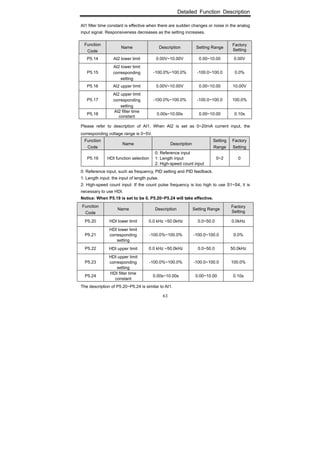
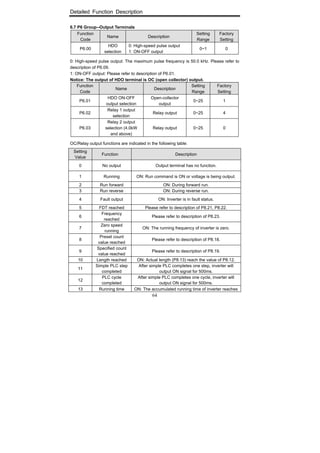
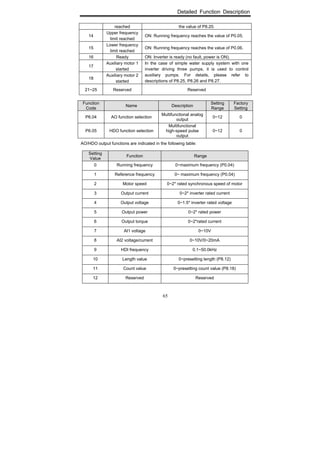
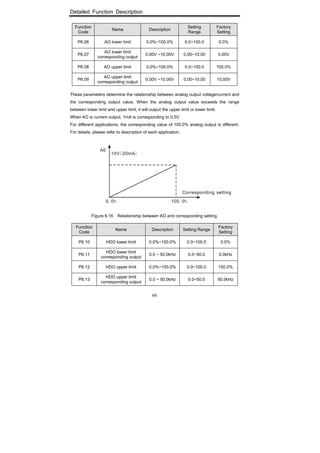
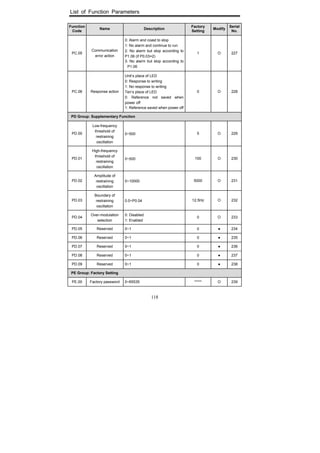
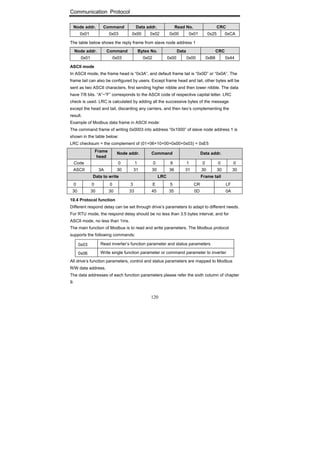
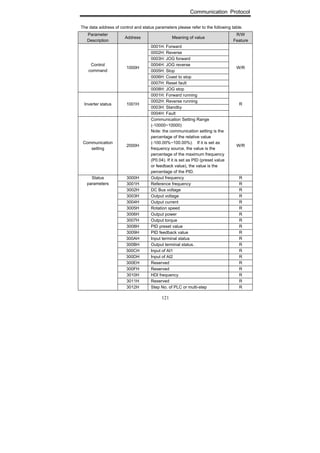
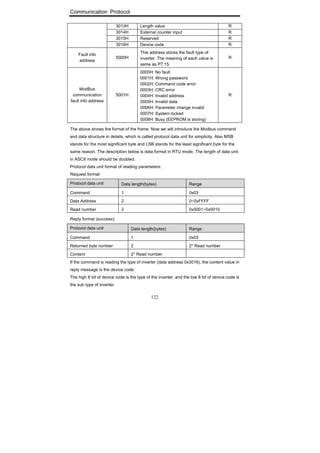
Operation Manual
Thank you very much for your buying CHF series universal inverter.
Before use, please read this manual thoroughly to ensure proper usage. Keep this
manual at an easily accessible place so that can refer anytime as necessary.
I
WARNING
CAUTION
Safety Precautions
Please read this operation manual carefully before installation, operation, maintenance or
inspection.
In this manual, the safety precautions were sorted to “WARNING” or “CAUTION”.
Indicates a potentially dangerous situation which, if can not
avoid will result in death or serious injury.
Indicates a potentially dangerous situation which, if can not
avoid will cause minor or moderate injury and damage the
device. This
Symbol is also used for warning any un-safety operation.
In some cases, even the contents of “CAUTION” still can cause serious accident.
Please follow these important precautions in any situation.
★ NOTE indicate the necessary operation to ensure the device run properly.
Warning Marks are placed on the front cover of the inverter.
Please follow these indications when using the inverter.
WARNING
May cause injury or electric shock.
Please follow the instructions in the manual before installation or operation.
Disconnect all power line before opening front cover of unit. Wait at least 1
minute until DC Bus capacitors discharge.
Use proper grounding techniques.
Never connect AC power with UVW terminals
II
TABLE OF CONTENTS
TABLE OF CONTENTS ............................................................................................ II
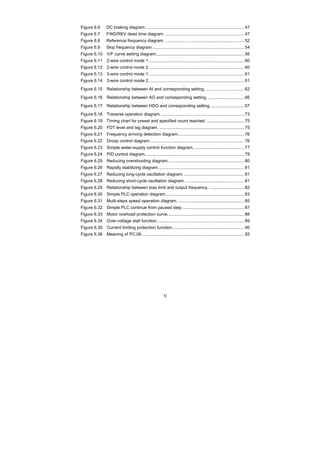
LIST OF FIGURES ...................................................................................................IV
1. INTRODUCTION................................................................................................. 1
1.1 Technology Features.................................................................................... 1
1.2 Description of Name Plate ........................................................................... 2
1.3 Selection Guide............................................................................................ 2
1.4 Parts Description.......................................................................................... 5
1.5 External Dimension ...................................................................................... 6
2. INSPECTION ...................................................................................................... 8
3. INSTALLATION................................................................................................... 9
3.1 Environmental Requirement....................................................................... 10
3.2 Installation Space ........................................................................................11
3.3 Dimensions of External Keypad................................................................. 12
3.4 Disassembly............................................................................................... 12
4. WIRING ............................................................................................................. 14
4.1 Connection of Peripheral Devices.............................................................. 15
4.2 Terminal Configuration ............................................................................... 16
4.2.1 Main Circuit Terminals .....................................................................16
4.2.2 Control Circuit Terminals .................................................................17
4.3 Typical Wiring Diagram .............................................................................. 18
4.4 Specifications of Breaker, Cable, Contactor and Reactor.......................... 19
4.4.1 Specifications of breaker, cable and contactor................................19
4.4.2 Specifications of AC input/output reactor and DC reactor...............20
4.4.3 Specifications of braking resistor.....................................................21
4.5 Wiring Main Circuits ................................................................................... 23
4.5.1 Wiring at input side of main circuit................................................23
4.5.2 Wiring at inverter side of main circuit............................................23
4.5.3 Wiring at motor side of main circuit.............................................24
4.5.4 Wiring of regenerative unit ..........................................................24
4.5.5 Wiring of Common DC bus..............................................................25
4.5.6 Ground Wiring (PE) .........................................................................26
4.6 Wiring Control Circuit ................................................................................. 26
4.6.1 Precautions......................................................................................26
4.6.2 Control circuit terminals...................................................................26
4.6.3 Jumper on control board..................................................................27
4.7 Installation Guidline to EMC Compliance................................................... 28
4.7.1 General knowledge of EMC ............................................................28
4.7.2 EMC features of inverter..................................................................28
4.7.3 EMC Installation Guideline ..............................................................29
5. OPERATION.................................................................................................... 31
5.1 Keypad Description .................................................................................... 31
5.1.1 Keypad schematic diagram .............................................................31
5.1.2 Function key description..................................................................31
5.1.3 Indicator light description.................................................................32
III
5.2 Operation Process ......................................................................................33
5.2.1 Parameter setting............................................................................ 33
5.2.2 Fault reset ....................................................................................... 34
5.2.3 Motor parameters autotuning.......................................................... 34
5.2.4 Password setting............................................................................. 34
5.2.5 Shortcut menu setting ..................................................................... 34
5.3 Running State .............................................................................................35
5.3.1 Power-on initialization ..................................................................... 35
5.3.2 Stand-by .......................................................................................... 35
5.3.3 Motor parameters autotuning.......................................................... 35
5.3.4 Operation ........................................................................................ 35
5.3.5 Fault ................................................................................................ 35
5.4 Shortcut Menu.............................................................................................36
5.4.1 Shortcut menu operation................................................................. 36
5.4.2 Quick debugging mode ................................................................... 37
6. DETAILED FUNCTION DESCRIPTION............................................................39
6.1 P0 Group--Basic Function ..........................................................................39
6.2 P1 Group --Start and Stop Control..............................................................45
6.3 P2 Group--Motor Parameters...................................................................49
6.4 P3 Group—Frequency Setting....................................................................50
6.5 P4 Group—V/F Control...............................................................................54
6.6 P5 Group--Input Terminals..........................................................................56
6.7 P6 Group--Output Terminals.......................................................................64
6.8 P7 Group—Display Interface......................................................................67
6.9 P8 Group--Enhanced Function...................................................................72
6.10 P9 Group--PID Control .............................................................................78
6.11 PA Group--Simple PLC and Multi-steps Speed Control............................82
6.12 PB Group-- Protection Function ...............................................................88
6.13 PC Group--Serial Communication............................................................91
6.14 PD Group--Supplementary Function ........................................................93
6.15 PE Group—Factory Setting ......................................................................94
7. TROUBLE SHOOTING........................................................................................95
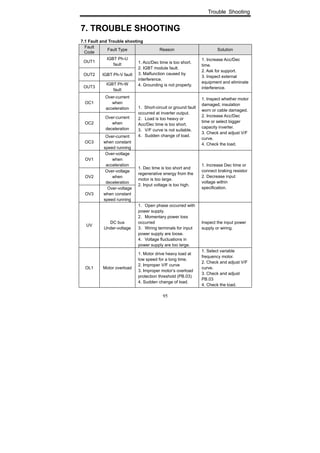
7.1 Fault and Trouble shooting .........................................................................95
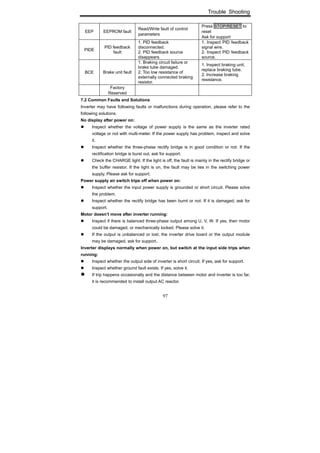
7.2 Common Faults and Solutions....................................................................97
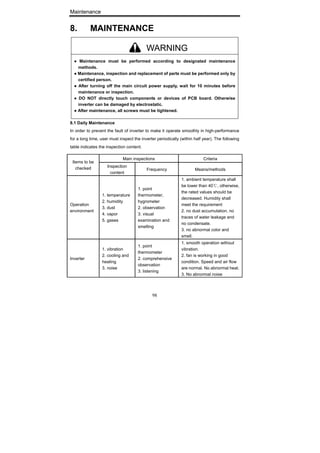
8. MAINTENANCE...............................................................................................98
8.1 Daily Maintenance ......................................................................................98
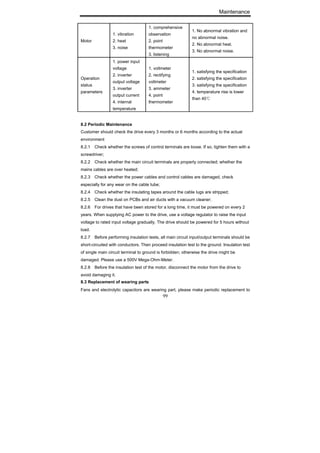
8.2 Periodic Maintenance .................................................................................99
8.3 Replacement of wearing parts....................................................................99
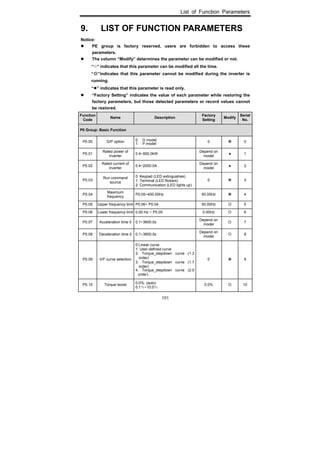
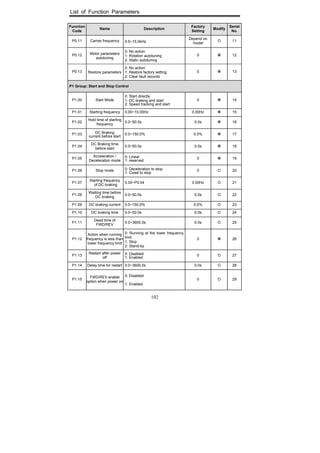
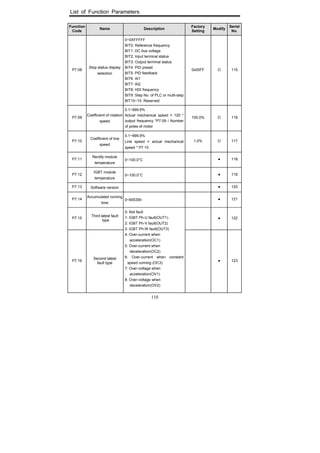
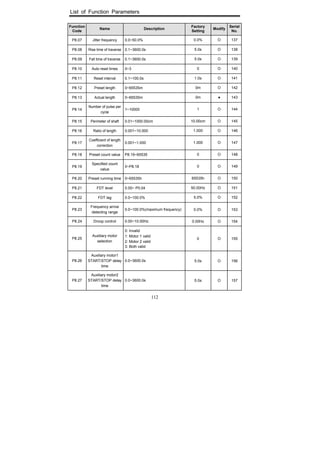
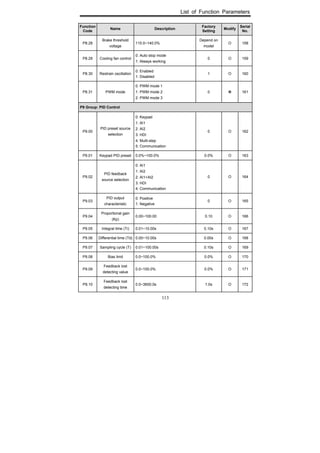
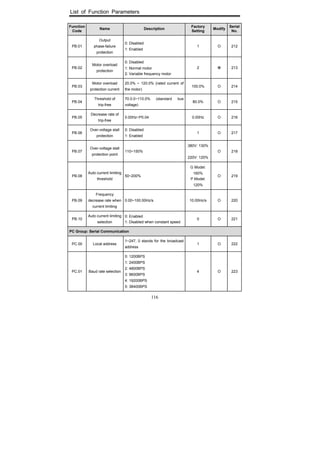
9. LIST OF FUNCTION PARAMETERS............................................................101
10. COMMUNICATION PROTOCOL.....................................................................119
IV
LIST OF FIGURES
Figure 1.1 Nameplate of inverter. ................................................................................. 2
Figure 1.2 Parts of inverter (15kw and below). ............................................................. 5
Figure 1.3 Parts of inverter (18.5kw and above)........................................................... 6
Figure1.4 Dimensions (15kW and below)..................................................................... 6
Figure 1.5 Dimensions (18.5 ~110kW). ........................................................................ 6
Figure 1.6 Dimensions (132~315kW). .......................................................................... 6
Figure 1.7 Dimensions (350~630kW). .......................................................................... 7
Figure 3.1 Relationship between output current and altitude. .................................... 10
Figure 3.2 Safety space.............................................................................................. 11
Figure 3.3 Installation of multiple inverters. ................................................................ 11
Figure 3.4 Dimension of small keypad........................................................................ 12
Figure 3.5 Dimension of big keypad. .......................................................................... 12
Figure 3.6 Disassembly of plastic cover. .................................................................... 12
Figure 3.7 Disassembly of metal plate cover.............................................................. 13
Figure 3.8 Open inverter cabinet. ............................................................................... 13
Figure 4.1 Connection of peripheral devices. ............................................................. 15
Figure 4.2 Main circuit terminals (1.5~2.2kW). ........................................................... 16
Figure 4.3 Main circuit terminals (4~5.5kW). .............................................................. 16
Figure 4.4 Main circuit terminals (7.5~15kW). ............................................................ 16
Figure 4.5 Main circuit terminals (18.5~110kW). ........................................................ 16
Figure 4.6 Main circuit terminals (132~315kW). ......................................................... 16
Figure 4.7 Main circuit terminals (350~630kW). ......................................................... 16
Figure 4.8 Control circuit terminals (1.5~2.2kW). ....................................................... 17
Figure 4.9 Control circuit terminals (4kW and above)................................................. 17
Figure4.10 Wiring diagram. .......................................................................................... 18
Figure4.11 Wiring at input side. .................................................................................. 23
Figure 4.12 Wiring at motor side. ................................................................................. 24
Figure 4.13 Wiring of regenerative unit. ....................................................................... 25
Figure 4.14 Wiring of common DC bus. ....................................................................... 25
Figure 5.1 Keypad schematic diagram. ...................................................................... 31
Figure 5.2 Flow chart of parameter setting. ................................................................ 33
Figure 5.3 Shortcut menu operation. .......................................................................... 36
Figure 6.1 Acceleration and deceleration time. .......................................................... 41
Figure 6.2 Multiple V/F curve diagram........................................................................ 42
Figure 6.3 Torque boost diagram. .............................................................................. 42
Figure 6.4 Effect of carrier frequency. ........................................................................ 43
Figure 6.5 Starting diagram. ....................................................................................... 45
V
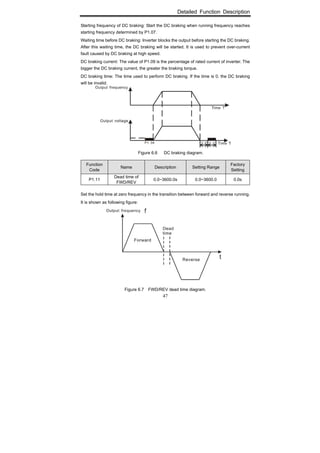
Figure 6.6 DC braking diagram................................................................................... 47
Figure 6.7 FWD/REV dead time diagram. .................................................................. 47
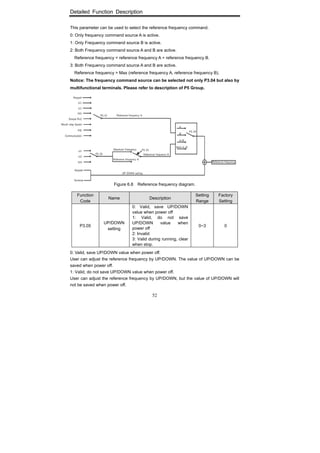
Figure 6.8 Reference frequency diagram. .................................................................. 52
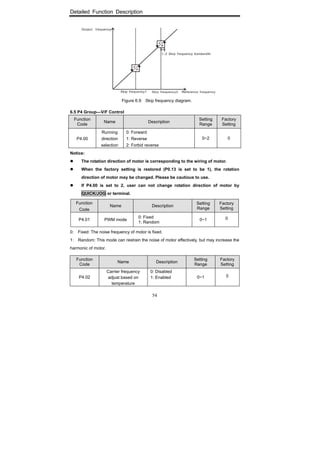
Figure 6.9 Skip frequency diagram............................................................................. 54
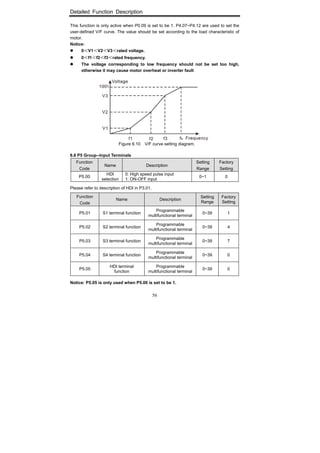
Figure 6.10 V/F curve setting diagram.......................................................................... 56
Figure 6.11 2-wire control mode 1................................................................................ 60
Figure 6.12 2-wire control mode 2................................................................................ 60
Figure 6.13 3-wire control mode 1................................................................................ 61
Figure 6.14 3-wire control mode 2................................................................................ 61
Figure 6.15 Relationship between AI and corresponding setting. ................................ 62
Figure 6.16 Relationship between AO and corresponding setting. .............................. 66
Figure 6.17 Relationship between HDO and corresponding setting............................. 67
Figure 6.18 Traverse operation diagram. ..................................................................... 73
Figure 6.19 Timing chart for preset and specified count reached. ............................... 75
Figure 6.20 FDT level and lag diagram. ....................................................................... 75
Figure 6.21 Frequency arriving detection diagram. ...................................................... 76
Figure 6.22 Droop control diagram............................................................................... 76
Figure 6.23 Simple water-supply control function diagram........................................... 77
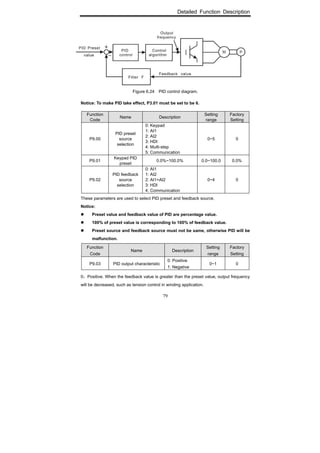
Figure 6.24 PID control diagram................................................................................... 79
Figure 6.25 Reducing overshooting diagram................................................................ 80
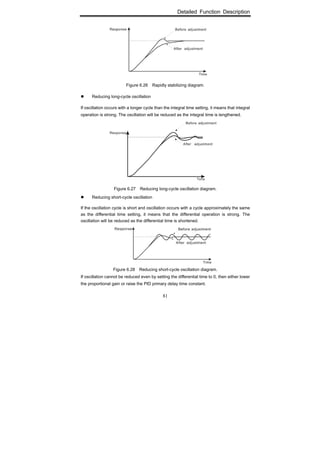
Figure 6.26 Rapidly stabilizing diagram........................................................................ 81
Figure 6.27 Reducing long-cycle oscillation diagram. .................................................. 81
Figure 6.28 Reducing short-cycle oscillation diagram. ................................................. 81
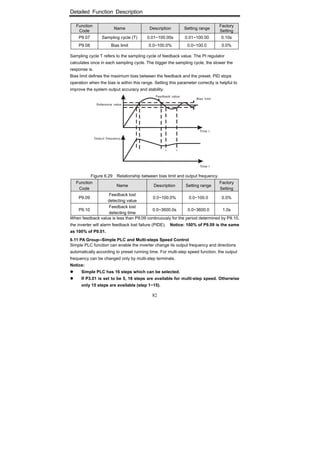
Figure 6.29 Relationship between bias limit and output frequency. ............................. 82
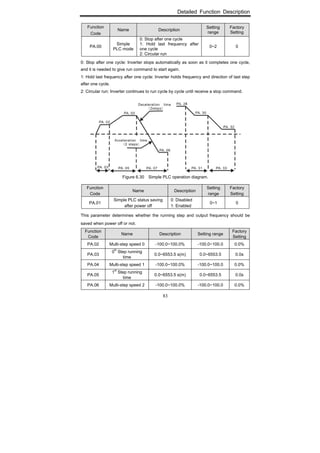
Figure 6.30 Simple PLC operation diagram.................................................................. 83
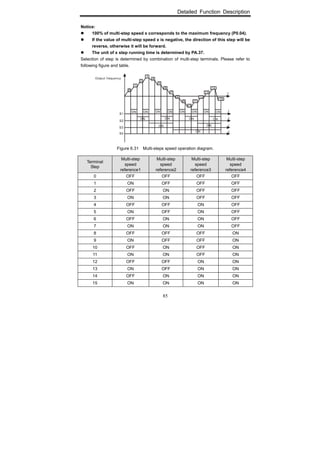
Figure 6.31 Multi-steps speed operation diagram. ....................................................... 85
Figure 6.32 Simple PLC continue from paused step. ................................................... 87
Figure 6.33 Motor overload protection curve................................................................ 88
Figure 6.34 Over-voltage stall function......................................................................... 89
Figure 6.35 Current limiting protection function............................................................ 90
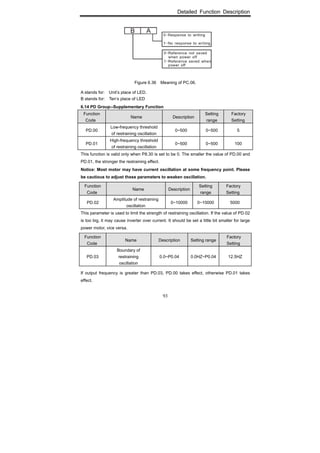
Figure 6.36 Meaning of PC.06...................................................................................... 93
Introduction
1
1. INTRODUCTION
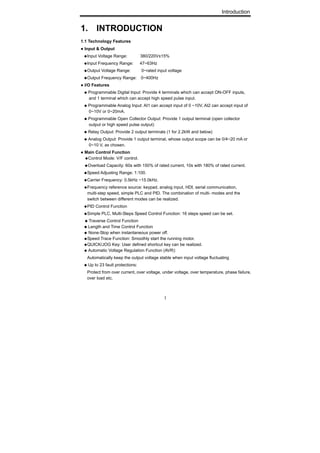
1.1 Technology Features
● Input & Output
◆Input Voltage Range: 380/220V±15%
◆Input Frequency Range: 47~63Hz
◆Output Voltage Range: 0~rated input voltage
◆Output Frequency Range: 0~400Hz
● I/O Features
◆ Programmable Digital Input: Provide 4 terminals which can accept ON-OFF inputs,
and 1 terminal which can accept high speed pulse input.
◆ Programmable Analog Input: AI1 can accept input of 0 ~10V, AI2 can accept input of
0~10V or 0~20mA.
◆ Programmable Open Collector Output: Provide 1 output terminal (open collector
output or high speed pulse output)
◆ Relay Output: Provide 2 output terminals (1 for 2.2kW and below)
◆ Analog Output: Provide 1 output terminal, whose output scope can be 0/4~20 mA or
0~10 V, as chosen.
● Main Control Function
◆Control Mode: V/F control.
◆Overload Capacity: 60s with 150% of rated current, 10s with 180% of rated current.
◆Speed Adjusting Range: 1:100.
◆Carrier Frequency: 0.5kHz ~15.0kHz.
◆Frequency reference source: keypad, analog input, HDI, serial communication,
multi-step speed, simple PLC and PID. The combination of multi- modes and the
switch between different modes can be realized.
◆PID Control Function
◆Simple PLC, Multi-Steps Speed Control Function: 16 steps speed can be set.
◆ Traverse Control Function
◆ Length and Time Control Function
◆ None-Stop when instantaneous power off.
◆Speed Trace Function: Smoothly start the running motor.
◆QUICK/JOG Key: User defined shortcut key can be realized.
◆ Automatic Voltage Regulation Function (AVR):
Automatically keep the output voltage stable when input voltage fluctuating
◆ Up to 23 fault protections:
Protect from over current, over voltage, under voltage, over temperature, phase failure,
over load etc.
Introduction
2
1.2 Description of Name Plate
Figure 1.1 Nameplate of inverter.
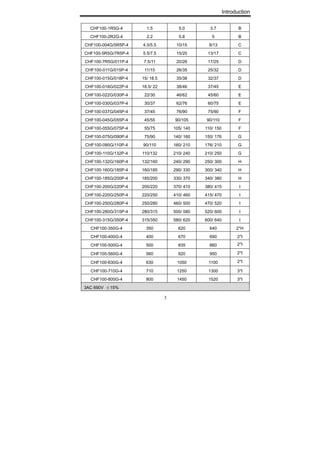
1.3 Selection Guide
Model No.
Rated output
Power (kW)
Rated input
current (A)
Rated output
current (A)
Size
1AC 220V ±15%
CHF100-1R5G-S2 1.5 14.2 7.0 B
CHF100-2R2G-S2 2.2 23.0 10 B
3AC 220V ±15%
CHF100-0R7G-2 0.75 5.0 4.5 B
CHF100-1R5G-2 1.5 7.7 7 B
CHF100-2R2G-2 2.2 11.0 10 B
CHF100-004G-2 4.0 17.0 16 C
CHF100-5R5G-2 5.5 21.0 20 C
CHF100-7R5G-2 7.5 31.0 30 D
CHF100-011G-2 11.0 43.0 42 E
CHF100-015G-2 15.0 56.0 55 E
CHF100-018G-2 18.5 71.0 70 E
CHF100-022G-2 22.0 81.0 80 F
CHF100-030G-2 30.0 112.0 110 F
CHF100-037G-2 37.0 132.0 130 F
CHF100-045G-2 45.0 163.0 160 G
3AC 380V ±15%
CHF100-0R7G-4 0.75 3.4 2.5 B
Introduction
3
CHF100-1R5G-4 1.5 5.0 3.7 B
CHF100-2R2G-4 2.2 5.8 5 B
CHF100-004G/5R5P-4 4.0/5.5 10/15 9/13 C
CHF100-5R5G/7R5P-4 5.5/7.5 15/20 13/17 C
CHF100-7R5G/011P-4 7.5/11 20/26 17/25 D
CHF100-011G/015P-4 11/15 26/35 25/32 D
CHF100-015G/018P-4 15/ 18.5 35/38 32/37 D
CHF100-018G/022P-4 18.5/ 22 38/46 37/45 E
CHF100-022G/030P-4 22/30 46/62 45/60 E
CHF100-030G/037P-4 30/37 62/76 60/75 E
CHF100-037G/045P-4 37/45 76/90 75/90 F
CHF100-045G/055P-4 45/55 90/105 90/110 F
CHF100-055G/075P-4 55/75 105/ 140 110/ 150 F
CHF100-075G/090P-4 75/90 140/ 160 150/ 176 G
CHF100-090G/110P-4 90/110 160/ 210 176/ 210 G
CHF100-110G/132P-4 110/132 210/ 240 210/ 250 G
CHF100-132G/160P-4 132/160 240/ 290 250/ 300 H
CHF100-160G/185P-4 160/185 290/ 330 300/ 340 H
CHF100-185G/200P-4 185/200 330/ 370 340/ 380 H
CHF100-200G/220P-4 200/220 370/ 410 380/ 415 I
CHF100-220G/250P-4 220/250 410/ 460 415/ 470 I
CHF100-250G/280P-4 250/280 460/ 500 470/ 520 I
CHF100-280G/315P-4 280/315 500/ 580 520/ 600 I
CHF100-315G/350P-4 315/350 580/ 620 600/ 640 I
CHF100-350G-4 350 620 640 2*H
CHF100-400G-4 400 670 690 2*I
CHF100-500G-4 500 835 860 2*I
CHF100-560G-4 560 920 950 2*I
CHF100-630G-4 630 1050 1100 2*I
CHF100-710G-4 710 1250 1300 3*I
CHF100-800G-4 800 1450 1520 3*I
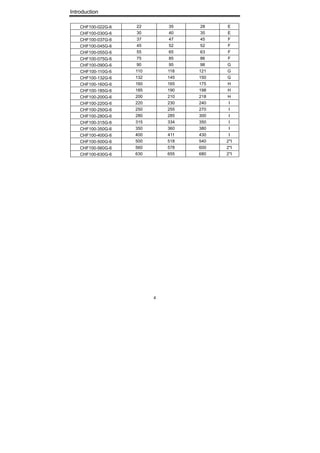
3AC 690V ±15%
Introduction
4
CHF100-022G-6 22 35 28 E
CHF100-030G-6 30 40 35 E
CHF100-037G-6 37 47 45 F
CHF100-045G-6 45 52 52 F
CHF100-055G-6 55 65 63 F
CHF100-075G-6 75 85 86 F
CHF100-090G-6 90 95 98 G
CHF100-110G-6 110 118 121 G
CHF100-132G-6 132 145 150 G
CHF100-160G-6 160 165 175 H
CHF100-185G-6 185 190 198 H
CHF100-200G-6 200 210 218 H
CHF100-220G-6 220 230 240 I
CHF100-250G-6 250 255 270 I
CHF100-280G-6 280 285 300 I
CHF100-315G-6 315 334 350 I
CHF100-350G-6 350 360 380 I
CHF100-400G-6 400 411 430 I
CHF100-500G-6 500 518 540 2*I
CHF100-560G-6 560 578 600 2*I
CHF100-630G-6 630 655 680 2*I
Introduction
5
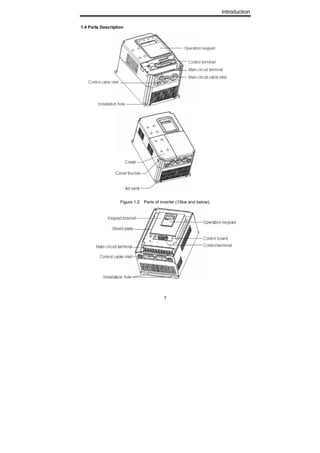
1.4 Parts Description
Figure 1.2 Parts of inverter (15kw and below).
Introduction
6
Figure 1.3 Parts of inverter (18.5kw and above).
1.5 External Dimension
Figure1.4 Dimensions (15kW and below). Figure 1.5 Dimensions (18.5 ~110kW).
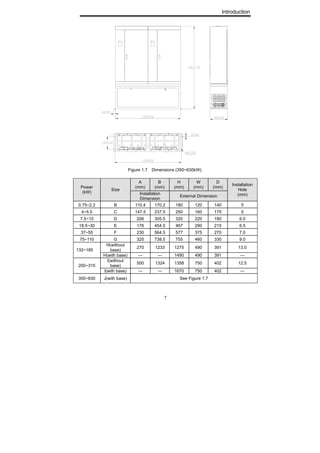
Figure 1.6 Dimensions (132~315kW).
Introduction
7
Figure 1.7 Dimensions (350~630kW).
A
(mm)
B
(mm)
H
(mm)
W
(mm)
D
(mm)Power
(kW)
Size
Installation
Dimension
External Dimension
Installation
Hole
(mm)
0.75~2.2 B 110.4 170.2 180 120 140 5
4~5.5 C 147.5 237.5 250 160 175 5
7.5~15 D 206 305.5 320 220 180 6.0
18.5~30 E 176 454.5 467 290 215 6.5
37~55 F 230 564.5 577 375 270 7.0
75~110 G 320 738.5 755 460 330 9.0
H(without
base)
270 1233 1275 490 391 13.0
132~185
H(with base) — — 1490 490 391 —
I(without
base)
500 1324 1358 750 402 12.5
200~315
I(with base) — — 1670 750 402 —
350~630 J(with base) See Figure 1.7
Inspection
8
2. INSPECTION
● Don’t install or use any inverter that is damaged or have fault part, otherwise
may cause injury.
Check the following items when unpacking the inverter,
1. Inspect the entire exterior of the Inverter to ensure there are no scratches or
other damage caused by the transportation.
2. Ensure there is operation manual and warranty card in the packing box.
3. Inspect the nameplate and ensure it is what you ordered.
4. Ensure the optional parts are what you need if have ordered any optional parts.
Please contact the local agent if there is any damage in the inverter or optional parts.
CAUTION
Installation
9
3. INSTALLATION
● The person without passing the training manipulate the device or any rule in the
“Warning” being violated, will cause severe injury or property loss. Only the person,
who has passed the training on the design, installation, commissioning and
operation of the device and gotten the certification, is permitted to operate this
equipment.
● Input power cable must be connected tightly, and the equipment must be grounded
securely.
● Even if the inverter is not running, the following terminals still have dangerous
voltage:
- Power Terminals: R, S, T
- Motor Connection Terminals: U, V, W.
● When power off, should not install the inverter until 5 minutes after, which will ensure
the device discharge completely.
● The section area of grounding conductor must be no less than that of power supply
cable.
●When moving the inverter please lift by its base and don’t lift by the panel. Otherwise
may cause the main unit fall off which may result in personal injury.
● Install the inverter on the fireproofing material (such as metal) to prevent fire.
● When need install two or more inverters in one cabinet, cooling fan should be
provided to make sure that the air temperature is lower than 45°C. Otherwise it could
cause fire or damage the device.
WARNING
CAUTION
Installation
10
3.1 Environmental Requirement
3.1.1 Temperature
Environment temperature range: -10°C ~ +40°C. Inverter will be derated if ambient
temperature exceeds 40°C.
3.1.2 Humidity
Less than 95% RH, without dewfall.
3.1.3 Altitude
Inverter can output the rated power when installed with altitude of lower than 1000m. It
will be derated when the altitude is higher than 1000m. For details, please refer to the
following figure:
Figure 3.1 Relationship between output current and altitude.
3.1.4 Impact and Oscillation
It is not allowed that the inverter falls down or suffers from fierce impact or the inverter
installed at the place that oscillation frequently.
3.1.5 Electromagnetic Radiation
Keep away from the electromagnetic radiation source.
3.1.6 Water
Do not install the inverter at the wringing or dewfall place.
3.1.7 Air Pollution
Keep away from air pollution such as dusty, corrosive gas.
3.1.8 Storage
Do not store the inverter in the environment with direct sunlight, vapor, oil fog and
vibration.
(m)
Installation
11
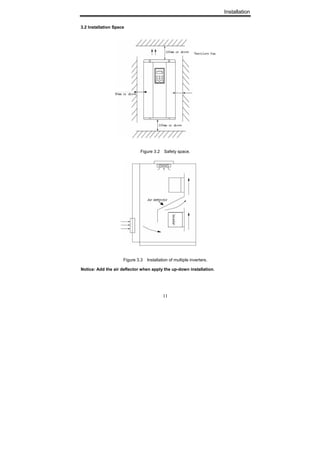
3.2 Installation Space
Figure 3.2 Safety space.
Figure 3.3 Installation of multiple inverters.
Notice: Add the air deflector when apply the up-down installation.
Installation
12
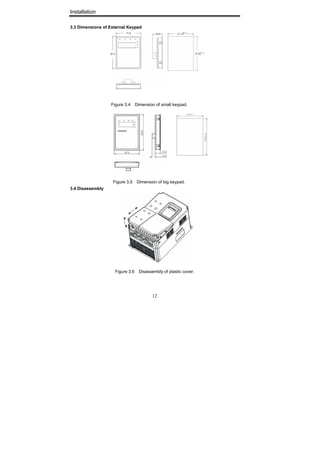
3.3 Dimensions of External Keypad
Figure 3.4 Dimension of small keypad.
Figure 3.5 Dimension of big keypad.
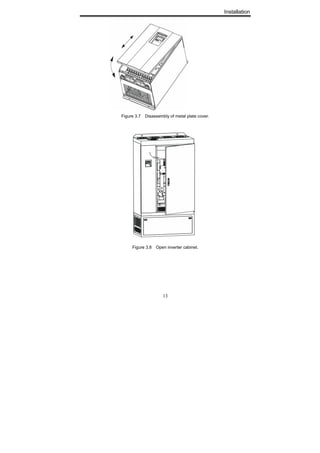
3.4 Disassembly
Figure 3.6 Disassembly of plastic cover.
Installation
13
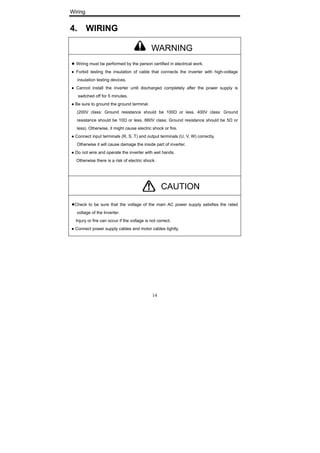
Figure 3.7 Disassembly of metal plate cover.
Figure 3.8 Open inverter cabinet.
Wiring
14
4. WIRING
● Wiring must be performed by the person certified in electrical work.
● Forbid testing the insulation of cable that connects the inverter with high-voltage
insulation testing devices.
● Cannot install the inverter until discharged completely after the power supply is
switched off for 5 minutes.
● Be sure to ground the ground terminal.
(200V class: Ground resistance should be 100Ω or less, 400V class: Ground
resistance should be 10Ω or less, 660V class: Ground resistance should be 5Ω or
less). Otherwise, it might cause electric shock or fire.
● Connect input terminals (R, S, T) and output terminals (U, V, W) correctly.
Otherwise it will cause damage the inside part of inverter.
● Do not wire and operate the inverter with wet hands.
Otherwise there is a risk of electric shock.
●Check to be sure that the voltage of the main AC power supply satisfies the rated
voltage of the Inverter.
Injury or fire can occur if the voltage is not correct.
● Connect power supply cables and motor cables tightly.
WARNING
CAUTION
Wiring
15
4.1 Connection of Peripheral Devices
Figure 4.1 Connection of peripheral devices.
Wiring
16
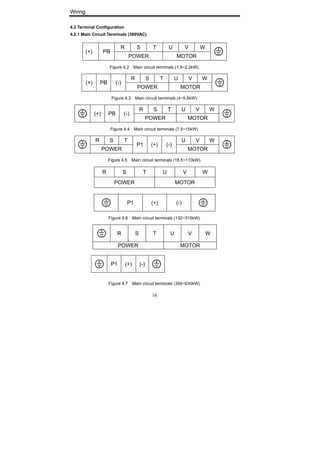
4.2 Terminal Configuration
4.2.1 Main Circuit Terminals (380VAC)
R S T U V W
(+) PB
POWER MOTOR
Figure 4.2 Main circuit terminals (1.5~2.2kW).
R S T U V W
(+) PB (-)
POWER MOTOR
Figure 4.3 Main circuit terminals (4~5.5kW).
R S T U V W
(+) PB (-)
POWER MOTOR
Figure 4.4 Main circuit terminals (7.5~15kW).
R S T U V W
POWER
P1 (+) (-)
MOTOR
Figure 4.5 Main circuit terminals (18.5~110kW).
R S T U V W
POWER MOTOR
P1 (+) (-)
Figure 4.6 Main circuit terminals (132~315kW).
R S T U V W
POWER MOTOR
P1 (+) (-)
Figure 4.7 Main circuit terminals (350~630kW).
Wiring
17
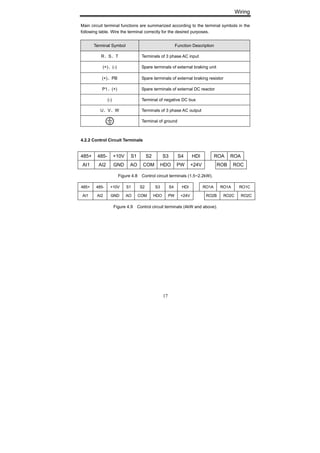
Main circuit terminal functions are summarized according to the terminal symbols in the
following table. Wire the terminal correctly for the desired purposes.
4.2.2 Control Circuit Terminals
485+ 485- +10V S1 S2 S3 S4 HDI ROA ROA
AI1 AI2 GND AO COM HDO PW +24V ROB ROC
Figure 4.8 Control circuit terminals (1.5~2.2kW).
485+ 485- +10V S1 S2 S3 S4 HDI RO1A RO1A RO1C
AI1 AI2 GND AO COM HDO PW +24V RO2B RO2C RO2C
Figure 4.9 Control circuit terminals (4kW and above).
Terminal Symbol Function Description
R、S、T Terminals of 3 phase AC input
(+)、(-) Spare terminals of external braking unit
(+)、PB Spare terminals of external braking resistor
P1、(+) Spare terminals of external DC reactor
(-) Terminal of negative DC bus
U、V、W Terminals of 3 phase AC output
Terminal of ground
Wiring
18
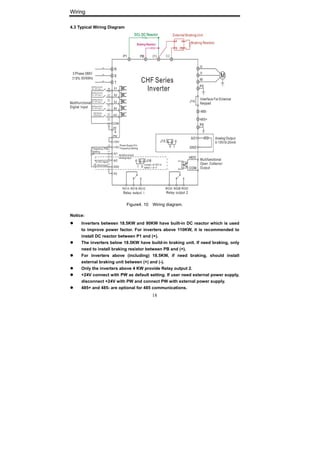
4.3 Typical Wiring Diagram
Figure4. 10 Wiring diagram.
Notice:
Inverters between 18.5KW and 90KW have built-in DC reactor which is used
to improve power factor. For inverters above 110KW, it is recommended to
install DC reactor between P1 and (+).
The inverters below 18.5KW have build-in braking unit. If need braking, only
need to install braking resistor between PB and (+).
For inverters above (including) 18.5KW, if need braking, should install
external braking unit between (+) and (-).
Only the inverters above 4 KW provide Relay output 2.
+24V connect with PW as default setting. If user need external power supply,
disconnect +24V with PW and connect PW with external power supply.
485+ and 485- are optional for 485 communications.
Wiring
19
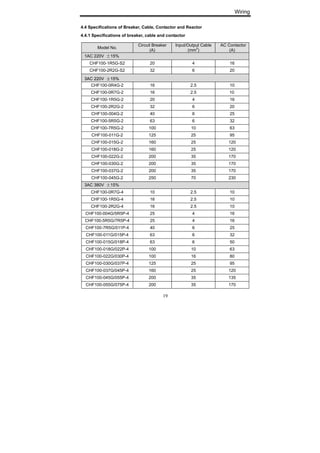
4.4 Specifications of Breaker, Cable, Contactor and Reactor
4.4.1 Specifications of breaker, cable and contactor
Model No.
Circuit Breaker
(A)
Input/Output Cable
(mm
2
)
AC Contactor
(A)
1AC 220V ±15%
CHF100-1R5G-S2 20 4 16
CHF100-2R2G-S2 32 6 20
33AACC 222200VV ±±1155%%
CHF100-0R4G-2 16 2.5 10
CHF100-0R7G-2 16 2.5 10
CHF100-1R5G-2 20 4 16
CHF100-2R2G-2 32 6 20
CHF100-004G-2 40 6 25
CHF100-5R5G-2 63 6 32
CHF100-7R5G-2 100 10 63
CHF100-011G-2 125 25 95
CHF100-015G-2 160 25 120
CHF100-018G-2 160 25 120
CHF100-022G-2 200 35 170
CHF100-030G-2 200 35 170
CHF100-037G-2 200 35 170
CHF100-045G-2 250 70 230
3AC 380V ±15%
CHF100-0R7G-4 10 2.5 10
CHF100-1R5G-4 16 2.5 10
CHF100-2R2G-4 16 2.5 10
CHF100-004G/5R5P-4 25 4 16
CHF100-5R5G/7R5P-4 25 4 16
CHF100-7R5G/011P-4 40 6 25
CHF100-011G/015P-4 63 6 32
CHF100-015G/018P-4 63 6 50
CHF100-018G/022P-4 100 10 63
CHF100-022G/030P-4 100 16 80
CHF100-030G/037P-4 125 25 95
CHF100-037G/045P-4 160 25 120
CHF100-045G/055P-4 200 35 135
CHF100-055G/075P-4 200 35 170
Wiring
20
CHF100-075G/090P-4 250 70 230
CHF100-090G/110P-4 315 70 280
CHF100-110G/132P-4 400 95 315
CHF100-132G/160P-4 400 150 380
CHF100-160G/185P-4 630 185 450
CHF100-185G/200P-4 630 185 500
CHF100-200G/220P-4 630 240 580
CHF100-220G/250P-4 800 150x2 630
CHF100-250G/280P-4 800 150x2 700
CHF100-280G/315P-4 1000 185x2 780
CHF100-315G/350P-4 1200 240x2 900
4.4.2 Specifications of AC input/output reactor and DC reactor
AC Input reactor AC Output reactor DC reactor
Model No. Current
(A)
Inductance
(mH)
Current
(A)
Inductance
(mH)
Current
(A)
Inductance
(mH)
CHF100-0R7G-4 - - - - - -
CHF100-1R5G-4 5 3.8 5 1.5 - -
CHF100-2R2G-4 7 2.5 7 1 - -
CHF100-004G/5R5P-4 10 1.5 10 0.6 - -
CHF100-5R5G/7R5P-4 15 1.4 15 0.25 - -
CHF100-7R5G/011P-4 20 1 20 0.13 - -
CHF100-011G/015P-4 30 0.6 30 0.087 - -
CHF100-015G/018P-4 40 0.6 40 0.066 - -
CHF100-018G/022P-4 50 0.35 50 0.052 40 1.3
CHF100-022G/030P-4 60 0.28 60 0.045 50 1.08
CHF100-030G/037P-4 80 0.19 80 0.032 65 0.8
CHF100-037G/045P-4 90 0.19 90 0.03 78 0.7
CHF100-045G/055P-4 120 0.13 120 0.023 95 0.54
CHF100-055G/075P-4 150 0.11 150 0.019 115 0.45
CHF100-075G/090P-4 200 0.12 200 0.014 160 0.36
CHF100-090G/110P-4 250 0.06 250 0.011 180 0.33
CHF100-110G/132P-4 250 0.06 250 0.011 250 0.26
Wiring
21
CHF100-132G/160P-4 290 0.04 290 0.008 250 0.26
CHF100-160G/185P-4 330 0.04 330 0.008 340 0.18
CHF100-185G/200P-4 400 0.04 400 0.005 460 0.12
CHF100-200G/220P-4 490 0.03 490 0.004 460 0.12
CHF100-220G/250P-4 490 0.03 490 0.004 460 0.12
CHF100-250G/280P-4 530 0.04 530 0.005 650 0.11
CHF100-280G/315P-4 600 0.04 600 0.005 650 0.11
CHF100-315G/350P-4 660 0.02 660 0.002 800 0.06
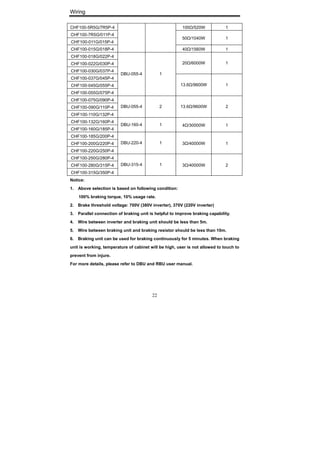
4.4.3 Specifications of braking unit and braking resistor
Braking unit Braking resistor
Model No.
Order No. Quantity Specification Quantity
3AC 220V ±15%
CHF100-0R4G-2 275Ω/75W 1
CHF100-0R7G-2 275Ω/75W 1
CHF100-1R5G-2 130Ω/260W 1
CHF100-2R2G-2 80Ω/260W 1
CHF100-004G-2 48Ω/400W 1
CHF100-5R5G-2
Built-in 1
35Ω/550W 1
CHF100-7R5G-2 26Ω/780W 1
CHF100-011G-2 17Ω/1100W 1
CHF100-015G-2 13Ω/1800W 1
CHF100-018G-2 10Ω/2200W 1
CHF100-022G-2
DBU-055-2 1
8Ω/2500W 1
CHF100-030G-2 13Ω/1800W 2
CHF100-037G-2 10Ω/2200W 2
CHF100-045G-2
DBU-055-2 2
8Ω/2500W 2
3AC 380V±15%
CHF100-0R7G-4 900Ω/75W 1
CHF100-1R5G-4 400Ω/260W 1
CHF100-2R2G-4
CHF100-004G/5R5P-4
Built-in 1
150Ω/390W 1
Wiring
22
CHF100-5R5G/7R5P-4 100Ω/520W 1
CHF100-7R5G/011P-4
CHF100-011G/015P-4
50Ω/1040W 1
CHF100-015G/018P-4 40Ω/1560W 1
CHF100-018G/022P-4
CHF100-022G/030P-4
CHF100-030G/037P-4
20Ω/6000W 1
CHF100-037G/045P-4
CHF100-045G/055P-4
CHF100-055G/075P-4
DBU-055-4 1
13.6Ω/9600W 1
CHF100-075G/090P-4
CHF100-090G/110P-4
CHF100-110G/132P-4
DBU-055-4 2 13.6Ω/9600W 2
CHF100-132G/160P-4
CHF100-160G/185P-4
DBU-160-4 1 4Ω/30000W 1
CHF100-185G/200P-4
CHF100-200G/220P-4
CHF100-220G/250P-4
DBU-220-4 1 3Ω/40000W 1
CHF100-250G/280P-4
CHF100-280G/315P-4
CHF100-315G/350P-4
DBU-315-4 1 3Ω/40000W 2
Notice:
1. Above selection is based on following condition:
100% braking torque, 10% usage rate.
2. Brake threshold voltage: 700V (380V inverter), 370V (220V inverter)
3. Parallel connection of braking unit is helpful to improve braking capability.
4. Wire between inverter and braking unit should be less than 5m.
5. Wire between braking unit and braking resistor should be less than 10m.
6. Braking unit can be used for braking continuously for 5 minutes. When braking
unit is working, temperature of cabinet will be high, user is not allowed to touch to
prevent from injure.
For more details, please refer to DBU and RBU user manual.
Wiring
23
4.5 Wiring Main Circuits
4.5.1 Wiring at input side of main circuit
4.5.1.1 Circuit breaker
It is necessary to connect a circuit breaker which is compatible with the capacity of
inverter between 3ph AC power supply and power input terminals (R, S, T ). The capacity
of breaker is 1.5~2 times to the rated current of inverter. For details, see <Specifications
of Breaker, Cable, and Contactor>.
4.5.1.2 Contactor
In order to cut off the input power effectively when something is wrong in the system,
contactor should be installed at the input side to control the ON-OFF of the main circuit
power supply.
4.5.1.3 AC reactor
In order to prevent the rectifier damage result from the large current, AC reactor should
be installed at the input side. It can also prevent rectifier from sudden variation of power
voltage or harmonic generated by phase-control load.
4.5.1.4 Input EMC filter
The surrounding device may be disturbed by the cables when the inverter is working.
EMC filter can minimize the interference. Just like the following figure.
Figure4.11 Wiring at input side.
4.5.2 Wiring at inverter side of main circuit
4.5.2.1 DC reactor
Inverters from 18.5kW to 90kW have built-in DC reactor which can improve the power
factor,
4.5.2.2 Braking unit and braking resistor
Wiring
24
• Inverter of 15KW and below have built-in braking unit. In order to dissipate the
regenerative energy generated by dynamic braking, the braking resistor should be
installed at (+) and PB terminals. The wire length of the braking resistor should be less
than 5m.
• Inverter of 18.5KW and above need connect external braking unit which should be
installed at (+) and (-) terminals. The cable between inverter and braking unit should be
less than 5m. The cable between braking unit and braking resistor should be less than
10m.
• The temperature of braking resistor will increase because the regenerative energy will
be transformed to heat. Safety protection and good ventilation is recommended.
Notice: Be sure that the electric polarity of (+) (-) terminals is right; it is not allowed
to connect (+) with (-) terminals directly, Otherwise damage or fire could occur.
4.5.3 Wiring at motor side of main circuit
4.5.3.1 Output Reactor
When the distance between inverter and motor is more than 50m, inverter may be tripped
by over-current protection frequently because of the large leakage current resulted from
the parasitic capacitance with ground. And the same time to avoid the damage of motor
insulation, the output reactor should be installed.
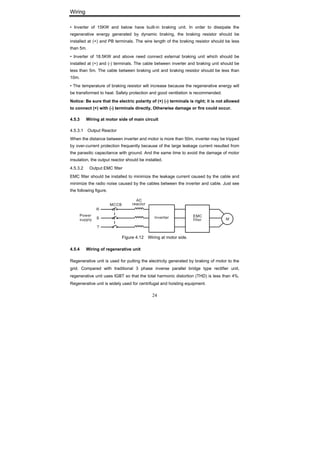
4.5.3.2 Output EMC filter
EMC filter should be installed to minimize the leakage current caused by the cable and
minimize the radio noise caused by the cables between the inverter and cable. Just see
the following figure.
Figure 4.12 Wiring at motor side.
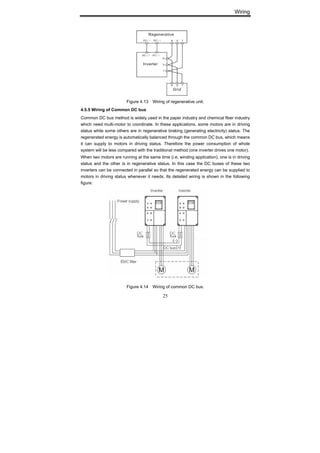
4.5.4 Wiring of regenerative unit
Regenerative unit is used for putting the electricity generated by braking of motor to the
grid. Compared with traditional 3 phase inverse parallel bridge type rectifier unit,
regenerative unit uses IGBT so that the total harmonic distortion (THD) is less than 4%.
Regenerative unit is widely used for centrifugal and hoisting equipment.
Wiring
25
Figure 4.13 Wiring of regenerative unit.
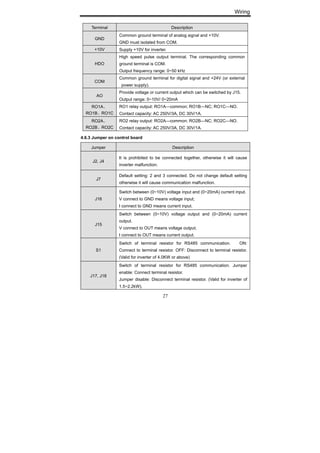
4.5.5 Wiring of Common DC bus
Common DC bus method is widely used in the paper industry and chemical fiber industry
which need multi-motor to coordinate. In these applications, some motors are in driving
status while some others are in regenerative braking (generating electricity) status. The
regenerated energy is automatically balanced through the common DC bus, which means
it can supply to motors in driving status. Therefore the power consumption of whole
system will be less compared with the traditional method (one inverter drives one motor).
When two motors are running at the same time (i.e. winding application), one is in driving
status and the other is in regenerative status. In this case the DC buses of these two
inverters can be connected in parallel so that the regenerated energy can be supplied to
motors in driving status whenever it needs. Its detailed wiring is shown in the following
figure:
Figure 4.14 Wiring of common DC bus.
Wiring
26
Notice: Two inverters must be the same model when connected with Common DC
bus method. Be sure they are powered on at the same time.
4.5.6 Ground Wiring (PE)
In order to ensure safety and prevent electrical shock and fire, terminal PE must be
grounded with ground resistance. The ground wire should be big and short, and it is
better to use copper wire (>3.5mm
2
). When multiple inverters need to be grounded, do
not loop the ground wire.
4.6 Wiring Control Circuit
4.6.1 Precautions
4.6.1.1 Use shielded or twisted-pair cables to connect control terminals.
4.6.1.2 Connect the ground terminal (PE) with shield wire.
4.6.1.3 The cable connected to the control terminal should leave away from the main
circuit and heavy current circuits (including power supply cable, motor cable, relay and
contactor connecting cable) at least 20cm and parallel wiring should be avoided. It is
suggested to apply perpendicular wiring to prevent inverter malfunction caused by
external interference.
4.6.2 Control circuit terminals
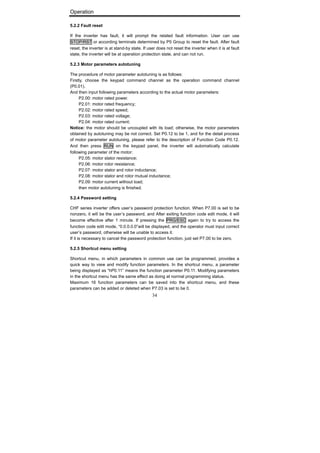
Terminal Description
S1~S4
ON-OFF signal input, optical coupling with PW and COM.
Input voltage range: 9~30V
Input impedance: 3.3kΩ
HDI
High speed pulse or ON-OFF signal input, optical coupling with
PW and COM.
Pulse input frequency range: 0~50kHz
Input voltage range: 9~30V
Input impedance: 1.1kΩ
PW
External power supply. +24V terminal is connected to PW terminal
as default setting. If user need external power supply, disconnect
+24V terminal with PW terminal and connect PW terminal with
external power supply.
+24V
Provide output power supply of +24V.
Maximum output current: 150mA
AI1
Analog input, 0~10V
Input impedance: 10kΩ
AI2
Analog input, 0~10V/ 0~20mA, switched by J16.
Input impedance: 10kΩ (voltage input) / 250Ω (current input)
Wiring
27
Terminal Description
GND
Common ground terminal of analog signal and +10V.
GND must isolated from COM.
+10V Supply +10V for inverter.
HDO
High speed pulse output terminal. The corresponding common
ground terminal is COM.
Output frequency range: 0~50 kHz
COM
Common ground terminal for digital signal and +24V (or external
power supply).
AO
Provide voltage or current output which can be switched by J15.
Output range: 0~10V/ 0~20mA
RO1A、
RO1B、RO1C
RO1 relay output: RO1A—common; RO1B—NC; RO1C—NO.
Contact capacity: AC 250V/3A, DC 30V/1A.
RO2A、
RO2B、RO2C
RO2 relay output: RO2A—common; RO2B—NC; RO2C—NO.
Contact capacity: AC 250V/3A, DC 30V/1A.
4.6.3 Jumper on control board
Jumper Description
J2, J4
It is prohibited to be connected together, otherwise it will cause
inverter malfunction.
J7
Default setting: 2 and 3 connected. Do not change default setting
otherwise it will cause communication malfunction.
J16
Switch between (0~10V) voltage input and (0~20mA) current input.
V connect to GND means voltage input;
I connect to GND means current input.
J15
Switch between (0~10V) voltage output and (0~20mA) current
output.
V connect to OUT means voltage output;
I connect to OUT means current output.
S1
Switch of terminal resistor for RS485 communication. ON:
Connect to terminal resistor. OFF: Disconnect to terminal resistor.
(Valid for inverter of 4.0KW or above)
J17, J18
Switch of terminal resistor for RS485 communication. Jumper
enable: Connect terminal resistor.
Jumper disable: Disconnect terminal resistor. (Valid for inverter of
1.5~2.2kW).
Wiring
28
4.7 Installation Guidline to EMC Compliance
4.7.1 General knowledge of EMC
EMC is the abbreviation of electromagnetic compatibility, which means the device or
system has the ability to work normally in the electromagnetic environment and will not
generate any electromagnetic interference to other equipments.
EMC includes two subjects: electromagnetic interference and electromagnetic
anti-jamming.
According to the transmission mode, Electromagnetic interference can be divided into two
categories: conducted interference and radiated interference.
Conducted interference is the interference transmitted by conductor. Therefore, any
conductors (such as wire, transmission line, inductor, capacitor and so on) are the
transmission channels of the interference.
Radiated interference is the interference transmitted in electromagnetic wave, and the
energy is inverse proportional to the square of distance.
Three necessary conditions or essentials of electromagnetic interference are:
interference source, transmission channel and sensitive receiver. For customers, the
solution of EMC problem is mainly in transmission channel because of the device
attribute of disturbance source and receiver can not be changed.
4.7.2 EMC features of inverter
Like other electric or electronic devices, inverter is not only an electromagnetic
interference source but also an electromagnetic receiver. The operating principle of
inverter determines that it can produce certain electromagnetic interference noise. At the
same time inverter should be designed with certain anti-jamming ability to ensure the
smooth working in certain electromagnetic environment. Following is its EMC features:
4.7.2.1 Input current is non-sine wave. The input current includes large amount of
high-harmonic waves that can cause electromagnetic interference, decrease
the grid power factor and increase the line loss.
4.7.2.2 Output voltage is high frequency PMW wave, which can increase the
temperature rise and shorten the life of motor. And the leakage current will also
increase, which can lead to the leakage protection device malfunction and
generate strong electromagnetic interference to influence the reliability of other
electric devices.
4.7.2.3 As the electromagnetic receiver, too strong interference will damage the
inverter and influence the normal using of customers.
4.7.2.4 In the system, EMS and EMI of inverter coexist. Decrease the EMI of inverter
can increase its EMS ability.
Wiring
29
4.7.3 EMC Installation Guideline
In order to ensure all electric devices in the same system to work smoothly, this section,
based on EMC features of inverter, introduces EMC installation process in several
aspects of application (noise control, site wiring, grounding, leakage current and power
supply filter). The good effective of EMC will depend on the good effective of all of these
five aspects.
4.7.3.1 Noise control
All the connections to the control terminals must use shielded wire. And the shield layer of
the wire must ground near the wire entrance of inverter. The ground mode is 360 degree
annular connection formed by cable clips. It is strictly prohibitive to connect the twisted
shielding layer to the ground of inverter, which greatly decreases or loses the shielding
effect.
Connect inverter and motor with the shielded wire or the separated cable tray. One side
of shield layer of shielded wire or metal cover of separated cable tray should connect to
ground, and the other side should connect to the motor cover. Installing an EMC filter can
reduce the electromagnetic noise greatly.
4.7.3.2 Site wiring
Power supply wiring: the power should be separated supplied from electrical transformer.
Normally it is 5 core wires, three of which are fire wires, one of which is the neutral wire,
and one of which is the ground wire. It is strictly prohibitive to use the same line to be both
the neutral wire and the ground wire
Device categorization: there are different electric devices contained in one control cabinet,
such as inverter, filter, PLC and instrument etc, which have different ability of emitting and
withstanding electromagnetic noise. Therefore, it needs to categorize these devices into
strong noise device and noise sensitive device. The same kinds of device should be
placed in the same area, and the distance between devices of different category should
be more than 20cm.
Wire Arrangement inside the control cabinet: there are signal wire (light current) and
power cable (strong current) in one cabinet. For the inverter, the power cables are
categorized into input cable and output cable. Signal wires can be easily disturbed by
power cables to make the equipment malfunction. Therefore when wiring, signal cables
and power cables should be arranged in different area. It is strictly prohibitive to arrange
them in parallel or interlacement at a close distance (less than 20cm) or tie them together.
If the signal wires have to cross the power cables, they should be arranged in 90 angles.
Power input and output cables should not either be arranged in interlacement or tied
together, especially when installed the EMC filter. Otherwise the distributed capacitances
Wiring
30
of its input and output power cable can be coupling each other to make the EMC filter out
of function.
4.7.3.3 Ground
Inverter must be ground safely when in operation. Grounding enjoys priority in all EMC
methods because it does not only ensure the safety of equipment and persons, but also is
the simplest, most effective and lowest cost solution for EMC problems.
Grounding has three categories: special pole grounding, common pole grounding and
series-wound grounding. Different control system should use special pole grounding, and
different devices in the same control system should use common pole grounding, and
different devices connected by same power cable should use series-wound grounding.
4.7.3.4 Leakage Current
Leakage current includes line-to-line leakage current and over-ground leakage current.
Its value depends on distributed capacitances and carrier frequency of inverter. The
over-ground leakage current, which is the current passing through the common ground
wire, can not only flow into inverter system but also other devices. It also can make
leakage current circuit breaker, relay or other devices malfunction. The value of
line-to-line leakage current, which means the leakage current passing through distributed
capacitors of input output wire, depends on the carrier frequency of inverter, the length
and section areas of motor cables. The higher carrier frequency of inverter, the longer of
the motor cable and/or the bigger cable section area, the larger leakage current will
occur.
Countermeasure:
Decreasing the carrier frequency can effectively decrease the leakage current. In the
case of motor cable is relatively long (longer than 50m), it is necessary to install AC
reactor or sinusoidal wave filter at the output side, and when it is even longer, it is
necessary to install one reactor at every certain distance.
4.7.3.5 EMC Filter
EMC filter has a great effect of electromagnetic decoupling, so it is preferred for customer
to install it.
For inverter, noise filter has following categories:
Noise filter installed at the input side of inverter;
Install noise isolation for other equipment by means of isolation transformer or
power filter.
Operation
31
5. OPERATION
5.1 Keypad Description
5.1.1 Keypad schematic diagram
Figure 5.1 Keypad schematic diagram.
5.1.2 Function key description
Key Name Function Description
Programming
Key
Entry or escape of first-level menu.
Enter Key Progressively enter menu and confirm parameters.
UP Increment
Key
Progressively increase data or function codes.
DOWN
Decrement Key
Progressive decrease data or function codes.
+ Combination
Key
Cyclically displays parameters by left shift, In the
stop or running status. Note that when operation,
should firstly press and hold the DATA/ENT key and
then press the QUICK/JOG key.
Operation
32
Shift Key
In parameter setting mode, press this button to
select the bit to be modified. In other modes,
cyclically displays parameters by right shift
Run Key Start to run the inverter in keypad control mode.
STOP/RESET
Key
In running status, restricted by P7.04, can be used to
stop the inverter.
When fault alarm, can be used to reset the inverter
without any restriction.
Shortcut Key
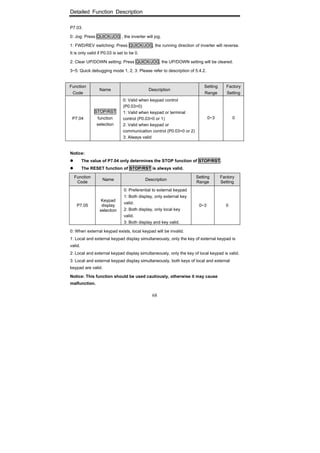
Determined by Function Code P7.03:
0: Jog operation
1: Switch between forward and reverse
2: Clear the UP/DOWN settings.
3: Quick debugging mode1 (by menu)
4: Quick debugging mode2 (by latest order)
5: Quick debugging mode3 (by non-factory setting
parameters)
+
Combination
Key
Pressing the RUN and STOP/REST at the same
time can achieve inverter coast to stop.
5.1.3 Indicator light description
5.1.3.1 Function Indicator Light Description
Function indicator Description
RUN/TUNE
Extinguished: stop status
Flickering: parameter autotuning status
Light on: operating status
FWD/REV
Extinguished: forward operation
Light on: reverse operation.
LOCAL/REMOT
Extinguished: keypad control
Flickering: terminal control
Light on: communication control
TRIP
Extinguished: normal operation status
Flickering: overload pre-warning status
5.1.3.2 Unit Indicator Light Description
Unit indicator Description
Hz Frequency unit
A Current unit
V Voltage unit
RPM Rotating speed unit
% Percentage
Operation
33
5.1.3.3 Digital Display
Have 5 digit LED , which can display all kinds of monitoring data and alarm codes such as
reference frequency, output frequency and so on.
5.2 Operation Process
5.2.1 Parameter setting
Three levels of menu are:
Function code group (first-level);
Function code (second-level);
Function code value (third-level).
Remarks:
Press both the PRG/ESC and the DATA/ENT can return to the second-class menu from
the third-class menu. The difference is: pressing DATA/ENT will save the set parameters
into the control panel, and then return to the second-class menu with shifting to the next
function code automatically; while pressing PRG/ESC will directly return to the
second-class menu without saving the parameters, and keep staying at the current
function code.
Figure 5.2 Flow chart of parameter setting.
Under the third-class menu, if the parameter has no flickering bit, it means the function
code cannot be modified. The possible reasons could be:
This function code is not modifiable parameter, such as actual detected parameter,
operation records and so on;
This function code is not modifiable in running status, but modifiable in stop status.
Operation
34
5.2.2 Fault reset
If the inverter has fault, it will prompt the related fault information. User can use
STOP/RST or according terminals determined by P5 Group to reset the fault. After fault
reset, the inverter is at stand-by state. If user does not reset the inverter when it is at fault
state, the inverter will be at operation protection state, and can not run.
5.2.3 Motor parameters autotuning
The procedure of motor parameter autotuning is as follows:
Firstly, choose the keypad command channel as the operation command channel
(P0.01).
And then input following parameters according to the actual motor parameters:
P2.00: motor rated power.
P2.01: motor rated frequency;
P2.02: motor rated speed;
P2.03: motor rated voltage;
P2.04: motor rated current;
Notice: the motor should be uncoupled with its load; otherwise, the motor parameters
obtained by autotuning may be not correct. Set P0.12 to be 1, and for the detail process
of motor parameter autotuning, please refer to the description of Function Code P0.12.
And then press RUN on the keypad panel, the inverter will automatically calculate
following parameter of the motor:
P2.05: motor stator resistance;
P2.06: motor rotor resistance;
P2.07: motor stator and rotor inductance;
P2.08: motor stator and rotor mutual inductance;
P2.09: motor current without load;
then motor autotuning is finished.
5.2.4 Password setting
CHF series inverter offers user’s password protection function. When P7.00 is set to be
nonzero, it will be the user’s password, and After exiting function code edit mode, it will
become effective after 1 minute. If pressing the PRG/ESC again to try to access the
function code edit mode, “0.0.0.0.0”will be displayed, and the operator must input correct
user’s password, otherwise will be unable to access it.
If it is necessary to cancel the password protection function, just set P7.00 to be zero.
5.2.5 Shortcut menu setting
Shortcut menu, in which parameters in common use can be programmed, provides a
quick way to view and modify function parameters. In the shortcut menu, a parameter
being displayed as “hP0.11” means the function parameter P0.11. Modifying parameters
in the shortcut menu has the same effect as doing at normal programming status.
Maximum 16 function parameters can be saved into the shortcut menu, and these
parameters can be added or deleted when P7.03 is set to be 0.
Operation
35
5.3 Running State
5.3.1 Power-on initialization
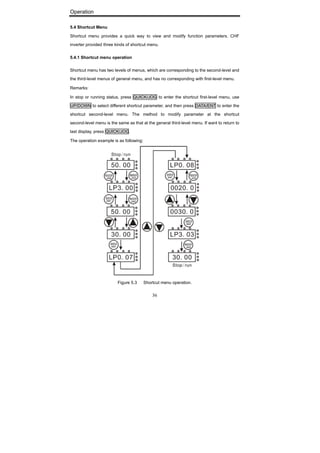
Firstly the system initializes during the inverter power-on, and LED displays “8888”. After
the initialization is completed, the inverter is in stand-by status
5.3.2 Stand-by
At stop or running status, parameters of multi-status can be displayed. Whether or not to
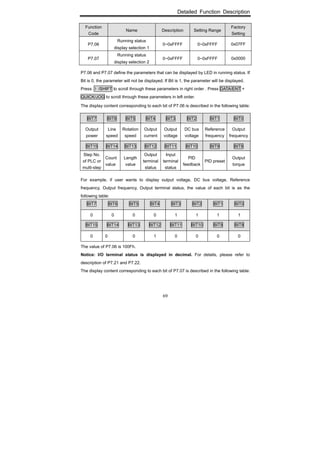
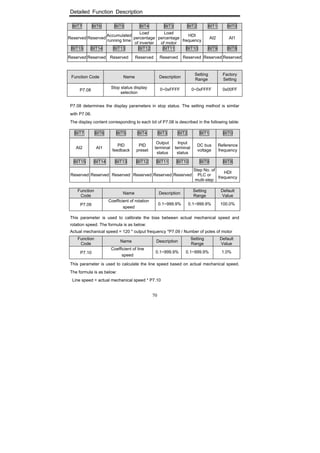
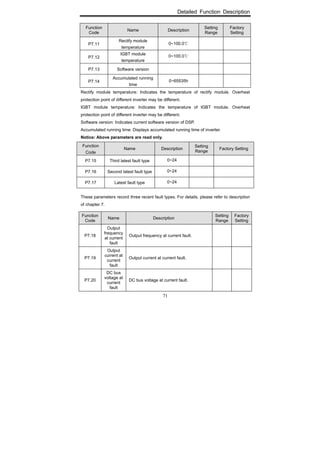
display this parameter can be chosen through Function Code P7.06, P7.07 (Running
status display selection ) and P7.08 (Stop status display selection) according to binary
bits, the detailed description of each bit please refer the function code description of
P7.06, P7.07 and P7.08.
In stop status, there are ten parameters which can be chosen to display or not. They are:
reference frequency, DC bus voltage, ON-OFF input status, open collector output status,
PID setting, PID feedback, analog input AI1 voltage, analog input AI2 voltage, HDI
frequency, step number of simple PLC and multi-step speed. Whether or not to display
can be determined by setting the corresponding binary bit of P7.08. Press the 》/SHIFT to
scroll through the parameters in right order. Press DATA/ENT + QUICK/JOG to scroll
through the parameters in left order.
5.3.3 Motor parameters autotuning
For details, please refer to the description of Function Code P0.12.
5.3.4 Operation
In running status, there are twenty two running parameters which can be chosen to
display or not. They are: running frequency, reference frequency, DC bus voltage, output
voltage, output current, rotating speed, line speed, output power, output torque, PID
setting, PID feedback, ON-OFF input status, open collector output status, length value,
count value, step number of PLC and multi-step speed, voltage of AI1, voltage of AI2,
high speed pulse input HDI frequency. Whether or not to display can be determined by
setting the corresponding bit of P7.06, P7.07. Press the 》/SHIFT to scroll through the
parameters in right order. Press DATA/ENT + QUICK/JOG to scroll through the
parameters in left order.
5.3.5 Fault
In fault status, inverter will display parameters of STOP status besides parameters of fault
status. Press the 》/SHIFT to scroll through the parameters in right order . Press
DATA/ENT + QUICK/JOG to to scroll through the parameters in left order.
CHF series inverter offers a variety of fault information. For details, see inverter faults and
their troubleshooting .
Operation
36
5.4 Shortcut Menu
Shortcut menu provides a quick way to view and modify function parameters. CHF
inverter provided three kinds of shortcut menu.
5.4.1 Shortcut menu operation
Shortcut menu has two levels of menus, which are corresponding to the second-level and
the third-level menus of general menu, and has no corresponding with first-level menu.
Remarks:
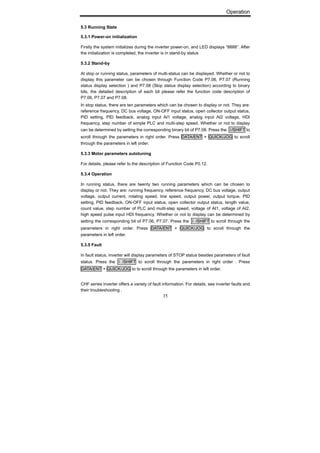
In stop or running status, press QUICK/JOG to enter the shortcut first-level menu, use
UP/DOWN to select different shortcut parameter, and then press DATA/ENT to enter the
shortcut second-level menu. The method to modify parameter at the shortcut
second-level menu is the same as that at the general third-level menu. If want to return to
last display, press QUICK/JOG.
The operation example is as following:
Figure 5.3 Shortcut menu operation.
Operation
37
5.4.2 Quick debugging mode
5.4.2.1 Quick debugging mode 1
The user can select the shortcut debug mode 1 by set P7.03 to be 3. This parameter is
set by factory and the parameter setting is in the following table.
Serial
No.
Function
Code
Name Description
Setting
Range
Factory
setting
1 P3.00
Keypad
reference
frequency
0.00 Hz ~ P0.04
0.00~
P0.04
50.00Hz
2 P0.07
Acceleration
time 0
0.0~3600.0s
0.0~
3600.0
Depend on
model
3 P0.08
Deceleration
time 0
0.0~3600.0s
0.0~
3600.0
Depend on
model
4 P0.03
Run
command
source
0:Keypad
(LED extinguish)
1:Terminal
(LED flickers)
2:Communication
(LED lights up)
0~2 0
5 P3.01
Frequency
command
source A
0: Keypad
1: Analog AI1
2. Analog AI2
3: HDI
4:Simple PLC
5. Multi-Step speed
6: PID
7: Communication
0~7 0
6 P0.11
Carrier
frequency
0.5~15.0kHz 0.5~15.0
Depend on
model
7 P0.09
V/F curve
setting
0:Linear curve
1: User-defined curve
2: Torque_stepdown
curve (1.3 order)
3: Torque_stepdown
curve (1.7 order)
4: Torque_stepdown
curve (2.0 order)
0~4 0
8 P0.10
Torque
boost
0.0%: auto
0.1% ~ 10.0%
0.0~10.0 0.0%
9 P1.00 Start mode
0: start directly
1: DC braking and start
2: Speed tracking and
start
0~2 0
10 P1.06 Stop mode
0: Deceleration to stop
1: Coast to stop
0~1 0
11 P2.01
Motor rated
frequency
0.01Hz~P0.04 0.01~P0.04 50.00HZ
12 P2.03
Motor rated
voltage
0~2000V 0~2000
Depend on
model
Operation
38
5.4.2.2 Quick debugging mode 2
By setting P7.03 to be 4, the user can select shortcut-debugging mode 2. In this mode,
debugging and setting are conducted according to the latest modified parameters. The
inverter automatically records functional parameters that the user accesses and modifies
after power on. The recording sequence is the sequence in which the user accesses the
parameters. The latest accessed parameter is saved in the foremost place of the shortcut
menu, and the earliest accessed parameter is saved in the backmost place of the
shortcut menu. The length of the shortcut menu buffer can support the storage of 16
parameters. If the number of recorded parameters exceeds 16, the earliest recorded
parameters will be deleted. Press QUICK/JOG to enter quick debugging mode. Its
debugging mode is as described in Section 5.4.1. If no parameter is modified after power
on, press QUICK/JOG, the screen will display “NULLP”, indicating that the shortcut
parameter is null.
5.4.2.3 Quick debugging mode 3
By setting P7.03 to be 5, the user can select shortcut-debugging mode 3. In this mode,
after the user presses QUICK/JOG, the inverter will automatically search current
parameters that are different from default values, and the parameters will be saved in the
quick debugging menu according to the sequence of the function codes for the user to
view and set. The length of the shortcut menu buffer can support the storage of 16
parameters. If the number of recorded parameters exceeds 16, only the first 16 difference
function codes are saved in the quick debugging menu. Press QUICK/JOG to enter quick
debugging mode. Its debugging mode is as described in Section 5.4.1. If “NULLP” is
displayed after pressing QUICK/JOG, it indicates that all the current parameters are the
same as the default parameters.
Detailed Function Description
39
6. DETAILED FUNCTION DESCRIPTION
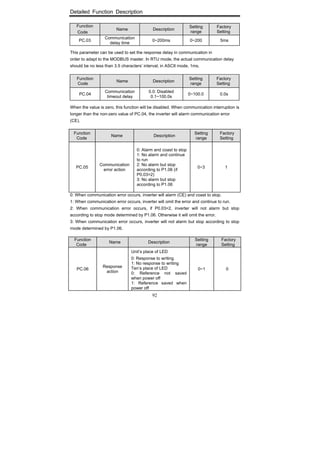
6.1 P0 Group--Basic Function
Function
Code
Name Description
Setting
Range
Factory
Setting
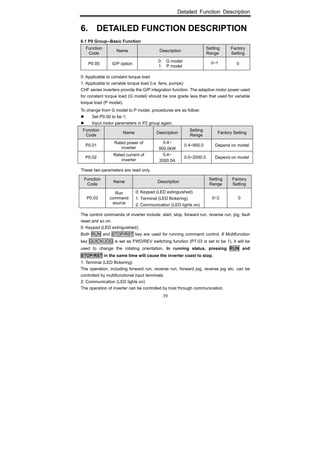
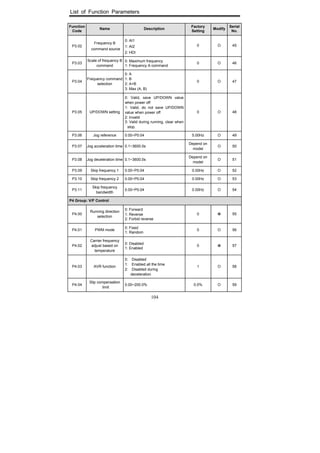
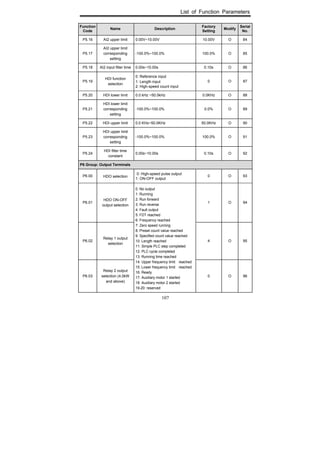
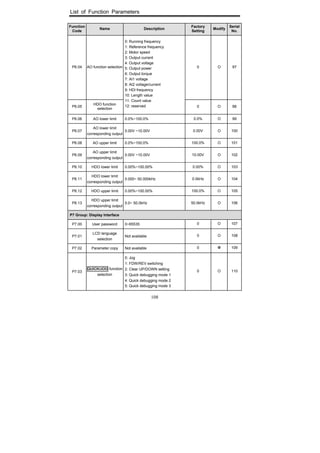
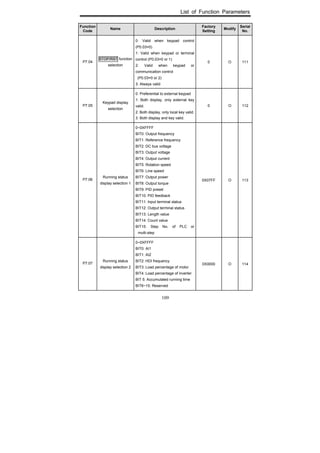
P0.00 G/P option
0: G model
1: P model
0~1 0
0: Applicable to constant torque load
1: Applicable to variable torque load (i.e. fans, pumps)
CHF series inverters provide the G/P integration function. The adaptive motor power used
for constant torque load (G model) should be one grade less than that used for variable
torque load (P model).
To change from G model to P model, procedures are as follow:
Set P0.00 to be 1;
Input motor parameters in P2 group again.
Function
Code
Name Description
Setting
Range
Factory Setting
P0.01
Rated power of
inverter
0.4~
900.0kW
0.4~900.0 Depend on model
P0.02
Rated current of
inverter
0.4~
2000.0A
0.0~2000.0 Depend on model
These two parameters are read only.
Function
Code
Name Description
Setting
Range
Factory
Setting
P0.03
Run
command
source
0: Keypad (LED extinguished)
1: Terminal (LED flickering)
2: Communication (LED lights on)
0~2 0
The control commands of inverter include: start, stop, forward run, reverse run, jog, fault
reset and so on.
0: Keypad (LED extinguished);
Both RUN and STOP/RST key are used for running command control. If Multifunction
key QUICK/JOG is set as FWD/REV switching function (P7.03 is set to be 1), it will be
used to change the rotating orientation. In running status, pressing RUN and
STOP/RST in the same time will cause the inverter coast to stop.
1: Terminal (LED flickering)
The operation, including forward run, reverse run, forward jog, reverse jog etc. can be
controlled by multifunctional input terminals.
2: Communication (LED lights on)
The operation of inverter can be controlled by host through communication.
Detailed Function Description
40
Function
Code
Name Description Setting Range
Factory
Setting
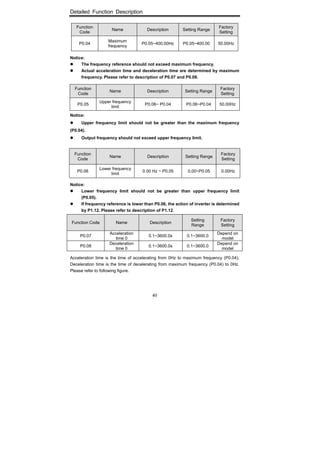
P0.04
Maximum
frequency
P0.05~400.00Hz P0.05~400.00 50.00Hz
Notice:
The frequency reference should not exceed maximum frequency.
Actual acceleration time and deceleration time are determined by maximum
frequency. Please refer to description of P0.07 and P0.08.
Function
Code
Name Description Setting Range
Factory
Setting
P0.05
Upper frequency
limit
P0.06~ P0.04 P0.06~P0.04 50.00Hz
Notice:
Upper frequency limit should not be greater than the maximum frequency
(P0.04).
Output frequency should not exceed upper frequency limit.
Function
Code
Name Description Setting Range
Factory
Setting
P0.06
Lower frequency
limit
0.00 Hz ~ P0.05 0.00~P0.05 0.00Hz
Notice:
Lower frequency limit should not be greater than upper frequency limit
(P0.05).
If frequency reference is lower than P0.06, the action of inverter is determined
by P1.12. Please refer to description of P1.12.
Function Code Name Description
Setting
Range
Factory
Setting
P0.07
Acceleration
time 0
0.1~3600.0s 0.1~3600.0
Depend on
model
P0.08
Deceleration
time 0
0.1~3600.0s 0.1~3600.0
Depend on
model
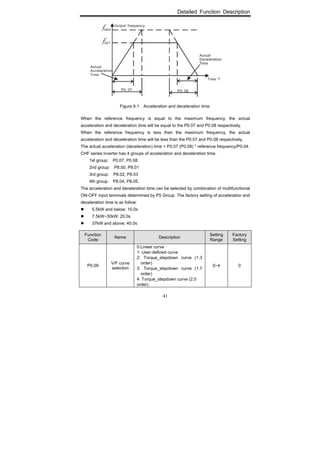
Acceleration time is the time of accelerating from 0Hz to maximum frequency (P0.04).
Deceleration time is the time of decelerating from maximum frequency (P0.04) to 0Hz.
Please refer to following figure.
Detailed Function Description
41
Figure 6.1 Acceleration and deceleration time.
When the reference frequency is equal to the maximum frequency, the actual
acceleration and deceleration time will be equal to the P0.07 and P0.08 respectively.
When the reference frequency is less than the maximum frequency, the actual
acceleration and deceleration time will be less than the P0.07 and P0.08 respectively.
The actual acceleration (deceleration) time = P0.07 (P0.08) * reference frequency/P0.04.
CHF series inverter has 4 groups of acceleration and deceleration time.
1st group: P0.07, P0.08
2nd group: P8.00, P8.01
3rd group: P8.02, P8.03
4th group: P8.04, P8.05.
The acceleration and deceleration time can be selected by combination of multifunctional
ON-OFF input terminals determined by P5 Group. The factory setting of acceleration and
deceleration time is as follow:
5.5kW and below: 10.0s
7.5kW~30kW: 20.0s
37kW and above: 40.0s
Function
Code
Name Description
Setting
Range
Factory
Setting
P0.09
V/F curve
selection
0:Linear curve
1: User-defined curve
2: Torque_stepdown curve (1.3
order)
3: Torque_stepdown curve (1.7
order)
4: Torque_stepdown curve (2.0
order)
0~4 0
Detailed Function Description
42
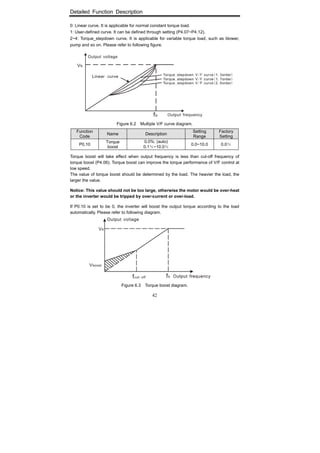
0: Linear curve. It is applicable for normal constant torque load.
1: User-defined curve. It can be defined through setting (P4.07~P4.12).
2~4: Torque_stepdown curve. It is applicable for variable torque load, such as blower,
pump and so on. Please refer to following figure.
Figure 6.2 Multiple V/F curve diagram.
Function
Code
Name Description
Setting
Range
Factory
Setting
P0.10
Torque
boost
0.0%: (auto)
0.1%~10.0%
0.0~10.0 0.0%
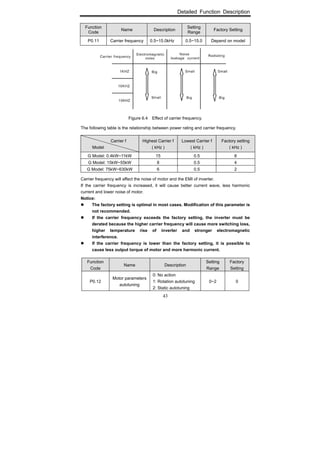
Torque boost will take effect when output frequency is less than cut-off frequency of
torque boost (P4.06). Torque boost can improve the torque performance of V/F control at
low speed.
The value of torque boost should be determined by the load. The heavier the load, the
larger the value.
Notice: This value should not be too large, otherwise the motor would be over-heat
or the inverter would be tripped by over-current or over-load.
If P0.10 is set to be 0, the inverter will boost the output torque according to the load
automatically. Please refer to following diagram.
Figure 6.3 Torque boost diagram.
Detailed Function Description
43
Function
Code
Name Description
Setting
Range
Factory Setting
P0.11 Carrier frequency 0.5~15.0kHz 0.5~15.0 Depend on model
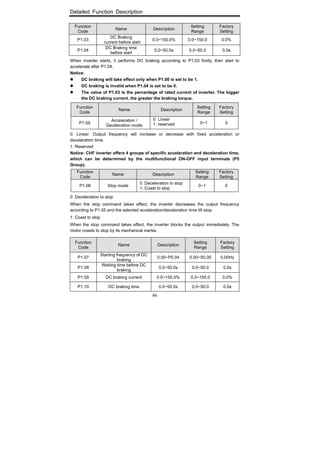
Figure 6.4 Effect of carrier frequency.
The following table is the relationship between power rating and carrier frequency.
Carrier f
Model
Highest Carrier f
( kHz )
Lowest Carrier f
( kHz )
Factory setting
( kHz )
G Model: 0.4kW~11kW 15 0.5 8
G Model: 15kW~55kW 8 0.5 4
G Model: 75kW~630kW 6 0.5 2
Carrier frequency will affect the noise of motor and the EMI of inverter.
If the carrier frequency is increased, it will cause better current wave, less harmonic
current and lower noise of motor.
Notice:
The factory setting is optimal in most cases. Modification of this parameter is
not recommended.
If the carrier frequency exceeds the factory setting, the inverter must be
derated because the higher carrier frequency will cause more switching loss,
higher temperature rise of inverter and stronger electromagnetic
interference.
If the carrier frequency is lower than the factory setting, it is possible to
cause less output torque of motor and more harmonic current.
Function
Code
Name Description
Setting
Range
Factory
Setting
P0.12
Motor parameters
autotuning
0: No action
1: Rotation autotuning
2: Static autotuning
0~2 0
Detailed Function Description
44
0: No action: Forbidding autotuning.
1: Rotation autotuning:
Do not connect any load to the motor when performing autotuning and ensure
the motor is in static status.
Input the nameplate parameters of motor (P2.00-P2.04) correctly before
performing autotuning. Otherwise the parameters detected by autotuning will be
incorrect; it may influence the performance of inverter.
Set the proper acceleration and deceleration time (P0.07 and P0.08) according
to the motor inertia before performing autotuning. Otherwise it may cause
over-current and over-voltage fault during autotuning.
The operation process is as follow:
a. Set P0.12 to be 1 then press the DATA/ENT, LED will display “-TUN-” and
flickers. During “-TUN-” is flickering, press the PRG/ESC to exit autotuning.
b. Press the RUN to start the autotuning, LED will display “TUN-0”.
c. After a few seconds the motor will start to run. LED will display “TUN-1” and
“RUN/TUNE” light will flicker.
d. After a few minutes, LED will display “-END-”. That means the autotuning is
finished and return to the stop status.
e. During the autotuning, press the STOP/RST will stop the autotuning.
Notice: Only keypad can control the autotuning. P0.12 will restore to 0
automatically when the autotuning is finished or cancelled.
2: Static autotuning:
If it is difficult to disconnect the load, static autotuning is recommended.
The operation process is the same as rotation autotuning except step c.
Notice: The Mutual inductance and current without load will not be detected by
static autotuning, if needed user should input suitable value according to
experience.
Function
Code
Name Description
Setting
Range
Factory
Setting
P0.13
Restore
parameters
0: No action
1: Restore factory setting
2: Clear fault records
0~2 0
0: No action
1: Inverter restores all parameters to factory setting except P2 group.
2: Inverter clear all fault records.
Detailed Function Description
45
This function code will restore to 0 automatically when complete the function operation.
6.2 P1 Group --Start and Stop Control
Function
Code
Name Description
Setting
Range
Factory
Setting
P1.00
Start
Mode
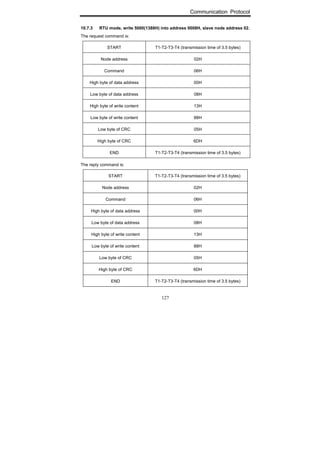
0: Start directly
1: DC braking and start
2: Speed tracking and start
0~2 0
0: Start directly: Start the motor at the starting frequency determined by P1.01.
1: DC braking and start: Inverter will output DC current firstly and then start the motor at
the starting frequency. Please refer to description of P1.03 and P1.04. It is suitable for the
motor which have small inertia load and may reverse rotation when start.
2: Speed tracking and start: Inverter detects the rotation speed and direction of motor,
then start running to its reference frequency based on current speed. This can realize
smooth start of rotating motor with big inertia load when instantaneous power off.
Notice: It only applies on the inverter of 7.5kW and above.
Function
Code
Name Description
Setting
Range
Factory
Setting
P1.01 Starting frequency 0.00~10.00Hz 0.00~10.00 0.00Hz
P1.02
Hold time of starting
frequency
0.0~50.0s 0.0~50.0 0.0s
Set proper starting frequency can increase the starting torque.
If the reference frequency is less than starting frequency, inverter will be at stand-by
status. The indicator of RUN/TUNE lights on, inverter has no output.
The starting frequency could be less than the lower frequency limit (P0.06).
P1.01 and P1.02 take no effect during FWD/REV switching.
Figure 6.5 Starting diagram.
Detailed Function Description
46
Function
Code
Name Description
Setting
Range
Factory
Setting
P1.03
DC Braking
current before start
0.0~150.0% 0.0~150.0 0.0%
P1.04
DC Braking time
before start
0.0~50.0s 0.0~50.0 0.0s
When inverter starts, it performs DC braking according to P1.03 firstly, then start to
accelerate after P1.04.
Notice:
DC braking will take effect only when P1.00 is set to be 1.
DC braking is invalid when P1.04 is set to be 0.
The value of P1.03 is the percentage of rated current of inverter. The bigger
the DC braking current, the greater the braking torque.
Function
Code
Name Description
Setting
Range
Factory
Setting
P1.05
Acceleration /
Deceleration mode
0: Linear
1: reserved 0~1 0
0: Linear: Output frequency will increase or decrease with fixed acceleration or
deceleration time.
1: Reserved
Notice: CHF inverter offers 4 groups of specific acceleration and deceleration time,
which can be determined by the multifunctional ON-OFF input terminals (P5
Group).
Function
Code
Name Description
Setting
Range
Factory
Setting
P1.06 Stop mode
0: Deceleration to stop
1: Coast to stop
0~1 0
0: Deceleration to stop
When the stop command takes effect, the inverter decreases the output frequency
according to P1.05 and the selected acceleration/deceleration time till stop.
1: Coast to stop
When the stop command takes effect, the inverter blocks the output immediately. The
motor coasts to stop by its mechanical inertia.
Function
Code
Name Description
Setting
Range
Factory
Setting
P1.07
Starting frequency of DC
braking
0.00~P0.04 0.00~50.00 0.00Hz
P1.08
Waiting time before DC
braking
0.0~50.0s 0.0~50.0 0.0s
P1.09 DC braking current 0.0~150.0% 0.0~150.0 0.0%
P1.10 DC braking time 0.0~50.0s 0.0~50.0 0.0s
Detailed Function Description
47
Starting frequency of DC braking: Start the DC braking when running frequency reaches
starting frequency determined by P1.07.
Waiting time before DC braking: Inverter blocks the output before starting the DC braking.
After this waiting time, the DC braking will be started. It is used to prevent over-current
fault caused by DC braking at high speed.
DC braking current: The value of P1.09 is the percentage of rated current of inverter. The
bigger the DC braking current, the greater the braking torque.
DC braking time: The time used to perform DC braking. If the time is 0, the DC braking
will be invalid.
Figure 6.6 DC braking diagram.
Function
Code
Name Description Setting Range
Factory
Setting
P1.11
Dead time of
FWD/REV
0.0~3600.0s 0.0~3600.0 0.0s
Set the hold time at zero frequency in the transition between forward and reverse running.
It is shown as following figure:
Figure 6.7 FWD/REV dead time diagram.
Detailed Function Description
48
Function
Code
Name Description
Setting
Range
Factory
Setting
P1.12
Action when running
frequency is less than
lower frequency limit
0: Running at the lower
frequency limit
1: Stop
2: Stand-by
0~2 0
0: Running at the lower frequency limit (P0.06): The inverter runs at P0.06 when the
running frequency is less than P0.06.
1: Stop: This parameter is used to prevent motor running at low speed for a long time.
2: Stand-by: Inverter will stand-by when the running frequency is less than P0.06. When
the reference frequency is higher than or equal to P0.06 again, the inverter will start to run
automatically.
Function
Code
Name Description
Setting
Range
Factory
Setting
P1.13
Restart after
power off
0: Disabled
1: Enabled
0~1 0
P1.14
Delay time for
restart
0.0~3600.0s 0.0~3600.0 0.0s
0: Disabled: Inverter will not automatically restart when power on again until run
command takes effect.
1: Enabled: When inverter is running, after power off and power on again, if run command
source is key control (P0.03=0) or communication control (P0.03=2), inverter will
automatically restart after delay time determined by P1.14; if run command source is
terminal control (P0.03=1), inverter will automatically restart after delay time determined
by P1.14 only if FWD or REV is active.
Notice:
If P1.13 is set to be 1, it is recommended that start mode should be set as
speed tracing mode (P1.00=2).
This function may cause the inverter restart automatically, please be
cautious.
Function
Code
Name Description Setting Range
Factory
Setting
P1.15
FWD/REV enable option
when power on
0: Disabled
1: Enabled
0~1 0
Notice:
This function only takes effect if run command source is terminal control.
If P1.15 is set to be 0, when power on, inverter will not start even if FWD/REV
terminal is active, until FWD/REV terminal disabled and enabled again.
If P1.15 is set to be 1, when power on and FWD/REV terminal is active,
inverter will start automatically.
This function may cause the inverter restart automatically, please be
cautious.
Detailed Function Description
49
6.3 P2 Group--Motor Parameters
Function
Code
Name Description Setting Range
Factory
Setting
P2.00
Motor rated
power
0.4~900.0kW 0.4~900.0
Depend on
model
P2.01
Motor rated
frequency
0.01Hz~P0.04 0.01~P0.04 50.00Hz
P2.02
Motor rated
speed
0~36000rpm 0~36000 1460rpm
P2.03
Motor rated
voltage
0~2000V 0~2000V
Depend on
model
P2.04
Motor rated
current
0.8~2000.0A 0.8~2000.0
Depend on
model
Notice:
In order to achieve superior performance, please set these parameters
according to motor nameplate, then perform autotuning.
The power rating of inverter should match the motor. If the bias is too big, the
control performances of inverter will be deteriorated distinctly.
Reset P2.00 can initialize P2.05~P2.09 automatically.
Function
Code
Name Description Setting Range
Factory
Setting
P2.05
Motor stator
resistance
0.001~65.535Ω 0.001~65.535
Depend on
model
P2.06
Motor rotor
resistance
0.001~65.535Ω 0.001~65.535
Depend on
model
P2.07
Motor leakage
inductance
0.1~6553.5mH 0.1~6553.5
Depend on
model l
P2.08
Motor mutual
inductance
0.1~6553.5mH 0.1~6553.5
Depend on
model
P2.09
Current without
load
0.01~655.35A 0.01~655.35
Depend on
model
After autotuning, the value of P2.05~P2.09 will be automatically updated.
Notice: Do not change these parameters, otherwise it may deteriorate the control
performance of inverter.
Detailed Function Description
50
6.4 P3 Group—Frequency Setting
Function
Code
Name Description
Setting
Range
Factory
Setting
P3.00
Keypad
reference
frequency
0.00 Hz ~ P0.04
(Maximum
frequency)
0.00~P0.04 50.00Hz
When P3.01 is set to be 0, this parameter is the initial value of inverter reference
frequency.
Function
Code
Name Description
Setting
Range
Factory
Setting
P3.01
Frequency
A command
source
0: Keypad
1: AI1
2. AI2
3: HDI
4:Simple PLC
5. Multi-Step speed
6: PID
7: Communication
0~7 0
0: Keypad: Please refer to description of P3.00
1: AI1
2: AI2
The reference frequency is set by analog input. CHF series inverter provides 2 analog
input terminals. AI1 is 0~10V voltage input terminal, while AI2 is 0~10V voltage input or
0~20mA current input. Voltage input or current input of AI2 can be selected by Jumper
J16.
Notice:
When AI2 is set as 0~20mA current input, the corresponding voltage range is
0~5V. For detailed relationship between analogue input voltage and frequency,
please refer to description of P5.09~P5.13.
100% of AI is corresponding to maximum frequency.
3: HDI
The reference frequency is set by high speed pulse input. CHF series inverter provides 1
high speed pulse input terminal.
Pulse specification : pulse voltage range 15~30V, and pulse frequency range 0.0~50.0
kHz.
Notice: High speed pulse can only be input through HDI. P5.00 must be set to be 0
(HDI), and P5.19 must be set to be 0 (reference input). For detailed relationship
between HDI input and frequency, please refer to description of P5.20~P5.24.
4: Simple PLC
Detailed Function Description
51
User can set reference frequency, hold time, running direction of each step and
acceleration/deceleration time between steps. For details, please refer to description of
PA group.
5: Multi-step speed
The reference frequency is determined by PA group. The selection of steps is determined
by combination of multi-step speed terminals.
Notice:
Multi-step speed mode will enjoy priority in setting reference frequency if
P3.01 is not set to be 4 or 5. In this case, only step 1 to step 15 are available.
If P3.01 is set to be 5, step 0 to step 15 can be realized.
Jog has highest priority.
6: PID
The reference frequency is the result of PID adjustment. For details, please refer to
description of P9 group.
7: Communication
The reference frequency is set through RS485. For details, please refer to description of
Chapter 10.
Function
Code
Name Description
Setting
Range
Factory
Setting
P3.02
Frequency B
command
source
0: AI1
1: AI2
2: HDI
0~2 0
P3.03
Scale of
frequency B
command
0: Maximum frequency
1: Frequency A command 0~1 0
Frequency B command can act as the independent reference frequency source.
Moreover, it can also act as offset of frequency A command.
0: AI1
If P3.03 is set to 0, reference frequency B = AI1 (%) * P0.04 (maximum frequency).
If P3.03 is set to 1, reference frequency B = AI1 (%) * reference frequency A
Notice: AI1 is percentage of range determined by P5.09~P5.13.
1: AI2
The principle is the same as AI1.
Notice: When AI2 is set as 0~20mA current input, the corresponding voltage range
is 0~5V.
2. HDI
The principle is the same as AI1.
Function
Code Name Description
Setting
Range
Factory
Setting
P3.04
Frequency
command
selection
0: A
1: B
2: A+B
3: Max(A, B)
0~3 0
Detailed Function Description
52
This parameter can be used to select the reference frequency command.
0: Only frequency command source A is active.
1: Only Frequency command source B is active.
2: Both Frequency command source A and B are active.
Reference frequency = reference frequency A + reference frequency B.
3: Both Frequency command source A and B are active.
Reference frequency = Max (reference frequency A, reference frequency B).
Notice: The frequency command source can be selected not only P3.04 but also by
multifunctional terminals. Please refer to description of P5 Group.
Figure 6.8 Reference frequency diagram.
Function
Code
Name Description
Setting
Range
Factory
Setting
P3.05
UP/DOWN
setting
0: Valid, save UP/DOWN
value when power off
1: Valid, do not save
UP/DOWN value when
power off
2: Invalid
3: Valid during running, clear
when stop.
0~3 0
0: Valid, save UP/DOWN value when power off.
User can adjust the reference frequency by UP/DOWN. The value of UP/DOWN can be
saved when power off.
1: Valid, do not save UP/DOWN value when power off.
User can adjust the reference frequency by UP/DOWN, but the value of UP/DOWN will
not be saved when power off.
Detailed Function Description
53
2: Invalid.
User can not adjust the reference frequency by UP/DOWN. The value of UP/DOWN will
be cleared if P3.05 is set to 2.
3: Valid during running, clear when stop.
User can only adjust the reference frequency by UP/DOWN during the inverter is running.
The value of UP/DOWN will be cleared when the inverter stops.
Notice:
UP/DOWN function can be achieved by keypad (∧ and ∨) and
multifunctional terminals.
Reference frequency can be adjusted by UP/DOWN.
UP/DOWN has highest priority which means UP/DOWN is always active no
matter which frequency command source is.
When the factory setting is restored (P0.13 is set to be 1), the value of
UP/DOWN will be cleared.
Function
Code
Name Description
Setting
Range
Factory
Setting
P3.06 Jog reference 0.00~P0.04 0.00~ P0.04 5.00Hz
P3.07 Jog acceleration time 0.1~3600.0s 0.1~3600.0
Depend on
model
P3.08 Jog deceleration time 0.1~3600.0s 0.1~3600.0
Depend on
model
The meaning and factory setting of P3.07 and P3.08 is the same as P0.07 and P0.08. No
matter what the value of P1.00 and P1.06 are, jog will start as start directly mode and stop
as deceleration to stop mode.
Function
Code
Name Description Setting Range
Factory
Setting
P3.09 Skip frequency 1 0.00~P0.04 0.00~P0.04 0.00Hz
P3.10 Skip frequency 2 0.00~P0.04 0.00~P0.04 0.00Hz
P3.11
Skip frequency
bandwidth
0.00~P0.04 0.00~P0.04 0.00Hz
By means of setting skip frequency, the inverter can keep away from the mechanical
resonance with the load. P3.09 and P3.10 are centre value of frequency to be skipped.
Notice:
If P3.11 is 0, the skip function is invalid.
If both P3.09 and P3.10 are 0, the skip function is invalid no matter what P3.11
is.
Operation is prohibited within the skip frequency bandwidth, but changes
during acceleration and deceleration are smooth without skip.
The relation between output frequency and reference frequency is shown in following
figure.
Detailed Function Description
54
Figure 6.9 Skip frequency diagram.
6.5 P4 Group—V/F Control
Function
Code
Name Description
Setting
Range
Factory
Setting
P4.00
Running
direction
selection
0: Forward
1: Reverse
2: Forbid reverse
0~2 0
Notice:
The rotation direction of motor is corresponding to the wiring of motor.
When the factory setting is restored (P0.13 is set to be 1), the rotation
direction of motor may be changed. Please be cautious to use.
If P4.00 is set to 2, user can not change rotation direction of motor by
QUICK/JOG or terminal.
Function
Code
Name Description
Setting
Range
Factory
Setting
P4.01 PWM mode
0: Fixed
1: Random
0~1 0
0: Fixed: The noise frequency of motor is fixed.
1: Random: This mode can restrain the noise of motor effectively, but may increase the
harmonic of motor.
Function
Code
Name Description
Setting
Range
Factory
Setting
P4.02
Carrier frequency
adjust based on
temperature
0: Disabled
1: Enabled 0~1 0
Detailed Function Description
55
0: Disabled: Carrier frequency is fixed.
1: Enabled: Carrier frequency will be adjusted based on internal temperature of the
inverter. The higher the temperature, the lower the carrier frequency.
Function
Code
Name Description
Setting
Range
Factory
Setting
P4.03 AVR function
0: Disabled
1: Enabled all the time
2: Disabled during
deceleration
0~2 1
AVR ( Auto Voltage Regulation) function ensure the output voltage of inverter stable no
matter how the DC bus voltage changes. During deceleration, if AVR function is disabled,
the deceleration time will be short but the current will be big. If AVR function is enabled all
the time, the deceleration time will be long but the current will be small.
Function
Code
Name Description
Setting
Range
Factory
Setting
P4.04
Slip compensation
limit
0.00~200.0% 0.00~200.00 0.0%
The slip compensation function calculates the torque of motor according to the output
current and compensates for output frequency. This function is used to improve speed
accuracy when operating with a load. P4.04 sets the slip compensation limit as a
percentage of motor rated slip, with the motor rated slip taken as 100%.
Function
Code
Name Description
Setting
Range
Factory
Setting
P4.05
Auto energy saving
selection
0: Disabled
1: Enabled
0~1 0
When P4.05 is set to be 1, while there is a light load such as pumps or fans, it will
reduce the inverter output voltage and saves energy.
Function
Code
Name Description
Setting
Range
Factory
Setting
P4.06
Torque
boost
cut-off
0.0%~50.0% (motor rated
frequency)
0.0~50.0 20.0%
Please refer to the description of P0.10.
Function
Code
Name Description Setting Range
Factory
Setting
P4.07 V/F frequency 1 0.00Hz~ P4.09 0.00~P4.09 5.00Hz
P4.08 V/F voltage 1 0.0%~100.0% 0.0~100.0 10.0%
P4.09 V/F frequency 2 P4.07~ P4.11 P4.07~ P4.11 30.00Hz
P4.10 V/F voltage 2 0.0%~100.0% 0.0~100.0 60.0%
P4.11 V/F frequency 3 P4.09~ P2.01 P4.09~ P2.01 50.00Hz
P4.12 V/F voltage 3 0.0%~100.0% 0.0~100.0 100.0%
Detailed Function Description
56
This function is only active when P0.09 is set to be 1. P4.07~P4.12 are used to set the
user-defined V/F curve. The value should be set according to the load characteristic of
motor.
Notice:
0<V1<V2<V3<rated voltage.
0<f1<f2<f3<rated frequency.
The voltage corresponding to low frequency should not be set too high,
otherwise it may cause motor overheat or inverter fault
Figure 6.10 V/F curve setting diagram.
6.6 P5 Group--Input Terminals
Function
Code
Name Description
Setting
Range
Factory
Setting
P5.00
HDI
selection
0: High speed pulse input
1: ON-OFF input
0~1 0
Please refer to description of HDI in P3.01.
Function
Code
Name Description
Setting
Range
Factory
Setting
P5.01 S1 terminal function
Programmable
multifunctional terminal
0~39 1
P5.02 S2 terminal function
Programmable
multifunctional terminal
0~39 4
P5.03 S3 terminal function
Programmable
multifunctional terminal
0~39 7
P5.04 S4 terminal function
Programmable
multifunctional terminal
0~39 0
P5.05
HDI terminal
function
Programmable
multifunctional terminal
0~39 0
Notice: P5.05 is only used when P5.00 is set to be 1.
Detailed Function Description
57
The meaning of each setting is shown in following table.
Setting
value
Function Description
0 Invalid
Please set unused terminals to be invalid to avoid
malfunction.
1 Forward
2 Reverse
Please refer to description of P5.07.
3 3-wire control Please refer to description of P5.07.
4 Jog forward
5 Jog reverse
Please refer to description of P3.06~P3.08.
6 Coast to stop
The inverter blocks the output immediately. The motor
coasts to stop by its mechanical inertia.
7 Reset fault
Resets faults that have occurred. It has the same function
as STOP/RST.
8
Pause
running
When this terminal takes effect, inverter decelerates to stop
and save current status, such as PLC, traverse frequency
and PID. When this terminal takes no effect, inverter
restores the status before pause.
9
External fault
input
Stop the inverter and output a alarm when a fault occurs in
a peripheral device.
10 Up command
11
DOWN
command
12
Clear
UP/DOWN
The reference frequency of inverter can be adjusted by UP
command and DOWN command.
Use this terminal to clear UP/DOWN setting. Please refer
to description of P3.05.
13
Switch
between A
and B
14
Switch
between A
and A+B
15
Switch
between B
and A+B
P3.04
Terminal action
A B A+B
13 valid B A
14 valid A+B A
15 valid A+B B
Detailed Function Description
58
16
Multi-step
speed
reference1
17
Multi-step
speed
reference 2
18
Multi-step
speed
reference 3
19
Multi-step
speed
reference 4
16 steps speed control can be realized by the combination
of these four terminals. For details, please refer to:
Multi-step speed reference terminal status and according
step value table:
Notice: multi-speed 1 is low bit, and multi-speed 4 is high
bit.
Multi-speed
terminal 4
Multi-speed
terminal 3
Multi-speed
terminal 2
Multi-speed
terminal 1
BIT3 BIT2 BIT1 BIT0
20
Multi-step
speed pause
Keep current step unchanged no matter what the input
status of four multi-step speed terminals is.
21
ACC/DEC
time
selection1
22
ACC/DEC
time
selection 2
4 groups of ACC/DEC time can be selected by the
combination of these two terminals.
ACC/DEC
time
selection 2
ACC/DEC
time
selection1
ACC/DEC time
OFF OFF
ACC/DEC time 0
(P0.07、P0.08)
OFF ON
ACC/DEC time 1
(P8.00、P8.01)
ON OFF
ACC/DEC time 2
(P8.02、P8.03)
ON ON
ACC/DEC time 3
(P8.04、P8.05)
23
Reset simple
PLC when
stop
When simple PLC stops, the status of PLC such as running
step, running time and running frequency will be cleared
when this terminal is enabled.
24
Pause simple
PLC
Inverter runs at zero frequency and PLC pauses the timing
when this terminal is enabled. If this terminal is disabled,
inverter will start and continue the PLC operation from the
status before pause.
25 Pause PID
PID adjustment will be paused and inverter keeps output
frequency unchanged.
26
Pause
traverse
operation
Inverter keeps output frequency unchanged. If this terminal
is disabled, inverter will continue traverse operation from
current frequency.
Detailed Function Description
59
27
Reset
traverse
operation
Reference frequency of inverter will be forced as center
frequency of traverse operation.
28
Reset
counter
Clear the value of counter.
29 Reset length Clear the value of actual length (P8.13).
30
ACC/DEC
ramp hold
Pauses acceleration or deceleration and maintains output
frequency. When this terminal is disabled,
acceleration/deceleration is restarted.
31 Counter input
The pulse input terminal of internal counter. Maximum
pulse frequency: 200Hz.
32
UP/DOWN
invalid
temporarily
UP/DOWN setting is invalid and will not be cleared. When
this terminal is disabled, UP/DOWN setting before will be
valid again.
33~39 Reserved Reserved
Multi-step speed reference terminal status and according step value table:
Terminal
Step
Multi-step
speed
reference1
Multi-step
speed
reference2
Multi-step
speed
reference3
Multi-step
speed
reference4
0 OFF OFF OFF OFF
1 ON OFF OFF OFF
2 OFF ON OFF OFF
3 ON ON OFF OFF
4 OFF OFF ON OFF
5 ON OFF ON OFF
6 OFF ON ON OFF
7 ON ON ON OFF
8 OFF OFF OFF ON
9 ON OFF OFF ON
10 OFF ON OFF ON
11 ON ON OFF ON
12 OFF OFF ON ON
13 ON OFF ON ON
14 OFF ON ON ON
15 ON ON ON ON
Detailed Function Description
60
Function
Code
Name Description
Setting
Range
Factory
Setting
P5.06 ON-OFF filter times 1~10 1~10 5
This parameter is used to set filter strength of terminals (S1~S4, HDI). When interference
is heavy, user should increase this value to prevent malfunction.
Function
Code
Name Description
Setting
Range
Factory
Setting
P5.07
FWD/REV
control
mode
0: 2-wire control mode 1
1: 2-wire control mode 2
2: 3-wire control mode 1
3: 3-wire control mode 2
0~3 0
This parameter defines four different control modes that control the inverter operation
through external terminals.
0: 2-wire control mode 1: Integrate START/STOP command with run direction.
K1 K2 Run command
OFF OFF Stop
ON OFF FWD
OFF ON REV
ON ON Stop
Figure 6.11 2-wire control mode 1.
1: 2-wire control mode 2: START/STOP command is determined by FWD terminal. Run
direction is determined by REV terminal.
K1 K2 Run command
OFF OFF Stop
ON OFF FWD
OFF ON Stop
ON ON REV
Figure 6.12 2-wire control mode 2.
Detailed Function Description
61
2: 3-wire control mode 1:
SB1: Start button
SB2: Stop button (NC)
K: Run direction button
Terminal SIn is the multifunctional input terminal of S1~S4 and HDI. The terminal function
should be set to be 3 (3-wire control).
K Run command
OFF FWD
ON REV
Figure 6.13 3-wire control mode 1.
3: 3-wire control mode 2:
SB1: Forward run button
SB2: Stop button (NC)
SB3: Reverse run button
Terminal SIn is the multifunctional input terminal of S1~S4 and HDI. The terminal function
should be set to be 3 (3-wire control).
Figure 6.14 3-wire control mode 2.
Notice: When 2-wire control mode is active, the inverter will not run in following
situation even if FWD/REV terminal is enabled:
Coast to stop (press RUN and STOP/RST at the same time).
Stop command from serial communication.
FWD/REV terminal is enabled before power on. Please refer to description of
P1.15.
Detailed Function Description
62
Function
Code
Name Description
Setting
Range
Factory
Setting
P5.08
UP/DOWN setting
change rate
0.01~50.00Hz/s 0.01~50.00 0.50Hz/s
This parameter is used to determine how fast UP/DOWN setting changes.
Function
Code
Name Description Setting Range
Factory
Setting
P5.09 AI1 lower limit 0.00V~10.00V 0.00~10.00 0.00V
P5.10 AI1 lower limit
corresponding
setting
-100.0%~100.0% -100.0~100.0 0.0%
P5.11 AI1 upper limit 0.00V~10.00V 0.00~10.00 10.00V
P5.12 AI1 upper limit
corresponding
setting
-100.0%~100.0% -100.0~100.0 100.0%
P5.13 AI1 filter time
constant
0.00s~10.00s 0.00~10.00 0.10s
These parameters determine the relationship between analog input voltage and the
corresponding setting value. When the analog input voltage exceeds the range between
lower limit and upper limit, it will be regarded as the upper limit or lower limit.
The analog input AI1 can only provide voltage input, and the range is 0V~10V.
For different applications, the corresponding value of 100.0% analog setting is different.
For details, please refer to description of each application.
Notice: AI1 lower limit must be less or equal to AI1 upper limit.
Figure 6.15 Relationship between AI and corresponding setting.
Detailed Function Description
63
AI1 filter time constant is effective when there are sudden changes or noise in the analog
input signal. Responsiveness decreases as the setting increases.
Function
Code
Name Description Setting Range
Factory
Setting
P5.14 AI2 lower limit 0.00V~10.00V 0.00~10.00 0.00V
P5.15
AI2 lower limit
corresponding
setting
-100.0%~100.0% -100.0~100.0 0.0%
P5.16 AI2 upper limit 0.00V~10.00V 0.00~10.00 10.00V
P5.17
AI2 upper limit
corresponding
setting
-100.0%~100.0% -100.0~100.0 100.0%
P5.18
AI2 filter time
constant
0.00s~10.00s 0.00~10.00 0.10s
Please refer to description of AI1. When AI2 is set as 0~20mA current input, the
corresponding voltage range is 0~5V.
Function
Code
Name Description
Setting
Range
Factory
Setting
P5.19 HDI function selection
0: Reference input
1: Length input
2: High-speed count input
0~2 0
0: Reference input, such as frequency, PID setting and PID feedback.
1: Length input: the input of length pulse.
2: High-speed count input: If the count pulse frequency is too high to use S1~S4, it is
necessary to use HDI.
Notice: When P5.19 is set to be 0, P5.20~P5.24 will take effective.
Function
Code
Name Description Setting Range
Factory
Setting
P5.20 HDI lower limit 0.0 kHz ~50.0kHz 0.0~50.0 0.0kHz
P5.21
HDI lower limit
corresponding
setting
-100.0%~100.0% -100.0~100.0 0.0%
P5.22 HDI upper limit 0.0 kHz ~50.0kHz 0.0~50.0 50.0kHz
P5.23
HDI upper limit
corresponding
setting
-100.0%~100.0% -100.0~100.0 100.0%
P5.24
HDI filter time
constant
0.00s~10.00s 0.00~10.00 0.10s
The description of P5.20~P5.24 is similar to AI1.
Detailed Function Description
64
6.7 P6 Group--Output Terminals
Function
Code
Name Description
Setting
Range
Factory
Setting
P6.00
HDO
selection
0: High-speed pulse output
1: ON-OFF output
0~1 0
0: High-speed pulse output: The maximum pulse frequency is 50.0 kHz. Please refer to
description of P6.09.
1: ON-OFF output: Please refer to description of P6.01.
Notice: The output of HDO terminal is OC (open collector) output.
Function
Code
Name Description
Setting
Range
Factory
Setting
P6.01
HDO ON-OFF
output selection
Open-collector
output
0~25 1
P6.02
Relay 1 output
selection
Relay output 0~25 4
P6.03
Relay 2 output
selection (4.0kW
and above)
Relay output 0~25 0
OC/Relay output functions are indicated in the following table:
Setting
Value
Function Description
0 No output Output terminal has no function.
1 Running ON: Run command is ON or voltage is being output.
2 Run forward ON: During forward run.
3 Run reverse ON: During reverse run.
4 Fault output ON: Inverter is in fault status.
5 FDT reached Please refer to description of P8.21, P8.22.
6
Frequency
reached
Please refer to description of P8.23.
7
Zero speed
running
ON: The running frequency of inverter is zero.
8
Preset count
value reached
Please refer to description of P8.18.
9
Specified count
value reached
Please refer to description of P8.19.
10 Length reached ON: Actual length (P8.13) reach the value of P8.12.
11
Simple PLC step
completed
After simple PLC completes one step, inverter will
output ON signal for 500ms.
12
PLC cycle
completed
After simple PLC completes one cycle, inverter will
output ON signal for 500ms.
13 Running time ON: The accumulated running time of inverter reaches
Detailed Function Description
65
reached the value of P8.20.
14
Upper frequency
limit reached
ON: Running frequency reaches the value of P0.05.
15
Lower frequency
limit reached
ON: Running frequency reaches the value of P0.06.
16 Ready ON: Inverter is ready (no fault, power is ON).
17
Auxiliary motor 1
started
18
Auxiliary motor 2
started
In the case of simple water supply system with one
inverter driving three pumps, it is used to control
auxiliary pumps. For details, please refer to
descriptions of P8.25, P8.26 and P8.27.
21~25 Reserved Reserved
Function
Code
Name Description
Setting
Range
Factory
Setting
P6.04 AO function selection
Multifunctional analog
output
0~12 0
P6.05 HDO function selection
Multifunctional
high-speed pulse
output
0~12 0
AO/HDO output functions are indicated in the following table:
Setting
Value
Function Range
0 Running frequency 0~maximum frequency (P0.04)
1 Reference frequency 0~ maximum frequency (P0.04)
2 Motor speed 0~2* rated synchronous speed of motor
3 Output current 0~2* inverter rated current
4 Output voltage 0~1.5* inverter rated voltage
5 Output power 0~2* rated power
6 Output torque 0~2*rated current
7 AI1 voltage 0~10V
8 AI2 voltage/current 0~10V/0~20mA
9 HDI frequency 0.1~50.0kHz
10 Length value 0~presetting length (P8.12)
11 Count value 0~presetting count value (P8.18)
12 Reserved Reserved
Detailed Function Description
66
Function
Code
Name Description
Setting
Range
Factory
Setting
P6.06 AO lower limit 0.0%~100.0% 0.0~100.0 0.0%
P6.07
AO lower limit
corresponding output
0.00V ~10.00V 0.00~10.00 0.00V
P6.08 AO upper limit 0.0%~100.0% 0.0~100.0 100.0%
P6.09
AO upper limit
corresponding output
0.00V ~10.00V 0.00~10.00 10.00V
These parameters determine the relationship between analog output voltage/current and
the corresponding output value. When the analog output value exceeds the range
between lower limit and upper limit, it will output the upper limit or lower limit.
When AO is current output, 1mA is corresponding to 0.5V.
For different applications, the corresponding value of 100.0% analog output is different.
For details, please refer to description of each application.
Figure 6.16 Relationship between AO and corresponding setting.
Function
Code
Name Description Setting Range
Factory
Setting
P6.10 HDO lower limit 0.0%~100.0% 0.0~100.0 0.0%
P6.11
HDO lower limit
corresponding output
0.0 ~ 50.0kHz 0.0~50.0 0.0kHz
P6.12 HDO upper limit 0.0%~100.0% 0.0~100.0 100.0%
P6.13
HDO upper limit
corresponding output
0.0 ~ 50.0kHz 0.0~50.0 50.0kHz
Detailed Function Description
67
The description of P6.10~P6.13 is similar to AO.
Figure 6.17 Relationship between HDO and corresponding setting.
6.8 P7 Group—Display Interface
Function
Code
Name Description Setting Range
Factory
Setting
P7.00 User password 0~65535 0~65535 0
The password protection function will be valid when set to be any nonzero data. When
P7.00 is set to be 00000, user’s password set before will be cleared and the password
protection function will be disabled.
After the password has been set and becomes valid, the user can not access menu if the
user’s password is not correct. Only when a correct user’s password is input, the user can
see and modify the parameters. Please keep user’s password in mind.
Function
Code
Name Description
Setting
Range
Factory
Setting
P7.01
LCD
language
selection
Not available 0~1 0
P7.02
Parameter
copy
Not available 0~2 0
P7.03
QUICK/JOG
function
selection
0: Jog
1: FDW/REV switching
2: Clear UP/DOWN setting
3: Quick debugging mode 1
4: Quick debugging mode 2
5: Quick debugging mode 3
0~5 0
QUICK/JOG is a multifunctional key, whose function can be defined by the value of
Detailed Function Description
68
P7.03.
0: Jog: Press QUICK/JOG , the inverter will jog.
1: FWD/REV switching: Press QUICK/JOG, the running direction of inverter will reverse.
It is only valid if P0.03 is set to be 0.
2: Clear UP/DOWN setting: Press QUICK/JOG, the UP/DOWN setting will be cleared.
3~5: Quick debugging mode 1, 2, 3: Please refer to description of 5.4.2.
Function
Code
Name Description
Setting
Range
Factory
Setting
P7.04
STOP/RST
function
selection
0: Valid when keypad control
(P0.03=0)
1: Valid when keypad or terminal
control (P0.03=0 or 1)
2: Valid when keypad or
communication control (P0.03=0 or 2)
3: Always valid
0~3 0
Notice:
The value of P7.04 only determines the STOP function of STOP/RST.
The RESET function of STOP/RST is always valid.
Function
Code
Name Description
Setting
Range
Factory
Setting
P7.05
Keypad
display
selection
0: Preferential to external keypad
1: Both display, only external key
valid.
2: Both display, only local key
valid.
3: Both display and key valid.
0~3 0
0: When external keypad exists, local keypad will be invalid.
1: Local and external keypad display simultaneously, only the key of external keypad is
valid.
2: Local and external keypad display simultaneously, only the key of local keypad is valid.
3: Local and external keypad display simultaneously, both keys of local and external
keypad are valid.
Notice: This function should be used cautiously, otherwise it may cause
malfunction.
Detailed Function Description
69
Function
Code
Name Description Setting Range
Factory
Setting
P7.06
Running status
display selection 1
0~0xFFFF 0~0xFFFF 0x07FF
P7.07
Running status
display selection 2
0~0xFFFF 0~0xFFFF 0x0000
P7.06 and P7.07 define the parameters that can be displayed by LED in running status. If
Bit is 0, the parameter will not be displayed; If Bit is 1, the parameter will be displayed.
Press 》/SHIFT to scroll through these parameters in right order . Press DATA/ENT +
QUICK/JOG to scroll through these parameters in left order.
The display content corresponding to each bit of P7.06 is described in the following table:
BIT7 BIT6 BIT5 BIT4 BIT3 BIT2 BIT1 BIT0
Output
power
Line
speed
Rotation
speed
Output
current
Output
voltage
DC bus
voltage
Reference
frequency
Output
frequency
BIT15 BIT14 BIT13 BIT12 BIT11 BIT10 BIT9 BIT8
Step No.
of PLC or
multi-step
Count
value
Length
value
Output
terminal
status
Input
terminal
status
PID
feedback
PID preset
Output
torque
For example, if user wants to display output voltage, DC bus voltage, Reference
frequency, Output frequency, Output terminal status, the value of each bit is as the
following table:
BIT7 BIT6 BIT5 BIT4 BIT3 BIT2 BIT1 BIT0
0 0 0 0 1 1 1 1
BIT15 BIT14 BIT13 BIT12 BIT11 BIT10 BIT9 BIT8
0 0 0 1 0 0 0 0
The value of P7.06 is 100Fh.
Notice: I/O terminal status is displayed in decimal. For details, please refer to
description of P7.21 and P7.22.
The display content corresponding to each bit of P7.07 is described in the following table:
Detailed Function Description
70
BIT7 BIT6 BIT5 BIT4 BIT3 BIT2 BIT1 BIT0
Reserved Reserved
Accumulated
running time
Load
percentage
of inverter
Load
percentage
of motor
HDI
frequency
AI2 AI1
BIT15 BIT14 BIT13 BIT12 BIT11 BIT10 BIT9 BIT8
Reserved Reserved Reserved Reserved Reserved Reserved Reserved Reserved
Function Code Name Description
Setting
Range
Factory
Setting
P7.08
Stop status display
selection
0~0xFFFF 0~0xFFFF 0x00FF
P7.08 determines the display parameters in stop status. The setting method is similar
with P7.06.
The display content corresponding to each bit of P7.08 is described in the following table:
BIT7 BIT6 BIT5 BIT4 BIT3 BIT2 BIT1 BIT0
AI2 AI1
PID
feedback
PID
preset
Output
terminal
status
Input
terminal
status
DC bus
voltage
Reference
frequency
BIT15 BIT14 BIT13 BIT12 BIT11 BIT10 BIT9 BIT8
Reserved Reserved Reserved Reserved Reserved Reserved
Step No. of
PLC or
multi-step
HDI
frequency
Function
Code
Name Description
Setting
Range
Default
Value
P7.09
Coefficient of rotation
speed
0.1~999.9% 0.1~999.9% 100.0%
This parameter is used to calibrate the bias between actual mechanical speed and
rotation speed. The formula is as below:
Actual mechanical speed = 120 * output frequency *P7.09 / Number of poles of motor
Function
Code
Name Description
Setting
Range
Default
Value
P7.10
Coefficient of line
speed
0.1~999.9% 0.1~999.9% 1.0%
This parameter is used to calculate the line speed based on actual mechanical speed.
The formula is as below:
Line speed = actual mechanical speed * P7.10
Detailed Function Description
71
Function
Code
Name Description
Setting
Range
Factory
Setting
P7.11
Rectify module
temperature
0~100.0℃
P7.12
IGBT module
temperature
0~100.0℃
P7.13 Software version
P7.14
Accumulated running
time
0~65535h
Rectify module temperature: Indicates the temperature of rectify module. Overheat
protection point of different inverter may be different.
IGBT module temperature: Indicates the temperature of IGBT module. Overheat
protection point of different inverter may be different.
Software version: Indicates current software version of DSP.
Accumulated running time: Displays accumulated running time of inverter.
Notice: Above parameters are read only.
Function
Code
Name Description
Setting
Range
Factory Setting
P7.15 Third latest fault type 0~24
P7.16 Second latest fault type 0~24
P7.17 Latest fault type 0~24
These parameters record three recent fault types. For details, please refer to description
of chapter 7.
Function
Code
Name Description
Setting
Range
Factory
Setting
P7.18
Output
frequency
at current
fault
Output frequency at current fault.
P7.19
Output
current at
current
fault
Output current at current fault.
P7.20
DC bus
voltage at
current
fault
DC bus voltage at current fault.
Detailed Function Description
72
P7.21
Input
terminal
status at
current
fault
This value records ON-OFF input terminal
status at current fault. The meaning of
each bit is as below:
BIT4 BIT3 BIT2 BIT1 BIT0
HDI S4 S3 S2 S1
1 indicates corresponding input terminal is
ON, while 0 indicates OFF. Notice: This
value is displayed as decimal.
P7.22
Output
terminal
status at
current
fault
This value records output terminal status
at current fault. The meaning of each bit is
as below:
BIT3 BIT2 BIT1 BIT0
R02 R01 HDO
1 indicates corresponding output terminal
is ON, while 0 indicates OFF. Notice:
This value is displayed as decimal.
6.9 P8 Group--Enhanced Function
Function
Code
Name Description Setting Range
Factory
Setting
P8.00 Acceleration time 1 0.1~3600.0s 0.1~3600.0
Depend
on model
P8.01 Deceleration time 1 0.1~3600.0s 0.1~3600.0
Depend
on model
P8.02 Acceleration time 2 0.1~3600.0s 0.1~3600.0
Depend
on model
P8.03 Deceleration time 2 0.1~3600.0s 0.1~3600.0
Depend
on model
P8.04 Acceleration time 3 0.1~3600.0s 0.1~3600.0
Depend
on model
P8.05 Deceleration time 3 0.1~3600.0s 0.1~3600.0
Depend
on model
For details, please refer to description of P0.07 and P0.08.
Function
Code
Name Description
Setting
Range
Factory
Setting
P8.06
Traverse
amplitude
0.0~100.0% 0.0~100.0 0.0%
P8.07 Jitter frequency 0.0~50.0% 0.0~50.0 0.0%
P8.08
Rise time of
traverse
0.1~3600.0s 0.1~3600.0 5.0s
P8.09
Fall time of
traverse
0.1~3600.0s 0.1~3600.0 5.0s
Detailed Function Description
73
Traverse operation is widely used in textile and chemical fiber industry. The typical
application is shown in following figure.
Figure 6.18 Traverse operation diagram.
Center frequency (CF) is reference frequency.
Traverse amplitude (AW) =center frequency (CF) * P8.06%
Jitter frequency = traverse amplitude (AW) * P8.07%
Rise time of traverse: Indicates the time rising from the lowest traverse frequency to the
highest traverse frequency.
Fall time of traverse: Indicates the time falling from the highest traverse frequency to the
lowest traverse frequency.
Notice:
P8.06 determines the output frequency range which is as below:
(1-P8.06%) * reference frequency ≤ output frequency ≤ (1+P8.06%) * reference
frequency
The output frequency of traverse is limited by upper frequency limit (P0.05)
and lower frequency limit (P0.06).
Function
Code
Name Description
Setting
Range
Factory
Setting
P8.10 Auto reset times 0~3 0~3 0
P8.11 Reset interval 0.1~100.0s 0.1~100.0 1.0s
Auto reset function can reset the fault in preset times and interval. When P8.10 is set to
be 0, it means “auto reset” is disabled and the protective device will be activated in case
of fault.
Notice: The fault such as OUT 1, OUT 2, OUT 3, OH1 and OH2 cannot be reset
automatically.
Detailed Function Description
74
Function
Code
Name Description Setting Range
Factory
Setting
P8.12 Preset length 0~65535m 0~65535 0m
P8.13 Actual length 0~65535m 0~65535 0m
P8.14
Number of pulse
per cycle
1~10000 1~10000 1
P8.15
Perimeter of
shaft
0.01~100.00cm 0.01~100.00 10.00cm
P8.16 Ratio of length 0.001~10.000 0.001~10.000 1.000
P8.17
Coefficient of
length correction
0.001~1.000 0.001~1.000 1.000
The inverter inputs counting pulses via HDI (P5.19 is set to be 1) and calculate length
according to the number of pulses per cycle (P8.14) and perimeter of shaft (P8.15). The
formula is as below:
Calculated length = (Number of pulses / number of pulse per cycle) * perimeter of shaft
The calculated length can be corrected through P8.16 (ratio of length) and P8.17
(coefficient of length correction), and the result is the actual length.
Actual length =calculated length * ratio of length / coefficient of length correction
When actual length (P8.13)≥preset length(P8.12), the inverter will send STOP command
to stop the inverter. When the inverter restarts, it needs to clear or modify the actual
length (P8.13), otherwise the inverter will not start.
Function
Code
Name Description Setting Range
Factory
Setting
P8.18 Preset count value P8.19~65535 P8.19~65535 0
P8.19
Specified count
value
0~P8.18 0~ P8.18 0
The count pulse input channel can be S1~S4 (≤200Hz) and HDI.
If function of output terminal is set as preset count reached, when the count value
reaches preset count value (P8.18), it will output an ON-OFF signal. Inverter will clear the
counter and restart counting.
If function of output terminal is set as specified count reached, when the count value
reaches specified count value (P8.19), it will output an ON-OFF signal until the count
value reaches preset count value (P8.18). Inverter will clear the counter and restart
counting.
Notice:
Specified count value (P8.19) should not be greater than preset count value
(P8.18).
Output terminal can be RO1, RO2 or HDO.
This function is shown as following figure.
Detailed Function Description
75
Figure 6.19 Timing chart for preset and specified count reached.
Function
Code
Name Description
Setting
Range
Factory
Setting
P8.20 Preset running time 0~65535h 0~65535 65535 h
If function of output terminal is set as running time reached, when the accumulated
running time reaches the preset running time, it will output an ON-OFF signal.
Function
Code
Name Description
Setting
Range
Factory
Setting
P8.21 FDT level 0.00~ P0.04 0.00~ P0.04 50.00Hz
P8.22 FDT lag 0.0~100.0% 0.0~100.0 5.0%
When the output frequency reaches a certain preset frequency (FDT level), output
terminal will output an ON-OFF signal until output frequency drops below a certain
frequency of FDT level (FDT level - FDT lag), as shown in following figure.
Figure 6.20 FDT level and lag diagram.
Detailed Function Description
76
Function
Code
Name Description
Setting
Range
Factory
Setting
P8.23
Frequency arrive
detecting range
0.0~100.0%
(maximum
frequency)
0.0~100.0 0.0%
When output frequency is within the detecting range of reference frequency, an ON-OFF
signal will be output.
Figure 6.21 Frequency arriving detection diagram.
Function
Code
Name Description
Setting
Range
Factory
Setting
P8.24
Droop
control
0.00~10.00Hz 0.00~10.00 0.00Hz
When several motors drive the same load, each motor's load is different because of the
difference of motor's rated speed. The load of different motors can be balanced through
droop control function which makes the speed droop along with load increasing.
When the motor outputs rated torque, actual frequency drop is equal to P8.24. User can
adjust this parameter from small to big gradually during commissioning. The relation
between load and output frequency is in the following figure.
Figure 6.22 Droop control diagram.
Detailed Function Description
77
Function
Code
Name Description
Setting
Range
Factory
Setting
P8.25
Auxiliary motor
selection
0: Invalid
1: Motor 1 valid
2: Motor 2 valid
3: Both valid
0~3 0
P8.26
Auxiliary motor1
START/STOP delay
time
0.0~3600.0s 0.0~3600.0 5.0s
P8.27
Auxiliary motor2
START/STOP delay
time
0.0~3600.0s 0.0~3600.0 5.0s
Above parameters are used to realize simple water supply control function which one
inverter drives three pumps (one variable-frequency pump and two power-frequency
pumps). The control logic is shown in the following figure.
Figure 6.23 Simple water-supply control function diagram.
Notice:
Delay time of start auxiliary motor and stop auxiliary motor are the same.
PID control (P3.01=6) is necessary for simple water supply control.
P1.12 should not be set to be 1.
Detailed Function Description
78
Function
Code
Name Description Setting Range
Factory
Setting
P8.28
Brake threshold
voltage
115.0~140.0% 115.0~140.0
Depend on
model
When the DC bus voltage is greater than the value of P8.28, the inverter will start
dynamic braking.
Notice:
Factory setting is 120% if rated voltage of inverter is 220V.
Factory setting is 130% if rated voltage of inverter is 380V.
The value of P8.28 is corresponding to the DC bus voltage at rated input
voltage.
Function Code Name Description
Setting
Range
Default
Value
P8.29
Cooling fan
control
0: Auto stop mode
1: Always working
0~1 0
0: Auto stop mode: The fan keeps working when the inverter is running. When the inverter
stops, whether the fan work or not depends on the internal temperature of inverter.
Function
Code
Name Description
Setting
Range
Factory
Setting
P8.30 Restrain oscillation
0: Enabled
1: Disabled
0~1 1
Motor always has current oscillation when its load is light. This will cause abnormal
operation even over-current. For details, please refer to description of PD.00~PD.03.
Function
Code
Name Description
Setting
range
Factory
Setting
P8.31 PWM mode
0: PWM mode 1
1: PWM mode 2
2: PWM mode 3
0~2 0
The features of each mode, please refer the following table:
Mode
Noise in
lower
frequency
Noise in higher
frequency Others
PWM mode 1 Low high
PWM mode 2 low
Need to be derated, because
of higher temperature rise.
PWM mode 3 high
Can more effectively restrain
the oscillation
6.10 P9 Group--PID Control
PID control is a common used method in process control, such as flow, pressure and
temperature control. The principle is firstly detect the bias between preset value and
feedback value, then calculate output frequency of inverter according to proportional gain,
integral and differential time. Please refer to following figure.
Detailed Function Description
79
Figure 6.24 PID control diagram.
Notice: To make PID take effect, P3.01 must be set to be 6.
Function
Code
Name Description
Setting
range
Factory
Setting
P9.00
PID preset
source
selection
0: Keypad
1: AI1
2: AI2
3: HDI
4: Multi-step
5: Communication
0~5 0
P9.01
Keypad PID
preset
0.0%~100.0% 0.0~100.0 0.0%
P9.02
PID feedback
source
selection
0: AI1
1: AI2
2: AI1+AI2
3: HDI
4: Communication
0~4 0
These parameters are used to select PID preset and feedback source.
Notice:
Preset value and feedback value of PID are percentage value.
100% of preset value is corresponding to 100% of feedback value.
Preset source and feedback source must not be same, otherwise PID will be
malfunction.
Function
Code
Name Description
Setting
range
Factory
Setting
P9.03 PID output characteristic
0: Positive
1: Negative
0~1 0
0:Positive. When the feedback value is greater than the preset value, output frequency
will be decreased, such as tension control in winding application.
Detailed Function Description
80
1: Negative. When the feedback value is greater than the preset value, output frequency
will be increased, such as tension control in unwinding application.
Function
Code
Name Description Setting range
Factory
Setting
P9.04 Proportional gain (Kp) 0.00~100.00 0.00~100.00 0.10
P9.05 Integral time (Ti) 0.01~10.00s 0.01~10.00 0.10s
P9.06 Differential time (Td) 0.00~10.00s 0.00~10.00 0.00s
Optimize the responsiveness by adjusting these parameters while driving an actual load.
Adjusting PID control:
Use the following procedure to activate PID control and then adjust it while monitoring the
response.
1. Enabled PID control (P3.01=6)
2. Increase the proportional gain (Kp) as far as possible without creating oscillation.
3. Reduce the integral time (Ti) as far as possible without creating oscillation.
4. Increase the differential time (Td) as far as possible without creating oscillation.
Making fine adjustments:
First set the individual PID control constants, and then make fine adjustments.
Reducing overshooting
If overshooting occurs, shorten the differential time and lengthen the integral time.
Figure 6.25 Reducing overshooting diagram.
Rapidly stabilizing control status
To rapidly stabilize the control conditions even when overshooting occurs, shorten the
integral time and lengthen the differential time.
Detailed Function Description
81
Figure 6.26 Rapidly stabilizing diagram.
Reducing long-cycle oscillation
If oscillation occurs with a longer cycle than the integral time setting, it means that integral
operation is strong. The oscillation will be reduced as the integral time is lengthened.
Figure 6.27 Reducing long-cycle oscillation diagram.
Reducing short-cycle oscillation
If the oscillation cycle is short and oscillation occurs with a cycle approximately the same
as the differential time setting, it means that the differential operation is strong. The
oscillation will be reduced as the differential time is shortened.
Figure 6.28 Reducing short-cycle oscillation diagram.
If oscillation cannot be reduced even by setting the differential time to 0, then either lower
the proportional gain or raise the PID primary delay time constant.
Detailed Function Description
82
Function
Code
Name Description Setting range
Factory
Setting
P9.07 Sampling cycle (T) 0.01~100.00s 0.01~100.00 0.10s
P9.08 Bias limit 0.0~100.0% 0.0~100.0 0.0%
Sampling cycle T refers to the sampling cycle of feedback value. The PI regulator
calculates once in each sampling cycle. The bigger the sampling cycle, the slower the
response is.
Bias limit defines the maximum bias between the feedback and the preset. PID stops
operation when the bias is within this range. Setting this parameter correctly is helpful to
improve the system output accuracy and stability.
Figure 6.29 Relationship between bias limit and output frequency.
Function
Code
Name Description Setting range
Factory
Setting
P9.09
Feedback lost
detecting value
0.0~100.0% 0.0~100.0 0.0%
P9.10
Feedback lost
detecting time
0.0~3600.0s 0.0~3600.0 1.0s
When feedback value is less than P9.09 continuously for the period determined by P9.10,
the inverter will alarm feedback lost failure (PIDE). Notice: 100% of P9.09 is the same
as 100% of P9.01.
6.11 PA Group--Simple PLC and Multi-steps Speed Control
Simple PLC function can enable the inverter change its output frequency and directions
automatically according to preset running time. For multi-step speed function, the output
frequency can be changed only by multi-step terminals.
Notice:
Simple PLC has 16 steps which can be selected.
If P3.01 is set to be 5, 16 steps are available for multi-step speed. Otherwise
only 15 steps are available (step 1~15).
Detailed Function Description
83
Function
Code
Name Description
Setting
range
Factory
Setting
PA.00
Simple
PLC mode
0: Stop after one cycle
1: Hold last frequency after
one cycle
2: Circular run
0~2 0
0: Stop after one cycle: Inverter stops automatically as soon as it completes one cycle,
and it is needed to give run command to start again.
1: Hold last frequency after one cycle: Inverter holds frequency and direction of last step
after one cycle.
2: Circular run: Inverter continues to run cycle by cycle until receive a stop command.
Figure 6.30 Simple PLC operation diagram.
Function
Code
Name Description
Setting
range
Factory
Setting
PA.01
Simple PLC status saving
after power off
0: Disabled
1: Enabled
0~1 0
This parameter determines whether the running step and output frequency should be
saved when power off or not.
Function
Code
Name Description Setting range
Factory
Setting
PA.02 Multi-step speed 0 -100.0~100.0% -100.0~100.0 0.0%
PA.03
0
th
Step running
time
0.0~6553.5 s(m) 0.0~6553.5 0.0s
PA.04 Multi-step speed 1 -100.0~100.0% -100.0~100.0 0.0%
PA.05
1
st
Step running
time
0.0~6553.5 s(m) 0.0~6553.5 0.0s
PA.06 Multi-step speed 2 -100.0~100.0% -100.0~100.0 0.0%
Detailed Function Description
84
PA.07
2
nd
Step running
time
0.0~6553.5 s(m) 0.0~6553.5 0.0s
PA.08 Multi-step speed 3 -100.0~100.0% -100.0~100.0 0.0%
PA.09
3
rd
Step running
time
0.0~6553.5 s(m) 0.0~6553.5 0.0s
PA.10 Multi-step speed 4 -100.0~100.0% -100.0~100.0 0.0%
PA.11
4
th
Step running
time
0.0~6553.5 s(m) 0.0~6553.5 0.0s
PA.12 Multi-step speed 5 -100.0~100.0% -100.0~100.0 0.0%
PA.13
5
th
Step running
time
0.0~6553.5 s(m) 0.0~6553.5 0.0s
PA.14 Multi-step speed 6 -100.0~100.0% -100.0~100.0 0.0%
PA.15
6
th
Step running
time
0.0~6553.5 s(m) 0.0~6553.5 0.0s
PA.16 Multi-step speed 7 -100.0~100.0% -100.0~100.0 0.0%
PA.17
7
th
Step running
time
0.0~6553.5 s(m) 0.0~6553.5 0.0s
PA.18 Multi-step speed 8 -100.0~100.0% -100.0~100.0 0.0%
PA.19
8
th
Step running
time
0.0~6553.5 s(m) 0.0~6553.5 0.0s
PA.20 Multi-step speed 9 -100.0~100.0% -100.0~100.0 0.0%
PA.21
9
th
Step running
time
0.0~6553.5 s(m) 0.0~6553.5 0.0s
PA.22 Multi-step speed 10 -100.0~100.0% -100.0~100.0 0.0%
PA.23
10
th
Step running
time
0.0~6553.5 s(m) 0.0~6553.5 0.0s
PA.24 Multi-step speed 11 -100.0~100.0% -100.0~100.0 0.0%
PA.25
11
th
Step running
time
0.0~6553.5 s(m) 0.0~6553.5 0.0s
PA.26 Multi-step speed 12 -100.0~100.0% -100.0~100.0 0.0%
PA.27
12
th
Step running
time
0.0~6553.5 s(m) 0.0~6553.5 0.0s
PA.28 Multi-step speed 13 -100.0~100.0% -100.0~100.0 0.0%
PA.29
13
th
Step running
time
0.0~6553.5 s(m) 0.0~6553.5 0.0s
PA.30 Multi-step speed 14 -100.0~100.0% -100.0~100.0 0.0%
PA.31
14
th
Step running
time
0.0~6553.5 s(m) 0.0~6553.5 0.0s
PA.32 Multi-step speed 15 -100.0~100.0% -100.0~100.0 0.0%
PA.33
15
th
Step running
time
0.0~6553.5 s(m) 0.0~6553.5 0.0s
Detailed Function Description
85
Notice:
100% of multi-step speed x corresponds to the maximum frequency (P0.04).
If the value of multi-step speed x is negative, the direction of this step will be
reverse, otherwise it will be forward.
The unit of x step running time is determined by PA.37.
Selection of step is determined by combination of multi-step terminals. Please refer to
following figure and table.
Figure 6.31 Multi-steps speed operation diagram.
Terminal
Step
Multi-step
speed
reference1
Multi-step
speed
reference2
Multi-step
speed
reference3
Multi-step
speed
reference4
0 OFF OFF OFF OFF
1 ON OFF OFF OFF
2 OFF ON OFF OFF
3 ON ON OFF OFF
4 OFF OFF ON OFF
5 ON OFF ON OFF
6 OFF ON ON OFF
7 ON ON ON OFF
8 OFF OFF OFF ON
9 ON OFF OFF ON
10 OFF ON OFF ON
11 ON ON OFF ON
12 OFF OFF ON ON
13 ON OFF ON ON
14 OFF ON ON ON
15 ON ON ON ON
Detailed Function Description
86
These parameters are used to determine the ACC/DEC time from one step to next step.
There are four ACC/DEC time groups.
Function
Code
Binary Digit
Step
No.
ACC/DEC
Time 0
ACC/DEC
Time 1
ACC/DEC
Time 2
ACC/DEC
Time 3
BIT1 BIT0 0 00 01 10 11
BIT3 BIT2 1 00 01 10 11
BIT5 BIT4 2 00 01 10 11
BIT7 BIT6 3 00 01 10 11
BIT9 BIT8 4 00 01 10 11
BIT11 BIT10 5 00 01 10 11
BIT3 BIT12 6 00 01 10 11
PA.34
BIT15 BIT14 7 00 01 10 11
BIT1 BIT0 8 00 01 10 11
BIT3 BIT2 9 00 01 10 11
BIT5 BIT4 10 00 01 10 11
BIT7 BIT6 11 00 01 10 11
BIT9 BIT8 12 00 01 10 11
BIT11 BIT10 13 00 01 10 11
BIT3 BIT12 14 00 01 10 11
PA.35
BIT15 BIT14 15 00 01 10 11
For example: To set the acceleration time of following table:
Step No. 0 1 2 3 4 5 6 7 8 9 10 11 12 13 14 15
ACC/DEC
time group
0 1 2 3 2 1 3 0 3 3 2 0 0 0 2 2
Function
Code
Name Description Setting range Factory Setting
PA.34
ACC/DEC time
selection for step 0~7
0~0XFFFF 0~0XFFFF 0
PA.35
ACC/DEC time
selection for step
8~15
0~0XFFFF 0~0XFFFF 0
Detailed Function Description
87
The value of every bit of PA.34 and PA.35 is:
Low byte BIT 0 BIT 1 BIT 2 BIT 3 BIT 4 BIT 5 BIT 6 BIT 7
PA.34 0 0 1 0 0 1 1 1
PA.35 1 1 1 1 0 1 0 0
High byte BIT 8 BIT 9 BIT 10 BIT 11 BIT 12 BIT 13 BIT 14 BIT 15
PA.34 0 1 1 0 1 1 0 0
PA.35 0 0 0 0 0 1 0 1
So the value of PA.34 should be: 0X36E4, the value of PA.35 should be: 0XA02F
Function
Code
Name Description
Setting
range
Factory
Setting
PA.36
Simple PLC
restart selection
0: Restart from step 0
1: Continue from paused step
0~1 0
0: Restart from step 0: If the inverter stops during running (due to stop command or fault),
it will run from step 0 when it restarts.
1: Continue from paused step: If the inverter stops during running (due to stop command
or fault), it will record the running time of current step. When inverter restarts, it will
resume from paused time automatically. For details, please refer to following figure.
Figure 6.32 Simple PLC continue from paused step.
Function
Code
Name Description
Setting
range
Factory
Setting
PA.37 Time unit
0: Second
1: Minute
0~1 0
This parameter determines the unit of x step running time.
Detailed Function Description
88
6.12 PB Group-- Protection Function
Function
Code
Name Description
Setting
range
Factory
Setting
PB.00
Input phase-failure
protection
0: Disable
1: Enable
0~1 1
PB.01
Output phase-failure
protection
0: Disable
1: Enable
0~1 1
Notice: Please be cautious to set these parameters as disabled. Otherwise it may
cause inverter and motor overheat even damaged.
Function
Code
Name Description
Setting
range
Factory
Setting
PB.02
Motor
overload
protection
0: Disabled
1: Normal motor
2: Variable frequency motor
0~2 2
1: For normal motor, the lower the speed, the poorer the cooling effect. Based on this
reason, if output frequency is lower than 30Hz, inverter will reduce the motor overload
protection threshold to prevent normal motor from overheat.
2: As the cooling effect of variable frequency motor has nothing to do with running speed,
it is not required to adjust the motor overload protection threshold.
Function
Code
Name Description Setting range
Factory
Setting
PB.03
Motor overload
protection current
20.0%~120.0% 20.0~120.0 100.0%
Figure 6.33 Motor overload protection curve.
The value can be determined by the following formula:
Motor overload protection current = (motor rated current / inverter rated current) * 100%
Notice:
This parameter is normally used when rated power of inverter is greater than
rated power of motor.
Motor overload protection time: 60s with 200% of rated current. For details,
please refer to above figure.
Detailed Function Description
89
Function
Code
Name Description Setting range
Factory
Setting
PB.04 Threshold of trip-free 70.0~110.0% 70.0~110.0 80.0%
PB.05
Decrease rate of
trip-free
0.00Hz~P0.04 0.00Hz~P0.04 0.00Hz
If PB.05 is set to be 0, the trip-free function is invalid.
Trip-free function enables the inverter to perform low-voltage compensation when DC bus
voltage drops below PB.04. The inverter can continue to run without tripping by reducing
its output frequency and feedback energy via motor.
Notice: If PB.05 is too big, the feedback energy of motor will be too large and may
cause over-voltage fault. If PB.05 is too small, the feedback energy of motor will be
too small to achieve voltage compensation effect. So please set PB.05 according to
load inertia and the actual load.
Function
Code
Name Description
Setting
range
Factory
Setting
PB.06
Over-voltage stall
protection
0: Disabled
1: Enabled
0~1 1
PB.07
Over-voltage stall
protection point
110~150% 110~150
380V:130%
220V:120%
During deceleration, the motor’s decelerating rate may be lower than that of inverter’s
output frequency due to the load inertia. At this time, the motor will feed the energy back
to the inverter, resulting in DC bus voltage rise. If no measures taken, the inverter will trip
due to over voltage.
During deceleration, the inverter detects DC bus voltage and compares it with
over-voltage stall protection point. If DC bus voltage exceeds PB.07, the inverter will stop
reducing its output frequency. When DC bus voltage become lower than PB.07, the
deceleration continues, as shown in following figure.
Figure 6.34 Over-voltage stall function.
Detailed Function Description
90
Function
Code
Name Description
Setting
range
Factory Setting
PB.08
Auto current
limiting threshold
50~200% 50~200
G Model: 160%
P Model: 120%
PB.09
Frequency
decrease rate
when current
limiting
0.00~100.00Hz/s 0.00~100.00 10.00Hz/s
PB.10
Auto current
limiting selection
0: Enabled
1: Disabled when
constant speed
0~1 0
Auto current limiting is used to limit the current of inverter smaller than the value
determined by PB.08 in real time. Therefore the inverter will not trip due to surge
over-current. This function is especially useful for the applications with big load inertia or
step change of load.
PB.08 is a percentage of the inverter’s rated current.
PB.09 defines the decrease rate of output frequency when this function is active. If PB.08
is too small, overload fault may occur. If it is too big, the frequency will change too sharply
and therefore, the feedback energy of motor will be too large and may cause over-voltage
fault. This function is always enabled during acceleration or deceleration. Whether the
function is enabled in constant
Speed running is determined by PB.10.
Notice:
During auto current limiting process, the inverter’s output frequency may
change; therefore, it is recommended not to enable the function when
requires the inverter’s output frequency stable.
During auto current limiting process, if PB.08 is too low, the overload
capacity will be impacted.
Please refer to following figure.
Figure 6.35 Current limiting protection function.
Detailed Function Description
91
6.13 PC Group--Serial Communication
Function
Code
Name Description
Setting
range
Factory
Setting
PC.00 Local address 1~247 0~247 1
This parameter determines the slave address used for communication with master. The
value “0” is the broadcast address.
Function
Code
Name Description
Setting
range
Factory
Setting
PC.01
Baud rate selection
0: 1200BPS
1: 2400BPS
2: 4800BPS
3: 9600BPS
4: 19200BPS
5: 38400BPS
0~5 3
This parameter can set the data transmission rate during serial communication.
Notice: The baud rate of master and slave must be the same.
Function Code Name Description Setting range Factory Setting
PC.02 Data format 0~17 0~17 1
This parameter defines the data format used in serial communication protocol.
0: RTU, 1 start bit, 8 data bits, no parity check, 1 stop bit.
1: RTU, 1 start bit, 8 data bits, even parity check, 1 stop bit.
2: RTU, 1 start bit, 8 data bits, odd parity check, 1 stop bit.
3: RTU, 1 start bit, 8 data bits, no parity check, 2 stop bits.
4: RTU, 1 start bit, 8 data bits, even parity check, 2 stop bits.
5: RTU, 1 start bit, 8 data bits, odd parity check, 2 stop bits.
6: ASCII, 1 start bit, 7 data bits, no parity check, 1 stop bit.
7: ASCII, 1 start bit, 7 data bits, even parity check, 1 stop bit.
8: ASCII, 1 start bit, 7 data bits, odd parity check, 1 stop bit.
9: ASCII, 1 start bit, 7 data bits, no parity check, 2 stop bits.
10: ASCII, 1 start bit, 7 data bits, even parity check, 2 stop bits.
11: ASCII, 1 start bit, 7 data bits, odd parity check, 2 stop bits.
12: ASCII, 1 start bit, 8 data bits, no parity check, 1 stop bit.
13: ASCII, 1 start bit, 8 data bits, even parity check, 1 stop bit.
14: ASCII, 1 start bit, 8 data bits, odd parity check, 1 stop bit.
15: ASCII, 1 start bit, 8 data bits, no parity check, 2 stop bits.
16: ASCII, 1 start bit, 8 data bits, even parity check, 2 stop bits.
17: ASCII, 1 start bit, 8 data bits, odd parity check, 2 stop bits.
Detailed Function Description
92
Function
Code
Name Description
Setting
range
Factory
Setting
PC.03
Communication
delay time
0~200ms 0~200 5ms
This parameter can be used to set the response delay in communication in
order to adapt to the MODBUS master. In RTU mode, the actual communication delay
should be no less than 3.5 characters’ interval; in ASCII mode, 1ms.
Function
Code
Name Description
Setting
range
Factory
Setting
PC.04
Communication
timeout delay
0.0: Disabled
0.1~100.0s
0~100.0 0.0s
When the value is zero, this function will be disabled. When communication interruption is
longer than the non-zero value of PC.04, the inverter will alarm communication error
(CE).
Function
Code
Name Description
Setting
range
Factory
Setting
PC.05
Communication
error action
0: Alarm and coast to stop
1: No alarm and continue
to run
2: No alarm but stop
according to P1.06 (if
P0.03=2)
3: No alarm but stop
according to P1.06
0~3 1
0: When communication error occurs, inverter will alarm (CE) and coast to stop.
1: When communication error occurs, inverter will omit the error and continue to run.
2: When communication error occurs, if P0.03=2, inverter will not alarm but stop
according to stop mode determined by P1.06. Otherwise it will omit the error.
3: When communication error occurs, inverter will not alarm but stop according to stop
mode determined by P1.06.
Function
Code
Name Description
Setting
range
Factory
Setting
PC.06
Response
action
Unit’s place of LED
0: Response to writing
1: No response to writing
Ten’s place of LED
0: Reference not saved
when power off
1: Reference saved when
power off
0~1 0
Detailed Function Description
93
Figure 6.36 Meaning of PC.06.
A stands for: Unit’s place of LED.
B stands for: Ten’s place of LED
6.14 PD Group--Supplementary Function
Function
Code
Name Description
Setting
range
Factory
Setting
PD.00
Low-frequency threshold
of restraining oscillation
0~500 0~500 5
PD.01
High-frequency threshold
of restraining oscillation
0~500 0~500 100
This function is valid only when P8.30 is set to be 0. The smaller the value of PD.00 and
PD.01, the stronger the restraining effect.
Notice: Most motor may have current oscillation at some frequency point. Please
be cautious to adjust these parameters to weaken oscillation.
Function
Code
Name Description
Setting
range
Factory
Setting
PD.02
Amplitude of restraining
oscillation
0~10000 0~10000 5000
This parameter is used to limit the strength of restraining oscillation. If the value of PD.02
is too big, it may cause inverter over current. It should be set a little bit smaller for large
power motor, vice versa.
Function
Code
Name Description Setting range
Factory
Setting
PD.03
Boundary of
restraining
oscillation
0.0~P0.04 0.0HZ~P0.04 12.5HZ
If output frequency is greater than PD.03, PD.00 takes effect, otherwise PD.01 takes
effect.
Detailed Function Description
94
Function
Code
Name Description Setting range
Factory
Setting
PD.04
Over-modulation
selection
0: Disabled
1: Enabled
0~1 0
When the input voltage is lower than 85% of rated voltage or the inverter has driven a
heavy load for a long time, the inverter can increase its output voltage by specific control
algorithm.
6.15 PE Group—Factory Setting
This group is the factory-set parameter group. It is prohibited for user to access.
Trouble Shooting
95
7. TROUBLE SHOOTING
7.1 Fault and Trouble shooting
Fault
Code
Fault Type Reason Solution
OUT1
IGBT Ph-U
fault
OUT2 IGBT Ph-V fault
OUT3
IGBT Ph-W
fault
1. Acc/Dec time is too short.
2. IGBT module fault.
3. Malfunction caused by
interference.
4. Grounding is not properly.
1. Increase Acc/Dec
time.
2. Ask for support.
3. Inspect external
equipment and eliminate
interference.
OC1
Over-current
when
acceleration
OC2
Over-current
when
deceleration
OC3
Over-current
when constant
speed running
1.Short-circuit or ground fault
occurred at inverter output.
2.Load is too heavy or
Acc/Dec time is too short.
3.V/F curve is not suitable.
4.Sudden change of load.
1. Inspect whether motor
damaged, insulation
worn or cable damaged.
2. Increase Acc/Dec
time or select bigger
capacity inverter.
3. Check and adjust V/F
curve.
4. Check the load.
OV1
Over-voltage
when
acceleration
OV2
Over-voltage
when
deceleration
OV3
Over-voltage
when constant
speed running
1. Dec time is too short and
regenerative energy from the
motor is too large.
2. Input voltage is too high.
1. Increase Dec time or
connect braking resistor
2. Decrease input
voltage within
specification.
UV
DC bus
Under-voltage
1.Open phase occurred with
power supply.
2.Momentary power loss
occurred
3.Wiring terminals for input
power supply are loose.
4.Voltage fluctuations in
power supply are too large.
Inspect the input power
supply or wiring.
OL1 Motor overload
1. Motor drive heavy load at
low speed for a long time.
2. Improper V/F curve
3. Improper motor’s overload
protection threshold (PB.03)
4. Sudden change of load.
1. Select variable
frequency motor.
2. Check and adjust V/F
curve.
3. Check and adjust
PB.03
4. Check the load.
Trouble Shooting
96
OL2
Inverter
overload
1. Load is too heavy or
Acc/Dec time is too short.
2. Improper V/F curve
3. Capacity of inverter is too
small.
1. Increase Acc/Dec
time or select bigger
capacity inverter.
2. Check and adjust V/F
curve.
3. Select bigger capacity
inverter.
SPI
Input phase
failure
1.Open-phase occurred in
power supply.
2.Momentary power loss
occurred.
3. Wiring terminals for input
power supply are loose.
4.Voltage fluctuations in
power supply are too large.
5.Voltage balance between
phase is bad.
Check the wiring,
installation and power
supply.
SPO
Output phase
failure
1. There is a broken wire in
the output cable
2. There is a broken wire in
the motor winding.
3. Output terminals are loose.
Check the wiring and
installation.
EF External fault
Sx: External fault input
terminal take effect.
Inspect external
equipment.
OH1
Rectify
overheat
OH2 IGBT overheat
1.Ambient temperature is too
high.
2.Near heat source.
3. Cooling fans of inverter
stop or damaged.
4.Obstruction of ventilation
channel
5.Carrier frequency is too
high.
1. Install cooling unit.
2. Remove heat source.
3. Replace cooling fan
4. Clear the ventilation
channel.
5. Decrease carrier
frequency.
CE
Communication
fault
1. Improper baud rate setting.
2. Receive wrong data.
3. Communication is
interrupted for Long time
1. Set proper baud rate.
2. Check communication
devices and signals.
ITE
Current
detection fault
1. Wires or connectors of
control board are loose
2. Hall sensor is damaged.
3. Amplifying circuit is
abnormal.
1. Check the wiring.
2. Ask for support.
TE Autotuning fault
1. Improper setting of motor
rated parameters.
2. Overtime of autotuning.
1. Set rated parameters
according to motor
nameplate.
2. Check motor’s wiring.
Trouble Shooting
97
EEP EEPROM fault
Read/Write fault of control
parameters
Press STOP/RESET to
reset
Ask for support
PIDE
PID feedback
fault
1. PID feedback
disconnected.
2. PID feedback source
disappears.
1. Inspect PID feedback
signal wire.
2. Inspect PID feedback
source.
BCE Brake unit fault
1. Braking circuit failure or
brake tube damaged.
2. Too low resistance of
externally connected braking
resistor.
1. Inspect braking unit,
replace braking tube.
2. Increase braking
resistance.
Factory
Reserved
7.2 Common Faults and Solutions
Inverter may have following faults or malfunctions during operation, please refer to the
following solutions.
No display after power on:
Inspect whether the voltage of power supply is the same as the inverter rated
voltage or not with multi-meter. If the power supply has problem, inspect and solve
it.
Inspect whether the three-phase rectify bridge is in good condition or not. If the
rectification bridge is burst out, ask for support.
Check the CHARGE light. If the light is off, the fault is mainly in the rectify bridge or
the buffer resistor. If the light is on, the fault may be lies in the switching power
supply. Please ask for support.
Power supply air switch trips off when power on:
Inspect whether the input power supply is grounded or short circuit. Please solve
the problem.
Inspect whether the rectify bridge has been burnt or not. If it is damaged, ask for
support.
Motor doesn’t move after inverter running:
Inspect if there is balanced three-phase output among U, V, W. If yes, then motor
could be damaged, or mechanically locked. Please solve it.
If the output is unbalanced or lost, the inverter drive board or the output module
may be damaged, ask for support..
Inverter displays normally when power on, but switch at the input side trips when
running:
Inspect whether the output side of inverter is short circuit. If yes, ask for support.
Inspect whether ground fault exists. If yes, solve it.
If trip happens occasionally and the distance between motor and inverter is too far,
it is recommended to install output AC reactor.
Maintenance
98
8. MAINTENANCE
● Maintenance must be performed according to designated maintenance
methods.
● Maintenance, inspection and replacement of parts must be performed only by
certified person.
● After turning off the main circuit power supply, wait for 10 minutes before
maintenance or inspection.
● DO NOT directly touch components or devices of PCB board. Otherwise
inverter can be damaged by electrostatic.
● After maintenance, all screws must be tightened.
8.1 Daily Maintenance
In order to prevent the fault of inverter to make it operate smoothly in high-performance
for a long time, user must inspect the inverter periodically (within half year). The following
table indicates the inspection content.
Main inspections Criteria
Items to be
checked Inspection
content
Frequency Means/methods
Operation
environment
1. temperature
2. humidity
3. dust
4. vapor
5. gases
1. point
thermometer,
hygrometer
2. observation
3. visual
examination and
smelling
1. ambient temperature shall
be lower than 40 , otherwise,℃
the rated values should be
decreased. Humidity shall
meet the requirement
2. no dust accumulation, no
traces of water leakage and
no condensate.
3. no abnormal color and
smell.
Inverter
1. vibration
2. cooling and
heating
3. noise
1. point
thermometer
2. comprehensive
observation
3. listening
1. smooth operation without
vibration.
2. fan is working in good
condition. Speed and air flow
are normal. No abnormal heat.
3. No abnormal noise
WARNING
Maintenance
99
Motor
1. vibration
2. heat
3. noise
1. comprehensive
observation
2. point
thermometer
3. listening
1. No abnormal vibration and
no abnormal noise.
2. No abnormal heat.
3. No abnormal noise.
Operation
status
parameters
1. power input
voltage
2. inverter
output voltage
3. inverter
output current
4. internal
temperature
1. voltmeter
2. rectifying
voltmeter
3. ammeter
4. point
thermometer
1. satisfying the specification
2. satisfying the specification
3. satisfying the specification
4. temperature rise is lower
than 40℃
8.2 Periodic Maintenance
Customer should check the drive every 3 months or 6 months according to the actual
environment
8.2.1 Check whether the screws of control terminals are loose. If so, tighten them with a
screwdriver;
8.2.2 Check whether the main circuit terminals are properly connected; whether the
mains cables are over heated;
8.2.3 Check whether the power cables and control cables are damaged, check
especially for any wear on the cable tube;
8.2.4 Check whether the insulating tapes around the cable lugs are stripped;
8.2.5 Clean the dust on PCBs and air ducts with a vacuum cleaner;
8.2.6 For drives that have been stored for a long time, it must be powered on every 2
years. When supplying AC power to the drive, use a voltage regulator to raise the input
voltage to rated input voltage gradually. The drive should be powered for 5 hours without
load.
8.2.7 Before performing insulation tests, all main circuit input/output terminals should be
short-circuited with conductors. Then proceed insulation test to the ground. Insulation test
of single main circuit terminal to ground is forbidden; otherwise the drive might be
damaged. Please use a 500V Mega-Ohm-Meter.
8.2.8 Before the insulation test of the motor, disconnect the motor from the drive to
avoid damaging it.
8.3 Replacement of wearing parts
Fans and electrolytic capacitors are wearing part, please make periodic replacement to
Maintenance
100
ensure long term, safety and failure-free operation. The replacement periods are as
follows:
◆Fan: Must be replaced when using up to 20,000 hours;
◆Electrolytic Capacitor: Must be replaced when using up to 30,000~40, 000 hours.
List of Function Parameters
101
9. LIST OF FUNCTION PARAMETERS
Notice:
PE group is factory reserved, users are forbidden to access these
parameters.
The column “Modify” determines the parameter can be modified or not.
“○” indicates that this parameter can be modified all the time.
“◎”indicates that this parameter cannot be modified during the inverter is
running.
“●” indicates that this parameter is read only.
“Factory Setting” indicates the value of each parameter while restoring the
factory parameters, but those detected parameters or record values cannot
be restored.
Function
Code
Name Description
Factory
Setting
Modify
Serial
No.
P0 Group: Basic Function
P0.00 G/P option 0: G model
1: P model
0 0
P0.01
Rated power of
inverter
0.4~900.0kW
Depend on
model
● 1
P0.02
Rated current of
inverter
0.4~2000.0A
Depend on
model
● 2
P0.03
Run command
source
0: Keypad (LED extinguishes)
1: Terminal (LED flickers)
2: Communication (LED lights up)
0 3
P0.04
Maximum
frequency
P0.05~400.00Hz 50.00Hz 4
P0.05 Upper frequency limit P0.06~ P0.04 50.00Hz O 5
P0.06 Lower frequency limit 0.00 Hz ~ P0.05 0.00Hz O 6
P0.07 Acceleration time 0 0.1~3600.0s
Depend on
model
O 7
P0.08 Deceleration time 0 0.1~3600.0s
Depend on
model
O 8
P0.09 V/F curve selection
0:Linear curve
1: User-defined curve
2: Torque_stepdown curve (1.3
order)
3: Torque_stepdown curve (1.7
order)
4: Torque_stepdown curve (2.0
order)
0 9
P0.10 Torque boost 0.0%: (auto)
0.1%~10.0%
0.0% O 10
List of Function Parameters
102
Function
Code
Name Description
Factory
Setting
Modify
Serial
No.
P0.11 Carrier frequency 0.5~15.0kHz
Depend on
model
O 11
P0.12 Motor parameters
autotuning
0: No action
1: Rotation autotuning
2: Static autotuning
0 12
P0.13 Restore parameters
0: No action
1: Restore factory setting
2: Clear fault records
0 13
P1 Group: Start and Stop Control
P1.00 Start Mode
0: Start directly
1: DC braking and start
2: Speed tracking and start
0 14
P1.01 Starting frequency 0.00~10.00Hz 0.00Hz 15
P1.02
Hold time of starting
frequency
0.0~50.0s 0.0s 16
P1.03 DC Braking
current before start
0.0~150.0% 0.0% 17
P1.04
DC Braking time
before start
0.0~50.0s 0.0s 18
P1.05
Acceleration /
Deceleration mode
0: Linear
1: reserved
0 19
P1.06 Stop mode 0: Deceleration to stop
1: Coast to stop
0 O 20
P1.07
Starting frequency
of DC braking
0.00~P0.04 0.00Hz O 21
P1.08
Waiting time before
DC braking
0.0~50.0s 0.0s O 22
P1.09 DC braking current 0.0~150.0% 0.0% O 23
P1.10 DC braking time 0.0~50.0s 0.0s O 24
P1.11
Dead time of
FWD/REV
0.0~3600.0s 0.0s O 25
P1.12
Action when running
frequency is less than
lower frequency limit
0: Running at the lower frequency
limit
1: Stop
2: Stand-by
0 26
P1.13
Restart after power
off
0: Disabled
1: Enabled
0 O 27
P1.14 Delay time for restart 0.0~3600.0s 0.0s O 28
P1.15
FWD/REV enable
option when power on
0: Disabled
1: Enabled
0 O 29
List of Function Parameters
103
Function
Code
Name Description
Factory
Setting
Modify
Serial
No.
P1.16 Reserved 0 30
P1.17 Reserved 0 31
P1.18 Reserved 0 32
P2 Group: Motor Parameters
P2.00 Motor rated power 0.4~900.0kW
Depend on
model
33
P2.01
Motor rated
frequency
0.01Hz~P0.04 50.00Hz 34
P2.02 Motor rated speed 0~36000rpm
Depend on
model
35
P2.03 Motor rated voltage 0~2000V
Depend on
model
36
P2.04 Motor rated current 0.8~2000.0A
Depend on
model
37
P2.05
Motor stator
resistance
0.001~65.535Ω
Depend on
model
O 38
P2.06
Motor rotor
resistance
0.001~65.535Ω
Depend on
model
O 39
P2.07
Motor leakage
inductance
0.1~6553.5mH
Depend on
model
O 40
P2.08
Motor mutual
inductance;
0.1~6553.5mH
Depend on
model
O 41
P2.09 Current without load 0.01~655.35A
Depend on
model
O 42
P3 Group: Frequency Setting
P3.00
Keypad reference
frequency
0.00 Hz ~ P0.04
(maximum frequency)
50.00Hz O 43
P3.01
Frequency A
command source
0: Keypad
1: AI1
2. AI2
3: HDI
4:Simple PLC
5. Multi-Step speed
6: PID
7: Communication
0 O 44
List of Function Parameters
104
Function
Code
Name Description
Factory
Setting
Modify
Serial
No.
P3.02
Frequency B
command source
0: AI1
1: AI2
2: HDI
0 O 45
P3.03
Scale of frequency B
command
0: Maximum frequency
1: Frequency A command
0 O 46
P3.04
Frequency command
selection
0: A
1: B
2: A+B
3: Max (A, B)
0 O 47
P3.05 UP/DOWN setting
0: Valid, save UP/DOWN value
when power off
1: Valid, do not save UP/DOWN
value when power off
2: Invalid
3: Valid during running, clear when
stop.
0 O 48
P3.06 Jog reference 0.00~P0.04 5.00Hz O 49
P3.07 Jog acceleration time 0.1~3600.0s
Depend on
model
O 50
P3.08 Jog deceleration time 0.1~3600.0s
Depend on
model
O 51
P3.09 Skip frequency 1 0.00~P0.04 0.00Hz O 52
P3.10 Skip frequency 2 0.00~P0.04 0.00Hz O 53
P3.11
Skip frequency
bandwidth
0.00~P0.04 0.00Hz O 54
P4 Group: V/F Control
P4.00
Running direction
selection
0: Forward
1: Reverse
2: Forbid reverse
0 55
P4.01 PWM mode
0: Fixed
1: Random
0 O 56
P4.02
Carrier frequency
adjust based on
temperature
0: Disabled
1: Enabled
0 57
P4.03 AVR function
0: Disabled
1: Enabled all the time
2: Disabled during
deceleration
1 O 58
P4.04
Slip compensation
limit
0.00~200.0% 0.0% O 59
List of Function Parameters
105
Function
Code
Name Description
Factory
Setting
Modify
Serial
No.
P4.05
Auto energy saving
selection
0: Disabled
1: Enabled
0 60
P4.06 Torque boost cut-off
0.0%~50.0%
(motor rated frequency)
20.0% 61
P4.07 V/F frequency 1 0.00Hz~P4.09 5.00Hz O 62
P4.08 V/F voltage 1
0.0% ~ 100.0% (rated voltage of
motor)
10.0% 63
P4.09 V/F frequency 2 P4.07~ P4.11 30.00Hz O 64
P4.10 V/F voltage 2
0.0% ~ 100.0% (rated voltage of
motor)
60.0% 65
P4.11 V/F frequency 3 P4.09~ P2.01 50.00Hz O 66
P4.12 V/F voltage 3
0.0% ~ 100.0% (rated voltage of
motor)
100.0% 67
P5 Group: Input Terminals
P5.00 HDI selection
0: High speed pulse input
1: ON-OFF input
0 68
P5.01 S1 Terminal function 1 69
P5.02 S2 Terminal function 4 70
P5.03 S3 Terminal function
0: Invalid
1: Forward
2: Reverse
3: 3-wire control
4: Jog forward
5: Jog reverse
6: Coast to stop
7: Reset fault
8: Pause running
9: External fault input
10: Up command
11: DOWN command
12: Clear UP/DOWN
13: Switch between A and B
14: Switch between A and A+B
15: Switch between B and A+B
16: Multi-step speed reference1
17: Multi-step speed reference 2
18: Multi-step speed reference 3
7 71
List of Function Parameters
106
Function
Code
Name Description
Factory
Setting
Modify
Serial
No.
P5.04 S4 Terminal function 0 72
P5.05 HDI terminal function
19: Multi-step speed reference 4
20: Multi-step speed pause
21: ACC/DEC time selection1n time
22: ACC/DEC time selection 2
23: Reset simple PLC when stop
24: Pause simple PLC
25: Pause PID
26: Pause traverse operation
27: Reset traverse operation
28: Reset counter
29: Reset length
30: ACC/DEC ramp hold
31: Counter input
32: UP/DOWN invalid temporarily
33-39: Reserved 0 73
P5.06 ON-OFF filter times 1~10 5 O 74
P5.07
FWD/REV control
mode
0: 2-wire control mode 1
1: 2-wire control mode 2
2: 3-wire control mode 1
3: 3-wire control mode 2
0 75
P5.08
UP/DOWN setting
change rate
0.01~50.00Hz/s 0.50Hz/s O 76
P5.09 AI1 lower limit 0.00V~10.00V 0.00V O 77
P5.10
AI1 lower limit
corresponding
setting
-100.0%~100.0% 0.0% O 78
P5.11 AI1 upper limit 0.00V~10.00V 10.00V O 79
P5.12
AI1 upper limit
corresponding
setting
-100.0%~100.0% 100.0% O 80
P5.13
AI1 filter time
constant
0.00s~10.00s 0.10s O 81
P5.14 AI2 lower limit 0.00V~10.00V 0.00V O 82
P5.15
AI2 lower limit
corresponding
setting
-100.0%~100.0% 0.0% O 83
List of Function Parameters
107
Function
Code
Name Description
Factory
Setting
Modify
Serial
No.
P5.16 AI2 upper limit 0.00V~10.00V 10.00V O 84
P5.17
AI2 upper limit
corresponding
setting
-100.0%~100.0% 100.0% O 85
P5.18 AI2 input filter time 0.00s~10.00s 0.10s O 86
P5.19
HDI function
selection
0: Reference input
1: Length input
2: High-speed count input
0 O 87
P5.20 HDI lower limit 0.0 kHz ~50.0kHz 0.0KHz O 88
P5.21
HDI lower limit
corresponding
setting
-100.0%~100.0% 0.0% O 89
P5.22 HDI upper limit 0.0 KHz~50.0KHz 50.0KHz O 90
P5.23
HDI upper limit
corresponding
setting
-100.0%~100.0% 100.0% O 91
P5.24
HDI filter time
constant
0.00s~10.00s 0.10s O 92
P6 Group: Output Terminals
P6.00 HDO selection
0: High-speed pulse output
1: ON-OFF output
0 O 93
P6.01
HDO ON-OFF
output selection
1 O 94
P6.02
Relay 1 output
selection
4 O 95
P6.03
Relay 2 output
selection (4.0kW
and above)
0: No output
1: Running
2: Run forward
3: Run reverse
4: Fault output
5: FDT reached
6: Frequency reached
7: Zero speed running
8: Preset count value reached
9: Specified count value reached
10: Length reached
11: Simple PLC step completed
12: PLC cycle completed
13: Running time reached
14: Upper frequency limit reached
15: Lower frequency limit reached
16: Ready
17: Auxiliary motor 1 started
18: Auxiliary motor 2 started
19-20: reserved
0 O 96
List of Function Parameters
108
Function
Code
Name Description
Factory
Setting
Modify
Serial
No.
P6.04 AO function selection 0 O 97
P6.05
HDO function
selection
0: Running frequency
1: Reference frequency
2: Motor speed
3: Output current
4: Output voltage
5: Output power
6: Output torque
7: AI1 voltage
8: AI2 voltage/current
9: HDI frequency
10: Length value
11: Count value
12: reserved 0 O 98
P6.06 AO lower limit 0.0%~100.0% 0.0% O 99
P6.07
AO lower limit
corresponding output
0.00V ~10.00V 0.00V O 100
P6.08 AO upper limit 0.0%~100.0% 100.0% O 101
P6.09
AO upper limit
corresponding output
0.00V ~10.00V 10.00V O 102
P6.10 HDO lower limit 0.00%~100.00% 0.00% O 103
P6.11
HDO lower limit
corresponding output
0.000~ 50.000kHz 0.0kHz O 104
P6.12 HDO upper limit 0.00%~100.00% 100.0% O 105
P6.13
HDO upper limit
corresponding output
0.0~ 50.0kHz 50.0kHz O 106
P7 Group: Display Interface
P7.00 User password 0~65535 0 O 107
P7.01
LCD language
selection
Not available 0 O 108
P7.02 Parameter copy Not available 0 109
P7.03
QUICK/JOG function
selection
0: Jog
1: FDW/REV switching
2: Clear UP/DOWN setting
3: Quick debugging mode 1
4: Quick debugging mode 2
5: Quick debugging mode 3
0 O 110
List of Function Parameters
109
Function
Code
Name Description
Factory
Setting
Modify
Serial
No.
P7.04
STOP/RST function
selection
0: Valid when keypad control
(P0.03=0)
1: Valid when keypad or terminal
control (P0.03=0 or 1)
2: Valid when keypad or
communication control
(P0.03=0 or 2)
3: Always valid
0 O 111
P7.05
Keypad display
selection
0: Preferential to external keypad
1: Both display, only external key
valid.
2: Both display, only local key valid.
3: Both display and key valid.
0 O 112
P7.06
Running status
display selection 1
0~0XFFFF
BIT0: Output frequency
BIT1: Reference frequency
BIT2: DC bus voltage
BIT3: Output voltage
BIT4: Output current
BIT5: Rotation speed
BIT6: Line speed
BIT7: Output power
BIT8: Output torque
BIT9: PID preset
BIT10: PID feedback
BIT11: Input terminal status
BIT12: Output terminal status
BIT13: Length value
BIT14: Count value
BIT15: Step No. of PLC or
multi-step
0X07FF O 113
P7.07
Running status
display selection 2
0~0XFFFF
BIT0: AI1
BIT1: AI2
BIT2: HDI frequency
BIT3: Load percentage of motor
BIT4: Load percentage of inverter
BIT 5: Accumulated running time
BIT6~15: Reserved
0X0000 O 114
List of Function Parameters
110
Function
Code
Name Description
Factory
Setting
Modify
Serial
No.
P7.08
Stop status display
selection
0~0XFFFFF
BIT0: Reference frequency
BIT1: DC bus voltage
BIT2: Input terminal status
BIT3: Output terminal status
BIT4: PID preset
BIT5: PID feedback
BIT6: AI1
BIT7: AI2
BIT8: HDI frequency
BIT9: Step No. of PLC or multi-step
BIT10~15: Reserved
0x00FF O 115
P7.09
Coefficient of rotation
speed
0.1~999.9%
Actual mechanical speed = 120 *
output frequency *P7.09 / Number
of poles of motor
100.0% O 116
P7.10
Coefficient of line
speed
0.1~999.9%
Line speed = actual mechanical
speed * P7.10
1.0% O 117
P7.11
Rectify module
temperature
0~100.0°C ● 118
P7.12
IGBT module
temperature
0~100.0°C ● 119
P7.13 Software version ● 120
P7.14
Accumulated running
time
0~65535h ● 121
P7.15
Third latest fault
type
● 122
P7.16
Second latest
fault type
0: Not fault
1: IGBT Ph-U fault(OUT1)
2: IGBT Ph-V fault(OUT2)
3: IGBT Ph-W fault(OUT3)
4: Over-current when
acceleration(OC1)
5: Over-current when
deceleration(OC2)
6: Over-current when constant
speed running (OC3)
7: Over-voltage when
acceleration(OV1)
8: Over-voltage when
deceleration(OV2)
● 123
List of Function Parameters
111
Function
Code
Name Description
Factory
Setting
Modify
Serial
No.
P7.17 Latest fault type
9: Over-voltage when constant
speed running(OV3)
10: DC bus Under-voltage(UV)
11: Motor overload (OL1)
12: Inverter overload (OL2)
13: Input phase failure (SPI)
14: Output phase failure (SPO)
15: Rectify overheat (OH1)
16: IGBT overheat (OH2)
17: External fault (EF)
18: Communication fault (CE)
19: Current detection fault (ITE)
20: Autotuning fault (TE)
21: EEPROM fault (EEP)
22: PID feedback fault (PIDE)
23: Brake unit fault (BCE)
24: Reserved
● 124
P7.18
Output frequency at
current fault
● 125
P7.19
Output current at
current fault
● 126
P7.20
DC bus voltage at
current fault
● 127
P7.21
Input terminal status
at current fault
● 128
P7.22
Output terminal
status at current fault
● 129
P8 Group: Enhanced Function
P8.00 Acceleration time 1 0.1~3600.0s
Depend on
model
O 130
P8.01 Deceleration time 1 0.1~3600.0s
Depend on
model
O 131
P8.02 Acceleration time 2 0.1~3600.0s
Depend on
model
O 132
P8.03 Deceleration time 2 0.1~3600.0s
Depend on
model
O 133
P8.04 Acceleration time 3 0.1~3600.0s
Depend on
model
O 134
P8.05 Deceleration time 3 0.1~3600.0s
Depend on
model
O 135
P8.06 Traverse amplitude 0.0~100.0% 0.0% O 136
List of Function Parameters
112
Function
Code
Name Description
Factory
Setting
Modify
Serial
No.
P8.07 Jitter frequency 0.0~50.0% 0.0% O 137
P8.08 Rise time of traverse 0.1~3600.0s 5.0s O 138
P8.09 Fall time of traverse 0.1~3600.0s 5.0s O 139
P8.10 Auto reset times 0~3 0 O 140
P8.11 Reset interval 0.1~100.0s 1.0s O 141
P8.12 Preset length 0~65535m 0m O 142
P8.13 Actual length 0~65535m 0m ● 143
P8.14
Number of pulse per
cycle
1~10000 1 O 144
P8.15 Perimeter of shaft 0.01~1000.00cm 10.00cm O 145
P8.16 Ratio of length 0.001~10.000 1.000 O 146
P8.17
Coefficient of length
correction
0.001~1.000 1.000 O 147
P8.18 Preset count value P8.19~65535 0 O 148
P8.19
Specified count
value
0~P8.18 0 O 149
P8.20 Preset running time 0~65535h 65535h O 150
P8.21 FDT level 0.00~ P0.04 50.00Hz O 151
P8.22 FDT lag 0.0~100.0% 5.0% O 152
P8.23
Frequency arrive
detecting range
0.0~100.0%(maximum frequency) 0.0% O 153
P8.24 Droop control 0.00~10.00Hz 0.00Hz O 154
P8.25
Auxiliary motor
selection
0: Invalid
1: Motor 1 valid
2: Motor 2 valid
3: Both valid
0 O 155
P8.26
Auxiliary motor1
START/STOP delay
time
0.0~3600.0s 5.0s O 156
P8.27
Auxiliary motor2
START/STOP delay
time
0.0~3600.0s 5.0s O 157
List of Function Parameters
113
Function
Code
Name Description
Factory
Setting
Modify
Serial
No.
P8.28
Brake threshold
voltage
115.0~140.0%
Depend on
model
O 158
P8.29 Cooling fan control
0: Auto stop mode
1: Always working
0 O 159
P8.30 Restrain oscillation
0: Enabled
1: Disabled
1 O 160
P8.31 PWM mode
0: PWM mode 1
1: PWM mode 2
2: PWM mode 3
0 161
P9 Group: PID Control
P9.00
PID preset source
selection
0: Keypad
1: AI1
2: AI2
3: HDI
4: Multi-step
5: Communication
0 O 162
P9.01 Keypad PID preset 0.0%~100.0% 0.0% O 163
P9.02
PID feedback
source selection
0: AI1
1: AI2
2: AI1+AI2
3: HDI
4: Communication
0 O 164
P9.03
PID output
characteristic
0: Positive
1: Negative
0 O 165
P9.04
Proportional gain
(Kp)
0.00~100.00 0.10 O 166
P9.05 Integral time (Ti) 0.01~10.00s 0.10s O 167
P9.06 Differential time (Td) 0.00~10.00s 0.00s O 168
P9.07 Sampling cycle (T) 0.01~100.00s 0.10s O 169
P9.08 Bias limit 0.0~100.0% 0.0% O 170
P9.09
Feedback lost
detecting value
0.0~100.0% 0.0% O 171
P9.10
Feedback lost
detecting time
0.0~3600.0s 1.0s O 172
List of Function Parameters
114
Function
Code
Name Description
Factory
Setting
Modify
Serial
No.
PA Group: Simple PLC and Multi-step Speed Control
PA.00 Simple PLC mode
0: Stop after one cycle
1: Hold last frequency after one
cycle
2: Circular run
0 O 173
PA.01
Simple PLC status
saving after power
off
0: Disabled
1: Enabled
0 O 174
PA.02 Multi-step speed 0 -100.0~100.0% 0.0% O 175
PA.03
0th
Step running
time
0.0~6553.5s(h) 0.0s O 176
PA.04 Multi-step speed 1 -100.0~100.0% 0.0% O 177
PA.05
1st
Step running
time
0.0~6553.5s(h) 0.0s O 178
PA.06 Multi-step speed 2 -100.0~100.0% 0.0% O 179
PA.07
2nd
Step running
time
0.0~6553.5s(h) 0.0s O 180
PA.08 Multi-step speed 3 -100.0~100.0% 0.0% O 181
PA.09
3rd
Step running
time
0.0~6553.5s(h) 0.0s O 182
PA.10 Multi-step speed 4 -100.0~100.0% 0.0% O 183
PA.11 4th
Step running time 0.0~6553.5s(h) 0.0s O 184
PA.12 Multi-step speed 5 -100.0~100.0% 0.0% O 185
PA.13 5th
Step running time 0.0~6553.5s(h) 0.0s O 186
PA.14 Multi-step speed 6 -100.0~100.0% 0.0% O 187
PA.15 6th
Step running time 0.0~6553.5s(h) 0.0s O 188
PA.16 Multi-step speed 7 -100.0~100.0% 0.0% O 189
PA.17 7th
Step running time 0.0~6553.5s(h) 0.0s O 190
PA.18 Multi-step speed 8 -100.0~100.0% 0.0% O 191
PA.19 8th
Step running time 0.0~6553.5s(h) 0.0s O 192
PA.20 Multi-step speed 9 -100.0~100.0% 0.0% O 193
List of Function Parameters
115
Function
Code
Name Description
Factory
Setting
Modify
Serial
No.
PA.21 9th
Step running time 0.0~6553.5s(h) 0.0s O 194
PA.22 Multi-step speed 10 -100.0~100.0% 0.0% O 195
PA.23
10th
Step running
time
0.0~6553.5s(h) 0.0s O 196
PA.24 Multi-step speed 11 -100.0~100.0% 0.0% O 197
PA.25
11th
Step running
time
0.0~6553.5s(h) 0.0s O 198
PA.26 Multi-step speed 12 -100.0~100.0% 0.0% O 199
PA.27
12th
Step running
time
0.0~6553.5s(h) 0.0s O 200
PA.28 Multi-step speed 13 -100.0~100.0% 0.0% O 201
PA.29
13th
Step running
time
0.0~6553.5s(h) 0.0s O 202
PA.30 Multi-step speed 14 -100.0~100.0% 0.0% O 203
PA.31
14th
Step running
time
0.0~6553.5s(h) 0.0s O 204
PA.32 Multi-step speed 15 -100.0~100.0% 0.0% O 205
PA.33
15th
Step running
time
0.0~6553.5s(h) 0.0s O 206
PA.34
ACC/DEC time
selection for step
0~7
0~0XFFFF 0 O 207
PA.35
ACC/DEC time
selection for step
8~15
0~0XFFFF 0 O 208
PA.36
Simple PLC restart
selection
0: Restart from step 0
1: Continue from paused step
0 209
PA.37 Time unit
0: Second
1: Minute
0 210
PB Group: Protection Function
PB.00
Input phase-failure
protection
0: Disable
1: Enable
1 O 211
List of Function Parameters
116
Function
Code
Name Description
Factory
Setting
Modify
Serial
No.
PB.01
Output
phase-failure
protection
0: Disabled
1: Enabled
1 O 212
PB.02
Motor overload
protection
0: Disabled
1: Normal motor
2: Variable frequency motor
2 213
PB.03
Motor overload
protection current
20.0% ~ 120.0% (rated current of
the motor)
100.0% O 214
PB.04
Threshold of
trip-free
70.0.0~110.0% (standard bus
voltage)
80.0% O 215
PB.05
Decrease rate of
trip-free
0.00Hz~P0.04 0.00Hz O 216
PB.06
Over-voltage stall
protection
0: Disabled
1: Enabled
1 O 217
PB.07
Over-voltage stall
protection point
110~150%
380V: 130%
220V: 120%
O 218
PB.08
Auto current limiting
threshold
50~200%
G Model:
160%
P Model:
120%
O 219
PB.09
Frequency
decrease rate when
current limiting
0.00~100.00Hz/s 10.00Hz/s O 220
PB.10
Auto current limiting
selection
0: Enabled
1: Disabled when constant speed
0 O 221
PC Group: Serial Communication
PC.00 Local address
1~247, 0 stands for the broadcast
address
1 O 222
PC.01 Baud rate selection
0: 1200BPS
1: 2400BPS
2: 4800BPS
3: 9600BPS
4: 19200BPS
5: 38400BPS
4 O 223
List of Function Parameters
117
Function
Code
Name Description
Factory
Setting
Modify
Serial
No.
PC.02 Data format
0: RTU, 1 start bit, 8 data bits, no
parity check, 1 stop bit.
1: RTU, 1 start bit, 8 data bits, even
parity check, 1 stop bit.
2: RTU, 1 start bit, 8 data bits, odd
parity check, 1 stop bit.
3: RTU, 1 start bit, 8 data bits, no
parity check, 2 stop bits.
4: RTU, 1 start bit, 8 data bits, even
parity check, 2 stop bits.
5: RTU, 1 start bit, 8 data bits, odd
parity check, 2 stop bits.
6: ASCII, 1 start bit, 7 data bits, no
parity check, 1 stop bit.
7: ASCII, 1 start bit, 7 data bits,
even parity check, 1 stop bit.
8: ASCII, 1 start bit, 7 data bits, odd
parity check, 1 stop bit.
9: ASCII, 1 start bit, 7 data bits, no
parity check, 2 stop bits.
10: ASCII, 1 start bit, 7 data bits,
even parity check, 2 stop bits.
11: ASCII, 1 start bit, 7 data bits,
odd parity check, 2 stop bits.
12: ASCII, 1 start bit, 8 data bits, no
parity check, 1 stop bit.
13: ASCII, 1 start bit, 8 data bits,
even parity check, 1 stop bit.
14: ASCII, 1 start bit, 8 data bits,
odd parity check, 1 stop bit.
15: ASCII, 1 start bit, 8 data bits, no
parity check, 2 stop bits.
16: ASCII, 1 start bit, 8 data bits,
even parity check, 2 stop bits.
17: ASCII, 1 start bit, 8 data bits,
odd parity check, 2 stop bits.
1 O 224
PC.03
Communication
delay time
0~200ms 5ms O 225
PC.04
Communication
timeout delay
0.0: Disabled
0.1~100.0s
0.0s O 226
List of Function Parameters
118
Function
Code
Name Description
Factory
Setting
Modify
Serial
No.
PC.05
Communication
error action
0: Alarm and coast to stop
1: No alarm and continue to run
2: No alarm but stop according to
P1.06 (if P0.03=2)
3: No alarm but stop according to
P1.06
1 O 227
PC.06 Response action
Unit’s place of LED
0: Response to writing
1: No response to writing
Ten’s place of LED
0: Reference not saved when
power off
1: Reference saved when power off
0 O 228
PD Group: Supplementary Function
PD.00
Low-frequency
threshold of
restraining
oscillation
0~500 5 O 229
PD.01
High-frequency
threshold of
restraining
oscillation
0~500 100 O 230
PD.02
Amplitude of
restraining
oscillation
0~10000 5000 O 231
PD.03
Boundary of
restraining
oscillation
0.0~P0.04 12.5Hz O 232
PD.04
Over-modulation
selection
0: Disabled
1: Enabled
0 O 233
PD.05 Reserved 0~1 0 ● 234
PD.06 Reserved 0~1 0 ● 235
PD.07 Reserved 0~1 0 ● 236
PD.08 Reserved 0~1 0 ● 237
PD.09 Reserved 0~1 0 ● 238
PE Group: Factory Setting
PE.00 Factory password 0~65535 ***** O 239
Communication Protocol
119
10. COMMUNICATION PROTOCOL
10.1 Interfaces
RS485: asynchronous, half-duplex.
Default: 8-E-1, 19200bps. See Group PC parameter settings.
10.2 Communication Modes
10.2.1 The protocol is Modbus protocol. Besides the common register Read/Write
operation, it is supplemented with commands of
parameters management.
10.2.2 The drive is a slave in the network. It communicates in ‘point to point’ master-slave
mode. It will not respond to the
command sent by the master via broadcast address.
10.2.3 In the case of multi-drive communication or long-distance transmission,
connecting a 100~120Ω resistor in parallel with the
master signal line will help to enhance the immunity to interference.
10.3 Protocol Format
Modbus protocol supports both RTU and ASCII mode. The frame format is illustrated as
follows:
Modbus adopts “Big Endian” representation for data frame. This means that when a
numerical quantity larger than a byte is transmitted, the most significant byte is sent first.
RTU mode
In RTU mode, the Modbus minimum idle time between frames should be no less than 3.5
bytes. The checksum adopts CRC-16 method. All data except checksum itself sent will be
counted into the calculation. Please refer to section: CRC Check for more information.
Note that at least 3.5 bytes of Modbus idle time should be kept and the start and end idle
time need not be summed up to it.
The table below shows the data frame of reading parameter 002 from slave node address
1.
Communication Protocol
120
Node addr. Command Data addr. Read No. CRC
0x01 0x03 0x00 0x02 0x00 0x01 0x25 0xCA
The table below shows the reply frame from slave node address 1
Node addr. Command Bytes No. Data CRC
0x01 0x03 0x02 0x00 0x00 0xB8 0x44
ASCII mode
In ASCII mode, the frame head is “0x3A”, and default frame tail is “0x0D” or “0x0A”. The
frame tail can also be configured by users. Except frame head and tail, other bytes will be
sent as two ASCII characters, first sending higher nibble and then lower nibble. The data
have 7/8 bits. “A”~“F” corresponds to the ASCII code of respective capital letter. LRC
check is used. LRC is calculated by adding all the successive bytes of the message
except the head and tail, discarding any carriers, and then two’s complementing the
result.
Example of Modbus data frame in ASCII mode:
The command frame of writing 0x0003 into address “0x1000” of slave node address 1 is
shown in the table below:
LRC checksum = the complement of (01+06+10+00+0x00+0x03) = 0xE5
Frame
head
Node addr. Command Data addr.
Code 0 1 0 6 1 0 0 0
ASCII 3A 30 31 30 36 31 30 30 30
Data to write LRC Frame tail
0 0 0 3 E 5 CR LF
30 30 30 33 45 35 0D 0A
10.4 Protocol function
Different respond delay can be set through drive’s parameters to adapt to different needs.
For RTU mode, the respond delay should be no less than 3.5 bytes interval, and for
ASCII mode, no less than 1ms.
The main function of Modbus is to read and write parameters. The Modbus protocol
supports the following commands:
0x03 Read inverter’s function parameter and status parameters
0x06 Write single function parameter or command parameter to inverter
All drive’s function parameters, control and status parameters are mapped to Modbus
R/W data address.
The data addresses of each function parameters please refer the sixth column of chapter
9.
Communication Protocol
121
The data address of control and status parameters please refer to the following table.
Parameter
Description
Address Meaning of value
R/W
Feature
0001H: Forward
0002H: Reverse
0003H: JOG forward
0004H: JOG reverse
0005H: Stop
0006H: Coast to stop
0007H: Reset fault
Control
command
1000H
0008H: JOG stop
W/R
0001H: Forward running
0002H: Reverse running
0003H: Standby
Inverter status 1001H
0004H: Fault
R
Communication
setting
2000H
Communication Setting Range
(-10000~10000)
Note: the communication setting is the
percentage of the relative value
(-100.00%~100.00%). If it is set as
frequency source, the value is the
percentage of the maximum frequency
(P0.04). If it is set as PID (preset value
or feedback value), the value is the
percentage of the PID.
W/R
3000H Output frequency R
3001H Reference frequency R
3002H DC Bus voltage R
3003H Output voltage R
3004H Output current R
3005H Rotation speed R
3006H Output power R
3007H Output torque R
3008H PID preset value R
3009H PID feedback value R
300AH Input terminal status R
300BH Output terminal status. R
300CH Input of AI1 R
300DH Input of AI2 R
300EH Reserved R
300FH Reserved R
3010H HDI frequency R
3011H Reserved R
Status
parameters
3012H Step No. of PLC or multi-step R
Communication Protocol
122
3013H Length value R
3014H External counter input R
3015H Reserved R
3016H Device code R
Fault info
address
5000H
This address stores the fault type of
inverter. The meaning of each value is
same as P7.15.
R
ModBus
communication
fault info address
5001H
0000H: No fault
0001H: Wrong password
0002H: Command code error
0003H: CRC error
0004H: Invalid address
0005H: Invalid data
0006H: Parameter change invalid
0007H: System locked
0008H: Busy (EEPROM is storing)
R
The above shows the format of the frame. Now we will introduce the Modbus command
and data structure in details, which is called protocol data unit for simplicity. Also MSB
stands for the most significant byte and LSB stands for the least significant byte for the
same reason. The description below is data format in RTU mode. The length of data unit
in ASCII mode should be doubled.
Protocol data unit format of reading parameters:
Request format:
Protocol data unit Data length(bytes) Range
Command 1 0x03
Data Address 2 0~0xFFFF
Read number 2 0x0001~0x0010
Reply format (success):
Protocol data unit Data length(bytes) Range
Command 1 0x03
Returned byte number 2 2* Read number
Content 2* Read number
If the command is reading the type of inverter (data address 0x3016), the content value in
reply message is the device code:
The high 8 bit of device code is the type of the inverter, and the low 8 bit of device code is
the sub type of inverter.
Communication Protocol
123
For details, please refer to the following table:
High byte Meaning Low byte Meaning
01 Universal type
02 For water supply
03
Middle frequency
1500HZ
00 CHV
04
Middle frequency
3000HZ
01 Universal type
01 CHE
02
Middle frequency
1500HZ
02 CHF 01 Universal type
If the operation fails, the inverter will reply a message formed by failure command and
error code. The failure command is (Command+0x80). The error code indicates the
reason of the error; see the table below.
Value Name Mean
01H
Illegal
command
The command from master can not be executed. The reason
maybe:
1. This command is only for new version and this version
can not realize.
2. Slave is in fault status and can not execute it.
02H
Illegal data
address.
Some of the operation addresses are invalid or not allowed
to access.
03H Illegal value
When there are invalid data in the message framed received
by slave.
Note: This error code does not indicate the data value to
write exceed the range, but indicate the message frame is a
illegal frame.
06H Slave busy Inverter is busy(EEPROM is storing)
10H
Password
error
The password written to the password check address is not
same as the password set by P7.00.
11H Check error
The CRC (RTU mode) or LRC (ASCII mode) check not
passed.
12H
Written not
allowed.
It only happen in write command, the reason maybe:
1. the data to write exceed the range of according
parameter
2. The parameter should not be modified now.
3. The terminal has already been used.
13H
System
locked
When password protection take effect and user does not
unlock it, write/read the function parameter will return this
error.
Protocol data unit format of writing single parameter:
Communication Protocol
124
Request format:
Protocol data unit Data length(bytes) Range
Command 1 0x06
Data Address 2 0~0xFFFF
Write Content 2 0~0xFFFF
Reply format (success):
Protocol data unit Data length(bytes) Range
Command 1 0x06
Data Address 2 0~0xFFFF
Write Content 2 0~0xFFFF
If the operation fails, the inverter will reply a message formed by failure command and
error code. The failure command is (Command+0x80). The error code indicates the
reason of the error; see table 1.
10.5 Note:
10.5.1 Between frames, the span should not less than 3.5 bytes interval, otherwise, the
message will be discarded.
10.5.2 Be cautious to modify the parameters of PC group through communication,
otherwise may cause the communication interrupted.
10.5.3 In the same frame, if the span between two .near bytes more than 1.5 bytes
interval, the behind bytes will be assumed as the start of next message so that
communication will failure.
10.6 CRC Check
For higher speed, CRC-16 uses tables. The following are C language source code for
CRC-16.
unsigned int crc_cal_value(unsigned char *data_value,unsigned char data_length)
{
int i;
unsigned int crc_value=0xffff;
while(data_length--)
{
crc_value^=*data_value++;
for(i=0;i<8;i++)
{
if(crc_value&0x0001)crc_value=(crc_value>>1)^0xa001;
else crc_value=crc_value>>1;
}
}
return(crc_value);
}
Communication Protocol
125
10.7 Example
10.7.1 RTU mode, read 2 data from 0004H
The request command is:
START T1-T2-T3-T4 (transmission time of 3.5 bytes)
Node address 01H
Command 03H
High byte of start address 00H
Low byte of start address 04H
High byte of data number 00H
Low byte of data number 02H
Low byte of CRC 85H
High byte of CRC CAH
END T1-T2-T3-T4 (transmission time of 3.5 bytes)
The reply is :
START T1-T2-T3-T4 (transmission time of 3.5 bytes)
Node address 01H
Command 03H
Returned byte number 04H
Higher byte of 0004H 00H
Low byte of 0004H 00H
High byte of 0005H 00H
Low byte of 0005H 00H
Low byte of CRC 43H
High byte of CRC 07H
END T1-T2-T3-T4 (transmission time of 3.5 bytes)
Communication Protocol
126
10.7.2 ASCII mode, read 2 data from 0004H:
The request command is:
START ‘:’
‘0’
Node address
‘1’
‘0’
Command
‘3’
‘0’
High byte of start address
‘0’
‘0’
Low byte of start address
‘4’
‘0’
High byte of data number
‘0’
‘0’
Low byte of data number
‘2’
LRC CHK Hi ‘F’
LRC CHK Lo ‘6’
END Lo CR
END Hi LF
The reply is
START ‘:’
‘0’
Node address
‘1’
‘0’
Command
‘3’
‘0’
Returned byte number
‘4’
‘0’
Higher byte of 0004H
‘0’
‘0’
Low byte of 0004H
‘0’
‘0’
High byte of 0005H
‘0’
‘0’
Low byte of 0005H
‘0’
LRC CHK Lo ‘F’
LRC CHK Hi ‘8’
END Lo CR
END Hi LF
Communication Protocol
127
10.7.3 RTU mode, write 5000(1388H) into address 0008H, slave node address 02.
The request command is:
START T1-T2-T3-T4 (transmission time of 3.5 bytes)
Node address 02H
Command 06H
High byte of data address 00H
Low byte of data address 08H
High byte of write content 13H
Low byte of write content 88H
Low byte of CRC 05H
High byte of CRC 6DH
END T1-T2-T3-T4 (transmission time of 3.5 bytes)
The reply command is:
START T1-T2-T3-T4 (transmission time of 3.5 bytes)
Node address 02H
Command 06H
High byte of data address 00H
Low byte of data address 08H
High byte of write content 13H
Low byte of write content 88H
Low byte of CRC 05H
High byte of CRC 6DH
END T1-T2-T3-T4 (transmission time of 3.5 bytes)
Communication Protocol
128
10.7.4 ASCII mode, write 5000(1388H) into address 0008H, slave node address 02.
The request command is:
START ‘:’
‘0’
Node address
‘2’
‘0’
Command
‘6’
‘0’
High byte of data address
‘0’
‘0’
Low byte of data address
‘8’
‘1’
High byte of write content
‘3’
‘8’
Low byte of write content
‘8’
LRC CHK Hi ‘5’
LRC CHK Lo ‘5’
END Lo CR
END Hi LF
The reply command is:
START ‘:’
‘0’
Node address
‘2’
‘0’
Command
‘6’
‘0’
High byte of data address
‘0’
‘0’
Low byte of data address
‘8’
‘1’
High byte of write content
‘3’
‘8’
Low byte of write content
‘8’
LRC CHK Hi ‘5’
LRC CHK Lo ‘5’
END Lo CR
END Hi LF

Chf100 englishmanual

  • 1.
    CHF Series UniversalInverter Operation Manual Thank you very much for your buying CHF series universal inverter. Before use, please read this manual thoroughly to ensure proper usage. Keep this manual at an easily accessible place so that can refer anytime as necessary.
  • 3.
    I WARNING CAUTION Safety Precautions Please readthis operation manual carefully before installation, operation, maintenance or inspection. In this manual, the safety precautions were sorted to “WARNING” or “CAUTION”. Indicates a potentially dangerous situation which, if can not avoid will result in death or serious injury. Indicates a potentially dangerous situation which, if can not avoid will cause minor or moderate injury and damage the device. This Symbol is also used for warning any un-safety operation. In some cases, even the contents of “CAUTION” still can cause serious accident. Please follow these important precautions in any situation. ★ NOTE indicate the necessary operation to ensure the device run properly. Warning Marks are placed on the front cover of the inverter. Please follow these indications when using the inverter. WARNING May cause injury or electric shock. Please follow the instructions in the manual before installation or operation. Disconnect all power line before opening front cover of unit. Wait at least 1 minute until DC Bus capacitors discharge. Use proper grounding techniques. Never connect AC power with UVW terminals
  • 4.
    II TABLE OF CONTENTS TABLEOF CONTENTS ............................................................................................ II LIST OF FIGURES ...................................................................................................IV 1. INTRODUCTION................................................................................................. 1 1.1 Technology Features.................................................................................... 1 1.2 Description of Name Plate ........................................................................... 2 1.3 Selection Guide............................................................................................ 2 1.4 Parts Description.......................................................................................... 5 1.5 External Dimension ...................................................................................... 6 2. INSPECTION ...................................................................................................... 8 3. INSTALLATION................................................................................................... 9 3.1 Environmental Requirement....................................................................... 10 3.2 Installation Space ........................................................................................11 3.3 Dimensions of External Keypad................................................................. 12 3.4 Disassembly............................................................................................... 12 4. WIRING ............................................................................................................. 14 4.1 Connection of Peripheral Devices.............................................................. 15 4.2 Terminal Configuration ............................................................................... 16 4.2.1 Main Circuit Terminals .....................................................................16 4.2.2 Control Circuit Terminals .................................................................17 4.3 Typical Wiring Diagram .............................................................................. 18 4.4 Specifications of Breaker, Cable, Contactor and Reactor.......................... 19 4.4.1 Specifications of breaker, cable and contactor................................19 4.4.2 Specifications of AC input/output reactor and DC reactor...............20 4.4.3 Specifications of braking resistor.....................................................21 4.5 Wiring Main Circuits ................................................................................... 23 4.5.1 Wiring at input side of main circuit................................................23 4.5.2 Wiring at inverter side of main circuit............................................23 4.5.3 Wiring at motor side of main circuit.............................................24 4.5.4 Wiring of regenerative unit ..........................................................24 4.5.5 Wiring of Common DC bus..............................................................25 4.5.6 Ground Wiring (PE) .........................................................................26 4.6 Wiring Control Circuit ................................................................................. 26 4.6.1 Precautions......................................................................................26 4.6.2 Control circuit terminals...................................................................26 4.6.3 Jumper on control board..................................................................27 4.7 Installation Guidline to EMC Compliance................................................... 28 4.7.1 General knowledge of EMC ............................................................28 4.7.2 EMC features of inverter..................................................................28 4.7.3 EMC Installation Guideline ..............................................................29 5. OPERATION.................................................................................................... 31 5.1 Keypad Description .................................................................................... 31 5.1.1 Keypad schematic diagram .............................................................31 5.1.2 Function key description..................................................................31 5.1.3 Indicator light description.................................................................32
  • 5.
    III 5.2 Operation Process......................................................................................33 5.2.1 Parameter setting............................................................................ 33 5.2.2 Fault reset ....................................................................................... 34 5.2.3 Motor parameters autotuning.......................................................... 34 5.2.4 Password setting............................................................................. 34 5.2.5 Shortcut menu setting ..................................................................... 34 5.3 Running State .............................................................................................35 5.3.1 Power-on initialization ..................................................................... 35 5.3.2 Stand-by .......................................................................................... 35 5.3.3 Motor parameters autotuning.......................................................... 35 5.3.4 Operation ........................................................................................ 35 5.3.5 Fault ................................................................................................ 35 5.4 Shortcut Menu.............................................................................................36 5.4.1 Shortcut menu operation................................................................. 36 5.4.2 Quick debugging mode ................................................................... 37 6. DETAILED FUNCTION DESCRIPTION............................................................39 6.1 P0 Group--Basic Function ..........................................................................39 6.2 P1 Group --Start and Stop Control..............................................................45 6.3 P2 Group--Motor Parameters...................................................................49 6.4 P3 Group—Frequency Setting....................................................................50 6.5 P4 Group—V/F Control...............................................................................54 6.6 P5 Group--Input Terminals..........................................................................56 6.7 P6 Group--Output Terminals.......................................................................64 6.8 P7 Group—Display Interface......................................................................67 6.9 P8 Group--Enhanced Function...................................................................72 6.10 P9 Group--PID Control .............................................................................78 6.11 PA Group--Simple PLC and Multi-steps Speed Control............................82 6.12 PB Group-- Protection Function ...............................................................88 6.13 PC Group--Serial Communication............................................................91 6.14 PD Group--Supplementary Function ........................................................93 6.15 PE Group—Factory Setting ......................................................................94 7. TROUBLE SHOOTING........................................................................................95 7.1 Fault and Trouble shooting .........................................................................95 7.2 Common Faults and Solutions....................................................................97 8. MAINTENANCE...............................................................................................98 8.1 Daily Maintenance ......................................................................................98 8.2 Periodic Maintenance .................................................................................99 8.3 Replacement of wearing parts....................................................................99 9. LIST OF FUNCTION PARAMETERS............................................................101 10. COMMUNICATION PROTOCOL.....................................................................119
  • 6.
    IV LIST OF FIGURES Figure1.1 Nameplate of inverter. ................................................................................. 2 Figure 1.2 Parts of inverter (15kw and below). ............................................................. 5 Figure 1.3 Parts of inverter (18.5kw and above)........................................................... 6 Figure1.4 Dimensions (15kW and below)..................................................................... 6 Figure 1.5 Dimensions (18.5 ~110kW). ........................................................................ 6 Figure 1.6 Dimensions (132~315kW). .......................................................................... 6 Figure 1.7 Dimensions (350~630kW). .......................................................................... 7 Figure 3.1 Relationship between output current and altitude. .................................... 10 Figure 3.2 Safety space.............................................................................................. 11 Figure 3.3 Installation of multiple inverters. ................................................................ 11 Figure 3.4 Dimension of small keypad........................................................................ 12 Figure 3.5 Dimension of big keypad. .......................................................................... 12 Figure 3.6 Disassembly of plastic cover. .................................................................... 12 Figure 3.7 Disassembly of metal plate cover.............................................................. 13 Figure 3.8 Open inverter cabinet. ............................................................................... 13 Figure 4.1 Connection of peripheral devices. ............................................................. 15 Figure 4.2 Main circuit terminals (1.5~2.2kW). ........................................................... 16 Figure 4.3 Main circuit terminals (4~5.5kW). .............................................................. 16 Figure 4.4 Main circuit terminals (7.5~15kW). ............................................................ 16 Figure 4.5 Main circuit terminals (18.5~110kW). ........................................................ 16 Figure 4.6 Main circuit terminals (132~315kW). ......................................................... 16 Figure 4.7 Main circuit terminals (350~630kW). ......................................................... 16 Figure 4.8 Control circuit terminals (1.5~2.2kW). ....................................................... 17 Figure 4.9 Control circuit terminals (4kW and above)................................................. 17 Figure4.10 Wiring diagram. .......................................................................................... 18 Figure4.11 Wiring at input side. .................................................................................. 23 Figure 4.12 Wiring at motor side. ................................................................................. 24 Figure 4.13 Wiring of regenerative unit. ....................................................................... 25 Figure 4.14 Wiring of common DC bus. ....................................................................... 25 Figure 5.1 Keypad schematic diagram. ...................................................................... 31 Figure 5.2 Flow chart of parameter setting. ................................................................ 33 Figure 5.3 Shortcut menu operation. .......................................................................... 36 Figure 6.1 Acceleration and deceleration time. .......................................................... 41 Figure 6.2 Multiple V/F curve diagram........................................................................ 42 Figure 6.3 Torque boost diagram. .............................................................................. 42 Figure 6.4 Effect of carrier frequency. ........................................................................ 43 Figure 6.5 Starting diagram. ....................................................................................... 45
  • 7.
    V Figure 6.6 DCbraking diagram................................................................................... 47 Figure 6.7 FWD/REV dead time diagram. .................................................................. 47 Figure 6.8 Reference frequency diagram. .................................................................. 52 Figure 6.9 Skip frequency diagram............................................................................. 54 Figure 6.10 V/F curve setting diagram.......................................................................... 56 Figure 6.11 2-wire control mode 1................................................................................ 60 Figure 6.12 2-wire control mode 2................................................................................ 60 Figure 6.13 3-wire control mode 1................................................................................ 61 Figure 6.14 3-wire control mode 2................................................................................ 61 Figure 6.15 Relationship between AI and corresponding setting. ................................ 62 Figure 6.16 Relationship between AO and corresponding setting. .............................. 66 Figure 6.17 Relationship between HDO and corresponding setting............................. 67 Figure 6.18 Traverse operation diagram. ..................................................................... 73 Figure 6.19 Timing chart for preset and specified count reached. ............................... 75 Figure 6.20 FDT level and lag diagram. ....................................................................... 75 Figure 6.21 Frequency arriving detection diagram. ...................................................... 76 Figure 6.22 Droop control diagram............................................................................... 76 Figure 6.23 Simple water-supply control function diagram........................................... 77 Figure 6.24 PID control diagram................................................................................... 79 Figure 6.25 Reducing overshooting diagram................................................................ 80 Figure 6.26 Rapidly stabilizing diagram........................................................................ 81 Figure 6.27 Reducing long-cycle oscillation diagram. .................................................. 81 Figure 6.28 Reducing short-cycle oscillation diagram. ................................................. 81 Figure 6.29 Relationship between bias limit and output frequency. ............................. 82 Figure 6.30 Simple PLC operation diagram.................................................................. 83 Figure 6.31 Multi-steps speed operation diagram. ....................................................... 85 Figure 6.32 Simple PLC continue from paused step. ................................................... 87 Figure 6.33 Motor overload protection curve................................................................ 88 Figure 6.34 Over-voltage stall function......................................................................... 89 Figure 6.35 Current limiting protection function............................................................ 90 Figure 6.36 Meaning of PC.06...................................................................................... 93
  • 9.
    Introduction 1 1. INTRODUCTION 1.1 TechnologyFeatures ● Input & Output ◆Input Voltage Range: 380/220V±15% ◆Input Frequency Range: 47~63Hz ◆Output Voltage Range: 0~rated input voltage ◆Output Frequency Range: 0~400Hz ● I/O Features ◆ Programmable Digital Input: Provide 4 terminals which can accept ON-OFF inputs, and 1 terminal which can accept high speed pulse input. ◆ Programmable Analog Input: AI1 can accept input of 0 ~10V, AI2 can accept input of 0~10V or 0~20mA. ◆ Programmable Open Collector Output: Provide 1 output terminal (open collector output or high speed pulse output) ◆ Relay Output: Provide 2 output terminals (1 for 2.2kW and below) ◆ Analog Output: Provide 1 output terminal, whose output scope can be 0/4~20 mA or 0~10 V, as chosen. ● Main Control Function ◆Control Mode: V/F control. ◆Overload Capacity: 60s with 150% of rated current, 10s with 180% of rated current. ◆Speed Adjusting Range: 1:100. ◆Carrier Frequency: 0.5kHz ~15.0kHz. ◆Frequency reference source: keypad, analog input, HDI, serial communication, multi-step speed, simple PLC and PID. The combination of multi- modes and the switch between different modes can be realized. ◆PID Control Function ◆Simple PLC, Multi-Steps Speed Control Function: 16 steps speed can be set. ◆ Traverse Control Function ◆ Length and Time Control Function ◆ None-Stop when instantaneous power off. ◆Speed Trace Function: Smoothly start the running motor. ◆QUICK/JOG Key: User defined shortcut key can be realized. ◆ Automatic Voltage Regulation Function (AVR): Automatically keep the output voltage stable when input voltage fluctuating ◆ Up to 23 fault protections: Protect from over current, over voltage, under voltage, over temperature, phase failure, over load etc.
  • 10.
    Introduction 2 1.2 Description ofName Plate Figure 1.1 Nameplate of inverter. 1.3 Selection Guide Model No. Rated output Power (kW) Rated input current (A) Rated output current (A) Size 1AC 220V ±15% CHF100-1R5G-S2 1.5 14.2 7.0 B CHF100-2R2G-S2 2.2 23.0 10 B 3AC 220V ±15% CHF100-0R7G-2 0.75 5.0 4.5 B CHF100-1R5G-2 1.5 7.7 7 B CHF100-2R2G-2 2.2 11.0 10 B CHF100-004G-2 4.0 17.0 16 C CHF100-5R5G-2 5.5 21.0 20 C CHF100-7R5G-2 7.5 31.0 30 D CHF100-011G-2 11.0 43.0 42 E CHF100-015G-2 15.0 56.0 55 E CHF100-018G-2 18.5 71.0 70 E CHF100-022G-2 22.0 81.0 80 F CHF100-030G-2 30.0 112.0 110 F CHF100-037G-2 37.0 132.0 130 F CHF100-045G-2 45.0 163.0 160 G 3AC 380V ±15% CHF100-0R7G-4 0.75 3.4 2.5 B
  • 11.
    Introduction 3 CHF100-1R5G-4 1.5 5.03.7 B CHF100-2R2G-4 2.2 5.8 5 B CHF100-004G/5R5P-4 4.0/5.5 10/15 9/13 C CHF100-5R5G/7R5P-4 5.5/7.5 15/20 13/17 C CHF100-7R5G/011P-4 7.5/11 20/26 17/25 D CHF100-011G/015P-4 11/15 26/35 25/32 D CHF100-015G/018P-4 15/ 18.5 35/38 32/37 D CHF100-018G/022P-4 18.5/ 22 38/46 37/45 E CHF100-022G/030P-4 22/30 46/62 45/60 E CHF100-030G/037P-4 30/37 62/76 60/75 E CHF100-037G/045P-4 37/45 76/90 75/90 F CHF100-045G/055P-4 45/55 90/105 90/110 F CHF100-055G/075P-4 55/75 105/ 140 110/ 150 F CHF100-075G/090P-4 75/90 140/ 160 150/ 176 G CHF100-090G/110P-4 90/110 160/ 210 176/ 210 G CHF100-110G/132P-4 110/132 210/ 240 210/ 250 G CHF100-132G/160P-4 132/160 240/ 290 250/ 300 H CHF100-160G/185P-4 160/185 290/ 330 300/ 340 H CHF100-185G/200P-4 185/200 330/ 370 340/ 380 H CHF100-200G/220P-4 200/220 370/ 410 380/ 415 I CHF100-220G/250P-4 220/250 410/ 460 415/ 470 I CHF100-250G/280P-4 250/280 460/ 500 470/ 520 I CHF100-280G/315P-4 280/315 500/ 580 520/ 600 I CHF100-315G/350P-4 315/350 580/ 620 600/ 640 I CHF100-350G-4 350 620 640 2*H CHF100-400G-4 400 670 690 2*I CHF100-500G-4 500 835 860 2*I CHF100-560G-4 560 920 950 2*I CHF100-630G-4 630 1050 1100 2*I CHF100-710G-4 710 1250 1300 3*I CHF100-800G-4 800 1450 1520 3*I 3AC 690V ±15%
  • 12.
    Introduction 4 CHF100-022G-6 22 3528 E CHF100-030G-6 30 40 35 E CHF100-037G-6 37 47 45 F CHF100-045G-6 45 52 52 F CHF100-055G-6 55 65 63 F CHF100-075G-6 75 85 86 F CHF100-090G-6 90 95 98 G CHF100-110G-6 110 118 121 G CHF100-132G-6 132 145 150 G CHF100-160G-6 160 165 175 H CHF100-185G-6 185 190 198 H CHF100-200G-6 200 210 218 H CHF100-220G-6 220 230 240 I CHF100-250G-6 250 255 270 I CHF100-280G-6 280 285 300 I CHF100-315G-6 315 334 350 I CHF100-350G-6 350 360 380 I CHF100-400G-6 400 411 430 I CHF100-500G-6 500 518 540 2*I CHF100-560G-6 560 578 600 2*I CHF100-630G-6 630 655 680 2*I
  • 13.
    Introduction 5 1.4 Parts Description Figure1.2 Parts of inverter (15kw and below).
  • 14.
    Introduction 6 Figure 1.3 Partsof inverter (18.5kw and above). 1.5 External Dimension Figure1.4 Dimensions (15kW and below). Figure 1.5 Dimensions (18.5 ~110kW). Figure 1.6 Dimensions (132~315kW).
  • 15.
    Introduction 7 Figure 1.7 Dimensions(350~630kW). A (mm) B (mm) H (mm) W (mm) D (mm)Power (kW) Size Installation Dimension External Dimension Installation Hole (mm) 0.75~2.2 B 110.4 170.2 180 120 140 5 4~5.5 C 147.5 237.5 250 160 175 5 7.5~15 D 206 305.5 320 220 180 6.0 18.5~30 E 176 454.5 467 290 215 6.5 37~55 F 230 564.5 577 375 270 7.0 75~110 G 320 738.5 755 460 330 9.0 H(without base) 270 1233 1275 490 391 13.0 132~185 H(with base) — — 1490 490 391 — I(without base) 500 1324 1358 750 402 12.5 200~315 I(with base) — — 1670 750 402 — 350~630 J(with base) See Figure 1.7
  • 16.
    Inspection 8 2. INSPECTION ● Don’tinstall or use any inverter that is damaged or have fault part, otherwise may cause injury. Check the following items when unpacking the inverter, 1. Inspect the entire exterior of the Inverter to ensure there are no scratches or other damage caused by the transportation. 2. Ensure there is operation manual and warranty card in the packing box. 3. Inspect the nameplate and ensure it is what you ordered. 4. Ensure the optional parts are what you need if have ordered any optional parts. Please contact the local agent if there is any damage in the inverter or optional parts. CAUTION
  • 17.
    Installation 9 3. INSTALLATION ● Theperson without passing the training manipulate the device or any rule in the “Warning” being violated, will cause severe injury or property loss. Only the person, who has passed the training on the design, installation, commissioning and operation of the device and gotten the certification, is permitted to operate this equipment. ● Input power cable must be connected tightly, and the equipment must be grounded securely. ● Even if the inverter is not running, the following terminals still have dangerous voltage: - Power Terminals: R, S, T - Motor Connection Terminals: U, V, W. ● When power off, should not install the inverter until 5 minutes after, which will ensure the device discharge completely. ● The section area of grounding conductor must be no less than that of power supply cable. ●When moving the inverter please lift by its base and don’t lift by the panel. Otherwise may cause the main unit fall off which may result in personal injury. ● Install the inverter on the fireproofing material (such as metal) to prevent fire. ● When need install two or more inverters in one cabinet, cooling fan should be provided to make sure that the air temperature is lower than 45°C. Otherwise it could cause fire or damage the device. WARNING CAUTION
  • 18.
    Installation 10 3.1 Environmental Requirement 3.1.1Temperature Environment temperature range: -10°C ~ +40°C. Inverter will be derated if ambient temperature exceeds 40°C. 3.1.2 Humidity Less than 95% RH, without dewfall. 3.1.3 Altitude Inverter can output the rated power when installed with altitude of lower than 1000m. It will be derated when the altitude is higher than 1000m. For details, please refer to the following figure: Figure 3.1 Relationship between output current and altitude. 3.1.4 Impact and Oscillation It is not allowed that the inverter falls down or suffers from fierce impact or the inverter installed at the place that oscillation frequently. 3.1.5 Electromagnetic Radiation Keep away from the electromagnetic radiation source. 3.1.6 Water Do not install the inverter at the wringing or dewfall place. 3.1.7 Air Pollution Keep away from air pollution such as dusty, corrosive gas. 3.1.8 Storage Do not store the inverter in the environment with direct sunlight, vapor, oil fog and vibration. (m)
  • 19.
    Installation 11 3.2 Installation Space Figure3.2 Safety space. Figure 3.3 Installation of multiple inverters. Notice: Add the air deflector when apply the up-down installation.
  • 20.
    Installation 12 3.3 Dimensions ofExternal Keypad Figure 3.4 Dimension of small keypad. Figure 3.5 Dimension of big keypad. 3.4 Disassembly Figure 3.6 Disassembly of plastic cover.
  • 21.
    Installation 13 Figure 3.7 Disassemblyof metal plate cover. Figure 3.8 Open inverter cabinet.
  • 22.
    Wiring 14 4. WIRING ● Wiringmust be performed by the person certified in electrical work. ● Forbid testing the insulation of cable that connects the inverter with high-voltage insulation testing devices. ● Cannot install the inverter until discharged completely after the power supply is switched off for 5 minutes. ● Be sure to ground the ground terminal. (200V class: Ground resistance should be 100Ω or less, 400V class: Ground resistance should be 10Ω or less, 660V class: Ground resistance should be 5Ω or less). Otherwise, it might cause electric shock or fire. ● Connect input terminals (R, S, T) and output terminals (U, V, W) correctly. Otherwise it will cause damage the inside part of inverter. ● Do not wire and operate the inverter with wet hands. Otherwise there is a risk of electric shock. ●Check to be sure that the voltage of the main AC power supply satisfies the rated voltage of the Inverter. Injury or fire can occur if the voltage is not correct. ● Connect power supply cables and motor cables tightly. WARNING CAUTION
  • 23.
    Wiring 15 4.1 Connection ofPeripheral Devices Figure 4.1 Connection of peripheral devices.
  • 24.
    Wiring 16 4.2 Terminal Configuration 4.2.1Main Circuit Terminals (380VAC) R S T U V W (+) PB POWER MOTOR Figure 4.2 Main circuit terminals (1.5~2.2kW). R S T U V W (+) PB (-) POWER MOTOR Figure 4.3 Main circuit terminals (4~5.5kW). R S T U V W (+) PB (-) POWER MOTOR Figure 4.4 Main circuit terminals (7.5~15kW). R S T U V W POWER P1 (+) (-) MOTOR Figure 4.5 Main circuit terminals (18.5~110kW). R S T U V W POWER MOTOR P1 (+) (-) Figure 4.6 Main circuit terminals (132~315kW). R S T U V W POWER MOTOR P1 (+) (-) Figure 4.7 Main circuit terminals (350~630kW).
  • 25.
    Wiring 17 Main circuit terminalfunctions are summarized according to the terminal symbols in the following table. Wire the terminal correctly for the desired purposes. 4.2.2 Control Circuit Terminals 485+ 485- +10V S1 S2 S3 S4 HDI ROA ROA AI1 AI2 GND AO COM HDO PW +24V ROB ROC Figure 4.8 Control circuit terminals (1.5~2.2kW). 485+ 485- +10V S1 S2 S3 S4 HDI RO1A RO1A RO1C AI1 AI2 GND AO COM HDO PW +24V RO2B RO2C RO2C Figure 4.9 Control circuit terminals (4kW and above). Terminal Symbol Function Description R、S、T Terminals of 3 phase AC input (+)、(-) Spare terminals of external braking unit (+)、PB Spare terminals of external braking resistor P1、(+) Spare terminals of external DC reactor (-) Terminal of negative DC bus U、V、W Terminals of 3 phase AC output Terminal of ground
  • 26.
    Wiring 18 4.3 Typical WiringDiagram Figure4. 10 Wiring diagram. Notice: Inverters between 18.5KW and 90KW have built-in DC reactor which is used to improve power factor. For inverters above 110KW, it is recommended to install DC reactor between P1 and (+). The inverters below 18.5KW have build-in braking unit. If need braking, only need to install braking resistor between PB and (+). For inverters above (including) 18.5KW, if need braking, should install external braking unit between (+) and (-). Only the inverters above 4 KW provide Relay output 2. +24V connect with PW as default setting. If user need external power supply, disconnect +24V with PW and connect PW with external power supply. 485+ and 485- are optional for 485 communications.
  • 27.
    Wiring 19 4.4 Specifications ofBreaker, Cable, Contactor and Reactor 4.4.1 Specifications of breaker, cable and contactor Model No. Circuit Breaker (A) Input/Output Cable (mm 2 ) AC Contactor (A) 1AC 220V ±15% CHF100-1R5G-S2 20 4 16 CHF100-2R2G-S2 32 6 20 33AACC 222200VV ±±1155%% CHF100-0R4G-2 16 2.5 10 CHF100-0R7G-2 16 2.5 10 CHF100-1R5G-2 20 4 16 CHF100-2R2G-2 32 6 20 CHF100-004G-2 40 6 25 CHF100-5R5G-2 63 6 32 CHF100-7R5G-2 100 10 63 CHF100-011G-2 125 25 95 CHF100-015G-2 160 25 120 CHF100-018G-2 160 25 120 CHF100-022G-2 200 35 170 CHF100-030G-2 200 35 170 CHF100-037G-2 200 35 170 CHF100-045G-2 250 70 230 3AC 380V ±15% CHF100-0R7G-4 10 2.5 10 CHF100-1R5G-4 16 2.5 10 CHF100-2R2G-4 16 2.5 10 CHF100-004G/5R5P-4 25 4 16 CHF100-5R5G/7R5P-4 25 4 16 CHF100-7R5G/011P-4 40 6 25 CHF100-011G/015P-4 63 6 32 CHF100-015G/018P-4 63 6 50 CHF100-018G/022P-4 100 10 63 CHF100-022G/030P-4 100 16 80 CHF100-030G/037P-4 125 25 95 CHF100-037G/045P-4 160 25 120 CHF100-045G/055P-4 200 35 135 CHF100-055G/075P-4 200 35 170
  • 28.
    Wiring 20 CHF100-075G/090P-4 250 70230 CHF100-090G/110P-4 315 70 280 CHF100-110G/132P-4 400 95 315 CHF100-132G/160P-4 400 150 380 CHF100-160G/185P-4 630 185 450 CHF100-185G/200P-4 630 185 500 CHF100-200G/220P-4 630 240 580 CHF100-220G/250P-4 800 150x2 630 CHF100-250G/280P-4 800 150x2 700 CHF100-280G/315P-4 1000 185x2 780 CHF100-315G/350P-4 1200 240x2 900 4.4.2 Specifications of AC input/output reactor and DC reactor AC Input reactor AC Output reactor DC reactor Model No. Current (A) Inductance (mH) Current (A) Inductance (mH) Current (A) Inductance (mH) CHF100-0R7G-4 - - - - - - CHF100-1R5G-4 5 3.8 5 1.5 - - CHF100-2R2G-4 7 2.5 7 1 - - CHF100-004G/5R5P-4 10 1.5 10 0.6 - - CHF100-5R5G/7R5P-4 15 1.4 15 0.25 - - CHF100-7R5G/011P-4 20 1 20 0.13 - - CHF100-011G/015P-4 30 0.6 30 0.087 - - CHF100-015G/018P-4 40 0.6 40 0.066 - - CHF100-018G/022P-4 50 0.35 50 0.052 40 1.3 CHF100-022G/030P-4 60 0.28 60 0.045 50 1.08 CHF100-030G/037P-4 80 0.19 80 0.032 65 0.8 CHF100-037G/045P-4 90 0.19 90 0.03 78 0.7 CHF100-045G/055P-4 120 0.13 120 0.023 95 0.54 CHF100-055G/075P-4 150 0.11 150 0.019 115 0.45 CHF100-075G/090P-4 200 0.12 200 0.014 160 0.36 CHF100-090G/110P-4 250 0.06 250 0.011 180 0.33 CHF100-110G/132P-4 250 0.06 250 0.011 250 0.26
  • 29.
    Wiring 21 CHF100-132G/160P-4 290 0.04290 0.008 250 0.26 CHF100-160G/185P-4 330 0.04 330 0.008 340 0.18 CHF100-185G/200P-4 400 0.04 400 0.005 460 0.12 CHF100-200G/220P-4 490 0.03 490 0.004 460 0.12 CHF100-220G/250P-4 490 0.03 490 0.004 460 0.12 CHF100-250G/280P-4 530 0.04 530 0.005 650 0.11 CHF100-280G/315P-4 600 0.04 600 0.005 650 0.11 CHF100-315G/350P-4 660 0.02 660 0.002 800 0.06 4.4.3 Specifications of braking unit and braking resistor Braking unit Braking resistor Model No. Order No. Quantity Specification Quantity 3AC 220V ±15% CHF100-0R4G-2 275Ω/75W 1 CHF100-0R7G-2 275Ω/75W 1 CHF100-1R5G-2 130Ω/260W 1 CHF100-2R2G-2 80Ω/260W 1 CHF100-004G-2 48Ω/400W 1 CHF100-5R5G-2 Built-in 1 35Ω/550W 1 CHF100-7R5G-2 26Ω/780W 1 CHF100-011G-2 17Ω/1100W 1 CHF100-015G-2 13Ω/1800W 1 CHF100-018G-2 10Ω/2200W 1 CHF100-022G-2 DBU-055-2 1 8Ω/2500W 1 CHF100-030G-2 13Ω/1800W 2 CHF100-037G-2 10Ω/2200W 2 CHF100-045G-2 DBU-055-2 2 8Ω/2500W 2 3AC 380V±15% CHF100-0R7G-4 900Ω/75W 1 CHF100-1R5G-4 400Ω/260W 1 CHF100-2R2G-4 CHF100-004G/5R5P-4 Built-in 1 150Ω/390W 1
  • 30.
    Wiring 22 CHF100-5R5G/7R5P-4 100Ω/520W 1 CHF100-7R5G/011P-4 CHF100-011G/015P-4 50Ω/1040W1 CHF100-015G/018P-4 40Ω/1560W 1 CHF100-018G/022P-4 CHF100-022G/030P-4 CHF100-030G/037P-4 20Ω/6000W 1 CHF100-037G/045P-4 CHF100-045G/055P-4 CHF100-055G/075P-4 DBU-055-4 1 13.6Ω/9600W 1 CHF100-075G/090P-4 CHF100-090G/110P-4 CHF100-110G/132P-4 DBU-055-4 2 13.6Ω/9600W 2 CHF100-132G/160P-4 CHF100-160G/185P-4 DBU-160-4 1 4Ω/30000W 1 CHF100-185G/200P-4 CHF100-200G/220P-4 CHF100-220G/250P-4 DBU-220-4 1 3Ω/40000W 1 CHF100-250G/280P-4 CHF100-280G/315P-4 CHF100-315G/350P-4 DBU-315-4 1 3Ω/40000W 2 Notice: 1. Above selection is based on following condition: 100% braking torque, 10% usage rate. 2. Brake threshold voltage: 700V (380V inverter), 370V (220V inverter) 3. Parallel connection of braking unit is helpful to improve braking capability. 4. Wire between inverter and braking unit should be less than 5m. 5. Wire between braking unit and braking resistor should be less than 10m. 6. Braking unit can be used for braking continuously for 5 minutes. When braking unit is working, temperature of cabinet will be high, user is not allowed to touch to prevent from injure. For more details, please refer to DBU and RBU user manual.
  • 31.
    Wiring 23 4.5 Wiring MainCircuits 4.5.1 Wiring at input side of main circuit 4.5.1.1 Circuit breaker It is necessary to connect a circuit breaker which is compatible with the capacity of inverter between 3ph AC power supply and power input terminals (R, S, T ). The capacity of breaker is 1.5~2 times to the rated current of inverter. For details, see <Specifications of Breaker, Cable, and Contactor>. 4.5.1.2 Contactor In order to cut off the input power effectively when something is wrong in the system, contactor should be installed at the input side to control the ON-OFF of the main circuit power supply. 4.5.1.3 AC reactor In order to prevent the rectifier damage result from the large current, AC reactor should be installed at the input side. It can also prevent rectifier from sudden variation of power voltage or harmonic generated by phase-control load. 4.5.1.4 Input EMC filter The surrounding device may be disturbed by the cables when the inverter is working. EMC filter can minimize the interference. Just like the following figure. Figure4.11 Wiring at input side. 4.5.2 Wiring at inverter side of main circuit 4.5.2.1 DC reactor Inverters from 18.5kW to 90kW have built-in DC reactor which can improve the power factor, 4.5.2.2 Braking unit and braking resistor
  • 32.
    Wiring 24 • Inverter of15KW and below have built-in braking unit. In order to dissipate the regenerative energy generated by dynamic braking, the braking resistor should be installed at (+) and PB terminals. The wire length of the braking resistor should be less than 5m. • Inverter of 18.5KW and above need connect external braking unit which should be installed at (+) and (-) terminals. The cable between inverter and braking unit should be less than 5m. The cable between braking unit and braking resistor should be less than 10m. • The temperature of braking resistor will increase because the regenerative energy will be transformed to heat. Safety protection and good ventilation is recommended. Notice: Be sure that the electric polarity of (+) (-) terminals is right; it is not allowed to connect (+) with (-) terminals directly, Otherwise damage or fire could occur. 4.5.3 Wiring at motor side of main circuit 4.5.3.1 Output Reactor When the distance between inverter and motor is more than 50m, inverter may be tripped by over-current protection frequently because of the large leakage current resulted from the parasitic capacitance with ground. And the same time to avoid the damage of motor insulation, the output reactor should be installed. 4.5.3.2 Output EMC filter EMC filter should be installed to minimize the leakage current caused by the cable and minimize the radio noise caused by the cables between the inverter and cable. Just see the following figure. Figure 4.12 Wiring at motor side. 4.5.4 Wiring of regenerative unit Regenerative unit is used for putting the electricity generated by braking of motor to the grid. Compared with traditional 3 phase inverse parallel bridge type rectifier unit, regenerative unit uses IGBT so that the total harmonic distortion (THD) is less than 4%. Regenerative unit is widely used for centrifugal and hoisting equipment.
  • 33.
    Wiring 25 Figure 4.13 Wiringof regenerative unit. 4.5.5 Wiring of Common DC bus Common DC bus method is widely used in the paper industry and chemical fiber industry which need multi-motor to coordinate. In these applications, some motors are in driving status while some others are in regenerative braking (generating electricity) status. The regenerated energy is automatically balanced through the common DC bus, which means it can supply to motors in driving status. Therefore the power consumption of whole system will be less compared with the traditional method (one inverter drives one motor). When two motors are running at the same time (i.e. winding application), one is in driving status and the other is in regenerative status. In this case the DC buses of these two inverters can be connected in parallel so that the regenerated energy can be supplied to motors in driving status whenever it needs. Its detailed wiring is shown in the following figure: Figure 4.14 Wiring of common DC bus.
  • 34.
    Wiring 26 Notice: Two invertersmust be the same model when connected with Common DC bus method. Be sure they are powered on at the same time. 4.5.6 Ground Wiring (PE) In order to ensure safety and prevent electrical shock and fire, terminal PE must be grounded with ground resistance. The ground wire should be big and short, and it is better to use copper wire (>3.5mm 2 ). When multiple inverters need to be grounded, do not loop the ground wire. 4.6 Wiring Control Circuit 4.6.1 Precautions 4.6.1.1 Use shielded or twisted-pair cables to connect control terminals. 4.6.1.2 Connect the ground terminal (PE) with shield wire. 4.6.1.3 The cable connected to the control terminal should leave away from the main circuit and heavy current circuits (including power supply cable, motor cable, relay and contactor connecting cable) at least 20cm and parallel wiring should be avoided. It is suggested to apply perpendicular wiring to prevent inverter malfunction caused by external interference. 4.6.2 Control circuit terminals Terminal Description S1~S4 ON-OFF signal input, optical coupling with PW and COM. Input voltage range: 9~30V Input impedance: 3.3kΩ HDI High speed pulse or ON-OFF signal input, optical coupling with PW and COM. Pulse input frequency range: 0~50kHz Input voltage range: 9~30V Input impedance: 1.1kΩ PW External power supply. +24V terminal is connected to PW terminal as default setting. If user need external power supply, disconnect +24V terminal with PW terminal and connect PW terminal with external power supply. +24V Provide output power supply of +24V. Maximum output current: 150mA AI1 Analog input, 0~10V Input impedance: 10kΩ AI2 Analog input, 0~10V/ 0~20mA, switched by J16. Input impedance: 10kΩ (voltage input) / 250Ω (current input)
  • 35.
    Wiring 27 Terminal Description GND Common groundterminal of analog signal and +10V. GND must isolated from COM. +10V Supply +10V for inverter. HDO High speed pulse output terminal. The corresponding common ground terminal is COM. Output frequency range: 0~50 kHz COM Common ground terminal for digital signal and +24V (or external power supply). AO Provide voltage or current output which can be switched by J15. Output range: 0~10V/ 0~20mA RO1A、 RO1B、RO1C RO1 relay output: RO1A—common; RO1B—NC; RO1C—NO. Contact capacity: AC 250V/3A, DC 30V/1A. RO2A、 RO2B、RO2C RO2 relay output: RO2A—common; RO2B—NC; RO2C—NO. Contact capacity: AC 250V/3A, DC 30V/1A. 4.6.3 Jumper on control board Jumper Description J2, J4 It is prohibited to be connected together, otherwise it will cause inverter malfunction. J7 Default setting: 2 and 3 connected. Do not change default setting otherwise it will cause communication malfunction. J16 Switch between (0~10V) voltage input and (0~20mA) current input. V connect to GND means voltage input; I connect to GND means current input. J15 Switch between (0~10V) voltage output and (0~20mA) current output. V connect to OUT means voltage output; I connect to OUT means current output. S1 Switch of terminal resistor for RS485 communication. ON: Connect to terminal resistor. OFF: Disconnect to terminal resistor. (Valid for inverter of 4.0KW or above) J17, J18 Switch of terminal resistor for RS485 communication. Jumper enable: Connect terminal resistor. Jumper disable: Disconnect terminal resistor. (Valid for inverter of 1.5~2.2kW).
  • 36.
    Wiring 28 4.7 Installation Guidlineto EMC Compliance 4.7.1 General knowledge of EMC EMC is the abbreviation of electromagnetic compatibility, which means the device or system has the ability to work normally in the electromagnetic environment and will not generate any electromagnetic interference to other equipments. EMC includes two subjects: electromagnetic interference and electromagnetic anti-jamming. According to the transmission mode, Electromagnetic interference can be divided into two categories: conducted interference and radiated interference. Conducted interference is the interference transmitted by conductor. Therefore, any conductors (such as wire, transmission line, inductor, capacitor and so on) are the transmission channels of the interference. Radiated interference is the interference transmitted in electromagnetic wave, and the energy is inverse proportional to the square of distance. Three necessary conditions or essentials of electromagnetic interference are: interference source, transmission channel and sensitive receiver. For customers, the solution of EMC problem is mainly in transmission channel because of the device attribute of disturbance source and receiver can not be changed. 4.7.2 EMC features of inverter Like other electric or electronic devices, inverter is not only an electromagnetic interference source but also an electromagnetic receiver. The operating principle of inverter determines that it can produce certain electromagnetic interference noise. At the same time inverter should be designed with certain anti-jamming ability to ensure the smooth working in certain electromagnetic environment. Following is its EMC features: 4.7.2.1 Input current is non-sine wave. The input current includes large amount of high-harmonic waves that can cause electromagnetic interference, decrease the grid power factor and increase the line loss. 4.7.2.2 Output voltage is high frequency PMW wave, which can increase the temperature rise and shorten the life of motor. And the leakage current will also increase, which can lead to the leakage protection device malfunction and generate strong electromagnetic interference to influence the reliability of other electric devices. 4.7.2.3 As the electromagnetic receiver, too strong interference will damage the inverter and influence the normal using of customers. 4.7.2.4 In the system, EMS and EMI of inverter coexist. Decrease the EMI of inverter can increase its EMS ability.
  • 37.
    Wiring 29 4.7.3 EMC InstallationGuideline In order to ensure all electric devices in the same system to work smoothly, this section, based on EMC features of inverter, introduces EMC installation process in several aspects of application (noise control, site wiring, grounding, leakage current and power supply filter). The good effective of EMC will depend on the good effective of all of these five aspects. 4.7.3.1 Noise control All the connections to the control terminals must use shielded wire. And the shield layer of the wire must ground near the wire entrance of inverter. The ground mode is 360 degree annular connection formed by cable clips. It is strictly prohibitive to connect the twisted shielding layer to the ground of inverter, which greatly decreases or loses the shielding effect. Connect inverter and motor with the shielded wire or the separated cable tray. One side of shield layer of shielded wire or metal cover of separated cable tray should connect to ground, and the other side should connect to the motor cover. Installing an EMC filter can reduce the electromagnetic noise greatly. 4.7.3.2 Site wiring Power supply wiring: the power should be separated supplied from electrical transformer. Normally it is 5 core wires, three of which are fire wires, one of which is the neutral wire, and one of which is the ground wire. It is strictly prohibitive to use the same line to be both the neutral wire and the ground wire Device categorization: there are different electric devices contained in one control cabinet, such as inverter, filter, PLC and instrument etc, which have different ability of emitting and withstanding electromagnetic noise. Therefore, it needs to categorize these devices into strong noise device and noise sensitive device. The same kinds of device should be placed in the same area, and the distance between devices of different category should be more than 20cm. Wire Arrangement inside the control cabinet: there are signal wire (light current) and power cable (strong current) in one cabinet. For the inverter, the power cables are categorized into input cable and output cable. Signal wires can be easily disturbed by power cables to make the equipment malfunction. Therefore when wiring, signal cables and power cables should be arranged in different area. It is strictly prohibitive to arrange them in parallel or interlacement at a close distance (less than 20cm) or tie them together. If the signal wires have to cross the power cables, they should be arranged in 90 angles. Power input and output cables should not either be arranged in interlacement or tied together, especially when installed the EMC filter. Otherwise the distributed capacitances
  • 38.
    Wiring 30 of its inputand output power cable can be coupling each other to make the EMC filter out of function. 4.7.3.3 Ground Inverter must be ground safely when in operation. Grounding enjoys priority in all EMC methods because it does not only ensure the safety of equipment and persons, but also is the simplest, most effective and lowest cost solution for EMC problems. Grounding has three categories: special pole grounding, common pole grounding and series-wound grounding. Different control system should use special pole grounding, and different devices in the same control system should use common pole grounding, and different devices connected by same power cable should use series-wound grounding. 4.7.3.4 Leakage Current Leakage current includes line-to-line leakage current and over-ground leakage current. Its value depends on distributed capacitances and carrier frequency of inverter. The over-ground leakage current, which is the current passing through the common ground wire, can not only flow into inverter system but also other devices. It also can make leakage current circuit breaker, relay or other devices malfunction. The value of line-to-line leakage current, which means the leakage current passing through distributed capacitors of input output wire, depends on the carrier frequency of inverter, the length and section areas of motor cables. The higher carrier frequency of inverter, the longer of the motor cable and/or the bigger cable section area, the larger leakage current will occur. Countermeasure: Decreasing the carrier frequency can effectively decrease the leakage current. In the case of motor cable is relatively long (longer than 50m), it is necessary to install AC reactor or sinusoidal wave filter at the output side, and when it is even longer, it is necessary to install one reactor at every certain distance. 4.7.3.5 EMC Filter EMC filter has a great effect of electromagnetic decoupling, so it is preferred for customer to install it. For inverter, noise filter has following categories: Noise filter installed at the input side of inverter; Install noise isolation for other equipment by means of isolation transformer or power filter.
  • 39.
    Operation 31 5. OPERATION 5.1 KeypadDescription 5.1.1 Keypad schematic diagram Figure 5.1 Keypad schematic diagram. 5.1.2 Function key description Key Name Function Description Programming Key Entry or escape of first-level menu. Enter Key Progressively enter menu and confirm parameters. UP Increment Key Progressively increase data or function codes. DOWN Decrement Key Progressive decrease data or function codes. + Combination Key Cyclically displays parameters by left shift, In the stop or running status. Note that when operation, should firstly press and hold the DATA/ENT key and then press the QUICK/JOG key.
  • 40.
    Operation 32 Shift Key In parametersetting mode, press this button to select the bit to be modified. In other modes, cyclically displays parameters by right shift Run Key Start to run the inverter in keypad control mode. STOP/RESET Key In running status, restricted by P7.04, can be used to stop the inverter. When fault alarm, can be used to reset the inverter without any restriction. Shortcut Key Determined by Function Code P7.03: 0: Jog operation 1: Switch between forward and reverse 2: Clear the UP/DOWN settings. 3: Quick debugging mode1 (by menu) 4: Quick debugging mode2 (by latest order) 5: Quick debugging mode3 (by non-factory setting parameters) + Combination Key Pressing the RUN and STOP/REST at the same time can achieve inverter coast to stop. 5.1.3 Indicator light description 5.1.3.1 Function Indicator Light Description Function indicator Description RUN/TUNE Extinguished: stop status Flickering: parameter autotuning status Light on: operating status FWD/REV Extinguished: forward operation Light on: reverse operation. LOCAL/REMOT Extinguished: keypad control Flickering: terminal control Light on: communication control TRIP Extinguished: normal operation status Flickering: overload pre-warning status 5.1.3.2 Unit Indicator Light Description Unit indicator Description Hz Frequency unit A Current unit V Voltage unit RPM Rotating speed unit % Percentage
  • 41.
    Operation 33 5.1.3.3 Digital Display Have5 digit LED , which can display all kinds of monitoring data and alarm codes such as reference frequency, output frequency and so on. 5.2 Operation Process 5.2.1 Parameter setting Three levels of menu are: Function code group (first-level); Function code (second-level); Function code value (third-level). Remarks: Press both the PRG/ESC and the DATA/ENT can return to the second-class menu from the third-class menu. The difference is: pressing DATA/ENT will save the set parameters into the control panel, and then return to the second-class menu with shifting to the next function code automatically; while pressing PRG/ESC will directly return to the second-class menu without saving the parameters, and keep staying at the current function code. Figure 5.2 Flow chart of parameter setting. Under the third-class menu, if the parameter has no flickering bit, it means the function code cannot be modified. The possible reasons could be: This function code is not modifiable parameter, such as actual detected parameter, operation records and so on; This function code is not modifiable in running status, but modifiable in stop status.
  • 42.
    Operation 34 5.2.2 Fault reset Ifthe inverter has fault, it will prompt the related fault information. User can use STOP/RST or according terminals determined by P5 Group to reset the fault. After fault reset, the inverter is at stand-by state. If user does not reset the inverter when it is at fault state, the inverter will be at operation protection state, and can not run. 5.2.3 Motor parameters autotuning The procedure of motor parameter autotuning is as follows: Firstly, choose the keypad command channel as the operation command channel (P0.01). And then input following parameters according to the actual motor parameters: P2.00: motor rated power. P2.01: motor rated frequency; P2.02: motor rated speed; P2.03: motor rated voltage; P2.04: motor rated current; Notice: the motor should be uncoupled with its load; otherwise, the motor parameters obtained by autotuning may be not correct. Set P0.12 to be 1, and for the detail process of motor parameter autotuning, please refer to the description of Function Code P0.12. And then press RUN on the keypad panel, the inverter will automatically calculate following parameter of the motor: P2.05: motor stator resistance; P2.06: motor rotor resistance; P2.07: motor stator and rotor inductance; P2.08: motor stator and rotor mutual inductance; P2.09: motor current without load; then motor autotuning is finished. 5.2.4 Password setting CHF series inverter offers user’s password protection function. When P7.00 is set to be nonzero, it will be the user’s password, and After exiting function code edit mode, it will become effective after 1 minute. If pressing the PRG/ESC again to try to access the function code edit mode, “0.0.0.0.0”will be displayed, and the operator must input correct user’s password, otherwise will be unable to access it. If it is necessary to cancel the password protection function, just set P7.00 to be zero. 5.2.5 Shortcut menu setting Shortcut menu, in which parameters in common use can be programmed, provides a quick way to view and modify function parameters. In the shortcut menu, a parameter being displayed as “hP0.11” means the function parameter P0.11. Modifying parameters in the shortcut menu has the same effect as doing at normal programming status. Maximum 16 function parameters can be saved into the shortcut menu, and these parameters can be added or deleted when P7.03 is set to be 0.
  • 43.
    Operation 35 5.3 Running State 5.3.1Power-on initialization Firstly the system initializes during the inverter power-on, and LED displays “8888”. After the initialization is completed, the inverter is in stand-by status 5.3.2 Stand-by At stop or running status, parameters of multi-status can be displayed. Whether or not to display this parameter can be chosen through Function Code P7.06, P7.07 (Running status display selection ) and P7.08 (Stop status display selection) according to binary bits, the detailed description of each bit please refer the function code description of P7.06, P7.07 and P7.08. In stop status, there are ten parameters which can be chosen to display or not. They are: reference frequency, DC bus voltage, ON-OFF input status, open collector output status, PID setting, PID feedback, analog input AI1 voltage, analog input AI2 voltage, HDI frequency, step number of simple PLC and multi-step speed. Whether or not to display can be determined by setting the corresponding binary bit of P7.08. Press the 》/SHIFT to scroll through the parameters in right order. Press DATA/ENT + QUICK/JOG to scroll through the parameters in left order. 5.3.3 Motor parameters autotuning For details, please refer to the description of Function Code P0.12. 5.3.4 Operation In running status, there are twenty two running parameters which can be chosen to display or not. They are: running frequency, reference frequency, DC bus voltage, output voltage, output current, rotating speed, line speed, output power, output torque, PID setting, PID feedback, ON-OFF input status, open collector output status, length value, count value, step number of PLC and multi-step speed, voltage of AI1, voltage of AI2, high speed pulse input HDI frequency. Whether or not to display can be determined by setting the corresponding bit of P7.06, P7.07. Press the 》/SHIFT to scroll through the parameters in right order. Press DATA/ENT + QUICK/JOG to scroll through the parameters in left order. 5.3.5 Fault In fault status, inverter will display parameters of STOP status besides parameters of fault status. Press the 》/SHIFT to scroll through the parameters in right order . Press DATA/ENT + QUICK/JOG to to scroll through the parameters in left order. CHF series inverter offers a variety of fault information. For details, see inverter faults and their troubleshooting .
  • 44.
    Operation 36 5.4 Shortcut Menu Shortcutmenu provides a quick way to view and modify function parameters. CHF inverter provided three kinds of shortcut menu. 5.4.1 Shortcut menu operation Shortcut menu has two levels of menus, which are corresponding to the second-level and the third-level menus of general menu, and has no corresponding with first-level menu. Remarks: In stop or running status, press QUICK/JOG to enter the shortcut first-level menu, use UP/DOWN to select different shortcut parameter, and then press DATA/ENT to enter the shortcut second-level menu. The method to modify parameter at the shortcut second-level menu is the same as that at the general third-level menu. If want to return to last display, press QUICK/JOG. The operation example is as following: Figure 5.3 Shortcut menu operation.
  • 45.
    Operation 37 5.4.2 Quick debuggingmode 5.4.2.1 Quick debugging mode 1 The user can select the shortcut debug mode 1 by set P7.03 to be 3. This parameter is set by factory and the parameter setting is in the following table. Serial No. Function Code Name Description Setting Range Factory setting 1 P3.00 Keypad reference frequency 0.00 Hz ~ P0.04 0.00~ P0.04 50.00Hz 2 P0.07 Acceleration time 0 0.0~3600.0s 0.0~ 3600.0 Depend on model 3 P0.08 Deceleration time 0 0.0~3600.0s 0.0~ 3600.0 Depend on model 4 P0.03 Run command source 0:Keypad (LED extinguish) 1:Terminal (LED flickers) 2:Communication (LED lights up) 0~2 0 5 P3.01 Frequency command source A 0: Keypad 1: Analog AI1 2. Analog AI2 3: HDI 4:Simple PLC 5. Multi-Step speed 6: PID 7: Communication 0~7 0 6 P0.11 Carrier frequency 0.5~15.0kHz 0.5~15.0 Depend on model 7 P0.09 V/F curve setting 0:Linear curve 1: User-defined curve 2: Torque_stepdown curve (1.3 order) 3: Torque_stepdown curve (1.7 order) 4: Torque_stepdown curve (2.0 order) 0~4 0 8 P0.10 Torque boost 0.0%: auto 0.1% ~ 10.0% 0.0~10.0 0.0% 9 P1.00 Start mode 0: start directly 1: DC braking and start 2: Speed tracking and start 0~2 0 10 P1.06 Stop mode 0: Deceleration to stop 1: Coast to stop 0~1 0 11 P2.01 Motor rated frequency 0.01Hz~P0.04 0.01~P0.04 50.00HZ 12 P2.03 Motor rated voltage 0~2000V 0~2000 Depend on model
  • 46.
    Operation 38 5.4.2.2 Quick debuggingmode 2 By setting P7.03 to be 4, the user can select shortcut-debugging mode 2. In this mode, debugging and setting are conducted according to the latest modified parameters. The inverter automatically records functional parameters that the user accesses and modifies after power on. The recording sequence is the sequence in which the user accesses the parameters. The latest accessed parameter is saved in the foremost place of the shortcut menu, and the earliest accessed parameter is saved in the backmost place of the shortcut menu. The length of the shortcut menu buffer can support the storage of 16 parameters. If the number of recorded parameters exceeds 16, the earliest recorded parameters will be deleted. Press QUICK/JOG to enter quick debugging mode. Its debugging mode is as described in Section 5.4.1. If no parameter is modified after power on, press QUICK/JOG, the screen will display “NULLP”, indicating that the shortcut parameter is null. 5.4.2.3 Quick debugging mode 3 By setting P7.03 to be 5, the user can select shortcut-debugging mode 3. In this mode, after the user presses QUICK/JOG, the inverter will automatically search current parameters that are different from default values, and the parameters will be saved in the quick debugging menu according to the sequence of the function codes for the user to view and set. The length of the shortcut menu buffer can support the storage of 16 parameters. If the number of recorded parameters exceeds 16, only the first 16 difference function codes are saved in the quick debugging menu. Press QUICK/JOG to enter quick debugging mode. Its debugging mode is as described in Section 5.4.1. If “NULLP” is displayed after pressing QUICK/JOG, it indicates that all the current parameters are the same as the default parameters.
  • 47.
    Detailed Function Description 39 6.DETAILED FUNCTION DESCRIPTION 6.1 P0 Group--Basic Function Function Code Name Description Setting Range Factory Setting P0.00 G/P option 0: G model 1: P model 0~1 0 0: Applicable to constant torque load 1: Applicable to variable torque load (i.e. fans, pumps) CHF series inverters provide the G/P integration function. The adaptive motor power used for constant torque load (G model) should be one grade less than that used for variable torque load (P model). To change from G model to P model, procedures are as follow: Set P0.00 to be 1; Input motor parameters in P2 group again. Function Code Name Description Setting Range Factory Setting P0.01 Rated power of inverter 0.4~ 900.0kW 0.4~900.0 Depend on model P0.02 Rated current of inverter 0.4~ 2000.0A 0.0~2000.0 Depend on model These two parameters are read only. Function Code Name Description Setting Range Factory Setting P0.03 Run command source 0: Keypad (LED extinguished) 1: Terminal (LED flickering) 2: Communication (LED lights on) 0~2 0 The control commands of inverter include: start, stop, forward run, reverse run, jog, fault reset and so on. 0: Keypad (LED extinguished); Both RUN and STOP/RST key are used for running command control. If Multifunction key QUICK/JOG is set as FWD/REV switching function (P7.03 is set to be 1), it will be used to change the rotating orientation. In running status, pressing RUN and STOP/RST in the same time will cause the inverter coast to stop. 1: Terminal (LED flickering) The operation, including forward run, reverse run, forward jog, reverse jog etc. can be controlled by multifunctional input terminals. 2: Communication (LED lights on) The operation of inverter can be controlled by host through communication.
  • 48.
    Detailed Function Description 40 Function Code NameDescription Setting Range Factory Setting P0.04 Maximum frequency P0.05~400.00Hz P0.05~400.00 50.00Hz Notice: The frequency reference should not exceed maximum frequency. Actual acceleration time and deceleration time are determined by maximum frequency. Please refer to description of P0.07 and P0.08. Function Code Name Description Setting Range Factory Setting P0.05 Upper frequency limit P0.06~ P0.04 P0.06~P0.04 50.00Hz Notice: Upper frequency limit should not be greater than the maximum frequency (P0.04). Output frequency should not exceed upper frequency limit. Function Code Name Description Setting Range Factory Setting P0.06 Lower frequency limit 0.00 Hz ~ P0.05 0.00~P0.05 0.00Hz Notice: Lower frequency limit should not be greater than upper frequency limit (P0.05). If frequency reference is lower than P0.06, the action of inverter is determined by P1.12. Please refer to description of P1.12. Function Code Name Description Setting Range Factory Setting P0.07 Acceleration time 0 0.1~3600.0s 0.1~3600.0 Depend on model P0.08 Deceleration time 0 0.1~3600.0s 0.1~3600.0 Depend on model Acceleration time is the time of accelerating from 0Hz to maximum frequency (P0.04). Deceleration time is the time of decelerating from maximum frequency (P0.04) to 0Hz. Please refer to following figure.
  • 49.
    Detailed Function Description 41 Figure6.1 Acceleration and deceleration time. When the reference frequency is equal to the maximum frequency, the actual acceleration and deceleration time will be equal to the P0.07 and P0.08 respectively. When the reference frequency is less than the maximum frequency, the actual acceleration and deceleration time will be less than the P0.07 and P0.08 respectively. The actual acceleration (deceleration) time = P0.07 (P0.08) * reference frequency/P0.04. CHF series inverter has 4 groups of acceleration and deceleration time. 1st group: P0.07, P0.08 2nd group: P8.00, P8.01 3rd group: P8.02, P8.03 4th group: P8.04, P8.05. The acceleration and deceleration time can be selected by combination of multifunctional ON-OFF input terminals determined by P5 Group. The factory setting of acceleration and deceleration time is as follow: 5.5kW and below: 10.0s 7.5kW~30kW: 20.0s 37kW and above: 40.0s Function Code Name Description Setting Range Factory Setting P0.09 V/F curve selection 0:Linear curve 1: User-defined curve 2: Torque_stepdown curve (1.3 order) 3: Torque_stepdown curve (1.7 order) 4: Torque_stepdown curve (2.0 order) 0~4 0
  • 50.
    Detailed Function Description 42 0:Linear curve. It is applicable for normal constant torque load. 1: User-defined curve. It can be defined through setting (P4.07~P4.12). 2~4: Torque_stepdown curve. It is applicable for variable torque load, such as blower, pump and so on. Please refer to following figure. Figure 6.2 Multiple V/F curve diagram. Function Code Name Description Setting Range Factory Setting P0.10 Torque boost 0.0%: (auto) 0.1%~10.0% 0.0~10.0 0.0% Torque boost will take effect when output frequency is less than cut-off frequency of torque boost (P4.06). Torque boost can improve the torque performance of V/F control at low speed. The value of torque boost should be determined by the load. The heavier the load, the larger the value. Notice: This value should not be too large, otherwise the motor would be over-heat or the inverter would be tripped by over-current or over-load. If P0.10 is set to be 0, the inverter will boost the output torque according to the load automatically. Please refer to following diagram. Figure 6.3 Torque boost diagram.
  • 51.
    Detailed Function Description 43 Function Code NameDescription Setting Range Factory Setting P0.11 Carrier frequency 0.5~15.0kHz 0.5~15.0 Depend on model Figure 6.4 Effect of carrier frequency. The following table is the relationship between power rating and carrier frequency. Carrier f Model Highest Carrier f ( kHz ) Lowest Carrier f ( kHz ) Factory setting ( kHz ) G Model: 0.4kW~11kW 15 0.5 8 G Model: 15kW~55kW 8 0.5 4 G Model: 75kW~630kW 6 0.5 2 Carrier frequency will affect the noise of motor and the EMI of inverter. If the carrier frequency is increased, it will cause better current wave, less harmonic current and lower noise of motor. Notice: The factory setting is optimal in most cases. Modification of this parameter is not recommended. If the carrier frequency exceeds the factory setting, the inverter must be derated because the higher carrier frequency will cause more switching loss, higher temperature rise of inverter and stronger electromagnetic interference. If the carrier frequency is lower than the factory setting, it is possible to cause less output torque of motor and more harmonic current. Function Code Name Description Setting Range Factory Setting P0.12 Motor parameters autotuning 0: No action 1: Rotation autotuning 2: Static autotuning 0~2 0
  • 52.
    Detailed Function Description 44 0:No action: Forbidding autotuning. 1: Rotation autotuning: Do not connect any load to the motor when performing autotuning and ensure the motor is in static status. Input the nameplate parameters of motor (P2.00-P2.04) correctly before performing autotuning. Otherwise the parameters detected by autotuning will be incorrect; it may influence the performance of inverter. Set the proper acceleration and deceleration time (P0.07 and P0.08) according to the motor inertia before performing autotuning. Otherwise it may cause over-current and over-voltage fault during autotuning. The operation process is as follow: a. Set P0.12 to be 1 then press the DATA/ENT, LED will display “-TUN-” and flickers. During “-TUN-” is flickering, press the PRG/ESC to exit autotuning. b. Press the RUN to start the autotuning, LED will display “TUN-0”. c. After a few seconds the motor will start to run. LED will display “TUN-1” and “RUN/TUNE” light will flicker. d. After a few minutes, LED will display “-END-”. That means the autotuning is finished and return to the stop status. e. During the autotuning, press the STOP/RST will stop the autotuning. Notice: Only keypad can control the autotuning. P0.12 will restore to 0 automatically when the autotuning is finished or cancelled. 2: Static autotuning: If it is difficult to disconnect the load, static autotuning is recommended. The operation process is the same as rotation autotuning except step c. Notice: The Mutual inductance and current without load will not be detected by static autotuning, if needed user should input suitable value according to experience. Function Code Name Description Setting Range Factory Setting P0.13 Restore parameters 0: No action 1: Restore factory setting 2: Clear fault records 0~2 0 0: No action 1: Inverter restores all parameters to factory setting except P2 group. 2: Inverter clear all fault records.
  • 53.
    Detailed Function Description 45 Thisfunction code will restore to 0 automatically when complete the function operation. 6.2 P1 Group --Start and Stop Control Function Code Name Description Setting Range Factory Setting P1.00 Start Mode 0: Start directly 1: DC braking and start 2: Speed tracking and start 0~2 0 0: Start directly: Start the motor at the starting frequency determined by P1.01. 1: DC braking and start: Inverter will output DC current firstly and then start the motor at the starting frequency. Please refer to description of P1.03 and P1.04. It is suitable for the motor which have small inertia load and may reverse rotation when start. 2: Speed tracking and start: Inverter detects the rotation speed and direction of motor, then start running to its reference frequency based on current speed. This can realize smooth start of rotating motor with big inertia load when instantaneous power off. Notice: It only applies on the inverter of 7.5kW and above. Function Code Name Description Setting Range Factory Setting P1.01 Starting frequency 0.00~10.00Hz 0.00~10.00 0.00Hz P1.02 Hold time of starting frequency 0.0~50.0s 0.0~50.0 0.0s Set proper starting frequency can increase the starting torque. If the reference frequency is less than starting frequency, inverter will be at stand-by status. The indicator of RUN/TUNE lights on, inverter has no output. The starting frequency could be less than the lower frequency limit (P0.06). P1.01 and P1.02 take no effect during FWD/REV switching. Figure 6.5 Starting diagram.
  • 54.
    Detailed Function Description 46 Function Code NameDescription Setting Range Factory Setting P1.03 DC Braking current before start 0.0~150.0% 0.0~150.0 0.0% P1.04 DC Braking time before start 0.0~50.0s 0.0~50.0 0.0s When inverter starts, it performs DC braking according to P1.03 firstly, then start to accelerate after P1.04. Notice: DC braking will take effect only when P1.00 is set to be 1. DC braking is invalid when P1.04 is set to be 0. The value of P1.03 is the percentage of rated current of inverter. The bigger the DC braking current, the greater the braking torque. Function Code Name Description Setting Range Factory Setting P1.05 Acceleration / Deceleration mode 0: Linear 1: reserved 0~1 0 0: Linear: Output frequency will increase or decrease with fixed acceleration or deceleration time. 1: Reserved Notice: CHF inverter offers 4 groups of specific acceleration and deceleration time, which can be determined by the multifunctional ON-OFF input terminals (P5 Group). Function Code Name Description Setting Range Factory Setting P1.06 Stop mode 0: Deceleration to stop 1: Coast to stop 0~1 0 0: Deceleration to stop When the stop command takes effect, the inverter decreases the output frequency according to P1.05 and the selected acceleration/deceleration time till stop. 1: Coast to stop When the stop command takes effect, the inverter blocks the output immediately. The motor coasts to stop by its mechanical inertia. Function Code Name Description Setting Range Factory Setting P1.07 Starting frequency of DC braking 0.00~P0.04 0.00~50.00 0.00Hz P1.08 Waiting time before DC braking 0.0~50.0s 0.0~50.0 0.0s P1.09 DC braking current 0.0~150.0% 0.0~150.0 0.0% P1.10 DC braking time 0.0~50.0s 0.0~50.0 0.0s
  • 55.
    Detailed Function Description 47 Startingfrequency of DC braking: Start the DC braking when running frequency reaches starting frequency determined by P1.07. Waiting time before DC braking: Inverter blocks the output before starting the DC braking. After this waiting time, the DC braking will be started. It is used to prevent over-current fault caused by DC braking at high speed. DC braking current: The value of P1.09 is the percentage of rated current of inverter. The bigger the DC braking current, the greater the braking torque. DC braking time: The time used to perform DC braking. If the time is 0, the DC braking will be invalid. Figure 6.6 DC braking diagram. Function Code Name Description Setting Range Factory Setting P1.11 Dead time of FWD/REV 0.0~3600.0s 0.0~3600.0 0.0s Set the hold time at zero frequency in the transition between forward and reverse running. It is shown as following figure: Figure 6.7 FWD/REV dead time diagram.
  • 56.
    Detailed Function Description 48 Function Code NameDescription Setting Range Factory Setting P1.12 Action when running frequency is less than lower frequency limit 0: Running at the lower frequency limit 1: Stop 2: Stand-by 0~2 0 0: Running at the lower frequency limit (P0.06): The inverter runs at P0.06 when the running frequency is less than P0.06. 1: Stop: This parameter is used to prevent motor running at low speed for a long time. 2: Stand-by: Inverter will stand-by when the running frequency is less than P0.06. When the reference frequency is higher than or equal to P0.06 again, the inverter will start to run automatically. Function Code Name Description Setting Range Factory Setting P1.13 Restart after power off 0: Disabled 1: Enabled 0~1 0 P1.14 Delay time for restart 0.0~3600.0s 0.0~3600.0 0.0s 0: Disabled: Inverter will not automatically restart when power on again until run command takes effect. 1: Enabled: When inverter is running, after power off and power on again, if run command source is key control (P0.03=0) or communication control (P0.03=2), inverter will automatically restart after delay time determined by P1.14; if run command source is terminal control (P0.03=1), inverter will automatically restart after delay time determined by P1.14 only if FWD or REV is active. Notice: If P1.13 is set to be 1, it is recommended that start mode should be set as speed tracing mode (P1.00=2). This function may cause the inverter restart automatically, please be cautious. Function Code Name Description Setting Range Factory Setting P1.15 FWD/REV enable option when power on 0: Disabled 1: Enabled 0~1 0 Notice: This function only takes effect if run command source is terminal control. If P1.15 is set to be 0, when power on, inverter will not start even if FWD/REV terminal is active, until FWD/REV terminal disabled and enabled again. If P1.15 is set to be 1, when power on and FWD/REV terminal is active, inverter will start automatically. This function may cause the inverter restart automatically, please be cautious.
  • 57.
    Detailed Function Description 49 6.3P2 Group--Motor Parameters Function Code Name Description Setting Range Factory Setting P2.00 Motor rated power 0.4~900.0kW 0.4~900.0 Depend on model P2.01 Motor rated frequency 0.01Hz~P0.04 0.01~P0.04 50.00Hz P2.02 Motor rated speed 0~36000rpm 0~36000 1460rpm P2.03 Motor rated voltage 0~2000V 0~2000V Depend on model P2.04 Motor rated current 0.8~2000.0A 0.8~2000.0 Depend on model Notice: In order to achieve superior performance, please set these parameters according to motor nameplate, then perform autotuning. The power rating of inverter should match the motor. If the bias is too big, the control performances of inverter will be deteriorated distinctly. Reset P2.00 can initialize P2.05~P2.09 automatically. Function Code Name Description Setting Range Factory Setting P2.05 Motor stator resistance 0.001~65.535Ω 0.001~65.535 Depend on model P2.06 Motor rotor resistance 0.001~65.535Ω 0.001~65.535 Depend on model P2.07 Motor leakage inductance 0.1~6553.5mH 0.1~6553.5 Depend on model l P2.08 Motor mutual inductance 0.1~6553.5mH 0.1~6553.5 Depend on model P2.09 Current without load 0.01~655.35A 0.01~655.35 Depend on model After autotuning, the value of P2.05~P2.09 will be automatically updated. Notice: Do not change these parameters, otherwise it may deteriorate the control performance of inverter.
  • 58.
    Detailed Function Description 50 6.4P3 Group—Frequency Setting Function Code Name Description Setting Range Factory Setting P3.00 Keypad reference frequency 0.00 Hz ~ P0.04 (Maximum frequency) 0.00~P0.04 50.00Hz When P3.01 is set to be 0, this parameter is the initial value of inverter reference frequency. Function Code Name Description Setting Range Factory Setting P3.01 Frequency A command source 0: Keypad 1: AI1 2. AI2 3: HDI 4:Simple PLC 5. Multi-Step speed 6: PID 7: Communication 0~7 0 0: Keypad: Please refer to description of P3.00 1: AI1 2: AI2 The reference frequency is set by analog input. CHF series inverter provides 2 analog input terminals. AI1 is 0~10V voltage input terminal, while AI2 is 0~10V voltage input or 0~20mA current input. Voltage input or current input of AI2 can be selected by Jumper J16. Notice: When AI2 is set as 0~20mA current input, the corresponding voltage range is 0~5V. For detailed relationship between analogue input voltage and frequency, please refer to description of P5.09~P5.13. 100% of AI is corresponding to maximum frequency. 3: HDI The reference frequency is set by high speed pulse input. CHF series inverter provides 1 high speed pulse input terminal. Pulse specification : pulse voltage range 15~30V, and pulse frequency range 0.0~50.0 kHz. Notice: High speed pulse can only be input through HDI. P5.00 must be set to be 0 (HDI), and P5.19 must be set to be 0 (reference input). For detailed relationship between HDI input and frequency, please refer to description of P5.20~P5.24. 4: Simple PLC
  • 59.
    Detailed Function Description 51 Usercan set reference frequency, hold time, running direction of each step and acceleration/deceleration time between steps. For details, please refer to description of PA group. 5: Multi-step speed The reference frequency is determined by PA group. The selection of steps is determined by combination of multi-step speed terminals. Notice: Multi-step speed mode will enjoy priority in setting reference frequency if P3.01 is not set to be 4 or 5. In this case, only step 1 to step 15 are available. If P3.01 is set to be 5, step 0 to step 15 can be realized. Jog has highest priority. 6: PID The reference frequency is the result of PID adjustment. For details, please refer to description of P9 group. 7: Communication The reference frequency is set through RS485. For details, please refer to description of Chapter 10. Function Code Name Description Setting Range Factory Setting P3.02 Frequency B command source 0: AI1 1: AI2 2: HDI 0~2 0 P3.03 Scale of frequency B command 0: Maximum frequency 1: Frequency A command 0~1 0 Frequency B command can act as the independent reference frequency source. Moreover, it can also act as offset of frequency A command. 0: AI1 If P3.03 is set to 0, reference frequency B = AI1 (%) * P0.04 (maximum frequency). If P3.03 is set to 1, reference frequency B = AI1 (%) * reference frequency A Notice: AI1 is percentage of range determined by P5.09~P5.13. 1: AI2 The principle is the same as AI1. Notice: When AI2 is set as 0~20mA current input, the corresponding voltage range is 0~5V. 2. HDI The principle is the same as AI1. Function Code Name Description Setting Range Factory Setting P3.04 Frequency command selection 0: A 1: B 2: A+B 3: Max(A, B) 0~3 0
  • 60.
    Detailed Function Description 52 Thisparameter can be used to select the reference frequency command. 0: Only frequency command source A is active. 1: Only Frequency command source B is active. 2: Both Frequency command source A and B are active. Reference frequency = reference frequency A + reference frequency B. 3: Both Frequency command source A and B are active. Reference frequency = Max (reference frequency A, reference frequency B). Notice: The frequency command source can be selected not only P3.04 but also by multifunctional terminals. Please refer to description of P5 Group. Figure 6.8 Reference frequency diagram. Function Code Name Description Setting Range Factory Setting P3.05 UP/DOWN setting 0: Valid, save UP/DOWN value when power off 1: Valid, do not save UP/DOWN value when power off 2: Invalid 3: Valid during running, clear when stop. 0~3 0 0: Valid, save UP/DOWN value when power off. User can adjust the reference frequency by UP/DOWN. The value of UP/DOWN can be saved when power off. 1: Valid, do not save UP/DOWN value when power off. User can adjust the reference frequency by UP/DOWN, but the value of UP/DOWN will not be saved when power off.
  • 61.
    Detailed Function Description 53 2:Invalid. User can not adjust the reference frequency by UP/DOWN. The value of UP/DOWN will be cleared if P3.05 is set to 2. 3: Valid during running, clear when stop. User can only adjust the reference frequency by UP/DOWN during the inverter is running. The value of UP/DOWN will be cleared when the inverter stops. Notice: UP/DOWN function can be achieved by keypad (∧ and ∨) and multifunctional terminals. Reference frequency can be adjusted by UP/DOWN. UP/DOWN has highest priority which means UP/DOWN is always active no matter which frequency command source is. When the factory setting is restored (P0.13 is set to be 1), the value of UP/DOWN will be cleared. Function Code Name Description Setting Range Factory Setting P3.06 Jog reference 0.00~P0.04 0.00~ P0.04 5.00Hz P3.07 Jog acceleration time 0.1~3600.0s 0.1~3600.0 Depend on model P3.08 Jog deceleration time 0.1~3600.0s 0.1~3600.0 Depend on model The meaning and factory setting of P3.07 and P3.08 is the same as P0.07 and P0.08. No matter what the value of P1.00 and P1.06 are, jog will start as start directly mode and stop as deceleration to stop mode. Function Code Name Description Setting Range Factory Setting P3.09 Skip frequency 1 0.00~P0.04 0.00~P0.04 0.00Hz P3.10 Skip frequency 2 0.00~P0.04 0.00~P0.04 0.00Hz P3.11 Skip frequency bandwidth 0.00~P0.04 0.00~P0.04 0.00Hz By means of setting skip frequency, the inverter can keep away from the mechanical resonance with the load. P3.09 and P3.10 are centre value of frequency to be skipped. Notice: If P3.11 is 0, the skip function is invalid. If both P3.09 and P3.10 are 0, the skip function is invalid no matter what P3.11 is. Operation is prohibited within the skip frequency bandwidth, but changes during acceleration and deceleration are smooth without skip. The relation between output frequency and reference frequency is shown in following figure.
  • 62.
    Detailed Function Description 54 Figure6.9 Skip frequency diagram. 6.5 P4 Group—V/F Control Function Code Name Description Setting Range Factory Setting P4.00 Running direction selection 0: Forward 1: Reverse 2: Forbid reverse 0~2 0 Notice: The rotation direction of motor is corresponding to the wiring of motor. When the factory setting is restored (P0.13 is set to be 1), the rotation direction of motor may be changed. Please be cautious to use. If P4.00 is set to 2, user can not change rotation direction of motor by QUICK/JOG or terminal. Function Code Name Description Setting Range Factory Setting P4.01 PWM mode 0: Fixed 1: Random 0~1 0 0: Fixed: The noise frequency of motor is fixed. 1: Random: This mode can restrain the noise of motor effectively, but may increase the harmonic of motor. Function Code Name Description Setting Range Factory Setting P4.02 Carrier frequency adjust based on temperature 0: Disabled 1: Enabled 0~1 0
  • 63.
    Detailed Function Description 55 0:Disabled: Carrier frequency is fixed. 1: Enabled: Carrier frequency will be adjusted based on internal temperature of the inverter. The higher the temperature, the lower the carrier frequency. Function Code Name Description Setting Range Factory Setting P4.03 AVR function 0: Disabled 1: Enabled all the time 2: Disabled during deceleration 0~2 1 AVR ( Auto Voltage Regulation) function ensure the output voltage of inverter stable no matter how the DC bus voltage changes. During deceleration, if AVR function is disabled, the deceleration time will be short but the current will be big. If AVR function is enabled all the time, the deceleration time will be long but the current will be small. Function Code Name Description Setting Range Factory Setting P4.04 Slip compensation limit 0.00~200.0% 0.00~200.00 0.0% The slip compensation function calculates the torque of motor according to the output current and compensates for output frequency. This function is used to improve speed accuracy when operating with a load. P4.04 sets the slip compensation limit as a percentage of motor rated slip, with the motor rated slip taken as 100%. Function Code Name Description Setting Range Factory Setting P4.05 Auto energy saving selection 0: Disabled 1: Enabled 0~1 0 When P4.05 is set to be 1, while there is a light load such as pumps or fans, it will reduce the inverter output voltage and saves energy. Function Code Name Description Setting Range Factory Setting P4.06 Torque boost cut-off 0.0%~50.0% (motor rated frequency) 0.0~50.0 20.0% Please refer to the description of P0.10. Function Code Name Description Setting Range Factory Setting P4.07 V/F frequency 1 0.00Hz~ P4.09 0.00~P4.09 5.00Hz P4.08 V/F voltage 1 0.0%~100.0% 0.0~100.0 10.0% P4.09 V/F frequency 2 P4.07~ P4.11 P4.07~ P4.11 30.00Hz P4.10 V/F voltage 2 0.0%~100.0% 0.0~100.0 60.0% P4.11 V/F frequency 3 P4.09~ P2.01 P4.09~ P2.01 50.00Hz P4.12 V/F voltage 3 0.0%~100.0% 0.0~100.0 100.0%
  • 64.
    Detailed Function Description 56 Thisfunction is only active when P0.09 is set to be 1. P4.07~P4.12 are used to set the user-defined V/F curve. The value should be set according to the load characteristic of motor. Notice: 0<V1<V2<V3<rated voltage. 0<f1<f2<f3<rated frequency. The voltage corresponding to low frequency should not be set too high, otherwise it may cause motor overheat or inverter fault Figure 6.10 V/F curve setting diagram. 6.6 P5 Group--Input Terminals Function Code Name Description Setting Range Factory Setting P5.00 HDI selection 0: High speed pulse input 1: ON-OFF input 0~1 0 Please refer to description of HDI in P3.01. Function Code Name Description Setting Range Factory Setting P5.01 S1 terminal function Programmable multifunctional terminal 0~39 1 P5.02 S2 terminal function Programmable multifunctional terminal 0~39 4 P5.03 S3 terminal function Programmable multifunctional terminal 0~39 7 P5.04 S4 terminal function Programmable multifunctional terminal 0~39 0 P5.05 HDI terminal function Programmable multifunctional terminal 0~39 0 Notice: P5.05 is only used when P5.00 is set to be 1.
  • 65.
    Detailed Function Description 57 Themeaning of each setting is shown in following table. Setting value Function Description 0 Invalid Please set unused terminals to be invalid to avoid malfunction. 1 Forward 2 Reverse Please refer to description of P5.07. 3 3-wire control Please refer to description of P5.07. 4 Jog forward 5 Jog reverse Please refer to description of P3.06~P3.08. 6 Coast to stop The inverter blocks the output immediately. The motor coasts to stop by its mechanical inertia. 7 Reset fault Resets faults that have occurred. It has the same function as STOP/RST. 8 Pause running When this terminal takes effect, inverter decelerates to stop and save current status, such as PLC, traverse frequency and PID. When this terminal takes no effect, inverter restores the status before pause. 9 External fault input Stop the inverter and output a alarm when a fault occurs in a peripheral device. 10 Up command 11 DOWN command 12 Clear UP/DOWN The reference frequency of inverter can be adjusted by UP command and DOWN command. Use this terminal to clear UP/DOWN setting. Please refer to description of P3.05. 13 Switch between A and B 14 Switch between A and A+B 15 Switch between B and A+B P3.04 Terminal action A B A+B 13 valid B A 14 valid A+B A 15 valid A+B B
  • 66.
    Detailed Function Description 58 16 Multi-step speed reference1 17 Multi-step speed reference2 18 Multi-step speed reference 3 19 Multi-step speed reference 4 16 steps speed control can be realized by the combination of these four terminals. For details, please refer to: Multi-step speed reference terminal status and according step value table: Notice: multi-speed 1 is low bit, and multi-speed 4 is high bit. Multi-speed terminal 4 Multi-speed terminal 3 Multi-speed terminal 2 Multi-speed terminal 1 BIT3 BIT2 BIT1 BIT0 20 Multi-step speed pause Keep current step unchanged no matter what the input status of four multi-step speed terminals is. 21 ACC/DEC time selection1 22 ACC/DEC time selection 2 4 groups of ACC/DEC time can be selected by the combination of these two terminals. ACC/DEC time selection 2 ACC/DEC time selection1 ACC/DEC time OFF OFF ACC/DEC time 0 (P0.07、P0.08) OFF ON ACC/DEC time 1 (P8.00、P8.01) ON OFF ACC/DEC time 2 (P8.02、P8.03) ON ON ACC/DEC time 3 (P8.04、P8.05) 23 Reset simple PLC when stop When simple PLC stops, the status of PLC such as running step, running time and running frequency will be cleared when this terminal is enabled. 24 Pause simple PLC Inverter runs at zero frequency and PLC pauses the timing when this terminal is enabled. If this terminal is disabled, inverter will start and continue the PLC operation from the status before pause. 25 Pause PID PID adjustment will be paused and inverter keeps output frequency unchanged. 26 Pause traverse operation Inverter keeps output frequency unchanged. If this terminal is disabled, inverter will continue traverse operation from current frequency.
  • 67.
    Detailed Function Description 59 27 Reset traverse operation Referencefrequency of inverter will be forced as center frequency of traverse operation. 28 Reset counter Clear the value of counter. 29 Reset length Clear the value of actual length (P8.13). 30 ACC/DEC ramp hold Pauses acceleration or deceleration and maintains output frequency. When this terminal is disabled, acceleration/deceleration is restarted. 31 Counter input The pulse input terminal of internal counter. Maximum pulse frequency: 200Hz. 32 UP/DOWN invalid temporarily UP/DOWN setting is invalid and will not be cleared. When this terminal is disabled, UP/DOWN setting before will be valid again. 33~39 Reserved Reserved Multi-step speed reference terminal status and according step value table: Terminal Step Multi-step speed reference1 Multi-step speed reference2 Multi-step speed reference3 Multi-step speed reference4 0 OFF OFF OFF OFF 1 ON OFF OFF OFF 2 OFF ON OFF OFF 3 ON ON OFF OFF 4 OFF OFF ON OFF 5 ON OFF ON OFF 6 OFF ON ON OFF 7 ON ON ON OFF 8 OFF OFF OFF ON 9 ON OFF OFF ON 10 OFF ON OFF ON 11 ON ON OFF ON 12 OFF OFF ON ON 13 ON OFF ON ON 14 OFF ON ON ON 15 ON ON ON ON
  • 68.
    Detailed Function Description 60 Function Code NameDescription Setting Range Factory Setting P5.06 ON-OFF filter times 1~10 1~10 5 This parameter is used to set filter strength of terminals (S1~S4, HDI). When interference is heavy, user should increase this value to prevent malfunction. Function Code Name Description Setting Range Factory Setting P5.07 FWD/REV control mode 0: 2-wire control mode 1 1: 2-wire control mode 2 2: 3-wire control mode 1 3: 3-wire control mode 2 0~3 0 This parameter defines four different control modes that control the inverter operation through external terminals. 0: 2-wire control mode 1: Integrate START/STOP command with run direction. K1 K2 Run command OFF OFF Stop ON OFF FWD OFF ON REV ON ON Stop Figure 6.11 2-wire control mode 1. 1: 2-wire control mode 2: START/STOP command is determined by FWD terminal. Run direction is determined by REV terminal. K1 K2 Run command OFF OFF Stop ON OFF FWD OFF ON Stop ON ON REV Figure 6.12 2-wire control mode 2.
  • 69.
    Detailed Function Description 61 2:3-wire control mode 1: SB1: Start button SB2: Stop button (NC) K: Run direction button Terminal SIn is the multifunctional input terminal of S1~S4 and HDI. The terminal function should be set to be 3 (3-wire control). K Run command OFF FWD ON REV Figure 6.13 3-wire control mode 1. 3: 3-wire control mode 2: SB1: Forward run button SB2: Stop button (NC) SB3: Reverse run button Terminal SIn is the multifunctional input terminal of S1~S4 and HDI. The terminal function should be set to be 3 (3-wire control). Figure 6.14 3-wire control mode 2. Notice: When 2-wire control mode is active, the inverter will not run in following situation even if FWD/REV terminal is enabled: Coast to stop (press RUN and STOP/RST at the same time). Stop command from serial communication. FWD/REV terminal is enabled before power on. Please refer to description of P1.15.
  • 70.
    Detailed Function Description 62 Function Code NameDescription Setting Range Factory Setting P5.08 UP/DOWN setting change rate 0.01~50.00Hz/s 0.01~50.00 0.50Hz/s This parameter is used to determine how fast UP/DOWN setting changes. Function Code Name Description Setting Range Factory Setting P5.09 AI1 lower limit 0.00V~10.00V 0.00~10.00 0.00V P5.10 AI1 lower limit corresponding setting -100.0%~100.0% -100.0~100.0 0.0% P5.11 AI1 upper limit 0.00V~10.00V 0.00~10.00 10.00V P5.12 AI1 upper limit corresponding setting -100.0%~100.0% -100.0~100.0 100.0% P5.13 AI1 filter time constant 0.00s~10.00s 0.00~10.00 0.10s These parameters determine the relationship between analog input voltage and the corresponding setting value. When the analog input voltage exceeds the range between lower limit and upper limit, it will be regarded as the upper limit or lower limit. The analog input AI1 can only provide voltage input, and the range is 0V~10V. For different applications, the corresponding value of 100.0% analog setting is different. For details, please refer to description of each application. Notice: AI1 lower limit must be less or equal to AI1 upper limit. Figure 6.15 Relationship between AI and corresponding setting.
  • 71.
    Detailed Function Description 63 AI1filter time constant is effective when there are sudden changes or noise in the analog input signal. Responsiveness decreases as the setting increases. Function Code Name Description Setting Range Factory Setting P5.14 AI2 lower limit 0.00V~10.00V 0.00~10.00 0.00V P5.15 AI2 lower limit corresponding setting -100.0%~100.0% -100.0~100.0 0.0% P5.16 AI2 upper limit 0.00V~10.00V 0.00~10.00 10.00V P5.17 AI2 upper limit corresponding setting -100.0%~100.0% -100.0~100.0 100.0% P5.18 AI2 filter time constant 0.00s~10.00s 0.00~10.00 0.10s Please refer to description of AI1. When AI2 is set as 0~20mA current input, the corresponding voltage range is 0~5V. Function Code Name Description Setting Range Factory Setting P5.19 HDI function selection 0: Reference input 1: Length input 2: High-speed count input 0~2 0 0: Reference input, such as frequency, PID setting and PID feedback. 1: Length input: the input of length pulse. 2: High-speed count input: If the count pulse frequency is too high to use S1~S4, it is necessary to use HDI. Notice: When P5.19 is set to be 0, P5.20~P5.24 will take effective. Function Code Name Description Setting Range Factory Setting P5.20 HDI lower limit 0.0 kHz ~50.0kHz 0.0~50.0 0.0kHz P5.21 HDI lower limit corresponding setting -100.0%~100.0% -100.0~100.0 0.0% P5.22 HDI upper limit 0.0 kHz ~50.0kHz 0.0~50.0 50.0kHz P5.23 HDI upper limit corresponding setting -100.0%~100.0% -100.0~100.0 100.0% P5.24 HDI filter time constant 0.00s~10.00s 0.00~10.00 0.10s The description of P5.20~P5.24 is similar to AI1.
  • 72.
    Detailed Function Description 64 6.7P6 Group--Output Terminals Function Code Name Description Setting Range Factory Setting P6.00 HDO selection 0: High-speed pulse output 1: ON-OFF output 0~1 0 0: High-speed pulse output: The maximum pulse frequency is 50.0 kHz. Please refer to description of P6.09. 1: ON-OFF output: Please refer to description of P6.01. Notice: The output of HDO terminal is OC (open collector) output. Function Code Name Description Setting Range Factory Setting P6.01 HDO ON-OFF output selection Open-collector output 0~25 1 P6.02 Relay 1 output selection Relay output 0~25 4 P6.03 Relay 2 output selection (4.0kW and above) Relay output 0~25 0 OC/Relay output functions are indicated in the following table: Setting Value Function Description 0 No output Output terminal has no function. 1 Running ON: Run command is ON or voltage is being output. 2 Run forward ON: During forward run. 3 Run reverse ON: During reverse run. 4 Fault output ON: Inverter is in fault status. 5 FDT reached Please refer to description of P8.21, P8.22. 6 Frequency reached Please refer to description of P8.23. 7 Zero speed running ON: The running frequency of inverter is zero. 8 Preset count value reached Please refer to description of P8.18. 9 Specified count value reached Please refer to description of P8.19. 10 Length reached ON: Actual length (P8.13) reach the value of P8.12. 11 Simple PLC step completed After simple PLC completes one step, inverter will output ON signal for 500ms. 12 PLC cycle completed After simple PLC completes one cycle, inverter will output ON signal for 500ms. 13 Running time ON: The accumulated running time of inverter reaches
  • 73.
    Detailed Function Description 65 reachedthe value of P8.20. 14 Upper frequency limit reached ON: Running frequency reaches the value of P0.05. 15 Lower frequency limit reached ON: Running frequency reaches the value of P0.06. 16 Ready ON: Inverter is ready (no fault, power is ON). 17 Auxiliary motor 1 started 18 Auxiliary motor 2 started In the case of simple water supply system with one inverter driving three pumps, it is used to control auxiliary pumps. For details, please refer to descriptions of P8.25, P8.26 and P8.27. 21~25 Reserved Reserved Function Code Name Description Setting Range Factory Setting P6.04 AO function selection Multifunctional analog output 0~12 0 P6.05 HDO function selection Multifunctional high-speed pulse output 0~12 0 AO/HDO output functions are indicated in the following table: Setting Value Function Range 0 Running frequency 0~maximum frequency (P0.04) 1 Reference frequency 0~ maximum frequency (P0.04) 2 Motor speed 0~2* rated synchronous speed of motor 3 Output current 0~2* inverter rated current 4 Output voltage 0~1.5* inverter rated voltage 5 Output power 0~2* rated power 6 Output torque 0~2*rated current 7 AI1 voltage 0~10V 8 AI2 voltage/current 0~10V/0~20mA 9 HDI frequency 0.1~50.0kHz 10 Length value 0~presetting length (P8.12) 11 Count value 0~presetting count value (P8.18) 12 Reserved Reserved
  • 74.
    Detailed Function Description 66 Function Code NameDescription Setting Range Factory Setting P6.06 AO lower limit 0.0%~100.0% 0.0~100.0 0.0% P6.07 AO lower limit corresponding output 0.00V ~10.00V 0.00~10.00 0.00V P6.08 AO upper limit 0.0%~100.0% 0.0~100.0 100.0% P6.09 AO upper limit corresponding output 0.00V ~10.00V 0.00~10.00 10.00V These parameters determine the relationship between analog output voltage/current and the corresponding output value. When the analog output value exceeds the range between lower limit and upper limit, it will output the upper limit or lower limit. When AO is current output, 1mA is corresponding to 0.5V. For different applications, the corresponding value of 100.0% analog output is different. For details, please refer to description of each application. Figure 6.16 Relationship between AO and corresponding setting. Function Code Name Description Setting Range Factory Setting P6.10 HDO lower limit 0.0%~100.0% 0.0~100.0 0.0% P6.11 HDO lower limit corresponding output 0.0 ~ 50.0kHz 0.0~50.0 0.0kHz P6.12 HDO upper limit 0.0%~100.0% 0.0~100.0 100.0% P6.13 HDO upper limit corresponding output 0.0 ~ 50.0kHz 0.0~50.0 50.0kHz
  • 75.
    Detailed Function Description 67 Thedescription of P6.10~P6.13 is similar to AO. Figure 6.17 Relationship between HDO and corresponding setting. 6.8 P7 Group—Display Interface Function Code Name Description Setting Range Factory Setting P7.00 User password 0~65535 0~65535 0 The password protection function will be valid when set to be any nonzero data. When P7.00 is set to be 00000, user’s password set before will be cleared and the password protection function will be disabled. After the password has been set and becomes valid, the user can not access menu if the user’s password is not correct. Only when a correct user’s password is input, the user can see and modify the parameters. Please keep user’s password in mind. Function Code Name Description Setting Range Factory Setting P7.01 LCD language selection Not available 0~1 0 P7.02 Parameter copy Not available 0~2 0 P7.03 QUICK/JOG function selection 0: Jog 1: FDW/REV switching 2: Clear UP/DOWN setting 3: Quick debugging mode 1 4: Quick debugging mode 2 5: Quick debugging mode 3 0~5 0 QUICK/JOG is a multifunctional key, whose function can be defined by the value of
  • 76.
    Detailed Function Description 68 P7.03. 0:Jog: Press QUICK/JOG , the inverter will jog. 1: FWD/REV switching: Press QUICK/JOG, the running direction of inverter will reverse. It is only valid if P0.03 is set to be 0. 2: Clear UP/DOWN setting: Press QUICK/JOG, the UP/DOWN setting will be cleared. 3~5: Quick debugging mode 1, 2, 3: Please refer to description of 5.4.2. Function Code Name Description Setting Range Factory Setting P7.04 STOP/RST function selection 0: Valid when keypad control (P0.03=0) 1: Valid when keypad or terminal control (P0.03=0 or 1) 2: Valid when keypad or communication control (P0.03=0 or 2) 3: Always valid 0~3 0 Notice: The value of P7.04 only determines the STOP function of STOP/RST. The RESET function of STOP/RST is always valid. Function Code Name Description Setting Range Factory Setting P7.05 Keypad display selection 0: Preferential to external keypad 1: Both display, only external key valid. 2: Both display, only local key valid. 3: Both display and key valid. 0~3 0 0: When external keypad exists, local keypad will be invalid. 1: Local and external keypad display simultaneously, only the key of external keypad is valid. 2: Local and external keypad display simultaneously, only the key of local keypad is valid. 3: Local and external keypad display simultaneously, both keys of local and external keypad are valid. Notice: This function should be used cautiously, otherwise it may cause malfunction.
  • 77.
    Detailed Function Description 69 Function Code NameDescription Setting Range Factory Setting P7.06 Running status display selection 1 0~0xFFFF 0~0xFFFF 0x07FF P7.07 Running status display selection 2 0~0xFFFF 0~0xFFFF 0x0000 P7.06 and P7.07 define the parameters that can be displayed by LED in running status. If Bit is 0, the parameter will not be displayed; If Bit is 1, the parameter will be displayed. Press 》/SHIFT to scroll through these parameters in right order . Press DATA/ENT + QUICK/JOG to scroll through these parameters in left order. The display content corresponding to each bit of P7.06 is described in the following table: BIT7 BIT6 BIT5 BIT4 BIT3 BIT2 BIT1 BIT0 Output power Line speed Rotation speed Output current Output voltage DC bus voltage Reference frequency Output frequency BIT15 BIT14 BIT13 BIT12 BIT11 BIT10 BIT9 BIT8 Step No. of PLC or multi-step Count value Length value Output terminal status Input terminal status PID feedback PID preset Output torque For example, if user wants to display output voltage, DC bus voltage, Reference frequency, Output frequency, Output terminal status, the value of each bit is as the following table: BIT7 BIT6 BIT5 BIT4 BIT3 BIT2 BIT1 BIT0 0 0 0 0 1 1 1 1 BIT15 BIT14 BIT13 BIT12 BIT11 BIT10 BIT9 BIT8 0 0 0 1 0 0 0 0 The value of P7.06 is 100Fh. Notice: I/O terminal status is displayed in decimal. For details, please refer to description of P7.21 and P7.22. The display content corresponding to each bit of P7.07 is described in the following table:
  • 78.
    Detailed Function Description 70 BIT7BIT6 BIT5 BIT4 BIT3 BIT2 BIT1 BIT0 Reserved Reserved Accumulated running time Load percentage of inverter Load percentage of motor HDI frequency AI2 AI1 BIT15 BIT14 BIT13 BIT12 BIT11 BIT10 BIT9 BIT8 Reserved Reserved Reserved Reserved Reserved Reserved Reserved Reserved Function Code Name Description Setting Range Factory Setting P7.08 Stop status display selection 0~0xFFFF 0~0xFFFF 0x00FF P7.08 determines the display parameters in stop status. The setting method is similar with P7.06. The display content corresponding to each bit of P7.08 is described in the following table: BIT7 BIT6 BIT5 BIT4 BIT3 BIT2 BIT1 BIT0 AI2 AI1 PID feedback PID preset Output terminal status Input terminal status DC bus voltage Reference frequency BIT15 BIT14 BIT13 BIT12 BIT11 BIT10 BIT9 BIT8 Reserved Reserved Reserved Reserved Reserved Reserved Step No. of PLC or multi-step HDI frequency Function Code Name Description Setting Range Default Value P7.09 Coefficient of rotation speed 0.1~999.9% 0.1~999.9% 100.0% This parameter is used to calibrate the bias between actual mechanical speed and rotation speed. The formula is as below: Actual mechanical speed = 120 * output frequency *P7.09 / Number of poles of motor Function Code Name Description Setting Range Default Value P7.10 Coefficient of line speed 0.1~999.9% 0.1~999.9% 1.0% This parameter is used to calculate the line speed based on actual mechanical speed. The formula is as below: Line speed = actual mechanical speed * P7.10
  • 79.
    Detailed Function Description 71 Function Code NameDescription Setting Range Factory Setting P7.11 Rectify module temperature 0~100.0℃ P7.12 IGBT module temperature 0~100.0℃ P7.13 Software version P7.14 Accumulated running time 0~65535h Rectify module temperature: Indicates the temperature of rectify module. Overheat protection point of different inverter may be different. IGBT module temperature: Indicates the temperature of IGBT module. Overheat protection point of different inverter may be different. Software version: Indicates current software version of DSP. Accumulated running time: Displays accumulated running time of inverter. Notice: Above parameters are read only. Function Code Name Description Setting Range Factory Setting P7.15 Third latest fault type 0~24 P7.16 Second latest fault type 0~24 P7.17 Latest fault type 0~24 These parameters record three recent fault types. For details, please refer to description of chapter 7. Function Code Name Description Setting Range Factory Setting P7.18 Output frequency at current fault Output frequency at current fault. P7.19 Output current at current fault Output current at current fault. P7.20 DC bus voltage at current fault DC bus voltage at current fault.
  • 80.
    Detailed Function Description 72 P7.21 Input terminal statusat current fault This value records ON-OFF input terminal status at current fault. The meaning of each bit is as below: BIT4 BIT3 BIT2 BIT1 BIT0 HDI S4 S3 S2 S1 1 indicates corresponding input terminal is ON, while 0 indicates OFF. Notice: This value is displayed as decimal. P7.22 Output terminal status at current fault This value records output terminal status at current fault. The meaning of each bit is as below: BIT3 BIT2 BIT1 BIT0 R02 R01 HDO 1 indicates corresponding output terminal is ON, while 0 indicates OFF. Notice: This value is displayed as decimal. 6.9 P8 Group--Enhanced Function Function Code Name Description Setting Range Factory Setting P8.00 Acceleration time 1 0.1~3600.0s 0.1~3600.0 Depend on model P8.01 Deceleration time 1 0.1~3600.0s 0.1~3600.0 Depend on model P8.02 Acceleration time 2 0.1~3600.0s 0.1~3600.0 Depend on model P8.03 Deceleration time 2 0.1~3600.0s 0.1~3600.0 Depend on model P8.04 Acceleration time 3 0.1~3600.0s 0.1~3600.0 Depend on model P8.05 Deceleration time 3 0.1~3600.0s 0.1~3600.0 Depend on model For details, please refer to description of P0.07 and P0.08. Function Code Name Description Setting Range Factory Setting P8.06 Traverse amplitude 0.0~100.0% 0.0~100.0 0.0% P8.07 Jitter frequency 0.0~50.0% 0.0~50.0 0.0% P8.08 Rise time of traverse 0.1~3600.0s 0.1~3600.0 5.0s P8.09 Fall time of traverse 0.1~3600.0s 0.1~3600.0 5.0s
  • 81.
    Detailed Function Description 73 Traverseoperation is widely used in textile and chemical fiber industry. The typical application is shown in following figure. Figure 6.18 Traverse operation diagram. Center frequency (CF) is reference frequency. Traverse amplitude (AW) =center frequency (CF) * P8.06% Jitter frequency = traverse amplitude (AW) * P8.07% Rise time of traverse: Indicates the time rising from the lowest traverse frequency to the highest traverse frequency. Fall time of traverse: Indicates the time falling from the highest traverse frequency to the lowest traverse frequency. Notice: P8.06 determines the output frequency range which is as below: (1-P8.06%) * reference frequency ≤ output frequency ≤ (1+P8.06%) * reference frequency The output frequency of traverse is limited by upper frequency limit (P0.05) and lower frequency limit (P0.06). Function Code Name Description Setting Range Factory Setting P8.10 Auto reset times 0~3 0~3 0 P8.11 Reset interval 0.1~100.0s 0.1~100.0 1.0s Auto reset function can reset the fault in preset times and interval. When P8.10 is set to be 0, it means “auto reset” is disabled and the protective device will be activated in case of fault. Notice: The fault such as OUT 1, OUT 2, OUT 3, OH1 and OH2 cannot be reset automatically.
  • 82.
    Detailed Function Description 74 Function Code NameDescription Setting Range Factory Setting P8.12 Preset length 0~65535m 0~65535 0m P8.13 Actual length 0~65535m 0~65535 0m P8.14 Number of pulse per cycle 1~10000 1~10000 1 P8.15 Perimeter of shaft 0.01~100.00cm 0.01~100.00 10.00cm P8.16 Ratio of length 0.001~10.000 0.001~10.000 1.000 P8.17 Coefficient of length correction 0.001~1.000 0.001~1.000 1.000 The inverter inputs counting pulses via HDI (P5.19 is set to be 1) and calculate length according to the number of pulses per cycle (P8.14) and perimeter of shaft (P8.15). The formula is as below: Calculated length = (Number of pulses / number of pulse per cycle) * perimeter of shaft The calculated length can be corrected through P8.16 (ratio of length) and P8.17 (coefficient of length correction), and the result is the actual length. Actual length =calculated length * ratio of length / coefficient of length correction When actual length (P8.13)≥preset length(P8.12), the inverter will send STOP command to stop the inverter. When the inverter restarts, it needs to clear or modify the actual length (P8.13), otherwise the inverter will not start. Function Code Name Description Setting Range Factory Setting P8.18 Preset count value P8.19~65535 P8.19~65535 0 P8.19 Specified count value 0~P8.18 0~ P8.18 0 The count pulse input channel can be S1~S4 (≤200Hz) and HDI. If function of output terminal is set as preset count reached, when the count value reaches preset count value (P8.18), it will output an ON-OFF signal. Inverter will clear the counter and restart counting. If function of output terminal is set as specified count reached, when the count value reaches specified count value (P8.19), it will output an ON-OFF signal until the count value reaches preset count value (P8.18). Inverter will clear the counter and restart counting. Notice: Specified count value (P8.19) should not be greater than preset count value (P8.18). Output terminal can be RO1, RO2 or HDO. This function is shown as following figure.
  • 83.
    Detailed Function Description 75 Figure6.19 Timing chart for preset and specified count reached. Function Code Name Description Setting Range Factory Setting P8.20 Preset running time 0~65535h 0~65535 65535 h If function of output terminal is set as running time reached, when the accumulated running time reaches the preset running time, it will output an ON-OFF signal. Function Code Name Description Setting Range Factory Setting P8.21 FDT level 0.00~ P0.04 0.00~ P0.04 50.00Hz P8.22 FDT lag 0.0~100.0% 0.0~100.0 5.0% When the output frequency reaches a certain preset frequency (FDT level), output terminal will output an ON-OFF signal until output frequency drops below a certain frequency of FDT level (FDT level - FDT lag), as shown in following figure. Figure 6.20 FDT level and lag diagram.
  • 84.
    Detailed Function Description 76 Function Code NameDescription Setting Range Factory Setting P8.23 Frequency arrive detecting range 0.0~100.0% (maximum frequency) 0.0~100.0 0.0% When output frequency is within the detecting range of reference frequency, an ON-OFF signal will be output. Figure 6.21 Frequency arriving detection diagram. Function Code Name Description Setting Range Factory Setting P8.24 Droop control 0.00~10.00Hz 0.00~10.00 0.00Hz When several motors drive the same load, each motor's load is different because of the difference of motor's rated speed. The load of different motors can be balanced through droop control function which makes the speed droop along with load increasing. When the motor outputs rated torque, actual frequency drop is equal to P8.24. User can adjust this parameter from small to big gradually during commissioning. The relation between load and output frequency is in the following figure. Figure 6.22 Droop control diagram.
  • 85.
    Detailed Function Description 77 Function Code NameDescription Setting Range Factory Setting P8.25 Auxiliary motor selection 0: Invalid 1: Motor 1 valid 2: Motor 2 valid 3: Both valid 0~3 0 P8.26 Auxiliary motor1 START/STOP delay time 0.0~3600.0s 0.0~3600.0 5.0s P8.27 Auxiliary motor2 START/STOP delay time 0.0~3600.0s 0.0~3600.0 5.0s Above parameters are used to realize simple water supply control function which one inverter drives three pumps (one variable-frequency pump and two power-frequency pumps). The control logic is shown in the following figure. Figure 6.23 Simple water-supply control function diagram. Notice: Delay time of start auxiliary motor and stop auxiliary motor are the same. PID control (P3.01=6) is necessary for simple water supply control. P1.12 should not be set to be 1.
  • 86.
    Detailed Function Description 78 Function Code NameDescription Setting Range Factory Setting P8.28 Brake threshold voltage 115.0~140.0% 115.0~140.0 Depend on model When the DC bus voltage is greater than the value of P8.28, the inverter will start dynamic braking. Notice: Factory setting is 120% if rated voltage of inverter is 220V. Factory setting is 130% if rated voltage of inverter is 380V. The value of P8.28 is corresponding to the DC bus voltage at rated input voltage. Function Code Name Description Setting Range Default Value P8.29 Cooling fan control 0: Auto stop mode 1: Always working 0~1 0 0: Auto stop mode: The fan keeps working when the inverter is running. When the inverter stops, whether the fan work or not depends on the internal temperature of inverter. Function Code Name Description Setting Range Factory Setting P8.30 Restrain oscillation 0: Enabled 1: Disabled 0~1 1 Motor always has current oscillation when its load is light. This will cause abnormal operation even over-current. For details, please refer to description of PD.00~PD.03. Function Code Name Description Setting range Factory Setting P8.31 PWM mode 0: PWM mode 1 1: PWM mode 2 2: PWM mode 3 0~2 0 The features of each mode, please refer the following table: Mode Noise in lower frequency Noise in higher frequency Others PWM mode 1 Low high PWM mode 2 low Need to be derated, because of higher temperature rise. PWM mode 3 high Can more effectively restrain the oscillation 6.10 P9 Group--PID Control PID control is a common used method in process control, such as flow, pressure and temperature control. The principle is firstly detect the bias between preset value and feedback value, then calculate output frequency of inverter according to proportional gain, integral and differential time. Please refer to following figure.
  • 87.
    Detailed Function Description 79 Figure6.24 PID control diagram. Notice: To make PID take effect, P3.01 must be set to be 6. Function Code Name Description Setting range Factory Setting P9.00 PID preset source selection 0: Keypad 1: AI1 2: AI2 3: HDI 4: Multi-step 5: Communication 0~5 0 P9.01 Keypad PID preset 0.0%~100.0% 0.0~100.0 0.0% P9.02 PID feedback source selection 0: AI1 1: AI2 2: AI1+AI2 3: HDI 4: Communication 0~4 0 These parameters are used to select PID preset and feedback source. Notice: Preset value and feedback value of PID are percentage value. 100% of preset value is corresponding to 100% of feedback value. Preset source and feedback source must not be same, otherwise PID will be malfunction. Function Code Name Description Setting range Factory Setting P9.03 PID output characteristic 0: Positive 1: Negative 0~1 0 0:Positive. When the feedback value is greater than the preset value, output frequency will be decreased, such as tension control in winding application.
  • 88.
    Detailed Function Description 80 1:Negative. When the feedback value is greater than the preset value, output frequency will be increased, such as tension control in unwinding application. Function Code Name Description Setting range Factory Setting P9.04 Proportional gain (Kp) 0.00~100.00 0.00~100.00 0.10 P9.05 Integral time (Ti) 0.01~10.00s 0.01~10.00 0.10s P9.06 Differential time (Td) 0.00~10.00s 0.00~10.00 0.00s Optimize the responsiveness by adjusting these parameters while driving an actual load. Adjusting PID control: Use the following procedure to activate PID control and then adjust it while monitoring the response. 1. Enabled PID control (P3.01=6) 2. Increase the proportional gain (Kp) as far as possible without creating oscillation. 3. Reduce the integral time (Ti) as far as possible without creating oscillation. 4. Increase the differential time (Td) as far as possible without creating oscillation. Making fine adjustments: First set the individual PID control constants, and then make fine adjustments. Reducing overshooting If overshooting occurs, shorten the differential time and lengthen the integral time. Figure 6.25 Reducing overshooting diagram. Rapidly stabilizing control status To rapidly stabilize the control conditions even when overshooting occurs, shorten the integral time and lengthen the differential time.
  • 89.
    Detailed Function Description 81 Figure6.26 Rapidly stabilizing diagram. Reducing long-cycle oscillation If oscillation occurs with a longer cycle than the integral time setting, it means that integral operation is strong. The oscillation will be reduced as the integral time is lengthened. Figure 6.27 Reducing long-cycle oscillation diagram. Reducing short-cycle oscillation If the oscillation cycle is short and oscillation occurs with a cycle approximately the same as the differential time setting, it means that the differential operation is strong. The oscillation will be reduced as the differential time is shortened. Figure 6.28 Reducing short-cycle oscillation diagram. If oscillation cannot be reduced even by setting the differential time to 0, then either lower the proportional gain or raise the PID primary delay time constant.
  • 90.
    Detailed Function Description 82 Function Code NameDescription Setting range Factory Setting P9.07 Sampling cycle (T) 0.01~100.00s 0.01~100.00 0.10s P9.08 Bias limit 0.0~100.0% 0.0~100.0 0.0% Sampling cycle T refers to the sampling cycle of feedback value. The PI regulator calculates once in each sampling cycle. The bigger the sampling cycle, the slower the response is. Bias limit defines the maximum bias between the feedback and the preset. PID stops operation when the bias is within this range. Setting this parameter correctly is helpful to improve the system output accuracy and stability. Figure 6.29 Relationship between bias limit and output frequency. Function Code Name Description Setting range Factory Setting P9.09 Feedback lost detecting value 0.0~100.0% 0.0~100.0 0.0% P9.10 Feedback lost detecting time 0.0~3600.0s 0.0~3600.0 1.0s When feedback value is less than P9.09 continuously for the period determined by P9.10, the inverter will alarm feedback lost failure (PIDE). Notice: 100% of P9.09 is the same as 100% of P9.01. 6.11 PA Group--Simple PLC and Multi-steps Speed Control Simple PLC function can enable the inverter change its output frequency and directions automatically according to preset running time. For multi-step speed function, the output frequency can be changed only by multi-step terminals. Notice: Simple PLC has 16 steps which can be selected. If P3.01 is set to be 5, 16 steps are available for multi-step speed. Otherwise only 15 steps are available (step 1~15).
  • 91.
    Detailed Function Description 83 Function Code NameDescription Setting range Factory Setting PA.00 Simple PLC mode 0: Stop after one cycle 1: Hold last frequency after one cycle 2: Circular run 0~2 0 0: Stop after one cycle: Inverter stops automatically as soon as it completes one cycle, and it is needed to give run command to start again. 1: Hold last frequency after one cycle: Inverter holds frequency and direction of last step after one cycle. 2: Circular run: Inverter continues to run cycle by cycle until receive a stop command. Figure 6.30 Simple PLC operation diagram. Function Code Name Description Setting range Factory Setting PA.01 Simple PLC status saving after power off 0: Disabled 1: Enabled 0~1 0 This parameter determines whether the running step and output frequency should be saved when power off or not. Function Code Name Description Setting range Factory Setting PA.02 Multi-step speed 0 -100.0~100.0% -100.0~100.0 0.0% PA.03 0 th Step running time 0.0~6553.5 s(m) 0.0~6553.5 0.0s PA.04 Multi-step speed 1 -100.0~100.0% -100.0~100.0 0.0% PA.05 1 st Step running time 0.0~6553.5 s(m) 0.0~6553.5 0.0s PA.06 Multi-step speed 2 -100.0~100.0% -100.0~100.0 0.0%
  • 92.
    Detailed Function Description 84 PA.07 2 nd Steprunning time 0.0~6553.5 s(m) 0.0~6553.5 0.0s PA.08 Multi-step speed 3 -100.0~100.0% -100.0~100.0 0.0% PA.09 3 rd Step running time 0.0~6553.5 s(m) 0.0~6553.5 0.0s PA.10 Multi-step speed 4 -100.0~100.0% -100.0~100.0 0.0% PA.11 4 th Step running time 0.0~6553.5 s(m) 0.0~6553.5 0.0s PA.12 Multi-step speed 5 -100.0~100.0% -100.0~100.0 0.0% PA.13 5 th Step running time 0.0~6553.5 s(m) 0.0~6553.5 0.0s PA.14 Multi-step speed 6 -100.0~100.0% -100.0~100.0 0.0% PA.15 6 th Step running time 0.0~6553.5 s(m) 0.0~6553.5 0.0s PA.16 Multi-step speed 7 -100.0~100.0% -100.0~100.0 0.0% PA.17 7 th Step running time 0.0~6553.5 s(m) 0.0~6553.5 0.0s PA.18 Multi-step speed 8 -100.0~100.0% -100.0~100.0 0.0% PA.19 8 th Step running time 0.0~6553.5 s(m) 0.0~6553.5 0.0s PA.20 Multi-step speed 9 -100.0~100.0% -100.0~100.0 0.0% PA.21 9 th Step running time 0.0~6553.5 s(m) 0.0~6553.5 0.0s PA.22 Multi-step speed 10 -100.0~100.0% -100.0~100.0 0.0% PA.23 10 th Step running time 0.0~6553.5 s(m) 0.0~6553.5 0.0s PA.24 Multi-step speed 11 -100.0~100.0% -100.0~100.0 0.0% PA.25 11 th Step running time 0.0~6553.5 s(m) 0.0~6553.5 0.0s PA.26 Multi-step speed 12 -100.0~100.0% -100.0~100.0 0.0% PA.27 12 th Step running time 0.0~6553.5 s(m) 0.0~6553.5 0.0s PA.28 Multi-step speed 13 -100.0~100.0% -100.0~100.0 0.0% PA.29 13 th Step running time 0.0~6553.5 s(m) 0.0~6553.5 0.0s PA.30 Multi-step speed 14 -100.0~100.0% -100.0~100.0 0.0% PA.31 14 th Step running time 0.0~6553.5 s(m) 0.0~6553.5 0.0s PA.32 Multi-step speed 15 -100.0~100.0% -100.0~100.0 0.0% PA.33 15 th Step running time 0.0~6553.5 s(m) 0.0~6553.5 0.0s
  • 93.
    Detailed Function Description 85 Notice: 100%of multi-step speed x corresponds to the maximum frequency (P0.04). If the value of multi-step speed x is negative, the direction of this step will be reverse, otherwise it will be forward. The unit of x step running time is determined by PA.37. Selection of step is determined by combination of multi-step terminals. Please refer to following figure and table. Figure 6.31 Multi-steps speed operation diagram. Terminal Step Multi-step speed reference1 Multi-step speed reference2 Multi-step speed reference3 Multi-step speed reference4 0 OFF OFF OFF OFF 1 ON OFF OFF OFF 2 OFF ON OFF OFF 3 ON ON OFF OFF 4 OFF OFF ON OFF 5 ON OFF ON OFF 6 OFF ON ON OFF 7 ON ON ON OFF 8 OFF OFF OFF ON 9 ON OFF OFF ON 10 OFF ON OFF ON 11 ON ON OFF ON 12 OFF OFF ON ON 13 ON OFF ON ON 14 OFF ON ON ON 15 ON ON ON ON
  • 94.
    Detailed Function Description 86 Theseparameters are used to determine the ACC/DEC time from one step to next step. There are four ACC/DEC time groups. Function Code Binary Digit Step No. ACC/DEC Time 0 ACC/DEC Time 1 ACC/DEC Time 2 ACC/DEC Time 3 BIT1 BIT0 0 00 01 10 11 BIT3 BIT2 1 00 01 10 11 BIT5 BIT4 2 00 01 10 11 BIT7 BIT6 3 00 01 10 11 BIT9 BIT8 4 00 01 10 11 BIT11 BIT10 5 00 01 10 11 BIT3 BIT12 6 00 01 10 11 PA.34 BIT15 BIT14 7 00 01 10 11 BIT1 BIT0 8 00 01 10 11 BIT3 BIT2 9 00 01 10 11 BIT5 BIT4 10 00 01 10 11 BIT7 BIT6 11 00 01 10 11 BIT9 BIT8 12 00 01 10 11 BIT11 BIT10 13 00 01 10 11 BIT3 BIT12 14 00 01 10 11 PA.35 BIT15 BIT14 15 00 01 10 11 For example: To set the acceleration time of following table: Step No. 0 1 2 3 4 5 6 7 8 9 10 11 12 13 14 15 ACC/DEC time group 0 1 2 3 2 1 3 0 3 3 2 0 0 0 2 2 Function Code Name Description Setting range Factory Setting PA.34 ACC/DEC time selection for step 0~7 0~0XFFFF 0~0XFFFF 0 PA.35 ACC/DEC time selection for step 8~15 0~0XFFFF 0~0XFFFF 0
  • 95.
    Detailed Function Description 87 Thevalue of every bit of PA.34 and PA.35 is: Low byte BIT 0 BIT 1 BIT 2 BIT 3 BIT 4 BIT 5 BIT 6 BIT 7 PA.34 0 0 1 0 0 1 1 1 PA.35 1 1 1 1 0 1 0 0 High byte BIT 8 BIT 9 BIT 10 BIT 11 BIT 12 BIT 13 BIT 14 BIT 15 PA.34 0 1 1 0 1 1 0 0 PA.35 0 0 0 0 0 1 0 1 So the value of PA.34 should be: 0X36E4, the value of PA.35 should be: 0XA02F Function Code Name Description Setting range Factory Setting PA.36 Simple PLC restart selection 0: Restart from step 0 1: Continue from paused step 0~1 0 0: Restart from step 0: If the inverter stops during running (due to stop command or fault), it will run from step 0 when it restarts. 1: Continue from paused step: If the inverter stops during running (due to stop command or fault), it will record the running time of current step. When inverter restarts, it will resume from paused time automatically. For details, please refer to following figure. Figure 6.32 Simple PLC continue from paused step. Function Code Name Description Setting range Factory Setting PA.37 Time unit 0: Second 1: Minute 0~1 0 This parameter determines the unit of x step running time.
  • 96.
    Detailed Function Description 88 6.12PB Group-- Protection Function Function Code Name Description Setting range Factory Setting PB.00 Input phase-failure protection 0: Disable 1: Enable 0~1 1 PB.01 Output phase-failure protection 0: Disable 1: Enable 0~1 1 Notice: Please be cautious to set these parameters as disabled. Otherwise it may cause inverter and motor overheat even damaged. Function Code Name Description Setting range Factory Setting PB.02 Motor overload protection 0: Disabled 1: Normal motor 2: Variable frequency motor 0~2 2 1: For normal motor, the lower the speed, the poorer the cooling effect. Based on this reason, if output frequency is lower than 30Hz, inverter will reduce the motor overload protection threshold to prevent normal motor from overheat. 2: As the cooling effect of variable frequency motor has nothing to do with running speed, it is not required to adjust the motor overload protection threshold. Function Code Name Description Setting range Factory Setting PB.03 Motor overload protection current 20.0%~120.0% 20.0~120.0 100.0% Figure 6.33 Motor overload protection curve. The value can be determined by the following formula: Motor overload protection current = (motor rated current / inverter rated current) * 100% Notice: This parameter is normally used when rated power of inverter is greater than rated power of motor. Motor overload protection time: 60s with 200% of rated current. For details, please refer to above figure.
  • 97.
    Detailed Function Description 89 Function Code NameDescription Setting range Factory Setting PB.04 Threshold of trip-free 70.0~110.0% 70.0~110.0 80.0% PB.05 Decrease rate of trip-free 0.00Hz~P0.04 0.00Hz~P0.04 0.00Hz If PB.05 is set to be 0, the trip-free function is invalid. Trip-free function enables the inverter to perform low-voltage compensation when DC bus voltage drops below PB.04. The inverter can continue to run without tripping by reducing its output frequency and feedback energy via motor. Notice: If PB.05 is too big, the feedback energy of motor will be too large and may cause over-voltage fault. If PB.05 is too small, the feedback energy of motor will be too small to achieve voltage compensation effect. So please set PB.05 according to load inertia and the actual load. Function Code Name Description Setting range Factory Setting PB.06 Over-voltage stall protection 0: Disabled 1: Enabled 0~1 1 PB.07 Over-voltage stall protection point 110~150% 110~150 380V:130% 220V:120% During deceleration, the motor’s decelerating rate may be lower than that of inverter’s output frequency due to the load inertia. At this time, the motor will feed the energy back to the inverter, resulting in DC bus voltage rise. If no measures taken, the inverter will trip due to over voltage. During deceleration, the inverter detects DC bus voltage and compares it with over-voltage stall protection point. If DC bus voltage exceeds PB.07, the inverter will stop reducing its output frequency. When DC bus voltage become lower than PB.07, the deceleration continues, as shown in following figure. Figure 6.34 Over-voltage stall function.
  • 98.
    Detailed Function Description 90 Function Code NameDescription Setting range Factory Setting PB.08 Auto current limiting threshold 50~200% 50~200 G Model: 160% P Model: 120% PB.09 Frequency decrease rate when current limiting 0.00~100.00Hz/s 0.00~100.00 10.00Hz/s PB.10 Auto current limiting selection 0: Enabled 1: Disabled when constant speed 0~1 0 Auto current limiting is used to limit the current of inverter smaller than the value determined by PB.08 in real time. Therefore the inverter will not trip due to surge over-current. This function is especially useful for the applications with big load inertia or step change of load. PB.08 is a percentage of the inverter’s rated current. PB.09 defines the decrease rate of output frequency when this function is active. If PB.08 is too small, overload fault may occur. If it is too big, the frequency will change too sharply and therefore, the feedback energy of motor will be too large and may cause over-voltage fault. This function is always enabled during acceleration or deceleration. Whether the function is enabled in constant Speed running is determined by PB.10. Notice: During auto current limiting process, the inverter’s output frequency may change; therefore, it is recommended not to enable the function when requires the inverter’s output frequency stable. During auto current limiting process, if PB.08 is too low, the overload capacity will be impacted. Please refer to following figure. Figure 6.35 Current limiting protection function.
  • 99.
    Detailed Function Description 91 6.13PC Group--Serial Communication Function Code Name Description Setting range Factory Setting PC.00 Local address 1~247 0~247 1 This parameter determines the slave address used for communication with master. The value “0” is the broadcast address. Function Code Name Description Setting range Factory Setting PC.01 Baud rate selection 0: 1200BPS 1: 2400BPS 2: 4800BPS 3: 9600BPS 4: 19200BPS 5: 38400BPS 0~5 3 This parameter can set the data transmission rate during serial communication. Notice: The baud rate of master and slave must be the same. Function Code Name Description Setting range Factory Setting PC.02 Data format 0~17 0~17 1 This parameter defines the data format used in serial communication protocol. 0: RTU, 1 start bit, 8 data bits, no parity check, 1 stop bit. 1: RTU, 1 start bit, 8 data bits, even parity check, 1 stop bit. 2: RTU, 1 start bit, 8 data bits, odd parity check, 1 stop bit. 3: RTU, 1 start bit, 8 data bits, no parity check, 2 stop bits. 4: RTU, 1 start bit, 8 data bits, even parity check, 2 stop bits. 5: RTU, 1 start bit, 8 data bits, odd parity check, 2 stop bits. 6: ASCII, 1 start bit, 7 data bits, no parity check, 1 stop bit. 7: ASCII, 1 start bit, 7 data bits, even parity check, 1 stop bit. 8: ASCII, 1 start bit, 7 data bits, odd parity check, 1 stop bit. 9: ASCII, 1 start bit, 7 data bits, no parity check, 2 stop bits. 10: ASCII, 1 start bit, 7 data bits, even parity check, 2 stop bits. 11: ASCII, 1 start bit, 7 data bits, odd parity check, 2 stop bits. 12: ASCII, 1 start bit, 8 data bits, no parity check, 1 stop bit. 13: ASCII, 1 start bit, 8 data bits, even parity check, 1 stop bit. 14: ASCII, 1 start bit, 8 data bits, odd parity check, 1 stop bit. 15: ASCII, 1 start bit, 8 data bits, no parity check, 2 stop bits. 16: ASCII, 1 start bit, 8 data bits, even parity check, 2 stop bits. 17: ASCII, 1 start bit, 8 data bits, odd parity check, 2 stop bits.
  • 100.
    Detailed Function Description 92 Function Code NameDescription Setting range Factory Setting PC.03 Communication delay time 0~200ms 0~200 5ms This parameter can be used to set the response delay in communication in order to adapt to the MODBUS master. In RTU mode, the actual communication delay should be no less than 3.5 characters’ interval; in ASCII mode, 1ms. Function Code Name Description Setting range Factory Setting PC.04 Communication timeout delay 0.0: Disabled 0.1~100.0s 0~100.0 0.0s When the value is zero, this function will be disabled. When communication interruption is longer than the non-zero value of PC.04, the inverter will alarm communication error (CE). Function Code Name Description Setting range Factory Setting PC.05 Communication error action 0: Alarm and coast to stop 1: No alarm and continue to run 2: No alarm but stop according to P1.06 (if P0.03=2) 3: No alarm but stop according to P1.06 0~3 1 0: When communication error occurs, inverter will alarm (CE) and coast to stop. 1: When communication error occurs, inverter will omit the error and continue to run. 2: When communication error occurs, if P0.03=2, inverter will not alarm but stop according to stop mode determined by P1.06. Otherwise it will omit the error. 3: When communication error occurs, inverter will not alarm but stop according to stop mode determined by P1.06. Function Code Name Description Setting range Factory Setting PC.06 Response action Unit’s place of LED 0: Response to writing 1: No response to writing Ten’s place of LED 0: Reference not saved when power off 1: Reference saved when power off 0~1 0
  • 101.
    Detailed Function Description 93 Figure6.36 Meaning of PC.06. A stands for: Unit’s place of LED. B stands for: Ten’s place of LED 6.14 PD Group--Supplementary Function Function Code Name Description Setting range Factory Setting PD.00 Low-frequency threshold of restraining oscillation 0~500 0~500 5 PD.01 High-frequency threshold of restraining oscillation 0~500 0~500 100 This function is valid only when P8.30 is set to be 0. The smaller the value of PD.00 and PD.01, the stronger the restraining effect. Notice: Most motor may have current oscillation at some frequency point. Please be cautious to adjust these parameters to weaken oscillation. Function Code Name Description Setting range Factory Setting PD.02 Amplitude of restraining oscillation 0~10000 0~10000 5000 This parameter is used to limit the strength of restraining oscillation. If the value of PD.02 is too big, it may cause inverter over current. It should be set a little bit smaller for large power motor, vice versa. Function Code Name Description Setting range Factory Setting PD.03 Boundary of restraining oscillation 0.0~P0.04 0.0HZ~P0.04 12.5HZ If output frequency is greater than PD.03, PD.00 takes effect, otherwise PD.01 takes effect.
  • 102.
    Detailed Function Description 94 Function Code NameDescription Setting range Factory Setting PD.04 Over-modulation selection 0: Disabled 1: Enabled 0~1 0 When the input voltage is lower than 85% of rated voltage or the inverter has driven a heavy load for a long time, the inverter can increase its output voltage by specific control algorithm. 6.15 PE Group—Factory Setting This group is the factory-set parameter group. It is prohibited for user to access.
  • 103.
    Trouble Shooting 95 7. TROUBLESHOOTING 7.1 Fault and Trouble shooting Fault Code Fault Type Reason Solution OUT1 IGBT Ph-U fault OUT2 IGBT Ph-V fault OUT3 IGBT Ph-W fault 1. Acc/Dec time is too short. 2. IGBT module fault. 3. Malfunction caused by interference. 4. Grounding is not properly. 1. Increase Acc/Dec time. 2. Ask for support. 3. Inspect external equipment and eliminate interference. OC1 Over-current when acceleration OC2 Over-current when deceleration OC3 Over-current when constant speed running 1.Short-circuit or ground fault occurred at inverter output. 2.Load is too heavy or Acc/Dec time is too short. 3.V/F curve is not suitable. 4.Sudden change of load. 1. Inspect whether motor damaged, insulation worn or cable damaged. 2. Increase Acc/Dec time or select bigger capacity inverter. 3. Check and adjust V/F curve. 4. Check the load. OV1 Over-voltage when acceleration OV2 Over-voltage when deceleration OV3 Over-voltage when constant speed running 1. Dec time is too short and regenerative energy from the motor is too large. 2. Input voltage is too high. 1. Increase Dec time or connect braking resistor 2. Decrease input voltage within specification. UV DC bus Under-voltage 1.Open phase occurred with power supply. 2.Momentary power loss occurred 3.Wiring terminals for input power supply are loose. 4.Voltage fluctuations in power supply are too large. Inspect the input power supply or wiring. OL1 Motor overload 1. Motor drive heavy load at low speed for a long time. 2. Improper V/F curve 3. Improper motor’s overload protection threshold (PB.03) 4. Sudden change of load. 1. Select variable frequency motor. 2. Check and adjust V/F curve. 3. Check and adjust PB.03 4. Check the load.
  • 104.
    Trouble Shooting 96 OL2 Inverter overload 1. Loadis too heavy or Acc/Dec time is too short. 2. Improper V/F curve 3. Capacity of inverter is too small. 1. Increase Acc/Dec time or select bigger capacity inverter. 2. Check and adjust V/F curve. 3. Select bigger capacity inverter. SPI Input phase failure 1.Open-phase occurred in power supply. 2.Momentary power loss occurred. 3. Wiring terminals for input power supply are loose. 4.Voltage fluctuations in power supply are too large. 5.Voltage balance between phase is bad. Check the wiring, installation and power supply. SPO Output phase failure 1. There is a broken wire in the output cable 2. There is a broken wire in the motor winding. 3. Output terminals are loose. Check the wiring and installation. EF External fault Sx: External fault input terminal take effect. Inspect external equipment. OH1 Rectify overheat OH2 IGBT overheat 1.Ambient temperature is too high. 2.Near heat source. 3. Cooling fans of inverter stop or damaged. 4.Obstruction of ventilation channel 5.Carrier frequency is too high. 1. Install cooling unit. 2. Remove heat source. 3. Replace cooling fan 4. Clear the ventilation channel. 5. Decrease carrier frequency. CE Communication fault 1. Improper baud rate setting. 2. Receive wrong data. 3. Communication is interrupted for Long time 1. Set proper baud rate. 2. Check communication devices and signals. ITE Current detection fault 1. Wires or connectors of control board are loose 2. Hall sensor is damaged. 3. Amplifying circuit is abnormal. 1. Check the wiring. 2. Ask for support. TE Autotuning fault 1. Improper setting of motor rated parameters. 2. Overtime of autotuning. 1. Set rated parameters according to motor nameplate. 2. Check motor’s wiring.
  • 105.
    Trouble Shooting 97 EEP EEPROMfault Read/Write fault of control parameters Press STOP/RESET to reset Ask for support PIDE PID feedback fault 1. PID feedback disconnected. 2. PID feedback source disappears. 1. Inspect PID feedback signal wire. 2. Inspect PID feedback source. BCE Brake unit fault 1. Braking circuit failure or brake tube damaged. 2. Too low resistance of externally connected braking resistor. 1. Inspect braking unit, replace braking tube. 2. Increase braking resistance. Factory Reserved 7.2 Common Faults and Solutions Inverter may have following faults or malfunctions during operation, please refer to the following solutions. No display after power on: Inspect whether the voltage of power supply is the same as the inverter rated voltage or not with multi-meter. If the power supply has problem, inspect and solve it. Inspect whether the three-phase rectify bridge is in good condition or not. If the rectification bridge is burst out, ask for support. Check the CHARGE light. If the light is off, the fault is mainly in the rectify bridge or the buffer resistor. If the light is on, the fault may be lies in the switching power supply. Please ask for support. Power supply air switch trips off when power on: Inspect whether the input power supply is grounded or short circuit. Please solve the problem. Inspect whether the rectify bridge has been burnt or not. If it is damaged, ask for support. Motor doesn’t move after inverter running: Inspect if there is balanced three-phase output among U, V, W. If yes, then motor could be damaged, or mechanically locked. Please solve it. If the output is unbalanced or lost, the inverter drive board or the output module may be damaged, ask for support.. Inverter displays normally when power on, but switch at the input side trips when running: Inspect whether the output side of inverter is short circuit. If yes, ask for support. Inspect whether ground fault exists. If yes, solve it. If trip happens occasionally and the distance between motor and inverter is too far, it is recommended to install output AC reactor.
  • 106.
    Maintenance 98 8. MAINTENANCE ● Maintenancemust be performed according to designated maintenance methods. ● Maintenance, inspection and replacement of parts must be performed only by certified person. ● After turning off the main circuit power supply, wait for 10 minutes before maintenance or inspection. ● DO NOT directly touch components or devices of PCB board. Otherwise inverter can be damaged by electrostatic. ● After maintenance, all screws must be tightened. 8.1 Daily Maintenance In order to prevent the fault of inverter to make it operate smoothly in high-performance for a long time, user must inspect the inverter periodically (within half year). The following table indicates the inspection content. Main inspections Criteria Items to be checked Inspection content Frequency Means/methods Operation environment 1. temperature 2. humidity 3. dust 4. vapor 5. gases 1. point thermometer, hygrometer 2. observation 3. visual examination and smelling 1. ambient temperature shall be lower than 40 , otherwise,℃ the rated values should be decreased. Humidity shall meet the requirement 2. no dust accumulation, no traces of water leakage and no condensate. 3. no abnormal color and smell. Inverter 1. vibration 2. cooling and heating 3. noise 1. point thermometer 2. comprehensive observation 3. listening 1. smooth operation without vibration. 2. fan is working in good condition. Speed and air flow are normal. No abnormal heat. 3. No abnormal noise WARNING
  • 107.
    Maintenance 99 Motor 1. vibration 2. heat 3.noise 1. comprehensive observation 2. point thermometer 3. listening 1. No abnormal vibration and no abnormal noise. 2. No abnormal heat. 3. No abnormal noise. Operation status parameters 1. power input voltage 2. inverter output voltage 3. inverter output current 4. internal temperature 1. voltmeter 2. rectifying voltmeter 3. ammeter 4. point thermometer 1. satisfying the specification 2. satisfying the specification 3. satisfying the specification 4. temperature rise is lower than 40℃ 8.2 Periodic Maintenance Customer should check the drive every 3 months or 6 months according to the actual environment 8.2.1 Check whether the screws of control terminals are loose. If so, tighten them with a screwdriver; 8.2.2 Check whether the main circuit terminals are properly connected; whether the mains cables are over heated; 8.2.3 Check whether the power cables and control cables are damaged, check especially for any wear on the cable tube; 8.2.4 Check whether the insulating tapes around the cable lugs are stripped; 8.2.5 Clean the dust on PCBs and air ducts with a vacuum cleaner; 8.2.6 For drives that have been stored for a long time, it must be powered on every 2 years. When supplying AC power to the drive, use a voltage regulator to raise the input voltage to rated input voltage gradually. The drive should be powered for 5 hours without load. 8.2.7 Before performing insulation tests, all main circuit input/output terminals should be short-circuited with conductors. Then proceed insulation test to the ground. Insulation test of single main circuit terminal to ground is forbidden; otherwise the drive might be damaged. Please use a 500V Mega-Ohm-Meter. 8.2.8 Before the insulation test of the motor, disconnect the motor from the drive to avoid damaging it. 8.3 Replacement of wearing parts Fans and electrolytic capacitors are wearing part, please make periodic replacement to
  • 108.
    Maintenance 100 ensure long term,safety and failure-free operation. The replacement periods are as follows: ◆Fan: Must be replaced when using up to 20,000 hours; ◆Electrolytic Capacitor: Must be replaced when using up to 30,000~40, 000 hours.
  • 109.
    List of FunctionParameters 101 9. LIST OF FUNCTION PARAMETERS Notice: PE group is factory reserved, users are forbidden to access these parameters. The column “Modify” determines the parameter can be modified or not. “○” indicates that this parameter can be modified all the time. “◎”indicates that this parameter cannot be modified during the inverter is running. “●” indicates that this parameter is read only. “Factory Setting” indicates the value of each parameter while restoring the factory parameters, but those detected parameters or record values cannot be restored. Function Code Name Description Factory Setting Modify Serial No. P0 Group: Basic Function P0.00 G/P option 0: G model 1: P model 0 0 P0.01 Rated power of inverter 0.4~900.0kW Depend on model ● 1 P0.02 Rated current of inverter 0.4~2000.0A Depend on model ● 2 P0.03 Run command source 0: Keypad (LED extinguishes) 1: Terminal (LED flickers) 2: Communication (LED lights up) 0 3 P0.04 Maximum frequency P0.05~400.00Hz 50.00Hz 4 P0.05 Upper frequency limit P0.06~ P0.04 50.00Hz O 5 P0.06 Lower frequency limit 0.00 Hz ~ P0.05 0.00Hz O 6 P0.07 Acceleration time 0 0.1~3600.0s Depend on model O 7 P0.08 Deceleration time 0 0.1~3600.0s Depend on model O 8 P0.09 V/F curve selection 0:Linear curve 1: User-defined curve 2: Torque_stepdown curve (1.3 order) 3: Torque_stepdown curve (1.7 order) 4: Torque_stepdown curve (2.0 order) 0 9 P0.10 Torque boost 0.0%: (auto) 0.1%~10.0% 0.0% O 10
  • 110.
    List of FunctionParameters 102 Function Code Name Description Factory Setting Modify Serial No. P0.11 Carrier frequency 0.5~15.0kHz Depend on model O 11 P0.12 Motor parameters autotuning 0: No action 1: Rotation autotuning 2: Static autotuning 0 12 P0.13 Restore parameters 0: No action 1: Restore factory setting 2: Clear fault records 0 13 P1 Group: Start and Stop Control P1.00 Start Mode 0: Start directly 1: DC braking and start 2: Speed tracking and start 0 14 P1.01 Starting frequency 0.00~10.00Hz 0.00Hz 15 P1.02 Hold time of starting frequency 0.0~50.0s 0.0s 16 P1.03 DC Braking current before start 0.0~150.0% 0.0% 17 P1.04 DC Braking time before start 0.0~50.0s 0.0s 18 P1.05 Acceleration / Deceleration mode 0: Linear 1: reserved 0 19 P1.06 Stop mode 0: Deceleration to stop 1: Coast to stop 0 O 20 P1.07 Starting frequency of DC braking 0.00~P0.04 0.00Hz O 21 P1.08 Waiting time before DC braking 0.0~50.0s 0.0s O 22 P1.09 DC braking current 0.0~150.0% 0.0% O 23 P1.10 DC braking time 0.0~50.0s 0.0s O 24 P1.11 Dead time of FWD/REV 0.0~3600.0s 0.0s O 25 P1.12 Action when running frequency is less than lower frequency limit 0: Running at the lower frequency limit 1: Stop 2: Stand-by 0 26 P1.13 Restart after power off 0: Disabled 1: Enabled 0 O 27 P1.14 Delay time for restart 0.0~3600.0s 0.0s O 28 P1.15 FWD/REV enable option when power on 0: Disabled 1: Enabled 0 O 29
  • 111.
    List of FunctionParameters 103 Function Code Name Description Factory Setting Modify Serial No. P1.16 Reserved 0 30 P1.17 Reserved 0 31 P1.18 Reserved 0 32 P2 Group: Motor Parameters P2.00 Motor rated power 0.4~900.0kW Depend on model 33 P2.01 Motor rated frequency 0.01Hz~P0.04 50.00Hz 34 P2.02 Motor rated speed 0~36000rpm Depend on model 35 P2.03 Motor rated voltage 0~2000V Depend on model 36 P2.04 Motor rated current 0.8~2000.0A Depend on model 37 P2.05 Motor stator resistance 0.001~65.535Ω Depend on model O 38 P2.06 Motor rotor resistance 0.001~65.535Ω Depend on model O 39 P2.07 Motor leakage inductance 0.1~6553.5mH Depend on model O 40 P2.08 Motor mutual inductance; 0.1~6553.5mH Depend on model O 41 P2.09 Current without load 0.01~655.35A Depend on model O 42 P3 Group: Frequency Setting P3.00 Keypad reference frequency 0.00 Hz ~ P0.04 (maximum frequency) 50.00Hz O 43 P3.01 Frequency A command source 0: Keypad 1: AI1 2. AI2 3: HDI 4:Simple PLC 5. Multi-Step speed 6: PID 7: Communication 0 O 44
  • 112.
    List of FunctionParameters 104 Function Code Name Description Factory Setting Modify Serial No. P3.02 Frequency B command source 0: AI1 1: AI2 2: HDI 0 O 45 P3.03 Scale of frequency B command 0: Maximum frequency 1: Frequency A command 0 O 46 P3.04 Frequency command selection 0: A 1: B 2: A+B 3: Max (A, B) 0 O 47 P3.05 UP/DOWN setting 0: Valid, save UP/DOWN value when power off 1: Valid, do not save UP/DOWN value when power off 2: Invalid 3: Valid during running, clear when stop. 0 O 48 P3.06 Jog reference 0.00~P0.04 5.00Hz O 49 P3.07 Jog acceleration time 0.1~3600.0s Depend on model O 50 P3.08 Jog deceleration time 0.1~3600.0s Depend on model O 51 P3.09 Skip frequency 1 0.00~P0.04 0.00Hz O 52 P3.10 Skip frequency 2 0.00~P0.04 0.00Hz O 53 P3.11 Skip frequency bandwidth 0.00~P0.04 0.00Hz O 54 P4 Group: V/F Control P4.00 Running direction selection 0: Forward 1: Reverse 2: Forbid reverse 0 55 P4.01 PWM mode 0: Fixed 1: Random 0 O 56 P4.02 Carrier frequency adjust based on temperature 0: Disabled 1: Enabled 0 57 P4.03 AVR function 0: Disabled 1: Enabled all the time 2: Disabled during deceleration 1 O 58 P4.04 Slip compensation limit 0.00~200.0% 0.0% O 59
  • 113.
    List of FunctionParameters 105 Function Code Name Description Factory Setting Modify Serial No. P4.05 Auto energy saving selection 0: Disabled 1: Enabled 0 60 P4.06 Torque boost cut-off 0.0%~50.0% (motor rated frequency) 20.0% 61 P4.07 V/F frequency 1 0.00Hz~P4.09 5.00Hz O 62 P4.08 V/F voltage 1 0.0% ~ 100.0% (rated voltage of motor) 10.0% 63 P4.09 V/F frequency 2 P4.07~ P4.11 30.00Hz O 64 P4.10 V/F voltage 2 0.0% ~ 100.0% (rated voltage of motor) 60.0% 65 P4.11 V/F frequency 3 P4.09~ P2.01 50.00Hz O 66 P4.12 V/F voltage 3 0.0% ~ 100.0% (rated voltage of motor) 100.0% 67 P5 Group: Input Terminals P5.00 HDI selection 0: High speed pulse input 1: ON-OFF input 0 68 P5.01 S1 Terminal function 1 69 P5.02 S2 Terminal function 4 70 P5.03 S3 Terminal function 0: Invalid 1: Forward 2: Reverse 3: 3-wire control 4: Jog forward 5: Jog reverse 6: Coast to stop 7: Reset fault 8: Pause running 9: External fault input 10: Up command 11: DOWN command 12: Clear UP/DOWN 13: Switch between A and B 14: Switch between A and A+B 15: Switch between B and A+B 16: Multi-step speed reference1 17: Multi-step speed reference 2 18: Multi-step speed reference 3 7 71
  • 114.
    List of FunctionParameters 106 Function Code Name Description Factory Setting Modify Serial No. P5.04 S4 Terminal function 0 72 P5.05 HDI terminal function 19: Multi-step speed reference 4 20: Multi-step speed pause 21: ACC/DEC time selection1n time 22: ACC/DEC time selection 2 23: Reset simple PLC when stop 24: Pause simple PLC 25: Pause PID 26: Pause traverse operation 27: Reset traverse operation 28: Reset counter 29: Reset length 30: ACC/DEC ramp hold 31: Counter input 32: UP/DOWN invalid temporarily 33-39: Reserved 0 73 P5.06 ON-OFF filter times 1~10 5 O 74 P5.07 FWD/REV control mode 0: 2-wire control mode 1 1: 2-wire control mode 2 2: 3-wire control mode 1 3: 3-wire control mode 2 0 75 P5.08 UP/DOWN setting change rate 0.01~50.00Hz/s 0.50Hz/s O 76 P5.09 AI1 lower limit 0.00V~10.00V 0.00V O 77 P5.10 AI1 lower limit corresponding setting -100.0%~100.0% 0.0% O 78 P5.11 AI1 upper limit 0.00V~10.00V 10.00V O 79 P5.12 AI1 upper limit corresponding setting -100.0%~100.0% 100.0% O 80 P5.13 AI1 filter time constant 0.00s~10.00s 0.10s O 81 P5.14 AI2 lower limit 0.00V~10.00V 0.00V O 82 P5.15 AI2 lower limit corresponding setting -100.0%~100.0% 0.0% O 83
  • 115.
    List of FunctionParameters 107 Function Code Name Description Factory Setting Modify Serial No. P5.16 AI2 upper limit 0.00V~10.00V 10.00V O 84 P5.17 AI2 upper limit corresponding setting -100.0%~100.0% 100.0% O 85 P5.18 AI2 input filter time 0.00s~10.00s 0.10s O 86 P5.19 HDI function selection 0: Reference input 1: Length input 2: High-speed count input 0 O 87 P5.20 HDI lower limit 0.0 kHz ~50.0kHz 0.0KHz O 88 P5.21 HDI lower limit corresponding setting -100.0%~100.0% 0.0% O 89 P5.22 HDI upper limit 0.0 KHz~50.0KHz 50.0KHz O 90 P5.23 HDI upper limit corresponding setting -100.0%~100.0% 100.0% O 91 P5.24 HDI filter time constant 0.00s~10.00s 0.10s O 92 P6 Group: Output Terminals P6.00 HDO selection 0: High-speed pulse output 1: ON-OFF output 0 O 93 P6.01 HDO ON-OFF output selection 1 O 94 P6.02 Relay 1 output selection 4 O 95 P6.03 Relay 2 output selection (4.0kW and above) 0: No output 1: Running 2: Run forward 3: Run reverse 4: Fault output 5: FDT reached 6: Frequency reached 7: Zero speed running 8: Preset count value reached 9: Specified count value reached 10: Length reached 11: Simple PLC step completed 12: PLC cycle completed 13: Running time reached 14: Upper frequency limit reached 15: Lower frequency limit reached 16: Ready 17: Auxiliary motor 1 started 18: Auxiliary motor 2 started 19-20: reserved 0 O 96
  • 116.
    List of FunctionParameters 108 Function Code Name Description Factory Setting Modify Serial No. P6.04 AO function selection 0 O 97 P6.05 HDO function selection 0: Running frequency 1: Reference frequency 2: Motor speed 3: Output current 4: Output voltage 5: Output power 6: Output torque 7: AI1 voltage 8: AI2 voltage/current 9: HDI frequency 10: Length value 11: Count value 12: reserved 0 O 98 P6.06 AO lower limit 0.0%~100.0% 0.0% O 99 P6.07 AO lower limit corresponding output 0.00V ~10.00V 0.00V O 100 P6.08 AO upper limit 0.0%~100.0% 100.0% O 101 P6.09 AO upper limit corresponding output 0.00V ~10.00V 10.00V O 102 P6.10 HDO lower limit 0.00%~100.00% 0.00% O 103 P6.11 HDO lower limit corresponding output 0.000~ 50.000kHz 0.0kHz O 104 P6.12 HDO upper limit 0.00%~100.00% 100.0% O 105 P6.13 HDO upper limit corresponding output 0.0~ 50.0kHz 50.0kHz O 106 P7 Group: Display Interface P7.00 User password 0~65535 0 O 107 P7.01 LCD language selection Not available 0 O 108 P7.02 Parameter copy Not available 0 109 P7.03 QUICK/JOG function selection 0: Jog 1: FDW/REV switching 2: Clear UP/DOWN setting 3: Quick debugging mode 1 4: Quick debugging mode 2 5: Quick debugging mode 3 0 O 110
  • 117.
    List of FunctionParameters 109 Function Code Name Description Factory Setting Modify Serial No. P7.04 STOP/RST function selection 0: Valid when keypad control (P0.03=0) 1: Valid when keypad or terminal control (P0.03=0 or 1) 2: Valid when keypad or communication control (P0.03=0 or 2) 3: Always valid 0 O 111 P7.05 Keypad display selection 0: Preferential to external keypad 1: Both display, only external key valid. 2: Both display, only local key valid. 3: Both display and key valid. 0 O 112 P7.06 Running status display selection 1 0~0XFFFF BIT0: Output frequency BIT1: Reference frequency BIT2: DC bus voltage BIT3: Output voltage BIT4: Output current BIT5: Rotation speed BIT6: Line speed BIT7: Output power BIT8: Output torque BIT9: PID preset BIT10: PID feedback BIT11: Input terminal status BIT12: Output terminal status BIT13: Length value BIT14: Count value BIT15: Step No. of PLC or multi-step 0X07FF O 113 P7.07 Running status display selection 2 0~0XFFFF BIT0: AI1 BIT1: AI2 BIT2: HDI frequency BIT3: Load percentage of motor BIT4: Load percentage of inverter BIT 5: Accumulated running time BIT6~15: Reserved 0X0000 O 114
  • 118.
    List of FunctionParameters 110 Function Code Name Description Factory Setting Modify Serial No. P7.08 Stop status display selection 0~0XFFFFF BIT0: Reference frequency BIT1: DC bus voltage BIT2: Input terminal status BIT3: Output terminal status BIT4: PID preset BIT5: PID feedback BIT6: AI1 BIT7: AI2 BIT8: HDI frequency BIT9: Step No. of PLC or multi-step BIT10~15: Reserved 0x00FF O 115 P7.09 Coefficient of rotation speed 0.1~999.9% Actual mechanical speed = 120 * output frequency *P7.09 / Number of poles of motor 100.0% O 116 P7.10 Coefficient of line speed 0.1~999.9% Line speed = actual mechanical speed * P7.10 1.0% O 117 P7.11 Rectify module temperature 0~100.0°C ● 118 P7.12 IGBT module temperature 0~100.0°C ● 119 P7.13 Software version ● 120 P7.14 Accumulated running time 0~65535h ● 121 P7.15 Third latest fault type ● 122 P7.16 Second latest fault type 0: Not fault 1: IGBT Ph-U fault(OUT1) 2: IGBT Ph-V fault(OUT2) 3: IGBT Ph-W fault(OUT3) 4: Over-current when acceleration(OC1) 5: Over-current when deceleration(OC2) 6: Over-current when constant speed running (OC3) 7: Over-voltage when acceleration(OV1) 8: Over-voltage when deceleration(OV2) ● 123
  • 119.
    List of FunctionParameters 111 Function Code Name Description Factory Setting Modify Serial No. P7.17 Latest fault type 9: Over-voltage when constant speed running(OV3) 10: DC bus Under-voltage(UV) 11: Motor overload (OL1) 12: Inverter overload (OL2) 13: Input phase failure (SPI) 14: Output phase failure (SPO) 15: Rectify overheat (OH1) 16: IGBT overheat (OH2) 17: External fault (EF) 18: Communication fault (CE) 19: Current detection fault (ITE) 20: Autotuning fault (TE) 21: EEPROM fault (EEP) 22: PID feedback fault (PIDE) 23: Brake unit fault (BCE) 24: Reserved ● 124 P7.18 Output frequency at current fault ● 125 P7.19 Output current at current fault ● 126 P7.20 DC bus voltage at current fault ● 127 P7.21 Input terminal status at current fault ● 128 P7.22 Output terminal status at current fault ● 129 P8 Group: Enhanced Function P8.00 Acceleration time 1 0.1~3600.0s Depend on model O 130 P8.01 Deceleration time 1 0.1~3600.0s Depend on model O 131 P8.02 Acceleration time 2 0.1~3600.0s Depend on model O 132 P8.03 Deceleration time 2 0.1~3600.0s Depend on model O 133 P8.04 Acceleration time 3 0.1~3600.0s Depend on model O 134 P8.05 Deceleration time 3 0.1~3600.0s Depend on model O 135 P8.06 Traverse amplitude 0.0~100.0% 0.0% O 136
  • 120.
    List of FunctionParameters 112 Function Code Name Description Factory Setting Modify Serial No. P8.07 Jitter frequency 0.0~50.0% 0.0% O 137 P8.08 Rise time of traverse 0.1~3600.0s 5.0s O 138 P8.09 Fall time of traverse 0.1~3600.0s 5.0s O 139 P8.10 Auto reset times 0~3 0 O 140 P8.11 Reset interval 0.1~100.0s 1.0s O 141 P8.12 Preset length 0~65535m 0m O 142 P8.13 Actual length 0~65535m 0m ● 143 P8.14 Number of pulse per cycle 1~10000 1 O 144 P8.15 Perimeter of shaft 0.01~1000.00cm 10.00cm O 145 P8.16 Ratio of length 0.001~10.000 1.000 O 146 P8.17 Coefficient of length correction 0.001~1.000 1.000 O 147 P8.18 Preset count value P8.19~65535 0 O 148 P8.19 Specified count value 0~P8.18 0 O 149 P8.20 Preset running time 0~65535h 65535h O 150 P8.21 FDT level 0.00~ P0.04 50.00Hz O 151 P8.22 FDT lag 0.0~100.0% 5.0% O 152 P8.23 Frequency arrive detecting range 0.0~100.0%(maximum frequency) 0.0% O 153 P8.24 Droop control 0.00~10.00Hz 0.00Hz O 154 P8.25 Auxiliary motor selection 0: Invalid 1: Motor 1 valid 2: Motor 2 valid 3: Both valid 0 O 155 P8.26 Auxiliary motor1 START/STOP delay time 0.0~3600.0s 5.0s O 156 P8.27 Auxiliary motor2 START/STOP delay time 0.0~3600.0s 5.0s O 157
  • 121.
    List of FunctionParameters 113 Function Code Name Description Factory Setting Modify Serial No. P8.28 Brake threshold voltage 115.0~140.0% Depend on model O 158 P8.29 Cooling fan control 0: Auto stop mode 1: Always working 0 O 159 P8.30 Restrain oscillation 0: Enabled 1: Disabled 1 O 160 P8.31 PWM mode 0: PWM mode 1 1: PWM mode 2 2: PWM mode 3 0 161 P9 Group: PID Control P9.00 PID preset source selection 0: Keypad 1: AI1 2: AI2 3: HDI 4: Multi-step 5: Communication 0 O 162 P9.01 Keypad PID preset 0.0%~100.0% 0.0% O 163 P9.02 PID feedback source selection 0: AI1 1: AI2 2: AI1+AI2 3: HDI 4: Communication 0 O 164 P9.03 PID output characteristic 0: Positive 1: Negative 0 O 165 P9.04 Proportional gain (Kp) 0.00~100.00 0.10 O 166 P9.05 Integral time (Ti) 0.01~10.00s 0.10s O 167 P9.06 Differential time (Td) 0.00~10.00s 0.00s O 168 P9.07 Sampling cycle (T) 0.01~100.00s 0.10s O 169 P9.08 Bias limit 0.0~100.0% 0.0% O 170 P9.09 Feedback lost detecting value 0.0~100.0% 0.0% O 171 P9.10 Feedback lost detecting time 0.0~3600.0s 1.0s O 172
  • 122.
    List of FunctionParameters 114 Function Code Name Description Factory Setting Modify Serial No. PA Group: Simple PLC and Multi-step Speed Control PA.00 Simple PLC mode 0: Stop after one cycle 1: Hold last frequency after one cycle 2: Circular run 0 O 173 PA.01 Simple PLC status saving after power off 0: Disabled 1: Enabled 0 O 174 PA.02 Multi-step speed 0 -100.0~100.0% 0.0% O 175 PA.03 0th Step running time 0.0~6553.5s(h) 0.0s O 176 PA.04 Multi-step speed 1 -100.0~100.0% 0.0% O 177 PA.05 1st Step running time 0.0~6553.5s(h) 0.0s O 178 PA.06 Multi-step speed 2 -100.0~100.0% 0.0% O 179 PA.07 2nd Step running time 0.0~6553.5s(h) 0.0s O 180 PA.08 Multi-step speed 3 -100.0~100.0% 0.0% O 181 PA.09 3rd Step running time 0.0~6553.5s(h) 0.0s O 182 PA.10 Multi-step speed 4 -100.0~100.0% 0.0% O 183 PA.11 4th Step running time 0.0~6553.5s(h) 0.0s O 184 PA.12 Multi-step speed 5 -100.0~100.0% 0.0% O 185 PA.13 5th Step running time 0.0~6553.5s(h) 0.0s O 186 PA.14 Multi-step speed 6 -100.0~100.0% 0.0% O 187 PA.15 6th Step running time 0.0~6553.5s(h) 0.0s O 188 PA.16 Multi-step speed 7 -100.0~100.0% 0.0% O 189 PA.17 7th Step running time 0.0~6553.5s(h) 0.0s O 190 PA.18 Multi-step speed 8 -100.0~100.0% 0.0% O 191 PA.19 8th Step running time 0.0~6553.5s(h) 0.0s O 192 PA.20 Multi-step speed 9 -100.0~100.0% 0.0% O 193
  • 123.
    List of FunctionParameters 115 Function Code Name Description Factory Setting Modify Serial No. PA.21 9th Step running time 0.0~6553.5s(h) 0.0s O 194 PA.22 Multi-step speed 10 -100.0~100.0% 0.0% O 195 PA.23 10th Step running time 0.0~6553.5s(h) 0.0s O 196 PA.24 Multi-step speed 11 -100.0~100.0% 0.0% O 197 PA.25 11th Step running time 0.0~6553.5s(h) 0.0s O 198 PA.26 Multi-step speed 12 -100.0~100.0% 0.0% O 199 PA.27 12th Step running time 0.0~6553.5s(h) 0.0s O 200 PA.28 Multi-step speed 13 -100.0~100.0% 0.0% O 201 PA.29 13th Step running time 0.0~6553.5s(h) 0.0s O 202 PA.30 Multi-step speed 14 -100.0~100.0% 0.0% O 203 PA.31 14th Step running time 0.0~6553.5s(h) 0.0s O 204 PA.32 Multi-step speed 15 -100.0~100.0% 0.0% O 205 PA.33 15th Step running time 0.0~6553.5s(h) 0.0s O 206 PA.34 ACC/DEC time selection for step 0~7 0~0XFFFF 0 O 207 PA.35 ACC/DEC time selection for step 8~15 0~0XFFFF 0 O 208 PA.36 Simple PLC restart selection 0: Restart from step 0 1: Continue from paused step 0 209 PA.37 Time unit 0: Second 1: Minute 0 210 PB Group: Protection Function PB.00 Input phase-failure protection 0: Disable 1: Enable 1 O 211
  • 124.
    List of FunctionParameters 116 Function Code Name Description Factory Setting Modify Serial No. PB.01 Output phase-failure protection 0: Disabled 1: Enabled 1 O 212 PB.02 Motor overload protection 0: Disabled 1: Normal motor 2: Variable frequency motor 2 213 PB.03 Motor overload protection current 20.0% ~ 120.0% (rated current of the motor) 100.0% O 214 PB.04 Threshold of trip-free 70.0.0~110.0% (standard bus voltage) 80.0% O 215 PB.05 Decrease rate of trip-free 0.00Hz~P0.04 0.00Hz O 216 PB.06 Over-voltage stall protection 0: Disabled 1: Enabled 1 O 217 PB.07 Over-voltage stall protection point 110~150% 380V: 130% 220V: 120% O 218 PB.08 Auto current limiting threshold 50~200% G Model: 160% P Model: 120% O 219 PB.09 Frequency decrease rate when current limiting 0.00~100.00Hz/s 10.00Hz/s O 220 PB.10 Auto current limiting selection 0: Enabled 1: Disabled when constant speed 0 O 221 PC Group: Serial Communication PC.00 Local address 1~247, 0 stands for the broadcast address 1 O 222 PC.01 Baud rate selection 0: 1200BPS 1: 2400BPS 2: 4800BPS 3: 9600BPS 4: 19200BPS 5: 38400BPS 4 O 223
  • 125.
    List of FunctionParameters 117 Function Code Name Description Factory Setting Modify Serial No. PC.02 Data format 0: RTU, 1 start bit, 8 data bits, no parity check, 1 stop bit. 1: RTU, 1 start bit, 8 data bits, even parity check, 1 stop bit. 2: RTU, 1 start bit, 8 data bits, odd parity check, 1 stop bit. 3: RTU, 1 start bit, 8 data bits, no parity check, 2 stop bits. 4: RTU, 1 start bit, 8 data bits, even parity check, 2 stop bits. 5: RTU, 1 start bit, 8 data bits, odd parity check, 2 stop bits. 6: ASCII, 1 start bit, 7 data bits, no parity check, 1 stop bit. 7: ASCII, 1 start bit, 7 data bits, even parity check, 1 stop bit. 8: ASCII, 1 start bit, 7 data bits, odd parity check, 1 stop bit. 9: ASCII, 1 start bit, 7 data bits, no parity check, 2 stop bits. 10: ASCII, 1 start bit, 7 data bits, even parity check, 2 stop bits. 11: ASCII, 1 start bit, 7 data bits, odd parity check, 2 stop bits. 12: ASCII, 1 start bit, 8 data bits, no parity check, 1 stop bit. 13: ASCII, 1 start bit, 8 data bits, even parity check, 1 stop bit. 14: ASCII, 1 start bit, 8 data bits, odd parity check, 1 stop bit. 15: ASCII, 1 start bit, 8 data bits, no parity check, 2 stop bits. 16: ASCII, 1 start bit, 8 data bits, even parity check, 2 stop bits. 17: ASCII, 1 start bit, 8 data bits, odd parity check, 2 stop bits. 1 O 224 PC.03 Communication delay time 0~200ms 5ms O 225 PC.04 Communication timeout delay 0.0: Disabled 0.1~100.0s 0.0s O 226
  • 126.
    List of FunctionParameters 118 Function Code Name Description Factory Setting Modify Serial No. PC.05 Communication error action 0: Alarm and coast to stop 1: No alarm and continue to run 2: No alarm but stop according to P1.06 (if P0.03=2) 3: No alarm but stop according to P1.06 1 O 227 PC.06 Response action Unit’s place of LED 0: Response to writing 1: No response to writing Ten’s place of LED 0: Reference not saved when power off 1: Reference saved when power off 0 O 228 PD Group: Supplementary Function PD.00 Low-frequency threshold of restraining oscillation 0~500 5 O 229 PD.01 High-frequency threshold of restraining oscillation 0~500 100 O 230 PD.02 Amplitude of restraining oscillation 0~10000 5000 O 231 PD.03 Boundary of restraining oscillation 0.0~P0.04 12.5Hz O 232 PD.04 Over-modulation selection 0: Disabled 1: Enabled 0 O 233 PD.05 Reserved 0~1 0 ● 234 PD.06 Reserved 0~1 0 ● 235 PD.07 Reserved 0~1 0 ● 236 PD.08 Reserved 0~1 0 ● 237 PD.09 Reserved 0~1 0 ● 238 PE Group: Factory Setting PE.00 Factory password 0~65535 ***** O 239
  • 127.
    Communication Protocol 119 10. COMMUNICATIONPROTOCOL 10.1 Interfaces RS485: asynchronous, half-duplex. Default: 8-E-1, 19200bps. See Group PC parameter settings. 10.2 Communication Modes 10.2.1 The protocol is Modbus protocol. Besides the common register Read/Write operation, it is supplemented with commands of parameters management. 10.2.2 The drive is a slave in the network. It communicates in ‘point to point’ master-slave mode. It will not respond to the command sent by the master via broadcast address. 10.2.3 In the case of multi-drive communication or long-distance transmission, connecting a 100~120Ω resistor in parallel with the master signal line will help to enhance the immunity to interference. 10.3 Protocol Format Modbus protocol supports both RTU and ASCII mode. The frame format is illustrated as follows: Modbus adopts “Big Endian” representation for data frame. This means that when a numerical quantity larger than a byte is transmitted, the most significant byte is sent first. RTU mode In RTU mode, the Modbus minimum idle time between frames should be no less than 3.5 bytes. The checksum adopts CRC-16 method. All data except checksum itself sent will be counted into the calculation. Please refer to section: CRC Check for more information. Note that at least 3.5 bytes of Modbus idle time should be kept and the start and end idle time need not be summed up to it. The table below shows the data frame of reading parameter 002 from slave node address 1.
  • 128.
    Communication Protocol 120 Node addr.Command Data addr. Read No. CRC 0x01 0x03 0x00 0x02 0x00 0x01 0x25 0xCA The table below shows the reply frame from slave node address 1 Node addr. Command Bytes No. Data CRC 0x01 0x03 0x02 0x00 0x00 0xB8 0x44 ASCII mode In ASCII mode, the frame head is “0x3A”, and default frame tail is “0x0D” or “0x0A”. The frame tail can also be configured by users. Except frame head and tail, other bytes will be sent as two ASCII characters, first sending higher nibble and then lower nibble. The data have 7/8 bits. “A”~“F” corresponds to the ASCII code of respective capital letter. LRC check is used. LRC is calculated by adding all the successive bytes of the message except the head and tail, discarding any carriers, and then two’s complementing the result. Example of Modbus data frame in ASCII mode: The command frame of writing 0x0003 into address “0x1000” of slave node address 1 is shown in the table below: LRC checksum = the complement of (01+06+10+00+0x00+0x03) = 0xE5 Frame head Node addr. Command Data addr. Code 0 1 0 6 1 0 0 0 ASCII 3A 30 31 30 36 31 30 30 30 Data to write LRC Frame tail 0 0 0 3 E 5 CR LF 30 30 30 33 45 35 0D 0A 10.4 Protocol function Different respond delay can be set through drive’s parameters to adapt to different needs. For RTU mode, the respond delay should be no less than 3.5 bytes interval, and for ASCII mode, no less than 1ms. The main function of Modbus is to read and write parameters. The Modbus protocol supports the following commands: 0x03 Read inverter’s function parameter and status parameters 0x06 Write single function parameter or command parameter to inverter All drive’s function parameters, control and status parameters are mapped to Modbus R/W data address. The data addresses of each function parameters please refer the sixth column of chapter 9.
  • 129.
    Communication Protocol 121 The dataaddress of control and status parameters please refer to the following table. Parameter Description Address Meaning of value R/W Feature 0001H: Forward 0002H: Reverse 0003H: JOG forward 0004H: JOG reverse 0005H: Stop 0006H: Coast to stop 0007H: Reset fault Control command 1000H 0008H: JOG stop W/R 0001H: Forward running 0002H: Reverse running 0003H: Standby Inverter status 1001H 0004H: Fault R Communication setting 2000H Communication Setting Range (-10000~10000) Note: the communication setting is the percentage of the relative value (-100.00%~100.00%). If it is set as frequency source, the value is the percentage of the maximum frequency (P0.04). If it is set as PID (preset value or feedback value), the value is the percentage of the PID. W/R 3000H Output frequency R 3001H Reference frequency R 3002H DC Bus voltage R 3003H Output voltage R 3004H Output current R 3005H Rotation speed R 3006H Output power R 3007H Output torque R 3008H PID preset value R 3009H PID feedback value R 300AH Input terminal status R 300BH Output terminal status. R 300CH Input of AI1 R 300DH Input of AI2 R 300EH Reserved R 300FH Reserved R 3010H HDI frequency R 3011H Reserved R Status parameters 3012H Step No. of PLC or multi-step R
  • 130.
    Communication Protocol 122 3013H Lengthvalue R 3014H External counter input R 3015H Reserved R 3016H Device code R Fault info address 5000H This address stores the fault type of inverter. The meaning of each value is same as P7.15. R ModBus communication fault info address 5001H 0000H: No fault 0001H: Wrong password 0002H: Command code error 0003H: CRC error 0004H: Invalid address 0005H: Invalid data 0006H: Parameter change invalid 0007H: System locked 0008H: Busy (EEPROM is storing) R The above shows the format of the frame. Now we will introduce the Modbus command and data structure in details, which is called protocol data unit for simplicity. Also MSB stands for the most significant byte and LSB stands for the least significant byte for the same reason. The description below is data format in RTU mode. The length of data unit in ASCII mode should be doubled. Protocol data unit format of reading parameters: Request format: Protocol data unit Data length(bytes) Range Command 1 0x03 Data Address 2 0~0xFFFF Read number 2 0x0001~0x0010 Reply format (success): Protocol data unit Data length(bytes) Range Command 1 0x03 Returned byte number 2 2* Read number Content 2* Read number If the command is reading the type of inverter (data address 0x3016), the content value in reply message is the device code: The high 8 bit of device code is the type of the inverter, and the low 8 bit of device code is the sub type of inverter.
  • 131.
    Communication Protocol 123 For details,please refer to the following table: High byte Meaning Low byte Meaning 01 Universal type 02 For water supply 03 Middle frequency 1500HZ 00 CHV 04 Middle frequency 3000HZ 01 Universal type 01 CHE 02 Middle frequency 1500HZ 02 CHF 01 Universal type If the operation fails, the inverter will reply a message formed by failure command and error code. The failure command is (Command+0x80). The error code indicates the reason of the error; see the table below. Value Name Mean 01H Illegal command The command from master can not be executed. The reason maybe: 1. This command is only for new version and this version can not realize. 2. Slave is in fault status and can not execute it. 02H Illegal data address. Some of the operation addresses are invalid or not allowed to access. 03H Illegal value When there are invalid data in the message framed received by slave. Note: This error code does not indicate the data value to write exceed the range, but indicate the message frame is a illegal frame. 06H Slave busy Inverter is busy(EEPROM is storing) 10H Password error The password written to the password check address is not same as the password set by P7.00. 11H Check error The CRC (RTU mode) or LRC (ASCII mode) check not passed. 12H Written not allowed. It only happen in write command, the reason maybe: 1. the data to write exceed the range of according parameter 2. The parameter should not be modified now. 3. The terminal has already been used. 13H System locked When password protection take effect and user does not unlock it, write/read the function parameter will return this error. Protocol data unit format of writing single parameter:
  • 132.
    Communication Protocol 124 Request format: Protocoldata unit Data length(bytes) Range Command 1 0x06 Data Address 2 0~0xFFFF Write Content 2 0~0xFFFF Reply format (success): Protocol data unit Data length(bytes) Range Command 1 0x06 Data Address 2 0~0xFFFF Write Content 2 0~0xFFFF If the operation fails, the inverter will reply a message formed by failure command and error code. The failure command is (Command+0x80). The error code indicates the reason of the error; see table 1. 10.5 Note: 10.5.1 Between frames, the span should not less than 3.5 bytes interval, otherwise, the message will be discarded. 10.5.2 Be cautious to modify the parameters of PC group through communication, otherwise may cause the communication interrupted. 10.5.3 In the same frame, if the span between two .near bytes more than 1.5 bytes interval, the behind bytes will be assumed as the start of next message so that communication will failure. 10.6 CRC Check For higher speed, CRC-16 uses tables. The following are C language source code for CRC-16. unsigned int crc_cal_value(unsigned char *data_value,unsigned char data_length) { int i; unsigned int crc_value=0xffff; while(data_length--) { crc_value^=*data_value++; for(i=0;i<8;i++) { if(crc_value&0x0001)crc_value=(crc_value>>1)^0xa001; else crc_value=crc_value>>1; } } return(crc_value); }
  • 133.
    Communication Protocol 125 10.7 Example 10.7.1RTU mode, read 2 data from 0004H The request command is: START T1-T2-T3-T4 (transmission time of 3.5 bytes) Node address 01H Command 03H High byte of start address 00H Low byte of start address 04H High byte of data number 00H Low byte of data number 02H Low byte of CRC 85H High byte of CRC CAH END T1-T2-T3-T4 (transmission time of 3.5 bytes) The reply is : START T1-T2-T3-T4 (transmission time of 3.5 bytes) Node address 01H Command 03H Returned byte number 04H Higher byte of 0004H 00H Low byte of 0004H 00H High byte of 0005H 00H Low byte of 0005H 00H Low byte of CRC 43H High byte of CRC 07H END T1-T2-T3-T4 (transmission time of 3.5 bytes)
  • 134.
    Communication Protocol 126 10.7.2 ASCIImode, read 2 data from 0004H: The request command is: START ‘:’ ‘0’ Node address ‘1’ ‘0’ Command ‘3’ ‘0’ High byte of start address ‘0’ ‘0’ Low byte of start address ‘4’ ‘0’ High byte of data number ‘0’ ‘0’ Low byte of data number ‘2’ LRC CHK Hi ‘F’ LRC CHK Lo ‘6’ END Lo CR END Hi LF The reply is START ‘:’ ‘0’ Node address ‘1’ ‘0’ Command ‘3’ ‘0’ Returned byte number ‘4’ ‘0’ Higher byte of 0004H ‘0’ ‘0’ Low byte of 0004H ‘0’ ‘0’ High byte of 0005H ‘0’ ‘0’ Low byte of 0005H ‘0’ LRC CHK Lo ‘F’ LRC CHK Hi ‘8’ END Lo CR END Hi LF
  • 135.
    Communication Protocol 127 10.7.3 RTUmode, write 5000(1388H) into address 0008H, slave node address 02. The request command is: START T1-T2-T3-T4 (transmission time of 3.5 bytes) Node address 02H Command 06H High byte of data address 00H Low byte of data address 08H High byte of write content 13H Low byte of write content 88H Low byte of CRC 05H High byte of CRC 6DH END T1-T2-T3-T4 (transmission time of 3.5 bytes) The reply command is: START T1-T2-T3-T4 (transmission time of 3.5 bytes) Node address 02H Command 06H High byte of data address 00H Low byte of data address 08H High byte of write content 13H Low byte of write content 88H Low byte of CRC 05H High byte of CRC 6DH END T1-T2-T3-T4 (transmission time of 3.5 bytes)
  • 136.
    Communication Protocol 128 10.7.4 ASCIImode, write 5000(1388H) into address 0008H, slave node address 02. The request command is: START ‘:’ ‘0’ Node address ‘2’ ‘0’ Command ‘6’ ‘0’ High byte of data address ‘0’ ‘0’ Low byte of data address ‘8’ ‘1’ High byte of write content ‘3’ ‘8’ Low byte of write content ‘8’ LRC CHK Hi ‘5’ LRC CHK Lo ‘5’ END Lo CR END Hi LF The reply command is: START ‘:’ ‘0’ Node address ‘2’ ‘0’ Command ‘6’ ‘0’ High byte of data address ‘0’ ‘0’ Low byte of data address ‘8’ ‘1’ High byte of write content ‘3’ ‘8’ Low byte of write content ‘8’ LRC CHK Hi ‘5’ LRC CHK Lo ‘5’ END Lo CR END Hi LF