TRANSISTORIZED INVERTER 
FR-S500 
INSTRUCTION MANUAL (Detailed) 
WIRING Chapter 1 
FUNCTIONS Chapter 2 
PROTECTIVE 
FUNCTIONS Chapter 3 
SPECIFICATIONS Chapter 4 
SIMPLE INVERTER 
FR-S520E-0.1K to 3.7K-NA 
FR-S540E-0.4K to 3.7K-NA 
FR-S510WE-0.1K to 0.75K-NA
Thank you for choosing this Mitsubishi Transistorized inverter. 
This instruction manual (detailed) provides instructions for advanced use of the FR-S500 
Incorrect handling might cause an unexpected fault. Before using the inverter, always 
read this instruction manual and the instruction manual (basic) [IB-0600210ENG] 
packed with the product carefully to use the equipment to its optimum. 
This section is specifically about safety matters 
Do not attempt to install, operate, maintain or inspect the inverter until you have read 
through this instruction manual (basic) and appended documents carefully and can 
use the equipment correctly. Do not use the inverter until you have a full knowledge 
of the equipment, safety information and instructions. 
In this instruction manual (detailed), the safety instruction levels are classified into 
"WARNING" and "CAUTION". 
Assumes that incorrect handling may cause hazardous 
conditions, resulting in death or severe injury. 
Assumes that incorrect handling may cause hazardous 
conditions, resulting in medium or slight injury, or may cause 
physical damage only. 
WARNING 
CAUTION 
CAUTION 
Note that even the level may lead to a serious consequence 
according to conditions. Please follow the instructions of both levels because they are 
important to personnel safety. 
A-1 
series inverters. 
1. Electric Shock Prevention 
WARNING 
 While power is on or when the inverter is running, do not open the front cover. You 
may get an electric shock. 
 Do not run the inverter with the front cover or wiring cover removed. Otherwise, 
you may access the exposed high-voltage terminals or the charging part of the 
circuitry and get an electric shock. Also, the inverter's ability to withstand 
earthquakes will deteriorate. 
 Even if power is off, do not remove the front cover except for wiring or periodic 
inspection. You may access the charged inverter circuits and get an electric shock. 
 Before starting wiring or inspection, check to make sure that the 3-digit LED inverter 
monitor is off, wait for at least 10 minutes after the power supply has been switched 
off, and check to make sure that there are no residual voltage using a tester or the 
like. 
 This inverter must be grounded. Grounding must conform to the requirements of 
national and local safety regulations and electrical codes. (JIS, NEC section 250, 
IEC 536 class 1 and other applicable standards) 
 Any person who is involved in the wiring or inspection of this equipment should be 
fully competent to do the work. 
 Always install the inverter before wiring. Otherwise, you may get an electric shock 
or be injured. 
 Perform setting dial and key operations with dry hands to prevent an electric 
shock. 
 Do not subject the cables to scratches, excessive stress, heavy loads or pinching. 
Otherwise, you may get an electric shock. 
 Do not change the cooling fan while power is on. It is dangerous to change the 
cooling fan while power is on. 
 When you have removed the front cover, do not touch the connector above the 3- 
digit monitor LED display. Otherwise, you get an electrick shock.
CAUTION 
 Mount the inverter on an incombustible surface. Installing the inverter directly on or near 
a combustible surface could lead to a fire. 
 If the inverter has become faulty, switch off the inverter power. A continuous flow of 
large current could cause a fire. 
 Do not connect a resistor directly to the DC terminals P, N. This could cause a fire. 
CAUTION 
 Apply only the voltage specified in the instruction manual to each terminal to 
prevent damage, etc. 
 Always connect to the correct terminal to prevent damage, etc. 
 Always make sure that polarity is correct to prevent damage, etc. 
 While power is on or for some time after power-off, do not touch the inverter as it is 
hot and you may get burnt. 
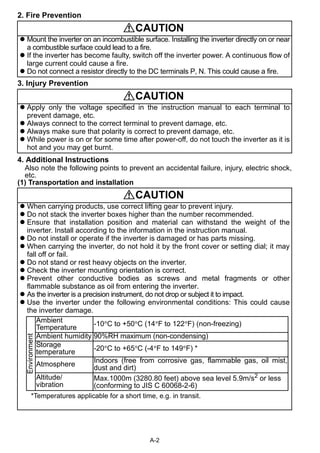
Ambient 
Temperature -10°C to +50°C (14°F to 122°F) (non-freezing) 
Ambient humidity 90%RH maximum (non-condensing) 
Storage 
temperature -20°C to +65°C (-4°F to 149°F) * 
Atmosphere Indoors (free from corrosive gas, flammable gas, oil mist, 
Max.1000m (3280.80 feet) above sea level 5.9m/s2 or less 
(conforming to JIS C 60068-2-6) 
A-2 
2. Fire Prevention 
3. Injury Prevention 
4. Additional Instructions 
Also note the following points to prevent an accidental failure, injury, electric shock, 
etc. 
(1) Transportation and installation 
CAUTION 
 When carrying products, use correct lifting gear to prevent injury. 
 Do not stack the inverter boxes higher than the number recommended. 
 Ensure that installation position and material can withstand the weight of the 
inverter. Install according to the information in the instruction manual. 
 Do not install or operate if the inverter is damaged or has parts missing. 
 When carrying the inverter, do not hold it by the front cover or setting dial; it may 
fall off or fail. 
 Do not stand or rest heavy objects on the inverter. 
 Check the inverter mounting orientation is correct. 
 Prevent other conductive bodies as screws and metal fragments or other 
flammable substance as oil from entering the inverter. 
 As the inverter is a precision instrument, do not drop or subject it to impact. 
 Use the inverter under the following environmental conditions: This could cause 
the inverter damage. 
Environment 
dust and dirt) 
Altitude/ 
vibration 
*Temperatures applicable for a short time, e.g. in transit.
A-3 
(2) Wiring 
(3) Trial run 
(4) Operation 
CAUTION 
 Do not fit capacitive equipment such as power factor correction capacitor, radio 
noise filter (option FR-BIF(-H)) or surge suppressor to the output of the inverter. 
 The connection orientation of the output cables U, V, W to the motor will affect the 
direction of rotation of the motor. 
CAUTION 
 Check all parameters, and ensure that the machine will not be damaged by a 
sudden start-up. 
 When the load GD2 is small (at the motor GD or smaller) for 400V from 1.5K to 3.7K, the 
output current may vary when the output frequency is in the 20Hz to 30Hz range. 
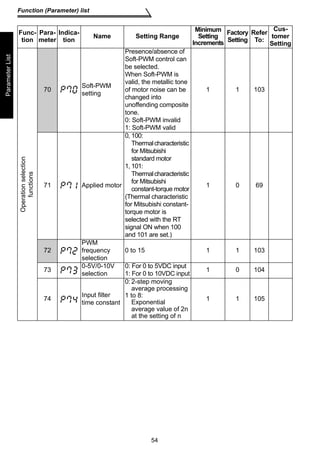
If this is a problem, set the Pr.72 PWM frequency selection to 6kHz or higher. 
(When setting the PWM to a higher frequency, check for noise or leakage current 
problem and take countermeasures against it.) 
WARNING 
 When you have chosen the retry function, stay away from the equipment as it will 
restart suddenly after an alarm stop. 
 The [STOP] key is valid only when the appropriate function setting has been made. 
Prepare an emergency stop switch separately. 
 Make sure that the start signal is off before resetting the inverter alarm. A failure to 
do so may restart the motor suddenly. 
 The load used should be a three-phase induction motor only. Connection of any 
other electrical equipment to the inverter output may damage the equipment. 
 Do not modify the equipment. 
 Do not perform parts removal which is not instructed in this manual. Doing so may 
lead to fault or damage of the inverter.
A-4 
(5) Emergency stop 
(6) Maintenance, inspection and parts replacement 
(7) Disposing of the inverter 
(8) General instructions 
CAUTION 
 The electronic thermal relay function does not guarantee protection of the motor 
from overheating. 
 Do not use a magnetic contactor on the inverter input for frequent starting/stopping 
of the inverter. 
 Use a noise filter to reduce the effect of electromagnetic interference. Otherwise 
nearby electronic equipment may be affected. 
 Take measures to suppress harmonics. Otherwise power supply harmonics from 
the inverter may heat/damage the power capacitor and generator. 
 When a 400V class motor is inverter-driven, please use an insulation-enhanced 
motor or measures taken to suppress surge voltages. Surge voltages attributable to 
the wiring constants may occur at the motor terminals, deteriorating the insulation of 
the motor. 
 When parameter clear or all clear is performed, reset the required parameters 
before starting operations. Each parameter returns to the factory setting. 
 The inverter can be easily set for high-speed operation. Before changing its 
setting, fully examine the performances of the motor and machine. 
 In addition to the inverter's holding function, install a holding device to ensure safety. 
 Before running an inverter which had been stored for a long period, always 
perform inspection and test operation. 
CAUTION 
 Provide a safety backup such as an emergency brake which will prevent the 
machine and equipment from hazardous conditions if the inverter fails. 
 When the breaker on the inverter primary side trips, check for the wiring fault (short 
circuit), damage to internal parts of the inverter, etc. Identify the cause of the trip, 
then remove the cause and power on the breaker. 
 When any protective function is activated, take the appropriate corrective action, 
then reset the inverter, and resume operation. 
CAUTION 
 Do not carry out a megger (insulation resistance) test on the control circuit of the 
inverter. 
CAUTION 
 Treat as industrial waste. 
Many of the diagrams and drawings in this instruction manual (detailed) show the inverter 
without a cover, or partially open. Never operate the inverter in this manner. Always replace 
the cover and follow this instruction manual (detailed) when operating the inverter.
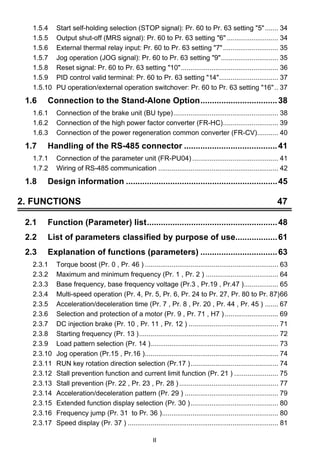
I 
CONTENTS 
CONTENTS 
1. WIRING 1 
1.1 Standard connection diagram and terminal specifications ..2 
1.1.1 Standard connection diagram ....................................................................... 2 
1.1.2 Explanation of main circuit terminals............................................................. 3 
1.2 Main circuit terminals ...............................................................6 
1.2.1 Terminal block layout .................................................................................... 6 
1.2.2 Cables, wiring length, and crimping terminals............................................... 8 
1.2.3 Wiring instructions ......................................................................................... 9 
1.2.4 Selection of peripheral devices ................................................................... 10 
1.2.5 Leakage current and installation of ground leakage circuit breaker ............ 12 
1.2.6 Power-off and magnetic contactor (MC)...................................................... 16 
1.2.7 Regarding the installation of the power factor improving reactor ................ 17 
1.2.8 Regarding noise and the installation of a noise filter................................... 18 
1.2.9 Grounding precautions ................................................................................ 19 
1.2.10 Power supply harmonics ............................................................................. 20 
1.2.11 Inverter-driven 400V class motor ................................................................ 21 
1.3 How to use the control circuit terminals...............................22 
1.3.1 Terminal block layout .................................................................................. 22 
1.3.2 Wiring instructions ....................................................................................... 22 
1.3.3 Changing the control logic........................................................................... 23 
1.4 Input terminals.........................................................................25 
1.4.1 Run (start) and stop (STF, STR, STOP) ..................................................... 25 
1.4.2 Connection of frequency setting potentiometer and 
output frequency meter (10, 2, 5, 4, AU)..................................................... 28 
1.4.3 External frequency selection (REX, RH, RM, RL) ....................................... 29 
1.4.4 Indicator connection and adjustment (AM).................................................. 31 
1.4.5 Control circuit common terminals (SD, 5, SE)............................................. 32 
1.4.6 Signal inputs by contactless switches ......................................................... 32 
1.5 How to use the input signals 
(assigned terminals RL, RM, RH, STR)..................................33 
1.5.1 Multi-speed setting (RL, RM, RH, REX signals): 
Pr. 60 to Pr. 63 setting 0, 1, 2, 8 
Remote setting (RL, RM, RH signals): 
Pr. 60 to Pr. 63 setting 0, 1, 2 ................................................................... 33 
1.5.2 Second function selection (RT signal): Pr. 60 to Pr. 63 setting 3 ............. 33 
1.5.3 Current input selection AU signal: Pr. 60 to Pr. 63 setting 4 .................. 33
1.5.4 Start self-holding selection (STOP signal): Pr. 60 to Pr. 63 setting 5 ....... 34 
1.5.5 Output shut-off (MRS signal): Pr. 60 to Pr. 63 setting 6 ........................... 34 
1.5.6 External thermal relay input: Pr. 60 to Pr. 63 setting 7 ............................. 35 
1.5.7 Jog operation (JOG signal): Pr. 60 to Pr. 63 setting 9.............................. 35 
1.5.8 Reset signal: Pr. 60 to Pr. 63 setting 10................................................... 36 
1.5.9 PID control valid terminal: Pr. 60 to Pr. 63 setting 14............................... 37 
1.5.10 PU operation/external operation switchover: Pr. 60 to Pr. 63 setting 16.. 37 
1.6 Connection to the Stand-Alone Option.................................38 
1.6.1 Connection of the brake unit (BU type)....................................................... 38 
1.6.2 Connection of the high power factor converter (FR-HC)............................. 39 
1.6.3 Connection of the power regeneration common converter (FR-CV)........... 40 
1.7 Handling of the RS-485 connector ........................................41 
1.7.1 Connection of the parameter unit (FR-PU04) ............................................. 41 
1.7.2 Wiring of RS-485 communication ............................................................... 42 
1.8 Design information .................................................................45 
2. FUNCTIONS 47 
2.1 Function (Parameter) list........................................................48 
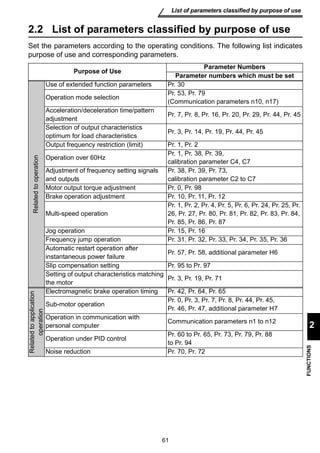
2.2 List of parameters classified by purpose of use..................61 
2.3 Explanation of functions (parameters) .................................63 
2.3.1 Torque boost (Pr. 0 , Pr. 46 ) ...................................................................... 63 
2.3.2 Maximum and minimum frequency (Pr. 1 , Pr. 2 ) ...................................... 64 
2.3.3 Base frequency, base frequency voltage (Pr.3 , Pr.19 , Pr.47 ).................. 65 
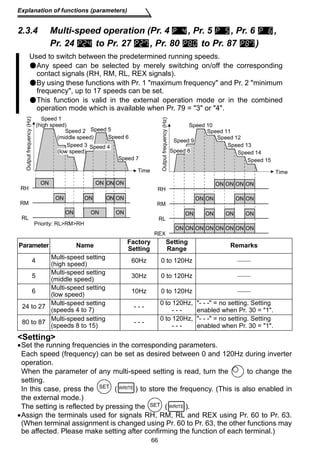
2.3.4 Multi-speed operation (Pr. 4, Pr. 5, Pr. 6, Pr. 24 to Pr. 27, Pr. 80 to Pr. 87)66 
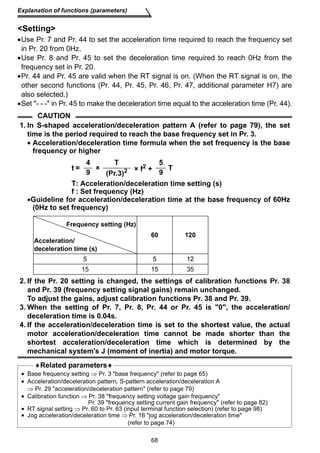
2.3.5 Acceleration/deceleration time (Pr. 7 , Pr. 8 , Pr. 20 , Pr. 44 , Pr. 45 ) ....... 67 
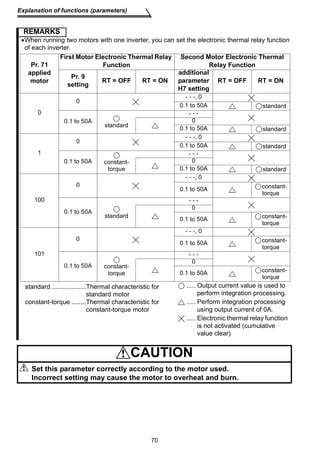
2.3.6 Selection and protection of a motor (Pr. 9 , Pr. 71 , H7 ) ............................ 69 
2.3.7 DC injection brake (Pr. 10 , Pr. 11 , Pr. 12 ) ............................................... 71 
2.3.8 Starting frequency (Pr. 13 )......................................................................... 72 
2.3.9 Load pattern selection (Pr. 14 )................................................................... 73 
2.3.10 Jog operation (Pr.15 , Pr.16 )...................................................................... 74 
2.3.11 RUN key rotation direction selection (Pr.17 ).............................................. 74 
2.3.12 Stall prevention function and current limit function (Pr. 21 ) ....................... 75 
2.3.13 Stall prevention (Pr. 22 , Pr. 23 , Pr. 28 ) .................................................... 77 
2.3.14 Acceleration/deceleration pattern (Pr. 29 ) ................................................. 79 
2.3.15 Extended function display selection (Pr. 30 ).............................................. 80 
2.3.16 Frequency jump (Pr. 31 to Pr. 36 )............................................................. 80 
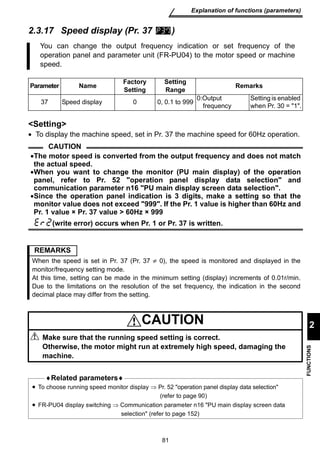
2.3.17 Speed display (Pr. 37 ) ............................................................................... 81 
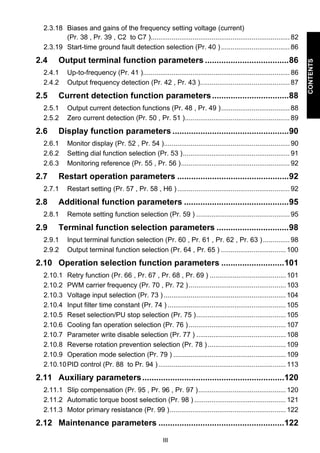
II
III 
CONTENTS 
2.3.18 Biases and gains of the frequency setting voltage (current) 
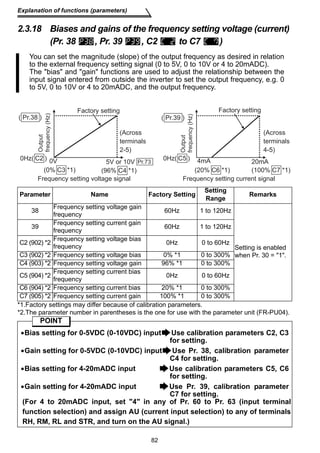
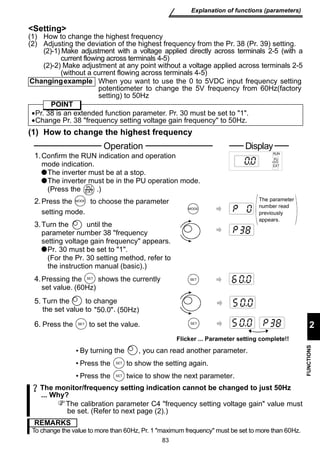
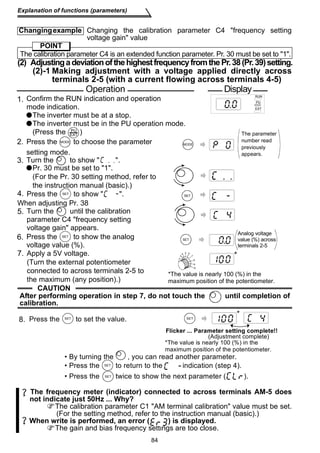
(Pr. 38 , Pr. 39 , C2 to C7 )......................................................................... 82 
2.3.19 Start-time ground fault detection selection (Pr. 40 ) .................................... 86 
2.4 Output terminal function parameters ....................................86 
2.4.1 Up-to-frequency (Pr. 41 )............................................................................. 86 
2.4.2 Output frequency detection (Pr. 42 , Pr. 43 )............................................... 87 
2.5 Current detection function parameters .................................88 
2.5.1 Output current detection functions (Pr. 48 , Pr. 49 ).................................... 88 
2.5.2 Zero current detection (Pr. 50 , Pr. 51 )....................................................... 89 
2.6 Display function parameters ..................................................90 
2.6.1 Monitor display (Pr. 52 , Pr. 54 ).................................................................. 90 
2.6.2 Setting dial function selection (Pr. 53 )........................................................ 91 
2.6.3 Monitoring reference (Pr. 55 , Pr. 56 )......................................................... 92 
2.7 Restart operation parameters ................................................92 
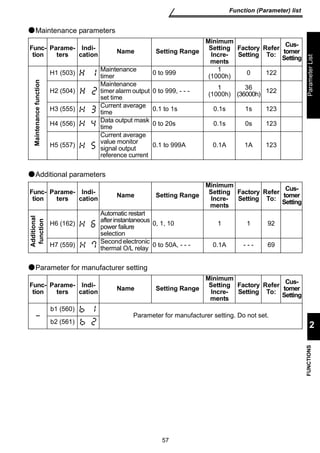
2.7.1 Restart setting (Pr. 57 , Pr. 58 , H6 ) ........................................................... 92 
2.8 Additional function parameters .............................................95 
2.8.1 Remote setting function selection (Pr. 59 ) ................................................. 95 
2.9 Terminal function selection parameters ...............................98 
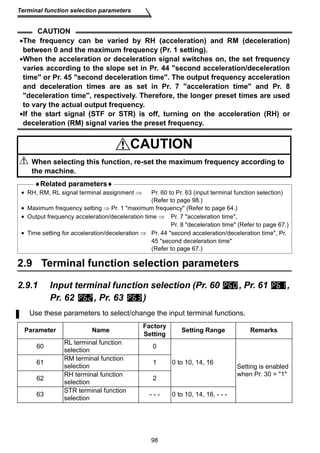
2.9.1 Input terminal function selection (Pr. 60 , Pr. 61 , Pr. 62 , Pr. 63 ) .............. 98 
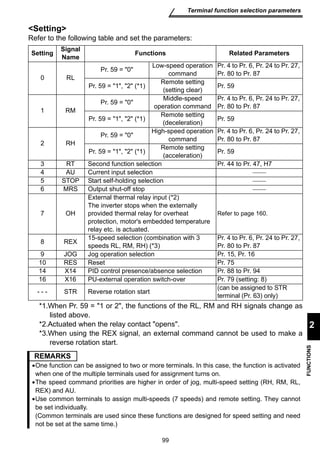
2.9.2 Output terminal function selection (Pr. 64 , Pr. 65 ) .................................. 100 
2.10 Operation selection function parameters ...........................101 
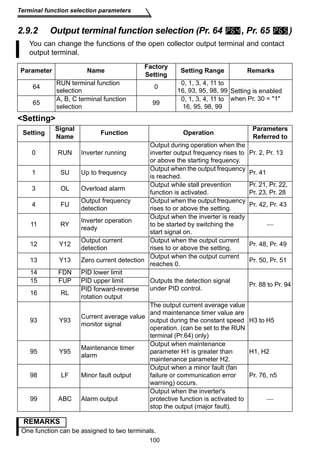
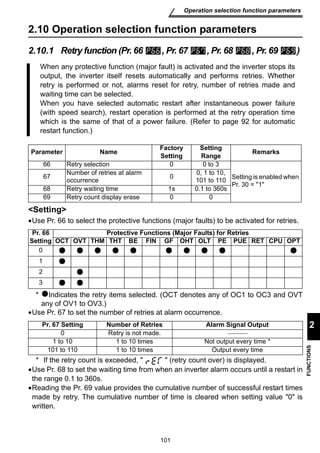
2.10.1 Retry function (Pr. 66 , Pr. 67 , Pr. 68 , Pr. 69 ) ........................................ 101 
2.10.2 PWM carrier frequency (Pr. 70 , Pr. 72 ) ................................................... 103 
2.10.3 Voltage input selection (Pr. 73 ) ................................................................ 104 
2.10.4 Input filter time constant (Pr. 74 ) .............................................................. 105 
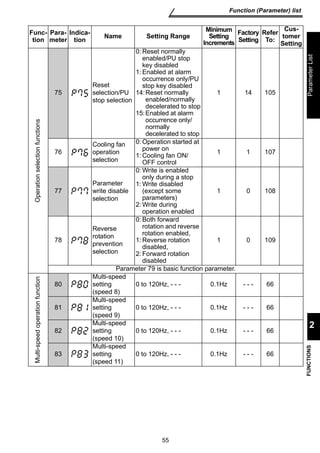
2.10.5 Reset selection/PU stop selection (Pr. 75 )............................................... 105 
2.10.6 Cooling fan operation selection (Pr. 76 ) ................................................... 107 
2.10.7 Parameter write disable selection (Pr. 77 ) ............................................... 108 
2.10.8 Reverse rotation prevention selection (Pr. 78 ) ......................................... 109 
2.10.9 Operation mode selection (Pr. 79 ) ........................................................... 109 
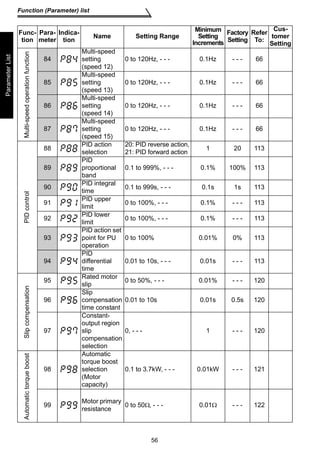
2.10.10PID control (Pr. 88 to Pr. 94 ) ................................................................... 113 
2.11 Auxiliary parameters.............................................................120 
2.11.1 Slip compensation (Pr. 95 , Pr. 96 , Pr. 97 ).............................................. 120 
2.11.2 Automatic torque boost selection (Pr. 98 ) ................................................ 121 
2.11.3 Motor primary resistance (Pr. 99 )............................................................. 122 
2.12 Maintenance parameters ......................................................122
2.12.1 Maintenance output function (H1, H2 ) ..................................................... 122 
2.12.2 Current average value monitor signal (H3, H4, H5)................... 123 
2.13 Calibration parameters.........................................................126 
2.13.1 Meter (frequency meter) calibration (C1 ) ................................................. 126 
2.14 Clear parameters...................................................................129 
2.14.1 Parameter clear (CLr ) .............................................................................. 129 
2.14.2 Alarm history clear (ECL )......................................................................... 129 
2.15 Communication parameters................................................. 130 
2.15.1 Communication settings (n1 to n7 , n11 ) ................................................ 132 
2.15.2 Operation and speed command source (n8 , n9 ) .................................... 147 
2.15.3 Link startup mode selection (n10 )............................................................ 148 
2.15.4 E2PROM write selection (n12 )................................................................. 150 
2.16 Parameter unit (FR-PU04) setting........................................ 151 
2.16.1 PU display language selection (n13 ) ....................................................... 151 
2.16.2 PU buzzer control (n14 ) ........................................................................... 151 
2.16.3 PU contrast adjustment (n15 ) .................................................................. 152 
2.16.4 PU main display screen data selection (n16 )........................................... 152 
2.16.5 Disconnected PU detection/PU setting lock selection (n17 ) .................... 153 
3. PROTECTIVE FUNCTIONS 155 
3.1 Errors (Alarms)......................................................................156 
3.1.1 Error (alarm) definitions ............................................................................ 157 
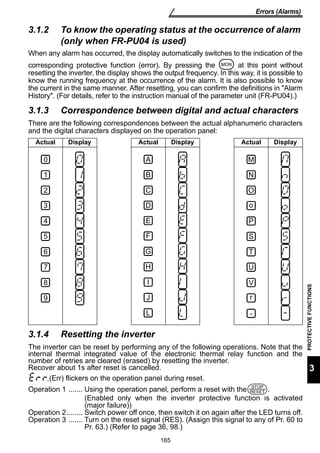
3.1.2 To know the operating status at the occurrence of alarm 
(only when FR-PU04 is used) ................................................................... 165 
3.1.3 Correspondence between digital and actual characters ........................... 165 
3.1.4 Resetting the inverter................................................................................ 165 
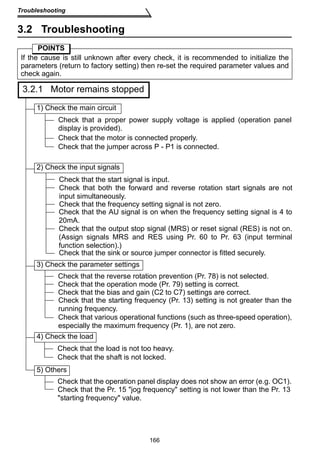
3.2 Troubleshooting....................................................................166 
3.2.1 Motor remains stopped ............................................................................. 166 
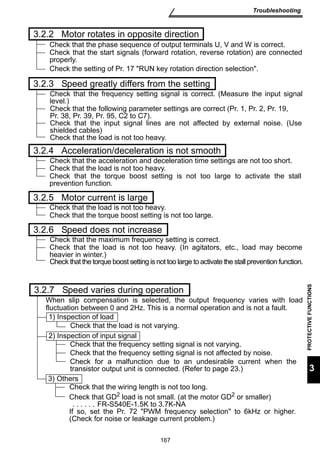
3.2.2 Motor rotates in opposite direction............................................................ 167 
3.2.3 Speed greatly differs from the setting ....................................................... 167 
3.2.4 Acceleration/deceleration is not smooth ................................................... 167 
3.2.5 Motor current is large ................................................................................ 167 
3.2.6 Speed does not increase .......................................................................... 167 
3.2.7 Speed varies during operation.................................................................. 167 
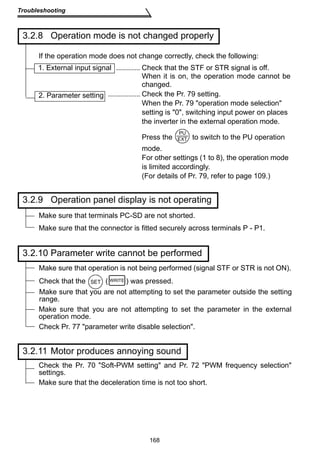
3.2.8 Operation mode is not changed properly.................................................. 168 
3.2.9 Operation panel display is not operating................................................... 168 
3.2.10 Parameter write cannot be performed ...................................................... 168 
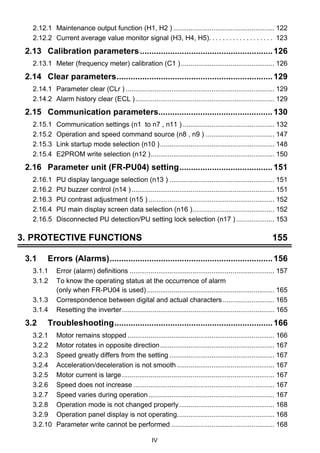
IV
V 
CONTENTS 
3.2.11 Motor produces annoying sound............................................................... 168 
4. SPECIFICATIONS 169 
4.1 Specification list....................................................................170 
4.1.1 Ratings ...................................................................................................... 170 
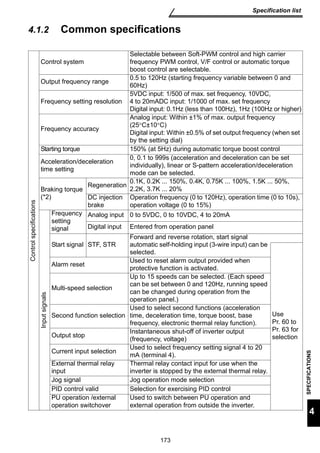
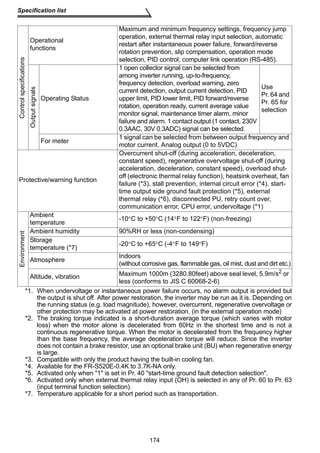
4.1.2 Common specifications ............................................................................. 173 
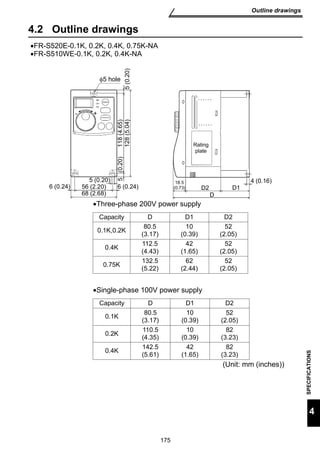
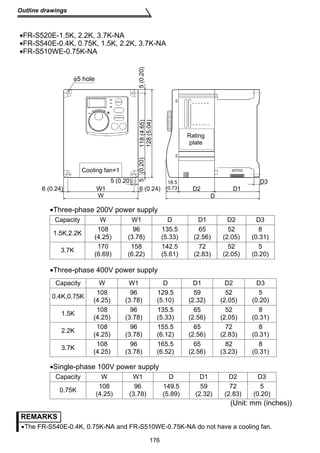
4.2 Outline drawings ...................................................................175 
APPENDIX 179 
APPENDIX 1 Parameter Instruction Code List .............................180
1 
Chapter 1 
Chapter 2 
Chapter 3 
Chapter 4 
1. WIRING 
This chapter explains the basic wiring for use of this product. Always 
read the instructions before use. 
For description of installation, refer to the instruction manual (basic). 
1.1 Standard connection diagram and terminal 
specifications ..................................................... 2 
1.2 Main circuit terminals ........................................ 6 
1.3 How to use the control circuit terminals.......... 22 
1.4 Input terminals.................................................... 25 
1.5 How to use the input signals (assigned 
terminals RL, RM, RH, STR) .............................. 33 
1.6 Connection to the Stand-Alone Option ............ 38 
1.7 Handling of the RS-485 connector...................... 41 
1.8 Design information............................................. 45 
Abbreviations 
•PU 
Operation panel and parameter unit (FR-PU04) 
•Inverter 
Mitsubishi transistorized inverter FR-S500 series 
•FR-S500 
Mitsubishi transistorized inverter FR-S500 series 
•Pr. 
Parameter number
Standard connection diagram and terminal specifications 
1.1 Standard connection diagram and terminal 
Inverter 
NFB MC 
Three-phase AC 
power supply 
R/L1 
S/L2 
T/L3 
External transistor common Ground 
24VDC power supply 
Contact input common (source) 
Take care not to short 
terminals PC-SD. 
PC 
STF 
STR 
High speed RH 
RM 
Forward rotation start 
Reverse rotation start 
Middle speed 
Low speed RL 
SD 
*5 
*5 
*5 
*5 
(+5V) 
0 to 5VDC 
0 to 10VDC 
*1 
*2 
*6 
*6 
*6 
*6 
Selected 
(Common) 
(4 to 20mADC) 
SINK 
*3 
SOURCE 
RS-485 
Connector 
P/+ 
N/- 
PR 
AM 
5 
(+) 
Analog signal 
output 
(0 to 5VDC) 
(-) 
Ground 
Main circuit terminal Control circuit terminal 
2 
specifications 
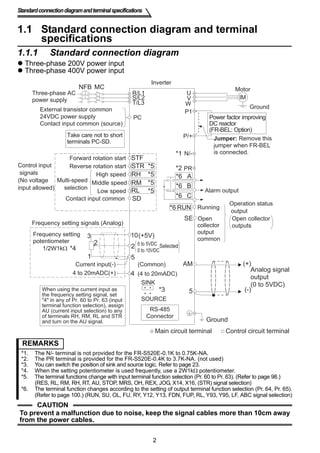
1.1.1 Standard connection diagram 
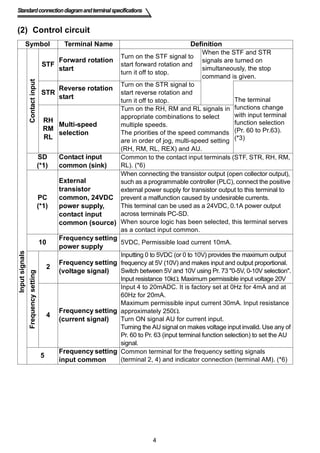
 Three-phase 200V power input 
 Three-phase 400V power input 
Motor 
IM 
U 
VW 
P1 
A 
B 
C 
RUN 
SE 
Power factor improving 
DC reactor 
(FR-BEL: Option) 
Jumper: Remove this 
jumper when FR-BEL 
is connected. 
Alarm output 
Running 
Operation status 
output 
Open 
collector 
Open collector 
outputs 
Multi-speed 
selection 
Control input 
signals 
(No voltage 
input allowed) 
Contact input common 
Frequency setting signals (Analog) 
Frequency setting 
potentiometer 
1/2W1kΩ 
10 
2 
2 
3 
1 
5 
*4 
Current input(-) 
4 to 20mADC(+) 4 
output 
common 
When using the current input as 
the frequency setting signal, set 
4 in any of Pr. 60 to Pr. 63 (input 
terminal function selection), assign 
AU (current input selection) to any 
of terminals RH, RM, RL and STR 
and turn on the AU signal. 
REMARKS 
*1. The N/- terminal is not provided for the FR-S520E-0.1K to 0.75K-NA. 
*2. The PR terminal is provided for the FR-S520E-0.4K to 3.7K-NA. (not used) 
*3. You can switch the position of sink and source logic. Refer to page 23. 
*4. When the setting potentiometer is used frequently, use a 2W1kΩ potentiometer. 
*5. The terminal functions change with input terminal function selection (Pr. 60 to Pr. 63). (Refer to page 98.) 
(RES, RL, RM, RH, RT, AU, STOP, MRS, OH, REX, JOG, X14, X16, (STR) signal selection) 
*6. The terminal function changes according to the setting of output terminal function selection (Pr. 64, Pr. 65). 
(Refer to page 100.) (RUN, SU, OL, FU, RY, Y12, Y13, FDN, FUP, RL, Y93, Y95, LF, ABC signal selection) 
CAUTION 
To prevent a malfunction due to noise, keep the signal cables more than 10cm away 
from the power cables.
NFB 
R/L1 
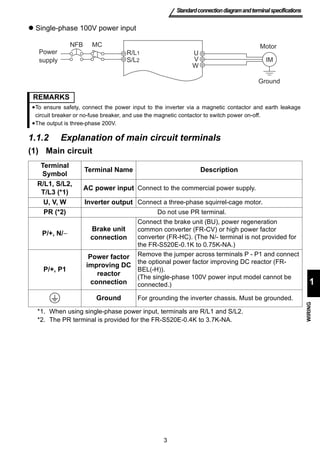
REMARKS 
•To ensure safety, connect the power input to the inverter via a magnetic contactor and earth leakage 
circuit breaker or no-fuse breaker, and use the magnetic contactor to switch power on-off. 
•The output is three-phase 200V. 
3 
Standard connection diagram and terminal specifications 
1 
WIRING 
 Single-phase 100V power input 
1.1.2 Explanation of main circuit terminals 
(1) Main circuit 
Terminal 
Symbol Terminal Name Description 
R/L1, S/L2, 
T/L3 (*1) AC power input Connect to the commercial power supply. 
U, V, W Inverter output Connect a three-phase squirrel-cage motor. 
PR (*2) Do not use PR terminal. 
P/+, N/− 
Brake unit 
connection 
Connect the brake unit (BU), power regeneration 
common converter (FR-CV) or high power factor 
converter (FR-HC). (The N/- terminal is not provided for 
the FR-S520E-0.1K to 0.75K-NA.) 
P/+, P1 
Power factor 
improving DC 
reactor 
connection 
Remove the jumper across terminals P - P1 and connect 
the optional power factor improving DC reactor (FR-BEL(- 
H)). 
(The single-phase 100V power input model cannot be 
connected.) 
Ground For grounding the inverter chassis. Must be grounded. 
*1. When using single-phase power input, terminals are R/L1 and S/L2. 
*2. The PR terminal is provided for the FR-S520E-0.4K to 3.7K-NA. 
IM 
U 
V 
W 
MC 
Power 
supply 
Motor 
Ground 
S/L2
Standard connection diagram and terminal specifications 
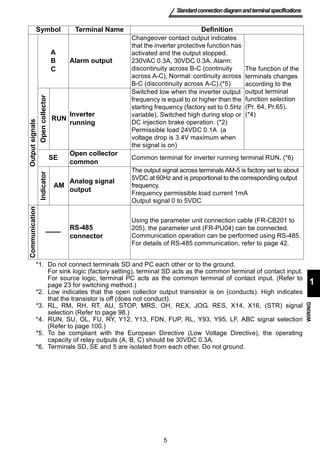
(2) Control circuit 
Symbol Terminal Name Definition 
4 
Input signals 
Contact input 
STF Forward rotation 
start 
Turn on the STF signal to 
start forward rotation and 
turn it off to stop. 
When the STF and STR 
signals are turned on 
simultaneously, the stop 
command is given. 
STR Reverse rotation 
start 
Turn on the STR signal to 
start reverse rotation and 
turn it off to stop. The terminal 
functions change 
with input terminal 
function selection 
(Pr. 60 to Pr.63). 
(*3) 
RH 
RM 
RL 
Multi-speed 
selection 
Turn on the RH, RM and RL signals in 
appropriate combinations to select 
multiple speeds. 
The priorities of the speed commands 
are in order of jog, multi-speed setting 
(RH, RM, RL, REX) and AU. 
SD 
(*1) 
Contact input 
common (sink) 
Common to the contact input terminals (STF, STR, RH, RM, 
RL). (*6) 
PC 
(*1) 
External 
transistor 
common, 24VDC 
power supply, 
contact input 
common (source) 
When connecting the transistor output (open collector output), 
such as a programmable controller (PLC), connect the positive 
external power supply for transistor output to this terminal to 
prevent a malfunction caused by undesirable currents. 
This terminal can be used as a 24VDC, 0.1A power output 
across terminals PC-SD. 
When source logic has been selected, this terminal serves 
as a contact input common. 
10 Frequency setting 
power supply 5VDC, Permissible load current 10mA. 
Frequency setting 
2 Frequency setting 
(voltage signal) 
Inputting 0 to 5VDC (or 0 to 10V) provides the maximum output 
frequency at 5V (10V) and makes input and output proportional. 
Switch between 5V and 10V using Pr. 73 0-5V, 0-10V selection. 
Input resistance 10kΩ. Maximum permissible input voltage 20V 
4 Frequency setting 
(current signal) 
Input 4 to 20mADC. It is factory set at 0Hz for 4mA and at 
60Hz for 20mA. 
Maximum permissible input current 30mA. Input resistance 
approximately 250Ω. 
Turn ON signal AU for current input. 
Turning the AU signal on makes voltage input invalid. Use any of 
Pr. 60 to Pr. 63 (input terminal function selection) to set the AU 
signal. 
5 Frequency setting 
input common 
Common terminal for the frequency setting signals 
(terminal 2, 4) and indicator connection (terminal AM). (*6)
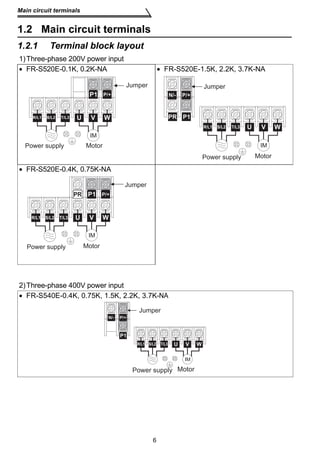
Symbol Terminal Name Definition 
Changeover contact output indicates 
that the inverter protective function has 
activated and the output stopped. 
230VAC 0.3A, 30VDC 0.3A. Alarm: 
discontinuity across B-C (continuity 
across A-C), Normal: continuity across 
B-C (discontinuity across A-C).(*5) 
5 
Standard connection diagram and terminal specifications 
1 
WIRING 
Output signals 
ABC 
Alarm output 
*1. Do not connect terminals SD and PC each other or to the ground. 
For sink logic (factory setting), terminal SD acts as the common terminal of contact input. 
For source logic, terminal PC acts as the common terminal of contact input. (Refer to 
page 23 for switching method.) 
*2. Low indicates that the open collector output transistor is on (conducts). High indicates 
that the transistor is off (does not conduct). 
*3. RL, RM, RH, RT, AU, STOP, MRS, OH, REX, JOG, RES, X14, X16, (STR) signal 
selection (Refer to page 98.) 
*4. RUN, SU, OL, FU, RY, Y12, Y13, FDN, FUP, RL, Y93, Y95, LF, ABC signal selection 
(Refer to page 100.) 
*5. To be compliant with the European Directive (Low Voltage Directive), the operating 
capacity of relay outputs (A, B, C) should be 30VDC 0.3A. 
*6. Terminals SD, SE and 5 are isolated from each other. Do not ground. 
The function of the 
terminals changes 
according to the 
output terminal 
function selection 
(Pr. 64, Pr.65). 
(*4) 
Open collector 
RUN Inverter 
running 
Switched low when the inverter output 
frequency is equal to or higher than the 
starting frequency (factory set to 0.5Hz 
variable). Switched high during stop or 
DC injection brake operation. (*2) 
Permissible load 24VDC 0.1A (a 
voltage drop is 3.4V maximum when 
the signal is on) 
SE Open collector 
common Common terminal for inverter running terminal RUN. (*6) 
Indicator 
AM Analog signal 
output 
The output signal across terminals AM-5 is factory set to about 
5VDC at 60Hz and is proportional to the corresponding output 
frequency. 
Frequency permissible load current 1mA 
Output signal 0 to 5VDC 
Communication 
—— RS-485 
connector 
Using the parameter unit connection cable (FR-CB201 to 
205), the parameter unit (FR-PU04) can be connected. 
Communication operation can be performed using RS-485. 
For details of RS-485 communication, refer to page 42.
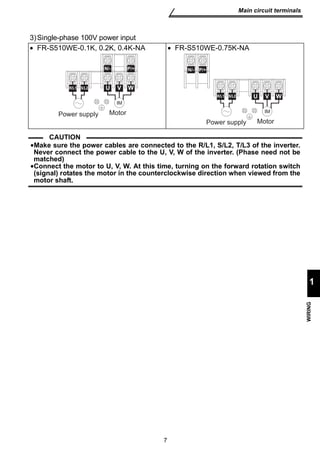
Main circuit terminals 
1.2 Main circuit terminals 
1.2.1 Terminal block layout 
1)Three-phase 200V power input 
• FR-S520E-0.1K, 0.2K-NA • FR-S520E-1.5K, 2.2K, 3.7K-NA 
6 
P1 P/+ 
U V W 
IM 
R/L1 S/L2 T/L3 
Power supply Motor 
• FR-S520E-0.4K, 0.75K-NA 
Jumper 
R/L1 S/L2 
2)Three-phase 400V power input 
• FR-S540E-0.4K, 0.75K, 1.5K, 2.2K, 3.7K-NA 
P1 
Jumper 
U V W 
IM 
Power supply Motor 
N/- P/+ 
R/L1 S/L2 T/L3 
PR 
P1 
Motor 
Jumper 
U V W 
IM 
Power supply 
PR P/+ 
T/L3 
P1 
Jumper 
U V W 
IM 
Power supply Motor 
P/+ 
R/L1 S/L2 T/L3 
N/-
7 
Main circuit terminals 
1 
WIRING 
3)Single-phase 100V power input 
• FR-S510WE-0.1K, 0.2K, 0.4K-NA • FR-S510WE-0.75K-NA 
R/L1 S/L2 
Power supply 
CAUTION 
N/- P/+ 
U V W 
IM 
Motor 
U V W 
IM 
Motor 
R/L1 S/L2 
Power supply 
N/- P/+ 
•Make sure the power cables are connected to the R/L1, S/L2, T/L3 of the inverter. 
Never connect the power cable to the U, V, W of the inverter. (Phase need not be 
matched) 
•Connect the motor to U, V, W. At this time, turning on the forward rotation switch 
(signal) rotates the motor in the counterclockwise direction when viewed from the 
motor shaft.
Main circuit terminals 
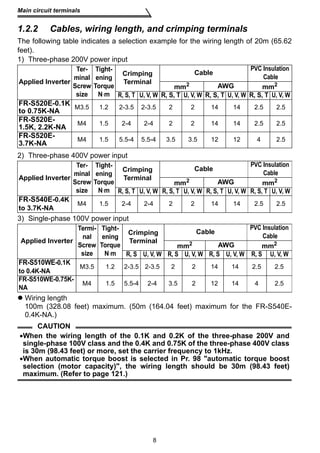
1.2.2 Cables, wiring length, and crimping terminals 
The following table indicates a selection example for the wiring length of 20m (65.62 
feet). 
1) Three-phase 200V power input 
R, S, T U, V, W R, S, T U, V, W R, S, T U, V, W R, S, T U, V, W 
FR-S520E-0.1K 
to 0.75K-NA M3.5 1.2 2-3.5 2-3.5 2 2 14 14 2.5 2.5 
FR-S520E- 
1.5K, 2.2K-NA M4 1.5 2-4 2-4 2 2 14 14 2.5 2.5 
FR-S520E- 
3.7K-NA M4 1.5 5.5-4 5.5-4 3.5 3.5 12 12 4 2.5 
R, S, T U, V, W R, S, T U, V, W R, S, T U, V, W R, S, T U, V, W 
FR-S540E-0.4K 
to 3.7K-NA M4 1.5 2-4 2-4 2 2 14 14 2.5 2.5 
Crimping 
Terminal 
R, S U, V, W R, S U, V, W R, S U, V, W R, S U, V, W 
FR-S510WE-0.1K 
to 0.4K-NA M3.5 1.2 2-3.5 2-3.5 2 2 14 14 2.5 2.5 
FR-S510WE-0.75K-NA 
M4 1.5 5.5-4 2-4 3.5 2 12 14 4 2.5 
8 
Applied Inverter 
Ter-minal 
Screw 
size 
Tight-ening 
Torque 
N⋅m 
Crimping 
Terminal 
2) Three-phase 400V power input 
Applied Inverter 
Ter-minal 
Screw 
size 
Tight-ening 
Torque 
N⋅m 
Crimping 
Terminal 
3) Single-phase 100V power input 
Cable PVC Insulation 
Cable 
mm2 AWG mm2 
Cable PVC Insulation 
Cable 
mm2 AWG mm2 
Applied Inverter 
Termi-nal 
Screw 
size 
Tight-ening 
Torque 
N⋅m 
Cable PVC Insulation 
Cable 
mm2 AWG mm2 
 Wiring length 
100m (328.08 feet) maximum. (50m (164.04 feet) maximum for the FR-S540E- 
0.4K-NA.) 
CAUTION 
•When the wiring length of the 0.1K and 0.2K of the three-phase 200V and 
single-phase 100V class and the 0.4K and 0.75K of the three-phase 400V class 
is 30m (98.43 feet) or more, set the carrier frequency to 1kHz. 
•When automatic torque boost is selected in Pr. 98 automatic torque boost 
selection (motor capacity), the wiring length should be 30m (98.43 feet) 
maximum. (Refer to page 121.)
9 
Main circuit terminals 
1 
WIRING 
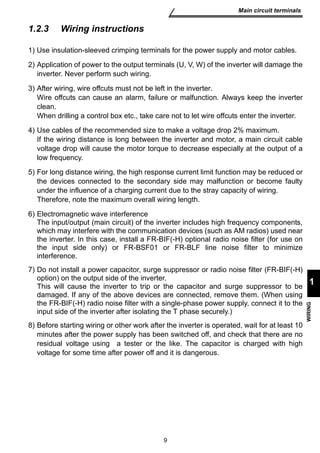
1.2.3 Wiring instructions 
1) Use insulation-sleeved crimping terminals for the power supply and motor cables. 
2) Application of power to the output terminals (U, V, W) of the inverter will damage the 
inverter. Never perform such wiring. 
3) After wiring, wire offcuts must not be left in the inverter. 
Wire offcuts can cause an alarm, failure or malfunction. Always keep the inverter 
clean. 
When drilling a control box etc., take care not to let wire offcuts enter the inverter. 
4) Use cables of the recommended size to make a voltage drop 2% maximum. 
If the wiring distance is long between the inverter and motor, a main circuit cable 
voltage drop will cause the motor torque to decrease especially at the output of a 
low frequency. 
5) For long distance wiring, the high response current limit function may be reduced or 
the devices connected to the secondary side may malfunction or become faulty 
under the influence of a charging current due to the stray capacity of wiring. 
Therefore, note the maximum overall wiring length. 
6) Electromagnetic wave interference 
The input/output (main circuit) of the inverter includes high frequency components, 
which may interfere with the communication devices (such as AM radios) used near 
the inverter. In this case, install a FR-BIF(-H) optional radio noise filter (for use on 
the input side only) or FR-BSF01 or FR-BLF line noise filter to minimize 
interference. 
7) Do not install a power capacitor, surge suppressor or radio noise filter (FR-BIF(-H) 
option) on the output side of the inverter. 
This will cause the inverter to trip or the capacitor and surge suppressor to be 
damaged. If any of the above devices are connected, remove them. (When using 
the FR-BIF(-H) radio noise filter with a single-phase power supply, connect it to the 
input side of the inverter after isolating the T phase securely.) 
8) Before starting wiring or other work after the inverter is operated, wait for at least 10 
minutes after the power supply has been switched off, and check that there are no 
residual voltage using a tester or the like. The capacitor is charged with high 
voltage for some time after power off and it is dangerous.
No-fuse Breaker 
(NFB *1, 4) or 
Earth Leakage 
Circuit Breaker 
(ELB) (Refer to 
page 12) (*2, 4) 
10 
Main circuit terminals 
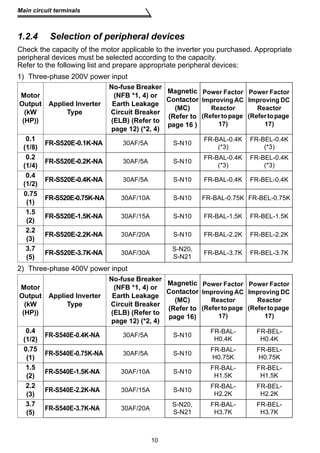
1.2.4 Selection of peripheral devices 
Check the capacity of the motor applicable to the inverter you purchased. Appropriate 
peripheral devices must be selected according to the capacity. 
Refer to the following list and prepare appropriate peripheral devices: 
1) Three-phase 200V power input 
Motor 
Output 
(kW 
(HP)) 
Applied Inverter 
Type 
2) Three-phase 400V power input 
Magnetic 
Contactor 
(MC) 
(Refer to 
page 16 ) 
Power Factor 
Improving AC 
Reactor 
(Refer to page 
17) 
Power Factor 
Improving DC 
Reactor 
(Refer to page 
17) 
0.1 
(1/8) FR-S520E-0.1K-NA 30AF/5A S-N10 FR-BAL-0.4K 
(*3) 
FR-BEL-0.4K 
(*3) 
0.2 
(1/4) FR-S520E-0.2K-NA 30AF/5A S-N10 FR-BAL-0.4K 
(*3) 
FR-BEL-0.4K 
(*3) 
0.4 
(1/2) FR-S520E-0.4K-NA 30AF/5A S-N10 FR-BAL-0.4K FR-BEL-0.4K 
0.75 
(1) FR-S520E-0.75K-NA 30AF/10A S-N10 FR-BAL-0.75K FR-BEL-0.75K 
1.5 
(2) FR-S520E-1.5K-NA 30AF/15A S-N10 FR-BAL-1.5K FR-BEL-1.5K 
2.2 
(3) FR-S520E-2.2K-NA 30AF/20A S-N10 FR-BAL-2.2K FR-BEL-2.2K 
3.7 
(5) FR-S520E-3.7K-NA 30AF/30A S-N20, 
S-N21 FR-BAL-3.7K FR-BEL-3.7K 
Motor 
Output 
(kW 
(HP)) 
Applied Inverter 
Type 
No-fuse Breaker 
(NFB *1, 4) or 
Earth Leakage 
Circuit Breaker 
(ELB) (Refer to 
page 12) (*2, 4) 
Magnetic 
Contactor 
(MC) 
(Refer to 
page 16) 
Power Factor 
Improving AC 
Reactor 
(Refer to page 
17) 
Power Factor 
Improving DC 
Reactor 
(Refer to page 
17) 
0.4 
(1/2) FR-S540E-0.4K-NA 30AF/5A S-N10 FR-BAL-H0.4K 
FR-BEL-H0.4K 
0.75 
(1) FR-S540E-0.75K-NA 30AF/5A S-N10 FR-BAL-H0.75K 
FR-BEL-H0.75K 
1.5 
(2) FR-S540E-1.5K-NA 30AF/10A S-N10 FR-BAL-H1.5K 
FR-BEL-H1.5K 
2.2 
(3) FR-S540E-2.2K-NA 30AF/15A S-N10 FR-BAL-H2.2K 
FR-BEL-H2.2K 
3.7 
(5) FR-S540E-3.7K-NA 30AF/20A S-N20, 
S-N21 
FR-BAL-H3.7K 
FR-BEL-H3.7K
11 
1 
WIRING 
Main circuit terminals 
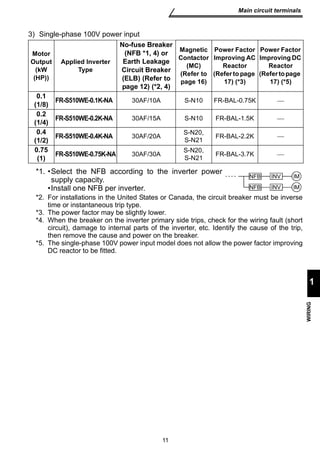
3) Single-phase 100V power input 
Motor 
Output 
(kW 
(HP)) 
Applied Inverter 
Type 
*2. For installations in the United States or Canada, the circuit breaker must be inverse 
time or instantaneous trip type. 
*3. The power factor may be slightly lower. 
*4. When the breaker on the inverter primary side trips, check for the wiring fault (short 
circuit), damage to internal parts of the inverter, etc. Identify the cause of the trip, 
then remove the cause and power on the breaker. 
*5. The single-phase 100V power input model does not allow the power factor improving 
DC reactor to be fitted. 
No-fuse Breaker 
(NFB *1, 4) or 
Earth Leakage 
Circuit Breaker 
(ELB) (Refer to 
page 12) (*2, 4) 
Magnetic 
Contactor 
(MC) 
(Refer to 
page 16) 
Power Factor 
Improving AC 
Reactor 
(Refer to page 
17) (*3) 
Power Factor 
Improving DC 
Reactor 
(Refer to page 
17) (*5) 
0.1 
(1/8) FR-S510WE-0.1K-NA 30AF/10A S-N10 FR-BAL-0.75K  
0.2 
(1/4) FR-S510WE-0.2K-NA 30AF/15A S-N10 FR-BAL-1.5K  
0.4 
(1/2) FR-S510WE-0.4K-NA 30AF/20A S-N20, 
S-N21 FR-BAL-2.2K  
0.75 
(1) FR-S510WE-0.75K-NA 30AF/30A S-N20, 
S-N21 FR-BAL-3.7K  
*1. •Select the NFB according to the inverter power 
supply capacity. 
•Install one NFB per inverter. 
INV 
NFB INV 
IM 
IM 
NFB
Main circuit terminals 
1.2.5 Leakage current and installation of ground leakage 
12 
circuit breaker 
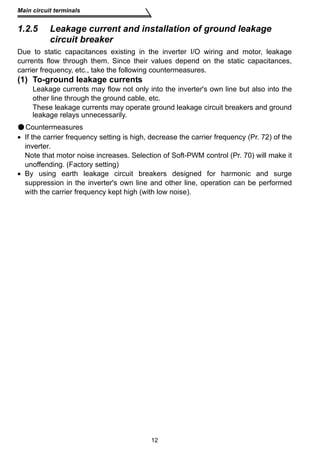
Due to static capacitances existing in the inverter I/O wiring and motor, leakage 
currents flow through them. Since their values depend on the static capacitances, 
carrier frequency, etc., take the following countermeasures. 
(1) To-ground leakage currents 
Leakage currents may flow not only into the inverter's own line but also into the 
other line through the ground cable, etc. 
These leakage currents may operate ground leakage circuit breakers and ground 
leakage relays unnecessarily. 
Countermeasures 
• If the carrier frequency setting is high, decrease the carrier frequency (Pr. 72) of the 
inverter. 
Note that motor noise increases. Selection of Soft-PWM control (Pr. 70) will make it 
unoffending. (Factory setting) 
• By using earth leakage circuit breakers designed for harmonic and surge 
suppression in the inverter's own line and other line, operation can be performed 
with the carrier frequency kept high (with low noise).
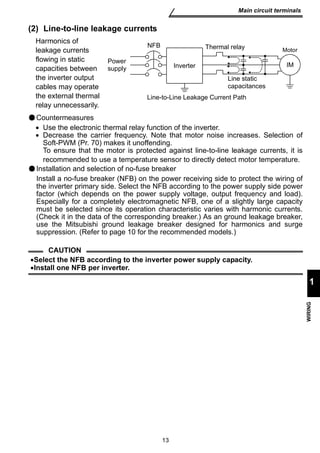
Thermal relay 
NFB 
Power 
supply Inverter 
IM 
Line static 
capacitances 
Line-to-Line Leakage Current Path 
13 
Main circuit terminals 
1 
WIRING 
(2) Line-to-line leakage currents 
Harmonics of 
leakage currents 
flowing in static 
capacities between 
the inverter output 
cables may operate 
the external thermal 
relay unnecessarily. 
Countermeasures 
• Use the electronic thermal relay function of the inverter. 
• Decrease the carrier frequency. Note that motor noise increases. Selection of 
Soft-PWM (Pr. 70) makes it unoffending. 
To ensure that the motor is protected against line-to-line leakage currents, it is 
recommended to use a temperature sensor to directly detect motor temperature. 
Installation and selection of no-fuse breaker 
Install a no-fuse breaker (NFB) on the power receiving side to protect the wiring of 
the inverter primary side. Select the NFB according to the power supply side power 
factor (which depends on the power supply voltage, output frequency and load). 
Especially for a completely electromagnetic NFB, one of a slightly large capacity 
must be selected since its operation characteristic varies with harmonic currents. 
(Check it in the data of the corresponding breaker.) As an ground leakage breaker, 
use the Mitsubishi ground leakage breaker designed for harmonics and surge 
suppression. (Refer to page 10 for the recommended models.) 
CAUTION 
•Select the NFB according to the inverter power supply capacity. 
•Install one NFB per inverter. 
Motor
Main circuit terminals 
(3) Selecting the rated sensitivity current for the earth leakage circuit 
Example of leakage 
current per 1km in cable 
path during commercial 
power supply operation 
when the CV cable is 
routed in metal conduit 
(200V 60Hz) (200V 60Hz) 
Leakage current (mA) 
120 
100 
2 2 
2mm ×5m 2mm ×70m 
Noise 
filter 
Inver-ter 
14 
breaker 
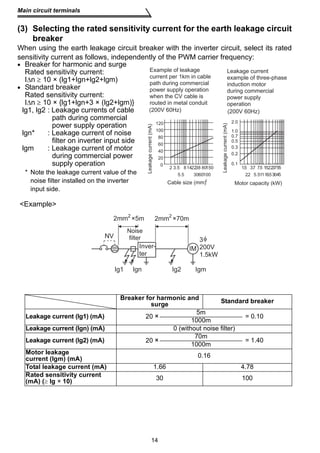
When using the earth leakage circuit breaker with the inverter circuit, select its rated 
sensitivity current as follows, independently of the PWM carrier frequency: 
• Breaker for harmonic and surge 
Rated sensitivity current: 
IΔn ≥ 10 × (lg1+Ign+lg2+lgm) 
• Standard breaker 
Rated sensitivity current: 
IΔn ≥ 10 × {lg1+lgn+3 × (lg2+lgm)} 
lg1, lg2 : Leakage currents of cable 
path during commercial 
power supply operation 
lgn* : Leakage current of noise 
filter on inverter input side 
lgm : Leakage current of motor 
during commercial power 
supply operation 
* Note the leakage current value of the 
noise filter installed on the inverter 
input side. 
Example 
150 1.5 3.7 
2 3.5 8142238 80 
5.5 3060100 
Cable size (mm)2 
80 
60 
40 
20 
0 
IM 
Breaker for harmonic and 
Leakage current 
example of three-phase 
induction motor 
during commercial 
power supply 
operation 
2.2 
7.5 1522 
11 
55 
Motor capacity (kW) 
Leakage current (mA) 
3 
200V 
1.5kW 
surge Standard breaker 
Leakage current (Ig1) (mA) 20 × 5m 1000m = 0.10 
Leakage current (Ign) (mA) 0 (without noise filter) 
Leakage current (Ig2) (mA) 20 × 107000mm = 1.40 
Motor leakage 
current (Igm) (mA) 0.16 
Total leakage current (mA) 1.66 4.78 
Rated sensitivity current 
(mA) (≥ Ig × 10) 30 100 
37 
30 
5.5 18.5 45 
2.0 
1.0 
0.7 
0.5 
0.3 
0.2 
0.1 
NV 
Ig1 Ign Ig2 Igm
15 
Main circuit terminals 
1 
WIRING 
CAUTION 
•The ground leakage circuit breaker should be installed to the primary (power 
supply) side of the inverter. 
•In the connection neutral point grounded system, the sensitivity current 
becomes worse for ground faults on the inverter secondary side. Grounding 
must conform to the requirements of national and local safety regulations and 
electrical codes. (JIS, NEC section 250, IEC 536 class 1 and other applicable 
standards) 
•When the breaker is installed on the secondary side of the inverter, it may be 
unnecessarily operated by harmonics if the effective value is less than the 
rating. In this case, do not install the breaker since the eddy current and 
hysteresis loss increase and the temperature rises. 
•General products indicate the following models: BV-C1, BC-V, NVB, NV-L, NV-G2N, 
NV-G3NA, NV-2F, ground leakage relay (except NV-ZHA), NV with AA 
neutral wire open-phase protection 
The other models are designed for harmonic and surge suppression: NV-C/ 
NV-S/MN series, NV30-FA, NV50-FA, BV-C2, ground leakage alarm breaker 
(NF-Z), NV-ZHA, NV-H
Main circuit terminals 
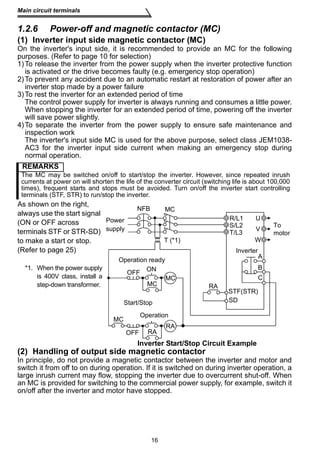
1.2.6 Power-off and magnetic contactor (MC) 
(1) Inverter input side magnetic contactor (MC) 
On the inverter's input side, it is recommended to provide an MC for the following 
purposes. (Refer to page 10 for selection) 
1)To release the inverter from the power supply when the inverter protective function 
is activated or the drive becomes faulty (e.g. emergency stop operation) 
2)To prevent any accident due to an automatic restart at restoration of power after an 
inverter stop made by a power failure 
3)To rest the inverter for an extended period of time 
The control power supply for inverter is always running and consumes a little power. 
When stopping the inverter for an extended period of time, powering off the inverter 
will save power slightly. 
4)To separate the inverter from the power supply to ensure safe maintenance and 
inspection work 
The inverter's input side MC is used for the above purpose, select class JEM1038- 
AC3 for the inverter input side current when making an emergency stop during 
normal operation. 
REMARKS 
The MC may be switched on/off to start/stop the inverter. However, since repeated inrush 
currents at power on will shorten the life of the converter circuit (switching life is about 100,000 
times), frequent starts and stops must be avoided. Turn on/off the inverter start controlling 
terminals (STF, STR) to run/stop the inverter. 
As shown on the right, 
always use the start signal 
NFB 
(ON or OFF across 
terminals STF or STR-SD) 
to make a start or stop. 
(Refer to page 25) 
Operation ready 
OFF ON 
MC 
MC 
MC 
RA 
U 
V 
W 
R/L1 
S/L2 
STF(STR) 
Start/Stop 
RA 
RA 
(2) Handling of output side magnetic contactor 
In principle, do not provide a magnetic contactor between the inverter and motor and 
switch it from off to on during operation. If it is switched on during inverter operation, a 
large inrush current may flow, stopping the inverter due to overcurrent shut-off. When 
an MC is provided for switching to the commercial power supply, for example, switch it 
on/off after the inverter and motor have stopped. 
16 
*1. When the power supply 
is 400V class, install a 
step-down transformer. 
Inverter Start/Stop Circuit Example 
MC 
T (*1) 
Power 
supply 
Inverter 
To 
motor 
OFF 
Operation 
A 
B 
C 
T/L3 
SD
Power supply equipment 
capacity (kVA) 
17 
Main circuit terminals 
1 
WIRING 
1.2.7 Regarding the installation of the power factor 
improving reactor 
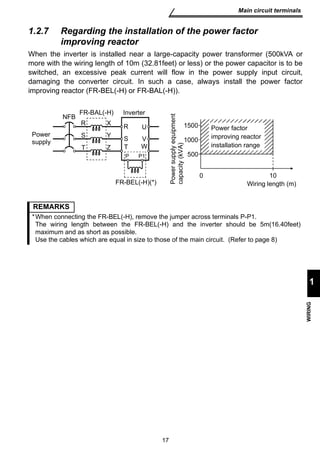
When the inverter is installed near a large-capacity power transformer (500kVA or 
more with the wiring length of 10m (32.81feet) or less) or the power capacitor is to be 
switched, an excessive peak current will flow in the power supply input circuit, 
damaging the converter circuit. In such a case, always install the power factor 
improving reactor (FR-BEL(-H) or FR-BAL(-H)). 
NFB FR-BAL(-H) Inverter 
Power 
supply 
R 
S 
T Z 
X U 
Y 
VW 
P1 
R 
ST 
P 
FR-BEL(-H)(*) 
Power factor 
improving reactor 
installation range 
0 10 
Wiring length (m) 
1500 
1000 
500 
REMARKS 
*When connecting the FR-BEL(-H), remove the jumper across terminals P-P1. 
The wiring length between the FR-BEL(-H) and the inverter should be 5m(16.40feet) 
maximum and as short as possible. 
Use the cables which are equal in size to those of the main circuit. (Refer to page 8)
Main circuit terminals 
1.2.8 Regarding noise and the installation of a noise filter 
Some noise enters the inverter causing it to malfunction and others are generated by 
the inverter causing the malfunction of peripheral devices. Though the inverter is 
designed to be insusceptible to noise, it handles low-level signals, so it requires the 
following general countermeasures to be taken. 
(1) General countermeasures 
• Do not run the power cables (I/O cables) and signal cables of the inverter in parallel 
with each other and do not bundle them. 
• Use twisted shield cables for the detector connecting and control signal cables and 
connect the sheathes of the shield cables to terminal SD. 
• Ground the inverter, motor, etc. at one point. 
• Capacitances exist between the inverter's I/O wiring, other cables, ground and 
motor, through which leakage currents flow to cause the earth leakage circuit 
breaker, ground leakage relay and external thermal relay to operate unnecessarily. 
To prevent this, take appropriate measures, e.g. set the carrier frequency in Pr. 72 to 
a low value, use a ground leakage circuit breaker designed for suppression of 
harmonics and surges, and use the electronic thermal relay function built in the 
inverter. 
• The input and output of the inverter main circuit include high-degree harmonics, 
which may disturb communication devices (AM radios) and sensors used near the 
inverter. In this case, install a FR-BIF(-H) optional radio noise filter (for use on the 
input side only) or FR-BSF01 line noise filter to minimize interference. 
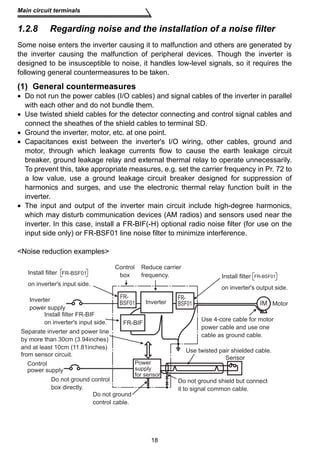
Noise reduction examples 
Power 
supply 
for sensor 
18 
Inverter 
power supply 
Control 
power supply 
Control 
box 
Reduce carrier 
frequency. 
Install filter 
on inverter's output side. 
IM 
FR-BSF01 
FR-BSF01 
Use twisted pair shielded cable. 
Sensor 
Motor 
Inverter 
FR-BIF 
Install filter FR-BIF 
on inverter's input side. 
FR-BSF01 
Install filter FR-BSF01 
on inverter's input side. 
Separate inverter and power line 
by more than 30cm (3.94inches) 
and at least 10cm (11.81inches) 
from sensor circuit. 
Do not ground control 
box directly. 
Do not ground 
control cable. 
Use 4-core cable for motor 
power cable and use one 
cable as ground cable. 
Do not ground shield but connect 
it to signal common cable.
Motor Capacity Ground Cable Size (Unit: mm2) 
200V class, 100V class 400V class 
2.2kW or less 2 (2.5) 2 (2.5) 
3.7kW 3.5 (4) 2 (4) 
19 
Main circuit terminals 
1 
WIRING 
1.2.9 Grounding precautions 
 Leakage currents flow in the inverter. To prevent an electric shock, the inverter and 
motor must be grounded. Grounding must conform to the requirements of national 
and local safety regulations and electrical codes. 
(JIS, NEC section 250, IEC 536 class 1 and other applicable standards) 
 Use the dedicated ground terminal to ground the inverter. (Do not use the screw in 
the casing, chassis, etc.) 
Use a tinned* crimping terminal to connect the ground cable. When tightening the 
screw, be careful not to damage the threads. 
*Plating should not include zinc. 
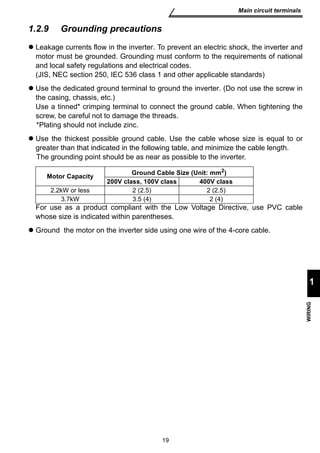
 Use the thickest possible ground cable. Use the cable whose size is equal to or 
greater than that indicated in the following table, and minimize the cable length. 
The grounding point should be as near as possible to the inverter. 
For use as a product compliant with the Low Voltage Directive, use PVC cable 
whose size is indicated within parentheses. 
 Ground the motor on the inverter side using one wire of the 4-core cable.
Main circuit terminals 
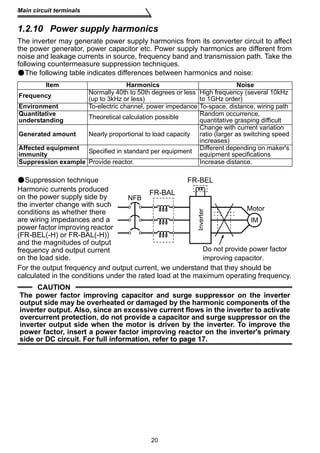
1.2.10 Power supply harmonics 
The inverter may generate power supply harmonics from its converter circuit to affect 
the power generator, power capacitor etc. Power supply harmonics are different from 
noise and leakage currents in source, frequency band and transmission path. Take the 
following countermeasure suppression techniques. 
The following table indicates differences between harmonics and noise: 
Item Harmonics Noise 
Frequency Normally 40th to 50th degrees or less 
F RFR-B-ABLA(L-H) 
20 
(up to 3kHz or less) 
High frequency (several 10kHz 
to 1GHz order) 
Environment To-electric channel, power impedance To-space, distance, wiring path 
Quantitative 
understanding Theoretical calculation possible Random occurrence, 
quantitative grasping difficult 
Generated amount Nearly proportional to load capacity 
Change with current variation 
ratio (larger as switching speed 
increases) 
Affected equipment 
immunity Specified in standard per equipment Different depending on maker's 
equipment specifications 
Suppression example Provide reactor. Increase distance. 
Suppression technique 
Harmonic currents produced 
on the power supply side by 
the inverter change with such 
conditions as whether there 
are wiring impedances and a 
power factor improving reactor 
(FR-BEL(-H) or FR-BAL(-H)) 
and the magnitudes of output 
frequency and output current 
on the load side. 
For the output frequency and output current, we understand that they should be 
calculated in the conditions under the rated load at the maximum operating frequency. 
CAUTION 
FR-BEL 
FR-BEL(-H) 
Inverter 
NFB 
Motor 
IM 
Do not provide power factor 
improving capacitor. 
The power factor improving capacitor and surge suppressor on the inverter 
output side may be overheated or damaged by the harmonic components of the 
inverter output. Also, since an excessive current flows in the inverter to activate 
overcurrent protection, do not provide a capacitor and surge suppressor on the 
inverter output side when the motor is driven by the inverter. To improve the 
power factor, insert a power factor improving reactor on the inverter's primary 
side or DC circuit. For full information, refer to page 17.
21 
Main circuit terminals 
1 
WIRING 
1.2.11 Inverter-driven 400V class motor 
In the PWM type inverter, a surge voltage attributable to wiring constants is generated 
at the motor terminals. Especially for a 400V class motor, the surge voltage may 
deteriorate the insulation. When the 400V class motor is driven by the inverter, 
consider the following measures: 
•Measures 
It is recommended to take either of the following measures: 
(1) Rectifying the motor insulation 
For the 400V class motor, use an insulation-enhanced motor. Specifically 
1) Specify the 400V class inverter-driven, insulation-enhanced motor. 
2) For the dedicated motor such as the constant-torque motor and low-vibration 
motor, use the inverter-driven, dedicated motor. 
(2) Suppressing the surge voltage on the inverter side 
On the secondary side of the inverter, connect the optional surge voltage 
suppression filter (FR-ASF-H).
How to use the control circuit terminals 
1.3 How to use the control circuit terminals 
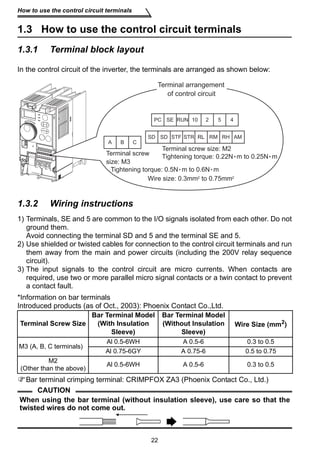
1.3.1 Terminal block layout 
In the control circuit of the inverter, the terminals are arranged as shown below: 
Terminal arrangement 
of control circuit 
10 2 5 4 
RM RH 
RL AM 
RUN 
STR 
PC SE 
SD SD STF 
A B C 
Terminal screw 
size: M3 
Terminal screw size: M2 
Tightening torque: 0.22N m to 0.25N m 
Tightening torque: 0.5N m to 0.6N m 
Wire size: 0.3mm2 to 0.75mm2 
1.3.2 Wiring instructions 
1) Terminals, SE and 5 are common to the I/O signals isolated from each other. Do not 
ground them. 
Avoid connecting the terminal SD and 5 and the terminal SE and 5. 
2) Use shielded or twisted cables for connection to the control circuit terminals and run 
them away from the main and power circuits (including the 200V relay sequence 
circuit). 
3) The input signals to the control circuit are micro currents. When contacts are 
required, use two or more parallel micro signal contacts or a twin contact to prevent 
a contact fault. 
*Information on bar terminals 
Introduced products (as of Oct., 2003): Phoenix Contact Co.,Ltd. 
Bar terminal crimping terminal: CRIMPFOX ZA3 (Phoenix Contact Co., Ltd.) 
22 
Terminal Screw Size 
Bar Terminal Model 
(With Insulation 
Sleeve) 
Bar Terminal Model 
(Without Insulation 
Sleeve) 
Wire Size (mm2) 
M3 (A, B, C terminals) 
Al 0.5-6WH A 0.5-6 0.3 to 0.5 
Al 0.75-6GY A 0.75-6 0.5 to 0.75 
M2 
(Other than the above) Al 0.5-6WH A 0.5-6 0.3 to 0.5 
CAUTION 
When using the bar terminal (without insulation sleeve), use care so that the 
twisted wires do not come out.
23 
How to use the control circuit terminals 
1 
WIRING 
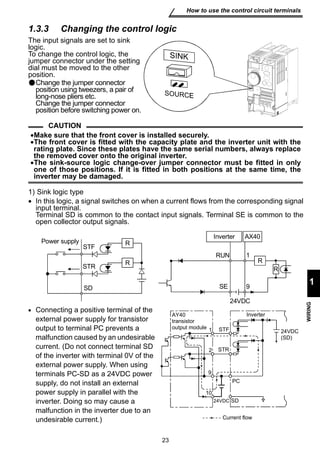
1.3.3 Changing the control logic 
The input signals are set to sink 
logic. 
To change the control logic, the 
jumper connector under the setting 
dial must be moved to the other 
position. 
Change the jumper connector 
position using tweezers, a pair of 
long-nose pliers etc. 
Change the jumper connector 
position before switching power on. 
CAUTION 
•Make sure that the front cover is installed securely. 
•The front cover is fitted with the capacity plate and the inverter unit with the 
rating plate. Since these plates have the same serial numbers, always replace 
the removed cover onto the original inverter. 
•The sink-source logic change-over jumper connector must be fitted in only 
one of those positions. If it is fitted in both positions at the same time, the 
inverter may be damaged. 
1) Sink logic type 
• In this logic, a signal switches on when a current flows from the corresponding signal 
input terminal. 
Terminal SD is common to the contact input signals. Terminal SE is common to the 
open collector output signals. 
STF 
• Connecting a positive terminal of the 
external power supply for transistor 
output to terminal PC prevents a 
malfunction caused by an undesirable 
current. (Do not connect terminal SD 
of the inverter with terminal 0V of the 
external power supply. When using 
terminals PC-SD as a 24VDC power 
supply, do not install an external 
power supply in parallel with the 
inverter. Doing so may cause a 
malfunction in the inverter due to an 
undesirable current.) 
Inverter AX40 
RUN 
SE 
24VDC 
Power supply 
STR 
SD 
1 
9 
R 
R R 
R 
1 
2 
109 
PC 
STF 
STR 
24VDC SD 
Inverter 
24VDC 
(SD) 
9 
Current flow 
AY40 
transistor 
output module
PC AX80 
24 
How to use the control circuit terminals 
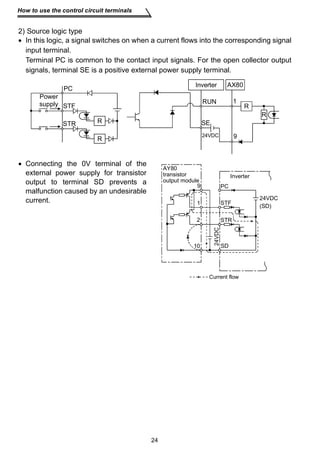
2) Source logic type 
• In this logic, a signal switches on when a current flows into the corresponding signal 
input terminal. 
Terminal PC is common to the contact input signals. For the open collector output 
signals, terminal SE is a positive external power supply terminal. 
Power 
supply STF 
STR 
R 
• Connecting the 0V terminal of the 
external power supply for transistor 
output to terminal SD prevents a 
malfunction caused by an undesirable 
current. 
RUN 
SE 
24VDC 
1 
9 
R 
R 
Inverter 
R 
AY80 
transistor 
output module 
9 
1 
2 
10 
PC 
STF 
STR 
SD 
Inverter 
24VDC 
(SD) 
24VDC 
Current flow
Power 
supply 
Forward 
rotation start 
rotation start 
Across 
STF-SD 
(STR) 
25 
Input terminals 
1 
WIRING 
1.4 Input terminals 
1.4.1 Run (start) and stop (STF, STR, STOP) 
To start and stop the motor, first switch on the input power supply of the inverter 
(switch on the magnetic contactor, if any, in the input circuit during preparation for 
operation), then start the motor with the forward or reverse rotation start signal. 
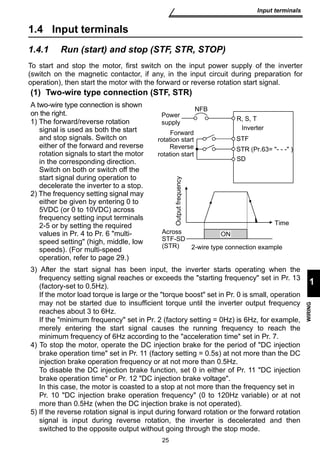
(1) Two-wire type connection (STF, STR) 
A two-wire type connection is shown 
on the right. 
1) The forward/reverse rotation 
signal is used as both the start 
and stop signals. Switch on 
either of the forward and reverse 
rotation signals to start the motor 
in the corresponding direction. 
Switch on both or switch off the 
start signal during operation to 
decelerate the inverter to a stop. 
2) The frequency setting signal may 
either be given by entering 0 to 
5VDC (or 0 to 10VDC) across 
frequency setting input terminals 
2-5 or by setting the required 
values in Pr. 4 to Pr. 6 multi-speed 
setting (high, middle, low 
ON 
NFB 
Reverse 
R, S, T 
Inverter 
STF 
STR (Pr.63= - - - ) 
Output frequency 
Time 
SD 
2-wire type connection example 
speeds). (For multi-speed 
operation, refer to page 29.) 
3) After the start signal has been input, the inverter starts operating when the 
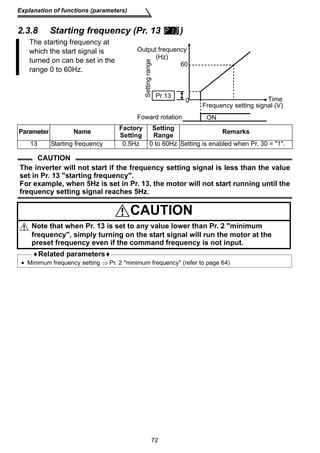
frequency setting signal reaches or exceeds the starting frequency set in Pr. 13 
(factory-set to 0.5Hz). 
If the motor load torque is large or the torque boost set in Pr. 0 is small, operation 
may not be started due to insufficient torque until the inverter output frequency 
reaches about 3 to 6Hz. 
If the minimum frequency set in Pr. 2 (factory setting = 0Hz) is 6Hz, for example, 
merely entering the start signal causes the running frequency to reach the 
minimum frequency of 6Hz according to the acceleration time set in Pr. 7. 
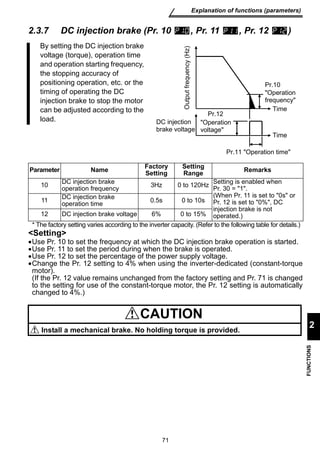
4) To stop the motor, operate the DC injection brake for the period of DC injection 
brake operation time set in Pr. 11 (factory setting = 0.5s) at not more than the DC 
injection brake operation frequency or at not more than 0.5Hz. 
To disable the DC injection brake function, set 0 in either of Pr. 11 DC injection 
brake operation time or Pr. 12 DC injection brake voltage. 
In this case, the motor is coasted to a stop at not more than the frequency set in 
Pr. 10 DC injection brake operation frequency (0 to 120Hz variable) or at not 
more than 0.5Hz (when the DC injection brake is not operated). 
5) If the reverse rotation signal is input during forward rotation or the forward rotation 
signal is input during reverse rotation, the inverter is decelerated and then 
switched to the opposite output without going through the stop mode.
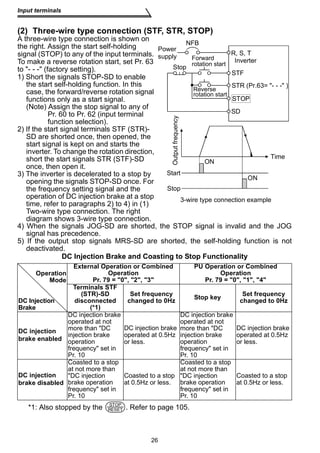
(2) Three-wire type connection (STF, STR, STOP) 
A three-wire type connection is shown on 
the right. Assign the start self-holding 
NFB 
signal (STOP) to any of the input terminals. 
To make a reverse rotation start, set Pr. 63 
to - - - (factory setting). 
1) Short the signals STOP-SD to enable 
the start self-holding function. In this 
case, the forward/reverse rotation signal 
functions only as a start signal. 
(Note) Assign the stop signal to any of 
Power 
supply R, S, T 
Inverter 
STF 
STR (Pr.63= - - - ) 
STOP 
Stop 
SD 
2) If the start signal terminals STF (STR)- 
SD are shorted once, then opened, the 
start signal is kept on and starts the 
inverter. To change the rotation direction, 
short the start signals STR (STF)-SD 
once, then open it. 
3) The inverter is decelerated to a stop by 
opening the signals STOP-SD once. For 
the frequency setting signal and the 
operation of DC injection brake at a stop 
time, refer to paragraphs 2) to 4) in (1) 
Two-wire type connection. The right 
diagram shows 3-wire type connection. 
4) When the signals JOG-SD are shorted, the STOP signal is invalid and the JOG 
signal has precedence. 
5) If the output stop signals MRS-SD are shorted, the self-holding function is not 
deactivated. 
DC Injection Brake and Coasting to Stop Functionality 
External Operation or Combined 
Pr. 79 = 0, 2, 3 
26 
Input terminals 
Pr. 60 to Pr. 62 (input terminal 
function selection). 
Operation 
Mode 
DC Injection 
Brake 
Operation 
*1: Also stopped by the . Refer to page 105. 
PU Operation or Combined 
Operation 
Pr. 79 = 0, 1, 4 
Terminals STF 
(STR)-SD 
disconnected 
(*1) 
Set frequency 
changed to 0Hz Stop key Set frequency 
changed to 0Hz 
DC injection 
brake enabled 
DC injection brake 
operated at not 
more than DC 
injection brake 
operation 
frequency set in 
Pr. 10 
DC injection brake 
operated at 0.5Hz 
or less. 
DC injection brake 
operated at not 
more than DC 
injection brake 
operation 
frequency set in 
Pr. 10 
DC injection brake 
operated at 0.5Hz 
or less. 
DC injection 
brake disabled 
Coasted to a stop 
at not more than 
DC injection 
brake operation 
frequency set in 
Pr. 10 
Coasted to a stop 
at 0.5Hz or less. 
Coasted to a stop 
at not more than 
DC injection 
brake operation 
frequency set in 
Pr. 10 
Coasted to a stop 
at 0.5Hz or less. 
Reverse 
rotation start 
Time 
Start 
Stop 
ON 
ON 
Output frequency 
Forward 
rotation start 
3-wire type connection example 
STOP 
RESET
DC injection brake 
operation 
frequency Pr. 10 
3Hz 
0.5Hz 
DC injection 
brake operation 
time Pr. 11 
ON 
Start signal switched on 
while DC injection brake 
is being operated 
0.5Hz 
Start 
signal 
terminal (*3) 
27 
Input terminals 
1 
WIRING 
0.5Hz 
0.5s 
DC injection 
brake operation 
time Pr. 11 
Starting frequency 
Pr.13 
(*1) 
0.5Hz 
ON 
0.5s 
ON 
DC injection brake 
not operated 
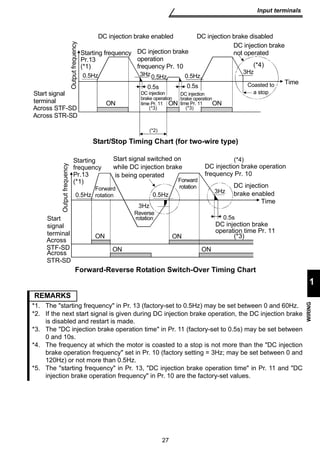
Start/Stop Timing Chart (for two-wire type) 
Output frequency 
3Hz 
Coasted to 
0.5s 
ON 
Reverse 
rotation 
Forward-Reverse Rotation Switch-Over Timing Chart 
REMARKS 
*1. The starting frequency in Pr. 13 (factory-set to 0.5Hz) may be set between 0 and 60Hz. 
*2. If the next start signal is given during DC injection brake operation, the DC injection brake 
is disabled and restart is made. 
*3. The DC injection brake operation time in Pr. 11 (factory-set to 0.5s) may be set between 
0 and 10s. 
*4. The frequency at which the motor is coasted to a stop is not more than the DC injection 
brake operation frequency set in Pr. 10 (factory setting = 3Hz; may be set between 0 and 
120Hz) or not more than 0.5Hz. 
*5. The starting frequency in Pr. 13, DC injection brake operation time in Pr. 11 and DC 
injection brake operation frequency in Pr. 10 are the factory-set values. 
a stop 
Time 
DC injection brake enabled DC injection brake disabled 
Start signal 
terminal 
(*4) 
(*3) (*3) 
(*2) 
Across STF-SD 
Across STR-SD 
Output frequency 
Starting 
frequency 
Pr.13 
(*1) 
0.5Hz 
Forward 
rotation 
Forward 
rotation 
3Hz 
3Hz 
DC injection brake operation 
frequency Pr. 10 
DC injection 
brake enabled 
Time 
DC injection brake 
operation time Pr. 11 
ON 
ON ON 
(*4) 
Across 
STF-SD 
Across 
STR-SD
Input terminals 
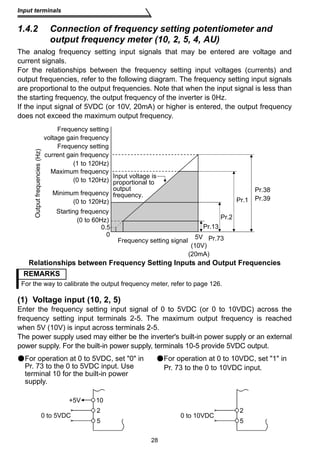
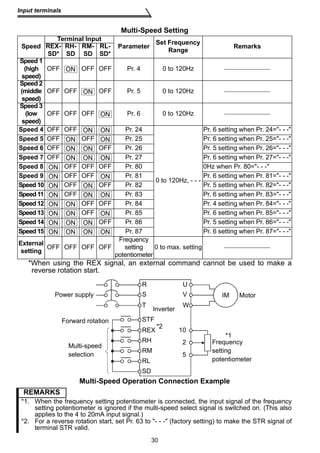
1.4.2 Connection of frequency setting potentiometer and 
output frequency meter (10, 2, 5, 4, AU) 
The analog frequency setting input signals that may be entered are voltage and 
current signals. 
For the relationships between the frequency setting input voltages (currents) and 
output frequencies, refer to the following diagram. The frequency setting input signals 
are proportional to the output frequencies. Note that when the input signal is less than 
the starting frequency, the output frequency of the inverter is 0Hz. 
If the input signal of 5VDC (or 10V, 20mA) or higher is entered, the output frequency 
does not exceed the maximum output frequency. 
Relationships between Frequency Setting Inputs and Output Frequencies 
REMARKS 
For the way to calibrate the output frequency meter, refer to page 126. 
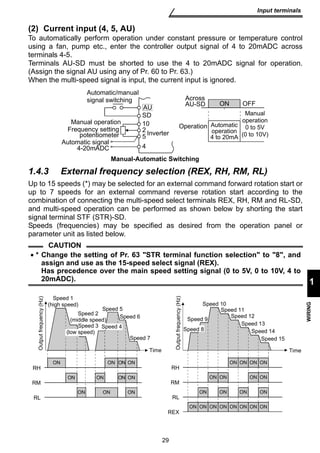
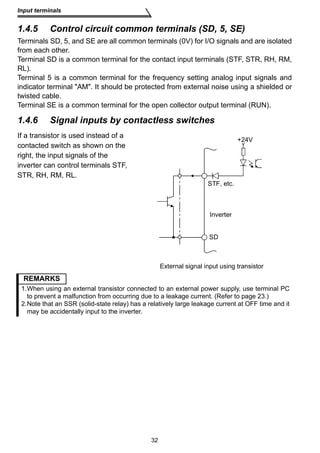
(1) Voltage input (10, 2, 5) 
Enter the frequency setting input signal of 0 to 5VDC (or 0 to 10VDC) across the 
frequency setting input terminals 2-5. The maximum output frequency is reached 
when 5V (10V) is input across terminals 2-5. 
The power supply used may either be the inverter's built-in power supply or an external 
power supply. For the built-in power supply, terminals 10-5 provide 5VDC output. 
28 
For operation at 0 to 5VDC, set 0 in 
Pr. 73 to the 0 to 5VDC input. Use 
terminal 10 for the built-in power 
supply. 
For operation at 0 to 10VDC, set 1 in 
Pr. 73 to the 0 to 10VDC input. 
Maximum frequency 
(0 to 120Hz) 
Minimum frequency 
(0 to 120Hz) 
Starting frequency 
(0 to 60Hz) 
0.5 
0 
Output frequencies (Hz) 
Input voltage is 
proportional to 
output 
frequency. 
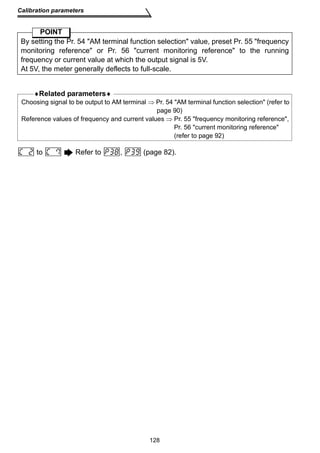
Pr.38 
Pr.1 Pr.39 
Pr.2 
Pr.13 
5V Pr.73 
(10V) 
(20mA) 
Frequency setting signal 
Frequency setting 
voltage gain frequency 
Frequency setting 
current gain frequency 
(1 to 120Hz) 
+5V 10 
2 
5 
0 to 5VDC 0 to 10VDC 
2 
5
SD 
Across 
AU-SD 
Manual operation Operation 
Frequency setting 
Inverter 
Manual-Automatic Switching 
29 
Input terminals 
1 
WIRING 
(2) Current input (4, 5, AU) 
To automatically perform operation under constant pressure or temperature control 
using a fan, pump etc., enter the controller output signal of 4 to 20mADC across 
terminals 4-5. 
Terminals AU-SD must be shorted to use the 4 to 20mADC signal for operation. 
(Assign the signal AU using any of Pr. 60 to Pr. 63.) 
When the multi-speed signal is input, the current input is ignored. 
Automatic/manual 
signal switching 
potentiometer 
Automatic signal 
4-20mADC 
AU 
10 
25 
4 
ON OFF 
Automatic 
operation 
4 to 20mA 
Manual 
operation 
0 to 5V 
(0 to 10V) 
1.4.3 External frequency selection (REX, RH, RM, RL) 
Up to 15 speeds (*) may be selected for an external command forward rotation start or 
up to 7 speeds for an external command reverse rotation start according to the 
combination of connecting the multi-speed select terminals REX, RH, RM and RL-SD, 
and multi-speed operation can be performed as shown below by shorting the start 
signal terminal STF (STR)-SD. 
Speeds (frequencies) may be specified as desired from the operation panel or 
parameter unit as listed below. 
CAUTION 
• * Change the setting of Pr. 63 STR terminal function selection to 8, and 
assign and use as the 15-speed select signal (REX). 
Has precedence over the main speed setting signal (0 to 5V, 0 to 10V, 4 to 
20mADC). 
RH 
REX 
Speed 1 
(high speed) 
Speed 5 
Speed 6 
Speed 7 
Time 
Speed 2 
(middle speed) 
Speed 3 
ON ON ON ON 
RM 
ON ON ON 
RL 
ON ON ON ON 
Output frequency (Hz) 
(low speed) 
Speed 4 
Time 
Speed 10 
Speed 9 
Speed 11 
Speed 12 
Speed 13 
Speed 14 
Speed 15 
ON ON ON ON 
Output frequency (Hz) 
RH 
ON ON ON ON 
RM 
ON ON ON ON 
RL 
ON ON ON ON ON ON ON ON 
REX 
Speed 8
Multi-Speed Setting 
30 
Input terminals 
ON 
ON 
*When using the REX signal, an external command cannot be used to make a 
reverse rotation start. 
Multi-Speed Operation Connection Example 
Speed 
Terminal Input 
Parameter Set Frequency 
REX- RH-SD 
RM-SD 
RL-SD* 
Remarks 
SD* 
Range Speed 1 
(high 
speed) 
OFF OFF OFF Pr. 4 0 to 120Hz  
Speed 2 
(middle 
speed) 
OFF OFF OFF Pr. 5 0 to 120Hz  
Speed 3 
(low 
speed) 
OFF OFF OFF Pr. 6 0 to 120Hz  
Speed 4 OFF OFF Pr. 24 
0 to 120Hz, - - - 
Pr. 6 setting when Pr. 24=- - - 
Speed 5 OFF OFF Pr. 25 Pr. 6 setting when Pr. 25=- - - 
Speed 6 OFF OFF Pr. 26 Pr. 5 setting when Pr. 26=- - - 
Speed 7 OFF Pr. 27 Pr. 6 setting when Pr. 27=- - - 
Speed 8 OFF OFF OFF Pr. 80 0Hz when Pr. 80=- - - 
Speed 9 OFF OFF Pr. 81 Pr. 6 setting when Pr. 81=- - - 
Speed 10 OFF OFF Pr. 82 Pr. 5 setting when Pr. 82=- - - 
Speed 11 OFF Pr. 83 Pr. 6 setting when Pr. 83=- - - 
Speed 12 OFF OFF Pr. 84 Pr. 4 setting when Pr. 84=- - - 
Speed 13 OFF Pr. 85 Pr. 6 setting when Pr. 85=- - - 
Speed 14 OFF Pr. 86 Pr. 5 setting when Pr. 86=- - - 
Speed 15 Pr. 87 Pr. 6 setting when Pr. 87=- - - 
External 
setting OFF OFF OFF OFF 
Frequency 
setting 
potentiometer 
0 to max. setting  
REMARKS 
*1. When the frequency setting potentiometer is connected, the input signal of the frequency 
setting potentiometer is ignored if the multi-speed select signal is switched on. (This also 
applies to the 4 to 20mA input signal.) 
*2. For a reverse rotation start, set Pr. 63 to - - - (factory setting) to make the STR signal of 
terminal STR valid. 
ON 
ON ON 
ON ON 
ON ON 
ON ON ON 
ON 
ON ON 
ON ON 
ON ON ON 
ON ON 
ON ON ON 
ON ON ON 
ON ON ON ON 
10 
2 
5 
Power supply 
Forward rotation 
Multi-speed 
selection 
Frequency 
setting 
potentiometer 
Inverter 
U 
V 
W 
STF 
REX 
RH 
RM 
RL 
IM Motor 
*2 
*1 
R 
S 
T 
SD
CPU 
31 
Input terminals 
1 
WIRING 
1.4.4 Indicator connection and adjustment (AM) 
A full-scale 5VDC analog signal can 
be output from across terminals AM- 
5. 
The analog output level can be 
calibrated by the operation panel or 
parameter unit (FR-PU04). Terminal 
AM function selection can be set in 
Pr. 54 AM terminal function 
selection. 
Terminal AM is isolated from the 
control circuit of the inverter. The 
cable length should not exceed 
30m. 
The output signal from terminal AM 
delays about several 100ms in 
output and therefore cannot be used 
as a signal for control which requires 
fast response. 
AM 
5 
Meter 
5V full scale 
Analog meter 
Terminal AM Output Circuit 
Set the reference output value of the inverter which outputs the full-scale voltage 
5VDC. 
Set it in Pr. 55 for frequency monitoring reference, or in Pr. 56 for current monitoring 
reference. 
Use the terminal AM output calibration parameter C1 to adjust the output voltage. 
[Example] 1. To set the output across AM-5 to 5VDC at the inverter output 
frequency of 90Hz, set 90Hz in Pr. 55. (Factory setting: 50Hz) 
2. To set the output across AM-5 to 5VDC at the inverter output current of 
20A, set 20A in Pr. 56. (Factory setting: rated inverter current) 
CAUTION 
•Refer to page 126 for the procedure of indicator adjustment. 
AM 
5 5VDC 
Inverter 
AM 
circuit 
Adjustment
Input terminals 
1.4.5 Control circuit common terminals (SD, 5, SE) 
Terminals SD, 5, and SE are all common terminals (0V) for I/O signals and are isolated 
from each other. 
Terminal SD is a common terminal for the contact input terminals (STF, STR, RH, RM, 
RL). 
Terminal 5 is a common terminal for the frequency setting analog input signals and 
indicator terminal AM. It should be protected from external noise using a shielded or 
twisted cable. 
Terminal SE is a common terminal for the open collector output terminal (RUN). 
1.4.6 Signal inputs by contactless switches 
If a transistor is used instead of a 
contacted switch as shown on the 
right, the input signals of the 
inverter can control terminals STF, 
STR, RH, RM, RL. 
Inverter 
REMARKS 
1.When using an external transistor connected to an external power supply, use terminal PC 
to prevent a malfunction from occurring due to a leakage current. (Refer to page 23.) 
2.Note that an SSR (solid-state relay) has a relatively large leakage current at OFF time and it 
may be accidentally input to the inverter. 
32 
+24V 
STF, etc. 
SD 
External signal input using transistor
Pr. 60 RL terminal function selection 
Pr. 61 RM terminal function selection Page 98 
Pr. 62 RH terminal function selection 
Pr. 63 STR terminal function selection 
Pr. 44 second acceleration/deceleration time 
Pr. 45 second deceleration time 
Pr. 46 second torque boost 
Pr. 47 second V/F (base frequency) 
To set any of the above functions, turn on this 
RT signal. 
33 
How to use the input signals (assigned terminals 
RL, RM, RH, STR) 
1 
WIRING 
1.5 How to use the input signals 
(assigned terminals RL, RM, RH, STR) 
These terminals can be 
changed in function by 
setting Pr. 60 to Pr. 63. 
1.5.1 Multi-speed setting (RL, RM, RH, REX signals): 
Pr. 60 to Pr. 63 setting 0, 1, 2, 8 
Remote setting (RL, RM, RH signals): 
Pr. 60 to Pr. 63 setting 0, 1, 2 
• By entering frequency commands into the RL, RM, RH and REX signals and turning 
on/off the corresponding signals, you can perform multi-speed operation (15 
speeds). (For details, refer to page 29.) 
• If the operation panel is away from the control box, you can perform continuous 
variable-speed operation with signal contacts, without using analog signals. (For 
details, refer to page 95.) 
1.5.2 Second function selection (RT signal): Pr. 60 to Pr. 63 setting 3 
Inverter 
STF (STR) 
RT 
Start 
Second acceleration 
/deceleration SD 
1.5.3 Current input selection AU signal: Pr. 60 to Pr. 63 setting 4 
When a fan, pump etc. is 
used to perform operation 
Automatic/manual 
of constant- pressure/ 
signal switching 
OFF 
temperature control, 
AU 
automatic operation can 
Manual operation 
be performed by entering 
Frequency setting 
10 
the 4-20mADC output 
potentiometer 
signal of a regulator into 
Automatic signal 
across terminals 4-5. 
4-20mADC 
When the 4-20mADC signal is used to perform operation, always short the AU signal. 
REMARKS 
The current input is ignored if the multi-speed signal is input. 
25 
4 
Inverter 
ON 
Operation 
Automatic 
operation 
4 to 20mA 
Manual 
operation 
0 to 5V 
(0 to 10V) 
SD 
Across 
AU-SD
How to use the input signals (assigned terminals 
RL, RM, RH, STR) 
1.5.4 Start self-holding selection (STOP signal): Pr. 60 to Pr. 63 
This connection example is used when you want 
to self-hold the start signal (forward rotation, 
reverse rotation). 
* Connected to the STOP signal to avoid 
forward or reverse rotation if forward or 
reverse rotation and stop are turned on 
simultaneously. 
Across 
MRS -SD 
Across 
STF- 
(STR) 
34 
setting 5 
STF 
STR 
Stop 
Forward 
rotation 
Reverse 
rotation 
STOP 
* 
SD 
(Wiring example for sink logic) 
1.5.5 Output shut-off (MRS signal): Pr. 60 to Pr. 63 setting 6 
Short the output stop terminal MRS-SD during inverter output to cause the inverter to 
immediately stop the output. Open terminals MRS-SD to resume operation in about 
10ms. Terminal MRS may be used as described below: 
(1) To stop the motor by 
mechanical brake (e.g. 
electromagnetic brake) 
Terminals MRS-SD must be 
shorted when the mechanical 
brake is operated and be opened 
before motor restart. 
(2) To provide interlock to 
disable operation by the 
inverter 
After MRS-SD have been shorted, 
the inverter cannot be operated if 
the start signal is given to the 
inverter. 
(3) To coast the motor to stop 
Output frequency 
Motor coasted 
to stop 
0.5Hz 
ON 
ON 
Pr. 13 
starting 
frequency 
SD 
The motor is decelerated according to the preset deceleration time and is stopped 
by operating the DC injection brake at 3Hz or less. By using terminal MRS, the 
motor is coasted to a stop.
When the external thermal relay or thermal relay built in 
the motor is actuated, the inverter output is shut off and 
an alarm signal is given to keep the motor stopped to 
protect the motor from overheat. Even if the thermal 
relay contact resets, the motor cannot be restarted 
unless the reset terminals RES-SD are shorted for more 
than 0.1s and then opened or a power-on reset is made. 
The function may therefore be used as an external 
emergency stop signal input. 
35 
How to use the input signals (assigned terminals 
RL, RM, RH, STR) 
1 
WIRING 
1.5.6 External thermal relay input: Pr. 60 to Pr. 63 setting 7 
Inverter 
U 
VW 
OH 
Thermal relay 
Motor 
IM 
SD 
1.5.7 Jog operation (JOG signal): Pr. 60 to Pr. 63 setting 9 
(1) Jog operation using external signals 
Jog operation can be started/stopped by shorting the jog mode select terminals JOG-SD 
and shorting/opening the start signal terminals STF or STR-SD. The jog frequency 
and jog acceleration/deceleration time are set in Pr. 15 (factory setting 5Hz, variable 
between 0 and 120Hz) and Pr. 16 (factory setting 0.5s, variable between 0 and 999s), 
respectively, and their settings can be changed from the operation panel or parameter 
unit. 
The JOG signal has precedence over the multi-speed signal. (External) 
Output frequency 
Forward 
rotation 
Jog frequency Pr. 15 
DC injection brake 
Reverse 
rotation 
Forward rotation 
Across STF-Reverse 
rotation 
Across STR-Time 
0.5Hz 
3Hz 
ON 
ON 
ON 
Across JOG -SD 
SD 
SD
How to use the input signals (assigned terminals 
RL, RM, RH, STR) 
1.5.8 Reset signal: Pr. 60 to Pr. 63 setting 10 
Used to reset the alarm stop state established when the inverter's protective function 
is activated. The reset signal immediately sets the control circuit to the initial (cold) 
status, e.g. initializes the electronic thermal relay function protection circuit. It shuts off 
the inverter output at the same time. During reset, the inverter output is kept shut off. 
To give this reset input, short terminals RES-SD for more than 0.1s. When the shorting 
time is long, the operation panel or parameter unit displays the initial screen, which is 
not a fault. 
After opening terminals RES-SD (about 1s), operation is enabled. 
The reset terminal is used to reset the inverter alarm stop state. If the reset terminal is 
shorted, then opened while the inverter is running, the motor may be restarted during 
coasting (refer to the timing chart below) and the output may be shut off due to 
overcurrent or overvoltage. 
Setting either 1 or 15 in reset selection Pr. 75 allows the accidental input of the 
reset signal during operation to be ignored. 
(For details, refer to page 105.) 
When motor is restarted 
during coasting, inverter 
activates current limit to 
start acceleration. 
36 
Output frequency 
(Hz) 
Across RES - 
Across 
STF (STR)- 
SD 
SD 
CAUTION 
Coasting 
ON 
ON 
Coasting to stop 
(Indicates motor speed) 
Coasting time 
ON 
T 
Ordinary 
acceleration 
T: Should be longer than the time of 
coasting to stop. 
Frequent resetting will make electronic thermal relay function invalid.
Pr. 88 PID action selection, Pr. 89 PID proportional band, Pr. 90 PID integral time, Pr. 91 
PID upper limit, Pr. 92 PID lower limit, Pr. 93 PID action set point for PU operation, Pr. 94 
PID differential time (Refer to page 113.) 
37 
How to use the input signals (assigned terminals 
RL, RM, RH, STR) 
1 
WIRING 
1.5.9 PID control valid terminal: Pr. 60 to Pr. 63 setting 14 
To exercise PID control, turn on the X14 signal. When this signal is off, ordinary 
inverter operation is performed. For more information, refer to page 113. 
♦Related parameters♦ 
1.5.10 PU operation/external operation switchover: Pr. 60 to Pr. 63 
setting 16 
You can change the operation mode. 
With 8 set in Pr. 79 operation mode selection, turning on the X16 signal shifts the 
operation mode to the external operation mode and turning off the X16 signal shifts it 
to the PU operation mode. For details, refer to page 109. 
♦Related parameters♦ 
Pr. 79 operation mode selection (Refer to page 109.)
Connection to the Stand-Alone Option 
1.6 Connection to the Stand-Alone Option 
The inverter accepts a variety of stand-alone option units as required. 
Incorrect connection will cause inverter damage or accident. Connect and operate the 
option unit carefully in accordance with the corresponding option unit manual. 
1.6.1 Connection of the brake unit (BU type) 
Connect the BU type brake unit correctly as shown below. Incorrect connection will 
damage the inverter. Remove jumpers across terminals HB-PC and TB-HC and 
connect a jumper across terminals PC-TB of the brake unit. 
MC 
ON 
MC 
OFF 
MC Remove 
jumpers. 
R/L1 
S/L2 
T/L3 
P/+ N/- 
HA HB HC TB P 
(Caution 3) 
Discharge resistor 
BU(-H) type brake unit 
38 
NFB 
Connect a 
jumper. 
Power 
supply 
CAUTION 
Motor 
Inverter 
T(Caution 4) 
U 
V 
W 
OCR 
PR 
PC 
IM 
OCR 
N 
1. The wiring distance between the inverter, brake unit and discharge resistor 
should be within 2m. If twisted wires are used, the distance should be within 
5m. 
2. If the transistors in the brake unit should become faulty, the resistor can be 
unusually hot, causing a fire. Therefore, install a magnetic contactor on the 
inverter's power supply side to shut off a current in case of fault. 
3. The N terminal is not provided for the FR-S520E-0.1K to 0.75K. 
4. When the power supply is 400V class, install a step-down transformer.
High power factor converter (FR-HC) Inverter 
(Caution 2) 
R S T R4 S4 T4 N P Y1 or Y2 RDY RSO SE 
(Caution 2) 
39 
Connection to the Stand-Alone Option 
1 
WIRING 
1.6.2 Connection of the high power factor converter (FR-HC) 
When connecting the high power factor converter (FR-HC) to suppress power supply 
harmonics, perform wiring securely as shown below. Incorrect connection will damage 
the high power factor converter and inverter. 
NFB 
CAUTION 
R4 S4 T4 
From FR-HCL02 
Power 
supply 
R 
S 
T 
SD 
(Caution 2) 
(Caution 1) 
RES (Caution 4) 
MRS (Caution 4) 
R3 S3 T3 
External box 
MC2 
MC1 
R2 S2 T2 
FR-HCL01 
R S T 
MC1MC2 
(Caution 5) 
P 
N (Caution 6) 
1. Use sink logic (factory setting) when the FR-HC is connected. The FR-HC 
cannot be connected when source logic is selected. 
2. The power input terminals R, S, T must be open. Incorrect connection will 
damage the inverter. Opposite polarity of terminals N, P will damage the 
inverter. 
3. The voltage phases of terminals R, S, T and terminals R4, S4, T4 must be 
matched before connection. 
4. Use Pr. 60 to Pr. 63 (input terminal function selection) to assign the terminals 
used for the RES and MRS signals. 
5. Do not insert NFB between terminals P-N (P - P, N - N) 
6. The N terminal is not provided for the FR-S520E-0.1K to 0.75K.
Connection to the Stand-Alone Option 
1.6.3 Connection of the power regeneration common 
40 
converter (FR-CV) 
When connecting the FR-CV type power regeneration common converter, connect the 
inverter terminals (P, N) and FR-CV type power regeneration common converter 
terminals as shown below so that their signals match with each other. 
NFB MC1 
CAUTION 
Dedicated stand-alone 
reactor (FR-CVL) 
R/L11 
S/L21 
T/L31 
R2/L12 
S2/L22 
T2/L32 
R2/L1 
S2/L2 
T2/L3 
R/L11 
S/L21 
T/MC1 
P/L+ 
N/L-U 
RDYA 
1. Use sink logic (factory setting) when the FR-CV is connected. The FR-CV 
cannot be connected when source logic is selected. 
2. The power input terminals R, S, T must be open. Incorrect connection will 
damage the inverter. Opposite polarity of terminals N, P will damage the 
inverter. 
3. The voltage phases of terminals R/L11, S/L21, T/MC1 and terminals R2/L1, 
S2/L2, T2/L3 must be matched before connection. 
4. Use Pr. 60 to Pr. 63 (input terminal function selection) to assign the terminals 
used for the RES and MRS signals. 
5. Do not insert NFB between terminals P-N (P/L+ - P, N/L− - N) 
6. Make sure to connect the terminal R/L11, S/L21, T/MC1 to the power supply. 
Running the inverter without connecting the terminals will damage the 
power regeneration common converter. 
7. The N terminal is not provided for the FR-S520E-0.1K to 0.75K. 
V 
W 
IM 
Three-phase 
AC power 
supply 
FR-CV power regenerative 
common converter 
Inverter 
PC 
SD 
MRS (Caution 4) 
RES (Caution 4) 
P24 
SD 
RDYB 
RSO 
SE 
(Caution 6) 
(Caution 2) 
(Caution 1) 
(Caution 3) 
(Caution 7) 
(Caution 5) 
R 
S 
T 
P 
N
8) to 1) 
1) SG 
2) P5S 
3) RDA 
4) SDB 
1. Do not plug the connector to a computer LAN port, fax modem socket, 
telephone modular connector etc.. The product could be damaged due to 
differences in electrical specifications. 
2. Pins 2 and 8 (P5S) are provided for the parameter unit power supply. Do not 
use them for any other purpose or when making parallel connection by RS- 
485 communication. 
3. Refer to page 132 for the communication parameters. 
When the parameter unit is used, the operation other than the stop key 
( ) of the operation panel is disabled. 
41 
Handling of the RS-485 connector 
1 
WIRING 
1.7 Handling of the RS-485 connector 
RS-485 connector pin layout 
View A of the inverter (receptacle 
side) 
CAUTION 
1.7.1 Connection of the parameter unit (FR-PU04) 
When connecting the parameter unit to the RS-485 connector, use the optional 
parameter unit connection cable (FR-CB2 ). 
CAUTION 
Refer to page 151 for the parameters related to parameter unit setting. 
5) SDA 
6) RDB 
7) SG 
8) P5S 
View A 
View A 
STOP 
RESET
Handling of the RS-485 connector 
1.7.2 Wiring of RS-485 communication 
Use the RS-485 connector to perform communication operation from a personal 
computer etc. 
When the RS-485 connector is connected with a personal, FA or other computer 
by a communication cable, a user program can run and monitor the inverter or 
read and write to the parameters. For parameter setting, refer to page 130. 
•Conforming standard: EIA-485 (RS-485) 
•Transmission format: Multidrop link system 
•Communication speed: Max. 19200bps 
•Overall extension: 500m 
Refer to page 130 for the setting related to RS-485 communication operation. 
System configuration examples 
(1) Connection of a computer to the inverter (1:1 connection) 
Computer Station 0 
Inverter 
RS-232C 
cable Max. 15m 
RJ-45 connector 2) 
Computer Station 0 
Inverter 
RJ-45 connector 2) 
Computer-inverter connection cable 
Refer to the following for the cable (RS-232C⇔RS-485 converter) for connection of 
the computer having the RS-232C interface with the inverter. 
Example of product available on the market (as of April, 2004) 
Model Maker 
FA-T-RS40 * Mitsubishi Electric Engineering Co., Ltd. 
*The converter cable cannot connect two or more inverters (the computer and 
inverter are connected on a 1:1 basis). Since the product is packed with the RS- 
232C cable and RS-485 cable (10BASE-T + RJ-45 connector), the cable and 
connector need not be prepared separately. 
REMARKS 
Refer to the following when fabricating the cable on the user side. 
Example of product available on the market (as of April, 2004) 
42 
RS-485 
connector 
RS-485 
interface/ 
terminal 
10BASE-T cable 1) 
RS-485 
connector 
10BASE-T cable 1) 
RS-232C 
connector 
RS-232C RS-485 
converter 
Product Model Maker 
1) 10BASE-T cable SGLPEV-T 0.5mm × 4P 
* Do not use pins No. 2, 8 (P5S). Mitsubishi Cable Industries, Ltd. 
2) RJ-45 connector 5-554720-3 Tyco Electronics Corporation
Product Model Maker 
1) 10BASE-T cable SGLPEV-T 0.5mm × 4P* Mitsubishi Cable Industries, Ltd. 
2) RJ-45 connector 5-554720-3 Tyco Electronics Corporation 
43 
Handling of the RS-485 connector 
1 
WIRING 
(2) Combination of computer and multiple inverters (1:n connection) 
Computer 
Computer 
RS-232C 
connector 
RS-232C 
cable 
Converter 
Station 0 
Inverter 
Station 1 
(Max. 32 inverters) 
Distribution 
terminal 
Station 1 
Inverter 
RS-485 
connector 
Station 2 
REMARKS 
Refer to the following when fabricating the cable on the user side. 
Example of product available on the market (as of April, 2004) 
Termination 
resistor 
RS-485 
connector 
10BASE-T cable 1) 
RS-485 
interface/ 
terminal 
Station n 
RJ-45 connector 2) 
Inverter 
RS-485 
connector 
Inverter 
Station n 
Inverter 
10BASE-T cable 1) RJ-45 connector 2) 
Inverter 
RS-485 
connector 
RS-485 
connector 
RS-485 
connector 
Distribution 
terminal 
Termination 
resistor 
Max. 15m 
(49.2feet) 
* Do not use pins No. 2, 8 (P5S) of the 10BASE-T cable.
Handling of the RS-485 connector 
Wiring methods 
1) Wiring of one RS-485 computer and one inverter 
Receive data 
RDA 
RDB 
SDA 
SDB 
RSA 
CSA 
Send data 
Request to send 
Clear to send 
Clear to send 
2) Wiring of one RS-485 computer and n inverters (several inverters) 
SDA 
SDB 
RDA 
RDB 
RDA 
RDB 
SDA 
RSA 
RSB 
CSA 
CSB 
SG 
RDB 
RDA 
SDB 
SDA 
RDB 
RDA 
SDB 
SDA 
REMARKS 
*1. Make connection in accordance with the instruction manual of the computer to be used 
with. Fully check the terminal numbers of the computer since they change with the model. 
*2. The inverters may be affected by reflection depending on the transmission speed or 
transmission distance. If this reflection hinders communication, provide a terminating 
resistor. When the RS-485 connector is used for connection, a terminating resistor cannot 
be fitted, so use a distributor. Connect the terminating resistor to only the inverter remotest 
from the computer. (Terminating resistor: 100Ω) 
44 
Receive data 
FG 
RS-485 connector 
RSB 
CSB 
SG 
SG 
(*1) 
Inverter 
0.2mm or more 
Computer Side Terminals 
Signal 
Description 
name 
Send data 
Request to send 
Signal ground 
Frame ground 
Cable connection and signal direction 
10 BASE-T Cable 
2 
SDB 
FG 
RDB 
RDA 
SDB 
SDA 
SG SG SG 
Computer 
Terminating 
resistor 
(*2) 
Cable connection and signal direction 
10 BASE-T Cable 
(*1) 
Station 1 Station 2 Station n 
Inverter Inverter Inverter
Interlock 
R IM 
S 
T Low-level signal contacts Twin contact 
45 
Design information 
1 
WIRING 
1.8 Design information 
1) Provide electrical and mechanical interlocks for MC1 and MC2 which are used for 
commercial power supply-inverter switchover. 
When the wiring is incorrect or if there is a commercial power supply-inverter 
switch-over circuit as shown below, the inverter will be damaged by leakage current 
from the power supply due to arcs generated at the time of switchover or chattering 
caused by a sequence error. 
2) If the machine must not be restarted when power is restored after a power failure, 
provide a magnetic contactor in the inverter's primary circuit and also make up a 
sequence which will not switch on the start signal. 
If the start signal (start switch) remains on after a power failure, the inverter will 
automatically restart as soon as the power is restored. 
3) Since the input signals to the control circuit are on a low level, use two or more 
parallel micro signal contacts or a twin contact for contact inputs to prevent a 
contact fault. 
4) Do not apply a large voltage to the contact input terminals (e.g. STF) of the control 
circuit. 
5) Always apply a voltage to the alarm output terminals (A, B, C) via a relay coil, lamp 
etc. 
6) Make sure that the specifications and rating match the system requirements. 
1) Commercial power supply-inverter 
switchover 
3) Low-level signal contacts 
Power 
supply 
Inverter 
MC1 
MC2 
Leakage current 
U 
V 
W
46 
MEMO
47 
Chapter 1 
Chapter 2 
Chapter 3 
Chapter 4 
2. FUNCTIONS 
This chapter explains the functions for use of this product. For simple 
variable-speed operation of the inverter, the factory settings of the 
parameters may be used as they are. Set the necessary parameters to 
meet the load and operational specifications. Refer to the instruction 
manual (basic) for the operation procedures. Always read the 
instructions before using the functions. 
2.1 Function (Parameter) list ................................................. 48 
2.2 List of parameters classified by purpose of use ........... 61 
2.3 Explanation of functions (parameters)........................... 63 
2.4 Output terminal function parameters ............................. 86 
2.5 Current detection function parameters .......................... 88 
2.6 Display function parameters ........................................... 90 
2.7 Restart operation parameters.......................................... 92 
2.8 Additional function parameters ...................................... 95 
2.9 Terminal function selection parameters......................... 98 
2.10 Operation selection function parameters ...................... 101 
2.11 Auxiliary parameters ........................................................ 120 
2.12 Maintenance parameters ................................................. 122 
2.13 Calibration parameters .................................................... 126 
2.14 Clear parameters .............................................................. 129 
2.15 Communication parameters ............................................ 130 
2.16 Parameter unit (FR-PU04) setting ................................... 151 
CAUTION 
As the contact input terminals RL, RM, RH, STR, open collector 
output terminal RUN and contact output terminals A, B, C can be 
changed in functions by parameter setting, their signal names 
used for the corresponding functions are used in this chapter 
(with the exception of the wiring examples). Note that they are 
not terminal names. 
REMARKS 
Parameter copy 
Use of the parameter unit (FR-PU04) allows the parameter values to 
be copied to another FR-S500 series inverter. After batch-reading the 
parameters of the copy source inverter, you can connect the 
parameter unit to the copy destination inverter and batch-write the 
parameters. 
For the operation procedure, refer to the instruction manual of the 
parameter unit (FR-PU04).
CAUTION 
indicates that the setting can be changed during operation if Pr. 77 parameter 
write disable selection has been set to 0 (factory setting). (Note that the Pr. 53, Pr. 
70 and Pr. 72 values can be changed only during PU operation.) 
48 
Function (Parameter) list 
Parameter List 
2.1 Function (Parameter) list 
Parameter Indica-tion 
*1. The factory setting varies with the inverter capacity: 5% for FR-S540E-1.5K and 2.2K, 4% 
for FR-S540E-3.7K. 
Name Setting 
Range 
Minimum 
Setting 
Increments 
Factory 
Setting 
Refer 
To: 
Cus-tomer 
Setting 
0 Torque boost 0 to 15% 0.1% 
6%/5%/ 
4%/ 
(*1) 
63 
1 Maximum frequency 0 to 120Hz 0.1Hz 60Hz 64 
2 Minimum frequency 0 to 120Hz 0.1Hz 0Hz 64 
3 Base frequency 0 to 120Hz 0.1Hz 60Hz 65 
4 Multi-speed setting 
(high speed) 0 to 120Hz 0.1Hz 60Hz 66 
5 Multi-speed setting 
(middle speed) 0 to 120Hz 0.1Hz 30Hz 66 
6 Multi-speed setting 
(low speed) 0 to 120Hz 0.1Hz 10Hz 66 
7 Acceleration time 0 to 999s 0.1s 5s 67 
8 Deceleration time 0 to 999s 0.1s 5s 67 
9 Electronic thermal O/L 
relay 0 to 50A 0.1A 
Rated 
output 
current 
69 
30 Extended function 
display selection 0, 1 1 0 80 
79 Operation mode 
selection 0 to 4, 7, 8 1 0 109
49 
Function (Parameter) list 
FUNCTIONS Parameter List 
2 
The extended function parameters are made valid by setting 1 in Pr. 30 extended 
function display selection. (For more detailed information on the way to set Pr. 30, 
refer to the instruction manual (basic).) 
Func-tion 
Para-meter 
Indica-tion 
Name Setting Range 
Minimum 
Setting 
Increments 
Factory 
Setting 
Refer 
To: 
Cus-tomer 
Setting 
Standard operation functions 
Parameters 0 to 9 are basic function parameters. 
10 
DC injection 
brake 
operation 
frequency 
0 to 120Hz 0.1Hz 3Hz 71 
11 
DC injection 
brake 
operation time 
0 to 10s 0.1s 0.5s 71 
12 DC injection 
brake voltage 0 to 15% 0.1% 6% 71 
13 Starting 
frequency 0 to 60Hz 0.1Hz 0.5Hz 72 
14 Load pattern 
selection 
0: For constant-torque 
loads, 
1: For variable-torque 
loads, 
2: For vertical lift loads, 
3: For vertical lift loads 
1 0 73 
15 Jog frequency 0 to 120Hz 0.1Hz 5Hz 74 
16 
Jog 
acceleration/ 
deceleration 
time 
0 to 999s 0.1s 0.5s 74 
17 
RUN key 
rotation 
direction 
selection 
0: Forward rotation, 
1: Reverse rotation 1 0 74 
19 Base frequency 
voltage 0 to 800V, 888, - - - 1V - - - 65 
20 
Acceleration/ 
deceleration 
reference 
frequency 
1 to 120Hz 0.1Hz 60Hz 67 
21 
Stall 
prevention 
function 
selection 
0 to 31, 100 1 0 75 
22 
Stall 
prevention 
operation 
level 
0 to 200% 1% 150% 77 
23 
Stall 
prevention 
operation level 
compensation 
factor at 
double speed 
0 to 200%, - - - 1% - - - 77
50 
Function (Parameter) list 
Parameter List 
Standard operation functions 
24 
Multi-speed 
setting 
(speed 4) 
0 to 120Hz, - - - 0.1Hz - - - 66 
25 
Multi-speed 
setting 
(speed 5) 
0 to 120Hz, - - - 0.1Hz - - - 66 
26 
Multi-speed 
setting 
(speed 6) 
0 to 120Hz, - - - 0.1Hz - - - 66 
27 
Multi-speed 
setting 
(speed 7) 
0 to 120Hz, - - - 0.1Hz - - - 66 
28 
Stall 
prevention 
operation 
reduction 
starting 
frequency 
0 to 120Hz 0.1Hz 60Hz 77 
29 
Acceleration/ 
deceleration 
pattern 
0: Linear acceleration/ 
deceleration, 
1: S-pattern acceleration/ 
deceleration A, 
2: S-pattern acceleration/ 
deceleration B 
1 0 79 
Parameter 30 is basic function parameter. 
31 Frequency 
jump 1A 0 to 120Hz, - - - 0.1Hz - - - 80 
32 Frequency 
jump 1B 0 to 120Hz, - - - 0.1Hz - - - 80 
33 Frequency 
jump 2A 0 to 120Hz, - - - 0.1Hz - - - 80 
34 Frequency 
jump 2B 0 to 120Hz, - - - 0.1Hz - - - 80 
35 Frequency 
jump 3A 0 to 120Hz, - - - 0.1Hz - - - 80 
36 Frequency 
jump 3B 0 to 120Hz, - - - 0.1Hz - - - 80 
37 Speed display 0, 0.1 to 999 0.1 0 81 
38 
Frequency 
setting voltage 
gain frequency 
1 to 120Hz 0.1Hz 60Hz 82 
39 
Frequency 
setting current 
gain frequency 
1 to 120Hz 0.1Hz 60Hz 82 
40 
Start-time 
ground fault 
detection 
selection 
0: Not detected 
1: Detected 1 0 86 
Func-tion 
Para-meter 
Indica-tion 
Name Setting Range 
Minimum 
Setting 
Increments 
Factory 
Setting 
Refer 
To: 
Cus-tomer 
Setting
51 
Function (Parameter) list 
FUNCTIONS Parameter List 
2 
Output terminal functions 
41 
Up-to-frequency 
sensitivity 
0 to 100% 1% 10% 86 
42 
Output 
frequency 
detection 
0 to 120Hz 0.1Hz 6Hz 87 
43 
Output 
frequency 
detection for 
reverse 
rotation 
0 to 120Hz, - - - 0.1Hz - - - 87 
Second functions 
44 
Second 
acceleration/ 
deceleration 
time 
0 to 999s 0.1s 5s 67 
45 
Second 
deceleration 
time 
0 to 999s, - - - 0.1s - - - 67 
46 Second 
torque boost 0 to 15%, - - - 0.1% - - - 63 
47 
Second V/F 
(base 
frequency) 
0 to 120Hz, - - - 0.1Hz - - - 65 
Current detection 
48 Output current 
detection level 0 to 200% 1% 150% 88 
49 
Output current 
detection 
period 
0 to 10s 0.1s 0s 88 
50 
Zero current 
detection 
level 
0 to 200% 1% 5% 89 
51 
Zero current 
detection 
period 
0.05 to 1s 0.01s 0.5s 89 
Func-tion 
Para-meter 
Indica-tion 
Name Setting Range 
Minimum 
Setting 
Increments 
Factory 
Setting 
Refer 
To: 
Cus-tomer 
Setting
52 
Function (Parameter) list 
Parameter List 
Display functions 
52 
Operation 
panel display 
data selection 
0: Output frequency, 
1: Output current, 
100:Set frequency 
during stop/output 
frequency during 
operation 
1 0 90 
53 
Frequency 
setting 
operation 
selection 
0: Setting dial 
frequency setting 
mode 
1: Setting dial 
potentiometer mode 
1 0 91 
54 
AM terminal 
function 
selection 
0:Output frequency 
monitor 
1:Output current 
monitor 
1 0 90 
55 
Frequency 
monitoring 
reference 
0 to 120Hz 0.1Hz 60Hz 92 
56 
Current 
monitoring 
reference 
0 to 50A 0.1A 
Rated 
output 
current 
92 
Automatic restart 
functions 
57 Restart 
coasting time 0 to 5s, - - - 0.1s - - - 92 
58 Restart 
cushion time 0 to 60s 0.1s 1s 92 
Additional function 
59 
Remote 
setting 
function 
selection 
0: Without remote 
setting function 
1: With remote setting 
function 
With frequency setting 
storage function 
2: With remote setting 
function 
Without frequency 
setting storage 
function 
1 0 95 
Func-tion 
Para-meter 
Indica-tion 
Name Setting Range 
Minimum 
Setting 
Increments 
Factory 
Setting 
Refer 
To: 
Cus-tomer 
Setting
53 
Function (Parameter) list 
FUNCTIONS Parameter List 
2 
Terminal function selection 
60 
RL terminal 
function 
selection 
0: RL, 1: RM, 2: RH, 
3: RT, 4: AU, 5: STOP, 
6: MRS, 7: OH, 
8: REX, 9: JOG, 
10: RES, 14: X14, 
16: X16, 
- - -: STR (The STR 
signal can be 
assigned to the STR 
terminal only.) 
1 0 98 
61 
RM terminal 
function 
selection 
1 1 98 
62 
RH terminal 
function 
selection 
1 2 98 
63 
STR terminal 
function 
selection 
1 - - - 98 
64 
RUN terminal 
function 
selection 
0:RUN, 1:SU, 3:OL, 
4:FU, 11:RY, 12:Y12, 
13:Y13, 14:FDN, 
15:FUP, 16:RL, 
93:Y93, 95:Y95 98:LF, 
99:ABC 
(The Y93 signal can 
be assigned to the 
RUN terminal only.) 
1 0 100 
65 
A, B, C 
terminal 
function 
selection 
1 99 100 
Operation selection functions 
66 Retry 
selection 
0: OC1 to 3, OV1 to 3, 
THM, THT, BE, GF, 
OHT, OLT, PE, OPT 
1: OC1 to 3, 
2: OV1 to 3, 
3:OC1 to 3, OV1 to 3 
1 0 101 
67 
Number of 
retries at 
alarm 
occurrence 
0: No retry 
1 to 10: 
Without alarm output 
during retry operation 
101 to 110: 
With alarm output 
during retry operation 
1 0 101 
68 Retry waiting 
time 0.1 to 360s 0.1s 1s 101 
69 Retry count 
display erase 
0:Cumulative count 
erase 1 0 101 
Func-tion 
Para-meter 
Indica-tion 
Name Setting Range 
Minimum 
Setting 
Increments 
Factory 
Setting 
Refer 
To: 
Cus-tomer 
Setting
54 
Function (Parameter) list 
Parameter List 
Operation selection 
functions 
70 Soft-PWM 
setting 
Presence/absence of 
Soft-PWM control can 
be selected. 
When Soft-PWM is 
valid, the metallic tone 
of motor noise can be 
changed into 
unoffending composite 
tone. 
0: Soft-PWM invalid 
1: Soft-PWM valid 
1 1 103 
71 Applied motor 
0, 100: 
Thermal characteristic 
for Mitsubishi 
standard motor 
1, 101: 
Thermal characteristic 
for Mitsubishi 
constant-torque motor 
(Thermal characteristic 
for Mitsubishi constant-torque 
motor is 
selected with the RT 
signal ON when 100 
and 101 are set.) 
1 0 69 
72 
PWM 
frequency 
selection 
0 to 15 1 1 103 
73 0-5V/0-10V 
selection 
0: For 0 to 5VDC input 
1: For 0 to 10VDC input 1 0 104 
74 Input filter 
time constant 
0: 2-step moving 
average processing 
1 to 8: 
Exponential 
average value of 2n 
at the setting of n 
1 1 105 
Func-tion 
Para-meter 
Indica-tion 
Name Setting Range 
Minimum 
Setting 
Increments 
Factory 
Setting 
Refer 
To: 
Cus-tomer 
Setting
55 
Function (Parameter) list 
FUNCTIONS Parameter List 
2 
Operation selection functions 
75 
Reset 
selection/PU 
stop selection 
0: Reset normally 
enabled/PU stop 
key disabled 
1: Enabled at alarm 
occurrence only/PU 
stop key disabled 
14:Reset normally 
enabled/normally 
decelerated to stop 
15:Enabled at alarm 
occurrence only/ 
normally 
decelerated to stop 
1 14 105 
76 
Cooling fan 
operation 
selection 
0: Operation started at 
power on 
1: Cooling fan ON/ 
OFF control 
1 1 107 
77 
Parameter 
write disable 
selection 
0:Write is enabled 
only during a stop 
1:Write disabled 
(except some 
parameters) 
2:Write during 
operation enabled 
1 0 108 
78 
Reverse 
rotation 
prevention 
selection 
0: Both forward 
rotation and reverse 
rotation enabled, 
1:Reverse rotation 
disabled, 
2: Forward rotation 
disabled 
1 0 109 
Parameter 79 is basic function parameter. 
Multi-speed operation function 
80 
Multi-speed 
setting 
(speed 8) 
0 to 120Hz, - - - 0.1Hz - - - 66 
81 
Multi-speed 
setting 
(speed 9) 
0 to 120Hz, - - - 0.1Hz - - - 66 
82 
Multi-speed 
setting 
(speed 10) 
0 to 120Hz, - - - 0.1Hz - - - 66 
83 
Multi-speed 
setting 
(speed 11) 
0 to 120Hz, - - - 0.1Hz - - - 66 
Func-tion 
Para-meter 
Indica-tion 
Name Setting Range 
Minimum 
Setting 
Increments 
Factory 
Setting 
Refer 
To: 
Cus-tomer 
Setting
56 
Function (Parameter) list 
Parameter List 
Multi-speed operation function 
84 
Multi-speed 
setting 
(speed 12) 
0 to 120Hz, - - - 0.1Hz - - - 66 
85 
Multi-speed 
setting 
(speed 13) 
0 to 120Hz, - - - 0.1Hz - - - 66 
86 
Multi-speed 
setting 
(speed 14) 
0 to 120Hz, - - - 0.1Hz - - - 66 
87 
Multi-speed 
setting 
(speed 15) 
0 to 120Hz, - - - 0.1Hz - - - 66 
PID control 
88 PID action 
selection 
20: PID reverse action, 
21: PID forward action 1 20 113 
89 
PID 
proportional 
band 
0.1 to 999%, - - - 0.1% 100% 113 
90 PID integral 
time 0.1 to 999s, - - - 0.1s 1s 113 
91 PID upper 
limit 0 to 100%, - - - 0.1% - - - 113 
92 PID lower 
limit 0 to 100%, - - - 0.1% - - - 113 
93 
PID action set 
point for PU 
operation 
0 to 100% 0.01% 0% 113 
94 
PID 
differential 
time 
0.01 to 10s, - - - 0.01s - - - 113 
Slip compensation 
95 Rated motor 
slip 0 to 50%, - - - 0.01% - - - 120 
96 
Slip 
compensation 
time constant 
0.01 to 10s 0.01s 0.5s 120 
97 
Constant-output 
region 
slip 
compensation 
selection 
0, - - - 1 - - - 120 
Automatic torque boost 
98 
Automatic 
torque boost 
selection 
(Motor 
capacity) 
0.1 to 3.7kW, - - - 0.01kW - - - 121 
99 Motor primary 
resistance 0 to 50Ω, - - - 0.01Ω - - - 122 
Func-tion 
Para-meter 
Indica-tion 
Name Setting Range 
Minimum 
Setting 
Increments 
Factory 
Setting 
Refer 
To: 
Cus-tomer 
Setting
Name Setting Range 
57 
Function (Parameter) list 
FUNCTIONS Parameter List 
2 
Maintenance parameters 
Func-tion 
Parame-ters 
Indi-cation 
Additional parameters 
Parameter for manufacturer setting 
Minimum 
Setting 
Incre-ments 
Factory 
Setting 
Refer 
To: 
Cus-tomer 
Setting 
Maintenance function 
H1 (503) Maintenance 
timer 0 to 999 1 
(1000h) 0 122 
H2 (504) 
Maintenance 
timer alarm output 
set time 
0 to 999, - - - 1 
(1000h) 
36 
(36000h) 122 
H3 (555) Current average 
time 0.1 to 1s 0.1s 1s 123 
H4 (556) Data output mask 
time 0 to 20s 0.1s 0s 123 
H5 (557) 
Current average 
value monitor 
signal output 
reference current 
0.1 to 999A 0.1A 1A 123 
Func-tion 
Parame-ters 
Indi-cation 
Name Setting Range 
Minimum 
Setting 
Incre-ments 
Factory 
Setting 
Refer 
To: 
Cus-tomer 
Setting 
Additional 
function 
H6 (162) 
Automatic restart 
after instantaneous 
power failure 
selection 
0, 1, 10 1 1 92 
H7 (559) Second electronic 
thermal O/L relay 0 to 50A, - - - 0.1A - - - 69 
Func-tion 
Parame-ters 
Indi-cation 
Name Setting Range 
Minimum 
Setting 
Incre-ments 
Factory 
Setting 
Refer 
To: 
Cus-tomer 
Setting 
– 
b1 (560) 
Parameter for manufacturer setting. Do not set. 
b2 (561)
Name Setting Range 
58 
Function (Parameter) list 
Parameter List 
Calibration parameters 
Func-tion 
Parame-ters 
Indi-cation 
Minimum 
Setting 
Incre-ments 
* Factory settings may differ because of calibration parameters. 
Factory 
Setting 
Refer 
To: 
Cus-tomer 
Setting 
Calibration parameters 
C1 (901) AM terminal 
calibration    126 
C2 (902) 
Frequency 
setting voltage 
bias frequency 
0 to 60Hz 0.1Hz 0Hz 82 
C3 (902) Frequency setting 
voltage bias 0 to 300% 0.1% 0% (*) 82 
C4 (903) Frequency setting 
voltage gain 0 to 300% 0.1% 96% 
(*) 82 
C5 (904) 
Frequency 
setting current 
bias frequency 
0 to 60Hz 0.1Hz 0Hz 82 
C6 (904) Frequency setting 
current bias 0 to 300% 0.1% 20% (*) 82 
C7 (905) Frequency setting 
current gain 0 to 300% 0.1% 100% 
(*) 82 
C8 (269) Parameter for manufacturer setting. Do not set. 
Clear parameters 
CLr Parameter clear 
0: Not executed 
1: Parameter clear 
10: All clear 
1 0 129 
ECL Alarm history 
clear 
0:Not cleared, 
1: Alarm history 
clear 
1 0 129
59 
Function (Parameter) list 
FUNCTIONS Parameter List 
2 
Communication Parameters 
Func 
Parame-ter 
Indica-tion 
tion 
Name Setting Range 
Minimum 
Setting 
Incre-ments 
Factory 
Setting 
Refer 
To: 
Cus-tomer 
Setting 
Communication Parameters 
n1 (331) Communication 
station number 
0 to 31: Specify 
the station 
number of the 
inverter. 
1 0 132 
n2 (332) Communication 
speed 
48: 4800bps, 
96: 9600bps, 
192: 19200bps 
1 192 132 
n3 (333) Stop bit length 
0, 1: (Data length 8), 
10, 11: (Data 
length 7) 
1 1 132 
n4 (334) 
Parity check 
presence/ 
absence 
0: Absent, 
1:With odd parity 
check, 
2:With even 
parity check 
1 2 132 
n5 (335) 
Number of 
communication 
retries 
0 to 10, - - - 1 1 132 
n6 (336) 
Communication 
check time 
interval 
0 to 999s, - - - 0.1s - - - 132 
n7 (337) Waiting time 
setting 0 to 150ms, - - - 1 - - - 132 
n8 (338) Operation 
command source 
0:Command 
source is 
computer, 
1:Command 
source is 
external 
terminal 
1 0 147 
n9 (339) Speed command 
source 
0:Command 
sourse is 
computer, 
1:Command 
source is 
external 
terminal 
1 0 147 
n10 
(340) 
Link startup 
mode selection 
0: As set in Pr. 79. 
1: Started in 
computer link 
operation mode. 
1 0 148 
n11 
(341) CR/LF selection 
0: Without CR/LF, 
1: With CR, 
without LF 
2:With CR/LF 
1 1 132 
n12 
(342) 
E2PROM write 
selection 
0:Write to RAM 
and E2PROM 
1:Write to RAM 
only 
1 0 150
60 
Function (Parameter) list 
Parameter List 
PU parameters 
When the parameter unit (FR-PU04) is used, operation from the operation panel is 
not accepted. (The stop key ( ) is valid) 
Func 
tion 
Parame-ter 
Indica-tion 
STOP 
RESET 
Name Setting Range 
Minimum 
Setting 
Incre-ments 
Factory 
Setting 
Refer 
To: 
Cus-tomer 
Setting 
PU parameters 
n13 
(145) 
PU display 
language 
selection 
0: Japanese, 
1: English, 
2: German, 
3: French, 
4: Spanish, 
5: Italian, 
6: Swedish, 
7: Finish 
1 1 151 
n14 
(990) 
PU buzzer 
control 
0:Without sound, 
1:With sound 1 1 151 
n15 
(991) 
0 (Light) 
63 (Dark) 
PU contrast 
adjustment 1 58 152 
n16 
(992) 
PU main display 
screen data 
selection 
0: Selectable 
between 
output 
frequency and 
output current 
100: 
(during stop): 
Set frequency, 
output current 
(during 
operation): 
Output 
frequency, output 
current 
1 0 152 
n17 
(993) 
disconnected PU 
detection/PU 
setting lock 
0: Without 
disconnected 
PU error, 
1: Error at 
disconnected 
PU, 
10:Without 
disconnected 
PU error (PU 
operation 
disable) 
1 0 153 
REMARKS 
1.The parameter number in parentheses is the one for use with the parameter unit (FR-PU04). 
2. Set 9999 when setting a value - - - using the parameter unit (FR-PU04). 
3. The decimal places of a value 100 or more (3 digits or more) cannot be displayed.
61 
List of parameters classified by purpose of use 
2 
FUNCTIONS 
2.2 List of parameters classified by purpose of use 
Set the parameters according to the operating conditions. The following list indicates 
purpose of use and corresponding parameters. 
Purpose of Use Parameter Numbers 
Parameter numbers which must be set 
Related to operation 
Use of extended function parameters Pr. 30 
Operation mode selection Pr. 53, Pr. 79 
(Communication parameters n10, n17) 
Acceleration/deceleration time/pattern 
adjustment Pr. 7, Pr. 8, Pr. 16, Pr. 20, Pr. 29, Pr. 44, Pr. 45 
Selection of output characteristics 
optimum for load characteristics Pr. 3, Pr. 14, Pr. 19, Pr. 44, Pr. 45 
Output frequency restriction (limit) Pr. 1, Pr. 2 
Operation over 60Hz Pr. 1, Pr. 38, Pr. 39, 
calibration parameter C4, C7 
Adjustment of frequency setting signals 
and outputs 
Pr. 38, Pr. 39, Pr. 73, 
calibration parameter C2 to C7 
Motor output torque adjustment Pr. 0, Pr. 98 
Brake operation adjustment Pr. 10, Pr. 11, Pr. 12 
Multi-speed operation 
Pr. 1, Pr. 2, Pr. 4, Pr. 5, Pr. 6, Pr. 24, Pr. 25, Pr. 
26, Pr. 27, Pr. 80, Pr. 81, Pr. 82, Pr. 83, Pr. 84, 
Pr. 85, Pr. 86, Pr. 87 
Jog operation Pr. 15, Pr. 16 
Frequency jump operation Pr. 31, Pr. 32, Pr. 33, Pr. 34, Pr. 35, Pr. 36 
Automatic restart operation after 
instantaneous power failure Pr. 57, Pr. 58, additional parameter H6 
Slip compensation setting Pr. 95 to Pr. 97 
Setting of output characteristics matching 
the motor Pr. 3, Pr. 19, Pr. 71 
Related to application 
operation 
Electromagnetic brake operation timing Pr. 42, Pr. 64, Pr. 65 
Sub-motor operation Pr. 0, Pr. 3, Pr. 7, Pr. 8, Pr. 44, Pr. 45, 
Pr. 46, Pr. 47, additional parameter H7 
Operation in communication with 
personal computer Communication parameters n1 to n12 
Operation under PID control Pr. 60 to Pr. 65, Pr. 73, Pr. 79, Pr. 88 
to Pr. 94 
Noise reduction Pr. 70, Pr. 72
List of parameters classified by purpose of use 
Purpose of Use Parameter Numbers 
62 
Related to 
monitoring 
Parameter numbers which must be set 
Frequency meter calibration Pr. 54, Pr. 55, Pr. 56, 
calibration parameter C1 
Display of monitor on operation panel or 
parameter unit (FR-PU04) Pr. 52, Communication parameter n16 
Display of speed, etc. Pr. 37, Pr. 52 
Related to incorrect 
operation prevention 
Function write prevention Pr. 77 
Reverse rotation prevention (Pr. 17), Pr. 78 
Current detection Pr. 48 to Pr. 51, Pr. 64, Pr. 65 
Motor stall prevention Pr. 21, Pr. 22, Pr. 23, Pr. 28 
Others 
Input terminal function assignment Pr. 60 to Pr. 63 
Output terminal function assignment Pr. 64, Pr. 65 
Increased cooling fan life Pr. 76 
Motor protection from overheat Pr. 9, Pr. 71 
Automatic restart operation at alarm stop Pr. 66 to Pr. 69 
Setting of ground fault overcurrent 
protection Pr. 40 
Inverter reset selection Pr. 75 
Maintenance timer output Maintenance parameters H1 to H5
Increase this value for use when the 
inverter-to-motor distance is long or 
motor torque is insufficient in the low 
speed range (stall prevention is 
activated). 
Motor torque in the low-frequency 
range can be adjusted to the load to 
increase the starting motor torque. 
Output voltage 
Pr.0 
Pr.46 Setting range 
0 Output frequency (Hz) 
Parameter Name Factory Setting Setting Range Remarks 
0 Torque boost 6%/5%/4% 0 to 15% 
boost - - - 0 to 15%, 
- - - 
REMARKS 
* The RT signal acts as the second function selection signal and makes the other second functions valid. 
63 
Explanation of functions (parameters) 
2 
FUNCTIONS 
2.3 Explanation of functions (parameters) 
2.3.1 Torque boost (Pr. 0 , Pr. 46 ) 
The factory setting varies according 
to the inverter capacity. (Refer to the 
following table for details.) 
46 Second torque 
- - -: Function invalid. Setting is 
enabled when Pr. 30 = 1. 
Setting 
•Assuming that the base frequency voltage is 100%, set the 0Hz voltage in %. 
Use the RT signal to switch between two different torque boosts. (Turn on the RT 
signal to make Pr. 46 valid(*).) 
When using an inverter-dedicated motor (constant-torque motor), make setting as 
indicated below. 
(If the factory set Pr. 71 value is changed to the setting for use with a constant-torque 
motor, the Pr. 0 setting changes to the corresponding value in the following table.) 
Inverter Type Inverter Capacity Factory Setting Constant-torque Motor Setting 
FR-S520E 
FR-S510WE 
0.1K to 0.75K 6% 6% (no change) 
1.5K to 3.7K 4% 
FR-S540E 
0.4K, 0.75K 6% 6% (no change) 
1.5K 5% 4% 
2.2K 3.7K 4% 3% 
CAUTION 
•Selecting automatic torque boost control makes this parameter setting invalid. 
•A too large setting may cause the motor to overheat or result in an 
overcurrent trip. The guideline is about 10% at the greatest. 
♦Related parameters♦ 
• RT signal (second function Pr. 46) setting⇒ Pr. 60 to Pr. 63 input terminal function selection 
(refer to page 98) 
• Constant-torque motor setting ⇒ Pr. 71 applied motor (refer to page 69) 
• Automatic torque boost control selection ⇒ Pr. 98 automatic torque boost selection (motor 
capacity) (refer to page 121)
Explanation of functions (parameters) 
2.3.2 Maximum and minimum frequency (Pr. 1 , Pr. 2 ) 
Output frequency (Hz) 
Pr.1 
Pr.2 
Set frequency 
5,10V 
(20mA) 
0 
(4mA) 
Setting 
•Use Pr. 1 to set the upper limit of the output frequency. If the frequency of the 
frequency command entered is higher than the setting, the output frequency is 
clamped at the maximum frequency. 
•Use Pr. 2 to set the lower limit of the output frequency. 
64 
You can clamp the upper and 
lower limits of the output 
frequency. 
Parameter Name Factory Setting Setting Range 
1 Maximum frequency 60Hz 0 to 120Hz 
2 Minimum frequency 0Hz 0 to 120Hz 
REMARKS 
When using the potentiometer (frequency setting potentiometer) connected across terminals 
2-5 to perform operation above 60Hz, change the Pr. 1 and Pr. 38 (Pr. 39 when using the 
potentiometer across terminals 4-5) values. 
CAUTION 
If the Pr. 2 setting is higher than the Pr. 13 starting frequency value, note 
that the motor will run at the frequency set in Pr. 2 according to the 
acceleration time setting by merely switching the start signal on, without 
entry of the command frequency. 
♦Related parameters♦ 
• Starting frequency setting⇒ Pr. 13 starting frequency (refer to page 72) 
• Maximum frequency setting using external potentiometer 
⇒ Pr. 30 extended function display selection (refer to page 80), 
Pr. 38 frequency setting voltage gain frequency, 
Pr. 39 frequency setting current gain frequency (refer to page 82)
Pr.19 
Output voltage 
Setting 
Range Remarks 
3 Base frequency 60Hz 0 to 120Hz  
19 Base frequency 
voltage - - - 0 to 800V, 
888, - - - 
(base frequency) - - - 0 to 120Hz, 
- - - 
65 
Explanation of functions (parameters) 
2 
FUNCTIONS 
2.3.3 Base frequency, base frequency voltage 
(Pr.3 , Pr.19 , Pr.47 ) 
Used to adjust the inverter 
outputs (voltage, frequency) to 
the motor rating. 
Parameter Name Factory 
Setting 
888: 95% of power supply voltage (*1) 
- - -: Same as power supply voltage (*2) 
Setting is enabled when Pr. 30 = 1. 
47 Second V/F 
- - -: Function invalid 
Setting is enabled when Pr. 30 = 1. 
*1. 1.9 times greater than the power supply voltage for the FR-S510WE-0.1K to 0.75K. 
*2. Twice greater than the power supply voltage for the FR-S510WE-0.1K to 0.75K. 
Setting 
•In Pr. 3 and Pr. 47, set the base frequency (motor's rated frequency). 
Use the RT signal to switch between these two different base frequencies. 
(Turn on the RT signal to make Pr. 47 valid.) (*) 
When running the standard motor, generally set the base frequency to the rated 
frequency of the motor. When running the motor using commercial power supply-inverter 
switch-over operation, set the base frequency to the same value as the 
power supply frequency. 
If only 50Hz is given on the motor rating plate as the frequency, always set the 
base frequency to 50Hz. If it remains at 60Hz, the voltage may become too low 
and torque shortage occurs, resulting in an overload trip. Special care must be taken 
when 1 is set in Pr. 14 load pattern selection. 
•Set the base voltage (e.g. rated voltage of motor) in Pr. 19. 
CAUTION 
1. Set 60Hz in Pr. 3 base frequency when using a Mitsubishi constant-torque 
motor. 
2. When automatic torque boost is selected, Pr. 47 is invalid. When automatic 
torque boost is selected, setting - - - or 888 in Pr. 19 uses the rated 
output voltage. 
REMARKS 
* The RT signal serves as the second function selection signal and makes the other second 
functions valid. 
♦Related parameters♦ 
• When rated motor frequency is 50Hz ⇒ Pr. 14 load pattern selection (refer to page 73) 
• RT signal (second function Pr. 47) setting ⇒ Pr. 60 to Pr. 63 (input terminal function selection) 
(refer to page 98) 
• Motor setting ⇒ Pr. 71 applied motor (refer to page 69) 
• Automatic torque boost selection ⇒ Pr. 98 automatic torque boost selection (motor capacity) 
(refer to page 121) 
Output 
frequency (Hz) 
Pr.3 
Pr.47
Explanation of functions (parameters) 
2.3.4 Multi-speed operation (Pr. 4 , Pr. 5 , Pr. 6 , 
Pr. 24 to Pr. 27 , Pr. 80 to Pr. 87 ) 
Used to switch between the predetermined running speeds. 
Any speed can be selected by merely switching on/off the corresponding 
contact signals (RH, RM, RL, REX signals). 
By using these functions with Pr. 1 maximum frequency and Pr. 2 minimum 
frequency, up to 17 speeds can be set. 
This function is valid in the external operation mode or in the combined 
operation mode which is available when Pr. 79 = 3 or 4. 
Speed 2 
(middle speed) 
Speed 3 
Speed 10 
Output frequency (Hz) 
(speeds 4 to 7) - - - 0 to 120Hz, 
(speeds 8 to 15) - - - 0 to 120Hz, 
RH 
Setting 
•Set the running frequencies in the corresponding parameters. 
Each speed (frequency) can be set as desired between 0 and 120Hz during inverter 
operation. 
When the parameter of any multi-speed setting is read, turn the to change the 
setting. 
In this case, press the ( ) to store the frequency. (This is also enabled in 
the external mode.) 
The setting is reflected by pressing the ( ). 
•Assign the terminals used for signals RH, RM, RL and REX using Pr. 60 to Pr. 63. 
(When terminal assignment is changed using Pr. 60 to Pr. 63, the other functions may 
be affected. Please make setting after confirming the function of each terminal.) 
66 
Parameter Name Factory 
Setting 
Setting 
Range Remarks 
4 Multi-speed setting 
(high speed) 60Hz 0 to 120Hz  
5 Multi-speed setting 
(middle speed) 30Hz 0 to 120Hz  
6 Multi-speed setting 
(low speed) 10Hz 0 to 120Hz  
24 to 27 Multi-speed setting 
- - - 
- - - = no setting. Setting 
enabled when Pr. 30 = 1. 
80 to 87 Multi-speed setting 
- - - 
- - - = no setting. Setting 
enabled when Pr. 30 = 1. 
REX 
Speed 1 
(high speed) 
Speed 5 
Speed 6 
Speed 7 
Time 
ON ON ON ON 
RM 
ON ON ON 
RL 
ON ON ON ON 
Output frequency (Hz) 
(low speed) 
Speed 4 
Priority: RLRMRH 
Time 
Speed 9 
Speed 11 
Speed 12 
Speed 13 
Speed 14 
Speed 15 
ON ON ON ON 
RH 
ON ON ON ON 
RM 
ON ON ON ON 
RL 
ON ON ON ON ON ON ON ON 
REX 
Speed 8 
SET WRITE 
SET WRITE
1. The multi-speed settings override the main speeds (across terminals 2-5, 4- 
5, setting dial). When the multi-speed settings and setting dial are used in 
the combined operation mode (Pr. 79=3), the multi-speed settings have 
precedence. 
2. The multi-speeds can also be set in the PU or external operation mode. 
3. For 3-speed setting, if two or three speeds are simultaneously selected, 
priority is given to the set frequency of the lower signal. 
4. Pr. 24 to Pr. 27 and Pr. 80 to Pr. 87 settings have no priority between them. 
5. The parameter values can be changed during operation. 
6. When using this function with the jog signal, the jog signal has precedence. 
REMARKS 
The frequency-set external terminals have the following priority: 
Jog  multi-speed operation  AU (terminal 4)  terminal 2 
• Maximum, minimum frequency setting ⇒ Pr. 1 maximum frequency, Pr. 2 minimum frequency 
(refer to page 64) 
• Assignment of signals RH, RM, RL, REX to terminals ⇒ Pr. 60 to Pr. 63 (input terminal function 
• External operation mode setting ⇒ Pr. 79 operation mode selection (refer to page 109) 
• Computer link mode ⇒ Pr. 79 operation mode selection (refer to page 109), communication 
parameter n10 link startup mode selection (refer to page 148) 
• Speed command source ⇒ Communication parameter n9 speed command source 
time - - - 0 to 999s, 
67 
Explanation of functions (parameters) 
2 
FUNCTIONS 
CAUTION 
♦Related parameters♦ 
selection) (refer to page 98) 
(refer to page 147) 
2.3.5 Acceleration/deceleration time (Pr. 7 , Pr. 8 , 
Pr. 20 , Pr. 44 , Pr. 45 ) 
Used to set motor acceleration/ 
deceleration time. 
Set a larger value for a slower 
speed increase/decrease or a 
smaller value for a faster speed 
increase/decrease. 
Parameter Name Factory 
Setting 
Running 
frequency 
Constant speed 
Setting 
Range Remarks 
7 Acceleration time 5s 0 to 999s ---------- 
8 Deceleration time 5s 0 to 999s ---------- 
20 
Acceleration/ 
deceleration reference 
frequency 
60Hz 1 to 120Hz Setting is enabled when 
Pr. 30 = 1. 
44 Second acceleration/ 
deceleration time 5s 0 to 999s Setting is enabled when 
Pr. 30 = 1. 
45 Second deceleration 
- - - 
- - -: 
acceleration time= 
deceleration time. 
Setting is 
enabled when 
Pr. 30 = 1. 
Acceleration 
time 
Deceleration 
time 
Time 
Pr.20 
Output frequency (Hz) 
Pr.7 
Pr.44 
Pr.8 
Pr.45 
Acceleration Deceleration
Explanation of functions (parameters) 
Setting 
•Use Pr. 7 and Pr. 44 to set the acceleration time required to reach the frequency set 
in Pr. 20 from 0Hz. 
•Use Pr. 8 and Pr. 45 to set the deceleration time required to reach 0Hz from the 
frequency set in Pr. 20. 
•Pr. 44 and Pr. 45 are valid when the RT signal is on. (When the RT signal is on, the 
other second functions (Pr. 44, Pr. 45, Pr. 46, Pr. 47, additional parameter H7) are 
also selected.) 
•Set - - - in Pr. 45 to make the deceleration time equal to the acceleration time (Pr. 44). 
68 
CAUTION 
1. In S-shaped acceleration/deceleration pattern A (refer to page 79), the set 
time is the period required to reach the base frequency set in Pr. 3. 
• Acceleration/deceleration time formula when the set frequency is the base 
frequency or higher 
T: Acceleration/deceleration time setting (s) 
f : Set frequency (Hz) 
•Guideline for acceleration/deceleration time at the base frequency of 60Hz 
(0Hz to set frequency) 
2. If the Pr. 20 setting is changed, the settings of calibration functions Pr. 38 
and Pr. 39 (frequency setting signal gains) remain unchanged. 
To adjust the gains, adjust calibration functions Pr. 38 and Pr. 39. 
3. When the setting of Pr. 7, Pr. 8, Pr. 44 or Pr. 45 is 0, the acceleration/ 
deceleration time is 0.04s. 
4. If the acceleration/deceleration time is set to the shortest value, the actual 
motor acceleration/deceleration time cannot be made shorter than the 
shortest acceleration/deceleration time which is determined by the 
mechanical system's J (moment of inertia) and motor torque. 
♦Related parameters♦ 
• Base frequency setting ⇒ Pr. 3 base frequency (refer to page 65) 
• Acceleration/deceleration pattern, S-pattern acceleration/deceleration A 
⇒ Pr. 29 acceleration/deceleration pattern (refer to page 79) 
• Calibration function ⇒ Pr. 38 frequency setting voltage gain frequency 
Pr. 39 frequency setting current gain frequency (refer to page 82) 
• RT signal setting ⇒ Pr. 60 to Pr. 63 (input terminal function selection) (refer to page 98) 
• Jog acceleration/deceleration time ⇒ Pr. 16 jog acceleration/deceleration time 
(refer to page 74) 
t = 
4 
× 
T 
× f2 + 
5 
9 T (Pr.3)2 9 
Frequency setting (Hz) 
Acceleration/ 
deceleration time (s) 
60 120 
5 5 12 
15 15 35
Set the motor used and protect the motor from overheat. 
This feature provides the optimum protective characteristics, including reduced 
motor cooling capability, at low speed. 
•When using the Mitsubishi constant-torque motor 
Set 1 in Pr. 71 for V/F control or automatic torque boost control. 
The electronic thermal relay function is set to the thermal characteristic of the 
constant-torque motor. 
•When you selected the Mitsubishi constant-torque motor, the values of the following 
parameters are automatically changed. (only when the setting values of those 
parameters are at factory setting) 
Pr. 0 torque boost, Pr. 12 DC injection brake voltage 
Para 
meter Name Factory 
Setting 
Range Remarks 
Rated output 
current 0 to 50A 
71 Applied motor 0 0, 1, 
100, 101 
Second electronic 
thermal O/L relay - - - 0 to 50A, 
- - - 
Pr. 71 Setting Thermal Characteristic of the ElectronicThermal Relay Function 
0, 100 Thermal characteristics of a standard motor 
1, 101 Thermal characteristics of a Mitsubishi constant-torque motor 
(This provides a 100% continuous torque characteristic in the low-speed region.) 
69 
Explanation of functions (parameters) 
2 
FUNCTIONS 
2.3.6 Selection and protection of a motor (Pr. 9 , Pr. 71 , H7 ) 
POINT 
Setting 
9 Electronic thermal 
O/L relay 
Setting is 
enabled 
when 
Pr. 30 = 1 
H7 
(559) 
- - -: Without second electronic 
thermal relay function 
• The parameter number in parentheses is the one for use with the parameter unit (FR-PU04). 
Setting 
•Refer to the following list and set Pr. 71 according to the motor used. 
Setting 100 or 101 changes thermal characteristic of the electronic thermal relay function 
to thermal characteristics of a Mitsubishi constant-torque motor when the RT signal is ON. 
•Set the rated current [A] of the motor in Pr. 9. (Normally set the rated current at 50Hz.) 
•Setting 0 in Pr. 9 disables electronic thermal relay function (motor protective 
function). (The protective function of the inverter is activated.) 
•When setting second electronic thermal relay function, set the motor rated current 
value in the additional parameter H7. The second electronic thermal relay function is 
valid when the RT signal is on. (When the RT signal is on, other second functions 
(Pr.44 to Pr.47) are also selected.) 
CAUTION 
•When two or more motors are connected to the inverter, they cannot be 
protected by the electronic thermal relay function. Install an external thermal 
relay to each motor. 
•When a difference between the inverter and motor capacities is large and the 
setting becomes less than half amount of the inverter rated current, the 
protective characteristics of the electronic thermal relay function will be 
deteriorated. In this case, use an external thermal relay. 
•A special motor cannot be protected by the electronic thermal relay function. 
Use an external thermal relay.
First Motor Electronic Thermal Relay 
Pr. 9 
setting RT = OFF RT = ON 
standard ...................Thermal characteristic for 
constant-torque ........Thermal characteristic for 
70 
Explanation of functions (parameters) 
REMARKS 
•When running two motors with one inverter, you can set the electronic thermal relay function 
of each inverter. 
Second Motor Electronic Thermal 
additional 
parameter 
H7 setting 
- - -, 0 
0.1 to 50A standard 
- - - 
0 
0.1 to 50A standard 
- - -, 0 
0.1 to 50A standard 
- - - 
0 
0.1 to 50A standard 
- - -, 0 
0.1 to 50A constant-torque 
- - - 
0 
0.1 to 50A constant-torque 
- - -, 0 
0.1 to 50A constant-torque 
- - - 
0 
0.1 to 50A constant-torque 
constant-torque motor 
..... Output current value is used to 
..... Perform integration processing 
..... Electronic thermal relay function 
CAUTION 
Pr. 71 
applied 
motor 
Function 
Relay Function 
RT = OFF RT = ON 
0 
0 
0.1 to 50A 
standard 
1 
0 
0.1 to 50A constant-torque 
100 
0 
0.1 to 50A 
standard 
101 
0 
0.1 to 50A constant-torque 
standard motor 
perform integration processing. 
using output current of 0A. 
is not activated (cumulative 
value clear) 
Set this parameter correctly according to the motor used. 
Incorrect setting may cause the motor to overheat and burn.
Install a mechanical brake. No holding torque is provided. Output frequency (Hz) 
Parameter Name Factory 
Setting 
Pr.10 
operation frequency 3Hz 0 to 120Hz Setting is enabled when 
Pr. 30 = 1. 
operation time 0.5s 0 to 10s 
12 DC injection brake voltage 6% 0 to 15% 
71 
Explanation of functions (parameters) 
2 
FUNCTIONS 
2.3.7 DC injection brake (Pr. 10 , Pr. 11 , Pr. 12 ) 
By setting the DC injection brake 
voltage (torque), operation time 
and operation starting frequency, 
the stopping accuracy of 
positioning operation, etc. or the 
timing of operating the DC 
injection brake to stop the motor 
can be adjusted according to the 
load. 
Setting 
Range Remarks 
10 DC injection brake 
(When Pr. 11 is set to 0s or 
Pr. 12 is set to 0%, DC 
injection brake is not 
operated.) 
11 DC injection brake 
* The factory setting varies according to the inverter capacity. (Refer to the following table for details.) 
Setting 
•Use Pr. 10 to set the frequency at which the DC injection brake operation is started. 
•Use Pr. 11 to set the period during when the brake is operated. 
•Use Pr. 12 to set the percentage of the power supply voltage. 
•Change the Pr. 12 setting to 4% when using the inverter-dedicated (constant-torque 
motor). 
(If the Pr. 12 value remains unchanged from the factory setting and Pr. 71 is changed 
to the setting for use of the constant-torque motor, the Pr. 12 setting is automatically 
changed to 4%.) 
. 
CAUTION 
Time 
Time 
DC injection 
brake voltage 
Operation 
frequency 
Pr.12 
Operation 
voltage 
Pr.11 Operation time
Explanation of functions (parameters) 
2.3.8 Starting frequency (Pr. 13 ) 
Output frequency 
(Hz) 
Pr.13 
Setting range 
0 Time 
Foward rotation ON 
72 
The starting frequency at 
which the start signal is 
turned on can be set in the 
range 0 to 60Hz. 
Parameter Name Factory 
Setting 
60 
Frequency setting signal (V) 
Setting 
Range Remarks 
13 Starting frequency 0.5Hz 0 to 60Hz Setting is enabled when Pr. 30 = 1. 
CAUTION 
The inverter will not start if the frequency setting signal is less than the value 
set in Pr. 13 starting frequency. 
For example, when 5Hz is set in Pr. 13, the motor will not start running until the 
frequency setting signal reaches 5Hz. 
CAUTION 
Note that when Pr. 13 is set to any value lower than Pr. 2 minimum 
frequency, simply turning on the start signal will run the motor at the 
preset frequency even if the command frequency is not input. 
♦Related parameters♦ 
• Minimum frequency setting ⇒ Pr. 2 minimum frequency (refer to page 64)
100% 
73 
Explanation of functions (parameters) 
2 
FUNCTIONS 
2.3.9 Load pattern selection (Pr. 14 ) 
You can select the optimum output characteristic (V/F characteristic) for the 
application and load characteristics. 
Pr.14=0 
Pr.14=1 
Parameter Name Factory 
Setting 
Pr.14=2 
Forward 
rotation 
For lift 
Setting 
Range Remarks 
14 Load pattern 
selection 1 0, 1, 2, 3 
0: For constant-torque loads 
1: For variable-torque loads 
2: For vertical lift loads 
3: For vertical lift loads 
Setting is 
enabled when 
Pr. 30 = 1. 
CAUTION 
1. When automatic torque boost control is selected, this parameter setting is 
ignored. 
2. Pr. 46 second torque boost is made valid when the RT signal turns on. 
The RT signal acts as the second function selection signal and makes the 
other second functions valid. 
♦Related parameters♦ 
•Automatic torque boost ⇒ Pr. 98 automatic torque boost selection (motor capacity) 
(refer to page 121) 
•Boost setting ⇒ Pr. 0 torque boost, Pr. 46 second torque boost (refer to page 63) 
•Assignment of RT signal to terminal when second torque boost is used 
⇒ Pr. 60 to Pr. 63 (input terminal function selection) (refer to page 98) 
Forward 
rotation 
Reverse 
rotation 
For constant-torque 
loads 
(e.g. conveyor, cart) 
100% 
Output 
voltage 
Base frequency 
Output frequency (Hz) 
For variable-torque 
loads 
(Fan, pump) 
100% 
Base frequency 
Output frequency (Hz) 
Base frequency 
Output frequency (Hz) 
Pr.0 
Pr.46 
Pr.14=3 
100% 
Base frequency 
Output frequency (Hz) 
Pr.0 
Pr.46 
Output 
voltage 
Output 
voltage 
Output 
voltage 
For lift 
Reverse 
rotation 
Boost for forward rotation 
...Pr. 0 (Pr.46) setting 
Boost for forward rotation 
...0% 
Boost for reverse rotation 
...0% 
Boost for reverse rotation 
...Pr. 0 (Pr.46) setting 
(Factory setting)
Explanation of functions (parameters) 
2.3.10 Jog operation (Pr.15 , Pr.16 ) 
To start/stop jog operation in the 
external operation mode, choose the 
jog operation function in input terminal 
function selection, turn on the jog 
signal, and turn on/off the start signal 
(STF, STR). 
You can choose the jog operation 
mode from the parameter unit (FR-PU04) 
and perform jog operation 
using the or . 
(Can be read as the basic parameters when the FR-PU04 is connected.) 
Set the frequency and acceleration/deceleration time for jog operation. 
Parameter Name Factory Setting Setting Range Remarks 
15 Jog frequency 5Hz 0 to 120Hz Setting is enabled when 
16 Jog acceleration/ Pr. 30 = 1. 
deceleration time 0.5s 0 to 999s 
CAUTION 
•In S-shaped acceleration/deceleration pattern A, the acceleration/deceleration 
time is the period of time required to reach Pr. 3 base frequency, not Pr. 20 
acceleration/deceleration reference frequency. 
•The acceleration time and deceleration time cannot be set separately for jog 
operation. 
•The Pr. 15 Jog frequency value should be equal to or higher than the Pr. 13 
starting frequency setting. 
•Assign the jog signal using any of Pr. 60 to Pr. 63 (input terminal function 
selection). 
♦Related parameters♦ 
•Assignment of jog signal to terminal ⇒ Pr. 60 to Pr. 63 (input terminal function selection) 
(refer to page 98) 
•Acceleration/deceleration pattern S-shaped acceleration/deceleration A 
⇒ Pr. 29 acceleration/deceleration pattern (refer to page 79) 
2.3.11 RUN key rotation direction selection (Pr.17 ) 
Used to choose the direction of rotation by operating the key of the operation 
panel. 
74 
Parameter Name Factory 
Setting 
Refer to (page 65) 
Refer to , (page 67) 
Setting 
Range Remarks 
17 RUN key rotation 
direction selection 0 0, 1 0: Forward rotation 
1: Reverse rotation 
Setting is enabled 
when Pr. 30 = 1. 
FWD REV 
Output frequency (Hz) 
ON 
Pr.20 
Forward 
rotation 
Pr.16 
Jog frequency 
setting range 
Pr.15 
JOG signal 
STF signal ON 
RUN 
RUN
function selection 0 0 to 31, 100 Setting is enabled when Pr. 30 = 
Acceleration 
Constant 
speed 
Deceleration 0 16 
75 
Explanation of functions (parameters) 
2 
FUNCTIONS 
2.3.12 Stall prevention function and current limit function 
(Pr. 21 ) 
You can make setting to prevent stall caused by overcurrent and/or to prevent the 
inverter from resulting in an overcurrent trip (to disable high-response current 
restriction that limits the current) when an excessive current flows due to sudden 
load fluctuation or ON-OFF on the output side of a running inverter. 
• Stall prevention 
If the current exceeds the stall prevention operation level (Pr.22), the output 
frequency of the inverter is automatically varied to reduce the current. 
• High response current limit 
If the current exceeds the limit value, the output of the inverter is shut off to 
prevent an overcurrent. 
Parameter Name Factory 
Setting 
Setting 
Range Remarks 
21 Stall prevention 
1. 
Pr. 21 
Setting 
High 
Response 
Current 
Limit 
: 
Activated 
: Not 
activated 
Stall 
Prevention 
Operation 
Selection 
: 
Activated 
: Not 
activated 
OL Signal 
Output 
: 
Operation 
continued 
: 
Operation 
not 
continued 
(*) 
Pr. 21 
Setting 
High 
Response 
Current 
Limit 
: 
Activated 
:Not 
activated 
Stall 
Prevention 
Operation 
Selection 
: 
Activated 
:Not 
activated 
OL Sig-nal 
Out-put 
: 
Opera-tion 
con-tinued 
: 
Opera-tion 
not 
contin-ued(*) 
Acceleration 
Constant 
speed 
Deceleration 
1 17 
2 18 
3 19 
4 20 
5 21 
6 22 
7 23 
8 24 
9 25 
10 26 
11 27 
12 28 
13 29 
14 30 
15 31 
* When Operation not continued for OL signal 
output is selected, the OLT alarm code 
(stopped by stall prevention) is displayed and 
operation stopped. 
(Alarm stop display  ) 
100 
Regene Driving 
rative
76 
Explanation of functions (parameters) 
CAUTION 
•If the load is heavy, the lift is predetermined, or the acceleration/deceleration 
time is short, the stall prevention may be activated and the motor not stopped 
in the preset acceleration/deceleration time. Therefore, set optimum values to 
the Pr. 21 and stall prevention operation level. 
•When the high response current limit has been set in Pr. 21 (factory setting), 
torque will not be provided at the Pr. 22 setting of 170% or higher. At this time, 
make setting so that the high response current limit is not activated. 
•In vertical lift applications, make setting so that the high response current 
limit is not activated. Torque may not be produced, causing a drop due to 
gravity. 
CAUTION 
Always perform test operation. 
Stall prevention operation performed during acceleration may increase the 
acceleration time. 
Stall prevention operation performed during constant speed may cause 
sudden speed changes. 
Stall prevention operation performed during deceleration may increase the 
deceleration time, increasing the deceleration distance.
Set the output current level (% value to the inverter rated current) at which the 
output frequency will be adjusted to prevent the inverter from stopping due to 
overcurrent etc. 
During high-speed operation above the rated motor frequency, acceleration 
may not be made because the motor current does not increase. To improve 
the operating characteristics of the motor in this case, the stall prevention 
level can be reduced in the high frequency region. This function is effective for 
performing operation up to the high speed range on a centrifugal separator 
etc. Normally, set 60Hz in Pr. 28 stall prevention operation reduction starting 
frequency and 100% in Pr. 23. 
Parameter Name Factory 
Setting 
level 150% 0 to 200%  
- - - 0 to 200%, 
reduction starting frequency 60Hz 0 to 120Hz  
When Pr.23 =- - - 
Pr.23 
120Hz 
Pr.22 
Pr.28 
Stall prevention 
operation level (%) 
Reduction ratio 
compensation factor (%) 
Output 
frequency (Hz) 
Setting example 
150%, 
(Pr.22= 
Pr.23=100%, Pr.28= Hz) 
150 
112.5 
90 
75 
0 80100120 
Stall prevention 
operation level (%) 
60 
Output 
frequency (Hz) 
60 
Stall prevention operation level (%) = A + B ×[ Pr. 22-A ]×[ Pr. 23-100 Pr. 22-B 100 ] 
where, A = Pr. 28 (Hz) × Pr. 22 (%) , B = Pr. 28 (Hz) × Pr. 22 (%) 
output frequency (Hz) 120Hz 
77 
Explanation of functions (parameters) 
2 
FUNCTIONS 
2.3.13 Stall prevention (Pr. 22 , Pr. 23 , Pr. 28 ) 
Setting 
Range Remarks 
22 Stall prevention operation 
Setting is 
enabled 
when 
Pr. 30 = 1. 
23 
Stall prevention operation 
level compensation factor at 
double speed 
- - - 
- - -: Pr. 22 
equally 
28 Stall prevention operation 
Setting 
•Generally, set 150% (factory setting) in Pr. 22 stall prevention operation level. 
Setting 0 in Pr. 22 disables stall prevention operation. 
•To reduce the stall prevention operation level in the high frequency range, set the 
reduction starting frequency in Pr. 28 stall prevention operation reduction starting 
frequency and the reduction ratio compensation factor in Pr. 23. 
Formula for stall prevention operation level 
•By setting - - - (factory setting) in Pr. 23, the stall prevention operation level is 
constant at the Pr. 22 setting up to 120Hz.
REMARKS 
When the high response current limit is set in Pr. 21 stall prevention function selection 
(factory setting), do not set any value above 170% in Pr. 22. The torque will not be developed 
by doing so. 
If the Pr. 22 value is set to higher than 170%, make setting in Pr. 21 to disable the high 
response current limit. 
In vertical lift applications, make setting so the high response current limit is not activated. 
Torque may not be produced, causing a drop due to gravity. 
CAUTION 
Do not set a small value as the stall prevention operation current. Otherwise, 
torque generated will reduce. 
Test operation must be performed. 
Stall prevention operation during acceleration may increase the acceleration 
time. 
Stall prevention operation during constant speed may change the speed 
suddenly. 
Stall prevention operation during deceleration may increase the deceleration 
time, increasing the deceleration distance. 
78 
Explanation of functions (parameters) 
to Refer to to (page 66)
Set the acceleration/deceleration pattern. 
Set value 1 
[S-pattern 
acceleration/deceleration A] 
79 
Explanation of functions (parameters) 
2 
FUNCTIONS 
2.3.14 Acceleration/deceleration pattern (Pr. 29 ) 
fb 
Output 
frequency (Hz) 
Set value 0 
[Linear 
acceleration/deceleration] 
Time 
Output 
frequency (Hz) 
Parameter Name Factory 
Setting 
Setting 
Set value 2 
[S-pattern 
acceleration/deceleration B] 
Output 
frequency (Hz) 
Time 
f1 
f2 
Setting 
Range Remarks 
29 Acceleration/ 
Time 
deceleration pattern 0 0, 1, 2 Setting is enabled when Pr. 30 = 1. 
Pr. 29 
Setting Function Description 
0 
Linear 
acceleration/ 
deceleration 
Acceleration is made to the set frequency linearly. 
(Factory setting) 
1 
S-pattern 
acceleration/ 
deceleration A (*) 
For machine tool spindle applications, etc. 
Used when acceleration/deceleration must be made in a short 
time to a high-speed region of not lower than the base 
frequency. Acceleration/deceleration is made in a pattern 
where fb (base frequency) acts as the inflection point of an S 
shape, and you can set the acceleration/deceleration time 
which matches the motor torque reduction in the constant-output 
operation region of not lower than the base frequency. 
2 
S-pattern 
acceleration/ 
deceleration B 
For prevention of load shifting in conveyor and other 
applications. Since acceleration/deceleration is always made in 
an S shape from f2 (current frequency) to f1 (target frequency), 
this function eases shock produced at acceleration/ 
deceleration and is effective for load collapse prevention, etc. 
CAUTION 
* As the acceleration/deceleration time, set the time taken to reach the Pr. 3 
base frequency value, not the Pr. 20 acceleration/deceleration reference 
frequency value. 
♦Related parameters♦ 
• Base frequency (acceleration/deceleration time setting) setting ⇒ Pr. 3 base frequency 
(refer to page 65) 
• Pr. 20 acceleration / deceleration reference frequency ⇒ refer to page 67 
• For setting of 1 (S-pattern acceleration/deceleration A) 
⇒ Pr. 44 second acceleration/deceleration time, Pr. 45 second deceleration time (refer to 
page 67)
Explanation of functions (parameters) 
2.3.15 Extended function display selection (Pr. 30 ) 
Used to display the extended function parameters. 
Refer to page 48 for the extended function parameter list. 
Refer to the instruction manual (basic) for the parameter setting method. 
Parameter Name Factory 
display selection 0 0, 1 0: Without display, 
2.3.16 Frequency jump (Pr. 31 to Pr. 36 ) 
Pr.36 
Pr.35 
Frequency jump 
Pr.34 2B 
Pr.33 
Pr.32 
Pr.31 
80 
Setting 
Setting 
Setting 
Range Remarks 
30 Extended function 
1: With display 
When it is desired to avoid 
resonance attributable to the 
natural frequency of a 
mechanical system, these 
parameters allow resonant 
frequencies to be jumped. Up 
to three areas may be set, 
with the jump frequencies set 
to either the top or bottom 
point of each area. 
The value set to 1A, 2A or 3A 
is a jump point and operation 
is performed at this frequency. 
Parameter Name Factory 
2A 
Setting Setting Range Remarks 
31 Frequency jump 1A --- 0 to 120Hz,--- 
• - - -: Function invalid 
•Setting is enabled when Pr. 
30 = 1 
32 Frequency jump 1B --- 0 to 120Hz,--- 
33 Frequency jump 2A --- 0 to 120Hz,--- 
34 Frequency jump 2B --- 0 to 120Hz,--- 
35 Frequency jump 3A --- 0 to 120Hz,--- 
36 Frequency jump 3B --- 0 to 120Hz,--- 
•To fix the frequency at 30Hz between Pr. 33 and Pr. 34 
(30Hz and 35Hz), set 30Hz in Pr. 33 and 35Hz in Pr. 34. 
•To jump to 35Hz between 30 and 35Hz, set 35Hz in 
Pr. 33 and 30Hz in Pr. 34. 
CAUTION 
During acceleration/deceleration, the running frequency within the set area is 
valid. 
REMARKS 
Write disable error   occurs if the frequency jump setting ranges overlap. 
3B 
3A 
1B 
1A 
Running frequency (Hz) 
Pr.34:35Hz 
Pr.33:30Hz 
Pr.33:35Hz 
Pr.34:30Hz
You can change the output frequency indication or set frequency of the 
operation panel and parameter unit (FR-PU04) to the motor speed or machine 
speed. 
Setting 
Range Remarks 
37 Speed display 0 0, 0.1 to 999 0:Output 
81 
Explanation of functions (parameters) 
2 
FUNCTIONS 
2.3.17 Speed display (Pr. 37 ) 
Parameter Name Factory 
Setting 
frequency 
Setting is enabled 
when Pr. 30 = 1. 
Setting 
• To display the machine speed, set in Pr. 37 the machine speed for 60Hz operation. 
CAUTION 
•The motor speed is converted from the output frequency and does not match 
the actual speed. 
•When you want to change the monitor (PU main display) of the operation 
panel, refer to Pr. 52 operation panel display data selection and 
communication parameter n16 PU main display screen data selection. 
•Since the operation panel indication is 3 digits, make a setting so that the 
monitor value does not exceed 999. If the Pr. 1 value is higher than 60Hz and 
Pr. 1 value × Pr. 37 value  60Hz × 999 
(write error) occurs when Pr. 1 or Pr. 37 is written. 
REMARKS 
When the speed is set in Pr. 37 (Pr. 37 ≠ 0), the speed is monitored and displayed in the 
monitor/frequency setting mode. 
At this time, setting can be made in the minimum setting (display) increments of 0.01r/min. 
Due to the limitations on the resolution of the set frequency, the indication in the second 
decimal place may differ from the setting. 
CAUTION 
Make sure that the running speed setting is correct. 
Otherwise, the motor might run at extremely high speed, damaging the 
machine. 
♦Related parameters♦ 
• To choose running speed monitor display ⇒ Pr. 52 operation panel display data selection 
(refer to page 90) 
• FR-PU04 display switching ⇒ Communication parameter n16 PU main display screen data 
selection (refer to page 152)
Explanation of functions (parameters) 
2.3.18 Biases and gains of the frequency setting voltage (current) 
(Pr. 38 , Pr. 39 , C2 to C7 ) 
You can set the magnitude (slope) of the output frequency as desired in relation 
to the external frequency setting signal (0 to 5V, 0 to 10V or 4 to 20mADC). 
The bias and gain functions are used to adjust the relationship between the 
input signal entered from outside the inverter to set the output frequency, e.g. 0 
to 5V, 0 to 10V or 4 to 20mADC, and the output frequency. 
Factory setting 
Output 
frequency (Hz) 
( Pr.38 ) 
0Hz( C 2 ) 
(Across 
terminals 
2-5) 
0V Pr.73 
5V or 10V 
(96% C4 *1) 
(0% C3 *1) 
Frequency setting voltage signal 
Factory setting 
(Across 
terminals 
4-5) 
4mA 20mA 
Output 
frequency (Hz) 
( Pr.39 ) 
0Hz( C 5 ) 
(20% C6 *1) (100% C7 *1) 
Frequency setting current signal 
Parameter Name Factory Setting Setting 
*1.Factory settings may differ because of calibration parameters. 
*2.The parameter number in parentheses is the one for use with the parameter unit (FR-PU04). 
82 
Range Remarks 
38 Frequency setting voltage gain 
frequency 60Hz 1 to 120Hz 
Setting is enabled 
when Pr. 30 = 1. 
39 Frequency setting current gain 
frequency 60Hz 1 to 120Hz 
C2 (902) *2 Frequency setting voltage bias 
frequency 0Hz 0 to 60Hz 
C3 (902) *2 Frequency setting voltage bias 0% *1 0 to 300% 
C4 (903) *2 Frequency setting voltage gain 96% *1 0 to 300% 
C5 (904) *2 Frequency setting current bias 
frequency 0Hz 0 to 60Hz 
C6 (904) *2 Frequency setting current bias 20% *1 0 to 300% 
C7 (905) *2 Frequency setting current gain 100% *1 0 to 300% 
POINT 
•Bias setting for 0-5VDC (0-10VDC) input Use calibration parameters C2, C3 
for setting. 
•Gain setting for 0-5VDC (0-10VDC) input Use Pr. 38, calibration parameter 
C4 for setting. 
•Bias setting for 4-20mADC input Use calibration parameters C5, C6 
for setting. 
•Gain setting for 4-20mADC input Use Pr. 39, calibration parameter 
C7 for setting. 
(For 4 to 20mADC input, set 4 in any of Pr. 60 to Pr. 63 (input terminal 
function selection) and assign AU (current input selection) to any of terminals 
RH, RM, RL and STR, and turn on the AU signal.)
Changing example When you want to use the 0 to 5VDC input frequency setting 
potentiometer to change the 5V frequency from 60Hz(factory 
setting) to 50Hz 
•Pr. 38 is an extended function parameter. Pr. 30 must be set to 1. 
•Change Pr. 38 frequency setting voltage gain frequency to 50Hz. 
1. 
Operation Display 
Confirm the RUN indication and operation 
mode indication. 
The inverter must be at a stop. 
The inverter must be in the PU operation mode. 
(Press the .) 
2. 
Press the to choose the parameter 
setting mode. 
3.Turn the until the 
parameter number 38 frequency 
setting voltage gain frequency appears. 
Pr. 30 must be set to 1. 
(For the Pr. 30 setting method, refer to 
the instruction manual (basic).) 
(60Hz) 
50.0 (50Hz) 
By turning the , you can read another parameter. 
Press the to show the setting again. 
Press the twice to show the next parameter. 
83 
Explanation of functions (parameters) 
2 
FUNCTIONS 
Setting 
(1) How to change the highest frequency 
(2) Adjusting the deviation of the highest frequency from the Pr. 38 (Pr. 39) setting. 
(2)-1) Make adjustment with a voltage applied directly across terminals 2-5 (with a 
current flowing across terminals 4-5) 
(2)-2) Make adjustment at any point without a voltage applied across terminals 2-5 
(without a current flowing across terminals 4-5) 
POINT 
(1) How to change the highest frequency 
MODE 
PU 
EXT 
MODE 
RUN 
PU 
EXT 
The parameter 
number read 
previously 
appears. 
4.Pressing the S E T shows the currently 
set value. 
SET 
5. Turn the to change 
the set value to . 
6. Press the S E T to set the value. 
SET 
Flicker ... Parameter setting complete!! 
SET 
SET 
The monitor/frequency setting indication cannot be changed to just 50Hz 
... Why? 
The calibration parameter C4 frequency setting voltage gain value must 
be set. (Refer to next page (2).) 
REMARKS 
To change the value to more than 60Hz, Pr. 1 maximum frequency must be set to more than 60Hz.
Changing example Changing the calibration parameter C4 frequency setting 
The calibration parameter C4 is an extended function parameter. Pr. 30 must be set to 1. 
Operation Display 
Confirm the RUN indication and operation 
mode indication. 
The inverter must be at a stop. 
The inverter must be in the PU operation mode. 
(Press the ) 
PU 
EXT 
2. MODE 
8. SET 
84 
Explanation of functions (parameters) 
voltage gain value 
POINT 
(2) Adjusting a deviation of the highest frequency from the Pr. 38 (Pr. 39) setting. 
(2)-1 Making adjustment with a voltage applied directly across 
terminals 2-5 (with a current flowing across terminals 4-5) 
Press the S E T to show  . 
When adjusting Pr. 38 
CAUTION 
2 
After performing operation in step 7, do not touch the until completion of 
calibration. 
* 
The frequency meter (indicator) connected to across terminals AM-5 does 
not indicate just 50Hz ... Why? 
The calibration parameter C1 AM terminal calibration value must be set. 
(For the setting method, refer to the instruction manual (basic).) 
When write is performed, an error ( ) is displayed. 
The gain and bias frequency settings are too close. 
1. 
4. 
5. 
SET 
MODE 
The parameter 
number read 
previously 
appears. 
6. Press the SET 
to show the analog 
voltage value (%). 
SET 
7. Apply a 5V voltage. 
(Turn the external potentiometer 
connected to across terminals 2-5 to 
the maximum (any position).) 
1 
3 
4 5 6 
7 
8 
9 
10 
Analog voltage 
value (%) across 
terminals 2-5 
* 
Press the to choose the parameter 
setting mode. 
RUN 
PU 
EXT 
*The value is nearly 100 (%) in the 
maximum position of the potentiometer. 
3. Turn the to show  . 
Pr. 30 must be set to 1. 
(For the Pr. 30 setting method, refer to 
the instruction manual (basic).) 
Turn the until the calibration 
parameter C4 frequency setting 
voltage gain appears. 
Flicker ... Parameter setting complete!! 
(Adjustment complete) 
*The value is nearly 100 (%) in the 
maximum position of the potentiometer. 
Press the S E T to set the value. 
• By turning the , you can read another parameter. 
• Press the S E T to return to the indication (step 4). 
• Press the S E T twice to show the next parameter ( ).
Operation Display 
Confirm the RUN indication and operation 
mode indication. 
The inverter must be at a stop. 
The inverter must be in the PU operation mode. 
(Press the ) 
PU 
EXT 
Press the M O D E to choose the parameter 
setting mode. 
Turn the to show  . 
Pr. 30 must be set to 1. 
(For the Pr. 30 setting method, refer to 
the instruction manual (basic).) 
Press the S E T to show  . 
When adjusting Pr. 38 
Turn the until the 
calibration parameter C4 frequency 
setting voltage gain appears. 
Press the SET 
to show the analog 
voltage value (%). 
(The maximum value can be displayed by 
merely turning the clockwise or 
counterclockwise in this status by one 
pulse's worth of turns (there is tactile 
feedback because of the notch type).) 
7. * 
Turn the to read another parameter. 
Press the S E T to return to the indication (step 4). 
Press the S E T twice to show the next parameter ( ). 
85 
Explanation of functions (parameters) 
2 
FUNCTIONS 
(2)-2 Making adjustment at any point with a voltage not applied across 
terminals 2-5 (without a current flowing across terminals 4-5) 
MODE 
SET 
SET 
RUN 
PU 
EXT 
The parameter 
number read 
previously 
appears. 
Current 
operation 
Analog voltage 
value (%) 
SET 
*The value is 100 (%) in the 
maximum position of the 
potentiometer. 
* 
Flicker ... Parameter setting complete!! 
*The value is 100 (%) in the maximum 
position of the potentiometer. 
1. 
2. 
3. 
4. 
5. 
6. 
8. 
Turn the to the maximum 
value (100%) or any point. 
Press the S E T to set the value. 
REMARKS 
For the way to change the output frequency setting of the frequency setting potentiometer, 
refer to the instruction manual (basic).
Output terminal function parameters 
2.3.19 Start-time ground fault detection selection (Pr. 40 ) 
You can choose whether to make ground fault detection at start valid or invalid. 
Ground fault detection is executed only right after the start signal is input to the 
inverter. 
Protective function will not activate if a ground fault occurs during operation. 
2.4 Output terminal function parameters 
2.4.1 Up-to-frequency (Pr. 41 ) 
Running 
frequency 
Adjustable 
range 
Output signal 
(SU) 
Use Pr. 64 or Pr. 65 (output terminal function selection) to assign the terminal used for 
SU signal output. 
86 
Parameter Name Factory 
Setting 
Setting 
Range Remarks 
40 
Start-time ground 
fault detection 
selection 
0 0, 1 
0:Ground fault detection for 
protection is not executed. 
1:Ground fault detection for 
protection is executed. 
Setting is 
enabled when 
Pr. 30 = 1. 
CAUTION 
1. If a ground fault is detected with 1 set in Pr. 40, alarm output   is 
detected and the output is shut off. 
2. If the motor capacity is less than 0.1kW, ground fault protection may not be 
provided. 
REMARKS 
When a ground fault is detected with 1 set in Pr. 40, an approximate 20ms delay occurs at 
every start. 
The ON range of the up-to-frequency 
signal (SU) output 
when the output frequency 
reaches the running frequency 
can be adjusted between 0 and 
±100% of the running frequency. 
This parameter can be used to 
ensure that the running 
frequency has been reached to 
provide the operation start 
signal etc. for related 
equipment. 
Parameter Name Factory 
Setting 
Setting 
Range Remarks 
41 Up-to-frequency 10% 0 to 100% Setting is enabled when Pr. 30 = 1. 
CAUTION 
Using Pr. 64 or Pr. 65 to change the terminal assignment may affect the other functions. 
Please make setting after confirming the function of each terminal. (Refer to page 100.) 
♦Related parameters♦ 
• Assignment of SU signal to terminal ⇒ Pr. 64 RUN terminal function selection, Pr. 65 A, B, C 
terminal function selection (refer to page 100) 
Time 
Start signal 
Output 
frequency (Hz) 
Pr.41 
OFF ON OFF 
ON OFF
The output frequency 
detection signal (FU) is 
output when the output 
frequency reaches or 
exceeds the setting. This 
function can be used for 
electromagnetic brake 
operation, open signal, etc. 
You can also set the 
detection of the frequency 
used exclusively for reverse 
rotation. 
This function is effective for switching the timing of electromagnetic brake 
operation between forward rotation (rise) and reverse rotation (fall) during 
vertical lift operation, etc. 
Output 
frequency (Hz) 
Parameter Name Factory 
Forward 
rotation 
- - - 0 to 120Hz, 
87 
Output terminal function parameters 
2 
FUNCTIONS 
2.4.2 Output frequency detection (Pr. 42 , Pr. 43 ) 
Output frequency 
detection for reverse 
rotation 
Reverse 
rotation 
Setting 
Refer to the above chart and set the corresponding parameters. 
•When Pr. 43 output frequency detection for reverse rotation ≠ - - -, the Pr.42 
setting applies to forward rotation and the Pr.43 setting applies to reverse rotation. 
•Use Pr. 64 or Pr. 65 (output terminal function selection) to assign the terminal used 
for FU signal output. 
, Refer to , (page 67). 
Refer to (page 63). 
Refer to (page 65). 
Setting 
Setting 
Range Remarks 
42 Output frequency 
detection 6Hz 0 to 120Hz  Setting is 
enabled when 
43 Pr. 30 = 1. 
- - - 
- - -: Same as 
Pr. 42 setting 
CAUTION 
Using Pr. 64 or Pr. 65 to change the terminal assignment may affect the other 
functions. Make setting after confirming the function of each terminal. 
♦Related parameters♦ 
• Assignment of FU signal to terminal ⇒ Pr. 64 RUN terminal function selection, Pr. 65 A, B, C 
terminal function selection (refer to page 100) 
Time 
Output 
signal 
FU 
Pr.42 
Pr.43 
ON ON 
OFF OFF OFF
Current detection function parameters 
2.5 Current detection function parameters 
2.5.1 Output current detection functions 
(Pr. 48 , Pr. 49 ) 
If the output remains higher than the 
Pr. 48 setting during inverter operation 
for longer than the time set in Pr. 49, 
the output current detection signal 
(Y12) is output from the inverter's open 
collector output or contact output 
terminal. 
Parameter Name Factory 
Setting 
Output current 
OFF ON OFF 
detection level 150% 0 to 200% Setting is enabled when 
49 Output current Pr. 30 = 1 
detection period 0s 0 to 10s 
Parameter 
Number Description 
48 Set the output current detection level. 
100% is the rated inverter current. 
Set the output current detection period. Set the time from when the output 
current has risen above the Pr. 48 setting until the output current detection 
signal (Y12) is output. 
88 
48 Output current 
Setting 
Setting 
Range Remarks 
49 
Use Pr. 64 or Pr. 65 (output terminal function selection) to assign the terminal used for 
Y12 signal output. 
CAUTION 
•Once turned ON, when the output current has risen above the preset 
detection level, the output current detection signal is held for at least 100ms 
(approximately). 
•Using Pr. 64 or Pr. 65 (output terminal function selection) to change terminal 
assignment may affect the other functions. Make setting after confirming the 
function of each terminal. 
♦Related parameters♦ 
• Assignment of Y12 signal to terminal ⇒ Pr. 64 RUN terminal function selection, Pr. 65 A, B, C 
terminal function selection (refer to page 100) 
Time 
Output current 
detection 
signal (Y12) 
100ms 
Pr.48 
Pr.49
When the inverter's 
output current falls 
Start signal OFF ON 
to 0[A], torque will 
not be generated. 
This may cause a 
Pr.50 
100ms 
gravity drop when 
OFF OFF 
the inverter is used 
in vertical lift 
application. 
To prevent this, the output current zero signal can be output from the inverter 
to close the mechanical brake when the output current has fallen to 0[A]. 
Parameter Name Factory 
Setting 
ON ON 
Pr.51 
detection period 
Pr.51 
detection period 
50 Zero current detection level 5% 0 to 200% Setting is enabled when 
51 Zero current detection period 0.5s 0.05 to 1s Pr. 30 = 1 
POINT 
If the output is lower than the Pr. 50 setting for longer than the time set in Pr. 
51 during inverter operation, the zero current detection (Y13) signal is output 
from the inverter's open collector output terminal or contact output terminal. 
Parameter Description 
Set the zero current detection level. 
Set the level of zero current detection in terms of the percentage of the rated 
inverter current from the output current value of 0 [A]. 
Set the zero current detection period. 
Set a period of time from when the output current falls to or below the Pr. 50 
setting to when the zero current detection signal (Y13) is output. 
89 
Current detection function parameters 
2 
FUNCTIONS 
2.5.2 Zero current detection (Pr. 50 , Pr. 51 ) 
Setting 
Setting 
Range Remarks 
50 
51 
Use Pr. 64 or Pr. 65 (output terminal function selection) to assign the terminal used for 
Y13 signal output. 
CAUTION 
•If the current falls below the preset detection level but the timing condition is 
not satisfied, the zero current detection signal is held on for about 100ms. 
•When the terminal functions are changed using Pr. 64, Pr. 65, the other 
functions may be affected. Please make setting after confirming the function 
of each terminal. 
•When running (connecting) multiple motors with one inverter in due order, the 
zero current detection signal (Y13) may be output. Set 13% or more for the 0.1K 
and 8% or more for the 0.2K. 
(when the total capacity of motors is less than the zero current detection level 
and the motor capacity per inverter is less than the zero current detection level) 
♦Related parameters♦ 
• Assignment of Y13 signal to terminal ⇒ Pr. 64 RUN terminal function selection, Pr. 65 A, B, C 
terminal function selection (refer to page 100) 
Pr.50 
zero 
current 
detection 
level 
Output 
current 0 [A] 
Zero current 
detection signal 
output (Y13)
Display function parameters 
2.6 Display function parameters 
2.6.1 Monitor display (Pr. 52 , Pr. 54 ) 
You can choose the display of the operation panel monitor/frequency setting 
screen. 
Setting 
Range Remarks 
0 0, 1, 100 
selection 0 0, 1 
•You can also use the to change the display. (Refer to the instruction manual 
(basic) for the operation procedure.) 
•The analog voltage output terminal AM is available for signal output. (Make 
selection using the Pr. 54 AM terminal function selection value.) 
Parameter Setting 
Pr. 52 Pr. 54 
LED AM terminal 
SET 
Output frequency Hz 0/100 0 Pr. 55 frequency monitoring 
Output current A 1 1 Pr. 56 current monitoring 
90 
Parameter Name Factory 
52 
Operation panel 
display data 
selection 
54 AM terminal function 
POINT 
Setting 
Setting 
Setting is enabled when Pr. 30 = 1 
Signal Type Unit 
Full-Scale Value of AM 
Level Meter 
Operation panel 
reference 
reference 
When 100 is set in Pr. 52, the monitored values during stop and during operation 
differ as indicated below. 
Pr. 52 
0 100 
During running/stop During stop During running 
Output frequency Output frequency Set frequency Output frequency 
REMARKS 
•During an error, its definition appears. 
•During reset, the values displayed are the same as during a stop. 
•For selection of the parameter unit (FR-PU04) monitor display, refer to the communication 
parameter n16 PU main display screen data selection. (Page 152) 
CAUTION 
The unit displayed on the operation panel is only A and other units are not 
displayed. 
♦Related parameters♦ 
• Speed display ⇒ Pr. 37 speed display (refer to page 81) 
• Adjustment of AM level meter full-scale value ⇒ Calibration parameter C1 AM terminal 
calibration (refer to page 126) 
• Monitoring reference ⇒Pr. 55 frequency monitoring reference, Pr. 56 current monitoring 
reference (refer to page 92)
You can use the dial like a potentiometer to perform operation. 
Operation Display 
Mode/monitor check RUN 
Choose monitor/frequency monitor. ( ) 
The inverter must be in the PU operation mode. 
(Press the .) 
Pr. 30 must be set to 1. 
Pr. 53 must be set to 1. 
2. Press the R U N to start the inverter. 
appears. The flickering frequency is 
SET Flickers for 3s. 
91 
Display function parameters 
2 
FUNCTIONS 
2.6.2 Setting dial function selection (Pr. 53 ) 
Parameter Name Factory 
Setting 
Using the setting dial like a potentiometer to perform operation 
PU 
EXT 
3. Turn the clockwise until 
60.0 
the set frequency. 
You need not press the . 
Refer to (page 90). 
Setting 
Range Remarks 
53 Frequency setting 
operation selection 0 0, 1 
0: Setting dial 
frequency setting 
mode 
1: Setting dial 
potentiometer mode 
Setting is 
enabled when 
Pr. 30 = 1 
POINT 
•Set 1 (extended function parameter valid) in Pr. 30 extended function display 
selection. 
•Set 1 (setting dial potentiometer mode) in Pr. 53 frequency setting operation 
selection. 
Operation example Changing the frequency from 0Hz to 60Hz during operation 
1. 
PU 
MODE EXT 
RUN 
PU 
EXT 
RUN 
REMARKS 
•If flickering 60.0 turns to 0.0, the Pr. 53 frequency setting operation selection setting 
may not be 1. 
•Independently of whether the inverter is running or at a stop, the frequency can be set by 
merely turning the dial. 
•When the frequency is changed, it will be stored as the set frequency after 10s.
Restart operation parameters 
2.6.3 Monitoring reference (Pr. 55 , Pr. 56 ) 
5VDC (terminal AM) 5VDC (terminal AM) 
Output 
frequency 
Pr.55 Output 
Setting 
Refer to the above diagrams and set the frequency monitoring reference value in 
Pr. 55 and the current monitoring reference value in Pr. 56. 
Pr. 55 is set when Pr. 54 AM terminal function selection = 0 and Pr. 56 is set when 
Pr. 54 = 1. 
In Pr. 55 and Pr. 56, set the frequency and current at which the output voltage of 
terminal AM will be 5V. 
2.7 Restart operation parameters 
2.7.1 Restart setting (Pr. 57 , Pr. 58 , H6 ) 
The parameter number in parentheses is the one for use with the parameter unit (FR-PU04). 
92 
Set the frequency 
or current which 
is referenced 
when the output 
frequency or 
output current is 
selected for the 
terminal AM. 
Parameter Name Factory Setting Setting 
Range Remarks 
55 Frequency monitoring 
reference 60Hz 0 to 120Hz Setting is enabled when 
56 Current monitoring Pr. 30 = 1 
reference 
Rated output 
current 0 to 50A 
CAUTION 
The maximum output voltage of terminal AM is 5VDC. 
At power restoration after an instantaneous power failure, you can restart the 
inverter without stopping the motor (with the motor coasting). 
Parameter Name Factory 
Setting 
Setting 
Range Remarks 
57 Restart coasting time - - - 0 to 5s, 
- - - 
58 Restart cushion time 1s 0 to 60s Setting is enabled when Pr. 30 = 1 
H6 (162) 
Automatic restart after 
instantaneous power 
failure selection 
1 0, 1, 10 
frequency 
Pr.56 
Output or display 
Output or display
93 
Restart operation parameters 
2 
FUNCTIONS 
Setting 
Refer to the following table and set the parameters: 
Parameter Setting Description 
57 
0 0.1K to 1.5K Coasting time of 0.5s Generally, this setting will pose 
2.2K, 3.7K Coasting time of 1.0s no problems. 
0.1 to 5s 
Waiting time for inverter-triggered restart after power is restored 
from an instantaneous power failure. (Set this time between 0.1 
and 5s according to the moment (J) of inertia and torque of the 
load.) 
58 
- - - No restart (factory setting) 
0 to 60s Normally the motor may be run with the factory settings. These 
values are adjustable to the load (moment of inertia, torque). 
H6 (162) 
0 
With speed search 
The motor coasting speed is detected after instantaneous power 
failure is detected. 
1 
Without speed search (factory setting) 
Automatic restart operation after instantaneous power failure is a 
reduced voltage starting system in which the output voltage is 
risen gradually at the preset frequency independently of the 
coasting speed of the motor. 
10 
With speed search at starting 
The motor coasting speed is detected after instantaneous power 
failure and at starting. 
H6 = 0, 10 (with speed search) 
Instantaneous power 
failure (power failure) time 
Power supply 
(R, S, T) 
STF(STR) 
Motor speed 
(r/min) 
Inverter output 
frequency 
(Hz) 
Inverter output 
voltage 
(V) 
Coasting time 
Pr. 57 setting 
* 
Speed search time 
(300ms maximum) 
Restart 
voltage 
cushion time 
Pr. 58 setting 
H6 = 1 (without speed search) 
Instantaneous power 
failure (power failure) time 
STF(STR) 
Motor speed 
(r/min) 
Inverter output 
frequency 
(Hz) 
Inverter output 
voltage 
(V) 
Coasting time 
Pr. 57 setting 
*The output shut off timing differs according to the load condition. 
Restart 
voltage 
cushion time 
Pr. 58 setting 
(R, S, T) 
* 
Power supply
94 
Restart operation parameters 
REMARKS 
•When the start signal is turned off during power failure and power is restored 
Without speed search (H6=1): Decelerates to stop after running in the same direction before 
power failure. Note that the motor will coast if the start signal 
is turned off during restart operation. 
If the start signal turns on upon power restoration, the inverter 
starts at the starting frequency (Pr. 13). Keep the starting 
signal on during power failure. 
With speed search (H6=0,10): The motor will coast. 
•With speed search (H6=0,10) 
• It will start at the starting frequency (Pr.13) when the speed search is less than 10Hz. 
•Restart operation is also performed after the inverter reset and retry reset. 
•The motor starts at the starting frequency when an instantaneous power failure occurs 
during restart voltage cushion time. 
•When the special motor is used, speed search can not be performed, the motor may start at 
the starting frequency. 
•When speed search is selected (H6=0), automatic restart operation at a start is first 
performed after powering on and normal restart is performed thereafter. 
When speed search at starting (H6=10) is selected, restart operation is performed at each 
starting. 
There is delay time (Pr. 57 setting + speed search time) until frequency is output after the 
start command is input during restart operation. 
•If two or more motors are connected to one inverter, speed search is not performed properly. 
Select without speed search (H6=1) 
•The SU and FU signals are not output during a restart. They are output after the restart 
cushion time has elapsed. 
CAUTION 
For the restart after instantaneous power failure operation without speed 
search (H6=1), the state (output frequency, rotation direction) before an 
instantaneous power failure cannot be stored in memory if the instantaneous 
power failure time is 0.2s or longer (changes according to the motor load 
condition) and the inverter restarts at the starting frequency (Pr.13). 
CAUTION 
When automatic restart after instantaneous power failure has been 
selected, the motor and machine will start suddenly (after the restart 
coasting time has elapsed) after occurrence of an instantaneous power 
failure. Stay away from the motor and machine. 
When you have selected automatic restart after instantaneous power 
failure, apply in easily visible places the CAUTION stickers supplied to the 
instruction manual (basic). 
The motor is coasted to a stop as soon as you turn off the start signal or 
press the STOP 
RESET 
during the restart cushion time after instantaneous power 
failure. 
♦Related parameters♦ 
•Retry reset ⇒ Pr.66 to Pr.69 (retry function) (Refer to page 101.)
If the operation panel is located away from the control box, you can use contact 
signals to perform continuous variable-speed operation, without using analog 
signals. 
ON ON 
ON 
ON 
ON 
ON ON 
* 
Power supply ON 
Turn the setting dial to SET 
make correction. 
95 
Additional function parameters 
2 
FUNCTIONS 
2.8 Additional function parameters 
2.8.1 Remote setting function selection (Pr. 59 ) 
Output 
frequency (Hz) 
Acceleration(RH) 
Deceleration(RM) 
Clear(RL) 
Forward rotation 
(STF) 
When Pr. 59=2 
When Pr. 59=1 
ON 
ON 
ON 
* External running frequency (other than multi-speed) or PU running frequency 
Parameter Name Factory 
Setting 
Setting 
Range Remarks 
59 Remote setting 
function selection 0 0, 1, 2 Setting is enabled when Pr. 30 = 1 
REMARKS 
•When the remote function is used, the output frequency of the inverter can be compensated 
for as follows: 
External operation mode Frequency set by RH/RM operation plus external analog 
frequency command 
PU operation mode Frequency set by RH/RM operation plus setting dial or PU 
digital preset frequency 
Operation panel operation procedure 
Monitor, frequency 
setting mode MODE 
Press the to 
complete setting.* 
* When you have set 1 in Pr. 53 frequency setting operation selection, you need not 
press the SET 
.
Remote setting function 
0 No  
1 Yes Yes 
2 Yes No 
96 
Additional function parameters 
Setting 
Pr. 59 Setting 
Operation 
Frequency setting storage 
function (E2PROM) 
•Use Pr. 59 to select whether the remote setting function is used or not and whether 
the frequency setting storage function* in the remote setting mode is used or not. 
When remote setting function - yes is selected, the functions of signals RH, RM and 
RL are changed to acceleration (RH), deceleration (RM) and clear (RL), respectively. 
Use Pr. 60 to Pr. 63 (input terminal function selection) to set the signals RH, RM, RL. 
* Frequency setting storage function 
This function stores the remotely-set frequency (frequency set by RH/RM 
operation) into memory. 
When power is switched off once, then on, operation is resumed with that output 
frequency value. (Pr. 59=1)
remotely-set frequency stored in the last operation 
within one minute 
97 
Additional function parameters 
2 
FUNCTIONS 
Frequency setting storage conditions 
•The frequency at which the start signal (STF or STR) turns off is stored. 
•The remotely-set frequency is stored every one minute after one minute has elapsed 
since turn off (on) of both the RH (acceleration) and RM (deceleration) signals. (The 
frequency is written if the present frequency setting compared with the past 
frequency setting every one minute is different.) (The state of the RL signal dose not 
affect writing.) 
REMARKS 
•This function is invalid under jog operation and PID control operation. 
Setting frequency is 0 
•Even when the remotely-set frequency is cleared by turning on the RL (clear) signal after turn 
off (on) of both the RH and RM signals, the inverter operates at the remotely-set frequency 
stored in the last operation if power is reapplied before one minute has elapsed since turn off 
(on) of both the RH and RM signals 
Acceleration (RH) 
Deceleration (RM) 
Clear (RL) 
Output frequency 
(Hz) 
Forward rotation (STF) 
Power 
ON 
ON 
ON 
remotely-set frequency stored 
in the last operation 
ON 
ON 
ON 
OFF 
•When the remotely-set frequency is cleared by turning on the RL (clear) signal after turn off 
(on) of both the RH and RM signals, the inverter operates at the speed in the remotely-set 
frequency cleared state if power is reapplied after one minute has elapsed since turn off (on) 
of both the RH and RM signals. 
Acceleration (RH) 
Clear (RL) 
Output frequency 
(Hz) 
Forward rotation (STF) 
Power 
ON 
ON 
ON 
ON 
ON 
remotely-set frequency stored in the last operation 
operation at a 
set frequency of 0Hz 
one minute 
one minute 
more than 
Deceleration (RM) 
ON 
OFF
•The frequency can be varied by RH (acceleration) and RM (deceleration) 
between 0 and the maximum frequency (Pr. 1 setting). 
•When the acceleration or deceleration signal switches on, the set frequency 
varies according to the slope set in Pr. 44 second acceleration/deceleration 
time or Pr. 45 second deceleration time. The output frequency acceleration 
and deceleration times are as set in Pr. 7 acceleration time and Pr. 8 
deceleration time, respectively. Therefore, the longer preset times are used 
to vary the actual output frequency. 
•If the start signal (STF or STR) is off, turning on the acceleration (RH) or 
deceleration (RM) signal varies the preset frequency. 
CAUTION 
When selecting this function, re-set the maximum frequency according to 
the machine. 
• RH, RM, RL signal terminal assignment ⇒ Pr. 60 to Pr. 63 (input terminal function selection) 
98 
Terminal function selection parameters 
CAUTION 
♦Related parameters♦ 
2.9 Terminal function selection parameters 
2.9.1 Input terminal function selection (Pr. 60 , Pr. 61 , 
Pr. 62 , Pr. 63 ) 
(Refer to page 98.) 
• Maximum frequency setting ⇒ Pr. 1 maximum frequency (Refer to page 64.) 
• Output frequency acceleration/deceleration time ⇒ Pr. 7 acceleration time, 
Pr. 8 deceleration time (Refer to page 67.) 
• Time setting for acceleration/deceleration ⇒ Pr. 44 second acceleration/deceleration time, Pr. 
45 second deceleration time 
(Refer to page 67.) 
Use these parameters to select/change the input terminal functions. 
Parameter Name Factory 
Setting Setting Range Remarks 
60 RL terminal function 
selection 0 
0 to 10, 14, 16 Setting is enabled 
when Pr. 30 = 1 
61 RM terminal function 
selection 1 
62 RH terminal function 
selection 2 
63 STR terminal function 
selection - - - 0 to 10, 14, 16, - - -
Name Functions Related Parameters 
Pr. 59 = 0 Low-speed operation 
99 
Terminal function selection parameters 
2 
FUNCTIONS 
Setting 
Refer to the following table and set the parameters: 
Setting Signal 
0 RL 
*1.When Pr. 59 = 1 or 2, the functions of the RL, RM and RH signals change as 
listed above. 
*2.Actuated when the relay contact opens. 
*3.When using the REX signal, an external command cannot be used to make a 
reverse rotation start. 
command 
Pr. 4 to Pr. 6, Pr. 24 to Pr. 27, 
Pr. 80 to Pr. 87 
Pr. 59 = 1, 2 (*1) Remote setting 
(setting clear) Pr. 59 
1 RM 
Pr. 59 = 0 Middle-speed 
operation command 
Pr. 4 to Pr. 6, Pr. 24 to Pr. 27, 
Pr. 80 to Pr. 87 
Pr. 59 = 1, 2 (*1) Remote setting 
(deceleration) Pr. 59 
2 RH 
Pr. 59 = 0 High-speed operation 
command 
Pr. 4 to Pr. 6, Pr. 24 to Pr. 27, 
Pr. 80 to Pr. 87 
Pr. 59 = 1, 2 (*1) Remote setting 
(acceleration) Pr. 59 
3 RT Second function selection Pr. 44 to Pr. 47, H7 
4 AU Current input selection  
5 STOP Start self-holding selection  
6 MRS Output shut-off stop  
7 OH 
External thermal relay input (*2) 
The inverter stops when the externally 
provided thermal relay for overheat 
protection, motor's embedded temperature 
relay etc. is actuated. 
Refer to page 160. 
8 REX 1 
5-speed selection (combination with 3 
speeds RL, RM, RH) (*3) 
Pr. 4 to Pr. 6, Pr. 24 to Pr. 27, 
Pr. 80 to Pr. 87 
9 JOG Jog operation selection Pr. 15, Pr. 16 
10 RES Reset Pr. 75 
14 X14 PID control presence/absence selection Pr. 88 to Pr. 94 
16 X16 PU-external operation switch-over Pr. 79 (setting: 8) 
- - - STR Reverse rotation start (can be assigned to STR 
terminal (Pr. 63) only) 
REMARKS 
•One function can be assigned to two or more terminals. In this case, the function is activated 
when one of the multiple terminals used for assignment turns on. 
•The speed command priorities are higher in order of jog, multi-speed setting (RH, RM, RL, 
REX) and AU. 
•Use common terminals to assign multi-speeds (7 speeds) and remote setting. They cannot 
be set individually. 
(Common terminals are used since these functions are designed for speed setting and need 
not be set at the same time.)
Terminal function selection parameters 
2.9.2 Output terminal function selection (Pr. 64 , Pr. 65 ) 
You can change the functions of the open collector output terminal and contact 
output terminal. 
Parameter Name Factory 
100 
Setting 
Setting Setting Range Remarks 
64 RUN terminal function 
selection 0 0, 1, 3, 4, 11 to 
16, 93, 95, 98, 99 Setting is enabled 
65 A, B, C terminal function when Pr. 30 = 1 
selection 99 0, 1, 3, 4, 11 to 
16, 95, 98, 99 
Setting Signal 
Name Function Operation Parameters 
Referred to 
0 RUN Inverter running 
Output during operation when the 
inverter output frequency rises to 
or above the starting frequency. 
Pr. 2, Pr. 13 
1 SU Up to frequency Output when the output frequency 
is reached. Pr. 41 
3 OL Overload alarm Output while stall prevention 
function is activated. 
Pr. 21, Pr. 22, 
Pr. 23, Pr. 28 
4 FU Output frequency 
detection 
Output when the output frequency 
rises to or above the setting. Pr. 42, Pr. 43 
11 RY Inverter operation 
ready 
Output when the inverter is ready 
to be started by switching the 
start signal on. 
 
12 Y12 Output current 
detection 
Output when the output current 
rises to or above the setting. Pr. 48, Pr. 49 
13 Y13 Zero current detection Output when the output current 
reaches 0. Pr. 50, Pr. 51 
14 FDN PID lower limit 
Outputs the detection signal 
under PID control. Pr. 88 to Pr. 94 15 FUP PID upper limit 
16 RL PID forward-reverse 
rotation output 
93 Y93 Current average value 
monitor signal 
The output current average value 
and maintenance timer value are 
output during the constant speed 
operation. (can be set to the RUN 
terminal (Pr.64) only) 
H3 to H5 
95 Y95 Maintenance timer 
alarm 
Output when maintenance 
parameter H1 is greater than 
maintenance parameter H2. 
H1, H2 
98 LF Minor fault output 
Output when a minor fault (fan 
failure or communication error 
warning) occurs. 
Pr. 76, n5 
99 ABC Alarm output 
Output when the inverter's 
protective function is activated to 
stop the output (major fault). 
 
REMARKS 
One function can be assigned to two terminals.
When any protective function (major fault) is activated and the inverter stops its 
output, the inverter itself resets automatically and performs retries. Whether 
retry is performed or not, alarms reset for retry, number of retries made and 
waiting time can be selected. 
When you have selected automatic restart after instantaneous power failure 
(with speed search), restart operation is performed at the retry operation time 
which is the same of that of a power failure. (Refer to page 92 for automatic 
restart function.) 
Parameter Name Factory 
Setting 
66 Retry selection 0 0 to 3 
occurrence 0 0, 1 to 10, 
101 to 110 
68 Retry waiting time 1s 0.1 to 360s 
69 Retry count display erase 0 0 
Protective Functions (Major Faults) for Retries 
OCT OVT THM THT BE FIN GF OHT OLT PE PUE RET CPU OPT 
Pr. 67 Setting Number of Retries Alarm Signal Output 
0 Retry is not made.  
1 to 10 1 to 10 times Not output every time * 
101 to 110 1 to 10 times Output every time 
101 
Operation selection function parameters 
2 
FUNCTIONS 
2.10 Operation selection function parameters 
2.10.1 Retry function (Pr. 66 , Pr. 67 , Pr. 68 , Pr. 69 ) 
Setting 
Range Remarks 
Setting is enabled when 
Pr. 30 = 1 
67 Number of retries at alarm 
Setting 
•Use Pr. 66 to select the protective functions (major faults) to be activated for retries. 
Pr. 66 
Setting 
0 
1 
2 
3 
* Indicates the retry items selected. (OCT denotes any of OC1 to OC3 and OVT 
any of OV1 to OV3.) 
•Use Pr. 67 to set the number of retries at alarm occurrence. 
* If the retry count is exceeded,   (retry count over) is displayed. 
•Use Pr. 68 to set the waiting time from when an inverter alarm occurs until a restart in 
the range 0.1 to 360s. 
•Reading the Pr. 69 value provides the cumulative number of successful restart times 
made by retry. The cumulative number of time is cleared when setting value 0 is 
written.
102 
Operation selection function parameters 
CAUTION 
•The cumulative number in Pr. 69 is incremented by 1 when retry operation is 
regarded as successful, i.e. when normal operation is continued without the 
protective function (major fault) activated during a period four times longer 
than the time set in Pr. 68. 
•If the protective function (major fault) is activated consecutively within a 
period four times longer than the above waiting time, the operation panel may 
show data different from the most recent data or the parameter unit (FR-PU04) 
may show data different from the first retry data. The data stored as the error 
reset for retry is only that of the protective function (major fault) which was 
activated the first time. 
•When an inverter alarm is reset by the retry function at the retry time, the 
stored data of the electronic thermal relay function, etc. are not cleared. 
(Different from the power-on reset.) 
CAUTION 
When you have selected the retry function, stay away from the motor and 
machine unless required. They will start suddenly (after the reset time has 
elapsed) after occurrence of an alarm. 
When you have selected the retry function, apply in easily visible places 
the CAUTION stickers supplied to the instruction manual (basic).
You can change the motor sound. 
Parameter Name Factory 
103 
Operation selection function parameters 
2 
FUNCTIONS 
2.10.2 PWM carrier frequency (Pr. 70 , Pr. 72 ) 
Setting 
• By parameter setting, you can set whether to exercise Soft-PWM control that 
changes the motor tone. 
• Soft-PWM control is a control system that changes the motor noise from a metallic 
tone into an unoffending complex tone. 
Refer to (page 69). 
Setting 
Setting 
Range Remarks 
70 Soft-PWM setting 1 0, 1 Setting is enabled when 
72 PWM frequency selection 1 0 to 15 Pr. 30 = 1 
Pr.70 Setting Description 
0 Soft-PWM invalid 
1 When Pr. 72=0 to 5, Soft-PWM is made valid. 
Pr.72 Setting Description 
0 to 15 
PWM carrier frequency can be changed. 
The setting displayed is in [kHz]. 
Note that 0 indicates 0.7kHz and 15 indicates 14.5kHz. 
REMARKS 
•An increased PWM frequency will decrease the motor sound but increase noise and leakage 
currents. Therefore, perform the reduction techniques. (Refer to page 18.) 
•Metallic sound may be generated from the motor at sudden deceleration but it is not a fault.
Operation selection function parameters 
2.10.3 Voltage input selection (Pr. 73 ) 
You can change the input (terminal 2) specifications according to the frequency 
setting voltage signal. When entering 0 to 10VDC, always make this setting. 
104 
Parameter Name Factory 
Setting 
Setting 
Range Remarks 
73 0-5V/0-10V 
selection 0 0, 1 
Terminal 2 input voltage 
0: 0-5VDC input 
1: 0-10VDC input 
Setting is enabled 
when Pr. 30 = 1 
CAUTION 
•The acceleration/deceleration time, which is a slope up/down to the 
acceleration/deceleration reference frequency, is not affected by the change 
in Pr. 73 setting. 
•When connecting a frequency setting potentiometer across terminals 10-2-5 
for operation, always set 0 in this parameter.
You can set the input section's built-in filter constant for an external voltage or 
current frequency setting signal. 
Effective for eliminating noise in the frequency setting circuit. 
105 
Operation selection function parameters 
2 
FUNCTIONS 
2.10.4 Input filter time constant (Pr. 74 ) 
Parameter Name Factory 
Setting 
Increase the filter time constant if steady operation cannot be performed due to noise. 
A larger setting results in slower response. (The time constant can be set between 
approximately 1ms to 1s with the setting of 0 to 8. A larger setting results in a larger 
filter time constant.) 
2.10.5 Reset selection/PU stop selection (Pr. 75 ) 
Setting 
Setting 
Setting 
Range Remarks 
74 Input filter time 
constant 1 0 to 8 Setting is enabled when Pr. 30 = 1 
You can make reset input acceptance selection and choose the stop function 
from the operation panel (PU). 
Reset selection :You can choose the reset function input (RES signal) timing. 
PU stop selection :When an alarm etc. occurs in any operation mode, you can 
make a stop from the operation panel by pressing the . 
Parameter Name Factory 
Setting 
Setting 
Range Remarks 
75 Reset selection/ 
PU stop selection 14 0, 1, 14, 15 Setting is enabled when Pr. 30 = 1 
Pr. 75 
Setting Reset Selection PU Stop Selection 
0 Reset input normally enabled. 
The PU stop key is invalid. Note that the is 
valid only in the PU operation mode or combined 
operation mode (Pr. 79 = 4). 
1 Enabled only when the protective 
function is activated. 
14 Reset input normally enabled. 
Pressing the decelerates the inverter to a 
stop in any of the PU, external and communication 
operation modes. 
15 Enabled only when the protective 
function is activated. 
STOP 
RESET 
STOP 
RESET 
STOP 
RESET
Operation selection function parameters 
(1) How to make a restart after a stop by the STOP 
RESET 
input from the 
operation panel (Restarting method with shown) 
1. After completion of deceleration to a 
stop, switch off the STF or STR signal. 
PU 
2. Press the PU 
EXT to show 
( canceled) 
PU 
3. Press the to return to EXT 
EXT . 
4. Switch on the STF or STR signal. 
Speed 
Time 
Operation 
panel 
PU 
EXT 
STOP 
STF ON RESET 
(STR) OFF 
Stop and restart example for external operation 
REMARKS 
•If the reset signal (RES) is provided during operation, the inverter shuts off its output while it is 
reset, the internal thermal integrated value of the electronic thermal relay function and the 
number of retries are reset, and the motor coasts. 
•The Pr. 75 value can be set any time. Also, if parameter (all) clear is executed, this setting will 
not return to the initial value. 
•When the inverter is stopped by the PU stop function, the display alternates between and 
. An alarm is not output. 
STOP 
RESET 
(2) How to make a restart when a stop is made by the input 
Operation 
panel 
STF ON 
(STR) OFF 
Stop and restart example for external operation 
106 
from the PU 
1. After completion of deceleration to a 
stop, switch off the STF or STR signal. 
2. Press the EXT 
. 
( canceled) 
3. Switch on the STF or STR signal. 
Time 
STOP 
RESET 
EXT 
Speed 
Besides the above operations, a restart can be made by performing a power-on reset 
or resetting the inverter with the inverter's reset terminal. 
REMARKS 
•If the reset signal (RES) is provided during operation, the inverter shuts off its output while it 
is reset, the internal thermal integrated value of the electronic thermal relay function and the 
number of retries are reset, and the motor coasts. 
•To resume operation, reset the inverter after confirming that the PU is connected securely. 
•The Pr. 75 value can be set any time. Also, if parameter (all) clear is executed, this setting will 
not return to the initial value. 
•When the inverter is stopped by the PU stop function, PS is displayed but an alarm is not 
output.
107 
Operation selection function parameters 
2 
FUNCTIONS 
2.10.6 Cooling fan operation selection (Pr. 76 ) 
Setting 
CAUTION 
Do not reset the inverter with the start signal on. 
Otherwise, the motor will start instantly after resetting, leading to 
potentially hazardous conditions. 
You can control the operation of the cooling fan built in the inverter (whether 
there is a cooling fan or not depends on the model.). 
Parameter Name Factory 
Setting 
Setting 
Range Remarks 
76 
Cooling fan 
operation 
selection 
0 0, 1 
0: Operation is performed with 
power on. 
1: Cooling fan ON/OFF control 
Setting is 
enabled when 
Pr. 30 = 1 
Setting Description 
0 Operated at power on (independent of whether the inverter is running or at a stop). 
1 
Cooling fan ON/OFF control valid 
Always on during inverter operation 
During stop (reset or error), the inverter status is monitored and the fan is 
switched on/off according to the temperature. 
• Heatsink temperature is less than 40oC (104oF) .............Cooling fan off 
• Heatsink temperature is not less than 40oC (104oF) .......Cooling fan on 
REMARKS 
In either of the following cases, fan operation is regarded as faulty, is shown on the 
operation panel, and the minor fault (LF) signal is output. Use any of Pr. 64, Pr. 65 (output 
terminal function selection) to allocate the terminal used to output the LF signal.* 
•Pr. 76 = 0 
When the fan comes to a stop with power on. 
•Pr. 76 = 1 
When the inverter is running and the fan stops during fan ON command. 
CAUTION 
* When the terminal assignment is changed using Pr. 64, Pr. 65, the other 
functions may be affected. Confirm the functions of the corresponding 
terminals before making settings.
Operation selection function parameters 
2.10.7 Parameter write disable selection (Pr. 77 ) 
You can select between write-enable and disable for parameters. This function 
is used to prevent parameter values from being rewritten by incorrect operation. 
Parameter Name Factory 
108 
Setting 
Setting 
Setting 
Range Remarks 
77 
Parameter write disable 
selection 
0 0, 1, 2 Setting is enabled when Pr. 30 = 1 
Pr. 77 Setting Function 
0 Write is enabled only during a stop in the PU operation mode. (*) 
1 
Write disabled. 
Values of Pr. 22, Pr. 30, Pr. 75, Pr. 77 and Pr. 79 can be written. 
2 
Write is enabled even during operation. Write is enabled independently of 
the operation mode. 
CAUTION 
•*The shaded parameters in the parameter list always allow setting. Note that 
the Pr. 70 and Pr. 72 values may be changed during PU operation only. 
•If Pr. 77 = 2, the values of Pr. 17, Pr. 23, Pr. 28, Pr. 60 to Pr. 63, Pr. 64, Pr. 65, 
Pr. 71, Pr. 79, Pr. 98, Pr. 99, CLr cannot be written during operation. Stop 
operation when changing their parameter settings. 
•By setting 1 in Pr. 77, the following clear operations can be inhibited: 
• Parameter clear 
• All clear
This function can prevent reverse rotation faults resulting from the incorrect 
input of the start signal. 
Used for a machine which runs only in one direction, e.g. fan, pump. 
(The setting of this function is valid for the combined, PU, external and 
communication operations.) 
Parameter Name Factory 
Setting 
0 0, 1, 2 Setting is enabled when Pr. 30 = 1 
Pr. 78 Setting Function 
0 Both forward and reverse rotations allowed 
1 Reverse rotation disallowed 
2 Forward rotation disallowed 
109 
Operation selection function parameters 
2 
FUNCTIONS 
2.10.8 Reverse rotation prevention selection (Pr. 78 ) 
POINT 
78 
Setting 
Setting 
Range Remarks 
Reverse rotation 
prevention selection 
2.10.9 Operation mode selection (Pr. 79 ) 
Used to select the operation mode of the inverter. 
The inverter can be run from the operation panel or parameter unit (PU 
operation), with external signals (external operation), or by combination of PU 
operation and external operation (external/PU combined operation). 
The inverter is placed in the external operation mode at power on (factory 
setting). 
Parameter Name Factory Setting Setting Range 
79 Operation mode selection 0 0 to 4, 7, 8
Operation selection function parameters 
Setting 
In the following table, operation using the operation panel or parameter unit is 
abbreviated to PU operation. 
Pr. 79 
Setting Function LED Indication * 
110 
RUN 
PU 
EXT 
RUN PU EXT 
0 
At power on, the inverter is put in the external 
operation mode. The operation mode can be changed 
between the PU and external operation modes from 
the operation panel ( ) or parameter unit ( / 
PU 
EXT 
). For each mode, refer to the columns of 
EXT 
settings 1 and 2. 
Off: Stop without start 
command 
Forward rotation: On 
Reverse rotation: 
Slow flickering 
Refer to 
settings 
1 and 
2. 
1 
PU 
Operation 
Running frequency Start 
mode signal On 
PU operation Setting from operation 
(Off) Off 
mode 
panel or FR-PU04 
2 
External 
operation 
mode 
External signal input 
(across terminals 2(4)-5, 
multi-speed selection) jog 
RUN 
External 
signal input 
(terminal 
STF, STR) 
Off On 
3 
External/ PU 
combined 
operation 
mode 1 
Setting dial of operation 
panel, digital setting by 
parameter unit key 
operation, or external signal 
input (multi-speed setting, 
across terminals 4-5 (valid 
when AU signal is on)) 
External 
signal input 
(terminal 
STF, STR) 
With start 
command 
Without 
frequency 
setting 
Fast 
flickering 
On On 
4 
External/ PU 
combined 
operation 
mode 2 
External signal input 
(across terminals 2(4)-5, 
multi-speed selection, jog) 
7 
RUN 
External operation mode (PU operation interlock) 
MRS signal ON... Switching to PU operation mode 
(output stop during external 
operation) allowed 
MRS signal OFF.. Switching to PU operation mode 
inhibited 
Refer to 
settings 
1 and 
2. 
8 
Operation mode change using external signal (disallowed 
during operation) 
X16 signal ON .... Switched to external operation 
mode 
X16 signal OFF......Switched to PU operation mode 
REMARKS 
•In other than the PU operation mode, the stop function (PU stop selection) activated by 
pressing of the PU (operation panel/FR-PU04) is valid. (Refer to page 105.) 
STOP 
RESET 
•Either 3 or 4 may be set to select the PU/external combined operation, and these settings 
differ in starting method. 
•Refer to page 130 for the computer link operation mode. 
∗When the FR-PU04 is connected, the LED indicators (PU, EXT) are not lit. 
In the computer link operation mode, the LED indicators (PU, EXT) flicker slowly.
When terminal assignment is changed using Pr. 60 to Pr. 63, the other 
functions may be affected. 
Check the functions of the corresponding terminals before making settings. 
MRS Signal Function/Operation 
Output stopped during external operation. 
Operation mode can be switched to PU operation mode. 
Parameter values can be rewritten in PU operation mode. 
PU operation allowed. 
Forcibly switched to external operation mode. 
External operation allowed. 
Switching to PU operation mode inhibited. 
111 
Operation selection function parameters 
2 
FUNCTIONS 
(1) PU operation interlock 
PU operation interlock forces the operation mode to be changed to the external 
operation mode when the MRS signal switches off. This function prevents the 
inverter from being inoperative by the external command if the mode is 
accidentally left unswitched from the PU operation mode. 
1) Preparation 
•Set 7 (PU operation interlock) in Pr. 79. 
•Set the terminal used for MRS signal input with any of Pr. 60 to Pr. 63 (input terminal 
function selection). 
Refer to page 98 for Pr. 60 to Pr. 63 (input terminal function selection). 
CAUTION 
2) Function 
ON 
OFF 
Function/operation changed by switching on-off the MRS signal 
Operating Condition MRS 
Signal 
Operation 
Mode 
(*2) 
Operating Status Parameter 
Write 
Switching to 
PU Operation 
Mode 
Operation 
mode Status 
PU 
During 
stop 
ON → OFF 
(*1) 
PU → 
External 
During stop Allowed → 
disallowed Disallowed 
During 
operation 
ON → OFF 
(*1) 
If external 
operation 
frequency setting 
and start signal are 
entered, operation 
is performed in that 
status. 
Allowed → 
disallowed Disallowed 
External 
During 
stop 
OFF → ON 
External 
During stop 
Disallowed → 
disallowed Allowed 
ON → OFF Disallowed → 
disallowed Disallowed 
During 
operation 
OFF → ON During operation → 
output stop 
Disallowed → 
disallowed Disallowed 
ON → OFF Output stop → 
operation 
Disallowed → 
disallowed Disallowed
REMARKS 
•If the MRS signal is on, the operation mode cannot be switched to the PU operation mode 
when the start signal (STF, STR) is on. 
*1. The operation mode switches to the external operation mode independently of whether the 
start signal (STF, STR) is on or off. 
Therefore, the motor is run in the external operation mode when the MRS signal is 
switched off with either of STF and STR on. 
*2. Switching the MRS signal on and rewriting the Pr. 79 value to other than 7 in the PU 
operation mode causes the MRS signal to act as the ordinary MRS function (output stop). 
Also as soon as 7 is set in Pr. 79, the signal acts as the PU interlock signal. 
When terminal assignment is changed using Pr. 60 to Pr. 63, the other 
functions may be affected. 
Check the functions of the corresponding terminals before making settings. 
For details refer to page 98. 
X16 Signal Operation Mode 
ON External operation mode (cannot be changed to the PU operation mode) 
OFF PU operation mode (cannot be changed to the external operation mode) 
112 
Operation selection function parameters 
(2) Operation mode switching by external signal 
1) Preparation 
Set 8 (switching to other than external operation mode) in Pr. 79. 
Use any of Pr. 60 to Pr. 63 (input terminal function selection) to set the terminal 
used for X16 signal input. 
CAUTION 
2) Function 
This switching is enabled during an inverter stop only and cannot be achieved 
during operation. 
to Refer to to (page 66).
The inverter can be used to exercise process control, e.g. flow rate, air volume 
or pressure. 
The voltage input signal (0 to +5V or 0 to +10V) or Pr. 93 setting is used as a 
set point and the 4 to 20mADC current input signal used as a feedback value 
to constitute a feedback system for PID control. 
Made valid by turning on the X14 signal. Use Pr. 60 to Pr. 63 (input terminal function 
selection) to make assignment. 
Parameter Name Factory 
Inverter circuit : 
PID operation 
+- IM 
Set point 
1 
Kp 1+ +Td S 
Ti S 
Terminal 4 
Kp: Proportion constant Ti: Integral time S: Operator Td: Differential time 
113 
Operation selection function parameters 
2 
FUNCTIONS 
2.10.10 PID control (Pr. 88 to Pr. 94 ) 
POINT 
Setting 
(1) Basic PID control configuration 
(2) PID action overview 
Setting Setting Range Remarks 
88 PID action selection 20 20, 21 
Setting is enabled 
when Pr. 30 = 1 
89 PID proportional band 100% 0.1 to 999%, - - - 
90 PID integral time 1s 0.1 to 999s, - - - 
91 PID upper limit - - - 0 to 100%, - - - 
92 PID lower limit - - - 0 to 100%, - - - 
93 PID action set point for PU 
operation 0% 0 to 100% 
94 PID differential time - - - 0.01 to 10s, - - - 
1) PI action 
A combination of proportional control 
action (P) and integral control action (I) 
for providing a manipulated variable in 
response to deviation and changes 
with time. 
[Operation example for stepped 
changes of measured value] 
REMARKS 
PI action is the sum of P and I actions. 
Manipulated 
variable 
Motor 
Feedback signal (Measured value) 
Pr. 93 or Treminal 2 
Deviation Set point 
Measured value 
Time 
Time 
Time 
P action 
I action 
PI action
114 
Operation selection function parameters 
2) PD action 
A combination of proportional control 
action (P) and differential control action 
(D) for providing a manipulated 
variable in response to deviation speed 
to improve the transient characteristic. 
[Operation example for proportional 
changes of measured value] 
REMARKS 
PD action is the sum of P and D actions. 
3) PID action 
The PI action and PD action are 
combined to utilize the advantages of 
both actions for control. 
REMARKS 
The PID action is the sum of P, I and D actions. 
4) Reverse action 
Increases the manipulated 
variable (output frequency) if 
deviation X = (set point - 
measured value) is positive, and 
decreases the manipulated 
variable if deviation is negative. 
Deviation 
Set point 
Time 
Time 
Time 
P action 
D action 
PD action 
Measured 
value 
Deviation 
Time 
Time 
Time 
P action 
D action 
PID action 
Set point 
Measured 
value 
Time 
I action 
y=at 2 +bt+c 
Set point 
[Heating] 
+ 
- 
Feedback signal 
(Measured value) 
Deviation 
Set point 
X0 
X0 
Cold up 
Hot down 
Measured value
Set point 
Too cold down 
Hot up 
Inverter 
R/L1 
S/L2 
T/L3 
STF 
STR 
SD 
RH(X14)(*3) 
RUN(FUP,FDN) 
10 
2 
5 
4 
UV 
W 
(*2) 
SE 
Pump 
IM P 
For 
3-wire 
type 
- + + - + 
A 
C 
Upper limit 
(Lower limit) 
Forward 
rotation output 
Reverse 
rotation output 
Forward (reverse) 
rotation output 
signal common 
(Measured value) 4 to 20mA 
0 24V 
power supply (*1) 
115 
Operation selection function parameters 
2 
FUNCTIONS 
5) Forward action 
Increases the manipulated 
variable (output frequency) if 
deviation X = (set point - 
measured value) is negative, 
and decreases the manipulated 
variable if deviation is positive. 
X0 
X0 
[Cooling] 
+ 
- 
Feedback signal 
(Measured value) 
Measured value 
Set point 
Deviation 
Relationships between deviation and manipulated variable (output frequency) 
(3) Wiring example 
Deviation 
Positive Negative 
Reverse action   
Forward action   
•Pr. 60 = 14 
•Pr. 64 = 15 
•Pr. 65 = 16 
•Pr. 88 = 20 
Forward rotation 
Reverse rotation 
(Set point setting) 
φ 
AC1 
200/220V 50/60Hz 
CAUTION 
Motor 
Limit signal 
common 
For 
2-wire 
type 
Detector 
Power 
supply 
NFB 
PID control 
selection 
Setting 
potentiometer 
(OUT) (COM) (24V) 
*1.The power supply must be selected in accordance with the power 
specifications of the detector used. 
*2.The output signal terminals used depends on the Pr. 64, Pr. 65 settings. 
*3.The input signal terminal used depends on the setting of Pr. 60 to Pr. 63. 
•The contact input signal (AU Signal) need not be turned on.
Signal Terminal Used Function Description 
116 
Operation selection function parameters 
(4) I/O signals 
Input 
X14 
Depending on 
Pr. 60 to Pr. 63 
• Enter the set point across inverter terminals 2-5 or in Pr. 93 and enter the measured 
value signal across inverter terminals 4-5. 
• To exercise PID control, turn on the X14 signal. When this signal is off, PID control is 
not exercised. 
(5) Parameter setting 
PID control 
selection 
Turn on X14 to exercise PID control. 
2 2 Set point input Enter the set point for PID control. 
4 4 
Measured value 
input 
Enter the 4 to 20mADC measured value 
signal from the detector. 
Output 
FUP 
Depending on 
Pr. 64, Pr. 65 
Upper limit output 
Output to indicate that the measured value 
signal exceeded the upper limit value. 
FDN Lower limit output 
Output to indicate that the measured value 
signal exceeded the lower limit value. 
RL 
Forward (reverse) 
rotation direction 
output 
Hi is output to indicate that the output 
indication of the parameter unit is forward 
rotation (FWD) or Low to indicate that it is 
reverse rotation (REV) or stop (STOP). 
Item Entry Description 
Set point 
Across 
terminals 2-5 
Set 0V as 0% and 5V as 100%. When 0 is set in Pr. 73 (5V 
selected for terminal 2). 
Set 0V as 0% and 10V as 100%. When 1 is set in Pr. 73 (10V 
selected for terminal 2). 
Pr. 93 Set the set point (%) in Pr. 93. 
Measured 
value 
Across 
terminals 4-5 4mA is equivalent to 0% and 20mA to 100%. 
Parameter 
Number 
Name Setting Description 
88 
PID action 
selection 
20 For heating, pressure control, etc. PID reverse action 
21 For cooling, etc. PID forward action 
89 
PID 
proportional 
band 
0.1 to 999% 
If the proportional band is narrow (parameter setting is 
small), the manipulated variable varies greatly with a slight 
change of the measured value. Hence, as the proportional 
band narrows, the response sensitivity (gain) improves but 
the stability deteriorates, e.g. hunting occurs. 
Gain K = 1/proportional band 
- - - No proportional control 
90 
PID integral 
time 
0.1 to 999s 
Time required for the integral (I) action to provide the 
same manipulated variable as that for the proportional 
(P) action. As the integral time decreases, the set point 
is reached earlier but hunting occurs more easily. 
- - - No integral control.
117 
Operation selection function parameters 
2 
FUNCTIONS 
91 
PID upper 
limit 
0 to 100% 
(6) Adjustment procedure 
Set the upper limit. If the feedback value exceeds the 
setting, the FUP signal is output. (Measured value of 
4mA is equivalent to 0% and 20mA to 100%.) 
- - - No function 
92 
PID lower 
limit 
0 to 100% 
Set the lower limit. (If the measured value falls below 
the setting, the FDN signal is output. In this case, the 
measured value of 4mA is equivalent to 0% and 20mA 
to 100%.) 
- - - No function 
93 
PID action 
set point for 
PU operation 
0 to 100% 
Valid only when Pr. 79 = 3 (n9 = 0 for computer link 
operation) under the PU command in the PU operation 
or PU/external combined mode. (When the computer 
has the speed command source in the computer link 
operation mode (NET)) 
For external operation, the voltage across 2-5 is the set 
point. 
(C3 value is equivalent to 0% and C4 value to 100%.) 
94 
PID 
differential 
time 
0.01 to 10s 
Time required for the differential (D) action to provide 
the same measured value as that for the proportional 
(P) action. As the differential time increases, greater 
response is made to a deviation change. 
- - - No differential control. 
Parameter 
Number 
Name Setting Description 
Parameter setting 
Terminal setting 
Turn on X14 signal. 
Run 
Adjust the PID control parameters, Pr. 88 to Pr. 94. 
Set the I/O terminals for PID control. 
(Use Pr. 64 and Pr. 65 (output terminal function selection) to set the 
FUP and FDN signals.) 
(Use any of Pr. 60 to Pr. 63 (input terminal function selection) to set 
the X14 signal.)
Operation selection function parameters 
(7) Calibration example 
(A detector of 4mA at 0°C (32°F) and 20mA at 50°C (122°F) is used to adjust the room 
temperature to 25°C (77°F) under PID control. The set point is given to across inverter 
terminals 2-5 (0-5V).) 
When the detector used has the specifications that 
0°C (32°F) is equivalent to 4mA and 50°C (122°F) to 
20mA, the set point of 25°C (77°F) is 50% because 
4mA is equivalent to 0% and 20mA to 100%. 
Set the room temperature to 25°C (77°F) 
118 
START 
Convert the set point into %. 
Calculate the ratio of the set point 
to the detector output. 
Make calibration. 
Set the set point. 
Enter a voltage to across 
terminals 2-5 according to the set 
point (%). 
Is the setting 
value steady? 
Adjust parameters. 
END 
Yes 
No 
Set 20 or 21 in Pr. 88 and turn on the X14 
signal to enable PID control. 
....... 
Determine the set point. 
Determine the set point of the item 
to be adjusted. 
Operation 
Set the proportional band and 
integral time to slightly higher 
values and the differential time to 
- - - (No control), and switch on 
the start signal. 
Detector specifications 
....... 
When the set point setting input (0 to 5V) and 
detector output (4 to 20mA) must be calibrated, 
make the following calibration*. 
....... 
....... 
....... 
Set the proportional band and 
integral time to slightly higher values 
and set the differential time to a 
slightly lower value to stabilize the 
measured value. 
Optimize parameters. 
While the measured value is 
steady, the proportional band and 
integral time may be reduced and 
the differential time increased 
throughout the operation. 
*When calibration 
is required 
Set point = 50% 
Since the specifications of terminal 2 are such 
that 0% is equivalent to 0V and 100% to 5V, 
enter 2.5V into terminal 2. 
For PU operation, set the set point (0 to 100%) 
in Pr. 93. 
During operation, set the proportional band and 
integral time to slightly higher values and set the 
differential time to - - - (No control). In accordance 
with the system operation, reduce the proportional 
band and integral time. For slow response system 
where a deadband exists, differential control 
should be turned on and increased slowly. 
Use Pr. 38 and calibration parameters C2 to C4 (terminal 2) 
and Pr. 39 and calibration parameters C5 to C7 (terminal 4) to 
calibrate the detector output and set point setting input. 
Make calibration in the PU mode when the inverter is at a stop.
[Detection value] 
(%) 
100 
0 
0 4 20 (mA) 
119 
Operation selection function parameters 
2 
FUNCTIONS 
Set point input calibration 
1. Apply the input voltage of 0% set point setting (e.g. 0V) across terminals 2-5. 
2. Make calibration using the calibration parameters C2, C3. At this time, enter in C2 
the frequency which should be output by the inverter at the deviation of 0% (e.g. 
0Hz). (When using the FR-PU04, make calibration with Pr. 902.) 
3. Apply the voltage of 100% set point (e.g. 5V) to across terminals 2-5. 
4. Make calibration using Pr. 38 and calibration parameter C4. At this time, enter in Pr. 
38 the frequency which should be output by the inverter at the deviation of 100% 
(e.g. 60Hz). (When using the FR-PU04, make calibration with Pr. 903.) 
Detector output calibration 
1. Apply the output current of 0% detector setting (e.g. 4mA) across terminals 4-5. 
2. Make calibration using the calibration parameter C6. (When using the FR-PU04, 
make calibration with Pr. 904.) 
3. Apply the output current of 100% detector setting (e.g. 20mA) across terminals 4-5. 
4. Make calibration using the calibration parameter C7. (When using the FR-PU04, 
make calibration with Pr. 905.) 
Note: The frequencies set in the calibration parameter C5 and Pr. 39 should be equal 
to those set in the calibration parameter C2 and Pr. 38, respectively. 
The results of the above calibration are as shown below: 
(%) 
100 
[Set point setting] 
0 
0 5 (V) 
[Manipulated variable] 
Manipulated 
variable (Hz) 
60 
0 
0 100 Deviation (%) 
REMARKS 
•If the multi-speed (RH, RM, RL signal) or jog operation (JOG signal) is entered, PID control is 
stopped and multi-speed or jog operation is started. 
•When the terminal functions are changed using Pr. 60 to Pr. 65, the other functions may be 
affected. Confirm the functions of the corresponding terminals before making settings. 
•When PID control is selected, the minimum frequency is the frequency set in the calibration 
parameter C2 and the maximum frequency is the frequency set in Pr. 38. 
(The Pr. 1 maximum frequency and Pr. 2 minimum frequency settings are also valid.) 
♦Related parameters♦ 
• X14 signal assignment ⇒ Pr. 60 to Pr. 63 (input terminal function selection) (refer to page 98) 
• FUP, FDN and RL signal assignment ⇒ Pr. 64 RUN terminal function selection, Pr. 65 A, B, C 
terminal function selection (refer to page 100) 
• Voltage input selection (0 to ±5V, 0 to ±10V) ⇒ Pr. 73 0-5V/0-10V selection 
(refer to page 104) 
• Operation mode selection ⇒ Pr. 79 operation mode selection (refer to page 109) 
• Making terminal calibration ⇒ Pr. 38, Pr. 39, C2 to C7 (calibration parameters) (refer to page 82)
Auxiliary parameters 
2.11 Auxiliary parameters 
2.11.1 Slip compensation (Pr. 95 , Pr. 96 , Pr. 97 ) 
The inverter output current may be used to assume motor slip to keep the motor 
speed constant. 
Parameter Name Factory 
Setting Setting Range Remarks 
95 Rated motor slip - - - 0 to 50%, - - - 
constant 0.5s 0.01 to 10s 
compensation selection - - - 0, - - - 
Rated slip = Synchronous speed at base frequency - rated speed Synchronous speed at base frequency ×100[%] 
Parameter Setting Function 
95 0.01 to 50% Used to set the rated motor slip. 
0, - - - Slip compensation is not made. 
96 0.01 to 10s Used to set the slip compensation response time. (*) 
97 0 Slip compensation is not made in the constant output range 
(frequency range above the frequency set in Pr. 3). 
- - - Slip compensation is made in the constant output range. 
120 
96 Slip compensation time 
97 Constant-output region slip 
Setting 
Setting is enabled 
when Pr. 30 = 1 
*When this value is made smaller, response will be faster. 
However, as load inertia is greater, a regenerative overvoltage (OVT) error is 
more liable to occur. 
REMARKS 
When making slip compensation at 60Hz, set the maximum frequency (Pr. 1) to slightly higher 
than 60Hz. 
In the factory setting status, it is clamped at 60Hz.
You can choose automatic torque boost control. 
Automatic torque boost control 
Not only gives the motor the optimum excitation but also provides high torque 
even in a low speed range. 
Parameter Name Factory 
Setting 
selection (motor capacity) - - - 0.1 to 3.7kW, 
Parameter Setting Description 
- - - Ordinary V/F control and torque boost (Pr. 0, Pr. 46) are valid. 
0.1 to 3.7kW Automatic torque boost control valid 
(Set the applied motor capacity or one rank lower motor capacity.) 
121 
Auxiliary parameters 
2 
FUNCTIONS 
2.11.2 Automatic torque boost selection (Pr. 98 ) 
98 Automatic torque boost 
Operating conditions 
Setting 
Range Remarks 
- - - 
Setting is enabled when 
Pr. 30 = 1 
•The number of motor poles should be any of 2, 4 and 6 poles. 
•Single-motor operation (One motor for one inverter) 
•The wiring length from inverter to motor should be within 30m (98.42feet). 
Setting 
98 
• Also when the Pr. 98 setting is other than - - -, Pr. 3 base frequency and Pr. 19 
base frequency voltage are valid. 
• When - - - or 888 is set in Pr. 19, the rated output voltage is selected. 
CAUTION 
During operation using automatic torque boost, write to Pr. 3 and Pr. 19 is 
disabled even if 2 is set in Pr. 77. 
♦Related parameters♦ 
• Torque boost ⇒ Pr. 0 torque boost, Pr. 46 second torque boost (refer to page 63) 
• Base frequency ⇒ Pr. 3 base frequency, Pr. 19 base frequency voltage (refer to page 65) 
• Applied motor setting ⇒ Pr. 71 applied motor (refer to page 69) 
• Motor primary resistance ⇒ Pr. 99 motor primary resistance (refer to page 122)
Maintenance parameters 
2.11.3 Motor primary resistance (Pr. 99 ) 
Generally this parameter need not be set. At the factory setting of - - -, the 
standard motor constant of the motor capacity set in Pr. 98 (including that of the 
constant-torque motor) is used. 
2.12 Maintenance parameters 
2.12.1 Maintenance output function (H1 , H2 ) 
(36000h) 0 to 999, - - - - - -: Function as 
36000h 
The parameter numbers in parentheses are those for use with the parameter unit (FR-PU04). 
Setting 
H2(Pr. 504) 
122 
Parameter Name Factory 
Setting 
Setting 
Range Remarks 
99 Motor primary 
resistance - - - 0 to 50Ω, 
- - - Setting is enabled when Pr. 30 = 1 
♦Related parameters♦ 
• Applied motor setting ⇒ Pr. 71 applied motor (refer to page 69) 
• Automatic torque boost selection ⇒ Pr. 98 automatic torque boost selection (refer to page 121) 
The maintenance timer alarm signal (Y95) is output when the cumulative 
energization time (H1 maintenance timer) of the inverter reaches the time set 
in H2 maintenance alarm output set time. (Used to alert the operator of the 
main circuit smoothing capacitor life expiration, for example.) 
Parameter Name Factory 
Setting 
Setting 
Range Remarks 
H1 (503) Maintenance timer 0 0 to 999 Write disabled Setting can be 
made when Pr. 
H2 (504) 30 = 1 Maintenance alarm 
output set time 
36 
Initial power-on 
Maintenance timer 
H1(Pr.503) 
Y95 output/indication OFF ON 
999000h
REMARKS 
The factory setting (36000h) is the guideline for the main circuit smoothing capacitor life (about 10 
years in the operating environment of 40°C (104°F) ambient temperature, 10h/day, and 365 days/ 
year) of the inverter. The lifetime changes depending on the operating environment of the inverter. 
• Assignment of Y95 signal to terminal ⇒ Pr. 64 RUN terminal function selection, Pr. 65 A, B, C 
terminal function selection (Refer to page 100) 
The average value of the output current during constant speed operation and 
the maintenance timer value (maintenance parameter H1) are output as pulses 
to the current average value monitor signal (Y93). 
The pulse width measured by inputting the signal to the I/O module of the PLC 
or the like can be used as a guideline for increase in output current due to 
abrasion of peripheral machines and elongation of belt and for aged 
deterioration of peripheral devices to know the maintenance time. 
The current average value monitor signal (Y93) is output as pulse for 20s as 1 
cycle and repeatedly output during constant speed operation. 
PLC 
Output unit 
Input unit 
Maintenance 
time 
Parts have 
reached their life 
Inverter 
Parameter Name Factory Setting Setting Range Remarks 
H3 (555) Current average time 1s 0.1 to 1s 
H4 (556) Data output mask time 0s 0 to 20s 
H5 (557) Current average value monitor 
signal output reference current 1A 0.1 to 999A 
123 
Maintenance parameters 
2 
FUNCTIONS 
1) H1 (Pr. 503) maintenance timer 
•The cumulative energization time of the inverter is stored into the E2PROM every 
hour and indicated in 1000h increments. (Cannot be written.) 
•The maintenance timer is clamped at 999 (999000h). 
2) H2 (Pr. 504) maintenance alarm output set time 
•Set the time when the maintenance timer alarm signal (Y95) is output. 
•The setting unit is 1000h. 
3) Maintenance timer alarm signal (Y95) 
•Made valid by setting 95 (maintenance timer alarm output signal) in Pr. 64 or Pr. 
65 (output terminal function selection). 
•If the value set in H2 is equal to or greater than the H1 setting, the maintenance 
timer alarm output (Y95) turns off. 
♦Related parameters♦ 
2.12.2 Current average value monitor signal 
(H3 , H4 , H5 ) 
Setting is 
enabled when 
Pr. 30 = 1 
The parameter number in parentheses is the one for use with the parameter unit (FR-PU04).
Maintenance parameters 
Pulse operation 
The output pulse of the Y93 signal is shown below. 
From acceleration to constant speed operation 
Next cycle 
Output frequency 
1) Data output mask time 
When the speed has changed 
to constant from 
acceleration/deceleration, 
Y93 signal is not output 
for H4 time. 
Signal 
output time 
= × 
= 5s 
Setting 
Perform setting according to the following steps. 
1) Setting of maintenance parameter H4 data output mask time 
The output current is unstable (transient state) right after the operation is changed 
from the acceleration/deceleration state to the constant speed operation. Set the 
time for not obtaining (mask) transient state data in H4. 
2) Setting of maintenance parameter H3 output current average time 
The average output current is calculated during Hi output of start bit (1s). Set the 
time taken to average the current during start bit output in H3. 
3) Setting of maintenance parameter H5 output reference current 
Set the reference (100%) for outputting the signal of the current average value. 
Obtain the time to output the signal from the following calculation. 
Output current average value Setting value of output reference current (H5) x 5s (Output current average value 100%/5s) 
Note that the output time range is 0.5s to 9s, and it 
is 0.5s when the output current average value is 
less than 10% of the setting value of output 
reference current (H5) and 9s when exceeds 180%. 
Example) when H5=10A and the average value of 
output current is 15A 
As 15A/10Ax5s=7.5, the current average 
value monitor signal is output as low 
pulse shape for 7.5s. 
124 
Y93 signal 
1 cycle (20s) 
5) End pulse 
Output as low pulse 
shape for 1 to 16.5s 
4) Maintenance timer pulse 
The maintenance timer value (H1) is 
output as high output pulse shape for 2 to 
9s (16000h to 72000h). 
2) Start pulse 
Output as high pulse shape for 1s (fixed) 
Time and output current set in H3 are 
averaged 
3) Output current average value pulse 
The averaged current value is output as 
low pulse shape for 0.5 to 9s (10 to 180%) 
during start bit output. 
Signal 
output time 
Output current average value (A) 
Parameter H5 (A) 
× 
5s 
Parameter H1x1000h 
40000h 
9 
0.5 
10 (%) 
(s) 
Output current 
average value 
Signal output time 
180
Maintenance timer value (H1) 40000h x 5s (Maintenance timer value 100%/5s) 
Note that the output time range is 2 to 9s, and 
it is 2s when the maintenance timer value (H1) 
is less than 16000h and 9s when exceeds 
72000h. 
REMARKS 
•Mask of data output and sampling of output current are not performed during acceleration/ 
deceleration. 
•Set 93 in Pr. 64 and assign the current average value monitor signal (Y93) to the RUN 
terminal. It can not be assigned to the ABC contact (Pr.65) 
•When the speed is changed to acceleration/deceleration from constant speed during start bit 
output, the data is judged as invalid, the start bit is output as high pulse shape for 3.5s, and 
the end signal is output as low pulse shape for 16.5s. 
next cycle 
The signal is output for at least 1 cycle even when acceleration/deceleration state continues 
after the start bit output is completed. 
•When the output current value (inverter output current monitor) is 0A on completion of the 1 
cycle signal output, the signal is not output until the speed becomes constant next time. 
•The current average value monitor signal (Y93) is output as low pulse shape for 20s (without 
data output) under the following condition. 
(1) when the motor is in the acceleration/deceleration state on completion of the 1 cycle 
(2) when the 1 cycle output is completed during restart operation with automatic restart after 
instantaneous power failure (Pr. 57≠ ---) 
(3) when automatic restart operation was being performed with automatic restart after 
instantaneous power failure selected (Pr. 57≠ ---) on completion of the data output mask 
· Assignment of Y93 signal to terminal ⇒ Pr. 64 RUN terminal function selection 
125 
Maintenance parameters 
2 
FUNCTIONS 
4) Output of maintenance timer value (maintenance parameter H1) 
After the output current average value is output as low pulse shape, the 
maintenance timer value is output as high pulse shape. The output time of the 
maintenance timer value is obtained from the following calculation. 
signal output 
♦Related parameters♦ 
Refer to (page 92). 
Refer to (page 69). 
(Refer to page 100.) 
· Maintenance timer value ⇒ maintenance parameter H1 maintenance timer (Refer to page 122.) 
· Automatic restart after instantaneous power failure operation ⇒ Pr. 57 restart coasting time 
(Refer to page 92.) 
9 
2 
16000 
(s) 
Maintenance timer value 
Signal output time 
72000(h) 
Y93 signal 
2) the start bit is output 
as high pulse shape 
for 3.5s 
invalid cycle(20s) 
5) the end signal is 
output as low pulse 
shape for 16.5s 
output frequency 
previous cycle 
the speed is changed to deceleration 
from the constant speed during start bit 
output
Calibration parameters 
2.13 Calibration parameters 
2.13.1 Meter (frequency meter) calibration (C1 ) 
The AM terminal is factory-set to provide 5VDC output in the full-scale status of 
each monitor item. However, calibration parameter C1 can be used to adjust the 
output voltage ratio (gain) according to the meter scale. Note that the maximum 
output voltage is 5VDC. 
Parameter Name Factory Setting Setting Range Remarks 
C1 (901) AM terminal 
calibration   Setting is enabled when 
The parameter number in parentheses is the one for use with the parameter unit (FR-PU04). 
126 
Pr. 30 = 1
Operation Display 
MODE 
1. MODE 
Press the to choose the 
parameter setting mode. 
2. Turn the to show 
3. 
SET 
  
. 
Pr. 30 must be set to 1. 
Press the S E T to show 
  
. 
Turn the until the 
calibration parameter C1  
terminal calibration appears. 
AM 
5. Press the S E T to enable setting. SET 
The parameter 
number read 
previously 
appears. 
6. RUN 
RUN 
If the inverter is at a stop, press the 
RUN 
+ 
- 
7. 
to start it. (The motor 
need not be connected.) 
Turn the to adjust the 
indicator needle to the 
desired position. 
8. SET 
PU 
EXT 
Analog indicator 
Flicker ... Parameter setting complete!! 
Press the . 
Setting is complete. 
By turning the , you can read another parameter. 
Press the S E T to return to the indication (step 3). 
Press the S E T twice to show the next parameter ( ). 
127 
Calibration parameters 
2 
FUNCTIONS 
Changing example Deflecting the meter (analog indicator) to full-scale (5V) at the 
preset frequency of 60Hz (for frequency setting, refer to the 
instruction manual (basic).) 
POINT 
•The calibration parameters C1 can be made to be ready by setting 1 (extended 
function parameter valid) in Pr. 30 extended function display selection. 
•Set the value of the calibration parameter C1 AM terminal calibration. 
(For details, refer to the instruction 
manual (basic).) 
4. 
SET 
REMARKS 
•Depending on the set value, it may take some time for the needle to move. 
•If 1 is set in Pr. 30 extended function display selection, the calibration parameter C1 AM 
terminal calibration can also be set in the external operation mode. 
•When the FR-PU04 is used, make calibration with Pr. 901.
By setting the Pr. 54 AM terminal function selection value, preset Pr. 55 frequency 
monitoring reference or Pr. 56 current monitoring reference to the running 
frequency or current value at which the output signal is 5V. 
At 5V, the meter generally deflects to full-scale. 
Choosing signal to be output to AM terminal ⇒ Pr. 54 AM terminal function selection (refer to 
page 90) 
Reference values of frequency and current values ⇒ Pr. 55 frequency monitoring reference, 
128 
Calibration parameters 
POINT 
♦Related parameters♦ 
Pr. 56 current monitoring reference 
(refer to page 92) 
to Refer to , (page 82).
Initializes the parameter values to the factory settings. 
Clear the parameters during a stop in the PU operation mode. 
Setting 
Range Remarks 
0: Clear is not executed. 
1: Parameter clear *1 
(Calibration parameters C1 to 
C7 are not cleared) 
10: All clear *2 
129 
Clear parameters 
2 
FUNCTIONS 
2.14 Clear parameters 
2.14.1 Parameter clear (CLr ) 
Parameter Name Factory 
Setting 
CLr Parameter 
clear 0 0, 1, 10 
(All settings including those of 
the calibration parameters C1 
to C7 return to factory settings) 
*1.Parameters are not cleared by setting 1 in Pr. 77 parameter write disable 
selection. 
Pr. 75, Pr. 38, Pr. 39, Pr. 53, Pr. 60 to Pr. 65, Pr. 99, maintenance parameters 
H1, H2, calibration parameters C1 to C7 and communication parameters n13, 
n15 are not cleared. 
*2.Pr. 75, maintenance parameter H1 and communication parameter n13 are not 
cleared. 
2.14.2 Alarm history clear (ECL ) 
Setting is 
enabled 
when Pr. 30 
= 1 
REMARKS 
For details of the operation procedure, refer to the instruction manual (basic). 
Clear the alarm history. 
Parameter Name Factory 
Setting 
Setting 
Range Remarks 
ECL Alarm history 
clear 0 0, 1 0: Not cleared 
1: Alarm history clear 
Setting is enabled 
when Pr. 30 = 1
Communication parameters 
2.15 Communication parameters 
You can perform communication operation from the RS-485 connector of the 
inverter through RS-485. 
Computer 
link 
operation 
Switching by 
computer program 
Switching by operation panel 
/parameter unit (FR-PU04) 
External 
operation 
C 
D 
(Switching must not be made) 
E 
F 
A 
B 
Symbol Switching Type Switching Method 
PU 
operation 
PU 
EXT PU EXT 
Using the of the operation panel or the / of 
the parameter unit (FR-PU04) 
PU 
EXT PU EXT 
Using the of the operation panel or the / of 
the parameter unit (FR-PU04) 
Using the 
computer program Read (H7B)/ 
Using the 
computer program 
Switching must not be made 
(External operation may be selected at and then 
switched to computer link operation at *) 
E A 
C 
Switching must not be made 
(External operation may be selected at and then 
switched to PU operation at *) 
F D 
130 
(1) Operational functions 
1) Operation mode switching 
[Operation mode switching method] 
*1. 
PU operation to external 
operation 
External operation to PU 
operation 
External operation to 
computer link operation 
Write (HFB) 
H0000: Communication 
operation 
H0001: External 
operation 
Computer link operation to 
external operation 
PU operation to computer 
link operation 
Computer link operation to 
PU operation 
A 
B 
C 
D 
B 
* When 1 is set in the communication parameter n10 link startup mode selection, 
the inverter is placed in the computer link operation mode at power on or inverter 
reset. (Note that it is overridden by the Pr. 79 operation mode selection setting.) 
REMARKS 
Unlike the other inverters, the FR-S500 series is not the type of inverter whose operation panel 
is removed to make communication. 
Parameter setting using setup S/W is not enabled in the PU operation mode and external / PU 
combined operation mode (Pr. 79 = 1, 3, 4). Also, pressing the RUN 
on the operation panel 
starts the inverter in the external / PU combined operation mode. (Pr. 79=1, 3)
PU operation External 
(start) Enabled 
Running frequency 
setting Enabled 
Monitoring Enabled Enabled Enabled 
Parameter write Enabled (*4) Disabled Disabled 
Parameter read Enabled Enabled Enabled 
Inverter reset Enabled Enabled Enabled 
Stop command Enabled Enabled (*3) Enabled (*3) 
Run command Disabled Disabled Enabled (*1) 
Running frequency 
setting (*) Disabled Disabled Enabled (*1) 
Monitoring Enabled Enabled Enabled 
Parameter write Disabled Disabled Enabled (*4) 
Parameter read Enabled Enabled Enabled 
Inverter reset Disabled Disabled Enabled (*2) 
Stop command Disabled Disabled Enabled 
Inverter reset Enabled Enabled Enabled 
Run command 
Enabled 
(Combined 
operation mode) 
Enabled 
(Combined 
operation mode) 
131 
2 
FUNCTIONS 
Communication parameters 
2) Operation mode-based functions 
Operation 
Location Item 
Operation Mode 
operation 
Computer link 
operation 
Operation panel 
or FR-PU04 Run command 
Enabled 
(Combined 
operation mode) 
Disabled 
Enabled 
(Combined 
operation mode) 
Disabled 
On-computer 
user program by 
RS-485 
communication 
Control circuit 
external terminal 
Enabled Enabled (*1) 
Frequency setting 
Enabled Enabled (*1) 
*1. As set in the communication parameters n8 operation command source and n9 speed 
command source. (refer to page 147) 
*2. At occurrence of RS-485 communication error, the inverter cannot be reset from the computer. 
*3. As set in Pr. 75 reset selection/PU stop selection. 
*4. As set in Pr. 77 parameter write disable selection. 
CAUTION 
* When the user program of the computer is used to make the running frequency 
setting by RS-485 communication, setting can be made in the minimum setting 
increments of 0.01Hz, but the setting may be written to the inverter in increments 
of 0.1Hz. (0 is written in the second decimal place.) 
POINT 
To perform parameter write, give an operation command, make inverter reset, etc. using 
RS-485 communication, the operation mode must be changed to the computer link 
operation mode. 
Set 0, 2, 7 or 8 in Pr. 79 operation mode selection to select the external operation 
mode, and change the operation mode to the computer link operation mode in either of 
the following methods. 
1) Set 1 in the communication parameter n10 link startup mode selection to start the 
inverter in the computer link operation mode at power on. (Refer to page 148 for the 
communication parameter n10.) 
2) Using operation mode write (instruction code HFB), write H0000 to choose the 
computer link operation mode. (Refer to page 141 for operation mode write.)
Communication parameters 
2.15.1 Communication settings (n1 to n7 , n11 ) 
Parameter Name Factory 
132 
Communication-related parameters 
• The parameter numbers within parentheses are those for use of the parameter unit 
(FR-PU04). 
• Refer to page 180 for the instruction codes. 
Communication specifications 
Setting 
Setting 
Range Remarks Reflection 
Timing 
n1(331) Communication station number 0 0 to 31 
Setting is enabled 
when Pr. 30 = 1 
After reset 
n2(332) Communication speed 192 48,96,192 After reset 
n3(333) Stop bit length 1 0,1,10,11 After reset 
n4(334) Parity check presence/ absence 2 0,1,2 After reset 
n5(335) Number of communication 
retries 1 0 to 10, 
- - - Immediately 
n6(336) Communication check time 
interval (*) --- 0, 0.1 to 
999s, - - - Immediately 
n7(337) Waiting time setting --- 
0 to 
150ms, 
- - - 
After reset 
n11(341) CR/LF selection 1 0,1,2 After reset 
POINTS 
*When making RS-485 communication, set any value other than 0 in the 
communication parameter n6 communication check time interval. RS-485 
communication is disabled if the setting is 0s. 
Item Computer 
Conforming standard EIA-485 (RS-485) 
Number of inverters 
connected 1:N (max. 32 inverters) 
Communication speed Selected between 19200, 9600 and 4800bps 
Control protocol Asynchronous 
Communication method Half-duplex 
Communication 
specifications 
Character system ASCII (7 bits/8 bits) selectable 
Stop bit length Selectable between 1 bit and 2 bits. 
Terminator CR/LF (presence/absence selectable) 
Check 
system 
Parity check Selectable between presence (even/odd) and absence 
Sum check Presence 
Waiting time setting Selectable between presence and absence 
REMARKS 
•For computer link operation, set 65535 (HFFFF) as the value - - - and 65520 (HFFF0) as 
the Pr. 19 value 888. 
•Refer to page 41 for handling the RS-485 connector. 
•For parameter instruction codes, refer to the appended parameter instruction code list (page 
180).
133 
Communication parameters 
2 
FUNCTIONS 
Setting 
To make communication between the personal computer and inverter, initialization of 
the communication specifications must be made to the inverter. If initial setting is not 
made or there is a setting fault, data transfer cannot be made. 
*After making the initial setting of the parameters, always reset the inverter. After you 
have changed the communication-related parameters, communication cannot be 
made until the inverter is reset. 
Parameter Description Setting Description 
n1 Communication 
station number 0 to 31 
Station number specified for communication from 
the RS-485 connector. 
Set the inverter station numbers when two or more 
inverters are connected to one personal computer. 
n2 Communication 
speed 
48 4800bps 
96 9600bps 
192 19200bps 
n3 Stop bit length/ 
data length 
8 bits 0 Stop bit length 1 bit 
1 Stop bit length 2 bits 
7 bits 10 Stop bit length 1 bit 
11 Stop bit length 2 bits 
n4 
Parity check 
presence/ 
absence 
0 Absent 
1 Odd parity present 
2 Even parity present 
n5 
Number of 
communication 
retries 
0 to 10 
Set the permissible number of retries at occurrence 
of a data receive error. 
If the number of consecutive errors exceeds the 
permissible value, the inverter will come to an alarm 
stop (OPT). 
--- 
(65535) 
If a communication error occurs, the inverter will not 
come to an alarm stop. At this time, the inverter can 
be coasted to a stop by MRS or RES input. 
During a communication error (H0 to H5), the minor 
fault signal (LF) is switched on. Allocate the used 
terminal with any of Pr. 64, Pr. 65 (output terminal 
function selection). 
n6 
Communication 
check time 
interval 
0 No communication 
0.1 to 999 
Set the communication check time [s] interval. 
If a no-communication state persists for longer than 
the permissible time, the inverter will come to an 
alarm stop (OPT). 
--- Communication check suspension. 
n7 Waiting time 
setting 
0 to 150 Set the waiting time between data transmission to 
the inverter and response. 
--- Set with communication data. 
n11 CR/LF selection 
0 Without CR/LF 
1 With CR, without LF 
2 With CR/LF
Communication parameters 
Computer programming 
(1) Communication protocol 
Data communication between the computer and inverter is performed using the 
following procedure: 
Data read 
*2 
1) 4) 5) 
2) 3) 
Data write 
*1 
Inverter 
(Data flow) 
REMARKS 
*1. If a data error is detected and a retry must be made, execute retry operation with the user 
program. The inverter comes to an alarm stop if the number of consecutive retries exceeds 
the parameter setting. 
*2. On receipt of a data error occurrence, the inverter returns reply data 3) to the computer 
again. The inverter comes to an alarm stop if the number of consecutive data errors 
reaches or exceeds the parameter setting. 
(2) Communication operation presence/absence and data format types 
Communication operation presence/absence and data format types are as follows: 
* In the communication request data from the computer to the inverter, 10ms or 
more is also required after no data error (ACK). (Refer to page 137.) 
134 
No. Operation Run 
Command 
Running 
Frequency 
Parameter 
Write 
Inverter 
Reset 
Monitor-ing 
Parame-ter 
Read 
1) 
Communication request 
is sent to the inverter in 
accordance with the 
user program in the 
computer. 
A' A (A)*1 A (A)*2 A B B 
2) Inverter data processing 
time Present Present Present Absent Present Present 
3) 
Reply data 
from the 
inverter.(Da 
ta 1) is 
checked for 
error) 
No error* 
(Request 
accepted) 
C C C Absent E, E' 
(E)*1 
E 
(E)*2 
With error 
(request 
rejected) 
D D D Absent F F 
4) Computer processing 
delay time Absent Absent Absent Absent Absent Absent 
5) 
Answer 
from 
computer in 
response to 
reply data 
3). (Data 3) 
is checked 
for error) 
No error* 
(No inverter 
processing) 
Absent Absent Absent Absent G 
(Absent) 
G 
(Absent) 
With error. 
(Inverter 
outputs 3) 
again.) 
Absent Absent Absent Absent H H 
Computer 
(Data flow) 
Inverter 
Computer 
Time
REMARKS 
*1. Setting any of 0.1 to 999 in Pr. 37 speed display and 1 in instruction code HFF sets 
the data format to A or E (6-digit data). Also, the output frequency turns to a speed 
display, which is valid in 0.01r/min increments. (The third decimal place is invalid.) If the 
instruction code HFF is other than 1, the display is in 1r/min increments and a 4-digit 
data format can be used. Reply data is given in format E if the requested monitor data has 
4 digits, in format E' if the data has 2 digits, or in format E if the data has 6 digits. 
*2. The data format to read/write Pr. 37 speed display is always E/A (6-digit data). 
*3 
Waiting 
time 
1 2 3 4 5 6 7 8 9 10 11 12 13 
*3 
Waiting 
time 
1 2 3 4 5 6 7 8 9 10 11 
*3 
Waiting 
time 
1 2 3 4 5 6 7 8 9 10 11 12 13 14 15 
*3 
Waiting 
time 
Instruction 
code *4 Sum 
check 
[No data error detected] [Data error detected] 
[No data error detected] [Data error detected] 
*1 
ETX 
*2 
Inverter 
station 
number 
Sum *4 
check 
1 2 3 4 5 6 7 8 9 10 11 
*2 
Inverter 
station 
number 
Sum *4 
check 
1 2 3 4 5 6 7 8 9 
135 
Communication parameters 
2 
FUNCTIONS 
(3) Data format 
Data used is hexadecimal. 
Data is automatically transferred in ASCII between the computer and inverter. 
Data format types 
1) Communication request data from computer to inverter 
[Data write] 
Format A 
Format A' 
Format A 
[Data read] 
Format B 
*1 
ENQ 
*2 
Inverter 
station 
number 
2) Reply data from inverter to computer during data write 
3) Reply data from inverter to computer during data read 
Number of 
characters 
Number of characters 
*1 
ENQ 
*2 
Inverter 
station 
number 
Instruction 
code Data *4 
Number 
of 
characters 
Sum 
check 
Number of characters 
*1 
ENQ 
*2 
Inverter 
station 
number 
Instruction 
code Data Sum *4 
check 
*1 
ENQ 
*2 
Inverter 
station 
number 
Instruction 
code Data *4 Sum 
check 
1 2 3 4 5 6 7 8 9 
Error 
code 
*2 
Inverter 
station 
number 
*1 
ACK *4 
Number 
of 
characters 
Format C 
*2 
Inverter 
station 
number Number 
of 
characters 
*1 
NAK *4 Format D 
1 2 3 4 1 2 3 4 5 
Format E *1 
Format E' 
Format E'' 
*1 
ETX 
Number 
of 
characters 
Format F 
STX 
*1 
STX 
*1 
STX 
Read 
data 
*1 
ETX 
Read 
data 
*1 
Error 
NAK code 
*4 
1 2 3 4 5 
*2 
Inverter 
station 
number 
Number of 
*2 
Inverter 
station 
number 
Sum *4 
check 
Read 
data 
1 2 3 4 5 6 7 8 9 10 11 12 13 characters
Communication parameters 
4) Send data from computer to inverter during data read 
[No data error detected] 
(May be omitted) 
*2 
Inverter 
station 
number 
*1 
ACK *4 
[Data error detected] 
Format G Format H 
Number 
of 
characters 
1 2 3 4 
Number 
of 
characters 
*2 
Inverter 
station 
number 
*1 
NAK *4 
1 2 3 4 
REMARKS 
*1. Indicates the control code. (Refer to the table below.) 
*2. Specify the inverter station numbers between H00 and H1F (stations 0 to 31) in 
*3. When communication parameter n7 waiting time setting ≠ - - -, create the communication 
request data without waiting time in the data format. 
(The number of characters is decremented by 1.) 
When data is transmitted from the computer to the inverter, codes CR (carriage return) 
and LF (line feed) codes are automatically set at the end of a data group on some 
computers. In this case, setting must also be made on the inverter according to the 
computer. 
Also, the presence or absence of the CR and LF codes can be selected using n11. 
Signal ASCII Code Description 
STX H02 Start of Text (Start of data) 
ETX H03 End of Text (End of data) 
ENQ H05 Enquiry (Communication request) 
ACK H06 Acknowledge (No data error detected) 
LF H0A Line Feed 
CR H0D Carriage Return 
NAK H15 Negative Acknowledge (Data error detected) 
136 
hexadecimal. 
*4. CR or LF code 
(4) Data definitions 
1) Control codes 
2) Inverter station number 
Specify the station number of the inverter which communicates with the computer. 
3) Instruction code 
Specify the processing request, e.g. operation or monitoring, given by the computer 
to the inverter. Hence, the inverter can be run and monitored in various ways by 
specifying the instruction code as appropriate. (Refer to page 180.) 
4) Data 
Indicates the data such as frequency and parameters transferred to and from the 
inverter. The definitions and ranges of set data are determined in accordance with 
the instruction codes. (Refer to page 180.)
Computer 
Inverter 
Inverter 
Computer 
Inverter data processing time 
= waiting time + data check time 
(setting 10ms) (12ms) 
REMARKS 
When communication parameter n7 waiting time setting ≠ - - -, create the communication 
request data without waiting time in the data format. (The number of characters is 
decremented by 1.) 
Data sending time 
(refer to the following formula) 
Computer 
Inverter 
Inverter 
Computer 
Inverter data processing time = waiting time + data check time 
(set value 10ms) (12ms) 
ACK ENQ 
10ms or 
more required 
10ms or 
more required 
STX 
Data sending time 
(refer to the following formula) 
Data sending time 
(refer to the following formula) 
Computer 
Inverter 
Inverter 
Computer 
Inverter data processing time = waiting time + data check time 
(set value 10ms) (12ms) 
ENQ 
10ms or 
more required 
Data sending time 
(refer to the following formula) 
Communication speed = Data sending time (s) 
(Refer to page 135) × 
Communication specification 
137 
Communication parameters 
2 
FUNCTIONS 
5) Waiting time 
Specify the waiting time between the receipt of data at the inverter from the 
computer and the transmission of reply data. Set the waiting time in accordance 
with the response time of the computer between 0 and 150ms in 10ms increments 
(e.g. 1 = 10ms, 2 = 20ms). 
6) Response time 
[Formula for data sending time] 
1 
× Number of data characters 
(bps) 
Communication specification 
(Total number of bits) 
(See below) 
Name Number of Bits 
Stop bit length 1 bit 
2 bits 
Data length 7 bits 
8 bits 
Parity check 
Yes 1 bit 
No 0 bit 
In addition to the bits in the above table, 1 bit is required for the start bit. 
Minimum total number of bits ... 9 bits 
Maximum total number of bits ... 12 bits
Communication parameters 
7) Open cable detection (Communication parameter n6 communication check 
time interval) 
· If disconnection (communication stop) is detected between the inverter and 
computer as a result of disconnection check, a communication error (OPT) 
occurs and the inverter output is shut off. 
· Disconnection check is made when the setting is any of 0.1s to 999s. To make 
disconnection check, it is necessary to send data (control code refer to page 
136) from the computer within the communication check time interval. (The send 
data has nothing to do with the station number) 
· Communication check is performed in computer link operation mode from at the 
first communication. 
· When the setting is ---, communication check (disconnection detection) is not 
made. 
· When the setting is 0, RS-485 communication is disabled. 
Example: When communication parameter n6= 0.1 to 999 
138 
Operation Mode 
Computer 
External Computer link 
Check start 
Alarm(E.OPT) 
Time 
Inverter 
Inverter 
Computer 
n6 
ENQ 
Communication 
check counter
Sum 
check 
code 
Station 
number 
Data 
Waiting 
time 
Instruction 
code 
0 1 E 1 1 0 7 A D F 4 
H05 H30 H31 H45 H31 H31 H30 H37 H41 H44 H46 H34 
H 
30 
+ + + + + + + +44 
ETX 
H 
37 
H 
41 
Sum 
check 
code 
H 
30 
H 
31 
H 
=1F4 
H 
45 
H 
31 
H 
31 
Sum 
Station 
number 
Read data 
0 1 1 7 7 
0 3 0 
H02 H30 H31 H31 H37 H37 H30 H03 H33 H30 
H 
31 
H 
37 
+ + + + +30 
139 
Communication parameters 
2 
FUNCTIONS 
8) Sum check code 
The sum check code is 2-digit ASCII (hexadecimal) representing the lower 1 byte 
(8 bits) of the sum (binary) derived from the checked ASCII data 
ENQ 
STX 
Binary code 
(Example 1) 
Computer Inverter 
ASCII code 
(Example 2) 
Inverter Computer 
ASCII code 
Binary code 
H 
H 
30 
H 
31 
H 
=130 
H 
37 
H 
Sum 
9) Error code 
If any error is found in the data received by the inverter, its definition is sent back to 
the computer together with the NAK code. (Refer to page 145.) 
REMARKS 
1.When the data from the computer has an error, the inverter will not accept that data. 
2.All data communication, e.g. run command or monitoring, are started when the computer 
gives a communication request. The inverter does not return any data without the 
computer's request. For monitoring, therefore, design the program to cause the computer to 
provide a data read request as required. 
3.When the parameter setting is read or written, the data of the link parameter expansion 
setting changes depending on the parameter. For the data, refer to the parameter instruction 
code list on page 180.
140 
Communication parameters 
CAUTION 
Always set the communication check time interval before starting 
operation to prevent hazardous conditions. 
Data communication is not started automatically but is made only once 
when the computer provides a communication request. If communication 
is disabled during operation due to signal cable breakage etc., the inverter 
cannot be stopped. When the communication check time interval has 
elapsed, the inverter will come to an alarm stop (OPT). 
The inverter can be coasted to a stop by switching on its RES signal or by 
switching power off. 
If communication is broken due to signal cable breakage, computer fault 
etc., the inverter does not detect such a fault. This should be fully noted.
141 
Communication parameters 
2 
FUNCTIONS 
Setting items and set data 
After completion of parameter settings, set the instruction codes and data then start 
communication from the computer to allow various types of operation control and 
monitoring. 
No. Item Instruction 
Code Description 
Number 
of Data 
Digits 
1 Operation 
mode 
Read H7B 
H0000: Communication operation 
H0001: External operation 
H0002: PU operation 4 digits 
Write HFB H0000: Communication operation 
H0001: External operation 
2 
Monitoring 
Output 
frequency 
[speed] 
H6F 
H0000 to HFFFF: Output frequency in 0.01Hz 
increments 
Pr. 37 = 0 (factory setting) H0000 to HFFFF: Speed in 1r/min increments 4 digits 
When Pr. 37 = 0.1 to 999, expansion link parameter (HFF) 
= 0 
H000000 to HFFFFFF: Speed in 0.01r/min increments 
When Pr. 37 = 0.1 to 999, expansion link parameter (HFF) 
6 digits 
= 1 
Output 
current H70 H0000 to HFFFF: Output current (hexadecimal) in 0.01A 
increments 4 digits 
Alarm 
definition H74 to H75 
H0000 to HFFFF: Two most recent alarm definitions 
Alarm definition display example (instruction code H74) 
* Error code may not be returned. 
4 digits 
b15 b8b7 b0 
0 0 1 1 0 0 0 0 1 0 1 0 0 0 0 0 
Previous alarm 
(H30) 
Most recent alarm 
(HA0) 
Alarm data 
Data Description Data Description 
H00 No alarm H60 OLT 
H10 OC1 H70 BE 
H11 OC2 H80 GF 
H12 OC3 H90 OHT 
H20 OV1 HA0 OPT 
H21 OV2 HB0 PE 
H22 OV3 HB1 PUE 
H30 THT HB2 RET 
H31 THM HC0 CPU* 
H40 FIN
142 
Communication parameters 
3 Run 
command HFA 
* Function change can be made using Pr. 60 to Pr. 63 
(input terminal function selection). 
2 digits 
4 Inverter status 
monitor H7A 
* Function change can be made using Pr. 64 and Pr. 65 
(output terminal function selection). 
2 digits 
No. Item Instruction 
Code Description 
Number 
of Data 
Digits 
b0 : 
b1 : Forward 
rotation (STF) 
b2 : Reverse 
rotation (STR) * 
b3 : Low speed (RL) * 
b4 : Middle speed (RM) * 
b5 : High speed (RH) * 
b6 : 
b7 : 
b7 
0 0 0 0 0 0 1 0 
b0 
[For example 1] 
[Example 1] H02 ... Forward 
rotation 
[Example 2] H00 ... Stop 
b7 
0 0 0 0 0 0 1 0 
b0 
[For example 1] 
[Example 1] H02 ... During 
forward 
rotation 
[Example 2] H80 ... Stop due to 
alarm 
b0: Inverter 
running (RUN)* 
b1: Forward rotation 
b2: Reverse rotation 
b3: Up to 
frequency (SU) 
b4: Overload (OL) 
b5: 
b6: Frequency 
detection (FU) 
b7: Alarm occurrence*
Code Description 
143 
Communication parameters 
2 
FUNCTIONS 
No. Item Instruction 
5 
Set frequency 
read (RAM) H6D 
•When Pr. 37 = 0 (factory setting) 
The set frequency (RAM or E2PROM) is read. 
H0000 to H2EE0: 0.01Hz increments 
•When Pr. 37 = 0.1 to 999, expansion link parameter 
(HFF) = 0 
The set speed is read. 
H0000 to H03E7: 1r/min increments 
Number 
of Data 
Digits 
4 digits 
(6 digits) 
Set frequency 
read 
(E2PROM) 
H6E 
•When Pr. 37 = 0.1 to 999, expansion link parameter 
(HFF) = 1 
The set speed is read. (The number of data digits is 6 
digits.) 
H0000 to HF3E58: 0.001r/min increments 
Set frequency 
write 
(RAM only) 
HED 
•When Pr. 37 = 0 (factory setting) 
H0000 to H2EE0 (0 to 120.00Hz): Set frequency in 
0.01Hz increments 
When changing the set frequency continuously, write it 
to the inverter RAM (instruction code: HED). 
The minimum setting increments are 0.01Hz but setting 
can be made in only 0.1Hz increments. 
•When Pr. 37 = 0.1 to 999, expansion link parameter 
HFF = 0 
H0000 to H03E7 (0 to 999): Set speed in 1r/min 
increments 
4 digits 
(6 digits) 
Set frequency 
write (RAM 
and E2PROM) 
HEE 
•When Pr. 37 = 0.1 to 999, expansion link parameter 
HFF = 1 
H0000 to HF3E58 (0 to 999.000): Set speed in 0.001r/ 
min increments 
Set the number of data digits as 6 digits. 
The minimum setting increments are 0.001r/min but 
setting can be made in only 0.01r/min increments. 
6 Inverter reset HFD 
H9696: Resets the inverter. 
As the inverter is reset on start of communication by the 
computer, the inverter cannot send reply data back to the 
computer. 
4 digits 
7 
Alarm 
definition 
batch clear 
HF4 H9696: Alarm history batch clear 4 digits
Code Description 
Commu-nication 
Pr. 
Pr. 
Data 
H9696  ×   
H9966     
H5A5A × ×   
H55AA ×    
144 
Communication parameters 
No. Item Instruction 
8 All parameter 
clear HFC 
All parameters return to the factory settings. 
Any of four different all clear operations are performed 
according to the data. 
Calibra 
-tion 
Pr 
Other 
Pr.* 
HEC 
HFF 
When all parameter clear is executed for H9696 or 
H9966, communication-related parameter settings also 
return to the factory settings. When resuming operation, 
set the parameters again. 
* Pr. 75 is not cleared. 
Number 
of Data 
Digits 
4 digits 
9 Parameter 
read 
H00 to 
H63 Refer to the Instruction Code List (page 180) and write 
and/or read the values as required. 4 digits 
10 Parameter 
write 
H80 to 
HE3 
11 
Link 
parameter 
expansion 
setting 
Read H7F Set any of H00 to H09 to change the parameter settings. 
For details of the settings, refer to the parameter 
instruction code list (page 180). 
2 digits 
Write HFF 
12 
Second 
parameter 
changing 
(Code 
HFF = 1) 
Read H6C 
When setting the bias/gain (Instruction code H5E to H61, 
HDE to HE1) parameters 
H00: Frequency (*1) 
H01: Analog 
H02: Analog value of terminal (*2) 
*1. The gain frequencies may also be written using Pr. 
38 and Pr. 39 (Instruction codes A6 and A7). 
*2. When a voltage is given to the external terminal to 
make bias or gain calibration, the data value written 
is 4 digits. 
2 digits 
Write HEC 
REMARKS 
For the instruction codes HFF, HEC, their set values are held once they are written, but 
changed to 0 when the inverter is reset or all clear is performed.
Error 
Code Item Definition Inverter 
The number of errors consecutively detected in 
communication request data from the computer is 
greater than allowed number of retries. 
H1 Parity error The parity check result does not match the specified parity 
H2 Sum check 
The sum check code in the computer does not match 
that of the data received by the inverter. 
Data received by the inverter is in wrong protocol, data 
receive is not completed within given time, or CR and 
LF are not as set in the parameter. 
error The stop bit length is not as specified by initialization. 
New data has been sent by the computer before the 
inverter completes receiving the preceding data. 
H6    
H7 Character 
The character received is invalid (other than 0 to 9, A to 
F, control code). 
H8    
H9    
HA Mode error Parameter write was attempted in other than the computer 
link operation mode or during inverter operation. Does not accept 
code error The specified command does not exist. 
Invalid data has been specified for parameter write, 
frequency setting, etc. 
HD    
HE    
HF    
Inverter operation Stop Stop 
Communication RS-485 
connector Continued Continued 
Inverter operation Stop/continued (*3) Continued 
Communication RS-485 
connector Stop Stop 
145 
Communication parameters 
2 
FUNCTIONS 
Error Code List 
The corresponding error code in the following list is displayed if an error is detected in 
any communication request data from the computer: 
H0 Computer 
NAK error 
error 
H3 Protocol 
error 
H4 Framing 
H5 Overrun 
error 
error 
HB Instruction 
HC Data range 
error 
(5) Operation at alarm occurrence 
Operation 
Brought to an 
alarm stop (OPT) 
if error occurs 
continuously 
more than the 
allowable number 
of retries. 
Does not accept 
received data but 
is not brought to 
alarm stop 
received data but 
is not brought to 
alarm stop. 
Fault Location Status 
Operation Mode 
Communication 
Operation 
(RS-485 connector) 
External Operation 
Inverter fault 
Communication error 
(Communication from 
RS-485 connector) 
*3: Can be selected using the corresponding parameter (factory-set to stop). 
(6) Communication error 
Fault Location Error Message 
(Operation panel) Remarks 
Communication error 
(Communication from RS-485 connector) OPT Error code is OPT
To change the operation mode to computer link operation 
Line number Initial setting of I/O file 
10 OPENCOM1:9600,E,8,2,HDAS #1 Opening the communication file 
20 COMST1,1,1:COMST1,2,1 
60 S=0 
70 FOR I=1 TO LEN(D$) 
ON/OFF setting of circuit control signals (RS, ER) 
Interrupt definition for data receive 
Interrupt enable 
130 PRINT#1,D$ Data send 
146 
Communication parameters 
(7) Program example 
Program 
140 GOTO 50 
1000 *REC 
1010 IF LOC(1)=0 THEN RETURN 
1020 PRINTRECEIVE DATA 
1040 RETURN 
General flowchart 
Interrupt data receive 
1030 PRINT INPUT$(LOC(1),#1) 
Interrupt occurrence during data receive 
30 ON COM(1)GOSUB*REC 
40 COM(1)ON 
50 D$=01FB10000 
Send data setting 
Sum code calculation 
80 A$=MID$(D$,I,1) 
90 A=ASC(A$) 
100 S=S+A 
110 NEXT I 
120 D$=CHR$(H5)+D$+RIGHT$(HEX$(S),2) Addition of control and sum codes 
Line number 
I/O file initial 
setting 
10 
to 
40 
50 
to to 
140 
1000 
1040 
Interrupt 
Receive data processing 
Data import 
Screen display 
Send data processing 
Data setting 
Sum code calculation 
Data send
Used to make valid the operation and speed commands from the computer or 
external terminals. 
Parameter Name Factory 
Setting 
Range Remarks 
command source 0 0, 1 
147 
2 
FUNCTIONS 
Communication parameters 
2.15.2 Operation and speed command source (n8 , n9 ) 
Setting 
n8 (338) Operation 
Setting is enabled when Pr. 30 = 1 
n9 (339) Speed 
The parameter numbers within parentheses are those for use of the parameter unit 
(FR-PU04). 
Setting 
In the computer operation mode, commands from the external terminals and computer 
are as listed below. 
(Refer to page 98 for Pr. 60 to Pr. 63 (input terminal function selection).) 
Operation 
location 
selection 
n8 (Pr. 338) operation 
command source 
0: 
Computer 
0: 
Computer 
1: 
External 
1: 
External n9 (Pr. 339) speed 0: 
1: 
0: 
1: 
Remarks 
command source 
Computer 
External 
Computer 
External 
Fixed 
function 
(Terminal-equivalent 
function) 
Forward rotation command 
(STF) Computer Computer External External 
Computer link operation 
frequency Computer  Computer  
2  External  External 
4  External  External 
Selection function 
Pr. 60 to Pr. 63 settings 
0 Low-speed operation 
command (RL) Computer External Computer External Pr. 59 = 0 
1 Middle-speed operation 
command (RM) Computer External Computer External Pr. 59 = 0 
2 High-speed operation 
command (RH) Computer External Computer External Pr. 59 = 0 
3 Second function 
selection (RT) Computer Computer External External 
4 Current input selection 
(AU)  Combined  Combined 
5 Start self-holding 
selection (STOP)   External External 
6 Output stop (MRS) Combined Combined External External Pr. 79 ≠ 7 
7 External thermal relay 
input (OH) External External External External 
8 15-speed selection 
(REX) Computer External Computer External Pr. 59 = 0 
9 Jog operation selection 
(JOG)   External External 
10 Reset (RES) External External External External 
14 PID control valid 
terminal (X14) Computer External Computer External 
16 PU-external operation 
switch-over (X16) External External External External 
--- Reverse rotation 
command (STR) Computer Computer External External
n8 (Pr. 338) operation 
command source 
0: 
Computer 
External n9 (Pr. 339) speed 
Remarks command source 
0: 
Computer 
1: 
External 
1: 
0: 
Computer 
1: 
External 
0: 
Computer 
1: 
External 
Remote setting 
(RH, RM, RL) Computer External Computer External 
15-speed selection (REX) 1, 2     
PU operation interlock 
(MRS) External External External External Pr. 79 = 7 
Operation 
location 
selection 
When Pr. 79 operation mode selection is set to 7 (PU operation interlock 
function), only the external terminal is made valid independently of the n8 and 
n9 settings because the MRS terminal is shared. 
The operation mode at power on and at power restoration after instantaneous 
power failure can be selected. 
Set 1 in n10 to select the computer link operation mode. 
After a link start, parameter write is enabled with a program. 
Setting 
Range Remarks 
mode selection 0 0, 1 Setting is enabled when Pr. 30 = 1 
148 
Communication parameters 
RH, RM, 
RL, REX 
selection 
function 
Pr. 59 = 
MRS 
selection 
function 
[Explanation of table] 
External : Operation is valid only from external terminal signal. 
Computer : Operation is valid only from computer. 
Combined : Operation is valid from either of external terminal and computer. 
 : Operation is invalid from either of external terminal and computer. 
CAUTION 
2.15.3 Link startup mode selection (n10 ) 
Parameter Name Factory 
Setting 
n10 (340) Link startup 
The parameter number in parentheses is the one for use with the parameter unit (FR-PU04).
149 
2 
FUNCTIONS 
Communication parameters 
Setting 
• n10 can be changed independently of the operation mode of the operation panel. 
• Setting of n10 = 1 is made valid when 0 or 2 is set in Pr. 79 operation mode 
selection. 
Refer to to (page 132) 
n10 
Setting 
Pr. 79 
Setting 
Operation Mode at 
Power on or Power 
Restoration 
Remarks 
0 
(Factory 
setting) 
0 External operation mode Can be changed to the computer link operation 
mode by RS-485 communication. 
1 PU operation mode Operation mode cannot be changed. 
2 External operation mode Can be changed to the computer link operation 
mode by RS-485 communication. 
3 External/PU combined 
mode Operation mode cannot be changed. 
4 External/PU combined 
mode 
7 External operation mode 
(PU operation interlock) 
MRS signal ON.....Can be changed to PU 
operation by RS-485 
communication. 
MRS signal OFF...Operation mode cannot be 
changed. 
8 
•X16 signal ON 
Started in the external 
operation mode. 
Can be changed to the computer link operation 
mode by RS-485 communication. 
•X16 signal OFF 
Started in the PU 
operation mode. 
Operation mode cannot be changed. 
1 
0 Computer link operation 
mode 
Can be changed to the external operation mode 
by RS-485 communication. 
1 PU operation mode Operation mode cannot be changed. 
2 Computer link operation 
mode 
Can be changed to the external operation mode 
by RS-485 communication. 
3 External/PU combined 
mode Operation mode cannot be changed. 
4 External/PU combined 
mode 
7 
PU operation interlock 
•MRS signal ON 
Started in the computer 
link operation mode. 
Can be changed to external operation by RS- 
485 communication. 
•MRS signal OFF 
Started in the external 
operation mode. 
Operation mode cannot be changed. 
8 
•X16 signal ON 
Started in the computer 
link operation mode. 
Can be changed to external operation by RS- 
485 communication. 
•X16 signal OFF 
Started in the PU 
operation mode. 
Operation mode cannot be changed.
Communication parameters 
2.15.4 E2PROM write selection (n12 ) 
You can choose whether the parameters are stored into the E2PROM or not at 
the parameter setting for computer communication. When performing parameter 
write frequently, write them to the RAM. 
Parameter Name Factory 
The parameter number in parentheses is the one for use with the parameter unit (FR-PU04). 
150 
Setting 
Setting 
Range Remarks 
n12 (342) E2PROM write 
selection 
0 0, 1 
0: Written to RAM and E2PROM 
1: Written to RAM only 
Not written to E2PROM* 
Setting is enabled when Pr. 30 = 1 
REMARKS 
*When the parameter setting is not written to E2PROM (setting=1), the settings return to the 
original values (values saved in the E2PROM) at power-on reset or terminal reset.
When the optional parameter unit (FR-PU04) is connected to the RS-485 
connector of the inverter, you can make the environment setting of the 
parameter unit. 
CAUTION 
When the parameter unit (FR-PU04) is used, operation from the operation panel 
is not accepted. (The stop key ( ) is valid) 
STOP 
RESET 
By setting the communication parameter n13 PU display language selection, 
you can switch the display language of the parameter unit to another. 
Parameter Name Factory 
Setting 
Setting 
Range Remarks 
selection 1 0 to 7 Setting is enabled when Pr. 30 = 1 
0 Japanese 
1 English (factory setting) 
2 German 
3 French 
4 Spanish 
5 Italian 
6 Swedish 
7 Finish 
By setting the communication parameter n14 PU buzzer control, you can 
control beep produced when any of the parameter unit (FR-PU04) keys is 
operated. 
Parameter Name Factory 
Setting 
Range Remarks 
n14 (990) PU buzzer control 1 0, 1 
151 
Parameter unit (FR-PU04) setting 
2 
FUNCTIONS 
2.16 Parameter unit (FR-PU04) setting 
2.16.1 PU display language selection (n13 ) 
n13 (145) PU display language 
The parameter number in parentheses is the one for use with the parameter unit (FR-PU04). 
Setting 
n13 Setting Display Language 
2.16.2 PU buzzer control (n14 ) 
Setting 
0: Without sound 
1: With sound (factory setting) 
Setting is enabled when Pr. 30 = 1 
The parameter number in parentheses is the one for use with the parameter unit (FR-PU04).
Parameter unit (FR-PU04) setting 
2.16.3 PU contrast adjustment (n15 ) 
By setting the communication parameter n15 PU contrast adjustment, you can 
adjust the LCD contrast of the parameter unit (FR-PU04). When using the FR-PU04, 
adjust the numerical value to any darkness with the / and define 
that brightness with the WRITE 
of the parameter unit. 
Parameter Name Factory 
Setting 
Setting 
Range Remarks 
n15 (991) PU contrast adjustment 58 0 to 63 Setting is enabled when Pr. 30 = 1 
The parameter number in parentheses is the one for use with the parameter unit (FR-PU04). 
WRITE 
2.16.4 PU main display screen data selection (n16 ) 
The parameter number in parentheses is the one for use with the parameter unit (FR-PU04). 
Setting 
When 100 is set in n16, the monitor value is different depending on whether the 
inverter is at a stop or running. 
152 
CAUTION 
When using the FR-PU04, you should press the to store the PU contrast 
setting value. 
You can choose the main display screen of the parameter unit (FR-PU04). 
Parameter Name Factory 
Setting 
Setting 
Range Remarks 
n16 (992) 
PU main display 
screen data 
selection 
0 0, 100 Setting is enabled when Pr. 30 = 1 
n16 
0 100 
During operation/stop During stop During operation 
Output frequency Output frequency Set frequency Output frequency 
Output current Output current 
Alarm display Alarm display 
REMARKS 
•During an error, the output frequency at error occurrence appears. 
•During MRS, the values displayed are the same as during a stop. 
♦Related parameters♦ 
•Speed display ⇒ Pr. 37 speed display (refer to page 81)
You can choose the connector disconnection detection function of the 
parameter unit (FR-PU04) and the control source of the PU (operation panel, 
FR-PU04). 
Disconnected PU detection : This function detects that the parameter unit 
(FR-PU04) has been disconnected from the 
inverter for longer than 1s and causes the 
inverter to provide an alarm output (PUE) and 
come to an alarm stop. When the PU has been 
disconnected since before power-on, it is not 
judged as an alarm. 
PU setting lock :Control source of operation command, 
frequency command and parameter setting is 
restricted to the operation panel or parameter 
unit (FR-PU04). 
Parameter Name Factory 
Setting 
153 
Parameter unit (FR-PU04) setting 
2 
FUNCTIONS 
2.16.5 Disconnected PU detection/PU setting lock selection 
(n17 ) 
The parameter number in parentheses is the one for use with the parameter unit (FR-PU04). 
Setting 
* The monitor display and the are valid. 
Setting 
Range Remarks 
n17 (993) Disconnected PU detection/ 
PU setting lock 0 0, 1, 10 Setting is enabled when 
Pr. 30 = 1 
n17 Setting Disconnected PU Detection PU Setting Lock* 
0 Operation is continued as-is if the PU is disconnected 
(without disconnected PU detection) Parameter unit (FR-PU04) 
is valid 
1 Inverter output is shut off when the PU is disconnected 
(with disconnected PU detection) 
10 Operation is continued as-is if the PU is disconnected 
(without disconnected PU detection) 
Operation panel is 
valid 
STOP 
RESET 
REMARKS 
When RS-485 communication operation is performed through the RS-485 connector, the reset 
selection/PU stop selection function is valid but the disconnected PU detection function is 
invalid. 
CAUTION 
Do not reset the inverter while the start signal is being input. 
Doing so will cause the inverter to start immediately after a reset, leading to 
hazardous conditions.
154 
MEMO
155 
Chapter 1 
Chapter 2 
Chapter 3 
Chapter 4 
3. 
PROTECTIVE 
FUNCTIONS 
This chapter explains the protective functions of this 
product. 
Always read the instructions before using the equipment. 
3.1 Errors (Alarms) .................................................... 156 
3.2 Troubleshooting .................................................. 166
156 
Errors (Alarms) 
3.1 Errors (Alarms) 
If any fault has occurred in the inverter, the corresponding protective function is 
activated to bring the inverter to an alarm stop and automatically give the 
corresponding error (alarm) indication on the PU display. 
If your fault does not correspond to any of the following errors or if you have any other 
problem, please contact your sales representative. 
Retention of alarm output signal ..... When the magnetic contactor (MC) provided on 
the power supply side of the inverter is opened 
at the activation of the protective function, the 
inverter's control power will be lost and the 
alarm output will not be held. 
Alarm indication .............................. When the protective function is activated, the 
operation panel display automatically switches 
to the above indication. 
Resetting method............................ When the protective function is activated, the 
inverter output is kept stopped. Unless reset, 
therefore, the inverter cannot restart. Switch 
power off once, then on again; or apply RES 
signal for more than 0.1s. If the RES signal is 
kept on, Err. appears (flickers) to indicate that 
the inverter is in a reset status. 
When the protective function is activated, take the appropriate corrective action, 
then reset the inverter, and resume operation.
157 
Errors (Alarms) 
PROTECTIVE FUNCTIONS 
3 
3.1.1 Error (alarm) definitions 
(1) Major failures 
When the protective function is activated, the inverter output is shut off and the alarm 
is output. 
Operation Panel Indication OC1 FR-PU04 OC During Acc 
Name Overcurrent shut-off during acceleration 
Description 
When the inverter output current reaches or exceeds 
approximately 200% of the rated inverter current during 
acceleration, the protective circuit is activated to stop the inverter 
output. 
Check point 
Check for sudden acceleration. 
Check that the downward acceleration time is not long in vertical 
lift application. 
Check for output short-circuit/ground fault. 
Corrective action Increase the acceleration time. 
Shorten the downward acceleration time in vertical lift application. 
Operation Panel Indication OC2 FR-PU04 Stedy Spd OC 
Name Overcurrent shut-off during constant speed 
Description 
When the inverter output current reaches or exceeds 
approximately 200% of the rated inverter current during constant-speed 
operation, the protective circuit is activated to stop the 
inverter output. 
Check point Check for sudden load change. 
Check for output short-circuit/ground fault. 
Corrective action Keep load stable. 
Operation Panel Indication OC3 FR-PU04 OC During Dec 
Name Overcurrent shut-off during deceleration 
Description 
When the inverter output current reaches or exceeds 
approximately 200% of the rated inverter current during 
deceleration (other than acceleration or constant speed), the 
protective circuit is activated to stop the inverter output. 
Check point 
Check for sudden speed reduction. 
Check for output short-circuit/ground fault. 
Check for too fast operation of motor's mechanical brake. 
Corrective action Increase the deceleration time. 
Adjust brake operation.
158 
Errors (Alarms) 
Operation Panel Indication OV1 FR-PU04 OV During Acc 
Name Regenerative overvoltage shut-off during acceleration 
Description 
When the main circuit DC voltage in the inverter rises to or above 
the specified value due to excessive regenerative energy during 
acceleration, the protective circuit is activated to stop the inverter 
output. The circuit may also be activated by a surge voltage 
produced in the power supply system. 
Check point Check for too slow acceleration. (e.g. during downward 
acceleration in vertical lift load) 
Corrective action • Decrease the acceleration time. 
• Install a power factor improving reactor. 
Operation Panel Indication OV2 FR-PU04 Stedy Spd OV 
Name Regenerative overvoltage shut-off during constant speed 
Description 
When the main circuit DC voltage in the inverter rises to or above 
the specified value due to excessive regenerative energy during 
constant speed, the protective circuit is activated to stop the inverter 
output. The circuit may also be activated by a surge voltage 
produced in the power supply system. 
Check point Check for sudden load change. 
Corrective action • Keep load stable. 
• Install a power factor improving reactor. 
Operation Panel Indication OV3 FR-PU04 OV During Dec 
Name Regenerative overvoltage shut-off during deceleration or stop 
Description 
When the main circuit DC voltage in the inverter rises to or above 
the specified value due to excessive regenerative energy during 
deceleration or stop, the protective circuit is activated to stop the 
inverter output. The circuit may also be activated by a surge 
voltage produced in the power supply system. 
Check point Check for sudden speed reduction. 
Corrective action 
• Increase the deceleration time. (Set the deceleration time which 
matches the moment of inertia of the load) 
• Decrease the braking duty. 
• Install a power factor improving reactor.
Operation Panel Indication THM FR-PU04 Motor Overload 
Name Motor overload shut-off (electronic thermal relay function) (* 1) 
The electronic thermal relay function in the inverter detects motor 
overheat due to overload or reduced cooling capability during low-speed 
operation to stop the inverter output. When a multi-pole 
motor or two or more motors are run, provide a thermal relay on 
the output side of the inverter. 
Protection from burning due to motor temperature rise. 
Check point Check the motor for use under overload. 
Corrective action 
• Reduce the load weight. 
• For a constant-torque motor, set the constant-torque motor in Pr. 
71 applied motor. 
Operation Panel Indication THT FR-PU04 Inv. Overload 
Name Inverter overload shut-off (electronic thermal relay function) (* 1) 
If a current of more than 150% of the rated output current flows 
and overcurrent shut-off does not occur (150% or less), inverse-time 
characteristics cause the electronic thermal relay function to 
be activated to stop the inverter output in order to protect the 
output transistors. 
Output transistor protection from overheat 
Check point Check the motor for use under overload. 
Corrective action Reduce the load weight. 
159 
Errors (Alarms) 
PROTECTIVE FUNCTIONS 
3 
Description 
Description 
*1. Resetting the inverter initializes the internal thermal integratied data of the 
electronic thermal relay function. 
Operation Panel Indication FIN FR-PU04 H/Sink O/Temp 
Name Fin overheat 
Description If the heatsink overheats, the temperature sensor is actuated to 
stop the inverter output. 
Check point • Check for too high ambient temperature. 
• Check for heatsink clogging. 
Corrective action Set the ambient temperature to within the specifications. 
Operation Panel Indication BE FR-PU04 Br. Cct. Fault 
Name Internal circuit error 
Description Appears when an internal circuit error occurred. 
Corrective action Please contact your sales representative.
Operation Panel Indication GF FR-PU04 Ground Fault 
Name Start-time output side ground fault overcurrent protection 
160 
Errors (Alarms) 
Description 
*2. Functions only when any of Pr. 60 to Pr. 63 (input terminal function selection) 
is set to OH. 
This function stops the inverter output if a ground fault overcurrent 
flows due to a ground fault which occurred on the inverter's output 
(load) side. Made valid when Pr. 40 start-time ground fault 
detection selection = 1. 
Check point Check for a ground fault in the motor and connection cable. 
Corrective action Remedy the ground fault portion. 
Operation Panel Indication OHT FR-PU04 OH Fault 
Name External thermal relay (*2) 
Description 
If the external thermal relay provided for motor overheat protection 
or the internally mounted temperature relay in the motor switches 
on (contacts open), the inverter output is stopped. If the relay 
contacts are reset automatically, the inverter will not restart unless 
it is reset. 
Check point 
• Check for motor overheating. 
• Check that the value of 7 (OH signal) is set correctly in any of Pr. 
60 to Pr. 63 (input terminal function selection). 
Corrective action Reduce the load and operating duty. 
Operation Panel Indication OLT FR-PU04 Stll Prev STP 
Name Stall prevention (overload) 
Description The running frequency has fallen to 0 by stall prevention operation 
activated. OL appears while stall prevention is being activated. 
Check point Check the motor for use under overload. 
Corrective action Reduce the load weight. 
Operation Panel Indication OPT FR-PU04 Option Fault 
Name Communication error 
Description Stops the inverter output if a setting error or connection (connector) 
fault occurs during use of RS-485 communication function. 
Check point Check that the connector is plugged securely. 
Corrective action Make connection securely. 
Please contact your sales representative. 
Operation Panel Indication PE FR-PU04 Corrupt Memory 
Name Parameter storage device alarm 
Description A fault occurred in parameters stored 
(example: E2PROM fault). 
Check point Check for too many number of parameter write times. 
Corrective action Please contact your sales representative.
Operation Panel Indication PUE FR-PU04 PU Leave Out 
Name Parameter Unit disconnection 
Stops the inverter output if communication between inverter and 
PU is suspended, e.g. if the PU is disconnected with 1 set in the 
communication parameter n17 disconnected PU detection/PU 
setting lock. 
• Check that the FR-PU04 is fitted securely. 
• Check the setting of the communication parameter n17 
disconnected PU detection. 
Corrective action Fit the FR-PU04 securely. 
Operation Panel Indication RET FR-PU04 Retry No Over 
Name Retry count over 
Description If operation cannot be resumed properly within the number of 
retries set, this function stops the inverter output. 
Check point Find the cause of alarm occurrence. 
Corrective action Eliminate the cause of the error preceding this error indication. 
Operation Panel Indication CPU FR-PU04 CPU Fault 
If the arithmetic operation of the built-in CPU does not end within a 
predetermined period, the inverter self-determines it as an alarm 
and stops the output. 
Check point  
Corrective action Please contact your sales representative. 
161 
Errors (Alarms) 
PROTECTIVE FUNCTIONS 
3 
Description 
Check point 
Name CPU error 
Description 
(2) Minor failures 
When the protective function is activated, the output is not shut off. You can make 
parameter setting to output the minor fault signal. (Set 98 in any of Pr. 64, Pr. 65 
(output terminal function selection). Refer to page 100.) 
Operation Panel Indication FN FR-PU04 FN 
Name Fan trouble 
Description For the inverter which contains a cooling fan, appears on the 
operation panel when the cooling fan stops due to a fault. 
Check point Check the cooling fan for a fault. 
Corrective action Replace the fan.
Operation Panel Indication OL FR-PU04 OL 
Name Stall prevention (overcurrent) 
162 
Errors (Alarms) 
(3) Warnings 
Description 
*3. The stall prevention operation current can be set as desired. It is factory-set to 
150%. 
During 
acceleration 
If a current of more than 150% (* 3) of the rated 
inverter current flows in the motor, this function 
stops the increase in frequency until the overload 
current reduces to prevent the inverter from 
resulting in overcurrent shut-off. When the overload 
current has reduced below 150%, this function 
increases the frequency again. 
During 
constant-speed 
operation 
If a current of more than 150% (* 3) of the rated 
inverter current flows in the motor, this function 
lowers the frequency until the overload current 
reduces to prevent overcurrent shut-off. When the 
overload current has reduced below 150%, this 
function increases the frequency up to the set 
value. 
During 
deceleration 
If a current of more than 150% (* 3) of the rated 
inverter current flows in the motor, this function 
stops the decrease in frequency until the overload 
current reduces to prevent the inverter from 
resulting in overcurrent shut-off. When the overload 
current has reduced below 150%, this function 
decreases the frequency again. 
Check point Check the motor for use under overload. 
Corrective action 
• The acceleration/deceleration time may change. 
• Increase the stall prevention operation level with Pr. 22 stall 
prevention operation level, or disable stall prevention with Pr. 21 
stall prevention function selection. 
• Check that the torque boost (Pr. 0) setting is not higher than 
required. 
Operation Panel Indication oL FR-PU04 oL 
Name Stall prevention (overvoltage) 
Description During 
deceleration 
If the regenerative energy of the motor increases 
too much to exceed the brake capability, this 
function stops the decrease in frequency to prevent 
overvoltage shut-off. As soon as the regenerative 
energy has reduced, deceleration resumes. 
Check point Check for sudden speed reduction. 
Corrective action The deceleration time may change. Increase the deceleration time 
using Pr. 8 deceleration time.
163 
Errors (Alarms) 
PROTECTIVE FUNCTIONS 
3 
Operation Panel Indication PS FR-PU04 PS 
Name PU stop 
Description 
Pr. 75 reset selection/PU stop selection had been set and a stop 
was made by pressing the of the operation panel or 
parameter unit (FR-PU04) during operation in the external 
operation mode. 
Check point Check for a stop made by pressing the of the operation 
panel during external operation. 
Corrective action Refer to page 105. 
Operation Panel Indication UV 
Name Undervoltage 
Description 
If the power supply voltage of the inverter reduces, the control 
circuit will not operate properly and will result in decreased motor 
torque or increased heat generation. To prevent this, if the power 
supply voltage reduces below about 115VAC (about 230VAC for 
the three-phase 400V power input series, about 58VAC for the 
single-phase 100V power input series), this function stops the 
inverter output. 
Check point 
• Check for a start of large-capacity motor. 
• Check that the power supply capacity is as indicated in the 
specifications (Refer to page 170.). 
Corrective action Check the power supply system equipment such as the power 
supply. 
STOP 
RESET 
STOP 
RESET
Errors (Alarms) 
(4) Write errors 
Operation Panel Indication Er1 FR-PU04 Control Mode 
Name Write disable error 
164 
Description 
• Write was performed with 1 (write disable) set in Pr. 77 
parameter write disable selection. 
• Frequency jump setting range overlapped. 
• Parameter write was performed though the operation panel does 
not have the write precedence. 
Corrective action 
• Check the setting of Pr. 77 parameter write disable selection. 
(Refer to page 108.) 
• Check the settings of Pr. 31 to 36 (frequency jump). (Refer to 
page 80.) 
• When the FR-PU04 is fitted and n17 = 0 or 1, the operation of 
the operation panel is invalid. 
For RS-485 connector (RS-485) communication, the operation of 
the operation panel is invalid. 
Operation Panel Indication Er2 FR-PU04 In PU/EXT Mode 
OPERATOR ERR 
Name Write-while-running error/mode designation error 
Description 
• Write was performed during operation. 
• An attempt was made to change the Pr. 79 setting to the 
operation mode where the operation command has been input. 
• Write was performed in the external operation mode. 
Corrective action 
• After stopping operation, make parameter setting. 
• After setting the operation mode to the PU operation mode, 
make parameter setting. (Refer to page 109.) 
Operation Panel Indication Er3 FR-PU04 Incr I/P 
Name Calibration error 
Description Analog input bias and gain calibration values are too close. 
Corrective action Check the settings of C3, C4, C6 and C7 (calibration functions). 
(Refer to page 82.)
Actual Display Actual Display Actual Display 
165 
PROTECTIVE FUNCTIONS 
3 
Errors (Alarms) 
3.1.2 To know the operating status at the occurrence of alarm 
(only when FR-PU04 is used) 
When any alarm has occurred, the display automatically switches to the indication of the 
corresponding protective function (error). By pressing the at this point without 
resetting the inverter, the display shows the output frequency. In this way, it is possible to 
know the running frequency at the occurrence of the alarm. It is also possible to know 
the current in the same manner. After resetting, you can confirm the definitions in Alarm 
History. (For details, refer to the instruction manual of the parameter unit (FR-PU04).) 
3.1.3 Correspondence between digital and actual characters 
There are the following correspondences between the actual alphanumeric characters 
and the digital characters displayed on the operation panel: 
o 
S 
3.1.4 Resetting the inverter 
The inverter can be reset by performing any of the following operations. Note that the 
internal thermal integrated value of the electronic thermal relay function and the 
number of retries are cleared (erased) by resetting the inverter. 
Recover about 1s after reset is cancelled. 
(Err) flickers on the operation panel during reset. 
Operation 1 ....... Using the operation panel, perform a reset with the . 
(Enabled only when the inverter protective function is activated 
(major failure)) 
Operation 2........ Switch power off once, then switch it on again after the LED turns off. 
Operation 3 ....... Turn on the reset signal (RES). (Assign this signal to any of Pr. 60 to 
Pr. 63.) (Refer to page 36, 98.) 
MON 
0 
1 
2 
3 
4 
5 
6 
7 
8 
9 
A 
B 
C 
D 
E 
F 
G 
H 
I 
J 
L 
M 
N 
O 
P 
T 
U 
V 
r 
- 
STOP 
RESET
166 
Troubleshooting 
3.2 Troubleshooting 
POINTS 
If the cause is still unknown after every check, it is recommended to initialize the 
parameters (return to factory setting) then re-set the required parameter values and 
check again. 
3.2.1 Motor remains stopped 
1) Check the main circuit 
Check that a proper power supply voltage is applied (operation panel 
display is provided). 
Check that the motor is connected properly. 
Check that the jumper across P - P1 is connected. 
2) Check the input signals 
Check that the start signal is input. 
Check that both the forward and reverse rotation start signals are not 
input simultaneously. 
Check that the frequency setting signal is not zero. 
Check that the AU signal is on when the frequency setting signal is 4 to 
20mA. 
Check that the output stop signal (MRS) or reset signal (RES) is not on. 
(Assign signals MRS and RES using Pr. 60 to Pr. 63 (input terminal 
function selection).) 
Check that the sink or source jumper connector is fitted securely. 
3) Check the parameter settings 
Check that the reverse rotation prevention (Pr. 78) is not selected. 
Check that the operation mode (Pr. 79) setting is correct. 
Check that the bias and gain (C2 to C7) settings are correct. 
Check that the starting frequency (Pr. 13) setting is not greater than the 
running frequency. 
Check that various operational functions (such as three-speed operation), 
especially the maximum frequency (Pr. 1), are not zero. 
4) Check the load 
Check that the load is not too heavy. 
Check that the shaft is not locked. 
5) Others 
Check that the operation panel display does not show an error (e.g. OC1). 
Check that the Pr. 15 jog frequency setting is not lower than the Pr. 13 
starting frequency value.
When slip compensation is selected, the output frequency varies with load 
fluctuation between 0 and 2Hz. This is a normal operation and is not a fault. 
167 
Troubleshooting 
PROTECTIVE FUNCTIONS 
3 
3.2.2 Motor rotates in opposite direction 
Check that the phase sequence of output terminals U, V and W is correct. 
Check that the start signals (forward rotation, reverse rotation) are connected 
properly. 
Check the setting of Pr. 17 RUN key rotation direction selection. 
3.2.3 Speed greatly differs from the setting 
Check that the frequency setting signal is correct. (Measure the input signal 
level.) 
Check that the following parameter settings are correct (Pr. 1, Pr. 2, Pr. 19, 
Pr. 38, Pr. 39, Pr. 95, C2 to C7). 
Check that the input signal lines are not affected by external noise. (Use 
shielded cables) 
Check that the load is not too heavy. 
3.2.4 Acceleration/deceleration is not smooth 
Check that the acceleration and deceleration time settings are not too short. 
Check that the load is not too heavy. 
Check that the torque boost setting is not too large to activate the stall 
prevention function. 
3.2.5 Motor current is large 
Check that the load is not too heavy. 
Check that the torque boost setting is not too large. 
3.2.6 Speed does not increase 
Check that the maximum frequency setting is correct. 
Check that the load is not too heavy. (In agitators, etc., load may become 
heavier in winter.) 
Check that the torque boost setting is not too large to activate the stall prevention function. 
3.2.7 Speed varies during operation 
1) Inspection of load 
Check that the load is not varying. 
2) Inspection of input signal 
Check that the frequency setting signal is not varying. 
Check that the frequency setting signal is not affected by noise. 
Check for a malfunction due to an undesirable current when the 
transistor output unit is connected. (Refer to page 23.) 
3) Others 
Check that the wiring length is not too long. 
Check that GD2 load is not small. (at the motor GD2 or smaller) 
. . . . . . FR-S540E-1.5K to 3.7K-NA 
If so, set the Pr. 72 PWM frequency selection to 6kHz or higher. 
(Check for noise or leakage current problem.)
3.2.8 Operation mode is not changed properly 
If the operation mode does not change correctly, check the following: 
3.2.10 Parameter write cannot be performed 
Make sure that operation is not being performed (signal STF or STR is not ON). 
168 
Troubleshooting 
................ Check the Pr. 79 setting. 
When the Pr. 79 operation mode selection 
setting is 0, switching input power on places 
the inverter in the external operation mode. 
Press the PU 
EXT 
to switch to the PU operation 
mode. 
For other settings (1 to 8), the operation mode 
is limited accordingly. 
(For details of Pr. 79, refer to page 109.) 
2. Parameter setting 
............ Check that the STF or STR signal is off. 
When it is on, the operation mode cannot be 
changed. 
1. External input signal 
3.2.9 Operation panel display is not operating 
Make sure that terminals PC-SD are not shorted. 
Make sure that the connector is fitted securely across terminals P - P1. 
Check that the SET ( WRITE ) was pressed. 
Make sure that you are not attempting to set the parameter outside the setting 
range. 
Make sure that you are not attempting to set the parameter in the external 
operation mode. 
Check Pr. 77 parameter write disable selection. 
3.2.11 Motor produces annoying sound 
Check the Pr. 70 Soft-PWM setting and Pr. 72 PWM frequency selection 
settings. 
Make sure that the deceleration time is not too short.
169 
Chapter 1 
Chapter 2 
Chapter 3 
Chapter 4 
4. SPECIFICATIONS 
This chapter provides the specifications of this product. 
Always read the instructions before using the equipment 
4.1 Specification list .................................................. 170 
4.2 Outline drawings ................................................. 175
Type FR-S520E- K-NA 0.1 0.2 0.4 0.75 1.5 2.2 3.7 
Applied motor capacity (*1) 
kW 0.1 0.2 0.4 0.75 1.5 2.2 3.7 
HP 1/8 1/4 1/2 1 2 3 5 
Rated input AC voltage/frequency Three-phase 200 to 240V 50Hz/60Hz 
Permissible AC voltage fluctuation 170 to 264V 50Hz/60Hz 
Permissible frequency fluctuation Within ±5% 
Power supply system capacity 
(kVA) (*5) 0.4 0.7 1.2 2.1 4.0 5.5 9 
Protective structure (JEM1030) Enclosed type (IP20) 
Cooling system Self-cooling Forced air cooling 
Approximate mass (kg (lbs)) 0.5 
170 
Specification list 
4.1 Specification list 
4.1.1 Ratings 
(1) Three-phase 200V power supply 
*1. The applied motor capacity indicated is the maximum capacity applicable for use of the 
Mitsubishi 4-pole standard motor. 
*2. The rated output capacity indicated assumes that the output voltage is 230V. 
*3. The % value of the overload current rating indicates the ratio of the overload current to the 
inverter's rated output current. 
For repeated duty, allow time for the inverter and motor to return to or below the 
temperatures under 100% load. 
*4. The maximum output voltage does not exceed the power supply voltage. You can set the 
maximum output voltage to any value below the power supply voltage. However, the 
pulse voltage value of the inverter output side voltage remains unchanged at about 
that of the power supply. 
*5. The power supply capacity changes with the values of the power supply side inverter 
impedances (including those of the input reactor and cables). 
Output 
Rated capacity (kVA) (*2) 0.3 0.5 1.0 1.6 2.8 4.0 6.6 
Rated current (A) 0.8 1.4 2.5 4.1 7.0 10 16.5 
Overload current rating (*3) 150% 60s, 200% 0.5s (inverse time characteristics) 
Voltage (*4) Three-phase 200 to 240V 
Power supply 
(1.1) 
0.5 
(1.1) 
0.8 
(1.76) 
0.9 
(1.98) 
1.5 
(3.3) 
1.5 
(3.3) 
2.1 
(4.62) 
2
Type FR-S540E- K-NA 0.4 0.75 1.5 2.2 3.7 
Applied motor capacity (*1) 
kW 0.4 0.75 1.5 2.2 3.7 
HP 1/2 1 2 3 5 
171 
Specification list 
SPECIFICATIONS 
4 
(2) Three-phase 400V power supply 
*1. The applied motor capacity indicated is the maximum capacity applicable for use of the 
Mitsubishi 4-pole standard motor. 
*2. The rated output capacity indicated assumes that the output voltage is 440V. 
*3. The % value of the overload current rating indicates the ratio of the overload current to the 
inverter's rated output current. 
For repeated duty, allow time for the inverter and motor to return to or below the 
temperatures under 100% load. 
*4. The maximum output voltage does not exceed the power supply voltage. You can set the 
maximum output voltage to any value below the power supply voltage. However, the 
pulse voltage value of the inverter output side voltage remains unchanged at about 
that of the power supply. 
*5. The power supply capacity varies with the value of the power supply side inverter 
impedance (including those of the input reactor and cables). 
Output 
Rated capacity (kVA) (*2) 0.9 1.6 2.7 3.7 5.9 
Rated current (A) 1.1 2.1 3.5 4.8 7.7 
Overload current rating (*3) 150% 60s, 200% 0.5s (Inverse time characteristics) 
Voltage (*4) Three phase, 380V to 480V 
Power supply 
Rated input AC voltage/frequency Three phase, 380V to 480V 50Hz/60Hz 
Permissible AC voltage fluctuation 325 to 528V 50Hz/60Hz 
Permissible frequency fluctuation ±5% 
Power supply system capacity 
(kVA) (*5) 1.5 2.5 4.5 5.5 9.5 
Protective structure (JEM1030) Enclosed type (IP20) 
Cooling system Self-cooling Forced air cooling 
Approximate mass (kg (lbs)) 1.5 
(3.3) 
1.5 
(3.3) 
1.5 
(3.3) 
1.6 
(3.53) 
1.7 
(3.75) 
2
Type FR-S510WE- K-NA 0.1 0.2 0.4 0.75 
Applied motor capacity (*1) 
kW 0.1 0.2 0.4 0.75 
HP 1/8 1/4 1/2 1 
172 
Specification list 
(3) Single-phase 100V power supply 
*1. The applied motor capacity indicated is the maximum capacity applicable when a 
Mitsubishi 4-pole standard motor is used. 
*2. The rated output capacity indicated assumes that the output voltage is 230V. 
*3. The % value of the overload current rating indicates the ratio of the overload current to the 
inverter's rated output current. 
For repeated duty, allow time for the inverter to return to or below the temperatures under 
100% load. 
*4. For single-phase 100V power input, the output voltage provided cannot be twice or more 
than the power supply voltage. 
*5. The power supply capacity changes with the values of the power supply side inverter 
impedances (including those of the input reactor and cables). 
*6. For single-phase 100V power input, the application of motor load reduces the output 
voltage about 10 to 15%. Therefore, the load must be reduced when a general-purpose 
motor is used. 
Output 
Rated capacity (kVA) (*2) 0.3 0.5 1.0 1.6 
Rated current (A) 0.8 1.4 2.5 4.1 
Overload current rating (*3) 150% 60s, 200% 0.5s (Inverse time characteristics) 
Voltage Three phase, 200V to 230V (*4, 6) 
Power supply 
Rated input AC voltage/frequency Single-phase, 100V to 115V 50Hz/60Hz 
Permissible AC voltage fluctuation 90 to 132V 50Hz/60Hz 
Permissible frequency fluctuation ±5% 
Power supply system capacity 
(kVA) (*5) 0.5 0.9 1.5 2.5 
Protective structure (JEM1030) Enclosed type (IP20) 
Cooling system Self-cooling 
Approximate mass (kg (lbs)) 0.6 
(1.32) 
0.7 
(1.54) 
0.9 
(1.98) 
1.6 
(3.52)
173 
Specification list 
SPECIFICATIONS 
4 
4.1.2 Common specifications 
Control specifications 
Control system 
Selectable between Soft-PWM control and high carrier 
frequency PWM control, V/F control or automatic torque 
boost control are selectable. 
Output frequency range 0.5 to 120Hz (starting frequency variable between 0 and 
60Hz) 
Frequency setting resolution 
5VDC input: 1/500 of max. set frequency, 10VDC, 
4 to 20mADC input: 1/1000 of max. set frequency 
Digital input: 0.1Hz (less than 100Hz), 1Hz (100Hz or higher) 
Frequency accuracy 
Analog input: Within ±1% of max. output frequency 
(25°C±10°C) 
Digital input: Within ±0.5% of set output frequency (when set 
by the setting dial) 
Starting torque 150% (at 5Hz) during automatic torque boost control 
Acceleration/deceleration 
time setting 
0, 0.1 to 999s (acceleration and deceleration can be set 
individually), linear or S-pattern acceleration/deceleration 
mode can be selected. 
Braking torque 
(*2) 
Regeneration 0.1K, 0.2K ... 150%, 0.4K, 0.75K ... 100%, 1.5K ... 50%, 
2.2K, 3.7K ... 20% 
DC injection 
brake 
Operation frequency (0 to 120Hz), operation time (0 to 10s), 
operation voltage (0 to 15%) 
Input signals 
Frequency 
setting 
signal 
Analog input 0 to 5VDC, 0 to 10VDC, 4 to 20mA 
Digital input Entered from operation panel 
Start signal STF, STR 
Forward and reverse rotation, start signal 
automatic self-holding input (3-wire input) can be 
selected. 
Use 
Pr. 60 to 
Pr. 63 for 
selection 
Alarm reset Used to reset alarm output provided when 
protective function is activated. 
Multi-speed selection 
Up to 15 speeds can be selected. (Each speed 
can be set between 0 and 120Hz, running speed 
can be changed during operation from the 
operation panel.) 
Second function selection 
Used to select second functions (acceleration 
time, deceleration time, torque boost, base 
frequency, electronic thermal relay function). 
Output stop Instantaneous shut-off of inverter output 
(frequency, voltage) 
Current input selection Used to select frequency setting signal 4 to 20 
mA (terminal 4). 
External thermal relay 
input 
Thermal relay contact input for use when the 
inverter is stopped by the external thermal relay. 
Jog signal Jog operation mode selection 
PID control valid Selection for exercising PID control 
PU operation /external 
operation switchover 
Used to switch between PU operation and 
external operation from outside the inverter.
Maximum and minimum frequency settings, frequency jump 
operation, external thermal relay input selection, automatic 
restart after instantaneous power failure, forward/reverse 
rotation prevention, slip compensation, operation mode 
selection, PID control, computer link operation (RS-485). 
1 open collector signal can be selected from 
among inverter running, up-to-frequency, 
frequency detection, overload warning, zero 
current detection, output current detection, PID 
upper limit, PID lower limit, PID forward/reverse 
rotation, operation ready, current average value 
monitor signal, maintenance timer alarm, minor 
failure and alarm. 1 contact output (1 contact, 230V 
0.3AAC, 30V 0.3ADC) signal can be selected. 
174 
Specification list 
Control specifications 
Operational 
functions 
Output signals 
Operating Status 
*1. When undervoltage or instantaneous power failure occurs, no alarm output is provided but 
the output is shut off. After power restoration, the inverter may be run as it is. Depending on 
the running status (e.g. load magnitude), however, overcurrent, regenerative overvoltage or 
other protection may be activated at power restoration. (in the external operation mode) 
*2. The braking torque indicated is a short-duration average torque (which varies with motor 
loss) when the motor alone is decelerated from 60Hz in the shortest time and is not a 
continuous regenerative torque. When the motor is decelerated from the frequency higher 
than the base frequency, the average deceleration torque will reduce. Since the inverter 
does not contain a brake resistor, use an optional brake unit (BU) when regenerative energy 
is large. 
*3. Compatible with only the product having the built-in cooling fan. 
*4. Available for the FR-S520E-0.4K to 3.7K-NA only. 
*5. Activated only when 1 is set in Pr. 40 start-time ground fault detection selection. 
*6. Activated only when external thermal relay input (OH) is selected in any of Pr. 60 to Pr. 63 
(input terminal function selection). 
*7. Temperature applicable for a short period such as transportation. 
Use 
Pr. 64 and 
Pr. 65 for 
selection 
For meter 1 signal can be selected from between output frequency and 
motor current. Analog output (0 to 5VDC) 
Protective/warning function 
Overcurrent shut-off (during acceleration, deceleration, 
constant speed), regenerative overvoltage shut-off (during 
acceleration, deceleration, constant speed), overload shut-off 
(electronic thermal relay function), heatsink overheat, fan 
failure (*3), stall prevention, internal circuit error (*4), start-time 
output side ground fault protection (*5), external 
thermal relay (*6), disconnected PU, retry count over, 
communication error, CPU error, undervoltage (*1) 
Environment 
Ambient 
temperature -10°C to +50°C (14°F to 122°F) (non-freezing) 
Ambient humidity 90%RH or less (non-condensing) 
Storage 
temperature (*7) -20°C to +65°C (-4°F to 149°F) 
Atmosphere Indoors 
(without corrosive gas, flammable gas, oil mist, dust and dirt etc.) 
Altitude, vibration Maximum 1000m (3280.80feet) above seal level, 5.9m/s2 or 
less (conforms to JIS C 60068-2-6)
5 (0.20) 
5 (0.20) 
5 (0.20) 118 (4.65) 
6 (0.24) 56 (2.20) 6 (0.24) 
Capacity D D1 D2 
0.1K,0.2K 80.5 
175 
Outline drawings 
SPECIFICATIONS 
4 
4.2 Outline drawings 
•FR-S520E-0.1K, 0.2K, 0.4K, 0.75K-NA 
•FR-S510WE-0.1K, 0.2K, 0.4K-NA 
•Three-phase 200V power supply 
•Single-phase 100V power supply 
(Unit: mm (inches)) 
(3.17) 
10 
(0.39) 
52 
(2.05) 
0.4K 112.5 
(4.43) 
42 
(1.65) 
52 
(2.05) 
0.75K 132.5 
(5.22) 
62 
(2.44) 
52 
(2.05) 
Capacity D D1 D2 
0.1K 80.5 
(3.17) 
10 
(0.39) 
52 
(2.05) 
0.2K 110.5 
(4.35) 
10 
(0.39) 
82 
(3.23) 
0.4K 142.5 
(5.61) 
42 
(1.65) 
82 
(3.23) 
φ5 hole 
- + 
D2 D1 
D 
Rating 
plate 
68 (2.68) 
128 (5.04) 
18.5 
(0.73) 
4 (0.16)
Rating 
plate 
D2 D1 
D 
D3 
φ5 hole 
- + 
Cooling fan×1 
5 (0.20) 
6 (0.24) W1 
6 (0.24) 
W 
18.5 
(0.73) 
5 (0.20) 
118 (4.65) 
5 (0.20) 
128 (5.04) 
Capacity W W1 D D1 D2 D3 
1.5K,2.2K 108 
176 
Outline drawings 
•FR-S520E-1.5K, 2.2K, 3.7K-NA 
•FR-S540E-0.4K, 0.75K, 1.5K, 2.2K, 3.7K-NA 
•FR-S510WE-0.75K-NA 
•Three-phase 200V power supply 
•Three-phase 400V power supply 
•Single-phase 100V power supply 
(Unit: mm (inches)) 
(4.25) 
96 
(3.78) 
135.5 
(5.33) 
65 
(2.56) 
52 
(2.05) 
8 
(0.31) 
3.7K 170 
(6.69) 
158 
(6.22) 
142.5 
(5.61) 
72 
(2.83) 
52 
(2.05) 
5 
(0.20) 
Capacity W W1 D D1 D2 D3 
0.4K,0.75K 108 
(4.25) 
96 
(3.78) 
129.5 
(5.10) 
59 
(2.32) 
52 
(2.05) 
5 
(0.20) 
1.5K 108 
(4.25) 
96 
(3.78) 
135.5 
(5.33) 
65 
(2.56) 
52 
(2.05) 
8 
(0.31) 
2.2K 108 
(4.25) 
96 
(3.78) 
155.5 
(6.12) 
65 
(2.56) 
72 
(2.83) 
8 
(0.31) 
3.7K 108 
(4.25) 
96 
(3.78) 
165.5 
(6.52) 
65 
(2.56) 
82 
(3.23) 
8 
(0.31) 
Capacity W W1 D D1 D2 D3 
0.75K 108 
(4.25) 
96 
(3.78) 
149.5 
(5.89) 
59 
(2.32) 
72 
(2.83) 
5 
(0.20) 
REMARKS 
•The FR-S540E-0.4K, 0.75K-NA and FR-S510WE-0.75K-NA do not have a cooling fan.
24 
(0.97) 
13 
(0.51) 
40 (1.57) 
177 
Outline drawings 
SPECIFICATIONS 
4 
•Parameter unit (FR-PU04) 
Outline drawing Panel cut dimension drawing 
125 (4.92) 
18.5 (0.73) 
20 (0.79) 
14.5 (0.57) 
5-M3 hole 
16.5 
(0.65) 
11.75 23.75 (0.93) 
(0.46) 
5- 4 hole 
17 (0.67) 
Effective depth 4.5 
1.25 
(0.05) 
1.5 (0.06) 
13 (0.51) 
40 (1.57) 
81.5 (3.21) 
1.5 
(0.06) 
72 (2.83) 
15 
(0.59) 
10.5 
(0.41) 
21.5 (0.85) 
80 (3.15) 
48 (1.89) 
(Unit:mm (inches)) 
Choose the mounting screws whose length will not exceed the effective depth of the 
mounting threads.
178 
MEMO
APPENDIX 
APPENDIX 1 Parameter Instruction Code List ....... 180 
179
Parameter Instruction Code List 
APPENDIX 1 Parameter Instruction Code List 
The extended function parameters are made valid by setting 1 in Pr. 30 extended 
function display selection. 
180 
Func-tion 
Parameter 
Number Name 
Instruction 
Code Computer 
Link Data 
Setting 
Increments* 
Link Parameter 
Extension 
Setting 
(Instruction 
Code 7F/FF) 
Read Write 
Basic functions 
0 Torque boost 00 80 0.1% 0 
1 Maximum frequency 01 81 0.01Hz 0 
2 Minimum frequency 02 82 0.01Hz 0 
3 Base frequency 03 83 0.01Hz 0 
4 Multi-speed setting (high 
speed) 04 84 0.01Hz 0 
5 Multi-speed setting 
(middle speed) 05 85 0.01Hz 0 
6 Multi-speed setting (low 
speed) 06 86 0.01Hz 0 
7 Acceleration time 07 87 0.1s 0 
8 Deceleration time 08 88 0.1s 0 
9 Electronic thermal O/L 
relay 09 89 0.01A 0 
30 Extended function 
display selection 1E 9E 1 0 
79 Operation mode 
selection 4F None 1 0 
Func-tion 
Parameter 
Number Name 
Instruction 
Code 
Computer 
Link Data 
Setting 
Increments * 
Link Parameter 
Extension Setting 
(Instruction 
Read Write Code 7F/FF) 
Standard operation functions 
10 DC injection brake 
operation frequency 0A 8A 0.01Hz 0 
11 DC injection brake 
operation time 0B 8B 0.1s 0 
12 DC injection brake 
voltage 0C 8C 0.1% 0 
13 Starting frequency 0D 8D 0.01Hz 0 
14 Load pattern selection 0E 8E 1 0 
15 Jog frequency 0F 8F 0.01Hz 0 
16 Jog acceleration/ 
deceleration time 10 90 0.1s 0 
17 RUN key rotation 
direction selection 11 91 1 0 
19 Base frequency voltage 13 93 0.1V 0 
20 Acceleration/deceleration 
reference frequency 14 94 0.01Hz 0 
21 Stall prevention function 
selection 15 95 1 0 
22 Stall prevention operation 
level 16 96 0.1% 0
181 
Parameter Instruction Code List 
Standard operation functions 
23 
Stall prevention operation 
level compensation factor 
at double speed 
17 97 0.1% 0 
24 Multi-speed setting 
(speed 4) 18 98 0.01Hz 0 
25 Multi-speed setting 
(speed 5) 19 99 0.01Hz 0 
26 Multi-speed setting 
(speed 6) 1A 9A 0.01Hz 0 
27 Multi-speed setting 
(speed 7) 1B 9B 0.01Hz 0 
28 
Stall prevention operation 
reduction starting 
frequency 
1C 9C 0.01Hz 0 
29 Acceleration/deceleration 
pattern 1D 9D 1 0 
31 Frequency jump 1A 1F 9F 0.01Hz 0 
32 Frequency jump 1B 20 A0 0.01Hz 0 
33 Frequency jump 2A 21 A1 0.01Hz 0 
34 Frequency jump 2B 22 A2 0.01Hz 0 
35 Frequency jump 3A 23 A3 0.01Hz 0 
36 Frequency jump 3B 24 A4 0.01Hz 0 
37 Speed display 25 A5 0.001 0 
38 Frequency setting 
voltage gain frequency 26 A6 0.01Hz 0 
39 Frequency setting current 
gain frequency 27 A7 0.01Hz 0 
40 Start-time ground fault 
detection selection 28 A8 1 0 
Output 
terminal 
functions 
41 Up-to-frequency 29 A9 0.1% 0 
42 Output frequency 
detection 2A AA 0.01Hz 0 
43 
Output frequency 
detection for reverse 
rotation 
2B AB 0.01Hz 0 
Second 
functions 
44 Second acceleration/ 
deceleration time 2C AC 0.1s 0 
45 Second deceleration time 2D AD 0.1s 0 
46 Second torque boost 2E AE 0.1% 0 
47 Second V/F 
(base frequency) 2F AF 0.01Hz 0 
Current detection 
48 Output current detection 
level 30 B0 0.1% 0 
49 Output current detection 
signal delay time 31 B1 0.1s 0 
50 Zero current detection level 32 B2 0.1% 0 
51 Zero current detection 
period 33 B3 0.01s 0 
Func-tion 
Parameter 
Number Name 
Instruction 
Code 
Computer 
Link Data 
Setting 
Increments * 
Link Parameter 
Extension Setting 
(Instruction 
Read Write Code 7F/FF)
182 
Parameter Instruction Code List 
Display functions 
52 Operation panel display 
data selection 34 B4 1 0 
53 Frequency setting 
operation selection 35 B5 1 0 
54 AM terminal function 
selection 36 B6 1 0 
55 Frequency monitoring 
reference 37 B7 0.01Hz 0 
56 Current monitoring 
reference 38 B8 0.01A 0 
Automatic 
restart 
functions 
57 Restart coasting time 39 B9 0.1s 0 
58 Restart cushion time 3A BA 0.1s 0 
Additional 
function 
59 Remote setting function 
selection 3B BB 1 0 
Terminal 
functions 
selection 
60 RL terminal function 
selection 3C BC 1 0 
61 RM terminal function 
selection 3D BD 1 0 
62 RH terminal function 
selection 3E BE 1 0 
63 STR terminal function 
selection 3F BF 1 0 
64 RUN terminal function 
selection 40 C0 1 0 
65 A, B, C terminal function 
selection 41 C1 1 0 
Operation selection functions 
66 Retry selection 42 C2 1 0 
67 Number of retries at 
alarm occurrence 43 C3 1 0 
68 Retry waiting time 44 C4 0.1s 0 
69 Retry count display erase 45 C5 1 0 
70 Soft-PWM setting 46 C6 1 0 
71 Applied motor 47 C7 1 0 
72 PWM frequency selection 48 C8 1 0 
73 0-5V/0-10V selection 49 C9 1 0 
74 Input filter time constant 4A CA 1 0 
75 Reset selection/PU stop 
selection 4B CB 1 0 
76 Cooling fan operation 
selection 4C CC 1 0 
77 Parameter write disable 
selection 4D None 1 0 
78 Reverse rotation 
prevention selection 4E CE 1 0 
Func-tion 
Parameter 
Number Name 
Instruction 
Code 
Computer 
Link Data 
Setting 
Increments * 
Link Parameter 
Extension Setting 
(Instruction 
Read Write Code 7F/FF)
183 
Parameter Instruction Code List 
Multi-speed operation 
80 Multi-speed setting 
(speed 8) 50 D0 0.01Hz 0 
81 Multi-speed setting 
(speed 9) 51 D1 0.01Hz 0 
82 Multi-speed setting 
(speed 10) 52 D2 0.01Hz 0 
83 Multi-speed setting 
(speed 11) 53 D3 0.01Hz 0 
84 Multi-speed setting 
(speed 12) 54 D4 0.01Hz 0 
85 Multi-speed setting 
(speed 13) 55 D5 0.01Hz 0 
86 Multi-speed setting 
(speed 14) 56 D6 0.01Hz 0 
87 Multi-speed setting 
(speed 15) 57 D7 0.01Hz 0 
PID control 
88 PID action selection 58 D8 1 0 
89 PID proportional band 59 D9 0.1% 0 
90 PID integral time 5A DA 0.1s 0 
91 PID upper limit 5B DB 0.1% 0 
92 PID lower limit 5C DC 0.1% 0 
93 PID action set point for 
PU operation 5D DD 0.01% 0 
94 PID differential time 5E DE 0.01s 0 
Sub functions 
95 Rated motor slip 5F DF 0.01% 0 
96 Slip compensation time 
constant 60 E0 0.01s 0 
97 
Constant-output region 
slip compensation 
selection 
61 E1 1 0 
98 
Automatic torque boost 
selection 
(Motor capacity) 
62 E2 0.01kW 0 
99 Motor primary resistance 63 E3 0.001Ω 0 
Maintenance 
function 
H1 (503) Maintenance timer 03  1 5 
H2 (504) Maintenance timer alarm 
output set time 04 84 1 5 
H3 (555) Current average time 37 B7 0.1s 5 
H4 (556) Data output mask time 38 B8 0.1s 5 
H5 (557) 
Current average value 
monitor signal output 
reference current 
39 B9 0.01A 5 
Func-tion 
Parameter 
Number Name 
Instruction 
Code 
Computer 
Link Data 
Setting 
Increments * 
Link Parameter 
Extension Setting 
(Instruction 
Read Write Code 7F/FF)
184 
Parameter Instruction Code List 
Additional function 
H6 (162) 
Automatic restart after 
instantaneous power 
failure selection 
3E BE 1 1 
H7 (559) Second electronic 
thermal O/L relay 3B BB 0.01A 5 
– b1 (560) Parameter f b2 (561) or manufacturer setting. 
Calibration parameters 
C1 (901) AM terminal calibration 5D DD  1 
C2(902) Frequency setting 
voltage bias frequency 5E DE 0.01Hz 1 
(6C/EC=0) 
C3(902) Frequency setting 
voltage bias 5E DE 0.1% 1 
(6C/EC=1) 
C4(903) Frequency setting 
voltage gain 5F DF 0.1% 1 
(6C/EC=1) 
C5(904) Frequency setting current 
bias frequency 60 E0 0.01Hz 1 
(6C/EC=0) 
C6(904) Frequency setting current 
bias 60 E0 0.1% 1 
(6C/EC=1) 
C7(905) Frequency setting current 
gain 61 E1 0.1% 1 
(6C/EC=1) 
C8(269) Parameter for manufacturer setting. 
parameters 
Clear 
CLr Parameter clear  FC 1  
ECL Alarm history clear  F4 1  
Func-tion 
Parameter 
Number Name 
Instruction 
Code 
Computer 
Link Data 
Setting 
Increments * 
Link Parameter 
Extension Setting 
(Instruction 
Read Write Code 7F/FF)
Parameter 
Number Name 
Instruction 
Code 
Computer 
Link Data 
Setting 
Increments * 
Link Parameter 
Extension Setting 
(Instruction 
Read Write Code 7F/FF) 
number 1F 9F 1 3 
n2 (332) Communication speed 20 A0 1 3 
n3 (333) Stop bit length 21 A1 1 3 
n4 (334) Parity check presence/ 
absence 22 A2 1 3 
communication retries 23 A3 1 3 
time interval 24 A4 0.1s 3 
n7 (337) Waiting time setting 25 A5 1 3 
n8 (338) Operation command 
source 26 A6 1 3 
n9 (339) Speed command source 27 A7 1 3 
n10 (340) Link startup mode 
selection 28 A8 1 3 
n11 (341) CR/LF selection 29 A9 1 3 
n12 (342) E2PROM write selection 2A AA 1 3 
n13 (145) PU display language 
selection 2D AD 1 1 
n14 (990) PU buzzer control 5A DA 1 9 
n15 (991) PU contrast adjustment 5B DB 1 9 
n16 (992) PU main display screen 
data selection 5C DC 1 9 
detection/PU setting lock 5D DD 1 9 
185 
Parameter Instruction Code List 
Func-tion 
Communication parameters 
n1 (331) Communication station 
n5 (335) Number of 
n6 (336) Communication check 
n17 (993) Disconnected PU 
The parameter numbers in parentheses are those for use with the parameter unit (FR-PU04). 
* Though parameter setting by RS-485 communication can be made in the setting 
increments indicated in the table, note that the valid setting increments are as 
indicated in the parameter list (page 48).
REVISIONS 
*The manual number is given on the bottom left of the back cover. 
Print Date *Manual Number Revision 
Dec., 2004 IB(NA)-0600209ENG-A First edition

Mitsubishi s500 e-vfd-detailed

  • 1.
    TRANSISTORIZED INVERTER FR-S500 INSTRUCTION MANUAL (Detailed) WIRING Chapter 1 FUNCTIONS Chapter 2 PROTECTIVE FUNCTIONS Chapter 3 SPECIFICATIONS Chapter 4 SIMPLE INVERTER FR-S520E-0.1K to 3.7K-NA FR-S540E-0.4K to 3.7K-NA FR-S510WE-0.1K to 0.75K-NA
  • 2.
    Thank you forchoosing this Mitsubishi Transistorized inverter. This instruction manual (detailed) provides instructions for advanced use of the FR-S500 Incorrect handling might cause an unexpected fault. Before using the inverter, always read this instruction manual and the instruction manual (basic) [IB-0600210ENG] packed with the product carefully to use the equipment to its optimum. This section is specifically about safety matters Do not attempt to install, operate, maintain or inspect the inverter until you have read through this instruction manual (basic) and appended documents carefully and can use the equipment correctly. Do not use the inverter until you have a full knowledge of the equipment, safety information and instructions. In this instruction manual (detailed), the safety instruction levels are classified into "WARNING" and "CAUTION". Assumes that incorrect handling may cause hazardous conditions, resulting in death or severe injury. Assumes that incorrect handling may cause hazardous conditions, resulting in medium or slight injury, or may cause physical damage only. WARNING CAUTION CAUTION Note that even the level may lead to a serious consequence according to conditions. Please follow the instructions of both levels because they are important to personnel safety. A-1 series inverters. 1. Electric Shock Prevention WARNING While power is on or when the inverter is running, do not open the front cover. You may get an electric shock. Do not run the inverter with the front cover or wiring cover removed. Otherwise, you may access the exposed high-voltage terminals or the charging part of the circuitry and get an electric shock. Also, the inverter's ability to withstand earthquakes will deteriorate. Even if power is off, do not remove the front cover except for wiring or periodic inspection. You may access the charged inverter circuits and get an electric shock. Before starting wiring or inspection, check to make sure that the 3-digit LED inverter monitor is off, wait for at least 10 minutes after the power supply has been switched off, and check to make sure that there are no residual voltage using a tester or the like. This inverter must be grounded. Grounding must conform to the requirements of national and local safety regulations and electrical codes. (JIS, NEC section 250, IEC 536 class 1 and other applicable standards) Any person who is involved in the wiring or inspection of this equipment should be fully competent to do the work. Always install the inverter before wiring. Otherwise, you may get an electric shock or be injured. Perform setting dial and key operations with dry hands to prevent an electric shock. Do not subject the cables to scratches, excessive stress, heavy loads or pinching. Otherwise, you may get an electric shock. Do not change the cooling fan while power is on. It is dangerous to change the cooling fan while power is on. When you have removed the front cover, do not touch the connector above the 3- digit monitor LED display. Otherwise, you get an electrick shock.
  • 3.
    CAUTION Mountthe inverter on an incombustible surface. Installing the inverter directly on or near a combustible surface could lead to a fire. If the inverter has become faulty, switch off the inverter power. A continuous flow of large current could cause a fire. Do not connect a resistor directly to the DC terminals P, N. This could cause a fire. CAUTION Apply only the voltage specified in the instruction manual to each terminal to prevent damage, etc. Always connect to the correct terminal to prevent damage, etc. Always make sure that polarity is correct to prevent damage, etc. While power is on or for some time after power-off, do not touch the inverter as it is hot and you may get burnt. Ambient Temperature -10°C to +50°C (14°F to 122°F) (non-freezing) Ambient humidity 90%RH maximum (non-condensing) Storage temperature -20°C to +65°C (-4°F to 149°F) * Atmosphere Indoors (free from corrosive gas, flammable gas, oil mist, Max.1000m (3280.80 feet) above sea level 5.9m/s2 or less (conforming to JIS C 60068-2-6) A-2 2. Fire Prevention 3. Injury Prevention 4. Additional Instructions Also note the following points to prevent an accidental failure, injury, electric shock, etc. (1) Transportation and installation CAUTION When carrying products, use correct lifting gear to prevent injury. Do not stack the inverter boxes higher than the number recommended. Ensure that installation position and material can withstand the weight of the inverter. Install according to the information in the instruction manual. Do not install or operate if the inverter is damaged or has parts missing. When carrying the inverter, do not hold it by the front cover or setting dial; it may fall off or fail. Do not stand or rest heavy objects on the inverter. Check the inverter mounting orientation is correct. Prevent other conductive bodies as screws and metal fragments or other flammable substance as oil from entering the inverter. As the inverter is a precision instrument, do not drop or subject it to impact. Use the inverter under the following environmental conditions: This could cause the inverter damage. Environment dust and dirt) Altitude/ vibration *Temperatures applicable for a short time, e.g. in transit.
  • 4.
    A-3 (2) Wiring (3) Trial run (4) Operation CAUTION Do not fit capacitive equipment such as power factor correction capacitor, radio noise filter (option FR-BIF(-H)) or surge suppressor to the output of the inverter. The connection orientation of the output cables U, V, W to the motor will affect the direction of rotation of the motor. CAUTION Check all parameters, and ensure that the machine will not be damaged by a sudden start-up. When the load GD2 is small (at the motor GD or smaller) for 400V from 1.5K to 3.7K, the output current may vary when the output frequency is in the 20Hz to 30Hz range. If this is a problem, set the Pr.72 PWM frequency selection to 6kHz or higher. (When setting the PWM to a higher frequency, check for noise or leakage current problem and take countermeasures against it.) WARNING When you have chosen the retry function, stay away from the equipment as it will restart suddenly after an alarm stop. The [STOP] key is valid only when the appropriate function setting has been made. Prepare an emergency stop switch separately. Make sure that the start signal is off before resetting the inverter alarm. A failure to do so may restart the motor suddenly. The load used should be a three-phase induction motor only. Connection of any other electrical equipment to the inverter output may damage the equipment. Do not modify the equipment. Do not perform parts removal which is not instructed in this manual. Doing so may lead to fault or damage of the inverter.
  • 5.
    A-4 (5) Emergencystop (6) Maintenance, inspection and parts replacement (7) Disposing of the inverter (8) General instructions CAUTION The electronic thermal relay function does not guarantee protection of the motor from overheating. Do not use a magnetic contactor on the inverter input for frequent starting/stopping of the inverter. Use a noise filter to reduce the effect of electromagnetic interference. Otherwise nearby electronic equipment may be affected. Take measures to suppress harmonics. Otherwise power supply harmonics from the inverter may heat/damage the power capacitor and generator. When a 400V class motor is inverter-driven, please use an insulation-enhanced motor or measures taken to suppress surge voltages. Surge voltages attributable to the wiring constants may occur at the motor terminals, deteriorating the insulation of the motor. When parameter clear or all clear is performed, reset the required parameters before starting operations. Each parameter returns to the factory setting. The inverter can be easily set for high-speed operation. Before changing its setting, fully examine the performances of the motor and machine. In addition to the inverter's holding function, install a holding device to ensure safety. Before running an inverter which had been stored for a long period, always perform inspection and test operation. CAUTION Provide a safety backup such as an emergency brake which will prevent the machine and equipment from hazardous conditions if the inverter fails. When the breaker on the inverter primary side trips, check for the wiring fault (short circuit), damage to internal parts of the inverter, etc. Identify the cause of the trip, then remove the cause and power on the breaker. When any protective function is activated, take the appropriate corrective action, then reset the inverter, and resume operation. CAUTION Do not carry out a megger (insulation resistance) test on the control circuit of the inverter. CAUTION Treat as industrial waste. Many of the diagrams and drawings in this instruction manual (detailed) show the inverter without a cover, or partially open. Never operate the inverter in this manner. Always replace the cover and follow this instruction manual (detailed) when operating the inverter.
  • 6.
    I CONTENTS CONTENTS 1. WIRING 1 1.1 Standard connection diagram and terminal specifications ..2 1.1.1 Standard connection diagram ....................................................................... 2 1.1.2 Explanation of main circuit terminals............................................................. 3 1.2 Main circuit terminals ...............................................................6 1.2.1 Terminal block layout .................................................................................... 6 1.2.2 Cables, wiring length, and crimping terminals............................................... 8 1.2.3 Wiring instructions ......................................................................................... 9 1.2.4 Selection of peripheral devices ................................................................... 10 1.2.5 Leakage current and installation of ground leakage circuit breaker ............ 12 1.2.6 Power-off and magnetic contactor (MC)...................................................... 16 1.2.7 Regarding the installation of the power factor improving reactor ................ 17 1.2.8 Regarding noise and the installation of a noise filter................................... 18 1.2.9 Grounding precautions ................................................................................ 19 1.2.10 Power supply harmonics ............................................................................. 20 1.2.11 Inverter-driven 400V class motor ................................................................ 21 1.3 How to use the control circuit terminals...............................22 1.3.1 Terminal block layout .................................................................................. 22 1.3.2 Wiring instructions ....................................................................................... 22 1.3.3 Changing the control logic........................................................................... 23 1.4 Input terminals.........................................................................25 1.4.1 Run (start) and stop (STF, STR, STOP) ..................................................... 25 1.4.2 Connection of frequency setting potentiometer and output frequency meter (10, 2, 5, 4, AU)..................................................... 28 1.4.3 External frequency selection (REX, RH, RM, RL) ....................................... 29 1.4.4 Indicator connection and adjustment (AM).................................................. 31 1.4.5 Control circuit common terminals (SD, 5, SE)............................................. 32 1.4.6 Signal inputs by contactless switches ......................................................... 32 1.5 How to use the input signals (assigned terminals RL, RM, RH, STR)..................................33 1.5.1 Multi-speed setting (RL, RM, RH, REX signals): Pr. 60 to Pr. 63 setting 0, 1, 2, 8 Remote setting (RL, RM, RH signals): Pr. 60 to Pr. 63 setting 0, 1, 2 ................................................................... 33 1.5.2 Second function selection (RT signal): Pr. 60 to Pr. 63 setting 3 ............. 33 1.5.3 Current input selection AU signal: Pr. 60 to Pr. 63 setting 4 .................. 33
  • 7.
    1.5.4 Start self-holdingselection (STOP signal): Pr. 60 to Pr. 63 setting 5 ....... 34 1.5.5 Output shut-off (MRS signal): Pr. 60 to Pr. 63 setting 6 ........................... 34 1.5.6 External thermal relay input: Pr. 60 to Pr. 63 setting 7 ............................. 35 1.5.7 Jog operation (JOG signal): Pr. 60 to Pr. 63 setting 9.............................. 35 1.5.8 Reset signal: Pr. 60 to Pr. 63 setting 10................................................... 36 1.5.9 PID control valid terminal: Pr. 60 to Pr. 63 setting 14............................... 37 1.5.10 PU operation/external operation switchover: Pr. 60 to Pr. 63 setting 16.. 37 1.6 Connection to the Stand-Alone Option.................................38 1.6.1 Connection of the brake unit (BU type)....................................................... 38 1.6.2 Connection of the high power factor converter (FR-HC)............................. 39 1.6.3 Connection of the power regeneration common converter (FR-CV)........... 40 1.7 Handling of the RS-485 connector ........................................41 1.7.1 Connection of the parameter unit (FR-PU04) ............................................. 41 1.7.2 Wiring of RS-485 communication ............................................................... 42 1.8 Design information .................................................................45 2. FUNCTIONS 47 2.1 Function (Parameter) list........................................................48 2.2 List of parameters classified by purpose of use..................61 2.3 Explanation of functions (parameters) .................................63 2.3.1 Torque boost (Pr. 0 , Pr. 46 ) ...................................................................... 63 2.3.2 Maximum and minimum frequency (Pr. 1 , Pr. 2 ) ...................................... 64 2.3.3 Base frequency, base frequency voltage (Pr.3 , Pr.19 , Pr.47 ).................. 65 2.3.4 Multi-speed operation (Pr. 4, Pr. 5, Pr. 6, Pr. 24 to Pr. 27, Pr. 80 to Pr. 87)66 2.3.5 Acceleration/deceleration time (Pr. 7 , Pr. 8 , Pr. 20 , Pr. 44 , Pr. 45 ) ....... 67 2.3.6 Selection and protection of a motor (Pr. 9 , Pr. 71 , H7 ) ............................ 69 2.3.7 DC injection brake (Pr. 10 , Pr. 11 , Pr. 12 ) ............................................... 71 2.3.8 Starting frequency (Pr. 13 )......................................................................... 72 2.3.9 Load pattern selection (Pr. 14 )................................................................... 73 2.3.10 Jog operation (Pr.15 , Pr.16 )...................................................................... 74 2.3.11 RUN key rotation direction selection (Pr.17 ).............................................. 74 2.3.12 Stall prevention function and current limit function (Pr. 21 ) ....................... 75 2.3.13 Stall prevention (Pr. 22 , Pr. 23 , Pr. 28 ) .................................................... 77 2.3.14 Acceleration/deceleration pattern (Pr. 29 ) ................................................. 79 2.3.15 Extended function display selection (Pr. 30 ).............................................. 80 2.3.16 Frequency jump (Pr. 31 to Pr. 36 )............................................................. 80 2.3.17 Speed display (Pr. 37 ) ............................................................................... 81 II
  • 8.
    III CONTENTS 2.3.18Biases and gains of the frequency setting voltage (current) (Pr. 38 , Pr. 39 , C2 to C7 )......................................................................... 82 2.3.19 Start-time ground fault detection selection (Pr. 40 ) .................................... 86 2.4 Output terminal function parameters ....................................86 2.4.1 Up-to-frequency (Pr. 41 )............................................................................. 86 2.4.2 Output frequency detection (Pr. 42 , Pr. 43 )............................................... 87 2.5 Current detection function parameters .................................88 2.5.1 Output current detection functions (Pr. 48 , Pr. 49 ).................................... 88 2.5.2 Zero current detection (Pr. 50 , Pr. 51 )....................................................... 89 2.6 Display function parameters ..................................................90 2.6.1 Monitor display (Pr. 52 , Pr. 54 ).................................................................. 90 2.6.2 Setting dial function selection (Pr. 53 )........................................................ 91 2.6.3 Monitoring reference (Pr. 55 , Pr. 56 )......................................................... 92 2.7 Restart operation parameters ................................................92 2.7.1 Restart setting (Pr. 57 , Pr. 58 , H6 ) ........................................................... 92 2.8 Additional function parameters .............................................95 2.8.1 Remote setting function selection (Pr. 59 ) ................................................. 95 2.9 Terminal function selection parameters ...............................98 2.9.1 Input terminal function selection (Pr. 60 , Pr. 61 , Pr. 62 , Pr. 63 ) .............. 98 2.9.2 Output terminal function selection (Pr. 64 , Pr. 65 ) .................................. 100 2.10 Operation selection function parameters ...........................101 2.10.1 Retry function (Pr. 66 , Pr. 67 , Pr. 68 , Pr. 69 ) ........................................ 101 2.10.2 PWM carrier frequency (Pr. 70 , Pr. 72 ) ................................................... 103 2.10.3 Voltage input selection (Pr. 73 ) ................................................................ 104 2.10.4 Input filter time constant (Pr. 74 ) .............................................................. 105 2.10.5 Reset selection/PU stop selection (Pr. 75 )............................................... 105 2.10.6 Cooling fan operation selection (Pr. 76 ) ................................................... 107 2.10.7 Parameter write disable selection (Pr. 77 ) ............................................... 108 2.10.8 Reverse rotation prevention selection (Pr. 78 ) ......................................... 109 2.10.9 Operation mode selection (Pr. 79 ) ........................................................... 109 2.10.10PID control (Pr. 88 to Pr. 94 ) ................................................................... 113 2.11 Auxiliary parameters.............................................................120 2.11.1 Slip compensation (Pr. 95 , Pr. 96 , Pr. 97 ).............................................. 120 2.11.2 Automatic torque boost selection (Pr. 98 ) ................................................ 121 2.11.3 Motor primary resistance (Pr. 99 )............................................................. 122 2.12 Maintenance parameters ......................................................122
  • 9.
    2.12.1 Maintenance outputfunction (H1, H2 ) ..................................................... 122 2.12.2 Current average value monitor signal (H3, H4, H5)................... 123 2.13 Calibration parameters.........................................................126 2.13.1 Meter (frequency meter) calibration (C1 ) ................................................. 126 2.14 Clear parameters...................................................................129 2.14.1 Parameter clear (CLr ) .............................................................................. 129 2.14.2 Alarm history clear (ECL )......................................................................... 129 2.15 Communication parameters................................................. 130 2.15.1 Communication settings (n1 to n7 , n11 ) ................................................ 132 2.15.2 Operation and speed command source (n8 , n9 ) .................................... 147 2.15.3 Link startup mode selection (n10 )............................................................ 148 2.15.4 E2PROM write selection (n12 )................................................................. 150 2.16 Parameter unit (FR-PU04) setting........................................ 151 2.16.1 PU display language selection (n13 ) ....................................................... 151 2.16.2 PU buzzer control (n14 ) ........................................................................... 151 2.16.3 PU contrast adjustment (n15 ) .................................................................. 152 2.16.4 PU main display screen data selection (n16 )........................................... 152 2.16.5 Disconnected PU detection/PU setting lock selection (n17 ) .................... 153 3. PROTECTIVE FUNCTIONS 155 3.1 Errors (Alarms)......................................................................156 3.1.1 Error (alarm) definitions ............................................................................ 157 3.1.2 To know the operating status at the occurrence of alarm (only when FR-PU04 is used) ................................................................... 165 3.1.3 Correspondence between digital and actual characters ........................... 165 3.1.4 Resetting the inverter................................................................................ 165 3.2 Troubleshooting....................................................................166 3.2.1 Motor remains stopped ............................................................................. 166 3.2.2 Motor rotates in opposite direction............................................................ 167 3.2.3 Speed greatly differs from the setting ....................................................... 167 3.2.4 Acceleration/deceleration is not smooth ................................................... 167 3.2.5 Motor current is large ................................................................................ 167 3.2.6 Speed does not increase .......................................................................... 167 3.2.7 Speed varies during operation.................................................................. 167 3.2.8 Operation mode is not changed properly.................................................. 168 3.2.9 Operation panel display is not operating................................................... 168 3.2.10 Parameter write cannot be performed ...................................................... 168 IV
  • 10.
    V CONTENTS 3.2.11Motor produces annoying sound............................................................... 168 4. SPECIFICATIONS 169 4.1 Specification list....................................................................170 4.1.1 Ratings ...................................................................................................... 170 4.1.2 Common specifications ............................................................................. 173 4.2 Outline drawings ...................................................................175 APPENDIX 179 APPENDIX 1 Parameter Instruction Code List .............................180
  • 11.
    1 Chapter 1 Chapter 2 Chapter 3 Chapter 4 1. WIRING This chapter explains the basic wiring for use of this product. Always read the instructions before use. For description of installation, refer to the instruction manual (basic). 1.1 Standard connection diagram and terminal specifications ..................................................... 2 1.2 Main circuit terminals ........................................ 6 1.3 How to use the control circuit terminals.......... 22 1.4 Input terminals.................................................... 25 1.5 How to use the input signals (assigned terminals RL, RM, RH, STR) .............................. 33 1.6 Connection to the Stand-Alone Option ............ 38 1.7 Handling of the RS-485 connector...................... 41 1.8 Design information............................................. 45 Abbreviations •PU Operation panel and parameter unit (FR-PU04) •Inverter Mitsubishi transistorized inverter FR-S500 series •FR-S500 Mitsubishi transistorized inverter FR-S500 series •Pr. Parameter number
  • 12.
    Standard connection diagramand terminal specifications 1.1 Standard connection diagram and terminal Inverter NFB MC Three-phase AC power supply R/L1 S/L2 T/L3 External transistor common Ground 24VDC power supply Contact input common (source) Take care not to short terminals PC-SD. PC STF STR High speed RH RM Forward rotation start Reverse rotation start Middle speed Low speed RL SD *5 *5 *5 *5 (+5V) 0 to 5VDC 0 to 10VDC *1 *2 *6 *6 *6 *6 Selected (Common) (4 to 20mADC) SINK *3 SOURCE RS-485 Connector P/+ N/- PR AM 5 (+) Analog signal output (0 to 5VDC) (-) Ground Main circuit terminal Control circuit terminal 2 specifications 1.1.1 Standard connection diagram Three-phase 200V power input Three-phase 400V power input Motor IM U VW P1 A B C RUN SE Power factor improving DC reactor (FR-BEL: Option) Jumper: Remove this jumper when FR-BEL is connected. Alarm output Running Operation status output Open collector Open collector outputs Multi-speed selection Control input signals (No voltage input allowed) Contact input common Frequency setting signals (Analog) Frequency setting potentiometer 1/2W1kΩ 10 2 2 3 1 5 *4 Current input(-) 4 to 20mADC(+) 4 output common When using the current input as the frequency setting signal, set 4 in any of Pr. 60 to Pr. 63 (input terminal function selection), assign AU (current input selection) to any of terminals RH, RM, RL and STR and turn on the AU signal. REMARKS *1. The N/- terminal is not provided for the FR-S520E-0.1K to 0.75K-NA. *2. The PR terminal is provided for the FR-S520E-0.4K to 3.7K-NA. (not used) *3. You can switch the position of sink and source logic. Refer to page 23. *4. When the setting potentiometer is used frequently, use a 2W1kΩ potentiometer. *5. The terminal functions change with input terminal function selection (Pr. 60 to Pr. 63). (Refer to page 98.) (RES, RL, RM, RH, RT, AU, STOP, MRS, OH, REX, JOG, X14, X16, (STR) signal selection) *6. The terminal function changes according to the setting of output terminal function selection (Pr. 64, Pr. 65). (Refer to page 100.) (RUN, SU, OL, FU, RY, Y12, Y13, FDN, FUP, RL, Y93, Y95, LF, ABC signal selection) CAUTION To prevent a malfunction due to noise, keep the signal cables more than 10cm away from the power cables.
  • 13.
    NFB R/L1 REMARKS •To ensure safety, connect the power input to the inverter via a magnetic contactor and earth leakage circuit breaker or no-fuse breaker, and use the magnetic contactor to switch power on-off. •The output is three-phase 200V. 3 Standard connection diagram and terminal specifications 1 WIRING Single-phase 100V power input 1.1.2 Explanation of main circuit terminals (1) Main circuit Terminal Symbol Terminal Name Description R/L1, S/L2, T/L3 (*1) AC power input Connect to the commercial power supply. U, V, W Inverter output Connect a three-phase squirrel-cage motor. PR (*2) Do not use PR terminal. P/+, N/− Brake unit connection Connect the brake unit (BU), power regeneration common converter (FR-CV) or high power factor converter (FR-HC). (The N/- terminal is not provided for the FR-S520E-0.1K to 0.75K-NA.) P/+, P1 Power factor improving DC reactor connection Remove the jumper across terminals P - P1 and connect the optional power factor improving DC reactor (FR-BEL(- H)). (The single-phase 100V power input model cannot be connected.) Ground For grounding the inverter chassis. Must be grounded. *1. When using single-phase power input, terminals are R/L1 and S/L2. *2. The PR terminal is provided for the FR-S520E-0.4K to 3.7K-NA. IM U V W MC Power supply Motor Ground S/L2
  • 14.
    Standard connection diagramand terminal specifications (2) Control circuit Symbol Terminal Name Definition 4 Input signals Contact input STF Forward rotation start Turn on the STF signal to start forward rotation and turn it off to stop. When the STF and STR signals are turned on simultaneously, the stop command is given. STR Reverse rotation start Turn on the STR signal to start reverse rotation and turn it off to stop. The terminal functions change with input terminal function selection (Pr. 60 to Pr.63). (*3) RH RM RL Multi-speed selection Turn on the RH, RM and RL signals in appropriate combinations to select multiple speeds. The priorities of the speed commands are in order of jog, multi-speed setting (RH, RM, RL, REX) and AU. SD (*1) Contact input common (sink) Common to the contact input terminals (STF, STR, RH, RM, RL). (*6) PC (*1) External transistor common, 24VDC power supply, contact input common (source) When connecting the transistor output (open collector output), such as a programmable controller (PLC), connect the positive external power supply for transistor output to this terminal to prevent a malfunction caused by undesirable currents. This terminal can be used as a 24VDC, 0.1A power output across terminals PC-SD. When source logic has been selected, this terminal serves as a contact input common. 10 Frequency setting power supply 5VDC, Permissible load current 10mA. Frequency setting 2 Frequency setting (voltage signal) Inputting 0 to 5VDC (or 0 to 10V) provides the maximum output frequency at 5V (10V) and makes input and output proportional. Switch between 5V and 10V using Pr. 73 0-5V, 0-10V selection. Input resistance 10kΩ. Maximum permissible input voltage 20V 4 Frequency setting (current signal) Input 4 to 20mADC. It is factory set at 0Hz for 4mA and at 60Hz for 20mA. Maximum permissible input current 30mA. Input resistance approximately 250Ω. Turn ON signal AU for current input. Turning the AU signal on makes voltage input invalid. Use any of Pr. 60 to Pr. 63 (input terminal function selection) to set the AU signal. 5 Frequency setting input common Common terminal for the frequency setting signals (terminal 2, 4) and indicator connection (terminal AM). (*6)
  • 15.
    Symbol Terminal NameDefinition Changeover contact output indicates that the inverter protective function has activated and the output stopped. 230VAC 0.3A, 30VDC 0.3A. Alarm: discontinuity across B-C (continuity across A-C), Normal: continuity across B-C (discontinuity across A-C).(*5) 5 Standard connection diagram and terminal specifications 1 WIRING Output signals ABC Alarm output *1. Do not connect terminals SD and PC each other or to the ground. For sink logic (factory setting), terminal SD acts as the common terminal of contact input. For source logic, terminal PC acts as the common terminal of contact input. (Refer to page 23 for switching method.) *2. Low indicates that the open collector output transistor is on (conducts). High indicates that the transistor is off (does not conduct). *3. RL, RM, RH, RT, AU, STOP, MRS, OH, REX, JOG, RES, X14, X16, (STR) signal selection (Refer to page 98.) *4. RUN, SU, OL, FU, RY, Y12, Y13, FDN, FUP, RL, Y93, Y95, LF, ABC signal selection (Refer to page 100.) *5. To be compliant with the European Directive (Low Voltage Directive), the operating capacity of relay outputs (A, B, C) should be 30VDC 0.3A. *6. Terminals SD, SE and 5 are isolated from each other. Do not ground. The function of the terminals changes according to the output terminal function selection (Pr. 64, Pr.65). (*4) Open collector RUN Inverter running Switched low when the inverter output frequency is equal to or higher than the starting frequency (factory set to 0.5Hz variable). Switched high during stop or DC injection brake operation. (*2) Permissible load 24VDC 0.1A (a voltage drop is 3.4V maximum when the signal is on) SE Open collector common Common terminal for inverter running terminal RUN. (*6) Indicator AM Analog signal output The output signal across terminals AM-5 is factory set to about 5VDC at 60Hz and is proportional to the corresponding output frequency. Frequency permissible load current 1mA Output signal 0 to 5VDC Communication —— RS-485 connector Using the parameter unit connection cable (FR-CB201 to 205), the parameter unit (FR-PU04) can be connected. Communication operation can be performed using RS-485. For details of RS-485 communication, refer to page 42.
  • 16.
    Main circuit terminals 1.2 Main circuit terminals 1.2.1 Terminal block layout 1)Three-phase 200V power input • FR-S520E-0.1K, 0.2K-NA • FR-S520E-1.5K, 2.2K, 3.7K-NA 6 P1 P/+ U V W IM R/L1 S/L2 T/L3 Power supply Motor • FR-S520E-0.4K, 0.75K-NA Jumper R/L1 S/L2 2)Three-phase 400V power input • FR-S540E-0.4K, 0.75K, 1.5K, 2.2K, 3.7K-NA P1 Jumper U V W IM Power supply Motor N/- P/+ R/L1 S/L2 T/L3 PR P1 Motor Jumper U V W IM Power supply PR P/+ T/L3 P1 Jumper U V W IM Power supply Motor P/+ R/L1 S/L2 T/L3 N/-
  • 17.
    7 Main circuitterminals 1 WIRING 3)Single-phase 100V power input • FR-S510WE-0.1K, 0.2K, 0.4K-NA • FR-S510WE-0.75K-NA R/L1 S/L2 Power supply CAUTION N/- P/+ U V W IM Motor U V W IM Motor R/L1 S/L2 Power supply N/- P/+ •Make sure the power cables are connected to the R/L1, S/L2, T/L3 of the inverter. Never connect the power cable to the U, V, W of the inverter. (Phase need not be matched) •Connect the motor to U, V, W. At this time, turning on the forward rotation switch (signal) rotates the motor in the counterclockwise direction when viewed from the motor shaft.
  • 18.
    Main circuit terminals 1.2.2 Cables, wiring length, and crimping terminals The following table indicates a selection example for the wiring length of 20m (65.62 feet). 1) Three-phase 200V power input R, S, T U, V, W R, S, T U, V, W R, S, T U, V, W R, S, T U, V, W FR-S520E-0.1K to 0.75K-NA M3.5 1.2 2-3.5 2-3.5 2 2 14 14 2.5 2.5 FR-S520E- 1.5K, 2.2K-NA M4 1.5 2-4 2-4 2 2 14 14 2.5 2.5 FR-S520E- 3.7K-NA M4 1.5 5.5-4 5.5-4 3.5 3.5 12 12 4 2.5 R, S, T U, V, W R, S, T U, V, W R, S, T U, V, W R, S, T U, V, W FR-S540E-0.4K to 3.7K-NA M4 1.5 2-4 2-4 2 2 14 14 2.5 2.5 Crimping Terminal R, S U, V, W R, S U, V, W R, S U, V, W R, S U, V, W FR-S510WE-0.1K to 0.4K-NA M3.5 1.2 2-3.5 2-3.5 2 2 14 14 2.5 2.5 FR-S510WE-0.75K-NA M4 1.5 5.5-4 2-4 3.5 2 12 14 4 2.5 8 Applied Inverter Ter-minal Screw size Tight-ening Torque N⋅m Crimping Terminal 2) Three-phase 400V power input Applied Inverter Ter-minal Screw size Tight-ening Torque N⋅m Crimping Terminal 3) Single-phase 100V power input Cable PVC Insulation Cable mm2 AWG mm2 Cable PVC Insulation Cable mm2 AWG mm2 Applied Inverter Termi-nal Screw size Tight-ening Torque N⋅m Cable PVC Insulation Cable mm2 AWG mm2 Wiring length 100m (328.08 feet) maximum. (50m (164.04 feet) maximum for the FR-S540E- 0.4K-NA.) CAUTION •When the wiring length of the 0.1K and 0.2K of the three-phase 200V and single-phase 100V class and the 0.4K and 0.75K of the three-phase 400V class is 30m (98.43 feet) or more, set the carrier frequency to 1kHz. •When automatic torque boost is selected in Pr. 98 automatic torque boost selection (motor capacity), the wiring length should be 30m (98.43 feet) maximum. (Refer to page 121.)
  • 19.
    9 Main circuitterminals 1 WIRING 1.2.3 Wiring instructions 1) Use insulation-sleeved crimping terminals for the power supply and motor cables. 2) Application of power to the output terminals (U, V, W) of the inverter will damage the inverter. Never perform such wiring. 3) After wiring, wire offcuts must not be left in the inverter. Wire offcuts can cause an alarm, failure or malfunction. Always keep the inverter clean. When drilling a control box etc., take care not to let wire offcuts enter the inverter. 4) Use cables of the recommended size to make a voltage drop 2% maximum. If the wiring distance is long between the inverter and motor, a main circuit cable voltage drop will cause the motor torque to decrease especially at the output of a low frequency. 5) For long distance wiring, the high response current limit function may be reduced or the devices connected to the secondary side may malfunction or become faulty under the influence of a charging current due to the stray capacity of wiring. Therefore, note the maximum overall wiring length. 6) Electromagnetic wave interference The input/output (main circuit) of the inverter includes high frequency components, which may interfere with the communication devices (such as AM radios) used near the inverter. In this case, install a FR-BIF(-H) optional radio noise filter (for use on the input side only) or FR-BSF01 or FR-BLF line noise filter to minimize interference. 7) Do not install a power capacitor, surge suppressor or radio noise filter (FR-BIF(-H) option) on the output side of the inverter. This will cause the inverter to trip or the capacitor and surge suppressor to be damaged. If any of the above devices are connected, remove them. (When using the FR-BIF(-H) radio noise filter with a single-phase power supply, connect it to the input side of the inverter after isolating the T phase securely.) 8) Before starting wiring or other work after the inverter is operated, wait for at least 10 minutes after the power supply has been switched off, and check that there are no residual voltage using a tester or the like. The capacitor is charged with high voltage for some time after power off and it is dangerous.
  • 20.
    No-fuse Breaker (NFB*1, 4) or Earth Leakage Circuit Breaker (ELB) (Refer to page 12) (*2, 4) 10 Main circuit terminals 1.2.4 Selection of peripheral devices Check the capacity of the motor applicable to the inverter you purchased. Appropriate peripheral devices must be selected according to the capacity. Refer to the following list and prepare appropriate peripheral devices: 1) Three-phase 200V power input Motor Output (kW (HP)) Applied Inverter Type 2) Three-phase 400V power input Magnetic Contactor (MC) (Refer to page 16 ) Power Factor Improving AC Reactor (Refer to page 17) Power Factor Improving DC Reactor (Refer to page 17) 0.1 (1/8) FR-S520E-0.1K-NA 30AF/5A S-N10 FR-BAL-0.4K (*3) FR-BEL-0.4K (*3) 0.2 (1/4) FR-S520E-0.2K-NA 30AF/5A S-N10 FR-BAL-0.4K (*3) FR-BEL-0.4K (*3) 0.4 (1/2) FR-S520E-0.4K-NA 30AF/5A S-N10 FR-BAL-0.4K FR-BEL-0.4K 0.75 (1) FR-S520E-0.75K-NA 30AF/10A S-N10 FR-BAL-0.75K FR-BEL-0.75K 1.5 (2) FR-S520E-1.5K-NA 30AF/15A S-N10 FR-BAL-1.5K FR-BEL-1.5K 2.2 (3) FR-S520E-2.2K-NA 30AF/20A S-N10 FR-BAL-2.2K FR-BEL-2.2K 3.7 (5) FR-S520E-3.7K-NA 30AF/30A S-N20, S-N21 FR-BAL-3.7K FR-BEL-3.7K Motor Output (kW (HP)) Applied Inverter Type No-fuse Breaker (NFB *1, 4) or Earth Leakage Circuit Breaker (ELB) (Refer to page 12) (*2, 4) Magnetic Contactor (MC) (Refer to page 16) Power Factor Improving AC Reactor (Refer to page 17) Power Factor Improving DC Reactor (Refer to page 17) 0.4 (1/2) FR-S540E-0.4K-NA 30AF/5A S-N10 FR-BAL-H0.4K FR-BEL-H0.4K 0.75 (1) FR-S540E-0.75K-NA 30AF/5A S-N10 FR-BAL-H0.75K FR-BEL-H0.75K 1.5 (2) FR-S540E-1.5K-NA 30AF/10A S-N10 FR-BAL-H1.5K FR-BEL-H1.5K 2.2 (3) FR-S540E-2.2K-NA 30AF/15A S-N10 FR-BAL-H2.2K FR-BEL-H2.2K 3.7 (5) FR-S540E-3.7K-NA 30AF/20A S-N20, S-N21 FR-BAL-H3.7K FR-BEL-H3.7K
  • 21.
    11 1 WIRING Main circuit terminals 3) Single-phase 100V power input Motor Output (kW (HP)) Applied Inverter Type *2. For installations in the United States or Canada, the circuit breaker must be inverse time or instantaneous trip type. *3. The power factor may be slightly lower. *4. When the breaker on the inverter primary side trips, check for the wiring fault (short circuit), damage to internal parts of the inverter, etc. Identify the cause of the trip, then remove the cause and power on the breaker. *5. The single-phase 100V power input model does not allow the power factor improving DC reactor to be fitted. No-fuse Breaker (NFB *1, 4) or Earth Leakage Circuit Breaker (ELB) (Refer to page 12) (*2, 4) Magnetic Contactor (MC) (Refer to page 16) Power Factor Improving AC Reactor (Refer to page 17) (*3) Power Factor Improving DC Reactor (Refer to page 17) (*5) 0.1 (1/8) FR-S510WE-0.1K-NA 30AF/10A S-N10 FR-BAL-0.75K  0.2 (1/4) FR-S510WE-0.2K-NA 30AF/15A S-N10 FR-BAL-1.5K  0.4 (1/2) FR-S510WE-0.4K-NA 30AF/20A S-N20, S-N21 FR-BAL-2.2K  0.75 (1) FR-S510WE-0.75K-NA 30AF/30A S-N20, S-N21 FR-BAL-3.7K  *1. •Select the NFB according to the inverter power supply capacity. •Install one NFB per inverter. INV NFB INV IM IM NFB
  • 22.
    Main circuit terminals 1.2.5 Leakage current and installation of ground leakage 12 circuit breaker Due to static capacitances existing in the inverter I/O wiring and motor, leakage currents flow through them. Since their values depend on the static capacitances, carrier frequency, etc., take the following countermeasures. (1) To-ground leakage currents Leakage currents may flow not only into the inverter's own line but also into the other line through the ground cable, etc. These leakage currents may operate ground leakage circuit breakers and ground leakage relays unnecessarily. Countermeasures • If the carrier frequency setting is high, decrease the carrier frequency (Pr. 72) of the inverter. Note that motor noise increases. Selection of Soft-PWM control (Pr. 70) will make it unoffending. (Factory setting) • By using earth leakage circuit breakers designed for harmonic and surge suppression in the inverter's own line and other line, operation can be performed with the carrier frequency kept high (with low noise).
  • 23.
    Thermal relay NFB Power supply Inverter IM Line static capacitances Line-to-Line Leakage Current Path 13 Main circuit terminals 1 WIRING (2) Line-to-line leakage currents Harmonics of leakage currents flowing in static capacities between the inverter output cables may operate the external thermal relay unnecessarily. Countermeasures • Use the electronic thermal relay function of the inverter. • Decrease the carrier frequency. Note that motor noise increases. Selection of Soft-PWM (Pr. 70) makes it unoffending. To ensure that the motor is protected against line-to-line leakage currents, it is recommended to use a temperature sensor to directly detect motor temperature. Installation and selection of no-fuse breaker Install a no-fuse breaker (NFB) on the power receiving side to protect the wiring of the inverter primary side. Select the NFB according to the power supply side power factor (which depends on the power supply voltage, output frequency and load). Especially for a completely electromagnetic NFB, one of a slightly large capacity must be selected since its operation characteristic varies with harmonic currents. (Check it in the data of the corresponding breaker.) As an ground leakage breaker, use the Mitsubishi ground leakage breaker designed for harmonics and surge suppression. (Refer to page 10 for the recommended models.) CAUTION •Select the NFB according to the inverter power supply capacity. •Install one NFB per inverter. Motor
  • 24.
    Main circuit terminals (3) Selecting the rated sensitivity current for the earth leakage circuit Example of leakage current per 1km in cable path during commercial power supply operation when the CV cable is routed in metal conduit (200V 60Hz) (200V 60Hz) Leakage current (mA) 120 100 2 2 2mm ×5m 2mm ×70m Noise filter Inver-ter 14 breaker When using the earth leakage circuit breaker with the inverter circuit, select its rated sensitivity current as follows, independently of the PWM carrier frequency: • Breaker for harmonic and surge Rated sensitivity current: IΔn ≥ 10 × (lg1+Ign+lg2+lgm) • Standard breaker Rated sensitivity current: IΔn ≥ 10 × {lg1+lgn+3 × (lg2+lgm)} lg1, lg2 : Leakage currents of cable path during commercial power supply operation lgn* : Leakage current of noise filter on inverter input side lgm : Leakage current of motor during commercial power supply operation * Note the leakage current value of the noise filter installed on the inverter input side. Example 150 1.5 3.7 2 3.5 8142238 80 5.5 3060100 Cable size (mm)2 80 60 40 20 0 IM Breaker for harmonic and Leakage current example of three-phase induction motor during commercial power supply operation 2.2 7.5 1522 11 55 Motor capacity (kW) Leakage current (mA) 3 200V 1.5kW surge Standard breaker Leakage current (Ig1) (mA) 20 × 5m 1000m = 0.10 Leakage current (Ign) (mA) 0 (without noise filter) Leakage current (Ig2) (mA) 20 × 107000mm = 1.40 Motor leakage current (Igm) (mA) 0.16 Total leakage current (mA) 1.66 4.78 Rated sensitivity current (mA) (≥ Ig × 10) 30 100 37 30 5.5 18.5 45 2.0 1.0 0.7 0.5 0.3 0.2 0.1 NV Ig1 Ign Ig2 Igm
  • 25.
    15 Main circuitterminals 1 WIRING CAUTION •The ground leakage circuit breaker should be installed to the primary (power supply) side of the inverter. •In the connection neutral point grounded system, the sensitivity current becomes worse for ground faults on the inverter secondary side. Grounding must conform to the requirements of national and local safety regulations and electrical codes. (JIS, NEC section 250, IEC 536 class 1 and other applicable standards) •When the breaker is installed on the secondary side of the inverter, it may be unnecessarily operated by harmonics if the effective value is less than the rating. In this case, do not install the breaker since the eddy current and hysteresis loss increase and the temperature rises. •General products indicate the following models: BV-C1, BC-V, NVB, NV-L, NV-G2N, NV-G3NA, NV-2F, ground leakage relay (except NV-ZHA), NV with AA neutral wire open-phase protection The other models are designed for harmonic and surge suppression: NV-C/ NV-S/MN series, NV30-FA, NV50-FA, BV-C2, ground leakage alarm breaker (NF-Z), NV-ZHA, NV-H
  • 26.
    Main circuit terminals 1.2.6 Power-off and magnetic contactor (MC) (1) Inverter input side magnetic contactor (MC) On the inverter's input side, it is recommended to provide an MC for the following purposes. (Refer to page 10 for selection) 1)To release the inverter from the power supply when the inverter protective function is activated or the drive becomes faulty (e.g. emergency stop operation) 2)To prevent any accident due to an automatic restart at restoration of power after an inverter stop made by a power failure 3)To rest the inverter for an extended period of time The control power supply for inverter is always running and consumes a little power. When stopping the inverter for an extended period of time, powering off the inverter will save power slightly. 4)To separate the inverter from the power supply to ensure safe maintenance and inspection work The inverter's input side MC is used for the above purpose, select class JEM1038- AC3 for the inverter input side current when making an emergency stop during normal operation. REMARKS The MC may be switched on/off to start/stop the inverter. However, since repeated inrush currents at power on will shorten the life of the converter circuit (switching life is about 100,000 times), frequent starts and stops must be avoided. Turn on/off the inverter start controlling terminals (STF, STR) to run/stop the inverter. As shown on the right, always use the start signal NFB (ON or OFF across terminals STF or STR-SD) to make a start or stop. (Refer to page 25) Operation ready OFF ON MC MC MC RA U V W R/L1 S/L2 STF(STR) Start/Stop RA RA (2) Handling of output side magnetic contactor In principle, do not provide a magnetic contactor between the inverter and motor and switch it from off to on during operation. If it is switched on during inverter operation, a large inrush current may flow, stopping the inverter due to overcurrent shut-off. When an MC is provided for switching to the commercial power supply, for example, switch it on/off after the inverter and motor have stopped. 16 *1. When the power supply is 400V class, install a step-down transformer. Inverter Start/Stop Circuit Example MC T (*1) Power supply Inverter To motor OFF Operation A B C T/L3 SD
  • 27.
    Power supply equipment capacity (kVA) 17 Main circuit terminals 1 WIRING 1.2.7 Regarding the installation of the power factor improving reactor When the inverter is installed near a large-capacity power transformer (500kVA or more with the wiring length of 10m (32.81feet) or less) or the power capacitor is to be switched, an excessive peak current will flow in the power supply input circuit, damaging the converter circuit. In such a case, always install the power factor improving reactor (FR-BEL(-H) or FR-BAL(-H)). NFB FR-BAL(-H) Inverter Power supply R S T Z X U Y VW P1 R ST P FR-BEL(-H)(*) Power factor improving reactor installation range 0 10 Wiring length (m) 1500 1000 500 REMARKS *When connecting the FR-BEL(-H), remove the jumper across terminals P-P1. The wiring length between the FR-BEL(-H) and the inverter should be 5m(16.40feet) maximum and as short as possible. Use the cables which are equal in size to those of the main circuit. (Refer to page 8)
  • 28.
    Main circuit terminals 1.2.8 Regarding noise and the installation of a noise filter Some noise enters the inverter causing it to malfunction and others are generated by the inverter causing the malfunction of peripheral devices. Though the inverter is designed to be insusceptible to noise, it handles low-level signals, so it requires the following general countermeasures to be taken. (1) General countermeasures • Do not run the power cables (I/O cables) and signal cables of the inverter in parallel with each other and do not bundle them. • Use twisted shield cables for the detector connecting and control signal cables and connect the sheathes of the shield cables to terminal SD. • Ground the inverter, motor, etc. at one point. • Capacitances exist between the inverter's I/O wiring, other cables, ground and motor, through which leakage currents flow to cause the earth leakage circuit breaker, ground leakage relay and external thermal relay to operate unnecessarily. To prevent this, take appropriate measures, e.g. set the carrier frequency in Pr. 72 to a low value, use a ground leakage circuit breaker designed for suppression of harmonics and surges, and use the electronic thermal relay function built in the inverter. • The input and output of the inverter main circuit include high-degree harmonics, which may disturb communication devices (AM radios) and sensors used near the inverter. In this case, install a FR-BIF(-H) optional radio noise filter (for use on the input side only) or FR-BSF01 line noise filter to minimize interference. Noise reduction examples Power supply for sensor 18 Inverter power supply Control power supply Control box Reduce carrier frequency. Install filter on inverter's output side. IM FR-BSF01 FR-BSF01 Use twisted pair shielded cable. Sensor Motor Inverter FR-BIF Install filter FR-BIF on inverter's input side. FR-BSF01 Install filter FR-BSF01 on inverter's input side. Separate inverter and power line by more than 30cm (3.94inches) and at least 10cm (11.81inches) from sensor circuit. Do not ground control box directly. Do not ground control cable. Use 4-core cable for motor power cable and use one cable as ground cable. Do not ground shield but connect it to signal common cable.
  • 29.
    Motor Capacity GroundCable Size (Unit: mm2) 200V class, 100V class 400V class 2.2kW or less 2 (2.5) 2 (2.5) 3.7kW 3.5 (4) 2 (4) 19 Main circuit terminals 1 WIRING 1.2.9 Grounding precautions Leakage currents flow in the inverter. To prevent an electric shock, the inverter and motor must be grounded. Grounding must conform to the requirements of national and local safety regulations and electrical codes. (JIS, NEC section 250, IEC 536 class 1 and other applicable standards) Use the dedicated ground terminal to ground the inverter. (Do not use the screw in the casing, chassis, etc.) Use a tinned* crimping terminal to connect the ground cable. When tightening the screw, be careful not to damage the threads. *Plating should not include zinc. Use the thickest possible ground cable. Use the cable whose size is equal to or greater than that indicated in the following table, and minimize the cable length. The grounding point should be as near as possible to the inverter. For use as a product compliant with the Low Voltage Directive, use PVC cable whose size is indicated within parentheses. Ground the motor on the inverter side using one wire of the 4-core cable.
  • 30.
    Main circuit terminals 1.2.10 Power supply harmonics The inverter may generate power supply harmonics from its converter circuit to affect the power generator, power capacitor etc. Power supply harmonics are different from noise and leakage currents in source, frequency band and transmission path. Take the following countermeasure suppression techniques. The following table indicates differences between harmonics and noise: Item Harmonics Noise Frequency Normally 40th to 50th degrees or less F RFR-B-ABLA(L-H) 20 (up to 3kHz or less) High frequency (several 10kHz to 1GHz order) Environment To-electric channel, power impedance To-space, distance, wiring path Quantitative understanding Theoretical calculation possible Random occurrence, quantitative grasping difficult Generated amount Nearly proportional to load capacity Change with current variation ratio (larger as switching speed increases) Affected equipment immunity Specified in standard per equipment Different depending on maker's equipment specifications Suppression example Provide reactor. Increase distance. Suppression technique Harmonic currents produced on the power supply side by the inverter change with such conditions as whether there are wiring impedances and a power factor improving reactor (FR-BEL(-H) or FR-BAL(-H)) and the magnitudes of output frequency and output current on the load side. For the output frequency and output current, we understand that they should be calculated in the conditions under the rated load at the maximum operating frequency. CAUTION FR-BEL FR-BEL(-H) Inverter NFB Motor IM Do not provide power factor improving capacitor. The power factor improving capacitor and surge suppressor on the inverter output side may be overheated or damaged by the harmonic components of the inverter output. Also, since an excessive current flows in the inverter to activate overcurrent protection, do not provide a capacitor and surge suppressor on the inverter output side when the motor is driven by the inverter. To improve the power factor, insert a power factor improving reactor on the inverter's primary side or DC circuit. For full information, refer to page 17.
  • 31.
    21 Main circuitterminals 1 WIRING 1.2.11 Inverter-driven 400V class motor In the PWM type inverter, a surge voltage attributable to wiring constants is generated at the motor terminals. Especially for a 400V class motor, the surge voltage may deteriorate the insulation. When the 400V class motor is driven by the inverter, consider the following measures: •Measures It is recommended to take either of the following measures: (1) Rectifying the motor insulation For the 400V class motor, use an insulation-enhanced motor. Specifically 1) Specify the 400V class inverter-driven, insulation-enhanced motor. 2) For the dedicated motor such as the constant-torque motor and low-vibration motor, use the inverter-driven, dedicated motor. (2) Suppressing the surge voltage on the inverter side On the secondary side of the inverter, connect the optional surge voltage suppression filter (FR-ASF-H).
  • 32.
    How to usethe control circuit terminals 1.3 How to use the control circuit terminals 1.3.1 Terminal block layout In the control circuit of the inverter, the terminals are arranged as shown below: Terminal arrangement of control circuit 10 2 5 4 RM RH RL AM RUN STR PC SE SD SD STF A B C Terminal screw size: M3 Terminal screw size: M2 Tightening torque: 0.22N m to 0.25N m Tightening torque: 0.5N m to 0.6N m Wire size: 0.3mm2 to 0.75mm2 1.3.2 Wiring instructions 1) Terminals, SE and 5 are common to the I/O signals isolated from each other. Do not ground them. Avoid connecting the terminal SD and 5 and the terminal SE and 5. 2) Use shielded or twisted cables for connection to the control circuit terminals and run them away from the main and power circuits (including the 200V relay sequence circuit). 3) The input signals to the control circuit are micro currents. When contacts are required, use two or more parallel micro signal contacts or a twin contact to prevent a contact fault. *Information on bar terminals Introduced products (as of Oct., 2003): Phoenix Contact Co.,Ltd. Bar terminal crimping terminal: CRIMPFOX ZA3 (Phoenix Contact Co., Ltd.) 22 Terminal Screw Size Bar Terminal Model (With Insulation Sleeve) Bar Terminal Model (Without Insulation Sleeve) Wire Size (mm2) M3 (A, B, C terminals) Al 0.5-6WH A 0.5-6 0.3 to 0.5 Al 0.75-6GY A 0.75-6 0.5 to 0.75 M2 (Other than the above) Al 0.5-6WH A 0.5-6 0.3 to 0.5 CAUTION When using the bar terminal (without insulation sleeve), use care so that the twisted wires do not come out.
  • 33.
    23 How touse the control circuit terminals 1 WIRING 1.3.3 Changing the control logic The input signals are set to sink logic. To change the control logic, the jumper connector under the setting dial must be moved to the other position. Change the jumper connector position using tweezers, a pair of long-nose pliers etc. Change the jumper connector position before switching power on. CAUTION •Make sure that the front cover is installed securely. •The front cover is fitted with the capacity plate and the inverter unit with the rating plate. Since these plates have the same serial numbers, always replace the removed cover onto the original inverter. •The sink-source logic change-over jumper connector must be fitted in only one of those positions. If it is fitted in both positions at the same time, the inverter may be damaged. 1) Sink logic type • In this logic, a signal switches on when a current flows from the corresponding signal input terminal. Terminal SD is common to the contact input signals. Terminal SE is common to the open collector output signals. STF • Connecting a positive terminal of the external power supply for transistor output to terminal PC prevents a malfunction caused by an undesirable current. (Do not connect terminal SD of the inverter with terminal 0V of the external power supply. When using terminals PC-SD as a 24VDC power supply, do not install an external power supply in parallel with the inverter. Doing so may cause a malfunction in the inverter due to an undesirable current.) Inverter AX40 RUN SE 24VDC Power supply STR SD 1 9 R R R R 1 2 109 PC STF STR 24VDC SD Inverter 24VDC (SD) 9 Current flow AY40 transistor output module
  • 34.
    PC AX80 24 How to use the control circuit terminals 2) Source logic type • In this logic, a signal switches on when a current flows into the corresponding signal input terminal. Terminal PC is common to the contact input signals. For the open collector output signals, terminal SE is a positive external power supply terminal. Power supply STF STR R • Connecting the 0V terminal of the external power supply for transistor output to terminal SD prevents a malfunction caused by an undesirable current. RUN SE 24VDC 1 9 R R Inverter R AY80 transistor output module 9 1 2 10 PC STF STR SD Inverter 24VDC (SD) 24VDC Current flow
  • 35.
    Power supply Forward rotation start rotation start Across STF-SD (STR) 25 Input terminals 1 WIRING 1.4 Input terminals 1.4.1 Run (start) and stop (STF, STR, STOP) To start and stop the motor, first switch on the input power supply of the inverter (switch on the magnetic contactor, if any, in the input circuit during preparation for operation), then start the motor with the forward or reverse rotation start signal. (1) Two-wire type connection (STF, STR) A two-wire type connection is shown on the right. 1) The forward/reverse rotation signal is used as both the start and stop signals. Switch on either of the forward and reverse rotation signals to start the motor in the corresponding direction. Switch on both or switch off the start signal during operation to decelerate the inverter to a stop. 2) The frequency setting signal may either be given by entering 0 to 5VDC (or 0 to 10VDC) across frequency setting input terminals 2-5 or by setting the required values in Pr. 4 to Pr. 6 multi-speed setting (high, middle, low ON NFB Reverse R, S, T Inverter STF STR (Pr.63= - - - ) Output frequency Time SD 2-wire type connection example speeds). (For multi-speed operation, refer to page 29.) 3) After the start signal has been input, the inverter starts operating when the frequency setting signal reaches or exceeds the starting frequency set in Pr. 13 (factory-set to 0.5Hz). If the motor load torque is large or the torque boost set in Pr. 0 is small, operation may not be started due to insufficient torque until the inverter output frequency reaches about 3 to 6Hz. If the minimum frequency set in Pr. 2 (factory setting = 0Hz) is 6Hz, for example, merely entering the start signal causes the running frequency to reach the minimum frequency of 6Hz according to the acceleration time set in Pr. 7. 4) To stop the motor, operate the DC injection brake for the period of DC injection brake operation time set in Pr. 11 (factory setting = 0.5s) at not more than the DC injection brake operation frequency or at not more than 0.5Hz. To disable the DC injection brake function, set 0 in either of Pr. 11 DC injection brake operation time or Pr. 12 DC injection brake voltage. In this case, the motor is coasted to a stop at not more than the frequency set in Pr. 10 DC injection brake operation frequency (0 to 120Hz variable) or at not more than 0.5Hz (when the DC injection brake is not operated). 5) If the reverse rotation signal is input during forward rotation or the forward rotation signal is input during reverse rotation, the inverter is decelerated and then switched to the opposite output without going through the stop mode.
  • 36.
    (2) Three-wire typeconnection (STF, STR, STOP) A three-wire type connection is shown on the right. Assign the start self-holding NFB signal (STOP) to any of the input terminals. To make a reverse rotation start, set Pr. 63 to - - - (factory setting). 1) Short the signals STOP-SD to enable the start self-holding function. In this case, the forward/reverse rotation signal functions only as a start signal. (Note) Assign the stop signal to any of Power supply R, S, T Inverter STF STR (Pr.63= - - - ) STOP Stop SD 2) If the start signal terminals STF (STR)- SD are shorted once, then opened, the start signal is kept on and starts the inverter. To change the rotation direction, short the start signals STR (STF)-SD once, then open it. 3) The inverter is decelerated to a stop by opening the signals STOP-SD once. For the frequency setting signal and the operation of DC injection brake at a stop time, refer to paragraphs 2) to 4) in (1) Two-wire type connection. The right diagram shows 3-wire type connection. 4) When the signals JOG-SD are shorted, the STOP signal is invalid and the JOG signal has precedence. 5) If the output stop signals MRS-SD are shorted, the self-holding function is not deactivated. DC Injection Brake and Coasting to Stop Functionality External Operation or Combined Pr. 79 = 0, 2, 3 26 Input terminals Pr. 60 to Pr. 62 (input terminal function selection). Operation Mode DC Injection Brake Operation *1: Also stopped by the . Refer to page 105. PU Operation or Combined Operation Pr. 79 = 0, 1, 4 Terminals STF (STR)-SD disconnected (*1) Set frequency changed to 0Hz Stop key Set frequency changed to 0Hz DC injection brake enabled DC injection brake operated at not more than DC injection brake operation frequency set in Pr. 10 DC injection brake operated at 0.5Hz or less. DC injection brake operated at not more than DC injection brake operation frequency set in Pr. 10 DC injection brake operated at 0.5Hz or less. DC injection brake disabled Coasted to a stop at not more than DC injection brake operation frequency set in Pr. 10 Coasted to a stop at 0.5Hz or less. Coasted to a stop at not more than DC injection brake operation frequency set in Pr. 10 Coasted to a stop at 0.5Hz or less. Reverse rotation start Time Start Stop ON ON Output frequency Forward rotation start 3-wire type connection example STOP RESET
  • 37.
    DC injection brake operation frequency Pr. 10 3Hz 0.5Hz DC injection brake operation time Pr. 11 ON Start signal switched on while DC injection brake is being operated 0.5Hz Start signal terminal (*3) 27 Input terminals 1 WIRING 0.5Hz 0.5s DC injection brake operation time Pr. 11 Starting frequency Pr.13 (*1) 0.5Hz ON 0.5s ON DC injection brake not operated Start/Stop Timing Chart (for two-wire type) Output frequency 3Hz Coasted to 0.5s ON Reverse rotation Forward-Reverse Rotation Switch-Over Timing Chart REMARKS *1. The starting frequency in Pr. 13 (factory-set to 0.5Hz) may be set between 0 and 60Hz. *2. If the next start signal is given during DC injection brake operation, the DC injection brake is disabled and restart is made. *3. The DC injection brake operation time in Pr. 11 (factory-set to 0.5s) may be set between 0 and 10s. *4. The frequency at which the motor is coasted to a stop is not more than the DC injection brake operation frequency set in Pr. 10 (factory setting = 3Hz; may be set between 0 and 120Hz) or not more than 0.5Hz. *5. The starting frequency in Pr. 13, DC injection brake operation time in Pr. 11 and DC injection brake operation frequency in Pr. 10 are the factory-set values. a stop Time DC injection brake enabled DC injection brake disabled Start signal terminal (*4) (*3) (*3) (*2) Across STF-SD Across STR-SD Output frequency Starting frequency Pr.13 (*1) 0.5Hz Forward rotation Forward rotation 3Hz 3Hz DC injection brake operation frequency Pr. 10 DC injection brake enabled Time DC injection brake operation time Pr. 11 ON ON ON (*4) Across STF-SD Across STR-SD
  • 38.
    Input terminals 1.4.2Connection of frequency setting potentiometer and output frequency meter (10, 2, 5, 4, AU) The analog frequency setting input signals that may be entered are voltage and current signals. For the relationships between the frequency setting input voltages (currents) and output frequencies, refer to the following diagram. The frequency setting input signals are proportional to the output frequencies. Note that when the input signal is less than the starting frequency, the output frequency of the inverter is 0Hz. If the input signal of 5VDC (or 10V, 20mA) or higher is entered, the output frequency does not exceed the maximum output frequency. Relationships between Frequency Setting Inputs and Output Frequencies REMARKS For the way to calibrate the output frequency meter, refer to page 126. (1) Voltage input (10, 2, 5) Enter the frequency setting input signal of 0 to 5VDC (or 0 to 10VDC) across the frequency setting input terminals 2-5. The maximum output frequency is reached when 5V (10V) is input across terminals 2-5. The power supply used may either be the inverter's built-in power supply or an external power supply. For the built-in power supply, terminals 10-5 provide 5VDC output. 28 For operation at 0 to 5VDC, set 0 in Pr. 73 to the 0 to 5VDC input. Use terminal 10 for the built-in power supply. For operation at 0 to 10VDC, set 1 in Pr. 73 to the 0 to 10VDC input. Maximum frequency (0 to 120Hz) Minimum frequency (0 to 120Hz) Starting frequency (0 to 60Hz) 0.5 0 Output frequencies (Hz) Input voltage is proportional to output frequency. Pr.38 Pr.1 Pr.39 Pr.2 Pr.13 5V Pr.73 (10V) (20mA) Frequency setting signal Frequency setting voltage gain frequency Frequency setting current gain frequency (1 to 120Hz) +5V 10 2 5 0 to 5VDC 0 to 10VDC 2 5
  • 39.
    SD Across AU-SD Manual operation Operation Frequency setting Inverter Manual-Automatic Switching 29 Input terminals 1 WIRING (2) Current input (4, 5, AU) To automatically perform operation under constant pressure or temperature control using a fan, pump etc., enter the controller output signal of 4 to 20mADC across terminals 4-5. Terminals AU-SD must be shorted to use the 4 to 20mADC signal for operation. (Assign the signal AU using any of Pr. 60 to Pr. 63.) When the multi-speed signal is input, the current input is ignored. Automatic/manual signal switching potentiometer Automatic signal 4-20mADC AU 10 25 4 ON OFF Automatic operation 4 to 20mA Manual operation 0 to 5V (0 to 10V) 1.4.3 External frequency selection (REX, RH, RM, RL) Up to 15 speeds (*) may be selected for an external command forward rotation start or up to 7 speeds for an external command reverse rotation start according to the combination of connecting the multi-speed select terminals REX, RH, RM and RL-SD, and multi-speed operation can be performed as shown below by shorting the start signal terminal STF (STR)-SD. Speeds (frequencies) may be specified as desired from the operation panel or parameter unit as listed below. CAUTION • * Change the setting of Pr. 63 STR terminal function selection to 8, and assign and use as the 15-speed select signal (REX). Has precedence over the main speed setting signal (0 to 5V, 0 to 10V, 4 to 20mADC). RH REX Speed 1 (high speed) Speed 5 Speed 6 Speed 7 Time Speed 2 (middle speed) Speed 3 ON ON ON ON RM ON ON ON RL ON ON ON ON Output frequency (Hz) (low speed) Speed 4 Time Speed 10 Speed 9 Speed 11 Speed 12 Speed 13 Speed 14 Speed 15 ON ON ON ON Output frequency (Hz) RH ON ON ON ON RM ON ON ON ON RL ON ON ON ON ON ON ON ON REX Speed 8
  • 40.
    Multi-Speed Setting 30 Input terminals ON ON *When using the REX signal, an external command cannot be used to make a reverse rotation start. Multi-Speed Operation Connection Example Speed Terminal Input Parameter Set Frequency REX- RH-SD RM-SD RL-SD* Remarks SD* Range Speed 1 (high speed) OFF OFF OFF Pr. 4 0 to 120Hz  Speed 2 (middle speed) OFF OFF OFF Pr. 5 0 to 120Hz  Speed 3 (low speed) OFF OFF OFF Pr. 6 0 to 120Hz  Speed 4 OFF OFF Pr. 24 0 to 120Hz, - - - Pr. 6 setting when Pr. 24=- - - Speed 5 OFF OFF Pr. 25 Pr. 6 setting when Pr. 25=- - - Speed 6 OFF OFF Pr. 26 Pr. 5 setting when Pr. 26=- - - Speed 7 OFF Pr. 27 Pr. 6 setting when Pr. 27=- - - Speed 8 OFF OFF OFF Pr. 80 0Hz when Pr. 80=- - - Speed 9 OFF OFF Pr. 81 Pr. 6 setting when Pr. 81=- - - Speed 10 OFF OFF Pr. 82 Pr. 5 setting when Pr. 82=- - - Speed 11 OFF Pr. 83 Pr. 6 setting when Pr. 83=- - - Speed 12 OFF OFF Pr. 84 Pr. 4 setting when Pr. 84=- - - Speed 13 OFF Pr. 85 Pr. 6 setting when Pr. 85=- - - Speed 14 OFF Pr. 86 Pr. 5 setting when Pr. 86=- - - Speed 15 Pr. 87 Pr. 6 setting when Pr. 87=- - - External setting OFF OFF OFF OFF Frequency setting potentiometer 0 to max. setting  REMARKS *1. When the frequency setting potentiometer is connected, the input signal of the frequency setting potentiometer is ignored if the multi-speed select signal is switched on. (This also applies to the 4 to 20mA input signal.) *2. For a reverse rotation start, set Pr. 63 to - - - (factory setting) to make the STR signal of terminal STR valid. ON ON ON ON ON ON ON ON ON ON ON ON ON ON ON ON ON ON ON ON ON ON ON ON ON ON ON ON ON ON 10 2 5 Power supply Forward rotation Multi-speed selection Frequency setting potentiometer Inverter U V W STF REX RH RM RL IM Motor *2 *1 R S T SD
  • 41.
    CPU 31 Inputterminals 1 WIRING 1.4.4 Indicator connection and adjustment (AM) A full-scale 5VDC analog signal can be output from across terminals AM- 5. The analog output level can be calibrated by the operation panel or parameter unit (FR-PU04). Terminal AM function selection can be set in Pr. 54 AM terminal function selection. Terminal AM is isolated from the control circuit of the inverter. The cable length should not exceed 30m. The output signal from terminal AM delays about several 100ms in output and therefore cannot be used as a signal for control which requires fast response. AM 5 Meter 5V full scale Analog meter Terminal AM Output Circuit Set the reference output value of the inverter which outputs the full-scale voltage 5VDC. Set it in Pr. 55 for frequency monitoring reference, or in Pr. 56 for current monitoring reference. Use the terminal AM output calibration parameter C1 to adjust the output voltage. [Example] 1. To set the output across AM-5 to 5VDC at the inverter output frequency of 90Hz, set 90Hz in Pr. 55. (Factory setting: 50Hz) 2. To set the output across AM-5 to 5VDC at the inverter output current of 20A, set 20A in Pr. 56. (Factory setting: rated inverter current) CAUTION •Refer to page 126 for the procedure of indicator adjustment. AM 5 5VDC Inverter AM circuit Adjustment
  • 42.
    Input terminals 1.4.5Control circuit common terminals (SD, 5, SE) Terminals SD, 5, and SE are all common terminals (0V) for I/O signals and are isolated from each other. Terminal SD is a common terminal for the contact input terminals (STF, STR, RH, RM, RL). Terminal 5 is a common terminal for the frequency setting analog input signals and indicator terminal AM. It should be protected from external noise using a shielded or twisted cable. Terminal SE is a common terminal for the open collector output terminal (RUN). 1.4.6 Signal inputs by contactless switches If a transistor is used instead of a contacted switch as shown on the right, the input signals of the inverter can control terminals STF, STR, RH, RM, RL. Inverter REMARKS 1.When using an external transistor connected to an external power supply, use terminal PC to prevent a malfunction from occurring due to a leakage current. (Refer to page 23.) 2.Note that an SSR (solid-state relay) has a relatively large leakage current at OFF time and it may be accidentally input to the inverter. 32 +24V STF, etc. SD External signal input using transistor
  • 43.
    Pr. 60 RLterminal function selection Pr. 61 RM terminal function selection Page 98 Pr. 62 RH terminal function selection Pr. 63 STR terminal function selection Pr. 44 second acceleration/deceleration time Pr. 45 second deceleration time Pr. 46 second torque boost Pr. 47 second V/F (base frequency) To set any of the above functions, turn on this RT signal. 33 How to use the input signals (assigned terminals RL, RM, RH, STR) 1 WIRING 1.5 How to use the input signals (assigned terminals RL, RM, RH, STR) These terminals can be changed in function by setting Pr. 60 to Pr. 63. 1.5.1 Multi-speed setting (RL, RM, RH, REX signals): Pr. 60 to Pr. 63 setting 0, 1, 2, 8 Remote setting (RL, RM, RH signals): Pr. 60 to Pr. 63 setting 0, 1, 2 • By entering frequency commands into the RL, RM, RH and REX signals and turning on/off the corresponding signals, you can perform multi-speed operation (15 speeds). (For details, refer to page 29.) • If the operation panel is away from the control box, you can perform continuous variable-speed operation with signal contacts, without using analog signals. (For details, refer to page 95.) 1.5.2 Second function selection (RT signal): Pr. 60 to Pr. 63 setting 3 Inverter STF (STR) RT Start Second acceleration /deceleration SD 1.5.3 Current input selection AU signal: Pr. 60 to Pr. 63 setting 4 When a fan, pump etc. is used to perform operation Automatic/manual of constant- pressure/ signal switching OFF temperature control, AU automatic operation can Manual operation be performed by entering Frequency setting 10 the 4-20mADC output potentiometer signal of a regulator into Automatic signal across terminals 4-5. 4-20mADC When the 4-20mADC signal is used to perform operation, always short the AU signal. REMARKS The current input is ignored if the multi-speed signal is input. 25 4 Inverter ON Operation Automatic operation 4 to 20mA Manual operation 0 to 5V (0 to 10V) SD Across AU-SD
  • 44.
    How to usethe input signals (assigned terminals RL, RM, RH, STR) 1.5.4 Start self-holding selection (STOP signal): Pr. 60 to Pr. 63 This connection example is used when you want to self-hold the start signal (forward rotation, reverse rotation). * Connected to the STOP signal to avoid forward or reverse rotation if forward or reverse rotation and stop are turned on simultaneously. Across MRS -SD Across STF- (STR) 34 setting 5 STF STR Stop Forward rotation Reverse rotation STOP * SD (Wiring example for sink logic) 1.5.5 Output shut-off (MRS signal): Pr. 60 to Pr. 63 setting 6 Short the output stop terminal MRS-SD during inverter output to cause the inverter to immediately stop the output. Open terminals MRS-SD to resume operation in about 10ms. Terminal MRS may be used as described below: (1) To stop the motor by mechanical brake (e.g. electromagnetic brake) Terminals MRS-SD must be shorted when the mechanical brake is operated and be opened before motor restart. (2) To provide interlock to disable operation by the inverter After MRS-SD have been shorted, the inverter cannot be operated if the start signal is given to the inverter. (3) To coast the motor to stop Output frequency Motor coasted to stop 0.5Hz ON ON Pr. 13 starting frequency SD The motor is decelerated according to the preset deceleration time and is stopped by operating the DC injection brake at 3Hz or less. By using terminal MRS, the motor is coasted to a stop.
  • 45.
    When the externalthermal relay or thermal relay built in the motor is actuated, the inverter output is shut off and an alarm signal is given to keep the motor stopped to protect the motor from overheat. Even if the thermal relay contact resets, the motor cannot be restarted unless the reset terminals RES-SD are shorted for more than 0.1s and then opened or a power-on reset is made. The function may therefore be used as an external emergency stop signal input. 35 How to use the input signals (assigned terminals RL, RM, RH, STR) 1 WIRING 1.5.6 External thermal relay input: Pr. 60 to Pr. 63 setting 7 Inverter U VW OH Thermal relay Motor IM SD 1.5.7 Jog operation (JOG signal): Pr. 60 to Pr. 63 setting 9 (1) Jog operation using external signals Jog operation can be started/stopped by shorting the jog mode select terminals JOG-SD and shorting/opening the start signal terminals STF or STR-SD. The jog frequency and jog acceleration/deceleration time are set in Pr. 15 (factory setting 5Hz, variable between 0 and 120Hz) and Pr. 16 (factory setting 0.5s, variable between 0 and 999s), respectively, and their settings can be changed from the operation panel or parameter unit. The JOG signal has precedence over the multi-speed signal. (External) Output frequency Forward rotation Jog frequency Pr. 15 DC injection brake Reverse rotation Forward rotation Across STF-Reverse rotation Across STR-Time 0.5Hz 3Hz ON ON ON Across JOG -SD SD SD
  • 46.
    How to usethe input signals (assigned terminals RL, RM, RH, STR) 1.5.8 Reset signal: Pr. 60 to Pr. 63 setting 10 Used to reset the alarm stop state established when the inverter's protective function is activated. The reset signal immediately sets the control circuit to the initial (cold) status, e.g. initializes the electronic thermal relay function protection circuit. It shuts off the inverter output at the same time. During reset, the inverter output is kept shut off. To give this reset input, short terminals RES-SD for more than 0.1s. When the shorting time is long, the operation panel or parameter unit displays the initial screen, which is not a fault. After opening terminals RES-SD (about 1s), operation is enabled. The reset terminal is used to reset the inverter alarm stop state. If the reset terminal is shorted, then opened while the inverter is running, the motor may be restarted during coasting (refer to the timing chart below) and the output may be shut off due to overcurrent or overvoltage. Setting either 1 or 15 in reset selection Pr. 75 allows the accidental input of the reset signal during operation to be ignored. (For details, refer to page 105.) When motor is restarted during coasting, inverter activates current limit to start acceleration. 36 Output frequency (Hz) Across RES - Across STF (STR)- SD SD CAUTION Coasting ON ON Coasting to stop (Indicates motor speed) Coasting time ON T Ordinary acceleration T: Should be longer than the time of coasting to stop. Frequent resetting will make electronic thermal relay function invalid.
  • 47.
    Pr. 88 PIDaction selection, Pr. 89 PID proportional band, Pr. 90 PID integral time, Pr. 91 PID upper limit, Pr. 92 PID lower limit, Pr. 93 PID action set point for PU operation, Pr. 94 PID differential time (Refer to page 113.) 37 How to use the input signals (assigned terminals RL, RM, RH, STR) 1 WIRING 1.5.9 PID control valid terminal: Pr. 60 to Pr. 63 setting 14 To exercise PID control, turn on the X14 signal. When this signal is off, ordinary inverter operation is performed. For more information, refer to page 113. ♦Related parameters♦ 1.5.10 PU operation/external operation switchover: Pr. 60 to Pr. 63 setting 16 You can change the operation mode. With 8 set in Pr. 79 operation mode selection, turning on the X16 signal shifts the operation mode to the external operation mode and turning off the X16 signal shifts it to the PU operation mode. For details, refer to page 109. ♦Related parameters♦ Pr. 79 operation mode selection (Refer to page 109.)
  • 48.
    Connection to theStand-Alone Option 1.6 Connection to the Stand-Alone Option The inverter accepts a variety of stand-alone option units as required. Incorrect connection will cause inverter damage or accident. Connect and operate the option unit carefully in accordance with the corresponding option unit manual. 1.6.1 Connection of the brake unit (BU type) Connect the BU type brake unit correctly as shown below. Incorrect connection will damage the inverter. Remove jumpers across terminals HB-PC and TB-HC and connect a jumper across terminals PC-TB of the brake unit. MC ON MC OFF MC Remove jumpers. R/L1 S/L2 T/L3 P/+ N/- HA HB HC TB P (Caution 3) Discharge resistor BU(-H) type brake unit 38 NFB Connect a jumper. Power supply CAUTION Motor Inverter T(Caution 4) U V W OCR PR PC IM OCR N 1. The wiring distance between the inverter, brake unit and discharge resistor should be within 2m. If twisted wires are used, the distance should be within 5m. 2. If the transistors in the brake unit should become faulty, the resistor can be unusually hot, causing a fire. Therefore, install a magnetic contactor on the inverter's power supply side to shut off a current in case of fault. 3. The N terminal is not provided for the FR-S520E-0.1K to 0.75K. 4. When the power supply is 400V class, install a step-down transformer.
  • 49.
    High power factorconverter (FR-HC) Inverter (Caution 2) R S T R4 S4 T4 N P Y1 or Y2 RDY RSO SE (Caution 2) 39 Connection to the Stand-Alone Option 1 WIRING 1.6.2 Connection of the high power factor converter (FR-HC) When connecting the high power factor converter (FR-HC) to suppress power supply harmonics, perform wiring securely as shown below. Incorrect connection will damage the high power factor converter and inverter. NFB CAUTION R4 S4 T4 From FR-HCL02 Power supply R S T SD (Caution 2) (Caution 1) RES (Caution 4) MRS (Caution 4) R3 S3 T3 External box MC2 MC1 R2 S2 T2 FR-HCL01 R S T MC1MC2 (Caution 5) P N (Caution 6) 1. Use sink logic (factory setting) when the FR-HC is connected. The FR-HC cannot be connected when source logic is selected. 2. The power input terminals R, S, T must be open. Incorrect connection will damage the inverter. Opposite polarity of terminals N, P will damage the inverter. 3. The voltage phases of terminals R, S, T and terminals R4, S4, T4 must be matched before connection. 4. Use Pr. 60 to Pr. 63 (input terminal function selection) to assign the terminals used for the RES and MRS signals. 5. Do not insert NFB between terminals P-N (P - P, N - N) 6. The N terminal is not provided for the FR-S520E-0.1K to 0.75K.
  • 50.
    Connection to theStand-Alone Option 1.6.3 Connection of the power regeneration common 40 converter (FR-CV) When connecting the FR-CV type power regeneration common converter, connect the inverter terminals (P, N) and FR-CV type power regeneration common converter terminals as shown below so that their signals match with each other. NFB MC1 CAUTION Dedicated stand-alone reactor (FR-CVL) R/L11 S/L21 T/L31 R2/L12 S2/L22 T2/L32 R2/L1 S2/L2 T2/L3 R/L11 S/L21 T/MC1 P/L+ N/L-U RDYA 1. Use sink logic (factory setting) when the FR-CV is connected. The FR-CV cannot be connected when source logic is selected. 2. The power input terminals R, S, T must be open. Incorrect connection will damage the inverter. Opposite polarity of terminals N, P will damage the inverter. 3. The voltage phases of terminals R/L11, S/L21, T/MC1 and terminals R2/L1, S2/L2, T2/L3 must be matched before connection. 4. Use Pr. 60 to Pr. 63 (input terminal function selection) to assign the terminals used for the RES and MRS signals. 5. Do not insert NFB between terminals P-N (P/L+ - P, N/L− - N) 6. Make sure to connect the terminal R/L11, S/L21, T/MC1 to the power supply. Running the inverter without connecting the terminals will damage the power regeneration common converter. 7. The N terminal is not provided for the FR-S520E-0.1K to 0.75K. V W IM Three-phase AC power supply FR-CV power regenerative common converter Inverter PC SD MRS (Caution 4) RES (Caution 4) P24 SD RDYB RSO SE (Caution 6) (Caution 2) (Caution 1) (Caution 3) (Caution 7) (Caution 5) R S T P N
  • 51.
    8) to 1) 1) SG 2) P5S 3) RDA 4) SDB 1. Do not plug the connector to a computer LAN port, fax modem socket, telephone modular connector etc.. The product could be damaged due to differences in electrical specifications. 2. Pins 2 and 8 (P5S) are provided for the parameter unit power supply. Do not use them for any other purpose or when making parallel connection by RS- 485 communication. 3. Refer to page 132 for the communication parameters. When the parameter unit is used, the operation other than the stop key ( ) of the operation panel is disabled. 41 Handling of the RS-485 connector 1 WIRING 1.7 Handling of the RS-485 connector RS-485 connector pin layout View A of the inverter (receptacle side) CAUTION 1.7.1 Connection of the parameter unit (FR-PU04) When connecting the parameter unit to the RS-485 connector, use the optional parameter unit connection cable (FR-CB2 ). CAUTION Refer to page 151 for the parameters related to parameter unit setting. 5) SDA 6) RDB 7) SG 8) P5S View A View A STOP RESET
  • 52.
    Handling of theRS-485 connector 1.7.2 Wiring of RS-485 communication Use the RS-485 connector to perform communication operation from a personal computer etc. When the RS-485 connector is connected with a personal, FA or other computer by a communication cable, a user program can run and monitor the inverter or read and write to the parameters. For parameter setting, refer to page 130. •Conforming standard: EIA-485 (RS-485) •Transmission format: Multidrop link system •Communication speed: Max. 19200bps •Overall extension: 500m Refer to page 130 for the setting related to RS-485 communication operation. System configuration examples (1) Connection of a computer to the inverter (1:1 connection) Computer Station 0 Inverter RS-232C cable Max. 15m RJ-45 connector 2) Computer Station 0 Inverter RJ-45 connector 2) Computer-inverter connection cable Refer to the following for the cable (RS-232C⇔RS-485 converter) for connection of the computer having the RS-232C interface with the inverter. Example of product available on the market (as of April, 2004) Model Maker FA-T-RS40 * Mitsubishi Electric Engineering Co., Ltd. *The converter cable cannot connect two or more inverters (the computer and inverter are connected on a 1:1 basis). Since the product is packed with the RS- 232C cable and RS-485 cable (10BASE-T + RJ-45 connector), the cable and connector need not be prepared separately. REMARKS Refer to the following when fabricating the cable on the user side. Example of product available on the market (as of April, 2004) 42 RS-485 connector RS-485 interface/ terminal 10BASE-T cable 1) RS-485 connector 10BASE-T cable 1) RS-232C connector RS-232C RS-485 converter Product Model Maker 1) 10BASE-T cable SGLPEV-T 0.5mm × 4P * Do not use pins No. 2, 8 (P5S). Mitsubishi Cable Industries, Ltd. 2) RJ-45 connector 5-554720-3 Tyco Electronics Corporation
  • 53.
    Product Model Maker 1) 10BASE-T cable SGLPEV-T 0.5mm × 4P* Mitsubishi Cable Industries, Ltd. 2) RJ-45 connector 5-554720-3 Tyco Electronics Corporation 43 Handling of the RS-485 connector 1 WIRING (2) Combination of computer and multiple inverters (1:n connection) Computer Computer RS-232C connector RS-232C cable Converter Station 0 Inverter Station 1 (Max. 32 inverters) Distribution terminal Station 1 Inverter RS-485 connector Station 2 REMARKS Refer to the following when fabricating the cable on the user side. Example of product available on the market (as of April, 2004) Termination resistor RS-485 connector 10BASE-T cable 1) RS-485 interface/ terminal Station n RJ-45 connector 2) Inverter RS-485 connector Inverter Station n Inverter 10BASE-T cable 1) RJ-45 connector 2) Inverter RS-485 connector RS-485 connector RS-485 connector Distribution terminal Termination resistor Max. 15m (49.2feet) * Do not use pins No. 2, 8 (P5S) of the 10BASE-T cable.
  • 54.
    Handling of theRS-485 connector Wiring methods 1) Wiring of one RS-485 computer and one inverter Receive data RDA RDB SDA SDB RSA CSA Send data Request to send Clear to send Clear to send 2) Wiring of one RS-485 computer and n inverters (several inverters) SDA SDB RDA RDB RDA RDB SDA RSA RSB CSA CSB SG RDB RDA SDB SDA RDB RDA SDB SDA REMARKS *1. Make connection in accordance with the instruction manual of the computer to be used with. Fully check the terminal numbers of the computer since they change with the model. *2. The inverters may be affected by reflection depending on the transmission speed or transmission distance. If this reflection hinders communication, provide a terminating resistor. When the RS-485 connector is used for connection, a terminating resistor cannot be fitted, so use a distributor. Connect the terminating resistor to only the inverter remotest from the computer. (Terminating resistor: 100Ω) 44 Receive data FG RS-485 connector RSB CSB SG SG (*1) Inverter 0.2mm or more Computer Side Terminals Signal Description name Send data Request to send Signal ground Frame ground Cable connection and signal direction 10 BASE-T Cable 2 SDB FG RDB RDA SDB SDA SG SG SG Computer Terminating resistor (*2) Cable connection and signal direction 10 BASE-T Cable (*1) Station 1 Station 2 Station n Inverter Inverter Inverter
  • 55.
    Interlock R IM S T Low-level signal contacts Twin contact 45 Design information 1 WIRING 1.8 Design information 1) Provide electrical and mechanical interlocks for MC1 and MC2 which are used for commercial power supply-inverter switchover. When the wiring is incorrect or if there is a commercial power supply-inverter switch-over circuit as shown below, the inverter will be damaged by leakage current from the power supply due to arcs generated at the time of switchover or chattering caused by a sequence error. 2) If the machine must not be restarted when power is restored after a power failure, provide a magnetic contactor in the inverter's primary circuit and also make up a sequence which will not switch on the start signal. If the start signal (start switch) remains on after a power failure, the inverter will automatically restart as soon as the power is restored. 3) Since the input signals to the control circuit are on a low level, use two or more parallel micro signal contacts or a twin contact for contact inputs to prevent a contact fault. 4) Do not apply a large voltage to the contact input terminals (e.g. STF) of the control circuit. 5) Always apply a voltage to the alarm output terminals (A, B, C) via a relay coil, lamp etc. 6) Make sure that the specifications and rating match the system requirements. 1) Commercial power supply-inverter switchover 3) Low-level signal contacts Power supply Inverter MC1 MC2 Leakage current U V W
  • 56.
  • 57.
    47 Chapter 1 Chapter 2 Chapter 3 Chapter 4 2. FUNCTIONS This chapter explains the functions for use of this product. For simple variable-speed operation of the inverter, the factory settings of the parameters may be used as they are. Set the necessary parameters to meet the load and operational specifications. Refer to the instruction manual (basic) for the operation procedures. Always read the instructions before using the functions. 2.1 Function (Parameter) list ................................................. 48 2.2 List of parameters classified by purpose of use ........... 61 2.3 Explanation of functions (parameters)........................... 63 2.4 Output terminal function parameters ............................. 86 2.5 Current detection function parameters .......................... 88 2.6 Display function parameters ........................................... 90 2.7 Restart operation parameters.......................................... 92 2.8 Additional function parameters ...................................... 95 2.9 Terminal function selection parameters......................... 98 2.10 Operation selection function parameters ...................... 101 2.11 Auxiliary parameters ........................................................ 120 2.12 Maintenance parameters ................................................. 122 2.13 Calibration parameters .................................................... 126 2.14 Clear parameters .............................................................. 129 2.15 Communication parameters ............................................ 130 2.16 Parameter unit (FR-PU04) setting ................................... 151 CAUTION As the contact input terminals RL, RM, RH, STR, open collector output terminal RUN and contact output terminals A, B, C can be changed in functions by parameter setting, their signal names used for the corresponding functions are used in this chapter (with the exception of the wiring examples). Note that they are not terminal names. REMARKS Parameter copy Use of the parameter unit (FR-PU04) allows the parameter values to be copied to another FR-S500 series inverter. After batch-reading the parameters of the copy source inverter, you can connect the parameter unit to the copy destination inverter and batch-write the parameters. For the operation procedure, refer to the instruction manual of the parameter unit (FR-PU04).
  • 58.
    CAUTION indicates thatthe setting can be changed during operation if Pr. 77 parameter write disable selection has been set to 0 (factory setting). (Note that the Pr. 53, Pr. 70 and Pr. 72 values can be changed only during PU operation.) 48 Function (Parameter) list Parameter List 2.1 Function (Parameter) list Parameter Indica-tion *1. The factory setting varies with the inverter capacity: 5% for FR-S540E-1.5K and 2.2K, 4% for FR-S540E-3.7K. Name Setting Range Minimum Setting Increments Factory Setting Refer To: Cus-tomer Setting 0 Torque boost 0 to 15% 0.1% 6%/5%/ 4%/ (*1) 63 1 Maximum frequency 0 to 120Hz 0.1Hz 60Hz 64 2 Minimum frequency 0 to 120Hz 0.1Hz 0Hz 64 3 Base frequency 0 to 120Hz 0.1Hz 60Hz 65 4 Multi-speed setting (high speed) 0 to 120Hz 0.1Hz 60Hz 66 5 Multi-speed setting (middle speed) 0 to 120Hz 0.1Hz 30Hz 66 6 Multi-speed setting (low speed) 0 to 120Hz 0.1Hz 10Hz 66 7 Acceleration time 0 to 999s 0.1s 5s 67 8 Deceleration time 0 to 999s 0.1s 5s 67 9 Electronic thermal O/L relay 0 to 50A 0.1A Rated output current 69 30 Extended function display selection 0, 1 1 0 80 79 Operation mode selection 0 to 4, 7, 8 1 0 109
  • 59.
    49 Function (Parameter)list FUNCTIONS Parameter List 2 The extended function parameters are made valid by setting 1 in Pr. 30 extended function display selection. (For more detailed information on the way to set Pr. 30, refer to the instruction manual (basic).) Func-tion Para-meter Indica-tion Name Setting Range Minimum Setting Increments Factory Setting Refer To: Cus-tomer Setting Standard operation functions Parameters 0 to 9 are basic function parameters. 10 DC injection brake operation frequency 0 to 120Hz 0.1Hz 3Hz 71 11 DC injection brake operation time 0 to 10s 0.1s 0.5s 71 12 DC injection brake voltage 0 to 15% 0.1% 6% 71 13 Starting frequency 0 to 60Hz 0.1Hz 0.5Hz 72 14 Load pattern selection 0: For constant-torque loads, 1: For variable-torque loads, 2: For vertical lift loads, 3: For vertical lift loads 1 0 73 15 Jog frequency 0 to 120Hz 0.1Hz 5Hz 74 16 Jog acceleration/ deceleration time 0 to 999s 0.1s 0.5s 74 17 RUN key rotation direction selection 0: Forward rotation, 1: Reverse rotation 1 0 74 19 Base frequency voltage 0 to 800V, 888, - - - 1V - - - 65 20 Acceleration/ deceleration reference frequency 1 to 120Hz 0.1Hz 60Hz 67 21 Stall prevention function selection 0 to 31, 100 1 0 75 22 Stall prevention operation level 0 to 200% 1% 150% 77 23 Stall prevention operation level compensation factor at double speed 0 to 200%, - - - 1% - - - 77
  • 60.
    50 Function (Parameter)list Parameter List Standard operation functions 24 Multi-speed setting (speed 4) 0 to 120Hz, - - - 0.1Hz - - - 66 25 Multi-speed setting (speed 5) 0 to 120Hz, - - - 0.1Hz - - - 66 26 Multi-speed setting (speed 6) 0 to 120Hz, - - - 0.1Hz - - - 66 27 Multi-speed setting (speed 7) 0 to 120Hz, - - - 0.1Hz - - - 66 28 Stall prevention operation reduction starting frequency 0 to 120Hz 0.1Hz 60Hz 77 29 Acceleration/ deceleration pattern 0: Linear acceleration/ deceleration, 1: S-pattern acceleration/ deceleration A, 2: S-pattern acceleration/ deceleration B 1 0 79 Parameter 30 is basic function parameter. 31 Frequency jump 1A 0 to 120Hz, - - - 0.1Hz - - - 80 32 Frequency jump 1B 0 to 120Hz, - - - 0.1Hz - - - 80 33 Frequency jump 2A 0 to 120Hz, - - - 0.1Hz - - - 80 34 Frequency jump 2B 0 to 120Hz, - - - 0.1Hz - - - 80 35 Frequency jump 3A 0 to 120Hz, - - - 0.1Hz - - - 80 36 Frequency jump 3B 0 to 120Hz, - - - 0.1Hz - - - 80 37 Speed display 0, 0.1 to 999 0.1 0 81 38 Frequency setting voltage gain frequency 1 to 120Hz 0.1Hz 60Hz 82 39 Frequency setting current gain frequency 1 to 120Hz 0.1Hz 60Hz 82 40 Start-time ground fault detection selection 0: Not detected 1: Detected 1 0 86 Func-tion Para-meter Indica-tion Name Setting Range Minimum Setting Increments Factory Setting Refer To: Cus-tomer Setting
  • 61.
    51 Function (Parameter)list FUNCTIONS Parameter List 2 Output terminal functions 41 Up-to-frequency sensitivity 0 to 100% 1% 10% 86 42 Output frequency detection 0 to 120Hz 0.1Hz 6Hz 87 43 Output frequency detection for reverse rotation 0 to 120Hz, - - - 0.1Hz - - - 87 Second functions 44 Second acceleration/ deceleration time 0 to 999s 0.1s 5s 67 45 Second deceleration time 0 to 999s, - - - 0.1s - - - 67 46 Second torque boost 0 to 15%, - - - 0.1% - - - 63 47 Second V/F (base frequency) 0 to 120Hz, - - - 0.1Hz - - - 65 Current detection 48 Output current detection level 0 to 200% 1% 150% 88 49 Output current detection period 0 to 10s 0.1s 0s 88 50 Zero current detection level 0 to 200% 1% 5% 89 51 Zero current detection period 0.05 to 1s 0.01s 0.5s 89 Func-tion Para-meter Indica-tion Name Setting Range Minimum Setting Increments Factory Setting Refer To: Cus-tomer Setting
  • 62.
    52 Function (Parameter)list Parameter List Display functions 52 Operation panel display data selection 0: Output frequency, 1: Output current, 100:Set frequency during stop/output frequency during operation 1 0 90 53 Frequency setting operation selection 0: Setting dial frequency setting mode 1: Setting dial potentiometer mode 1 0 91 54 AM terminal function selection 0:Output frequency monitor 1:Output current monitor 1 0 90 55 Frequency monitoring reference 0 to 120Hz 0.1Hz 60Hz 92 56 Current monitoring reference 0 to 50A 0.1A Rated output current 92 Automatic restart functions 57 Restart coasting time 0 to 5s, - - - 0.1s - - - 92 58 Restart cushion time 0 to 60s 0.1s 1s 92 Additional function 59 Remote setting function selection 0: Without remote setting function 1: With remote setting function With frequency setting storage function 2: With remote setting function Without frequency setting storage function 1 0 95 Func-tion Para-meter Indica-tion Name Setting Range Minimum Setting Increments Factory Setting Refer To: Cus-tomer Setting
  • 63.
    53 Function (Parameter)list FUNCTIONS Parameter List 2 Terminal function selection 60 RL terminal function selection 0: RL, 1: RM, 2: RH, 3: RT, 4: AU, 5: STOP, 6: MRS, 7: OH, 8: REX, 9: JOG, 10: RES, 14: X14, 16: X16, - - -: STR (The STR signal can be assigned to the STR terminal only.) 1 0 98 61 RM terminal function selection 1 1 98 62 RH terminal function selection 1 2 98 63 STR terminal function selection 1 - - - 98 64 RUN terminal function selection 0:RUN, 1:SU, 3:OL, 4:FU, 11:RY, 12:Y12, 13:Y13, 14:FDN, 15:FUP, 16:RL, 93:Y93, 95:Y95 98:LF, 99:ABC (The Y93 signal can be assigned to the RUN terminal only.) 1 0 100 65 A, B, C terminal function selection 1 99 100 Operation selection functions 66 Retry selection 0: OC1 to 3, OV1 to 3, THM, THT, BE, GF, OHT, OLT, PE, OPT 1: OC1 to 3, 2: OV1 to 3, 3:OC1 to 3, OV1 to 3 1 0 101 67 Number of retries at alarm occurrence 0: No retry 1 to 10: Without alarm output during retry operation 101 to 110: With alarm output during retry operation 1 0 101 68 Retry waiting time 0.1 to 360s 0.1s 1s 101 69 Retry count display erase 0:Cumulative count erase 1 0 101 Func-tion Para-meter Indica-tion Name Setting Range Minimum Setting Increments Factory Setting Refer To: Cus-tomer Setting
  • 64.
    54 Function (Parameter)list Parameter List Operation selection functions 70 Soft-PWM setting Presence/absence of Soft-PWM control can be selected. When Soft-PWM is valid, the metallic tone of motor noise can be changed into unoffending composite tone. 0: Soft-PWM invalid 1: Soft-PWM valid 1 1 103 71 Applied motor 0, 100: Thermal characteristic for Mitsubishi standard motor 1, 101: Thermal characteristic for Mitsubishi constant-torque motor (Thermal characteristic for Mitsubishi constant-torque motor is selected with the RT signal ON when 100 and 101 are set.) 1 0 69 72 PWM frequency selection 0 to 15 1 1 103 73 0-5V/0-10V selection 0: For 0 to 5VDC input 1: For 0 to 10VDC input 1 0 104 74 Input filter time constant 0: 2-step moving average processing 1 to 8: Exponential average value of 2n at the setting of n 1 1 105 Func-tion Para-meter Indica-tion Name Setting Range Minimum Setting Increments Factory Setting Refer To: Cus-tomer Setting
  • 65.
    55 Function (Parameter)list FUNCTIONS Parameter List 2 Operation selection functions 75 Reset selection/PU stop selection 0: Reset normally enabled/PU stop key disabled 1: Enabled at alarm occurrence only/PU stop key disabled 14:Reset normally enabled/normally decelerated to stop 15:Enabled at alarm occurrence only/ normally decelerated to stop 1 14 105 76 Cooling fan operation selection 0: Operation started at power on 1: Cooling fan ON/ OFF control 1 1 107 77 Parameter write disable selection 0:Write is enabled only during a stop 1:Write disabled (except some parameters) 2:Write during operation enabled 1 0 108 78 Reverse rotation prevention selection 0: Both forward rotation and reverse rotation enabled, 1:Reverse rotation disabled, 2: Forward rotation disabled 1 0 109 Parameter 79 is basic function parameter. Multi-speed operation function 80 Multi-speed setting (speed 8) 0 to 120Hz, - - - 0.1Hz - - - 66 81 Multi-speed setting (speed 9) 0 to 120Hz, - - - 0.1Hz - - - 66 82 Multi-speed setting (speed 10) 0 to 120Hz, - - - 0.1Hz - - - 66 83 Multi-speed setting (speed 11) 0 to 120Hz, - - - 0.1Hz - - - 66 Func-tion Para-meter Indica-tion Name Setting Range Minimum Setting Increments Factory Setting Refer To: Cus-tomer Setting
  • 66.
    56 Function (Parameter)list Parameter List Multi-speed operation function 84 Multi-speed setting (speed 12) 0 to 120Hz, - - - 0.1Hz - - - 66 85 Multi-speed setting (speed 13) 0 to 120Hz, - - - 0.1Hz - - - 66 86 Multi-speed setting (speed 14) 0 to 120Hz, - - - 0.1Hz - - - 66 87 Multi-speed setting (speed 15) 0 to 120Hz, - - - 0.1Hz - - - 66 PID control 88 PID action selection 20: PID reverse action, 21: PID forward action 1 20 113 89 PID proportional band 0.1 to 999%, - - - 0.1% 100% 113 90 PID integral time 0.1 to 999s, - - - 0.1s 1s 113 91 PID upper limit 0 to 100%, - - - 0.1% - - - 113 92 PID lower limit 0 to 100%, - - - 0.1% - - - 113 93 PID action set point for PU operation 0 to 100% 0.01% 0% 113 94 PID differential time 0.01 to 10s, - - - 0.01s - - - 113 Slip compensation 95 Rated motor slip 0 to 50%, - - - 0.01% - - - 120 96 Slip compensation time constant 0.01 to 10s 0.01s 0.5s 120 97 Constant-output region slip compensation selection 0, - - - 1 - - - 120 Automatic torque boost 98 Automatic torque boost selection (Motor capacity) 0.1 to 3.7kW, - - - 0.01kW - - - 121 99 Motor primary resistance 0 to 50Ω, - - - 0.01Ω - - - 122 Func-tion Para-meter Indica-tion Name Setting Range Minimum Setting Increments Factory Setting Refer To: Cus-tomer Setting
  • 67.
    Name Setting Range 57 Function (Parameter) list FUNCTIONS Parameter List 2 Maintenance parameters Func-tion Parame-ters Indi-cation Additional parameters Parameter for manufacturer setting Minimum Setting Incre-ments Factory Setting Refer To: Cus-tomer Setting Maintenance function H1 (503) Maintenance timer 0 to 999 1 (1000h) 0 122 H2 (504) Maintenance timer alarm output set time 0 to 999, - - - 1 (1000h) 36 (36000h) 122 H3 (555) Current average time 0.1 to 1s 0.1s 1s 123 H4 (556) Data output mask time 0 to 20s 0.1s 0s 123 H5 (557) Current average value monitor signal output reference current 0.1 to 999A 0.1A 1A 123 Func-tion Parame-ters Indi-cation Name Setting Range Minimum Setting Incre-ments Factory Setting Refer To: Cus-tomer Setting Additional function H6 (162) Automatic restart after instantaneous power failure selection 0, 1, 10 1 1 92 H7 (559) Second electronic thermal O/L relay 0 to 50A, - - - 0.1A - - - 69 Func-tion Parame-ters Indi-cation Name Setting Range Minimum Setting Incre-ments Factory Setting Refer To: Cus-tomer Setting – b1 (560) Parameter for manufacturer setting. Do not set. b2 (561)
  • 68.
    Name Setting Range 58 Function (Parameter) list Parameter List Calibration parameters Func-tion Parame-ters Indi-cation Minimum Setting Incre-ments * Factory settings may differ because of calibration parameters. Factory Setting Refer To: Cus-tomer Setting Calibration parameters C1 (901) AM terminal calibration    126 C2 (902) Frequency setting voltage bias frequency 0 to 60Hz 0.1Hz 0Hz 82 C3 (902) Frequency setting voltage bias 0 to 300% 0.1% 0% (*) 82 C4 (903) Frequency setting voltage gain 0 to 300% 0.1% 96% (*) 82 C5 (904) Frequency setting current bias frequency 0 to 60Hz 0.1Hz 0Hz 82 C6 (904) Frequency setting current bias 0 to 300% 0.1% 20% (*) 82 C7 (905) Frequency setting current gain 0 to 300% 0.1% 100% (*) 82 C8 (269) Parameter for manufacturer setting. Do not set. Clear parameters CLr Parameter clear 0: Not executed 1: Parameter clear 10: All clear 1 0 129 ECL Alarm history clear 0:Not cleared, 1: Alarm history clear 1 0 129
  • 69.
    59 Function (Parameter)list FUNCTIONS Parameter List 2 Communication Parameters Func Parame-ter Indica-tion tion Name Setting Range Minimum Setting Incre-ments Factory Setting Refer To: Cus-tomer Setting Communication Parameters n1 (331) Communication station number 0 to 31: Specify the station number of the inverter. 1 0 132 n2 (332) Communication speed 48: 4800bps, 96: 9600bps, 192: 19200bps 1 192 132 n3 (333) Stop bit length 0, 1: (Data length 8), 10, 11: (Data length 7) 1 1 132 n4 (334) Parity check presence/ absence 0: Absent, 1:With odd parity check, 2:With even parity check 1 2 132 n5 (335) Number of communication retries 0 to 10, - - - 1 1 132 n6 (336) Communication check time interval 0 to 999s, - - - 0.1s - - - 132 n7 (337) Waiting time setting 0 to 150ms, - - - 1 - - - 132 n8 (338) Operation command source 0:Command source is computer, 1:Command source is external terminal 1 0 147 n9 (339) Speed command source 0:Command sourse is computer, 1:Command source is external terminal 1 0 147 n10 (340) Link startup mode selection 0: As set in Pr. 79. 1: Started in computer link operation mode. 1 0 148 n11 (341) CR/LF selection 0: Without CR/LF, 1: With CR, without LF 2:With CR/LF 1 1 132 n12 (342) E2PROM write selection 0:Write to RAM and E2PROM 1:Write to RAM only 1 0 150
  • 70.
    60 Function (Parameter)list Parameter List PU parameters When the parameter unit (FR-PU04) is used, operation from the operation panel is not accepted. (The stop key ( ) is valid) Func tion Parame-ter Indica-tion STOP RESET Name Setting Range Minimum Setting Incre-ments Factory Setting Refer To: Cus-tomer Setting PU parameters n13 (145) PU display language selection 0: Japanese, 1: English, 2: German, 3: French, 4: Spanish, 5: Italian, 6: Swedish, 7: Finish 1 1 151 n14 (990) PU buzzer control 0:Without sound, 1:With sound 1 1 151 n15 (991) 0 (Light) 63 (Dark) PU contrast adjustment 1 58 152 n16 (992) PU main display screen data selection 0: Selectable between output frequency and output current 100: (during stop): Set frequency, output current (during operation): Output frequency, output current 1 0 152 n17 (993) disconnected PU detection/PU setting lock 0: Without disconnected PU error, 1: Error at disconnected PU, 10:Without disconnected PU error (PU operation disable) 1 0 153 REMARKS 1.The parameter number in parentheses is the one for use with the parameter unit (FR-PU04). 2. Set 9999 when setting a value - - - using the parameter unit (FR-PU04). 3. The decimal places of a value 100 or more (3 digits or more) cannot be displayed.
  • 71.
    61 List ofparameters classified by purpose of use 2 FUNCTIONS 2.2 List of parameters classified by purpose of use Set the parameters according to the operating conditions. The following list indicates purpose of use and corresponding parameters. Purpose of Use Parameter Numbers Parameter numbers which must be set Related to operation Use of extended function parameters Pr. 30 Operation mode selection Pr. 53, Pr. 79 (Communication parameters n10, n17) Acceleration/deceleration time/pattern adjustment Pr. 7, Pr. 8, Pr. 16, Pr. 20, Pr. 29, Pr. 44, Pr. 45 Selection of output characteristics optimum for load characteristics Pr. 3, Pr. 14, Pr. 19, Pr. 44, Pr. 45 Output frequency restriction (limit) Pr. 1, Pr. 2 Operation over 60Hz Pr. 1, Pr. 38, Pr. 39, calibration parameter C4, C7 Adjustment of frequency setting signals and outputs Pr. 38, Pr. 39, Pr. 73, calibration parameter C2 to C7 Motor output torque adjustment Pr. 0, Pr. 98 Brake operation adjustment Pr. 10, Pr. 11, Pr. 12 Multi-speed operation Pr. 1, Pr. 2, Pr. 4, Pr. 5, Pr. 6, Pr. 24, Pr. 25, Pr. 26, Pr. 27, Pr. 80, Pr. 81, Pr. 82, Pr. 83, Pr. 84, Pr. 85, Pr. 86, Pr. 87 Jog operation Pr. 15, Pr. 16 Frequency jump operation Pr. 31, Pr. 32, Pr. 33, Pr. 34, Pr. 35, Pr. 36 Automatic restart operation after instantaneous power failure Pr. 57, Pr. 58, additional parameter H6 Slip compensation setting Pr. 95 to Pr. 97 Setting of output characteristics matching the motor Pr. 3, Pr. 19, Pr. 71 Related to application operation Electromagnetic brake operation timing Pr. 42, Pr. 64, Pr. 65 Sub-motor operation Pr. 0, Pr. 3, Pr. 7, Pr. 8, Pr. 44, Pr. 45, Pr. 46, Pr. 47, additional parameter H7 Operation in communication with personal computer Communication parameters n1 to n12 Operation under PID control Pr. 60 to Pr. 65, Pr. 73, Pr. 79, Pr. 88 to Pr. 94 Noise reduction Pr. 70, Pr. 72
  • 72.
    List of parametersclassified by purpose of use Purpose of Use Parameter Numbers 62 Related to monitoring Parameter numbers which must be set Frequency meter calibration Pr. 54, Pr. 55, Pr. 56, calibration parameter C1 Display of monitor on operation panel or parameter unit (FR-PU04) Pr. 52, Communication parameter n16 Display of speed, etc. Pr. 37, Pr. 52 Related to incorrect operation prevention Function write prevention Pr. 77 Reverse rotation prevention (Pr. 17), Pr. 78 Current detection Pr. 48 to Pr. 51, Pr. 64, Pr. 65 Motor stall prevention Pr. 21, Pr. 22, Pr. 23, Pr. 28 Others Input terminal function assignment Pr. 60 to Pr. 63 Output terminal function assignment Pr. 64, Pr. 65 Increased cooling fan life Pr. 76 Motor protection from overheat Pr. 9, Pr. 71 Automatic restart operation at alarm stop Pr. 66 to Pr. 69 Setting of ground fault overcurrent protection Pr. 40 Inverter reset selection Pr. 75 Maintenance timer output Maintenance parameters H1 to H5
  • 73.
    Increase this valuefor use when the inverter-to-motor distance is long or motor torque is insufficient in the low speed range (stall prevention is activated). Motor torque in the low-frequency range can be adjusted to the load to increase the starting motor torque. Output voltage Pr.0 Pr.46 Setting range 0 Output frequency (Hz) Parameter Name Factory Setting Setting Range Remarks 0 Torque boost 6%/5%/4% 0 to 15% boost - - - 0 to 15%, - - - REMARKS * The RT signal acts as the second function selection signal and makes the other second functions valid. 63 Explanation of functions (parameters) 2 FUNCTIONS 2.3 Explanation of functions (parameters) 2.3.1 Torque boost (Pr. 0 , Pr. 46 ) The factory setting varies according to the inverter capacity. (Refer to the following table for details.) 46 Second torque - - -: Function invalid. Setting is enabled when Pr. 30 = 1. Setting •Assuming that the base frequency voltage is 100%, set the 0Hz voltage in %. Use the RT signal to switch between two different torque boosts. (Turn on the RT signal to make Pr. 46 valid(*).) When using an inverter-dedicated motor (constant-torque motor), make setting as indicated below. (If the factory set Pr. 71 value is changed to the setting for use with a constant-torque motor, the Pr. 0 setting changes to the corresponding value in the following table.) Inverter Type Inverter Capacity Factory Setting Constant-torque Motor Setting FR-S520E FR-S510WE 0.1K to 0.75K 6% 6% (no change) 1.5K to 3.7K 4% FR-S540E 0.4K, 0.75K 6% 6% (no change) 1.5K 5% 4% 2.2K 3.7K 4% 3% CAUTION •Selecting automatic torque boost control makes this parameter setting invalid. •A too large setting may cause the motor to overheat or result in an overcurrent trip. The guideline is about 10% at the greatest. ♦Related parameters♦ • RT signal (second function Pr. 46) setting⇒ Pr. 60 to Pr. 63 input terminal function selection (refer to page 98) • Constant-torque motor setting ⇒ Pr. 71 applied motor (refer to page 69) • Automatic torque boost control selection ⇒ Pr. 98 automatic torque boost selection (motor capacity) (refer to page 121)
  • 74.
    Explanation of functions(parameters) 2.3.2 Maximum and minimum frequency (Pr. 1 , Pr. 2 ) Output frequency (Hz) Pr.1 Pr.2 Set frequency 5,10V (20mA) 0 (4mA) Setting •Use Pr. 1 to set the upper limit of the output frequency. If the frequency of the frequency command entered is higher than the setting, the output frequency is clamped at the maximum frequency. •Use Pr. 2 to set the lower limit of the output frequency. 64 You can clamp the upper and lower limits of the output frequency. Parameter Name Factory Setting Setting Range 1 Maximum frequency 60Hz 0 to 120Hz 2 Minimum frequency 0Hz 0 to 120Hz REMARKS When using the potentiometer (frequency setting potentiometer) connected across terminals 2-5 to perform operation above 60Hz, change the Pr. 1 and Pr. 38 (Pr. 39 when using the potentiometer across terminals 4-5) values. CAUTION If the Pr. 2 setting is higher than the Pr. 13 starting frequency value, note that the motor will run at the frequency set in Pr. 2 according to the acceleration time setting by merely switching the start signal on, without entry of the command frequency. ♦Related parameters♦ • Starting frequency setting⇒ Pr. 13 starting frequency (refer to page 72) • Maximum frequency setting using external potentiometer ⇒ Pr. 30 extended function display selection (refer to page 80), Pr. 38 frequency setting voltage gain frequency, Pr. 39 frequency setting current gain frequency (refer to page 82)
  • 75.
    Pr.19 Output voltage Setting Range Remarks 3 Base frequency 60Hz 0 to 120Hz  19 Base frequency voltage - - - 0 to 800V, 888, - - - (base frequency) - - - 0 to 120Hz, - - - 65 Explanation of functions (parameters) 2 FUNCTIONS 2.3.3 Base frequency, base frequency voltage (Pr.3 , Pr.19 , Pr.47 ) Used to adjust the inverter outputs (voltage, frequency) to the motor rating. Parameter Name Factory Setting 888: 95% of power supply voltage (*1) - - -: Same as power supply voltage (*2) Setting is enabled when Pr. 30 = 1. 47 Second V/F - - -: Function invalid Setting is enabled when Pr. 30 = 1. *1. 1.9 times greater than the power supply voltage for the FR-S510WE-0.1K to 0.75K. *2. Twice greater than the power supply voltage for the FR-S510WE-0.1K to 0.75K. Setting •In Pr. 3 and Pr. 47, set the base frequency (motor's rated frequency). Use the RT signal to switch between these two different base frequencies. (Turn on the RT signal to make Pr. 47 valid.) (*) When running the standard motor, generally set the base frequency to the rated frequency of the motor. When running the motor using commercial power supply-inverter switch-over operation, set the base frequency to the same value as the power supply frequency. If only 50Hz is given on the motor rating plate as the frequency, always set the base frequency to 50Hz. If it remains at 60Hz, the voltage may become too low and torque shortage occurs, resulting in an overload trip. Special care must be taken when 1 is set in Pr. 14 load pattern selection. •Set the base voltage (e.g. rated voltage of motor) in Pr. 19. CAUTION 1. Set 60Hz in Pr. 3 base frequency when using a Mitsubishi constant-torque motor. 2. When automatic torque boost is selected, Pr. 47 is invalid. When automatic torque boost is selected, setting - - - or 888 in Pr. 19 uses the rated output voltage. REMARKS * The RT signal serves as the second function selection signal and makes the other second functions valid. ♦Related parameters♦ • When rated motor frequency is 50Hz ⇒ Pr. 14 load pattern selection (refer to page 73) • RT signal (second function Pr. 47) setting ⇒ Pr. 60 to Pr. 63 (input terminal function selection) (refer to page 98) • Motor setting ⇒ Pr. 71 applied motor (refer to page 69) • Automatic torque boost selection ⇒ Pr. 98 automatic torque boost selection (motor capacity) (refer to page 121) Output frequency (Hz) Pr.3 Pr.47
  • 76.
    Explanation of functions(parameters) 2.3.4 Multi-speed operation (Pr. 4 , Pr. 5 , Pr. 6 , Pr. 24 to Pr. 27 , Pr. 80 to Pr. 87 ) Used to switch between the predetermined running speeds. Any speed can be selected by merely switching on/off the corresponding contact signals (RH, RM, RL, REX signals). By using these functions with Pr. 1 maximum frequency and Pr. 2 minimum frequency, up to 17 speeds can be set. This function is valid in the external operation mode or in the combined operation mode which is available when Pr. 79 = 3 or 4. Speed 2 (middle speed) Speed 3 Speed 10 Output frequency (Hz) (speeds 4 to 7) - - - 0 to 120Hz, (speeds 8 to 15) - - - 0 to 120Hz, RH Setting •Set the running frequencies in the corresponding parameters. Each speed (frequency) can be set as desired between 0 and 120Hz during inverter operation. When the parameter of any multi-speed setting is read, turn the to change the setting. In this case, press the ( ) to store the frequency. (This is also enabled in the external mode.) The setting is reflected by pressing the ( ). •Assign the terminals used for signals RH, RM, RL and REX using Pr. 60 to Pr. 63. (When terminal assignment is changed using Pr. 60 to Pr. 63, the other functions may be affected. Please make setting after confirming the function of each terminal.) 66 Parameter Name Factory Setting Setting Range Remarks 4 Multi-speed setting (high speed) 60Hz 0 to 120Hz  5 Multi-speed setting (middle speed) 30Hz 0 to 120Hz  6 Multi-speed setting (low speed) 10Hz 0 to 120Hz  24 to 27 Multi-speed setting - - - - - - = no setting. Setting enabled when Pr. 30 = 1. 80 to 87 Multi-speed setting - - - - - - = no setting. Setting enabled when Pr. 30 = 1. REX Speed 1 (high speed) Speed 5 Speed 6 Speed 7 Time ON ON ON ON RM ON ON ON RL ON ON ON ON Output frequency (Hz) (low speed) Speed 4 Priority: RLRMRH Time Speed 9 Speed 11 Speed 12 Speed 13 Speed 14 Speed 15 ON ON ON ON RH ON ON ON ON RM ON ON ON ON RL ON ON ON ON ON ON ON ON REX Speed 8 SET WRITE SET WRITE
  • 77.
    1. The multi-speedsettings override the main speeds (across terminals 2-5, 4- 5, setting dial). When the multi-speed settings and setting dial are used in the combined operation mode (Pr. 79=3), the multi-speed settings have precedence. 2. The multi-speeds can also be set in the PU or external operation mode. 3. For 3-speed setting, if two or three speeds are simultaneously selected, priority is given to the set frequency of the lower signal. 4. Pr. 24 to Pr. 27 and Pr. 80 to Pr. 87 settings have no priority between them. 5. The parameter values can be changed during operation. 6. When using this function with the jog signal, the jog signal has precedence. REMARKS The frequency-set external terminals have the following priority: Jog multi-speed operation AU (terminal 4) terminal 2 • Maximum, minimum frequency setting ⇒ Pr. 1 maximum frequency, Pr. 2 minimum frequency (refer to page 64) • Assignment of signals RH, RM, RL, REX to terminals ⇒ Pr. 60 to Pr. 63 (input terminal function • External operation mode setting ⇒ Pr. 79 operation mode selection (refer to page 109) • Computer link mode ⇒ Pr. 79 operation mode selection (refer to page 109), communication parameter n10 link startup mode selection (refer to page 148) • Speed command source ⇒ Communication parameter n9 speed command source time - - - 0 to 999s, 67 Explanation of functions (parameters) 2 FUNCTIONS CAUTION ♦Related parameters♦ selection) (refer to page 98) (refer to page 147) 2.3.5 Acceleration/deceleration time (Pr. 7 , Pr. 8 , Pr. 20 , Pr. 44 , Pr. 45 ) Used to set motor acceleration/ deceleration time. Set a larger value for a slower speed increase/decrease or a smaller value for a faster speed increase/decrease. Parameter Name Factory Setting Running frequency Constant speed Setting Range Remarks 7 Acceleration time 5s 0 to 999s ---------- 8 Deceleration time 5s 0 to 999s ---------- 20 Acceleration/ deceleration reference frequency 60Hz 1 to 120Hz Setting is enabled when Pr. 30 = 1. 44 Second acceleration/ deceleration time 5s 0 to 999s Setting is enabled when Pr. 30 = 1. 45 Second deceleration - - - - - -: acceleration time= deceleration time. Setting is enabled when Pr. 30 = 1. Acceleration time Deceleration time Time Pr.20 Output frequency (Hz) Pr.7 Pr.44 Pr.8 Pr.45 Acceleration Deceleration
  • 78.
    Explanation of functions(parameters) Setting •Use Pr. 7 and Pr. 44 to set the acceleration time required to reach the frequency set in Pr. 20 from 0Hz. •Use Pr. 8 and Pr. 45 to set the deceleration time required to reach 0Hz from the frequency set in Pr. 20. •Pr. 44 and Pr. 45 are valid when the RT signal is on. (When the RT signal is on, the other second functions (Pr. 44, Pr. 45, Pr. 46, Pr. 47, additional parameter H7) are also selected.) •Set - - - in Pr. 45 to make the deceleration time equal to the acceleration time (Pr. 44). 68 CAUTION 1. In S-shaped acceleration/deceleration pattern A (refer to page 79), the set time is the period required to reach the base frequency set in Pr. 3. • Acceleration/deceleration time formula when the set frequency is the base frequency or higher T: Acceleration/deceleration time setting (s) f : Set frequency (Hz) •Guideline for acceleration/deceleration time at the base frequency of 60Hz (0Hz to set frequency) 2. If the Pr. 20 setting is changed, the settings of calibration functions Pr. 38 and Pr. 39 (frequency setting signal gains) remain unchanged. To adjust the gains, adjust calibration functions Pr. 38 and Pr. 39. 3. When the setting of Pr. 7, Pr. 8, Pr. 44 or Pr. 45 is 0, the acceleration/ deceleration time is 0.04s. 4. If the acceleration/deceleration time is set to the shortest value, the actual motor acceleration/deceleration time cannot be made shorter than the shortest acceleration/deceleration time which is determined by the mechanical system's J (moment of inertia) and motor torque. ♦Related parameters♦ • Base frequency setting ⇒ Pr. 3 base frequency (refer to page 65) • Acceleration/deceleration pattern, S-pattern acceleration/deceleration A ⇒ Pr. 29 acceleration/deceleration pattern (refer to page 79) • Calibration function ⇒ Pr. 38 frequency setting voltage gain frequency Pr. 39 frequency setting current gain frequency (refer to page 82) • RT signal setting ⇒ Pr. 60 to Pr. 63 (input terminal function selection) (refer to page 98) • Jog acceleration/deceleration time ⇒ Pr. 16 jog acceleration/deceleration time (refer to page 74) t = 4 × T × f2 + 5 9 T (Pr.3)2 9 Frequency setting (Hz) Acceleration/ deceleration time (s) 60 120 5 5 12 15 15 35
  • 79.
    Set the motorused and protect the motor from overheat. This feature provides the optimum protective characteristics, including reduced motor cooling capability, at low speed. •When using the Mitsubishi constant-torque motor Set 1 in Pr. 71 for V/F control or automatic torque boost control. The electronic thermal relay function is set to the thermal characteristic of the constant-torque motor. •When you selected the Mitsubishi constant-torque motor, the values of the following parameters are automatically changed. (only when the setting values of those parameters are at factory setting) Pr. 0 torque boost, Pr. 12 DC injection brake voltage Para meter Name Factory Setting Range Remarks Rated output current 0 to 50A 71 Applied motor 0 0, 1, 100, 101 Second electronic thermal O/L relay - - - 0 to 50A, - - - Pr. 71 Setting Thermal Characteristic of the ElectronicThermal Relay Function 0, 100 Thermal characteristics of a standard motor 1, 101 Thermal characteristics of a Mitsubishi constant-torque motor (This provides a 100% continuous torque characteristic in the low-speed region.) 69 Explanation of functions (parameters) 2 FUNCTIONS 2.3.6 Selection and protection of a motor (Pr. 9 , Pr. 71 , H7 ) POINT Setting 9 Electronic thermal O/L relay Setting is enabled when Pr. 30 = 1 H7 (559) - - -: Without second electronic thermal relay function • The parameter number in parentheses is the one for use with the parameter unit (FR-PU04). Setting •Refer to the following list and set Pr. 71 according to the motor used. Setting 100 or 101 changes thermal characteristic of the electronic thermal relay function to thermal characteristics of a Mitsubishi constant-torque motor when the RT signal is ON. •Set the rated current [A] of the motor in Pr. 9. (Normally set the rated current at 50Hz.) •Setting 0 in Pr. 9 disables electronic thermal relay function (motor protective function). (The protective function of the inverter is activated.) •When setting second electronic thermal relay function, set the motor rated current value in the additional parameter H7. The second electronic thermal relay function is valid when the RT signal is on. (When the RT signal is on, other second functions (Pr.44 to Pr.47) are also selected.) CAUTION •When two or more motors are connected to the inverter, they cannot be protected by the electronic thermal relay function. Install an external thermal relay to each motor. •When a difference between the inverter and motor capacities is large and the setting becomes less than half amount of the inverter rated current, the protective characteristics of the electronic thermal relay function will be deteriorated. In this case, use an external thermal relay. •A special motor cannot be protected by the electronic thermal relay function. Use an external thermal relay.
  • 80.
    First Motor ElectronicThermal Relay Pr. 9 setting RT = OFF RT = ON standard ...................Thermal characteristic for constant-torque ........Thermal characteristic for 70 Explanation of functions (parameters) REMARKS •When running two motors with one inverter, you can set the electronic thermal relay function of each inverter. Second Motor Electronic Thermal additional parameter H7 setting - - -, 0 0.1 to 50A standard - - - 0 0.1 to 50A standard - - -, 0 0.1 to 50A standard - - - 0 0.1 to 50A standard - - -, 0 0.1 to 50A constant-torque - - - 0 0.1 to 50A constant-torque - - -, 0 0.1 to 50A constant-torque - - - 0 0.1 to 50A constant-torque constant-torque motor ..... Output current value is used to ..... Perform integration processing ..... Electronic thermal relay function CAUTION Pr. 71 applied motor Function Relay Function RT = OFF RT = ON 0 0 0.1 to 50A standard 1 0 0.1 to 50A constant-torque 100 0 0.1 to 50A standard 101 0 0.1 to 50A constant-torque standard motor perform integration processing. using output current of 0A. is not activated (cumulative value clear) Set this parameter correctly according to the motor used. Incorrect setting may cause the motor to overheat and burn.
  • 81.
    Install a mechanicalbrake. No holding torque is provided. Output frequency (Hz) Parameter Name Factory Setting Pr.10 operation frequency 3Hz 0 to 120Hz Setting is enabled when Pr. 30 = 1. operation time 0.5s 0 to 10s 12 DC injection brake voltage 6% 0 to 15% 71 Explanation of functions (parameters) 2 FUNCTIONS 2.3.7 DC injection brake (Pr. 10 , Pr. 11 , Pr. 12 ) By setting the DC injection brake voltage (torque), operation time and operation starting frequency, the stopping accuracy of positioning operation, etc. or the timing of operating the DC injection brake to stop the motor can be adjusted according to the load. Setting Range Remarks 10 DC injection brake (When Pr. 11 is set to 0s or Pr. 12 is set to 0%, DC injection brake is not operated.) 11 DC injection brake * The factory setting varies according to the inverter capacity. (Refer to the following table for details.) Setting •Use Pr. 10 to set the frequency at which the DC injection brake operation is started. •Use Pr. 11 to set the period during when the brake is operated. •Use Pr. 12 to set the percentage of the power supply voltage. •Change the Pr. 12 setting to 4% when using the inverter-dedicated (constant-torque motor). (If the Pr. 12 value remains unchanged from the factory setting and Pr. 71 is changed to the setting for use of the constant-torque motor, the Pr. 12 setting is automatically changed to 4%.) . CAUTION Time Time DC injection brake voltage Operation frequency Pr.12 Operation voltage Pr.11 Operation time
  • 82.
    Explanation of functions(parameters) 2.3.8 Starting frequency (Pr. 13 ) Output frequency (Hz) Pr.13 Setting range 0 Time Foward rotation ON 72 The starting frequency at which the start signal is turned on can be set in the range 0 to 60Hz. Parameter Name Factory Setting 60 Frequency setting signal (V) Setting Range Remarks 13 Starting frequency 0.5Hz 0 to 60Hz Setting is enabled when Pr. 30 = 1. CAUTION The inverter will not start if the frequency setting signal is less than the value set in Pr. 13 starting frequency. For example, when 5Hz is set in Pr. 13, the motor will not start running until the frequency setting signal reaches 5Hz. CAUTION Note that when Pr. 13 is set to any value lower than Pr. 2 minimum frequency, simply turning on the start signal will run the motor at the preset frequency even if the command frequency is not input. ♦Related parameters♦ • Minimum frequency setting ⇒ Pr. 2 minimum frequency (refer to page 64)
  • 83.
    100% 73 Explanationof functions (parameters) 2 FUNCTIONS 2.3.9 Load pattern selection (Pr. 14 ) You can select the optimum output characteristic (V/F characteristic) for the application and load characteristics. Pr.14=0 Pr.14=1 Parameter Name Factory Setting Pr.14=2 Forward rotation For lift Setting Range Remarks 14 Load pattern selection 1 0, 1, 2, 3 0: For constant-torque loads 1: For variable-torque loads 2: For vertical lift loads 3: For vertical lift loads Setting is enabled when Pr. 30 = 1. CAUTION 1. When automatic torque boost control is selected, this parameter setting is ignored. 2. Pr. 46 second torque boost is made valid when the RT signal turns on. The RT signal acts as the second function selection signal and makes the other second functions valid. ♦Related parameters♦ •Automatic torque boost ⇒ Pr. 98 automatic torque boost selection (motor capacity) (refer to page 121) •Boost setting ⇒ Pr. 0 torque boost, Pr. 46 second torque boost (refer to page 63) •Assignment of RT signal to terminal when second torque boost is used ⇒ Pr. 60 to Pr. 63 (input terminal function selection) (refer to page 98) Forward rotation Reverse rotation For constant-torque loads (e.g. conveyor, cart) 100% Output voltage Base frequency Output frequency (Hz) For variable-torque loads (Fan, pump) 100% Base frequency Output frequency (Hz) Base frequency Output frequency (Hz) Pr.0 Pr.46 Pr.14=3 100% Base frequency Output frequency (Hz) Pr.0 Pr.46 Output voltage Output voltage Output voltage For lift Reverse rotation Boost for forward rotation ...Pr. 0 (Pr.46) setting Boost for forward rotation ...0% Boost for reverse rotation ...0% Boost for reverse rotation ...Pr. 0 (Pr.46) setting (Factory setting)
  • 84.
    Explanation of functions(parameters) 2.3.10 Jog operation (Pr.15 , Pr.16 ) To start/stop jog operation in the external operation mode, choose the jog operation function in input terminal function selection, turn on the jog signal, and turn on/off the start signal (STF, STR). You can choose the jog operation mode from the parameter unit (FR-PU04) and perform jog operation using the or . (Can be read as the basic parameters when the FR-PU04 is connected.) Set the frequency and acceleration/deceleration time for jog operation. Parameter Name Factory Setting Setting Range Remarks 15 Jog frequency 5Hz 0 to 120Hz Setting is enabled when 16 Jog acceleration/ Pr. 30 = 1. deceleration time 0.5s 0 to 999s CAUTION •In S-shaped acceleration/deceleration pattern A, the acceleration/deceleration time is the period of time required to reach Pr. 3 base frequency, not Pr. 20 acceleration/deceleration reference frequency. •The acceleration time and deceleration time cannot be set separately for jog operation. •The Pr. 15 Jog frequency value should be equal to or higher than the Pr. 13 starting frequency setting. •Assign the jog signal using any of Pr. 60 to Pr. 63 (input terminal function selection). ♦Related parameters♦ •Assignment of jog signal to terminal ⇒ Pr. 60 to Pr. 63 (input terminal function selection) (refer to page 98) •Acceleration/deceleration pattern S-shaped acceleration/deceleration A ⇒ Pr. 29 acceleration/deceleration pattern (refer to page 79) 2.3.11 RUN key rotation direction selection (Pr.17 ) Used to choose the direction of rotation by operating the key of the operation panel. 74 Parameter Name Factory Setting Refer to (page 65) Refer to , (page 67) Setting Range Remarks 17 RUN key rotation direction selection 0 0, 1 0: Forward rotation 1: Reverse rotation Setting is enabled when Pr. 30 = 1. FWD REV Output frequency (Hz) ON Pr.20 Forward rotation Pr.16 Jog frequency setting range Pr.15 JOG signal STF signal ON RUN RUN
  • 85.
    function selection 00 to 31, 100 Setting is enabled when Pr. 30 = Acceleration Constant speed Deceleration 0 16 75 Explanation of functions (parameters) 2 FUNCTIONS 2.3.12 Stall prevention function and current limit function (Pr. 21 ) You can make setting to prevent stall caused by overcurrent and/or to prevent the inverter from resulting in an overcurrent trip (to disable high-response current restriction that limits the current) when an excessive current flows due to sudden load fluctuation or ON-OFF on the output side of a running inverter. • Stall prevention If the current exceeds the stall prevention operation level (Pr.22), the output frequency of the inverter is automatically varied to reduce the current. • High response current limit If the current exceeds the limit value, the output of the inverter is shut off to prevent an overcurrent. Parameter Name Factory Setting Setting Range Remarks 21 Stall prevention 1. Pr. 21 Setting High Response Current Limit : Activated : Not activated Stall Prevention Operation Selection : Activated : Not activated OL Signal Output : Operation continued : Operation not continued (*) Pr. 21 Setting High Response Current Limit : Activated :Not activated Stall Prevention Operation Selection : Activated :Not activated OL Sig-nal Out-put : Opera-tion con-tinued : Opera-tion not contin-ued(*) Acceleration Constant speed Deceleration 1 17 2 18 3 19 4 20 5 21 6 22 7 23 8 24 9 25 10 26 11 27 12 28 13 29 14 30 15 31 * When Operation not continued for OL signal output is selected, the OLT alarm code (stopped by stall prevention) is displayed and operation stopped. (Alarm stop display ) 100 Regene Driving rative
  • 86.
    76 Explanation offunctions (parameters) CAUTION •If the load is heavy, the lift is predetermined, or the acceleration/deceleration time is short, the stall prevention may be activated and the motor not stopped in the preset acceleration/deceleration time. Therefore, set optimum values to the Pr. 21 and stall prevention operation level. •When the high response current limit has been set in Pr. 21 (factory setting), torque will not be provided at the Pr. 22 setting of 170% or higher. At this time, make setting so that the high response current limit is not activated. •In vertical lift applications, make setting so that the high response current limit is not activated. Torque may not be produced, causing a drop due to gravity. CAUTION Always perform test operation. Stall prevention operation performed during acceleration may increase the acceleration time. Stall prevention operation performed during constant speed may cause sudden speed changes. Stall prevention operation performed during deceleration may increase the deceleration time, increasing the deceleration distance.
  • 87.
    Set the outputcurrent level (% value to the inverter rated current) at which the output frequency will be adjusted to prevent the inverter from stopping due to overcurrent etc. During high-speed operation above the rated motor frequency, acceleration may not be made because the motor current does not increase. To improve the operating characteristics of the motor in this case, the stall prevention level can be reduced in the high frequency region. This function is effective for performing operation up to the high speed range on a centrifugal separator etc. Normally, set 60Hz in Pr. 28 stall prevention operation reduction starting frequency and 100% in Pr. 23. Parameter Name Factory Setting level 150% 0 to 200%  - - - 0 to 200%, reduction starting frequency 60Hz 0 to 120Hz  When Pr.23 =- - - Pr.23 120Hz Pr.22 Pr.28 Stall prevention operation level (%) Reduction ratio compensation factor (%) Output frequency (Hz) Setting example 150%, (Pr.22= Pr.23=100%, Pr.28= Hz) 150 112.5 90 75 0 80100120 Stall prevention operation level (%) 60 Output frequency (Hz) 60 Stall prevention operation level (%) = A + B ×[ Pr. 22-A ]×[ Pr. 23-100 Pr. 22-B 100 ] where, A = Pr. 28 (Hz) × Pr. 22 (%) , B = Pr. 28 (Hz) × Pr. 22 (%) output frequency (Hz) 120Hz 77 Explanation of functions (parameters) 2 FUNCTIONS 2.3.13 Stall prevention (Pr. 22 , Pr. 23 , Pr. 28 ) Setting Range Remarks 22 Stall prevention operation Setting is enabled when Pr. 30 = 1. 23 Stall prevention operation level compensation factor at double speed - - - - - -: Pr. 22 equally 28 Stall prevention operation Setting •Generally, set 150% (factory setting) in Pr. 22 stall prevention operation level. Setting 0 in Pr. 22 disables stall prevention operation. •To reduce the stall prevention operation level in the high frequency range, set the reduction starting frequency in Pr. 28 stall prevention operation reduction starting frequency and the reduction ratio compensation factor in Pr. 23. Formula for stall prevention operation level •By setting - - - (factory setting) in Pr. 23, the stall prevention operation level is constant at the Pr. 22 setting up to 120Hz.
  • 88.
    REMARKS When thehigh response current limit is set in Pr. 21 stall prevention function selection (factory setting), do not set any value above 170% in Pr. 22. The torque will not be developed by doing so. If the Pr. 22 value is set to higher than 170%, make setting in Pr. 21 to disable the high response current limit. In vertical lift applications, make setting so the high response current limit is not activated. Torque may not be produced, causing a drop due to gravity. CAUTION Do not set a small value as the stall prevention operation current. Otherwise, torque generated will reduce. Test operation must be performed. Stall prevention operation during acceleration may increase the acceleration time. Stall prevention operation during constant speed may change the speed suddenly. Stall prevention operation during deceleration may increase the deceleration time, increasing the deceleration distance. 78 Explanation of functions (parameters) to Refer to to (page 66)
  • 89.
    Set the acceleration/decelerationpattern. Set value 1 [S-pattern acceleration/deceleration A] 79 Explanation of functions (parameters) 2 FUNCTIONS 2.3.14 Acceleration/deceleration pattern (Pr. 29 ) fb Output frequency (Hz) Set value 0 [Linear acceleration/deceleration] Time Output frequency (Hz) Parameter Name Factory Setting Setting Set value 2 [S-pattern acceleration/deceleration B] Output frequency (Hz) Time f1 f2 Setting Range Remarks 29 Acceleration/ Time deceleration pattern 0 0, 1, 2 Setting is enabled when Pr. 30 = 1. Pr. 29 Setting Function Description 0 Linear acceleration/ deceleration Acceleration is made to the set frequency linearly. (Factory setting) 1 S-pattern acceleration/ deceleration A (*) For machine tool spindle applications, etc. Used when acceleration/deceleration must be made in a short time to a high-speed region of not lower than the base frequency. Acceleration/deceleration is made in a pattern where fb (base frequency) acts as the inflection point of an S shape, and you can set the acceleration/deceleration time which matches the motor torque reduction in the constant-output operation region of not lower than the base frequency. 2 S-pattern acceleration/ deceleration B For prevention of load shifting in conveyor and other applications. Since acceleration/deceleration is always made in an S shape from f2 (current frequency) to f1 (target frequency), this function eases shock produced at acceleration/ deceleration and is effective for load collapse prevention, etc. CAUTION * As the acceleration/deceleration time, set the time taken to reach the Pr. 3 base frequency value, not the Pr. 20 acceleration/deceleration reference frequency value. ♦Related parameters♦ • Base frequency (acceleration/deceleration time setting) setting ⇒ Pr. 3 base frequency (refer to page 65) • Pr. 20 acceleration / deceleration reference frequency ⇒ refer to page 67 • For setting of 1 (S-pattern acceleration/deceleration A) ⇒ Pr. 44 second acceleration/deceleration time, Pr. 45 second deceleration time (refer to page 67)
  • 90.
    Explanation of functions(parameters) 2.3.15 Extended function display selection (Pr. 30 ) Used to display the extended function parameters. Refer to page 48 for the extended function parameter list. Refer to the instruction manual (basic) for the parameter setting method. Parameter Name Factory display selection 0 0, 1 0: Without display, 2.3.16 Frequency jump (Pr. 31 to Pr. 36 ) Pr.36 Pr.35 Frequency jump Pr.34 2B Pr.33 Pr.32 Pr.31 80 Setting Setting Setting Range Remarks 30 Extended function 1: With display When it is desired to avoid resonance attributable to the natural frequency of a mechanical system, these parameters allow resonant frequencies to be jumped. Up to three areas may be set, with the jump frequencies set to either the top or bottom point of each area. The value set to 1A, 2A or 3A is a jump point and operation is performed at this frequency. Parameter Name Factory 2A Setting Setting Range Remarks 31 Frequency jump 1A --- 0 to 120Hz,--- • - - -: Function invalid •Setting is enabled when Pr. 30 = 1 32 Frequency jump 1B --- 0 to 120Hz,--- 33 Frequency jump 2A --- 0 to 120Hz,--- 34 Frequency jump 2B --- 0 to 120Hz,--- 35 Frequency jump 3A --- 0 to 120Hz,--- 36 Frequency jump 3B --- 0 to 120Hz,--- •To fix the frequency at 30Hz between Pr. 33 and Pr. 34 (30Hz and 35Hz), set 30Hz in Pr. 33 and 35Hz in Pr. 34. •To jump to 35Hz between 30 and 35Hz, set 35Hz in Pr. 33 and 30Hz in Pr. 34. CAUTION During acceleration/deceleration, the running frequency within the set area is valid. REMARKS Write disable error occurs if the frequency jump setting ranges overlap. 3B 3A 1B 1A Running frequency (Hz) Pr.34:35Hz Pr.33:30Hz Pr.33:35Hz Pr.34:30Hz
  • 91.
    You can changethe output frequency indication or set frequency of the operation panel and parameter unit (FR-PU04) to the motor speed or machine speed. Setting Range Remarks 37 Speed display 0 0, 0.1 to 999 0:Output 81 Explanation of functions (parameters) 2 FUNCTIONS 2.3.17 Speed display (Pr. 37 ) Parameter Name Factory Setting frequency Setting is enabled when Pr. 30 = 1. Setting • To display the machine speed, set in Pr. 37 the machine speed for 60Hz operation. CAUTION •The motor speed is converted from the output frequency and does not match the actual speed. •When you want to change the monitor (PU main display) of the operation panel, refer to Pr. 52 operation panel display data selection and communication parameter n16 PU main display screen data selection. •Since the operation panel indication is 3 digits, make a setting so that the monitor value does not exceed 999. If the Pr. 1 value is higher than 60Hz and Pr. 1 value × Pr. 37 value 60Hz × 999 (write error) occurs when Pr. 1 or Pr. 37 is written. REMARKS When the speed is set in Pr. 37 (Pr. 37 ≠ 0), the speed is monitored and displayed in the monitor/frequency setting mode. At this time, setting can be made in the minimum setting (display) increments of 0.01r/min. Due to the limitations on the resolution of the set frequency, the indication in the second decimal place may differ from the setting. CAUTION Make sure that the running speed setting is correct. Otherwise, the motor might run at extremely high speed, damaging the machine. ♦Related parameters♦ • To choose running speed monitor display ⇒ Pr. 52 operation panel display data selection (refer to page 90) • FR-PU04 display switching ⇒ Communication parameter n16 PU main display screen data selection (refer to page 152)
  • 92.
    Explanation of functions(parameters) 2.3.18 Biases and gains of the frequency setting voltage (current) (Pr. 38 , Pr. 39 , C2 to C7 ) You can set the magnitude (slope) of the output frequency as desired in relation to the external frequency setting signal (0 to 5V, 0 to 10V or 4 to 20mADC). The bias and gain functions are used to adjust the relationship between the input signal entered from outside the inverter to set the output frequency, e.g. 0 to 5V, 0 to 10V or 4 to 20mADC, and the output frequency. Factory setting Output frequency (Hz) ( Pr.38 ) 0Hz( C 2 ) (Across terminals 2-5) 0V Pr.73 5V or 10V (96% C4 *1) (0% C3 *1) Frequency setting voltage signal Factory setting (Across terminals 4-5) 4mA 20mA Output frequency (Hz) ( Pr.39 ) 0Hz( C 5 ) (20% C6 *1) (100% C7 *1) Frequency setting current signal Parameter Name Factory Setting Setting *1.Factory settings may differ because of calibration parameters. *2.The parameter number in parentheses is the one for use with the parameter unit (FR-PU04). 82 Range Remarks 38 Frequency setting voltage gain frequency 60Hz 1 to 120Hz Setting is enabled when Pr. 30 = 1. 39 Frequency setting current gain frequency 60Hz 1 to 120Hz C2 (902) *2 Frequency setting voltage bias frequency 0Hz 0 to 60Hz C3 (902) *2 Frequency setting voltage bias 0% *1 0 to 300% C4 (903) *2 Frequency setting voltage gain 96% *1 0 to 300% C5 (904) *2 Frequency setting current bias frequency 0Hz 0 to 60Hz C6 (904) *2 Frequency setting current bias 20% *1 0 to 300% C7 (905) *2 Frequency setting current gain 100% *1 0 to 300% POINT •Bias setting for 0-5VDC (0-10VDC) input Use calibration parameters C2, C3 for setting. •Gain setting for 0-5VDC (0-10VDC) input Use Pr. 38, calibration parameter C4 for setting. •Bias setting for 4-20mADC input Use calibration parameters C5, C6 for setting. •Gain setting for 4-20mADC input Use Pr. 39, calibration parameter C7 for setting. (For 4 to 20mADC input, set 4 in any of Pr. 60 to Pr. 63 (input terminal function selection) and assign AU (current input selection) to any of terminals RH, RM, RL and STR, and turn on the AU signal.)
  • 93.
    Changing example Whenyou want to use the 0 to 5VDC input frequency setting potentiometer to change the 5V frequency from 60Hz(factory setting) to 50Hz •Pr. 38 is an extended function parameter. Pr. 30 must be set to 1. •Change Pr. 38 frequency setting voltage gain frequency to 50Hz. 1. Operation Display Confirm the RUN indication and operation mode indication. The inverter must be at a stop. The inverter must be in the PU operation mode. (Press the .) 2. Press the to choose the parameter setting mode. 3.Turn the until the parameter number 38 frequency setting voltage gain frequency appears. Pr. 30 must be set to 1. (For the Pr. 30 setting method, refer to the instruction manual (basic).) (60Hz) 50.0 (50Hz) By turning the , you can read another parameter. Press the to show the setting again. Press the twice to show the next parameter. 83 Explanation of functions (parameters) 2 FUNCTIONS Setting (1) How to change the highest frequency (2) Adjusting the deviation of the highest frequency from the Pr. 38 (Pr. 39) setting. (2)-1) Make adjustment with a voltage applied directly across terminals 2-5 (with a current flowing across terminals 4-5) (2)-2) Make adjustment at any point without a voltage applied across terminals 2-5 (without a current flowing across terminals 4-5) POINT (1) How to change the highest frequency MODE PU EXT MODE RUN PU EXT The parameter number read previously appears. 4.Pressing the S E T shows the currently set value. SET 5. Turn the to change the set value to . 6. Press the S E T to set the value. SET Flicker ... Parameter setting complete!! SET SET The monitor/frequency setting indication cannot be changed to just 50Hz ... Why? The calibration parameter C4 frequency setting voltage gain value must be set. (Refer to next page (2).) REMARKS To change the value to more than 60Hz, Pr. 1 maximum frequency must be set to more than 60Hz.
  • 94.
    Changing example Changingthe calibration parameter C4 frequency setting The calibration parameter C4 is an extended function parameter. Pr. 30 must be set to 1. Operation Display Confirm the RUN indication and operation mode indication. The inverter must be at a stop. The inverter must be in the PU operation mode. (Press the ) PU EXT 2. MODE 8. SET 84 Explanation of functions (parameters) voltage gain value POINT (2) Adjusting a deviation of the highest frequency from the Pr. 38 (Pr. 39) setting. (2)-1 Making adjustment with a voltage applied directly across terminals 2-5 (with a current flowing across terminals 4-5) Press the S E T to show . When adjusting Pr. 38 CAUTION 2 After performing operation in step 7, do not touch the until completion of calibration. * The frequency meter (indicator) connected to across terminals AM-5 does not indicate just 50Hz ... Why? The calibration parameter C1 AM terminal calibration value must be set. (For the setting method, refer to the instruction manual (basic).) When write is performed, an error ( ) is displayed. The gain and bias frequency settings are too close. 1. 4. 5. SET MODE The parameter number read previously appears. 6. Press the SET to show the analog voltage value (%). SET 7. Apply a 5V voltage. (Turn the external potentiometer connected to across terminals 2-5 to the maximum (any position).) 1 3 4 5 6 7 8 9 10 Analog voltage value (%) across terminals 2-5 * Press the to choose the parameter setting mode. RUN PU EXT *The value is nearly 100 (%) in the maximum position of the potentiometer. 3. Turn the to show . Pr. 30 must be set to 1. (For the Pr. 30 setting method, refer to the instruction manual (basic).) Turn the until the calibration parameter C4 frequency setting voltage gain appears. Flicker ... Parameter setting complete!! (Adjustment complete) *The value is nearly 100 (%) in the maximum position of the potentiometer. Press the S E T to set the value. • By turning the , you can read another parameter. • Press the S E T to return to the indication (step 4). • Press the S E T twice to show the next parameter ( ).
  • 95.
    Operation Display Confirmthe RUN indication and operation mode indication. The inverter must be at a stop. The inverter must be in the PU operation mode. (Press the ) PU EXT Press the M O D E to choose the parameter setting mode. Turn the to show . Pr. 30 must be set to 1. (For the Pr. 30 setting method, refer to the instruction manual (basic).) Press the S E T to show . When adjusting Pr. 38 Turn the until the calibration parameter C4 frequency setting voltage gain appears. Press the SET to show the analog voltage value (%). (The maximum value can be displayed by merely turning the clockwise or counterclockwise in this status by one pulse's worth of turns (there is tactile feedback because of the notch type).) 7. * Turn the to read another parameter. Press the S E T to return to the indication (step 4). Press the S E T twice to show the next parameter ( ). 85 Explanation of functions (parameters) 2 FUNCTIONS (2)-2 Making adjustment at any point with a voltage not applied across terminals 2-5 (without a current flowing across terminals 4-5) MODE SET SET RUN PU EXT The parameter number read previously appears. Current operation Analog voltage value (%) SET *The value is 100 (%) in the maximum position of the potentiometer. * Flicker ... Parameter setting complete!! *The value is 100 (%) in the maximum position of the potentiometer. 1. 2. 3. 4. 5. 6. 8. Turn the to the maximum value (100%) or any point. Press the S E T to set the value. REMARKS For the way to change the output frequency setting of the frequency setting potentiometer, refer to the instruction manual (basic).
  • 96.
    Output terminal functionparameters 2.3.19 Start-time ground fault detection selection (Pr. 40 ) You can choose whether to make ground fault detection at start valid or invalid. Ground fault detection is executed only right after the start signal is input to the inverter. Protective function will not activate if a ground fault occurs during operation. 2.4 Output terminal function parameters 2.4.1 Up-to-frequency (Pr. 41 ) Running frequency Adjustable range Output signal (SU) Use Pr. 64 or Pr. 65 (output terminal function selection) to assign the terminal used for SU signal output. 86 Parameter Name Factory Setting Setting Range Remarks 40 Start-time ground fault detection selection 0 0, 1 0:Ground fault detection for protection is not executed. 1:Ground fault detection for protection is executed. Setting is enabled when Pr. 30 = 1. CAUTION 1. If a ground fault is detected with 1 set in Pr. 40, alarm output is detected and the output is shut off. 2. If the motor capacity is less than 0.1kW, ground fault protection may not be provided. REMARKS When a ground fault is detected with 1 set in Pr. 40, an approximate 20ms delay occurs at every start. The ON range of the up-to-frequency signal (SU) output when the output frequency reaches the running frequency can be adjusted between 0 and ±100% of the running frequency. This parameter can be used to ensure that the running frequency has been reached to provide the operation start signal etc. for related equipment. Parameter Name Factory Setting Setting Range Remarks 41 Up-to-frequency 10% 0 to 100% Setting is enabled when Pr. 30 = 1. CAUTION Using Pr. 64 or Pr. 65 to change the terminal assignment may affect the other functions. Please make setting after confirming the function of each terminal. (Refer to page 100.) ♦Related parameters♦ • Assignment of SU signal to terminal ⇒ Pr. 64 RUN terminal function selection, Pr. 65 A, B, C terminal function selection (refer to page 100) Time Start signal Output frequency (Hz) Pr.41 OFF ON OFF ON OFF
  • 97.
    The output frequency detection signal (FU) is output when the output frequency reaches or exceeds the setting. This function can be used for electromagnetic brake operation, open signal, etc. You can also set the detection of the frequency used exclusively for reverse rotation. This function is effective for switching the timing of electromagnetic brake operation between forward rotation (rise) and reverse rotation (fall) during vertical lift operation, etc. Output frequency (Hz) Parameter Name Factory Forward rotation - - - 0 to 120Hz, 87 Output terminal function parameters 2 FUNCTIONS 2.4.2 Output frequency detection (Pr. 42 , Pr. 43 ) Output frequency detection for reverse rotation Reverse rotation Setting Refer to the above chart and set the corresponding parameters. •When Pr. 43 output frequency detection for reverse rotation ≠ - - -, the Pr.42 setting applies to forward rotation and the Pr.43 setting applies to reverse rotation. •Use Pr. 64 or Pr. 65 (output terminal function selection) to assign the terminal used for FU signal output. , Refer to , (page 67). Refer to (page 63). Refer to (page 65). Setting Setting Range Remarks 42 Output frequency detection 6Hz 0 to 120Hz  Setting is enabled when 43 Pr. 30 = 1. - - - - - -: Same as Pr. 42 setting CAUTION Using Pr. 64 or Pr. 65 to change the terminal assignment may affect the other functions. Make setting after confirming the function of each terminal. ♦Related parameters♦ • Assignment of FU signal to terminal ⇒ Pr. 64 RUN terminal function selection, Pr. 65 A, B, C terminal function selection (refer to page 100) Time Output signal FU Pr.42 Pr.43 ON ON OFF OFF OFF
  • 98.
    Current detection functionparameters 2.5 Current detection function parameters 2.5.1 Output current detection functions (Pr. 48 , Pr. 49 ) If the output remains higher than the Pr. 48 setting during inverter operation for longer than the time set in Pr. 49, the output current detection signal (Y12) is output from the inverter's open collector output or contact output terminal. Parameter Name Factory Setting Output current OFF ON OFF detection level 150% 0 to 200% Setting is enabled when 49 Output current Pr. 30 = 1 detection period 0s 0 to 10s Parameter Number Description 48 Set the output current detection level. 100% is the rated inverter current. Set the output current detection period. Set the time from when the output current has risen above the Pr. 48 setting until the output current detection signal (Y12) is output. 88 48 Output current Setting Setting Range Remarks 49 Use Pr. 64 or Pr. 65 (output terminal function selection) to assign the terminal used for Y12 signal output. CAUTION •Once turned ON, when the output current has risen above the preset detection level, the output current detection signal is held for at least 100ms (approximately). •Using Pr. 64 or Pr. 65 (output terminal function selection) to change terminal assignment may affect the other functions. Make setting after confirming the function of each terminal. ♦Related parameters♦ • Assignment of Y12 signal to terminal ⇒ Pr. 64 RUN terminal function selection, Pr. 65 A, B, C terminal function selection (refer to page 100) Time Output current detection signal (Y12) 100ms Pr.48 Pr.49
  • 99.
    When the inverter's output current falls Start signal OFF ON to 0[A], torque will not be generated. This may cause a Pr.50 100ms gravity drop when OFF OFF the inverter is used in vertical lift application. To prevent this, the output current zero signal can be output from the inverter to close the mechanical brake when the output current has fallen to 0[A]. Parameter Name Factory Setting ON ON Pr.51 detection period Pr.51 detection period 50 Zero current detection level 5% 0 to 200% Setting is enabled when 51 Zero current detection period 0.5s 0.05 to 1s Pr. 30 = 1 POINT If the output is lower than the Pr. 50 setting for longer than the time set in Pr. 51 during inverter operation, the zero current detection (Y13) signal is output from the inverter's open collector output terminal or contact output terminal. Parameter Description Set the zero current detection level. Set the level of zero current detection in terms of the percentage of the rated inverter current from the output current value of 0 [A]. Set the zero current detection period. Set a period of time from when the output current falls to or below the Pr. 50 setting to when the zero current detection signal (Y13) is output. 89 Current detection function parameters 2 FUNCTIONS 2.5.2 Zero current detection (Pr. 50 , Pr. 51 ) Setting Setting Range Remarks 50 51 Use Pr. 64 or Pr. 65 (output terminal function selection) to assign the terminal used for Y13 signal output. CAUTION •If the current falls below the preset detection level but the timing condition is not satisfied, the zero current detection signal is held on for about 100ms. •When the terminal functions are changed using Pr. 64, Pr. 65, the other functions may be affected. Please make setting after confirming the function of each terminal. •When running (connecting) multiple motors with one inverter in due order, the zero current detection signal (Y13) may be output. Set 13% or more for the 0.1K and 8% or more for the 0.2K. (when the total capacity of motors is less than the zero current detection level and the motor capacity per inverter is less than the zero current detection level) ♦Related parameters♦ • Assignment of Y13 signal to terminal ⇒ Pr. 64 RUN terminal function selection, Pr. 65 A, B, C terminal function selection (refer to page 100) Pr.50 zero current detection level Output current 0 [A] Zero current detection signal output (Y13)
  • 100.
    Display function parameters 2.6 Display function parameters 2.6.1 Monitor display (Pr. 52 , Pr. 54 ) You can choose the display of the operation panel monitor/frequency setting screen. Setting Range Remarks 0 0, 1, 100 selection 0 0, 1 •You can also use the to change the display. (Refer to the instruction manual (basic) for the operation procedure.) •The analog voltage output terminal AM is available for signal output. (Make selection using the Pr. 54 AM terminal function selection value.) Parameter Setting Pr. 52 Pr. 54 LED AM terminal SET Output frequency Hz 0/100 0 Pr. 55 frequency monitoring Output current A 1 1 Pr. 56 current monitoring 90 Parameter Name Factory 52 Operation panel display data selection 54 AM terminal function POINT Setting Setting Setting is enabled when Pr. 30 = 1 Signal Type Unit Full-Scale Value of AM Level Meter Operation panel reference reference When 100 is set in Pr. 52, the monitored values during stop and during operation differ as indicated below. Pr. 52 0 100 During running/stop During stop During running Output frequency Output frequency Set frequency Output frequency REMARKS •During an error, its definition appears. •During reset, the values displayed are the same as during a stop. •For selection of the parameter unit (FR-PU04) monitor display, refer to the communication parameter n16 PU main display screen data selection. (Page 152) CAUTION The unit displayed on the operation panel is only A and other units are not displayed. ♦Related parameters♦ • Speed display ⇒ Pr. 37 speed display (refer to page 81) • Adjustment of AM level meter full-scale value ⇒ Calibration parameter C1 AM terminal calibration (refer to page 126) • Monitoring reference ⇒Pr. 55 frequency monitoring reference, Pr. 56 current monitoring reference (refer to page 92)
  • 101.
    You can usethe dial like a potentiometer to perform operation. Operation Display Mode/monitor check RUN Choose monitor/frequency monitor. ( ) The inverter must be in the PU operation mode. (Press the .) Pr. 30 must be set to 1. Pr. 53 must be set to 1. 2. Press the R U N to start the inverter. appears. The flickering frequency is SET Flickers for 3s. 91 Display function parameters 2 FUNCTIONS 2.6.2 Setting dial function selection (Pr. 53 ) Parameter Name Factory Setting Using the setting dial like a potentiometer to perform operation PU EXT 3. Turn the clockwise until 60.0 the set frequency. You need not press the . Refer to (page 90). Setting Range Remarks 53 Frequency setting operation selection 0 0, 1 0: Setting dial frequency setting mode 1: Setting dial potentiometer mode Setting is enabled when Pr. 30 = 1 POINT •Set 1 (extended function parameter valid) in Pr. 30 extended function display selection. •Set 1 (setting dial potentiometer mode) in Pr. 53 frequency setting operation selection. Operation example Changing the frequency from 0Hz to 60Hz during operation 1. PU MODE EXT RUN PU EXT RUN REMARKS •If flickering 60.0 turns to 0.0, the Pr. 53 frequency setting operation selection setting may not be 1. •Independently of whether the inverter is running or at a stop, the frequency can be set by merely turning the dial. •When the frequency is changed, it will be stored as the set frequency after 10s.
  • 102.
    Restart operation parameters 2.6.3 Monitoring reference (Pr. 55 , Pr. 56 ) 5VDC (terminal AM) 5VDC (terminal AM) Output frequency Pr.55 Output Setting Refer to the above diagrams and set the frequency monitoring reference value in Pr. 55 and the current monitoring reference value in Pr. 56. Pr. 55 is set when Pr. 54 AM terminal function selection = 0 and Pr. 56 is set when Pr. 54 = 1. In Pr. 55 and Pr. 56, set the frequency and current at which the output voltage of terminal AM will be 5V. 2.7 Restart operation parameters 2.7.1 Restart setting (Pr. 57 , Pr. 58 , H6 ) The parameter number in parentheses is the one for use with the parameter unit (FR-PU04). 92 Set the frequency or current which is referenced when the output frequency or output current is selected for the terminal AM. Parameter Name Factory Setting Setting Range Remarks 55 Frequency monitoring reference 60Hz 0 to 120Hz Setting is enabled when 56 Current monitoring Pr. 30 = 1 reference Rated output current 0 to 50A CAUTION The maximum output voltage of terminal AM is 5VDC. At power restoration after an instantaneous power failure, you can restart the inverter without stopping the motor (with the motor coasting). Parameter Name Factory Setting Setting Range Remarks 57 Restart coasting time - - - 0 to 5s, - - - 58 Restart cushion time 1s 0 to 60s Setting is enabled when Pr. 30 = 1 H6 (162) Automatic restart after instantaneous power failure selection 1 0, 1, 10 frequency Pr.56 Output or display Output or display
  • 103.
    93 Restart operationparameters 2 FUNCTIONS Setting Refer to the following table and set the parameters: Parameter Setting Description 57 0 0.1K to 1.5K Coasting time of 0.5s Generally, this setting will pose 2.2K, 3.7K Coasting time of 1.0s no problems. 0.1 to 5s Waiting time for inverter-triggered restart after power is restored from an instantaneous power failure. (Set this time between 0.1 and 5s according to the moment (J) of inertia and torque of the load.) 58 - - - No restart (factory setting) 0 to 60s Normally the motor may be run with the factory settings. These values are adjustable to the load (moment of inertia, torque). H6 (162) 0 With speed search The motor coasting speed is detected after instantaneous power failure is detected. 1 Without speed search (factory setting) Automatic restart operation after instantaneous power failure is a reduced voltage starting system in which the output voltage is risen gradually at the preset frequency independently of the coasting speed of the motor. 10 With speed search at starting The motor coasting speed is detected after instantaneous power failure and at starting. H6 = 0, 10 (with speed search) Instantaneous power failure (power failure) time Power supply (R, S, T) STF(STR) Motor speed (r/min) Inverter output frequency (Hz) Inverter output voltage (V) Coasting time Pr. 57 setting * Speed search time (300ms maximum) Restart voltage cushion time Pr. 58 setting H6 = 1 (without speed search) Instantaneous power failure (power failure) time STF(STR) Motor speed (r/min) Inverter output frequency (Hz) Inverter output voltage (V) Coasting time Pr. 57 setting *The output shut off timing differs according to the load condition. Restart voltage cushion time Pr. 58 setting (R, S, T) * Power supply
  • 104.
    94 Restart operationparameters REMARKS •When the start signal is turned off during power failure and power is restored Without speed search (H6=1): Decelerates to stop after running in the same direction before power failure. Note that the motor will coast if the start signal is turned off during restart operation. If the start signal turns on upon power restoration, the inverter starts at the starting frequency (Pr. 13). Keep the starting signal on during power failure. With speed search (H6=0,10): The motor will coast. •With speed search (H6=0,10) • It will start at the starting frequency (Pr.13) when the speed search is less than 10Hz. •Restart operation is also performed after the inverter reset and retry reset. •The motor starts at the starting frequency when an instantaneous power failure occurs during restart voltage cushion time. •When the special motor is used, speed search can not be performed, the motor may start at the starting frequency. •When speed search is selected (H6=0), automatic restart operation at a start is first performed after powering on and normal restart is performed thereafter. When speed search at starting (H6=10) is selected, restart operation is performed at each starting. There is delay time (Pr. 57 setting + speed search time) until frequency is output after the start command is input during restart operation. •If two or more motors are connected to one inverter, speed search is not performed properly. Select without speed search (H6=1) •The SU and FU signals are not output during a restart. They are output after the restart cushion time has elapsed. CAUTION For the restart after instantaneous power failure operation without speed search (H6=1), the state (output frequency, rotation direction) before an instantaneous power failure cannot be stored in memory if the instantaneous power failure time is 0.2s or longer (changes according to the motor load condition) and the inverter restarts at the starting frequency (Pr.13). CAUTION When automatic restart after instantaneous power failure has been selected, the motor and machine will start suddenly (after the restart coasting time has elapsed) after occurrence of an instantaneous power failure. Stay away from the motor and machine. When you have selected automatic restart after instantaneous power failure, apply in easily visible places the CAUTION stickers supplied to the instruction manual (basic). The motor is coasted to a stop as soon as you turn off the start signal or press the STOP RESET during the restart cushion time after instantaneous power failure. ♦Related parameters♦ •Retry reset ⇒ Pr.66 to Pr.69 (retry function) (Refer to page 101.)
  • 105.
    If the operationpanel is located away from the control box, you can use contact signals to perform continuous variable-speed operation, without using analog signals. ON ON ON ON ON ON ON * Power supply ON Turn the setting dial to SET make correction. 95 Additional function parameters 2 FUNCTIONS 2.8 Additional function parameters 2.8.1 Remote setting function selection (Pr. 59 ) Output frequency (Hz) Acceleration(RH) Deceleration(RM) Clear(RL) Forward rotation (STF) When Pr. 59=2 When Pr. 59=1 ON ON ON * External running frequency (other than multi-speed) or PU running frequency Parameter Name Factory Setting Setting Range Remarks 59 Remote setting function selection 0 0, 1, 2 Setting is enabled when Pr. 30 = 1 REMARKS •When the remote function is used, the output frequency of the inverter can be compensated for as follows: External operation mode Frequency set by RH/RM operation plus external analog frequency command PU operation mode Frequency set by RH/RM operation plus setting dial or PU digital preset frequency Operation panel operation procedure Monitor, frequency setting mode MODE Press the to complete setting.* * When you have set 1 in Pr. 53 frequency setting operation selection, you need not press the SET .
  • 106.
    Remote setting function 0 No  1 Yes Yes 2 Yes No 96 Additional function parameters Setting Pr. 59 Setting Operation Frequency setting storage function (E2PROM) •Use Pr. 59 to select whether the remote setting function is used or not and whether the frequency setting storage function* in the remote setting mode is used or not. When remote setting function - yes is selected, the functions of signals RH, RM and RL are changed to acceleration (RH), deceleration (RM) and clear (RL), respectively. Use Pr. 60 to Pr. 63 (input terminal function selection) to set the signals RH, RM, RL. * Frequency setting storage function This function stores the remotely-set frequency (frequency set by RH/RM operation) into memory. When power is switched off once, then on, operation is resumed with that output frequency value. (Pr. 59=1)
  • 107.
    remotely-set frequency storedin the last operation within one minute 97 Additional function parameters 2 FUNCTIONS Frequency setting storage conditions •The frequency at which the start signal (STF or STR) turns off is stored. •The remotely-set frequency is stored every one minute after one minute has elapsed since turn off (on) of both the RH (acceleration) and RM (deceleration) signals. (The frequency is written if the present frequency setting compared with the past frequency setting every one minute is different.) (The state of the RL signal dose not affect writing.) REMARKS •This function is invalid under jog operation and PID control operation. Setting frequency is 0 •Even when the remotely-set frequency is cleared by turning on the RL (clear) signal after turn off (on) of both the RH and RM signals, the inverter operates at the remotely-set frequency stored in the last operation if power is reapplied before one minute has elapsed since turn off (on) of both the RH and RM signals Acceleration (RH) Deceleration (RM) Clear (RL) Output frequency (Hz) Forward rotation (STF) Power ON ON ON remotely-set frequency stored in the last operation ON ON ON OFF •When the remotely-set frequency is cleared by turning on the RL (clear) signal after turn off (on) of both the RH and RM signals, the inverter operates at the speed in the remotely-set frequency cleared state if power is reapplied after one minute has elapsed since turn off (on) of both the RH and RM signals. Acceleration (RH) Clear (RL) Output frequency (Hz) Forward rotation (STF) Power ON ON ON ON ON remotely-set frequency stored in the last operation operation at a set frequency of 0Hz one minute one minute more than Deceleration (RM) ON OFF
  • 108.
    •The frequency canbe varied by RH (acceleration) and RM (deceleration) between 0 and the maximum frequency (Pr. 1 setting). •When the acceleration or deceleration signal switches on, the set frequency varies according to the slope set in Pr. 44 second acceleration/deceleration time or Pr. 45 second deceleration time. The output frequency acceleration and deceleration times are as set in Pr. 7 acceleration time and Pr. 8 deceleration time, respectively. Therefore, the longer preset times are used to vary the actual output frequency. •If the start signal (STF or STR) is off, turning on the acceleration (RH) or deceleration (RM) signal varies the preset frequency. CAUTION When selecting this function, re-set the maximum frequency according to the machine. • RH, RM, RL signal terminal assignment ⇒ Pr. 60 to Pr. 63 (input terminal function selection) 98 Terminal function selection parameters CAUTION ♦Related parameters♦ 2.9 Terminal function selection parameters 2.9.1 Input terminal function selection (Pr. 60 , Pr. 61 , Pr. 62 , Pr. 63 ) (Refer to page 98.) • Maximum frequency setting ⇒ Pr. 1 maximum frequency (Refer to page 64.) • Output frequency acceleration/deceleration time ⇒ Pr. 7 acceleration time, Pr. 8 deceleration time (Refer to page 67.) • Time setting for acceleration/deceleration ⇒ Pr. 44 second acceleration/deceleration time, Pr. 45 second deceleration time (Refer to page 67.) Use these parameters to select/change the input terminal functions. Parameter Name Factory Setting Setting Range Remarks 60 RL terminal function selection 0 0 to 10, 14, 16 Setting is enabled when Pr. 30 = 1 61 RM terminal function selection 1 62 RH terminal function selection 2 63 STR terminal function selection - - - 0 to 10, 14, 16, - - -
  • 109.
    Name Functions RelatedParameters Pr. 59 = 0 Low-speed operation 99 Terminal function selection parameters 2 FUNCTIONS Setting Refer to the following table and set the parameters: Setting Signal 0 RL *1.When Pr. 59 = 1 or 2, the functions of the RL, RM and RH signals change as listed above. *2.Actuated when the relay contact opens. *3.When using the REX signal, an external command cannot be used to make a reverse rotation start. command Pr. 4 to Pr. 6, Pr. 24 to Pr. 27, Pr. 80 to Pr. 87 Pr. 59 = 1, 2 (*1) Remote setting (setting clear) Pr. 59 1 RM Pr. 59 = 0 Middle-speed operation command Pr. 4 to Pr. 6, Pr. 24 to Pr. 27, Pr. 80 to Pr. 87 Pr. 59 = 1, 2 (*1) Remote setting (deceleration) Pr. 59 2 RH Pr. 59 = 0 High-speed operation command Pr. 4 to Pr. 6, Pr. 24 to Pr. 27, Pr. 80 to Pr. 87 Pr. 59 = 1, 2 (*1) Remote setting (acceleration) Pr. 59 3 RT Second function selection Pr. 44 to Pr. 47, H7 4 AU Current input selection  5 STOP Start self-holding selection  6 MRS Output shut-off stop  7 OH External thermal relay input (*2) The inverter stops when the externally provided thermal relay for overheat protection, motor's embedded temperature relay etc. is actuated. Refer to page 160. 8 REX 1 5-speed selection (combination with 3 speeds RL, RM, RH) (*3) Pr. 4 to Pr. 6, Pr. 24 to Pr. 27, Pr. 80 to Pr. 87 9 JOG Jog operation selection Pr. 15, Pr. 16 10 RES Reset Pr. 75 14 X14 PID control presence/absence selection Pr. 88 to Pr. 94 16 X16 PU-external operation switch-over Pr. 79 (setting: 8) - - - STR Reverse rotation start (can be assigned to STR terminal (Pr. 63) only) REMARKS •One function can be assigned to two or more terminals. In this case, the function is activated when one of the multiple terminals used for assignment turns on. •The speed command priorities are higher in order of jog, multi-speed setting (RH, RM, RL, REX) and AU. •Use common terminals to assign multi-speeds (7 speeds) and remote setting. They cannot be set individually. (Common terminals are used since these functions are designed for speed setting and need not be set at the same time.)
  • 110.
    Terminal function selectionparameters 2.9.2 Output terminal function selection (Pr. 64 , Pr. 65 ) You can change the functions of the open collector output terminal and contact output terminal. Parameter Name Factory 100 Setting Setting Setting Range Remarks 64 RUN terminal function selection 0 0, 1, 3, 4, 11 to 16, 93, 95, 98, 99 Setting is enabled 65 A, B, C terminal function when Pr. 30 = 1 selection 99 0, 1, 3, 4, 11 to 16, 95, 98, 99 Setting Signal Name Function Operation Parameters Referred to 0 RUN Inverter running Output during operation when the inverter output frequency rises to or above the starting frequency. Pr. 2, Pr. 13 1 SU Up to frequency Output when the output frequency is reached. Pr. 41 3 OL Overload alarm Output while stall prevention function is activated. Pr. 21, Pr. 22, Pr. 23, Pr. 28 4 FU Output frequency detection Output when the output frequency rises to or above the setting. Pr. 42, Pr. 43 11 RY Inverter operation ready Output when the inverter is ready to be started by switching the start signal on.  12 Y12 Output current detection Output when the output current rises to or above the setting. Pr. 48, Pr. 49 13 Y13 Zero current detection Output when the output current reaches 0. Pr. 50, Pr. 51 14 FDN PID lower limit Outputs the detection signal under PID control. Pr. 88 to Pr. 94 15 FUP PID upper limit 16 RL PID forward-reverse rotation output 93 Y93 Current average value monitor signal The output current average value and maintenance timer value are output during the constant speed operation. (can be set to the RUN terminal (Pr.64) only) H3 to H5 95 Y95 Maintenance timer alarm Output when maintenance parameter H1 is greater than maintenance parameter H2. H1, H2 98 LF Minor fault output Output when a minor fault (fan failure or communication error warning) occurs. Pr. 76, n5 99 ABC Alarm output Output when the inverter's protective function is activated to stop the output (major fault).  REMARKS One function can be assigned to two terminals.
  • 111.
    When any protectivefunction (major fault) is activated and the inverter stops its output, the inverter itself resets automatically and performs retries. Whether retry is performed or not, alarms reset for retry, number of retries made and waiting time can be selected. When you have selected automatic restart after instantaneous power failure (with speed search), restart operation is performed at the retry operation time which is the same of that of a power failure. (Refer to page 92 for automatic restart function.) Parameter Name Factory Setting 66 Retry selection 0 0 to 3 occurrence 0 0, 1 to 10, 101 to 110 68 Retry waiting time 1s 0.1 to 360s 69 Retry count display erase 0 0 Protective Functions (Major Faults) for Retries OCT OVT THM THT BE FIN GF OHT OLT PE PUE RET CPU OPT Pr. 67 Setting Number of Retries Alarm Signal Output 0 Retry is not made.  1 to 10 1 to 10 times Not output every time * 101 to 110 1 to 10 times Output every time 101 Operation selection function parameters 2 FUNCTIONS 2.10 Operation selection function parameters 2.10.1 Retry function (Pr. 66 , Pr. 67 , Pr. 68 , Pr. 69 ) Setting Range Remarks Setting is enabled when Pr. 30 = 1 67 Number of retries at alarm Setting •Use Pr. 66 to select the protective functions (major faults) to be activated for retries. Pr. 66 Setting 0 1 2 3 * Indicates the retry items selected. (OCT denotes any of OC1 to OC3 and OVT any of OV1 to OV3.) •Use Pr. 67 to set the number of retries at alarm occurrence. * If the retry count is exceeded, (retry count over) is displayed. •Use Pr. 68 to set the waiting time from when an inverter alarm occurs until a restart in the range 0.1 to 360s. •Reading the Pr. 69 value provides the cumulative number of successful restart times made by retry. The cumulative number of time is cleared when setting value 0 is written.
  • 112.
    102 Operation selectionfunction parameters CAUTION •The cumulative number in Pr. 69 is incremented by 1 when retry operation is regarded as successful, i.e. when normal operation is continued without the protective function (major fault) activated during a period four times longer than the time set in Pr. 68. •If the protective function (major fault) is activated consecutively within a period four times longer than the above waiting time, the operation panel may show data different from the most recent data or the parameter unit (FR-PU04) may show data different from the first retry data. The data stored as the error reset for retry is only that of the protective function (major fault) which was activated the first time. •When an inverter alarm is reset by the retry function at the retry time, the stored data of the electronic thermal relay function, etc. are not cleared. (Different from the power-on reset.) CAUTION When you have selected the retry function, stay away from the motor and machine unless required. They will start suddenly (after the reset time has elapsed) after occurrence of an alarm. When you have selected the retry function, apply in easily visible places the CAUTION stickers supplied to the instruction manual (basic).
  • 113.
    You can changethe motor sound. Parameter Name Factory 103 Operation selection function parameters 2 FUNCTIONS 2.10.2 PWM carrier frequency (Pr. 70 , Pr. 72 ) Setting • By parameter setting, you can set whether to exercise Soft-PWM control that changes the motor tone. • Soft-PWM control is a control system that changes the motor noise from a metallic tone into an unoffending complex tone. Refer to (page 69). Setting Setting Range Remarks 70 Soft-PWM setting 1 0, 1 Setting is enabled when 72 PWM frequency selection 1 0 to 15 Pr. 30 = 1 Pr.70 Setting Description 0 Soft-PWM invalid 1 When Pr. 72=0 to 5, Soft-PWM is made valid. Pr.72 Setting Description 0 to 15 PWM carrier frequency can be changed. The setting displayed is in [kHz]. Note that 0 indicates 0.7kHz and 15 indicates 14.5kHz. REMARKS •An increased PWM frequency will decrease the motor sound but increase noise and leakage currents. Therefore, perform the reduction techniques. (Refer to page 18.) •Metallic sound may be generated from the motor at sudden deceleration but it is not a fault.
  • 114.
    Operation selection functionparameters 2.10.3 Voltage input selection (Pr. 73 ) You can change the input (terminal 2) specifications according to the frequency setting voltage signal. When entering 0 to 10VDC, always make this setting. 104 Parameter Name Factory Setting Setting Range Remarks 73 0-5V/0-10V selection 0 0, 1 Terminal 2 input voltage 0: 0-5VDC input 1: 0-10VDC input Setting is enabled when Pr. 30 = 1 CAUTION •The acceleration/deceleration time, which is a slope up/down to the acceleration/deceleration reference frequency, is not affected by the change in Pr. 73 setting. •When connecting a frequency setting potentiometer across terminals 10-2-5 for operation, always set 0 in this parameter.
  • 115.
    You can setthe input section's built-in filter constant for an external voltage or current frequency setting signal. Effective for eliminating noise in the frequency setting circuit. 105 Operation selection function parameters 2 FUNCTIONS 2.10.4 Input filter time constant (Pr. 74 ) Parameter Name Factory Setting Increase the filter time constant if steady operation cannot be performed due to noise. A larger setting results in slower response. (The time constant can be set between approximately 1ms to 1s with the setting of 0 to 8. A larger setting results in a larger filter time constant.) 2.10.5 Reset selection/PU stop selection (Pr. 75 ) Setting Setting Setting Range Remarks 74 Input filter time constant 1 0 to 8 Setting is enabled when Pr. 30 = 1 You can make reset input acceptance selection and choose the stop function from the operation panel (PU). Reset selection :You can choose the reset function input (RES signal) timing. PU stop selection :When an alarm etc. occurs in any operation mode, you can make a stop from the operation panel by pressing the . Parameter Name Factory Setting Setting Range Remarks 75 Reset selection/ PU stop selection 14 0, 1, 14, 15 Setting is enabled when Pr. 30 = 1 Pr. 75 Setting Reset Selection PU Stop Selection 0 Reset input normally enabled. The PU stop key is invalid. Note that the is valid only in the PU operation mode or combined operation mode (Pr. 79 = 4). 1 Enabled only when the protective function is activated. 14 Reset input normally enabled. Pressing the decelerates the inverter to a stop in any of the PU, external and communication operation modes. 15 Enabled only when the protective function is activated. STOP RESET STOP RESET STOP RESET
  • 116.
    Operation selection functionparameters (1) How to make a restart after a stop by the STOP RESET input from the operation panel (Restarting method with shown) 1. After completion of deceleration to a stop, switch off the STF or STR signal. PU 2. Press the PU EXT to show ( canceled) PU 3. Press the to return to EXT EXT . 4. Switch on the STF or STR signal. Speed Time Operation panel PU EXT STOP STF ON RESET (STR) OFF Stop and restart example for external operation REMARKS •If the reset signal (RES) is provided during operation, the inverter shuts off its output while it is reset, the internal thermal integrated value of the electronic thermal relay function and the number of retries are reset, and the motor coasts. •The Pr. 75 value can be set any time. Also, if parameter (all) clear is executed, this setting will not return to the initial value. •When the inverter is stopped by the PU stop function, the display alternates between and . An alarm is not output. STOP RESET (2) How to make a restart when a stop is made by the input Operation panel STF ON (STR) OFF Stop and restart example for external operation 106 from the PU 1. After completion of deceleration to a stop, switch off the STF or STR signal. 2. Press the EXT . ( canceled) 3. Switch on the STF or STR signal. Time STOP RESET EXT Speed Besides the above operations, a restart can be made by performing a power-on reset or resetting the inverter with the inverter's reset terminal. REMARKS •If the reset signal (RES) is provided during operation, the inverter shuts off its output while it is reset, the internal thermal integrated value of the electronic thermal relay function and the number of retries are reset, and the motor coasts. •To resume operation, reset the inverter after confirming that the PU is connected securely. •The Pr. 75 value can be set any time. Also, if parameter (all) clear is executed, this setting will not return to the initial value. •When the inverter is stopped by the PU stop function, PS is displayed but an alarm is not output.
  • 117.
    107 Operation selectionfunction parameters 2 FUNCTIONS 2.10.6 Cooling fan operation selection (Pr. 76 ) Setting CAUTION Do not reset the inverter with the start signal on. Otherwise, the motor will start instantly after resetting, leading to potentially hazardous conditions. You can control the operation of the cooling fan built in the inverter (whether there is a cooling fan or not depends on the model.). Parameter Name Factory Setting Setting Range Remarks 76 Cooling fan operation selection 0 0, 1 0: Operation is performed with power on. 1: Cooling fan ON/OFF control Setting is enabled when Pr. 30 = 1 Setting Description 0 Operated at power on (independent of whether the inverter is running or at a stop). 1 Cooling fan ON/OFF control valid Always on during inverter operation During stop (reset or error), the inverter status is monitored and the fan is switched on/off according to the temperature. • Heatsink temperature is less than 40oC (104oF) .............Cooling fan off • Heatsink temperature is not less than 40oC (104oF) .......Cooling fan on REMARKS In either of the following cases, fan operation is regarded as faulty, is shown on the operation panel, and the minor fault (LF) signal is output. Use any of Pr. 64, Pr. 65 (output terminal function selection) to allocate the terminal used to output the LF signal.* •Pr. 76 = 0 When the fan comes to a stop with power on. •Pr. 76 = 1 When the inverter is running and the fan stops during fan ON command. CAUTION * When the terminal assignment is changed using Pr. 64, Pr. 65, the other functions may be affected. Confirm the functions of the corresponding terminals before making settings.
  • 118.
    Operation selection functionparameters 2.10.7 Parameter write disable selection (Pr. 77 ) You can select between write-enable and disable for parameters. This function is used to prevent parameter values from being rewritten by incorrect operation. Parameter Name Factory 108 Setting Setting Setting Range Remarks 77 Parameter write disable selection 0 0, 1, 2 Setting is enabled when Pr. 30 = 1 Pr. 77 Setting Function 0 Write is enabled only during a stop in the PU operation mode. (*) 1 Write disabled. Values of Pr. 22, Pr. 30, Pr. 75, Pr. 77 and Pr. 79 can be written. 2 Write is enabled even during operation. Write is enabled independently of the operation mode. CAUTION •*The shaded parameters in the parameter list always allow setting. Note that the Pr. 70 and Pr. 72 values may be changed during PU operation only. •If Pr. 77 = 2, the values of Pr. 17, Pr. 23, Pr. 28, Pr. 60 to Pr. 63, Pr. 64, Pr. 65, Pr. 71, Pr. 79, Pr. 98, Pr. 99, CLr cannot be written during operation. Stop operation when changing their parameter settings. •By setting 1 in Pr. 77, the following clear operations can be inhibited: • Parameter clear • All clear
  • 119.
    This function canprevent reverse rotation faults resulting from the incorrect input of the start signal. Used for a machine which runs only in one direction, e.g. fan, pump. (The setting of this function is valid for the combined, PU, external and communication operations.) Parameter Name Factory Setting 0 0, 1, 2 Setting is enabled when Pr. 30 = 1 Pr. 78 Setting Function 0 Both forward and reverse rotations allowed 1 Reverse rotation disallowed 2 Forward rotation disallowed 109 Operation selection function parameters 2 FUNCTIONS 2.10.8 Reverse rotation prevention selection (Pr. 78 ) POINT 78 Setting Setting Range Remarks Reverse rotation prevention selection 2.10.9 Operation mode selection (Pr. 79 ) Used to select the operation mode of the inverter. The inverter can be run from the operation panel or parameter unit (PU operation), with external signals (external operation), or by combination of PU operation and external operation (external/PU combined operation). The inverter is placed in the external operation mode at power on (factory setting). Parameter Name Factory Setting Setting Range 79 Operation mode selection 0 0 to 4, 7, 8
  • 120.
    Operation selection functionparameters Setting In the following table, operation using the operation panel or parameter unit is abbreviated to PU operation. Pr. 79 Setting Function LED Indication * 110 RUN PU EXT RUN PU EXT 0 At power on, the inverter is put in the external operation mode. The operation mode can be changed between the PU and external operation modes from the operation panel ( ) or parameter unit ( / PU EXT ). For each mode, refer to the columns of EXT settings 1 and 2. Off: Stop without start command Forward rotation: On Reverse rotation: Slow flickering Refer to settings 1 and 2. 1 PU Operation Running frequency Start mode signal On PU operation Setting from operation (Off) Off mode panel or FR-PU04 2 External operation mode External signal input (across terminals 2(4)-5, multi-speed selection) jog RUN External signal input (terminal STF, STR) Off On 3 External/ PU combined operation mode 1 Setting dial of operation panel, digital setting by parameter unit key operation, or external signal input (multi-speed setting, across terminals 4-5 (valid when AU signal is on)) External signal input (terminal STF, STR) With start command Without frequency setting Fast flickering On On 4 External/ PU combined operation mode 2 External signal input (across terminals 2(4)-5, multi-speed selection, jog) 7 RUN External operation mode (PU operation interlock) MRS signal ON... Switching to PU operation mode (output stop during external operation) allowed MRS signal OFF.. Switching to PU operation mode inhibited Refer to settings 1 and 2. 8 Operation mode change using external signal (disallowed during operation) X16 signal ON .... Switched to external operation mode X16 signal OFF......Switched to PU operation mode REMARKS •In other than the PU operation mode, the stop function (PU stop selection) activated by pressing of the PU (operation panel/FR-PU04) is valid. (Refer to page 105.) STOP RESET •Either 3 or 4 may be set to select the PU/external combined operation, and these settings differ in starting method. •Refer to page 130 for the computer link operation mode. ∗When the FR-PU04 is connected, the LED indicators (PU, EXT) are not lit. In the computer link operation mode, the LED indicators (PU, EXT) flicker slowly.
  • 121.
    When terminal assignmentis changed using Pr. 60 to Pr. 63, the other functions may be affected. Check the functions of the corresponding terminals before making settings. MRS Signal Function/Operation Output stopped during external operation. Operation mode can be switched to PU operation mode. Parameter values can be rewritten in PU operation mode. PU operation allowed. Forcibly switched to external operation mode. External operation allowed. Switching to PU operation mode inhibited. 111 Operation selection function parameters 2 FUNCTIONS (1) PU operation interlock PU operation interlock forces the operation mode to be changed to the external operation mode when the MRS signal switches off. This function prevents the inverter from being inoperative by the external command if the mode is accidentally left unswitched from the PU operation mode. 1) Preparation •Set 7 (PU operation interlock) in Pr. 79. •Set the terminal used for MRS signal input with any of Pr. 60 to Pr. 63 (input terminal function selection). Refer to page 98 for Pr. 60 to Pr. 63 (input terminal function selection). CAUTION 2) Function ON OFF Function/operation changed by switching on-off the MRS signal Operating Condition MRS Signal Operation Mode (*2) Operating Status Parameter Write Switching to PU Operation Mode Operation mode Status PU During stop ON → OFF (*1) PU → External During stop Allowed → disallowed Disallowed During operation ON → OFF (*1) If external operation frequency setting and start signal are entered, operation is performed in that status. Allowed → disallowed Disallowed External During stop OFF → ON External During stop Disallowed → disallowed Allowed ON → OFF Disallowed → disallowed Disallowed During operation OFF → ON During operation → output stop Disallowed → disallowed Disallowed ON → OFF Output stop → operation Disallowed → disallowed Disallowed
  • 122.
    REMARKS •If theMRS signal is on, the operation mode cannot be switched to the PU operation mode when the start signal (STF, STR) is on. *1. The operation mode switches to the external operation mode independently of whether the start signal (STF, STR) is on or off. Therefore, the motor is run in the external operation mode when the MRS signal is switched off with either of STF and STR on. *2. Switching the MRS signal on and rewriting the Pr. 79 value to other than 7 in the PU operation mode causes the MRS signal to act as the ordinary MRS function (output stop). Also as soon as 7 is set in Pr. 79, the signal acts as the PU interlock signal. When terminal assignment is changed using Pr. 60 to Pr. 63, the other functions may be affected. Check the functions of the corresponding terminals before making settings. For details refer to page 98. X16 Signal Operation Mode ON External operation mode (cannot be changed to the PU operation mode) OFF PU operation mode (cannot be changed to the external operation mode) 112 Operation selection function parameters (2) Operation mode switching by external signal 1) Preparation Set 8 (switching to other than external operation mode) in Pr. 79. Use any of Pr. 60 to Pr. 63 (input terminal function selection) to set the terminal used for X16 signal input. CAUTION 2) Function This switching is enabled during an inverter stop only and cannot be achieved during operation. to Refer to to (page 66).
  • 123.
    The inverter canbe used to exercise process control, e.g. flow rate, air volume or pressure. The voltage input signal (0 to +5V or 0 to +10V) or Pr. 93 setting is used as a set point and the 4 to 20mADC current input signal used as a feedback value to constitute a feedback system for PID control. Made valid by turning on the X14 signal. Use Pr. 60 to Pr. 63 (input terminal function selection) to make assignment. Parameter Name Factory Inverter circuit : PID operation +- IM Set point 1 Kp 1+ +Td S Ti S Terminal 4 Kp: Proportion constant Ti: Integral time S: Operator Td: Differential time 113 Operation selection function parameters 2 FUNCTIONS 2.10.10 PID control (Pr. 88 to Pr. 94 ) POINT Setting (1) Basic PID control configuration (2) PID action overview Setting Setting Range Remarks 88 PID action selection 20 20, 21 Setting is enabled when Pr. 30 = 1 89 PID proportional band 100% 0.1 to 999%, - - - 90 PID integral time 1s 0.1 to 999s, - - - 91 PID upper limit - - - 0 to 100%, - - - 92 PID lower limit - - - 0 to 100%, - - - 93 PID action set point for PU operation 0% 0 to 100% 94 PID differential time - - - 0.01 to 10s, - - - 1) PI action A combination of proportional control action (P) and integral control action (I) for providing a manipulated variable in response to deviation and changes with time. [Operation example for stepped changes of measured value] REMARKS PI action is the sum of P and I actions. Manipulated variable Motor Feedback signal (Measured value) Pr. 93 or Treminal 2 Deviation Set point Measured value Time Time Time P action I action PI action
  • 124.
    114 Operation selectionfunction parameters 2) PD action A combination of proportional control action (P) and differential control action (D) for providing a manipulated variable in response to deviation speed to improve the transient characteristic. [Operation example for proportional changes of measured value] REMARKS PD action is the sum of P and D actions. 3) PID action The PI action and PD action are combined to utilize the advantages of both actions for control. REMARKS The PID action is the sum of P, I and D actions. 4) Reverse action Increases the manipulated variable (output frequency) if deviation X = (set point - measured value) is positive, and decreases the manipulated variable if deviation is negative. Deviation Set point Time Time Time P action D action PD action Measured value Deviation Time Time Time P action D action PID action Set point Measured value Time I action y=at 2 +bt+c Set point [Heating] + - Feedback signal (Measured value) Deviation Set point X0 X0 Cold up Hot down Measured value
  • 125.
    Set point Toocold down Hot up Inverter R/L1 S/L2 T/L3 STF STR SD RH(X14)(*3) RUN(FUP,FDN) 10 2 5 4 UV W (*2) SE Pump IM P For 3-wire type - + + - + A C Upper limit (Lower limit) Forward rotation output Reverse rotation output Forward (reverse) rotation output signal common (Measured value) 4 to 20mA 0 24V power supply (*1) 115 Operation selection function parameters 2 FUNCTIONS 5) Forward action Increases the manipulated variable (output frequency) if deviation X = (set point - measured value) is negative, and decreases the manipulated variable if deviation is positive. X0 X0 [Cooling] + - Feedback signal (Measured value) Measured value Set point Deviation Relationships between deviation and manipulated variable (output frequency) (3) Wiring example Deviation Positive Negative Reverse action Forward action •Pr. 60 = 14 •Pr. 64 = 15 •Pr. 65 = 16 •Pr. 88 = 20 Forward rotation Reverse rotation (Set point setting) φ AC1 200/220V 50/60Hz CAUTION Motor Limit signal common For 2-wire type Detector Power supply NFB PID control selection Setting potentiometer (OUT) (COM) (24V) *1.The power supply must be selected in accordance with the power specifications of the detector used. *2.The output signal terminals used depends on the Pr. 64, Pr. 65 settings. *3.The input signal terminal used depends on the setting of Pr. 60 to Pr. 63. •The contact input signal (AU Signal) need not be turned on.
  • 126.
    Signal Terminal UsedFunction Description 116 Operation selection function parameters (4) I/O signals Input X14 Depending on Pr. 60 to Pr. 63 • Enter the set point across inverter terminals 2-5 or in Pr. 93 and enter the measured value signal across inverter terminals 4-5. • To exercise PID control, turn on the X14 signal. When this signal is off, PID control is not exercised. (5) Parameter setting PID control selection Turn on X14 to exercise PID control. 2 2 Set point input Enter the set point for PID control. 4 4 Measured value input Enter the 4 to 20mADC measured value signal from the detector. Output FUP Depending on Pr. 64, Pr. 65 Upper limit output Output to indicate that the measured value signal exceeded the upper limit value. FDN Lower limit output Output to indicate that the measured value signal exceeded the lower limit value. RL Forward (reverse) rotation direction output Hi is output to indicate that the output indication of the parameter unit is forward rotation (FWD) or Low to indicate that it is reverse rotation (REV) or stop (STOP). Item Entry Description Set point Across terminals 2-5 Set 0V as 0% and 5V as 100%. When 0 is set in Pr. 73 (5V selected for terminal 2). Set 0V as 0% and 10V as 100%. When 1 is set in Pr. 73 (10V selected for terminal 2). Pr. 93 Set the set point (%) in Pr. 93. Measured value Across terminals 4-5 4mA is equivalent to 0% and 20mA to 100%. Parameter Number Name Setting Description 88 PID action selection 20 For heating, pressure control, etc. PID reverse action 21 For cooling, etc. PID forward action 89 PID proportional band 0.1 to 999% If the proportional band is narrow (parameter setting is small), the manipulated variable varies greatly with a slight change of the measured value. Hence, as the proportional band narrows, the response sensitivity (gain) improves but the stability deteriorates, e.g. hunting occurs. Gain K = 1/proportional band - - - No proportional control 90 PID integral time 0.1 to 999s Time required for the integral (I) action to provide the same manipulated variable as that for the proportional (P) action. As the integral time decreases, the set point is reached earlier but hunting occurs more easily. - - - No integral control.
  • 127.
    117 Operation selectionfunction parameters 2 FUNCTIONS 91 PID upper limit 0 to 100% (6) Adjustment procedure Set the upper limit. If the feedback value exceeds the setting, the FUP signal is output. (Measured value of 4mA is equivalent to 0% and 20mA to 100%.) - - - No function 92 PID lower limit 0 to 100% Set the lower limit. (If the measured value falls below the setting, the FDN signal is output. In this case, the measured value of 4mA is equivalent to 0% and 20mA to 100%.) - - - No function 93 PID action set point for PU operation 0 to 100% Valid only when Pr. 79 = 3 (n9 = 0 for computer link operation) under the PU command in the PU operation or PU/external combined mode. (When the computer has the speed command source in the computer link operation mode (NET)) For external operation, the voltage across 2-5 is the set point. (C3 value is equivalent to 0% and C4 value to 100%.) 94 PID differential time 0.01 to 10s Time required for the differential (D) action to provide the same measured value as that for the proportional (P) action. As the differential time increases, greater response is made to a deviation change. - - - No differential control. Parameter Number Name Setting Description Parameter setting Terminal setting Turn on X14 signal. Run Adjust the PID control parameters, Pr. 88 to Pr. 94. Set the I/O terminals for PID control. (Use Pr. 64 and Pr. 65 (output terminal function selection) to set the FUP and FDN signals.) (Use any of Pr. 60 to Pr. 63 (input terminal function selection) to set the X14 signal.)
  • 128.
    Operation selection functionparameters (7) Calibration example (A detector of 4mA at 0°C (32°F) and 20mA at 50°C (122°F) is used to adjust the room temperature to 25°C (77°F) under PID control. The set point is given to across inverter terminals 2-5 (0-5V).) When the detector used has the specifications that 0°C (32°F) is equivalent to 4mA and 50°C (122°F) to 20mA, the set point of 25°C (77°F) is 50% because 4mA is equivalent to 0% and 20mA to 100%. Set the room temperature to 25°C (77°F) 118 START Convert the set point into %. Calculate the ratio of the set point to the detector output. Make calibration. Set the set point. Enter a voltage to across terminals 2-5 according to the set point (%). Is the setting value steady? Adjust parameters. END Yes No Set 20 or 21 in Pr. 88 and turn on the X14 signal to enable PID control. ....... Determine the set point. Determine the set point of the item to be adjusted. Operation Set the proportional band and integral time to slightly higher values and the differential time to - - - (No control), and switch on the start signal. Detector specifications ....... When the set point setting input (0 to 5V) and detector output (4 to 20mA) must be calibrated, make the following calibration*. ....... ....... ....... Set the proportional band and integral time to slightly higher values and set the differential time to a slightly lower value to stabilize the measured value. Optimize parameters. While the measured value is steady, the proportional band and integral time may be reduced and the differential time increased throughout the operation. *When calibration is required Set point = 50% Since the specifications of terminal 2 are such that 0% is equivalent to 0V and 100% to 5V, enter 2.5V into terminal 2. For PU operation, set the set point (0 to 100%) in Pr. 93. During operation, set the proportional band and integral time to slightly higher values and set the differential time to - - - (No control). In accordance with the system operation, reduce the proportional band and integral time. For slow response system where a deadband exists, differential control should be turned on and increased slowly. Use Pr. 38 and calibration parameters C2 to C4 (terminal 2) and Pr. 39 and calibration parameters C5 to C7 (terminal 4) to calibrate the detector output and set point setting input. Make calibration in the PU mode when the inverter is at a stop.
  • 129.
    [Detection value] (%) 100 0 0 4 20 (mA) 119 Operation selection function parameters 2 FUNCTIONS Set point input calibration 1. Apply the input voltage of 0% set point setting (e.g. 0V) across terminals 2-5. 2. Make calibration using the calibration parameters C2, C3. At this time, enter in C2 the frequency which should be output by the inverter at the deviation of 0% (e.g. 0Hz). (When using the FR-PU04, make calibration with Pr. 902.) 3. Apply the voltage of 100% set point (e.g. 5V) to across terminals 2-5. 4. Make calibration using Pr. 38 and calibration parameter C4. At this time, enter in Pr. 38 the frequency which should be output by the inverter at the deviation of 100% (e.g. 60Hz). (When using the FR-PU04, make calibration with Pr. 903.) Detector output calibration 1. Apply the output current of 0% detector setting (e.g. 4mA) across terminals 4-5. 2. Make calibration using the calibration parameter C6. (When using the FR-PU04, make calibration with Pr. 904.) 3. Apply the output current of 100% detector setting (e.g. 20mA) across terminals 4-5. 4. Make calibration using the calibration parameter C7. (When using the FR-PU04, make calibration with Pr. 905.) Note: The frequencies set in the calibration parameter C5 and Pr. 39 should be equal to those set in the calibration parameter C2 and Pr. 38, respectively. The results of the above calibration are as shown below: (%) 100 [Set point setting] 0 0 5 (V) [Manipulated variable] Manipulated variable (Hz) 60 0 0 100 Deviation (%) REMARKS •If the multi-speed (RH, RM, RL signal) or jog operation (JOG signal) is entered, PID control is stopped and multi-speed or jog operation is started. •When the terminal functions are changed using Pr. 60 to Pr. 65, the other functions may be affected. Confirm the functions of the corresponding terminals before making settings. •When PID control is selected, the minimum frequency is the frequency set in the calibration parameter C2 and the maximum frequency is the frequency set in Pr. 38. (The Pr. 1 maximum frequency and Pr. 2 minimum frequency settings are also valid.) ♦Related parameters♦ • X14 signal assignment ⇒ Pr. 60 to Pr. 63 (input terminal function selection) (refer to page 98) • FUP, FDN and RL signal assignment ⇒ Pr. 64 RUN terminal function selection, Pr. 65 A, B, C terminal function selection (refer to page 100) • Voltage input selection (0 to ±5V, 0 to ±10V) ⇒ Pr. 73 0-5V/0-10V selection (refer to page 104) • Operation mode selection ⇒ Pr. 79 operation mode selection (refer to page 109) • Making terminal calibration ⇒ Pr. 38, Pr. 39, C2 to C7 (calibration parameters) (refer to page 82)
  • 130.
    Auxiliary parameters 2.11Auxiliary parameters 2.11.1 Slip compensation (Pr. 95 , Pr. 96 , Pr. 97 ) The inverter output current may be used to assume motor slip to keep the motor speed constant. Parameter Name Factory Setting Setting Range Remarks 95 Rated motor slip - - - 0 to 50%, - - - constant 0.5s 0.01 to 10s compensation selection - - - 0, - - - Rated slip = Synchronous speed at base frequency - rated speed Synchronous speed at base frequency ×100[%] Parameter Setting Function 95 0.01 to 50% Used to set the rated motor slip. 0, - - - Slip compensation is not made. 96 0.01 to 10s Used to set the slip compensation response time. (*) 97 0 Slip compensation is not made in the constant output range (frequency range above the frequency set in Pr. 3). - - - Slip compensation is made in the constant output range. 120 96 Slip compensation time 97 Constant-output region slip Setting Setting is enabled when Pr. 30 = 1 *When this value is made smaller, response will be faster. However, as load inertia is greater, a regenerative overvoltage (OVT) error is more liable to occur. REMARKS When making slip compensation at 60Hz, set the maximum frequency (Pr. 1) to slightly higher than 60Hz. In the factory setting status, it is clamped at 60Hz.
  • 131.
    You can chooseautomatic torque boost control. Automatic torque boost control Not only gives the motor the optimum excitation but also provides high torque even in a low speed range. Parameter Name Factory Setting selection (motor capacity) - - - 0.1 to 3.7kW, Parameter Setting Description - - - Ordinary V/F control and torque boost (Pr. 0, Pr. 46) are valid. 0.1 to 3.7kW Automatic torque boost control valid (Set the applied motor capacity or one rank lower motor capacity.) 121 Auxiliary parameters 2 FUNCTIONS 2.11.2 Automatic torque boost selection (Pr. 98 ) 98 Automatic torque boost Operating conditions Setting Range Remarks - - - Setting is enabled when Pr. 30 = 1 •The number of motor poles should be any of 2, 4 and 6 poles. •Single-motor operation (One motor for one inverter) •The wiring length from inverter to motor should be within 30m (98.42feet). Setting 98 • Also when the Pr. 98 setting is other than - - -, Pr. 3 base frequency and Pr. 19 base frequency voltage are valid. • When - - - or 888 is set in Pr. 19, the rated output voltage is selected. CAUTION During operation using automatic torque boost, write to Pr. 3 and Pr. 19 is disabled even if 2 is set in Pr. 77. ♦Related parameters♦ • Torque boost ⇒ Pr. 0 torque boost, Pr. 46 second torque boost (refer to page 63) • Base frequency ⇒ Pr. 3 base frequency, Pr. 19 base frequency voltage (refer to page 65) • Applied motor setting ⇒ Pr. 71 applied motor (refer to page 69) • Motor primary resistance ⇒ Pr. 99 motor primary resistance (refer to page 122)
  • 132.
    Maintenance parameters 2.11.3Motor primary resistance (Pr. 99 ) Generally this parameter need not be set. At the factory setting of - - -, the standard motor constant of the motor capacity set in Pr. 98 (including that of the constant-torque motor) is used. 2.12 Maintenance parameters 2.12.1 Maintenance output function (H1 , H2 ) (36000h) 0 to 999, - - - - - -: Function as 36000h The parameter numbers in parentheses are those for use with the parameter unit (FR-PU04). Setting H2(Pr. 504) 122 Parameter Name Factory Setting Setting Range Remarks 99 Motor primary resistance - - - 0 to 50Ω, - - - Setting is enabled when Pr. 30 = 1 ♦Related parameters♦ • Applied motor setting ⇒ Pr. 71 applied motor (refer to page 69) • Automatic torque boost selection ⇒ Pr. 98 automatic torque boost selection (refer to page 121) The maintenance timer alarm signal (Y95) is output when the cumulative energization time (H1 maintenance timer) of the inverter reaches the time set in H2 maintenance alarm output set time. (Used to alert the operator of the main circuit smoothing capacitor life expiration, for example.) Parameter Name Factory Setting Setting Range Remarks H1 (503) Maintenance timer 0 0 to 999 Write disabled Setting can be made when Pr. H2 (504) 30 = 1 Maintenance alarm output set time 36 Initial power-on Maintenance timer H1(Pr.503) Y95 output/indication OFF ON 999000h
  • 133.
    REMARKS The factorysetting (36000h) is the guideline for the main circuit smoothing capacitor life (about 10 years in the operating environment of 40°C (104°F) ambient temperature, 10h/day, and 365 days/ year) of the inverter. The lifetime changes depending on the operating environment of the inverter. • Assignment of Y95 signal to terminal ⇒ Pr. 64 RUN terminal function selection, Pr. 65 A, B, C terminal function selection (Refer to page 100) The average value of the output current during constant speed operation and the maintenance timer value (maintenance parameter H1) are output as pulses to the current average value monitor signal (Y93). The pulse width measured by inputting the signal to the I/O module of the PLC or the like can be used as a guideline for increase in output current due to abrasion of peripheral machines and elongation of belt and for aged deterioration of peripheral devices to know the maintenance time. The current average value monitor signal (Y93) is output as pulse for 20s as 1 cycle and repeatedly output during constant speed operation. PLC Output unit Input unit Maintenance time Parts have reached their life Inverter Parameter Name Factory Setting Setting Range Remarks H3 (555) Current average time 1s 0.1 to 1s H4 (556) Data output mask time 0s 0 to 20s H5 (557) Current average value monitor signal output reference current 1A 0.1 to 999A 123 Maintenance parameters 2 FUNCTIONS 1) H1 (Pr. 503) maintenance timer •The cumulative energization time of the inverter is stored into the E2PROM every hour and indicated in 1000h increments. (Cannot be written.) •The maintenance timer is clamped at 999 (999000h). 2) H2 (Pr. 504) maintenance alarm output set time •Set the time when the maintenance timer alarm signal (Y95) is output. •The setting unit is 1000h. 3) Maintenance timer alarm signal (Y95) •Made valid by setting 95 (maintenance timer alarm output signal) in Pr. 64 or Pr. 65 (output terminal function selection). •If the value set in H2 is equal to or greater than the H1 setting, the maintenance timer alarm output (Y95) turns off. ♦Related parameters♦ 2.12.2 Current average value monitor signal (H3 , H4 , H5 ) Setting is enabled when Pr. 30 = 1 The parameter number in parentheses is the one for use with the parameter unit (FR-PU04).
  • 134.
    Maintenance parameters Pulseoperation The output pulse of the Y93 signal is shown below. From acceleration to constant speed operation Next cycle Output frequency 1) Data output mask time When the speed has changed to constant from acceleration/deceleration, Y93 signal is not output for H4 time. Signal output time = × = 5s Setting Perform setting according to the following steps. 1) Setting of maintenance parameter H4 data output mask time The output current is unstable (transient state) right after the operation is changed from the acceleration/deceleration state to the constant speed operation. Set the time for not obtaining (mask) transient state data in H4. 2) Setting of maintenance parameter H3 output current average time The average output current is calculated during Hi output of start bit (1s). Set the time taken to average the current during start bit output in H3. 3) Setting of maintenance parameter H5 output reference current Set the reference (100%) for outputting the signal of the current average value. Obtain the time to output the signal from the following calculation. Output current average value Setting value of output reference current (H5) x 5s (Output current average value 100%/5s) Note that the output time range is 0.5s to 9s, and it is 0.5s when the output current average value is less than 10% of the setting value of output reference current (H5) and 9s when exceeds 180%. Example) when H5=10A and the average value of output current is 15A As 15A/10Ax5s=7.5, the current average value monitor signal is output as low pulse shape for 7.5s. 124 Y93 signal 1 cycle (20s) 5) End pulse Output as low pulse shape for 1 to 16.5s 4) Maintenance timer pulse The maintenance timer value (H1) is output as high output pulse shape for 2 to 9s (16000h to 72000h). 2) Start pulse Output as high pulse shape for 1s (fixed) Time and output current set in H3 are averaged 3) Output current average value pulse The averaged current value is output as low pulse shape for 0.5 to 9s (10 to 180%) during start bit output. Signal output time Output current average value (A) Parameter H5 (A) × 5s Parameter H1x1000h 40000h 9 0.5 10 (%) (s) Output current average value Signal output time 180
  • 135.
    Maintenance timer value(H1) 40000h x 5s (Maintenance timer value 100%/5s) Note that the output time range is 2 to 9s, and it is 2s when the maintenance timer value (H1) is less than 16000h and 9s when exceeds 72000h. REMARKS •Mask of data output and sampling of output current are not performed during acceleration/ deceleration. •Set 93 in Pr. 64 and assign the current average value monitor signal (Y93) to the RUN terminal. It can not be assigned to the ABC contact (Pr.65) •When the speed is changed to acceleration/deceleration from constant speed during start bit output, the data is judged as invalid, the start bit is output as high pulse shape for 3.5s, and the end signal is output as low pulse shape for 16.5s. next cycle The signal is output for at least 1 cycle even when acceleration/deceleration state continues after the start bit output is completed. •When the output current value (inverter output current monitor) is 0A on completion of the 1 cycle signal output, the signal is not output until the speed becomes constant next time. •The current average value monitor signal (Y93) is output as low pulse shape for 20s (without data output) under the following condition. (1) when the motor is in the acceleration/deceleration state on completion of the 1 cycle (2) when the 1 cycle output is completed during restart operation with automatic restart after instantaneous power failure (Pr. 57≠ ---) (3) when automatic restart operation was being performed with automatic restart after instantaneous power failure selected (Pr. 57≠ ---) on completion of the data output mask · Assignment of Y93 signal to terminal ⇒ Pr. 64 RUN terminal function selection 125 Maintenance parameters 2 FUNCTIONS 4) Output of maintenance timer value (maintenance parameter H1) After the output current average value is output as low pulse shape, the maintenance timer value is output as high pulse shape. The output time of the maintenance timer value is obtained from the following calculation. signal output ♦Related parameters♦ Refer to (page 92). Refer to (page 69). (Refer to page 100.) · Maintenance timer value ⇒ maintenance parameter H1 maintenance timer (Refer to page 122.) · Automatic restart after instantaneous power failure operation ⇒ Pr. 57 restart coasting time (Refer to page 92.) 9 2 16000 (s) Maintenance timer value Signal output time 72000(h) Y93 signal 2) the start bit is output as high pulse shape for 3.5s invalid cycle(20s) 5) the end signal is output as low pulse shape for 16.5s output frequency previous cycle the speed is changed to deceleration from the constant speed during start bit output
  • 136.
    Calibration parameters 2.13Calibration parameters 2.13.1 Meter (frequency meter) calibration (C1 ) The AM terminal is factory-set to provide 5VDC output in the full-scale status of each monitor item. However, calibration parameter C1 can be used to adjust the output voltage ratio (gain) according to the meter scale. Note that the maximum output voltage is 5VDC. Parameter Name Factory Setting Setting Range Remarks C1 (901) AM terminal calibration   Setting is enabled when The parameter number in parentheses is the one for use with the parameter unit (FR-PU04). 126 Pr. 30 = 1
  • 137.
    Operation Display MODE 1. MODE Press the to choose the parameter setting mode. 2. Turn the to show 3. SET . Pr. 30 must be set to 1. Press the S E T to show . Turn the until the calibration parameter C1 terminal calibration appears. AM 5. Press the S E T to enable setting. SET The parameter number read previously appears. 6. RUN RUN If the inverter is at a stop, press the RUN + - 7. to start it. (The motor need not be connected.) Turn the to adjust the indicator needle to the desired position. 8. SET PU EXT Analog indicator Flicker ... Parameter setting complete!! Press the . Setting is complete. By turning the , you can read another parameter. Press the S E T to return to the indication (step 3). Press the S E T twice to show the next parameter ( ). 127 Calibration parameters 2 FUNCTIONS Changing example Deflecting the meter (analog indicator) to full-scale (5V) at the preset frequency of 60Hz (for frequency setting, refer to the instruction manual (basic).) POINT •The calibration parameters C1 can be made to be ready by setting 1 (extended function parameter valid) in Pr. 30 extended function display selection. •Set the value of the calibration parameter C1 AM terminal calibration. (For details, refer to the instruction manual (basic).) 4. SET REMARKS •Depending on the set value, it may take some time for the needle to move. •If 1 is set in Pr. 30 extended function display selection, the calibration parameter C1 AM terminal calibration can also be set in the external operation mode. •When the FR-PU04 is used, make calibration with Pr. 901.
  • 138.
    By setting thePr. 54 AM terminal function selection value, preset Pr. 55 frequency monitoring reference or Pr. 56 current monitoring reference to the running frequency or current value at which the output signal is 5V. At 5V, the meter generally deflects to full-scale. Choosing signal to be output to AM terminal ⇒ Pr. 54 AM terminal function selection (refer to page 90) Reference values of frequency and current values ⇒ Pr. 55 frequency monitoring reference, 128 Calibration parameters POINT ♦Related parameters♦ Pr. 56 current monitoring reference (refer to page 92) to Refer to , (page 82).
  • 139.
    Initializes the parametervalues to the factory settings. Clear the parameters during a stop in the PU operation mode. Setting Range Remarks 0: Clear is not executed. 1: Parameter clear *1 (Calibration parameters C1 to C7 are not cleared) 10: All clear *2 129 Clear parameters 2 FUNCTIONS 2.14 Clear parameters 2.14.1 Parameter clear (CLr ) Parameter Name Factory Setting CLr Parameter clear 0 0, 1, 10 (All settings including those of the calibration parameters C1 to C7 return to factory settings) *1.Parameters are not cleared by setting 1 in Pr. 77 parameter write disable selection. Pr. 75, Pr. 38, Pr. 39, Pr. 53, Pr. 60 to Pr. 65, Pr. 99, maintenance parameters H1, H2, calibration parameters C1 to C7 and communication parameters n13, n15 are not cleared. *2.Pr. 75, maintenance parameter H1 and communication parameter n13 are not cleared. 2.14.2 Alarm history clear (ECL ) Setting is enabled when Pr. 30 = 1 REMARKS For details of the operation procedure, refer to the instruction manual (basic). Clear the alarm history. Parameter Name Factory Setting Setting Range Remarks ECL Alarm history clear 0 0, 1 0: Not cleared 1: Alarm history clear Setting is enabled when Pr. 30 = 1
  • 140.
    Communication parameters 2.15Communication parameters You can perform communication operation from the RS-485 connector of the inverter through RS-485. Computer link operation Switching by computer program Switching by operation panel /parameter unit (FR-PU04) External operation C D (Switching must not be made) E F A B Symbol Switching Type Switching Method PU operation PU EXT PU EXT Using the of the operation panel or the / of the parameter unit (FR-PU04) PU EXT PU EXT Using the of the operation panel or the / of the parameter unit (FR-PU04) Using the computer program Read (H7B)/ Using the computer program Switching must not be made (External operation may be selected at and then switched to computer link operation at *) E A C Switching must not be made (External operation may be selected at and then switched to PU operation at *) F D 130 (1) Operational functions 1) Operation mode switching [Operation mode switching method] *1. PU operation to external operation External operation to PU operation External operation to computer link operation Write (HFB) H0000: Communication operation H0001: External operation Computer link operation to external operation PU operation to computer link operation Computer link operation to PU operation A B C D B * When 1 is set in the communication parameter n10 link startup mode selection, the inverter is placed in the computer link operation mode at power on or inverter reset. (Note that it is overridden by the Pr. 79 operation mode selection setting.) REMARKS Unlike the other inverters, the FR-S500 series is not the type of inverter whose operation panel is removed to make communication. Parameter setting using setup S/W is not enabled in the PU operation mode and external / PU combined operation mode (Pr. 79 = 1, 3, 4). Also, pressing the RUN on the operation panel starts the inverter in the external / PU combined operation mode. (Pr. 79=1, 3)
  • 141.
    PU operation External (start) Enabled Running frequency setting Enabled Monitoring Enabled Enabled Enabled Parameter write Enabled (*4) Disabled Disabled Parameter read Enabled Enabled Enabled Inverter reset Enabled Enabled Enabled Stop command Enabled Enabled (*3) Enabled (*3) Run command Disabled Disabled Enabled (*1) Running frequency setting (*) Disabled Disabled Enabled (*1) Monitoring Enabled Enabled Enabled Parameter write Disabled Disabled Enabled (*4) Parameter read Enabled Enabled Enabled Inverter reset Disabled Disabled Enabled (*2) Stop command Disabled Disabled Enabled Inverter reset Enabled Enabled Enabled Run command Enabled (Combined operation mode) Enabled (Combined operation mode) 131 2 FUNCTIONS Communication parameters 2) Operation mode-based functions Operation Location Item Operation Mode operation Computer link operation Operation panel or FR-PU04 Run command Enabled (Combined operation mode) Disabled Enabled (Combined operation mode) Disabled On-computer user program by RS-485 communication Control circuit external terminal Enabled Enabled (*1) Frequency setting Enabled Enabled (*1) *1. As set in the communication parameters n8 operation command source and n9 speed command source. (refer to page 147) *2. At occurrence of RS-485 communication error, the inverter cannot be reset from the computer. *3. As set in Pr. 75 reset selection/PU stop selection. *4. As set in Pr. 77 parameter write disable selection. CAUTION * When the user program of the computer is used to make the running frequency setting by RS-485 communication, setting can be made in the minimum setting increments of 0.01Hz, but the setting may be written to the inverter in increments of 0.1Hz. (0 is written in the second decimal place.) POINT To perform parameter write, give an operation command, make inverter reset, etc. using RS-485 communication, the operation mode must be changed to the computer link operation mode. Set 0, 2, 7 or 8 in Pr. 79 operation mode selection to select the external operation mode, and change the operation mode to the computer link operation mode in either of the following methods. 1) Set 1 in the communication parameter n10 link startup mode selection to start the inverter in the computer link operation mode at power on. (Refer to page 148 for the communication parameter n10.) 2) Using operation mode write (instruction code HFB), write H0000 to choose the computer link operation mode. (Refer to page 141 for operation mode write.)
  • 142.
    Communication parameters 2.15.1Communication settings (n1 to n7 , n11 ) Parameter Name Factory 132 Communication-related parameters • The parameter numbers within parentheses are those for use of the parameter unit (FR-PU04). • Refer to page 180 for the instruction codes. Communication specifications Setting Setting Range Remarks Reflection Timing n1(331) Communication station number 0 0 to 31 Setting is enabled when Pr. 30 = 1 After reset n2(332) Communication speed 192 48,96,192 After reset n3(333) Stop bit length 1 0,1,10,11 After reset n4(334) Parity check presence/ absence 2 0,1,2 After reset n5(335) Number of communication retries 1 0 to 10, - - - Immediately n6(336) Communication check time interval (*) --- 0, 0.1 to 999s, - - - Immediately n7(337) Waiting time setting --- 0 to 150ms, - - - After reset n11(341) CR/LF selection 1 0,1,2 After reset POINTS *When making RS-485 communication, set any value other than 0 in the communication parameter n6 communication check time interval. RS-485 communication is disabled if the setting is 0s. Item Computer Conforming standard EIA-485 (RS-485) Number of inverters connected 1:N (max. 32 inverters) Communication speed Selected between 19200, 9600 and 4800bps Control protocol Asynchronous Communication method Half-duplex Communication specifications Character system ASCII (7 bits/8 bits) selectable Stop bit length Selectable between 1 bit and 2 bits. Terminator CR/LF (presence/absence selectable) Check system Parity check Selectable between presence (even/odd) and absence Sum check Presence Waiting time setting Selectable between presence and absence REMARKS •For computer link operation, set 65535 (HFFFF) as the value - - - and 65520 (HFFF0) as the Pr. 19 value 888. •Refer to page 41 for handling the RS-485 connector. •For parameter instruction codes, refer to the appended parameter instruction code list (page 180).
  • 143.
    133 Communication parameters 2 FUNCTIONS Setting To make communication between the personal computer and inverter, initialization of the communication specifications must be made to the inverter. If initial setting is not made or there is a setting fault, data transfer cannot be made. *After making the initial setting of the parameters, always reset the inverter. After you have changed the communication-related parameters, communication cannot be made until the inverter is reset. Parameter Description Setting Description n1 Communication station number 0 to 31 Station number specified for communication from the RS-485 connector. Set the inverter station numbers when two or more inverters are connected to one personal computer. n2 Communication speed 48 4800bps 96 9600bps 192 19200bps n3 Stop bit length/ data length 8 bits 0 Stop bit length 1 bit 1 Stop bit length 2 bits 7 bits 10 Stop bit length 1 bit 11 Stop bit length 2 bits n4 Parity check presence/ absence 0 Absent 1 Odd parity present 2 Even parity present n5 Number of communication retries 0 to 10 Set the permissible number of retries at occurrence of a data receive error. If the number of consecutive errors exceeds the permissible value, the inverter will come to an alarm stop (OPT). --- (65535) If a communication error occurs, the inverter will not come to an alarm stop. At this time, the inverter can be coasted to a stop by MRS or RES input. During a communication error (H0 to H5), the minor fault signal (LF) is switched on. Allocate the used terminal with any of Pr. 64, Pr. 65 (output terminal function selection). n6 Communication check time interval 0 No communication 0.1 to 999 Set the communication check time [s] interval. If a no-communication state persists for longer than the permissible time, the inverter will come to an alarm stop (OPT). --- Communication check suspension. n7 Waiting time setting 0 to 150 Set the waiting time between data transmission to the inverter and response. --- Set with communication data. n11 CR/LF selection 0 Without CR/LF 1 With CR, without LF 2 With CR/LF
  • 144.
    Communication parameters Computerprogramming (1) Communication protocol Data communication between the computer and inverter is performed using the following procedure: Data read *2 1) 4) 5) 2) 3) Data write *1 Inverter (Data flow) REMARKS *1. If a data error is detected and a retry must be made, execute retry operation with the user program. The inverter comes to an alarm stop if the number of consecutive retries exceeds the parameter setting. *2. On receipt of a data error occurrence, the inverter returns reply data 3) to the computer again. The inverter comes to an alarm stop if the number of consecutive data errors reaches or exceeds the parameter setting. (2) Communication operation presence/absence and data format types Communication operation presence/absence and data format types are as follows: * In the communication request data from the computer to the inverter, 10ms or more is also required after no data error (ACK). (Refer to page 137.) 134 No. Operation Run Command Running Frequency Parameter Write Inverter Reset Monitor-ing Parame-ter Read 1) Communication request is sent to the inverter in accordance with the user program in the computer. A' A (A)*1 A (A)*2 A B B 2) Inverter data processing time Present Present Present Absent Present Present 3) Reply data from the inverter.(Da ta 1) is checked for error) No error* (Request accepted) C C C Absent E, E' (E)*1 E (E)*2 With error (request rejected) D D D Absent F F 4) Computer processing delay time Absent Absent Absent Absent Absent Absent 5) Answer from computer in response to reply data 3). (Data 3) is checked for error) No error* (No inverter processing) Absent Absent Absent Absent G (Absent) G (Absent) With error. (Inverter outputs 3) again.) Absent Absent Absent Absent H H Computer (Data flow) Inverter Computer Time
  • 145.
    REMARKS *1. Settingany of 0.1 to 999 in Pr. 37 speed display and 1 in instruction code HFF sets the data format to A or E (6-digit data). Also, the output frequency turns to a speed display, which is valid in 0.01r/min increments. (The third decimal place is invalid.) If the instruction code HFF is other than 1, the display is in 1r/min increments and a 4-digit data format can be used. Reply data is given in format E if the requested monitor data has 4 digits, in format E' if the data has 2 digits, or in format E if the data has 6 digits. *2. The data format to read/write Pr. 37 speed display is always E/A (6-digit data). *3 Waiting time 1 2 3 4 5 6 7 8 9 10 11 12 13 *3 Waiting time 1 2 3 4 5 6 7 8 9 10 11 *3 Waiting time 1 2 3 4 5 6 7 8 9 10 11 12 13 14 15 *3 Waiting time Instruction code *4 Sum check [No data error detected] [Data error detected] [No data error detected] [Data error detected] *1 ETX *2 Inverter station number Sum *4 check 1 2 3 4 5 6 7 8 9 10 11 *2 Inverter station number Sum *4 check 1 2 3 4 5 6 7 8 9 135 Communication parameters 2 FUNCTIONS (3) Data format Data used is hexadecimal. Data is automatically transferred in ASCII between the computer and inverter. Data format types 1) Communication request data from computer to inverter [Data write] Format A Format A' Format A [Data read] Format B *1 ENQ *2 Inverter station number 2) Reply data from inverter to computer during data write 3) Reply data from inverter to computer during data read Number of characters Number of characters *1 ENQ *2 Inverter station number Instruction code Data *4 Number of characters Sum check Number of characters *1 ENQ *2 Inverter station number Instruction code Data Sum *4 check *1 ENQ *2 Inverter station number Instruction code Data *4 Sum check 1 2 3 4 5 6 7 8 9 Error code *2 Inverter station number *1 ACK *4 Number of characters Format C *2 Inverter station number Number of characters *1 NAK *4 Format D 1 2 3 4 1 2 3 4 5 Format E *1 Format E' Format E'' *1 ETX Number of characters Format F STX *1 STX *1 STX Read data *1 ETX Read data *1 Error NAK code *4 1 2 3 4 5 *2 Inverter station number Number of *2 Inverter station number Sum *4 check Read data 1 2 3 4 5 6 7 8 9 10 11 12 13 characters
  • 146.
    Communication parameters 4)Send data from computer to inverter during data read [No data error detected] (May be omitted) *2 Inverter station number *1 ACK *4 [Data error detected] Format G Format H Number of characters 1 2 3 4 Number of characters *2 Inverter station number *1 NAK *4 1 2 3 4 REMARKS *1. Indicates the control code. (Refer to the table below.) *2. Specify the inverter station numbers between H00 and H1F (stations 0 to 31) in *3. When communication parameter n7 waiting time setting ≠ - - -, create the communication request data without waiting time in the data format. (The number of characters is decremented by 1.) When data is transmitted from the computer to the inverter, codes CR (carriage return) and LF (line feed) codes are automatically set at the end of a data group on some computers. In this case, setting must also be made on the inverter according to the computer. Also, the presence or absence of the CR and LF codes can be selected using n11. Signal ASCII Code Description STX H02 Start of Text (Start of data) ETX H03 End of Text (End of data) ENQ H05 Enquiry (Communication request) ACK H06 Acknowledge (No data error detected) LF H0A Line Feed CR H0D Carriage Return NAK H15 Negative Acknowledge (Data error detected) 136 hexadecimal. *4. CR or LF code (4) Data definitions 1) Control codes 2) Inverter station number Specify the station number of the inverter which communicates with the computer. 3) Instruction code Specify the processing request, e.g. operation or monitoring, given by the computer to the inverter. Hence, the inverter can be run and monitored in various ways by specifying the instruction code as appropriate. (Refer to page 180.) 4) Data Indicates the data such as frequency and parameters transferred to and from the inverter. The definitions and ranges of set data are determined in accordance with the instruction codes. (Refer to page 180.)
  • 147.
    Computer Inverter Inverter Computer Inverter data processing time = waiting time + data check time (setting 10ms) (12ms) REMARKS When communication parameter n7 waiting time setting ≠ - - -, create the communication request data without waiting time in the data format. (The number of characters is decremented by 1.) Data sending time (refer to the following formula) Computer Inverter Inverter Computer Inverter data processing time = waiting time + data check time (set value 10ms) (12ms) ACK ENQ 10ms or more required 10ms or more required STX Data sending time (refer to the following formula) Data sending time (refer to the following formula) Computer Inverter Inverter Computer Inverter data processing time = waiting time + data check time (set value 10ms) (12ms) ENQ 10ms or more required Data sending time (refer to the following formula) Communication speed = Data sending time (s) (Refer to page 135) × Communication specification 137 Communication parameters 2 FUNCTIONS 5) Waiting time Specify the waiting time between the receipt of data at the inverter from the computer and the transmission of reply data. Set the waiting time in accordance with the response time of the computer between 0 and 150ms in 10ms increments (e.g. 1 = 10ms, 2 = 20ms). 6) Response time [Formula for data sending time] 1 × Number of data characters (bps) Communication specification (Total number of bits) (See below) Name Number of Bits Stop bit length 1 bit 2 bits Data length 7 bits 8 bits Parity check Yes 1 bit No 0 bit In addition to the bits in the above table, 1 bit is required for the start bit. Minimum total number of bits ... 9 bits Maximum total number of bits ... 12 bits
  • 148.
    Communication parameters 7)Open cable detection (Communication parameter n6 communication check time interval) · If disconnection (communication stop) is detected between the inverter and computer as a result of disconnection check, a communication error (OPT) occurs and the inverter output is shut off. · Disconnection check is made when the setting is any of 0.1s to 999s. To make disconnection check, it is necessary to send data (control code refer to page 136) from the computer within the communication check time interval. (The send data has nothing to do with the station number) · Communication check is performed in computer link operation mode from at the first communication. · When the setting is ---, communication check (disconnection detection) is not made. · When the setting is 0, RS-485 communication is disabled. Example: When communication parameter n6= 0.1 to 999 138 Operation Mode Computer External Computer link Check start Alarm(E.OPT) Time Inverter Inverter Computer n6 ENQ Communication check counter
  • 149.
    Sum check code Station number Data Waiting time Instruction code 0 1 E 1 1 0 7 A D F 4 H05 H30 H31 H45 H31 H31 H30 H37 H41 H44 H46 H34 H 30 + + + + + + + +44 ETX H 37 H 41 Sum check code H 30 H 31 H =1F4 H 45 H 31 H 31 Sum Station number Read data 0 1 1 7 7 0 3 0 H02 H30 H31 H31 H37 H37 H30 H03 H33 H30 H 31 H 37 + + + + +30 139 Communication parameters 2 FUNCTIONS 8) Sum check code The sum check code is 2-digit ASCII (hexadecimal) representing the lower 1 byte (8 bits) of the sum (binary) derived from the checked ASCII data ENQ STX Binary code (Example 1) Computer Inverter ASCII code (Example 2) Inverter Computer ASCII code Binary code H H 30 H 31 H =130 H 37 H Sum 9) Error code If any error is found in the data received by the inverter, its definition is sent back to the computer together with the NAK code. (Refer to page 145.) REMARKS 1.When the data from the computer has an error, the inverter will not accept that data. 2.All data communication, e.g. run command or monitoring, are started when the computer gives a communication request. The inverter does not return any data without the computer's request. For monitoring, therefore, design the program to cause the computer to provide a data read request as required. 3.When the parameter setting is read or written, the data of the link parameter expansion setting changes depending on the parameter. For the data, refer to the parameter instruction code list on page 180.
  • 150.
    140 Communication parameters CAUTION Always set the communication check time interval before starting operation to prevent hazardous conditions. Data communication is not started automatically but is made only once when the computer provides a communication request. If communication is disabled during operation due to signal cable breakage etc., the inverter cannot be stopped. When the communication check time interval has elapsed, the inverter will come to an alarm stop (OPT). The inverter can be coasted to a stop by switching on its RES signal or by switching power off. If communication is broken due to signal cable breakage, computer fault etc., the inverter does not detect such a fault. This should be fully noted.
  • 151.
    141 Communication parameters 2 FUNCTIONS Setting items and set data After completion of parameter settings, set the instruction codes and data then start communication from the computer to allow various types of operation control and monitoring. No. Item Instruction Code Description Number of Data Digits 1 Operation mode Read H7B H0000: Communication operation H0001: External operation H0002: PU operation 4 digits Write HFB H0000: Communication operation H0001: External operation 2 Monitoring Output frequency [speed] H6F H0000 to HFFFF: Output frequency in 0.01Hz increments Pr. 37 = 0 (factory setting) H0000 to HFFFF: Speed in 1r/min increments 4 digits When Pr. 37 = 0.1 to 999, expansion link parameter (HFF) = 0 H000000 to HFFFFFF: Speed in 0.01r/min increments When Pr. 37 = 0.1 to 999, expansion link parameter (HFF) 6 digits = 1 Output current H70 H0000 to HFFFF: Output current (hexadecimal) in 0.01A increments 4 digits Alarm definition H74 to H75 H0000 to HFFFF: Two most recent alarm definitions Alarm definition display example (instruction code H74) * Error code may not be returned. 4 digits b15 b8b7 b0 0 0 1 1 0 0 0 0 1 0 1 0 0 0 0 0 Previous alarm (H30) Most recent alarm (HA0) Alarm data Data Description Data Description H00 No alarm H60 OLT H10 OC1 H70 BE H11 OC2 H80 GF H12 OC3 H90 OHT H20 OV1 HA0 OPT H21 OV2 HB0 PE H22 OV3 HB1 PUE H30 THT HB2 RET H31 THM HC0 CPU* H40 FIN
  • 152.
    142 Communication parameters 3 Run command HFA * Function change can be made using Pr. 60 to Pr. 63 (input terminal function selection). 2 digits 4 Inverter status monitor H7A * Function change can be made using Pr. 64 and Pr. 65 (output terminal function selection). 2 digits No. Item Instruction Code Description Number of Data Digits b0 : b1 : Forward rotation (STF) b2 : Reverse rotation (STR) * b3 : Low speed (RL) * b4 : Middle speed (RM) * b5 : High speed (RH) * b6 : b7 : b7 0 0 0 0 0 0 1 0 b0 [For example 1] [Example 1] H02 ... Forward rotation [Example 2] H00 ... Stop b7 0 0 0 0 0 0 1 0 b0 [For example 1] [Example 1] H02 ... During forward rotation [Example 2] H80 ... Stop due to alarm b0: Inverter running (RUN)* b1: Forward rotation b2: Reverse rotation b3: Up to frequency (SU) b4: Overload (OL) b5: b6: Frequency detection (FU) b7: Alarm occurrence*
  • 153.
    Code Description 143 Communication parameters 2 FUNCTIONS No. Item Instruction 5 Set frequency read (RAM) H6D •When Pr. 37 = 0 (factory setting) The set frequency (RAM or E2PROM) is read. H0000 to H2EE0: 0.01Hz increments •When Pr. 37 = 0.1 to 999, expansion link parameter (HFF) = 0 The set speed is read. H0000 to H03E7: 1r/min increments Number of Data Digits 4 digits (6 digits) Set frequency read (E2PROM) H6E •When Pr. 37 = 0.1 to 999, expansion link parameter (HFF) = 1 The set speed is read. (The number of data digits is 6 digits.) H0000 to HF3E58: 0.001r/min increments Set frequency write (RAM only) HED •When Pr. 37 = 0 (factory setting) H0000 to H2EE0 (0 to 120.00Hz): Set frequency in 0.01Hz increments When changing the set frequency continuously, write it to the inverter RAM (instruction code: HED). The minimum setting increments are 0.01Hz but setting can be made in only 0.1Hz increments. •When Pr. 37 = 0.1 to 999, expansion link parameter HFF = 0 H0000 to H03E7 (0 to 999): Set speed in 1r/min increments 4 digits (6 digits) Set frequency write (RAM and E2PROM) HEE •When Pr. 37 = 0.1 to 999, expansion link parameter HFF = 1 H0000 to HF3E58 (0 to 999.000): Set speed in 0.001r/ min increments Set the number of data digits as 6 digits. The minimum setting increments are 0.001r/min but setting can be made in only 0.01r/min increments. 6 Inverter reset HFD H9696: Resets the inverter. As the inverter is reset on start of communication by the computer, the inverter cannot send reply data back to the computer. 4 digits 7 Alarm definition batch clear HF4 H9696: Alarm history batch clear 4 digits
  • 154.
    Code Description Commu-nication Pr. Pr. Data H9696 × H9966 H5A5A × × H55AA × 144 Communication parameters No. Item Instruction 8 All parameter clear HFC All parameters return to the factory settings. Any of four different all clear operations are performed according to the data. Calibra -tion Pr Other Pr.* HEC HFF When all parameter clear is executed for H9696 or H9966, communication-related parameter settings also return to the factory settings. When resuming operation, set the parameters again. * Pr. 75 is not cleared. Number of Data Digits 4 digits 9 Parameter read H00 to H63 Refer to the Instruction Code List (page 180) and write and/or read the values as required. 4 digits 10 Parameter write H80 to HE3 11 Link parameter expansion setting Read H7F Set any of H00 to H09 to change the parameter settings. For details of the settings, refer to the parameter instruction code list (page 180). 2 digits Write HFF 12 Second parameter changing (Code HFF = 1) Read H6C When setting the bias/gain (Instruction code H5E to H61, HDE to HE1) parameters H00: Frequency (*1) H01: Analog H02: Analog value of terminal (*2) *1. The gain frequencies may also be written using Pr. 38 and Pr. 39 (Instruction codes A6 and A7). *2. When a voltage is given to the external terminal to make bias or gain calibration, the data value written is 4 digits. 2 digits Write HEC REMARKS For the instruction codes HFF, HEC, their set values are held once they are written, but changed to 0 when the inverter is reset or all clear is performed.
  • 155.
    Error Code ItemDefinition Inverter The number of errors consecutively detected in communication request data from the computer is greater than allowed number of retries. H1 Parity error The parity check result does not match the specified parity H2 Sum check The sum check code in the computer does not match that of the data received by the inverter. Data received by the inverter is in wrong protocol, data receive is not completed within given time, or CR and LF are not as set in the parameter. error The stop bit length is not as specified by initialization. New data has been sent by the computer before the inverter completes receiving the preceding data. H6    H7 Character The character received is invalid (other than 0 to 9, A to F, control code). H8    H9    HA Mode error Parameter write was attempted in other than the computer link operation mode or during inverter operation. Does not accept code error The specified command does not exist. Invalid data has been specified for parameter write, frequency setting, etc. HD    HE    HF    Inverter operation Stop Stop Communication RS-485 connector Continued Continued Inverter operation Stop/continued (*3) Continued Communication RS-485 connector Stop Stop 145 Communication parameters 2 FUNCTIONS Error Code List The corresponding error code in the following list is displayed if an error is detected in any communication request data from the computer: H0 Computer NAK error error H3 Protocol error H4 Framing H5 Overrun error error HB Instruction HC Data range error (5) Operation at alarm occurrence Operation Brought to an alarm stop (OPT) if error occurs continuously more than the allowable number of retries. Does not accept received data but is not brought to alarm stop received data but is not brought to alarm stop. Fault Location Status Operation Mode Communication Operation (RS-485 connector) External Operation Inverter fault Communication error (Communication from RS-485 connector) *3: Can be selected using the corresponding parameter (factory-set to stop). (6) Communication error Fault Location Error Message (Operation panel) Remarks Communication error (Communication from RS-485 connector) OPT Error code is OPT
  • 156.
    To change theoperation mode to computer link operation Line number Initial setting of I/O file 10 OPENCOM1:9600,E,8,2,HDAS #1 Opening the communication file 20 COMST1,1,1:COMST1,2,1 60 S=0 70 FOR I=1 TO LEN(D$) ON/OFF setting of circuit control signals (RS, ER) Interrupt definition for data receive Interrupt enable 130 PRINT#1,D$ Data send 146 Communication parameters (7) Program example Program 140 GOTO 50 1000 *REC 1010 IF LOC(1)=0 THEN RETURN 1020 PRINTRECEIVE DATA 1040 RETURN General flowchart Interrupt data receive 1030 PRINT INPUT$(LOC(1),#1) Interrupt occurrence during data receive 30 ON COM(1)GOSUB*REC 40 COM(1)ON 50 D$=01FB10000 Send data setting Sum code calculation 80 A$=MID$(D$,I,1) 90 A=ASC(A$) 100 S=S+A 110 NEXT I 120 D$=CHR$(H5)+D$+RIGHT$(HEX$(S),2) Addition of control and sum codes Line number I/O file initial setting 10 to 40 50 to to 140 1000 1040 Interrupt Receive data processing Data import Screen display Send data processing Data setting Sum code calculation Data send
  • 157.
    Used to makevalid the operation and speed commands from the computer or external terminals. Parameter Name Factory Setting Range Remarks command source 0 0, 1 command source 0 0, 1 147 2 FUNCTIONS Communication parameters 2.15.2 Operation and speed command source (n8 , n9 ) Setting n8 (338) Operation Setting is enabled when Pr. 30 = 1 n9 (339) Speed The parameter numbers within parentheses are those for use of the parameter unit (FR-PU04). Setting In the computer operation mode, commands from the external terminals and computer are as listed below. (Refer to page 98 for Pr. 60 to Pr. 63 (input terminal function selection).) Operation location selection n8 (Pr. 338) operation command source 0: Computer 0: Computer 1: External 1: External n9 (Pr. 339) speed 0: 1: 0: 1: Remarks command source Computer External Computer External Fixed function (Terminal-equivalent function) Forward rotation command (STF) Computer Computer External External Computer link operation frequency Computer  Computer  2  External  External 4  External  External Selection function Pr. 60 to Pr. 63 settings 0 Low-speed operation command (RL) Computer External Computer External Pr. 59 = 0 1 Middle-speed operation command (RM) Computer External Computer External Pr. 59 = 0 2 High-speed operation command (RH) Computer External Computer External Pr. 59 = 0 3 Second function selection (RT) Computer Computer External External 4 Current input selection (AU)  Combined  Combined 5 Start self-holding selection (STOP)   External External 6 Output stop (MRS) Combined Combined External External Pr. 79 ≠ 7 7 External thermal relay input (OH) External External External External 8 15-speed selection (REX) Computer External Computer External Pr. 59 = 0 9 Jog operation selection (JOG)   External External 10 Reset (RES) External External External External 14 PID control valid terminal (X14) Computer External Computer External 16 PU-external operation switch-over (X16) External External External External --- Reverse rotation command (STR) Computer Computer External External
  • 158.
    n8 (Pr. 338)operation command source 0: Computer External n9 (Pr. 339) speed Remarks command source 0: Computer 1: External 1: 0: Computer 1: External 0: Computer 1: External Remote setting (RH, RM, RL) Computer External Computer External 15-speed selection (REX) 1, 2     PU operation interlock (MRS) External External External External Pr. 79 = 7 Operation location selection When Pr. 79 operation mode selection is set to 7 (PU operation interlock function), only the external terminal is made valid independently of the n8 and n9 settings because the MRS terminal is shared. The operation mode at power on and at power restoration after instantaneous power failure can be selected. Set 1 in n10 to select the computer link operation mode. After a link start, parameter write is enabled with a program. Setting Range Remarks mode selection 0 0, 1 Setting is enabled when Pr. 30 = 1 148 Communication parameters RH, RM, RL, REX selection function Pr. 59 = MRS selection function [Explanation of table] External : Operation is valid only from external terminal signal. Computer : Operation is valid only from computer. Combined : Operation is valid from either of external terminal and computer.  : Operation is invalid from either of external terminal and computer. CAUTION 2.15.3 Link startup mode selection (n10 ) Parameter Name Factory Setting n10 (340) Link startup The parameter number in parentheses is the one for use with the parameter unit (FR-PU04).
  • 159.
    149 2 FUNCTIONS Communication parameters Setting • n10 can be changed independently of the operation mode of the operation panel. • Setting of n10 = 1 is made valid when 0 or 2 is set in Pr. 79 operation mode selection. Refer to to (page 132) n10 Setting Pr. 79 Setting Operation Mode at Power on or Power Restoration Remarks 0 (Factory setting) 0 External operation mode Can be changed to the computer link operation mode by RS-485 communication. 1 PU operation mode Operation mode cannot be changed. 2 External operation mode Can be changed to the computer link operation mode by RS-485 communication. 3 External/PU combined mode Operation mode cannot be changed. 4 External/PU combined mode 7 External operation mode (PU operation interlock) MRS signal ON.....Can be changed to PU operation by RS-485 communication. MRS signal OFF...Operation mode cannot be changed. 8 •X16 signal ON Started in the external operation mode. Can be changed to the computer link operation mode by RS-485 communication. •X16 signal OFF Started in the PU operation mode. Operation mode cannot be changed. 1 0 Computer link operation mode Can be changed to the external operation mode by RS-485 communication. 1 PU operation mode Operation mode cannot be changed. 2 Computer link operation mode Can be changed to the external operation mode by RS-485 communication. 3 External/PU combined mode Operation mode cannot be changed. 4 External/PU combined mode 7 PU operation interlock •MRS signal ON Started in the computer link operation mode. Can be changed to external operation by RS- 485 communication. •MRS signal OFF Started in the external operation mode. Operation mode cannot be changed. 8 •X16 signal ON Started in the computer link operation mode. Can be changed to external operation by RS- 485 communication. •X16 signal OFF Started in the PU operation mode. Operation mode cannot be changed.
  • 160.
    Communication parameters 2.15.4E2PROM write selection (n12 ) You can choose whether the parameters are stored into the E2PROM or not at the parameter setting for computer communication. When performing parameter write frequently, write them to the RAM. Parameter Name Factory The parameter number in parentheses is the one for use with the parameter unit (FR-PU04). 150 Setting Setting Range Remarks n12 (342) E2PROM write selection 0 0, 1 0: Written to RAM and E2PROM 1: Written to RAM only Not written to E2PROM* Setting is enabled when Pr. 30 = 1 REMARKS *When the parameter setting is not written to E2PROM (setting=1), the settings return to the original values (values saved in the E2PROM) at power-on reset or terminal reset.
  • 161.
    When the optionalparameter unit (FR-PU04) is connected to the RS-485 connector of the inverter, you can make the environment setting of the parameter unit. CAUTION When the parameter unit (FR-PU04) is used, operation from the operation panel is not accepted. (The stop key ( ) is valid) STOP RESET By setting the communication parameter n13 PU display language selection, you can switch the display language of the parameter unit to another. Parameter Name Factory Setting Setting Range Remarks selection 1 0 to 7 Setting is enabled when Pr. 30 = 1 0 Japanese 1 English (factory setting) 2 German 3 French 4 Spanish 5 Italian 6 Swedish 7 Finish By setting the communication parameter n14 PU buzzer control, you can control beep produced when any of the parameter unit (FR-PU04) keys is operated. Parameter Name Factory Setting Range Remarks n14 (990) PU buzzer control 1 0, 1 151 Parameter unit (FR-PU04) setting 2 FUNCTIONS 2.16 Parameter unit (FR-PU04) setting 2.16.1 PU display language selection (n13 ) n13 (145) PU display language The parameter number in parentheses is the one for use with the parameter unit (FR-PU04). Setting n13 Setting Display Language 2.16.2 PU buzzer control (n14 ) Setting 0: Without sound 1: With sound (factory setting) Setting is enabled when Pr. 30 = 1 The parameter number in parentheses is the one for use with the parameter unit (FR-PU04).
  • 162.
    Parameter unit (FR-PU04)setting 2.16.3 PU contrast adjustment (n15 ) By setting the communication parameter n15 PU contrast adjustment, you can adjust the LCD contrast of the parameter unit (FR-PU04). When using the FR-PU04, adjust the numerical value to any darkness with the / and define that brightness with the WRITE of the parameter unit. Parameter Name Factory Setting Setting Range Remarks n15 (991) PU contrast adjustment 58 0 to 63 Setting is enabled when Pr. 30 = 1 The parameter number in parentheses is the one for use with the parameter unit (FR-PU04). WRITE 2.16.4 PU main display screen data selection (n16 ) The parameter number in parentheses is the one for use with the parameter unit (FR-PU04). Setting When 100 is set in n16, the monitor value is different depending on whether the inverter is at a stop or running. 152 CAUTION When using the FR-PU04, you should press the to store the PU contrast setting value. You can choose the main display screen of the parameter unit (FR-PU04). Parameter Name Factory Setting Setting Range Remarks n16 (992) PU main display screen data selection 0 0, 100 Setting is enabled when Pr. 30 = 1 n16 0 100 During operation/stop During stop During operation Output frequency Output frequency Set frequency Output frequency Output current Output current Alarm display Alarm display REMARKS •During an error, the output frequency at error occurrence appears. •During MRS, the values displayed are the same as during a stop. ♦Related parameters♦ •Speed display ⇒ Pr. 37 speed display (refer to page 81)
  • 163.
    You can choosethe connector disconnection detection function of the parameter unit (FR-PU04) and the control source of the PU (operation panel, FR-PU04). Disconnected PU detection : This function detects that the parameter unit (FR-PU04) has been disconnected from the inverter for longer than 1s and causes the inverter to provide an alarm output (PUE) and come to an alarm stop. When the PU has been disconnected since before power-on, it is not judged as an alarm. PU setting lock :Control source of operation command, frequency command and parameter setting is restricted to the operation panel or parameter unit (FR-PU04). Parameter Name Factory Setting 153 Parameter unit (FR-PU04) setting 2 FUNCTIONS 2.16.5 Disconnected PU detection/PU setting lock selection (n17 ) The parameter number in parentheses is the one for use with the parameter unit (FR-PU04). Setting * The monitor display and the are valid. Setting Range Remarks n17 (993) Disconnected PU detection/ PU setting lock 0 0, 1, 10 Setting is enabled when Pr. 30 = 1 n17 Setting Disconnected PU Detection PU Setting Lock* 0 Operation is continued as-is if the PU is disconnected (without disconnected PU detection) Parameter unit (FR-PU04) is valid 1 Inverter output is shut off when the PU is disconnected (with disconnected PU detection) 10 Operation is continued as-is if the PU is disconnected (without disconnected PU detection) Operation panel is valid STOP RESET REMARKS When RS-485 communication operation is performed through the RS-485 connector, the reset selection/PU stop selection function is valid but the disconnected PU detection function is invalid. CAUTION Do not reset the inverter while the start signal is being input. Doing so will cause the inverter to start immediately after a reset, leading to hazardous conditions.
  • 164.
  • 165.
    155 Chapter 1 Chapter 2 Chapter 3 Chapter 4 3. PROTECTIVE FUNCTIONS This chapter explains the protective functions of this product. Always read the instructions before using the equipment. 3.1 Errors (Alarms) .................................................... 156 3.2 Troubleshooting .................................................. 166
  • 166.
    156 Errors (Alarms) 3.1 Errors (Alarms) If any fault has occurred in the inverter, the corresponding protective function is activated to bring the inverter to an alarm stop and automatically give the corresponding error (alarm) indication on the PU display. If your fault does not correspond to any of the following errors or if you have any other problem, please contact your sales representative. Retention of alarm output signal ..... When the magnetic contactor (MC) provided on the power supply side of the inverter is opened at the activation of the protective function, the inverter's control power will be lost and the alarm output will not be held. Alarm indication .............................. When the protective function is activated, the operation panel display automatically switches to the above indication. Resetting method............................ When the protective function is activated, the inverter output is kept stopped. Unless reset, therefore, the inverter cannot restart. Switch power off once, then on again; or apply RES signal for more than 0.1s. If the RES signal is kept on, Err. appears (flickers) to indicate that the inverter is in a reset status. When the protective function is activated, take the appropriate corrective action, then reset the inverter, and resume operation.
  • 167.
    157 Errors (Alarms) PROTECTIVE FUNCTIONS 3 3.1.1 Error (alarm) definitions (1) Major failures When the protective function is activated, the inverter output is shut off and the alarm is output. Operation Panel Indication OC1 FR-PU04 OC During Acc Name Overcurrent shut-off during acceleration Description When the inverter output current reaches or exceeds approximately 200% of the rated inverter current during acceleration, the protective circuit is activated to stop the inverter output. Check point Check for sudden acceleration. Check that the downward acceleration time is not long in vertical lift application. Check for output short-circuit/ground fault. Corrective action Increase the acceleration time. Shorten the downward acceleration time in vertical lift application. Operation Panel Indication OC2 FR-PU04 Stedy Spd OC Name Overcurrent shut-off during constant speed Description When the inverter output current reaches or exceeds approximately 200% of the rated inverter current during constant-speed operation, the protective circuit is activated to stop the inverter output. Check point Check for sudden load change. Check for output short-circuit/ground fault. Corrective action Keep load stable. Operation Panel Indication OC3 FR-PU04 OC During Dec Name Overcurrent shut-off during deceleration Description When the inverter output current reaches or exceeds approximately 200% of the rated inverter current during deceleration (other than acceleration or constant speed), the protective circuit is activated to stop the inverter output. Check point Check for sudden speed reduction. Check for output short-circuit/ground fault. Check for too fast operation of motor's mechanical brake. Corrective action Increase the deceleration time. Adjust brake operation.
  • 168.
    158 Errors (Alarms) Operation Panel Indication OV1 FR-PU04 OV During Acc Name Regenerative overvoltage shut-off during acceleration Description When the main circuit DC voltage in the inverter rises to or above the specified value due to excessive regenerative energy during acceleration, the protective circuit is activated to stop the inverter output. The circuit may also be activated by a surge voltage produced in the power supply system. Check point Check for too slow acceleration. (e.g. during downward acceleration in vertical lift load) Corrective action • Decrease the acceleration time. • Install a power factor improving reactor. Operation Panel Indication OV2 FR-PU04 Stedy Spd OV Name Regenerative overvoltage shut-off during constant speed Description When the main circuit DC voltage in the inverter rises to or above the specified value due to excessive regenerative energy during constant speed, the protective circuit is activated to stop the inverter output. The circuit may also be activated by a surge voltage produced in the power supply system. Check point Check for sudden load change. Corrective action • Keep load stable. • Install a power factor improving reactor. Operation Panel Indication OV3 FR-PU04 OV During Dec Name Regenerative overvoltage shut-off during deceleration or stop Description When the main circuit DC voltage in the inverter rises to or above the specified value due to excessive regenerative energy during deceleration or stop, the protective circuit is activated to stop the inverter output. The circuit may also be activated by a surge voltage produced in the power supply system. Check point Check for sudden speed reduction. Corrective action • Increase the deceleration time. (Set the deceleration time which matches the moment of inertia of the load) • Decrease the braking duty. • Install a power factor improving reactor.
  • 169.
    Operation Panel IndicationTHM FR-PU04 Motor Overload Name Motor overload shut-off (electronic thermal relay function) (* 1) The electronic thermal relay function in the inverter detects motor overheat due to overload or reduced cooling capability during low-speed operation to stop the inverter output. When a multi-pole motor or two or more motors are run, provide a thermal relay on the output side of the inverter. Protection from burning due to motor temperature rise. Check point Check the motor for use under overload. Corrective action • Reduce the load weight. • For a constant-torque motor, set the constant-torque motor in Pr. 71 applied motor. Operation Panel Indication THT FR-PU04 Inv. Overload Name Inverter overload shut-off (electronic thermal relay function) (* 1) If a current of more than 150% of the rated output current flows and overcurrent shut-off does not occur (150% or less), inverse-time characteristics cause the electronic thermal relay function to be activated to stop the inverter output in order to protect the output transistors. Output transistor protection from overheat Check point Check the motor for use under overload. Corrective action Reduce the load weight. 159 Errors (Alarms) PROTECTIVE FUNCTIONS 3 Description Description *1. Resetting the inverter initializes the internal thermal integratied data of the electronic thermal relay function. Operation Panel Indication FIN FR-PU04 H/Sink O/Temp Name Fin overheat Description If the heatsink overheats, the temperature sensor is actuated to stop the inverter output. Check point • Check for too high ambient temperature. • Check for heatsink clogging. Corrective action Set the ambient temperature to within the specifications. Operation Panel Indication BE FR-PU04 Br. Cct. Fault Name Internal circuit error Description Appears when an internal circuit error occurred. Corrective action Please contact your sales representative.
  • 170.
    Operation Panel IndicationGF FR-PU04 Ground Fault Name Start-time output side ground fault overcurrent protection 160 Errors (Alarms) Description *2. Functions only when any of Pr. 60 to Pr. 63 (input terminal function selection) is set to OH. This function stops the inverter output if a ground fault overcurrent flows due to a ground fault which occurred on the inverter's output (load) side. Made valid when Pr. 40 start-time ground fault detection selection = 1. Check point Check for a ground fault in the motor and connection cable. Corrective action Remedy the ground fault portion. Operation Panel Indication OHT FR-PU04 OH Fault Name External thermal relay (*2) Description If the external thermal relay provided for motor overheat protection or the internally mounted temperature relay in the motor switches on (contacts open), the inverter output is stopped. If the relay contacts are reset automatically, the inverter will not restart unless it is reset. Check point • Check for motor overheating. • Check that the value of 7 (OH signal) is set correctly in any of Pr. 60 to Pr. 63 (input terminal function selection). Corrective action Reduce the load and operating duty. Operation Panel Indication OLT FR-PU04 Stll Prev STP Name Stall prevention (overload) Description The running frequency has fallen to 0 by stall prevention operation activated. OL appears while stall prevention is being activated. Check point Check the motor for use under overload. Corrective action Reduce the load weight. Operation Panel Indication OPT FR-PU04 Option Fault Name Communication error Description Stops the inverter output if a setting error or connection (connector) fault occurs during use of RS-485 communication function. Check point Check that the connector is plugged securely. Corrective action Make connection securely. Please contact your sales representative. Operation Panel Indication PE FR-PU04 Corrupt Memory Name Parameter storage device alarm Description A fault occurred in parameters stored (example: E2PROM fault). Check point Check for too many number of parameter write times. Corrective action Please contact your sales representative.
  • 171.
    Operation Panel IndicationPUE FR-PU04 PU Leave Out Name Parameter Unit disconnection Stops the inverter output if communication between inverter and PU is suspended, e.g. if the PU is disconnected with 1 set in the communication parameter n17 disconnected PU detection/PU setting lock. • Check that the FR-PU04 is fitted securely. • Check the setting of the communication parameter n17 disconnected PU detection. Corrective action Fit the FR-PU04 securely. Operation Panel Indication RET FR-PU04 Retry No Over Name Retry count over Description If operation cannot be resumed properly within the number of retries set, this function stops the inverter output. Check point Find the cause of alarm occurrence. Corrective action Eliminate the cause of the error preceding this error indication. Operation Panel Indication CPU FR-PU04 CPU Fault If the arithmetic operation of the built-in CPU does not end within a predetermined period, the inverter self-determines it as an alarm and stops the output. Check point  Corrective action Please contact your sales representative. 161 Errors (Alarms) PROTECTIVE FUNCTIONS 3 Description Check point Name CPU error Description (2) Minor failures When the protective function is activated, the output is not shut off. You can make parameter setting to output the minor fault signal. (Set 98 in any of Pr. 64, Pr. 65 (output terminal function selection). Refer to page 100.) Operation Panel Indication FN FR-PU04 FN Name Fan trouble Description For the inverter which contains a cooling fan, appears on the operation panel when the cooling fan stops due to a fault. Check point Check the cooling fan for a fault. Corrective action Replace the fan.
  • 172.
    Operation Panel IndicationOL FR-PU04 OL Name Stall prevention (overcurrent) 162 Errors (Alarms) (3) Warnings Description *3. The stall prevention operation current can be set as desired. It is factory-set to 150%. During acceleration If a current of more than 150% (* 3) of the rated inverter current flows in the motor, this function stops the increase in frequency until the overload current reduces to prevent the inverter from resulting in overcurrent shut-off. When the overload current has reduced below 150%, this function increases the frequency again. During constant-speed operation If a current of more than 150% (* 3) of the rated inverter current flows in the motor, this function lowers the frequency until the overload current reduces to prevent overcurrent shut-off. When the overload current has reduced below 150%, this function increases the frequency up to the set value. During deceleration If a current of more than 150% (* 3) of the rated inverter current flows in the motor, this function stops the decrease in frequency until the overload current reduces to prevent the inverter from resulting in overcurrent shut-off. When the overload current has reduced below 150%, this function decreases the frequency again. Check point Check the motor for use under overload. Corrective action • The acceleration/deceleration time may change. • Increase the stall prevention operation level with Pr. 22 stall prevention operation level, or disable stall prevention with Pr. 21 stall prevention function selection. • Check that the torque boost (Pr. 0) setting is not higher than required. Operation Panel Indication oL FR-PU04 oL Name Stall prevention (overvoltage) Description During deceleration If the regenerative energy of the motor increases too much to exceed the brake capability, this function stops the decrease in frequency to prevent overvoltage shut-off. As soon as the regenerative energy has reduced, deceleration resumes. Check point Check for sudden speed reduction. Corrective action The deceleration time may change. Increase the deceleration time using Pr. 8 deceleration time.
  • 173.
    163 Errors (Alarms) PROTECTIVE FUNCTIONS 3 Operation Panel Indication PS FR-PU04 PS Name PU stop Description Pr. 75 reset selection/PU stop selection had been set and a stop was made by pressing the of the operation panel or parameter unit (FR-PU04) during operation in the external operation mode. Check point Check for a stop made by pressing the of the operation panel during external operation. Corrective action Refer to page 105. Operation Panel Indication UV Name Undervoltage Description If the power supply voltage of the inverter reduces, the control circuit will not operate properly and will result in decreased motor torque or increased heat generation. To prevent this, if the power supply voltage reduces below about 115VAC (about 230VAC for the three-phase 400V power input series, about 58VAC for the single-phase 100V power input series), this function stops the inverter output. Check point • Check for a start of large-capacity motor. • Check that the power supply capacity is as indicated in the specifications (Refer to page 170.). Corrective action Check the power supply system equipment such as the power supply. STOP RESET STOP RESET
  • 174.
    Errors (Alarms) (4)Write errors Operation Panel Indication Er1 FR-PU04 Control Mode Name Write disable error 164 Description • Write was performed with 1 (write disable) set in Pr. 77 parameter write disable selection. • Frequency jump setting range overlapped. • Parameter write was performed though the operation panel does not have the write precedence. Corrective action • Check the setting of Pr. 77 parameter write disable selection. (Refer to page 108.) • Check the settings of Pr. 31 to 36 (frequency jump). (Refer to page 80.) • When the FR-PU04 is fitted and n17 = 0 or 1, the operation of the operation panel is invalid. For RS-485 connector (RS-485) communication, the operation of the operation panel is invalid. Operation Panel Indication Er2 FR-PU04 In PU/EXT Mode OPERATOR ERR Name Write-while-running error/mode designation error Description • Write was performed during operation. • An attempt was made to change the Pr. 79 setting to the operation mode where the operation command has been input. • Write was performed in the external operation mode. Corrective action • After stopping operation, make parameter setting. • After setting the operation mode to the PU operation mode, make parameter setting. (Refer to page 109.) Operation Panel Indication Er3 FR-PU04 Incr I/P Name Calibration error Description Analog input bias and gain calibration values are too close. Corrective action Check the settings of C3, C4, C6 and C7 (calibration functions). (Refer to page 82.)
  • 175.
    Actual Display ActualDisplay Actual Display 165 PROTECTIVE FUNCTIONS 3 Errors (Alarms) 3.1.2 To know the operating status at the occurrence of alarm (only when FR-PU04 is used) When any alarm has occurred, the display automatically switches to the indication of the corresponding protective function (error). By pressing the at this point without resetting the inverter, the display shows the output frequency. In this way, it is possible to know the running frequency at the occurrence of the alarm. It is also possible to know the current in the same manner. After resetting, you can confirm the definitions in Alarm History. (For details, refer to the instruction manual of the parameter unit (FR-PU04).) 3.1.3 Correspondence between digital and actual characters There are the following correspondences between the actual alphanumeric characters and the digital characters displayed on the operation panel: o S 3.1.4 Resetting the inverter The inverter can be reset by performing any of the following operations. Note that the internal thermal integrated value of the electronic thermal relay function and the number of retries are cleared (erased) by resetting the inverter. Recover about 1s after reset is cancelled. (Err) flickers on the operation panel during reset. Operation 1 ....... Using the operation panel, perform a reset with the . (Enabled only when the inverter protective function is activated (major failure)) Operation 2........ Switch power off once, then switch it on again after the LED turns off. Operation 3 ....... Turn on the reset signal (RES). (Assign this signal to any of Pr. 60 to Pr. 63.) (Refer to page 36, 98.) MON 0 1 2 3 4 5 6 7 8 9 A B C D E F G H I J L M N O P T U V r - STOP RESET
  • 176.
    166 Troubleshooting 3.2Troubleshooting POINTS If the cause is still unknown after every check, it is recommended to initialize the parameters (return to factory setting) then re-set the required parameter values and check again. 3.2.1 Motor remains stopped 1) Check the main circuit Check that a proper power supply voltage is applied (operation panel display is provided). Check that the motor is connected properly. Check that the jumper across P - P1 is connected. 2) Check the input signals Check that the start signal is input. Check that both the forward and reverse rotation start signals are not input simultaneously. Check that the frequency setting signal is not zero. Check that the AU signal is on when the frequency setting signal is 4 to 20mA. Check that the output stop signal (MRS) or reset signal (RES) is not on. (Assign signals MRS and RES using Pr. 60 to Pr. 63 (input terminal function selection).) Check that the sink or source jumper connector is fitted securely. 3) Check the parameter settings Check that the reverse rotation prevention (Pr. 78) is not selected. Check that the operation mode (Pr. 79) setting is correct. Check that the bias and gain (C2 to C7) settings are correct. Check that the starting frequency (Pr. 13) setting is not greater than the running frequency. Check that various operational functions (such as three-speed operation), especially the maximum frequency (Pr. 1), are not zero. 4) Check the load Check that the load is not too heavy. Check that the shaft is not locked. 5) Others Check that the operation panel display does not show an error (e.g. OC1). Check that the Pr. 15 jog frequency setting is not lower than the Pr. 13 starting frequency value.
  • 177.
    When slip compensationis selected, the output frequency varies with load fluctuation between 0 and 2Hz. This is a normal operation and is not a fault. 167 Troubleshooting PROTECTIVE FUNCTIONS 3 3.2.2 Motor rotates in opposite direction Check that the phase sequence of output terminals U, V and W is correct. Check that the start signals (forward rotation, reverse rotation) are connected properly. Check the setting of Pr. 17 RUN key rotation direction selection. 3.2.3 Speed greatly differs from the setting Check that the frequency setting signal is correct. (Measure the input signal level.) Check that the following parameter settings are correct (Pr. 1, Pr. 2, Pr. 19, Pr. 38, Pr. 39, Pr. 95, C2 to C7). Check that the input signal lines are not affected by external noise. (Use shielded cables) Check that the load is not too heavy. 3.2.4 Acceleration/deceleration is not smooth Check that the acceleration and deceleration time settings are not too short. Check that the load is not too heavy. Check that the torque boost setting is not too large to activate the stall prevention function. 3.2.5 Motor current is large Check that the load is not too heavy. Check that the torque boost setting is not too large. 3.2.6 Speed does not increase Check that the maximum frequency setting is correct. Check that the load is not too heavy. (In agitators, etc., load may become heavier in winter.) Check that the torque boost setting is not too large to activate the stall prevention function. 3.2.7 Speed varies during operation 1) Inspection of load Check that the load is not varying. 2) Inspection of input signal Check that the frequency setting signal is not varying. Check that the frequency setting signal is not affected by noise. Check for a malfunction due to an undesirable current when the transistor output unit is connected. (Refer to page 23.) 3) Others Check that the wiring length is not too long. Check that GD2 load is not small. (at the motor GD2 or smaller) . . . . . . FR-S540E-1.5K to 3.7K-NA If so, set the Pr. 72 PWM frequency selection to 6kHz or higher. (Check for noise or leakage current problem.)
  • 178.
    3.2.8 Operation modeis not changed properly If the operation mode does not change correctly, check the following: 3.2.10 Parameter write cannot be performed Make sure that operation is not being performed (signal STF or STR is not ON). 168 Troubleshooting ................ Check the Pr. 79 setting. When the Pr. 79 operation mode selection setting is 0, switching input power on places the inverter in the external operation mode. Press the PU EXT to switch to the PU operation mode. For other settings (1 to 8), the operation mode is limited accordingly. (For details of Pr. 79, refer to page 109.) 2. Parameter setting ............ Check that the STF or STR signal is off. When it is on, the operation mode cannot be changed. 1. External input signal 3.2.9 Operation panel display is not operating Make sure that terminals PC-SD are not shorted. Make sure that the connector is fitted securely across terminals P - P1. Check that the SET ( WRITE ) was pressed. Make sure that you are not attempting to set the parameter outside the setting range. Make sure that you are not attempting to set the parameter in the external operation mode. Check Pr. 77 parameter write disable selection. 3.2.11 Motor produces annoying sound Check the Pr. 70 Soft-PWM setting and Pr. 72 PWM frequency selection settings. Make sure that the deceleration time is not too short.
  • 179.
    169 Chapter 1 Chapter 2 Chapter 3 Chapter 4 4. SPECIFICATIONS This chapter provides the specifications of this product. Always read the instructions before using the equipment 4.1 Specification list .................................................. 170 4.2 Outline drawings ................................................. 175
  • 180.
    Type FR-S520E- K-NA0.1 0.2 0.4 0.75 1.5 2.2 3.7 Applied motor capacity (*1) kW 0.1 0.2 0.4 0.75 1.5 2.2 3.7 HP 1/8 1/4 1/2 1 2 3 5 Rated input AC voltage/frequency Three-phase 200 to 240V 50Hz/60Hz Permissible AC voltage fluctuation 170 to 264V 50Hz/60Hz Permissible frequency fluctuation Within ±5% Power supply system capacity (kVA) (*5) 0.4 0.7 1.2 2.1 4.0 5.5 9 Protective structure (JEM1030) Enclosed type (IP20) Cooling system Self-cooling Forced air cooling Approximate mass (kg (lbs)) 0.5 170 Specification list 4.1 Specification list 4.1.1 Ratings (1) Three-phase 200V power supply *1. The applied motor capacity indicated is the maximum capacity applicable for use of the Mitsubishi 4-pole standard motor. *2. The rated output capacity indicated assumes that the output voltage is 230V. *3. The % value of the overload current rating indicates the ratio of the overload current to the inverter's rated output current. For repeated duty, allow time for the inverter and motor to return to or below the temperatures under 100% load. *4. The maximum output voltage does not exceed the power supply voltage. You can set the maximum output voltage to any value below the power supply voltage. However, the pulse voltage value of the inverter output side voltage remains unchanged at about that of the power supply. *5. The power supply capacity changes with the values of the power supply side inverter impedances (including those of the input reactor and cables). Output Rated capacity (kVA) (*2) 0.3 0.5 1.0 1.6 2.8 4.0 6.6 Rated current (A) 0.8 1.4 2.5 4.1 7.0 10 16.5 Overload current rating (*3) 150% 60s, 200% 0.5s (inverse time characteristics) Voltage (*4) Three-phase 200 to 240V Power supply (1.1) 0.5 (1.1) 0.8 (1.76) 0.9 (1.98) 1.5 (3.3) 1.5 (3.3) 2.1 (4.62) 2
  • 181.
    Type FR-S540E- K-NA0.4 0.75 1.5 2.2 3.7 Applied motor capacity (*1) kW 0.4 0.75 1.5 2.2 3.7 HP 1/2 1 2 3 5 171 Specification list SPECIFICATIONS 4 (2) Three-phase 400V power supply *1. The applied motor capacity indicated is the maximum capacity applicable for use of the Mitsubishi 4-pole standard motor. *2. The rated output capacity indicated assumes that the output voltage is 440V. *3. The % value of the overload current rating indicates the ratio of the overload current to the inverter's rated output current. For repeated duty, allow time for the inverter and motor to return to or below the temperatures under 100% load. *4. The maximum output voltage does not exceed the power supply voltage. You can set the maximum output voltage to any value below the power supply voltage. However, the pulse voltage value of the inverter output side voltage remains unchanged at about that of the power supply. *5. The power supply capacity varies with the value of the power supply side inverter impedance (including those of the input reactor and cables). Output Rated capacity (kVA) (*2) 0.9 1.6 2.7 3.7 5.9 Rated current (A) 1.1 2.1 3.5 4.8 7.7 Overload current rating (*3) 150% 60s, 200% 0.5s (Inverse time characteristics) Voltage (*4) Three phase, 380V to 480V Power supply Rated input AC voltage/frequency Three phase, 380V to 480V 50Hz/60Hz Permissible AC voltage fluctuation 325 to 528V 50Hz/60Hz Permissible frequency fluctuation ±5% Power supply system capacity (kVA) (*5) 1.5 2.5 4.5 5.5 9.5 Protective structure (JEM1030) Enclosed type (IP20) Cooling system Self-cooling Forced air cooling Approximate mass (kg (lbs)) 1.5 (3.3) 1.5 (3.3) 1.5 (3.3) 1.6 (3.53) 1.7 (3.75) 2
  • 182.
    Type FR-S510WE- K-NA0.1 0.2 0.4 0.75 Applied motor capacity (*1) kW 0.1 0.2 0.4 0.75 HP 1/8 1/4 1/2 1 172 Specification list (3) Single-phase 100V power supply *1. The applied motor capacity indicated is the maximum capacity applicable when a Mitsubishi 4-pole standard motor is used. *2. The rated output capacity indicated assumes that the output voltage is 230V. *3. The % value of the overload current rating indicates the ratio of the overload current to the inverter's rated output current. For repeated duty, allow time for the inverter to return to or below the temperatures under 100% load. *4. For single-phase 100V power input, the output voltage provided cannot be twice or more than the power supply voltage. *5. The power supply capacity changes with the values of the power supply side inverter impedances (including those of the input reactor and cables). *6. For single-phase 100V power input, the application of motor load reduces the output voltage about 10 to 15%. Therefore, the load must be reduced when a general-purpose motor is used. Output Rated capacity (kVA) (*2) 0.3 0.5 1.0 1.6 Rated current (A) 0.8 1.4 2.5 4.1 Overload current rating (*3) 150% 60s, 200% 0.5s (Inverse time characteristics) Voltage Three phase, 200V to 230V (*4, 6) Power supply Rated input AC voltage/frequency Single-phase, 100V to 115V 50Hz/60Hz Permissible AC voltage fluctuation 90 to 132V 50Hz/60Hz Permissible frequency fluctuation ±5% Power supply system capacity (kVA) (*5) 0.5 0.9 1.5 2.5 Protective structure (JEM1030) Enclosed type (IP20) Cooling system Self-cooling Approximate mass (kg (lbs)) 0.6 (1.32) 0.7 (1.54) 0.9 (1.98) 1.6 (3.52)
  • 183.
    173 Specification list SPECIFICATIONS 4 4.1.2 Common specifications Control specifications Control system Selectable between Soft-PWM control and high carrier frequency PWM control, V/F control or automatic torque boost control are selectable. Output frequency range 0.5 to 120Hz (starting frequency variable between 0 and 60Hz) Frequency setting resolution 5VDC input: 1/500 of max. set frequency, 10VDC, 4 to 20mADC input: 1/1000 of max. set frequency Digital input: 0.1Hz (less than 100Hz), 1Hz (100Hz or higher) Frequency accuracy Analog input: Within ±1% of max. output frequency (25°C±10°C) Digital input: Within ±0.5% of set output frequency (when set by the setting dial) Starting torque 150% (at 5Hz) during automatic torque boost control Acceleration/deceleration time setting 0, 0.1 to 999s (acceleration and deceleration can be set individually), linear or S-pattern acceleration/deceleration mode can be selected. Braking torque (*2) Regeneration 0.1K, 0.2K ... 150%, 0.4K, 0.75K ... 100%, 1.5K ... 50%, 2.2K, 3.7K ... 20% DC injection brake Operation frequency (0 to 120Hz), operation time (0 to 10s), operation voltage (0 to 15%) Input signals Frequency setting signal Analog input 0 to 5VDC, 0 to 10VDC, 4 to 20mA Digital input Entered from operation panel Start signal STF, STR Forward and reverse rotation, start signal automatic self-holding input (3-wire input) can be selected. Use Pr. 60 to Pr. 63 for selection Alarm reset Used to reset alarm output provided when protective function is activated. Multi-speed selection Up to 15 speeds can be selected. (Each speed can be set between 0 and 120Hz, running speed can be changed during operation from the operation panel.) Second function selection Used to select second functions (acceleration time, deceleration time, torque boost, base frequency, electronic thermal relay function). Output stop Instantaneous shut-off of inverter output (frequency, voltage) Current input selection Used to select frequency setting signal 4 to 20 mA (terminal 4). External thermal relay input Thermal relay contact input for use when the inverter is stopped by the external thermal relay. Jog signal Jog operation mode selection PID control valid Selection for exercising PID control PU operation /external operation switchover Used to switch between PU operation and external operation from outside the inverter.
  • 184.
    Maximum and minimumfrequency settings, frequency jump operation, external thermal relay input selection, automatic restart after instantaneous power failure, forward/reverse rotation prevention, slip compensation, operation mode selection, PID control, computer link operation (RS-485). 1 open collector signal can be selected from among inverter running, up-to-frequency, frequency detection, overload warning, zero current detection, output current detection, PID upper limit, PID lower limit, PID forward/reverse rotation, operation ready, current average value monitor signal, maintenance timer alarm, minor failure and alarm. 1 contact output (1 contact, 230V 0.3AAC, 30V 0.3ADC) signal can be selected. 174 Specification list Control specifications Operational functions Output signals Operating Status *1. When undervoltage or instantaneous power failure occurs, no alarm output is provided but the output is shut off. After power restoration, the inverter may be run as it is. Depending on the running status (e.g. load magnitude), however, overcurrent, regenerative overvoltage or other protection may be activated at power restoration. (in the external operation mode) *2. The braking torque indicated is a short-duration average torque (which varies with motor loss) when the motor alone is decelerated from 60Hz in the shortest time and is not a continuous regenerative torque. When the motor is decelerated from the frequency higher than the base frequency, the average deceleration torque will reduce. Since the inverter does not contain a brake resistor, use an optional brake unit (BU) when regenerative energy is large. *3. Compatible with only the product having the built-in cooling fan. *4. Available for the FR-S520E-0.4K to 3.7K-NA only. *5. Activated only when 1 is set in Pr. 40 start-time ground fault detection selection. *6. Activated only when external thermal relay input (OH) is selected in any of Pr. 60 to Pr. 63 (input terminal function selection). *7. Temperature applicable for a short period such as transportation. Use Pr. 64 and Pr. 65 for selection For meter 1 signal can be selected from between output frequency and motor current. Analog output (0 to 5VDC) Protective/warning function Overcurrent shut-off (during acceleration, deceleration, constant speed), regenerative overvoltage shut-off (during acceleration, deceleration, constant speed), overload shut-off (electronic thermal relay function), heatsink overheat, fan failure (*3), stall prevention, internal circuit error (*4), start-time output side ground fault protection (*5), external thermal relay (*6), disconnected PU, retry count over, communication error, CPU error, undervoltage (*1) Environment Ambient temperature -10°C to +50°C (14°F to 122°F) (non-freezing) Ambient humidity 90%RH or less (non-condensing) Storage temperature (*7) -20°C to +65°C (-4°F to 149°F) Atmosphere Indoors (without corrosive gas, flammable gas, oil mist, dust and dirt etc.) Altitude, vibration Maximum 1000m (3280.80feet) above seal level, 5.9m/s2 or less (conforms to JIS C 60068-2-6)
  • 185.
    5 (0.20) 5(0.20) 5 (0.20) 118 (4.65) 6 (0.24) 56 (2.20) 6 (0.24) Capacity D D1 D2 0.1K,0.2K 80.5 175 Outline drawings SPECIFICATIONS 4 4.2 Outline drawings •FR-S520E-0.1K, 0.2K, 0.4K, 0.75K-NA •FR-S510WE-0.1K, 0.2K, 0.4K-NA •Three-phase 200V power supply •Single-phase 100V power supply (Unit: mm (inches)) (3.17) 10 (0.39) 52 (2.05) 0.4K 112.5 (4.43) 42 (1.65) 52 (2.05) 0.75K 132.5 (5.22) 62 (2.44) 52 (2.05) Capacity D D1 D2 0.1K 80.5 (3.17) 10 (0.39) 52 (2.05) 0.2K 110.5 (4.35) 10 (0.39) 82 (3.23) 0.4K 142.5 (5.61) 42 (1.65) 82 (3.23) φ5 hole - + D2 D1 D Rating plate 68 (2.68) 128 (5.04) 18.5 (0.73) 4 (0.16)
  • 186.
    Rating plate D2D1 D D3 φ5 hole - + Cooling fan×1 5 (0.20) 6 (0.24) W1 6 (0.24) W 18.5 (0.73) 5 (0.20) 118 (4.65) 5 (0.20) 128 (5.04) Capacity W W1 D D1 D2 D3 1.5K,2.2K 108 176 Outline drawings •FR-S520E-1.5K, 2.2K, 3.7K-NA •FR-S540E-0.4K, 0.75K, 1.5K, 2.2K, 3.7K-NA •FR-S510WE-0.75K-NA •Three-phase 200V power supply •Three-phase 400V power supply •Single-phase 100V power supply (Unit: mm (inches)) (4.25) 96 (3.78) 135.5 (5.33) 65 (2.56) 52 (2.05) 8 (0.31) 3.7K 170 (6.69) 158 (6.22) 142.5 (5.61) 72 (2.83) 52 (2.05) 5 (0.20) Capacity W W1 D D1 D2 D3 0.4K,0.75K 108 (4.25) 96 (3.78) 129.5 (5.10) 59 (2.32) 52 (2.05) 5 (0.20) 1.5K 108 (4.25) 96 (3.78) 135.5 (5.33) 65 (2.56) 52 (2.05) 8 (0.31) 2.2K 108 (4.25) 96 (3.78) 155.5 (6.12) 65 (2.56) 72 (2.83) 8 (0.31) 3.7K 108 (4.25) 96 (3.78) 165.5 (6.52) 65 (2.56) 82 (3.23) 8 (0.31) Capacity W W1 D D1 D2 D3 0.75K 108 (4.25) 96 (3.78) 149.5 (5.89) 59 (2.32) 72 (2.83) 5 (0.20) REMARKS •The FR-S540E-0.4K, 0.75K-NA and FR-S510WE-0.75K-NA do not have a cooling fan.
  • 187.
    24 (0.97) 13 (0.51) 40 (1.57) 177 Outline drawings SPECIFICATIONS 4 •Parameter unit (FR-PU04) Outline drawing Panel cut dimension drawing 125 (4.92) 18.5 (0.73) 20 (0.79) 14.5 (0.57) 5-M3 hole 16.5 (0.65) 11.75 23.75 (0.93) (0.46) 5- 4 hole 17 (0.67) Effective depth 4.5 1.25 (0.05) 1.5 (0.06) 13 (0.51) 40 (1.57) 81.5 (3.21) 1.5 (0.06) 72 (2.83) 15 (0.59) 10.5 (0.41) 21.5 (0.85) 80 (3.15) 48 (1.89) (Unit:mm (inches)) Choose the mounting screws whose length will not exceed the effective depth of the mounting threads.
  • 188.
  • 189.
    APPENDIX APPENDIX 1Parameter Instruction Code List ....... 180 179
  • 190.
    Parameter Instruction CodeList APPENDIX 1 Parameter Instruction Code List The extended function parameters are made valid by setting 1 in Pr. 30 extended function display selection. 180 Func-tion Parameter Number Name Instruction Code Computer Link Data Setting Increments* Link Parameter Extension Setting (Instruction Code 7F/FF) Read Write Basic functions 0 Torque boost 00 80 0.1% 0 1 Maximum frequency 01 81 0.01Hz 0 2 Minimum frequency 02 82 0.01Hz 0 3 Base frequency 03 83 0.01Hz 0 4 Multi-speed setting (high speed) 04 84 0.01Hz 0 5 Multi-speed setting (middle speed) 05 85 0.01Hz 0 6 Multi-speed setting (low speed) 06 86 0.01Hz 0 7 Acceleration time 07 87 0.1s 0 8 Deceleration time 08 88 0.1s 0 9 Electronic thermal O/L relay 09 89 0.01A 0 30 Extended function display selection 1E 9E 1 0 79 Operation mode selection 4F None 1 0 Func-tion Parameter Number Name Instruction Code Computer Link Data Setting Increments * Link Parameter Extension Setting (Instruction Read Write Code 7F/FF) Standard operation functions 10 DC injection brake operation frequency 0A 8A 0.01Hz 0 11 DC injection brake operation time 0B 8B 0.1s 0 12 DC injection brake voltage 0C 8C 0.1% 0 13 Starting frequency 0D 8D 0.01Hz 0 14 Load pattern selection 0E 8E 1 0 15 Jog frequency 0F 8F 0.01Hz 0 16 Jog acceleration/ deceleration time 10 90 0.1s 0 17 RUN key rotation direction selection 11 91 1 0 19 Base frequency voltage 13 93 0.1V 0 20 Acceleration/deceleration reference frequency 14 94 0.01Hz 0 21 Stall prevention function selection 15 95 1 0 22 Stall prevention operation level 16 96 0.1% 0
  • 191.
    181 Parameter InstructionCode List Standard operation functions 23 Stall prevention operation level compensation factor at double speed 17 97 0.1% 0 24 Multi-speed setting (speed 4) 18 98 0.01Hz 0 25 Multi-speed setting (speed 5) 19 99 0.01Hz 0 26 Multi-speed setting (speed 6) 1A 9A 0.01Hz 0 27 Multi-speed setting (speed 7) 1B 9B 0.01Hz 0 28 Stall prevention operation reduction starting frequency 1C 9C 0.01Hz 0 29 Acceleration/deceleration pattern 1D 9D 1 0 31 Frequency jump 1A 1F 9F 0.01Hz 0 32 Frequency jump 1B 20 A0 0.01Hz 0 33 Frequency jump 2A 21 A1 0.01Hz 0 34 Frequency jump 2B 22 A2 0.01Hz 0 35 Frequency jump 3A 23 A3 0.01Hz 0 36 Frequency jump 3B 24 A4 0.01Hz 0 37 Speed display 25 A5 0.001 0 38 Frequency setting voltage gain frequency 26 A6 0.01Hz 0 39 Frequency setting current gain frequency 27 A7 0.01Hz 0 40 Start-time ground fault detection selection 28 A8 1 0 Output terminal functions 41 Up-to-frequency 29 A9 0.1% 0 42 Output frequency detection 2A AA 0.01Hz 0 43 Output frequency detection for reverse rotation 2B AB 0.01Hz 0 Second functions 44 Second acceleration/ deceleration time 2C AC 0.1s 0 45 Second deceleration time 2D AD 0.1s 0 46 Second torque boost 2E AE 0.1% 0 47 Second V/F (base frequency) 2F AF 0.01Hz 0 Current detection 48 Output current detection level 30 B0 0.1% 0 49 Output current detection signal delay time 31 B1 0.1s 0 50 Zero current detection level 32 B2 0.1% 0 51 Zero current detection period 33 B3 0.01s 0 Func-tion Parameter Number Name Instruction Code Computer Link Data Setting Increments * Link Parameter Extension Setting (Instruction Read Write Code 7F/FF)
  • 192.
    182 Parameter InstructionCode List Display functions 52 Operation panel display data selection 34 B4 1 0 53 Frequency setting operation selection 35 B5 1 0 54 AM terminal function selection 36 B6 1 0 55 Frequency monitoring reference 37 B7 0.01Hz 0 56 Current monitoring reference 38 B8 0.01A 0 Automatic restart functions 57 Restart coasting time 39 B9 0.1s 0 58 Restart cushion time 3A BA 0.1s 0 Additional function 59 Remote setting function selection 3B BB 1 0 Terminal functions selection 60 RL terminal function selection 3C BC 1 0 61 RM terminal function selection 3D BD 1 0 62 RH terminal function selection 3E BE 1 0 63 STR terminal function selection 3F BF 1 0 64 RUN terminal function selection 40 C0 1 0 65 A, B, C terminal function selection 41 C1 1 0 Operation selection functions 66 Retry selection 42 C2 1 0 67 Number of retries at alarm occurrence 43 C3 1 0 68 Retry waiting time 44 C4 0.1s 0 69 Retry count display erase 45 C5 1 0 70 Soft-PWM setting 46 C6 1 0 71 Applied motor 47 C7 1 0 72 PWM frequency selection 48 C8 1 0 73 0-5V/0-10V selection 49 C9 1 0 74 Input filter time constant 4A CA 1 0 75 Reset selection/PU stop selection 4B CB 1 0 76 Cooling fan operation selection 4C CC 1 0 77 Parameter write disable selection 4D None 1 0 78 Reverse rotation prevention selection 4E CE 1 0 Func-tion Parameter Number Name Instruction Code Computer Link Data Setting Increments * Link Parameter Extension Setting (Instruction Read Write Code 7F/FF)
  • 193.
    183 Parameter InstructionCode List Multi-speed operation 80 Multi-speed setting (speed 8) 50 D0 0.01Hz 0 81 Multi-speed setting (speed 9) 51 D1 0.01Hz 0 82 Multi-speed setting (speed 10) 52 D2 0.01Hz 0 83 Multi-speed setting (speed 11) 53 D3 0.01Hz 0 84 Multi-speed setting (speed 12) 54 D4 0.01Hz 0 85 Multi-speed setting (speed 13) 55 D5 0.01Hz 0 86 Multi-speed setting (speed 14) 56 D6 0.01Hz 0 87 Multi-speed setting (speed 15) 57 D7 0.01Hz 0 PID control 88 PID action selection 58 D8 1 0 89 PID proportional band 59 D9 0.1% 0 90 PID integral time 5A DA 0.1s 0 91 PID upper limit 5B DB 0.1% 0 92 PID lower limit 5C DC 0.1% 0 93 PID action set point for PU operation 5D DD 0.01% 0 94 PID differential time 5E DE 0.01s 0 Sub functions 95 Rated motor slip 5F DF 0.01% 0 96 Slip compensation time constant 60 E0 0.01s 0 97 Constant-output region slip compensation selection 61 E1 1 0 98 Automatic torque boost selection (Motor capacity) 62 E2 0.01kW 0 99 Motor primary resistance 63 E3 0.001Ω 0 Maintenance function H1 (503) Maintenance timer 03  1 5 H2 (504) Maintenance timer alarm output set time 04 84 1 5 H3 (555) Current average time 37 B7 0.1s 5 H4 (556) Data output mask time 38 B8 0.1s 5 H5 (557) Current average value monitor signal output reference current 39 B9 0.01A 5 Func-tion Parameter Number Name Instruction Code Computer Link Data Setting Increments * Link Parameter Extension Setting (Instruction Read Write Code 7F/FF)
  • 194.
    184 Parameter InstructionCode List Additional function H6 (162) Automatic restart after instantaneous power failure selection 3E BE 1 1 H7 (559) Second electronic thermal O/L relay 3B BB 0.01A 5 – b1 (560) Parameter f b2 (561) or manufacturer setting. Calibration parameters C1 (901) AM terminal calibration 5D DD  1 C2(902) Frequency setting voltage bias frequency 5E DE 0.01Hz 1 (6C/EC=0) C3(902) Frequency setting voltage bias 5E DE 0.1% 1 (6C/EC=1) C4(903) Frequency setting voltage gain 5F DF 0.1% 1 (6C/EC=1) C5(904) Frequency setting current bias frequency 60 E0 0.01Hz 1 (6C/EC=0) C6(904) Frequency setting current bias 60 E0 0.1% 1 (6C/EC=1) C7(905) Frequency setting current gain 61 E1 0.1% 1 (6C/EC=1) C8(269) Parameter for manufacturer setting. parameters Clear CLr Parameter clear  FC 1  ECL Alarm history clear  F4 1  Func-tion Parameter Number Name Instruction Code Computer Link Data Setting Increments * Link Parameter Extension Setting (Instruction Read Write Code 7F/FF)
  • 195.
    Parameter Number Name Instruction Code Computer Link Data Setting Increments * Link Parameter Extension Setting (Instruction Read Write Code 7F/FF) number 1F 9F 1 3 n2 (332) Communication speed 20 A0 1 3 n3 (333) Stop bit length 21 A1 1 3 n4 (334) Parity check presence/ absence 22 A2 1 3 communication retries 23 A3 1 3 time interval 24 A4 0.1s 3 n7 (337) Waiting time setting 25 A5 1 3 n8 (338) Operation command source 26 A6 1 3 n9 (339) Speed command source 27 A7 1 3 n10 (340) Link startup mode selection 28 A8 1 3 n11 (341) CR/LF selection 29 A9 1 3 n12 (342) E2PROM write selection 2A AA 1 3 n13 (145) PU display language selection 2D AD 1 1 n14 (990) PU buzzer control 5A DA 1 9 n15 (991) PU contrast adjustment 5B DB 1 9 n16 (992) PU main display screen data selection 5C DC 1 9 detection/PU setting lock 5D DD 1 9 185 Parameter Instruction Code List Func-tion Communication parameters n1 (331) Communication station n5 (335) Number of n6 (336) Communication check n17 (993) Disconnected PU The parameter numbers in parentheses are those for use with the parameter unit (FR-PU04). * Though parameter setting by RS-485 communication can be made in the setting increments indicated in the table, note that the valid setting increments are as indicated in the parameter list (page 48).
  • 196.
    REVISIONS *The manualnumber is given on the bottom left of the back cover. Print Date *Manual Number Revision Dec., 2004 IB(NA)-0600209ENG-A First edition