1
Table of Contents
Preface………………………………………………………………………… 3
Inspection upon receiving…………………………………………………… 3
Chapter 1 Installation……………………………………………………….. 4
1.1 Wiring diagram……………………………………………………… 5
1.2 Reactor ……….…………………………………………………….. 7
1.3 Brake resistor standard of usage…………………………………. 8
1.4 Standard external connection diagram…………………………… 9
1.5 Terminals specification description……………………………….. 11
1.6 Option card standard wiring diagram……...……………...……… 12
1.7 Option card terminal specifications……………………………….. 13
Chapter 2 Operation and autotuning………………………………..…….. 15
2.1 Operation of monitor……………………………………………….. 16
2.2 Operation of input mode…………………………………………… 19
2.3 Autotuning…………………………………………………………… 23
Chapter 3 Settings by environment……………………………………….. 25
3.1 Degrees of constant display……………………………………….. 25
3.2 Control mode selection…………………………………………….. 27
3.3 Recovering factory value…………………………………………... 27
3.4 Display setting………………………………………………………. 28
3.5 P.W.M. setting………………………………………………………. 29
Chapter 4 Settings by function…………………………………………….. 30
4.1 Frequency command………………………………………………. 30
4.2 Multi-step speed operation………………………………………… 31
4.3 Operation command……………………………………………….. 32
4.4 Jog operation….……………………………………………………. 34
4.5 Stop pattern…….. ……..…………………………………………... 35
4.6 DC injection braking.……………….………………………………. 38
4.7 Acceleration/ Deceleration constants…………………………….. 39
4.8 Frequency limits…………………………………………………….. 43
4.9 Input/ output terminals…………………………………………….. 44
4.9.1 Multi-function input terminal…………………………………….. 44
4.9.2 Multi-function output terminal …………………………………... 46
4.10 Analog input/ output..……………………………………………... 47
4.10.1 Analog input……….…………………………………………….. 47
4.10.2 Analog output………………………………………………..….. 49
2
Chapter 5 V/f control….. ………………………………………………….… 50
5.1 V/f curve setting…..………………………………………………… 50
5.2 Torque compensation…………………………………………….... 54
5.3 Slip compensation………..………………………………………… 55
Chapter 6 V/f control with PG ……………………………………………... 56
6.1 V/f curve setting、Torque compensation、Slip compensation... 56
6.2 ASR………………………………………………………………….. 57
Chapter 7 Vector control with PG……………………………………….…. 58
7.1 Motor constant setting……………………………………………… 59
7.2 ASR……………………….…………………………………………. 59
7.3 ACR………………………...……………………………………….. 60
7.4 Torque Limit…………………………………………………….…… 60
Chapter 8 PID control………………………………………………………. 62
Chapter 9 Multi-step function mode…….…………………………………. 69
Chapter 10 Modbus communication………………………………………. 76
Chapter 11 Option card function…………………………………………… 82
11.1 Pulse generator/ option…………………………………………… 82
11.2 Analog input……………………………………………………….. 84
11.3 Analog output……………………………………………………… 85
11.4 Pulse input………….……………………………………………… 86
Chapter 12 Protective function……………………………………………... 87
12.1 Stall prevention function…………………………………….……. 87
12.2 Continuous operations…………………………………………… 91
12.3 Overheat protection………………………………………………. 94
12.4 Overload protection………………………………………………. 96
Chapter 13 Specification and user constants table…………………….… 98
13.1 Specification……………………………………………………….. 98
13.2 User constants table……………………………………………... 100
3
Preface
Thank you for choosing the CT-2000EV inverter, this inverter is suitable for operating
induction motors. Please read this instruction manual carefully before actual usage in order
to ensure proper operation and suit your needs. If this manual is not efficient in solving your
problems, please contact our local agent or sales representative for further assistance.
※Note before using
▇ After shout down the power, do not touch circuit boards and electric
components.
▇ Do not check signals and components while the inverter is running. Wiring
when power turn on is inhibition.
▇ Do not fit capacitors to output side of inverter in order to improve the power
ratio.
▇ Control a motor within the capacity of the inverter unit.
▇ In case of fitting MC between inverter and motor to control motor operation,
then the capacity of inverter must be 6 times the capacity of motor.
Inspection upon receiving
Each of inverter is tested before ex-factory. Please check it as following procedures:
1. Check the model, the capacity and power voltage specifications are as ordered.
2. Check that no damage has occurred during transportation.
3. Check that none of the internal parts have been damaged or have fallen off.
4. Check that none of the connectors have been damaged or have fallen off.
5. Check that there is no loosening of the terminals or screws of each of the parts.
The above questions occur, please inform your local agent or our sales representative.
4
Storage and installation
Storage: If the inverter isn’t installed immediately, it should be stored in a clean and
dry location at ambient temperatures from 20℃ to 55℃. The surrounding air must be
free of corrosive contaminants.
Installation place: Places where the peripheral temperature is from -10℃ to 40℃,
and where the relative humidity is 90% or less. Avoid installing at places where there
is dust, iron particles, corrosive gas, water spray, direct sunlight or too much vibration.
And places where has good ventilation.
CT-2000EV
10 cm min
min
10cm
10 cm min
min
10cm
5
Exterior dimension: (Unit: mm)
CT2002EV-A75、CT2002EV-1A5、CT2004EV-A75、CT2004EV-1A5
CT2002EV-2A2、CT2002EV-3A7、CT2004EV-2A2、CT2004EV-3A7
6
Installation
Chapter 1 Installation
1.1 Wiring Diagram
◆ Wiring the master circuit and control circuit:
Wire according to the standard connection diagram. On using the external
sequence control, please use small signal relay or double terminal relay to avoid
relay terminal malfunction.
◆ Signal wire
The signal circuit uses either shielded pairs or twisted pairs, should be wired
either using a wiring duct separated from that for the power circuit, or with the
wiring conduit isolated as much as possible.
◆ Wiring between the master circuit and motor
Connect the master circuit, by wiring according to the master circuit terminal
connection diagram. Care is required not to make a mistake when connecting
the input and output terminals, wiring error will cause inverter damage.
Specifications of master circuit path and NFB are as following:
Voltage ( V ) Type NFB ( A )
Standard wiring
( mm2
)
CT2002EV-A75 10 2.0
CT2002EV-1A5 15 2.0
CT2002EV-2A2 20 2.0
CT2002EV-3A7 30 3.5
*CT2002EV-5A5 40 5.5
220V
*CT2002EV-7A5 40 5.5
CT2004EV-1A5 10 2.0
CT2004EV-2A2 10 2.0
CT2004EV-3A7 15 3.5
*CT2004EV-5A5 15 3.5
380-460
*CT2004EV-7A5 20 5.5
“ * ” Under development
7
Installation
1.2 Reactor ( ACL )
The master purpose for fitting A.C.L. at the R.S.T. input side is to curb
instantaneous current and to improve ratio, it should be fitted the A.CL to R.S.T.
input side under the following circumstance:
A. Where power system capacity is over 500KVA.
B. Using the thyrister, phase advance capacity etc. For the same power supply.
Inductance of Power side from R.S.T of Inverter(A.C.L):
Voltage ( V ) Type
Current Value ( A
rms ) Inductance
CT2002EV-A75 6 1.8 mH
CT2002EV-1A5 10 1.1 mH
CT2002EV-2A2 15 0.71 mH
CT2002EV-3A7 20 0.53 mH
*CT2002EV-5A5 30 0.35mH
220
*CT2002EV-7A5 40 0.26mH
CT2004EV-1A5 5 4.2 mH
CT2004EV-2A2 7.5 3.6 mH
CT2004EV-3A7 10 2.2 mH
*CT2004EV-5A5 15 1.41mH
380-460
*CT2004EV-7A5 20 1.0mH
“ * ” Under development
8
Installation
1.3 Brake resistor standard of usage
CT2000EV series inverter contain brake resistor, P、PR terminals can be
connected external brake resistor. The sizes of brake resistors refer to the
table.
If inertia is too large or cycle of discharge is higher, user can increase wattage
of resistor.
Voltage ( V ) Type Brake resistor standard Remark
CT2002EV-A75 120 Ω 80 W
CT2002EV-1A5 80 Ω 160 W
CT2002EV-2A2 60 Ω 250 W
CT2002EV-3A7 36 Ω 400 W
*CT2002EV-5A5 24Ω 500W
220
*CT2002EV-7A5 18Ω 750W
CT2004EV-1A5 360 Ω 300 W
CT2004EV-2A2 250 Ω 500 W
CT2004EV-3A7 150 Ω 800 W
*CT2004EV-5A5 100Ω 500W
380-460
*CT2004EV-7A5 75Ω 800W
“ * ” Under development
9
Installation
1.4 Standard external connection diagram
10
Installation
◆ Terminals arrangement
R S T E PR U V WP
DI1
DI2
DI3
DI4
DI5
RR
FR
COM
C
NC
NO
VOU
IN1
IN2
IN3
+10V
TA
TB
0V
RA
SG RB
MODBUS
Communication terminal
Analog in/out terminal
Multi-function input
terminal
Operation
Control
terminal
Multi-function
Output terminal
Recharge
lamp
Terminal arrangement ( 220V inverter 3.7kW shown as above )
DI1
DI2
DI3
DI4
DI5
RR
FR
COM
C
NC
NO
VOUT
IN1
IN2
IN3
+10V
TA TB 0V
RASG RB
MODBUS
R S T E P PR U V W
Recharge
Lamp
Communication Analog in/out terminal
Multifunction input Operation Multifunction output
Terminal Terminal Terminal
Terminal arrangement ( 220V inverter 1.5kW shown as above)
11
Installation
1.5 Terminal Specification Description
Classification
Terminal
symbol
Terminal name Specification
R.S.T AC power input terminal.
3-phase AC power input:
200~230V 50/60Hz
380~460V 50/60Hz
U.V.W Inverter output terminal. 3-phase induction motor.
E Ground Terminal. Ground Terminal of inverter.
Master Circuit
P、PR
Breaking resistor connecting
terminal.
Connected with brake resistor.
+10V +10V power output. Provide +10VDC 30mA power.
0V
Common of analog input/
output.
Common of analog input/ output
terminal.
IN1 Multi-function analog input 1. 4~20mA input.
IN2 Multi-function analog input 2. 0~10V input.
IN3 Master speed analog input 3. 0~10V input.
Analog input/
output terminal
VOUT
Multi-function analog output
terminal.
0~10V 5mA output.
DI1
Multi-function analog input
terminal1.
DI2
Multi-function analog input
terminal 1.
DI3
Multi-function analog input
terminal 1.
DI4
Multi-function analog input
terminal 1.
DI5
Multi-function analog input
terminal 1.
DC +24V 8mA Photocoupler
isolation.
Multi-function
analog input
terminal
COM
Multi-function input terminal
common.
Connect with operation control
terminal COM common.
RR Reverse / stop terminal. ON: reverse ; OFF: stop
FR Forward / stop terminal. ON: forward ; OFF: stopOperation
control terminal
COM Operation control terminal.
Multi-function input and Operation
control terminal common.
NO Multi-function output contact A.
NC Multi-function output contact B.
240VAC 5A
28VDC 10A
Multi-function
analog output
contact C
Multi-function output contact
common.
Multi-function output terminal contact
common.
TA RS422 T+. RS422 T+ or RS485 + terminal.
TB RS422 T -. RS422 T - or RS485 – terminal.
RA RS422 R+. RS422 R+.
RB RS422 R -. RS422 R -.
MODBUS
Communication
terminal
SG Shield grounding terminal. Provide shield grounding.
12
Installation
1.6 Option card standard wiring diagram
◆ Option card
Up to option card could be mounted in the CT2000EV, the master functions of
option card provides PG input terminal、2 sets of 12 bits analog input、2 sets of 12
bits analog output、1 set of P.W.M input terminal, and CAN BUS communication
interface.
◆ Option card standard wiring diagram
IM
PGU
V
W
R
S
T
ENCODER
OPTION
E E
+V
0V
A+
A-
B+
B-
P+
P-
PG Signal input
5V/12V
P.W.M signal input
5~10V 15mA
0.2~33KHz
+V
-V
0V
AI1
AI2
AO1
AO2
VR
VR
Multi-function
Input/ output terminal
0~10V IN/OUT
± 10V IN/OUT
INVERTER
CT2000EV
Option Card
3φ AC 200V
(400V)
Shielded pairs or twisted pairs
13
Installation
◆ Option card terminal arrangement
+V
0V
A+
A-
B+
B-
+V
- V
0V
AI1
AI2
A01
A02 P+
P-
Analog input/output Terminal
INPUT *2
OUTPUT *2
P.W.M
Input terminal
PG( encoder)
Signal input terminal
Grounding
terminal
ER12
1.7 Option card terminal Function specification
Classification
Symbol of
terminal
Name of terminal Specification
+V +10V power output. offer +10VDC 10mA power.
-V -10V power output. offer -10VDC 10mA power.
0V
Analog input/ output
terminal common.
Analog in/ output terminal common, please
do not mix up with others.
AI1
Multi-function analog
input 1.
AI2
Multi-function analog
input 2.
By constant setting 0~10V or ±10V input.
AO1
Multi-function analog
output 1.
Analog input/
output terminal
AO2
Multi-function analog
output 2.
By constant setting 0~10V or ±10V
10mA output.
14
Installation
Option card terminal Function specification (continued)
Classification
Symbol of
terminal
Name of terminal Specification
+V PG power output. 12 VDC 200mA output *.
0V PG Signal common.
PG Signal common, please don’t mix
up with others.
A+ A phase positive.
A- A phase negative.
B+ B phase positive.
PG Signal input
terminal
B- B phase negative.
Line driver PG Signal input.
P+ P.W.M input positive.P.W.M input
terminal P- P.W.M input negative.
Input 0.2~32kHz、5~10VDC 、8mA~
15mA P.W.M signal.
* Output is 5 VDC 200mA when the resistor of ER12 was removed from option card.
15
Operation and autotuning
Chapter 2 Operation and autotuning
◆ Keypad
REV
STOP
PROG
READ
FWD
SET
REVFWDAHz
V
DISP
ALARM A.TUNE
Digital Operator KP-202
PLC
Operation mode display
FWD :Lit when forward, forward decel is flash
REV :Lit when reverse, reverse decel is flash
Unit indicator
V : Voltage
A : Ampere
Hz: Frequency
Special control mode indicator
PLC Function auto operation
Procedure control
A.TUNE: Motor auto detect
Keypad analog main speed
Setting
Function key
Execute operations
Status indicator
DISP: Monitor mode
ALARM: Error occurred
Operation control key
FWD: Forward
REV : Reverse
STOP: Stop
◆ Keypad display specification
Key Name Function
FWD Forward key Forward operation
REV Reverse key Reverse operation
STOP Stop key Stop operation、faulty reset
PROG/SET Function key Monitor/ input mode swich、constant setting
READ Read key Read/ exit content of constant
Right shift key Nonius right and shift
▲ Increment key Increment
▼ Decrement key Decrement
16
Operation and autotuning
2.1 Operation of monitor
◆ All mode operation
The operation modes of CT2000EV equipped monitoring and input modes, this
section described mode and switching between modes.
◆ Monitoring operation
A. Modify Monitoring
DISP
ALARM
Hz A FWD REV
A.TUNE
PLC
DISP indicator lit means monitoring
item.
When stop operation, display
operation command.
↓ Press READ key
DISP
ALARM
Hz A FWD REV
A.TUNE
PLC
Monitoring item is U1-01.
Select monitoring items by pressing
▲ and ▼ key.
↓ Press ▲ key
DISP
ALARM
Hz A FWD REV
A.TUNE
PLC
Set modifying monitoring as U1-02.
Select monitoring items by pressing
▲ and ▼ key.
↓ Press READ key
DISP
ALARM
Hz A FWD REV
A.TUNE
PLC Enter U1-02 monitoring (output
frequency).
17
Operation and autotuning
B. Detect fault status
DISP
ALARM
Hz A FWD REV
A.TUNE
PLC
DISP indicator lit means monitoring
item.
When stop operation, display
operation command.
↓ Press READ key
DISP
ALARM
Hz A FWD REV
A.TUNE
PLC
Monitoring is in the process of U1-01
Press key to shift the nonius.
↓ Press key
DISP
ALARM
Hz A FWD REV
A.TUNE
PLC
The nonius shift to secondary.
Press ▲ key to select monitoring
U1 is ordinary monitoring and U2 is
fault status.
↓ Press ▲ key
DISP
ALARM
Hz A FWD REV
A.TUNE
PLC
U2-01 is in the process of monitoring
Press ▲ and ▼ key to select
monitoring.
↓ Press READ key
DISP
ALARM
Hz A FWD REV
A.TUNE
PLC Enter U2-01, fault status shows OC
(over current).
18
Operation and autotuning
C. Press operation key under any situation
DISP
ALARM
Hz A FWD REV
A.TUNE
PLC Input mode when DISP indicator is
off.
↓ Press FWD key
DISP
ALARM
Hz A FWD REV
A.TUNE
PLC
Press FWD/REV key; enter
monitoring directly, and monitoring
item set by o1-01.
DISP
ALARM
Hz A FWD REV
A.TUNE
PLC
Input mode when DISP indicator is
off.
Operation stop when FWD/ REV
indicator is off.
↓ Press STOP key
DISP
ALARM
Hz A FWD REV
A.TUNE
PLC
Press STOP key when stop
operation, and enter monitoring
directly.
19
Operation and autotuning
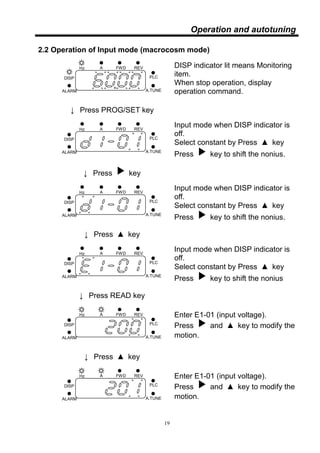
2.2 Operation of Input mode (macrocosm mode)
DISP
ALARM
Hz A FWD REV
A.TUNE
PLC
DISP indicator lit means Monitoring
item.
When stop operation, display
operation command.
↓ Press PROG/SET key
DISP
ALARM
Hz A FWD REV
A.TUNE
PLC
Input mode when DISP indicator is
off.
Select constant by Press ▲ key
Press key to shift the nonius.
↓ Press key
DISP
ALARM
Hz A FWD REV
A.TUNE
PLC
Input mode when DISP indicator is
off.
Select constant by Press ▲ key
Press key to shift the nonius.
↓ Press ▲ key
DISP
ALARM
Hz A FWD REV
A.TUNE
PLC
Input mode when DISP indicator is
off.
Select constant by Press ▲ key
Press key to shift the nonius
↓ Press READ key
DISP
ALARM
Hz A FWD REV
A.TUNE
PLC
Enter E1-01 (input voltage).
Press and ▲ key to modify the
motion.
↓ Press ▲ key
DISP
ALARM
Hz A FWD REV
A.TUNE
PLC
Enter E1-01 (input voltage).
Press and ▲ key to modify the
motion.
20
Operation and autotuning
Operation of Input mode (macrocosm mode) (continued)
DISP
ALARM
Hz A FWD REV
A.TUNE
PLC
Constant E1-01 (input voltage).
(Press READ key could be back to
constant selection directly, modify
constant is invalid.)
↓ Press PROG/SET key
DISP
ALARM
Hz A FWD REV
A.TUNE
PLC Set Constant, indicate, “PASS”.
(Indicate “Err” if wrong setting)
Blinking 4 times
DISP
ALARM
Hz A FWD REV
A.TUNE
PLC Back to constant select after the end
of setting.
↓ Press PROG/SET key
DISP
ALARM
Hz A FWD REV
A.TUNE
PLC
Back to monitoring.
21
Operation and autotuning
◆ Operation of Input mode (simple mode)
DISP
ALARM
Hz A FWD REV
A.TUNE
PLC
DISP indicator lit means Monitoring
item.
When stop operation, display
operation command.
↓ Press PROG/SET key
DISP
ALARM
Hz A FWD REV
A.TUNE
PLC Enter input, DISP indicator is off
No flash on display (No nonius).
↓ Press ▲ key
DISP
ALARM
Hz A FWD REV
A.TUNE
PLC Press and ▲ key to select
constant.
↓ Press READ key
DISP
ALARM
Hz A FWD REV
A.TUNE
PLC
Enter E1-01 (input voltage)
(Press READ key to be back
constant selection directly, modify
constant invalid).
↓ Press ▲ key
DISP
ALARM
Hz A FWD REV
A.TUNE
PLC
Enter E1-01 (input voltage)
(Press READ key can back constant
select directly, modify constant
invalid).
↓ Press PROG/SET key
DISP
ALARM
Hz A FWD REV
A.TUNE
PLC Set constant, indicate, “PASS”
(Indicate, “Err” If set wrong).
22
Operation and autotuning
◆Operation of Input mode (simple mode, continued)
DISP
ALARM
Hz A FWD REV
A.TUNE
PLC Back to constant selection after
setting.
↓ Press PROG/SET key
DISP
ALARM
Hz A FWD REV
A.TUNE
PLC
Back to monitoring.
23
Operation and autotuning
2.3 Autotuning
◆ Constant table of autotuning
Control patterns
Constant Description
Setting
range
Default
value
Change
during
operation
VF
VF
PG
Vector
Vector
PG
T1-01
Select
adjustment
mode
0~ 2 0 ╳ ○ ○ ○ ○
T1-02
V/f
compensation
setting
0~100 100% ╳ ○ ○ ○ ○
T1-03
Motor rated
voltage
0.0~
500.0
220.0
V
╳ ○ ○ ○ ○
T1-04
Motor rated
current
10.0~
200.0
100.0
%
╳ ○ ○ ○ ○
T1-05
Motor rated
frequency
0.0~
400.0
60.0
Hz
╳ ○ ○ ○ ○
T1-06 Pole of motor 2~8
4
pole
╳ ○ ○ ○ ○
T1-07
Motor rated
speed
0~7200
1750
rpm
╳ ○ ○ ○ ○
T1-09
Motor unload
current
10~ 100 45 ╳ ○ ○ ○ ○
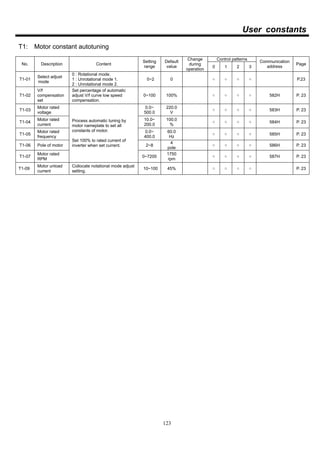
Description: Please enter T1-03~ T1-07 constants to implement motor autotuning
according to motor specification.
The low speed compensation of V/f curve were set by T1-02 to apply to
Rotational autotuning (T1-01), V/f curve will be modified after autotuning.
Constant setting is the percentage of low speed star torque.
Select adjustment mode:
1、Rotational mode autotuning (T1-01=0)
Enter motor specification of nameplate after set T1-01=0. When the page of T1
constants was operated, the light of A.TUNE will be on. Pressing FWD this moment
will process the function of autotuning, TunE is shown on screen. Motor data is
needed by autotuning when motor run. Pass will be shown after succeeded.
2、Stationary mode autotuning (T1-01=1)
Input specification of nameplate after set T1-01=1. When the page of T1 constants
was operated, the light of A.TUNE will light up. Pressing FWD this moment will
process the function of autotuning, TunE is shown on screen. Motor data is needed
by autotuning when motor run. Pass will be shown after succeeded. (Collocate with
T1-09 motor unload current setting)
3、Stationary autotuning for line-to-line resistance only (T1-01=2)
Autotuning could be used to prevent control errors when the motor cable is long or
24
Operation and autotuning
the cable length has changed or when the motor and inverter have different
capacities. When keypad is operated through the page of T1 constant, the indicator
A.TUNE will be lit, then press FWD to process autotuning deception motor
line-to-line impedance(E2-05).
Notice:
1. The motor has to be disconnected from machine and a danger never occurs
when Rotational mode autotuning is implemented.
2. A machine does not allow motor spontaneously Rotational, please
implement Stationary mode autotuning. (T1-01=1)
3. Power will be supplied to the motor when Stationary mode autotuning and
stationary for line-to-line resistance are performed even though the motor
will not turn. Do not touch the motor until autotuning has been completed.
The constants will be automatically set after autotuning (continued):
Constant Description
E1-08 Middle output voltage
E1-10 Minimum output voltage
E2-01 Motor rated current
E2-02 Slip of motor
E2-03 Motor unload current
E2-04 Poles of motor
E2-05 Motor resistance
E2-06 Motor leakage inductance
Notice:
1. For your own safety, motor operating in high speed when autotuning is
implemented!
2. Torque compensation C4 is applied when motor impedance is needed to
test, E2-05 is needed to input motor impedance if autotuning is not
implemented.
3. V/f curve will be spontaneously altered when torque compensation is
started ( C4-01≠0 and E2-05≠0).
4. Please set C3-01, if slip compensation is needed to start.
※The functions of torque compensation and slip compensation, please refer to
P. 54、55。
25
Settings by environment
Chapter 3 Settings by environment
3.1 Degrees of constant display
Control patterns
Constant Description
Setting
range
Default
value
Change
during
operation
VF
VF
PG
Vector
Vector
PG
A1-01
Constant access
level
0~2 2 ╳ ○ ○ ○ ○
Description:A1-01 is set by constant access level, setting levels:
0: Read only mode
1: Simple mode
2: Macrocosm mode
■ Read only mode
Constants only could be read, and not modified after set A1-01=0. The rest
of constants were locked, beside A1-01、d1-01~ 4 frequency command,
d1-01~ 4 and d1-17 jog frequency could be modified. Select sequence of
constants like simple mode at read mode.
■ Macrocosm mode
All constants could be read and modified after set A1-01=2.
■ Simple mode
The constant setting were modified to be simple mode after set A1-01=1.
Simple mode provides 24 common use constants for operators to use and
modify, the sequence as below:
sequence Constant Description Remark
1 A1-01 Constant display levels P.25
2 A1-02 Select control mode P.27
3 b1-01 Select frequency command P.30
4 b1-02 Select operation command P.28
5 b1-03 Select stop pattern P.31
6 C1-01 Acceleration time 1 P.35
7 C1-02 Deceleration time 1 P.35
8 C6-02 Select P.W.M. frequency P.25
9 d1-01 Frequency command 1 P.64
26
Settings by environment
■ Simple mode (continued)
sequence Constant Description Remark
10 d1-02 Frequency command 2 P.64
11 d1-03 Frequency command 3 P.64
12 d1-04 Frequency command 4 P.46
13 d1-17 Jog frequency P.46
14 E1-01 Input voltage P.46
15 E1-03 V/f curve select P.46
16 E1-04 Highest output frequency P.46
17 E1-05 Maximum voltage P.46
18 E1-06 Base frequency P.46
19 E1-09 Lowest output frequency P.75
20 E1-10 Lowest output voltage P.44
21 E1-13 Bias voltage P.46
22 E2-01 Motor rated current P.47
23 F1-01 PG pulse P.81
24 H4-01 Analog output P.19
27
Settings by environment
3.2 Control mode selection
Control patterns
Constant Description
Setting
range
Default
value
Change
during
operation
VF
VF
PG
Vector
Vector
PG
A1-02
Control mode
selection
0~3 0 ╳ ○ ○ ○ ○
Description: A1-02 is selected control mode, control mode can be selected:
0: V/f opened loop control
1: With V/f closed loop control of PG
2: Opened loop vector control
3: Closed loop with PG vector control
Setting and description of all control modes, please refer to P.50、56、58
3.3 Recovering factory value
Control patterns
Constant Description
Setting
range
Default
value
Change
during
operation
VF
VF
PG
Vector
Vector
PG
A1-03
Recovering
factory value
0~5 0 ╳ ○ ○ ○ ○
Description: A1-03 is the function of recovering Default value, partly or all of
constants could be recovered default value.
Setting value Content
0 Disable.
1
Recover auto procedure operation constant:
b6-01~b6-18, C1~01~C1-16, d1-01~d1-16.
2
Recovering factory value.
Uncontained auto procedure operation constant b6-01~b6-18,
C1-01~C1-16, d1-01~d1-16.
3
Recovering factory value.
Uncontained auto procedure operation constant b6-01~b6-18,
C1-01~C1-16, d1-01~d1-16 and motor constant E1-01~E1-13,
E2-01~E2-06.
4 All default values recover.
5 Eliminate error record.
28
Settings by environment
3.4 Display setting
Control patterns
Constant Description
Setting
range
Default
value
Change
during
operation
VF
VF
PG
Vector
Vector
PG
o1-01
Display setting when
operation
1~31 2 ○ ○ ○ ○ ○
Description: o1-01 of monitoring could be set to operate and stop, monitoring will display
automatically that was set by o1-01, please refer to user constants of U1
monitoring item to set monitoring.
■ Display unit setting
Control patterns
Constant Description
Setting
range
Default
value
Change
during
operation
VF
VF
PG
Vector
Vector
PG
o1-03 Display unit setting
0.00~
150.00
0.00 ╳ ○ ○ ○ ○
Description: o1-03 can be set the unit of frequency display. Frequency display is as following:
U1-01 frequency command、U1-02 output frequency、U1-05 motor speed、U1-11
operation frequency. Units could be set: Hz、%、r.p.m. or set at will.
Setting methods please refer to following table
Setting value Content
0.00 Frequency display
0.01 Display frequency %
0.02 Display r.p.m
0.03~150.00
Magnification adjustment
Display value= frequency multiply magnification
29
Settings by environment
3.5 P.W.M. setting
Control patterns
Constant Description
Setting
range
Default
value
Change
during
operation
VF
VF
PG
Vector
Vector
PG
C6-02
Select P.W.M.
frequency
0~15 2 ╳ ○ ○ ○ ○
Description:C6-02 could be set P.W.M. frequency, the setting value as following:
Setting value P.W.M. frequency Setting value P.W.M. frequency
0 2K Hz 5 12.5K Hz
1 4K Hz 6 15kHz
2 5K Hz 7-14 5KHz
3 8K Hz 15 By C6-03~04
4 10K Hz
■ Select P.W.M. frequency at will
Control patterns
Constant Description
Setting
range
Default
value
Change
during
operation
VF
VF
PG
Vector
Vector
PG
C6-03
P.W.M. frequency
upper limit level
2.0~
15.0
12
KHz
╳ ○ ○ ○ ○
C6-04
P.W.M. frequency
lower limit level
2.0~
15.0
4
KHz
╳ ○ ○ ○ ○
Description: When setting value of C6-02 is15, P.W.M. frequency is variable, set C6-03 to
maximum, and set C6-04 to be minimum. When C6-03 is smaller than C6-04,
C6-03 will be the fixed P.W.M. frequency.
E1-06 Base
frequency
P.W.M. frequency
C6-04
P.W.M. frequency
Lower limit level
C6-03
P.W.M. frequency
Upper limit level
12.5% 87.5%
30
Settings by function
Chapter 4 Settings by function
4.1 Frequency command
◆ Select frequency command input pattern
Control patterns
Constant Description
Setting
range
Default
value
Change
during
operation
VF
VF
PG
Vector
Vector
PG
b1-01
Select frequency
command
0~5 5 ╳ ○ ○ ○ ○
Description: b1-01 is select frequency command input pattern, select frequency reference
source:
0: Keypad input
1: Analog input
2: P.W.M. input
3: VR knob of Keypad (variable resistor)
4: PLC auto procedure control
5: VR knob of Keypad (lag)
■ Use Keypad to input frequency command
Frequency command could be input by keypad, after set b1-01=0. Use d1-01to
input frequency command when ordinary operate. d1-01~d1-16 is 1st speed to
16th speed frequency when use multi-speed function.
■ Use voltage (current) input frequency command (Analog input
IN1~IN3、option card AI1~2)
Analog input could be frequency command, after set b1-01=1.
■ P.W.M. input
Use P.W.M. input terminal to input P.W.M. as frequency command, after set
b1-01=2 and to collocate with option card.
■ Use VR knob of Keypad (variable resistor) input frequency
command
Use VR knob of Keypad (variable resistor) input frequency command, after set
b1-01=3, the input range is 0~ maximum frequency.
■ Set PLC auto procedure control, input frequency command by
auto procedure control
Implement auto procedure control by set b1-01=4. Set 16 procedure references
at most, Set all frequency command by d1-01~ d1-16.
■ Input frequency command by using the VR knob (resistor) of
Keypad
Input frequency command by Keypad, after set b1-01=5, the function of lag
built-in, it will be easy to adjust when input frequency. The input range is 0~
maximum frequency.
31
Settings by function
4.2 Multi-step speed operation
With CT2000EV inverters, you can change the speed to maximum 17 steps, using
16 frequency references and one jog frequency reference.
The following example of 5 steps speed operation constant setting and description.
■ Constant setting
To switch frequency references, set multi-step references 1 to 2 and jog
frequency to input terminal function DI1~3.
Terminal Constant Setting Details
DI1 H1-01 1 Multi-steps speed command 1
DI2 H1-02 2 Multi-steps speed command 2
DI3 H1-03 5 Jog frequency
According to multi-steps speed input combinations to set multi –step speed
reference. The following table shows the possible combinations:
Step DI1 DI2 DI3 Select frequency
1 0 0 0 Determine frequency command by b1-01
2 1 0 0 d1-02 frequency command 2/ analog auxiliary frequency 1
3 0 1 0 d1-03 frequency command 3/ analog auxiliary frequency 2
4 1 1 0 d1-04 frequency command 4
17 0 0 1 d1-17 jog frequency
*0=OFF,1=ON
※When set analog input to step 1, step 2 and step 3 observe the following setting
pattern:
A. When setting analog input to step 1, set b1-01=1,set analog input to 1(analog
master speed).
B. When setting analog input to step 2, set analog input to 4 (auxiliary frequency 2).
C. When setting analog input to step 3, set analog input to 5 (auxiliary frequency 3).
32
Settings by function
4.3 Operation command
◆ Select operation command input pattern
Control patterns
Constant Description
Setting
range
Default
value
Change
during
operation
VF
VF
PG
Vector
Vector
PG
b1-02
Select
operation
command
0~2 1 ╳ ○ ○ ○ ○
Description:b1-02 is select operation command input pattern, select frequency
reference source:
0: Keypad control
1: External terminal control
2: MODBUS communication
■ Implement operation command from keypad.
Use the operation key FWD、REV、STOP of keypad to implement operation
command of inverter after set b1-02=0.
■ Use operation control terminal to implement operation
command.
Use operation control terminal to implement operation command, after set
b1-02= 1.
When implements peroration by two wires: factory setting 2 wires
operation.
When FR terminal is ON, to implement forward operation, operation stops
when OFF.
When RR terminal is ON, implement reverse operation, operation stop
when OFF.
FR
RR
COM
Inverter
Forward/ stop
Reverse/ stop
Fig. For example: 2 wires wiring graph
33
Settings by function
Performing operations using 3-wire sequence (continued):
When multi-function terminals (DI1~ 5) is set to 0, and operation terminal becomes
3-wire sequence operation (RUN、STOP、FR/ RR).
FR (RUN)
RR (STOP)
COM
Inverter
DI5 (FR/RR)
Stop switch
(b contact )
Operation switch
(a contact)
FWD/REV
Fig. 3-wire sequence wiring example
RUN
STOP
FR/RR
Output
frequency
OFF(FWD) ON(REV)
OFF(stop )
50ms min
ON or OFFCan be either
Stop FWD REV Stop FWD
Fig. The example of 3-wire sequence operation
※ Turn on for 50ms and the RUN command, this will make the run
command self-holding of the inverter.
34
Settings by function
◆ Prohibition of reverse operation
Control patterns
Constant Description
Setting
range
Default
value
Change
during
operation
VF
VF
PG
Vector
Vector
PG
b1-04
Prohibition of
reverse
operation
0~1 0 ╳ ○ ○ ○ ○
Description: b1-04 is prohibition of reverse operation, when setting value is 1 to
prohibit reverse default value is 0.
4.4 Jog operation
Implement jog operation with multi-function input terminal, 3 ways to
operate:
1. Set terminal to be JOG with operation control.
2. Set terminal to be FJOG without operation control.
3. Set terminal to be RJOF without operation control.
FR
RR
COM
Inverter
FWD/ stop
REV/ stop
Jog
JOG
FJOG
RJOG
COM
Inverter
FWD jog
REV jog
Select jog frequency after jog was taken.
Implement jog operation after 2-wire/ 3-wire
operation terminals is taken.
Implement forward jog operation when
forward jog is taken.
Implement reverse jog operation when
reverse jog is taken.
35
Settings by function
4.5 Stop pattern
◆ Select Stationary operation pattern
Control patterns
Constant Description
Setting
range
Default
value
Change
during
operation
VF
VF
PG
Vector
Vector
PG
b1-03
Select stop
pattern
0~3 0 ╳ ○ ○ ○ ○
Description: b1-03 is selecting stop operation patterns, you can select:
0: Deceleration to stop
1: Coast to stop
2: DC braking stop
3: Coast to stop with timer
■ Deceleration stop
Set the motor to decelerate to stop according to selecting time after set
b1-03=0, (factory setting: C1-02 deceleration time 1). If DC braking were
set when stop, DC braking is implement when output frequency is lower
than b2-01. For DC braking stop, refer to page 38.
Run command
Output frequency
ON
OFF
Decelerates to stop at
deceleration time
DC injection brake time when stopping
b2-04
DC injection brake
Fig. Deceleration to stop
36
Settings by function
■ Coast to stop
If the stop command is input when set b1-03=1, the inverter output voltage is
interrupted, the motor coasts to a stop at inertia the load.
Run command
Inverter
output
ON
OFF
Fig. Coast to stop
■ DC braking stop
If the stop command is input and inverter output voltage will be interrupted
after set b1-03=2, a wait is made for the time set in 2-03 and then the DC
injection brake current set in b2-04 is sent to the motor to apply a DC
injection brake to stop the motor. The DC injection brake time is
determined by output frequency. Lengthen the minimum baseblock time
(L2-03) when an over current (OC occurs during Stationary. This mode is
enabling when V/f control.
Run command
Output frequency
ON
OFF
DC injection brake time
b2-04
DC injection brake
Minimum baseblock time
L2-03
Inverter output voltage interrupted
DC injection brake time
b2 -04x10
b2 -04
10% 100%( Maximum output frequency)
When input stop command
output frequency
Fig. DC injection braking (DB) stop
baseblock time
L2-03
37
Settings by function
■ Coast stop with timer
If the stop command is input when b1-03=3, the inverter output is
interrupted to coast the motor to stop. The motor coasts to stop at inertia
the load. Run commands are ignored until the time has elapsed. Set timer
time by C1-04.
Run command
Output frequency
ON
OFF
According to select frequency
when decelerated time and stop
to proceed coast time
ON
OFF
ON
Ignore run command
Fig. Coast stop with timer
38
Settings by function
4.6 DC injection brake
◆ Using the DC injection brake
Control patterns
Constant Description
Setting
range
Default
value
Change
during
operation
VF
VF
PG
Vec
tor
Vector
PG
b2-02
DC injection
braking current
0~100 50% ╳ ○ ○ ╳ ╳
b2-03
DC injection
braking time at
start
0.00~
10.00
0.00
sec
╳ ○ ○ ╳ ╳
Description: Set DC injection brake when start to the motor whiles it is coasting to
stop, to stop the motor and then restart it.
Set b2-03 to 0 to disable the DC injection brake at start.
Set the DC injection brake current using b2-02 as inverter rated current.
■ Using analog input as DC injection brake current command
Set multi-function analog input ( H3-01/H3-05 / H3-09 ) to 6 and use
analog input as DC injection brake current command, when input 10V
( 20mA ) is 100% of inverter rated current.
◆ DC injection brake at stop
Control patterns
Constant Description
Setting
range
Default
value
Change
during
operation
VF
VF
PG
Vec
tor
Vector
PG
b2-01
DC injection
brake starting
frequency
0.0~
10.0
0.5Hz ╳ ○ ○ ○ ○
b2-04
DC injection
brake at stop
0.00~
10.00
0.00
sec
╳ ○ ○ ○ ○
Description: Set DC injection brake at stop. Stop pattern setting is deceleration stop
or DC injection brake stop. When input stop run command, output
frequency less then b2-01 and start DC injection brake frequency.
When DC injection brake start, DC injection brake frequency is b2-02。
Set b2-04 to 0 to disable DC injection brake at stop.
If setting value of b2-01 less then minimum input frequency, to
implement DC injection brake as minimum output frequency E1-09.
39
Settings by function
4.7 Acceleration/ Deceleration constants
◆ Acceleration/ Deceleration time setting
Control patterns
Constant Description
Setting
range
Default
value
Change
during
operation
VF
VF
PG
Vec
tor
Vector
PG
C1-01 Acceleration time 1 ○ ○ ○ ○ ○
C1-02 Deceleration time 1 ○ ○ ○ ○ ○
C1-03 Acceleration time 2 ○ ○ ○ ○ ○
C1-04 Deceleration time 2 ○ ○ ○ ○ ○
C1-05 Acceleration time 3 ╳ ○ ○ ○ ○
C1-06 Deceleration time 3 ╳ ○ ○ ○ ○
C1-07 Acceleration time 4 ╳ ○ ○ ○ ○
C1-08 Deceleration time 4 ╳ ○ ○ ○ ○
C1-09 Acceleration time 5 ╳ ○ ○ ○ ○
C1-10 Deceleration time 5 ╳ ○ ○ ○ ○
C1-11 Acceleration time 6 ╳ ○ ○ ○ ○
C1-12 Deceleration time 6 ╳ ○ ○ ○ ○
C1-13 Acceleration time 7
10.0
sec
╳ ○ ○ ○ ○
C1-14 Deceleration time 7 100.0 ╳ ○ ○ ○ ○
C1-15 Jog acceleration time ╳ ○ ○ ○ ○
C1-16 Jog deceleration time ╳ ○ ○ ○ ○
C1-17 Emergency stop time
0.0~
6000.0
1 .0
╳ ○ ○ ○ ○
C1-18
Acceleration/
Deceleration time unit
0~1 1.0 ╳ ○ ○ ○ ○
C1-19
Acceleration/
Deceleration time
switch frequency
0.0~
400.0
0.0Hz ╳ ○ ○ ○ ○
C1-20
Multi-steps
speed/PLC operation
Acceleration/
Deceleration pattern
0~1 0 ╳ ○ ○ ○ ○
Description: Acceleration time setting: the time that accelerates from 0 to 50Hz.
Deceleration time setting: the time that decelerates from 50Hz to 0.
Acceleration/ Deceleration time of factory preset is C1-01, C1-02.
40
Settings by function
■ Acceleration/ Deceleration time unit setting
SETS C1-18 to change acceleration/ deceleration times a unit. Factory value
is 1.
Setting value Description
0 Set 0.01 second a unit, setting range is 0.00~600.00 seconds.
1 Set 0.1 second a unit,setting range 0.0~6000.0 seconds.
■ Automatic switch acceleration/ deceleration time
When output frequency reached to setting value of C1-19, auto switch
acceleration/ deceleration time
Set C1-19 to 0 and disable.
C1-19
Accel/ Decel time
switch frequency
Output frequency
C1-07
Accel time 4
C1-01
Accel time 1
C1-02
Decel time 1
C1-08
Decel time 4
Fig. Automatic switch acceleration/ deceleration time
■ Emergency stop time C5-17
The deceleration time was used when a fault has been detected by the
inverter , or input emergency stop command to DI external terminal.
41
Settings by function
■ To switch acceleration/ deceleration time by using
multi-functions input terminal
Inverter could implement four kinds of acceleration/ deceleration time, to
switch by using two multi-functions input terminal, Set multi-function input
terminal (H1-01~05) to 9 and 10, according to multi-functions combinations
to select acceleration/ deceleration time.
Multi-steps
acceleration/
deceleration time 1
(Set to 9)
Multi-steps acceleration/
deceleration time 2
(Set to 10)
Acceleration
time
Deceleration
time
OFF OFF C1-01 C1-02
ON OFF C1-03 C1-04
OFF ON C1-05 C1-06
ON ON C1-07 C1-08
■ When multi-steps speed/ PLC to run, automatic switch over
acceleration/ deceleration time
When the inverter implements multi-steps speed operation or PLC, beside
follow aforementioned patterns to set acceleration/ deceleration time, user
could set operation multi-steps speed to automatic switch acceleration/
deceleration time. Set C1-20 to 1 and acceleration/ deceleration time when
multi-steps speed/ PLC operates as following table:
Multi-steps
speed
PLC
Frequency
command
Acceleration/
deceleration time
1st
step speed 1st
step d1-01 C1-01、C1-02
2nd
step speed 2nd
step d1-02 C1-03、C1-04
3rd
step speed 3rd
step d1-03 C1-05、C1-06
4th
step speed 4th
step d1-04 C1-07、C1-08
5th
step speed 5th
step d1-05 C1-09、C1-10
6th
step speed 6th
step d1-06 C1-11、C1-12
7th
step speed 7th
step d1-07 C1-13、C1-14
8th
step speed 8th
step d1-08 C1-15、C1-16
9th
step speed 9th
step d1-09 C1-01、C1-02
10th
step speed 10th
step d1-10 C1-03、C1-04
11th
step speed 11th
step d1-11 C1-05、C1-06
12th
step speed 12th
step d1-12 C1-07、C1-08
13th
step speed 13th
step d1-13 C1-09、C1-10
14th
step speed 14th
step d1-14 C1-11、C1-12
15th
step speed 15th
step d1-15 C1-13、C1-14
16th
step speed 16th
step d1-16 C1-15、C1-16
42
Settings by function
◆ S-curve acceleration/ deceleration time setting
Control patterns
Constant Description
Setting
range
Default
value
Change
during
operation
VF
VF
PG
Vector
Vector
PG
C2-01
S-curve time at
acceleration
0.00~
2.50
0.20
sec
╳ ○ ○ ○ ○
C2-02
S-curve time at
acceleration end
0.00~
2.50
0.20
sec
╳ ○ ○ ○ ○
C2-03
S-curve time at
deceleration
0.00~
2.50
0.20
sec
╳ ○ ○ ○ ○
C2-04
S-curve time at
deceleration end
0.00~
2.50
0.20
sec
╳ ○ ○ ○ ○
Description: To implement acceleration/ deceleration by using S-curve to reduce
impact when start/ stop the machine. Inverter could be set all S-curve
characteristics time at acceleration/ deceleration time start and end.
When set S-curve characteristics, the acceleration/ deceleration time will
increase.
Output frequency
C2-01
C2-02 C2-03
C2-04
Fig. S-curve characteristics
43
Settings by function
4.8 Frequency limits
◆ Frequency command limits
Control patterns
Constant Description
Setting
range
Default
value
Change
during
operation
VF
VF
PG
Vec
tor
Vector
PG
d2-01
Frequency
command upper
limit level
100.0
%
╳ ○ ○ ○ ○
d2-02
Frequency
command lower
limit level
0.0~
100.0
0% ╳ ○ ○ ○ ○
Description: Frequency command upper and lower limits could be set to limit run
frequency of motor operation. Set maximum output frequency E1-04 as
100%.
◆ Jump frequencies
Control patterns
Constant Description
Setting
range
Default
value
Change
during
operation
VF
VF
PG
Vec
tor
Vector
PG
d3-01 Jump frequency 1 ╳ ○ ○ ○ ○
d3-02 Jump frequency 2 ╳ ○ ○ ○ ○
d3-03 Jump frequency 3
0.0~
400.0
0.0Hz
╳ ○ ○ ○ ○
d3-04
Jump frequency
width
0.0~
20.0
1.0Hz ╳ ○ ○ ○ ○
Description: The objective of this function in order to avoid resonance occurred
between subsistent vibration of machine and motor operation. Set
machine vibration frequency that you would like to avoid. Jump
frequency setting will prohibit motor operation when constant speed
operation, but jump will not occur during acceleration/ deceleration
procedure.
Output frequency
Jump frequency width
d3-04
Jump frequency
Jump frequency 3
d1-03
Jump frequency 2
d1-02
Jump frequency 1
d1-01
When frequency command ascends
When frequency command declines
44
Input / output terminals
4.9 Input/ output terminals
4.9.1 Multi-functions input terminals
◆ Multi-functions input terminals setting
Control patterns
Constant Description
Setting
range
Default
value
Change
during
operation
VF
VF
PG
Vect
or
Vector
PG
H1-01
Multi-functions
terminal DI1
function
16 ╳ ○ ○ ○ ○
H1-02
Multi-functions
terminal DI2
function
8 ╳ ○ ○ ○ ○
H1-03
Multi-functions
terminal DI3
function
1 ╳ ○ ○ ○ ○
H1-04
Multi-functions
terminal DI4
function
2 ╳ ○ ○ ○ ○
H1-05
Multi-functions
terminal DI5
function
0~19
5 ╳ ○ ○ ○ ○
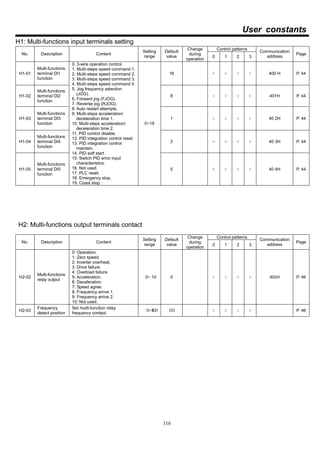
Description: User could set functions of multi-functions terminals by request as
following constants:
45
Input / output terminals
◆ Multi-functions input terminals constants
Control patterns
Setting
value
Function
VF
VF
PG
Vector
Vector
PG
0 3-wire operation control ○ ○ ○ ○
1 Multi-steps speed command 1 ○ ○ ○ ○
2 Multi-steps speed command 2 ○ ○ ○ ○
3 Multi-steps speed command 3 ○ ○ ○ ○
4 Multi-steps speed command 4 ○ ○ ○ ○
5 Jog frequency selection (JOG) ○ ○ ○ ○
6 Forward jog (FJOG) ○ ○ ○ ○
7 Reverse jog (RJOG) ○ ○ ○ ○
8 Auto restart attempts ○ ○ ○ ○
9 Multi-steps acceleration/ deceleration time 1 ○ ○ ○ ○
10 Multi-steps acceleration/ deceleration time 2 ○ ○ ○ ○
12 PID integration control reset ○ ○ ○ ○
13 PID integration control maintain ○ ○ ○ ○
14 PID soft start ○ ○ ○ ○
15 Switch PID error input characteristics ○ ○ ○ ○
16 Not used ○ ○ ○ ○
17 PLC reset ○ ○ ○ ○
18 Emergency stop by time of C1-17 ○ ○ ○ ○
19 Coast stop ○ ○ ○ ○
46
Input / output terminals
4.9.2 Multi-functions output terminals
Control patterns
Constant Description
Setting
range
Default
value
Change
during
operation
VF
VF
PG
Vector
Vector
PG
H2-02
Multi-functions
relay output
0~10 0 ╳ ○ ○ ○ ○
Description: User could set function of multi-functions output contact by request as
following constants:
Multi-functions output contacts function constants
Control patterns
Setting
value
Function
VF
VF
PG
Vector
Vector
PG
0 Operation ○ ○ ○ ○
1 Zero speed ○ ○ ○ ○
2 Inverter overheat ○ ○ ○ ○
3 Drive failure ○ ○ ○ ○
4 Overload failure ○ ○ ○ ○
5 Acceleration ○ ○ ○ ○
6 Deceleration ○ ○ ○ ○
7 Speed agree ○ ○ ○ ○
8 Frequency arrive 1 ○ ○ ○ ○
9 Frequency arrive 2 ○ ○ ○ ○
10 Not used ○ ○ ○ ○
Control patterns
Constant Description
Setting
range
Default
value
Change
during
operation VF
VF
PG
Vector
Vector
PG
H2-03
Frequency
position detect
0~400 0.5 ╳ ○ ○ ○ ○
No-Nc or external relay
H2-03
OPEN
CLOSE
Time
Time
47
Input / output terminals
4.10 Analog input/ output
4.10.1 Analog input
CT2000EV provide 3 analog input terminals, the number and specification:
IN1: Multi-functions 4~20 m A current input
IN2: Multi-functions 0~10V current input
IN3: Multi-functions 0~10V current input
■ Analog input (terminal IN3)
Control patterns
Constant Description
Setting
range
Default
value
Change
during
operation
VF
VF
PG
Vector
Vector
PG
H3-01
IN3 function
selection
0~12 1 ╳ ○ ○ ○ ○
H3-02 IN3 input gain
0.0~
1000.0
100.0
%
○ ○ ○ ○ ○
H3-03 IN3 input bias ±100.0 0.0% ○ ○ ○ ○ ○
Example: Preset terminal IN3 to analog master speed, when set b1-01=1 is effective.
The input range is 0~10V to indicate 0~100% (when H3-02=100%).
Maximum output frequency E1-04.
The function of H3-02 is enlarge/ reduce magnification of IN3, factory value
is 100.0%.
The function of H3-03is bias adjust of IN3, factory value is 0%.
Maximum output frequency E1-04=60.0Hz,H3-02=100%,H3-03=0%, input
range of IN3 at this time as
0~10V = 0 ~100% = 0.00 ~ 60.00Hz
If H3-02=150%,H3-03=10%, input range of IN3 at this time as
0~10V = 10%+ (0~150%) = 10~160%
60Hz*10%=6Hz
60Hz*160%=96Hz > 60Hz
IN3 master frequency range = 6~60Hz
48
Input / output terminals
■ Multi-functions input terminals contact (IN1、IN2)
Control patterns
Constant Description
Setting
range
Default
value
Change
during
operation
VF
VF
PG
Vector
Vector
PG
H3-05
IN2 function
selection
0~12 0 ╳ ○ ○ ○ ○
H3-06 IN2 input gain
0.0~
1000.0
100.0
%
○ ○ ○ ○ ○
H3-07 IN2 input bias ±100.0 0.0% ○ ○ ○ ○ ○
H3-09
IN1 function
selection
0~12 0 ╳ ○ ○ ○ ○
H3-10 IN1 input gain
0.0~
1000.0
100.0
%
○ ○ ○ ○ ○
H3-11 IN1 input bias ±100.0 0.0% ○ ○ ○ ○ ○
Description: Terminal of IN1 and IN2 are multi-functions analog input, the input
specification 10V(20mA) indicate 100%, use H3-06 (H3-10) to set
enlarge/ reduce magnification, and H3-07 (H3-11) to set bias %.
All functions of multi-functions analog input, refer to constants P.118.
■ Analog input filter time
Control patterns
Constant Description
Setting
range
Default
value
Change
during
operation
VF
VF
PG
Vector
Vector
PG
H3-04
IN3 Analog input
filter time
1~1000 5sec ╳ ○ ○ ○ ○
H3-08
IN2 Analog input
filter time
1~1000 5sec ╳ ○ ○ ○ ○
H3-12
IN1 Analog input
filter time
1~1000 5sec ╳ ○ ○ ○ ○
Description: Set filter time of analog input terminal IN1~IN3. Set filter time longer, the
ability of rejects noise is stronger. But reaction of input will be
corresponsive slower. Please set suitable time by request.
49
Input / output terminals
4.10.2 Analog output
CT2000EV inverter provides an analog output terminal, the serial No. and
specification:
VOUT: Multi-function Vdc voltage output
■ Multi-function analog output (VOUT)
Control patterns
Constant Description
Setting
range
Default
value
Change
during
operation
VF
VF
PG
Vector
Vector
PG
H4-01
VOUT function
selection
1~27 11 ╳ ○ ○ ○ ○
H4-02
VOUT output
gain
0.00~
2.50
1.00 ○ ○ ○ ○ ○
H4-03
VOUT output
bias
±10.0 0.0% ○ ○ ○ ○ ○
H4-04
VOUT output
filter time
1~
1000
5
sec
╳ ○ ○ ○ ○
Description: Multi-function analog output could be selected monitoring (U1-XX) to
transfer to analog voltage output, when selected one is 100%, output
10V. Please refer to U1 constants.
H4-03 can be set analog output bias (output is lower than 0V, output 0V
only).
H4-02 could be set analog output enlarge magnification (output exceed
10V, output 10V only).
The function of H4-04 could be set as the filter time of analog output
terminal. The filter time setting is longer, the capability of erasing filter is
stronger, but the reaction of output become slow. Please set the
adaptable time by user request.
50
V/f control
Chapter 5 V/f control
Set A1-02 to 0 to implement V/f control.
5.1 V/f curve setting
Control patterns
Constant Description
Setting
range
Default
value
Change
during
operation
VF
VF
PG
Vector
Vector
PG
E1-01 Input voltage
155~
500
220V ╳ ○ ○ ○ ○
E1-03 V/f curve select 0~15 15 ╳ ○ ○ ╳ ╳
E1-04
Maximum output
frequency
40.0~
400.0
60.0
Hz
╳ ○ ○ ○ ○
E1-05 Maximum voltage
0.0~
500.0
220.0
V
╳ ○ ○ ○ ╳
E1-06 Base frequency
0.0~
400.0
60.0
Hz
╳ ○ ○ ○ ○
E1-07
Middle output
frequency
0.0~
400.0
3.0Hz ╳ ○ ○ ○ ╳
E1-08 Middle output voltage
0.0~
500.0
15.0V ╳ ○ ○ ○ ╳
E1-09
Minimum output
frequency
0.0~
400.0
0.5Hz ╳ ○ ○ ○ ╳
E1-10 Minimum voltage
0.0~
500.0
5.0V ╳ ○ ○ ○ ╳
E1-13 Base voltage
0.0~
500.0
220.0
V
╳ ○ ○ ○ ○
Description: Set E1-03 to 15 to set V/f curve freely:
E1-04E1-06
E1-05
E1-13
V
Hz
E1-07
E1-09
0
E1-10
E1-08
51
V/f control
Description(continued): Set E1-03 to 0~14 to select preset V/f curve:
Setting
value
Characteristic Application Specifications
0 50Hz
1 60Hz
2 60Hz,voltage saturation at 50Hz
3
Constant
torque
characteristic
General application
72Hz,60Hz torque characteristic
4 50Hz,3 decrement
5 50Hz,2 decrement
6 60Hz,3 decrement
7
Low torque
characteristic
Inertial load of fans、pump
etc.
50Hz,2 decrement
8 50Hz,medium startup torque
9 50Hz,large startup torque
10 60Hz,medium startup torque
11
High startup
torque
characteristic
The wiring distance
between inverter and motor
is too long (150m)、a large
torques required at
startup、output terminal add
reactor 60Hz,large startup torque
12 90Hz,voltage saturation at 60Hz
13 120Hz,voltage saturation at 60Hz
14
Fixed output
operation
Inverter output constant
voltage output when
operation exceed 60Hz
180Hz,voltage saturation at 60Hz
Each setting value of V/f curves, please refer to the following constants:
These are values for 220V. Values for 380V (E1-13), multiply 380/220=1.727.
Setting value 0 Setting value 1 Setting value 2
0 1.5 2.5 50
Hz
9.9
16.5
220
V
0 1.5 3 60
Hz
9.9
16.5
220
V
0 1.5 3 50
Hz
9.9
16.5
220
V
60
52
V/f control
Setting value 3 Setting value 4 Setting value 5
0 1.5 3 60
Hz
9.9
16.5
220
V
72 0 1.3 25
Hz
8.8
38.5
220
V
50 0 1.3 25
Hz
9.9
55
220
V
50
Setting value 6 Setting value 7 Setting value 8
0 1.5 30
Hz
8.8
38.5
220
V
60 0 1.5 30
Hz
9.9
55
220
V
60 0 1.3 2.5
Hz
12.1
20.9
220
V
50
Setting value 9 Setting value 10 Setting value 11
0 1.3 2.5
Hz
14.3
26.4
220
V
50 0 1.5 3
Hz
12.1
20.9
220
V
60 0 1.5 3
Hz
14.3
26.4
220
V
60
53
V/f control
Setting value 12 Setting value 13 Setting value 14
0 1.5 3
Hz
9.9
16.5
220
V
9060 0 1.5 3
Hz
9.9
16.5
220
V
12060 0 1.5 3
Hz
9.9
16.5
220
V
18060
54
V/f control
5.2 Torque compensation
◆ Set torque compensation
Control patterns
Constant Description
Setting
range
Default
value
Change
during
operation
VF
VF
PG
Vector
Vector
PG
C4-01
torque
compensation
gain
0~2.50 0.60 ○ ○ ╳ ╳ ╳
C4-02
torque
compensation lag
time
0~
10000
50
ms
╳ ○ ╳ ╳ ╳
C4-03
Unload current
adjustment
30~150 60 ╳ ○ ╳ ○ ╳
C4-04
Torque
compensation
frequency point
1.5~10 2.50 ╳ ○ ╳ ○ ╳
Description: Torque compensation is automatic function of increasing torque when the
load of motor is detected too high. To measure the resistant of motor is
demanded to use this function. Please use the automatic measure of
motor or input known the resistant of motor E2-05.
Setting precaution:
1. Frequency torque compensation will run when operation frequency
exceeds C4-04 which be set.
2. Increase the value of C4-03 when unload current is too large, opposite
when too small to collocate C4-04.
3. Increase gain of C4-01 when motor start and the torque is not enough.
Over current occurred when start, please decrease gain of C4-01.
4. Current exceeds rated current when motor idled, and decrease gain of
C4-01.
5. Vibration occurred when motor rotated, and decrease gain C4-01 or
increase delay time C4-02.
6. Please collocate with slip compensation when operated rated speed
under 3Hz is demanded.
7. Torque compensation is invalid when the resistant of motor is E2-05=0
or torque compensation gain C4-01=0, operated by set V/f curve.
55
V/f control
5.3 Slip compensation
◆ Slip compensation setting
Control patterns
Constant Description
Setting
range
Default
value
Change
during
operation
VF
VF
PG
Vector
Vector
PG
C3-01
Slip compensation
gain
0~2.50 0.00 ○ ○ ╳ ╳ ╳
C3-02
Slip compensation
delay time
0~
10000
500
ms
╳ ○ ╳ ╳ ╳
C3-03
Restriction of Slip
compensation
0~250 200% ╳ ○ ╳ ╳ ╳
Description: when motor load is larger, the motor slip is higher, in the meantime, the
rotate speed of motor axle will be reduced, and frequency command
inconsistent. Slip compensation is slip was brought by motor capacity
and use increase output frequency to make actuality rotate frequency of
motor to close to frequency command. The compensation pattern is
motor rated slip E2-02 multiply frequency C3-01 and add to output
frequency. Due to compensation demand motor rated slip E2-02 that
detected by autotuning or input by the specification on nameplate. Slip
(Hz)= rated frequency (Hz)- rated rpm (rpm)×pole/120
Setting precaution:
1. Slip compensation is invalid when set gain of C3-01 to 0.
2. In the status of loading to measure motor speed and gradually adjust
gain. Increase gain when speed is too low, on the contrary to
decrease gain.
3. Shrink delay time C3-02 when the reaction of slip compensation is too
low. Increase delay time C3-02 when speed is unstable.
56
V/f control with PG
Chapter 6 V/f control with PG
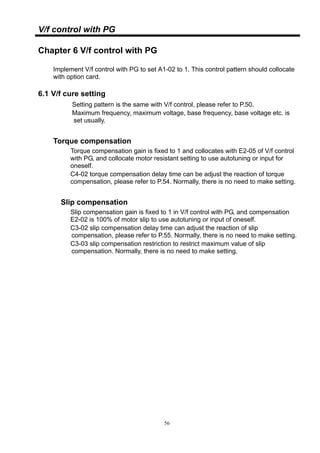
Implement V/f control with PG to set A1-02 to 1. This control pattern should collocate
with option card.
6.1 V/f cure setting
Setting pattern is the same with V/f control, please refer to P.50.
Maximum frequency, maximum voltage, base frequency, base voltage etc. is
set usually.
Torque compensation
Torque compensation gain is fixed to 1 and collocates with E2-05 of V/f control
with PG, and collocate motor resistant setting to use autotuning or input for
oneself.
C4-02 torque compensation delay time can be adjust the reaction of torque
compensation, please refer to P.54. Normally, there is no need to make setting.
Slip compensation
Slip compensation gain is fixed to 1 in V/f control with PG, and compensation
E2-02 is 100% of motor slip to use autotuning or input of oneself.
C3-02 slip compensation delay time can adjust the reaction of slip
compensation, please refer to P.55. Normally, there is no need to make setting.
C3-03 slip compensation restriction to restrict maximum value of slip
compensation. Normally, there is no need to make setting.
57
V/f control with PG
6.2 ASR
Control patterns
Constant Description
Setting
range
Default
value
Change
during
operation
VF
VF
PG
Vector
Vector
PG
C5-01
Proportional gain
of ASR
0.00~
300.00
0.2 ○ ╳ ○ ╳ ○
C5-02
Integral time of
ASR
0.000~
10.000
0.200
sec
○ ╳ ○ ╳ ○
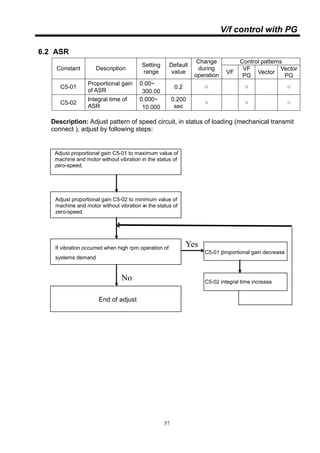
Description: Adjust pattern of speed circuit, in status of loading (mechanical transmit
connect ), adjust by following steps:
Adjust proportional gain C5-01 to maximum value of
machine and motor without vibration in the status of
zero-speed.
Adjust proportional gain C5-02 to minimum value of
machine and motor without vibration in the status of
zero-speed.
-
If vibration occurred when high rpm operation of
systems demand
End of adjust
C5-01 proportional gain decrease
C5-02 integral time increase
Yes
No
58
Vector control with PG
Chapter 7 Vector control with PG
Implement Vector control with PG to set A1-02 to 3. This control pattern should
collocate with option card.
7.1 Motor constant setting
Control patterns
Constant Description
Setting
range
Default
value
Change
during
operation
VF
VF
PG
Vector
Vector
PG
E2-01
Motor rated
current
10.0~
200.0
100.0
%
╳ ○ ○ ○ ○
E2-02 Motor slip
0.00~
20.00
2.00
Hz
╳ ○ ○ ○ ○
E2-03
Motor unloading
current
10.0~
100.0
30.0
%
╳ ○ ○ ○ ○
E2-04
The pole of
motor
2~8
4
pole
╳ ○ ○ ○ ○
E2-05 Motor resistance
0.000~
65.000
0.000
Ω
╳ ○ ○ ○ ○
E2-06
Motor leakage
inductance
0.0~
40.0
0.0% ╳ ○ ○ ○ ○
F1-01 PG Pulse
0~
20000
1024 ╳ ╳ ○ ╳ ○
Description: Please set motor constant by the nameplate of motor or autotuning.
Motor rated current E2-01 and motor unloading current E2-03 setting. Set
motor rated current and unloading current by inverter rated current is
100%.
Input slip by nameplate of motor, calculate pattern:
Slip (Hz)= rated frequency (Hz)- rated rpm x (pole/120)
Motor resistance and Motor leakage inductance, please input motor
company offered or automatic set by autotuning
F1-01 should collocate with PG / Option of motor to set P.W.M. About the
rest functions of PG, please refer to P.80。
59
Vector control with PG
7.2 ASR
Control patterns
Constant Description
Setting
range
Default
value
Change
during
operation
VF
VF
PG
Vector
Vector
PG
C5-01
Proportional gain
of ASR
0.00~
300.00
0.2 ○ ╳ ○ ╳ ○
C5-02
Integral time of
ASR
0.000~
10.000
0.200
sec
○ ╳ ○ ╳ ○
Description: Adjust pattern of speed circuit, in status of loading (mechanical transmit
connect ) , adjust by following steps:
Adjust proportional gain C5-01 to maximum value of
machine and motor without vibration in the status of
zero-speed.
Adjust proportional gain C5-02 to minimum value of
machine and motor without vibration in the status of
zero-speed.
-
If vibration occurred when high rpm operation of
systems demand
End of adjust
C5-01 proportional gain decrease
C5-02 integral time increase
Yes
No
60
Vector control with PG
7.3 ACR
Control patterns
Constant Description
Setting
range
Default
value
Change
during
operation
VF
VF
PG
Vector
Vector
PG
C5-06
Proportional gain
of ACR
0.00~
300.00
0.2 ╳ ╳ ╳ ╳ ○
C5-07
Integral time of
ACR
0.5~
2000.0
15
msec
╳ ╳ ╳ ╳ ○
C5-08
Select
proportional/
integral of ACR
0~1 0 ╳ ╳ ╳ ╳ ○
Description: Input PI of current circuit by user or by autotuning, selected by C5-08.
C5-08=0:use as C5-06 and C5-07 to be PI of ACR.
C5-08=1:by autotuning.
7.4 Torque limits
Control patterns
Constant Description
Setting
range
Default
value
Change
during
operation
VF
VF
PG
Vector
Vector
PG
L7-01
Forward torque
limit
╳ ╳ ╳ ╳ ○
L7-02
Reverse torque
limit
╳ ╳ ╳ ╳ ○
L7-03
Torque limit in
forward rotation
╳ ╳ ╳ ╳ ○
L7-04
Torque limit in
reverse rotation
0~250 150%
╳ ╳ ╳ ╳ ○
Description: Torque limits of 4 quarters are set by L7-01~04. Torque limits of 4
quarters are also set by analog input. Set analog input H3-01/05/09to
be torque limit, analog input is priority.
Setting value Application
9 Forward torque limit
10 Reverse torque limit
11 Re-generation torque limit
12 Forward/ reverse torque limit
61
Vector control with PG
Torque output (positive)
Torque output (negative)
ForwardReverse
L7-01
L7-04
L7-02
L7-03
Re-generator
Re-generator
62
PID control
Chapter 8 PID control
PID control is a pattern of making the feedback value match the set target value. By
combination proportional control (P)、integral control (I) and derivative control (D), you
can even control targets that you want to reach status.
The characteristics of the PID control operations as below:
Proportional control (P): output of operation proportional to the error. Feedback value
cannot equal to target when only use Proportional control.
Integral control ( I ): output of operation integral to the error. Used for matching
feedback value to target value, however, intense change might cause integral control
to disperse.
Derivative control (D): output of operation derivative to the error, respond rapid
variations.
Output
Error
Time
P control
I control
D control
PIDcontrol
Fig. PID control motion
■ PID control application
The following table shows example of PID control application to use inverter:
Application Control details Example of sensor
used
Speed control
Feeds back machinery speed information,
and matches speed to the target value.
Tachometer generator
Pressure
control
A feedback pressure information, and
performs constant pressure control.
Pressure sensor
Flow rate
control
A feed back flow rate control information,
and controls the flow rate highly accurately.
Flow rate sensor
Temperature
control
A feedback temperature information, and
performs temperature adjustment control.
Thermocouple
thermistor
63
PID control
■ PID control pattern selecting
Control patterns
Constant Description
Setting
range
Default
value
Change
during
operation
VF
VF
PG
Vector
Vector
PG
b5-01
Select PID
control
0~4 0 ╳ ○ ○ ○ ○
Description: b5-01 is PID control pattern selecting, select as following:
0: Disable.
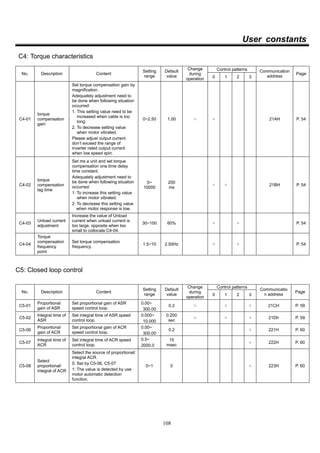
1: PID output is inverter output, D control error.
2: PID output is inverter output, D control feedback.
3: PID output is adjustment of inverter output, D control error.
4: PID output is adjustment of inverter output, D control feedback.
■ PID target value setting patterns
Target value setting patterns as following:
Setting pattern Description Priority
Master speed
frequency
Set master speed as target value, maximum
output frequency is 100%。
4
Analog input
Set analog input as target value, 10V is 100%, use
gain and bias setting to adjust. Set H3-01/ 05 /09
to 8.
1
P.W.M. input Set H6-01=2 and P.W.M. input as target value. 3
Option card
input
Set the analog terminal of option card input as
target value.
2
■ PID feedback value setting value
Feedback value setting patterns as following:
Setting pattern Description Priority
Analog input
Set analog input as feedback value, 10V is100%,
use gain and bias setting to adjust.
Set H3-01/ 05/ 09 to 7.
1
P.W.M. input Set H6-01=1, and P.W.M. input as target value. 3
Option card
input
Set the analog terminal of option card input as
feedback value.
2
64
PID control
■ PID adjustment patterns
Use PID control when target value is fixed, observe feedback wave to
implement adjustment.
1.Increase P value to within a range that does not vibrate.
2.Reduce I value to within a range that does not vibrate.
3.Increase D value to within a range that does not vibrate.
Control patterns
Constant Description
Setting
range
Default
value
Change
during
operation
VF
VF
PG
Vector
Vector
PG
b5-02
Proportional
control ( P )
0.00~
25.00
1.00 ○ ○ ○ ○ ○
b5-03
Integral time
( I )
0.0~
360.0
1.0
sec
○ ○ ○ ○ ○
b5-05
Derivative
time( D )
0.00~
10.00
0.00
sec
○ ○ ○ ○ ○
■ PID output limits
Control patterns
Constant Description
Setting
range
Default
value
Change
during
operation
VF
VF
PG
Vector
Vector
PG
b5-04
Maximum value
of Integral
control ( I )
○ ○ ○ ○ ○
b5-06
Maximum value
of PID output
0.0~
100.0
100.0
%
○ ○ ○ ○ ○
Description: Set % a unit as upper limit level of PID control output and derivative
control. 100% indicates maximum frequency output.
65
PID control
■ PID output adjust
Control patterns
Constant Description
Setting
range
Default
value
Change
during
operation
VF
VF
PG
Vector
Vector
PG
b5-07
PID offset
adjustment
±100.0 0.0% ○ ○ ○ ○ ○
b5-09
PID output
characteristics
selection
0~1 0 ╳ ○ ○ ○ ○
b5-10 PID output gain
0.0~
25.0
1.0 ╳ ○ ○ ○ ○
b5-11
PID output
reverse selecting
0~1 0 ╳ ○ ○ ○ ○
Description: Set b5-07 the offset after PID control as a percentage of the maximum
output frequency.
Set b5-10 to PID output enlarges magnification.
Set b5-09 to PID output polarity, when polarity is set to 1.
Set b5-11 to select PID output whether inverting or not, when inverted is
set to 1.
■ PID output delay
Control patterns
Constant Description
Setting
range
Default
value
Change
during
operation
VF
VF
PG
Vector
Vector
PG
b5-08
PID output delay
time
0.00~
10.00
0.00
sec
○ ○ ○ ○ ○
b5-19
PID output delay
position
selecting
0~1 0 ╳ ○ ○ ○ ○
Description: Set b5-19 delay to the object:
PID output delay when set to 0.
D control output delay when set to 1.
Set b5-08 to delay time.
66
PID control
■ PID command acceleration/ deceleration time
Control patterns
Constant Description
Setting
range
Default
value
Change
during
operation
VF
VF
PG
Vector
Vector
PG
b5-17
PID target value
acceleration/
deceleration time
0.0~
25.5
0.0
sec
╳ ○ ○ ○ ○
Description: Set b5-17 to PID target value acceleration/ deceleration time, set time to
accelerate from 0 to 100%. When needed PID target value is the smooth
curve not P.W.M. wave when used.
Notice: Due to PID output will pass by acceleration/ deceleration of C1. If
mechanical pulsation was caused by setting b5-17 and acceleration/
deceleration of C1. User can reduce C1 to avoid pulsation.
■ Select position of P controller
Control patterns
Constant Description
Setting
range
Default
value
Change
during
operation
VF
VF
PG
Vector
Vector
PG
b5-18
Position of P
controller selecting
0~1 0 ╳ ○ ○ ○ ○
Description: Select position of P controller.
P、I、D controllers were divided to individual controller when set setting
value to 0.
P controller is located in front of I、D controllers when set setting value to
1. (enter I、D controller after error passed by P controller).
■ Select step of I controller reset
Control patterns
Constant Description
Setting
range
Default
value
Change
during
operation
VF
VF
PG
Vector
Vector
PG
b5-20
Select control
reset
0~1 0
Description: Setting value is 0, clear I control Integral value when place stop
command or place reset command.
Setting value is 1, clear I control Integral value when only place reset
command.
I reset command must be controlled by multi-functions input terminal
(set multi-functions input H1-XX to 12).
67
PID control
■ PID control block
Encoder card P.W.M. input
AI1
Multi-function analog input
IN2
Multi-function analog input
IN1
Encoder card P.W.M. input
AI2
Main speed frequencyd1 -01
Analog
IN3
P.W. M. input
keypad VR
d1 - 02
d1 - 16
b1 - 01
Multi-steps speed selecting
0
1
2
3
4
PIDTarget valueH3-01=8
H3-05=8
H6-01=2
PLC procedure
Multi-function analog input
IN3
H3-09=8
F2-06=8
F2-02=8
Fig. PID target value setting pattern
Encoder card P.W.M. input AI1
Multi-function analog input IN2
Multi-function analog input IN1
Encoder card P.W.M. input
Encoder card P.W.M. input AI2
PID
Feedback
value
H3- 05=7
H3- 09=7
H6- 01=1
Multi-function analog input IN3
H3- 01=7
F2- 06=7
F2- 06=7
Fig. PID feedback value setting pattern
68
PID control
■ PID control block (continued)
Feedback
Target
b5 - 05
D: D control
b5 - 17
Accel/ decel time
1,3
2 4
b5
-
01
DI=14
PID
b5 - 02
P: P control
0
1
b5
-
18
b5 - 02
b5 -03
b5 - 05
DI=13
I: II control
b5-04
I limit
D: D control b5 - 08
Delay time
1,3
2,4
0
1
b5-19
b5
-
01
+
+
DI=14
0
1
+
b5
-
18
PID output
-1
DI=15
Fig. PID control block 1
PID output
b5- 06
Output limit
b5- 08
Delay time
0
1
b5-19
0
1
1
-1
b5
-
09
+
+
b5- 07
offset
b5-10
Output gain
Main speed frequency
+
+
Output
frequency
0
3 4
1,2
b5
-
01
Fig. PID control block 2
69
Multi-step function mode
Chapter 9 Multi-step function mode
■ Related constants
Control patterns
Constant Description
Setting
range
Default
value
Change
during
operation
VF
VF
PG
Vec
tor
Vector
PG
b6-01 1st
step operation time
b6-02 2nd
step operation time
b6-03 3rd
step operation time
b6-04 4th
step operation time
b6-05 5th
step operation time
b6-06 6th
step operation time
b6-07 7th
step operation time
b6-08 8th
step operation time
b6-09 9th
step operation time
b6-10 10th
step operation time
b6-11 11th
step operation time
b6-12 12th
step operation time
b6-13 13th
step operation time
b6-14 14th
step operation time
b6-15 15th
step operation time
b6-16 16th
step operation time
0~255 0 min ╳ ○ ○ ○ ○
b6-17
Auto procedure control
pattern selecting
0~6 0 ╳ ○ ○ ○ ○
b6-18
Auto procedure control
pattern selecting
0~1 0 ○ ○ ○ ○ ○
C1-01 Acceleration time 1
C1-02 Deceleration time 1
C1-03 Acceleration time 2
C1-04 Deceleration time 2
○
C1-05 Acceleration time 3
C1-06 Deceleration time 3
C1-07 Acceleration time 4
0.0~
6000.0
10.0
sec
╳
○ ○ ○ ○
70
Multi-step function mode
■ Related constants (continued)
Control patterns
Constant Description
Settin
g
range
Default
value
Change
during
operation
VF
VF
PG
Vec
tor
Vector
PG
C1-08 Deceleration time 4
C1-09 Acceleration time 5
C1-10 Deceleration time 5
C1-11 Acceleration time 6
C1-12 Deceleration time 6
C1-13 Acceleration time 7
C1-14 Deceleration time 7
C1-15 Acceleration time 8
C1-16 Deceleration time 8
0.0~
6000.
0
10.0
sec
╳ ○ ○ ○ ○
C1-20
Accel/ decel pattern
when multi-steps speed/
PLC operation
0~1 0 ╳ ○ ○ ○ ○
d1-01 Frequency command 1
d1-02 Frequency command 2
d1-03 Frequency command 3
d1-04 Frequency command 4
d1-05 Frequency command 5
d1-06 Frequency command 6
d1-07 Frequency command 7
d1-08 Frequency command 8
d1-09 Frequency command 9
d1-10 Frequency command 10
d1-11 Frequency command 11
d1-12 Frequency command 12
d1-13 Frequency command 13
d1-14 Frequency command 14
d1-15 Frequency command 15
d1-16 Frequency command 16
0.00~
400.0
0
0.00
Hz
○ ○ ○ ○ ○
71
Multi-step function mode
■ Multi-step function mode selecting
Control patterns
Constant Description
Setting
range
Default
value
Change
during
operation
VF
VF
PG
Vector
Vector
PG
b6-17
Multi-step function
mode selecting
0~6 0 ╳ ○ ○ ○ ○
Description: b6-17 is multi-step function mode selecting, user can select:
0: Liner operation, stop after operated one circle.
1: Liner operation, automatically restart fro first circle after operated one
circle.
2: Liner operation, stay at last step after operated one circle and wait for
input signal of reset, restart from first circle.
3: Preservation。
4: Gradually operation, stop after operated one circle.
5: Gradually operation, automatically restart fro first circle after operated
one circle.
6: Gradually operation, stay at last step after operated one circle and wait
for input signal of reset, restart from first circle.
■ Multi-step function mode reset
Control patterns
Constant Description
Setting
range
Default
value
Change
during
operation
VF
VF
PG
Vector
Vector
PG
b6-18
Multi-step
function mode
reset
0~1 0 ╳ ○ ○ ○ ○
Description: b6-18 is multi-step function mode reset. Reset when setting value is 1.
DI terminal is also used as the function of multi-step function mode
reset.
Set H1-xx to 17, terminal applies when reset.
72
Multi-step function mode
■ Liner operation, (single circle):
Set b6-17 to 0 to implement liner multi-step function mode. Six steps
multi-step function mode as example to descript setting pattern and operation
status:
1﹒ Set six steps multi-step function mode:
Set all steps of operation time b6-01~06 and operation frequency
d1-01~d1-06. Set operation time b6-07 to 0 to operate until sixth step.
2﹒ Set automatically procedure operation control:
Set b1-01 to 4, source of frequency command is multi-step function
mode control.
3﹒ Implement operation, automatically stop after operated to the end of sixth
step. Operate again from first step when restart.
If stop during operation or recover after power failure, it will start
operation from current of operation step when operates again. For
example, the third frequency d1-03=30Hz, set operation time to 32min,
power failure occurred when the third step operated to 12min, then
restart again and implement 30Hz to operate when power on, next
apply to the fourth step after operated 20min.
4﹒If user wants to stop current operation status during operation and restart
from first step to use reset to clear operation timer. Set b6-18 to 1 or DI
terminal (17)applies to multi-step function mode to reset.
b6-01 b6-02 b6-03 b6-04 b6-05 b6-06
d1-01
d1-02
d1-03
d1-04
d1-05
d1-06
Frequency
Time
Fig. Liner operation (Single circle)
73
Multi-step function mode
■ Liner operation (constant operation ):
Set b6-17 to 1 to implement liner multi-step function mode. it will automatically
restart from the first step after the end of operation. Detailed information and
an example refer to previous page.
b6-01 b6-02 b6-03 b6-04 b6-05 b6-06
d1-01
d1-02
d1-03
d1-04
d1-05
d1-06
Frequency
Timb6-01
d1-01
Fig. Liner operation (continuous operation)
■ Liner operation (continuous operation, wait for reset):
Set b6-17 to 2 to implement multi-step function mode. After the end of
operation, and perform speed as the last speed in the step , wait for reset signal
input, then change to first step’s speed. Detailed information and an example
refer to previous page.
b6-01 b6-02 b6-03 b6-04 b6-05 b6-06
d1-01
d1-02
d1-03
d1-04
d1-05
d1-06
Frequency
Timeb6-01
d1-01
Reset signal
Fig. Liner operation (continuous operation, wait for reset)
74
Multi-step function mode
■ Gradually operation (single circle):
Set b6-17 to 4, to implement multi-step function mode operation gradually, it is
different from liner operation, the frequency command is set by gradually
operation is final frequency of stage of operation.
b6-01 b6-02 b6-03 b6-04 b6-05 b6-06
d1-01
d1-02
d1-03
d1-04
d1-05
d1-06
Frequency
Time
Fig . Gradually operation
■ Gradually operation (continuous operation ):
Set b6-17 to 5, to implement gradually multi-step function mode operation. The
inverter will automatically operate from first step after end of operation. Please
pay attention, if the setting value of last step is not 0. The result of first and last
step will be different. Therefore, please set the frequency command of last step
to 0.
b6-01 b6-02 b6-03 b6-04 b6-05 b6-06
d1-01
d1-02
d1-03
d1-04
d1-05
d1-06
Frequency
Time
Fig . Gradually operation (continuous)
75
Multi-step function mode
■ Gradually operation (continuous operation wait for reset):
Set b6-17 to 6, to implement multi-step function mode operation gradually.
After the end of operation to maintain last step frequency operation, then
restart from the first step to operate after wait for reset signal input.
■ Acceleration/ deceleration time setting
When implement multi-step function mode operation, except use general
acceleration/ deceleration time, user can make all steps operation with each
acceleration/ deceleration time by setting C1-20=1. Detail constants, please
refer to P.70。
76
MODBUS communication
Chapter 10 Modbus communication
This product built in with standard RS422/RS485 communicate port, support
international standard MODBUS protocol, user can monitor single or many inverters by
using PLC, PC, industrial computer or other equipment which support MODBUS
protocol.
■ The physical links
The wiring of this product can use either RS422(4 wires)or RS485(2 wires),
by JUMPER(J5).
JUMPER setting
J5 J5
RS422 RS485
CT2000EV
TA TB RA RBSG
CT2000EV
TA TB RA RBSG
T+
T-
R+
R-
Master
R R R R
SG
Fig. RS422 The physical links
77
MODBUS communication
■ The physical links (continued)
CT2000EV
TA TB RA RBSG
CT2000EV
TA TB RA RBSG
485+
485-
Master
R R
SG
Fig. RS485 The physical links
■ Related constants
Control patterns
Constant Description
Setting
range
Default
value
Change
during
operation
VF
VF
PG
Vector
Vector
PG
H5-01 Address(ID) 0~240 31 ╳ ○ ○ ○ ○
Description: each inverter should be set its own address in a communication net, each
address has to be the only one in this net.
Control patterns
Constant Description
Setting
range
Default
value
Change
during
operation
VF
VF
PG
Vector
Vector
PG
H5-02 Baud rate 0~4 3 ╳ ○ ○ ○ ○
Description: available baud rate setting
Setting value Baud rate Setting value Baud rate
0 1200 bps 3 9600 bps
1 2400 bps 4 19200 bps
2 4800 bps
78
MODBUS communication
■ Related constants (continued)
Control patterns
Constant Description
Setting
range
Default
value
Change
during
operation
VF
VF
PG
Vector
Vector
PG
H5-03
Parity bit
check
0~2 0 ╳ ○ ○ ○ ○
Description: Setting value 0: disable
1: even parity bit
2: odd parity bit
Control patterns
Constant Description
Setting
range
Default
value
Change
during
operation
VF
VF
PG
Vector
Vector
PG
H5-06
Communication
respond waiting
time
2~65 2ms ╳ ○ ○ ○ ○
Description: When inverter receive a data, it will send the response data after H5-06
time, it is used masterly when Master process speed slower or TE single
delay time of two wires communication.
Description Notes Setting MODBUS Address
FR 1
RR 3Operation command
STOP 4
4BH
Description Notes Notes (U1-12)
Standby 12
FR 3
RR 15
FR decelerate and stop 1
RR decelerate and stop 13
FR shift RR 5
Operation status
RR shift FR 7
79
MODBUS communication
■ Data structure
This product support MODBUS RTU protocol, Function 03H、06H code, the
data protocol of all function codes as below.
Function 03H:Read holding registers
Read 2 data from register in an inverter at slave address =1FH, data address
are continuous and the beginning address is 280H,the RTU MODE data
frame are listed as below:
RTU Mode:
Query Response
Field name Example Field name Example
Slave address 1FH Slave address 1FH
Function 03H Function 03H
Starting address
(high byte)
02H Byte count 04H
Starting address
(low byte)
80H
Content of address
006BH (high byte)
03H
Number of register
(high byte)
00H
Content of address
006BH (low byte)
E8H
Number of register
(low byte)
02H
Content of address
006CH (high byte)
00H
CRC error check
(low byte)
C7H
Content of address
006CH (low byte)
00H
CRC error check
(high byte)
E5H
CRC error check
(low byte)
84H
CRC error check
(high byte)
42H
80
MODBUS communication
Function 06H:write single register
Write a data as 1000(03E8H) to the register which is at address 1FH in an
inverter at slave address= 0280H, the RTU MODE data frame are listed as
below:
RTU Mode:
Query Response
Field name Example Field name Example
Slave address 1FH Slave address 1FH
Function 06H Function 06H
Data address
(high byte)
02H
Data address
(high byte)
02H
Data address
(low byte)
80H
Data address
(low byte)
80H
Data content
(high byte)
03H
Data content
(high byte)
03H
Data content
(low byte)
E8H
Data content
(low byte)
E8H
CRC error check
(low byte)
8AH
CRC error check
(low byte)
8AH
CRC error check
(high byte)
9AH
CRC error check
(high byte)
9AH
CRC Generation :
1. Load 16 bit register with FFFF hex(all 1’s). Call this the CRC register.
2. Exclusive OR the first eight-bit byte of the message with the low order byte of the
16-bit CRC register, putting the result in the CRC register。
3. Shift the CRC register one bit to the right (toward the LSB), zero filling the MSB.
Extract and examine the LSB.
4. If the LSB is 0, repeat Step 3 (another shift). If the LSB is 1. Exclusive OR the
CRC register with the polynomial value A001 hex (1010 0000 0000 0001).
5. Repeat Step 3 and Step 4 until eight shifts have been performed. When this is
done, a complete eight-bit byte will have been processed.
6. Repeat 2~5 for next eight-bit byte of the message. Continue doing this until all
bytes hence were processed.
The final content of the CRC register is the CRC value.
81
MODBUS communication
CRC Generation (continued):
Pseudo code for generating a CRC-16:
CONST ARRAY BUFFER /* data,ex: 11h, 03h, 00h,6bh,00h,02h */
CONST WORD POLYNOMIAL = 0a001h /* X16 = X15 + X2 + X1 */
/* SUBROTINUE OF CRC CACULATE START */
CRC_CAL(LENGTH)
VAR INTEGER LENGTH;
{
VAR WORD CRC16 = 0FFFFH ; /* CRC16 initialize */
VAR INTEGER = I,j; /* LOOP COUNTER */
VAR BYTE DATA; /* DATA BUFFER */
FOR (I=1;I=LENGTH;I++) /* BYTE LOOP */
{
DATA == BUFFER[I];
CRC16 == CRC16 XOR DATA;
FOR (J=1;J=8;J++) /* BIT LOOP */
{
IF ((DATA XOR CRC16) AND 0001H) = 1 THEN
CRC16 = (CRC16 SHR 1) XOR POLYNOMIAL;
ELSE
CRC16 == CRC16 SHR 1;
DATA == DATA SHR 1;
};
};
};
82
Option card function
Chapter 11 Option card function
11.1 Pulse Generator / Option
◆ Set Pulse Generator
Control patterns
Constant Description
Setting
range
Default
value
Change
during
operation
VF
VF
PG
Vector
Vector
PG
F1-01 PG pulse 0~
20000
1024 ╳ ╳ ○ ╳ ○
Description: F1-01 is pulse setting of pulse generator, please input by pulse
generator specification.
Control patterns
Constant Description
Setting
range
Default
value
Change
during
operation
VF
VF
PG
Vector
Vector
PG
F1-05
Set PG rotate
direction
0~1 0 ╳ ╳ ○ ╳ ○
Description: F1-05 is rotate direction setting of pulse generator.
A phase surpassed B phase is forward, when set to 0.
B phase surpassed A phase is forward, when set to 1.
83
Option card function
◆ Detect PG breaking
Control patterns
Constant Description
Setting
range
Default
value
Change
during
operation
VF
VF
PG
Vector
Vector
PG
F1-02
Movement
when detected
PG breaking
0~3 1 ╳ ╳ ○ ╳ ○
F1-14
Detect PG
breaking time
0.0~
10.0
2.0
sec
╳ ╳ ○ ╳ ○
Description: When detect PG breaking over F1-14 setting time, the inverter will move
according to F1-02.
F1-02=0:Decelerate to stop (stopped by deceleration time).
F1-02=1:Free run stop.
F1-02=2:Emergency stop (stopped by C1-17 deceleration time).
F1-02=3:Disable.
◆ Detect over speed
Control patterns
Constant Description
Setting
range
Default
value
Change
during
operation
VF
VF
PG
Vector
Vector
PG
F1-03
Select movement
when over speed
occurred
0~3 1 ╳ ╳ ○ ╳ ○
F1-08
Detect over
speed positioning
0~120 115% ╳ ╳ ○ ╳ ○
F1-09
Detect over
speed time
0.0~2.0
1.0
sec
╳ ╳ ○ ╳ ○
Description: When motor speed surpassed F1-08 set positioning and detected time
over F1-09 time, the inverter will move according to F1-03 set.
F1-08 setting method: Set over speed detects positioning by maximum
output frequency is 100%.
F1-03=0:Decelerate to stop (stopped by deceleration time).
F1-03=1:Free run stop.
F1-03=2:Emergency stop (stopped by C1-17 deceleration time).
F1-03=3:Disable.
84
Option card function
Analog input/ analog output
11.2 Analog input
Option card offers two analog input terminals, the serial No. and specification:
AI1: Multi-function 0~10V / ±10V voltage input
AI2: Multi-function 0~10V / ±10V voltage input
Control patterns
Constant Description
Setting
range
Default
value
Change
during
operation
VF
VF
PG
Vector
Vector
PG
F2-01
AI1 specification
selecting
0~1 0 ╳ ○ ○ ○ ○
F2-02
AI1 function
selecting
0~12 0 ╳ ○ ○ ○ ○
F2-03 AI1 input gain
0.0~
1000.0
100% ○ ○ ○ ○ ○
F2-04 AI1 input bias ±100.0 0.0% ○ ○ ○ ○ ○
F2-05
AI2 specification
selecting
0~1 0 ╳ ○ ○ ○ ○
F2-06
AI2 function
selecting
0~12 0 ╳ ○ ○ ○ ○
F2-07 AI2 input gain
0.0~
1000.0
100% ○ ○ ○ ○ ○
F2-08 AI2 input bias ±100.0 0.0% ○ ○ ○ ○ ○
F2-09
AI1 Analog input
filter time
1~
1000
5 ○ ○ ○ ○ ○
F2-10
AI2 Analog input
filter time
1~
1000
5 ○ ○ ○ ○ ○
Description: The specification of AI1and AI2 exist 0~10V and ±10V by setting F2-01
and F2-05. Set 0 to 0~10V, set 1 to ±10V.
AI1 and AI2 can use F2-03 and F2-07 to set enlarge/ reduce
magnification, as well as set F2-04 and F2-08 to bias %.
AI1and AI2 can be set, please refer to P.118
If F2-02=1 or F2-06=1 setting H3-01=0.
F2-03AI1
F2-04
Input gain
Input bias
Valid value+
+
85
Option card function
11.3 Analog output
Option card offers two analog output terminals, the serial No. and specification:
AO1: Multi-function 0~10V / ±10V voltage output
AO2: Multi-function 0~10V / ±10V voltage output
Control patterns
Constant Description
Setting
range
Default
value
Change
during
operation
VF
VF
PG
Vector
Vector
PG
F4-01
AO1 function
selecting
1~27 1 ╳ ○ ○ ○ ○
F4-02 AO1 output gain 0~2.50 1.00 ○ ○ ○ ○ ○
F4-03
AO2 function
selection
1~27 1 ╳ ○ ○ ○ ○
F4-04 AO2 output gain 0~2.50 1.00 ○ ○ ○ ○ ○
F4-05 AO1 output bias ±10.0 0% ○ ○ ○ ○ ○
F4-06 AO2 output bias ±10.0 0% ○ ○ ○ ○ ○
F4-07
AO1 output
specification
0~1 0 ╳ ○ ○ ○ ○
F4-08
AO2 output
specification
0~1 0 ╳ ○ ○ ○ ○
F4-09
A01 Analog
output filter time
1~
1000
5.0 ○ ○ ○ ○ ○
F4-10
A02 Analog
output filter time
1~
1000
5.0 ○ ○ ○ ○ ○
Description: The specification of AO1and AO2 exist 0~10V and ±10V, set by F4-07
and F4-08.
The filter time could be set by F4-09 &10 , the filter time setting is longer,
the capability of erasing filter is stronger, but the reaction of output
become slow. Please set the adaptable time by user request.
Setting value Description
0 0~10V output
1 ±10V output
AO1 and AO2 can use F4-02 and F4-04 to set enlarge/ reduce magnification,
as well as F4-05 and F4-06 set to bias %.
AO1 and AO2 can be set, please refer to monitoring constants U1.
86
Option card function
11.4 Pulse input
◆ Pulse input
Control patterns
Constant Description
Setting
range
Default
value
Change
during
operation
VF
VF
PG
Vector
Vector
PG
H6-01
Pulse input
function
0~2 0 ╳ ○ ○ ○ ○
H6-02
Pulse input
counting
1000~
32000
1440
Hz
○ ○ ○ ○ ○
H6-03 Pulse input gain
0.0~
1000.0
100.0
%
○ ○ ○ ○ ○
H6-04 Pulse input bias ±100.0 0.0% ○ ○ ○ ○ ○
H6-05 Pulse input filter
0.00~
2.00
0.10
sec
○ ○ ○ ○ ○
Description: Input pulse frequency is 100% by H6-02 setting value, then changeover
to be percentage and enlarge/ reduce magnification of H6-03, after that
plus H6-04 bias value to be effective percentage.
H6-02
100%
H6-03
H6-04
+
+Gain
Bias
Pulse input Effective
value
When set H6-01 to pulse input, user can input the function:
0:Frequency command, set maximum output frequency E1-04 to 100%.
1:PID Feedback value.
2:PID Command value.
Set H6-05 to filter time of pulse input.
87
Protective function
Chapter 12 Protective function
12.1 Stall prevention function
◆ Stall prevention in acceleration
Control patterns
Constant Description
Setting
range
Default
value
Change
during
operation
VF
VF
PG
Vector
Vector
PG
L3-01
Stall prevention
selection during
acceleration
0~1 1 ╳ ○ ○ ○ ○
L3-02
Stall prevention
level during
acceleration
0~200 150% ╳ ○ ○ ○ ○
Description: When a heavy load is placed on the motor or acceleration time is too
short during acceleration. Due to current output too much to lead
inverter to over current, it can prevent from motor stall. The inverter will
stop accelerating when output current exceeds L3-02 during
acceleration.
L3-02 setting pattern: Set inverter rated current to 100%.
L3-01 =0, disabled
=1, enabled
L3-02
Output current
Time
Output frequency
Time
Pause acceleration to avoid
stall occurred.
fig. Stall prevention in acceleration
88
Protective function
◆ Stall prevention limit during acceleration
Control patterns
Constant Description
Setting
range
Default
value
Change
during
operation
VF
VF
PG
Vector
Vector
PG
L3-03
Stall prevention
limit during
acceleration
0~100 50% ╳ ○ ○ ○ ○
Description: If using the motor in the constant output range, and automatically
lowered to prevent stalling, disable to prevent the stall prevention level
in the constant output range from being reduced more than necessary.
L3-02
Stall prevention level during acceleration
Output frequency
E1-06
Base frequency
L3-03 x L3-02
fig. Stall prevention limit during acceleration
89
Protective function
◆ Stall prevention limit during deceleration
Control patterns
Constant Description
Setting
range
Default
value
Change
during
operation
VF
VF
PG
Vector
Vector
PG
L3-04
Stall prevention
limit during
deceleration
0~1 1 ╳ ○ ○ ○ ○
Description: If DC Bus exceeds setting value and stop deceleration to avoid inverter
(OV- over voltage) when the motor decelerated.
L3-04 =0, disabled
=1, enabled
Output frequency
Time
Stop deceleration
when DC Bus in the
high side
Fig. Stall prevention function when stall
90
Protective function
◆ Stall prevention limit during constant speed
Control patterns
Constant Description
Setting
range
Default
value
Change
during
operation
VF
VF
PG
Vector
Vector
PG
L3-05
Stall prevention
selection during
operation
0~1 1 ╳ ○ ○ ╳ ╳
L3-06
Stall prevention
level during
operation
30~200 150% ╳ ○ ○ ╳ ╳
Description: A heavy load is placed on the motor when constant operation and makes
inverter output current exceed L3-06 setting value. The inverter will
automatically reduce output frequency to prevent the motor from stall
(OC/OL). When a load disappeared or lightened and makes inverter
output current be smaller than L3-06 setting value. The inverter will
automatically accelerate to work frequency.
L3-06 setting pattern: set 100% by inverter rated current.
L3-05 =0, disabled
=1, enabled, decelerated by C1-14 deceleration time.
L3-06
Output current
Time
Output frequency
Time
To avoid stalling to proceed
deceleration
Fig. Stall prevention during constant speed
91
Protective function
12.2 Continuously operation
◆ Power is restored then restart automatically after momentary power loss
Control patterns
Constant Description
Setting
range
Default
value
Change
during
operation
VF
VF
PG
Vector
Vector
PG
L2-01
Momentary
power loss
direction
0~2 0 ╳ ○ ○ ╳ ╳
L2-02
Momentary
power loss
compensation
time
0.0~2.0
0.1
sec
╳ ○ ○ ╳ ╳
L2-04
Voltage recover
time
0.0~20.0
0.3
sec
╳ ○ ○ ╳ ╳
Description: If a temporary power loss occurs, user can restart the inverter
automatically after power is restored to continue motor operation. To
restart the inverter after power restored, set L2-01=1 or 2。
If L2-01 is set to 1, when power is restored within the time set in L2-02,
the inverter will restart. If the time set in L2-02 is exceeded, UV (under
voltage) will be detected.
If L2-01 is set to 2, when power is restored while the control power
supply is kept CPU to work, the inverter will restart UV (under voltage)
will be cleared automatically.
Speed search setting is collocated when use momentary stop and
restart.
AC power
Time
Time
Inverter
output
Speed search
when restart
Speed search
waiting time
b3-05
Momentary power
loss, compensation time
L2-02
Voltage
recover time
L2-04
Power restored in L2-02 time
fig. Momentary stop then restart sequence diagram
92
Protective function
◆ Speed search
Control patterns
Constant Description
Setting
range
Default
value
Change
during
operation
VF
VF
PG
Vector
Vector
PG
b3-01
Speed search
selection
0~2 0 ╳ ○ ○ ╳ ╳
b3-02
Speed search
operating current
0~200 120% ╳ ○ ╳ ╳ ╳
b3-03
Speed search
deceleration time
(current detection)
0.1~
10.0
2.0
sec
╳ ○ ╳ ╳ ╳
b3-05
Speed search
waiting time
0.0~
20.0
0.2
sec
╳ ○ ○ ╳ ╳
Description: The speed search function finds the actual speed of motor that is
rotational using inertia, and then starts smoothly from that speed. When
restoring power after a temporary power loss or rotational using inertia
fan is enable. There are two ways of speed search by set b3-01.
b3-01 = 0, disable
=1, enable, MCK feedback (above 3HP)
=2, enable, current detection
=3, enable, MCK disconnection start+ inertia start
■ MCK feedback speed search: search motor rotation speed by MCK feedback
signal, then start operation by the speed.
Operation
command
Output
frequency
Frequency command
Start by frequency detection
b3-05
Output
voltage
L2-04Voltage recovered time
fig. MCK feedback speed search
93
Protective function
■ Current detection speed search: Start searching motor speed by frequency command
or maximum output frequency, when output current
exceeds b3-02 setting in searching and start by b3-03
time to decrease output frequency, after current is
lower than b3-02 setting value and implement regular
operation.
Operation
command
Output
frequency
Frequency command
b3-05
Output
current
b3-03
b3-02
fig. Current detection speed search
■ Setting precautions
A. When C control mode is V/f control with PG, the unit will start from the PG
feedback speed.
B. If the inverter output side is equipped with a contactor, set the delay time of
contactor motion b3-05. When not using the contact, user can reduce the
search time by setting 0.0 seconds to implement motion of speed search
early.
C. If the motor cannot be restarted smoothly, when use current detection speed
search, please reduce b3-02 setting value or extend L2-04 setting value.
D. If over current (OC) is detected when using speed search after momentary
power loss then restart, please extend b3-05 or L2-04 setting value.
94
Protective function
12.3 Overheating protection
◆ Inverter overheat protection
The inverter used the PTC (Positive Temperature Coefficient) of module to
detect the internal temperature of module to protect inverter from overheating.
Overheating detection level, overheating forecast level and motion when
overheating forecast are settable.
Control patterns
Constant Description
Setting
range
Default
value
Change
during
operation
VF
VF
PG
Vector
Vector
PG
L8-02
Inverter
overheating
forecast detection
level
50~100 90% ╳ ○ ○ ○ ○
L8-03
Motion when
Inverter
overheating
forecast detection
0~3 3 ╳ ○ ○ ○ ○
L8-04
Inverter
overheating
detection level
50~130 95℃ ╳ ○ ○ ○ ○
Description: Set L8-04 to Inverter overheating detection level. OH1 is displayed and
inverter will stop free run when it is detected.
L8-02 set Inverter overheating forecast level, set 8-04 to 100%. Select
operation by L8-03 when overheating forecast occurred.
L8-03 setting value Description
0 Deceleration stop (Inverter is stopped by set deceleration time)
1 Coast stop
2 Emergency stop (Inverter is stopped by C1-17)
3 Continuous operation, OH 2 displays overheating forecast.
95
Protective function
◆ DBU (braking transistor) overheat protection
The deceleration time of inverter is too short, when the motor regeneration
energy is too large, inverter will start braking to use resistor to release
regeneration energy, but transistor consume energy as well as bring heat.
Transistor is burned, if bring too high thermal energy.
Control patterns
Constant Description
Setting
range
Default
value
Change
during
operation
VF
VF
PG
Vector
Vector
PG
L8-01
Braking
transistor
overheating
protection
0~1 0 ╳ ○ ○ ○ ○
Description: Set L8-01 to protect braking transistor to avoid releasing energy for long
time and burn.
Enable when setting value is 1.
Malfunction code dbOH is displayed when detected braking transistor
overheat. Braking will be shut down. If regeneration is not improvement,
OU over voltage might occur, lengthen the deceleration time or replace
the braking resistor unit with one with a higher breaking capacity.
96
Protective function
12.4 Overload protection
◆ Motor overload protection
When motor operation exceeds motor rated current is overload operation. It is
overload operation. If motor is under overload operation, it might lead to burn
the motor.
Set protection point of motor to be 150% of motor rated current, overload time
is 60 seconds, OL 1 is displayed when overload occurred, motor stops coast.
97
Protective function
◆ Failures in driving
Display Description Checking item Trouble Shooting
OC Over-current (230%)
Is acceleration/ deceleration
time too short? Is variation
of load too wide?
Increase acceleration/
deceleration time; to lighten
load.
OV Over voltage
Deceleration time is rapid,
re-generation voltage is too
high, and power is too high.
To increase deceleration
time, to enhance breaking
ability.
LU Low power
Does power source lacking
phase or does not have any
input?
Check power source and
wiring.
PLU Low power
Power is too low, DC
voltage detective error.
To improve supply power, to
replace control board.
OH 1
Overheat, inverter
keep going
Cooling fan stop,
atmosphere temperature
high, overload operation of
motor.
Change fan, cooling
atmosphere temperature,
lighten load.
OH 2
Overheat, inverter
stop
Cooling fan stop,
atmosphere temperature
high, overload operation of
motor.
Change fan, cooling
atmosphere temperature,
lighten load.
OL 1
Overload detected
150% nearly 1 minute
Does the motor continue
operating under over load?
To lighten load, increase the
capacity of the inverter and
motor.
EC00
CAN communication
complete malfunction
Does CAN Bus of option
card connect wrong way, is
constant set wrong ?
CAN Bus of option card
connect right way,
constant is set correct
EC08
CAN feedback
malfunction in part
Does CAN Bus of option
card connect wrong way, is
constant set wrong ?
CAN Bus of option card
connect right way,
constant is set correct
EE 0 Option error
Is the option unconnected or
error
Re-wiring, to replace option.
OS Over speed
Wrong setting of option,
poles of motor and system.
Re-examine constant and
system.
98
Standard specification
Chapter 13 Specification and user constants table
13.1 Specification
Standard Specification 200V series
Motor rate (KW) 0.4 0.75 1.5 2.2 3.7 5.5 7.5
Model (CT2002) EV-A4 EV-A75 EV-1A5 EV-2A2 EV-3A7
Rated current (A) 2.4 4.2 7.4 11.1 18
Rated capacity(KVA) 1 1.8 2.9 4.4 7.1
* *
Rated input voltage 3φ200~230V ±10%,50 / 60Hz ±5%
Rated output voltage 3φ200~230V ±10%
Control pattern
V/f loop control、V/f closed loop control、
vector loop control、vector closed loop control 、torque control
Frequency accuracy Digital setting:±0.01 Analog setting:± 1%(35℃)
Frequency resolution Digital setting:0.01 Hz Analog setting:(Maximum frequency/4096)Hz
Frequency range 0.00 ~ 400.00 Hz
V/f ratio 15 patterns or any V/f pattern
Torque compensation 0 ~ 200% voltage compensation
Accel/ decel time 0.0 ~ 6000.0sec.(linear, 8-step setting)and 0.0~2.50sec(S curve setting)
Braking DC braking、dynamic braking
Standard feature
Jogging 、 upper/ lower frequency setting 、 16-step speed setting 、 PLC
(multi-step function control)、RS485/RS422 communication setting、jumper
frequency、PID control、multi-function analog input/ output
Option card function Option input、pulse input、CAN Bus、analog output/ input(12bitX 2 suits each)
Frequency setting
Digital 、Analog setting by keypad(DC 0 10V)、Analog setting(DC 0 10V、
4 20mA)
Display
7-segment LED display、frequency、voltage、current、setting value
、operation function、operation indicator、fault status
Protection Low voltage、high voltage、overload、over current、overheat
Overload capacity Continuous rated current 150%
Altitude Indoor、Altitude 1,000 meters
Ambient temperature -10℃ ~ 40℃
Humidity Relative between 45% to 90%(No condensing)
Cooling system Forced air-cooling
Weight (kg) 1.6 1.6 1.6 2.5 2.5 * *
“ * ” under development.
99
Standard specification
Standard Specification 400V series
Motor rate (KW) 0.4 0.75 1.5 2.2 3.7 5.5 7.5
Model (CT2004) EV-A4 EV-A75 EV-1A5 EV-2A2 EV-3A7
Rated current (A) 1 2.2 4.0 6.2 9
Rated capacity (KVA) 1 1.7 3.2 4.9 7.1
* *
Rated input voltage 3φ200~230V ±10%,50 / 60Hz ±5%
Rated output voltage 3φ200~230V ±10%
Control pattern
V/f loop control、V/f closed loop control、
vector loop control、vector closed loop control 、torque control
Frequency accuracy Digital setting:±0.01 Analog setting:± 1%(35℃)
Frequency resolution Digital setting:0.01 Hz Analog setting:(Maximum frequency/4096)Hz
Frequency range 0.00 ~ 400.00 Hz
V/f ratio 15 pattern or any V/f pattern
Torque compensation 0 ~ 200% voltage compensation
Accel/ decel time 0.0 ~ 6000.0sec.(linear, 8-step setting)and 0.0~2.50sec(S curve setting)
Motor braking DC braking、dynamic braking
Standard feature
Jogging、upper/ lower frequency setting、16-step speed setting、PLC (multi-step
function control)、RS485/RS422 communication setting、jumper frequency、PID
control、multi-function analog input/ output
Option card function Option input、pulse input、CAN Bus、analog output/ input(12bitX 2 suits each)
Frequency setting Digital 、Analog setting by keypad(DC 0 10V)、Analog setting(DC 0 10V、4 20mA)
Display
7-segment LED display、frequency、voltage、current、setting value
、operation function、operation indicator、fault status
Protection Low voltage、over voltage、overload、over current、overheat
Overload capacity Continuous rated current 150%
Altitude Indoor、Altitude 1,000 meters
Ambient temperature -10℃ ~ 40℃
Humidity Relative between 45% to 90%(No condensing)
Cooling system Forced air-cooling
Weight (kg) 1.6 1.6 1.6 2.5 2.5 * *
“ * ” under development.
100
User constants
13.2 User constants table
Constants classification arch-table
A. Environment setting ------------- A1 Environment setting
B. Application ------------- b1 Operation mode setting
b2 DC injection braking
b3 Speed search(inertia start)
b5 PID control
b6 PLC multi-function operation
C. Adjustment ------------- C1 Acceleration/ deceleration time
C2 S-curve acceleration/ deceleration
C3 Motor slip characteristic
C4 Torque characteristic
C5 Closed loop control
C6 P.W.M. frequency
D. Command ------------- d1 Frequency command
d2 Frequency limit
d3 Jump frequency
E. Motor constant ------------- E1 V/f characteristic
E2 Motor constant
F. Option card function ------------- F1 PG(Option card)setting
F2 Option card analog input
F4 Option card analog output
F6 Reserved
H. Terminal function ------------- H1 Multi-function input terminal
H2 Multi-function output terminal
H3 Analog input
H4 Analog output
H5 MODBUS communication
H6 PWM input
L. Protection function ------------- L2 Power loss ride through
L3 Stall prevention
L7 Torque limit
L8 Overheat protection
O. Display setting ------------- o1 Display setting
T. Autotuning ------------- T1 Motor autotuning
U. Monitor ------------- U1 Monitor status
U2 Malfunction record
101
User constants
A1: Environment setting
Control patterns
No. Description Content
Setting
range
Default
value
Change
during
operation
0 1 2 3
Communication
address
Page
A1-01
Constant
display levels
Set access rank of constant:
0: read mode.
1: simple mode.
2: macrocosm mode.
0~2 2 ╳ ○ ○ ○ ○ 101H P. 25
A1-02
Select control
mode
Select control mode:
0: V/f opened loop control.
1: with V/f closed loop control of
PG.
2: opened loop vector control.
3: closed loop with PG vector
control.
0~3 0 ╳ ○ ○ ○ ○ 102H P. 27
A1-03
Recovering
factory value
0: invalid
1: Only recover PLC constant
2: Recovering default value,
uncontained PLC constant.
3. Recovering Factory value,
uncontained motor and PLC
constant.
4. All constants recover factory
value.
5. Eliminate error record.
0~5 0 ╳ ○ ○ ○ ○ 103H P. 27
A1-04 Code Input code.
0~
9999
0 ○ ○ ○ ○ ○ 104H
A1-05
Motor rated
voltage
0 : 380V.
1 : 415V.
2 : 440V.
3 : 460V.
(220Vseries unsetting).
0~3 0 ╳ ○ ○ ○ ○ 105H
A1: Environment setting (factory appropriable constants)
Control patterns
No. Description Content
Setting
range
Default
value
Change
during
operation
0 1 2 3
Communication
address
Page
A1-06 Setting HP
Setting HP of inverter:
220V series: 440V series:
0=1/2 HP 32=1/2 HP
1= 1HP 33= 2HP
2= 2HP 34= 3HP
3= 3HP 35= 4HP
4= 5HP 36= 5HP
0~64
By
specific
ations
╳ ○ ○ ○ ○ 106H
A1-07
Current display
fine-tuning
Adjust current deviation.
-100.0~
100.0
0.0% ╳ ○ ○ ○ ○ 107H
A1-08
DC Bus
fine-tuning
Adjust DC Bus deviation. ±15.0 0.0V ╳ ○ ○ ○ ○ 108H
A1-09 Dead time
Set dead time for inverter:
0= 2.0us, 6= 3.2us
1= 2.2us, 7= 3.6us
2= 2.1us, 8= 4.0us
3= 2.6us, 9= 4.4us
4= 2.8us, 10=4.8us
5= 3.0us
0~10 5 ○ ○ ○ ○ ○ 109H
A1-10
Dead time
compensation
Set Dead time compensation
percentage.
0~150 100% ○ ○ ○ ○ ○ 10AH
102
User constants
b1: Select frequency command input pattern
Control patterns
No. Description Content
Setting
range
Default
value
Change
during
operation 0 1 2 3
Communication
address
Page
b1-01
Select
frequency
command
Select frequency command input
pattern:
0: Keypad input.
1: Analog input.
2: P.W.M. input.
3: VR knob of Keypad.
4: PLC auto procedure control.
5: VR knob of Keypad (lag).
0~5 5 ○ ○ ○ ○ ○ 180H P. 30
b1-02
Select
control
mode
select operation command input
pattern:
0: Keypad control.
1: External terminal control.
2:MODBUS communication.
0~2 0 ╳ ○ ○ ○ ○ 181H P. 32
b1-03
Select
Stationary
pattern
Select Stationary operation
patterns:
0: Deceleration to stop.
1: Coast to stop.
2: DC braking stop.
3. Coast to stop with timer.
0~3 0 ╳ ○ ○ ○ ○ 182H P. 35
b1-04
Prohibition
of reverse
operation
0: Reversible.
1: Prohibit reverse.
0~1 0 ╳ ○ ○ ○ ○ 183H P. 34
b1: DC braking stop
Control patterns
No. Description Content
Setting
range
Default
value
Change
during
operation
0 1 2 3
Communication
address
Page
b2-01
DC injection
brake starting
frequency
Set Hz as a unit to start process
frequency of DC brake when
decelerate to stop.
When b2-01 < E1-09, it starts
from E1-09 to process.
0.0~
10.0
0.5Hz ╳ ○ ○ ○ ╳ 189H P. 38
b2-02
DC injection
braking current
Set DC brake current
Set rated current as 100%
0~
100
50% ╳ ○ ○ ○ ╳ 18AH P. 38
b2-03
DC injection
braking time at
start
Set DC brake time when start
inverter
Set value to be 0.00, DC brake
invalid when start inverter
0.00~
10.00
0.00
sec
╳ ○ ○ ○ ╳ 18BH P. 38
b2-04
DC injection
brake at stop
Set DC brake time when start
inverter
Set value to be 0.00, DC brake
invalid when start inverter
0.00~
10.00
0.00
sec
╳ ○ ○ ○ ╳ 18CH P. 38
103
User constants
b3: Speed search (inertia start)
Control patterns
No. Description Content
Setting
range
Default
value
Change
during
operation
0 1 2 3
Communication
address
Page
b3-01
Speed search
selection
Set speed search pattern when
start
0: Disable.
1: MCK feedback.
2: current detection.
3: MCK disconnection start +
inertia start.
0~2 0 ╳ ○ ○ ╳ ╳ 191H P. 92
b3-02
Speed search
operating
current
Set active current of speed
search.
Set rated to be 100%.
Please decrease set value when
disable to start.
0~200 120% ╳ ○ ╳ ╳ ╳ 192H P. 92
b3-03
Speed search
deceleration
time (current
detection)
Set the speed search for the
exportation in the action
frequency deceleration time.
The enactment decelerates from
the most high exportation
frequency to 0.
0.1~
10.0
2.0
sec
╳ ○ ╳ ╳ ╳ 193H P. 92
b3-05
Speed search
waiting time
Wait for the time have been set
when start, then start process
the action of speed search.
0.0~
20.0
0.2
sec
╳ ○ ○ ╳ ╳ 195H P.92
b5: PID control
Control patterns
No. Description Content
Setting
range
Defaul
t value
Change
during
operation
0 1 2 3
Communication
address
Page
b5-01
Select PID
control
0: invalid.
1: PID output is inverter output,
D control error.
2: PID output is inverter output,
D control feedback.
3: PID output is adjustment of
inverter output, D control
error.
4: PID output is adjustment of
inverter output, D control
feedback.
0~ 4 0 ╳ ○ ○ ○ ○ 1A5H P. 63
B5-02
Proportional
control ( P )
Set Proportional control of P
control.
0.00~
25.00
1.00 ○ ○ ○ ○ ○ 1A6H P. 64
B5-03
Integral time
( I )
Set integral time of I control.
0.0~
360.0
1.00
sec
○ ○ ○ ○ ○ 1A7H P. 64
B5-04
Maximum
value of
Integral
control ( I )
Set maximum value of integral
control, set 100% as maximum
frequency.
0.0~
100.0
100.0
%
○ ○ ○ ○ ○ 1A8H P. 64
b5-05
Derivative
time( D )
Set derivative time of D control.
0.00~
10.00
0.00
sec
○ ○ ○ ○ ○ 1A9H P. 64
B5-06
Maximum
value of PID
output
Set limit value of PID output, set
100% as maximum frequency.
0.0~
100.0
100.0
%
○ ○ ○ ○ ○ 1AAH P. 64
B5-07
PID offset
adjust
Adjust offset of PID output. ±100.0 0.0% ○ ○ ○ ○ ○ 1ABH P. 65
B5-08
PID output
delay time
Set time of PID output low filter.
0.00~
10.00
0.00
sec
○ ○ ○ ○ ○ 1ACH P. 65
b5-09
PID output
characteristic
s selecting
P/D output characteristics of
forward/ reverse:
0: Normal.
1: Inverting.
0~1 0 ╳ ○ ○ ○ ○ 1ADH P. 65
104
User constants
Control patterns
No. Description Content
Setting
range
Default
value
Change
during
operation
0 1 2 3
Communication
address
Page
b5-10
PID output
gain
Set PID output to enlarge
magnification.
0.0~
25.0
1.0 ╳ ○ ○ ○ ○ 1AEH P. 65
B5-11
PID output
reverse
selecting
0: When PID output is negative,
limit output is 0.
1: When PID output is negative is
inverting.
When set b1-04 to prohibit
inverting, output is 0.
0~1 0 ╳ ○ ○ ○ ○ 1AFH P. 65
B5-17
PID target
value
acceleration/
deceleration
time
Set PID target value
acceleration/ deceleration time,
set time to accelerate from 0 to
100%.
0.0~
25.5
1.00
sec
╳ ○ ○ ○ ○ 1B5H P. 66
B5-18
Position of P
controller
selecting
0: P control is individual
1: Inaccuracy pass through P
control, then enter to I, D
control.
0~1 0 ╳ ○ ○ ○ ○ 1B6H P. 66
b5-19
PID output
delay position
selecting
0: PID output delay.
1: D control output delay.
0~1 0 ╳ ○ ○ ○ ○ 1B7H P. 65
B5-20
Select control
reset
0: Auto clear integration when
stop operation.
1: Use terminal to clear
integration only.
0~1 0 ╳ ○ ○ ○ ○ 1B8H P. 66
B6 : Auto procedure operation
Control patterns
No. Description Content
Setting
range
Default
value
Change
during
operation
0 1 2 3
Communication
address
Page
B6-01
1
st
step
operation time
1
st
step operation time. 0~255 0 min ╳ ○ ○ ○ ○ 1C0H P. 69
B6-02
2
nd
step
operation time
2
nd
step operation time. 0~255 0 min ╳ ○ ○ ○ ○ 1C1H P. 69
B6-03
3
rd
step
operation time
3
rd
step operation time. 0~255 0 min ╳ ○ ○ ○ ○ 1C2H P. 69
B6-04
4
th
step
operation time
4
th
step operation time. 0~255 0 min ╳ ○ ○ ○ ○ 1C3H P. 69
B6-05
5
th
step
operation time
5
th
step operation time. 0~255 0 min ╳ ○ ○ ○ ○ 1C4H P. 69
B6-06
6
th
step
operation time
6
th
step operation time. 0~255 0 min ╳ ○ ○ ○ ○ 1C5H P. 69
B6-07
7
th
step
operation time
7
th
step operation time. 0~255 0 min ╳ ○ ○ ○ ○ 1C6H P. 69
B6-08
8
th
step
operation time
8
th
step operation time. 0~255 0 min ╳ ○ ○ ○ ○ 1C7H P. 69
B6-09
9
th
step
operation time
9
th
step operation time. 0~255 0 min ╳ ○ ○ ○ ○ 1C8H P. 69
B6-10
10
th
step
operation time
10
th
step operation time. 0~255 0 min ╳ ○ ○ ○ ○ 1C9H P. 69
105
User constants
Control patterns
No. Description Content
Setting
range
Default
value
Change
during
operation
0 1 2 3
Communication
address
Page
B6-11
11
th
step
operation time
11
th
step operation time. 0~255 0 min ╳ ○ ○ ○ ○ 1CAH P. 69
B6-12
12
th
step
operation time
12
th
step operation time 0~255 0 min ╳ ○ ○ ○ ○ 1CBH P. 69
B6-13
13
th
step
operation time
13
th
step operation time. 0~255 0 min ╳ ○ ○ ○ ○ 1CCH P. 69
B6-14
14
th
step
operation time
14
th
step operation time. 0~255 0 min ╳ ○ ○ ○ ○ 1CDH P. 69
B6-15
15
th
step
operation time
15
th
step operation time. 0~255 0 min ╳ ○ ○ ○ ○ 1CEH P. 69
B6-16
16
th
step
operation time
16
th
step operation time. 0~255 0 min ╳ ○ ○ ○ ○ 1CFH P. 69
B6-17
Auto
procedure
control pattern
selecting
0:Liner operation (one circle)
1:Liner operation (continuous 1)
2:Liner operation (continuous 2)
3:Preservation.
4:Gradually operation(one circle)
5:Gradually operation
(continuous 1).
6:Gradually operation
(continuous 2).
0~6 0 ╳ ○ ○ ○ ○ 1D0H P. 69
B6-18
Auto
procedure
control pattern
selecting
0: Disable.
1: Reset operation procedure
and time to 0.
0~1 0 ○ ○ ○ ○ ○ 1D1H P. 69
106
User constants
C1 : Acceleration/ Deceleration time setting
Control patterns
No. Description Content
Setting
range
Default
value
Change
during
operation
0 1 2 3
Communication
address
Page
C1-01
Acceleration
time 1
╳ ○ ○ ○ ○ 200H P. 39
C1-02
Deceleration
time 1
╳ ○ ○ ○ ○ 201H P. 39
C1-03
Acceleration
time 2
╳ ○ ○ ○ ○ 202H P. 39
C1-04
Deceleration
time 2
╳ ○ ○ ○ ○ 203H P. 39
C1-05
Acceleration
time 3
╳ ○ ○ ○ ○ 204H P. 39
C1-06
Deceleration
time 3
╳ ○ ○ ○ ○ 205H P. 39
C1-07
Acceleration
time 4
╳ ○ ○ ○ ○ 206H P. 39
C1-08
Deceleration
time 4
○ ○ ○ ○ ○ 207H P. 39
C1-09
Acceleration
time 5
╳ ○ ○ ○ ○ 208H P. 39
C1-10
Deceleration
time 5
╳ ○ ○ ○ ○ 209H P. 39
C1-11
Acceleration
time 6
╳ ○ ○ ○ ○ 20AH P. 39
C1-12
Deceleration
time 6
╳ ○ ○ ○ ○ 20BH P. 39
C1-13
Acceleration
time 7
10.0
sec
╳ ○ ○ ○ ○ 20CH P. 39
C1-14
Deceleration
time 7
100 ╳ ○ ○ ○ ○ 20DH P. 39
C1-15
Jog
acceleration
time
╳ ○ ○ ○ ○ 20EH P. 39
C1-16
Jog
deceleration
time
Multi-step acceleration/
deceleration setting:
A: Use external terminal to switch
option
B: PLC operation and multi-step
operation, 1~ 8 (9~ 16 ) step
speed correspond 1~ 8
combinations acceleration/
deceleration time
Acceleration: Setting value is 0
and accelerates to maximum
speed time
Deceleration: Setting value is 0
and Decelerates to maximum
speed time.
○ ○ ○ ○ ○ 20FH P. 39
C1-17
Emergency
stop time
Fault detected or deceleration
time of external terminal input
function “ emergency stop”
0.0~
6000.0
1
╳ ○ ○ ○ ○ 210H P. 39
C1-18
Acceleration/
Deceleration
time unit
0: 0.01 seconds
1: 0.1 seconds
0~1 1.0 ╳ ○ ○ ○ ○ 211H P. 39
C1-19
Acceleration/
Deceleration
time switch
frequency
Set frequency of automatical
switch acceleration/ deceleration.
Operation frequency < C1-19:
acceleration/ deceleration 4.
Operation frequency > C1-19:
acceleration/ deceleration 1.
0.0~
400.0
0.0Hz ╳ ○ ○ ○ ○ 212H P. 39
C1-20
Multi-steps
speed/PLC
operation
Acceleration/
Deceleration
pattern
0: Standard
1: 1~8 steps correspond to 1~8
groups of acceleration/
deceleration
9~16 steps correspond to
1~8 groups of acceleration/
deceleration
0~1 0 ╳ ○ ○ ○ ○ 228H P. 39
107
User constants
C2: S-curve characteristics
Control patterns
No. Description Content
Setting
range
Default
value
Change
during
operation
0 1 2 3
Communication
address
Page
C2-01
S-curve time at
acceleration
╳ ○ ○ ○ ○ 213H P. 42
C2-02
S-curve time at
acceleration
end
╳ ○ ○ ○ ○ 214H P. 42
C2-03
S-curve time at
deceleration
╳ ○ ○ ○ ○ 215H P. 42
C2-04
S-curve time at
deceleration
end
set all S-curve characteristics
time at acceleration/ deceleration
time start and end.
When S-curve characteristics
set, the acceleration/
deceleration time will increase.
0.00~
2.50
0..20
SEC
╳ ○ ○ ○ ○ 216H P. 42
C3: Slip characteristics
Control patterns
No. Description Content
Setting
range
Default
value
Change
during
operation
0 1 2 3
Communication
address
Page
C3-01
Slip
compensation
gain
Used to improve speed accuracy
when operating with a load.
Usually setting is nor necessary.
Adjust this constant at the
following times.
When actual speed is low,
increase the set value.
When actual speed is high,
decrease the set value.
0~2.50 0.00 ○ ○ ╳ ╳ ╳ 217H P. 55
C3-02
Slip
compensation
delay time
Slip compensation primary delay
time is set in ms units.
Usually setting is not necessary.
Adjust this constants at following
times.
Reduce the setting when slip
compesation responsive is
slow.
When speed is not stabilized,
increase the setting.
0~
10000
500
ms
╳ ○ ╳ ╳ ╳ 218H P. 55
C3-03
Restriction of
Slip
compensation
Set maximum value of slip
compensation and motor rated
slip to 100%
0~250 200% ╳ ○ ╳ ╳ ╳ 219H P. 55
108
User constants
C4: Torque characteristics
Control patterns
No. Description Content
Setting
range
Default
value
Change
during
operation 0 1 2 3
Communication
address
Page
C4-01
torque
compensation
gain
Set torque compensation gain by
magnification.
Adequately adjustment need to
be done when following situation
occurred:
1. This setting value need to be
increased when cable is too
long.
2. To decrease setting value
when motor vibrated.
Please adjust output current
don’t exceed the range of
inverter rated output current
when low speed spin.
0~2.50 1.00 ○ ○ ╳ ╳ ╳ 21AH P. 54
C4-02
torque
compensation
lag time
Set ms a unit and set torque
compensation one time delay
time constant.
Adequately adjustment need to
be done when following situation
occurred:
1: To increase this setting value
when motor vibrated.
2: To decrease this setting value
when motor response is low.
0~
10000
200
ms
╳ ○ ○ ╳ ╳ 21BH P. 54
C4-03
Unload current
adjustment
Increase the value of Unload
current when unload current is
too large, opposite when too
small to collocate C4-04.
30~150 60% ╳ ○ ╳ ○ ╳ P. 54
C4-04
Torque
compensation
frequency
point
Set torque compensation
frequency.
1.5~10 2.50Hz ╳ ○ ╳ ○ ╳ P. 54
C5: Closed loop control
Control patterns
No. Description Content
Setting
range
Default
value
Change
during
operation
0 1 2 3
Communicatio
n address
Page
C5-01
Proportional
gain of ASR
Set proportional gain of ASR
speed control loop.
0.00~
300.00
0.2 ○ ╳ ○ ╳ ○ 21CH P. 59
C5-02
Integral time of
ASR
Set integral time of ASR speed
control loop.
0.000~
10.000
0.200
sec
○ ╳ ○ ╳ ○ 21Dh P. 59
C5-06
Proportional
gain of ACR
Set proportional gain of ACR
speed control loop.
0.00~
300.00
0.2 ╳ ╳ ╳ ╳ ○ 221H P. 60
C5-07
Integral time of
ACR
Set integral time of ACR speed
control loop.
0.5~
2000.0
15
msec
╳ ╳ ╳ ╳ ○ 222H P. 60
C5-08
Select
proportional/
integral of ACR
Select the source of proportional/
integral ACR.
0: Set by C5-06, C5-07
1: The value is detected by use
motor automatic detection
function.
0~1 0 ╳ ╳ ╳ ╳ ○ 223H P. 60
109
User constants
C6: P.W.M. frequency
Control patterns
No. Description Content
Setting
range
Default
value
Change
during
operation
0 1 2 3
Communication
address
Page
C6-02
Select P.W.M.
frequency
Select fixed P.W.M. frequency
0: 2K
1: 4K
2: 5K
3: 8K
4: 10k
5: 12.5K
6: 15K
7~14: 5K
15: Set by C6-03 and C6-04
0~15 2 ╳ ○ ○ ○ ○ 225H P. 29
C6-03
P.W.M.
frequency
maximum
P.W.M. frequency maximum
could be set free.
2.0~
15.0
12
KHz
╳ ○ ○ ○ ○ 226H P. 29
C6-04
P.W.M.
frequency
minimum
P.W.M. frequency minimum could
be set free.
2.0~
15.0
4
KHZ
╳ ○ ○ ○ ○ 227H P. 29
110
User constants
D1: Multi-step function mode
Control patterns
No. Description Content
Setting
range
Default
value
Change
during
operation
0 1 2 3
Communication
address
Page
d1-01
Frequency
command 1
Input master speed frequency by
keypad.
10.00
Hz
○ ○ ○ ○ ○ 280H P. 70
d1-02
Frequency
command 2
Multi-speed operation frequency. ○ ○ ○ ○ ○ 281H P. 70
d1-03
Frequency
command 3
Multi-speed operation frequency. ○ ○ ○ ○ ○ 282H P. 70
d1-04
Frequency
command 4
Multi-speed operation frequency. ○ ○ ○ ○ ○ 283H P. 70
d1-05
Frequency
command 5
Multi-speed operation frequency. ○ ○ ○ ○ ○ 284H P. 70
d1-06
Frequency
command 6
Multi-speed operation frequency. ○ ○ ○ ○ ○ 285H P. 70
d1-07
Frequency
command 7
Multi-speed operation frequency. ○ ○ ○ ○ ○ 286H P. 70
d1-08
Frequency
command 8
Multi-speed operation frequency. ○ ○ ○ ○ ○ 287H P. 70
d1-09
Frequency
command 9
Multi-speed operation frequency. ○ ○ ○ ○ ○ 288H P. 70
d1-10
Frequency
command 10
Multi-speed operation frequency. ○ ○ ○ ○ ○ 289H P. 70
d1-11
Frequency
command 11
Multi-speed operation frequency. ○ ○ ○ ○ ○ 28AH P. 70
d1-12
Frequency
command 12
Multi-speed operation frequency. ○ ○ ○ ○ ○ 28BH P. 70
d1-13
Frequency
command 13
Multi-speed operation frequency. ○ ○ ○ ○ ○ 28CH P. 70
d1-14
Frequency
command 14
Multi-speed operation frequency. ○ ○ ○ ○ ○ 28DH P. 70
d1-15
Frequency
command 15
Multi-speed operation frequency. ○ ○ ○ ○ ○ 28EH P. 70
d1-16
Frequency
command 16
Multi-speed operation frequency.
0.00 Hz
○ ○ ○ ○ ○ 28FH P. 70
d1-17 Jog frequency Jog frequency when operation.
0.00~
400.00
6.00 Hz ○ ○ ○ ○ ○ 290H P. 70
d2: Frequency limit
Control patterns
No. Description Content
Setting
range
Default
value
Change
during
operation
0 1 2 3
Communication
address
Page
d2-01
Frequency
command
upper limit
100.0
%
╳ ○ ○ ○ ○ 291H P. 43
d2-02
Frequency
command
lower limit
Setting value is 100% as high
frequency, set frequency
command limit level.
0.0~
100.0
0% ╳ ○ ○ ○ ○ 292H P. 43
111
User constants
d3: Jump frequency
Control patterns
No. Description Content
Setting
range
Default
value
Change
during
operation
0 1 2 3
Communication
address
Page
d3-01
Jump
frequency 1
╳ ○ ○ ○ ○ 294H P. 43
d3-02
Jump
frequency 2
╳ ○ ○ ○ ○ 295H P. 43
d3-03
Jump
frequency 3
Set the center values of jump
frequencies.
This function is disable by setting
the jump frequency to 0.
Always ensure that the following
applies: d3-01≧d3-02≧d3-03
0.0~
400.0
0.0Hz
╳ ○ ○ ○ ○ 296H P. 43
d3-04
Jump
frequency
width
Set the Jump frequency
bandwidth.
The jump frequency will be the
jump frequency ±d3-04.
0.0~
20.0
1.0Hz ╳ ○ ○ ○ ○ 297H P. 43
E1: V/f characteristic
Control patterns
No. Description Content
Setting
range
Default
value
Change
during
operation
0 1 2 3
Communication
address
Page
E1-01 Input voltage Set input voltage of inverter.
155~
500
220V ╳ ○ ○ ○ ○ 300H P. 50
E1-03
V/f curve
select
0-14: Select from 15 fixed V/F
pattern.
15: V/f pattern at will.
0~15 15 ╳ ○ ○ ╳ ╳ 302H P. 50
E1-04
Maximum
output
frequency
40.0~
400.0
60.0
Hz
╳ ○ ○ ○ ○ 303H P. 50
E1-05
Maximum
voltage
0.0~
500.0
220.0
V
╳ ○ ○ ○ ╳ 304H P. 50
E1-06
Base
frequency
0.0~
400.0
60.0
Hz
╳ ○ ○ ○ ○ 305H P. 50
E1-07
Middle output
frequency
0.0~
400.0
3.0Hz ╳ ○ ○ ○ ╳ 306H P. 50
E1-08
Middle output
voltage
0.0~
500.0
15.0V ╳ ○ ○ ○ ╳ 307H P. 50
E1-09
Minimum
output
frequency
0.0~
400.0
0.5Hz ╳ ○ ○ ○ ╳ 308H P. 50
E1-10
Minimum
voltage
Set V/f curve, the following rules
must be obeyed when setting:
E1-04≧E1-06>E1-07≧E1-09
E1-05≧E1-13>E1-08≧E1-10
0.0~
500.0
5.0V ╳ ○ ○ ○ ╳ 309H P. 50
E1-13 Base voltage Motor rated voltage.
0.0~
500.0
220.0
V
╳ ○ ○ ○ ○ 30CH P. 50
112
User constants
E2: Motor constant
Control patterns
No. Description Content
Setting
range
Default
value
Change
during
operation
0 1 2 3
Communication
address
Page
E2-01
Motor rated
current
Set inverter rated current as
100%, set motor rated current.
10.0~
200.0
100.0
%
╳ ○ ○ ○ ○ 30EH P. 58
E2-02 Motor slip
Set motor slip magnitude
It will be automatic set when
motor autotuning.
0.00~
20.00
2.00
Hz
╳ ○ ○ ○ ○ 30FH P. 58
E2-03
Motor
unloading
current
Set inverter rated current as
100%, set motor unloading
current.
It will be automatic set when
motor autotuning.
10.0~
100.0
30.0
%
╳ ○ ○ ○ ○ 310H P. 58
E2-04
The pole of
motor
Set motor pole.
It will be automatic set when
motor autotuning.
2~8
4
pole
╳ ○ ○ ○ ○ 311H P. 58
E2-05
Motor
resistance
Set motor resistor.
It will be automatic set when
motor autotuning.
0.000~
65.000
0.000
Ω
╳ ○ ○ ○ ○ 312H P. 58
E2-06
Motor leakage
inductance
Set inverter rated current as
100%.
Set voltage decline magnitude
that caused by motor leakage
inductance.
It will be automatic set when
motor autotuning.
0.0~
40.0
0.0% ╳ ○ ○ ○ ○ 313H P. 58
113
User constants
F1: PG (option) setting
Control patterns
No. Description Content
Setting
range
Default
value
Change
during
operation
0 1 2 3
Communication
address
Page
F1-01 PG pulse Set PG pulse that be used.
0~
20000
1024 ╳ ╳ ○ ╳ ○ 380H P. 82
F1-02
Movement
when detected
PG breaking
(PGO)
Set stop pattern when PG
breaking (PGO) were detected:
0: Deceleration stop (Stopped
by deceleration time as
C1-02).
1: Stop coast.
2: Emergency stop (Stopped by
deceleration time as
(C1-17).
3: Continuous operation ( to
protect motor and machine,
please don’t set during
ordinarily time).
0~3 1 ╳ ╳ ○ ╳ ○ 381H P. 83
F1-03
Select
movement
when over
speed
occurred
Set stop pattern when over
speed were occurred:
0: Deceleration stop (Stopped
by deceleration time as
C1-02).
1: Stop coast.
2: Emergency stop (Stopped by
deceleration time as C1-17).
3: Continuous operation ( to
protect motor and machine,
please don’t set during
ordinarily time).
0~3 1 ╳ ╳ ○ ╳ ○ 382H P. 83
F1-05
Set PG rotate
direction
0: A phase move on is motor
forward.
1: A phase move on is motor
reverse.
0~1 0 ╳ ╳ ○ ╳ ○ 384H P. 82
F1-08
Detect over
speed
positioning
0~120 115% ╳ ╳ ○ ╳ ○ 387H P. 83
F1-09
Detect over
speed time
Set pattern of OS detection
Positioning of F1-08 (Set % a
unit, maximum 100%) above
frequency and detected OS
when continuous exceed setting
time of F1-09.
0.0~2.0
1.0
sec
╳ ╳ ○ ╳ ○ 388H P. 83
F1-14
Detect PG
breaking time
Set sec a unit to set time of PG
breaking detection.
0.0~
10.0
2.0
sec
╳ ╳ ○ ╳ ○ 38DH P. 83
114
User constants
F2: Option card analog input
Control patterns
No. Description Content
Setting
range
Default
value
Change
during
operation
0 1 2 3
Communication
address
Page
F2-01
AI1 specification
selecting
Input specification of demand
selection for enquiry:
0: 0V~ 10V
1: -10V~ +10V
0~1 0 ╳ ○ ○ ○ ○ 390H P. 84
F2-02
AI1 function
selecting
Set AI 1 function, please refer to
multifunction analog input
constant.
0~12 0 ╳ ○ ○ ○ ○ 391H P. 84
F2-03 AI1 input gain
Set percentage 100% when input
10V to answer selecting function
of F2-02 100%.
0.0~
1000.0
100% ○ ○ ○ ○ ○ 392H P. 84
F2-04 AI1 input bias
Set percentage of bias when
input 0V (or –10V).
±100.0 0.0% ○ ○ ○ ○ ○ 393H P. 84
F2-05
AI2 specification
selecting
Input specification of demand
selection for enquiry:
0: 0V~ 10V
1: -10V~ +10V
0~1 0 ╳ ○ ○ ○ ○ 394H P. 84
F2-06
AI2 function
selecting
Set AI 2 function, please refer to
multifunction analog input
constant.
0~12 0 ╳ ○ ○ ○ ○ 395H P. 84
F2-07 AI2 input gain
Set percentage 100% when input
10V to answer selecting function
of F2-06 100%.
0.0~
1000.0
100% ○ ○ ○ ○ ○ 396H P. 84
F2-08 AI2 input bias
Set percentage of bias when
input 0V (or –10V).
±100.0 0.0% ○ ○ ○ ○ ○ 397H P. 84
F2-09
AI1 Analog
input filter time
Set filtered of analog input
terminal time, noise will be
filtered, but input reaction will
become slow.
1.0~
1000.0
5.0 ○ ○ ○ ○ ○ 398H P. 84
F2-10
AI2 Analog
input filter time
Set filtered of analog input
terminal time, noise will be
filtered, but input reaction will
become slow.
1.0~
1000.0
5.0 ○ ○ ○ ○ ○ 399H P. 84
115
User constants
F4: Option card analog input
Control patterns
No. Description Content
Setting
range
Default
value
Change
during
operation
0 1 2 3
Communication
address
Page
F4-01
AO1 function
selecting
Set VOUT terminal function,
please refer to U1 function
constant.
1~27 1 ╳ ○ ○ ○ ○ 3B0H P. 85
F4-02
AO1 output
gain
Set voltage enlarge magnification
of analog output.
0~
2.50
1.00 ○ ○ ○ ○ ○ 3B1H P. 85
F4-03
AO2 function
selecting
Set VOUT terminal function,
please refer to U1 function
constant.
1~27 1 ╳ ○ ○ ○ ○ 3B2H P. 85
F4-04
AO2 output
gain
Set voltage enlarge magnification
of analog output.
0~
2.50
1.00 ○ ○ ○ ○ ○ 3B3H P. 85
F4-05
AO1 output
bias
Set voltage bias 10V of analog
output to 100%.
-10.0~
10.0
0% ○ ○ ○ ○ ○ 3B4H P. 85
F4-06
AO2 output
bias
Set voltage bias 10V of analog
output to 100%.
-10.0~
10.0
0% ○ ○ ○ ○ ○ 3B5H P. 85
F4-07
AO1 output
specification
0: 0~ 10V
1: -10V~ =10V
0~2 0 ╳ ○ ○ ○ ○ 3B6H P. 85
F4-08
AO2 output
specification
0: 0~ 10V
1: -10V~ =10V
0~2 0 ╳ ○ ○ ○ ○ 3B7H P. 85
F4-09
A01 Analog
output filter
time
Set filtered of analog input
terminal time, noise will be
filtered, but input reaction will
become slow.
1.0~
1000.0
5.0 ○ ○ ○ ○ ○ 3B8 P. 85
F4-10
A02 Analog
output filter
time
Set filtered of analog input
terminal time, noise will be
filtered, but input reaction will
become slow.
1.0~
1000.0
5.0 ○ ○ ○ ○ ○ 3B9 P. 85
116
User constants
H1: Multi-functions input terminals setting
Control patterns
No. Description Content
Setting
range
Default
value
Change
during
operation
0 1 2 3
Communication
address
Page
H1-01
Multi-functions
terminal DI1
function
16 ╳ ○ ○ ○ ○ 400 H P. 44
H1-02
Multi-functions
terminal DI2
function
8 ╳ ○ ○ ○ ○ 401H P. 44
H1-03
Multi-functions
terminal DI3
function
1 ╳ ○ ○ ○ ○ 40 2H P. 44
H1-04
Multi-functions
terminal DI4
function
2 ╳ ○ ○ ○ ○ 40 3H P. 44
H1-05
Multi-functions
terminal DI5
function
0. 3-wire operation control.
1. Multi-steps speed command 1.
2. Multi-steps speed command 2.
3. Multi-steps speed command 3.
4. Multi-steps speed command 4.
5. Jog frequency selection
(JOG).
6. Forward jog (FJOG).
7. Reverse jog (RJOG).
8. Auto restart attempts.
9. Multi-steps acceleration/
deceleration time 1.
10. Multi-steps acceleration/
deceleration time 2.
11. PID control disable.
12. PID integration control reset.
13. PID integration control
maintain.
14. PID soft start.
15. Switch PID error input
characteristics.
16. Not used.
17. PLC reset.
18. Emergency stop.
19. Coast stop.
0~19
5 ╳ ○ ○ ○ ○ 40 4H P. 44
H2: Multi-functions output terminals contact
Control patterns
No. Description Content
Setting
range
Default
value
Change
during
operation
0 1 2 3
Communication
address
Page
H2-02
Multi-functions
relay output
0: Operation.
1: Zero speed.
2: Inverter overheat.
3: Drive failure.
4: Overload failure.
5: Acceleration.
6: Deceleration.
7: Speed agree.
8: Frequency arrive 1.
9: Frequency arrive 2.
10: Not used.
0~ 10 0 ╳ ○ ○ ○ ○ 40cH P. 46
H2-03
Frequency
detect position
Set multi-function relay
frequency contact.
0~400 0.5 ╳ ○ ○ ○ ○ P. 46
117
User constants
H3: Analog input
Control patterns
No. Description Content
Setting
range
Default
value
Change
during
operation
0 1 2 3
Communication
address
Page
H3-01
IN3 function
selection
Input by next page multi-function
analog input constant.
0~12 1 ╳ ○ ○ ○ ○ 410H P. 47
H3-02 IN3 input gain
Set percentage 100% when input
10V to correspond selecting
function 100% of H3-01.
0.0~
1000.0
100.0
%
○ ○ ○ ○ ○ 411H P. 47
H3-03 IN3 input bias
Analog master speed frequency
is 100%, set frequency bias
when input 0V. Maximum
frequency won’t be exceeded.
±100.0 0.0% ○ ○ ○ ○ ○ 412H P. 47
H3-12
IN3 Analog
input filter time
Set filtered of analog input
terminal time, noise will be
filtered, but input reaction will
become slow.
0.00~
2.00
0.00
sec
╳ ○ ○ ○ ○ 413H P. 48
H3-05
IN2 function
selection
Set function of IN2, please refer
to next page.
0~12 0 ╳ ○ ○ ○ ○ 414H P. 48
H3-06 IN2 input gain
Set percentage 100% when input
10V to correspond selecting
function 100% of H3-05.
0.0~
1000.0
100.0
%
○ ○ ○ ○ ○ 415H P. 48
H3-07 IN2 input bias
Set bias percentage when input
0V.
±100.0 0.0% ○ ○ ○ ○ ○ 416H P. 48
H3-12
IN2 Analog
input filter time
Set filtered of analog input
terminal time, noise will be
filtered, but input reaction will
become slow.
0.00~
2.00
0.00
sec
╳ ○ ○ ○ ○ 417H P. 48
H3-09
IN1 function
selection
Set function of IN1, please refer
to next page.
0~12 0 ╳ ○ ○ ○ ○ 418H P. 48
H3-10 IN1 input gain
Set percentage 100% when input
10V to correspond selecting
function 100% of H3-09.
0.0~
1000.0
100.0
%
○ ○ ○ ○ ○ 419H P. 48
H3-11 IN1 input bias
Set bias percentage when input
0V.
±100.0 0.0% ○ ○ ○ ○ ○ 41AH P. 48
H3-12
IN1 Analog
input filter time
Set filtered of analog input
terminal time, noise will be
filtered, but input reaction will
become slow.
0.00~
2.00
0.00
sec
╳ ○ ○ ○ ○ 41BH P. 48
118
User constants
Multi-functions analog input
Control patterns
No. Description Content
0 1 2 3
Communication
address
Page
0 Not used ○ ○ ○ ○ ╳
1
Analog master speed
(1
st
speed)
Maximum output frequency. ○ ○ ○ ○ ╳
2 Plus calculate master speed ○ ○ ○ ○ ╳
3 Master speed gain Set acceleration/ deceleration time. ○ ○ ○ ○ ╳
4
Auxiliary frequency 2
(2
nd
speed)
Maximum output frequency. ○ ○ ○ ○ ╳
5
Auxiliary frequency 3
(3
rd
speed)
Maximum output frequency. ○ ○ ○ ○ ╳
6 DC braking current Inverter rated current. ○ ╳ ○ ╳ ╳
7 PID feedback value Maximum output frequency. ○ ○ ○ ○ ╳
8 PID command value PID input value. ○ ○ ○ ○ ╳
9 Forward torque limit Motor rated torque. ╳ ╳ ╳ ○ ╳
10 Reverse torque limit Motor rated torque. ╳ ╳ ╳ ○ ╳
11 Rebound torque limit Motor rated torque. ╳ ╳ ╳ ○ ╳
12 Forward/ reverse torque limit Motor rated torque. ╳ ╳ ╳ ○ ╳
119
User constants
H4: Analog output
Control patterns
No. Description Content
Setting
range
Default
value
Change
during
operation
0 1 2 3
Communication
address
Page
H4-01
VOUT function
selection
Set VOUT terminal function,
please refer to U1 constant.
1~27 11 ╳ ○ ○ ○ ○ 41DH P. 49
H4-02
VOUT output
gain
Set analog output to enlarge
magnification.
0.00~
2.50
1.00 ○ ○ ○ ○ ○ 41EH P. 49
H4-03
VOUT output
bias
Set voltage bias of analog output,
10V is 100%.
±10.0 0.0% ○ ○ ○ ○ ○ 41FH P. 49
H4-04
Analog output
filter time
Set filtered of analog output
terminal time, noise will be
filtered, but output reaction will
become slow.
0.00~
2.00
0.00
sec
╳ ○ ○ ○ ○ 420H P. 49
H5: MODBUS communication
Control patterns
No. Description Content
Setting
range
Default
value
Change
during
operation
0 1 2 3
Communicatio
n address
Page
H5-01 Address(ID) Set ID of inverter. 1~ 240 31 ╳ ○ ○ ○ ○ 425H P.77
H5-02 Transmit speed
0: 1222 bps.
1: 2400 bps.
2: 4800 bps.
3: 9600 bps.
4: 19200 bps.
0~4 3 ╳ ○ ○ ○ ○ 426H P.77
H5-03 Parity bit check
0: Disable.
1: Even parity.
2: Odd parity.
0~ 2 0 ╳ ○ ○ ○ ○ 427H P.78
H5-06
Communication
feedback waiting
time
Set time to receive information
from inverter to start feedback
information.
2~ 65 2 ms ╳ ○ ○ ○ ○ 42AH P.78
120
User constants
H6: Analog output
Control patterns
No. Description Content
Setting
range
Default
value
Change
during
operation
0 1 2 3
Communication
address
Page
H6-01
Pulse input
function
0: Frequency command.
1: PID feedback value.
2: PID target value.
0~2 0 ╳ ○ ○ ○ ○ 42CH P. 86
H6-02
Pulse input
counting
Set pulse frequency when 100%.
1000~
32000
1440
Hz
○ ○ ○ ○ ○ 42DH P. 86
H6-03
Pulse input
gain
Set enlarge magnification of
pulse input.
0.0~
1000.0
100.0
%
○ ○ ○ ○ ○ 42EH P. 86
H6-04
Pulse input
bias
Set pulse input when 0. ±100.0 0.0% ○ ○ ○ ○ ○ 42FH P. 86
H6-05
Pulse input
filter
Offset.
Set filter time of pulse input.
0.00~
2.00
0.10
sec
○ ○ ○ ○ ○ 430H P. 86
L2: Power is restored then restarts automatically after momentary power loss
Control patterns
No. Description Content
Setting
range
Default
value
Change
during
operation
0 1 2 3
Communication
address
Page
L2-01
Momentary
power loss
direction
0: Disable.
1: Enable, restart when
power recovered in time
of L2-02, detect low
voltage of master power
when exceeded.
2: Movement of CPU is
enable, restart when
power recovered
(L2-02 will not be
considered).
0~2 0 ╳ ○ ○ ╳ ╳ 485H P. 91
L2-02
Momentary
power loss
compensation
time
Restart enable time limit when
set L2-01= 1.
0.0~2.0
0.1
sec
╳ ○ ○ ╳ ╳ 486H P. 91
L2-04
Voltage recover
time
From 0V to recover is time of
maximum output voltage when
set restart.
0.0~
20.0
0.3
sec
╳ ○ ○ ╳ ╳ 488H P. 91
121
User constants
L3: Stall prevention limit during acceleration
Control patterns
No. Description Content
Setting
range
Default
value
Change
during
operation
0 1 2 3
Communication
address
Page
L3-01
Stall
prevention
selection
during
acceleration
0: Disable.
1: Enable.
0~1 1 ╳ ○ ○ ○ ○ 48FH P. 87
L3-02
Stall
prevention
level during
acceleration
As inverter rated current is
100%, Set stall prevention level
during acceleration.
0~200 150% ╳ ○ ○ ○ ○ 490H P. 87
L3-03
Stall
prevention limit
during
acceleration
Decrease stall prevention limit
during acceleration by setting
value of L3-03 when inverter run
over E1-06.
0~100 50% ╳ ○ ○ ○ ○ 491H P. 88
L3-04
Stall
prevention limit
during
deceleration
0: Disable.
1: Enable.
0~1 1 ╳ ○ ○ ○ ○ 492H P. 89
L3-05
Stall
prevention
selection
during
operation
0: Disable.
1: Deceleration time 1 (C1-14).
0~1 1 ╳ ○ ○ ╳ ╳ 493H P. 90
L3-06
Stall
prevention
level during
operation
As inverter rated current is
100%, Set s tall prevention level
during acceleration.
30~200 150% ╳ ○ ○ ╳ ╳ 494H P. 90
L7: Torque limit
Control patterns
No. Description Content
Setting
range
Default
value
Change
during
operation
0 1 2 3
Communication
address
Page
L7-01
Forward torque
limit
4A7H P. 60
L7-02
Reverse torque
limit
4A8H P. 60
L7-03
Torque limit in
forward rotation
4A9H P. 60
L7-04
Torque limit in
reverse rotation
As motor ,rated torque is
100%, set torque limit value,
limit value of 4 quarters could
be set by each.
0~250 150% ╳ ╳ ╳ ╳ ○
4AAH P. 60
122
User constants
L8: Overheating protection
Control patterns
No. Description Content
Setting
range
Default
value
Change
during
operation
0 1 2 3
Communication
address
Page
L8-01
Braking
transistor
overheating
protection
0: Without braking resistor
overheating protection.
1: With braking resistor
overheating protection.
0~1 0 ╳ ○ ○ ○ ○ P. 95
L8-02
Inverter
overheating
forecast
detection level
As L8-04 is 100% to set Inverter
overheating forecast detection
level.
50~100 90% ╳ ○ ○ ○ ○ P. 94
L8-03
Motion when
Inverter
overheating
forecast
detection
0: Deceleration stop.
1: Free run stop.
2: Emergency stop.
3: Continuous operation.
0~3 3 ╳ ○ ○ ○ ○ P. 94
L8-04
Inverter
overheating
detection level
Set ℃ a unit to set inverter
overheating detection level.
50~130 95℃ ╳ ○ ○ ○ ○ P. 94
o1: Torque limit
Control patterns
No. Description Content
Setting
range
Default
value
Change
during
operation
0 1 2 3
Communication
address
Page
o1-01
Display entries
setting when
operation
Set display entries of
monitoring when operation, set
entry as U1-xx.
1~37 2 ○ ○ ○ ○ ○ 500H P. 28
o1-03
Display unit
setting
Set display unit of frequency
display entries
0.00: 0.01Hz
0.01: 0.01%
0.02: 0.1rpm
0.03~ 600.00: Adjust
magnification. Set the number
of frequency below the
decimal point to display.
0.00~
150.00
0.00 ╳ ○ ○ ○ ○ 502H P. 28
123
User constants
T1: Motor constant autotuning
Control patterns
No. Description Content
Setting
range
Default
value
Change
during
operation
0 1 2 3
Communication
address
Page
T1-01
Select adjust
mode
0 : Rotational mode.
1 : Unrotational mode 1.
2 : Unrotational mode 2.
0~2 0 ╳ ○ ○ ○ ○ P.23
T1-02
V/f
compensation
set
Set percentage of automatic
adjust V/f curve low speed
compensation.
0~100 100% ╳ ○ ○ ○ ○ 582H P. 23
T1-03
Motor rated
voltage
0.0~
500.0
220.0
V
╳ ○ ○ ○ ○ 583H P. 23
T1-04
Motor rated
current
10.0~
200.0
100.0
%
╳ ○ ○ ○ ○ 584H P. 23
T1-05
Motor rated
frequency
0.0~
400.0
60.0
Hz
╳ ○ ○ ○ ○ 585H P. 23
T1-06 Pole of motor 2~8
4
pole
╳ ○ ○ ○ ○ 586H P. 23
T1-07
Motor rated
RPM
Process automatic tuning by
motor nameplate to set all
constants of motor.
Set 100% to rated current of
inverter when set current.
0~7200
1750
rpm
╳ ○ ○ ○ ○ 587H P. 23
T1-09
Motor unload
current
Collocate notational mode adjust
setting.
10~100 45% ╳ ○ ○ ○ ○ P. 23
124
User constants
U1: Monitoring status
Control patterns
No. Description Content
Correspond analog
output 10V
Smallest
unit 0 1 2 3
Communication
address
Page
U1-01
Frequency
command
Setting of frequency command ○ ○ ○ ○ 40H
U1-02
Output
frequency
Frequency of actually output
Maximum output
frequency
0.01Hz
○ ○ ○ ○ 41H
U1-03
Output
current
Output current
Inverter rated
current
0.1A ○ ○ ○ ○ 42H
U1-04 Control mode
Display setting of control mode
for present
None 0 ○ ○ ○ ○ 43H
U1-05 Motor speed
Display motor speed pass
through PG feedback
Maximum output
frequency
0.01Hz ╳ ○ ╳ ○ 44H
U1-06 Output voltage Output voltage
Maximum output
voltage
0.1V ○ ○ ○ ○ 45H
U1-07
DC BUS
voltage
Voltage value of DC by power 1000 V 0.1V ○ ○ ○ ○ 46H
U1-08 Reserved None 47H
U1-09
Torque
command
Display torque command under
vector closed loop control
100% torque 0.1% ╳ ╳ ╳ ○ 48H
U1-10
DI terminal
status
Display input status of DI
terminal for present
None 1 ○ ○ ○ ○ 49H
U1-11
Operation
frequency
Frequency command after by
acceleration/ deceleration
Maximum output
frequency
0.01Hz ○ ○ ○ ○ 4AH
U1-12
Operation
status
Display operation status for
present
None 1 ○ ○ ○ ○ 4BH
U1-13
Fireware
version
Display the fireware of control
board for present
None 0.01 ○ ○ ○ ○ 4CH
U1-14 IN1 input value Input value of analog IN1 ○ ○ ○ ○ 4DH
U1-15 IN2 input value Input value of analog IN2 ○ ○ ○ ○ 4EH
U1-16 IN3 input value Input value of analog IN3
8192 1
○ ○ ○ ○ 4FH
U1-17
PID command
value
Command value of PID ○ ○ ○ ○ 50H
U1-18
PID feedback
value
Feedback value of PID ○ ○ ○ ○ 51H
U1-19
PID output
value
Output value of PID
100% 0.01%
○ ○ ○ ○ 52H
125
User constants
Control patterns
No. Description Content
Correspond
analog output 10V
Smallest
unit 0 1 2 3
Communication
address
Page
U1-20
Frequency
command of
PID output
Display absolute value of
frequency command is produced
by PID loop
Maximum output
frequency
0.01 Hz ○ ○ ○ ○ 53H
U1-21
Speed loop
command
value
Display input command of speed
loop
100% 0.01% ╳ ○ ╳ ○ 54H
U1-22
Speed loop
feedback value
Display feedback value of speed
loop
100% 0.01% ╳ ○ ╳ ○ 55H
U1-23
Speed loop
error value
Display error value of speed loop 100% 0.01% ╳ ○ ╳ ○ 56H
U1-24 iq current Display q axis current 57H
U1-25 id current Display d axis current
Inverter rated
current
0.1A ○ ○ ○ ○
58H
U1-26
Vq output
voltage
Display q axis output voltage 59H
U1-27
Vd output
voltage
Display d axis output voltage
Maximum output
voltage
0.1V ○ ○ ○ ○
5AH
U1-28
Option card
fireware
version
Display fireware version of option
card
None 0.01 ○ ○ ○ ○ 5BH
U1-29
Module
temperature
Display temperature module for
present
None 0.1℃ ○ ○ ○ ○ 5CH
U1-30
Slaver 1
communication
rate
The ACR P value after
autotunning.
U1-31
Slaver 2
communication
rate
The ACR I value after
autotunning.
None 0.1% ○ ○ ○ ○
U2: Malfunction record
Control patterns
No. Description Content
Correspond analog
output 10V
Smallest
unit 0 1 2 3
Communication
address
Page
U2-01
Malfunction
record 1
Front once malfunction occurred. ○ ○ ○ ○ ○ 53H
U2-02
Malfunction
record 2
The former two times malfunction
occurred.
○ ○ ○ ○ ○ 54H
U2-03
Malfunction
record 3
The former three times
malfunction occurred.
○ ○ ○ ○ ○ 55H
U2-04
Malfunction
record 4
The former four times
malfunction occurred.
None
○ ○ ○ ○ ○ 56H

Ct2000 ev manual_english_version 1.1

  • 1.
    1 Table of Contents Preface…………………………………………………………………………3 Inspection upon receiving…………………………………………………… 3 Chapter 1 Installation……………………………………………………….. 4 1.1 Wiring diagram……………………………………………………… 5 1.2 Reactor ……….…………………………………………………….. 7 1.3 Brake resistor standard of usage…………………………………. 8 1.4 Standard external connection diagram…………………………… 9 1.5 Terminals specification description……………………………….. 11 1.6 Option card standard wiring diagram……...……………...……… 12 1.7 Option card terminal specifications……………………………….. 13 Chapter 2 Operation and autotuning………………………………..…….. 15 2.1 Operation of monitor……………………………………………….. 16 2.2 Operation of input mode…………………………………………… 19 2.3 Autotuning…………………………………………………………… 23 Chapter 3 Settings by environment……………………………………….. 25 3.1 Degrees of constant display……………………………………….. 25 3.2 Control mode selection…………………………………………….. 27 3.3 Recovering factory value…………………………………………... 27 3.4 Display setting………………………………………………………. 28 3.5 P.W.M. setting………………………………………………………. 29 Chapter 4 Settings by function…………………………………………….. 30 4.1 Frequency command………………………………………………. 30 4.2 Multi-step speed operation………………………………………… 31 4.3 Operation command……………………………………………….. 32 4.4 Jog operation….……………………………………………………. 34 4.5 Stop pattern…….. ……..…………………………………………... 35 4.6 DC injection braking.……………….………………………………. 38 4.7 Acceleration/ Deceleration constants…………………………….. 39 4.8 Frequency limits…………………………………………………….. 43 4.9 Input/ output terminals…………………………………………….. 44 4.9.1 Multi-function input terminal…………………………………….. 44 4.9.2 Multi-function output terminal …………………………………... 46 4.10 Analog input/ output..……………………………………………... 47 4.10.1 Analog input……….…………………………………………….. 47 4.10.2 Analog output………………………………………………..….. 49
  • 2.
    2 Chapter 5 V/fcontrol….. ………………………………………………….… 50 5.1 V/f curve setting…..………………………………………………… 50 5.2 Torque compensation…………………………………………….... 54 5.3 Slip compensation………..………………………………………… 55 Chapter 6 V/f control with PG ……………………………………………... 56 6.1 V/f curve setting、Torque compensation、Slip compensation... 56 6.2 ASR………………………………………………………………….. 57 Chapter 7 Vector control with PG……………………………………….…. 58 7.1 Motor constant setting……………………………………………… 59 7.2 ASR……………………….…………………………………………. 59 7.3 ACR………………………...……………………………………….. 60 7.4 Torque Limit…………………………………………………….…… 60 Chapter 8 PID control………………………………………………………. 62 Chapter 9 Multi-step function mode…….…………………………………. 69 Chapter 10 Modbus communication………………………………………. 76 Chapter 11 Option card function…………………………………………… 82 11.1 Pulse generator/ option…………………………………………… 82 11.2 Analog input……………………………………………………….. 84 11.3 Analog output……………………………………………………… 85 11.4 Pulse input………….……………………………………………… 86 Chapter 12 Protective function……………………………………………... 87 12.1 Stall prevention function…………………………………….……. 87 12.2 Continuous operations…………………………………………… 91 12.3 Overheat protection………………………………………………. 94 12.4 Overload protection………………………………………………. 96 Chapter 13 Specification and user constants table…………………….… 98 13.1 Specification……………………………………………………….. 98 13.2 User constants table……………………………………………... 100
  • 3.
    3 Preface Thank you forchoosing the CT-2000EV inverter, this inverter is suitable for operating induction motors. Please read this instruction manual carefully before actual usage in order to ensure proper operation and suit your needs. If this manual is not efficient in solving your problems, please contact our local agent or sales representative for further assistance. ※Note before using ▇ After shout down the power, do not touch circuit boards and electric components. ▇ Do not check signals and components while the inverter is running. Wiring when power turn on is inhibition. ▇ Do not fit capacitors to output side of inverter in order to improve the power ratio. ▇ Control a motor within the capacity of the inverter unit. ▇ In case of fitting MC between inverter and motor to control motor operation, then the capacity of inverter must be 6 times the capacity of motor. Inspection upon receiving Each of inverter is tested before ex-factory. Please check it as following procedures: 1. Check the model, the capacity and power voltage specifications are as ordered. 2. Check that no damage has occurred during transportation. 3. Check that none of the internal parts have been damaged or have fallen off. 4. Check that none of the connectors have been damaged or have fallen off. 5. Check that there is no loosening of the terminals or screws of each of the parts. The above questions occur, please inform your local agent or our sales representative.
  • 4.
    4 Storage and installation Storage:If the inverter isn’t installed immediately, it should be stored in a clean and dry location at ambient temperatures from 20℃ to 55℃. The surrounding air must be free of corrosive contaminants. Installation place: Places where the peripheral temperature is from -10℃ to 40℃, and where the relative humidity is 90% or less. Avoid installing at places where there is dust, iron particles, corrosive gas, water spray, direct sunlight or too much vibration. And places where has good ventilation. CT-2000EV 10 cm min min 10cm 10 cm min min 10cm
  • 5.
    5 Exterior dimension: (Unit:mm) CT2002EV-A75、CT2002EV-1A5、CT2004EV-A75、CT2004EV-1A5 CT2002EV-2A2、CT2002EV-3A7、CT2004EV-2A2、CT2004EV-3A7
  • 6.
    6 Installation Chapter 1 Installation 1.1Wiring Diagram ◆ Wiring the master circuit and control circuit: Wire according to the standard connection diagram. On using the external sequence control, please use small signal relay or double terminal relay to avoid relay terminal malfunction. ◆ Signal wire The signal circuit uses either shielded pairs or twisted pairs, should be wired either using a wiring duct separated from that for the power circuit, or with the wiring conduit isolated as much as possible. ◆ Wiring between the master circuit and motor Connect the master circuit, by wiring according to the master circuit terminal connection diagram. Care is required not to make a mistake when connecting the input and output terminals, wiring error will cause inverter damage. Specifications of master circuit path and NFB are as following: Voltage ( V ) Type NFB ( A ) Standard wiring ( mm2 ) CT2002EV-A75 10 2.0 CT2002EV-1A5 15 2.0 CT2002EV-2A2 20 2.0 CT2002EV-3A7 30 3.5 *CT2002EV-5A5 40 5.5 220V *CT2002EV-7A5 40 5.5 CT2004EV-1A5 10 2.0 CT2004EV-2A2 10 2.0 CT2004EV-3A7 15 3.5 *CT2004EV-5A5 15 3.5 380-460 *CT2004EV-7A5 20 5.5 “ * ” Under development
  • 7.
    7 Installation 1.2 Reactor (ACL ) The master purpose for fitting A.C.L. at the R.S.T. input side is to curb instantaneous current and to improve ratio, it should be fitted the A.CL to R.S.T. input side under the following circumstance: A. Where power system capacity is over 500KVA. B. Using the thyrister, phase advance capacity etc. For the same power supply. Inductance of Power side from R.S.T of Inverter(A.C.L): Voltage ( V ) Type Current Value ( A rms ) Inductance CT2002EV-A75 6 1.8 mH CT2002EV-1A5 10 1.1 mH CT2002EV-2A2 15 0.71 mH CT2002EV-3A7 20 0.53 mH *CT2002EV-5A5 30 0.35mH 220 *CT2002EV-7A5 40 0.26mH CT2004EV-1A5 5 4.2 mH CT2004EV-2A2 7.5 3.6 mH CT2004EV-3A7 10 2.2 mH *CT2004EV-5A5 15 1.41mH 380-460 *CT2004EV-7A5 20 1.0mH “ * ” Under development
  • 8.
    8 Installation 1.3 Brake resistorstandard of usage CT2000EV series inverter contain brake resistor, P、PR terminals can be connected external brake resistor. The sizes of brake resistors refer to the table. If inertia is too large or cycle of discharge is higher, user can increase wattage of resistor. Voltage ( V ) Type Brake resistor standard Remark CT2002EV-A75 120 Ω 80 W CT2002EV-1A5 80 Ω 160 W CT2002EV-2A2 60 Ω 250 W CT2002EV-3A7 36 Ω 400 W *CT2002EV-5A5 24Ω 500W 220 *CT2002EV-7A5 18Ω 750W CT2004EV-1A5 360 Ω 300 W CT2004EV-2A2 250 Ω 500 W CT2004EV-3A7 150 Ω 800 W *CT2004EV-5A5 100Ω 500W 380-460 *CT2004EV-7A5 75Ω 800W “ * ” Under development
  • 9.
  • 10.
    10 Installation ◆ Terminals arrangement RS T E PR U V WP DI1 DI2 DI3 DI4 DI5 RR FR COM C NC NO VOU IN1 IN2 IN3 +10V TA TB 0V RA SG RB MODBUS Communication terminal Analog in/out terminal Multi-function input terminal Operation Control terminal Multi-function Output terminal Recharge lamp Terminal arrangement ( 220V inverter 3.7kW shown as above ) DI1 DI2 DI3 DI4 DI5 RR FR COM C NC NO VOUT IN1 IN2 IN3 +10V TA TB 0V RASG RB MODBUS R S T E P PR U V W Recharge Lamp Communication Analog in/out terminal Multifunction input Operation Multifunction output Terminal Terminal Terminal Terminal arrangement ( 220V inverter 1.5kW shown as above)
  • 11.
    11 Installation 1.5 Terminal SpecificationDescription Classification Terminal symbol Terminal name Specification R.S.T AC power input terminal. 3-phase AC power input: 200~230V 50/60Hz 380~460V 50/60Hz U.V.W Inverter output terminal. 3-phase induction motor. E Ground Terminal. Ground Terminal of inverter. Master Circuit P、PR Breaking resistor connecting terminal. Connected with brake resistor. +10V +10V power output. Provide +10VDC 30mA power. 0V Common of analog input/ output. Common of analog input/ output terminal. IN1 Multi-function analog input 1. 4~20mA input. IN2 Multi-function analog input 2. 0~10V input. IN3 Master speed analog input 3. 0~10V input. Analog input/ output terminal VOUT Multi-function analog output terminal. 0~10V 5mA output. DI1 Multi-function analog input terminal1. DI2 Multi-function analog input terminal 1. DI3 Multi-function analog input terminal 1. DI4 Multi-function analog input terminal 1. DI5 Multi-function analog input terminal 1. DC +24V 8mA Photocoupler isolation. Multi-function analog input terminal COM Multi-function input terminal common. Connect with operation control terminal COM common. RR Reverse / stop terminal. ON: reverse ; OFF: stop FR Forward / stop terminal. ON: forward ; OFF: stopOperation control terminal COM Operation control terminal. Multi-function input and Operation control terminal common. NO Multi-function output contact A. NC Multi-function output contact B. 240VAC 5A 28VDC 10A Multi-function analog output contact C Multi-function output contact common. Multi-function output terminal contact common. TA RS422 T+. RS422 T+ or RS485 + terminal. TB RS422 T -. RS422 T - or RS485 – terminal. RA RS422 R+. RS422 R+. RB RS422 R -. RS422 R -. MODBUS Communication terminal SG Shield grounding terminal. Provide shield grounding.
  • 12.
    12 Installation 1.6 Option cardstandard wiring diagram ◆ Option card Up to option card could be mounted in the CT2000EV, the master functions of option card provides PG input terminal、2 sets of 12 bits analog input、2 sets of 12 bits analog output、1 set of P.W.M input terminal, and CAN BUS communication interface. ◆ Option card standard wiring diagram IM PGU V W R S T ENCODER OPTION E E +V 0V A+ A- B+ B- P+ P- PG Signal input 5V/12V P.W.M signal input 5~10V 15mA 0.2~33KHz +V -V 0V AI1 AI2 AO1 AO2 VR VR Multi-function Input/ output terminal 0~10V IN/OUT ± 10V IN/OUT INVERTER CT2000EV Option Card 3φ AC 200V (400V) Shielded pairs or twisted pairs
  • 13.
    13 Installation ◆ Option cardterminal arrangement +V 0V A+ A- B+ B- +V - V 0V AI1 AI2 A01 A02 P+ P- Analog input/output Terminal INPUT *2 OUTPUT *2 P.W.M Input terminal PG( encoder) Signal input terminal Grounding terminal ER12 1.7 Option card terminal Function specification Classification Symbol of terminal Name of terminal Specification +V +10V power output. offer +10VDC 10mA power. -V -10V power output. offer -10VDC 10mA power. 0V Analog input/ output terminal common. Analog in/ output terminal common, please do not mix up with others. AI1 Multi-function analog input 1. AI2 Multi-function analog input 2. By constant setting 0~10V or ±10V input. AO1 Multi-function analog output 1. Analog input/ output terminal AO2 Multi-function analog output 2. By constant setting 0~10V or ±10V 10mA output.
  • 14.
    14 Installation Option card terminalFunction specification (continued) Classification Symbol of terminal Name of terminal Specification +V PG power output. 12 VDC 200mA output *. 0V PG Signal common. PG Signal common, please don’t mix up with others. A+ A phase positive. A- A phase negative. B+ B phase positive. PG Signal input terminal B- B phase negative. Line driver PG Signal input. P+ P.W.M input positive.P.W.M input terminal P- P.W.M input negative. Input 0.2~32kHz、5~10VDC 、8mA~ 15mA P.W.M signal. * Output is 5 VDC 200mA when the resistor of ER12 was removed from option card.
  • 15.
    15 Operation and autotuning Chapter2 Operation and autotuning ◆ Keypad REV STOP PROG READ FWD SET REVFWDAHz V DISP ALARM A.TUNE Digital Operator KP-202 PLC Operation mode display FWD :Lit when forward, forward decel is flash REV :Lit when reverse, reverse decel is flash Unit indicator V : Voltage A : Ampere Hz: Frequency Special control mode indicator PLC Function auto operation Procedure control A.TUNE: Motor auto detect Keypad analog main speed Setting Function key Execute operations Status indicator DISP: Monitor mode ALARM: Error occurred Operation control key FWD: Forward REV : Reverse STOP: Stop ◆ Keypad display specification Key Name Function FWD Forward key Forward operation REV Reverse key Reverse operation STOP Stop key Stop operation、faulty reset PROG/SET Function key Monitor/ input mode swich、constant setting READ Read key Read/ exit content of constant Right shift key Nonius right and shift ▲ Increment key Increment ▼ Decrement key Decrement
  • 16.
    16 Operation and autotuning 2.1Operation of monitor ◆ All mode operation The operation modes of CT2000EV equipped monitoring and input modes, this section described mode and switching between modes. ◆ Monitoring operation A. Modify Monitoring DISP ALARM Hz A FWD REV A.TUNE PLC DISP indicator lit means monitoring item. When stop operation, display operation command. ↓ Press READ key DISP ALARM Hz A FWD REV A.TUNE PLC Monitoring item is U1-01. Select monitoring items by pressing ▲ and ▼ key. ↓ Press ▲ key DISP ALARM Hz A FWD REV A.TUNE PLC Set modifying monitoring as U1-02. Select monitoring items by pressing ▲ and ▼ key. ↓ Press READ key DISP ALARM Hz A FWD REV A.TUNE PLC Enter U1-02 monitoring (output frequency).
  • 17.
    17 Operation and autotuning B.Detect fault status DISP ALARM Hz A FWD REV A.TUNE PLC DISP indicator lit means monitoring item. When stop operation, display operation command. ↓ Press READ key DISP ALARM Hz A FWD REV A.TUNE PLC Monitoring is in the process of U1-01 Press key to shift the nonius. ↓ Press key DISP ALARM Hz A FWD REV A.TUNE PLC The nonius shift to secondary. Press ▲ key to select monitoring U1 is ordinary monitoring and U2 is fault status. ↓ Press ▲ key DISP ALARM Hz A FWD REV A.TUNE PLC U2-01 is in the process of monitoring Press ▲ and ▼ key to select monitoring. ↓ Press READ key DISP ALARM Hz A FWD REV A.TUNE PLC Enter U2-01, fault status shows OC (over current).
  • 18.
    18 Operation and autotuning C.Press operation key under any situation DISP ALARM Hz A FWD REV A.TUNE PLC Input mode when DISP indicator is off. ↓ Press FWD key DISP ALARM Hz A FWD REV A.TUNE PLC Press FWD/REV key; enter monitoring directly, and monitoring item set by o1-01. DISP ALARM Hz A FWD REV A.TUNE PLC Input mode when DISP indicator is off. Operation stop when FWD/ REV indicator is off. ↓ Press STOP key DISP ALARM Hz A FWD REV A.TUNE PLC Press STOP key when stop operation, and enter monitoring directly.
  • 19.
    19 Operation and autotuning 2.2Operation of Input mode (macrocosm mode) DISP ALARM Hz A FWD REV A.TUNE PLC DISP indicator lit means Monitoring item. When stop operation, display operation command. ↓ Press PROG/SET key DISP ALARM Hz A FWD REV A.TUNE PLC Input mode when DISP indicator is off. Select constant by Press ▲ key Press key to shift the nonius. ↓ Press key DISP ALARM Hz A FWD REV A.TUNE PLC Input mode when DISP indicator is off. Select constant by Press ▲ key Press key to shift the nonius. ↓ Press ▲ key DISP ALARM Hz A FWD REV A.TUNE PLC Input mode when DISP indicator is off. Select constant by Press ▲ key Press key to shift the nonius ↓ Press READ key DISP ALARM Hz A FWD REV A.TUNE PLC Enter E1-01 (input voltage). Press and ▲ key to modify the motion. ↓ Press ▲ key DISP ALARM Hz A FWD REV A.TUNE PLC Enter E1-01 (input voltage). Press and ▲ key to modify the motion.
  • 20.
    20 Operation and autotuning Operationof Input mode (macrocosm mode) (continued) DISP ALARM Hz A FWD REV A.TUNE PLC Constant E1-01 (input voltage). (Press READ key could be back to constant selection directly, modify constant is invalid.) ↓ Press PROG/SET key DISP ALARM Hz A FWD REV A.TUNE PLC Set Constant, indicate, “PASS”. (Indicate “Err” if wrong setting) Blinking 4 times DISP ALARM Hz A FWD REV A.TUNE PLC Back to constant select after the end of setting. ↓ Press PROG/SET key DISP ALARM Hz A FWD REV A.TUNE PLC Back to monitoring.
  • 21.
    21 Operation and autotuning ◆Operation of Input mode (simple mode) DISP ALARM Hz A FWD REV A.TUNE PLC DISP indicator lit means Monitoring item. When stop operation, display operation command. ↓ Press PROG/SET key DISP ALARM Hz A FWD REV A.TUNE PLC Enter input, DISP indicator is off No flash on display (No nonius). ↓ Press ▲ key DISP ALARM Hz A FWD REV A.TUNE PLC Press and ▲ key to select constant. ↓ Press READ key DISP ALARM Hz A FWD REV A.TUNE PLC Enter E1-01 (input voltage) (Press READ key to be back constant selection directly, modify constant invalid). ↓ Press ▲ key DISP ALARM Hz A FWD REV A.TUNE PLC Enter E1-01 (input voltage) (Press READ key can back constant select directly, modify constant invalid). ↓ Press PROG/SET key DISP ALARM Hz A FWD REV A.TUNE PLC Set constant, indicate, “PASS” (Indicate, “Err” If set wrong).
  • 22.
    22 Operation and autotuning ◆Operationof Input mode (simple mode, continued) DISP ALARM Hz A FWD REV A.TUNE PLC Back to constant selection after setting. ↓ Press PROG/SET key DISP ALARM Hz A FWD REV A.TUNE PLC Back to monitoring.
  • 23.
    23 Operation and autotuning 2.3Autotuning ◆ Constant table of autotuning Control patterns Constant Description Setting range Default value Change during operation VF VF PG Vector Vector PG T1-01 Select adjustment mode 0~ 2 0 ╳ ○ ○ ○ ○ T1-02 V/f compensation setting 0~100 100% ╳ ○ ○ ○ ○ T1-03 Motor rated voltage 0.0~ 500.0 220.0 V ╳ ○ ○ ○ ○ T1-04 Motor rated current 10.0~ 200.0 100.0 % ╳ ○ ○ ○ ○ T1-05 Motor rated frequency 0.0~ 400.0 60.0 Hz ╳ ○ ○ ○ ○ T1-06 Pole of motor 2~8 4 pole ╳ ○ ○ ○ ○ T1-07 Motor rated speed 0~7200 1750 rpm ╳ ○ ○ ○ ○ T1-09 Motor unload current 10~ 100 45 ╳ ○ ○ ○ ○ Description: Please enter T1-03~ T1-07 constants to implement motor autotuning according to motor specification. The low speed compensation of V/f curve were set by T1-02 to apply to Rotational autotuning (T1-01), V/f curve will be modified after autotuning. Constant setting is the percentage of low speed star torque. Select adjustment mode: 1、Rotational mode autotuning (T1-01=0) Enter motor specification of nameplate after set T1-01=0. When the page of T1 constants was operated, the light of A.TUNE will be on. Pressing FWD this moment will process the function of autotuning, TunE is shown on screen. Motor data is needed by autotuning when motor run. Pass will be shown after succeeded. 2、Stationary mode autotuning (T1-01=1) Input specification of nameplate after set T1-01=1. When the page of T1 constants was operated, the light of A.TUNE will light up. Pressing FWD this moment will process the function of autotuning, TunE is shown on screen. Motor data is needed by autotuning when motor run. Pass will be shown after succeeded. (Collocate with T1-09 motor unload current setting) 3、Stationary autotuning for line-to-line resistance only (T1-01=2) Autotuning could be used to prevent control errors when the motor cable is long or
  • 24.
    24 Operation and autotuning thecable length has changed or when the motor and inverter have different capacities. When keypad is operated through the page of T1 constant, the indicator A.TUNE will be lit, then press FWD to process autotuning deception motor line-to-line impedance(E2-05). Notice: 1. The motor has to be disconnected from machine and a danger never occurs when Rotational mode autotuning is implemented. 2. A machine does not allow motor spontaneously Rotational, please implement Stationary mode autotuning. (T1-01=1) 3. Power will be supplied to the motor when Stationary mode autotuning and stationary for line-to-line resistance are performed even though the motor will not turn. Do not touch the motor until autotuning has been completed. The constants will be automatically set after autotuning (continued): Constant Description E1-08 Middle output voltage E1-10 Minimum output voltage E2-01 Motor rated current E2-02 Slip of motor E2-03 Motor unload current E2-04 Poles of motor E2-05 Motor resistance E2-06 Motor leakage inductance Notice: 1. For your own safety, motor operating in high speed when autotuning is implemented! 2. Torque compensation C4 is applied when motor impedance is needed to test, E2-05 is needed to input motor impedance if autotuning is not implemented. 3. V/f curve will be spontaneously altered when torque compensation is started ( C4-01≠0 and E2-05≠0). 4. Please set C3-01, if slip compensation is needed to start. ※The functions of torque compensation and slip compensation, please refer to P. 54、55。
  • 25.
    25 Settings by environment Chapter3 Settings by environment 3.1 Degrees of constant display Control patterns Constant Description Setting range Default value Change during operation VF VF PG Vector Vector PG A1-01 Constant access level 0~2 2 ╳ ○ ○ ○ ○ Description:A1-01 is set by constant access level, setting levels: 0: Read only mode 1: Simple mode 2: Macrocosm mode ■ Read only mode Constants only could be read, and not modified after set A1-01=0. The rest of constants were locked, beside A1-01、d1-01~ 4 frequency command, d1-01~ 4 and d1-17 jog frequency could be modified. Select sequence of constants like simple mode at read mode. ■ Macrocosm mode All constants could be read and modified after set A1-01=2. ■ Simple mode The constant setting were modified to be simple mode after set A1-01=1. Simple mode provides 24 common use constants for operators to use and modify, the sequence as below: sequence Constant Description Remark 1 A1-01 Constant display levels P.25 2 A1-02 Select control mode P.27 3 b1-01 Select frequency command P.30 4 b1-02 Select operation command P.28 5 b1-03 Select stop pattern P.31 6 C1-01 Acceleration time 1 P.35 7 C1-02 Deceleration time 1 P.35 8 C6-02 Select P.W.M. frequency P.25 9 d1-01 Frequency command 1 P.64
  • 26.
    26 Settings by environment ■Simple mode (continued) sequence Constant Description Remark 10 d1-02 Frequency command 2 P.64 11 d1-03 Frequency command 3 P.64 12 d1-04 Frequency command 4 P.46 13 d1-17 Jog frequency P.46 14 E1-01 Input voltage P.46 15 E1-03 V/f curve select P.46 16 E1-04 Highest output frequency P.46 17 E1-05 Maximum voltage P.46 18 E1-06 Base frequency P.46 19 E1-09 Lowest output frequency P.75 20 E1-10 Lowest output voltage P.44 21 E1-13 Bias voltage P.46 22 E2-01 Motor rated current P.47 23 F1-01 PG pulse P.81 24 H4-01 Analog output P.19
  • 27.
    27 Settings by environment 3.2Control mode selection Control patterns Constant Description Setting range Default value Change during operation VF VF PG Vector Vector PG A1-02 Control mode selection 0~3 0 ╳ ○ ○ ○ ○ Description: A1-02 is selected control mode, control mode can be selected: 0: V/f opened loop control 1: With V/f closed loop control of PG 2: Opened loop vector control 3: Closed loop with PG vector control Setting and description of all control modes, please refer to P.50、56、58 3.3 Recovering factory value Control patterns Constant Description Setting range Default value Change during operation VF VF PG Vector Vector PG A1-03 Recovering factory value 0~5 0 ╳ ○ ○ ○ ○ Description: A1-03 is the function of recovering Default value, partly or all of constants could be recovered default value. Setting value Content 0 Disable. 1 Recover auto procedure operation constant: b6-01~b6-18, C1~01~C1-16, d1-01~d1-16. 2 Recovering factory value. Uncontained auto procedure operation constant b6-01~b6-18, C1-01~C1-16, d1-01~d1-16. 3 Recovering factory value. Uncontained auto procedure operation constant b6-01~b6-18, C1-01~C1-16, d1-01~d1-16 and motor constant E1-01~E1-13, E2-01~E2-06. 4 All default values recover. 5 Eliminate error record.
  • 28.
    28 Settings by environment 3.4Display setting Control patterns Constant Description Setting range Default value Change during operation VF VF PG Vector Vector PG o1-01 Display setting when operation 1~31 2 ○ ○ ○ ○ ○ Description: o1-01 of monitoring could be set to operate and stop, monitoring will display automatically that was set by o1-01, please refer to user constants of U1 monitoring item to set monitoring. ■ Display unit setting Control patterns Constant Description Setting range Default value Change during operation VF VF PG Vector Vector PG o1-03 Display unit setting 0.00~ 150.00 0.00 ╳ ○ ○ ○ ○ Description: o1-03 can be set the unit of frequency display. Frequency display is as following: U1-01 frequency command、U1-02 output frequency、U1-05 motor speed、U1-11 operation frequency. Units could be set: Hz、%、r.p.m. or set at will. Setting methods please refer to following table Setting value Content 0.00 Frequency display 0.01 Display frequency % 0.02 Display r.p.m 0.03~150.00 Magnification adjustment Display value= frequency multiply magnification
  • 29.
    29 Settings by environment 3.5P.W.M. setting Control patterns Constant Description Setting range Default value Change during operation VF VF PG Vector Vector PG C6-02 Select P.W.M. frequency 0~15 2 ╳ ○ ○ ○ ○ Description:C6-02 could be set P.W.M. frequency, the setting value as following: Setting value P.W.M. frequency Setting value P.W.M. frequency 0 2K Hz 5 12.5K Hz 1 4K Hz 6 15kHz 2 5K Hz 7-14 5KHz 3 8K Hz 15 By C6-03~04 4 10K Hz ■ Select P.W.M. frequency at will Control patterns Constant Description Setting range Default value Change during operation VF VF PG Vector Vector PG C6-03 P.W.M. frequency upper limit level 2.0~ 15.0 12 KHz ╳ ○ ○ ○ ○ C6-04 P.W.M. frequency lower limit level 2.0~ 15.0 4 KHz ╳ ○ ○ ○ ○ Description: When setting value of C6-02 is15, P.W.M. frequency is variable, set C6-03 to maximum, and set C6-04 to be minimum. When C6-03 is smaller than C6-04, C6-03 will be the fixed P.W.M. frequency. E1-06 Base frequency P.W.M. frequency C6-04 P.W.M. frequency Lower limit level C6-03 P.W.M. frequency Upper limit level 12.5% 87.5%
  • 30.
    30 Settings by function Chapter4 Settings by function 4.1 Frequency command ◆ Select frequency command input pattern Control patterns Constant Description Setting range Default value Change during operation VF VF PG Vector Vector PG b1-01 Select frequency command 0~5 5 ╳ ○ ○ ○ ○ Description: b1-01 is select frequency command input pattern, select frequency reference source: 0: Keypad input 1: Analog input 2: P.W.M. input 3: VR knob of Keypad (variable resistor) 4: PLC auto procedure control 5: VR knob of Keypad (lag) ■ Use Keypad to input frequency command Frequency command could be input by keypad, after set b1-01=0. Use d1-01to input frequency command when ordinary operate. d1-01~d1-16 is 1st speed to 16th speed frequency when use multi-speed function. ■ Use voltage (current) input frequency command (Analog input IN1~IN3、option card AI1~2) Analog input could be frequency command, after set b1-01=1. ■ P.W.M. input Use P.W.M. input terminal to input P.W.M. as frequency command, after set b1-01=2 and to collocate with option card. ■ Use VR knob of Keypad (variable resistor) input frequency command Use VR knob of Keypad (variable resistor) input frequency command, after set b1-01=3, the input range is 0~ maximum frequency. ■ Set PLC auto procedure control, input frequency command by auto procedure control Implement auto procedure control by set b1-01=4. Set 16 procedure references at most, Set all frequency command by d1-01~ d1-16. ■ Input frequency command by using the VR knob (resistor) of Keypad Input frequency command by Keypad, after set b1-01=5, the function of lag built-in, it will be easy to adjust when input frequency. The input range is 0~ maximum frequency.
  • 31.
    31 Settings by function 4.2Multi-step speed operation With CT2000EV inverters, you can change the speed to maximum 17 steps, using 16 frequency references and one jog frequency reference. The following example of 5 steps speed operation constant setting and description. ■ Constant setting To switch frequency references, set multi-step references 1 to 2 and jog frequency to input terminal function DI1~3. Terminal Constant Setting Details DI1 H1-01 1 Multi-steps speed command 1 DI2 H1-02 2 Multi-steps speed command 2 DI3 H1-03 5 Jog frequency According to multi-steps speed input combinations to set multi –step speed reference. The following table shows the possible combinations: Step DI1 DI2 DI3 Select frequency 1 0 0 0 Determine frequency command by b1-01 2 1 0 0 d1-02 frequency command 2/ analog auxiliary frequency 1 3 0 1 0 d1-03 frequency command 3/ analog auxiliary frequency 2 4 1 1 0 d1-04 frequency command 4 17 0 0 1 d1-17 jog frequency *0=OFF,1=ON ※When set analog input to step 1, step 2 and step 3 observe the following setting pattern: A. When setting analog input to step 1, set b1-01=1,set analog input to 1(analog master speed). B. When setting analog input to step 2, set analog input to 4 (auxiliary frequency 2). C. When setting analog input to step 3, set analog input to 5 (auxiliary frequency 3).
  • 32.
    32 Settings by function 4.3Operation command ◆ Select operation command input pattern Control patterns Constant Description Setting range Default value Change during operation VF VF PG Vector Vector PG b1-02 Select operation command 0~2 1 ╳ ○ ○ ○ ○ Description:b1-02 is select operation command input pattern, select frequency reference source: 0: Keypad control 1: External terminal control 2: MODBUS communication ■ Implement operation command from keypad. Use the operation key FWD、REV、STOP of keypad to implement operation command of inverter after set b1-02=0. ■ Use operation control terminal to implement operation command. Use operation control terminal to implement operation command, after set b1-02= 1. When implements peroration by two wires: factory setting 2 wires operation. When FR terminal is ON, to implement forward operation, operation stops when OFF. When RR terminal is ON, implement reverse operation, operation stop when OFF. FR RR COM Inverter Forward/ stop Reverse/ stop Fig. For example: 2 wires wiring graph
  • 33.
    33 Settings by function Performingoperations using 3-wire sequence (continued): When multi-function terminals (DI1~ 5) is set to 0, and operation terminal becomes 3-wire sequence operation (RUN、STOP、FR/ RR). FR (RUN) RR (STOP) COM Inverter DI5 (FR/RR) Stop switch (b contact ) Operation switch (a contact) FWD/REV Fig. 3-wire sequence wiring example RUN STOP FR/RR Output frequency OFF(FWD) ON(REV) OFF(stop ) 50ms min ON or OFFCan be either Stop FWD REV Stop FWD Fig. The example of 3-wire sequence operation ※ Turn on for 50ms and the RUN command, this will make the run command self-holding of the inverter.
  • 34.
    34 Settings by function ◆Prohibition of reverse operation Control patterns Constant Description Setting range Default value Change during operation VF VF PG Vector Vector PG b1-04 Prohibition of reverse operation 0~1 0 ╳ ○ ○ ○ ○ Description: b1-04 is prohibition of reverse operation, when setting value is 1 to prohibit reverse default value is 0. 4.4 Jog operation Implement jog operation with multi-function input terminal, 3 ways to operate: 1. Set terminal to be JOG with operation control. 2. Set terminal to be FJOG without operation control. 3. Set terminal to be RJOF without operation control. FR RR COM Inverter FWD/ stop REV/ stop Jog JOG FJOG RJOG COM Inverter FWD jog REV jog Select jog frequency after jog was taken. Implement jog operation after 2-wire/ 3-wire operation terminals is taken. Implement forward jog operation when forward jog is taken. Implement reverse jog operation when reverse jog is taken.
  • 35.
    35 Settings by function 4.5Stop pattern ◆ Select Stationary operation pattern Control patterns Constant Description Setting range Default value Change during operation VF VF PG Vector Vector PG b1-03 Select stop pattern 0~3 0 ╳ ○ ○ ○ ○ Description: b1-03 is selecting stop operation patterns, you can select: 0: Deceleration to stop 1: Coast to stop 2: DC braking stop 3: Coast to stop with timer ■ Deceleration stop Set the motor to decelerate to stop according to selecting time after set b1-03=0, (factory setting: C1-02 deceleration time 1). If DC braking were set when stop, DC braking is implement when output frequency is lower than b2-01. For DC braking stop, refer to page 38. Run command Output frequency ON OFF Decelerates to stop at deceleration time DC injection brake time when stopping b2-04 DC injection brake Fig. Deceleration to stop
  • 36.
    36 Settings by function ■Coast to stop If the stop command is input when set b1-03=1, the inverter output voltage is interrupted, the motor coasts to a stop at inertia the load. Run command Inverter output ON OFF Fig. Coast to stop ■ DC braking stop If the stop command is input and inverter output voltage will be interrupted after set b1-03=2, a wait is made for the time set in 2-03 and then the DC injection brake current set in b2-04 is sent to the motor to apply a DC injection brake to stop the motor. The DC injection brake time is determined by output frequency. Lengthen the minimum baseblock time (L2-03) when an over current (OC occurs during Stationary. This mode is enabling when V/f control. Run command Output frequency ON OFF DC injection brake time b2-04 DC injection brake Minimum baseblock time L2-03 Inverter output voltage interrupted DC injection brake time b2 -04x10 b2 -04 10% 100%( Maximum output frequency) When input stop command output frequency Fig. DC injection braking (DB) stop baseblock time L2-03
  • 37.
    37 Settings by function ■Coast stop with timer If the stop command is input when b1-03=3, the inverter output is interrupted to coast the motor to stop. The motor coasts to stop at inertia the load. Run commands are ignored until the time has elapsed. Set timer time by C1-04. Run command Output frequency ON OFF According to select frequency when decelerated time and stop to proceed coast time ON OFF ON Ignore run command Fig. Coast stop with timer
  • 38.
    38 Settings by function 4.6DC injection brake ◆ Using the DC injection brake Control patterns Constant Description Setting range Default value Change during operation VF VF PG Vec tor Vector PG b2-02 DC injection braking current 0~100 50% ╳ ○ ○ ╳ ╳ b2-03 DC injection braking time at start 0.00~ 10.00 0.00 sec ╳ ○ ○ ╳ ╳ Description: Set DC injection brake when start to the motor whiles it is coasting to stop, to stop the motor and then restart it. Set b2-03 to 0 to disable the DC injection brake at start. Set the DC injection brake current using b2-02 as inverter rated current. ■ Using analog input as DC injection brake current command Set multi-function analog input ( H3-01/H3-05 / H3-09 ) to 6 and use analog input as DC injection brake current command, when input 10V ( 20mA ) is 100% of inverter rated current. ◆ DC injection brake at stop Control patterns Constant Description Setting range Default value Change during operation VF VF PG Vec tor Vector PG b2-01 DC injection brake starting frequency 0.0~ 10.0 0.5Hz ╳ ○ ○ ○ ○ b2-04 DC injection brake at stop 0.00~ 10.00 0.00 sec ╳ ○ ○ ○ ○ Description: Set DC injection brake at stop. Stop pattern setting is deceleration stop or DC injection brake stop. When input stop run command, output frequency less then b2-01 and start DC injection brake frequency. When DC injection brake start, DC injection brake frequency is b2-02。 Set b2-04 to 0 to disable DC injection brake at stop. If setting value of b2-01 less then minimum input frequency, to implement DC injection brake as minimum output frequency E1-09.
  • 39.
    39 Settings by function 4.7Acceleration/ Deceleration constants ◆ Acceleration/ Deceleration time setting Control patterns Constant Description Setting range Default value Change during operation VF VF PG Vec tor Vector PG C1-01 Acceleration time 1 ○ ○ ○ ○ ○ C1-02 Deceleration time 1 ○ ○ ○ ○ ○ C1-03 Acceleration time 2 ○ ○ ○ ○ ○ C1-04 Deceleration time 2 ○ ○ ○ ○ ○ C1-05 Acceleration time 3 ╳ ○ ○ ○ ○ C1-06 Deceleration time 3 ╳ ○ ○ ○ ○ C1-07 Acceleration time 4 ╳ ○ ○ ○ ○ C1-08 Deceleration time 4 ╳ ○ ○ ○ ○ C1-09 Acceleration time 5 ╳ ○ ○ ○ ○ C1-10 Deceleration time 5 ╳ ○ ○ ○ ○ C1-11 Acceleration time 6 ╳ ○ ○ ○ ○ C1-12 Deceleration time 6 ╳ ○ ○ ○ ○ C1-13 Acceleration time 7 10.0 sec ╳ ○ ○ ○ ○ C1-14 Deceleration time 7 100.0 ╳ ○ ○ ○ ○ C1-15 Jog acceleration time ╳ ○ ○ ○ ○ C1-16 Jog deceleration time ╳ ○ ○ ○ ○ C1-17 Emergency stop time 0.0~ 6000.0 1 .0 ╳ ○ ○ ○ ○ C1-18 Acceleration/ Deceleration time unit 0~1 1.0 ╳ ○ ○ ○ ○ C1-19 Acceleration/ Deceleration time switch frequency 0.0~ 400.0 0.0Hz ╳ ○ ○ ○ ○ C1-20 Multi-steps speed/PLC operation Acceleration/ Deceleration pattern 0~1 0 ╳ ○ ○ ○ ○ Description: Acceleration time setting: the time that accelerates from 0 to 50Hz. Deceleration time setting: the time that decelerates from 50Hz to 0. Acceleration/ Deceleration time of factory preset is C1-01, C1-02.
  • 40.
    40 Settings by function ■Acceleration/ Deceleration time unit setting SETS C1-18 to change acceleration/ deceleration times a unit. Factory value is 1. Setting value Description 0 Set 0.01 second a unit, setting range is 0.00~600.00 seconds. 1 Set 0.1 second a unit,setting range 0.0~6000.0 seconds. ■ Automatic switch acceleration/ deceleration time When output frequency reached to setting value of C1-19, auto switch acceleration/ deceleration time Set C1-19 to 0 and disable. C1-19 Accel/ Decel time switch frequency Output frequency C1-07 Accel time 4 C1-01 Accel time 1 C1-02 Decel time 1 C1-08 Decel time 4 Fig. Automatic switch acceleration/ deceleration time ■ Emergency stop time C5-17 The deceleration time was used when a fault has been detected by the inverter , or input emergency stop command to DI external terminal.
  • 41.
    41 Settings by function ■To switch acceleration/ deceleration time by using multi-functions input terminal Inverter could implement four kinds of acceleration/ deceleration time, to switch by using two multi-functions input terminal, Set multi-function input terminal (H1-01~05) to 9 and 10, according to multi-functions combinations to select acceleration/ deceleration time. Multi-steps acceleration/ deceleration time 1 (Set to 9) Multi-steps acceleration/ deceleration time 2 (Set to 10) Acceleration time Deceleration time OFF OFF C1-01 C1-02 ON OFF C1-03 C1-04 OFF ON C1-05 C1-06 ON ON C1-07 C1-08 ■ When multi-steps speed/ PLC to run, automatic switch over acceleration/ deceleration time When the inverter implements multi-steps speed operation or PLC, beside follow aforementioned patterns to set acceleration/ deceleration time, user could set operation multi-steps speed to automatic switch acceleration/ deceleration time. Set C1-20 to 1 and acceleration/ deceleration time when multi-steps speed/ PLC operates as following table: Multi-steps speed PLC Frequency command Acceleration/ deceleration time 1st step speed 1st step d1-01 C1-01、C1-02 2nd step speed 2nd step d1-02 C1-03、C1-04 3rd step speed 3rd step d1-03 C1-05、C1-06 4th step speed 4th step d1-04 C1-07、C1-08 5th step speed 5th step d1-05 C1-09、C1-10 6th step speed 6th step d1-06 C1-11、C1-12 7th step speed 7th step d1-07 C1-13、C1-14 8th step speed 8th step d1-08 C1-15、C1-16 9th step speed 9th step d1-09 C1-01、C1-02 10th step speed 10th step d1-10 C1-03、C1-04 11th step speed 11th step d1-11 C1-05、C1-06 12th step speed 12th step d1-12 C1-07、C1-08 13th step speed 13th step d1-13 C1-09、C1-10 14th step speed 14th step d1-14 C1-11、C1-12 15th step speed 15th step d1-15 C1-13、C1-14 16th step speed 16th step d1-16 C1-15、C1-16
  • 42.
    42 Settings by function ◆S-curve acceleration/ deceleration time setting Control patterns Constant Description Setting range Default value Change during operation VF VF PG Vector Vector PG C2-01 S-curve time at acceleration 0.00~ 2.50 0.20 sec ╳ ○ ○ ○ ○ C2-02 S-curve time at acceleration end 0.00~ 2.50 0.20 sec ╳ ○ ○ ○ ○ C2-03 S-curve time at deceleration 0.00~ 2.50 0.20 sec ╳ ○ ○ ○ ○ C2-04 S-curve time at deceleration end 0.00~ 2.50 0.20 sec ╳ ○ ○ ○ ○ Description: To implement acceleration/ deceleration by using S-curve to reduce impact when start/ stop the machine. Inverter could be set all S-curve characteristics time at acceleration/ deceleration time start and end. When set S-curve characteristics, the acceleration/ deceleration time will increase. Output frequency C2-01 C2-02 C2-03 C2-04 Fig. S-curve characteristics
  • 43.
    43 Settings by function 4.8Frequency limits ◆ Frequency command limits Control patterns Constant Description Setting range Default value Change during operation VF VF PG Vec tor Vector PG d2-01 Frequency command upper limit level 100.0 % ╳ ○ ○ ○ ○ d2-02 Frequency command lower limit level 0.0~ 100.0 0% ╳ ○ ○ ○ ○ Description: Frequency command upper and lower limits could be set to limit run frequency of motor operation. Set maximum output frequency E1-04 as 100%. ◆ Jump frequencies Control patterns Constant Description Setting range Default value Change during operation VF VF PG Vec tor Vector PG d3-01 Jump frequency 1 ╳ ○ ○ ○ ○ d3-02 Jump frequency 2 ╳ ○ ○ ○ ○ d3-03 Jump frequency 3 0.0~ 400.0 0.0Hz ╳ ○ ○ ○ ○ d3-04 Jump frequency width 0.0~ 20.0 1.0Hz ╳ ○ ○ ○ ○ Description: The objective of this function in order to avoid resonance occurred between subsistent vibration of machine and motor operation. Set machine vibration frequency that you would like to avoid. Jump frequency setting will prohibit motor operation when constant speed operation, but jump will not occur during acceleration/ deceleration procedure. Output frequency Jump frequency width d3-04 Jump frequency Jump frequency 3 d1-03 Jump frequency 2 d1-02 Jump frequency 1 d1-01 When frequency command ascends When frequency command declines
  • 44.
    44 Input / outputterminals 4.9 Input/ output terminals 4.9.1 Multi-functions input terminals ◆ Multi-functions input terminals setting Control patterns Constant Description Setting range Default value Change during operation VF VF PG Vect or Vector PG H1-01 Multi-functions terminal DI1 function 16 ╳ ○ ○ ○ ○ H1-02 Multi-functions terminal DI2 function 8 ╳ ○ ○ ○ ○ H1-03 Multi-functions terminal DI3 function 1 ╳ ○ ○ ○ ○ H1-04 Multi-functions terminal DI4 function 2 ╳ ○ ○ ○ ○ H1-05 Multi-functions terminal DI5 function 0~19 5 ╳ ○ ○ ○ ○ Description: User could set functions of multi-functions terminals by request as following constants:
  • 45.
    45 Input / outputterminals ◆ Multi-functions input terminals constants Control patterns Setting value Function VF VF PG Vector Vector PG 0 3-wire operation control ○ ○ ○ ○ 1 Multi-steps speed command 1 ○ ○ ○ ○ 2 Multi-steps speed command 2 ○ ○ ○ ○ 3 Multi-steps speed command 3 ○ ○ ○ ○ 4 Multi-steps speed command 4 ○ ○ ○ ○ 5 Jog frequency selection (JOG) ○ ○ ○ ○ 6 Forward jog (FJOG) ○ ○ ○ ○ 7 Reverse jog (RJOG) ○ ○ ○ ○ 8 Auto restart attempts ○ ○ ○ ○ 9 Multi-steps acceleration/ deceleration time 1 ○ ○ ○ ○ 10 Multi-steps acceleration/ deceleration time 2 ○ ○ ○ ○ 12 PID integration control reset ○ ○ ○ ○ 13 PID integration control maintain ○ ○ ○ ○ 14 PID soft start ○ ○ ○ ○ 15 Switch PID error input characteristics ○ ○ ○ ○ 16 Not used ○ ○ ○ ○ 17 PLC reset ○ ○ ○ ○ 18 Emergency stop by time of C1-17 ○ ○ ○ ○ 19 Coast stop ○ ○ ○ ○
  • 46.
    46 Input / outputterminals 4.9.2 Multi-functions output terminals Control patterns Constant Description Setting range Default value Change during operation VF VF PG Vector Vector PG H2-02 Multi-functions relay output 0~10 0 ╳ ○ ○ ○ ○ Description: User could set function of multi-functions output contact by request as following constants: Multi-functions output contacts function constants Control patterns Setting value Function VF VF PG Vector Vector PG 0 Operation ○ ○ ○ ○ 1 Zero speed ○ ○ ○ ○ 2 Inverter overheat ○ ○ ○ ○ 3 Drive failure ○ ○ ○ ○ 4 Overload failure ○ ○ ○ ○ 5 Acceleration ○ ○ ○ ○ 6 Deceleration ○ ○ ○ ○ 7 Speed agree ○ ○ ○ ○ 8 Frequency arrive 1 ○ ○ ○ ○ 9 Frequency arrive 2 ○ ○ ○ ○ 10 Not used ○ ○ ○ ○ Control patterns Constant Description Setting range Default value Change during operation VF VF PG Vector Vector PG H2-03 Frequency position detect 0~400 0.5 ╳ ○ ○ ○ ○ No-Nc or external relay H2-03 OPEN CLOSE Time Time
  • 47.
    47 Input / outputterminals 4.10 Analog input/ output 4.10.1 Analog input CT2000EV provide 3 analog input terminals, the number and specification: IN1: Multi-functions 4~20 m A current input IN2: Multi-functions 0~10V current input IN3: Multi-functions 0~10V current input ■ Analog input (terminal IN3) Control patterns Constant Description Setting range Default value Change during operation VF VF PG Vector Vector PG H3-01 IN3 function selection 0~12 1 ╳ ○ ○ ○ ○ H3-02 IN3 input gain 0.0~ 1000.0 100.0 % ○ ○ ○ ○ ○ H3-03 IN3 input bias ±100.0 0.0% ○ ○ ○ ○ ○ Example: Preset terminal IN3 to analog master speed, when set b1-01=1 is effective. The input range is 0~10V to indicate 0~100% (when H3-02=100%). Maximum output frequency E1-04. The function of H3-02 is enlarge/ reduce magnification of IN3, factory value is 100.0%. The function of H3-03is bias adjust of IN3, factory value is 0%. Maximum output frequency E1-04=60.0Hz,H3-02=100%,H3-03=0%, input range of IN3 at this time as 0~10V = 0 ~100% = 0.00 ~ 60.00Hz If H3-02=150%,H3-03=10%, input range of IN3 at this time as 0~10V = 10%+ (0~150%) = 10~160% 60Hz*10%=6Hz 60Hz*160%=96Hz > 60Hz IN3 master frequency range = 6~60Hz
  • 48.
    48 Input / outputterminals ■ Multi-functions input terminals contact (IN1、IN2) Control patterns Constant Description Setting range Default value Change during operation VF VF PG Vector Vector PG H3-05 IN2 function selection 0~12 0 ╳ ○ ○ ○ ○ H3-06 IN2 input gain 0.0~ 1000.0 100.0 % ○ ○ ○ ○ ○ H3-07 IN2 input bias ±100.0 0.0% ○ ○ ○ ○ ○ H3-09 IN1 function selection 0~12 0 ╳ ○ ○ ○ ○ H3-10 IN1 input gain 0.0~ 1000.0 100.0 % ○ ○ ○ ○ ○ H3-11 IN1 input bias ±100.0 0.0% ○ ○ ○ ○ ○ Description: Terminal of IN1 and IN2 are multi-functions analog input, the input specification 10V(20mA) indicate 100%, use H3-06 (H3-10) to set enlarge/ reduce magnification, and H3-07 (H3-11) to set bias %. All functions of multi-functions analog input, refer to constants P.118. ■ Analog input filter time Control patterns Constant Description Setting range Default value Change during operation VF VF PG Vector Vector PG H3-04 IN3 Analog input filter time 1~1000 5sec ╳ ○ ○ ○ ○ H3-08 IN2 Analog input filter time 1~1000 5sec ╳ ○ ○ ○ ○ H3-12 IN1 Analog input filter time 1~1000 5sec ╳ ○ ○ ○ ○ Description: Set filter time of analog input terminal IN1~IN3. Set filter time longer, the ability of rejects noise is stronger. But reaction of input will be corresponsive slower. Please set suitable time by request.
  • 49.
    49 Input / outputterminals 4.10.2 Analog output CT2000EV inverter provides an analog output terminal, the serial No. and specification: VOUT: Multi-function Vdc voltage output ■ Multi-function analog output (VOUT) Control patterns Constant Description Setting range Default value Change during operation VF VF PG Vector Vector PG H4-01 VOUT function selection 1~27 11 ╳ ○ ○ ○ ○ H4-02 VOUT output gain 0.00~ 2.50 1.00 ○ ○ ○ ○ ○ H4-03 VOUT output bias ±10.0 0.0% ○ ○ ○ ○ ○ H4-04 VOUT output filter time 1~ 1000 5 sec ╳ ○ ○ ○ ○ Description: Multi-function analog output could be selected monitoring (U1-XX) to transfer to analog voltage output, when selected one is 100%, output 10V. Please refer to U1 constants. H4-03 can be set analog output bias (output is lower than 0V, output 0V only). H4-02 could be set analog output enlarge magnification (output exceed 10V, output 10V only). The function of H4-04 could be set as the filter time of analog output terminal. The filter time setting is longer, the capability of erasing filter is stronger, but the reaction of output become slow. Please set the adaptable time by user request.
  • 50.
    50 V/f control Chapter 5V/f control Set A1-02 to 0 to implement V/f control. 5.1 V/f curve setting Control patterns Constant Description Setting range Default value Change during operation VF VF PG Vector Vector PG E1-01 Input voltage 155~ 500 220V ╳ ○ ○ ○ ○ E1-03 V/f curve select 0~15 15 ╳ ○ ○ ╳ ╳ E1-04 Maximum output frequency 40.0~ 400.0 60.0 Hz ╳ ○ ○ ○ ○ E1-05 Maximum voltage 0.0~ 500.0 220.0 V ╳ ○ ○ ○ ╳ E1-06 Base frequency 0.0~ 400.0 60.0 Hz ╳ ○ ○ ○ ○ E1-07 Middle output frequency 0.0~ 400.0 3.0Hz ╳ ○ ○ ○ ╳ E1-08 Middle output voltage 0.0~ 500.0 15.0V ╳ ○ ○ ○ ╳ E1-09 Minimum output frequency 0.0~ 400.0 0.5Hz ╳ ○ ○ ○ ╳ E1-10 Minimum voltage 0.0~ 500.0 5.0V ╳ ○ ○ ○ ╳ E1-13 Base voltage 0.0~ 500.0 220.0 V ╳ ○ ○ ○ ○ Description: Set E1-03 to 15 to set V/f curve freely: E1-04E1-06 E1-05 E1-13 V Hz E1-07 E1-09 0 E1-10 E1-08
  • 51.
    51 V/f control Description(continued): SetE1-03 to 0~14 to select preset V/f curve: Setting value Characteristic Application Specifications 0 50Hz 1 60Hz 2 60Hz,voltage saturation at 50Hz 3 Constant torque characteristic General application 72Hz,60Hz torque characteristic 4 50Hz,3 decrement 5 50Hz,2 decrement 6 60Hz,3 decrement 7 Low torque characteristic Inertial load of fans、pump etc. 50Hz,2 decrement 8 50Hz,medium startup torque 9 50Hz,large startup torque 10 60Hz,medium startup torque 11 High startup torque characteristic The wiring distance between inverter and motor is too long (150m)、a large torques required at startup、output terminal add reactor 60Hz,large startup torque 12 90Hz,voltage saturation at 60Hz 13 120Hz,voltage saturation at 60Hz 14 Fixed output operation Inverter output constant voltage output when operation exceed 60Hz 180Hz,voltage saturation at 60Hz Each setting value of V/f curves, please refer to the following constants: These are values for 220V. Values for 380V (E1-13), multiply 380/220=1.727. Setting value 0 Setting value 1 Setting value 2 0 1.5 2.5 50 Hz 9.9 16.5 220 V 0 1.5 3 60 Hz 9.9 16.5 220 V 0 1.5 3 50 Hz 9.9 16.5 220 V 60
  • 52.
    52 V/f control Setting value3 Setting value 4 Setting value 5 0 1.5 3 60 Hz 9.9 16.5 220 V 72 0 1.3 25 Hz 8.8 38.5 220 V 50 0 1.3 25 Hz 9.9 55 220 V 50 Setting value 6 Setting value 7 Setting value 8 0 1.5 30 Hz 8.8 38.5 220 V 60 0 1.5 30 Hz 9.9 55 220 V 60 0 1.3 2.5 Hz 12.1 20.9 220 V 50 Setting value 9 Setting value 10 Setting value 11 0 1.3 2.5 Hz 14.3 26.4 220 V 50 0 1.5 3 Hz 12.1 20.9 220 V 60 0 1.5 3 Hz 14.3 26.4 220 V 60
  • 53.
    53 V/f control Setting value12 Setting value 13 Setting value 14 0 1.5 3 Hz 9.9 16.5 220 V 9060 0 1.5 3 Hz 9.9 16.5 220 V 12060 0 1.5 3 Hz 9.9 16.5 220 V 18060
  • 54.
    54 V/f control 5.2 Torquecompensation ◆ Set torque compensation Control patterns Constant Description Setting range Default value Change during operation VF VF PG Vector Vector PG C4-01 torque compensation gain 0~2.50 0.60 ○ ○ ╳ ╳ ╳ C4-02 torque compensation lag time 0~ 10000 50 ms ╳ ○ ╳ ╳ ╳ C4-03 Unload current adjustment 30~150 60 ╳ ○ ╳ ○ ╳ C4-04 Torque compensation frequency point 1.5~10 2.50 ╳ ○ ╳ ○ ╳ Description: Torque compensation is automatic function of increasing torque when the load of motor is detected too high. To measure the resistant of motor is demanded to use this function. Please use the automatic measure of motor or input known the resistant of motor E2-05. Setting precaution: 1. Frequency torque compensation will run when operation frequency exceeds C4-04 which be set. 2. Increase the value of C4-03 when unload current is too large, opposite when too small to collocate C4-04. 3. Increase gain of C4-01 when motor start and the torque is not enough. Over current occurred when start, please decrease gain of C4-01. 4. Current exceeds rated current when motor idled, and decrease gain of C4-01. 5. Vibration occurred when motor rotated, and decrease gain C4-01 or increase delay time C4-02. 6. Please collocate with slip compensation when operated rated speed under 3Hz is demanded. 7. Torque compensation is invalid when the resistant of motor is E2-05=0 or torque compensation gain C4-01=0, operated by set V/f curve.
  • 55.
    55 V/f control 5.3 Slipcompensation ◆ Slip compensation setting Control patterns Constant Description Setting range Default value Change during operation VF VF PG Vector Vector PG C3-01 Slip compensation gain 0~2.50 0.00 ○ ○ ╳ ╳ ╳ C3-02 Slip compensation delay time 0~ 10000 500 ms ╳ ○ ╳ ╳ ╳ C3-03 Restriction of Slip compensation 0~250 200% ╳ ○ ╳ ╳ ╳ Description: when motor load is larger, the motor slip is higher, in the meantime, the rotate speed of motor axle will be reduced, and frequency command inconsistent. Slip compensation is slip was brought by motor capacity and use increase output frequency to make actuality rotate frequency of motor to close to frequency command. The compensation pattern is motor rated slip E2-02 multiply frequency C3-01 and add to output frequency. Due to compensation demand motor rated slip E2-02 that detected by autotuning or input by the specification on nameplate. Slip (Hz)= rated frequency (Hz)- rated rpm (rpm)×pole/120 Setting precaution: 1. Slip compensation is invalid when set gain of C3-01 to 0. 2. In the status of loading to measure motor speed and gradually adjust gain. Increase gain when speed is too low, on the contrary to decrease gain. 3. Shrink delay time C3-02 when the reaction of slip compensation is too low. Increase delay time C3-02 when speed is unstable.
  • 56.
    56 V/f control withPG Chapter 6 V/f control with PG Implement V/f control with PG to set A1-02 to 1. This control pattern should collocate with option card. 6.1 V/f cure setting Setting pattern is the same with V/f control, please refer to P.50. Maximum frequency, maximum voltage, base frequency, base voltage etc. is set usually. Torque compensation Torque compensation gain is fixed to 1 and collocates with E2-05 of V/f control with PG, and collocate motor resistant setting to use autotuning or input for oneself. C4-02 torque compensation delay time can be adjust the reaction of torque compensation, please refer to P.54. Normally, there is no need to make setting. Slip compensation Slip compensation gain is fixed to 1 in V/f control with PG, and compensation E2-02 is 100% of motor slip to use autotuning or input of oneself. C3-02 slip compensation delay time can adjust the reaction of slip compensation, please refer to P.55. Normally, there is no need to make setting. C3-03 slip compensation restriction to restrict maximum value of slip compensation. Normally, there is no need to make setting.
  • 57.
    57 V/f control withPG 6.2 ASR Control patterns Constant Description Setting range Default value Change during operation VF VF PG Vector Vector PG C5-01 Proportional gain of ASR 0.00~ 300.00 0.2 ○ ╳ ○ ╳ ○ C5-02 Integral time of ASR 0.000~ 10.000 0.200 sec ○ ╳ ○ ╳ ○ Description: Adjust pattern of speed circuit, in status of loading (mechanical transmit connect ), adjust by following steps: Adjust proportional gain C5-01 to maximum value of machine and motor without vibration in the status of zero-speed. Adjust proportional gain C5-02 to minimum value of machine and motor without vibration in the status of zero-speed. - If vibration occurred when high rpm operation of systems demand End of adjust C5-01 proportional gain decrease C5-02 integral time increase Yes No
  • 58.
    58 Vector control withPG Chapter 7 Vector control with PG Implement Vector control with PG to set A1-02 to 3. This control pattern should collocate with option card. 7.1 Motor constant setting Control patterns Constant Description Setting range Default value Change during operation VF VF PG Vector Vector PG E2-01 Motor rated current 10.0~ 200.0 100.0 % ╳ ○ ○ ○ ○ E2-02 Motor slip 0.00~ 20.00 2.00 Hz ╳ ○ ○ ○ ○ E2-03 Motor unloading current 10.0~ 100.0 30.0 % ╳ ○ ○ ○ ○ E2-04 The pole of motor 2~8 4 pole ╳ ○ ○ ○ ○ E2-05 Motor resistance 0.000~ 65.000 0.000 Ω ╳ ○ ○ ○ ○ E2-06 Motor leakage inductance 0.0~ 40.0 0.0% ╳ ○ ○ ○ ○ F1-01 PG Pulse 0~ 20000 1024 ╳ ╳ ○ ╳ ○ Description: Please set motor constant by the nameplate of motor or autotuning. Motor rated current E2-01 and motor unloading current E2-03 setting. Set motor rated current and unloading current by inverter rated current is 100%. Input slip by nameplate of motor, calculate pattern: Slip (Hz)= rated frequency (Hz)- rated rpm x (pole/120) Motor resistance and Motor leakage inductance, please input motor company offered or automatic set by autotuning F1-01 should collocate with PG / Option of motor to set P.W.M. About the rest functions of PG, please refer to P.80。
  • 59.
    59 Vector control withPG 7.2 ASR Control patterns Constant Description Setting range Default value Change during operation VF VF PG Vector Vector PG C5-01 Proportional gain of ASR 0.00~ 300.00 0.2 ○ ╳ ○ ╳ ○ C5-02 Integral time of ASR 0.000~ 10.000 0.200 sec ○ ╳ ○ ╳ ○ Description: Adjust pattern of speed circuit, in status of loading (mechanical transmit connect ) , adjust by following steps: Adjust proportional gain C5-01 to maximum value of machine and motor without vibration in the status of zero-speed. Adjust proportional gain C5-02 to minimum value of machine and motor without vibration in the status of zero-speed. - If vibration occurred when high rpm operation of systems demand End of adjust C5-01 proportional gain decrease C5-02 integral time increase Yes No
  • 60.
    60 Vector control withPG 7.3 ACR Control patterns Constant Description Setting range Default value Change during operation VF VF PG Vector Vector PG C5-06 Proportional gain of ACR 0.00~ 300.00 0.2 ╳ ╳ ╳ ╳ ○ C5-07 Integral time of ACR 0.5~ 2000.0 15 msec ╳ ╳ ╳ ╳ ○ C5-08 Select proportional/ integral of ACR 0~1 0 ╳ ╳ ╳ ╳ ○ Description: Input PI of current circuit by user or by autotuning, selected by C5-08. C5-08=0:use as C5-06 and C5-07 to be PI of ACR. C5-08=1:by autotuning. 7.4 Torque limits Control patterns Constant Description Setting range Default value Change during operation VF VF PG Vector Vector PG L7-01 Forward torque limit ╳ ╳ ╳ ╳ ○ L7-02 Reverse torque limit ╳ ╳ ╳ ╳ ○ L7-03 Torque limit in forward rotation ╳ ╳ ╳ ╳ ○ L7-04 Torque limit in reverse rotation 0~250 150% ╳ ╳ ╳ ╳ ○ Description: Torque limits of 4 quarters are set by L7-01~04. Torque limits of 4 quarters are also set by analog input. Set analog input H3-01/05/09to be torque limit, analog input is priority. Setting value Application 9 Forward torque limit 10 Reverse torque limit 11 Re-generation torque limit 12 Forward/ reverse torque limit
  • 61.
    61 Vector control withPG Torque output (positive) Torque output (negative) ForwardReverse L7-01 L7-04 L7-02 L7-03 Re-generator Re-generator
  • 62.
    62 PID control Chapter 8PID control PID control is a pattern of making the feedback value match the set target value. By combination proportional control (P)、integral control (I) and derivative control (D), you can even control targets that you want to reach status. The characteristics of the PID control operations as below: Proportional control (P): output of operation proportional to the error. Feedback value cannot equal to target when only use Proportional control. Integral control ( I ): output of operation integral to the error. Used for matching feedback value to target value, however, intense change might cause integral control to disperse. Derivative control (D): output of operation derivative to the error, respond rapid variations. Output Error Time P control I control D control PIDcontrol Fig. PID control motion ■ PID control application The following table shows example of PID control application to use inverter: Application Control details Example of sensor used Speed control Feeds back machinery speed information, and matches speed to the target value. Tachometer generator Pressure control A feedback pressure information, and performs constant pressure control. Pressure sensor Flow rate control A feed back flow rate control information, and controls the flow rate highly accurately. Flow rate sensor Temperature control A feedback temperature information, and performs temperature adjustment control. Thermocouple thermistor
  • 63.
    63 PID control ■ PIDcontrol pattern selecting Control patterns Constant Description Setting range Default value Change during operation VF VF PG Vector Vector PG b5-01 Select PID control 0~4 0 ╳ ○ ○ ○ ○ Description: b5-01 is PID control pattern selecting, select as following: 0: Disable. 1: PID output is inverter output, D control error. 2: PID output is inverter output, D control feedback. 3: PID output is adjustment of inverter output, D control error. 4: PID output is adjustment of inverter output, D control feedback. ■ PID target value setting patterns Target value setting patterns as following: Setting pattern Description Priority Master speed frequency Set master speed as target value, maximum output frequency is 100%。 4 Analog input Set analog input as target value, 10V is 100%, use gain and bias setting to adjust. Set H3-01/ 05 /09 to 8. 1 P.W.M. input Set H6-01=2 and P.W.M. input as target value. 3 Option card input Set the analog terminal of option card input as target value. 2 ■ PID feedback value setting value Feedback value setting patterns as following: Setting pattern Description Priority Analog input Set analog input as feedback value, 10V is100%, use gain and bias setting to adjust. Set H3-01/ 05/ 09 to 7. 1 P.W.M. input Set H6-01=1, and P.W.M. input as target value. 3 Option card input Set the analog terminal of option card input as feedback value. 2
  • 64.
    64 PID control ■ PIDadjustment patterns Use PID control when target value is fixed, observe feedback wave to implement adjustment. 1.Increase P value to within a range that does not vibrate. 2.Reduce I value to within a range that does not vibrate. 3.Increase D value to within a range that does not vibrate. Control patterns Constant Description Setting range Default value Change during operation VF VF PG Vector Vector PG b5-02 Proportional control ( P ) 0.00~ 25.00 1.00 ○ ○ ○ ○ ○ b5-03 Integral time ( I ) 0.0~ 360.0 1.0 sec ○ ○ ○ ○ ○ b5-05 Derivative time( D ) 0.00~ 10.00 0.00 sec ○ ○ ○ ○ ○ ■ PID output limits Control patterns Constant Description Setting range Default value Change during operation VF VF PG Vector Vector PG b5-04 Maximum value of Integral control ( I ) ○ ○ ○ ○ ○ b5-06 Maximum value of PID output 0.0~ 100.0 100.0 % ○ ○ ○ ○ ○ Description: Set % a unit as upper limit level of PID control output and derivative control. 100% indicates maximum frequency output.
  • 65.
    65 PID control ■ PIDoutput adjust Control patterns Constant Description Setting range Default value Change during operation VF VF PG Vector Vector PG b5-07 PID offset adjustment ±100.0 0.0% ○ ○ ○ ○ ○ b5-09 PID output characteristics selection 0~1 0 ╳ ○ ○ ○ ○ b5-10 PID output gain 0.0~ 25.0 1.0 ╳ ○ ○ ○ ○ b5-11 PID output reverse selecting 0~1 0 ╳ ○ ○ ○ ○ Description: Set b5-07 the offset after PID control as a percentage of the maximum output frequency. Set b5-10 to PID output enlarges magnification. Set b5-09 to PID output polarity, when polarity is set to 1. Set b5-11 to select PID output whether inverting or not, when inverted is set to 1. ■ PID output delay Control patterns Constant Description Setting range Default value Change during operation VF VF PG Vector Vector PG b5-08 PID output delay time 0.00~ 10.00 0.00 sec ○ ○ ○ ○ ○ b5-19 PID output delay position selecting 0~1 0 ╳ ○ ○ ○ ○ Description: Set b5-19 delay to the object: PID output delay when set to 0. D control output delay when set to 1. Set b5-08 to delay time.
  • 66.
    66 PID control ■ PIDcommand acceleration/ deceleration time Control patterns Constant Description Setting range Default value Change during operation VF VF PG Vector Vector PG b5-17 PID target value acceleration/ deceleration time 0.0~ 25.5 0.0 sec ╳ ○ ○ ○ ○ Description: Set b5-17 to PID target value acceleration/ deceleration time, set time to accelerate from 0 to 100%. When needed PID target value is the smooth curve not P.W.M. wave when used. Notice: Due to PID output will pass by acceleration/ deceleration of C1. If mechanical pulsation was caused by setting b5-17 and acceleration/ deceleration of C1. User can reduce C1 to avoid pulsation. ■ Select position of P controller Control patterns Constant Description Setting range Default value Change during operation VF VF PG Vector Vector PG b5-18 Position of P controller selecting 0~1 0 ╳ ○ ○ ○ ○ Description: Select position of P controller. P、I、D controllers were divided to individual controller when set setting value to 0. P controller is located in front of I、D controllers when set setting value to 1. (enter I、D controller after error passed by P controller). ■ Select step of I controller reset Control patterns Constant Description Setting range Default value Change during operation VF VF PG Vector Vector PG b5-20 Select control reset 0~1 0 Description: Setting value is 0, clear I control Integral value when place stop command or place reset command. Setting value is 1, clear I control Integral value when only place reset command. I reset command must be controlled by multi-functions input terminal (set multi-functions input H1-XX to 12).
  • 67.
    67 PID control ■ PIDcontrol block Encoder card P.W.M. input AI1 Multi-function analog input IN2 Multi-function analog input IN1 Encoder card P.W.M. input Encoder card P.W.M. input AI2 Main speed frequencyd1 -01 Analog IN3 P.W. M. input keypad VR d1 - 02 d1 - 16 b1 - 01 Multi-steps speed selecting 0 1 2 3 4 PIDTarget valueH3-01=8 H3-05=8 H6-01=2 PLC procedure Multi-function analog input IN3 H3-09=8 F2-06=8 F2-02=8 Fig. PID target value setting pattern Encoder card P.W.M. input AI1 Multi-function analog input IN2 Multi-function analog input IN1 Encoder card P.W.M. input Encoder card P.W.M. input AI2 PID Feedback value H3- 05=7 H3- 09=7 H6- 01=1 Multi-function analog input IN3 H3- 01=7 F2- 06=7 F2- 06=7 Fig. PID feedback value setting pattern
  • 68.
    68 PID control ■ PIDcontrol block (continued) Feedback Target b5 - 05 D: D control b5 - 17 Accel/ decel time 1,3 2 4 b5 - 01 DI=14 PID b5 - 02 P: P control 0 1 b5 - 18 b5 - 02 b5 -03 b5 - 05 DI=13 I: II control b5-04 I limit D: D control b5 - 08 Delay time 1,3 2,4 0 1 b5-19 b5 - 01 + + DI=14 0 1 + b5 - 18 PID output -1 DI=15 Fig. PID control block 1 PID output b5- 06 Output limit b5- 08 Delay time 0 1 b5-19 0 1 1 -1 b5 - 09 + + b5- 07 offset b5-10 Output gain Main speed frequency + + Output frequency 0 3 4 1,2 b5 - 01 Fig. PID control block 2
  • 69.
    69 Multi-step function mode Chapter9 Multi-step function mode ■ Related constants Control patterns Constant Description Setting range Default value Change during operation VF VF PG Vec tor Vector PG b6-01 1st step operation time b6-02 2nd step operation time b6-03 3rd step operation time b6-04 4th step operation time b6-05 5th step operation time b6-06 6th step operation time b6-07 7th step operation time b6-08 8th step operation time b6-09 9th step operation time b6-10 10th step operation time b6-11 11th step operation time b6-12 12th step operation time b6-13 13th step operation time b6-14 14th step operation time b6-15 15th step operation time b6-16 16th step operation time 0~255 0 min ╳ ○ ○ ○ ○ b6-17 Auto procedure control pattern selecting 0~6 0 ╳ ○ ○ ○ ○ b6-18 Auto procedure control pattern selecting 0~1 0 ○ ○ ○ ○ ○ C1-01 Acceleration time 1 C1-02 Deceleration time 1 C1-03 Acceleration time 2 C1-04 Deceleration time 2 ○ C1-05 Acceleration time 3 C1-06 Deceleration time 3 C1-07 Acceleration time 4 0.0~ 6000.0 10.0 sec ╳ ○ ○ ○ ○
  • 70.
    70 Multi-step function mode ■Related constants (continued) Control patterns Constant Description Settin g range Default value Change during operation VF VF PG Vec tor Vector PG C1-08 Deceleration time 4 C1-09 Acceleration time 5 C1-10 Deceleration time 5 C1-11 Acceleration time 6 C1-12 Deceleration time 6 C1-13 Acceleration time 7 C1-14 Deceleration time 7 C1-15 Acceleration time 8 C1-16 Deceleration time 8 0.0~ 6000. 0 10.0 sec ╳ ○ ○ ○ ○ C1-20 Accel/ decel pattern when multi-steps speed/ PLC operation 0~1 0 ╳ ○ ○ ○ ○ d1-01 Frequency command 1 d1-02 Frequency command 2 d1-03 Frequency command 3 d1-04 Frequency command 4 d1-05 Frequency command 5 d1-06 Frequency command 6 d1-07 Frequency command 7 d1-08 Frequency command 8 d1-09 Frequency command 9 d1-10 Frequency command 10 d1-11 Frequency command 11 d1-12 Frequency command 12 d1-13 Frequency command 13 d1-14 Frequency command 14 d1-15 Frequency command 15 d1-16 Frequency command 16 0.00~ 400.0 0 0.00 Hz ○ ○ ○ ○ ○
  • 71.
    71 Multi-step function mode ■Multi-step function mode selecting Control patterns Constant Description Setting range Default value Change during operation VF VF PG Vector Vector PG b6-17 Multi-step function mode selecting 0~6 0 ╳ ○ ○ ○ ○ Description: b6-17 is multi-step function mode selecting, user can select: 0: Liner operation, stop after operated one circle. 1: Liner operation, automatically restart fro first circle after operated one circle. 2: Liner operation, stay at last step after operated one circle and wait for input signal of reset, restart from first circle. 3: Preservation。 4: Gradually operation, stop after operated one circle. 5: Gradually operation, automatically restart fro first circle after operated one circle. 6: Gradually operation, stay at last step after operated one circle and wait for input signal of reset, restart from first circle. ■ Multi-step function mode reset Control patterns Constant Description Setting range Default value Change during operation VF VF PG Vector Vector PG b6-18 Multi-step function mode reset 0~1 0 ╳ ○ ○ ○ ○ Description: b6-18 is multi-step function mode reset. Reset when setting value is 1. DI terminal is also used as the function of multi-step function mode reset. Set H1-xx to 17, terminal applies when reset.
  • 72.
    72 Multi-step function mode ■Liner operation, (single circle): Set b6-17 to 0 to implement liner multi-step function mode. Six steps multi-step function mode as example to descript setting pattern and operation status: 1﹒ Set six steps multi-step function mode: Set all steps of operation time b6-01~06 and operation frequency d1-01~d1-06. Set operation time b6-07 to 0 to operate until sixth step. 2﹒ Set automatically procedure operation control: Set b1-01 to 4, source of frequency command is multi-step function mode control. 3﹒ Implement operation, automatically stop after operated to the end of sixth step. Operate again from first step when restart. If stop during operation or recover after power failure, it will start operation from current of operation step when operates again. For example, the third frequency d1-03=30Hz, set operation time to 32min, power failure occurred when the third step operated to 12min, then restart again and implement 30Hz to operate when power on, next apply to the fourth step after operated 20min. 4﹒If user wants to stop current operation status during operation and restart from first step to use reset to clear operation timer. Set b6-18 to 1 or DI terminal (17)applies to multi-step function mode to reset. b6-01 b6-02 b6-03 b6-04 b6-05 b6-06 d1-01 d1-02 d1-03 d1-04 d1-05 d1-06 Frequency Time Fig. Liner operation (Single circle)
  • 73.
    73 Multi-step function mode ■Liner operation (constant operation ): Set b6-17 to 1 to implement liner multi-step function mode. it will automatically restart from the first step after the end of operation. Detailed information and an example refer to previous page. b6-01 b6-02 b6-03 b6-04 b6-05 b6-06 d1-01 d1-02 d1-03 d1-04 d1-05 d1-06 Frequency Timb6-01 d1-01 Fig. Liner operation (continuous operation) ■ Liner operation (continuous operation, wait for reset): Set b6-17 to 2 to implement multi-step function mode. After the end of operation, and perform speed as the last speed in the step , wait for reset signal input, then change to first step’s speed. Detailed information and an example refer to previous page. b6-01 b6-02 b6-03 b6-04 b6-05 b6-06 d1-01 d1-02 d1-03 d1-04 d1-05 d1-06 Frequency Timeb6-01 d1-01 Reset signal Fig. Liner operation (continuous operation, wait for reset)
  • 74.
    74 Multi-step function mode ■Gradually operation (single circle): Set b6-17 to 4, to implement multi-step function mode operation gradually, it is different from liner operation, the frequency command is set by gradually operation is final frequency of stage of operation. b6-01 b6-02 b6-03 b6-04 b6-05 b6-06 d1-01 d1-02 d1-03 d1-04 d1-05 d1-06 Frequency Time Fig . Gradually operation ■ Gradually operation (continuous operation ): Set b6-17 to 5, to implement gradually multi-step function mode operation. The inverter will automatically operate from first step after end of operation. Please pay attention, if the setting value of last step is not 0. The result of first and last step will be different. Therefore, please set the frequency command of last step to 0. b6-01 b6-02 b6-03 b6-04 b6-05 b6-06 d1-01 d1-02 d1-03 d1-04 d1-05 d1-06 Frequency Time Fig . Gradually operation (continuous)
  • 75.
    75 Multi-step function mode ■Gradually operation (continuous operation wait for reset): Set b6-17 to 6, to implement multi-step function mode operation gradually. After the end of operation to maintain last step frequency operation, then restart from the first step to operate after wait for reset signal input. ■ Acceleration/ deceleration time setting When implement multi-step function mode operation, except use general acceleration/ deceleration time, user can make all steps operation with each acceleration/ deceleration time by setting C1-20=1. Detail constants, please refer to P.70。
  • 76.
    76 MODBUS communication Chapter 10Modbus communication This product built in with standard RS422/RS485 communicate port, support international standard MODBUS protocol, user can monitor single or many inverters by using PLC, PC, industrial computer or other equipment which support MODBUS protocol. ■ The physical links The wiring of this product can use either RS422(4 wires)or RS485(2 wires), by JUMPER(J5). JUMPER setting J5 J5 RS422 RS485 CT2000EV TA TB RA RBSG CT2000EV TA TB RA RBSG T+ T- R+ R- Master R R R R SG Fig. RS422 The physical links
  • 77.
    77 MODBUS communication ■ Thephysical links (continued) CT2000EV TA TB RA RBSG CT2000EV TA TB RA RBSG 485+ 485- Master R R SG Fig. RS485 The physical links ■ Related constants Control patterns Constant Description Setting range Default value Change during operation VF VF PG Vector Vector PG H5-01 Address(ID) 0~240 31 ╳ ○ ○ ○ ○ Description: each inverter should be set its own address in a communication net, each address has to be the only one in this net. Control patterns Constant Description Setting range Default value Change during operation VF VF PG Vector Vector PG H5-02 Baud rate 0~4 3 ╳ ○ ○ ○ ○ Description: available baud rate setting Setting value Baud rate Setting value Baud rate 0 1200 bps 3 9600 bps 1 2400 bps 4 19200 bps 2 4800 bps
  • 78.
    78 MODBUS communication ■ Relatedconstants (continued) Control patterns Constant Description Setting range Default value Change during operation VF VF PG Vector Vector PG H5-03 Parity bit check 0~2 0 ╳ ○ ○ ○ ○ Description: Setting value 0: disable 1: even parity bit 2: odd parity bit Control patterns Constant Description Setting range Default value Change during operation VF VF PG Vector Vector PG H5-06 Communication respond waiting time 2~65 2ms ╳ ○ ○ ○ ○ Description: When inverter receive a data, it will send the response data after H5-06 time, it is used masterly when Master process speed slower or TE single delay time of two wires communication. Description Notes Setting MODBUS Address FR 1 RR 3Operation command STOP 4 4BH Description Notes Notes (U1-12) Standby 12 FR 3 RR 15 FR decelerate and stop 1 RR decelerate and stop 13 FR shift RR 5 Operation status RR shift FR 7
  • 79.
    79 MODBUS communication ■ Datastructure This product support MODBUS RTU protocol, Function 03H、06H code, the data protocol of all function codes as below. Function 03H:Read holding registers Read 2 data from register in an inverter at slave address =1FH, data address are continuous and the beginning address is 280H,the RTU MODE data frame are listed as below: RTU Mode: Query Response Field name Example Field name Example Slave address 1FH Slave address 1FH Function 03H Function 03H Starting address (high byte) 02H Byte count 04H Starting address (low byte) 80H Content of address 006BH (high byte) 03H Number of register (high byte) 00H Content of address 006BH (low byte) E8H Number of register (low byte) 02H Content of address 006CH (high byte) 00H CRC error check (low byte) C7H Content of address 006CH (low byte) 00H CRC error check (high byte) E5H CRC error check (low byte) 84H CRC error check (high byte) 42H
  • 80.
    80 MODBUS communication Function 06H:writesingle register Write a data as 1000(03E8H) to the register which is at address 1FH in an inverter at slave address= 0280H, the RTU MODE data frame are listed as below: RTU Mode: Query Response Field name Example Field name Example Slave address 1FH Slave address 1FH Function 06H Function 06H Data address (high byte) 02H Data address (high byte) 02H Data address (low byte) 80H Data address (low byte) 80H Data content (high byte) 03H Data content (high byte) 03H Data content (low byte) E8H Data content (low byte) E8H CRC error check (low byte) 8AH CRC error check (low byte) 8AH CRC error check (high byte) 9AH CRC error check (high byte) 9AH CRC Generation : 1. Load 16 bit register with FFFF hex(all 1’s). Call this the CRC register. 2. Exclusive OR the first eight-bit byte of the message with the low order byte of the 16-bit CRC register, putting the result in the CRC register。 3. Shift the CRC register one bit to the right (toward the LSB), zero filling the MSB. Extract and examine the LSB. 4. If the LSB is 0, repeat Step 3 (another shift). If the LSB is 1. Exclusive OR the CRC register with the polynomial value A001 hex (1010 0000 0000 0001). 5. Repeat Step 3 and Step 4 until eight shifts have been performed. When this is done, a complete eight-bit byte will have been processed. 6. Repeat 2~5 for next eight-bit byte of the message. Continue doing this until all bytes hence were processed. The final content of the CRC register is the CRC value.
  • 81.
    81 MODBUS communication CRC Generation(continued): Pseudo code for generating a CRC-16: CONST ARRAY BUFFER /* data,ex: 11h, 03h, 00h,6bh,00h,02h */ CONST WORD POLYNOMIAL = 0a001h /* X16 = X15 + X2 + X1 */ /* SUBROTINUE OF CRC CACULATE START */ CRC_CAL(LENGTH) VAR INTEGER LENGTH; { VAR WORD CRC16 = 0FFFFH ; /* CRC16 initialize */ VAR INTEGER = I,j; /* LOOP COUNTER */ VAR BYTE DATA; /* DATA BUFFER */ FOR (I=1;I=LENGTH;I++) /* BYTE LOOP */ { DATA == BUFFER[I]; CRC16 == CRC16 XOR DATA; FOR (J=1;J=8;J++) /* BIT LOOP */ { IF ((DATA XOR CRC16) AND 0001H) = 1 THEN CRC16 = (CRC16 SHR 1) XOR POLYNOMIAL; ELSE CRC16 == CRC16 SHR 1; DATA == DATA SHR 1; }; }; };
  • 82.
    82 Option card function Chapter11 Option card function 11.1 Pulse Generator / Option ◆ Set Pulse Generator Control patterns Constant Description Setting range Default value Change during operation VF VF PG Vector Vector PG F1-01 PG pulse 0~ 20000 1024 ╳ ╳ ○ ╳ ○ Description: F1-01 is pulse setting of pulse generator, please input by pulse generator specification. Control patterns Constant Description Setting range Default value Change during operation VF VF PG Vector Vector PG F1-05 Set PG rotate direction 0~1 0 ╳ ╳ ○ ╳ ○ Description: F1-05 is rotate direction setting of pulse generator. A phase surpassed B phase is forward, when set to 0. B phase surpassed A phase is forward, when set to 1.
  • 83.
    83 Option card function ◆Detect PG breaking Control patterns Constant Description Setting range Default value Change during operation VF VF PG Vector Vector PG F1-02 Movement when detected PG breaking 0~3 1 ╳ ╳ ○ ╳ ○ F1-14 Detect PG breaking time 0.0~ 10.0 2.0 sec ╳ ╳ ○ ╳ ○ Description: When detect PG breaking over F1-14 setting time, the inverter will move according to F1-02. F1-02=0:Decelerate to stop (stopped by deceleration time). F1-02=1:Free run stop. F1-02=2:Emergency stop (stopped by C1-17 deceleration time). F1-02=3:Disable. ◆ Detect over speed Control patterns Constant Description Setting range Default value Change during operation VF VF PG Vector Vector PG F1-03 Select movement when over speed occurred 0~3 1 ╳ ╳ ○ ╳ ○ F1-08 Detect over speed positioning 0~120 115% ╳ ╳ ○ ╳ ○ F1-09 Detect over speed time 0.0~2.0 1.0 sec ╳ ╳ ○ ╳ ○ Description: When motor speed surpassed F1-08 set positioning and detected time over F1-09 time, the inverter will move according to F1-03 set. F1-08 setting method: Set over speed detects positioning by maximum output frequency is 100%. F1-03=0:Decelerate to stop (stopped by deceleration time). F1-03=1:Free run stop. F1-03=2:Emergency stop (stopped by C1-17 deceleration time). F1-03=3:Disable.
  • 84.
    84 Option card function Analoginput/ analog output 11.2 Analog input Option card offers two analog input terminals, the serial No. and specification: AI1: Multi-function 0~10V / ±10V voltage input AI2: Multi-function 0~10V / ±10V voltage input Control patterns Constant Description Setting range Default value Change during operation VF VF PG Vector Vector PG F2-01 AI1 specification selecting 0~1 0 ╳ ○ ○ ○ ○ F2-02 AI1 function selecting 0~12 0 ╳ ○ ○ ○ ○ F2-03 AI1 input gain 0.0~ 1000.0 100% ○ ○ ○ ○ ○ F2-04 AI1 input bias ±100.0 0.0% ○ ○ ○ ○ ○ F2-05 AI2 specification selecting 0~1 0 ╳ ○ ○ ○ ○ F2-06 AI2 function selecting 0~12 0 ╳ ○ ○ ○ ○ F2-07 AI2 input gain 0.0~ 1000.0 100% ○ ○ ○ ○ ○ F2-08 AI2 input bias ±100.0 0.0% ○ ○ ○ ○ ○ F2-09 AI1 Analog input filter time 1~ 1000 5 ○ ○ ○ ○ ○ F2-10 AI2 Analog input filter time 1~ 1000 5 ○ ○ ○ ○ ○ Description: The specification of AI1and AI2 exist 0~10V and ±10V by setting F2-01 and F2-05. Set 0 to 0~10V, set 1 to ±10V. AI1 and AI2 can use F2-03 and F2-07 to set enlarge/ reduce magnification, as well as set F2-04 and F2-08 to bias %. AI1and AI2 can be set, please refer to P.118 If F2-02=1 or F2-06=1 setting H3-01=0. F2-03AI1 F2-04 Input gain Input bias Valid value+ +
  • 85.
    85 Option card function 11.3Analog output Option card offers two analog output terminals, the serial No. and specification: AO1: Multi-function 0~10V / ±10V voltage output AO2: Multi-function 0~10V / ±10V voltage output Control patterns Constant Description Setting range Default value Change during operation VF VF PG Vector Vector PG F4-01 AO1 function selecting 1~27 1 ╳ ○ ○ ○ ○ F4-02 AO1 output gain 0~2.50 1.00 ○ ○ ○ ○ ○ F4-03 AO2 function selection 1~27 1 ╳ ○ ○ ○ ○ F4-04 AO2 output gain 0~2.50 1.00 ○ ○ ○ ○ ○ F4-05 AO1 output bias ±10.0 0% ○ ○ ○ ○ ○ F4-06 AO2 output bias ±10.0 0% ○ ○ ○ ○ ○ F4-07 AO1 output specification 0~1 0 ╳ ○ ○ ○ ○ F4-08 AO2 output specification 0~1 0 ╳ ○ ○ ○ ○ F4-09 A01 Analog output filter time 1~ 1000 5.0 ○ ○ ○ ○ ○ F4-10 A02 Analog output filter time 1~ 1000 5.0 ○ ○ ○ ○ ○ Description: The specification of AO1and AO2 exist 0~10V and ±10V, set by F4-07 and F4-08. The filter time could be set by F4-09 &10 , the filter time setting is longer, the capability of erasing filter is stronger, but the reaction of output become slow. Please set the adaptable time by user request. Setting value Description 0 0~10V output 1 ±10V output AO1 and AO2 can use F4-02 and F4-04 to set enlarge/ reduce magnification, as well as F4-05 and F4-06 set to bias %. AO1 and AO2 can be set, please refer to monitoring constants U1.
  • 86.
    86 Option card function 11.4Pulse input ◆ Pulse input Control patterns Constant Description Setting range Default value Change during operation VF VF PG Vector Vector PG H6-01 Pulse input function 0~2 0 ╳ ○ ○ ○ ○ H6-02 Pulse input counting 1000~ 32000 1440 Hz ○ ○ ○ ○ ○ H6-03 Pulse input gain 0.0~ 1000.0 100.0 % ○ ○ ○ ○ ○ H6-04 Pulse input bias ±100.0 0.0% ○ ○ ○ ○ ○ H6-05 Pulse input filter 0.00~ 2.00 0.10 sec ○ ○ ○ ○ ○ Description: Input pulse frequency is 100% by H6-02 setting value, then changeover to be percentage and enlarge/ reduce magnification of H6-03, after that plus H6-04 bias value to be effective percentage. H6-02 100% H6-03 H6-04 + +Gain Bias Pulse input Effective value When set H6-01 to pulse input, user can input the function: 0:Frequency command, set maximum output frequency E1-04 to 100%. 1:PID Feedback value. 2:PID Command value. Set H6-05 to filter time of pulse input.
  • 87.
    87 Protective function Chapter 12Protective function 12.1 Stall prevention function ◆ Stall prevention in acceleration Control patterns Constant Description Setting range Default value Change during operation VF VF PG Vector Vector PG L3-01 Stall prevention selection during acceleration 0~1 1 ╳ ○ ○ ○ ○ L3-02 Stall prevention level during acceleration 0~200 150% ╳ ○ ○ ○ ○ Description: When a heavy load is placed on the motor or acceleration time is too short during acceleration. Due to current output too much to lead inverter to over current, it can prevent from motor stall. The inverter will stop accelerating when output current exceeds L3-02 during acceleration. L3-02 setting pattern: Set inverter rated current to 100%. L3-01 =0, disabled =1, enabled L3-02 Output current Time Output frequency Time Pause acceleration to avoid stall occurred. fig. Stall prevention in acceleration
  • 88.
    88 Protective function ◆ Stallprevention limit during acceleration Control patterns Constant Description Setting range Default value Change during operation VF VF PG Vector Vector PG L3-03 Stall prevention limit during acceleration 0~100 50% ╳ ○ ○ ○ ○ Description: If using the motor in the constant output range, and automatically lowered to prevent stalling, disable to prevent the stall prevention level in the constant output range from being reduced more than necessary. L3-02 Stall prevention level during acceleration Output frequency E1-06 Base frequency L3-03 x L3-02 fig. Stall prevention limit during acceleration
  • 89.
    89 Protective function ◆ Stallprevention limit during deceleration Control patterns Constant Description Setting range Default value Change during operation VF VF PG Vector Vector PG L3-04 Stall prevention limit during deceleration 0~1 1 ╳ ○ ○ ○ ○ Description: If DC Bus exceeds setting value and stop deceleration to avoid inverter (OV- over voltage) when the motor decelerated. L3-04 =0, disabled =1, enabled Output frequency Time Stop deceleration when DC Bus in the high side Fig. Stall prevention function when stall
  • 90.
    90 Protective function ◆ Stallprevention limit during constant speed Control patterns Constant Description Setting range Default value Change during operation VF VF PG Vector Vector PG L3-05 Stall prevention selection during operation 0~1 1 ╳ ○ ○ ╳ ╳ L3-06 Stall prevention level during operation 30~200 150% ╳ ○ ○ ╳ ╳ Description: A heavy load is placed on the motor when constant operation and makes inverter output current exceed L3-06 setting value. The inverter will automatically reduce output frequency to prevent the motor from stall (OC/OL). When a load disappeared or lightened and makes inverter output current be smaller than L3-06 setting value. The inverter will automatically accelerate to work frequency. L3-06 setting pattern: set 100% by inverter rated current. L3-05 =0, disabled =1, enabled, decelerated by C1-14 deceleration time. L3-06 Output current Time Output frequency Time To avoid stalling to proceed deceleration Fig. Stall prevention during constant speed
  • 91.
    91 Protective function 12.2 Continuouslyoperation ◆ Power is restored then restart automatically after momentary power loss Control patterns Constant Description Setting range Default value Change during operation VF VF PG Vector Vector PG L2-01 Momentary power loss direction 0~2 0 ╳ ○ ○ ╳ ╳ L2-02 Momentary power loss compensation time 0.0~2.0 0.1 sec ╳ ○ ○ ╳ ╳ L2-04 Voltage recover time 0.0~20.0 0.3 sec ╳ ○ ○ ╳ ╳ Description: If a temporary power loss occurs, user can restart the inverter automatically after power is restored to continue motor operation. To restart the inverter after power restored, set L2-01=1 or 2。 If L2-01 is set to 1, when power is restored within the time set in L2-02, the inverter will restart. If the time set in L2-02 is exceeded, UV (under voltage) will be detected. If L2-01 is set to 2, when power is restored while the control power supply is kept CPU to work, the inverter will restart UV (under voltage) will be cleared automatically. Speed search setting is collocated when use momentary stop and restart. AC power Time Time Inverter output Speed search when restart Speed search waiting time b3-05 Momentary power loss, compensation time L2-02 Voltage recover time L2-04 Power restored in L2-02 time fig. Momentary stop then restart sequence diagram
  • 92.
    92 Protective function ◆ Speedsearch Control patterns Constant Description Setting range Default value Change during operation VF VF PG Vector Vector PG b3-01 Speed search selection 0~2 0 ╳ ○ ○ ╳ ╳ b3-02 Speed search operating current 0~200 120% ╳ ○ ╳ ╳ ╳ b3-03 Speed search deceleration time (current detection) 0.1~ 10.0 2.0 sec ╳ ○ ╳ ╳ ╳ b3-05 Speed search waiting time 0.0~ 20.0 0.2 sec ╳ ○ ○ ╳ ╳ Description: The speed search function finds the actual speed of motor that is rotational using inertia, and then starts smoothly from that speed. When restoring power after a temporary power loss or rotational using inertia fan is enable. There are two ways of speed search by set b3-01. b3-01 = 0, disable =1, enable, MCK feedback (above 3HP) =2, enable, current detection =3, enable, MCK disconnection start+ inertia start ■ MCK feedback speed search: search motor rotation speed by MCK feedback signal, then start operation by the speed. Operation command Output frequency Frequency command Start by frequency detection b3-05 Output voltage L2-04Voltage recovered time fig. MCK feedback speed search
  • 93.
    93 Protective function ■ Currentdetection speed search: Start searching motor speed by frequency command or maximum output frequency, when output current exceeds b3-02 setting in searching and start by b3-03 time to decrease output frequency, after current is lower than b3-02 setting value and implement regular operation. Operation command Output frequency Frequency command b3-05 Output current b3-03 b3-02 fig. Current detection speed search ■ Setting precautions A. When C control mode is V/f control with PG, the unit will start from the PG feedback speed. B. If the inverter output side is equipped with a contactor, set the delay time of contactor motion b3-05. When not using the contact, user can reduce the search time by setting 0.0 seconds to implement motion of speed search early. C. If the motor cannot be restarted smoothly, when use current detection speed search, please reduce b3-02 setting value or extend L2-04 setting value. D. If over current (OC) is detected when using speed search after momentary power loss then restart, please extend b3-05 or L2-04 setting value.
  • 94.
    94 Protective function 12.3 Overheatingprotection ◆ Inverter overheat protection The inverter used the PTC (Positive Temperature Coefficient) of module to detect the internal temperature of module to protect inverter from overheating. Overheating detection level, overheating forecast level and motion when overheating forecast are settable. Control patterns Constant Description Setting range Default value Change during operation VF VF PG Vector Vector PG L8-02 Inverter overheating forecast detection level 50~100 90% ╳ ○ ○ ○ ○ L8-03 Motion when Inverter overheating forecast detection 0~3 3 ╳ ○ ○ ○ ○ L8-04 Inverter overheating detection level 50~130 95℃ ╳ ○ ○ ○ ○ Description: Set L8-04 to Inverter overheating detection level. OH1 is displayed and inverter will stop free run when it is detected. L8-02 set Inverter overheating forecast level, set 8-04 to 100%. Select operation by L8-03 when overheating forecast occurred. L8-03 setting value Description 0 Deceleration stop (Inverter is stopped by set deceleration time) 1 Coast stop 2 Emergency stop (Inverter is stopped by C1-17) 3 Continuous operation, OH 2 displays overheating forecast.
  • 95.
    95 Protective function ◆ DBU(braking transistor) overheat protection The deceleration time of inverter is too short, when the motor regeneration energy is too large, inverter will start braking to use resistor to release regeneration energy, but transistor consume energy as well as bring heat. Transistor is burned, if bring too high thermal energy. Control patterns Constant Description Setting range Default value Change during operation VF VF PG Vector Vector PG L8-01 Braking transistor overheating protection 0~1 0 ╳ ○ ○ ○ ○ Description: Set L8-01 to protect braking transistor to avoid releasing energy for long time and burn. Enable when setting value is 1. Malfunction code dbOH is displayed when detected braking transistor overheat. Braking will be shut down. If regeneration is not improvement, OU over voltage might occur, lengthen the deceleration time or replace the braking resistor unit with one with a higher breaking capacity.
  • 96.
    96 Protective function 12.4 Overloadprotection ◆ Motor overload protection When motor operation exceeds motor rated current is overload operation. It is overload operation. If motor is under overload operation, it might lead to burn the motor. Set protection point of motor to be 150% of motor rated current, overload time is 60 seconds, OL 1 is displayed when overload occurred, motor stops coast.
  • 97.
    97 Protective function ◆ Failuresin driving Display Description Checking item Trouble Shooting OC Over-current (230%) Is acceleration/ deceleration time too short? Is variation of load too wide? Increase acceleration/ deceleration time; to lighten load. OV Over voltage Deceleration time is rapid, re-generation voltage is too high, and power is too high. To increase deceleration time, to enhance breaking ability. LU Low power Does power source lacking phase or does not have any input? Check power source and wiring. PLU Low power Power is too low, DC voltage detective error. To improve supply power, to replace control board. OH 1 Overheat, inverter keep going Cooling fan stop, atmosphere temperature high, overload operation of motor. Change fan, cooling atmosphere temperature, lighten load. OH 2 Overheat, inverter stop Cooling fan stop, atmosphere temperature high, overload operation of motor. Change fan, cooling atmosphere temperature, lighten load. OL 1 Overload detected 150% nearly 1 minute Does the motor continue operating under over load? To lighten load, increase the capacity of the inverter and motor. EC00 CAN communication complete malfunction Does CAN Bus of option card connect wrong way, is constant set wrong ? CAN Bus of option card connect right way, constant is set correct EC08 CAN feedback malfunction in part Does CAN Bus of option card connect wrong way, is constant set wrong ? CAN Bus of option card connect right way, constant is set correct EE 0 Option error Is the option unconnected or error Re-wiring, to replace option. OS Over speed Wrong setting of option, poles of motor and system. Re-examine constant and system.
  • 98.
    98 Standard specification Chapter 13Specification and user constants table 13.1 Specification Standard Specification 200V series Motor rate (KW) 0.4 0.75 1.5 2.2 3.7 5.5 7.5 Model (CT2002) EV-A4 EV-A75 EV-1A5 EV-2A2 EV-3A7 Rated current (A) 2.4 4.2 7.4 11.1 18 Rated capacity(KVA) 1 1.8 2.9 4.4 7.1 * * Rated input voltage 3φ200~230V ±10%,50 / 60Hz ±5% Rated output voltage 3φ200~230V ±10% Control pattern V/f loop control、V/f closed loop control、 vector loop control、vector closed loop control 、torque control Frequency accuracy Digital setting:±0.01 Analog setting:± 1%(35℃) Frequency resolution Digital setting:0.01 Hz Analog setting:(Maximum frequency/4096)Hz Frequency range 0.00 ~ 400.00 Hz V/f ratio 15 patterns or any V/f pattern Torque compensation 0 ~ 200% voltage compensation Accel/ decel time 0.0 ~ 6000.0sec.(linear, 8-step setting)and 0.0~2.50sec(S curve setting) Braking DC braking、dynamic braking Standard feature Jogging 、 upper/ lower frequency setting 、 16-step speed setting 、 PLC (multi-step function control)、RS485/RS422 communication setting、jumper frequency、PID control、multi-function analog input/ output Option card function Option input、pulse input、CAN Bus、analog output/ input(12bitX 2 suits each) Frequency setting Digital 、Analog setting by keypad(DC 0 10V)、Analog setting(DC 0 10V、 4 20mA) Display 7-segment LED display、frequency、voltage、current、setting value 、operation function、operation indicator、fault status Protection Low voltage、high voltage、overload、over current、overheat Overload capacity Continuous rated current 150% Altitude Indoor、Altitude 1,000 meters Ambient temperature -10℃ ~ 40℃ Humidity Relative between 45% to 90%(No condensing) Cooling system Forced air-cooling Weight (kg) 1.6 1.6 1.6 2.5 2.5 * * “ * ” under development.
  • 99.
    99 Standard specification Standard Specification400V series Motor rate (KW) 0.4 0.75 1.5 2.2 3.7 5.5 7.5 Model (CT2004) EV-A4 EV-A75 EV-1A5 EV-2A2 EV-3A7 Rated current (A) 1 2.2 4.0 6.2 9 Rated capacity (KVA) 1 1.7 3.2 4.9 7.1 * * Rated input voltage 3φ200~230V ±10%,50 / 60Hz ±5% Rated output voltage 3φ200~230V ±10% Control pattern V/f loop control、V/f closed loop control、 vector loop control、vector closed loop control 、torque control Frequency accuracy Digital setting:±0.01 Analog setting:± 1%(35℃) Frequency resolution Digital setting:0.01 Hz Analog setting:(Maximum frequency/4096)Hz Frequency range 0.00 ~ 400.00 Hz V/f ratio 15 pattern or any V/f pattern Torque compensation 0 ~ 200% voltage compensation Accel/ decel time 0.0 ~ 6000.0sec.(linear, 8-step setting)and 0.0~2.50sec(S curve setting) Motor braking DC braking、dynamic braking Standard feature Jogging、upper/ lower frequency setting、16-step speed setting、PLC (multi-step function control)、RS485/RS422 communication setting、jumper frequency、PID control、multi-function analog input/ output Option card function Option input、pulse input、CAN Bus、analog output/ input(12bitX 2 suits each) Frequency setting Digital 、Analog setting by keypad(DC 0 10V)、Analog setting(DC 0 10V、4 20mA) Display 7-segment LED display、frequency、voltage、current、setting value 、operation function、operation indicator、fault status Protection Low voltage、over voltage、overload、over current、overheat Overload capacity Continuous rated current 150% Altitude Indoor、Altitude 1,000 meters Ambient temperature -10℃ ~ 40℃ Humidity Relative between 45% to 90%(No condensing) Cooling system Forced air-cooling Weight (kg) 1.6 1.6 1.6 2.5 2.5 * * “ * ” under development.
  • 100.
    100 User constants 13.2 Userconstants table Constants classification arch-table A. Environment setting ------------- A1 Environment setting B. Application ------------- b1 Operation mode setting b2 DC injection braking b3 Speed search(inertia start) b5 PID control b6 PLC multi-function operation C. Adjustment ------------- C1 Acceleration/ deceleration time C2 S-curve acceleration/ deceleration C3 Motor slip characteristic C4 Torque characteristic C5 Closed loop control C6 P.W.M. frequency D. Command ------------- d1 Frequency command d2 Frequency limit d3 Jump frequency E. Motor constant ------------- E1 V/f characteristic E2 Motor constant F. Option card function ------------- F1 PG(Option card)setting F2 Option card analog input F4 Option card analog output F6 Reserved H. Terminal function ------------- H1 Multi-function input terminal H2 Multi-function output terminal H3 Analog input H4 Analog output H5 MODBUS communication H6 PWM input L. Protection function ------------- L2 Power loss ride through L3 Stall prevention L7 Torque limit L8 Overheat protection O. Display setting ------------- o1 Display setting T. Autotuning ------------- T1 Motor autotuning U. Monitor ------------- U1 Monitor status U2 Malfunction record
  • 101.
    101 User constants A1: Environmentsetting Control patterns No. Description Content Setting range Default value Change during operation 0 1 2 3 Communication address Page A1-01 Constant display levels Set access rank of constant: 0: read mode. 1: simple mode. 2: macrocosm mode. 0~2 2 ╳ ○ ○ ○ ○ 101H P. 25 A1-02 Select control mode Select control mode: 0: V/f opened loop control. 1: with V/f closed loop control of PG. 2: opened loop vector control. 3: closed loop with PG vector control. 0~3 0 ╳ ○ ○ ○ ○ 102H P. 27 A1-03 Recovering factory value 0: invalid 1: Only recover PLC constant 2: Recovering default value, uncontained PLC constant. 3. Recovering Factory value, uncontained motor and PLC constant. 4. All constants recover factory value. 5. Eliminate error record. 0~5 0 ╳ ○ ○ ○ ○ 103H P. 27 A1-04 Code Input code. 0~ 9999 0 ○ ○ ○ ○ ○ 104H A1-05 Motor rated voltage 0 : 380V. 1 : 415V. 2 : 440V. 3 : 460V. (220Vseries unsetting). 0~3 0 ╳ ○ ○ ○ ○ 105H A1: Environment setting (factory appropriable constants) Control patterns No. Description Content Setting range Default value Change during operation 0 1 2 3 Communication address Page A1-06 Setting HP Setting HP of inverter: 220V series: 440V series: 0=1/2 HP 32=1/2 HP 1= 1HP 33= 2HP 2= 2HP 34= 3HP 3= 3HP 35= 4HP 4= 5HP 36= 5HP 0~64 By specific ations ╳ ○ ○ ○ ○ 106H A1-07 Current display fine-tuning Adjust current deviation. -100.0~ 100.0 0.0% ╳ ○ ○ ○ ○ 107H A1-08 DC Bus fine-tuning Adjust DC Bus deviation. ±15.0 0.0V ╳ ○ ○ ○ ○ 108H A1-09 Dead time Set dead time for inverter: 0= 2.0us, 6= 3.2us 1= 2.2us, 7= 3.6us 2= 2.1us, 8= 4.0us 3= 2.6us, 9= 4.4us 4= 2.8us, 10=4.8us 5= 3.0us 0~10 5 ○ ○ ○ ○ ○ 109H A1-10 Dead time compensation Set Dead time compensation percentage. 0~150 100% ○ ○ ○ ○ ○ 10AH
  • 102.
    102 User constants b1: Selectfrequency command input pattern Control patterns No. Description Content Setting range Default value Change during operation 0 1 2 3 Communication address Page b1-01 Select frequency command Select frequency command input pattern: 0: Keypad input. 1: Analog input. 2: P.W.M. input. 3: VR knob of Keypad. 4: PLC auto procedure control. 5: VR knob of Keypad (lag). 0~5 5 ○ ○ ○ ○ ○ 180H P. 30 b1-02 Select control mode select operation command input pattern: 0: Keypad control. 1: External terminal control. 2:MODBUS communication. 0~2 0 ╳ ○ ○ ○ ○ 181H P. 32 b1-03 Select Stationary pattern Select Stationary operation patterns: 0: Deceleration to stop. 1: Coast to stop. 2: DC braking stop. 3. Coast to stop with timer. 0~3 0 ╳ ○ ○ ○ ○ 182H P. 35 b1-04 Prohibition of reverse operation 0: Reversible. 1: Prohibit reverse. 0~1 0 ╳ ○ ○ ○ ○ 183H P. 34 b1: DC braking stop Control patterns No. Description Content Setting range Default value Change during operation 0 1 2 3 Communication address Page b2-01 DC injection brake starting frequency Set Hz as a unit to start process frequency of DC brake when decelerate to stop. When b2-01 < E1-09, it starts from E1-09 to process. 0.0~ 10.0 0.5Hz ╳ ○ ○ ○ ╳ 189H P. 38 b2-02 DC injection braking current Set DC brake current Set rated current as 100% 0~ 100 50% ╳ ○ ○ ○ ╳ 18AH P. 38 b2-03 DC injection braking time at start Set DC brake time when start inverter Set value to be 0.00, DC brake invalid when start inverter 0.00~ 10.00 0.00 sec ╳ ○ ○ ○ ╳ 18BH P. 38 b2-04 DC injection brake at stop Set DC brake time when start inverter Set value to be 0.00, DC brake invalid when start inverter 0.00~ 10.00 0.00 sec ╳ ○ ○ ○ ╳ 18CH P. 38
  • 103.
    103 User constants b3: Speedsearch (inertia start) Control patterns No. Description Content Setting range Default value Change during operation 0 1 2 3 Communication address Page b3-01 Speed search selection Set speed search pattern when start 0: Disable. 1: MCK feedback. 2: current detection. 3: MCK disconnection start + inertia start. 0~2 0 ╳ ○ ○ ╳ ╳ 191H P. 92 b3-02 Speed search operating current Set active current of speed search. Set rated to be 100%. Please decrease set value when disable to start. 0~200 120% ╳ ○ ╳ ╳ ╳ 192H P. 92 b3-03 Speed search deceleration time (current detection) Set the speed search for the exportation in the action frequency deceleration time. The enactment decelerates from the most high exportation frequency to 0. 0.1~ 10.0 2.0 sec ╳ ○ ╳ ╳ ╳ 193H P. 92 b3-05 Speed search waiting time Wait for the time have been set when start, then start process the action of speed search. 0.0~ 20.0 0.2 sec ╳ ○ ○ ╳ ╳ 195H P.92 b5: PID control Control patterns No. Description Content Setting range Defaul t value Change during operation 0 1 2 3 Communication address Page b5-01 Select PID control 0: invalid. 1: PID output is inverter output, D control error. 2: PID output is inverter output, D control feedback. 3: PID output is adjustment of inverter output, D control error. 4: PID output is adjustment of inverter output, D control feedback. 0~ 4 0 ╳ ○ ○ ○ ○ 1A5H P. 63 B5-02 Proportional control ( P ) Set Proportional control of P control. 0.00~ 25.00 1.00 ○ ○ ○ ○ ○ 1A6H P. 64 B5-03 Integral time ( I ) Set integral time of I control. 0.0~ 360.0 1.00 sec ○ ○ ○ ○ ○ 1A7H P. 64 B5-04 Maximum value of Integral control ( I ) Set maximum value of integral control, set 100% as maximum frequency. 0.0~ 100.0 100.0 % ○ ○ ○ ○ ○ 1A8H P. 64 b5-05 Derivative time( D ) Set derivative time of D control. 0.00~ 10.00 0.00 sec ○ ○ ○ ○ ○ 1A9H P. 64 B5-06 Maximum value of PID output Set limit value of PID output, set 100% as maximum frequency. 0.0~ 100.0 100.0 % ○ ○ ○ ○ ○ 1AAH P. 64 B5-07 PID offset adjust Adjust offset of PID output. ±100.0 0.0% ○ ○ ○ ○ ○ 1ABH P. 65 B5-08 PID output delay time Set time of PID output low filter. 0.00~ 10.00 0.00 sec ○ ○ ○ ○ ○ 1ACH P. 65 b5-09 PID output characteristic s selecting P/D output characteristics of forward/ reverse: 0: Normal. 1: Inverting. 0~1 0 ╳ ○ ○ ○ ○ 1ADH P. 65
  • 104.
    104 User constants Control patterns No.Description Content Setting range Default value Change during operation 0 1 2 3 Communication address Page b5-10 PID output gain Set PID output to enlarge magnification. 0.0~ 25.0 1.0 ╳ ○ ○ ○ ○ 1AEH P. 65 B5-11 PID output reverse selecting 0: When PID output is negative, limit output is 0. 1: When PID output is negative is inverting. When set b1-04 to prohibit inverting, output is 0. 0~1 0 ╳ ○ ○ ○ ○ 1AFH P. 65 B5-17 PID target value acceleration/ deceleration time Set PID target value acceleration/ deceleration time, set time to accelerate from 0 to 100%. 0.0~ 25.5 1.00 sec ╳ ○ ○ ○ ○ 1B5H P. 66 B5-18 Position of P controller selecting 0: P control is individual 1: Inaccuracy pass through P control, then enter to I, D control. 0~1 0 ╳ ○ ○ ○ ○ 1B6H P. 66 b5-19 PID output delay position selecting 0: PID output delay. 1: D control output delay. 0~1 0 ╳ ○ ○ ○ ○ 1B7H P. 65 B5-20 Select control reset 0: Auto clear integration when stop operation. 1: Use terminal to clear integration only. 0~1 0 ╳ ○ ○ ○ ○ 1B8H P. 66 B6 : Auto procedure operation Control patterns No. Description Content Setting range Default value Change during operation 0 1 2 3 Communication address Page B6-01 1 st step operation time 1 st step operation time. 0~255 0 min ╳ ○ ○ ○ ○ 1C0H P. 69 B6-02 2 nd step operation time 2 nd step operation time. 0~255 0 min ╳ ○ ○ ○ ○ 1C1H P. 69 B6-03 3 rd step operation time 3 rd step operation time. 0~255 0 min ╳ ○ ○ ○ ○ 1C2H P. 69 B6-04 4 th step operation time 4 th step operation time. 0~255 0 min ╳ ○ ○ ○ ○ 1C3H P. 69 B6-05 5 th step operation time 5 th step operation time. 0~255 0 min ╳ ○ ○ ○ ○ 1C4H P. 69 B6-06 6 th step operation time 6 th step operation time. 0~255 0 min ╳ ○ ○ ○ ○ 1C5H P. 69 B6-07 7 th step operation time 7 th step operation time. 0~255 0 min ╳ ○ ○ ○ ○ 1C6H P. 69 B6-08 8 th step operation time 8 th step operation time. 0~255 0 min ╳ ○ ○ ○ ○ 1C7H P. 69 B6-09 9 th step operation time 9 th step operation time. 0~255 0 min ╳ ○ ○ ○ ○ 1C8H P. 69 B6-10 10 th step operation time 10 th step operation time. 0~255 0 min ╳ ○ ○ ○ ○ 1C9H P. 69
  • 105.
    105 User constants Control patterns No.Description Content Setting range Default value Change during operation 0 1 2 3 Communication address Page B6-11 11 th step operation time 11 th step operation time. 0~255 0 min ╳ ○ ○ ○ ○ 1CAH P. 69 B6-12 12 th step operation time 12 th step operation time 0~255 0 min ╳ ○ ○ ○ ○ 1CBH P. 69 B6-13 13 th step operation time 13 th step operation time. 0~255 0 min ╳ ○ ○ ○ ○ 1CCH P. 69 B6-14 14 th step operation time 14 th step operation time. 0~255 0 min ╳ ○ ○ ○ ○ 1CDH P. 69 B6-15 15 th step operation time 15 th step operation time. 0~255 0 min ╳ ○ ○ ○ ○ 1CEH P. 69 B6-16 16 th step operation time 16 th step operation time. 0~255 0 min ╳ ○ ○ ○ ○ 1CFH P. 69 B6-17 Auto procedure control pattern selecting 0:Liner operation (one circle) 1:Liner operation (continuous 1) 2:Liner operation (continuous 2) 3:Preservation. 4:Gradually operation(one circle) 5:Gradually operation (continuous 1). 6:Gradually operation (continuous 2). 0~6 0 ╳ ○ ○ ○ ○ 1D0H P. 69 B6-18 Auto procedure control pattern selecting 0: Disable. 1: Reset operation procedure and time to 0. 0~1 0 ○ ○ ○ ○ ○ 1D1H P. 69
  • 106.
    106 User constants C1 :Acceleration/ Deceleration time setting Control patterns No. Description Content Setting range Default value Change during operation 0 1 2 3 Communication address Page C1-01 Acceleration time 1 ╳ ○ ○ ○ ○ 200H P. 39 C1-02 Deceleration time 1 ╳ ○ ○ ○ ○ 201H P. 39 C1-03 Acceleration time 2 ╳ ○ ○ ○ ○ 202H P. 39 C1-04 Deceleration time 2 ╳ ○ ○ ○ ○ 203H P. 39 C1-05 Acceleration time 3 ╳ ○ ○ ○ ○ 204H P. 39 C1-06 Deceleration time 3 ╳ ○ ○ ○ ○ 205H P. 39 C1-07 Acceleration time 4 ╳ ○ ○ ○ ○ 206H P. 39 C1-08 Deceleration time 4 ○ ○ ○ ○ ○ 207H P. 39 C1-09 Acceleration time 5 ╳ ○ ○ ○ ○ 208H P. 39 C1-10 Deceleration time 5 ╳ ○ ○ ○ ○ 209H P. 39 C1-11 Acceleration time 6 ╳ ○ ○ ○ ○ 20AH P. 39 C1-12 Deceleration time 6 ╳ ○ ○ ○ ○ 20BH P. 39 C1-13 Acceleration time 7 10.0 sec ╳ ○ ○ ○ ○ 20CH P. 39 C1-14 Deceleration time 7 100 ╳ ○ ○ ○ ○ 20DH P. 39 C1-15 Jog acceleration time ╳ ○ ○ ○ ○ 20EH P. 39 C1-16 Jog deceleration time Multi-step acceleration/ deceleration setting: A: Use external terminal to switch option B: PLC operation and multi-step operation, 1~ 8 (9~ 16 ) step speed correspond 1~ 8 combinations acceleration/ deceleration time Acceleration: Setting value is 0 and accelerates to maximum speed time Deceleration: Setting value is 0 and Decelerates to maximum speed time. ○ ○ ○ ○ ○ 20FH P. 39 C1-17 Emergency stop time Fault detected or deceleration time of external terminal input function “ emergency stop” 0.0~ 6000.0 1 ╳ ○ ○ ○ ○ 210H P. 39 C1-18 Acceleration/ Deceleration time unit 0: 0.01 seconds 1: 0.1 seconds 0~1 1.0 ╳ ○ ○ ○ ○ 211H P. 39 C1-19 Acceleration/ Deceleration time switch frequency Set frequency of automatical switch acceleration/ deceleration. Operation frequency < C1-19: acceleration/ deceleration 4. Operation frequency > C1-19: acceleration/ deceleration 1. 0.0~ 400.0 0.0Hz ╳ ○ ○ ○ ○ 212H P. 39 C1-20 Multi-steps speed/PLC operation Acceleration/ Deceleration pattern 0: Standard 1: 1~8 steps correspond to 1~8 groups of acceleration/ deceleration 9~16 steps correspond to 1~8 groups of acceleration/ deceleration 0~1 0 ╳ ○ ○ ○ ○ 228H P. 39
  • 107.
    107 User constants C2: S-curvecharacteristics Control patterns No. Description Content Setting range Default value Change during operation 0 1 2 3 Communication address Page C2-01 S-curve time at acceleration ╳ ○ ○ ○ ○ 213H P. 42 C2-02 S-curve time at acceleration end ╳ ○ ○ ○ ○ 214H P. 42 C2-03 S-curve time at deceleration ╳ ○ ○ ○ ○ 215H P. 42 C2-04 S-curve time at deceleration end set all S-curve characteristics time at acceleration/ deceleration time start and end. When S-curve characteristics set, the acceleration/ deceleration time will increase. 0.00~ 2.50 0..20 SEC ╳ ○ ○ ○ ○ 216H P. 42 C3: Slip characteristics Control patterns No. Description Content Setting range Default value Change during operation 0 1 2 3 Communication address Page C3-01 Slip compensation gain Used to improve speed accuracy when operating with a load. Usually setting is nor necessary. Adjust this constant at the following times. When actual speed is low, increase the set value. When actual speed is high, decrease the set value. 0~2.50 0.00 ○ ○ ╳ ╳ ╳ 217H P. 55 C3-02 Slip compensation delay time Slip compensation primary delay time is set in ms units. Usually setting is not necessary. Adjust this constants at following times. Reduce the setting when slip compesation responsive is slow. When speed is not stabilized, increase the setting. 0~ 10000 500 ms ╳ ○ ╳ ╳ ╳ 218H P. 55 C3-03 Restriction of Slip compensation Set maximum value of slip compensation and motor rated slip to 100% 0~250 200% ╳ ○ ╳ ╳ ╳ 219H P. 55
  • 108.
    108 User constants C4: Torquecharacteristics Control patterns No. Description Content Setting range Default value Change during operation 0 1 2 3 Communication address Page C4-01 torque compensation gain Set torque compensation gain by magnification. Adequately adjustment need to be done when following situation occurred: 1. This setting value need to be increased when cable is too long. 2. To decrease setting value when motor vibrated. Please adjust output current don’t exceed the range of inverter rated output current when low speed spin. 0~2.50 1.00 ○ ○ ╳ ╳ ╳ 21AH P. 54 C4-02 torque compensation lag time Set ms a unit and set torque compensation one time delay time constant. Adequately adjustment need to be done when following situation occurred: 1: To increase this setting value when motor vibrated. 2: To decrease this setting value when motor response is low. 0~ 10000 200 ms ╳ ○ ○ ╳ ╳ 21BH P. 54 C4-03 Unload current adjustment Increase the value of Unload current when unload current is too large, opposite when too small to collocate C4-04. 30~150 60% ╳ ○ ╳ ○ ╳ P. 54 C4-04 Torque compensation frequency point Set torque compensation frequency. 1.5~10 2.50Hz ╳ ○ ╳ ○ ╳ P. 54 C5: Closed loop control Control patterns No. Description Content Setting range Default value Change during operation 0 1 2 3 Communicatio n address Page C5-01 Proportional gain of ASR Set proportional gain of ASR speed control loop. 0.00~ 300.00 0.2 ○ ╳ ○ ╳ ○ 21CH P. 59 C5-02 Integral time of ASR Set integral time of ASR speed control loop. 0.000~ 10.000 0.200 sec ○ ╳ ○ ╳ ○ 21Dh P. 59 C5-06 Proportional gain of ACR Set proportional gain of ACR speed control loop. 0.00~ 300.00 0.2 ╳ ╳ ╳ ╳ ○ 221H P. 60 C5-07 Integral time of ACR Set integral time of ACR speed control loop. 0.5~ 2000.0 15 msec ╳ ╳ ╳ ╳ ○ 222H P. 60 C5-08 Select proportional/ integral of ACR Select the source of proportional/ integral ACR. 0: Set by C5-06, C5-07 1: The value is detected by use motor automatic detection function. 0~1 0 ╳ ╳ ╳ ╳ ○ 223H P. 60
  • 109.
    109 User constants C6: P.W.M.frequency Control patterns No. Description Content Setting range Default value Change during operation 0 1 2 3 Communication address Page C6-02 Select P.W.M. frequency Select fixed P.W.M. frequency 0: 2K 1: 4K 2: 5K 3: 8K 4: 10k 5: 12.5K 6: 15K 7~14: 5K 15: Set by C6-03 and C6-04 0~15 2 ╳ ○ ○ ○ ○ 225H P. 29 C6-03 P.W.M. frequency maximum P.W.M. frequency maximum could be set free. 2.0~ 15.0 12 KHz ╳ ○ ○ ○ ○ 226H P. 29 C6-04 P.W.M. frequency minimum P.W.M. frequency minimum could be set free. 2.0~ 15.0 4 KHZ ╳ ○ ○ ○ ○ 227H P. 29
  • 110.
    110 User constants D1: Multi-stepfunction mode Control patterns No. Description Content Setting range Default value Change during operation 0 1 2 3 Communication address Page d1-01 Frequency command 1 Input master speed frequency by keypad. 10.00 Hz ○ ○ ○ ○ ○ 280H P. 70 d1-02 Frequency command 2 Multi-speed operation frequency. ○ ○ ○ ○ ○ 281H P. 70 d1-03 Frequency command 3 Multi-speed operation frequency. ○ ○ ○ ○ ○ 282H P. 70 d1-04 Frequency command 4 Multi-speed operation frequency. ○ ○ ○ ○ ○ 283H P. 70 d1-05 Frequency command 5 Multi-speed operation frequency. ○ ○ ○ ○ ○ 284H P. 70 d1-06 Frequency command 6 Multi-speed operation frequency. ○ ○ ○ ○ ○ 285H P. 70 d1-07 Frequency command 7 Multi-speed operation frequency. ○ ○ ○ ○ ○ 286H P. 70 d1-08 Frequency command 8 Multi-speed operation frequency. ○ ○ ○ ○ ○ 287H P. 70 d1-09 Frequency command 9 Multi-speed operation frequency. ○ ○ ○ ○ ○ 288H P. 70 d1-10 Frequency command 10 Multi-speed operation frequency. ○ ○ ○ ○ ○ 289H P. 70 d1-11 Frequency command 11 Multi-speed operation frequency. ○ ○ ○ ○ ○ 28AH P. 70 d1-12 Frequency command 12 Multi-speed operation frequency. ○ ○ ○ ○ ○ 28BH P. 70 d1-13 Frequency command 13 Multi-speed operation frequency. ○ ○ ○ ○ ○ 28CH P. 70 d1-14 Frequency command 14 Multi-speed operation frequency. ○ ○ ○ ○ ○ 28DH P. 70 d1-15 Frequency command 15 Multi-speed operation frequency. ○ ○ ○ ○ ○ 28EH P. 70 d1-16 Frequency command 16 Multi-speed operation frequency. 0.00 Hz ○ ○ ○ ○ ○ 28FH P. 70 d1-17 Jog frequency Jog frequency when operation. 0.00~ 400.00 6.00 Hz ○ ○ ○ ○ ○ 290H P. 70 d2: Frequency limit Control patterns No. Description Content Setting range Default value Change during operation 0 1 2 3 Communication address Page d2-01 Frequency command upper limit 100.0 % ╳ ○ ○ ○ ○ 291H P. 43 d2-02 Frequency command lower limit Setting value is 100% as high frequency, set frequency command limit level. 0.0~ 100.0 0% ╳ ○ ○ ○ ○ 292H P. 43
  • 111.
    111 User constants d3: Jumpfrequency Control patterns No. Description Content Setting range Default value Change during operation 0 1 2 3 Communication address Page d3-01 Jump frequency 1 ╳ ○ ○ ○ ○ 294H P. 43 d3-02 Jump frequency 2 ╳ ○ ○ ○ ○ 295H P. 43 d3-03 Jump frequency 3 Set the center values of jump frequencies. This function is disable by setting the jump frequency to 0. Always ensure that the following applies: d3-01≧d3-02≧d3-03 0.0~ 400.0 0.0Hz ╳ ○ ○ ○ ○ 296H P. 43 d3-04 Jump frequency width Set the Jump frequency bandwidth. The jump frequency will be the jump frequency ±d3-04. 0.0~ 20.0 1.0Hz ╳ ○ ○ ○ ○ 297H P. 43 E1: V/f characteristic Control patterns No. Description Content Setting range Default value Change during operation 0 1 2 3 Communication address Page E1-01 Input voltage Set input voltage of inverter. 155~ 500 220V ╳ ○ ○ ○ ○ 300H P. 50 E1-03 V/f curve select 0-14: Select from 15 fixed V/F pattern. 15: V/f pattern at will. 0~15 15 ╳ ○ ○ ╳ ╳ 302H P. 50 E1-04 Maximum output frequency 40.0~ 400.0 60.0 Hz ╳ ○ ○ ○ ○ 303H P. 50 E1-05 Maximum voltage 0.0~ 500.0 220.0 V ╳ ○ ○ ○ ╳ 304H P. 50 E1-06 Base frequency 0.0~ 400.0 60.0 Hz ╳ ○ ○ ○ ○ 305H P. 50 E1-07 Middle output frequency 0.0~ 400.0 3.0Hz ╳ ○ ○ ○ ╳ 306H P. 50 E1-08 Middle output voltage 0.0~ 500.0 15.0V ╳ ○ ○ ○ ╳ 307H P. 50 E1-09 Minimum output frequency 0.0~ 400.0 0.5Hz ╳ ○ ○ ○ ╳ 308H P. 50 E1-10 Minimum voltage Set V/f curve, the following rules must be obeyed when setting: E1-04≧E1-06>E1-07≧E1-09 E1-05≧E1-13>E1-08≧E1-10 0.0~ 500.0 5.0V ╳ ○ ○ ○ ╳ 309H P. 50 E1-13 Base voltage Motor rated voltage. 0.0~ 500.0 220.0 V ╳ ○ ○ ○ ○ 30CH P. 50
  • 112.
    112 User constants E2: Motorconstant Control patterns No. Description Content Setting range Default value Change during operation 0 1 2 3 Communication address Page E2-01 Motor rated current Set inverter rated current as 100%, set motor rated current. 10.0~ 200.0 100.0 % ╳ ○ ○ ○ ○ 30EH P. 58 E2-02 Motor slip Set motor slip magnitude It will be automatic set when motor autotuning. 0.00~ 20.00 2.00 Hz ╳ ○ ○ ○ ○ 30FH P. 58 E2-03 Motor unloading current Set inverter rated current as 100%, set motor unloading current. It will be automatic set when motor autotuning. 10.0~ 100.0 30.0 % ╳ ○ ○ ○ ○ 310H P. 58 E2-04 The pole of motor Set motor pole. It will be automatic set when motor autotuning. 2~8 4 pole ╳ ○ ○ ○ ○ 311H P. 58 E2-05 Motor resistance Set motor resistor. It will be automatic set when motor autotuning. 0.000~ 65.000 0.000 Ω ╳ ○ ○ ○ ○ 312H P. 58 E2-06 Motor leakage inductance Set inverter rated current as 100%. Set voltage decline magnitude that caused by motor leakage inductance. It will be automatic set when motor autotuning. 0.0~ 40.0 0.0% ╳ ○ ○ ○ ○ 313H P. 58
  • 113.
    113 User constants F1: PG(option) setting Control patterns No. Description Content Setting range Default value Change during operation 0 1 2 3 Communication address Page F1-01 PG pulse Set PG pulse that be used. 0~ 20000 1024 ╳ ╳ ○ ╳ ○ 380H P. 82 F1-02 Movement when detected PG breaking (PGO) Set stop pattern when PG breaking (PGO) were detected: 0: Deceleration stop (Stopped by deceleration time as C1-02). 1: Stop coast. 2: Emergency stop (Stopped by deceleration time as (C1-17). 3: Continuous operation ( to protect motor and machine, please don’t set during ordinarily time). 0~3 1 ╳ ╳ ○ ╳ ○ 381H P. 83 F1-03 Select movement when over speed occurred Set stop pattern when over speed were occurred: 0: Deceleration stop (Stopped by deceleration time as C1-02). 1: Stop coast. 2: Emergency stop (Stopped by deceleration time as C1-17). 3: Continuous operation ( to protect motor and machine, please don’t set during ordinarily time). 0~3 1 ╳ ╳ ○ ╳ ○ 382H P. 83 F1-05 Set PG rotate direction 0: A phase move on is motor forward. 1: A phase move on is motor reverse. 0~1 0 ╳ ╳ ○ ╳ ○ 384H P. 82 F1-08 Detect over speed positioning 0~120 115% ╳ ╳ ○ ╳ ○ 387H P. 83 F1-09 Detect over speed time Set pattern of OS detection Positioning of F1-08 (Set % a unit, maximum 100%) above frequency and detected OS when continuous exceed setting time of F1-09. 0.0~2.0 1.0 sec ╳ ╳ ○ ╳ ○ 388H P. 83 F1-14 Detect PG breaking time Set sec a unit to set time of PG breaking detection. 0.0~ 10.0 2.0 sec ╳ ╳ ○ ╳ ○ 38DH P. 83
  • 114.
    114 User constants F2: Optioncard analog input Control patterns No. Description Content Setting range Default value Change during operation 0 1 2 3 Communication address Page F2-01 AI1 specification selecting Input specification of demand selection for enquiry: 0: 0V~ 10V 1: -10V~ +10V 0~1 0 ╳ ○ ○ ○ ○ 390H P. 84 F2-02 AI1 function selecting Set AI 1 function, please refer to multifunction analog input constant. 0~12 0 ╳ ○ ○ ○ ○ 391H P. 84 F2-03 AI1 input gain Set percentage 100% when input 10V to answer selecting function of F2-02 100%. 0.0~ 1000.0 100% ○ ○ ○ ○ ○ 392H P. 84 F2-04 AI1 input bias Set percentage of bias when input 0V (or –10V). ±100.0 0.0% ○ ○ ○ ○ ○ 393H P. 84 F2-05 AI2 specification selecting Input specification of demand selection for enquiry: 0: 0V~ 10V 1: -10V~ +10V 0~1 0 ╳ ○ ○ ○ ○ 394H P. 84 F2-06 AI2 function selecting Set AI 2 function, please refer to multifunction analog input constant. 0~12 0 ╳ ○ ○ ○ ○ 395H P. 84 F2-07 AI2 input gain Set percentage 100% when input 10V to answer selecting function of F2-06 100%. 0.0~ 1000.0 100% ○ ○ ○ ○ ○ 396H P. 84 F2-08 AI2 input bias Set percentage of bias when input 0V (or –10V). ±100.0 0.0% ○ ○ ○ ○ ○ 397H P. 84 F2-09 AI1 Analog input filter time Set filtered of analog input terminal time, noise will be filtered, but input reaction will become slow. 1.0~ 1000.0 5.0 ○ ○ ○ ○ ○ 398H P. 84 F2-10 AI2 Analog input filter time Set filtered of analog input terminal time, noise will be filtered, but input reaction will become slow. 1.0~ 1000.0 5.0 ○ ○ ○ ○ ○ 399H P. 84
  • 115.
    115 User constants F4: Optioncard analog input Control patterns No. Description Content Setting range Default value Change during operation 0 1 2 3 Communication address Page F4-01 AO1 function selecting Set VOUT terminal function, please refer to U1 function constant. 1~27 1 ╳ ○ ○ ○ ○ 3B0H P. 85 F4-02 AO1 output gain Set voltage enlarge magnification of analog output. 0~ 2.50 1.00 ○ ○ ○ ○ ○ 3B1H P. 85 F4-03 AO2 function selecting Set VOUT terminal function, please refer to U1 function constant. 1~27 1 ╳ ○ ○ ○ ○ 3B2H P. 85 F4-04 AO2 output gain Set voltage enlarge magnification of analog output. 0~ 2.50 1.00 ○ ○ ○ ○ ○ 3B3H P. 85 F4-05 AO1 output bias Set voltage bias 10V of analog output to 100%. -10.0~ 10.0 0% ○ ○ ○ ○ ○ 3B4H P. 85 F4-06 AO2 output bias Set voltage bias 10V of analog output to 100%. -10.0~ 10.0 0% ○ ○ ○ ○ ○ 3B5H P. 85 F4-07 AO1 output specification 0: 0~ 10V 1: -10V~ =10V 0~2 0 ╳ ○ ○ ○ ○ 3B6H P. 85 F4-08 AO2 output specification 0: 0~ 10V 1: -10V~ =10V 0~2 0 ╳ ○ ○ ○ ○ 3B7H P. 85 F4-09 A01 Analog output filter time Set filtered of analog input terminal time, noise will be filtered, but input reaction will become slow. 1.0~ 1000.0 5.0 ○ ○ ○ ○ ○ 3B8 P. 85 F4-10 A02 Analog output filter time Set filtered of analog input terminal time, noise will be filtered, but input reaction will become slow. 1.0~ 1000.0 5.0 ○ ○ ○ ○ ○ 3B9 P. 85
  • 116.
    116 User constants H1: Multi-functionsinput terminals setting Control patterns No. Description Content Setting range Default value Change during operation 0 1 2 3 Communication address Page H1-01 Multi-functions terminal DI1 function 16 ╳ ○ ○ ○ ○ 400 H P. 44 H1-02 Multi-functions terminal DI2 function 8 ╳ ○ ○ ○ ○ 401H P. 44 H1-03 Multi-functions terminal DI3 function 1 ╳ ○ ○ ○ ○ 40 2H P. 44 H1-04 Multi-functions terminal DI4 function 2 ╳ ○ ○ ○ ○ 40 3H P. 44 H1-05 Multi-functions terminal DI5 function 0. 3-wire operation control. 1. Multi-steps speed command 1. 2. Multi-steps speed command 2. 3. Multi-steps speed command 3. 4. Multi-steps speed command 4. 5. Jog frequency selection (JOG). 6. Forward jog (FJOG). 7. Reverse jog (RJOG). 8. Auto restart attempts. 9. Multi-steps acceleration/ deceleration time 1. 10. Multi-steps acceleration/ deceleration time 2. 11. PID control disable. 12. PID integration control reset. 13. PID integration control maintain. 14. PID soft start. 15. Switch PID error input characteristics. 16. Not used. 17. PLC reset. 18. Emergency stop. 19. Coast stop. 0~19 5 ╳ ○ ○ ○ ○ 40 4H P. 44 H2: Multi-functions output terminals contact Control patterns No. Description Content Setting range Default value Change during operation 0 1 2 3 Communication address Page H2-02 Multi-functions relay output 0: Operation. 1: Zero speed. 2: Inverter overheat. 3: Drive failure. 4: Overload failure. 5: Acceleration. 6: Deceleration. 7: Speed agree. 8: Frequency arrive 1. 9: Frequency arrive 2. 10: Not used. 0~ 10 0 ╳ ○ ○ ○ ○ 40cH P. 46 H2-03 Frequency detect position Set multi-function relay frequency contact. 0~400 0.5 ╳ ○ ○ ○ ○ P. 46
  • 117.
    117 User constants H3: Analoginput Control patterns No. Description Content Setting range Default value Change during operation 0 1 2 3 Communication address Page H3-01 IN3 function selection Input by next page multi-function analog input constant. 0~12 1 ╳ ○ ○ ○ ○ 410H P. 47 H3-02 IN3 input gain Set percentage 100% when input 10V to correspond selecting function 100% of H3-01. 0.0~ 1000.0 100.0 % ○ ○ ○ ○ ○ 411H P. 47 H3-03 IN3 input bias Analog master speed frequency is 100%, set frequency bias when input 0V. Maximum frequency won’t be exceeded. ±100.0 0.0% ○ ○ ○ ○ ○ 412H P. 47 H3-12 IN3 Analog input filter time Set filtered of analog input terminal time, noise will be filtered, but input reaction will become slow. 0.00~ 2.00 0.00 sec ╳ ○ ○ ○ ○ 413H P. 48 H3-05 IN2 function selection Set function of IN2, please refer to next page. 0~12 0 ╳ ○ ○ ○ ○ 414H P. 48 H3-06 IN2 input gain Set percentage 100% when input 10V to correspond selecting function 100% of H3-05. 0.0~ 1000.0 100.0 % ○ ○ ○ ○ ○ 415H P. 48 H3-07 IN2 input bias Set bias percentage when input 0V. ±100.0 0.0% ○ ○ ○ ○ ○ 416H P. 48 H3-12 IN2 Analog input filter time Set filtered of analog input terminal time, noise will be filtered, but input reaction will become slow. 0.00~ 2.00 0.00 sec ╳ ○ ○ ○ ○ 417H P. 48 H3-09 IN1 function selection Set function of IN1, please refer to next page. 0~12 0 ╳ ○ ○ ○ ○ 418H P. 48 H3-10 IN1 input gain Set percentage 100% when input 10V to correspond selecting function 100% of H3-09. 0.0~ 1000.0 100.0 % ○ ○ ○ ○ ○ 419H P. 48 H3-11 IN1 input bias Set bias percentage when input 0V. ±100.0 0.0% ○ ○ ○ ○ ○ 41AH P. 48 H3-12 IN1 Analog input filter time Set filtered of analog input terminal time, noise will be filtered, but input reaction will become slow. 0.00~ 2.00 0.00 sec ╳ ○ ○ ○ ○ 41BH P. 48
  • 118.
    118 User constants Multi-functions analoginput Control patterns No. Description Content 0 1 2 3 Communication address Page 0 Not used ○ ○ ○ ○ ╳ 1 Analog master speed (1 st speed) Maximum output frequency. ○ ○ ○ ○ ╳ 2 Plus calculate master speed ○ ○ ○ ○ ╳ 3 Master speed gain Set acceleration/ deceleration time. ○ ○ ○ ○ ╳ 4 Auxiliary frequency 2 (2 nd speed) Maximum output frequency. ○ ○ ○ ○ ╳ 5 Auxiliary frequency 3 (3 rd speed) Maximum output frequency. ○ ○ ○ ○ ╳ 6 DC braking current Inverter rated current. ○ ╳ ○ ╳ ╳ 7 PID feedback value Maximum output frequency. ○ ○ ○ ○ ╳ 8 PID command value PID input value. ○ ○ ○ ○ ╳ 9 Forward torque limit Motor rated torque. ╳ ╳ ╳ ○ ╳ 10 Reverse torque limit Motor rated torque. ╳ ╳ ╳ ○ ╳ 11 Rebound torque limit Motor rated torque. ╳ ╳ ╳ ○ ╳ 12 Forward/ reverse torque limit Motor rated torque. ╳ ╳ ╳ ○ ╳
  • 119.
    119 User constants H4: Analogoutput Control patterns No. Description Content Setting range Default value Change during operation 0 1 2 3 Communication address Page H4-01 VOUT function selection Set VOUT terminal function, please refer to U1 constant. 1~27 11 ╳ ○ ○ ○ ○ 41DH P. 49 H4-02 VOUT output gain Set analog output to enlarge magnification. 0.00~ 2.50 1.00 ○ ○ ○ ○ ○ 41EH P. 49 H4-03 VOUT output bias Set voltage bias of analog output, 10V is 100%. ±10.0 0.0% ○ ○ ○ ○ ○ 41FH P. 49 H4-04 Analog output filter time Set filtered of analog output terminal time, noise will be filtered, but output reaction will become slow. 0.00~ 2.00 0.00 sec ╳ ○ ○ ○ ○ 420H P. 49 H5: MODBUS communication Control patterns No. Description Content Setting range Default value Change during operation 0 1 2 3 Communicatio n address Page H5-01 Address(ID) Set ID of inverter. 1~ 240 31 ╳ ○ ○ ○ ○ 425H P.77 H5-02 Transmit speed 0: 1222 bps. 1: 2400 bps. 2: 4800 bps. 3: 9600 bps. 4: 19200 bps. 0~4 3 ╳ ○ ○ ○ ○ 426H P.77 H5-03 Parity bit check 0: Disable. 1: Even parity. 2: Odd parity. 0~ 2 0 ╳ ○ ○ ○ ○ 427H P.78 H5-06 Communication feedback waiting time Set time to receive information from inverter to start feedback information. 2~ 65 2 ms ╳ ○ ○ ○ ○ 42AH P.78
  • 120.
    120 User constants H6: Analogoutput Control patterns No. Description Content Setting range Default value Change during operation 0 1 2 3 Communication address Page H6-01 Pulse input function 0: Frequency command. 1: PID feedback value. 2: PID target value. 0~2 0 ╳ ○ ○ ○ ○ 42CH P. 86 H6-02 Pulse input counting Set pulse frequency when 100%. 1000~ 32000 1440 Hz ○ ○ ○ ○ ○ 42DH P. 86 H6-03 Pulse input gain Set enlarge magnification of pulse input. 0.0~ 1000.0 100.0 % ○ ○ ○ ○ ○ 42EH P. 86 H6-04 Pulse input bias Set pulse input when 0. ±100.0 0.0% ○ ○ ○ ○ ○ 42FH P. 86 H6-05 Pulse input filter Offset. Set filter time of pulse input. 0.00~ 2.00 0.10 sec ○ ○ ○ ○ ○ 430H P. 86 L2: Power is restored then restarts automatically after momentary power loss Control patterns No. Description Content Setting range Default value Change during operation 0 1 2 3 Communication address Page L2-01 Momentary power loss direction 0: Disable. 1: Enable, restart when power recovered in time of L2-02, detect low voltage of master power when exceeded. 2: Movement of CPU is enable, restart when power recovered (L2-02 will not be considered). 0~2 0 ╳ ○ ○ ╳ ╳ 485H P. 91 L2-02 Momentary power loss compensation time Restart enable time limit when set L2-01= 1. 0.0~2.0 0.1 sec ╳ ○ ○ ╳ ╳ 486H P. 91 L2-04 Voltage recover time From 0V to recover is time of maximum output voltage when set restart. 0.0~ 20.0 0.3 sec ╳ ○ ○ ╳ ╳ 488H P. 91
  • 121.
    121 User constants L3: Stallprevention limit during acceleration Control patterns No. Description Content Setting range Default value Change during operation 0 1 2 3 Communication address Page L3-01 Stall prevention selection during acceleration 0: Disable. 1: Enable. 0~1 1 ╳ ○ ○ ○ ○ 48FH P. 87 L3-02 Stall prevention level during acceleration As inverter rated current is 100%, Set stall prevention level during acceleration. 0~200 150% ╳ ○ ○ ○ ○ 490H P. 87 L3-03 Stall prevention limit during acceleration Decrease stall prevention limit during acceleration by setting value of L3-03 when inverter run over E1-06. 0~100 50% ╳ ○ ○ ○ ○ 491H P. 88 L3-04 Stall prevention limit during deceleration 0: Disable. 1: Enable. 0~1 1 ╳ ○ ○ ○ ○ 492H P. 89 L3-05 Stall prevention selection during operation 0: Disable. 1: Deceleration time 1 (C1-14). 0~1 1 ╳ ○ ○ ╳ ╳ 493H P. 90 L3-06 Stall prevention level during operation As inverter rated current is 100%, Set s tall prevention level during acceleration. 30~200 150% ╳ ○ ○ ╳ ╳ 494H P. 90 L7: Torque limit Control patterns No. Description Content Setting range Default value Change during operation 0 1 2 3 Communication address Page L7-01 Forward torque limit 4A7H P. 60 L7-02 Reverse torque limit 4A8H P. 60 L7-03 Torque limit in forward rotation 4A9H P. 60 L7-04 Torque limit in reverse rotation As motor ,rated torque is 100%, set torque limit value, limit value of 4 quarters could be set by each. 0~250 150% ╳ ╳ ╳ ╳ ○ 4AAH P. 60
  • 122.
    122 User constants L8: Overheatingprotection Control patterns No. Description Content Setting range Default value Change during operation 0 1 2 3 Communication address Page L8-01 Braking transistor overheating protection 0: Without braking resistor overheating protection. 1: With braking resistor overheating protection. 0~1 0 ╳ ○ ○ ○ ○ P. 95 L8-02 Inverter overheating forecast detection level As L8-04 is 100% to set Inverter overheating forecast detection level. 50~100 90% ╳ ○ ○ ○ ○ P. 94 L8-03 Motion when Inverter overheating forecast detection 0: Deceleration stop. 1: Free run stop. 2: Emergency stop. 3: Continuous operation. 0~3 3 ╳ ○ ○ ○ ○ P. 94 L8-04 Inverter overheating detection level Set ℃ a unit to set inverter overheating detection level. 50~130 95℃ ╳ ○ ○ ○ ○ P. 94 o1: Torque limit Control patterns No. Description Content Setting range Default value Change during operation 0 1 2 3 Communication address Page o1-01 Display entries setting when operation Set display entries of monitoring when operation, set entry as U1-xx. 1~37 2 ○ ○ ○ ○ ○ 500H P. 28 o1-03 Display unit setting Set display unit of frequency display entries 0.00: 0.01Hz 0.01: 0.01% 0.02: 0.1rpm 0.03~ 600.00: Adjust magnification. Set the number of frequency below the decimal point to display. 0.00~ 150.00 0.00 ╳ ○ ○ ○ ○ 502H P. 28
  • 123.
    123 User constants T1: Motorconstant autotuning Control patterns No. Description Content Setting range Default value Change during operation 0 1 2 3 Communication address Page T1-01 Select adjust mode 0 : Rotational mode. 1 : Unrotational mode 1. 2 : Unrotational mode 2. 0~2 0 ╳ ○ ○ ○ ○ P.23 T1-02 V/f compensation set Set percentage of automatic adjust V/f curve low speed compensation. 0~100 100% ╳ ○ ○ ○ ○ 582H P. 23 T1-03 Motor rated voltage 0.0~ 500.0 220.0 V ╳ ○ ○ ○ ○ 583H P. 23 T1-04 Motor rated current 10.0~ 200.0 100.0 % ╳ ○ ○ ○ ○ 584H P. 23 T1-05 Motor rated frequency 0.0~ 400.0 60.0 Hz ╳ ○ ○ ○ ○ 585H P. 23 T1-06 Pole of motor 2~8 4 pole ╳ ○ ○ ○ ○ 586H P. 23 T1-07 Motor rated RPM Process automatic tuning by motor nameplate to set all constants of motor. Set 100% to rated current of inverter when set current. 0~7200 1750 rpm ╳ ○ ○ ○ ○ 587H P. 23 T1-09 Motor unload current Collocate notational mode adjust setting. 10~100 45% ╳ ○ ○ ○ ○ P. 23
  • 124.
    124 User constants U1: Monitoringstatus Control patterns No. Description Content Correspond analog output 10V Smallest unit 0 1 2 3 Communication address Page U1-01 Frequency command Setting of frequency command ○ ○ ○ ○ 40H U1-02 Output frequency Frequency of actually output Maximum output frequency 0.01Hz ○ ○ ○ ○ 41H U1-03 Output current Output current Inverter rated current 0.1A ○ ○ ○ ○ 42H U1-04 Control mode Display setting of control mode for present None 0 ○ ○ ○ ○ 43H U1-05 Motor speed Display motor speed pass through PG feedback Maximum output frequency 0.01Hz ╳ ○ ╳ ○ 44H U1-06 Output voltage Output voltage Maximum output voltage 0.1V ○ ○ ○ ○ 45H U1-07 DC BUS voltage Voltage value of DC by power 1000 V 0.1V ○ ○ ○ ○ 46H U1-08 Reserved None 47H U1-09 Torque command Display torque command under vector closed loop control 100% torque 0.1% ╳ ╳ ╳ ○ 48H U1-10 DI terminal status Display input status of DI terminal for present None 1 ○ ○ ○ ○ 49H U1-11 Operation frequency Frequency command after by acceleration/ deceleration Maximum output frequency 0.01Hz ○ ○ ○ ○ 4AH U1-12 Operation status Display operation status for present None 1 ○ ○ ○ ○ 4BH U1-13 Fireware version Display the fireware of control board for present None 0.01 ○ ○ ○ ○ 4CH U1-14 IN1 input value Input value of analog IN1 ○ ○ ○ ○ 4DH U1-15 IN2 input value Input value of analog IN2 ○ ○ ○ ○ 4EH U1-16 IN3 input value Input value of analog IN3 8192 1 ○ ○ ○ ○ 4FH U1-17 PID command value Command value of PID ○ ○ ○ ○ 50H U1-18 PID feedback value Feedback value of PID ○ ○ ○ ○ 51H U1-19 PID output value Output value of PID 100% 0.01% ○ ○ ○ ○ 52H
  • 125.
    125 User constants Control patterns No.Description Content Correspond analog output 10V Smallest unit 0 1 2 3 Communication address Page U1-20 Frequency command of PID output Display absolute value of frequency command is produced by PID loop Maximum output frequency 0.01 Hz ○ ○ ○ ○ 53H U1-21 Speed loop command value Display input command of speed loop 100% 0.01% ╳ ○ ╳ ○ 54H U1-22 Speed loop feedback value Display feedback value of speed loop 100% 0.01% ╳ ○ ╳ ○ 55H U1-23 Speed loop error value Display error value of speed loop 100% 0.01% ╳ ○ ╳ ○ 56H U1-24 iq current Display q axis current 57H U1-25 id current Display d axis current Inverter rated current 0.1A ○ ○ ○ ○ 58H U1-26 Vq output voltage Display q axis output voltage 59H U1-27 Vd output voltage Display d axis output voltage Maximum output voltage 0.1V ○ ○ ○ ○ 5AH U1-28 Option card fireware version Display fireware version of option card None 0.01 ○ ○ ○ ○ 5BH U1-29 Module temperature Display temperature module for present None 0.1℃ ○ ○ ○ ○ 5CH U1-30 Slaver 1 communication rate The ACR P value after autotunning. U1-31 Slaver 2 communication rate The ACR I value after autotunning. None 0.1% ○ ○ ○ ○ U2: Malfunction record Control patterns No. Description Content Correspond analog output 10V Smallest unit 0 1 2 3 Communication address Page U2-01 Malfunction record 1 Front once malfunction occurred. ○ ○ ○ ○ ○ 53H U2-02 Malfunction record 2 The former two times malfunction occurred. ○ ○ ○ ○ ○ 54H U2-03 Malfunction record 3 The former three times malfunction occurred. ○ ○ ○ ○ ○ 55H U2-04 Malfunction record 4 The former four times malfunction occurred. None ○ ○ ○ ○ ○ 56H