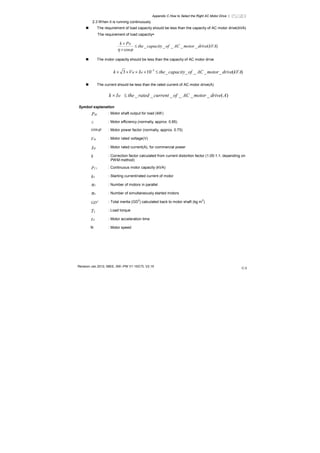
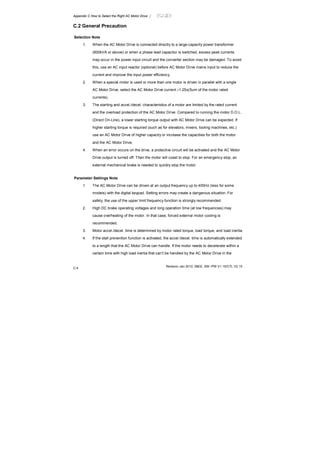
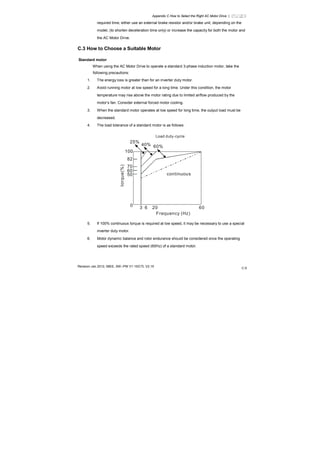
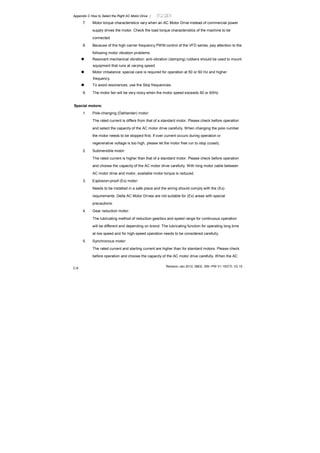
Preface
Thank you for choosing DELTA’s high-performance VFD-E Series. The VFD-E Series is
manufactured with high-quality components and materials and incorporate the latest microprocessor
technology available.
This manual is to be used for the installation, parameter setting, troubleshooting, and daily
maintenance of the AC motor drive. To guarantee safe operation of the equipment, read the following
safety guidelines before connecting power to the AC motor drive. Keep this operating manual at hand
and distribute to all users for reference.
To ensure the safety of operators and equipment, only qualified personnel familiar with AC motor
drive are to do installation, start-up and maintenance. Always read this manual thoroughly before
using VFD-E series AC Motor Drive, especially the WARNING, DANGER and CAUTION notes.
Failure to comply may result in personal injury and equipment damage. If you have any questions,
please contact your dealer.
PLEASE READ PRIOR TO INSTALLATION FOR SAFETY.
DANGER!
1. AC input power must be disconnected before any wiring to the AC motor drive is made.
2. A charge may still remain in the DC-link capacitors with hazardous voltages, even if the power
has been turned off. To prevent personal injury, please ensure that power has turned off before
opening the AC motor drive and wait ten minutes for the capacitors to discharge to safe voltage
levels.
3. Never reassemble internal components or wiring.
4. The AC motor drive may be destroyed beyond repair if incorrect cables are connected to the
input/output terminals. Never connect the AC motor drive output terminals U/T1, V/T2, and W/T3
directly to the AC mains circuit power supply.
5. Ground the VFD-E using the ground terminal. The grounding method must comply with the laws
of the country where the AC motor drive is to be installed. Refer to the Basic Wiring Diagram.
6. VFD-E series is used only to control variable speed of 3-phase induction motors, NOT for
1-phase motors or other purpose.
7. VFD-E series shall NOT be used for life support equipment or any life safety situation.
WARNING!
1. DO NOT use Hi-pot test for internal components. The semi-conductor used in AC motor drive
easily damage by high-voltage.
2. There are highly sensitive MOS components on the printed circuit boards. These components
are especially sensitive to static electricity. To prevent damage to these components, do not
touch these components or the circuit boards with metal objects or your bare hands.
3. Only qualified persons are allowed to install, wire and maintain AC motor drives.
CAUTION!
1. Some parameters settings can cause the motor to run immediately after applying power.
2. DO NOT install the AC motor drive in a place subjected to high temperature, direct sunlight, high
humidity, excessive vibration, corrosive gases or liquids, or airborne dust or metallic particles.
3. Only use AC motor drives within specification. Failure to comply may result in fire, explosion or
electric shock.
4. To prevent personal injury, please keep children and unqualified people away from the
equipment.
5. When the motor cable between AC motor drive and motor is too long, the layer insulation of the
motor may be damaged. Please use a frequency inverter duty motor or add an AC output reactor
to prevent damage to the motor. Refer to appendix B Reactor for details.
6. The rated voltage for AC motor drive must be ≤ 240V (≤ 480V for 460V models) and the short
circuit must be ≤ 5000A RMS (≤10000A RMS for the ≥ 40hp (30kW) models).
DeviceNet is a registered trademark of the Open DeviceNet Vendor Association, Inc. Lonwork is a
registered trademark of Echelon Corporation. Profibus is a registered trademark of Profibus
International. CANopen is a registered trademark of CAN in Automation (CiA). Other trademarks
belong to their respective owners.
Table of Contents
Chapter 1 Introduction
1.1Receiving and Inspection………….……….……….……….……….…….1-2
1.2Preparation for Installation and Wiring.……….……….….……….…..….1-9
1.3Dimensions………….……….……….……….……….……………….….1-13
Chapter 2 Installation and Wiring
2.1 Wiring………….……….……….……….……….……………………....….2-2
2.2 External Wiring………….……….……….……….……….…………..….2-12
2.3 Main Circuit………….……….……….……….……….………….......….2-13
2.4 Control Terminals………….……….……….………..………………..….2-17
Chapter 3 Keypad and Start up
3.1 Keypad………….……….……….……….……….……………...........….3-1
3.2 Operation Method………….……….……….……….……….…….…….3-2
3.3 Trial Run………….……….……….……….……….……………........….3-3
Chapter 4 Parameters
4.1 Summary of Parameter Settings………….……….……….………....….4-2
4.2 Parameter Settings for Applications………….……….……….…..…...4-33
4.3 Description of Parameter Settings………….……….……….……...….4-38
4.4 Different Parameters for VFD*E*C Models………….……….……….4-183
Chapter 5 Troubleshooting
5.1 Over Current (OC) ………….……….……….……….……….……….….5-1
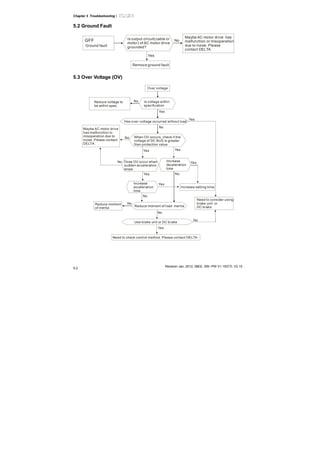
5.2 Ground Fault………….……….……….……….……….……………....….5-2
5.3 Over Voltage (OV) ………….……….……….……….……….………..….5-2
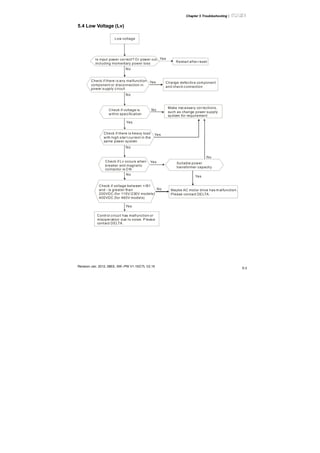
5.4 Low Voltage (Lv) ………….……….……….……….……….…………….5-3
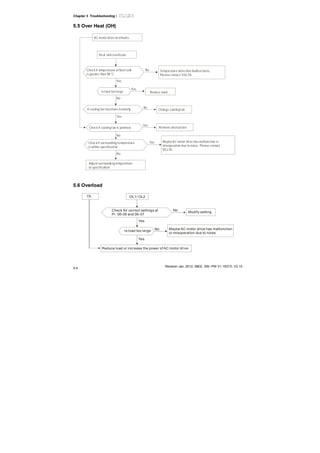
5.5 Over Heat (OH) ………….……….……….……….……….……………...5-4
5.6 Overload………….……….……….……….……….……………..........….5-4
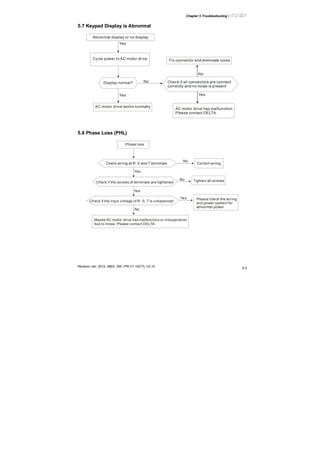
5.7 Keypad Display is Abnormal………….……….……….……….…...…….5-5
5.8 Phase Loss (PHL) ………….……….……….……….……….……......….5-5
5.9 Motor cannot Run………….……….……….……….……….………...….5-6
5.10 Motor Speed cannot be Changed………….……….……….……….….5-7
5.11 Motor Stalls during Acceleration………….……….……….………....….5-8
5.12 The Motor does not Run as Expected………….……….……….….….5-8
5.13 Electromagnetic/Induction Noise………….……….……….………..….5-9
5.14 Environmental Condition………….……….……….……….……....….5-10
5.15 Affecting Other Machines………….……….……….……….…...........5-10
Chapter 6 Fault Code Information and Maintenance
6.1 Fault Code Information………….……….……….……….……….……....6-1
6.2 Maintenance and Inspections………….……….……….……….…….….6-6
Appendix A Specifications………….……….……….……….……….…….….A-`
Appendix B Accessories
B.1 All Brake Resistors & Brake Units Used in AC Motor Drives……....….B-1
B.2 No-fuse Circuit Breaker Chart………….……….……….……….….….B-10
B.3 Fuse Specification Chart………….……….……….……….…………...B-11
B.4 AC Reactor ………….……….……….……….………………….......….B-12
B.5 Zero Phase Reactor (RF220x00A) ………….……….……….….........B-17
B.6 Remote Controller RC-01………….……….……….……….………….B-18
B.7 PU06………….……….……….……….……….……………………..….B-19
B.8 KPE-LE02………….……….……….……….……….…………...…..….B-21
B.9 Extension Card………….……….……….……….……….………….....B-25
B.10 Fieldbus Modules………….……….……….……….……………....….B-27
B.11 DIN Rail………….……….……….……….……….…………….......….B-38
B.12 EMI Filter………….……….……….……….……….………….….......B-40
Appendix C How to Select the Rights AC Motor Drive
C.1 Capacity Formulas………….……….……….……….……….…….........C-2
C.2 General Precaution………….……….……….……….……….………....C-4
C.3 How to Choose a Suitable Motor………….……….……….……...…….C-5
Appendix D How to Use PLC Function
D.1 PLC Overview………….………..……….……….………….……......….D-1
D.2 Start-up………….………..……….……….……….…………….........….D-2
D.3 Ladder Diagram………….……….……….……….……….………….….D-7
D.4 PLC Devices………….……….……….……….……….……….…........D-18
D.5 Commands………….……….……….……….……….………….......….D-27
D.6 Error Code………….……….……….……….……….……………....….D-64
Appendix E CANopen Function
E.1 Overview………….……….……….……….……….……………….....….E-2
E.2 How to control by CANopen………….……….……….………........….E-14
Appendix F Suggestions and Error Corrections for Standard AC Motor
Drives
F.1 Maintenance and Inspections………….……….……….……….........….F-2
F.2 Greasy Dirt Problem………….……….……….……….……….……...….F-6
F.3 Fiber Dust Problem………….……….……….……….……….…….…….F-7
F.4 Erosion Problem………….……….……….……….……….………..…….F-8
F.5 Industrial Dust Problem………….……….……….……….………......….F-9
F.6 Wiring and Installation Problem………….……….……….…….…..….F-10
F.7 Multi-function Input/Output Terminals Problem………….……….....….F-11
Chapter 1Introduction
The AC motor drive should be kept in the shipping carton or crate before installation. In order to retain
the warranty coverage, the AC motor drive should be stored properly when it is not to be used for an
extended period of time. Storage conditions are:
CAUTION!
1. Store in a clean and dry location free from direct sunlight or corrosive fumes.
2. Store within an ambient temperature range of -20
°
C to +60
°
C.
3. Store within a relative humidity range of 0% to 90% and non-condensing environment.
4. Store within an air pressure range of 86 kPA to 106kPA.
5. DO NOT place on the ground directly. It should be stored properly. Moreover, if the surrounding
environment is humid, you should put exsiccator in the package.
6. DO NOT store in an area with rapid changes in temperature. It may cause condensation and
frost.
7. If the AC motor drive is stored for more than 3 months, the temperature should not be higher
than 30 °C. Storage longer than one year is not recommended, it could result in the degradation
of the electrolytic capacitors.
8. When the AC motor drive is not used for longer time after installation on building sites or places
with humidity and dust, it’s best to move the AC motor drive to an environment as stated above.
Chapter 1 Introduction|
1-2 Revision Jan 2012, 08EE, SW--PW V1.15/CTL V2.15
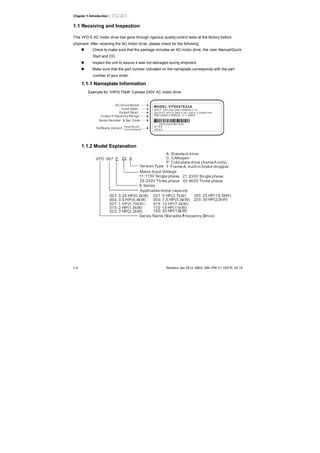
1.1 Receiving and Inspection
This VFD-E AC motor drive has gone through rigorous quality control tests at the factory before
shipment. After receiving the AC motor drive, please check for the following:
Check to make sure that the package includes an AC motor drive, the User Manual/Quick
Start and CD.
Inspect the unit to assure it was not damaged during shipment.
Make sure that the part number indicated on the nameplate corresponds with the part
number of your order.
1.1.1 Nameplate Information
Example for 1HP/0.75kW 3-phase 230V AC motor drive
MODEL V FD007E23A:
IN PUT :3PH 200-240V 50/60Hz 5.1A
OU TPUT :3PH 0- 240V 4.2A 1.6kVA 0.75kW/1HP
FREQUEN CY RANGE : 0.1~400Hz
Se ria l Nu mber & Bar Co de
AC Drive Mod el
In put Spec.
Ou tput Sp ec.
Ou tput Freque ncy Ra nge
007E23A0T 8011230
01.03
02.03
So ftware Version PowerBoard
Contr ol Board
1.1.2 Model Explanation
VFD A
Version Type
23
Mains Input Voltage
11:115 Single phaseV 21: phase230V Single
23:230 Three phaseV
E
E Series
007
Applicable motor capacity
Series Name ( ariable requency rive)V F D
43:460 Three phaseV
A: Standard drive
C: CANopen
P: Cold plate drive (frameA only)
T: Frame A, built-in brake chopper
004: 0.5 HP(0.4kW)
007: 1 HP(0.75kW)
015: 2 HP(1.5kW)
022: 3 HP(2.2kW)
002: 0.25 HP(0.2kW)
055: 7.5 HP(5.5kW)
075: 10 HP(7.5kW)
110: 15 HP(11kW)
037: 5 HP(3.7kW)
150: 20 HP(15kW)
220: 30 HP(22kW)
185: 25 HP(18.5kW)
Chapter 1 Introduction|
Revision Oct. 2009, 07EE, SW--PW V1.14/CTL V2.14 1-3
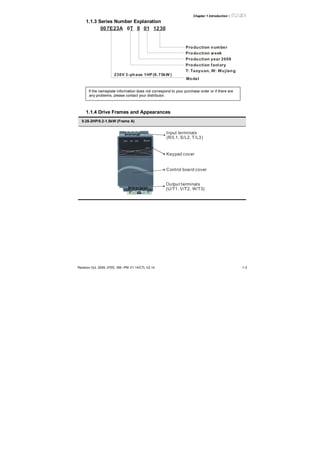
1.1.3 Series Number Explanation
12300180T007E23A
Production number
Production year 2008
Production factory
Production week
T: Taoyuan, W: Wujiang
Model
230V 3-phase 1HP (0.75kW )
If the nameplate information does not correspond to your purchase order or if there are
any problems, please contact your distributor.
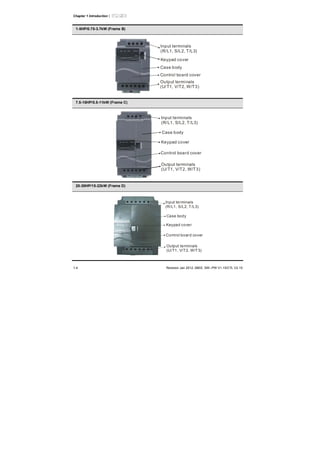
1.1.4 Drive Frames and Appearances
0.25-2HP/0.2-1.5kW (Frame A)
Input terminals
(R/L1, S/L2, T/L3)
Keypad cover
Output terminals
(U/T1, V/T2, W/T3)
Control board cover
Chapter 1 Introduction|
1-4 Revision Jan 2012, 08EE, SW--PW V1.15/CTL V2.15
1-5HP/0.75-3.7kW (Frame B)
Input terminals
(R/L1, S/L2, T/L3)
Keypad cover
Case body
Control board cover
Output terminals
(U/T1, V/T2, W/T3)
7.5-15HP/5.5-11kW (Frame C)
Input terminals
(R/L1, S/L2, T/L3)
Case body
Keypad cover
Control board cover
Output terminals
(U/T1, V/T2, W/T3)
20-30HP/15-22kW (Frame D)
Input terminals
(R/L1, S/L2, T/L3)
Case body
Keypad cover
Control board cover
Output terminals
(U/T1, V/T2, W/T3)
Chapter 1 Introduction|
Revision Oct. 2009, 07EE, SW--PW V1.14/CTL V2.14 1-5
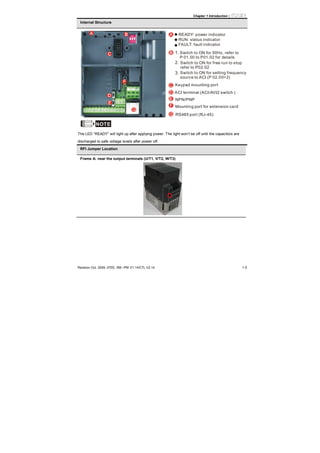
Internal Structure
1.
2.
3.
READY: power indicator
RUN: status indicator
FAULT: fault indicator
NPN/PNP
RS485 port (RJ-45)
Switch to ON for 50Hz, refer to
P 01.00 to P01.02 for details
Switch to ON for free run to stop
refer to P02.02
Switch to ON for setting frequency
source to ACI (P 02.00=2)
ACI terminal (ACI/AVI2 switch )
Mounting port for extension card
NOTE
The LED “READY” will light up after applying power. The light won’t be off until the capacitors are
discharged to safe voltage levels after power off.
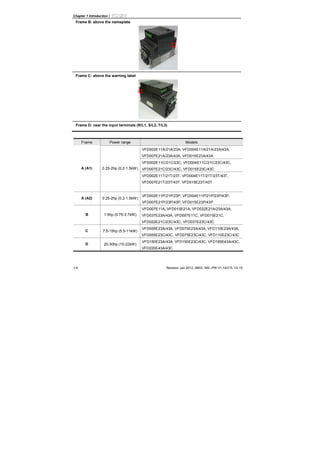
RFI Jumper Location
Frame A: near the output terminals (U/T1, V/T2, W/T3)
Chapter 1 Introduction|
1-6 Revision Jan 2012, 08EE, SW--PW V1.15/CTL V2.15
Frame B: above the nameplate
Frame C: above the warning label
Frame D: near the input terminals (R/L1, S/L2, T/L3)
Frame Power range Models
VFD002E11A/21A/23A, VFD004E11A/21A/23A/43A,
VFD007E21A/23A/43A, VFD015E23A/43A
VFD002E11C/21C/23C, VFD004E11C/21C/23C/43C,
VFD007E21C/23C/43C, VFD015E23C/43CA (A1) 0.25-2hp (0.2-1.5kW)
VFD002E11T/21T/23T, VFD004E11T/21T/23T/43T,
VFD007E21T/23T/43T, VFD015E23T/43T
A (A2) 0.25-2hp (0.2-1.5kW)
VFD002E11P/21P/23P, VFD004E11P/21P/23P/43P,
VFD007E21P/23P/43P, VFD015E23P/43P
B 1-5hp (0.75-3.7kW)
VFD007E11A, VFD015E21A, VFD022E21A/23A/43A,
VFD037E23A/43A, VFD007E11C, VFD015E21C,
VFD022E21C/23C/43C, VFD037E23C/43C
C 7.5-15hp (5.5-11kW)
VFD055E23A/43A, VFD075E23A/43A, VFD110E23A/43A,
VFD055E23C/43C, VFD075E23C/43C, VFD110E23C/43C
D 20-30hp (15-22kW)
VFD150E23A/43A, VFD150E23C/43C, VFD185E43A/43C,
VFD220E43A/43C
Chapter 1 Introduction|
Revision Oct. 2009, 07EE, SW--PW V1.14/CTL V2.14 1-7
RFI Jumper
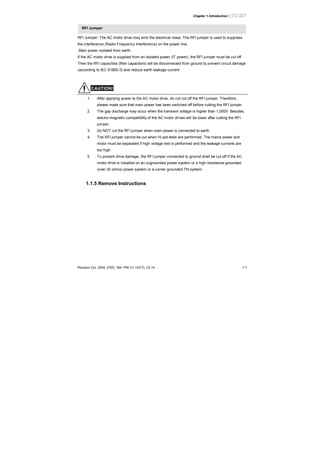
RFI Jumper: The AC motor drive may emit the electrical noise. The RFI jumper is used to suppress
the interference (Radio Frequency Interference) on the power line.
Main power isolated from earth:
If the AC motor drive is supplied from an isolated power (IT power), the RFI jumper must be cut off.
Then the RFI capacities (filter capacitors) will be disconnected from ground to prevent circuit damage
(according to IEC 61800-3) and reduce earth leakage current.
CAUTION!
1. After applying power to the AC motor drive, do not cut off the RFI jumper. Therefore,
please make sure that main power has been switched off before cutting the RFI jumper.
2. The gap discharge may occur when the transient voltage is higher than 1,000V. Besides,
electro-magnetic compatibility of the AC motor drives will be lower after cutting the RFI
jumper.
3. Do NOT cut the RFI jumper when main power is connected to earth.
4. The RFI jumper cannot be cut when Hi-pot tests are performed. The mains power and
motor must be separated if high voltage test is performed and the leakage currents are
too high.
5. To prevent drive damage, the RFI jumper connected to ground shall be cut off if the AC
motor drive is installed on an ungrounded power system or a high resistance-grounded
(over 30 ohms) power system or a corner grounded TN system.
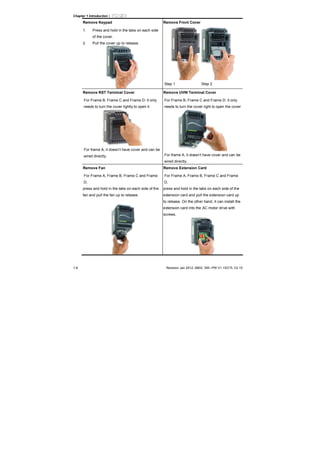
1.1.5 Remove Instructions
Chapter 1 Introduction|
1-8 Revision Jan 2012, 08EE, SW--PW V1.15/CTL V2.15
Remove Keypad
1. Press and hold in the tabs on each side
of the cover.
2. Pull the cover up to release.
Remove Front Cover
Step 1 Step 2
Remove RST Terminal Cover
For Frame B, Frame C and Frame D: it only
needs to turn the cover lightly to open it
For frame A, it doesn’t have cover and can be
wired directly.
Remove UVW Terminal Cover
For Frame B, Frame C and Frame D: it only
needs to turn the cover light to open the cover
For frame A, it doesn’t have cover and can be
wired directly.
Remove Fan
For Frame A, Frame B, Frame C and Frame
D,
press and hold in the tabs on each side of the
fan and pull the fan up to release.
Remove Extension Card
For Frame A, Frame B, Frame C and Frame
D,
press and hold in the tabs on each side of the
extension card and pull the extension card up
to release. On the other hand, it can install the
extension card into the AC motor drive with
screws.
Chapter 1 Introduction|
Revision Oct. 2009, 07EE, SW--PW V1.14/CTL V2.14 1-9
1.2 Preparation for Installation and Wiring
1.2.1 Ambient Conditions
Install the AC motor drive in an environment with the following conditions:
Air Temperature:
-10 ~ +50°C (14 ~ 122°F) for UL & cUL
-10 ~ +40°C (14 ~ 104°F) for side-by-side mounting
Relative Humidity: <90%, no condensation allowed
Atmosphere
pressure:
86 ~ 106 kPa
Installation Site
Altitude:
<1000m
Operation
Vibration:
<20Hz: 9.80 m/s
2
(1G) max
20 ~ 50Hz: 5.88 m/s
2
(0.6G) max
Temperature: -20°C ~ +60°C (-4°F ~ 140°F)
Relative Humidity: <90%, no condensation allowed
Atmosphere
pressure:
86 ~ 106 kPa
Storage
Transportation
Vibration:
<20Hz: 9.80 m/s
2
(1G) max
20 ~ 50Hz: 5.88 m/s
2
(0.6G) max
Pollution
Degree
2: good for a factory type environment.
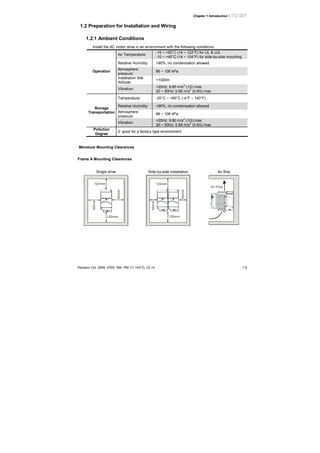
Minimum Mounting Clearances
Frame A Mounting Clearances
Single drive Side-by-side installation Air flow
120mm
120mm
50mm
50mm
120mm
120mm
50mm
50mm
Air Flow
Chapter 1 Introduction|
1-10 Revision Jan 2012, 08EE, SW--PW V1.15/CTL V2.15
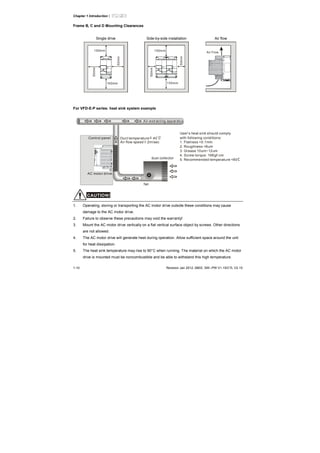
Frame B, C and D Mounting Clearances
Single drive Side-by-side installation Air flow
150mm
150mm
50mm
50mm
150mm
150mm
50mm
50mm
Air Flow
For VFD-E-P series: heat sink system example
Duct temperature
Air flow speed
40
2m/sec
C
User
1. Flatness <0.1mm
2. Roughness <6um
3. Grease 10um~12um
4. Screw torque: 16Kgf-cm
5. Recommended temperature <80
's heat sink should comply
with following conditions:
C
fan
AC motor drive
dust collector
Air-extracting apparatus
Control panel
CAUTION!
1. Operating, storing or transporting the AC motor drive outside these conditions may cause
damage to the AC motor drive.
2. Failure to observe these precautions may void the warranty!
3. Mount the AC motor drive vertically on a flat vertical surface object by screws. Other directions
are not allowed.
4. The AC motor drive will generate heat during operation. Allow sufficient space around the unit
for heat dissipation.
5. The heat sink temperature may rise to 90°C when running. The material on which the AC motor
drive is mounted must be noncombustible and be able to withstand this high temperature.
Chapter 1 Introduction|
Revision Oct. 2009, 07EE, SW--PW V1.14/CTL V2.14 1-11
6. When AC motor drive is installed in a confined space (e.g. cabinet), the surrounding
temperature must be within 10 ~ 40°C with good ventilation. DO NOT install the AC motor drive
in a space with bad ventilation.
7. Prevent fiber particles, scraps of paper, saw dust, metal particles, etc. from adhering to the
heatsink.
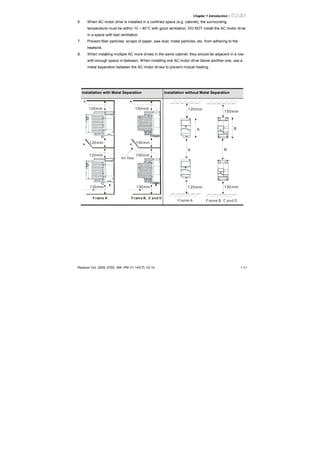
8. When installing multiple AC more drives in the same cabinet, they should be adjacent in a row
with enough space in-between. When installing one AC motor drive below another one, use a
metal separation between the AC motor drives to prevent mutual heating.
Installation with Metal Separation Installation without Metal Separation
120mm
120mm
120mm
120mm
150mm
150mm
150mm
150mm
Air flow
Frame A Frame B, C and D
120mm
120mm
150mm
150mm
A B
A B
Frame A Frame B, C and D
Chapter 1 Introduction|
1-12 Revision Jan 2012, 08EE, SW--PW V1.15/CTL V2.15
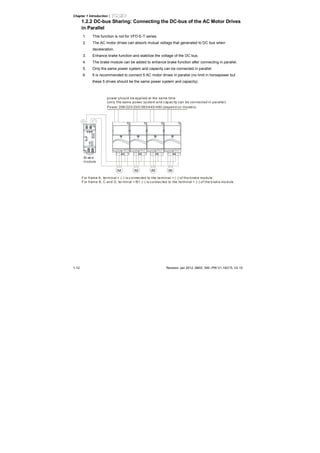
1.2.2 DC-bus Sharing: Connecting the DC-bus of the AC Motor Drives
in Parallel
1. This function is not for VFD-E-T series.
2. The AC motor drives can absorb mutual voltage that generated to DC bus when
deceleration.
3. Enhance brake function and stabilize the voltage of the DC bus.
4. The brake module can be added to enhance brake function after connecting in parallel.
5. Only the same power system and capacity can be connected in parallel.
6. It is recommended to connect 5 AC motor drives in parallel (no limit in horsepower but
these 5 drives should be the same power system and capacity).
U V W U V W U V W U V W
IM IM IM IM
Power 208/220/230/380/440/480 (depend on model s)
power should be applied at the same time
(only the same power sy stem and c apac ity can be connected in parallel)
Brak e
module
For frame A, terminal + (-) is c onnected to the terminal + (-) of the brake module.
For frame B, C and D, terminal +/B1 (-) is connec ted to the terminal + (-) of the brak e module.
Chapter 1 Introduction|
Revision Oct. 2009, 07EE, SW--PW V1.14/CTL V2.14 1-13
1.3 Dimensions
(Dimensions are in millimeter and [inch])
Frame A
D
H1
H
W
W1
S2S1
D1
D2
Unit: mm [inch]
Frame W W1 H H1 D D1 D2 S1 S2
A (A1)
72.0
[2.83]
60.0
[2.36]
142.0
[5.59]
120.0
[4.72]
152.0
[5.98]
50.0
[1.97]
4.5
[0.18]
5.2
[0.20]
5.2
[0.20]
A (A2)
72.0
[2.83]
56.0
[2.20]
155.0
[6.10]
143.0
[5.63]
111.5
[4.39]
9.5
[0.37]
- 5.3
[0.21]
-
NOTE
Frame A (A1): VFD002E11A/21A/23A, VFD004E11A/21A/23A/43A, VFD007E21A/23A/43A,
VFD015E23A/43A, VFD002E11C/21C/23C, VFD004E11C/21C/23C/43C, VFD007E21C/23C/43C,
VFD015E23C/43C, VFD002E11T/21T/23T, VFD004E11T/21T/23T/43T, VFD007E21T/23T/43T,
VFD015E23T/43T
Frame A (A2): VFD002E11P/21P/23P, VFD004E11P/21P/23P/43P, VFD007E21P/23P/43P,
VFD015E23P/43P
Chapter 1 Introduction|
1-14 Revision Jan 2012, 08EE, SW--PW V1.15/CTL V2.15
Frame B
D
H
S2
H1
W
W1
D1
D2
S1
Unit: mm [inch]
Frame W W1 H H1 D D1 D2 S1 S2
B1
100.0
[3.94]
89.0
[3.50]
174.0
[6.86]
162.0
[6.38]
152.0
[5.98]
50.0
[1.97]
4.0
[0.16]
5.5
[0.22]
5.5
[0.22]
NOTE
Frame B (B1): VFD007E11A, VFD015E21A, VFD022E21A/23A/43A, VFD037E23A/43A,
VFD007E11C, VFD015E21C, VFD022E21C/23C/43C, VFD037E23C/43C
Chapter 1 Introduction|
Revision Oct. 2009, 07EE, SW--PW V1.14/CTL V2.14 1-15
Frame C
H
H1
W1
W
S1
S2
D
D1
D2
Unit: mm [inch]
Frame W W1 H H1 D D1 D2 S1 S2
C1
130.0
[5.12]
116.0
[4.57]
260.0
[10.24]
246.5
[9.70]
169.2
[6.66]
78.5
[3.09]
8.0
[0.31]
6.5
[0.26]
5.5
[0.22]
NOTE
Frame C (C1): VFD055E23A/43A, VFD075E23A/43A, VFD110E23A/43A, VFD055E23C/43C,
VFD075E23C/43C, VFD110E23C/43C
Chapter 1 Introduction|
1-16 Revision Jan 2012, 08EE, SW--PW V1.15/CTL V2.15
Frame D
W1
W
D2
D1
D
H1
H
S1
S2
Unit: mm [inch]
Frame W W1 H H1 D D1 D2 S1 S2
D
200.0
[7.87]
180.0
[7.09]
310.0
[12.20]
290.0
[11.42]
190.0
[7.48]
92.0
[3.62]
10.0
[0.39]
10.0
[0.39]
9.0
[0.35]
NOTE
Frame D (D1): VFD150E23A/23C, VFD150E43A/43C, VFD185E43A/43C, VFD220E43A/43C,
Chapter 2Installation and Wiring
After removing the front cover, check if the power and control terminals are clear. Be sure to observe
the following precautions when wiring.
General Wiring Information
Applicable Codes
All VFD-E series are Underwriters Laboratories, Inc. (UL) and Canadian Underwriters
Laboratories (cUL) listed, and therefore comply with the requirements of the National
Electrical Code (NEC) and the Canadian Electrical Code (CEC).
Installation intended to meet the UL and cUL requirements must follow the instructions
provided in “Wiring Notes” as a minimum standard. Follow all local codes that exceed UL
and cUL requirements. Refer to the technical data label affixed to the AC motor drive and
the motor nameplate for electrical data.
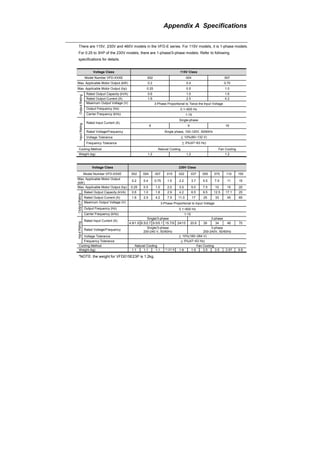
The "Line Fuse Specification" in Appendix B, lists the recommended fuse part number for
each VFD-E Series part number. These fuses (or equivalent) must be used on all
installations where compliance with U.L. standards is a required.
CAUTION!
1. Make sure that power is only applied to the R/L1, S/L2, T/L3 terminals. Failure to comply may
result in damage to the equipment. The voltage and current should lie within the range as
indicated on the nameplate.
2. All the units must be grounded directly to a common ground terminal to prevent lightning strike
or electric shock.
3. Please make sure to fasten the screw of the main circuit terminals to prevent sparks which is
made by the loose screws due to vibration.
4. Check following items after finishing the wiring:
A. Are all connections correct?
B. No loose wires?
C. No short-circuits between terminals or to ground?
Chapter 2 Installation and Wiring|
Revision Jan. 2012, 08EE, SW--PW V1.15/CTL V2.152-2
DANGER!
1. A charge may still remain in the DC bus capacitors with hazardous voltages even if the power
has been turned off. To prevent personal injury, please ensure that the power is turned off and
wait ten minutes for the capacitors to discharge to safe voltage levels before opening the AC
motor drive.
2. Only qualified personnel familiar with AC motor drives is allowed to perform installation, wiring
and commissioning.
3. Make sure that the power is off before doing any wiring to prevent electric shock.
2.1 Wiring
Users must connect wires according to the circuit diagrams on the following pages. Do not plug a
modem or telephone line to the RS-485 communication port or permanent damage may result. The
pins 1 & 2 are the power supply for the optional copy keypad only and should not be used for RS-485
communication.
Chapter 2 Installation and Wiring|
Revision Jan. 2012, 08EE, SW--PW V1.15/CTL V2.15
2-3
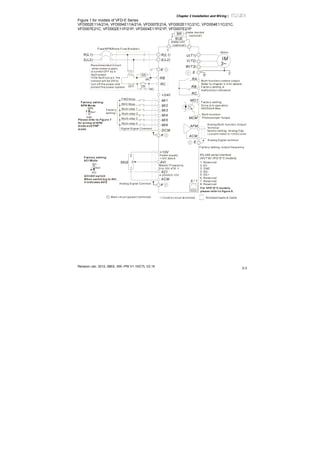
Figure 1 for models of VFD-E Series
VFD002E11A/21A, VFD004E11A/21A, VFD007E21A, VFD002E11C/21C, VFD004E11C/21C,
VFD007E21C, VFD002E11P/21P, VFD004E11P/21P, VFD007E21P
AVI
ACI
ACM
+
+10V
5K
3
2
1
Power supply
+10V 20m A
Master Frequency
0 to 10V 47K
Analog Signal Common E
Main c ircui t (power) terminals Control circuit terminals Shielded leads & Cable
E
R(L1)
S(L2)
Fus e/NFB(None Fuse Breaker)
SA
OFF ON
MC
MC
RB
RC
Recommended Circuit
when power s uppl y
is turned OFF by a
fault output
If the fault occ urs, the
contact will be ON to
turn off the power and
protect the power system.
R(L1)
S(L2)
E
Analog Multi-func tion Output
Terminal
factory setting: Analog freq.
/ c urrent meter 0~10VDC/2mA
U(T1)
V(T2)
W(T3)
IM
3~
AFM
ACM
RA
RB
RC
Motor
Factory setting:
Drive is in operation
48V50mA Max.
Multi-function
Photocoulper Output
Analog Signal common
E
E
MO1
MCM
MI1
MI2
MI3
MI4
MI6
MI5
DCM
+24V
FWD/Stop
REV/Stop
Multi-step 1
Multi-step 2
Multi-step 3
Multi-step 4
Digital Si gnal Common
Factory
setting
Sw2
AVI
ACI
Factory setting:
ACI Mode
ACI/AVI sw itch
When switching to AVI,
it indicates AVI2
-
8 1
Sw1
NPN
PNP
Factory setting:
NPN Mode
Please refer to Figure 7
for wiring of NPN
mode and PNP
mode.
BUE
brake unit
(optional)
BR brake resi stor
(opti onal)
Multi-function c ontact output
Refer to chapter 2.4 for details .
Fac tory setting is
malfunction indication
Fac tory setting: output frequency
4-20mA/0-10V
RS-485 serial interface
(NOT for VFD*E*C models)
1: Reserv ed
2: EV
5: SG+
6: Reserv ed
7: Reserv ed
8: Reserv ed
3: GND
4: SG-
For VFD*E*C models,
please refer to figure 8.
Chapter 2 Installation and Wiring|
Revision Jan. 2012, 08EE, SW--PW V1.15/CTL V2.152-4
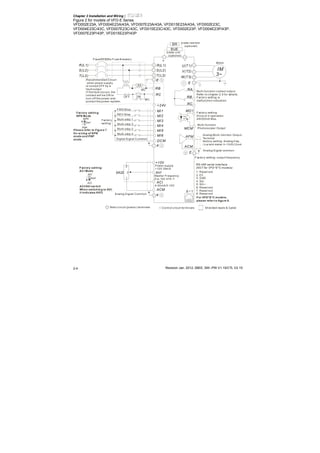
Figure 2 for models of VFD-E Series
VFD002E23A, VFD004E23A/43A, VFD007E23A/43A, VFD015E23A/43A, VFD002E23C,
VFD004E23C/43C, VFD007E23C/43C, VFD015E23C/43C, VFD002E23P, VFD004E23P/43P,
VFD007E23P/43P, VFD015E23P/43P
AVI
ACI
ACM
+
+10V
5K
3
2
1
Power supply
+10V 20m A
Master Frequency
0 to 10V 47K
Analog Signal Common E
Main circuit (power) terminals Control circuit terminals Shielded leads & Cable
E
R(L1)
S(L2)
Fus e/NFB(No Fuse B reaker)
SA
OFF ON
MC
MC
RB
RC
Recommended Circui t
when power suppl y
is turned OFF by a
fault output
If the fault occurs, the
contact will be ON to
turn off the power and
protect the power sys tem.
R(L1)
S(L2)
E
Analog Multi-func tion Output
Terminal
factory setting: Analog freq.
/ c urrent meter 0~10VDC/2mA
U(T1)
V(T2)
W(T3)
IM
3~
AFM
ACM
RA
RB
RC
Motor
Factory setting:
Drive is in operation
48V50mA Max.
Multi-function
Photocoulper Output
Analog Signal common
E
E
MO1
MCM
MI1
MI2
MI3
MI4
MI6
MI5
DCM
+24V
FWD/Stop
REV/Stop
Multi-step 1
Multi-step 2
Multi-step 3
Multi-step 4
Digital Si gnal Common
Factory
setting
Sw2
AVI
ACI
Factory setting:
ACI Mode
ACI/AVI sw itch
When switching to AVI,
it indicates AVI2
-
8 1
Sw1
NPN
PNP
Factory setting:
NPN Mode
Please refer to Figure 7
for wiring of NPN
mode and PNP
mode.
BUE
brake unit
(optional)
BR brake resi stor
(opti onal)
Multi-function c ontact output
Refer to chapter 2.4 for details .
Fac tory setting is
malfunction indication
Fac tory setting: output frequency
4-20mA/0-10V
T(L3)T(L3)
RS-485 serial interface
(NOT for VFD*E*C models)
1: Reserved
2: EV
5: SG+
6: Reserved
7: Reserved
8: Reserved
3: GND
4: SG-
For VFD*E*C models,
please refer to figure 8.
Chapter 2 Installation and Wiring|
Revision Jan. 2012, 08EE, SW--PW V1.15/CTL V2.15
2-5
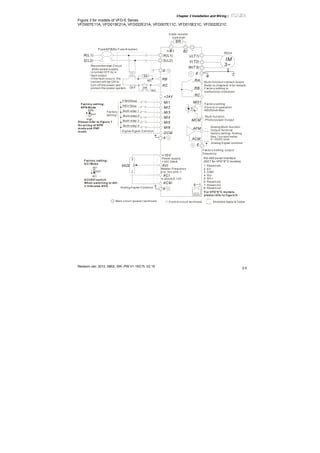
Figure 3 for models of VFD-E Series
VFD007E11A, VFD015E21A, VFD022E21A, VFD007E11C, VFD015E21C, VFD022E21C
AVI
ACI
ACM
+/B1
+10V
5K
3
2
1
Power supply
+10V 20mA
Master Frequency
0 to 10V 47K
Analog S ignal Common E
Main circuit (power) terminals Control circuit terminals Shielded leads & Cable
E
R(L1)
S(L2)
Fuse/NFB(No Fuse B reaker)
SA
OFF ON
MC
MC
RB
RC
Recommended Circuit
when power supply
is turned OFF by a
fault output
If the fault occurs, the
contact will be ON to
turn off the power and
protect the power system.
R(L1)
S(L2)
E
Analog Multi-function
Output Terminal
factory setting: Analog
freq./ current meter
0~10VDC/2mA
U(T1)
V(T2)
W(T3)
IM
3~
AFM
ACM
RA
RB
RC
Motor
Factory setting:
Drive is in operation
48V50mA Max.
Multi-function
Photocoulper Output
Analog S ignal common
E
E
MO1
MCM
MI1
MI2
MI3
MI4
MI6
MI5
DCM
+24V
FWD/Stop
REV/Stop
Multi-step 1
Multi-step 2
Multi-step 3
Multi-step 4
Digital Signal Common
Factory
setting
Sw2
AVI
ACI
Factory setting:
ACI Mode
ACI/AVI switch
When switching to AVI,
it indicates AVI2
-
8 1
Sw1
NPN
PNP
Factory setting:
NPN Mode
Please refer to Figure 7
for wiring of NPN
mode and PNP
mode.
brake resistor
(optional)
Multi-function contact output
Refer to chapter2.4 for details.
Factory setting is
malfunction indication
Factory setting: output
frequency
4-20mA/0-10V
BR
B2
RS-485 serial interface
(NOT for VFD*E*C models)
1: Reserved
2: EV
5: SG+
6: Reserved
7: Reserved
8: Reserved
3: GND
4: SG-
For VFD*E*C models,
please refer to figure 8.
Chapter 2 Installation and Wiring|
Revision Jan. 2012, 08EE, SW--PW V1.15/CTL V2.152-6
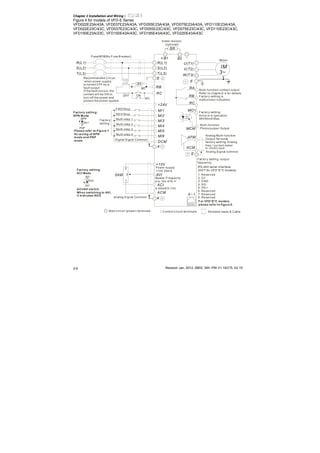
Figure 4 for models of VFD-E Series
VFD022E23A/43A, VFD037E23A/43A, VFD055E23A/43A, VFD075E23A/43A, VFD110E23A/43A,
VFD022E23C/43C, VFD037E23C/43C, VFD055E23C/43C, VFD075E23C/43C, VFD110E23C/43C,
VFD150E23A/23C, VFD150E43A/43C, VFD185E43A/43C, VFD220E43A/43C
AVI
ACI
ACM
+/B1
+10V
5K
3
2
1
Power supply
+10V 20m A
Master Frequency
0 to 10V 47K
Analog S ignal Common E
Main circuit (power) terminals Control circuit terminals Shielded leads & Cable
E
R(L1)
S(L2)
Fuse/NFB(No Fuse B reaker)
SA
OFF ON
MC
MC
RB
RC
Recommended Circuit
when power supply
is turned OFF by a
fault output
If the fault occurs, the
contact will be ON to
turn off the power and
protect the power system.
R(L1)
S(L2)
E
Analog Multi-function
Output Terminal
factory setting: Analog
freq./ current meter
0~10VDC/2mA
U(T1)
V(T2)
W(T3)
IM
3~
AFM
ACM
RA
RB
RC
Motor
Factory setting:
Drive is in operation
48V50mA Max.
Multi-function
Photocoulper Output
Analog S ignal common
E
E
MO1
MCM
MI1
MI2
MI3
MI4
MI6
MI5
DCM
+24V
FWD/Stop
REV/Stop
Multi-step 1
Multi-step 2
Multi-step 3
Multi-step 4
Digital Signal Common
Factory
setting
Sw2
AVI
ACI
Factory setting:
ACI Mode
ACI/AVI switch
When switching to AVI,
it indicates AVI2
-
8 1
Sw1
NPN
PNP
Factory setting:
NPN Mode
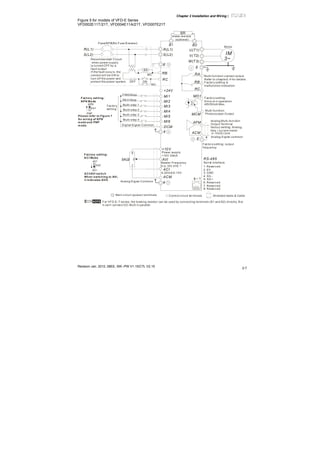
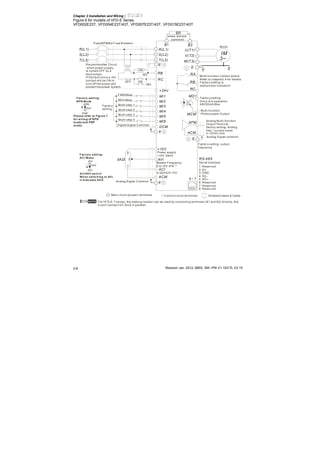
Please refer to Figure 7
for wiring of NPN
mode and PNP
mode.
brake resistor
(optional)
Multi-function contact output
Refer to chapter2.4 for details.
Factory setting is
malfunction indication
Factory setting: output
frequency
4-20mA/0-10V
T(L3)T(L3)
BR
B2
RS-485 serial interface
(NOT for VFD*E*C models)
1: Reserved
2: EV
5: SG +
6: Reserved
7: Reserved
8: Reserved
3: GND
4: SG -
For VFD*E*C models,
please refer to figure 8.
Chapter 2 Installation and Wiring|
Revision Jan. 2012, 08EE, SW--PW V1.15/CTL V2.15
2-7
Figure 5 for models of VFD-E Series
VFD002E11T/21T, VFD004E11A/21T, VFD007E21T
AVI
ACI
ACM
B1
+10V
5K
3
2
1
Power supply
+10V 20mA
Master Frequency
0 to 10V 47K
Analog S ignal Common E
Main circuit (power) terminals Control circuit terminals Shielded leads & Cable
E
R(L1)
S(L2)
Fuse/NFB(No Fuse B reaker)
SA
OFF ON
MC
MC
RB
RC
Recommended Circuit
when power supply
is turned OFF by a
fault output
If the fault occurs, the
contact will be ON to
turn off the power and
protect the power system.
R(L1)
S(L2)
E
Analog Multi-function
Output Terminal
factory setting: Analog
freq./ current meter
0~10VDC/2mA
U(T1)
V(T2)
W(T3)
IM
3~
AFM
ACM
RA
RB
RC
Motor
Factory setting:
Drive is in operation
48V50mA Max.
Multi-function
Photocoulper Output
Analog S ignal common
E
E
MO1
MCM
MI1
MI2
MI3
MI4
MI6
MI5
DCM
+24V
FWD/Stop
REV/Stop
Multi-step 1
Multi-step 2
Multi-step 3
Multi-step 4
Digital Signal Common
Factory
setting
Sw2
AVI
ACI
Factory setting:
ACI Mode
ACI/AVI switch
When switching to AVI,
it indicates AVI2
B2
RS-485
Serial interface
1: Reserved
2: EV
5: SG+
6: Reserved
7: Reserved
8: Reserved
3: GND
4: SG-
8 1
Sw1
NPN
PNP
Factory setting:
NPN Mode
Please refer to Figure 7
for wiring of NPN
mode and PNP
mode.
BR
brake resistor
(optional)
Multi-function contact output
Refer to chapter2.4 for details.
Factory setting is
malfunction indication
Factory setting: output
frequency
4-20mA/0-10V
NOTE For VFD-E-T series, the braking resistor can be used by connecting terminals (B1 and B2) directly. But
it can't connect DC-BUS in parallel.
Chapter 2 Installation and Wiring|
Revision Jan. 2012, 08EE, SW--PW V1.15/CTL V2.152-8
Figure 6 for models of VFD-E Series
VFD002E23T, VFD004E23T/43T, VFD007E23T/43T, VFD015E23T/43T
AVI
ACI
ACM
B1
+10V
5K
3
2
1
Power supply
+10V 20mA
Master Frequency
0 to 10V 47K
Analog S ignal Common E
Main circuit (power) terminals Control circuit terminals Shielded leads & Cable
E
R(L1)
S(L2)
Fuse/NFB(No Fuse B reaker)
SA
OFF ON
MC
MC
RB
RC
Recommended Circuit
when power supply
is turned OFF by a
fault output
If the fault occurs, the
contact will be ON to
turn off the power and
protect the power system.
R(L1)
S(L2)
E
Analog Multi-function
Output Terminal
factory setting: Analog
freq./ current meter
0~10VDC/2mA
U(T1)
V(T2)
W(T3)
IM
3~
AFM
ACM
RA
RB
RC
Motor
Factory setting:
Drive is in operation
48V50mA Max.
Multi-function
Photocoulper Output
Analog S ignal common
E
E
MO1
MCM
MI1
MI2
MI3
MI4
MI6
MI5
DCM
+24V
FWD/Stop
REV/Stop
Multi-step 1
Multi-step 2
Multi-step 3
Multi-step 4
Digital Signal Common
Factory
setting
Sw2
AVI
ACI
F actory setting :
ACI Mod e
ACI/AVI sw itch
Wh en switch ing to AVI,
it in dicates AVI2
B2
RS-485
Serial interface
1: Reserved
2: EV
5: SG+
6: Reserved
7: Reserved
8: Reserved
3: GND
4: SG-
8 1
Sw1
NPN
PNP
F actory setting:
NPN Mo de
Please refer to Figure 7
for wiring of NPN
mode and PNP
mode.
BR
brake resistor
(optional)
Multi-function contact output
Refer to chapter2.4 for details.
Factory setting is
malfunction indication
Factory setting: output
frequency
4-20mA/0-10V
T(L3)T(L3)
NOTE For VFD-E-T series, the braking resistor can be used by connecting terminals (B1 and B2) directly. But
it can't connect DC-BUS in parallel.
Chapter 2 Installation and Wiring|
Revision Jan. 2012, 08EE, SW--PW V1.15/CTL V2.15
2-9
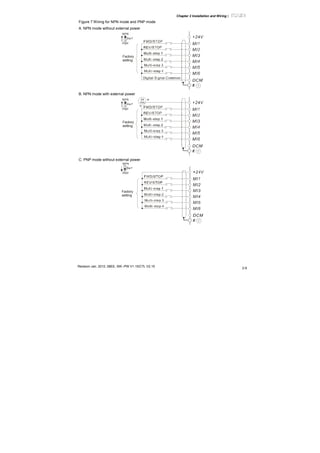
Figure 7 Wiring for NPN mode and PNP mode
A. NPN mode without external power
Factory
setting
NPN
PNP
B. NPN mode with external power
Factory
setting
NPN
PNP
24
Vdc
-
+
C. PNP mode without external power
Sw1
Factory
setting
NPN
PNP
Chapter 2 Installation and Wiring|
Revision Jan. 2012, 08EE, SW--PW V1.15/CTL V2.152-10
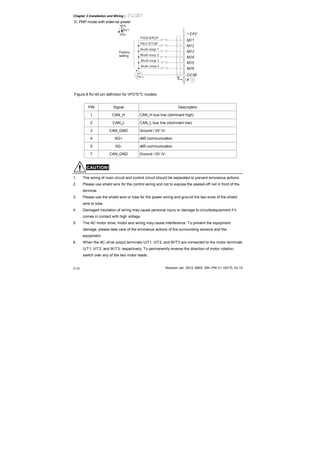
D. PNP mode with external power
Sw1
Factory
setting
NPN
PNP
24
Vdc -
+
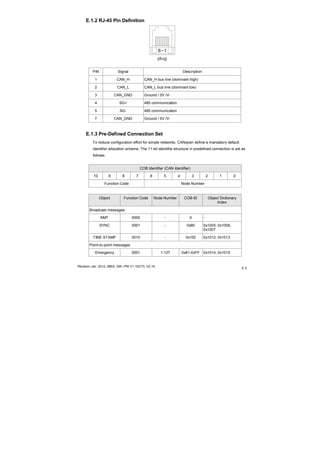
Figure 8 RJ-45 pin definition for VFD*E*C models
PIN Signal Description
1 CAN_H CAN_H bus line (dominant high)
2 CAN_L CAN_L bus line (dominant low)
3 CAN_GND Ground / 0V /V-
4 SG+ 485 communication
5 SG- 485 communication
7 CAN_GND Ground / 0V /V-
CAUTION!
1. The wiring of main circuit and control circuit should be separated to prevent erroneous actions.
2. Please use shield wire for the control wiring and not to expose the peeled-off net in front of the
terminal.
3. Please use the shield wire or tube for the power wiring and ground the two ends of the shield
wire or tube.
4. Damaged insulation of wiring may cause personal injury or damage to circuits/equipment if it
comes in contact with high voltage.
5. The AC motor drive, motor and wiring may cause interference. To prevent the equipment
damage, please take care of the erroneous actions of the surrounding sensors and the
equipment.
6. When the AC drive output terminals U/T1, V/T2, and W/T3 are connected to the motor terminals
U/T1, V/T2, and W/T3, respectively. To permanently reverse the direction of motor rotation,
switch over any of the two motor leads.
Chapter 2 Installation and Wiring|
Revision Jan. 2012, 08EE, SW--PW V1.15/CTL V2.15
2-11
7. With long motor cables, high capacitive switching current peaks can cause over-current, high
leakage current or lower current readout accuracy. To prevent this, the motor cable should be
less than 20m for 3.7kW models and below. And the cable should be less than 50m for 5.5kW
models and above. For longer motor cables use an AC output reactor.
8. The AC motor drive, electric welding machine and the greater horsepower motor should be
grounded separately.
9. Use ground leads that comply with local regulations and keep them as short as possible.
10. No brake resistor is built in the VFD-E series, it can install brake resistor for those occasions
that use higher load inertia or frequent start/stop. Refer to Appendix B for details.
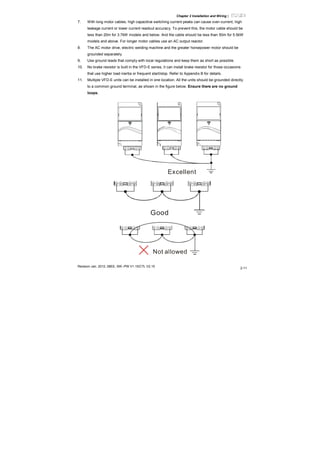
11. Multiple VFD-E units can be installed in one location. All the units should be grounded directly
to a common ground terminal, as shown in the figure below. Ensure there are no ground
loops.
Excellent
Good
Not allowed
Chapter 2 Installation and Wiring|
Revision Jan. 2012, 08EE, SW--PW V1.15/CTL V2.152-12
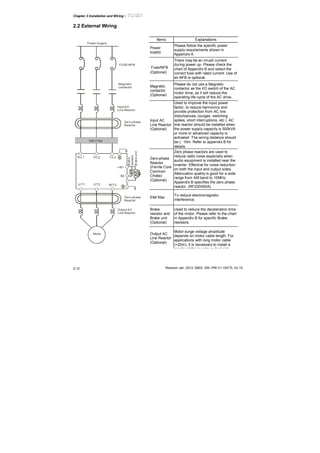
2.2 External Wiring
Motor
Output AC
Line Reactor
Power Supply
Magnetic
contactor
Input AC
Line Reactor
EMI Filter
R/L1 S/L2 T/L3
U/T1 V/T2 W/T3
+/B1
B2
Zero-phase
Reactor
Zero-phase
Reactor
FUSE/NFB
-
BR
BUE
Brake
resistor
Brakeunit
Items Explanations
Power
supply
Please follow the specific power
supply requirements shown in
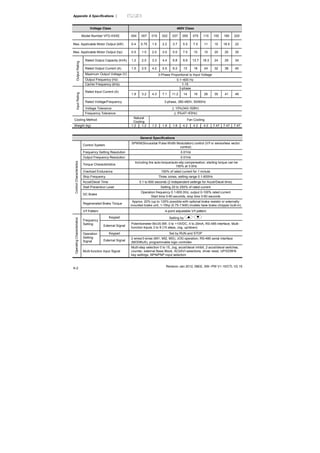
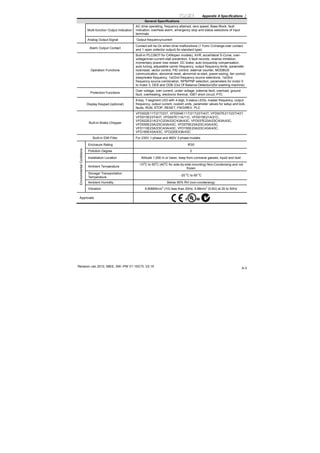
Appendix A.
Fuse/NFB
(Optional)
There may be an inrush current
during power up. Please check the
chart of Appendix B and select the
correct fuse with rated current. Use of
an NFB is optional.
Magnetic
contactor
(Optional)
Please do not use a Magnetic
contactor as the I/O switch of the AC
motor drive, as it will reduce the
operating life cycle of the AC drive.
Input AC
Line Reactor
(Optional)
Used to improve the input power
factor, to reduce harmonics and
provide protection from AC line
disturbances. (surges, switching
spikes, short interruptions, etc.). AC
line reactor should be installed when
the power supply capacity is 500kVA
or more or advanced capacity is
activated .The wiring distance should
be ≤ 10m. Refer to appendix B for
details.
Zero-phase
Reactor
(Ferrite Core
Common
Choke)
(Optional)
Zero phase reactors are used to
reduce radio noise especially when
audio equipment is installed near the
inverter. Effective for noise reduction
on both the input and output sides.
Attenuation quality is good for a wide
range from AM band to 10MHz.
Appendix B specifies the zero phase
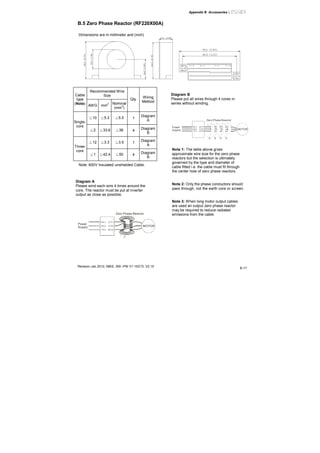
reactor. (RF220X00A)
EMI filter
To reduce electromagnetic
interference.
Brake
resistor and
Brake unit
(Optional)
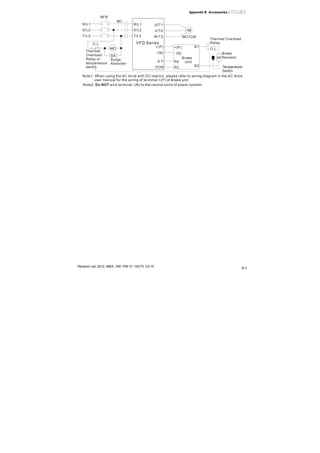
Used to reduce the deceleration time
of the motor. Please refer to the chart
in Appendix B for specific Brake
resistors.
Output AC
Line Reactor
(Optional)
Motor surge voltage amplitude
depends on motor cable length. For
applications with long motor cable
(>20m), it is necessary to install a
reactor at the inverter output side
Chapter 2 Installation and Wiring|
Revision Jan. 2012, 08EE, SW--PW V1.15/CTL V2.15
2-13
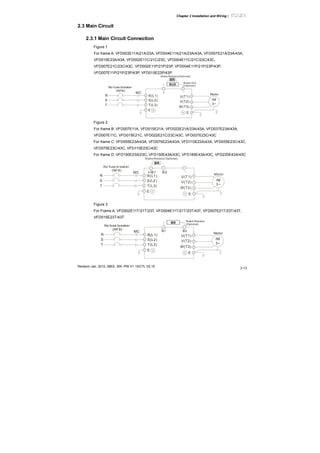
2.3 Main Circuit
2.3.1 Main Circuit Connection
Figure 1
For frame A: VFD002E11A/21A/23A, VFD004E11A/21A/23A/43A, VFD007E21A/23A/43A,
VFD015E23A/43A, VFD002E11C/21C/23C, VFD004E11C/21C/23C/43C,
VFD007E21C/23C/43C, VFD002E11P/21P/23P, VFD004E11P/21P/23P/43P,
VFD007E11P/21P/23P/43P, VFD015E23P/43P
R(L1)
S(L2)
T(L3)
R
S
T
U(T1)
V(T2)
W(T3)
IM
3~
MC
E
E
+ -
No fuse breaker
(NFB)
Brake Resistor(Optional)
Motor
BUE
BR
Brake Unit
(Optional)
Figure 2
For frame B: VFD007E11A, VFD015E21A, VFD022E21A/23A/43A, VFD037E23A/43A,
VFD007E11C, VFD015E21C, VFD022E21C/23C/43C, VFD037E23C/43C
For frame C: VFD055E23A/43A, VFD075E23A/43A, VFD110E23A/43A, VFD055E23C/43C,
VFD075E23C/43C, VFD110E23C/43C
For frame D: VFD150E23A/23C, VFD150E43A/43C, VFD185E43A/43C, VFD220E43A/43C
R(L1)
S(L2)
T(L3)
R
S
T
U(T 1)
V(T2)
W(T3)
IM
3~
MC
E
E
B2 -
No fuse breaker
(NFB)
Brake Resistor( Optional)
Motor
+/B1
BR
Figure 3
For Frame A: VFD002E11T/21T/23T, VFD004E11T/21T/23T/43T, VFD007E21T/23T/43T,
VFD015E23T/43T
R(L1)
S(L2)
T(L3)
R
S
T
U(T1)
V(T2)
W(T3)
IM
3~
MC
E
E
B1 B2
No fuse breaker
(NFB)
Brake Resistor
(Optional)
Motor
BR
Chapter 2 Installation and Wiring|
Revision Jan. 2012, 08EE, SW--PW V1.15/CTL V2.152-14
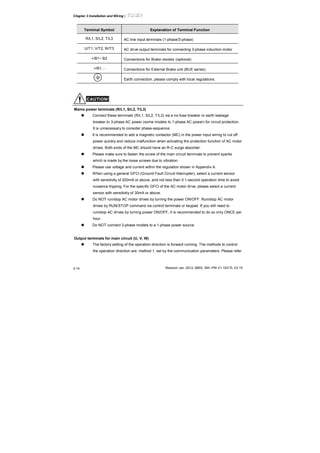
Terminal Symbol Explanation of Terminal Function
R/L1, S/L2, T/L3 AC line input terminals (1-phase/3-phase)
U/T1, V/T2, W/T3 AC drive output terminals for connecting 3-phase induction motor
+/B1~ B2 Connections for Brake resistor (optional)
+/B1, - Connections for External Brake unit (BUE series)
Earth connection, please comply with local regulations.
CAUTION!
Mains power terminals (R/L1, S/L2, T/L3)
Connect these terminals (R/L1, S/L2, T/L3) via a no-fuse breaker or earth leakage
breaker to 3-phase AC power (some models to 1-phase AC power) for circuit protection.
It is unnecessary to consider phase-sequence.
It is recommended to add a magnetic contactor (MC) in the power input wiring to cut off
power quickly and reduce malfunction when activating the protection function of AC motor
drives. Both ends of the MC should have an R-C surge absorber.
Please make sure to fasten the screw of the main circuit terminals to prevent sparks
which is made by the loose screws due to vibration.
Please use voltage and current within the regulation shown in Appendix A.
When using a general GFCI (Ground Fault Circuit Interrupter), select a current sensor
with sensitivity of 200mA or above, and not less than 0.1-second operation time to avoid
nuisance tripping. For the specific GFCI of the AC motor drive, please select a current
sensor with sensitivity of 30mA or above.
Do NOT run/stop AC motor drives by turning the power ON/OFF. Run/stop AC motor
drives by RUN/STOP command via control terminals or keypad. If you still need to
run/stop AC drives by turning power ON/OFF, it is recommended to do so only ONCE per
hour.
Do NOT connect 3-phase models to a 1-phase power source.
Output terminals for main circuit (U, V, W)
The factory setting of the operation direction is forward running. The methods to control
the operation direction are: method 1, set by the communication parameters. Please refer
Chapter 2 Installation and Wiring|
Revision Jan. 2012, 08EE, SW--PW V1.15/CTL V2.15
2-15
to the group 9 for details. Method2, control by the optional keypad KPE-LE02. Refer to
Appendix B for details.
When it needs to install the filter at the output side of terminals U/T1, V/T2, W/T3 on the
AC motor drive. Please use inductance filter. Do not use phase-compensation capacitors
or L-C (Inductance-Capacitance) or R-C (Resistance-Capacitance), unless approved by
Delta.
DO NOT connect phase-compensation capacitors or surge absorbers at the output
terminals of AC motor drives.
Use well-insulated motor, suitable for inverter operation.
Terminals [+/B1, B2] for connecting brake resistor
BR
B2
BR
+/B1 B2
BR
B1 -
BUE
+/B1
Brakeresistor (optional)
Brake unit(optional)
Refer to Appendix B for details.
Connect a brake resistor or brake unit in applications with frequent deceleration ramps,
short deceleration time, too low brake torque or requiring increased brake torque.
If the AC motor drive has a built-in brake chopper (frame B, frame C and VFDxxxExxT
models), connect the external brake resistor to the terminals [+/B1, B2] or [B1, B2].
Models of frame A don’t have a built-in brake chopper. Please connect an external
optional brake unit (BUE-series) and brake resistor. Refer to BUE series user manual for
details.
Connect the terminals [+(P), -(N)] of the brake unit to the AC motor drive terminals [+/B1, -
]. The length of wiring should be less than 5m with cable.
When not used, please leave the terminals [+/B1, -] open.
WARNING!
Short-circuiting [B2] or [-] to [+/B1] can damage the AC motor drive.
Chapter 2 Installation and Wiring|
Revision Jan. 2012, 08EE, SW--PW V1.15/CTL V2.152-16
2.3.2 Main Circuit Terminals
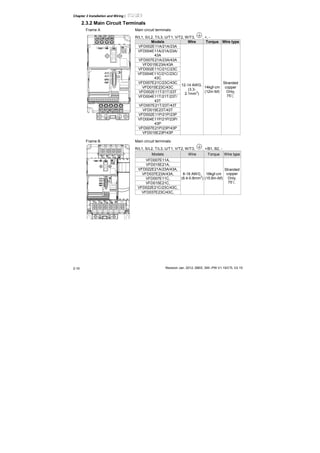
Frame A Main circuit terminals:
R/L1, S/L2, T/L3, U/T1, V/T2, W/T3, , +, -
Models Wire Torque Wire type
VFD002E11A/21A/23A
VFD004E11A/21A/23A/
43A
VFD007E21A/23A/43A
VFD015E23A/43A
VFD002E11C/21C/23C
VFD004E11C/21C/23C/
43C
VFD007E21C/23C/43C
VFD015E23C/43C
VFD002E11T/21T/23T
VFD004E11T/21T/23T/
43T
VFD007E21T/23T/43T
VFD015E23T/43T
VFD002E11P/21P/23P
VFD004E11P/21P/23P/
43P
VFD007E21P/23P/43P
VFD015E23P/43P
12-14 AWG.
(3.3-
2.1mm
2
)
14kgf-cm
(12in-lbf)
Stranded
copper
Only,
75℃
Frame B Main circuit terminals:
R/L1, S/L2, T/L3, U/T1, V/T2, W/T3, , +/B1, B2, -
Models Wire Torque Wire type
VFD007E11A,
VFD015E21A,
VFD022E21A/23A/43A,
VFD037E23A/43A,
VFD007E11C,
VFD015E21C,
VFD022E21C/23C/43C,
VFD037E23C/43C,
8-18 AWG.
(8.4-0.8mm
2
)
18kgf-cm
(15.6in-lbf)
Stranded
copper
Only,
75℃
Chapter 2 Installation and Wiring|
Revision Jan. 2012, 08EE, SW--PW V1.15/CTL V2.15
2-17
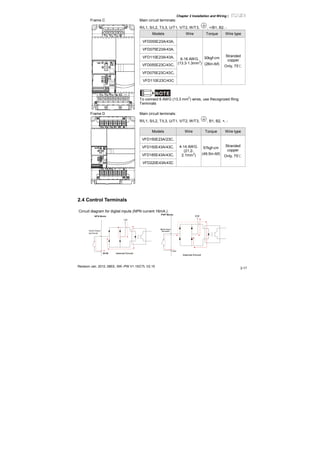
Frame C Main circuit terminals:
R/L1, S/L2, T/L3, U/T1, V/T2, W/T3, , +/B1, B2, -
Models Wire Torque Wire type
VFD055E23A/43A,
VFD075E23A/43A,
VFD110E23A/43A,
VFD055E23C/43C,
VFD075E23C/43C,
VFD110E23C/43C
6-16 AWG.
(13.3-1.3mm
2
)
30kgf-cm
(26in-lbf)
Stranded
copper
Only, 75℃
NOTE
To connect 6 AWG (13.3 mm
2
) wires, use Recognized Ring
Terminals
Frame D Main circuit terminals:
R/L1, S/L2, T/L3, U/T1, V/T2, W/T3, , B1, B2, +, -
Models Wire Torque Wire type
VFD150E23A/23C,
VFD150E43A/43C,
VFD185E43A/43C,
VFD220E43A/43C
4-14 AWG.
(21.2-
2.1mm
2
)
57kgf-cm
(49.5in-lbf)
Stranded
copper
Only, 75℃
2.4 Control Terminals
Circuit diagram for digital inputs (NPN current 16mA.)
+24
NPN Mode
multi-input
terminal
Internal CircuitDCM
+24V
Multi-Input
Terminal
DCM
Internal Circuit
PNP Mode
Chapter 2 Installation and Wiring|
Revision Jan. 2012, 08EE, SW--PW V1.15/CTL V2.152-18
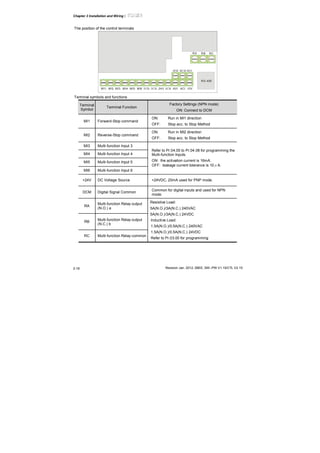
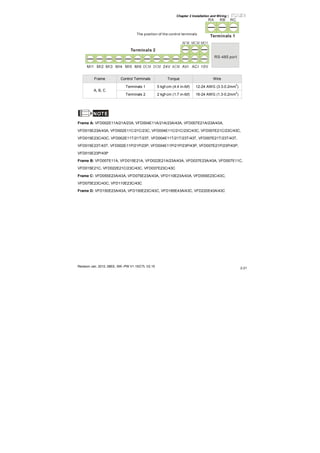
The position of the control terminals
RS-485
10VMI1 MI2 MI3 MI4 MI5 MI6 DCM 24VDCM ACM AVI ACI
AFM MCM MO1
RA RB RC
Terminal symbols and functions
Terminal
Symbol
Terminal Function
Factory Settings (NPN mode)
ON: Connect to DCM
MI1 Forward-Stop command
ON: Run in MI1 direction
OFF: Stop acc. to Stop Method
MI2 Reverse-Stop command
ON: Run in MI2 direction
OFF: Stop acc. to Stop Method
MI3 Multi-function Input 3
MI4 Multi-function Input 4
MI5 Multi-function Input 5
MI6 Multi-function Input 6
Refer to Pr.04.05 to Pr.04.08 for programming the
Multi-function Inputs.
ON: the activation current is 16mA.
OFF: leakage current tolerance is 10μA.
+24V DC Voltage Source +24VDC, 20mA used for PNP mode.
DCM Digital Signal Common
Common for digital inputs and used for NPN
mode.
RA
Multi-function Relay output
(N.O.) a
RB
Multi-function Relay output
(N.C.) b
RC Multi-function Relay common
Resistive Load:
5A(N.O.)/3A(N.C.) 240VAC
5A(N.O.)/3A(N.C.) 24VDC
Inductive Load:
1.5A(N.O.)/0.5A(N.C.) 240VAC
1.5A(N.O.)/0.5A(N.C.) 24VDC
Refer to Pr.03.00 for programming
Chapter 2 Installation and Wiring|
Revision Jan. 2012, 08EE, SW--PW V1.15/CTL V2.15
2-19
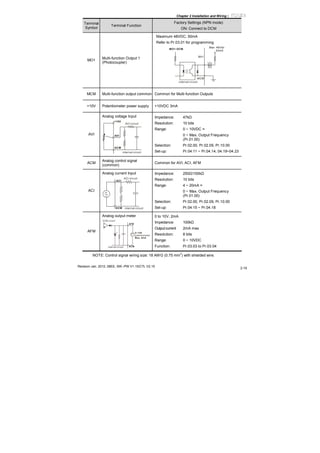
Terminal
Symbol
Terminal Function
Factory Settings (NPN mode)
ON: Connect to DCM
MO1
Multi-function Output 1
(Photocoupler)
Maximum 48VDC, 50mA
Refer to Pr.03.01 for programming
MO1-DCM
Mo1
MCM
Max: 48Vdc
50mA
internal circuit
MCM Multi-function output common Common for Multi-function Outputs
+10V Potentiometer power supply +10VDC 3mA
AVI
Analog voltage Input
ACM
AVI
+10V
internal circuit
AVI circuit
Impedance: 47kΩ
Resolution: 10 bits
Range: 0 ~ 10VDC =
0 ~ Max. Output Frequency
(Pr.01.00)
Selection: Pr.02.00, Pr.02.09, Pr.10.00
Set-up: Pr.04.11 ~ Pr.04.14, 04.19~04.23
ACM
Analog control signal
(common)
Common for AVI, ACI, AFM
ACI
Analog current Input
ACM
ACI
internal circuit
ACI circuit
Impedance: 250Ω/100kΩ
Resolution: 10 bits
Range: 4 ~ 20mA =
0 ~ Max. Output Frequency
(Pr.01.00)
Selection: Pr.02.00, Pr.02.09, Pr.10.00
Set-up: Pr.04.15 ~ Pr.04.18
AFM
Analog output meter
AFM
ACM
0~10V
Max. 2mA
potentiometer
ACM circuit
internal circuit
0 to 10V, 2mA
Impedance: 100kΩ
Outputcurrent 2mA max
Resolution: 8 bits
Range: 0 ~ 10VDC
Function: Pr.03.03 to Pr.03.04
NOTE: Control signal wiring size: 18 AWG (0.75 mm
2
) with shielded wire.
Chapter 2 Installation and Wiring|
Revision Jan. 2012, 08EE, SW--PW V1.15/CTL V2.152-20
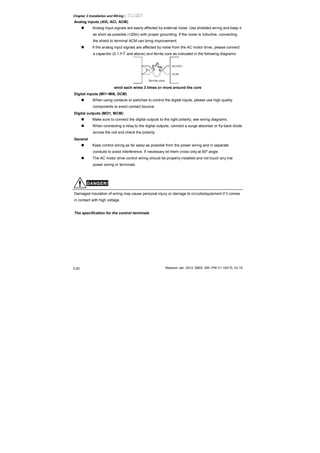
Analog inputs (AVI, ACI, ACM)
Analog input signals are easily affected by external noise. Use shielded wiring and keep it
as short as possible (<20m) with proper grounding. If the noise is inductive, connecting
the shield to terminal ACM can bring improvement.
If the analog input signals are affected by noise from the AC motor drive, please connect
a capacitor (0.1 μ F and above) and ferrite core as indicated in the following diagrams:
C
AVI/ACI
ACM
ferrite core
wind each wires 3 times or more around the core
Digital inputs (MI1~MI6, DCM)
When using contacts or switches to control the digital inputs, please use high quality
components to avoid contact bounce.
Digital outputs (MO1, MCM)
Make sure to connect the digital outputs to the right polarity, see wiring diagrams.
When connecting a relay to the digital outputs, connect a surge absorber or fly-back diode
across the coil and check the polarity.
General
Keep control wiring as far away as possible from the power wiring and in separate
conduits to avoid interference. If necessary let them cross only at 90º angle.
The AC motor drive control wiring should be properly installed and not touch any live
power wiring or terminals.
DANGER!
Damaged insulation of wiring may cause personal injury or damage to circuits/equipment if it comes
in contact with high voltage.
The specification for the control terminals
Chapter 2 Installation and Wiring|
Revision Jan. 2012, 08EE, SW--PW V1.15/CTL V2.15
2-21
RS-485 port
10VMI1 MI2 MI3 MI4 MI5 MI6 DCM 24VDCM ACM AVI ACI
AFM MCM MO1
RA RB RC
The position of the control terminals
Terminals 2
Terminals 1
Frame Control Terminals Torque Wire
Terminals 1 5 kgf-cm (4.4 in-lbf) 12-24 AWG (3.3-0.2mm
2
)
A, B, C
Terminals 2 2 kgf-cm (1.7 in-lbf) 16-24 AWG (1.3-0.2mm
2
)
NOTE
Frame A: VFD002E11A/21A/23A, VFD004E11A/21A/23A/43A, VFD007E21A/23A/43A,
VFD015E23A/43A, VFD002E11C/21C/23C, VFD004E11C/21C/23C/43C, VFD007E21C/23C/43C,
VFD015E23C/43C, VFD002E11T/21T/23T, VFD004E11T/21T/23T/43T, VFD007E21T/23T/43T,
VFD015E23T/43T, VFD002E11P/21P/23P, VFD004E11P/21P/23P/43P, VFD007E21P/23P/43P,
VFD015E23P/43P
Frame B: VFD007E11A, VFD015E21A, VFD022E21A/23A/43A, VFD037E23A/43A, VFD007E11C,
VFD015E21C, VFD022E21C/23C/43C, VFD037E23C/43C
Frame C: VFD055E23A/43A, VFD075E23A/43A, VFD110E23A/43A, VFD055E23C/43C,
VFD075E23C/43C, VFD110E23C/43C
Frame D: VFD150E23A/43A, VFD150E23C/43C, VFD185E43A/43C, VFD220E43A/43C
Chapter 3 Keypad and Start Up
Make sure that the wiring is correct. In particular, check that the
output terminals U/T1, V/T2, W/T3. are NOT connected to power
and that the drive is well grounded.
Verify that no other equipment is connected to the AC motor drive
Do NOT operate the AC motor drive with humid hands.
Please check if READY LED is ON when power is applied. Check
if the connection is well when option from the digital keypad KPE-
LE02.
It should be stopped when fault occurs during running and refer to
“Fault Code Information and Maintenance” for solution. Please do
NOT touch output terminals U, V, W when power is still applied to
L1/R, L2/S, L3/T even when the AC motor drive has stopped. The
DC-link capacitors may still be charged to hazardous voltage
levels, even if the power has been turned off.
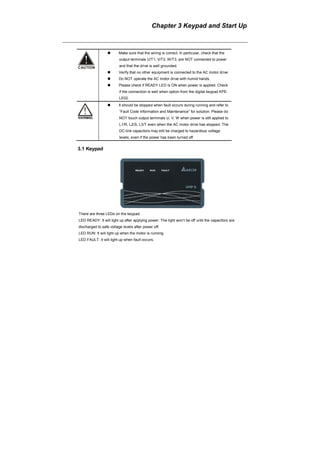
3.1 Keypad
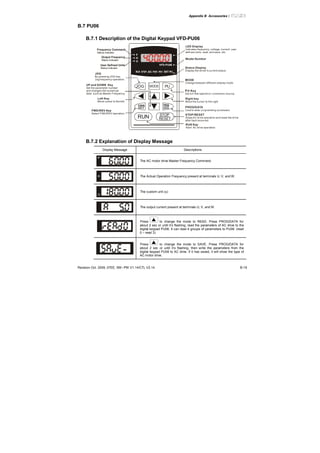
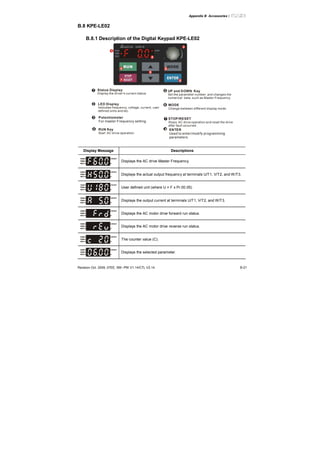
There are three LEDs on the keypad:
LED READY: It will light up after applying power. The light won’t be off until the capacitors are
discharged to safe voltage levels after power off.
LED RUN: It will light up when the motor is running.
LED FAULT: It will light up when fault occurs.
Chapter 3 Keypad and Start Up |
Revision Jan. 2012, 08EE, SW--PW V1.15/CTL V2.15
3-2
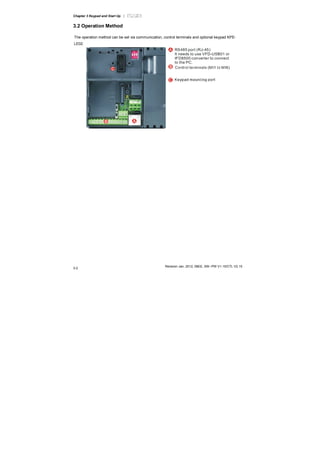
3.2 Operation Method
The operation method can be set via communication, control terminals and optional keypad KPE-
LE02.
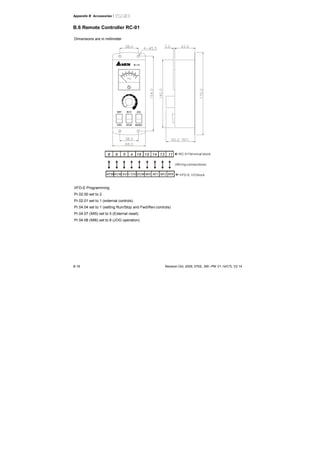
RS485 port (RJ-45)
It needs to use VFD-USB01 or
IFD8500 converter to connect
to the PC.
Chapter 3 Keypad and Start Up |
Revision Jan. 2012, 08EE, SW--PW V1.15/CTL V2.15 3
3.3 Trial Run
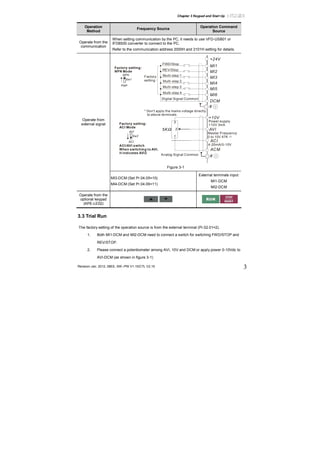
The factory setting of the operation source is from the external terminal (Pr.02.01=2).
1. Both MI1-DCM and MI2-DCM need to connect a switch for switching FWD/STOP and
REV/STOP.
2. Please connect a potentiometer among AVI, 10V and DCM or apply power 0-10Vdc to
AVI-DCM (as shown in figure 3-1)
Operation
Method
Frequency Source
Operation Command
Source
Operate from the
communication
When setting communication by the PC, it needs to use VFD-USB01 or
IFD8500 converter to connect to the PC.
Refer to the communication address 2000H and 2101H setting for details.
* Don't apply the mains voltage directly
to above terminals.
E
MI1
MI2
MI3
MI4
MI6
MI5
DCM
+24V
FWD/Stop
REV/Stop
Multi-step 1
Multi-step 2
Multi-step 3
Multi-step 4
Digital Signal Common
Factory
settingSw1
NPN
PNP
Factory setting:
NPN Mode
AVI
ACI
ACM
+10V
5K
3
2
1
Power supply
+10V 3mA
Master Frequency
0 to 10V 47K
Analog Signal Common E
Sw2
AVI
ACI
Factory setting:
ACI Mode
ACI/AVI switch
When switching to AVI,
it indicates AVI2
4-20mA/0-10V
Figure 3-1
Operate from
external signal
MI3-DCM (Set Pr.04.05=10)
MI4-DCM (Set Pr.04.06=11)
External terminals input:
MI1-DCM
MI2-DCM
Operate from the
optional keypad
(KPE-LE02)
Chapter 3 Keypad and Start Up |
Revision Jan. 2012, 08EE, SW--PW V1.15/CTL V2.15
3-4
3. Setting the potentiometer or AVI-DCM 0-10Vdc power to less than 1V.
4. Setting MI1=On for forward running. And if you want to change to reverse running, you
should set MI2=On. And if you want to decelerate to stop, please set MI1/MI2=Off.
5. Check following items:
Check if the motor direction of rotation is correct.
Check if the motor runs steadily without abnormal noise and vibration.
Check if acceleration and deceleration are smooth.
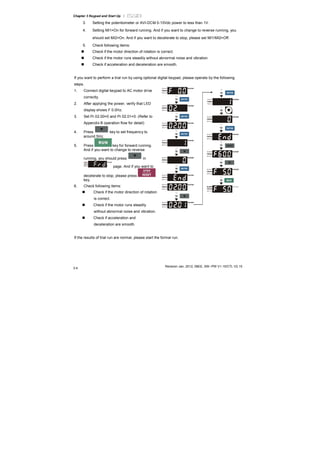
If you want to perform a trial run by using optional digital keypad, please operate by the following
steps.
1. Connect digital keypad to AC motor drive
correctly.
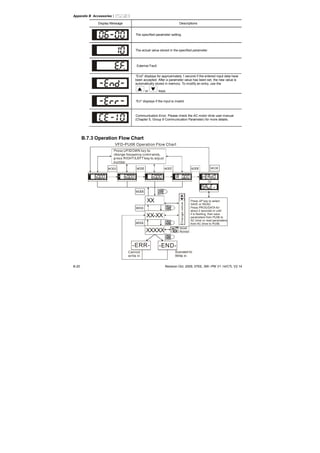
2. After applying the power, verify that LED
display shows F 0.0Hz.
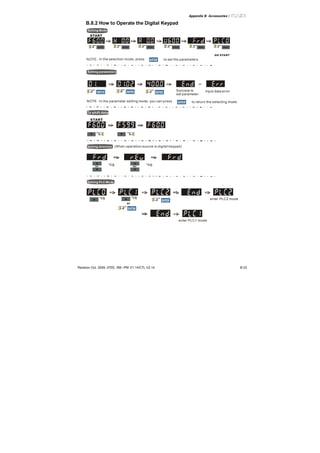
3. Set Pr.02.00=0 and Pr.02.01=0. (Refer to
Appendix B operation flow for detail)
4. Press key to set frequency to
around 5Hz.
5. Press key for forward running.
And if you want to change to reverse
running, you should press in
page. And if you want to
decelerate to stop, please press
key.
6. Check following items:
Check if the motor direction of rotation
is correct.
Check if the motor runs steadily
without abnormal noise and vibration.
Check if acceleration and
deceleration are smooth.
If the results of trial run are normal, please start the formal run.
Chapter 4 Parameters
The VFD-E parameters are divided into 14 groups by property for easy setting. In most applications,
the user can finish all parameter settings before start-up without the need for re-adjustment during
operation.
The 14 groups are as follows:
Group 0: User Parameters
Group 1: Basic Parameters
Group 2: Operation Method Parameters
Group 3: Output Function Parameters
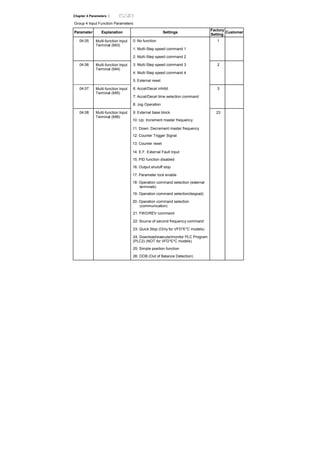
Group 4: Input Function Parameters
Group 5: Multi-Step Speed Parameters
Group 6: Protection Parameters
Group 7: Motor Parameters
Group 8: Special Parameters
Group 9: Communication Parameters
Group 10: PID Control Parameters
Group 11: Multi-function Input/Output Parameters for Extension Card
Group 12: Analog Input/Output Parameters for Extension Card
Group 13: PG function Parameters for Extension Card
Chapter 4 Parameters |
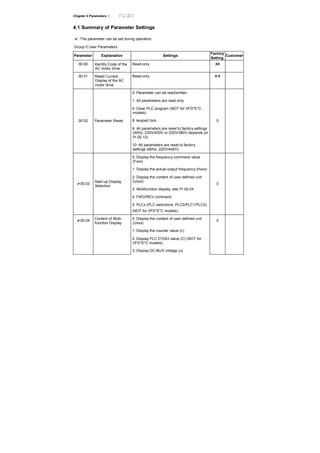
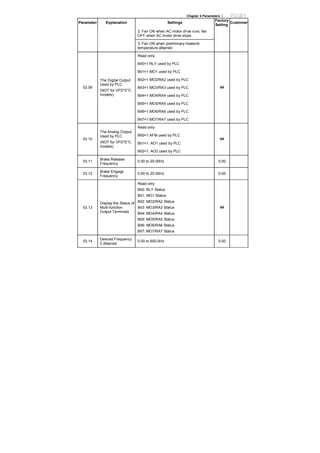
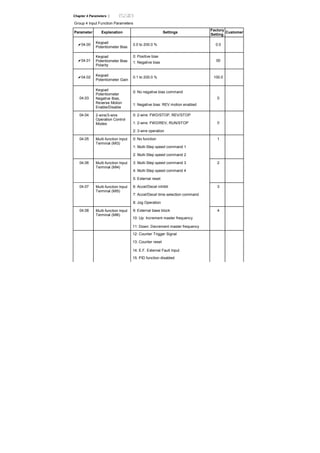
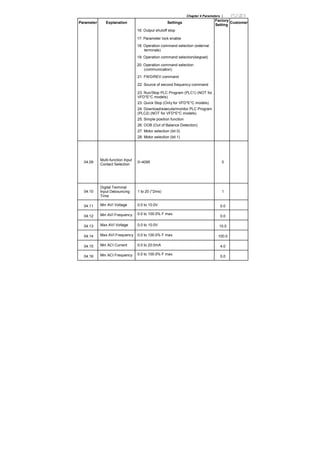
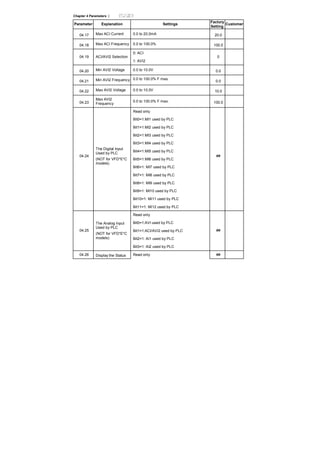
4.1 Summary of Parameter Settings
: The parameter can be set during operation.
Group 0 User Parameters
Parameter Explanation Settings
Factory
Setting
Customer
00.00 Identity Code of the
AC motor drive
Read-only ##
00.01 Rated Current
Display of the AC
motor drive
Read-only #.#
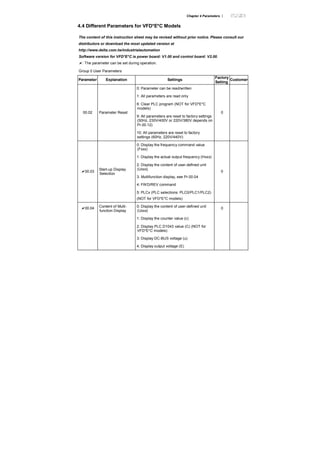
0: Parameter can be read/written
1: All parameters are read only
6: Clear PLC program (NOT for VFD*E*C
models)
8: keypad lock
9: All parameters are reset to factory settings
(50Hz, 230V/400V or 220V/380V depends on
Pr.00.12)
00.02 Parameter Reset
10: All parameters are reset to factory
settings (60Hz, 220V/440V)
0
0: Display the frequency command value
(Fxxx)
1: Display the actual output frequency (Hxxx)
2: Display the content of user-defined unit
(Uxxx)
3: Multifunction display, see Pr.00.04
4: FWD/REV command
00.03
Start-up Display
Selection
5: PLCx (PLC selections: PLC0/PLC1/PLC2)
(NOT for VFD*E*C models)
0
0: Display the content of user-defined unit
(Uxxx)
1: Display the counter value (c)
2: Display PLC D1043 value (C) (NOT for
VFD*E*C models)
00.04 Content of Multi-
function Display
3: Display DC-BUS voltage (u)
0
Chapter 4 Parameters |
Parameter Explanation Settings
Factory
Setting
Customer
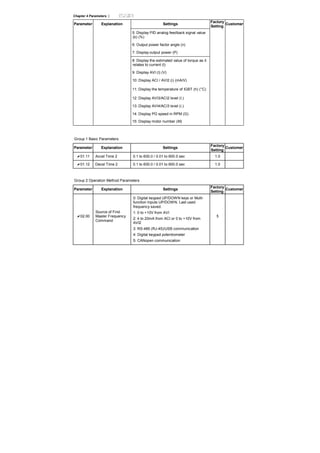
4: Display output voltage (E)
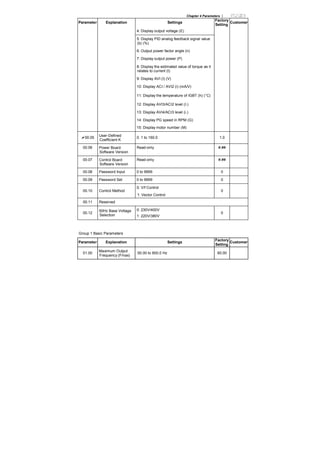
5: Display PID analog feedback signal value
(b) (%)
6: Output power factor angle (n)
7: Display output power (P)
8: Display the estimated value of torque as it
relates to current (t)
9: Display AVI (I) (V)
10: Display ACI / AVI2 (i) (mA/V)
11: Display the temperature of IGBT (h) (°C)
12: Display AVI3/ACI2 level (I.)
13: Display AVI4/ACI3 level (i.)
14: Display PG speed in RPM (G)
15: Display motor number (M)
00.05
User-Defined
Coefficient K
0. 1 to 160.0 1.0
00.06 Power Board
Software Version
Read-only #.##
00.07 Control Board
Software Version
Read-only #.##
00.08 Password Input 0 to 9999 0
00.09 Password Set 0 to 9999 0
0: V/f Control
00.10 Control Method
1: Vector Control
0
00.11 Reserved
00.12
50Hz Base Voltage
Selection
0: 230V/400V
1: 220V/380V
0
Group 1 Basic Parameters
Parameter Explanation Settings
Factory
Setting
Customer
01.00
Maximum Output
Frequency (Fmax)
50.00 to 600.0 Hz 60.00
Chapter 4 Parameters |
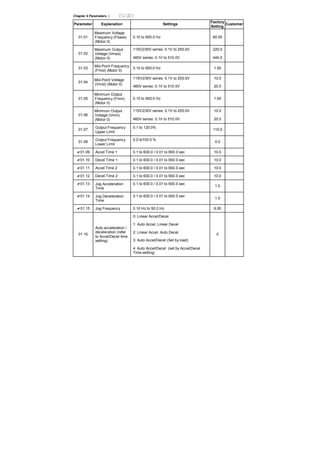
Parameter Explanation Settings
Factory
Setting
Customer
01.01
Maximum Voltage
Frequency (Fbase)
(Motor 0)
0.10 to 600.0 Hz 60.00
115V/230V series: 0.1V to 255.0V 220.0
01.02
Maximum Output
Voltage (Vmax)
(Motor 0) 460V series: 0.1V to 510.0V 440.0
01.03
Mid-Point Frequency
(Fmid) (Motor 0)
0.10 to 600.0 Hz 1.50
115V/230V series: 0.1V to 255.0V 10.0
01.04
Mid-Point Voltage
(Vmid) (Motor 0)
460V series: 0.1V to 510.0V 20.0
01.05
Minimum Output
Frequency (Fmin)
(Motor 0)
0.10 to 600.0 Hz 1.50
115V/230V series: 0.1V to 255.0V 10.0
01.06
Minimum Output
Voltage (Vmin)
(Motor 0) 460V series: 0.1V to 510.0V 20.0
01.07
Output Frequency
Upper Limit
0.1 to 120.0%
110.0
01.08
Output Frequency
Lower Limit
0.0 to100.0 %
0.0
01.09 Accel Time 1 0.1 to 600.0 / 0.01 to 600.0 sec 10.0
01.10 Decel Time 1 0.1 to 600.0 / 0.01 to 600.0 sec 10.0
01.11 Accel Time 2 0.1 to 600.0 / 0.01 to 600.0 sec 10.0
01.12 Decel Time 2 0.1 to 600.0 / 0.01 to 600.0 sec 10.0
01.13 Jog Acceleration
Time
0.1 to 600.0 / 0.01 to 600.0 sec
1.0
01.14 Jog Deceleration
Time
0.1 to 600.0 / 0.01 to 600.0 sec
1.0
01.15 Jog Frequency 0.10 Hz to 50.0 Hz 6.00
0: Linear Accel/Decel
1: Auto Accel, Linear Decel
2: Linear Accel, Auto Decel
3: Auto Accel/Decel (Set by load)
01.16
Auto acceleration /
deceleration (refer
to Accel/Decel time
setting)
4: Auto Accel/Decel (set by Accel/Decel
Time setting)
0
Chapter 4 Parameters |
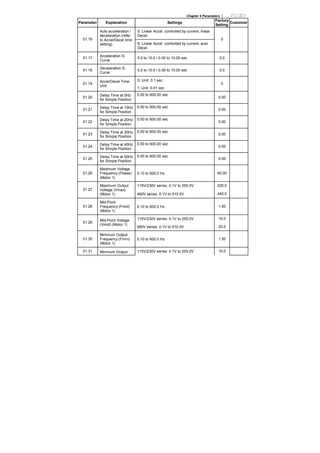
Parameter Explanation Settings
Factory
Setting
Customer
5: Linear Accel. controlled by current, linear
Decel.
01.16
Auto acceleration /
deceleration (refer
to Accel/Decel time
setting) 6: Linear Accel. controlled by current, auto
Decel.
0
01.17
Acceleration S-
Curve
0.0 to 10.0 / 0.00 to 10.00 sec 0.0
01.18
Deceleration S-
Curve
0.0 to 10.0 / 0.00 to 10.00 sec 0.0
0: Unit: 0.1 sec
01.19
Accel/Decel Time
Unit
1: Unit: 0.01 sec
0
01.20
Delay Time at 0Hz
for Simple Position
0.00 to 600.00 sec
0.00
01.21
Delay Time at 10Hz
for Simple Position
0.00 to 600.00 sec
0.00
01.22
Delay Time at 20Hz
for Simple Position
0.00 to 600.00 sec
0.00
01.23
Delay Time at 30Hz
for Simple Position
0.00 to 600.00 sec
0.00
01.24
Delay Time at 40Hz
for Simple Position
0.00 to 600.00 sec
0.00
01.25
Delay Time at 50Hz
for Simple Position
0.00 to 600.00 sec
0.00
01.26
Maximum Voltage
Frequency (Fbase)
(Motor 1)
0.10 to 600.0 Hz 60.00
115V/230V series: 0.1V to 255.0V 220.0
01.27
Maximum Output
Voltage (Vmax)
(Motor 1) 460V series: 0.1V to 510.0V 440.0
01.28
Mid-Point
Frequency (Fmid)
(Motor 1)
0.10 to 600.0 Hz 1.50
115V/230V series: 0.1V to 255.0V 10.0
01.29
Mid-Point Voltage
(Vmid) (Motor 1)
460V series: 0.1V to 510.0V 20.0
01.30
Minimum Output
Frequency (Fmin)
(Motor 1)
0.10 to 600.0 Hz 1.50
01.31 Minimum Output 115V/230V series: 0.1V to 255.0V 10.0
Chapter 4 Parameters |
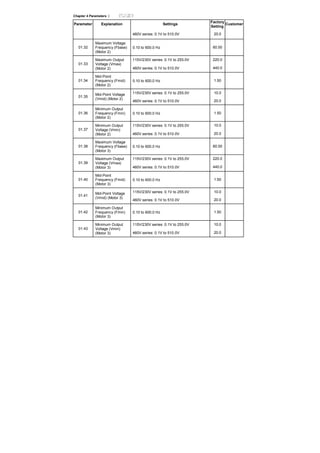
Parameter Explanation Settings
Factory
Setting
Customer
460V series: 0.1V to 510.0V 20.0
01.32
Maximum Voltage
Frequency (Fbase)
(Motor 2)
0.10 to 600.0 Hz 60.00
115V/230V series: 0.1V to 255.0V 220.0
01.33
Maximum Output
Voltage (Vmax)
(Motor 2) 460V series: 0.1V to 510.0V 440.0
01.34
Mid-Point
Frequency (Fmid)
(Motor 2)
0.10 to 600.0 Hz 1.50
115V/230V series: 0.1V to 255.0V 10.0
01.35
Mid-Point Voltage
(Vmid) (Motor 2)
460V series: 0.1V to 510.0V 20.0
01.36
Minimum Output
Frequency (Fmin)
(Motor 2)
0.10 to 600.0 Hz 1.50
115V/230V series: 0.1V to 255.0V 10.0
01.37
Minimum Output
Voltage (Vmin)
(Motor 2) 460V series: 0.1V to 510.0V 20.0
01.38
Maximum Voltage
Frequency (Fbase)
(Motor 3)
0.10 to 600.0 Hz 60.00
115V/230V series: 0.1V to 255.0V 220.0
01.39
Maximum Output
Voltage (Vmax)
(Motor 3) 460V series: 0.1V to 510.0V 440.0
01.40
Mid-Point
Frequency (Fmid)
(Motor 3)
0.10 to 600.0 Hz 1.50
115V/230V series: 0.1V to 255.0V 10.0
01.41
Mid-Point Voltage
(Vmid) (Motor 3)
460V series: 0.1V to 510.0V 20.0
01.42
Minimum Output
Frequency (Fmin)
(Motor 3)
0.10 to 600.0 Hz 1.50
115V/230V series: 0.1V to 255.0V 10.0
01.43
Minimum Output
Voltage (Vmin)
(Motor 3) 460V series: 0.1V to 510.0V 20.0
Chapter 4 Parameters |
Group 2 Operation Method Parameters
Parameter Explanation Settings
Factory
Setting
Customer
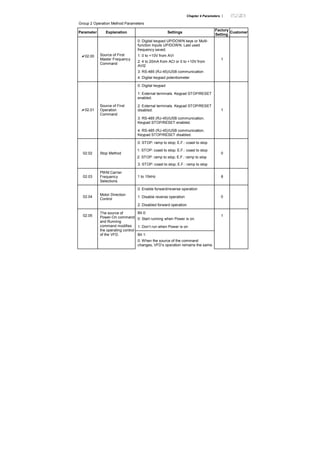
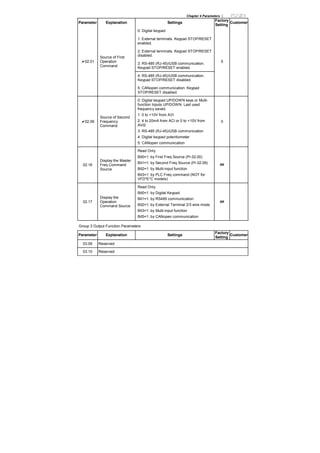
02.00 Source of First
Master Frequency
Command
0: Digital keypad UP/DOWN keys or Multi-
function Inputs UP/DOWN. Last used
frequency saved.
1: 0 to +10V from AVI
2: 4 to 20mA from ACI or 0 to +10V from
AVI2
3: RS-485 (RJ-45)/USB communication
4: Digital keypad potentiometer
1
0: Digital keypad
1: External terminals. Keypad STOP/RESET
enabled.
2: External terminals. Keypad STOP/RESET
disabled.
3: RS-485 (RJ-45)/USB communication.
Keypad STOP/RESET enabled.
02.01
Source of First
Operation
Command
4: RS-485 (RJ-45)/USB communication.
Keypad STOP/RESET disabled.
1
0: STOP: ramp to stop; E.F.: coast to stop
1: STOP: coast to stop; E.F.: coast to stop
2: STOP: ramp to stop; E.F.: ramp to stop
02.02 Stop Method
3: STOP: coast to stop; E.F.: ramp to stop
0
02.03
PWM Carrier
Frequency
Selections
1 to 15kHz 8
0: Enable forward/reverse operation
1: Disable reverse operation02.04
Motor Direction
Control
2: Disabled forward operation
0
Bit 0:
0: Start running when Power is on.
1: Don’t run when Power is on
02.05
The source of
Power-On command
and Running
command modifies
the operating control
of the VFD. Bit 1:
0: When the source of the command
changes, VFD’s operation remains the same.
1
Chapter 4 Parameters |
Parameter Explanation Settings
Factory
Setting
Customer
1: When the source of the command
changes, VFD’s operation follows the new
command.
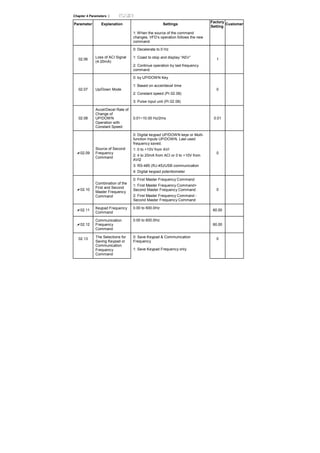
0: Decelerate to 0 Hz
1: Coast to stop and display “AErr”02.06
Loss of ACI Signal
(4-20mA)
2: Continue operation by last frequency
command
1
0: by UP/DOWN Key
1: Based on accel/decel time
2: Constant speed (Pr.02.08)
02.07 Up/Down Mode
3: Pulse input unit (Pr.02.08)
0
02.08
Accel/Decel Rate of
Change of
UP/DOWN
Operation with
Constant Speed
0.01~10.00 Hz/2ms 0.01
02.09
Source of Second
Frequency
Command
0: Digital keypad UP/DOWN keys or Multi-
function Inputs UP/DOWN. Last used
frequency saved.
1: 0 to +10V from AVI
2: 4 to 20mA from ACI or 0 to +10V from
AVI2
3: RS-485 (RJ-45)/USB communication
4: Digital keypad potentiometer
0
02.10
Combination of the
First and Second
Master Frequency
Command
0: First Master Frequency Command
1: First Master Frequency Command+
Second Master Frequency Command
2: First Master Frequency Command -
Second Master Frequency Command
0
02.11
Keypad Frequency
Command
0.00 to 600.0Hz
60.00
02.12
Communication
Frequency
Command
0.00 to 600.0Hz
60.00
0: Save Keypad & Communication
Frequency
02.13 The Selections for
Saving Keypad or
Communication
Frequency
Command
1: Save Keypad Frequency only
0
Chapter 4 Parameters |
Parameter Explanation Settings
Factory
Setting
Customer
2: Save Communication Frequency only
0: by Current Freq Command
1: by Zero Freq Command02.14
Initial Frequency
Selection (for
keypad &
RS485/USB) 2: Refer to Pr.02-15 to set up
0
02.15
Initial Frequency
Setpoint (for keypad
& RS485/USB)
0.00 ~ 600.0Hz 60.00
02.16
Display the Master
Freq Command
Source
Read Only
Bit0=1: by First Freq Source (Pr.02.00)
Bit1=1: by Second Freq Source (Pr.02.09)
Bit2=1: by Multi-input function
Bit3=1: by PLC Freq command (NOT for
VFD*E*C models)
1
02.17
Display the
Operation
Command Source
Read Only
Bit0=1: by Digital Keypad
Bit1=1: by RS485 communication
Bit2=1: by External Terminal 2/3 wire mode
Bit3=1: by Multi-input function
Bit4=1: by PLC Operation Command (NOT
for VFD*E*C models)
Bit5=1: by CANopen communication
4
02.18
Selection of Carrier
Modulation
0: by carrier modulation of load current and
temperature
1: by carrier modulation of load current
0
Group 3 Output Function Parameters
Parameter Explanation Settings
Factory
Setting
Customer
0: No function
1: AC drive operational
2: Master frequency attained
03.00
Multi-function
Output Relay (RA1,
RB1, RC1)
3: Zero speed
8
4: Over torque detection
5: Base-Block (B.B.) indication 1
6: Low-voltage indication03.01
Multi-function
Output Terminal
MO1
7: Operation mode indication
Chapter 4 Parameters |
Parameter Explanation Settings
Factory
Setting
Customer
8: Fault indication
9: Desired frequency 1 attained
10: Terminal count value attained
11: Preliminary count value attained
12: Over Voltage Stall supervision
13: Over Current Stall supervision
14: Heat sink overheat warning
15: Over Voltage supervision
16: PID supervision
17: Forward command
18: Reverse command
19: Zero speed output signal
20: Warning(FbE,Cexx, AoL2, AUE, SAvE)
21: Brake control (Desired frequency
attained)
22: Drive ready
23: Desired frequency 2 attained
03.02 Desired Frequency
1 Attained
0.00 to 600.0Hz 0.00
0: Analog frequency meter
03.03
Analog Output
Signal Selection
(AFM) 1: Analog current meter
0
03.04 Analog Output Gain 1 to 200% 100
03.05 Terminal Count
Value
0 to 9999 0
03.06
Preliminary Count
Value
0 to 9999 0
0: Terminal count value attained, no EF
display
03.07
EF Active When
Terminal Count
Value Attained 1: Terminal count value attained, EF active
0
0: Fan always ON03.08 Fan Control
1: 1 minute after AC motor drive stops, fan
will be OFF
0
Chapter 4 Parameters |
Parameter Explanation Settings
Factory
Setting
Customer
2: Fan ON when AC motor drive runs, fan
OFF when AC motor drive stops
3: Fan ON when preliminary heatsink
temperature attained
Read only
Bit0=1:RLY used by PLC
Bit1=1:MO1 used by PLC
Bit2=1:MO2/RA2 used by PLC
Bit3=1:MO3/RA3 used by PLC
Bit4=1:MO4/RA4 used by PLC
Bit5=1:MO5/RA5 used by PLC
Bit6=1:MO6/RA6 used by PLC
03.09
The Digital Output
Used by PLC
(NOT for VFD*E*C
models)
Bit7=1:MO7/RA7 used by PLC
##
Read only
Bit0=1:AFM used by PLC
Bit1=1: AO1 used by PLC
03.10
The Analog Output
Used by PLC
(NOT for VFD*E*C
models)
Bit2=1: AO2 used by PLC
##
03.11
Brake Release
Frequency
0.00 to 20.00Hz 0.00
03.12
Brake Engage
Frequency
0.00 to 20.00Hz 0.00
03.13
Display the Status of
Multi-function
Output Terminals
Read only
Bit0: RLY Status
Bit1: MO1 Status
Bit2: MO2/RA2 Status
Bit3: MO3/RA3 Status
Bit4: MO4/RA4 Status
Bit5: MO5/RA5 Status
Bit6: MO6/RA6 Status
Bit7: MO7/RA7 Status
##
03.14
Desired Frequency
2 Attained
0.00 to 600.0Hz 0.00
Chapter 4 Parameters |
Group 4 Input Function Parameters
Parameter Explanation Settings
Factory
Setting
Customer
04.00
Keypad
Potentiometer Bias
0.0 to 200.0 % 0.0
04.01
Keypad
Potentiometer Bias
Polarity
0: Positive bias
1: Negative bias 00
04.02
Keypad
Potentiometer Gain
0.1 to 200.0 % 100.0
0: No negative bias command
04.03
Keypad
Potentiometer
Negative Bias,
Reverse Motion
Enable/Disable
1: Negative bias: REV motion enabled
0
0: 2-wire: FWD/STOP, REV/STOP
1: 2-wire: FWD/REV, RUN/STOP
04.04 2-wire/3-wire
Operation Control
Modes
2: 3-wire operation
0
0: No function 1
1: Multi-Step speed command 1
04.05 Multi-function Input
Terminal (MI3)
2: Multi-Step speed command 2
3: Multi-Step speed command 3 2
4: Multi-Step speed command 4
04.06 Multi-function Input
Terminal (MI4)
5: External reset
6: Accel/Decel inhibit 3
7: Accel/Decel time selection command
04.07 Multi-function Input
Terminal (MI5)
8: Jog Operation
9: External base block 4
10: Up: Increment master frequency
04.08 Multi-function Input
Terminal (MI6)
11: Down: Decrement master frequency
12: Counter Trigger Signal
13: Counter reset
14: E.F. External Fault Input
15: PID function disabled
Chapter 4 Parameters |
Parameter Explanation Settings
Factory
Setting
Customer
16: Output shutoff stop
17: Parameter lock enable
18: Operation command selection (external
terminals)
19: Operation command selection(keypad)
20: Operation command selection
(communication)
21: FWD/REV command
22: Source of second frequency command
23: Run/Stop PLC Program (PLC1) (NOT for
VFD*E*C models)
23: Quick Stop (Only for VFD*E*C models)
24: Download/execute/monitor PLC Program
(PLC2) (NOT for VFD*E*C models)
25: Simple position function
26: OOB (Out of Balance Detection)
27: Motor selection (bit 0)
28: Motor selection (bit 1)
04.09
Multi-function Input
Contact Selection
0~4095 0
04.10
Digital Terminal
Input Debouncing
Time
1 to 20 (*2ms) 1
04.11 Min AVI Voltage 0.0 to 10.0V 0.0
04.12 Min AVI Frequency 0.0 to 100.0% F max.
0.0
04.13 Max AVI Voltage 0.0 to 10.0V 10.0
04.14 Max AVI Frequency 0.0 to 100.0% F max. 100.0
04.15 Min ACI Current 0.0 to 20.0mA 4.0
04.16 Min ACI Frequency 0.0 to 100.0% F max.
0.0
Chapter 4 Parameters |
Parameter Explanation Settings
Factory
Setting
Customer
04.17 Max ACI Current 0.0 to 20.0mA 20.0
04.18 Max ACI Frequency 0.0 to 100.0% 100.0
0: ACI
04.19 ACI/AVI2 Selection
1: AVI2
0
04.20 Min AVI2 Voltage 0.0 to 10.0V 0.0
04.21 Min AVI2 Frequency 0.0 to 100.0% F max.
0.0
04.22 Max AVI2 Voltage 0.0 to 10.0V 10.0
04.23
Max AVI2
Frequency
0.0 to 100.0% F max. 100.0
Read only
Bit0=1:MI1 used by PLC
Bit1=1:MI2 used by PLC
Bit2=1:MI3 used by PLC
Bit3=1:MI4 used by PLC
Bit4=1:MI5 used by PLC
Bit5=1:MI6 used by PLC
Bit6=1: MI7 used by PLC
Bit7=1: MI8 used by PLC
Bit8=1: MI9 used by PLC
Bit9=1: MI10 used by PLC
Bit10=1: MI11 used by PLC
04.24
The Digital Input
Used by PLC
(NOT for VFD*E*C
models)
Bit11=1: MI12 used by PLC
##
Read only
Bit0=1:AVI used by PLC
Bit1=1:ACI/AVI2 used by PLC
Bit2=1: AI1 used by PLC
04.25
The Analog Input
Used by PLC
(NOT for VFD*E*C
models)
Bit3=1: AI2 used by PLC
##
04.26 Display the Status Read only ##
Chapter 4 Parameters |
Parameter Explanation Settings
Factory
Setting
Customer
Bit0: MI1 Status
Bit1: MI2 Status
Bit2: MI3 Status
Bit3: MI4 Status
Bit4: MI5 Status
Bit5: MI6 Status
Bit6: MI7 Status
Bit7: MI8 Status
Bit8: MI9 Status
Bit9: MI10 Status
Bit10: MI11 Status
Bit11: MI12 Status
04.27
Internal/External
Multi-function Input
Terminals Selection
0~4095 0
04.28
Internal Terminal
Status
0~4095 0
Group 5 Multi-Step Speeds Parameters
Parameter Explanation Settings
Factory
Setting
Customer
05.00 1st Step Speed
Frequency
0.00 to 600.0 Hz 0.00
05.01 2nd Step Speed
Frequency
0.00 to 600.0 Hz 0.00
05.02 3rd Step Speed
Frequency
0.00 to 600.0 Hz 0.00
05.03 4th Step Speed
Frequency
0.00 to 600.0 Hz 0.00
05.04 5th Step Speed
Frequency
0.00 to 600.0 Hz 0.00
05.05 6th Step Speed
Frequency
0.00 to 600.0 Hz 0.00
Chapter 4 Parameters |
Parameter Explanation Settings
Factory
Setting
Customer
05.06 7th Step Speed
Frequency
0.00 to 600.0 Hz 0.00
05.07 8th Step Speed
Frequency
0.00 to 600.0 Hz 0.00
05.08 9th Step Speed
Frequency
0.00 to 600.0 Hz 0.00
05.09 10th Step Speed
Frequency
0.00 to 600.0 Hz 0.00
05.10 11th Step Speed
Frequency
0.00 to 600.0 Hz 0.00
05.11 12th Step Speed
Frequency
0.00 to 600.0 Hz 0.00
05.12 13th Step Speed
Frequency
0.00 to 600.0 Hz 0.00
05.13 14th Step Speed
Frequency
0.00 to 600.0 Hz 0.00
05.14 15th Step Speed
Frequency
0.00 to 600.0 Hz 0.00
Group 6 Protection Parameters
Parameter Explanation Settings
Factory
Setting
Customer
115/230V series: 330.0V to 410.0V 390.0V
460V series: 660.0V to 820.0V 780.0V06.00
Over-Voltage Stall
Prevention
0.0: Disable over-voltage stall prevention
06.01
Over-Current Stall
Prevention during
Accel
0:Disable
20 to 250%
170
06.02
Over-Current Stall
Prevention during
Operation
0:Disable
20 to 250%
170
0: Disabled06.03 Over-Torque
Detection Mode
(OL2) 1: Enabled during constant speed operation.
After the over-torque is detected, keep
running until OL1 or OL occurs.
0
Chapter 4 Parameters |
Parameter Explanation Settings
Factory
Setting
Customer
2: Enabled during constant speed operation.
After the over-torque is detected, stop
running.
3: Enabled during accel. After the over-torque
is detected, keep running until OL1 or OL
occurs.
4: Enabled during accel. After the over-torque
is detected, stop running.
06.04
Over-Torque
Detection Level
10 to 200% 150
06.05
Over-Torque
Detection Time
0.1 to 60.0 sec 0.1
0: Standard motor (self cooled by fan)
1: Special motor (forced external cooling)06.06
Electronic Thermal
Overload Relay
Selection
2: Disabled
2
06.07
Electronic Thermal
Characteristic
30 to 600 sec 60
0: No fault
1: Over current (oc)
2: Over voltage (ov)
3: IGBT Overheat (oH1)
06.08
Present Fault
Record
4: Power Board Overheat (oH2)
5: Overload (oL)
6: Overload1 (oL1)
7: Motor over load (oL2)
8: External fault (EF)
9: Current exceeds 2 times rated current
during accel.(ocA)
06.09 Second Most
Recent Fault Record
10: Current exceeds 2 times rated current
during decel.(ocd)
11: Current exceeds 2 times rated current
during steady state operation (ocn)
12: Ground fault (GFF)
13: Reserved
0
Chapter 4 Parameters |
Parameter Explanation Settings
Factory
Setting
Customer
14: Phase-Loss (PHL)
15: Reserved
16: Auto Acel/Decel failure (CFA)
17: SW/Password protection (codE)
18: Power Board CPU WRITE failure (cF1.0)
19: Power Board CPU READ failure (cF2.0)
06.10 Third Most Recent
Fault Record
20: CC, OC Hardware protection failure
(HPF1)
21: OV Hardware protection failure (HPF2)
22: GFF Hardware protection failure (HPF3)
06.11 Fourth Most Recent
Fault Record
23: OC Hardware protection failure (HPF4)
24: U-phase error (cF3.0)
25: V-phase error (cF3.1)
06.12
Fifth Most Recent
Fault Record
26: W-phase error (cF3.2)
27: DCBUS error (cF3.3)
28: IGBT Overheat (cF3.4)
29: Power Board Overheat (cF3.5)
30: Control Board CPU WRITE failure (cF1.1)
31: Control Board CPU WRITE failure (cF2.1)
32: ACI signal error (AErr)
33: Reserved
34: Motor PTC overheat protection (PtC1)
35: PG feedback signal error (PGEr)
36-39: Reserved
40: Communication time-out error of control
board and power board (CP10)
41: dEb error
42: ACL (Abnormal Communication Loop)
Group 7 Motor Parameters
Parameter Explanation Settings
Factory
Setting
Customer
Chapter 4 Parameters |
Parameter Explanation Settings
Factory
Setting
Customer
07.00 Motor Rated Current
(Motor 0)
30 %FLA to 120% FLA FLA
07.01
Motor No-Load
Current (Motor 0)
0%FLA to 99% FLA 0.4*FLA
07.02
Torque
Compensation
(Motor 0)
0.0 to 10.0 0.0
07.03 Slip Compensation
(Used without PG)
(Motor 0)
0.00 to 10.00 0.00
07.04
Motor Parameters
Auto Tuning
0: Disable
1: Auto tuning R1
2: Auto tuning R1 + no-load test
0
07.05
Motor Line-to-line
Resistance R1
(Motor 0)
0~65535 mΩ 0
07.06
Motor Rated Slip
(Motor 0)
0.00 to 20.00 Hz 3.00
07.07
Slip Compensation
Limit
0 to 250% 200
07.08
Torque
Compensation Time
Constant
0.01 ~10.00 Sec 0.30
07.09
Slip Compensation
Time Constant
0.05 ~10.00 sec 0.20
07.10
Accumulative Motor
Operation Time
(Min.)
0 to 1439 Min. ##
07.11
Accumulative Motor
Operation Time
(Day)
0 to 65535 Day ##
07.12
Motor PTC
Overheat Protection
0: Disable
1: Enable
0
07.13
Input Debouncing
Time of the PTC
Protection
0~9999(*2ms) 100
07.14
Motor PTC
Overheat Protection
Level
0.1~10.0V 2.4
Chapter 4 Parameters |
Parameter Explanation Settings
Factory
Setting
Customer
07.15
Motor PTC
Overheat Warning
Level
0.1~10.0V 1.2
07.16
Motor PTC
Overheat Reset
Delta Level
0.1~5.0V 0.6
07.17
Treatment of the
Motor PTC
Overheat
0: Warn and RAMP to stop
1: Warn and COAST to stop
2: Warn and keep running
0
07.18
Motor Rated Current
(Motor 1)
30 %FLA to 120% FLA FLA
07.19
Motor No-Load
Current (Motor 1)
0%FLA to 99% FLA 0.4*FLA
07.20
Torque
Compensation
(Motor 1)
0.0 to 10.0 0.0
07.21
Slip Compensation
(Used without PG)
(Motor 1)
0.00 to 10.00 0.00
07.22
Motor Line-to-line
Resistance R1
(Motor 1)
0~65535 mΩ 0
07.23
Motor Rated Slip
(Motor 1)
0.00 to 20.00 Hz 3.00
07.24
Motor Pole Number
(Motor 1)
2 to 10 4
07.25
Motor Rated Current
(Motor 2)
30 %FLA to 120% FLA FLA
07.26
Motor No-Load
Current (Motor 2)
0%FLA to 99% FLA 0.4*FLA
07.27
Torque
Compensation
(Motor 2)
0.0 to 10.0 0.0
07.28
Slip Compensation
(Used without PG)
(Motor 2)
0.00 to 10.00 0.00
07.29
Motor Line-to-line
Resistance R1
(Motor 2)
0~65535 mΩ 0
Chapter 4 Parameters |
Parameter Explanation Settings
Factory
Setting
Customer
07.30
Motor Rated Slip
(Motor 2)
0.00 to 20.00 Hz 3.00
07.31
Motor Pole Number
(Motor 3)
2 to 10 4
07.32
Motor Rated Current
(Motor 3)
30 %FLA to 120% FLA FLA
07.33
Motor No-Load
Current (Motor 3)
0%FLA to 99% FLA 0.4*FLA
07.34
Torque
Compensation
(Motor 3)
0.0 to 10.0 0.0
07.35
Slip Compensation
(Used without PG)
(Motor 3)
0.00 to 10.00 0.00
07.36
Motor Line-to-line
Resistance R1
(Motor 3)
0~65535 mΩ 0
07.37
Motor Rated Slip
(Motor 3)
0.00 to 20.00 Hz 3.00
07.38
Motor Pole Number
(Motor 3)
2 to 10 4
Group 8 Special Parameters
Parameter Explanation Settings
Factory
Setting
Customer
08.00
DC Brake Current
Level
0 to 100% 0
08.01
DC Brake Time
during Start-Up
0.0 to 60.0 sec 0.0
08.02
DC Brake Time
during Stopping
0.0 to 60.0 sec 0.0
08.03
Start-Point for DC
Brake 0.00 to 600.0Hz 0.00
08.04 Momentary Power
Loss Operation
0: Operation stops after momentary power
loss
0
Chapter 4 Parameters |
Parameter Explanation Settings
Factory
Setting
Customer
1: Operation continues after momentary
power loss, speed search starts with the
Last Frequency
2: Operation continues after momentary
power loss, speed search starts with the
minimum frequency
08.05
Maximum Allowable
Power Loss Time
0.1 to 20.0 sec 2.0
08.06
Base-block Speed
Search
0: Disable speed search
1: Speed search starts with last frequency
2: Starts with minimum output frequency
1
08.07
B.B. Time for Speed
Search
0.1 to 5.0 sec 0.5
08.08
Current Limit for
Speed Search
30 to 200% 150
08.09
Skip Frequency 1
Upper Limit
0.00 to 600.0 Hz 0.00
08.10
Skip Frequency 1
Lower Limit
0.00 to 600.0 Hz 0.00
08.11
Skip Frequency 2
Upper Limit
0.00 to 600.0 Hz 0.00
08.12
Skip Frequency 2
Lower Limit
0.00 to 600.0 Hz 0.00
08.13
Skip Frequency 3
Upper Limit
0.00 to 600.0 Hz 0.00
08.14
Skip Frequency 3
Lower Limit
0.00 to 600.0 Hz 0.00
08.15 Auto Restart After
Fault
0 to 10 (0=disable) 0
08.16
Auto Reset Time at
Restart after Fault
0.1 to 6000 sec
60.0
0: Disable
08.17 Auto Energy Saving
1: Enable
0
0: AVR function enable
1: AVR function disable
08.18 AVR Function
2: AVR function disable for decel.
0
Chapter 4 Parameters |
Parameter Explanation Settings
Factory
Setting
Customer
3: AVR function disable for stop
115V / 230V series: 370.0to 430.0V 380.0
08.19
Software Brake
Level
460V series: 740.0 to 860.0V 760.0
08.20
Compensation
Coefficient for Motor
Instability
0.0~5.0
0.0
08.21 OOB Sampling Time 0.1 to 120.0 sec 1.0
08.22
Number of OOB
Sampling Times
00 to 32
20
08.23
OOB Average
Sampling Angle
Read only
#.#
08.24 DEB Function
0: Disable
1: Enable
0
08.25 DEB Return Time 0 to 25 sec 0
08.26
Speed Search
during Start-up
0: Disable
1: Enable
0
08.27
Speed Search
Frequency during
Start-up
0: By setting frequency
1: By max. operation frequency (Pr.01.00) 0
Group 9 Communication Parameters
Parameter Explanation Settings
Factory
Setting
Customer
09.00
Communication
Address
1 to 254 1
0: Baud rate 4800bps
1: Baud rate 9600bps
2: Baud rate 19200bps
09.01 Transmission Speed
3: Baud rate 38400bps
1
0: Warn and keep operating
1: Warn and ramp to stop
09.02 Transmission Fault
Treatment
2: Warn and coast to stop
3
Chapter 4 Parameters |
Parameter Explanation Settings
Factory
Setting
Customer
3: No warning and keep operating
09.03 Time-out Detection
0.1 ~ 120.0 seconds
0.0: Disable
0.0
0: 7,N,2 (Modbus, ASCII)
1: 7,E,1 (Modbus, ASCII)
2: 7,O,1 (Modbus, ASCII)
3: 8,N,2 (Modbus, RTU)
4: 8,E,1 (Modbus, RTU)
09.04
Communication
Protocol
5: 8,O,1 (Modbus, RTU)
0
6: 8,N,1 (Modbus, RTU)
7: 8,E,2 (Modbus, RTU)
8: 8,O,2 (Modbus, RTU)
9: 7,N,1 (Modbus, ASCII)
10: 7,E,2 (Modbus, ASCII)
11: 7,O,2 (Modbus, ASCII)
09.05 Reserved
09.06 Reserved
09.07
Response Delay
Time
0 ~ 200 (unit: 2ms)
1
09.08
Transmission Speed
for USB Card
0: Baud rate 4800 bps
1: Baud rate 9600 bps
2: Baud rate 19200 bps
3: Baud rate 38400 bps
4: Baud rate 57600 bps
2
09.09
Communication
Protocol for USB
Card
0: 7,N,2 for ASCII
1: 7,E,1 for ASCII
2: 7,O,1 for ASCII
3: 8,N,2 for RTU
4: 8,E,1 for RTU
5: 8,O,1 for RTU
1
Chapter 4 Parameters |
Parameter Explanation Settings
Factory
Setting
Customer
09.09
Communication
Protocol for USB
Card
6: 8,N,1 (Modbus, RTU)
7: 8,E,2 (Modbus, RTU)
8: 8,O,2 (Modbus, RTU)
9: 7,N,1 (Modbus, ASCII)
10: 7,E,2 (Modbus, ASCII)
11: 7,O,2 (Modbus, ASCII)
09.10
Transmission Fault
Treatment for USB
Card
0: Warn and keep operating
1: Warn and ramp to stop
2: Warn and coast to stop
3: No warning and keep operating
0
09.11
Time-out Detection
for USB Card
0.1 ~ 120.0 seconds
0.0: Disable
0.0
09.12
COM port for PLC
Communication
(NOT for VFD*E*C
models)
0: RS485
1: USB card 0
Group 10 PID Control Parameters
Parameter Explanation Settings
Factory
Setting
Customer
0: Disable PID operation
1: Keypad (based on Pr.02.00)
2: 0 to +10V from AVI
3: 4 to 20mA from ACI or 0 to +10V from
AVI2
10.00
PID Set Point
Selection
4: PID set point (Pr.10.11)
0
10.01
Input Terminal for
PID Feedback
0: Positive PID feedback from external
terminal AVI (0 ~ +10VDC)
1: Negative PID feedback from external
terminal AVI (0 ~ +10VDC)
2: Positive PID feedback from external
terminal ACI (4 ~ 20mA)/ AVI2 (0 ~
+10VDC).
3: Negative PID feedback from external
terminal ACI (4 ~ 20mA)/ AVI2 (0 ~
+10VDC).
0
Chapter 4 Parameters |
Parameter Explanation Settings
Factory
Setting
Customer
10.02
Proportional Gain
(P)
0.0 to 10.0 1.0
10.03 Integral Time (I) 0.00 to 100.0 sec (0.00=disable) 1.00
10.04
Derivative Control
(D)
0.00 to 1.00 sec
0.00
10.05
Upper Bound for
Integral Control
0 to 100% 100
10.06
Primary Delay Filter
Time
0.0 to 2.5 sec 0.0
10.07
PID Output Freq
Limit
0 to 110% 100
10.08
PID Feedback
Signal Detection
Time
0.0 to 3600 sec (0.0 disable) 60.0
0: Warn and RAMP to stop
1: Warn and COAST to stop10.09
Treatment of the
Erroneous PID
Feedback Signals
2: Warn and keep operation
0
10.10
Gain Over the PID
Detection Value
0.0 to 10.0 1.0
10.11
Source of PID Set
point
0.00 to 600.0Hz
0.00
10.12 PID Offset Level 1.0 to 50.0% 10.0
10.13
Detection Time of
PID Offset
0.1 to 300.0 sec 5.0
10.14
Sleep/Wake Up
Detection Time
0.0 to 6550 sec 0.0
10.15 Sleep Frequency 0.00 to Fmax. Hz 0.00
10.16 Wakeup Frequency 0.00 to Fmax. Hz 0.00
0: By PID control
10.17
Minimum PID
Output Frequency
Selection 1: By minimum output frequency (Pr.01.05)
0
Chapter 4 Parameters |
Group 11 Parameters for Extension Card
Parameter Explanation Settings
Factory
Setting
Customer
0: No function
1: AC drive operational
2: Master frequency attained
11.00
Multi-function
Output Terminal
MO2/RA2
3: Zero speed
0
4: Over torque detection
5: Base-Block (B.B.) indication
6: Low-voltage indication
11.01
Multi-function
Output Terminal
MO3/RA3
7: Operation mode indication
0
8: Fault indication
9: Desired frequency 1 attained
10: Terminal count value attained
11.02
Multi-function
Output Terminal
MO4/RA4
11: Preliminary count value attained
0
12: Over Voltage Stall supervision
13: Over Current Stall supervision
14: Heat sink overheat warning
11.03
Multi-function
Output Terminal
MO5/RA5
15: Over Voltage supervision
0
16: PID supervision
17: Forward command
18: Reverse command
11.04
Multi-function
Output Terminal
MO6/RA6
19: Zero speed output signal
0
20: Warning(FbE,Cexx, AoL2, AUE, SAvE)
21: Brake control (Desired frequency
attained) 0
22: Drive ready
11.05
Multi-function
Output Terminal
MO7/RA7
23: Desired frequency 2 attained
0: No function 0
1: Multi-Step speed command 111.06
Multi-function Input
Terminal (MI7)
2: Multi-Step speed command 2
11.07 Multi-function Input 3: Multi-Step speed command 3 0
Chapter 4 Parameters |
Parameter Explanation Settings
Factory
Setting
Customer
4: Multi-Step speed command 4
5: External reset
6: Accel/Decel inhibit 0
7: Accel/Decel time selection command11.08
Multi-function Input
Terminal (MI9)
8: Jog Operation
9: External base block 0
10: Up: Increment master frequency11.09
Multi-function Input
Terminal (MI10)
11: Down: Decrement master frequency
12: Counter Trigger Signal 0
13: Counter reset
14: E.F. External Fault Input
11.10
Multi-function Input
Terminal (MI11)
15: PID function disabled
16: Output shutoff stop 0
17: Parameter lock enable
18: Operation command selection (external
terminals)
19: Operation command selection (keypad)
20: Operation command selection
(communication)
21: FWD/REV command
22: Source of second frequency command
23: Run/Stop PLC Program (PLC1)
(NOT for VFD*E*C models)
23: Quick Stop (Only for VFD*E*C models)
11.11 Multi-function Input
Terminal (MI12)
24: Download/execute/monitor PLC Program
(PLC2) (NOT for VFD*E*C models)
25: Simple position function
26: OOB (Out of Balance Detection)
27: Motor selection (bit 0)
28: Motor selection (bit 1)
Chapter 4 Parameters |
Group 12: Analog Input/Output Parameters for Extension Card
Parameter Explanation Settings
Factory
Setting
Customer
0: Disabled
1: Source of the 1st frequency
2: Source of the 2nd frequency
3: PID Set Point (PID enable)
4: Positive PID feedback
12.00
AI1 Function
Selection
5: Negative PID feedback
0
0: ACI2 analog current (0.0 ~ 20.0mA)
12.01
AI1 Analog Signal
Mode
1: AVI3 analog voltage (0.0 ~ 10.0V)
1
12.02
Min. AVI3 Input
Voltage
0.0 to 10.0V 0.0
12.03
Min. AVI3 Scale
Percentage
0.0 to 100.0% 0.0
12.04
Max. AVI3 Input
Voltage
0.0 to 10.0V 10.0
12.05
Max. AVI3 Scale
Percentage
0.0 to 100.0% 100.0
12.06
Min. ACI2 Input
Current
0.0 to 20.0mA 4.0
12.07
Min. ACI2 Scale
Percentage
0.0 to 100.0% 0.0
12.08
Max. ACI2 Input
Current
0.0 to 20.0mA 20.0
12.09
Max. ACI2 Scale
Percentage
0.0 to 100.0% 100.0
12.10
AI2 Function
Selection
0: Disabled
1: Source of the 1st frequency
2: Source of the 2nd frequency
3: PID Set Point (PID enable)
4: Positive PID feedback
5: Negative PID feedback
0
0: ACI3 analog current (0.0 ~ 20.0mA)
12.11
AI2 Analog Signal
Mode
1: AVI4 analog voltage (0.0 ~ 10.0V)
1
Chapter 4 Parameters |
Parameter Explanation Settings
Factory
Setting
Customer
12.12
Min. AVI4 Input
Voltage
0.0 to 10.0V 0.0
12.13
Min. AVI4 Scale
Percentage
0.0 to 100.0% 0.0
12.14
Max. AVI4 Input
Voltage
0.0 to 10.0V 10.0
12.15
Max. AVI4 Scale
Percentage
0.0 to 100.0% 100.0
12.16
Min. ACI3 Input
Current
0.0 to 20.0mA 4.0
12.17
Min. ACI3 Scale
Percentage
0.0 to 100.0% 0.0
12.18
Max. ACI3 Input
Current
0.0 to 20.0mA 20.0
12.19
Max. ACI3 Scale
Percentage
0.0 to 100.0% 100.0
0: AVO1
1: ACO1 (analog current 0.0 to 20.0mA)12.20
AO1 Terminal
Analog Signal Mode
2: ACO1 (analog current 4.0 to 20.0mA)
0
0: Analog Frequency
12.21
AO1 Analog Output
Signal
1: Analog Current (0 to 250% rated current)
0
12.22
AO1 Analog Output
Gain
1 to 200% 100
0: AVO2
1: ACO2 (analog current 0.0 to 20.0mA)12.23
AO2 Terminal
Analog Signal Mode
2: ACO2 (analog current 4.0 to 20.0mA)
0
0: Analog Frequency
12.24
AO2 Analog Output
Signal
1: Analog Current (0 to 250% rated current)
0
12.25
AO2 Analog Output
Gain
1 to 200% 100
12.26
AUI Analog Input
Selection
0: No function
1: Source of the 1st frequency
2: Source of the 2nd frequency
0
Chapter 4 Parameters |
Parameter Explanation Settings
Factory
Setting
Customer
12.27
AUI Analog Input
Bias
0.00~200.00% 0.00
12.28 AUI Bias Polarity
0: Positive bias
1: Negative bias
0
12.29 AUI Analog Gain 1~200% 100
12.30
AUI Negative Bias,
Reverse Motion
Enable/Disable
0: No AUI Negative Bias Command
1: Negative Bias: REV Motion Enabled
2: Negative Bias: REV Motion Disabled
0
12.31
AUI Analog Input
Delay
0~9999 50
Chapter 4 Parameters |
Group 13: PG function Parameters for Extension Card
Parameter Explanation Settings
Factory
Setting
Customer
0: Disabled
1: Single phase
2: Forward/Counterclockwise rotation
13.00 PG Input
3: Reverse/Clockwise rotation
0
13.01 PG Pulse Range 1 to 20000 600
13.02
Motor Pole Number
(Motor 0)
2 to 10 4
13.03
Proportional Gain
(P)
0.0 to 10.0 1.0
13.04 Integral Gain (I) 0.00 to 100.00 sec 1.00
13.05
Speed Control
Output Frequency
Limit
0.00 to 100.00Hz 10.00
13.06
Speed Feedback
Display Filter
0 to 9999 (*2ms) 500
13.07
Detection Time for
Feedback Signal
Fault
0.0: disabled
0.1 to 10.0 sec
1
0: Warn and RAMP to stop
1: Warn and COAST to stop13.08
Treatment of the
Feedback Signal
Fault
2: Warn and keep operation
1
13.09
Speed Feedback
Filter
0 to 9999 (*2ms) 16
0: PG card
13.10
Source of the High-
speed Counter
1: PLC (NOT for VFD*E*C models)
Read
Only
Chapter 4 Parameters |
4.2 Parameter Settings for Applications
Speed Search
Applications Purpose Functions
Related
Parameters
Windmill, winding
machine, fan and all
inertia loads
Restart free-
running motor
Before the free-running motor is
completely stopped, it can be restarted
without detection of motor speed. The
AC motor drive will auto search motor
speed and will accelerate when its
speed is the same as the motor speed.
08.04~08.08
DC Brake before Running
Applications Purpose Functions
Related
Parameters
When e.g. windmills,
fans and pumps rotate
freely by wind or flow
without applying power
Keep the free-
running motor at
standstill.
If the running direction of the free-
running motor is not steady, please
execute DC brake before start-up.
08.00
08.01
Energy Saving
Applications Purpose Functions
Related
Parameters
Punching machines
fans, pumps and
precision machinery
Energy saving and
less vibrations
Energy saving when the AC motor
drive runs at constant speed, yet full
power acceleration and deceleration
For precision machinery it also helps
to lower vibrations.
08.17
Multi-step Operation
Applications Purpose Functions
Related
Parameters
Conveying machinery
Cyclic operation by
multi-step speeds.
To control 15-step speeds and duration
by simple contact signals.
04.05~04.10
05.00~05.14
Switching acceleration and deceleration times
Applications Purpose Functions
Related
Parameters
Auto turntable for
conveying machinery
Switching
acceleration and
deceleration times
by external signal
When an AC motor drive drives two or
more motors, it can reach high-speed
but still start and stop smoothly.
01.09~01.12
04.05~04.08
Chapter 4 Parameters |
Overheat Warning
Applications Purpose Functions
Related
Parameters
Air conditioner Safety measure
When AC motor drive overheats, it
uses a thermal sensor to have
overheat warning.
03.00~03.01
04.05~04.08
Two-wire/three-wire
Applications Purpose Functions
Related
Parameters
General application
To run, stop,
forward and
reverse by external
terminals
VFD-E
MI1:("OPEN":STOP)
("CLOSE":FWD)
MI2:("OPEN": STOP)
("CLOSE": REV)
DCM
FWD/STOP
REV/STOP
VFD-E
MI1:("OPEN":STOP)
("CLOSE":RUN)
MI2:("OPEN": FWD)
("CLOSE": REV)
DCM
RUN/STOP
FWD/REV
3-wire
VFD-E
MI3:("OPEN":STOP)
MI1 ("CLOSE":RUN):
MI2:("OPEN": FWD)
("CLOSE": REV)
DCM
STOP
REV/FWD
RUN
02.00
02.01
02.09
04.04
Operation Command
Applications Purpose Functions
Related
Parameters
General application
Selecting the
source of control
signal
Selection of AC motor drive control by
external terminals, digital keypad or
RS485.
02.01
04.05~04.08
Frequency Hold
Applications Purpose Functions
Related
Parameters
General application
Acceleration/
deceleration pause
Hold output frequency during
Acceleration/deceleration
04.05~04.08
Chapter 4 Parameters |
Auto Restart after Fault
Applications Purpose Functions
Related
Parameters
Air conditioners,
remote pumps
For continuous and
reliable operation
without operator
intervention
The AC motor drive can be
restarted/reset automatically up to 10
times after a fault occurs.
08.15~08.16
Emergency Stop by DC Brake
Applications Purpose Functions
Related
Parameters
High-speed rotors
Emergency stop
without brake
resistor
AC motor drive can use DC brake for
emergency stop when quick stop is
needed without brake resistor. When
used often, take motor cooling into
consideration.
08.00
08.02
08.03
Over-torque Setting
Applications Purpose Functions
Related
Parameters
Pumps, fans and
extruders
To protect
machines and to
have continuous/
reliable operation
The over-torque detection level can be
set. Once OC stall, OV stall and over-
torque occurs, the output frequency
will be adjusted automatically. It is
suitable for machines like fans and
pumps that require continuous
operation.
06.00~06.05
Upper/Lower Limit Frequency
Applications Purpose Functions
Related
Parameters
Pump and fan
Control the motor
speed within
upper/lower limit
When user cannot provide
upper/lower limit, gain or bias from
external signal, it can be set
individually in AC motor drive.
01.07
01.08
Skip Frequency Setting
Applications Purpose Functions
Related
Parameters
Pumps and fans
To prevent
machine vibrations
The AC motor drive cannot run at
constant speed in the skip frequency
range. Three skip frequency ranges
can be set.
08.09~08.14
Chapter 4 Parameters |
Carrier Frequency Setting
Applications Purpose Functions
Related
Parameters
General application Low noise
The carrier frequency can be
increased when required to reduce
motor noise.
02.03
Keep Running when Frequency Command is Lost
Applications Purpose Functions
Related
Parameters
Air conditioners
For continuous
operation
When the frequency command is lost
by system malfunction, the AC motor
drive can still run. Suitable for
intelligent air conditioners.
02.06
Output Signal during Running
Applications Purpose Functions
Related
Parameters
General application
Provide a signal for
running status
Signal available to stop braking (brake
release) when the AC motor drive is
running. (This signal will disappear
when the AC motor drive is free-
running.)
03.00~03.01
Output Signal in Zero Speed
Applications Purpose Functions
Related
Parameters
General application
Provide a signal for
running status
When the output frequency is lower
than the min. output frequency, a
signal is given for external system or
control wiring.
03.00~03.01
Output Signal at Desired Frequency
Applications Purpose Functions
Related
Parameters
General application
Provide a signal for
running status
When the output frequency is at the
desired frequency (by frequency
command), a signal is given for
external system or control wiring
(frequency attained).
03.00~03.01
Chapter 4 Parameters |
Output Signal for Base Block
Applications Purpose Functions
Related
Parameters
General application
Provide a signal for
running status
When executing Base Block, a signal
is given for external system or control
wiring.
03.00~03.01
Overheat Warning for Heat Sink
Applications Purpose Functions
Related
Parameters
General application For safety
When heat sink is overheated, it will
send a signal for external system or
control wiring.
03.00~03.01
Multi-function Analog Output
Applications Purpose Functions
Related
Parameters
General application
Display running
status
The value of frequency, output
current/voltage can be read by
connecting a frequency meter or
voltage/current meter.
03.06
Chapter 4 Parameters |
4.3 Description of Parameter Settings
Group 0: User Parameters This parameter can be set during operation.
00.00 Identity Code of the AC Motor Drive
Settings Read Only Factory setting: ##
00.01 Rated Current Display of the AC Motor Drive
Settings Read Only Factory setting: #.#
Pr. 00.00 displays the identity code of the AC motor drive. The capacity, rated current, rated
voltage and the max. carrier frequency relate to the identity code. Users can use the following
table to check how the rated current, rated voltage and max. carrier frequency of the AC motor
drive correspond to the identity code.
Pr.00.01 displays the rated current of the AC motor drive. By reading this parameter the user
can check if the AC motor drive is correct.
115V Series 230V Series
kW 0.2 0.4 0.75 1.5 2.2 3.7 5.5 7.5 11 15
HP 0.25 0.5 1.0 2.0 3.0 5.0 7.5 10 15 20
Pr.00.00 0 2 4 6 8 10 12 14 16 18
Rated Output
Current (A)
1.6 2.5 4.2 7.5 11.0 17 25 33 45 65
Max. Carrier
Frequency
15kHz
460V Series
kW 0.4 0.75 1.5 2.2 3.7 5.5 7.5 11 15 18.5 22
HP 0.5 1.0 2.0 3.0 5.0 7.5 10 15 20 25 30
Pr.00.00 3 5 7 9 11 13 15 17 19 21 23
Rated Output
Current (A)
1.5 2.5 4.2 5.5 8.5 13 18 24 32 38 45
Max. Carrier
Frequency
15kHz
00.02 Parameter Reset
Factory Setting: 0
Settings 0 Parameter can be read/written
1 All parameters are read-only
6 Clear PLC program (NOT for VFD*E*C models)
8 Keypad Lock
9 All parameters are reset to factory settings (50Hz, 230V/400V or
220V/380V depends on Pr.00.12)
Chapter 4 Parameters |
10 All parameters are reset to factory settings (60Hz, 115V/220V/440V)
This parameter allows the user to reset all parameters to the factory settings except the fault
records (Pr.06.08 ~ Pr.06.12).
50Hz: Pr.01.00 and Pr.01.01 are set to 50Hz and Pr.01.02 will be set by Pr.00.12.
60Hz: Pr.01.00 and Pr.01.01 are set to 60Hz and Pr.01.02 is set to 115V, 230V or 460V.
When Pr.00.02=1, all parameters are read-only. To write all parameters, set Pr.00.02=0.
When Pr.00.02=6, it clears all PLC program. But this function is NOT for VFD*E*C models.
When the parameter settings are abnormal, all parameters can be reset to factory setting by
setting Pr.00.02 to 9 or 10.
When Pr.00.02=9, all parameters are reset to factory setting for 50Hz users and voltage will be
different by Pr.00.12 setting.
When Pr.00.02=10, all parameters are reset to factory setting for 60Hz users.
Related parameter: Pr.00.12 (50Hz Base Voltage Selection)
NOTE
When Pr.00.02=9 or 10, all parameter are reset to factory setting but it doesn’t clear all PLC program.
Only Pr.00.02=6 can clear all PLC program.
00.03 Start-up Display Selection
Factory Setting: 0
Settings 0 Display the frequency command value (Fxxx)
1 Display the actual output frequency (Hxxx)
2 Display the output current in A supplied to the motor
(Axxx)
3 Display the content of user-defined unit (Uxxx)
4 FWD/REV command
5 PLCx (PLC selections: PLC0/PLC1/PLC2)
(NOT for VFD*E*C models)
This parameter determines the start-up display page after power is applied to the drive.
For setting 5, PLC0: disable, PLC1: run PLC, PLC2: read/write PLC programs into AC motor
drive.
Please refer to Pr.00.04 for multi-function display.
Chapter 4 Parameters |
Related parameter: Pr.00.04 (Content of Multi-function Display)
00.04 Content of Multi-function Display
Factory Setting: 0
Settings 0 Display the content of user-defined unit (Uxxx)
1
Display the counter value which counts the number of
pulses on TRG terminal (c)
2
Display PLC D1043 value (C)
(NOT for VFD*E*C models)
3
Display the actual DC BUS voltage in VDC of the AC
motor drive (u)
4
Display the output voltage in VAC of terminals U/T1,
V/T2, W/T3 to the motor (E)
5 Display PID analog feedback signal value in % (b)
6
Display the power factor angle in º of terminals U/T1,
V/T2, W/T3 to the motor (n)
7
Display the output power in kW of terminals U, V and W
to the motor (P)
8
Display the estimated value of torque in Nm as it relates
to current (t)
9
Display the signal of AVI analog input terminal in V (I)
10
Display the signal of ACI analog input terminal in mA or
display the signal of AVI2 analog input terminal in V (i)
11 Display the temperature of IGBT (h) in °C
12 Display AVI3/ACI2 level (I.)
13 Display AVI4/ACI3 level (i.)
14 Display PG speed in RPM (G)
15 Display motor number 00~03 (M)
When Pr00.03 is set to 03, the display is according to the setting of Pr00.04.
When Pr.00.04 is set to 0, please refer to Pr.00.05 for details.
Related parameter: Pr.00.05 (User Defined Coefficient K)
Chapter 4 Parameters |
NOTE
Please refer to Appendix B.8 KPE-LE02 for the 7-segment LED Display of the Digital Keypad.
00.05 User Defined Coefficient K
Settings 0. 1 to 160.0 Factory Setting: 1.0
The coefficient K determines the multiplying factor for the user-defined unit.
The display value is calculated as follows:
U (User-defined unit) = Actual output frequency * K (Pr.00.05)
Example:
If user wants to use RPM to display the motor speed when 4-polse motor runs at 60Hz. The
user can display the motor speed by setting Pr.00.04 to 0. The application is shown as follows.
From the formula of motor speed, user-defined unit (U) (RPM) = 60X120/4=1800 (disregard
slip). Therefore, User Defined Coefficient K is 30.0.
NOTE
speedmotorofFormula
P
fn
120
×=
n: speed (RPM) (revolution per minute)
P: pole number of motor
f: operation frequency (Hz)
00.06 Power Board Software Version
Settings Read Only
Display #.##
00.07 Control Board Software Version
Settings Read Only
Display #.##
00.08 Password Input
Settings 0 to 9999 Factory Setting: 0
Display 0~2 (times of wrong password)
The function of this parameter is to input the password that is set in Pr.00.09. Input the correct
password here to enable changing parameters. You are limited to a maximum of 3 attempts.
Chapter 4 Parameters |
After 3 consecutive failed attempts, a blinking “codE” will show up to force the user to restart
the AC motor drive in order to try again to input the correct password.
Related parameter: Pr.00.09 (Password Set)
Password Decode Flow Chart
3 chances to enter the correct
password.
1st time displays "1" if
password is incorrect.
2nd time displays "2", if
password is incorrect.
3rd time displays " code"
(blinking)
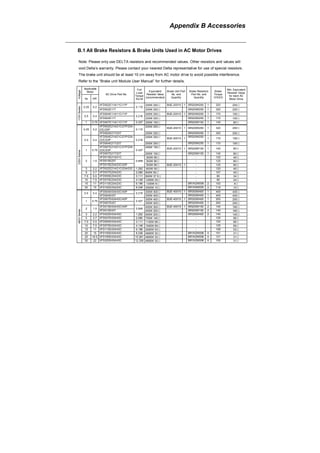
If the password was entered
incorrectly after three tries,
the keypad will be locked.
Turn the power OFF/ON to
re-enter the password.
00.08
input password
Displays 0 when
entering correct
password into
Pr.00.08.
Decode
If the password is correct?
END
00.09 Password Set
Settings 0 to 9999 Factory Setting: 0
Display 0 No password set or successful input in Pr. 00.08
1 Password has been set
To set a password to protect your parameter settings.
If the display shows 0, no password is set or password has been correctly entered in Pr.00.08.
All parameters can then be changed, including Pr.00.09.
The first time you can set a password directly. After successful setting of password the display
will show 1.
Be sure to record the password for later use.
To cancel the parameter lock, set the parameter to 0 after inputting correct password into Pr.
Chapter 4 Parameters |
00.08.
The password consists of min. 1 digits and max. 4 digits.
How to make the password valid again after decoding by Pr.00.08:
Method 1: Re-input original password into Pr.00.09 (Or you can enter a new password if you
want to use a changed or new one).
Method 2: After rebooting, password function will be recovered.
To lock parameters, you can set Pr.00.02 to 1 or Pr.04.05~04.08 to 17 to prevent changing of
parameters settings by unqualified personnel. Please note that it is without password set.
00.10 Control Method
Factory Setting: 0
Settings 0 V/f Control
1 Vector Control
This parameter determines the control method of the AC motor drive.
Control of V/f (Voltage/frequency)
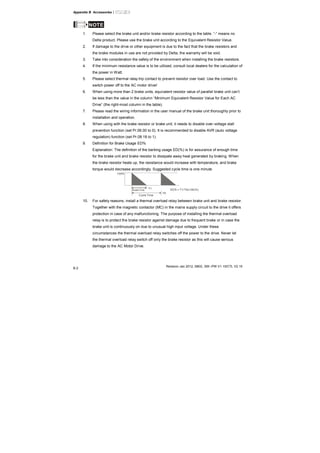
1. To operate by the change of frequency and voltage without changing the mechanical
characteristic of motor: it can run by open-loop method and also can use with PG card (refer to
Appendix B) to run by close-loop method. In this control, it gets the change of the
electromagnetic torque of rotor and the load torque from the change of slip ratio.
2. The V/f control is the constant value control mode. Although it prevents the main questions
of the decreasing frequency and increasing magnetic field, the magnetic field is decreasing
with frequency. In such circumstance, insufficient motor torque will occur when the magnetic
field weakens in the low frequency. At this moment, it can get the best operation with Pr.07.02
setting(Torque Compensation) to get the torque compensation.
common applications: pump, conveyor belt, compressor and treadmill
Vector control:
1. To operate by the change of frequency and voltage without changing the mechanical
characteristic of motor: it can run by open-loop method and also can use with PG card (refer to
Appendix B) to run by close-loop method. In this mode, it is coordinate change. The physical
essence is the relativity of motion. That means the change of rotor current only has relation
with electromagnetic torque and the change of stator current only has relation with
electromagnetic torque. This is the characteristic of vector control.
Chapter 4 Parameters |
2.The vector control can eliminate the relation between electromagnetic current vector and
armature flux. Thus, it can control the current vector and armature flux independently to raise
the transient response of the AC motor drive.
Applications: textile equipment, press equipment, life equipment and drilling machine.
Related parameter: Pr.07.02 (Torque Compensation (Motor 0))
00.11 Reserved
00.12 50Hz Base Voltage Selection
Factory Setting: 0
Settings 0 230V/400V
1 220V/380V
This parameter determines the base voltage for 50Hz.
When Pr.00.02 is set to 9, the base voltage for 50Hz will set by Pr.00.12.
Related parameter: Pr.00.02 (Parameter Reset)
Chapter 4 Parameters |
Group 1: Basic Parameters
01.00 Maximum Output Frequency (Fmax) Unit: Hz
Settings 50.00 to 600.0 Hz Factory Setting: 60.00
This parameter determines the AC motor drive’s Maximum Output Frequency. All the AC
motor drive frequency command sources (analog inputs 0 to +10V and 4 to 20mA) are scaled
to correspond to the output frequency range.
Please note that output frequency may be not in this setting range due to parameter setting:
1. Pr.00.10 is set to 0: when enabling Pr.07.03 (Slip Compensation) in V/f mode, it may be not
in this setting range.
2. Pr.00.10 is set to 1: The AC motor drive will auto compensate slip in vector mode, so it also
may be not within this setting range.
Related parameters: 00.10 (Control Method), 04.12(Min AVI Frequency), 04.14(Max AVI
Frequency), 04.16(Min ACI Frequency), 04.18(Max ACI Frequency), 04.19(ACI/AVI2
Selection), 04.21(Min AVI2 Frequency), 04.23(Max AVI2 Frequency) and 07.03(Slip
Compensation (Used without PG) (Motor 0))
V/F曲 線
Output
Frequency
Analog Input
Signal0V(4mA ) 10V(20mA)
01.00
Max. Output
Frequency
01.01 Maximum Voltage Frequency (Fbase) (Motor 0) Unit: Hz
Settings 0.10 to 600.0Hz Factory Setting: 60.00
This value should be set according to the rated frequency of the motor as indicated on the
motor nameplate. Maximum Voltage Frequency determines the v/f curve ratio. For example, if
the drive is rated for 460 VAC output and the Maximum Voltage Frequency is set to 60Hz, the
drive will maintain a constant ratio of 7.66 V/Hz (460V/60Hz=7.66V/Hz). This parameter value
must be equal to or greater than the Mid-Point Frequency (Pr.01.03).
Chapter 4 Parameters |
If this parameter setting is less than the rated frequency of the motor, it may cause over
current and damage the motor or trigger the over current protection.
If this parameter setting is greater than the rated frequency of the motor, it may cause
insufficient motor torque.
Related parameters: Pr.01.02(Maximum Output Voltage (Vmax) (Motor 0)), Pr.01.03(Mid-Point
Frequency (Fmid) (Motor 0)), Pr.01.04(Mid-Point Voltage (Vmid) (Motor 0)), Pr.01.05(Minimum
Output Frequency (Fmin) (Motor 0)) and Pr.01.06(Minimum Output Voltage (Vmin) (Motor 0)).
01.02 Maximum Output Voltage (Vmax) (Motor 0) Unit: V
Settings 115V/230V series 0.1 to 255.0V Factory Setting: 220.0
460V series 0.1 to 510.0V Factory Setting: 440.0
This parameter determines the Maximum Output Voltage of the AC motor drive. The Maximum
Output Voltage setting must be smaller than or equal to the rated voltage of the motor as
indicated on the motor nameplate. This parameter value must be equal to or greater than the
Mid-Point Voltage (Pr.01.04).
If the output voltage of the AC motor drive is smaller than this setting, the output voltage can’t
reach this setting due to input voltage limit.
If this setting is greater than the rated voltage of the motor, it may cause over current of the
motor output to damage motor or trigger the over current protection.
If this setting is smaller than the rated voltage of the motor, it may cause the insufficient motor
torque.
Related parameters: Pr.01.01(Maximum Voltage Frequency (Fbase) (Motor 0)), Pr.01.03(Mid-
Point Frequency (Fmid) (Motor 0)), Pr.01.04(Mid-Point Voltage (Vmid) (Motor 0)),
Pr.01.05(Minimum Output Frequency (Fmin) (Motor 0)) and Pr.01.06(Minimum Output Voltage
(Vmin) (Motor 0)).
01.03 Mid-Point Frequency (Fmid) (Motor 0) Unit: Hz
Settings 0.10 to 600.0Hz Factory Setting: 1.50
This parameter sets the Mid-Point Frequency of the V/f curve. With this setting, the V/f ratio
between Minimum Frequency and Mid-Point frequency can be determined. This parameter
must be equal to or greater than Minimum Output Frequency (Pr.01.05) and equal to or less
than Maximum Voltage Frequency (Pr.01.01).
Chapter 4 Parameters |
Please note that unsuitable setting may cause over current, it may cause motor overheat and
damage motor or trigger the over current protection.
Please note that unsuitable setting may cause insufficient motor torque.
When it is vector control, the settings of Pr.01.03, Pr.01.04 and Pr.01.06 are invalid.
This setting must be greater than Pr.01.05.
Related parameters: Pr.01.01(Maximum Voltage Frequency (Fbase) (Motor 0)),
Pr.01.02(Maximum Output Voltage (Vmax) (Motor 0)), Pr,01.04(Mid-Point Voltage (Vmid)
(Motor 0)), Pr.01.05(Minimum Output Frequency (Fmin) (Motor 0)) and Pr.01.06(Minimum
Output Voltage (Vmin) (Motor 0)).
01.04 Mid-Point Voltage (Vmid) (Motor 0) Unit: V
Settings 115V/230V series 0.1 to 255.0V Factory Setting: 10.0
460V series 0.1 to 510.0V Factory Setting: 20.0
This parameter sets the Mid-Point Voltage of any V/f curve. With this setting, the V/f ratio
between Minimum Frequency and Mid-Point Frequency can be determined.
This parameter must be equal to or greater than Minimum Output Voltage (Pr.01.06).
Related parameters: Pr.01.01(Maximum Voltage Frequency (Fbase) (Motor 0)),
Pr.01.02(Maximum Output Voltage (Vmax) (Motor 0)), Pr,01.03(Mid-Point Frequency (Fmid)
(Motor 0)), Pr.01.05(Minimum Output Frequency (Fmin) (Motor 0)) and Pr.01.06(Minimum
Output Voltage (Vmin) (Motor 0)).
01.05 Minimum Output Frequency (Fmin) (Motor 0) Unit: Hz
Settings 0.10 to 600.0Hz Factory Setting: 1.50
This parameter sets the Minimum Output Frequency of the AC motor drive. If the frequency
command is greater than this setting, the AC motor drive will accelerate to the frequency
command by the accel./decel. time. If the frequency command is less than this setting, the AC
motor drive will be ready without output voltage.
Please note that unsuitable setting may cause over current to damage motor or trigger the
over current protection.
When Pr.08.04 is set to 1(Operation continues after momentary power loss, speed search
starts with the Master Frequency reference value.), it won’t operate by V/f curve.
Related parameters: Pr.01.01(Maximum Voltage Frequency (Fbase) (Motor 0)),
Pr.01.02(Maximum Output Voltage (Vmax) (Motor 0)), Pr,01.03(Mid-Point Frequency (Fmid)
Chapter 4 Parameters |
(Motor 0)), Pr.01.04(Mid-Point Voltage (Vmid) (Motor 0)) and Pr.01.06(Minimum Output
Voltage (Vmin) (Motor 0))
01.06 Minimum Output Voltage (Vmin) (Motor 0) Unit: V
Settings 115V/230V series 0.1 to 255.0V Factory Setting: 10.0
460V series 0.1 to 510.0V Factory Setting: 20.0
This parameter sets the Minimum Output Voltage of the AC motor drive.
If the setting is too large, it may cause over current to damage motor or trigger the over current
protection.
If the setting is too small, it may cause insufficient motor torque.
The settings of Pr.01.01 to Pr.01.06 have to meet the condition of Pr.01.02 ≥ Pr.01.04 ≥
Pr.01.06 and Pr.01.01 ≥ Pr.01.03 ≥ Pr.01.05. By this condition, V/f curve is shown in the
following figure.
In vector control mode (Pr.00.10 is set to 1), Pr.01.03, Pr.01.04 and Pr.01.06 are disabled. But
Pr.01.05 is still the minimum output frequency.
The V/f curve of motor 0 to motor 3 can be selected by setting the multi-function input
terminals MI3~MI6 (Pr.04.05 to Pr.04.08) to 27 and 28. To set the voltage and frequency for
each motor, please refer to Pr.01.01~01.06 for motor 0 (factory setting), Pr.01.26~01.31 for
motor 1, Pr.01.32~01.37 for motor 2 and Pr.01.38~01.43 for motor 3.
Related parameters: Pr.01.01(Maximum Voltage Frequency (Fbase) (Motor 0)),
Pr.01.02(Maximum Output Voltage (Vmax) (Motor 0)), Pr,01.03(Mid-Point Frequency (Fmid)
(Motor 0)), Pr.01.04(Mid-Point Voltage (Vmid) (Motor 0)) and Pr.01.05 (Minimum Output
Frequency (Fmin) (Motor 0)).
01.05 01.03 01.01
01.06
01.04
01.02
01.00
V/f Curve
Voltage
Frequency
Mid-point
Freq.
(Fmid)
Maximum
Output
Frequency
Maximum
Output
Voltage
(Vbase)
Mid-point
Vol tage
(Vmid)
Minimum
Output
Voltage
(V min)
Minimum
Output
Freq.
(Fmin)
Maximum Voltage
Frequency
(Fbase)
Chapter 4 Parameters |
01.07 Output Frequency Upper Limit Unit: %
Settings 0.1 to 120.0% Factory Setting: 110.0
This parameter must be equal to or greater than the Output Frequency Lower Limit (Pr.01.08).
The Maximum Output Frequency (Pr.01.00) is regarded as 100%.
Output Frequency Upper Limit value = (Pr.01.00 * Pr.01.07)/100.
The max. output frequency of the AC motor drive will be limited by this setting. If the setting of
frequency command is greater than Pr.01.07, the output frequency will be equal to or less than
Pr.01.07.
When enabling Pr.07.03 or Pr.10.00~10.13, the output frequency of the AC motor drive may
exceed the frequency command but it is still limited by this setting.
Related parameters: Pr.01.00(Maximum Output Frequency (Fmax)) and Pr.01.08(Output
Frequency Lower Limit).
01.08 Output Frequency Lower Limit Unit: %
Settings 0.0 to 100.0% Factory Setting: 0.0
The Output Frequency Lower Limit value = (Pr.01.00 * Pr.01.08) /100.
This setting will limit the min. output frequency of the AC motor drive. When the frequency
command of the AC motor drive or the frequency calculated by feedback control is less than
this setting, the output frequency of the AC motor drive will be limited by this setting.
After starting running, the AC motor drive will accelerate from Pr.01.05 (Minimum Output
Frequency (Fmin) (Motor 0)) to the setting frequency by V/f curve and won’t be limited by this
setting.
The Upper/Lower Limits are to prevent operation errors and machine damage.
If the Output Frequency Upper Limit is 50Hz and the Maximum Output Frequency is 60Hz, the
Output Frequency will be limited to 50Hz.
If the Output Frequency Lower Limit is 10Hz, and the Minimum Output Frequency (Pr.01.05) is
set to 1.0Hz, then any Command Frequency between 1.0-10Hz will generate a 10Hz output
from the drive. If the command frequency is less than 1.0Hz, drive will be in ready status
without output.
This parameter must be equal to or less than the Output Frequency Upper Limit (Pr.01.07).
Chapter 4 Parameters |
Output
frequency
Frequenc y
command
01.07
Output frequency
upper l imit
01.08
Output frequency
lower limit
01.09 Acceleration Time 1 (Taccel 1) Unit: second
01.10 Deceleration Time 1 (Tdecel 1) Unit: second
01.11 Acceleration Time 2 (Taccel 2) Unit: second
01.12 Deceleration Time 2 (Tdecel 2) Unit: second
Settings 0.1 to 600.0 sec / 0.01 to 600.0 sec Factory Setting: 10.0
Acceleration/deceleration time 1 or 2 can be switched by setting the external terminals MI3~
MI12(MI7~MI12 are optional) to 7 (set Pr.04.05~Pr.04.08 to 7 or Pr.11.06~Pr.11.11 to 7). The
factory settings are acceleration time 1.
The Acceleration Time is used to determine the time required for the AC motor drive to ramp
from 0 Hz to Maximum Output Frequency (Pr.01.00). The Deceleration Time is used to
determine the time required for the AC motor drive to decelerate from the Maximum Output
Frequency (Pr.01.00) down to 0 Hz.
If the setting of the acceleration/deceleration time is too short, it may trigger the protection
(Pr.06.01(Over-Current Stall Prevention during Accel) or Pr.06.00(Over-Voltage Stall
Prevention)) and make the actual acceleration/deceleration time be larger than this setting.
If the setting of the acceleration time is too short, it may cause over-current during acceleration
and damage the motor or trigger the protection function.
If the setting of the deceleration time is too short, it may cause over-current during deceleration
or over voltage of the AC motor drive and damage the motor or trigger the protection function.
It can use suitable brake resistor to decelerate the AC motor drive in short time and prevent
internal over voltage. Refer to Appendix B for brake resistor.
When enabling Pr.01.17(Acceleration S-Curve) and Pr.01.18(Deceleration S-Curve), the
actual acceleration/deceleration time will be longer than the setting.
Chapter 4 Parameters |
Related parameters: Pr.01.16(Auto acceleration / deceleration (refer to Accel/Decel time
setting)), Pr.01.17(Acceleration S-Curve), Pr.01.18(Deceleration S-Curve), Pr.04.05(Multi-
function Input Terminal (MI3)), Pr.04.06(Multi-function Input Terminal (MI4)), Pr.04.07(Multi-
function Input Terminal (MI5)) and Pr.04.08(Multi-function Input Terminal (MI6))
01.09 01.11 01.10 01.12
Frequency
Time
Accel. Time Decel. Time
The definition of Accel./Decel. Time
01.00
Max. output
Frequency
setting
operation
frequency
Min. output
frequency
01.05
01.19 Accel/Decel Time Unit
Factory Setting: 0
Settings 0 Unit: 0.1 sec
1 Unit: 0.01 sec
The Acceleration/Deceleration Time 1, 2, 3, 4 are selected according to the Multi-function Input
Terminals Settings. See Pr.04.05 to Pr.04.08 for more details.
In the diagram shown below, the Acceleration/Deceleration Time of the AC motor drive is the
time between 0 Hz to Maximum Output Frequency (Pr.01.00). Suppose the Maximum Output
Frequency is 60 Hz, Minimum Output Frequency (Pr.01.05) is 1.0 Hz, and
Acceleration/Deceleration Time is 10 seconds. The actual time for the AC motor drive to
accelerate from start-up to 60 Hz and to decelerate from 60Hz to 1.0Hz is in this case 9.83
seconds. ((60-1) * 10/60=9.83secs).
Chapter 4 Parameters |
01.00
01.09 01.11 01.10 01.12
Frequency
TimeAccel. Time Decel. Time
The definition of
Accel./Decel. Time
Max. output
Frequency
setting
operation
frequency
Min. output
frequency
01.05
Resulting Resulting
Accel. Time Decel. Time
Resulting Accel./Decel. Time
0 Hz
01.13 Jog Acceleration Time Unit: second
Settings 0.1 to 600.0/0.01 to 600.0 sec Factory Setting: 1.0
01.14 Jog Deceleration Time Unit: second
Settings 0.1 to 600.0/0.01 to 600.0 sec Factory Setting: 1.0
01.15 Jog Frequency Unit: Hz
Settings 0.10 to 50.0Hz Factory Setting: 6.00
Only external terminal JOG (MI3 to MI12) can be used. Please set one of MI3~MI12
(MI7~MI12 are optional) to 8 for JOG operation. When the Jog command is “ON”, the AC
motor drive will accelerate from Minimum Output Frequency (Pr.01.05) to Jog Frequency
(Pr.01.15). When the Jog command is “OFF”, the AC motor drive will decelerate from Jog
Frequency to zero.
The used Accel/Decel time is set by the Jog Accel/Decel time (Pr.01.13, Pr.01.14).
Before using the JOG command, the drive must be stopped first. And during Jog operation,
other operation commands are not accepted, except commands via the FORWARD,
REVERSE and STOP keys on the digital keypad.
Chapter 4 Parameters |
01.13 01.12
01.21
Frequency
TimeJOG Accel. Time JOG Decel. Time
The definition of JOG Accel./Decel. Time
01.15
JOG
Frequency
Min. output
frequency
01.05
0 Hz
01.14
01.16 Auto-Acceleration / Deceleration
Factory Setting: 0
Settings 0 Linear acceleration / deceleration
1 Auto acceleration, linear Deceleration.
2 Linear acceleration, auto Deceleration.
3 Auto acceleration / deceleration (set by load)
4 Auto acceleration / deceleration (set by Accel/Decel Time setting)
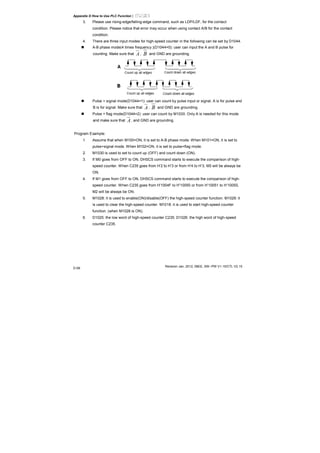
5 Linear Accel. controlled by current, linear Decel.
6 Linear Accel. controlled by current, auto Decel.
Linear acceleration/deceleration: the acceleration/deceleration that acts according to the
acceleration/deceleration time set by Pr.01.09~01.12.
With Auto acceleration / deceleration it is possible to reduce vibration and shocks during
starting/stopping the load.
When Pr.01.16 is set to 3 Auto acceleration / deceleration (set by load):
During Auto acceleration the torque is automatically measured and the drive will accelerate to
the set frequency with the fastest acceleration time and the smoothest starting current.
During Auto deceleration, regenerative energy is measured and the motor is smoothly stopped
with the fastest deceleration time.
When this parameter is set to 4 Auto acceleration / deceleration (set by Accel/Decel Time
setting): the actual accel/decel time will be equal to or more than parameter Pr.01.09
~Pr.01.12.
Chapter 4 Parameters |
When this parameter is set to 5(Linear Accel. controlled by current, linear Decel.)/6(Linear
Accel. controlled by current, auto Decel.): the current value when the drive performs over-
current stall prevention can be kept within the setting of stall prevention level. For example, if
the setting of stall prevention level is 100%, it will perform deceleration as the current exceeds
100% during operation and keep the current around 100%. Besides, it will perform
deceleration no matter over-current occurs during deceleration or constant speed. (The
present over-current stall prevention during acceleration is used to keep the output frequency
and prevent from the drive overload (OL).
When this parameter is set to 5(Linear Accel. controlled by current, linear Decel.): the drive will
perform the linear deceleration by the setting of deceleration time. When this parameter is set
to 6 (Linear Accel. controlled by current, auto Decel.), the drive stop the motor by the fastest
deceleration time after auto-distinguish load regenerative energy.
Over-current
level
Speed
Output
current
Output
frequency
Auto acceleration/deceleration makes the complicated processes of tuning unnecessary. It
makes operation efficient and saves energy by acceleration without stall and deceleration
without brake resistor.
In applications with brake resistor or brake unit, the deceleration time is the shortest. It is NOT
recommended to use Auto deceleration function, or it will extend the deceleration time.
Related parameters: Pr.01.09(Accel Time 1), Pr.01.10(Decel Time 1), Pr.01.11(Accel Time 2)
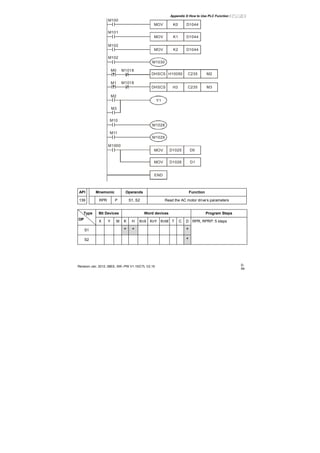
and Pr.01.12(Decel Time 2).
01.17 Acceleration S-Curve Unit: second
01.18 Deceleration S-Curve Unit: second
Factory Setting: 0
Settings 0.0 S-curve disabled
0.1 to 10.0/0.01 to 10.00 S-curve enabled (10.0/10.00 is the smoothest)
This parameter is used to ensure smooth acceleration and deceleration via S-curve.
The S-curve is disabled when set to 0.0 and enabled when set to 0.1 to 10.0/0.01 to 10.00.
Chapter 4 Parameters |
Setting 0.1/0.01 gives the quickest and setting 10.0/10.00 the longest and smoothest S-curve.
The AC motor drive will not follow the Accel/Decel Times in Pr.01.09 to Pr.01.12.
The diagram below shows that the original setting of the Accel/Decel Time is only for reference
when the S-curve is enabled. The actual Accel/Decel Time depends on the selected S-curve
(0.1 to 10.0).
The total Accel. Time=Pr.01.09 + Pr.01.17 or Pr.01.11 + Pr.01.17
The total Decel. Time=Pr.01.10 + Pr.01.18 or Pr.01.12 + Pr.01.18
3
1 2
4
1
3
4
2
1 2
3 4
Disable S curve
Enable S curve
Acceleration/deceleration Characteristics
Related parameters: Pr.01.09(Accel Time 1), Pr.01.10(Decel Time 1), Pr.01.11(Accel Time 2)
and Pr.01.12(Decel Time 2).
01.20 Delay Time at 0Hz for Simple Position Unit: second
01.21 Delay Time at 10Hz for Simple Position Unit: second
01.22 Delay Time at 20Hz for Simple Position Unit: second
01.23 Delay Time at 30Hz for Simple Position Unit: second
01.24 Delay Time at 40Hz for Simple Position Unit: second
01.25 Delay Time at 50Hz for Simple Position Unit: second
Settings 0.00 to 600.00 sec Factory Setting: 0.00
This simple position function is calculated by the measure of operation distance. When the
multi-function input terminal is set to 25 and it is ON, it will start to decelerate after getting the
delay time from Pr.01.20 to Pr.01.25 and get the final position.
This is simple position function NOT the precision position function.
Chapter 4 Parameters |
f
t
MI=25
t2tx
( )
⎟
⎠
⎞
⎜
⎝
⎛ ++
×=
2
S 2ttt
n xx
p
120
fn ×=
S: operation distance
n: rotation speed(revolution/second)
tx: delay time (sec)
t2: deceleration time(sec)
n: rotation speed(revolution/second)
P: pole number of motor
f: operation frequency
Assume that the radius of the 4-pole motor is r and rotation speed is n (rpm).
r
n
Example 1:
Assume that motor speed is 50Hz, the delay time at 50Hz is 2 sec (Pr.01.25=2) and the
deceleration time from 50Hz to 0Hz is 10 seconds.
The rotation speed n = 120 X 50 /4 (rpm/min) = 25 rpm/sec
The revolution numbers = (25 X (2+12))/2 = 175 (revolutions)
f(Hz)
t
2sec 10sec
50
MI=25 ON
Therefore, the distance = revolution numbers X circumference = 175 X 2π r
It also means that the motor will stop to the original position after 175 circles.
Example 2:
Assume that motor speed is 1.5Hz, the delay time at 10Hz is 10 sec (Pr.01.21=10) and the
deceleration time from 60Hz to 0Hz is 40 seconds.
Chapter 4 Parameters |
The delay time at 1.5Hz is 1.5 sec and the deceleration from 1.5Hz to 0Hz is 1 sec.
The rotation speed n = 120 X 1.5 /4 (rpm/min) = 1.5/2 rpm/sec = 0.75 rpm/sec
The revolution numbers = (1.5/2X (1.5+2.5))/2 = 1.5 (revolutions)
MI=25
ON
1.5
1.5sec 1sec
f(Hz)
Therefore, the distance = revolution numbers X circumference = 1.5 X 2π r
It also means that the motor will stop after running 1.5 circles.
01.26 Maximum Voltage Frequency (Fbase) (Motor 1) Unit: Hz
Settings 0.10 to 600.0Hz Factory Setting: 60.00
01.27 Maximum Output Voltage (Vmax) (Motor 1) Unit: V
Settings 115V/230V series 0.1 to 255.0V Factory Setting: 220.0
460V series 0.1 to 510.0V Factory Setting: 440.0
01.28 Mid-Point Frequency (Fmid) (Motor 1) Unit: Hz
Settings 0.10 to 600.0Hz Factory Setting: 1.50
01.29 Mid-Point Voltage (Vmid) (Motor 1) Unit: V
Settings 115V/230V series 0.1 to 255.0V Factory Setting: 10.0
460V series 0.1 to 510.0V Factory Setting: 20.0
01.30 Minimum Output Frequency (Fmin) (Motor 1) Unit: Hz
Settings 0.10 to 600.0Hz Factory Setting: 1.50
01.31 Minimum Output Voltage (Vmin) (Motor 1) Unit: V
Settings 115V/230V series 0.1 to 255.0V Factory Setting: 10.0
460V series 0.1 to 510.0V Factory Setting: 20.0
01.32 Maximum Voltage Frequency (Fbase) (Motor 2) Unit: Hz
Settings 0.10 to 600.0Hz Factory Setting: 60.00
01.33 Maximum Output Voltage (Vmax) (Motor 2) Unit: V
Settings 115V/230V series 0.1 to 255.0V Factory Setting: 220.0
460V series 0.1 to 510.0V Factory Setting: 440.0
01.34 Mid-Point Frequency (Fmid) (Motor 2) Unit: Hz
Settings 0.10 to 600.0Hz Factory Setting: 1.50
Chapter 4 Parameters |
01.35 Mid-Point Voltage (Vmid) (Motor 2) Unit: V
Settings 115V/230V series 0.1 to 255.0V Factory Setting: 10.0
460V series 0.1 to 510.0V Factory Setting: 20.0
01.36 Minimum Output Frequency (Fmin) (Motor 2) Unit: Hz
Settings 0.10 to 600.0Hz Factory Setting: 1.50
01.37 Minimum Output Voltage (Vmin) (Motor 2) Unit: V
Settings 115V/230V series 0.1 to 255.0V Factory Setting: 10.0
460V series 0.1 to 510.0V Factory Setting: 20.0
01.38 Maximum Voltage Frequency (Fbase) (Motor 3) Unit: Hz
Settings 0.10 to 600.0Hz Factory Setting: 60.00
01.39 Maximum Output Voltage (Vmax) (Motor 3) Unit: V
Settings 115V/230V series 0.1 to 255.0V Factory Setting: 220.0
460V series 0.1 to 510.0V Factory Setting: 440.0
01.40 Mid-Point Frequency (Fmid) (Motor 3) Unit: Hz
Settings 0.10 to 600.0Hz Factory Setting: 1.50
01.41 Mid-Point Voltage (Vmid) (Motor 3) Unit: V
Settings 115V/230V series 0.1 to 255.0V Factory Setting: 10.0
460V series 0.1 to 510.0V Factory Setting: 20.0
01.42 Minimum Output Frequency (Fmin) (Motor 3) Unit: Hz
Settings 0.10 to 600.0Hz Factory Setting: 1.50
01.43 Minimum Output Voltage (Vmin) (Motor 3) Unit: V
Settings 115V/230V series 0.1 to 255.0V Factory Setting: 10.0
460V series 0.1 to 510.0V Factory Setting: 20.0
The V/f curve of motor 0 to motor 3 can be selected by setting the multi-function input
terminals MI3~MI6 (Pr.04.05 to Pr.04.08) to 27 and 28. To set the voltage and frequency for
each motor, please refer to Pr.01.01~01.06 for motor 0 (factory setting), Pr.01.26~01.31 for
motor 1, Pr.01.32~01.37 for motor 2 and Pr.01.38~01.43 for motor 3.
Related parameters: Pr.04.05(Multi-function Input Terminal (MI3)), Pr.04.06(Multi-function
Input Terminal (MI4)), Pr.04.07(Multi-function Input Terminal (MI5)) and Pr.04.08(Multi-function
Input Terminal (MI6))
Chapter 4 Parameters |
Group 2: Operation Method Parameters
02.00 Source of First Master Frequency Command
Factory Setting: 1
02.09 Source of Second Master Frequency Command
Factory Setting: 0
Settings 0 Digital keypad UP/DOWN keys or Multi-function Inputs UP/DOWN.
Last used frequency saved. (Digital keypad is optional)
1 0 to +10V from AVI
2 4 to 20mA from ACI or 0 to +10V from AVI2
3 RS-485 (RJ-45)/USB communication
4 Digital keypad potentiometer
These parameters set the Master Frequency Command Source of the AC motor drive.
The factory setting for master frequency command is 1. (digital keypad is optional, please refer
to Appendix B for details.)
Setting 2: use the ACI/AVI switch on the AC motor drive to select ACI or AVI2. When setting to
AVI, AVI2 is indicated. Please note the ACI/AVI switch on the AC motor drive. Switch to ACI
for 4 to 20mA analog current signal (ACI) (Pr.04.19 should be set to 0) and AVI for analog
voltage signal (AVI2) (Pr.04.19 should be set to 1).
When the 3
rd
switch on the upper-right corner is set to be ON as shown in the following
diagram, the source of first master frequency command (Pr.02.00) will force setting to 2. This
setting(Pr.02.00) can’t be changed till the 3
rd
switch is set to be OFF.
ON
1 2 3
When the AC motor drive is controlled by external terminal, please refer to Pr.02.05 for details.
PR.02.09 is only valid when one of Pr.04.05~04.08 is set to 22. When setting 22 is activated,
the source of the frequency command is the setting of Pr.02.09. The factory setting of the
source of frequency command is the first frequency command. Only one of the source of first
master frequency command and second master frequency command can be enable at one
time.
Related parameters: Pr.04.05(Multi-function Input Terminal (MI3)), Pr.04.06(Multi-function
Input Terminal (MI4)), Pr.04.07(Multi-function Input Terminal (MI5)), Pr.04.08(Multi-function
Input Terminal (MI6)) and Pr.04.19 (ACI/AVI2 Selection)
Chapter 4 Parameters |
02.01 Source of First Operation Command
Factory Setting: 1
Settings 0 Digital keypad (Digital keypad is optional)
1 External terminals. Keypad STOP/RESET enabled.
2 External terminals. Keypad STOP/RESET disabled.
3 RS-485 (RJ-45)/USB communication. Keypad STOP/RESET
enabled.
4 RS-485 (RJ-45)/USB communication. Keypad STOP/RESET
disabled.
The factory setting for source of first operation command is 1. (digital keypad is optional.)
When the AC motor drive is controlled by external terminal, please refer to Pr.02.05/Pr.04.04
for details.
02.10
Combination of the First and Second Master Frequency
Command
Factory Setting: 0
Settings 0 First Master Frequency Command Only
1 First Master Frequency + Second Master Frequency
2 First Master Frequency - Second Master Frequency
It can be used to add or subtract the first frequency set in Pr.02.00 and the second frequency
set in Pr.02.09 to meet the customers’ application. For example, if the master frequency is the
first frequency, speed source, controlled by ACI (DC 4~20mA) and the second frequency,
press source, is controlled by AVI(DC 0~+10V). These two frequencies can be added or
subtracted by Pr.02.10.
Related parameters: Pr.02.00(Source of First Master Frequency Command) and
Pr.02.09(Source of Second Frequency Command ).
02.02 Stop Method
Factory Setting: 0
Settings 0 STOP: ramp to stop E.F.: coast to stop
1 STOP: coast to stop E.F.: coast to stop
2 STOP: ramp to stop E.F.: ramp to stop
3 STOP: coast to stop E.F.: ramp to stop
Chapter 4 Parameters |
When the 2
nd
switch on the upper-right corner is set to be ON as shown in the following
diagram, the motor stop method (Pr.02.02) will force setting to 1. This setting (Pr.02.02) can’t
be changed till the 2nd switch is set to be OFF.
ON
1 2 3
E.F. is external fault. It can be triggered by setting one of Pr.04.05~04.08 to 14. When the AC
motor drive receives the trigger, it will stop output immediately and display EF on the keypad.
The motor won’t run till the fault is cleared (enter “RESET).
The parameter determines how the motor is stopped when the AC motor drive receives a valid
stop command or detects External Fault.
Ramp: the AC motor drive decelerates to Minimum Output Frequency (Pr.01.05)
according to the deceleration time(Pr.01.10 and Pr.01.12) and then stops.
Coast: the AC motor drive stops the output instantly upon command, and the motor
free runs until it comes to a complete standstill.
The motor stop method is usually determined by the characteristics of the motor load and
how frequently it is stopped.
(1) It is recommended to use “ramp to stop” for safety of personnel or to prevent
material from being wasted in applications where the motor has to stop after the
drive is stopped. The deceleration time has to be set accordingly.
(2) If motor free running is allowed or the load inertia is large, it is recommended to
select “coast to stop”. For example: blowers, punching machines, centrifuges
and pumps.
Related parameters: Pr.01.10(Decel Time 1), Pr.01.12(Decel Time 2), Pr.04.05(Multi-function
Input Terminal (MI3)), Pr.04.06(Multi-function Input Terminal (MI4)), Pr. 04.07(Multi-function
Input Terminal (MI5)) and Pr.04.08(Multi-function Input Terminal (MI6))
NOTE
The digital keypad is optional. Please refer to Appendix B for details. When using without this optional
keypad, the FAULT LED will be ON once there is error messages or warning messages from the
external terminals.
Chapter 4 Parameters |
RUN STOP RUN STOP
Frequency Frequency
TimeTime
output
frequency
output
frequency
motor
speed
motor
speed
operation
command
operation
command
stops according to
decel eration time
free run to stop
ramp to stop and free run to stop
EF
Frequency Frequency
frequency output
motor
speed
EF
operation
command
stops according to
decel eration time
When Pr.02.02 is set to 2 or 3
frequency
output
free run to stop
operation
command
When Pr.02.02 is set to 0 or 1
motor
speed
02.03 PWM Carrier Frequency Selections Unit: Hz
115V/230V/460V Series
Power 0.25 to 15hp (0.2kW to 11kW)
Setting Range 1 to 15 kHz
Factory Setting 8 kHz
This parameter determines the PWM carrier frequency of the AC motor drive.
Chapter 4 Parameters |
1kHz
8kHz
15kHz
Carrier
Frequency
Acoustic
Noise
Electromagnetic
Noise or leakage
current
Heat
Dissipation
Current
Wave
Significant
MinimalSignificant
Minimal
Minimal
Significant
Minimal
Significant
From the table, we see that the PWM carrier frequency has a significant influence on the
electromagnetic noise, AC motor drive heat dissipation, and motor acoustic noise.
The PWM carrier frequency will be decreased automatically by heat sink temperature and
output current of the AC motor drive. It is used as a necessary precaution to prevent the AC
motor drive from overheating and thus extends IGBT’s life. If the user wants to fix carrier within
the rated range and won’t change by the change of the surrounding temperature and
frequently load. Please refer to Pr.02.18 for Selection of Carrier Modulation.
Related parameters: Pr.02.18(Selection of Carrier Modulation) and Pr.03.08(Fan Control).
02.04 Motor Direction Control
Factory Setting: 0
Settings 0 Forward/Reverse operation enabled
1 Reverse operation disabled
2 Forward operation disabled
This parameter is used to disable one direction of rotation of the AC motor drive direction of
rotation to prevent damage due to operation errors.
The motor direction also can be limited by setting one of Pr.04.05~04.08 to 21.
Related parameters: Pr.04.05(Multi-function Input Terminal (MI3)), Pr.04.06(Multi-function
Input Terminal (MI4)), Pr. 04.07(Multi-function Input Terminal (MI5)) and Pr.04.08(Multi-
function Input Terminal (MI6))
02.05
The source of Power-On command and Running command modifies the operating
control of the VFD
Settings Factory Setting: 1
Bit 0: 0 Start running when Power is on.
1 Don’t run when Power is on
Bit 1 0 When the source of the command changes, VFD’s operation remains
the same.
1 When the source of the command changes, VFD’s operation follows
the new command.
Chapter 4 Parameters |
This parameter determines the response of the drive upon power on and operation command
source is changed.
Pr.02.05 Start lockout (Run when power is ON)
Operation status when operation
command source is changed
0 Disable (AC motor drive will run) Keep previous status
1 Enable (AC motor drive doesn’t run) Keep previous status
2 Disable (AC motor drive will run)
Change according to the new
operation command source
3 Enable (AC motor drive doesn’t run)
Change according to the new
operation command source
When the operation command source is from external terminal and operation command is ON
(NPN mode: MI1/MI2-DCM=closed, PNP mode: MI1/MI2+24V=closed, please refer to chapter
2 wiring for details), the AC motor drive will operate according to Pr.02.05 after power is
applied. <For terminals MI1 and MI2 only>
1. When Pr.02.05 is set to 0 or 2, AC motor drive will run immediately.
2. When Pr.02.05 is set to 1 or 3, AC motor drive will remain stopped until operation
command is received after previous operation command is cancelled.
It needs to received a run command
after previous command is cancelled
ON OFFMI1-DCM (close)
power is applied
output frequency
Pr.02.05=0 or 2
output frequency
Pr.02.05=1 or 3
ON
OFF ON
it will run
it won't run
when power is applied
Chapter 4 Parameters |
When the operation command source isn’t from the external terminals, independently from
whether the AC motor drive runs or stops, the AC motor drive will operate according to
Pr.02.05 if the two conditions below are both met.
1. When operation command source is changed to external terminal (Pr.02.01=1 or 2)
2. The status of terminal and AC motor drive is different.
And the operation of the AC motor drive will be:
1. When setting 0 or 1, the status of AC motor drive is not changed by the terminal status.
2. When setting 2 or 3, the status of AC motor drive is changed by the terminal status.
RUN RUN
STOP STOP
Pr.02.01=1 or 2
This action will follow MI1/DCM
or MI2/DCM status
(ON is close/OFF is open)
ON OFFMI1-DCM (close)
Pr.02.01=0
output frequency
Pr.02.05=2 or 3
Change operation
command source
output frequency
Pr.02.05=0 or 1
When Pr.02.05 is set to 1 or 3, it does not guarantee that the motor will never run under this
condition. It is possible the motor may be set in motion by a malfunctioning switch.
Related parameters: Pr.02.01(Source of First Operation Command)
02.06 Loss of ACI Signal (4-20mA)
Factory Setting: 0
Settings 0 Decelerate to 0Hz
1 Coast to stop and display “AErr”
2 Continue operation by the last frequency command
This parameter determines the behavior when ACI is lost.
When setting to 1, it will display warning message “AErr” on the keypad(optional) in case of
loss of ACI signal and execute the setting. The AC motor drive will stop outputting immediately,
the motor will free run to stop. Please press “RESET” key to clear it.
Chapter 4 Parameters |
When setting 0 or 2, it will display warning message “AErr” on the keypad(optional) in case of
loss of ACI signal and execute the setting. If it is set to 0, the motor will decelerate to 0Hz by
the setting of deceleration time (Pr.01.10/Pr.01.12). If it is set to 2, the motor will continue to
run. For these two settings, the warning message will stop blinking when ACI signal is
recovered. Please press “RESET” key to clear it.
Related parameters: Pr.01.10(Decel Time 1) and Pr.01.12(Decel Time 2)
02.07 Up/Down Mode
Factory Setting: 0
Settings 0 By digital keypad up/down keys mode
1 Based on Accel/Decel Time acc. to Pr.01.09 to 01.12
2 Constant speed (acc. to Pr. 02.08)
3 Pulse input unit (acc. to Pr. 02.08)
This parameter determines the increase/decrease of the master frequency when operated via
the Multi-function Inputs when Pr.04.05~Pr.04.08 are set to 10 (Up command) or 11 (Down
command).
When Pr.02.07 is set to 0, it uses the external terminals UP/DOWN key to increase/decrease
the frequency (F) as shown at the right of the following figure. Its function is the same as the
UP/DOWN key on the digital keypad. In this mode, it also can use UP/DOWN key on the
keypad to control.
OFFON
Frequency
External terminal
UP key
Time
frequency command
DCM
DOWN
UP
VFD-E
Ml3
Ml4
When Pr.02.07 is set to 1: increase/decrease the frequency by acceleration/deceleration
settings(Pr.01.09~01.12). It is valid only when the AC motor drive is running.
Chapter 4 Parameters |
OFFON
Frequency
frequency
command
increase by accel. time
Time
multi-function input
set to 10 (UP command)
When Pr.02.07 is set to 2: use multi-function input terminal ON/OFF to increase/decrease the
frequency by Pr.02.08.
OFFON
Frequency
frequency
command
Time
increase by 0.01-10.00Hz/2ms
multi-function input
set to 10 (UP command)
time for ON needs >2ms
When Pr.02.07 is set to 3: increase/decrease the frequency by Pr.02.08 (unit: pulse input).
Every ON after OFF is regarded as a input pulse.
OFFON ON
Frequency
frequency
command
by Pr.02.08 setting
Time
multi-function input
set to 10 (UP command)
Related parameters: Pr.02.08(Accel/Decel Rate of Change of UP/DOWN Operation with
Constant Speed), Pr.04.05(Multi-function Input Terminal (MI3)), Pr.04.06(Multi-function Input
Terminal (MI4)), Pr.04.07(Multi-function Input Terminal (MI5)), Pr.04.08(Multi-function Input
Terminal (MI6))
02.08
Accel/Decel Rate of Change of UP/DOWN Operation with
Constant Speed
Unit: Hz/2ms
Settings 0.01~10.00 Hz/2ms Factory Setting: 0.01
Chapter 4 Parameters |
This parameter determinates the constant speed When Pr.02.08 is set to 2 or 3.
02.11 Keypad Frequency Command Unit: Hz
Settings 0.00 to 600.0Hz Factory Setting: 60.00
This parameter can be used to set frequency command or read keypad frequency command.
Related parameters: Pr.02.12 (Communication Frequency Command)
02.12 Communication Frequency Command Unit: Hz
Settings 0.00 to 600.0Hz Factory Setting: 60.00
This parameter can be used to set frequency command or read communication frequency
command.
It can use this parameter for remote control via communication.
02.13 The Selections for Saving Keypad or Communication Frequency Command
Factory Setting: 0
Settings 0 Save Keypad & Communication Frequency
1 Save Keypad Frequency only
2 Save Communication Frequency only (Not for VFD*E*C model)
This parameter is used to save keypad or RS-485 frequency command.
Setting 0: After the AC motor drive is power off, save keypad and communication frequency in
the AC motor drive.
Setting 1: After the AC motor drive is power off, only save keypad frequency in the AC motor
drive and won’t save communication frequency.
Setting 2: After the AC motor drive is power off, only save communication frequency in the AC
motor drive and won’t save keypad frequency.
The keypad or communication frequency only can be saved when Pr. 02.00/Pr.02.09=0 (the
source of frequency is from keypad) or Pr.02.00/Pr.02.09=3(the source of frequency is from
communication).
Related parameters: Pr.02.00(Source of First Master Frequency Command) and
Pr.02.09(Source of Second Frequency Command).
Chapter 4 Parameters |
02.14 Initial Frequency Selection (for keypad & RS485/USB)
Factory Setting: 0
Settings 0 By Current Freq Command
1 By Zero Freq Command
2 Refer to Pr02-25 to set up
02.15 Initial Frequency Set point (for keypad & RS485/USB) Unit: Hz
Settings 0.00 ~ 600.0Hz Factory Setting: 60.00
These parameters are used to determinate the frequency at stop:
When setting Pr.02.14 to 0: the initial frequency will be current frequency.
When setting Pr.02.14 to 1: the initial frequency will be 0.
When setting Pr.02.14 to 2: the initial frequency will be Pr.02.15.
02.16 Display the Master Freq Command Source
Settings Read Only Factory display: 1
You can read the master frequency command source by this parameter.
Display Value Bit Function
1 Bit0=1 Master Freq Command Source by First Freq Source (Pr.02.00).
2 Bit1=1 Master Freq Command Source by Second Freq Source (Pr.02.09).
4 Bit2=1 Master Freq Command Source by Multi-input function
8 Bit3=1
Master Freq Command Source by PLC Freq command
(NOT for VFD*E*C models)
When it displays 4, it means that the master frequency command source is from multi-input
function. Thus, when Pr.04.05~04.08 are set to 1(Multi-Step speed command 1), 2(Multi-Step
speed command 2), 3(Multi-Step speed command 3), 4(Multi-Step speed command 4), 8(Jog
Operation), 10(Up: Increment master frequency) and 11(Down: Decrement master frequency),
it displays 4 in Pr.02.16.
Pr.04.05(Multi-function Input Terminal (MI3)), Pr.04.06(Multi-function Input Terminal (MI4)),
Pr.04.07(Multi-function Input Terminal (MI5)), Pr.04.08(Multi-function Input Terminal (MI6))
Chapter 4 Parameters |
02.17 Display the Operation Command Source
Settings Read Only Factory display: 4
You can read the operation source by this parameter.
Display Value Bit Function
1 Bit0=1 Operation Command Source by Digital Keypad
2 Bit1=1 Operation Command Source by RS485 communication
4 Bit2=1 Operation Command Source by External Terminal
8 Bit3=1 Operation Command Source by Multi-input function
16 Bit4=1
Operation Command Source by PLC Operation Command
(NOT for VFD*E*C models)
32 Bit5=1 Operation Command Source by CANopen Communication Interface
When it displays 8, it means that the operation command source is from multi-input function.
Thus, when Pr.04.05~04.08 are set to 8(Jog Operation), 18(Operation command selection
(external terminals)), 19(Operation command selection(keypad)), 20(Operation command
selection (communication)) and 21(FWD/REV command), it will display 8 in Pr.02.17.
Pr.04.05(Multi-function Input Terminal (MI3)), Pr.04.06(Multi-function Input Terminal (MI4)),
Pr.04.07(Multi-function Input Terminal (MI5)), Pr.04.08(Multi-function Input Terminal (MI6))
02.18 Selection for Carrier Modulation
Factory Setting: 0
Settings 0 By carrier modulation of load current and temperature
1 By carrier modulation of load current
Setting 0: The PWM carrier frequency (Fc) will be decreased automatically by heat sink
temperature and output current of the AC motor drive. Please refer to the following figure for
the decreasing the PWM carrier frequency. It is used as a necessary precaution to prevent the
AC motor drive from overheating and thus extends IGBT’s life. Example for 460V models:
Assume the carrier frequency to be 15kHz, the ambient temperature is 35 degrees C with a
single AC motor drive(mounting method A). If the output current exceeds 80% * rated current,
Chapter 4 Parameters |
the AC motor drive will decrease the carrier frequency automatically according to the following
figure. If output current is 100% * rated current, the carrier frequency will decrease from 15kHz
to 12kHz.
Mounting method
Method A
120mm
120mm
50mm
50mm
150mm
150mm
50mm
50mm
Frame B & CFrame A
Frame A
Method B
Frame B & C
The relation between rated current and carrier frequency
40%
50%
60%
For 115V/230V Series
80%
90%
100%
2kHz
4kHz 8kHz
10kHz
12kHz
14kHz 15kHz6kHz
70%
RatedCurrent(%)
Carrier
Frequency
50 with mounting method A℃
40 with mounting method B℃
35 with mounting method A℃
25 with mounting method B℃
25 with mounting method A℃
15 with mounting method B℃
Chapter 4 Parameters |
40%
50%
60%
For 460V Series
80%
90%
100%
70%
Carrier
Frequency
RatedCurrent(%)
2kHz
4kHz 8kHz
10kHz
12kHz
14kHz15kHz6kHz
50 with mounting method A℃
40 with mounting method B℃
25 with mounting method B℃
25 with mountingmethod A℃
15 with mountingmethod B℃
Setting 1: to prevent the AC motor drive from overheating and thus extends IGBT’s life and
also prevent carrier change and motor noise due to surrounding temperature and frequently
load change, it needs to use this setting. Please refer to the following figure for the selection of
carrier frequency and rated current. For example, when carrier frequency should be kept in
15Hz, the rated current of the AC motor drive must be 65%. That means the rated current for
over load is 150% * 65% =97.5%. Thus, the rated current should be within the range of the
following figure to keep the carrier frequency at a fix frequency.
Related parameter: Pr.02.03 (PWM Carrier Frequency Selections)
60
65
70
75
80
85
90
95
100
1 2 3 4 5 6 7 8 9 10 11 12 13 14 15
Ratedcurrent(%)
Carrier frequency (kHz)
Chapter 4 Parameters |
Group 3: Output Function Parameters
03.00 Multi-function Output Relay (RA1, RB1, RC1)
Factory Setting: 8
03.01 Multi-function Output Terminal MO1
Factory Setting: 1
Settings Function Description
0 No Function
1 AC Drive Operational Active when the drive is ready or RUN command is “ON”.
2
Master Frequency (F)
Attained
Active when the output frequency(H) of AC motor drive
reaches the output frequency(F) setting.
3 Zero Speed
Active when Command Frequency is lower than the
Minimum Output Frequency.
4
Over-Torque
Detection(OL2)
Active as long as over-torque is detected. (Refer to Pr.06.03
~ Pr.06.05)
5
Baseblock (B.B.)
Indication
Active when the output of the AC motor drive is shut off
during baseblock. Base block can be forced by Multi-function
input (setting 09).
6 Low-Voltage Indication Active when low voltage(Lv) is detected.
7
Operation Mode
Indication
Active when operation command is controlled by external
terminal.
8 Fault Indication
Active when a fault occurs (oc, ov, oH, oL, oL1, EF, cF3,
HPF, ocA, ocd, ocn, GFF).
9
Desired Frequency 1
Attained
Active when the desired frequency 1(Pr.03.02) is attained.
10
Terminal Count Value
Attained
Active when the internal counter reaches Terminal Count
Value.
11
Preliminary Count Value
Attained
Active when the internal counter reaches Preliminary Count
Value.
12
Over Voltage Stall
supervision
Active when the Over Voltage Stall function(Pr.06.00)
operating
Chapter 4 Parameters |
Settings Function Description
13
Over Current Stall
supervision
Active when the Over Current Stall function(Pr.06.01,
Pr.06.02) operating
14
Heat Sink Overheat
Warning
When heatsink overheats, it will signal to prevent OH turn off
the drive. When it is higher than 85
o
C (185
o
F), it will be ON.
15 Over Voltage supervision Active when the DC-BUS voltage exceeds level
16 PID supervision
Active when the PID feedback signal is abnormal (Refer to
Pr.10.12 and Pr.13.)
17 Forward command Active when the direction command is FWD
18 Reverse command Active when the direction command is REV
19
Zero Speed Output
Signal
Active when the drive is standby or stop
20
Communication Warning
(FbE,Cexx, AoL2, AUE,
SAvE)
Active when there is a Communication Warning
21
Brake Control (Desired
Frequency Attained)
Active when output frequency ≥Pr.03.11. Deactivated when
output frequency ≤Pr.03.12 after STOP command.
22 Drive Ready Active when the drive is on and no abnormality detected.
23
Desired Frequency 2
Attained
Active when the desired frequency 1(Pr.03.14) is attained.
03.02 Desired Frequency 1 Attained Unit: 0.01
03.14 Desired Frequency 2 Attained Unit: 0.01
Settings 0.00 to 600.0 Hz Factory Setting: 0.00
If a multi-function output terminal is set to function as Desired Frequency Attained 1(Pr.03.00
to Pr.03.01=09), then the output will be activated when the output frequency reaches Pr.03.02
setting.
If a multi-function output terminal is set to function as Desired Frequency Attained 2(Pr.03.00
to Pr.03.01=23), then the output will be activated when the output frequency reaches Pr.03.14
setting.
Chapter 4 Parameters |
Related parameters: Pr.03.00(Multi-function Output Relay (RA1, RB1, RC1)) and
Pr.03.01(Multi-function Output Terminal MO1)
-2Hz
4Hz2Hz
OFF
OFF
ON
ON
OFF
ON
OFF ON OFF
OFF ON OFF
ON
ON
detec ti on
range
Frequency
master
frequency
desired
frequency
03.02/03.14
detec ti on range detecti on
range
DC brake time
during stop
Time
waiting time
for
frequency
run/stop
setting 2
master freq. attained
(output signal)
setting 9/23
desired freq. attai ned
setting 03 zero speed indication
setting 19 zero speed indication
output timing chart of multiple function terminals(Pr.03.00/Pr.03.01)
when setting to fr equency attained or zero speed indication
NOTE
When the output frequency reaches the setting frequency, the detection ranges for the multi-function
output terminals are: ±2Hz (from OFF to ON) and ±4Hz (from ON to OFF). The detection range for
the output frequency reaches the desired frequency is -2Hz.
03.03 Analog Output Signal (AFM)
Factory Setting: 0
Settings 0 Analog Frequency Meter (0 to Maximum Output Frequency)
1 Analog Current Meter (0 to 250% of rated AC motor drive current)
This parameter sets the function of the AFM output 0~+10VDC (ACM is common). Refer to
Pr.03.04 for applications.
Related parameters: Pr.01.00(Maximum Output Frequency (Fmax)) and Pr.03.04(Analog
Output Gain)
03.04 Analog Output Gain Unit: %
Settings 1 to 200% Factory Setting: 100
This parameter sets the voltage range of the analog output signal AFM.
Chapter 4 Parameters |
When Pr.03.03 is set to 0, the analog output voltage is directly proportional to the output
frequency of the AC motor drive. With Pr.03.04 set to 100%, the Maximum Output Frequency
(Pr.01.00) of the AC motor drive corresponds to +10VDC on the AFM output.
Similarly, if Pr.03.03 is set to 1, the analog output voltage is directly proportional to the output
current of the AC drive. With Pr.03.04 set to 100%, then 2.5 times the rated current
corresponds to +10VDC on the AFM output.
NOTE
Any type of voltmeter can be used. If the meter reads full scale at a voltage less than 10V, Pr.
03.04 should be set using the following formula:
Pr. 03.04 = ((meter full scale voltage)/10) x 100%
For Example: When using the meter with full scale of 5 volts, adjust Pr.03.04 to 50%. If
Pr.03.03 is set to 0, then 5VDC will correspond to Maximum Output Frequency.
03.05 Terminal Count Value
Settings 0 to 9999 Factory Setting: 0
This parameter sets the count value of the internal counter. To increase the internal counter,
one of Pr.04.05 to 04.08 should be set to 12. It can be used in the counter control application.
Upon completion of counting, the specified output terminal will be activated. (Pr.03.00 to
Pr.03.01 set to 10). (the count value will be reset after reaching the setting of Pr.03.05)
Related parameters: Pr.03.00(Multi-function Output Relay (RA1, RB1, RC1)), Pr.03.01(Multi-
function Output Terminal MO1), Pr.04.05(Multi-function Input Terminal (MI3)), Pr.04.06(Multi-
function Input Terminal (MI4)), Pr.04.07(Multi-function Input Terminal (MI5)) and
Pr.04.08(Multi-function Input Terminal (MI6))
NOTE
When the display shows c555, the drive has counted 555 times. If display shows c555•, it means that
real counter value is between 5,550 and 5,559.
03.06 Preliminary Count Value
Settings 0 to 9999 Factory Setting: 0
When the counter value counts from c1 to this value, the corresponding multi-function output
terminal will be activated.
Chapter 4 Parameters |
This parameter sets the count value of the internal counter. To increase the internal counter,
one of Pr.04.05 to 04.08 should be set to 12. Upon completion of counting, the specified output
terminal will be activated. (Pr.03.00 to Pr.03.01 set to 11).
It can be used as an indication for the AC motor drive run in low speed to stop.
Related parameters: Pr.03.00(Multi-function Output Relay (RA1, RB1, RC1)), Pr.03.01(Multi-
function Output Terminal MO1), Pr.04.05(Multi-function Input Terminal (MI3)), Pr.04.06(Multi-
function Input Terminal (MI4)), Pr.04.07(Multi-function Input Terminal (MI5)) and
Pr.04.08(Multi-function Input Terminal (MI6)
Example: The timing diagram for Pr.03.05=5 and Pr.03.06=3
Terminal Count Value
(Pr. 03.00~Pr. 03.01=10)
Preliminary Count Value
(Pr. 03.00~Pr. 03.01=11)
Display
(Pr.00.04=1)
TRG
Counter Trigger
The width of trigger signal
should not be less than
2ms(<250 Hz)
2msec
2msec
Ex:03.05=5,03.06=3
03.07 EF Active when Terminal Count Value Attained
Factory Setting: 0
Settings 0 Terminal count value attained, no EF display
1 Terminal count value attained, EF active
The E.F. is external fault. It needs to set one of Pr.04.05~Pr.04.08 to 14 to active the terminal.
If this parameter is set to 1 and the desired value of counter is attained, the AC drive will treat
it as a fault. The drive will stop and show the “EF” message on the display. If this parameter is
set to 0 and the desired value of counter is attained, the AC drive will continue run.
It is used for choosing stop the AC motor drive or not when the desired value of counter is
attained.
NOTE
The digital keypad is optional. When using without the keypad, the “FAULT” LED will be ON when
there is fault message or warning indication set by external terminals.
Chapter 4 Parameters |
03.08 Fan Control
Factory Setting: 0
Settings 0 Fan always ON
1 1 minute after AC motor drive stops, fan will be OFF
2 Fan ON when AC motor drive runs, fan OFF when AC motor drive
stops
3 Fan ON when preliminary heatsink temperature attained
This parameter determines the operation mode of the cooling fan.
Setting 0: fan will be ON after the AC motor drive is power on.
Setting 1: fan runs when the AC motor drive runs and 1 minute after the AC motor drive stops,
fan will stop.
Setting 2: fan runs when the AC motor drive runs and stops when the AC motor drive stops.
Setting 3: fan will auto detect the temperature of heatsink and operate by the temperature.
When heatsink temperature is higher than 60
o
C, fan will run and the fan will stop once the
heatsink temperature is lower than 40
o
C.
03.09 The Digital Output Used by PLC (NOT for VFD*E*C models)
Settings Read Only Factory display: 0
Bit0=1: RLY used by PLC
Bit1=1: MO1 used by PLC
Bit2=1: MO2/RA2 used by PLC
Bit3=1: MO3/RA3 used by PLC
Bit4=1: MO4/RA4 used by PLC
Bit5=1: MO5/RA5 used by PLC
Bit6=1: MO6/RA6 used by PLC
Bit7=1: MO7/RA7 used by PLC
The equivalent 8-bit is used to display the status (used or not used) of each digital output. The
value that Pr.03.09 displays is the result after converting 8-bit binary into decimal value.
Chapter 4 Parameters |
For standard AC motor drive, it only has 2-bit (bit0 and bit1). When extension card is installed,
the number of the digital output terminals will increase according to the extension card. The
maximum number of the digital output terminals is shown as follows.
1 0
Weights
Bit Relay 1
MO1
3 25 47 6
MO2/RA2
MO3/RA3
MO4/RA4
MO5/RA5
MO6/RA6
MO7/RA7
0=not used
1=Used by PLC
For example: when Pr.03.09 is set to 3 (decimal) = 00000011 (binary) that indicates Relay1
and MO1 are used by PLC. (Pr.03.09= 2
0
+2
1
=3)
1 1
Weights
Bit Relay 1
MO1
0 00 00 0
MO2/RA2
MO3/RA3
MO4/RA4
MO5/RA5
MO6/RA6
MO7/RA7
0=not used
1=Used by PLC
03.10 The Analog Output Used by PLC (NOT for VFD*E*C models)
Settings Read Only Factory display: 0
Bit0=1: AFM used by PLC
Bit1=1: AO1 used by PLC
Bit2=1: AO2 used by PLC
The equivalent 1-bit is used to display the status (used or not used) of each analog output. The
value that Pr.03.10 displays is the result after converting 1-bit binary into decimal value.
Chapter 4 Parameters |
0
Weights
Bit
0=not used
1=Used by PLC
AFM12
AO1 (optional)
AO2 (optional)
For Example:
If Pr.03.10 displays 1, it means that AFM is used by PLC.
03.11 Brake Release Frequency Unit: Hz
Settings 0.00 to 20.0Hz Factory Setting: 0.00
03.12 Brake Engage Frequency Unit: Hz
Settings 0.00 to 20.0Hz Factory Setting: 0.00
These two parameters are used to set control of mechanical brake via the output terminals
(Relay or MO1) by setting Pr.03.00~03.01.
When Pr.03.00~03.01 is set to 21, the multi-function output terminal will be activated when the
output frequency reaches Pr.03.11. When the AC motor drive stops and the output frequency
reaches Pr.03.12, this multi-function output terminal will be activated.
Related parameters: Pr.03.00(Multi-function Output Relay (RA1, RB1, RC1)) and
Pr.03.01(Multi-function Output Terminal MO1)
E-5
AC/DC
Motor
Load
magnetic plate
Example:
When using Pr.03.11 and Pr.03.12 are used in life equipment as above figure. The timing
figure is shown as follows. The DC brake is used before start-up and after stop. It can have
high output torque at the beginning of start-up. The Brake Release Frequency (Pr.03.11) can
be set by the requirement. The Brake Engage Frequency (Pr.03.12) can be set by requirement
to be used when stopping near 0Hz to prevent vibration of counterforce for smooth operation.
Chapter 4 Parameters |
RUN STOP
ON OFF
RUN/STOP
Output frequency(H)
setting
frequency
03.11
Brake release frequency
03.12
Brake engage frequency
DC brake DC brake
08.01
DC brake time
during start-up
08.02
DC brake time
during stopping
Brake control
(MO1=21)
03.13 Display the Status of Multi-function Output Terminals
Settings Read Only Factory display: ##
Bit0: RLY Status
Bit1: MO1 Status
Bit2: MO2/RA2 Status
Bit3: MO3/RA3 Status
Bit4: MO4/RA4 Status
Bit5: MO5/RA5 Status
Bit6: MO6/RA6 Status
Bit7: MO7/RA7 Status
When all output external terminals aren’t activated, Pr.03.13 will display 255 (11111111).
For standard AC motor drive (without extension card), the multi-function output terminals are
falling-edge triggered and Pr.03.13 will display 3 (11) for no action.
1 0
Weights
Bit
0=Active
1=Off
Relay 1
MO1
Chapter 4 Parameters |
For Example:
If Pr.03.13 displays 2, it means Relay 1 is active.
The display value 2 =bit 1 X 2
1
When extension card is installed, the number of the multi-function output terminals will
increase according to the extension card. The maximum number of the multi-function output
terminals is shown as follows.
1 0
Weights
Bit Relay 1
MO1
3 25 47 6
MO2/RA2
MO3/RA3
MO4/RA4
MO5/RA5
MO6/RA6
MO7/RA7
0=Active
1=Off
Chapter 4 Parameters |
Group 4: Input Function Parameters
04.00 Keypad Potentiometer Bias Unit: %
Settings 0.0 to 200.0% Factory Setting: 0.0
04.01 Keypad Potentiometer Bias Polarity
Factory Setting: 0
Settings 0 Positive Bias
1 Negative Bias
04.02 Keypad Potentiometer Gain Unit: %
Settings 0.1 to 200.0% Factory Setting: 100.0
04.03
Keypad Potentiometer Negative Bias, Reverse Motion
Enable/Disable
Factory Setting: 0
Settings 0 No Negative Bias Command
1 Negative Bias: REV Motion Enabled
Pr.04.00~04.03 are used for those applications that use analog voltage signal to adjust the
setting frequency. Please refer to the following examples for the details of keypad
potentiometer (optional, 0~10V or ±10V).
Example 1: Standard application
This is the most used setting. The user only needs to set Pr.02.00 to 04. The frequency command
comes from keypad potentiometer.
60Hz
0Hz
0V 5V 10V
Pr.01.00=60Hz--Max. output Freq.
Potentiometer
Pr.04.00 =0%--Bias adjustment
Pr.04.01 =0--Positive bias
Pr.04.02 =100%--Input gain
Pr.04.03 =0--No negative bias command
30Hz
Example 2: Use of bias
This example shows the influence of changing the bias. When the input is 0V the output frequency is
10 Hz. At mid-point a potentiometer will give 40 Hz. Once the Maximum Output Frequency is reached,
any further increase of the potentiometer or signal will not increase the output frequency. (To use the
full potentiometer range, please refer to Example 3.) The value of external input voltage/current 0-
8.33V corresponds to the setting frequency 10-60Hz. Thus, the center of the keypad potentiometer is
Chapter 4 Parameters |
40Hz and the value of external input voltage/current 8.33~10V corresponds to the setting frequency
60Hz. Please refer to example 3 for this part.
60Hz
0Hz 0V 5V 10V
Pr.01.00=60Hz--Max. output Freq.
Potentiometer
Pr.04.00 =16.7%--Bias adjustment
Pr.04.01 =0--Positive bias
Pr.04.02 =100%--Input gain
Pr.04.03 =0--No negative bias command
Gain:100%
Bias adjustm ent:((10Hz/60Hz)/(Gain/100%))*100%=16.7%
10Hz
Bias
Adjustment
40Hz
8.33V
Example 3: Use of bias and gain for use of full range
This example also shows a popular method. The whole scale of the potentiometer can be used as
desired. In addition to signals of 0 to 10V, the popular voltage signals also include signals of 0 to 5V,
or any value under 10V. Regarding the setting, please refer to the following examples.
60Hz
0Hz0V 5V 10V
Pr.01.00=60Hz--Max. output Freq.
Potentiometer
Pr.04.00 =20.0%--Bias adjustment
Pr.04.01 =0--Positive bias
Pr.04.02 =83.3%--Input gain
Pr.04.03 =0--No negative bias command
Gain:(10V/(10V+2V))*100%=83.3%
Bias adjustment:((10Hz/60Hz)/(Gain/100%))*100%=20.0%
10HzBias
Adjustment
-2V
XV
Example 4: Use of 0-5V potentiometer range via gain adjustment
This example shows a potentiometer range of 0 to 5 Volts. Instead of adjusting gain as example
below, you can set Pr. 01.00 to 120Hz to achieve the same results.
Pr.01.00=60Hz--Max. output Freq.
Potentiometer
Pr.04.00 =0.0%--Bias adjustment
Pr.04.01 =0--Positive bias
Pr.04.02 =200%--Input gain
Pr.04.03 =0--No negative bias command
Gain:(10V/5V)*100%=200%
60Hz
0Hz 0V 5V
30Hz
Gain
adjustment
10V
Chapter 4 Parameters |
Example 5: Use of negative bias in noisy environment
In this example, a 1V negative bias is used. In noisy environments it is advantageous to use negative
bias to provide a noise margin (1V in this example).
60Hz
0Hz
0V 10V
Pr.01.00=60Hz--Max. output Freq.
Potentiometer
Pr.04.00 =10.0%--Bias adjustment
Pr.04.01 =1--Negative bias
Pr.04.02 =100%--Input gain
Pr.04.03 =0--No negative bias command
Gain:100%
Bias adjustment:((6Hz/60Hz)/(Gain/100%))*100%=10.0%
Negative
bias 6Hz 1V
54Hz
Example 6: Use of negative bias in noisy environment and gain adjustment to use full
potentiometer range
In this example, a negative bias is used to provide a noise margin. Also a potentiometer frequency
gain is used to allow the Maximum Output Frequency to be reached.
60Hz
0Hz
0V 10V
Pr.01.00=60Hz--Max. output Freq.
Negative
bias 6.6Hz
1V
Bias
adjustment
Potentiometer
Pr.04.00 =10.0%--Bias adjustment
Pr.04.01 =1--Negative bias
Pr.04.02 =111%--Input gain
Pr.04.03 =0--No negative bias command
Gain:(10V/9V)*100%=111%
Bias adjustment:((6.6Hz/60Hz)/(Gain/100%))*100%=10.0%
Example 7: Use of 0-10V potentiometer signal to run motor in FWD and REV direction
In this example, the input is programmed to run a motor in both forward and reverse direction. The
motor will be idle when the potentiometer position is at mid-point of its scale. Using the settings in this
example disables the external FWD and REV controls.
Chapter 4 Parameters |
Pr.01.00=60Hz--Max. output Freq.
Potentiometer
Pr.04.00 =50.0%--Bias adjustment
Pr.04.01 =1--Negative bias
Pr.04.02 =200%--Input gain
Pr.04.03 =1--Negative bias: REV motion enabled
Gain:(10V/5V)*100%=200%
Bias adjustment:((60Hz/60Hz)/(Gain/100%))*100%=200%
60Hz
30Hz
0Hz0V
5V 10V
30Hz
60Hz
REV
FWD
Example 8: Use negative slope
In this example, the use of negative slope is shown. Negative slopes are used in applications for
control of pressure, temperature or flow. The sensor that is connected to the input generates a large
signal (10V) at high pressure or flow. With negative slope settings, the AC motor drive will slow stop
the motor. With these settings the AC motor drive will always run in only one direction (reverse). This
can only be changed by exchanging 2 wires to the motor.
60Hz
0Hz
0V 10V
Pr.01.00=60Hz--Max. output Freq.
Potentiometer
Pr.04.00 =100%--Bias adjustment
Pr.04.01 =0--Positive bias
Pr.04.02 =100%--Input gain
Pr.04.03 =1--Negative bias: REV motion enabled
Gain:(10V/10V)*100%=100%
Bias adjustment:((60Hz/60Hz)/(Gain/100%))*100%=100%
negative slope
04.11 Minimum AVI Voltage Unit: V
Settings 0.0 to 10.0V Factory Setting: 0.0
04.12 Minimum AVI Frequency (percentage of Pr.01.00) Unit: %
Settings 0.0 to 100.0% Factory Setting: 0.0
04.13 Maximum AVI Voltage Unit: V
Settings 0.0 to 10.0V Factory Setting: 10.0
04.14 Maximum AVI Frequency (percentage of Pr. 01.00) Unit: %
Settings 0.0 to 100.0% Factory Setting: 100.0
04.15 Minimum ACI Current Unit: mA
Settings 0.0 to 20.0mA Factory Setting: 4.0
04.16 Minimum ACI Frequency (percentage of Pr. 01.00) Unit: %
Settings 0.0 to 100.0% Factory Setting: 0.0
Chapter 4 Parameters |
04.17 Maximum ACI Current Unit: mA
Settings 0.0 to 20.0mA Factory Setting: 20.0
04.18 Maximum ACI Frequency (percentage of Pr. 01.00) Unit: %
Settings 0.0 to 100.0% Factory Setting: 100.0
04.19 ACI Terminal Mode Selection
Factory Setting: 0
Settings 0 ACI
1 AVI2
04.20 Minimum AVI2 Voltage Unit: V
Settings 0.0 to 10.0V Factory Setting: 0.0
04.21 Minimum AVI2 Frequency (percentage of Pr.1-00) Unit: %
Settings 0.0 to 100.0% Factory Setting: 0.0
04.22 Maximum AVI2 Voltage Unit: V
Settings 0.0 to 10.0V Factory Setting: 10.0
04.23 Maximum AVI2 Frequency (percentage of Pr.1-00) Unit: %
Settings 0.0 to 100.0% Factory Setting: 100.0
Please note the ACI/AVI switch on the AC motor drive. Switch to ACI for 4 to 20mA analog
current signal (ACI) (Pr.04.19 should be set to 0) and AVI for analog voltage signal (AVI2)
(Pr.04.19 should be set to 1). When ACi/AVI switch is not set by Pr.04.19, the keypad (optional)
will display fault code “AErr” and needs to press “RESET” to clear it.
The above parameters are used to set the analog input reference values. The min and max
frequencies are based on Pr.01.00 (during open-loop control) as shown in the following.
01.00
analog input
04.14
04.18
04.12
04.16
04.21 04.11
04.15
04.20
04.17
04.22
Chapter 4 Parameters |
01.00=60.00 Hz
AVI
ACI
analog input
04.14=70
04.18=50
04.12=30
04.16=0
04.11=0V 04.15=4mA 04.13=10V
04.17=20mA
04.04 Multi-function Input Terminal (MI1, MI2) 2-wire/ 3-wire Operation Control Modes
Factory Setting: 0
Settings 0 2-wire: FWD/STOP, REV/STOP
1 2-wire: FWD/REV, RUN/STOP
2 3-wire Operation
There are three different types of control modes:
04.04
External Terminal
0
2-wire
FWD /STOP
REV / STOP VFD-E
MI1:("OPEN":STOP)
("CLOSE":FWD)
MI2:("OPEN": STOP)
("CLOSE": REV)
DCM
FWD/STOP
REV/STOP
1
2-wire
FWD/ REV
RUN / STOP VFD-E
MI1:("OPEN":STOP)
("CLOSE":RUN)
MI2:("OPEN": FWD)
("CLOSE": REV)
DCM
RUN/STOP
FWD/REV
Chapter 4 Parameters |
04.04
External Terminal
2 3-wire
VFD-E
MI3:("OPEN":STOP)
MI1 ("CLOSE":RUN):
MI2:("OPEN": FWD)
("CLOSE": REV)
DCM
STOP
REV/FWD
RUN
04.05 Multi-function Input Terminal (MI3)
Factory Setting: 1
04.06 Multi-function Input Terminal (MI4)
Factory Setting: 2
04.07 Multi-function Input Terminal (MI5)
Factory Setting: 3
04.08 Multi-function Input Terminal (MI6)
Factory Setting: 4
Settings Function Description
0 No Function
Any unused terminals should be programmed to 0 to insure they
have no effect on operation.
1
Multi-Step Speed
Command 1
2
Multi-Step Speed
Command 2
3
Multi-Step Speed
Command 3
4
Multi-Step Speed
Command 4
These four inputs select the multi-speed defined by Pr.05.00 to
Pr.05.14 as shown in the diagram at the end of this table.
NOTE: Pr.05.00 to Pr.05.14 can also be used to control output
speed by programming the AC motor drive’s internal PLC
function. There are 17 step speed frequencies (including
Master Frequency and Jog Frequency) to select for
application.
5 External Reset
The External Reset has the same function as the Reset key on
the Digital keypad. After faults such as O.H., O.C. and O.V. are
cleared this input can be used to reset the drive.
Chapter 4 Parameters |
Settings Function Description
6 Accel/Decel Inhibit
When the command is active, acceleration and deceleration is
stopped and the AC motor drive maintains a constant speed.
ON ON ON ON
ON OFF
MIx-GND
Frequency
setting
frequency
operation
command
Time
actual operation frequency
accel. inhibit
accel. inhibit
decel. inhibit
actual operation
frequency
decel. inhibit
7
Accel/Decel Time
Selection
Command
Used to select the one of 2 Accel/Decel Times (Pr.01.09 to
Pr.01.12).
ON ON
OFF
MI -GNDx
01.09
00.10
01.11
01.12
01.09
01.12
ON ON ON
Frequency
setting
frequency
Time
operation
command
8
Jog Operation
Control
Parameter value 08 programs one of the Multi-function Input
Terminals MI3 ∼ MI6 (Pr.04.05~Pr.04.08) for Jog control.
NOTE: Programming for Jog operation by 08 can only be
done while the motor is stopped. (Refer to parameter
Pr.01.13~Pr.01.15)
01.13
ON OFFMIx-GND
01.14
01.15
Jog frequency
01.05
Min. output
frequency
Jog accel. time Jog decel. time
Chapter 4 Parameters |
Settings Function Description
9
External Base
Block
(Refer to Pr. 08.06)
Parameter value 09 programs a Multi-function Input Terminals for
external Base Block control.
NOTE: When a Base-Block signal is received, the AC motor
drive will block all output and the motor will free run. When
base block control is deactivated, the AC drive will start its
speed search function and synchronize with the motor
speed, and then accelerate to Master Frequency.
08.07
external
base
block
output
frequency
output
voltage
B.B. time
speed search
synchronous
speed
detectionSpeed search starts
with last frequency
command
10
UP: Increase
Master Frequency
11
DOWN: Decrease
Master Frequency
Increase/decrease the Master Frequency each time an input is
received or continuously when the input stays active. When both
inputs are active at the same time, the Master Frequency
increase/decrease is halted. Please refer to Pr.02.07, 02.08. This
function is also called “motor potentiometer”.
12 Counter Trigger
Parameter value 12 programs one of the Multi-function Input
Terminals MI3~MI6 (Pr.04.05~Pr.04.08) to increment the AC
drive’s internal counter. When an input is received, the counter is
incremented by 1.
13 Counter Reset
When active, the counter is reset and inhibited. To enable
counting the input should be OFF. Refer to Pr.03.05 and 03.06.
Chapter 4 Parameters |
Settings Function Description
14 External Fault
Parameter value 14 programs one of the Multi-function Input
Terminals MI3~MI6 (Pr.04.05~Pr.04.08) to be External Fault
(E.F.) inputs.
ON
MI -GNDx ONOFFON
Reset ON OFF
voltage
frequency
setting
frequency
Time
operation
command
15
PID function
disabled
When an input ON with this setting is ON, the PID function will be
disabled.
16 Output Shutoff Stop
AC motor drive will stop output and the motor free run if one of
these settings is enabled. If the status of terminal is changed, AC
motor drive will restart from 0Hz.
ON
MI -GNDx ONOFFON
voltage
frequency
setting
frequency
Time
operation
command
17
Parameter lock
enable
When this setting is enabled, all parameters will be locked and
write parameters is disabled.
Chapter 4 Parameters |
Settings Function Description
18
Operation
Command
Selection (Pr.02.01
setting/external
terminals)
ON: Operation command via Ext. Terminals
OFF: Operation command via Pr.02.01 setting
When the settings 18, 19 and 20 are ON at the same time, the
priority should be setting 18 > setting19 > setting20.
19
Operation
Command
Selection (Pr 02.01
setting/Digital
Keypad)
ON: Operation command via Digital Keypad
OFF: Operation command via Pr.02.01 setting
When the settings 18, 19 and 20 are ON at the same time, the
priority should be setting 18 > setting19 > setting20.
20
Operation
Command
Selection (Pr 02.01
setting/
Communication)
ON: Operation command via Communication
OFF: Operation command via Pr.02.01 setting
When the settings 18, 19 and 20 are ON at the same time, the
priority should be setting 18 > setting19 > setting20.
21 Forward/Reverse
This function has top priority to set the direction for running (If
“Pr.02.04=0”)
22
Source of second
frequency
command enabled
Used to select the first/second frequency command source. Refer
to Pr.02.00 and 02.09.
ON: 2
nd
Frequency command source
OFF: 1
st
Frequency command source
23
Run/Stop PLC
Program (PLC1)
(NOT for VFD*E*C
models)
ON: Run PLC Program
OFF: Stop PLC Program
When AC motor drive is in STOP mode and this function is
enabled, it will display PLC1 in the PLC page and execute PLC
program. When this function is disabled, it will display PLC0 in the
PLC page and stop executing PLC program. The motor will be
stopped by Pr.02.02.
When operation command source is external terminal, the keypad
cannot be used to change PLC status. And this function will be
invalid when the AC Motor drive is in PLC2 status.
Chapter 4 Parameters |
Settings Function Description
23
Quick Stop
(ONLY for
VFD*E*C models)
It is only valid when Pr.02.01 is set to 5 in VFD*E*C models.
24
Download/Execute/
Monitor PLC
Program (PLC2)
(NOT for VFD*E*C
models)
When AC motor drive is in STOP mode and this function is
enabled, it will display PLC2 in the PLC page and you can
download/execute/monitor PLC. When this function is disabled, it
will display PLC0 in the PLC page and stop executing PLC
program. The motor will be stopped by Pr.02.02.
When operation command source is external terminal, the keypad
cannot be used to change PLC status. And this function will be
invalid when the AC Motor drive is in PLC1 status.
25
Simple position
function
This function should be used with Pr.01.20~Pr.01.25 for simple
position. Refer to Pr.01.25 for details.
26
OOB (Out of
Balance Detection)
The OOB (Out Of Balance Detection) function can be used with
PLC for washing machine. When this setting is enabled, it will get
Δθ value from the settings of Pr.08.21 and Pr.08.22. PLC or host
controller will decide the motor speed by this t Δθ value (Pr.08.23)
27
Motor selection (bit
0)
28
Motor selection (bit
1)
When this setting is enabled, it can be used for motor selection
(Pr. 01.01~01.06, 01.26~01.43, 07.18~07.38, 07.00~07.06).
For example: MI1=27, MI2=28
When MI1 and MI2 are OFF, it selects motor 0.
When MI1 is ON and MI2 is OFF, it selects motor 1.
When MI1 is OFF and MI2 is ON, it selects motor 2.
When MI1 and MI2 are ON, it selects motor 3.
Chapter 4 Parameters |
Multi-Step Speed
ON ON ON ON ON ON ON ON
ONONONON
ON
ON
ON
ON
05.00
05.01
05.02
05.03
05.04
05.05
05.06
05.07
05.08
05.09
05.10
05.11
05.12
05.13
05.14
01.15
OFF
OFF
OFF
OFF
OFF
1 2 3 4 5 6 7 8 9 10 11 12 13 14 15
Multi-function
terminals
04.05~04.08
Frequency
Master Speed
JOG Freq.
2nd speed
( 2)MI3 to MI6
1st speed
( to MI6 1)MI3
Jog Freq.
Multi-speed via External Terminals
Run/Stop
PU/external terminals
/communication
3rd speed
( 3)MI3 to MI6
4th speed
( 4)MI3 to MI6
MI6=4 MI5=3 MI4=2 MI3=1
Master frequency OFF OFF OFF OFF
1st
speed OFF OFF OFF ON
2nd
speed OFF OFF ON OFF
3rd
speed OFF OFF ON ON
4th
speed OFF ON OFF OFF
5th
speed OFF ON OFF ON
6th
speed OFF ON ON OFF
7th
speed OFF ON ON ON
8th
speed ON OFF OFF OFF
9th
speed ON OFF OFF ON
10th
speed ON OFF ON OFF
11th
speed ON OFF ON ON
12th
speed ON ON OFF OFF
13th
speed ON ON OFF ON
14th
speed ON ON ON OFF
15th
speed ON ON ON ON
Chapter 4 Parameters |
04.09 Multi-function Input Contact Selection
Settings 0 to 4095 Factory Setting: 0
This parameter can be used to set the status of multi-function terminals (MI1~MI6 (N.O./N.C.)
for standard AC motor drive).
The MI1~MI3 setting will be invalid when the operation command source is external terminal
(2/3wire).
12345 0
0=N.O
1=N.C
MI1
MI2
MI3
MI4
MI5
MI6
Weights
Bit
The Setting method: It needs to convert binary number (6-bit) to decimal number for input.
For example: if setting MI3, MI5, MI6 to be N.C. and MI1, MI2, MI4 to be N.O. The setting
value Pr.04.09 should be bit5X2
5
+bit4X2
4
+bit2X2
2
= 1X2
5
+1X2
4
+1X2
2
= 32+16+4=52 as shown
in the following.
01011 0
Weights
Bit
0=N.O
1=N.C
MI1
MI2
MI3
MI4
MI5
MI6
The setting value
= bit5x2 +bit4x2 +bit2x2
5 4 2
= 1x2 +1x2 +1x2
5 4 2
=32+16+4
Setting 04.09
=52
NOTE:
2 =16384 2 =8192 2 =4096 2 =2048 2 =1024
2 =512 2 =256 2 =128 2 =64 2 =32
2 =16 2 =8 2 =4 2 =2 2 =1
14 13 12 11 10
9 8 7 6 5
4 3 2 1 0
When extension card is installed, the number of the multi-function input terminals will increase
according to the extension card. The maximum number of the multi-function input terminals is
shown as follows.
Chapter 4 Parameters |
12345 0
0=N.O
1=N.C
MI1
MI2
MI3
MI4
MI5
MI6
Weights
Bit 7891011 6
MI7
MI8
MI9
MI10
MI11
MI12
This parameter is used to set the response time of digital input terminals MI1~MI6.
This parameter is to delay the signals on digital input terminals. 1 unit is 2 msec, 2 units are 4
msec, etc. The delay time is to debounce noisy signals that could cause the digital terminals to
malfunction.
The AC motor drive will check the status of multi-function input terminals every 2ms. It will only
confirm the command and change the status when the input terminals status is changed. Thus,
the delay time from command input to execution is 2msec+ (Pr.04.10+1) X 2ms. Suppose that
Pr.04.10 is set to 4, the delay time will be 12ms.
04.24 The Digital Input Used by PLC (NOT for VFD*E*C models)
Settings Read Only Factory display: 0
04.10 Digital Terminal Input Debouncing Time Unit: 2ms
Settings 1 to 20 Factory Setting: 1
Chapter 4 Parameters |
Display Bit0=1: MI1 used by PLC
Bit1=1: MI2 used by PLC
Bit2=1: MI3 used by PLC
Bit3=1: MI4 used by PLC
Bit4=1: MI5 used by PLC
Bit5=1: MI6 used by PLC
Bit6=1: MI7 used by PLC
Bit7=1: MI8 used by PLC
Bit8=1: MI9 used by PLC
Bit9=1: MI10 used by PLC
Bit10=1: MI11 used by PLC
Bit11=1: MI12 used by PLC
For standard AC motor drive (without extension card), the equivalent 6-bit is used to display
the status (used or not used) of each digital input. The value for Pr.04.24 to display is the
result after converting 6-bit binary into decimal value.
12345 0
0=not used
1=used by PLC
MI1
MI2
MI3
MI4
MI5
MI6
Weights
Bit
For example: when Pr.04.24 is set to 52 (decimal) = 110100 (binary) that indicates MI3, MI5
and MI6 are used by PLC.
01011 0
Weights
Bit
0=OFF
1=ON
MI1
MI2
MI3
MI4
MI5
MI6
When extension card is installed, the number of the digital input terminals will increase
according to the extension card. The maximum number of the digital input terminals is shown
as follows.
Chapter 4 Parameters |
12345 0 MI1
MI2
MI3
MI4
MI5
MI6
Weights
Bit 7891011 6
MI7
MI8
MI9
MI10
MI11
MI12
0=not used
1=Used by PLC
04.25 The Analog Input Used by PLC (NOT for VFD*E*C models)
Settings Read Only Factory display: 0
Display Bit0=1: AVI used by PLC
Bit1=1: ACI/AVI2 used by PLC
Bit2=1: AI1 used by PLC
Bit3=1: AI2 used by PLC
The equivalent 2-bit is used to display the status(used or not used) of each analog input. The
value for Pr.04.25 to display is the result after converting 2-bit binary into decimal value.
1 0
Weights
Bit
0=not used
1=used by PLC
AVI
ACI/AVI2
13 2
AI1 (optional)
AI2 (optional)
04.26 Display the Status of Multi-function Input Terminal
Settings Read Only Factory display: ##
Display Bit0: MI1 Status
Bit1: MI2 Status
Bit2: MI3 Status
Bit3: MI4 Status
Bit4: MI5 Status
Chapter 4 Parameters |
Bit5: MI6 Status
Bit6: MI7 Status
Bit7: MI8 Status
Bit8: MI9 Status
Bit9: MI10 Status
Bit10: MI11 Status
Bit11: MI12 Status
The multi-function input terminals are falling-edge triggered. For standard AC motor drive
(without extension card), there are MI1 to MI6 and Pr.04.26 will display 63 (111111) for no
action.
12345 0
0=Active
1=off
MI1
MI2
MI3
MI4
MI5
MI6
Weights
Bit
For Example:
If Pr.04.26 displays 52, it means MI1, MI2 and MI4 are active.
The display value 52= 32+16+4 =1 X 2
5
+ 1X 2
4
+ 1X 2
2
= bit 6 X 2
5
+ bit 5 X 2
4
+ bit 3 X 2
2
01011100 0
0=Active
1=Off
MI1
MI2
MI3
MI4
MI5
MI6
MI7
MI8
MI9
Weights
Bit
When extension card is installed, the number of the multi-function input terminals will increase
according to the extension card. The maximum number of the multi-function input terminals is
shown as follows.
Chapter 4 Parameters |
12345 0 MI1
MI2
MI3
MI4
MI5
MI6
Weights
Bit 7891011 6
MI7
MI8
MI9
MI10
MI11
MI12
0=Active
1=Off
This parameter is used to select the terminals to be internal terminal or external terminal. You
can activate internal terminals by Pr.04.28. A terminal cannot be both internal terminal and
external terminal at the same time.
For standard AC motor drive (without extension card), the multi-function input terminals are
MI1 to MI6 as shown in the following.
12345 0
0=external terminal
1=internal terminal
MI1
MI2
MI3
MI4
MI5
MI6
Weights
Bit
The Setting method is convert binary number to decimal number for input.
For example: if setting MI3, MI5, MI6 to be internal terminals and MI1, MI2, MI4 to be external
terminals. The setting value should be bit5X2
5
+bit4X2
4
+bit2X2
2
= 1X2
5
+1X2
4
+1X2
2
=
32+16+4=52 as shown in the following.
04.27 Internal/External Multi-function Input Terminals Selection
Settings 0 to 4095 Factory Setting: 0
Chapter 4 Parameters |
01011 0
Weights
Bit
0=external terminal
1=internal terminal
MI1
MI2
MI3
MI4
MI5
MI6
When extension card is installed, the number of the multi-function input terminals will increase
according to the extension card. The maximum number of the multi-function input terminals is
shown as follows.
12345 0 MI1
MI2
MI3
MI4
MI5
MI6
Weights
Bit 7891011 6
MI7
MI8
MI9
MI10
MI11
MI12
0=external terminal
1=internal terminal
This parameter is used to set the internal terminal action via keypad(optional), communication
or PLC.
For standard AC motor drive (without extension card), the multi-function input terminals are
MI1 to MI6 as shown in the following.
12345 0
0=set internal terminal to be OFF
1= ONset internal terminal to be
MI1
MI2
MI3
MI4
MI5
MI6
Weights
Bit
04.28 Internal Terminal Status
Settings 0 to 4095 Factory Setting: 0
Chapter 4 Parameters |
For example, if setting MI3, MI5 and MI6 to be ON, Pr.04.28 should be set to
bit5X2
5
+bit4X2
4
+bit2X2
2
= 1X2
5
+1X2
4
+1X2
2
= 32+16+4=52 as shown in the following.
01011 0
Weights
Bit
0=OFF
1=ON
MI1
MI2
MI3
MI4
MI5
MI6
When extension card is installed, the number of the multi-function input terminals will increase
according to the extension card. The maximum number of the multi-function input terminals is
shown as follows.
12345 0 MI1
MI2
MI3
MI4
MI5
MI6
Weights
Bit 7891011 6
MI7
MI8
MI9
MI10
MI11
MI12
0=set internal terminal to be OFF
1=set internal terminal to be ON
Chapter 4 Parameters |
Group 5: Multi-step Speeds Parameters
05.00 1st Step Speed Frequency Unit: Hz
05.01 2nd Step Speed Frequency Unit: Hz
05.02 3rd Step Speed Frequency Unit: Hz
05.03 4th Step Speed Frequency Unit: Hz
05.04 5th Step Speed Frequency Unit: Hz
05.05 6th Step Speed Frequency Unit: Hz
05.06 7th Step Speed Frequency Unit: Hz
05.07 8th Step Speed Frequency Unit: Hz
05.08 9th Step Speed Frequency Unit: Hz
05.09 10th Step Speed Frequency Unit: Hz
05.10 11th Step Speed Frequency Unit: Hz
05.11 12th Step Speed Frequency Unit: Hz
05.12 13th Step Speed Frequency Unit: Hz
05.13 14th Step Speed Frequency Unit: Hz
05.14 15th Step Speed Frequency Unit: Hz
Settings 0.00 to 600.0Hz Factory Setting: 0.00
The Multi-function Input Terminals (refer to setting 1~4 of Pr.04.05 to 04.08) are used to select
one of the AC motor drive Multi-step speeds(max. 15 speeds). The speeds (frequencies) are
determined by Pr.05.00 to 05.14 as shown in the following.
The operation time of multi-step speeds can be set by PLC program.
The run/stop command can be controlled by the external terminal/digital
keypad/communication via Pr.02.01.
Each one of multi-step speeds can be set within 0.0~600.0Hz during operation.
These parameters can be applied in small machinery, food processing machinery, washing
equipment to control the operation procedure. It can be used instead of traditional circuit, such
as relay, switch or counter.
Explanation for the timing diagram for multi-step speeds and external terminals
The Related parameter settings are:
1. Pr.05.00~05.14: setting multi-step speeds (to set the frequency of each step speed)
2. Pr.04.05~04.08: setting multi-function input terminals (multi-step speed 1~4)
3. The repeat operation setting of 1st-15th step speed frequency: can use PLC program to
control. Please refer to Appendix D How to use PLC function for details.
Chapter 4 Parameters |
4. The operation direction setting of 1st-15th step speed frequency: can use PLC program to
control. Please refer to Appendix D How to use PLC function for details.
5. The operation time setting of 1st-15th step speed frequency: can use PLC program to
control. Please refer to Appendix D How to use PLC function for details.
Operations:
Once the AC motor drive receives “RUN” command, it will operate by parameters settings and
PLC program till the 15th step speed frequency is completed.
If it is repeat operation by PLC program, the AC motor drive will operate by the settings from
Pr.05.00 Pr.05.01 …. Pr.05.14 Pr.05.00 Pr.05.01..till the operation command is OFF.
Related parameters: Pr.01.15(Jog Frequency), Pr.01.07(Output Frequency Upper Limit),
Pr.01.08(Output Frequency Lower Limit), Pr.04.05(Multi-function Input Terminal (MI3)),
Pr.04.06(Multi-function Input Terminal (MI4)), Pr.04.07(Multi-function Input Terminal (MI5)) and
Pr.04.08(Multi-function Input Terminal (MI6))
ON ON ON ON ON ON ON ON
ONONONON
ON
ON
ON
ON
ON
05.00
05.01
05.02
05.03
05.04
05.05
05.06
05.07
05.08
05.09
05.10
05.11
05.12
05.13
05.14
01.15
OFF
OFF
OFF
OFF
OFF
1 2 3 4 5 6 7 8 9 10 11 12 13 14 15
Multi-function
terminals
MI3~MI6
04.05~04.08
Frequenc y
Master Spee d
JOG Freq.
2nd speed
( 2 )MI3 to MI6
1st speed
( to MI6 1)MI3
Jog Freq.
Multi-speed via External Terminals
Run/Sto p
PU/ext ernal t erminals
/communication
3rd speed
( 3 )MI3 to MI6
4th speed
( 4 )MI3 to MI6
Chapter 4 Parameters |
MI6=4 MI5=3 MI4=2 MI3=1
Master frequency OFF OFF OFF OFF
1st
speed OFF OFF OFF ON
2nd
speed OFF OFF ON OFF
3rd
speed OFF OFF ON ON
4th
speed OFF ON OFF OFF
5th
speed OFF ON OFF ON
6th
speed OFF ON ON OFF
7th
speed OFF ON ON ON
8th
speed ON OFF OFF OFF
9th
speed ON OFF OFF ON
10th
speed ON OFF ON OFF
11th
speed ON OFF ON ON
12th
speed ON ON OFF OFF
13th
speed ON ON OFF ON
14th
speed ON ON ON OFF
15th
speed ON ON ON ON
Chapter 4 Parameters |
Group 6: Protection Parameters
06.00 Over-Voltage Stall Prevention Unit: V
Settings 115V/230V series 330.0 to 410.0V Factory Setting: 390.0
460V series 660.0 to 820.0V Factory Setting: 780.0
0 Disable Over-voltage Stall Prevention (with brake unit or
brake resistor)
During deceleration, the DC bus voltage may exceed its Maximum Allowable Value due to
motor regeneration. When this function is enabled, the AC motor drive will not decelerate
further and keep the output frequency constant until the voltage drops below the preset value
again.
With moderate inertia load, over-voltage stall prevention will not occur and the real
deceleration time will be equal to the setting of deceleration time. The AC drive will
automatically extend the deceleration time with high inertia loads. If the deceleration time is
critical for the application, a brake resistor or brake unit should be used.
When the function of over-voltage stall prevention is activated, the deceleration time of the AC
motor drive will be larger than the setting.
When the deceleration time is obstruction in the application, it is not suitable to use this
function. The solution are:
1. moderate increase the deceleration time
2. used with a brake resistor (refer to appendix B for details) to consume the regenerative
energy by heat.
Related parameters: Pr.01.10(Decel Time 1), Pr.01.12(Decel Time 2), Pr.03.00(Multi-function
Output Relay (RA1, RB1, RC1)) and Pr.03.01(Multi-function Output Terminal MO1)
Chapter 4 Parameters |
Time
high voltage at DC side
over voltage
detection level
output
frequency
Time
previous deceleration time
Deceleration characteristic
when over voltage stall
prevention enabled
frequency Held
actual time to decelerate to stop when over voltage stall
prevention is enabled
06.01 Over-Current Stall Prevention during Acceleration Unit: %
Settings 20 to 250% Factory Setting: 170
0: disable
A setting of 100% is equal to the Rated Output Current of the drive.
During acceleration, the AC drive output current may increase abruptly and exceed the value
specified by Pr.06.01 due to rapid acceleration or excessive load on the motor. When this
function is enabled, the AC drive will stop accelerating and keep the output frequency constant
until the current drops below the maximum value.
When it stalls due to the small motor power or operate with factory setting, please decrease
the setting of Pr.06.01.
When the acceleration time is obstruction in the application, it is not suitable to use this
function. The solution are:
1. moderate increase the acceleration time
Chapter 4 Parameters |
2. setting Pr.01.16 (Auto acceleration / deceleration (refer to Accel/Decel time setting)) to 1, 3
or 4.
Related parameters: Pr.01.09(Accel Time 1), Pr.01.11(Accel Time 2), Pr.01.16(Auto
acceleration / deceleration (refer to Accel/Decel time setting)), Pr.03.00(Multi-function Output
Relay (RA1, RB1, RC1)), Pr.03.01(Multi-function Output Terminal MO1) and Pr.06.03(Over-
Torque Detection Mode (OL2))
06.01
Over-Current
Detection
Level
Over-Current Stall
prevention during
Acceleration,
frequency held
output current
setting
frequency
previous acceleration time
actual acceleration time when over-current stall
prevention is enabled
output current
Time
06.02 Over-current Stall Prevention during Operation Unit: %
Settings 20 to 250% Factory Setting: 170
0: disable
The over-current stall prevention during operation function is a protection. When the motor
runs with constant speed, the AC motor drive will decrease the output frequency automatically
when momentary overload.
If the output current exceeds the setting specified in Pr.06.02 when the drive is operating, the
drive will decrease its output frequency by Pr.01.10/Pr.01.12 to prevent the motor stall. If the
output current is lower than (Pr.06.02 setting –rated current X 5%), the drive will accelerate
again by Pr.01.09/Pr.01.11 to catch up with the set frequency command value.
Related parameter: Pr.06.03 Over-Torque Detection Mode (OL2)
Chapter 4 Parameters |
06.02
Over-Current
Detection Level
Output
Frequency
Over-Current Stall
Prevention during
Operation, output
frequency decrease
over-current stall preventionduring operation
Time
current 06.02
06.02-rated current X 5%
decrease by decel. time
NOTE
Please do not set the over-current stall prevention to a small value to prevent over-low torque.
06.03 Over-Torque Detection Mode (OL2)
Factory Setting: 0
Settings 0 Over-Torque detection disabled.
1 Over-Torque detection enabled during constant speed operation.
After over-torque is detected, keep running until OL1 or OL occurs.
2 Over-Torque detection enabled during constant speed operation.
After over-torque is detected, stop running.
3 Over-Torque detection enabled during acceleration. After over-
torque is detected, keep running until OL1 or OL occurs.
4 Over-Torque detection enabled during acceleration. After over-
torque is detected, stop running.
This parameter determines the operation mode of the drive after the over-torque (OL2)
This parameter determines the operation mode of the drive after the over-torque (OL2) is
detected via the following method:
1. if the output current exceeds the over-torque detection level (Pr.06.04) and the detection
time is longer than the setting of Pr.06.05 Over-Torque Detection Time, the warning message
“OL2” is displayed on digital keypad (optional). It needs to press “RESET” to clear the warning
message.
2. If a Multi-function Output Terminal is set to over-torque detection (Pr.03.00~03.01=04), the
output is on. Please refer to Pr.03.00~03.01 for details.
Chapter 4 Parameters |
Setting 1 or 2: it is used to detect with constant speed. For setting 2, it will free run to stop after
over-torque is detected.
Setting 3 or 4: it is used to detect during acceleration. For setting 4, it will free run to stop after
over-torque is detected.
Related parameters: Pr.03.00(Multi-function Output Relay (RA1, RB1, RC1)), Pr.03.01(Multi-
function Output Terminal MO1), Pr.06.01(Over-Current Stall Prevention during Accel),
Pr.06.02(Over-Current Stall Prevention during Operation) Pr.06.04(Over-Torque Detection
Level) and Pr.06.05(Over-Torque Detection Time)
06.04 Over-Torque Detection Level (OL2) Unit: %
Settings 10 to 200% Factory Setting: 150
06.05 Over-Torque Detection Time (OL2) Unit: second
Settings 0.1 to 60.0 sec Factory Setting: 0.1
Pr.06.04 is proportional to the Rated Output Current of the drive.
Pr.06.05 sets the time for how long over-torque must be detected before “OL2” is displayed.
The method to detect over-torque is shown as follows:
1. when output current exceeds over-torque detection level (Pr.06.04)
2. when over-torque time exceeds over torque detection time (Pr.06.05)
If a Multi-function Output Terminal is set to over-torque detection (Pr.03.00~03.01=04), the
output is on. Please refer to Pr.03.00~03.01 for details.
For general motor, the output torque and output current of the AC motor drive will in proportion
in V/f control. Thus, it can use the output current of the AC motor drive to limit the output
torque of motor.
Related parameters: Pr.03.00(Multi-function Output Relay (RA1, RB1, RC1)) and
Pr.03.01(Multi-function Output Terminal MO1)
06.06 Electronic Thermal Overload Relay Selection (OL1)
Factory Setting: 2
Settings 0 Operate with a Standard Motor (self-cooled by fan)
1 Operate with a Special Motor (forced external cooling)
2 Operation disabled
This parameter is used to set the operation selection of the electronic thermal overload relay.
Chapter 4 Parameters |
This function is used to protect the motor from overloading or overheating. When the motor
(self-cooled by fan) operates in low frequency, overload is seldom happened. Refer to the
following figure for the application.
When the rated current of motor is less than drive’s or bad design of the motor heat dissipation,
it can use this parameter to limit the output current of the AC motor drive to prevent motor from
overheating or damage.
Setting 0: the electronic thermal relay is used for standard motor(heatsink is fixed on rotor
shaft). When operating in low speed, the motor heat dissipation function will be bad. Thus, it
needs to decrease the action time of the electronic thermal relay to ensure the motor life.
Setting 1: the electron thermal relay is used for special motor(heatsink uses independent
power). The heat dissipation function has no direction relation with rotation speed. Thus, the
electronic thermal relay is still held in low speed to ensure the motor load ability in low speed.
In the frequent power ON/OFF applications, it can’t use this parameter (even set to 0 or 1) for
protection due to this function will be reset once the power is OFF. Thus, it needs to add the
thermal relay on each motor when an AC motor drive is connected with several motors.
Setting 0 or 1: when the electronic thermal relay protection is enabled in low speed operation,
the AC motor drive will display “OL1” and free run to stop. It needs to press “RESET” to clear
the warning message.
Related parameter: Pr.06.07(Electronic Thermal Characteristic)
40
20
60
80
100
25 50 100 150
rated frequency of the motor %
ratedcurrentofthemotor%
Standard motor
(self-cooled by fan)
rated frequency of the motor %
ratedcurrentofthemotor%
Special Motor
(forced external cooling)
25 50 100 150
40
20
60
80
100
NOTE
When the standard motor operates in low speed with rated current, the motor overload protection will
occur easily. Thus, please use the special motor when operates in low speed with rated current.
Refer to Appendix C.3 How to choose a suitable motor for motor selection.
Chapter 4 Parameters |
06.07 Electronic Thermal Characteristic Unit: second
Settings 30 to 600 sec Factory Setting: 60
The parameter determines the time required for activating the I
2
t electronic thermal protection
function by the output frequency/current of the AC motor drive and operation time to prevent
motor from overheating.
The electronic thermal overload relay acts by Pr.06.06 setting:
1. Pr.06.06 is set to 0(Operate with a Standard Motor (self-cooled by fan)): when the output
current is greater than (Pr.07.00 Motor Rated Current (Motor 0)X (the corresponding motor
rated current % of motor rated frequency in standard motor figure in Pr.06.06) X150%), the AC
motor drive will start to count time. When accumulated time exceeds Pr.06.07(Electronic
Thermal Characteristic) setting, the electronic thermal overload relay protection (OL1) will be
ON.
2. Pr.06.06 is set to 1(Operate with a Special Motor (forced external cooling)): when the output
current is greater than (Pr.07.00 Motor Rated Current (Motor 0)X (the corresponding motor
rated current % of motor rated frequency in special motor figure in Pr.06.06) X150%), the AC
motor drive will start to count time. When accumulated time exceeds Pr.06.07(Electronic
Thermal Characteristic) setting, the electronic thermal overload relay protection (OL1) will be
ON.
The actual action time of electronic thermal characteristic will be adjusted by the output current
of the AC motor drive (motor load rate %). For large current, it needs short time to activate the
I
2
t electronic thermal protection function. For small current, it needs long time to activate the I
2
t
electronic thermal protection function as shown in the following figure.
Related parameters: Pr.06.06(Electronic Thermal Overload Relay Selection) and
Pr,07.00(Motor Rated Current (Motor 0))
NOTE
Please refer to Pr.06.06(Electronic Thermal Overload Relay Selection (OL1)) for curve figure of
standard motor and special motor.
Chapter 4 Parameters |
50
0 50 200100 150
200
100
1 50
0
250
300 F=60Hz or above
F=40Hz
F=20Hz
F=50Hz
Load factor (%)
Operationtime(sec)
Chapter 4 Parameters |
06.08 Present Fault Record
06.09 Second Most Recent Fault Record
06.10 Third Most Recent Fault Record
06.11 Fourth Most Recent Fault Record
06.12 Fifth Most Recent Fault Record
Factory Setting: 0
Readings 0 No fault
1 Over-current (oc)
2 Over-voltage (ov)
3 IGBT Overheat (oH1)
4 Power Board Overheat (oH2)
5 Overload(oL)
6 Overload (oL1)
7 Motor Overload (oL2)
8 External Fault (EF)
9 Hardware protection failure (HPF)
10 Current exceeds 2 times rated current during accel.(ocA)
11 Current exceeds 2 times rated current during decel.(ocd)
12 Current exceeds 2 times rated current during steady state
operation (ocn)
13 Reserved
14 Phase-loss (PHL)
15 Reserved
16 Auto accel/decel failure (CFA)
17 Software/password protection (codE)
18 Power Board CPU WRITE Failure (cF1.0)
19 Power Board CPU READ Failure (cF2.0)
20 CC, OC Hardware protection failure (HPF1)
21 OV Hardware protection failure (HPF2)
22 GFF Hardware protection failure (HPF3)
23 OC Hardware protection failure (HPF4)
24 U-phase error (cF3.0)
25 V-phase error (cF3.1)
26 W-phase error (cF3.2)
27 DCBUS error (cF3.3)
28 IGBT Overheat (cF3.4)
Chapter 4 Parameters |
29 Power Board Overheat (cF3.5)
30 Control Board CPU WRITE failure (cF1.1)
31 Contrsol Board CPU READ failure (cF2.1)
32 ACI signal error (AErr)
33 Reserved
34 Motor PTC overheat protection (PtC1)
35 PG feedback signal error (PGEr)
36-39 Reserved
40 Communication time-out error of control board and power board
(CP10)
41 dEb error
42 ACL (Abnormal Communication Loop)
In Pr.06.08 to Pr.06.12 the five most recent faults that occurred, are stored. After removing the
cause of the fault, use the reset command to reset the drive.
Chapter 4 Parameters |
Group 7: Motor Parameters
07.00 Motor Rated Current (Motor 0) Unit: A
Settings 30% FLA to 120% FLA Factory Setting: FLA
Use the following formula to calculate the percentage value entered in this parameter:
(Motor Current / AC Drive Current) x 100%
with Motor Current=Motor rated current in A on type shield
AC Drive Current=Rated current of AC drive in A (see Pr.00.01)
Pr.07.00 must be greater than Pr.07.01.
Example: Suppose that the rated current of 460V/2.0HP(1.5kW) is 4.2A with the factory setting
4.2A. The range that user can set is from 1.3A(4.2X30%) to 5.0A(4.2X120%). But when
Pr.07.00 is set to less than 1.7A(4.2X40%), it needs to set Pr.07.01 to be less than 30% FLA
first. In this way, Pr.07.00 is greater than Pr.07.01.
Pr.07.00 and Pr.07.01 must be set if the drive is programmed to operate in Vector Control
mode (Pr.00.10 = 1). They also must be set if the "Electronic Thermal Overload Relay"
(Pr.06.06) or "Slip Compensation"(Pr.07.03 and Pr.07.06) functions are selected.
The full-load current should be less than the rated current of the AC motor drive and should be
greater than 1/2 rated current of the AC motor drive.
Related parameters: Pr.00.01(Rated Current Display of the AC motor drive),
Pr.06.06(Electronic Thermal Overload Relay Selection), Pr.06.07(Electronic Thermal
Characteristic), Pr.07.01(Motor No-Load Current (Motor 0)), Pr.07.03(Slip Compensation
(Used without PG) (Motor 0)) and Pr.07.06(Motor Rated Slip (Motor 0))
07.01 Motor No-load Current (Motor 0) Unit: A
Settings 0% FLA to 99% FLA Factory Setting: 0.4*FLA
This parameter is used to set the motor no-load current. The user must input motor no-load
current by the motor nameplate. The factory setting be set to 40% X the rated current of the
AC motor drive (refer to Pr.00.01 Rated Current Display of the AC motor drive).
Example: Suppose that the rated current of 460V/2.0hp(1.5kW) is 4.2A with factory setting
4.2A. The motor no-load current is 1.7A(4.2X40%) and it should set Pr.07.01 to 1.7.
This parameter must be set if the "Electronic Thermal Overload Relay" (Pr.06.06) or "Slip
Compensation"(Pr.07.03 and Pr.07.06) functions are selected.
Chapter 4 Parameters |
If the motor no-load current can’t be read from the nameplate, operating the AC motor drive
after unloading and read it from the digital keypad (optional, refer to Appendix B for details).
The setting value must be less than Pr.07.00 (Motor Rated Current).
Related parameters: Pr.00.01(Rated Current Display of the AC motor drive), Pr.07.00(Motor
Rated Current (Motor 0)), Pr.07.03(Slip Compensation (Used without PG) (Motor 0)) and
Pr.07.06(Motor Rated Slip (Motor 0))
07.02 Torque Compensation (Motor 0)
Settings 0.0 to 10.0 Factory Setting: 0.0
For the induction motor characteristic, parts of the drive output voltage will be absorbed by the
impedance of stator windings when motor load is large. In this circumstance, the output current
will be too large and output torque is insufficient due to the motor voltage at inductance end of
motor is insufficient and insufficient air-gap magnetic field. Using this parameter, it will auto
adjust output voltage by the load to get the best operation with the air-gap magnetic field is
held.
In V/f control mode, the voltage will decrease by the decreasing frequency. It will cause lower
torque in low speed due to less AC impedance and constant DC resistor. Thus, this parameter
can be set for the AC drive increase its voltage output to obtain a higher torque in low speed.
Too high torque compensation can overheat the motor.
This parameter is only used for V/f control mode.
Related parameters: Pr.00.10(Control Method) and Pr.07.08(Torque Compensation Time
Constant).
07.03 Slip Compensation (Used without PG) (Motor 0)
Settings 0.00 to 10.00 Factory Setting: 0.00
When the induction motor generates the electromagnetic torque, it needs the necessary slip.
But the slip can be ignored when it needs only 2-3% slip in higher speed. When the drive
operates, the slip and synchronous frequency are in reverse proportion. That is, the slip will be
increased with the decreasing synchronous frequency. The slip affects the motor speed
seriously in low speed because the motor may stop and can’t run with load when the
synchronous frequency is too low.
Chapter 4 Parameters |
While driving an asynchronous motor, increasing the load on the AC motor drive will cause an
increase in slip and decrease in speed.
This parameter may be used to compensate the slip by increasing the output frequency. When
the output current of the AC motor drive is bigger than the motor no-load current (Pr.07.01),
the AC drive will adjust its output frequency according to this parameter.
When Pr.00.10 is set from V/f mode to vector mode, this parameter will be set to 1.00
automatically. When Pr.00.10 is set from vector mode to V/f mode, this parameter will be set to
0.00. Please using this function after load is added and acceleration with gradual increasing
compensation. That is, add the output frequency with Pr.07.06(Motor Rated Slip (Motor 0)) X
Pr.07.03(Slip Compensation (Used without PG) (Motor 0)) on the output frequency
07.04 Motor Parameters Auto Tuning
Factory Setting: 0
Settings 0 Disable
1 Auto Tuning R1 (motor doesn’t run)
2 Auto Tuning R1 + No-load Test (with running motor)
Start Auto Tuning by pressing RUN key after this parameter is set to 1 or 2.
When setting to 1, it will only auto detect R1 value and Pr.07.01 must be input manually. When
set to 2, the AC motor drive should be unloaded and the values of Pr.07.01 and Pr.07.05 will
be set automatically.
The steps for AUTO-Tuning are:
1. Make sure that all the parameters are set to factory settings and the motor wiring is
correct.
2. Make sure the motor has no-load before executing auto-tuning and the shaft is not
connected to any belt or gear motor.
3. Fill in Pr.01.01, Pr.01.02, Pr.07.00, Pr.07.04 and Pr.07.06 with correct values.
4. After Pr.07.04 is set to 2, the AC motor drive will execute auto-tuning immediately after
receiving a ”RUN” command. (Note: The motor will run!). The total auto tune time will be
15 seconds + Pr.01.09 + Pr.01.10. Higher power drives need longer Accel/Decel time
(factory setting is recommended). After executing Auto-tune, Pr.07.04 is set to 0.
5. After executing, please check if there are values filled in Pr.07.01 and Pr.07.05. If not,
please press RUN key after setting Pr.07.04 again.
Chapter 4 Parameters |
6. Then you can set Pr.00.10 to 1 and set other parameters according to your application
requirement.
Related parameters: Pr.01.01(Maximum Voltage Frequency (Fbase) (Motor 0)),
Pr.01.02(Maximum Output Voltage (Vmax) (Motor 0)), Pr.07.00(Motor Rated Current (Motor
0)), Pr.07.01(Motor No-Load Current (Motor 0)), Pr.07.05(Motor Line-to-line Resistance R1
(Motor 0)) and Pr.07.06(Motor Rated Slip (Motor 0))
NOTE
1. In vector control mode it is not recommended to have motors run in parallel.
2. It is not recommended to use vector control mode if motor rated power exceeds the rated power of
the AC motor drive.
07.05 Motor Line-to-line Resistance R1 (Motor 0) Unit: mΩ
Settings 0 to 65535 mΩ Factory Setting: 0
The motor auto tune procedure will set this parameter. The user may also set this parameter
without using Pr.07.04.
07.06 Motor Rated Slip (Motor 0) Unit: Hz
Settings 0.00 to 20.00Hz Factory Setting: 3.00
It can be used to set the motor rated slip. Users need to input the actual rated rpm shown on
the nameplate of the motor.
Refer to the rated rpm and the number of poles on the nameplate of the motor and use the
following equation to calculate the rated slip.
Rated Slip (Hz) = Fbase (Pr.01.01 base frequency) – (rated rpm x motor pole/120)
Example: Assume that the rated frequency of the motor is 60Hz with 4 poles and the rated rpm
is 1650rpm. The rated slip calculated by the formula should be 60Hz-(1650X4/120)=5Hz.
This parameter has relation with Pr.07.03(Slip Compensation (Used without PG) (Motor 0)). To
get the best slip compensation effect, it needs to input the correct setting. The incorrect setting
may cause the invalid function and even damage the motor and drive.
Related parameter: Pr.07.03(Slip Compensation (Used without PG) (Motor 0))
07.07 Slip Compensation Limit Unit: %
Settings 0 to 250% Factory Setting: 200
Chapter 4 Parameters |
This parameter sets the upper limit of the compensation frequency (the percentage of
Pr.07.06).
Example: when Pr.07.06=5Hz and Pr.07.07=150%, the upper limit of the compensation
frequency is 7.5Hz. Therefore, for a 50Hz motor, the max. output is 57.5Hz.
If the motor speed is lower than the target speed and the speed isn’t changed after adjusting
Pr.07.03 setting, it may reach the upper limit of the compensation frequency and need to
increase Pr.07.07 setting.
Related parameters: Pr.07.03(Slip Compensation (Used without PG) (Motor 0)) and
Pr.07.06(Motor Rated Slip (Motor 0))
07.08 Torque Compensation Time Constant Unit: second
Settings 0.01 ~10.00 sec Factory Setting: 0.30
It is usually applied in those heavy load applications which the motor current is changed
frequently. The current is changed for the current compensation to increase the output torque.
Because the frequent current change will cause the machine vibration, it can increase Pr.07.08
setting to solve this problem at this moment.
07.09 Slip Compensation Time Constant Unit: second
Settings 0.05 ~10.00 sec Factory Setting: 0.20
It is usually applied in those heavy load applications which the motor speed is changed
frequently. The speed is changed for the speed compensation to reach the synchronous speed.
Because the frequent speed change will cause the machine vibration, it can increase Pr.07.09
setting to solve this problem at this moment..
Too long time constants (set Pr.07.08 and Pr.07.09 to 10) give slow response; too short values
can give unstable operation. Please set by your applications.
07.10 Accumulative Motor Operation Time (Min.)
Settings 0 Factory Display: ##
Displays 0~1439
07.11 Accumulative Motor Operation Time (Day)
Settings 0 Factory Display: ##
Displays 0 ~65535
Chapter 4 Parameters |
Pr.07.10 and Pr.07.11 are used to record the motor operation time. They can be cleared by
setting to 0 and time is less than 1 minute is not recorded.
When setting Pr.07.11 to 0, it will reset the accumulative motor operation time and the record
will be reset to 0.
07.12 Motor PTC Overheat Protection
Factory Setting: 0
Settings 0 Disable
1 Enable
07.14 Motor PTC Overheat Protection Level Unit: V
Settings 0.1~10.0V Factory Setting: 2.4
When the motor is running at low frequency for a long time, the cooling function of the motor
fan will be lower. To prevent overheating, it needs to have a Positive Temperature Coefficient
thermoistor on the motor and connect its output signal to the drive’s corresponding control
terminals.
When the source of first/second frequency command is set to AVI (02.00=1/02.09=1), it will
disable the function of motor PTC overheat protection (i.e. Pr.07.12 cannot be set to 1). Only
one of the source of first master frequency command and second master frequency command
can be enable at one time.
If temperature exceeds the setting level, motor will be coast to stop and is
displayed. When the temperature decreases below the level of (Pr.07.15-Pr.07.16) and
stops blinking, you can press RESET key to clear the fault.
Pr.07.14 (overheat protection level) must exceed Pr.07.15 (overheat warning level).
The PTC uses the AVI-input and is connected via resistor-divider as shown below.
The voltage between +10V to ACM: lies within 10.4V~11.2V.
The impedance for AVI is around 47kΩ.
Recommended value for resistor-divider R1 is 1~10kΩ.
Please contact your motor dealer for the curve of temperature and resistance value for PTC.
Chapter 4 Parameters |
AVI
ACM
+10V
PTC
VFD-E
47kΩ
resistor-divider
R1
internal circuit
Refer to following calculation for protection level and warning level.
Protection level
Pr.07.14= V+10 * (RPTC1//47K) / [R1+( RPTC1//47K)]
Warning level
Pr.07.16= V+10 * (RPTC2//47K) / [R1+( RPTC2//47K)]
Definition:
V+10: voltage between +10V-ACM, Range 10.4~11.2VDC
RPTC1: motor PTC overheat protection level. Corresponding voltage level set in Pr.07.14,
RPTC2: motor PTC overheat warning level. Corresponding voltage level set in Pr.07.15,
47kΩ: is AVI input impedance, R1: resistor-divider (recommended value: 1~20kΩ)
Take the standard PTC thermistor as example: if protection level is 1330Ω, the voltage
between +10V-ACM is 10.5V and resistor-divider R1 is 4.4kΩ. Refer to following calculation
for Pr.07.14 setting.
1330//47000=(1330*47000)/(1330+47000)=1293.4
10.5*1293.4/(4400+1293.4)=2.38(V) ≒2.4(V)
Therefore, Pr.07.14 should be set to 2.4.
550
1330
temperature ( )℃
resistor value ( )Ω
Tr
Tr-5℃ Tr+5℃
Chapter 4 Parameters |
Related parameters: Pr.02.00(Source of First Master Frequency Command), Pr.02.09(Source
of Second Frequency Command), Pr.07.13(Input Debouncing Time of the PTC Protection),
Pr.07.15(Motor PTC Overheat Warning Level), Pr.07.16(Motor PTC Overheat Reset Delta
Level) and Pr.07.17(Treatment of the Motor PTC Overheat)
07.15 Motor PTC Overheat Warning Level Unit: V
Settings 0.1~10.0V Factory Setting: 1.2
07.16 Motor PTC Overheat Reset Delta Level Unit: V
Settings 0.1~5.0V Factory Setting: 0.6
07.17 Treatment of the motor PTC Overheat
Factory Setting: 0
Settings 0 Warn and RAMP to stop
1 Warn and COAST to stop
2 Warn and keep running
If temperature exceeds the motor PTC overheat warning level (Pr.07.15), the drive will act
according to Pr.07.17 and display on the keypad.
Setting Pr.07.17 to 0: When the motor PTC overheat protection is activated, it will display
on the digital keypad and the motor will stop to 0Hz by Pr.01.10/Pr.01.12 setting.
Setting Pr.07.17 to 1: When the motor PTC overheat protection is activated, it will display
on the digital keypad and the motor will free run to stop.
Setting Pr.07.17 to 2: When the motor PTC overheat protection is activated, it will display
on the digital keypad and the motor will keep running.
If the temperature decreases below the result (Pr.07.15 minus Pr.07.16), the warning display
will disappear.
NOTE
The digital keypad is optional. Please refer to Appendix B for details. When using without this optional
keypad, the FAULT LED will be ON once there is error messages or warning messages from the
external terminals.
07.13 Input Debouncing Time of the PTC Protection Unit: 2ms
Settings 0~9999 (is 0-19998ms) Factory Setting: 100
Chapter 4 Parameters |
This parameter is to delay the signals on PTC analog input terminals. 1 unit is 2 msec, 2 units
are 4 msec, etc.
07.18 Motor Rated Current (Motor 1) Unit: A
Settings 30% FLA to 120% FLA Factory Setting: FLA
07.19 Motor No-load Current (Motor 1) Unit: A
Settings 0% FLA to 90% FLA Factory Setting: 0.4*FLA
07.20 Torque Compensation (Motor 1)
Settings 0.0 to 10.0 Factory Setting: 0.0
07.21 Slip Compensation (Used without PG) (Motor 1)
Settings 0.00 to 10.00 Factory Setting: 0.00
07.22 Motor Line-to-line Resistance R1 (Motor 1) Unit: mΩ
Settings 0 to 65535 mΩ Factory Setting: 0
07.23 Motor Rated Slip (Motor 1) Unit: Hz
Settings 0.00 to 20.00Hz Factory Setting: 3.00
07.24 Motor Pole Number (Motor 1)
Settings 2 to 10 Factory Setting: 4
07.25 Motor Rated Current (Motor 2) Unit: A
Settings 30% FLA to 120% FLA Factory Setting: FLA
07.26 Motor No-load Current (Motor 2) Unit: A
Settings 0% FLA to 90% FLA Factory Setting: 0.4*FLA
07.27 Torque Compensation (Motor 2)
Settings 0.0 to 10.0 Factory Setting: 0.0
07.28 Slip Compensation (Used without PG) (Motor 2)
Settings 0.00 to 10.00 Factory Setting: 0.00
07.29 Motor Line-to-line Resistance R1 (Motor 2) Unit: mΩ
Settings 0 to 65535 mΩ Factory Setting: 0
07.30 Motor Rated Slip (Motor 2) Unit: Hz
Settings 0.00 to 20.00Hz Factory Setting: 3.00
07.31 Motor Pole Number (Motor 2)
Settings 2 to 10 Factory Setting: 4
07.32 Motor Rated Current (Motor 3) Unit: A
Settings 30% FLA to 120% FLA Factory Setting: FLA
Chapter 4 Parameters |
07.33 Motor No-load Current (Motor 3) Unit: A
Settings 0% FLA to 90% FLA Factory Setting: 0.4*FLA
07.34 Torque Compensation (Motor 3)
Settings 0.0 to 10.0 Factory Setting: 0.0
07.35 Slip Compensation (Used without PG) (Motor 3)
Settings 0.00 to 10.00 Factory Setting: 0.00
07.36 Motor Line-to-line Resistance R1 (Motor 3) Unit: mΩ
Settings 0 to 65535 mΩ Factory Setting: 0
07.37 Motor Rated Slip (Motor 3) Unit: Hz
Settings 0.00 to 20.00Hz Factory Setting: 3.00
07.38 Motor Pole Number (Motor 3)
Settings 2 to 10 Factory Setting: 4
The motor 0 to motor 3 can be selected by setting the multi-function input terminals MI3~MI6
(Pr.04.05 to Pr.04.08) to 27 and 28.
Chapter 4 Parameters |
Group 8: Special Parameters
08.00 DC Brake Current Level Unit: %
Settings 0 to 100% Factory Setting: 0
This parameter sets the level of DC Brake Current output to the motor during start-up and
stopping. When setting DC Brake Current, the Rated Current (Pr.00.01) is regarded as 100%.
It is recommended to start with a low DC Brake Current Level and then increase until proper
holding torque has been achieved.
Related parameters: Pr.08.01(DC Brake Time during Start-up) and Pr.08.02(DC Brake Time
during Stopping)
08.01 DC Brake Time during Start-up Unit: second
Settings 0.0 to 60.0 sec Factory Setting: 0.0
The motor may keep running due to external factor or itself inertia. The over current may
damage the motor or activate the drive’s protection when running the drive suddenly. This
parameter can output a DC current with a torque to force the motor to stop for a stable start.
This parameter determines the duration of the DC Brake current after a RUN command. When
the time has elapsed, the AC motor drive will start accelerating from the Minimum Frequency
(Pr.01.05). The DC brake is invalid when Pr.08.01 is set to 0.
08.02 DC Brake Time during Stopping Unit: second
Settings 0.0 to 60.0 sec Factory Setting: 0.0
The motor may keep running due to external factor or itself inertia and can’t stop by
requirement. This parameter can output a DC current with a torque to force the motor to stop
after the drive stops outputting to ensure the motor is stop.
This parameter determines the duration of the DC Brake current during stopping. If stopping
with DC Brake is desired, Pr.02.02 Stop Method must be set to 0 or 2 for Ramp to Stop. The
DC brake is invalid when Pr.08.02 is set to 0.0.
Related parameters: Pr.02.02(Stop Method) and Pr.08.03(Start-Point for DC Brake)
08.03 Start-Point for DC Brake Unit: Hz
Settings 0.00 to 600.0Hz Factory Setting: 0.00
This parameter determines the frequency when DC Brake will begin during deceleration.
Chapter 4 Parameters |
Run/Stop
ON OFF
01.05 08.03
Output Frequency
Minimum Output
Frequenc y
Start-Point for
DC Brake
Time during
Stopping
DC Brake Time
during Stopping
DC Brake Time
08.01
08.02
DC Brake during Start-up is used for loads that may move before the AC drive starts, such as
fans and pumps. Under such circumstances, DC Brake can be used to hold the load in
position before setting it in motion.
DC Brake during stopping is used to shorten the stopping time and also to hold a stopped load
in position, such as cranes and cutting machines. For high inertia loads, a brake resistor for
dynamic brake may also be needed for fast decelerations. Refer to appendix B for the
information of brake resistors.
08.04 Momentary Power Loss Operation Selection
Factory Setting: 0
Settings 0 Operation stops (coast to stop) after momentary power loss.
1 Operation continues after momentary power loss, speed search
starts with the Last Frequency.
2 Operation continues after momentary power loss, speed search
starts with the minimum frequency.
This parameter determines the operation mode when the AC motor drive restarts from a
momentary power loss.
The power connected to the AC motor drive may be off temporarily with unknown factors. This
parameter can restart the drive after momentary power loss.
Setting 1: the drive will operate by the last frequency before momentary power loss. It will
accelerate to the master frequency after the drive output frequency and the motor rotor’s
speed are synchronous. It is recommended to use this setting for those motor loads which
have a large inertia and small resistance to save time by restarting without waiting the flywheel
stops completely, such as machinery equipment with a large-inertia flywheel.
Chapter 4 Parameters |
Setting 2: the drive will operate by the min. frequency. It will accelerate to the master
frequency after the drive output frequency and motor rotor speed are synchronous. It is
recommended to use this setting for those motor loads which have a small inertia and large
resistance.
When using with PG card, the speed search will start with the actual motor speed detected by
the drive and accelerate to the setting frequency (setting 1 and 2 are invalid at this moment).
Related parameters: Pr.08.05(Maximum Allowable Power Loss Time), Pr.08.07(Baseblock
Time for Speed Search (BB)) and Pr.08.08(Current Limit for Speed Search)
08.05 Maximum Allowable Power Loss Time Unit: second
Settings 0.1 to 20.0 sec Factory Setting: 2.0
If the duration of a power loss is less than this parameter setting, the AC motor drive will act by
Pr.08.04 setting. If it exceeds the Maximum Allowable Power Loss Time, the AC motor drive
output is then turned off (coast stop).
The selected operation after power loss in Pr.08.04 is only executed when the maximum
allowable power loss time is ≤20 seconds and the AC motor drive displays “Lu”.
But if the AC motor drive is powered off due to overload, even if the maximum allowable power
loss time is ≤20 seconds, the operation mode as set in Pr.08.04 is not executed. In that case it
starts up normally.
08.06 Base Block Speed Search
Factory Setting: 1
Settings 0 Disable
1 Speed search starts with last frequency
2 Speed search starts with minimum output frequency (Pr.01.05)
This parameter determines the AC motor drive restart method after External Base Block is
enabled(one of Pr.04.05~04.08 is set to 9).
The speed search actions between Pr.08.04 and Pr.08.06 are the same.
The priority of Pr.08.06 is higher than Pr.08.04. That is, Pr.08.04 will be invalid after Pr.08.06 is
set and the speed search will act by Pr.08.06.
Related parameters: Pr.08.07(Baseblock Time for Speed Search (BB)), Pr.04.05(Multi-function
Input Terminal (MI3)), Pr.04.06(Multi-function Input Terminal (MI4)), Pr.04.07(Multi-function
Input Terminal (MI5)) and Pr.04.08(Multi-function Input Terminal (MI6))
Chapter 4 Parameters |
Output frequency
(H)
Output voltage(V)
08.08 Current Limit
for Speed SearchSpeed
Output current (A)
FWD Run
Time
B.B.
Fig 1:B.B. Speed Search with Last Frequenc y Downward Timing Chart
A
Input B.B. signal
Stop output voltage
Disabl e B.B. signal
Waiting time 08.07
Speed Search
Synchronization speed detection
Time
B.B.
Fig 2: B.B. Speed Search with Min. Output Frequency Upward Timing C hart
A
Input B.B. signal
Stop output voltage
Disabl e B.B. signal
Waiting time 08.07
Speed Search
Synchronization speed detection
Output frequency
(H)
08.08 Current Limit
for Speed SearchSpeed
FWD Run
08.07 Baseblock Time for Speed Search (BB) Unit: second
Settings 0.1 to 5.0 sec Factory Setting: 0.5
When momentary power loss is detected, the AC motor drive will block its output and then wait
for a specified period of time (determined by Pr.08.07, called Base-Block Time) before
resuming operation. This parameter should be set at a value to ensure that any residual
regeneration voltage from the motor on the output has disappeared before the drive is
activated again.
This parameter also determines the waiting time before resuming operation after External
Baseblock and Auto Restart after Fault (Pr.08.15).
When using a PG card with PG (encoder), speed search will begin at the actual PG (encoder)
feedback speed.
Chapter 4 Parameters |
08.08 Current Limit for Speed Search Unit: %
Settings 30 to 200% Factory Setting: 150
It limits the drive output current during speed search.
When executing speed search, the V/f curve will be by the setting in the group 01.
The level of speed search will affect the speed synchronization time. The larger setting is set
and the faster it will reach the speed synchronization. But too large setting may cause overload.
When Pr.08.04 is set to 1: When the speed searches downward, the output frequency starts
with the master frequency. The output voltage and output current will be increased from 0.
When the output current reaches Pr.08.08 setting, the output frequency continuous searches
downward. When the output frequency, output voltage and V/f setting frequency are the same,
it will be regarded as the synchronization reached and accelerate to the master frequency by
V/f curve.
When Pr.08.04 is set to 2: When the speed searches upward, it will accelerate by V/f curve.
Output
Frequency
Output
Voltage
08.06
08.05
08.04=1
08.06
08.05
08.04=2
Power
Input
Maximum Allowable
Power Loss Time
Baseblock Time
Speed Search
Speed
Synchronization
Detection
Maximum
Allowable Power
Baseblock Time
08.09 Skip Frequency 1 Upper Limit Unit: Hz
08.10 Skip Frequency 1 Lower Limit Unit: Hz
08.11 Skip Frequency 2 Upper Limit Unit: Hz
08.12 Skip Frequency 2 Lower Limit Unit: Hz
08.13 Skip Frequency 3 Upper Limit Unit: Hz
08.14 Skip Frequency 3 Lower Limit Unit: Hz
Settings 0.00 to 600.0Hz Factory Setting: 0.00
These parameters are used to set the frequencies that are inhibited to operate. This function
can be used to prevent the resonance generated from the original frequency of the machines.
Chapter 4 Parameters |
It keeps the drive from running at the resonance frequency of machinery or load system or
other inhibition frequency. There are three frequency areas can be set.
These parameters set the Skip Frequencies. It will cause the AC motor drive never to remain
within these frequency ranges with continuous frequency output. These six parameters should
be set as follows Pr.08.09 ≥ Pr.08.10 ≥ Pr.08.11 ≥ Pr.08.12 ≥ Pr.08.13 ≥ Pr.08.14. When it is
set to 0.0, the skip frequency is invalid.
The frequency command (F) can be set within the range of skip frequency. At this moment, the
output frequency (H) will be less than the lower limit of skip frequency.
When the drive accelerates/decelerates, the output frequency will pass the range of skip
frequency.
0
08.09
08.10
08.11
08.12
08.13
08.14
Internal
Frequency
Command
Sett ing frequency command
frequency is decreased
frequency is increased
08.15 Auto Restart After Fault
Settings 0 to 10 Factory Setting: 0
0 Disable
Only after an over-current OC or over-voltage OV fault occurs, the AC motor drive can be
reset/restarted automatically up to 10 times.
Setting this parameter to 0 will disable automatic reset/restart operation after any fault has
occurred.
When enabled, the AC motor drive will restart with speed search, which starts at the frequency
before the fault. To set the waiting time before restart after a fault, please set Pr. 08.07 Base
Block Time for Speed Search.
When the fault times exceeds Pr.08.15 setting, the drive will refuse to restart and the user
needs to press “RESET” for continuous operation.
Chapter 4 Parameters |
Related parameter: Pr.08.16 (Auto Reset Time at Restart after Fault)
08.16 Auto Reset Time at Restart after Fault Unit: second
Settings 0.1 to 6000 sec Factory Setting: 60.0
This parameter is used to set the auto reset time at restart after fault. After restarting for fault, if
there is no fault for over Pr.08.16 setting from the restart for the previous fault, the auto reset
times for restart after fault will be reset to Pr.08.15 setting..
This parameter should be used in conjunction with Pr.08.15.
For example: If Pr.08.15 is set to 10 and Pr.08.16 is set to 600s (10 min), and if there is no
fault for over 600 seconds from the restart for the previous fault, the auto reset times for restart
after fault will be reset to 10.
Related parameter: Pr.08.15(Auto Restart After Fault)
08.17 Automatic Energy-saving
Factory Setting: 0
Settings 0 Energy-saving operation disabled
1 Energy-saving operation enabled
When Pr.08.17 is set to 1, the acceleration and deceleration will operate with full voltage.
During constant speed operation, it will auto calculate the best voltage value by the load power
for the load. This function is not suitable for the ever-changing load or near full-load during
operation.
The max. energy saving is in the stable load output. At this moment, the output voltage is
almost 70% of the rated voltage.
70%
100%
Output
Voltage
Output Frequency
During auto-energy saving
operation is the output
voltage lowered as much
as possible to keep the load.
The output voltage is maximally
lowered to 70% of the normal
output voltage
Chapter 4 Parameters |
08.18 Automatic Voltage Regulation (AVR)
Factory Setting: 0
Settings 0 AVR function enabled
1 AVR function disabled
2 AVR function disabled for deceleration
3 AVR function disabled for stop
The rated voltage of the motor is usually 230V/200VAC 50Hz/60Hz and the input voltage of
the AC motor drive may vary between 180V to 264 VAC 50Hz/60Hz. Therefore, when the AC
motor drive is used without AVR function, the output voltage will be the same as the input
voltage. When the motor runs at voltages exceeding the rated voltage with 12% - 20%, its
lifetime will be shorter and it can be damaged due to higher temperature, failing insulation and
unstable torque output.
AVR function automatically regulates the AC motor drive output voltage to the Maximum
Output Voltage (Pr.01.02). For instance, if Pr.01.02 is set at 200 VAC and the input voltage is
at 200V to 264VAC, then the Maximum Output Voltage will automatically be reduced to a
maximum of 200VAC.
Setting 0: when AVR function is enabled, the drive will calculate the output voltage by actual
DC-bus voltage. The output voltage won’t be changed by DC bus voltage.
Setting 1: when AVR function is disabled, the drive will calculate the output voltage by DC-bus
voltage. The output voltage will be changed by DC bus voltage. It may cause insufficient/over
current.
Setting 2: the drive will disable the AVR during deceleration, such as operated from high speed
to low speed.
Setting 3: the drive will disable the AVR function at stop to accelerate the brake.
When the motor ramps to stop, the deceleration time is longer. When setting this parameter to
2 with auto acceleration/deceleration, the deceleration will be quicker.
Related parameter: Pr.01.16(Auto acceleration / deceleration (refer to Accel/Decel time
setting))
08.19
Software Brake Level
(the Action Level of the Brake resistor)
Unit: V
Settings 115/230V series: 370.0 to 430.0V Factory Setting: 380.0
Chapter 4 Parameters |
460V series: 740.0 to 860.0V Factory Setting: 760.0
This parameter sets the DC-bus voltage at which the brake chopper is activated. Users can
choose the suitable brake resistor to have the best deceleration. Refer to appendix B for the
information of the brake resistor.
This parameter will be invalid for Frame A models (VFD002E11A/21A/23A,
VFD004E11A/21A/23A/43A, VFD007E21A/23A/43A and VFD022E23A/43A) without brake
chopper for which BUE brake unit must be used.
08.20 Compensation Coefficient for Motor Instability
Settings 0.0~5.0 Factory Setting: 0.0
In V/f control mode, the drift current may cause slight motor vibration in the slip compensation
or torque compensation. It can be ignored if this slight vibration doesn’t affect the application.
The drift current will occur in a specific zone of the motor and it will cause serious motor
vibration. It is recommended to use this parameter(the recommended value is 2.0) to improve
this situation greatly.
The drift current zone of the high-power motors is usually in the low frequency area.
It is recommended to set to more than 2.0.
08.21 OOB Sampling Time Unit: second
Settings 0.1 to 120.0 sec Factory Setting: 1.0
08.22 Number of OOB Sampling Times
Settings 0.00 to 32 Factory Setting: 20
08.23 OOB Average Sampling Angle
Settings Read-only Factory Setting: #.#
The OOB (Out Of Balance Detection) function can be used with PLC for washing machine.
When multi-function input terminal is enabled (MI=26), it will get Δθ value from the settings of
Pr.08.21 and Pr.08.22. PLC or the host controller will decide the motor speed by this t Δθ
value (Pr.08.23). When Δθ value is large, it means unbalanced load. At this moment, it needs
to lower the frequency command by PLC or the host controller. On the other hand, it can be
high-speed operation.
Related parameters: Pr.04.05(Multi-function Input Terminal (MI3)), 04.06(Multi-function Input
Terminal (MI4)), Pr.04.07(Multi-function Input Terminal (MI5)) and Pr.04.08(Multi-function Input
Terminal (MI6))
Chapter 4 Parameters |
08.24 DEB Function
Factory Setting: 0
Settings 0 Disable
1 Enable
08.25 DEB Return Time Unit: second
Settings 0~25 sec Factory Setting: 0
The DEB (Deceleration Energy Backup) function is the AC motor drive decelerates to stop
after momentary power loss. When the momentary power loss occurs, this function can be
used for the motor to decelerate to 0 speed with deceleration stop method. When the power is
on again, motor will run again after DEB return time. (for high-speed axis application)
Related parameter: Pr.08.04(Momentary Power Loss Operation Selection)
Status 1: Insufficient power supply due to momentary power-loss/unstable power (due to low
voltage)/sudden heavy-load
08.25
NOTE
DC BUS voltage
it doesn't ne ed
multi-function terminals
The level for DEB return time
(Lv=+30V+ 58V)
Lv level
Soft start relay at
power side
Output frequency
DEB return time
DEB function is activated
Thelevel for soft startrelay to be ON
(Lv+30)
When Pr.08.24is set to 0, the AC moto r drive will be stopped and won't re-start
at the power-on again.
Chapter 4 Parameters |
Status 2: unexpected power off, such as momentary power loss
DC BUS voltage
The level for DEB return time
(Lv=+30V+ 58V)
Lv level
Soft start relay at
power side
Output freque ncy
DEB return time
DEB function is activated
Thelevel for soft start relay to be ON
(Lv+30)
08.25
08.26 Speed Search during Start-up
Factory Setting: 0
Settings 0 Disable
1 Enable
This parameter is used for starting and stopping a motor with high inertia. A motor with high
inertia will take a long time to stop completely. By setting this parameter, the user does not
need to wait for the motor to come to a complete stop before restarting the AC motor drive. If a
PG card and encoder is used on the drive and motor, then the speed search will start from the
speed that is detected by the encoder and accelerate quickly to the setting frequency.
When using this parameter with PG feedback control, this function will be enabled as Pr.13.00
and Pr.13.01 are set. It has no relation with Pr.00.10. Pr.08-04 and Pr.08-06 will be disabled
when using this parameter with PG feedback control.
Please make sure Pr.13.00 to Pr.13.02 are set correctly. An incorrect setting may cause the
motor to exceed its speed limit and permanent damage to the motor and machine can occur.
08.27 Speed Search Frequency during Start-up
Factory Setting: 0
Settings 0 Setting Frequency
1 Maximum Operation Frequency (Pr.01.00)
Chapter 4 Parameters |
This parameter determines the start value of the speed search frequency.
Chapter 4 Parameters |
Group 9: Communication Parameters
There is a built-in RS-485 serial interface, marked RJ-45 near to the control terminals. The pins are
defined below:
RS-485 (NOT for VFD*E*C models)
Serial interface
1: Reserved 2: EV
5: SG+ 6: Reserved
7: Reserved 8: Reserved
3: GND
4: SG-
8 1
The pins definition for VFD*E*C models, please refer to chapter E.1.2.
Each VFD-E AC motor drive has a pre-assigned communication address specified by Pr.09.00. The
RS485 master then controls each AC motor drive according to its communication address.
09.00 Communication Address
Settings 1 to 254 Factory Setting: 1
If the AC motor drive is controlled by RS-485 serial communication, the communication
address for this drive must be set via this parameter. And the communication address for each
AC motor drive must be different and unique.
09.01 Transmission Speed
Factory Setting: 1
Settings 0 Baud rate 4800 bps (bits / second)
1 Baud rate 9600 bps
2 Baud rate 19200 bps
3 Baud rate 38400 bps
This parameter is used to set the transmission speed between the RS485 master (PLC, PC,
etc.) and AC motor drive.
09.02 Transmission Fault Treatment
Factory Setting: 3
Settings 0 Warn and keep operating
1 Warn and RAMP to stop
2 Warn and COAST to stop
3 No warning and keep operating
This parameter is set to how to react if transmission errors occur.
Chapter 4 Parameters |
Setting 0: when transmission errors occur, it will display warning message “cEXX” on the
digital keypad and the motor will keep running. The warning message can be cleared after the
communication is normal.
Setting 1: when transmission errors occur, it will display warning message “cEXX” on the
digital keypad and the motor will stop by the deceleration time (Pr.01.10/01.12). It needs to
press “RESET” to clear the warning message.
Setting 2: When transmission errors occur, it will display warning message “cEXX” on the
digital keypad and the motor will free run to stop immediately. It needs to press “RESET” to
clear the warning message.
Setting 3: When transmission errors occur, it won’t display any warning message on the digital
keypad and the motor will still keep running.
See list of error messages below (see section 3.6 in Pr.09.04)
NOTE
The digital keypad is optional. Please refer to Appendix B for details. When using without this optional
keypad, the FAULT LED will be ON once there is error messages or warning messages from the
external terminals.
09.03 Time-out Detection Unit: second
Settings 0.0 to 120.0 sec Factory Setting: 0.0
0.0 Disable
If Pr.09.03 is not equal to 0.0, Pr.09.02=0~2, and there is no communication on the bus during
the Time Out detection period (set by Pr.09.03), “cE10” will be shown on the keypad.
09.04 Communication Protocol
Factory Setting: 0
Settings 0 Modbus ASCII mode, protocol <7,N,2>
1 Modbus ASCII mode, protocol <7,E,1>
2 Modbus ASCII mode, protocol <7,O,1>
3 Modbus RTU mode, protocol <8,N,2>
4 Modbus RTU mode, protocol <8,E,1>
5 Modbus RTU mode, protocol <8,O,1>
Chapter 4 Parameters |
6 Modbus RTU mode, protocol <8,N,1>
7 Modbus RTU mode, protocol <8,E,2>
8 Modbus RTU mode, protocol <8,O,2>
9 Modbus ASCII mode, protocol <7,N,1>
10 Modbus ASCII mode, protocol <7,E,2>
11 Modbus ASCII mode, protocol <7,O,2>
1. Control by PC or PLC
A VFD-E can be set up to communicate in Modbus networks using one of the following
modes: ASCII (American Standard Code for Information Interchange) or RTU (Remote
Terminal Unit). Users can select the desired mode along with the serial port communication
protocol in Pr.09.04.
Code Description:
The CPU will be about 1 second delay when using communication reset. Therefore, there is
at least 1 second delay time in master station.
ASCII mode:
Each 8-bit data is the combination of two ASCII characters. For example, a 1-byte data:
64 Hex, shown as ‘64’ in ASCII, consists of ‘6’ (36Hex) and ‘4’ (34Hex).
Character ‘0’ ‘1’ ‘2’ ‘3’ ‘4’ ‘5’ ‘6’ ‘7’
ASCII code 30H 31H 32H 33H 34H 35H 36H 37H
Character ‘8’ ‘9’ ‘A’ ‘B’ ‘C’ ‘D’ ‘E’ ‘F’
ASCII code 38H 39H 41H 42H 43H 44H 45H 46H
RTU mode:
Each 8-bit data is the combination of two 4-bit hexadecimal characters. For example, 64
Hex.
2. Data Format
10-bit character frame (For ASCII):
Chapter 4 Parameters |
( 7.N.2)
( 7.E.1)
Start
bit
0 1 2 3 4 5 6 Stop
bit
10-bit character frame
( 7.O.1)
Odd
parity
Start
bit
0 1 2 3 4 5 6 Stop
bit
10-bit character frame
Even
parity
Start
bit
0 1 2 3 4 5 6 Stop
bit
7-bit character
10-bit character frame
Stop
bit
7-bit character
7-bit character
( 7.N.1)
( 7.E.2)
Start
bit
0 1 2 3 4 5 6 Stop
bit
11-bit character frame
( 7.O.2)
Odd
parity
Start
bit
0 1 2 3 4 5 6 Stop
bit
11-bit character frame
Even
parity
Start
bit
0 1 2 3 4 5 6 Stop
bit
7-bit character
9-bit character frame
7-bit character
7-bit character
Stop
bit
Stop
bit
11-bit character frame (For RTU):
Chapter 4 Parameters |
Start
bit
0 1 2 3 4 5 6
Stop
bit
Stop
bit
8-bit character
11-bit character frame
( 8.N.2 )
Start
bit
0 1 2 3 4 5 6
Even
parity
Stop
bit
11-bit character frame
( 8.E.1 )
Start
bit
0 1 2 3 4 5 6
Stop
bit
11-bit character frame
( 8.O.1 )
Odd
parity
7
7
7
8-bit character
8-bit character
Start
bit
0 1 2 3 4 5 6 Stop
bit
8-bit character
10-bit character frame
( 8.N.1 )
Start
bit
0 1 2 3 4 5 6
Even
parity
Stop
bit
12-bit character frame
( 8.E.2 )
Start
bit
0 1 2 3 4 5 6
Stop
bit
12-bit character frame
( 8.O.2 )
Odd
parity
7
7
7
8-bit character
8-bit character
Stop
bit
Stop
bit
3. Communication Protocol
3.1 Communication Data Frame:
ASCII mode:
STX Start character ‘:’ (3AH)
Address Hi
Address Lo
Communication address:
8-bit address consists of 2 ASCII codes
Function Hi
Function Lo
Command code:
8-bit command consists of 2 ASCII codes
DATA (n-1)
to
DATA 0
Contents of data:
Nx8-bit data consist of 2n ASCII codes
n<=20, maximum of 40 ASCII codes
Chapter 4 Parameters |
LRC CHK Hi
LRC CHK Lo
LRC check sum:
8-bit check sum consists of 2 ASCII codes
END Hi
END Lo
End characters:
END1= CR (0DH), END0= LF(0AH)
RTU mode:
START A silent interval of more than 10 ms
Address Communication address: 8-bit address
Function Command code: 8-bit command
DATA (n-1)
to
DATA 0
Contents of data:
n×8-bit data, n<=40 (20 x 16-bit data)
CRC CHK Low
CRC CHK High
CRC check sum:
16-bit check sum consists of 2 8-bit characters
END A silent interval of more than 10 ms
3.2 Address (Communication Address)
Valid communication addresses are in the range of 0 to 254. A communication address
equal to 0, means broadcast to all AC drives (AMD). In this case, the AMD will not reply any
message to the master device.
00H: broadcast to all AC drives
01H: AC drive of address 01
0FH: AC drive of address 15
10H: AC drive of address 16
:
FEH: AC drive of address 254
For example, communication to AMD with address 16 decimal (10H):
ASCII mode: Address=’1’,’0’ => ‘1’=31H, ‘0’=30H
RTU mode: Address=10H
3.3 Function (Function code) and DATA (data characters)
The format of data characters depends on the function code.
03H: read data from register
06H: write single register
08H: loop detection
Chapter 4 Parameters |
10H: write multiple registers
The available function codes and examples for VFD-E are described as follows:
(1) 03H: multi read, read data from registers.
Example: reading continuous 2 data from register address 2102H, AMD address is 01H.
ASCII mode:
Command message: Response message:
STX ‘:’ STX ‘:’
‘0’ ‘0’
Address
‘1’
Address
‘1’
‘0’ ‘0’
Function
‘3’
Function ‘3’
‘2’ ‘0’
‘1’
Number of data
(Count by byte) ‘4’
‘0’ ‘1’
Starting data
address
‘2’ ‘7’
‘0’ ‘7’
‘0’
Content of starting
address
2102H
‘0’
‘0’ ‘0’
Number of data
(count by word)
‘2’ ‘0’
‘D’ ‘0’
LRC Check
‘7’
Content of address
2103H
‘0’
CR ‘7’
END
LF
LRC Check
‘1’
CR
END
LF
RTU mode:
Command message: Response message:
Address 01H Address 01H
Function 03H Function 03H
21HStarting data
address 02H
Number of data
(count by byte)
04H
00H 17HNumber of data
(count by word) 02H
Content of address
2102H 70H
CRC CHK Low 6FH 00H
CRC CHK High F7H
Content of address
2103H 00H
CRC CHK Low FEH
CRC CHK High 5CH
(2) 06H: single write, write single data to register.
Example: writing data 6000(1770H) to register 0100H. AMD address is 01H.
ASCII mode:
Command message: Response message:
STX ‘:’ STX ‘:’
‘0’ ‘0’
Address
‘1’
Address
‘1’
‘0’ ‘0’
Function
‘6’
Function
‘6’
Chapter 4 Parameters |
Command message: Response message:
‘0’ ‘0’
‘1’ ‘1’
‘0’ ‘0’
Data address
‘0’
Data address
‘0’
‘1’ ‘1’
‘7’ ‘7’
‘7’ ‘7’
Data content
‘0’
Data content
‘0’
‘7’ ‘7’
LRC Check
‘1’
LRC Check
‘1’
CR CR
END
LF
END
LF
RTU mode:
Command message: Response message:
Address 01H Address 01H
Function 06H Function 06H
01H 01H
Data address
00H
Data address
00H
17H 17H
Data content
70H
Data content
70H
CRC CHK Low EEH CRC CHK Low EEH
CRC CHK High 1FH CRC CHK High 1FH
(3) 08H: loop detection
This command is used to detect if the communication between master device (PC or PLC)
and AC motor drive is normal. The AC motor drive will send the received message to the
master device.
ASCII mode:
Command message: Response message:
STX ‘:’ STX ‘:’
‘0’ ‘0’
Address
‘1’
Address
‘1’
‘0’ ‘0’
Function
‘8’
Function
‘8’
‘0’ ‘0’
‘0’ ‘0’
‘0’ ‘0’
Data address
‘0’
Data address
‘0’
‘1’ ‘1’
‘7’ ‘7’
‘7’ ‘7’
Data content
‘0’
Data content
‘0’
‘7’ ‘7’
LRC Check
‘0’
LRC Check
‘0’
CR CR
END
LF
END
LF
Chapter 4 Parameters |
RTU mode:
Command message: Response message:
Address 01H Address 01H
Function 08H Function 08H
00H 00H
Data address
00H
Data address
00H
17H 17H
Data content
70H
Data content
70H
CRC CHK Low EEH CRC CHK Low EEH
CRC CHK High 1FH CRC CHK High 1FH
(4) 10H: write multiple registers (write multiple data to registers)
Example: Set the multi-step speed,
Pr.05.00=50.00 (1388H), Pr.05.01=40.00 (0FA0H). AC drive address is 01H.
ASCII Mode:
Command message: Response message:
STX ‘:’ STX ‘:’
Address 1 ‘0’ Address 1 ‘0’
Address 0 ‘1’ Address 0 ‘1’
Function 1 ‘1’ Function 1 ‘1’
Function 0 ‘0’ Function 0 ‘0’
‘0’ ‘0’
‘5’ ‘5’
‘0’ ‘0’
Starting data
address
‘0’
Starting data
address
‘0’
‘0’ ‘0’
‘0’ ‘0’
‘0’ ‘0’
Number of data
(count by word)
‘2’
Number of data
(count by word)
‘2’
‘0’ ‘E’Number of data
(count by byte) ‘4’
LRC Check
‘8’
‘1’ CR
‘3’
END
LF
‘8’
The first data
content
‘8’
‘0’
‘F’
‘A’
The second data
content
‘0’
‘9’
LRC Check
‘A’
END CR
Chapter 4 Parameters |
Command message: Response message:
LF
RTU mode:
Command message: Response message:
Address 01H Address 01H
Function 10H Function 10H
05H 05HStarting data
address 00H
Starting data address
00H
00H’ 00HNumber of data
(count by word) 02H
Number of data
(count by word) 02H
Number of data
(count by byte)
04 CRC Check Low 41H
13H CRC Check High 04HThe first data
content 88H
0FHThe second data
content A0H
CRC Check Low 4DH
CRC Check High D9H
3.4 Check sum
ASCII mode:
LRC (Longitudinal Redundancy Check) is calculated by summing up, module 256, the
values of the bytes from ADR1 to last data character then calculating the hexadecimal
representation of the 2’s-complement negation of the sum.
For example, reading 1 word from address 0401H of the AC drive with address 01H.
STX ‘:’
‘0’Address 1
Address 0 ‘1’
‘0’Function 1
Function 0 ‘3’
‘0’
‘4’
‘0’
Starting data address
‘1’
‘0’
‘0’
‘0’
Number of data
‘1’
‘F’LRC Check 1
LRC Check 0 ‘6’
CREND 1
END 0 LF
01H+03H+04H+01H+00H+01H=0AH, the 2’s-complement negation of 0AH is F6H.
RTU mode:
Chapter 4 Parameters |
Address 01H
Function 03H
21HStarting data address
02H
00HNumber of data
(count by word) 02H
CRC CHK Low 6FH
CRC CHK High F7H
CRC (Cyclical Redundancy Check) is calculated by the following steps:
Step 1: Load a 16-bit register (called CRC register) with FFFFH.
Step 2: Exclusive OR the first 8-bit byte of the command message with the low order byte of
the 16-bit CRC register, putting the result in the CRC register.
Step 3: Examine the LSB of CRC register.
Step 4: If the LSB of CRC register is 0, shift the CRC register one bit to the right with MSB
zero filling, then repeat step 3. If the LSB of CRC register is 1, shift the CRC register one bit
to the right with MSB zero filling, Exclusive OR the CRC register with the polynomial value
A001H, then repeat step 3.
Step 5: Repeat step 3 and 4 until eight shifts have been performed. When this is done, a
complete 8-bit byte will have been processed.
Step 6: Repeat step 2 to 5 for the next 8-bit byte of the command message. Continue doing
this until all bytes have been processed. The final contents of the CRC register are the CRC
value. When transmitting the CRC value in the message, the upper and lower bytes of the
CRC value must be swapped, i.e. the lower order byte will be transmitted first.
The following is an example of CRC generation using C language. The function takes two
arguments:
Unsigned char* data a pointer to the message buffer
Unsigned char length the quantity of bytes in the message buffer
The function returns the CRC value as a type of unsigned integer.
Unsigned int crc_chk(unsigned char* data, unsigned char length){
int j;
unsigned int reg_crc=0xFFFF;
while(length--){
reg_crc ^= *data++;
for(j=0;j<8;j++){
if(reg_crc & 0x01){ /* LSB(b0)=1 */
Chapter 4 Parameters |
reg_crc=(reg_crc>>1) ^ 0xA001;
}else{
reg_crc=reg_crc >>1;
}
}
}
return reg_crc;
}
3.5 Address list
The contents of available addresses are shown as below:
Content Address Function
AC drive
Parameters GGnnH
GG means parameter group, nn means parameter number,
for example, the address of Pr 04.01 is 0401H. Refer to
chapter 5 for the function of each parameter. When reading
parameter by command code 03H, only one parameter can
be read at one time.
Bit 0-1
00B: No function
01B: Stop
10B: Run
11B: Jog + Run
Bit 2-3 Reserved
Bit 4-5
00B: No function
01B: FWD
10B: REV
11B: Change direction
Bit 6-7
00B: Comm. forced 1st accel/decel
01B: Comm. forced 2nd accel/decel
2000H
Bit 8-15 Reserved
2001H Frequency command
Bit 0 1: EF (external fault) on
Bit 1 1: Reset
Command
Write only
2002H
Bit 2-15 Reserved
Error code:Status
monitor
2100H
0: No error occurred
Chapter 4 Parameters |
Content Address Function
1: Over-current (oc)
2: Over-voltage (ov)
3: IGBT Overheat (oH1)
4: Power Board Overheat (oH2)
5: Overload (oL)
6: Overload1 (oL1)
7: Overload2 (oL2)
8: External fault (EF)
9: Current exceeds 2 times rated current during accel (ocA)
10: Current exceeds 2 times rated current during decel (ocd)
Current exceeds 2 times rated current during decel (ocd)
11: Current exceeds 2 times rated current during steady state
operation (ocn)
12: Ground Fault (GFF)
13: Low voltage (Lv)
14: PHL (Phase-Loss)
2100H 15: Base Block
16: Auto accel/decel failure (cFA)
17: Software protection enabled (codE)
18: Power Board CPU WRITE failure (CF1.0)
19: Power Board CPU READ failure (CF2.0)
20: CC, OC Hardware protection failure (HPF1)
21: OV Hardware protection failure (HPF2)
22: GFF Hardware protection failure (HPF3)
23: OC Hardware protection failure (HPF4)
24: U-phase error (cF3.0)
25: V-phase error (cF3.1)
26: W-phase error (cF3.2)
27: DCBUS error (cF3.3)
28: IGBT Overheat (cF3.4)
29: Power Board Overheat (cF3.5)
Chapter 4 Parameters |
Content Address Function
30: Control Board CPU WRITE failure (cF1.1)
31: Control Board CPU WRITE failure (cF2.1)
32: ACI signal error (AErr)
33: Reserved
34: Motor PTC overheat protection (PtC1)
35: PG feedback signal error (PGEr)
36~39: Reserved
40: Communication time-out error of control board and power
board (CP10)
41: dEb error
42: ACL (Abnormal Communication Loop)
Status of AC drive
00B: RUN LED is off, STOP LED is on (The AC
motor Drive stops)
01B: RUN LED blinks, STOP LED is on (When
AC motor drive decelerates to stop)
10B: RUN LED is on, STOP LED blinks (When
AC motor drive is standby)
Bit 0-1
11B: RUN LED is on, STOP LED is off (When AC
motor drive runs)
Bit 2 1: JOG command
Bit 3-4 00B: FWD LED is on, REV LED is off (When AC
motor drive runs forward)
01B: FWD LED is on, REV LED blinks (When AC
motor drive runs from reverse to forward)
10B: FWD LED blinks, REV LED is on (When AC
motor drive runs from forward to reverse)
11B: FWD LED is off, REV LED is on (When AC
motor drive runs reverse)
Bit 5-7 Reserved
Bit 8
1: Master frequency Controlled by communication
interface
2101H
Bit 9 1: Master frequency controlled by analog signal
Chapter 4 Parameters |
Content Address Function
Bit 10
1: Operation command controlled by
communication interface
Bit 11-15 Reserved
2102H Frequency command (F)
2103H Output frequency (H)
2104H Output current (AXXX.X)
2105H Reserved
2106H Reserved
2107H Reserved
2108H DC-BUS Voltage (UXXX.X)
2109H Output voltage (EXXX.X)
210AH Display temperature of IGBT (°C)
2116H User defined (Low word)
2117H User defined (High word)
Note: 2116H is number display of Pr.00.04. High byte of 2117H is number of decimal places
of 2116H. Low byte of 2117H is ASCII code of alphabet display of Pr.00.04.
3.6 Exception response:
The AC motor drive is expected to return a normal response after receiving command
messages from the master device. The following depicts the conditions when no normal
response is replied to the master device.
The AC motor drive does not receive the messages due to a communication error; thus, the
AC motor drive has no response. The master device will eventually process a timeout
condition.
The AC motor drive receives the messages without a communication error, but cannot
handle them. An exception response will be returned to the master device and an error
message “CExx” will be displayed on the keypad of AC motor drive. The xx of “CExx” is a
decimal code equal to the exception code that is described below.
In the exception response, the most significant bit of the original command code is set to 1,
and an exception code which explains the condition that caused the exception is returned.
Example of an exception response of command code 06H and exception code 02H:
ASCII mode: RTU mode:
Chapter 4 Parameters |
STX ‘:’ Address 01H
‘0’ Function 86HAddress Low
Address High ‘1’ Exception code 02H
‘8’ CRC CHK Low C3HFunction Low
Function High ‘6’ CRC CHK High A1H
‘0’
Exception code
‘2’
‘7’LRC CHK Low
LRC CHK High ‘7’
CREND 1
END 0 LF
The explanation of exception codes:
Exception
code Explanation
01
Illegal function code:
The function code received in the command message is not
available for the AC motor drive.
02
Illegal data address:
The data address received in the command message is not
available for the AC motor drive.
03
Illegal data value:
The data value received in the command message is not available
for the AC drive.
04
Slave device failure:
The AC motor drive is unable to perform the requested action.
10
Communication time-out:
If Pr.09.03 is not equal to 0.0, Pr.09.02=0~2, and there is no
communication on the bus during the Time Out detection period (set
by Pr.09.03), “cE10” will be shown on the keypad.
3.7 Communication program of PC:
The following is a simple example of how to write a communication program for Modbus
ASCII mode on a PC in C language.
#include<stdio.h>
#include<dos.h>
Chapter 4 Parameters |
#include<conio.h>
#include<process.h>
#define PORT 0x03F8 /* the address of COM1 */
/* the address offset value relative to COM1 */
#define THR 0x0000
#define RDR 0x0000
#define BRDL 0x0000
#define IER 0x0001
#define BRDH 0x0001
#define LCR 0x0003
#define MCR 0x0004
#define LSR 0x0005
#define MSR 0x0006
unsigned char rdat[60];
/* read 2 data from address 2102H of AC drive with address 1 */
unsigned char tdat[60]={':','0','1','0','3','2','1','0',’2', '0','0','0','2','D','7','r','n'};
void main(){
int i;
outportb(PORT+MCR,0x08); /* interrupt enable */
outportb(PORT+IER,0x01); /* interrupt as data in */
outportb(PORT+LCR,(inportb(PORT+LCR) | 0x80));
/* the BRDL/BRDH can be access as LCR.b7==1 */
outportb(PORT+BRDL,12); /* set baudrate=9600, 12=115200/9600*/
outportb(PORT+BRDH,0x00);
outportb(PORT+LCR,0x06); /* set protocol, <7,N,2>=06H, <7,E,1>=1AH,
<7,O,1>=0AH, <8,N,2>=07H, <8,E,1>=1BH, <8,O,1>=0BH */
for(i=0;i<=16;i++){
while(!(inportb(PORT+LSR) & 0x20)); /* wait until THR empty */
outportb(PORT+THR,tdat[i]); /* send data to THR */ }
i=0;
while(!kbhit()){
if(inportb(PORT+LSR) & 0x01){ /* b0==1, read data ready */
rdat[i++]=inportb(PORT+RDR); /* read data form RDR */
} } }
09.05 Reserved
Chapter 4 Parameters |
09.06 Reserved
09.07 Response Delay Time Unit: 2ms
Settings 0 ~ 200 (400msec) Factory Setting: 1
This parameter is the response delay time after AC drive receives communication command
as shown in the following. 1 unit = 2 msec.
RS485 BUS
PC or PLC command
Handling time
of AC drive
Response Delay Time
Response Message of AC Drive
Max.: 6msec
Pr.09.07
09.08 Transmission Speed for USB Card
Factory Setting: 2
Settings 0 Baud rate 4800 bps
1 Baud rate 9600 bps
2 Baud rate 19200 bps
3 Baud rate 38400 bps
4 Baud rate 57600 bps
This parameter is used to set the transmission speed for USB card.
09.09 Communication Protocol for USB Card
Factory Setting: 1
Settings 0 Modbus ASCII mode, protocol <7,N,2>
1 Modbus ASCII mode, protocol <7,E,1>
2 Modbus ASCII mode, protocol <7,O,1>
3 Modbus RTU mode, protocol <8,N,2>
4 Modbus RTU mode, protocol <8,E,1>
5 Modbus RTU mode, protocol <8,O,1>
6 Modbus RTU mode, protocol <8,N,1>
7 Modbus RTU mode, protocol <8,E,2>
8 Modbus RTU mode, protocol <8,O,2>
9 Modbus ASCII mode, protocol <7,N,1>
10 Modbus ASCII mode, protocol <7,E,2>
11 Modbus ASCII mode, protocol <7,O,2>
09.10 Transmission Fault Treatment for USB Card
Chapter 4 Parameters |
Factory Setting: 0
Settings 0 Warn and keep operating
1 Warn and RAMP to stop
2 Warn and COAST to stop
3 No warning and keep operating
This parameter is set to how to react when transmission errors occurs.
Setting 0: when transmission errors occur, it will display warning message “cEXX” on the
digital keypad and the motor will keep running. The warning message can be cleared after the
communication is normal.
Setting 1: when transmission errors occur, it will display warning message “cEXX” on the
digital keypad and the motor will stop by the deceleration time (Pr.01.10/01.12). It needs to
press “RESET” to clear the warning message.
Setting 2: When transmission errors occur, it will display warning message “cEXX” on the
digital keypad and the motor will free run to stop immediately. It needs to press “RESET” to
clear the warning message.
Setting 3: When transmission errors occur, it won’t display any warning message on the digital
keypad and the motor will still keep running.
See list of error messages below (see section 3.6 in Pr.09.04)
NOTE
The digital keypad is optional. Please refer to Appendix B for details. When using without this optional
keypad, the FAULT LED will be ON once there is error messages or warning messages from the
external terminals.
09.11 Time-out Detection for USB Card Unit: second
Settings 0.0 to 120.0 sec Factory Setting: 0.0
0.0 Disable
09.12 COM port for PLC Communication (NOT for VFD*E*C models)
Factory Setting: 0
Settings 0 RS485
1 USB card
Chapter 4 Parameters |
Group 10: PID Control
A. Common applications for PID control
1. Flow control: A flow sensor is used to feedback the flow data and perform accurate flow control.
2. Pressure control: A pressure sensor is used to feedback the pressure data and perform precise
pressure control.
3. Air volume control: An air volume sensor is used to feedback the air volume data to have excellent
air volume regulation.
4. Temperature control: A thermocouple or thermistor is used to feedback temperature data for
comfortable temperature control.
5. Speed control: A speed sensor or encoder is used to feedback motor shaft speed or input another
machines speed as a target value for closed loop speed control of master-slave operation.
Pr.10.00 sets the PID setpoint source (target value). PID control operates with the feedback signal as
set by Pr.10.01 either 0~+10V voltage or 4-20mA current.
B. PID control loop:
S)T
ST
1
(1K d
i
p ×+
×
+ IM
+
-
Setpoint
drive execute PID control
output value
feedback signal
sensor
pK : Proportional gain(P) iT : Integral time(I) dT : Derivative control(D) : Operator
C. Concept of PID control
1. Proportional gain(P): the output is proportional to input. With only proportional gain control, there
will always be a steady-state error.
2. Integral time(I): the controller output is proportional to the integral of the controller input. To
eliminate the steady-state error, an “integral part” needs to be added to the controller. The integral
time decides the relation between integral part and error. The integral part will be increased by time
even if the error is small. It gradually increases the controller output to eliminate the error until it is 0.
In this way a system can be stable without steady-state error by proportional gain control and integral
time control.
Chapter 4 Parameters |
3. Differential control(D): the controller output is proportional to the differential of the controller input.
During elimination of the error, oscillation or instability may occur. The differential control can be used
to suppress these effects by acting before the error. That is, when the error is near 0, the differential
control should be 0. Proportional gain(P) + differential control(D) can be used to improve the system
state during PID adjustment.
D. When PID control is used in a constant pressure pump feedback application:
Set the application’s constant pressure value (bar) to be the setpoint of PID control. The pressure
sensor will send the actual value as PID feedback value. After comparing the PID setpoint and PID
feedback, there will be an error. Thus, the PID controller needs to calculate the output by using
proportional gain(P), integral time(I) and differential time(D) to control the pump. It controls the drive
to have different pump speed and achieves constant pressure control by using a 4-20mA signal
corresponding to 0-10 bar as feedback to the drive.
ACI/AVI
(4~20mA/0-10V)
ACM
U(T1)
V(T2)
W(T3)
IM
E
AVI
ACI
VFD-E
R(L1)
S(L2)
T(L3)
(NFB)
R
S
T
E
DC
no fuse breaker
water pump
switch
analog signal common
feedback 4-20mA
corresponds to
0-10 bar
pressure
sensor
throttle
1. Pr.00.04 is set to 5 (Display PID analog feedback signal value (b) (%))
2. Pr.01.09 Acceleration Time will be set as required
Chapter 4 Parameters |
3. Pr.01.10 Deceleration Time will be set as required
4. Pr.02.01=1 to operate from the digital keypad
5. Pr.10.00=1, the setpoint is controlled by the digital keypad
6. Pr.10.01=3(Negative PID feedback from external terminal ACI (4 ~ 20mA)/ AVI2 (0 ~ +10VDC))
7. Pr.10.01-10.17 will be set as required
7.1 When there is no vibration in the system, increase Pr.10.02(Proportional Gain (P))
7.2 When there is no vibration in the system, reduce Pr.10.03(Integral Time (I))
7.3 When there is no vibration in the system, increase Pr.10.04(Differential Time(D))
8. Refer to Pr.10.00-10.17 for PID parameters settings.
10.00 PID Set Point Selection
Factory Setting: 0
Settings 0 Disable
1 Digital keypad UP/DOWN keys
2 AVI 0 ~ +10VDC
3 ACI 4 ~ 20mA / AVI2 0 ~ +10VDC
4 PID set point (Pr.10.11)
10.01 Input Terminal for PID Feedback
Factory Setting: 0
Settings 0 Positive PID feedback from external terminal AVI (0 ~ +10VDC).
1 Negative PID feedback from external terminal AVI (0 ~ +10VDC).
2 Positive PID feedback from external terminal ACI (4 ~ 20mA)/ AVI2
(0 ~ +10VDC).
3 Negative PID feedback from external terminal ACI (4 ~ 20mA)/
AVI2 (0 ~ +10VDC).
Note that the measured variable (feedback) controls the output frequency (Hz).
When Pr.10.00=2 or 3, the set point (Master Frequency) for PID control is obtained from the
AVI or ACI/AVI2 external terminal (0 to +10V or 4-20mA) or from multi-step speed. When
Pr.10.00=1, the set point is obtained from the keypad.
When Pr.10.01=1 or 3 (Negative feedback): Error (Err) = setpoin(SP) – feedback(FB). When
the feedback will be increased by the increasing output frequency, please use this setting.
Chapter 4 Parameters |
When Pr.10.01= to 0 or 2 (Positive feedback): Error (Err) =feedback(FB)- setpoint(SP) When
the feedback will be decreased by the increasing output frequency, please use this setting.
Select input terminal accordingly. Make sure this parameter setting does not conflict with the
setting for Pr.10.00 (Master Frequency).
Related parameters: Pr.00.04 Content of Multi-function Display (set to 5 Display PID analog
feedback signal value (b) (%)), Pr. 10.11(Source of PID Set point) and Pr.04.19(ACI/AVI2
Selection)
10.11 Source of PID Set point Unit: Hz
Settings 0.00 to 600.0Hz Factory Setting: 0.00
This parameter is used in conjunction with Pr.10.00 set 4 to input a set point in Hz.
10.02 Proportional Gain (P)
Settings 0.0 to 10.0 Factory Setting: 1.0
It is used to eliminate the system error. It is usually used to decrease the error and get the
faster response speed. But if setting too large value in Pr.10.02, it may cause the system
oscillation and instability.
It can be used to set the proportional gain to decide the responds speed. The larger value is
set in Pr.10.02, the faster response it will get. The smaller value is set in Pr.10.02, the slower
response it will get.
If the other two gains (I and D) are set to zero, proportional control is the only one effective.
Related parameters: Pr.10.03(Integral Time (I)) and Pr.10.04(Differential Control (D))
10.03 Integral Time ( I ) Unit: second
Settings 0.00 to 100.0 sec Factory Setting: 1.00
0.00 Disable
The integral controller is used to eliminate the error during stable system. The integral control
doesn’t stop working until error is 0. The integral is acted by the integral time. The smaller
integral time is set, the stronger integral action will be. It is helpful to reduce overshoot and
oscillation to make a stable system. At this moment, the decreasing error will be slow. The
integral control is often used with other two controls to become PI controller or PID controller.
This parameter is used to set the integral time of I controller. When the integral time is long, it
will have small gain of I controller, the slower response and bad external control. When the
Chapter 4 Parameters |
integral time is short, it will have large gain of I controller, the faster response and rapid
external control.
When the integral time is too small, it may cause system oscillation.
When it is set to 0.0, the integral function is disabled.
Related parameter: Pr.10.05(Upper Bound for Integral Control)
10.04 Differential Control (D) Unit: second
Settings 0.00 to 1.00 sec Factory Setting: 0.00
The differential controller is used to show the change of system error and it is helpful to
preview the change of error. So the differential controller can be used to eliminate the error to
improve system state. With the suitable differential time, it can reduce overshoot and shorten
adjustment time. However, the differential operation will increase the noise interference.
Please note that too large differential will cause big noise interference. Besides, the differential
shows the change and the output of the differential will be 0 when there is no change.
Therefore, the differential control can’t be used independently. It needs to be used with other
two controllers to make a PD controller or PID controller.
This parameter can be used to set the gain of D controller to decide the response of error
change. The suitable differential time can reduce the overshoot of P and I controller to
decrease the oscillation and have a stable system. But too long differential time may cause
system oscillation.
The differential controller acts for the change of error and can’t reduce the interference. It is
not recommended to use this function in the serious interference.
10.05 Upper Bound for Integral Control Unit: %
Settings 0 to 100 % Factory Setting: 100
This parameter defines an upper bound or limit for the integral gain (I) and therefore limits the
Master Frequency. The formula is: Integral upper bound = Maximum Output Frequency
(Pr.01.00) x (Pr.10.05).
Too large integral value will make the slow response due to sudden load change. In this way, it
may cause motor stall or machine damage.
Related parameter: Pr.01.00(Maximum Output Frequency (Fmax))
Chapter 4 Parameters |
10.06 Primary Delay Filter Time Unit: second
Settings 0.0 to 2.5 sec Factory Setting: 0.0
It is used to set the time that required for the low-pass filter of PID output. Increasing the
setting, it may affect the drive’s response speed.
The frequency output of PID controller will filter after primary delay filter time. It can smooth the
change of the frequency output. The longer primary delay filter time is set, the slower response
time it will be.
The unsuitable primary delay filter time may cause system oscillation.
PID control can be used for speed, pressure and flow control. It needs to use with the relevant
equipment of sensor feedback for PID control. Refer to the following for the closed-loop control
diagram.
P
10.02
I
10.03
D
10.04
10.05
10.10
10.07 10.06
10.01
+
-
+
+
+
Setpoint
Input Freq.
Gain
PID
feedback
Integral
gain
limit
Output
Freq.
Limit
Digital
filter
Freq.
Command
Motor
Sensor
10.07 PID Output Frequency Limit Unit: %
Settings 0 to 110 % Factory Setting: 100
This parameter defines the percentage of output frequency limit during the PID control. The
formula is Output Frequency Limit = Maximum Output Frequency (Pr.01.00) X Pr.10.07 %.
This parameter will limit the Maximum Output Frequency. An overall limit for the output
frequency can be set in Pr.01.07.
Related parameter: Pr.01.00(Maximum Output Frequency (Fmax))
10.08 PID Feedback Signal Detection Time Unit: second
Settings 0.0 to d 3600 sec Factory Setting: 60.0
This parameter defines the time during which the PID feedback must be abnormal before a
warning (see Pr.10.09) is given. It also can be modified according to the system feedback
signal time.
If this parameter is set to 0.0, the system would not detect any abnormality signal.
Chapter 4 Parameters |
If it doesn’t receive PID feedback signal over Pr.10.08 setting, the feedback signal fault will
occur and please refer to Pr.10.09 for the fault treatment.
Related parameter: Pr.10.09(Treatment of the Erroneous PID Feedback Signals)
10.09 Treatment of the Erroneous Feedback Signals (for PID feedback error)
Factory Setting: 0
Settings 0 Warning and RAMP to stop
1 Warning and COAST to stop
2 Warning and keep operating
AC motor drive action when the feedback signals (analog PID feedback) are abnormal
according to Pr.10.16.
Setting Pr.10.09 to 0: When the feedback signal fault occurs, it will display “FbE” on the digital
keypad and the motor will stop to 0Hz by Pr.01.10/Pr.01.12 setting. It needs to clear “RESET”
to clear the warning message.
Setting Pr.10.09 to 1: When the feedback signal fault occurs, it will display “FbE” on the digital
keypad and the motor will free run to stop. It needs to press “RESET” to clear the warning
message.
Setting Pr.10.09 to 2: When the feedback signal fault occurs, it will display “FbE” on the digital
keypad and the motor will keep running. The warning message can be cleared after the
feedback signal is normal.
Related parameters” Pr.10.00(PID Set Point Selection), Pr.10.01(Input Terminal for PID
Feedback), Pr.10.12(PID Offset Level) and Pr.10.13(Detection Time of PID Offset)
NOTE
The digital keypad is optional. Please refer to Appendix B for details. When using without this optional
keypad, the FAULT LED will be ON once there is error messages or warning messages from the
external terminals.
10.10 Gain Over the PID Detection Value
Settings 0.0 to 10.0 Factory Setting: 1.0
This is the gain adjustment over the feedback detection value.
Chapter 4 Parameters |
This parameter will affect Pr.00.04(setting 5) directly. That is Pr.00.04(setting 5) Display PID
analog feedback signal value (b) (%)= PID detection value X Gain Over the PID Detection
Value.
Related parameters: Pr.00.04(Content of Multi-function Display) and Pr.10.01(Input Terminal
for PID Feedback)
10.12 PID Offset Level Unit: %
Settings 1.0 to 50.0% Factory Setting: 10.0
This parameter is used to set max. allowable value of PID error.
10.13 Detection Time of PID Offset Unit: second
Settings 0.1 to 300.0 sec Factory Setting: 5.0
This parameter is used to set detection of the offset between set point and feedback.
When the offset is higher than the setting of Pr.10.12 for a time exceeding the setting of
Pr.10.13, PID feedback signal fault occurs and operates by the treatment set in Pr.10.09.
Related parameters: Pr.10.00(PID Set Point Selection), Pr.10.01(Input Terminal for PID
Feedback), Pr.10.09(Treatment of the Erroneous PID Feedback Signals) and Pr.10.12(PID
Offset Level)
10.17 Minimum PID Output Frequency Selection
Factory Setting: 0
Settings 0 By PID control
1 By Minimum output frequency (Pr.01.05)
This is the source selection of minimum output frequency when control is by PID.
The output of the AC motor drive will refer to this parameter setting. When this parameter is
set to 0, the output frequency will output by the calculation of PID. When this parameter is set
to 1 and Pr.01.08 is not set to 0, the output frequency=Pr.01.08 setting. Otherwise, the output
frequency=Pr.01.05 setting.
Related parameters: Pr.01.05(Minimum Output Frequency (Fmin) (Motor 0)) and
Pr.01.08(Output Frequency Lower Limit)
10.14 Sleep/Wake Up Detection Time Unit: second
Settings 0.0 to 6550 sec Factory Setting: 0.0
Chapter 4 Parameters |
If PID frequency is less than the sleep frequency when the drive starts running, the drive will
be in sleep mode immediately and won’t limit by this parameter.
Related parameters: Pr.10.15(Sleep Frequency) and Pr.10.16(Wakeup Frequency)
10.15 Sleep Frequency Unit: Hz
Settings 0.00 to 600.0 Hz Factory Setting: 0.00
This parameter set the frequency for the AC motor drive to be in sleep mode.
The AC motor drive will stop outputting after being sleep mode, but PID controller keep
operating.
10.16 Wakeup Frequency Unit: Hz
Settings 0.00 to 600.0 Hz Factory Setting: 0.00
This parameter is used to set the wakeup frequency to restart the AC motor drive after sleep
mode.
The wake up frequency must be higher than sleep frequency.
When the actual output frequency ≤ Pr.10.15 and the time exceeds the setting of Pr.10.14,
the AC motor drive will be in sleep mode and the motor will decelerate to stop by
Pr.01.10/01.12 setting.
When the actual frequency command > Pr.10.16 and the time exceeds the setting of Pr.10.14,
the AC motor drive will restart.
When the AC motor drive is in sleep mode, frequency command is still calculated by PID.
When frequency reaches wake up frequency, AC motor drive will accelerate from Pr.01.05
minimum frequency following the V/f curve.
Fre quen cy
The limit of
de cel. time
frequency calcu la ted by PID
output
frequency
Time
The limit of
accel. time
10 .16
Wake up
Frequen cy
10.15
Sleep
Fre quen cy
01.05
Min. Output
Frequency
10.14 Sleep/wake up detection time
Chapter 4 Parameters |
Fmin Fsleep
Fcmd=0
Fout = 0
lower bound
of frequency
Fmin<Fsleep<
lower bound
of frequency
When Pr. 01.05min. output frequency ≦ PID frequency (H) ≦ Pr.01.08 lower bound of
frequency and sleep function is enabled (output frequency (H) < Pr.10.15 sleep frequency and
time > Pr.10.14 detection time), frequency will be 0 (in sleep mode). If sleep function is
disabled, output frequency(H) = Pr.01.08 lower bound frequency.
NOTE
The common adjustments of PID control are shown as follows:
Example 1: how to have stable control as soon as possible?
Please shorten Pr.10.03 (Integral Time (I)) setting and increase Pr,10.04(Differential Control (D))
setting.
Response
Time
before adjustment
after adjustment
Example 2: How to suppress the oscillation of the wave with long cycle?
If it is oscillation when the wave cycle is longer than integral time, it needs to increase Pr.10.03
setting to suppress the oscillation.
Chapter 4 Parameters |
Response
Time
before adjustment
afte r adjustment
Example 3: How to suppress the oscillation of the wave with short cycle?
When the cycle of oscillation is short and almost equal Differential time setting, it needs to shorten the
differential time setting to suppress the oscillation. If Differential time(I) = 0.0, it can not suppress the
oscillation. Please reduce Pr.10.02 setting or increase Pr.10.06 setting.
Resp onse
Time
before adjustm ent
after adjustment
Chapter 4 Parameters |
Group 11: Multi-function Input/Output Parameters for Extension Card
Make sure that the extension card is installed on the AC motor drive correctly before using group 11
parameters. See Appendix B for details.
11.00 Multi-function Output Terminal MO2/RA2
11.01 Multi-function Output Terminal MO3/RA3
11.02 Multi-function Output Terminal MO4/RA4
11.03 Multi-function Output Terminal MO5/RA5
11.04 Multi-function Output Terminal MO6/RA6
11.05 Multi-function Output Terminal MO7/RA7
Settings 0 to 21 Factory Setting: 0
Settings Function Description
0 No Function
1 AC Drive Operational Active when the drive is ready or RUN command is “ON”.
2
Master Frequency
Attained
Active when the AC motor drive reaches the output
frequency setting.
3 Zero Speed
Active when Command Frequency is lower than the
Minimum Output Frequency.
4 Over-Torque Detection
Active as long as over-torque is detected. (Refer to Pr.06.03
~ Pr.06.05)
5
Baseblock (B.B.)
Indication
Active when the output of the AC motor drive is shut off
during baseblock. Base block can be forced by Multi-
function input (setting 09).
6 Low-Voltage Indication Active when low voltage (Lv) is detected.
7
Operation Mode
Indication
Active when operation command is controlled by external
terminal.
8 Fault Indication
Active when a fault occurs (oc, ov, oH, oL, oL1, EF, cF3,
HPF, ocA, ocd, ocn, GFF).
Chapter 4 Parameters |
Settings Function Description
9
Desired Frequency
Attained
Active when the desired frequency (Pr.03.02) is attained.
10
Terminal Count Value
Attained
Active when the counter reaches Terminal Count Value.
11
Preliminary Count Value
Attained
Active when the counter reaches Preliminary Count Value.
12
Over Voltage Stall
supervision
Active when the Over Voltage Stall function operating
13
Over Current Stall
supervision
Active when the Over Current Stall function operating
14
Heat Sink Overheat
Warning
When heatsink overheats, it will signal to prevent OH turn
off the drive. When it is higher than 85oC (185oF), it will be
ON.
15 Over Voltage supervision Active when the DC-BUS voltage exceeds level
16 PID supervision Active when the PID function is operating
17 Forward command Active when the direction command is FWD
18 Reverse command Active when the direction command is REV
19
Zero Speed Output
Signal
Active unless there is an output frequency present at
terminals U/T1, V/T2, and W/T3.
20
Communication Warning
(FbE,Cexx, AoL2, AUE,
SAvE)
Active when there is a Communication Warning
21
Brake Control (Desired
Frequency Attained)
Active when output frequency ≥Pr.03.14. Deactivated when
output frequency ≤Pr.03.15 after STOP command.
11.06 Multi-function Input Terminal (MI7)
11.07 Multi-function Input Terminal (MI8)
11.08 Multi-function Input Terminal (MI9)
11.09 Multi-function Input Terminal (MI10)
Chapter 4 Parameters |
11.10 Multi-function Input Terminal (MI11)
11.11 Multi-function Input Terminal (MI12)
Settings 0 to 23 Factory Setting: 0
Refer to the table below Pr.04.08 for setting the multifunction input terminals.
Set the corresponding parameter according to the terminal labeled on the extension card.
Chapter 4 Parameters |
Group 12: Analog Input/Output Parameters for Extension Card
Make sure that the extension card is installed on the AC motor drive correctly before using group 12
parameters. See Appendix B for details.
12.00 AI1 Function Selection
Factory Setting: 0
Settings 0 Disabled
1 Source of the 1st frequency
2 Source of the 2nd frequency
3 PID Set Point (PID enable)
4 Positive PID feedback
5 Negative PID feedback
12.01 AI1 Analog Signal Mode
Factory Setting: 1
Settings 0 ACI2 analog current (0.0 ~ 20.0mA)
1 AVI3 analog voltage (0.0 ~ 10.0V)
Besides parameters settings, the voltage/current mode should be used with the switch.
AVI3
ACI2
AVI4
ACI3
AVO1
ACO1
AVO2
ACO2
12.02 Min. AVI3 Input Voltage Unit: V
Settings 0.0 to 10.0V Factory Setting: 0.0
12.03 Min. AVI3 Scale Percentage Unit: %
Settings 0.0 to 100.0% Factory Setting: 0.0
12.04 Max. AVI3 Input Voltage Unit: V
Settings 0.0 to 10.0V Factory Setting: 10.0
Chapter 4 Parameters |
12.05 Max. AVI3 Scale Percentage Unit: %
Settings 0.0 to 100.0% Factory Setting: 100.0
12.06 Min. ACI2 Input Current Unit: mA
Settings 0.0 to 20.0mA Factory Setting: 4.0
12.07 Min. ACI2 Scale Percentage Unit: %
Settings 0.0 to 100.0% Factory Setting: 0.0
12.08 Max. ACI2 Input Current Unit: mA
Settings 0.0 to 20.0mA Factory Setting: 20.0
12.09 Max. ACI2 Scale Percentage Unit: %
Settings 0.0 to 100.0% Factory Setting: 100.0
12.10 AI2 Function Selection
Factory Setting: 0
Settings 0 Disabled
1 Source of the 1st frequency
2 Source of the 2nd frequency
3 PID Set Point (PID enable)
4 Positive PID feedback
5 Negative PID feedback
12.11 AI2 Analog Signal Mode
Factory Setting: 1
Settings 0 ACI3 analog current (0.0 ~ 20.0mA)
1 AVI4 analog voltage (0.0 ~ 10.0V)
Besides parameters settings, the voltage/current mode should be used with the switch.
Chapter 4 Parameters |
AVI3
ACI2
AVI4
ACI3
AVO1
ACO1
AVO2
ACO2
12.12 Min. AVI4 Input Voltage Unit: V
Settings 0.0 to 10.0V Factory Setting: 0.0
12.13 Min. AVI4 Scale Percentage Unit: %
Settings 0.0 to 100.0% Factory Setting: 0.0
12.14 Max. AVI4 Input Voltage Unit: V
Settings 0.0 to 10.0V Factory Setting: 10.0
12.15 Max. AVI4 Scale Percentage Unit: %
Settings 0.0 to 100.0% Factory Setting: 100.0
12.16 Min. ACI3 Input Current Unit: mA
Settings 0.0 to 20.0mA Factory Setting: 4.0
12.17 Min. ACI3 Scale Percentage Unit: %
Settings 0.0 to 100.0% Factory Setting: 0.0
12.18 Max. ACI3 Input Current Unit: mA
Settings 0.0 to 20.0mA Factory Setting: 20.0
12.19 Max. ACI3 Scale Percentage Unit: %
Settings 0.0 to 100.0% Factory Setting: 100.0
Chapter 4 Parameters |
12.20 AO1 Terminal Analog Signal Mode
Factory Setting: 0
Settings 0 AVO1
1 ACO1 (analog current 0.0 to 20.0mA)
2 ACO1 (analog current 4.0 to 20.0mA)
Besides parameter setting, the voltage/current mode should be used with the switch.
AVI3
ACI2
AVI4
ACI3
AVO1
ACO1
AVO2
ACO2
12.21 AO1 Analog Output Signal
Factory Setting: 0
Settings 0 Analog Frequency
1 Analog Current (0 to 250% rated current)
This parameter is used to choose analog frequency (0-+10Vdc) or analog current (4-20mA) to
correspond to the AC motor drive’s output frequency or current.
12.22 AO1 Analog Output Gain Unit: %
Settings 1 to 200% Factory Setting: 100
This parameter is used to set the analog output voltage range.
When Pr.12.21 is set to 0, analog output voltage corresponds to the AC motor drive’s output
frequency. When Pr.12.22 is set to 100, the max. output frequency (Pr.01.00) setting
corresponds to the AFM output (+10VDC or 20mA)
When Pr.12.21 is set to 1, analog output voltage corresponds to the AC motor drive’s output
current. When Pr.12.22 is set to 100, the 2.5 X rated current corresponds to the AFM output
(+10VDC or 20mA)
Chapter 4 Parameters |
NOTE
If the scale of the voltmeter is less than 10V, refer to following formula to set Pr.12.22:
Pr.12.22 = [(full scale voltage)/10]*100%.
Example: When using voltmeter with full scale (5V), Pr.12.22 should be set to 5/10*100%=50%. If
Pr.12.21 is set to 0, the output voltage will correspond to the max. output frequency.
12.23 AO2Terminal Analog Signal Mode
Factory Setting: 0
Settings 0 AVO2
1 ACO2 (analog current 0.0 to 20.0mA)
2 ACO2 (analog current 4.0 to 20.0mA)
Besides parameter setting, the voltage/current mode should be used with the switch.
AVI3
ACI2
AVI4
ACI3
AVO1
ACO1
AVO2
ACO2
12.24 AO2 Analog Output Signal
Factory Setting: 0
Settings 0 Analog Frequency
1 Analog Current (0 to 250% rated current)
12.25 AO2 Analog Output Gain Unit: %
Settings 1 to 200% Factory Setting: 100
Setting method for the AO2 is the same as the AO1.
12.26 AUI Analog Input Selection
Factory Setting: 0
Settings 0 No function
1 Source of the 1st frequency
2 Source of the 2nd frequency
Chapter 4 Parameters |
12.27 AUI Analog Input Bias Unit: %
Settings 0.00 to 200.00% Factory Setting: 0.00
12.28 AUI Bias Polarity
Factory Setting: 0
Settings 0 Positive bias
1 Negative bias
12.29 AUI Analog Gain Unit: %
Settings 1 to 200% Factory Setting: 100
12.30 AUI Negative Bias, Reverse Motion Enable/Disable
Factory Setting: 0
Settings 0 No AUI Negative Bias Command
1 Negative Bias: REV Motion Enabled
2 Negative Bias: REV Motion Disabled
12.31 AUI Analog Input Delay Unit: 2ms
Settings 0 to 9999 Factory Setting: 50
In a noisy environment, it is advantageous to use negative bias to provide a noise margin. It is
recommended NOT to use less than 1V to set the operation frequency.
Pr.12-26 to Pr.12-31 can be used to set the frequency command by adjusting analog input
voltage -10V to +10V. Refer to Pr.04-00 to 04-03 for details.
Chapter 4 Parameters |
Group 13: PG function Parameters for Extension Card
Pulse generator card (PG card) is mainly applied in the detection components of speed control or
position control. It usually makes a closed-loop speed control system with encoder. The AC motor
drive is used with encoder and PG card to have a complete speed control and position detection
system.
Please make sure that the extension card is installed on the AC motor drive correctly before using
group 12 parameters. See Appendix B for details.
13.00 PG Input
Factory Setting: 0
Settings 0 Disable PG
1 Single phase
2 Forward/Counterclockwise rotation
3 Reverse/Clockwise rotation
There are two outputs, 1-phase and 2-phase output, for the encoder output. For the 1-phase
output, the encoder output is a group of pulse signal. For the 2-phase output, the encoder can
output A and B pulse signals with 90
o
phase difference. The encoder is defined by the timing
of A and B pulses as the following figure. It can not only measure the speed but distinguish
motor rotation direction by A and B pulse signals.
PG card receives A and B pulses from encoder output and sends this feedback signal to the
AC motor drive for speed or position control.
Setting 0: disable PG function.
Setting 1: for speed/position control but can’t distinguish motor rotation direction.
Setting 2: both for speed control and distinguish motor rotation direction. A phase leads B
phase as shown in the following diagram and motor is forward running.
Setting 3: both for speed control and distinguish motor rotation direction. B phase leads A
phase as shown in the following diagram and motor is reverse running.
Related parameter: Pr.13.01(PG Pulse Range)
Chapter 4 Parameters |
13.00=3
FWD CCW
13.00= 2
A phas e leads B phase
A phas e
B phas e
PULSE
GENERATOR
A phas e
B phas e
CW
REV CW
A phas e
B phas e
B phase leads A phase
When receiving a forward command, motor will rotate in
counterclockwise direction (see from output s ide).
When receiving a reverse command, motor wil l rotate i n
clockwise direction (see from output s ide).
When encoder rotates in cl oc kwise direction (see from input side).
At this moment, A phase leads B phase.
13.01 PG Pulse Range
Settings 1 to 20000 Factory Setting: 600
A Pulse Generator (PG) is used as a sensor that provides a feedback signal of the motor
speed. This parameter defines the number of pulses for each cycle of the PG control.
This parameter setting is the resolution of encoder. With the higher resolution, the speed
control will be more precise.
13.02 Motor Pole Number (Motor 0) Unit: 1
Settings 2 to 10 Factory Setting: 4
The pole number should be even (can’t be odd).
13.03 Proportional Gain (P) Unit: 0.01
Settings 0.0 to 10.0 Factory Setting: 1.0
This parameter is used to set the gain (P) when using PG for the closed-loop speed control.
The proportional gain is mainly used to eliminate the error. The large proportional gain(P) will
get the faster response to decrease the error. Too large proportional gain will cause large
overshoot and oscillation and decrease the stable.
Chapter 4 Parameters |
This parameter can be used to set the proportional gain (P) to decide the response speed.
With large proportional gain, it will get faster response. Too large proportional gain may cause
system oscillation. With small proportional gain, it will get slower response.
13.04 Integral Gain ( I ) Unit: 0.01
Settings 0.00 to 100.00 sec Factory Setting: 1.00
0.00 Disable
The integral controller is used to eliminate the error during stable system. The integral control
doesn’t stop working until error is 0. The integral is acted by the integral time. The smaller
integral time is set, the stronger integral action will be. It is helpful to reduce overshoot and
oscillation to make a stable system. At this moment, the decreasing error will be slow. The
integral control is often used with other two controls to become PI controller or PID controller.
This parameter is used to set the integral time of I controller. When the integral time is long, it
will have small gain of I controller, the slower response and bad external control. When the
integral time is short, it will have large gain of I controller, the faster response and rapid
external control.
When the integral time is too small, it may cause system oscillation.
When it is set to 0.0, the integral function is disabled.
13.05 Speed Control Output Frequency Limit Unit: Hz
Settings 0.00 to 100.00Hz Factory Setting: 10.00
This parameter is used to limit the max. output frequency.
From the following PG speed diagram, output frequency (H) = frequency command (F) +
speed detection value via PG feedback. With the speed change of motor load, the speed
change will be sent to drive via PG card to change the output frequency. So this parameter
can be used to decrease the speed change of motor load.
13.06 Speed Feedback Display Filter Unit: 2ms
Settings 0 to 9999 (*2ms) Factory Setting: 500
When Pr.0.04 is set to 14, its display will be updated regularly. This update time is set by
Pr.13.06.
Chapter 4 Parameters |
With the large setting in Pr.13.06, it can slow the response speed to prevent the blinking of
digital number on the digital keypad. Too large setting may cause the delay of RPM value via
PG card.
Related parameter: Pr.00.04(Content of Multi-function Display)
13.09 Speed Feedback Filter Unit: 2ms
Settings 0 to 9999 (*2ms) Factory Setting: 16
This parameter is the filter time from the speed feedback to the PG card. Too large setting may
cause slow feedback response.
Freq uency
co mmand
Speed
detection
P
13.03
+
-
+
+
I
13.04
Motor
PG
Speed con trol
o utput frequency
limit
1 3.05
Speed feedback
filter
13.09
Outp ut
frequency
upp er limit
01.07
output
freque ncy
(H)
PG feedback speed control
PG type, pulse range
and motor pole n umber
13.00, 13.01, 13.02
13.07 Time for Feedback Signal Fault Unit: second
Settings 0.1 to 10.0 sec Factory Setting: 1.0
0.0 Disabled
This parameter defines the time during which the PID feedback must be abnormal before a
warning (see Pr.13.08) is given. It also can be modified according to the system feedback
signal time.
If this parameter is set to 0.0, the system would not detect any abnormality signal.
Related parameter: Pr.13.08(Treatment of the Feedback Signal Fault)
Chapter 4 Parameters |
13.08 Treatment of the Feedback Signal Fault
Factory Setting: 1
Settings 0 Warn and RAMP to stop
1 Warn and COAST to stop
2 Warn and keep operating
AC motor drive action when the feedback signals (analog PID feedback or PG (encoder)
feedback) are abnormal.
Setting Pr.13.08 to 0: When the feedback signal fault occurs, it will display “PGEr” on the
digital keypad and the stop to 0Hz by Pr.01.10/Pr.01.12 setting.
Setting Pr.13.08 to 1: When the feedback signal fault occurs, it will display “PGEr” on the
digital keypad and the motor will free run to stop.
Setting Pr.13.08 to 2: When the feedback signal fault occurs, it will display “PGEr” on the
digital keypad and the motor will keep running.
It needs to press “RESET” to clear the warning message “PGEr” displayed on the keypad.
NOTE
The digital keypad is optional. Please refer to Appendix B for details. When using without this optional
keypad, the FAULT LED will be ON once there is error messages or warning messages from the
external terminals.
13.10 Source of the High-speed Counter (NOT for VFD*E*C models)
Factory Display: 0 (Read only)
Settings 0 PG card
1 PLC
This parameter reads the high-speed counter of the drive to use on PG card or PLC.
Chapter 4 Parameters |
4.4 Different Parameters for VFD*E*C Models
The content of this instruction sheet may be revised without prior notice. Please consult our
distributors or download the most updated version at
http://www.delta.com.tw/industrialautomation
Software version for VFD*E*C is power board: V1.00 and control board: V2.00.
: The parameter can be set during operation.
Group 0 User Parameters
Parameter Explanation Settings
Factory
Setting
Customer
0: Parameter can be read/written
1: All parameters are read only
6: Clear PLC program (NOT for VFD*E*C
models)
9: All parameters are reset to factory settings
(50Hz, 230V/400V or 220V/380V depends on
Pr.00.12)
00.02 Parameter Reset
10: All parameters are reset to factory
settings (60Hz, 220V/440V)
0
0: Display the frequency command value
(Fxxx)
1: Display the actual output frequency (Hxxx)
2: Display the content of user-defined unit
(Uxxx)
3: Multifunction display, see Pr.00.04
4: FWD/REV command
00.03
Start-up Display
Selection
5: PLCx (PLC selections: PLC0/PLC1/PLC2)
(NOT for VFD*E*C models)
0
0: Display the content of user-defined unit
(Uxxx)
1: Display the counter value (c)
2: Display PLC D1043 value (C) (NOT for
VFD*E*C models)
3: Display DC-BUS voltage (u)
00.04 Content of Multi-
function Display
4: Display output voltage (E)
0
Chapter 4 Parameters |
Parameter Explanation Settings
Factory
Setting
Customer
5: Display PID analog feedback signal value
(b) (%)
6: Output power factor angle (n)
7: Display output power (P)
8: Display the estimated value of torque as it
relates to current (t)
9: Display AVI (I) (V)
10: Display ACI / AVI2 (i) (mA/V)
11: Display the temperature of IGBT (h) (°C)
12: Display AVI3/ACI2 level (I.)
13: Display AVI4/ACI3 level (i.)
14: Display PG speed in RPM (G)
15: Display motor number (M)
Group 1 Basic Parameters
Parameter Explanation Settings
Factory
Setting
Customer
01.11 Accel Time 2 0.1 to 600.0 / 0.01 to 600.0 sec 1.0
01.12 Decel Time 2 0.1 to 600.0 / 0.01 to 600.0 sec 1.0
Group 2 Operation Method Parameters
Parameter Explanation Settings
Factory
Setting
Customer
02.00
Source of First
Master Frequency
Command
0: Digital keypad UP/DOWN keys or Multi-
function Inputs UP/DOWN. Last used
frequency saved.
1: 0 to +10V from AVI
2: 4 to 20mA from ACI or 0 to +10V from
AVI2
3: RS-485 (RJ-45)/USB communication
4: Digital keypad potentiometer
5: CANopen communication
5
Chapter 4 Parameters |
Parameter Explanation Settings
Factory
Setting
Customer
0: Digital keypad
1: External terminals. Keypad STOP/RESET
enabled.
2: External terminals. Keypad STOP/RESET
disabled.
3: RS-485 (RJ-45)/USB communication.
Keypad STOP/RESET enabled.
4: RS-485 (RJ-45)/USB communication.
Keypad STOP/RESET disabled.
02.01
Source of First
Operation
Command
5: CANopen communication. Keypad
STOP/RESET disabled.
5
02.09
Source of Second
Frequency
Command
0: Digital keypad UP/DOWN keys or Multi-
function Inputs UP/DOWN. Last used
frequency saved.
1: 0 to +10V from AVI
2: 4 to 20mA from ACI or 0 to +10V from
AVI2
3: RS-485 (RJ-45)/USB communication
4: Digital keypad potentiometer
5: CANopen communication
0
02.16
Display the Master
Freq Command
Source
Read Only
Bit0=1: by First Freq Source (Pr.02.00)
Bit1=1: by Second Freq Source (Pr.02.09)
Bit2=1: by Multi-input function
Bit3=1: by PLC Freq command (NOT for
VFD*E*C models)
##
02.17
Display the
Operation
Command Source
Read Only
Bit0=1: by Digital Keypad
Bit1=1: by RS485 communication
Bit2=1: by External Terminal 2/3 wire mode
Bit3=1: by Multi-input function
Bit5=1: by CANopen communication
##
Group 3 Output Function Parameters
Parameter Explanation Settings
Factory
Setting
Customer
03.09 Reserved
03.10 Reserved
Chapter 4 Parameters |
Group 4 Input Function Parameters
Parameter Explanation Settings
Factory
Setting
Customer
0: No function 1
1: Multi-Step speed command 1
04.05 Multi-function Input
Terminal (MI3)
2: Multi-Step speed command 2
3: Multi-Step speed command 3 2
4: Multi-Step speed command 4
04.06 Multi-function Input
Terminal (MI4)
5: External reset
6: Accel/Decel inhibit 3
7: Accel/Decel time selection command
04.07 Multi-function Input
Terminal (MI5)
8: Jog Operation
9: External base block 23
10: Up: Increment master frequency
04.08 Multi-function Input
Terminal (MI6)
11: Down: Decrement master frequency
12: Counter Trigger Signal
13: Counter reset
14: E.F. External Fault Input
15: PID function disabled
16: Output shutoff stop
17: Parameter lock enable
18: Operation command selection (external
terminals)
19: Operation command selection(keypad)
20: Operation command selection
(communication)
21: FWD/REV command
22: Source of second frequency command
23: Quick Stop (Only for VFD*E*C models)
24: Download/execute/monitor PLC Program
(PLC2) (NOT for VFD*E*C models)
25: Simple position function
26: OOB (Out of Balance Detection)
Chapter 4 Parameters |
Parameter Explanation Settings
Factory
Setting
Customer
27: Motor selection (bit 0)
28: Motor selection (bit 1)
04.24 Reserved
04.25 Reserved
Group 7 Motor Parameters
Parameter Explanation Settings
Factory
Setting
Customer
07.08
Torque
Compensation Time
Constant
0.01 ~10.00 Sec 0.30
Group 9 Communication Parameters
Parameter Explanation Settings
Factory
Setting
Customer
09.12~
09.19
Reserved
09.20
CANopen
Communication
Address
0: disable
1: 1 to 127 1
09.21 CANbus Baud Rate
0: 1M
1: 500K
2: 250K
3: 125K
4: 100K
5: 50K
0
09.22
Gain of CANbus
Frequency
0.00~2.00
1.00
09.23 CANbus Warning
bit 0 : CANopen Guarding Time out
bit 1 : CANopen Heartbeat Time out
bit 2 : CANopen SYNC Time out
bit 3 : CANopen SDO Time out
bit 4 : CANopen SDO buffer overflow
bit 5 : CANbus Off
bit 6 : Error protocol of CANopen
bit 7 : CANopen boot up fault
Read-
only
Chapter 4 Parameters |
Parameter Explanation Settings
Factory
Setting
Customer
09.24 DS402 Protocol
0: Disable (By Delta rule)
1: Enable (By DS402)
1
09.25 Detect SYNC signal
0:Ignore
1:Yes
0
09.26
The operation state
of CAN bus
0: Node reset
1: Communication reset
2: Boot up
3: Pre-Operation
4: Operation
5: Stop
0
09.27
The operation state
of CANopen
0: Not Ready For Use State
1: Inhibit Start State
2: Ready To Switch On State
3: Switched On State
4: Enable Operation State
7: Quick Stop Active State
13: Error Reaction Active State
14: Error State
0
Group 11 Parameters for Extension Card
Parameter Explanation Settings
Factory
Setting
Customer
0: No function 0
1: Multi-Step speed command 111.06
Multi-function Input
Terminal (MI7)
2: Multi-Step speed command 2
3: Multi-Step speed command 3 0
4: Multi-Step speed command 411.07
Multi-function Input
Terminal (MI8)
5: External reset
6: Accel/Decel inhibit 0
7: Accel/Decel time selection command11.08
Multi-function Input
Terminal (MI9)
8: Jog Operation
9: External base block 0
10: Up: Increment master frequency11.09
Multi-function Input
Terminal (MI10)
11: Down: Decrement master frequency
12: Counter Trigger Signal 0
13: Counter reset
14: E.F. External Fault Input
11.10
Multi-function Input
Terminal (MI11)
15: PID function disabled
Chapter 4 Parameters |
Parameter Explanation Settings
Factory
Setting
Customer
16: Output shutoff stop 0
17: Parameter lock enable
18: Operation command selection (external
terminals)
19: Operation command selection (keypad)
20: Operation command selection
(communication)
21: FWD/REV command
22: Source of second frequency command
23: Quick Stop (Only for VFD*E*C models)
24: Download/execute/monitor PLC Program
(PLC2) (NOT for VFD*E*C models)
25: Simple position function
26: OOB (Out of Balance Detection)
27: Motor selection (bit 0)
11.11 Multi-function Input
Terminal (MI12)
28: Motor selection (bit 1)
Group 13: PG function Parameters for Extension Card
Parameter Explanation Settings
Factory
Setting
Customer
13.10 Reserved
Chapter 5Troubleshooting
5.1 Over Current (OC)
ocA ocd OC
Over-current
during acceleration
Over-current
during deceleration
Over current
Check if there is any
between the U, V, W and motor
short circuits and
grounding
Yes
No No No
No No No
Yes
YesYes
Remove short circuit
or ground fault
Reduce the load or
increase the power
of AC motor drive
NoNo Reduce torque
compensation
Reduce torque
compensation
Suitable torque
compensation
No No
No
NoNo
Yes Yes
Yes
YesYes
Maybe AC motor drive
has malfunction or error
due to noise. Please
contact DELTA.
Can acceleration
time be made longer?
Can deceleration
time be made longer?
Reduce load or increase
the power of AC motor
drive
Check braking
method. Please
contact DELTA
Reduce load or increase
the power of AC motor
drive
Has load changed
suddenly?
Check if
acceleration time
is too short by
load inertia.
Check if
deceleration time
is too short by
load inertia.
Increase accel/decel
time
Check if load is too large
Chapter 5 Troubleshooting|
Revision Jan. 2012, 08EE, SW--PW V1.15/CTL V2.15
5-2
5.2 Ground Fault
GFF
Ground fault
No
Yes
Is output circuit(cable or
motor) of AC motor drive
grounded?
Remove ground fault
Maybe AC motor drive has
malfunction or misoperation
due to noise. Please
contact DELTA.
5.3 Over Voltage (OV)
Over voltage
Yes
No
Yes
No
No
No
Is voltage within
specification
Reduce voltage to
be within spec.
Has over-voltage occurred without load
Maybe AC motor drive
has malfunction or
misoperation due to
noise. Please contact
DELTA.
Yes Yes
Yes
Yes
Yes
Yes
No
No
No
No
No
When OV occurs, check if the
voltage of DC BUS is greater
than protection value
Dose OV occur when
sudden acceleration
stops
Increase
deceleration
time
Increase setting time
Increase
acceleration
time
Reduce moment
of inertia
Reduce moment of load inertia
Use brake unit or DC brake
Need to check control method. Please contact DELTA.
Need to consider using
brake unit or
DC brake
Chapter 5 Troubleshooting|
Revision Jan. 2012, 08EE, SW--PW V1.15/CTL V2.15
5-3
5.4 Low Voltage (Lv)
Low voltage
Is input power correct? O r power cut,
including momentary power loss
Yes
Yes
Yes
Yes
Yes
Yes
No
No
No
No
No
No
No
Restart after reset
Check if there i s any malfunction
component in
power supply circuit
or disconnection
Change defective component
and check connection
Check if voltage is
within speci fication
Make necessary cor rections,
such as change power supply
system for requirement
Check if there is heavy load
with high star t current in the
same power system
Check if Lv occurs when
breaker and magnetic
contactor is O N
Suitable
transformer
power
capacity
Check if voltage between +/B1
and - is greater than
200VDC (for 115V/230V models)
400VDC (for 460V models)
Maybe AC motor drive has m alfunction.
Please contact DELTA.
Control circuit has malfunction or
misoperation due to noise. P lease
contact DELTA.
Yes
Chapter 5 Troubleshooting|
Revision Jan. 2012, 08EE, SW--PW V1.15/CTL V2.15
5-4
5.5 Over Heat (OH)
AC motor drive ov erheats
Heat sink overheats
Check if temperature of heat sink
is greater than 90 O
C
No
No
No
Yes
Yes
Yes
Yes
Yes
No
Reduce load
No Temperature detection malfunctions.
Please c ontact DELTA.
If cooling fan functions normally Change cooling f an
Check if cooling fan is jammed Remove obstruct ion
Chec k if surrounding temperature
is within specification
Adjust surrounding temperature
to specification
Maybe AC motor drive has malfunction or
misoperation due to noise. Please contact
DELTA.
Is load too large
5.6 Overload
OL1/ OL2OL
Reduce load or increase the power of AC motor drive
Check for correct settings at
Pr. 06-06 and 06-07
Yes
Yes
No
No
Modify setting
Is load too large
Maybe AC motor drive has malfunction
or misoperation due to noise.
Chapter 5 Troubleshooting|
Revision Jan. 2012, 08EE, SW--PW V1.15/CTL V2.15
5-5
5.7 Keypad Display is Abnormal
Abnormal display or no display
Cycle power to AC motor drive
No
Yes
Yes Yes
No
Display normal?
AC motor drive works normally
Fix connector and eliminate noise
Check if all connectors are connect
correctly and no noise is present
AC motor drive has malfunction.
Please contact DELTA.
5.8 Phase Loss (PHL)
Phase loss
No
No
Yes
Yes
Check wiring at R, S and T terminals Correct wiring
Check if the screws of terminals are tightened
No Tighten all screws
Yes Please check the wiring
and power system for
abnormal power
Maybe AC motor drive has malfunction or misoperation
due to noise. Please contact DELTA.
Check if the input voltage of R, S, T is unbalanced
Chapter 5 Troubleshooting|
Revision Jan. 2012, 08EE, SW--PW V1.15/CTL V2.15
5-6
5.9 Motor cannot Run
Motor cannot run
Check
KPE-LE02 for
normal display
No No
No
No
No
NoNo
No
No No
No
No
No
No
Check if non-fuse
breaker and magnetic
contactor are ON
Yes
Yes
Yes
Yes
Yes
Yes
Yes
Yes
Yes
Yes
Set them to ON
Reset after clearing
fault and then RUN
Check if there is any
fault code displayed Check if input
voltage is normal
Check if any faults
occur, such as
Lv, PHL or
disconnection
Input "RUN"
command
by keypad
It can run when
no faults occur
Press RUN key to
check if it can run
Maybe AC motor drive has malfunction or misoperation
due to noise. Please contact DELTA.
Press UP key to
set frequency
Yes
Modify frequency
setting
Check if input FWD
or REV command
Check if the wiring
of terminal FWD
and between
REV-DCM is correct
Yes
Change switch or relay
Set frequency or not
Press UP to
check if motor
can run
Correct connection
Check if the parameter
setting and wiring of
analog signal and
multi-step speed
are correct
No
Motor has malfunction
No Maybe AC motor drive has malfunction.
Please contact DELTA.
Check if there is any
output voltage from
terminals U, V and W
Check if motor
connection
is correct
No
Connect correctly
Check if the setting
of torque
compensation
is correct
Increase the setting of
torque compensation
Motor is locked due to large load, please reduce load.
For example, if there is a brake, check if it is released.
If load is too large
if upper bound freq.
and setting freq. is
lower than the min.
output freq.
Yes Change defective
potentiometer and
relay
Yes
Chapter 5 Troubleshooting|
Revision Jan. 2012, 08EE, SW--PW V1.15/CTL V2.15
5-7
5.10 Motor Speed cannot be Changed
For VFD*E*C models, no PLC function is supported. Please follow the dashed line to skip the PLC
parts.
Motor can run but
cannot change speed
Yes
Yes
Yes
Yes
Yes
Yes
Yes
Yes
Yes
Yes
No
No
No
No
No
No
No
No
No
No
Check if the setting of the
max. frequency is too low
Check to see if frequency is
out of range (upper/lower)
boundaries
Modify the setting
Modify the setting
Yes
No
Yes
If the execution
time is too longYes
If finished with
executing PLC
program
Check if the PLC
program is correct
If the PLC program
is executed
Press UP/DOWN key
to see if speed has
any change
If there is any change
of the signal that sets
frequency (0-10V and
4-20mA)
Check if the wiring between
MI1~MI6 to DCM is correct
Correct
wiring
Check if frequency for
each step is different
Check if the wiring of
external terminal is correct
Change frequencysetting
Check if accel./decel.
time is set correctly
Please set suitable
accel./decel. time by
load inertia
Maybe AC motor drive has malfunction or misoperation
due to noise. Please contact DELTA.
Change defective
potentiometer
Chapter 5 Troubleshooting|
Revision Jan. 2012, 08EE, SW--PW V1.15/CTL V2.15
5-8
5.11 Motor Stalls during Acceleration
Motor stalls during
acceleration
Check if acceleration
time is too short
Yes
Yes
Yes
Yes
No
No
No
No
No
No
Increase setting time
Yes
Use special motor?
Reduce load or
increase the capacity
of AC motor drive
Check if the inertia
of the motor and load
is too high
Check for low voltage
at input
Check if the load torque
is too high
Yes
Maybe AC motor drive has
malfunction or misoperation
due to noise. Please contact
DELTA
Increase torque compensation
Check if the torque
compensation is suitable
Thicken or shorten the
wiring between the
motor or AC motor drive
Reduce load or
increase the capacity
of AC motor drive
5.12 The Motor does not Run as Expected
Check Pr. 01-01 thru Pr. 01-06
and torque compensation
settings
No
Yes
Yes
Yes
Yes
No
No
No
Adjust Pr.01-01 to Pr.01-06
and lower torque compensation
Run in low speed continuously
Is load too large
Please use specific motor
Reduce load or increase the
capacity of AC motor drive
Check if output voltage of U, V, W
is balanced
Motor has malfunction
Maybe AC motor drive has malfunction or misoperation
due to noise. Please contact DELTA.
Motor does not run
as expected
Chapter 5 Troubleshooting|
Revision Jan. 2012, 08EE, SW--PW V1.15/CTL V2.15
5-9
5.13 Electromagnetic/Induction Noise
Many sources of noise surround AC motor drives and penetrate it by radiation or conduction. It may
cause malfunctioning of the control circuits and even damage the AC motor drive. Of course, there
are solutions to increase the noise tolerance of an AC motor drive. But this has its limits. Therefore,
solving it from the outside as follows will be the best.
1. Add surge suppressor on the relays and contacts to suppress switching surges.
2. Shorten the wiring length of the control circuit or serial communication and keep them
separated from the power circuit wiring.
3. Comply with the wiring regulations by using shielded wires and isolation amplifiers for
long length.
4. The grounding terminal should comply with the local regulations and be grounded
independently, i.e. not to have common ground with electric welding machines and other
power equipment.
5. Connect a noise filter at the mains input terminal of the AC motor drive to filter noise from
the power circuit.
In short, solutions for electromagnetic noise exist of “no product”(disconnect disturbing equipment),
“no spread”(limit emission for disturbing equipment) and “no receive”(enhance immunity).
5.14 Environmental Condition
Since the AC motor drive is an electronic device, you should comply with the environmental
conditions. Here are some remedial measures if necessary.
1. To prevent vibration, the use of anti-vibration dampers is the last choice. Vibrations must
be within the specification. Vibration causes mechanical stress and it should not occur
frequently, continuously or repeatedly to prevent damage to the AC motor drive.
2. Store the AC motor drive in a clean and dry location, free from corrosive fumes/dust to
prevent corrosion and poor contacts. Poor insulation in a humid location can cause short-
circuits. If necessary, install the AC motor drive in a dust-proof and painted enclosure and
in particular situations, use a completely sealed enclosure.
3. The ambient temperature should be within the specification. Too high or too low
temperature will affect the lifetime and reliability. For semiconductor components, damage
will occur once any specification is out of range. Therefore, it is necessary to periodically
check air quality and the cooling fan and provide extra cooling of necessary. In addition,
the microcomputer may not work in extremely low temperatures, making cabinet heating
necessary.
Chapter 5 Troubleshooting|
Revision Jan. 2012, 08EE, SW--PW V1.15/CTL V2.15
5-10
4. Store within a relative humidity range of 0% to 90% and non-condensing environment.
Use an air conditioner and/or exsiccator.
5.15 Affecting Other Machines
An AC motor drive may affect the operation of other machines due to many reasons. Some solutions
are:
High Harmonics at Power Side
High harmonics at power side during running can be improved by:
1. Separate the power system: use a transformer for AC motor drive.
2. Use a reactor at the power input terminal of the AC motor drive.
3. If phase lead capacitors are used (never on the AC motor drive output!!), use serial
reactors to prevent damage to the capacitors damage from high harmonics.
serial reactor
phase lead capacitor
Motor Temperature Rises
When the motor is a standard induction motor with fan, the cooling will be bad at low speeds,
causing the motor to overheat. Besides, high harmonics at the output increases copper and
core losses. The following measures should be used depending on load and operation
range.
1. Use a motor with independent ventilation (forced external cooling) or increase the motor
rated power.
2. Use a special inverter duty motor.
3. Do NOT run at low speeds for long ti.
Chapter 6 Fault Code Information and Maintenance
6.1 Fault Code Information
The AC motor drive has a comprehensive fault diagnostic system that includes several different
alarms and fault messages. Once a fault is detected, the corresponding protective functions will be
activated. The following faults are displayed as shown on the AC motor drive digital keypad display.
The five most recent faults can be read from the digital keypad or communication.
NOTE
Wait 5 seconds after a fault has been cleared before performing reset via keypad of input terminal.
6.1.1 Common Problems and Solutions
Fault
Name
Fault Descriptions Corrective Actions
Over current
Abnormal increase in current.
1. Check if motor power corresponds with the
AC motor drive output power.
2. Check the wiring connections to U/T1, V/T2,
W/T3 for possible short circuits.
3. Check the wiring connections between the AC
motor drive and motor for possible short
circuits, also to ground.
4. Check for loose contacts between AC motor
drive and motor.
5. Increase the Acceleration Time.
6. Check for possible excessive loading
conditions at the motor.
7. If there are still any abnormal conditions when
operating the AC motor drive after a short-
circuit is removed and the other points above
are checked, it should be sent back to
manufacturer.
Over voltage
The DC bus voltage has
exceeded its maximum
allowable value.
1. Check if the input voltage falls within the
rated AC motor drive input voltage range.
2. Check for possible voltage transients.
3. DC-bus over-voltage may also be caused by
motor regeneration. Either increase the
Decel. Time or add an optional brake resistor
(and brake unit).
4. Check whether the required brake power is
within the specified limits.
Chapter 6 Fault Code Information and Maintenance |
Revision Jan. 2012, 08EE, SW--PW V1.15/CTL V2.15
6-2
Fault
Name
Fault Descriptions Corrective Actions
Overheating
Heat sink temperature too high
1. Ensure that the ambient temperature falls
within the specified temperature range.
2. Make sure that the ventilation holes are not
obstructed.
3. Remove any foreign objects from the
heatsinks and check for possible dirty heat
sink fins.
4. Check the fan and clean it.
5. Provide enough spacing for adequate
ventilation. (See chapter 1)
Low voltage
The AC motor drive detects
that the DC bus voltage has
fallen below its minimum
value.
1. Check whether the input voltage falls within
the AC motor drive rated input voltage range.
2. Check for abnormal load in motor.
3. Check for correct wiring of input power to R-S-
T (for 3-phase models) without phase loss.
Overload
The AC motor drive detects
excessive drive output current.
NOTE: The AC motor drive
can withstand up to 150% of
the rated current for a
maximum of 60 seconds.
1. Check whether the motor is overloaded.
2. Reduce torque compensation setting in
Pr.07.02.
3. Use the next higher power AC motor drive
model.
Overload 1
Internal electronic overload trip
1. Check for possible motor overload.
2. Check electronic thermal overload setting.
3. Use a higher power motor.
4. Reduce the current level so that the drive
output current does not exceed the value set
by the Motor Rated Current Pr.07.00.
Overload 2
Motor overload.
1. Reduce the motor load.
2. Adjust the over-torque detection setting to an
appropriate setting (Pr.06.03 to Pr.06.05).
CC (current clamp)
OV hardware error
GFF hardware error
OC hardware error
Return to the factory.
External Base Block.
(Refer to Pr. 08.07)
1. When the external input terminal (B.B) is
active, the AC motor drive output will be turned
off.
2. Deactivate the external input terminal (B.B) to
operate the AC motor drive again.
Chapter 6 Fault Code Information and Maintenance |
Revision Jan. 2012, 08EE, SW--PW V1.15/CTL V2.15
6-3
Fault
Name
Fault Descriptions Corrective Actions
Over-current during
acceleration
1. Short-circuit at motor output: Check for
possible poor insulation at the output lines.
2. Torque boost too high: Decrease the torque
compensation setting in Pr.07.02.
3. Acceleration Time too short: Increase the
Acceleration Time.
4. AC motor drive output power is too small:
Replace the AC motor drive with the next
higher power model.
Over-current during
deceleration
1. Short-circuit at motor output: Check for
possible poor insulation at the output line.
2. Deceleration Time too short: Increase the
Deceleration Time.
3. AC motor drive output power is too small:
Replace the AC motor drive with the next
higher power model.
Over-current during
constant speed operation
1. Short-circuit at motor output: Check for
possible poor insulation at the output line.
2. Sudden increase in motor loading: Check for
possible motor stall.
3. AC motor drive output power is too small:
Replace the AC motor drive with the next
higher power model.
External Fault
1. When multi-function input terminals (MI3-MI9)
are set to external fault, the AC motor drive
stops output U, V and W.
2. Give RESET command after fault has been
cleared.
Internal EEPROM can not be
programmed.
Return to the factory.
Internal EEPROM can not be
programmed.
Return to the factory.
Internal EEPROM can not be
read.
1. Press RESET key to set all parameters to
factory setting.
2. Return to the factory.
Internal EEPROM can not be
read.
1. Press RESET key to set all parameters to
factory setting.
2. Return to the factory.
U-phase error
V-phase error
W-phase error
OV or LV
Temperature sensor error
Return to the factory.
Chapter 6 Fault Code Information and Maintenance |
Revision Jan. 2012, 08EE, SW--PW V1.15/CTL V2.15
6-4
Fault
Name
Fault Descriptions Corrective Actions
Ground fault
When (one of) the output terminal(s) is grounded,
short circuit current is more than 50% of AC motor
drive rated current, the AC motor drive power
module may be damaged.
NOTE: The short circuit protection is provided
for AC motor drive protection, not for
protection of the user.
1. Check whether the IGBT power module is
damaged.
2. Check for possible poor insulation at the
output line.
Auto accel/decel failure
1. Check if the motor is suitable for operation by
AC motor drive.
2. Check if the regenerative energy is too large.
3. Load may have changed suddenly.
Communication Error
1. Check the RS485 connection between the AC
motor drive and RS485 master for loose wires
and wiring to correct pins.
2. Check if the communication protocol, address,
transmission speed, etc. are properly set.
3. Use the correct checksum calculation.
4. Please refer to group 9 in the chapter 5 for
detail information.
Software protection failure Return to the factory.
Analog signal error Check the wiring of ACI
PID feedback signal error
1. Check parameter settings (Pr.10.01) and
AVI/ACI wiring.
2. Check for possible fault between system
response time and the PID feedback signal
detection time (Pr.10.08)
Phase Loss Check input phase wiring for loose contacts.
Auto Tuning Error
1. Check cabling between drive and motor
2. Retry again
Communication time-out
error on the control board
or power board
1. Press RESET key to set all parameters to
factory setting.
2. Return to the factory.
Motor overheat protection
1. Check if the motor is overheat
2. Check Pr.07.12 to Pr.07.17 settings
PG signal error
1. Check the wiring of PG card
2. Try another PG card
CANopen Guarding Time out
(Only for VFDxxxExxC)
Connect to CAN bus again and reset CAN bus
Chapter 6 Fault Code Information and Maintenance |
Revision Jan. 2012, 08EE, SW--PW V1.15/CTL V2.15
6-5
Fault
Name
Fault Descriptions Corrective Actions
CANopen Heartbeat Time out
(Only for VFDxxxExxC)
Connect to CAN bus again and reset CAN bus
CANopen SYNC Time out
(Only for VFDxxxExxC)
Check if CANopen synchronous message is
abnormal
CANopen SDO Time out
(Only for VFDxxxExxC)
Check if command channels are full
CANopen SDO buffer
overflow(Only for
VFDxxxExxC)
1. Too short time between commands, please
check SDO message sent from the master
2. Reset CAN bus
CAN bus off(Only for
VFDxxxExxC)
1. Check if it connects to terminal resistor
2. Check if the signal is abnormal
3. Check if the master is connected
CAN Boot up fault(Only for
VFDxxxExxC)
1. Check if the master is connected
2. Reset CAN bus
Error communication protocol
of CANopen (Only for
VFDxxxExxC)
Check if the communication protocol is correct
It will be displayed during
deceleration when Pr.08-24 is
not set to 0 and unexpected
power off occurs, such as
momentary power loss.
1. Set Pr.08-24 to 0
2. Check if the input power is stable
Abnormal Communication
Loop
1. Check if the communication wiring is correct
2. Return to the factory
Chapter 6 Fault Code Information and Maintenance |
Revision Jan. 2012, 08EE, SW--PW V1.15/CTL V2.15
6-6
6.1.2 Reset
There are three methods to reset the AC motor drive after solving the fault:
1. Press key on keypad.
2. Set external terminal to “RESET” (set one of Pr.04.05~Pr.04.08 to 05) and then set to be
ON.
3. Send “RESET” command by communication.
NOTE
Make sure that RUN command or signal is OFF before executing RESET to prevent damage or
personal injury due to immediate operation.
6.2 Maintenance and Inspections
Modern AC motor drives are based on solid-state electronics technology. Preventive maintenance is
required to keep the AC motor drive in its optimal condition, and to ensure a long life. It is
recommended to have a qualified technician perform a check-up of the AC motor drive regularly.
Daily Inspection:
Basic check-up items to detect if there were any abnormalities during operation are:
1. Whether the motors are operating as expected.
2. Whether the installation environment is abnormal.
3. Whether the cooling system is operating as expected.
4. Whether any irregular vibration or sound occurred during operation.
5. Whether the motors are overheating during operation.
6. Always check the input voltage of the AC drive with a Voltmeter.
Periodic Inspection:
Before the check-up, always turn off the AC input power and remove the cover. Wait at least 10
minutes after all display lamps have gone out, and then confirm that the capacitors have fully
discharged by measuring the voltage between ~ . It should be less than 25VDC.
Chapter 6 Fault Code Information and Maintenance |
Revision Jan. 2012, 08EE, SW--PW V1.15/CTL V2.15
6-7
DANGER!
1. Disconnect AC power before processing!
2. Only qualified personnel can install, wire and maintain AC motor drives. Please take off any
metal objects, such as watches and rings, before operation. And only insulated tools are
allowed.
3. Never reassemble internal components or wiring.
4. Prevent static electricity.
Periodical Maintenance
Ambient environment
Maintenance
Period
Check Items Methods and Criterion
Daily
Half
Year
One
Year
Check the ambient temperature,
humidity, vibration and see if
there are any dust, gas, oil or
water drops
Visual inspection and measurement
with equipment with standard
specification
Check if there are any
dangerous objects in the
environment
Visual inspection
Voltage
Maintenance
Period
Check Items Methods and Criterion
Daily
Half
Year
One
Year
Check if the voltage of main
circuit and control circuit is
correct
Measure with multimeter with standard
specification
Chapter 6 Fault Code Information and Maintenance |
Revision Jan. 2012, 08EE, SW--PW V1.15/CTL V2.15
6-8
Keypad
Maintenance
Period
Check Items Methods and Criterion
Daily
Half
Year
One
Year
Is the display clear for reading? Visual inspection
Any missing characters? Visual inspection
Mechanical parts
Maintenance
Period
Check Items Methods and Criterion
Daily
Half
Year
One
Year
If there is any abnormal sound
or vibration
Visual and aural inspection
If there are any loose screws Tighten the screws
If any part is deformed or
damaged
Visual inspection
If there is any color change by
overheating
Visual inspection
If there is any dust or dirt Visual inspection
Main circuit
Maintenance
Period
Check Items Methods and Criterion
Daily
Half
Year
One
Year
If there are any loose or missing
screws
Tighten or replace the screw
If machine or insulator is
deformed, cracked, damaged or
with changed color change due
to overheating or ageing
Visual inspection
NOTE: Please ignore the color
change of copper plate
If there is any dust or dirt Visual inspection
Chapter 6 Fault Code Information and Maintenance |
Revision Jan. 2012, 08EE, SW--PW V1.15/CTL V2.15
6-9
Terminals and wiring of main circuit
Maintenance
Period
Check Items Methods and Criterion
Daily
Half
Year
One
Year
If the wiring shows change of
color change or deformation due
to overheat
Visual inspection
If the insulation of wiring is
damaged or the color has
changed
Visual inspection
If there is any damage Visual inspection
DC capacity of main circuit
Maintenance
Period
Check Items Methods and Criterion
Daily
Half
Year
One
Year
If there is any leakage of liquid,
change of color, cracks or
deformation
Visual inspection
Measure static capacity when
required
Static capacity ≥ initial value X 0.85
Resistor of main circuit
Maintenance
Period
Check Items Methods and Criterion
Daily
Half
Year
One
Year
If there is any peculiar smell or
insulator cracks due to
overheating
Visual inspection, smell
If there is any disconnection
Visual inspection or measure with
multimeter after removing wiring
between +/B1 ~ -
Resistor value should be within ± 10%
Chapter 6 Fault Code Information and Maintenance |
Revision Jan. 2012, 08EE, SW--PW V1.15/CTL V2.15
6-10
Transformer and reactor of main circuit
Maintenance
Period
Check Items Methods and Criterion
Daily
Half
Year
One
Year
If there is any abnormal vibration
or peculiar smell
Visual, aural inspection and smell
Magnetic contactor and relay of main circuit
Maintenance
Period
Check Items Methods and Criterion
Daily
Half
Year
One
Year
If there are any loose screws
Visual and aural inspection. Tighten
screw if necessary.
If the contact works correctly Visual inspection
Printed circuit board and connector of main circuit
Maintenance
Period
Check Items Methods and Criterion
Daily
Half
Year
One
Year
If there are any loose screws and
connectors
Tighten the screws and press the
connectors firmly in place.
If there is any peculiar smell and
color change
Visual inspection and smell
If there is any crack, damage,
deformation or corrosion
Visual inspection
If there is any leaked liquid or
deformation in capacitors
Visual inspection
Chapter 6 Fault Code Information and Maintenance |
Revision Jan. 2012, 08EE, SW--PW V1.15/CTL V2.15
6-11
Cooling fan of cooling system
Maintenance
Period
Check Items Methods and Criterion
Daily
Half
Year
One
Year
If there is any abnormal sound or
vibration
Visual, aural inspection and turn the
fan with hand (turn off the power
before operation) to see if it rotates
smoothly
If there is any loose screw Tighten the screw
If there is any change of color due
to overheating
Change fan
Ventilation channel of cooling system
Maintenance
Period
Check Items Methods and Criterion
Daily
Half
Year
One
Year
If there is any obstruction in the
heat sink, air intake or air outlet
Visual inspection
Appendix A Specifications
There are 115V, 230V and 460V models in the VFD-E series. For 115V models, it is 1-phase models.
For 0.25 to 3HP of the 230V models, there are 1-phase/3-phase models. Refer to following
specifications for details.
Voltage Class 115V Class
Model Number VFD-XXXE 002 004 007
Max. Applicable Motor Output (kW) 0.2 0.4 0.75
Max. Applicable Motor Output (hp) 0.25 0.5 1.0
Rated Output Capacity (kVA) 0.6 1.0 1.6
Rated Output Current (A) 1.6 2.5 4.2
Maximum Output Voltage (V) 3-Phase Proportional to Twice the Input Voltage
Output Frequency (Hz) 0.1~600 Hz
OutputRating
Carrier Frequency (kHz) 1-15
Single-phase
Rated Input Current (A)
6 9 18
Rated Voltage/Frequency Single phase, 100-120V, 50/60Hz
Voltage Tolerance ± 10%(90~132 V)
InputRating
Frequency Tolerance ± 5%(47~63 Hz)
Cooling Method Natural Cooling Fan Cooling
Weight (kg) 1.2 1.2 1.2
Voltage Class 230V Class
Model Number VFD-XXXE 002 004 007 015 022 037 055 075 110 150
Max. Applicable Motor Output
(kW)
0.2 0.4 0.75 1.5 2.2 3.7 5.5 7.5 11 15
Max. Applicable Motor Output (hp) 0.25 0.5 1.0 2.0 3.0 5.0 7.5 10 15 20
Rated Output Capacity (kVA) 0.6 1.0 1.6 2.9 4.2 6.5 9.5 12.5 17.1 25
Rated Output Current (A) 1.6 2.5 4.2 7.5 11.0 17 25 33 45 65
Maximum Output Voltage (V) 3-Phase Proportional to Input Voltage
Output Frequency (Hz) 0.1~600 Hz
OutputRating
Carrier Frequency (kHz) 1-15
Single/3-phase 3-phase
Rated Input Current (A)
4.9/1.9 6.5/2.7 9.5/5.1 15.7/9 24/15 20.6 26 34 48 70
Rated Voltage/Frequency
Single/3-phase
200-240 V, 50/60Hz
3-phase
200-240V, 50/60Hz
Voltage Tolerance ± 10%(180~264 V)
InputRating
Frequency Tolerance ± 5%(47~63 Hz)
Cooling Method Natural Cooling Fan Cooling
Weight (kg) 1.1 1.1 1.1 *1.2/1.9 1.9 1.9 3.5 3.5 3.57 6.6
*NOTE: the weight for VFD015E23P is 1.2kg.
Appendix A Specifications |
Revision Jan 2012, 08EE, SW--PW V1.15/CTL V2.15
A-2
Voltage Class 460V Class
Model Number VFD-XXXE 004 007 015 022 037 055 075 110 150 185 220
Max. Applicable Motor Output (kW) 0.4 0.75 1.5 2.2 3.7 5.5 7.5 11 15 18.5 22
Max. Applicable Motor Output (hp) 0.5 1.0 2.0 3.0 5.0 7.5 10 15 20 25 30
Rated Output Capacity (kVA) 1.2 2.0 3.3 4.4 6.8 9.9 13.7 18.3 24 29 34
Rated Output Current (A) 1.5 2.5 4.2 5.5 8.2 13 18 24 32 38 45
Maximum Output Voltage (V) 3-Phase Proportional to Input Voltage
Output Frequency (Hz) 0.1~600 Hz
OutputRating
Carrier Frequency (kHz) 1-15
3-phase
Rated Input Current (A)
1.9 3.2 4.3 7.1 11.2 14 19 26 35 41 49
Rated Voltage/Frequency 3-phase, 380-480V, 50/60Hz
Voltage Tolerance ± 10%(342~528V)
InputRating
Frequency Tolerance ± 5%(47~63Hz)
Cooling Method
Natural
Cooling
Fan Cooling
Weight (kg) 1.2 1.2 1.2 1.9 1.9 4.2 4.2 4.2 7.47 7.47 7.47
General Specifications
Control System
SPWM(Sinusoidal Pulse Width Modulation) control (V/f or sensorless vector
control)
Frequency Setting Resolution 0.01Hz
Output Frequency Resolution 0.01Hz
Torque Characteristics
Including the auto-torque/auto-slip compensation; starting torque can be
150% at 3.0Hz
Overload Endurance 150% of rated current for 1 minute
Skip Frequency Three zones, setting range 0.1-600Hz
Accel/Decel Time 0.1 to 600 seconds (2 Independent settings for Accel/Decel time)
Stall Prevention Level Setting 20 to 250% of rated current
DC Brake
Operation frequency 0.1-600.0Hz, output 0-100% rated current
Start time 0-60 seconds, stop time 0-60 seconds
Regenerated Brake Torque
Approx. 20% (up to 125% possible with optional brake resistor or externally
mounted brake unit, 1-15hp (0.75-11kW) models have brake chopper built-in)
ControlCharacteristics
V/f Pattern 4-point adjustable V/f pattern
Keypad Setting by
Frequency
Setting
External Signal
Potentiometer-5kΩ/0.5W, 0 to +10VDC, 4 to 20mA, RS-485 interface; Multi-
function Inputs 3 to 9 (15 steps, Jog, up/down)
Keypad Set by RUN and STOPOperation
Setting
Signal External Signal
2 wires/3 wires (MI1, MI2, MI3), JOG operation, RS-485 serial interface
(MODBUS), programmable logic controller
OperatingCharacteristics
Multi-function Input Signal
Multi-step selection 0 to 15, Jog, accel/decel inhibit, 2 accel/decel switches,
counter, external Base Block, ACI/AVI selections, driver reset, UP/DOWN
key settings, NPN/PNP input selection
Appendix A Specifications |
Revision Jan 2012, 08EE, SW--PW V1.15/CTL V2.15
A-3
General Specifications
Multi-function Output Indication
AC drive operating, frequency attained, zero speed, Base Block, fault
indication, overheat alarm, emergency stop and status selections of input
terminals
Analog Output Signal Output frequency/current
Alarm Output Contact
Contact will be On when drive malfunctions (1 Form C/change-over contact
and 1 open collector output) for standard type)
Operation Functions
Built-in PLC(NOT for CANopen models), AVR, accel/decel S-Curve, over-
voltage/over-current stall prevention, 5 fault records, reverse inhibition,
momentary power loss restart, DC brake, auto torque/slip compensation,
auto tuning, adjustable carrier frequency, output frequency limits, parameter
lock/reset, vector control, PID control, external counter, MODBUS
communication, abnormal reset, abnormal re-start, power-saving, fan control,
sleep/wake frequency, 1st/2nd frequency source selections, 1st/2nd
frequency source combination, NPN/PNP selection, parameters for motor 0
to motor 3, DEB and OOB (Out Of Balance Detection)(for washing machine)
Protection Functions
Over voltage, over current, under voltage, external fault, overload, ground
fault, overheating, electronic thermal, IGBT short circuit, PTC
Display Keypad (optional)
6-key, 7-segment LED with 4-digit, 5 status LEDs, master frequency, output
frequency, output current, custom units, parameter values for setup and lock,
faults, RUN, STOP, RESET, FWD/REV, PLC
Built-in Brake Chopper
VFD002E11T/21T/23T, VFD004E11T/21T/23T/43T, VFD007E21T/23T/43T,
VFD015E23T/43T, VFD007E11A/11C, VFD015E21A/21C,
VFD022E21A/21C/23A/23C/43A/43C, VFD037E23A/23C/43A/43C,
VFD055E23A/23C/43A/43C, VFD075E23A/23C/43A/43C,
VFD110E23A/23C/43A/43C, VFD150E23A/23C/43A/43C,
VFD185E43A/43C, VFD220E43A/43C
Built-in EMI Filter For 230V 1-phase and 460V 3-phase models.
Enclosure Rating IP20
Pollution Degree 2
Installation Location Altitude 1,000 m or lower, keep from corrosive gasses, liquid and dust
Ambient Temperature
-10
o
C to 50
o
C (40
o
C for side-by-side mounting) Non-Condensing and not
frozen
Storage/ Transportation
Temperature
-20
o
C to 60
o
C
Ambient Humidity Below 90% RH (non-condensing)
EnvironmentalConditions
Vibration 9.80665m/s
2
(1G) less than 20Hz, 5.88m/s
2
(0.6G) at 20 to 50Hz
Approvals
Appendix B Accessories
B.1 All Brake Resistors & Brake Units Used in AC Motor Drives
Note: Please only use DELTA resistors and recommended values. Other resistors and values will
void Delta’s warranty. Please contact your nearest Delta representative for use of special resistors.
The brake unit should be at least 10 cm away from AC motor drive to avoid possible interference.
Refer to the “Brake unit Module User Manual” for further details.
Applicable
Motor
Voltage
hp kW
AC Drive Part No.
Full
Load
Torque
KG-M
Equivalent
Resistor Value
(recommended)
Brake Unit Part
No. and
Quantity
Brake Resistors
Part No. and
Quantity
Brake
Torque
10%ED
Min. Equivalent
Resistor Value
for each AC
Motor Drive
VFD002E11A/11C/11P 200W 250Ω BUE-20015 1 BR200W250 1 320 200Ω
0.25 0.2
VFD002E11T
0.110
200W 250Ω BR200W250 1 320 200Ω
VFD004E11A/11C/11P 200W 250Ω BUE-20015 1 BR200W250 1 170 100Ω
0.5 0.4
VFD004E11T
0.216
200W 250Ω BR200W250 1 170 100Ω
115VSeries
1 0.75 VFD007E11A/11C/11P 0.427 200W 150Ω BR200W150 1 140 80Ω
VFD002E21A/21C/21P/23A
23C/23P
200W 250Ω BUE-20015 1 BR200W250 1 320 200Ω
0.25 0.2
VFD002E21T/23T
0.110
200W 250Ω BR200W250 1 320 200Ω
VFD004E21A/21C/21P/23A
/23C/23P
200W 250Ω BUE-20015 1
BR200W250
1 170 100Ω
0.5 0.4
VFD004E21T/23T
0.216
200W 250Ω BR200W250 1 170 100Ω
VFD007E21A/21C/21P/23A
/23C/23P
200W 150Ω BUE-20015 1 BR200W150 1 140 80Ω
1 0.75
VFD007E21T/23T
0.427
200W 150Ω BR200W150 1 140 80Ω
VFD015E21A/21C 300W 85Ω - 125 40Ω
VFD015E23T 300W 85Ω - 125 80Ω2 1.5
VFD015E23A/23C/23P
0.849
300W 85Ω BUE-20015 1 - 125 80Ω
3 2.2 VFD022E21A/21C/23A/23C 1.262 600W 50Ω - 120 40Ω
5 3.7 VFD037E23A/23C 2.080 600W 50Ω - 107 40Ω
7.5 5.5 VFD055E23A/23C 3.111 800W 37.5Ω - 85 34Ω
10 7.5 VFD075E23A/23C 4.148 1200W 25Ω - 90 24Ω
15 11 VFD110E23A/23C 6.186 1200W 8Ω BR1K2W008 2 100 8Ω
230VSeries
20 15 VFD150E23A/23C 8.248 3000W 10Ω BR1K5W005 2 119 10Ω
VFD004E43A/43C/43P 300W 400Ω BUE-40015 1 BR300W400 1 400 400Ω
0.5 0.4
VFD004E43T
0.216
300W 400Ω BR300W400 1 400 400Ω
VFD007E43A/43C/43P 300W 400Ω BUE-40015 1 BR300W400 1 200 200Ω
1 0.75
VFD007E43T
0.427
300W 400Ω BR300W400 1 200 200Ω
VFD015E43A/43C/43P 400W 300Ω BUE-40015 1 BR200W150 2 140 160Ω
2 1.5
VFD015E43T
0.849
400W 300Ω BR200W150 2 140 160Ω
3 2.2 VFD022E43A/43C 1.262 600W 200Ω BR300W400 2 140 140Ω
5 3.7 VFD037E43A/43C 2.080 750W 140Ω - 125 96Ω
7.5 5.5 VFD055E43A/43C 3.111 1100W 96Ω - 120 96Ω
10 7.5 VFD075E43A/43C 4.148 1500W 69Ω - 125 69Ω
15 11 VFD110E43A/43C 6.186 2000W 53Ω - 108 53Ω
20 15 VFD150E43A/43C 8.248 4800W 32Ω BR1K2W008 4 151 31Ω
25 18.5 VFD185E43A/43C 10.281 4800W 32Ω BR1K2W008 4 121 31Ω
460VSeries
30 22 VFD220E43A/43C 12.338 4800W 32Ω BR1K2W008 4 100 31Ω
Appendix B Accessories|
Revision Jan 2012, 08EE, SW--PW V1.15/CTL V2.15
B-2
NOTE
1. Please select the brake unit and/or brake resistor according to the table. “-“ means no
Delta product. Please use the brake unit according to the Equivalent Resistor Value.
2. If damage to the drive or other equipment is due to the fact that the brake resistors and
the brake modules in use are not provided by Delta, the warranty will be void.
3. Take into consideration the safety of the environment when installing the brake resistors.
4. If the minimum resistance value is to be utilized, consult local dealers for the calculation of
the power in Watt.
5. Please select thermal relay trip contact to prevent resistor over load. Use the contact to
switch power off to the AC motor drive!
6. When using more than 2 brake units, equivalent resistor value of parallel brake unit can’t
be less than the value in the column “Minimum Equivalent Resistor Value for Each AC
Drive” (the right-most column in the table).
7. Please read the wiring information in the user manual of the brake unit thoroughly prior to
installation and operation.
8. When using with the brake resistor or brake unit, it needs to disable over-voltage stall
prevention function (set Pr.06.00 to 0). It is recommended to disable AVR (auto voltage
regulation) function (set Pr.08.18 to 1).
9. Definition for Brake Usage ED%
Explanation: The definition of the barking usage ED(%) is for assurance of enough time
for the brake unit and brake resistor to dissipate away heat generated by braking. When
the brake resistor heats up, the resistance would increase with temperature, and brake
torque would decrease accordingly. Suggested cycle time is one minute
100%
T0
T1
Brake Time
Cycle Time
ED% = T1/T0x100(%)
10. For safety reasons, install a thermal overload relay between brake unit and brake resistor.
Together with the magnetic contactor (MC) in the mains supply circuit to the drive it offers
protection in case of any malfunctioning. The purpose of installing the thermal overload
relay is to protect the brake resistor against damage due to frequent brake or in case the
brake unit is continuously on due to unusual high input voltage. Under these
circumstances the thermal overload relay switches off the power to the drive. Never let
the thermal overload relay switch off only the brake resistor as this will cause serious
damage to the AC Motor Drive.
Appendix B Accessories|
Revision Jan 2012, 08EE, SW--PW V1.15/CTL V2.15
B-3
R/L1
S/L2
T/L3
NFB
MC
VFD Series
MOTOR
O.L.
U/T1
V/T2
W/T3
+ P
- N
( )
( )
B1
B2
SA
R/L1
S/L2
T/L3
MC
IM
BR
O.L.
Thermal
Overload
Relay or
temperature
switch
Surge
Absorber
Thermal Overload
Relay
Brake
ResistorBrake
Unit
+ P
- N
( )
( )
Note1: When using the AC drive with DC reactor, please refer to wiring diagram in the AC drive
user manual for the wiring of terminal +(P) of Brake unit.
Note2: wire terminal -(N) to the neutral point of power system.Do NOT
Temperature
Switch
RA
RC
E.F
DCM
Appendix B Accessories|
Revision Jan 2012, 08EE, SW--PW V1.15/CTL V2.15
B-4
B.1.1 Dimensions and Weights for Brake Resistors
(Dimensions are in millimeter)
Order P/N: BR080W200, BR080W750, BR300W100, BR300W250, BR300W400, BR400W150,
BR400W040
Model no. L1 L2 H D W Max. Weight (g)
BR080W200
BR080W750
140 125 20 5.3 60 160
BR300W100
BR300W250
BR300W400
215 200 30 5.3 60 750
BR400W150
BR400W040
265 250 30 5.3 60 930
Appendix B Accessories|
Revision Jan 2012, 08EE, SW--PW V1.15/CTL V2.15
B-5
Order P/N: BR500W030, BR500W100, BR1KW020, BR1KW075
Model no. L1 L2 H D W Max. Weight (g)
BR500W030
BR500W100
335 320 30 5.3 60 1100
BR1KW020
BR1KW075
400 385 50 5.3 100 2800
Appendix B Accessories|
Revision Jan 2012, 08EE, SW--PW V1.15/CTL V2.15
B-6
Order P/N: BR1K0W050
Order P/N: BR1K0W050, BR1K2W008, BR1K2W6P8, BR1K5W005, BR1K5W040
Appendix B Accessories|
Revision Jan 2012, 08EE, SW--PW V1.15/CTL V2.15
B-7
Order P/N: BR200W150, BR200W250
Model no. L1±2 L2±2 L3±2 W±1 H±1
BR200W150
BR200W250
165 150 110 30 60
B.1.2 Specifications for Brake Unit
230V Series 460V Series
Model Name BUE-XXXXX 20015 20037 40015 40037
Max. Motor Power (kW) 1.5 3.7 30 45
Max. Peak Discharge Current
(A) 10%ED
3.6 3.7 1.5 3.7
Output
Rating
Brake Start-up Voltage (DC) 328/345/362/380/400±3V 656/690/725/760/800±6V
Power
DC Voltage 200~400VDC 400~800VDC
Heat Sink Overheat Temperature over +100°C (212
o
F)
Protection
Power Charge Display Blackout until bus (P~N) voltage is below 50VDC
Installation Location Indoor (no corrosive gases, metallic dust)
Operating Temperature -10°C ∼ +50°C (14
o
F to 122
o
F)
Storage Temperature -20°C ∼ +60°C (-4
o
F to 140
o
F)
Humidity 90% Non-condensing
Environment
Vibration 9.8m/s
2
(1G) under 20Hz, 2m/s
2
(0.2G) at 20~50Hz
Wall-mounted Enclosed Type IP20
Appendix B Accessories|
Revision Jan 2012, 08EE, SW--PW V1.15/CTL V2.15
B-8
B.1.3 Dimensions for Brake Unit
(Dimensions are in millimeter[inch])
Appendix B Accessories|
Revision Jan 2012, 08EE, SW--PW V1.15/CTL V2.15
B-9
B.1.4 DIN Rail Installation
Appendix B Accessories|
Revision Jan 2012, 08EE, SW--PW V1.15/CTL V2.15
B-10
B.2 No-fuse Circuit Breaker Chart
For 1-phase/3-phase drives, the current rating of the breaker shall be within 2-4 times rated input
current.
1-phase 3-phase
Model
Recommended
no-fuse
breaker (A)
Model
Recommended
no-fuse
breaker (A)
VFD002E11A/11T/11C/
11P
15 VFD002E23A/23C/23T/
23P
5
VFD002E21A/21T/21C/
21P
10 VFD004E23A/23C/23T/
23P
5
VFD004E11A/11C/11T/
11P
20 VFD004E43A/43C/43T/
43P
5
VFD004E21A/21C/21T/
21P
15 VFD007E23A/23C/23T/
23P
10
VFD007E11A/11C 30 VFD007E43A/43C/43T/
43P
5
VFD007E21A/21C/21T/
21P
20 VFD015E23A/23C/23T/
23P
20
VFD015E21A/21C 30 VFD015E43A/43C/43T/
43P
10
VFD022E21A/21C 50 VFD022E23A/23C 30
VFD022E43A/43C 15
VFD037E23A/23C 40
VFD037E43A/43C 20
VFD055E23A/23C 50
VFD055E43A/43C 30
VFD075E23A/23C 60
VFD075E43A/43C 40
VFD110E23A/23C 100
VFD110E43A/43C 50
VFD150E23A/23C 150
VFD150E43A/43C 70
VFD185E43A/43C 80
VFD220E43A/43C 100
Appendix B Accessories|
Revision Jan 2012, 08EE, SW--PW V1.15/CTL V2.15
B-11
B.3 Fuse Specification Chart
Smaller fuses than those shown in the table are permitted.
Line Fuse
Model
I (A)
Input
I (A)
Output I (A) Bussmann P/N
VFD002E11A/11T/11C/
11P
6 1.6 15 JJN-15
VFD002E21A/21T/21C
/21P
4.9 1.6 10 JJN-10
VFD002E23A/23C/23T
/23P
1.9 1.6 5 JJN-6
VFD004E11A/11C/11T/
11P
9 2.5 20 JJN-20
VFD004E21A/21C/21T
/21P
6.5 2.5 15 JJN-15
VFD004E23A/23C/23T
/23P
2.7 2.5 5 JJN-6
VFD004E43A/43C/43T
/43P
1.9 1.5 5 JJS-6
VFD007E11A/11C 18 4.2 30 JJN-30
VFD007E21A/21C/21T
/21P
9.7 4.2 20 JJN-20
VFD007E23A/23C/23T
/23P
5.1 4.2 10 JJN-10
VFD007E43A/43C/43T
/43P
3.2 2.5 5 JJS-6
VFD015E21A/21C 15.7 7.5 30 JJN-30
VFD015E23A/23C/23T
/23P
9 7.5 20 JJN-20
VFD015E43A/43C/43T
/43P
4.3 4.2 10 JJS-10
VFD022E21A/21C 24 11 50 JJN-50
VFD022E23A/23C 15 11 30 JJN-30
VFD022E43A/43C 7.1 5.5 15 JJS-15
VFD037E23A/23C 20.6 17 40 JJN-40
VFD037E43A/43C 11.2 8.2 20 JJS-20
VFD055E23A/23C 26 25 50 JJN-50
Appendix B Accessories|
Revision Jan 2012, 08EE, SW--PW V1.15/CTL V2.15
B-12
Line Fuse
Model
I (A)
Input
I (A)
Output I (A) Bussmann P/N
VFD055E43A/43C 14 13 30 JJS-30
VFD075E23A/23C 34 33 60 JJN-60
VFD075E43A/43C 19 18 40 JJS-40
VFD110E23A/23C 48 45 100 JJN-100
VFD110E43A/43C 26 24 50 JJS-50
VFD150E23A/23C 70 65 150 JJN-150
VFD150E43A/43C 35 32 70 JJN-70
VFD185E43A/43C 41 38 80 JJN-80
VFD220E43A/43C 49 45 100 JJN-100
B.4 AC Reactor
B.4.1 AC Input Reactor Recommended Value
230V, 50/60Hz, 1-Phase
Inductance (mH)
kW HP
Fundamental
Amps
Max. continuous
Amps 3~5% impedance
0.2 1/4 4 6 6.5
0.4 1/2 5 7.5 3
0.75 1 8 12 1.5
1.5 2 12 18 1.25
2.2 3 18 27 0.8
230V, 50/60Hz, 3-Phase
Inductance (mH)
kW HP
Fundamental
Amps
Max. continuous
Amps 3%
impedance
5%
impedance
0.2 1/4 2 3 9 20
0.4 1/2 2 3 6.5 12
0.75 1 4 6 3 6.5
1.5 2 8 12 1.5 3
Appendix B Accessories|
Revision Jan 2012, 08EE, SW--PW V1.15/CTL V2.15
B-13
Inductance (mH)
kW HP
Fundamental
Amps
Max. continuous
Amps 3%
impedance
5%
impedance
2.2 3 12 18 1.25 2.5
3.7 5 18 27 0.8 1.5
5.5 7.5 25 37.5 0.5 1.2
7.5 10 35 52.5 0.4 0.8
11 15 45 67.5 0.3 0.5
460V, 50/60Hz, 3-Phase
Inductance (mH)
kW HP
Fundamental
Amps
Max.
continuous
Amps 3% impedance 5% impedance
0.4 1/2 2 3 20 32
0.75 1 4 6 9 12
1.5 2 4 6 6.5 9
2.2 3 8 12 5 7.5
3.7 5 8 12 3 5
5.5 7.5 12 18 2.5 4.2
7.5 10 18 27 1.5 2.5
11 15 25 37.5 1.2 2
15 20 35 52.5 0.8 1.2
18.5 25 35 52.5 0.8 1.2
22 30 45 67.5 0.7 1.2
B.4.2 AC Output Reactor Recommended Value
115V/230V, 50/60Hz, 3-Phase
Inductance (mH)
kW HP
Fundamental
Amps
Max.
continuous
Amps 3% impedance 5% impedance
0.2 1/4 4 4 9 12
0.4 1/2 6 6 6.5 9
0.75 1 8 12 3 5
1.5 2 8 12 1.5 3
2.2 3 12 18 1.25 2.5
3.7 5 18 27 0.8 1.5
Appendix B Accessories|
Revision Jan 2012, 08EE, SW--PW V1.15/CTL V2.15
B-14
Inductance (mH)
kW HP
Fundamental
Amps
Max.
continuous
Amps 3% impedance 5% impedance
5.5 7.5 25 37.5 0.5 1.2
7.5 10 35 52.5 0.4 0.8
11 15 55 82.5 0.25 0.5
15 20 80 120 0.2 0.4
460V, 50/60Hz, 3-Phase
Inductance (mH)
kW HP
Fundamental
Amps
Max.
continuous
Amps 3% impedance 5% impedance
0.4 1/2 2 3 20 32
0.75 1 4 6 9 12
1.5 2 4 6 6.5 9
2.2 3 8 12 5 7.5
3.7 5 12 18 2.5 4.2
5.5 7.5 18 27 1.5 2.5
7.5 10 18 27 1.5 2.5
11 15 25 37.5 1.2 2
15 20 35 52.5 0.8 1.2
18.5 25 45 67.5 0.7 1.2
22 30 45 67.5 0.7 1.2
B.4.3 Applications
Connected in input circuit
Application 1 Question
When more than one AC motor drive is
connected to the same mains power, and one
of them is ON during operation.
When applying power to one of the AC motor
drive, the charge current of the capacitors
may cause voltage dip. The AC motor drive
may be damaged when over current occurs
during operation.
Appendix B Accessories|
Revision Jan 2012, 08EE, SW--PW V1.15/CTL V2.15
B-15
Correct wiring
M1
M2
Mn
reactor
AC motor drive
AC motor drive
AC motor drive
motor
motor
motor
Application 2 Question
Silicon rectifier and AC motor drive are
connected to the same power.
Switching spikes will be generated when the
silicon rectifier switches on/off. These spikes
may damage the mains circuit.
Correct wiring
DC
power reactor
reactor
AC motor drive
motor
Silicon Controlled Rectifier
Appendix B Accessories|
Revision Jan 2012, 08EE, SW--PW V1.15/CTL V2.15
B-16
Application 3 Question
Used to improve the input power factor, to
reduce harmonics and provide protection from
AC line disturbances. (surges, switching
spikes, short interruptions, etc.). The AC line
reactor should be installed when the power
supply capacity is 500kVA or more and
exceeds 6 times the inverter capacity, or the
mains wiring distance ≤ 10m.
When the mains power capacity is too large,
line impedance will be small and the charge
current will be too high. This may damage AC
motor drive due to higher rectifier
temperature.
Correct wiring
large-capacity
power reactor
small-capacity
AC motor drive
motor
Appendix B Accessories|
Revision Jan 2012, 08EE, SW--PW V1.15/CTL V2.15
B-17
B.5 Zero Phase Reactor (RF220X00A)
Dimensions are in millimeter and (inch)
Recommended Wire
SizeCable
type
(Note) AWG mm
2 Nominal
(mm
2
)
Qty.
Wiring
Method
≦10 ≦5.3 ≦5.5 1
Diagram
ASingle-
core
≦2 ≦33.6 ≦38 4
Diagram
B
≦12 ≦3.3 ≦3.5 1
Diagram
AThree-
core
≦1 ≦42.4 ≦50 4
Diagram
B
Note: 600V Insulated unshielded Cable.
Power
Supply
Zero Phase Reactor
MOTOR
U/T1
V/T2
W/T3
R/L1
S/L2
T/L3
U/T1
V/T2
W/T3
R/L1
S/L2
T/L3
Power
Supply
Zero Phase Reactor
MOTOR
Note 1: The table above gives
approximate wire size for the zero phase
reactors but the selection is ultimately
governed by the type and diameter of
cable fitted i.e. the cable must fit through
the center hole of zero phase reactors.
Note 2: Only the phase conductors should
pass through, not the earth core or screen.
Note 3: When long motor output cables
are used an output zero phase reactor
may be required to reduce radiated
emissions from the cable.
Diagram B
Please put all wires through 4 cores in
series without winding.
Diagram A
Please wind each wire 4 times around the
core. The reactor must be put at inverter
output as close as possible.
Appendix B Accessories|
B-18 Revision Oct. 2009, 07EE, SW--PW V1.14/CTL V2.14
B.6 Remote Controller RC-01
Dimensions are in millimeter
AFM ACM +10VAVI DCM MI5 MI1 MI2 MI6
8 6 5 4 16 15 14 13 11 RC-01Terminal block
(Wiring connections)
VFD-E I/O block
VFD-E Programming:
Pr.02.00 set to 2
Pr.02.01 set to 1 (external controls)
Pr.04.04 set to 1 (setting Run/Stop and Fwd/Rev controls)
Pr.04.07 (MI5) set to 5 (External reset)
Pr.04.08 (MI6) set to 8 (JOG operation)
Appendix B Accessories|
Revision Oct. 2009, 07EE, SW--PW V1.14/CTL V2.14 B-19
B.7 PU06
B.7.1 Description of the Digital Keypad VFD-PU06
U
F
H
VFD-PU06
JOG
RUN RESET
STOP
LED Display
Indicates frequency, voltage, current, user
defined units, read, and save, etc.
Status Display
Display the driver's current status.
Model Number
STOP/RESET
Stops AC drive operation and reset the drive
after fault occurred.
PU
EXT PU
Right key
Move the cursor to the right
RUN Key
Start AC drive operation.
Frequency Command
Status indicator
Output Frequency
Status indicator
User Defined Units
Status indicator
JOG
By pressing JOG key,
Jog frequency operation. MODE
Change between different display mode.
Left Key
Move cursor to the left.
UP and DOWN Key
Set the parameter number
and changes the numerical
data, such as Master Frequency.
FWD/REV Key
Select FWD/REV operation.
B.7.2 Explanation of Display Message
Display Message Descriptions
The AC motor drive Master Frequency Command.
The Actual Operation Frequency present at terminals U, V, and W.
The custom unit (u)
The output current present at terminals U, V, and W.
Press to change the mode to READ. Press PROG/DATA for
about 2 sec or until it’s flashing, read the parameters of AC drive to the
digital keypad PU06. It can read 4 groups of parameters to PU06. (read
0 – read 3)
Press to change the mode to SAVE. Press PROG/DATA for
about 2 sec or until it’s flashing, then write the parameters from the
digital keypad PU06 to AC drive. If it has saved, it will show the type of
AC motor drive.
Appendix B Accessories|
B-20 Revision Oct. 2009, 07EE, SW--PW V1.14/CTL V2.14
Display Message Descriptions
The specified parameter setting.
The actual value stored in the specified parameter.
External Fault
“End” displays for approximately 1 second if the entered input data have
been accepted. After a parameter value has been set, the new value is
automatically stored in memory. To modify an entry, use the
or keys.
“Err” displays if the input is invalid.
Communication Error. Please check the AC motor drive user manual
(Chapter 5, Group 9 Communication Parameter) for more details.
B.7.3 Operation Flow Chart
XX
XX-XX
XXXXX
-END-
VFD-PU06 Operation Flow Chart
Cannot
write in
-ERR-
Or
Succeed to
Write in
Press UP key to select
SAVE or READ.
Press PROG/DATA for
about 2 seconds or until
it is flashing, then save
parameters
or read parameters
.
from PU06 to
AC drive
from AC drive to PU06
Appendix B Accessories|
Revision Oct. 2009, 07EE, SW--PW V1.14/CTL V2.14 B-21
B.8 KPE-LE02
B.8.1 Description of the Digital Keypad KPE-LE02
LED Display
Indicates frequency, voltage, current, user
defined units and etc.
Status Display
Display the driver's current status.
STOP/RESET
Stops AC drive operation and reset the drive
after fault occurred.
RUN Key
Start AC drive operation.
MODE
Change between different display mode.
UP and DOWN Key
Set the parameter number and changes the
numerical data, such as Master Frequency.
Potentiometer
For master Frequency setting.
1
2
3
4
5
6
7
1
2
3
4
5
6
7 8
8 ENTER
Used to enter/modify programming
parameters
Display Message Descriptions
Displays the AC drive Master Frequency.
Displays the actual output frequency at terminals U/T1, V/T2, and W/T3.
User defined unit (where U = F x Pr.00.05)
Displays the output current at terminals U/T1, V/T2, and W/T3.
Displays the AC motor drive forward run status.
Displays the AC motor drive reverse run status.
The counter value (C).
Displays the selected parameter.
Appendix B Accessories|
B-22 Revision Oct. 2009, 07EE, SW--PW V1.14/CTL V2.14
Display Message Descriptions
Displays the actual stored value of the selected parameter.
External Fault.
Display “End” for approximately 1 second if input has been accepted by
pressing key. After a parameter value has been set, the new value
is automatically stored in memory. To modify an entry, use the and
keys.
Display “Err”, if the input is invalid.
NOTE
When the setting exceeds 99.99 for those numbers with 2 decimals (i.e. unit is 0.01), it will only
display 1 decimal due to 4-digital display.
Appendix B Accessories|
Revision Oct. 2009, 07EE, SW--PW V1.14/CTL V2.14 B-23
B.8.2 How to Operate the Digital Keypad
To shift data
Setting direction
Setting PLC Mode
Setting Mode
Setting parameters
(When operation source is digital keypad)
enter PLC2 mode
enter PLC1 mode
START
GO START
NOTE: In the selection mode, press to set the parameters.
Success to
set parameter.
Input data error
or
NOTE:In the parameter setting mode, you can press to return the selecting mode.
Appendix B Accessories|
B-24 Revision Oct. 2009, 07EE, SW--PW V1.14/CTL V2.14
B.8.3 Reference Table for the 7-segment LED Display of the Digital
Keypad
Digit 0 1 2 3 4 5 6 7 8 9
LED
Display
English
alphabet
A a B C c D d E e F
LED
Display
- - - -
English
alphabet
f G g H h I i J j K
LED
Display
- -
English
alphabet
k L l M m N n O o P
LED
Display
- - - -
English
alphabet
p Q q R r S s T t U
LED
Display
- - - -
English
alphabet
u V v W w X x Y y Z
LED
Display
- - - - - - -
English
alphabet
z
LED
Display
-
B.8.4 Keypad Dimensions
(Dimensions are in millimeter[inch])
71.9 [2.83]
42.4[1.67]
1.5 [0.06]16.3 [0.64]
52.4 [2.06]8.6 [0.34]
61.0 [2.40]
34.3[1.35]
8.1[0.32]
25.9 [1.02]
M3*0.5(2X)
Appendix B Accessories|
Revision Oct. 2009, 07EE, SW--PW V1.14/CTL V2.14 B-25
B.9 Extension Card
For details, please refer to the separate instruction shipped with these optional cards or download
from our website http://www.delta.com.tw/industrialautomation/.
Installation method
B.9.1 Relay Card
EME-R2CA Relay Output
EME-R3AA Relay Output
Appendix B Accessories|
B-26 Revision Oct. 2009, 07EE, SW--PW V1.14/CTL V2.14
B.9.2 Digital I/O Card
EME-D33A
B.9.3 Analog I/O Card
EME-A22A
B.9.4 Communication Card
CME-USB01
Appendix B Accessories|
Revision Oct. 2009, 07EE, SW--PW V1.14/CTL V2.14 B-27
connect to extension card connect to PC
B.9.5 Speed Feedback Card
EME-PG01
B.10 Fieldbus Modules
B.10.1 DeviceNet Communication Module (CME-DN01)
B.10.1.1 Panel Appearance and Dimensions
1. For RS-485 connection to VFD-E 2. Communication port for connecting DeviceNet
network 3. Address selector 4. Baud rate selector 5. Three LED status indicators for monitor.
(Refer to the figure below)
Appendix B Accessories|
B-28 Revision Oct. 2009, 07EE, SW--PW V1.14/CTL V2.14
72.2 [2.84]
57.3[2.26]
14.3[0.57]
59.7[2.35]
3.5 [0.14]35.8 [1.41]
CME-DN01
AD D1 AD D2
SP
500K
250K
125K
BAUD
M ODNET
UNIT: mm(inch)
1
543
2
B.10.1.2 Wiring and Settings
Refer to following diagram for details.
CME-DN01
ADD1 ADD2
SP
500K
250K
125K
BAUD
MODNET
MAC address Date Rate
CAN-LV+ Empty
Pin
CAN-H V-
1: Reserved
2: EV
5: SG+
6: Reserved
7: Reserved
8: Reserved
3: GND
4: SG-
Setting baud rate
BAUD
0
Switch
Value
Baud
Rate
0 125K
1 250K
2 500K
Other AUTO
Setting MAC addresses:
use decimal system.
ADD1 ADD2
B.10.1.3 Mounting Method
Step1 and step2 show how to mount this communication module onto VFD-E. The
dimension on the left hand side is for your reference.
Appendix B Accessories|
Revision Oct. 2009, 07EE, SW--PW V1.14/CTL V2.14 B-29
Dimensions
UNIT: mm(inch)
STEP 1 STEP 2
B.10.1.4 Power Supply
No external power is needed. Power is supplied via RS-485 port that is connected to VFD-E.
An 8 pins RJ-45 cable, which is packed together with this communication module, is used to
connect the RS-485 port between VFD-E and this communication module for power. This
communication module will perform the function once it is connected. Refer to the following
paragraph for LED indications.
B.10.1.5 LEDs Display
1. SP: Green LED means in normal condition, Red LED means abnormal condition.
2. Module: Green blinking LED means no I/O data transmission, Green steady LED means
I/O data transmission OK.
Red LED blinking or steady LED means module communication is abnormal.
3. Network: Green LED means DeviceNet communication is normal, Red LED means
abnormal
NOTE
Refer to user manual for detail information-- Chapter 5 Troubleshooting.
Appendix B Accessories|
B-30 Revision Oct. 2009, 07EE, SW--PW V1.14/CTL V2.14
B.10.2 LonWorks Communication Module (CME-LW01)
B.10.2.1 Introduction
Device CME-LW01 is used for communication interface between Modbus and LonTalk.
CME-LW01 needs be configured via LonWorks network tool first, so that it can perform the
function on LonWorks network. No need to set CME-LW01 address.
This manual provides instructions for the installation and setup for CME-LW01 that is used
to communicate with Delta VFD-E (firmware version of VFD-E should conform with CME-
LW01 according to the table below) via LonWorks Network.
B.10.2.2 Dimensions
57.3[2.26]
72.2 [2.84]
59.7[2.35]
9.5[0.37]
3.5 [0.14]34.8 [1.37]
S P
CM E-LW01
B.10.2.3 Specifications
Power supply: 16-30VDC, 750mW
Communication: Modbus in ASCII format, protocol: 9600, 7, N, 2
LonTalk: free topology with FTT-10A 78 Kbps.
LonTalk terminal: 4-pin terminals, wire gauge: 28-12 AWG, wire strip length: 7-8mm
RS-485 port: 8 pins with RJ-45
Appendix B Accessories|
Revision Oct. 2009, 07EE, SW--PW V1.14/CTL V2.14 B-31
B.10.2.4 Wiring
SP
CME-LW01
Power LED SP LED
Service LED
Service Pin
1: Reserved
2: EV
3: GND
4: SG-
5: SG+
6: Reserved
7: Reserved
8: Reserved
LonTalk
1 2 3 4
LonTalk
Terminal definition for LonTalk system
Terminal Symbol Function
1
2
3
4
These are twisted pair cables to connect
to LonTalk system. Terminals 1 and 2
should be used as one group, and the
same for terminals 3 and 4.
B.10.2.5 LED Indications
There are three LEDs in front panel of CME-LW01. If the communication is normal, power
LED, SP LED should be green (red LED means abnormal communication) and service LED
should be OFF. If LEDs display do not match, refer to user manual for details.
B.10.3 Profibus Communication Module (CME-PD01)
Appendix B Accessories|
B-32 Revision Oct. 2009, 07EE, SW--PW V1.14/CTL V2.14
B.10.3.1 Panel Appearance
1: Reserved
2: EV
5: SG+
6: Reserved
7: Reserved
8: Reserved
3: GND
4: SG-
Profibus-DP
Interface (DB9)
RS-485 (RJ45)
ADDH ADDL
SPNET
CME-PB01
SP LEDNET LEDAddress Switches
1. SP LED: Indicating the connection status between VFD-E and CME-PD01.
2. NET LED: Indicating the connection status between CME-PD01 and PROFIBUS-DP.
3. Address Switches: Setting the address of CME-PD01 on PROFIBUS- DP network.
4. RS-485 Interface (RJ45): Connecting to VFD-E, and supply power to CME-PD01.
5. PROFIBUS-DP Interface (DB9): 9-PIN connector that connects to PROFIBUS-DP
network.
6. Extended Socket: 4-PIN socket that connects to PROFIBUS-DP network.
Appendix B Accessories|
Revision Oct. 2009, 07EE, SW--PW V1.14/CTL V2.14 B-33
B.10.3.2 Dimensions
57.3[2.26]
59.7[2.35]
3.6[0.14]
72.2 [2.84]
34.8 [1.37]
ADDH ADDL
SPNET
CME-P B01
UNIT: mm(inch)
B.10.3.3 Parameters Settings in VFD-E
VFD-E
Baud Rate 9600 Pr.09.01=1
RTU 8, N, 2 Pr.09.04=3
Freq. Source Pr.02.00=4
Command Source Pr.02.01=3
B.10.3.4 Power Supply
The power of CME-PD01 is supplied from VFD-E. Please connect VFD-E to CME-PD01 by
using 8 pins RJ-45 cable, which is packed together with CME-PD01. After connection is
completed, CME-PD01 is powered whenever power is applied to VFD-E.
B.10.3.5 PROFIBUS Address
CME-PD01 has two rotary switches for the user to select the PROFIBUS address. The set
value via 2 address switches, ADDH and ADDL, is in HEX format. ADDH sets the upper 4
bits, and ADDL sets the lower 4 bits of the PROFIBUS address.
Appendix B Accessories|
B-34 Revision Oct. 2009, 07EE, SW--PW V1.14/CTL V2.14
Address Meaning
1..0x7D Valid PROFIBUS address
0 or 0x7E..0xFE Invalid PROFIBUS address
B.10.4 CME-COP01 (CANopen)
CME-COP01 CANopen communication module is specifically for connecting to CANopen
communication module of Delta VFD-E AC motor drive.
B.10.4.1 Product Profile
COM port
CANopen connection port
RUN indicator
ERROR indicator
SP (Scan Port) indicator
Baud rate switch
1
2
7 6 3 4 5
Unit: mm Address switch
B.10.4.2 Specifications
CANopen Connection
Interface Pluggable connector (5.08mm)
Transmission method CAN
Transmission cable 2-wire twisted shielded cable
Electrical isolation 500V DC
Appendix B Accessories|
Revision Oct. 2009, 07EE, SW--PW V1.14/CTL V2.14 B-35
Communication
Process Data Objects
(PDO)
Service Data Object
(SDO)
Synchronization
(SYNC)
Emergency (EMCY)
Message type
Network Management
(NMT)
Baud
rate
10 Kbps
20 Kbps
50 Kbps
125 Kbps
250 Kbps
500 Kbps
800 Kbps
1 Mbps
Product code Delta VFD-E AC motor drive 22
Device type 402
Vendor ID 477
Environmental Specifications
Noise Immunity
ESD(IEC 61131-2, IEC 61000-4-2): 8KV Air Discharge
EFT(IEC 61131-2, IEC 61000-4-4): Power Line: 2KV, Digital I/O: 1KV,
Analog & Communication I/O: 1KV
Damped-Oscillatory Wave: Power Line: 1KV, Digital I/O: 1KV
RS(IEC 61131-2, IEC 61000-4-3): 26MHz ~ 1GHz, 10V/m
Environment
Operation: 0°C ~ 55°C (Temperature), 50 ~ 95% (Humidity), Pollution
degree 2;
Storage: -40°C ~ 70°C (Temperature), 5 ~ 95% (Humidity)
Vibration /
Shock
Resistance
Standard: IEC1131-2, IEC 68-2-6(TEST Fc/IEC1131-2 & IEC 68-2-27
(TEST Ea)
Certifications Standard: IEC 61131-2,UL508
B.10.4.3 Components
Pin Definition on CANopen Connection Port
To connect with CANopen, use the connector enclosed with CME-COP01 or any connectors
you can buy in the store for wiring.
Pin Signal Content
1 CAN_GND Ground / 0 V / V-
2 CAN_L Signal-
3 SHIELD Shield
4 CAN_H Signal+
5 - Reserved
1 2 3 4 5
Baud Rate Setting
Rotary switch (BR) sets up the communication speed on
CANopen network in hex. Setup range: 0 ~ 7 (8 ~F are
forbidden) 012
345
6
7 8 9
A
BCD
EF
BR
Appendix B Accessories|
B-36 Revision Oct. 2009, 07EE, SW--PW V1.14/CTL V2.14
Example: If you need to set up the communication speed of CME-COP01 as 500K, simply
switch BR to “5”.
BR Value Baud rate BR Value Baud rate
0 10K 4 250K
1 20K 5 500K
2 50K 6 800K
3 125K 7 1M
MAC ID Setting
Rotary switches (ID_L and ID_H) set up the
Node-ID on CANopen network in hex. Setup
range: 00 ~ 7F (80 ~FF are forbidden) 012
345
6
7 8 9
A
BCD
EF 012
345
6
7 8 9
A
BCD
EF
ID_H ID_L
Example: If you need to set up the communication address of CME-COP01 as 26(1AH),
simply switch ID_H to “1” and ID_L to “A”.
Switch Setting Content
0 … 7F Valid CANopen MAC ID setting
Other Invalid CANopen MAC ID setting
B.10.4.4 LED Indicator Explanation & Troubleshooting
There are 3 LED indicators, RUN, ERROR and SP, on CME-COP01 to indicate the
communication status of CME-COP01.
RUN LED
LED Status State Indication
OFF No power No power on CME-COP01 card
Single Flash
(Green)
STOPPED CME-COP01 is in STOPPED state
Blinking
(Green)
PRE-OPERATIONAL
CME-COP01 is in the PRE-
OPERATIONAL state
Green ON OPERATIONAL
CME-COP01 is in the
OPERATIONAL state
Red ON Configuration error Node-ID or Baud rate setting error
Appendix B Accessories|
Revision Oct. 2009, 07EE, SW--PW V1.14/CTL V2.14 B-37
ERROR LED
LED Status State Indication
OFF No error CME-COP01 is working condition
Single Flash
(Red)
Warning limit reached
At least one of error counter of the
CANopen controller has reached or
exceeded the warning level (too many
error frames)
Double Flash
(Red)
Error control event
A guard event or heartbeat event has
occurred
Red ON Bus-off The CANopen controller is bus-off
SP LED
LED Status State Indication
OFF No Power No power on CME-COP01 card
LED Blinking
(Red)
CRC check error
Check your communication setting in
VFD-E drives (19200,<8,N,2>,RTU)
Red ON
Connection failure/No
connection
1. Check the connection between
VFD-E drive and CME-COP01
card is correct
2. Re-wire the VFD-E connection and
ensure that the wire specification is
correct
LED Blinking
(Green)
CME-COP01 returns error
code
Check the PLC program, ensure the
index and sub-index is correct
Green ON Normal Communication is normal
LED Descriptions
State Description
LED ON Constantly on
LED OFF Constantly off
LED blinking Flash, on for 0.2s and off for 0.2s
LED single
flash
On for 0.2s and off for 1s
LED double
flash
On for 0.2s off for 0.2s, on for 0.2s and off for 1s
Appendix B Accessories|
B-38 Revision Oct. 2009, 07EE, SW--PW V1.14/CTL V2.14
B.11 DIN Rail
B.11.1 MKE-DRA
Appendix B Accessories|
Revision Oct. 2009, 07EE, SW--PW V1.14/CTL V2.14 B-39
B.11.2 MKE-DRB
B.11.3 MKE-EP
EMC earthing plate for Shielding Cable
C CLAMP
TWO HOLE STRAP
1
TWO HOLE STRAP
2
Appendix B Accessories|
B-40 Revision Oct. 2009, 07EE, SW--PW V1.14/CTL V2.14
B.12 EMI Filter
To meet EN61800-3 variable speed drive system- part 3: EMC requirements and specific test
methods, category C1, C2 and C3. Users can choose the suitable filter by the following table.
1-phase/
3-phase
Voltage
HP
AC Motor Drive
Frame Deltron Filter C3 C2 C1
0.25 VFD002E21A A
0.5 VFD004E21A A
1 VFD007E21A A
MDF16 50m 50m 50m
2 VFD015E21A B
1-phase 230V
3 VFD022E21A B
MDF25 50m 50m Fail*
0.5 VFD004E43A A
1 VFD007E43A A
2 VFD015E43A A
KMF306A 50m 50m 50m
3 VFD022E43A B
5 VFD037E43A B
KMF318A 50m 50m 50m
7.5 VFD055E43A C
10 VFD075E43A C
3-phase 460V
15 VFD110E43A C
KMF325A 75m 50m 50m
NOTE: For model VFD022E21A, please use MIF filter to meet Category C1.
Appendix B Accessories|
Revision Oct. 2009, 07EE, SW--PW V1.14/CTL V2.14 B-41
Installation
All electrical equipment, including AC motor drives, will generate high-frequency/low-frequency noise
and will interfere with peripheral equipment by radiation or conduction when in operation. By using an
EMI filter with correct installation, much interference can be eliminated. It is recommended to use
DELTA EMI filter to have the best interference elimination performance.
We assure that it can comply with following rules when AC motor drive and EMI filter are installed
and wired according to user manual:
EN61000-6-4
EN61800-3: 1996
EN55011 (1991) Class A Group 1
General precaution
1. EMI filter and AC motor drive should be installed on the same metal plate.
2. Please install AC motor drive on footprint EMI filter or install EMI filter as close as possible to
the AC motor drive.
3. Please wire as short as possible.
4. Metal plate should be grounded.
5. The cover of EMI filter and AC motor drive or grounding should be fixed on the metal plate and
the contact area should be as large as possible.
Choose suitable motor cable and precautions
Improper installation and choice of motor cable will affect the performance of EMI filter. Be sure to
observe the following precautions when selecting motor cable.
1. Use the cable with shielding (double shielding is the best).
2. The shielding on both ends of the motor cable should be grounded with the minimum length
and maximum contact area.
3. Remove any paint on metal saddle for good ground contact with the plate and shielding.
Appendix B Accessories|
B-42 Revision Oct. 2009, 07EE, SW--PW V1.14/CTL V2.14
Remove any paint on metal saddle for good ground contact with
the plate and shielding.
saddle the plate with grounding
Saddle on both ends
Saddle on one end
The length of motor cable
When motor is driven by an AC motor drive of PWM type, the motor terminals will experience surge
voltages easily due to components conversion of AC motor drive and cable capacitance. When the
motor cable is very long (especially for the 460V series), surge voltages may reduce insulation
quality. To prevent this situation, please follow the rules below:
Use a motor with enhanced insulation.
Connect an output reactor (optional) to the output terminals of the AC motor drive
The length of the cable between AC motor drive and motor should be as short as possible
(10 to 20 m or less)
For models 7.5hp/5.5kW and above:
Insulation level of motor 1000V 1300V 1600V
460VAC input voltage 66 ft (20m) 328 ft (100m) 1312 ft (400m)
230VAC input voltage 1312 ft (400m) 1312 ft (400m) 1312 ft (400m)
Appendix B Accessories|
Revision Oct. 2009, 07EE, SW--PW V1.14/CTL V2.14 B-43
NOTE
When a thermal O/L relay protected by motor is used between AC motor drive and motor, it may
malfunction (especially for 460V series), even if the length of motor cable is only 165 ft (50m) or less.
To prevent it, please use AC reactor and/or lower the carrier frequency (Pr. 02.03 PWM carrier
frequency).
NOTE
Never connect phase lead capacitors or surge absorbers to the output terminals of the AC motor
drive.
If the length is too long, the stray capacitance between cables will increase and may
cause leakage current. It will activate the protection of over current, increase leakage
current or not insure the correction of current display. The worst case is that AC motor
drive may damage.
If more than one motor is connected to the AC motor drive, the total wiring length is the
sum of the wiring length from AC motor drive to each motor.
Appendix C How to Select the Right AC Motor Drive
The choice of the right AC motor drive for the application is very important and has great influence
on its lifetime. If the capacity of AC motor drive is too large, it cannot offer complete protection to the
motor and motor maybe damaged. If the capacity of AC motor drive is too small, it cannot offer the
required performance and the AC motor drive maybe damaged due to overloading.
But by simply selecting the AC motor drive of the same capacity as the motor, user application
requirements cannot be met completely. Therefore, a designer should consider all the conditions,
including load type, load speed, load characteristic, operation method, rated output, rated speed,
power and the change of load capacity. The following table lists the factors you need to consider,
depending on your requirements.
Related Specification
Item Speed and
torque
characteristics
Time
ratings
Overload
capacity
Starting
torque
Load type
Friction load and weight
load
Liquid (viscous) load
Inertia load
Load with power
transmission
● ●
Load speed and
torque
characteristics
Constant torque
Constant output
Decreasing torque
Decreasing output
● ●
Load
characteristics
Constant load
Shock load
Repetitive load
High starting torque
Low starting torque
● ● ● ●
Continuous operation, Short-time operation
Long-time operation at medium/low speeds
● ●
Maximum output current (instantaneous)
Constant output current (continuous)
● ●
Maximum frequency, Base frequency ●
Power supply transformer capacity or
percentage impedance
Voltage fluctuations and unbalance
Number of phases, single phase protection
Frequency
● ●
Mechanical friction, losses in wiring ● ●
Duty cycle modification ●
Appendix C How to Select the Right AC Motor Drive |
Revision Jan 2012, 08EE, SW--PW V1.15/CTL V2.15
C-2
C.1 Capacity Formulas
1. When one AC motor drive operates one motor
The starting capacity should be less than 1.5x rated capacity of AC motor drive
The starting capacity=
)(_____5.1
375cos973
2
kVAdrivemotorACofcapacitythe
t
NGD
T
Nk
A
L ×≤⎟⎟
⎠
⎞
⎜⎜
⎝
⎛
×+
××
×
ϕη
2. When one AC motor drive operates more than one motor
2.1 The starting capacity should be less than the rated capacity of AC motor drive
Acceleration time ≦60 seconds
The starting capacity=
( )[ ] ( ) )(_____5.11
cos
111 kVAdrivemotorACofcapacitythek
n
n
Pknn
Nk
sCss
T
s
T ×≤+=+
×
×
⎥
⎥
⎥
⎦
⎤
⎢
⎢
⎢
⎣
⎡
−−
ϕη
Acceleration time ≧60 seconds
The starting capacity=
( )[ ] ( ) )(_____1
cos
111 kVAdrivemotorACofcapacitythek
n
n
Pknn
Nk
sCss
T
s
T ≤+=+
×
×
⎥
⎥
⎥
⎦
⎤
⎢
⎢
⎢
⎣
⎡
−−
ϕη
2.2 The current should be less than the rated current of AC motor drive(A)
Acceleration time ≦60 seconds
)(______5.111 AdrivemotorACofcurrentratedthekn
nIn SM
T
S
T ×≤++ ⎥
⎦
⎤
⎢
⎣
⎡
⎟
⎠
⎞⎜
⎝
⎛ −
Acceleration time ≧60 seconds
)(______11 AdrivemotorACofcurrentratedthekn
nIn SM
T
S
T ≤++ ⎥
⎦
⎤
⎢
⎣
⎡
⎟
⎠
⎞⎜
⎝
⎛ −
Appendix C How to Select the Right AC Motor Drive |
Revision Jan 2012, 08EE, SW--PW V1.15/CTL V2.15
C-3
2.3 When it is running continuously
The requirement of load capacity should be less than the capacity of AC motor drive(kVA)
The requirement of load capacity=
)(_____
cos
kVAdrivemotorACofcapacitythe
Pk M
≤
×
×
ϕη
The motor capacity should be less than the capacity of AC motor drive
)(_____103 3
kVAdrivemotorACofcapacitytheIVk MM ≤×××× −
The current should be less than the rated current of AC motor drive(A)
)(______ AdrivemotorACofcurrentratedtheIk M ≤×
Symbol explanation
MP : Motor shaft output for load (kW)
η : Motor efficiency (normally, approx. 0.85)
ϕcos : Motor power factor (normally, approx. 0.75)
MV : Motor rated voltage(V)
MI : Motor rated current(A), for commercial power
k : Correction factor calculated from current distortion factor (1.05-1.1, depending on
PWM method)
1CP : Continuous motor capacity (kVA)
Sk : Starting current/rated current of motor
Tn : Number of motors in parallel
Sn : Number of simultaneously started motors
2
GD : Total inertia (GD
2
) calculated back to motor shaft (kg m
2
)
LT : Load torque
At : Motor acceleration time
N : Motor speed
Appendix C How to Select the Right AC Motor Drive |
Revision Jan 2012, 08EE, SW--PW V1.15/CTL V2.15
C-4
C.2 General Precaution
Selection Note
1. When the AC Motor Drive is connected directly to a large-capacity power transformer
(600kVA or above) or when a phase lead capacitor is switched, excess peak currents
may occur in the power input circuit and the converter section may be damaged. To avoid
this, use an AC input reactor (optional) before AC Motor Drive mains input to reduce the
current and improve the input power efficiency.
2. When a special motor is used or more than one motor is driven in parallel with a single
AC Motor Drive, select the AC Motor Drive current ≥1.25x(Sum of the motor rated
currents).
3. The starting and accel./decel. characteristics of a motor are limited by the rated current
and the overload protection of the AC Motor Drive. Compared to running the motor D.O.L.
(Direct On-Line), a lower starting torque output with AC Motor Drive can be expected. If
higher starting torque is required (such as for elevators, mixers, tooling machines, etc.)
use an AC Motor Drive of higher capacity or increase the capacities for both the motor
and the AC Motor Drive.
4. When an error occurs on the drive, a protective circuit will be activated and the AC Motor
Drive output is turned off. Then the motor will coast to stop. For an emergency stop, an
external mechanical brake is needed to quickly stop the motor.
Parameter Settings Note
1. The AC Motor Drive can be driven at an output frequency up to 400Hz (less for some
models) with the digital keypad. Setting errors may create a dangerous situation. For
safety, the use of the upper limit frequency function is strongly recommended.
2. High DC brake operating voltages and long operation time (at low frequencies) may
cause overheating of the motor. In that case, forced external motor cooling is
recommended.
3. Motor accel./decel. time is determined by motor rated torque, load torque, and load inertia.
4. If the stall prevention function is activated, the accel./decel. time is automatically extended
to a length that the AC Motor Drive can handle. If the motor needs to decelerate within a
certain time with high load inertia that can’t be handled by the AC Motor Drive in the
Appendix C How to Select the Right AC Motor Drive |
Revision Jan 2012, 08EE, SW--PW V1.15/CTL V2.15
C-5
required time, either use an external brake resistor and/or brake unit, depending on the
model, (to shorten deceleration time only) or increase the capacity for both the motor and
the AC Motor Drive.
C.3 How to Choose a Suitable Motor
Standard motor
When using the AC Motor Drive to operate a standard 3-phase induction motor, take the
following precautions:
1. The energy loss is greater than for an inverter duty motor.
2. Avoid running motor at low speed for a long time. Under this condition, the motor
temperature may rise above the motor rating due to limited airflow produced by the
motor’s fan. Consider external forced motor cooling.
3. When the standard motor operates at low speed for long time, the output load must be
decreased.
4. The load tolerance of a standard motor is as follows:
3 6 20 60
100
82
70
60
50
0
60%40%
25%
torque(%)
continuous
Frequency (Hz)
Load duty-cycle
5. If 100% continuous torque is required at low speed, it may be necessary to use a special
inverter duty motor.
6. Motor dynamic balance and rotor endurance should be considered once the operating
speed exceeds the rated speed (60Hz) of a standard motor.
Appendix C How to Select the Right AC Motor Drive |
Revision Jan 2012, 08EE, SW--PW V1.15/CTL V2.15
C-6
7. Motor torque characteristics vary when an AC Motor Drive instead of commercial power
supply drives the motor. Check the load torque characteristics of the machine to be
connected.
8. Because of the high carrier frequency PWM control of the VFD series, pay attention to the
following motor vibration problems:
Resonant mechanical vibration: anti-vibration (damping) rubbers should be used to mount
equipment that runs at varying speed.
Motor imbalance: special care is required for operation at 50 or 60 Hz and higher
frequency.
To avoid resonances, use the Skip frequencies.
9. The motor fan will be very noisy when the motor speed exceeds 50 or 60Hz.
Special motors:
1. Pole-changing (Dahlander) motor:
The rated current is differs from that of a standard motor. Please check before operation
and select the capacity of the AC motor drive carefully. When changing the pole number
the motor needs to be stopped first. If over current occurs during operation or
regenerative voltage is too high, please let the motor free run to stop (coast).
2. Submersible motor:
The rated current is higher than that of a standard motor. Please check before operation
and choose the capacity of the AC motor drive carefully. With long motor cable between
AC motor drive and motor, available motor torque is reduced.
3. Explosion-proof (Ex) motor:
Needs to be installed in a safe place and the wiring should comply with the (Ex)
requirements. Delta AC Motor Drives are not suitable for (Ex) areas with special
precautions.
4. Gear reduction motor:
The lubricating method of reduction gearbox and speed range for continuous operation
will be different and depending on brand. The lubricating function for operating long time
at low speed and for high-speed operation needs to be considered carefully.
5. Synchronous motor:
The rated current and starting current are higher than for standard motors. Please check
before operation and choose the capacity of the AC motor drive carefully. When the AC
Appendix C How to Select the Right AC Motor Drive |
Revision Jan 2012, 08EE, SW--PW V1.15/CTL V2.15
C-7
motor drive operates more than one motor, please pay attention to starting and changing
the motor.
Power Transmission Mechanism
Pay attention to reduced lubrication when operating gear reduction motors, gearboxes, belts
and chains, etc. over longer periods at low speeds. At high speeds of 50/60Hz and above,
lifetime reducing noises and vibrations may occur.
Motor torque
The torque characteristics of a motor operated by an AC motor drive and commercial mains
power are different.
Below you’ll find the torque-speed characteristics of a standard motor (4-pole, 15kW):
AC motor drive Motor
180
155
140
100
80
55
38
0320 60 120
60 seconds
Base freq.: 60Hz
V/F for 220V/60Hz
180
155
100
55
38
0320 60 120
torque(%)
Frequency (Hz) Frequency (Hz)
60 seconds60 seconds
torque(%) Base freq.: 60Hz
V/F for 220V/60Hz
130
140
100
85
45
35
0320 50 120
180
150
100
45
35
0 50 120
68 80
torque(%)
torque(%)
60 seconds 60 seconds
Frequency (Hz)Frequency (Hz)
3 20
Base freq.: 50Hz
V/F for 220V/50Hz
Base freq.: 50Hz
V/F for 220V/50Hz
Appendix D How to Use PLC Function
※ This function is NOT for VFD*E*C models.
D.1 PLC Overview
D.1.1 Introduction
The PLC function built in the VFD-E provides following commands: WPLSoft, basic
commands and application commands. The operation methods are the same as Delta DVP-
PLC series.
D.1.2 Ladder Diagram Editor – WPLSoft
WPLSoft is a program editor of Delta DVP-PLC series and VFD-E series for WINDOWS.
Besides general PLC program planning and general WINDOWS editing functions, such as
cut, paste, copy, multi-windows, WPLSoft also provides various Chinese/English comment
editing and other special functions (e.g. register editing, settings, the data readout, the file
saving, and contacts monitor and set, etc.).
Following is the system requirement for WPLSoft:
Item System Requirement
Operation
System
Windows 95/98/2000/NT/ME/XP
CPU Pentium 90 and above
Memory 16MB and above (32MB and above is recommended)
Hard Disk
Capacity: 50MB and above
CD-ROM (for installing WPLSoft)
Monitor
Resolution: 640×480, 16 colors and above,
It is recommended to set display setting of Windows to 800×600.
Mouse General mouse or the device compatible with Windows
Printer Printer with Windows driver
RS-232 port At least one of COM1 to COM8 can be connected to PLC
Applicable
Models
All Delta DVP-PLC series and VFD-E series
Appendix D How to Use PLC Function|
Revision Jan. 2012, 08EE, SW--PW V1.15/CTL V2.15
D-2
D.2 Start-up
D.2.1 The Steps for PLC Execution
Please operate PLC function by the following five steps.
1. Switch the mode to PLC2 for program download/upload:
A. Go to “PLC0” page by pressing the MODE key
B. Change to “PLC2” by pressing the “UP” key and then press the “ENTER” key after
confirmation
C. If succeeded, “END” is displayed and back to “PLC2” after one or two seconds.
Disable Run PLC Read/write PLC program
into AC drives
NOTE
You don’t need to care about the PLC warning, such as PLod, PLSv and PldA, before downloading a
program to VFD-E.
2. Connection: Please connect RJ-45 of AC motor drive to computer via RS485-to-RS232
converter.
RS485
3. Run the program. The PLC status will always be PLC2, even if the AC motor drive is
switched off.
There are three ways to operate PLC:
A. In “PLC1” page: execute PLC program.
B. In “PLC2” page: execute/stop PLC program by using WPL software.
C. After setting multi-function input terminals (MI3 to MI9) to 23 (RUN/STOP PLC), it will
display “PLC1” for executing PLC when the terminal is ON. It will display “PLC0” to stop
PLC program when terminals are OFF.
NOTE
When external terminals are set to 23 and the terminal is ON, it cannot use keypad to change PLC
mode. Moreover, when it is PLC2, you cannot execute PLC program by external terminals.
Appendix D How to Use PLC Function|
Revision Jan. 2012, 08EE, SW--PW V1.15/CTL V2.15
D-3
NOTE
When power on after power off, the PLC status will be in “PLC1”.
4. When you are in “PLC2”, please remember to change to “PLC1” when finished to prevent
anyone modifying PLC program.
NOTE
When output/input terminals (MI1~MI9, Relay1~Relay 4, MO1~MO4) are used in PLC program, they
cannot be used in other places. For example, When Y0 in PLC program is activated, the
corresponding output terminals Relay (RA/RB/RC) will be used. At this moment, parameter 03.00
setting will be invalid. Because the terminal has been used by PLC.
NOTE
The PLC corresponding input points for MI1 to MI6 are X0 to X5. When extension card are added, the
extension input points will be numbered from X06 and output points will start from Y2 as shown in
chapter D.2.2.
D.2.2 Device Reference Table
Device X
ID 0 1 2 3 4 5 6 7 10
Terminals of AC
Drives
MI1 MI2 MI3 MI4 MI5 MI6 -- -- --
3IN/3OUT Card
(EME-D33A)
-- -- -- -- -- -- MI7 MI8 MI9
Appendix D How to Use PLC Function|
Revision Jan. 2012, 08EE, SW--PW V1.15/CTL V2.15
D-4
Device Y
ID 0 1 2 3 4
Terminals of AC
Drives
RY MO1 -- -- --
Relay Card-2C
(EME-DR2CA)
-- -- RY2 RY3 --
Relay Card-3A
(EME-R3AA)
-- -- RY2 RY3 RY4
3IN/3OUT Card
(EME-D33A)
-- -- MO2 MO3 MO4
D.2.3 WPLSoft Installation
Download PLC program to AC drive: Refer to D.3 to D.7 for writing program and download
the editor (WPLSoft V2.09) at DELTA website
http://www.delta.com.tw/product/em/plc/plc_software.asp.
D.2.4 Program Input
Appendix D How to Use PLC Function|
Revision Jan. 2012, 08EE, SW--PW V1.15/CTL V2.15
D-5
D.2.5 Program Download
Please do following steps for program download.
Step 1. Press button for compiler after inputting program in WPLSoft.
Step 2. After finishing compiler, choose the item “Write to PLC” in the communication items.
After finishing Step 2, the program will be downloaded from WPLSoft to the AC motor drive
by the communication format.
D.2.6 Program Monitor
If you execute “start monitor” in the communication item during executing PLC, the ladder
diagram will be shown as follows.
D.2.7 The Limit of PLC
1. The protocol of PLC is 7,E,1
2. Make sure that the AC drive is stop and stop PLC before program upload/download.
3. The priority of commands WPR and FREQ is FREQ > WPR.
4. When setting P 00.04 to 2, the display will be the value in PLC register D1043.
A. 0 ~ 999 display:
Appendix D How to Use PLC Function|
Revision Jan. 2012, 08EE, SW--PW V1.15/CTL V2.15
D-6
B. 1000 ~ 9999 display: It will only display the first 3 digits. The LED at the
bottom-right corner will light to indicate 10 times of the display value. For
example, the actual value for the following figure is 100X10=1000.
C. 10000~65535 display: It will only display the first 3 digits. The LED at the
bottom-right corner and the single decimal point between the middle and the
right-most numbers will light to indicate 100 times of the display value. For
example, the actual value for the following figure is 100X100=10000.
5. When it is changed to “PLC2”, RS-485 will be used by PLC.
6. When it is in PLC1 and PLC2 mode, the function to reset all parameters to factory setting
is disabled (i.e. Pr.00.02 can’t be set to 9 or 10).
Appendix D How to Use PLC Function|
Revision Jan. 2012, 08EE, SW--PW V1.15/CTL V2.15
D-7
D.3 Ladder Diagram
D.3.1 Program Scan Chart of the PLC Ladder Diagram
Calculate the result by ladder
diagram algorithm (it doesn’t
sent to the outer output point
but the inner equipment will
output immediately.)
Y0
X0 X1
Y0Start
M100 X3
Y1
X10
:
:
X100 M505
Y126
End
Send the result to the output point
Read input state from outside
Execute in cycles
D.3.2 Introduction
Ladder diagram is a diagram language that applied on the automatic control and it is also a
diagram that made up of the symbols of electric control circuit. PLC procedures are finished
after ladder diagram editor edits the ladder diagram. It is easy to understand the control flow
that indicated with diagram and also accept by technical staff of electric control circuit. Many
basic symbols and motions of ladder diagram are the same as mechanical and electrical
equipments of traditional automatic power panel, such as button, switch, relay, timer,
counter and etc.
The kinds and amounts of PLC internal equipment will be different with brands. Although
internal equipment has the name of traditional electric control circuit, such as relay, coil and
contact. It doesn’t have the real components in it. In PLC, it just has a basic unit of internal
memory. If this bit is 1, it means the coil is ON and if this bit is 0, it means the coil is OFF.
You should read the corresponding value of that bit when using contact (Normally Open, NO
or contact a). Otherwise, you should read the opposite sate of corresponding value of that
bit when using contact (Normally Closed, NC or contact b). Many relays will need many bits,
such as 8-bits makes up a byte. 2 bytes can make up a word. 2 words makes up double
word. When using many relays to do calculation, such as add/subtraction or shift, you could
Appendix D How to Use PLC Function|
Revision Jan. 2012, 08EE, SW--PW V1.15/CTL V2.15
D-8
use byte, word or double word. Furthermore, the two equipments, timer and counter, in PLC
not only have coil but also value of counting time and times.
In conclusion, each internal storage unit occupies fixed storage unit. When using these
equipments, the corresponding content will be read by bit, byte or word.
Basic introduction of the inner equipment of PLC:
Input relay Input relay is the basic storage unit of internal memory that corresponds to
external input point (it is the terminal that used to connect to external input switch
and receive external input signal). Input signal from external will decide it to
display 0 or 1. You couldn’t change the state of input relay by program design or
forced ON/OFF via WPLSoft. The contacts (contact a, b) can be used unlimitedly.
If there is no input signal, the corresponding input relay could be empty and can’t
be used with other functions.
Equipment indication method: X0, X1,…X7, X10, X11,…. The symbol of
equipment is X and the number uses octal.
Output relay Output relay is the basic storage unit of internal memory that corresponds to
external output point (it is used to connect to external load). It can be driven by
input relay contact, the contact of other internal equipment and itself contact. It
uses a normally open contact to connect to external load and other contacts can
be used unlimitedly as input contacts. It doesn’t have the corresponding output
relay, if need, it can be used as internal relay.
Equipment indication: Y0, Y1,…Y7, Y10, Y11,…. . The symbol of
equipment is Y and the number uses octal.
Internal relay The internal relay doesn’t connect directly to outside. It is an auxiliary relay in
PLC. Its function is the same as the auxiliary relay in electric control circuit. Each
auxiliary relay has the corresponding basic unit. It can be driven by the contact of
input relay, output relay or other internal equipment. Its contacts can be used
unlimitedly. Internal auxiliary relay can’t output directly, it should output with
output point.
Equipment indication: M0, M1,…, M4, M159. The symbol of equipment
is M and the number uses decimal number system.
Timer Timer is used to control time. There are coil, contact and timer storage. When coil
is ON, its contact will act (contact a is close, contact b is open) when attaining
desired time. The time value of timer is set by settings and each timer has its
regular period. User sets the timer value and each timer has its timing period.
Once the coil is OFF, the contact won’t act (contact a is open and contact b is
close) and the timer will be set to zero.
Equipment indication: T0, T1,…,T15. The symbol of equipment is T and
the number uses decimal system. The different number range
corresponds with the different timing period.
Counter Counter is used to count. It needs to set counter before using counter (i.e. the
pulse of counter). There are coil, contacts and storage unit of counter in counter.
When coil is from OFF to ON, that means input a pulse in counter and the counter
should add 1. There are 16-bit, 32-bit and high-speed counter for user to use.
Equipment indication: C0, C1,…,C7. The symbol of equipment is C and
the number uses decimal.
Data register PLC needs to handle data and operation when controlling each order, timer value
and counter value. The data register is used to store data or parameters. It stores
Appendix D How to Use PLC Function|
Revision Jan. 2012, 08EE, SW--PW V1.15/CTL V2.15
D-9
16-bit binary number, i.e. a word, in each register. It uses two continuous number
of data register to store double words.
Equipment indication: D0, D1,…,D29. The symbol of equipment is D and
the number uses decimal.
The structure and explanation of ladder diagram:
Ladder Diagram Structure Explanation Command Equipment
Normally open, contact a LD X, Y, M, T, C
Normally closed, contact b LDI X, Y, M, T, C
Serial normally open AND X, Y, M, T, C
Parallel normally open OR X, Y, M, T, C
Parallel normally closed ORI X, Y, M, T, C
Rising-edge trigger switch LDP X, Y, M, T, C
Falling-edge trigger switch LDF X, Y, M, T, C
Rising-edge trigger in serial ANDP X, Y, M, T, C
Falling-edge trigger in serial ANDF X, Y, M, T, C
Rising-edge trigger in parallel ORP X, Y, M, T, C
Falling-edge trigger in parallel ORF X, Y, M, T, C
Block in serial ANB none
Block in parallel ORB none
Appendix D How to Use PLC Function|
Revision Jan. 2012, 08EE, SW--PW V1.15/CTL V2.15
D-10
Ladder Diagram Structure Explanation Command Equipment
Multiple output
MPS
MRD
MPP
none
Output command of coil drive OUT Y, M, S
Basic command, Application
command
Application
command
Please refer to
basic command
and application
command
Inverse logic INV none
D.3.3 The Edition of PLC Ladder Diagram
The program edited method is from left power line to right power line. (the right power line
will be omitted during the edited of WPLSoft.) After editing a row, go to editing the next row.
The maximum contacts in a row are 11 contacts. If you need more than 11 contacts, you
could have the new row and start with continuous line to continue more input devices. The
continuous number will be produced automatically and the same input point can be used
repeatedly. The drawing is shown as follows.
X0 X1 X2 X3 X4 X5
Y0
X11 X12 X13
X6 X7 X10 C0 C1
00000
00000
Row Number
The operation of ladder diagram is to scan from left upper corner to right lower corner. The
output handling, including the operation frame of coil and application command, at the most
right side in ladder diagram.
Take the following diagram for example; we analyze the process step by step. The number
at the right corner is the explanation order.
X0 X1 Y1 X4
M0
X3 M1
T0 M3
Y1
TMR T0 K10
Appendix D How to Use PLC Function|
Revision Jan. 2012, 08EE, SW--PW V1.15/CTL V2.15 D-
11
The explanation of command order:
1 LD X0
2 OR M0
3 AND X1
4 LD X3
AND M1
ORB
5 LD Y1
AND X4
6 LD T0
AND M3
ORB
7 ANB
8 OUT Y1
TMR T0 K10
The detail explanation of basic structure of ladder diagram
1. LD (LDI) command: give the command LD or LDI in the start of a block.
AND Block OR Block
LD command LD command
The structures of command LDP and LDF are similar to the command LD. The difference is
that command LDP and LDF will act in the rising-edge or falling-edge when contact is ON as
shown in the following.
X0
OFF ON OFF
Time
Falling-edge
X0
OFF ON OFF
Time
Rising-edge
2. AND (ANI) command: single device connects to a device or a block in series.
AND command AND command
Appendix D How to Use PLC Function|
Revision Jan. 2012, 08EE, SW--PW V1.15/CTL V2.15
D-12
The structures of ANDP and ANDF are the same but the action is in rising-edge or falling-
edge.
3. OR (ORI) command: single device connects to a device or a block.
OR command OR command OR command
The structures of ORP and ORF are the same but the action is in rising-edge or falling-edge.
4. ANB command: a block connects to a device or a block in series.
ANB command
5. ORB command: a block connects to a device or a block in parallel.
ORB command
If there are several blocks when operate ANB or ORB, they should be combined to blocks or
network from up to down or from left to right.
6. MPS, MRD, MPP commands: Divergent memory of multi-output. It can produce many
various outputs.
7. The command MPS is the start of divergent point. The divergent point means the
connection place between horizontal line and vertical line. We should determine to have
contact memory command or not according to the contacts status in the same vertical line.
Basically, each contact could have memory command but in some places of ladder
diagram conversion will be omitted due to the PLC operation convenience and capacity
limit. MPS command can be used for 8 continuous times and you can recognize this
command by the symbol “┬”.
8. MRD command is used to read memory of divergent point. Because the logical status is
the same in the same horizontal line, it needs to read the status of original contact to keep
Appendix D How to Use PLC Function|
Revision Jan. 2012, 08EE, SW--PW V1.15/CTL V2.15 D-
13
on analyzing other ladder diagram. You can recognize the command MRD by the symbol
“├”.
9. MPP command is used to read the start status of the top level and pop it out from stack.
Because it is the last item of the horizontal line, it means the status of this horizontal line
is ending.
You can recognize this command by the symbol
“└”. Basically, that is all right to use the above
method to analyze but sometimes compiler will
omit the same outputs as shown at the right.
MPS
MRD
MPP
MPP
MPS
D.3.4 The Example for Designing Basic Program
Start, Stop and Latching
In the same occasions, it needs transient close button and transient open button to be start
and stop switch. Therefore, if you want to keep the action, you should design latching circuit.
There are several latching circuits in the following:
Example 1: the latching circuit for priority of stop
When start normally open contact X1=On, stop
normally contact X2=Off, and Y1=On are set at
the same time, if X2=On, the coil Y1 will stop
acting. Therefore, it calls priority of stop.
X2
Y1
X1
Y1
Example 2: the latching circuit for priority of start
When start normally open contact X1=On, stop
normally contact X2=Off and Y1=On (coil Y1 will
be active and latching) are valid at the same time, if
X2=On, coil Y1 will be active due to latched
contact. Therefore, it calls priority of start.
X2
Y1
X1
Y1
Appendix D How to Use PLC Function|
Revision Jan. 2012, 08EE, SW--PW V1.15/CTL V2.15
D-14
Example 3: the latching circuit of SET and RST commands
SET Y1
RST Y1
X1
X2
Top priority of stop
The figure at the right side is latching circuit that made
up of RST and SET command.
It is top priority of stop when RST command is set
behind SET command. When executing PLC from up
to down, The coil Y1 is ON and coil Y1 will be OFF
when X1 and X2 act at the same time, therefore it calls
priority of stop.
It is top priority of start when SET command is set after
RST command. When X1 and X2 act at the same
time, Y1 is ON so it calls top priority of start.
SET
Y1RST
Y1
X2
X1
Top priority of start
The common control circuit
Example 4: condition control
X3
Y1
X1
Y1
X4
Y2
X2
Y2
Y1
X1
X3
X2
X4
Y1
Y2
X1 and X3 can start/stop Y1 separately, X2 and X4 can start/stop Y2 separately and they are all
self latched circuit. Y1 is an element for Y2 to do AND function due to the normally open contact
connects to Y2 in series. Therefore, Y1 is the input of Y2 and Y2 is also the input of Y1.
Appendix D How to Use PLC Function|
Revision Jan. 2012, 08EE, SW--PW V1.15/CTL V2.15 D-
15
Example 5: Interlock control
X3
Y1
X1
Y1
X4
Y2
X2
Y2
Y1
Y2 X1
X3
X2
X4
Y1
Y2
The figure above is the circuit of interlock control. Y1 and Y2 will act according to the start
contact X1 and X2. Y1 and Y2 will act not at the same time, once one of them acts and the
other won’t act. (This is called interlock.) Even if X1 and X2 are valid at the same time, Y1 and
Y2 won’t act at the same time due to up-to-down scan of ladder diagram. For this ladder
diagram, Y1 has higher priority than Y2.
Example 6: Sequential Control
X3
Y1
X1
Y1
X4
Y2
X2
Y2
Y1
Y2
If add normally close contact Y2 into Y1
circuit to be an input for Y1 to do AND
function. (as shown in the left side) Y1 is an
input of Y2 and Y2 can stop Y1 after acting.
In this way, Y1 and Y2 can execute in
sequential.
Example 7: Oscillating Circuit
The period of oscillating circuit is ΔT+ΔT
Y1
Y1 Y1
T T
The figure above is a very simple ladder step diagram. When starting to scan Y1 normally
close contact, Y1 normally close contact is close due to the coil Y1 is OFF. Then it will scan
Y1 and the coil Y1 will be ON and output 1. In the next scan period to scan normally close
contact Y1, Y1 normally close contact will be open due to Y1 is ON. Finally, coil Y1 will be
OFF. The result of repeated scan, coil Y will output the vibrating pulse with cycle timeΔ
T(On)+ΔT(Off).
Appendix D How to Use PLC Function|
Revision Jan. 2012, 08EE, SW--PW V1.15/CTL V2.15
D-16
The vibrating circuitry of cycle time ΔT(On)+ΔT(Off):
T0
X0
TMR
Y1
Y1
T0
Kn
Y1
T Tn
X0
The figure above uses timer T0 to control coil Y1 to be ON. After Y1 is ON, timer T0 will be
closed at the next scan period and output Y1. The oscillating circuit will be shown as above. (n
is the setting of timer and it is decimal number. T is the base of timer. (clock period))
Example 8: Blinking Circuit
T2TMR Kn2
T1
X0
TMR
Y1
T2
T1
Kn1
X0 T1
Y1
Tn1
X0
Tn2*
*
The figure above is common used oscillating circuit for indication light blinks or buzzer alarms. It
uses two timers to control On/OFF time of Y1 coil. If figure, n1 and n2 are timer setting of T1
and T2. T is the base of timer (clock period)
Example 9: Triggered Circuit
Y1
M0
X0
Y1
Y1
M0
M0
X0
M0
Y1
T
In figure above, the rising-edge differential command of X0 will make coil M0 to have a single
pulse of ΔT (a scan time). Y1 will be ON during this scan time. In the next scan time, coil M0
will be OFF, normally close M0 and normally close Y1 are all closed. However, coil Y1 will keep
on being ON and it will make coil Y1 to be OFF once a rising-edge comes after input X0 and coil
M0 is ON for a scan time. The timing chart is as shown above. This circuit usually executes
alternate two actions with an input. From above timing: when input X0 is a square wave of a
period T, output coil Y1 is square wave of a period 2T.
Appendix D How to Use PLC Function|
Revision Jan. 2012, 08EE, SW--PW V1.15/CTL V2.15 D-
17
Example 10: Delay Circuit
T10
X0
TMR
Y1
T10
K1000
TB = 0.1 sec
X0
Y1
100 seconds
When input X0 is ON, output coil Y1 will be ON at the same time due to the corresponding
normally close contact OFF makes timer T10 to be OFF. Output coil Y1 will be OFF after
delaying 100 seconds (K1000*0.1 seconds =100 seconds) once input X0 is OFF and T10 is
ON. Please refer to timing chart above.
Example 11: Output delay circuit, in the following example, the circuit is made up of two timers. No
matter input X0 is ON or OFF, output Y4 will be delay.
T5
T5
TMR
Y4
T6
X0
K50
Y4
T6
Y4
TMR
X0
K30
X0
T5
Y0
T6
5 seconds
3 seconds
Example12: Extend Timer Circuit
T12TMR Kn2
T11
X0
TMR
Y1
T11
Kn1
T12
In this circuit, the total delay time from input
X0 is close and output Y1 is ON= (n1+n2)* T.
where T is clock period.
X0
Y1
T11
T12
n1*
n2*
T
T
(n1+n2)* T
Appendix D How to Use PLC Function|
Revision Jan. 2012, 08EE, SW--PW V1.15/CTL V2.15
D-18
D.4 PLC Devices
D.4.1 Summary of DVP-PLC Device Number
Items Specifications Remarks
Control Method
Stored program, cyclic scan
system
I/O Processing Method
Batch processing (when END
instruction is executed)
I/O refresh instruction is
available
Execution Speed
Basic commands (minimum
0.24 us)
Application commands
(10 ~ hundreds us)
Program Language Instruction, Ladder Logic, SFC
Including the Step
commands
Program Capacity 500 STEPS SRAM + Battery
Commands 45 commands
28 basic commands
17 application
commands
Input/Output Contact Input (X): 6, output (Y): 2
X External Input Relay
X0~X17, 16 points,
octal number system
Correspond to external
input point
Y External Output Relay
Y0~Y17, 16 points,
octal number system
Total is
32
points Correspond to external
output point
For general
M0~M159, 160
points
M Auxiliary
For special
M1000~M1031, 32
points
Total is
192
points
Contacts can switch to
On/Off in program
T Timer 100ms timer T0~T15, 16 points
Total is
16
points
When the timer
indicated by TMR
command attains the
setting, the T contact
with the same number
will be On.
16-bit count up for
general
C0~C7, 8 points
Total is
8 points
1-phase input
1-phase 2
inputs
Relaybitmode
C Counter
32-bit
count
up/down
high-
speed
counter
2-phase 2
inputs
C235, 1 point (need
to use with PG card)
Total is
1 point
When the counter
indicated by CNT
command attains the
setting, the C contact
with the same number
will be On.
Appendix D How to Use PLC Function|
Revision Jan. 2012, 08EE, SW--PW V1.15/CTL V2.15 D-
19
Items Specifications Remarks
T Present value of timer T0~T15, 16 points
When timer attains, the
contact of timer will be
On.
C Present value of counter C0~C7, 8-bit counter, 8 points
When timer attains, the
contact of timer will be
On.
For latched D0~D9, 10 points
For general D10~D29, 20 points
RegisterWORDdata
D
Data
register
For special
D1000~D1044, 45
points
Total is
75
points
It can be memory area
for storing data.
K Decimal K-32,768 ~ K32,767 (16-bit operation)
Constant
H Hexadecimal H0000 ~ HFFFF (16-bit operation)
Communication port (for read/write
program)
RS485 (slave)
Analog input/output Built-in 2 analog inputs and 1 analog output
Function extension module (optional) Digital input/output card (A/D, D/A card)
D.4.2 Devices Functions
The Function of Input/output Contacts
The function of input contact X: input contact X reads input signal and enter PLC by
connecting with input equipment. It is unlimited usage times for A contact or B contact of
each input contact X in program. The On/Off of input contact X can be changed with the
On/Off of input equipment but can’t be changed by using peripheral equipment (WPLSoft).
The Function of Output Contact Y
The mission of output contact Y is to drive the load that connects to output contact Y by
sending On/Off signal. There are two kinds of output contact: one is relay and the other is
transistor. It is unlimited usage times for A or B contact of each output contact Y in program.
But there is number for output coil Y and it is recommended to use one time in program.
Otherwise, the output result will be decided by the circuit of last output Y with PLC program
scan method.
Appendix D How to Use PLC Function|
Revision Jan. 2012, 08EE, SW--PW V1.15/CTL V2.15
D-20
X0
X10
Y0
Y0
1
2
Y0 is repeated
The output of Y0 will be decided by circuit
○2 , i.e. decided by On/Off of X10.
D.4.3 Value, Constant [K] / [H]
K Decimal K-32,768 ~ K32,767 (16-bit operation)
Constant
H Hexadecimal H0000 ~ HFFFF (16-bit operation)
There are five value types for DVP-PLC to use by the different control destination. The
following is the explanation of value types.
1. Binary Number (BIN)
It uses binary system for the PLC internal operation or storage. The relative information of
binary system is in the following.
Bit : Bit is the basic unit of binary system, the status are 1 or 0.
Nibble : It is made up of continuous 4 bits, such as b3~b0. It can be used to represent
number 0~9 of decimal or 0~F of hexadecimal.
Byte : It is made up of continuous 2 nibbles, i.e. 8 bits, b7~b0. It can used to represent
00~FF of hexadecimal system.
Word : It is made up of continuous 2 bytes, i.e. 16 bits, b15~b0. It can used to represent
0000~FFFF of hexadecimal system.
Double
Word
: It is made up of continuous 2 words, i.e. 32 bits, b31~b0. It can used to
represent 00000000~FFFFFFFF of hexadecimal system.
The relations among bit, nibble, byte, word, and double word of binary number are shown as
follows.
NB0NB1NB2NB3NB4NB5NB6NB7
BY3 BY2 BY1 BY0
W1
DW
W0
Double Word
Word
Byte
Nibble
Bit
2. Octal Number (OCT)
The numbers of external input and output terminal of DVP-PLC use octal number.
Example:
External input: X0~X7, X10~X17…(device number)
Appendix D How to Use PLC Function|
Revision Jan. 2012, 08EE, SW--PW V1.15/CTL V2.15 D-
21
External output: Y0~Y7, Y10~Y17…(device number)
3. Decimal Number (DEC)
The suitable time for decimal number to use in DVP-PLC system.
To be the setting value of timer T or counter C, such as TMR C0 K50. (K constant)
To be the device number of M, T, C and D. For example: M10, T30. (device number)
To be operand in application command, such as MOV K123 D0. (K constant)
4. BCD (Binary Code Decimal, BCD)
It shows a decimal number by a unit number or four bits so continuous 16 bits can use to
represent the four numbers of decimal number. BCD code is usually used to read the input
value of DIP switch or output value to 7-segment display to be display.
5. Hexadecimal Number (HEX)
The suitable time for hexadecimal number to use in DVP-PLC system.
To be operand in application command. For example: MOV H1A2B D0. (constant H)
Constant K:
In PLC, it is usually have K before constant to mean decimal number. For example, K100
means 100 in decimal number.
Exception:
The value that is made up of K and bit equipment X, Y, M, S will be bit, byte, word or
double word. For example, K2Y10, K4M100. K1 means a 4-bit data and K2~K4 can
be 8, 12 and 16-bit data separately.
Constant H:
In PLC, it is usually have H before constant to mean hexadecimal number. For example,
H100 means 100 in hexadecimal number.
D.4.4 The Function of Auxiliary Relay
There are output coil and A, B contacts in auxiliary relay M and output relay Y. It is unlimited
usage times in program. User can control loop by using auxiliary relay, but can’t drive
external load directly. There are two types divided by its characteristics.
1. Auxiliary relay for general : It will reset to Off when power loss during running. Its state will
be Off when power on after power loss.
2. Auxiliary relay for special : Each special auxiliary relay has its special function. Please
don’t use undefined auxiliary relay.
D.4.5 The Function of Timer
The unit of timer is 1ms, 10ms and 100ms. The count method is count up. The output coil
will be On when the present value of timer equals to the settings. The setting is K in decimal
number. Data register D can be also used as settings.
The real setting time of timer = unit of timer * settings
Appendix D How to Use PLC Function|
Revision Jan. 2012, 08EE, SW--PW V1.15/CTL V2.15
D-22
D.4.6 The Features and Functions of Counter
Features:
Item 16 bits counters 32 bits counters
Type General General High speed
Count direction Count up Count up/down
Settings 0~32,767 -2,147,483,648~+2,147,483,647
Designate for
constant
Constant K or data register D Constant K or data register D (2 for designated)
Present value
change
Counter will stop when
attaining settings
Counter will keep on counting when attaining
settings
Output contact
When count attains settings,
contact will be On and
latched.
When count up attains settings, contact will be On
and latched.
When count down attains settings, contact will
reset to Off.
Reset action
The present value will reset to 0 when RST command is executed and contact
will reset to Off.
Present register 16 bits 32 bits
Contact action After scanning, act together.
After scanning,
act together.
Act immediately when count
attains. It has no relation with
scan period.
Functions:
When pulse input signal of counter is from Off to On, the present value of counter equals to settings
and output coil is On. Settings are decimal system and data register D can also be used as settings.
16-bit counters C0~C7:
1. Setting range of 16-bit counter is K0~K32,767. (K0 is the same as K1. output contact will
be On immediately at the first count.
2. General counter will be clear when PLC is power loss. If counter is latched, it will
remember the value before power loss and keep on counting when power on after power
loss.
3. If using MOV command, WPLSoft to send a value, which is large than setting to C0,
register, at the next time that X1 is from Off to On, C0 counter contact will be On and
present value will be set to the same as settings.
4. The setting of counter can use constant K or register D (not includes special data register
D1000~D1044) to be indirect setting.
5. If using constant K to be setting, it can only be positive number but if setting is data
register D, it can be positive/negative number. The next number that counter counts up
from 32,767 is -32,768.
Appendix D How to Use PLC Function|
Revision Jan. 2012, 08EE, SW--PW V1.15/CTL V2.15 D-
23
Example:
LD X0
RST C0
LD X1
CNT C0 K5
LD C0
OUT Y0
C0
Y0
X1
C0 K5CNT
X0
C0RST
1. When X0=On, RST command is
executed, C0 reset to 0 and
output contact reset to Off.
2. When X1 is from Off to On,
counter will count up (add 1).
3. When counter C0 attains settings
K5, C0 contact is On and C0 =
setting =K5. C0 won’t accept X1
trigger signal and C0 remains
K5.
X0
X1
0
1
2
3
4
5
0
Contacts Y0, C0
C0
present
value
settings
32-bit high-speed addition/subtraction counter C235:
1. Setting range of 32-bit high-speed addition/subtraction counter is :
K-2,147,483,648~K2,147,483,647.
2. The settings can be positive / negative numbers by using constant K or data register D
(special data register D1000~D1044 is not included). If using data register D, the setting
will occupy two continuous data register.
The total band width of high-speed counter that VFD-E supports is up to 30kHz and 500kHz for pulse
input.
D.4.7 Register Types
There are two types of register which sorts by characters in the following:
1. General
register
: The data in register will be cleared to 0 when PLC switches from RUN
to STOP or power is off.
2. Special
register
: Each special register has the special definition and purpose. It is used
to save system status, error messages, monitor state.
Appendix D How to Use PLC Function|
Revision Jan. 2012, 08EE, SW--PW V1.15/CTL V2.15
D-24
D.4.8 Special Auxiliary Relays
Special
M
Function
Read(R)/
Write(W)
M1000
Normally open contact (a contact). This contact is On when running and it is
On when the status is set to RUN.
R
M1001
Normally closed contact (b contact). This contact is Off in running and it is Off
when the status is set to RUN.
R
M1002
On only for 1 scan after RUN. Initial pulse is contact a. It will get positive
pulse in the RUN moment. Pulse width=scan period.
R
M1003
Off only for 1 scan after RUN. Initial pulse is contact a. It will get negative
pulse in the RUN moment. Pulse width=scan period.
R
M1004 Reserved --
M1005 Fault indication of the AC motor drives R
M1006 Output frequency is 0 R
M1007 The operation direction of AC motor drives (FWD: 0, REV: 1) R
M1008 Reserved --
M1009 Reserved --
M1010 Reserved --
M1011 10ms clock pulse, 5ms On/5ms Off R
M1012 100ms clock pulse, 50ms On / 50ms Off R
M1013 1s clock pulse, 0.5s On / 0.5s Off R
M1014 1min clock pulse, 30s On / 30s Off R
M1015 Frequency attained R
M1016 Parameter read/write error R
M1017 Succeed to write parameter R
M1018 Enable high-speed counter function (When M1028=On) R
M1019 Reserved R
M1020 Zero flag R
M1021 Borrow flag R
M1022 Carry flag R
M1023 Divisor is 0 R
M1024 Reserved --
M1025 RUN(ON) / STOP(OFF) the AC motor drive R/W
Appendix D How to Use PLC Function|
Revision Jan. 2012, 08EE, SW--PW V1.15/CTL V2.15 D-
25
Special
M
Function
Read(R)/
Write(W)
M1026 The operation direction of the AC motor drive (FWD: OFF, REV: ON) R/W
M1027 Reserved --
M1028 Enable(ON)/disable(OFF) high-speed counter function R/W
M1029 Clear the value of high-speed counter R/W
M1030 Decide to count up(OFF)/count down(ON) R/W
M1031 Reserved --
D.4.9 Special Registers
Special D Function Read(R)/ Write(W)
D1000 Reserved --
D1001 PLC firmware version R
D1002 Program capacity R
D1003 Checksum R
D1004-
D1009
Reserved --
D1010 Present scan time (Unit: 0.1ms) R
D1011 Minimum scan time (Unit: 0.1ms) R
D1012 Maximum scan time (Unit: 0.1ms) R
D1013-
D1019
Reserved --
D1020 Output frequency R
D1021 Output current R
D1022
The ID of the extension card:
02 USB Card
03 12-Bit A/D (2CH) 12-Bit D/A (2CH)
04 Relay Card-2C
05 Relay Card-3A
06 3IN/3OUT Card
07 PG Card
R
D1023-
D1024
Reserved --
Appendix D How to Use PLC Function|
Revision Jan. 2012, 08EE, SW--PW V1.15/CTL V2.15
D-26
Special D Function Read(R)/ Write(W)
D1025 The present value of the high-speed counter C235 (low byte) R
D1026 The present value of the high-speed counter C235 (high byte) R
D1027 Frequency command of the PID control R
D1028
The value of AVI (analog voltage input) 0-10V corresponds to 0-
1023
R
D1029
The value of ACI (analog current input) 4-20mA corresponds to 0-
1023 or the value of AVI2 (analog voltage input) 0-10V
corresponds to 0-1023
R
D1030 The value of V.R digital keypad 0-10V corresponds to 0-1023 R
D1031-
D1035
Reserved --
D1036 PLC error code R
D1037-
D1039
Reserved --
D1040 Analog output value R/W
D1041-
D1042
Reserved --
D1043
User defined (when Pr.00.04 is set to 2, the register data will be
displayed as C xxx)
R/W
D1044 High-speed counter mode R/W
D.4.10 Communication Addresses for Devices (only for PLC2 mode)
Device Range Type Address (Hex)
X 00–17 (octal) Bit 0400-040F
Y 00–17 (octal) Bit 0500-050F
T 00-15 Bit/word 0600-060F
M 000-159 Bit 0800-089F
M 1000-1031 Bit 0BE8-0C07
C 0-7 Bit/word 0E00-0E07
D 00-63 Word 1000-101D
D 1000-1044 Word 13E8-1414
Appendix D How to Use PLC Function|
Revision Jan. 2012, 08EE, SW--PW V1.15/CTL V2.15 D-
27
NOTE: when it is in PLC1 mode, the communication address will correspond to the parameter NOT
the device. For example, address 0400H will correspond to Pr.04.00 NOT X0.
D.4.11 Function Code (only for PLC2 mode)
Function Code Description Supported Devices
01 Read coil status Y, M, T, C
02 Read input status X, Y, M, T, C
03 Read one data T, C, D
05 Force changing one coil status Y, M, T, C
06 Write in one data T, C, D
0F Force changing multiple coil status Y, M, T, C
10 Write in multiple data T, C, D
D.5 Commands
D.5.1 Basic Commands
Commands Function Operands
LD Load contact A X, Y, M, T, C
LDI Load contact B X, Y, M, T, C
AND Series connection with A contact X, Y, M, T, C
ANI Series connection with B contact X, Y, M, T, C
OR Parallel connection with A contact X, Y, M, T, C
ORI Parallel connection with B contact X, Y, M, T, C
ANB Series connects the circuit block --
ORB Parallel connects the circuit block --
MPS Save the operation result --
MRD Read the operation result (the pointer not moving) --
MPP Read the result --
INV Inverter the result --
Appendix D How to Use PLC Function|
Revision Jan. 2012, 08EE, SW--PW V1.15/CTL V2.15
D-28
D.5.2 Output Commands
Commands Function Operands
OUT Drive coil Y, M
SET Action latched (ON) Y, M
RST Clear the contacts or the registers Y, M, T, C, D
D.5.3 Timer and Counters
Commands Function Operands
TMR 16-bit timer T-K or T-D
CNT 16-bit counter C-K or C-D
D.5.4 Main Control Commands
Commands Function Operands
MC
Connect the common series connection
contacts
N0~N7
MCR
Disconnect the common series connection
contacts
N0~N7
D.5.5 Rising-edge/falling-edge Detection Commands of Contact
Commands Function Operands
LDP Rising-edge detection operation starts X, Y, M, T, C
LDF Falling-edge detection operation starts X, Y, M, T, C
ANDP Rising-edge detection series connection X, Y, M, T, C
ANDF Falling-edge detection series connection X, Y, M, T, C
ORP Rising-edge detection parallel connection X, Y, M, T, C
ORF Falling-edge detection parallel connection X, Y, M, T, C
Appendix D How to Use PLC Function|
Revision Jan. 2012, 08EE, SW--PW V1.15/CTL V2.15 D-
29
D.5.6 Rising-edge/falling-edge Output Commands
Commands Function Operands
PLS Rising-edge output Y, M
PLF Falling-edge output Y, M
D.5.7 End Command
Command Function Operands
END Program end none
D.5.8 Explanation for the Commands
Mnemonic Function
LD Load A contact
X0~X17 Y0~Y17 M0~M159 T0~15 C0~C7 D0~D29
Operand
--
Explanations:
The LD command is used on the A contact that has its start from the left BUS or the A contact that is
the start of a contact circuit. Function of the command is to save present contents, and at the same
time, save the acquired contact status into the accumulative register.
Program Example:
Ladder diagram Command code Operation
LD X0 Load contact A of X0
AND X1 Connect to contact A of X1
in series
X0 X1
Y1
OUT Y1 Drive Y1 coil
Mnemonic Function
LDI Load B contact
X0~X17 Y0~Y17 M0~M159 T0~15 C0~C7 D0~D29
Operand
--
Appendix D How to Use PLC Function|
Revision Jan. 2012, 08EE, SW--PW V1.15/CTL V2.15
D-30
Explanations:
The LDI command is used on the B contact that has its start from the left BUS or the B contact that is
the start of a contact circuit. Function of the command is to save present contents, and at the same
time, save the acquired contact status into the accumulative register.
Program Example:
Ladder diagram: Command code: Operation:
LDI X0 Load contact B of X0
AND X1 Connect to contact A of X1 in series
X0 X1
Y1
OUT Y1 Drive Y1 coil
Mnemonic Function
AND Series connection- A contact
X0~X17 Y0~Y17 M0~M159 T0~15 C0~C7 D0~D29
Operand
--
Explanations:
The AND command is used in the series connection of A contact. The function of the command is to
readout the status of present specific series connection contacts first, and then to perform the “AND”
calculation with the logic calculation result before the contacts, thereafter, saving the result into the
accumulative register.
Program Example:
Ladder diagram: Command code: Operation:
LDI X1 Load contact B of X1
AND X0 Connect to contact A of X0 in series
X0X1
Y1
OUT Y1 Drive Y1 coil
Appendix D How to Use PLC Function|
Revision Jan. 2012, 08EE, SW--PW V1.15/CTL V2.15 D-
31
Mnemonic Function
ANI Series connection- B contact
X0~X17 Y0~Y17 M0~M159 T0~15 C0~C7 D0~D29
Operand
--
Explanations:
The ANI command is used in the series connection of B contact. The function of the command is to
readout the status of present specific series connection contacts first, and then to perform the “AND”
calculation with the logic calculation result before the contacts, thereafter, saving the result into the
accumulative register.
Program Example:
Ladder diagram: Command code: Operation:
LD X1 Load contact A of X1
ANI X0 Connect to contact B of
X0 in series
X0X1
Y1
OUT Y1 Drive Y1 coil
Mnemonic Function
OR Parallel connection- A contact
X0~X17 Y0~Y17 M0~M159 T0~15 C0~C7 D0~D29
Operand
--
Explanations:
The OR command is used in the parallel connection of A contact. The function of the command is to
readout the status of present specific series connection contacts, and then to perform the “OR”
calculation with the logic calculation result before the contacts, thereafter, saving the result into the
accumulative register.
Appendix D How to Use PLC Function|
Revision Jan. 2012, 08EE, SW--PW V1.15/CTL V2.15
D-32
Program Example:
Ladder diagram: Command code: Operation:
LD X0 Load contact A of X0
OR X1 Connect to contact A of
X1 in parallel
X0
X1
Y1
OUT Y1 Drive Y1 coil
Mnemonic Function
ORI Parallel connection- B contact
X0~X17 Y0~Y17 M0~M159 T0~15 C0~C7 D0~D29
Operand
--
Explanations:
The ORI command is used in the parallel connection of B contact. The function of the command is to
readout the status of present specific series connection contacts, and then to perform the “OR”
calculation with the logic calculation result before the contacts, thereafter, saving the result into the
accumulative register.
Program Example:
Ladder diagram: Command code: Operation:
LD X1 Load contact A of X0
ORI X1 Connect to contact B of
X1 in parallel
X0
X1
Y1
OUT Y1 Drive Y1 coil
Mnemonic Function
ANB Series connection (Multiple Circuits)
Operand None
Explanations:
To perform the “ANB” calculation between the previous reserved logic results and contents of the
accumulative register.
Appendix D How to Use PLC Function|
Revision Jan. 2012, 08EE, SW--PW V1.15/CTL V2.15 D-
33
Program Example:
Ladder diagram: Command code: Operation:
LD X0 Load contact A of X0
ORI X2 Connect to contact B of X2 in
parallel
LDI X1 Load contact B of X1
OR X3 Connect to contact A of X3 in
parallel
ANB Connect circuit block in series
X0
X2
Y1
X1
X3
ANB
Block A Block B
OUT Y1 Drive Y1 coil
Mnemonic Function
ORB Parallel connection (Multiple circuits)
Operand None
Explanations:
To perform the “OR” calculation between the previous reserved logic results and contents of the
accumulative register.
Program Example:
Ladder diagram: Command code: Operation:
LD X0 Load contact A of X0
ANI X1 Connect to contact B of X1 in
series
LDI X2 Load contact B of X2
AND X3 Connect to contact A of X3 in
series
ORB Connect circuit block in parallel
X0
X2
Y1
X1
X3
ORB
Block A
Block B
OUT Y1 Drive Y1 coil
Mnemonic Function
MPS Store the current result of the internal PLC operations
Operand None
Appendix D How to Use PLC Function|
Revision Jan. 2012, 08EE, SW--PW V1.15/CTL V2.15
D-34
Explanations:
To save contents of the accumulative register into the operation result. (the result operation pointer
pluses 1)
Mnemonic Function
MRD Reads the current result of the internal PLC operations
Operand None
Explanations:
Reading content of the operation result to the accumulative register. (the pointer of operation result
doesn’t move)
Mnemonic Function
MPP Reads the current result of the internal PLC operations
Operand None
Explanations:
Reading content of the operation result to the accumulative register. (the stack pointer will decrease
1)
Program Example:
Ladder diagram: Command code: Operation:
LD X0 Load contact A of X0
MPS Save in stack
AND X1 Connect to contact A of X1 in
series
OUT Y1 Drive Y1 coil
MRD Read from the stack (without
moving pointer)
AND X2 Connect to contact A of X2 in
series
OUT M0 Drive M0 coil
MPP Read from the stack
OUT Y2 Drive Y2 coil
X0
Y1
X1
M0
X2
Y2
END
MPP
MRD
MPS
END End program
Appendix D How to Use PLC Function|
Revision Jan. 2012, 08EE, SW--PW V1.15/CTL V2.15 D-
35
Mnemonic Function
INV Inverting Operation
Operand None
Explanations:
Inverting the operation result and use the new data as an operation result.
Program Example:
Ladder diagram: Command code: Operation:
LD X0 Load A contact of X0
INV Inverting the operation result
X0
Y1
OUT Y1 Drive Y1 coil
Mnemonic Function
OUT Output coil
X0~X17 Y0~Y17 M0~M159 T0~15 C0~C7 D0~D29
Operand
-- -- -- --
Explanations:
Output the logic calculation result before the OUT command to specific device.
Motion of coil contact
OUT command
Contact
Operation
result Coil
A contact (normally open) B contact (normally closed)
FALSE OFF Non-continuity Continuity
TRUE ON Continuity Non-continuity
Appendix D How to Use PLC Function|
Revision Jan. 2012, 08EE, SW--PW V1.15/CTL V2.15
D-36
Program Example:
Ladder diagram: Command code: Operation:
LDI X0 Load contact B of X0
AND X1 Connect to contact A of X1 in
series
X0 X1
Y1
OUT Y1 Drive Y1 coil
Mnemonic Function
SET Latch (ON)
X0~X17 Y0~Y17 M0~M159 T0~15 C0~C7 D0~D29
Operand
-- -- -- --
Explanations:
When the SET command is driven, its specific device is set to be “ON,” which will keep “ON” whether
the SET command is still driven. You can use the RST command to set the device to “OFF”.
Program Example:
Ladder diagram: Command code: Operation:
LD X0 Load contact A of X0
ANI Y0 Connect to contact B of Y0 in series
X0 Y0
Y1SET
SET Y1 Y1 latch (ON)
Mnemonic Function
RST Clear the contacts or the registers
X0~X17 Y0~Y17 M0~M159 T0~15 C0~C7 D0~D29
Operand
-- --
Appendix D How to Use PLC Function|
Revision Jan. 2012, 08EE, SW--PW V1.15/CTL V2.15 D-
37
Explanations:
When the RST command is driven, motion of its specific device is as follows:
Device Status
Y, M Coil and contact will be set to “OFF”.
T, C
Present values of the timer or counter
will be set to 0, and the coil and contact
will be set to “OFF.”
D The content value will be set to 0.
Program Example:
Ladder diagram: Command code: Operation:
LD X0 Load contact A of X0
X0
Y5RST
RST Y5 Clear contact Y5
Mnemonic Function
TMR 16-bit timer
T-K T0~T15, K0~K32,767
Operand
T-D T0~T15, D0~D29
Explanations:
When TMR command is executed, the specific coil of timer is ON and timer will start to count. When
the setting value of timer is attained (counting value >= setting value), the contact will be as following:
NO(Normally Open) contact Open collector
NC(Normally Closed) contact Close collector
Program Example:
Ladder diagram: Command code: Operation:
LD X0 Load contact A of X0 T5 timerX0
T5TMR K1000
TMR T5 K1000 Setting is K1000
Appendix D How to Use PLC Function|
Revision Jan. 2012, 08EE, SW--PW V1.15/CTL V2.15
D-38
Mnemonic Function
CNT 16-bit counter
C-K C0~C7, K0~K32,767
Operand
C-D C0~C7, D0~D29
Explanations:
1. When the CNT command is executed from OFF ON, which means that the counter coil
is driven, and 1 should thus be added to the counter’s value; when the counter achieved
specific set value (value of counter = the setting value), motion of the contact is as follows:
NO(Normally Open) contact Continuity
NC(Normally Closed) contact Non-continuity
2. If there is counting pulse input after counting is attained, the contacts and the counting
values will be unchanged. To re-count or to conduct the CLEAR motion, please use the
RST command.
Program Example:
Ladder diagram: Command code: Operation:
LD X0 Load contact A of X0 C2 counterX0
C20CNT K100
CNT C2 K100 Setting is K100
Mnemonic Function
MC / MCR Master control Start/Reset
Operand N0~N7
Explanations:
1. MC is the main-control start command. When the MC command is executed, the
execution of commands between MC and MCR will not be interrupted. When MC
command is OFF, the motion of the commands that between MC and MCR is described
as follows:
Timer
The counting value is set back to zero, the coil and the contact
are both turned OFF
Accumulative timer
The coil is OFF, and the timer value and the contact stay at their
present condition
Subroutine timer
The counting value is back to zero. Both coil and contact are
turned OFF.
Appendix D How to Use PLC Function|
Revision Jan. 2012, 08EE, SW--PW V1.15/CTL V2.15 D-
39
Counter
The coil is OFF, and the counting value and the contact stay at
their present condition
Coils driven up by the OUT
command
All turned OFF
Devices driven up by the
SET and RST commands
Stay at present condition
Application commands
All of them are not acted , but the nest loop FOR-NEXT
command will still be executed for times defined by users even
though the MC-MCR commands is OFF.
2. MCR is the main-control ending command that is placed at the end of the main-control
program and there should not be any contact commands prior to the MCR command.
3. Commands of the MC-MCR main-control program supports the nest program structure,
with 8 layers as its greatest. Please use the commands in order from N0~ N7, and refer to
the following:
Program Example:
Ladder diagram: Command code: Operation:
LD X0 Load A contact of X0
MC N0 Enable N0 common series
connection contact
LD X1 Load A contact of X1
OUT Y0 Drive Y0 coil
:
LD X2 Load A contact of X2
MC N1 Enable N1 common series
connection contact
LD X3 Load A contact of X3
OUT Y1 Drive Y1 coil
:
MCR N1 Disable N1 common series
connection contact
:
MCR N0 Disable N0 common series
connection contact
:
LD X10 Load A contact of X10
X0
Y0
MC N0
X1
X2
Y1
MC N1
X3
MCR N1
MCR N0
X10
MC N0
Y10
X11
MCR N0
MC N0 Enable N0 common series
connection contact
Appendix D How to Use PLC Function|
Revision Jan. 2012, 08EE, SW--PW V1.15/CTL V2.15
D-40
LD X11 Load A contact of X11
OUT Y10 Drive Y10 coil
:
MCR N0 Disable N0 common series
connection contact
Mnemonic Function
LDP Rising-edge detection operation
X0~X17 Y0~Y17 M0~M159 T0~15 C0~C7 D0~D29
Operand
--
Explanations:
Usage of the LDP command is the same as the LD command, but the motion is different. It is used to
reserve present contents and at the same time, saving the detection status of the acquired contact
rising-edge into the accumulative register.
Program Example:
Ladder diagram: Command code: Operation:
LDP X0 Start X0 rising-edge detection
AND X1 Series connection A contact of X1
X1
Y1
X0
OUT Y1 Drive Y1 coil
Mnemonic Function
LDF Falling-edge detection operation
X0~X17 Y0~Y17 M0~M159 T0~15 C0~C7 D0~D29
Operand
--
Explanations:
Usage of the LDF command is the same as the LD command, but the motion is different. It is used to
reserve present contents and at the same time, saving the detection status of the acquired contact
falling-edge into the accumulative register.
Program Example:
Appendix D How to Use PLC Function|
Revision Jan. 2012, 08EE, SW--PW V1.15/CTL V2.15 D-
41
Ladder diagram: Command code: Operation:
LDF X0 Start X0 falling-edge detection
AND X1 Series connection A contact of X1
X0 X1
Y1
OUT Y1 Drive Y1 coil
Mnemonic Function
ANDP Rising-edge series connection
X0~X17 Y0~Y17 M0~M159 T0~15 C0~C7 D0~D29
Operand
--
Explanations:
ANDP command is used in the series connection of the contacts’ rising-edge detection.
Program Example:
Ladder diagram: Command code: Operation:
LD X0 Load A contact of X0
ANDP X1 X1 rising-edge detection in series connection
X1X0
Y1
OUT Y1 Drive Y1 coil
Mnemonic Function
ANDF Falling-edge series connection
X0~X17 Y0~Y17 M0~M159 T0~15 C0~C7 D0~D29
Operand
--
Explanations:
ANDF command is used in the series connection of the contacts’ falling-edge detection.
Program Example:
Ladder diagram: Command code: Operation:
LD X0 Load A contact of X0
ANDF X1 X1 falling-edge detection in series
connection
X1X0
Y1
OUT Y1 Drive Y1 coil
Appendix D How to Use PLC Function|
Revision Jan. 2012, 08EE, SW--PW V1.15/CTL V2.15
D-42
Mnemonic Function
ORP Rising-edge parallel connection
X0~X17 Y0~Y17 M0~M159 T0~15 C0~C7 D0~D29
Operand
--
Explanations:
The ORP commands are used in the parallel connection of the contact’s rising-edge detection.
Program Example:
Ladder diagram: Command code: Operation:
LD X0 Load A contact of X0
ORP X1 X1 rising-edge detection in parallel
connection
X0
X1
Y1
OUT Y1 Drive Y1 coil
Mnemonic Function
ORF Falling-edge parallel connection
X0~X17 Y0~Y17 M0~M159 T0~15 C0~C7 D0~D29
Operand
--
Explanations:
The ORP commands are used in the parallel connection of the contact’s falling-edge detection.
Program Example:
Ladder diagram: Command code: Operation:
LD X0 Load A contact of X0
ORF X1 X1 falling-edge detection in parallel
connection
X0
X1
Y1
OUT Y1 Drive Y1 coil
Appendix D How to Use PLC Function|
Revision Jan. 2012, 08EE, SW--PW V1.15/CTL V2.15 D-
43
Mnemonic Function
PLS Rising-edge output
X0~X17 Y0~Y17 M0~M159 T0~15 C0~C7 D0~D29
Operand
-- -- -- --
Explanations:
When X0=OFF→ON (rising-edge trigger), PLS command will be executed and M0 will send the
pulse of one time which the length is a scan time.
Program Example:
Ladder diagram: Command code: Operation:
LD X0 Load A contact of X0
PLS M0 M0 rising-edge output
LD M0 Load the contact A of M0
X0
M0PLS
M0
Y0SET
Timing Diagram:
X0
M0
Y0
a scan time
SET Y0 Y0 latched (ON)
Mnemonic Function
PLF Falling-edge output
X0~X17 Y0~Y17 M0~M159 T0~15 C0~C7 D0~D29
Operand
-- -- -- --
Explanations:
When X0= ON→OFF (falling-edge trigger), PLF command will be executed and M0 will send the
pulse of one time which the length is the time for scan one time.
Appendix D How to Use PLC Function|
Revision Jan. 2012, 08EE, SW--PW V1.15/CTL V2.15
D-44
Program Example:
Ladder diagram: Command code: Operation:
LD X0 Load A contact of X0
PLF M0 M0 falling-edge output
LD M0 Load the contact A of M0
X0
M0PLF
M0
Y0SET
Timing Diagram:
a scan time
X0
M0
Y0
SET Y0 Y0 latched (ON)
Mnemonic Function
END Program End
Operand None
Explanations:
It needs to add the END command at the end of ladder diagram program or command program. PLC
will scan from address o to END command, after executing it will return to address 0 to scan again.
D.5.9 Description of the Application Commands
Mnemonic
Codes
Steps
API
16 bits 32 bits
P
Command
Function
16-bit 32-bit
10 CMP -- Compare 7 --
11 ZCP -- Zone compare 9 --
12 MOV -- Data Move 5 --
Transmission
Comparison
15 BMOV -- Block move 7 --
20 ADD --
Perform the addition of
BIN data
7 --Four
Fundamental
Operations of
Arithmetic 21 SUB --
Perform the subtraction
of BIN data
7 --
Appendix D How to Use PLC Function|
Revision Jan. 2012, 08EE, SW--PW V1.15/CTL V2.15 D-
45
Mnemonic
Codes
Steps
API
16 bits 32 bits
P
Command
Function
16-bit 32-bit
22 MUL --
Perform the
multiplication of BIN
data
7 --
23 DIV --
Perform the division of
BIN data
7 --
24 INC --
Perform the addition of
1
3 --
25 DEC --
Perform the subtraction
of 1
3 --
30 ROR -- Rotate to the right 5 --Rotation and
Displacement
31 ROL -- Rotate to the left 5 --
53 -- DHSCS X
High speed counter
enable
-- 13
139 FPID --
Control PID parameters
of inverter
5 --
140 FREQ --
Control frequency of
inverter
5 --
141 RPR -- Read the parameter 9 --
Special
command for
AC motor
drive
142 WPR -- Write the parameter 7 --
D.5.10 Explanation for the Application Commands
API Mnemonic Operands Function
10 CMP P S1, S2, D Compare
Bit Devices Word devices Program StepsType
OP
X Y M K H KnX KnY KnM T C D
S1 * * * * * * * *
S2 * * * * * * * *
D * *
CMP, CMPP: 7 steps
Operands:
S1: Comparison Value 1 S2: Comparison Value 2 D: Comparison result
Appendix D How to Use PLC Function|
Revision Jan. 2012, 08EE, SW--PW V1.15/CTL V2.15
D-46
Explanations:
1. Operand D occupies 3 consecutive devices.
2. See the specifications of each model for their range of use.
3. The contents in S1 and S2 are compared and the result will be stored in D.
4. The two comparison values are compared algebraically and the two values are signed
binary values. When b15 = 1 in 16-bit instruction, the comparison will regard the value as
negative binary values.
Program Example:
1. Designate device Y0, and operand D automatically occupies Y0, Y1, and Y2.
2. When X10 = On, CMP instruction will be executed and one of Y0, Y1, and Y2 will be On.
When X10 = Off, CMP instruction will not be executed and Y0, Y1, and Y2 remain their
status before X10 = Off.
3. If the user need to obtain a comparison result with ≥ ≤, and ≠, make a series parallel
connection between Y0 ~ Y2.
X10
Y0
Y1
Y2
CMP K10 D10 Y0
If K10>D10, Y0 = On
If K10=D10, Y1 = On
If K10<D10, Y2= On
4. To clear the comparison result, use RST or ZRST instruction.
X10
RST M0
RST
RST
M1
M2
X10
ZRST M0 M2
Appendix D How to Use PLC Function|
Revision Jan. 2012, 08EE, SW--PW V1.15/CTL V2.15 D-
47
API Mnemonic Operands Function
11 ZCP P S1, S2, S, D Zone Compare
Bit Devices Word devices Program StepsType
OP
X Y M K H KnX KnY KnM T C D
S1 * * * * * * * *
S2 * * * * * * * *
S * * * * * * * *
D * *
ZCP, ZCPP: 9 steps
Operands:
S1: Lower bound of zone comparison S2: Upper bound of zone comparison S: Comparison value
D: Comparison result
Explanations:
1. The content in S1 should be smaller than the content in S2.
2. Operand D occupies 3 consecutive devices.
3. See the specifications of each model for their range of use.
4. S is compared with its S1 S2 and the result is stored in D.
5. When S1 > S2, the instruction performs comparison by using S1 as the lower/upper
bound.
6. The two comparison values are compared algebraically and the two values are signed
binary values. When b15 = 1 in 16-bit instruction or b31 = 1 in 32-bit instruction, the
comparison will regard the value as negative binary values.
Program Example:
1. Designate device M0, and operand D automatically occupies M0, M1 and M2.
2. When X0 = On, ZCP instruction will be executed and one of M0, M1, and M2 will be On.
When X10 = Off, ZCP instruction will not be executed and M0, M1, and M2 remain their
status before X0 = Off.
Appendix D How to Use PLC Function|
Revision Jan. 2012, 08EE, SW--PW V1.15/CTL V2.15
D-48
X0
M0
M1
M2
ZCP
If C10 < K10, M0 = On
If K10 < C10 < K100, M1 = On
If C10 > K100, M2 = On
X0
K10 C10 M0K100
= =
3. To clear the comparison result, use RST or ZRST instruction.
X0
RST M0
RST
RST
M1
M2
X0
ZRST M0 M2
API Mnemonic Operands Function
12 MOV P S, D Move
Bit Devices Word devices Program StepsType
OP
X Y M K H KnX KnY KnM T C D
S * * * * * * * *
D * * * * *
MOV, MOVP: 5 steps
Operands:
S: Source of data D: Destination of data
Explanations:
1. See the specifications of each model for their range of use.
2. When this instruction is executed, the content of S will be moved directly to D. When this
instruction is not executed, the content of D remains unchanged.
Program Example:
MOV instruction has to be adopted in the moving of 16-bit data.
1. When X0 = Off, the content in D10 will remain unchanged. If X0 = On, the value K10 will
be moved to D10 data register.
2. When X1 = Off, the content in D10 will remain unchanged. If X1 = On, the present value
T0 will be moved to D10 data register.
Appendix D How to Use PLC Function|
Revision Jan. 2012, 08EE, SW--PW V1.15/CTL V2.15 D-
49
X0
K10MOV D0
X1
T0MOV D10
API Mnemonic Operands Function
15 BMOV P S, D, n Block Move
Bit Devices Word devices Program StepsType
OP
X Y M K H KnX KnY KnM T C D
S * * * * * *
D * * * * *
n * * * * *
BMOV, BMOVP: 7 steps
Operands:
S: Start of source devices D: Start of destination devices n: Number of data to be moved
Explanations:
1. Range of n: 1 ~ 512
2. See the specifications of each model for their range of use.
3. The contents in n registers starting from the device designated by S will be moved to n
registers starting from the device designated by D. If n exceeds the actual number of
available source devices, only the devices that fall within the valid range will be used.
Program Example 1:
When X10 = On, the contents in registers D0 ~ D3 will be moved to the 4 registers D20 ~ D23.
X10
D20 K4 D0
D1
D2
D3
D20
D21
D22
D23
n=4
Program Example 2:
Assume the bit devices KnX, KnY, KnM and KnS are designated for moving, the number of digits of
S and D has to be the same, i.e. their n has to be the same.
Appendix D How to Use PLC Function|
Revision Jan. 2012, 08EE, SW--PW V1.15/CTL V2.15
D-50
M1000
D0 D20 K4 M0
M1
M2
M3
M4
M5
M6
M7
M8
M9
M10
n=3
M11
Y10
Y11
Y12
Y13
Program Example 3:
To avoid coincidence of the device numbers to be moved designated by the two operands and cause
confusion, please be aware of the arrangement on the designated device numbers.
When S > D, the BMOV command is processed in the order as 1→2→3
X10
D20BMOV D19 K3 D20
D21
D22
D19
D20
D21
1
2
3
When S < D, the BMOV command is processed in the order as 3→2→1
D10
D11
D12
D11
D12
D13
1
2
3
X11
D10BMOV D11 K3
API Mnemonic Operands Function
20 ADD P S1, S2, D Addition
Bit Devices Word devices Program StepsType
OP
X Y M K H KnX KnY KnM T C D
S1 * * * * * * * *
S2 * * * * * * * *
D * * * * *
ADD, ADDP: 7 steps
Operands:
S1: Summand S2: Addend D: Sum
Appendix D How to Use PLC Function|
Revision Jan. 2012, 08EE, SW--PW V1.15/CTL V2.15 D-
51
Explanations:
1. See the specifications of each model for their range of use.
2. This instruction adds S1 and S2 in BIN format and store the result in D.
3. The highest bit is symbolic bit 0 (+) and 1 (-), which is suitable for algebraic addition, e.g.
3 + (-9) = -6.
4. Flag changes in binary addition
16-bit command:
A. If the operation result = 0, zero flag M1020 = On.
B. If the operation result < -32,768, borrow flag M1021 = On.
C. If the operation result > 32,767, carry flag M1022 = On.
Program Example 1:
16-bit command:
When X0 = On, the content in D0 will plus the content in D10 and the sum will be stored in D20.
X0
ADD D0 D10 D20
Remarks:
Flags and the positive/negative sign of the values:
-2, -1, 0 -32,768 -1, 0 1 32,767 0 1 2
-2, -1, 0 -2,147,483,648 -1, 0 1 2,147,483,647 0 1 2
16 bit: Zero flag Zero flag Zero flag
Borrow flag
The highest bit
of the data
= 1 (negative)
32 bit: Zero flag Zero flag Zero flag
The highest bit
of the data
= 0 (positive)
Carry flag
Borrow flag Carry flag
The highest bit
of the data
= 1 (negative)
The highest bit
of the data
= 0 (positive)
Appendix D How to Use PLC Function|
Revision Jan. 2012, 08EE, SW--PW V1.15/CTL V2.15
D-52
API Mnemonic Operands Function
21 SUB P S1, S2, D Subtraction
Bit Devices Word devices Program StepsType
OP
X Y M K H KnX KnY KnM T C D
S1 * * * * * * * *
S2 * * * * * * * *
D * * * * *
SUB, SUBP: 7 steps
DSUB, DSUBP: 13 steps
Operands:
S1: Minuend S2: Subtrahend D: Remainder
Explanations:
1. This instruction subtracts S1 and S2 in BIN format and stores the result in D.
2. The highest bit is symbolic bit 0 (+) and 1 (-), which is suitable for algebraic subtraction.
3. Flag changes in binary subtraction
In 16-bit instruction:
A. If the operation result = 0, zero flag M1020 = On.
B. If the operation result < -32,768, borrow flag M1021 = On.
C. If the operation result > 32,767, carry flag M1022 = On.
Program Example:
In 16-bit BIN subtraction:
When X0 = On, the content in D0 will minus the content in D10 and the remainder will be stored in
D20.
X0
SUB D0 D10 D20
Appendix D How to Use PLC Function|
Revision Jan. 2012, 08EE, SW--PW V1.15/CTL V2.15 D-
53
API Mnemonic Operands Function
22 MUL P S1, S2, D Multiplication
Bit Devices Word devices Program StepsType
OP
X Y M K H KnX KnY KnM T C D
S1 * * * * * * * *
S2 * * * * * * * *
D * * * * *
MUL, DMULP: 7 steps
Operands:
S1: Multiplicand S2: Multiplicator D: Product
Explanations:
1. In 16-bit instruction, D occupies 2 consecutive devices.
2. This instruction multiplies S1 by S2 in BIN format and stores the result in D. Be careful
with the positive/negative signs of S1, S2 and D when doing 16-bit and 32-bit operations.
16-bit command:
S1 D
b15..........b0
X
b15..........b0
S2
=
b31..........b16b15..............b0
D+1
b15 is a symbol bit b15 is a symbol bit b31 is a symbol bit (b15 of D+1)
Symbol bit = 0 refers to a positive value.
Symbol bit = 1 refers to a negative value.
When D serves as a bit device, it can designate K1 ~ K4 and construct a 16-bit result, occupying
consecutive 2 groups of 16-bit data.
Program Example:
The 16-bit D0 is multiplied by the 16-bit D10 and brings forth a 32-bit product. The higher 16 bits are
stored in D21 and the lower 16-bit are stored in D20. On/Off of the most left bit indicates the
positive/negative status of the result value.
X0
MUL D0 D10 D20
MUL D0 D10 K8M0
Appendix D How to Use PLC Function|
Revision Jan. 2012, 08EE, SW--PW V1.15/CTL V2.15
D-54
API Mnemonic Operands Function
23 DIV P S1, S2, D Division
Bit Devices Word devices Program StepsType
OP
X Y M K H KnX KnY KnM T C D
S1 * * * * * * * *
S2 * * * * * * * *
D * * * * *
DIV, DIVP: 7 steps
Operands:
S1: Dividend S2: Divisor D: Quotient and remainder
Explanations:
1. In 16-bit instruction, D occupies 2 consecutive devices.
2. This instruction divides S1 and S2 in BIN format and stores the result in D. Be careful with
the positive/negative signs of S1, S2 and D when doing 16-bit and 32-bit operations.
16-bit instruction:
+1
=/
Quotient Remainder
Program Example:
When X0 = On, D0 will be divided by D10 and the quotient will be stored in D20 and remainder in
D21. On/Off of the highest bit indicates the positive/negative status of the result value.
X0
DIV D0 D10 D20
D0 D10 K4Y0DIV
API Mnemonic Operands Function
24 INC P D Increment
Bit Devices Word devices Program StepsType
OP
X Y M K H KnX KnY KnM T C D
D * * * * *
INC, INCP: 3 steps
Appendix D How to Use PLC Function|
Revision Jan. 2012, 08EE, SW--PW V1.15/CTL V2.15 D-
55
Operands:
D: Destination device
Explanations:
1. If the instruction is not a pulse execution one, the content in the designated device D will
plus “1” in every scan period whenever the instruction is executed.
2. This instruction adopts pulse execution instructions (INCP).
3. In 16-bit operation, 32,767 pluses 1 and obtains -32,768. In 32-bit operation,
2,147,483,647 pluses 1 and obtains -2,147,483,648.
Program Example:
When X0 goes from Off to On, the content in D0 pluses 1 automatically.
X0
INCP D0
API Mnemonic Operands Function
25 DEC P D Decrement
Bit Devices Word devices Program StepsType
OP
X Y M K H KnX KnY KnM T C D
D * * * * *
DEC, DECP: 3 steps
Operands:
D: Destination
Explanations:
1. If the instruction is not a pulse execution one, the content in the designated device D will
minus “1” in every scan period whenever the instruction is executed.
2. This instruction adopts pulse execution instructions (DECP).
3. In 16-bit operation, -32,768 minuses 1 and obtains 32,767. In 32-bit operation, -
2,147,483,648 minuses 1 and obtains 2,147,483,647.
Program Example:
When X0 goes from Off to On, the content in D0 minuses 1 automatically.
X0
DECP D0
Appendix D How to Use PLC Function|
Revision Jan. 2012, 08EE, SW--PW V1.15/CTL V2.15
D-56
API Mnemonic Operands Function
30 ROR P D, n Rotate to the Right
Bit Devices Word devices Program StepsType
OP
X Y M K H KnX KnY KnM T C D
D * * * * *
n * *
ROR, RORP: 5 steps
Operands:
D: Device to be rotated n: Number of bits to be rotated in 1 rotation
Explanations:
1. This instruction rotates the device content designated by D to the right for n bits.
2. This instruction adopts pulse execution instructions (RORP).
Program Example:
When X0 goes from Off to On, the 16 bits (4 bits as a group) in D10 will rotate to the right, as shown
in the figure below. The bit marked with ※ will be sent to carry flag M1022.
0 1 1 1 0 1 0 1 0 0 11 1 0 0 1
0 1 0 1 1 1 0 0 111 1 00 1 0 0
upper bit lower bit
upper bit lower bit
*
X0
RORP D10 K4
Rotate to the right
16 bits
Carry
flag
Carry
flag
After one rotation
to the right
D10
D10
API Mnemonic Operands Function
31 ROL P D, n Rotate to the Left
Bit Devices Word devices Program StepsType
OP
X Y M K H KnX KnY KnM T C D
D * * * * *
n * *
ROL, ROLP: 5 steps
Appendix D How to Use PLC Function|
Revision Jan. 2012, 08EE, SW--PW V1.15/CTL V2.15 D-
57
Operands:
D: Device to be rotated n: Number of bits to be rotated in 1 rotation
Explanations:
1. This instruction rotates the device content designated by D to the left for n bits.
2. This instruction adopts pulse execution instructions (ROLP).
Program Example:
When X0 goes from Off to On, the 16 bits (4 bits as a group) in D10 will rotate to the left, as shown in
the figure below. The bit marked with ※ will be sent to carry flag M1022.
X0
D10 K4
1 1 1 1 1 1 0 0 0 0 01 1 0 0 0
1 1 0 0 0 0 0 1 100 11 0 11 1
16 bits
Rotate to the left
After one rotation
to the left
Carry
flag
Carry
flag
D10
D10
upper bit
upper bit lower bit
lower bit
D.5.11 Special Application Commands for the AC Motor Drive
API Mnemonic Operands Function
53 DHSCS S1, S2, D Compare (for high-speed counter)
Bit Devices Word devices Program StepsType
OP
X Y M K H KnX KnY KnM T C D
S1 * * *
S2 *
D * * * * *
DHSCS: 13 steps
Operands:
S1: Comparison Value S2: High-speed counter C235 D: Comparison result
Explanations:
1. It needs optional PG card to receive external input pulse.
2. To count automatically, please set the target value by using DHSCS command and set
M1028=On. The counter C235 will be ON when the count number = target value. If you
want to clear C235, please set M1029=ON.
Appendix D How to Use PLC Function|
Revision Jan. 2012, 08EE, SW--PW V1.15/CTL V2.15
D-58
3. Please use rising-edge/falling-edge command, such as LDP/LDF, for the contact
condition. Please notice that error may occur when using contact A/B for the contact
condition.
4. There are three input modes for high-speed counter in the following can be set by D1044.
A-B phase mode(4 times frequency )(D1044=0): user can input the A and B pulse for
counting. Make sure that A, B and GND are grounding.
Pulse + signal mode(D1044=1): user can count by pulse input or signal. A is for pulse and
B is for signal. Make sure that A, B and GND are grounding.
Pulse + flag mode(D1044=2): user can count by M1030. Only A is needed for this mode
and make sure that A, and GND are grounding.
Program Example:
1. Assume that when M100=ON, it is set to A-B phase mode. When M101=ON, it is set to
pulse+signal mode. When M102=ON, it is set to pulse+flag mode.
2. M1030 is used to set to count up (OFF) and count down (ON).
3. If M0 goes from OFF to ON, DHSCS command starts to execute the comparison of high-
speed counter. When C235 goes from H’2 to H’3 or from H’4 to H’3, M3 will be always be
ON.
4. If M1 goes from OFF to ON, DHSCS command starts to execute the comparison of high-
speed counter. When C235 goes from H’1004F to H’10050 or from H’10051 to H’10050,
M2 will be always be ON.
5. M1028: it is used to enable(ON)/disable(OFF) the high-speed counter function. M1029: it
is used to clear the high-speed counter. M1018: it is used to start high-speed counter
function. (when M1028 is ON).
6. D1025: the low word of high-speed counter C235. D1026: the high word of high-speed
counter C235.
Appendix D How to Use PLC Function|
Revision Jan. 2012, 08EE, SW--PW V1.15/CTL V2.15 D-
59
M100
MOV K0 D1044
K2 D1044
C235DHSCS
H3 M3
END
K1MOV
MOV
H10050 M2
D1044
C235DHSCS
M11
M10
M3
M2
M1
M0
M102
M101
M1000
M1030
M102
Y1
M1018
M1018
M1028
M1029
D1025 D0
D1
MOV
MOV D1026
API Mnemonic Operands Function
139 RPR P S1, S2 Read the AC motor drive’s parameters
Bit Devices Word devices Program StepsType
OP
X Y M K H KnX KnY KnM T C D
S1 * * *
S2 *
RPR, RPRP: 5 steps
Appendix D How to Use PLC Function|
Revision Jan. 2012, 08EE, SW--PW V1.15/CTL V2.15
D-60
Operands:
S1: Data address for reading S2: Register that saves the read data
API Mnemonic Operands Function
140 WPR P S1, S2 Write the AC motor drive’s parameters
Bit Devices Word devices Program StepsType
OP
X Y M K H KnX KnY KnM T C D
S1 * * *
S2 * * *
WPR, WPRP: 5 steps
Operands:
S1: Data address for writing S2: Register that saves the written data
Program Example:
1. Assume that it will write the data in address H2100 of the VFD-E into D0 and H2101 into
D1.
2. When M0=ON, it will write the data in D10 to the address H2001 of the VFD-E.
3. When M1=ON, it will write the data in H2 to the address H2000 of the VFD-E, i.e. start the
AC motor drive.
4. When M2=ON, it will write the data in H1 to the address H2000 of the VFD-E, i.e. stop the
AC motor drive.
5. When data is written successfully, M1017 will be ON.
END
M1000
RPR H2100 D0
RPR H2101 D1
WPR
WPRP
WPRP
D10
H2
H1 H2000
H2001
H2000
Y0
M1017
M1
M2
M0
Appendix D How to Use PLC Function|
Revision Jan. 2012, 08EE, SW--PW V1.15/CTL V2.15 D-
61
API Mnemonic Operands Function
141 FPID P S1, S2, S3, S4 PID control for the AC motor drive
Bit Devices Word devices Program StepsType
OP
X Y M K H KnX KnY KnM T C D
S1 * * *
S2 * * *
S3 * * *
S4 * * *
FPID, FPIDP: 9 steps
Operands:
S1: PID Set Point Selection(0-4), S2: Proportional gain P (0-100), S3: Integral Time I (0-10000), S4:
Derivative control D (0-100)
Explanation:
1. This command FPID can control the PID parameters of the AC motor drive directly,
including Pr.10.00 PID set point selection, Pr.10.02 Proportional gain (P), Pr.10.03
Integral time (I) and Pr.10.04 Derivative control (D)
Program Example:
1. Assume that when M0=ON, S1 is set to 0 (PID function is disabled), S2=0, S3=1 (unit:
0.01 seconds) and S4=1 (unit: 0.01 seconds).
2. Assume that when M1=ON, S1 is set to 0 (PID function is disabled), S2=1 (unit: 0.01),
S3=0 and S4=0.
3. Assume that when M2=ON, S1 is set to 1(frequency is inputted by digital keypad), S2=1
(unit: 0.01), S3=0 and S4=0.
4. D1027: frequency command controlled by PID.
Appendix D How to Use PLC Function|
Revision Jan. 2012, 08EE, SW--PW V1.15/CTL V2.15
D-62
END
H0
M2
M1
M0
M1000
H1
H0
H0
H1
H1
H1 H1
H0 H0
H0 H0
FPID
MOV D1027 D1
FPID
FPID
API Mnemonic Operands Function
142 FREQ P S1, S2, S3 Operation control of the AC motor drive
Bit Devices Word devices Program StepsType
OP
X Y M K H KnX KnY KnM T C D
S1 * * *
S2 * * *
S3 * * *
FREQ, FREQP: 7 steps
Operands:
S1: frequency command, S2: acceleration time, S3: deceleration time
Explanation:
1. This command can control frequency command, acceleration time and deceleration time
of the AC motor drive. Please use M1025 to RUN(ON)/STOP(OFF) the AC motor drive
and use M1025 to control the operation direction: FWD(ON)/REV(OFF).
Program Example:
1. M1025: RUN(ON)/STOP(Off) the AC motor drive. M1026: operation direction of the AC
motor drive – FWD(OFF)/REV(ON). M1015: frequency is reached.
2. When M10=ON, setting frequency command of the AC motor drive to K300(3.00Hz) and
acceleration/deceleration time is 0.
3. When M11=ON, setting frequency command of the AC motor drive to K3000(30.00Hz),
acceleration time is 50 and deceleration time is 60.
Appendix D How to Use PLC Function|
Revision Jan. 2012, 08EE, SW--PW V1.15/CTL V2.15 D-
63
END
M1000
M1025
M11
M1026
FREQP K300 K0 K0
FREQ K3000 K50 K60
M11M10
M10M11
Appendix D How to Use PLC Function|
Revision Jan. 2012, 08EE, SW--PW V1.15/CTL V2.15
D-64
D.6 Error Code
Code ID Description Corrective Actions
PLod 20 Data write error
Check if the program is error and
download the program again
PLSv 21 Data write error when executing
Power on again and download the
program again
PLdA 22 Program upload error
1. Please upload again.
2. Return to the factory if it occurs
continuously
PLFn 23
Command error when download
program
Check if the program is error and
download program again
PLor 30
Program capacity exceeds
memory capacity
PLFF 31 Command error when executing
PLSn 32 Check sum error
PLEd 33
There is no “END” command in
the program
PLCr 34
The command MC is continuous
used more than nine times
Power on again and download program
again
Appendix E CANopen Function
The built-in CANopen function is a kind of remote control. Master can control the AC motor drive by
using CANopen protocol. CANopen is a CAN-based higher layer protocol. It provides standardized
communication objects, including real-time data (Process Data Objects, PDO), configuration data
(Service Data Objects, SDO), and special functions (Time Stamp, Sync message, and Emergency
message). And it also has network management data, including Boot-up message, NMT message,
and Error Control message. Refer to CiA website http://www.can-cia.org/ for details. The content of
this instruction sheet may be revised without prior notice. Please consult our distributors or download
the most updated version at http://www.delta.com.tw/industrialautomation
Delta CANopen supports functions:
Support CAN2.0A Protocol;
Support CANopen DS301 V4.02;
Support DSP-402 V2.0.
Delta CANopen supports services:
PDO (Process Data Objects): PDO1~ PDO2
SDO (Service Data Object):
Initiate SDO Download;
Initiate SDO Upload;
Abort SDO;
SDO message can be used to configure the slave node and access the Object Dictionary
in every node.
SOP (Special Object Protocol):
Support default COB-ID in Predefined Master/Slave Connection Set in DS301 V4.02;
Support SYNC service;
Support Emergency service.
NMT (Network Management):
Support NMT module control;
Support NMT Error control;
Support Boot-up.
Delta CANopen doesn’t support service:
Time Stamp service
Appendix E CANopen Function |
Revision Jan. 2012, 08EE, SW--PW V1.15/CTL V2.15
E-2
E.1 Overview
E.1.1 CANopen Protocol
CANopen is a CAN-based higher layer protocol, and was designed for motion-oriented
machine control networks, such as handling systems. Version 4 of CANopen (CiA DS301) is
standardized as EN50325-4. The CANopen specifications cover application layer and
communication profile (CiA DS301), as well as a framework for programmable devices (CiA
302), recommendations for cables and connectors (CiA 303-1) and SI units and prefix
representations (CiA 303-2).
Device Profile CiA
DSP-401
Device Profile CiA
DSP-404
Device Profile CiA
DSP-XXX
OSI Layer 7
Application Communication Profile CiA DS-301
CAN Controller CAN 2.0A
OSI Layer 2
Data Link Layer
ISO 11898
OSI Layer 1
Physical Layer + -
+ -
CAN bus
Revision Jan. 2012, 08EE, SW--PW V1.15/CTL V2.15
E-3
E.1.2 RJ-45 Pin Definition
8~1
plug
PIN Signal Description
1 CAN_H CAN_H bus line (dominant high)
2 CAN_L CAN_L bus line (dominant low)
3 CAN_GND Ground / 0V /V-
4 SG+ 485 communication
5 SG- 485 communication
7 CAN_GND Ground / 0V /V-
E.1.3 Pre-Defined Connection Set
To reduce configuration effort for simple networks, CANopen define a mandatory default
identifier allocation scheme. The 11-bit identifier structure in predefined connection is set as
follows:
COB Identifier (CAN Identifier)
10 9 8 7 6 5 4 3 2 1 0
Function Code Node Number
Object Function Code Node Number COB-ID Object Dictionary
Index
Broadcast messages
NMT 0000 - 0 -
SYNC 0001 - 0x80 0x1005, 0x1006,
0x1007
TIME STAMP 0010 - 0x100 0x1012, 0x1013
Point-to-point messages
Emergency 0001 1-127 0x81-0xFF 0x1014, 0x1015
Appendix E CANopen Function |
Revision Jan. 2012, 08EE, SW--PW V1.15/CTL V2.15
E-4
Object Function Code Node Number COB-ID Object Dictionary
Index
TPDO1 0011 1-127 0x181-0x1FF 0x1800
RPDO1 0100 1-127 0x201-0x27F 0x1400
TPDO2 0101 1-127 0x281-0x2FF 0x1801
RPDO2 0110 1-127 0x301-0x37F 0x1401
TPDO3 0111 1-127 0x381-0x3FF 0x1802
RPDO3 1000 1-127 0x401-0x47F 0x1402
TPDO4 1001 1-127 0x481-0x4FF 0x1803
RPDO4 1010 1-127 0x501-0x57F 0x1403
Default SDO (tx) 1011 1-127 0x581-0x5FF 0x1200
Default SDO (rx) 1100 1-127 0x601-0x67F 0x1200
NMT Error
Control
1110 1-127 0x701-0x77F 0x1016, 0x1017
E.1.4 CANopen Communication Protocol
It has services as follows:
NMT (Network Management Object)
SDO (Service Data Object)
PDO (Process Data Object)
EMCY (Emergency Object)
E.1.4.1 NMT (Network Management Object)
The Network Management (NMT) follows a Master/Slave structure for executing NMT
service. Only one NMT master is in a network, and other nodes are regarded as slaves. All
CANopen nodes have a present NMT state, and NMT master can control the state of the
slave nodes. The state diagram of a node are shown as follows:
Revision Jan. 2012, 08EE, SW--PW V1.15/CTL V2.15
E-5
Reset Communication
Initializing
Reset Application
Pre-Operation ABCD
Stopped AB
Operation ABCD
(1)
(15)
(16)
(2)F
(14)
(13)
(12)
(3) (4)
(11)
(10)
(9)
(7)(5)
(6) (8)
(1) After power is applied, it is auto in initialization state
(2) Enter pre-operational state automatically
(3) (6) Start remote node
(4) (7) Enter pre-operational state
(5) (8) Stop remote node
(9) (10) (11) Reset node
(12) (13) (14) Reset communication
(15) Enter reset application state automatically
(16) Enter reset communication state automatically
A: NMT
B: Node Guard
C: SDO
D: Emergency
E: PDO
F: Boot-up
Appendix E CANopen Function |
Revision Jan. 2012, 08EE, SW--PW V1.15/CTL V2.15
E-6
Initializing Pre-Operational Operational Stopped
PDO ○
SDO ○ ○
SYNC ○ ○
Time Stamp ○ ○
EMERG ○ ○
Boot-up ○
NMT ○ ○ ○
NMT Protocol is shown as follows:
NMT Master
Request
request
CS Node-ID
COB-ID=0
Start Remote Node NMT Slave(s)
Indication
byte 0 byte 1
Indication
Indication
Indication(s)
Cs
Value Definition
1 Start
2 Stop
128 Enter Pre-Operational
129 Reset Node
130 Reset Communication
E.1.4.2 SDO (Service Data Object)
SDO is used to access the Object Dictionary in every CANopen node by Client/Server model.
One SDO has two COB-ID (request SDO and response SDO) to upload or download data
between two nodes. No data limit for SDOs to transfer data. But it needs to transfer by
segment when data exceeds 4 bytes with an end signal in the last segment.
The Object Dictionary (OD) is a group of objects in CANopen node. Every node has an OD
in the system, and OD contains all parameters describing the device and its network
behavior. The access path of OD is the index and sub-index, each object has a unique index
in OD, and has sub-index if necessary.
The request and response frame structure of SDO communication is shown as follows:
Revision Jan. 2012, 08EE, SW--PW V1.15/CTL V2.15
E-7
Data 0 Data
1
Data
2
Data
3
Data
4
Data
5
Data
6
Data
7
7 6 5 4 3 2 1 0 Index Index Index Data Data Data Data
Type
command L H Sub LL LH HL HH
Client 0 0 1 - N E SInitiate Domain
Download Server 0 1 1 - - - - -
Client 0 1 0 - - - - -Initiate Domain
Upload Server 0 1 0 - N E S
Client 1 0 0 - - - - -Abort Domain
Transfer Server 1 0 0 - - - - -
N: Bytes not use
E: normal(0)/expedited(1)
S: size indicated
E.1.4.3 PDO (Process Data Object)
PDO communication can be described by the producer/consumer model. Each node of the
network will listen to the messages of the transmission node and distinguish if the message
has to be processed or not after receiving the message. PDO can be transmitted from one
device to one another device or to many other devices.
Every PDO has two PDO services: a TxPDO and a RxPDO. PDOs are transmitted in a non-
confirmed mode.
PDO Transmission type is defined in the PDO communication parameter index (1400h for
the 1st RxPDO or 1800h for the 1st TxPDO), and all transmission types are listed in the
following table:
PDO
Type Number
Cyclic Acyclic Synchronous Asynchronous RTR only
0 ○ ○
1-240 ○ ○
241-251 Reserved
252 ○ ○
253 ○ ○
254 ○
255 ○
Type number 1-240 indicates the number of SYNC message between two PDO
transmissions.
Type number 252 indicates the data is updated (but not sent) immediately after receiving
SYNC.
Type number 253 indicates the data is updated immediately after receiving RTR.
Type number 254: Delta CANopen doesn’t support this transmission format.
Appendix E CANopen Function |
Revision Jan. 2012, 08EE, SW--PW V1.15/CTL V2.15
E-8
Type number 255 indicates the data is asynchronous transmission.
All PDO transmission data must be mapped to index via Object Dictionary.
Example:
Master transmits data to SlavePDO
PDO1
CAN(H)
CAN(L)
Master Slave
PDO1 data value Data 0, Data 1, Data 2, Data 3, Data 4, Data 5, Data 6, Data 7,
0x11, 0x22, 0x33, 0x44, 0x55, 0x66, 0x77, 0x88,
Index Sub Definition Value R/W Size
1. Mapped Object
0. Number
2. Mapped Object
3. Mapped Object
4. Mapped Object
0
1
2
3
4
0x1600
0x1600
0x1600
0x1600
0x1600
R/W
R/W
R/W
R/W
R/W
1
0
0
0
U8
U32
U32
U32
U32
0x6040 0. Control word0 R/W
U16
PDO1 Map
0x60400010
(2 Bytes)0x60400010 0x2211
Slave returns message to Master
PDO1
CAN(H)
CAN(L)
Master Slave
PDO1 data value Data 0, Data 1, Data 2, Data 3, Data 4, Data 5, Data 6, Data 7,
0xF3, 0x00,
Index Sub Definition Value R/W Size
1. Mapped Object
0. Number
2. Mapped Object
3. Mapped Object
4. Mapped Object
0
1
2
3
4
0x1A00
0x1A00
0x1A00
0x1A00
0x1A00
R/W
R/W
R/W
R/W
R/W
1
0
0
0
U8
U32
U32
U32
U32
0x6041 Status Word0 R/W U16
PDO1 Map
0x60410010
0xF3
Revision Jan. 2012, 08EE, SW--PW V1.15/CTL V2.15
E-9
E.1.4.4 EMCY (Emergency Object)
Emergency objects are triggered when hardware failure occurs for a warning interrupt. The
data format of a emergency object is a 8 bytes data as shown in the following:
Byte 0 1 2 3 4 5 6 7
Content Emergency Error
Code
Error register
(Object 1001H)
Manufacturer specific Error Field
Definition of Emergency Object
Display
Controller
Error
Code
Description
CANopen
Error
Code
CANopen
Error
Register
(bit 0~7)
0001H Over current 7400H 1
0002H Over voltage 7400H 2
0003H Overheating 4310H 3
0005H Overload 2310H 1
0006H Overload 1 7120H 1
0007H Overload 2 2310H 1
0008H External Fault 9000H 7
0009H Over-current during acceleration 2310H 1
000AH Over-current during deceleration 2310H 1
000BH Over-current during constant speed
operation
2310H 1
000CH Ground fault 2240H 1
000DH Lower than standard voltage 3220h 2
000EH Phase Loss 3130h 7
000FH External Base Block 9000h 7
0011H Software protection failure 6320h 7
0013H Internal EEPROM can not be
programmed
5530h 7
0014H Internal EEPROM can not be read 5530h 7
0015H CC (current clamp) 5000h 7
0016H OV hardware error 5000h 2
0017H GFF hardware error 5000h 2
0018H OC hardware error 5000h 1
0019H U-phase error 2300h 1
001AH V-phase error 2300h 1
001BH W-phase error 2300h 1
001CH OV or LV 3210h 2
001DH Temperature sensor error 4310h 3
001FH Internal EEPROM can not be
programmed
5530h 7
0020H Internal EEPROM can not be read 5530h 7
Appendix E CANopen Function |
Revision Jan. 2012, 08EE, SW--PW V1.15/CTL V2.15
E-10
Display
Controller
Error
Code
Description
CANopen
Error
Code
CANopen
Error
Register
(bit 0~7)
0021H Analog signal error FF00h 7
0023H Motor overheat protection 7120h 3
0024H PG signal error 7300h 7
0029H Communication time-out error on the
control board or power board
7500h 4
Definition of Index
Index Sub Definition
Factory
Setting
R/W Size Unit NOTE
0x1000 0 Abort connection
option code 0x00010192
RO U32
0x1001 0 Error register 0 RO U8
0x1005 0
COB-ID SYNC
message 0x80
RW U32
0x1006 0
Communication cycle
period 0
RW U32 us
500us~15000us
0x1008 0
Manufacturer device
name 0
RO U32
0x1009 0
Manufacturer
hardware version 0
RO U32
0x100A 0
Manufacturer software
version 0
RO U32
0x100C 0 Guarding time 0 RW U16 ms 0x80 + node 1
0x100D 0 Guarding factor 0 RW U8
0x1014 0 COB-ID emergency
0x0000080
+Node-ID
RO U32
0x1015 0 Inhibit time EMCY
0
RW U16 100us
It is set to be
multiple of 10.
0 Number 0x1 RO U8
0x1016
1
Consumer heartbeat
time
0x0 RW U32 1ms
Heartbeat time can
be used when
Guarding time is
invalid.
0x1017 0
Producer heartbeat
time
0x0 RW U16 1ms
Heartbeat time can
be used when
Guarding time is
invalid.
0 Number 0x3 RO U8
1 Vender ID 0x000001DD RO U32
2 Product code
0x00002600
+model
RO U32
0x1018
3 Revision 0x00010000 RO U32
0
Server SDO
Parameter 2
RO U8
1
COB-ID Client ->
Server
0x0000600+
Node-ID
RO U320x1200
2
COB-ID Client <-
Server
0x0000580+
Node-ID
RO U32
0x1400 0 Number 2 RO U8
Revision Jan. 2012, 08EE, SW--PW V1.15/CTL V2.15
E-11
Index Sub Definition
Factory
Setting
R/W Size Unit NOTE
1 COB-ID used by PDO
0x00000200
+Node-ID
RW U32
00:Acyclic &
Synchronous
01~240:Cyclic &
Synchronous
2 Transmission Type 5 RW U8
255: Asynchronous
0 Number 2 RO U8
1 COB-ID used by PDO
0x80000300
+Node-ID
RW U32
00:Acyclic &
Synchronous
01~240:Cyclic &
Synchronous
0x1401
2 Transmission Type 5 RW U8
255: Asynchronous
0 Number 2 RW U8
1 1.Mapped Object 0x60400010 RW U32
2 2.Mapped Object 0x60420020 RW U32
3 3.Mapped Object 0 RW U32
0x1600
4 4.Mapped Object 0 RW U32
0 Number 0 RW U8
1 1.Mapped Object 0 RW U32
2 2.Mapped Object 0 RW U32
3 3.Mapped Object 0 RW U32
0x1601
4 4.Mapped Object 0 RW U32
0 Number 5 RO U8
1 COB-ID used by PDO
0x00000180
+Node-ID
RW U32
00:Acyclic &
Synchrouous
01~240:Cyclic &
Synchrouous
253: Remote
function
2 Transmission Type 5 RW U8
255: Asynchronous
3 Inhibit time
0
RW U16 100us
It is set to be
multiple of 10.
4 Reserved 3 RW U8 Reserved
0x1800
5 Event timer 0 RW U16 1ms
0 Number 5 RO U8
1 COB-ID used by PDO
0x80000280
+Node-ID
RW U32
00:Acyclic &
Synchrouous
01~240:Cyclic &
Synchrouous
253: Remote
function
2 Transmission Type 5 RW U8
255: Asynchronous
3 Inhibit time
0
RW U16 100us
It is set to be
multiple of 10.
0x1801
4 Reserved 3 RW U8
Appendix E CANopen Function |
Revision Jan. 2012, 08EE, SW--PW V1.15/CTL V2.15
E-12
Index Sub Definition
Factory
Setting
R/W Size Unit NOTE
5 Event timer 0 RW U16 1ms
0 Number 2 RW U8
1 1.Mapped Object 0x60410010 RW U32
2 2.Mapped Object 0x60430010 RW U32
3 3.Mapped Object 0 RW U32
0x1A00
4 4.Mapped Object 0 RW U32
0 Number 0 RW U8
1 1.Mapped Object 0 RW U32
2 2.Mapped Object 0 RW U32
3 3.Mapped Object 0 RW U32
0x1A01
4 4.Mapped Object 0 RW U32
Index Sub Definition
Factory
Setting
RW Size Unit Map NOTE
0: No action
2: Disable Voltage0x6007 0
Abort connection
option code
2 RW S16 Yes
3: Quick stop
0x603F 0 Error code 0 RO U16 Yes
0x6040 0 Control word 0 RW U16 Yes
bit 0 ~ 3: switch status
bit 4: rfg enable
bit 5: rfg unlock
bit 6: rfg use ref
bit 7: Fault reset
0x6041 0 Status word 0 RO U16 Yes
Bit0 Ready to switch on
Bit1 Switched on
Bit2 Operation enabled
Bit3 Fault
Bit4 Voltage enabled
Bit5 Quick stop
Bit6 Switch on disabled
Bit7 Warning
Bit8
Bit9 Remote
Bit10 Target reached
Bit11 Internal limit active
Bit12 - 13
Bit14 - 15
0x6042 0 vl target velocity 0 RW S16 rpm Yes
0x6043 0
vl velocity
demand
0 RO S16 rpm Yes
0x604F 0
vl ramp function
time
10000 RW U32 1ms Yes
If Pr.01.19 is set to 0.1, the
unit must be 100ms and
can’t be set to 0.
0x6050 0 vl slow down time 10000 RW U32 1ms Yes
If Pr.01.19 is set to 0.1, the
unit must be 100ms and
can’t be set to 0.
0x6051 0 vl quick stop time 1000 RW U32 1ms Yes
If Pr.01.19 is set to 0.1, the
unit must be 100ms and
can’t be set to 0.
0 : disable drive function0x605A 0 Quick stop option
code
2 RW S16 1ms Yes
1 :slow down on slow down
ramp
Revision Jan. 2012, 08EE, SW--PW V1.15/CTL V2.15
E-13
Index Sub Definition
Factory
Setting
RW Size Unit Map NOTE
2: slow down on quick stop
ramp (2th decel. time)
5 slow down on slow down
ramp and stay in QUICK
STOP
6 slow down on quick stop
ramp and stay in QUICK
STOP
0x6060 0
Mode of
operation
2 RO U8 Yes Speed mode
0x6061 0
Mode of
operation display
2 RO U8 Yes
Remote I/O Part
Index Sub Define Default R/W Size Remark
0h Number DFh R U8
Bit 0 MI1
Bit 1 MI2
Bit 2 MI3
Bit 3 MI4
Bit 4 MI5
Bit 5 MI6
Bit 6 MI7(External card)
Bit 7 MI8(External card)
Bit 8 MI9(External card)
Bit 9
Bit
10
Bit
11
Bit
12
Bit
13
Bit
14
1h MI Status 0x00 R U16
Bit
15
2h~40h Reserved 0x00 R U16
Bit 0 RY1
Bit 1 MO1
Bit 2 RY2/MO2(External card)
Bit 3 RY3/MO3(External card)
Bit 4 RY4/MO4(External card)
Bit 5
Bit 6
Bit 7
Bit 8
Bit 9
Bit
10
2026H
41h MO Control 0x00 RW U16
Bit
11
Appendix E CANopen Function |
Revision Jan. 2012, 08EE, SW--PW V1.15/CTL V2.15
E-14
Index Sub Define Default R/W Size Remark
Bit
12
Bit
13
Bit
14
Bit
15
42h~60h Reserved 0x00 R U16
61h AVI 0x00 R U16 0.0 ~100.0%
62h ACI 0x00 R U16 0.0 ~100.0%
63h VR 0x00 R U16 0.0 ~100.0%
64h AI1 0x00 R U16 0.0 ~100.0%
65h AI2 0x00 R U16 0.0 ~100.0%
66h~A0h Reserved 0x00 R U16
A1h AFM1 0x00 RW U16 0.0 ~100.0%
A2h AFM2 0x00 RW U16 0.0 ~100.0%
A3h~DFh Reserved 0x00 R U16
E.2 How to Control by CANopen
To control the AC motor drive by CANopen, please set parameters by the following steps:
Step 1. Operation source setting: set Pr.02.01 to 5 (CANopen communication. Keypad
STOP/RESET disabled.)
Step 2. Frequency source setting: set Pr.02.00 to 5 (CANopen communication)
Step 3. CANopen station setting: set Pr.09.13 (CANopen Communication Address 1-127)
Step 4. CANopen baud rate setting: set Pr.09.14 (CANBUS Baud Rate)
Step 5. Set multiple input function to quick stop when necessary: Set Pr.04.05 to 04.08 or Pr.11.06 to
11.11 to 23.
According to DSP-402 motion control rule, CANopen provides speed control mode. There are many
status can be switched during Start to Quick Stop. To get current status, please read “Status Word”.
Status is switched by the PDO index control word via external terminals.
Control word is a 16-byte in index 0x6040 and each bit has specific definition. The status bits are bit
4 to bit 6 as shown in the following:
Bit 4: ramp function enabled
Bit 5: ramp function disabled
Bit 6: rfg use reference
Revision Jan. 2012, 08EE, SW--PW V1.15/CTL V2.15
E-15
Following is the flow chart for status switch:
Start
Not Ready to Switch On
X0XX0000
Switch On Disable
X1XX0000
Ready to Switch On
X01X0001
Switch On
X01X0011
Operation Enable
X01X0111
0XXXX110
QStop=1
0XXXXX0X
or
0XXXX01X
QStop=0
0XXXX111 0XXXX110
0XXX1111 0XXX0110
0XXX1111
0XXXXX0X
0XXXX01X
or
0XXXXX0X
QStop=0
Quick Stop Active
X00X0111
0XXX1111
QStop=1
0XXXX01X
QStop=0
Fault Reaction Active
X0XX1111
Fault
X0XX1000
0XXXXX0X
or
Font=0
XXXXXXXX
Power
Disable
Fault
Power
Enable
Appendix F Suggestions and Error Corrections for
Standard AC Motor Drives
F.1 Maintenance and Inspections
F.2 Greasy Dirt Problem
F.3 Fiber Dust Problem
F.4 Erosion Problem
F.5 Industrial Dust Problem
F.6 Wiring and Installation Problem
F.7 Multi-function Input/Output Terminals Problem
The AC motor drive has a comprehensive fault diagnostic system that includes several different
alarms and fault messages. Once a fault is detected, the corresponding protective functions will be
activated. The following faults are displayed as shown on the AC motor drive digital keypad display.
The six most recent faults can be read from the digital keypad or communication.
The AC motor drive is made up by numerous components, such as electronic components, including
IC, resistor, capacity, transistor, and cooling fan, relay, etc. These components can’t be used
permanently. They have limited-life even under normal operation. Preventive maintenance is
required to operate this AC motor drive in its optimal condition, and to ensure a long life.
Check your AC motor drive regularly to ensure there are no abnormalities during operation and
follows the precautions:
Wait 5 seconds after a fault has been cleared before performing reset via
keypad of input terminal.
When the power is off after 5 minutes for ≦ 22kW models and 10 minutes for
≧ 30kW models, please confirm that the capacitors have fully discharged by
measuring the voltage between + and -. The voltage between + and - should
be less than 25VDC.
Only qualified personnel can install, wire and maintain drives. Please take off
any metal objects, such as watches and rings, before operation. And only
insulated tools are allowed.
Never reassemble internal components or wiring.
Make sure that installation environment comply with regulations without
abnormal noise, vibration and smell.
Appendix F Suggestions and Error Corrections for Standard AC Motor Drives |
Revision Jan. 2012, 08EE, SW--PW V1.15/CTL V2.15
F-2
F.1 Maintenance and Inspections
Before the check-up, always turn off the AC input power and remove the cover. Wait at least
10 minutes after all display lamps have gone out, and then confirm that the capacitors have
fully discharged by measuring the voltage between DC+ and DC-. The voltage between DC+
and DC-should be less than 25VDC.
Ambient environment
Maintenance Period
Check Items Methods and Criterion
Daily
Half
Year
One
Year
Check the ambient temperature,
humidity, vibration and see if there
are any dust, gas, oil or water drops
Visual inspection and
measurement with
equipment with standard
specification
○
If there are any dangerous objects Visual inspection ○
Voltage
Maintenance Period
Check Items Methods and Criterion
Daily
Half
Year
One
Year
Check if the voltage of main circuit
and control circuit is correct
Measure with multimeter
with standard specification
○
Digital Keypad Display
Maintenance Period
Check Items Methods and Criterion
Daily
Half
Year
One
Year
Is the display clear for reading Visual inspection ○
Any missing characters Visual inspection ○
Mechanical parts
Maintenance Period
Check Items Methods and Criterion
Daily
Half
Year
One
Year
If there is any abnormal sound or
vibration
Visual and aural
inspection
○
If there are any loose screws Tighten the screws ○
If any part is deformed or damaged Visual inspection ○
If there is any color change by
overheating
Visual inspection
○
If there is any dust or dirt Visual inspection ○
Appendix F Suggestions and Error Corrections for Standard AC Motor Drives |
Revision Jan. 2012, 08EE, SW--PW V1.15/CTL V2.15
F-3
Main circuit
Maintenance Period
Check Items Methods and Criterion
Daily
Half
Year
One
Year
If there are any loose or missing
screws
Tighten or replace the
screw
○
If machine or insulator is deformed,
cracked, damaged or with color
change due to overheating or ageing
Visual inspection
NOTE: Please ignore the
color change of copper
plate
○
If there is any dust or dirt Visual inspection ○
Terminals and wiring of main circuit
Maintenance Period
Check Items Methods and Criterion
Daily
Half
Year
One
Year
If the terminal or the plate is color
change or deformation due to
overheat
Visual inspection
○
If the insulator of wiring is damaged or
color change
Visual inspection
○
If there is any damage Visual inspection ○
DC capacity of main circuit
Maintenance Period
Check Items Methods and Criterion
Daily
Half
Year
One
Year
If there is any leak of liquid, color
change, crack or deformation
Visual inspection
○
If the safety valve is not removed? If
valve is inflated?
Visual inspection
○
Measure static capacity when
required
○
Resistor of main circuit
Maintenance Period
Check Items Methods and Criterion
Daily
Half
Year
One
Year
If there is any peculiar smell or
insulator cracks due to overheat
Visual inspection, smell
○
If there is any disconnection Visual inspection ○
If connection is damaged?
Measure with multimeter
with standard specification
○
Transformer and reactor of main circuit
Appendix F Suggestions and Error Corrections for Standard AC Motor Drives |
Revision Jan. 2012, 08EE, SW--PW V1.15/CTL V2.15
F-4
Maintenance Period
Check Items Methods and Criterion
Daily
Half
Year
One
Year
If there is any abnormal vibration or
peculiar smell
Visual, aural inspection
and smell
○
Magnetic contactor and relay of main circuit
Maintenance Period
Check Items Methods and Criterion
Daily
Half
Year
One
Year
If there are any loose screws
Visual and aural
inspection
○
If the contact works correctly Visual inspection ○
Printed circuit board and connector of main circuit
Maintenance Period
Check Items Methods and Criterion
Daily
Half
Year
One
Year
If there are any loose screws and
connectors
Tighten the screws and
press the connectors
firmly in place.
○
If there is any peculiar smell and color
change
Visual and smell
inspection
○
If there is any crack, damage,
deformation or corrosion
Visual inspection
○
If there is any liquid is leaked or
deformation in capacity
Visual inspection
○
Cooling fan of cooling system
Maintenance Period
Check Items Methods and Criterion
Daily
Half
Year
One
Year
If there is any abnormal sound or
vibration
Visual, aural inspection
and turn the fan with
hand (turn off the power
before operation) to see
if it rotates smoothly
○
If there is any loose screw Tighten the screw ○
If there is any color change due to
overheat
Change fan ○
Appendix F Suggestions and Error Corrections for Standard AC Motor Drives |
Revision Jan. 2012, 08EE, SW--PW V1.15/CTL V2.15
F-5
Ventilation channel of cooling system
Maintenance Period
Check Items Methods and Criterion
Daily
Half
Year
One
Year
If there is any obstruction in the heat
sink, air intake or air outlet
Visual inspection
○
NOTE
Please use the neutral cloth for clean and use dust cleaner to remove dust when necessary.
Appendix F Suggestions and Error Corrections for Standard AC Motor Drives |
Revision Jan. 2012, 08EE, SW--PW V1.15/CTL V2.15
F-6
F.2 Greasy Dirt Problem
Serious greasy dirt problems generally occur in processing industries such as machine tools,
punching machines and so on. Please be aware of the possible damages that greasy oil may
cause to your drive:
1. Electronic components that silt up with greasy oil may cause the drive to burn out or
even explode.
2. Most greasy dirt contains corrosive substances that may damage the drive.
Solution:
Install the AC motor drive in a standard cabinet to keep it away from dirt. Clean and remove
greasy dirt regularly to prevent damage of the drive.
Appendix F Suggestions and Error Corrections for Standard AC Motor Drives |
Revision Jan. 2012, 08EE, SW--PW V1.15/CTL V2.15
F-7
F.3 Fiber Dust Problem
Serious fiber dust problems generally occur in the textile industry. Please be aware of the
possible damages that fiber may cause to your drives:
1. Fiber that accumulates or adheres to the fans will lead to poor ventilation and cause
overheating problems.
2. Plant environments in the textile industry have higher degrees of humidity that may
cause the drive to burn out, become damaged or explode due to wet fiber dust
adhering to the devices.
Solution:
Install the AC motor drive in a standard cabinet to keep it away from fiber dust. Clean and
remove fiber dust regularly to prevent damage to the drive.
Appendix F Suggestions and Error Corrections for Standard AC Motor Drives |
Revision Jan. 2012, 08EE, SW--PW V1.15/CTL V2.15
F-8
F.4 Erosion Problem
Erosion problems may occur if any fluids flow into the drives. Please be aware of the
damages that erosion may cause to your drive.
1. Erosion of internal components may cause the drive to malfunction and possibility to
explode.
Solution:
Install the AC motor drive in a standard cabinet to keep it away from fluids. Clean the drive
regularly to prevent erosion.
Appendix F Suggestions and Error Corrections for Standard AC Motor Drives |
Revision Jan. 2012, 08EE, SW--PW V1.15/CTL V2.15
F-9
F.5 Industrial Dust Problem
Serious industrial dust pollution frequently occurs in stone processing plants, flour mills,
cement plants, and so on. Please be aware of the possible damage that industrial dust may
cause to your drives:
1. Dust accumulating on electronic components may cause overheating problem and
shorten the service life of the drive.
2. Conductive dust may damage the circuit board and may even cause the drive to
explode.
Solution:
Install the AC motor drive in a standard cabinet and cover the drive with a dust cover. Clean
the cabinet and ventilation hole regularly for good ventilation.
Appendix F Suggestions and Error Corrections for Standard AC Motor Drives |
Revision Jan. 2012, 08EE, SW--PW V1.15/CTL V2.15
F-10
F.6 Wiring and Installation Problem
When wiring the drive, the most common problem is wrong wire installation or poor wiring.
Please be aware of the possible damages that poor wiring may cause to your drives:
1. Screws are not fully fastened. Occurrence of sparks as impedance increases.
2. If a customer has opened the drive and modified the internal circuit board, the internal
components may have been damaged.
Solution:
Ensure all screws are fastened when installing the AC motor drive. If the AC motor drive
functions abnormally, send it back to the repair station. DO NOT try to reassemble the internal
components or wire.
Appendix F Suggestions and Error Corrections for Standard AC Motor Drives |
Revision Jan. 2012, 08EE, SW--PW V1.15/CTL V2.15
F-11
F.7 Multi-function Input/Output Terminals Problem
Multi-function input/output terminal errors are generally caused by over usage of terminals
and not following specifications. Please be aware of the possible damages that errors on
multi-function input/output terminals may cause to your drives:
1. Input/output circuit may burns out when the terminal usage exceeds its limit.
Solution:
Refer to the user manual for multi-function input output terminals usage and follow the
specified voltage and current. DO NOT exceed the specification limits.

Vfd e m-en_20120118

  • 4.
    Preface Thank you forchoosing DELTA’s high-performance VFD-E Series. The VFD-E Series is manufactured with high-quality components and materials and incorporate the latest microprocessor technology available. This manual is to be used for the installation, parameter setting, troubleshooting, and daily maintenance of the AC motor drive. To guarantee safe operation of the equipment, read the following safety guidelines before connecting power to the AC motor drive. Keep this operating manual at hand and distribute to all users for reference. To ensure the safety of operators and equipment, only qualified personnel familiar with AC motor drive are to do installation, start-up and maintenance. Always read this manual thoroughly before using VFD-E series AC Motor Drive, especially the WARNING, DANGER and CAUTION notes. Failure to comply may result in personal injury and equipment damage. If you have any questions, please contact your dealer. PLEASE READ PRIOR TO INSTALLATION FOR SAFETY. DANGER! 1. AC input power must be disconnected before any wiring to the AC motor drive is made. 2. A charge may still remain in the DC-link capacitors with hazardous voltages, even if the power has been turned off. To prevent personal injury, please ensure that power has turned off before opening the AC motor drive and wait ten minutes for the capacitors to discharge to safe voltage levels. 3. Never reassemble internal components or wiring. 4. The AC motor drive may be destroyed beyond repair if incorrect cables are connected to the input/output terminals. Never connect the AC motor drive output terminals U/T1, V/T2, and W/T3 directly to the AC mains circuit power supply. 5. Ground the VFD-E using the ground terminal. The grounding method must comply with the laws of the country where the AC motor drive is to be installed. Refer to the Basic Wiring Diagram. 6. VFD-E series is used only to control variable speed of 3-phase induction motors, NOT for 1-phase motors or other purpose. 7. VFD-E series shall NOT be used for life support equipment or any life safety situation.
  • 5.
    WARNING! 1. DO NOTuse Hi-pot test for internal components. The semi-conductor used in AC motor drive easily damage by high-voltage. 2. There are highly sensitive MOS components on the printed circuit boards. These components are especially sensitive to static electricity. To prevent damage to these components, do not touch these components or the circuit boards with metal objects or your bare hands. 3. Only qualified persons are allowed to install, wire and maintain AC motor drives. CAUTION! 1. Some parameters settings can cause the motor to run immediately after applying power. 2. DO NOT install the AC motor drive in a place subjected to high temperature, direct sunlight, high humidity, excessive vibration, corrosive gases or liquids, or airborne dust or metallic particles. 3. Only use AC motor drives within specification. Failure to comply may result in fire, explosion or electric shock. 4. To prevent personal injury, please keep children and unqualified people away from the equipment. 5. When the motor cable between AC motor drive and motor is too long, the layer insulation of the motor may be damaged. Please use a frequency inverter duty motor or add an AC output reactor to prevent damage to the motor. Refer to appendix B Reactor for details. 6. The rated voltage for AC motor drive must be ≤ 240V (≤ 480V for 460V models) and the short circuit must be ≤ 5000A RMS (≤10000A RMS for the ≥ 40hp (30kW) models). DeviceNet is a registered trademark of the Open DeviceNet Vendor Association, Inc. Lonwork is a registered trademark of Echelon Corporation. Profibus is a registered trademark of Profibus International. CANopen is a registered trademark of CAN in Automation (CiA). Other trademarks belong to their respective owners.
  • 6.
    Table of Contents Chapter1 Introduction 1.1Receiving and Inspection………….……….……….……….……….…….1-2 1.2Preparation for Installation and Wiring.……….……….….……….…..….1-9 1.3Dimensions………….……….……….……….……….……………….….1-13 Chapter 2 Installation and Wiring 2.1 Wiring………….……….……….……….……….……………………....….2-2 2.2 External Wiring………….……….……….……….……….…………..….2-12 2.3 Main Circuit………….……….……….……….……….………….......….2-13 2.4 Control Terminals………….……….……….………..………………..….2-17 Chapter 3 Keypad and Start up 3.1 Keypad………….……….……….……….……….……………...........….3-1 3.2 Operation Method………….……….……….……….……….…….…….3-2 3.3 Trial Run………….……….……….……….……….……………........….3-3 Chapter 4 Parameters 4.1 Summary of Parameter Settings………….……….……….………....….4-2 4.2 Parameter Settings for Applications………….……….……….…..…...4-33 4.3 Description of Parameter Settings………….……….……….……...….4-38 4.4 Different Parameters for VFD*E*C Models………….……….……….4-183 Chapter 5 Troubleshooting 5.1 Over Current (OC) ………….……….……….……….……….……….….5-1 5.2 Ground Fault………….……….……….……….……….……………....….5-2 5.3 Over Voltage (OV) ………….……….……….……….……….………..….5-2
  • 7.
    5.4 Low Voltage(Lv) ………….……….……….……….……….…………….5-3 5.5 Over Heat (OH) ………….……….……….……….……….……………...5-4 5.6 Overload………….……….……….……….……….……………..........….5-4 5.7 Keypad Display is Abnormal………….……….……….……….…...…….5-5 5.8 Phase Loss (PHL) ………….……….……….……….……….……......….5-5 5.9 Motor cannot Run………….……….……….……….……….………...….5-6 5.10 Motor Speed cannot be Changed………….……….……….……….….5-7 5.11 Motor Stalls during Acceleration………….……….……….………....….5-8 5.12 The Motor does not Run as Expected………….……….……….….….5-8 5.13 Electromagnetic/Induction Noise………….……….……….………..….5-9 5.14 Environmental Condition………….……….……….……….……....….5-10 5.15 Affecting Other Machines………….……….……….……….…...........5-10 Chapter 6 Fault Code Information and Maintenance 6.1 Fault Code Information………….……….……….……….……….……....6-1 6.2 Maintenance and Inspections………….……….……….……….…….….6-6 Appendix A Specifications………….……….……….……….……….…….….A-` Appendix B Accessories B.1 All Brake Resistors & Brake Units Used in AC Motor Drives……....….B-1 B.2 No-fuse Circuit Breaker Chart………….……….……….……….….….B-10 B.3 Fuse Specification Chart………….……….……….……….…………...B-11 B.4 AC Reactor ………….……….……….……….………………….......….B-12 B.5 Zero Phase Reactor (RF220x00A) ………….……….……….….........B-17 B.6 Remote Controller RC-01………….……….……….……….………….B-18 B.7 PU06………….……….……….……….……….……………………..….B-19 B.8 KPE-LE02………….……….……….……….……….…………...…..….B-21
  • 8.
    B.9 Extension Card………….……….……….……….……….………….....B-25 B.10Fieldbus Modules………….……….……….……….……………....….B-27 B.11 DIN Rail………….……….……….……….……….…………….......….B-38 B.12 EMI Filter………….……….……….……….……….………….….......B-40 Appendix C How to Select the Rights AC Motor Drive C.1 Capacity Formulas………….……….……….……….……….…….........C-2 C.2 General Precaution………….……….……….……….……….………....C-4 C.3 How to Choose a Suitable Motor………….……….……….……...…….C-5 Appendix D How to Use PLC Function D.1 PLC Overview………….………..……….……….………….……......….D-1 D.2 Start-up………….………..……….……….……….…………….........….D-2 D.3 Ladder Diagram………….……….……….……….……….………….….D-7 D.4 PLC Devices………….……….……….……….……….……….…........D-18 D.5 Commands………….……….……….……….……….………….......….D-27 D.6 Error Code………….……….……….……….……….……………....….D-64 Appendix E CANopen Function E.1 Overview………….……….……….……….……….……………….....….E-2 E.2 How to control by CANopen………….……….……….………........….E-14 Appendix F Suggestions and Error Corrections for Standard AC Motor Drives F.1 Maintenance and Inspections………….……….……….……….........….F-2 F.2 Greasy Dirt Problem………….……….……….……….……….……...….F-6 F.3 Fiber Dust Problem………….……….……….……….……….…….…….F-7 F.4 Erosion Problem………….……….……….……….……….………..…….F-8 F.5 Industrial Dust Problem………….……….……….……….………......….F-9
  • 9.
    F.6 Wiring andInstallation Problem………….……….……….…….…..….F-10 F.7 Multi-function Input/Output Terminals Problem………….……….....….F-11
  • 10.
    Chapter 1Introduction The ACmotor drive should be kept in the shipping carton or crate before installation. In order to retain the warranty coverage, the AC motor drive should be stored properly when it is not to be used for an extended period of time. Storage conditions are: CAUTION! 1. Store in a clean and dry location free from direct sunlight or corrosive fumes. 2. Store within an ambient temperature range of -20 ° C to +60 ° C. 3. Store within a relative humidity range of 0% to 90% and non-condensing environment. 4. Store within an air pressure range of 86 kPA to 106kPA. 5. DO NOT place on the ground directly. It should be stored properly. Moreover, if the surrounding environment is humid, you should put exsiccator in the package. 6. DO NOT store in an area with rapid changes in temperature. It may cause condensation and frost. 7. If the AC motor drive is stored for more than 3 months, the temperature should not be higher than 30 °C. Storage longer than one year is not recommended, it could result in the degradation of the electrolytic capacitors. 8. When the AC motor drive is not used for longer time after installation on building sites or places with humidity and dust, it’s best to move the AC motor drive to an environment as stated above.
  • 11.
    Chapter 1 Introduction| 1-2Revision Jan 2012, 08EE, SW--PW V1.15/CTL V2.15 1.1 Receiving and Inspection This VFD-E AC motor drive has gone through rigorous quality control tests at the factory before shipment. After receiving the AC motor drive, please check for the following: Check to make sure that the package includes an AC motor drive, the User Manual/Quick Start and CD. Inspect the unit to assure it was not damaged during shipment. Make sure that the part number indicated on the nameplate corresponds with the part number of your order. 1.1.1 Nameplate Information Example for 1HP/0.75kW 3-phase 230V AC motor drive MODEL V FD007E23A: IN PUT :3PH 200-240V 50/60Hz 5.1A OU TPUT :3PH 0- 240V 4.2A 1.6kVA 0.75kW/1HP FREQUEN CY RANGE : 0.1~400Hz Se ria l Nu mber & Bar Co de AC Drive Mod el In put Spec. Ou tput Sp ec. Ou tput Freque ncy Ra nge 007E23A0T 8011230 01.03 02.03 So ftware Version PowerBoard Contr ol Board 1.1.2 Model Explanation VFD A Version Type 23 Mains Input Voltage 11:115 Single phaseV 21: phase230V Single 23:230 Three phaseV E E Series 007 Applicable motor capacity Series Name ( ariable requency rive)V F D 43:460 Three phaseV A: Standard drive C: CANopen P: Cold plate drive (frameA only) T: Frame A, built-in brake chopper 004: 0.5 HP(0.4kW) 007: 1 HP(0.75kW) 015: 2 HP(1.5kW) 022: 3 HP(2.2kW) 002: 0.25 HP(0.2kW) 055: 7.5 HP(5.5kW) 075: 10 HP(7.5kW) 110: 15 HP(11kW) 037: 5 HP(3.7kW) 150: 20 HP(15kW) 220: 30 HP(22kW) 185: 25 HP(18.5kW)
  • 12.
    Chapter 1 Introduction| RevisionOct. 2009, 07EE, SW--PW V1.14/CTL V2.14 1-3 1.1.3 Series Number Explanation 12300180T007E23A Production number Production year 2008 Production factory Production week T: Taoyuan, W: Wujiang Model 230V 3-phase 1HP (0.75kW ) If the nameplate information does not correspond to your purchase order or if there are any problems, please contact your distributor. 1.1.4 Drive Frames and Appearances 0.25-2HP/0.2-1.5kW (Frame A) Input terminals (R/L1, S/L2, T/L3) Keypad cover Output terminals (U/T1, V/T2, W/T3) Control board cover
  • 13.
    Chapter 1 Introduction| 1-4Revision Jan 2012, 08EE, SW--PW V1.15/CTL V2.15 1-5HP/0.75-3.7kW (Frame B) Input terminals (R/L1, S/L2, T/L3) Keypad cover Case body Control board cover Output terminals (U/T1, V/T2, W/T3) 7.5-15HP/5.5-11kW (Frame C) Input terminals (R/L1, S/L2, T/L3) Case body Keypad cover Control board cover Output terminals (U/T1, V/T2, W/T3) 20-30HP/15-22kW (Frame D) Input terminals (R/L1, S/L2, T/L3) Case body Keypad cover Control board cover Output terminals (U/T1, V/T2, W/T3)
  • 14.
    Chapter 1 Introduction| RevisionOct. 2009, 07EE, SW--PW V1.14/CTL V2.14 1-5 Internal Structure 1. 2. 3. READY: power indicator RUN: status indicator FAULT: fault indicator NPN/PNP RS485 port (RJ-45) Switch to ON for 50Hz, refer to P 01.00 to P01.02 for details Switch to ON for free run to stop refer to P02.02 Switch to ON for setting frequency source to ACI (P 02.00=2) ACI terminal (ACI/AVI2 switch ) Mounting port for extension card NOTE The LED “READY” will light up after applying power. The light won’t be off until the capacitors are discharged to safe voltage levels after power off. RFI Jumper Location Frame A: near the output terminals (U/T1, V/T2, W/T3)
  • 15.
    Chapter 1 Introduction| 1-6Revision Jan 2012, 08EE, SW--PW V1.15/CTL V2.15 Frame B: above the nameplate Frame C: above the warning label Frame D: near the input terminals (R/L1, S/L2, T/L3) Frame Power range Models VFD002E11A/21A/23A, VFD004E11A/21A/23A/43A, VFD007E21A/23A/43A, VFD015E23A/43A VFD002E11C/21C/23C, VFD004E11C/21C/23C/43C, VFD007E21C/23C/43C, VFD015E23C/43CA (A1) 0.25-2hp (0.2-1.5kW) VFD002E11T/21T/23T, VFD004E11T/21T/23T/43T, VFD007E21T/23T/43T, VFD015E23T/43T A (A2) 0.25-2hp (0.2-1.5kW) VFD002E11P/21P/23P, VFD004E11P/21P/23P/43P, VFD007E21P/23P/43P, VFD015E23P/43P B 1-5hp (0.75-3.7kW) VFD007E11A, VFD015E21A, VFD022E21A/23A/43A, VFD037E23A/43A, VFD007E11C, VFD015E21C, VFD022E21C/23C/43C, VFD037E23C/43C C 7.5-15hp (5.5-11kW) VFD055E23A/43A, VFD075E23A/43A, VFD110E23A/43A, VFD055E23C/43C, VFD075E23C/43C, VFD110E23C/43C D 20-30hp (15-22kW) VFD150E23A/43A, VFD150E23C/43C, VFD185E43A/43C, VFD220E43A/43C
  • 16.
    Chapter 1 Introduction| RevisionOct. 2009, 07EE, SW--PW V1.14/CTL V2.14 1-7 RFI Jumper RFI Jumper: The AC motor drive may emit the electrical noise. The RFI jumper is used to suppress the interference (Radio Frequency Interference) on the power line. Main power isolated from earth: If the AC motor drive is supplied from an isolated power (IT power), the RFI jumper must be cut off. Then the RFI capacities (filter capacitors) will be disconnected from ground to prevent circuit damage (according to IEC 61800-3) and reduce earth leakage current. CAUTION! 1. After applying power to the AC motor drive, do not cut off the RFI jumper. Therefore, please make sure that main power has been switched off before cutting the RFI jumper. 2. The gap discharge may occur when the transient voltage is higher than 1,000V. Besides, electro-magnetic compatibility of the AC motor drives will be lower after cutting the RFI jumper. 3. Do NOT cut the RFI jumper when main power is connected to earth. 4. The RFI jumper cannot be cut when Hi-pot tests are performed. The mains power and motor must be separated if high voltage test is performed and the leakage currents are too high. 5. To prevent drive damage, the RFI jumper connected to ground shall be cut off if the AC motor drive is installed on an ungrounded power system or a high resistance-grounded (over 30 ohms) power system or a corner grounded TN system. 1.1.5 Remove Instructions
  • 17.
    Chapter 1 Introduction| 1-8Revision Jan 2012, 08EE, SW--PW V1.15/CTL V2.15 Remove Keypad 1. Press and hold in the tabs on each side of the cover. 2. Pull the cover up to release. Remove Front Cover Step 1 Step 2 Remove RST Terminal Cover For Frame B, Frame C and Frame D: it only needs to turn the cover lightly to open it For frame A, it doesn’t have cover and can be wired directly. Remove UVW Terminal Cover For Frame B, Frame C and Frame D: it only needs to turn the cover light to open the cover For frame A, it doesn’t have cover and can be wired directly. Remove Fan For Frame A, Frame B, Frame C and Frame D, press and hold in the tabs on each side of the fan and pull the fan up to release. Remove Extension Card For Frame A, Frame B, Frame C and Frame D, press and hold in the tabs on each side of the extension card and pull the extension card up to release. On the other hand, it can install the extension card into the AC motor drive with screws.
  • 18.
    Chapter 1 Introduction| RevisionOct. 2009, 07EE, SW--PW V1.14/CTL V2.14 1-9 1.2 Preparation for Installation and Wiring 1.2.1 Ambient Conditions Install the AC motor drive in an environment with the following conditions: Air Temperature: -10 ~ +50°C (14 ~ 122°F) for UL & cUL -10 ~ +40°C (14 ~ 104°F) for side-by-side mounting Relative Humidity: <90%, no condensation allowed Atmosphere pressure: 86 ~ 106 kPa Installation Site Altitude: <1000m Operation Vibration: <20Hz: 9.80 m/s 2 (1G) max 20 ~ 50Hz: 5.88 m/s 2 (0.6G) max Temperature: -20°C ~ +60°C (-4°F ~ 140°F) Relative Humidity: <90%, no condensation allowed Atmosphere pressure: 86 ~ 106 kPa Storage Transportation Vibration: <20Hz: 9.80 m/s 2 (1G) max 20 ~ 50Hz: 5.88 m/s 2 (0.6G) max Pollution Degree 2: good for a factory type environment. Minimum Mounting Clearances Frame A Mounting Clearances Single drive Side-by-side installation Air flow 120mm 120mm 50mm 50mm 120mm 120mm 50mm 50mm Air Flow
  • 19.
    Chapter 1 Introduction| 1-10Revision Jan 2012, 08EE, SW--PW V1.15/CTL V2.15 Frame B, C and D Mounting Clearances Single drive Side-by-side installation Air flow 150mm 150mm 50mm 50mm 150mm 150mm 50mm 50mm Air Flow For VFD-E-P series: heat sink system example Duct temperature Air flow speed 40 2m/sec C User 1. Flatness <0.1mm 2. Roughness <6um 3. Grease 10um~12um 4. Screw torque: 16Kgf-cm 5. Recommended temperature <80 's heat sink should comply with following conditions: C fan AC motor drive dust collector Air-extracting apparatus Control panel CAUTION! 1. Operating, storing or transporting the AC motor drive outside these conditions may cause damage to the AC motor drive. 2. Failure to observe these precautions may void the warranty! 3. Mount the AC motor drive vertically on a flat vertical surface object by screws. Other directions are not allowed. 4. The AC motor drive will generate heat during operation. Allow sufficient space around the unit for heat dissipation. 5. The heat sink temperature may rise to 90°C when running. The material on which the AC motor drive is mounted must be noncombustible and be able to withstand this high temperature.
  • 20.
    Chapter 1 Introduction| RevisionOct. 2009, 07EE, SW--PW V1.14/CTL V2.14 1-11 6. When AC motor drive is installed in a confined space (e.g. cabinet), the surrounding temperature must be within 10 ~ 40°C with good ventilation. DO NOT install the AC motor drive in a space with bad ventilation. 7. Prevent fiber particles, scraps of paper, saw dust, metal particles, etc. from adhering to the heatsink. 8. When installing multiple AC more drives in the same cabinet, they should be adjacent in a row with enough space in-between. When installing one AC motor drive below another one, use a metal separation between the AC motor drives to prevent mutual heating. Installation with Metal Separation Installation without Metal Separation 120mm 120mm 120mm 120mm 150mm 150mm 150mm 150mm Air flow Frame A Frame B, C and D 120mm 120mm 150mm 150mm A B A B Frame A Frame B, C and D
  • 21.
    Chapter 1 Introduction| 1-12Revision Jan 2012, 08EE, SW--PW V1.15/CTL V2.15 1.2.2 DC-bus Sharing: Connecting the DC-bus of the AC Motor Drives in Parallel 1. This function is not for VFD-E-T series. 2. The AC motor drives can absorb mutual voltage that generated to DC bus when deceleration. 3. Enhance brake function and stabilize the voltage of the DC bus. 4. The brake module can be added to enhance brake function after connecting in parallel. 5. Only the same power system and capacity can be connected in parallel. 6. It is recommended to connect 5 AC motor drives in parallel (no limit in horsepower but these 5 drives should be the same power system and capacity). U V W U V W U V W U V W IM IM IM IM Power 208/220/230/380/440/480 (depend on model s) power should be applied at the same time (only the same power sy stem and c apac ity can be connected in parallel) Brak e module For frame A, terminal + (-) is c onnected to the terminal + (-) of the brake module. For frame B, C and D, terminal +/B1 (-) is connec ted to the terminal + (-) of the brak e module.
  • 22.
    Chapter 1 Introduction| RevisionOct. 2009, 07EE, SW--PW V1.14/CTL V2.14 1-13 1.3 Dimensions (Dimensions are in millimeter and [inch]) Frame A D H1 H W W1 S2S1 D1 D2 Unit: mm [inch] Frame W W1 H H1 D D1 D2 S1 S2 A (A1) 72.0 [2.83] 60.0 [2.36] 142.0 [5.59] 120.0 [4.72] 152.0 [5.98] 50.0 [1.97] 4.5 [0.18] 5.2 [0.20] 5.2 [0.20] A (A2) 72.0 [2.83] 56.0 [2.20] 155.0 [6.10] 143.0 [5.63] 111.5 [4.39] 9.5 [0.37] - 5.3 [0.21] - NOTE Frame A (A1): VFD002E11A/21A/23A, VFD004E11A/21A/23A/43A, VFD007E21A/23A/43A, VFD015E23A/43A, VFD002E11C/21C/23C, VFD004E11C/21C/23C/43C, VFD007E21C/23C/43C, VFD015E23C/43C, VFD002E11T/21T/23T, VFD004E11T/21T/23T/43T, VFD007E21T/23T/43T, VFD015E23T/43T Frame A (A2): VFD002E11P/21P/23P, VFD004E11P/21P/23P/43P, VFD007E21P/23P/43P, VFD015E23P/43P
  • 23.
    Chapter 1 Introduction| 1-14Revision Jan 2012, 08EE, SW--PW V1.15/CTL V2.15 Frame B D H S2 H1 W W1 D1 D2 S1 Unit: mm [inch] Frame W W1 H H1 D D1 D2 S1 S2 B1 100.0 [3.94] 89.0 [3.50] 174.0 [6.86] 162.0 [6.38] 152.0 [5.98] 50.0 [1.97] 4.0 [0.16] 5.5 [0.22] 5.5 [0.22] NOTE Frame B (B1): VFD007E11A, VFD015E21A, VFD022E21A/23A/43A, VFD037E23A/43A, VFD007E11C, VFD015E21C, VFD022E21C/23C/43C, VFD037E23C/43C
  • 24.
    Chapter 1 Introduction| RevisionOct. 2009, 07EE, SW--PW V1.14/CTL V2.14 1-15 Frame C H H1 W1 W S1 S2 D D1 D2 Unit: mm [inch] Frame W W1 H H1 D D1 D2 S1 S2 C1 130.0 [5.12] 116.0 [4.57] 260.0 [10.24] 246.5 [9.70] 169.2 [6.66] 78.5 [3.09] 8.0 [0.31] 6.5 [0.26] 5.5 [0.22] NOTE Frame C (C1): VFD055E23A/43A, VFD075E23A/43A, VFD110E23A/43A, VFD055E23C/43C, VFD075E23C/43C, VFD110E23C/43C
  • 25.
    Chapter 1 Introduction| 1-16Revision Jan 2012, 08EE, SW--PW V1.15/CTL V2.15 Frame D W1 W D2 D1 D H1 H S1 S2 Unit: mm [inch] Frame W W1 H H1 D D1 D2 S1 S2 D 200.0 [7.87] 180.0 [7.09] 310.0 [12.20] 290.0 [11.42] 190.0 [7.48] 92.0 [3.62] 10.0 [0.39] 10.0 [0.39] 9.0 [0.35] NOTE Frame D (D1): VFD150E23A/23C, VFD150E43A/43C, VFD185E43A/43C, VFD220E43A/43C,
  • 26.
    Chapter 2Installation andWiring After removing the front cover, check if the power and control terminals are clear. Be sure to observe the following precautions when wiring. General Wiring Information Applicable Codes All VFD-E series are Underwriters Laboratories, Inc. (UL) and Canadian Underwriters Laboratories (cUL) listed, and therefore comply with the requirements of the National Electrical Code (NEC) and the Canadian Electrical Code (CEC). Installation intended to meet the UL and cUL requirements must follow the instructions provided in “Wiring Notes” as a minimum standard. Follow all local codes that exceed UL and cUL requirements. Refer to the technical data label affixed to the AC motor drive and the motor nameplate for electrical data. The "Line Fuse Specification" in Appendix B, lists the recommended fuse part number for each VFD-E Series part number. These fuses (or equivalent) must be used on all installations where compliance with U.L. standards is a required. CAUTION! 1. Make sure that power is only applied to the R/L1, S/L2, T/L3 terminals. Failure to comply may result in damage to the equipment. The voltage and current should lie within the range as indicated on the nameplate. 2. All the units must be grounded directly to a common ground terminal to prevent lightning strike or electric shock. 3. Please make sure to fasten the screw of the main circuit terminals to prevent sparks which is made by the loose screws due to vibration. 4. Check following items after finishing the wiring: A. Are all connections correct? B. No loose wires? C. No short-circuits between terminals or to ground?
  • 27.
    Chapter 2 Installationand Wiring| Revision Jan. 2012, 08EE, SW--PW V1.15/CTL V2.152-2 DANGER! 1. A charge may still remain in the DC bus capacitors with hazardous voltages even if the power has been turned off. To prevent personal injury, please ensure that the power is turned off and wait ten minutes for the capacitors to discharge to safe voltage levels before opening the AC motor drive. 2. Only qualified personnel familiar with AC motor drives is allowed to perform installation, wiring and commissioning. 3. Make sure that the power is off before doing any wiring to prevent electric shock. 2.1 Wiring Users must connect wires according to the circuit diagrams on the following pages. Do not plug a modem or telephone line to the RS-485 communication port or permanent damage may result. The pins 1 & 2 are the power supply for the optional copy keypad only and should not be used for RS-485 communication.
  • 28.
    Chapter 2 Installationand Wiring| Revision Jan. 2012, 08EE, SW--PW V1.15/CTL V2.15 2-3 Figure 1 for models of VFD-E Series VFD002E11A/21A, VFD004E11A/21A, VFD007E21A, VFD002E11C/21C, VFD004E11C/21C, VFD007E21C, VFD002E11P/21P, VFD004E11P/21P, VFD007E21P AVI ACI ACM + +10V 5K 3 2 1 Power supply +10V 20m A Master Frequency 0 to 10V 47K Analog Signal Common E Main c ircui t (power) terminals Control circuit terminals Shielded leads & Cable E R(L1) S(L2) Fus e/NFB(None Fuse Breaker) SA OFF ON MC MC RB RC Recommended Circuit when power s uppl y is turned OFF by a fault output If the fault occ urs, the contact will be ON to turn off the power and protect the power system. R(L1) S(L2) E Analog Multi-func tion Output Terminal factory setting: Analog freq. / c urrent meter 0~10VDC/2mA U(T1) V(T2) W(T3) IM 3~ AFM ACM RA RB RC Motor Factory setting: Drive is in operation 48V50mA Max. Multi-function Photocoulper Output Analog Signal common E E MO1 MCM MI1 MI2 MI3 MI4 MI6 MI5 DCM +24V FWD/Stop REV/Stop Multi-step 1 Multi-step 2 Multi-step 3 Multi-step 4 Digital Si gnal Common Factory setting Sw2 AVI ACI Factory setting: ACI Mode ACI/AVI sw itch When switching to AVI, it indicates AVI2 - 8 1 Sw1 NPN PNP Factory setting: NPN Mode Please refer to Figure 7 for wiring of NPN mode and PNP mode. BUE brake unit (optional) BR brake resi stor (opti onal) Multi-function c ontact output Refer to chapter 2.4 for details . Fac tory setting is malfunction indication Fac tory setting: output frequency 4-20mA/0-10V RS-485 serial interface (NOT for VFD*E*C models) 1: Reserv ed 2: EV 5: SG+ 6: Reserv ed 7: Reserv ed 8: Reserv ed 3: GND 4: SG- For VFD*E*C models, please refer to figure 8.
  • 29.
    Chapter 2 Installationand Wiring| Revision Jan. 2012, 08EE, SW--PW V1.15/CTL V2.152-4 Figure 2 for models of VFD-E Series VFD002E23A, VFD004E23A/43A, VFD007E23A/43A, VFD015E23A/43A, VFD002E23C, VFD004E23C/43C, VFD007E23C/43C, VFD015E23C/43C, VFD002E23P, VFD004E23P/43P, VFD007E23P/43P, VFD015E23P/43P AVI ACI ACM + +10V 5K 3 2 1 Power supply +10V 20m A Master Frequency 0 to 10V 47K Analog Signal Common E Main circuit (power) terminals Control circuit terminals Shielded leads & Cable E R(L1) S(L2) Fus e/NFB(No Fuse B reaker) SA OFF ON MC MC RB RC Recommended Circui t when power suppl y is turned OFF by a fault output If the fault occurs, the contact will be ON to turn off the power and protect the power sys tem. R(L1) S(L2) E Analog Multi-func tion Output Terminal factory setting: Analog freq. / c urrent meter 0~10VDC/2mA U(T1) V(T2) W(T3) IM 3~ AFM ACM RA RB RC Motor Factory setting: Drive is in operation 48V50mA Max. Multi-function Photocoulper Output Analog Signal common E E MO1 MCM MI1 MI2 MI3 MI4 MI6 MI5 DCM +24V FWD/Stop REV/Stop Multi-step 1 Multi-step 2 Multi-step 3 Multi-step 4 Digital Si gnal Common Factory setting Sw2 AVI ACI Factory setting: ACI Mode ACI/AVI sw itch When switching to AVI, it indicates AVI2 - 8 1 Sw1 NPN PNP Factory setting: NPN Mode Please refer to Figure 7 for wiring of NPN mode and PNP mode. BUE brake unit (optional) BR brake resi stor (opti onal) Multi-function c ontact output Refer to chapter 2.4 for details . Fac tory setting is malfunction indication Fac tory setting: output frequency 4-20mA/0-10V T(L3)T(L3) RS-485 serial interface (NOT for VFD*E*C models) 1: Reserved 2: EV 5: SG+ 6: Reserved 7: Reserved 8: Reserved 3: GND 4: SG- For VFD*E*C models, please refer to figure 8.
  • 30.
    Chapter 2 Installationand Wiring| Revision Jan. 2012, 08EE, SW--PW V1.15/CTL V2.15 2-5 Figure 3 for models of VFD-E Series VFD007E11A, VFD015E21A, VFD022E21A, VFD007E11C, VFD015E21C, VFD022E21C AVI ACI ACM +/B1 +10V 5K 3 2 1 Power supply +10V 20mA Master Frequency 0 to 10V 47K Analog S ignal Common E Main circuit (power) terminals Control circuit terminals Shielded leads & Cable E R(L1) S(L2) Fuse/NFB(No Fuse B reaker) SA OFF ON MC MC RB RC Recommended Circuit when power supply is turned OFF by a fault output If the fault occurs, the contact will be ON to turn off the power and protect the power system. R(L1) S(L2) E Analog Multi-function Output Terminal factory setting: Analog freq./ current meter 0~10VDC/2mA U(T1) V(T2) W(T3) IM 3~ AFM ACM RA RB RC Motor Factory setting: Drive is in operation 48V50mA Max. Multi-function Photocoulper Output Analog S ignal common E E MO1 MCM MI1 MI2 MI3 MI4 MI6 MI5 DCM +24V FWD/Stop REV/Stop Multi-step 1 Multi-step 2 Multi-step 3 Multi-step 4 Digital Signal Common Factory setting Sw2 AVI ACI Factory setting: ACI Mode ACI/AVI switch When switching to AVI, it indicates AVI2 - 8 1 Sw1 NPN PNP Factory setting: NPN Mode Please refer to Figure 7 for wiring of NPN mode and PNP mode. brake resistor (optional) Multi-function contact output Refer to chapter2.4 for details. Factory setting is malfunction indication Factory setting: output frequency 4-20mA/0-10V BR B2 RS-485 serial interface (NOT for VFD*E*C models) 1: Reserved 2: EV 5: SG+ 6: Reserved 7: Reserved 8: Reserved 3: GND 4: SG- For VFD*E*C models, please refer to figure 8.
  • 31.
    Chapter 2 Installationand Wiring| Revision Jan. 2012, 08EE, SW--PW V1.15/CTL V2.152-6 Figure 4 for models of VFD-E Series VFD022E23A/43A, VFD037E23A/43A, VFD055E23A/43A, VFD075E23A/43A, VFD110E23A/43A, VFD022E23C/43C, VFD037E23C/43C, VFD055E23C/43C, VFD075E23C/43C, VFD110E23C/43C, VFD150E23A/23C, VFD150E43A/43C, VFD185E43A/43C, VFD220E43A/43C AVI ACI ACM +/B1 +10V 5K 3 2 1 Power supply +10V 20m A Master Frequency 0 to 10V 47K Analog S ignal Common E Main circuit (power) terminals Control circuit terminals Shielded leads & Cable E R(L1) S(L2) Fuse/NFB(No Fuse B reaker) SA OFF ON MC MC RB RC Recommended Circuit when power supply is turned OFF by a fault output If the fault occurs, the contact will be ON to turn off the power and protect the power system. R(L1) S(L2) E Analog Multi-function Output Terminal factory setting: Analog freq./ current meter 0~10VDC/2mA U(T1) V(T2) W(T3) IM 3~ AFM ACM RA RB RC Motor Factory setting: Drive is in operation 48V50mA Max. Multi-function Photocoulper Output Analog S ignal common E E MO1 MCM MI1 MI2 MI3 MI4 MI6 MI5 DCM +24V FWD/Stop REV/Stop Multi-step 1 Multi-step 2 Multi-step 3 Multi-step 4 Digital Signal Common Factory setting Sw2 AVI ACI Factory setting: ACI Mode ACI/AVI switch When switching to AVI, it indicates AVI2 - 8 1 Sw1 NPN PNP Factory setting: NPN Mode Please refer to Figure 7 for wiring of NPN mode and PNP mode. brake resistor (optional) Multi-function contact output Refer to chapter2.4 for details. Factory setting is malfunction indication Factory setting: output frequency 4-20mA/0-10V T(L3)T(L3) BR B2 RS-485 serial interface (NOT for VFD*E*C models) 1: Reserved 2: EV 5: SG + 6: Reserved 7: Reserved 8: Reserved 3: GND 4: SG - For VFD*E*C models, please refer to figure 8.
  • 32.
    Chapter 2 Installationand Wiring| Revision Jan. 2012, 08EE, SW--PW V1.15/CTL V2.15 2-7 Figure 5 for models of VFD-E Series VFD002E11T/21T, VFD004E11A/21T, VFD007E21T AVI ACI ACM B1 +10V 5K 3 2 1 Power supply +10V 20mA Master Frequency 0 to 10V 47K Analog S ignal Common E Main circuit (power) terminals Control circuit terminals Shielded leads & Cable E R(L1) S(L2) Fuse/NFB(No Fuse B reaker) SA OFF ON MC MC RB RC Recommended Circuit when power supply is turned OFF by a fault output If the fault occurs, the contact will be ON to turn off the power and protect the power system. R(L1) S(L2) E Analog Multi-function Output Terminal factory setting: Analog freq./ current meter 0~10VDC/2mA U(T1) V(T2) W(T3) IM 3~ AFM ACM RA RB RC Motor Factory setting: Drive is in operation 48V50mA Max. Multi-function Photocoulper Output Analog S ignal common E E MO1 MCM MI1 MI2 MI3 MI4 MI6 MI5 DCM +24V FWD/Stop REV/Stop Multi-step 1 Multi-step 2 Multi-step 3 Multi-step 4 Digital Signal Common Factory setting Sw2 AVI ACI Factory setting: ACI Mode ACI/AVI switch When switching to AVI, it indicates AVI2 B2 RS-485 Serial interface 1: Reserved 2: EV 5: SG+ 6: Reserved 7: Reserved 8: Reserved 3: GND 4: SG- 8 1 Sw1 NPN PNP Factory setting: NPN Mode Please refer to Figure 7 for wiring of NPN mode and PNP mode. BR brake resistor (optional) Multi-function contact output Refer to chapter2.4 for details. Factory setting is malfunction indication Factory setting: output frequency 4-20mA/0-10V NOTE For VFD-E-T series, the braking resistor can be used by connecting terminals (B1 and B2) directly. But it can't connect DC-BUS in parallel.
  • 33.
    Chapter 2 Installationand Wiring| Revision Jan. 2012, 08EE, SW--PW V1.15/CTL V2.152-8 Figure 6 for models of VFD-E Series VFD002E23T, VFD004E23T/43T, VFD007E23T/43T, VFD015E23T/43T AVI ACI ACM B1 +10V 5K 3 2 1 Power supply +10V 20mA Master Frequency 0 to 10V 47K Analog S ignal Common E Main circuit (power) terminals Control circuit terminals Shielded leads & Cable E R(L1) S(L2) Fuse/NFB(No Fuse B reaker) SA OFF ON MC MC RB RC Recommended Circuit when power supply is turned OFF by a fault output If the fault occurs, the contact will be ON to turn off the power and protect the power system. R(L1) S(L2) E Analog Multi-function Output Terminal factory setting: Analog freq./ current meter 0~10VDC/2mA U(T1) V(T2) W(T3) IM 3~ AFM ACM RA RB RC Motor Factory setting: Drive is in operation 48V50mA Max. Multi-function Photocoulper Output Analog S ignal common E E MO1 MCM MI1 MI2 MI3 MI4 MI6 MI5 DCM +24V FWD/Stop REV/Stop Multi-step 1 Multi-step 2 Multi-step 3 Multi-step 4 Digital Signal Common Factory setting Sw2 AVI ACI F actory setting : ACI Mod e ACI/AVI sw itch Wh en switch ing to AVI, it in dicates AVI2 B2 RS-485 Serial interface 1: Reserved 2: EV 5: SG+ 6: Reserved 7: Reserved 8: Reserved 3: GND 4: SG- 8 1 Sw1 NPN PNP F actory setting: NPN Mo de Please refer to Figure 7 for wiring of NPN mode and PNP mode. BR brake resistor (optional) Multi-function contact output Refer to chapter2.4 for details. Factory setting is malfunction indication Factory setting: output frequency 4-20mA/0-10V T(L3)T(L3) NOTE For VFD-E-T series, the braking resistor can be used by connecting terminals (B1 and B2) directly. But it can't connect DC-BUS in parallel.
  • 34.
    Chapter 2 Installationand Wiring| Revision Jan. 2012, 08EE, SW--PW V1.15/CTL V2.15 2-9 Figure 7 Wiring for NPN mode and PNP mode A. NPN mode without external power Factory setting NPN PNP B. NPN mode with external power Factory setting NPN PNP 24 Vdc - + C. PNP mode without external power Sw1 Factory setting NPN PNP
  • 35.
    Chapter 2 Installationand Wiring| Revision Jan. 2012, 08EE, SW--PW V1.15/CTL V2.152-10 D. PNP mode with external power Sw1 Factory setting NPN PNP 24 Vdc - + Figure 8 RJ-45 pin definition for VFD*E*C models PIN Signal Description 1 CAN_H CAN_H bus line (dominant high) 2 CAN_L CAN_L bus line (dominant low) 3 CAN_GND Ground / 0V /V- 4 SG+ 485 communication 5 SG- 485 communication 7 CAN_GND Ground / 0V /V- CAUTION! 1. The wiring of main circuit and control circuit should be separated to prevent erroneous actions. 2. Please use shield wire for the control wiring and not to expose the peeled-off net in front of the terminal. 3. Please use the shield wire or tube for the power wiring and ground the two ends of the shield wire or tube. 4. Damaged insulation of wiring may cause personal injury or damage to circuits/equipment if it comes in contact with high voltage. 5. The AC motor drive, motor and wiring may cause interference. To prevent the equipment damage, please take care of the erroneous actions of the surrounding sensors and the equipment. 6. When the AC drive output terminals U/T1, V/T2, and W/T3 are connected to the motor terminals U/T1, V/T2, and W/T3, respectively. To permanently reverse the direction of motor rotation, switch over any of the two motor leads.
  • 36.
    Chapter 2 Installationand Wiring| Revision Jan. 2012, 08EE, SW--PW V1.15/CTL V2.15 2-11 7. With long motor cables, high capacitive switching current peaks can cause over-current, high leakage current or lower current readout accuracy. To prevent this, the motor cable should be less than 20m for 3.7kW models and below. And the cable should be less than 50m for 5.5kW models and above. For longer motor cables use an AC output reactor. 8. The AC motor drive, electric welding machine and the greater horsepower motor should be grounded separately. 9. Use ground leads that comply with local regulations and keep them as short as possible. 10. No brake resistor is built in the VFD-E series, it can install brake resistor for those occasions that use higher load inertia or frequent start/stop. Refer to Appendix B for details. 11. Multiple VFD-E units can be installed in one location. All the units should be grounded directly to a common ground terminal, as shown in the figure below. Ensure there are no ground loops. Excellent Good Not allowed
  • 37.
    Chapter 2 Installationand Wiring| Revision Jan. 2012, 08EE, SW--PW V1.15/CTL V2.152-12 2.2 External Wiring Motor Output AC Line Reactor Power Supply Magnetic contactor Input AC Line Reactor EMI Filter R/L1 S/L2 T/L3 U/T1 V/T2 W/T3 +/B1 B2 Zero-phase Reactor Zero-phase Reactor FUSE/NFB - BR BUE Brake resistor Brakeunit Items Explanations Power supply Please follow the specific power supply requirements shown in Appendix A. Fuse/NFB (Optional) There may be an inrush current during power up. Please check the chart of Appendix B and select the correct fuse with rated current. Use of an NFB is optional. Magnetic contactor (Optional) Please do not use a Magnetic contactor as the I/O switch of the AC motor drive, as it will reduce the operating life cycle of the AC drive. Input AC Line Reactor (Optional) Used to improve the input power factor, to reduce harmonics and provide protection from AC line disturbances. (surges, switching spikes, short interruptions, etc.). AC line reactor should be installed when the power supply capacity is 500kVA or more or advanced capacity is activated .The wiring distance should be ≤ 10m. Refer to appendix B for details. Zero-phase Reactor (Ferrite Core Common Choke) (Optional) Zero phase reactors are used to reduce radio noise especially when audio equipment is installed near the inverter. Effective for noise reduction on both the input and output sides. Attenuation quality is good for a wide range from AM band to 10MHz. Appendix B specifies the zero phase reactor. (RF220X00A) EMI filter To reduce electromagnetic interference. Brake resistor and Brake unit (Optional) Used to reduce the deceleration time of the motor. Please refer to the chart in Appendix B for specific Brake resistors. Output AC Line Reactor (Optional) Motor surge voltage amplitude depends on motor cable length. For applications with long motor cable (>20m), it is necessary to install a reactor at the inverter output side
  • 38.
    Chapter 2 Installationand Wiring| Revision Jan. 2012, 08EE, SW--PW V1.15/CTL V2.15 2-13 2.3 Main Circuit 2.3.1 Main Circuit Connection Figure 1 For frame A: VFD002E11A/21A/23A, VFD004E11A/21A/23A/43A, VFD007E21A/23A/43A, VFD015E23A/43A, VFD002E11C/21C/23C, VFD004E11C/21C/23C/43C, VFD007E21C/23C/43C, VFD002E11P/21P/23P, VFD004E11P/21P/23P/43P, VFD007E11P/21P/23P/43P, VFD015E23P/43P R(L1) S(L2) T(L3) R S T U(T1) V(T2) W(T3) IM 3~ MC E E + - No fuse breaker (NFB) Brake Resistor(Optional) Motor BUE BR Brake Unit (Optional) Figure 2 For frame B: VFD007E11A, VFD015E21A, VFD022E21A/23A/43A, VFD037E23A/43A, VFD007E11C, VFD015E21C, VFD022E21C/23C/43C, VFD037E23C/43C For frame C: VFD055E23A/43A, VFD075E23A/43A, VFD110E23A/43A, VFD055E23C/43C, VFD075E23C/43C, VFD110E23C/43C For frame D: VFD150E23A/23C, VFD150E43A/43C, VFD185E43A/43C, VFD220E43A/43C R(L1) S(L2) T(L3) R S T U(T 1) V(T2) W(T3) IM 3~ MC E E B2 - No fuse breaker (NFB) Brake Resistor( Optional) Motor +/B1 BR Figure 3 For Frame A: VFD002E11T/21T/23T, VFD004E11T/21T/23T/43T, VFD007E21T/23T/43T, VFD015E23T/43T R(L1) S(L2) T(L3) R S T U(T1) V(T2) W(T3) IM 3~ MC E E B1 B2 No fuse breaker (NFB) Brake Resistor (Optional) Motor BR
  • 39.
    Chapter 2 Installationand Wiring| Revision Jan. 2012, 08EE, SW--PW V1.15/CTL V2.152-14 Terminal Symbol Explanation of Terminal Function R/L1, S/L2, T/L3 AC line input terminals (1-phase/3-phase) U/T1, V/T2, W/T3 AC drive output terminals for connecting 3-phase induction motor +/B1~ B2 Connections for Brake resistor (optional) +/B1, - Connections for External Brake unit (BUE series) Earth connection, please comply with local regulations. CAUTION! Mains power terminals (R/L1, S/L2, T/L3) Connect these terminals (R/L1, S/L2, T/L3) via a no-fuse breaker or earth leakage breaker to 3-phase AC power (some models to 1-phase AC power) for circuit protection. It is unnecessary to consider phase-sequence. It is recommended to add a magnetic contactor (MC) in the power input wiring to cut off power quickly and reduce malfunction when activating the protection function of AC motor drives. Both ends of the MC should have an R-C surge absorber. Please make sure to fasten the screw of the main circuit terminals to prevent sparks which is made by the loose screws due to vibration. Please use voltage and current within the regulation shown in Appendix A. When using a general GFCI (Ground Fault Circuit Interrupter), select a current sensor with sensitivity of 200mA or above, and not less than 0.1-second operation time to avoid nuisance tripping. For the specific GFCI of the AC motor drive, please select a current sensor with sensitivity of 30mA or above. Do NOT run/stop AC motor drives by turning the power ON/OFF. Run/stop AC motor drives by RUN/STOP command via control terminals or keypad. If you still need to run/stop AC drives by turning power ON/OFF, it is recommended to do so only ONCE per hour. Do NOT connect 3-phase models to a 1-phase power source. Output terminals for main circuit (U, V, W) The factory setting of the operation direction is forward running. The methods to control the operation direction are: method 1, set by the communication parameters. Please refer
  • 40.
    Chapter 2 Installationand Wiring| Revision Jan. 2012, 08EE, SW--PW V1.15/CTL V2.15 2-15 to the group 9 for details. Method2, control by the optional keypad KPE-LE02. Refer to Appendix B for details. When it needs to install the filter at the output side of terminals U/T1, V/T2, W/T3 on the AC motor drive. Please use inductance filter. Do not use phase-compensation capacitors or L-C (Inductance-Capacitance) or R-C (Resistance-Capacitance), unless approved by Delta. DO NOT connect phase-compensation capacitors or surge absorbers at the output terminals of AC motor drives. Use well-insulated motor, suitable for inverter operation. Terminals [+/B1, B2] for connecting brake resistor BR B2 BR +/B1 B2 BR B1 - BUE +/B1 Brakeresistor (optional) Brake unit(optional) Refer to Appendix B for details. Connect a brake resistor or brake unit in applications with frequent deceleration ramps, short deceleration time, too low brake torque or requiring increased brake torque. If the AC motor drive has a built-in brake chopper (frame B, frame C and VFDxxxExxT models), connect the external brake resistor to the terminals [+/B1, B2] or [B1, B2]. Models of frame A don’t have a built-in brake chopper. Please connect an external optional brake unit (BUE-series) and brake resistor. Refer to BUE series user manual for details. Connect the terminals [+(P), -(N)] of the brake unit to the AC motor drive terminals [+/B1, - ]. The length of wiring should be less than 5m with cable. When not used, please leave the terminals [+/B1, -] open. WARNING! Short-circuiting [B2] or [-] to [+/B1] can damage the AC motor drive.
  • 41.
    Chapter 2 Installationand Wiring| Revision Jan. 2012, 08EE, SW--PW V1.15/CTL V2.152-16 2.3.2 Main Circuit Terminals Frame A Main circuit terminals: R/L1, S/L2, T/L3, U/T1, V/T2, W/T3, , +, - Models Wire Torque Wire type VFD002E11A/21A/23A VFD004E11A/21A/23A/ 43A VFD007E21A/23A/43A VFD015E23A/43A VFD002E11C/21C/23C VFD004E11C/21C/23C/ 43C VFD007E21C/23C/43C VFD015E23C/43C VFD002E11T/21T/23T VFD004E11T/21T/23T/ 43T VFD007E21T/23T/43T VFD015E23T/43T VFD002E11P/21P/23P VFD004E11P/21P/23P/ 43P VFD007E21P/23P/43P VFD015E23P/43P 12-14 AWG. (3.3- 2.1mm 2 ) 14kgf-cm (12in-lbf) Stranded copper Only, 75℃ Frame B Main circuit terminals: R/L1, S/L2, T/L3, U/T1, V/T2, W/T3, , +/B1, B2, - Models Wire Torque Wire type VFD007E11A, VFD015E21A, VFD022E21A/23A/43A, VFD037E23A/43A, VFD007E11C, VFD015E21C, VFD022E21C/23C/43C, VFD037E23C/43C, 8-18 AWG. (8.4-0.8mm 2 ) 18kgf-cm (15.6in-lbf) Stranded copper Only, 75℃
  • 42.
    Chapter 2 Installationand Wiring| Revision Jan. 2012, 08EE, SW--PW V1.15/CTL V2.15 2-17 Frame C Main circuit terminals: R/L1, S/L2, T/L3, U/T1, V/T2, W/T3, , +/B1, B2, - Models Wire Torque Wire type VFD055E23A/43A, VFD075E23A/43A, VFD110E23A/43A, VFD055E23C/43C, VFD075E23C/43C, VFD110E23C/43C 6-16 AWG. (13.3-1.3mm 2 ) 30kgf-cm (26in-lbf) Stranded copper Only, 75℃ NOTE To connect 6 AWG (13.3 mm 2 ) wires, use Recognized Ring Terminals Frame D Main circuit terminals: R/L1, S/L2, T/L3, U/T1, V/T2, W/T3, , B1, B2, +, - Models Wire Torque Wire type VFD150E23A/23C, VFD150E43A/43C, VFD185E43A/43C, VFD220E43A/43C 4-14 AWG. (21.2- 2.1mm 2 ) 57kgf-cm (49.5in-lbf) Stranded copper Only, 75℃ 2.4 Control Terminals Circuit diagram for digital inputs (NPN current 16mA.) +24 NPN Mode multi-input terminal Internal CircuitDCM +24V Multi-Input Terminal DCM Internal Circuit PNP Mode
  • 43.
    Chapter 2 Installationand Wiring| Revision Jan. 2012, 08EE, SW--PW V1.15/CTL V2.152-18 The position of the control terminals RS-485 10VMI1 MI2 MI3 MI4 MI5 MI6 DCM 24VDCM ACM AVI ACI AFM MCM MO1 RA RB RC Terminal symbols and functions Terminal Symbol Terminal Function Factory Settings (NPN mode) ON: Connect to DCM MI1 Forward-Stop command ON: Run in MI1 direction OFF: Stop acc. to Stop Method MI2 Reverse-Stop command ON: Run in MI2 direction OFF: Stop acc. to Stop Method MI3 Multi-function Input 3 MI4 Multi-function Input 4 MI5 Multi-function Input 5 MI6 Multi-function Input 6 Refer to Pr.04.05 to Pr.04.08 for programming the Multi-function Inputs. ON: the activation current is 16mA. OFF: leakage current tolerance is 10μA. +24V DC Voltage Source +24VDC, 20mA used for PNP mode. DCM Digital Signal Common Common for digital inputs and used for NPN mode. RA Multi-function Relay output (N.O.) a RB Multi-function Relay output (N.C.) b RC Multi-function Relay common Resistive Load: 5A(N.O.)/3A(N.C.) 240VAC 5A(N.O.)/3A(N.C.) 24VDC Inductive Load: 1.5A(N.O.)/0.5A(N.C.) 240VAC 1.5A(N.O.)/0.5A(N.C.) 24VDC Refer to Pr.03.00 for programming
  • 44.
    Chapter 2 Installationand Wiring| Revision Jan. 2012, 08EE, SW--PW V1.15/CTL V2.15 2-19 Terminal Symbol Terminal Function Factory Settings (NPN mode) ON: Connect to DCM MO1 Multi-function Output 1 (Photocoupler) Maximum 48VDC, 50mA Refer to Pr.03.01 for programming MO1-DCM Mo1 MCM Max: 48Vdc 50mA internal circuit MCM Multi-function output common Common for Multi-function Outputs +10V Potentiometer power supply +10VDC 3mA AVI Analog voltage Input ACM AVI +10V internal circuit AVI circuit Impedance: 47kΩ Resolution: 10 bits Range: 0 ~ 10VDC = 0 ~ Max. Output Frequency (Pr.01.00) Selection: Pr.02.00, Pr.02.09, Pr.10.00 Set-up: Pr.04.11 ~ Pr.04.14, 04.19~04.23 ACM Analog control signal (common) Common for AVI, ACI, AFM ACI Analog current Input ACM ACI internal circuit ACI circuit Impedance: 250Ω/100kΩ Resolution: 10 bits Range: 4 ~ 20mA = 0 ~ Max. Output Frequency (Pr.01.00) Selection: Pr.02.00, Pr.02.09, Pr.10.00 Set-up: Pr.04.15 ~ Pr.04.18 AFM Analog output meter AFM ACM 0~10V Max. 2mA potentiometer ACM circuit internal circuit 0 to 10V, 2mA Impedance: 100kΩ Outputcurrent 2mA max Resolution: 8 bits Range: 0 ~ 10VDC Function: Pr.03.03 to Pr.03.04 NOTE: Control signal wiring size: 18 AWG (0.75 mm 2 ) with shielded wire.
  • 45.
    Chapter 2 Installationand Wiring| Revision Jan. 2012, 08EE, SW--PW V1.15/CTL V2.152-20 Analog inputs (AVI, ACI, ACM) Analog input signals are easily affected by external noise. Use shielded wiring and keep it as short as possible (<20m) with proper grounding. If the noise is inductive, connecting the shield to terminal ACM can bring improvement. If the analog input signals are affected by noise from the AC motor drive, please connect a capacitor (0.1 μ F and above) and ferrite core as indicated in the following diagrams: C AVI/ACI ACM ferrite core wind each wires 3 times or more around the core Digital inputs (MI1~MI6, DCM) When using contacts or switches to control the digital inputs, please use high quality components to avoid contact bounce. Digital outputs (MO1, MCM) Make sure to connect the digital outputs to the right polarity, see wiring diagrams. When connecting a relay to the digital outputs, connect a surge absorber or fly-back diode across the coil and check the polarity. General Keep control wiring as far away as possible from the power wiring and in separate conduits to avoid interference. If necessary let them cross only at 90º angle. The AC motor drive control wiring should be properly installed and not touch any live power wiring or terminals. DANGER! Damaged insulation of wiring may cause personal injury or damage to circuits/equipment if it comes in contact with high voltage. The specification for the control terminals
  • 46.
    Chapter 2 Installationand Wiring| Revision Jan. 2012, 08EE, SW--PW V1.15/CTL V2.15 2-21 RS-485 port 10VMI1 MI2 MI3 MI4 MI5 MI6 DCM 24VDCM ACM AVI ACI AFM MCM MO1 RA RB RC The position of the control terminals Terminals 2 Terminals 1 Frame Control Terminals Torque Wire Terminals 1 5 kgf-cm (4.4 in-lbf) 12-24 AWG (3.3-0.2mm 2 ) A, B, C Terminals 2 2 kgf-cm (1.7 in-lbf) 16-24 AWG (1.3-0.2mm 2 ) NOTE Frame A: VFD002E11A/21A/23A, VFD004E11A/21A/23A/43A, VFD007E21A/23A/43A, VFD015E23A/43A, VFD002E11C/21C/23C, VFD004E11C/21C/23C/43C, VFD007E21C/23C/43C, VFD015E23C/43C, VFD002E11T/21T/23T, VFD004E11T/21T/23T/43T, VFD007E21T/23T/43T, VFD015E23T/43T, VFD002E11P/21P/23P, VFD004E11P/21P/23P/43P, VFD007E21P/23P/43P, VFD015E23P/43P Frame B: VFD007E11A, VFD015E21A, VFD022E21A/23A/43A, VFD037E23A/43A, VFD007E11C, VFD015E21C, VFD022E21C/23C/43C, VFD037E23C/43C Frame C: VFD055E23A/43A, VFD075E23A/43A, VFD110E23A/43A, VFD055E23C/43C, VFD075E23C/43C, VFD110E23C/43C Frame D: VFD150E23A/43A, VFD150E23C/43C, VFD185E43A/43C, VFD220E43A/43C
  • 47.
    Chapter 3 Keypadand Start Up Make sure that the wiring is correct. In particular, check that the output terminals U/T1, V/T2, W/T3. are NOT connected to power and that the drive is well grounded. Verify that no other equipment is connected to the AC motor drive Do NOT operate the AC motor drive with humid hands. Please check if READY LED is ON when power is applied. Check if the connection is well when option from the digital keypad KPE- LE02. It should be stopped when fault occurs during running and refer to “Fault Code Information and Maintenance” for solution. Please do NOT touch output terminals U, V, W when power is still applied to L1/R, L2/S, L3/T even when the AC motor drive has stopped. The DC-link capacitors may still be charged to hazardous voltage levels, even if the power has been turned off. 3.1 Keypad There are three LEDs on the keypad: LED READY: It will light up after applying power. The light won’t be off until the capacitors are discharged to safe voltage levels after power off. LED RUN: It will light up when the motor is running. LED FAULT: It will light up when fault occurs.
  • 48.
    Chapter 3 Keypadand Start Up | Revision Jan. 2012, 08EE, SW--PW V1.15/CTL V2.15 3-2 3.2 Operation Method The operation method can be set via communication, control terminals and optional keypad KPE- LE02. RS485 port (RJ-45) It needs to use VFD-USB01 or IFD8500 converter to connect to the PC.
  • 49.
    Chapter 3 Keypadand Start Up | Revision Jan. 2012, 08EE, SW--PW V1.15/CTL V2.15 3 3.3 Trial Run The factory setting of the operation source is from the external terminal (Pr.02.01=2). 1. Both MI1-DCM and MI2-DCM need to connect a switch for switching FWD/STOP and REV/STOP. 2. Please connect a potentiometer among AVI, 10V and DCM or apply power 0-10Vdc to AVI-DCM (as shown in figure 3-1) Operation Method Frequency Source Operation Command Source Operate from the communication When setting communication by the PC, it needs to use VFD-USB01 or IFD8500 converter to connect to the PC. Refer to the communication address 2000H and 2101H setting for details. * Don't apply the mains voltage directly to above terminals. E MI1 MI2 MI3 MI4 MI6 MI5 DCM +24V FWD/Stop REV/Stop Multi-step 1 Multi-step 2 Multi-step 3 Multi-step 4 Digital Signal Common Factory settingSw1 NPN PNP Factory setting: NPN Mode AVI ACI ACM +10V 5K 3 2 1 Power supply +10V 3mA Master Frequency 0 to 10V 47K Analog Signal Common E Sw2 AVI ACI Factory setting: ACI Mode ACI/AVI switch When switching to AVI, it indicates AVI2 4-20mA/0-10V Figure 3-1 Operate from external signal MI3-DCM (Set Pr.04.05=10) MI4-DCM (Set Pr.04.06=11) External terminals input: MI1-DCM MI2-DCM Operate from the optional keypad (KPE-LE02)
  • 50.
    Chapter 3 Keypadand Start Up | Revision Jan. 2012, 08EE, SW--PW V1.15/CTL V2.15 3-4 3. Setting the potentiometer or AVI-DCM 0-10Vdc power to less than 1V. 4. Setting MI1=On for forward running. And if you want to change to reverse running, you should set MI2=On. And if you want to decelerate to stop, please set MI1/MI2=Off. 5. Check following items: Check if the motor direction of rotation is correct. Check if the motor runs steadily without abnormal noise and vibration. Check if acceleration and deceleration are smooth. If you want to perform a trial run by using optional digital keypad, please operate by the following steps. 1. Connect digital keypad to AC motor drive correctly. 2. After applying the power, verify that LED display shows F 0.0Hz. 3. Set Pr.02.00=0 and Pr.02.01=0. (Refer to Appendix B operation flow for detail) 4. Press key to set frequency to around 5Hz. 5. Press key for forward running. And if you want to change to reverse running, you should press in page. And if you want to decelerate to stop, please press key. 6. Check following items: Check if the motor direction of rotation is correct. Check if the motor runs steadily without abnormal noise and vibration. Check if acceleration and deceleration are smooth. If the results of trial run are normal, please start the formal run.
  • 51.
    Chapter 4 Parameters TheVFD-E parameters are divided into 14 groups by property for easy setting. In most applications, the user can finish all parameter settings before start-up without the need for re-adjustment during operation. The 14 groups are as follows: Group 0: User Parameters Group 1: Basic Parameters Group 2: Operation Method Parameters Group 3: Output Function Parameters Group 4: Input Function Parameters Group 5: Multi-Step Speed Parameters Group 6: Protection Parameters Group 7: Motor Parameters Group 8: Special Parameters Group 9: Communication Parameters Group 10: PID Control Parameters Group 11: Multi-function Input/Output Parameters for Extension Card Group 12: Analog Input/Output Parameters for Extension Card Group 13: PG function Parameters for Extension Card
  • 52.
    Chapter 4 Parameters| 4.1 Summary of Parameter Settings : The parameter can be set during operation. Group 0 User Parameters Parameter Explanation Settings Factory Setting Customer 00.00 Identity Code of the AC motor drive Read-only ## 00.01 Rated Current Display of the AC motor drive Read-only #.# 0: Parameter can be read/written 1: All parameters are read only 6: Clear PLC program (NOT for VFD*E*C models) 8: keypad lock 9: All parameters are reset to factory settings (50Hz, 230V/400V or 220V/380V depends on Pr.00.12) 00.02 Parameter Reset 10: All parameters are reset to factory settings (60Hz, 220V/440V) 0 0: Display the frequency command value (Fxxx) 1: Display the actual output frequency (Hxxx) 2: Display the content of user-defined unit (Uxxx) 3: Multifunction display, see Pr.00.04 4: FWD/REV command 00.03 Start-up Display Selection 5: PLCx (PLC selections: PLC0/PLC1/PLC2) (NOT for VFD*E*C models) 0 0: Display the content of user-defined unit (Uxxx) 1: Display the counter value (c) 2: Display PLC D1043 value (C) (NOT for VFD*E*C models) 00.04 Content of Multi- function Display 3: Display DC-BUS voltage (u) 0
  • 53.
    Chapter 4 Parameters| Parameter Explanation Settings Factory Setting Customer 4: Display output voltage (E) 5: Display PID analog feedback signal value (b) (%) 6: Output power factor angle (n) 7: Display output power (P) 8: Display the estimated value of torque as it relates to current (t) 9: Display AVI (I) (V) 10: Display ACI / AVI2 (i) (mA/V) 11: Display the temperature of IGBT (h) (°C) 12: Display AVI3/ACI2 level (I.) 13: Display AVI4/ACI3 level (i.) 14: Display PG speed in RPM (G) 15: Display motor number (M) 00.05 User-Defined Coefficient K 0. 1 to 160.0 1.0 00.06 Power Board Software Version Read-only #.## 00.07 Control Board Software Version Read-only #.## 00.08 Password Input 0 to 9999 0 00.09 Password Set 0 to 9999 0 0: V/f Control 00.10 Control Method 1: Vector Control 0 00.11 Reserved 00.12 50Hz Base Voltage Selection 0: 230V/400V 1: 220V/380V 0 Group 1 Basic Parameters Parameter Explanation Settings Factory Setting Customer 01.00 Maximum Output Frequency (Fmax) 50.00 to 600.0 Hz 60.00
  • 54.
    Chapter 4 Parameters| Parameter Explanation Settings Factory Setting Customer 01.01 Maximum Voltage Frequency (Fbase) (Motor 0) 0.10 to 600.0 Hz 60.00 115V/230V series: 0.1V to 255.0V 220.0 01.02 Maximum Output Voltage (Vmax) (Motor 0) 460V series: 0.1V to 510.0V 440.0 01.03 Mid-Point Frequency (Fmid) (Motor 0) 0.10 to 600.0 Hz 1.50 115V/230V series: 0.1V to 255.0V 10.0 01.04 Mid-Point Voltage (Vmid) (Motor 0) 460V series: 0.1V to 510.0V 20.0 01.05 Minimum Output Frequency (Fmin) (Motor 0) 0.10 to 600.0 Hz 1.50 115V/230V series: 0.1V to 255.0V 10.0 01.06 Minimum Output Voltage (Vmin) (Motor 0) 460V series: 0.1V to 510.0V 20.0 01.07 Output Frequency Upper Limit 0.1 to 120.0% 110.0 01.08 Output Frequency Lower Limit 0.0 to100.0 % 0.0 01.09 Accel Time 1 0.1 to 600.0 / 0.01 to 600.0 sec 10.0 01.10 Decel Time 1 0.1 to 600.0 / 0.01 to 600.0 sec 10.0 01.11 Accel Time 2 0.1 to 600.0 / 0.01 to 600.0 sec 10.0 01.12 Decel Time 2 0.1 to 600.0 / 0.01 to 600.0 sec 10.0 01.13 Jog Acceleration Time 0.1 to 600.0 / 0.01 to 600.0 sec 1.0 01.14 Jog Deceleration Time 0.1 to 600.0 / 0.01 to 600.0 sec 1.0 01.15 Jog Frequency 0.10 Hz to 50.0 Hz 6.00 0: Linear Accel/Decel 1: Auto Accel, Linear Decel 2: Linear Accel, Auto Decel 3: Auto Accel/Decel (Set by load) 01.16 Auto acceleration / deceleration (refer to Accel/Decel time setting) 4: Auto Accel/Decel (set by Accel/Decel Time setting) 0
  • 55.
    Chapter 4 Parameters| Parameter Explanation Settings Factory Setting Customer 5: Linear Accel. controlled by current, linear Decel. 01.16 Auto acceleration / deceleration (refer to Accel/Decel time setting) 6: Linear Accel. controlled by current, auto Decel. 0 01.17 Acceleration S- Curve 0.0 to 10.0 / 0.00 to 10.00 sec 0.0 01.18 Deceleration S- Curve 0.0 to 10.0 / 0.00 to 10.00 sec 0.0 0: Unit: 0.1 sec 01.19 Accel/Decel Time Unit 1: Unit: 0.01 sec 0 01.20 Delay Time at 0Hz for Simple Position 0.00 to 600.00 sec 0.00 01.21 Delay Time at 10Hz for Simple Position 0.00 to 600.00 sec 0.00 01.22 Delay Time at 20Hz for Simple Position 0.00 to 600.00 sec 0.00 01.23 Delay Time at 30Hz for Simple Position 0.00 to 600.00 sec 0.00 01.24 Delay Time at 40Hz for Simple Position 0.00 to 600.00 sec 0.00 01.25 Delay Time at 50Hz for Simple Position 0.00 to 600.00 sec 0.00 01.26 Maximum Voltage Frequency (Fbase) (Motor 1) 0.10 to 600.0 Hz 60.00 115V/230V series: 0.1V to 255.0V 220.0 01.27 Maximum Output Voltage (Vmax) (Motor 1) 460V series: 0.1V to 510.0V 440.0 01.28 Mid-Point Frequency (Fmid) (Motor 1) 0.10 to 600.0 Hz 1.50 115V/230V series: 0.1V to 255.0V 10.0 01.29 Mid-Point Voltage (Vmid) (Motor 1) 460V series: 0.1V to 510.0V 20.0 01.30 Minimum Output Frequency (Fmin) (Motor 1) 0.10 to 600.0 Hz 1.50 01.31 Minimum Output 115V/230V series: 0.1V to 255.0V 10.0
  • 56.
    Chapter 4 Parameters| Parameter Explanation Settings Factory Setting Customer 460V series: 0.1V to 510.0V 20.0 01.32 Maximum Voltage Frequency (Fbase) (Motor 2) 0.10 to 600.0 Hz 60.00 115V/230V series: 0.1V to 255.0V 220.0 01.33 Maximum Output Voltage (Vmax) (Motor 2) 460V series: 0.1V to 510.0V 440.0 01.34 Mid-Point Frequency (Fmid) (Motor 2) 0.10 to 600.0 Hz 1.50 115V/230V series: 0.1V to 255.0V 10.0 01.35 Mid-Point Voltage (Vmid) (Motor 2) 460V series: 0.1V to 510.0V 20.0 01.36 Minimum Output Frequency (Fmin) (Motor 2) 0.10 to 600.0 Hz 1.50 115V/230V series: 0.1V to 255.0V 10.0 01.37 Minimum Output Voltage (Vmin) (Motor 2) 460V series: 0.1V to 510.0V 20.0 01.38 Maximum Voltage Frequency (Fbase) (Motor 3) 0.10 to 600.0 Hz 60.00 115V/230V series: 0.1V to 255.0V 220.0 01.39 Maximum Output Voltage (Vmax) (Motor 3) 460V series: 0.1V to 510.0V 440.0 01.40 Mid-Point Frequency (Fmid) (Motor 3) 0.10 to 600.0 Hz 1.50 115V/230V series: 0.1V to 255.0V 10.0 01.41 Mid-Point Voltage (Vmid) (Motor 3) 460V series: 0.1V to 510.0V 20.0 01.42 Minimum Output Frequency (Fmin) (Motor 3) 0.10 to 600.0 Hz 1.50 115V/230V series: 0.1V to 255.0V 10.0 01.43 Minimum Output Voltage (Vmin) (Motor 3) 460V series: 0.1V to 510.0V 20.0
  • 57.
    Chapter 4 Parameters| Group 2 Operation Method Parameters Parameter Explanation Settings Factory Setting Customer 02.00 Source of First Master Frequency Command 0: Digital keypad UP/DOWN keys or Multi- function Inputs UP/DOWN. Last used frequency saved. 1: 0 to +10V from AVI 2: 4 to 20mA from ACI or 0 to +10V from AVI2 3: RS-485 (RJ-45)/USB communication 4: Digital keypad potentiometer 1 0: Digital keypad 1: External terminals. Keypad STOP/RESET enabled. 2: External terminals. Keypad STOP/RESET disabled. 3: RS-485 (RJ-45)/USB communication. Keypad STOP/RESET enabled. 02.01 Source of First Operation Command 4: RS-485 (RJ-45)/USB communication. Keypad STOP/RESET disabled. 1 0: STOP: ramp to stop; E.F.: coast to stop 1: STOP: coast to stop; E.F.: coast to stop 2: STOP: ramp to stop; E.F.: ramp to stop 02.02 Stop Method 3: STOP: coast to stop; E.F.: ramp to stop 0 02.03 PWM Carrier Frequency Selections 1 to 15kHz 8 0: Enable forward/reverse operation 1: Disable reverse operation02.04 Motor Direction Control 2: Disabled forward operation 0 Bit 0: 0: Start running when Power is on. 1: Don’t run when Power is on 02.05 The source of Power-On command and Running command modifies the operating control of the VFD. Bit 1: 0: When the source of the command changes, VFD’s operation remains the same. 1
  • 58.
    Chapter 4 Parameters| Parameter Explanation Settings Factory Setting Customer 1: When the source of the command changes, VFD’s operation follows the new command. 0: Decelerate to 0 Hz 1: Coast to stop and display “AErr”02.06 Loss of ACI Signal (4-20mA) 2: Continue operation by last frequency command 1 0: by UP/DOWN Key 1: Based on accel/decel time 2: Constant speed (Pr.02.08) 02.07 Up/Down Mode 3: Pulse input unit (Pr.02.08) 0 02.08 Accel/Decel Rate of Change of UP/DOWN Operation with Constant Speed 0.01~10.00 Hz/2ms 0.01 02.09 Source of Second Frequency Command 0: Digital keypad UP/DOWN keys or Multi- function Inputs UP/DOWN. Last used frequency saved. 1: 0 to +10V from AVI 2: 4 to 20mA from ACI or 0 to +10V from AVI2 3: RS-485 (RJ-45)/USB communication 4: Digital keypad potentiometer 0 02.10 Combination of the First and Second Master Frequency Command 0: First Master Frequency Command 1: First Master Frequency Command+ Second Master Frequency Command 2: First Master Frequency Command - Second Master Frequency Command 0 02.11 Keypad Frequency Command 0.00 to 600.0Hz 60.00 02.12 Communication Frequency Command 0.00 to 600.0Hz 60.00 0: Save Keypad & Communication Frequency 02.13 The Selections for Saving Keypad or Communication Frequency Command 1: Save Keypad Frequency only 0
  • 59.
    Chapter 4 Parameters| Parameter Explanation Settings Factory Setting Customer 2: Save Communication Frequency only 0: by Current Freq Command 1: by Zero Freq Command02.14 Initial Frequency Selection (for keypad & RS485/USB) 2: Refer to Pr.02-15 to set up 0 02.15 Initial Frequency Setpoint (for keypad & RS485/USB) 0.00 ~ 600.0Hz 60.00 02.16 Display the Master Freq Command Source Read Only Bit0=1: by First Freq Source (Pr.02.00) Bit1=1: by Second Freq Source (Pr.02.09) Bit2=1: by Multi-input function Bit3=1: by PLC Freq command (NOT for VFD*E*C models) 1 02.17 Display the Operation Command Source Read Only Bit0=1: by Digital Keypad Bit1=1: by RS485 communication Bit2=1: by External Terminal 2/3 wire mode Bit3=1: by Multi-input function Bit4=1: by PLC Operation Command (NOT for VFD*E*C models) Bit5=1: by CANopen communication 4 02.18 Selection of Carrier Modulation 0: by carrier modulation of load current and temperature 1: by carrier modulation of load current 0 Group 3 Output Function Parameters Parameter Explanation Settings Factory Setting Customer 0: No function 1: AC drive operational 2: Master frequency attained 03.00 Multi-function Output Relay (RA1, RB1, RC1) 3: Zero speed 8 4: Over torque detection 5: Base-Block (B.B.) indication 1 6: Low-voltage indication03.01 Multi-function Output Terminal MO1 7: Operation mode indication
  • 60.
    Chapter 4 Parameters| Parameter Explanation Settings Factory Setting Customer 8: Fault indication 9: Desired frequency 1 attained 10: Terminal count value attained 11: Preliminary count value attained 12: Over Voltage Stall supervision 13: Over Current Stall supervision 14: Heat sink overheat warning 15: Over Voltage supervision 16: PID supervision 17: Forward command 18: Reverse command 19: Zero speed output signal 20: Warning(FbE,Cexx, AoL2, AUE, SAvE) 21: Brake control (Desired frequency attained) 22: Drive ready 23: Desired frequency 2 attained 03.02 Desired Frequency 1 Attained 0.00 to 600.0Hz 0.00 0: Analog frequency meter 03.03 Analog Output Signal Selection (AFM) 1: Analog current meter 0 03.04 Analog Output Gain 1 to 200% 100 03.05 Terminal Count Value 0 to 9999 0 03.06 Preliminary Count Value 0 to 9999 0 0: Terminal count value attained, no EF display 03.07 EF Active When Terminal Count Value Attained 1: Terminal count value attained, EF active 0 0: Fan always ON03.08 Fan Control 1: 1 minute after AC motor drive stops, fan will be OFF 0
  • 61.
    Chapter 4 Parameters| Parameter Explanation Settings Factory Setting Customer 2: Fan ON when AC motor drive runs, fan OFF when AC motor drive stops 3: Fan ON when preliminary heatsink temperature attained Read only Bit0=1:RLY used by PLC Bit1=1:MO1 used by PLC Bit2=1:MO2/RA2 used by PLC Bit3=1:MO3/RA3 used by PLC Bit4=1:MO4/RA4 used by PLC Bit5=1:MO5/RA5 used by PLC Bit6=1:MO6/RA6 used by PLC 03.09 The Digital Output Used by PLC (NOT for VFD*E*C models) Bit7=1:MO7/RA7 used by PLC ## Read only Bit0=1:AFM used by PLC Bit1=1: AO1 used by PLC 03.10 The Analog Output Used by PLC (NOT for VFD*E*C models) Bit2=1: AO2 used by PLC ## 03.11 Brake Release Frequency 0.00 to 20.00Hz 0.00 03.12 Brake Engage Frequency 0.00 to 20.00Hz 0.00 03.13 Display the Status of Multi-function Output Terminals Read only Bit0: RLY Status Bit1: MO1 Status Bit2: MO2/RA2 Status Bit3: MO3/RA3 Status Bit4: MO4/RA4 Status Bit5: MO5/RA5 Status Bit6: MO6/RA6 Status Bit7: MO7/RA7 Status ## 03.14 Desired Frequency 2 Attained 0.00 to 600.0Hz 0.00
  • 62.
    Chapter 4 Parameters| Group 4 Input Function Parameters Parameter Explanation Settings Factory Setting Customer 04.00 Keypad Potentiometer Bias 0.0 to 200.0 % 0.0 04.01 Keypad Potentiometer Bias Polarity 0: Positive bias 1: Negative bias 00 04.02 Keypad Potentiometer Gain 0.1 to 200.0 % 100.0 0: No negative bias command 04.03 Keypad Potentiometer Negative Bias, Reverse Motion Enable/Disable 1: Negative bias: REV motion enabled 0 0: 2-wire: FWD/STOP, REV/STOP 1: 2-wire: FWD/REV, RUN/STOP 04.04 2-wire/3-wire Operation Control Modes 2: 3-wire operation 0 0: No function 1 1: Multi-Step speed command 1 04.05 Multi-function Input Terminal (MI3) 2: Multi-Step speed command 2 3: Multi-Step speed command 3 2 4: Multi-Step speed command 4 04.06 Multi-function Input Terminal (MI4) 5: External reset 6: Accel/Decel inhibit 3 7: Accel/Decel time selection command 04.07 Multi-function Input Terminal (MI5) 8: Jog Operation 9: External base block 4 10: Up: Increment master frequency 04.08 Multi-function Input Terminal (MI6) 11: Down: Decrement master frequency 12: Counter Trigger Signal 13: Counter reset 14: E.F. External Fault Input 15: PID function disabled
  • 63.
    Chapter 4 Parameters| Parameter Explanation Settings Factory Setting Customer 16: Output shutoff stop 17: Parameter lock enable 18: Operation command selection (external terminals) 19: Operation command selection(keypad) 20: Operation command selection (communication) 21: FWD/REV command 22: Source of second frequency command 23: Run/Stop PLC Program (PLC1) (NOT for VFD*E*C models) 23: Quick Stop (Only for VFD*E*C models) 24: Download/execute/monitor PLC Program (PLC2) (NOT for VFD*E*C models) 25: Simple position function 26: OOB (Out of Balance Detection) 27: Motor selection (bit 0) 28: Motor selection (bit 1) 04.09 Multi-function Input Contact Selection 0~4095 0 04.10 Digital Terminal Input Debouncing Time 1 to 20 (*2ms) 1 04.11 Min AVI Voltage 0.0 to 10.0V 0.0 04.12 Min AVI Frequency 0.0 to 100.0% F max. 0.0 04.13 Max AVI Voltage 0.0 to 10.0V 10.0 04.14 Max AVI Frequency 0.0 to 100.0% F max. 100.0 04.15 Min ACI Current 0.0 to 20.0mA 4.0 04.16 Min ACI Frequency 0.0 to 100.0% F max. 0.0
  • 64.
    Chapter 4 Parameters| Parameter Explanation Settings Factory Setting Customer 04.17 Max ACI Current 0.0 to 20.0mA 20.0 04.18 Max ACI Frequency 0.0 to 100.0% 100.0 0: ACI 04.19 ACI/AVI2 Selection 1: AVI2 0 04.20 Min AVI2 Voltage 0.0 to 10.0V 0.0 04.21 Min AVI2 Frequency 0.0 to 100.0% F max. 0.0 04.22 Max AVI2 Voltage 0.0 to 10.0V 10.0 04.23 Max AVI2 Frequency 0.0 to 100.0% F max. 100.0 Read only Bit0=1:MI1 used by PLC Bit1=1:MI2 used by PLC Bit2=1:MI3 used by PLC Bit3=1:MI4 used by PLC Bit4=1:MI5 used by PLC Bit5=1:MI6 used by PLC Bit6=1: MI7 used by PLC Bit7=1: MI8 used by PLC Bit8=1: MI9 used by PLC Bit9=1: MI10 used by PLC Bit10=1: MI11 used by PLC 04.24 The Digital Input Used by PLC (NOT for VFD*E*C models) Bit11=1: MI12 used by PLC ## Read only Bit0=1:AVI used by PLC Bit1=1:ACI/AVI2 used by PLC Bit2=1: AI1 used by PLC 04.25 The Analog Input Used by PLC (NOT for VFD*E*C models) Bit3=1: AI2 used by PLC ## 04.26 Display the Status Read only ##
  • 65.
    Chapter 4 Parameters| Parameter Explanation Settings Factory Setting Customer Bit0: MI1 Status Bit1: MI2 Status Bit2: MI3 Status Bit3: MI4 Status Bit4: MI5 Status Bit5: MI6 Status Bit6: MI7 Status Bit7: MI8 Status Bit8: MI9 Status Bit9: MI10 Status Bit10: MI11 Status Bit11: MI12 Status 04.27 Internal/External Multi-function Input Terminals Selection 0~4095 0 04.28 Internal Terminal Status 0~4095 0 Group 5 Multi-Step Speeds Parameters Parameter Explanation Settings Factory Setting Customer 05.00 1st Step Speed Frequency 0.00 to 600.0 Hz 0.00 05.01 2nd Step Speed Frequency 0.00 to 600.0 Hz 0.00 05.02 3rd Step Speed Frequency 0.00 to 600.0 Hz 0.00 05.03 4th Step Speed Frequency 0.00 to 600.0 Hz 0.00 05.04 5th Step Speed Frequency 0.00 to 600.0 Hz 0.00 05.05 6th Step Speed Frequency 0.00 to 600.0 Hz 0.00
  • 66.
    Chapter 4 Parameters| Parameter Explanation Settings Factory Setting Customer 05.06 7th Step Speed Frequency 0.00 to 600.0 Hz 0.00 05.07 8th Step Speed Frequency 0.00 to 600.0 Hz 0.00 05.08 9th Step Speed Frequency 0.00 to 600.0 Hz 0.00 05.09 10th Step Speed Frequency 0.00 to 600.0 Hz 0.00 05.10 11th Step Speed Frequency 0.00 to 600.0 Hz 0.00 05.11 12th Step Speed Frequency 0.00 to 600.0 Hz 0.00 05.12 13th Step Speed Frequency 0.00 to 600.0 Hz 0.00 05.13 14th Step Speed Frequency 0.00 to 600.0 Hz 0.00 05.14 15th Step Speed Frequency 0.00 to 600.0 Hz 0.00 Group 6 Protection Parameters Parameter Explanation Settings Factory Setting Customer 115/230V series: 330.0V to 410.0V 390.0V 460V series: 660.0V to 820.0V 780.0V06.00 Over-Voltage Stall Prevention 0.0: Disable over-voltage stall prevention 06.01 Over-Current Stall Prevention during Accel 0:Disable 20 to 250% 170 06.02 Over-Current Stall Prevention during Operation 0:Disable 20 to 250% 170 0: Disabled06.03 Over-Torque Detection Mode (OL2) 1: Enabled during constant speed operation. After the over-torque is detected, keep running until OL1 or OL occurs. 0
  • 67.
    Chapter 4 Parameters| Parameter Explanation Settings Factory Setting Customer 2: Enabled during constant speed operation. After the over-torque is detected, stop running. 3: Enabled during accel. After the over-torque is detected, keep running until OL1 or OL occurs. 4: Enabled during accel. After the over-torque is detected, stop running. 06.04 Over-Torque Detection Level 10 to 200% 150 06.05 Over-Torque Detection Time 0.1 to 60.0 sec 0.1 0: Standard motor (self cooled by fan) 1: Special motor (forced external cooling)06.06 Electronic Thermal Overload Relay Selection 2: Disabled 2 06.07 Electronic Thermal Characteristic 30 to 600 sec 60 0: No fault 1: Over current (oc) 2: Over voltage (ov) 3: IGBT Overheat (oH1) 06.08 Present Fault Record 4: Power Board Overheat (oH2) 5: Overload (oL) 6: Overload1 (oL1) 7: Motor over load (oL2) 8: External fault (EF) 9: Current exceeds 2 times rated current during accel.(ocA) 06.09 Second Most Recent Fault Record 10: Current exceeds 2 times rated current during decel.(ocd) 11: Current exceeds 2 times rated current during steady state operation (ocn) 12: Ground fault (GFF) 13: Reserved 0
  • 68.
    Chapter 4 Parameters| Parameter Explanation Settings Factory Setting Customer 14: Phase-Loss (PHL) 15: Reserved 16: Auto Acel/Decel failure (CFA) 17: SW/Password protection (codE) 18: Power Board CPU WRITE failure (cF1.0) 19: Power Board CPU READ failure (cF2.0) 06.10 Third Most Recent Fault Record 20: CC, OC Hardware protection failure (HPF1) 21: OV Hardware protection failure (HPF2) 22: GFF Hardware protection failure (HPF3) 06.11 Fourth Most Recent Fault Record 23: OC Hardware protection failure (HPF4) 24: U-phase error (cF3.0) 25: V-phase error (cF3.1) 06.12 Fifth Most Recent Fault Record 26: W-phase error (cF3.2) 27: DCBUS error (cF3.3) 28: IGBT Overheat (cF3.4) 29: Power Board Overheat (cF3.5) 30: Control Board CPU WRITE failure (cF1.1) 31: Control Board CPU WRITE failure (cF2.1) 32: ACI signal error (AErr) 33: Reserved 34: Motor PTC overheat protection (PtC1) 35: PG feedback signal error (PGEr) 36-39: Reserved 40: Communication time-out error of control board and power board (CP10) 41: dEb error 42: ACL (Abnormal Communication Loop) Group 7 Motor Parameters Parameter Explanation Settings Factory Setting Customer
  • 69.
    Chapter 4 Parameters| Parameter Explanation Settings Factory Setting Customer 07.00 Motor Rated Current (Motor 0) 30 %FLA to 120% FLA FLA 07.01 Motor No-Load Current (Motor 0) 0%FLA to 99% FLA 0.4*FLA 07.02 Torque Compensation (Motor 0) 0.0 to 10.0 0.0 07.03 Slip Compensation (Used without PG) (Motor 0) 0.00 to 10.00 0.00 07.04 Motor Parameters Auto Tuning 0: Disable 1: Auto tuning R1 2: Auto tuning R1 + no-load test 0 07.05 Motor Line-to-line Resistance R1 (Motor 0) 0~65535 mΩ 0 07.06 Motor Rated Slip (Motor 0) 0.00 to 20.00 Hz 3.00 07.07 Slip Compensation Limit 0 to 250% 200 07.08 Torque Compensation Time Constant 0.01 ~10.00 Sec 0.30 07.09 Slip Compensation Time Constant 0.05 ~10.00 sec 0.20 07.10 Accumulative Motor Operation Time (Min.) 0 to 1439 Min. ## 07.11 Accumulative Motor Operation Time (Day) 0 to 65535 Day ## 07.12 Motor PTC Overheat Protection 0: Disable 1: Enable 0 07.13 Input Debouncing Time of the PTC Protection 0~9999(*2ms) 100 07.14 Motor PTC Overheat Protection Level 0.1~10.0V 2.4
  • 70.
    Chapter 4 Parameters| Parameter Explanation Settings Factory Setting Customer 07.15 Motor PTC Overheat Warning Level 0.1~10.0V 1.2 07.16 Motor PTC Overheat Reset Delta Level 0.1~5.0V 0.6 07.17 Treatment of the Motor PTC Overheat 0: Warn and RAMP to stop 1: Warn and COAST to stop 2: Warn and keep running 0 07.18 Motor Rated Current (Motor 1) 30 %FLA to 120% FLA FLA 07.19 Motor No-Load Current (Motor 1) 0%FLA to 99% FLA 0.4*FLA 07.20 Torque Compensation (Motor 1) 0.0 to 10.0 0.0 07.21 Slip Compensation (Used without PG) (Motor 1) 0.00 to 10.00 0.00 07.22 Motor Line-to-line Resistance R1 (Motor 1) 0~65535 mΩ 0 07.23 Motor Rated Slip (Motor 1) 0.00 to 20.00 Hz 3.00 07.24 Motor Pole Number (Motor 1) 2 to 10 4 07.25 Motor Rated Current (Motor 2) 30 %FLA to 120% FLA FLA 07.26 Motor No-Load Current (Motor 2) 0%FLA to 99% FLA 0.4*FLA 07.27 Torque Compensation (Motor 2) 0.0 to 10.0 0.0 07.28 Slip Compensation (Used without PG) (Motor 2) 0.00 to 10.00 0.00 07.29 Motor Line-to-line Resistance R1 (Motor 2) 0~65535 mΩ 0
  • 71.
    Chapter 4 Parameters| Parameter Explanation Settings Factory Setting Customer 07.30 Motor Rated Slip (Motor 2) 0.00 to 20.00 Hz 3.00 07.31 Motor Pole Number (Motor 3) 2 to 10 4 07.32 Motor Rated Current (Motor 3) 30 %FLA to 120% FLA FLA 07.33 Motor No-Load Current (Motor 3) 0%FLA to 99% FLA 0.4*FLA 07.34 Torque Compensation (Motor 3) 0.0 to 10.0 0.0 07.35 Slip Compensation (Used without PG) (Motor 3) 0.00 to 10.00 0.00 07.36 Motor Line-to-line Resistance R1 (Motor 3) 0~65535 mΩ 0 07.37 Motor Rated Slip (Motor 3) 0.00 to 20.00 Hz 3.00 07.38 Motor Pole Number (Motor 3) 2 to 10 4 Group 8 Special Parameters Parameter Explanation Settings Factory Setting Customer 08.00 DC Brake Current Level 0 to 100% 0 08.01 DC Brake Time during Start-Up 0.0 to 60.0 sec 0.0 08.02 DC Brake Time during Stopping 0.0 to 60.0 sec 0.0 08.03 Start-Point for DC Brake 0.00 to 600.0Hz 0.00 08.04 Momentary Power Loss Operation 0: Operation stops after momentary power loss 0
  • 72.
    Chapter 4 Parameters| Parameter Explanation Settings Factory Setting Customer 1: Operation continues after momentary power loss, speed search starts with the Last Frequency 2: Operation continues after momentary power loss, speed search starts with the minimum frequency 08.05 Maximum Allowable Power Loss Time 0.1 to 20.0 sec 2.0 08.06 Base-block Speed Search 0: Disable speed search 1: Speed search starts with last frequency 2: Starts with minimum output frequency 1 08.07 B.B. Time for Speed Search 0.1 to 5.0 sec 0.5 08.08 Current Limit for Speed Search 30 to 200% 150 08.09 Skip Frequency 1 Upper Limit 0.00 to 600.0 Hz 0.00 08.10 Skip Frequency 1 Lower Limit 0.00 to 600.0 Hz 0.00 08.11 Skip Frequency 2 Upper Limit 0.00 to 600.0 Hz 0.00 08.12 Skip Frequency 2 Lower Limit 0.00 to 600.0 Hz 0.00 08.13 Skip Frequency 3 Upper Limit 0.00 to 600.0 Hz 0.00 08.14 Skip Frequency 3 Lower Limit 0.00 to 600.0 Hz 0.00 08.15 Auto Restart After Fault 0 to 10 (0=disable) 0 08.16 Auto Reset Time at Restart after Fault 0.1 to 6000 sec 60.0 0: Disable 08.17 Auto Energy Saving 1: Enable 0 0: AVR function enable 1: AVR function disable 08.18 AVR Function 2: AVR function disable for decel. 0
  • 73.
    Chapter 4 Parameters| Parameter Explanation Settings Factory Setting Customer 3: AVR function disable for stop 115V / 230V series: 370.0to 430.0V 380.0 08.19 Software Brake Level 460V series: 740.0 to 860.0V 760.0 08.20 Compensation Coefficient for Motor Instability 0.0~5.0 0.0 08.21 OOB Sampling Time 0.1 to 120.0 sec 1.0 08.22 Number of OOB Sampling Times 00 to 32 20 08.23 OOB Average Sampling Angle Read only #.# 08.24 DEB Function 0: Disable 1: Enable 0 08.25 DEB Return Time 0 to 25 sec 0 08.26 Speed Search during Start-up 0: Disable 1: Enable 0 08.27 Speed Search Frequency during Start-up 0: By setting frequency 1: By max. operation frequency (Pr.01.00) 0 Group 9 Communication Parameters Parameter Explanation Settings Factory Setting Customer 09.00 Communication Address 1 to 254 1 0: Baud rate 4800bps 1: Baud rate 9600bps 2: Baud rate 19200bps 09.01 Transmission Speed 3: Baud rate 38400bps 1 0: Warn and keep operating 1: Warn and ramp to stop 09.02 Transmission Fault Treatment 2: Warn and coast to stop 3
  • 74.
    Chapter 4 Parameters| Parameter Explanation Settings Factory Setting Customer 3: No warning and keep operating 09.03 Time-out Detection 0.1 ~ 120.0 seconds 0.0: Disable 0.0 0: 7,N,2 (Modbus, ASCII) 1: 7,E,1 (Modbus, ASCII) 2: 7,O,1 (Modbus, ASCII) 3: 8,N,2 (Modbus, RTU) 4: 8,E,1 (Modbus, RTU) 09.04 Communication Protocol 5: 8,O,1 (Modbus, RTU) 0 6: 8,N,1 (Modbus, RTU) 7: 8,E,2 (Modbus, RTU) 8: 8,O,2 (Modbus, RTU) 9: 7,N,1 (Modbus, ASCII) 10: 7,E,2 (Modbus, ASCII) 11: 7,O,2 (Modbus, ASCII) 09.05 Reserved 09.06 Reserved 09.07 Response Delay Time 0 ~ 200 (unit: 2ms) 1 09.08 Transmission Speed for USB Card 0: Baud rate 4800 bps 1: Baud rate 9600 bps 2: Baud rate 19200 bps 3: Baud rate 38400 bps 4: Baud rate 57600 bps 2 09.09 Communication Protocol for USB Card 0: 7,N,2 for ASCII 1: 7,E,1 for ASCII 2: 7,O,1 for ASCII 3: 8,N,2 for RTU 4: 8,E,1 for RTU 5: 8,O,1 for RTU 1
  • 75.
    Chapter 4 Parameters| Parameter Explanation Settings Factory Setting Customer 09.09 Communication Protocol for USB Card 6: 8,N,1 (Modbus, RTU) 7: 8,E,2 (Modbus, RTU) 8: 8,O,2 (Modbus, RTU) 9: 7,N,1 (Modbus, ASCII) 10: 7,E,2 (Modbus, ASCII) 11: 7,O,2 (Modbus, ASCII) 09.10 Transmission Fault Treatment for USB Card 0: Warn and keep operating 1: Warn and ramp to stop 2: Warn and coast to stop 3: No warning and keep operating 0 09.11 Time-out Detection for USB Card 0.1 ~ 120.0 seconds 0.0: Disable 0.0 09.12 COM port for PLC Communication (NOT for VFD*E*C models) 0: RS485 1: USB card 0 Group 10 PID Control Parameters Parameter Explanation Settings Factory Setting Customer 0: Disable PID operation 1: Keypad (based on Pr.02.00) 2: 0 to +10V from AVI 3: 4 to 20mA from ACI or 0 to +10V from AVI2 10.00 PID Set Point Selection 4: PID set point (Pr.10.11) 0 10.01 Input Terminal for PID Feedback 0: Positive PID feedback from external terminal AVI (0 ~ +10VDC) 1: Negative PID feedback from external terminal AVI (0 ~ +10VDC) 2: Positive PID feedback from external terminal ACI (4 ~ 20mA)/ AVI2 (0 ~ +10VDC). 3: Negative PID feedback from external terminal ACI (4 ~ 20mA)/ AVI2 (0 ~ +10VDC). 0
  • 76.
    Chapter 4 Parameters| Parameter Explanation Settings Factory Setting Customer 10.02 Proportional Gain (P) 0.0 to 10.0 1.0 10.03 Integral Time (I) 0.00 to 100.0 sec (0.00=disable) 1.00 10.04 Derivative Control (D) 0.00 to 1.00 sec 0.00 10.05 Upper Bound for Integral Control 0 to 100% 100 10.06 Primary Delay Filter Time 0.0 to 2.5 sec 0.0 10.07 PID Output Freq Limit 0 to 110% 100 10.08 PID Feedback Signal Detection Time 0.0 to 3600 sec (0.0 disable) 60.0 0: Warn and RAMP to stop 1: Warn and COAST to stop10.09 Treatment of the Erroneous PID Feedback Signals 2: Warn and keep operation 0 10.10 Gain Over the PID Detection Value 0.0 to 10.0 1.0 10.11 Source of PID Set point 0.00 to 600.0Hz 0.00 10.12 PID Offset Level 1.0 to 50.0% 10.0 10.13 Detection Time of PID Offset 0.1 to 300.0 sec 5.0 10.14 Sleep/Wake Up Detection Time 0.0 to 6550 sec 0.0 10.15 Sleep Frequency 0.00 to Fmax. Hz 0.00 10.16 Wakeup Frequency 0.00 to Fmax. Hz 0.00 0: By PID control 10.17 Minimum PID Output Frequency Selection 1: By minimum output frequency (Pr.01.05) 0
  • 77.
    Chapter 4 Parameters| Group 11 Parameters for Extension Card Parameter Explanation Settings Factory Setting Customer 0: No function 1: AC drive operational 2: Master frequency attained 11.00 Multi-function Output Terminal MO2/RA2 3: Zero speed 0 4: Over torque detection 5: Base-Block (B.B.) indication 6: Low-voltage indication 11.01 Multi-function Output Terminal MO3/RA3 7: Operation mode indication 0 8: Fault indication 9: Desired frequency 1 attained 10: Terminal count value attained 11.02 Multi-function Output Terminal MO4/RA4 11: Preliminary count value attained 0 12: Over Voltage Stall supervision 13: Over Current Stall supervision 14: Heat sink overheat warning 11.03 Multi-function Output Terminal MO5/RA5 15: Over Voltage supervision 0 16: PID supervision 17: Forward command 18: Reverse command 11.04 Multi-function Output Terminal MO6/RA6 19: Zero speed output signal 0 20: Warning(FbE,Cexx, AoL2, AUE, SAvE) 21: Brake control (Desired frequency attained) 0 22: Drive ready 11.05 Multi-function Output Terminal MO7/RA7 23: Desired frequency 2 attained 0: No function 0 1: Multi-Step speed command 111.06 Multi-function Input Terminal (MI7) 2: Multi-Step speed command 2 11.07 Multi-function Input 3: Multi-Step speed command 3 0
  • 78.
    Chapter 4 Parameters| Parameter Explanation Settings Factory Setting Customer 4: Multi-Step speed command 4 5: External reset 6: Accel/Decel inhibit 0 7: Accel/Decel time selection command11.08 Multi-function Input Terminal (MI9) 8: Jog Operation 9: External base block 0 10: Up: Increment master frequency11.09 Multi-function Input Terminal (MI10) 11: Down: Decrement master frequency 12: Counter Trigger Signal 0 13: Counter reset 14: E.F. External Fault Input 11.10 Multi-function Input Terminal (MI11) 15: PID function disabled 16: Output shutoff stop 0 17: Parameter lock enable 18: Operation command selection (external terminals) 19: Operation command selection (keypad) 20: Operation command selection (communication) 21: FWD/REV command 22: Source of second frequency command 23: Run/Stop PLC Program (PLC1) (NOT for VFD*E*C models) 23: Quick Stop (Only for VFD*E*C models) 11.11 Multi-function Input Terminal (MI12) 24: Download/execute/monitor PLC Program (PLC2) (NOT for VFD*E*C models) 25: Simple position function 26: OOB (Out of Balance Detection) 27: Motor selection (bit 0) 28: Motor selection (bit 1)
  • 79.
    Chapter 4 Parameters| Group 12: Analog Input/Output Parameters for Extension Card Parameter Explanation Settings Factory Setting Customer 0: Disabled 1: Source of the 1st frequency 2: Source of the 2nd frequency 3: PID Set Point (PID enable) 4: Positive PID feedback 12.00 AI1 Function Selection 5: Negative PID feedback 0 0: ACI2 analog current (0.0 ~ 20.0mA) 12.01 AI1 Analog Signal Mode 1: AVI3 analog voltage (0.0 ~ 10.0V) 1 12.02 Min. AVI3 Input Voltage 0.0 to 10.0V 0.0 12.03 Min. AVI3 Scale Percentage 0.0 to 100.0% 0.0 12.04 Max. AVI3 Input Voltage 0.0 to 10.0V 10.0 12.05 Max. AVI3 Scale Percentage 0.0 to 100.0% 100.0 12.06 Min. ACI2 Input Current 0.0 to 20.0mA 4.0 12.07 Min. ACI2 Scale Percentage 0.0 to 100.0% 0.0 12.08 Max. ACI2 Input Current 0.0 to 20.0mA 20.0 12.09 Max. ACI2 Scale Percentage 0.0 to 100.0% 100.0 12.10 AI2 Function Selection 0: Disabled 1: Source of the 1st frequency 2: Source of the 2nd frequency 3: PID Set Point (PID enable) 4: Positive PID feedback 5: Negative PID feedback 0 0: ACI3 analog current (0.0 ~ 20.0mA) 12.11 AI2 Analog Signal Mode 1: AVI4 analog voltage (0.0 ~ 10.0V) 1
  • 80.
    Chapter 4 Parameters| Parameter Explanation Settings Factory Setting Customer 12.12 Min. AVI4 Input Voltage 0.0 to 10.0V 0.0 12.13 Min. AVI4 Scale Percentage 0.0 to 100.0% 0.0 12.14 Max. AVI4 Input Voltage 0.0 to 10.0V 10.0 12.15 Max. AVI4 Scale Percentage 0.0 to 100.0% 100.0 12.16 Min. ACI3 Input Current 0.0 to 20.0mA 4.0 12.17 Min. ACI3 Scale Percentage 0.0 to 100.0% 0.0 12.18 Max. ACI3 Input Current 0.0 to 20.0mA 20.0 12.19 Max. ACI3 Scale Percentage 0.0 to 100.0% 100.0 0: AVO1 1: ACO1 (analog current 0.0 to 20.0mA)12.20 AO1 Terminal Analog Signal Mode 2: ACO1 (analog current 4.0 to 20.0mA) 0 0: Analog Frequency 12.21 AO1 Analog Output Signal 1: Analog Current (0 to 250% rated current) 0 12.22 AO1 Analog Output Gain 1 to 200% 100 0: AVO2 1: ACO2 (analog current 0.0 to 20.0mA)12.23 AO2 Terminal Analog Signal Mode 2: ACO2 (analog current 4.0 to 20.0mA) 0 0: Analog Frequency 12.24 AO2 Analog Output Signal 1: Analog Current (0 to 250% rated current) 0 12.25 AO2 Analog Output Gain 1 to 200% 100 12.26 AUI Analog Input Selection 0: No function 1: Source of the 1st frequency 2: Source of the 2nd frequency 0
  • 81.
    Chapter 4 Parameters| Parameter Explanation Settings Factory Setting Customer 12.27 AUI Analog Input Bias 0.00~200.00% 0.00 12.28 AUI Bias Polarity 0: Positive bias 1: Negative bias 0 12.29 AUI Analog Gain 1~200% 100 12.30 AUI Negative Bias, Reverse Motion Enable/Disable 0: No AUI Negative Bias Command 1: Negative Bias: REV Motion Enabled 2: Negative Bias: REV Motion Disabled 0 12.31 AUI Analog Input Delay 0~9999 50
  • 82.
    Chapter 4 Parameters| Group 13: PG function Parameters for Extension Card Parameter Explanation Settings Factory Setting Customer 0: Disabled 1: Single phase 2: Forward/Counterclockwise rotation 13.00 PG Input 3: Reverse/Clockwise rotation 0 13.01 PG Pulse Range 1 to 20000 600 13.02 Motor Pole Number (Motor 0) 2 to 10 4 13.03 Proportional Gain (P) 0.0 to 10.0 1.0 13.04 Integral Gain (I) 0.00 to 100.00 sec 1.00 13.05 Speed Control Output Frequency Limit 0.00 to 100.00Hz 10.00 13.06 Speed Feedback Display Filter 0 to 9999 (*2ms) 500 13.07 Detection Time for Feedback Signal Fault 0.0: disabled 0.1 to 10.0 sec 1 0: Warn and RAMP to stop 1: Warn and COAST to stop13.08 Treatment of the Feedback Signal Fault 2: Warn and keep operation 1 13.09 Speed Feedback Filter 0 to 9999 (*2ms) 16 0: PG card 13.10 Source of the High- speed Counter 1: PLC (NOT for VFD*E*C models) Read Only
  • 83.
    Chapter 4 Parameters| 4.2 Parameter Settings for Applications Speed Search Applications Purpose Functions Related Parameters Windmill, winding machine, fan and all inertia loads Restart free- running motor Before the free-running motor is completely stopped, it can be restarted without detection of motor speed. The AC motor drive will auto search motor speed and will accelerate when its speed is the same as the motor speed. 08.04~08.08 DC Brake before Running Applications Purpose Functions Related Parameters When e.g. windmills, fans and pumps rotate freely by wind or flow without applying power Keep the free- running motor at standstill. If the running direction of the free- running motor is not steady, please execute DC brake before start-up. 08.00 08.01 Energy Saving Applications Purpose Functions Related Parameters Punching machines fans, pumps and precision machinery Energy saving and less vibrations Energy saving when the AC motor drive runs at constant speed, yet full power acceleration and deceleration For precision machinery it also helps to lower vibrations. 08.17 Multi-step Operation Applications Purpose Functions Related Parameters Conveying machinery Cyclic operation by multi-step speeds. To control 15-step speeds and duration by simple contact signals. 04.05~04.10 05.00~05.14 Switching acceleration and deceleration times Applications Purpose Functions Related Parameters Auto turntable for conveying machinery Switching acceleration and deceleration times by external signal When an AC motor drive drives two or more motors, it can reach high-speed but still start and stop smoothly. 01.09~01.12 04.05~04.08
  • 84.
    Chapter 4 Parameters| Overheat Warning Applications Purpose Functions Related Parameters Air conditioner Safety measure When AC motor drive overheats, it uses a thermal sensor to have overheat warning. 03.00~03.01 04.05~04.08 Two-wire/three-wire Applications Purpose Functions Related Parameters General application To run, stop, forward and reverse by external terminals VFD-E MI1:("OPEN":STOP) ("CLOSE":FWD) MI2:("OPEN": STOP) ("CLOSE": REV) DCM FWD/STOP REV/STOP VFD-E MI1:("OPEN":STOP) ("CLOSE":RUN) MI2:("OPEN": FWD) ("CLOSE": REV) DCM RUN/STOP FWD/REV 3-wire VFD-E MI3:("OPEN":STOP) MI1 ("CLOSE":RUN): MI2:("OPEN": FWD) ("CLOSE": REV) DCM STOP REV/FWD RUN 02.00 02.01 02.09 04.04 Operation Command Applications Purpose Functions Related Parameters General application Selecting the source of control signal Selection of AC motor drive control by external terminals, digital keypad or RS485. 02.01 04.05~04.08 Frequency Hold Applications Purpose Functions Related Parameters General application Acceleration/ deceleration pause Hold output frequency during Acceleration/deceleration 04.05~04.08
  • 85.
    Chapter 4 Parameters| Auto Restart after Fault Applications Purpose Functions Related Parameters Air conditioners, remote pumps For continuous and reliable operation without operator intervention The AC motor drive can be restarted/reset automatically up to 10 times after a fault occurs. 08.15~08.16 Emergency Stop by DC Brake Applications Purpose Functions Related Parameters High-speed rotors Emergency stop without brake resistor AC motor drive can use DC brake for emergency stop when quick stop is needed without brake resistor. When used often, take motor cooling into consideration. 08.00 08.02 08.03 Over-torque Setting Applications Purpose Functions Related Parameters Pumps, fans and extruders To protect machines and to have continuous/ reliable operation The over-torque detection level can be set. Once OC stall, OV stall and over- torque occurs, the output frequency will be adjusted automatically. It is suitable for machines like fans and pumps that require continuous operation. 06.00~06.05 Upper/Lower Limit Frequency Applications Purpose Functions Related Parameters Pump and fan Control the motor speed within upper/lower limit When user cannot provide upper/lower limit, gain or bias from external signal, it can be set individually in AC motor drive. 01.07 01.08 Skip Frequency Setting Applications Purpose Functions Related Parameters Pumps and fans To prevent machine vibrations The AC motor drive cannot run at constant speed in the skip frequency range. Three skip frequency ranges can be set. 08.09~08.14
  • 86.
    Chapter 4 Parameters| Carrier Frequency Setting Applications Purpose Functions Related Parameters General application Low noise The carrier frequency can be increased when required to reduce motor noise. 02.03 Keep Running when Frequency Command is Lost Applications Purpose Functions Related Parameters Air conditioners For continuous operation When the frequency command is lost by system malfunction, the AC motor drive can still run. Suitable for intelligent air conditioners. 02.06 Output Signal during Running Applications Purpose Functions Related Parameters General application Provide a signal for running status Signal available to stop braking (brake release) when the AC motor drive is running. (This signal will disappear when the AC motor drive is free- running.) 03.00~03.01 Output Signal in Zero Speed Applications Purpose Functions Related Parameters General application Provide a signal for running status When the output frequency is lower than the min. output frequency, a signal is given for external system or control wiring. 03.00~03.01 Output Signal at Desired Frequency Applications Purpose Functions Related Parameters General application Provide a signal for running status When the output frequency is at the desired frequency (by frequency command), a signal is given for external system or control wiring (frequency attained). 03.00~03.01
  • 87.
    Chapter 4 Parameters| Output Signal for Base Block Applications Purpose Functions Related Parameters General application Provide a signal for running status When executing Base Block, a signal is given for external system or control wiring. 03.00~03.01 Overheat Warning for Heat Sink Applications Purpose Functions Related Parameters General application For safety When heat sink is overheated, it will send a signal for external system or control wiring. 03.00~03.01 Multi-function Analog Output Applications Purpose Functions Related Parameters General application Display running status The value of frequency, output current/voltage can be read by connecting a frequency meter or voltage/current meter. 03.06
  • 88.
    Chapter 4 Parameters| 4.3 Description of Parameter Settings Group 0: User Parameters This parameter can be set during operation. 00.00 Identity Code of the AC Motor Drive Settings Read Only Factory setting: ## 00.01 Rated Current Display of the AC Motor Drive Settings Read Only Factory setting: #.# Pr. 00.00 displays the identity code of the AC motor drive. The capacity, rated current, rated voltage and the max. carrier frequency relate to the identity code. Users can use the following table to check how the rated current, rated voltage and max. carrier frequency of the AC motor drive correspond to the identity code. Pr.00.01 displays the rated current of the AC motor drive. By reading this parameter the user can check if the AC motor drive is correct. 115V Series 230V Series kW 0.2 0.4 0.75 1.5 2.2 3.7 5.5 7.5 11 15 HP 0.25 0.5 1.0 2.0 3.0 5.0 7.5 10 15 20 Pr.00.00 0 2 4 6 8 10 12 14 16 18 Rated Output Current (A) 1.6 2.5 4.2 7.5 11.0 17 25 33 45 65 Max. Carrier Frequency 15kHz 460V Series kW 0.4 0.75 1.5 2.2 3.7 5.5 7.5 11 15 18.5 22 HP 0.5 1.0 2.0 3.0 5.0 7.5 10 15 20 25 30 Pr.00.00 3 5 7 9 11 13 15 17 19 21 23 Rated Output Current (A) 1.5 2.5 4.2 5.5 8.5 13 18 24 32 38 45 Max. Carrier Frequency 15kHz 00.02 Parameter Reset Factory Setting: 0 Settings 0 Parameter can be read/written 1 All parameters are read-only 6 Clear PLC program (NOT for VFD*E*C models) 8 Keypad Lock 9 All parameters are reset to factory settings (50Hz, 230V/400V or 220V/380V depends on Pr.00.12)
  • 89.
    Chapter 4 Parameters| 10 All parameters are reset to factory settings (60Hz, 115V/220V/440V) This parameter allows the user to reset all parameters to the factory settings except the fault records (Pr.06.08 ~ Pr.06.12). 50Hz: Pr.01.00 and Pr.01.01 are set to 50Hz and Pr.01.02 will be set by Pr.00.12. 60Hz: Pr.01.00 and Pr.01.01 are set to 60Hz and Pr.01.02 is set to 115V, 230V or 460V. When Pr.00.02=1, all parameters are read-only. To write all parameters, set Pr.00.02=0. When Pr.00.02=6, it clears all PLC program. But this function is NOT for VFD*E*C models. When the parameter settings are abnormal, all parameters can be reset to factory setting by setting Pr.00.02 to 9 or 10. When Pr.00.02=9, all parameters are reset to factory setting for 50Hz users and voltage will be different by Pr.00.12 setting. When Pr.00.02=10, all parameters are reset to factory setting for 60Hz users. Related parameter: Pr.00.12 (50Hz Base Voltage Selection) NOTE When Pr.00.02=9 or 10, all parameter are reset to factory setting but it doesn’t clear all PLC program. Only Pr.00.02=6 can clear all PLC program. 00.03 Start-up Display Selection Factory Setting: 0 Settings 0 Display the frequency command value (Fxxx) 1 Display the actual output frequency (Hxxx) 2 Display the output current in A supplied to the motor (Axxx) 3 Display the content of user-defined unit (Uxxx) 4 FWD/REV command 5 PLCx (PLC selections: PLC0/PLC1/PLC2) (NOT for VFD*E*C models) This parameter determines the start-up display page after power is applied to the drive. For setting 5, PLC0: disable, PLC1: run PLC, PLC2: read/write PLC programs into AC motor drive. Please refer to Pr.00.04 for multi-function display.
  • 90.
    Chapter 4 Parameters| Related parameter: Pr.00.04 (Content of Multi-function Display) 00.04 Content of Multi-function Display Factory Setting: 0 Settings 0 Display the content of user-defined unit (Uxxx) 1 Display the counter value which counts the number of pulses on TRG terminal (c) 2 Display PLC D1043 value (C) (NOT for VFD*E*C models) 3 Display the actual DC BUS voltage in VDC of the AC motor drive (u) 4 Display the output voltage in VAC of terminals U/T1, V/T2, W/T3 to the motor (E) 5 Display PID analog feedback signal value in % (b) 6 Display the power factor angle in º of terminals U/T1, V/T2, W/T3 to the motor (n) 7 Display the output power in kW of terminals U, V and W to the motor (P) 8 Display the estimated value of torque in Nm as it relates to current (t) 9 Display the signal of AVI analog input terminal in V (I) 10 Display the signal of ACI analog input terminal in mA or display the signal of AVI2 analog input terminal in V (i) 11 Display the temperature of IGBT (h) in °C 12 Display AVI3/ACI2 level (I.) 13 Display AVI4/ACI3 level (i.) 14 Display PG speed in RPM (G) 15 Display motor number 00~03 (M) When Pr00.03 is set to 03, the display is according to the setting of Pr00.04. When Pr.00.04 is set to 0, please refer to Pr.00.05 for details. Related parameter: Pr.00.05 (User Defined Coefficient K)
  • 91.
    Chapter 4 Parameters| NOTE Please refer to Appendix B.8 KPE-LE02 for the 7-segment LED Display of the Digital Keypad. 00.05 User Defined Coefficient K Settings 0. 1 to 160.0 Factory Setting: 1.0 The coefficient K determines the multiplying factor for the user-defined unit. The display value is calculated as follows: U (User-defined unit) = Actual output frequency * K (Pr.00.05) Example: If user wants to use RPM to display the motor speed when 4-polse motor runs at 60Hz. The user can display the motor speed by setting Pr.00.04 to 0. The application is shown as follows. From the formula of motor speed, user-defined unit (U) (RPM) = 60X120/4=1800 (disregard slip). Therefore, User Defined Coefficient K is 30.0. NOTE speedmotorofFormula P fn 120 ×= n: speed (RPM) (revolution per minute) P: pole number of motor f: operation frequency (Hz) 00.06 Power Board Software Version Settings Read Only Display #.## 00.07 Control Board Software Version Settings Read Only Display #.## 00.08 Password Input Settings 0 to 9999 Factory Setting: 0 Display 0~2 (times of wrong password) The function of this parameter is to input the password that is set in Pr.00.09. Input the correct password here to enable changing parameters. You are limited to a maximum of 3 attempts.
  • 92.
    Chapter 4 Parameters| After 3 consecutive failed attempts, a blinking “codE” will show up to force the user to restart the AC motor drive in order to try again to input the correct password. Related parameter: Pr.00.09 (Password Set) Password Decode Flow Chart 3 chances to enter the correct password. 1st time displays "1" if password is incorrect. 2nd time displays "2", if password is incorrect. 3rd time displays " code" (blinking) If the password was entered incorrectly after three tries, the keypad will be locked. Turn the power OFF/ON to re-enter the password. 00.08 input password Displays 0 when entering correct password into Pr.00.08. Decode If the password is correct? END 00.09 Password Set Settings 0 to 9999 Factory Setting: 0 Display 0 No password set or successful input in Pr. 00.08 1 Password has been set To set a password to protect your parameter settings. If the display shows 0, no password is set or password has been correctly entered in Pr.00.08. All parameters can then be changed, including Pr.00.09. The first time you can set a password directly. After successful setting of password the display will show 1. Be sure to record the password for later use. To cancel the parameter lock, set the parameter to 0 after inputting correct password into Pr.
  • 93.
    Chapter 4 Parameters| 00.08. The password consists of min. 1 digits and max. 4 digits. How to make the password valid again after decoding by Pr.00.08: Method 1: Re-input original password into Pr.00.09 (Or you can enter a new password if you want to use a changed or new one). Method 2: After rebooting, password function will be recovered. To lock parameters, you can set Pr.00.02 to 1 or Pr.04.05~04.08 to 17 to prevent changing of parameters settings by unqualified personnel. Please note that it is without password set. 00.10 Control Method Factory Setting: 0 Settings 0 V/f Control 1 Vector Control This parameter determines the control method of the AC motor drive. Control of V/f (Voltage/frequency) 1. To operate by the change of frequency and voltage without changing the mechanical characteristic of motor: it can run by open-loop method and also can use with PG card (refer to Appendix B) to run by close-loop method. In this control, it gets the change of the electromagnetic torque of rotor and the load torque from the change of slip ratio. 2. The V/f control is the constant value control mode. Although it prevents the main questions of the decreasing frequency and increasing magnetic field, the magnetic field is decreasing with frequency. In such circumstance, insufficient motor torque will occur when the magnetic field weakens in the low frequency. At this moment, it can get the best operation with Pr.07.02 setting(Torque Compensation) to get the torque compensation. common applications: pump, conveyor belt, compressor and treadmill Vector control: 1. To operate by the change of frequency and voltage without changing the mechanical characteristic of motor: it can run by open-loop method and also can use with PG card (refer to Appendix B) to run by close-loop method. In this mode, it is coordinate change. The physical essence is the relativity of motion. That means the change of rotor current only has relation with electromagnetic torque and the change of stator current only has relation with electromagnetic torque. This is the characteristic of vector control.
  • 94.
    Chapter 4 Parameters| 2.The vector control can eliminate the relation between electromagnetic current vector and armature flux. Thus, it can control the current vector and armature flux independently to raise the transient response of the AC motor drive. Applications: textile equipment, press equipment, life equipment and drilling machine. Related parameter: Pr.07.02 (Torque Compensation (Motor 0)) 00.11 Reserved 00.12 50Hz Base Voltage Selection Factory Setting: 0 Settings 0 230V/400V 1 220V/380V This parameter determines the base voltage for 50Hz. When Pr.00.02 is set to 9, the base voltage for 50Hz will set by Pr.00.12. Related parameter: Pr.00.02 (Parameter Reset)
  • 95.
    Chapter 4 Parameters| Group 1: Basic Parameters 01.00 Maximum Output Frequency (Fmax) Unit: Hz Settings 50.00 to 600.0 Hz Factory Setting: 60.00 This parameter determines the AC motor drive’s Maximum Output Frequency. All the AC motor drive frequency command sources (analog inputs 0 to +10V and 4 to 20mA) are scaled to correspond to the output frequency range. Please note that output frequency may be not in this setting range due to parameter setting: 1. Pr.00.10 is set to 0: when enabling Pr.07.03 (Slip Compensation) in V/f mode, it may be not in this setting range. 2. Pr.00.10 is set to 1: The AC motor drive will auto compensate slip in vector mode, so it also may be not within this setting range. Related parameters: 00.10 (Control Method), 04.12(Min AVI Frequency), 04.14(Max AVI Frequency), 04.16(Min ACI Frequency), 04.18(Max ACI Frequency), 04.19(ACI/AVI2 Selection), 04.21(Min AVI2 Frequency), 04.23(Max AVI2 Frequency) and 07.03(Slip Compensation (Used without PG) (Motor 0)) V/F曲 線 Output Frequency Analog Input Signal0V(4mA ) 10V(20mA) 01.00 Max. Output Frequency 01.01 Maximum Voltage Frequency (Fbase) (Motor 0) Unit: Hz Settings 0.10 to 600.0Hz Factory Setting: 60.00 This value should be set according to the rated frequency of the motor as indicated on the motor nameplate. Maximum Voltage Frequency determines the v/f curve ratio. For example, if the drive is rated for 460 VAC output and the Maximum Voltage Frequency is set to 60Hz, the drive will maintain a constant ratio of 7.66 V/Hz (460V/60Hz=7.66V/Hz). This parameter value must be equal to or greater than the Mid-Point Frequency (Pr.01.03).
  • 96.
    Chapter 4 Parameters| If this parameter setting is less than the rated frequency of the motor, it may cause over current and damage the motor or trigger the over current protection. If this parameter setting is greater than the rated frequency of the motor, it may cause insufficient motor torque. Related parameters: Pr.01.02(Maximum Output Voltage (Vmax) (Motor 0)), Pr.01.03(Mid-Point Frequency (Fmid) (Motor 0)), Pr.01.04(Mid-Point Voltage (Vmid) (Motor 0)), Pr.01.05(Minimum Output Frequency (Fmin) (Motor 0)) and Pr.01.06(Minimum Output Voltage (Vmin) (Motor 0)). 01.02 Maximum Output Voltage (Vmax) (Motor 0) Unit: V Settings 115V/230V series 0.1 to 255.0V Factory Setting: 220.0 460V series 0.1 to 510.0V Factory Setting: 440.0 This parameter determines the Maximum Output Voltage of the AC motor drive. The Maximum Output Voltage setting must be smaller than or equal to the rated voltage of the motor as indicated on the motor nameplate. This parameter value must be equal to or greater than the Mid-Point Voltage (Pr.01.04). If the output voltage of the AC motor drive is smaller than this setting, the output voltage can’t reach this setting due to input voltage limit. If this setting is greater than the rated voltage of the motor, it may cause over current of the motor output to damage motor or trigger the over current protection. If this setting is smaller than the rated voltage of the motor, it may cause the insufficient motor torque. Related parameters: Pr.01.01(Maximum Voltage Frequency (Fbase) (Motor 0)), Pr.01.03(Mid- Point Frequency (Fmid) (Motor 0)), Pr.01.04(Mid-Point Voltage (Vmid) (Motor 0)), Pr.01.05(Minimum Output Frequency (Fmin) (Motor 0)) and Pr.01.06(Minimum Output Voltage (Vmin) (Motor 0)). 01.03 Mid-Point Frequency (Fmid) (Motor 0) Unit: Hz Settings 0.10 to 600.0Hz Factory Setting: 1.50 This parameter sets the Mid-Point Frequency of the V/f curve. With this setting, the V/f ratio between Minimum Frequency and Mid-Point frequency can be determined. This parameter must be equal to or greater than Minimum Output Frequency (Pr.01.05) and equal to or less than Maximum Voltage Frequency (Pr.01.01).
  • 97.
    Chapter 4 Parameters| Please note that unsuitable setting may cause over current, it may cause motor overheat and damage motor or trigger the over current protection. Please note that unsuitable setting may cause insufficient motor torque. When it is vector control, the settings of Pr.01.03, Pr.01.04 and Pr.01.06 are invalid. This setting must be greater than Pr.01.05. Related parameters: Pr.01.01(Maximum Voltage Frequency (Fbase) (Motor 0)), Pr.01.02(Maximum Output Voltage (Vmax) (Motor 0)), Pr,01.04(Mid-Point Voltage (Vmid) (Motor 0)), Pr.01.05(Minimum Output Frequency (Fmin) (Motor 0)) and Pr.01.06(Minimum Output Voltage (Vmin) (Motor 0)). 01.04 Mid-Point Voltage (Vmid) (Motor 0) Unit: V Settings 115V/230V series 0.1 to 255.0V Factory Setting: 10.0 460V series 0.1 to 510.0V Factory Setting: 20.0 This parameter sets the Mid-Point Voltage of any V/f curve. With this setting, the V/f ratio between Minimum Frequency and Mid-Point Frequency can be determined. This parameter must be equal to or greater than Minimum Output Voltage (Pr.01.06). Related parameters: Pr.01.01(Maximum Voltage Frequency (Fbase) (Motor 0)), Pr.01.02(Maximum Output Voltage (Vmax) (Motor 0)), Pr,01.03(Mid-Point Frequency (Fmid) (Motor 0)), Pr.01.05(Minimum Output Frequency (Fmin) (Motor 0)) and Pr.01.06(Minimum Output Voltage (Vmin) (Motor 0)). 01.05 Minimum Output Frequency (Fmin) (Motor 0) Unit: Hz Settings 0.10 to 600.0Hz Factory Setting: 1.50 This parameter sets the Minimum Output Frequency of the AC motor drive. If the frequency command is greater than this setting, the AC motor drive will accelerate to the frequency command by the accel./decel. time. If the frequency command is less than this setting, the AC motor drive will be ready without output voltage. Please note that unsuitable setting may cause over current to damage motor or trigger the over current protection. When Pr.08.04 is set to 1(Operation continues after momentary power loss, speed search starts with the Master Frequency reference value.), it won’t operate by V/f curve. Related parameters: Pr.01.01(Maximum Voltage Frequency (Fbase) (Motor 0)), Pr.01.02(Maximum Output Voltage (Vmax) (Motor 0)), Pr,01.03(Mid-Point Frequency (Fmid)
  • 98.
    Chapter 4 Parameters| (Motor 0)), Pr.01.04(Mid-Point Voltage (Vmid) (Motor 0)) and Pr.01.06(Minimum Output Voltage (Vmin) (Motor 0)) 01.06 Minimum Output Voltage (Vmin) (Motor 0) Unit: V Settings 115V/230V series 0.1 to 255.0V Factory Setting: 10.0 460V series 0.1 to 510.0V Factory Setting: 20.0 This parameter sets the Minimum Output Voltage of the AC motor drive. If the setting is too large, it may cause over current to damage motor or trigger the over current protection. If the setting is too small, it may cause insufficient motor torque. The settings of Pr.01.01 to Pr.01.06 have to meet the condition of Pr.01.02 ≥ Pr.01.04 ≥ Pr.01.06 and Pr.01.01 ≥ Pr.01.03 ≥ Pr.01.05. By this condition, V/f curve is shown in the following figure. In vector control mode (Pr.00.10 is set to 1), Pr.01.03, Pr.01.04 and Pr.01.06 are disabled. But Pr.01.05 is still the minimum output frequency. The V/f curve of motor 0 to motor 3 can be selected by setting the multi-function input terminals MI3~MI6 (Pr.04.05 to Pr.04.08) to 27 and 28. To set the voltage and frequency for each motor, please refer to Pr.01.01~01.06 for motor 0 (factory setting), Pr.01.26~01.31 for motor 1, Pr.01.32~01.37 for motor 2 and Pr.01.38~01.43 for motor 3. Related parameters: Pr.01.01(Maximum Voltage Frequency (Fbase) (Motor 0)), Pr.01.02(Maximum Output Voltage (Vmax) (Motor 0)), Pr,01.03(Mid-Point Frequency (Fmid) (Motor 0)), Pr.01.04(Mid-Point Voltage (Vmid) (Motor 0)) and Pr.01.05 (Minimum Output Frequency (Fmin) (Motor 0)). 01.05 01.03 01.01 01.06 01.04 01.02 01.00 V/f Curve Voltage Frequency Mid-point Freq. (Fmid) Maximum Output Frequency Maximum Output Voltage (Vbase) Mid-point Vol tage (Vmid) Minimum Output Voltage (V min) Minimum Output Freq. (Fmin) Maximum Voltage Frequency (Fbase)
  • 99.
    Chapter 4 Parameters| 01.07 Output Frequency Upper Limit Unit: % Settings 0.1 to 120.0% Factory Setting: 110.0 This parameter must be equal to or greater than the Output Frequency Lower Limit (Pr.01.08). The Maximum Output Frequency (Pr.01.00) is regarded as 100%. Output Frequency Upper Limit value = (Pr.01.00 * Pr.01.07)/100. The max. output frequency of the AC motor drive will be limited by this setting. If the setting of frequency command is greater than Pr.01.07, the output frequency will be equal to or less than Pr.01.07. When enabling Pr.07.03 or Pr.10.00~10.13, the output frequency of the AC motor drive may exceed the frequency command but it is still limited by this setting. Related parameters: Pr.01.00(Maximum Output Frequency (Fmax)) and Pr.01.08(Output Frequency Lower Limit). 01.08 Output Frequency Lower Limit Unit: % Settings 0.0 to 100.0% Factory Setting: 0.0 The Output Frequency Lower Limit value = (Pr.01.00 * Pr.01.08) /100. This setting will limit the min. output frequency of the AC motor drive. When the frequency command of the AC motor drive or the frequency calculated by feedback control is less than this setting, the output frequency of the AC motor drive will be limited by this setting. After starting running, the AC motor drive will accelerate from Pr.01.05 (Minimum Output Frequency (Fmin) (Motor 0)) to the setting frequency by V/f curve and won’t be limited by this setting. The Upper/Lower Limits are to prevent operation errors and machine damage. If the Output Frequency Upper Limit is 50Hz and the Maximum Output Frequency is 60Hz, the Output Frequency will be limited to 50Hz. If the Output Frequency Lower Limit is 10Hz, and the Minimum Output Frequency (Pr.01.05) is set to 1.0Hz, then any Command Frequency between 1.0-10Hz will generate a 10Hz output from the drive. If the command frequency is less than 1.0Hz, drive will be in ready status without output. This parameter must be equal to or less than the Output Frequency Upper Limit (Pr.01.07).
  • 100.
    Chapter 4 Parameters| Output frequency Frequenc y command 01.07 Output frequency upper l imit 01.08 Output frequency lower limit 01.09 Acceleration Time 1 (Taccel 1) Unit: second 01.10 Deceleration Time 1 (Tdecel 1) Unit: second 01.11 Acceleration Time 2 (Taccel 2) Unit: second 01.12 Deceleration Time 2 (Tdecel 2) Unit: second Settings 0.1 to 600.0 sec / 0.01 to 600.0 sec Factory Setting: 10.0 Acceleration/deceleration time 1 or 2 can be switched by setting the external terminals MI3~ MI12(MI7~MI12 are optional) to 7 (set Pr.04.05~Pr.04.08 to 7 or Pr.11.06~Pr.11.11 to 7). The factory settings are acceleration time 1. The Acceleration Time is used to determine the time required for the AC motor drive to ramp from 0 Hz to Maximum Output Frequency (Pr.01.00). The Deceleration Time is used to determine the time required for the AC motor drive to decelerate from the Maximum Output Frequency (Pr.01.00) down to 0 Hz. If the setting of the acceleration/deceleration time is too short, it may trigger the protection (Pr.06.01(Over-Current Stall Prevention during Accel) or Pr.06.00(Over-Voltage Stall Prevention)) and make the actual acceleration/deceleration time be larger than this setting. If the setting of the acceleration time is too short, it may cause over-current during acceleration and damage the motor or trigger the protection function. If the setting of the deceleration time is too short, it may cause over-current during deceleration or over voltage of the AC motor drive and damage the motor or trigger the protection function. It can use suitable brake resistor to decelerate the AC motor drive in short time and prevent internal over voltage. Refer to Appendix B for brake resistor. When enabling Pr.01.17(Acceleration S-Curve) and Pr.01.18(Deceleration S-Curve), the actual acceleration/deceleration time will be longer than the setting.
  • 101.
    Chapter 4 Parameters| Related parameters: Pr.01.16(Auto acceleration / deceleration (refer to Accel/Decel time setting)), Pr.01.17(Acceleration S-Curve), Pr.01.18(Deceleration S-Curve), Pr.04.05(Multi- function Input Terminal (MI3)), Pr.04.06(Multi-function Input Terminal (MI4)), Pr.04.07(Multi- function Input Terminal (MI5)) and Pr.04.08(Multi-function Input Terminal (MI6)) 01.09 01.11 01.10 01.12 Frequency Time Accel. Time Decel. Time The definition of Accel./Decel. Time 01.00 Max. output Frequency setting operation frequency Min. output frequency 01.05 01.19 Accel/Decel Time Unit Factory Setting: 0 Settings 0 Unit: 0.1 sec 1 Unit: 0.01 sec The Acceleration/Deceleration Time 1, 2, 3, 4 are selected according to the Multi-function Input Terminals Settings. See Pr.04.05 to Pr.04.08 for more details. In the diagram shown below, the Acceleration/Deceleration Time of the AC motor drive is the time between 0 Hz to Maximum Output Frequency (Pr.01.00). Suppose the Maximum Output Frequency is 60 Hz, Minimum Output Frequency (Pr.01.05) is 1.0 Hz, and Acceleration/Deceleration Time is 10 seconds. The actual time for the AC motor drive to accelerate from start-up to 60 Hz and to decelerate from 60Hz to 1.0Hz is in this case 9.83 seconds. ((60-1) * 10/60=9.83secs).
  • 102.
    Chapter 4 Parameters| 01.00 01.09 01.11 01.10 01.12 Frequency TimeAccel. Time Decel. Time The definition of Accel./Decel. Time Max. output Frequency setting operation frequency Min. output frequency 01.05 Resulting Resulting Accel. Time Decel. Time Resulting Accel./Decel. Time 0 Hz 01.13 Jog Acceleration Time Unit: second Settings 0.1 to 600.0/0.01 to 600.0 sec Factory Setting: 1.0 01.14 Jog Deceleration Time Unit: second Settings 0.1 to 600.0/0.01 to 600.0 sec Factory Setting: 1.0 01.15 Jog Frequency Unit: Hz Settings 0.10 to 50.0Hz Factory Setting: 6.00 Only external terminal JOG (MI3 to MI12) can be used. Please set one of MI3~MI12 (MI7~MI12 are optional) to 8 for JOG operation. When the Jog command is “ON”, the AC motor drive will accelerate from Minimum Output Frequency (Pr.01.05) to Jog Frequency (Pr.01.15). When the Jog command is “OFF”, the AC motor drive will decelerate from Jog Frequency to zero. The used Accel/Decel time is set by the Jog Accel/Decel time (Pr.01.13, Pr.01.14). Before using the JOG command, the drive must be stopped first. And during Jog operation, other operation commands are not accepted, except commands via the FORWARD, REVERSE and STOP keys on the digital keypad.
  • 103.
    Chapter 4 Parameters| 01.13 01.12 01.21 Frequency TimeJOG Accel. Time JOG Decel. Time The definition of JOG Accel./Decel. Time 01.15 JOG Frequency Min. output frequency 01.05 0 Hz 01.14 01.16 Auto-Acceleration / Deceleration Factory Setting: 0 Settings 0 Linear acceleration / deceleration 1 Auto acceleration, linear Deceleration. 2 Linear acceleration, auto Deceleration. 3 Auto acceleration / deceleration (set by load) 4 Auto acceleration / deceleration (set by Accel/Decel Time setting) 5 Linear Accel. controlled by current, linear Decel. 6 Linear Accel. controlled by current, auto Decel. Linear acceleration/deceleration: the acceleration/deceleration that acts according to the acceleration/deceleration time set by Pr.01.09~01.12. With Auto acceleration / deceleration it is possible to reduce vibration and shocks during starting/stopping the load. When Pr.01.16 is set to 3 Auto acceleration / deceleration (set by load): During Auto acceleration the torque is automatically measured and the drive will accelerate to the set frequency with the fastest acceleration time and the smoothest starting current. During Auto deceleration, regenerative energy is measured and the motor is smoothly stopped with the fastest deceleration time. When this parameter is set to 4 Auto acceleration / deceleration (set by Accel/Decel Time setting): the actual accel/decel time will be equal to or more than parameter Pr.01.09 ~Pr.01.12.
  • 104.
    Chapter 4 Parameters| When this parameter is set to 5(Linear Accel. controlled by current, linear Decel.)/6(Linear Accel. controlled by current, auto Decel.): the current value when the drive performs over- current stall prevention can be kept within the setting of stall prevention level. For example, if the setting of stall prevention level is 100%, it will perform deceleration as the current exceeds 100% during operation and keep the current around 100%. Besides, it will perform deceleration no matter over-current occurs during deceleration or constant speed. (The present over-current stall prevention during acceleration is used to keep the output frequency and prevent from the drive overload (OL). When this parameter is set to 5(Linear Accel. controlled by current, linear Decel.): the drive will perform the linear deceleration by the setting of deceleration time. When this parameter is set to 6 (Linear Accel. controlled by current, auto Decel.), the drive stop the motor by the fastest deceleration time after auto-distinguish load regenerative energy. Over-current level Speed Output current Output frequency Auto acceleration/deceleration makes the complicated processes of tuning unnecessary. It makes operation efficient and saves energy by acceleration without stall and deceleration without brake resistor. In applications with brake resistor or brake unit, the deceleration time is the shortest. It is NOT recommended to use Auto deceleration function, or it will extend the deceleration time. Related parameters: Pr.01.09(Accel Time 1), Pr.01.10(Decel Time 1), Pr.01.11(Accel Time 2) and Pr.01.12(Decel Time 2). 01.17 Acceleration S-Curve Unit: second 01.18 Deceleration S-Curve Unit: second Factory Setting: 0 Settings 0.0 S-curve disabled 0.1 to 10.0/0.01 to 10.00 S-curve enabled (10.0/10.00 is the smoothest) This parameter is used to ensure smooth acceleration and deceleration via S-curve. The S-curve is disabled when set to 0.0 and enabled when set to 0.1 to 10.0/0.01 to 10.00.
  • 105.
    Chapter 4 Parameters| Setting 0.1/0.01 gives the quickest and setting 10.0/10.00 the longest and smoothest S-curve. The AC motor drive will not follow the Accel/Decel Times in Pr.01.09 to Pr.01.12. The diagram below shows that the original setting of the Accel/Decel Time is only for reference when the S-curve is enabled. The actual Accel/Decel Time depends on the selected S-curve (0.1 to 10.0). The total Accel. Time=Pr.01.09 + Pr.01.17 or Pr.01.11 + Pr.01.17 The total Decel. Time=Pr.01.10 + Pr.01.18 or Pr.01.12 + Pr.01.18 3 1 2 4 1 3 4 2 1 2 3 4 Disable S curve Enable S curve Acceleration/deceleration Characteristics Related parameters: Pr.01.09(Accel Time 1), Pr.01.10(Decel Time 1), Pr.01.11(Accel Time 2) and Pr.01.12(Decel Time 2). 01.20 Delay Time at 0Hz for Simple Position Unit: second 01.21 Delay Time at 10Hz for Simple Position Unit: second 01.22 Delay Time at 20Hz for Simple Position Unit: second 01.23 Delay Time at 30Hz for Simple Position Unit: second 01.24 Delay Time at 40Hz for Simple Position Unit: second 01.25 Delay Time at 50Hz for Simple Position Unit: second Settings 0.00 to 600.00 sec Factory Setting: 0.00 This simple position function is calculated by the measure of operation distance. When the multi-function input terminal is set to 25 and it is ON, it will start to decelerate after getting the delay time from Pr.01.20 to Pr.01.25 and get the final position. This is simple position function NOT the precision position function.
  • 106.
    Chapter 4 Parameters| f t MI=25 t2tx ( ) ⎟ ⎠ ⎞ ⎜ ⎝ ⎛ ++ ×= 2 S 2ttt n xx p 120 fn ×= S: operation distance n: rotation speed(revolution/second) tx: delay time (sec) t2: deceleration time(sec) n: rotation speed(revolution/second) P: pole number of motor f: operation frequency Assume that the radius of the 4-pole motor is r and rotation speed is n (rpm). r n Example 1: Assume that motor speed is 50Hz, the delay time at 50Hz is 2 sec (Pr.01.25=2) and the deceleration time from 50Hz to 0Hz is 10 seconds. The rotation speed n = 120 X 50 /4 (rpm/min) = 25 rpm/sec The revolution numbers = (25 X (2+12))/2 = 175 (revolutions) f(Hz) t 2sec 10sec 50 MI=25 ON Therefore, the distance = revolution numbers X circumference = 175 X 2π r It also means that the motor will stop to the original position after 175 circles. Example 2: Assume that motor speed is 1.5Hz, the delay time at 10Hz is 10 sec (Pr.01.21=10) and the deceleration time from 60Hz to 0Hz is 40 seconds.
  • 107.
    Chapter 4 Parameters| The delay time at 1.5Hz is 1.5 sec and the deceleration from 1.5Hz to 0Hz is 1 sec. The rotation speed n = 120 X 1.5 /4 (rpm/min) = 1.5/2 rpm/sec = 0.75 rpm/sec The revolution numbers = (1.5/2X (1.5+2.5))/2 = 1.5 (revolutions) MI=25 ON 1.5 1.5sec 1sec f(Hz) Therefore, the distance = revolution numbers X circumference = 1.5 X 2π r It also means that the motor will stop after running 1.5 circles. 01.26 Maximum Voltage Frequency (Fbase) (Motor 1) Unit: Hz Settings 0.10 to 600.0Hz Factory Setting: 60.00 01.27 Maximum Output Voltage (Vmax) (Motor 1) Unit: V Settings 115V/230V series 0.1 to 255.0V Factory Setting: 220.0 460V series 0.1 to 510.0V Factory Setting: 440.0 01.28 Mid-Point Frequency (Fmid) (Motor 1) Unit: Hz Settings 0.10 to 600.0Hz Factory Setting: 1.50 01.29 Mid-Point Voltage (Vmid) (Motor 1) Unit: V Settings 115V/230V series 0.1 to 255.0V Factory Setting: 10.0 460V series 0.1 to 510.0V Factory Setting: 20.0 01.30 Minimum Output Frequency (Fmin) (Motor 1) Unit: Hz Settings 0.10 to 600.0Hz Factory Setting: 1.50 01.31 Minimum Output Voltage (Vmin) (Motor 1) Unit: V Settings 115V/230V series 0.1 to 255.0V Factory Setting: 10.0 460V series 0.1 to 510.0V Factory Setting: 20.0 01.32 Maximum Voltage Frequency (Fbase) (Motor 2) Unit: Hz Settings 0.10 to 600.0Hz Factory Setting: 60.00 01.33 Maximum Output Voltage (Vmax) (Motor 2) Unit: V Settings 115V/230V series 0.1 to 255.0V Factory Setting: 220.0 460V series 0.1 to 510.0V Factory Setting: 440.0 01.34 Mid-Point Frequency (Fmid) (Motor 2) Unit: Hz Settings 0.10 to 600.0Hz Factory Setting: 1.50
  • 108.
    Chapter 4 Parameters| 01.35 Mid-Point Voltage (Vmid) (Motor 2) Unit: V Settings 115V/230V series 0.1 to 255.0V Factory Setting: 10.0 460V series 0.1 to 510.0V Factory Setting: 20.0 01.36 Minimum Output Frequency (Fmin) (Motor 2) Unit: Hz Settings 0.10 to 600.0Hz Factory Setting: 1.50 01.37 Minimum Output Voltage (Vmin) (Motor 2) Unit: V Settings 115V/230V series 0.1 to 255.0V Factory Setting: 10.0 460V series 0.1 to 510.0V Factory Setting: 20.0 01.38 Maximum Voltage Frequency (Fbase) (Motor 3) Unit: Hz Settings 0.10 to 600.0Hz Factory Setting: 60.00 01.39 Maximum Output Voltage (Vmax) (Motor 3) Unit: V Settings 115V/230V series 0.1 to 255.0V Factory Setting: 220.0 460V series 0.1 to 510.0V Factory Setting: 440.0 01.40 Mid-Point Frequency (Fmid) (Motor 3) Unit: Hz Settings 0.10 to 600.0Hz Factory Setting: 1.50 01.41 Mid-Point Voltage (Vmid) (Motor 3) Unit: V Settings 115V/230V series 0.1 to 255.0V Factory Setting: 10.0 460V series 0.1 to 510.0V Factory Setting: 20.0 01.42 Minimum Output Frequency (Fmin) (Motor 3) Unit: Hz Settings 0.10 to 600.0Hz Factory Setting: 1.50 01.43 Minimum Output Voltage (Vmin) (Motor 3) Unit: V Settings 115V/230V series 0.1 to 255.0V Factory Setting: 10.0 460V series 0.1 to 510.0V Factory Setting: 20.0 The V/f curve of motor 0 to motor 3 can be selected by setting the multi-function input terminals MI3~MI6 (Pr.04.05 to Pr.04.08) to 27 and 28. To set the voltage and frequency for each motor, please refer to Pr.01.01~01.06 for motor 0 (factory setting), Pr.01.26~01.31 for motor 1, Pr.01.32~01.37 for motor 2 and Pr.01.38~01.43 for motor 3. Related parameters: Pr.04.05(Multi-function Input Terminal (MI3)), Pr.04.06(Multi-function Input Terminal (MI4)), Pr.04.07(Multi-function Input Terminal (MI5)) and Pr.04.08(Multi-function Input Terminal (MI6))
  • 109.
    Chapter 4 Parameters| Group 2: Operation Method Parameters 02.00 Source of First Master Frequency Command Factory Setting: 1 02.09 Source of Second Master Frequency Command Factory Setting: 0 Settings 0 Digital keypad UP/DOWN keys or Multi-function Inputs UP/DOWN. Last used frequency saved. (Digital keypad is optional) 1 0 to +10V from AVI 2 4 to 20mA from ACI or 0 to +10V from AVI2 3 RS-485 (RJ-45)/USB communication 4 Digital keypad potentiometer These parameters set the Master Frequency Command Source of the AC motor drive. The factory setting for master frequency command is 1. (digital keypad is optional, please refer to Appendix B for details.) Setting 2: use the ACI/AVI switch on the AC motor drive to select ACI or AVI2. When setting to AVI, AVI2 is indicated. Please note the ACI/AVI switch on the AC motor drive. Switch to ACI for 4 to 20mA analog current signal (ACI) (Pr.04.19 should be set to 0) and AVI for analog voltage signal (AVI2) (Pr.04.19 should be set to 1). When the 3 rd switch on the upper-right corner is set to be ON as shown in the following diagram, the source of first master frequency command (Pr.02.00) will force setting to 2. This setting(Pr.02.00) can’t be changed till the 3 rd switch is set to be OFF. ON 1 2 3 When the AC motor drive is controlled by external terminal, please refer to Pr.02.05 for details. PR.02.09 is only valid when one of Pr.04.05~04.08 is set to 22. When setting 22 is activated, the source of the frequency command is the setting of Pr.02.09. The factory setting of the source of frequency command is the first frequency command. Only one of the source of first master frequency command and second master frequency command can be enable at one time. Related parameters: Pr.04.05(Multi-function Input Terminal (MI3)), Pr.04.06(Multi-function Input Terminal (MI4)), Pr.04.07(Multi-function Input Terminal (MI5)), Pr.04.08(Multi-function Input Terminal (MI6)) and Pr.04.19 (ACI/AVI2 Selection)
  • 110.
    Chapter 4 Parameters| 02.01 Source of First Operation Command Factory Setting: 1 Settings 0 Digital keypad (Digital keypad is optional) 1 External terminals. Keypad STOP/RESET enabled. 2 External terminals. Keypad STOP/RESET disabled. 3 RS-485 (RJ-45)/USB communication. Keypad STOP/RESET enabled. 4 RS-485 (RJ-45)/USB communication. Keypad STOP/RESET disabled. The factory setting for source of first operation command is 1. (digital keypad is optional.) When the AC motor drive is controlled by external terminal, please refer to Pr.02.05/Pr.04.04 for details. 02.10 Combination of the First and Second Master Frequency Command Factory Setting: 0 Settings 0 First Master Frequency Command Only 1 First Master Frequency + Second Master Frequency 2 First Master Frequency - Second Master Frequency It can be used to add or subtract the first frequency set in Pr.02.00 and the second frequency set in Pr.02.09 to meet the customers’ application. For example, if the master frequency is the first frequency, speed source, controlled by ACI (DC 4~20mA) and the second frequency, press source, is controlled by AVI(DC 0~+10V). These two frequencies can be added or subtracted by Pr.02.10. Related parameters: Pr.02.00(Source of First Master Frequency Command) and Pr.02.09(Source of Second Frequency Command ). 02.02 Stop Method Factory Setting: 0 Settings 0 STOP: ramp to stop E.F.: coast to stop 1 STOP: coast to stop E.F.: coast to stop 2 STOP: ramp to stop E.F.: ramp to stop 3 STOP: coast to stop E.F.: ramp to stop
  • 111.
    Chapter 4 Parameters| When the 2 nd switch on the upper-right corner is set to be ON as shown in the following diagram, the motor stop method (Pr.02.02) will force setting to 1. This setting (Pr.02.02) can’t be changed till the 2nd switch is set to be OFF. ON 1 2 3 E.F. is external fault. It can be triggered by setting one of Pr.04.05~04.08 to 14. When the AC motor drive receives the trigger, it will stop output immediately and display EF on the keypad. The motor won’t run till the fault is cleared (enter “RESET). The parameter determines how the motor is stopped when the AC motor drive receives a valid stop command or detects External Fault. Ramp: the AC motor drive decelerates to Minimum Output Frequency (Pr.01.05) according to the deceleration time(Pr.01.10 and Pr.01.12) and then stops. Coast: the AC motor drive stops the output instantly upon command, and the motor free runs until it comes to a complete standstill. The motor stop method is usually determined by the characteristics of the motor load and how frequently it is stopped. (1) It is recommended to use “ramp to stop” for safety of personnel or to prevent material from being wasted in applications where the motor has to stop after the drive is stopped. The deceleration time has to be set accordingly. (2) If motor free running is allowed or the load inertia is large, it is recommended to select “coast to stop”. For example: blowers, punching machines, centrifuges and pumps. Related parameters: Pr.01.10(Decel Time 1), Pr.01.12(Decel Time 2), Pr.04.05(Multi-function Input Terminal (MI3)), Pr.04.06(Multi-function Input Terminal (MI4)), Pr. 04.07(Multi-function Input Terminal (MI5)) and Pr.04.08(Multi-function Input Terminal (MI6)) NOTE The digital keypad is optional. Please refer to Appendix B for details. When using without this optional keypad, the FAULT LED will be ON once there is error messages or warning messages from the external terminals.
  • 112.
    Chapter 4 Parameters| RUN STOP RUN STOP Frequency Frequency TimeTime output frequency output frequency motor speed motor speed operation command operation command stops according to decel eration time free run to stop ramp to stop and free run to stop EF Frequency Frequency frequency output motor speed EF operation command stops according to decel eration time When Pr.02.02 is set to 2 or 3 frequency output free run to stop operation command When Pr.02.02 is set to 0 or 1 motor speed 02.03 PWM Carrier Frequency Selections Unit: Hz 115V/230V/460V Series Power 0.25 to 15hp (0.2kW to 11kW) Setting Range 1 to 15 kHz Factory Setting 8 kHz This parameter determines the PWM carrier frequency of the AC motor drive.
  • 113.
    Chapter 4 Parameters| 1kHz 8kHz 15kHz Carrier Frequency Acoustic Noise Electromagnetic Noise or leakage current Heat Dissipation Current Wave Significant MinimalSignificant Minimal Minimal Significant Minimal Significant From the table, we see that the PWM carrier frequency has a significant influence on the electromagnetic noise, AC motor drive heat dissipation, and motor acoustic noise. The PWM carrier frequency will be decreased automatically by heat sink temperature and output current of the AC motor drive. It is used as a necessary precaution to prevent the AC motor drive from overheating and thus extends IGBT’s life. If the user wants to fix carrier within the rated range and won’t change by the change of the surrounding temperature and frequently load. Please refer to Pr.02.18 for Selection of Carrier Modulation. Related parameters: Pr.02.18(Selection of Carrier Modulation) and Pr.03.08(Fan Control). 02.04 Motor Direction Control Factory Setting: 0 Settings 0 Forward/Reverse operation enabled 1 Reverse operation disabled 2 Forward operation disabled This parameter is used to disable one direction of rotation of the AC motor drive direction of rotation to prevent damage due to operation errors. The motor direction also can be limited by setting one of Pr.04.05~04.08 to 21. Related parameters: Pr.04.05(Multi-function Input Terminal (MI3)), Pr.04.06(Multi-function Input Terminal (MI4)), Pr. 04.07(Multi-function Input Terminal (MI5)) and Pr.04.08(Multi- function Input Terminal (MI6)) 02.05 The source of Power-On command and Running command modifies the operating control of the VFD Settings Factory Setting: 1 Bit 0: 0 Start running when Power is on. 1 Don’t run when Power is on Bit 1 0 When the source of the command changes, VFD’s operation remains the same. 1 When the source of the command changes, VFD’s operation follows the new command.
  • 114.
    Chapter 4 Parameters| This parameter determines the response of the drive upon power on and operation command source is changed. Pr.02.05 Start lockout (Run when power is ON) Operation status when operation command source is changed 0 Disable (AC motor drive will run) Keep previous status 1 Enable (AC motor drive doesn’t run) Keep previous status 2 Disable (AC motor drive will run) Change according to the new operation command source 3 Enable (AC motor drive doesn’t run) Change according to the new operation command source When the operation command source is from external terminal and operation command is ON (NPN mode: MI1/MI2-DCM=closed, PNP mode: MI1/MI2+24V=closed, please refer to chapter 2 wiring for details), the AC motor drive will operate according to Pr.02.05 after power is applied. <For terminals MI1 and MI2 only> 1. When Pr.02.05 is set to 0 or 2, AC motor drive will run immediately. 2. When Pr.02.05 is set to 1 or 3, AC motor drive will remain stopped until operation command is received after previous operation command is cancelled. It needs to received a run command after previous command is cancelled ON OFFMI1-DCM (close) power is applied output frequency Pr.02.05=0 or 2 output frequency Pr.02.05=1 or 3 ON OFF ON it will run it won't run when power is applied
  • 115.
    Chapter 4 Parameters| When the operation command source isn’t from the external terminals, independently from whether the AC motor drive runs or stops, the AC motor drive will operate according to Pr.02.05 if the two conditions below are both met. 1. When operation command source is changed to external terminal (Pr.02.01=1 or 2) 2. The status of terminal and AC motor drive is different. And the operation of the AC motor drive will be: 1. When setting 0 or 1, the status of AC motor drive is not changed by the terminal status. 2. When setting 2 or 3, the status of AC motor drive is changed by the terminal status. RUN RUN STOP STOP Pr.02.01=1 or 2 This action will follow MI1/DCM or MI2/DCM status (ON is close/OFF is open) ON OFFMI1-DCM (close) Pr.02.01=0 output frequency Pr.02.05=2 or 3 Change operation command source output frequency Pr.02.05=0 or 1 When Pr.02.05 is set to 1 or 3, it does not guarantee that the motor will never run under this condition. It is possible the motor may be set in motion by a malfunctioning switch. Related parameters: Pr.02.01(Source of First Operation Command) 02.06 Loss of ACI Signal (4-20mA) Factory Setting: 0 Settings 0 Decelerate to 0Hz 1 Coast to stop and display “AErr” 2 Continue operation by the last frequency command This parameter determines the behavior when ACI is lost. When setting to 1, it will display warning message “AErr” on the keypad(optional) in case of loss of ACI signal and execute the setting. The AC motor drive will stop outputting immediately, the motor will free run to stop. Please press “RESET” key to clear it.
  • 116.
    Chapter 4 Parameters| When setting 0 or 2, it will display warning message “AErr” on the keypad(optional) in case of loss of ACI signal and execute the setting. If it is set to 0, the motor will decelerate to 0Hz by the setting of deceleration time (Pr.01.10/Pr.01.12). If it is set to 2, the motor will continue to run. For these two settings, the warning message will stop blinking when ACI signal is recovered. Please press “RESET” key to clear it. Related parameters: Pr.01.10(Decel Time 1) and Pr.01.12(Decel Time 2) 02.07 Up/Down Mode Factory Setting: 0 Settings 0 By digital keypad up/down keys mode 1 Based on Accel/Decel Time acc. to Pr.01.09 to 01.12 2 Constant speed (acc. to Pr. 02.08) 3 Pulse input unit (acc. to Pr. 02.08) This parameter determines the increase/decrease of the master frequency when operated via the Multi-function Inputs when Pr.04.05~Pr.04.08 are set to 10 (Up command) or 11 (Down command). When Pr.02.07 is set to 0, it uses the external terminals UP/DOWN key to increase/decrease the frequency (F) as shown at the right of the following figure. Its function is the same as the UP/DOWN key on the digital keypad. In this mode, it also can use UP/DOWN key on the keypad to control. OFFON Frequency External terminal UP key Time frequency command DCM DOWN UP VFD-E Ml3 Ml4 When Pr.02.07 is set to 1: increase/decrease the frequency by acceleration/deceleration settings(Pr.01.09~01.12). It is valid only when the AC motor drive is running.
  • 117.
    Chapter 4 Parameters| OFFON Frequency frequency command increase by accel. time Time multi-function input set to 10 (UP command) When Pr.02.07 is set to 2: use multi-function input terminal ON/OFF to increase/decrease the frequency by Pr.02.08. OFFON Frequency frequency command Time increase by 0.01-10.00Hz/2ms multi-function input set to 10 (UP command) time for ON needs >2ms When Pr.02.07 is set to 3: increase/decrease the frequency by Pr.02.08 (unit: pulse input). Every ON after OFF is regarded as a input pulse. OFFON ON Frequency frequency command by Pr.02.08 setting Time multi-function input set to 10 (UP command) Related parameters: Pr.02.08(Accel/Decel Rate of Change of UP/DOWN Operation with Constant Speed), Pr.04.05(Multi-function Input Terminal (MI3)), Pr.04.06(Multi-function Input Terminal (MI4)), Pr.04.07(Multi-function Input Terminal (MI5)), Pr.04.08(Multi-function Input Terminal (MI6)) 02.08 Accel/Decel Rate of Change of UP/DOWN Operation with Constant Speed Unit: Hz/2ms Settings 0.01~10.00 Hz/2ms Factory Setting: 0.01
  • 118.
    Chapter 4 Parameters| This parameter determinates the constant speed When Pr.02.08 is set to 2 or 3. 02.11 Keypad Frequency Command Unit: Hz Settings 0.00 to 600.0Hz Factory Setting: 60.00 This parameter can be used to set frequency command or read keypad frequency command. Related parameters: Pr.02.12 (Communication Frequency Command) 02.12 Communication Frequency Command Unit: Hz Settings 0.00 to 600.0Hz Factory Setting: 60.00 This parameter can be used to set frequency command or read communication frequency command. It can use this parameter for remote control via communication. 02.13 The Selections for Saving Keypad or Communication Frequency Command Factory Setting: 0 Settings 0 Save Keypad & Communication Frequency 1 Save Keypad Frequency only 2 Save Communication Frequency only (Not for VFD*E*C model) This parameter is used to save keypad or RS-485 frequency command. Setting 0: After the AC motor drive is power off, save keypad and communication frequency in the AC motor drive. Setting 1: After the AC motor drive is power off, only save keypad frequency in the AC motor drive and won’t save communication frequency. Setting 2: After the AC motor drive is power off, only save communication frequency in the AC motor drive and won’t save keypad frequency. The keypad or communication frequency only can be saved when Pr. 02.00/Pr.02.09=0 (the source of frequency is from keypad) or Pr.02.00/Pr.02.09=3(the source of frequency is from communication). Related parameters: Pr.02.00(Source of First Master Frequency Command) and Pr.02.09(Source of Second Frequency Command).
  • 119.
    Chapter 4 Parameters| 02.14 Initial Frequency Selection (for keypad & RS485/USB) Factory Setting: 0 Settings 0 By Current Freq Command 1 By Zero Freq Command 2 Refer to Pr02-25 to set up 02.15 Initial Frequency Set point (for keypad & RS485/USB) Unit: Hz Settings 0.00 ~ 600.0Hz Factory Setting: 60.00 These parameters are used to determinate the frequency at stop: When setting Pr.02.14 to 0: the initial frequency will be current frequency. When setting Pr.02.14 to 1: the initial frequency will be 0. When setting Pr.02.14 to 2: the initial frequency will be Pr.02.15. 02.16 Display the Master Freq Command Source Settings Read Only Factory display: 1 You can read the master frequency command source by this parameter. Display Value Bit Function 1 Bit0=1 Master Freq Command Source by First Freq Source (Pr.02.00). 2 Bit1=1 Master Freq Command Source by Second Freq Source (Pr.02.09). 4 Bit2=1 Master Freq Command Source by Multi-input function 8 Bit3=1 Master Freq Command Source by PLC Freq command (NOT for VFD*E*C models) When it displays 4, it means that the master frequency command source is from multi-input function. Thus, when Pr.04.05~04.08 are set to 1(Multi-Step speed command 1), 2(Multi-Step speed command 2), 3(Multi-Step speed command 3), 4(Multi-Step speed command 4), 8(Jog Operation), 10(Up: Increment master frequency) and 11(Down: Decrement master frequency), it displays 4 in Pr.02.16. Pr.04.05(Multi-function Input Terminal (MI3)), Pr.04.06(Multi-function Input Terminal (MI4)), Pr.04.07(Multi-function Input Terminal (MI5)), Pr.04.08(Multi-function Input Terminal (MI6))
  • 120.
    Chapter 4 Parameters| 02.17 Display the Operation Command Source Settings Read Only Factory display: 4 You can read the operation source by this parameter. Display Value Bit Function 1 Bit0=1 Operation Command Source by Digital Keypad 2 Bit1=1 Operation Command Source by RS485 communication 4 Bit2=1 Operation Command Source by External Terminal 8 Bit3=1 Operation Command Source by Multi-input function 16 Bit4=1 Operation Command Source by PLC Operation Command (NOT for VFD*E*C models) 32 Bit5=1 Operation Command Source by CANopen Communication Interface When it displays 8, it means that the operation command source is from multi-input function. Thus, when Pr.04.05~04.08 are set to 8(Jog Operation), 18(Operation command selection (external terminals)), 19(Operation command selection(keypad)), 20(Operation command selection (communication)) and 21(FWD/REV command), it will display 8 in Pr.02.17. Pr.04.05(Multi-function Input Terminal (MI3)), Pr.04.06(Multi-function Input Terminal (MI4)), Pr.04.07(Multi-function Input Terminal (MI5)), Pr.04.08(Multi-function Input Terminal (MI6)) 02.18 Selection for Carrier Modulation Factory Setting: 0 Settings 0 By carrier modulation of load current and temperature 1 By carrier modulation of load current Setting 0: The PWM carrier frequency (Fc) will be decreased automatically by heat sink temperature and output current of the AC motor drive. Please refer to the following figure for the decreasing the PWM carrier frequency. It is used as a necessary precaution to prevent the AC motor drive from overheating and thus extends IGBT’s life. Example for 460V models: Assume the carrier frequency to be 15kHz, the ambient temperature is 35 degrees C with a single AC motor drive(mounting method A). If the output current exceeds 80% * rated current,
  • 121.
    Chapter 4 Parameters| the AC motor drive will decrease the carrier frequency automatically according to the following figure. If output current is 100% * rated current, the carrier frequency will decrease from 15kHz to 12kHz. Mounting method Method A 120mm 120mm 50mm 50mm 150mm 150mm 50mm 50mm Frame B & CFrame A Frame A Method B Frame B & C The relation between rated current and carrier frequency 40% 50% 60% For 115V/230V Series 80% 90% 100% 2kHz 4kHz 8kHz 10kHz 12kHz 14kHz 15kHz6kHz 70% RatedCurrent(%) Carrier Frequency 50 with mounting method A℃ 40 with mounting method B℃ 35 with mounting method A℃ 25 with mounting method B℃ 25 with mounting method A℃ 15 with mounting method B℃
  • 122.
    Chapter 4 Parameters| 40% 50% 60% For 460V Series 80% 90% 100% 70% Carrier Frequency RatedCurrent(%) 2kHz 4kHz 8kHz 10kHz 12kHz 14kHz15kHz6kHz 50 with mounting method A℃ 40 with mounting method B℃ 25 with mounting method B℃ 25 with mountingmethod A℃ 15 with mountingmethod B℃ Setting 1: to prevent the AC motor drive from overheating and thus extends IGBT’s life and also prevent carrier change and motor noise due to surrounding temperature and frequently load change, it needs to use this setting. Please refer to the following figure for the selection of carrier frequency and rated current. For example, when carrier frequency should be kept in 15Hz, the rated current of the AC motor drive must be 65%. That means the rated current for over load is 150% * 65% =97.5%. Thus, the rated current should be within the range of the following figure to keep the carrier frequency at a fix frequency. Related parameter: Pr.02.03 (PWM Carrier Frequency Selections) 60 65 70 75 80 85 90 95 100 1 2 3 4 5 6 7 8 9 10 11 12 13 14 15 Ratedcurrent(%) Carrier frequency (kHz)
  • 123.
    Chapter 4 Parameters| Group 3: Output Function Parameters 03.00 Multi-function Output Relay (RA1, RB1, RC1) Factory Setting: 8 03.01 Multi-function Output Terminal MO1 Factory Setting: 1 Settings Function Description 0 No Function 1 AC Drive Operational Active when the drive is ready or RUN command is “ON”. 2 Master Frequency (F) Attained Active when the output frequency(H) of AC motor drive reaches the output frequency(F) setting. 3 Zero Speed Active when Command Frequency is lower than the Minimum Output Frequency. 4 Over-Torque Detection(OL2) Active as long as over-torque is detected. (Refer to Pr.06.03 ~ Pr.06.05) 5 Baseblock (B.B.) Indication Active when the output of the AC motor drive is shut off during baseblock. Base block can be forced by Multi-function input (setting 09). 6 Low-Voltage Indication Active when low voltage(Lv) is detected. 7 Operation Mode Indication Active when operation command is controlled by external terminal. 8 Fault Indication Active when a fault occurs (oc, ov, oH, oL, oL1, EF, cF3, HPF, ocA, ocd, ocn, GFF). 9 Desired Frequency 1 Attained Active when the desired frequency 1(Pr.03.02) is attained. 10 Terminal Count Value Attained Active when the internal counter reaches Terminal Count Value. 11 Preliminary Count Value Attained Active when the internal counter reaches Preliminary Count Value. 12 Over Voltage Stall supervision Active when the Over Voltage Stall function(Pr.06.00) operating
  • 124.
    Chapter 4 Parameters| Settings Function Description 13 Over Current Stall supervision Active when the Over Current Stall function(Pr.06.01, Pr.06.02) operating 14 Heat Sink Overheat Warning When heatsink overheats, it will signal to prevent OH turn off the drive. When it is higher than 85 o C (185 o F), it will be ON. 15 Over Voltage supervision Active when the DC-BUS voltage exceeds level 16 PID supervision Active when the PID feedback signal is abnormal (Refer to Pr.10.12 and Pr.13.) 17 Forward command Active when the direction command is FWD 18 Reverse command Active when the direction command is REV 19 Zero Speed Output Signal Active when the drive is standby or stop 20 Communication Warning (FbE,Cexx, AoL2, AUE, SAvE) Active when there is a Communication Warning 21 Brake Control (Desired Frequency Attained) Active when output frequency ≥Pr.03.11. Deactivated when output frequency ≤Pr.03.12 after STOP command. 22 Drive Ready Active when the drive is on and no abnormality detected. 23 Desired Frequency 2 Attained Active when the desired frequency 1(Pr.03.14) is attained. 03.02 Desired Frequency 1 Attained Unit: 0.01 03.14 Desired Frequency 2 Attained Unit: 0.01 Settings 0.00 to 600.0 Hz Factory Setting: 0.00 If a multi-function output terminal is set to function as Desired Frequency Attained 1(Pr.03.00 to Pr.03.01=09), then the output will be activated when the output frequency reaches Pr.03.02 setting. If a multi-function output terminal is set to function as Desired Frequency Attained 2(Pr.03.00 to Pr.03.01=23), then the output will be activated when the output frequency reaches Pr.03.14 setting.
  • 125.
    Chapter 4 Parameters| Related parameters: Pr.03.00(Multi-function Output Relay (RA1, RB1, RC1)) and Pr.03.01(Multi-function Output Terminal MO1) -2Hz 4Hz2Hz OFF OFF ON ON OFF ON OFF ON OFF OFF ON OFF ON ON detec ti on range Frequency master frequency desired frequency 03.02/03.14 detec ti on range detecti on range DC brake time during stop Time waiting time for frequency run/stop setting 2 master freq. attained (output signal) setting 9/23 desired freq. attai ned setting 03 zero speed indication setting 19 zero speed indication output timing chart of multiple function terminals(Pr.03.00/Pr.03.01) when setting to fr equency attained or zero speed indication NOTE When the output frequency reaches the setting frequency, the detection ranges for the multi-function output terminals are: ±2Hz (from OFF to ON) and ±4Hz (from ON to OFF). The detection range for the output frequency reaches the desired frequency is -2Hz. 03.03 Analog Output Signal (AFM) Factory Setting: 0 Settings 0 Analog Frequency Meter (0 to Maximum Output Frequency) 1 Analog Current Meter (0 to 250% of rated AC motor drive current) This parameter sets the function of the AFM output 0~+10VDC (ACM is common). Refer to Pr.03.04 for applications. Related parameters: Pr.01.00(Maximum Output Frequency (Fmax)) and Pr.03.04(Analog Output Gain) 03.04 Analog Output Gain Unit: % Settings 1 to 200% Factory Setting: 100 This parameter sets the voltage range of the analog output signal AFM.
  • 126.
    Chapter 4 Parameters| When Pr.03.03 is set to 0, the analog output voltage is directly proportional to the output frequency of the AC motor drive. With Pr.03.04 set to 100%, the Maximum Output Frequency (Pr.01.00) of the AC motor drive corresponds to +10VDC on the AFM output. Similarly, if Pr.03.03 is set to 1, the analog output voltage is directly proportional to the output current of the AC drive. With Pr.03.04 set to 100%, then 2.5 times the rated current corresponds to +10VDC on the AFM output. NOTE Any type of voltmeter can be used. If the meter reads full scale at a voltage less than 10V, Pr. 03.04 should be set using the following formula: Pr. 03.04 = ((meter full scale voltage)/10) x 100% For Example: When using the meter with full scale of 5 volts, adjust Pr.03.04 to 50%. If Pr.03.03 is set to 0, then 5VDC will correspond to Maximum Output Frequency. 03.05 Terminal Count Value Settings 0 to 9999 Factory Setting: 0 This parameter sets the count value of the internal counter. To increase the internal counter, one of Pr.04.05 to 04.08 should be set to 12. It can be used in the counter control application. Upon completion of counting, the specified output terminal will be activated. (Pr.03.00 to Pr.03.01 set to 10). (the count value will be reset after reaching the setting of Pr.03.05) Related parameters: Pr.03.00(Multi-function Output Relay (RA1, RB1, RC1)), Pr.03.01(Multi- function Output Terminal MO1), Pr.04.05(Multi-function Input Terminal (MI3)), Pr.04.06(Multi- function Input Terminal (MI4)), Pr.04.07(Multi-function Input Terminal (MI5)) and Pr.04.08(Multi-function Input Terminal (MI6)) NOTE When the display shows c555, the drive has counted 555 times. If display shows c555•, it means that real counter value is between 5,550 and 5,559. 03.06 Preliminary Count Value Settings 0 to 9999 Factory Setting: 0 When the counter value counts from c1 to this value, the corresponding multi-function output terminal will be activated.
  • 127.
    Chapter 4 Parameters| This parameter sets the count value of the internal counter. To increase the internal counter, one of Pr.04.05 to 04.08 should be set to 12. Upon completion of counting, the specified output terminal will be activated. (Pr.03.00 to Pr.03.01 set to 11). It can be used as an indication for the AC motor drive run in low speed to stop. Related parameters: Pr.03.00(Multi-function Output Relay (RA1, RB1, RC1)), Pr.03.01(Multi- function Output Terminal MO1), Pr.04.05(Multi-function Input Terminal (MI3)), Pr.04.06(Multi- function Input Terminal (MI4)), Pr.04.07(Multi-function Input Terminal (MI5)) and Pr.04.08(Multi-function Input Terminal (MI6) Example: The timing diagram for Pr.03.05=5 and Pr.03.06=3 Terminal Count Value (Pr. 03.00~Pr. 03.01=10) Preliminary Count Value (Pr. 03.00~Pr. 03.01=11) Display (Pr.00.04=1) TRG Counter Trigger The width of trigger signal should not be less than 2ms(<250 Hz) 2msec 2msec Ex:03.05=5,03.06=3 03.07 EF Active when Terminal Count Value Attained Factory Setting: 0 Settings 0 Terminal count value attained, no EF display 1 Terminal count value attained, EF active The E.F. is external fault. It needs to set one of Pr.04.05~Pr.04.08 to 14 to active the terminal. If this parameter is set to 1 and the desired value of counter is attained, the AC drive will treat it as a fault. The drive will stop and show the “EF” message on the display. If this parameter is set to 0 and the desired value of counter is attained, the AC drive will continue run. It is used for choosing stop the AC motor drive or not when the desired value of counter is attained. NOTE The digital keypad is optional. When using without the keypad, the “FAULT” LED will be ON when there is fault message or warning indication set by external terminals.
  • 128.
    Chapter 4 Parameters| 03.08 Fan Control Factory Setting: 0 Settings 0 Fan always ON 1 1 minute after AC motor drive stops, fan will be OFF 2 Fan ON when AC motor drive runs, fan OFF when AC motor drive stops 3 Fan ON when preliminary heatsink temperature attained This parameter determines the operation mode of the cooling fan. Setting 0: fan will be ON after the AC motor drive is power on. Setting 1: fan runs when the AC motor drive runs and 1 minute after the AC motor drive stops, fan will stop. Setting 2: fan runs when the AC motor drive runs and stops when the AC motor drive stops. Setting 3: fan will auto detect the temperature of heatsink and operate by the temperature. When heatsink temperature is higher than 60 o C, fan will run and the fan will stop once the heatsink temperature is lower than 40 o C. 03.09 The Digital Output Used by PLC (NOT for VFD*E*C models) Settings Read Only Factory display: 0 Bit0=1: RLY used by PLC Bit1=1: MO1 used by PLC Bit2=1: MO2/RA2 used by PLC Bit3=1: MO3/RA3 used by PLC Bit4=1: MO4/RA4 used by PLC Bit5=1: MO5/RA5 used by PLC Bit6=1: MO6/RA6 used by PLC Bit7=1: MO7/RA7 used by PLC The equivalent 8-bit is used to display the status (used or not used) of each digital output. The value that Pr.03.09 displays is the result after converting 8-bit binary into decimal value.
  • 129.
    Chapter 4 Parameters| For standard AC motor drive, it only has 2-bit (bit0 and bit1). When extension card is installed, the number of the digital output terminals will increase according to the extension card. The maximum number of the digital output terminals is shown as follows. 1 0 Weights Bit Relay 1 MO1 3 25 47 6 MO2/RA2 MO3/RA3 MO4/RA4 MO5/RA5 MO6/RA6 MO7/RA7 0=not used 1=Used by PLC For example: when Pr.03.09 is set to 3 (decimal) = 00000011 (binary) that indicates Relay1 and MO1 are used by PLC. (Pr.03.09= 2 0 +2 1 =3) 1 1 Weights Bit Relay 1 MO1 0 00 00 0 MO2/RA2 MO3/RA3 MO4/RA4 MO5/RA5 MO6/RA6 MO7/RA7 0=not used 1=Used by PLC 03.10 The Analog Output Used by PLC (NOT for VFD*E*C models) Settings Read Only Factory display: 0 Bit0=1: AFM used by PLC Bit1=1: AO1 used by PLC Bit2=1: AO2 used by PLC The equivalent 1-bit is used to display the status (used or not used) of each analog output. The value that Pr.03.10 displays is the result after converting 1-bit binary into decimal value.
  • 130.
    Chapter 4 Parameters| 0 Weights Bit 0=not used 1=Used by PLC AFM12 AO1 (optional) AO2 (optional) For Example: If Pr.03.10 displays 1, it means that AFM is used by PLC. 03.11 Brake Release Frequency Unit: Hz Settings 0.00 to 20.0Hz Factory Setting: 0.00 03.12 Brake Engage Frequency Unit: Hz Settings 0.00 to 20.0Hz Factory Setting: 0.00 These two parameters are used to set control of mechanical brake via the output terminals (Relay or MO1) by setting Pr.03.00~03.01. When Pr.03.00~03.01 is set to 21, the multi-function output terminal will be activated when the output frequency reaches Pr.03.11. When the AC motor drive stops and the output frequency reaches Pr.03.12, this multi-function output terminal will be activated. Related parameters: Pr.03.00(Multi-function Output Relay (RA1, RB1, RC1)) and Pr.03.01(Multi-function Output Terminal MO1) E-5 AC/DC Motor Load magnetic plate Example: When using Pr.03.11 and Pr.03.12 are used in life equipment as above figure. The timing figure is shown as follows. The DC brake is used before start-up and after stop. It can have high output torque at the beginning of start-up. The Brake Release Frequency (Pr.03.11) can be set by the requirement. The Brake Engage Frequency (Pr.03.12) can be set by requirement to be used when stopping near 0Hz to prevent vibration of counterforce for smooth operation.
  • 131.
    Chapter 4 Parameters| RUN STOP ON OFF RUN/STOP Output frequency(H) setting frequency 03.11 Brake release frequency 03.12 Brake engage frequency DC brake DC brake 08.01 DC brake time during start-up 08.02 DC brake time during stopping Brake control (MO1=21) 03.13 Display the Status of Multi-function Output Terminals Settings Read Only Factory display: ## Bit0: RLY Status Bit1: MO1 Status Bit2: MO2/RA2 Status Bit3: MO3/RA3 Status Bit4: MO4/RA4 Status Bit5: MO5/RA5 Status Bit6: MO6/RA6 Status Bit7: MO7/RA7 Status When all output external terminals aren’t activated, Pr.03.13 will display 255 (11111111). For standard AC motor drive (without extension card), the multi-function output terminals are falling-edge triggered and Pr.03.13 will display 3 (11) for no action. 1 0 Weights Bit 0=Active 1=Off Relay 1 MO1
  • 132.
    Chapter 4 Parameters| For Example: If Pr.03.13 displays 2, it means Relay 1 is active. The display value 2 =bit 1 X 2 1 When extension card is installed, the number of the multi-function output terminals will increase according to the extension card. The maximum number of the multi-function output terminals is shown as follows. 1 0 Weights Bit Relay 1 MO1 3 25 47 6 MO2/RA2 MO3/RA3 MO4/RA4 MO5/RA5 MO6/RA6 MO7/RA7 0=Active 1=Off
  • 133.
    Chapter 4 Parameters| Group 4: Input Function Parameters 04.00 Keypad Potentiometer Bias Unit: % Settings 0.0 to 200.0% Factory Setting: 0.0 04.01 Keypad Potentiometer Bias Polarity Factory Setting: 0 Settings 0 Positive Bias 1 Negative Bias 04.02 Keypad Potentiometer Gain Unit: % Settings 0.1 to 200.0% Factory Setting: 100.0 04.03 Keypad Potentiometer Negative Bias, Reverse Motion Enable/Disable Factory Setting: 0 Settings 0 No Negative Bias Command 1 Negative Bias: REV Motion Enabled Pr.04.00~04.03 are used for those applications that use analog voltage signal to adjust the setting frequency. Please refer to the following examples for the details of keypad potentiometer (optional, 0~10V or ±10V). Example 1: Standard application This is the most used setting. The user only needs to set Pr.02.00 to 04. The frequency command comes from keypad potentiometer. 60Hz 0Hz 0V 5V 10V Pr.01.00=60Hz--Max. output Freq. Potentiometer Pr.04.00 =0%--Bias adjustment Pr.04.01 =0--Positive bias Pr.04.02 =100%--Input gain Pr.04.03 =0--No negative bias command 30Hz Example 2: Use of bias This example shows the influence of changing the bias. When the input is 0V the output frequency is 10 Hz. At mid-point a potentiometer will give 40 Hz. Once the Maximum Output Frequency is reached, any further increase of the potentiometer or signal will not increase the output frequency. (To use the full potentiometer range, please refer to Example 3.) The value of external input voltage/current 0- 8.33V corresponds to the setting frequency 10-60Hz. Thus, the center of the keypad potentiometer is
  • 134.
    Chapter 4 Parameters| 40Hz and the value of external input voltage/current 8.33~10V corresponds to the setting frequency 60Hz. Please refer to example 3 for this part. 60Hz 0Hz 0V 5V 10V Pr.01.00=60Hz--Max. output Freq. Potentiometer Pr.04.00 =16.7%--Bias adjustment Pr.04.01 =0--Positive bias Pr.04.02 =100%--Input gain Pr.04.03 =0--No negative bias command Gain:100% Bias adjustm ent:((10Hz/60Hz)/(Gain/100%))*100%=16.7% 10Hz Bias Adjustment 40Hz 8.33V Example 3: Use of bias and gain for use of full range This example also shows a popular method. The whole scale of the potentiometer can be used as desired. In addition to signals of 0 to 10V, the popular voltage signals also include signals of 0 to 5V, or any value under 10V. Regarding the setting, please refer to the following examples. 60Hz 0Hz0V 5V 10V Pr.01.00=60Hz--Max. output Freq. Potentiometer Pr.04.00 =20.0%--Bias adjustment Pr.04.01 =0--Positive bias Pr.04.02 =83.3%--Input gain Pr.04.03 =0--No negative bias command Gain:(10V/(10V+2V))*100%=83.3% Bias adjustment:((10Hz/60Hz)/(Gain/100%))*100%=20.0% 10HzBias Adjustment -2V XV Example 4: Use of 0-5V potentiometer range via gain adjustment This example shows a potentiometer range of 0 to 5 Volts. Instead of adjusting gain as example below, you can set Pr. 01.00 to 120Hz to achieve the same results. Pr.01.00=60Hz--Max. output Freq. Potentiometer Pr.04.00 =0.0%--Bias adjustment Pr.04.01 =0--Positive bias Pr.04.02 =200%--Input gain Pr.04.03 =0--No negative bias command Gain:(10V/5V)*100%=200% 60Hz 0Hz 0V 5V 30Hz Gain adjustment 10V
  • 135.
    Chapter 4 Parameters| Example 5: Use of negative bias in noisy environment In this example, a 1V negative bias is used. In noisy environments it is advantageous to use negative bias to provide a noise margin (1V in this example). 60Hz 0Hz 0V 10V Pr.01.00=60Hz--Max. output Freq. Potentiometer Pr.04.00 =10.0%--Bias adjustment Pr.04.01 =1--Negative bias Pr.04.02 =100%--Input gain Pr.04.03 =0--No negative bias command Gain:100% Bias adjustment:((6Hz/60Hz)/(Gain/100%))*100%=10.0% Negative bias 6Hz 1V 54Hz Example 6: Use of negative bias in noisy environment and gain adjustment to use full potentiometer range In this example, a negative bias is used to provide a noise margin. Also a potentiometer frequency gain is used to allow the Maximum Output Frequency to be reached. 60Hz 0Hz 0V 10V Pr.01.00=60Hz--Max. output Freq. Negative bias 6.6Hz 1V Bias adjustment Potentiometer Pr.04.00 =10.0%--Bias adjustment Pr.04.01 =1--Negative bias Pr.04.02 =111%--Input gain Pr.04.03 =0--No negative bias command Gain:(10V/9V)*100%=111% Bias adjustment:((6.6Hz/60Hz)/(Gain/100%))*100%=10.0% Example 7: Use of 0-10V potentiometer signal to run motor in FWD and REV direction In this example, the input is programmed to run a motor in both forward and reverse direction. The motor will be idle when the potentiometer position is at mid-point of its scale. Using the settings in this example disables the external FWD and REV controls.
  • 136.
    Chapter 4 Parameters| Pr.01.00=60Hz--Max. output Freq. Potentiometer Pr.04.00 =50.0%--Bias adjustment Pr.04.01 =1--Negative bias Pr.04.02 =200%--Input gain Pr.04.03 =1--Negative bias: REV motion enabled Gain:(10V/5V)*100%=200% Bias adjustment:((60Hz/60Hz)/(Gain/100%))*100%=200% 60Hz 30Hz 0Hz0V 5V 10V 30Hz 60Hz REV FWD Example 8: Use negative slope In this example, the use of negative slope is shown. Negative slopes are used in applications for control of pressure, temperature or flow. The sensor that is connected to the input generates a large signal (10V) at high pressure or flow. With negative slope settings, the AC motor drive will slow stop the motor. With these settings the AC motor drive will always run in only one direction (reverse). This can only be changed by exchanging 2 wires to the motor. 60Hz 0Hz 0V 10V Pr.01.00=60Hz--Max. output Freq. Potentiometer Pr.04.00 =100%--Bias adjustment Pr.04.01 =0--Positive bias Pr.04.02 =100%--Input gain Pr.04.03 =1--Negative bias: REV motion enabled Gain:(10V/10V)*100%=100% Bias adjustment:((60Hz/60Hz)/(Gain/100%))*100%=100% negative slope 04.11 Minimum AVI Voltage Unit: V Settings 0.0 to 10.0V Factory Setting: 0.0 04.12 Minimum AVI Frequency (percentage of Pr.01.00) Unit: % Settings 0.0 to 100.0% Factory Setting: 0.0 04.13 Maximum AVI Voltage Unit: V Settings 0.0 to 10.0V Factory Setting: 10.0 04.14 Maximum AVI Frequency (percentage of Pr. 01.00) Unit: % Settings 0.0 to 100.0% Factory Setting: 100.0 04.15 Minimum ACI Current Unit: mA Settings 0.0 to 20.0mA Factory Setting: 4.0 04.16 Minimum ACI Frequency (percentage of Pr. 01.00) Unit: % Settings 0.0 to 100.0% Factory Setting: 0.0
  • 137.
    Chapter 4 Parameters| 04.17 Maximum ACI Current Unit: mA Settings 0.0 to 20.0mA Factory Setting: 20.0 04.18 Maximum ACI Frequency (percentage of Pr. 01.00) Unit: % Settings 0.0 to 100.0% Factory Setting: 100.0 04.19 ACI Terminal Mode Selection Factory Setting: 0 Settings 0 ACI 1 AVI2 04.20 Minimum AVI2 Voltage Unit: V Settings 0.0 to 10.0V Factory Setting: 0.0 04.21 Minimum AVI2 Frequency (percentage of Pr.1-00) Unit: % Settings 0.0 to 100.0% Factory Setting: 0.0 04.22 Maximum AVI2 Voltage Unit: V Settings 0.0 to 10.0V Factory Setting: 10.0 04.23 Maximum AVI2 Frequency (percentage of Pr.1-00) Unit: % Settings 0.0 to 100.0% Factory Setting: 100.0 Please note the ACI/AVI switch on the AC motor drive. Switch to ACI for 4 to 20mA analog current signal (ACI) (Pr.04.19 should be set to 0) and AVI for analog voltage signal (AVI2) (Pr.04.19 should be set to 1). When ACi/AVI switch is not set by Pr.04.19, the keypad (optional) will display fault code “AErr” and needs to press “RESET” to clear it. The above parameters are used to set the analog input reference values. The min and max frequencies are based on Pr.01.00 (during open-loop control) as shown in the following. 01.00 analog input 04.14 04.18 04.12 04.16 04.21 04.11 04.15 04.20 04.17 04.22
  • 138.
    Chapter 4 Parameters| 01.00=60.00 Hz AVI ACI analog input 04.14=70 04.18=50 04.12=30 04.16=0 04.11=0V 04.15=4mA 04.13=10V 04.17=20mA 04.04 Multi-function Input Terminal (MI1, MI2) 2-wire/ 3-wire Operation Control Modes Factory Setting: 0 Settings 0 2-wire: FWD/STOP, REV/STOP 1 2-wire: FWD/REV, RUN/STOP 2 3-wire Operation There are three different types of control modes: 04.04 External Terminal 0 2-wire FWD /STOP REV / STOP VFD-E MI1:("OPEN":STOP) ("CLOSE":FWD) MI2:("OPEN": STOP) ("CLOSE": REV) DCM FWD/STOP REV/STOP 1 2-wire FWD/ REV RUN / STOP VFD-E MI1:("OPEN":STOP) ("CLOSE":RUN) MI2:("OPEN": FWD) ("CLOSE": REV) DCM RUN/STOP FWD/REV
  • 139.
    Chapter 4 Parameters| 04.04 External Terminal 2 3-wire VFD-E MI3:("OPEN":STOP) MI1 ("CLOSE":RUN): MI2:("OPEN": FWD) ("CLOSE": REV) DCM STOP REV/FWD RUN 04.05 Multi-function Input Terminal (MI3) Factory Setting: 1 04.06 Multi-function Input Terminal (MI4) Factory Setting: 2 04.07 Multi-function Input Terminal (MI5) Factory Setting: 3 04.08 Multi-function Input Terminal (MI6) Factory Setting: 4 Settings Function Description 0 No Function Any unused terminals should be programmed to 0 to insure they have no effect on operation. 1 Multi-Step Speed Command 1 2 Multi-Step Speed Command 2 3 Multi-Step Speed Command 3 4 Multi-Step Speed Command 4 These four inputs select the multi-speed defined by Pr.05.00 to Pr.05.14 as shown in the diagram at the end of this table. NOTE: Pr.05.00 to Pr.05.14 can also be used to control output speed by programming the AC motor drive’s internal PLC function. There are 17 step speed frequencies (including Master Frequency and Jog Frequency) to select for application. 5 External Reset The External Reset has the same function as the Reset key on the Digital keypad. After faults such as O.H., O.C. and O.V. are cleared this input can be used to reset the drive.
  • 140.
    Chapter 4 Parameters| Settings Function Description 6 Accel/Decel Inhibit When the command is active, acceleration and deceleration is stopped and the AC motor drive maintains a constant speed. ON ON ON ON ON OFF MIx-GND Frequency setting frequency operation command Time actual operation frequency accel. inhibit accel. inhibit decel. inhibit actual operation frequency decel. inhibit 7 Accel/Decel Time Selection Command Used to select the one of 2 Accel/Decel Times (Pr.01.09 to Pr.01.12). ON ON OFF MI -GNDx 01.09 00.10 01.11 01.12 01.09 01.12 ON ON ON Frequency setting frequency Time operation command 8 Jog Operation Control Parameter value 08 programs one of the Multi-function Input Terminals MI3 ∼ MI6 (Pr.04.05~Pr.04.08) for Jog control. NOTE: Programming for Jog operation by 08 can only be done while the motor is stopped. (Refer to parameter Pr.01.13~Pr.01.15) 01.13 ON OFFMIx-GND 01.14 01.15 Jog frequency 01.05 Min. output frequency Jog accel. time Jog decel. time
  • 141.
    Chapter 4 Parameters| Settings Function Description 9 External Base Block (Refer to Pr. 08.06) Parameter value 09 programs a Multi-function Input Terminals for external Base Block control. NOTE: When a Base-Block signal is received, the AC motor drive will block all output and the motor will free run. When base block control is deactivated, the AC drive will start its speed search function and synchronize with the motor speed, and then accelerate to Master Frequency. 08.07 external base block output frequency output voltage B.B. time speed search synchronous speed detectionSpeed search starts with last frequency command 10 UP: Increase Master Frequency 11 DOWN: Decrease Master Frequency Increase/decrease the Master Frequency each time an input is received or continuously when the input stays active. When both inputs are active at the same time, the Master Frequency increase/decrease is halted. Please refer to Pr.02.07, 02.08. This function is also called “motor potentiometer”. 12 Counter Trigger Parameter value 12 programs one of the Multi-function Input Terminals MI3~MI6 (Pr.04.05~Pr.04.08) to increment the AC drive’s internal counter. When an input is received, the counter is incremented by 1. 13 Counter Reset When active, the counter is reset and inhibited. To enable counting the input should be OFF. Refer to Pr.03.05 and 03.06.
  • 142.
    Chapter 4 Parameters| Settings Function Description 14 External Fault Parameter value 14 programs one of the Multi-function Input Terminals MI3~MI6 (Pr.04.05~Pr.04.08) to be External Fault (E.F.) inputs. ON MI -GNDx ONOFFON Reset ON OFF voltage frequency setting frequency Time operation command 15 PID function disabled When an input ON with this setting is ON, the PID function will be disabled. 16 Output Shutoff Stop AC motor drive will stop output and the motor free run if one of these settings is enabled. If the status of terminal is changed, AC motor drive will restart from 0Hz. ON MI -GNDx ONOFFON voltage frequency setting frequency Time operation command 17 Parameter lock enable When this setting is enabled, all parameters will be locked and write parameters is disabled.
  • 143.
    Chapter 4 Parameters| Settings Function Description 18 Operation Command Selection (Pr.02.01 setting/external terminals) ON: Operation command via Ext. Terminals OFF: Operation command via Pr.02.01 setting When the settings 18, 19 and 20 are ON at the same time, the priority should be setting 18 > setting19 > setting20. 19 Operation Command Selection (Pr 02.01 setting/Digital Keypad) ON: Operation command via Digital Keypad OFF: Operation command via Pr.02.01 setting When the settings 18, 19 and 20 are ON at the same time, the priority should be setting 18 > setting19 > setting20. 20 Operation Command Selection (Pr 02.01 setting/ Communication) ON: Operation command via Communication OFF: Operation command via Pr.02.01 setting When the settings 18, 19 and 20 are ON at the same time, the priority should be setting 18 > setting19 > setting20. 21 Forward/Reverse This function has top priority to set the direction for running (If “Pr.02.04=0”) 22 Source of second frequency command enabled Used to select the first/second frequency command source. Refer to Pr.02.00 and 02.09. ON: 2 nd Frequency command source OFF: 1 st Frequency command source 23 Run/Stop PLC Program (PLC1) (NOT for VFD*E*C models) ON: Run PLC Program OFF: Stop PLC Program When AC motor drive is in STOP mode and this function is enabled, it will display PLC1 in the PLC page and execute PLC program. When this function is disabled, it will display PLC0 in the PLC page and stop executing PLC program. The motor will be stopped by Pr.02.02. When operation command source is external terminal, the keypad cannot be used to change PLC status. And this function will be invalid when the AC Motor drive is in PLC2 status.
  • 144.
    Chapter 4 Parameters| Settings Function Description 23 Quick Stop (ONLY for VFD*E*C models) It is only valid when Pr.02.01 is set to 5 in VFD*E*C models. 24 Download/Execute/ Monitor PLC Program (PLC2) (NOT for VFD*E*C models) When AC motor drive is in STOP mode and this function is enabled, it will display PLC2 in the PLC page and you can download/execute/monitor PLC. When this function is disabled, it will display PLC0 in the PLC page and stop executing PLC program. The motor will be stopped by Pr.02.02. When operation command source is external terminal, the keypad cannot be used to change PLC status. And this function will be invalid when the AC Motor drive is in PLC1 status. 25 Simple position function This function should be used with Pr.01.20~Pr.01.25 for simple position. Refer to Pr.01.25 for details. 26 OOB (Out of Balance Detection) The OOB (Out Of Balance Detection) function can be used with PLC for washing machine. When this setting is enabled, it will get Δθ value from the settings of Pr.08.21 and Pr.08.22. PLC or host controller will decide the motor speed by this t Δθ value (Pr.08.23) 27 Motor selection (bit 0) 28 Motor selection (bit 1) When this setting is enabled, it can be used for motor selection (Pr. 01.01~01.06, 01.26~01.43, 07.18~07.38, 07.00~07.06). For example: MI1=27, MI2=28 When MI1 and MI2 are OFF, it selects motor 0. When MI1 is ON and MI2 is OFF, it selects motor 1. When MI1 is OFF and MI2 is ON, it selects motor 2. When MI1 and MI2 are ON, it selects motor 3.
  • 145.
    Chapter 4 Parameters| Multi-Step Speed ON ON ON ON ON ON ON ON ONONONON ON ON ON ON 05.00 05.01 05.02 05.03 05.04 05.05 05.06 05.07 05.08 05.09 05.10 05.11 05.12 05.13 05.14 01.15 OFF OFF OFF OFF OFF 1 2 3 4 5 6 7 8 9 10 11 12 13 14 15 Multi-function terminals 04.05~04.08 Frequency Master Speed JOG Freq. 2nd speed ( 2)MI3 to MI6 1st speed ( to MI6 1)MI3 Jog Freq. Multi-speed via External Terminals Run/Stop PU/external terminals /communication 3rd speed ( 3)MI3 to MI6 4th speed ( 4)MI3 to MI6 MI6=4 MI5=3 MI4=2 MI3=1 Master frequency OFF OFF OFF OFF 1st speed OFF OFF OFF ON 2nd speed OFF OFF ON OFF 3rd speed OFF OFF ON ON 4th speed OFF ON OFF OFF 5th speed OFF ON OFF ON 6th speed OFF ON ON OFF 7th speed OFF ON ON ON 8th speed ON OFF OFF OFF 9th speed ON OFF OFF ON 10th speed ON OFF ON OFF 11th speed ON OFF ON ON 12th speed ON ON OFF OFF 13th speed ON ON OFF ON 14th speed ON ON ON OFF 15th speed ON ON ON ON
  • 146.
    Chapter 4 Parameters| 04.09 Multi-function Input Contact Selection Settings 0 to 4095 Factory Setting: 0 This parameter can be used to set the status of multi-function terminals (MI1~MI6 (N.O./N.C.) for standard AC motor drive). The MI1~MI3 setting will be invalid when the operation command source is external terminal (2/3wire). 12345 0 0=N.O 1=N.C MI1 MI2 MI3 MI4 MI5 MI6 Weights Bit The Setting method: It needs to convert binary number (6-bit) to decimal number for input. For example: if setting MI3, MI5, MI6 to be N.C. and MI1, MI2, MI4 to be N.O. The setting value Pr.04.09 should be bit5X2 5 +bit4X2 4 +bit2X2 2 = 1X2 5 +1X2 4 +1X2 2 = 32+16+4=52 as shown in the following. 01011 0 Weights Bit 0=N.O 1=N.C MI1 MI2 MI3 MI4 MI5 MI6 The setting value = bit5x2 +bit4x2 +bit2x2 5 4 2 = 1x2 +1x2 +1x2 5 4 2 =32+16+4 Setting 04.09 =52 NOTE: 2 =16384 2 =8192 2 =4096 2 =2048 2 =1024 2 =512 2 =256 2 =128 2 =64 2 =32 2 =16 2 =8 2 =4 2 =2 2 =1 14 13 12 11 10 9 8 7 6 5 4 3 2 1 0 When extension card is installed, the number of the multi-function input terminals will increase according to the extension card. The maximum number of the multi-function input terminals is shown as follows.
  • 147.
    Chapter 4 Parameters| 12345 0 0=N.O 1=N.C MI1 MI2 MI3 MI4 MI5 MI6 Weights Bit 7891011 6 MI7 MI8 MI9 MI10 MI11 MI12 This parameter is used to set the response time of digital input terminals MI1~MI6. This parameter is to delay the signals on digital input terminals. 1 unit is 2 msec, 2 units are 4 msec, etc. The delay time is to debounce noisy signals that could cause the digital terminals to malfunction. The AC motor drive will check the status of multi-function input terminals every 2ms. It will only confirm the command and change the status when the input terminals status is changed. Thus, the delay time from command input to execution is 2msec+ (Pr.04.10+1) X 2ms. Suppose that Pr.04.10 is set to 4, the delay time will be 12ms. 04.24 The Digital Input Used by PLC (NOT for VFD*E*C models) Settings Read Only Factory display: 0 04.10 Digital Terminal Input Debouncing Time Unit: 2ms Settings 1 to 20 Factory Setting: 1
  • 148.
    Chapter 4 Parameters| Display Bit0=1: MI1 used by PLC Bit1=1: MI2 used by PLC Bit2=1: MI3 used by PLC Bit3=1: MI4 used by PLC Bit4=1: MI5 used by PLC Bit5=1: MI6 used by PLC Bit6=1: MI7 used by PLC Bit7=1: MI8 used by PLC Bit8=1: MI9 used by PLC Bit9=1: MI10 used by PLC Bit10=1: MI11 used by PLC Bit11=1: MI12 used by PLC For standard AC motor drive (without extension card), the equivalent 6-bit is used to display the status (used or not used) of each digital input. The value for Pr.04.24 to display is the result after converting 6-bit binary into decimal value. 12345 0 0=not used 1=used by PLC MI1 MI2 MI3 MI4 MI5 MI6 Weights Bit For example: when Pr.04.24 is set to 52 (decimal) = 110100 (binary) that indicates MI3, MI5 and MI6 are used by PLC. 01011 0 Weights Bit 0=OFF 1=ON MI1 MI2 MI3 MI4 MI5 MI6 When extension card is installed, the number of the digital input terminals will increase according to the extension card. The maximum number of the digital input terminals is shown as follows.
  • 149.
    Chapter 4 Parameters| 12345 0 MI1 MI2 MI3 MI4 MI5 MI6 Weights Bit 7891011 6 MI7 MI8 MI9 MI10 MI11 MI12 0=not used 1=Used by PLC 04.25 The Analog Input Used by PLC (NOT for VFD*E*C models) Settings Read Only Factory display: 0 Display Bit0=1: AVI used by PLC Bit1=1: ACI/AVI2 used by PLC Bit2=1: AI1 used by PLC Bit3=1: AI2 used by PLC The equivalent 2-bit is used to display the status(used or not used) of each analog input. The value for Pr.04.25 to display is the result after converting 2-bit binary into decimal value. 1 0 Weights Bit 0=not used 1=used by PLC AVI ACI/AVI2 13 2 AI1 (optional) AI2 (optional) 04.26 Display the Status of Multi-function Input Terminal Settings Read Only Factory display: ## Display Bit0: MI1 Status Bit1: MI2 Status Bit2: MI3 Status Bit3: MI4 Status Bit4: MI5 Status
  • 150.
    Chapter 4 Parameters| Bit5: MI6 Status Bit6: MI7 Status Bit7: MI8 Status Bit8: MI9 Status Bit9: MI10 Status Bit10: MI11 Status Bit11: MI12 Status The multi-function input terminals are falling-edge triggered. For standard AC motor drive (without extension card), there are MI1 to MI6 and Pr.04.26 will display 63 (111111) for no action. 12345 0 0=Active 1=off MI1 MI2 MI3 MI4 MI5 MI6 Weights Bit For Example: If Pr.04.26 displays 52, it means MI1, MI2 and MI4 are active. The display value 52= 32+16+4 =1 X 2 5 + 1X 2 4 + 1X 2 2 = bit 6 X 2 5 + bit 5 X 2 4 + bit 3 X 2 2 01011100 0 0=Active 1=Off MI1 MI2 MI3 MI4 MI5 MI6 MI7 MI8 MI9 Weights Bit When extension card is installed, the number of the multi-function input terminals will increase according to the extension card. The maximum number of the multi-function input terminals is shown as follows.
  • 151.
    Chapter 4 Parameters| 12345 0 MI1 MI2 MI3 MI4 MI5 MI6 Weights Bit 7891011 6 MI7 MI8 MI9 MI10 MI11 MI12 0=Active 1=Off This parameter is used to select the terminals to be internal terminal or external terminal. You can activate internal terminals by Pr.04.28. A terminal cannot be both internal terminal and external terminal at the same time. For standard AC motor drive (without extension card), the multi-function input terminals are MI1 to MI6 as shown in the following. 12345 0 0=external terminal 1=internal terminal MI1 MI2 MI3 MI4 MI5 MI6 Weights Bit The Setting method is convert binary number to decimal number for input. For example: if setting MI3, MI5, MI6 to be internal terminals and MI1, MI2, MI4 to be external terminals. The setting value should be bit5X2 5 +bit4X2 4 +bit2X2 2 = 1X2 5 +1X2 4 +1X2 2 = 32+16+4=52 as shown in the following. 04.27 Internal/External Multi-function Input Terminals Selection Settings 0 to 4095 Factory Setting: 0
  • 152.
    Chapter 4 Parameters| 01011 0 Weights Bit 0=external terminal 1=internal terminal MI1 MI2 MI3 MI4 MI5 MI6 When extension card is installed, the number of the multi-function input terminals will increase according to the extension card. The maximum number of the multi-function input terminals is shown as follows. 12345 0 MI1 MI2 MI3 MI4 MI5 MI6 Weights Bit 7891011 6 MI7 MI8 MI9 MI10 MI11 MI12 0=external terminal 1=internal terminal This parameter is used to set the internal terminal action via keypad(optional), communication or PLC. For standard AC motor drive (without extension card), the multi-function input terminals are MI1 to MI6 as shown in the following. 12345 0 0=set internal terminal to be OFF 1= ONset internal terminal to be MI1 MI2 MI3 MI4 MI5 MI6 Weights Bit 04.28 Internal Terminal Status Settings 0 to 4095 Factory Setting: 0
  • 153.
    Chapter 4 Parameters| For example, if setting MI3, MI5 and MI6 to be ON, Pr.04.28 should be set to bit5X2 5 +bit4X2 4 +bit2X2 2 = 1X2 5 +1X2 4 +1X2 2 = 32+16+4=52 as shown in the following. 01011 0 Weights Bit 0=OFF 1=ON MI1 MI2 MI3 MI4 MI5 MI6 When extension card is installed, the number of the multi-function input terminals will increase according to the extension card. The maximum number of the multi-function input terminals is shown as follows. 12345 0 MI1 MI2 MI3 MI4 MI5 MI6 Weights Bit 7891011 6 MI7 MI8 MI9 MI10 MI11 MI12 0=set internal terminal to be OFF 1=set internal terminal to be ON
  • 154.
    Chapter 4 Parameters| Group 5: Multi-step Speeds Parameters 05.00 1st Step Speed Frequency Unit: Hz 05.01 2nd Step Speed Frequency Unit: Hz 05.02 3rd Step Speed Frequency Unit: Hz 05.03 4th Step Speed Frequency Unit: Hz 05.04 5th Step Speed Frequency Unit: Hz 05.05 6th Step Speed Frequency Unit: Hz 05.06 7th Step Speed Frequency Unit: Hz 05.07 8th Step Speed Frequency Unit: Hz 05.08 9th Step Speed Frequency Unit: Hz 05.09 10th Step Speed Frequency Unit: Hz 05.10 11th Step Speed Frequency Unit: Hz 05.11 12th Step Speed Frequency Unit: Hz 05.12 13th Step Speed Frequency Unit: Hz 05.13 14th Step Speed Frequency Unit: Hz 05.14 15th Step Speed Frequency Unit: Hz Settings 0.00 to 600.0Hz Factory Setting: 0.00 The Multi-function Input Terminals (refer to setting 1~4 of Pr.04.05 to 04.08) are used to select one of the AC motor drive Multi-step speeds(max. 15 speeds). The speeds (frequencies) are determined by Pr.05.00 to 05.14 as shown in the following. The operation time of multi-step speeds can be set by PLC program. The run/stop command can be controlled by the external terminal/digital keypad/communication via Pr.02.01. Each one of multi-step speeds can be set within 0.0~600.0Hz during operation. These parameters can be applied in small machinery, food processing machinery, washing equipment to control the operation procedure. It can be used instead of traditional circuit, such as relay, switch or counter. Explanation for the timing diagram for multi-step speeds and external terminals The Related parameter settings are: 1. Pr.05.00~05.14: setting multi-step speeds (to set the frequency of each step speed) 2. Pr.04.05~04.08: setting multi-function input terminals (multi-step speed 1~4) 3. The repeat operation setting of 1st-15th step speed frequency: can use PLC program to control. Please refer to Appendix D How to use PLC function for details.
  • 155.
    Chapter 4 Parameters| 4. The operation direction setting of 1st-15th step speed frequency: can use PLC program to control. Please refer to Appendix D How to use PLC function for details. 5. The operation time setting of 1st-15th step speed frequency: can use PLC program to control. Please refer to Appendix D How to use PLC function for details. Operations: Once the AC motor drive receives “RUN” command, it will operate by parameters settings and PLC program till the 15th step speed frequency is completed. If it is repeat operation by PLC program, the AC motor drive will operate by the settings from Pr.05.00 Pr.05.01 …. Pr.05.14 Pr.05.00 Pr.05.01..till the operation command is OFF. Related parameters: Pr.01.15(Jog Frequency), Pr.01.07(Output Frequency Upper Limit), Pr.01.08(Output Frequency Lower Limit), Pr.04.05(Multi-function Input Terminal (MI3)), Pr.04.06(Multi-function Input Terminal (MI4)), Pr.04.07(Multi-function Input Terminal (MI5)) and Pr.04.08(Multi-function Input Terminal (MI6)) ON ON ON ON ON ON ON ON ONONONON ON ON ON ON ON 05.00 05.01 05.02 05.03 05.04 05.05 05.06 05.07 05.08 05.09 05.10 05.11 05.12 05.13 05.14 01.15 OFF OFF OFF OFF OFF 1 2 3 4 5 6 7 8 9 10 11 12 13 14 15 Multi-function terminals MI3~MI6 04.05~04.08 Frequenc y Master Spee d JOG Freq. 2nd speed ( 2 )MI3 to MI6 1st speed ( to MI6 1)MI3 Jog Freq. Multi-speed via External Terminals Run/Sto p PU/ext ernal t erminals /communication 3rd speed ( 3 )MI3 to MI6 4th speed ( 4 )MI3 to MI6
  • 156.
    Chapter 4 Parameters| MI6=4 MI5=3 MI4=2 MI3=1 Master frequency OFF OFF OFF OFF 1st speed OFF OFF OFF ON 2nd speed OFF OFF ON OFF 3rd speed OFF OFF ON ON 4th speed OFF ON OFF OFF 5th speed OFF ON OFF ON 6th speed OFF ON ON OFF 7th speed OFF ON ON ON 8th speed ON OFF OFF OFF 9th speed ON OFF OFF ON 10th speed ON OFF ON OFF 11th speed ON OFF ON ON 12th speed ON ON OFF OFF 13th speed ON ON OFF ON 14th speed ON ON ON OFF 15th speed ON ON ON ON
  • 157.
    Chapter 4 Parameters| Group 6: Protection Parameters 06.00 Over-Voltage Stall Prevention Unit: V Settings 115V/230V series 330.0 to 410.0V Factory Setting: 390.0 460V series 660.0 to 820.0V Factory Setting: 780.0 0 Disable Over-voltage Stall Prevention (with brake unit or brake resistor) During deceleration, the DC bus voltage may exceed its Maximum Allowable Value due to motor regeneration. When this function is enabled, the AC motor drive will not decelerate further and keep the output frequency constant until the voltage drops below the preset value again. With moderate inertia load, over-voltage stall prevention will not occur and the real deceleration time will be equal to the setting of deceleration time. The AC drive will automatically extend the deceleration time with high inertia loads. If the deceleration time is critical for the application, a brake resistor or brake unit should be used. When the function of over-voltage stall prevention is activated, the deceleration time of the AC motor drive will be larger than the setting. When the deceleration time is obstruction in the application, it is not suitable to use this function. The solution are: 1. moderate increase the deceleration time 2. used with a brake resistor (refer to appendix B for details) to consume the regenerative energy by heat. Related parameters: Pr.01.10(Decel Time 1), Pr.01.12(Decel Time 2), Pr.03.00(Multi-function Output Relay (RA1, RB1, RC1)) and Pr.03.01(Multi-function Output Terminal MO1)
  • 158.
    Chapter 4 Parameters| Time high voltage at DC side over voltage detection level output frequency Time previous deceleration time Deceleration characteristic when over voltage stall prevention enabled frequency Held actual time to decelerate to stop when over voltage stall prevention is enabled 06.01 Over-Current Stall Prevention during Acceleration Unit: % Settings 20 to 250% Factory Setting: 170 0: disable A setting of 100% is equal to the Rated Output Current of the drive. During acceleration, the AC drive output current may increase abruptly and exceed the value specified by Pr.06.01 due to rapid acceleration or excessive load on the motor. When this function is enabled, the AC drive will stop accelerating and keep the output frequency constant until the current drops below the maximum value. When it stalls due to the small motor power or operate with factory setting, please decrease the setting of Pr.06.01. When the acceleration time is obstruction in the application, it is not suitable to use this function. The solution are: 1. moderate increase the acceleration time
  • 159.
    Chapter 4 Parameters| 2. setting Pr.01.16 (Auto acceleration / deceleration (refer to Accel/Decel time setting)) to 1, 3 or 4. Related parameters: Pr.01.09(Accel Time 1), Pr.01.11(Accel Time 2), Pr.01.16(Auto acceleration / deceleration (refer to Accel/Decel time setting)), Pr.03.00(Multi-function Output Relay (RA1, RB1, RC1)), Pr.03.01(Multi-function Output Terminal MO1) and Pr.06.03(Over- Torque Detection Mode (OL2)) 06.01 Over-Current Detection Level Over-Current Stall prevention during Acceleration, frequency held output current setting frequency previous acceleration time actual acceleration time when over-current stall prevention is enabled output current Time 06.02 Over-current Stall Prevention during Operation Unit: % Settings 20 to 250% Factory Setting: 170 0: disable The over-current stall prevention during operation function is a protection. When the motor runs with constant speed, the AC motor drive will decrease the output frequency automatically when momentary overload. If the output current exceeds the setting specified in Pr.06.02 when the drive is operating, the drive will decrease its output frequency by Pr.01.10/Pr.01.12 to prevent the motor stall. If the output current is lower than (Pr.06.02 setting –rated current X 5%), the drive will accelerate again by Pr.01.09/Pr.01.11 to catch up with the set frequency command value. Related parameter: Pr.06.03 Over-Torque Detection Mode (OL2)
  • 160.
    Chapter 4 Parameters| 06.02 Over-Current Detection Level Output Frequency Over-Current Stall Prevention during Operation, output frequency decrease over-current stall preventionduring operation Time current 06.02 06.02-rated current X 5% decrease by decel. time NOTE Please do not set the over-current stall prevention to a small value to prevent over-low torque. 06.03 Over-Torque Detection Mode (OL2) Factory Setting: 0 Settings 0 Over-Torque detection disabled. 1 Over-Torque detection enabled during constant speed operation. After over-torque is detected, keep running until OL1 or OL occurs. 2 Over-Torque detection enabled during constant speed operation. After over-torque is detected, stop running. 3 Over-Torque detection enabled during acceleration. After over- torque is detected, keep running until OL1 or OL occurs. 4 Over-Torque detection enabled during acceleration. After over- torque is detected, stop running. This parameter determines the operation mode of the drive after the over-torque (OL2) This parameter determines the operation mode of the drive after the over-torque (OL2) is detected via the following method: 1. if the output current exceeds the over-torque detection level (Pr.06.04) and the detection time is longer than the setting of Pr.06.05 Over-Torque Detection Time, the warning message “OL2” is displayed on digital keypad (optional). It needs to press “RESET” to clear the warning message. 2. If a Multi-function Output Terminal is set to over-torque detection (Pr.03.00~03.01=04), the output is on. Please refer to Pr.03.00~03.01 for details.
  • 161.
    Chapter 4 Parameters| Setting 1 or 2: it is used to detect with constant speed. For setting 2, it will free run to stop after over-torque is detected. Setting 3 or 4: it is used to detect during acceleration. For setting 4, it will free run to stop after over-torque is detected. Related parameters: Pr.03.00(Multi-function Output Relay (RA1, RB1, RC1)), Pr.03.01(Multi- function Output Terminal MO1), Pr.06.01(Over-Current Stall Prevention during Accel), Pr.06.02(Over-Current Stall Prevention during Operation) Pr.06.04(Over-Torque Detection Level) and Pr.06.05(Over-Torque Detection Time) 06.04 Over-Torque Detection Level (OL2) Unit: % Settings 10 to 200% Factory Setting: 150 06.05 Over-Torque Detection Time (OL2) Unit: second Settings 0.1 to 60.0 sec Factory Setting: 0.1 Pr.06.04 is proportional to the Rated Output Current of the drive. Pr.06.05 sets the time for how long over-torque must be detected before “OL2” is displayed. The method to detect over-torque is shown as follows: 1. when output current exceeds over-torque detection level (Pr.06.04) 2. when over-torque time exceeds over torque detection time (Pr.06.05) If a Multi-function Output Terminal is set to over-torque detection (Pr.03.00~03.01=04), the output is on. Please refer to Pr.03.00~03.01 for details. For general motor, the output torque and output current of the AC motor drive will in proportion in V/f control. Thus, it can use the output current of the AC motor drive to limit the output torque of motor. Related parameters: Pr.03.00(Multi-function Output Relay (RA1, RB1, RC1)) and Pr.03.01(Multi-function Output Terminal MO1) 06.06 Electronic Thermal Overload Relay Selection (OL1) Factory Setting: 2 Settings 0 Operate with a Standard Motor (self-cooled by fan) 1 Operate with a Special Motor (forced external cooling) 2 Operation disabled This parameter is used to set the operation selection of the electronic thermal overload relay.
  • 162.
    Chapter 4 Parameters| This function is used to protect the motor from overloading or overheating. When the motor (self-cooled by fan) operates in low frequency, overload is seldom happened. Refer to the following figure for the application. When the rated current of motor is less than drive’s or bad design of the motor heat dissipation, it can use this parameter to limit the output current of the AC motor drive to prevent motor from overheating or damage. Setting 0: the electronic thermal relay is used for standard motor(heatsink is fixed on rotor shaft). When operating in low speed, the motor heat dissipation function will be bad. Thus, it needs to decrease the action time of the electronic thermal relay to ensure the motor life. Setting 1: the electron thermal relay is used for special motor(heatsink uses independent power). The heat dissipation function has no direction relation with rotation speed. Thus, the electronic thermal relay is still held in low speed to ensure the motor load ability in low speed. In the frequent power ON/OFF applications, it can’t use this parameter (even set to 0 or 1) for protection due to this function will be reset once the power is OFF. Thus, it needs to add the thermal relay on each motor when an AC motor drive is connected with several motors. Setting 0 or 1: when the electronic thermal relay protection is enabled in low speed operation, the AC motor drive will display “OL1” and free run to stop. It needs to press “RESET” to clear the warning message. Related parameter: Pr.06.07(Electronic Thermal Characteristic) 40 20 60 80 100 25 50 100 150 rated frequency of the motor % ratedcurrentofthemotor% Standard motor (self-cooled by fan) rated frequency of the motor % ratedcurrentofthemotor% Special Motor (forced external cooling) 25 50 100 150 40 20 60 80 100 NOTE When the standard motor operates in low speed with rated current, the motor overload protection will occur easily. Thus, please use the special motor when operates in low speed with rated current. Refer to Appendix C.3 How to choose a suitable motor for motor selection.
  • 163.
    Chapter 4 Parameters| 06.07 Electronic Thermal Characteristic Unit: second Settings 30 to 600 sec Factory Setting: 60 The parameter determines the time required for activating the I 2 t electronic thermal protection function by the output frequency/current of the AC motor drive and operation time to prevent motor from overheating. The electronic thermal overload relay acts by Pr.06.06 setting: 1. Pr.06.06 is set to 0(Operate with a Standard Motor (self-cooled by fan)): when the output current is greater than (Pr.07.00 Motor Rated Current (Motor 0)X (the corresponding motor rated current % of motor rated frequency in standard motor figure in Pr.06.06) X150%), the AC motor drive will start to count time. When accumulated time exceeds Pr.06.07(Electronic Thermal Characteristic) setting, the electronic thermal overload relay protection (OL1) will be ON. 2. Pr.06.06 is set to 1(Operate with a Special Motor (forced external cooling)): when the output current is greater than (Pr.07.00 Motor Rated Current (Motor 0)X (the corresponding motor rated current % of motor rated frequency in special motor figure in Pr.06.06) X150%), the AC motor drive will start to count time. When accumulated time exceeds Pr.06.07(Electronic Thermal Characteristic) setting, the electronic thermal overload relay protection (OL1) will be ON. The actual action time of electronic thermal characteristic will be adjusted by the output current of the AC motor drive (motor load rate %). For large current, it needs short time to activate the I 2 t electronic thermal protection function. For small current, it needs long time to activate the I 2 t electronic thermal protection function as shown in the following figure. Related parameters: Pr.06.06(Electronic Thermal Overload Relay Selection) and Pr,07.00(Motor Rated Current (Motor 0)) NOTE Please refer to Pr.06.06(Electronic Thermal Overload Relay Selection (OL1)) for curve figure of standard motor and special motor.
  • 164.
    Chapter 4 Parameters| 50 0 50 200100 150 200 100 1 50 0 250 300 F=60Hz or above F=40Hz F=20Hz F=50Hz Load factor (%) Operationtime(sec)
  • 165.
    Chapter 4 Parameters| 06.08 Present Fault Record 06.09 Second Most Recent Fault Record 06.10 Third Most Recent Fault Record 06.11 Fourth Most Recent Fault Record 06.12 Fifth Most Recent Fault Record Factory Setting: 0 Readings 0 No fault 1 Over-current (oc) 2 Over-voltage (ov) 3 IGBT Overheat (oH1) 4 Power Board Overheat (oH2) 5 Overload(oL) 6 Overload (oL1) 7 Motor Overload (oL2) 8 External Fault (EF) 9 Hardware protection failure (HPF) 10 Current exceeds 2 times rated current during accel.(ocA) 11 Current exceeds 2 times rated current during decel.(ocd) 12 Current exceeds 2 times rated current during steady state operation (ocn) 13 Reserved 14 Phase-loss (PHL) 15 Reserved 16 Auto accel/decel failure (CFA) 17 Software/password protection (codE) 18 Power Board CPU WRITE Failure (cF1.0) 19 Power Board CPU READ Failure (cF2.0) 20 CC, OC Hardware protection failure (HPF1) 21 OV Hardware protection failure (HPF2) 22 GFF Hardware protection failure (HPF3) 23 OC Hardware protection failure (HPF4) 24 U-phase error (cF3.0) 25 V-phase error (cF3.1) 26 W-phase error (cF3.2) 27 DCBUS error (cF3.3) 28 IGBT Overheat (cF3.4)
  • 166.
    Chapter 4 Parameters| 29 Power Board Overheat (cF3.5) 30 Control Board CPU WRITE failure (cF1.1) 31 Contrsol Board CPU READ failure (cF2.1) 32 ACI signal error (AErr) 33 Reserved 34 Motor PTC overheat protection (PtC1) 35 PG feedback signal error (PGEr) 36-39 Reserved 40 Communication time-out error of control board and power board (CP10) 41 dEb error 42 ACL (Abnormal Communication Loop) In Pr.06.08 to Pr.06.12 the five most recent faults that occurred, are stored. After removing the cause of the fault, use the reset command to reset the drive.
  • 167.
    Chapter 4 Parameters| Group 7: Motor Parameters 07.00 Motor Rated Current (Motor 0) Unit: A Settings 30% FLA to 120% FLA Factory Setting: FLA Use the following formula to calculate the percentage value entered in this parameter: (Motor Current / AC Drive Current) x 100% with Motor Current=Motor rated current in A on type shield AC Drive Current=Rated current of AC drive in A (see Pr.00.01) Pr.07.00 must be greater than Pr.07.01. Example: Suppose that the rated current of 460V/2.0HP(1.5kW) is 4.2A with the factory setting 4.2A. The range that user can set is from 1.3A(4.2X30%) to 5.0A(4.2X120%). But when Pr.07.00 is set to less than 1.7A(4.2X40%), it needs to set Pr.07.01 to be less than 30% FLA first. In this way, Pr.07.00 is greater than Pr.07.01. Pr.07.00 and Pr.07.01 must be set if the drive is programmed to operate in Vector Control mode (Pr.00.10 = 1). They also must be set if the "Electronic Thermal Overload Relay" (Pr.06.06) or "Slip Compensation"(Pr.07.03 and Pr.07.06) functions are selected. The full-load current should be less than the rated current of the AC motor drive and should be greater than 1/2 rated current of the AC motor drive. Related parameters: Pr.00.01(Rated Current Display of the AC motor drive), Pr.06.06(Electronic Thermal Overload Relay Selection), Pr.06.07(Electronic Thermal Characteristic), Pr.07.01(Motor No-Load Current (Motor 0)), Pr.07.03(Slip Compensation (Used without PG) (Motor 0)) and Pr.07.06(Motor Rated Slip (Motor 0)) 07.01 Motor No-load Current (Motor 0) Unit: A Settings 0% FLA to 99% FLA Factory Setting: 0.4*FLA This parameter is used to set the motor no-load current. The user must input motor no-load current by the motor nameplate. The factory setting be set to 40% X the rated current of the AC motor drive (refer to Pr.00.01 Rated Current Display of the AC motor drive). Example: Suppose that the rated current of 460V/2.0hp(1.5kW) is 4.2A with factory setting 4.2A. The motor no-load current is 1.7A(4.2X40%) and it should set Pr.07.01 to 1.7. This parameter must be set if the "Electronic Thermal Overload Relay" (Pr.06.06) or "Slip Compensation"(Pr.07.03 and Pr.07.06) functions are selected.
  • 168.
    Chapter 4 Parameters| If the motor no-load current can’t be read from the nameplate, operating the AC motor drive after unloading and read it from the digital keypad (optional, refer to Appendix B for details). The setting value must be less than Pr.07.00 (Motor Rated Current). Related parameters: Pr.00.01(Rated Current Display of the AC motor drive), Pr.07.00(Motor Rated Current (Motor 0)), Pr.07.03(Slip Compensation (Used without PG) (Motor 0)) and Pr.07.06(Motor Rated Slip (Motor 0)) 07.02 Torque Compensation (Motor 0) Settings 0.0 to 10.0 Factory Setting: 0.0 For the induction motor characteristic, parts of the drive output voltage will be absorbed by the impedance of stator windings when motor load is large. In this circumstance, the output current will be too large and output torque is insufficient due to the motor voltage at inductance end of motor is insufficient and insufficient air-gap magnetic field. Using this parameter, it will auto adjust output voltage by the load to get the best operation with the air-gap magnetic field is held. In V/f control mode, the voltage will decrease by the decreasing frequency. It will cause lower torque in low speed due to less AC impedance and constant DC resistor. Thus, this parameter can be set for the AC drive increase its voltage output to obtain a higher torque in low speed. Too high torque compensation can overheat the motor. This parameter is only used for V/f control mode. Related parameters: Pr.00.10(Control Method) and Pr.07.08(Torque Compensation Time Constant). 07.03 Slip Compensation (Used without PG) (Motor 0) Settings 0.00 to 10.00 Factory Setting: 0.00 When the induction motor generates the electromagnetic torque, it needs the necessary slip. But the slip can be ignored when it needs only 2-3% slip in higher speed. When the drive operates, the slip and synchronous frequency are in reverse proportion. That is, the slip will be increased with the decreasing synchronous frequency. The slip affects the motor speed seriously in low speed because the motor may stop and can’t run with load when the synchronous frequency is too low.
  • 169.
    Chapter 4 Parameters| While driving an asynchronous motor, increasing the load on the AC motor drive will cause an increase in slip and decrease in speed. This parameter may be used to compensate the slip by increasing the output frequency. When the output current of the AC motor drive is bigger than the motor no-load current (Pr.07.01), the AC drive will adjust its output frequency according to this parameter. When Pr.00.10 is set from V/f mode to vector mode, this parameter will be set to 1.00 automatically. When Pr.00.10 is set from vector mode to V/f mode, this parameter will be set to 0.00. Please using this function after load is added and acceleration with gradual increasing compensation. That is, add the output frequency with Pr.07.06(Motor Rated Slip (Motor 0)) X Pr.07.03(Slip Compensation (Used without PG) (Motor 0)) on the output frequency 07.04 Motor Parameters Auto Tuning Factory Setting: 0 Settings 0 Disable 1 Auto Tuning R1 (motor doesn’t run) 2 Auto Tuning R1 + No-load Test (with running motor) Start Auto Tuning by pressing RUN key after this parameter is set to 1 or 2. When setting to 1, it will only auto detect R1 value and Pr.07.01 must be input manually. When set to 2, the AC motor drive should be unloaded and the values of Pr.07.01 and Pr.07.05 will be set automatically. The steps for AUTO-Tuning are: 1. Make sure that all the parameters are set to factory settings and the motor wiring is correct. 2. Make sure the motor has no-load before executing auto-tuning and the shaft is not connected to any belt or gear motor. 3. Fill in Pr.01.01, Pr.01.02, Pr.07.00, Pr.07.04 and Pr.07.06 with correct values. 4. After Pr.07.04 is set to 2, the AC motor drive will execute auto-tuning immediately after receiving a ”RUN” command. (Note: The motor will run!). The total auto tune time will be 15 seconds + Pr.01.09 + Pr.01.10. Higher power drives need longer Accel/Decel time (factory setting is recommended). After executing Auto-tune, Pr.07.04 is set to 0. 5. After executing, please check if there are values filled in Pr.07.01 and Pr.07.05. If not, please press RUN key after setting Pr.07.04 again.
  • 170.
    Chapter 4 Parameters| 6. Then you can set Pr.00.10 to 1 and set other parameters according to your application requirement. Related parameters: Pr.01.01(Maximum Voltage Frequency (Fbase) (Motor 0)), Pr.01.02(Maximum Output Voltage (Vmax) (Motor 0)), Pr.07.00(Motor Rated Current (Motor 0)), Pr.07.01(Motor No-Load Current (Motor 0)), Pr.07.05(Motor Line-to-line Resistance R1 (Motor 0)) and Pr.07.06(Motor Rated Slip (Motor 0)) NOTE 1. In vector control mode it is not recommended to have motors run in parallel. 2. It is not recommended to use vector control mode if motor rated power exceeds the rated power of the AC motor drive. 07.05 Motor Line-to-line Resistance R1 (Motor 0) Unit: mΩ Settings 0 to 65535 mΩ Factory Setting: 0 The motor auto tune procedure will set this parameter. The user may also set this parameter without using Pr.07.04. 07.06 Motor Rated Slip (Motor 0) Unit: Hz Settings 0.00 to 20.00Hz Factory Setting: 3.00 It can be used to set the motor rated slip. Users need to input the actual rated rpm shown on the nameplate of the motor. Refer to the rated rpm and the number of poles on the nameplate of the motor and use the following equation to calculate the rated slip. Rated Slip (Hz) = Fbase (Pr.01.01 base frequency) – (rated rpm x motor pole/120) Example: Assume that the rated frequency of the motor is 60Hz with 4 poles and the rated rpm is 1650rpm. The rated slip calculated by the formula should be 60Hz-(1650X4/120)=5Hz. This parameter has relation with Pr.07.03(Slip Compensation (Used without PG) (Motor 0)). To get the best slip compensation effect, it needs to input the correct setting. The incorrect setting may cause the invalid function and even damage the motor and drive. Related parameter: Pr.07.03(Slip Compensation (Used without PG) (Motor 0)) 07.07 Slip Compensation Limit Unit: % Settings 0 to 250% Factory Setting: 200
  • 171.
    Chapter 4 Parameters| This parameter sets the upper limit of the compensation frequency (the percentage of Pr.07.06). Example: when Pr.07.06=5Hz and Pr.07.07=150%, the upper limit of the compensation frequency is 7.5Hz. Therefore, for a 50Hz motor, the max. output is 57.5Hz. If the motor speed is lower than the target speed and the speed isn’t changed after adjusting Pr.07.03 setting, it may reach the upper limit of the compensation frequency and need to increase Pr.07.07 setting. Related parameters: Pr.07.03(Slip Compensation (Used without PG) (Motor 0)) and Pr.07.06(Motor Rated Slip (Motor 0)) 07.08 Torque Compensation Time Constant Unit: second Settings 0.01 ~10.00 sec Factory Setting: 0.30 It is usually applied in those heavy load applications which the motor current is changed frequently. The current is changed for the current compensation to increase the output torque. Because the frequent current change will cause the machine vibration, it can increase Pr.07.08 setting to solve this problem at this moment. 07.09 Slip Compensation Time Constant Unit: second Settings 0.05 ~10.00 sec Factory Setting: 0.20 It is usually applied in those heavy load applications which the motor speed is changed frequently. The speed is changed for the speed compensation to reach the synchronous speed. Because the frequent speed change will cause the machine vibration, it can increase Pr.07.09 setting to solve this problem at this moment.. Too long time constants (set Pr.07.08 and Pr.07.09 to 10) give slow response; too short values can give unstable operation. Please set by your applications. 07.10 Accumulative Motor Operation Time (Min.) Settings 0 Factory Display: ## Displays 0~1439 07.11 Accumulative Motor Operation Time (Day) Settings 0 Factory Display: ## Displays 0 ~65535
  • 172.
    Chapter 4 Parameters| Pr.07.10 and Pr.07.11 are used to record the motor operation time. They can be cleared by setting to 0 and time is less than 1 minute is not recorded. When setting Pr.07.11 to 0, it will reset the accumulative motor operation time and the record will be reset to 0. 07.12 Motor PTC Overheat Protection Factory Setting: 0 Settings 0 Disable 1 Enable 07.14 Motor PTC Overheat Protection Level Unit: V Settings 0.1~10.0V Factory Setting: 2.4 When the motor is running at low frequency for a long time, the cooling function of the motor fan will be lower. To prevent overheating, it needs to have a Positive Temperature Coefficient thermoistor on the motor and connect its output signal to the drive’s corresponding control terminals. When the source of first/second frequency command is set to AVI (02.00=1/02.09=1), it will disable the function of motor PTC overheat protection (i.e. Pr.07.12 cannot be set to 1). Only one of the source of first master frequency command and second master frequency command can be enable at one time. If temperature exceeds the setting level, motor will be coast to stop and is displayed. When the temperature decreases below the level of (Pr.07.15-Pr.07.16) and stops blinking, you can press RESET key to clear the fault. Pr.07.14 (overheat protection level) must exceed Pr.07.15 (overheat warning level). The PTC uses the AVI-input and is connected via resistor-divider as shown below. The voltage between +10V to ACM: lies within 10.4V~11.2V. The impedance for AVI is around 47kΩ. Recommended value for resistor-divider R1 is 1~10kΩ. Please contact your motor dealer for the curve of temperature and resistance value for PTC.
  • 173.
    Chapter 4 Parameters| AVI ACM +10V PTC VFD-E 47kΩ resistor-divider R1 internal circuit Refer to following calculation for protection level and warning level. Protection level Pr.07.14= V+10 * (RPTC1//47K) / [R1+( RPTC1//47K)] Warning level Pr.07.16= V+10 * (RPTC2//47K) / [R1+( RPTC2//47K)] Definition: V+10: voltage between +10V-ACM, Range 10.4~11.2VDC RPTC1: motor PTC overheat protection level. Corresponding voltage level set in Pr.07.14, RPTC2: motor PTC overheat warning level. Corresponding voltage level set in Pr.07.15, 47kΩ: is AVI input impedance, R1: resistor-divider (recommended value: 1~20kΩ) Take the standard PTC thermistor as example: if protection level is 1330Ω, the voltage between +10V-ACM is 10.5V and resistor-divider R1 is 4.4kΩ. Refer to following calculation for Pr.07.14 setting. 1330//47000=(1330*47000)/(1330+47000)=1293.4 10.5*1293.4/(4400+1293.4)=2.38(V) ≒2.4(V) Therefore, Pr.07.14 should be set to 2.4. 550 1330 temperature ( )℃ resistor value ( )Ω Tr Tr-5℃ Tr+5℃
  • 174.
    Chapter 4 Parameters| Related parameters: Pr.02.00(Source of First Master Frequency Command), Pr.02.09(Source of Second Frequency Command), Pr.07.13(Input Debouncing Time of the PTC Protection), Pr.07.15(Motor PTC Overheat Warning Level), Pr.07.16(Motor PTC Overheat Reset Delta Level) and Pr.07.17(Treatment of the Motor PTC Overheat) 07.15 Motor PTC Overheat Warning Level Unit: V Settings 0.1~10.0V Factory Setting: 1.2 07.16 Motor PTC Overheat Reset Delta Level Unit: V Settings 0.1~5.0V Factory Setting: 0.6 07.17 Treatment of the motor PTC Overheat Factory Setting: 0 Settings 0 Warn and RAMP to stop 1 Warn and COAST to stop 2 Warn and keep running If temperature exceeds the motor PTC overheat warning level (Pr.07.15), the drive will act according to Pr.07.17 and display on the keypad. Setting Pr.07.17 to 0: When the motor PTC overheat protection is activated, it will display on the digital keypad and the motor will stop to 0Hz by Pr.01.10/Pr.01.12 setting. Setting Pr.07.17 to 1: When the motor PTC overheat protection is activated, it will display on the digital keypad and the motor will free run to stop. Setting Pr.07.17 to 2: When the motor PTC overheat protection is activated, it will display on the digital keypad and the motor will keep running. If the temperature decreases below the result (Pr.07.15 minus Pr.07.16), the warning display will disappear. NOTE The digital keypad is optional. Please refer to Appendix B for details. When using without this optional keypad, the FAULT LED will be ON once there is error messages or warning messages from the external terminals. 07.13 Input Debouncing Time of the PTC Protection Unit: 2ms Settings 0~9999 (is 0-19998ms) Factory Setting: 100
  • 175.
    Chapter 4 Parameters| This parameter is to delay the signals on PTC analog input terminals. 1 unit is 2 msec, 2 units are 4 msec, etc. 07.18 Motor Rated Current (Motor 1) Unit: A Settings 30% FLA to 120% FLA Factory Setting: FLA 07.19 Motor No-load Current (Motor 1) Unit: A Settings 0% FLA to 90% FLA Factory Setting: 0.4*FLA 07.20 Torque Compensation (Motor 1) Settings 0.0 to 10.0 Factory Setting: 0.0 07.21 Slip Compensation (Used without PG) (Motor 1) Settings 0.00 to 10.00 Factory Setting: 0.00 07.22 Motor Line-to-line Resistance R1 (Motor 1) Unit: mΩ Settings 0 to 65535 mΩ Factory Setting: 0 07.23 Motor Rated Slip (Motor 1) Unit: Hz Settings 0.00 to 20.00Hz Factory Setting: 3.00 07.24 Motor Pole Number (Motor 1) Settings 2 to 10 Factory Setting: 4 07.25 Motor Rated Current (Motor 2) Unit: A Settings 30% FLA to 120% FLA Factory Setting: FLA 07.26 Motor No-load Current (Motor 2) Unit: A Settings 0% FLA to 90% FLA Factory Setting: 0.4*FLA 07.27 Torque Compensation (Motor 2) Settings 0.0 to 10.0 Factory Setting: 0.0 07.28 Slip Compensation (Used without PG) (Motor 2) Settings 0.00 to 10.00 Factory Setting: 0.00 07.29 Motor Line-to-line Resistance R1 (Motor 2) Unit: mΩ Settings 0 to 65535 mΩ Factory Setting: 0 07.30 Motor Rated Slip (Motor 2) Unit: Hz Settings 0.00 to 20.00Hz Factory Setting: 3.00 07.31 Motor Pole Number (Motor 2) Settings 2 to 10 Factory Setting: 4 07.32 Motor Rated Current (Motor 3) Unit: A Settings 30% FLA to 120% FLA Factory Setting: FLA
  • 176.
    Chapter 4 Parameters| 07.33 Motor No-load Current (Motor 3) Unit: A Settings 0% FLA to 90% FLA Factory Setting: 0.4*FLA 07.34 Torque Compensation (Motor 3) Settings 0.0 to 10.0 Factory Setting: 0.0 07.35 Slip Compensation (Used without PG) (Motor 3) Settings 0.00 to 10.00 Factory Setting: 0.00 07.36 Motor Line-to-line Resistance R1 (Motor 3) Unit: mΩ Settings 0 to 65535 mΩ Factory Setting: 0 07.37 Motor Rated Slip (Motor 3) Unit: Hz Settings 0.00 to 20.00Hz Factory Setting: 3.00 07.38 Motor Pole Number (Motor 3) Settings 2 to 10 Factory Setting: 4 The motor 0 to motor 3 can be selected by setting the multi-function input terminals MI3~MI6 (Pr.04.05 to Pr.04.08) to 27 and 28.
  • 177.
    Chapter 4 Parameters| Group 8: Special Parameters 08.00 DC Brake Current Level Unit: % Settings 0 to 100% Factory Setting: 0 This parameter sets the level of DC Brake Current output to the motor during start-up and stopping. When setting DC Brake Current, the Rated Current (Pr.00.01) is regarded as 100%. It is recommended to start with a low DC Brake Current Level and then increase until proper holding torque has been achieved. Related parameters: Pr.08.01(DC Brake Time during Start-up) and Pr.08.02(DC Brake Time during Stopping) 08.01 DC Brake Time during Start-up Unit: second Settings 0.0 to 60.0 sec Factory Setting: 0.0 The motor may keep running due to external factor or itself inertia. The over current may damage the motor or activate the drive’s protection when running the drive suddenly. This parameter can output a DC current with a torque to force the motor to stop for a stable start. This parameter determines the duration of the DC Brake current after a RUN command. When the time has elapsed, the AC motor drive will start accelerating from the Minimum Frequency (Pr.01.05). The DC brake is invalid when Pr.08.01 is set to 0. 08.02 DC Brake Time during Stopping Unit: second Settings 0.0 to 60.0 sec Factory Setting: 0.0 The motor may keep running due to external factor or itself inertia and can’t stop by requirement. This parameter can output a DC current with a torque to force the motor to stop after the drive stops outputting to ensure the motor is stop. This parameter determines the duration of the DC Brake current during stopping. If stopping with DC Brake is desired, Pr.02.02 Stop Method must be set to 0 or 2 for Ramp to Stop. The DC brake is invalid when Pr.08.02 is set to 0.0. Related parameters: Pr.02.02(Stop Method) and Pr.08.03(Start-Point for DC Brake) 08.03 Start-Point for DC Brake Unit: Hz Settings 0.00 to 600.0Hz Factory Setting: 0.00 This parameter determines the frequency when DC Brake will begin during deceleration.
  • 178.
    Chapter 4 Parameters| Run/Stop ON OFF 01.05 08.03 Output Frequency Minimum Output Frequenc y Start-Point for DC Brake Time during Stopping DC Brake Time during Stopping DC Brake Time 08.01 08.02 DC Brake during Start-up is used for loads that may move before the AC drive starts, such as fans and pumps. Under such circumstances, DC Brake can be used to hold the load in position before setting it in motion. DC Brake during stopping is used to shorten the stopping time and also to hold a stopped load in position, such as cranes and cutting machines. For high inertia loads, a brake resistor for dynamic brake may also be needed for fast decelerations. Refer to appendix B for the information of brake resistors. 08.04 Momentary Power Loss Operation Selection Factory Setting: 0 Settings 0 Operation stops (coast to stop) after momentary power loss. 1 Operation continues after momentary power loss, speed search starts with the Last Frequency. 2 Operation continues after momentary power loss, speed search starts with the minimum frequency. This parameter determines the operation mode when the AC motor drive restarts from a momentary power loss. The power connected to the AC motor drive may be off temporarily with unknown factors. This parameter can restart the drive after momentary power loss. Setting 1: the drive will operate by the last frequency before momentary power loss. It will accelerate to the master frequency after the drive output frequency and the motor rotor’s speed are synchronous. It is recommended to use this setting for those motor loads which have a large inertia and small resistance to save time by restarting without waiting the flywheel stops completely, such as machinery equipment with a large-inertia flywheel.
  • 179.
    Chapter 4 Parameters| Setting 2: the drive will operate by the min. frequency. It will accelerate to the master frequency after the drive output frequency and motor rotor speed are synchronous. It is recommended to use this setting for those motor loads which have a small inertia and large resistance. When using with PG card, the speed search will start with the actual motor speed detected by the drive and accelerate to the setting frequency (setting 1 and 2 are invalid at this moment). Related parameters: Pr.08.05(Maximum Allowable Power Loss Time), Pr.08.07(Baseblock Time for Speed Search (BB)) and Pr.08.08(Current Limit for Speed Search) 08.05 Maximum Allowable Power Loss Time Unit: second Settings 0.1 to 20.0 sec Factory Setting: 2.0 If the duration of a power loss is less than this parameter setting, the AC motor drive will act by Pr.08.04 setting. If it exceeds the Maximum Allowable Power Loss Time, the AC motor drive output is then turned off (coast stop). The selected operation after power loss in Pr.08.04 is only executed when the maximum allowable power loss time is ≤20 seconds and the AC motor drive displays “Lu”. But if the AC motor drive is powered off due to overload, even if the maximum allowable power loss time is ≤20 seconds, the operation mode as set in Pr.08.04 is not executed. In that case it starts up normally. 08.06 Base Block Speed Search Factory Setting: 1 Settings 0 Disable 1 Speed search starts with last frequency 2 Speed search starts with minimum output frequency (Pr.01.05) This parameter determines the AC motor drive restart method after External Base Block is enabled(one of Pr.04.05~04.08 is set to 9). The speed search actions between Pr.08.04 and Pr.08.06 are the same. The priority of Pr.08.06 is higher than Pr.08.04. That is, Pr.08.04 will be invalid after Pr.08.06 is set and the speed search will act by Pr.08.06. Related parameters: Pr.08.07(Baseblock Time for Speed Search (BB)), Pr.04.05(Multi-function Input Terminal (MI3)), Pr.04.06(Multi-function Input Terminal (MI4)), Pr.04.07(Multi-function Input Terminal (MI5)) and Pr.04.08(Multi-function Input Terminal (MI6))
  • 180.
    Chapter 4 Parameters| Output frequency (H) Output voltage(V) 08.08 Current Limit for Speed SearchSpeed Output current (A) FWD Run Time B.B. Fig 1:B.B. Speed Search with Last Frequenc y Downward Timing Chart A Input B.B. signal Stop output voltage Disabl e B.B. signal Waiting time 08.07 Speed Search Synchronization speed detection Time B.B. Fig 2: B.B. Speed Search with Min. Output Frequency Upward Timing C hart A Input B.B. signal Stop output voltage Disabl e B.B. signal Waiting time 08.07 Speed Search Synchronization speed detection Output frequency (H) 08.08 Current Limit for Speed SearchSpeed FWD Run 08.07 Baseblock Time for Speed Search (BB) Unit: second Settings 0.1 to 5.0 sec Factory Setting: 0.5 When momentary power loss is detected, the AC motor drive will block its output and then wait for a specified period of time (determined by Pr.08.07, called Base-Block Time) before resuming operation. This parameter should be set at a value to ensure that any residual regeneration voltage from the motor on the output has disappeared before the drive is activated again. This parameter also determines the waiting time before resuming operation after External Baseblock and Auto Restart after Fault (Pr.08.15). When using a PG card with PG (encoder), speed search will begin at the actual PG (encoder) feedback speed.
  • 181.
    Chapter 4 Parameters| 08.08 Current Limit for Speed Search Unit: % Settings 30 to 200% Factory Setting: 150 It limits the drive output current during speed search. When executing speed search, the V/f curve will be by the setting in the group 01. The level of speed search will affect the speed synchronization time. The larger setting is set and the faster it will reach the speed synchronization. But too large setting may cause overload. When Pr.08.04 is set to 1: When the speed searches downward, the output frequency starts with the master frequency. The output voltage and output current will be increased from 0. When the output current reaches Pr.08.08 setting, the output frequency continuous searches downward. When the output frequency, output voltage and V/f setting frequency are the same, it will be regarded as the synchronization reached and accelerate to the master frequency by V/f curve. When Pr.08.04 is set to 2: When the speed searches upward, it will accelerate by V/f curve. Output Frequency Output Voltage 08.06 08.05 08.04=1 08.06 08.05 08.04=2 Power Input Maximum Allowable Power Loss Time Baseblock Time Speed Search Speed Synchronization Detection Maximum Allowable Power Baseblock Time 08.09 Skip Frequency 1 Upper Limit Unit: Hz 08.10 Skip Frequency 1 Lower Limit Unit: Hz 08.11 Skip Frequency 2 Upper Limit Unit: Hz 08.12 Skip Frequency 2 Lower Limit Unit: Hz 08.13 Skip Frequency 3 Upper Limit Unit: Hz 08.14 Skip Frequency 3 Lower Limit Unit: Hz Settings 0.00 to 600.0Hz Factory Setting: 0.00 These parameters are used to set the frequencies that are inhibited to operate. This function can be used to prevent the resonance generated from the original frequency of the machines.
  • 182.
    Chapter 4 Parameters| It keeps the drive from running at the resonance frequency of machinery or load system or other inhibition frequency. There are three frequency areas can be set. These parameters set the Skip Frequencies. It will cause the AC motor drive never to remain within these frequency ranges with continuous frequency output. These six parameters should be set as follows Pr.08.09 ≥ Pr.08.10 ≥ Pr.08.11 ≥ Pr.08.12 ≥ Pr.08.13 ≥ Pr.08.14. When it is set to 0.0, the skip frequency is invalid. The frequency command (F) can be set within the range of skip frequency. At this moment, the output frequency (H) will be less than the lower limit of skip frequency. When the drive accelerates/decelerates, the output frequency will pass the range of skip frequency. 0 08.09 08.10 08.11 08.12 08.13 08.14 Internal Frequency Command Sett ing frequency command frequency is decreased frequency is increased 08.15 Auto Restart After Fault Settings 0 to 10 Factory Setting: 0 0 Disable Only after an over-current OC or over-voltage OV fault occurs, the AC motor drive can be reset/restarted automatically up to 10 times. Setting this parameter to 0 will disable automatic reset/restart operation after any fault has occurred. When enabled, the AC motor drive will restart with speed search, which starts at the frequency before the fault. To set the waiting time before restart after a fault, please set Pr. 08.07 Base Block Time for Speed Search. When the fault times exceeds Pr.08.15 setting, the drive will refuse to restart and the user needs to press “RESET” for continuous operation.
  • 183.
    Chapter 4 Parameters| Related parameter: Pr.08.16 (Auto Reset Time at Restart after Fault) 08.16 Auto Reset Time at Restart after Fault Unit: second Settings 0.1 to 6000 sec Factory Setting: 60.0 This parameter is used to set the auto reset time at restart after fault. After restarting for fault, if there is no fault for over Pr.08.16 setting from the restart for the previous fault, the auto reset times for restart after fault will be reset to Pr.08.15 setting.. This parameter should be used in conjunction with Pr.08.15. For example: If Pr.08.15 is set to 10 and Pr.08.16 is set to 600s (10 min), and if there is no fault for over 600 seconds from the restart for the previous fault, the auto reset times for restart after fault will be reset to 10. Related parameter: Pr.08.15(Auto Restart After Fault) 08.17 Automatic Energy-saving Factory Setting: 0 Settings 0 Energy-saving operation disabled 1 Energy-saving operation enabled When Pr.08.17 is set to 1, the acceleration and deceleration will operate with full voltage. During constant speed operation, it will auto calculate the best voltage value by the load power for the load. This function is not suitable for the ever-changing load or near full-load during operation. The max. energy saving is in the stable load output. At this moment, the output voltage is almost 70% of the rated voltage. 70% 100% Output Voltage Output Frequency During auto-energy saving operation is the output voltage lowered as much as possible to keep the load. The output voltage is maximally lowered to 70% of the normal output voltage
  • 184.
    Chapter 4 Parameters| 08.18 Automatic Voltage Regulation (AVR) Factory Setting: 0 Settings 0 AVR function enabled 1 AVR function disabled 2 AVR function disabled for deceleration 3 AVR function disabled for stop The rated voltage of the motor is usually 230V/200VAC 50Hz/60Hz and the input voltage of the AC motor drive may vary between 180V to 264 VAC 50Hz/60Hz. Therefore, when the AC motor drive is used without AVR function, the output voltage will be the same as the input voltage. When the motor runs at voltages exceeding the rated voltage with 12% - 20%, its lifetime will be shorter and it can be damaged due to higher temperature, failing insulation and unstable torque output. AVR function automatically regulates the AC motor drive output voltage to the Maximum Output Voltage (Pr.01.02). For instance, if Pr.01.02 is set at 200 VAC and the input voltage is at 200V to 264VAC, then the Maximum Output Voltage will automatically be reduced to a maximum of 200VAC. Setting 0: when AVR function is enabled, the drive will calculate the output voltage by actual DC-bus voltage. The output voltage won’t be changed by DC bus voltage. Setting 1: when AVR function is disabled, the drive will calculate the output voltage by DC-bus voltage. The output voltage will be changed by DC bus voltage. It may cause insufficient/over current. Setting 2: the drive will disable the AVR during deceleration, such as operated from high speed to low speed. Setting 3: the drive will disable the AVR function at stop to accelerate the brake. When the motor ramps to stop, the deceleration time is longer. When setting this parameter to 2 with auto acceleration/deceleration, the deceleration will be quicker. Related parameter: Pr.01.16(Auto acceleration / deceleration (refer to Accel/Decel time setting)) 08.19 Software Brake Level (the Action Level of the Brake resistor) Unit: V Settings 115/230V series: 370.0 to 430.0V Factory Setting: 380.0
  • 185.
    Chapter 4 Parameters| 460V series: 740.0 to 860.0V Factory Setting: 760.0 This parameter sets the DC-bus voltage at which the brake chopper is activated. Users can choose the suitable brake resistor to have the best deceleration. Refer to appendix B for the information of the brake resistor. This parameter will be invalid for Frame A models (VFD002E11A/21A/23A, VFD004E11A/21A/23A/43A, VFD007E21A/23A/43A and VFD022E23A/43A) without brake chopper for which BUE brake unit must be used. 08.20 Compensation Coefficient for Motor Instability Settings 0.0~5.0 Factory Setting: 0.0 In V/f control mode, the drift current may cause slight motor vibration in the slip compensation or torque compensation. It can be ignored if this slight vibration doesn’t affect the application. The drift current will occur in a specific zone of the motor and it will cause serious motor vibration. It is recommended to use this parameter(the recommended value is 2.0) to improve this situation greatly. The drift current zone of the high-power motors is usually in the low frequency area. It is recommended to set to more than 2.0. 08.21 OOB Sampling Time Unit: second Settings 0.1 to 120.0 sec Factory Setting: 1.0 08.22 Number of OOB Sampling Times Settings 0.00 to 32 Factory Setting: 20 08.23 OOB Average Sampling Angle Settings Read-only Factory Setting: #.# The OOB (Out Of Balance Detection) function can be used with PLC for washing machine. When multi-function input terminal is enabled (MI=26), it will get Δθ value from the settings of Pr.08.21 and Pr.08.22. PLC or the host controller will decide the motor speed by this t Δθ value (Pr.08.23). When Δθ value is large, it means unbalanced load. At this moment, it needs to lower the frequency command by PLC or the host controller. On the other hand, it can be high-speed operation. Related parameters: Pr.04.05(Multi-function Input Terminal (MI3)), 04.06(Multi-function Input Terminal (MI4)), Pr.04.07(Multi-function Input Terminal (MI5)) and Pr.04.08(Multi-function Input Terminal (MI6))
  • 186.
    Chapter 4 Parameters| 08.24 DEB Function Factory Setting: 0 Settings 0 Disable 1 Enable 08.25 DEB Return Time Unit: second Settings 0~25 sec Factory Setting: 0 The DEB (Deceleration Energy Backup) function is the AC motor drive decelerates to stop after momentary power loss. When the momentary power loss occurs, this function can be used for the motor to decelerate to 0 speed with deceleration stop method. When the power is on again, motor will run again after DEB return time. (for high-speed axis application) Related parameter: Pr.08.04(Momentary Power Loss Operation Selection) Status 1: Insufficient power supply due to momentary power-loss/unstable power (due to low voltage)/sudden heavy-load 08.25 NOTE DC BUS voltage it doesn't ne ed multi-function terminals The level for DEB return time (Lv=+30V+ 58V) Lv level Soft start relay at power side Output frequency DEB return time DEB function is activated Thelevel for soft startrelay to be ON (Lv+30) When Pr.08.24is set to 0, the AC moto r drive will be stopped and won't re-start at the power-on again.
  • 187.
    Chapter 4 Parameters| Status 2: unexpected power off, such as momentary power loss DC BUS voltage The level for DEB return time (Lv=+30V+ 58V) Lv level Soft start relay at power side Output freque ncy DEB return time DEB function is activated Thelevel for soft start relay to be ON (Lv+30) 08.25 08.26 Speed Search during Start-up Factory Setting: 0 Settings 0 Disable 1 Enable This parameter is used for starting and stopping a motor with high inertia. A motor with high inertia will take a long time to stop completely. By setting this parameter, the user does not need to wait for the motor to come to a complete stop before restarting the AC motor drive. If a PG card and encoder is used on the drive and motor, then the speed search will start from the speed that is detected by the encoder and accelerate quickly to the setting frequency. When using this parameter with PG feedback control, this function will be enabled as Pr.13.00 and Pr.13.01 are set. It has no relation with Pr.00.10. Pr.08-04 and Pr.08-06 will be disabled when using this parameter with PG feedback control. Please make sure Pr.13.00 to Pr.13.02 are set correctly. An incorrect setting may cause the motor to exceed its speed limit and permanent damage to the motor and machine can occur. 08.27 Speed Search Frequency during Start-up Factory Setting: 0 Settings 0 Setting Frequency 1 Maximum Operation Frequency (Pr.01.00)
  • 188.
    Chapter 4 Parameters| This parameter determines the start value of the speed search frequency.
  • 189.
    Chapter 4 Parameters| Group 9: Communication Parameters There is a built-in RS-485 serial interface, marked RJ-45 near to the control terminals. The pins are defined below: RS-485 (NOT for VFD*E*C models) Serial interface 1: Reserved 2: EV 5: SG+ 6: Reserved 7: Reserved 8: Reserved 3: GND 4: SG- 8 1 The pins definition for VFD*E*C models, please refer to chapter E.1.2. Each VFD-E AC motor drive has a pre-assigned communication address specified by Pr.09.00. The RS485 master then controls each AC motor drive according to its communication address. 09.00 Communication Address Settings 1 to 254 Factory Setting: 1 If the AC motor drive is controlled by RS-485 serial communication, the communication address for this drive must be set via this parameter. And the communication address for each AC motor drive must be different and unique. 09.01 Transmission Speed Factory Setting: 1 Settings 0 Baud rate 4800 bps (bits / second) 1 Baud rate 9600 bps 2 Baud rate 19200 bps 3 Baud rate 38400 bps This parameter is used to set the transmission speed between the RS485 master (PLC, PC, etc.) and AC motor drive. 09.02 Transmission Fault Treatment Factory Setting: 3 Settings 0 Warn and keep operating 1 Warn and RAMP to stop 2 Warn and COAST to stop 3 No warning and keep operating This parameter is set to how to react if transmission errors occur.
  • 190.
    Chapter 4 Parameters| Setting 0: when transmission errors occur, it will display warning message “cEXX” on the digital keypad and the motor will keep running. The warning message can be cleared after the communication is normal. Setting 1: when transmission errors occur, it will display warning message “cEXX” on the digital keypad and the motor will stop by the deceleration time (Pr.01.10/01.12). It needs to press “RESET” to clear the warning message. Setting 2: When transmission errors occur, it will display warning message “cEXX” on the digital keypad and the motor will free run to stop immediately. It needs to press “RESET” to clear the warning message. Setting 3: When transmission errors occur, it won’t display any warning message on the digital keypad and the motor will still keep running. See list of error messages below (see section 3.6 in Pr.09.04) NOTE The digital keypad is optional. Please refer to Appendix B for details. When using without this optional keypad, the FAULT LED will be ON once there is error messages or warning messages from the external terminals. 09.03 Time-out Detection Unit: second Settings 0.0 to 120.0 sec Factory Setting: 0.0 0.0 Disable If Pr.09.03 is not equal to 0.0, Pr.09.02=0~2, and there is no communication on the bus during the Time Out detection period (set by Pr.09.03), “cE10” will be shown on the keypad. 09.04 Communication Protocol Factory Setting: 0 Settings 0 Modbus ASCII mode, protocol <7,N,2> 1 Modbus ASCII mode, protocol <7,E,1> 2 Modbus ASCII mode, protocol <7,O,1> 3 Modbus RTU mode, protocol <8,N,2> 4 Modbus RTU mode, protocol <8,E,1> 5 Modbus RTU mode, protocol <8,O,1>
  • 191.
    Chapter 4 Parameters| 6 Modbus RTU mode, protocol <8,N,1> 7 Modbus RTU mode, protocol <8,E,2> 8 Modbus RTU mode, protocol <8,O,2> 9 Modbus ASCII mode, protocol <7,N,1> 10 Modbus ASCII mode, protocol <7,E,2> 11 Modbus ASCII mode, protocol <7,O,2> 1. Control by PC or PLC A VFD-E can be set up to communicate in Modbus networks using one of the following modes: ASCII (American Standard Code for Information Interchange) or RTU (Remote Terminal Unit). Users can select the desired mode along with the serial port communication protocol in Pr.09.04. Code Description: The CPU will be about 1 second delay when using communication reset. Therefore, there is at least 1 second delay time in master station. ASCII mode: Each 8-bit data is the combination of two ASCII characters. For example, a 1-byte data: 64 Hex, shown as ‘64’ in ASCII, consists of ‘6’ (36Hex) and ‘4’ (34Hex). Character ‘0’ ‘1’ ‘2’ ‘3’ ‘4’ ‘5’ ‘6’ ‘7’ ASCII code 30H 31H 32H 33H 34H 35H 36H 37H Character ‘8’ ‘9’ ‘A’ ‘B’ ‘C’ ‘D’ ‘E’ ‘F’ ASCII code 38H 39H 41H 42H 43H 44H 45H 46H RTU mode: Each 8-bit data is the combination of two 4-bit hexadecimal characters. For example, 64 Hex. 2. Data Format 10-bit character frame (For ASCII):
  • 192.
    Chapter 4 Parameters| ( 7.N.2) ( 7.E.1) Start bit 0 1 2 3 4 5 6 Stop bit 10-bit character frame ( 7.O.1) Odd parity Start bit 0 1 2 3 4 5 6 Stop bit 10-bit character frame Even parity Start bit 0 1 2 3 4 5 6 Stop bit 7-bit character 10-bit character frame Stop bit 7-bit character 7-bit character ( 7.N.1) ( 7.E.2) Start bit 0 1 2 3 4 5 6 Stop bit 11-bit character frame ( 7.O.2) Odd parity Start bit 0 1 2 3 4 5 6 Stop bit 11-bit character frame Even parity Start bit 0 1 2 3 4 5 6 Stop bit 7-bit character 9-bit character frame 7-bit character 7-bit character Stop bit Stop bit 11-bit character frame (For RTU):
  • 193.
    Chapter 4 Parameters| Start bit 0 1 2 3 4 5 6 Stop bit Stop bit 8-bit character 11-bit character frame ( 8.N.2 ) Start bit 0 1 2 3 4 5 6 Even parity Stop bit 11-bit character frame ( 8.E.1 ) Start bit 0 1 2 3 4 5 6 Stop bit 11-bit character frame ( 8.O.1 ) Odd parity 7 7 7 8-bit character 8-bit character Start bit 0 1 2 3 4 5 6 Stop bit 8-bit character 10-bit character frame ( 8.N.1 ) Start bit 0 1 2 3 4 5 6 Even parity Stop bit 12-bit character frame ( 8.E.2 ) Start bit 0 1 2 3 4 5 6 Stop bit 12-bit character frame ( 8.O.2 ) Odd parity 7 7 7 8-bit character 8-bit character Stop bit Stop bit 3. Communication Protocol 3.1 Communication Data Frame: ASCII mode: STX Start character ‘:’ (3AH) Address Hi Address Lo Communication address: 8-bit address consists of 2 ASCII codes Function Hi Function Lo Command code: 8-bit command consists of 2 ASCII codes DATA (n-1) to DATA 0 Contents of data: Nx8-bit data consist of 2n ASCII codes n<=20, maximum of 40 ASCII codes
  • 194.
    Chapter 4 Parameters| LRC CHK Hi LRC CHK Lo LRC check sum: 8-bit check sum consists of 2 ASCII codes END Hi END Lo End characters: END1= CR (0DH), END0= LF(0AH) RTU mode: START A silent interval of more than 10 ms Address Communication address: 8-bit address Function Command code: 8-bit command DATA (n-1) to DATA 0 Contents of data: n×8-bit data, n<=40 (20 x 16-bit data) CRC CHK Low CRC CHK High CRC check sum: 16-bit check sum consists of 2 8-bit characters END A silent interval of more than 10 ms 3.2 Address (Communication Address) Valid communication addresses are in the range of 0 to 254. A communication address equal to 0, means broadcast to all AC drives (AMD). In this case, the AMD will not reply any message to the master device. 00H: broadcast to all AC drives 01H: AC drive of address 01 0FH: AC drive of address 15 10H: AC drive of address 16 : FEH: AC drive of address 254 For example, communication to AMD with address 16 decimal (10H): ASCII mode: Address=’1’,’0’ => ‘1’=31H, ‘0’=30H RTU mode: Address=10H 3.3 Function (Function code) and DATA (data characters) The format of data characters depends on the function code. 03H: read data from register 06H: write single register 08H: loop detection
  • 195.
    Chapter 4 Parameters| 10H: write multiple registers The available function codes and examples for VFD-E are described as follows: (1) 03H: multi read, read data from registers. Example: reading continuous 2 data from register address 2102H, AMD address is 01H. ASCII mode: Command message: Response message: STX ‘:’ STX ‘:’ ‘0’ ‘0’ Address ‘1’ Address ‘1’ ‘0’ ‘0’ Function ‘3’ Function ‘3’ ‘2’ ‘0’ ‘1’ Number of data (Count by byte) ‘4’ ‘0’ ‘1’ Starting data address ‘2’ ‘7’ ‘0’ ‘7’ ‘0’ Content of starting address 2102H ‘0’ ‘0’ ‘0’ Number of data (count by word) ‘2’ ‘0’ ‘D’ ‘0’ LRC Check ‘7’ Content of address 2103H ‘0’ CR ‘7’ END LF LRC Check ‘1’ CR END LF RTU mode: Command message: Response message: Address 01H Address 01H Function 03H Function 03H 21HStarting data address 02H Number of data (count by byte) 04H 00H 17HNumber of data (count by word) 02H Content of address 2102H 70H CRC CHK Low 6FH 00H CRC CHK High F7H Content of address 2103H 00H CRC CHK Low FEH CRC CHK High 5CH (2) 06H: single write, write single data to register. Example: writing data 6000(1770H) to register 0100H. AMD address is 01H. ASCII mode: Command message: Response message: STX ‘:’ STX ‘:’ ‘0’ ‘0’ Address ‘1’ Address ‘1’ ‘0’ ‘0’ Function ‘6’ Function ‘6’
  • 196.
    Chapter 4 Parameters| Command message: Response message: ‘0’ ‘0’ ‘1’ ‘1’ ‘0’ ‘0’ Data address ‘0’ Data address ‘0’ ‘1’ ‘1’ ‘7’ ‘7’ ‘7’ ‘7’ Data content ‘0’ Data content ‘0’ ‘7’ ‘7’ LRC Check ‘1’ LRC Check ‘1’ CR CR END LF END LF RTU mode: Command message: Response message: Address 01H Address 01H Function 06H Function 06H 01H 01H Data address 00H Data address 00H 17H 17H Data content 70H Data content 70H CRC CHK Low EEH CRC CHK Low EEH CRC CHK High 1FH CRC CHK High 1FH (3) 08H: loop detection This command is used to detect if the communication between master device (PC or PLC) and AC motor drive is normal. The AC motor drive will send the received message to the master device. ASCII mode: Command message: Response message: STX ‘:’ STX ‘:’ ‘0’ ‘0’ Address ‘1’ Address ‘1’ ‘0’ ‘0’ Function ‘8’ Function ‘8’ ‘0’ ‘0’ ‘0’ ‘0’ ‘0’ ‘0’ Data address ‘0’ Data address ‘0’ ‘1’ ‘1’ ‘7’ ‘7’ ‘7’ ‘7’ Data content ‘0’ Data content ‘0’ ‘7’ ‘7’ LRC Check ‘0’ LRC Check ‘0’ CR CR END LF END LF
  • 197.
    Chapter 4 Parameters| RTU mode: Command message: Response message: Address 01H Address 01H Function 08H Function 08H 00H 00H Data address 00H Data address 00H 17H 17H Data content 70H Data content 70H CRC CHK Low EEH CRC CHK Low EEH CRC CHK High 1FH CRC CHK High 1FH (4) 10H: write multiple registers (write multiple data to registers) Example: Set the multi-step speed, Pr.05.00=50.00 (1388H), Pr.05.01=40.00 (0FA0H). AC drive address is 01H. ASCII Mode: Command message: Response message: STX ‘:’ STX ‘:’ Address 1 ‘0’ Address 1 ‘0’ Address 0 ‘1’ Address 0 ‘1’ Function 1 ‘1’ Function 1 ‘1’ Function 0 ‘0’ Function 0 ‘0’ ‘0’ ‘0’ ‘5’ ‘5’ ‘0’ ‘0’ Starting data address ‘0’ Starting data address ‘0’ ‘0’ ‘0’ ‘0’ ‘0’ ‘0’ ‘0’ Number of data (count by word) ‘2’ Number of data (count by word) ‘2’ ‘0’ ‘E’Number of data (count by byte) ‘4’ LRC Check ‘8’ ‘1’ CR ‘3’ END LF ‘8’ The first data content ‘8’ ‘0’ ‘F’ ‘A’ The second data content ‘0’ ‘9’ LRC Check ‘A’ END CR
  • 198.
    Chapter 4 Parameters| Command message: Response message: LF RTU mode: Command message: Response message: Address 01H Address 01H Function 10H Function 10H 05H 05HStarting data address 00H Starting data address 00H 00H’ 00HNumber of data (count by word) 02H Number of data (count by word) 02H Number of data (count by byte) 04 CRC Check Low 41H 13H CRC Check High 04HThe first data content 88H 0FHThe second data content A0H CRC Check Low 4DH CRC Check High D9H 3.4 Check sum ASCII mode: LRC (Longitudinal Redundancy Check) is calculated by summing up, module 256, the values of the bytes from ADR1 to last data character then calculating the hexadecimal representation of the 2’s-complement negation of the sum. For example, reading 1 word from address 0401H of the AC drive with address 01H. STX ‘:’ ‘0’Address 1 Address 0 ‘1’ ‘0’Function 1 Function 0 ‘3’ ‘0’ ‘4’ ‘0’ Starting data address ‘1’ ‘0’ ‘0’ ‘0’ Number of data ‘1’ ‘F’LRC Check 1 LRC Check 0 ‘6’ CREND 1 END 0 LF 01H+03H+04H+01H+00H+01H=0AH, the 2’s-complement negation of 0AH is F6H. RTU mode:
  • 199.
    Chapter 4 Parameters| Address 01H Function 03H 21HStarting data address 02H 00HNumber of data (count by word) 02H CRC CHK Low 6FH CRC CHK High F7H CRC (Cyclical Redundancy Check) is calculated by the following steps: Step 1: Load a 16-bit register (called CRC register) with FFFFH. Step 2: Exclusive OR the first 8-bit byte of the command message with the low order byte of the 16-bit CRC register, putting the result in the CRC register. Step 3: Examine the LSB of CRC register. Step 4: If the LSB of CRC register is 0, shift the CRC register one bit to the right with MSB zero filling, then repeat step 3. If the LSB of CRC register is 1, shift the CRC register one bit to the right with MSB zero filling, Exclusive OR the CRC register with the polynomial value A001H, then repeat step 3. Step 5: Repeat step 3 and 4 until eight shifts have been performed. When this is done, a complete 8-bit byte will have been processed. Step 6: Repeat step 2 to 5 for the next 8-bit byte of the command message. Continue doing this until all bytes have been processed. The final contents of the CRC register are the CRC value. When transmitting the CRC value in the message, the upper and lower bytes of the CRC value must be swapped, i.e. the lower order byte will be transmitted first. The following is an example of CRC generation using C language. The function takes two arguments: Unsigned char* data a pointer to the message buffer Unsigned char length the quantity of bytes in the message buffer The function returns the CRC value as a type of unsigned integer. Unsigned int crc_chk(unsigned char* data, unsigned char length){ int j; unsigned int reg_crc=0xFFFF; while(length--){ reg_crc ^= *data++; for(j=0;j<8;j++){ if(reg_crc & 0x01){ /* LSB(b0)=1 */
  • 200.
    Chapter 4 Parameters| reg_crc=(reg_crc>>1) ^ 0xA001; }else{ reg_crc=reg_crc >>1; } } } return reg_crc; } 3.5 Address list The contents of available addresses are shown as below: Content Address Function AC drive Parameters GGnnH GG means parameter group, nn means parameter number, for example, the address of Pr 04.01 is 0401H. Refer to chapter 5 for the function of each parameter. When reading parameter by command code 03H, only one parameter can be read at one time. Bit 0-1 00B: No function 01B: Stop 10B: Run 11B: Jog + Run Bit 2-3 Reserved Bit 4-5 00B: No function 01B: FWD 10B: REV 11B: Change direction Bit 6-7 00B: Comm. forced 1st accel/decel 01B: Comm. forced 2nd accel/decel 2000H Bit 8-15 Reserved 2001H Frequency command Bit 0 1: EF (external fault) on Bit 1 1: Reset Command Write only 2002H Bit 2-15 Reserved Error code:Status monitor 2100H 0: No error occurred
  • 201.
    Chapter 4 Parameters| Content Address Function 1: Over-current (oc) 2: Over-voltage (ov) 3: IGBT Overheat (oH1) 4: Power Board Overheat (oH2) 5: Overload (oL) 6: Overload1 (oL1) 7: Overload2 (oL2) 8: External fault (EF) 9: Current exceeds 2 times rated current during accel (ocA) 10: Current exceeds 2 times rated current during decel (ocd) Current exceeds 2 times rated current during decel (ocd) 11: Current exceeds 2 times rated current during steady state operation (ocn) 12: Ground Fault (GFF) 13: Low voltage (Lv) 14: PHL (Phase-Loss) 2100H 15: Base Block 16: Auto accel/decel failure (cFA) 17: Software protection enabled (codE) 18: Power Board CPU WRITE failure (CF1.0) 19: Power Board CPU READ failure (CF2.0) 20: CC, OC Hardware protection failure (HPF1) 21: OV Hardware protection failure (HPF2) 22: GFF Hardware protection failure (HPF3) 23: OC Hardware protection failure (HPF4) 24: U-phase error (cF3.0) 25: V-phase error (cF3.1) 26: W-phase error (cF3.2) 27: DCBUS error (cF3.3) 28: IGBT Overheat (cF3.4) 29: Power Board Overheat (cF3.5)
  • 202.
    Chapter 4 Parameters| Content Address Function 30: Control Board CPU WRITE failure (cF1.1) 31: Control Board CPU WRITE failure (cF2.1) 32: ACI signal error (AErr) 33: Reserved 34: Motor PTC overheat protection (PtC1) 35: PG feedback signal error (PGEr) 36~39: Reserved 40: Communication time-out error of control board and power board (CP10) 41: dEb error 42: ACL (Abnormal Communication Loop) Status of AC drive 00B: RUN LED is off, STOP LED is on (The AC motor Drive stops) 01B: RUN LED blinks, STOP LED is on (When AC motor drive decelerates to stop) 10B: RUN LED is on, STOP LED blinks (When AC motor drive is standby) Bit 0-1 11B: RUN LED is on, STOP LED is off (When AC motor drive runs) Bit 2 1: JOG command Bit 3-4 00B: FWD LED is on, REV LED is off (When AC motor drive runs forward) 01B: FWD LED is on, REV LED blinks (When AC motor drive runs from reverse to forward) 10B: FWD LED blinks, REV LED is on (When AC motor drive runs from forward to reverse) 11B: FWD LED is off, REV LED is on (When AC motor drive runs reverse) Bit 5-7 Reserved Bit 8 1: Master frequency Controlled by communication interface 2101H Bit 9 1: Master frequency controlled by analog signal
  • 203.
    Chapter 4 Parameters| Content Address Function Bit 10 1: Operation command controlled by communication interface Bit 11-15 Reserved 2102H Frequency command (F) 2103H Output frequency (H) 2104H Output current (AXXX.X) 2105H Reserved 2106H Reserved 2107H Reserved 2108H DC-BUS Voltage (UXXX.X) 2109H Output voltage (EXXX.X) 210AH Display temperature of IGBT (°C) 2116H User defined (Low word) 2117H User defined (High word) Note: 2116H is number display of Pr.00.04. High byte of 2117H is number of decimal places of 2116H. Low byte of 2117H is ASCII code of alphabet display of Pr.00.04. 3.6 Exception response: The AC motor drive is expected to return a normal response after receiving command messages from the master device. The following depicts the conditions when no normal response is replied to the master device. The AC motor drive does not receive the messages due to a communication error; thus, the AC motor drive has no response. The master device will eventually process a timeout condition. The AC motor drive receives the messages without a communication error, but cannot handle them. An exception response will be returned to the master device and an error message “CExx” will be displayed on the keypad of AC motor drive. The xx of “CExx” is a decimal code equal to the exception code that is described below. In the exception response, the most significant bit of the original command code is set to 1, and an exception code which explains the condition that caused the exception is returned. Example of an exception response of command code 06H and exception code 02H: ASCII mode: RTU mode:
  • 204.
    Chapter 4 Parameters| STX ‘:’ Address 01H ‘0’ Function 86HAddress Low Address High ‘1’ Exception code 02H ‘8’ CRC CHK Low C3HFunction Low Function High ‘6’ CRC CHK High A1H ‘0’ Exception code ‘2’ ‘7’LRC CHK Low LRC CHK High ‘7’ CREND 1 END 0 LF The explanation of exception codes: Exception code Explanation 01 Illegal function code: The function code received in the command message is not available for the AC motor drive. 02 Illegal data address: The data address received in the command message is not available for the AC motor drive. 03 Illegal data value: The data value received in the command message is not available for the AC drive. 04 Slave device failure: The AC motor drive is unable to perform the requested action. 10 Communication time-out: If Pr.09.03 is not equal to 0.0, Pr.09.02=0~2, and there is no communication on the bus during the Time Out detection period (set by Pr.09.03), “cE10” will be shown on the keypad. 3.7 Communication program of PC: The following is a simple example of how to write a communication program for Modbus ASCII mode on a PC in C language. #include<stdio.h> #include<dos.h>
  • 205.
    Chapter 4 Parameters| #include<conio.h> #include<process.h> #define PORT 0x03F8 /* the address of COM1 */ /* the address offset value relative to COM1 */ #define THR 0x0000 #define RDR 0x0000 #define BRDL 0x0000 #define IER 0x0001 #define BRDH 0x0001 #define LCR 0x0003 #define MCR 0x0004 #define LSR 0x0005 #define MSR 0x0006 unsigned char rdat[60]; /* read 2 data from address 2102H of AC drive with address 1 */ unsigned char tdat[60]={':','0','1','0','3','2','1','0',’2', '0','0','0','2','D','7','r','n'}; void main(){ int i; outportb(PORT+MCR,0x08); /* interrupt enable */ outportb(PORT+IER,0x01); /* interrupt as data in */ outportb(PORT+LCR,(inportb(PORT+LCR) | 0x80)); /* the BRDL/BRDH can be access as LCR.b7==1 */ outportb(PORT+BRDL,12); /* set baudrate=9600, 12=115200/9600*/ outportb(PORT+BRDH,0x00); outportb(PORT+LCR,0x06); /* set protocol, <7,N,2>=06H, <7,E,1>=1AH, <7,O,1>=0AH, <8,N,2>=07H, <8,E,1>=1BH, <8,O,1>=0BH */ for(i=0;i<=16;i++){ while(!(inportb(PORT+LSR) & 0x20)); /* wait until THR empty */ outportb(PORT+THR,tdat[i]); /* send data to THR */ } i=0; while(!kbhit()){ if(inportb(PORT+LSR) & 0x01){ /* b0==1, read data ready */ rdat[i++]=inportb(PORT+RDR); /* read data form RDR */ } } } 09.05 Reserved
  • 206.
    Chapter 4 Parameters| 09.06 Reserved 09.07 Response Delay Time Unit: 2ms Settings 0 ~ 200 (400msec) Factory Setting: 1 This parameter is the response delay time after AC drive receives communication command as shown in the following. 1 unit = 2 msec. RS485 BUS PC or PLC command Handling time of AC drive Response Delay Time Response Message of AC Drive Max.: 6msec Pr.09.07 09.08 Transmission Speed for USB Card Factory Setting: 2 Settings 0 Baud rate 4800 bps 1 Baud rate 9600 bps 2 Baud rate 19200 bps 3 Baud rate 38400 bps 4 Baud rate 57600 bps This parameter is used to set the transmission speed for USB card. 09.09 Communication Protocol for USB Card Factory Setting: 1 Settings 0 Modbus ASCII mode, protocol <7,N,2> 1 Modbus ASCII mode, protocol <7,E,1> 2 Modbus ASCII mode, protocol <7,O,1> 3 Modbus RTU mode, protocol <8,N,2> 4 Modbus RTU mode, protocol <8,E,1> 5 Modbus RTU mode, protocol <8,O,1> 6 Modbus RTU mode, protocol <8,N,1> 7 Modbus RTU mode, protocol <8,E,2> 8 Modbus RTU mode, protocol <8,O,2> 9 Modbus ASCII mode, protocol <7,N,1> 10 Modbus ASCII mode, protocol <7,E,2> 11 Modbus ASCII mode, protocol <7,O,2> 09.10 Transmission Fault Treatment for USB Card
  • 207.
    Chapter 4 Parameters| Factory Setting: 0 Settings 0 Warn and keep operating 1 Warn and RAMP to stop 2 Warn and COAST to stop 3 No warning and keep operating This parameter is set to how to react when transmission errors occurs. Setting 0: when transmission errors occur, it will display warning message “cEXX” on the digital keypad and the motor will keep running. The warning message can be cleared after the communication is normal. Setting 1: when transmission errors occur, it will display warning message “cEXX” on the digital keypad and the motor will stop by the deceleration time (Pr.01.10/01.12). It needs to press “RESET” to clear the warning message. Setting 2: When transmission errors occur, it will display warning message “cEXX” on the digital keypad and the motor will free run to stop immediately. It needs to press “RESET” to clear the warning message. Setting 3: When transmission errors occur, it won’t display any warning message on the digital keypad and the motor will still keep running. See list of error messages below (see section 3.6 in Pr.09.04) NOTE The digital keypad is optional. Please refer to Appendix B for details. When using without this optional keypad, the FAULT LED will be ON once there is error messages or warning messages from the external terminals. 09.11 Time-out Detection for USB Card Unit: second Settings 0.0 to 120.0 sec Factory Setting: 0.0 0.0 Disable 09.12 COM port for PLC Communication (NOT for VFD*E*C models) Factory Setting: 0 Settings 0 RS485 1 USB card
  • 208.
    Chapter 4 Parameters| Group 10: PID Control A. Common applications for PID control 1. Flow control: A flow sensor is used to feedback the flow data and perform accurate flow control. 2. Pressure control: A pressure sensor is used to feedback the pressure data and perform precise pressure control. 3. Air volume control: An air volume sensor is used to feedback the air volume data to have excellent air volume regulation. 4. Temperature control: A thermocouple or thermistor is used to feedback temperature data for comfortable temperature control. 5. Speed control: A speed sensor or encoder is used to feedback motor shaft speed or input another machines speed as a target value for closed loop speed control of master-slave operation. Pr.10.00 sets the PID setpoint source (target value). PID control operates with the feedback signal as set by Pr.10.01 either 0~+10V voltage or 4-20mA current. B. PID control loop: S)T ST 1 (1K d i p ×+ × + IM + - Setpoint drive execute PID control output value feedback signal sensor pK : Proportional gain(P) iT : Integral time(I) dT : Derivative control(D) : Operator C. Concept of PID control 1. Proportional gain(P): the output is proportional to input. With only proportional gain control, there will always be a steady-state error. 2. Integral time(I): the controller output is proportional to the integral of the controller input. To eliminate the steady-state error, an “integral part” needs to be added to the controller. The integral time decides the relation between integral part and error. The integral part will be increased by time even if the error is small. It gradually increases the controller output to eliminate the error until it is 0. In this way a system can be stable without steady-state error by proportional gain control and integral time control.
  • 209.
    Chapter 4 Parameters| 3. Differential control(D): the controller output is proportional to the differential of the controller input. During elimination of the error, oscillation or instability may occur. The differential control can be used to suppress these effects by acting before the error. That is, when the error is near 0, the differential control should be 0. Proportional gain(P) + differential control(D) can be used to improve the system state during PID adjustment. D. When PID control is used in a constant pressure pump feedback application: Set the application’s constant pressure value (bar) to be the setpoint of PID control. The pressure sensor will send the actual value as PID feedback value. After comparing the PID setpoint and PID feedback, there will be an error. Thus, the PID controller needs to calculate the output by using proportional gain(P), integral time(I) and differential time(D) to control the pump. It controls the drive to have different pump speed and achieves constant pressure control by using a 4-20mA signal corresponding to 0-10 bar as feedback to the drive. ACI/AVI (4~20mA/0-10V) ACM U(T1) V(T2) W(T3) IM E AVI ACI VFD-E R(L1) S(L2) T(L3) (NFB) R S T E DC no fuse breaker water pump switch analog signal common feedback 4-20mA corresponds to 0-10 bar pressure sensor throttle 1. Pr.00.04 is set to 5 (Display PID analog feedback signal value (b) (%)) 2. Pr.01.09 Acceleration Time will be set as required
  • 210.
    Chapter 4 Parameters| 3. Pr.01.10 Deceleration Time will be set as required 4. Pr.02.01=1 to operate from the digital keypad 5. Pr.10.00=1, the setpoint is controlled by the digital keypad 6. Pr.10.01=3(Negative PID feedback from external terminal ACI (4 ~ 20mA)/ AVI2 (0 ~ +10VDC)) 7. Pr.10.01-10.17 will be set as required 7.1 When there is no vibration in the system, increase Pr.10.02(Proportional Gain (P)) 7.2 When there is no vibration in the system, reduce Pr.10.03(Integral Time (I)) 7.3 When there is no vibration in the system, increase Pr.10.04(Differential Time(D)) 8. Refer to Pr.10.00-10.17 for PID parameters settings. 10.00 PID Set Point Selection Factory Setting: 0 Settings 0 Disable 1 Digital keypad UP/DOWN keys 2 AVI 0 ~ +10VDC 3 ACI 4 ~ 20mA / AVI2 0 ~ +10VDC 4 PID set point (Pr.10.11) 10.01 Input Terminal for PID Feedback Factory Setting: 0 Settings 0 Positive PID feedback from external terminal AVI (0 ~ +10VDC). 1 Negative PID feedback from external terminal AVI (0 ~ +10VDC). 2 Positive PID feedback from external terminal ACI (4 ~ 20mA)/ AVI2 (0 ~ +10VDC). 3 Negative PID feedback from external terminal ACI (4 ~ 20mA)/ AVI2 (0 ~ +10VDC). Note that the measured variable (feedback) controls the output frequency (Hz). When Pr.10.00=2 or 3, the set point (Master Frequency) for PID control is obtained from the AVI or ACI/AVI2 external terminal (0 to +10V or 4-20mA) or from multi-step speed. When Pr.10.00=1, the set point is obtained from the keypad. When Pr.10.01=1 or 3 (Negative feedback): Error (Err) = setpoin(SP) – feedback(FB). When the feedback will be increased by the increasing output frequency, please use this setting.
  • 211.
    Chapter 4 Parameters| When Pr.10.01= to 0 or 2 (Positive feedback): Error (Err) =feedback(FB)- setpoint(SP) When the feedback will be decreased by the increasing output frequency, please use this setting. Select input terminal accordingly. Make sure this parameter setting does not conflict with the setting for Pr.10.00 (Master Frequency). Related parameters: Pr.00.04 Content of Multi-function Display (set to 5 Display PID analog feedback signal value (b) (%)), Pr. 10.11(Source of PID Set point) and Pr.04.19(ACI/AVI2 Selection) 10.11 Source of PID Set point Unit: Hz Settings 0.00 to 600.0Hz Factory Setting: 0.00 This parameter is used in conjunction with Pr.10.00 set 4 to input a set point in Hz. 10.02 Proportional Gain (P) Settings 0.0 to 10.0 Factory Setting: 1.0 It is used to eliminate the system error. It is usually used to decrease the error and get the faster response speed. But if setting too large value in Pr.10.02, it may cause the system oscillation and instability. It can be used to set the proportional gain to decide the responds speed. The larger value is set in Pr.10.02, the faster response it will get. The smaller value is set in Pr.10.02, the slower response it will get. If the other two gains (I and D) are set to zero, proportional control is the only one effective. Related parameters: Pr.10.03(Integral Time (I)) and Pr.10.04(Differential Control (D)) 10.03 Integral Time ( I ) Unit: second Settings 0.00 to 100.0 sec Factory Setting: 1.00 0.00 Disable The integral controller is used to eliminate the error during stable system. The integral control doesn’t stop working until error is 0. The integral is acted by the integral time. The smaller integral time is set, the stronger integral action will be. It is helpful to reduce overshoot and oscillation to make a stable system. At this moment, the decreasing error will be slow. The integral control is often used with other two controls to become PI controller or PID controller. This parameter is used to set the integral time of I controller. When the integral time is long, it will have small gain of I controller, the slower response and bad external control. When the
  • 212.
    Chapter 4 Parameters| integral time is short, it will have large gain of I controller, the faster response and rapid external control. When the integral time is too small, it may cause system oscillation. When it is set to 0.0, the integral function is disabled. Related parameter: Pr.10.05(Upper Bound for Integral Control) 10.04 Differential Control (D) Unit: second Settings 0.00 to 1.00 sec Factory Setting: 0.00 The differential controller is used to show the change of system error and it is helpful to preview the change of error. So the differential controller can be used to eliminate the error to improve system state. With the suitable differential time, it can reduce overshoot and shorten adjustment time. However, the differential operation will increase the noise interference. Please note that too large differential will cause big noise interference. Besides, the differential shows the change and the output of the differential will be 0 when there is no change. Therefore, the differential control can’t be used independently. It needs to be used with other two controllers to make a PD controller or PID controller. This parameter can be used to set the gain of D controller to decide the response of error change. The suitable differential time can reduce the overshoot of P and I controller to decrease the oscillation and have a stable system. But too long differential time may cause system oscillation. The differential controller acts for the change of error and can’t reduce the interference. It is not recommended to use this function in the serious interference. 10.05 Upper Bound for Integral Control Unit: % Settings 0 to 100 % Factory Setting: 100 This parameter defines an upper bound or limit for the integral gain (I) and therefore limits the Master Frequency. The formula is: Integral upper bound = Maximum Output Frequency (Pr.01.00) x (Pr.10.05). Too large integral value will make the slow response due to sudden load change. In this way, it may cause motor stall or machine damage. Related parameter: Pr.01.00(Maximum Output Frequency (Fmax))
  • 213.
    Chapter 4 Parameters| 10.06 Primary Delay Filter Time Unit: second Settings 0.0 to 2.5 sec Factory Setting: 0.0 It is used to set the time that required for the low-pass filter of PID output. Increasing the setting, it may affect the drive’s response speed. The frequency output of PID controller will filter after primary delay filter time. It can smooth the change of the frequency output. The longer primary delay filter time is set, the slower response time it will be. The unsuitable primary delay filter time may cause system oscillation. PID control can be used for speed, pressure and flow control. It needs to use with the relevant equipment of sensor feedback for PID control. Refer to the following for the closed-loop control diagram. P 10.02 I 10.03 D 10.04 10.05 10.10 10.07 10.06 10.01 + - + + + Setpoint Input Freq. Gain PID feedback Integral gain limit Output Freq. Limit Digital filter Freq. Command Motor Sensor 10.07 PID Output Frequency Limit Unit: % Settings 0 to 110 % Factory Setting: 100 This parameter defines the percentage of output frequency limit during the PID control. The formula is Output Frequency Limit = Maximum Output Frequency (Pr.01.00) X Pr.10.07 %. This parameter will limit the Maximum Output Frequency. An overall limit for the output frequency can be set in Pr.01.07. Related parameter: Pr.01.00(Maximum Output Frequency (Fmax)) 10.08 PID Feedback Signal Detection Time Unit: second Settings 0.0 to d 3600 sec Factory Setting: 60.0 This parameter defines the time during which the PID feedback must be abnormal before a warning (see Pr.10.09) is given. It also can be modified according to the system feedback signal time. If this parameter is set to 0.0, the system would not detect any abnormality signal.
  • 214.
    Chapter 4 Parameters| If it doesn’t receive PID feedback signal over Pr.10.08 setting, the feedback signal fault will occur and please refer to Pr.10.09 for the fault treatment. Related parameter: Pr.10.09(Treatment of the Erroneous PID Feedback Signals) 10.09 Treatment of the Erroneous Feedback Signals (for PID feedback error) Factory Setting: 0 Settings 0 Warning and RAMP to stop 1 Warning and COAST to stop 2 Warning and keep operating AC motor drive action when the feedback signals (analog PID feedback) are abnormal according to Pr.10.16. Setting Pr.10.09 to 0: When the feedback signal fault occurs, it will display “FbE” on the digital keypad and the motor will stop to 0Hz by Pr.01.10/Pr.01.12 setting. It needs to clear “RESET” to clear the warning message. Setting Pr.10.09 to 1: When the feedback signal fault occurs, it will display “FbE” on the digital keypad and the motor will free run to stop. It needs to press “RESET” to clear the warning message. Setting Pr.10.09 to 2: When the feedback signal fault occurs, it will display “FbE” on the digital keypad and the motor will keep running. The warning message can be cleared after the feedback signal is normal. Related parameters” Pr.10.00(PID Set Point Selection), Pr.10.01(Input Terminal for PID Feedback), Pr.10.12(PID Offset Level) and Pr.10.13(Detection Time of PID Offset) NOTE The digital keypad is optional. Please refer to Appendix B for details. When using without this optional keypad, the FAULT LED will be ON once there is error messages or warning messages from the external terminals. 10.10 Gain Over the PID Detection Value Settings 0.0 to 10.0 Factory Setting: 1.0 This is the gain adjustment over the feedback detection value.
  • 215.
    Chapter 4 Parameters| This parameter will affect Pr.00.04(setting 5) directly. That is Pr.00.04(setting 5) Display PID analog feedback signal value (b) (%)= PID detection value X Gain Over the PID Detection Value. Related parameters: Pr.00.04(Content of Multi-function Display) and Pr.10.01(Input Terminal for PID Feedback) 10.12 PID Offset Level Unit: % Settings 1.0 to 50.0% Factory Setting: 10.0 This parameter is used to set max. allowable value of PID error. 10.13 Detection Time of PID Offset Unit: second Settings 0.1 to 300.0 sec Factory Setting: 5.0 This parameter is used to set detection of the offset between set point and feedback. When the offset is higher than the setting of Pr.10.12 for a time exceeding the setting of Pr.10.13, PID feedback signal fault occurs and operates by the treatment set in Pr.10.09. Related parameters: Pr.10.00(PID Set Point Selection), Pr.10.01(Input Terminal for PID Feedback), Pr.10.09(Treatment of the Erroneous PID Feedback Signals) and Pr.10.12(PID Offset Level) 10.17 Minimum PID Output Frequency Selection Factory Setting: 0 Settings 0 By PID control 1 By Minimum output frequency (Pr.01.05) This is the source selection of minimum output frequency when control is by PID. The output of the AC motor drive will refer to this parameter setting. When this parameter is set to 0, the output frequency will output by the calculation of PID. When this parameter is set to 1 and Pr.01.08 is not set to 0, the output frequency=Pr.01.08 setting. Otherwise, the output frequency=Pr.01.05 setting. Related parameters: Pr.01.05(Minimum Output Frequency (Fmin) (Motor 0)) and Pr.01.08(Output Frequency Lower Limit) 10.14 Sleep/Wake Up Detection Time Unit: second Settings 0.0 to 6550 sec Factory Setting: 0.0
  • 216.
    Chapter 4 Parameters| If PID frequency is less than the sleep frequency when the drive starts running, the drive will be in sleep mode immediately and won’t limit by this parameter. Related parameters: Pr.10.15(Sleep Frequency) and Pr.10.16(Wakeup Frequency) 10.15 Sleep Frequency Unit: Hz Settings 0.00 to 600.0 Hz Factory Setting: 0.00 This parameter set the frequency for the AC motor drive to be in sleep mode. The AC motor drive will stop outputting after being sleep mode, but PID controller keep operating. 10.16 Wakeup Frequency Unit: Hz Settings 0.00 to 600.0 Hz Factory Setting: 0.00 This parameter is used to set the wakeup frequency to restart the AC motor drive after sleep mode. The wake up frequency must be higher than sleep frequency. When the actual output frequency ≤ Pr.10.15 and the time exceeds the setting of Pr.10.14, the AC motor drive will be in sleep mode and the motor will decelerate to stop by Pr.01.10/01.12 setting. When the actual frequency command > Pr.10.16 and the time exceeds the setting of Pr.10.14, the AC motor drive will restart. When the AC motor drive is in sleep mode, frequency command is still calculated by PID. When frequency reaches wake up frequency, AC motor drive will accelerate from Pr.01.05 minimum frequency following the V/f curve. Fre quen cy The limit of de cel. time frequency calcu la ted by PID output frequency Time The limit of accel. time 10 .16 Wake up Frequen cy 10.15 Sleep Fre quen cy 01.05 Min. Output Frequency 10.14 Sleep/wake up detection time
  • 217.
    Chapter 4 Parameters| Fmin Fsleep Fcmd=0 Fout = 0 lower bound of frequency Fmin<Fsleep< lower bound of frequency When Pr. 01.05min. output frequency ≦ PID frequency (H) ≦ Pr.01.08 lower bound of frequency and sleep function is enabled (output frequency (H) < Pr.10.15 sleep frequency and time > Pr.10.14 detection time), frequency will be 0 (in sleep mode). If sleep function is disabled, output frequency(H) = Pr.01.08 lower bound frequency. NOTE The common adjustments of PID control are shown as follows: Example 1: how to have stable control as soon as possible? Please shorten Pr.10.03 (Integral Time (I)) setting and increase Pr,10.04(Differential Control (D)) setting. Response Time before adjustment after adjustment Example 2: How to suppress the oscillation of the wave with long cycle? If it is oscillation when the wave cycle is longer than integral time, it needs to increase Pr.10.03 setting to suppress the oscillation.
  • 218.
    Chapter 4 Parameters| Response Time before adjustment afte r adjustment Example 3: How to suppress the oscillation of the wave with short cycle? When the cycle of oscillation is short and almost equal Differential time setting, it needs to shorten the differential time setting to suppress the oscillation. If Differential time(I) = 0.0, it can not suppress the oscillation. Please reduce Pr.10.02 setting or increase Pr.10.06 setting. Resp onse Time before adjustm ent after adjustment
  • 219.
    Chapter 4 Parameters| Group 11: Multi-function Input/Output Parameters for Extension Card Make sure that the extension card is installed on the AC motor drive correctly before using group 11 parameters. See Appendix B for details. 11.00 Multi-function Output Terminal MO2/RA2 11.01 Multi-function Output Terminal MO3/RA3 11.02 Multi-function Output Terminal MO4/RA4 11.03 Multi-function Output Terminal MO5/RA5 11.04 Multi-function Output Terminal MO6/RA6 11.05 Multi-function Output Terminal MO7/RA7 Settings 0 to 21 Factory Setting: 0 Settings Function Description 0 No Function 1 AC Drive Operational Active when the drive is ready or RUN command is “ON”. 2 Master Frequency Attained Active when the AC motor drive reaches the output frequency setting. 3 Zero Speed Active when Command Frequency is lower than the Minimum Output Frequency. 4 Over-Torque Detection Active as long as over-torque is detected. (Refer to Pr.06.03 ~ Pr.06.05) 5 Baseblock (B.B.) Indication Active when the output of the AC motor drive is shut off during baseblock. Base block can be forced by Multi- function input (setting 09). 6 Low-Voltage Indication Active when low voltage (Lv) is detected. 7 Operation Mode Indication Active when operation command is controlled by external terminal. 8 Fault Indication Active when a fault occurs (oc, ov, oH, oL, oL1, EF, cF3, HPF, ocA, ocd, ocn, GFF).
  • 220.
    Chapter 4 Parameters| Settings Function Description 9 Desired Frequency Attained Active when the desired frequency (Pr.03.02) is attained. 10 Terminal Count Value Attained Active when the counter reaches Terminal Count Value. 11 Preliminary Count Value Attained Active when the counter reaches Preliminary Count Value. 12 Over Voltage Stall supervision Active when the Over Voltage Stall function operating 13 Over Current Stall supervision Active when the Over Current Stall function operating 14 Heat Sink Overheat Warning When heatsink overheats, it will signal to prevent OH turn off the drive. When it is higher than 85oC (185oF), it will be ON. 15 Over Voltage supervision Active when the DC-BUS voltage exceeds level 16 PID supervision Active when the PID function is operating 17 Forward command Active when the direction command is FWD 18 Reverse command Active when the direction command is REV 19 Zero Speed Output Signal Active unless there is an output frequency present at terminals U/T1, V/T2, and W/T3. 20 Communication Warning (FbE,Cexx, AoL2, AUE, SAvE) Active when there is a Communication Warning 21 Brake Control (Desired Frequency Attained) Active when output frequency ≥Pr.03.14. Deactivated when output frequency ≤Pr.03.15 after STOP command. 11.06 Multi-function Input Terminal (MI7) 11.07 Multi-function Input Terminal (MI8) 11.08 Multi-function Input Terminal (MI9) 11.09 Multi-function Input Terminal (MI10)
  • 221.
    Chapter 4 Parameters| 11.10 Multi-function Input Terminal (MI11) 11.11 Multi-function Input Terminal (MI12) Settings 0 to 23 Factory Setting: 0 Refer to the table below Pr.04.08 for setting the multifunction input terminals. Set the corresponding parameter according to the terminal labeled on the extension card.
  • 222.
    Chapter 4 Parameters| Group 12: Analog Input/Output Parameters for Extension Card Make sure that the extension card is installed on the AC motor drive correctly before using group 12 parameters. See Appendix B for details. 12.00 AI1 Function Selection Factory Setting: 0 Settings 0 Disabled 1 Source of the 1st frequency 2 Source of the 2nd frequency 3 PID Set Point (PID enable) 4 Positive PID feedback 5 Negative PID feedback 12.01 AI1 Analog Signal Mode Factory Setting: 1 Settings 0 ACI2 analog current (0.0 ~ 20.0mA) 1 AVI3 analog voltage (0.0 ~ 10.0V) Besides parameters settings, the voltage/current mode should be used with the switch. AVI3 ACI2 AVI4 ACI3 AVO1 ACO1 AVO2 ACO2 12.02 Min. AVI3 Input Voltage Unit: V Settings 0.0 to 10.0V Factory Setting: 0.0 12.03 Min. AVI3 Scale Percentage Unit: % Settings 0.0 to 100.0% Factory Setting: 0.0 12.04 Max. AVI3 Input Voltage Unit: V Settings 0.0 to 10.0V Factory Setting: 10.0
  • 223.
    Chapter 4 Parameters| 12.05 Max. AVI3 Scale Percentage Unit: % Settings 0.0 to 100.0% Factory Setting: 100.0 12.06 Min. ACI2 Input Current Unit: mA Settings 0.0 to 20.0mA Factory Setting: 4.0 12.07 Min. ACI2 Scale Percentage Unit: % Settings 0.0 to 100.0% Factory Setting: 0.0 12.08 Max. ACI2 Input Current Unit: mA Settings 0.0 to 20.0mA Factory Setting: 20.0 12.09 Max. ACI2 Scale Percentage Unit: % Settings 0.0 to 100.0% Factory Setting: 100.0 12.10 AI2 Function Selection Factory Setting: 0 Settings 0 Disabled 1 Source of the 1st frequency 2 Source of the 2nd frequency 3 PID Set Point (PID enable) 4 Positive PID feedback 5 Negative PID feedback 12.11 AI2 Analog Signal Mode Factory Setting: 1 Settings 0 ACI3 analog current (0.0 ~ 20.0mA) 1 AVI4 analog voltage (0.0 ~ 10.0V) Besides parameters settings, the voltage/current mode should be used with the switch.
  • 224.
    Chapter 4 Parameters| AVI3 ACI2 AVI4 ACI3 AVO1 ACO1 AVO2 ACO2 12.12 Min. AVI4 Input Voltage Unit: V Settings 0.0 to 10.0V Factory Setting: 0.0 12.13 Min. AVI4 Scale Percentage Unit: % Settings 0.0 to 100.0% Factory Setting: 0.0 12.14 Max. AVI4 Input Voltage Unit: V Settings 0.0 to 10.0V Factory Setting: 10.0 12.15 Max. AVI4 Scale Percentage Unit: % Settings 0.0 to 100.0% Factory Setting: 100.0 12.16 Min. ACI3 Input Current Unit: mA Settings 0.0 to 20.0mA Factory Setting: 4.0 12.17 Min. ACI3 Scale Percentage Unit: % Settings 0.0 to 100.0% Factory Setting: 0.0 12.18 Max. ACI3 Input Current Unit: mA Settings 0.0 to 20.0mA Factory Setting: 20.0 12.19 Max. ACI3 Scale Percentage Unit: % Settings 0.0 to 100.0% Factory Setting: 100.0
  • 225.
    Chapter 4 Parameters| 12.20 AO1 Terminal Analog Signal Mode Factory Setting: 0 Settings 0 AVO1 1 ACO1 (analog current 0.0 to 20.0mA) 2 ACO1 (analog current 4.0 to 20.0mA) Besides parameter setting, the voltage/current mode should be used with the switch. AVI3 ACI2 AVI4 ACI3 AVO1 ACO1 AVO2 ACO2 12.21 AO1 Analog Output Signal Factory Setting: 0 Settings 0 Analog Frequency 1 Analog Current (0 to 250% rated current) This parameter is used to choose analog frequency (0-+10Vdc) or analog current (4-20mA) to correspond to the AC motor drive’s output frequency or current. 12.22 AO1 Analog Output Gain Unit: % Settings 1 to 200% Factory Setting: 100 This parameter is used to set the analog output voltage range. When Pr.12.21 is set to 0, analog output voltage corresponds to the AC motor drive’s output frequency. When Pr.12.22 is set to 100, the max. output frequency (Pr.01.00) setting corresponds to the AFM output (+10VDC or 20mA) When Pr.12.21 is set to 1, analog output voltage corresponds to the AC motor drive’s output current. When Pr.12.22 is set to 100, the 2.5 X rated current corresponds to the AFM output (+10VDC or 20mA)
  • 226.
    Chapter 4 Parameters| NOTE If the scale of the voltmeter is less than 10V, refer to following formula to set Pr.12.22: Pr.12.22 = [(full scale voltage)/10]*100%. Example: When using voltmeter with full scale (5V), Pr.12.22 should be set to 5/10*100%=50%. If Pr.12.21 is set to 0, the output voltage will correspond to the max. output frequency. 12.23 AO2Terminal Analog Signal Mode Factory Setting: 0 Settings 0 AVO2 1 ACO2 (analog current 0.0 to 20.0mA) 2 ACO2 (analog current 4.0 to 20.0mA) Besides parameter setting, the voltage/current mode should be used with the switch. AVI3 ACI2 AVI4 ACI3 AVO1 ACO1 AVO2 ACO2 12.24 AO2 Analog Output Signal Factory Setting: 0 Settings 0 Analog Frequency 1 Analog Current (0 to 250% rated current) 12.25 AO2 Analog Output Gain Unit: % Settings 1 to 200% Factory Setting: 100 Setting method for the AO2 is the same as the AO1. 12.26 AUI Analog Input Selection Factory Setting: 0 Settings 0 No function 1 Source of the 1st frequency 2 Source of the 2nd frequency
  • 227.
    Chapter 4 Parameters| 12.27 AUI Analog Input Bias Unit: % Settings 0.00 to 200.00% Factory Setting: 0.00 12.28 AUI Bias Polarity Factory Setting: 0 Settings 0 Positive bias 1 Negative bias 12.29 AUI Analog Gain Unit: % Settings 1 to 200% Factory Setting: 100 12.30 AUI Negative Bias, Reverse Motion Enable/Disable Factory Setting: 0 Settings 0 No AUI Negative Bias Command 1 Negative Bias: REV Motion Enabled 2 Negative Bias: REV Motion Disabled 12.31 AUI Analog Input Delay Unit: 2ms Settings 0 to 9999 Factory Setting: 50 In a noisy environment, it is advantageous to use negative bias to provide a noise margin. It is recommended NOT to use less than 1V to set the operation frequency. Pr.12-26 to Pr.12-31 can be used to set the frequency command by adjusting analog input voltage -10V to +10V. Refer to Pr.04-00 to 04-03 for details.
  • 228.
    Chapter 4 Parameters| Group 13: PG function Parameters for Extension Card Pulse generator card (PG card) is mainly applied in the detection components of speed control or position control. It usually makes a closed-loop speed control system with encoder. The AC motor drive is used with encoder and PG card to have a complete speed control and position detection system. Please make sure that the extension card is installed on the AC motor drive correctly before using group 12 parameters. See Appendix B for details. 13.00 PG Input Factory Setting: 0 Settings 0 Disable PG 1 Single phase 2 Forward/Counterclockwise rotation 3 Reverse/Clockwise rotation There are two outputs, 1-phase and 2-phase output, for the encoder output. For the 1-phase output, the encoder output is a group of pulse signal. For the 2-phase output, the encoder can output A and B pulse signals with 90 o phase difference. The encoder is defined by the timing of A and B pulses as the following figure. It can not only measure the speed but distinguish motor rotation direction by A and B pulse signals. PG card receives A and B pulses from encoder output and sends this feedback signal to the AC motor drive for speed or position control. Setting 0: disable PG function. Setting 1: for speed/position control but can’t distinguish motor rotation direction. Setting 2: both for speed control and distinguish motor rotation direction. A phase leads B phase as shown in the following diagram and motor is forward running. Setting 3: both for speed control and distinguish motor rotation direction. B phase leads A phase as shown in the following diagram and motor is reverse running. Related parameter: Pr.13.01(PG Pulse Range)
  • 229.
    Chapter 4 Parameters| 13.00=3 FWD CCW 13.00= 2 A phas e leads B phase A phas e B phas e PULSE GENERATOR A phas e B phas e CW REV CW A phas e B phas e B phase leads A phase When receiving a forward command, motor will rotate in counterclockwise direction (see from output s ide). When receiving a reverse command, motor wil l rotate i n clockwise direction (see from output s ide). When encoder rotates in cl oc kwise direction (see from input side). At this moment, A phase leads B phase. 13.01 PG Pulse Range Settings 1 to 20000 Factory Setting: 600 A Pulse Generator (PG) is used as a sensor that provides a feedback signal of the motor speed. This parameter defines the number of pulses for each cycle of the PG control. This parameter setting is the resolution of encoder. With the higher resolution, the speed control will be more precise. 13.02 Motor Pole Number (Motor 0) Unit: 1 Settings 2 to 10 Factory Setting: 4 The pole number should be even (can’t be odd). 13.03 Proportional Gain (P) Unit: 0.01 Settings 0.0 to 10.0 Factory Setting: 1.0 This parameter is used to set the gain (P) when using PG for the closed-loop speed control. The proportional gain is mainly used to eliminate the error. The large proportional gain(P) will get the faster response to decrease the error. Too large proportional gain will cause large overshoot and oscillation and decrease the stable.
  • 230.
    Chapter 4 Parameters| This parameter can be used to set the proportional gain (P) to decide the response speed. With large proportional gain, it will get faster response. Too large proportional gain may cause system oscillation. With small proportional gain, it will get slower response. 13.04 Integral Gain ( I ) Unit: 0.01 Settings 0.00 to 100.00 sec Factory Setting: 1.00 0.00 Disable The integral controller is used to eliminate the error during stable system. The integral control doesn’t stop working until error is 0. The integral is acted by the integral time. The smaller integral time is set, the stronger integral action will be. It is helpful to reduce overshoot and oscillation to make a stable system. At this moment, the decreasing error will be slow. The integral control is often used with other two controls to become PI controller or PID controller. This parameter is used to set the integral time of I controller. When the integral time is long, it will have small gain of I controller, the slower response and bad external control. When the integral time is short, it will have large gain of I controller, the faster response and rapid external control. When the integral time is too small, it may cause system oscillation. When it is set to 0.0, the integral function is disabled. 13.05 Speed Control Output Frequency Limit Unit: Hz Settings 0.00 to 100.00Hz Factory Setting: 10.00 This parameter is used to limit the max. output frequency. From the following PG speed diagram, output frequency (H) = frequency command (F) + speed detection value via PG feedback. With the speed change of motor load, the speed change will be sent to drive via PG card to change the output frequency. So this parameter can be used to decrease the speed change of motor load. 13.06 Speed Feedback Display Filter Unit: 2ms Settings 0 to 9999 (*2ms) Factory Setting: 500 When Pr.0.04 is set to 14, its display will be updated regularly. This update time is set by Pr.13.06.
  • 231.
    Chapter 4 Parameters| With the large setting in Pr.13.06, it can slow the response speed to prevent the blinking of digital number on the digital keypad. Too large setting may cause the delay of RPM value via PG card. Related parameter: Pr.00.04(Content of Multi-function Display) 13.09 Speed Feedback Filter Unit: 2ms Settings 0 to 9999 (*2ms) Factory Setting: 16 This parameter is the filter time from the speed feedback to the PG card. Too large setting may cause slow feedback response. Freq uency co mmand Speed detection P 13.03 + - + + I 13.04 Motor PG Speed con trol o utput frequency limit 1 3.05 Speed feedback filter 13.09 Outp ut frequency upp er limit 01.07 output freque ncy (H) PG feedback speed control PG type, pulse range and motor pole n umber 13.00, 13.01, 13.02 13.07 Time for Feedback Signal Fault Unit: second Settings 0.1 to 10.0 sec Factory Setting: 1.0 0.0 Disabled This parameter defines the time during which the PID feedback must be abnormal before a warning (see Pr.13.08) is given. It also can be modified according to the system feedback signal time. If this parameter is set to 0.0, the system would not detect any abnormality signal. Related parameter: Pr.13.08(Treatment of the Feedback Signal Fault)
  • 232.
    Chapter 4 Parameters| 13.08 Treatment of the Feedback Signal Fault Factory Setting: 1 Settings 0 Warn and RAMP to stop 1 Warn and COAST to stop 2 Warn and keep operating AC motor drive action when the feedback signals (analog PID feedback or PG (encoder) feedback) are abnormal. Setting Pr.13.08 to 0: When the feedback signal fault occurs, it will display “PGEr” on the digital keypad and the stop to 0Hz by Pr.01.10/Pr.01.12 setting. Setting Pr.13.08 to 1: When the feedback signal fault occurs, it will display “PGEr” on the digital keypad and the motor will free run to stop. Setting Pr.13.08 to 2: When the feedback signal fault occurs, it will display “PGEr” on the digital keypad and the motor will keep running. It needs to press “RESET” to clear the warning message “PGEr” displayed on the keypad. NOTE The digital keypad is optional. Please refer to Appendix B for details. When using without this optional keypad, the FAULT LED will be ON once there is error messages or warning messages from the external terminals. 13.10 Source of the High-speed Counter (NOT for VFD*E*C models) Factory Display: 0 (Read only) Settings 0 PG card 1 PLC This parameter reads the high-speed counter of the drive to use on PG card or PLC.
  • 233.
    Chapter 4 Parameters| 4.4 Different Parameters for VFD*E*C Models The content of this instruction sheet may be revised without prior notice. Please consult our distributors or download the most updated version at http://www.delta.com.tw/industrialautomation Software version for VFD*E*C is power board: V1.00 and control board: V2.00. : The parameter can be set during operation. Group 0 User Parameters Parameter Explanation Settings Factory Setting Customer 0: Parameter can be read/written 1: All parameters are read only 6: Clear PLC program (NOT for VFD*E*C models) 9: All parameters are reset to factory settings (50Hz, 230V/400V or 220V/380V depends on Pr.00.12) 00.02 Parameter Reset 10: All parameters are reset to factory settings (60Hz, 220V/440V) 0 0: Display the frequency command value (Fxxx) 1: Display the actual output frequency (Hxxx) 2: Display the content of user-defined unit (Uxxx) 3: Multifunction display, see Pr.00.04 4: FWD/REV command 00.03 Start-up Display Selection 5: PLCx (PLC selections: PLC0/PLC1/PLC2) (NOT for VFD*E*C models) 0 0: Display the content of user-defined unit (Uxxx) 1: Display the counter value (c) 2: Display PLC D1043 value (C) (NOT for VFD*E*C models) 3: Display DC-BUS voltage (u) 00.04 Content of Multi- function Display 4: Display output voltage (E) 0
  • 234.
    Chapter 4 Parameters| Parameter Explanation Settings Factory Setting Customer 5: Display PID analog feedback signal value (b) (%) 6: Output power factor angle (n) 7: Display output power (P) 8: Display the estimated value of torque as it relates to current (t) 9: Display AVI (I) (V) 10: Display ACI / AVI2 (i) (mA/V) 11: Display the temperature of IGBT (h) (°C) 12: Display AVI3/ACI2 level (I.) 13: Display AVI4/ACI3 level (i.) 14: Display PG speed in RPM (G) 15: Display motor number (M) Group 1 Basic Parameters Parameter Explanation Settings Factory Setting Customer 01.11 Accel Time 2 0.1 to 600.0 / 0.01 to 600.0 sec 1.0 01.12 Decel Time 2 0.1 to 600.0 / 0.01 to 600.0 sec 1.0 Group 2 Operation Method Parameters Parameter Explanation Settings Factory Setting Customer 02.00 Source of First Master Frequency Command 0: Digital keypad UP/DOWN keys or Multi- function Inputs UP/DOWN. Last used frequency saved. 1: 0 to +10V from AVI 2: 4 to 20mA from ACI or 0 to +10V from AVI2 3: RS-485 (RJ-45)/USB communication 4: Digital keypad potentiometer 5: CANopen communication 5
  • 235.
    Chapter 4 Parameters| Parameter Explanation Settings Factory Setting Customer 0: Digital keypad 1: External terminals. Keypad STOP/RESET enabled. 2: External terminals. Keypad STOP/RESET disabled. 3: RS-485 (RJ-45)/USB communication. Keypad STOP/RESET enabled. 4: RS-485 (RJ-45)/USB communication. Keypad STOP/RESET disabled. 02.01 Source of First Operation Command 5: CANopen communication. Keypad STOP/RESET disabled. 5 02.09 Source of Second Frequency Command 0: Digital keypad UP/DOWN keys or Multi- function Inputs UP/DOWN. Last used frequency saved. 1: 0 to +10V from AVI 2: 4 to 20mA from ACI or 0 to +10V from AVI2 3: RS-485 (RJ-45)/USB communication 4: Digital keypad potentiometer 5: CANopen communication 0 02.16 Display the Master Freq Command Source Read Only Bit0=1: by First Freq Source (Pr.02.00) Bit1=1: by Second Freq Source (Pr.02.09) Bit2=1: by Multi-input function Bit3=1: by PLC Freq command (NOT for VFD*E*C models) ## 02.17 Display the Operation Command Source Read Only Bit0=1: by Digital Keypad Bit1=1: by RS485 communication Bit2=1: by External Terminal 2/3 wire mode Bit3=1: by Multi-input function Bit5=1: by CANopen communication ## Group 3 Output Function Parameters Parameter Explanation Settings Factory Setting Customer 03.09 Reserved 03.10 Reserved
  • 236.
    Chapter 4 Parameters| Group 4 Input Function Parameters Parameter Explanation Settings Factory Setting Customer 0: No function 1 1: Multi-Step speed command 1 04.05 Multi-function Input Terminal (MI3) 2: Multi-Step speed command 2 3: Multi-Step speed command 3 2 4: Multi-Step speed command 4 04.06 Multi-function Input Terminal (MI4) 5: External reset 6: Accel/Decel inhibit 3 7: Accel/Decel time selection command 04.07 Multi-function Input Terminal (MI5) 8: Jog Operation 9: External base block 23 10: Up: Increment master frequency 04.08 Multi-function Input Terminal (MI6) 11: Down: Decrement master frequency 12: Counter Trigger Signal 13: Counter reset 14: E.F. External Fault Input 15: PID function disabled 16: Output shutoff stop 17: Parameter lock enable 18: Operation command selection (external terminals) 19: Operation command selection(keypad) 20: Operation command selection (communication) 21: FWD/REV command 22: Source of second frequency command 23: Quick Stop (Only for VFD*E*C models) 24: Download/execute/monitor PLC Program (PLC2) (NOT for VFD*E*C models) 25: Simple position function 26: OOB (Out of Balance Detection)
  • 237.
    Chapter 4 Parameters| Parameter Explanation Settings Factory Setting Customer 27: Motor selection (bit 0) 28: Motor selection (bit 1) 04.24 Reserved 04.25 Reserved Group 7 Motor Parameters Parameter Explanation Settings Factory Setting Customer 07.08 Torque Compensation Time Constant 0.01 ~10.00 Sec 0.30 Group 9 Communication Parameters Parameter Explanation Settings Factory Setting Customer 09.12~ 09.19 Reserved 09.20 CANopen Communication Address 0: disable 1: 1 to 127 1 09.21 CANbus Baud Rate 0: 1M 1: 500K 2: 250K 3: 125K 4: 100K 5: 50K 0 09.22 Gain of CANbus Frequency 0.00~2.00 1.00 09.23 CANbus Warning bit 0 : CANopen Guarding Time out bit 1 : CANopen Heartbeat Time out bit 2 : CANopen SYNC Time out bit 3 : CANopen SDO Time out bit 4 : CANopen SDO buffer overflow bit 5 : CANbus Off bit 6 : Error protocol of CANopen bit 7 : CANopen boot up fault Read- only
  • 238.
    Chapter 4 Parameters| Parameter Explanation Settings Factory Setting Customer 09.24 DS402 Protocol 0: Disable (By Delta rule) 1: Enable (By DS402) 1 09.25 Detect SYNC signal 0:Ignore 1:Yes 0 09.26 The operation state of CAN bus 0: Node reset 1: Communication reset 2: Boot up 3: Pre-Operation 4: Operation 5: Stop 0 09.27 The operation state of CANopen 0: Not Ready For Use State 1: Inhibit Start State 2: Ready To Switch On State 3: Switched On State 4: Enable Operation State 7: Quick Stop Active State 13: Error Reaction Active State 14: Error State 0 Group 11 Parameters for Extension Card Parameter Explanation Settings Factory Setting Customer 0: No function 0 1: Multi-Step speed command 111.06 Multi-function Input Terminal (MI7) 2: Multi-Step speed command 2 3: Multi-Step speed command 3 0 4: Multi-Step speed command 411.07 Multi-function Input Terminal (MI8) 5: External reset 6: Accel/Decel inhibit 0 7: Accel/Decel time selection command11.08 Multi-function Input Terminal (MI9) 8: Jog Operation 9: External base block 0 10: Up: Increment master frequency11.09 Multi-function Input Terminal (MI10) 11: Down: Decrement master frequency 12: Counter Trigger Signal 0 13: Counter reset 14: E.F. External Fault Input 11.10 Multi-function Input Terminal (MI11) 15: PID function disabled
  • 239.
    Chapter 4 Parameters| Parameter Explanation Settings Factory Setting Customer 16: Output shutoff stop 0 17: Parameter lock enable 18: Operation command selection (external terminals) 19: Operation command selection (keypad) 20: Operation command selection (communication) 21: FWD/REV command 22: Source of second frequency command 23: Quick Stop (Only for VFD*E*C models) 24: Download/execute/monitor PLC Program (PLC2) (NOT for VFD*E*C models) 25: Simple position function 26: OOB (Out of Balance Detection) 27: Motor selection (bit 0) 11.11 Multi-function Input Terminal (MI12) 28: Motor selection (bit 1) Group 13: PG function Parameters for Extension Card Parameter Explanation Settings Factory Setting Customer 13.10 Reserved
  • 240.
    Chapter 5Troubleshooting 5.1 OverCurrent (OC) ocA ocd OC Over-current during acceleration Over-current during deceleration Over current Check if there is any between the U, V, W and motor short circuits and grounding Yes No No No No No No Yes YesYes Remove short circuit or ground fault Reduce the load or increase the power of AC motor drive NoNo Reduce torque compensation Reduce torque compensation Suitable torque compensation No No No NoNo Yes Yes Yes YesYes Maybe AC motor drive has malfunction or error due to noise. Please contact DELTA. Can acceleration time be made longer? Can deceleration time be made longer? Reduce load or increase the power of AC motor drive Check braking method. Please contact DELTA Reduce load or increase the power of AC motor drive Has load changed suddenly? Check if acceleration time is too short by load inertia. Check if deceleration time is too short by load inertia. Increase accel/decel time Check if load is too large
  • 241.
    Chapter 5 Troubleshooting| RevisionJan. 2012, 08EE, SW--PW V1.15/CTL V2.15 5-2 5.2 Ground Fault GFF Ground fault No Yes Is output circuit(cable or motor) of AC motor drive grounded? Remove ground fault Maybe AC motor drive has malfunction or misoperation due to noise. Please contact DELTA. 5.3 Over Voltage (OV) Over voltage Yes No Yes No No No Is voltage within specification Reduce voltage to be within spec. Has over-voltage occurred without load Maybe AC motor drive has malfunction or misoperation due to noise. Please contact DELTA. Yes Yes Yes Yes Yes Yes No No No No No When OV occurs, check if the voltage of DC BUS is greater than protection value Dose OV occur when sudden acceleration stops Increase deceleration time Increase setting time Increase acceleration time Reduce moment of inertia Reduce moment of load inertia Use brake unit or DC brake Need to check control method. Please contact DELTA. Need to consider using brake unit or DC brake
  • 242.
    Chapter 5 Troubleshooting| RevisionJan. 2012, 08EE, SW--PW V1.15/CTL V2.15 5-3 5.4 Low Voltage (Lv) Low voltage Is input power correct? O r power cut, including momentary power loss Yes Yes Yes Yes Yes Yes No No No No No No No Restart after reset Check if there i s any malfunction component in power supply circuit or disconnection Change defective component and check connection Check if voltage is within speci fication Make necessary cor rections, such as change power supply system for requirement Check if there is heavy load with high star t current in the same power system Check if Lv occurs when breaker and magnetic contactor is O N Suitable transformer power capacity Check if voltage between +/B1 and - is greater than 200VDC (for 115V/230V models) 400VDC (for 460V models) Maybe AC motor drive has m alfunction. Please contact DELTA. Control circuit has malfunction or misoperation due to noise. P lease contact DELTA. Yes
  • 243.
    Chapter 5 Troubleshooting| RevisionJan. 2012, 08EE, SW--PW V1.15/CTL V2.15 5-4 5.5 Over Heat (OH) AC motor drive ov erheats Heat sink overheats Check if temperature of heat sink is greater than 90 O C No No No Yes Yes Yes Yes Yes No Reduce load No Temperature detection malfunctions. Please c ontact DELTA. If cooling fan functions normally Change cooling f an Check if cooling fan is jammed Remove obstruct ion Chec k if surrounding temperature is within specification Adjust surrounding temperature to specification Maybe AC motor drive has malfunction or misoperation due to noise. Please contact DELTA. Is load too large 5.6 Overload OL1/ OL2OL Reduce load or increase the power of AC motor drive Check for correct settings at Pr. 06-06 and 06-07 Yes Yes No No Modify setting Is load too large Maybe AC motor drive has malfunction or misoperation due to noise.
  • 244.
    Chapter 5 Troubleshooting| RevisionJan. 2012, 08EE, SW--PW V1.15/CTL V2.15 5-5 5.7 Keypad Display is Abnormal Abnormal display or no display Cycle power to AC motor drive No Yes Yes Yes No Display normal? AC motor drive works normally Fix connector and eliminate noise Check if all connectors are connect correctly and no noise is present AC motor drive has malfunction. Please contact DELTA. 5.8 Phase Loss (PHL) Phase loss No No Yes Yes Check wiring at R, S and T terminals Correct wiring Check if the screws of terminals are tightened No Tighten all screws Yes Please check the wiring and power system for abnormal power Maybe AC motor drive has malfunction or misoperation due to noise. Please contact DELTA. Check if the input voltage of R, S, T is unbalanced
  • 245.
    Chapter 5 Troubleshooting| RevisionJan. 2012, 08EE, SW--PW V1.15/CTL V2.15 5-6 5.9 Motor cannot Run Motor cannot run Check KPE-LE02 for normal display No No No No No NoNo No No No No No No No Check if non-fuse breaker and magnetic contactor are ON Yes Yes Yes Yes Yes Yes Yes Yes Yes Yes Set them to ON Reset after clearing fault and then RUN Check if there is any fault code displayed Check if input voltage is normal Check if any faults occur, such as Lv, PHL or disconnection Input "RUN" command by keypad It can run when no faults occur Press RUN key to check if it can run Maybe AC motor drive has malfunction or misoperation due to noise. Please contact DELTA. Press UP key to set frequency Yes Modify frequency setting Check if input FWD or REV command Check if the wiring of terminal FWD and between REV-DCM is correct Yes Change switch or relay Set frequency or not Press UP to check if motor can run Correct connection Check if the parameter setting and wiring of analog signal and multi-step speed are correct No Motor has malfunction No Maybe AC motor drive has malfunction. Please contact DELTA. Check if there is any output voltage from terminals U, V and W Check if motor connection is correct No Connect correctly Check if the setting of torque compensation is correct Increase the setting of torque compensation Motor is locked due to large load, please reduce load. For example, if there is a brake, check if it is released. If load is too large if upper bound freq. and setting freq. is lower than the min. output freq. Yes Change defective potentiometer and relay Yes
  • 246.
    Chapter 5 Troubleshooting| RevisionJan. 2012, 08EE, SW--PW V1.15/CTL V2.15 5-7 5.10 Motor Speed cannot be Changed For VFD*E*C models, no PLC function is supported. Please follow the dashed line to skip the PLC parts. Motor can run but cannot change speed Yes Yes Yes Yes Yes Yes Yes Yes Yes Yes No No No No No No No No No No Check if the setting of the max. frequency is too low Check to see if frequency is out of range (upper/lower) boundaries Modify the setting Modify the setting Yes No Yes If the execution time is too longYes If finished with executing PLC program Check if the PLC program is correct If the PLC program is executed Press UP/DOWN key to see if speed has any change If there is any change of the signal that sets frequency (0-10V and 4-20mA) Check if the wiring between MI1~MI6 to DCM is correct Correct wiring Check if frequency for each step is different Check if the wiring of external terminal is correct Change frequencysetting Check if accel./decel. time is set correctly Please set suitable accel./decel. time by load inertia Maybe AC motor drive has malfunction or misoperation due to noise. Please contact DELTA. Change defective potentiometer
  • 247.
    Chapter 5 Troubleshooting| RevisionJan. 2012, 08EE, SW--PW V1.15/CTL V2.15 5-8 5.11 Motor Stalls during Acceleration Motor stalls during acceleration Check if acceleration time is too short Yes Yes Yes Yes No No No No No No Increase setting time Yes Use special motor? Reduce load or increase the capacity of AC motor drive Check if the inertia of the motor and load is too high Check for low voltage at input Check if the load torque is too high Yes Maybe AC motor drive has malfunction or misoperation due to noise. Please contact DELTA Increase torque compensation Check if the torque compensation is suitable Thicken or shorten the wiring between the motor or AC motor drive Reduce load or increase the capacity of AC motor drive 5.12 The Motor does not Run as Expected Check Pr. 01-01 thru Pr. 01-06 and torque compensation settings No Yes Yes Yes Yes No No No Adjust Pr.01-01 to Pr.01-06 and lower torque compensation Run in low speed continuously Is load too large Please use specific motor Reduce load or increase the capacity of AC motor drive Check if output voltage of U, V, W is balanced Motor has malfunction Maybe AC motor drive has malfunction or misoperation due to noise. Please contact DELTA. Motor does not run as expected
  • 248.
    Chapter 5 Troubleshooting| RevisionJan. 2012, 08EE, SW--PW V1.15/CTL V2.15 5-9 5.13 Electromagnetic/Induction Noise Many sources of noise surround AC motor drives and penetrate it by radiation or conduction. It may cause malfunctioning of the control circuits and even damage the AC motor drive. Of course, there are solutions to increase the noise tolerance of an AC motor drive. But this has its limits. Therefore, solving it from the outside as follows will be the best. 1. Add surge suppressor on the relays and contacts to suppress switching surges. 2. Shorten the wiring length of the control circuit or serial communication and keep them separated from the power circuit wiring. 3. Comply with the wiring regulations by using shielded wires and isolation amplifiers for long length. 4. The grounding terminal should comply with the local regulations and be grounded independently, i.e. not to have common ground with electric welding machines and other power equipment. 5. Connect a noise filter at the mains input terminal of the AC motor drive to filter noise from the power circuit. In short, solutions for electromagnetic noise exist of “no product”(disconnect disturbing equipment), “no spread”(limit emission for disturbing equipment) and “no receive”(enhance immunity). 5.14 Environmental Condition Since the AC motor drive is an electronic device, you should comply with the environmental conditions. Here are some remedial measures if necessary. 1. To prevent vibration, the use of anti-vibration dampers is the last choice. Vibrations must be within the specification. Vibration causes mechanical stress and it should not occur frequently, continuously or repeatedly to prevent damage to the AC motor drive. 2. Store the AC motor drive in a clean and dry location, free from corrosive fumes/dust to prevent corrosion and poor contacts. Poor insulation in a humid location can cause short- circuits. If necessary, install the AC motor drive in a dust-proof and painted enclosure and in particular situations, use a completely sealed enclosure. 3. The ambient temperature should be within the specification. Too high or too low temperature will affect the lifetime and reliability. For semiconductor components, damage will occur once any specification is out of range. Therefore, it is necessary to periodically check air quality and the cooling fan and provide extra cooling of necessary. In addition, the microcomputer may not work in extremely low temperatures, making cabinet heating necessary.
  • 249.
    Chapter 5 Troubleshooting| RevisionJan. 2012, 08EE, SW--PW V1.15/CTL V2.15 5-10 4. Store within a relative humidity range of 0% to 90% and non-condensing environment. Use an air conditioner and/or exsiccator. 5.15 Affecting Other Machines An AC motor drive may affect the operation of other machines due to many reasons. Some solutions are: High Harmonics at Power Side High harmonics at power side during running can be improved by: 1. Separate the power system: use a transformer for AC motor drive. 2. Use a reactor at the power input terminal of the AC motor drive. 3. If phase lead capacitors are used (never on the AC motor drive output!!), use serial reactors to prevent damage to the capacitors damage from high harmonics. serial reactor phase lead capacitor Motor Temperature Rises When the motor is a standard induction motor with fan, the cooling will be bad at low speeds, causing the motor to overheat. Besides, high harmonics at the output increases copper and core losses. The following measures should be used depending on load and operation range. 1. Use a motor with independent ventilation (forced external cooling) or increase the motor rated power. 2. Use a special inverter duty motor. 3. Do NOT run at low speeds for long ti.
  • 250.
    Chapter 6 FaultCode Information and Maintenance 6.1 Fault Code Information The AC motor drive has a comprehensive fault diagnostic system that includes several different alarms and fault messages. Once a fault is detected, the corresponding protective functions will be activated. The following faults are displayed as shown on the AC motor drive digital keypad display. The five most recent faults can be read from the digital keypad or communication. NOTE Wait 5 seconds after a fault has been cleared before performing reset via keypad of input terminal. 6.1.1 Common Problems and Solutions Fault Name Fault Descriptions Corrective Actions Over current Abnormal increase in current. 1. Check if motor power corresponds with the AC motor drive output power. 2. Check the wiring connections to U/T1, V/T2, W/T3 for possible short circuits. 3. Check the wiring connections between the AC motor drive and motor for possible short circuits, also to ground. 4. Check for loose contacts between AC motor drive and motor. 5. Increase the Acceleration Time. 6. Check for possible excessive loading conditions at the motor. 7. If there are still any abnormal conditions when operating the AC motor drive after a short- circuit is removed and the other points above are checked, it should be sent back to manufacturer. Over voltage The DC bus voltage has exceeded its maximum allowable value. 1. Check if the input voltage falls within the rated AC motor drive input voltage range. 2. Check for possible voltage transients. 3. DC-bus over-voltage may also be caused by motor regeneration. Either increase the Decel. Time or add an optional brake resistor (and brake unit). 4. Check whether the required brake power is within the specified limits.
  • 251.
    Chapter 6 FaultCode Information and Maintenance | Revision Jan. 2012, 08EE, SW--PW V1.15/CTL V2.15 6-2 Fault Name Fault Descriptions Corrective Actions Overheating Heat sink temperature too high 1. Ensure that the ambient temperature falls within the specified temperature range. 2. Make sure that the ventilation holes are not obstructed. 3. Remove any foreign objects from the heatsinks and check for possible dirty heat sink fins. 4. Check the fan and clean it. 5. Provide enough spacing for adequate ventilation. (See chapter 1) Low voltage The AC motor drive detects that the DC bus voltage has fallen below its minimum value. 1. Check whether the input voltage falls within the AC motor drive rated input voltage range. 2. Check for abnormal load in motor. 3. Check for correct wiring of input power to R-S- T (for 3-phase models) without phase loss. Overload The AC motor drive detects excessive drive output current. NOTE: The AC motor drive can withstand up to 150% of the rated current for a maximum of 60 seconds. 1. Check whether the motor is overloaded. 2. Reduce torque compensation setting in Pr.07.02. 3. Use the next higher power AC motor drive model. Overload 1 Internal electronic overload trip 1. Check for possible motor overload. 2. Check electronic thermal overload setting. 3. Use a higher power motor. 4. Reduce the current level so that the drive output current does not exceed the value set by the Motor Rated Current Pr.07.00. Overload 2 Motor overload. 1. Reduce the motor load. 2. Adjust the over-torque detection setting to an appropriate setting (Pr.06.03 to Pr.06.05). CC (current clamp) OV hardware error GFF hardware error OC hardware error Return to the factory. External Base Block. (Refer to Pr. 08.07) 1. When the external input terminal (B.B) is active, the AC motor drive output will be turned off. 2. Deactivate the external input terminal (B.B) to operate the AC motor drive again.
  • 252.
    Chapter 6 FaultCode Information and Maintenance | Revision Jan. 2012, 08EE, SW--PW V1.15/CTL V2.15 6-3 Fault Name Fault Descriptions Corrective Actions Over-current during acceleration 1. Short-circuit at motor output: Check for possible poor insulation at the output lines. 2. Torque boost too high: Decrease the torque compensation setting in Pr.07.02. 3. Acceleration Time too short: Increase the Acceleration Time. 4. AC motor drive output power is too small: Replace the AC motor drive with the next higher power model. Over-current during deceleration 1. Short-circuit at motor output: Check for possible poor insulation at the output line. 2. Deceleration Time too short: Increase the Deceleration Time. 3. AC motor drive output power is too small: Replace the AC motor drive with the next higher power model. Over-current during constant speed operation 1. Short-circuit at motor output: Check for possible poor insulation at the output line. 2. Sudden increase in motor loading: Check for possible motor stall. 3. AC motor drive output power is too small: Replace the AC motor drive with the next higher power model. External Fault 1. When multi-function input terminals (MI3-MI9) are set to external fault, the AC motor drive stops output U, V and W. 2. Give RESET command after fault has been cleared. Internal EEPROM can not be programmed. Return to the factory. Internal EEPROM can not be programmed. Return to the factory. Internal EEPROM can not be read. 1. Press RESET key to set all parameters to factory setting. 2. Return to the factory. Internal EEPROM can not be read. 1. Press RESET key to set all parameters to factory setting. 2. Return to the factory. U-phase error V-phase error W-phase error OV or LV Temperature sensor error Return to the factory.
  • 253.
    Chapter 6 FaultCode Information and Maintenance | Revision Jan. 2012, 08EE, SW--PW V1.15/CTL V2.15 6-4 Fault Name Fault Descriptions Corrective Actions Ground fault When (one of) the output terminal(s) is grounded, short circuit current is more than 50% of AC motor drive rated current, the AC motor drive power module may be damaged. NOTE: The short circuit protection is provided for AC motor drive protection, not for protection of the user. 1. Check whether the IGBT power module is damaged. 2. Check for possible poor insulation at the output line. Auto accel/decel failure 1. Check if the motor is suitable for operation by AC motor drive. 2. Check if the regenerative energy is too large. 3. Load may have changed suddenly. Communication Error 1. Check the RS485 connection between the AC motor drive and RS485 master for loose wires and wiring to correct pins. 2. Check if the communication protocol, address, transmission speed, etc. are properly set. 3. Use the correct checksum calculation. 4. Please refer to group 9 in the chapter 5 for detail information. Software protection failure Return to the factory. Analog signal error Check the wiring of ACI PID feedback signal error 1. Check parameter settings (Pr.10.01) and AVI/ACI wiring. 2. Check for possible fault between system response time and the PID feedback signal detection time (Pr.10.08) Phase Loss Check input phase wiring for loose contacts. Auto Tuning Error 1. Check cabling between drive and motor 2. Retry again Communication time-out error on the control board or power board 1. Press RESET key to set all parameters to factory setting. 2. Return to the factory. Motor overheat protection 1. Check if the motor is overheat 2. Check Pr.07.12 to Pr.07.17 settings PG signal error 1. Check the wiring of PG card 2. Try another PG card CANopen Guarding Time out (Only for VFDxxxExxC) Connect to CAN bus again and reset CAN bus
  • 254.
    Chapter 6 FaultCode Information and Maintenance | Revision Jan. 2012, 08EE, SW--PW V1.15/CTL V2.15 6-5 Fault Name Fault Descriptions Corrective Actions CANopen Heartbeat Time out (Only for VFDxxxExxC) Connect to CAN bus again and reset CAN bus CANopen SYNC Time out (Only for VFDxxxExxC) Check if CANopen synchronous message is abnormal CANopen SDO Time out (Only for VFDxxxExxC) Check if command channels are full CANopen SDO buffer overflow(Only for VFDxxxExxC) 1. Too short time between commands, please check SDO message sent from the master 2. Reset CAN bus CAN bus off(Only for VFDxxxExxC) 1. Check if it connects to terminal resistor 2. Check if the signal is abnormal 3. Check if the master is connected CAN Boot up fault(Only for VFDxxxExxC) 1. Check if the master is connected 2. Reset CAN bus Error communication protocol of CANopen (Only for VFDxxxExxC) Check if the communication protocol is correct It will be displayed during deceleration when Pr.08-24 is not set to 0 and unexpected power off occurs, such as momentary power loss. 1. Set Pr.08-24 to 0 2. Check if the input power is stable Abnormal Communication Loop 1. Check if the communication wiring is correct 2. Return to the factory
  • 255.
    Chapter 6 FaultCode Information and Maintenance | Revision Jan. 2012, 08EE, SW--PW V1.15/CTL V2.15 6-6 6.1.2 Reset There are three methods to reset the AC motor drive after solving the fault: 1. Press key on keypad. 2. Set external terminal to “RESET” (set one of Pr.04.05~Pr.04.08 to 05) and then set to be ON. 3. Send “RESET” command by communication. NOTE Make sure that RUN command or signal is OFF before executing RESET to prevent damage or personal injury due to immediate operation. 6.2 Maintenance and Inspections Modern AC motor drives are based on solid-state electronics technology. Preventive maintenance is required to keep the AC motor drive in its optimal condition, and to ensure a long life. It is recommended to have a qualified technician perform a check-up of the AC motor drive regularly. Daily Inspection: Basic check-up items to detect if there were any abnormalities during operation are: 1. Whether the motors are operating as expected. 2. Whether the installation environment is abnormal. 3. Whether the cooling system is operating as expected. 4. Whether any irregular vibration or sound occurred during operation. 5. Whether the motors are overheating during operation. 6. Always check the input voltage of the AC drive with a Voltmeter. Periodic Inspection: Before the check-up, always turn off the AC input power and remove the cover. Wait at least 10 minutes after all display lamps have gone out, and then confirm that the capacitors have fully discharged by measuring the voltage between ~ . It should be less than 25VDC.
  • 256.
    Chapter 6 FaultCode Information and Maintenance | Revision Jan. 2012, 08EE, SW--PW V1.15/CTL V2.15 6-7 DANGER! 1. Disconnect AC power before processing! 2. Only qualified personnel can install, wire and maintain AC motor drives. Please take off any metal objects, such as watches and rings, before operation. And only insulated tools are allowed. 3. Never reassemble internal components or wiring. 4. Prevent static electricity. Periodical Maintenance Ambient environment Maintenance Period Check Items Methods and Criterion Daily Half Year One Year Check the ambient temperature, humidity, vibration and see if there are any dust, gas, oil or water drops Visual inspection and measurement with equipment with standard specification Check if there are any dangerous objects in the environment Visual inspection Voltage Maintenance Period Check Items Methods and Criterion Daily Half Year One Year Check if the voltage of main circuit and control circuit is correct Measure with multimeter with standard specification
  • 257.
    Chapter 6 FaultCode Information and Maintenance | Revision Jan. 2012, 08EE, SW--PW V1.15/CTL V2.15 6-8 Keypad Maintenance Period Check Items Methods and Criterion Daily Half Year One Year Is the display clear for reading? Visual inspection Any missing characters? Visual inspection Mechanical parts Maintenance Period Check Items Methods and Criterion Daily Half Year One Year If there is any abnormal sound or vibration Visual and aural inspection If there are any loose screws Tighten the screws If any part is deformed or damaged Visual inspection If there is any color change by overheating Visual inspection If there is any dust or dirt Visual inspection Main circuit Maintenance Period Check Items Methods and Criterion Daily Half Year One Year If there are any loose or missing screws Tighten or replace the screw If machine or insulator is deformed, cracked, damaged or with changed color change due to overheating or ageing Visual inspection NOTE: Please ignore the color change of copper plate If there is any dust or dirt Visual inspection
  • 258.
    Chapter 6 FaultCode Information and Maintenance | Revision Jan. 2012, 08EE, SW--PW V1.15/CTL V2.15 6-9 Terminals and wiring of main circuit Maintenance Period Check Items Methods and Criterion Daily Half Year One Year If the wiring shows change of color change or deformation due to overheat Visual inspection If the insulation of wiring is damaged or the color has changed Visual inspection If there is any damage Visual inspection DC capacity of main circuit Maintenance Period Check Items Methods and Criterion Daily Half Year One Year If there is any leakage of liquid, change of color, cracks or deformation Visual inspection Measure static capacity when required Static capacity ≥ initial value X 0.85 Resistor of main circuit Maintenance Period Check Items Methods and Criterion Daily Half Year One Year If there is any peculiar smell or insulator cracks due to overheating Visual inspection, smell If there is any disconnection Visual inspection or measure with multimeter after removing wiring between +/B1 ~ - Resistor value should be within ± 10%
  • 259.
    Chapter 6 FaultCode Information and Maintenance | Revision Jan. 2012, 08EE, SW--PW V1.15/CTL V2.15 6-10 Transformer and reactor of main circuit Maintenance Period Check Items Methods and Criterion Daily Half Year One Year If there is any abnormal vibration or peculiar smell Visual, aural inspection and smell Magnetic contactor and relay of main circuit Maintenance Period Check Items Methods and Criterion Daily Half Year One Year If there are any loose screws Visual and aural inspection. Tighten screw if necessary. If the contact works correctly Visual inspection Printed circuit board and connector of main circuit Maintenance Period Check Items Methods and Criterion Daily Half Year One Year If there are any loose screws and connectors Tighten the screws and press the connectors firmly in place. If there is any peculiar smell and color change Visual inspection and smell If there is any crack, damage, deformation or corrosion Visual inspection If there is any leaked liquid or deformation in capacitors Visual inspection
  • 260.
    Chapter 6 FaultCode Information and Maintenance | Revision Jan. 2012, 08EE, SW--PW V1.15/CTL V2.15 6-11 Cooling fan of cooling system Maintenance Period Check Items Methods and Criterion Daily Half Year One Year If there is any abnormal sound or vibration Visual, aural inspection and turn the fan with hand (turn off the power before operation) to see if it rotates smoothly If there is any loose screw Tighten the screw If there is any change of color due to overheating Change fan Ventilation channel of cooling system Maintenance Period Check Items Methods and Criterion Daily Half Year One Year If there is any obstruction in the heat sink, air intake or air outlet Visual inspection
  • 261.
    Appendix A Specifications Thereare 115V, 230V and 460V models in the VFD-E series. For 115V models, it is 1-phase models. For 0.25 to 3HP of the 230V models, there are 1-phase/3-phase models. Refer to following specifications for details. Voltage Class 115V Class Model Number VFD-XXXE 002 004 007 Max. Applicable Motor Output (kW) 0.2 0.4 0.75 Max. Applicable Motor Output (hp) 0.25 0.5 1.0 Rated Output Capacity (kVA) 0.6 1.0 1.6 Rated Output Current (A) 1.6 2.5 4.2 Maximum Output Voltage (V) 3-Phase Proportional to Twice the Input Voltage Output Frequency (Hz) 0.1~600 Hz OutputRating Carrier Frequency (kHz) 1-15 Single-phase Rated Input Current (A) 6 9 18 Rated Voltage/Frequency Single phase, 100-120V, 50/60Hz Voltage Tolerance ± 10%(90~132 V) InputRating Frequency Tolerance ± 5%(47~63 Hz) Cooling Method Natural Cooling Fan Cooling Weight (kg) 1.2 1.2 1.2 Voltage Class 230V Class Model Number VFD-XXXE 002 004 007 015 022 037 055 075 110 150 Max. Applicable Motor Output (kW) 0.2 0.4 0.75 1.5 2.2 3.7 5.5 7.5 11 15 Max. Applicable Motor Output (hp) 0.25 0.5 1.0 2.0 3.0 5.0 7.5 10 15 20 Rated Output Capacity (kVA) 0.6 1.0 1.6 2.9 4.2 6.5 9.5 12.5 17.1 25 Rated Output Current (A) 1.6 2.5 4.2 7.5 11.0 17 25 33 45 65 Maximum Output Voltage (V) 3-Phase Proportional to Input Voltage Output Frequency (Hz) 0.1~600 Hz OutputRating Carrier Frequency (kHz) 1-15 Single/3-phase 3-phase Rated Input Current (A) 4.9/1.9 6.5/2.7 9.5/5.1 15.7/9 24/15 20.6 26 34 48 70 Rated Voltage/Frequency Single/3-phase 200-240 V, 50/60Hz 3-phase 200-240V, 50/60Hz Voltage Tolerance ± 10%(180~264 V) InputRating Frequency Tolerance ± 5%(47~63 Hz) Cooling Method Natural Cooling Fan Cooling Weight (kg) 1.1 1.1 1.1 *1.2/1.9 1.9 1.9 3.5 3.5 3.57 6.6 *NOTE: the weight for VFD015E23P is 1.2kg.
  • 262.
    Appendix A Specifications| Revision Jan 2012, 08EE, SW--PW V1.15/CTL V2.15 A-2 Voltage Class 460V Class Model Number VFD-XXXE 004 007 015 022 037 055 075 110 150 185 220 Max. Applicable Motor Output (kW) 0.4 0.75 1.5 2.2 3.7 5.5 7.5 11 15 18.5 22 Max. Applicable Motor Output (hp) 0.5 1.0 2.0 3.0 5.0 7.5 10 15 20 25 30 Rated Output Capacity (kVA) 1.2 2.0 3.3 4.4 6.8 9.9 13.7 18.3 24 29 34 Rated Output Current (A) 1.5 2.5 4.2 5.5 8.2 13 18 24 32 38 45 Maximum Output Voltage (V) 3-Phase Proportional to Input Voltage Output Frequency (Hz) 0.1~600 Hz OutputRating Carrier Frequency (kHz) 1-15 3-phase Rated Input Current (A) 1.9 3.2 4.3 7.1 11.2 14 19 26 35 41 49 Rated Voltage/Frequency 3-phase, 380-480V, 50/60Hz Voltage Tolerance ± 10%(342~528V) InputRating Frequency Tolerance ± 5%(47~63Hz) Cooling Method Natural Cooling Fan Cooling Weight (kg) 1.2 1.2 1.2 1.9 1.9 4.2 4.2 4.2 7.47 7.47 7.47 General Specifications Control System SPWM(Sinusoidal Pulse Width Modulation) control (V/f or sensorless vector control) Frequency Setting Resolution 0.01Hz Output Frequency Resolution 0.01Hz Torque Characteristics Including the auto-torque/auto-slip compensation; starting torque can be 150% at 3.0Hz Overload Endurance 150% of rated current for 1 minute Skip Frequency Three zones, setting range 0.1-600Hz Accel/Decel Time 0.1 to 600 seconds (2 Independent settings for Accel/Decel time) Stall Prevention Level Setting 20 to 250% of rated current DC Brake Operation frequency 0.1-600.0Hz, output 0-100% rated current Start time 0-60 seconds, stop time 0-60 seconds Regenerated Brake Torque Approx. 20% (up to 125% possible with optional brake resistor or externally mounted brake unit, 1-15hp (0.75-11kW) models have brake chopper built-in) ControlCharacteristics V/f Pattern 4-point adjustable V/f pattern Keypad Setting by Frequency Setting External Signal Potentiometer-5kΩ/0.5W, 0 to +10VDC, 4 to 20mA, RS-485 interface; Multi- function Inputs 3 to 9 (15 steps, Jog, up/down) Keypad Set by RUN and STOPOperation Setting Signal External Signal 2 wires/3 wires (MI1, MI2, MI3), JOG operation, RS-485 serial interface (MODBUS), programmable logic controller OperatingCharacteristics Multi-function Input Signal Multi-step selection 0 to 15, Jog, accel/decel inhibit, 2 accel/decel switches, counter, external Base Block, ACI/AVI selections, driver reset, UP/DOWN key settings, NPN/PNP input selection
  • 263.
    Appendix A Specifications| Revision Jan 2012, 08EE, SW--PW V1.15/CTL V2.15 A-3 General Specifications Multi-function Output Indication AC drive operating, frequency attained, zero speed, Base Block, fault indication, overheat alarm, emergency stop and status selections of input terminals Analog Output Signal Output frequency/current Alarm Output Contact Contact will be On when drive malfunctions (1 Form C/change-over contact and 1 open collector output) for standard type) Operation Functions Built-in PLC(NOT for CANopen models), AVR, accel/decel S-Curve, over- voltage/over-current stall prevention, 5 fault records, reverse inhibition, momentary power loss restart, DC brake, auto torque/slip compensation, auto tuning, adjustable carrier frequency, output frequency limits, parameter lock/reset, vector control, PID control, external counter, MODBUS communication, abnormal reset, abnormal re-start, power-saving, fan control, sleep/wake frequency, 1st/2nd frequency source selections, 1st/2nd frequency source combination, NPN/PNP selection, parameters for motor 0 to motor 3, DEB and OOB (Out Of Balance Detection)(for washing machine) Protection Functions Over voltage, over current, under voltage, external fault, overload, ground fault, overheating, electronic thermal, IGBT short circuit, PTC Display Keypad (optional) 6-key, 7-segment LED with 4-digit, 5 status LEDs, master frequency, output frequency, output current, custom units, parameter values for setup and lock, faults, RUN, STOP, RESET, FWD/REV, PLC Built-in Brake Chopper VFD002E11T/21T/23T, VFD004E11T/21T/23T/43T, VFD007E21T/23T/43T, VFD015E23T/43T, VFD007E11A/11C, VFD015E21A/21C, VFD022E21A/21C/23A/23C/43A/43C, VFD037E23A/23C/43A/43C, VFD055E23A/23C/43A/43C, VFD075E23A/23C/43A/43C, VFD110E23A/23C/43A/43C, VFD150E23A/23C/43A/43C, VFD185E43A/43C, VFD220E43A/43C Built-in EMI Filter For 230V 1-phase and 460V 3-phase models. Enclosure Rating IP20 Pollution Degree 2 Installation Location Altitude 1,000 m or lower, keep from corrosive gasses, liquid and dust Ambient Temperature -10 o C to 50 o C (40 o C for side-by-side mounting) Non-Condensing and not frozen Storage/ Transportation Temperature -20 o C to 60 o C Ambient Humidity Below 90% RH (non-condensing) EnvironmentalConditions Vibration 9.80665m/s 2 (1G) less than 20Hz, 5.88m/s 2 (0.6G) at 20 to 50Hz Approvals
  • 264.
    Appendix B Accessories B.1All Brake Resistors & Brake Units Used in AC Motor Drives Note: Please only use DELTA resistors and recommended values. Other resistors and values will void Delta’s warranty. Please contact your nearest Delta representative for use of special resistors. The brake unit should be at least 10 cm away from AC motor drive to avoid possible interference. Refer to the “Brake unit Module User Manual” for further details. Applicable Motor Voltage hp kW AC Drive Part No. Full Load Torque KG-M Equivalent Resistor Value (recommended) Brake Unit Part No. and Quantity Brake Resistors Part No. and Quantity Brake Torque 10%ED Min. Equivalent Resistor Value for each AC Motor Drive VFD002E11A/11C/11P 200W 250Ω BUE-20015 1 BR200W250 1 320 200Ω 0.25 0.2 VFD002E11T 0.110 200W 250Ω BR200W250 1 320 200Ω VFD004E11A/11C/11P 200W 250Ω BUE-20015 1 BR200W250 1 170 100Ω 0.5 0.4 VFD004E11T 0.216 200W 250Ω BR200W250 1 170 100Ω 115VSeries 1 0.75 VFD007E11A/11C/11P 0.427 200W 150Ω BR200W150 1 140 80Ω VFD002E21A/21C/21P/23A 23C/23P 200W 250Ω BUE-20015 1 BR200W250 1 320 200Ω 0.25 0.2 VFD002E21T/23T 0.110 200W 250Ω BR200W250 1 320 200Ω VFD004E21A/21C/21P/23A /23C/23P 200W 250Ω BUE-20015 1 BR200W250 1 170 100Ω 0.5 0.4 VFD004E21T/23T 0.216 200W 250Ω BR200W250 1 170 100Ω VFD007E21A/21C/21P/23A /23C/23P 200W 150Ω BUE-20015 1 BR200W150 1 140 80Ω 1 0.75 VFD007E21T/23T 0.427 200W 150Ω BR200W150 1 140 80Ω VFD015E21A/21C 300W 85Ω - 125 40Ω VFD015E23T 300W 85Ω - 125 80Ω2 1.5 VFD015E23A/23C/23P 0.849 300W 85Ω BUE-20015 1 - 125 80Ω 3 2.2 VFD022E21A/21C/23A/23C 1.262 600W 50Ω - 120 40Ω 5 3.7 VFD037E23A/23C 2.080 600W 50Ω - 107 40Ω 7.5 5.5 VFD055E23A/23C 3.111 800W 37.5Ω - 85 34Ω 10 7.5 VFD075E23A/23C 4.148 1200W 25Ω - 90 24Ω 15 11 VFD110E23A/23C 6.186 1200W 8Ω BR1K2W008 2 100 8Ω 230VSeries 20 15 VFD150E23A/23C 8.248 3000W 10Ω BR1K5W005 2 119 10Ω VFD004E43A/43C/43P 300W 400Ω BUE-40015 1 BR300W400 1 400 400Ω 0.5 0.4 VFD004E43T 0.216 300W 400Ω BR300W400 1 400 400Ω VFD007E43A/43C/43P 300W 400Ω BUE-40015 1 BR300W400 1 200 200Ω 1 0.75 VFD007E43T 0.427 300W 400Ω BR300W400 1 200 200Ω VFD015E43A/43C/43P 400W 300Ω BUE-40015 1 BR200W150 2 140 160Ω 2 1.5 VFD015E43T 0.849 400W 300Ω BR200W150 2 140 160Ω 3 2.2 VFD022E43A/43C 1.262 600W 200Ω BR300W400 2 140 140Ω 5 3.7 VFD037E43A/43C 2.080 750W 140Ω - 125 96Ω 7.5 5.5 VFD055E43A/43C 3.111 1100W 96Ω - 120 96Ω 10 7.5 VFD075E43A/43C 4.148 1500W 69Ω - 125 69Ω 15 11 VFD110E43A/43C 6.186 2000W 53Ω - 108 53Ω 20 15 VFD150E43A/43C 8.248 4800W 32Ω BR1K2W008 4 151 31Ω 25 18.5 VFD185E43A/43C 10.281 4800W 32Ω BR1K2W008 4 121 31Ω 460VSeries 30 22 VFD220E43A/43C 12.338 4800W 32Ω BR1K2W008 4 100 31Ω
  • 265.
    Appendix B Accessories| RevisionJan 2012, 08EE, SW--PW V1.15/CTL V2.15 B-2 NOTE 1. Please select the brake unit and/or brake resistor according to the table. “-“ means no Delta product. Please use the brake unit according to the Equivalent Resistor Value. 2. If damage to the drive or other equipment is due to the fact that the brake resistors and the brake modules in use are not provided by Delta, the warranty will be void. 3. Take into consideration the safety of the environment when installing the brake resistors. 4. If the minimum resistance value is to be utilized, consult local dealers for the calculation of the power in Watt. 5. Please select thermal relay trip contact to prevent resistor over load. Use the contact to switch power off to the AC motor drive! 6. When using more than 2 brake units, equivalent resistor value of parallel brake unit can’t be less than the value in the column “Minimum Equivalent Resistor Value for Each AC Drive” (the right-most column in the table). 7. Please read the wiring information in the user manual of the brake unit thoroughly prior to installation and operation. 8. When using with the brake resistor or brake unit, it needs to disable over-voltage stall prevention function (set Pr.06.00 to 0). It is recommended to disable AVR (auto voltage regulation) function (set Pr.08.18 to 1). 9. Definition for Brake Usage ED% Explanation: The definition of the barking usage ED(%) is for assurance of enough time for the brake unit and brake resistor to dissipate away heat generated by braking. When the brake resistor heats up, the resistance would increase with temperature, and brake torque would decrease accordingly. Suggested cycle time is one minute 100% T0 T1 Brake Time Cycle Time ED% = T1/T0x100(%) 10. For safety reasons, install a thermal overload relay between brake unit and brake resistor. Together with the magnetic contactor (MC) in the mains supply circuit to the drive it offers protection in case of any malfunctioning. The purpose of installing the thermal overload relay is to protect the brake resistor against damage due to frequent brake or in case the brake unit is continuously on due to unusual high input voltage. Under these circumstances the thermal overload relay switches off the power to the drive. Never let the thermal overload relay switch off only the brake resistor as this will cause serious damage to the AC Motor Drive.
  • 266.
    Appendix B Accessories| RevisionJan 2012, 08EE, SW--PW V1.15/CTL V2.15 B-3 R/L1 S/L2 T/L3 NFB MC VFD Series MOTOR O.L. U/T1 V/T2 W/T3 + P - N ( ) ( ) B1 B2 SA R/L1 S/L2 T/L3 MC IM BR O.L. Thermal Overload Relay or temperature switch Surge Absorber Thermal Overload Relay Brake ResistorBrake Unit + P - N ( ) ( ) Note1: When using the AC drive with DC reactor, please refer to wiring diagram in the AC drive user manual for the wiring of terminal +(P) of Brake unit. Note2: wire terminal -(N) to the neutral point of power system.Do NOT Temperature Switch RA RC E.F DCM
  • 267.
    Appendix B Accessories| RevisionJan 2012, 08EE, SW--PW V1.15/CTL V2.15 B-4 B.1.1 Dimensions and Weights for Brake Resistors (Dimensions are in millimeter) Order P/N: BR080W200, BR080W750, BR300W100, BR300W250, BR300W400, BR400W150, BR400W040 Model no. L1 L2 H D W Max. Weight (g) BR080W200 BR080W750 140 125 20 5.3 60 160 BR300W100 BR300W250 BR300W400 215 200 30 5.3 60 750 BR400W150 BR400W040 265 250 30 5.3 60 930
  • 268.
    Appendix B Accessories| RevisionJan 2012, 08EE, SW--PW V1.15/CTL V2.15 B-5 Order P/N: BR500W030, BR500W100, BR1KW020, BR1KW075 Model no. L1 L2 H D W Max. Weight (g) BR500W030 BR500W100 335 320 30 5.3 60 1100 BR1KW020 BR1KW075 400 385 50 5.3 100 2800
  • 269.
    Appendix B Accessories| RevisionJan 2012, 08EE, SW--PW V1.15/CTL V2.15 B-6 Order P/N: BR1K0W050 Order P/N: BR1K0W050, BR1K2W008, BR1K2W6P8, BR1K5W005, BR1K5W040
  • 270.
    Appendix B Accessories| RevisionJan 2012, 08EE, SW--PW V1.15/CTL V2.15 B-7 Order P/N: BR200W150, BR200W250 Model no. L1±2 L2±2 L3±2 W±1 H±1 BR200W150 BR200W250 165 150 110 30 60 B.1.2 Specifications for Brake Unit 230V Series 460V Series Model Name BUE-XXXXX 20015 20037 40015 40037 Max. Motor Power (kW) 1.5 3.7 30 45 Max. Peak Discharge Current (A) 10%ED 3.6 3.7 1.5 3.7 Output Rating Brake Start-up Voltage (DC) 328/345/362/380/400±3V 656/690/725/760/800±6V Power DC Voltage 200~400VDC 400~800VDC Heat Sink Overheat Temperature over +100°C (212 o F) Protection Power Charge Display Blackout until bus (P~N) voltage is below 50VDC Installation Location Indoor (no corrosive gases, metallic dust) Operating Temperature -10°C ∼ +50°C (14 o F to 122 o F) Storage Temperature -20°C ∼ +60°C (-4 o F to 140 o F) Humidity 90% Non-condensing Environment Vibration 9.8m/s 2 (1G) under 20Hz, 2m/s 2 (0.2G) at 20~50Hz Wall-mounted Enclosed Type IP20
  • 271.
    Appendix B Accessories| RevisionJan 2012, 08EE, SW--PW V1.15/CTL V2.15 B-8 B.1.3 Dimensions for Brake Unit (Dimensions are in millimeter[inch])
  • 272.
    Appendix B Accessories| RevisionJan 2012, 08EE, SW--PW V1.15/CTL V2.15 B-9 B.1.4 DIN Rail Installation
  • 273.
    Appendix B Accessories| RevisionJan 2012, 08EE, SW--PW V1.15/CTL V2.15 B-10 B.2 No-fuse Circuit Breaker Chart For 1-phase/3-phase drives, the current rating of the breaker shall be within 2-4 times rated input current. 1-phase 3-phase Model Recommended no-fuse breaker (A) Model Recommended no-fuse breaker (A) VFD002E11A/11T/11C/ 11P 15 VFD002E23A/23C/23T/ 23P 5 VFD002E21A/21T/21C/ 21P 10 VFD004E23A/23C/23T/ 23P 5 VFD004E11A/11C/11T/ 11P 20 VFD004E43A/43C/43T/ 43P 5 VFD004E21A/21C/21T/ 21P 15 VFD007E23A/23C/23T/ 23P 10 VFD007E11A/11C 30 VFD007E43A/43C/43T/ 43P 5 VFD007E21A/21C/21T/ 21P 20 VFD015E23A/23C/23T/ 23P 20 VFD015E21A/21C 30 VFD015E43A/43C/43T/ 43P 10 VFD022E21A/21C 50 VFD022E23A/23C 30 VFD022E43A/43C 15 VFD037E23A/23C 40 VFD037E43A/43C 20 VFD055E23A/23C 50 VFD055E43A/43C 30 VFD075E23A/23C 60 VFD075E43A/43C 40 VFD110E23A/23C 100 VFD110E43A/43C 50 VFD150E23A/23C 150 VFD150E43A/43C 70 VFD185E43A/43C 80 VFD220E43A/43C 100
  • 274.
    Appendix B Accessories| RevisionJan 2012, 08EE, SW--PW V1.15/CTL V2.15 B-11 B.3 Fuse Specification Chart Smaller fuses than those shown in the table are permitted. Line Fuse Model I (A) Input I (A) Output I (A) Bussmann P/N VFD002E11A/11T/11C/ 11P 6 1.6 15 JJN-15 VFD002E21A/21T/21C /21P 4.9 1.6 10 JJN-10 VFD002E23A/23C/23T /23P 1.9 1.6 5 JJN-6 VFD004E11A/11C/11T/ 11P 9 2.5 20 JJN-20 VFD004E21A/21C/21T /21P 6.5 2.5 15 JJN-15 VFD004E23A/23C/23T /23P 2.7 2.5 5 JJN-6 VFD004E43A/43C/43T /43P 1.9 1.5 5 JJS-6 VFD007E11A/11C 18 4.2 30 JJN-30 VFD007E21A/21C/21T /21P 9.7 4.2 20 JJN-20 VFD007E23A/23C/23T /23P 5.1 4.2 10 JJN-10 VFD007E43A/43C/43T /43P 3.2 2.5 5 JJS-6 VFD015E21A/21C 15.7 7.5 30 JJN-30 VFD015E23A/23C/23T /23P 9 7.5 20 JJN-20 VFD015E43A/43C/43T /43P 4.3 4.2 10 JJS-10 VFD022E21A/21C 24 11 50 JJN-50 VFD022E23A/23C 15 11 30 JJN-30 VFD022E43A/43C 7.1 5.5 15 JJS-15 VFD037E23A/23C 20.6 17 40 JJN-40 VFD037E43A/43C 11.2 8.2 20 JJS-20 VFD055E23A/23C 26 25 50 JJN-50
  • 275.
    Appendix B Accessories| RevisionJan 2012, 08EE, SW--PW V1.15/CTL V2.15 B-12 Line Fuse Model I (A) Input I (A) Output I (A) Bussmann P/N VFD055E43A/43C 14 13 30 JJS-30 VFD075E23A/23C 34 33 60 JJN-60 VFD075E43A/43C 19 18 40 JJS-40 VFD110E23A/23C 48 45 100 JJN-100 VFD110E43A/43C 26 24 50 JJS-50 VFD150E23A/23C 70 65 150 JJN-150 VFD150E43A/43C 35 32 70 JJN-70 VFD185E43A/43C 41 38 80 JJN-80 VFD220E43A/43C 49 45 100 JJN-100 B.4 AC Reactor B.4.1 AC Input Reactor Recommended Value 230V, 50/60Hz, 1-Phase Inductance (mH) kW HP Fundamental Amps Max. continuous Amps 3~5% impedance 0.2 1/4 4 6 6.5 0.4 1/2 5 7.5 3 0.75 1 8 12 1.5 1.5 2 12 18 1.25 2.2 3 18 27 0.8 230V, 50/60Hz, 3-Phase Inductance (mH) kW HP Fundamental Amps Max. continuous Amps 3% impedance 5% impedance 0.2 1/4 2 3 9 20 0.4 1/2 2 3 6.5 12 0.75 1 4 6 3 6.5 1.5 2 8 12 1.5 3
  • 276.
    Appendix B Accessories| RevisionJan 2012, 08EE, SW--PW V1.15/CTL V2.15 B-13 Inductance (mH) kW HP Fundamental Amps Max. continuous Amps 3% impedance 5% impedance 2.2 3 12 18 1.25 2.5 3.7 5 18 27 0.8 1.5 5.5 7.5 25 37.5 0.5 1.2 7.5 10 35 52.5 0.4 0.8 11 15 45 67.5 0.3 0.5 460V, 50/60Hz, 3-Phase Inductance (mH) kW HP Fundamental Amps Max. continuous Amps 3% impedance 5% impedance 0.4 1/2 2 3 20 32 0.75 1 4 6 9 12 1.5 2 4 6 6.5 9 2.2 3 8 12 5 7.5 3.7 5 8 12 3 5 5.5 7.5 12 18 2.5 4.2 7.5 10 18 27 1.5 2.5 11 15 25 37.5 1.2 2 15 20 35 52.5 0.8 1.2 18.5 25 35 52.5 0.8 1.2 22 30 45 67.5 0.7 1.2 B.4.2 AC Output Reactor Recommended Value 115V/230V, 50/60Hz, 3-Phase Inductance (mH) kW HP Fundamental Amps Max. continuous Amps 3% impedance 5% impedance 0.2 1/4 4 4 9 12 0.4 1/2 6 6 6.5 9 0.75 1 8 12 3 5 1.5 2 8 12 1.5 3 2.2 3 12 18 1.25 2.5 3.7 5 18 27 0.8 1.5
  • 277.
    Appendix B Accessories| RevisionJan 2012, 08EE, SW--PW V1.15/CTL V2.15 B-14 Inductance (mH) kW HP Fundamental Amps Max. continuous Amps 3% impedance 5% impedance 5.5 7.5 25 37.5 0.5 1.2 7.5 10 35 52.5 0.4 0.8 11 15 55 82.5 0.25 0.5 15 20 80 120 0.2 0.4 460V, 50/60Hz, 3-Phase Inductance (mH) kW HP Fundamental Amps Max. continuous Amps 3% impedance 5% impedance 0.4 1/2 2 3 20 32 0.75 1 4 6 9 12 1.5 2 4 6 6.5 9 2.2 3 8 12 5 7.5 3.7 5 12 18 2.5 4.2 5.5 7.5 18 27 1.5 2.5 7.5 10 18 27 1.5 2.5 11 15 25 37.5 1.2 2 15 20 35 52.5 0.8 1.2 18.5 25 45 67.5 0.7 1.2 22 30 45 67.5 0.7 1.2 B.4.3 Applications Connected in input circuit Application 1 Question When more than one AC motor drive is connected to the same mains power, and one of them is ON during operation. When applying power to one of the AC motor drive, the charge current of the capacitors may cause voltage dip. The AC motor drive may be damaged when over current occurs during operation.
  • 278.
    Appendix B Accessories| RevisionJan 2012, 08EE, SW--PW V1.15/CTL V2.15 B-15 Correct wiring M1 M2 Mn reactor AC motor drive AC motor drive AC motor drive motor motor motor Application 2 Question Silicon rectifier and AC motor drive are connected to the same power. Switching spikes will be generated when the silicon rectifier switches on/off. These spikes may damage the mains circuit. Correct wiring DC power reactor reactor AC motor drive motor Silicon Controlled Rectifier
  • 279.
    Appendix B Accessories| RevisionJan 2012, 08EE, SW--PW V1.15/CTL V2.15 B-16 Application 3 Question Used to improve the input power factor, to reduce harmonics and provide protection from AC line disturbances. (surges, switching spikes, short interruptions, etc.). The AC line reactor should be installed when the power supply capacity is 500kVA or more and exceeds 6 times the inverter capacity, or the mains wiring distance ≤ 10m. When the mains power capacity is too large, line impedance will be small and the charge current will be too high. This may damage AC motor drive due to higher rectifier temperature. Correct wiring large-capacity power reactor small-capacity AC motor drive motor
  • 280.
    Appendix B Accessories| RevisionJan 2012, 08EE, SW--PW V1.15/CTL V2.15 B-17 B.5 Zero Phase Reactor (RF220X00A) Dimensions are in millimeter and (inch) Recommended Wire SizeCable type (Note) AWG mm 2 Nominal (mm 2 ) Qty. Wiring Method ≦10 ≦5.3 ≦5.5 1 Diagram ASingle- core ≦2 ≦33.6 ≦38 4 Diagram B ≦12 ≦3.3 ≦3.5 1 Diagram AThree- core ≦1 ≦42.4 ≦50 4 Diagram B Note: 600V Insulated unshielded Cable. Power Supply Zero Phase Reactor MOTOR U/T1 V/T2 W/T3 R/L1 S/L2 T/L3 U/T1 V/T2 W/T3 R/L1 S/L2 T/L3 Power Supply Zero Phase Reactor MOTOR Note 1: The table above gives approximate wire size for the zero phase reactors but the selection is ultimately governed by the type and diameter of cable fitted i.e. the cable must fit through the center hole of zero phase reactors. Note 2: Only the phase conductors should pass through, not the earth core or screen. Note 3: When long motor output cables are used an output zero phase reactor may be required to reduce radiated emissions from the cable. Diagram B Please put all wires through 4 cores in series without winding. Diagram A Please wind each wire 4 times around the core. The reactor must be put at inverter output as close as possible.
  • 281.
    Appendix B Accessories| B-18Revision Oct. 2009, 07EE, SW--PW V1.14/CTL V2.14 B.6 Remote Controller RC-01 Dimensions are in millimeter AFM ACM +10VAVI DCM MI5 MI1 MI2 MI6 8 6 5 4 16 15 14 13 11 RC-01Terminal block (Wiring connections) VFD-E I/O block VFD-E Programming: Pr.02.00 set to 2 Pr.02.01 set to 1 (external controls) Pr.04.04 set to 1 (setting Run/Stop and Fwd/Rev controls) Pr.04.07 (MI5) set to 5 (External reset) Pr.04.08 (MI6) set to 8 (JOG operation)
  • 282.
    Appendix B Accessories| RevisionOct. 2009, 07EE, SW--PW V1.14/CTL V2.14 B-19 B.7 PU06 B.7.1 Description of the Digital Keypad VFD-PU06 U F H VFD-PU06 JOG RUN RESET STOP LED Display Indicates frequency, voltage, current, user defined units, read, and save, etc. Status Display Display the driver's current status. Model Number STOP/RESET Stops AC drive operation and reset the drive after fault occurred. PU EXT PU Right key Move the cursor to the right RUN Key Start AC drive operation. Frequency Command Status indicator Output Frequency Status indicator User Defined Units Status indicator JOG By pressing JOG key, Jog frequency operation. MODE Change between different display mode. Left Key Move cursor to the left. UP and DOWN Key Set the parameter number and changes the numerical data, such as Master Frequency. FWD/REV Key Select FWD/REV operation. B.7.2 Explanation of Display Message Display Message Descriptions The AC motor drive Master Frequency Command. The Actual Operation Frequency present at terminals U, V, and W. The custom unit (u) The output current present at terminals U, V, and W. Press to change the mode to READ. Press PROG/DATA for about 2 sec or until it’s flashing, read the parameters of AC drive to the digital keypad PU06. It can read 4 groups of parameters to PU06. (read 0 – read 3) Press to change the mode to SAVE. Press PROG/DATA for about 2 sec or until it’s flashing, then write the parameters from the digital keypad PU06 to AC drive. If it has saved, it will show the type of AC motor drive.
  • 283.
    Appendix B Accessories| B-20Revision Oct. 2009, 07EE, SW--PW V1.14/CTL V2.14 Display Message Descriptions The specified parameter setting. The actual value stored in the specified parameter. External Fault “End” displays for approximately 1 second if the entered input data have been accepted. After a parameter value has been set, the new value is automatically stored in memory. To modify an entry, use the or keys. “Err” displays if the input is invalid. Communication Error. Please check the AC motor drive user manual (Chapter 5, Group 9 Communication Parameter) for more details. B.7.3 Operation Flow Chart XX XX-XX XXXXX -END- VFD-PU06 Operation Flow Chart Cannot write in -ERR- Or Succeed to Write in Press UP key to select SAVE or READ. Press PROG/DATA for about 2 seconds or until it is flashing, then save parameters or read parameters . from PU06 to AC drive from AC drive to PU06
  • 284.
    Appendix B Accessories| RevisionOct. 2009, 07EE, SW--PW V1.14/CTL V2.14 B-21 B.8 KPE-LE02 B.8.1 Description of the Digital Keypad KPE-LE02 LED Display Indicates frequency, voltage, current, user defined units and etc. Status Display Display the driver's current status. STOP/RESET Stops AC drive operation and reset the drive after fault occurred. RUN Key Start AC drive operation. MODE Change between different display mode. UP and DOWN Key Set the parameter number and changes the numerical data, such as Master Frequency. Potentiometer For master Frequency setting. 1 2 3 4 5 6 7 1 2 3 4 5 6 7 8 8 ENTER Used to enter/modify programming parameters Display Message Descriptions Displays the AC drive Master Frequency. Displays the actual output frequency at terminals U/T1, V/T2, and W/T3. User defined unit (where U = F x Pr.00.05) Displays the output current at terminals U/T1, V/T2, and W/T3. Displays the AC motor drive forward run status. Displays the AC motor drive reverse run status. The counter value (C). Displays the selected parameter.
  • 285.
    Appendix B Accessories| B-22Revision Oct. 2009, 07EE, SW--PW V1.14/CTL V2.14 Display Message Descriptions Displays the actual stored value of the selected parameter. External Fault. Display “End” for approximately 1 second if input has been accepted by pressing key. After a parameter value has been set, the new value is automatically stored in memory. To modify an entry, use the and keys. Display “Err”, if the input is invalid. NOTE When the setting exceeds 99.99 for those numbers with 2 decimals (i.e. unit is 0.01), it will only display 1 decimal due to 4-digital display.
  • 286.
    Appendix B Accessories| RevisionOct. 2009, 07EE, SW--PW V1.14/CTL V2.14 B-23 B.8.2 How to Operate the Digital Keypad To shift data Setting direction Setting PLC Mode Setting Mode Setting parameters (When operation source is digital keypad) enter PLC2 mode enter PLC1 mode START GO START NOTE: In the selection mode, press to set the parameters. Success to set parameter. Input data error or NOTE:In the parameter setting mode, you can press to return the selecting mode.
  • 287.
    Appendix B Accessories| B-24Revision Oct. 2009, 07EE, SW--PW V1.14/CTL V2.14 B.8.3 Reference Table for the 7-segment LED Display of the Digital Keypad Digit 0 1 2 3 4 5 6 7 8 9 LED Display English alphabet A a B C c D d E e F LED Display - - - - English alphabet f G g H h I i J j K LED Display - - English alphabet k L l M m N n O o P LED Display - - - - English alphabet p Q q R r S s T t U LED Display - - - - English alphabet u V v W w X x Y y Z LED Display - - - - - - - English alphabet z LED Display - B.8.4 Keypad Dimensions (Dimensions are in millimeter[inch]) 71.9 [2.83] 42.4[1.67] 1.5 [0.06]16.3 [0.64] 52.4 [2.06]8.6 [0.34] 61.0 [2.40] 34.3[1.35] 8.1[0.32] 25.9 [1.02] M3*0.5(2X)
  • 288.
    Appendix B Accessories| RevisionOct. 2009, 07EE, SW--PW V1.14/CTL V2.14 B-25 B.9 Extension Card For details, please refer to the separate instruction shipped with these optional cards or download from our website http://www.delta.com.tw/industrialautomation/. Installation method B.9.1 Relay Card EME-R2CA Relay Output EME-R3AA Relay Output
  • 289.
    Appendix B Accessories| B-26Revision Oct. 2009, 07EE, SW--PW V1.14/CTL V2.14 B.9.2 Digital I/O Card EME-D33A B.9.3 Analog I/O Card EME-A22A B.9.4 Communication Card CME-USB01
  • 290.
    Appendix B Accessories| RevisionOct. 2009, 07EE, SW--PW V1.14/CTL V2.14 B-27 connect to extension card connect to PC B.9.5 Speed Feedback Card EME-PG01 B.10 Fieldbus Modules B.10.1 DeviceNet Communication Module (CME-DN01) B.10.1.1 Panel Appearance and Dimensions 1. For RS-485 connection to VFD-E 2. Communication port for connecting DeviceNet network 3. Address selector 4. Baud rate selector 5. Three LED status indicators for monitor. (Refer to the figure below)
  • 291.
    Appendix B Accessories| B-28Revision Oct. 2009, 07EE, SW--PW V1.14/CTL V2.14 72.2 [2.84] 57.3[2.26] 14.3[0.57] 59.7[2.35] 3.5 [0.14]35.8 [1.41] CME-DN01 AD D1 AD D2 SP 500K 250K 125K BAUD M ODNET UNIT: mm(inch) 1 543 2 B.10.1.2 Wiring and Settings Refer to following diagram for details. CME-DN01 ADD1 ADD2 SP 500K 250K 125K BAUD MODNET MAC address Date Rate CAN-LV+ Empty Pin CAN-H V- 1: Reserved 2: EV 5: SG+ 6: Reserved 7: Reserved 8: Reserved 3: GND 4: SG- Setting baud rate BAUD 0 Switch Value Baud Rate 0 125K 1 250K 2 500K Other AUTO Setting MAC addresses: use decimal system. ADD1 ADD2 B.10.1.3 Mounting Method Step1 and step2 show how to mount this communication module onto VFD-E. The dimension on the left hand side is for your reference.
  • 292.
    Appendix B Accessories| RevisionOct. 2009, 07EE, SW--PW V1.14/CTL V2.14 B-29 Dimensions UNIT: mm(inch) STEP 1 STEP 2 B.10.1.4 Power Supply No external power is needed. Power is supplied via RS-485 port that is connected to VFD-E. An 8 pins RJ-45 cable, which is packed together with this communication module, is used to connect the RS-485 port between VFD-E and this communication module for power. This communication module will perform the function once it is connected. Refer to the following paragraph for LED indications. B.10.1.5 LEDs Display 1. SP: Green LED means in normal condition, Red LED means abnormal condition. 2. Module: Green blinking LED means no I/O data transmission, Green steady LED means I/O data transmission OK. Red LED blinking or steady LED means module communication is abnormal. 3. Network: Green LED means DeviceNet communication is normal, Red LED means abnormal NOTE Refer to user manual for detail information-- Chapter 5 Troubleshooting.
  • 293.
    Appendix B Accessories| B-30Revision Oct. 2009, 07EE, SW--PW V1.14/CTL V2.14 B.10.2 LonWorks Communication Module (CME-LW01) B.10.2.1 Introduction Device CME-LW01 is used for communication interface between Modbus and LonTalk. CME-LW01 needs be configured via LonWorks network tool first, so that it can perform the function on LonWorks network. No need to set CME-LW01 address. This manual provides instructions for the installation and setup for CME-LW01 that is used to communicate with Delta VFD-E (firmware version of VFD-E should conform with CME- LW01 according to the table below) via LonWorks Network. B.10.2.2 Dimensions 57.3[2.26] 72.2 [2.84] 59.7[2.35] 9.5[0.37] 3.5 [0.14]34.8 [1.37] S P CM E-LW01 B.10.2.3 Specifications Power supply: 16-30VDC, 750mW Communication: Modbus in ASCII format, protocol: 9600, 7, N, 2 LonTalk: free topology with FTT-10A 78 Kbps. LonTalk terminal: 4-pin terminals, wire gauge: 28-12 AWG, wire strip length: 7-8mm RS-485 port: 8 pins with RJ-45
  • 294.
    Appendix B Accessories| RevisionOct. 2009, 07EE, SW--PW V1.14/CTL V2.14 B-31 B.10.2.4 Wiring SP CME-LW01 Power LED SP LED Service LED Service Pin 1: Reserved 2: EV 3: GND 4: SG- 5: SG+ 6: Reserved 7: Reserved 8: Reserved LonTalk 1 2 3 4 LonTalk Terminal definition for LonTalk system Terminal Symbol Function 1 2 3 4 These are twisted pair cables to connect to LonTalk system. Terminals 1 and 2 should be used as one group, and the same for terminals 3 and 4. B.10.2.5 LED Indications There are three LEDs in front panel of CME-LW01. If the communication is normal, power LED, SP LED should be green (red LED means abnormal communication) and service LED should be OFF. If LEDs display do not match, refer to user manual for details. B.10.3 Profibus Communication Module (CME-PD01)
  • 295.
    Appendix B Accessories| B-32Revision Oct. 2009, 07EE, SW--PW V1.14/CTL V2.14 B.10.3.1 Panel Appearance 1: Reserved 2: EV 5: SG+ 6: Reserved 7: Reserved 8: Reserved 3: GND 4: SG- Profibus-DP Interface (DB9) RS-485 (RJ45) ADDH ADDL SPNET CME-PB01 SP LEDNET LEDAddress Switches 1. SP LED: Indicating the connection status between VFD-E and CME-PD01. 2. NET LED: Indicating the connection status between CME-PD01 and PROFIBUS-DP. 3. Address Switches: Setting the address of CME-PD01 on PROFIBUS- DP network. 4. RS-485 Interface (RJ45): Connecting to VFD-E, and supply power to CME-PD01. 5. PROFIBUS-DP Interface (DB9): 9-PIN connector that connects to PROFIBUS-DP network. 6. Extended Socket: 4-PIN socket that connects to PROFIBUS-DP network.
  • 296.
    Appendix B Accessories| RevisionOct. 2009, 07EE, SW--PW V1.14/CTL V2.14 B-33 B.10.3.2 Dimensions 57.3[2.26] 59.7[2.35] 3.6[0.14] 72.2 [2.84] 34.8 [1.37] ADDH ADDL SPNET CME-P B01 UNIT: mm(inch) B.10.3.3 Parameters Settings in VFD-E VFD-E Baud Rate 9600 Pr.09.01=1 RTU 8, N, 2 Pr.09.04=3 Freq. Source Pr.02.00=4 Command Source Pr.02.01=3 B.10.3.4 Power Supply The power of CME-PD01 is supplied from VFD-E. Please connect VFD-E to CME-PD01 by using 8 pins RJ-45 cable, which is packed together with CME-PD01. After connection is completed, CME-PD01 is powered whenever power is applied to VFD-E. B.10.3.5 PROFIBUS Address CME-PD01 has two rotary switches for the user to select the PROFIBUS address. The set value via 2 address switches, ADDH and ADDL, is in HEX format. ADDH sets the upper 4 bits, and ADDL sets the lower 4 bits of the PROFIBUS address.
  • 297.
    Appendix B Accessories| B-34Revision Oct. 2009, 07EE, SW--PW V1.14/CTL V2.14 Address Meaning 1..0x7D Valid PROFIBUS address 0 or 0x7E..0xFE Invalid PROFIBUS address B.10.4 CME-COP01 (CANopen) CME-COP01 CANopen communication module is specifically for connecting to CANopen communication module of Delta VFD-E AC motor drive. B.10.4.1 Product Profile COM port CANopen connection port RUN indicator ERROR indicator SP (Scan Port) indicator Baud rate switch 1 2 7 6 3 4 5 Unit: mm Address switch B.10.4.2 Specifications CANopen Connection Interface Pluggable connector (5.08mm) Transmission method CAN Transmission cable 2-wire twisted shielded cable Electrical isolation 500V DC
  • 298.
    Appendix B Accessories| RevisionOct. 2009, 07EE, SW--PW V1.14/CTL V2.14 B-35 Communication Process Data Objects (PDO) Service Data Object (SDO) Synchronization (SYNC) Emergency (EMCY) Message type Network Management (NMT) Baud rate 10 Kbps 20 Kbps 50 Kbps 125 Kbps 250 Kbps 500 Kbps 800 Kbps 1 Mbps Product code Delta VFD-E AC motor drive 22 Device type 402 Vendor ID 477 Environmental Specifications Noise Immunity ESD(IEC 61131-2, IEC 61000-4-2): 8KV Air Discharge EFT(IEC 61131-2, IEC 61000-4-4): Power Line: 2KV, Digital I/O: 1KV, Analog & Communication I/O: 1KV Damped-Oscillatory Wave: Power Line: 1KV, Digital I/O: 1KV RS(IEC 61131-2, IEC 61000-4-3): 26MHz ~ 1GHz, 10V/m Environment Operation: 0°C ~ 55°C (Temperature), 50 ~ 95% (Humidity), Pollution degree 2; Storage: -40°C ~ 70°C (Temperature), 5 ~ 95% (Humidity) Vibration / Shock Resistance Standard: IEC1131-2, IEC 68-2-6(TEST Fc/IEC1131-2 & IEC 68-2-27 (TEST Ea) Certifications Standard: IEC 61131-2,UL508 B.10.4.3 Components Pin Definition on CANopen Connection Port To connect with CANopen, use the connector enclosed with CME-COP01 or any connectors you can buy in the store for wiring. Pin Signal Content 1 CAN_GND Ground / 0 V / V- 2 CAN_L Signal- 3 SHIELD Shield 4 CAN_H Signal+ 5 - Reserved 1 2 3 4 5 Baud Rate Setting Rotary switch (BR) sets up the communication speed on CANopen network in hex. Setup range: 0 ~ 7 (8 ~F are forbidden) 012 345 6 7 8 9 A BCD EF BR
  • 299.
    Appendix B Accessories| B-36Revision Oct. 2009, 07EE, SW--PW V1.14/CTL V2.14 Example: If you need to set up the communication speed of CME-COP01 as 500K, simply switch BR to “5”. BR Value Baud rate BR Value Baud rate 0 10K 4 250K 1 20K 5 500K 2 50K 6 800K 3 125K 7 1M MAC ID Setting Rotary switches (ID_L and ID_H) set up the Node-ID on CANopen network in hex. Setup range: 00 ~ 7F (80 ~FF are forbidden) 012 345 6 7 8 9 A BCD EF 012 345 6 7 8 9 A BCD EF ID_H ID_L Example: If you need to set up the communication address of CME-COP01 as 26(1AH), simply switch ID_H to “1” and ID_L to “A”. Switch Setting Content 0 … 7F Valid CANopen MAC ID setting Other Invalid CANopen MAC ID setting B.10.4.4 LED Indicator Explanation & Troubleshooting There are 3 LED indicators, RUN, ERROR and SP, on CME-COP01 to indicate the communication status of CME-COP01. RUN LED LED Status State Indication OFF No power No power on CME-COP01 card Single Flash (Green) STOPPED CME-COP01 is in STOPPED state Blinking (Green) PRE-OPERATIONAL CME-COP01 is in the PRE- OPERATIONAL state Green ON OPERATIONAL CME-COP01 is in the OPERATIONAL state Red ON Configuration error Node-ID or Baud rate setting error
  • 300.
    Appendix B Accessories| RevisionOct. 2009, 07EE, SW--PW V1.14/CTL V2.14 B-37 ERROR LED LED Status State Indication OFF No error CME-COP01 is working condition Single Flash (Red) Warning limit reached At least one of error counter of the CANopen controller has reached or exceeded the warning level (too many error frames) Double Flash (Red) Error control event A guard event or heartbeat event has occurred Red ON Bus-off The CANopen controller is bus-off SP LED LED Status State Indication OFF No Power No power on CME-COP01 card LED Blinking (Red) CRC check error Check your communication setting in VFD-E drives (19200,<8,N,2>,RTU) Red ON Connection failure/No connection 1. Check the connection between VFD-E drive and CME-COP01 card is correct 2. Re-wire the VFD-E connection and ensure that the wire specification is correct LED Blinking (Green) CME-COP01 returns error code Check the PLC program, ensure the index and sub-index is correct Green ON Normal Communication is normal LED Descriptions State Description LED ON Constantly on LED OFF Constantly off LED blinking Flash, on for 0.2s and off for 0.2s LED single flash On for 0.2s and off for 1s LED double flash On for 0.2s off for 0.2s, on for 0.2s and off for 1s
  • 301.
    Appendix B Accessories| B-38Revision Oct. 2009, 07EE, SW--PW V1.14/CTL V2.14 B.11 DIN Rail B.11.1 MKE-DRA
  • 302.
    Appendix B Accessories| RevisionOct. 2009, 07EE, SW--PW V1.14/CTL V2.14 B-39 B.11.2 MKE-DRB B.11.3 MKE-EP EMC earthing plate for Shielding Cable C CLAMP TWO HOLE STRAP 1 TWO HOLE STRAP 2
  • 303.
    Appendix B Accessories| B-40Revision Oct. 2009, 07EE, SW--PW V1.14/CTL V2.14 B.12 EMI Filter To meet EN61800-3 variable speed drive system- part 3: EMC requirements and specific test methods, category C1, C2 and C3. Users can choose the suitable filter by the following table. 1-phase/ 3-phase Voltage HP AC Motor Drive Frame Deltron Filter C3 C2 C1 0.25 VFD002E21A A 0.5 VFD004E21A A 1 VFD007E21A A MDF16 50m 50m 50m 2 VFD015E21A B 1-phase 230V 3 VFD022E21A B MDF25 50m 50m Fail* 0.5 VFD004E43A A 1 VFD007E43A A 2 VFD015E43A A KMF306A 50m 50m 50m 3 VFD022E43A B 5 VFD037E43A B KMF318A 50m 50m 50m 7.5 VFD055E43A C 10 VFD075E43A C 3-phase 460V 15 VFD110E43A C KMF325A 75m 50m 50m NOTE: For model VFD022E21A, please use MIF filter to meet Category C1.
  • 304.
    Appendix B Accessories| RevisionOct. 2009, 07EE, SW--PW V1.14/CTL V2.14 B-41 Installation All electrical equipment, including AC motor drives, will generate high-frequency/low-frequency noise and will interfere with peripheral equipment by radiation or conduction when in operation. By using an EMI filter with correct installation, much interference can be eliminated. It is recommended to use DELTA EMI filter to have the best interference elimination performance. We assure that it can comply with following rules when AC motor drive and EMI filter are installed and wired according to user manual: EN61000-6-4 EN61800-3: 1996 EN55011 (1991) Class A Group 1 General precaution 1. EMI filter and AC motor drive should be installed on the same metal plate. 2. Please install AC motor drive on footprint EMI filter or install EMI filter as close as possible to the AC motor drive. 3. Please wire as short as possible. 4. Metal plate should be grounded. 5. The cover of EMI filter and AC motor drive or grounding should be fixed on the metal plate and the contact area should be as large as possible. Choose suitable motor cable and precautions Improper installation and choice of motor cable will affect the performance of EMI filter. Be sure to observe the following precautions when selecting motor cable. 1. Use the cable with shielding (double shielding is the best). 2. The shielding on both ends of the motor cable should be grounded with the minimum length and maximum contact area. 3. Remove any paint on metal saddle for good ground contact with the plate and shielding.
  • 305.
    Appendix B Accessories| B-42Revision Oct. 2009, 07EE, SW--PW V1.14/CTL V2.14 Remove any paint on metal saddle for good ground contact with the plate and shielding. saddle the plate with grounding Saddle on both ends Saddle on one end The length of motor cable When motor is driven by an AC motor drive of PWM type, the motor terminals will experience surge voltages easily due to components conversion of AC motor drive and cable capacitance. When the motor cable is very long (especially for the 460V series), surge voltages may reduce insulation quality. To prevent this situation, please follow the rules below: Use a motor with enhanced insulation. Connect an output reactor (optional) to the output terminals of the AC motor drive The length of the cable between AC motor drive and motor should be as short as possible (10 to 20 m or less) For models 7.5hp/5.5kW and above: Insulation level of motor 1000V 1300V 1600V 460VAC input voltage 66 ft (20m) 328 ft (100m) 1312 ft (400m) 230VAC input voltage 1312 ft (400m) 1312 ft (400m) 1312 ft (400m)
  • 306.
    Appendix B Accessories| RevisionOct. 2009, 07EE, SW--PW V1.14/CTL V2.14 B-43 NOTE When a thermal O/L relay protected by motor is used between AC motor drive and motor, it may malfunction (especially for 460V series), even if the length of motor cable is only 165 ft (50m) or less. To prevent it, please use AC reactor and/or lower the carrier frequency (Pr. 02.03 PWM carrier frequency). NOTE Never connect phase lead capacitors or surge absorbers to the output terminals of the AC motor drive. If the length is too long, the stray capacitance between cables will increase and may cause leakage current. It will activate the protection of over current, increase leakage current or not insure the correction of current display. The worst case is that AC motor drive may damage. If more than one motor is connected to the AC motor drive, the total wiring length is the sum of the wiring length from AC motor drive to each motor.
  • 307.
    Appendix C Howto Select the Right AC Motor Drive The choice of the right AC motor drive for the application is very important and has great influence on its lifetime. If the capacity of AC motor drive is too large, it cannot offer complete protection to the motor and motor maybe damaged. If the capacity of AC motor drive is too small, it cannot offer the required performance and the AC motor drive maybe damaged due to overloading. But by simply selecting the AC motor drive of the same capacity as the motor, user application requirements cannot be met completely. Therefore, a designer should consider all the conditions, including load type, load speed, load characteristic, operation method, rated output, rated speed, power and the change of load capacity. The following table lists the factors you need to consider, depending on your requirements. Related Specification Item Speed and torque characteristics Time ratings Overload capacity Starting torque Load type Friction load and weight load Liquid (viscous) load Inertia load Load with power transmission ● ● Load speed and torque characteristics Constant torque Constant output Decreasing torque Decreasing output ● ● Load characteristics Constant load Shock load Repetitive load High starting torque Low starting torque ● ● ● ● Continuous operation, Short-time operation Long-time operation at medium/low speeds ● ● Maximum output current (instantaneous) Constant output current (continuous) ● ● Maximum frequency, Base frequency ● Power supply transformer capacity or percentage impedance Voltage fluctuations and unbalance Number of phases, single phase protection Frequency ● ● Mechanical friction, losses in wiring ● ● Duty cycle modification ●
  • 308.
    Appendix C Howto Select the Right AC Motor Drive | Revision Jan 2012, 08EE, SW--PW V1.15/CTL V2.15 C-2 C.1 Capacity Formulas 1. When one AC motor drive operates one motor The starting capacity should be less than 1.5x rated capacity of AC motor drive The starting capacity= )(_____5.1 375cos973 2 kVAdrivemotorACofcapacitythe t NGD T Nk A L ×≤⎟⎟ ⎠ ⎞ ⎜⎜ ⎝ ⎛ ×+ ×× × ϕη 2. When one AC motor drive operates more than one motor 2.1 The starting capacity should be less than the rated capacity of AC motor drive Acceleration time ≦60 seconds The starting capacity= ( )[ ] ( ) )(_____5.11 cos 111 kVAdrivemotorACofcapacitythek n n Pknn Nk sCss T s T ×≤+=+ × × ⎥ ⎥ ⎥ ⎦ ⎤ ⎢ ⎢ ⎢ ⎣ ⎡ −− ϕη Acceleration time ≧60 seconds The starting capacity= ( )[ ] ( ) )(_____1 cos 111 kVAdrivemotorACofcapacitythek n n Pknn Nk sCss T s T ≤+=+ × × ⎥ ⎥ ⎥ ⎦ ⎤ ⎢ ⎢ ⎢ ⎣ ⎡ −− ϕη 2.2 The current should be less than the rated current of AC motor drive(A) Acceleration time ≦60 seconds )(______5.111 AdrivemotorACofcurrentratedthekn nIn SM T S T ×≤++ ⎥ ⎦ ⎤ ⎢ ⎣ ⎡ ⎟ ⎠ ⎞⎜ ⎝ ⎛ − Acceleration time ≧60 seconds )(______11 AdrivemotorACofcurrentratedthekn nIn SM T S T ≤++ ⎥ ⎦ ⎤ ⎢ ⎣ ⎡ ⎟ ⎠ ⎞⎜ ⎝ ⎛ −
  • 309.
    Appendix C Howto Select the Right AC Motor Drive | Revision Jan 2012, 08EE, SW--PW V1.15/CTL V2.15 C-3 2.3 When it is running continuously The requirement of load capacity should be less than the capacity of AC motor drive(kVA) The requirement of load capacity= )(_____ cos kVAdrivemotorACofcapacitythe Pk M ≤ × × ϕη The motor capacity should be less than the capacity of AC motor drive )(_____103 3 kVAdrivemotorACofcapacitytheIVk MM ≤×××× − The current should be less than the rated current of AC motor drive(A) )(______ AdrivemotorACofcurrentratedtheIk M ≤× Symbol explanation MP : Motor shaft output for load (kW) η : Motor efficiency (normally, approx. 0.85) ϕcos : Motor power factor (normally, approx. 0.75) MV : Motor rated voltage(V) MI : Motor rated current(A), for commercial power k : Correction factor calculated from current distortion factor (1.05-1.1, depending on PWM method) 1CP : Continuous motor capacity (kVA) Sk : Starting current/rated current of motor Tn : Number of motors in parallel Sn : Number of simultaneously started motors 2 GD : Total inertia (GD 2 ) calculated back to motor shaft (kg m 2 ) LT : Load torque At : Motor acceleration time N : Motor speed
  • 310.
    Appendix C Howto Select the Right AC Motor Drive | Revision Jan 2012, 08EE, SW--PW V1.15/CTL V2.15 C-4 C.2 General Precaution Selection Note 1. When the AC Motor Drive is connected directly to a large-capacity power transformer (600kVA or above) or when a phase lead capacitor is switched, excess peak currents may occur in the power input circuit and the converter section may be damaged. To avoid this, use an AC input reactor (optional) before AC Motor Drive mains input to reduce the current and improve the input power efficiency. 2. When a special motor is used or more than one motor is driven in parallel with a single AC Motor Drive, select the AC Motor Drive current ≥1.25x(Sum of the motor rated currents). 3. The starting and accel./decel. characteristics of a motor are limited by the rated current and the overload protection of the AC Motor Drive. Compared to running the motor D.O.L. (Direct On-Line), a lower starting torque output with AC Motor Drive can be expected. If higher starting torque is required (such as for elevators, mixers, tooling machines, etc.) use an AC Motor Drive of higher capacity or increase the capacities for both the motor and the AC Motor Drive. 4. When an error occurs on the drive, a protective circuit will be activated and the AC Motor Drive output is turned off. Then the motor will coast to stop. For an emergency stop, an external mechanical brake is needed to quickly stop the motor. Parameter Settings Note 1. The AC Motor Drive can be driven at an output frequency up to 400Hz (less for some models) with the digital keypad. Setting errors may create a dangerous situation. For safety, the use of the upper limit frequency function is strongly recommended. 2. High DC brake operating voltages and long operation time (at low frequencies) may cause overheating of the motor. In that case, forced external motor cooling is recommended. 3. Motor accel./decel. time is determined by motor rated torque, load torque, and load inertia. 4. If the stall prevention function is activated, the accel./decel. time is automatically extended to a length that the AC Motor Drive can handle. If the motor needs to decelerate within a certain time with high load inertia that can’t be handled by the AC Motor Drive in the
  • 311.
    Appendix C Howto Select the Right AC Motor Drive | Revision Jan 2012, 08EE, SW--PW V1.15/CTL V2.15 C-5 required time, either use an external brake resistor and/or brake unit, depending on the model, (to shorten deceleration time only) or increase the capacity for both the motor and the AC Motor Drive. C.3 How to Choose a Suitable Motor Standard motor When using the AC Motor Drive to operate a standard 3-phase induction motor, take the following precautions: 1. The energy loss is greater than for an inverter duty motor. 2. Avoid running motor at low speed for a long time. Under this condition, the motor temperature may rise above the motor rating due to limited airflow produced by the motor’s fan. Consider external forced motor cooling. 3. When the standard motor operates at low speed for long time, the output load must be decreased. 4. The load tolerance of a standard motor is as follows: 3 6 20 60 100 82 70 60 50 0 60%40% 25% torque(%) continuous Frequency (Hz) Load duty-cycle 5. If 100% continuous torque is required at low speed, it may be necessary to use a special inverter duty motor. 6. Motor dynamic balance and rotor endurance should be considered once the operating speed exceeds the rated speed (60Hz) of a standard motor.
  • 312.
    Appendix C Howto Select the Right AC Motor Drive | Revision Jan 2012, 08EE, SW--PW V1.15/CTL V2.15 C-6 7. Motor torque characteristics vary when an AC Motor Drive instead of commercial power supply drives the motor. Check the load torque characteristics of the machine to be connected. 8. Because of the high carrier frequency PWM control of the VFD series, pay attention to the following motor vibration problems: Resonant mechanical vibration: anti-vibration (damping) rubbers should be used to mount equipment that runs at varying speed. Motor imbalance: special care is required for operation at 50 or 60 Hz and higher frequency. To avoid resonances, use the Skip frequencies. 9. The motor fan will be very noisy when the motor speed exceeds 50 or 60Hz. Special motors: 1. Pole-changing (Dahlander) motor: The rated current is differs from that of a standard motor. Please check before operation and select the capacity of the AC motor drive carefully. When changing the pole number the motor needs to be stopped first. If over current occurs during operation or regenerative voltage is too high, please let the motor free run to stop (coast). 2. Submersible motor: The rated current is higher than that of a standard motor. Please check before operation and choose the capacity of the AC motor drive carefully. With long motor cable between AC motor drive and motor, available motor torque is reduced. 3. Explosion-proof (Ex) motor: Needs to be installed in a safe place and the wiring should comply with the (Ex) requirements. Delta AC Motor Drives are not suitable for (Ex) areas with special precautions. 4. Gear reduction motor: The lubricating method of reduction gearbox and speed range for continuous operation will be different and depending on brand. The lubricating function for operating long time at low speed and for high-speed operation needs to be considered carefully. 5. Synchronous motor: The rated current and starting current are higher than for standard motors. Please check before operation and choose the capacity of the AC motor drive carefully. When the AC
  • 313.
    Appendix C Howto Select the Right AC Motor Drive | Revision Jan 2012, 08EE, SW--PW V1.15/CTL V2.15 C-7 motor drive operates more than one motor, please pay attention to starting and changing the motor. Power Transmission Mechanism Pay attention to reduced lubrication when operating gear reduction motors, gearboxes, belts and chains, etc. over longer periods at low speeds. At high speeds of 50/60Hz and above, lifetime reducing noises and vibrations may occur. Motor torque The torque characteristics of a motor operated by an AC motor drive and commercial mains power are different. Below you’ll find the torque-speed characteristics of a standard motor (4-pole, 15kW): AC motor drive Motor 180 155 140 100 80 55 38 0320 60 120 60 seconds Base freq.: 60Hz V/F for 220V/60Hz 180 155 100 55 38 0320 60 120 torque(%) Frequency (Hz) Frequency (Hz) 60 seconds60 seconds torque(%) Base freq.: 60Hz V/F for 220V/60Hz 130 140 100 85 45 35 0320 50 120 180 150 100 45 35 0 50 120 68 80 torque(%) torque(%) 60 seconds 60 seconds Frequency (Hz)Frequency (Hz) 3 20 Base freq.: 50Hz V/F for 220V/50Hz Base freq.: 50Hz V/F for 220V/50Hz
  • 314.
    Appendix D Howto Use PLC Function ※ This function is NOT for VFD*E*C models. D.1 PLC Overview D.1.1 Introduction The PLC function built in the VFD-E provides following commands: WPLSoft, basic commands and application commands. The operation methods are the same as Delta DVP- PLC series. D.1.2 Ladder Diagram Editor – WPLSoft WPLSoft is a program editor of Delta DVP-PLC series and VFD-E series for WINDOWS. Besides general PLC program planning and general WINDOWS editing functions, such as cut, paste, copy, multi-windows, WPLSoft also provides various Chinese/English comment editing and other special functions (e.g. register editing, settings, the data readout, the file saving, and contacts monitor and set, etc.). Following is the system requirement for WPLSoft: Item System Requirement Operation System Windows 95/98/2000/NT/ME/XP CPU Pentium 90 and above Memory 16MB and above (32MB and above is recommended) Hard Disk Capacity: 50MB and above CD-ROM (for installing WPLSoft) Monitor Resolution: 640×480, 16 colors and above, It is recommended to set display setting of Windows to 800×600. Mouse General mouse or the device compatible with Windows Printer Printer with Windows driver RS-232 port At least one of COM1 to COM8 can be connected to PLC Applicable Models All Delta DVP-PLC series and VFD-E series
  • 315.
    Appendix D Howto Use PLC Function| Revision Jan. 2012, 08EE, SW--PW V1.15/CTL V2.15 D-2 D.2 Start-up D.2.1 The Steps for PLC Execution Please operate PLC function by the following five steps. 1. Switch the mode to PLC2 for program download/upload: A. Go to “PLC0” page by pressing the MODE key B. Change to “PLC2” by pressing the “UP” key and then press the “ENTER” key after confirmation C. If succeeded, “END” is displayed and back to “PLC2” after one or two seconds. Disable Run PLC Read/write PLC program into AC drives NOTE You don’t need to care about the PLC warning, such as PLod, PLSv and PldA, before downloading a program to VFD-E. 2. Connection: Please connect RJ-45 of AC motor drive to computer via RS485-to-RS232 converter. RS485 3. Run the program. The PLC status will always be PLC2, even if the AC motor drive is switched off. There are three ways to operate PLC: A. In “PLC1” page: execute PLC program. B. In “PLC2” page: execute/stop PLC program by using WPL software. C. After setting multi-function input terminals (MI3 to MI9) to 23 (RUN/STOP PLC), it will display “PLC1” for executing PLC when the terminal is ON. It will display “PLC0” to stop PLC program when terminals are OFF. NOTE When external terminals are set to 23 and the terminal is ON, it cannot use keypad to change PLC mode. Moreover, when it is PLC2, you cannot execute PLC program by external terminals.
  • 316.
    Appendix D Howto Use PLC Function| Revision Jan. 2012, 08EE, SW--PW V1.15/CTL V2.15 D-3 NOTE When power on after power off, the PLC status will be in “PLC1”. 4. When you are in “PLC2”, please remember to change to “PLC1” when finished to prevent anyone modifying PLC program. NOTE When output/input terminals (MI1~MI9, Relay1~Relay 4, MO1~MO4) are used in PLC program, they cannot be used in other places. For example, When Y0 in PLC program is activated, the corresponding output terminals Relay (RA/RB/RC) will be used. At this moment, parameter 03.00 setting will be invalid. Because the terminal has been used by PLC. NOTE The PLC corresponding input points for MI1 to MI6 are X0 to X5. When extension card are added, the extension input points will be numbered from X06 and output points will start from Y2 as shown in chapter D.2.2. D.2.2 Device Reference Table Device X ID 0 1 2 3 4 5 6 7 10 Terminals of AC Drives MI1 MI2 MI3 MI4 MI5 MI6 -- -- -- 3IN/3OUT Card (EME-D33A) -- -- -- -- -- -- MI7 MI8 MI9
  • 317.
    Appendix D Howto Use PLC Function| Revision Jan. 2012, 08EE, SW--PW V1.15/CTL V2.15 D-4 Device Y ID 0 1 2 3 4 Terminals of AC Drives RY MO1 -- -- -- Relay Card-2C (EME-DR2CA) -- -- RY2 RY3 -- Relay Card-3A (EME-R3AA) -- -- RY2 RY3 RY4 3IN/3OUT Card (EME-D33A) -- -- MO2 MO3 MO4 D.2.3 WPLSoft Installation Download PLC program to AC drive: Refer to D.3 to D.7 for writing program and download the editor (WPLSoft V2.09) at DELTA website http://www.delta.com.tw/product/em/plc/plc_software.asp. D.2.4 Program Input
  • 318.
    Appendix D Howto Use PLC Function| Revision Jan. 2012, 08EE, SW--PW V1.15/CTL V2.15 D-5 D.2.5 Program Download Please do following steps for program download. Step 1. Press button for compiler after inputting program in WPLSoft. Step 2. After finishing compiler, choose the item “Write to PLC” in the communication items. After finishing Step 2, the program will be downloaded from WPLSoft to the AC motor drive by the communication format. D.2.6 Program Monitor If you execute “start monitor” in the communication item during executing PLC, the ladder diagram will be shown as follows. D.2.7 The Limit of PLC 1. The protocol of PLC is 7,E,1 2. Make sure that the AC drive is stop and stop PLC before program upload/download. 3. The priority of commands WPR and FREQ is FREQ > WPR. 4. When setting P 00.04 to 2, the display will be the value in PLC register D1043. A. 0 ~ 999 display:
  • 319.
    Appendix D Howto Use PLC Function| Revision Jan. 2012, 08EE, SW--PW V1.15/CTL V2.15 D-6 B. 1000 ~ 9999 display: It will only display the first 3 digits. The LED at the bottom-right corner will light to indicate 10 times of the display value. For example, the actual value for the following figure is 100X10=1000. C. 10000~65535 display: It will only display the first 3 digits. The LED at the bottom-right corner and the single decimal point between the middle and the right-most numbers will light to indicate 100 times of the display value. For example, the actual value for the following figure is 100X100=10000. 5. When it is changed to “PLC2”, RS-485 will be used by PLC. 6. When it is in PLC1 and PLC2 mode, the function to reset all parameters to factory setting is disabled (i.e. Pr.00.02 can’t be set to 9 or 10).
  • 320.
    Appendix D Howto Use PLC Function| Revision Jan. 2012, 08EE, SW--PW V1.15/CTL V2.15 D-7 D.3 Ladder Diagram D.3.1 Program Scan Chart of the PLC Ladder Diagram Calculate the result by ladder diagram algorithm (it doesn’t sent to the outer output point but the inner equipment will output immediately.) Y0 X0 X1 Y0Start M100 X3 Y1 X10 : : X100 M505 Y126 End Send the result to the output point Read input state from outside Execute in cycles D.3.2 Introduction Ladder diagram is a diagram language that applied on the automatic control and it is also a diagram that made up of the symbols of electric control circuit. PLC procedures are finished after ladder diagram editor edits the ladder diagram. It is easy to understand the control flow that indicated with diagram and also accept by technical staff of electric control circuit. Many basic symbols and motions of ladder diagram are the same as mechanical and electrical equipments of traditional automatic power panel, such as button, switch, relay, timer, counter and etc. The kinds and amounts of PLC internal equipment will be different with brands. Although internal equipment has the name of traditional electric control circuit, such as relay, coil and contact. It doesn’t have the real components in it. In PLC, it just has a basic unit of internal memory. If this bit is 1, it means the coil is ON and if this bit is 0, it means the coil is OFF. You should read the corresponding value of that bit when using contact (Normally Open, NO or contact a). Otherwise, you should read the opposite sate of corresponding value of that bit when using contact (Normally Closed, NC or contact b). Many relays will need many bits, such as 8-bits makes up a byte. 2 bytes can make up a word. 2 words makes up double word. When using many relays to do calculation, such as add/subtraction or shift, you could
  • 321.
    Appendix D Howto Use PLC Function| Revision Jan. 2012, 08EE, SW--PW V1.15/CTL V2.15 D-8 use byte, word or double word. Furthermore, the two equipments, timer and counter, in PLC not only have coil but also value of counting time and times. In conclusion, each internal storage unit occupies fixed storage unit. When using these equipments, the corresponding content will be read by bit, byte or word. Basic introduction of the inner equipment of PLC: Input relay Input relay is the basic storage unit of internal memory that corresponds to external input point (it is the terminal that used to connect to external input switch and receive external input signal). Input signal from external will decide it to display 0 or 1. You couldn’t change the state of input relay by program design or forced ON/OFF via WPLSoft. The contacts (contact a, b) can be used unlimitedly. If there is no input signal, the corresponding input relay could be empty and can’t be used with other functions. Equipment indication method: X0, X1,…X7, X10, X11,…. The symbol of equipment is X and the number uses octal. Output relay Output relay is the basic storage unit of internal memory that corresponds to external output point (it is used to connect to external load). It can be driven by input relay contact, the contact of other internal equipment and itself contact. It uses a normally open contact to connect to external load and other contacts can be used unlimitedly as input contacts. It doesn’t have the corresponding output relay, if need, it can be used as internal relay. Equipment indication: Y0, Y1,…Y7, Y10, Y11,…. . The symbol of equipment is Y and the number uses octal. Internal relay The internal relay doesn’t connect directly to outside. It is an auxiliary relay in PLC. Its function is the same as the auxiliary relay in electric control circuit. Each auxiliary relay has the corresponding basic unit. It can be driven by the contact of input relay, output relay or other internal equipment. Its contacts can be used unlimitedly. Internal auxiliary relay can’t output directly, it should output with output point. Equipment indication: M0, M1,…, M4, M159. The symbol of equipment is M and the number uses decimal number system. Timer Timer is used to control time. There are coil, contact and timer storage. When coil is ON, its contact will act (contact a is close, contact b is open) when attaining desired time. The time value of timer is set by settings and each timer has its regular period. User sets the timer value and each timer has its timing period. Once the coil is OFF, the contact won’t act (contact a is open and contact b is close) and the timer will be set to zero. Equipment indication: T0, T1,…,T15. The symbol of equipment is T and the number uses decimal system. The different number range corresponds with the different timing period. Counter Counter is used to count. It needs to set counter before using counter (i.e. the pulse of counter). There are coil, contacts and storage unit of counter in counter. When coil is from OFF to ON, that means input a pulse in counter and the counter should add 1. There are 16-bit, 32-bit and high-speed counter for user to use. Equipment indication: C0, C1,…,C7. The symbol of equipment is C and the number uses decimal. Data register PLC needs to handle data and operation when controlling each order, timer value and counter value. The data register is used to store data or parameters. It stores
  • 322.
    Appendix D Howto Use PLC Function| Revision Jan. 2012, 08EE, SW--PW V1.15/CTL V2.15 D-9 16-bit binary number, i.e. a word, in each register. It uses two continuous number of data register to store double words. Equipment indication: D0, D1,…,D29. The symbol of equipment is D and the number uses decimal. The structure and explanation of ladder diagram: Ladder Diagram Structure Explanation Command Equipment Normally open, contact a LD X, Y, M, T, C Normally closed, contact b LDI X, Y, M, T, C Serial normally open AND X, Y, M, T, C Parallel normally open OR X, Y, M, T, C Parallel normally closed ORI X, Y, M, T, C Rising-edge trigger switch LDP X, Y, M, T, C Falling-edge trigger switch LDF X, Y, M, T, C Rising-edge trigger in serial ANDP X, Y, M, T, C Falling-edge trigger in serial ANDF X, Y, M, T, C Rising-edge trigger in parallel ORP X, Y, M, T, C Falling-edge trigger in parallel ORF X, Y, M, T, C Block in serial ANB none Block in parallel ORB none
  • 323.
    Appendix D Howto Use PLC Function| Revision Jan. 2012, 08EE, SW--PW V1.15/CTL V2.15 D-10 Ladder Diagram Structure Explanation Command Equipment Multiple output MPS MRD MPP none Output command of coil drive OUT Y, M, S Basic command, Application command Application command Please refer to basic command and application command Inverse logic INV none D.3.3 The Edition of PLC Ladder Diagram The program edited method is from left power line to right power line. (the right power line will be omitted during the edited of WPLSoft.) After editing a row, go to editing the next row. The maximum contacts in a row are 11 contacts. If you need more than 11 contacts, you could have the new row and start with continuous line to continue more input devices. The continuous number will be produced automatically and the same input point can be used repeatedly. The drawing is shown as follows. X0 X1 X2 X3 X4 X5 Y0 X11 X12 X13 X6 X7 X10 C0 C1 00000 00000 Row Number The operation of ladder diagram is to scan from left upper corner to right lower corner. The output handling, including the operation frame of coil and application command, at the most right side in ladder diagram. Take the following diagram for example; we analyze the process step by step. The number at the right corner is the explanation order. X0 X1 Y1 X4 M0 X3 M1 T0 M3 Y1 TMR T0 K10
  • 324.
    Appendix D Howto Use PLC Function| Revision Jan. 2012, 08EE, SW--PW V1.15/CTL V2.15 D- 11 The explanation of command order: 1 LD X0 2 OR M0 3 AND X1 4 LD X3 AND M1 ORB 5 LD Y1 AND X4 6 LD T0 AND M3 ORB 7 ANB 8 OUT Y1 TMR T0 K10 The detail explanation of basic structure of ladder diagram 1. LD (LDI) command: give the command LD or LDI in the start of a block. AND Block OR Block LD command LD command The structures of command LDP and LDF are similar to the command LD. The difference is that command LDP and LDF will act in the rising-edge or falling-edge when contact is ON as shown in the following. X0 OFF ON OFF Time Falling-edge X0 OFF ON OFF Time Rising-edge 2. AND (ANI) command: single device connects to a device or a block in series. AND command AND command
  • 325.
    Appendix D Howto Use PLC Function| Revision Jan. 2012, 08EE, SW--PW V1.15/CTL V2.15 D-12 The structures of ANDP and ANDF are the same but the action is in rising-edge or falling- edge. 3. OR (ORI) command: single device connects to a device or a block. OR command OR command OR command The structures of ORP and ORF are the same but the action is in rising-edge or falling-edge. 4. ANB command: a block connects to a device or a block in series. ANB command 5. ORB command: a block connects to a device or a block in parallel. ORB command If there are several blocks when operate ANB or ORB, they should be combined to blocks or network from up to down or from left to right. 6. MPS, MRD, MPP commands: Divergent memory of multi-output. It can produce many various outputs. 7. The command MPS is the start of divergent point. The divergent point means the connection place between horizontal line and vertical line. We should determine to have contact memory command or not according to the contacts status in the same vertical line. Basically, each contact could have memory command but in some places of ladder diagram conversion will be omitted due to the PLC operation convenience and capacity limit. MPS command can be used for 8 continuous times and you can recognize this command by the symbol “┬”. 8. MRD command is used to read memory of divergent point. Because the logical status is the same in the same horizontal line, it needs to read the status of original contact to keep
  • 326.
    Appendix D Howto Use PLC Function| Revision Jan. 2012, 08EE, SW--PW V1.15/CTL V2.15 D- 13 on analyzing other ladder diagram. You can recognize the command MRD by the symbol “├”. 9. MPP command is used to read the start status of the top level and pop it out from stack. Because it is the last item of the horizontal line, it means the status of this horizontal line is ending. You can recognize this command by the symbol “└”. Basically, that is all right to use the above method to analyze but sometimes compiler will omit the same outputs as shown at the right. MPS MRD MPP MPP MPS D.3.4 The Example for Designing Basic Program Start, Stop and Latching In the same occasions, it needs transient close button and transient open button to be start and stop switch. Therefore, if you want to keep the action, you should design latching circuit. There are several latching circuits in the following: Example 1: the latching circuit for priority of stop When start normally open contact X1=On, stop normally contact X2=Off, and Y1=On are set at the same time, if X2=On, the coil Y1 will stop acting. Therefore, it calls priority of stop. X2 Y1 X1 Y1 Example 2: the latching circuit for priority of start When start normally open contact X1=On, stop normally contact X2=Off and Y1=On (coil Y1 will be active and latching) are valid at the same time, if X2=On, coil Y1 will be active due to latched contact. Therefore, it calls priority of start. X2 Y1 X1 Y1
  • 327.
    Appendix D Howto Use PLC Function| Revision Jan. 2012, 08EE, SW--PW V1.15/CTL V2.15 D-14 Example 3: the latching circuit of SET and RST commands SET Y1 RST Y1 X1 X2 Top priority of stop The figure at the right side is latching circuit that made up of RST and SET command. It is top priority of stop when RST command is set behind SET command. When executing PLC from up to down, The coil Y1 is ON and coil Y1 will be OFF when X1 and X2 act at the same time, therefore it calls priority of stop. It is top priority of start when SET command is set after RST command. When X1 and X2 act at the same time, Y1 is ON so it calls top priority of start. SET Y1RST Y1 X2 X1 Top priority of start The common control circuit Example 4: condition control X3 Y1 X1 Y1 X4 Y2 X2 Y2 Y1 X1 X3 X2 X4 Y1 Y2 X1 and X3 can start/stop Y1 separately, X2 and X4 can start/stop Y2 separately and they are all self latched circuit. Y1 is an element for Y2 to do AND function due to the normally open contact connects to Y2 in series. Therefore, Y1 is the input of Y2 and Y2 is also the input of Y1.
  • 328.
    Appendix D Howto Use PLC Function| Revision Jan. 2012, 08EE, SW--PW V1.15/CTL V2.15 D- 15 Example 5: Interlock control X3 Y1 X1 Y1 X4 Y2 X2 Y2 Y1 Y2 X1 X3 X2 X4 Y1 Y2 The figure above is the circuit of interlock control. Y1 and Y2 will act according to the start contact X1 and X2. Y1 and Y2 will act not at the same time, once one of them acts and the other won’t act. (This is called interlock.) Even if X1 and X2 are valid at the same time, Y1 and Y2 won’t act at the same time due to up-to-down scan of ladder diagram. For this ladder diagram, Y1 has higher priority than Y2. Example 6: Sequential Control X3 Y1 X1 Y1 X4 Y2 X2 Y2 Y1 Y2 If add normally close contact Y2 into Y1 circuit to be an input for Y1 to do AND function. (as shown in the left side) Y1 is an input of Y2 and Y2 can stop Y1 after acting. In this way, Y1 and Y2 can execute in sequential. Example 7: Oscillating Circuit The period of oscillating circuit is ΔT+ΔT Y1 Y1 Y1 T T The figure above is a very simple ladder step diagram. When starting to scan Y1 normally close contact, Y1 normally close contact is close due to the coil Y1 is OFF. Then it will scan Y1 and the coil Y1 will be ON and output 1. In the next scan period to scan normally close contact Y1, Y1 normally close contact will be open due to Y1 is ON. Finally, coil Y1 will be OFF. The result of repeated scan, coil Y will output the vibrating pulse with cycle timeΔ T(On)+ΔT(Off).
  • 329.
    Appendix D Howto Use PLC Function| Revision Jan. 2012, 08EE, SW--PW V1.15/CTL V2.15 D-16 The vibrating circuitry of cycle time ΔT(On)+ΔT(Off): T0 X0 TMR Y1 Y1 T0 Kn Y1 T Tn X0 The figure above uses timer T0 to control coil Y1 to be ON. After Y1 is ON, timer T0 will be closed at the next scan period and output Y1. The oscillating circuit will be shown as above. (n is the setting of timer and it is decimal number. T is the base of timer. (clock period)) Example 8: Blinking Circuit T2TMR Kn2 T1 X0 TMR Y1 T2 T1 Kn1 X0 T1 Y1 Tn1 X0 Tn2* * The figure above is common used oscillating circuit for indication light blinks or buzzer alarms. It uses two timers to control On/OFF time of Y1 coil. If figure, n1 and n2 are timer setting of T1 and T2. T is the base of timer (clock period) Example 9: Triggered Circuit Y1 M0 X0 Y1 Y1 M0 M0 X0 M0 Y1 T In figure above, the rising-edge differential command of X0 will make coil M0 to have a single pulse of ΔT (a scan time). Y1 will be ON during this scan time. In the next scan time, coil M0 will be OFF, normally close M0 and normally close Y1 are all closed. However, coil Y1 will keep on being ON and it will make coil Y1 to be OFF once a rising-edge comes after input X0 and coil M0 is ON for a scan time. The timing chart is as shown above. This circuit usually executes alternate two actions with an input. From above timing: when input X0 is a square wave of a period T, output coil Y1 is square wave of a period 2T.
  • 330.
    Appendix D Howto Use PLC Function| Revision Jan. 2012, 08EE, SW--PW V1.15/CTL V2.15 D- 17 Example 10: Delay Circuit T10 X0 TMR Y1 T10 K1000 TB = 0.1 sec X0 Y1 100 seconds When input X0 is ON, output coil Y1 will be ON at the same time due to the corresponding normally close contact OFF makes timer T10 to be OFF. Output coil Y1 will be OFF after delaying 100 seconds (K1000*0.1 seconds =100 seconds) once input X0 is OFF and T10 is ON. Please refer to timing chart above. Example 11: Output delay circuit, in the following example, the circuit is made up of two timers. No matter input X0 is ON or OFF, output Y4 will be delay. T5 T5 TMR Y4 T6 X0 K50 Y4 T6 Y4 TMR X0 K30 X0 T5 Y0 T6 5 seconds 3 seconds Example12: Extend Timer Circuit T12TMR Kn2 T11 X0 TMR Y1 T11 Kn1 T12 In this circuit, the total delay time from input X0 is close and output Y1 is ON= (n1+n2)* T. where T is clock period. X0 Y1 T11 T12 n1* n2* T T (n1+n2)* T
  • 331.
    Appendix D Howto Use PLC Function| Revision Jan. 2012, 08EE, SW--PW V1.15/CTL V2.15 D-18 D.4 PLC Devices D.4.1 Summary of DVP-PLC Device Number Items Specifications Remarks Control Method Stored program, cyclic scan system I/O Processing Method Batch processing (when END instruction is executed) I/O refresh instruction is available Execution Speed Basic commands (minimum 0.24 us) Application commands (10 ~ hundreds us) Program Language Instruction, Ladder Logic, SFC Including the Step commands Program Capacity 500 STEPS SRAM + Battery Commands 45 commands 28 basic commands 17 application commands Input/Output Contact Input (X): 6, output (Y): 2 X External Input Relay X0~X17, 16 points, octal number system Correspond to external input point Y External Output Relay Y0~Y17, 16 points, octal number system Total is 32 points Correspond to external output point For general M0~M159, 160 points M Auxiliary For special M1000~M1031, 32 points Total is 192 points Contacts can switch to On/Off in program T Timer 100ms timer T0~T15, 16 points Total is 16 points When the timer indicated by TMR command attains the setting, the T contact with the same number will be On. 16-bit count up for general C0~C7, 8 points Total is 8 points 1-phase input 1-phase 2 inputs Relaybitmode C Counter 32-bit count up/down high- speed counter 2-phase 2 inputs C235, 1 point (need to use with PG card) Total is 1 point When the counter indicated by CNT command attains the setting, the C contact with the same number will be On.
  • 332.
    Appendix D Howto Use PLC Function| Revision Jan. 2012, 08EE, SW--PW V1.15/CTL V2.15 D- 19 Items Specifications Remarks T Present value of timer T0~T15, 16 points When timer attains, the contact of timer will be On. C Present value of counter C0~C7, 8-bit counter, 8 points When timer attains, the contact of timer will be On. For latched D0~D9, 10 points For general D10~D29, 20 points RegisterWORDdata D Data register For special D1000~D1044, 45 points Total is 75 points It can be memory area for storing data. K Decimal K-32,768 ~ K32,767 (16-bit operation) Constant H Hexadecimal H0000 ~ HFFFF (16-bit operation) Communication port (for read/write program) RS485 (slave) Analog input/output Built-in 2 analog inputs and 1 analog output Function extension module (optional) Digital input/output card (A/D, D/A card) D.4.2 Devices Functions The Function of Input/output Contacts The function of input contact X: input contact X reads input signal and enter PLC by connecting with input equipment. It is unlimited usage times for A contact or B contact of each input contact X in program. The On/Off of input contact X can be changed with the On/Off of input equipment but can’t be changed by using peripheral equipment (WPLSoft). The Function of Output Contact Y The mission of output contact Y is to drive the load that connects to output contact Y by sending On/Off signal. There are two kinds of output contact: one is relay and the other is transistor. It is unlimited usage times for A or B contact of each output contact Y in program. But there is number for output coil Y and it is recommended to use one time in program. Otherwise, the output result will be decided by the circuit of last output Y with PLC program scan method.
  • 333.
    Appendix D Howto Use PLC Function| Revision Jan. 2012, 08EE, SW--PW V1.15/CTL V2.15 D-20 X0 X10 Y0 Y0 1 2 Y0 is repeated The output of Y0 will be decided by circuit ○2 , i.e. decided by On/Off of X10. D.4.3 Value, Constant [K] / [H] K Decimal K-32,768 ~ K32,767 (16-bit operation) Constant H Hexadecimal H0000 ~ HFFFF (16-bit operation) There are five value types for DVP-PLC to use by the different control destination. The following is the explanation of value types. 1. Binary Number (BIN) It uses binary system for the PLC internal operation or storage. The relative information of binary system is in the following. Bit : Bit is the basic unit of binary system, the status are 1 or 0. Nibble : It is made up of continuous 4 bits, such as b3~b0. It can be used to represent number 0~9 of decimal or 0~F of hexadecimal. Byte : It is made up of continuous 2 nibbles, i.e. 8 bits, b7~b0. It can used to represent 00~FF of hexadecimal system. Word : It is made up of continuous 2 bytes, i.e. 16 bits, b15~b0. It can used to represent 0000~FFFF of hexadecimal system. Double Word : It is made up of continuous 2 words, i.e. 32 bits, b31~b0. It can used to represent 00000000~FFFFFFFF of hexadecimal system. The relations among bit, nibble, byte, word, and double word of binary number are shown as follows. NB0NB1NB2NB3NB4NB5NB6NB7 BY3 BY2 BY1 BY0 W1 DW W0 Double Word Word Byte Nibble Bit 2. Octal Number (OCT) The numbers of external input and output terminal of DVP-PLC use octal number. Example: External input: X0~X7, X10~X17…(device number)
  • 334.
    Appendix D Howto Use PLC Function| Revision Jan. 2012, 08EE, SW--PW V1.15/CTL V2.15 D- 21 External output: Y0~Y7, Y10~Y17…(device number) 3. Decimal Number (DEC) The suitable time for decimal number to use in DVP-PLC system. To be the setting value of timer T or counter C, such as TMR C0 K50. (K constant) To be the device number of M, T, C and D. For example: M10, T30. (device number) To be operand in application command, such as MOV K123 D0. (K constant) 4. BCD (Binary Code Decimal, BCD) It shows a decimal number by a unit number or four bits so continuous 16 bits can use to represent the four numbers of decimal number. BCD code is usually used to read the input value of DIP switch or output value to 7-segment display to be display. 5. Hexadecimal Number (HEX) The suitable time for hexadecimal number to use in DVP-PLC system. To be operand in application command. For example: MOV H1A2B D0. (constant H) Constant K: In PLC, it is usually have K before constant to mean decimal number. For example, K100 means 100 in decimal number. Exception: The value that is made up of K and bit equipment X, Y, M, S will be bit, byte, word or double word. For example, K2Y10, K4M100. K1 means a 4-bit data and K2~K4 can be 8, 12 and 16-bit data separately. Constant H: In PLC, it is usually have H before constant to mean hexadecimal number. For example, H100 means 100 in hexadecimal number. D.4.4 The Function of Auxiliary Relay There are output coil and A, B contacts in auxiliary relay M and output relay Y. It is unlimited usage times in program. User can control loop by using auxiliary relay, but can’t drive external load directly. There are two types divided by its characteristics. 1. Auxiliary relay for general : It will reset to Off when power loss during running. Its state will be Off when power on after power loss. 2. Auxiliary relay for special : Each special auxiliary relay has its special function. Please don’t use undefined auxiliary relay. D.4.5 The Function of Timer The unit of timer is 1ms, 10ms and 100ms. The count method is count up. The output coil will be On when the present value of timer equals to the settings. The setting is K in decimal number. Data register D can be also used as settings. The real setting time of timer = unit of timer * settings
  • 335.
    Appendix D Howto Use PLC Function| Revision Jan. 2012, 08EE, SW--PW V1.15/CTL V2.15 D-22 D.4.6 The Features and Functions of Counter Features: Item 16 bits counters 32 bits counters Type General General High speed Count direction Count up Count up/down Settings 0~32,767 -2,147,483,648~+2,147,483,647 Designate for constant Constant K or data register D Constant K or data register D (2 for designated) Present value change Counter will stop when attaining settings Counter will keep on counting when attaining settings Output contact When count attains settings, contact will be On and latched. When count up attains settings, contact will be On and latched. When count down attains settings, contact will reset to Off. Reset action The present value will reset to 0 when RST command is executed and contact will reset to Off. Present register 16 bits 32 bits Contact action After scanning, act together. After scanning, act together. Act immediately when count attains. It has no relation with scan period. Functions: When pulse input signal of counter is from Off to On, the present value of counter equals to settings and output coil is On. Settings are decimal system and data register D can also be used as settings. 16-bit counters C0~C7: 1. Setting range of 16-bit counter is K0~K32,767. (K0 is the same as K1. output contact will be On immediately at the first count. 2. General counter will be clear when PLC is power loss. If counter is latched, it will remember the value before power loss and keep on counting when power on after power loss. 3. If using MOV command, WPLSoft to send a value, which is large than setting to C0, register, at the next time that X1 is from Off to On, C0 counter contact will be On and present value will be set to the same as settings. 4. The setting of counter can use constant K or register D (not includes special data register D1000~D1044) to be indirect setting. 5. If using constant K to be setting, it can only be positive number but if setting is data register D, it can be positive/negative number. The next number that counter counts up from 32,767 is -32,768.
  • 336.
    Appendix D Howto Use PLC Function| Revision Jan. 2012, 08EE, SW--PW V1.15/CTL V2.15 D- 23 Example: LD X0 RST C0 LD X1 CNT C0 K5 LD C0 OUT Y0 C0 Y0 X1 C0 K5CNT X0 C0RST 1. When X0=On, RST command is executed, C0 reset to 0 and output contact reset to Off. 2. When X1 is from Off to On, counter will count up (add 1). 3. When counter C0 attains settings K5, C0 contact is On and C0 = setting =K5. C0 won’t accept X1 trigger signal and C0 remains K5. X0 X1 0 1 2 3 4 5 0 Contacts Y0, C0 C0 present value settings 32-bit high-speed addition/subtraction counter C235: 1. Setting range of 32-bit high-speed addition/subtraction counter is : K-2,147,483,648~K2,147,483,647. 2. The settings can be positive / negative numbers by using constant K or data register D (special data register D1000~D1044 is not included). If using data register D, the setting will occupy two continuous data register. The total band width of high-speed counter that VFD-E supports is up to 30kHz and 500kHz for pulse input. D.4.7 Register Types There are two types of register which sorts by characters in the following: 1. General register : The data in register will be cleared to 0 when PLC switches from RUN to STOP or power is off. 2. Special register : Each special register has the special definition and purpose. It is used to save system status, error messages, monitor state.
  • 337.
    Appendix D Howto Use PLC Function| Revision Jan. 2012, 08EE, SW--PW V1.15/CTL V2.15 D-24 D.4.8 Special Auxiliary Relays Special M Function Read(R)/ Write(W) M1000 Normally open contact (a contact). This contact is On when running and it is On when the status is set to RUN. R M1001 Normally closed contact (b contact). This contact is Off in running and it is Off when the status is set to RUN. R M1002 On only for 1 scan after RUN. Initial pulse is contact a. It will get positive pulse in the RUN moment. Pulse width=scan period. R M1003 Off only for 1 scan after RUN. Initial pulse is contact a. It will get negative pulse in the RUN moment. Pulse width=scan period. R M1004 Reserved -- M1005 Fault indication of the AC motor drives R M1006 Output frequency is 0 R M1007 The operation direction of AC motor drives (FWD: 0, REV: 1) R M1008 Reserved -- M1009 Reserved -- M1010 Reserved -- M1011 10ms clock pulse, 5ms On/5ms Off R M1012 100ms clock pulse, 50ms On / 50ms Off R M1013 1s clock pulse, 0.5s On / 0.5s Off R M1014 1min clock pulse, 30s On / 30s Off R M1015 Frequency attained R M1016 Parameter read/write error R M1017 Succeed to write parameter R M1018 Enable high-speed counter function (When M1028=On) R M1019 Reserved R M1020 Zero flag R M1021 Borrow flag R M1022 Carry flag R M1023 Divisor is 0 R M1024 Reserved -- M1025 RUN(ON) / STOP(OFF) the AC motor drive R/W
  • 338.
    Appendix D Howto Use PLC Function| Revision Jan. 2012, 08EE, SW--PW V1.15/CTL V2.15 D- 25 Special M Function Read(R)/ Write(W) M1026 The operation direction of the AC motor drive (FWD: OFF, REV: ON) R/W M1027 Reserved -- M1028 Enable(ON)/disable(OFF) high-speed counter function R/W M1029 Clear the value of high-speed counter R/W M1030 Decide to count up(OFF)/count down(ON) R/W M1031 Reserved -- D.4.9 Special Registers Special D Function Read(R)/ Write(W) D1000 Reserved -- D1001 PLC firmware version R D1002 Program capacity R D1003 Checksum R D1004- D1009 Reserved -- D1010 Present scan time (Unit: 0.1ms) R D1011 Minimum scan time (Unit: 0.1ms) R D1012 Maximum scan time (Unit: 0.1ms) R D1013- D1019 Reserved -- D1020 Output frequency R D1021 Output current R D1022 The ID of the extension card: 02 USB Card 03 12-Bit A/D (2CH) 12-Bit D/A (2CH) 04 Relay Card-2C 05 Relay Card-3A 06 3IN/3OUT Card 07 PG Card R D1023- D1024 Reserved --
  • 339.
    Appendix D Howto Use PLC Function| Revision Jan. 2012, 08EE, SW--PW V1.15/CTL V2.15 D-26 Special D Function Read(R)/ Write(W) D1025 The present value of the high-speed counter C235 (low byte) R D1026 The present value of the high-speed counter C235 (high byte) R D1027 Frequency command of the PID control R D1028 The value of AVI (analog voltage input) 0-10V corresponds to 0- 1023 R D1029 The value of ACI (analog current input) 4-20mA corresponds to 0- 1023 or the value of AVI2 (analog voltage input) 0-10V corresponds to 0-1023 R D1030 The value of V.R digital keypad 0-10V corresponds to 0-1023 R D1031- D1035 Reserved -- D1036 PLC error code R D1037- D1039 Reserved -- D1040 Analog output value R/W D1041- D1042 Reserved -- D1043 User defined (when Pr.00.04 is set to 2, the register data will be displayed as C xxx) R/W D1044 High-speed counter mode R/W D.4.10 Communication Addresses for Devices (only for PLC2 mode) Device Range Type Address (Hex) X 00–17 (octal) Bit 0400-040F Y 00–17 (octal) Bit 0500-050F T 00-15 Bit/word 0600-060F M 000-159 Bit 0800-089F M 1000-1031 Bit 0BE8-0C07 C 0-7 Bit/word 0E00-0E07 D 00-63 Word 1000-101D D 1000-1044 Word 13E8-1414
  • 340.
    Appendix D Howto Use PLC Function| Revision Jan. 2012, 08EE, SW--PW V1.15/CTL V2.15 D- 27 NOTE: when it is in PLC1 mode, the communication address will correspond to the parameter NOT the device. For example, address 0400H will correspond to Pr.04.00 NOT X0. D.4.11 Function Code (only for PLC2 mode) Function Code Description Supported Devices 01 Read coil status Y, M, T, C 02 Read input status X, Y, M, T, C 03 Read one data T, C, D 05 Force changing one coil status Y, M, T, C 06 Write in one data T, C, D 0F Force changing multiple coil status Y, M, T, C 10 Write in multiple data T, C, D D.5 Commands D.5.1 Basic Commands Commands Function Operands LD Load contact A X, Y, M, T, C LDI Load contact B X, Y, M, T, C AND Series connection with A contact X, Y, M, T, C ANI Series connection with B contact X, Y, M, T, C OR Parallel connection with A contact X, Y, M, T, C ORI Parallel connection with B contact X, Y, M, T, C ANB Series connects the circuit block -- ORB Parallel connects the circuit block -- MPS Save the operation result -- MRD Read the operation result (the pointer not moving) -- MPP Read the result -- INV Inverter the result --
  • 341.
    Appendix D Howto Use PLC Function| Revision Jan. 2012, 08EE, SW--PW V1.15/CTL V2.15 D-28 D.5.2 Output Commands Commands Function Operands OUT Drive coil Y, M SET Action latched (ON) Y, M RST Clear the contacts or the registers Y, M, T, C, D D.5.3 Timer and Counters Commands Function Operands TMR 16-bit timer T-K or T-D CNT 16-bit counter C-K or C-D D.5.4 Main Control Commands Commands Function Operands MC Connect the common series connection contacts N0~N7 MCR Disconnect the common series connection contacts N0~N7 D.5.5 Rising-edge/falling-edge Detection Commands of Contact Commands Function Operands LDP Rising-edge detection operation starts X, Y, M, T, C LDF Falling-edge detection operation starts X, Y, M, T, C ANDP Rising-edge detection series connection X, Y, M, T, C ANDF Falling-edge detection series connection X, Y, M, T, C ORP Rising-edge detection parallel connection X, Y, M, T, C ORF Falling-edge detection parallel connection X, Y, M, T, C
  • 342.
    Appendix D Howto Use PLC Function| Revision Jan. 2012, 08EE, SW--PW V1.15/CTL V2.15 D- 29 D.5.6 Rising-edge/falling-edge Output Commands Commands Function Operands PLS Rising-edge output Y, M PLF Falling-edge output Y, M D.5.7 End Command Command Function Operands END Program end none D.5.8 Explanation for the Commands Mnemonic Function LD Load A contact X0~X17 Y0~Y17 M0~M159 T0~15 C0~C7 D0~D29 Operand -- Explanations: The LD command is used on the A contact that has its start from the left BUS or the A contact that is the start of a contact circuit. Function of the command is to save present contents, and at the same time, save the acquired contact status into the accumulative register. Program Example: Ladder diagram Command code Operation LD X0 Load contact A of X0 AND X1 Connect to contact A of X1 in series X0 X1 Y1 OUT Y1 Drive Y1 coil Mnemonic Function LDI Load B contact X0~X17 Y0~Y17 M0~M159 T0~15 C0~C7 D0~D29 Operand --
  • 343.
    Appendix D Howto Use PLC Function| Revision Jan. 2012, 08EE, SW--PW V1.15/CTL V2.15 D-30 Explanations: The LDI command is used on the B contact that has its start from the left BUS or the B contact that is the start of a contact circuit. Function of the command is to save present contents, and at the same time, save the acquired contact status into the accumulative register. Program Example: Ladder diagram: Command code: Operation: LDI X0 Load contact B of X0 AND X1 Connect to contact A of X1 in series X0 X1 Y1 OUT Y1 Drive Y1 coil Mnemonic Function AND Series connection- A contact X0~X17 Y0~Y17 M0~M159 T0~15 C0~C7 D0~D29 Operand -- Explanations: The AND command is used in the series connection of A contact. The function of the command is to readout the status of present specific series connection contacts first, and then to perform the “AND” calculation with the logic calculation result before the contacts, thereafter, saving the result into the accumulative register. Program Example: Ladder diagram: Command code: Operation: LDI X1 Load contact B of X1 AND X0 Connect to contact A of X0 in series X0X1 Y1 OUT Y1 Drive Y1 coil
  • 344.
    Appendix D Howto Use PLC Function| Revision Jan. 2012, 08EE, SW--PW V1.15/CTL V2.15 D- 31 Mnemonic Function ANI Series connection- B contact X0~X17 Y0~Y17 M0~M159 T0~15 C0~C7 D0~D29 Operand -- Explanations: The ANI command is used in the series connection of B contact. The function of the command is to readout the status of present specific series connection contacts first, and then to perform the “AND” calculation with the logic calculation result before the contacts, thereafter, saving the result into the accumulative register. Program Example: Ladder diagram: Command code: Operation: LD X1 Load contact A of X1 ANI X0 Connect to contact B of X0 in series X0X1 Y1 OUT Y1 Drive Y1 coil Mnemonic Function OR Parallel connection- A contact X0~X17 Y0~Y17 M0~M159 T0~15 C0~C7 D0~D29 Operand -- Explanations: The OR command is used in the parallel connection of A contact. The function of the command is to readout the status of present specific series connection contacts, and then to perform the “OR” calculation with the logic calculation result before the contacts, thereafter, saving the result into the accumulative register.
  • 345.
    Appendix D Howto Use PLC Function| Revision Jan. 2012, 08EE, SW--PW V1.15/CTL V2.15 D-32 Program Example: Ladder diagram: Command code: Operation: LD X0 Load contact A of X0 OR X1 Connect to contact A of X1 in parallel X0 X1 Y1 OUT Y1 Drive Y1 coil Mnemonic Function ORI Parallel connection- B contact X0~X17 Y0~Y17 M0~M159 T0~15 C0~C7 D0~D29 Operand -- Explanations: The ORI command is used in the parallel connection of B contact. The function of the command is to readout the status of present specific series connection contacts, and then to perform the “OR” calculation with the logic calculation result before the contacts, thereafter, saving the result into the accumulative register. Program Example: Ladder diagram: Command code: Operation: LD X1 Load contact A of X0 ORI X1 Connect to contact B of X1 in parallel X0 X1 Y1 OUT Y1 Drive Y1 coil Mnemonic Function ANB Series connection (Multiple Circuits) Operand None Explanations: To perform the “ANB” calculation between the previous reserved logic results and contents of the accumulative register.
  • 346.
    Appendix D Howto Use PLC Function| Revision Jan. 2012, 08EE, SW--PW V1.15/CTL V2.15 D- 33 Program Example: Ladder diagram: Command code: Operation: LD X0 Load contact A of X0 ORI X2 Connect to contact B of X2 in parallel LDI X1 Load contact B of X1 OR X3 Connect to contact A of X3 in parallel ANB Connect circuit block in series X0 X2 Y1 X1 X3 ANB Block A Block B OUT Y1 Drive Y1 coil Mnemonic Function ORB Parallel connection (Multiple circuits) Operand None Explanations: To perform the “OR” calculation between the previous reserved logic results and contents of the accumulative register. Program Example: Ladder diagram: Command code: Operation: LD X0 Load contact A of X0 ANI X1 Connect to contact B of X1 in series LDI X2 Load contact B of X2 AND X3 Connect to contact A of X3 in series ORB Connect circuit block in parallel X0 X2 Y1 X1 X3 ORB Block A Block B OUT Y1 Drive Y1 coil Mnemonic Function MPS Store the current result of the internal PLC operations Operand None
  • 347.
    Appendix D Howto Use PLC Function| Revision Jan. 2012, 08EE, SW--PW V1.15/CTL V2.15 D-34 Explanations: To save contents of the accumulative register into the operation result. (the result operation pointer pluses 1) Mnemonic Function MRD Reads the current result of the internal PLC operations Operand None Explanations: Reading content of the operation result to the accumulative register. (the pointer of operation result doesn’t move) Mnemonic Function MPP Reads the current result of the internal PLC operations Operand None Explanations: Reading content of the operation result to the accumulative register. (the stack pointer will decrease 1) Program Example: Ladder diagram: Command code: Operation: LD X0 Load contact A of X0 MPS Save in stack AND X1 Connect to contact A of X1 in series OUT Y1 Drive Y1 coil MRD Read from the stack (without moving pointer) AND X2 Connect to contact A of X2 in series OUT M0 Drive M0 coil MPP Read from the stack OUT Y2 Drive Y2 coil X0 Y1 X1 M0 X2 Y2 END MPP MRD MPS END End program
  • 348.
    Appendix D Howto Use PLC Function| Revision Jan. 2012, 08EE, SW--PW V1.15/CTL V2.15 D- 35 Mnemonic Function INV Inverting Operation Operand None Explanations: Inverting the operation result and use the new data as an operation result. Program Example: Ladder diagram: Command code: Operation: LD X0 Load A contact of X0 INV Inverting the operation result X0 Y1 OUT Y1 Drive Y1 coil Mnemonic Function OUT Output coil X0~X17 Y0~Y17 M0~M159 T0~15 C0~C7 D0~D29 Operand -- -- -- -- Explanations: Output the logic calculation result before the OUT command to specific device. Motion of coil contact OUT command Contact Operation result Coil A contact (normally open) B contact (normally closed) FALSE OFF Non-continuity Continuity TRUE ON Continuity Non-continuity
  • 349.
    Appendix D Howto Use PLC Function| Revision Jan. 2012, 08EE, SW--PW V1.15/CTL V2.15 D-36 Program Example: Ladder diagram: Command code: Operation: LDI X0 Load contact B of X0 AND X1 Connect to contact A of X1 in series X0 X1 Y1 OUT Y1 Drive Y1 coil Mnemonic Function SET Latch (ON) X0~X17 Y0~Y17 M0~M159 T0~15 C0~C7 D0~D29 Operand -- -- -- -- Explanations: When the SET command is driven, its specific device is set to be “ON,” which will keep “ON” whether the SET command is still driven. You can use the RST command to set the device to “OFF”. Program Example: Ladder diagram: Command code: Operation: LD X0 Load contact A of X0 ANI Y0 Connect to contact B of Y0 in series X0 Y0 Y1SET SET Y1 Y1 latch (ON) Mnemonic Function RST Clear the contacts or the registers X0~X17 Y0~Y17 M0~M159 T0~15 C0~C7 D0~D29 Operand -- --
  • 350.
    Appendix D Howto Use PLC Function| Revision Jan. 2012, 08EE, SW--PW V1.15/CTL V2.15 D- 37 Explanations: When the RST command is driven, motion of its specific device is as follows: Device Status Y, M Coil and contact will be set to “OFF”. T, C Present values of the timer or counter will be set to 0, and the coil and contact will be set to “OFF.” D The content value will be set to 0. Program Example: Ladder diagram: Command code: Operation: LD X0 Load contact A of X0 X0 Y5RST RST Y5 Clear contact Y5 Mnemonic Function TMR 16-bit timer T-K T0~T15, K0~K32,767 Operand T-D T0~T15, D0~D29 Explanations: When TMR command is executed, the specific coil of timer is ON and timer will start to count. When the setting value of timer is attained (counting value >= setting value), the contact will be as following: NO(Normally Open) contact Open collector NC(Normally Closed) contact Close collector Program Example: Ladder diagram: Command code: Operation: LD X0 Load contact A of X0 T5 timerX0 T5TMR K1000 TMR T5 K1000 Setting is K1000
  • 351.
    Appendix D Howto Use PLC Function| Revision Jan. 2012, 08EE, SW--PW V1.15/CTL V2.15 D-38 Mnemonic Function CNT 16-bit counter C-K C0~C7, K0~K32,767 Operand C-D C0~C7, D0~D29 Explanations: 1. When the CNT command is executed from OFF ON, which means that the counter coil is driven, and 1 should thus be added to the counter’s value; when the counter achieved specific set value (value of counter = the setting value), motion of the contact is as follows: NO(Normally Open) contact Continuity NC(Normally Closed) contact Non-continuity 2. If there is counting pulse input after counting is attained, the contacts and the counting values will be unchanged. To re-count or to conduct the CLEAR motion, please use the RST command. Program Example: Ladder diagram: Command code: Operation: LD X0 Load contact A of X0 C2 counterX0 C20CNT K100 CNT C2 K100 Setting is K100 Mnemonic Function MC / MCR Master control Start/Reset Operand N0~N7 Explanations: 1. MC is the main-control start command. When the MC command is executed, the execution of commands between MC and MCR will not be interrupted. When MC command is OFF, the motion of the commands that between MC and MCR is described as follows: Timer The counting value is set back to zero, the coil and the contact are both turned OFF Accumulative timer The coil is OFF, and the timer value and the contact stay at their present condition Subroutine timer The counting value is back to zero. Both coil and contact are turned OFF.
  • 352.
    Appendix D Howto Use PLC Function| Revision Jan. 2012, 08EE, SW--PW V1.15/CTL V2.15 D- 39 Counter The coil is OFF, and the counting value and the contact stay at their present condition Coils driven up by the OUT command All turned OFF Devices driven up by the SET and RST commands Stay at present condition Application commands All of them are not acted , but the nest loop FOR-NEXT command will still be executed for times defined by users even though the MC-MCR commands is OFF. 2. MCR is the main-control ending command that is placed at the end of the main-control program and there should not be any contact commands prior to the MCR command. 3. Commands of the MC-MCR main-control program supports the nest program structure, with 8 layers as its greatest. Please use the commands in order from N0~ N7, and refer to the following: Program Example: Ladder diagram: Command code: Operation: LD X0 Load A contact of X0 MC N0 Enable N0 common series connection contact LD X1 Load A contact of X1 OUT Y0 Drive Y0 coil : LD X2 Load A contact of X2 MC N1 Enable N1 common series connection contact LD X3 Load A contact of X3 OUT Y1 Drive Y1 coil : MCR N1 Disable N1 common series connection contact : MCR N0 Disable N0 common series connection contact : LD X10 Load A contact of X10 X0 Y0 MC N0 X1 X2 Y1 MC N1 X3 MCR N1 MCR N0 X10 MC N0 Y10 X11 MCR N0 MC N0 Enable N0 common series connection contact
  • 353.
    Appendix D Howto Use PLC Function| Revision Jan. 2012, 08EE, SW--PW V1.15/CTL V2.15 D-40 LD X11 Load A contact of X11 OUT Y10 Drive Y10 coil : MCR N0 Disable N0 common series connection contact Mnemonic Function LDP Rising-edge detection operation X0~X17 Y0~Y17 M0~M159 T0~15 C0~C7 D0~D29 Operand -- Explanations: Usage of the LDP command is the same as the LD command, but the motion is different. It is used to reserve present contents and at the same time, saving the detection status of the acquired contact rising-edge into the accumulative register. Program Example: Ladder diagram: Command code: Operation: LDP X0 Start X0 rising-edge detection AND X1 Series connection A contact of X1 X1 Y1 X0 OUT Y1 Drive Y1 coil Mnemonic Function LDF Falling-edge detection operation X0~X17 Y0~Y17 M0~M159 T0~15 C0~C7 D0~D29 Operand -- Explanations: Usage of the LDF command is the same as the LD command, but the motion is different. It is used to reserve present contents and at the same time, saving the detection status of the acquired contact falling-edge into the accumulative register. Program Example:
  • 354.
    Appendix D Howto Use PLC Function| Revision Jan. 2012, 08EE, SW--PW V1.15/CTL V2.15 D- 41 Ladder diagram: Command code: Operation: LDF X0 Start X0 falling-edge detection AND X1 Series connection A contact of X1 X0 X1 Y1 OUT Y1 Drive Y1 coil Mnemonic Function ANDP Rising-edge series connection X0~X17 Y0~Y17 M0~M159 T0~15 C0~C7 D0~D29 Operand -- Explanations: ANDP command is used in the series connection of the contacts’ rising-edge detection. Program Example: Ladder diagram: Command code: Operation: LD X0 Load A contact of X0 ANDP X1 X1 rising-edge detection in series connection X1X0 Y1 OUT Y1 Drive Y1 coil Mnemonic Function ANDF Falling-edge series connection X0~X17 Y0~Y17 M0~M159 T0~15 C0~C7 D0~D29 Operand -- Explanations: ANDF command is used in the series connection of the contacts’ falling-edge detection. Program Example: Ladder diagram: Command code: Operation: LD X0 Load A contact of X0 ANDF X1 X1 falling-edge detection in series connection X1X0 Y1 OUT Y1 Drive Y1 coil
  • 355.
    Appendix D Howto Use PLC Function| Revision Jan. 2012, 08EE, SW--PW V1.15/CTL V2.15 D-42 Mnemonic Function ORP Rising-edge parallel connection X0~X17 Y0~Y17 M0~M159 T0~15 C0~C7 D0~D29 Operand -- Explanations: The ORP commands are used in the parallel connection of the contact’s rising-edge detection. Program Example: Ladder diagram: Command code: Operation: LD X0 Load A contact of X0 ORP X1 X1 rising-edge detection in parallel connection X0 X1 Y1 OUT Y1 Drive Y1 coil Mnemonic Function ORF Falling-edge parallel connection X0~X17 Y0~Y17 M0~M159 T0~15 C0~C7 D0~D29 Operand -- Explanations: The ORP commands are used in the parallel connection of the contact’s falling-edge detection. Program Example: Ladder diagram: Command code: Operation: LD X0 Load A contact of X0 ORF X1 X1 falling-edge detection in parallel connection X0 X1 Y1 OUT Y1 Drive Y1 coil
  • 356.
    Appendix D Howto Use PLC Function| Revision Jan. 2012, 08EE, SW--PW V1.15/CTL V2.15 D- 43 Mnemonic Function PLS Rising-edge output X0~X17 Y0~Y17 M0~M159 T0~15 C0~C7 D0~D29 Operand -- -- -- -- Explanations: When X0=OFF→ON (rising-edge trigger), PLS command will be executed and M0 will send the pulse of one time which the length is a scan time. Program Example: Ladder diagram: Command code: Operation: LD X0 Load A contact of X0 PLS M0 M0 rising-edge output LD M0 Load the contact A of M0 X0 M0PLS M0 Y0SET Timing Diagram: X0 M0 Y0 a scan time SET Y0 Y0 latched (ON) Mnemonic Function PLF Falling-edge output X0~X17 Y0~Y17 M0~M159 T0~15 C0~C7 D0~D29 Operand -- -- -- -- Explanations: When X0= ON→OFF (falling-edge trigger), PLF command will be executed and M0 will send the pulse of one time which the length is the time for scan one time.
  • 357.
    Appendix D Howto Use PLC Function| Revision Jan. 2012, 08EE, SW--PW V1.15/CTL V2.15 D-44 Program Example: Ladder diagram: Command code: Operation: LD X0 Load A contact of X0 PLF M0 M0 falling-edge output LD M0 Load the contact A of M0 X0 M0PLF M0 Y0SET Timing Diagram: a scan time X0 M0 Y0 SET Y0 Y0 latched (ON) Mnemonic Function END Program End Operand None Explanations: It needs to add the END command at the end of ladder diagram program or command program. PLC will scan from address o to END command, after executing it will return to address 0 to scan again. D.5.9 Description of the Application Commands Mnemonic Codes Steps API 16 bits 32 bits P Command Function 16-bit 32-bit 10 CMP -- Compare 7 -- 11 ZCP -- Zone compare 9 -- 12 MOV -- Data Move 5 -- Transmission Comparison 15 BMOV -- Block move 7 -- 20 ADD -- Perform the addition of BIN data 7 --Four Fundamental Operations of Arithmetic 21 SUB -- Perform the subtraction of BIN data 7 --
  • 358.
    Appendix D Howto Use PLC Function| Revision Jan. 2012, 08EE, SW--PW V1.15/CTL V2.15 D- 45 Mnemonic Codes Steps API 16 bits 32 bits P Command Function 16-bit 32-bit 22 MUL -- Perform the multiplication of BIN data 7 -- 23 DIV -- Perform the division of BIN data 7 -- 24 INC -- Perform the addition of 1 3 -- 25 DEC -- Perform the subtraction of 1 3 -- 30 ROR -- Rotate to the right 5 --Rotation and Displacement 31 ROL -- Rotate to the left 5 -- 53 -- DHSCS X High speed counter enable -- 13 139 FPID -- Control PID parameters of inverter 5 -- 140 FREQ -- Control frequency of inverter 5 -- 141 RPR -- Read the parameter 9 -- Special command for AC motor drive 142 WPR -- Write the parameter 7 -- D.5.10 Explanation for the Application Commands API Mnemonic Operands Function 10 CMP P S1, S2, D Compare Bit Devices Word devices Program StepsType OP X Y M K H KnX KnY KnM T C D S1 * * * * * * * * S2 * * * * * * * * D * * CMP, CMPP: 7 steps Operands: S1: Comparison Value 1 S2: Comparison Value 2 D: Comparison result
  • 359.
    Appendix D Howto Use PLC Function| Revision Jan. 2012, 08EE, SW--PW V1.15/CTL V2.15 D-46 Explanations: 1. Operand D occupies 3 consecutive devices. 2. See the specifications of each model for their range of use. 3. The contents in S1 and S2 are compared and the result will be stored in D. 4. The two comparison values are compared algebraically and the two values are signed binary values. When b15 = 1 in 16-bit instruction, the comparison will regard the value as negative binary values. Program Example: 1. Designate device Y0, and operand D automatically occupies Y0, Y1, and Y2. 2. When X10 = On, CMP instruction will be executed and one of Y0, Y1, and Y2 will be On. When X10 = Off, CMP instruction will not be executed and Y0, Y1, and Y2 remain their status before X10 = Off. 3. If the user need to obtain a comparison result with ≥ ≤, and ≠, make a series parallel connection between Y0 ~ Y2. X10 Y0 Y1 Y2 CMP K10 D10 Y0 If K10>D10, Y0 = On If K10=D10, Y1 = On If K10<D10, Y2= On 4. To clear the comparison result, use RST or ZRST instruction. X10 RST M0 RST RST M1 M2 X10 ZRST M0 M2
  • 360.
    Appendix D Howto Use PLC Function| Revision Jan. 2012, 08EE, SW--PW V1.15/CTL V2.15 D- 47 API Mnemonic Operands Function 11 ZCP P S1, S2, S, D Zone Compare Bit Devices Word devices Program StepsType OP X Y M K H KnX KnY KnM T C D S1 * * * * * * * * S2 * * * * * * * * S * * * * * * * * D * * ZCP, ZCPP: 9 steps Operands: S1: Lower bound of zone comparison S2: Upper bound of zone comparison S: Comparison value D: Comparison result Explanations: 1. The content in S1 should be smaller than the content in S2. 2. Operand D occupies 3 consecutive devices. 3. See the specifications of each model for their range of use. 4. S is compared with its S1 S2 and the result is stored in D. 5. When S1 > S2, the instruction performs comparison by using S1 as the lower/upper bound. 6. The two comparison values are compared algebraically and the two values are signed binary values. When b15 = 1 in 16-bit instruction or b31 = 1 in 32-bit instruction, the comparison will regard the value as negative binary values. Program Example: 1. Designate device M0, and operand D automatically occupies M0, M1 and M2. 2. When X0 = On, ZCP instruction will be executed and one of M0, M1, and M2 will be On. When X10 = Off, ZCP instruction will not be executed and M0, M1, and M2 remain their status before X0 = Off.
  • 361.
    Appendix D Howto Use PLC Function| Revision Jan. 2012, 08EE, SW--PW V1.15/CTL V2.15 D-48 X0 M0 M1 M2 ZCP If C10 < K10, M0 = On If K10 < C10 < K100, M1 = On If C10 > K100, M2 = On X0 K10 C10 M0K100 = = 3. To clear the comparison result, use RST or ZRST instruction. X0 RST M0 RST RST M1 M2 X0 ZRST M0 M2 API Mnemonic Operands Function 12 MOV P S, D Move Bit Devices Word devices Program StepsType OP X Y M K H KnX KnY KnM T C D S * * * * * * * * D * * * * * MOV, MOVP: 5 steps Operands: S: Source of data D: Destination of data Explanations: 1. See the specifications of each model for their range of use. 2. When this instruction is executed, the content of S will be moved directly to D. When this instruction is not executed, the content of D remains unchanged. Program Example: MOV instruction has to be adopted in the moving of 16-bit data. 1. When X0 = Off, the content in D10 will remain unchanged. If X0 = On, the value K10 will be moved to D10 data register. 2. When X1 = Off, the content in D10 will remain unchanged. If X1 = On, the present value T0 will be moved to D10 data register.
  • 362.
    Appendix D Howto Use PLC Function| Revision Jan. 2012, 08EE, SW--PW V1.15/CTL V2.15 D- 49 X0 K10MOV D0 X1 T0MOV D10 API Mnemonic Operands Function 15 BMOV P S, D, n Block Move Bit Devices Word devices Program StepsType OP X Y M K H KnX KnY KnM T C D S * * * * * * D * * * * * n * * * * * BMOV, BMOVP: 7 steps Operands: S: Start of source devices D: Start of destination devices n: Number of data to be moved Explanations: 1. Range of n: 1 ~ 512 2. See the specifications of each model for their range of use. 3. The contents in n registers starting from the device designated by S will be moved to n registers starting from the device designated by D. If n exceeds the actual number of available source devices, only the devices that fall within the valid range will be used. Program Example 1: When X10 = On, the contents in registers D0 ~ D3 will be moved to the 4 registers D20 ~ D23. X10 D20 K4 D0 D1 D2 D3 D20 D21 D22 D23 n=4 Program Example 2: Assume the bit devices KnX, KnY, KnM and KnS are designated for moving, the number of digits of S and D has to be the same, i.e. their n has to be the same.
  • 363.
    Appendix D Howto Use PLC Function| Revision Jan. 2012, 08EE, SW--PW V1.15/CTL V2.15 D-50 M1000 D0 D20 K4 M0 M1 M2 M3 M4 M5 M6 M7 M8 M9 M10 n=3 M11 Y10 Y11 Y12 Y13 Program Example 3: To avoid coincidence of the device numbers to be moved designated by the two operands and cause confusion, please be aware of the arrangement on the designated device numbers. When S > D, the BMOV command is processed in the order as 1→2→3 X10 D20BMOV D19 K3 D20 D21 D22 D19 D20 D21 1 2 3 When S < D, the BMOV command is processed in the order as 3→2→1 D10 D11 D12 D11 D12 D13 1 2 3 X11 D10BMOV D11 K3 API Mnemonic Operands Function 20 ADD P S1, S2, D Addition Bit Devices Word devices Program StepsType OP X Y M K H KnX KnY KnM T C D S1 * * * * * * * * S2 * * * * * * * * D * * * * * ADD, ADDP: 7 steps Operands: S1: Summand S2: Addend D: Sum
  • 364.
    Appendix D Howto Use PLC Function| Revision Jan. 2012, 08EE, SW--PW V1.15/CTL V2.15 D- 51 Explanations: 1. See the specifications of each model for their range of use. 2. This instruction adds S1 and S2 in BIN format and store the result in D. 3. The highest bit is symbolic bit 0 (+) and 1 (-), which is suitable for algebraic addition, e.g. 3 + (-9) = -6. 4. Flag changes in binary addition 16-bit command: A. If the operation result = 0, zero flag M1020 = On. B. If the operation result < -32,768, borrow flag M1021 = On. C. If the operation result > 32,767, carry flag M1022 = On. Program Example 1: 16-bit command: When X0 = On, the content in D0 will plus the content in D10 and the sum will be stored in D20. X0 ADD D0 D10 D20 Remarks: Flags and the positive/negative sign of the values: -2, -1, 0 -32,768 -1, 0 1 32,767 0 1 2 -2, -1, 0 -2,147,483,648 -1, 0 1 2,147,483,647 0 1 2 16 bit: Zero flag Zero flag Zero flag Borrow flag The highest bit of the data = 1 (negative) 32 bit: Zero flag Zero flag Zero flag The highest bit of the data = 0 (positive) Carry flag Borrow flag Carry flag The highest bit of the data = 1 (negative) The highest bit of the data = 0 (positive)
  • 365.
    Appendix D Howto Use PLC Function| Revision Jan. 2012, 08EE, SW--PW V1.15/CTL V2.15 D-52 API Mnemonic Operands Function 21 SUB P S1, S2, D Subtraction Bit Devices Word devices Program StepsType OP X Y M K H KnX KnY KnM T C D S1 * * * * * * * * S2 * * * * * * * * D * * * * * SUB, SUBP: 7 steps DSUB, DSUBP: 13 steps Operands: S1: Minuend S2: Subtrahend D: Remainder Explanations: 1. This instruction subtracts S1 and S2 in BIN format and stores the result in D. 2. The highest bit is symbolic bit 0 (+) and 1 (-), which is suitable for algebraic subtraction. 3. Flag changes in binary subtraction In 16-bit instruction: A. If the operation result = 0, zero flag M1020 = On. B. If the operation result < -32,768, borrow flag M1021 = On. C. If the operation result > 32,767, carry flag M1022 = On. Program Example: In 16-bit BIN subtraction: When X0 = On, the content in D0 will minus the content in D10 and the remainder will be stored in D20. X0 SUB D0 D10 D20
  • 366.
    Appendix D Howto Use PLC Function| Revision Jan. 2012, 08EE, SW--PW V1.15/CTL V2.15 D- 53 API Mnemonic Operands Function 22 MUL P S1, S2, D Multiplication Bit Devices Word devices Program StepsType OP X Y M K H KnX KnY KnM T C D S1 * * * * * * * * S2 * * * * * * * * D * * * * * MUL, DMULP: 7 steps Operands: S1: Multiplicand S2: Multiplicator D: Product Explanations: 1. In 16-bit instruction, D occupies 2 consecutive devices. 2. This instruction multiplies S1 by S2 in BIN format and stores the result in D. Be careful with the positive/negative signs of S1, S2 and D when doing 16-bit and 32-bit operations. 16-bit command: S1 D b15..........b0 X b15..........b0 S2 = b31..........b16b15..............b0 D+1 b15 is a symbol bit b15 is a symbol bit b31 is a symbol bit (b15 of D+1) Symbol bit = 0 refers to a positive value. Symbol bit = 1 refers to a negative value. When D serves as a bit device, it can designate K1 ~ K4 and construct a 16-bit result, occupying consecutive 2 groups of 16-bit data. Program Example: The 16-bit D0 is multiplied by the 16-bit D10 and brings forth a 32-bit product. The higher 16 bits are stored in D21 and the lower 16-bit are stored in D20. On/Off of the most left bit indicates the positive/negative status of the result value. X0 MUL D0 D10 D20 MUL D0 D10 K8M0
  • 367.
    Appendix D Howto Use PLC Function| Revision Jan. 2012, 08EE, SW--PW V1.15/CTL V2.15 D-54 API Mnemonic Operands Function 23 DIV P S1, S2, D Division Bit Devices Word devices Program StepsType OP X Y M K H KnX KnY KnM T C D S1 * * * * * * * * S2 * * * * * * * * D * * * * * DIV, DIVP: 7 steps Operands: S1: Dividend S2: Divisor D: Quotient and remainder Explanations: 1. In 16-bit instruction, D occupies 2 consecutive devices. 2. This instruction divides S1 and S2 in BIN format and stores the result in D. Be careful with the positive/negative signs of S1, S2 and D when doing 16-bit and 32-bit operations. 16-bit instruction: +1 =/ Quotient Remainder Program Example: When X0 = On, D0 will be divided by D10 and the quotient will be stored in D20 and remainder in D21. On/Off of the highest bit indicates the positive/negative status of the result value. X0 DIV D0 D10 D20 D0 D10 K4Y0DIV API Mnemonic Operands Function 24 INC P D Increment Bit Devices Word devices Program StepsType OP X Y M K H KnX KnY KnM T C D D * * * * * INC, INCP: 3 steps
  • 368.
    Appendix D Howto Use PLC Function| Revision Jan. 2012, 08EE, SW--PW V1.15/CTL V2.15 D- 55 Operands: D: Destination device Explanations: 1. If the instruction is not a pulse execution one, the content in the designated device D will plus “1” in every scan period whenever the instruction is executed. 2. This instruction adopts pulse execution instructions (INCP). 3. In 16-bit operation, 32,767 pluses 1 and obtains -32,768. In 32-bit operation, 2,147,483,647 pluses 1 and obtains -2,147,483,648. Program Example: When X0 goes from Off to On, the content in D0 pluses 1 automatically. X0 INCP D0 API Mnemonic Operands Function 25 DEC P D Decrement Bit Devices Word devices Program StepsType OP X Y M K H KnX KnY KnM T C D D * * * * * DEC, DECP: 3 steps Operands: D: Destination Explanations: 1. If the instruction is not a pulse execution one, the content in the designated device D will minus “1” in every scan period whenever the instruction is executed. 2. This instruction adopts pulse execution instructions (DECP). 3. In 16-bit operation, -32,768 minuses 1 and obtains 32,767. In 32-bit operation, - 2,147,483,648 minuses 1 and obtains 2,147,483,647. Program Example: When X0 goes from Off to On, the content in D0 minuses 1 automatically. X0 DECP D0
  • 369.
    Appendix D Howto Use PLC Function| Revision Jan. 2012, 08EE, SW--PW V1.15/CTL V2.15 D-56 API Mnemonic Operands Function 30 ROR P D, n Rotate to the Right Bit Devices Word devices Program StepsType OP X Y M K H KnX KnY KnM T C D D * * * * * n * * ROR, RORP: 5 steps Operands: D: Device to be rotated n: Number of bits to be rotated in 1 rotation Explanations: 1. This instruction rotates the device content designated by D to the right for n bits. 2. This instruction adopts pulse execution instructions (RORP). Program Example: When X0 goes from Off to On, the 16 bits (4 bits as a group) in D10 will rotate to the right, as shown in the figure below. The bit marked with ※ will be sent to carry flag M1022. 0 1 1 1 0 1 0 1 0 0 11 1 0 0 1 0 1 0 1 1 1 0 0 111 1 00 1 0 0 upper bit lower bit upper bit lower bit * X0 RORP D10 K4 Rotate to the right 16 bits Carry flag Carry flag After one rotation to the right D10 D10 API Mnemonic Operands Function 31 ROL P D, n Rotate to the Left Bit Devices Word devices Program StepsType OP X Y M K H KnX KnY KnM T C D D * * * * * n * * ROL, ROLP: 5 steps
  • 370.
    Appendix D Howto Use PLC Function| Revision Jan. 2012, 08EE, SW--PW V1.15/CTL V2.15 D- 57 Operands: D: Device to be rotated n: Number of bits to be rotated in 1 rotation Explanations: 1. This instruction rotates the device content designated by D to the left for n bits. 2. This instruction adopts pulse execution instructions (ROLP). Program Example: When X0 goes from Off to On, the 16 bits (4 bits as a group) in D10 will rotate to the left, as shown in the figure below. The bit marked with ※ will be sent to carry flag M1022. X0 D10 K4 1 1 1 1 1 1 0 0 0 0 01 1 0 0 0 1 1 0 0 0 0 0 1 100 11 0 11 1 16 bits Rotate to the left After one rotation to the left Carry flag Carry flag D10 D10 upper bit upper bit lower bit lower bit D.5.11 Special Application Commands for the AC Motor Drive API Mnemonic Operands Function 53 DHSCS S1, S2, D Compare (for high-speed counter) Bit Devices Word devices Program StepsType OP X Y M K H KnX KnY KnM T C D S1 * * * S2 * D * * * * * DHSCS: 13 steps Operands: S1: Comparison Value S2: High-speed counter C235 D: Comparison result Explanations: 1. It needs optional PG card to receive external input pulse. 2. To count automatically, please set the target value by using DHSCS command and set M1028=On. The counter C235 will be ON when the count number = target value. If you want to clear C235, please set M1029=ON.
  • 371.
    Appendix D Howto Use PLC Function| Revision Jan. 2012, 08EE, SW--PW V1.15/CTL V2.15 D-58 3. Please use rising-edge/falling-edge command, such as LDP/LDF, for the contact condition. Please notice that error may occur when using contact A/B for the contact condition. 4. There are three input modes for high-speed counter in the following can be set by D1044. A-B phase mode(4 times frequency )(D1044=0): user can input the A and B pulse for counting. Make sure that A, B and GND are grounding. Pulse + signal mode(D1044=1): user can count by pulse input or signal. A is for pulse and B is for signal. Make sure that A, B and GND are grounding. Pulse + flag mode(D1044=2): user can count by M1030. Only A is needed for this mode and make sure that A, and GND are grounding. Program Example: 1. Assume that when M100=ON, it is set to A-B phase mode. When M101=ON, it is set to pulse+signal mode. When M102=ON, it is set to pulse+flag mode. 2. M1030 is used to set to count up (OFF) and count down (ON). 3. If M0 goes from OFF to ON, DHSCS command starts to execute the comparison of high- speed counter. When C235 goes from H’2 to H’3 or from H’4 to H’3, M3 will be always be ON. 4. If M1 goes from OFF to ON, DHSCS command starts to execute the comparison of high- speed counter. When C235 goes from H’1004F to H’10050 or from H’10051 to H’10050, M2 will be always be ON. 5. M1028: it is used to enable(ON)/disable(OFF) the high-speed counter function. M1029: it is used to clear the high-speed counter. M1018: it is used to start high-speed counter function. (when M1028 is ON). 6. D1025: the low word of high-speed counter C235. D1026: the high word of high-speed counter C235.
  • 372.
    Appendix D Howto Use PLC Function| Revision Jan. 2012, 08EE, SW--PW V1.15/CTL V2.15 D- 59 M100 MOV K0 D1044 K2 D1044 C235DHSCS H3 M3 END K1MOV MOV H10050 M2 D1044 C235DHSCS M11 M10 M3 M2 M1 M0 M102 M101 M1000 M1030 M102 Y1 M1018 M1018 M1028 M1029 D1025 D0 D1 MOV MOV D1026 API Mnemonic Operands Function 139 RPR P S1, S2 Read the AC motor drive’s parameters Bit Devices Word devices Program StepsType OP X Y M K H KnX KnY KnM T C D S1 * * * S2 * RPR, RPRP: 5 steps
  • 373.
    Appendix D Howto Use PLC Function| Revision Jan. 2012, 08EE, SW--PW V1.15/CTL V2.15 D-60 Operands: S1: Data address for reading S2: Register that saves the read data API Mnemonic Operands Function 140 WPR P S1, S2 Write the AC motor drive’s parameters Bit Devices Word devices Program StepsType OP X Y M K H KnX KnY KnM T C D S1 * * * S2 * * * WPR, WPRP: 5 steps Operands: S1: Data address for writing S2: Register that saves the written data Program Example: 1. Assume that it will write the data in address H2100 of the VFD-E into D0 and H2101 into D1. 2. When M0=ON, it will write the data in D10 to the address H2001 of the VFD-E. 3. When M1=ON, it will write the data in H2 to the address H2000 of the VFD-E, i.e. start the AC motor drive. 4. When M2=ON, it will write the data in H1 to the address H2000 of the VFD-E, i.e. stop the AC motor drive. 5. When data is written successfully, M1017 will be ON. END M1000 RPR H2100 D0 RPR H2101 D1 WPR WPRP WPRP D10 H2 H1 H2000 H2001 H2000 Y0 M1017 M1 M2 M0
  • 374.
    Appendix D Howto Use PLC Function| Revision Jan. 2012, 08EE, SW--PW V1.15/CTL V2.15 D- 61 API Mnemonic Operands Function 141 FPID P S1, S2, S3, S4 PID control for the AC motor drive Bit Devices Word devices Program StepsType OP X Y M K H KnX KnY KnM T C D S1 * * * S2 * * * S3 * * * S4 * * * FPID, FPIDP: 9 steps Operands: S1: PID Set Point Selection(0-4), S2: Proportional gain P (0-100), S3: Integral Time I (0-10000), S4: Derivative control D (0-100) Explanation: 1. This command FPID can control the PID parameters of the AC motor drive directly, including Pr.10.00 PID set point selection, Pr.10.02 Proportional gain (P), Pr.10.03 Integral time (I) and Pr.10.04 Derivative control (D) Program Example: 1. Assume that when M0=ON, S1 is set to 0 (PID function is disabled), S2=0, S3=1 (unit: 0.01 seconds) and S4=1 (unit: 0.01 seconds). 2. Assume that when M1=ON, S1 is set to 0 (PID function is disabled), S2=1 (unit: 0.01), S3=0 and S4=0. 3. Assume that when M2=ON, S1 is set to 1(frequency is inputted by digital keypad), S2=1 (unit: 0.01), S3=0 and S4=0. 4. D1027: frequency command controlled by PID.
  • 375.
    Appendix D Howto Use PLC Function| Revision Jan. 2012, 08EE, SW--PW V1.15/CTL V2.15 D-62 END H0 M2 M1 M0 M1000 H1 H0 H0 H1 H1 H1 H1 H0 H0 H0 H0 FPID MOV D1027 D1 FPID FPID API Mnemonic Operands Function 142 FREQ P S1, S2, S3 Operation control of the AC motor drive Bit Devices Word devices Program StepsType OP X Y M K H KnX KnY KnM T C D S1 * * * S2 * * * S3 * * * FREQ, FREQP: 7 steps Operands: S1: frequency command, S2: acceleration time, S3: deceleration time Explanation: 1. This command can control frequency command, acceleration time and deceleration time of the AC motor drive. Please use M1025 to RUN(ON)/STOP(OFF) the AC motor drive and use M1025 to control the operation direction: FWD(ON)/REV(OFF). Program Example: 1. M1025: RUN(ON)/STOP(Off) the AC motor drive. M1026: operation direction of the AC motor drive – FWD(OFF)/REV(ON). M1015: frequency is reached. 2. When M10=ON, setting frequency command of the AC motor drive to K300(3.00Hz) and acceleration/deceleration time is 0. 3. When M11=ON, setting frequency command of the AC motor drive to K3000(30.00Hz), acceleration time is 50 and deceleration time is 60.
  • 376.
    Appendix D Howto Use PLC Function| Revision Jan. 2012, 08EE, SW--PW V1.15/CTL V2.15 D- 63 END M1000 M1025 M11 M1026 FREQP K300 K0 K0 FREQ K3000 K50 K60 M11M10 M10M11
  • 377.
    Appendix D Howto Use PLC Function| Revision Jan. 2012, 08EE, SW--PW V1.15/CTL V2.15 D-64 D.6 Error Code Code ID Description Corrective Actions PLod 20 Data write error Check if the program is error and download the program again PLSv 21 Data write error when executing Power on again and download the program again PLdA 22 Program upload error 1. Please upload again. 2. Return to the factory if it occurs continuously PLFn 23 Command error when download program Check if the program is error and download program again PLor 30 Program capacity exceeds memory capacity PLFF 31 Command error when executing PLSn 32 Check sum error PLEd 33 There is no “END” command in the program PLCr 34 The command MC is continuous used more than nine times Power on again and download program again
  • 378.
    Appendix E CANopenFunction The built-in CANopen function is a kind of remote control. Master can control the AC motor drive by using CANopen protocol. CANopen is a CAN-based higher layer protocol. It provides standardized communication objects, including real-time data (Process Data Objects, PDO), configuration data (Service Data Objects, SDO), and special functions (Time Stamp, Sync message, and Emergency message). And it also has network management data, including Boot-up message, NMT message, and Error Control message. Refer to CiA website http://www.can-cia.org/ for details. The content of this instruction sheet may be revised without prior notice. Please consult our distributors or download the most updated version at http://www.delta.com.tw/industrialautomation Delta CANopen supports functions: Support CAN2.0A Protocol; Support CANopen DS301 V4.02; Support DSP-402 V2.0. Delta CANopen supports services: PDO (Process Data Objects): PDO1~ PDO2 SDO (Service Data Object): Initiate SDO Download; Initiate SDO Upload; Abort SDO; SDO message can be used to configure the slave node and access the Object Dictionary in every node. SOP (Special Object Protocol): Support default COB-ID in Predefined Master/Slave Connection Set in DS301 V4.02; Support SYNC service; Support Emergency service. NMT (Network Management): Support NMT module control; Support NMT Error control; Support Boot-up. Delta CANopen doesn’t support service: Time Stamp service
  • 379.
    Appendix E CANopenFunction | Revision Jan. 2012, 08EE, SW--PW V1.15/CTL V2.15 E-2 E.1 Overview E.1.1 CANopen Protocol CANopen is a CAN-based higher layer protocol, and was designed for motion-oriented machine control networks, such as handling systems. Version 4 of CANopen (CiA DS301) is standardized as EN50325-4. The CANopen specifications cover application layer and communication profile (CiA DS301), as well as a framework for programmable devices (CiA 302), recommendations for cables and connectors (CiA 303-1) and SI units and prefix representations (CiA 303-2). Device Profile CiA DSP-401 Device Profile CiA DSP-404 Device Profile CiA DSP-XXX OSI Layer 7 Application Communication Profile CiA DS-301 CAN Controller CAN 2.0A OSI Layer 2 Data Link Layer ISO 11898 OSI Layer 1 Physical Layer + - + - CAN bus
  • 380.
    Revision Jan. 2012,08EE, SW--PW V1.15/CTL V2.15 E-3 E.1.2 RJ-45 Pin Definition 8~1 plug PIN Signal Description 1 CAN_H CAN_H bus line (dominant high) 2 CAN_L CAN_L bus line (dominant low) 3 CAN_GND Ground / 0V /V- 4 SG+ 485 communication 5 SG- 485 communication 7 CAN_GND Ground / 0V /V- E.1.3 Pre-Defined Connection Set To reduce configuration effort for simple networks, CANopen define a mandatory default identifier allocation scheme. The 11-bit identifier structure in predefined connection is set as follows: COB Identifier (CAN Identifier) 10 9 8 7 6 5 4 3 2 1 0 Function Code Node Number Object Function Code Node Number COB-ID Object Dictionary Index Broadcast messages NMT 0000 - 0 - SYNC 0001 - 0x80 0x1005, 0x1006, 0x1007 TIME STAMP 0010 - 0x100 0x1012, 0x1013 Point-to-point messages Emergency 0001 1-127 0x81-0xFF 0x1014, 0x1015
  • 381.
    Appendix E CANopenFunction | Revision Jan. 2012, 08EE, SW--PW V1.15/CTL V2.15 E-4 Object Function Code Node Number COB-ID Object Dictionary Index TPDO1 0011 1-127 0x181-0x1FF 0x1800 RPDO1 0100 1-127 0x201-0x27F 0x1400 TPDO2 0101 1-127 0x281-0x2FF 0x1801 RPDO2 0110 1-127 0x301-0x37F 0x1401 TPDO3 0111 1-127 0x381-0x3FF 0x1802 RPDO3 1000 1-127 0x401-0x47F 0x1402 TPDO4 1001 1-127 0x481-0x4FF 0x1803 RPDO4 1010 1-127 0x501-0x57F 0x1403 Default SDO (tx) 1011 1-127 0x581-0x5FF 0x1200 Default SDO (rx) 1100 1-127 0x601-0x67F 0x1200 NMT Error Control 1110 1-127 0x701-0x77F 0x1016, 0x1017 E.1.4 CANopen Communication Protocol It has services as follows: NMT (Network Management Object) SDO (Service Data Object) PDO (Process Data Object) EMCY (Emergency Object) E.1.4.1 NMT (Network Management Object) The Network Management (NMT) follows a Master/Slave structure for executing NMT service. Only one NMT master is in a network, and other nodes are regarded as slaves. All CANopen nodes have a present NMT state, and NMT master can control the state of the slave nodes. The state diagram of a node are shown as follows:
  • 382.
    Revision Jan. 2012,08EE, SW--PW V1.15/CTL V2.15 E-5 Reset Communication Initializing Reset Application Pre-Operation ABCD Stopped AB Operation ABCD (1) (15) (16) (2)F (14) (13) (12) (3) (4) (11) (10) (9) (7)(5) (6) (8) (1) After power is applied, it is auto in initialization state (2) Enter pre-operational state automatically (3) (6) Start remote node (4) (7) Enter pre-operational state (5) (8) Stop remote node (9) (10) (11) Reset node (12) (13) (14) Reset communication (15) Enter reset application state automatically (16) Enter reset communication state automatically A: NMT B: Node Guard C: SDO D: Emergency E: PDO F: Boot-up
  • 383.
    Appendix E CANopenFunction | Revision Jan. 2012, 08EE, SW--PW V1.15/CTL V2.15 E-6 Initializing Pre-Operational Operational Stopped PDO ○ SDO ○ ○ SYNC ○ ○ Time Stamp ○ ○ EMERG ○ ○ Boot-up ○ NMT ○ ○ ○ NMT Protocol is shown as follows: NMT Master Request request CS Node-ID COB-ID=0 Start Remote Node NMT Slave(s) Indication byte 0 byte 1 Indication Indication Indication(s) Cs Value Definition 1 Start 2 Stop 128 Enter Pre-Operational 129 Reset Node 130 Reset Communication E.1.4.2 SDO (Service Data Object) SDO is used to access the Object Dictionary in every CANopen node by Client/Server model. One SDO has two COB-ID (request SDO and response SDO) to upload or download data between two nodes. No data limit for SDOs to transfer data. But it needs to transfer by segment when data exceeds 4 bytes with an end signal in the last segment. The Object Dictionary (OD) is a group of objects in CANopen node. Every node has an OD in the system, and OD contains all parameters describing the device and its network behavior. The access path of OD is the index and sub-index, each object has a unique index in OD, and has sub-index if necessary. The request and response frame structure of SDO communication is shown as follows:
  • 384.
    Revision Jan. 2012,08EE, SW--PW V1.15/CTL V2.15 E-7 Data 0 Data 1 Data 2 Data 3 Data 4 Data 5 Data 6 Data 7 7 6 5 4 3 2 1 0 Index Index Index Data Data Data Data Type command L H Sub LL LH HL HH Client 0 0 1 - N E SInitiate Domain Download Server 0 1 1 - - - - - Client 0 1 0 - - - - -Initiate Domain Upload Server 0 1 0 - N E S Client 1 0 0 - - - - -Abort Domain Transfer Server 1 0 0 - - - - - N: Bytes not use E: normal(0)/expedited(1) S: size indicated E.1.4.3 PDO (Process Data Object) PDO communication can be described by the producer/consumer model. Each node of the network will listen to the messages of the transmission node and distinguish if the message has to be processed or not after receiving the message. PDO can be transmitted from one device to one another device or to many other devices. Every PDO has two PDO services: a TxPDO and a RxPDO. PDOs are transmitted in a non- confirmed mode. PDO Transmission type is defined in the PDO communication parameter index (1400h for the 1st RxPDO or 1800h for the 1st TxPDO), and all transmission types are listed in the following table: PDO Type Number Cyclic Acyclic Synchronous Asynchronous RTR only 0 ○ ○ 1-240 ○ ○ 241-251 Reserved 252 ○ ○ 253 ○ ○ 254 ○ 255 ○ Type number 1-240 indicates the number of SYNC message between two PDO transmissions. Type number 252 indicates the data is updated (but not sent) immediately after receiving SYNC. Type number 253 indicates the data is updated immediately after receiving RTR. Type number 254: Delta CANopen doesn’t support this transmission format.
  • 385.
    Appendix E CANopenFunction | Revision Jan. 2012, 08EE, SW--PW V1.15/CTL V2.15 E-8 Type number 255 indicates the data is asynchronous transmission. All PDO transmission data must be mapped to index via Object Dictionary. Example: Master transmits data to SlavePDO PDO1 CAN(H) CAN(L) Master Slave PDO1 data value Data 0, Data 1, Data 2, Data 3, Data 4, Data 5, Data 6, Data 7, 0x11, 0x22, 0x33, 0x44, 0x55, 0x66, 0x77, 0x88, Index Sub Definition Value R/W Size 1. Mapped Object 0. Number 2. Mapped Object 3. Mapped Object 4. Mapped Object 0 1 2 3 4 0x1600 0x1600 0x1600 0x1600 0x1600 R/W R/W R/W R/W R/W 1 0 0 0 U8 U32 U32 U32 U32 0x6040 0. Control word0 R/W U16 PDO1 Map 0x60400010 (2 Bytes)0x60400010 0x2211 Slave returns message to Master PDO1 CAN(H) CAN(L) Master Slave PDO1 data value Data 0, Data 1, Data 2, Data 3, Data 4, Data 5, Data 6, Data 7, 0xF3, 0x00, Index Sub Definition Value R/W Size 1. Mapped Object 0. Number 2. Mapped Object 3. Mapped Object 4. Mapped Object 0 1 2 3 4 0x1A00 0x1A00 0x1A00 0x1A00 0x1A00 R/W R/W R/W R/W R/W 1 0 0 0 U8 U32 U32 U32 U32 0x6041 Status Word0 R/W U16 PDO1 Map 0x60410010 0xF3
  • 386.
    Revision Jan. 2012,08EE, SW--PW V1.15/CTL V2.15 E-9 E.1.4.4 EMCY (Emergency Object) Emergency objects are triggered when hardware failure occurs for a warning interrupt. The data format of a emergency object is a 8 bytes data as shown in the following: Byte 0 1 2 3 4 5 6 7 Content Emergency Error Code Error register (Object 1001H) Manufacturer specific Error Field Definition of Emergency Object Display Controller Error Code Description CANopen Error Code CANopen Error Register (bit 0~7) 0001H Over current 7400H 1 0002H Over voltage 7400H 2 0003H Overheating 4310H 3 0005H Overload 2310H 1 0006H Overload 1 7120H 1 0007H Overload 2 2310H 1 0008H External Fault 9000H 7 0009H Over-current during acceleration 2310H 1 000AH Over-current during deceleration 2310H 1 000BH Over-current during constant speed operation 2310H 1 000CH Ground fault 2240H 1 000DH Lower than standard voltage 3220h 2 000EH Phase Loss 3130h 7 000FH External Base Block 9000h 7 0011H Software protection failure 6320h 7 0013H Internal EEPROM can not be programmed 5530h 7 0014H Internal EEPROM can not be read 5530h 7 0015H CC (current clamp) 5000h 7 0016H OV hardware error 5000h 2 0017H GFF hardware error 5000h 2 0018H OC hardware error 5000h 1 0019H U-phase error 2300h 1 001AH V-phase error 2300h 1 001BH W-phase error 2300h 1 001CH OV or LV 3210h 2 001DH Temperature sensor error 4310h 3 001FH Internal EEPROM can not be programmed 5530h 7 0020H Internal EEPROM can not be read 5530h 7
  • 387.
    Appendix E CANopenFunction | Revision Jan. 2012, 08EE, SW--PW V1.15/CTL V2.15 E-10 Display Controller Error Code Description CANopen Error Code CANopen Error Register (bit 0~7) 0021H Analog signal error FF00h 7 0023H Motor overheat protection 7120h 3 0024H PG signal error 7300h 7 0029H Communication time-out error on the control board or power board 7500h 4 Definition of Index Index Sub Definition Factory Setting R/W Size Unit NOTE 0x1000 0 Abort connection option code 0x00010192 RO U32 0x1001 0 Error register 0 RO U8 0x1005 0 COB-ID SYNC message 0x80 RW U32 0x1006 0 Communication cycle period 0 RW U32 us 500us~15000us 0x1008 0 Manufacturer device name 0 RO U32 0x1009 0 Manufacturer hardware version 0 RO U32 0x100A 0 Manufacturer software version 0 RO U32 0x100C 0 Guarding time 0 RW U16 ms 0x80 + node 1 0x100D 0 Guarding factor 0 RW U8 0x1014 0 COB-ID emergency 0x0000080 +Node-ID RO U32 0x1015 0 Inhibit time EMCY 0 RW U16 100us It is set to be multiple of 10. 0 Number 0x1 RO U8 0x1016 1 Consumer heartbeat time 0x0 RW U32 1ms Heartbeat time can be used when Guarding time is invalid. 0x1017 0 Producer heartbeat time 0x0 RW U16 1ms Heartbeat time can be used when Guarding time is invalid. 0 Number 0x3 RO U8 1 Vender ID 0x000001DD RO U32 2 Product code 0x00002600 +model RO U32 0x1018 3 Revision 0x00010000 RO U32 0 Server SDO Parameter 2 RO U8 1 COB-ID Client -> Server 0x0000600+ Node-ID RO U320x1200 2 COB-ID Client <- Server 0x0000580+ Node-ID RO U32 0x1400 0 Number 2 RO U8
  • 388.
    Revision Jan. 2012,08EE, SW--PW V1.15/CTL V2.15 E-11 Index Sub Definition Factory Setting R/W Size Unit NOTE 1 COB-ID used by PDO 0x00000200 +Node-ID RW U32 00:Acyclic & Synchronous 01~240:Cyclic & Synchronous 2 Transmission Type 5 RW U8 255: Asynchronous 0 Number 2 RO U8 1 COB-ID used by PDO 0x80000300 +Node-ID RW U32 00:Acyclic & Synchronous 01~240:Cyclic & Synchronous 0x1401 2 Transmission Type 5 RW U8 255: Asynchronous 0 Number 2 RW U8 1 1.Mapped Object 0x60400010 RW U32 2 2.Mapped Object 0x60420020 RW U32 3 3.Mapped Object 0 RW U32 0x1600 4 4.Mapped Object 0 RW U32 0 Number 0 RW U8 1 1.Mapped Object 0 RW U32 2 2.Mapped Object 0 RW U32 3 3.Mapped Object 0 RW U32 0x1601 4 4.Mapped Object 0 RW U32 0 Number 5 RO U8 1 COB-ID used by PDO 0x00000180 +Node-ID RW U32 00:Acyclic & Synchrouous 01~240:Cyclic & Synchrouous 253: Remote function 2 Transmission Type 5 RW U8 255: Asynchronous 3 Inhibit time 0 RW U16 100us It is set to be multiple of 10. 4 Reserved 3 RW U8 Reserved 0x1800 5 Event timer 0 RW U16 1ms 0 Number 5 RO U8 1 COB-ID used by PDO 0x80000280 +Node-ID RW U32 00:Acyclic & Synchrouous 01~240:Cyclic & Synchrouous 253: Remote function 2 Transmission Type 5 RW U8 255: Asynchronous 3 Inhibit time 0 RW U16 100us It is set to be multiple of 10. 0x1801 4 Reserved 3 RW U8
  • 389.
    Appendix E CANopenFunction | Revision Jan. 2012, 08EE, SW--PW V1.15/CTL V2.15 E-12 Index Sub Definition Factory Setting R/W Size Unit NOTE 5 Event timer 0 RW U16 1ms 0 Number 2 RW U8 1 1.Mapped Object 0x60410010 RW U32 2 2.Mapped Object 0x60430010 RW U32 3 3.Mapped Object 0 RW U32 0x1A00 4 4.Mapped Object 0 RW U32 0 Number 0 RW U8 1 1.Mapped Object 0 RW U32 2 2.Mapped Object 0 RW U32 3 3.Mapped Object 0 RW U32 0x1A01 4 4.Mapped Object 0 RW U32 Index Sub Definition Factory Setting RW Size Unit Map NOTE 0: No action 2: Disable Voltage0x6007 0 Abort connection option code 2 RW S16 Yes 3: Quick stop 0x603F 0 Error code 0 RO U16 Yes 0x6040 0 Control word 0 RW U16 Yes bit 0 ~ 3: switch status bit 4: rfg enable bit 5: rfg unlock bit 6: rfg use ref bit 7: Fault reset 0x6041 0 Status word 0 RO U16 Yes Bit0 Ready to switch on Bit1 Switched on Bit2 Operation enabled Bit3 Fault Bit4 Voltage enabled Bit5 Quick stop Bit6 Switch on disabled Bit7 Warning Bit8 Bit9 Remote Bit10 Target reached Bit11 Internal limit active Bit12 - 13 Bit14 - 15 0x6042 0 vl target velocity 0 RW S16 rpm Yes 0x6043 0 vl velocity demand 0 RO S16 rpm Yes 0x604F 0 vl ramp function time 10000 RW U32 1ms Yes If Pr.01.19 is set to 0.1, the unit must be 100ms and can’t be set to 0. 0x6050 0 vl slow down time 10000 RW U32 1ms Yes If Pr.01.19 is set to 0.1, the unit must be 100ms and can’t be set to 0. 0x6051 0 vl quick stop time 1000 RW U32 1ms Yes If Pr.01.19 is set to 0.1, the unit must be 100ms and can’t be set to 0. 0 : disable drive function0x605A 0 Quick stop option code 2 RW S16 1ms Yes 1 :slow down on slow down ramp
  • 390.
    Revision Jan. 2012,08EE, SW--PW V1.15/CTL V2.15 E-13 Index Sub Definition Factory Setting RW Size Unit Map NOTE 2: slow down on quick stop ramp (2th decel. time) 5 slow down on slow down ramp and stay in QUICK STOP 6 slow down on quick stop ramp and stay in QUICK STOP 0x6060 0 Mode of operation 2 RO U8 Yes Speed mode 0x6061 0 Mode of operation display 2 RO U8 Yes Remote I/O Part Index Sub Define Default R/W Size Remark 0h Number DFh R U8 Bit 0 MI1 Bit 1 MI2 Bit 2 MI3 Bit 3 MI4 Bit 4 MI5 Bit 5 MI6 Bit 6 MI7(External card) Bit 7 MI8(External card) Bit 8 MI9(External card) Bit 9 Bit 10 Bit 11 Bit 12 Bit 13 Bit 14 1h MI Status 0x00 R U16 Bit 15 2h~40h Reserved 0x00 R U16 Bit 0 RY1 Bit 1 MO1 Bit 2 RY2/MO2(External card) Bit 3 RY3/MO3(External card) Bit 4 RY4/MO4(External card) Bit 5 Bit 6 Bit 7 Bit 8 Bit 9 Bit 10 2026H 41h MO Control 0x00 RW U16 Bit 11
  • 391.
    Appendix E CANopenFunction | Revision Jan. 2012, 08EE, SW--PW V1.15/CTL V2.15 E-14 Index Sub Define Default R/W Size Remark Bit 12 Bit 13 Bit 14 Bit 15 42h~60h Reserved 0x00 R U16 61h AVI 0x00 R U16 0.0 ~100.0% 62h ACI 0x00 R U16 0.0 ~100.0% 63h VR 0x00 R U16 0.0 ~100.0% 64h AI1 0x00 R U16 0.0 ~100.0% 65h AI2 0x00 R U16 0.0 ~100.0% 66h~A0h Reserved 0x00 R U16 A1h AFM1 0x00 RW U16 0.0 ~100.0% A2h AFM2 0x00 RW U16 0.0 ~100.0% A3h~DFh Reserved 0x00 R U16 E.2 How to Control by CANopen To control the AC motor drive by CANopen, please set parameters by the following steps: Step 1. Operation source setting: set Pr.02.01 to 5 (CANopen communication. Keypad STOP/RESET disabled.) Step 2. Frequency source setting: set Pr.02.00 to 5 (CANopen communication) Step 3. CANopen station setting: set Pr.09.13 (CANopen Communication Address 1-127) Step 4. CANopen baud rate setting: set Pr.09.14 (CANBUS Baud Rate) Step 5. Set multiple input function to quick stop when necessary: Set Pr.04.05 to 04.08 or Pr.11.06 to 11.11 to 23. According to DSP-402 motion control rule, CANopen provides speed control mode. There are many status can be switched during Start to Quick Stop. To get current status, please read “Status Word”. Status is switched by the PDO index control word via external terminals. Control word is a 16-byte in index 0x6040 and each bit has specific definition. The status bits are bit 4 to bit 6 as shown in the following: Bit 4: ramp function enabled Bit 5: ramp function disabled Bit 6: rfg use reference
  • 392.
    Revision Jan. 2012,08EE, SW--PW V1.15/CTL V2.15 E-15 Following is the flow chart for status switch: Start Not Ready to Switch On X0XX0000 Switch On Disable X1XX0000 Ready to Switch On X01X0001 Switch On X01X0011 Operation Enable X01X0111 0XXXX110 QStop=1 0XXXXX0X or 0XXXX01X QStop=0 0XXXX111 0XXXX110 0XXX1111 0XXX0110 0XXX1111 0XXXXX0X 0XXXX01X or 0XXXXX0X QStop=0 Quick Stop Active X00X0111 0XXX1111 QStop=1 0XXXX01X QStop=0 Fault Reaction Active X0XX1111 Fault X0XX1000 0XXXXX0X or Font=0 XXXXXXXX Power Disable Fault Power Enable
  • 393.
    Appendix F Suggestionsand Error Corrections for Standard AC Motor Drives F.1 Maintenance and Inspections F.2 Greasy Dirt Problem F.3 Fiber Dust Problem F.4 Erosion Problem F.5 Industrial Dust Problem F.6 Wiring and Installation Problem F.7 Multi-function Input/Output Terminals Problem The AC motor drive has a comprehensive fault diagnostic system that includes several different alarms and fault messages. Once a fault is detected, the corresponding protective functions will be activated. The following faults are displayed as shown on the AC motor drive digital keypad display. The six most recent faults can be read from the digital keypad or communication. The AC motor drive is made up by numerous components, such as electronic components, including IC, resistor, capacity, transistor, and cooling fan, relay, etc. These components can’t be used permanently. They have limited-life even under normal operation. Preventive maintenance is required to operate this AC motor drive in its optimal condition, and to ensure a long life. Check your AC motor drive regularly to ensure there are no abnormalities during operation and follows the precautions: Wait 5 seconds after a fault has been cleared before performing reset via keypad of input terminal. When the power is off after 5 minutes for ≦ 22kW models and 10 minutes for ≧ 30kW models, please confirm that the capacitors have fully discharged by measuring the voltage between + and -. The voltage between + and - should be less than 25VDC. Only qualified personnel can install, wire and maintain drives. Please take off any metal objects, such as watches and rings, before operation. And only insulated tools are allowed. Never reassemble internal components or wiring. Make sure that installation environment comply with regulations without abnormal noise, vibration and smell.
  • 394.
    Appendix F Suggestionsand Error Corrections for Standard AC Motor Drives | Revision Jan. 2012, 08EE, SW--PW V1.15/CTL V2.15 F-2 F.1 Maintenance and Inspections Before the check-up, always turn off the AC input power and remove the cover. Wait at least 10 minutes after all display lamps have gone out, and then confirm that the capacitors have fully discharged by measuring the voltage between DC+ and DC-. The voltage between DC+ and DC-should be less than 25VDC. Ambient environment Maintenance Period Check Items Methods and Criterion Daily Half Year One Year Check the ambient temperature, humidity, vibration and see if there are any dust, gas, oil or water drops Visual inspection and measurement with equipment with standard specification ○ If there are any dangerous objects Visual inspection ○ Voltage Maintenance Period Check Items Methods and Criterion Daily Half Year One Year Check if the voltage of main circuit and control circuit is correct Measure with multimeter with standard specification ○ Digital Keypad Display Maintenance Period Check Items Methods and Criterion Daily Half Year One Year Is the display clear for reading Visual inspection ○ Any missing characters Visual inspection ○ Mechanical parts Maintenance Period Check Items Methods and Criterion Daily Half Year One Year If there is any abnormal sound or vibration Visual and aural inspection ○ If there are any loose screws Tighten the screws ○ If any part is deformed or damaged Visual inspection ○ If there is any color change by overheating Visual inspection ○ If there is any dust or dirt Visual inspection ○
  • 395.
    Appendix F Suggestionsand Error Corrections for Standard AC Motor Drives | Revision Jan. 2012, 08EE, SW--PW V1.15/CTL V2.15 F-3 Main circuit Maintenance Period Check Items Methods and Criterion Daily Half Year One Year If there are any loose or missing screws Tighten or replace the screw ○ If machine or insulator is deformed, cracked, damaged or with color change due to overheating or ageing Visual inspection NOTE: Please ignore the color change of copper plate ○ If there is any dust or dirt Visual inspection ○ Terminals and wiring of main circuit Maintenance Period Check Items Methods and Criterion Daily Half Year One Year If the terminal or the plate is color change or deformation due to overheat Visual inspection ○ If the insulator of wiring is damaged or color change Visual inspection ○ If there is any damage Visual inspection ○ DC capacity of main circuit Maintenance Period Check Items Methods and Criterion Daily Half Year One Year If there is any leak of liquid, color change, crack or deformation Visual inspection ○ If the safety valve is not removed? If valve is inflated? Visual inspection ○ Measure static capacity when required ○ Resistor of main circuit Maintenance Period Check Items Methods and Criterion Daily Half Year One Year If there is any peculiar smell or insulator cracks due to overheat Visual inspection, smell ○ If there is any disconnection Visual inspection ○ If connection is damaged? Measure with multimeter with standard specification ○ Transformer and reactor of main circuit
  • 396.
    Appendix F Suggestionsand Error Corrections for Standard AC Motor Drives | Revision Jan. 2012, 08EE, SW--PW V1.15/CTL V2.15 F-4 Maintenance Period Check Items Methods and Criterion Daily Half Year One Year If there is any abnormal vibration or peculiar smell Visual, aural inspection and smell ○ Magnetic contactor and relay of main circuit Maintenance Period Check Items Methods and Criterion Daily Half Year One Year If there are any loose screws Visual and aural inspection ○ If the contact works correctly Visual inspection ○ Printed circuit board and connector of main circuit Maintenance Period Check Items Methods and Criterion Daily Half Year One Year If there are any loose screws and connectors Tighten the screws and press the connectors firmly in place. ○ If there is any peculiar smell and color change Visual and smell inspection ○ If there is any crack, damage, deformation or corrosion Visual inspection ○ If there is any liquid is leaked or deformation in capacity Visual inspection ○ Cooling fan of cooling system Maintenance Period Check Items Methods and Criterion Daily Half Year One Year If there is any abnormal sound or vibration Visual, aural inspection and turn the fan with hand (turn off the power before operation) to see if it rotates smoothly ○ If there is any loose screw Tighten the screw ○ If there is any color change due to overheat Change fan ○
  • 397.
    Appendix F Suggestionsand Error Corrections for Standard AC Motor Drives | Revision Jan. 2012, 08EE, SW--PW V1.15/CTL V2.15 F-5 Ventilation channel of cooling system Maintenance Period Check Items Methods and Criterion Daily Half Year One Year If there is any obstruction in the heat sink, air intake or air outlet Visual inspection ○ NOTE Please use the neutral cloth for clean and use dust cleaner to remove dust when necessary.
  • 398.
    Appendix F Suggestionsand Error Corrections for Standard AC Motor Drives | Revision Jan. 2012, 08EE, SW--PW V1.15/CTL V2.15 F-6 F.2 Greasy Dirt Problem Serious greasy dirt problems generally occur in processing industries such as machine tools, punching machines and so on. Please be aware of the possible damages that greasy oil may cause to your drive: 1. Electronic components that silt up with greasy oil may cause the drive to burn out or even explode. 2. Most greasy dirt contains corrosive substances that may damage the drive. Solution: Install the AC motor drive in a standard cabinet to keep it away from dirt. Clean and remove greasy dirt regularly to prevent damage of the drive.
  • 399.
    Appendix F Suggestionsand Error Corrections for Standard AC Motor Drives | Revision Jan. 2012, 08EE, SW--PW V1.15/CTL V2.15 F-7 F.3 Fiber Dust Problem Serious fiber dust problems generally occur in the textile industry. Please be aware of the possible damages that fiber may cause to your drives: 1. Fiber that accumulates or adheres to the fans will lead to poor ventilation and cause overheating problems. 2. Plant environments in the textile industry have higher degrees of humidity that may cause the drive to burn out, become damaged or explode due to wet fiber dust adhering to the devices. Solution: Install the AC motor drive in a standard cabinet to keep it away from fiber dust. Clean and remove fiber dust regularly to prevent damage to the drive.
  • 400.
    Appendix F Suggestionsand Error Corrections for Standard AC Motor Drives | Revision Jan. 2012, 08EE, SW--PW V1.15/CTL V2.15 F-8 F.4 Erosion Problem Erosion problems may occur if any fluids flow into the drives. Please be aware of the damages that erosion may cause to your drive. 1. Erosion of internal components may cause the drive to malfunction and possibility to explode. Solution: Install the AC motor drive in a standard cabinet to keep it away from fluids. Clean the drive regularly to prevent erosion.
  • 401.
    Appendix F Suggestionsand Error Corrections for Standard AC Motor Drives | Revision Jan. 2012, 08EE, SW--PW V1.15/CTL V2.15 F-9 F.5 Industrial Dust Problem Serious industrial dust pollution frequently occurs in stone processing plants, flour mills, cement plants, and so on. Please be aware of the possible damage that industrial dust may cause to your drives: 1. Dust accumulating on electronic components may cause overheating problem and shorten the service life of the drive. 2. Conductive dust may damage the circuit board and may even cause the drive to explode. Solution: Install the AC motor drive in a standard cabinet and cover the drive with a dust cover. Clean the cabinet and ventilation hole regularly for good ventilation.
  • 402.
    Appendix F Suggestionsand Error Corrections for Standard AC Motor Drives | Revision Jan. 2012, 08EE, SW--PW V1.15/CTL V2.15 F-10 F.6 Wiring and Installation Problem When wiring the drive, the most common problem is wrong wire installation or poor wiring. Please be aware of the possible damages that poor wiring may cause to your drives: 1. Screws are not fully fastened. Occurrence of sparks as impedance increases. 2. If a customer has opened the drive and modified the internal circuit board, the internal components may have been damaged. Solution: Ensure all screws are fastened when installing the AC motor drive. If the AC motor drive functions abnormally, send it back to the repair station. DO NOT try to reassemble the internal components or wire.
  • 403.
    Appendix F Suggestionsand Error Corrections for Standard AC Motor Drives | Revision Jan. 2012, 08EE, SW--PW V1.15/CTL V2.15 F-11 F.7 Multi-function Input/Output Terminals Problem Multi-function input/output terminal errors are generally caused by over usage of terminals and not following specifications. Please be aware of the possible damages that errors on multi-function input/output terminals may cause to your drives: 1. Input/output circuit may burns out when the terminal usage exceeds its limit. Solution: Refer to the user manual for multi-function input output terminals usage and follow the specified voltage and current. DO NOT exceed the specification limits.