Databases & Sources
Learning outcomes:
• Search article databases fluently.
• Distinguish between scholarly and popular
  sources.
• Determine if the information discovered is
  relevant.
• Modify the search strategy as necessary.
• Cite correctly articles from online databases.
• Export articles into RefWorks bibliographic
  manager.
                      LIBR 250, Section1
                     Winter 2013 / Terrones
Databases: Information “warehouses” that contain
journal, magazine, newspaper articles, and other documents you can use for
your university research assignments. Accessible from campus and off-
campus!


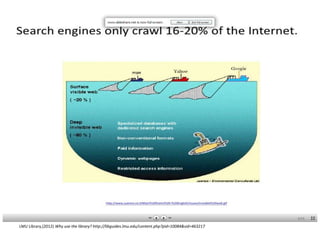
Search Engines Vs. Databases … Which one should I use, when?
        http://bastyr.libguides.com/content.php?pid=384087&sid=3148399


   “Being an efficient searcher means knowing when to
   use what tool. Most published research studies are
   protected by copyright and are not available in full text
   via the Web.” (Bastyr U. Library Tutorial, 2012)


           Bastyr University Library tutorial http://bastyr.libguides.com/content.php?pid=384087&sid=3148399
Compare the Difference
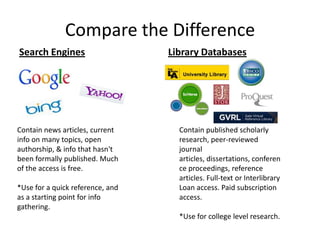
Search Engines                    Library Databases


Contain news articles, current      Contain published scholarly
info on many topics, open           research, peer-reviewed
authorship, & info that hasn't      journal
been formally published. Much       articles, dissertations, conferen
of the access is free.              ce proceedings, reference
                                    articles. Full-text or Interlibrary
*Use for a quick reference, and     Loan access. Paid subscription
as a starting point for info        access.
gathering.
                                    *Use for college level research.
LMU Library,(2012) Why use the library? http://libguides.lmu.edu/content.php?pid=10084&sid=463217
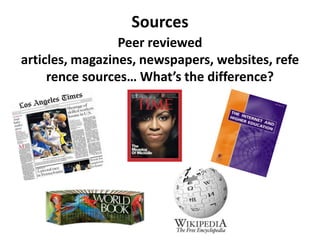
Sources
                 Peer reviewed
articles, magazines, newspapers, websites, refe
     rence sources… What’s the difference?
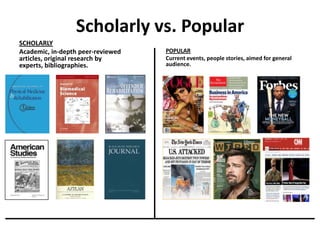
Scholarly vs. Popular
SCHOLARLY
Academic, in-depth peer-reviewed   POPULAR
articles, original research by     Current events, people stories, aimed for general
experts, bibliographies.           audience.
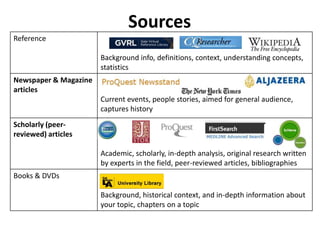
Sources
Reference

                       Background info, definitions, context, understanding concepts,
                       statistics
Newspaper & Magazine
articles
                       Current events, people stories, aimed for general audience,
                       captures history
Scholarly (peer-
reviewed) articles

                       Academic, scholarly, in-depth analysis, original research written
                       by experts in the field, peer-reviewed articles, bibliographies
Books & DVDs

                       Background, historical context, and in-depth information about
                       your topic, chapters on a topic
Searching Databases
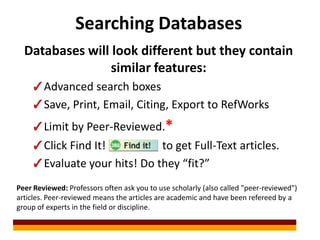
  Databases will look different but they contain
                 similar features:
        Advanced search boxes
        Save, Print, Email, Citing, Export to RefWorks
        Limit by Peer-Reviewed.*
        Click Find It!          to get Full-Text articles.
        Evaluate your hits! Do they “fit?”
Peer Reviewed: Professors often ask you to use scholarly (also called "peer-reviewed")
articles. Peer-reviewed means the articles are academic and have been refereed by a
group of experts in the field or discipline.
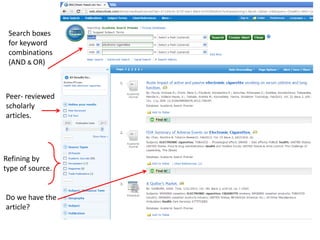
Search boxes
 for keyword
 combinations
 (AND & OR)


Peer- reviewed
scholarly
articles.


Refining by
type of source.


Do we have the
article?
Article Availability


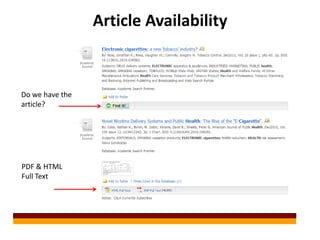
Do we have the
article?


PDF & HTML
Full Text
Article Availability
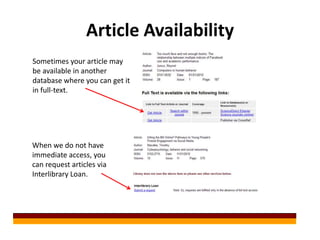
Sometimes your article may
be available in another
database where you can get it
in full-text.


When we do not have
immediate access, you
can request articles via
Interlibrary Loan.
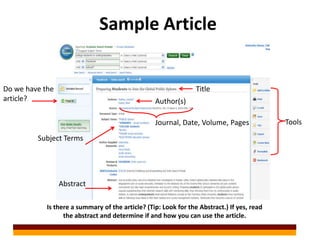
Sample Article


Do we have the                                                   Title
article?                                          Author(s)

                                                  Journal, Date, Volume, Pages              Tools

         Subject Terms


                 Abstract

            Is there a summary of the article? (Tip: Look for the Abstract.) If yes, read
                  the abstract and determine if and how you can use the article.
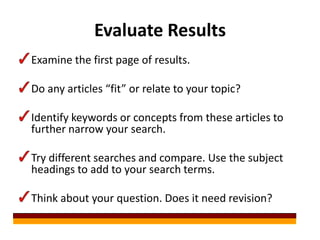
Evaluate Results
Examine the first page of results.

Do any articles “fit” or relate to your topic?

Identify keywords or concepts from these articles to
further narrow your search.

Try different searches and compare. Use the subject
headings to add to your search terms.

Think about your question. Does it need revision?
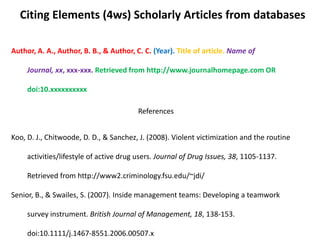
Citing Elements (4ws) Scholarly Articles from databases

Author, A. A., Author, B. B., & Author, C. C. (Year). Title of article. Name of

     Journal, xx, xxx-xxx. Retrieved from http://www.journalhomepage.com OR

     doi:10.xxxxxxxxxx

                                         References


Koo, D. J., Chitwoode, D. D., & Sanchez, J. (2008). Violent victimization and the routine

     activities/lifestyle of active drug users. Journal of Drug Issues, 38, 1105-1137.

     Retrieved from http://www2.criminology.fsu.edu/~jdi/

Senior, B., & Swailes, S. (2007). Inside management teams: Developing a teamwork

     survey instrument. British Journal of Management, 18, 138-153.

     doi:10.1111/j.1467-8551.2006.00507.x

W13 libr250 databases_scholarlyvs_popular

  • 1.
    Databases & Sources Learningoutcomes: • Search article databases fluently. • Distinguish between scholarly and popular sources. • Determine if the information discovered is relevant. • Modify the search strategy as necessary. • Cite correctly articles from online databases. • Export articles into RefWorks bibliographic manager. LIBR 250, Section1 Winter 2013 / Terrones
  • 2.
    Databases: Information “warehouses”that contain journal, magazine, newspaper articles, and other documents you can use for your university research assignments. Accessible from campus and off- campus! Search Engines Vs. Databases … Which one should I use, when? http://bastyr.libguides.com/content.php?pid=384087&sid=3148399 “Being an efficient searcher means knowing when to use what tool. Most published research studies are protected by copyright and are not available in full text via the Web.” (Bastyr U. Library Tutorial, 2012) Bastyr University Library tutorial http://bastyr.libguides.com/content.php?pid=384087&sid=3148399
  • 3.
    Compare the Difference SearchEngines Library Databases Contain news articles, current Contain published scholarly info on many topics, open research, peer-reviewed authorship, & info that hasn't journal been formally published. Much articles, dissertations, conferen of the access is free. ce proceedings, reference articles. Full-text or Interlibrary *Use for a quick reference, and Loan access. Paid subscription as a starting point for info access. gathering. *Use for college level research.
  • 4.
    LMU Library,(2012) Whyuse the library? http://libguides.lmu.edu/content.php?pid=10084&sid=463217
  • 5.
    Sources Peer reviewed articles, magazines, newspapers, websites, refe rence sources… What’s the difference?
  • 6.
    Scholarly vs. Popular SCHOLARLY Academic,in-depth peer-reviewed POPULAR articles, original research by Current events, people stories, aimed for general experts, bibliographies. audience.
  • 7.
    Sources Reference Background info, definitions, context, understanding concepts, statistics Newspaper & Magazine articles Current events, people stories, aimed for general audience, captures history Scholarly (peer- reviewed) articles Academic, scholarly, in-depth analysis, original research written by experts in the field, peer-reviewed articles, bibliographies Books & DVDs Background, historical context, and in-depth information about your topic, chapters on a topic
  • 8.
    Searching Databases Databases will look different but they contain similar features: Advanced search boxes Save, Print, Email, Citing, Export to RefWorks Limit by Peer-Reviewed.* Click Find It! to get Full-Text articles. Evaluate your hits! Do they “fit?” Peer Reviewed: Professors often ask you to use scholarly (also called "peer-reviewed") articles. Peer-reviewed means the articles are academic and have been refereed by a group of experts in the field or discipline.
  • 9.
    Search boxes forkeyword combinations (AND & OR) Peer- reviewed scholarly articles. Refining by type of source. Do we have the article?
  • 10.
    Article Availability Do wehave the article? PDF & HTML Full Text
  • 11.
    Article Availability Sometimes yourarticle may be available in another database where you can get it in full-text. When we do not have immediate access, you can request articles via Interlibrary Loan.
  • 12.
    Sample Article Do wehave the Title article? Author(s) Journal, Date, Volume, Pages Tools Subject Terms Abstract Is there a summary of the article? (Tip: Look for the Abstract.) If yes, read the abstract and determine if and how you can use the article.
  • 13.
    Evaluate Results Examine thefirst page of results. Do any articles “fit” or relate to your topic? Identify keywords or concepts from these articles to further narrow your search. Try different searches and compare. Use the subject headings to add to your search terms. Think about your question. Does it need revision?
  • 14.
    Citing Elements (4ws)Scholarly Articles from databases Author, A. A., Author, B. B., & Author, C. C. (Year). Title of article. Name of Journal, xx, xxx-xxx. Retrieved from http://www.journalhomepage.com OR doi:10.xxxxxxxxxx References Koo, D. J., Chitwoode, D. D., & Sanchez, J. (2008). Violent victimization and the routine activities/lifestyle of active drug users. Journal of Drug Issues, 38, 1105-1137. Retrieved from http://www2.criminology.fsu.edu/~jdi/ Senior, B., & Swailes, S. (2007). Inside management teams: Developing a teamwork survey instrument. British Journal of Management, 18, 138-153. doi:10.1111/j.1467-8551.2006.00507.x

Editor's Notes

  • #6 Talk about source types and peer-reviewed articles. Model Limiting to Peer Reviewed articles. Students do Step 3.
  • #13 Model a live example.
  • #14 Show slide first, then Look at hits for CS + SM = model term “FB” and psychology. Then model Boolean OR and truncation with terms “undergraduates” and educat*. Toggle to live hits. Point out FB, undergraduates, educat*.