A Doherty Library Information Literacy Tutorial
Goals
Through viewing this presentation, you will understand:
I. What PubMed searches
II. What MeSH is
III. The basics of searching PubMed
IV. Getting full text of articles
I. What is PubMed?
 Searches MEDLINE, from U.S. National Library of
Medicine
 Dates back to 1940s
 Over 21 million bibliographic records and abstracts
 Organized by MeSH, Medical Subject Headings
 In addition to MEDLINE, PubMed searches ejournals,
ebooks, and more
 Access in Databases list at library.stthom.edu
Goals
Through viewing this presentation and trying examples,
you will understand:
I. What PubMed searches
II. What MeSH is
III. The basics of searching PubMed
IV. Getting full text of articles
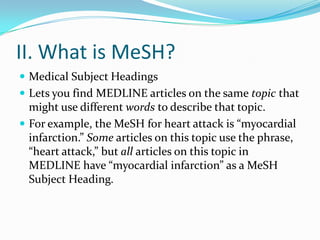
II. What is MeSH?
 Medical Subject Headings
 Lets you find MEDLINE articles on the same topic that
might use different words to describe that topic.
 For example, the MeSH for heart attack is “myocardial
infarction.” Some articles on this topic use the phrase,
“heart attack,” but all articles on this topic in
MEDLINE have “myocardial infarction” as a MeSH
Subject Heading.
II. What is MeSH?
How do you use MeSH?
 PubMed tries to automatically match your keywords
with the best MeSH terms
 MeSH Major Topics are the most important topics
covered by a given article. In the article record, they
have an asterisk (*). You can search for any keyword as
a MeSH Major Topic using Advanced search.
 Only MEDLINE articles have MeSH terms (i.e. not all
of PubMed)
Goals
Through viewing this presentation and trying examples,
you will understand:
I. What PubMed searches
II. What MeSH is
III. The basics of searching PubMed
IV. Getting full text of articles
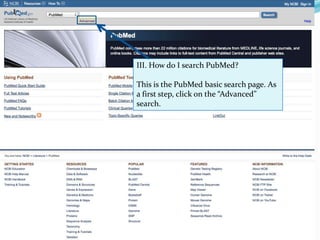
III. How do I search PubMed?
This is the PubMed basic search page. As
a first step, click on the “Advanced”
search.
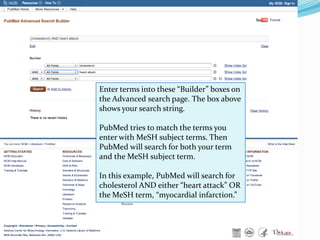
Enter terms into these “Builder” boxes on
the Advanced search page. The box above
shows your search string.
PubMed tries to match the terms you
enter with MeSH subject terms. Then
PubMed will search for both your term
and the MeSH subject term.
In this example, PubMed will search for
cholesterol AND either “heart attack” OR
the MeSH term, “myocardial infarction.”
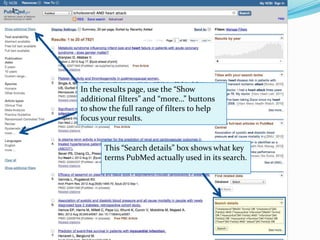
This “Search details” box shows what key
terms PubMed actually used in its search.
In the results page, use the “Show
additional filters” and “more…” buttons
to show the full range of filters to help
focus your results.
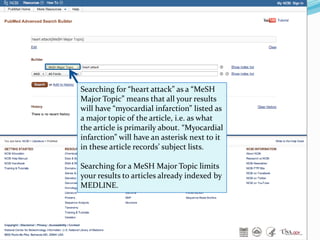
Searching for “heart attack” as a “MeSH
Major Topic” means that all your results
will have “myocardial infarction” listed as
a major topic of the article, i.e. as what
the article is primarily about. “Myocardial
infarction” will have an asterisk next to it
in these article records’ subject lists.
Searching for a MeSH Major Topic limits
your results to articles already indexed by
MEDLINE.
III. How do I search PubMed?
 In PubMed, you should keyword search just like other
databases, except:
 PubMed matches your terms with MeSH.
 Using quotation marks prevents MeSH matching (e.g.
“heart attack” will just search for “heart attack,” not
myocardial infarction.)
Goals
Through viewing this presentation and trying examples,
you will understand:
I. What PubMed searches
II. What MeSH is
III. The basics of searching PubMed
IV. Getting full text of articles
IV. How do I get full text of articles?
Here are three alternatives:
A. Go to askus.stthom.edu and type “pubmed” into
the question box. Use our tutorial to set up your
NCBI account preferences to connect you with our
full text.
B. Use UST OneSearch, on the library homepage. UST
OneSearch includes all PubMed content, showing
only our full-text resources by default. To access all
PubMed content, click “Search worldwide” on the
results page.
C. If these resources don’t work, use Interlibrary Loan.

Pubmed Basics

  • 1.
    A Doherty LibraryInformation Literacy Tutorial
  • 2.
    Goals Through viewing thispresentation, you will understand: I. What PubMed searches II. What MeSH is III. The basics of searching PubMed IV. Getting full text of articles
  • 3.
    I. What isPubMed?  Searches MEDLINE, from U.S. National Library of Medicine  Dates back to 1940s  Over 21 million bibliographic records and abstracts  Organized by MeSH, Medical Subject Headings  In addition to MEDLINE, PubMed searches ejournals, ebooks, and more  Access in Databases list at library.stthom.edu
  • 4.
    Goals Through viewing thispresentation and trying examples, you will understand: I. What PubMed searches II. What MeSH is III. The basics of searching PubMed IV. Getting full text of articles
  • 5.
    II. What isMeSH?  Medical Subject Headings  Lets you find MEDLINE articles on the same topic that might use different words to describe that topic.  For example, the MeSH for heart attack is “myocardial infarction.” Some articles on this topic use the phrase, “heart attack,” but all articles on this topic in MEDLINE have “myocardial infarction” as a MeSH Subject Heading.
  • 6.
    II. What isMeSH? How do you use MeSH?  PubMed tries to automatically match your keywords with the best MeSH terms  MeSH Major Topics are the most important topics covered by a given article. In the article record, they have an asterisk (*). You can search for any keyword as a MeSH Major Topic using Advanced search.  Only MEDLINE articles have MeSH terms (i.e. not all of PubMed)
  • 7.
    Goals Through viewing thispresentation and trying examples, you will understand: I. What PubMed searches II. What MeSH is III. The basics of searching PubMed IV. Getting full text of articles
  • 8.
    III. How doI search PubMed? This is the PubMed basic search page. As a first step, click on the “Advanced” search.
  • 9.
    Enter terms intothese “Builder” boxes on the Advanced search page. The box above shows your search string. PubMed tries to match the terms you enter with MeSH subject terms. Then PubMed will search for both your term and the MeSH subject term. In this example, PubMed will search for cholesterol AND either “heart attack” OR the MeSH term, “myocardial infarction.”
  • 10.
    This “Search details”box shows what key terms PubMed actually used in its search. In the results page, use the “Show additional filters” and “more…” buttons to show the full range of filters to help focus your results.
  • 11.
    Searching for “heartattack” as a “MeSH Major Topic” means that all your results will have “myocardial infarction” listed as a major topic of the article, i.e. as what the article is primarily about. “Myocardial infarction” will have an asterisk next to it in these article records’ subject lists. Searching for a MeSH Major Topic limits your results to articles already indexed by MEDLINE.
  • 12.
    III. How doI search PubMed?  In PubMed, you should keyword search just like other databases, except:  PubMed matches your terms with MeSH.  Using quotation marks prevents MeSH matching (e.g. “heart attack” will just search for “heart attack,” not myocardial infarction.)
  • 13.
    Goals Through viewing thispresentation and trying examples, you will understand: I. What PubMed searches II. What MeSH is III. The basics of searching PubMed IV. Getting full text of articles
  • 14.
    IV. How doI get full text of articles? Here are three alternatives: A. Go to askus.stthom.edu and type “pubmed” into the question box. Use our tutorial to set up your NCBI account preferences to connect you with our full text. B. Use UST OneSearch, on the library homepage. UST OneSearch includes all PubMed content, showing only our full-text resources by default. To access all PubMed content, click “Search worldwide” on the results page. C. If these resources don’t work, use Interlibrary Loan.