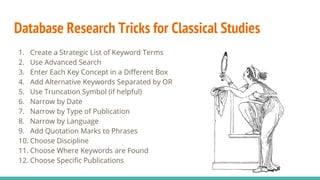
Database Research Tricks for Classical Studies
1. Create a Strategic List of Keyword Terms
2. Use Advanced Search
3. Enter Each Key Concept in a Different Box
4. Add Alternative Keywords Separated by OR
5. Use Truncation Symbol (if helpful)
6. Narrow by Date
7. Narrow by Type of Publication
8. Narrow by Language
9. Add Quotation Marks to Phrases
10. Choose Discipline
11. Choose Where Keywords are Found
12. Choose Specific Publications
Create a Strategic List of Keyword Terms
Core Search
Terms
Possible Questions to Ask to Create a List of Related Terms
Racism ● Is this a term scholars would use to discuss this topic?
● What alternative words could be used?
● What races / ethnicities / foreigners existed?
Ancient ● Will scholars consistently use the term ancient?
● What other terms are used to differentiate this time period from current issues
of racism in Greece?
Greece ● Would it be useful to list specific cities or groups of people within Greek
society
● Would it be useful to expand the search to neighboring countries or names of
the region?
● Is it helpful to list the names of individuals or classic works?
Create a Strategic List of Keyword Terms (continued)
Core Search
Terms
Possible Related Terms to Use in a Search
Racism ● racism OR race OR ethnicity OR Xenophobia OR prejudice OR stereotype
● Ethiopians OR Africans OR Black
Ancient ● ancient OR antiquity OR antiquities OR Classical OR Classics OR civilization
Greece ● Greece OR Greek
● Rome OR Roman
● Mediterranean OR Macedonia OR Thrace OR Egypt OR Anatolia OR
Phoenician OR Levant OR Persia OR Persians OR Carthage OR
Mesopotamia OR Black Sea OR Red Sea OR Magna Graecia
Use Advanced Search Advanced Search provides
more options for constructing
a search!
Enter Each Concept in a Separate Box
Add Alternative Keywords Separated By OR
OR broadens a search. When terms are connected by OR the
database knows either term in acceptable but both are not
required.
Use Truncation Symbol (if helpful)
*
An asterisk may be
added to the root
of any word to tell
the database to find
additional words
that share the same
root.
Classic* = Classic
OR
Classical
OR
Classics
Narrow by Date
In the search results
use the filters provided
to narrow the search by
date if you get too many
results.
Narrow by Type of Publication
In the search results you can also
narrow by type of publication.
● Academic Journals are more scholarly
and specific.
● Magazines are easy to read if you need
to build an understanding of a new topic.
● Books are the best of both worlds. They
provide needed background information,
are often built on scholarship, and
address more nuanced topics the deeper
you go in the book.
Narrow by Language
If you can only read
English language
materials narrow the
search by language.
Add Quotation Marks to Phrases
Choose a Discipline
Choose Where Keywords are Found
Advanced Search allows you to designate where certain
keywords are found.
● Narrow Search: Set Limit to Title, Subject,or Abstract
● Broaden Search: Set Limit to All Text
Choose Where Keywords are Found (continued)
In Discover Search, the default is to search within
the full text of the article. Uncheck this in
Advanced Search to change the default to search
the title, abstract, and subject terms in every
search.
Narrow by Name of Publication
Some databases will allow you to narrow
the search by the name of the
publication the article is published in.

Database Research Tricks for Classical Studies

  • 1.
    Database Research Tricksfor Classical Studies 1. Create a Strategic List of Keyword Terms 2. Use Advanced Search 3. Enter Each Key Concept in a Different Box 4. Add Alternative Keywords Separated by OR 5. Use Truncation Symbol (if helpful) 6. Narrow by Date 7. Narrow by Type of Publication 8. Narrow by Language 9. Add Quotation Marks to Phrases 10. Choose Discipline 11. Choose Where Keywords are Found 12. Choose Specific Publications
  • 2.
    Create a StrategicList of Keyword Terms Core Search Terms Possible Questions to Ask to Create a List of Related Terms Racism ● Is this a term scholars would use to discuss this topic? ● What alternative words could be used? ● What races / ethnicities / foreigners existed? Ancient ● Will scholars consistently use the term ancient? ● What other terms are used to differentiate this time period from current issues of racism in Greece? Greece ● Would it be useful to list specific cities or groups of people within Greek society ● Would it be useful to expand the search to neighboring countries or names of the region? ● Is it helpful to list the names of individuals or classic works?
  • 3.
    Create a StrategicList of Keyword Terms (continued) Core Search Terms Possible Related Terms to Use in a Search Racism ● racism OR race OR ethnicity OR Xenophobia OR prejudice OR stereotype ● Ethiopians OR Africans OR Black Ancient ● ancient OR antiquity OR antiquities OR Classical OR Classics OR civilization Greece ● Greece OR Greek ● Rome OR Roman ● Mediterranean OR Macedonia OR Thrace OR Egypt OR Anatolia OR Phoenician OR Levant OR Persia OR Persians OR Carthage OR Mesopotamia OR Black Sea OR Red Sea OR Magna Graecia
  • 4.
    Use Advanced SearchAdvanced Search provides more options for constructing a search!
  • 5.
    Enter Each Conceptin a Separate Box
  • 6.
    Add Alternative KeywordsSeparated By OR OR broadens a search. When terms are connected by OR the database knows either term in acceptable but both are not required.
  • 7.
    Use Truncation Symbol(if helpful) * An asterisk may be added to the root of any word to tell the database to find additional words that share the same root. Classic* = Classic OR Classical OR Classics
  • 8.
    Narrow by Date Inthe search results use the filters provided to narrow the search by date if you get too many results.
  • 9.
    Narrow by Typeof Publication In the search results you can also narrow by type of publication. ● Academic Journals are more scholarly and specific. ● Magazines are easy to read if you need to build an understanding of a new topic. ● Books are the best of both worlds. They provide needed background information, are often built on scholarship, and address more nuanced topics the deeper you go in the book.
  • 10.
    Narrow by Language Ifyou can only read English language materials narrow the search by language.
  • 11.
  • 12.
  • 13.
    Choose Where Keywordsare Found Advanced Search allows you to designate where certain keywords are found. ● Narrow Search: Set Limit to Title, Subject,or Abstract ● Broaden Search: Set Limit to All Text
  • 14.
    Choose Where Keywordsare Found (continued) In Discover Search, the default is to search within the full text of the article. Uncheck this in Advanced Search to change the default to search the title, abstract, and subject terms in every search.
  • 15.
    Narrow by Nameof Publication Some databases will allow you to narrow the search by the name of the publication the article is published in.