Research Skills:
   EDCI 500


         Laura Berberian
         Stafford Campus Reference Librarian
         lberberi@umw.edu
Developing a Topic
• Topic should not be too broad or too narrow
• Use a thesaurus in a research database, such
  as ERIC, to look up synonyms of your search
  terms
• Define the scope of your topic-who are your
  subjects? Example: adolescent male readers
Evaluating Sources
• Credibility- what are the author’s credentials?
• Accuracy-are there errors? Disproven
  theories?
• Currency-outmoded information
• Bias-is the author affiliated with a corporation
  or political organization?
• Online access to thousands of scholarly
  journal articles, magazines, and newspapers
• 380,000 items in the library’s collection
• Access to books and eBooks
• Online subject guides
• Interlibrary loan (to borrow items from other
  libraries)
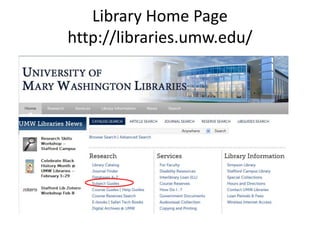
Library Home Page
http://libraries.umw.edu/
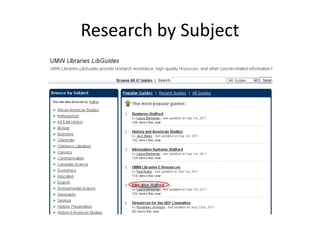
Research by Subject
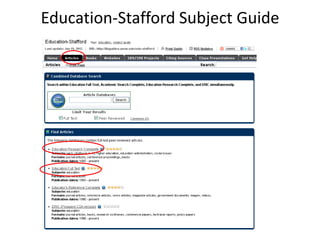
Education-Stafford Subject Guide
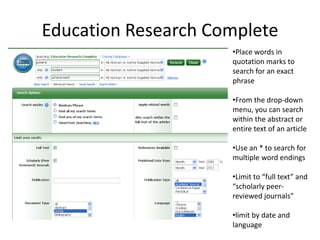
Education Research Complete
                     •Place words in
                     quotation marks to
                     search for an exact
                     phrase

                     •From the drop-down
                     menu, you can search
                     within the abstract or
                     entire text of an article

                     •Use an * to search for
                     multiple word endings

                     •Limit to “full text” and
                     “scholarly peer-
                     reviewed journals”

                     •limit by date and
                     language
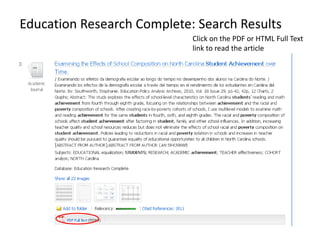
Education Research Complete: Search Results
                            Click on the PDF or HTML Full Text
                            link to read the article
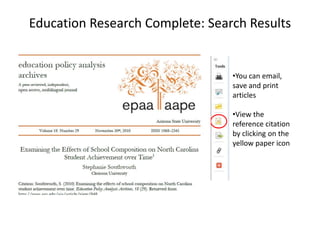
Education Research Complete: Search Results


                                 •You can email,
                                 save and print
                                 articles

                                 •View the
                                 reference citation
                                 by clicking on the
                                 yellow paper icon
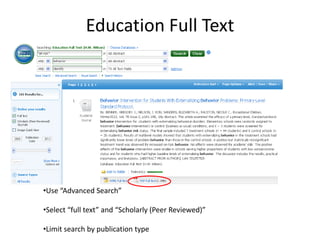
Education Full Text


•Use “Advanced Search”

•Select “full text” and “Scholarly (Peer Reviewed)”

•Limit search by publication type
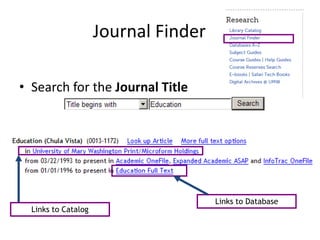
Journal Finder

• Search for the Journal Title


                                      Links to Database
  Links to Catalog
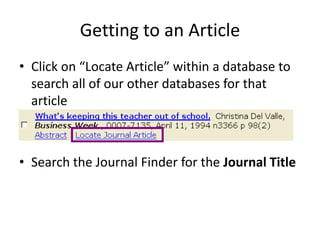
Getting to an Article
• Click on “Locate Article” within a database to
  search all of our other databases for that
  article


• Search the Journal Finder for the Journal Title
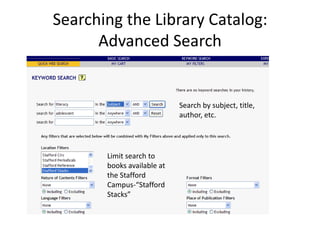
Searching the Library Catalog:
      Advanced Search


                            Search by subject, title,
                            author, etc.


       Limit search to
       books available at
       the Stafford
       Campus-“Stafford
       Stacks”
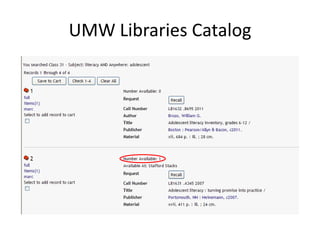
UMW Libraries Catalog
What if my materials are at the main campus Library?
       What if UMW doesn’t have what I need?


• Use interlibrary loan (ILLiad) to request materials not located
  at the Stafford Library
   – Create an online ILLiad Account
   – Submit requests through Library’s website
   – Request books, articles, dissertations
   – Books are free
   – $2 fee for articles located at Simpson Library
   – Delivered to Stafford Library
Searching the Web
• Search by domain: site:.edu, site:.gov or
  site:.org for educational, government, and
  NGO websites
• In Google Scholar, you can search for items in
  UMW Libraries’ collection by going to
  “Preferences” and typing “University of Mary
  Washington” in the Library Links search box
• Click “Save Preferences”
Need help? Have Questions?
  • Come to the Library
      – Mondays – Thursdays: 1 p.m. - 9 p.m.
      – Fridays: 1 p.m. - 7 p.m.
      – Saturdays: 9 a.m. - 3 p.m.
  • Contact the Library Staff
      – stafflib@umw.edu
      – 540-286-8025
      – IM: cgpslibrary
  • Set up a Research Appointment
      – lberberi@umw.edu
      – 540-286-8057
      – IM: staffordlibrarian

EDCI.500.Coffman.Summer.2012

  • 1.
    Research Skills: EDCI 500 Laura Berberian Stafford Campus Reference Librarian lberberi@umw.edu
  • 2.
    Developing a Topic •Topic should not be too broad or too narrow • Use a thesaurus in a research database, such as ERIC, to look up synonyms of your search terms • Define the scope of your topic-who are your subjects? Example: adolescent male readers
  • 3.
    Evaluating Sources • Credibility-what are the author’s credentials? • Accuracy-are there errors? Disproven theories? • Currency-outmoded information • Bias-is the author affiliated with a corporation or political organization?
  • 4.
    • Online accessto thousands of scholarly journal articles, magazines, and newspapers • 380,000 items in the library’s collection • Access to books and eBooks • Online subject guides • Interlibrary loan (to borrow items from other libraries)
  • 5.
  • 6.
  • 7.
  • 8.
    Education Research Complete •Place words in quotation marks to search for an exact phrase •From the drop-down menu, you can search within the abstract or entire text of an article •Use an * to search for multiple word endings •Limit to “full text” and “scholarly peer- reviewed journals” •limit by date and language
  • 9.
    Education Research Complete:Search Results Click on the PDF or HTML Full Text link to read the article
  • 10.
    Education Research Complete:Search Results •You can email, save and print articles •View the reference citation by clicking on the yellow paper icon
  • 11.
    Education Full Text •Use“Advanced Search” •Select “full text” and “Scholarly (Peer Reviewed)” •Limit search by publication type
  • 12.
    Journal Finder • Searchfor the Journal Title Links to Database Links to Catalog
  • 13.
    Getting to anArticle • Click on “Locate Article” within a database to search all of our other databases for that article • Search the Journal Finder for the Journal Title
  • 14.
    Searching the LibraryCatalog: Advanced Search Search by subject, title, author, etc. Limit search to books available at the Stafford Campus-“Stafford Stacks”
  • 15.
  • 16.
    What if mymaterials are at the main campus Library? What if UMW doesn’t have what I need? • Use interlibrary loan (ILLiad) to request materials not located at the Stafford Library – Create an online ILLiad Account – Submit requests through Library’s website – Request books, articles, dissertations – Books are free – $2 fee for articles located at Simpson Library – Delivered to Stafford Library
  • 17.
    Searching the Web •Search by domain: site:.edu, site:.gov or site:.org for educational, government, and NGO websites • In Google Scholar, you can search for items in UMW Libraries’ collection by going to “Preferences” and typing “University of Mary Washington” in the Library Links search box • Click “Save Preferences”
  • 18.
    Need help? HaveQuestions? • Come to the Library – Mondays – Thursdays: 1 p.m. - 9 p.m. – Fridays: 1 p.m. - 7 p.m. – Saturdays: 9 a.m. - 3 p.m. • Contact the Library Staff – stafflib@umw.edu – 540-286-8025 – IM: cgpslibrary • Set up a Research Appointment – lberberi@umw.edu – 540-286-8057 – IM: staffordlibrarian