I N T R O D U C T I O N A N D O N L I N E S E A R C H I N G
PubMed
What is PubMed?
 PubMed is a free database comprised of 23 million
citations as well as abstract.
 These citations are taken from Medline, life science,
biomedicine ,behavioral sciences, chemical sciences,
and bioengineering of journals and books
 PubMed is provided and maintain by the National
Center for Biotechnology Information (NCBI), National
Library of Medicine (NLM) and at the National
Institutes of Health (NIH)
 A web-based retrieval system developed by NCBI (a
part of Entrez retrieval system)
 PubMed also provides access to additional relevant web
sites and links to the other NCBI molecular biology
resources.
PubMed……….
 A database of bibliographic information drawn
primarily from the life sciences literature
 PubMed contains links to
 Full-text articles at participating publishers' Web sites
 Other third party sites such as libraries and sequencing
centers
Type of Searching
 Keywords search
 Results match the exact terms
 May miss alternative terms
 Often result in more false hits
 Subject search
 Results match the concept of that term
 MeSH (PubMed)
 Improve precision and save time
 Good for well-defined topic
 Advanced search
 And
 Or
 Not
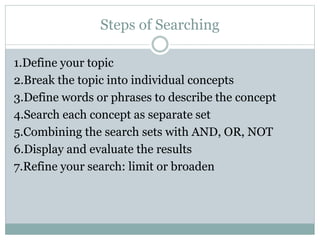
Steps of Searching
1.Define your topic
2.Break the topic into individual concepts
3.Define words or phrases to describe the concept
4.Search each concept as separate set
5.Combining the search sets with AND, OR, NOT
6.Display and evaluate the results
7.Refine your search: limit or broaden
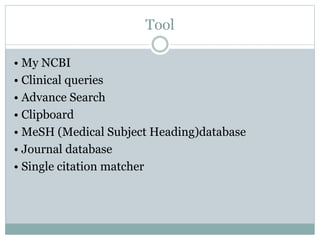
Tool
• My NCBI
• Clinical queries
• Advance Search
• Clipboard
• MeSH (Medical Subject Heading)database
• Journal database
• Single citation matcher
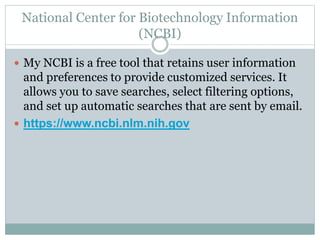
National Center for Biotechnology Information
(NCBI)
 My NCBI is a free tool that retains user information
and preferences to provide customized services. It
allows you to save searches, select filtering options,
and set up automatic searches that are sent by email.
 https://www.ncbi.nlm.nih.gov
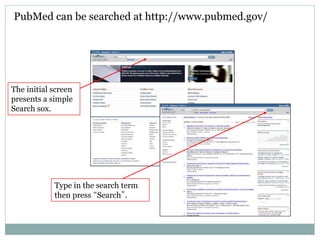
PubMed can be searched at http://www.pubmed.gov/
Type in the search term
then press “Search”.
The initial screen
presents a simple
Search sox.
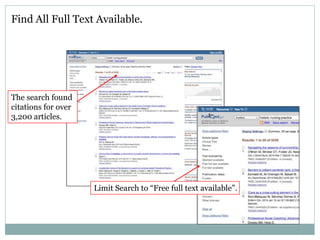
Find All Full Text Available.
The search found
citations for over
3,200 articles.
Limit Search to “Free full text available”.
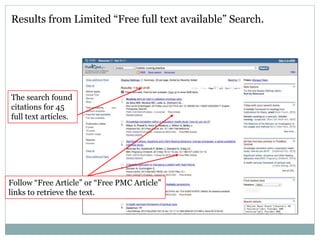
Results from Limited “Free full text available” Search.
Follow “Free Article” or “Free PMC Article”
links to retrieve the text.
The search found
citations for 45
full text articles.
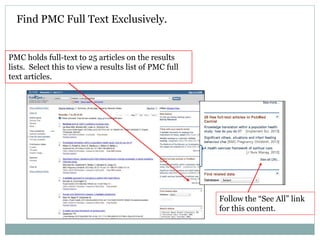
Find PMC Full Text Exclusively.
Follow the “See All” link
for this content.
PMC holds full-text to 25 articles on the results
lists. Select this to view a results list of PMC full
text articles.
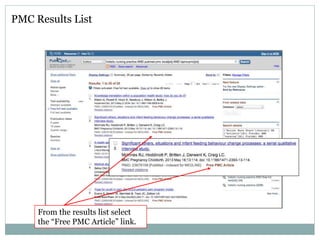
PMC Results List
From the results list select
the “Free PMC Article” link.
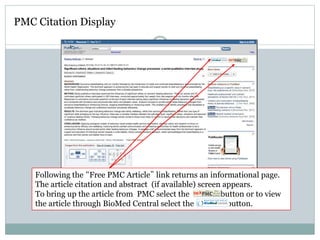
Following the “Free PMC Article” link returns an informational page.
The article citation and abstract (if available) screen appears.
To bring up the article from PMC select the button or to view
the article through BioMed Central select the button.
PMC Citation Display
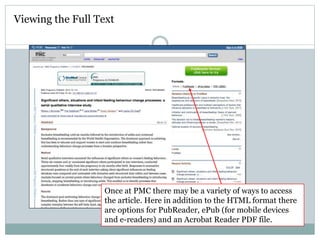
Once at PMC there may be a variety of ways to access
the article. Here in addition to the HTML format there
are options for PubReader, ePub (for mobile devices
and e-readers) and an Acrobat Reader PDF file.
Viewing the Full Text
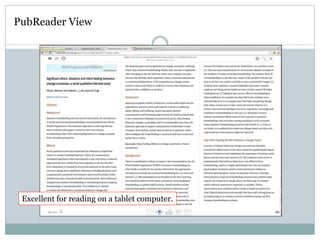
PubReader View
Excellent for reading on a tablet computer.
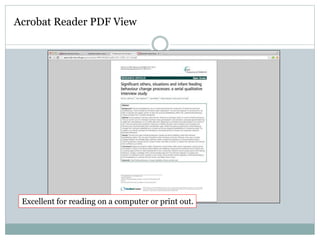
Acrobat Reader PDF View
Excellent for reading on a computer or print out.

Pub med

  • 1.
    I N TR O D U C T I O N A N D O N L I N E S E A R C H I N G PubMed
  • 2.
    What is PubMed? PubMed is a free database comprised of 23 million citations as well as abstract.  These citations are taken from Medline, life science, biomedicine ,behavioral sciences, chemical sciences, and bioengineering of journals and books  PubMed is provided and maintain by the National Center for Biotechnology Information (NCBI), National Library of Medicine (NLM) and at the National Institutes of Health (NIH)  A web-based retrieval system developed by NCBI (a part of Entrez retrieval system)  PubMed also provides access to additional relevant web sites and links to the other NCBI molecular biology resources.
  • 3.
    PubMed……….  A databaseof bibliographic information drawn primarily from the life sciences literature  PubMed contains links to  Full-text articles at participating publishers' Web sites  Other third party sites such as libraries and sequencing centers
  • 4.
    Type of Searching Keywords search  Results match the exact terms  May miss alternative terms  Often result in more false hits  Subject search  Results match the concept of that term  MeSH (PubMed)  Improve precision and save time  Good for well-defined topic  Advanced search  And  Or  Not
  • 5.
    Steps of Searching 1.Defineyour topic 2.Break the topic into individual concepts 3.Define words or phrases to describe the concept 4.Search each concept as separate set 5.Combining the search sets with AND, OR, NOT 6.Display and evaluate the results 7.Refine your search: limit or broaden
  • 6.
    Tool • My NCBI •Clinical queries • Advance Search • Clipboard • MeSH (Medical Subject Heading)database • Journal database • Single citation matcher
  • 7.
    National Center forBiotechnology Information (NCBI)  My NCBI is a free tool that retains user information and preferences to provide customized services. It allows you to save searches, select filtering options, and set up automatic searches that are sent by email.  https://www.ncbi.nlm.nih.gov
  • 8.
    PubMed can besearched at http://www.pubmed.gov/ Type in the search term then press “Search”. The initial screen presents a simple Search sox.
  • 9.
    Find All FullText Available. The search found citations for over 3,200 articles. Limit Search to “Free full text available”.
  • 10.
    Results from Limited“Free full text available” Search. Follow “Free Article” or “Free PMC Article” links to retrieve the text. The search found citations for 45 full text articles.
  • 11.
    Find PMC FullText Exclusively. Follow the “See All” link for this content. PMC holds full-text to 25 articles on the results lists. Select this to view a results list of PMC full text articles.
  • 12.
    PMC Results List Fromthe results list select the “Free PMC Article” link.
  • 13.
    Following the “FreePMC Article” link returns an informational page. The article citation and abstract (if available) screen appears. To bring up the article from PMC select the button or to view the article through BioMed Central select the button. PMC Citation Display
  • 14.
    Once at PMCthere may be a variety of ways to access the article. Here in addition to the HTML format there are options for PubReader, ePub (for mobile devices and e-readers) and an Acrobat Reader PDF file. Viewing the Full Text
  • 15.
    PubReader View Excellent forreading on a tablet computer.
  • 16.
    Acrobat Reader PDFView Excellent for reading on a computer or print out.