AE 101
Foundations of Adventure Education
Library Instruction Session
Valeria Skarbek
Librarian
Reed 112b, 970-247-7424
vaskarbek@fortlewis.edu
Overview
1. Introduction
2. Overview of John F. Reed Library Website
3. Searching Tips and Electronic Resources
4. Finding Full-Text Articles Outside of FLC Databases
5. Why We Must Cite Sources
6. Help with Collecting and Citing Sources
7. Reference Help
library.fortlewis.edu
1. Catalog: items in our
collection which
include books, eBooks,
DVDs, audio, streaming
videos, etc.
2. Research Guides:
Library created guides
to support academic
programs and provide
citation help.
Adventure Education
3. Class Reserves:
Textbooks on reserve;
can search by course
name, number, or
faculty name.
4. Library Info: Our hours,
ways to reach us, FAQs,
etc.
Searching Reed Library Resources
1. Library Engine:
Searches many, but
not all, of our
databases.
 Many resources for
Adventure
Education topics are
located in EBSCO
databases.
 Library Engine will
search all EBSCO
databases or you
can choose specific
databases.
 Outdoor Education
Research has to be
searched separately.
Searching Reed Library Resources
2. Databases:
 Choose a subject (ex.
Adventure Education) or
browse by database title.
 Some databases must
be searched separately
because their results do
not appear in Library
Engine Searches.
 If the database name
has (EBSCO) after it, those
results will appear in
Library Engine searches so
you don’t have to search
them separately unless
you want to.
Searching Reed Library Resources
3. Databases good for Adventure
Education searches:
 “Best Bets!” are listed at the top.
 These are databases where you
are more likely to find helpful
resources for that subject.
 Non-EBSCO databases you might
search separately for Adventure
Education topics include:
PQDT Global Full Text
(Dissertations & Theses)
ScienceDirect (Elsevier)
Web of Science
Quick Tips for Efficient Searching: Keywords
Before you search, think of the words or concepts of great significance to your topic and
how to connect them so the library’s databases understand what you want.
Ex. health benefits of nature
 You can limit your
results to:
 Peer
Reviewed/Scholarly
Journals (see box)
 Full Text (the entire
article, not just the
abstract)
 Published Date
(sometimes you’ll need
recent articles or
historical ones)
Peer reviewed or scholarly articles are written by experts for the
purpose of sharing original research or analyzing others' findings.
They are reviewed by several other experts in that field before
the article is published in the journal in order to insure the
article's quality.
Efficient Searching: Quotation Marks
 In EBSCO, if you type in multiple keywords, they are searched in the order in which
they are entered.
 Use quotation marks “ ” when you have a specific phrase or title or when you want to
search words in a specific order. Ex. “Girl, Interrupted” movie psychology
Efficient Searching: BOOLEAN Operators - AND
Once you have keywords, you need to connect them with Boolean operators so the
database understands how they’re related.
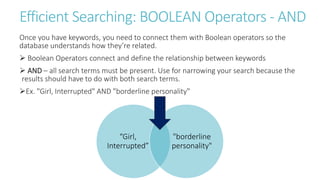
 Boolean Operators connect and define the relationship between keywords
 AND – all search terms must be present. Use for narrowing your search because the
results should have to do with both search terms.
Ex. "Girl, Interrupted" AND "borderline personality"
“Girl,
Interrupted”
"borderline
personality"
Efficient Searching: BOOLEAN Operators - OR
 OR – any of the search terms can be present. Use with synonyms to broaden your
search.
 OR gives you more results. In this case, using “child development” OR “toddler
development” expands your search, because you could have results about child
development, toddler development, or both of those terms.
“child
development”
“toddler
development”
Quick Tips: BOOLEAN Operators - NOT
 NOT – excludes search terms.
 You won’t have to use NOT as much, but it’s really helpful for excluding results that
are problematic. If you’re interested in child development and want nothing to do with
adolescent development, NOT can fix that.
“child
development”
“adolescent
development”
Finding the article
1st Check the database record thoroughly. Sometimes links are at the bottom.
2nd Google Scholar - a Web search engine that specifically searches scholarly literature and
academic resources
 Use Google Scholar to search for the article title in quotation marks. If the article can be
accessed through FLC’s resources, a link will appear next to it.
*Go to “G” in the FLC list of databases to ensure your search links to FLC resources.
• Not available,
request
through ILL. • Available- click the link
to access the article.
If you can’t find the full-text of an article
 You can request it through Interlibrary Loan (ILL).
 ILL allows patrons to obtain materials not available in our local collection.
 Enter your FLC CAS logon and password. Use your FLC email address to create your ILL account.
If you can’t find a book
 If you can’t find a book in our catalog, first check Prospector then MOBIUS before using ILL.
 For more info and FAQs, please visit http://subjectguides.fortlewis.edu/faqs/prospectorill
Why do we have to cite our sources?
• To avoid PLAGIARISM: While a bibliography does not prevent plagiarism, it
is an important tool in avoiding plagiarism.
• BUILDING on research: Pertinent information is gleaned from the ideas of
those who came before, and a researcher then produces new knowledge by
integrating the ideas of others with her own conclusions. This is the
scholarly research process.
• TRACING research: According to Joseph Gibaldi, the author of the MLA
Handbook for Writers of Research Papers, “in presenting their work,
researchers generously acknowledge their debts to predecessors by
carefully documenting each source so that earlier contributions receive
appropriate credit” (104). This is the basis for all scholarship. It is important
that researchers give credit so readers can trace the ideas presented back to
the sources.
Why do we have to cite our sources?
• CONTRIBUTING ideas: Your contribution, as a student, to disciplinary
knowledge is the unique way you interpret and synthesize the words,
thoughts, and ideas of authorities. In fact, giving credit to experts and
authoritative sources gives your conclusions validity that cannot be
achieved by simply stating one's own opinions.
• LOCATING additional research: Citations allow readers to access the cited
materials if they are performing research on that topic. Mining
bibliographies is a good way to become familiar with other related sources
on a topic.
Collecting your sources: Save in a safe place!
• Enter your search string: ex. "Girl, Interrupted" AND "borderline personality“ and choose
limit to Peer Reviewed/Scholarly Journals
• Click the folder icon to collect
results then export them at once.
Ways to save your article and its citation
• Always double-check the citations. They are not
always formatted correctly.
• You can add the permalink to your citation.
• Email to self or export
to EndNote Online
EndNote Online:
 EndNote is a software
program available to FLC
students. You can export and
import citations directly into
EndNote Online.
 EndNote can store, recall, and
cite bibliographic information
in your chosen style for
composing research papers.
 Go to the Reed Library
website under “How Do I?” >
Use EndNote Online
EndNote:
 To create an
account, click
“Sign up” and be
sure to use your
FLC email address
for your account.
Setting up APA format in EndNote Online:
• Go to Format > Bibliography and choose your references and Bibliographic
style: APA 6th – Sentence Case (so it capitalizes the article title correctly).
• You can choose to Save, Email, or Preview to copy and paste citations into
Word.
Citation Research Guide: APA format
Need more help?
Contact a librarian 
 Stop by the Reference desk (especially for search and APA format help)
 Give us a call at 970-247-7551
 Schedule an appointment with a librarian (30 minute sessions)
 Email us at library@fortlewis.edu
Chat with us! Click the icon below.

AE 101 Spring 2018

  • 1.
    AE 101 Foundations ofAdventure Education Library Instruction Session Valeria Skarbek Librarian Reed 112b, 970-247-7424 vaskarbek@fortlewis.edu
  • 2.
    Overview 1. Introduction 2. Overviewof John F. Reed Library Website 3. Searching Tips and Electronic Resources 4. Finding Full-Text Articles Outside of FLC Databases 5. Why We Must Cite Sources 6. Help with Collecting and Citing Sources 7. Reference Help
  • 3.
    library.fortlewis.edu 1. Catalog: itemsin our collection which include books, eBooks, DVDs, audio, streaming videos, etc. 2. Research Guides: Library created guides to support academic programs and provide citation help. Adventure Education 3. Class Reserves: Textbooks on reserve; can search by course name, number, or faculty name. 4. Library Info: Our hours, ways to reach us, FAQs, etc.
  • 4.
    Searching Reed LibraryResources 1. Library Engine: Searches many, but not all, of our databases.  Many resources for Adventure Education topics are located in EBSCO databases.  Library Engine will search all EBSCO databases or you can choose specific databases.  Outdoor Education Research has to be searched separately.
  • 5.
    Searching Reed LibraryResources 2. Databases:  Choose a subject (ex. Adventure Education) or browse by database title.  Some databases must be searched separately because their results do not appear in Library Engine Searches.  If the database name has (EBSCO) after it, those results will appear in Library Engine searches so you don’t have to search them separately unless you want to.
  • 6.
    Searching Reed LibraryResources 3. Databases good for Adventure Education searches:  “Best Bets!” are listed at the top.  These are databases where you are more likely to find helpful resources for that subject.  Non-EBSCO databases you might search separately for Adventure Education topics include: PQDT Global Full Text (Dissertations & Theses) ScienceDirect (Elsevier) Web of Science
  • 7.
    Quick Tips forEfficient Searching: Keywords Before you search, think of the words or concepts of great significance to your topic and how to connect them so the library’s databases understand what you want. Ex. health benefits of nature  You can limit your results to:  Peer Reviewed/Scholarly Journals (see box)  Full Text (the entire article, not just the abstract)  Published Date (sometimes you’ll need recent articles or historical ones) Peer reviewed or scholarly articles are written by experts for the purpose of sharing original research or analyzing others' findings. They are reviewed by several other experts in that field before the article is published in the journal in order to insure the article's quality.
  • 8.
    Efficient Searching: QuotationMarks  In EBSCO, if you type in multiple keywords, they are searched in the order in which they are entered.  Use quotation marks “ ” when you have a specific phrase or title or when you want to search words in a specific order. Ex. “Girl, Interrupted” movie psychology
  • 9.
    Efficient Searching: BOOLEANOperators - AND Once you have keywords, you need to connect them with Boolean operators so the database understands how they’re related.  Boolean Operators connect and define the relationship between keywords  AND – all search terms must be present. Use for narrowing your search because the results should have to do with both search terms. Ex. "Girl, Interrupted" AND "borderline personality" “Girl, Interrupted” "borderline personality"
  • 10.
    Efficient Searching: BOOLEANOperators - OR  OR – any of the search terms can be present. Use with synonyms to broaden your search.  OR gives you more results. In this case, using “child development” OR “toddler development” expands your search, because you could have results about child development, toddler development, or both of those terms. “child development” “toddler development”
  • 11.
    Quick Tips: BOOLEANOperators - NOT  NOT – excludes search terms.  You won’t have to use NOT as much, but it’s really helpful for excluding results that are problematic. If you’re interested in child development and want nothing to do with adolescent development, NOT can fix that. “child development” “adolescent development”
  • 12.
    Finding the article 1stCheck the database record thoroughly. Sometimes links are at the bottom. 2nd Google Scholar - a Web search engine that specifically searches scholarly literature and academic resources  Use Google Scholar to search for the article title in quotation marks. If the article can be accessed through FLC’s resources, a link will appear next to it. *Go to “G” in the FLC list of databases to ensure your search links to FLC resources. • Not available, request through ILL. • Available- click the link to access the article.
  • 13.
    If you can’tfind the full-text of an article  You can request it through Interlibrary Loan (ILL).  ILL allows patrons to obtain materials not available in our local collection.  Enter your FLC CAS logon and password. Use your FLC email address to create your ILL account.
  • 14.
    If you can’tfind a book  If you can’t find a book in our catalog, first check Prospector then MOBIUS before using ILL.  For more info and FAQs, please visit http://subjectguides.fortlewis.edu/faqs/prospectorill
  • 15.
    Why do wehave to cite our sources? • To avoid PLAGIARISM: While a bibliography does not prevent plagiarism, it is an important tool in avoiding plagiarism. • BUILDING on research: Pertinent information is gleaned from the ideas of those who came before, and a researcher then produces new knowledge by integrating the ideas of others with her own conclusions. This is the scholarly research process. • TRACING research: According to Joseph Gibaldi, the author of the MLA Handbook for Writers of Research Papers, “in presenting their work, researchers generously acknowledge their debts to predecessors by carefully documenting each source so that earlier contributions receive appropriate credit” (104). This is the basis for all scholarship. It is important that researchers give credit so readers can trace the ideas presented back to the sources.
  • 16.
    Why do wehave to cite our sources? • CONTRIBUTING ideas: Your contribution, as a student, to disciplinary knowledge is the unique way you interpret and synthesize the words, thoughts, and ideas of authorities. In fact, giving credit to experts and authoritative sources gives your conclusions validity that cannot be achieved by simply stating one's own opinions. • LOCATING additional research: Citations allow readers to access the cited materials if they are performing research on that topic. Mining bibliographies is a good way to become familiar with other related sources on a topic.
  • 17.
    Collecting your sources:Save in a safe place! • Enter your search string: ex. "Girl, Interrupted" AND "borderline personality“ and choose limit to Peer Reviewed/Scholarly Journals • Click the folder icon to collect results then export them at once.
  • 18.
    Ways to saveyour article and its citation • Always double-check the citations. They are not always formatted correctly. • You can add the permalink to your citation. • Email to self or export to EndNote Online
  • 19.
    EndNote Online:  EndNoteis a software program available to FLC students. You can export and import citations directly into EndNote Online.  EndNote can store, recall, and cite bibliographic information in your chosen style for composing research papers.  Go to the Reed Library website under “How Do I?” > Use EndNote Online
  • 20.
    EndNote:  To createan account, click “Sign up” and be sure to use your FLC email address for your account.
  • 21.
    Setting up APAformat in EndNote Online: • Go to Format > Bibliography and choose your references and Bibliographic style: APA 6th – Sentence Case (so it capitalizes the article title correctly). • You can choose to Save, Email, or Preview to copy and paste citations into Word.
  • 22.
  • 23.
    Need more help? Contacta librarian   Stop by the Reference desk (especially for search and APA format help)  Give us a call at 970-247-7551  Schedule an appointment with a librarian (30 minute sessions)  Email us at library@fortlewis.edu Chat with us! Click the icon below.