on 26th November 2019
MODULE: computer networking
GROUP2
Reg no:
17RP00761
17RP00736
17RP00753
17RP00851
ET3B
LECTURER: Claudien MANIRIHO
Question: description to client/server protocols
What is client/server
network
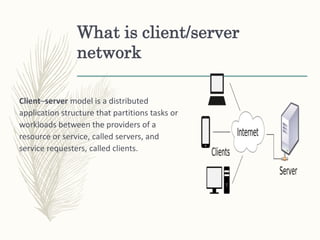
Client–server model is a distributed
application structure that partitions tasks or
workloads between the providers of a
resource or service, called servers, and
service requesters, called clients.
What is protocol
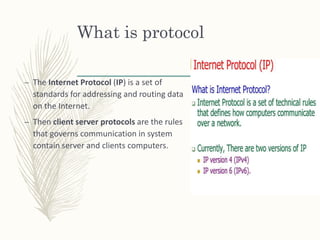
– The Internet Protocol (IP) is a set of
standards for addressing and routing data
on the Internet.
– Then client server protocols are the rules
that governs communication in system
contain server and clients computers.
Transmission Control Protocol (TCP)
– The Transmission Control Protocol (TCP)
is one of the main protocols of
the Internet protocol suite. It originated
in the initial network implementation in
which it complemented the Internet
Protocol (IP). Therefore, the entire suite
is commonly referred to as TCP/IP. TCP
provides reliable, ordered, and error-
checked delivery of a stream
of octets (bytes) between applications
running on hosts communicating via an IP
network.
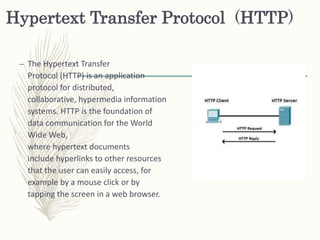
Hypertext Transfer Protocol (HTTP)
– The Hypertext Transfer
Protocol (HTTP) is an application
protocol for distributed,
collaborative, hypermedia information
systems. HTTP is the foundation of
data communication for the World
Wide Web,
where hypertext documents
include hyperlinks to other resources
that the user can easily access, for
example by a mouse click or by
tapping the screen in a web browser.
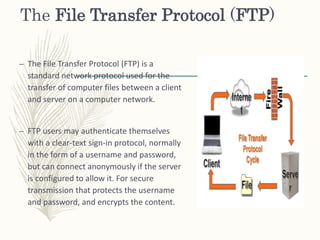
The File Transfer Protocol (FTP)
– The File Transfer Protocol (FTP) is a
standard network protocol used for the
transfer of computer files between a client
and server on a computer network.
– FTP users may authenticate themselves
with a clear-text sign-in protocol, normally
in the form of a username and password,
but can connect anonymously if the server
is configured to allow it. For secure
transmission that protects the username
and password, and encrypts the content.
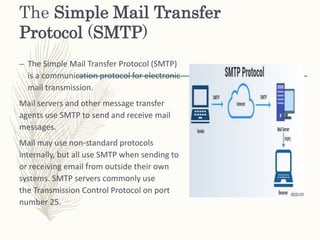
The Simple Mail Transfer
Protocol (SMTP)
– The Simple Mail Transfer Protocol (SMTP)
is a communication protocol for electronic
mail transmission.
Mail servers and other message transfer
agents use SMTP to send and receive mail
messages.
Mail may use non-standard protocols
internally, but all use SMTP when sending to
or receiving email from outside their own
systems. SMTP servers commonly use
the Transmission Control Protocol on port
number 25.
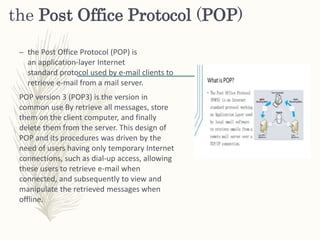
the Post Office Protocol (POP)
– the Post Office Protocol (POP) is
an application-layer Internet
standard protocol used by e-mail clients to
retrieve e-mail from a mail server.
POP version 3 (POP3) is the version in
common use By retrieve all messages, store
them on the client computer, and finally
delete them from the server. This design of
POP and its procedures was driven by the
need of users having only temporary Internet
connections, such as dial-up access, allowing
these users to retrieve e-mail when
connected, and subsequently to view and
manipulate the retrieved messages when
offline.
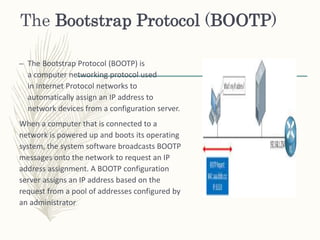
The Bootstrap Protocol (BOOTP)
– The Bootstrap Protocol (BOOTP) is
a computer networking protocol used
in Internet Protocol networks to
automatically assign an IP address to
network devices from a configuration server.
When a computer that is connected to a
network is powered up and boots its operating
system, the system software broadcasts BOOTP
messages onto the network to request an IP
address assignment. A BOOTP configuration
server assigns an IP address based on the
request from a pool of addresses configured by
an administrator
Advantages of client server network
– Centralization of control: access, resources and integrity of the data
are controlled by the dedicated server so that a program or
unauthorized client cannot damage the system. This centralization
also facilitates task of updating data or other resources (better than
the networks P2P).
– Scalability: You can increase the capacity of clients and servers
separately. Any element can be increased (or enhanced) at any time,
or you can add new nodes to the network (clients or servers).
– Easy maintenance: distribute the roles and responsibilities to several
standalone computers, you can replace, repair, upgrade, or even
move a server, while customers will not be affected by that change
(or minimally affect). This independence of the changes is also known
as encapsulation
Disadvantages of client
server network
 Traffic congestion has always been a problem in the paradigm of C / S.
 The paradigm of C / S Classic does not have the robustness of a network P2P. When a
server is down, customer requests cannot be met.
 The software and hardware of a server are usually very decisive. A regular computer
hardware staff may not be able to serve a certain number of customers.
 The client does not have the resources that may exist on the server. For example, if
the application is a Web, we cannot write the hard disk of the client or print directly
on printers without taking before the print preview window of the browser

client server protocol

  • 1.
    on 26th November2019 MODULE: computer networking GROUP2 Reg no: 17RP00761 17RP00736 17RP00753 17RP00851 ET3B LECTURER: Claudien MANIRIHO Question: description to client/server protocols
  • 2.
    What is client/server network Client–servermodel is a distributed application structure that partitions tasks or workloads between the providers of a resource or service, called servers, and service requesters, called clients.
  • 3.
    What is protocol –The Internet Protocol (IP) is a set of standards for addressing and routing data on the Internet. – Then client server protocols are the rules that governs communication in system contain server and clients computers.
  • 4.
    Transmission Control Protocol(TCP) – The Transmission Control Protocol (TCP) is one of the main protocols of the Internet protocol suite. It originated in the initial network implementation in which it complemented the Internet Protocol (IP). Therefore, the entire suite is commonly referred to as TCP/IP. TCP provides reliable, ordered, and error- checked delivery of a stream of octets (bytes) between applications running on hosts communicating via an IP network.
  • 5.
    Hypertext Transfer Protocol(HTTP) – The Hypertext Transfer Protocol (HTTP) is an application protocol for distributed, collaborative, hypermedia information systems. HTTP is the foundation of data communication for the World Wide Web, where hypertext documents include hyperlinks to other resources that the user can easily access, for example by a mouse click or by tapping the screen in a web browser.
  • 6.
    The File TransferProtocol (FTP) – The File Transfer Protocol (FTP) is a standard network protocol used for the transfer of computer files between a client and server on a computer network. – FTP users may authenticate themselves with a clear-text sign-in protocol, normally in the form of a username and password, but can connect anonymously if the server is configured to allow it. For secure transmission that protects the username and password, and encrypts the content.
  • 7.
    The Simple MailTransfer Protocol (SMTP) – The Simple Mail Transfer Protocol (SMTP) is a communication protocol for electronic mail transmission. Mail servers and other message transfer agents use SMTP to send and receive mail messages. Mail may use non-standard protocols internally, but all use SMTP when sending to or receiving email from outside their own systems. SMTP servers commonly use the Transmission Control Protocol on port number 25.
  • 8.
    the Post OfficeProtocol (POP) – the Post Office Protocol (POP) is an application-layer Internet standard protocol used by e-mail clients to retrieve e-mail from a mail server. POP version 3 (POP3) is the version in common use By retrieve all messages, store them on the client computer, and finally delete them from the server. This design of POP and its procedures was driven by the need of users having only temporary Internet connections, such as dial-up access, allowing these users to retrieve e-mail when connected, and subsequently to view and manipulate the retrieved messages when offline.
  • 9.
    The Bootstrap Protocol(BOOTP) – The Bootstrap Protocol (BOOTP) is a computer networking protocol used in Internet Protocol networks to automatically assign an IP address to network devices from a configuration server. When a computer that is connected to a network is powered up and boots its operating system, the system software broadcasts BOOTP messages onto the network to request an IP address assignment. A BOOTP configuration server assigns an IP address based on the request from a pool of addresses configured by an administrator
  • 10.
    Advantages of clientserver network – Centralization of control: access, resources and integrity of the data are controlled by the dedicated server so that a program or unauthorized client cannot damage the system. This centralization also facilitates task of updating data or other resources (better than the networks P2P). – Scalability: You can increase the capacity of clients and servers separately. Any element can be increased (or enhanced) at any time, or you can add new nodes to the network (clients or servers). – Easy maintenance: distribute the roles and responsibilities to several standalone computers, you can replace, repair, upgrade, or even move a server, while customers will not be affected by that change (or minimally affect). This independence of the changes is also known as encapsulation
  • 11.
    Disadvantages of client servernetwork  Traffic congestion has always been a problem in the paradigm of C / S.  The paradigm of C / S Classic does not have the robustness of a network P2P. When a server is down, customer requests cannot be met.  The software and hardware of a server are usually very decisive. A regular computer hardware staff may not be able to serve a certain number of customers.  The client does not have the resources that may exist on the server. For example, if the application is a Web, we cannot write the hard disk of the client or print directly on printers without taking before the print preview window of the browser